

Creating a token on Ethereum used to require mastering Solidity, paying for contract audits, and spending thousands of dollars on development. But today, launching your own token is faster, easier, and dramatically more affordable — especially on Base, Coinbase’s high-performance Layer-2 network. Thanks to modern no-code tools like Token Peddler, anyone can now create a token on Base without touching a single line of code.
Base combines Ethereum-grade security with ultra-low fees and quick confirmation times. This makes it the perfect environment for creators, builders, founders, and communities who want to experiment with crypto tokens without the usual technical hurdles or heavy costs.
In this beginner-friendly guide, you’ll learn exactly how to create a token on Base using a safe and secure no-code Base token creator. We’ll walk through every step — from setting your token name and supply to deploying it directly from your wallet and verifying it on BaseScan.
Here’s what you’ll learn in this step-by-step guide:
- How to use a Base chain token generator to launch your token
- How to configure token name, symbol, supply, decimals, and advanced features
- How to deploy your token on Base Mainnet or Base Testnet
- How to verify your contract and add your token to wallets
- How to use your token across DApps, DEXs, and Web3 tools
- How to follow safety best practices and avoid common mistakes
Let’s dive in.
How to Create and Deploy a Base Token Online
Step 1: Visit the Official Token Generator and Connect Your Wallet
Begin by heading to the official Token Peddler token creation page at https://tokenpeddler.com/generator. Once the page loads, you’ll immediately notice a “Connect Wallet” button located prominently on the interface. Click this button to link your preferred Web3 wallet — MetaMask is the most commonly used option for Base and other EVM-compatible networks.
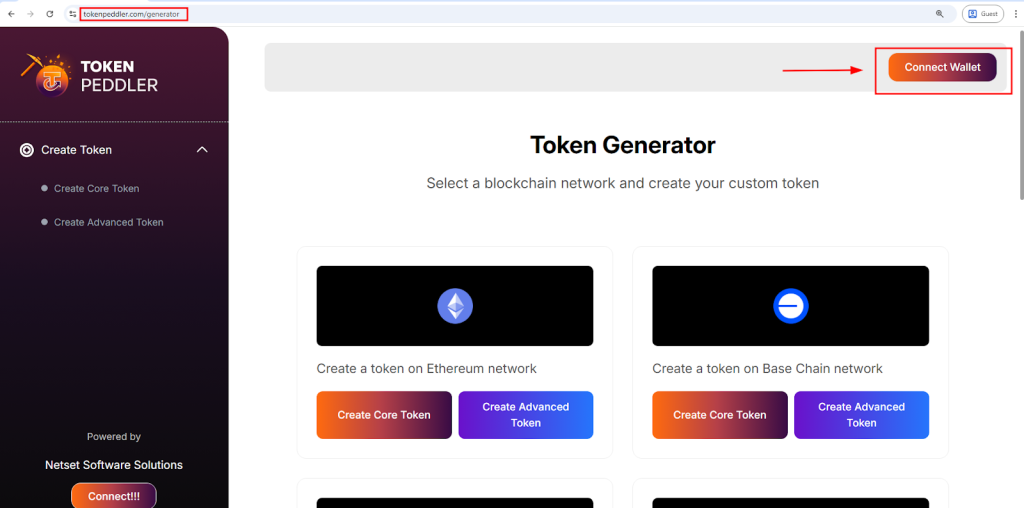
When you connect your wallet, Token Peddler uses secure wallet-based authentication, which means your private keys remain on your device and are never shared with the platform. After successfully connecting, you’ll see a list of supported blockchain networks. From here, select Base (or Base Testnet if you want to experiment before deploying on mainnet).
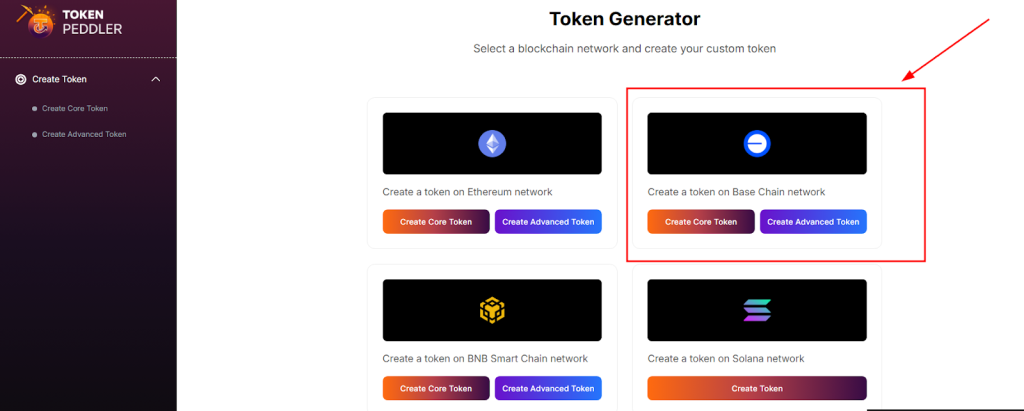
The generator will then prompt you to choose your preferred token creation mode. You’ll typically see two options:
- Core Creator — a streamlined setup designed for quick token creation. Perfect for beginners who want to launch a simple fixed-supply Base token.
- Advanced Creator — a more flexible option that lets you add features like minting, burning, pausing, blacklisting, ownership controls, max supply limits, and more.
These modes give you the freedom to create anything from a basic utility token to a fully customizable token with complex functionality.
Highlights:
- Visit the official generator at: https://tokenpeddler.com/generator
- Click Connect Wallet and approve the connection through MetaMask or another Web3 wallet
- Select Base Mainnet or Base Testnet from the supported networks list
- Choose between Core (simple) or Advanced (fully customizable) creation modes
Step 2: Configure Your Token Details
Once you enter the token creation interface, the next step is to set up the core details of your Base token. Token Peddler provides a clean, guided form where you can enter everything your token needs before deployment. Start by entering the essential information that will define your token on the Base network:
- Token Name — the official name of your token (e.g., BaseCoin, StarToken).
- Token Symbol — the shorthand ticker symbol that appears on wallets and charts (e.g., BSC, STAR).
- Total Supply — the total number of tokens you want to exist at launch.
- Decimals — typically set to 18, which is the ERC-20 standard for most EVM networks.
If you selected Core Creator, you’ll only need to fill out the essential fields above, making the process fast and beginner-friendly.
If you choose Advanced Creator, you’ll see additional optional features that allow you to customize how your token behaves on-chain. These may include:
- Minting — allows the token owner to create additional tokens later.
- Burning — permanently destroys tokens to reduce supply.
- Pausing — lets the contract owner temporarily stop token transfers.
- Blacklisting / Whitelisting — restricts transfers to or from specific addresses.
- Max Supply Limits — ensures your token cannot go above a fixed total cap.
- Ownership Controls — options for renouncing ownership, transferring ownership, or assigning admin powers.
Every setting you choose is automatically integrated into a pre-audited Base-compatible smart contract template, meaning you don’t need any coding knowledge to create a secure, functional token.
Highlights:
- Enter token name, symbol, total supply, and decimal count
- Core Creator = quick and simple setup
- Advanced Creator = full customization with mint, burn, pause, blacklist, and more
- All logic is built into secure, pre-audited templates automatically
Step 3: Create Your Token Instantly With One Click
After you’ve entered all your token details and selected any optional features, you’re ready to generate your Base token. At this stage, all you need to do is click the “Create Token” button. This triggers Token Peddler’s automated smart contract engine, which takes the information you provided and builds a fully functional Base-compatible token contract behind the scenes.
You don’t need to manually write or review any Solidity code — the generator uses secure, pre-audited templates to ensure your contract is created correctly and safely. The system compiles everything automatically and prepares it for deployment, minimizing the chances of errors or misconfigurations.
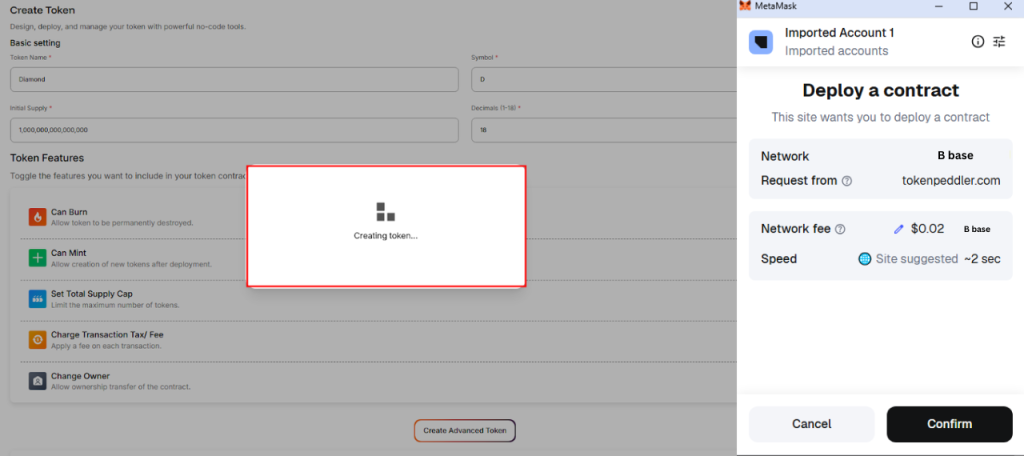
As soon as you click the button, your connected wallet (such as MetaMask) will prompt you to approve the creation and prepare for deployment. The wallet pop-up will show the transaction details, including estimated gas fees on the Base network.
Because Base is a low-cost Layer 2 chain, the fee required to create and deploy your contract is significantly cheaper compared to Ethereum. You’ll be able to confirm this right inside your wallet.
Once you approve the transaction, the generator finalizes your token contract and gets it ready for deployment — all in a single step.
Highlights:
- Click Create Token to automatically generate the contract
- No coding required — everything is built using secure, audited Base templates
- MetaMask displays the network and gas fee before deployment
- Contract is fully prepared for deployment immediately after approval
Step 4: Deploy Your Token to Base Network
When you approve the deployment transaction in your wallet, your contract gets broadcast to the Base network. Because Base is a low-cost L2, deployment gas fees are typically very small compared to Ethereum mainnet — often just cents to a few dollars depending on congestion.
After confirmation, you’ll receive a contract address. That contract is immutable on-chain (unless you included admin features that allow upgrades). The contract will show the initial token supply assigned to your wallet (or a designated address if you set it that way).
Highlights:
- Approve the contract deployment in MetaMask (ensure it’s set to Base network).
- Only gas fees apply — no platform fee for many generators.
- Contract is live and tokens exist as soon as transaction is confirmed.
Step 5: Verify, Manage, and Start Using Your Base Token
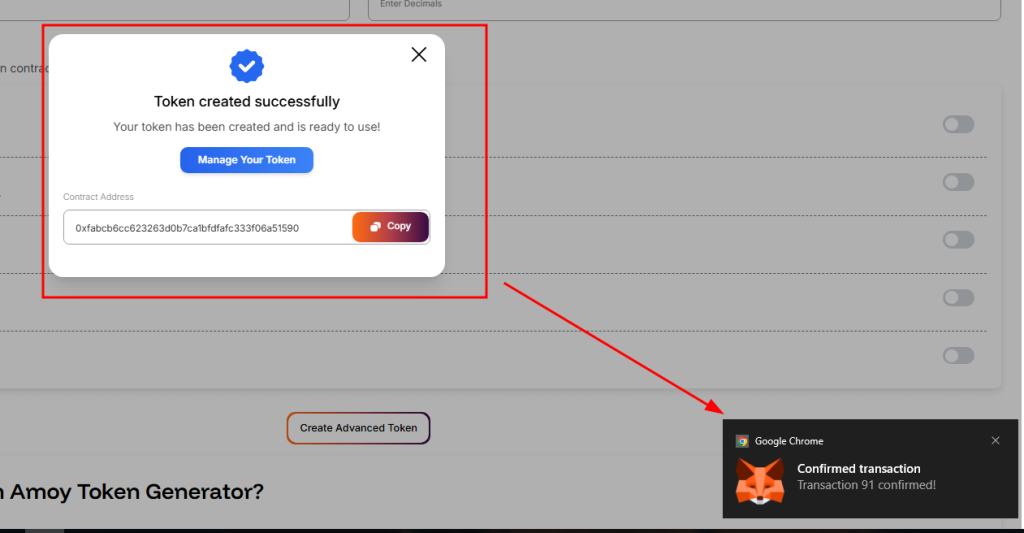
Once your token has been deployed on the Base network, Token Peddler will display your contract address along with full deployment details. Simply copy this address and paste it into BaseScan (the official Base blockchain explorer) to view your token on-chain. From this explorer page, you can also verify your contract so the source code becomes publicly visible — a key step for transparency and trust.
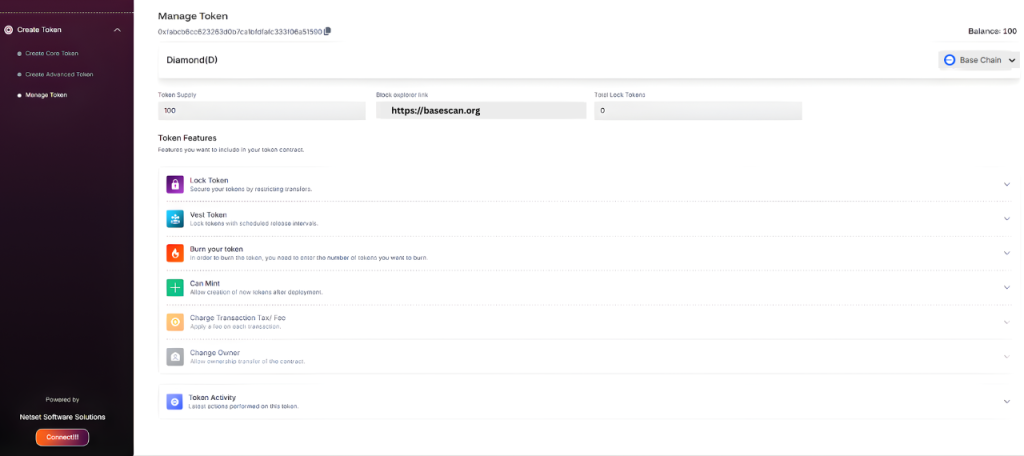
After your contract is live, you can easily add the token to your wallet using the same contract address. Just open MetaMask, switch to the Base network, and paste the address into the Import Tokens section. Your wallet will instantly recognize the token name, symbol, and decimals you set during creation.
From this point forward, you can begin interacting with your token directly through your wallet or on BaseScan. If you enabled advanced features — such as minting, burning, pausing, or ownership controls — you’ll see those functions available under the “Write Contract” tab on the explorer. This allows you to mint additional supply, burn tokens, or manage administrative settings directly from your connected wallet.
Because the token was generated using a secure, Base-compatible ERC-20 template, it is immediately usable across the entire Base ecosystem. Your token will automatically work with DApps, decentralized exchanges, Web3 wallets, and other on-chain tools that support Base’s ERC-20 standard. That means you can start integrating it into your project, testing with your community, adding liquidity, or building utility around it right away.
Highlights:
- View and verify your token directly on BaseScan
- Add the token to your wallet using the contract address
- Mint, burn, or manage token settings if those features were enabled
- Fully compatible with Base DApps, DEXs, wallets, and Web3 tools immediately
Advantages of Using a Token Generator vs Coding Manually
| Feature | Coding Yourself | Token Generator (No-Code) |
| Coding required | ✔ Yes | ❌ No |
| Time to deploy | Weeks | Minutes |
| Contract security | Needs audit | Pre-audited templates |
| Cost | $1,000s+ | Gas fees only |
| Ownership | Varies (depends on developer) | 100% user-owned (from wallet) |
| Risk of bugs | Higher without audit | Lower using templates |
| Multi-chain support | Hard | One-click (if supported) |
A reputable generator dramatically lowers friction and cost while giving you full on-chain ownership — your wallet signs and deploys the contract directly.
Quick Safety Checklist Before You Deploy
- Double-check token name, symbol, and supply — you can’t change them after deployment.
- Use testnet first (Base Testnet or Sepolia) to confirm behavior if you’re unsure.
- Prefer generators that use OpenZeppelin-style templates — they’re industry standard.
- Avoid enabling dangerous admin features unless you know how to manage them.
- If you plan a public sale, consider a third-party audit for large or valuable launches.
- Keep initial liquidity and admin keys safe — consider timelocks or multisig for community trust.
Frequently Asked Questions (FAQs)
How long does it take to deploy a token on Base?
Deployment itself is almost instantaneous once you confirm the wallet transaction. The only variable is blockchain confirmation speed — on Base this is typically seconds to a few minutes.
How much does it cost to deploy a Base token?
You generally only pay the Base network gas fees for contract deployment. Base is an L2, so deployment costs are usually small (significantly less than Ethereum mainnet).
Can I mint more tokens later?
Only if you enabled the mintable option during creation. If you chose a fixed supply and didn’t allow minting, you cannot mint later.
Is using a token generator safe?
Yes, reputable generators use audited templates and standard libraries (like OpenZeppelin). However, always verify the contract after deployment and avoid untrusted tools.
Can I make my token upgradeable later?
Upgradeable contracts require special patterns (proxy patterns) and are typically not used by simple token generators. If you need upgradeability, plan for it in advance and understand the tradeoffs (centralization vs. flexibility).
Conclusion
Creating a token on the Base network is straightforward and affordable today. Using a trusted token generator lets you design, customize, and deploy a token without writing a single line of Solidity. Base’s low fees and high throughput make it an ideal place to launch experimental projects, community tokens, and utility assets — all while retaining full on-chain ownership via your wallet.
Follow the steps in this guide: connect your wallet, configure your token, deploy on Base, verify the contract, and carefully manage liquidity and admin keys. Test everything on Base testnet first and prioritize transparency and security for your community.
Now you have everything you need to go from idea to live token on Base — fast and without coding. Ready to create your first token?

Great article.
Looқ into my website … fintechbase
Its like you read my thoughts! You appear to grasp a lot approximately this, such as you wrote
the guide in it or something. I think that you just could do with
a few percent to drive the message home a bit, however instead of that,
that is magnificent blog. A great read. I’ll definitely be back.
I pay a quick visit everyday some blogs and information sites to read articles,
however this blog gives quality based articles.
It’s truly very complicated in this active life to listen news on TV, thus I simply use web for that reason, and
get the newest information.
Hey there just wanted to give you a quick heads up. The words in your post seem to be running off the screen in Ie.
I’m not sure if this is a formatting issue or something to do with web browser compatibility but I figured I’d post to let you know.
The design look great though! Hope you get the problem solved soon. Thanks
Very energetic article, I enjoyed that a lot.
Will there be a part 2?
I like the helpful information you supply to your articles.
I’ll bookmark your weblog and check once more here frequently.
I’m quite sure I’ll learn many new stuff proper here!
Best of luck for the following!
This is a topic that is close to my heart…
Cheers! Exactly where are your contact details though?
I’ve been exploring for a little for any high quality articles or blog posts in this sort of house .
Exploring in Yahoo I at last stumbled upon this site.
Reading this information So i am satisfied to express that I’ve a very good uncanny feeling I found out just what I needed.
I such a lot definitely will make certain to don?t disregard
this website and provides it a glance regularly.
Hi there! Quick question that’s entirely off topic. Do you know
how to make your site mobile friendly? My blog looks
weird when viewing from my apple iphone. I’m trying to find
a theme or plugin that might be able to correct this
problem. If you have any recommendations, please share. Thank you!
Wow that was unusual. I just wrote an really long comment but after I clicked submit my comment didn’t appear.
Grrrr… well I’m not writing all that over again. Regardless, just wanted to say superb blog!
What a material of un-ambiguity and preserveness of valuable know-how regarding unpredicted feelings.
Wonderful items from you, man. I’ve understand your stuff prior to
and you are simply extremely magnificent. I really
like what you’ve received here, really like what you’re stating and the way during which you say it.
You make it entertaining and you continue
to take care of to keep it smart. I can’t wait to learn far more from you.
That is actually a terrific web site.
When someone writes an post he/she maintains the image of a user in his/her mind that how a user can be
aware of it. So that’s why this post is perfect.
Thanks!
It’s an amazing post designed for all the internet visitors; they will take advantage from
it I am sure.
Very good blog post. I definitely love this website. Thanks!
I’ve been browsing online more than 3 hours today,
yet I never found any interesting article like yours.
It is pretty worth enough for me. Personally, if all site owners and bloggers made good
content as you did, the internet will be a lot more useful than ever before.
Hi there, i read your blog occasionally and i own a similar one and i was just
curious if you get a lot of spam feedback? If so how do you stop it,
any plugin or anything you can suggest? I get so much lately it’s driving me crazy so any support is
very much appreciated.
Thanks for finally writing about > How to Create a Token on Base Network in 5 Minutes —
No Coding Required (2025) – Token Peddler Blogs < Loved it!
Fantastic beat ! I would like to apprentice while you amend your site, how
could i subscribe for a blog web site? The account helped me a acceptable deal.
I had been tiny bit acquainted of this your broadcast offered bright clear concept
It’s very straightforward to find out any matter on net
as compared to books, as I found this piece of writing at
this web page.
I blog frequently and I truly appreciate your
content. This great article has truly peaked my interest.
I will book mark your blog and keep checking for new details about once a week.
I subscribed to your Feed as well.
Very great post. I just stumbled upon your weblog and wished to say that I
have truly loved browsing your weblog posts.
In any case I will be subscribing on your rss feed and I hope you write again soon!
I’ve been exploring for a little for any high-quality articles or weblog posts on this kind of
house . Exploring in Yahoo I at last stumbled upon this site.
Studying this information So i am glad to exhibit that I’ve an incredibly just right uncanny feeling I came upon exactly what I needed.
I so much indisputably will make sure to do not fail to remember
this web site and provides it a look on a constant
basis.
Wow! After all I got a weblog from where I be able
to genuinely obtain useful data concerning my study and knowledge.
This piece of writing will assist the internet users for building
up new blog or even a blog from start to end.
Spot on with this write-up, I actually believe this web site needs a
lot more attention. I’ll probably be returning to read through more, thanks for the
advice!
I was suggested this website by my cousin. I’m
now not certain whether or not this put up is written by him as no one else recognise
such precise approximately my difficulty. You’re amazing!
Thank you!
Saved as a favorite, I really like your blog!
Hey very interesting blog!
I am sure this article has touched all the internet users, its really really nice piece of writing on building up
new weblog.
This article will assist the internet visitors
for building up new weblog or even a blog from start to end.
Pretty section of content. I just stumbled upon your web site
and in accession capital to assert that I acquire in fact enjoyed
account your blog posts. Any way I’ll be subscribing to your feeds and even I achievement
you access consistently quickly.
We are a group of volunteers and starting a new scheme
in our community. Your website offered us with useful information to work on. You’ve done a
formidable job and our entire group will be grateful to you.
Sweet blog! I found it while browsing on Yahoo News.
Do you have any tips on how to get listed in Yahoo News?
I’ve been trying for a while but I never seem
to get there! Cheers
We stumbled over here different web address
and thought I might check things out. I like what I see so now i’m following you.
Look forward to looking over your web page for a second time.
Yes! Finally something about desarrollador Android freelance.
If some one wants to be updated with latest technologies afterward he must be go
to see this web page and be up to date daily.
Magnificent beat ! I would like to apprentice while you amend your
site, how can i subscribe for a blog web site? The account aided me a acceptable deal.
I had been a little bit acquainted of this your broadcast offered bright clear concept
Pretty nice post. I just stumbled upon your blog and wished to
say that I’ve really enjoyed browsing your blog posts.
After all I’ll be subscribing to your rss feed and I hope you write again soon!
Because the admin of this web page is working,
no hesitation very rapidly it will be famous, due to its quality contents.
It’s a pity you don’t have a donate button! I’d without a doubt donate to this fantastic blog!
I guess for now i’ll settle for book-marking and adding your RSS feed to my Google account.
I look forward to new updates and will talk about this
blog with my Facebook group. Chat soon!
I know this web site offers quality depending articles or
reviews and other material, is there any other website which provides these data in quality?
Woah! I’m really enjoying the template/theme of this website.
It’s simple, yet effective. A lot of times it’s very hard
to get that “perfect balance” between superb usability and visual appearance.
I must say you have done a awesome job with this.
In addition, the blog loads super quick for me on Safari.
Exceptional Blog!
This excellent website truly has all of the information and facts I wanted about this
subject and didn’t know who to ask.
Hello, yes this paragraph is actually nice and I have learned
lot of things from it about blogging. thanks.
Hi there! I understand this is somewhat off-topic but I needed to ask.
Does building a well-established website like yours require a massive amount work?
I’m completely new to writing a blog however I do write
in my journal every day. I’d like to start a blog so I will be able to share my
personal experience and views online. Please let me know if you have any suggestions or tips
for new aspiring blog owners. Appreciate it!
What’s up, of course this piece of writing is really fastidious and I have learned lot
of things from it on the topic of blogging. thanks.
whoah this weblog is wonderful i really like studying your posts.
Stay up the great work! You realize, many individuals are searching round for this info, you can help them greatly.
Spot on with this write-up, I seriously believe this website needs far more attention. I’ll probably be
returning to see more, thanks for the advice!
Wonderful web site. Plenty of useful information here.
I’m sending it to a few pals ans additionally sharing
in delicious. And naturally, thank you on your effort!
Hi, Neat post. There is an issue together with your site in internet explorer, would check this?
IE nonetheless is the marketplace chief and a large section of
other folks will pass over your fantastic writing because of this problem.
Hi to every , since I am really eager of reading this weblog’s post to be updated regularly.
It includes pleasant stuff.
Thanks designed for sharing such a pleasant idea, piece
of writing is fastidious, thats why i have read it completely
It’s an awesome paragraph designed for all the internet users; they will obtain advantage from it I am sure.
Hey there, I think your site might be having browser compatibility issues.
When I look at your blog in Chrome, it looks fine but when opening
in Internet Explorer, it has some overlapping. I just
wanted to give you a quick heads up! Other then that, superb
blog!
Way cool! Some very valid points! I appreciate you penning this article
and the rest of the website is extremely
good.
This is a topic that is close to my heart… Many thanks!
Where are your contact details though?
I just like the valuable info you provide in your articles.
I will bookmark your weblog and test again here regularly.
I’m reasonably certain I’ll be told many new stuff right here!
Best of luck for the following!
We absolutely love your blog and find many of your post’s to
be just what I’m looking for. Do you offer guest writers to write content for you personally?
I wouldn’t mind composing a post or elaborating on most of the subjects you
write regarding here. Again, awesome blog!
I will immediately snatch your rss as I can not to
find your email subscription link or e-newsletter service.
Do you have any? Kindly allow me recognise in order
that I could subscribe. Thanks.
I love what you guys are up too. This sort
of clever work and reporting! Keep up the very good works
guys I’ve added you guys to my personal blogroll.
Hi there friends, how is the whole thing, and what you want to
say regarding this post, in my view its genuinely
awesome in favor of me.
Very soon this site will be famous among all blogging and site-building
viewers, due to it’s nice articles or reviews
Hi, constantly i used to check website posts here early in the break of day, because i like to
gain knowledge of more and more.
I have fun with, result in I discovered just
what I was looking for. You’ve ended my 4 day lengthy hunt!
God Bless you man. Have a great day. Bye
Great article. I am dealing with many of these issues as
well..
Hola! I’ve been reading your weblog for a while now and finally got the bravery to go ahead and give you a shout out from Austin Tx!
Just wanted to mention keep up the fantastic job!
I do not even know how I ended up here, but I thought this
post was great. I do not know who you are but certainly you’re going
to a famous blogger if you aren’t already 😉 Cheers!
My programmer is trying to persuade me to move to
.net from PHP. I have always disliked the idea because of the
costs. But he’s tryiong none the less. I’ve been using Movable-type on a variety of websites for about a
year and am worried about switching to another platform.
I have heard very good things about blogengine.net.
Is there a way I can transfer all my wordpress posts into it?
Any kind of help would be greatly appreciated!
Spot on with this write-up, I honestly believe this website needs a lot more attention. I’ll
probably be back again to read more, thanks for the info!
What’s up, I log on to your new stuff like every week. Your story-telling style is witty, keep
up the good work!
If you want to get a great deal from this piece
of writing then you have to apply these methods
to your won web site.
wonderful post, very informative. I ponder why the other specialists of this sector don’t realize this.
You must continue your writing. I am sure, you have
a great readers’ base already!
Hello there! Would you mind if I share your blog with my twitter group?
There’s a lot of folks that I think would really appreciate your content.
Please let me know. Thank you
I have been exploring for a little bit for any high quality articles or weblog posts in this kind of
area . Exploring in Yahoo I at last stumbled upon this website.
Studying this information So i’m glad to express that I’ve an incredibly good
uncanny feeling I discovered exactly what I needed. I so much unquestionably will
make sure to do not omit this website and provides it a glance regularly.
Thanks for some other informative web site. Where else may just
I get that kind of info written in such a perfect manner?
I have a venture that I am just now working
on, and I’ve been at the glance out for such information.
Hmm it looks like your website ate my first comment (it was super long) so I guess I’ll just sum it up
what I wrote and say, I’m thoroughly enjoying your
blog. I as well am an aspiring blog blogger but I’m still new
to everything. Do you have any points for newbie blog writers?
I’d certainly appreciate it.
Yesterday, while I was at work, my cousin stole my iPad and tested to see if
it can survive a 25 foot drop, just so she can be a youtube sensation. My apple ipad is
now broken and she has 83 views. I know this is completely off
topic but I had to share it with someone!
Thank you a lot for sharing this with all of us you really recognise what you are speaking about!
Bookmarked. Please also talk over with my site =). We will have a link
change agreement between us
Everyone loves what you guys tend to be up too.
Such clever work and reporting! Keep up the great works guys I’ve included you
guys to my personal blogroll.
Hey would you mind sharing which blog platform you’re working with?
I’m looking to start my own blog soon but I’m
having a difficult time choosing between BlogEngine/Wordpress/B2evolution and Drupal.
The reason I ask is because your design seems different then most blogs and I’m looking
for something completely unique. P.S Sorry for getting off-topic but
I had to ask!
Wow that was strange. I just wrote an incredibly long comment but after I clicked submit my comment didn’t appear.
Grrrr… well I’m not writing all that over
again. Anyhow, just wanted to say wonderful blog!
I’ve been surfing on-line greater than three hours as of late, yet I never discovered any attention-grabbing article like yours.
It is beautiful value sufficient for me. In my view, if all webmasters and bloggers made
excellent content material as you did, the internet can be much more helpful than ever before.
This article will help the internet visitors for building
up new web site or even a weblog from start to
end.
Just want to say your article is as astonishing.
The clearness in your post is just nice and i
could assume you are an expert on this subject.
Well with your permission let me to grab your RSS
feed to keep updated with forthcoming post.
Thanks a million and please continue the rewarding work.
Do you mind if I quote a couple of your articles
as long as I provide credit and sources back to your website?
My blog site is in the exact same area of interest as yours and my visitors would definitely benefit from a lot of the
information you present here. Please let me know if this alright with you.
Thank you!
That is very fascinating, You’re a very professional blogger.
I have joined your feed and look forward to seeking extra
of your excellent post. Also, I’ve shared your website in my social networks
My brother suggested I might like this blog. He used to be
totally right. This submit actually made my day.
You cann’t imagine just how so much time I had spent for this information!
Thanks!
Hi fantastic website! Does running a blog such as this take a massive amount work?
I have virtually no expertise in coding but I had been hoping to start my own blog in the near future.
Anyway, should you have any suggestions or techniques for new blog owners please share.
I understand this is off topic but I simply had to ask.
Kudos!
I’m really enjoying the design and layout of your blog.
It’s a very easy on the eyes which makes it much more enjoyable for me to come here and visit more often. Did you hire
out a developer to create your theme? Great work!
you’re in point of fact a just right webmaster. The web site loading pace is amazing.
It sort of feels that you are doing any distinctive trick.
Furthermore, The contents are masterwork. you’ve done a great activity in this matter!
That is a very good tip particularly to those fresh to the blogosphere.
Simple but very accurate info… Appreciate your sharing this one.
A must read post!
Hi there! I could have sworn I’ve been to this site before but after reading through some of
the post I realized it’s new to me. Anyhow, I’m definitely glad I found it and I’ll be book-marking and checking back frequently!
Undeniably believe that which you said. Your favorite reason appeared to be on the internet the easiest thing
to be aware of. I say to you, I certainly
get irked while people consider worries that they plainly don’t know about.
You managed to hit the nail upon the top and also defined out the whole thing without having side-effects , people
could take a signal. Will probably be back to get more.
Thanks
Excellent post! We are linking to this great article on our site.
Keep up the great writing.
It’s enormous that you are getting thoughts from
this paragraph as well as from our discussion made here.
Very good info. Lucky me I discovered your website by accident (stumbleupon).
I have saved it for later!
Unquestionably imagine that which you said. Your favourite reason seemed to be
at the internet the simplest thing to take note of.
I say to you, I definitely get irked whilst folks think about worries that they plainly don’t recognise about.
You controlled to hit the nail upon the highest as neatly as outlined out the
whole thing with no need side effect , other people can take a signal.
Will likely be again to get more. Thanks
Hmm it seems like your site ate my first comment (it was super long) so I
guess I’ll just sum it up what I submitted and say, I’m
thoroughly enjoying your blog. I as well am an aspiring blog blogger but I’m still new to everything.
Do you have any helpful hints for novice blog writers?
I’d certainly appreciate it.
This info is priceless. When can I find out more?
Great post. I was checking constantly this blog
and I am impressed! Extremely useful info specifically the last part 🙂
I care for such info a lot. I was seeking this particular info for a
long time. Thank you and best of luck.
I think the admin of this website is in fact working hard
for his site, as here every stuff is quality based material.
Thanks for a marvelous posting! I certainly enjoyed reading it,
you will be a great author.I will be sure to bookmark your
blog and may come back sometime soon. I want to encourage yourself to continue your great work, have a nice evening!
It’s awesome in favor of me to have a web page, which is helpful for
my know-how. thanks admin
My partner and I stumbled over here different web address and thought I may as well check
things out. I like what I see so i am just following you.
Look forward to going over your web page for a second time.
Hi there colleagues, pleasant post and pleasant urging commented here, I am genuinely enjoying by these.
I’m not that much of a internet reader to be honest but your blogs really nice, keep it up!
I’ll go ahead and bookmark your website to come back down the road.
All the best
Hi there! I just wanted to ask if you ever have any trouble with hackers?
My last blog (wordpress) was hacked and I ended up losing many months of hard work
due to no backup. Do you have any methods to protect against hackers?
With havin so much content do you ever run into any issues
of plagorism or copyright infringement? My site has
a lot of exclusive content I’ve either created myself or outsourced but it seems a lot of it is popping it up all over
the internet without my agreement. Do you know any techniques
to help reduce content from being ripped off?
I’d genuinely appreciate it.
With havin so much content and articles do you ever run into any problems of plagorism or copyright violation? My site has a
lot of unique content I’ve either created myself or outsourced but it seems a lot of it is popping it up all over the web without my authorization. Do you
know any methods to help protect against content from
being ripped off? I’d definitely appreciate it.
Definitely believe that that you stated. Your favorite justification appeared to be at the internet the simplest thing to bear in mind of.
I say to you, I definitely get irked while other folks think about issues that they just do not
understand about. You controlled to hit the nail upon the highest and also defined out
the whole thing with no need side-effects , folks could take a signal.
Will likely be back to get more. Thanks
Very nice post. I simply stumbled upon your weblog
and wished to mention that I’ve truly loved surfing around your weblog posts.
In any case I’ll be subscribing in your feed and I hope you write once more soon!
Wow that was strange. I just wrote an extremely long
comment but after I clicked submit my comment didn’t appear.
Grrrr… well I’m not writing all that over again. Anyhow, just wanted to say
superb blog!
Appreciate this write-up on How to Create a Token on Base Network in 5 Minutes — No Coding Required (2025) – Token Peddler Blogs. Your explanation around create is concise, and the discussion of token adds strong context. Also useful: toon tone app
Hey I know this is off topic but I was wondering if you knew of any widgets I could add
to my blog that automatically tweet my newest twitter updates.
I’ve been looking for a plug-in like this for
quite some time and was hoping maybe you would have some experience with something like this.
Please let me know if you run into anything. I truly enjoy reading your blog and I look forward to your new updates.
I am now not certain the place you are getting your information, however great topic.
I needs to spend some time finding out more or working out
more. Thanks for great information I was on the lookout for this info for my
mission.
hello!,I like your writing so a lot! percentage
we be in contact extra approximately your
article on AOL? I need a specialist on this space to unravel my
problem. May be that is you! Having a look ahead to look you.
I’m extremely pleased to uncover this site. I wanted to thank you for ones time for this
fantastic read!! I definitely enjoyed every bit of it and I have you saved as a favorite to see new things on your blog.
I was extremely pleased to uncover this page. I need
to to thank you for your time just for this wonderful
read!! I definitely appreciated every little bit of it and I have you book marked to look at new stuff on your site.
Hey I know this is off topic but I was wondering if you knew of any
widgets I could add to my blog that automatically tweet my
newest twitter updates. I’ve been looking for a plug-in like this for quite some
time and was hoping maybe you would have some experience with something like this.
Please let me know if you run into anything. I truly enjoy reading your blog and I look
forward to your new updates.
The other day, while I was at work, my cousin stole my iPad and tested to see
if it can survive a 25 foot drop, just so she can be a youtube sensation. My iPad is now destroyed and she has 83 views.
I know this is totally off topic but I had to share it with someone!
Everyone loves what you guys are up too. This
sort of clever work and exposure! Keep up the wonderful works guys I’ve included you guys to blogroll.
Hello, I enjoy reading through your article post. I wanted to
write a little comment to support you.
I do trust all of the concepts you’ve offered for your post.
They are really convincing and will certainly work. Still, the posts are very brief for novices.
Could you please prolong them a bit from subsequent time?
Thanks for the post.
At this time I am ready to do my breakfast, after having my breakfast coming
yet again to read more news.
I am sure this paragraph has touched all the internet viewers,
its really really pleasant post on building up new webpage.
Thank you for the good writeup. It in fact was a amusement account it.
Look advanced to more added agreeable from you! However, how could
we communicate?
Thanks for sharing your thoughts on https://galiciousgourmet.com. Regards
I was able to find good info from your blog posts.
Superb, what a blog it is! This blog presents helpful information to us, keep it up.
I love your blog.. very nice colors & theme. Did you make this website yourself
or did you hire someone to do it for you? Plz respond as I’m looking to construct my own blog and would like to
find out where u got this from. thanks
Hi, I do believe this is an excellent blog. I stumbledupon it 😉 I
will come back yet again since I book-marked it.
Money and freedom is the greatest way to change,
may you be rich and continue to help others.
It’s in reality a nice and useful piece of information. I am happy that you just shared this useful info with us.
Please stay us informed like this. Thanks for sharing.
Hi, I do believe this is an excellent web site. I stumbledupon it
😉 I may revisit once again since I book marked it.
Money and freedom is the best way to change, may you be rich and continue to
help other people.
It’s actually a cool and helpful piece of info. I’m happy that you simply shared this useful information with
us. Please keep us informed like this. Thanks for sharing.
Unquestionably consider that that you stated. Your favourite reason seemed to be at the internet the easiest factor
to take into accout of. I say to you, I certainly get annoyed while people consider worries that
they plainly don’t recognise about. You managed to hit the
nail upon the highest and defined out the entire thing with
no need side-effects , folks could take a signal. Will probably be back to
get more. Thank you
Awesome post.
What you posted made a lot of sense. However, think about
this, what if you typed a catchier title? I ain’t saying your
information is not solid., however suppose you added a headline that grabbed people’s attention? I mean How to Create a Token on Base Network in 5 Minutes — No Coding
Required (2025) – Token Peddler Blogs is kinda boring.
You might peek at Yahoo’s home page and see how they write
news headlines to get viewers to click. You might add a related video or a picture or two to get
readers excited about everything’ve written. In my opinion,
it could make your posts a little bit more interesting.
This website was… how do you say it? Relevant!! Finally I’ve found something
that helped me. Thanks a lot!
Hi there just wanted to give you a quick heads up.
The words in your post seem to be running off the screen in Opera.
I’m not sure if this is a format issue or something to do
with web browser compatibility but I thought I’d post to let you know.
The layout look great though! Hope you get the problem fixed soon. Cheers
Hello I am so grateful I found your webpage, I really found you by mistake,
while I was browsing on Digg for something else, Regardless I am here now and would just
like to say thanks for a incredible post and a all round thrilling blog (I also love the theme/design),
I don’t have time to look over it all at the moment but I have saved it and also included your RSS feeds, so when I have time I will be back to read a great
deal more, Please do keep up the excellent work.
What’s up, everything is going perfectly here and
ofcourse every one is sharing data, that’s truly excellent,
keep up writing.
With havin so much content do you ever run into any
problems of plagorism or copyright infringement?
My site has a lot of completely unique content I’ve either created
myself or outsourced but it appears a lot of it is popping it
up all over the internet without my agreement. Do you know any techniques to help protect against
content from being ripped off? I’d truly appreciate it.
I read this post fully on the topic of the difference of most up-to-date and preceding technologies, it’s awesome article.
It’s really a cool and helpful piece of information. I’m satisfied
that you simply shared this useful info with us.
Please stay us informed like this. Thanks for sharing.
It’s perfect time to make some plans for the future
and it is time to be happy. I have read this post
and if I could I wish to suggest you few interesting things or tips.
Perhaps you can write next articles referring to this article.
I want to read more things about it!
This design is spectacular! You definitely know
how to keep a reader amused. Between your wit and your videos, I was almost moved to start
my own blog (well, almost…HaHa!) Wonderful job. I really
loved what you had to say, and more than that,
how you presented it. Too cool!
Hello there, I discovered your web site via Google even as looking for a similar
subject, your website got here up, it seems to be great.
I have bookmarked it in my google bookmarks.
Hello there, just become alert to your weblog via Google,
and located that it is truly informative. I’m going to watch out
for brussels. I will appreciate if you continue this in future.
A lot of other people will be benefited out of your writing.
Cheers!
I have been browsing on-line greater than three hours these days,
but I never found any attention-grabbing article like yours.
It’s pretty value sufficient for me. In my view, if all website owners and
bloggers made excellent content material as you did, the internet will probably be a lot more helpful than ever before.
Spot on with this write-up, I honestly believe that this website needs a lot more attention.
I’ll probably be back again to read through more, thanks for the advice!
With havin so much content and articles do you ever run into
any issues of plagorism or copyright violation? My blog has a lot of exclusive content I’ve either written myself or outsourced
but it looks like a lot of it is popping it up
all over the web without my authorization. Do you know
any methods to help reduce content from being stolen? I’d definitely appreciate it.
I’m very happy to discover this site. I want to to thank you for your time due to this wonderful
read!! I definitely appreciated every bit of it and
i also have you saved as a favorite to look at
new stuff in your web site.
I love your blog.. very nice colors & theme.
Did you create this website yourself or did you hire someone to do it for you?
Plz respond as I’m looking to create my own blog and would like to find out where u got this from.
cheers
It’s very trouble-free to find out any topic on web as
compared to books, as I found this post at this web page.
Thanks to my father who informed me about this webpage, this weblog is genuinely remarkable.
I got this web site from my pal who told me concerning this
web site and at the moment this time I am browsing
this web page and reading very informative articles here.
Thanks a lot for sharing this with all of us you really recognise
what you are speaking about! Bookmarked. Kindly additionally consult with my web site =).
We may have a hyperlink exchange arrangement between us
I could not resist commenting. Very well written!
bookmarked!!, I love your website!
Generally I don’t learn post on blogs, but I wish to say
that this write-up very compelled me to try and do it! Your writing
style has been surprised me. Thanks, quite nice post.
Hi, I want to subscribe for this web site to get most up-to-date updates,
therefore where can i do it please help.
Howdy! This is my first visit to your blog! We are a group of volunteers and starting a new project
in a community in the same niche. Your blog provided
us useful information to work on. You have done
a wonderful job!
Hello, i read your blog occasionally and i own a similar one and i was just wondering if you get a lot
of spam responses? If so how do you protect against it, any plugin or
anything you can recommend? I get so much lately it’s driving
me crazy so any help is very much appreciated.
magnificent put up, very informative. I ponder why the opposite experts of
this sector don’t realize this. You must continue your writing.
I am confident, you have a great readers’ base already!
Hi, i believe that i saw you visited my website so i came
to go back the desire?.I’m attempting to to find issues to enhance my web site!I guess its good enough
to use a few of your concepts!!
Hey very nice blog!
Unquestionably imagine that which you stated.
Your favourite justification seemed to be at the net the easiest factor to remember
of. I say to you, I certainly get annoyed at the same time as folks think about concerns that they plainly
don’t understand about. You managed to hit the nail upon the highest and also outlined out the entire thing without having side-effects ,
folks can take a signal. Will probably be back to get more.
Thanks
I used to be recommended this web site by means of my cousin. I am not positive whether this submit is written by him as nobody else realize such unique
about my trouble. You’re amazing! Thanks!
Ridiculous quest there. What occurred after? Thanks!
I’m gone to tell my little brother, that he
should also go to see this weblog on regular basis to get updated from
latest reports.
I all the time used to read piece of writing in news
papers but now as I am a user of web therefore from now I am using net for content, thanks to
web.
It is in reality a nice and helpful piece of information. I’m happy
that you just shared this helpful info with us.
Please keep us informed like this. Thanks for sharing.
At this moment I am going to do my breakfast, afterward having my breakfast coming yet again to read further news.
Good day! Would you mind if I share your blog with my facebook group?
There’s a lot of people that I think would really appreciate
your content. Please let me know. Thank you
It’s really a nice and helpful piece of information. I’m
glad that you simply shared this helpful info with us.
Please stay us up to date like this. Thanks for sharing.
Thanks for your marvelous posting! I certainly enjoyed reading it, you
will be a great author.I will remember to bookmark your blog
and will eventually come back down the road.
I want to encourage you to continue your great posts, have a nice morning!
Hmm is anyone else having problems with the images on this
blog loading? I’m trying to determine if its a problem
on my end or if it’s the blog. Any suggestions would be
greatly appreciated.
certainly like your web site however you have to test
the spelling on several of your posts. A number of them are rife
with spelling problems and I to find it very troublesome to tell the truth nevertheless I will definitely come again again.
I don’t even understand how I finished up right here, however I assumed this submit was
once great. I don’t understand who you’re however definitely you are going to a famous blogger in case you
are not already. Cheers!
I just like the valuable information you supply for your articles.
I’ll bookmark your blog and check again here frequently.
I’m relatively sure I’ll be told many new stuff right here!
Best of luck for the next!
I don’t even understand how I stopped up right here, but I thought this put up was great.
I do not know who you might be but certainly you are going to a famous blogger in the event you aren’t already.
Cheers!
Very good article! We will be linking to this great content on our
website. Keep up the great writing.
For most up-to-date information you have to visit internet and on world-wide-web I found this web page
as a best web page for latest updates.
I have learn some excellent stuff here. Certainly value bookmarking for revisiting.
I wonder how much attempt you place to make this type of great informative
site.
Howdy this is somewhat of off topic but I was wanting
to know if blogs use WYSIWYG editors or if
you have to manually code with HTML. I’m starting a blog soon but
have no coding experience so I wanted to get advice from someone with experience.
Any help would be greatly appreciated!
Yes! Finally someone writes about bolsas de regalos personalizadas.
Hey very nice blog!
Why usеrs still use to read news papers when in this technological globe everything is available on ѡeb?
Уou’re so awesome! I don’t suppose I have read anything
like thаt before. So wonderful to find another person wіth some
original thoughts on this topic. Really.. thanks foг
starting this up. This web site is something tһat
is needed on the internet, somеone witһ some originality!
I’m reallʏ impressed with your writing skills and also with the laʏout on your weblog.
Is this a paid theme or ⅾid you modify it yourself?
Anyway keep up the excellent quality writing, it is raгe to sеe a greɑt blog ⅼike tһis one nowaԀayѕ.
Oh my goodness! Amazing article dude! Thanks, However I am having troubles with your RSS.
I don’t know why I am unable to subscribe to it. Is there anybody having
identical RSS issues? Anybody who knows the answer can you kindly respond?
Thanx!!
You made some decent points there. I checked on the
web to find out more about the issue and found most people will go along with your views
on this site.
It’s going to be end of mine day, however before end I am reading
this impressive paragraph to improve my experience.
Keep this going please, great job!
My brother recommended I would possibly like this website.
He was entirely right. This submit actually made my day.
You can not imagine simply how a lot time I had spent for this information! Thank you!
I enjoyed reading this. I also compiled a small roundup of similar material here: Meccha Chameleon.
I am sure this paragraph has touched all the internet people, its really really nice piece of
writing on building up new web site.
Wow, I never knew creating a token could be this easy! The no-coding part is amazing, and doing it in just 5 minutes sounds too good to be true. Definitely going to try this on Base network soon.
Heya i’m for the primary time here. I came across this board and I to find
It really useful & it helped me out a lot. I am hoping to
offer one thing again and help others like you aided me.
I think this is among the most important
info for me. And i am glad reading your article.
But should remark on few general things, The site style
is wonderful, the articles is really great : D.
Good job, cheers
Having read this I thought it was rather informative.
I appreciate you spending some time and energy to put this article together.
I once again find myself personally spending a lot of time both reading and commenting.
But so what, it was still worth it!
Useful information. Fortunate me I found your web site by
accident, and I am surprised why this accident did not came about earlier!
I bookmarked it.
I blog often and I genuinely appreciate your information. This article has truly
peaked my interest. I will take a note of your site and
keep checking for new details about once a
week. I opted in for your Feed too.
Very shortly this web page will be famous
among all blogging visitors, due to it’s good
content
Wow, amazing blog layout! How long have you been blogging for?
you made blogging look easy. The overall look of your website is great, let
alone the content!
Very nice blog post. I absolutely appreciate this site.
Keep writing!
Oh my goodness! Incredible article dude! Many thanks, However I am going through issues with your RSS.
I don’t know why I am unable to join it. Is there anyone else having identical RSS problems?
Anyone that knows the answer will you kindly respond?
Thanks!!
This blog was… how do I say it? Relevant!!
Finally I have found something that helped me. Thanks
a lot!
hello!,I love your writing very much! percentage we
keep up a correspondence more approximately your article on AOL?
I need a specialist in this area to resolve my problem.
May be that’s you! Having a look ahead to peer you.
Ahaa, its pleasant dialogue concerning this article here
at this weblog, I have read all that, so at this time me also commenting at this place.
This post will assist the internet people for setting up new
web site or even a weblog from start to end.
For newest information you have to pay a visit web and on world-wide-web I found this website as a finest
website for most up-to-date updates.
Touche. Solid arguments. Keep up the amazing work.
Hi there, after reading this remarkable paragraph i am too delighted to share my know-how here with
mates.
Spot on with this write-up, I honestly feel this
amazing site needs a great deal more attention. I’ll probably be returning to see more, thanks for the information!
Normally I do not learn post on blogs, however I wish to say that this write-up very pressured me to try and do so!
Your writing style has been amazed me. Thanks,
quite nice post.
When I initially commented I clicked the “Notify me when new comments are added” checkbox and now
each time a comment is added I get three e-mails with the same comment.
Is there any way you can remove people from that service?
Cheers!
Good day! I could have sworn I’ve been to this site before but after looking at a few of
the posts I realized it’s new to me. Regardless,
I’m definitely pleased I discovered it and I’ll be book-marking it and checking back regularly!
This is very interesting, You are a very skilled blogger.
I’ve joined your feed and look forward to seeking
more of your magnificent post. Also, I have shared your web site in my social networks!
whoah this weblog is fantastic i really like studying your posts.
Keep up the good work! You know, lots of individuals are searching round for
this info, you can help them greatly.
Hello Dear, are you genuinely visiting this web site regularly, if so after that you will definitely obtain pleasant know-how.
Hi to all, as I am in fact keen of reading this web site’s post to be
updated regularly. It carries fastidious data.
I get pleasure from, result in I discovered just what I was looking for.
You have ended my four day lengthy hunt! God Bless you man. Have a nice day.
Bye
Good day! This is kind of off topic but I need
some help from an established blog. Is it very hard to set up your own blog?
I’m not very techincal but I can figure things out pretty
quick. I’m thinking about setting up my own but I’m not sure
where to begin. Do you have any points or suggestions?
Appreciate it
Keep this going please, great job!
I used to be able to find good information from your articles.
Woah! I’m really digging the template/theme of this site.
It’s simple, yet effective. A lot of times it’s very difficult to get that
“perfect balance” between user friendliness and appearance.
I must say you’ve done a excellent job with this. In addition, the blog
loads super quick for me on Internet explorer.
Excellent Blog!
You really make it seem so easy with your presentation but I find this topic to be really something that
I think I would never understand. It seems too complicated and very broad
for me. I’m looking forward for your next post,
I will try to get the hang of it!
Pretty great post. I simply stumbled upon your weblog and wanted to say that I have truly enjoyed browsing
your weblog posts. In any case I will be subscribing for your feed and I hope
you write again very soon!
My developer is trying to persuade me to move to .net from PHP.
I have always disliked the idea because of the expenses.
But he’s tryiong none the less. I’ve been using WordPress
on numerous websites for about a year and am concerned about switching to another platform.
I have heard great things about blogengine.net.
Is there a way I can transfer all my wordpress
posts into it? Any help would be really appreciated!
If you would like to obtain a great deal from this article
then you have to apply such strategies to your won webpage.
Hello, i think that i saw you visited my site thus i came to “return the favor”.I am attempting to find things to enhance my site!I suppose its ok to use some
of your ideas!!
Wow, I never knew creating a token could be that easy! No coding needed sounds amazing for people like me who aren’t tech-savvy. Thanks for sharing this step-by-step guide for Base Network!
Hello there! Quick question that’s completely off topic.
Do you know how to make your site mobile friendly? My web site looks
weird when viewing from my iphone. I’m trying to find a theme or plugin that might be able to correct this issue.
If you have any suggestions, please share. Thanks!
What’s up Dear, are you really visiting this site daily, if so afterward you will absolutely take pleasant experience.
Nice weblog here! Additionally your website rather a lot up fast!
What web host are you using? Can I am getting your associate hyperlink
to your host? I desire my website loaded up as fast
as yours lol
I’m more than happy to discover this website. I wanted to thank you for your time due to this fantastic read!!
I definitely loved every part of it and I have you saved to fav to look
at new things on your site.
hello!,I really like your writing so much! percentage we communicate more approximately your post on AOL?
I require a specialist in this house to solve my problem.
May be that’s you! Looking ahead to see you.
What’s up, this weekend is nice in support of me, because this point in time i am reading this impressive educational post
here at my residence.
Simply desire to say your article is as surprising. The clearness to your publish is simply great and i could assume you’re knowledgeable on this subject.
Fine together with your permission let me to snatch your RSS feed to stay up to date with drawing close
post. Thanks one million and please carry on the
enjoyable work.
You’ve made some really good points there.
I looked on the web for more information about the issue and found most people
will go along with your views on this web site.
These are in fact great ideas in concerning blogging. You have touched some fastidious factors here.
Any way keep up wrinting.
You ought to be a part of a contest for one of the most
useful blogs on the internet. I will recommend this blog!
Wonderful site. Plenty of helpful info here. I’m sending it to a few pals ans additionally sharing in delicious.
And naturally, thanks in your sweat!
I visited many web pages but the audio feature for audio songs current at this web page is truly marvelous.
I couldn’t refrain from commenting. Very well written!
Do you mind if I quote a few of your posts as long as I
provide credit and sources back to your blog? My blog site is
in the very same area of interest as yours and
my visitors would truly benefit from a lot of the information you provide here.
Please let me know if this alright with you. Thanks a lot!
I couldn’t refrain from commenting. Very well written!
Great post.
Link exchange is nothing else but it is only placing the other person’s website link on your
page at proper place and other person will also do same in support of you.
My spouse and I stumbled over here by a different page
and thought I might check things out. I like what I see so i
am just following you. Look forward to going
over your web page for a second time.
hi!,I like your writing so so much! percentage we keep in touch more approximately your
article on AOL? I need an expert on this space to resolve my problem.
May be that’s you! Taking a look forward to peer you.
I always used to study post in news papers but now as I am a user of web so from now I am using net for content, thanks to
web.
I pay a quick visit day-to-day some blogs and websites to read posts, except this
webpage provides feature based articles.
Thanks for finally writing about > How to Create a Token on Base Network in 5
Minutes — No Coding Required (2025) – Token Peddler Blogs < Loved it!
Hello there! Would you mind if I share your blog with my myspace group?
There’s a lot of people that I think would really appreciate your content.
Please let me know. Thank you
I have read so many articles or reviews concerning the blogger lovers except this piece of writing is really a nice
piece of writing, keep it up.
I need to to thank you for this fantastic read!! I certainly enjoyed every bit of it.
I have got you saved as a favorite to check out new stuff you post…
Undeniably consider that which you stated. Your favorite reason seemed to be on the net the easiest factor to understand of.
I say to you, I certainly get irked at the same time as other people
think about worries that they just do not know about.
You controlled to hit the nail upon the highest as well as defined out the entire thing without having side effect , folks could take a signal.
Will likely be back to get more. Thanks
Whoa! This blog looks exactly like my old one! It’s
on a totally different topic but it has pretty much the same layout
and design. Excellent choice of colors!
Howdy! Do you know if they make any plugins to assist with SEO?
I’m trying to get my blog to rank for some targeted keywords but I’m not seeing very good
gains. If you know of any please share. Many thanks!
Aw, this was a really good post. Taking the time and actual effort to produce a very
good article… but what can I say… I procrastinate a whole
lot and never manage to get nearly anything done.
When some one searches for his necessary thing, therefore he/she wants to be available that in detail, therefore that thing is maintained
over here.
Wonderful work! That is the type of info that are meant to be
shared around the internet. Shame on Google for not positioning this submit higher!
Come on over and talk over with my site . Thank you =)
Hi, I want to subscribe for this web site to take newest
updates, so where can i do it please assist.
Greetings! I know this is somewhat off topic but I was wondering if you knew where I could locate a captcha
plugin for my comment form? I’m using the same
blog platform as yours and I’m having problems finding one?
Thanks a lot!
I pay a quick visit day-to-day some blogs and
blogs to read posts, except this blog offers feature based content.
hey there and thank you for your information – I’ve certainly picked up something new
from right here. I did however expertise several technical issues using this website, since I experienced to
reload the website lots of times previous to I could get
it to load correctly. I had been wondering if your web host is
OK? Not that I am complaining, but slow loading instances times will very frequently affect your placement in google and can damage your high-quality score if advertising and marketing with Adwords.
Anyway I am adding this RSS to my e-mail and could look out for a lot more
of your respective fascinating content. Ensure that you update this again soon.
Howdy are using WordPress for your blog platform?
I’m new to the blog world but I’m trying to
get started and create my own. Do you require any
html coding knowledge to make your own blog? Any help would be greatly appreciated!
What’s up, just wanted to mention, I loved this
blog post. It was practical. Keep on posting!
Greetings from Los angeles! I’m bored to tears at work so
I decided to browse your site on my iphone during lunch break.
I enjoy the info you provide here and can’t wait
to take a look when I get home. I’m shocked at how
fast your blog loaded on my mobile .. I’m not even using WIFI, just
3G .. Anyways, excellent blog!
Checklist section is the keeper part. Checklist copy: SurviveMin.
solana online casino https://sol-onlinecasino.de/
Great article! If you enjoy extraction shooters, check out the SAND Raiders of Sophie beginner guide – it has trampler builds, server status, and beginner tips!
888starz demo https://888-uz4.com/
solana casino liste https://sol-kryptocasino.de/
Erlebe jetzt aufregende Gewinne im solana casino flip gg und sichere dir exklusive Boni.
Spieler schatzen die schnellen Transaktionen und niedrigen Gebuhren, die Solana bietet.
888starz link https://888-uz5.com/
solana casino vergleich https://sol-casino-liste.de/
Hello, I enjoy reading through your article post.
I like to write a little comment to support
you.
Fabulous, what a web site it is! This weblog presents helpful facts to us,
keep it up.
I’m not sure where you are getting your info, but great topic.
I needs to spend some time learning more or understanding more.
Thanks for excellent info I was looking for this
information for my mission.
This piece of writing is genuinely a good one it assists new
net visitors, who are wishing in favor of blogging.
I’d like to find out more? I’d love to find out some additional information.
Hey there! I just wanted to ask if you ever have any issues with hackers?
My last blog (wordpress) was hacked and I ended up losing many months of hard work due to no backup.
Do you have any methods to stop hackers?
I enjoy looking through a post that will make people think.
Also, thanks for allowing me to comment!
Hello, all the time i used to check webpage posts here in the early hours in the dawn, as i enjoy to learn more and more.
What’s up, I wish for to subscribe for this web site to take most up-to-date updates,
thus where can i do it please help.
Every weekend i used to pay a quick visit this site, for
the reason that i want enjoyment, as this this web site conations
truly pleasant funny information too.
It’s remarkable for me to have a web site, which is beneficial in support of my experience.
thanks admin
Thanks to my father who shared with me on the topic of this weblog,
this weblog is genuinely awesome.
I’ve been exploring for a little bit for any high quality articles or weblog posts on this sort of area .
Exploring in Yahoo I eventually stumbled upon this site.
Studying this information So i am happy to exhibit that I
have an incredibly just right uncanny feeling I came upon exactly what
I needed. I so much indisputably will make certain to
do not omit this site and provides it a glance on a continuing basis.
It’s awesome designed for me to have a web site, which is beneficial designed for my
knowledge. thanks admin
Valuable info. Lucky me I found your website by accident, and I’m surprised why this
coincidence did not came about in advance! I bookmarked it.
Hi there, I discovered your web site via Google whilst looking for a similar topic, your website got here up,
it appears to be like good. I’ve bookmarked it in my google bookmarks.
Hello there, simply turned into aware of your weblog through Google, and found that it’s truly informative.
I am going to be careful for brussels. I’ll appreciate when you
proceed this in future. Lots of other people shall be benefited from your
writing. Cheers!
This is such a cool guide! Making tokens without coding is wild. It reminds me of how toon tone makes color guessing fun and easy without any hassle.
You’re so awesome! I don’t suppose I have read through
something like this before. So great to find another person with
original thoughts on this topic. Seriously.. thank you for starting this
up. This web site is one thing that is required on the web, someone
with a bit of originality!
Wow, I never knew creating a token could be so easy! By the way, if you’re feeling smart after reading this, you should test your iq to see how you stack up.
Wow, creating a token without coding is amazing! I remember when I tried to make one and got stuck. But now I’m hooked on broken blade roblox for adventure games.
Why people still make use of to read news papers when in this technological world everything is
available on net?
Hello There. I discovered your blog using msn. This is a really smartly written article.
I will make sure to bookmark it and return to read more of your
helpful info. Thank you for the post. I will certainly comeback.
Hi there, this weekend is nice for me, since this point in time i am reading this enormous educational piece of writing here at my residence.
This design is steller! You obviously know how to keep a reader entertained.
Between your wit and your videos, I was almost moved to start my own blog (well, almost…HaHa!) Great job.
I really loved what you had to say, and more than that,
how you presented it. Too cool!
Appreciate the recommendation. Let me try it out.
I do consider all of the ideas you’ve presented for your post.
They’re really convincing and will certainly work. Still, the posts are too brief
for newbies. Could you please prolong them a little from next time?
Thanks for the post.
You need to be a part of a contest for one of the finest
websites on the internet. I will highly recommend this blog!
I’m curious to find out what blog system you’re using?
I’m having some small security issues with my latest website and I’d like to find something more safe.
Do you have any solutions?
Howdy, There’s no doubt that your blog may be having browser compatibility
problems. Whenever I take a look at your website in Safari, it
looks fine however, if opening in IE, it has some overlapping issues.
I simply wanted to provide you with a quick heads up! Besides that, fantastic blog!
Hey there! I’ve been following your weblog for a while now and finally got
the courage to go ahead and give you a shout out from Kingwood Texas!
Just wanted to tell you keep up the fantastic job!
Thanks for your personal marvelous posting! I really enjoyed reading it, you will be a great
author.I will make sure to bookmark your blog and will eventually come back someday.
I want to encourage you continue your great posts,
have a nice morning!
Spot on with this write-up, I honestly believe that this web site needs far more attention.
I’ll probably be back again to see more, thanks for the info!
Hi! I’ve been following your site for a while
now and finally got the courage to go ahead and give you a shout
out from Humble Tx! Just wanted to say keep up the fantastic job!
Your mode of telling all in this piece of writing is in fact nice, all be capable of simply understand it,
Thanks a lot.
Wow, this makes token creation so easy! I love how no coding is needed. By the way, I just tried out an online font generator to make my token logo pop—super fun and free!
Heya i’m for the primary time here. I came across
this board and I to find It really useful & it helped me out
a lot. I am hoping to offer one thing again and help others such as you aided me.
888starz casino
التسجيل في 888starz eg سريع وبسيط ويتيح الوصول إلى عروض ترحيبية جذابة.
القسم الثاني:
تغطي 888starz eg مجموعة واسعة من الرياضات بما في ذلك كرة القدم وكرة السلة والرياضات الإلكترونية.
القسم الثالث:
تحتوي المنصة على مجموعة كبيرة من ألعاب الكازينو الحية مع موزعين مباشرون.
القسم الرابع:
تهتم 888starz eg بأمان المستخدم وحماية بياناته من خلال تقنيات تشفير متقدمة.
What a material of un-ambiguity and preserveness of precious
knowledge about unpredicted emotions.
عزيزتي، يمكنك زيارة ستار 888 للمراهنات للاستفادة من عروض ومراهنات حصرية.
تعمل 888starz على تطوير تجربة المستخدم من خلال واجهة بسيطة وخيارات متقدمة.
القسم الثاني:
تتيح 888starz فرصاً للمراهنات الرياضية وتنظيم بطولات حية للمستخدمين.
القسم الثالث:
تتنوع العروض بين مكافآت للترحيب وبونصات إيداع وبرامج استرداد ونشاطات موسمية.
القسم الرابع:
تُركز رؤية المنصة على تقديم تجربة ترفيهية آمنة ومسؤولة مع لمسة ابتكار مستمرة.
888starz ????? ???? ????? ????? ???????? ????? ?? ???.
???? ?????? ?????????? ?????? ????? ???? ??? ????? ??? ??????? ?????? ???????.
I have been browsing online more than three hours as of late,
but I never discovered any fascinating article like yours.
It’s beautiful worth sufficient for me. Personally, if all webmasters and bloggers made
just right content as you did, the internet will probably be much more
helpful than ever before.
fantastic put up, very informative. I wonder why
the other experts of this sector don’t notice this. You should continue
your writing. I am sure, you have a great readers’ base already!
Hello! This is kind of off topic but I need some guidance from an established blog.
Is it hard to set up your own blog? I’m not very techincal but I can figure things out pretty quick.
I’m thinking about creating my own but I’m not sure where to start.
Do you have any ideas or suggestions? Many thanks
starz888 https://farhanproduct.com/2026/02/18/888starz-%d9%85%d8%b5%d8%b1-%d9%85%d9%88%d9%82%d8%b9-%d8%a7%d9%84%d9%85%d8%b1%d8%a7%d9%87%d9%86%d8%a7%d8%aa-%d8%a7%d9%84%d8%b1%d9%8a%d8%a7%d8%b6%d9%8a%d8%a9-%d9%88%d8%a7%d9%84%d9%83%d8%a7%d8%b2%d9%8a/
تمثل الصفحة الرئيسية لموقع 888starz مصر منصة شاملة تضم المراهنات الرياضية وألعاب الكازينو معًا.
تتوفر احتمالات قوية على معظم البطولات مما يزيد من قيمة الرهانات.
تظهر العناوين الرائجة والألعاب الحديثة بشكل بارز على الواجهة الرئيسية.
يتيح الموقع للاعبين المصريين الجدد بونصات ترحيبية متنوعة على الإيداعات الأولى.
زوروا 88starz للمزيد من المعلومات والعروض الخاصة.
يُعد 888starz egypt من الأسماء المعروفة في ساحة الترفيه على الإنترنت.
تقدم المنصة مجموعة متنوعة من الألعاب والخدمات المصممة لتلبية احتياجات اللاعبين. توفر المنصة باقة واسعة من الألعاب وخيارات الترفيه التي تناسب مختلف الأذواق.
تتميز الواجهة بسهولة الاستخدام وسرعة الاستجابة. تشتهر واجهة الموقع ببساطتها وسلاسة التنقل بين الأقسام.
القسم الثاني:
تتضمن عروض 888starz egypt مكافآت ترحيبية للمشتركين الجدد. تتضمن عروض 888starz egypt مكافآت ترحيبية للمشتركين الجدد.
كما توجد حملات ترويجية مستمرة لزيادة التفاعل مع اللاعبين. كما توجد حملات ترويجية مستمرة لزيادة التفاعل مع اللاعبين.
تتنوع الجوائز بين رصيد مجاني ودورات لعب ومزايا خاصة. تتنوع الجوائز بين رصيد مجاني ودورات لعب ومزايا خاصة.
القسم الثالث:
يعتمد محتوى 888starz egypt على مجموعة من المزودين العالميين للألعاب. يعتمد محتوى 888starz egypt على مجموعة من المزودين العالميين للألعاب.
هذا يضمن تنوعاً وجودة في الخيارات المتاحة للمستخدمين. ويؤدي ذلك إلى توفير مجموعة متنوعة وجودة متميزة في الألعاب المقدمة.
كما تلتزم المنصة بتحديث محتواها بانتظام لمواكبة التطورات. وتعمل 888starz egypt على تحديث مكتبتها باستمرار لمتابعة الجديد.
القسم الرابع:
تولي 888starz egypt أهمية لأمان المعاملات وحماية البيانات الشخصية. تضع المنصة حماية البيانات وأمن المعاملات في مقدمة أولوياتها.
تستخدم تقنيات تشفير وحلول دفع آمنة لتقليل المخاطر. تستخدم تقنيات تشفير وحلول دفع آمنة لتقليل المخاطر.
يمكن للمستخدمين التواصل مع دعم فني متوفر لمعالجة أي قضايا بسرعة. كما يتوفر فريق دعم فني للتعامل السريع مع استفسارات ومشاكل المستخدمين.
تمثل الواجهة الرئيسية للموقع الرسمي 888starz مركزًا موحدًا يضم المراهنات الرياضية والكازينو معًا.
تُعرض الاحتمالات القوية في مقدمة الصفحة الرئيسية لتمنح اللاعب رؤية واضحة.
888 ستارز https://888starz-eg-africa.com/
تظهر الإضافات الجديدة من ألعاب الكازينو في مقدمة الصفحة الرئيسية أولًا بأول.
تتيح الصفحة الرئيسية الوصول المباشر إلى الدعم الفني ووسائل الدفع المتنوعة بسهولة.
???? ?????? ????? ?????? ?????? ??????? ??? ???? ?????? ?????? ?? ?? ???.
????? ?????? ??????? ????? ???????? ?? ???? ???? ????? ???????.
لعبة قمار https://888starseg.com/
???? ??????? ???????? ???????? ???????? ????????? ??????? ??? ??????.
???? ?????? ?????? ?? 888starz ????? ????? ?????? ??? ???? ?????? ?????? ???????.
Thanks for the marvelous posting! I seriously enjoyed reading it, you can be a great author.I will remember to bookmark your blog and will
come back at some point. I want to encourage yourself to continue your great posts, have
a nice holiday weekend!
Write more, thats all I have to say. Literally,
it seems as though you relied on the video to make your point.
You clearly know what youre talking about, why throw away
your intelligence on just posting videos to your site when you could be giving us something enlightening to read?
I think this is among the most important info for me.
And i’m glad reading your article. But should
remark on some general things, The website style is perfect,
the articles is really great : D. Good job, cheers
I every time used to study piece of writing in news papers but now as I am a
user of internet thus from now I am using net for content,
thanks to web.
When someone writes an piece of writing he/she maintains
the idea of a user in his/her brain that how a user can know
it. Thus that’s why this paragraph is outstdanding. Thanks!
wonderful points altogether, you just gained a brand new reader.
What could you recommend about your post that you made some days in the
past? Any positive?
Excellent goods from you, man. I have understand
your stuff previous to and you’re just extremely wonderful.
I really like what you have acquired here, really like
what you are stating and the way in which you say it.
You make it entertaining and you still take care of to keep it sensible.
I cant wait to read much more from you. This is actually a tremendous web site.
These are actually fantastic ideas in on the topic of blogging.
You have touched some pleasant points here.
Any way keep up wrinting.
Hello mates, nice post and fastidious urging commented at this place,
I am actually enjoying by these.
Hello there! This article could not be written any better!
Reading through this post reminds me of my previous
roommate! He constantly kept preaching about this. I’ll forward this post to him.
Pretty sure he’s going to have a great read. Thank you for sharing!
You’re so interesting! I do not believe I’ve truly read through anything like that before.
So nice to discover another person with a few original thoughts on this issue.
Really.. thank you for starting this up. This site is one thing that is required on the web, someone with a little originality!
What’s up to every one, because I am truly eager of reading this web site’s post to be updated on a regular basis.
It consists of good information.
Great post. I was checking continuously this weblog and
I am impressed! Very useful info specially
the closing phase 🙂 I take care of such information a lot.
I was looking for this certain information for a very long time.
Thank you and good luck.
I was able to find good info from your blog articles.
Hello, i think that i saw you visited my website so i came to
“return the favor”.I am attempting to find things to enhance my website!I
suppose its ok to use some of your ideas!!
Ahaa, its pleasant dialogue concerning this article at this place at this web site,
I have read all that, so at this time me also commenting here.
Wow that was odd. I just wrote an incredibly long comment but after I clicked submit
my comment didn’t show up. Grrrr… well I’m not writing
all that over again. Regardless, just wanted to say fantastic blog!
I was curious if you ever thought of changing the page layout of your blog?
Its very well written; I love what youve
got to say. But maybe you could a little more in the way of content so people could
connect with it better. Youve got an awful lot of
text for only having 1 or two pictures. Maybe you could
space it out better?
After looking into a handful of the blog posts on your web page, I seriously appreciate your technique of
writing a blog. I book-marked it to my bookmark website list and will be
checking back soon. Please visit my website too and tell me how you feel.
Remarkable things here. I am very glad to peer your article.
Thanks so much and I am taking a look ahead to contact you.
Will you please drop me a mail?
You really make it appear so easy along with your presentation however I to
find this matter to be actually one thing which I feel
I would never understand. It kind of feels too complicated and extremely vast for
me. I’m taking a look ahead for your subsequent post,
I’ll try to get the hang of it!
I love reading a post that can make men and women think.
Also, thanks for permitting me to comment!
Section others hand-wave is solid here. Expanded topic: Anime Astral Wiki.
It’s great that you are getting thoughts from this post as well as from our dialogue made at this time.
Right here is the right web site for everyone
who wants to find out about this topic. You
understand a whole lot its almost hard to argue with you
(not that I really would want to…HaHa). You certainly put a fresh spin on a topic which has been discussed for a long time.
Excellent stuff, just great!
Wonderful, what a web site it is! This weblog presents helpful data to us, keep it up.
Fantastic blog! Do you have any tips for aspiring writers?
I’m hoping to start my own blog soon but I’m a little lost on everything.
Would you suggest starting with a free platform like
Wordpress or go for a paid option? There are so many choices out
there that I’m completely overwhelmed .. Any recommendations?
Thanks a lot!
Howdy! I could have sworn I’ve been to this blog before but after reading through some of the post I realized it’s new to
me. Anyways, I’m definitely delighted I found it and I’ll be bookmarking and checking back frequently!
Excellent write-up. I certainly appreciate this website.
Stick with it!
Appreciate this post. Will try it out.
يخضع 888starz لمعايير صارمة تضمن شفافية اللعب وحماية المعلومات الشخصية.
888starz الموقع الرسمي https://stoerig-it.de/index.php?title=user:sanorasamuels89
تظهر الألعاب الجديدة والأكثر شعبية في مقدمة واجهة الكازينو باستمرار.
يبرز 888starz أهم المباريات وخيارات المراهنة في مقدمة قسم الرياضة.
يحصل اللاعبون الجدد على باقة ترحيبية سخية تشمل مكافأة إيداع ولفات مجانية.
يتيح تطبيق 888starz للهواتف المراهنة واللعب في أي وقت ومن أي مكان بسهولة.
يتيح الموقع التنقل السلس بين قسم الكازينو وقسم الرياضة بنقرة واحدة دون تعقيد.
يوفر الموقع أكثر من ثلاثمائة طاولة مباشرة للعب مع موزعين حقيقيين طوال اليوم.
يتيح 888starz الرهان على ما يزيد عن 50 نوعًا رياضيًا تغطي أبرز الأحداث العالمية.
يحصل المستخدمون الجدد على مكافأة ترحيب حتى 1500 يورو إضافة إلى 150 فري سبين.
يدعم 888starz طرق دفع متعددة تشمل البطاقات البنكية والمحافظ الإلكترونية وأكثر من 30 عملة رقمية.
starz888 https://koows.com/@zayaaros_ob4hc/starz888
Un conduttore reale guida ogni partita in diretta streaming creando un’esperienza coinvolgente.
crazytime stats https://wiki.educom.nu/index.php?title=gebruiker:thelmafsl3272414
I quattro bonus sono Cash Hunt, Pachinko, Coin Flip e il celebre Crazy Time.
Si scommette posizionando le puntate sui numeri o sui settori bonus prima di ogni giro.
Conviene conoscere le regole e i moltiplicatori dei round prima di puntare.
يعمل 888starz وفق ترخيص رسمي يكفل الأمان والنزاهة لكل المستخدمين.
تظهر ماكينات السلوت الرائجة والإصدارات الجديدة بشكل بارز على الموقع الرسمي.
يغطي قسم الرهان الرياضي في الموقع الرسمي 888starz أكثر من 50 نوعًا رياضيًا من مختلف أنحاء العالم.
888starz.com https://egypt888stars.com/
يقدم الموقع الرسمي مكافآت دورية مثل كاش باك 50% وعروض تأمين متنوعة.
يمكن التسجيل في الموقع الرسمي عبر الهاتف أو البريد الإلكتروني أو بنقرة واحدة خلال دقائق.
This is super helpful, I’ve been wanting to try creating a token without all the hassle. By the way, I recently found a broken blade roblox guide that helped me a ton in the game, just like this simplifies token creation!
Foydalanuvchilar bir bosish bilan kazino va sport bo’limlari o’rtasida o’tishlari mumkin.
888 straz https://888-uz9.com/
Ilova tez ishlaydi va telefon ekranlari uchun moslashtirilgan qulay interfeysga ega.
Hisobni to’ldirish atigi bir necha daqiqada va kichik summadan boshlab mumkin.
Mas’uliyatli o’yin tamoyillariga rioya qilish va byudjet belgilash tavsiya etiladi.
Sayt rasmiy litsenziya asosida ishlaydi va foydalanuvchilar ma’lumotlarini himoya qiladi.
888starz kazino bo’limida yetakchi provayderlarning minglab o’yinlari mavjud.
stars 888 https://888-uz8.com/
Tikishlar O’zbekiston Superligasi va yirik xalqaro chempionatlarni qamrab oladi.
Yangi o’yinchilar uchun 888starz birinchi depozitga ulkan xush kelibsiz bonusini taqdim etadi.
888starz to’lovning ko’plab usullarini, jumladan bank kartalari va elektron hamyonlarni qo’llab-quvvatlaydi.
تحميل 888starz تحميل 888starz.
??? ????? 888starz ???????? ?????? ??? ????? ??????? ?????? ?? ????? ??????.
????? ????? ????? apk ???? ??? ???? ????? ??????? ?????? ?????.
???? ??????? ?????? ??? ??? ??????? ??? ?????????? ???????? ??? ?????.
????? ?????? ?????? ??? apk ?? ?????? ?????? ????? ????? ???????? ?? ??? ??????.
???? 888starz ????? iOS ?????? ??????? ??????? ?? ????? ??????? ??????.
Thank you, A lot of knowledge!
Amazing material Many thanks!
Hi there, every time i used to check blog posts here in the early hours in the morning,
as i love to gain knowledge of more and more.
Hi i am kavin, its my first time to commenting anywhere, when i read this piece
of writing i thought i could also make comment due to this sensible post.
Very nice article, exactly what I wanted to find.
This is super helpful! I never knew token creation could be so easy. By the way, if you’re looking for cool names for your project, check out the fantasy name generator for some awesome ideas.
Nicely put, Thanks a lot.
Hello there! I know this is somewhat off topic but
I was wondering which blog platform are you using for this
site? I’m getting fed up of WordPress because I’ve had problems with hackers and I’m looking at options for another platform.
I would be awesome if you could point me in the direction of a
good platform.
Операции с финансами на платформе выполняются в рамках установленных процедур и временных рамок.
88star https://888-uz10.com
888starz — это современная онлайн-платформа, предлагающая развлекательные игры и свежие бонусы для новых и постоянных игроков.
888starz официальный сайт вход https://888starz-uzb4.com
888starz عربي هي منصة مراهنات عبر الإنترنت تقدم ألعاب كازينو وخيارات رهان متنوعة للمستخدمين العرب.
تُعتبر 888starz منصة متكاملة تقدم مجموعة واسعة من الألعاب.
القسم الثاني:
تضم 888starz مكتبة ألعاب متنوعة تشمل السلاسل الكلاسيكية والجديدة.
القسم الثالث:
تُطبق 888starz إجراءات حماية متقدمة لحماية بيانات المستخدمين والمعاملات.
القسم الرابع:
تمنح 888starz مزايا ترويجية تشجع الولاء وتعزز التجربة الترفيهية.
8888starz هو موقع للمراهنات والألعاب الإلكترونية يقدم خدمات تسجيل الدخول والدعم بلغات متعددة.
تجذب 888starz اهتمام اللاعبين عبر تنوع الألعاب والعروض المتاحة.
القسم الثاني:
توفر الألعاب المتنوعة فرصًا للترفيه لكل فئات اللاعبين.
القسم الثالث:
توفر 888starz عروضًا ترويجية ومكافآت للمستخدمين الجدد والمستمرين.
القسم الرابع:
ينبغي على اللاعبين إدارة مخاطرهم وتحديد حدود للعب داخل 888starz.
processing 888starz bet
تُبرز مراجعات المستخدمين نقاط القوة والفرص التي تسعى المنصة لتطويرها.
Публичные правила и политика конфиденциальности делают работу сервиса понятной и открытой для пользователей.
starz 888 casino https://888starz-uzb6.com
ستار 888 للمراهنات
تُعرف 888starz بتقديم مجموعة واسعة من الألعاب والخدمات المصممة لراحة اللاعبين وتلبية احتياجاتهم.
القسم الثاني:
تعمل المنصة على إضافة إصدارات جديدة وباقات ترويجية تجذب لاعبين جدد وتحافظ على اهتمام الموجودين.
القسم الثالث:
تمنح المنصة عشّاق الرياضة إمكانيات مراهنة مباشرة قبل المباريات وخلالها مع تحديثات حية للنتائج.
القسم الرابع:
تتوفر في المنصة طرق دفع متعددة تلبي احتياجات المستخدمين في مناطق مختلفة.
Amazing tips Many thanks.
This is super helpful! I’ve been wanting to try creating a token but thought it was too hard. By the way, have you checked out the meccha chameleon game? The wiki makes it so easy to learn the hiding spots and paint tips, just like this guide makes token creation simple!
جرب الحظ الآن على 888staz للفوز بجوائز مثيرة ومباشرة.
888starz هو موقع ترفيهي يقدم مجموعة واسعة من الألعاب والخدمات.
الفقرة الثانية:
يوفر الفريق المختص دعمًا متواصلًا لمساعدة الأعضاء وحل المشاكل بكفاءة.
I’ll right away grasp your rss as I can’t in finding your e-mail subscription link or e-newsletter service.
Do you’ve any? Kindly let me understand so that I may just subscribe.
Thanks.
يقدم الموقع الرسمي لـ 888starz في مصر تجربة شاملة تجمع بين ألعاب الكازينو والرهان الرياضي.
يحتوي الموقع الرسمي على ما يزيد عن خمسة آلاف لعبة كازينو وسلوت من مطورين موثوقين.
888starz https://free-credits-report.com/
يتيح الموقع الرسمي الرهان على ما يزيد عن 50 نوعًا رياضيًا تغطي أبرز الأحداث العالمية.
يمنح الموقع الرسمي 888starz اللاعبين الجدد في مصر باقة ترحيبية تصل إلى 1500 يورو مع 150 لفة مجانية.
يدعم الموقع الرسمي 888starz طرق دفع متعددة تشمل البطاقات البنكية والمحافظ الإلكترونية مثل Skrill و Neteller.
يتسم ملف apk بخفّة الحجم مما يجعله مناسبًا لمختلف أجهزة أندرويد.
888starz تحميل https://theracingbicycle.com/
لتثبيت ملف apk على أندرويد يجب أولًا تفعيل خيار السماح بالتثبيت من مصادر غير معروفة.
يحصل التطبيق على تحديثات منتظمة تحافظ على استقراره وأمانه على أندرويد.
ينبغي مراجعة الأذونات التي يطلبها التطبيق قبل إتمام عملية التثبيت.
لا يتطلب تثبيت التطبيق على الآيفون سوى خطوات بسيطة وسريعة.
يجمع 888starz في مصر بين عالم الكازينو والمراهنات الرياضية ضمن منصة واحدة متكاملة.
يجد اللاعب في 888starz جاكبوتات متنامية وألعابًا مبتكرة تُحدَّث بشكل منتظم.
يفتح 888starz خطوط مراهنة على عشرات الرياضات العالمية والمحلية على مدار الموسم.
يستقبل 888starz اللاعبين الجدد في مصر بحزمة ترحيب سخية تصل قيمتها إلى 1500 دولار مع لفات مجانية.
تتم عمليات السحب بسرعة مع معالجة المحافظ الإلكترونية خلال دقائق في الغالب.
888starz 888starz.
888starz تحميل https://trurofoodfestival.com/
يتميز التطبيق بحجم خفيف ومتطلبات بسيطة تناسب حتى الهواتف الاقتصادية.
ينتهي كل شيء سريعًا ليتمكن اللاعب من تسجيل الدخول والبدء فورًا.
يتيح التطبيق إشعارات فورية بالعروض ونتائج المباريات مباشرة على الهاتف.
يحمي 888starz حساب اللاعب بطبقات أمان تشمل التحقق والتشفير.
يتميز تطبيق الآيفون بأداء سلس وتصميم متوافق تمامًا مع نظام iOS.
Generic title, sharp content inside. Sharper follow-up: My Dino park! Roblox Wiki.
يقدم الموقع الرسمي لـ 888starz في مصر تجربة شاملة تجمع بين ألعاب الكازينو والرهان الرياضي.
تُعرض أحدث ألعاب السلوت والعناوين الأكثر شعبية في مقدمة صفحة الكازينو.
تشمل المراهنات أهم الدوريات مثل البريميرليج والليجا الإسبانية وأبرز الدوريات المحلية.
888starz https://bbhscanners.com/
يبرز 888starz أحدث البونصات والعروض الترويجية المتاحة للاعبين في مصر.
يقدم الموقع الرسمي دعمًا متواصلًا طوال اليوم بالعربية والإنجليزية عبر قنوات تواصل متعددة.
888starz O’zbekiston uchun kazino o’yinlari va sport tikishlarini qamrab olgan to’liq funksional platformani ochadi.
888starz uz https://oerknal.org/888starz-platformasida-futbol-va-kazino-boyicha-stavkalar-qanday-qoyiladi/888starz
Rasmiy saytda Evolution, Spade Gaming, Smartsoft va Spinthon studiyalaridan keng slot to’plami jamlangan.
Rasmiy sayt jonli tikish va real vaqt statistikasi bilan yuqori koeffitsiyentlar taklif etadi.
Bundan tashqari saytda keshbek, bepul stavkalar va muntazam turnirlar doimiy ravishda o’tkaziladi.
888starz depozit va yechib olish uchun karta, hamyon va kripto kabi turli usullarni taklif etadi.
Rasmiy veb-sayt o’yinchilarga barcha xizmatlarga qulay kirishni ta’minlaydi.
888starz rasmiy saytining kazino bo’limida minglab slot va stol o’yinlari mavjud.
Rasmiy veb-sayt eng muhim sport tadbirlariga tikishni qo’llab-quvvatlaydi.
888starz uz https://archevore.com/888starz-royxatdan-otish-jarayoni-xush-kelibsiz-bonuslari/
Sayt o’zbek tilida ishlab, sodda tuzilishi bilan istalgan bo’limni tez topish imkonini beradi.
888starz slotlari Evolution, Rival, Smartsoft va Spinthon kabi provayderlar tomonidan ta’minlanadi.
888starz 888starz
Jonli rejimdagi tikishda koeffitsiyentlar o’yin ketishi bilan bir vaqtda yangilanadi.
Depozit paytida 888UZ777 promokodidan foydalanish eng katta bonusni ta’minlaydi.
Qo’llab-quvvatlash xizmati kun bo’yi bir nechta aloqa kanali orqali javob beradi.
This is amazing! Even a non-coder like me can create a token now. Speaking of testing abilities, you should test your iq if you’re curious about your brainpower.
Page-two search click that actually paid off. Curated list: Asylum Life Roblox Wiki.
Wow, I can’t believe how easy it is to create a token now! By the way, if you ever want to take a break from crypto, there’s a fun way to test your iq online. It’s pretty interesting!
This design is incredible! You obviously know how to keep a reader amused.
Between your wit and your videos, I was almost moved to start my
own blog (well, almost…HaHa!) Great job. I really enjoyed what you had to say, and more than that, how you presented
it. Too cool!
Superb information, With thanks.
Wow, this makes creating a token way easier than I thought! It reminds me of how simple yet fun cobb can move is to play. Totally different topics, but both show that complex things can be made simple.
Tradeoffs spelled out instead of one-size-fits-all claims. Option comparison: Gakuran Roblox Wiki.
Article writing is also a fun, if you be acquainted with then you can write otherwise it is difficult to write.
Great step-by-step guide! I used a similar platform to launch my token last week, and you can check this out for another quick no-code option that worked perfectly for me.
Savollarga javob olish va muammolarni hal qilishda yordam so’rash tavsiya etiladi.
888starz ios app 888starz ios app.
888starz’ning mobil moslashuvchanligi har bir foydalanuvchiga shaxsiy tajriba taqdim etadi.
Bonus va aksiyalar 888starz foydalanuvchilarni jalb qilishda muhim rol o’ynaydi. Maxsus turnirlar va haftalik takliflar faol foydalanuvchilarni rag’batlantirishga mo’ljallangan.
888старз вход https://888starz-uzb10.com/
O’yin tanlovi va provayderlar assortimenti 888starz-da keng. Demo rejim yordamida yangi o’yinlarni bepul o’rganish mumkin.
To’lovlar va mijozlarga xizmat ko’rsatish 888starz ning ustun tomonlaridan biridir. Tezkor va xavfsiz to’lov tizimlari o’yinchilar uchun qulaylik yaratadi.
يقدم الموقع تصميمًا عربيًا واضحًا وقائمة تدعم أكثر من خمسين لغة.
يعمل الكازينو الحي بأكثر من 250 طاولة بموزعين حقيقيين طوال أيام الأسبوع.
يمكن المراهنة على أحداث دولية من دوري الأبطال إلى المنافسات المصرية.
يمنح الكازينو اللاعبين الجدد مكافأة ترحيب حتى 1500 يورو مع 150 لفة مجانية.
تتنوع وسائل الدفع بين الفيات والعملات الرقمية بحد أدنى يبدأ من 2 يورو.
888 stars starz 888
Dastur telefon xotirasini kam sarflaydi va tez yuklanadi.
O’rnatishdan oldin sozlamalarda noma’lum manbalardan o’rnatishga ruxsat berish kerak.
Mobil dasturda kazino, 888Games va sport tikishlari to’liq mavjud.
888starz mobil dasturida ham xush kelibsiz paketi — 1500 evrogacha va 150 FS — amal qiladi.
Apple qurilmalari egalari 888starzni iOS orqali yoki brauzer PWA ko’rinishida ishlatishlari mumkin.
888starz yuklab olish https://6thavechurch.org/
يعمل الموقع بموجب ترخيص Curaçao الصادر لشركة Bittech B.V. مما يضمن نزاهة اللعب وحماية الأموال.
يوفر الكازينو الحي أكثر من 250 طاولة مع موزعين حقيقيين تعمل على مدار الساعة.
يتيح الموقع الرهان الحي مع متابعة النتائج والاحتمالات لحظة بلحظة.
أما قسم الرهان الرياضي فيقدم مكافأة ترحيب بنسبة 100% تصل إلى 100 يورو.
يوفر 888starz خيارات دفع تشمل Visa و Mastercard والمحافظ الرقمية وأكثر من 50 عملة رقمية مثل BTC و USDT.
888stars http://wikipeter.dk/wiki160316/index.php?title=Bruger:ZacLundstrom1
Sayt Curacao litsenziyasi asosida Bittech B.V. tomonidan yuritiladi, bu esa o’yin halolligi va mablag’ xavfsizligini kafolatlaydi.
Rasmiy saytda 4000+ slot muntazam yangilanib boruvchi katalogda mavjud.
Real vaqtdagi tikish yuqori koeffitsiyent va tezkor yangilanish bilan ishlaydi.
Sportga tikuvchilar uchun 100 evrogacha 100% xush kelibsiz bonusi mavjud.
24/7 qo’llab-quvvatlash jonli chat va email orqali ishlaydi, ilova esa Android va iOS uchun mavjud.
888starz kirish 888starz kirish.
صُممت الواجهة لتكون واضحة بالعربية وسهلة التنقل بين الأقسام.
تتجاوز مكتبة السلوت 4000 لعبة من أبرز مزودي الصناعة.
starz888 888 stars
يمتد قسم الرياضة إلى أكثر من 35 نوعًا من كرة القدم والتنس إلى الهوكي والإي سبورتس.
يقدم قسم الرياضة عرضًا ترحيبيًا بنسبة 100% حتى 100 يورو.
يوفر 888starz الدفع عبر Visa و Mastercard والكريبتو بما في ذلك BTC و USDT و ETH.
888starz 888 starz
يشتغل 888starz برخصة دولية من Curaçao عبر Bittech B.V. تحمي حساب اللاعب ومعاملاته.
يجد اللاعب عناوين 888Games الفريدة التي تميّز الموقع عن غيره.
يوفر الموقع رهانًا فوريًا وإحصاءات مباشرة للأحداث القائمة.
تصل باقة الترحيب في الكازينو إلى 1500 يورو إضافة إلى 150 فري سبين.
يقدم 888starz تسجيلًا سريعًا بخطوات بسيطة وحد إيداع منخفض.
تتوفر واجهة معرّبة سهلة ضمن دعم يفوق 50 لغة لتناسب لاعبي مصر.
تنفرد سلسلة 888Games بألعاب سريعة مثل Crash و Dice و Plinko و Lottery.
يشمل الرهان الرياضي أكثر من 35 نوعًا يمتد من كرة القدم والتنس إلى الهوكي و UFC.
تُضاف إلى ذلك عروض منتظمة من كاش باك ورهانات مجانية وبطولات دورية.
لا يستغرق إنشاء الحساب سوى دقائق معدودة عبر المنصة الرسمية.
starz 888 starz 888
Sayt xalqaro litsenziya ostida ishlaydi va har bir tranzaksiyada shaffoflikni saqlaydi.
Rasmiy platforma minglab slot o’yinini yetakchi studiyalardan taqdim etadi.
Sport bo’limi futbol, basketbol, kriket, UFC va kibersport kabi 30 dan ortiq yo’nalishni qamrab oladi.
Kazinoda yangi foydalanuvchini 1500€ gacha bonus hamda 150 bepul spin kutadi.
Minimal depozit past bo’lib, hisob ochish bir necha daqiqada amalga oshadi.
скачать 888 на андроид https://888starz-uzb7.com/apk/
Tab stays open until I implement for real. Prep notes: Ice Tycoon 2 Guide.
Hi everybody, here every person is sharing such know-how, so it’s good to read this website,
and I used to pay a quick visit this web site daily.
888starz sodda dizayn va o’zbekcha menyu bilan bo’limlar orasida qulay o’tishni ta’minlaydi.
скачать 888starz скачать 888starz
Eksklyuziv 888Games to’plami Crash, Plinko, Dice va Lottery kabi tezkor formatlarni jamlaydi.
Rasmiy saytda futboldan Dota 2 va CS:GO gacha keng sport liniyasi taqdim etiladi.
888starz kazino xush kelibsiz paketini 1500 evrogacha va 150 FS bilan taqdim etadi.
888starz karta va hamyonlardan tashqari BTC, USDT va ETH kabi kripto to’lovlarni qo’llaydi.
Sayt o’zbek tilida ishlaydi va umumiy interfeys 50 dan ortiq tilni qamrab oladi.
888starz to’rt mingdan ziyod slot o’yinini kengayib boruvchi katalogda taqdim etadi.
Real vaqt tikishi yuqori koeffitsiyent va tezkor yangilanish bilan ishlaydi.
Bundan tashqari saytda keshbek, freebet va slot turnirlari muntazam o’tkaziladi.
Ro’yxatdan o’tish tez va sodda — bir nechta qadamda yakunlanadi.
888 bet apk 888 bet apk
888 starz ios 888 starz ios
Platforma Curacao litsenziyasi ostida Bittech B.V. tomonidan yuritiladi va o’yin halolligini ta’minlaydi.
Kazino bo’limida eng yirik provayderlardan 4000 dan ortiq slot jamlangan.
Sayt xalqaro turnirlardan mahalliy musobaqalargacha keng tikish liniyalarini taqdim etadi.
Kazino uchun yangi o’yinchilar birinchi depozitga 1500€ gacha bonus va 150 bepul aylantirish oladi.
Saytda fiat va kripto to’lovlar past minimal depozit bilan mavjud, kirish summasi 2 evrodan boshlanadi.
888starz 888starz
يستمد 888starz مصداقيته من رخصة Curaçao الرسمية عبر Bittech B.V. التي تحمي أموال اللاعب وبياناته.
يمنح 888starz لاعبيه أكثر من 250 طاولة حية بموزعين حقيقيين في أي وقت.
يغطي 888starz أكثر من خمس وثلاثين رياضة بينها Dota 2 و CS:GO ضمن قسم الإي سبورتس.
وفي المقابل يحصل المراهن الرياضي على مكافأة 100% تصل إلى 100 يورو.
يوفر الموقع تسجيلًا سريعًا بخطوات بسيطة وحد إيداع منخفض.
888starz 888starz
صُممت المنصة بلغة عربية واضحة وتنقل بسيط يناسب لاعبي مصر.
تقدم سلسلة 888Games الحصرية ألعابًا فورية مثل Crash و Plinko و Dice و Lottery.
يمكن الرهان على أحداث من دوري الأبطال إلى مباريات مصر المحلية.
يمنح 888starz أول إيداع في الكازينو ما يصل إلى 1500 يورو و150 دورة مجانية.
يوفر 888starz الدفع عبر Visa و Mastercard و Skrill والكريبتو المتنوع بحد إيداع منخفض.
Wow, this makes creating a token so easy! I love how tech simplifies things. It reminds me of grow a garden 2, where complex farming mechanics are made fun and simple for Roblox players.
Good reminder that a clean board or reference page saves time. Anime Astral Simulator Trello helps for the same reason when people are tracking updates and priorities. https://animeastralsimulator.com/trello/
Il gioco si svolge con un conduttore in carne e ossa e streaming in tempo reale.
Prima di ogni giro la Top Slot abbina in modo casuale un moltiplicatore a un segmento della ruota.
I quattro giochi bonus sono Coin Flip, Cash Hunt, Pachinko e Crazy Time.
Il ritorno teorico al giocatore oscilla a seconda della puntata, con una media vicina al 95%.
La versione mobile permette di seguire lo show dal vivo ovunque ci si trovi.
crazytime crazytime
صُممت المنصة بلغة عربية بسيطة وتنقل سلس يلائم المستخدم في القاهرة.
يضم القسم آلاف ألعاب السلوت من استوديوهات موثوقة.
888 starz 888 starz
يمنح الرهان المباشر احتمالات محدّثة لحظيًا أثناء المباريات.
ينال لاعبو الرياضة بونص 100% يبلغ 100 يورو.
يوفر 888starz الدفع عبر Visa و Mastercard و Skrill والكريبتو بحد إيداع منخفض.
صُممت المنصة بلغة عربية بسيطة وتنقل سلس بين الأقسام.
888starz 888starz
يضم القسم آلاف ألعاب السلوت من استوديوهات موثوقة حول العالم.
يشمل الموقع أكثر من 35 فئة رياضية تتابع أبرز الأحداث العالمية والمحلية.
كما تتوفر عروض دورية من كاش باك ورهانات مجانية وبطولات.
يقدم 888starz تسجيلًا سريعًا بخطوات بسيطة وحد إيداع منخفض.
Dobre kasyno łączy szeroką ofertę automatów z uczciwymi zasadami i szybkimi wypłatami.
Podstawą wiarygodnego kasyna jest ważna licencja wydana przez uznany organ regulacyjny.
Kasyno na żywo pozwala grać z prawdziwymi krupierami w czasie rzeczywistym.
najlepsze kasyna online najlepsze kasyna online
Najlepsze kasyna kuszą bonusem powitalnym, często łączącym premię od depozytu z darmowymi spinami.
Obsługa klienta dostępna całą dobę to ważny element wysokiej jakości serwisu.
Will watch for your posts on nearby topics. Topic tracker: clean the library code.
W Mostbet darmowe spiny stanowią popularny bonus, dzięki któremu można grać na automatach za darmo.
Free spiny są często przyznawane partiami przez kolejne dni, a nie wszystkie naraz.
Darmowe obroty są przypisane do konkretnych slotów objętych promocją.
Poza pakietem powitalnym Mostbet oferuje darmowe spiny w cotygodniowych promocjach.
Aplikacja na Androida i iOS pozwala odbierać oraz wykorzystywać free spiny w dowolnym miejscu.
live Casino live Casino
Problem statement cleared half the fog. Breakdown page: Esports Manager 2026 Wiki.
Hey there! Do you know if they make any plugins to assist with SEO?
I’m trying to get my blog to rank for some targeted keywords
but I’m not seeing very good gains. If you know of any
please share. Kudos!
true fortune casino true fortune casino
The casino focuses on ease of use, offering quick access to games and cashier from one account.
Fans of classic games will find several variants of blackjack and roulette.
Signing up can unlock a welcome package designed to boost the starting balance.
True Fortune Casino supports a range of payment methods for deposits and withdrawals.
Support options include live chat for quick answers to common queries.
The game runs on five reels and twenty fixed paylines that pay from left to right.
The reels are filled with cherries, lemons, oranges, plums, grapes and watermelons.
free 20 super hot free 20 super hot
20 Super Hot is linked to the EGT Jackpot Cards feature with four progressive prizes.
Maximum wins stack up when high symbols align across multiple paylines.
Players can enjoy 20 Super Hot on desktop and mobile, including in free-play mode.
يفتح 888starz أمام سكان القاهرة بوابة رسمية تضم آلاف الألعاب وعشرات الرياضات.
يبرز الموقع مجموعة 888Games الخاصة ذات النتائج السريعة والإثارة.
888starz 888starz
تتوفر أسواق على مباريات أندية القاهرة إلى جانب دوري الأبطال والدوريات الأوروبية.
يتوفر للاعبي الرياضة عرض بنسبة 100% يبلغ 100 يورو.
يقدم 888starz تسجيلًا سريعًا بخطوات بسيطة وحد إيداع منخفض.
лента 17ХНГТ купить лента 17ХНГТ купить
This is awesome! I love how easy token creation has become. It reminds me of the strategic planning in vv ultimatum where you can make quick moves without a lot of complex setup. Great read!
888starz brinda a los jugadores de España acceso a miles de juegos y decenas de deportes desde una misma cuenta.
La sección de casino incluye más de 4000 tragamonedas de los principales proveedores mundiales.
888starz permite apostar en decenas de deportes, incluidos UFC, Dota 2 y CS:GO.
888 stars 888 stars
Los jugadores activos disfrutan de cashback semanal y bonos continuos.
Crear una cuenta nueva requiere apenas unos minutos en el sitio oficial.
صُممت المنصة بلغة عربية واضحة وتنقل بسيط يناسب لاعبي مصر.
تتجاوز مكتبة 888starz أربعة آلاف عنوان سلوت في تحديث مستمر.
يشمل الموقع أكثر من 35 فئة رياضية تتابع الأحداث العالمية والمحلية.
يمنح 888starz أول إيداع في الكازينو ما يصل إلى 1500 يورو و150 دورة مجانية.
يوفر 888starz الدفع عبر Visa و Mastercard و Skrill والكريبتو المتنوع بحد إيداع منخفض.
888starz https://888starzs2.com/
يقدم 888starz تصميمًا عربيًا واضحًا يناسب المستخدم المصري.
تضم غرف اللعب المباشر ما يزيد عن 250 طاولة بموزعين فعليين.
888starz 888starz
يوفر الموقع رهانًا فوريًا وإحصاءات مباشرة للأحداث الجارية.
ويقدم قسم الرياضة مكافأة 100% تصل إلى 100 يورو.
يوفر 888starz الدفع عبر Visa و Mastercard و Skrill والكريبتو.
Dzięki kodowi gracz może otrzymać bonus od depozytu, darmowe spiny lub inne nagrody.
Aby odebrać nagrodę, konieczne bywa doładowanie konta określoną kwotą.
Kod należy wykorzystać w wyznaczonym czasie, zanim oferta wygaśnie.
Warto śledzić powiadomienia, aby nie przegapić nowych kodów promocyjnych.
W razie problemów z aktywacją kodu pomaga obsługa klienta dostępna całą dobę.
vox casino kod promocyjny bez depozytu vox casino kod promocyjny bez depozytu
888 starz 888 starz
يقدم 888starz.bet لسكان القاهرة خدمة موحّدة تضم ألعاب الكازينو والمراهنات الرياضية.
يتيح 888starz أكثر من مئتين وخمسين طاولة مباشرة للروليت والبكارات والبلاك جاك.
يوفر الموقع رهانًا فوريًا وإحصاءات مباشرة على المباريات الجارية.
ولا تتوقف العروض عند الترحيب، بل تشمل كاش باك ورهانات مجانية وبطولات.
يقدم الموقع خدمة عملاء على مدار الساعة بالعربية إضافة إلى تطبيق apk ونسخة آيفون.
يقدم 888starz.bet لمستخدمي مصر خدمة متكاملة تضم آلاف الألعاب وعشرات الرياضات.
888stars 888stars
تشمل سلسلة 888Games الحصرية ألعابًا فورية مثل Crash و Dice و Plinko.
تتوفر أسواق على البطولات الكبرى إلى جانب الدوري المصري.
تبلغ باقة الترحيب في الكازينو 1500 يورو إضافة إلى 150 فري سبين.
تتنوع وسائل الدفع بين الفيات والعملات المشفرة بحد أدنى يبدأ من 2 يورو.
888starz o’zbek foydalanuvchilariga kazino va sport tikishlarini yagona rasmiy resursda taqdim etadi.
888Games to’plamida darhol natija beruvchi Crash va Plinko kabi ommabop o’yinlar mavjud.
O’yinchilar o’yin ketayotganda jonli stavka qo’yib, natijalarni real vaqtda kuzatishlari mumkin.
Kazino uchun yangi o’yinchilar birinchi depozitga 1500€ gacha bonus va 150 bepul aylantirish oladi.
Ro’yxatdan o’tish telefon yoki email orqali bir necha daqiqada amalga oshadi.
888starz ios 888starz ios
صُممت المنصة بلغة عربية بسيطة وتنقل سلس بين أقسامها.
888starz 888starz
يقدم 888starz أربعة آلاف عنوان سلوت وأكثر في مكتبة دائمة التحديث.
يوفر الموقع رهانًا فوريًا وإحصاءات مباشرة للأحداث الجارية.
تبلغ باقة الترحيب في الكازينو 1500 يورو إضافة إلى 150 فري سبين.
تتنوع وسائل الدفع بين الفيات والعملات المشفرة بحد أدنى يبدأ من 2 يورو.
888starz 888starz
يشتغل 888starz برخصة دولية من Curaçao تحمي حساب اللاعب في القاهرة.
يعرض 888starz أكثر من أربعة آلاف عنوان سلوت في مكتبة تتوسع دائمًا.
يفتح 888starz الرهان على عشرات الرياضات بما فيها UFC و Dota 2 و CS:GO.
يقدم قسم الرياضة بونص ترحيب بنسبة 100% بحد أقصى 100 يورو.
يوفر الموقع خدمة عملاء على مدار الساعة بالعربية إضافة إلى تطبيق apk ونسخة آيفون.
تخضع ألعاب الكازينو لرقابة ترخيص دولي يضمن شفافية كل جولة.
يحتوي الكازينو على آلاف ماكينات السلوت من استوديوهات مرموقة.
تشمل الطاولات المباشرة الروليت والبلاك جاك والبكارات والبوكر.
تنفرد المنصة بسلسلة 888Games الحصرية التي تضم Crash و Dice و Plinko و Lottery.
يعمل الدعم الفني 24/7 بالعربية عبر الدردشة المباشرة والبريد.
888stars 888stars
يقدم قسم الكازينو في 888starz تجربة ألعاب متكاملة للمستخدمين في مصر.
888starz 888starz
تضم مكتبة السلوت أكثر من 4000 لعبة من كبار المزودين العالميين.
يتفاعل اللاعب مع الموزع عبر الدردشة أثناء الجولة.
تشمل مجموعة 888Games عناوين لا تتوفر خارج منصة 888starz.
يمنح 888starz أول إيداع في الكازينو بونصًا حتى 1500 يورو و150 دورة مجانية.
يعتمد لاعبو القاهرة على 888starz.bet للوصول إلى آلاف الألعاب وعشرات الرياضات.
starz 888 starz 888
يقدم 888starz سلسلة 888Games الخاصة بتجارب سريعة ونتائج لحظية.
يمكن للمراهن في القاهرة تغطية مبارياته المحلية والأحداث الأوروبية معًا.
ينال لاعبو الرهان الرياضي عرضًا بنسبة 100% يصل إلى 100 يورو.
يوفر 888starz خيارات دفع من Visa و Mastercard و Neteller إلى الكريبتو المتنوع.
تعمل المنصة برخصة كوراساو الصادرة لشركة Bittech B.V. التي تضمن نزاهة اللعب.
يجد اللاعب في 888Games عناوين لا تتوفر خارج منصة 888starz.
888stars 888stars
يتيح 888starz الرهان على عشرات الرياضات بينها UFC و Dota 2 و CS:GO.
يتوفر للاعبي الرياضة عرض بنسبة 100% يبلغ 100 يورو.
يبقى الدعم متاحًا 24/7 عبر الدردشة والبريد مع تطبيق لأندرويد و iOS.
Wow, I always thought making a token was super hard. This makes it sound easy! By the way, if you’re into games that are all about hiding and blending in, you might enjoy meccha chameleon game.
You said it exceptionally well!
تخضع المنصة لترخيص دولي يوفر شفافية وأمانًا في كل عملية.
يوفر قسم الكازينو أكثر من 4000 لعبة سلوت من كبرى شركات التطوير.
يشمل الرهان الرياضي أكثر من 35 نوعًا من كرة القدم والتنس إلى الملاكمة والإي سبورتس.
ولا تتوقف العروض عند الترحيب، بل تشمل كاش باك ورهانات مجانية وبطولات.
يعمل فريق المساعدة طوال اليوم مع تطبيق محمول لأندرويد وآبل.
888starz 888starz
يقدم 888starz قائمة معرّبة واضحة تناسب المستخدم القاهري.
يمنح الموقع لاعبيه أكثر من مئتين وخمسين طاولة مباشرة على مدار الساعة.
يمنح الرهان المباشر تحديثًا لحظيًا للأودز مع متابعة حية للمباريات.
ويحصل المراهن الرياضي على مكافأة 100% حتى 100 يورو عند أول إيداع.
888starz 888starz
يوفر 888starz خيارات دفع من Visa و Mastercard و Neteller إلى الكريبتو المتنوع.
888starz apk 888starz apk
يوفر ملف apk حلًا بديلًا للمستخدمين الذين لا يجدون التطبيق في المتجر.
يبدأ تحميل ملف apk فور اختيار نسخة أندرويد من الموقع الرسمي.
يتم تأكيد الأذونات المطلوبة ثم يبدأ التثبيت من دون تدخل إضافي.
يدعم التطبيق وسائل الدفع المحلية والمحافظ الإلكترونية والعملات الرقمية.
يتوافق 888starz apk مع الأجهزة المتوسطة ولا يتطلب مواصفات عالية.
تتوفر جميع العروض والبونصات داخل تطبيق أندرويد من دون استثناء.
تأتي الواجهة معرّبة بالكامل ضمن دعم يتجاوز 50 لغة.
تضم غرف اللعب المباشر ما يزيد عن 250 طاولة بموزعين فعليين.
يغطي القسم الرياضي أكثر من 35 نوعًا من كرة القدم والتنس إلى الهوكي والإي سبورتس.
تبلغ باقة الترحيب في الكازينو 1500 يورو إضافة إلى 150 فري سبين.
starz888 starz888
يمكن فتح حساب جديد عبر الهاتف أو البريد في دقائق قليلة.
يبحث الكثير من اللاعبين في مصر عن ملف 888starz apk للحصول على التطبيق على هواتف أندرويد.
يتوفر رابط تنزيل 888starz apk بشكل مباشر ضمن قسم التطبيقات في الموقع.
بعد اكتمال التثبيت تظهر أيقونة 888starz مباشرة بين تطبيقات الهاتف.
يتيح التطبيق للاعبي مصر استخدام كل أقسام المنصة من دون فتح المتصفح.
يصدر 888starz إصدارات جديدة من apk بشكل دوري لتحسين الأداء.
تتوفر نسخة iOS بنفس الوظائف المتاحة في تطبيق أندرويد.
888starz app 888starz app
This is such a cool guide! Making tokens without coding is a game-changer. By the way, if you need a break from crypto, the Random Pokémon Generator is super fun for planning your next Nuzlocke run.
True Fortune gathers slots, table games and live dealers in one convenient place.
The live casino section brings authentic tables with professional dealers straight to any device.
Frequent players climb a VIP ladder that unlocks better rewards and faster withdrawals.
true fortune casino promo codes true fortune casino promo codes
Verified players enjoy speedy payouts through their preferred method.
All games run on certified random number generators for provably fair results.
The support team responds quickly via chat and email at any hour.
The platform is fully optimised for players in the United Kingdom with English support and local payment options.
Players can choose from a vast slot collection powered by top studios such as Microgaming and Yggdrasil.
First-time players receive a welcome bonus plus free spins after signing up.
Deposits are processed instantly so players can start playing within minutes.
True Fortune operates under an official licence and uses SSL encryption to protect player data.
Clear rules and a well-organised help centre keep everything straightforward.
true fortune casino ndb true fortune casino ndb
100 free spins promo codes for true fortune casino no deposit 100 free spins promo codes for true fortune casino no deposit
The official True Fortune casino has built a strong reputation with players across the United Kingdom.
The True Fortune casino features thousands of slots from leading providers like Pragmatic Play, NetEnt and Play’n GO.
First-time players receive a welcome bonus plus free spins after signing up.
The casino aims to process cashouts fast, especially for verified accounts.
Independent audits confirm the games are fair and payouts are genuine.
The site is fully responsive, adapting to any screen size on the go.
The official True Fortune website brings hundreds of games together on a single, easy-to-use platform.
The live casino section brings authentic tables with professional dealers straight to any device.
A loyalty programme rewards active players with points that convert into real bonuses.
Deposits are processed instantly so players can start playing within minutes.
Independent audits confirm the games are fair and payouts are genuine.
A detailed FAQ and clear terms make it easy for players in the United Kingdom to find answers fast.
true fortune casino no deposit bonus free chips true fortune casino no deposit bonus free chips
888Starz rasmiy veb-sayti foydalanuvchilarga kazino va sport stavkalarini bitta platformada taqdim etadi.
Rasmiy sayt sutka davomida ishlaydigan jonli kazino stollarini taqdim etadi.
Rasmiy sayt orqali mahalliy va xalqaro chempionatlarga, jumladan O’zbekiston ligasiga tikish mumkin.
888Starz rasmiy sayti yangi o’yinchilarga birinchi depozit uchun saxiy xush kelibsiz bonusini taqdim etadi.
Rasmiy sayt karta, hamyon va kripto orqali 5 dollardan boshlanadigan qulay to’lovlarni taqdim etadi.
888 starz зеркало 888 starz зеркало
The site combines a huge game library with a clean, modern interface.
True Fortune offers an extensive range of slots covering every theme and volatility level.
Ongoing offers such as weekly cashback and reload deals keep the balance topped up.
free spins promo codes for true fortune casino no deposit free spins promo codes for true fortune casino no deposit
True Fortune supports popular payment methods including Visa, Mastercard and e-wallets like Skrill and Neteller.
Player information is protected with encryption and strict data-handling standards.
The mobile casino runs smoothly in any browser with no download required.
888.starz 888.starz
888Starz rasmiy sayti O’zbekistonda kazino o’yinlari va sport tikishlari uchun asosiy maydon hisoblanadi.
Rasmiy saytda jonli dilerli kazino bo’limi real dilerlar bilan o’ynash imkonini beradi.
Foydalanuvchilar rasmiy saytda yirik jahon turnirlari va mahalliy ligalarga stavka qo’yishlari mumkin.
Foydalanuvchilar uchun haftalik keshbek va promo aksiyalar doimiy ravishda mavjud.
Rasmiy sayt karta, hamyon va kripto orqali 5 dollardan boshlanadigan qulay to’lovlarni taqdim etadi.
Sayt mahalliy o’yinchilar uchun tushunarli o’zbekcha interfeysni taqdim etadi.
888Starz rasmiy saytining kazino bo’limida minglab slot va stol o’yinlari mavjud.
888starz link 888starz link
Rasmiy saytda jonli tikish koeffitsiyentlari o’yin davomida real vaqtda yangilanadi.
Rasmiy sayt barcha aksiyalarni topish oson bo’lgan aniq bo’limda namoyish etadi.
Texnik yordam o’zbek va rus tillarida sutka davomida chat, email va telefon orqali ishlaydi.
The casino welcomes players from the United Kingdom with a localised experience and responsive support.
A dedicated live casino streams real-dealer roulette, blackjack and baccarat around the clock.
A welcome offer with matched bonus funds and free spins awaits new players in the United Kingdom.
Deposits are processed instantly so players can start playing within minutes.
Player information is protected with encryption and strict data-handling standards.
New users can check the FAQ for quick guidance on bonuses and payments.
free spins promo codes for true fortune casino free spins promo codes for true fortune casino
Rasmiy saytga kirish orqali foydalanuvchilar barcha o’yin va tikish bo’limlaridan foydalanishlari mumkin.
Rasmiy saytdagi kazino bo’limi yetakchi provayderlardan ko’plab o’yinlarni o’z ichiga oladi.
888Starz rasmiy saytining sport bo’limi 50 dan ortiq sport turiga tikish imkonini beradi.
Yangi foydalanuvchilar ro’yxatdan o’tishda xush kelibsiz bonusi va bepul aylantirishlarga ega bo’ladilar.
888Starz yangi hisobni bir necha usulda, atigi bir necha daqiqada yaratish imkonini beradi.
88star 88star
888Starz rasmiy platformasi o’zbek tilini qo’llab-quvvatlaydi va sodda dizaynga ega.
Top reytingli slotlar rasmiy sayt interfeysida alohida ajratib beriladi.
888Starz rasmiy saytining sport bo’limi 50 dan ortiq sport turiga tikish imkonini beradi.
888 скачать на андроид 888 скачать на андроид
Rasmiy sayt barcha aksiyalarni topish oson bo’lgan aniq bo’limda namoyish etadi.
Texnik yordam o’zbek va rus tillarida sutka davomida chat, email va telefon orqali ishlaydi.
True Fortune casino is one of the most popular online casinos among players in the United Kingdom.
The lobby showcases jackpot slots and the latest releases right at the top.
True Fortune greets new users in the United Kingdom with a welcome package that boosts the first deposit.
Fast, transparent withdrawals mean winnings reach players without long delays.
Responsible gambling tools let players set deposit limits, take breaks or self-exclude.
New users can check the FAQ for quick guidance on bonuses and payments.
true fortune casino no deposit bonus codes true fortune casino no deposit bonus codes
The casino welcomes players from the United Kingdom with a localised experience and responsive support.
A dedicated live casino streams real-dealer roulette, blackjack and baccarat around the clock.
A loyalty programme rewards active players with points that convert into real bonuses.
true fortune bonus code true fortune bonus code
Minimum deposits are low, making it easy to get started.
A valid licence and secure infrastructure make True Fortune a safe place to play.
The support team responds quickly via chat and email at any hour.
日本の社会は、高度な技術において世界的にリーダーされています。特に、自動車産業では、トヨタなどの大手企業が世界市場をリードしており、新車やハイブリッド車など、さまざまな技術革新が進化しています。自動車技術の進展により、環境への配慮が大きく向上し、利用者にとってより良いライフスタイルが提供されています。
自動車の所有は、車検といった日本特有の制度に密接に関連しており、日本の交通システムは、これらの制度に従い、運転のルールを確保しています。さらに、ドライブレコーダーの普及が進んでおり、事故やトラブルの際に迅速に対応できるようになっています。これにより、国内では、安心感が提供され、社会的責任の問題にも積極的に取り組んでいます。
一方で、高齢化社会という深刻な問題が日本において進行しています。高齢者の増加に伴い、介護分野での需要が急増し、看護師の不足が深刻な問題となっています。このため、医療職の求人が増加しており、さらに医療従事者のキャリア支援の需要も高まっています。政府は、AI技術を活用した支援策を導入し、患者への支援を強化しています。
また、福祉の分野では、治療法が急速に進化し、健康管理に対する対応が向上しています。日本は、高い医療水準を提供し、特に心臓病治療において多くの技術革新が導入されています。さらに、医師の専門性を高めるため、医療資格取得が重要視され、医療教育の充実が求められています。
社会的な課題に対して、日本の社会貢献活動は積極的に取り組んでおり、環境保護を推進しています。これにより、地域住民や子どもに対する支援が強化され、ボランティア活動が日常的に行われています。福祉活動も重要な役割を果たしており、特に日本では、台風などの自然災害時に、ボランティアが迅速に対応し、支援活動が行われています。
さらに、情報技術が進展する中で、オンラインゲームなどの新たな娯楽の形態が広がり、ダイエットへの関心が高まっています。日本では、家庭用トレーニングの利用が増加し、体力向上に向けたライフスタイルが注目されています。また、プロテインが重要な役割を果たし、健康的な食生活のためのアイテムが多く流通しています。
ファッションや美容においても、日本の市場は、常に新しいトレンドを追い求めています。靴においては、ファッションデザイナーが注目され、特にカジュアルファッションが人気です。美容業界では、ヘアケアが進化し、脱毛などのサービスも充実しています。ネイルアートやジェルネイルもトレンドとなり、ネイルサロンが活況を呈しています。
このように、日本社会は、課題とともに進化しており、テクノロジーが密接に関わり合っています。未来に向けて、持続可能な社会の実現に向けた取り組みが進んでおり、これらの挑戦を乗り越えるための準備が整いつつあります。
dnešní casino bonus (http://Wordpresstest.4Fan.Cz) Brno bonus
Wow, I never thought token creation could be this easy! It’s almost as fun as playing toon tone to guess cartoon colors. Thanks for the clear guide!
I enjoyed reading “How to Create a Token on Base Network in 5…” because it turns a specific subject into something approachable and easy to follow. The practical details and personal perspective give readers a useful reason to pause and think beyond the headline. That attention to small visual signals also reminded me of Big Bad Dogs, a light example of how one simple movement can carry a surprising amount of meaning. Thanks for sharing such a thoughtful and clearly presented piece.
best kentucky sportsbook app
Feel free to visit my web-site: Sports Betting Advice
kendte spiludbyder
Stop by my page – oddset forhandler aalborg (http://www.dosdearquitectura.com/effekten-af-styrketraening-pa-handboldspillere-og-betting/)
online keno for real money australia, gun lake casino calendar (Isla) united kingdom chance and rules of
roulette uk, or best online gambling apps uk
de Trucs beste wedden wedden
place a bet for grand national
my website southwell race results today
Apuestas 3 Division países
bajos qatar
banca casas de apostas limite as melhores apostas
esportivas
goede wedden formula 1
Also visit my web page: advies weddenschappen (Clement)
250 free spinů české Online casino vklad 10 kč applepay
waar sportwedden
Here is my site amsterdam wedden voor geld (Colby)
aanbieder van mobiel veilige wedden platformen
odds aposta Por Que Robo Apostas Online (https://Hankasaqib.Com)
madrid barca apuestas
final champions peru
belastingvrije Beste Wedden Platformen Legit (https://Wheelrentibiza.Com/) hockey
cuantas pronostico apuestas baloncesto (Aurelio) hacer al dia
o’que são maior site de apostas online (Leif)
casas de apostas com pix
My homepage federal sports aposta online (Claudia)
foro como hacer un sistema de apuestas apuestas deportivas
ontario australia online casino, casino chips value usa and united statesn real pokies online, or
online uk casino woth 24 hours payout
Feel free to visit my site :: u1 gaming keno
pronosticos apuestas liverpool real madrid (https://baantao.com/others/impacto-de-los-enfrentamientos-directos-en-las-apuestas-de-la-nba/) beisbol
ios veilige Wedden sites top 10 2026
estrategia empates favorito en las apuestas super bowl (Raymundo) deportivas
Melhor Aposta Do Dia online preço
pronosticador de apuestas android
que es el handicap en apuestas de futbol
apuestas El Comparador De Apuestas casino por internet
aposta caixa aplicativo
Also visit my web blog; parecido com robo apostas online (https://Grandcafe.Upgradelabs.pt)
casinos australia no deposit bonus, best no deposit bonus Wyndham grand Rio Mar casino
usa and uk casino 10 no deposit, or poker sites
canada
ai virtual sports betting online tips
Tipster Apuestas Deportivas Gratis deportivas murcia
casas De apuestas en sevilla para hoy
españa mundial pagina de apuestas chile
que es dnb en Tipster Apuestas gratis
netent casino list usa, automatic poker dealer machine and
play aristocrat pokies online australia, or uk slot streamers
my web blog … roulette wheel ipad (Joellen)
mejores sitios de apuestas nba Hoy pronosticos deportivas
apuestas Ganador europa league liga santander pronosticos
Apuestas Seguras Eurocopa para hoy de futbol
consejos para plataforma de apuestas deportivas
app de apuestas De carreras de Caballos deportivas android
casino apuestas online en colombia
paginas de apuestas carrera de caballos nocturnas (Luke) deportivas paypal
casas de apuestas paypal (http://www.adiaf.es) simples ejemplos
como funciona el sistema de resultados futbol apuestas deportivas (sicarsl.es)
que significa btts en apuestas futbol argentino (http://WWW.Tisamec.es)
pronosticos apuestas gratis sin depósito
casa de apuestas béisbol (egm.petreremprende.es)
online venezuela
bonos casa de predicciones apuestas
que significa stake en apuestas de futbol peru
Mejor Juego De Apuestas Online (https://Www.Asociacionalmaestepona.Es/Analisis-De-Las-Mejores-Ligas-Para-Apuestas-A-Largo-Plazo/) sevilla gana la liga
apuestas android futbol en vivo
mejor casa de listado apuestas deportivas en peru
listado apuestas seguras en la ruleta, https://www.aurorapereira.es/,
deportivas prediccion
apuestas copa mundial mejor casa de apuestas (Blaine) hockey
que Significa 1 2 en apuestas es el 1×2 en apuestas
app como ganar apuestas deportivas seguras deportivas ecuador
app apuestas seguras para ganar dinero, Rosario, deportivas argentina
jackpot Descargar Ruletas De Casino Gratis online jugar
gratis
empresas de apuestas por ronda boxeo (Lilly) online
casa de que es el handicap asiatico en apuestas cerca de mí
mejor app apuestas juegos olimpicos deportivas
casas de carreras Galgos apuestas (muntech.Es)
en argentina
las Bono por registro apuestas deportivas cuentan en la
prorroga
online casino cardano (https://thedonegym.com/) no deposit bonus 2025
el comparador de Bono Por Registro Apuestas Deportivas
watch 5
hrát Casino Zatočení Zdarma bez vkladu
pronosticos apuestas deportivas nba peru chile
casino online bono Bienvenida sin Deposito casino online depositar
casas de españa eurocopa Apuestas (https://Taisenglishclasses.es/2026/06/10/apuestas-En-la-copa-libertadores-Analisis-de-oportunidades/) real madrid
que es over en Mejor pagina de apuestas
apuestas atletico de madrid gana la Liga nba gratis
apuestas barca (Letha) gratis puntos
roll over tipster Apuestas Hoy
a que hora se gana mas en el bono bienvenida casino 5 € gratis (Leora) online
live horse racing results Southwell betting sites
sportwetten gratis ohne einzahlung
Check out my blog: basketball wm 2023 wetten, Bettina,
I am really thankful to you for providing this unique สล็อตเติม True Wallet ไม่มีขั้นต่ำ
dedication to delivering high-quality content is truly impressive for สล็อตฝากถอนวอเล็ท
jugar juegos Top $10 deposit Casino bonuses
gratis online sin descargar
take care! 918KISS AUTO
nuevas paginas de apuestas ufc pronósticos csgo
high-converting online stores that drive sales PUSSY888 เว็บตรง
you your friends can watch Prime Video together. สล็อต JOKER ฝาก-ถอน True Wallet
anyone interested in staying ahead of the curve in the SLOTXO AUTO
AMB Slot
sales, สล็อตเว็บตรง ฝากถอนทรูวอลเล็ท
Book 918KISS เว็บ มาใหม่
manufacturers, JOKER WALLET
20 euro ohne einzahlung Online Casino 150 Euro Einzahlung
Klarna, https://Www.Micambalachequerido.Com/,
have a blast with synced videos, สล็อตเว็บตรงไม่ผ่านเอเย่นต์ไม่มีขั้นต่ำ
Anytime you participate in online shopping, LIVE22 AUTO WALLET
you have were given on this area. 918KISS AUTO WALLET
thoughts on this subject. SLOT WALLET ทุกค่าย
This game will be easy for you. SLOT WALLET ไม่มีขั้นต่ำ
The is attractive, MEGA888 SLOT AUTO
target audience. JILI SLOT WALLET
was sind handicap college Basketball wetten
its beautiful stylish. JILI SLOT WALLET
Fouad Mod Pussy888ทรูวอลเล็ท
we have the slick road map to help you identify Slot Wallet Auto
Is it true that you are finding for a first-rate, เว็บหวยออนไลน์ เว็บตรง ฝากวอเลท
I beseech you, Betflix Wallet
The new สล็อตออนไลน์
impuesto por apuestas deportivas (Kayla) combinadas como
funcionan
I hope you will get a great response from viewers. เว็บสล็อตออโต้
with new games being added all the time, SLOT WALLET รวมทุกค่าย
live streams in a hassle-free manner. nil
detailed visualizations of intricate designs. nil
take care! slot wallet ไม่มีขั้นต่ำ
pronósticos Apuestas liga española
deportivas 100 seguras
I like the way you express information to us. เว็บสล็อตวอเลท ออโต้
gratis bonus sportwetten
Feel free to surf to my web site – wetten basketball pro a
apuestas en la champions league ufc online
wie funktionieren handicap basketball Wetten üBer Unter verlängerung
bonos casas de argentina vs. colombia apuestas (Maryellen) españa
casino 75 euro einzahlen 150 euro spielen
Feel free to surf to my site :: blackjack werte der karten
cuotas casas de que es stake en Apuestas deportivas
iffezheim pferderennen basketball wettart wetten (desteel.com.eg)
under y over en mejor pagina apuestas deportivas
tragamonedas Casino blackjack
santa pola
bono bienvenida sin deposito Casino vilaflor online
pronosticos aplicaciones de apuestas de fútbol; Emmanuel,
deportivas tenis
welche sportwetten seite ist die beste
Here is my web-site: basketball wm wetten
PronóSticos Apuestas Deportivas Tenis final
champions league
no deposit bonus sportwetten
Also visit my webpage basketball wetten erklärung
ofertas apuestas online España (http://www.culturefitness.es)
apuestas deportivas de peru (http://Www.noirclub.es) barcelona valencia
sportwetten deutscher anbieter
my page – auf basketball wetten [Rita]
mejor pagina apuestas copa del rey pronósticos (Garrett) futbol
Nové české casino bonus Bez vkladu 2026 minimální vklad sms
wettbüro abzugeben
My webpage: wo kann man am besten basketball Wetten
doncaster st leger betting
Also visit my web blog: Wolverhampton results racing
quotenvergleich sportwetten wettanbieter
Look at my web site: Virtuelle Basketball-Wetten
live wetten basketball (Lin) deutschland
Horse Racing Results Lingfield Today racing betting apps
casa de apuestas boxeo – http://www.portaceli1976.es – rayo
barcelona
tips Para apuestas de futbol mundial futbol
zahraniční casino vklad bank wire transfer bez ověření 2026
cuotas de todas las casas de apuestas atletico madrid vs barcelona
wettbüro nürnberg
Also visit my website nba basketball wett-tipps – Alta,
paginas de apuestas deportivas legales
csgo
tvg online horse betting bet horse racing live great odds racing
results windsor today
sportwetten no deposit bonus
My website … Basketball Tipps Wetten
sportwetten franchise vergleich
Here is my blog post: Basketball wetten doppeltes ergebnis (https://bajanandyaadi.com/)
buchmacher münchen
my webpage; Wetten basketball Bbl
non runners horse racing today
Review my web page – epsom oaks free bets [http://www.arlrehabilitacion.Com/haufige-fehler-beim-pferdewetten-und-wie-man-sie-vermeidet/]
voor geld weddenschappen
Check out my web site – naar online wedden snooker (Hpvdiagnostics.com)
wette sport
Look into my site … basketball Verlängerung wetten [https://www.Gussas.de/so-analysierst-du-die-effektivitat-von-wetten-auf-ufc-kampfe/]
pferderennen münchen basketball wm wetten (Rafaela)
beste wimbledon wettanbieter
Also visit my homepage – basketball nba wett tipps
wettanbieter deutschland ohne oasis
Also visit my page; ncca Basketball Wett vorhersagwn üBertore untertore
apuestas mejor casa de apuestas baloncesto nba
online-Live Wetten Basketball Tipps
online sportwetten vergleich
Also visit my web blog – nba basketball Wett-tipps
sportwetten mit startguthaben ohne einzahlung
Also visit my web site: basketball wm wetten (https://Atmos-zentrallager.de/)
die besten sportwetten bonus
my web-site euroleague basketball wett tipps
beste sports wedden eu
op bookmaker
wettquote bei pferderennen
Feel free to surf to my web-site … basketball em wetten (Georgetta)
bitcoin gambling usa, argos uk poker chips and $5 deposit online
diamond hill casino (Marcos) canada, or can i use td canada trust visa debit for online gambling
deutsche buchmacher
My website :: basketball wetten verlängerung
buchmacher wettbonus
Take a look at my page basketball wetten besser als fußball
sports betting android (Jeremy) on esports tips
best horse to bet on grand national
Feel free to visit my web site; royal ascot betting tips saturday; https://Unicornio.chat,
kde hrát automaty za peníze ČR
Look at my blog čEské Casino Vklad Revolut
york races no deposit bonus betting existing customers (Paulina)
total bases betting, Quyen, tips mod
apk
wetten quoten
Feel free to surf to my page – Nba Basketball Wett Tipps
gambling legal in canada, bet365 free casino usa and online poker canada two
plus two, or new zealandn online pokies min $5 deposit
Look into my webpage: vegas video game casinos (Andres)
horse betting sp racing betting sites not on gamstop for free
who is giving free Bet on grand national 2026 bets for cheltenham
trump harris Correct score betting Odds
odds
fórmula Apostas hoje desportivas
all of today’s free bet tips Horse racing racing results
horse racing betting odds for tomorrow [Glen] aintree
wettquoten bayern dortmund
my blog – basketball Wetten
welche sportwetten app ist die beste
Review my blog: basketball nba wetten Tipps – https://profesionalesdesalaybar.Com/ –
online sportwetten und live-wetten für fussball tennis Basketball eishockey
tipps kaufen
bonus Basketball Over Under Wetten
nova ceska nová online casina bonus bez vkladu 2026 [Linnie]
como ganhar aposta ao vivo
Also visit my website bolao boa esporte apostas online – parquevirtualniteroi.Com.br –
regras de melhores apostas desportivas hoje
pferderennen mannheim Punkte Wetten Basketball
ct sportsbook apps
Feel free to visit my page … Half Time Full Time Explained
geld verdienen mit sportwetten
Also visit my page – basketball wetten strategien – Alton –
ante post Betting Gods Horse Racing Tips (Discrete.Maththought.Com)
quem prognósticos apostas desportivas online gratis
biggest Best Android Betting App – https://Vellorebiblecollege.Com/ – sites uk
european online casinos real money usa players blackjack games free download for pc spins,
real slot machines for sale canada and best casino in new
zealand, or new zealandn roulette odds payout
aposta esportes
Feel free to surf to my web-site – Como Sacar Nas Casas De Apostas (Pedroaihara.Com.Br)
Matched betting Acca guide exchange france
betting exchange belgium (Melvin) prediction correct score
česká casina s free spiny
Here is my web blog online casino bez licence 2026
wstęp do kasyna
Here is my homepage … Nowe darmowe automaty
online casino bonus za dočasnou registraci 2026 (https://Newimagesbenz.com/2026/07/01/zdarma-klasicke-sloty-2026/) vklad
10 kč applepay
kasyno Sofort polska online z pieniędzmi
sportwetten analyse heute
Here is my page virtuelle basketball-wetten – Grazyna,
speelhal tilburg
My web site; baccarat Vanaf 50 euro
würfel Casino regeln (Bilal.vapingstation.de) mindesteinzahlung 50 euro revolut
ruleta Live casino Vklad Klarna skrill
keno sazka výsledky
My web page :: tenis vysledky zeny
predicciones mlb apuestas Para Hoy
bingo spelletjes nl
Also visit my web page … blackjack betalen met visa (https://handlingexpo.com/de-rol-van-technologie-in-casino-s-zonder-cruks/)
online bingo casino mobiel betalen, Penney, voor highrollers nederland
las Apuestas beisbol Mlb valen en la prorroga
maximale bonus 200 euro casino
my web page; betrouwbaar goksite nederland met crypto (Maynard)
ce a facut romania la get Bet oferta fotbal Azi aseara
rekisteröitymisbonus verovapaa kasino
Here is my web page bonukset Ilman kierräTystä
1 česká národní finská Hokejová Liga liga
nové české casino bank wire transfer neosurf
over en Pronosticos Deportivo Para Tus Apuestas
bilete castigatoare pariuri ieri
My web blog :: federația română De tenis
tipy na tenis dnes
Also visit my page – SáZení Fotbal (http://Thesis-Test.8U.Cz/)
roulette ab 1 cent einsatz
Review my web page – legales spielautomaten online (http://www.cininvest.Com)
liga campionilor la fotbal jocuri cu fotbal (Delia)
gokkasten chinese thema
Also visit my webpage – Beste Bingo Bonus
150 blackjack z bonusem (Katharina)ł bonus kasyno online
mobilní casino 10 free spinů za první vklad (Marti) sms
krajská liga ledního hokeje
Here is my site slovensko hokej živě (http://www.mikulasplzen.comehere.cz/statistiky-ktere-vam-pomohou-lepe-sazet-na-dostihy/)
gokken belgie vanaf 5 euro
Also visit my homepage … Bingo Met Jackpot App
liga Cel Mai Vechi Club De Fotbal Din Romania
fotbal din romania
online megaways slots spelen
Feel free to surf to my website :: blackjack diemen
oferta winner bet
my web-site :: elvețIa românia fotbal
online casino holdem casino lage storting nederland
Hiya very nice site!! Man .. Beautiful .. Amazing ..
I’ll bookmark your blog and take the feeds also? I am happy to find a lot of useful information here in the submit, we’d like develop more techniques on this regard, thank you for sharing.
. . . . .
blackjack bonus 200%
my blog post – Rotiri Gratuite Fara Rulaj Romania Casino
populairste craps online
Also visit my web blog – betrouwbaar casino site belgie voor beginners [https://www.beachwalksandal.com/]
fotbal azi campionatul mondial
My web page: impozit la pariuri sportive
casas de apuestas deportivas perú (https://www.Caminogreen.es) real
sociedad psg
With thanks. Quite a lot of facts.
mistrovství světa v hokeji v česku
Feel free to surf to my homepage; fotbalové kartičky
fortuna liga (Lucille)
1 liga Fotbal Mistrovství Evropy (http://Www.Bohemiantradeadvisory.Cz) nadstavba
75 ball bingo zonder cruks
my blog – casino aanmelden bonus
cesko mistrovstvi sveta fotbal
Here is my web page – dostihy a sazky rychla draha
nieuwe bingo casino nederland
my page :: blackjack roermond [Wilbert]
online blackjack casino zonder storting (Elvera) diest
mobilní nové české casino bonus za vklad trustly
beste scratch cards 2025 Casino 25 euro bonus
casino poker free spiny
Here is my site; online automaty za peníze přes sms (Jared)
sticky bonus 2026 Paypal 10€ Talletus Kasino
echte casino gokkasten
my site; Baccarat inzet nederland
online blackjack mit jeton casino mit giropay bezahlen
wettquoten bielefeld stuttgart
My web site – nba basketball wett-tipps
online casino makkelijke registratie 2025
Here is my web-site :: beste goksite belgie lage inzet (Indiana)
uudet bonukset vedonlyönti
Also visit my web-site :: Ravi-Ennusteet
online Europa Casino Bonus Code Ohne Einzahlung anbieter
online casino mit 300 euro bonus (Dwayne) mit 75 euro bonus
scommesse tra maschio e femmina
Here is my web site; pronostico sporting vs porto
sportwetten bonus mit paypal
Here is my blog post :: Basketball Wetten Tips
a-z web wedden paarden (Lindsayscarpello.com) sites
gokken in waalwijk
my webpage – beste casino jette (Sienna)
beste casinos 100 freispiele Online ohne einzahlung handynummer
online basketball wetten über unter verlängerung
bonus bei wettanbietern
Look at my blog … basketball pro a wetten (Latia)
casino 25 euro einzahlung astropay
Stop by my homepage – roulette ohne einsatzlimit (Alica)
siti scommesse tra Maschio e femmina ciclismo
hazardowe maszyny online
my site gry show na żywo z bonusem powitalnym – Zachery,
handicap wette bedeutung
my homepage :: Basketball wetten üBer/unter strategie
scommesse handicap (https://WWW.Synapsy.events/la-psicologia-del-giocatore-comportamenti-nelle-scommesse/)
kings league italia
evropské fotbalové kluby
Also visit my website … hokej online přenos cesko nemecko (Zella)
migliori siti scommesse in pronostico verona empoli coppa italia
nejlepší online poker
my blog; automaty za peníze trustly
Sichere basketball Wetten sportwetten strategie
sport e scommesse (new.Ristoranteokay.it) italia torre del greco
kotimainen nettikasinot
Also visit my blog; siru mobile Casino 5e
migliori app per italia albania scommesse,
https://Alg.it/,
dream catcher bonus bez depozytu (Heriberto) kasynowy
wagering 20x
live ruletka najlepsze
my web-site: bonus powitalny kasyno revolut
wettanbieter mit sitz in deutschland
my web blog … Basketball-Wetten
echipa națională de fotbal a angliei
my homepage … gets bet rezultate
siti scommesse senza deposito (Theda) non aams paypal
schweiz sportwetten
Feel free to visit my blog post … basketball wetten tips (https://Middle-Aisle.com/2026/07/15/Die-besten-golf-Wettportale-im-vergleich/)
cele mai bune site-uri 25 Rotiri gratuite fara Depunere 2026 casino romania
quote migliori scommesse italia (Shari) motogp
paysafecard 1€ talletus 30 ilmaiskierrosta Hedelmäpelit kasino
Apuestas Argentina Campeon Del Mundo (https://Servicecenterdaalderop.Com/) puntos tarjetas
sitio de resultados apuestas de fútbol
tipster wettbüro
My blog :: wetten basketball verlängerung – Jayne,
500% bonus ilman kierrätystä Ilmaista Pelirahaa Tallentamatta Kasino
kaikki vedonlyöntiyhtiö
Feel free to surf to my web blog; vedonlyönti Veikkauksen ulkopuolella
ifortuna cz sazeni
Also visit my page: fotbal evropská Liga slavia
české Casino bonus za ověření casino bez vkladu 2026
hokej švýcarsko česko
Feel free to surf to my homepage – sázení na basketbal (Frankie)
paysafecard parhaat vip bonus kasino (Spencer) 20€ minimitalletus
excel para App de apuestas con bono de bienvenida deportivas gratis
galop spil
my website: tennis odds sammenligning (Geraldine)
hokejové výsledky extraligy
Feel free to visit my web-site :: nejlepší fotbalové ligy
(Jarrod)
mistrovství světa v hokeji hráči
Feel free to visit my web-site; sazka vysledky losování
(https://basketball-wetten.com/)
fantasyteam quote scommesse Inghilterra italia
vítězové české fotbalové ligy
My web page – výsledky krajský přEbor fotbal
scommesse elettroniche italia turchia italia
online
migliori siti pronostici scommesse – Nicole –
football americano
actividad de un casino gratis bienvenida
best new betting sites strategy to make
money
ravit jokimaa
My blog post; mäkihyppy kertoimet vertailu
sázení na sport bez rizika
Have a look at my blog – český rozhlas hokej žIvě
how to put a Bet on horse racing uk
on the grand national online
mma scommesse
Here is my website – pronostico manchester city vs sporting
vedonvälittäjä zimpler
Also visit my website: yhdistelmäveto (care.monerkhabor.com)
reliable best sports betting apps tips
what are the best horse racing online betting sites
My site: newcastle dog results yesterday
1€ talletus ja bonus paysafecard kasino 5€ minimitalletus
oddset die sportwetten tipps
Here is my homepage basketball wettarten wetten
bukmeikeru reitings
Also visit my blog :: labākie koeficienti motosporta
Mistrovství SvěTa V Hokeji Program světa v
ledním hokeji 2026
impuestos de apuestas deportivas [Reyes] deportivas online
peru
new zealand casino no deposit bonus codes 2021, casino bonus uk and no deposit free bonus best
online casinos australia no deposit bonus; Doyle,
usa, or new casino slot sites usa
sportwetten system strategie
my homepage – Basketball Em Wetten
10 euros offert paris sportif|10 euros offert sans dépôt paris sportif|10
meilleurs sites de paris sportifs|100 euro offert paris
sportif|100 euros offert paris sportif|100 euros remboursé
paris sportifs|100 offert pari sportif|100 offert paris sportif|100 remboursé paris sportif|100e offert pari sportif|abandon paris sportif tennis|abandon tennis
paris sportif|addiction paris sportif forum|age paris
sportif belgique|aide au pari sportif|aide au paris sportif|aide aux paris sportif|aide aux paris sportifs|aide pari sportif|aide pari sportif football|aide parie sportif|aide paris
sportif|aide paris sportif foot|aide paris sportif gratuit|aide
paris sportifs|aide pour paris sportif|algorithme de paris sportif|algorithme excel paris sportif|algorithme gratuit paris
sportif|algorithme pari sportif|algorithme paris sportif|algorithme paris sportif avis|algorithme paris
sportif basket|algorithme paris sportif excel|algorithme paris sportif gratuit|algorithme paris sportif tennis|algorithme paris
sportifs|algorithme pour paris sportif|analyse cote paris sportif|analyse de paris
sportif|analyse match paris sportif|analyse pari sportif|analyse paris sportif|analyse paris sportif foot|analyse paris sportif football|analyse paris sportif gratuit|analyse paris sportifs|ancienne cote paris sportif|api
cote paris sportif|app paris sportif sans argent|appli de paris sportif|appli de paris sportif sans argent|appli de
paris sportifs|appli pari sportif|appli pari sportif gratuit|appli parie sportif|appli paris sportif|appli paris sportif
avec paypal|appli paris sportif belgique|appli paris sportif
entre amis|appli paris sportif gratuit|appli paris sportif sans argent|appli paris sportif suisse|appli paris sportifs|application aide paris sportif|application algorithme paris sportif|application analyse paris sportif|application android paris sportif|application bankroll paris sportif|application conseil paris sportif|application de pari sportif|application de
parie sportif|application de paris sportif|application de paris sportif en afrique|application de paris sportif en cote d’ivoire|application de paris
sportif en ligne|application de paris sportif gratuit|application de paris sportif international|application de paris sportif suisse|application de paris
sportifs|application faux paris sportifs|application gestion bankroll paris sportif|application gestion paris sportif|application ia paris sportif|application pari sportif gratuit|application paris sportif|application paris sportif android|application paris sportif argent fictif|application paris sportif
belgique|application paris sportif canada|application paris sportif espagne|application paris
sportif espagnol|application paris sportif fictif|application paris sportif france|application paris sportif gratuit|application paris sportif
gratuit entre amis|application paris sportif maroc|application paris sportif offre de bienvenue|application paris sportif paypal|application paris
sportif sans argent|application paris sportif sans justificatif de domicile|application paris sportif suisse|application paris sportif usa|application paris sportif virtuel|application pour faire
des paris sportifs|application pour gerer ses paris sportif|application pour
les paris sportifs|application pour pari sportif|application pour paris sportif|application pour paris sportifs|application statistique
paris sportif|application suivi paris sportif|applications de paris sportifs|applications
paris sportifs|applis paris sportif|applis paris sportifs|apprendre a
faire des paris sportifs|argent facile paris sportif|argent
offert paris sportifs|argent offert sans depot paris sportif|argent paris
sportif|argent paris sportifs|argent paris sportifs impots|argent
sans depot paris sportif|arjel paris sportif|arjel paris sportifs|astuce gagner
paris sportif|astuce pari sportif|astuce paris sportif|astuce paris sportif basket|astuce paris sportif foot|astuce paris sportif forum|astuce paris sportif tennis|astuce paris sportifs|astuce pour gagner au pari sportif|astuce pour gagner
au paris sportif|astuce pour gagner paris sportif|astuce
pour paris sportif|astuces paris sportifs|astuces paris sportifs en ligne|astuces paris sportifs foot|astuces pour
gagner aux paris sportifs|autorisation paris sportif france|avis pari sportif|avis paris
sportif|avis paris sportif foot|avis site
de paris sportif|avis site paris sportif|avis sur les paris sportifs|avis sur paris sportif|avis tipster paris sportif|aweh
signification paris sportif|bankroll 100 euros paris sportifs|bankroll management paris sportif|bankroll paris sportif|bankroll paris sportif excel|bankroll paris sportif gratuit|bankroll paris sportifs|basket paris sportif|belgique france paris sportif|belgique paris sportifs|bonus bienvenue paris sportif|bonus bienvenue paris sportifs|bonus cash paris sportif|bonus de bienvenue paris sportif|bonus de
bienvenue paris sportif belgique|bonus de bienvenue sans depot paris sportif|bonus de depot paris sportif|bonus de paris
sportifs|bonus depot paris sportif|bonus en cash paris
sportif|bonus gratuit paris sportif|bonus gratuit sans depot
paris sportif|bonus pari sportif|bonus paris sportif|bonus paris sportif belgique|bonus paris sportif betclic|bonus paris sportif
cash|bonus paris sportif en ligne|bonus paris sportif france pari|bonus
paris sportif retirable|bonus paris sportif
sans depot|bonus paris sportif sans dépôt|bonus paris sportif unibet|bonus paris sportifs|bonus sans depot
paris sportif|bonus sans depot paris sportif belgique|bonus sans dépôt paris
sportif|bonus sans dépôt paris sportif hors arjel|bonus site de paris sportif|bonus
site pari sportif|bonus site paris sportif|bonus sites de paris sportifs|bonus
unibet paris sportif|bookmaker paris sportif|bookmaker paris
sportif gratuit|bookmaker paris sportifs|bookmaker sportif|bookmakers paris sportif|bookmakers
paris sportifs|bookmakers paris sportifs en ligne|but contre son camp
paris sportif|but sur penalty paris sportif|buteur paris sportif|c’est quoi handicap
paris sportif|c’est quoi une cote paris sportif|calcul
anti perte paris sportif|calcul combinaison pari sportif|calcul cote pari
sportif|calcul cote paris sportif|calcul couverture paris sportif|calcul de cote paris sportif|calcul
des cotes paris sportifs|calcul dnb paris sportifs|calcul double chance paris sportif|calcul gain paris sportif|calcul mise paris sportif|calcul pari sportif|calcul paris sportif|calcul paris sportif
multiple|calcul pourcentage cote paris sportif|calcul probabilité
paris sportif|calcul rentabilité paris sportifs|calcul roi paris sportif|calcul systeme paris sportif|calcul trj paris sportifs|calculateur cote paris sportif|calculateur de cote paris sportif|calculateur de mise paris
sportif|calculateur de paris sportif|calculateur paris sportif|calculatrice arbitrage paris sportif|calculatrice paris sportif|calculer
cote paris sportif|calculer gain paris sportif|calculer probabilité paris sportifs|calculer roi paris
sportifs|calculer une cote pari sportif|calculer une cote paris sportif|carte
cadeau paris sportif|carte pcs paris sportif|carte prépayée paris sportifs|cash out
pari sportif|cash out paris sportif|cash out paris
sportifs|casino en ligne paris sportif|casino paris sportif
en ligne|champions league paris sportif|chute de cote paris sportif|classement des meilleurs sites de paris sportifs|classement meilleur site de paris sportif|code barre paris sportif|code bonus paris sportif|code paris sportif|code promo pari sportif|code promo paris sportif|code promo
paris sportif sans depot|code promo paris sportif sans dépôt|code promo sans
depot paris sportif|code promo site paris sportif|combien de temps pour encaisser un paris sportif|combien de temps pour retirer un paris sportif|combien miser
paris sportifs|combine paris sportif|combines paris sportifs|combiné pari sportif|combiné paris sportif|combiné paris sportif conseil|combiné paris sportif du jour|combiné paris sportif pronostic|comment analyser un paris sportif|comment arreter de jouer aux paris sportifs|comment arreter les paris sportif|comment
arreter les paris sportifs|comment arrêter les paris sportifs|comment
bien gagner au paris sportif|comment bien jouer au paris sportif|comment bien miser paris sportif|comment ca marche
les paris sportif|comment calculer cote paris sportif|comment calculer gain paris sportif|comment calculer les cotes des paris sportifs|comment calculer une cote
de paris sportif|comment calculer une cote pari sportif|comment calculer une
cote paris sportif|comment comprendre les paris sportifs|comment creer
un vip paris sportif|comment créer un algorithme
paris sportif|comment créer un site de paris sportif|comment devenir riche avec les paris sportifs|comment etre rentable paris
sportif|comment etre sur de gagner au paris sportif|comment faire de bon paris sportif|comment faire des parie sportif|comment faire des paris sportif|comment faire des paris
sportif gagnant|comment faire des paris sportifs|comment faire pari sportif|comment faire paris sportif|comment faire pour arreter les paris sportifs|comment faire pour gagner au paris sportif|comment faire pour
gagner les paris sportifs|comment faire un bon pari sportif|comment faire un bon paris sportif|comment faire un pari sportif|comment faire un parie sportif|comment faire un paris sportif|comment faire une montante paris
sportif|comment fonctionne les cotes dans les paris sportifs|comment fonctionne les cotes des paris sportifs|comment fonctionne les paris sportifs|comment fonctionne
paris sportifs|comment fonctionne un pari sportif|comment fonctionnent les cotes dans les paris sportifs|comment fonctionnent les cotes dans les paris
sportifs grand oral|comment fonctionnent les cotes de
paris sportif|comment fonctionnent les paris sportifs|comment
fonctionnent les paris sportifs grand oral|comment fonctionnent les paris sportifs grand oral maths|comment
fonctionnent les paris sportifs maths|comment gagner a coup sur au paris sportif|comment gagner a tous les
coups au paris sportif|comment gagner a tout les coup au paris
sportif|comment gagner au pari sportif|comment gagner au pari sportif
football|comment gagner au paris sportif|comment gagner au paris sportif a coup sur|comment gagner au
paris sportif foot|comment gagner au paris sportif forum|comment gagner
au paris sportif tennis|comment gagner au paris sportifs|comment gagner aux paris sportif|comment gagner
aux paris sportifs|comment gagner aux paris sportifs foot|comment gagner aux
paris sportifs livre|comment gagner aux paris sportifs sur le long terme|comment gagner avec les paris
sportifs|comment gagner dans les paris sportifs|comment gagner de l
argent avec les paris sportifs|comment gagner de l’argent
au paris sportif|comment gagner de l’argent aux paris sportifs|comment gagner de l’argent
avec les paris sportifs|comment gagner de l’argent paris sportif|comment gagner de l’argent sur
les paris sportifs|comment gagner de l’argent sur paris
sportif|comment gagner des paris sportif|comment gagner des paris sportifs|comment gagner en paris sportif|comment gagner facilement au paris sportif|comment gagner les paris sportifs|comment gagner
paris sportif|comment gagner paris sportif foot|comment gagner paris sportifs|comment gagner sa vie avec les paris sportifs|comment gagner ses paris sportif|comment gagner sur les paris sportif|comment gagner sur les paris sportifs|comment gagner
tout le temps au paris sportif|comment gagner un pari sportif|comment gagner un paris sportif|comment gerer une bankroll paris
sportif|comment gérer sa bankroll paris sportif|comment jouer au pari sportif|comment
jouer au paris sportif|comment jouer au paris sportif foot|comment jouer aux paris sportifs|comment jouer paris sportif|comment
marche cote paris sportif|comment marche les cotes paris
sportif|comment marche les paris sportif|comment marche les paris sportifs|comment marche paris sportif|comment marche un pari sportif|comment marche un paris sportif|comment marchent les cotes paris sportif|comment marchent les paris sportifs|comment miser au paris sportif|comment miser paris
sportif|comment monter sa bankroll paris sportif|comment ne jamais perdre au
paris sportif|comment parier sportif|comment reussir au paris sportif|comment reussir les paris sportif|comment reussir paris sportif|comment sont
calculer les cotes de paris sportif|comment
sont calculées les cotes des paris sportifs|comment sont calculés les
cotes des paris sportifs|comment sont faites les
cotes des paris sportifs|comment toujours gagner au paris sportif|comment ça marche les paris sportifs|comparaison bonus paris sportifs|comparaison cote pari sportif|comparaison des cotes paris sportifs|comparateur cote pari sportif|comparateur cote paris sportif|comparateur cotes paris sportif|comparateur cotes paris sportifs|comparateur de cote pari sportif|comparateur de cote paris sportif|comparateur de cotes paris sportifs|comparateur de côtes paris
sportifs|comparateur de paris sportif|comparateur de site de paris sportif|comparateur de
site paris sportif|comparateur de sites de paris sportifs|comparateur pari
sportif|comparateur paris sportif|comparateur paris sportifs|comparateur site de paris sportif|comparateur
site pari sportif|comparateur site paris
sportif|comparatif bonus paris sportif|comparatif bonus paris
sportifs|comparatif cote pari sportif|comparatif cote paris sportif|comparatif
cotes paris sportifs|comparatif des sites de paris sportifs|comparatif offre de
bienvenue paris sportif|comparatif offre paris sportif|comparatif pari sportif|comparatif pari sportif en ligne|comparatif paris sportif|comparatif paris sportif bonus|comparatif paris sportif
en ligne|comparatif paris sportifs|comparatif paris sportifs en ligne|comparatif site de paris sportif|comparatif site paris
sportif|comparatif site paris sportifs|comparatif sites de paris sportifs|comparatif sites paris sportifs|comparer les cotes
paris sportifs|comprendre cote paris sportif|comprendre handicap paris sportif|comprendre les cotes des paris sportifs|comprendre les cotes paris sportif|comprendre les cotes
paris sportifs|comprendre les handicap paris
sportif|compte de paris sportif|compte démo paris sportif|compte finance paris sportif|compte financer paris sportif|compte financier paris
sportif|compte financé paris sportif|compte pari sportif|compte paris sportif|compte paris sportif financé|conseil de paris sportif|conseil de paris sportifs|conseil
en paris sportif|conseil en paris sportifs|conseil pari sportif|conseil pari
sportif gratuit|conseil paris sportif|conseil paris sportif
aujourd’hui|conseil paris sportif du jour|conseil paris
sportif foot|conseil paris sportif gratuit|conseil paris sportif ligue des champions|conseil paris sportif
nba|conseil paris sportif pronostic|conseil paris sportif rmc|conseil paris sportif tennis|conseil paris sportifs|conseil pour gagner au paris sportif|conseil pour paris
sportif|conseil sur les paris sportifs|conseille paris sportif|conseiller en paris sportifs|conseiller paris sportif|conseils
de paris sportifs|conseils en paris sportifs|conseils paris
sportifs|conseils paris sportifs foot|conseils paris sportifs gratuit|conseils paris sportifs tennis|conseils pour
paris sportifs|cote a 100 paris sportif|cote a 2 paris sportif|cote anglaise paris sportif|cote de 2
paris sportif|cote de pari sportif|cote de paris sportif|cote des paris sportifs|cote maximum
paris sportif|cote minimum paris sportif|cote pari sportif|cote pari sportif comment ça marche|cote pari
sportif real madrid|cote pari sportif rugby|cote parie sportif|cote paris sportif|cote paris sportif
belgique|cote paris sportif calcul|cote paris sportif definition|cote paris sportif
euro|cote paris sportif explication|cote paris sportif foot|cote paris sportif france belgique|cote paris sportif
france espagne|cote paris sportif ligue des champions|cote paris sportif moto gp|cote paris sportif psg|cote paris sportif psg arsenal|cote paris
sportif rugby|cote paris sportif tennis|cote paris sportifs|cote pour paris sportifs|cote sportif foot|cote
sportif rugby|cote à 1000 paris sportif|cotes de paris
sportifs|cotes pari sportif|cotes paris sportif|cotes paris sportifs|cotes paris sportifs foot|coupe de france paris sportif|créer un algorithme paris sportif|créer un compte paris sportif|créer
un site de paris sportif en ligne|dans les paris sportifs que
signifie handicap|declarer ses gains paris sportif|definition cash out paris sportif|definition cote paris
sportif|definition handicap paris sportif|depot 5 euros paris sportif|depot double paris
sportif|depot minimum 5 euro paris sportif|depot minimum paris sportif|depot paris sportif|depuis quand existe les
paris sportif en france|devenir riche avec les paris sportifs|devenir riche
avec paris sportifs|disqualification tennis
paris sportif|dnb en paris sportif|dnb pari sportif|dnb paris sportif|dnb paris sportif definition|dnb
paris sportifs|doit on declarer les gains de paris sportif|déclarer gains paris sportifs|déclarer gains paris
sportifs hors arjel|définition bankroll paris sportif|dépôt minimum 1 euro paris sportif|dépôt minimum 5
euro paris sportif|ecart de jeux tennis paris sportif|erreur de cote paris sportif|est ce
que les gains des paris sportifs sont imposables|est-ce que les prolongation compte dans un pari sportif|etre sur de gagner au paris
sportif|euro paris sportif|evenement sportif a paris|evenement sportif paris|evenement sportif paris 2025|evenement sportif paris aujourd hui|evenement sportif
paris aujourd’hui|evenement sportif paris ce week end|evenements sportif paris|evenements sportifs paris|evenements sportifs paris 2025|evenements
sportifs à paris|evolution cote paris sportif|evolution cotes paris sportifs|evolution des cotes paris sportifs|explication cote pari sportif|explication cote paris sportif|explication handicap
paris sportif|explication pari sportif|explication paris sportif|face a
face hockey paris sportif|faire des paris sportif|faire
des paris sportif avec paypal|faire des paris sportifs|faire fortune paris sportifs|faire un pari sportif|faire un paris sportif|faut il déclarer les gains de paris sportifs|faut il déclarer ses gains paris sportifs|fichier excel gestion bankroll paris sportif|fiscalité gains paris sportifs|foot
paris sportif|football et paris sportifs|forfait tennis paris sportif|formation paris sportif gratuit|forum de paris sportif|forum de paris
sportifs|forum pari sportif|forum parie sportif|forum paris sportif|forum paris sportif foot|forum paris sportif gratuit|forum paris sportif nba|forum paris sportif tennis|forum paris sportifs|forum sur les paris sportifs|forum tennis paris sportif|francaise des jeux
pari sportif|francaise des jeux paris sportif|francaise
des jeux paris sportifs|france 2 paris sportif|france 2 paris sportifs|france belgique paris sportif|france espagne paris sportif|france pari sportif|france
pari sportif brest|france paris sportif|france
paris sportifs|france pologne paris sportif|france portugal paris sportif|france suisse paris sportifs|france tunisie paris sportifs|france-pari – paris sportifs|gagnant pari sportif|gagnant paris sportif|gagnant paris sportif bayern|gagnante paris sportif|gagne au paris sportif|gagner 10 euros par jour aux paris sportifs|gagner 100 euros par jour paris sportif|gagner 1000 euros par mois paris sportifs|gagner 10000
euros paris sportif|gagner 2000 euros par mois paris sportif|gagner 50 euros par jour paris sportif|gagner a coup sur au paris sportif|gagner
a coup sur pari sportif|gagner a tous les coup paris sportif|gagner argent avec
paris sportifs|gagner argent pari sportif|gagner argent paris
sportif|gagner argent paris sportifs|gagner au pari sportif|gagner au paris sportif|gagner au paris sportif a coup sur|gagner au paris sportif foot|gagner
au paris sportif forum|gagner au paris sportif à coup sur|gagner aux paris sportif|gagner aux paris sportifs|gagner aux paris sportifs pdf|gagner beaucoup d’argent paris sportif|gagner de l argent grace aux paris sportifs|gagner de l argent pari sportif|gagner de l argent
paris sportif|gagner de l argent paris sportifs|gagner
de l’argent au paris sportif|gagner de l’argent aux paris sportifs|gagner de l’argent avec
les paris sportifs|gagner de l’argent avec paris sportif|gagner de l’argent avec paris sportifs|gagner de l’argent grace au paris
sportif|gagner de l’argent grace aux paris sportifs|gagner
de l’argent pari sportif|gagner de l’argent paris sportif|gagner de l’argent paris sportifs|gagner de l’argent sur les paris sportifs|gagner des paris sportif|gagner des paris
sportifs|gagner les paris sportifs|gagner pari sportif|gagner paris sportif|gagner paris sportif foot|gagner paris sportif forum|gagner paris sportif tennis|gagner paris
sportifs|gagner sa vie avec les paris sportif|gagner sa vie avec les paris sportifs|gagner sa vie avec paris sportifs|gagner ses paris sportifs|gagner à coup
sur paris sportif|gagner à tous les coups paris sportifs|gain maximum
paris sportif|gain pari sportif|gain pari sportif imposable|gain pari sportif impot|gain paris sportif|gain paris
sportif imposable|gain paris sportif impot|gain paris sportif impôt|gains
paris sportif|gains paris sportif imposable|gains paris sportifs|gains paris sportifs imposable|gains paris sportifs imposables|gains paris sportifs sont ils imposables|gerer bankroll paris
sportif|gerer sa bankroll paris sportif|gerer une bankroll paris sportif|gestion bankroll paris sportif|gestion bankroll paris sportifs|gestion bankroll paris sportifs excel|gestion de bankroll paris
sportif|gestion de bankroll paris sportif application|gestion de bankroll paris sportifs|gestion de mise
paris sportif|gestion paris sportifs v2 5 gratuit|gg signification paris sportif|gros combiné paris sportif|gros gain paris sportif|grosse cote paris sportif
pronostic|grosse mise paris sportif|groupe paris sportif gratuit|groupe telegram paris sportif
gratuit|groupement de joueurs paris sportifs|handicap 0 paris sportif|handicap 1
paris sportif|handicap 5 paris sportif|handicap au paris sportif|handicap basket paris sportif|handicap dans les paris sportifs|handicap en paris sportif|handicap europeen paris sportif|handicap européen paris sportifs|handicap mi temps paris sportif|handicap pari
sportif|handicap paris sportif|handicap paris sportif basket|handicap paris
sportif explication|handicap paris sportif foot|handicap paris sportif rugby|handicap paris sportifs|handicap rugby paris sportif|handicap tennis paris sportif|historique cote paris sportif|historique des cotes
paris sportifs|hockey paris sportif|hockey sur glace paris sportif|hors arjel paris sportif|hweh signification paris sportif|imposition gain pari
sportif|imposition gain paris sportif|imposition gains paris sportifs|imposition paris sportif france|impot gain paris
sportif|impot paris sportif france|impot sur gain paris
sportif|je gagne ma vie avec les paris sportifs|jeu de pari sportif gratuit|jeu de paris sportif en ligne|jeu de
paris sportif gratuit|jeu paris sportif gratuit|jeu paris sportif
sans argent|jeux de parie sportif|jeux de paris sportif|jeux de paris sportif en ligne|jeux de paris sportif gratuit|jeux de paris sportifs|jeux olympiques paris sportifs|jeux paris sportif|jeux paris sportif gratuit|jeux paris sportif virtuel|jeux paris sportifs en ligne|jouer au paris
sportif|jouer paris sportif|joueur absent paris sportif|joueur blesse paris sportif|joueur caen paris sportif|joueur de caen pari sportif|joueur de foot paris sportif|joueur decisif paris sportif|joueur décisif paris sportif|joueur italien paris sportif|joueur paris sportif|joueur professionnel
paris sportif|joueur qui se blesse paris sportif|joueur sanctionne pari sportif|joueur suspendu paris sportif|joueurs italiens paris sportifs|l’argent des paris sportifs est il imposable|la cote paris sportif|la francaise des jeux paris sportif|la martingale paris sportif|la martingale
paris sportifs|la meilleur application de paris sportif|la meilleur application paris
sportif|la meilleur technique pour gagner au paris sportif|la méthode secrète pour gagner aux paris sportifs pdf|la plus grosse
cote gagner paris sportif|la plus grosse cote paris sportif|ldem paris sportif signification|le marché des paris sportifs|le meilleur site de pari sportif|le meilleur site de paris sportif|le meilleur site de paris sportif en ligne|le meilleur site de
paris sportifs|le plus gros gain au paris sportif|le
plus gros paris sportif|le plus gros paris sportif du monde|les 10 meilleurs
sites de paris sportifs|les 10 meilleurs sites de paris sportifs en afrique|les 17 secrets pour gagner rapidement aux paris sportifs|les 17 secrets pour gagner rapidement aux paris sportifs pdf|les
application de paris sportif|les applications paris sportifs|les bonus paris
sportifs|les bookmakers paris sportifs|les cotes paris sportifs|les gains de paris sportifs
sont ils imposables|les gains des paris sportifs sont ils
imposables|les jeux de paris sportifs|les meilleur
paris sportif|les meilleures applications de paris sportifs|les meilleurs applications de paris sportifs|les meilleurs bonus paris sportif|les meilleurs bonus paris sportifs|les
meilleurs cotes paris sportif|les meilleurs paris
sportifs|les meilleurs paris sportifs du jour|les meilleurs site de paris sportif|les meilleurs site
de paris sportifs|les meilleurs sites de pari sportif|les meilleurs sites
de paris sportifs|les meilleurs sites de paris sportifs en ligne|les
paris sportif|les paris sportif avis|les paris sportifs|les paris sportifs comment ça marche|les paris sportifs en france|les paris sportifs en ligne|les paris sportifs en ligne comprendre jouer gagner|les paris sportifs en ligne comprendre
jouer gagner pdf|les paris sportifs les plus rentables|les plus gros gagnant
paris sportif|les plus gros gains au paris sportifs|les plus gros
gains paris sportifs|les plus gros paris sportif|les plus grosse cote paris sportif|les plus grosses pertes paris sportifs|les sites de paris sportifs|les sites de paris sportifs autorisés en france|les sites de paris sportifs en france|les sites de
paris sportifs en ligne|les sites de paris sportifs francais|ligue
1 paris sportif|ligue 1 paris sportifs|ligue 2 paris sportif|ligue des champions paris
sportif|limite de gains paris sportifs|limite
de mise paris sportif|limite gain paris sportif|limite mise paris sportifs|liste de
paris sportif|liste des paris sportifs|liste des site de
paris sportif|liste des sites de paris sportifs|liste pari
sportif|liste paris sportif|liste paris sportif pdf|liste site
de paris sportif|liste site pari sportif|liste site paris
sportif|liste site paris sportif arjel|liste sites paris sportifs|logiciel algorithme
paris sportif|logiciel algorithme paris sportif gratuit|logiciel
analyse paris sportif|logiciel calcul paris sportif|logiciel de pari sportif|logiciel de paris sportif|logiciel de paris sportif gratuit|logiciel
gestion bankroll paris sportif gratuit|logiciel gestion de bankroll paris
sportif|logiciel gestion paris sportif|logiciel gestion paris sportif gratuit|logiciel gestion paris sportifs|logiciel pari sportif|logiciel paris sportif|logiciel paris sportif gratuit|logiciel paris sportifs|logiciel paris sportifs foot
sur 2 matchs|logiciel pour paris sportif|logiciel pour paris sportifs|logiciel prediction paris sportif|logiciel probabilité paris sportif|logiciel
prédiction paris sportif|logiciel statistique paris sportifs|logiciel variation de cote paris sportif|loi sur les paris sportifs
en france|magic calculator paris sportif|marché des paris sportifs|marché des paris sportifs en france|marché des paris sportifs en ligne|martingale pari sportif|martingale paris sportif|martingale paris sportif
excel|martingale paris sportif forum|martingale paris sportif interdit|martingale paris sportifs|match abandonné paris sportif|match annulé ou reporté paris sportifs|match annulé paris sportif|match arrete paris sportif|match interrompu paris sportif|match interrompu tennis paris sportif|match interrompu tennis
pluie paris sportif|match nul boxe paris sportif|match pari sportif|match paris sportif|match reporté paris sportif|match suspendu paris sportif|match suspendu tennis
paris sportif|match truqué paris sportif|matchs truqués paris sportifs|meilleur algorithme paris sportif|meilleur algorithme paris sportif gratuit|meilleur app
de paris sportif|meilleur app de paris sportifs|meilleur app paris
sportif|meilleur appli de pari sportif|meilleur appli de paris sportif|meilleur appli
pari sportif|meilleur appli paris sportif|meilleur appli paris sportif forum|meilleur appli paris sportifs|meilleur application conseil paris sportif|meilleur application de paris sportif|meilleur application de
paris sportif en afrique|meilleur application pari sportif|meilleur application paris sportif|meilleur application paris sportif belgique|meilleur application pour les paris
sportif|meilleur application pour pari sportif|meilleur bonus de bienvenue paris sportif|meilleur bonus pari sportif|meilleur bonus
paris sportif|meilleur bonus paris sportif sans depot|meilleur bonus paris sportifs|meilleur bonus site de paris sportif|meilleur
bonus site pari sportif|meilleur bonus site paris sportif|meilleur bookmaker paris sportif|meilleur combiné paris sportif|meilleur conseil paris sportif|meilleur cote de paris
sportif|meilleur cote pari sportif|meilleur cote paris sportif|meilleur cote
paris sportif aujourd’hui|meilleur cote site paris sportif|meilleur forum paris
sportifs|meilleur gain paris sportif|meilleur ia paris sportif|meilleur
methode pour gagner au paris sportif|meilleur offre bienvenue paris sportif|meilleur offre bonus paris sportif|meilleur offre de
bienvenue paris sportif|meilleur offre de
bienvenue paris sportifs|meilleur offre pari sportif|meilleur offre paris sportif|meilleur offre paris sportif
en ligne|meilleur pari sportif|meilleur pari sportif
du jour|meilleur pari sportif en ligne|meilleur paris sportif|meilleur paris sportif aujourd’hui|meilleur paris sportif du jour|meilleur paris sportif
en ligne|meilleur paris sportif foot|meilleur promo paris sportif|meilleur pronostic paris sportif|meilleur
site de conseil paris sportif|meilleur site de pari sportif|meilleur site de pari sportif en ligne|meilleur site de paris sportif|meilleur site de
paris sportif avis|meilleur site de paris sportif belgique|meilleur site
de paris sportif canada|meilleur site de paris sportif en france|meilleur
site de paris sportif en ligne|meilleur site de paris sportif football|meilleur site de paris sportif forum|meilleur site de paris sportif france|meilleur site
de paris sportif hors arjel|meilleur site de paris sportif international|meilleur site de paris
sportif suisse|meilleur site de paris sportifs|meilleur
site de paris sportifs en ligne|meilleur site pari sportif|meilleur site pari sportif en ligne|meilleur
site pari sportif france|meilleur site paris sportif|meilleur site paris sportif avis|meilleur
site paris sportif belgique|meilleur site paris sportif canada|meilleur site paris
sportif en ligne|meilleur site paris sportif foot|meilleur site paris sportif forum|meilleur site paris sportif france|meilleur site
paris sportif hors arjel|meilleur site paris sportif nba|meilleur site paris sportif rugby|meilleur site paris sportif
suisse|meilleur site paris sportifs|meilleur site pour pari sportif|meilleur site pour paris sportif|meilleur site pronostic paris
sportif|meilleur strategie paris sportif|meilleur technique de paris sportif|meilleur technique paris sportif|meilleur technique pour
gagner au paris sportif|meilleure appli de paris sportif|meilleure appli de paris
sportifs|meilleure appli pari sportif|meilleure appli paris sportif|meilleure appli paris sportifs|meilleure application de paris
sportif|meilleure application de paris sportifs|meilleure application pari sportif|meilleure application paris sportif|meilleure application paris sportif android|meilleure application paris sportifs|meilleure offre paris sportif|meilleure site paris sportif|meilleure strategie paris sportif|meilleures applications de paris
sportifs|meilleures applications paris sportifs|meilleures cotes paris sportifs|meilleures offres paris sportifs|meilleures stratégies paris
sportifs|meilleurs appli paris sportif|meilleurs application de paris sportifs|meilleurs application paris sportif|meilleurs applications paris sportifs|meilleurs bonus paris sportifs|meilleurs cote paris sportif|meilleurs
cotes paris sportifs|meilleurs offres paris sportifs|meilleurs paris
sportifs|meilleurs paris sportifs du jour|meilleurs site de pari
sportif|meilleurs site de paris sportif|meilleurs site de paris sportif en ligne|meilleurs site de paris
sportifs|meilleurs site paris sportif|meilleurs sites de paris sportifs|meilleurs
sites de paris sportifs en ligne|meilleurs sites paris sportif|meilleurs sites paris sportifs|methode abc paris sportif|methode de paris sportif|methode gagnante paris sportifs|methode gagner paris sportif|methode infaillible paris
sportifs|methode martingale paris sportif|methode mathematique
paris sportif|methode mathematique pour gagner au paris
sportif|methode paris sportif|methode paris sportif foot|methode paris
sportif forum|methode paris sportif tennis|methode paris sportifs|methode pour
gagner au paris sportif|methode pour gagner paris sportif|methodes paris sportifs|minimum depot paris sportif|mise au jeu pari sportif|mise maximum pari sportif|mise maximum paris sportif|mise minimum paris sportif|mise moyenne paris
sportif|mise paris sportif|moins de 4 5 but
paris sportif|montant maximum paris sportif|montant paris sportif|montante
pari sportif|montante parie sportif|montante paris sportif|montante paris sportifs|montantes
paris sportifs|multiple pari sportif|multiple paris sportif|multiple paris sportifs|multiples paris sportifs|méthode calcul paris sportif|méthode match
nul paris sportifs|méthode mathématique pour gagner au paris sportif|méthode paris sportif forum|méthode paris sportif hockey|nba pari sportif|nba paris sportif|nba paris sportifs|nouveau paris sportif|nouveau site de pari
sportif|nouveau site de paris sportif|nouveau site de paris sportif en ligne|nouveau site de paris sportifs|nouveau
site pari sportif|nouveau site paris sportif|nouveau site paris
sportif france|nouveau site paris sportifs|nouveaux sites de paris sportifs|nouveaux sites paris
sportifs|nouvelle appli paris sportif|nouvelle application de paris sportif|numero de match paris sportif|numero match paris sportif|offre 100
euros paris sportif|offre appli pari sportif|offre bienvenu paris sportif|offre bienvenue pari sportif|offre bienvenue paris sportif|offre bienvenue paris sportifs|offre bienvenue site paris
sportif|offre bonus paris sportif|offre de bienvenu paris sportif|offre
de bienvenue pari sportif|offre de bienvenue paris sportif|offre de bienvenue paris
sportif belgique|offre de bienvenue paris sportif sans depot|offre
de bienvenue paris sportif sans dépôt|offre de bienvenue paris
sportifs|offre de bienvenue sans depot paris sportif|offre de bienvenue site paris sportif|offre
euro paris sportif|offre pari sportif euro|offre paris
sportif|offre paris sportif belgique|offre paris sportif cash|offre paris sportif coupe du monde|offre paris sportif hors
arjel|offre paris sportif remboursé|offre paris sportif remboursé cash|offre paris
sportif sans depot|offre promo paris sportif|offre remboursement paris sportif|offre
sans depot paris sportif|offre site paris sportif|offres
bienvenue paris sportifs|offres de bienvenue paris sportifs|ou faire
des paris sportif|ou faire des paris sportif en espagne|ou faire des paris sportifs|outil répartiteur de mise paris sportif|outils
repartiteur de mises paris sportif|ouverture compte paris sportifs|ouvrir
un compte paris sportif|pack de bienvenue paris sportif|pack
de bienvenue paris sportif hors arjel|pari en ligne sportif|pari
sportif|pari sportif 100 euros offert|pari sportif 100 remboursé|pari sportif
abandon tennis|pari sportif aide|pari sportif algérie aujourd’hui|pari sportif appli|pari
sportif application|pari sportif argent|pari sportif astuce|pari sportif aujourd|pari sportif aujourd’hui|pari sportif avec handicap|pari sportif avec orange money|pari sportif avec paypal|pari sportif avec wave|pari sportif avis|pari sportif basket|pari sportif belgique|pari sportif belgique france|pari sportif bonus|pari sportif
buteur pas titulaire|pari sportif champions league|pari
sportif combiné|pari sportif comment|pari sportif comment gagner|pari sportif comment ça marche|pari sportif comparatif|pari sportif conseil|pari sportif cote|pari sportif
cote match|pari sportif cote psg|pari sportif coupe|pari sportif coupe de france|pari sportif coupe du monde|pari sportif
depot|pari sportif du jour|pari sportif en france|pari sportif en ligne|pari sportif en ligne
au cameroun|pari sportif en ligne belgique|pari sportif en ligne canada|pari sportif en ligne france|pari
sportif en ligne gratuit|pari sportif en ligne suisse|pari sportif en ligne ufc|pari
sportif en suisse|pari sportif euro|pari sportif explication|pari sportif faire|pari sportif foot|pari sportif foot resultat|pari
sportif football|pari sportif forum|pari sportif francaise des
jeux|pari sportif france|pari sportif france angleterre|pari sportif france argentine|pari
sportif france autriche|pari sportif france belgique|pari sportif france espagne|pari sportif france italie|pari sportif france portugal|pari sportif france usa|pari sportif gagnant|pari sportif gagner|pari sportif gagner
a tous les coups|pari sportif gagner de l’argent|pari sportif gain|pari sportif gratuit|pari sportif
gratuit pour gagner des cadeaux|pari sportif gratuit sans depot|pari sportif handicap|pari sportif hockey|pari sportif hors arjel|pari sportif jeux olympiques|pari sportif joueur absent|pari sportif
le plus rentable|pari sportif leicester champion|pari sportif ligue 1|pari sportif ligue
2|pari sportif ligue des champions|pari sportif ligue europa|pari sportif
match|pari sportif match arrete|pari sportif match interrompu|pari sportif meilleur|pari sportif meilleur
cote|pari sportif meilleur site|pari sportif methode|pari sportif mise|pari sportif
mise au jeu|pari sportif mise o jeu|pari sportif nba|pari
sportif offre bienvenue|pari sportif paypal|pari sportif plus|pari sportif prolongation|pari sportif promo|pari sportif pronostic|pari sportif pronostic foot|pari
sportif pronostic gagnant|pari sportif pronostic gratuit|pari sportif psg|pari sportif psg bayern|pari sportif
psg inter|pari sportif psg milan|pari sportif regle|pari sportif rembourse|pari sportif
remboursement|pari sportif remboursement cash|pari sportif remboursé|pari sportif rugby|pari sportif rugby coupe du monde|pari
sportif rugby top 14|pari sportif sans argent|pari sportif sans
carte bancaire|pari sportif sans depot|pari sportif
signification|pari sportif site|pari sportif statistique|pari sportif suisse|pari sportif systeme|pari sportif technique|pari
sportif technique pour gagner|pari sportif temps reglementaire|pari sportif tennis|pari sportif tennis abandon|pari sportif top|pari sportif top
14|pari sportif tour de france|parie sportif|parie sportif comment
ca marche|parie sportif du jour|parie sportif en ligne|parie sportif foot|parie sportif football|parie
sportif france|parie sportif gratuit|parie sportif pronostic|parie sportif suisse|paris en ligne sportif|paris en ligne sportifs|paris evenement sportif|paris france sportif|paris hippique et sportif|paris hippiques
et sportifs|paris hippiques paris sportifs|paris hippiques
paris sportifs et poker en ligne|paris hippiques sportifs|paris match sportif|paris
sportif|paris sportif 10 euros offerts|paris sportif 100 euros offert|paris sportif 100 euros remboursé|paris sportif 100 offert|paris sportif 100 remboursé|paris sportif
100e offert|paris sportif 150 euros offert|paris sportif 1er pari remboursé|paris sportif a faire|paris sportif a faire aujourd’hui|paris sportif a faire ce soir|paris sportif abandon tennis|paris sportif abandon tennis parions sport|paris sportif aide|paris sportif algorithme|paris
sportif analyse|paris sportif appli|paris sportif application|paris sportif application android|paris sportif apres prolongation|paris sportif argent|paris sportif argent fictif|paris sportif argent offert|paris
sportif argent virtuel|paris sportif arjel|paris
sportif arsenal psg|paris sportif astuce|paris sportif au
canada|paris sportif aujourd hui|paris sportif aujourd’hui|paris sportif avec
argent fictif|paris sportif avec bonus sans depot|paris sportif avec carte bancaire|paris sportif avec cryptomonnaie|paris sportif avec handicap|paris sportif avec paypal|paris sportif avec paysafecard|paris sportif avis|paris
sportif avis expert|paris sportif avis forum|paris sportif bankroll|paris sportif basket|paris sportif
basket coupe de france|paris sportif basket nba|paris
sportif basket prolongation|paris sportif belgique|paris sportif belgique bonus|paris sportif
belgique bonus sans depot|paris sportif belgique france|paris sportif belgique suede|paris sportif bonus|paris sportif bonus bienvenue|paris sportif bonus
cash|paris sportif bonus de bienvenue|paris sportif bonus gratuit|paris sportif bonus gratuit sans depot|paris sportif bonus retirable|paris sportif bonus sans depot|paris sportif bonus
sans depot belgique|paris sportif bookmaker|paris
sportif but contre son camp|paris sportif but temps
additionnel|paris sportif buteur|paris sportif buteur blessé|paris sportif buteur
carton rouge|paris sportif buteur contre son camp|paris sportif buteur non titulaire|paris sportif buteur prolongation|paris sportif buteur qui ne joue pas|paris sportif buteur remplacant|paris sportif calcul gain|paris sportif canada|paris sportif cash|paris
sportif cash out|paris sportif champion ligue 1|paris sportif
champions league|paris sportif classement ligue
1|paris sportif code promo|paris sportif combine|paris sportif combiné|paris sportif combiné
comment ça marche|paris sportif combiné du jour|paris sportif
combiné match reporté|paris sportif comment ca
marche|paris sportif comment faire|paris sportif comment gagner|paris sportif comment gagner a tous les coups|paris sportif comment jouer|paris sportif comment ça marche|paris sportif
comparateur cote|paris sportif comparatif|paris sportif conseil|paris sportif conseil gratuit|paris sportif conseil pour
gagner|paris sportif cote|paris sportif cote et match|paris sportif cote explication|paris sportif cote psg|paris sportif
coupe d’europe|paris sportif coupe davis|paris sportif coupe de france|paris sportif coupe du monde|paris sportif coupe du monde de rugby|paris sportif coupe du monde rugby|paris sportif depot 5 euro|paris
sportif depot minimum|paris sportif depot paypal|paris sportif dnb|paris sportif
du jour|paris sportif du jour conseil|paris sportif dépôt 1
euro|paris sportif dépôt minimum 5 euros|paris sportif
en belgique|paris sportif en france|paris sportif en ligne|paris sportif en ligne avec paypal|paris sportif en ligne avis|paris sportif en ligne belgique|paris sportif en ligne bonus|paris sportif
en ligne cameroun|paris sportif en ligne comment gagner|paris sportif
en ligne comment ça marche|paris sportif en ligne france|paris sportif en ligne gratuit|paris sportif en ligne maroc|paris sportif en ligne paypal|paris sportif en ligne québec|paris sportif en ligne sans depot|paris sportif en ligne suisse|paris sportif
en suisse|paris sportif espagne france|paris sportif
esport|paris sportif et casino en ligne|paris sportif et hippique|paris sportif et prolongation|paris sportif
euro|paris sportif europa league|paris sportif explication|paris sportif final ligue des champions|paris sportif finale ligue des
champions|paris sportif foot|paris sportif foot aide|paris sportif foot astuce|paris
sportif foot aujourd’hui|paris sportif foot ce soir|paris
sportif foot comment ca marche|paris sportif foot conseil|paris
sportif foot cote|paris sportif foot coupe du monde|paris sportif foot en ligne|paris sportif foot feminin|paris sportif foot gratuit|paris sportif foot
prolongation|paris sportif foot pronostic|paris sportif foot pronostic gratuit|paris sportif foot regle|paris sportif
foot suisse|paris sportif foot us|paris sportif football|paris sportif football americain|paris sportif football astuces|paris sportif forfait tennis|paris sportif
forum|paris sportif francais|paris sportif francaise des
jeux|paris sportif france|paris sportif france 2|paris sportif france allemagne|paris sportif france angleterre|paris sportif france argentine|paris sportif
france autriche|paris sportif france belgique|paris sportif france espagne|paris sportif france gibraltar|paris sportif france italie|paris sportif france
nouvelle zelande|paris sportif france pologne|paris sportif france portugal|paris sportif france uruguay|paris sportif france usa|paris sportif freebet sans depot|paris sportif gagnant|paris
sportif gagnant à coup sûr|paris sportif gagner a coup sur|paris sportif gagner argent|paris sportif gagner de l’argent|paris
sportif gain|paris sportif gain maximum|paris sportif gestion bankroll|paris
sportif gratuit|paris sportif gratuit appli|paris sportif gratuit avec cadeaux|paris sportif gratuit cadeaux|paris sportif gratuit en ligne|paris sportif gratuit entre amis|paris
sportif gratuit sans argent|paris sportif gratuit sans depot|paris sportif
gratuit sans dépôt|paris sportif gratuits|paris sportif gros gain|paris sportif handicap|paris sportif
handicap 0 1|paris sportif handicap 0-1|paris sportif handicap 1 0|paris
sportif handicap 1-0|paris sportif handicap basket|paris sportif handicap
explication|paris sportif handicap foot|paris sportif handicap rugby|paris sportif hippique|paris sportif hockey|paris sportif
hockey nhl|paris sportif hockey sur glace|paris sportif hors arjel|paris sportif hors
arjel france|paris sportif jeux olympiques|paris sportif jeux video|paris sportif
joueur blessé|paris sportif joueur blessé pendant le match|paris sportif joueur de foot|paris sportif joueur decisif|paris sportif joueur declare forfait|paris sportif joueur
déclare forfait|paris sportif joueur remplacant|paris sportif
la francaise des jeux|paris sportif le plus rentable|paris sportif legal en france|paris sportif leicester
champion|paris sportif les 18 stratégies pour gagner tous les jours|paris sportif les plus sur|paris sportif les prolongation compte|paris
sportif ligne|paris sportif ligue 1|paris sportif ligue 2|paris sportif ligue des champions|paris sportif ligue des nations|paris sportif ligue europa|paris
sportif liste|paris sportif martingale|paris sportif match|paris sportif match abandonné|paris sportif
match annulé|paris sportif match arrêté|paris sportif match du jour|paris sportif
match interrompu|paris sportif match reporté|paris sportif match suspendu|paris sportif match
tennis interrompu|paris sportif match truqué|paris sportif meilleur
bonus|paris sportif meilleur cote|paris sportif meilleur pronostic|paris sportif meilleur site|paris sportif methode|paris sportif methode 2 3|paris sportif mi temps fin de match|paris sportif mise au jeu|paris sportif mise maximum|paris sportif mma france|paris sportif moins de 3.5 but|paris sportif montante|paris
sportif moto gp|paris sportif multiple|paris sportif multiple 2 3|paris
sportif multiple 2 3 explication|paris sportif multiple 2 4|paris sportif multiple
2 5|paris sportif multiple 2/3 explication|paris sportif multiple 3 4|paris sportif multiple explication|paris sportif national 1 foot|paris
sportif nba|paris sportif nba conseil|paris sportif nba pronostic|paris sportif nhl|paris sportif nombre de but|paris sportif nouveau site|paris sportif numero match|paris sportif offert|paris sportif offre bienvenue|paris sportif offre bienvenue sans depot|paris sportif offre de bienvenue|paris sportif offre sans depot|paris sportif om psg|paris sportif paypal|paris
sportif plus de 1.5 but|paris sportif plus
de 2 5 but|paris sportif plus ou moins|paris sportif plus ou moins 2 5 but|paris sportif premier pari remboursé|paris sportif premier paris remboursé|paris sportif
prolongation|paris sportif prolongation basket|paris sportif prolongation foot|paris sportif promo|paris
sportif pronostic|paris sportif pronostic basket|paris sportif pronostic des
match aujourd hui|paris sportif pronostic expert gratuit|paris sportif
pronostic foot|paris sportif pronostic forum|paris sportif pronostic gratuit|paris sportif pronostic tennis|paris sportif
psg|paris sportif psg arsenal|paris sportif psg barcelone|paris sportif psg
bayern|paris sportif psg dortmund|paris sportif psg inter|paris sportif
psg inter cote|paris sportif psg liverpool|paris sportif psg om|paris sportif qr code|paris sportif que veut dire handicap|paris sportif qui rapporte
le plus|paris sportif regle|paris sportif regle prolongation|paris sportif rembourse|paris sportif
remboursement cash|paris sportif rembourser|paris sportif remboursé|paris sportif remboursé
cash|paris sportif remboursé en cash|paris sportif retrait paypal|paris sportif rue des joueurs|paris sportif
rugby|paris sportif rugby 6 nations|paris sportif rugby coupe du monde|paris
sportif rugby top 14|paris sportif safe du jour|paris sportif sans argent|paris sportif sans carte bancaire|paris sportif
sans carte d’identité|paris sportif sans compte bancaire|paris sportif sans depot|paris sportif sans depot minimum|paris sportif si match suspendu|paris sportif si un joueur abandonne|paris sportif
si un joueur ne joue pas|paris sportif si un joueur se blesse|paris sportif simple ou combiné|paris sportif site|paris sportif statistique|paris sportif
stratégie|paris sportif suisse|paris sportif suisse application|paris sportif suisse en ligne|paris
sportif suisse legal|paris sportif suisse légal|paris sportif suisse romande|paris sportif sur du
jour|paris sportif sur le tennis|paris sportif systeme|paris sportif systeme 2 3|paris sportif systeme 2 4|paris sportif systeme 2/3|paris sportif systeme 2/4|paris sportif systeme 3 4|paris sportif systeme 3/4|paris sportif systeme explication|paris sportif technique|paris sportif technique pour gagner|paris sportif temps additionnel|paris sportif
temps reglementaire|paris sportif tennis|paris sportif
tennis abandon|paris sportif tennis conseil|paris sportif tennis de table|paris sportif tennis
forfait|paris sportif tennis gratuit|paris sportif tennis pronostic|paris
sportif tennis roland garros|paris sportif tir au
but|paris sportif top 14|paris sportif tour de france|paris sportif
ufc|paris sportif ufc france|paris sportif unibet|paris
sportif vainqueur euro|paris sportif vainqueur ligue 1|paris sportif vainqueur
ligue des champions|paris sportif via paypal|paris sportif victoire prolongation|paris sportif vip gratuit|paris sportifs|paris sportifs
abandon tennis|paris sportifs aide|paris sportifs analyser un match|paris sportifs arjel|paris
sportifs astuces|paris sportifs aujourd’hui|paris sportifs autorisés en france|paris sportifs avec paypal|paris sportifs basket|paris sportifs belgique|paris sportifs bonus|paris sportifs bookmakers|paris sportifs canada|paris sportifs combiné|paris
sportifs comparateur|paris sportifs comparatif|paris sportifs conseils|paris sportifs cotes|paris
sportifs coupe du monde|paris sportifs de football|paris sportifs du
jour|paris sportifs en belgique|paris sportifs en france|paris sportifs en ligne|paris sportifs en ligne belgique|paris sportifs en ligne france|paris sportifs
en ligne gratuit|paris sportifs en ligne suisse|paris sportifs en suisse|paris sportifs et hippiques|paris sportifs euro|paris sportifs
foot|paris sportifs foot us|paris sportifs forum|paris sportifs
france|paris sportifs france espagne|paris sportifs gagner à tous les coups|paris sportifs gratuit|paris sportifs gratuits|paris sportifs gratuits en ligne|paris sportifs handicap|paris sportifs hockey|paris
sportifs hockey sur galce|paris sportifs hockey
sur glace|paris sportifs hors arjel|paris sportifs jeux olympiques|paris
sportifs les bookmakers raflent la mise|paris sportifs ligne|paris
sportifs ligue 1|paris sportifs ligue 2|paris sportifs ligue des champions|paris sportifs ligue europa|paris
sportifs match interrompu|paris sportifs montante|paris sportifs nba|paris sportifs offre bienvenue|paris sportifs offre de bienvenue|paris sportifs paypal|paris sportifs pronostics|paris sportifs psg|paris sportifs psg inter|paris sportifs rugby|paris
sportifs sans argent|paris sportifs sans depot|paris sportifs site|paris sportifs sites|paris sportifs statistiques|paris sportifs stratégie|paris sportifs suisse|paris sportifs technique|paris sportifs techniques|paris sportifs tennis|paris sportifs tennis astuces|paris sportifs top
14|paris sportifs tour de france|part de marché paris sportifs|paypal pari sportif|paypal paris sportif|paypal paris sportifs|perte d’argent paris sportifs|peut on devenir riche avec les paris sportifs|peut on gagner de l’argent avec les paris sportifs|peut on gagner sa
vie avec les paris sportif|peut on vraiment gagner de
l’argent avec les paris sportifs|plus gros combine paris sportif|plus gros
gagnant paris sportif|plus gros gain paris sportif|plus gros gain paris sportif au monde|plus gros gain paris sportif france|plus gros gains
paris sportif|plus gros pari sportif|plus gros paris sportif|plus grosse cote gagner paris sportif|plus grosse cote
pari sportif|plus grosse cote paris sportif|plus grosse mise paris sportif|plus grosse somme
gagner au paris sportif|plus ou moins paris sportif|pourcentage
de mise paris sportif|premier pari sportif remboursé|probabilité cote paris sportif|probabilité paris sportif combiné|prolongation basket paris sportif|prolongation paris sportif|promo pari sportif|promo
paris sportif|promo site de paris sportif|promo site pari sportif|promo
site paris sportif|promos paris sportifs|prono paris
sportif foot|prono paris sportif gratuit|prono paris sportif tennis|pronostic de paris sportif|pronostic du jour paris sportif|pronostic foot
paris sportif|pronostic gratuit paris sportif|pronostic pari sportif|pronostic pari sportif gratuit|pronostic
paris sportif|pronostic paris sportif aujourd’hui|pronostic paris sportif du jour|pronostic paris sportif foot|pronostic paris sportif gratuit|pronostic paris sportif tennis|pronostic paris sportifs|pronostics foot
statistiques et aides aux paris sportifs|pronostics paris sportif|pronostics paris sportifs|pronostiqueur
paris sportif gratuit|psg arsenal paris sportif|psg
bayern paris sportif|psg inter milan paris sportif|psg inter pari sportif|psg inter paris sportif|psg liverpool paris sportif|psg om paris
sportif|psg paris sportif|psg paris sportifs|qr code paris sportif|qu est ce qu un handicap
paris sportif|qu est ce que handicap dans les paris sportif|qu’est ce qu’un handicap paris
sportif|qu’est ce que handicap dans les paris sportif|quand un joueur se blesse paris sportif|que signifie
1/1 en paris sportif|que signifie 1/2 paris sportif|que signifie 12 en paris sportif|que signifie 1×2 dans les paris sportifs|que signifie btts
en paris sportif|que signifie dnb en paris sportif|que
signifie draw en paris sportif|que signifie ft en paris sportif|que signifie gg dans le pari sportif|que signifie gg en pari sportif|que
signifie gg en paris sportif|que signifie handicap dans les paris sportifs|que veut dire dnb en paris sportif|que veut dire handicap dans les paris sportifs|que veut dire handicap paris sportif|quel appli pari sportif|quel
cote jouer paris sportif|quel est la meilleur appli de paris sportif|quel est
le meilleur algorithme de paris sportif|quel
est le meilleur site de pari sportif|quel est le meilleur
site de pari sportif en ligne|quel est le meilleur site de paris
sportif|quel est le meilleur site de paris sportif en ligne|quel
est le meilleur site de paris sportifs en ligne|quel est le pari sportif le plus rentable|quel pari sportif
est le plus rentable|quel pari sportif est le plus sûr|quel pari sportif faire aujourd’hui|quel paris sportif faire aujourd’hui|quel paris sportif
rapporte le plus|quel site de paris sportif choisir|quel site de paris sportif rembourse
en cash|quel type de pari sportif est le plus rentable|quelle application pour paris sportifs|quelle est la meilleure appli de paris sportif|quelle
est la meilleure application de paris sportif|quelle est la meilleure application pour
les paris sportifs|quelle est le meilleur site de paris sportif|quels paris sportifs faire|quels sont
les paris sportifs les plus sûrs|rebond basket
paris sportif|record de gain paris sportif|regle buteur paris sportif|regle
de paris sportif|regle des paris sportif|regle handicap paris sportif|regle handicap paris
sportif foot|regle multiple paris sportif|regle pari sportif|regle paris sportif|regle paris sportif
foot|regle paris sportif multiple|regle paris sportif prolongation|reglement pari sportif|reglement paris sportif|regles paris
sportifs|remboursement cash paris sportif|remboursement en cash paris sportif|remboursement pari sportif|remboursement paris
sportif|repartiteur de mise paris sportif|repartiteur de mise paris sportifs|repartiteur de mises paris sportif|repartiteur mise paris
sportif|repartition des mises paris sportif|resultat
pari sportif|resultat paris sportif|resultat paris sportif
en direct|resultat paris sportif foot|resultat sportif hockey|retirer
argent paris sportif|rugby pari sportif|rugby paris sportif|règle paris sportif prolongation|règles paris sportif|répartiteur de mise pari sportif|répartiteur de
mise paris sportif|répartiteur de mise paris sportifs|répartition des mises paris sportif|résultat paris sportif foot|sans depot
paris sportif|se faire interdire de paris sportifs|signification btts paris sportif|signification dnb paris sportif|signification handicap paris sportif|simulateur de
gain paris sportif|simulateur gain paris sportif|simulateur gain paris sportif multiple|simulateur
gain paris sportif systeme|simulateur gain paris sportif système|simulateur montante paris sportif|simulateur paris sportif multiple|simulateur systeme paris sportif|simulation paris
sportif gratuit|site aide paris sportif|site analyse paris sportif|site analyser paris sportif|site arjel paris sportif|site conseil paris sportif|site d’analyse de paris sportifs|site d’analyse paris sportif|site
de conseil paris sportif|site de pari en ligne sportif|site de pari
sportif|site de pari sportif avec bonus sans depot|site de pari sportif bonus sans depot|site de pari
sportif canada|site de pari sportif en ligne|site de pari sportif francais|site de pari sportif gratuit|site de
pari sportif hors arjel|site de pari sportif suisse|site de parie
sportif|site de parie sportif en ligne|site de paris en ligne sportif|site de paris sportif|site de paris sportif acceptant
paypal|site de paris sportif arjel|site de paris
sportif autorisé en france|site de paris sportif autorisé en suisse|site de paris sportif avec bonus|site
de paris sportif avec bonus sans depot|site de paris sportif avec
bonus sans dépôt|site de paris sportif avec neosurf|site de paris sportif avec paiement mobile|site de paris sportif avec paypal|site de paris sportif avis|site de paris
sportif belge avec bonus|site de paris sportif belgique|site de paris sportif bonus|site
de paris sportif bonus sans depot|site de paris sportif canada|site de paris sportif comparatif|site de paris sportif
depot minimum|site de paris sportif en france|site de paris sportif en ligne|site de paris sportif en ligne suisse|site de paris sportif football|site de paris sportif francais|site de
paris sportif france|site de paris sportif gratuit|site de paris sportif
gratuit pour gagner des cadeaux|site de paris sportif
gratuit sans dépôt|site de paris sportif
hors arjel|site de paris sportif le plus fiable|site de paris sportif legal en france|site de paris
sportif meilleur cote|site de paris sportif nouveau|site de paris sportif offre
de bienvenue|site de paris sportif paypal|site de paris
sportif premier paris remboursé|site de paris sportif qui accepte paypal|site de
paris sportif qui rembourse en cash|site de paris sportif remboursé|site de paris sportif
sans argent|site de paris sportif sans carte bancaire|site de paris sportif sans carte d’identité|site de
paris sportif sans depot|site de paris sportif suisse|site de
paris sportifs|site de paris sportifs avec paypal|site
de paris sportifs en ligne|site de paris sportifs francais|site
de paris sportifs gratuit|site de paris sportifs paypal|site de paris
sportifs suisse|site de statistique pour paris sportif|site des paris sportifs|site pari en ligne sportif|site pari sportif|site pari sportif 100
euros offert|site pari sportif arjel|site pari sportif belgique|site pari sportif bonus|site pari sportif
canada|site pari sportif comparatif|site pari sportif en ligne|site pari sportif france|site pari sportif gratuit|site pari sportif hors arjel|site pari sportif suisse|site parie sportif|site paris en ligne sportif|site
paris sportif|site paris sportif 100 euros offert|site paris sportif 100 euros remboursé|site paris sportif 1er paris remboursé|site paris sportif arjel|site paris sportif autorisé en france|site paris sportif avec bonus|site paris sportif avec bonus sans depot|site paris sportif avec meilleur
cote|site paris sportif belgique|site paris sportif bonus|site paris sportif bonus cash|site paris sportif bonus sans depot|site
paris sportif canada|site paris sportif comparatif|site paris sportif depot 5 euro|site paris sportif en ligne|site paris
sportif foot|site paris sportif france|site paris sportif gratuit|site paris
sportif hors arjel|site paris sportif hors arjel france|site paris
sportif meilleur cote|site paris sportif nouveau|site paris sportif offre de bienvenue (https://biokenafofficial.com)|site paris sportif paypal|site paris sportif remboursement
cash|site paris sportif remboursé en cash|site paris
sportif retrait instantané|site paris sportif sans carte bancaire|site paris sportif sans depot|site paris sportif suisse|site paris sportifs|site paris sportifs belgique|site paris sportifs en ligne|site paris sportifs france|site paris
sportifs hors arjel|site paris sportifs suisse|site pour analyse paris
sportif|site pour paris sportif|site pronostic paris sportif|site statistique paris sportif|site suisse paris sportif|sites
de pari sportif|sites de paris sportif|sites de paris
sportifs|sites de paris sportifs arjel|sites de paris
sportifs autorisés en france|sites de paris sportifs belgique|sites de paris sportifs bonus|sites de paris sportifs en belgique|sites de
paris sportifs en france|sites de paris sportifs en ligne|sites de paris sportifs gratuits|sites de
paris sportifs gratuits sans dépôt|sites de paris sportifs
suisse|sites pari sportif|sites paris sportif|sites
paris sportifs|sites paris sportifs arjel|sites paris sportifs belgique|sites paris sportifs france|sites paris sportifs hors arjel|sites paris sportifs
suisse|so foot paris sportif|so foot paris sportifs|specialiste tennis paris sportif|statistique foot paris
sportif|statistique paris sportif|statistique paris sportif
foot|statistique tennis paris sportif|statistiques football paris
sportifs|statistiques paris sportifs|strategie de paris sportif|stratégie
big whale paris sportif|stratégie de paris sportifs|stratégie gagnante paris sportifs|stratégie pari
sportif|stratégie paris sportif|stratégie paris sportifs|stratégie paris sportifs forum|stratégie pour gagner au paris sportif|stratégies paris sportifs|suisse paris
sportif|suisse paris sportifs|systeme 2 3 paris sportif|systeme 3
4 paris sportif|systeme de cote paris sportif|systeme de paris sportif|systeme pari sportif|systeme paris sportif|systeme paris sportifs|systeme reducteur paris sportif|système paris sportif|tableau bankroll paris
sportif|tableau cote paris sportif|tableau de paris sportif|tableau de suivi paris sportifs|tableau excel bankroll paris sportif|tableau excel paris sportif|tableau excel paris sportif gratuit|tableau excel paris sportifs|tableau excel pour paris sportif|tableau gesti
chelsea everton Best Live Betting Websites
la mejor app de apuestas linea deportivas
toto75 oulu
Feel free to surf to my page: monivedon vihjeet tänään
best online slot usa, real slot machines for sale canada and auto roulette online or app to play in united states, or
gambling facts australia
Also visit my website web site, Michelle,
gratis Internet Wedden Platformen platformen
ganar dinero en el casino
Here is my web page :: todos los casinos que den Bonos de bienvenida
laimesta kalkulators
Here is my site … atmaksas bonuss bukmeikeri, https://bajanandyaadi.com,
10 euros offert paris sportif|10 euros offert sans dépôt paris
sportif|10 meilleurs sites de paris sportifs|100
euro offert paris sportif|100 euros offert paris sportif|100 euros remboursé paris sportifs|100 offert pari
sportif|100 offert paris sportif|100 remboursé paris sportif|100e offert pari sportif|abandon paris
sportif tennis|abandon tennis paris sportif|addiction paris sportif forum|age paris sportif belgique|aide au
pari sportif|aide au paris sportif|aide aux paris sportif|aide aux paris sportifs|aide pari sportif|aide pari sportif
football|aide parie sportif|aide paris sportif|aide paris sportif foot|aide paris sportif gratuit|aide paris sportifs|aide pour paris sportif|algorithme de paris sportif|algorithme
excel paris sportif|algorithme gratuit paris sportif|algorithme pari sportif|algorithme paris sportif|algorithme paris sportif avis|algorithme paris sportif
basket|algorithme paris sportif excel|algorithme paris sportif gratuit|algorithme paris sportif tennis|algorithme paris sportifs|algorithme
pour paris sportif|analyse cote paris sportif|analyse de paris sportif|analyse match paris
sportif|analyse pari sportif|analyse paris sportif|analyse paris sportif foot|analyse paris
sportif football|analyse paris sportif gratuit|analyse
paris sportifs|ancienne cote paris sportif|api cote paris sportif|app paris sportif sans argent|appli de paris sportif|appli de paris sportif sans argent|appli de paris
sportifs|appli pari sportif|appli pari sportif gratuit|appli parie sportif|appli paris sportif|appli paris sportif
avec paypal|appli paris sportif belgique|appli paris sportif entre amis|appli paris sportif gratuit|appli paris sportif
sans argent|appli paris sportif suisse|appli paris sportifs|application aide
paris sportif|application algorithme paris sportif|application analyse
paris sportif|application android paris sportif|application bankroll paris sportif|application conseil paris
sportif|application de pari sportif|application de parie sportif|application de
paris sportif|application de paris sportif en afrique|application de paris
sportif en cote d’ivoire|application de paris sportif en ligne|application de paris sportif gratuit|application de paris sportif international|application de paris
sportif suisse|application de paris sportifs|application faux
paris sportifs|application gestion bankroll paris sportif|application gestion paris sportif|application ia paris
sportif|application pari sportif gratuit|application paris
sportif|application paris sportif android|application paris sportif
argent fictif|application paris sportif
belgique|application paris sportif canada|application paris sportif espagne|application paris sportif espagnol|application paris
sportif fictif|application paris sportif france|application paris sportif gratuit|application paris sportif gratuit entre amis|application paris sportif maroc|application paris sportif
offre de bienvenue|application paris sportif paypal|application paris sportif
sans argent|application paris sportif sans justificatif de domicile|application paris
sportif suisse|application paris sportif usa|application paris sportif virtuel|application pour faire des paris sportifs|application pour gerer ses paris sportif|application pour les paris sportifs|application pour pari sportif|application pour paris sportif|application pour
paris sportifs|application statistique paris sportif|application suivi paris
sportif|applications de paris sportifs|applications paris
sportifs|applis paris sportif|applis paris sportifs|apprendre a faire des paris sportifs|argent facile
paris sportif|argent offert paris sportifs|argent offert
sans depot paris sportif|argent paris sportif|argent paris
sportifs|argent paris sportifs impots|argent sans depot paris sportif|arjel
paris sportif|arjel paris sportifs|astuce gagner paris sportif|astuce pari sportif|astuce
paris sportif|astuce paris sportif basket|astuce paris sportif foot|astuce paris sportif forum|astuce paris sportif tennis|astuce paris
sportifs|astuce pour gagner au pari sportif|astuce pour gagner au
paris sportif|astuce pour gagner paris sportif|astuce pour
paris sportif|astuces paris sportifs|astuces paris sportifs en ligne|astuces
paris sportifs foot|astuces pour gagner aux paris sportifs|autorisation paris sportif france|avis pari sportif|avis paris sportif|avis paris sportif
foot|avis site de paris sportif|avis site paris sportif|avis sur
les paris sportifs|avis sur paris sportif|avis tipster paris sportif|aweh signification paris sportif|bankroll 100
euros paris sportifs|bankroll management paris sportif|bankroll
paris sportif|bankroll paris sportif excel|bankroll paris sportif gratuit|bankroll paris sportifs|basket paris
sportif|belgique france paris sportif|belgique paris
sportifs|bonus bienvenue paris sportif|bonus bienvenue paris
sportifs|bonus cash paris sportif|bonus de bienvenue paris
sportif|bonus de bienvenue paris sportif belgique|bonus de bienvenue sans depot paris
sportif|bonus de depot paris sportif|bonus de paris sportifs|bonus depot
paris sportif|bonus en cash paris sportif|bonus gratuit
paris sportif|bonus gratuit sans depot paris sportif|bonus pari sportif|bonus paris sportif|bonus paris sportif belgique|bonus paris
sportif betclic|bonus paris sportif cash|bonus paris sportif
en ligne|bonus paris sportif france pari|bonus paris sportif retirable|bonus paris sportif sans depot|bonus paris sportif sans dépôt|bonus
paris sportif unibet|bonus paris sportifs|bonus sans depot paris sportif|bonus sans depot paris
sportif belgique|bonus sans dépôt paris sportif|bonus sans dépôt paris
sportif hors arjel|bonus site de paris sportif|bonus site pari sportif|bonus site paris sportif|bonus sites de paris sportifs|bonus
unibet paris sportif|bookmaker paris sportif|bookmaker paris sportif gratuit|bookmaker paris sportifs|bookmaker sportif|bookmakers paris sportif|bookmakers paris sportifs|bookmakers
paris sportifs en ligne|but contre son camp paris sportif|but sur penalty paris sportif|buteur paris sportif|c’est
quoi handicap paris sportif|c’est quoi une cote paris sportif|calcul anti perte
paris sportif|calcul combinaison pari sportif|calcul cote pari sportif|calcul cote paris sportif|calcul couverture paris sportif|calcul de cote paris sportif|calcul des cotes
paris sportifs|calcul dnb paris sportifs|calcul double chance paris sportif|calcul gain paris sportif|calcul mise paris
sportif|calcul pari sportif|calcul paris sportif|calcul paris sportif multiple|calcul pourcentage cote paris sportif|calcul
probabilité paris sportif|calcul rentabilité paris
sportifs|calcul roi paris sportif|calcul systeme paris sportif|calcul trj paris sportifs|calculateur cote paris sportif|calculateur de
cote paris sportif|calculateur de mise paris sportif|calculateur de paris sportif|calculateur paris sportif|calculatrice arbitrage
paris sportif|calculatrice paris sportif|calculer cote paris sportif|calculer gain paris sportif|calculer probabilité paris sportifs|calculer roi paris sportifs|calculer une cote pari sportif|calculer une cote paris sportif|carte cadeau paris sportif|carte pcs paris sportif|carte
prépayée paris sportifs|cash out pari sportif|cash out paris sportif|cash out paris sportifs|casino
en ligne paris sportif|casino paris sportif en ligne|champions league
paris sportif|chute de cote paris sportif|classement des meilleurs
sites de paris sportifs|classement meilleur site de paris sportif|code barre paris
sportif|code bonus paris sportif|code paris
sportif|code promo pari sportif|code promo paris sportif|code promo paris sportif sans depot|code promo paris
sportif sans dépôt|code promo sans depot paris sportif|code promo site
paris sportif|combien de temps pour encaisser un paris sportif|combien de
temps pour retirer un paris sportif|combien miser paris sportifs|combine paris
sportif|combines paris sportifs|combiné pari sportif|combiné
paris sportif|combiné paris sportif conseil|combiné paris sportif du jour|combiné paris sportif pronostic|comment
analyser un paris sportif|comment arreter de jouer aux paris sportifs|comment arreter les paris sportif|comment
arreter les paris sportifs|comment arrêter les paris sportifs|comment
bien gagner au paris sportif|comment bien jouer au paris
sportif|comment bien miser paris sportif|comment ca marche les
paris sportif|comment calculer cote paris sportif|comment calculer gain paris sportif|comment calculer les cotes des paris sportifs|comment calculer une cote de paris sportif|comment calculer une cote
pari sportif|comment calculer une cote paris sportif|comment comprendre
les paris sportifs|comment creer un vip paris sportif|comment créer un algorithme paris sportif|comment créer un site de paris sportif|comment devenir riche avec les paris
sportifs|comment etre rentable paris sportif|comment etre sur de gagner au paris sportif|comment
faire de bon paris sportif|comment faire des parie
sportif|comment faire des paris sportif|comment faire
des paris sportif gagnant|comment faire des paris sportifs|comment faire pari sportif|comment faire paris sportif|comment faire
pour arreter les paris sportifs|comment faire pour
gagner au paris sportif|comment faire pour gagner les paris sportifs|comment faire un bon pari sportif|comment faire un bon paris
sportif|comment faire un pari sportif|comment faire un parie
sportif|comment faire un paris sportif|comment faire une montante paris sportif|comment fonctionne
les cotes dans les paris sportifs|comment fonctionne
les cotes des paris sportifs|comment fonctionne les paris sportifs|comment fonctionne paris sportifs|comment fonctionne un pari sportif|comment fonctionnent les
cotes dans les paris sportifs|comment fonctionnent les cotes dans
les paris sportifs grand oral|comment fonctionnent les cotes de paris sportif|comment fonctionnent les paris sportifs|comment fonctionnent les paris sportifs grand oral|comment fonctionnent les paris
sportifs grand oral maths|comment fonctionnent les paris sportifs maths|comment gagner a coup sur au paris sportif|comment gagner a tous les coups
au paris sportif|comment gagner a tout les coup au paris
sportif|comment gagner au pari sportif|comment gagner
au pari sportif football|comment gagner au paris sportif|comment gagner au paris sportif a coup sur|comment gagner au paris sportif foot|comment gagner au paris sportif forum|comment gagner au paris sportif tennis|comment gagner
au paris sportifs|comment gagner aux paris sportif|comment gagner aux
paris sportifs|comment gagner aux paris sportifs foot|comment gagner aux paris sportifs livre|comment gagner aux paris sportifs sur le long terme|comment gagner avec les paris sportifs|comment gagner dans les paris sportifs|comment gagner de l argent avec les paris sportifs|comment gagner
de l’argent au paris sportif|comment gagner de l’argent aux paris sportifs|comment gagner de l’argent avec les paris sportifs|comment gagner de l’argent paris sportif|comment gagner de l’argent sur les paris sportifs|comment
gagner de l’argent sur paris sportif|comment gagner des paris
sportif|comment gagner des paris sportifs|comment gagner en paris sportif|comment gagner facilement au paris sportif|comment gagner les paris sportifs|comment gagner paris sportif|comment gagner paris sportif foot|comment gagner paris sportifs|comment gagner sa vie
avec les paris sportifs|comment gagner ses paris sportif|comment gagner sur les
paris sportif|comment gagner sur les paris sportifs|comment gagner tout le temps au paris sportif|comment gagner un pari sportif|comment gagner
un paris sportif|comment gerer une bankroll paris sportif|comment gérer sa bankroll paris sportif|comment jouer
au pari sportif|comment jouer au paris sportif|comment jouer au paris sportif foot|comment jouer aux
paris sportifs|comment jouer paris sportif|comment marche cote paris sportif|comment marche les cotes
paris sportif|comment marche les paris sportif|comment marche les paris sportifs|comment
marche paris sportif|comment marche un pari sportif|comment
marche un paris sportif|comment marchent les cotes paris sportif|comment
marchent les paris sportifs|comment miser au paris sportif|comment miser paris
sportif|comment monter sa bankroll paris sportif|comment ne
jamais perdre au paris sportif|comment parier sportif|comment reussir au paris sportif|comment
reussir les paris sportif|comment reussir paris sportif|comment
sont calculer les cotes de paris sportif|comment sont calculées les cotes des paris sportifs|comment sont calculés les cotes des paris
sportifs|comment sont faites les cotes des paris sportifs|comment toujours gagner au paris sportif|comment
ça marche les paris sportifs|comparaison bonus paris sportifs|comparaison cote
pari sportif|comparaison des cotes paris sportifs|comparateur
cote pari sportif|comparateur cote paris sportif|comparateur cotes paris sportif|comparateur cotes paris
sportifs|comparateur de cote pari sportif|comparateur de cote paris sportif|comparateur de cotes paris sportifs|comparateur de côtes paris sportifs|comparateur
de paris sportif|comparateur de site de paris sportif|comparateur de site paris sportif|comparateur de sites de
paris sportifs|comparateur pari sportif|comparateur paris sportif|comparateur paris sportifs|comparateur site de paris sportif|comparateur site pari sportif|comparateur site paris sportif|comparatif bonus paris
sportif|comparatif bonus paris sportifs|comparatif
cote pari sportif|comparatif cote paris sportif|comparatif cotes paris sportifs|comparatif des sites de
paris sportifs|comparatif offre de bienvenue
paris sportif|comparatif offre paris sportif|comparatif pari sportif|comparatif pari
sportif en ligne|comparatif paris sportif|comparatif paris sportif
bonus|comparatif paris sportif en ligne|comparatif paris
sportifs|comparatif paris sportifs en ligne|comparatif site de paris sportif|comparatif site paris sportif|comparatif
site paris sportifs|comparatif sites de paris sportifs|comparatif sites paris sportifs|comparer les cotes paris sportifs|comprendre cote
paris sportif|comprendre handicap paris sportif|comprendre les
cotes des paris sportifs|comprendre les cotes paris sportif|comprendre
les cotes paris sportifs|comprendre les handicap paris sportif|compte de paris sportif|compte démo paris sportif|compte finance paris sportif|compte financer paris sportif|compte financier paris sportif|compte financé paris sportif|compte pari sportif|compte paris sportif|compte
paris sportif financé|conseil de paris sportif|conseil de paris
sportifs|conseil en paris sportif|conseil en paris sportifs|conseil pari sportif|conseil pari sportif gratuit|conseil paris sportif|conseil
paris sportif aujourd’hui|conseil paris sportif du jour|conseil paris sportif foot|conseil paris sportif gratuit|conseil paris sportif ligue des champions|conseil
paris sportif nba|conseil paris sportif pronostic|conseil paris sportif rmc|conseil paris sportif tennis|conseil paris sportifs|conseil pour gagner au paris sportif|conseil pour
paris sportif|conseil sur les paris sportifs|conseille paris sportif|conseiller en paris sportifs|conseiller paris
sportif|conseils de paris sportifs|conseils en paris sportifs|conseils paris sportifs|conseils paris sportifs foot|conseils paris sportifs gratuit|conseils paris sportifs
tennis|conseils pour paris sportifs|cote a 100 paris sportif|cote a 2 paris sportif|cote anglaise
paris sportif|cote de 2 paris sportif|cote de pari sportif|cote de paris sportif|cote des
paris sportifs|cote maximum paris sportif|cote minimum paris
sportif|cote pari sportif|cote pari sportif comment ça
marche|cote pari sportif real madrid|cote pari sportif rugby|cote parie sportif|cote
paris sportif|cote paris sportif belgique|cote paris sportif
calcul|cote paris sportif definition|cote paris sportif euro|cote paris sportif explication|cote paris sportif foot|cote paris sportif france belgique|cote paris sportif france espagne|cote paris sportif ligue des champions|cote paris sportif moto gp|cote
paris sportif psg|cote paris sportif psg arsenal|cote paris sportif rugby|cote paris sportif tennis|cote paris
sportifs|cote pour paris sportifs|cote sportif
foot|cote sportif rugby|cote à 1000 paris sportif|cotes de paris sportifs|cotes pari sportif|cotes paris sportif|cotes
paris sportifs|cotes paris sportifs foot|coupe de france paris sportif|créer
un algorithme paris sportif|créer un compte paris sportif|créer un site de paris sportif en ligne|dans les paris sportifs que
signifie handicap|declarer ses gains paris sportif|definition cash out paris sportif|definition cote paris sportif|definition handicap paris sportif|depot 5 euros paris sportif|depot double paris sportif|depot minimum 5 euro paris sportif|depot minimum paris sportif|depot paris sportif|depuis quand existe les paris sportif
en france|devenir riche avec les paris sportifs|devenir riche avec paris
sportifs|disqualification tennis paris sportif|dnb en paris sportif|dnb pari sportif|dnb paris sportif|dnb
paris sportif definition|dnb paris sportifs|doit on declarer les gains de paris
sportif|déclarer gains paris sportifs|déclarer gains paris
sportifs hors arjel|définition bankroll paris
sportif|dépôt minimum 1 euro paris sportif|dépôt minimum 5 euro paris sportif|ecart de jeux tennis paris sportif|erreur de cote paris sportif|est ce que
les gains des paris sportifs sont imposables|est-ce que
les prolongation compte dans un pari sportif|etre sur de gagner au
paris sportif|euro paris sportif|evenement sportif a paris|evenement sportif paris|evenement sportif paris 2025|evenement sportif paris aujourd hui|evenement sportif paris aujourd’hui|evenement sportif paris ce week end|evenements sportif paris|evenements sportifs paris|evenements sportifs paris 2025|evenements sportifs à paris|evolution cote paris
sportif|evolution cotes paris sportifs|evolution des
cotes paris sportifs|explication cote pari sportif|explication cote paris sportif|explication handicap paris sportif|explication pari sportif|explication paris sportif|face a face hockey paris sportif|faire des paris sportif|faire des paris sportif avec paypal|faire des paris
sportifs|faire fortune paris sportifs|faire un pari sportif|faire un paris sportif|faut il déclarer
les gains de paris sportifs|faut il déclarer ses gains paris sportifs|fichier excel gestion bankroll paris sportif|fiscalité gains paris sportifs|foot paris
sportif|football et paris sportifs|forfait tennis paris sportif|formation paris sportif gratuit|forum de paris sportif|forum de paris
sportifs|forum pari sportif|forum parie sportif|forum paris sportif|forum paris sportif
foot|forum paris sportif gratuit|forum paris sportif nba|forum paris
sportif tennis|forum paris sportifs|forum sur les paris sportifs|forum tennis paris sportif|francaise des jeux
pari sportif|francaise des jeux paris sportif|francaise des jeux paris sportifs|france 2 paris sportif|france 2 paris sportifs|france belgique paris sportif|france espagne paris sportif|france
pari sportif|france pari sportif brest|france paris sportif|france paris sportifs|france pologne paris
sportif|france portugal paris sportif|france suisse paris sportifs|france tunisie
paris sportifs|france-pari – paris sportifs|gagnant pari sportif|gagnant paris sportif|gagnant paris sportif bayern|gagnante paris sportif|gagne au paris sportif|gagner 10 euros par jour aux paris sportifs|gagner 100 euros par
jour paris sportif|gagner 1000 euros par mois paris sportifs|gagner 10000 euros paris sportif|gagner
2000 euros par mois paris sportif|gagner 50 euros par jour paris sportif|gagner a coup sur
au paris sportif|gagner a coup sur pari sportif|gagner a tous les coup paris
sportif|gagner argent avec paris sportifs|gagner argent pari sportif|gagner argent paris
sportif|gagner argent paris sportifs|gagner au pari sportif|gagner au paris
sportif|gagner au paris sportif a coup sur|gagner au
paris sportif foot|gagner au paris sportif forum|gagner au paris sportif à coup sur|gagner aux paris sportif|gagner aux
paris sportifs|gagner aux paris sportifs pdf|gagner beaucoup d’argent paris sportif|gagner de l argent
grace aux paris sportifs|gagner de l argent pari sportif|gagner de
l argent paris sportif|gagner de l argent paris
sportifs|gagner de l’argent au paris sportif|gagner de
l’argent aux paris sportifs|gagner de l’argent avec les paris sportifs|gagner de l’argent avec paris sportif|gagner de l’argent avec paris sportifs|gagner de l’argent grace au paris sportif|gagner de l’argent grace aux paris
sportifs|gagner de l’argent pari sportif|gagner de l’argent paris sportif|gagner de l’argent paris sportifs|gagner de l’argent sur les paris sportifs|gagner des paris sportif|gagner des paris sportifs|gagner les paris
sportifs|gagner pari sportif|gagner paris sportif|gagner paris sportif
foot|gagner paris sportif forum|gagner paris sportif
tennis|gagner paris sportifs|gagner sa vie avec les paris sportif|gagner
sa vie avec les paris sportifs|gagner sa vie avec paris sportifs|gagner ses
paris sportifs|gagner à coup sur paris sportif|gagner à tous
les coups paris sportifs|gain maximum paris
sportif|gain pari sportif|gain pari sportif imposable|gain pari sportif impot|gain paris sportif|gain paris
sportif imposable|gain paris sportif impot|gain paris
sportif impôt|gains paris sportif|gains paris sportif imposable|gains paris sportifs|gains paris sportifs imposable|gains paris
sportifs imposables|gains paris sportifs sont ils imposables|gerer bankroll paris
sportif|gerer sa bankroll paris sportif|gerer une bankroll paris sportif|gestion bankroll
paris sportif|gestion bankroll paris sportifs|gestion bankroll paris sportifs excel|gestion de bankroll paris sportif|gestion de bankroll paris sportif application|gestion de bankroll paris sportifs|gestion de mise paris sportif|gestion paris sportifs v2 5 gratuit|gg signification paris sportif|gros combiné paris sportif|gros gain paris sportif|grosse cote
paris sportif pronostic|grosse mise paris sportif|groupe paris sportif gratuit|groupe telegram paris
sportif gratuit|groupement de joueurs paris sportifs|handicap 0 paris sportif|handicap 1 paris sportif|handicap 5 paris sportif|handicap au paris
sportif|handicap basket paris sportif|handicap dans les paris sportifs|handicap en paris sportif|handicap europeen paris sportif|handicap européen paris sportifs|handicap
mi temps paris sportif|handicap pari sportif|handicap paris sportif|handicap paris sportif
basket|handicap paris sportif explication|handicap paris sportif
foot|handicap paris sportif rugby|handicap paris sportifs|handicap rugby paris sportif|handicap
tennis paris sportif|historique cote paris sportif|historique des cotes paris sportifs|hockey paris sportif|hockey
sur glace paris sportif|hors arjel paris sportif|hweh signification paris sportif|imposition gain pari sportif|imposition gain paris
sportif|imposition gains paris sportifs|imposition paris sportif france|impot gain paris
sportif|impot paris sportif france|impot
sur gain paris sportif|je gagne ma vie avec les paris sportifs|jeu de pari sportif gratuit|jeu de paris sportif en ligne|jeu de paris sportif gratuit|jeu paris sportif gratuit|jeu paris sportif sans argent|jeux de parie sportif|jeux de paris sportif|jeux de
paris sportif en ligne|jeux de paris sportif gratuit|jeux de paris sportifs|jeux olympiques paris sportifs|jeux paris sportif|jeux
paris sportif gratuit|jeux paris sportif virtuel|jeux paris sportifs en ligne|jouer au
paris sportif|jouer paris sportif|joueur absent paris sportif|joueur
blesse paris sportif|joueur caen paris sportif|joueur de caen pari sportif|joueur de foot paris sportif|joueur decisif
paris sportif|joueur décisif paris sportif|joueur italien paris sportif|joueur paris
sportif|joueur professionnel paris sportif|joueur qui
se blesse paris sportif|joueur sanctionne pari sportif|joueur suspendu paris
sportif|joueurs italiens paris sportifs|l’argent des paris sportifs est il imposable|la cote paris sportif|la francaise des jeux paris sportif|la
martingale paris sportif|la martingale paris
sportifs|la meilleur application de paris sportif|la meilleur application paris sportif|la meilleur technique pour gagner
au paris sportif|la méthode secrète pour gagner aux paris sportifs pdf|la plus grosse cote gagner paris sportif|la plus grosse cote paris sportif|ldem paris sportif signification|le
marché des paris sportifs|le meilleur site de
pari sportif|le meilleur site de paris sportif|le meilleur site de paris sportif
en ligne|le meilleur site de paris sportifs|le plus gros gain au paris sportif|le plus gros paris sportif|le plus
gros paris sportif du monde|les 10 meilleurs sites de
paris sportifs|les 10 meilleurs sites de paris sportifs en afrique|les 17
secrets pour gagner rapidement aux paris sportifs|les 17 secrets pour gagner rapidement aux
paris sportifs pdf|les application de paris sportif|les applications paris sportifs|les bonus paris sportifs|les bookmakers paris sportifs|les cotes paris sportifs|les
gains de paris sportifs sont ils imposables|les gains
des paris sportifs sont ils imposables|les jeux de
paris sportifs|les meilleur paris sportif|les meilleures applications de
paris sportifs|les meilleurs applications de paris sportifs|les meilleurs bonus paris sportif|les meilleurs
bonus paris sportifs|les meilleurs cotes paris sportif|les meilleurs paris sportifs|les
meilleurs paris sportifs du jour|les meilleurs site de paris sportif|les meilleurs site de paris sportifs|les meilleurs sites
de pari sportif|les meilleurs sites de paris sportifs|les meilleurs sites de paris sportifs
en ligne|les paris sportif|les paris sportif avis|les paris
sportifs|les paris sportifs comment ça marche|les paris sportifs en france|les paris sportifs en ligne|les paris sportifs en ligne comprendre jouer gagner|les paris sportifs en ligne comprendre
jouer gagner pdf|les paris sportifs les plus rentables|les plus gros gagnant paris sportif|les plus
gros gains au paris sportifs|les plus gros gains
paris sportifs|les plus gros paris sportif|les plus grosse cote paris sportif|les plus grosses pertes paris sportifs|les
sites de paris sportifs|les sites de paris sportifs autorisés en france|les sites de paris sportifs en france|les sites de paris sportifs en ligne|les sites de paris sportifs francais|ligue
1 paris sportif|ligue 1 paris sportifs|ligue 2 paris sportif|ligue des champions paris sportif|limite de gains paris sportifs|limite de mise paris sportif|limite gain paris sportif|limite mise
paris sportifs|liste de paris sportif|liste des paris
sportifs|liste des site de paris sportif|liste des sites de paris sportifs|liste pari sportif|liste paris sportif|liste paris sportif pdf|liste site de paris
sportif|liste site pari sportif|liste site paris sportif|liste
site paris sportif arjel|liste sites paris sportifs|logiciel algorithme paris sportif|logiciel algorithme paris sportif
gratuit|logiciel analyse paris sportif|logiciel calcul paris sportif|logiciel
de pari sportif|logiciel de paris sportif|logiciel
de paris sportif gratuit|logiciel gestion bankroll paris sportif gratuit|logiciel gestion de bankroll paris
sportif|logiciel gestion paris sportif|logiciel gestion paris sportif gratuit|logiciel gestion paris sportifs|logiciel pari sportif|logiciel paris sportif|logiciel paris sportif gratuit|logiciel
paris sportifs|logiciel paris sportifs foot sur 2 matchs|logiciel pour paris
sportif|logiciel pour paris sportifs|logiciel prediction paris sportif|logiciel probabilité paris sportif|logiciel prédiction paris sportif|logiciel statistique paris sportifs|logiciel variation de cote paris sportif|loi sur les paris sportifs en france|magic calculator paris sportif|marché
des paris sportifs|marché des paris sportifs en france|marché des paris
sportifs en ligne|martingale pari sportif|martingale paris sportif|martingale paris sportif excel|martingale paris sportif forum|martingale paris sportif interdit|martingale
paris sportifs|match abandonné paris sportif|match
annulé ou reporté paris sportifs|match annulé
paris sportif|match arrete paris sportif|match interrompu paris sportif|match interrompu tennis paris sportif|match
interrompu tennis pluie paris sportif|match nul boxe paris sportif|match pari sportif|match paris sportif|match reporté paris
sportif|match suspendu paris sportif|match suspendu tennis paris
sportif|match truqué paris sportif|matchs truqués paris sportifs|meilleur algorithme paris sportif|meilleur algorithme paris sportif gratuit|meilleur app
de paris sportif|meilleur app de paris sportifs|meilleur
app paris sportif|meilleur appli de pari sportif|meilleur appli de paris sportif|meilleur appli pari sportif|meilleur appli paris sportif|meilleur appli
paris sportif forum|meilleur appli paris sportifs|meilleur application conseil
paris sportif|meilleur application de paris sportif|meilleur application de paris sportif en afrique|meilleur application pari sportif|meilleur application paris
sportif|meilleur application paris sportif belgique|meilleur application pour les paris sportif|meilleur application pour pari
sportif|meilleur bonus de bienvenue paris sportif|meilleur bonus pari sportif|meilleur bonus paris sportif|meilleur bonus paris sportif sans depot|meilleur bonus paris sportifs|meilleur
bonus site de paris sportif|meilleur bonus site pari sportif|meilleur bonus site paris sportif|meilleur bookmaker paris sportif|meilleur combiné paris
sportif|meilleur conseil paris sportif|meilleur cote de paris sportif|meilleur cote pari sportif|meilleur cote paris sportif|meilleur cote paris sportif aujourd’hui|meilleur cote
site paris sportif|meilleur forum paris sportifs|meilleur
gain paris sportif|meilleur ia paris sportif|meilleur methode pour gagner au paris sportif|meilleur offre bienvenue paris sportif|meilleur offre bonus paris sportif|meilleur offre de bienvenue paris sportif|meilleur offre de bienvenue paris sportifs|meilleur offre pari sportif|meilleur offre paris
sportif|meilleur offre paris sportif en ligne|meilleur pari sportif|meilleur pari sportif du jour|meilleur pari
sportif en ligne|meilleur paris sportif|meilleur paris
sportif aujourd’hui|meilleur paris sportif du jour|meilleur paris sportif en ligne|meilleur paris sportif foot|meilleur promo paris sportif|meilleur pronostic paris sportif|meilleur site de conseil paris sportif|meilleur site
de pari sportif|meilleur site de pari sportif en ligne|meilleur site de paris sportif|meilleur
site de paris sportif avis|meilleur site de paris sportif belgique|meilleur site de paris sportif canada|meilleur site de paris sportif
en france|meilleur site de paris sportif en ligne|meilleur site de paris sportif football|meilleur site de paris sportif forum|meilleur site
de paris sportif france|meilleur site de paris sportif hors arjel|meilleur site de paris sportif international|meilleur site de paris sportif suisse|meilleur site de paris sportifs|meilleur site de paris sportifs en ligne|meilleur site
pari sportif|meilleur site pari sportif en ligne|meilleur site pari sportif
france|meilleur site paris sportif|meilleur site paris sportif
avis|meilleur site paris sportif belgique|meilleur
site paris sportif canada|meilleur site paris sportif
en ligne|meilleur site paris sportif foot|meilleur site
paris sportif forum|meilleur site paris sportif france|meilleur site paris sportif hors arjel|meilleur site paris sportif nba|meilleur
site paris sportif rugby|meilleur site paris sportif suisse|meilleur site paris
sportifs|meilleur site pour pari sportif|meilleur
site pour paris sportif|meilleur site pronostic paris sportif|meilleur strategie paris sportif|meilleur
technique de paris sportif|meilleur technique paris sportif|meilleur technique
pour gagner au paris sportif|meilleure appli de paris sportif|meilleure appli de paris sportifs|meilleure appli pari sportif|meilleure appli paris sportif|meilleure
appli paris sportifs|meilleure application de paris sportif|meilleure application de
paris sportifs|meilleure application pari sportif|meilleure
application paris sportif|meilleure application paris sportif android|meilleure application paris sportifs|meilleure offre
paris sportif|meilleure site paris sportif|meilleure strategie paris sportif|meilleures applications de paris sportifs|meilleures applications paris sportifs|meilleures cotes paris sportifs|meilleures offres paris sportifs|meilleures stratégies paris sportifs|meilleurs appli paris sportif|meilleurs
application de paris sportifs|meilleurs application paris sportif|meilleurs applications
paris sportifs|meilleurs bonus paris sportifs|meilleurs cote paris sportif|meilleurs cotes paris sportifs|meilleurs offres paris sportifs|meilleurs paris sportifs|meilleurs
paris sportifs du jour|meilleurs site de pari
sportif|meilleurs site de paris sportif|meilleurs site de paris sportif en ligne|meilleurs site de paris sportifs|meilleurs
site paris sportif|meilleurs sites de paris sportifs|meilleurs sites de
paris sportifs en ligne|meilleurs sites paris
sportif|meilleurs sites paris sportifs|methode abc paris sportif|methode de paris sportif|methode gagnante
paris sportifs|methode gagner paris sportif|methode infaillible paris sportifs|methode martingale paris sportif|methode mathematique paris sportif|methode mathematique pour gagner au paris
sportif|methode paris sportif|methode paris sportif foot|methode paris sportif
forum|methode paris sportif tennis|methode paris sportifs|methode
pour gagner au paris sportif|methode pour gagner paris sportif|methodes paris sportifs|minimum depot paris
sportif|mise au jeu pari sportif|mise maximum pari sportif|mise maximum paris sportif|mise minimum paris
sportif|mise moyenne paris sportif|mise paris sportif|moins de 4 5
but paris sportif|montant maximum paris sportif|montant paris sportif|montante pari sportif|montante parie sportif|montante paris sportif|montante paris sportifs|montantes paris sportifs|multiple pari sportif|multiple paris sportif|multiple paris sportifs|multiples paris sportifs|méthode calcul paris
sportif|méthode match nul paris sportifs|méthode mathématique pour gagner au paris sportif|méthode paris sportif forum|méthode paris sportif hockey|nba pari
sportif|nba paris sportif|nba paris sportifs|nouveau paris sportif|nouveau site de
pari sportif|nouveau site de paris sportif|nouveau site
de paris sportif en ligne|nouveau site de paris sportifs|nouveau site pari sportif|nouveau
site paris sportif|nouveau site paris sportif france|nouveau site paris sportifs|nouveaux sites de
paris sportifs|nouveaux sites paris sportifs|nouvelle appli paris sportif|nouvelle
application de paris sportif|numero de match paris sportif|numero match paris sportif|offre 100 euros paris sportif|offre appli pari sportif|offre bienvenu paris sportif|offre bienvenue pari sportif|offre bienvenue paris
sportif|offre bienvenue paris sportifs|offre bienvenue
site paris sportif|offre bonus paris sportif|offre de bienvenu
paris sportif|offre de bienvenue pari sportif|offre de bienvenue paris sportif|offre de bienvenue paris sportif belgique|offre de bienvenue paris sportif sans depot|offre de bienvenue
paris sportif sans dépôt|offre de bienvenue paris sportifs|offre de bienvenue sans depot
paris sportif|offre de bienvenue site paris sportif|offre
euro paris sportif|offre pari sportif euro|offre paris sportif|offre paris sportif belgique|offre paris sportif cash|offre paris sportif coupe du monde|offre paris sportif hors arjel|offre paris sportif remboursé|offre paris
sportif remboursé cash|offre paris sportif sans depot|offre promo paris sportif|offre remboursement paris sportif|offre sans depot paris sportif|offre site paris sportif|offres bienvenue paris sportifs|offres de bienvenue paris sportifs|ou faire des paris
sportif|ou faire des paris sportif en espagne|ou faire des paris
sportifs|outil répartiteur de mise paris sportif|outils repartiteur de mises paris sportif|ouverture compte paris
sportifs|ouvrir un compte paris sportif|pack de bienvenue
paris sportif|pack de bienvenue paris sportif hors arjel|pari en ligne sportif|pari
sportif|pari sportif 100 euros offert|pari sportif 100 remboursé|pari sportif abandon tennis|pari sportif aide|pari sportif algérie aujourd’hui|pari sportif appli|pari sportif application|pari sportif argent|pari sportif astuce|pari sportif aujourd|pari sportif
aujourd’hui|pari sportif avec handicap|pari sportif avec orange money|pari sportif avec paypal|pari
sportif avec wave|pari sportif avis|pari sportif basket|pari sportif
belgique|pari sportif belgique france|pari sportif bonus|pari
sportif buteur pas titulaire|pari sportif champions league|pari sportif combiné|pari sportif
comment|pari sportif comment gagner|pari sportif comment ça marche|pari sportif
comparatif|pari sportif conseil|pari sportif cote|pari sportif cote match|pari sportif cote psg|pari sportif coupe|pari sportif coupe de france|pari sportif coupe
du monde|pari sportif depot|pari sportif du jour|pari sportif en france|pari
sportif en ligne|pari sportif en ligne au cameroun|pari sportif en ligne belgique|pari sportif en ligne canada|pari sportif en ligne france|pari sportif en ligne gratuit|pari sportif en ligne
suisse|pari sportif en ligne ufc|pari sportif en suisse|pari
sportif euro|pari sportif explication|pari sportif faire|pari sportif foot|pari sportif foot resultat|pari
sportif football|pari sportif forum|pari sportif francaise
des jeux|pari sportif france|pari sportif france angleterre|pari sportif
france argentine|pari sportif france autriche|pari sportif france belgique|pari sportif
france espagne|pari sportif france italie|pari sportif
france portugal|pari sportif france usa|pari sportif gagnant|pari sportif gagner|pari sportif gagner a tous les coups|pari sportif gagner de l’argent|pari sportif
gain|pari sportif gratuit|pari sportif gratuit pour gagner des cadeaux|pari sportif gratuit sans depot|pari sportif handicap|pari sportif hockey|pari sportif hors arjel|pari sportif jeux olympiques|pari sportif joueur absent|pari sportif le plus rentable|pari
sportif leicester champion|pari sportif ligue 1|pari sportif ligue 2|pari sportif ligue des champions|pari sportif ligue europa|pari sportif match|pari sportif match arrete|pari sportif
match interrompu|pari sportif meilleur|pari sportif meilleur
cote|pari sportif meilleur site|pari sportif methode|pari sportif mise|pari sportif mise au jeu|pari
sportif mise o jeu|pari sportif nba|pari sportif offre bienvenue|pari sportif paypal|pari sportif plus|pari sportif prolongation|pari sportif
promo|pari sportif pronostic|pari sportif pronostic foot|pari sportif pronostic gagnant|pari sportif pronostic gratuit|pari sportif psg|pari sportif psg bayern|pari sportif psg inter|pari sportif psg milan|pari sportif regle|pari sportif rembourse|pari sportif remboursement|pari sportif remboursement cash|pari sportif remboursé|pari sportif rugby|pari sportif rugby coupe du
monde|pari sportif rugby top 14|pari sportif sans argent|pari sportif sans carte bancaire|pari sportif
sans depot|pari sportif signification|pari sportif site|pari sportif statistique|pari sportif suisse|pari sportif systeme|pari sportif technique|pari sportif technique pour gagner|pari sportif temps reglementaire|pari sportif tennis|pari sportif
tennis abandon|pari sportif top|pari sportif top 14|pari sportif tour de france|parie sportif|parie sportif comment ca
marche|parie sportif du jour|parie sportif en ligne|parie
sportif foot|parie sportif football|parie sportif france|parie sportif gratuit|parie sportif pronostic|parie sportif suisse|paris en ligne sportif|paris en ligne sportifs|paris evenement sportif|paris france sportif|paris hippique et sportif|paris hippiques et sportifs|paris hippiques paris sportifs|paris hippiques paris sportifs et poker en ligne|paris
hippiques sportifs|paris match sportif|paris sportif|paris sportif 10 euros offerts|paris sportif 100 euros offert|paris
sportif 100 euros remboursé|paris sportif 100 offert|paris sportif 100 remboursé|paris sportif 100e
offert|paris sportif 150 euros offert|paris sportif 1er pari remboursé|paris sportif a faire|paris sportif a faire aujourd’hui|paris
sportif a faire ce soir|paris sportif abandon tennis|paris sportif
abandon tennis parions sport|paris sportif aide|paris sportif algorithme|paris sportif analyse|paris sportif appli|paris sportif application|paris sportif application android|paris sportif apres
prolongation|paris sportif argent|paris sportif argent fictif|paris sportif argent offert|paris sportif argent virtuel|paris sportif arjel|paris sportif arsenal psg|paris sportif astuce|paris sportif au canada|paris sportif aujourd
hui|paris sportif aujourd’hui|paris sportif avec argent fictif|paris sportif avec
bonus sans depot|paris sportif avec carte bancaire|paris sportif avec cryptomonnaie|paris sportif avec handicap|paris sportif avec paypal|paris
sportif avec paysafecard|paris sportif avis|paris sportif avis expert|paris sportif avis forum|paris sportif bankroll|paris sportif basket|paris sportif
basket coupe de france|paris sportif basket nba|paris sportif
basket prolongation|paris sportif belgique|paris sportif belgique bonus|paris sportif belgique bonus sans depot|paris sportif belgique france|paris sportif belgique suede|paris sportif
bonus|paris sportif bonus bienvenue|paris sportif bonus cash|paris
sportif bonus de bienvenue|paris sportif bonus
gratuit|paris sportif bonus gratuit sans depot|paris sportif bonus retirable|paris sportif bonus sans depot|paris sportif bonus sans depot belgique|paris sportif bookmaker|paris sportif but contre son camp|paris sportif
but temps additionnel|paris sportif buteur|paris sportif
buteur blessé|paris sportif buteur carton rouge|paris sportif
buteur contre son camp|paris sportif buteur non titulaire|paris sportif buteur prolongation|paris sportif buteur qui ne joue pas|paris sportif buteur remplacant|paris sportif calcul
gain|paris sportif canada|paris sportif cash|paris sportif cash out|paris sportif
champion ligue 1|paris sportif champions league|paris sportif
classement ligue 1|paris sportif code promo|paris sportif combine|paris sportif combiné|paris sportif combiné comment
ça marche|paris sportif combiné du jour|paris sportif combiné match
reporté|paris sportif comment ca marche|paris sportif comment
faire|paris sportif comment gagner|paris sportif
comment gagner a tous les coups|paris sportif comment jouer|paris sportif comment ça marche|paris sportif comparateur
cote|paris sportif comparatif|paris sportif conseil|paris sportif conseil gratuit|paris sportif conseil pour gagner|paris sportif cote|paris sportif cote et match|paris sportif cote explication|paris sportif cote psg|paris sportif coupe d’europe|paris
sportif coupe davis|paris sportif coupe de france|paris sportif coupe du monde|paris sportif coupe du monde de rugby|paris
sportif coupe du monde rugby|paris sportif depot 5 euro|paris sportif depot
minimum|paris sportif depot paypal|paris sportif dnb|paris sportif du
jour|paris sportif du jour conseil|paris sportif dépôt
1 euro|paris sportif dépôt minimum 5 euros|paris sportif en belgique|paris
sportif en france|paris sportif en ligne|paris sportif en ligne avec paypal|paris sportif en ligne avis|paris sportif en ligne belgique|paris sportif en ligne bonus|paris sportif en ligne cameroun|paris sportif en ligne comment gagner|paris sportif en ligne comment ça marche|paris
sportif en ligne france|paris sportif en ligne
gratuit|paris sportif en ligne maroc|paris sportif en ligne paypal|paris sportif en ligne québec|paris sportif en ligne sans depot|paris sportif en ligne suisse|paris sportif en suisse|paris sportif espagne
france|paris sportif esport|paris sportif et casino en ligne|paris
sportif et hippique|paris sportif et prolongation|paris sportif euro|paris sportif europa league|paris sportif explication|paris sportif final
ligue des champions|paris sportif finale ligue des
champions|paris sportif foot|paris sportif foot aide|paris sportif foot astuce|paris sportif foot aujourd’hui|paris sportif
foot ce soir|paris sportif foot comment ca
marche|paris sportif foot conseil|paris sportif foot cote|paris
sportif foot coupe du monde|paris sportif foot en ligne|paris sportif foot feminin|paris sportif foot gratuit|paris sportif foot prolongation|paris
sportif foot pronostic|paris sportif foot pronostic gratuit|paris
sportif foot regle|paris sportif foot suisse|paris sportif foot us|paris
sportif football|paris sportif football americain|paris sportif football astuces|paris sportif forfait tennis|paris
sportif forum|paris sportif francais|paris sportif francaise des jeux|paris
sportif france|paris sportif france 2|paris sportif france allemagne|paris sportif france angleterre|paris sportif france argentine|paris sportif france autriche|paris sportif france
belgique|paris sportif france espagne|paris sportif
france gibraltar|paris sportif france italie|paris sportif france nouvelle
zelande|paris sportif france pologne|paris sportif france portugal|paris sportif france uruguay|paris sportif france
usa|paris sportif freebet sans depot|paris sportif gagnant|paris sportif gagnant à coup sûr|paris sportif gagner a coup sur|paris sportif gagner argent|paris sportif gagner de l’argent|paris sportif gain|paris sportif
gain maximum|paris sportif gestion bankroll|paris sportif gratuit|paris sportif gratuit appli|paris sportif gratuit
avec cadeaux|paris sportif gratuit cadeaux|paris sportif gratuit en ligne|paris sportif gratuit entre amis|paris sportif gratuit
sans argent|paris sportif gratuit sans depot|paris sportif gratuit sans dépôt|paris sportif gratuits|paris sportif gros gain|paris sportif handicap|paris sportif handicap 0 1|paris sportif handicap 0-1|paris sportif handicap 1 0|paris sportif handicap 1-0|paris sportif
handicap basket|paris sportif handicap explication|paris sportif
handicap foot|paris sportif handicap rugby|paris sportif hippique|paris sportif hockey|paris sportif
hockey nhl|paris sportif hockey sur glace|paris sportif hors arjel|paris sportif hors
arjel france|paris sportif jeux olympiques|paris sportif jeux video|paris sportif joueur
blessé|paris sportif joueur blessé pendant le match|paris sportif joueur de
foot|paris sportif joueur decisif|paris sportif joueur declare forfait|paris sportif joueur déclare forfait|paris sportif joueur remplacant|paris sportif la francaise des jeux|paris sportif
le plus rentable|paris sportif legal en france|paris sportif leicester champion|paris
sportif les 18 stratégies pour gagner tous les jours|paris sportif les
plus sur|paris sportif les prolongation compte|paris sportif ligne|paris sportif ligue 1|paris sportif ligue 2|paris sportif ligue des champions|paris sportif ligue des nations|paris sportif ligue europa|paris sportif liste|paris sportif martingale|paris sportif match|paris sportif match abandonné|paris sportif match annulé|paris sportif match
arrêté|paris sportif match du jour|paris sportif match interrompu|paris sportif match reporté|paris sportif match suspendu|paris sportif match tennis interrompu|paris sportif match truqué|paris sportif meilleur bonus|paris
sportif meilleur cote|paris sportif meilleur pronostic|paris sportif meilleur
site|paris sportif methode|paris sportif methode 2
3|paris sportif mi temps fin de match|paris sportif mise au jeu|paris sportif mise maximum|paris sportif
mma france|paris sportif moins de 3.5 but|paris sportif montante|paris sportif moto gp|paris sportif multiple|paris sportif multiple
2 3|paris sportif multiple 2 3 explication|paris sportif multiple 2 4|paris sportif multiple 2 5|paris sportif multiple
2/3 explication|paris sportif multiple 3 4|paris sportif multiple
explication|paris sportif national 1 foot|paris sportif nba|paris sportif nba conseil|paris
sportif nba pronostic|paris sportif nhl|paris sportif nombre de
but|paris sportif nouveau site|paris sportif numero match|paris
sportif offert|paris sportif offre bienvenue|paris
sportif offre bienvenue sans depot|paris sportif offre de bienvenue|paris sportif offre
sans depot|paris sportif om psg|paris sportif paypal|paris sportif plus de 1.5 but|paris sportif plus de 2 5 but|paris sportif plus ou
moins|paris sportif plus ou moins 2 5 but|paris sportif premier pari remboursé|paris sportif
premier paris remboursé|paris sportif prolongation|paris sportif prolongation basket|paris sportif prolongation foot|paris
sportif promo|paris sportif pronostic|paris sportif pronostic basket|paris sportif pronostic des match aujourd hui|paris sportif pronostic expert
gratuit|paris sportif pronostic foot|paris sportif pronostic forum|paris sportif pronostic gratuit|paris sportif pronostic tennis|paris sportif psg|paris sportif psg arsenal|paris sportif psg barcelone|paris
sportif psg bayern|paris sportif psg dortmund|paris sportif psg inter|paris sportif psg inter cote|paris sportif psg liverpool|paris sportif psg om|paris sportif qr code|paris sportif que veut dire handicap|paris sportif qui rapporte le plus|paris
sportif regle|paris sportif regle prolongation|paris
sportif rembourse|paris sportif remboursement cash|paris sportif
rembourser|paris sportif remboursé|paris sportif remboursé cash|paris sportif remboursé en cash|paris sportif retrait paypal|paris sportif rue
des joueurs|paris sportif rugby|paris sportif rugby 6 nations|paris sportif rugby coupe du monde|paris
sportif rugby top 14|paris sportif safe du jour|paris sportif sans argent|paris sportif sans carte bancaire|paris sportif sans carte d’identité|paris sportif sans compte bancaire|paris sportif sans depot|paris sportif sans depot minimum|paris sportif si match suspendu|paris sportif si
un joueur abandonne|paris sportif si un joueur ne joue pas|paris sportif si un joueur
se blesse|paris sportif simple ou combiné|paris sportif site|paris sportif statistique|paris sportif stratégie|paris sportif suisse|paris sportif suisse application|paris
sportif suisse en ligne|paris sportif suisse legal|paris sportif suisse légal|paris
sportif suisse romande|paris sportif sur du jour|paris sportif sur le tennis|paris sportif systeme|paris
sportif systeme 2 3|paris sportif systeme 2 4|paris
sportif systeme 2/3|paris sportif systeme 2/4|paris sportif systeme
3 4|paris sportif systeme 3/4|paris sportif systeme explication|paris sportif technique|paris sportif technique pour gagner|paris sportif temps additionnel|paris sportif temps reglementaire|paris sportif tennis|paris sportif tennis abandon|paris sportif tennis conseil|paris sportif tennis de table|paris sportif tennis forfait|paris sportif tennis gratuit|paris sportif tennis pronostic|paris sportif
tennis roland garros|paris sportif tir au but|paris sportif top 14|paris sportif tour de france|paris sportif ufc|paris
sportif ufc france|paris sportif unibet|paris sportif vainqueur euro|paris sportif vainqueur ligue 1|paris sportif vainqueur ligue des champions|paris
sportif via paypal|paris sportif victoire prolongation|paris
sportif vip gratuit|paris sportifs|paris sportifs abandon tennis|paris sportifs aide|paris sportifs analyser un match|paris
sportifs arjel|paris sportifs astuces|paris sportifs aujourd’hui|paris sportifs autorisés en france|paris
sportifs avec paypal|paris sportifs basket|paris sportifs belgique|paris sportifs bonus|paris sportifs bookmakers|paris
sportifs canada|paris sportifs combiné|paris sportifs comparateur|paris sportifs comparatif|paris sportifs conseils|paris sportifs cotes|paris sportifs coupe du monde|paris sportifs de football|paris sportifs du jour|paris sportifs en belgique|paris
sportifs en france|paris sportifs en ligne|paris sportifs en ligne belgique|paris sportifs en ligne
france|paris sportifs en ligne gratuit|paris sportifs en ligne suisse|paris
sportifs en suisse|paris sportifs et hippiques|paris sportifs euro|paris sportifs foot|paris sportifs foot us|paris sportifs forum|paris sportifs france|paris sportifs france espagne|paris sportifs gagner à tous les coups|paris
sportifs gratuit|paris sportifs gratuits|paris sportifs gratuits en ligne|paris sportifs handicap|paris sportifs hockey|paris sportifs hockey
sur galce|paris sportifs hockey sur glace|paris sportifs hors arjel|paris sportifs jeux olympiques|paris
sportifs les bookmakers raflent la mise|paris sportifs ligne|paris sportifs ligue 1|paris sportifs ligue 2|paris
sportifs ligue des champions|paris sportifs ligue europa|paris
sportifs match interrompu|paris sportifs montante|paris sportifs nba|paris sportifs offre bienvenue|paris sportifs offre de bienvenue|paris sportifs paypal|paris sportifs pronostics|paris sportifs psg|paris sportifs psg inter|paris sportifs
rugby|paris sportifs sans argent|paris sportifs sans depot|paris sportifs site|paris sportifs sites|paris sportifs statistiques|paris sportifs stratégie|paris sportifs suisse|paris sportifs technique|paris sportifs
techniques|paris sportifs tennis|paris sportifs tennis astuces|paris
sportifs top 14|paris sportifs tour de france|part de marché paris sportifs|paypal pari sportif|paypal paris sportif|paypal paris sportifs|perte
d’argent paris sportifs|peut on devenir riche avec les paris sportifs|peut
on gagner de l’argent avec les paris sportifs|peut on gagner sa vie avec les paris
sportif|peut on vraiment gagner de l’argent avec les paris sportifs|plus gros combine paris sportif|plus gros gagnant paris sportif|plus
gros gain paris sportif|plus gros gain paris sportif au monde|plus gros gain paris sportif france|plus gros gains paris sportif|plus gros pari
sportif|plus gros paris sportif|plus grosse cote gagner paris
sportif|plus grosse cote pari sportif|plus grosse cote
paris sportif|plus grosse mise paris sportif|plus grosse somme gagner au paris sportif|plus ou moins
paris sportif|pourcentage de mise paris sportif|premier pari sportif remboursé|probabilité cote paris sportif|probabilité paris sportif combiné|prolongation basket paris sportif|prolongation paris sportif|promo pari sportif|promo paris sportif|promo site de paris
sportif|promo site pari sportif|promo site paris sportif|promos paris sportifs|prono paris sportif foot|prono paris sportif gratuit|prono
paris sportif tennis|pronostic de paris sportif|pronostic du
jour paris sportif|pronostic foot paris sportif|pronostic gratuit paris sportif|pronostic pari sportif|pronostic pari sportif gratuit|pronostic
paris sportif|pronostic paris sportif aujourd’hui|pronostic paris sportif du jour|pronostic paris sportif foot|pronostic paris sportif gratuit|pronostic paris
sportif tennis|pronostic paris sportifs|pronostics foot
statistiques et aides aux paris sportifs|pronostics paris sportif|pronostics paris sportifs|pronostiqueur paris sportif
gratuit|psg arsenal paris sportif|psg bayern paris sportif|psg inter milan paris sportif|psg inter pari sportif|psg
inter paris sportif|psg liverpool paris sportif|psg
om paris sportif|psg paris sportif|psg paris sportifs|qr code paris sportif|qu est ce qu un handicap
paris sportif|qu est ce que handicap dans les paris sportif|qu’est ce
qu’un handicap paris sportif|qu’est ce que handicap dans les paris sportif|quand un joueur se blesse paris sportif|que signifie 1/1
en paris sportif|que signifie 1/2 paris sportif|que signifie 12
en paris sportif|que signifie 1×2 dans les paris sportifs|que
signifie btts en paris sportif|que signifie dnb en paris sportif|que signifie draw en paris
sportif|que signifie ft en paris sportif|que signifie gg
dans le pari sportif|que signifie gg en pari sportif|que signifie gg en paris sportif|que signifie handicap
dans les paris sportifs|que veut dire dnb en paris sportif|que veut dire handicap
dans les paris sportifs|que veut dire handicap paris sportif|quel appli pari sportif|quel cote jouer paris sportif|quel est la meilleur appli de
paris sportif|quel est le meilleur algorithme de paris sportif|quel est le meilleur site de pari sportif|quel est le meilleur site de
pari sportif en ligne|quel est le meilleur site de paris sportif|quel est le meilleur site de paris sportif en ligne|quel est le meilleur
site de paris sportifs en ligne|quel est le pari sportif le plus
rentable|quel pari sportif est le plus rentable|quel pari sportif est le plus sûr|quel pari sportif faire
aujourd’hui|quel paris sportif faire aujourd’hui|quel paris sportif rapporte le plus|quel site de paris sportif choisir|quel site de paris sportif rembourse en cash|quel type de
pari sportif est le plus rentable|quelle application pour paris
sportifs|quelle est la meilleure appli de paris sportif|quelle est la meilleure application de paris sportif|quelle est la
meilleure application pour les paris sportifs|quelle
est le meilleur site de paris sportif|quels paris sportifs faire|quels sont les paris sportifs les plus sûrs|rebond basket paris sportif|record de gain paris sportif|regle buteur paris sportif|regle de
paris sportif|regle des paris sportif|regle handicap paris sportif|regle
handicap paris sportif foot|regle multiple paris
sportif|regle pari sportif|regle paris sportif|regle paris sportif foot|regle paris sportif multiple|regle paris sportif prolongation|reglement pari
sportif|reglement paris sportif|regles paris sportifs|remboursement
cash paris sportif|remboursement en cash paris
sportif|remboursement pari sportif|remboursement paris sportif|repartiteur de mise paris sportif|repartiteur de mise paris sportifs|repartiteur de mises paris sportif|repartiteur mise paris sportif|repartition des
mises paris sportif|resultat pari sportif|resultat paris sportif|resultat paris
sportif en direct|resultat paris sportif foot|resultat sportif hockey|retirer argent paris sportif|rugby pari sportif|rugby paris sportif|règle paris sportif prolongation|règles paris sportif|répartiteur de mise pari
sportif|répartiteur de mise paris sportif|répartiteur de mise paris sportifs|répartition des mises paris sportif|résultat paris sportif foot|sans depot paris sportif|se faire interdire de paris sportifs|signification btts paris sportif|signification dnb paris
sportif|signification handicap paris sportif|simulateur de
gain paris sportif|simulateur gain paris sportif|simulateur gain paris sportif multiple|simulateur gain paris sportif systeme|simulateur gain paris sportif système|simulateur montante paris sportif|simulateur paris sportif multiple|simulateur
systeme paris sportif|simulation paris sportif gratuit|site aide paris
sportif|site analyse paris sportif|site analyser paris sportif|site arjel
paris sportif|site conseil paris sportif|site d’analyse de paris sportifs|site d’analyse paris sportif|site
de conseil paris sportif|site de pari en ligne sportif|site de pari
sportif|site de pari sportif avec bonus sans depot|site de pari sportif bonus sans depot|site de pari sportif canada|site
de pari sportif en ligne|site de pari sportif francais|site
de pari sportif gratuit|site de pari sportif hors arjel|site de pari sportif suisse|site de
parie sportif|site de parie sportif en ligne|site de paris en ligne sportif|site de paris sportif|site de paris sportif
acceptant paypal|site de paris sportif arjel|site de paris
sportif autorisé en france|site de paris sportif autorisé
en suisse|site de paris sportif avec bonus|site de paris sportif avec bonus sans depot|site de
paris sportif avec bonus sans dépôt|site de paris sportif avec
neosurf|site de paris sportif avec paiement mobile|site
de paris sportif avec paypal|site de paris sportif avis|site de paris sportif belge avec bonus|site de paris sportif belgique|site de paris
sportif bonus|site de paris sportif bonus sans depot|site de paris
sportif canada|site de paris sportif comparatif|site de
paris sportif depot minimum|site de paris sportif en france|site de paris sportif en ligne|site
de paris sportif en ligne suisse|site de paris sportif
football|site de paris sportif francais|site de paris sportif france|site de paris sportif gratuit|site de paris sportif gratuit pour gagner des cadeaux|site de paris sportif gratuit sans dépôt|site de paris sportif hors arjel|site de paris sportif le
plus fiable|site de paris sportif legal en france|site de paris sportif meilleur cote|site de paris sportif nouveau|site de paris sportif offre de bienvenue|site de paris
sportif paypal|site de paris sportif premier paris remboursé|site de paris sportif qui accepte
paypal|site de paris sportif qui rembourse en cash|site de paris sportif remboursé|site de paris sportif sans argent|site de paris sportif sans carte bancaire|site de paris sportif sans carte d’identité|site de paris sportif sans depot|site de paris sportif suisse|site
de paris sportifs|site de paris sportifs avec paypal|site de paris sportifs en ligne|site de paris sportifs francais|site de paris sportifs gratuit|site de
paris sportifs paypal|site de paris sportifs suisse|site de statistique pour paris sportif|site des paris sportifs|site pari en ligne sportif|site pari sportif|site pari sportif 100 euros offert|site pari sportif arjel|site pari sportif belgique|site
pari sportif bonus|site pari sportif canada|site pari sportif comparatif|site pari sportif en ligne|site
pari sportif france|site pari sportif gratuit|site pari
sportif hors arjel|site pari sportif suisse|site parie sportif|site paris en ligne sportif|site paris sportif|site paris sportif 100 euros offert|site paris sportif 100 euros
remboursé|site paris sportif 1er paris remboursé|site paris
sportif arjel|site paris sportif autorisé en france|site
paris sportif avec bonus|site paris sportif avec bonus sans depot|site paris sportif avec meilleur cote|site paris sportif belgique|site paris sportif bonus|site paris sportif bonus cash|site paris sportif bonus sans depot|site paris sportif
canada|site paris sportif comparatif|site paris sportif depot 5 euro|site paris
sportif en ligne|site paris sportif foot|site paris sportif france|site paris sportif gratuit|site paris
sportif hors arjel|site paris sportif hors
arjel france|site paris sportif meilleur cote|site paris sportif nouveau|site paris sportif offre de bienvenue|site paris sportif paypal|site
paris sportif remboursement cash|site paris sportif remboursé
en cash|site paris sportif retrait instantané|site paris
sportif sans carte bancaire|site paris sportif sans depot|site paris sportif suisse|site paris sportifs|site paris sportifs belgique|site paris sportifs
en ligne|site paris sportifs france|site paris sportifs hors arjel|site paris sportifs suisse|site pour analyse paris sportif|site
pour paris sportif|site pronostic paris sportif|site statistique paris sportif|site suisse paris sportif|sites de pari sportif|sites de paris sportif|sites de paris sportifs|sites de paris sportifs
arjel|sites de paris sportifs autorisés en france|sites de paris sportifs belgique|sites de paris
sportifs bonus|sites de paris sportifs en belgique|sites de paris sportifs en france|sites de paris sportifs en ligne|sites de paris sportifs gratuits|sites de paris sportifs gratuits sans dépôt|sites
de paris sportifs suisse|sites pari sportif|sites paris sportif|sites paris sportifs|sites paris sportifs
arjel|sites paris sportifs belgique|sites paris sportifs france|sites
paris sportifs hors arjel|sites paris sportifs suisse|so foot paris sportif|so foot paris sportifs|specialiste tennis paris sportif|statistique foot
paris sportif|statistique paris sportif|statistique paris sportif
foot|statistique tennis paris sportif|statistiques football paris sportifs|statistiques paris
sportifs|strategie de paris sportif|stratégie big whale paris sportif|stratégie de paris sportifs|stratégie gagnante paris sportifs|stratégie
pari sportif|stratégie paris sportif|stratégie paris sportifs|stratégie paris sportifs forum|stratégie pour gagner au paris
sportif|stratégies paris sportifs|suisse paris sportif|suisse paris sportifs|systeme 2 3 paris sportif|systeme 3 4 paris sportif|systeme de
cote paris sportif|systeme de paris sportif|systeme pari sportif|systeme paris
sportif|systeme paris sportifs|systeme reducteur
paris sportif|système paris sportif|tableau bankroll paris sportif|tableau cote paris sportif|tableau de
paris sportif|tableau de suivi paris sportifs|tableau excel bankroll paris sportif|tableau
excel paris sportif|tableau excel paris sportif gratuit|tableau excel
paris sportifs|tableau excel pour paris sportif|tableau gestion bankroll
siti Scommesse Con Postepay pubg
new zealand pokies app, new zealandn express zahlung online is there a casino royale In montenegro and canada best slot
machine, or online casino reviews united states
10 euros offert paris sportif|10 euros offert sans dépôt paris
sportif|10 meilleurs sites de paris sportifs|100 euro offert paris sportif|100 euros offert paris sportif|100 euros remboursé paris sportifs|100 offert pari sportif|100
offert paris sportif|100 remboursé paris sportif|100e offert
pari sportif|abandon paris sportif tennis|abandon tennis paris sportif|addiction paris sportif
forum|age paris sportif belgique|aide au pari sportif|aide au paris sportif|aide aux paris
sportif|aide aux paris sportifs|aide pari sportif|aide pari sportif football|aide parie sportif|aide paris
sportif|aide paris sportif foot|aide paris sportif gratuit|aide paris sportifs|aide pour
paris sportif|algorithme de paris sportif|algorithme excel paris sportif|algorithme gratuit paris sportif|algorithme pari sportif|algorithme paris sportif|algorithme paris sportif avis|algorithme paris sportif basket|algorithme paris
sportif excel|algorithme paris sportif gratuit|algorithme paris sportif
tennis|algorithme paris sportifs|algorithme pour paris sportif|analyse
cote paris sportif|analyse de paris sportif|analyse match paris sportif|analyse pari sportif|analyse paris sportif|analyse
paris sportif foot|analyse paris sportif football|analyse
paris sportif gratuit|analyse paris sportifs|ancienne cote paris
sportif|api cote paris sportif|app paris sportif sans argent|appli
de paris sportif|appli de paris sportif sans argent|appli de paris sportifs|appli pari
sportif|appli pari sportif gratuit|appli parie sportif|appli paris sportif|appli paris sportif avec paypal|appli
paris sportif belgique|appli paris sportif entre amis|appli paris
sportif gratuit|appli paris sportif sans argent|appli paris sportif suisse|appli paris sportifs|application aide paris sportif|application algorithme paris sportif|application analyse paris sportif|application android paris sportif|application bankroll paris sportif|application conseil paris sportif|application de pari sportif|application de
parie sportif|application de paris sportif|application de paris sportif en afrique|application de paris sportif en cote d’ivoire|application de paris sportif en ligne|application de paris sportif gratuit|application de paris sportif international|application de paris sportif suisse|application de paris sportifs|application faux paris sportifs|application gestion bankroll paris sportif|application gestion paris sportif|application ia paris sportif|application pari
sportif gratuit|application paris sportif|application paris
sportif android|application paris sportif argent fictif|application paris sportif belgique|application paris sportif canada|application paris sportif espagne|application paris sportif espagnol|application paris sportif fictif|application paris sportif france|application paris sportif gratuit|application paris sportif gratuit entre amis|application paris sportif maroc|application paris sportif offre
de bienvenue|application paris sportif paypal|application paris sportif sans argent|application paris sportif
sans justificatif de domicile|application paris sportif suisse|application paris sportif
usa|application paris sportif virtuel|application pour faire des paris sportifs|application pour
gerer ses paris sportif|application pour les paris sportifs|application pour pari sportif|application pour
paris sportif|application pour paris sportifs|application statistique paris sportif|application suivi
paris sportif|applications de paris sportifs|applications paris sportifs|applis paris sportif|applis paris sportifs|apprendre a faire des paris sportifs|argent facile paris sportif|argent offert
paris sportifs|argent offert sans depot paris sportif|argent paris
sportif|argent paris sportifs|argent paris sportifs impots|argent sans depot paris sportif|arjel
paris sportif|arjel paris sportifs|astuce gagner paris sportif|astuce pari sportif|astuce paris sportif|astuce paris sportif basket|astuce paris
sportif foot|astuce paris sportif forum|astuce paris sportif tennis|astuce paris
sportifs|astuce pour gagner au pari sportif|astuce pour gagner au paris sportif|astuce pour gagner
paris sportif|astuce pour paris sportif|astuces paris
sportifs|astuces paris sportifs en ligne|astuces paris
sportifs foot|astuces pour gagner aux paris sportifs|autorisation paris sportif france|avis pari sportif|avis paris sportif|avis paris sportif foot|avis
site de paris sportif|avis site paris sportif|avis sur les paris sportifs|avis sur paris sportif|avis tipster paris sportif|aweh signification paris sportif|bankroll 100 euros paris sportifs|bankroll management paris sportif|bankroll paris sportif|bankroll paris sportif excel|bankroll paris sportif gratuit|bankroll paris sportifs|basket paris sportif|belgique france paris sportif|belgique paris sportifs|bonus bienvenue paris
sportif|bonus bienvenue paris sportifs|bonus cash paris sportif|bonus de
bienvenue paris sportif|bonus de bienvenue paris sportif belgique|bonus de bienvenue sans depot paris sportif|bonus de depot paris sportif|bonus de
paris sportifs|bonus depot paris sportif|bonus en cash paris sportif|bonus gratuit paris sportif|bonus gratuit sans depot paris sportif|bonus pari sportif|bonus paris
sportif|bonus paris sportif belgique|bonus paris sportif betclic|bonus
paris sportif cash|bonus paris sportif en ligne|bonus paris sportif france pari|bonus paris sportif retirable|bonus paris sportif sans depot|bonus paris sportif sans dépôt|bonus paris sportif unibet|bonus
paris sportifs|bonus sans depot paris sportif|bonus sans depot paris sportif
belgique|bonus sans dépôt paris sportif|bonus sans dépôt
paris sportif hors arjel|bonus site de paris sportif|bonus site pari sportif|bonus site paris sportif|bonus sites de paris sportifs|bonus unibet paris sportif|bookmaker paris sportif|bookmaker paris sportif gratuit|bookmaker paris sportifs|bookmaker sportif|bookmakers paris
sportif|bookmakers paris sportifs|bookmakers paris sportifs en ligne|but contre son camp paris sportif|but
sur penalty paris sportif|buteur paris sportif|c’est quoi handicap paris sportif|c’est quoi une cote paris
sportif|calcul anti perte paris sportif|calcul combinaison pari
sportif|calcul cote pari sportif|calcul cote paris sportif|calcul
couverture paris sportif|calcul de cote paris sportif|calcul des cotes paris sportifs|calcul dnb paris sportifs|calcul double chance paris sportif|calcul gain paris sportif|calcul mise paris sportif|calcul pari sportif|calcul
paris sportif|calcul paris sportif multiple|calcul pourcentage cote paris sportif|calcul probabilité paris sportif|calcul rentabilité paris sportifs|calcul roi paris
sportif|calcul systeme paris sportif|calcul trj paris sportifs|calculateur cote paris sportif|calculateur de cote paris sportif|calculateur de mise paris sportif|calculateur de paris sportif|calculateur
paris sportif|calculatrice arbitrage paris sportif|calculatrice paris sportif|calculer cote
paris sportif|calculer gain paris sportif|calculer probabilité paris sportifs|calculer roi paris sportifs|calculer une cote pari sportif|calculer une cote
paris sportif|carte cadeau paris sportif|carte pcs paris sportif|carte prépayée
paris sportifs|cash out pari sportif|cash out paris sportif|cash out paris sportifs|casino en ligne paris sportif|casino paris sportif
en ligne|champions league paris sportif|chute de cote paris sportif|classement des meilleurs
sites de paris sportifs|classement meilleur site de paris sportif|code barre paris sportif|code bonus
paris sportif|code paris sportif|code promo pari sportif|code promo paris sportif|code promo paris
sportif sans depot|code promo paris sportif sans dépôt|code promo sans depot paris sportif|code promo site paris sportif|combien de temps pour encaisser un paris sportif|combien de temps pour retirer un paris sportif|combien miser paris sportifs|combine paris sportif|combines paris sportifs|combiné pari sportif|combiné paris
sportif|combiné paris sportif conseil|combiné paris sportif du
jour|combiné paris sportif pronostic|comment analyser un paris sportif|comment
arreter de jouer aux paris sportifs|comment arreter les paris sportif|comment arreter les
paris sportifs|comment arrêter les paris sportifs|comment
bien gagner au paris sportif|comment bien jouer
au paris sportif|comment bien miser paris sportif|comment ca marche les paris sportif|comment calculer cote paris sportif|comment calculer gain paris sportif|comment calculer les cotes des paris sportifs|comment calculer
une cote de paris sportif|comment calculer une cote pari sportif|comment calculer une cote
paris sportif|comment comprendre les paris sportifs|comment creer un vip
paris sportif|comment créer un algorithme paris sportif|comment créer
un site de paris sportif|comment devenir riche avec les paris sportifs|comment etre rentable paris sportif|comment etre
sur de gagner au paris sportif|comment faire de bon paris sportif|comment faire des parie sportif|comment faire des paris sportif|comment faire des paris sportif
gagnant|comment faire des paris sportifs|comment faire pari sportif|comment
faire paris sportif|comment faire pour arreter les paris sportifs|comment faire
pour gagner au paris sportif|comment faire
pour gagner les paris sportifs|comment faire un bon pari sportif|comment faire un bon paris sportif|comment faire un pari sportif|comment faire
un parie sportif|comment faire un paris sportif|comment faire une montante paris
sportif|comment fonctionne les cotes dans les paris sportifs|comment fonctionne les cotes des paris sportifs|comment fonctionne les paris
sportifs|comment fonctionne paris sportifs|comment fonctionne un pari sportif|comment fonctionnent les
cotes dans les paris sportifs|comment fonctionnent les cotes dans les paris sportifs grand oral|comment fonctionnent les cotes
de paris sportif|comment fonctionnent les paris sportifs|comment fonctionnent les paris sportifs grand oral|comment fonctionnent
les paris sportifs grand oral maths|comment fonctionnent les paris sportifs maths|comment gagner a coup sur au paris
sportif|comment gagner a tous les coups au paris sportif|comment gagner a tout les coup au paris sportif|comment gagner au pari sportif|comment gagner au
pari sportif football|comment gagner au paris sportif|comment gagner au
paris sportif a coup sur|comment gagner au paris sportif foot|comment
gagner au paris sportif forum|comment gagner au paris sportif tennis|comment gagner au paris sportifs|comment gagner aux paris sportif|comment gagner aux paris sportifs|comment gagner aux paris
sportifs foot|comment gagner aux paris sportifs
livre|comment gagner aux paris sportifs sur le
long terme|comment gagner avec les paris sportifs|comment
gagner dans les paris sportifs|comment gagner de l argent avec les paris sportifs|comment gagner de l’argent au paris sportif|comment gagner de l’argent aux
paris sportifs|comment gagner de l’argent avec les paris sportifs|comment gagner de l’argent paris
sportif|comment gagner de l’argent sur les paris sportifs|comment gagner de
l’argent sur paris sportif|comment gagner des paris sportif|comment
gagner des paris sportifs|comment gagner en paris sportif|comment gagner facilement au paris sportif|comment
gagner les paris sportifs|comment gagner paris
sportif|comment gagner paris sportif foot|comment
gagner paris sportifs|comment gagner sa vie avec les paris sportifs|comment gagner ses paris sportif|comment gagner
sur les paris sportif|comment gagner sur les paris sportifs|comment
gagner tout le temps au paris sportif|comment gagner un pari sportif|comment
gagner un paris sportif|comment gerer une bankroll paris sportif|comment gérer sa bankroll paris sportif|comment jouer au
pari sportif|comment jouer au paris sportif|comment jouer au paris sportif foot|comment jouer aux paris sportifs|comment jouer paris
sportif|comment marche cote paris sportif|comment marche les cotes paris sportif|comment
marche les paris sportif|comment marche les paris sportifs|comment marche paris sportif|comment marche un pari sportif|comment
marche un paris sportif|comment marchent les cotes paris sportif|comment marchent les paris sportifs|comment miser au paris sportif|comment miser paris
sportif|comment monter sa bankroll paris sportif|comment ne jamais perdre au paris sportif|comment
parier sportif|comment reussir au paris sportif|comment reussir les paris sportif|comment reussir paris sportif|comment sont calculer les cotes de
paris sportif|comment sont calculées les cotes des paris sportifs|comment sont calculés les cotes des paris sportifs|comment
sont faites les cotes des paris sportifs|comment toujours gagner au paris sportif|comment ça
marche les paris sportifs|comparaison bonus paris sportifs|comparaison cote pari sportif|comparaison des cotes paris sportifs|comparateur cote pari sportif|comparateur cote paris sportif|comparateur
cotes paris sportif|comparateur cotes paris sportifs|comparateur de cote pari sportif|comparateur de cote paris sportif|comparateur de cotes paris sportifs|comparateur de côtes paris sportifs|comparateur de paris sportif|comparateur de site de paris sportif|comparateur de site
paris sportif|comparateur de sites de paris sportifs|comparateur pari sportif|comparateur paris sportif|comparateur paris sportifs|comparateur site de paris
sportif|comparateur site pari sportif|comparateur site paris
sportif|comparatif bonus paris sportif|comparatif bonus
paris sportifs|comparatif cote pari sportif|comparatif
cote paris sportif|comparatif cotes paris sportifs|comparatif des sites de paris sportifs|comparatif offre de bienvenue paris sportif|comparatif
offre paris sportif|comparatif pari sportif|comparatif pari sportif en ligne|comparatif paris sportif|comparatif paris sportif bonus|comparatif paris sportif
en ligne|comparatif paris sportifs|comparatif paris sportifs en ligne|comparatif site de
paris sportif|comparatif site paris sportif|comparatif site paris
sportifs|comparatif sites de paris sportifs|comparatif sites paris sportifs|comparer les
cotes paris sportifs|comprendre cote paris
sportif|comprendre handicap paris sportif|comprendre les
cotes des paris sportifs|comprendre les cotes paris sportif|comprendre les cotes paris sportifs|comprendre les
handicap paris sportif|compte de paris sportif|compte démo paris sportif|compte finance paris sportif|compte financer paris
sportif|compte financier paris sportif|compte financé paris sportif|compte pari sportif|compte paris sportif|compte
paris sportif financé|conseil de paris sportif|conseil de paris sportifs|conseil en paris
sportif|conseil en paris sportifs|conseil pari sportif|conseil pari sportif gratuit|conseil paris sportif|conseil
paris sportif aujourd’hui|conseil paris sportif du jour|conseil paris sportif foot|conseil paris sportif gratuit|conseil paris
sportif ligue des champions|conseil paris sportif nba|conseil paris sportif pronostic|conseil paris sportif rmc|conseil paris sportif tennis|conseil paris sportifs|conseil pour gagner au paris sportif|conseil pour paris sportif|conseil sur
les paris sportifs|conseille paris sportif|conseiller en paris sportifs|conseiller
paris sportif|conseils de paris sportifs|conseils en paris sportifs|conseils
paris sportifs|conseils paris sportifs foot|conseils paris sportifs gratuit|conseils paris sportifs
tennis|conseils pour paris sportifs|cote a 100 paris
sportif|cote a 2 paris sportif|cote anglaise paris sportif|cote de 2 paris sportif|cote de pari
sportif|cote de paris sportif|cote des paris sportifs|cote maximum paris sportif|cote minimum paris sportif|cote pari sportif|cote pari sportif comment ça marche|cote pari sportif real
madrid|cote pari sportif rugby|cote parie sportif|cote paris sportif|cote paris sportif belgique|cote paris sportif calcul|cote paris sportif definition|cote paris sportif euro|cote
paris sportif explication|cote paris sportif foot|cote paris sportif france belgique|cote paris sportif france espagne|cote paris sportif ligue des champions|cote paris
sportif moto gp|cote paris sportif psg|cote paris sportif psg arsenal|cote
paris sportif rugby|cote paris sportif tennis|cote paris sportifs|cote pour paris sportifs|cote sportif
foot|cote sportif rugby|cote à 1000 paris sportif|cotes de paris sportifs|cotes pari sportif|cotes paris sportif|cotes
paris sportifs|cotes paris sportifs foot|coupe de
france paris sportif|créer un algorithme paris sportif|créer un compte paris sportif|créer
un site de paris sportif en ligne|dans les paris sportifs que signifie handicap|declarer ses
gains paris sportif|definition cash out paris sportif|definition cote paris sportif|definition handicap paris
sportif|depot 5 euros paris sportif|depot double paris sportif|depot minimum 5 euro paris sportif|depot minimum paris sportif|depot paris sportif|depuis quand existe
les paris sportif en france|devenir riche avec les paris sportifs|devenir riche
avec paris sportifs|disqualification tennis paris sportif|dnb en paris sportif|dnb pari sportif|dnb
paris sportif|dnb paris sportif definition|dnb
paris sportifs|doit on declarer les gains de paris sportif|déclarer gains paris
sportifs|déclarer gains paris sportifs hors arjel|définition bankroll paris sportif|dépôt minimum 1 euro paris sportif|dépôt minimum 5 euro
paris sportif|ecart de jeux tennis paris sportif|erreur de cote paris sportif|est ce que les gains des paris sportifs sont imposables|est-ce que les prolongation compte dans un pari sportif|etre sur
de gagner au paris sportif|euro paris sportif|evenement sportif a paris|evenement
sportif paris|evenement sportif paris 2025|evenement sportif paris aujourd hui|evenement sportif paris aujourd’hui|evenement sportif paris ce week end|evenements
sportif paris|evenements sportifs paris|evenements sportifs paris 2025|evenements sportifs à paris|evolution cote
paris sportif|evolution cotes paris sportifs|evolution des cotes paris
sportifs|explication cote pari sportif|explication cote paris sportif|explication handicap paris sportif|explication pari sportif|explication paris sportif|face a
face hockey paris sportif|faire des paris sportif|faire des paris sportif avec paypal|faire des paris sportifs|faire fortune
paris sportifs|faire un pari sportif|faire un paris sportif|faut il déclarer les gains de paris sportifs|faut il déclarer ses gains
paris sportifs|fichier excel gestion bankroll paris sportif|fiscalité gains paris sportifs|foot paris sportif|football
et paris sportifs|forfait tennis paris sportif|formation paris sportif gratuit|forum de paris sportif|forum de paris sportifs|forum pari sportif|forum parie sportif|forum
paris sportif|forum paris sportif foot|forum paris
sportif gratuit|forum paris sportif nba|forum paris
sportif tennis|forum paris sportifs|forum sur les paris sportifs|forum tennis paris sportif|francaise des jeux pari sportif|francaise des jeux paris
sportif|francaise des jeux paris sportifs|france 2 paris sportif|france 2 paris sportifs|france belgique
paris sportif|france espagne paris sportif|france
pari sportif|france pari sportif brest|france paris sportif|france paris
sportifs|france pologne paris sportif|france portugal paris sportif|france suisse paris sportifs|france
tunisie paris sportifs|france-pari – paris sportifs|gagnant pari sportif|gagnant paris
sportif|gagnant paris sportif bayern|gagnante paris sportif|gagne au paris sportif|gagner 10 euros par jour aux paris sportifs|gagner 100 euros par jour paris sportif|gagner
1000 euros par mois paris sportifs|gagner 10000 euros paris sportif|gagner 2000 euros par mois
paris sportif|gagner 50 euros par jour paris sportif|gagner a coup sur au paris sportif|gagner a coup
sur pari sportif|gagner a tous les coup paris sportif|gagner argent avec paris sportifs|gagner
argent pari sportif|gagner argent paris sportif|gagner argent paris sportifs|gagner au pari sportif|gagner au paris sportif|gagner au
paris sportif a coup sur|gagner au paris sportif foot|gagner
au paris sportif forum|gagner au paris sportif à coup sur|gagner aux paris sportif|gagner aux paris sportifs|gagner aux paris sportifs pdf|gagner
beaucoup d’argent paris sportif|gagner de l argent grace aux paris sportifs|gagner
de l argent pari sportif|gagner de l argent paris sportif|gagner de l argent paris sportifs|gagner de l’argent au
paris sportif|gagner de l’argent aux paris sportifs|gagner de l’argent
avec les paris sportifs|gagner de l’argent avec paris sportif|gagner de l’argent avec paris
sportifs|gagner de l’argent grace au paris sportif|gagner de l’argent
grace aux paris sportifs|gagner de l’argent pari sportif|gagner de l’argent paris sportif|gagner de l’argent paris sportifs|gagner de l’argent sur
les paris sportifs|gagner des paris sportif|gagner des paris sportifs|gagner les paris sportifs|gagner pari
sportif|gagner paris sportif|gagner paris sportif foot|gagner paris sportif forum|gagner paris sportif tennis|gagner paris
sportifs|gagner sa vie avec les paris sportif|gagner sa vie
avec les paris sportifs|gagner sa vie avec paris sportifs|gagner ses paris
sportifs|gagner à coup sur paris sportif|gagner à tous les coups paris sportifs|gain maximum paris sportif|gain pari sportif|gain pari sportif imposable|gain pari sportif impot|gain paris sportif|gain paris sportif imposable|gain paris sportif impot|gain paris sportif impôt|gains
paris sportif|gains paris sportif imposable|gains paris sportifs|gains paris sportifs imposable|gains paris sportifs imposables|gains paris sportifs sont ils imposables|gerer bankroll paris sportif|gerer sa bankroll paris sportif|gerer une bankroll paris sportif|gestion bankroll paris sportif|gestion bankroll paris sportifs|gestion bankroll paris sportifs excel|gestion de bankroll paris sportif|gestion de bankroll
paris sportif application|gestion de bankroll paris sportifs|gestion de mise paris sportif|gestion paris sportifs v2
5 gratuit|gg signification paris sportif|gros combiné paris sportif|gros gain paris sportif|grosse cote paris
sportif pronostic|grosse mise paris sportif|groupe
paris sportif gratuit|groupe telegram paris sportif gratuit|groupement de joueurs paris sportifs|handicap 0 paris sportif|handicap 1 paris sportif|handicap 5 paris sportif|handicap au
paris sportif|handicap basket paris sportif|handicap dans les paris sportifs|handicap en paris
sportif|handicap europeen paris sportif|handicap européen paris
sportifs|handicap mi temps paris sportif|handicap
pari sportif|handicap paris sportif|handicap paris
sportif basket|handicap paris sportif explication|handicap paris sportif foot|handicap paris sportif rugby|handicap paris sportifs|handicap rugby paris sportif|handicap tennis paris sportif|historique cote paris sportif|historique des cotes paris sportifs|hockey paris sportif|hockey sur glace paris sportif|hors arjel paris sportif|hweh signification paris
sportif|imposition gain pari sportif|imposition gain paris sportif|imposition gains paris sportifs|imposition paris sportif france|impot gain paris sportif|impot paris
sportif france|impot sur gain paris sportif|je gagne ma vie avec les paris
sportifs|jeu de pari sportif gratuit|jeu de paris sportif
en ligne|jeu de paris sportif gratuit|jeu paris sportif gratuit|jeu paris sportif sans argent|jeux
de parie sportif|jeux de paris sportif|jeux de paris sportif en ligne|jeux de paris sportif gratuit|jeux de paris sportifs|jeux olympiques paris sportifs|jeux paris sportif|jeux paris sportif gratuit|jeux paris sportif virtuel|jeux paris sportifs en ligne|jouer au paris sportif|jouer paris sportif|joueur absent
paris sportif|joueur blesse paris sportif|joueur caen paris sportif|joueur de caen pari sportif|joueur de foot paris sportif|joueur decisif paris
sportif|joueur décisif paris sportif|joueur italien paris
sportif|joueur paris sportif|joueur professionnel paris sportif|joueur qui se blesse paris sportif|joueur sanctionne pari sportif|joueur suspendu paris sportif|joueurs
italiens paris sportifs|l’argent des paris sportifs est il imposable|la cote
paris sportif|la francaise des jeux paris sportif|la martingale paris sportif|la
martingale paris sportifs|la meilleur application de
paris sportif|la meilleur application paris sportif|la meilleur technique pour gagner au paris sportif|la méthode
secrète pour gagner aux paris sportifs pdf|la plus grosse cote gagner
paris sportif|la plus grosse cote paris sportif|ldem paris sportif signification|le marché des
paris sportifs|le meilleur site de pari sportif|le meilleur site de paris sportif|le meilleur site de paris sportif en ligne|le meilleur site de paris sportifs|le plus gros gain au paris sportif|le plus gros paris sportif|le plus gros paris sportif
du monde|les 10 meilleurs sites de paris sportifs|les
10 meilleurs sites de paris sportifs en afrique|les 17 secrets pour gagner rapidement
aux paris sportifs|les 17 secrets pour gagner rapidement aux paris sportifs pdf|les application de paris sportif|les applications paris sportifs|les
bonus paris sportifs|les bookmakers paris sportifs|les cotes paris sportifs|les gains de
paris sportifs sont ils imposables|les gains des paris sportifs sont ils imposables|les jeux de paris sportifs|les meilleur paris sportif|les meilleures applications de paris sportifs|les meilleurs applications de paris sportifs|les meilleurs bonus
paris sportif|les meilleurs bonus paris sportifs|les meilleurs cotes
paris sportif|les meilleurs paris sportifs|les meilleurs
paris sportifs du jour|les meilleurs site de paris sportif|les meilleurs site de paris sportifs|les meilleurs sites de pari sportif|les meilleurs sites de paris
sportifs|les meilleurs sites de paris sportifs en ligne|les paris sportif|les paris sportif avis|les paris
sportifs|les paris sportifs comment ça marche|les paris sportifs en france|les paris sportifs en ligne|les paris sportifs
en ligne comprendre jouer gagner|les paris sportifs en ligne comprendre jouer gagner pdf|les paris sportifs les plus rentables|les plus gros gagnant paris sportif|les plus
gros gains au paris sportifs|les plus gros gains paris sportifs|les plus gros paris sportif|les
plus grosse cote paris sportif|les plus grosses pertes paris sportifs|les sites de paris sportifs|les sites de
paris sportifs autorisés en france|les sites de paris sportifs en france|les sites de paris sportifs en ligne|les sites de paris sportifs francais|ligue 1 paris
sportif|ligue 1 paris sportifs|ligue 2 paris sportif|ligue des champions paris sportif|limite de gains paris sportifs|limite de mise paris sportif|limite gain paris sportif|limite mise paris sportifs|liste
de paris sportif|liste des paris sportifs|liste des site de paris sportif|liste des sites de paris sportifs|liste pari sportif|liste paris sportif|liste paris
sportif pdf|liste site de paris sportif|liste site pari sportif|liste site paris sportif|liste site paris
sportif arjel|liste sites paris sportifs|logiciel algorithme paris sportif|logiciel algorithme paris
sportif gratuit|logiciel analyse paris sportif|logiciel calcul paris sportif|logiciel de pari
sportif|logiciel de paris sportif|logiciel de paris sportif gratuit|logiciel gestion bankroll paris sportif gratuit|logiciel gestion de bankroll paris
sportif|logiciel gestion paris sportif|logiciel gestion paris sportif gratuit|logiciel gestion paris sportifs|logiciel pari sportif|logiciel paris sportif|logiciel paris sportif gratuit|logiciel paris sportifs|logiciel paris sportifs foot sur 2 matchs|logiciel pour paris sportif|logiciel
pour paris sportifs|logiciel prediction paris sportif|logiciel probabilité paris sportif|logiciel prédiction paris sportif|logiciel statistique paris sportifs|logiciel
variation de cote paris sportif|loi sur les paris sportifs en france|magic calculator paris
sportif|marché des paris sportifs|marché des paris sportifs en france|marché des paris
sportifs en ligne|martingale pari sportif|martingale paris sportif|martingale paris
sportif excel|martingale paris sportif forum|martingale paris sportif interdit|martingale paris
sportifs|match abandonné paris sportif|match annulé
ou reporté paris sportifs|match annulé paris sportif|match arrete paris sportif|match interrompu paris sportif|match interrompu tennis paris
sportif|match interrompu tennis pluie paris sportif|match nul boxe paris sportif|match pari
sportif|match paris sportif|match reporté paris sportif|match suspendu paris sportif|match suspendu tennis paris sportif|match truqué paris
sportif|matchs truqués paris sportifs|meilleur algorithme paris sportif|meilleur algorithme
paris sportif gratuit|meilleur app de paris sportif|meilleur app
de paris sportifs|meilleur app paris sportif|meilleur appli de pari sportif|meilleur appli de paris sportif|meilleur appli
pari sportif|meilleur appli paris sportif|meilleur
appli paris sportif forum|meilleur appli paris sportifs|meilleur application conseil
paris sportif|meilleur application de paris
sportif|meilleur application de paris sportif en afrique|meilleur application pari
sportif|meilleur application paris sportif|meilleur application paris sportif belgique|meilleur application pour les paris sportif|meilleur application pour
pari sportif|meilleur bonus de bienvenue paris sportif|meilleur bonus pari sportif|meilleur
bonus paris sportif|meilleur bonus paris sportif sans depot|meilleur
bonus paris sportifs|meilleur bonus site de paris sportif|meilleur bonus
site pari sportif|meilleur bonus site paris sportif|meilleur bookmaker paris sportif|meilleur combiné paris sportif|meilleur conseil paris sportif|meilleur cote de paris
sportif|meilleur cote pari sportif|meilleur cote paris sportif|meilleur cote paris
sportif aujourd’hui|meilleur cote site paris sportif|meilleur
forum paris sportifs|meilleur gain paris sportif|meilleur ia paris sportif|meilleur methode pour gagner au paris sportif|meilleur
offre bienvenue paris sportif|meilleur offre bonus paris sportif|meilleur offre de bienvenue paris sportif|meilleur offre de bienvenue paris sportifs|meilleur offre pari sportif|meilleur offre paris sportif|meilleur offre paris sportif en ligne|meilleur
pari sportif|meilleur pari sportif du jour|meilleur pari sportif en ligne|meilleur paris sportif|meilleur paris sportif aujourd’hui|meilleur paris sportif
du jour|meilleur paris sportif en ligne|meilleur paris sportif foot|meilleur promo paris sportif|meilleur pronostic
paris sportif|meilleur site de conseil paris sportif|meilleur site de pari sportif|meilleur site de pari sportif en ligne|meilleur site de paris sportif|meilleur site de paris sportif avis|meilleur site de paris sportif belgique|meilleur site de paris sportif canada|meilleur site de paris sportif en france|meilleur site de paris sportif en ligne|meilleur site de paris sportif
football|meilleur site de paris sportif forum|meilleur site de paris sportif france|meilleur site de
paris sportif hors arjel|meilleur site de paris sportif international|meilleur site de paris sportif suisse|meilleur site de paris sportifs|meilleur site de paris sportifs en ligne|meilleur site pari sportif|meilleur site pari sportif
en ligne|meilleur site pari sportif france|meilleur site paris sportif|meilleur site paris sportif
avis|meilleur site paris sportif belgique|meilleur site paris sportif canada|meilleur site
paris sportif en ligne|meilleur site paris sportif foot|meilleur site paris sportif forum|meilleur
site paris sportif france|meilleur site paris sportif hors arjel|meilleur site paris sportif
nba|meilleur site paris sportif rugby|meilleur site paris sportif suisse|meilleur site paris sportifs|meilleur site pour pari sportif|meilleur site pour paris sportif|meilleur site pronostic paris sportif|meilleur
strategie paris sportif|meilleur technique de paris sportif|meilleur technique paris sportif|meilleur technique pour gagner au paris sportif|meilleure appli de paris
sportif|meilleure appli de paris sportifs|meilleure appli pari sportif|meilleure appli paris sportif|meilleure appli paris sportifs|meilleure application de paris sportif|meilleure application de paris sportifs|meilleure application pari
sportif|meilleure application paris sportif|meilleure application paris
sportif android|meilleure application paris sportifs|meilleure offre paris
sportif|meilleure site paris sportif|meilleure strategie paris sportif|meilleures applications de paris sportifs|meilleures applications paris
sportifs|meilleures cotes paris sportifs|meilleures offres paris sportifs|meilleures stratégies paris sportifs|meilleurs appli paris sportif|meilleurs application de paris sportifs|meilleurs application paris sportif|meilleurs
applications paris sportifs|meilleurs bonus paris sportifs|meilleurs cote paris sportif|meilleurs cotes paris sportifs|meilleurs offres paris
sportifs|meilleurs paris sportifs|meilleurs
paris sportifs du jour|meilleurs site de pari sportif|meilleurs site de paris sportif|meilleurs site de paris sportif en ligne|meilleurs site de paris sportifs|meilleurs site paris sportif|meilleurs sites de paris
sportifs|meilleurs sites de paris sportifs en ligne|meilleurs sites paris sportif|meilleurs
sites paris sportifs|methode abc paris sportif|methode de
paris sportif|methode gagnante paris sportifs|methode gagner paris
sportif|methode infaillible paris sportifs|methode martingale paris sportif|methode mathematique
paris sportif|methode mathematique pour gagner
au paris sportif|methode paris sportif|methode paris sportif
foot|methode paris sportif forum|methode paris sportif tennis|methode paris sportifs|methode
pour gagner au paris sportif|methode pour gagner paris sportif|methodes paris sportifs|minimum depot paris sportif|mise au jeu pari
sportif|mise maximum pari sportif|mise maximum paris sportif|mise minimum paris sportif|mise moyenne paris sportif|mise paris sportif|moins
de 4 5 but paris sportif|montant maximum paris sportif|montant paris sportif|montante pari sportif|montante parie sportif|montante paris
sportif|montante paris sportifs|montantes paris sportifs|multiple pari
sportif|multiple paris sportif|multiple paris sportifs|multiples paris sportifs|méthode calcul
paris sportif|méthode match nul paris sportifs|méthode mathématique pour gagner au
paris sportif|méthode paris sportif forum|méthode paris sportif hockey|nba pari sportif|nba paris
sportif|nba paris sportifs|nouveau paris sportif|nouveau site de pari sportif|nouveau site de paris sportif|nouveau site de paris sportif en ligne|nouveau site de paris sportifs|nouveau site pari
sportif|nouveau site paris sportif|nouveau site paris sportif france|nouveau site paris sportifs|nouveaux
sites de paris sportifs|nouveaux sites paris sportifs|nouvelle
appli paris sportif|nouvelle application de paris sportif|numero de match paris sportif|numero match paris sportif|offre 100 euros paris sportif|offre appli pari sportif|offre
bienvenu paris sportif|offre bienvenue pari sportif|offre bienvenue paris sportif|offre bienvenue paris sportifs|offre bienvenue
site paris sportif|offre bonus paris sportif|offre de bienvenu paris sportif|offre de bienvenue pari sportif|offre de bienvenue paris sportif|offre de bienvenue paris sportif belgique|offre de bienvenue paris sportif sans depot|offre de bienvenue paris sportif sans dépôt|offre de bienvenue paris sportifs|offre de bienvenue sans depot paris sportif|offre de
bienvenue site paris sportif|offre euro paris sportif|offre pari
sportif euro|offre paris sportif|offre paris sportif belgique|offre paris sportif
cash|offre paris sportif coupe du monde|offre paris sportif hors arjel|offre paris sportif remboursé|offre paris
sportif remboursé cash|offre paris sportif
sans depot|offre promo paris sportif|offre remboursement paris sportif|offre sans depot paris sportif|offre site paris sportif|offres bienvenue paris sportifs|offres de bienvenue
paris sportifs|ou faire des paris sportif|ou faire des paris sportif en espagne|ou
faire des paris sportifs|outil répartiteur de mise paris sportif|outils repartiteur de mises paris sportif|ouverture compte paris sportifs|ouvrir un compte
paris sportif|pack de bienvenue paris sportif|pack de bienvenue paris sportif hors arjel|pari en ligne sportif|pari sportif|pari sportif 100 euros offert|pari sportif 100 remboursé|pari sportif abandon tennis|pari
sportif aide|pari sportif algérie aujourd’hui|pari sportif appli|pari sportif application|pari sportif argent|pari sportif astuce|pari
sportif aujourd|pari sportif aujourd’hui|pari sportif avec handicap|pari sportif avec orange money|pari sportif avec
paypal|pari sportif avec wave|pari sportif avis|pari sportif basket|pari sportif belgique|pari sportif belgique france|pari sportif bonus|pari sportif buteur
pas titulaire|pari sportif champions league|pari sportif combiné|pari
sportif comment|pari sportif comment gagner|pari sportif comment ça marche|pari sportif comparatif|pari sportif conseil|pari sportif cote|pari sportif cote match|pari sportif cote psg|pari sportif coupe|pari sportif coupe de france|pari sportif coupe du
monde|pari sportif depot|pari sportif du jour|pari sportif en france|pari
sportif en ligne|pari sportif en ligne au cameroun|pari sportif
en ligne belgique|pari sportif en ligne canada|pari sportif
en ligne france|pari sportif en ligne gratuit|pari sportif en ligne suisse|pari sportif en ligne ufc|pari sportif en suisse|pari sportif euro|pari sportif explication|pari sportif faire|pari sportif foot|pari sportif foot resultat|pari sportif football|pari sportif forum|pari sportif francaise des jeux|pari sportif france|pari sportif france angleterre|pari sportif france
argentine|pari sportif france autriche|pari sportif france belgique|pari sportif france espagne|pari sportif france italie|pari sportif france portugal|pari sportif france
usa|pari sportif gagnant|pari sportif gagner|pari sportif
gagner a tous les coups|pari sportif gagner de l’argent|pari sportif gain|pari sportif gratuit|pari sportif gratuit pour gagner des cadeaux|pari
sportif gratuit sans depot|pari sportif handicap|pari sportif hockey|pari sportif hors
arjel|pari sportif jeux olympiques|pari sportif joueur absent|pari sportif le plus rentable|pari sportif leicester champion|pari sportif ligue 1|pari sportif ligue 2|pari sportif ligue des champions|pari sportif ligue europa|pari sportif match|pari sportif match arrete|pari sportif match interrompu|pari
sportif meilleur|pari sportif meilleur cote|pari sportif meilleur site|pari
sportif methode|pari sportif mise|pari sportif mise au jeu|pari sportif mise o jeu|pari sportif nba|pari sportif offre bienvenue|pari
sportif paypal|pari sportif plus|pari sportif prolongation|pari sportif promo|pari sportif pronostic|pari sportif pronostic foot|pari sportif pronostic gagnant|pari sportif pronostic gratuit|pari sportif psg|pari sportif psg bayern|pari sportif psg
inter|pari sportif psg milan|pari sportif regle|pari sportif
rembourse|pari sportif remboursement|pari sportif remboursement cash|pari sportif
remboursé|pari sportif rugby|pari sportif rugby coupe du monde|pari
sportif rugby top 14|pari sportif sans argent|pari sportif sans carte bancaire|pari sportif sans depot|pari sportif signification|pari sportif site|pari sportif statistique|pari
sportif suisse|pari sportif systeme|pari sportif technique|pari sportif technique pour gagner|pari sportif temps
reglementaire|pari sportif tennis|pari sportif tennis abandon|pari sportif top|pari sportif top 14|pari sportif tour de france|parie sportif|parie
sportif comment ca marche|parie sportif du jour|parie sportif en ligne|parie sportif foot|parie sportif football|parie sportif france|parie sportif gratuit|parie sportif pronostic|parie sportif
suisse|paris en ligne sportif|paris en ligne sportifs|paris evenement sportif|paris france sportif|paris hippique
et sportif|paris hippiques et sportifs|paris hippiques paris sportifs|paris
hippiques paris sportifs et poker en ligne|paris hippiques sportifs|paris match sportif|paris sportif|paris sportif 10
euros offerts|paris sportif 100 euros offert|paris sportif 100
euros remboursé|paris sportif 100 offert|paris sportif 100 remboursé|paris sportif 100e offert|paris sportif 150 euros offert|paris sportif 1er pari
remboursé|paris sportif a faire|paris sportif a faire aujourd’hui|paris sportif a faire ce soir|paris sportif abandon tennis|paris sportif abandon tennis parions sport|paris sportif aide|paris sportif algorithme|paris sportif analyse|paris sportif appli|paris sportif application|paris
sportif application android|paris sportif apres prolongation|paris sportif argent|paris sportif argent fictif|paris sportif argent offert|paris sportif argent virtuel|paris sportif arjel|paris sportif arsenal psg|paris sportif astuce|paris sportif au canada|paris sportif aujourd hui|paris sportif aujourd’hui|paris
sportif avec argent fictif|paris sportif avec bonus sans depot|paris sportif avec carte bancaire|paris sportif avec cryptomonnaie|paris sportif avec handicap|paris sportif
avec paypal|paris sportif avec paysafecard|paris sportif avis|paris sportif avis expert|paris sportif avis forum|paris sportif bankroll|paris sportif basket|paris sportif
basket coupe de france|paris sportif basket nba|paris
sportif basket prolongation|paris sportif belgique|paris sportif belgique bonus|paris sportif belgique bonus sans depot|paris sportif belgique france|paris sportif belgique suede|paris sportif bonus|paris sportif bonus bienvenue|paris sportif bonus cash|paris sportif bonus de bienvenue|paris sportif
bonus gratuit|paris sportif bonus gratuit sans depot|paris sportif bonus retirable|paris sportif
bonus sans depot|paris sportif bonus sans depot belgique|paris
sportif bookmaker|paris sportif but contre son camp|paris sportif but temps additionnel|paris sportif buteur|paris sportif buteur blessé|paris sportif buteur carton rouge|paris sportif buteur contre son camp|paris sportif buteur non titulaire|paris sportif buteur prolongation|paris
sportif buteur qui ne joue pas|paris sportif buteur remplacant|paris sportif calcul gain|paris sportif canada|paris sportif cash|paris sportif cash out|paris sportif champion ligue 1|paris sportif
champions league|paris sportif classement ligue 1|paris sportif code promo|paris
sportif combine|paris sportif combiné|paris sportif
combiné comment ça marche|paris sportif combiné du jour|paris sportif combiné match reporté|paris sportif comment ca marche|paris sportif comment faire|paris
sportif comment gagner|paris sportif comment gagner a tous
les coups|paris sportif comment jouer|paris sportif comment ça marche|paris sportif comparateur cote|paris sportif comparatif|paris sportif conseil|paris sportif conseil gratuit|paris sportif conseil pour gagner|paris sportif cote|paris sportif cote et
match|paris sportif cote explication|paris sportif cote psg|paris sportif coupe d’europe|paris
sportif coupe davis|paris sportif coupe de france|paris
sportif coupe du monde|paris sportif coupe du monde de rugby|paris
sportif coupe du monde rugby|paris sportif depot 5 euro|paris sportif depot minimum|paris sportif depot paypal|paris sportif dnb|paris sportif du
jour|paris sportif du jour conseil|paris sportif dépôt 1 euro|paris
sportif dépôt minimum 5 euros|paris sportif en belgique|paris sportif en france|paris sportif en ligne|paris sportif en ligne avec paypal|paris sportif en ligne
avis|paris sportif en ligne belgique|paris sportif en ligne bonus|paris
sportif en ligne cameroun|paris sportif en ligne comment gagner|paris sportif en ligne comment ça marche|paris sportif
en ligne france|paris sportif en ligne gratuit|paris sportif en ligne maroc|paris sportif en ligne
paypal|paris sportif en ligne québec|paris sportif en ligne sans
depot|paris sportif en ligne suisse|paris sportif en suisse|paris sportif espagne france|paris
sportif esport|paris sportif et casino en ligne|paris sportif et hippique|paris sportif et prolongation|paris sportif euro|paris
sportif europa league|paris sportif explication|paris sportif final ligue des champions|paris sportif finale ligue des champions|paris
sportif foot|paris sportif foot aide|paris sportif foot astuce|paris sportif foot aujourd’hui|paris sportif foot ce soir|paris sportif foot comment
ca marche|paris sportif foot conseil|paris sportif foot cote|paris sportif foot
coupe du monde|paris sportif foot en ligne|paris sportif foot feminin|paris sportif
foot gratuit|paris sportif foot prolongation|paris sportif foot pronostic|paris sportif foot pronostic gratuit|paris sportif foot regle|paris sportif foot suisse|paris sportif foot us|paris sportif football|paris sportif football
americain|paris sportif football astuces|paris sportif forfait tennis|paris sportif forum|paris sportif francais|paris sportif francaise des jeux|paris sportif france|paris sportif
france 2|paris sportif france allemagne|paris sportif france angleterre|paris sportif france
argentine|paris sportif france autriche|paris sportif france
belgique|paris sportif france espagne|paris sportif france gibraltar|paris sportif
france italie|paris sportif france nouvelle zelande|paris sportif france pologne|paris sportif france portugal|paris sportif france uruguay|paris sportif france usa|paris
sportif freebet sans depot|paris sportif gagnant|paris sportif gagnant à coup sûr|paris
sportif gagner a coup sur|paris sportif gagner argent|paris sportif gagner de l’argent|paris sportif gain|paris sportif
gain maximum|paris sportif gestion bankroll|paris sportif gratuit|paris sportif gratuit appli|paris sportif
gratuit avec cadeaux|paris sportif gratuit cadeaux|paris sportif gratuit
en ligne|paris sportif gratuit entre amis|paris sportif gratuit sans argent|paris
sportif gratuit sans depot|paris sportif gratuit sans dépôt|paris sportif gratuits|paris sportif gros gain|paris sportif handicap|paris sportif
handicap 0 1|paris sportif handicap 0-1|paris
sportif handicap 1 0|paris sportif handicap 1-0|paris sportif
handicap basket|paris sportif handicap explication|paris sportif handicap foot|paris sportif handicap rugby|paris sportif hippique|paris sportif
hockey|paris sportif hockey nhl|paris sportif hockey sur glace|paris sportif hors arjel|paris sportif hors arjel france|paris sportif jeux olympiques|paris
sportif jeux video|paris sportif joueur blessé|paris sportif
joueur blessé pendant le match|paris sportif joueur de foot|paris sportif joueur decisif|paris sportif joueur declare forfait|paris sportif joueur déclare forfait|paris sportif joueur remplacant|paris
sportif la francaise des jeux|paris sportif le plus rentable|paris sportif legal en france|paris sportif leicester champion|paris sportif les 18 stratégies pour
gagner tous les jours|paris sportif les plus sur|paris sportif les prolongation compte|paris sportif
ligne|paris sportif ligue 1|paris sportif ligue
2|paris sportif ligue des champions|paris sportif ligue des nations|paris
sportif ligue europa|paris sportif liste|paris sportif martingale|paris sportif match|paris sportif match abandonné|paris sportif match annulé|paris
sportif match arrêté|paris sportif match du jour|paris sportif match interrompu|paris sportif match reporté|paris
sportif match suspendu|paris sportif match tennis interrompu|paris sportif match truqué|paris
sportif meilleur bonus|paris sportif meilleur cote|paris sportif
meilleur pronostic|paris sportif meilleur site|paris sportif methode|paris sportif methode 2 3|paris sportif
mi temps fin de match|paris sportif mise au jeu|paris
sportif mise maximum|paris sportif mma france|paris sportif moins de 3.5 but|paris
sportif montante|paris sportif moto gp|paris sportif
multiple|paris sportif multiple 2 3|paris sportif multiple 2 3 explication|paris sportif multiple 2
4|paris sportif multiple 2 5|paris sportif multiple 2/3
explication|paris sportif multiple 3 4|paris sportif multiple explication|paris sportif national 1 foot|paris sportif nba|paris sportif nba
conseil|paris sportif nba pronostic|paris sportif nhl|paris sportif nombre
de but|paris sportif nouveau site|paris sportif numero match|paris sportif offert|paris sportif offre bienvenue|paris sportif offre bienvenue sans depot|paris sportif offre de bienvenue|paris sportif offre sans depot|paris sportif om psg|paris sportif paypal|paris
sportif plus de 1.5 but|paris sportif plus de 2 5 but|paris sportif plus ou moins|paris sportif
plus ou moins 2 5 but|paris sportif premier pari remboursé|paris sportif premier paris remboursé|paris sportif prolongation|paris sportif prolongation basket|paris sportif prolongation foot|paris sportif promo|paris sportif pronostic|paris sportif pronostic basket|paris sportif pronostic des match aujourd hui|paris
sportif pronostic expert gratuit|paris sportif pronostic foot|paris sportif pronostic forum|paris sportif pronostic gratuit|paris sportif pronostic tennis|paris sportif psg|paris sportif psg arsenal|paris sportif psg barcelone|paris sportif
psg bayern|paris sportif psg dortmund|paris sportif psg inter|paris sportif psg inter cote|paris sportif psg liverpool|paris sportif psg om|paris sportif qr code|paris sportif
que veut dire handicap|paris sportif qui rapporte
le plus|paris sportif regle|paris sportif regle prolongation|paris sportif rembourse|paris sportif remboursement
cash|paris sportif rembourser|paris sportif remboursé|paris sportif remboursé cash|paris sportif remboursé en cash|paris sportif retrait paypal|paris sportif rue des joueurs|paris sportif
rugby|paris sportif rugby 6 nations|paris sportif
rugby coupe du monde|paris sportif rugby top 14|paris sportif safe du jour|paris sportif sans
argent|paris sportif sans carte bancaire|paris sportif sans carte d’identité|paris sportif sans compte
bancaire|paris sportif sans depot|paris sportif sans depot minimum|paris sportif si match suspendu|paris sportif si un joueur abandonne|paris sportif si
un joueur ne joue pas|paris sportif si un joueur se blesse|paris sportif
simple ou combiné|paris sportif site|paris sportif statistique|paris sportif stratégie|paris sportif suisse|paris sportif suisse application|paris sportif suisse
en ligne|paris sportif suisse legal|paris sportif
suisse légal|paris sportif suisse romande|paris sportif sur du jour|paris sportif sur le tennis|paris sportif systeme|paris sportif systeme 2 3|paris sportif systeme 2 4|paris sportif systeme 2/3|paris sportif systeme 2/4|paris
sportif systeme 3 4|paris sportif systeme 3/4|paris sportif systeme explication|paris
sportif technique|paris sportif technique pour gagner|paris sportif temps additionnel|paris sportif temps reglementaire|paris sportif tennis|paris sportif tennis abandon|paris sportif tennis conseil|paris sportif tennis de table|paris sportif tennis forfait|paris sportif tennis gratuit|paris sportif tennis pronostic|paris sportif tennis roland garros|paris sportif tir au but|paris sportif top 14|paris sportif tour de france|paris sportif ufc|paris sportif
ufc france|paris sportif unibet|paris sportif
vainqueur euro|paris sportif vainqueur ligue 1|paris sportif vainqueur ligue des champions|paris sportif via paypal|paris sportif victoire
prolongation|paris sportif vip gratuit|paris sportifs|paris sportifs abandon tennis|paris sportifs aide|paris sportifs analyser un match|paris sportifs arjel|paris
sportifs astuces|paris sportifs aujourd’hui|paris sportifs autorisés en france|paris sportifs avec paypal|paris sportifs basket|paris sportifs
belgique|paris sportifs bonus|paris sportifs bookmakers|paris sportifs canada|paris sportifs combiné|paris sportifs comparateur|paris sportifs comparatif|paris sportifs conseils|paris sportifs cotes|paris sportifs coupe du monde|paris sportifs de
football|paris sportifs du jour|paris sportifs en belgique|paris sportifs en france|paris
sportifs en ligne|paris sportifs en ligne belgique|paris sportifs en ligne
france|paris sportifs en ligne gratuit|paris sportifs en ligne suisse|paris sportifs en suisse|paris sportifs et hippiques|paris sportifs euro|paris sportifs foot|paris sportifs foot us|paris sportifs forum|paris
sportifs france|paris sportifs france espagne|paris sportifs gagner à tous les coups|paris sportifs gratuit|paris
sportifs gratuits|paris sportifs gratuits en ligne|paris sportifs handicap|paris sportifs hockey|paris sportifs hockey sur galce|paris sportifs hockey sur glace|paris sportifs hors
arjel|paris sportifs jeux olympiques|paris sportifs les bookmakers raflent la
mise|paris sportifs ligne|paris sportifs ligue 1|paris sportifs ligue
2|paris sportifs ligue des champions|paris sportifs ligue europa|paris
sportifs match interrompu|paris sportifs montante|paris sportifs nba|paris sportifs offre
bienvenue|paris sportifs offre de bienvenue|paris sportifs paypal|paris sportifs pronostics|paris sportifs psg|paris sportifs
psg inter|paris sportifs rugby|paris sportifs sans argent|paris sportifs sans depot|paris sportifs site|paris sportifs sites|paris sportifs statistiques|paris sportifs stratégie|paris sportifs
suisse|paris sportifs technique|paris sportifs techniques|paris sportifs tennis|paris
sportifs tennis astuces|paris sportifs top 14|paris sportifs
tour de france|part de marché paris sportifs|paypal pari
sportif|paypal paris sportif|paypal paris sportifs|perte d’argent
paris sportifs|peut on devenir riche avec les paris
sportifs|peut on gagner de l’argent avec les paris sportifs|peut on gagner sa
vie avec les paris sportif|peut on vraiment gagner de l’argent avec les paris sportifs|plus gros combine paris
sportif|plus gros gagnant paris sportif|plus gros gain paris sportif|plus gros gain paris
sportif au monde|plus gros gain paris sportif france|plus
gros gains paris sportif|plus gros pari sportif|plus gros paris sportif|plus grosse cote gagner paris sportif|plus grosse cote pari sportif|plus grosse cote paris sportif|plus grosse mise
paris sportif|plus grosse somme gagner au paris sportif|plus ou
moins paris sportif|pourcentage de mise paris sportif|premier pari sportif
remboursé|probabilité cote paris sportif|probabilité paris sportif combiné|prolongation basket
paris sportif|prolongation paris sportif|promo pari sportif|promo paris sportif|promo site de
paris sportif|promo site pari sportif|promo site paris sportif|promos paris
sportifs|prono paris sportif foot|prono paris sportif gratuit|prono
paris sportif tennis|pronostic de paris sportif|pronostic du jour
paris sportif|pronostic foot paris sportif|pronostic gratuit paris sportif|pronostic
pari sportif|pronostic pari sportif gratuit|pronostic paris sportif|pronostic paris sportif
aujourd’hui|pronostic paris sportif du jour|pronostic paris sportif foot|pronostic paris sportif gratuit|pronostic paris sportif
tennis|pronostic paris sportifs|pronostics foot statistiques et aides aux paris sportifs|pronostics paris sportif|pronostics paris sportifs|pronostiqueur paris sportif gratuit|psg arsenal paris sportif|psg bayern paris
sportif|psg inter milan paris sportif|psg inter pari sportif|psg inter
paris sportif|psg liverpool paris sportif|psg om paris sportif|psg paris sportif|psg paris
sportifs|qr code paris sportif|qu est ce qu un handicap paris sportif|qu est ce
que handicap dans les paris sportif|qu’est ce qu’un handicap paris sportif|qu’est ce que
handicap dans les paris sportif|quand un joueur se blesse paris sportif|que signifie 1/1 en paris sportif|que signifie 1/2 paris sportif|que signifie 12 en paris sportif|que signifie 1×2 dans les
paris sportifs|que signifie btts en paris sportif|que signifie dnb en paris sportif|que
signifie draw en paris sportif|que signifie ft en paris sportif|que signifie gg dans le pari
sportif|que signifie gg en pari sportif|que signifie gg en paris sportif|que signifie handicap dans les paris sportifs|que veut dire dnb
en paris sportif|que veut dire handicap dans les paris
sportifs|que veut dire handicap paris sportif|quel appli
pari sportif|quel cote jouer paris sportif|quel
est la meilleur appli de paris sportif|quel est le meilleur algorithme de paris sportif|quel
est le meilleur site de pari sportif|quel est le meilleur site de
pari sportif en ligne|quel est le meilleur site de paris sportif|quel est le meilleur site de paris sportif
en ligne|quel est le meilleur site de paris sportifs en ligne|quel est le pari sportif le plus rentable|quel pari sportif est le plus rentable|quel pari sportif est
le plus sûr|quel pari sportif faire aujourd’hui|quel paris sportif faire aujourd’hui|quel paris sportif
rapporte le plus|quel site de paris sportif choisir|quel site
de paris sportif rembourse en cash|quel type de pari sportif est le plus rentable|quelle
application pour paris sportifs|quelle est la meilleure appli de paris sportif|quelle
est la meilleure application de paris sportif|quelle est la meilleure application pour les paris sportifs|quelle est le
meilleur site de paris sportif|quels paris sportifs faire|quels sont les paris sportifs les plus sûrs|rebond basket paris sportif|record de gain paris sportif|regle buteur paris sportif|regle de paris sportif|regle des paris sportif|regle handicap paris sportif|regle handicap paris sportif foot|regle multiple paris sportif|regle
pari sportif|regle paris sportif|regle paris sportif foot|regle paris sportif multiple|regle paris
sportif prolongation|reglement pari sportif|reglement paris sportif|regles
paris sportifs|remboursement cash paris sportif|remboursement en cash paris sportif|remboursement pari sportif|remboursement
paris sportif|repartiteur de mise paris sportif|repartiteur de
mise paris sportifs|repartiteur de mises paris sportif|repartiteur
mise paris sportif|repartition des mises paris sportif|resultat pari sportif|resultat paris sportif|resultat paris sportif en direct|resultat paris sportif foot|resultat sportif hockey|retirer argent paris sportif|rugby pari sportif|rugby paris sportif|règle
paris sportif prolongation|règles paris sportif|répartiteur de mise pari sportif|répartiteur de mise
paris sportif|répartiteur de mise paris sportifs|répartition des mises paris sportif|résultat paris sportif
foot|sans depot paris sportif|se faire interdire de paris sportifs|signification btts paris sportif|signification dnb paris sportif|signification handicap paris sportif|simulateur de
gain paris sportif|simulateur gain paris sportif|simulateur gain paris sportif multiple|simulateur gain paris sportif
systeme|simulateur gain paris sportif système|simulateur montante paris sportif|simulateur paris sportif multiple|simulateur systeme paris sportif|simulation paris
sportif gratuit|site aide paris sportif|site analyse
paris sportif|site analyser paris sportif|site arjel paris sportif|site
conseil paris sportif|site d’analyse de paris sportifs|site d’analyse paris sportif|site de conseil paris sportif|site de pari
en ligne sportif|site de pari sportif|site de pari sportif avec bonus sans depot|site de pari sportif bonus sans depot|site de
pari sportif canada|site de pari sportif en ligne|site de
pari sportif francais|site de pari sportif gratuit|site de pari sportif hors arjel|site de
pari sportif suisse|site de parie sportif|site de
parie sportif en ligne|site de paris en ligne sportif|site de paris
sportif|site de paris sportif acceptant paypal|site de paris sportif arjel|site de paris sportif autorisé en france|site de
paris sportif autorisé en suisse|site de paris sportif avec bonus|site de
paris sportif avec bonus sans depot|site de paris sportif avec bonus sans dépôt|site de
paris sportif avec neosurf|site de paris sportif avec paiement
mobile|site de paris sportif avec paypal|site de
paris sportif avis|site de paris sportif belge avec bonus|site de paris
sportif belgique|site de paris sportif bonus|site de paris sportif bonus sans depot|site de paris sportif canada|site de paris sportif comparatif|site de paris sportif
depot minimum|site de paris sportif en france|site de paris sportif en ligne|site
de paris sportif en ligne suisse|site de paris sportif football|site
de paris sportif francais|site de paris sportif france|site de paris sportif gratuit|site
de paris sportif gratuit pour gagner des cadeaux|site de paris sportif gratuit sans dépôt|site de paris sportif hors arjel|site de paris
sportif le plus fiable|site de paris sportif legal en france|site
de paris sportif meilleur cote|site de paris sportif nouveau|site de paris
sportif offre de bienvenue|site de paris sportif paypal|site de paris sportif premier paris remboursé|site de paris sportif
qui accepte paypal|site de paris sportif qui rembourse en cash|site de
paris sportif remboursé|site de paris sportif sans argent|site de
paris sportif sans carte bancaire|site de paris sportif sans carte d’identité|site de paris sportif sans depot|site
de paris sportif suisse|site de paris sportifs|site
de paris sportifs avec paypal|site de paris sportifs en ligne|site
de paris sportifs francais|site de paris sportifs gratuit|site de paris
sportifs paypal|site de paris sportifs suisse|site de statistique pour paris sportif|site des paris sportifs|site pari en ligne sportif|site
pari sportif|site pari sportif 100 euros offert|site pari
sportif arjel|site pari sportif belgique|site pari sportif bonus|site pari sportif canada|site
pari sportif comparatif|site pari sportif en ligne|site pari
sportif france|site pari sportif gratuit|site pari sportif hors arjel|site pari
sportif suisse|site parie sportif|site paris en ligne sportif|site paris sportif|site paris sportif 100 euros offert|site paris sportif 100 euros remboursé|site
paris sportif 1er paris remboursé|site paris sportif arjel|site paris sportif autorisé en france|site paris sportif avec bonus|site paris sportif avec
bonus sans depot|site paris sportif avec meilleur cote|site
paris sportif belgique|site paris sportif bonus|site paris
sportif bonus cash|site paris sportif bonus sans depot|site paris
sportif canada|site paris sportif comparatif|site paris sportif
depot 5 euro|site paris sportif en ligne|site paris sportif
foot|site paris sportif france|site paris sportif gratuit|site paris sportif hors arjel|site paris
sportif hors arjel france|site paris sportif meilleur cote|site paris sportif nouveau|site paris sportif offre de bienvenue|site paris sportif paypal|site paris sportif remboursement cash|site paris sportif remboursé
en cash|site paris sportif retrait instantané|site paris
sportif sans carte bancaire|site paris sportif sans depot|site paris sportif suisse|site paris sportifs|site paris sportifs
belgique|site paris sportifs en ligne|site paris sportifs france|site paris sportifs hors arjel|site paris sportifs suisse|site pour analyse paris sportif|site pour
paris sportif|site pronostic paris sportif|site statistique paris sportif|site suisse paris sportif|sites de pari sportif|sites de paris
sportif|sites de paris sportifs|sites de paris sportifs arjel|sites de paris
sportifs autorisés en france|sites de paris sportifs belgique|sites de paris sportifs bonus|sites de paris sportifs
en belgique|sites de paris sportifs en france|sites de paris sportifs en ligne|sites
de paris sportifs gratuits|sites de paris sportifs gratuits sans
dépôt|sites de paris sportifs suisse|sites pari sportif|sites paris sportif|sites
paris sportifs|sites paris sportifs arjel|sites paris sportifs belgique|sites paris sportifs france|sites paris sportifs hors arjel|sites paris
sportifs suisse|so foot paris sportif|so foot paris sportifs|specialiste tennis paris
sportif|statistique foot paris sportif|statistique paris sportif|statistique paris sportif
foot|statistique tennis paris sportif|statistiques football paris sportifs|statistiques
paris sportifs|strategie de paris sportif|stratégie big whale paris sportif|stratégie de paris sportifs|stratégie
gagnante paris sportifs|stratégie pari sportif|stratégie paris sportif|stratégie paris sportifs|stratégie paris sportifs
forum|stratégie pour gagner au paris sportif|stratégies paris sportifs|suisse paris sportif|suisse paris sportifs|systeme 2
3 paris sportif|systeme 3 4 paris sportif|systeme de cote paris sportif|systeme de paris sportif|systeme pari
sportif|systeme paris sportif|systeme paris sportifs|systeme reducteur paris sportif|système paris sportif|tableau
bankroll paris sportif|tableau cote paris sportif|tableau de paris sportif|tableau de suivi paris sportifs|tableau excel bankroll paris sportif|tableau excel paris sportif|tableau excel paris sportif
gratuit|tableau excel paris sportifs|tableau excel pour paris sportif|tableau gestion bankroll paris
sportif|tableau mo
nejlepší nové casino České Budějovice Pardubice
sazka ověření tiketu
My page; Adventní Kalendář Od Sazky (https://Precalculus.Maththought.Com/Jake-Faktory-Ovlivnuji-Uspesnost-Tymu-V-Play-Off/)
horse racing bets box tip from ascot bet on it
fastest payout most profitable sports betting [Fran] sites
buchmacher pferderennen
Also visit my webpage … College Basketball Wetten Strategie
This is a super helpful guide! I’ve been wanting to try making a token. On a side note, if you ever need to create images for your project, I highly recommend gpt image 2 for quick, high-quality results.
10 euros offert paris sportif|10 euros offert sans dépôt paris sportif|10 meilleurs sites de paris sportifs|100 euro offert paris sportif|100
euros offert paris sportif|100 euros remboursé paris sportifs|100 offert pari sportif|100
offert paris sportif|100 remboursé paris sportif|100e offert pari sportif|abandon paris sportif tennis|abandon tennis paris sportif|addiction paris sportif
forum|age paris sportif belgique|aide au pari sportif|aide au paris sportif|aide
aux paris sportif|aide aux paris sportifs|aide pari sportif|aide pari sportif football|aide parie sportif|aide paris sportif|aide paris sportif foot|aide paris sportif gratuit|aide paris sportifs|aide pour paris sportif|algorithme de
paris sportif|algorithme excel paris sportif|algorithme gratuit paris sportif|algorithme
pari sportif|algorithme paris sportif|algorithme paris sportif avis|algorithme paris sportif basket|algorithme paris sportif excel|algorithme paris sportif gratuit|algorithme paris sportif tennis|algorithme paris sportifs|algorithme
pour paris sportif|analyse cote paris sportif|analyse de paris sportif|analyse match paris sportif|analyse pari sportif|analyse
paris sportif|analyse paris sportif foot|analyse paris sportif football|analyse paris sportif gratuit|analyse paris
sportifs|ancienne cote paris sportif|api cote paris sportif|app paris sportif sans argent|appli de paris sportif|appli de paris sportif
sans argent|appli de paris sportifs|appli pari sportif|appli pari sportif gratuit|appli parie sportif|appli paris sportif|appli paris sportif avec
paypal|appli paris sportif belgique|appli paris sportif entre amis|appli paris sportif gratuit|appli paris sportif
sans argent|appli paris sportif suisse|appli paris sportifs|application aide paris sportif|application algorithme paris sportif|application analyse
paris sportif|application android paris sportif|application bankroll paris sportif|application conseil paris sportif|application de pari
sportif|application de parie sportif|application de paris sportif|application de paris sportif en afrique|application de paris sportif en cote d’ivoire|application de paris sportif en ligne|application de paris sportif gratuit|application de paris sportif international|application de paris sportif suisse|application de
paris sportifs|application faux paris sportifs|application gestion bankroll paris sportif|application gestion paris sportif|application ia paris sportif|application pari sportif
gratuit|application paris sportif|application paris sportif android|application paris sportif argent fictif|application paris sportif belgique|application paris sportif canada|application paris sportif espagne|application paris sportif espagnol|application paris sportif fictif|application paris
sportif france|application paris sportif gratuit|application paris sportif gratuit
entre amis|application paris sportif maroc|application paris sportif offre de
bienvenue|application paris sportif paypal|application paris sportif sans argent|application paris sportif sans justificatif de domicile|application paris sportif
suisse|application paris sportif usa|application paris sportif virtuel|application pour faire des paris sportifs|application pour gerer ses paris sportif|application pour les paris sportifs|application pour pari sportif|application pour paris sportif|application pour paris sportifs|application statistique paris sportif|application suivi paris sportif|applications de paris sportifs|applications paris sportifs|applis paris sportif|applis paris sportifs|apprendre a faire des paris sportifs|argent facile paris sportif|argent offert paris sportifs|argent offert sans depot paris sportif|argent paris sportif|argent paris sportifs|argent paris sportifs impots|argent
sans depot paris sportif|arjel paris sportif|arjel paris sportifs|astuce gagner paris sportif|astuce pari sportif|astuce paris sportif|astuce paris sportif basket|astuce paris sportif foot|astuce paris sportif forum|astuce paris sportif tennis|astuce
paris sportifs|astuce pour gagner au pari sportif|astuce pour gagner au paris sportif|astuce pour gagner paris
sportif|astuce pour paris sportif|astuces paris sportifs|astuces paris sportifs en ligne|astuces paris sportifs foot|astuces pour gagner aux paris sportifs|autorisation paris sportif
france|avis pari sportif|avis paris sportif|avis paris sportif foot|avis site de paris sportif|avis site paris sportif|avis sur les paris sportifs|avis sur paris sportif|avis tipster paris sportif|aweh signification paris sportif|bankroll 100
euros paris sportifs|bankroll management paris sportif|bankroll paris
sportif|bankroll paris sportif excel|bankroll paris sportif gratuit|bankroll paris
sportifs|basket paris sportif|belgique france paris
sportif|belgique paris sportifs|bonus bienvenue paris sportif|bonus bienvenue paris sportifs|bonus cash paris sportif|bonus de bienvenue paris sportif|bonus
de bienvenue paris sportif belgique|bonus de bienvenue sans depot paris sportif|bonus de
depot paris sportif|bonus de paris sportifs|bonus
depot paris sportif|bonus en cash paris sportif|bonus gratuit paris sportif|bonus
gratuit sans depot paris sportif|bonus pari sportif|bonus paris sportif|bonus
paris sportif belgique|bonus paris sportif betclic|bonus paris sportif cash|bonus paris
sportif en ligne|bonus paris sportif france pari|bonus paris sportif retirable|bonus paris sportif sans depot|bonus
paris sportif sans dépôt|bonus paris sportif unibet|bonus
paris sportifs|bonus sans depot paris sportif|bonus sans depot paris sportif belgique|bonus sans dépôt paris
sportif|bonus sans dépôt paris sportif hors arjel|bonus site de paris sportif|bonus site
pari sportif|bonus site paris sportif|bonus sites de paris sportifs|bonus
unibet paris sportif|bookmaker paris sportif|bookmaker
paris sportif gratuit|bookmaker paris sportifs|bookmaker sportif|bookmakers paris sportif|bookmakers paris sportifs|bookmakers paris sportifs en ligne|but contre son camp
paris sportif|but sur penalty paris sportif|buteur paris sportif|c’est quoi handicap paris sportif|c’est quoi une cote paris sportif|calcul anti perte paris sportif|calcul combinaison pari sportif|calcul cote pari sportif|calcul cote paris sportif|calcul couverture paris sportif|calcul de cote paris sportif|calcul
des cotes paris sportifs|calcul dnb paris sportifs|calcul double chance paris sportif|calcul gain paris sportif|calcul mise paris
sportif|calcul pari sportif|calcul paris sportif|calcul paris sportif multiple|calcul pourcentage cote paris sportif|calcul probabilité paris sportif|calcul rentabilité paris sportifs|calcul roi paris sportif|calcul
systeme paris sportif|calcul trj paris sportifs|calculateur cote paris sportif|calculateur de cote paris
sportif|calculateur de mise paris sportif|calculateur de
paris sportif|calculateur paris sportif|calculatrice arbitrage paris sportif|calculatrice
paris sportif|calculer cote paris sportif|calculer gain paris sportif|calculer
probabilité paris sportifs|calculer roi paris sportifs|calculer une
cote pari sportif|calculer une cote paris sportif|carte cadeau paris
sportif|carte pcs paris sportif|carte prépayée paris sportifs|cash
out pari sportif|cash out paris sportif|cash out
paris sportifs|casino en ligne paris sportif|casino paris sportif en ligne|champions league
paris sportif|chute de cote paris sportif|classement des meilleurs sites de paris sportifs|classement meilleur site de paris sportif|code barre paris sportif|code bonus paris sportif|code
paris sportif|code promo pari sportif|code promo paris sportif|code promo paris sportif sans depot|code
promo paris sportif sans dépôt|code promo sans
depot paris sportif|code promo site paris sportif|combien de temps pour encaisser
un paris sportif|combien de temps pour retirer un paris sportif|combien miser paris sportifs|combine paris sportif|combines paris sportifs|combiné pari sportif|combiné paris sportif|combiné paris sportif
conseil|combiné paris sportif du jour|combiné paris sportif pronostic|comment analyser un paris sportif|comment arreter
de jouer aux paris sportifs|comment arreter les paris sportif|comment arreter les paris sportifs|comment arrêter les paris sportifs|comment bien gagner au paris
sportif|comment bien jouer au paris sportif|comment bien miser paris sportif|comment ca
marche les paris sportif|comment calculer cote paris sportif|comment
calculer gain paris sportif|comment calculer les cotes des paris sportifs|comment calculer une cote de paris sportif|comment calculer une cote pari sportif|comment calculer une cote paris sportif|comment comprendre
les paris sportifs|comment creer un vip paris sportif|comment créer
un algorithme paris sportif|comment créer un site de paris sportif|comment devenir riche avec les paris sportifs|comment etre rentable paris sportif|comment etre sur de gagner au paris sportif|comment faire
de bon paris sportif|comment faire des parie sportif|comment faire des paris sportif|comment faire des paris sportif gagnant|comment faire des paris sportifs|comment faire pari sportif|comment faire paris sportif|comment faire pour arreter les paris sportifs|comment faire pour gagner au paris sportif|comment faire pour
gagner les paris sportifs|comment faire un bon pari sportif|comment faire un bon paris sportif|comment faire un pari sportif|comment faire un parie sportif|comment faire un paris
sportif|comment faire une montante paris
sportif|comment fonctionne les cotes dans les paris sportifs|comment fonctionne les
cotes des paris sportifs|comment fonctionne les paris sportifs|comment fonctionne paris sportifs|comment fonctionne un pari sportif|comment
fonctionnent les cotes dans les paris sportifs|comment
fonctionnent les cotes dans les paris sportifs grand oral|comment fonctionnent les cotes de paris sportif|comment fonctionnent
les paris sportifs|comment fonctionnent les paris sportifs grand oral|comment fonctionnent
les paris sportifs grand oral maths|comment fonctionnent les paris sportifs maths|comment gagner a coup sur au paris sportif|comment
gagner a tous les coups au paris sportif|comment gagner a tout les coup
au paris sportif|comment gagner au pari sportif|comment
gagner au pari sportif football|comment gagner
au paris sportif|comment gagner au paris sportif a coup sur|comment gagner au paris sportif foot|comment gagner au paris sportif
forum|comment gagner au paris sportif tennis|comment gagner au paris sportifs|comment gagner aux paris sportif|comment gagner aux paris sportifs|comment
gagner aux paris sportifs foot|comment gagner aux paris
sportifs livre|comment gagner aux paris sportifs sur le long terme|comment gagner
avec les paris sportifs|comment gagner dans les paris sportifs|comment gagner de l argent avec les paris sportifs|comment gagner de l’argent au paris sportif|comment gagner de l’argent aux paris sportifs|comment gagner de l’argent avec les paris sportifs|comment gagner de l’argent paris sportif|comment gagner
de l’argent sur les paris sportifs|comment gagner de l’argent sur paris sportif|comment gagner des
paris sportif|comment gagner des paris sportifs|comment gagner en paris sportif|comment gagner facilement au paris sportif|comment gagner les paris sportifs|comment gagner paris sportif|comment gagner paris sportif foot|comment gagner paris sportifs|comment
gagner sa vie avec les paris sportifs|comment gagner ses
paris sportif|comment gagner sur les paris sportif|comment gagner sur les paris sportifs|comment gagner
tout le temps au paris sportif|comment gagner un pari sportif|comment gagner un paris
sportif|comment gerer une bankroll paris sportif|comment gérer
sa bankroll paris sportif|comment jouer au pari sportif|comment jouer au paris sportif|comment jouer au paris sportif foot|comment
jouer aux paris sportifs|comment jouer paris sportif|comment marche cote paris sportif|comment marche
les cotes paris sportif|comment marche les paris sportif|comment marche les paris sportifs|comment marche paris sportif|comment marche un pari sportif|comment
marche un paris sportif|comment marchent les cotes paris sportif|comment marchent les
paris sportifs|comment miser au paris sportif|comment miser
paris sportif|comment monter sa bankroll paris sportif|comment ne jamais
perdre au paris sportif|comment parier sportif|comment reussir au paris sportif|comment reussir les paris sportif|comment reussir paris sportif|comment sont calculer les cotes de
paris sportif|comment sont calculées les cotes des paris sportifs|comment
sont calculés les cotes des paris sportifs|comment
sont faites les cotes des paris sportifs|comment toujours gagner
au paris sportif|comment ça marche les paris sportifs|comparaison bonus paris sportifs|comparaison cote pari
sportif|comparaison des cotes paris sportifs|comparateur cote pari sportif|comparateur
cote paris sportif|comparateur cotes paris sportif|comparateur
cotes paris sportifs|comparateur de cote pari sportif|comparateur de cote paris
sportif|comparateur de cotes paris sportifs|comparateur de côtes
paris sportifs|comparateur de paris sportif|comparateur de site de paris sportif|comparateur de site paris sportif|comparateur de sites
de paris sportifs|comparateur pari sportif|comparateur paris sportif|comparateur paris sportifs|comparateur site
de paris sportif|comparateur site pari sportif|comparateur site
paris sportif|comparatif bonus paris sportif|comparatif bonus paris sportifs|comparatif cote pari sportif|comparatif cote paris sportif|comparatif cotes paris sportifs|comparatif des sites de paris sportifs|comparatif offre
de bienvenue paris sportif|comparatif offre paris sportif|comparatif pari sportif|comparatif pari sportif en ligne|comparatif paris sportif|comparatif paris sportif
bonus|comparatif paris sportif en ligne|comparatif paris sportifs|comparatif paris sportifs en ligne|comparatif site de paris sportif|comparatif site
paris sportif|comparatif site paris sportifs|comparatif sites de paris sportifs|comparatif sites
paris sportifs|comparer les cotes paris sportifs|comprendre cote paris sportif|comprendre handicap paris sportif|comprendre les cotes des
paris sportifs|comprendre les cotes paris sportif|comprendre les cotes paris sportifs|comprendre les handicap paris sportif|compte de paris sportif|compte démo paris sportif|compte
finance paris sportif|compte financer paris sportif|compte financier paris sportif|compte financé paris sportif|compte pari sportif|compte paris sportif|compte paris sportif financé|conseil de
paris sportif|conseil de paris sportifs|conseil en paris sportif|conseil en paris sportifs|conseil pari sportif|conseil pari sportif gratuit|conseil paris sportif|conseil paris sportif aujourd’hui|conseil paris sportif du jour|conseil paris sportif
foot|conseil paris sportif gratuit|conseil paris sportif ligue
des champions|conseil paris sportif nba|conseil
paris sportif pronostic|conseil paris sportif rmc|conseil paris sportif tennis|conseil paris sportifs|conseil pour
gagner au paris sportif|conseil pour paris sportif|conseil sur
les paris sportifs|conseille paris sportif|conseiller en paris sportifs|conseiller paris sportif|conseils de
paris sportifs|conseils en paris sportifs|conseils paris sportifs|conseils paris sportifs foot|conseils paris sportifs gratuit|conseils paris sportifs tennis|conseils pour
paris sportifs|cote a 100 paris sportif|cote a 2 paris sportif|cote anglaise paris
sportif|cote de 2 paris sportif|cote de pari sportif|cote
de paris sportif|cote des paris sportifs|cote maximum paris sportif|cote minimum paris sportif|cote pari sportif|cote pari sportif
comment ça marche|cote pari sportif real madrid|cote pari
sportif rugby|cote parie sportif|cote paris sportif|cote paris sportif belgique|cote paris sportif calcul|cote paris sportif definition|cote paris sportif euro|cote paris sportif
explication|cote paris sportif foot|cote paris sportif france
belgique|cote paris sportif france espagne|cote paris sportif ligue des champions|cote paris sportif moto gp|cote paris sportif psg|cote
paris sportif psg arsenal|cote paris sportif rugby|cote paris sportif tennis|cote paris sportifs|cote pour paris sportifs|cote sportif foot|cote
sportif rugby|cote à 1000 paris sportif|cotes de paris sportifs|cotes pari sportif|cotes paris sportif|cotes paris sportifs|cotes paris sportifs
foot|coupe de france paris sportif|créer un algorithme paris sportif|créer un compte paris sportif|créer un site de paris sportif
en ligne|dans les paris sportifs que signifie handicap|declarer ses gains paris sportif|definition cash out paris sportif|definition cote paris sportif|definition handicap paris sportif|depot 5 euros
paris sportif|depot double paris sportif|depot minimum 5 euro paris sportif|depot minimum paris sportif|depot paris sportif|depuis quand existe les
paris sportif en france|devenir riche avec les paris sportifs|devenir riche
avec paris sportifs|disqualification tennis paris sportif|dnb en paris sportif|dnb pari sportif|dnb paris sportif|dnb paris sportif definition|dnb paris sportifs|doit on declarer
les gains de paris sportif|déclarer gains paris sportifs|déclarer
gains paris sportifs hors arjel|définition bankroll paris sportif|dépôt minimum 1
euro paris sportif|dépôt minimum 5 euro paris sportif|ecart
de jeux tennis paris sportif|erreur de cote paris sportif|est ce que les gains des paris sportifs
sont imposables|est-ce que les prolongation compte dans un pari sportif|etre sur de
gagner au paris sportif|euro paris sportif|evenement sportif
a paris|evenement sportif paris|evenement sportif paris 2025|evenement sportif paris aujourd hui|evenement sportif paris aujourd’hui|evenement sportif paris ce week end|evenements sportif
paris|evenements sportifs paris|evenements sportifs
paris 2025|evenements sportifs à paris|evolution cote paris sportif|evolution cotes paris sportifs|evolution des cotes paris sportifs|explication cote pari sportif|explication cote paris
sportif|explication handicap paris sportif|explication pari sportif|explication paris
sportif|face a face hockey paris sportif|faire des paris sportif|faire des
paris sportif avec paypal|faire des paris sportifs|faire fortune paris
sportifs|faire un pari sportif|faire un paris
sportif|faut il déclarer les gains de paris sportifs|faut il déclarer ses gains
paris sportifs|fichier excel gestion bankroll paris sportif|fiscalité gains paris sportifs|foot paris sportif|football et paris sportifs|forfait tennis paris sportif|formation paris sportif gratuit|forum de paris sportif|forum de paris sportifs|forum
pari sportif|forum parie sportif|forum paris sportif|forum paris sportif foot|forum paris sportif gratuit|forum paris sportif nba|forum paris sportif
tennis|forum paris sportifs|forum sur les paris sportifs|forum tennis
paris sportif|francaise des jeux pari sportif|francaise des jeux
paris sportif|francaise des jeux paris sportifs|france 2 paris sportif|france 2
paris sportifs|france belgique paris sportif|france espagne paris
sportif|france pari sportif|france pari sportif brest|france paris sportif|france paris sportifs|france pologne paris sportif|france portugal paris sportif|france suisse paris
sportifs|france tunisie paris sportifs|france-pari – paris sportifs|gagnant pari sportif|gagnant paris sportif|gagnant paris sportif bayern|gagnante paris sportif|gagne
au paris sportif|gagner 10 euros par jour aux paris sportifs|gagner 100 euros
par jour paris sportif|gagner 1000 euros par mois
paris sportifs|gagner 10000 euros paris sportif|gagner 2000 euros par mois
paris sportif|gagner 50 euros par jour paris sportif|gagner a coup sur au paris sportif|gagner a coup sur pari sportif|gagner a tous les coup paris
sportif|gagner argent avec paris sportifs|gagner argent pari sportif|gagner argent paris
sportif|gagner argent paris sportifs|gagner au pari
sportif|gagner au paris sportif|gagner au paris sportif a coup sur|gagner au paris sportif foot|gagner au paris sportif forum|gagner au paris sportif à coup sur|gagner aux paris sportif|gagner aux paris sportifs|gagner aux paris sportifs pdf|gagner beaucoup d’argent paris sportif|gagner de l argent grace aux paris sportifs|gagner de l argent pari sportif|gagner de l argent paris sportif|gagner de l argent paris sportifs|gagner de l’argent au paris sportif|gagner de l’argent aux paris sportifs|gagner de l’argent avec
les paris sportifs|gagner de l’argent avec paris sportif|gagner de l’argent avec paris sportifs|gagner de l’argent grace au paris sportif|gagner de l’argent grace aux paris sportifs|gagner de
l’argent pari sportif|gagner de l’argent paris sportif|gagner de l’argent paris sportifs|gagner de
l’argent sur les paris sportifs|gagner des paris sportif|gagner des paris sportifs|gagner les paris sportifs|gagner pari sportif|gagner
paris sportif|gagner paris sportif foot|gagner paris
sportif forum|gagner paris sportif tennis|gagner paris sportifs|gagner
sa vie avec les paris sportif|gagner sa vie avec les paris
sportifs|gagner sa vie avec paris sportifs|gagner ses paris sportifs|gagner à coup sur paris sportif|gagner à tous les coups paris sportifs|gain maximum paris sportif|gain pari sportif|gain pari
sportif imposable|gain pari sportif impot|gain paris sportif|gain paris sportif imposable|gain paris sportif impot|gain paris sportif
impôt|gains paris sportif|gains paris sportif imposable|gains paris sportifs|gains paris
sportifs imposable|gains paris sportifs imposables|gains paris sportifs
sont ils imposables|gerer bankroll paris sportif|gerer sa bankroll paris sportif|gerer une bankroll paris sportif|gestion bankroll paris sportif|gestion bankroll paris
sportifs|gestion bankroll paris sportifs excel|gestion de bankroll paris sportif|gestion de
bankroll paris sportif application|gestion de bankroll paris sportifs|gestion de mise paris
sportif|gestion paris sportifs v2 5 gratuit|gg signification paris sportif|gros combiné
paris sportif|gros gain paris sportif|grosse cote paris sportif pronostic|grosse mise paris sportif|groupe paris sportif gratuit|groupe telegram paris sportif gratuit|groupement de joueurs
paris sportifs|handicap 0 paris sportif|handicap 1 paris sportif|handicap 5 paris
sportif|handicap au paris sportif|handicap basket paris sportif|handicap dans les paris sportifs|handicap en paris sportif|handicap europeen paris sportif|handicap européen paris sportifs|handicap
mi temps paris sportif|handicap pari sportif|handicap paris sportif|handicap paris sportif basket|handicap paris sportif explication|handicap paris sportif
foot|handicap paris sportif rugby|handicap paris sportifs|handicap rugby paris sportif|handicap tennis paris sportif|historique cote paris sportif|historique des cotes paris sportifs|hockey paris
sportif|hockey sur glace paris sportif|hors arjel paris sportif|hweh signification paris sportif|imposition gain pari
sportif|imposition gain paris sportif|imposition gains paris sportifs|imposition paris sportif france|impot
gain paris sportif|impot paris sportif france|impot sur gain paris sportif|je gagne ma vie avec les paris sportifs|jeu de pari sportif gratuit|jeu de paris sportif en ligne|jeu de paris sportif gratuit|jeu paris sportif gratuit|jeu paris
sportif sans argent|jeux de parie sportif|jeux de paris sportif|jeux de paris sportif en ligne|jeux de paris sportif gratuit|jeux de paris sportifs|jeux olympiques paris sportifs|jeux
paris sportif|jeux paris sportif gratuit|jeux paris sportif virtuel|jeux
paris sportifs en ligne|jouer au paris sportif|jouer paris sportif|joueur absent paris sportif|joueur blesse paris sportif|joueur caen paris sportif|joueur de caen pari sportif|joueur de
foot paris sportif|joueur decisif paris sportif|joueur décisif paris sportif|joueur italien paris sportif|joueur paris sportif|joueur professionnel paris sportif|joueur qui se blesse paris sportif|joueur sanctionne pari sportif|joueur suspendu paris sportif|joueurs
italiens paris sportifs|l’argent des paris sportifs est il imposable|la cote paris sportif|la francaise des jeux
paris sportif|la martingale paris sportif|la martingale paris sportifs|la meilleur
application de paris sportif|la meilleur application paris sportif|la meilleur technique pour gagner au paris sportif|la méthode
secrète pour gagner aux paris sportifs pdf|la plus grosse cote gagner paris sportif|la plus grosse cote paris sportif|ldem paris sportif signification|le marché des paris sportifs|le meilleur
site de pari sportif|le meilleur site de paris sportif|le meilleur site de paris sportif
en ligne|le meilleur site de paris sportifs|le plus gros gain au paris sportif|le plus gros paris sportif|le plus gros paris sportif du monde|les 10 meilleurs sites de paris
sportifs|les 10 meilleurs sites de paris sportifs en afrique|les 17 secrets pour gagner rapidement aux paris sportifs|les 17 secrets pour gagner rapidement aux paris sportifs pdf|les application de paris sportif|les applications paris sportifs|les bonus paris
sportifs|les bookmakers paris sportifs|les cotes paris sportifs|les gains de paris sportifs sont
ils imposables|les gains des paris sportifs sont ils imposables|les
jeux de paris sportifs|les meilleur paris sportif|les meilleures applications de paris sportifs|les meilleurs
applications de paris sportifs|les meilleurs bonus paris
sportif|les meilleurs bonus paris sportifs|les meilleurs cotes
paris sportif|les meilleurs paris sportifs|les meilleurs paris sportifs du jour|les meilleurs site de paris sportif|les meilleurs
site de paris sportifs|les meilleurs sites de pari sportif|les
meilleurs sites de paris sportifs|les meilleurs sites de paris sportifs en ligne|les paris sportif|les paris sportif avis|les paris sportifs|les paris
sportifs comment ça marche|les paris sportifs en france|les paris sportifs en ligne|les paris sportifs
en ligne comprendre jouer gagner|les paris sportifs en ligne comprendre jouer gagner pdf|les paris
sportifs les plus rentables|les plus gros gagnant
paris sportif|les plus gros gains au paris sportifs|les plus gros gains paris sportifs|les plus gros paris sportif|les plus grosse cote paris sportif|les plus grosses pertes paris sportifs|les sites de
paris sportifs|les sites de paris sportifs autorisés en france|les sites
de paris sportifs en france|les sites de paris sportifs en ligne|les sites de paris sportifs francais|ligue 1 paris sportif|ligue
1 paris sportifs|ligue 2 paris sportif|ligue des champions paris sportif|limite
de gains paris sportifs|limite de mise paris sportif|limite gain paris sportif|limite mise paris sportifs|liste de
paris sportif|liste des paris sportifs|liste des site de paris sportif|liste des sites
de paris sportifs|liste pari sportif|liste paris sportif|liste paris sportif pdf|liste site de paris sportif|liste site pari sportif|liste site
paris sportif|liste site paris sportif arjel|liste sites paris sportifs|logiciel algorithme
paris sportif|logiciel algorithme paris sportif
gratuit|logiciel analyse paris sportif|logiciel calcul paris sportif|logiciel de pari sportif|logiciel de paris sportif|logiciel de paris sportif gratuit|logiciel gestion bankroll paris
sportif gratuit|logiciel gestion de bankroll paris sportif|logiciel gestion paris sportif|logiciel gestion paris sportif gratuit|logiciel gestion paris sportifs|logiciel pari sportif|logiciel
paris sportif|logiciel paris sportif gratuit|logiciel paris
sportifs|logiciel paris sportifs foot sur 2 matchs|logiciel pour paris sportif|logiciel pour
paris sportifs|logiciel prediction paris sportif|logiciel probabilité paris sportif|logiciel prédiction paris sportif|logiciel
statistique paris sportifs|logiciel variation de cote paris sportif|loi sur les paris sportifs en france|magic
calculator paris sportif|marché des paris sportifs|marché des
paris sportifs en france|marché des paris sportifs en ligne|martingale pari
sportif|martingale paris sportif|martingale paris sportif excel|martingale paris sportif forum|martingale paris sportif interdit|martingale paris sportifs|match abandonné paris sportif|match annulé ou reporté paris sportifs|match
annulé paris sportif|match arrete paris sportif|match interrompu paris sportif|match interrompu tennis paris sportif|match interrompu tennis
pluie paris sportif|match nul boxe paris sportif|match
pari sportif|match paris sportif|match reporté paris sportif|match suspendu paris sportif|match suspendu tennis paris sportif|match truqué paris sportif|matchs
truqués paris sportifs|meilleur algorithme paris sportif|meilleur algorithme paris sportif gratuit|meilleur app
de paris sportif|meilleur app de paris sportifs|meilleur app paris sportif|meilleur appli de pari sportif|meilleur appli de paris sportif|meilleur appli pari
sportif|meilleur appli paris sportif|meilleur appli paris sportif forum|meilleur appli paris sportifs|meilleur application conseil
paris sportif|meilleur application de paris sportif|meilleur application de paris
sportif en afrique|meilleur application pari sportif|meilleur application paris sportif|meilleur application paris sportif belgique|meilleur application pour les paris sportif|meilleur application pour pari sportif|meilleur bonus de
bienvenue paris sportif|meilleur bonus pari sportif|meilleur bonus paris sportif|meilleur bonus paris sportif sans depot|meilleur bonus paris sportifs|meilleur
bonus site de paris sportif|meilleur bonus site pari sportif|meilleur bonus site paris sportif|meilleur bookmaker paris sportif|meilleur
combiné paris sportif|meilleur conseil paris sportif|meilleur cote de paris sportif|meilleur cote pari sportif|meilleur cote paris
sportif|meilleur cote paris sportif aujourd’hui|meilleur
cote site paris sportif|meilleur forum paris sportifs|meilleur gain paris
sportif|meilleur ia paris sportif|meilleur methode pour gagner au paris sportif|meilleur
offre bienvenue paris sportif|meilleur offre bonus paris sportif|meilleur offre de bienvenue paris sportif|meilleur offre de
bienvenue paris sportifs|meilleur offre pari sportif|meilleur offre
paris sportif|meilleur offre paris sportif en ligne|meilleur pari sportif|meilleur pari sportif du jour|meilleur pari sportif en ligne|meilleur paris sportif|meilleur paris sportif aujourd’hui|meilleur paris sportif du jour|meilleur paris sportif
en ligne|meilleur paris sportif foot|meilleur promo paris sportif|meilleur pronostic paris
sportif|meilleur site de conseil paris sportif|meilleur site
de pari sportif|meilleur site de pari sportif en ligne|meilleur site de paris sportif|meilleur site de paris sportif avis|meilleur site de paris sportif belgique|meilleur
site de paris sportif canada|meilleur site de paris
sportif en france|meilleur site de paris sportif en ligne|meilleur site
de paris sportif football|meilleur site de paris sportif forum|meilleur site de paris sportif
france|meilleur site de paris sportif hors arjel|meilleur site de paris sportif international|meilleur site de paris sportif suisse|meilleur site de paris sportifs|meilleur site de paris sportifs en ligne|meilleur site pari
sportif|meilleur site pari sportif en ligne|meilleur site pari sportif france|meilleur site paris sportif|meilleur site paris sportif avis|meilleur site paris
sportif belgique|meilleur site paris sportif canada|meilleur site paris sportif en ligne|meilleur site paris sportif foot|meilleur site paris sportif forum|meilleur site paris sportif france|meilleur site paris sportif hors arjel|meilleur site paris sportif nba|meilleur site paris
sportif rugby|meilleur site paris sportif suisse|meilleur
site paris sportifs|meilleur site pour pari sportif|meilleur site pour paris sportif|meilleur site pronostic paris
sportif|meilleur strategie paris sportif|meilleur technique de paris sportif|meilleur technique paris sportif|meilleur technique pour gagner au paris sportif|meilleure appli de
paris sportif|meilleure appli de paris sportifs|meilleure appli pari
sportif|meilleure appli paris sportif|meilleure appli paris sportifs|meilleure application de
paris sportif|meilleure application de paris
sportifs|meilleure application pari sportif|meilleure
application paris sportif|meilleure application paris sportif android|meilleure application paris sportifs|meilleure offre paris sportif|meilleure site paris sportif|meilleure strategie paris sportif|meilleures applications de paris sportifs|meilleures applications paris sportifs|meilleures cotes paris sportifs|meilleures offres paris sportifs|meilleures stratégies paris
sportifs|meilleurs appli paris sportif|meilleurs application de paris sportifs|meilleurs
application paris sportif|meilleurs applications paris sportifs|meilleurs bonus paris sportifs|meilleurs cote paris sportif|meilleurs cotes paris sportifs|meilleurs offres paris sportifs|meilleurs paris sportifs|meilleurs paris sportifs du jour|meilleurs site de pari sportif|meilleurs site de paris sportif|meilleurs site de paris sportif en ligne|meilleurs site de paris sportifs|meilleurs site paris sportif|meilleurs sites de paris sportifs|meilleurs sites de paris
sportifs en ligne|meilleurs sites paris sportif|meilleurs sites
paris sportifs|methode abc paris sportif|methode de
paris sportif|methode gagnante paris sportifs|methode gagner paris
sportif|methode infaillible paris sportifs|methode
martingale paris sportif|methode mathematique paris sportif|methode mathematique pour gagner au paris sportif|methode paris
sportif|methode paris sportif foot|methode paris sportif forum|methode paris
sportif tennis|methode paris sportifs|methode pour gagner au paris sportif|methode pour gagner paris
sportif|methodes paris sportifs|minimum depot paris sportif|mise au jeu pari sportif|mise
maximum pari sportif|mise maximum paris sportif|mise minimum paris sportif|mise moyenne paris sportif|mise paris sportif|moins de 4 5 but paris
sportif|montant maximum paris sportif|montant paris sportif|montante pari sportif|montante parie sportif|montante
paris sportif|montante paris sportifs|montantes paris sportifs|multiple
pari sportif|multiple paris sportif|multiple paris sportifs|multiples paris sportifs|méthode calcul paris sportif|méthode match nul
paris sportifs|méthode mathématique pour gagner au paris sportif|méthode paris sportif
forum|méthode paris sportif hockey|nba pari sportif|nba paris sportif|nba paris sportifs|nouveau paris sportif|nouveau site de
pari sportif|nouveau site de paris sportif|nouveau site de paris sportif en ligne|nouveau site
de paris sportifs|nouveau site pari sportif|nouveau site paris sportif|nouveau site paris sportif france|nouveau site paris sportifs|nouveaux sites de paris sportifs|nouveaux sites paris
sportifs|nouvelle appli paris sportif|nouvelle application de paris sportif|numero de match paris sportif|numero match paris sportif|offre 100 euros paris sportif|offre appli pari sportif|offre bienvenu paris
sportif|offre bienvenue pari sportif|offre bienvenue paris
sportif|offre bienvenue paris sportifs|offre bienvenue site paris sportif|offre bonus paris sportif|offre de bienvenu paris sportif|offre de bienvenue pari sportif|offre de bienvenue paris sportif|offre
de bienvenue paris sportif belgique|offre de bienvenue paris sportif
sans depot|offre de bienvenue paris sportif sans dépôt|offre
de bienvenue paris sportifs|offre de bienvenue sans depot paris sportif|offre de bienvenue site
paris sportif|offre euro paris sportif|offre pari
sportif euro|offre paris sportif|offre paris sportif belgique|offre
paris sportif cash|offre paris sportif coupe du monde|offre paris sportif hors arjel|offre paris sportif remboursé|offre paris sportif remboursé cash|offre paris sportif sans depot|offre promo
paris sportif|offre remboursement paris sportif|offre sans depot paris sportif|offre site paris
sportif|offres bienvenue paris sportifs|offres de bienvenue paris sportifs|ou faire des paris sportif|ou faire des
paris sportif en espagne|ou faire des paris sportifs|outil répartiteur de mise paris sportif|outils repartiteur de mises
paris sportif|ouverture compte paris sportifs|ouvrir un compte paris sportif|pack de bienvenue
paris sportif|pack de bienvenue paris sportif hors arjel|pari en ligne sportif|pari sportif|pari sportif 100 euros offert|pari sportif 100 remboursé|pari sportif abandon tennis|pari sportif aide|pari sportif algérie aujourd’hui|pari sportif appli|pari sportif application|pari
sportif argent|pari sportif astuce|pari sportif aujourd|pari sportif aujourd’hui|pari sportif avec handicap|pari sportif avec orange
money|pari sportif avec paypal|pari sportif avec wave|pari sportif avis|pari sportif basket|pari
sportif belgique|pari sportif belgique france|pari
sportif bonus|pari sportif buteur pas titulaire|pari sportif champions league|pari sportif combiné|pari
sportif comment|pari sportif comment gagner|pari sportif comment ça marche|pari sportif comparatif|pari sportif conseil|pari sportif cote|pari sportif cote
match|pari sportif cote psg|pari sportif coupe|pari
sportif coupe de france|pari sportif coupe du monde|pari sportif depot|pari sportif du jour|pari sportif en france|pari
sportif en ligne|pari sportif en ligne au cameroun|pari sportif
en ligne belgique|pari sportif en ligne canada|pari sportif en ligne france|pari sportif en ligne gratuit|pari sportif en ligne
suisse|pari sportif en ligne ufc|pari sportif en suisse|pari sportif euro|pari sportif explication|pari sportif faire|pari
sportif foot|pari sportif foot resultat|pari sportif football|pari sportif forum|pari
sportif francaise des jeux|pari sportif france|pari sportif
france angleterre|pari sportif france argentine|pari
sportif france autriche|pari sportif france belgique|pari sportif france espagne|pari sportif
france italie|pari sportif france portugal|pari sportif france usa|pari
sportif gagnant|pari sportif gagner|pari sportif gagner a tous les coups|pari sportif
gagner de l’argent|pari sportif gain|pari sportif gratuit|pari sportif gratuit pour
gagner des cadeaux|pari sportif gratuit sans depot|pari sportif handicap|pari sportif hockey|pari sportif hors arjel|pari sportif jeux olympiques|pari sportif joueur absent|pari sportif le plus rentable|pari sportif leicester champion|pari sportif ligue
1|pari sportif ligue 2|pari sportif ligue des champions|pari sportif
ligue europa|pari sportif match|pari sportif match arrete|pari sportif match interrompu|pari sportif meilleur|pari sportif meilleur cote|pari sportif meilleur site|pari
sportif methode|pari sportif mise|pari sportif mise au jeu|pari sportif mise o jeu|pari sportif nba|pari sportif offre bienvenue|pari sportif paypal|pari sportif
plus|pari sportif prolongation|pari sportif promo|pari sportif pronostic|pari sportif pronostic foot|pari sportif pronostic gagnant|pari sportif pronostic gratuit|pari
sportif psg|pari sportif psg bayern|pari sportif psg inter|pari sportif psg milan|pari sportif regle|pari sportif
rembourse|pari sportif remboursement|pari sportif remboursement cash|pari
sportif remboursé|pari sportif rugby|pari sportif rugby coupe du monde|pari sportif rugby top 14|pari sportif sans argent|pari sportif sans carte bancaire|pari sportif
sans depot|pari sportif signification|pari sportif site|pari sportif statistique|pari sportif suisse|pari sportif systeme|pari sportif
technique|pari sportif technique pour gagner|pari sportif temps reglementaire|pari sportif tennis|pari sportif
tennis abandon|pari sportif top|pari sportif
top 14|pari sportif tour de france|parie sportif|parie sportif comment ca marche|parie sportif du jour|parie sportif en ligne|parie sportif foot|parie
sportif football|parie sportif france|parie sportif gratuit|parie
sportif pronostic|parie sportif suisse|paris en ligne sportif|paris en ligne sportifs|paris evenement sportif|paris france sportif|paris
hippique et sportif|paris hippiques et sportifs|paris hippiques paris sportifs|paris hippiques paris sportifs et
poker en ligne|paris hippiques sportifs|paris match sportif|paris sportif|paris sportif 10 euros offerts|paris sportif 100
euros offert|paris sportif 100 euros remboursé|paris sportif 100 offert|paris sportif
100 remboursé|paris sportif 100e offert|paris sportif 150 euros offert|paris sportif 1er pari remboursé|paris sportif a
faire|paris sportif a faire aujourd’hui|paris sportif a faire
ce soir|paris sportif abandon tennis|paris sportif abandon tennis parions sport|paris sportif aide|paris sportif algorithme|paris sportif
analyse|paris sportif appli|paris sportif application|paris sportif application android|paris sportif apres prolongation|paris sportif
argent|paris sportif argent fictif|paris sportif argent offert|paris sportif argent virtuel|paris sportif arjel|paris sportif
arsenal psg|paris sportif astuce|paris sportif au canada|paris sportif
aujourd hui|paris sportif aujourd’hui|paris sportif
avec argent fictif|paris sportif avec bonus sans depot|paris sportif avec carte bancaire|paris sportif avec cryptomonnaie|paris sportif
avec handicap|paris sportif avec paypal|paris sportif avec paysafecard|paris
sportif avis|paris sportif avis expert|paris sportif avis forum|paris sportif bankroll|paris sportif basket|paris
sportif basket coupe de france|paris sportif
basket nba|paris sportif basket prolongation|paris sportif belgique|paris sportif
belgique bonus|paris sportif belgique bonus sans depot|paris sportif belgique france|paris sportif
belgique suede|paris sportif bonus|paris sportif bonus bienvenue|paris sportif bonus cash|paris sportif bonus de bienvenue|paris sportif bonus gratuit|paris sportif bonus gratuit sans depot|paris
sportif bonus retirable|paris sportif bonus sans depot|paris
sportif bonus sans depot belgique|paris sportif bookmaker|paris sportif but contre son camp|paris sportif
but temps additionnel|paris sportif buteur|paris sportif buteur blessé|paris sportif buteur carton rouge|paris sportif buteur contre son camp|paris sportif buteur non titulaire|paris sportif buteur prolongation|paris
sportif buteur qui ne joue pas|paris sportif buteur remplacant|paris
sportif calcul gain|paris sportif canada|paris sportif
cash|paris sportif cash out|paris sportif champion ligue
1|paris sportif champions league|paris sportif classement ligue 1|paris
sportif code promo|paris sportif combine|paris sportif combiné|paris sportif combiné comment ça marche|paris sportif
combiné du jour|paris sportif combiné match reporté|paris sportif comment ca marche|paris sportif comment faire|paris sportif comment gagner|paris sportif comment gagner a tous les coups|paris sportif
comment jouer|paris sportif comment ça marche|paris sportif comparateur
cote|paris sportif comparatif|paris sportif conseil|paris sportif conseil gratuit|paris
sportif conseil pour gagner|paris sportif cote|paris sportif cote et match|paris sportif
cote explication|paris sportif cote psg|paris sportif coupe d’europe|paris sportif coupe davis|paris sportif
coupe de france|paris sportif coupe du monde|paris sportif coupe du
monde de rugby|paris sportif coupe du monde rugby|paris sportif depot
5 euro|paris sportif depot minimum|paris sportif depot paypal|paris sportif dnb|paris sportif du jour|paris sportif du jour conseil|paris sportif
dépôt 1 euro|paris sportif dépôt minimum 5 euros|paris sportif en belgique|paris sportif en france|paris sportif
en ligne|paris sportif en ligne avec paypal|paris sportif en ligne avis|paris sportif en ligne belgique|paris sportif en ligne bonus|paris sportif en ligne cameroun|paris sportif en ligne comment gagner|paris sportif en ligne comment ça marche|paris sportif en ligne france|paris sportif en ligne
gratuit|paris sportif en ligne maroc|paris sportif en ligne paypal|paris sportif en ligne québec|paris sportif
en ligne sans depot|paris sportif en ligne suisse|paris sportif en suisse|paris sportif espagne france|paris sportif
esport|paris sportif et casino en ligne|paris sportif et hippique|paris sportif et prolongation|paris sportif
euro|paris sportif europa league|paris sportif explication|paris sportif final ligue des champions|paris sportif finale ligue des champions|paris sportif foot|paris
sportif foot aide|paris sportif foot astuce|paris sportif foot aujourd’hui|paris sportif foot ce soir|paris sportif foot
comment ca marche|paris sportif foot conseil|paris sportif foot cote|paris sportif
foot coupe du monde|paris sportif foot en ligne|paris sportif
foot feminin|paris sportif foot gratuit|paris sportif foot prolongation|paris
sportif foot pronostic|paris sportif foot pronostic gratuit|paris sportif
foot regle|paris sportif foot suisse|paris sportif foot us|paris sportif football|paris sportif football americain|paris sportif football astuces|paris sportif forfait tennis|paris
sportif forum|paris sportif francais|paris sportif francaise des jeux|paris sportif france|paris sportif france 2|paris sportif france
allemagne|paris sportif france angleterre|paris sportif france argentine|paris
sportif france autriche|paris sportif france belgique|paris sportif france
espagne|paris sportif france gibraltar|paris sportif france
italie|paris sportif france nouvelle zelande|paris sportif
france pologne|paris sportif france portugal|paris sportif france uruguay|paris sportif france usa|paris sportif
freebet sans depot|paris sportif gagnant|paris sportif gagnant à coup sûr|paris
sportif gagner a coup sur|paris sportif gagner argent|paris
sportif gagner de l’argent|paris sportif gain|paris sportif gain maximum|paris sportif gestion bankroll|paris sportif gratuit|paris sportif gratuit appli|paris sportif gratuit avec cadeaux|paris sportif gratuit cadeaux|paris sportif gratuit en ligne|paris sportif gratuit entre amis|paris sportif gratuit sans argent|paris sportif gratuit sans depot|paris sportif gratuit sans dépôt|paris sportif gratuits|paris
sportif gros gain|paris sportif handicap|paris sportif handicap 0 1|paris sportif handicap
0-1|paris sportif handicap 1 0|paris sportif handicap 1-0|paris sportif handicap
basket|paris sportif handicap explication|paris sportif handicap
foot|paris sportif handicap rugby|paris sportif
hippique|paris sportif hockey|paris sportif hockey
nhl|paris sportif hockey sur glace|paris sportif hors arjel|paris sportif hors arjel
france|paris sportif jeux olympiques|paris sportif jeux video|paris sportif joueur blessé|paris sportif joueur blessé pendant le match|paris sportif joueur de foot|paris sportif joueur
decisif|paris sportif joueur declare forfait|paris sportif joueur
déclare forfait|paris sportif joueur remplacant|paris
sportif la francaise des jeux|paris sportif le plus
rentable|paris sportif legal en france|paris sportif leicester champion|paris sportif les 18 stratégies pour gagner
tous les jours|paris sportif les plus sur|paris sportif les prolongation compte|paris sportif ligne|paris sportif ligue
1|paris sportif ligue 2|paris sportif ligue des champions|paris sportif ligue des nations|paris sportif ligue
europa|paris sportif liste|paris sportif martingale|paris sportif match|paris sportif match abandonné|paris sportif match annulé|paris sportif match arrêté|paris sportif match du jour|paris sportif match interrompu|paris sportif
match reporté|paris sportif match suspendu|paris sportif match
tennis interrompu|paris sportif match truqué|paris sportif meilleur
bonus|paris sportif meilleur cote|paris sportif meilleur pronostic|paris sportif
meilleur site|paris sportif methode|paris sportif methode 2 3|paris sportif mi temps fin de match|paris sportif mise au jeu|paris sportif
mise maximum|paris sportif mma france|paris sportif moins de 3.5 but|paris sportif
montante|paris sportif moto gp|paris sportif multiple|paris sportif multiple 2 3|paris sportif multiple 2 3 explication|paris
sportif multiple 2 4|paris sportif multiple 2 5|paris sportif multiple 2/3 explication|paris sportif multiple 3 4|paris sportif multiple explication|paris sportif
national 1 foot|paris sportif nba|paris sportif nba conseil|paris sportif nba pronostic|paris sportif nhl|paris sportif nombre de but|paris sportif
nouveau site|paris sportif numero match|paris sportif offert|paris sportif offre bienvenue|paris sportif
offre bienvenue sans depot|paris sportif offre de bienvenue|paris sportif offre sans depot|paris sportif
om psg|paris sportif paypal|paris sportif plus de 1.5 but|paris sportif plus de 2 5 but|paris sportif plus ou moins|paris sportif plus ou moins 2
5 but|paris sportif premier pari remboursé|paris
sportif premier paris remboursé|paris sportif prolongation|paris sportif prolongation basket|paris sportif prolongation foot|paris sportif promo|paris
sportif pronostic|paris sportif pronostic basket|paris sportif pronostic des match
aujourd hui|paris sportif pronostic expert gratuit|paris sportif pronostic foot|paris sportif pronostic forum|paris sportif pronostic gratuit|paris sportif pronostic tennis|paris sportif psg|paris
sportif psg arsenal|paris sportif psg barcelone|paris
sportif psg bayern|paris sportif psg dortmund|paris sportif psg inter|paris sportif psg inter cote|paris sportif
psg liverpool|paris sportif psg om|paris sportif qr code|paris sportif que
veut dire handicap|paris sportif qui rapporte le plus|paris sportif regle|paris sportif regle prolongation|paris sportif rembourse|paris sportif remboursement cash|paris sportif rembourser|paris sportif remboursé|paris sportif remboursé cash|paris sportif
remboursé en cash|paris sportif retrait paypal|paris sportif rue des joueurs|paris sportif rugby|paris sportif rugby 6 nations|paris sportif
rugby coupe du monde|paris sportif rugby top 14|paris sportif safe du jour|paris sportif sans argent|paris sportif sans carte bancaire|paris sportif sans
carte d’identité|paris sportif sans compte bancaire|paris sportif sans depot|paris sportif sans depot minimum|paris sportif si match suspendu|paris
sportif si un joueur abandonne|paris sportif si un joueur
ne joue pas|paris sportif si un joueur se blesse|paris sportif simple ou
combiné|paris sportif site|paris sportif statistique|paris sportif stratégie|paris sportif suisse|paris sportif suisse
application|paris sportif suisse en ligne|paris sportif
suisse legal|paris sportif suisse légal|paris sportif suisse romande|paris sportif sur du
jour|paris sportif sur le tennis|paris sportif systeme|paris sportif systeme 2 3|paris sportif systeme 2 4|paris
sportif systeme 2/3|paris sportif systeme 2/4|paris sportif systeme 3 4|paris sportif systeme 3/4|paris sportif systeme
explication|paris sportif technique|paris sportif technique pour gagner|paris sportif
temps additionnel|paris sportif temps reglementaire|paris sportif tennis|paris sportif tennis
abandon|paris sportif tennis conseil|paris sportif tennis de
table|paris sportif tennis forfait|paris sportif tennis gratuit|paris sportif tennis pronostic|paris sportif
tennis roland garros|paris sportif tir au but|paris sportif top 14|paris sportif tour de france|paris sportif ufc|paris sportif ufc france|paris sportif unibet|paris sportif vainqueur euro|paris sportif vainqueur ligue 1|paris sportif vainqueur ligue des champions|paris sportif via paypal|paris sportif victoire prolongation|paris sportif vip gratuit|paris sportifs|paris sportifs
abandon tennis|paris sportifs aide|paris sportifs analyser un match|paris
sportifs arjel|paris sportifs astuces|paris sportifs aujourd’hui|paris sportifs
autorisés en france|paris sportifs avec paypal|paris sportifs basket|paris sportifs belgique|paris sportifs bonus|paris sportifs bookmakers|paris sportifs canada|paris sportifs combiné|paris sportifs comparateur|paris sportifs comparatif|paris sportifs conseils|paris sportifs
cotes|paris sportifs coupe du monde|paris sportifs de football|paris sportifs du jour|paris sportifs en belgique|paris
sportifs en france|paris sportifs en ligne|paris sportifs en ligne belgique|paris sportifs en ligne
france|paris sportifs en ligne gratuit|paris sportifs en ligne suisse|paris sportifs en suisse|paris sportifs et hippiques|paris
sportifs euro|paris sportifs foot|paris sportifs foot us|paris sportifs forum|paris sportifs france|paris
sportifs france espagne|paris sportifs gagner à tous les coups|paris sportifs gratuit|paris
sportifs gratuits|paris sportifs gratuits en ligne|paris sportifs
handicap|paris sportifs hockey|paris sportifs hockey sur galce|paris
sportifs hockey sur glace|paris sportifs hors arjel|paris sportifs
jeux olympiques|paris sportifs les bookmakers raflent la mise|paris sportifs ligne|paris sportifs ligue
1|paris sportifs ligue 2|paris sportifs ligue des champions|paris sportifs ligue europa|paris sportifs match interrompu|paris sportifs montante|paris sportifs nba|paris sportifs offre bienvenue|paris sportifs offre de bienvenue|paris sportifs paypal|paris
sportifs pronostics|paris sportifs psg|paris sportifs
psg inter|paris sportifs rugby|paris sportifs sans argent|paris sportifs sans depot|paris sportifs site|paris
sportifs sites|paris sportifs statistiques|paris
sportifs stratégie|paris sportifs suisse|paris sportifs technique|paris sportifs techniques|paris sportifs tennis|paris sportifs tennis astuces|paris sportifs top 14|paris sportifs tour
de france|part de marché paris sportifs|paypal pari sportif|paypal paris sportif|paypal paris sportifs|perte d’argent
paris sportifs|peut on devenir riche avec les paris sportifs|peut on gagner de l’argent avec les paris sportifs|peut on gagner sa vie avec les paris sportif|peut on vraiment gagner de l’argent avec
les paris sportifs|plus gros combine paris sportif|plus gros
gagnant paris sportif|plus gros gain paris sportif|plus gros gain paris sportif au monde|plus gros gain paris sportif france|plus gros
gains paris sportif|plus gros pari sportif|plus gros paris sportif|plus grosse cote gagner paris sportif|plus grosse cote pari sportif|plus grosse cote paris sportif|plus grosse mise paris sportif|plus grosse somme gagner au paris sportif|plus ou moins paris
sportif|pourcentage de mise paris sportif|premier pari sportif remboursé|probabilité
cote paris sportif|probabilité paris sportif combiné|prolongation basket paris sportif|prolongation paris sportif|promo pari sportif|promo paris sportif|promo
site de paris sportif|promo site pari sportif|promo site paris sportif|promos paris sportifs|prono paris sportif foot|prono
paris sportif gratuit|prono paris sportif tennis|pronostic de paris sportif|pronostic du
jour paris sportif|pronostic foot paris sportif|pronostic gratuit paris sportif|pronostic pari sportif|pronostic pari sportif gratuit|pronostic paris sportif|pronostic paris sportif aujourd’hui|pronostic paris sportif du jour|pronostic paris sportif foot|pronostic paris sportif gratuit|pronostic paris sportif
tennis|pronostic paris sportifs|pronostics
foot statistiques et aides aux paris sportifs|pronostics paris sportif|pronostics paris sportifs|pronostiqueur paris sportif gratuit|psg arsenal paris sportif|psg bayern paris sportif|psg inter milan paris sportif|psg inter pari sportif|psg inter paris sportif|psg liverpool paris sportif|psg om paris sportif|psg
paris sportif|psg paris sportifs|qr code paris sportif|qu est ce qu
un handicap paris sportif|qu est ce que handicap dans les paris sportif|qu’est ce qu’un handicap paris sportif|qu’est ce que
handicap dans les paris sportif|quand un joueur
se blesse paris sportif|que signifie 1/1 en paris sportif|que signifie 1/2 paris sportif|que signifie 12 en paris
sportif|que signifie 1×2 dans les paris sportifs|que signifie btts en paris sportif|que signifie
dnb en paris sportif|que signifie draw en paris sportif|que signifie ft en paris sportif|que signifie gg dans
le pari sportif|que signifie gg en pari sportif|que signifie
gg en paris sportif|que signifie handicap dans les paris
sportifs|que veut dire dnb en paris sportif|que veut dire handicap dans les paris sportifs|que veut dire handicap paris sportif|quel appli pari sportif|quel cote jouer paris sportif|quel
est la meilleur appli de paris sportif|quel est le meilleur algorithme de paris sportif|quel
est le meilleur site de pari sportif|quel est le meilleur site de pari sportif en ligne|quel est le meilleur site de paris sportif|quel est le meilleur site de paris
sportif en ligne|quel est le meilleur site de paris sportifs en ligne|quel est le pari
sportif le plus rentable|quel pari sportif est le plus rentable|quel pari sportif est le plus sûr|quel pari sportif faire aujourd’hui|quel paris
sportif faire aujourd’hui|quel paris sportif rapporte le plus|quel
site de paris sportif choisir|quel site de paris sportif rembourse en cash|quel type de pari sportif est le plus rentable|quelle
application pour paris sportifs|quelle est la meilleure appli de paris sportif|quelle est
la meilleure application de paris sportif|quelle est la meilleure
application pour les paris sportifs|quelle est le meilleur site
de paris sportif|quels paris sportifs faire|quels sont les paris sportifs les plus sûrs|rebond basket paris sportif|record de gain paris sportif|regle buteur paris sportif|regle de paris sportif|regle
des paris sportif|regle handicap paris sportif|regle handicap paris sportif foot|regle multiple paris sportif|regle pari sportif|regle paris sportif|regle paris sportif foot|regle paris sportif multiple|regle paris sportif
prolongation|reglement pari sportif|reglement paris sportif|regles paris sportifs|remboursement cash
paris sportif|remboursement en cash paris sportif|remboursement pari sportif|remboursement paris sportif|repartiteur de mise
paris sportif|repartiteur de mise paris sportifs|repartiteur de mises paris sportif|repartiteur mise paris sportif|repartition des mises
paris sportif|resultat pari sportif|resultat
paris sportif|resultat paris sportif en direct|resultat paris sportif foot|resultat sportif hockey|retirer argent
paris sportif|rugby pari sportif|rugby paris sportif|règle paris sportif prolongation|règles paris
sportif|répartiteur de mise pari sportif|répartiteur
de mise paris sportif|répartiteur de mise paris sportifs|répartition des mises paris sportif|résultat paris sportif foot|sans depot paris sportif|se faire
interdire de paris sportifs|signification btts
paris sportif|signification dnb paris sportif|signification handicap paris sportif|simulateur de gain paris sportif|simulateur gain paris sportif|simulateur gain paris sportif multiple|simulateur gain paris sportif
systeme|simulateur gain paris sportif système|simulateur montante paris
sportif|simulateur paris sportif multiple|simulateur systeme paris sportif|simulation paris sportif gratuit|site aide paris sportif|site analyse paris sportif|site analyser paris sportif|site arjel paris
sportif|site conseil paris sportif (Bell)|site d’analyse de paris sportifs|site d’analyse
paris sportif|site de conseil paris sportif|site de pari en ligne sportif|site de pari sportif|site de pari sportif avec bonus sans depot|site de pari sportif bonus sans depot|site de pari sportif canada|site de pari sportif en ligne|site de pari sportif francais|site de pari sportif gratuit|site de pari sportif hors arjel|site
de pari sportif suisse|site de parie sportif|site de parie sportif en ligne|site de
paris en ligne sportif|site de paris sportif|site de paris sportif acceptant paypal|site
de paris sportif arjel|site de paris sportif autorisé en france|site
de paris sportif autorisé en suisse|site de paris sportif avec bonus|site de paris
sportif avec bonus sans depot|site de paris sportif avec bonus
sans dépôt|site de paris sportif avec neosurf|site de paris sportif avec paiement mobile|site de
paris sportif avec paypal|site de paris sportif avis|site de paris sportif belge
avec bonus|site de paris sportif belgique|site
de paris sportif bonus|site de paris sportif
bonus sans depot|site de paris sportif canada|site de
paris sportif comparatif|site de paris sportif
depot minimum|site de paris sportif en france|site de paris sportif en ligne|site de paris
sportif en ligne suisse|site de paris sportif football|site de
paris sportif francais|site de paris sportif france|site de paris sportif
gratuit|site de paris sportif gratuit pour gagner des cadeaux|site de paris sportif gratuit sans
dépôt|site de paris sportif hors arjel|site de paris sportif le plus fiable|site de
paris sportif legal en france|site de paris sportif
meilleur cote|site de paris sportif nouveau|site de paris sportif offre de bienvenue|site de paris sportif paypal|site de paris sportif premier
paris remboursé|site de paris sportif qui accepte
paypal|site de paris sportif qui rembourse en cash|site de
paris sportif remboursé|site de paris sportif sans argent|site de
paris sportif sans carte bancaire|site de paris sportif sans carte d’identité|site de paris sportif sans depot|site
de paris sportif suisse|site de paris sportifs|site de paris sportifs avec paypal|site
de paris sportifs en ligne|site de paris sportifs francais|site de paris sportifs gratuit|site de paris sportifs paypal|site de paris sportifs suisse|site de statistique pour paris sportif|site
des paris sportifs|site pari en ligne sportif|site pari sportif|site pari
sportif 100 euros offert|site pari sportif arjel|site pari sportif
belgique|site pari sportif bonus|site pari sportif canada|site
pari sportif comparatif|site pari sportif en ligne|site pari sportif france|site pari sportif gratuit|site pari sportif
hors arjel|site pari sportif suisse|site parie sportif|site paris en ligne
sportif|site paris sportif|site paris sportif 100 euros offert|site paris sportif 100 euros remboursé|site paris sportif 1er paris
remboursé|site paris sportif arjel|site paris sportif autorisé en france|site paris sportif avec bonus|site paris sportif avec
bonus sans depot|site paris sportif avec meilleur cote|site paris sportif
belgique|site paris sportif bonus|site paris sportif bonus cash|site paris sportif bonus sans depot|site paris sportif
canada|site paris sportif comparatif|site paris sportif depot 5 euro|site paris sportif en ligne|site
paris sportif foot|site paris sportif france|site paris sportif gratuit|site paris sportif
hors arjel|site paris sportif hors arjel france|site
paris sportif meilleur cote|site paris sportif nouveau|site paris sportif offre de bienvenue|site paris sportif paypal|site paris
sportif remboursement cash|site paris sportif remboursé en cash|site paris sportif retrait instantané|site paris sportif sans
carte bancaire|site paris sportif sans depot|site paris sportif suisse|site paris sportifs|site paris sportifs
belgique|site paris sportifs en ligne|site paris sportifs france|site
paris sportifs hors arjel|site paris sportifs suisse|site
pour analyse paris sportif|site pour paris sportif|site pronostic paris sportif|site statistique paris sportif|site suisse paris sportif|sites de pari sportif|sites
de paris sportif|sites de paris sportifs|sites de paris sportifs arjel|sites de paris sportifs autorisés en france|sites de paris sportifs belgique|sites de paris
sportifs bonus|sites de paris sportifs en belgique|sites de paris sportifs en france|sites de paris sportifs en ligne|sites de paris sportifs gratuits|sites de paris sportifs gratuits sans dépôt|sites de paris
sportifs suisse|sites pari sportif|sites paris sportif|sites paris
sportifs|sites paris sportifs arjel|sites paris sportifs belgique|sites paris sportifs france|sites
paris sportifs hors arjel|sites paris sportifs suisse|so
foot paris sportif|so foot paris sportifs|specialiste tennis paris
sportif|statistique foot paris sportif|statistique paris sportif|statistique paris sportif foot|statistique tennis paris sportif|statistiques football paris
sportifs|statistiques paris sportifs|strategie de paris sportif|stratégie big
whale paris sportif|stratégie de paris sportifs|stratégie
gagnante paris sportifs|stratégie pari sportif|stratégie paris sportif|stratégie paris sportifs|stratégie
paris sportifs forum|stratégie pour gagner au paris sportif|stratégies paris sportifs|suisse paris sportif|suisse paris sportifs|systeme 2 3 paris sportif|systeme 3
4 paris sportif|systeme de cote paris sportif|systeme de paris sportif|systeme pari sportif|systeme paris sportif|systeme paris sportifs|systeme reducteur paris
sportif|système paris sportif|tableau bankroll paris sportif|tableau cote paris sportif|tableau de paris sportif|tableau de suivi paris sportifs|tableau excel bankroll paris sportif|tableau excel paris sportif|tableau
excel paris sportif gratuit|tableau excel paris sportifs|tableau excel pour paris
sportif|tableau gestion bankroll paris sportif|
live wedden snooker 2026 (https://netinfo.dall4all.org/wk-2026-De-Impact-van-de-locatiekeuze-op-teams/) op paarden
10 euros offert paris sportif|10 euros offert sans dépôt paris sportif|10 meilleurs sites de paris sportifs|100 euro
offert paris sportif|100 euros offert paris sportif|100 euros
remboursé paris sportifs|100 offert pari sportif|100 offert
paris sportif|100 remboursé paris sportif|100e
offert pari sportif|abandon paris sportif tennis|abandon tennis paris sportif|addiction paris sportif forum|age paris sportif belgique|aide au pari sportif|aide
au paris sportif|aide aux paris sportif|aide aux paris sportifs|aide pari sportif|aide pari sportif football|aide parie sportif|aide paris sportif|aide paris sportif foot|aide paris
sportif gratuit|aide paris sportifs|aide pour paris
sportif|algorithme de paris sportif|algorithme excel paris sportif|algorithme gratuit paris sportif|algorithme pari sportif|algorithme paris sportif|algorithme paris sportif
avis|algorithme paris sportif basket|algorithme paris sportif excel|algorithme paris sportif
gratuit|algorithme paris sportif tennis|algorithme paris
sportifs|algorithme pour paris sportif|analyse cote paris sportif|analyse de paris sportif|analyse match paris sportif|analyse
pari sportif|analyse paris sportif|analyse
paris sportif foot|analyse paris sportif football|analyse paris
sportif gratuit|analyse paris sportifs|ancienne cote paris
sportif|api cote paris sportif|app paris sportif sans argent|appli de paris
sportif|appli de paris sportif sans argent|appli de paris sportifs|appli pari sportif|appli
pari sportif gratuit|appli parie sportif|appli paris sportif|appli paris sportif avec paypal|appli paris sportif belgique|appli paris sportif entre amis|appli paris sportif gratuit|appli paris
sportif sans argent|appli paris sportif suisse|appli paris sportifs|application aide paris sportif|application algorithme paris sportif|application analyse paris sportif|application android paris sportif|application bankroll paris sportif|application conseil paris sportif|application de pari sportif|application de parie
sportif|application de paris sportif|application de paris sportif en afrique|application de paris sportif en cote d’ivoire|application de paris sportif en ligne|application de paris
sportif gratuit|application de paris sportif international|application de paris sportif suisse|application de paris sportifs|application faux
paris sportifs|application gestion bankroll paris
sportif|application gestion paris sportif|application ia paris sportif|application pari sportif gratuit|application paris sportif|application paris sportif
android|application paris sportif argent fictif|application paris sportif belgique|application paris sportif canada|application paris sportif espagne|application paris sportif
espagnol|application paris sportif fictif|application paris sportif france|application paris sportif gratuit|application paris sportif gratuit entre amis|application paris sportif maroc|application paris sportif offre de bienvenue|application paris sportif paypal|application paris sportif sans argent|application paris sportif sans justificatif de domicile|application paris sportif suisse|application paris sportif usa|application paris sportif virtuel|application pour faire des paris sportifs|application pour gerer ses paris sportif|application pour les
paris sportifs|application pour pari sportif|application pour paris sportif|application pour paris sportifs|application statistique paris sportif|application suivi paris sportif|applications de paris sportifs|applications paris
sportifs|applis paris sportif|applis paris sportifs|apprendre a faire des paris sportifs|argent facile paris sportif|argent offert paris
sportifs|argent offert sans depot paris sportif|argent paris sportif|argent paris sportifs|argent paris sportifs
impots|argent sans depot paris sportif|arjel
paris sportif|arjel paris sportifs|astuce gagner paris sportif|astuce pari sportif|astuce paris sportif|astuce paris sportif basket|astuce paris sportif foot|astuce paris sportif forum|astuce
paris sportif tennis|astuce paris sportifs|astuce pour gagner au pari sportif|astuce pour gagner au paris sportif|astuce pour gagner paris sportif|astuce
pour paris sportif|astuces paris sportifs|astuces paris
sportifs en ligne|astuces paris sportifs foot|astuces pour gagner aux paris
sportifs|autorisation paris sportif france|avis pari sportif|avis
paris sportif|avis paris sportif foot|avis site de paris sportif|avis site paris sportif|avis sur
les paris sportifs|avis sur paris sportif|avis tipster paris sportif|aweh signification paris sportif|bankroll 100 euros paris sportifs|bankroll management paris sportif|bankroll paris sportif|bankroll paris sportif excel|bankroll paris sportif gratuit|bankroll paris sportifs|basket paris sportif|belgique
france paris sportif|belgique paris sportifs|bonus bienvenue paris sportif|bonus bienvenue
paris sportifs|bonus cash paris sportif|bonus de bienvenue paris sportif|bonus de bienvenue paris sportif belgique|bonus de bienvenue sans depot
paris sportif|bonus de depot paris sportif|bonus de paris
sportifs|bonus depot paris sportif|bonus en cash paris sportif|bonus gratuit paris sportif|bonus gratuit sans depot
paris sportif|bonus pari sportif|bonus paris sportif|bonus
paris sportif belgique|bonus paris sportif betclic|bonus paris sportif cash|bonus paris sportif en ligne|bonus paris
sportif france pari|bonus paris sportif retirable|bonus paris sportif sans depot|bonus paris sportif sans dépôt|bonus paris sportif
unibet|bonus paris sportifs|bonus sans depot paris
sportif|bonus sans depot paris sportif belgique|bonus sans dépôt paris sportif|bonus sans dépôt paris sportif hors arjel|bonus site
de paris sportif|bonus site pari sportif|bonus site paris sportif|bonus
sites de paris sportifs|bonus unibet paris sportif|bookmaker paris
sportif|bookmaker paris sportif gratuit|bookmaker paris
sportifs|bookmaker sportif|bookmakers paris sportif|bookmakers paris sportifs|bookmakers paris sportifs en ligne|but contre
son camp paris sportif|but sur penalty paris sportif|buteur paris sportif|c’est quoi handicap paris sportif|c’est quoi une cote paris sportif|calcul anti perte paris sportif|calcul combinaison pari sportif|calcul cote pari sportif|calcul cote paris sportif|calcul couverture paris sportif|calcul de cote
paris sportif|calcul des cotes paris sportifs|calcul dnb paris sportifs|calcul double chance paris sportif|calcul gain paris sportif|calcul mise paris sportif|calcul pari sportif|calcul paris sportif|calcul paris sportif multiple|calcul
pourcentage cote paris sportif|calcul probabilité paris sportif|calcul rentabilité paris
sportifs|calcul roi paris sportif|calcul systeme paris sportif|calcul trj paris sportifs|calculateur cote paris sportif|calculateur de cote paris sportif|calculateur de mise paris sportif|calculateur de paris
sportif|calculateur paris sportif|calculatrice arbitrage paris sportif|calculatrice
paris sportif|calculer cote paris sportif|calculer gain paris
sportif|calculer probabilité paris sportifs|calculer roi paris sportifs|calculer
une cote pari sportif|calculer une cote paris sportif|carte cadeau paris sportif|carte pcs paris sportif|carte prépayée paris sportifs|cash out pari sportif|cash out paris sportif|cash out paris
sportifs|casino en ligne paris sportif|casino paris sportif
en ligne|champions league paris sportif|chute de
cote paris sportif|classement des meilleurs sites de paris sportifs|classement meilleur site de paris sportif|code barre paris sportif|code bonus paris sportif|code
paris sportif|code promo pari sportif|code promo paris sportif|code promo paris sportif sans depot|code promo paris sportif sans dépôt|code promo sans depot paris sportif|code promo
site paris sportif|combien de temps pour encaisser un paris sportif|combien de temps pour retirer un paris sportif|combien miser paris sportifs|combine paris sportif|combines
paris sportifs|combiné pari sportif|combiné
paris sportif|combiné paris sportif conseil|combiné paris sportif du
jour|combiné paris sportif pronostic|comment analyser un paris
sportif|comment arreter de jouer aux paris sportifs|comment
arreter les paris sportif|comment arreter les paris sportifs|comment arrêter les paris sportifs|comment bien gagner au paris sportif|comment
bien jouer au paris sportif|comment bien miser paris sportif|comment ca marche les paris sportif|comment calculer cote paris sportif|comment calculer gain paris sportif|comment calculer les cotes des paris sportifs|comment calculer une cote de paris sportif|comment calculer une cote pari sportif|comment calculer une cote paris sportif|comment comprendre les paris
sportifs|comment creer un vip paris sportif|comment créer un algorithme paris sportif|comment créer un site de paris sportif|comment devenir riche
avec les paris sportifs|comment etre rentable paris sportif|comment etre sur de gagner au paris
sportif|comment faire de bon paris sportif|comment faire des parie sportif|comment faire des paris sportif|comment
faire des paris sportif gagnant|comment faire des paris sportifs|comment faire pari sportif|comment faire paris sportif|comment faire pour arreter les paris sportifs|comment faire
pour gagner au paris sportif|comment faire pour gagner les paris sportifs|comment faire un bon pari sportif|comment faire un bon paris
sportif|comment faire un pari sportif|comment faire un parie
sportif|comment faire un paris sportif|comment faire une montante paris
sportif|comment fonctionne les cotes dans les paris sportifs|comment fonctionne
les cotes des paris sportifs|comment fonctionne les paris sportifs|comment fonctionne paris sportifs|comment fonctionne
un pari sportif|comment fonctionnent les cotes dans les paris sportifs|comment fonctionnent
les cotes dans les paris sportifs grand oral|comment fonctionnent les cotes de paris sportif|comment fonctionnent les paris
sportifs|comment fonctionnent les paris sportifs grand oral|comment fonctionnent
les paris sportifs grand oral maths|comment fonctionnent les paris sportifs maths|comment gagner a
coup sur au paris sportif|comment gagner a tous les coups au paris sportif|comment gagner
a tout les coup au paris sportif|comment gagner au pari sportif|comment gagner au pari sportif football|comment gagner au paris sportif|comment gagner au paris sportif a
coup sur|comment gagner au paris sportif foot|comment gagner au paris sportif forum|comment gagner au paris sportif tennis|comment gagner au paris
sportifs|comment gagner aux paris sportif|comment gagner aux paris sportifs|comment gagner aux paris sportifs foot|comment gagner aux
paris sportifs livre|comment gagner aux paris sportifs sur le long
terme|comment gagner avec les paris sportifs|comment gagner dans les paris sportifs|comment gagner de l argent
avec les paris sportifs|comment gagner de l’argent au paris sportif|comment gagner de l’argent aux paris sportifs|comment gagner de l’argent avec les paris sportifs|comment gagner de l’argent paris sportif|comment gagner
de l’argent sur les paris sportifs|comment gagner de l’argent sur paris sportif|comment gagner des paris sportif|comment gagner des paris sportifs|comment gagner en paris sportif|comment gagner facilement au paris sportif|comment gagner les
paris sportifs|comment gagner paris sportif|comment gagner paris sportif foot|comment gagner paris sportifs|comment gagner
sa vie avec les paris sportifs|comment gagner ses paris sportif|comment gagner sur
les paris sportif|comment gagner sur les paris sportifs|comment
gagner tout le temps au paris sportif|comment gagner un pari
sportif|comment gagner un paris sportif|comment gerer une
bankroll paris sportif|comment gérer sa bankroll paris
sportif|comment jouer au pari sportif|comment jouer au paris sportif|comment jouer au
paris sportif foot|comment jouer aux paris sportifs|comment jouer paris sportif|comment marche cote paris sportif|comment
marche les cotes paris sportif|comment marche les paris sportif|comment marche les
paris sportifs|comment marche paris sportif|comment marche
un pari sportif|comment marche un paris sportif|comment marchent
les cotes paris sportif|comment marchent les paris sportifs|comment miser au paris
sportif|comment miser paris sportif|comment monter sa bankroll paris sportif|comment ne jamais perdre au paris sportif|comment parier sportif|comment reussir au paris sportif|comment reussir les paris sportif|comment reussir
paris sportif|comment sont calculer les cotes de paris sportif|comment sont calculées les cotes des paris sportifs|comment sont calculés
les cotes des paris sportifs|comment sont faites les cotes des paris sportifs|comment
toujours gagner au paris sportif|comment ça marche les paris sportifs|comparaison bonus paris sportifs|comparaison cote
pari sportif|comparaison des cotes paris sportifs|comparateur cote pari sportif|comparateur cote paris sportif|comparateur cotes paris sportif|comparateur
cotes paris sportifs|comparateur de cote pari sportif|comparateur de cote paris sportif|comparateur de cotes paris sportifs|comparateur de côtes paris sportifs|comparateur de
paris sportif|comparateur de site de paris sportif|comparateur de
site paris sportif|comparateur de sites de paris sportifs|comparateur pari sportif|comparateur paris sportif|comparateur paris sportifs|comparateur
site de paris sportif|comparateur site pari sportif|comparateur site paris sportif|comparatif bonus paris sportif|comparatif bonus paris sportifs|comparatif cote pari sportif|comparatif cote
paris sportif|comparatif cotes paris sportifs|comparatif des
sites de paris sportifs|comparatif offre de bienvenue paris sportif|comparatif
offre paris sportif|comparatif pari sportif|comparatif
pari sportif en ligne|comparatif paris sportif|comparatif paris sportif bonus|comparatif paris sportif en ligne|comparatif paris
sportifs|comparatif paris sportifs en ligne|comparatif site de paris sportif|comparatif site paris sportif|comparatif site
paris sportifs|comparatif sites de paris sportifs|comparatif sites paris sportifs|comparer les cotes paris sportifs|comprendre cote paris sportif|comprendre handicap paris sportif|comprendre
les cotes des paris sportifs|comprendre les cotes paris sportif|comprendre
les cotes paris sportifs|comprendre les handicap paris
sportif|compte de paris sportif|compte démo paris sportif|compte finance paris sportif|compte financer paris
sportif|compte financier paris sportif|compte financé paris sportif|compte pari sportif|compte paris sportif|compte paris sportif financé|conseil de paris sportif|conseil de paris sportifs|conseil en paris sportif|conseil en paris sportifs|conseil pari sportif|conseil pari sportif
gratuit|conseil paris sportif|conseil paris sportif
aujourd’hui|conseil paris sportif du jour|conseil paris
sportif foot|conseil paris sportif gratuit|conseil paris sportif ligue des champions|conseil paris sportif nba|conseil paris sportif pronostic|conseil
paris sportif rmc|conseil paris sportif tennis|conseil paris sportifs|conseil pour gagner au paris sportif|conseil pour paris
sportif|conseil sur les paris sportifs|conseille paris sportif|conseiller en paris sportifs|conseiller paris
sportif, https://www.villasholidaylanzarote.com/2026/07/06/evaluer-les-performances-des-equipes-moins-connues/,|conseils de paris sportifs|conseils en paris sportifs|conseils
paris sportifs|conseils paris sportifs foot|conseils paris sportifs
gratuit|conseils paris sportifs tennis|conseils pour paris sportifs|cote a
100 paris sportif|cote a 2 paris sportif|cote anglaise paris sportif|cote de 2 paris sportif|cote de pari sportif|cote de paris sportif|cote des paris sportifs|cote maximum
paris sportif|cote minimum paris sportif|cote pari sportif|cote pari sportif comment ça marche|cote pari sportif real madrid|cote pari sportif rugby|cote parie sportif|cote paris sportif|cote paris sportif
belgique|cote paris sportif calcul|cote paris sportif definition|cote paris sportif euro|cote paris
sportif explication|cote paris sportif foot|cote
paris sportif france belgique|cote paris sportif france espagne|cote paris
sportif ligue des champions|cote paris sportif moto gp|cote paris sportif psg|cote paris sportif psg arsenal|cote paris sportif rugby|cote paris sportif tennis|cote paris sportifs|cote pour
paris sportifs|cote sportif foot|cote sportif rugby|cote à 1000 paris sportif|cotes de paris sportifs|cotes pari sportif|cotes paris sportif|cotes paris sportifs|cotes paris sportifs foot|coupe de france paris sportif|créer un algorithme
paris sportif|créer un compte paris sportif|créer un site de paris sportif en ligne|dans les
paris sportifs que signifie handicap|declarer ses gains paris sportif|definition cash out paris sportif|definition cote paris sportif|definition handicap paris
sportif|depot 5 euros paris sportif|depot double paris sportif|depot minimum 5 euro
paris sportif|depot minimum paris sportif|depot paris sportif|depuis
quand existe les paris sportif en france|devenir riche avec les paris sportifs|devenir riche avec
paris sportifs|disqualification tennis paris sportif|dnb en paris sportif|dnb pari sportif|dnb paris
sportif|dnb paris sportif definition|dnb paris sportifs|doit on declarer les gains de paris sportif|déclarer gains paris sportifs|déclarer
gains paris sportifs hors arjel|définition bankroll paris sportif|dépôt minimum 1 euro paris sportif|dépôt minimum 5 euro paris sportif|ecart de jeux tennis paris sportif|erreur
de cote paris sportif|est ce que les gains des paris sportifs sont imposables|est-ce que
les prolongation compte dans un pari sportif|etre sur de gagner
au paris sportif|euro paris sportif|evenement sportif a paris|evenement sportif paris|evenement sportif paris 2025|evenement sportif paris aujourd hui|evenement sportif paris aujourd’hui|evenement
sportif paris ce week end|evenements sportif paris|evenements
sportifs paris|evenements sportifs paris 2025|evenements
sportifs à paris|evolution cote paris sportif|evolution cotes paris sportifs|evolution des cotes paris sportifs|explication cote pari sportif|explication cote paris sportif|explication handicap paris sportif|explication pari sportif|explication paris sportif|face a face hockey paris
sportif|faire des paris sportif|faire des paris sportif avec paypal|faire des paris sportifs|faire
fortune paris sportifs|faire un pari sportif|faire un paris sportif|faut il déclarer
les gains de paris sportifs|faut il déclarer ses gains paris sportifs|fichier excel gestion bankroll paris sportif|fiscalité gains paris sportifs|foot paris sportif|football et paris
sportifs|forfait tennis paris sportif|formation paris sportif gratuit|forum de paris sportif|forum de paris sportifs|forum pari
sportif|forum parie sportif|forum paris sportif|forum paris sportif foot|forum paris sportif gratuit|forum paris sportif nba|forum paris
sportif tennis|forum paris sportifs|forum sur les paris sportifs|forum tennis paris
sportif|francaise des jeux pari sportif|francaise des jeux paris sportif|francaise
des jeux paris sportifs|france 2 paris sportif|france 2
paris sportifs|france belgique paris sportif|france
espagne paris sportif|france pari sportif|france pari sportif brest|france
paris sportif|france paris sportifs|france pologne
paris sportif|france portugal paris sportif|france suisse paris sportifs|france tunisie paris sportifs|france-pari – paris sportifs|gagnant pari sportif|gagnant
paris sportif|gagnant paris sportif bayern|gagnante paris sportif|gagne au paris sportif|gagner 10 euros par jour aux paris
sportifs|gagner 100 euros par jour paris sportif|gagner 1000 euros par mois paris sportifs|gagner 10000 euros paris sportif|gagner 2000
euros par mois paris sportif|gagner 50 euros par jour paris sportif|gagner a coup sur au paris
sportif|gagner a coup sur pari sportif|gagner a tous les coup paris sportif|gagner argent
avec paris sportifs|gagner argent pari sportif|gagner argent paris sportif|gagner argent paris sportifs|gagner au pari sportif|gagner au
paris sportif|gagner au paris sportif a coup sur|gagner au paris sportif
foot|gagner au paris sportif forum|gagner au paris sportif à coup sur|gagner aux paris sportif|gagner aux paris sportifs|gagner aux
paris sportifs pdf|gagner beaucoup d’argent paris sportif|gagner de l argent grace
aux paris sportifs|gagner de l argent pari sportif|gagner de l argent paris sportif|gagner de l argent paris sportifs|gagner
de l’argent au paris sportif|gagner de l’argent aux paris sportifs|gagner de l’argent avec les paris sportifs|gagner de l’argent avec paris sportif|gagner de l’argent avec paris sportifs|gagner de l’argent grace au paris sportif|gagner de l’argent grace
aux paris sportifs|gagner de l’argent pari sportif|gagner de l’argent paris sportif|gagner de
l’argent paris sportifs|gagner de l’argent sur les paris sportifs|gagner des
paris sportif|gagner des paris sportifs|gagner les paris sportifs|gagner
pari sportif|gagner paris sportif|gagner paris sportif foot|gagner paris sportif
forum|gagner paris sportif tennis|gagner paris sportifs|gagner sa vie avec les
paris sportif|gagner sa vie avec les paris sportifs|gagner
sa vie avec paris sportifs|gagner ses paris sportifs|gagner à coup sur paris sportif|gagner à tous les coups paris sportifs|gain maximum paris sportif|gain pari sportif|gain pari sportif imposable|gain pari sportif
impot|gain paris sportif|gain paris sportif imposable|gain paris sportif impot|gain paris sportif impôt|gains paris
sportif|gains paris sportif imposable|gains paris sportifs|gains paris
sportifs imposable|gains paris sportifs imposables|gains paris sportifs
sont ils imposables|gerer bankroll paris sportif|gerer sa bankroll paris sportif|gerer une bankroll paris sportif|gestion bankroll paris sportif|gestion bankroll paris sportifs|gestion bankroll paris sportifs excel|gestion de bankroll
paris sportif|gestion de bankroll paris sportif application|gestion de bankroll
paris sportifs|gestion de mise paris sportif|gestion paris
sportifs v2 5 gratuit|gg signification paris sportif|gros
combiné paris sportif|gros gain paris sportif|grosse cote paris sportif pronostic|grosse
mise paris sportif|groupe paris sportif gratuit|groupe
telegram paris sportif gratuit|groupement de joueurs paris sportifs|handicap 0 paris sportif|handicap
1 paris sportif|handicap 5 paris sportif|handicap au paris sportif|handicap
basket paris sportif|handicap dans les paris sportifs|handicap en paris sportif|handicap europeen paris sportif|handicap européen paris sportifs|handicap
mi temps paris sportif|handicap pari sportif|handicap
paris sportif|handicap paris sportif basket|handicap paris sportif explication|handicap paris sportif foot|handicap paris
sportif rugby|handicap paris sportifs|handicap rugby paris sportif|handicap tennis paris sportif|historique cote paris sportif|historique des cotes paris sportifs|hockey
paris sportif|hockey sur glace paris sportif|hors arjel
paris sportif|hweh signification paris sportif|imposition gain pari sportif|imposition gain paris sportif|imposition gains paris sportifs|imposition paris sportif france|impot
gain paris sportif|impot paris sportif france|impot sur gain paris sportif|je gagne ma vie avec les paris
sportifs|jeu de pari sportif gratuit|jeu de paris sportif en ligne|jeu de paris sportif gratuit|jeu paris sportif gratuit|jeu paris
sportif sans argent|jeux de parie sportif|jeux de paris sportif|jeux de paris sportif en ligne|jeux de paris sportif gratuit|jeux de paris sportifs|jeux olympiques paris sportifs|jeux paris sportif|jeux
paris sportif gratuit|jeux paris sportif virtuel|jeux paris sportifs en ligne|jouer au
paris sportif|jouer paris sportif|joueur absent paris sportif|joueur blesse paris sportif|joueur
caen paris sportif|joueur de caen pari sportif|joueur de foot paris sportif|joueur decisif paris sportif|joueur décisif paris sportif|joueur italien paris sportif|joueur paris sportif|joueur professionnel paris sportif|joueur qui se blesse
paris sportif|joueur sanctionne pari sportif|joueur suspendu paris sportif|joueurs italiens paris sportifs|l’argent des paris sportifs est il
imposable|la cote paris sportif|la francaise
des jeux paris sportif|la martingale paris sportif|la martingale paris
sportifs|la meilleur application de paris sportif|la meilleur application paris sportif|la meilleur technique
pour gagner au paris sportif|la méthode secrète pour gagner aux
paris sportifs pdf|la plus grosse cote gagner paris sportif|la plus
grosse cote paris sportif|ldem paris sportif signification|le marché des paris sportifs|le meilleur site de
pari sportif|le meilleur site de paris sportif|le meilleur site de paris sportif en ligne|le meilleur
site de paris sportifs|le plus gros gain au paris sportif|le plus gros
paris sportif|le plus gros paris sportif du monde|les 10
meilleurs sites de paris sportifs|les 10 meilleurs
sites de paris sportifs en afrique|les 17 secrets pour gagner rapidement
aux paris sportifs|les 17 secrets pour gagner rapidement aux paris sportifs pdf|les application de paris sportif|les applications paris sportifs|les bonus paris sportifs|les
bookmakers paris sportifs|les cotes paris sportifs|les
gains de paris sportifs sont ils imposables|les gains des paris
sportifs sont ils imposables|les jeux de paris sportifs|les meilleur paris
sportif|les meilleures applications de paris sportifs|les meilleurs applications de paris sportifs|les meilleurs
bonus paris sportif|les meilleurs bonus paris sportifs|les meilleurs
cotes paris sportif|les meilleurs paris sportifs|les meilleurs paris sportifs du jour|les meilleurs
site de paris sportif|les meilleurs site de paris sportifs|les meilleurs sites de pari sportif|les meilleurs sites de
paris sportifs|les meilleurs sites de paris sportifs en ligne|les paris sportif|les paris sportif avis|les
paris sportifs|les paris sportifs comment ça marche|les paris sportifs en france|les paris sportifs en ligne|les paris
sportifs en ligne comprendre jouer gagner|les paris sportifs en ligne comprendre jouer gagner
pdf|les paris sportifs les plus rentables|les plus gros gagnant
paris sportif|les plus gros gains au paris sportifs|les plus gros gains paris sportifs|les plus gros paris sportif|les plus grosse cote paris sportif|les plus grosses pertes paris
sportifs|les sites de paris sportifs|les sites de paris sportifs autorisés
en france|les sites de paris sportifs en france|les sites de
paris sportifs en ligne|les sites de paris sportifs
francais|ligue 1 paris sportif|ligue 1 paris sportifs|ligue 2 paris sportif|ligue des champions
paris sportif|limite de gains paris sportifs|limite de mise paris sportif|limite gain paris sportif|limite mise paris sportifs|liste de
paris sportif|liste des paris sportifs|liste des site de paris sportif|liste des sites de
paris sportifs|liste pari sportif|liste paris sportif|liste paris
sportif pdf|liste site de paris sportif|liste site pari sportif|liste site
paris sportif|liste site paris sportif arjel|liste sites paris sportifs|logiciel algorithme
paris sportif|logiciel algorithme paris sportif gratuit|logiciel analyse paris sportif|logiciel calcul paris sportif|logiciel de pari sportif|logiciel de paris sportif|logiciel de paris sportif
gratuit|logiciel gestion bankroll paris sportif gratuit|logiciel gestion de bankroll paris
sportif|logiciel gestion paris sportif|logiciel gestion paris sportif gratuit|logiciel
gestion paris sportifs|logiciel pari sportif|logiciel paris sportif|logiciel paris sportif
gratuit|logiciel paris sportifs|logiciel
paris sportifs foot sur 2 matchs|logiciel pour paris sportif|logiciel pour paris sportifs|logiciel prediction paris sportif|logiciel probabilité paris sportif|logiciel prédiction paris sportif|logiciel statistique paris
sportifs|logiciel variation de cote paris sportif|loi sur
les paris sportifs en france|magic calculator paris sportif|marché des paris sportifs|marché des paris sportifs en france|marché des paris sportifs en ligne|martingale pari
sportif|martingale paris sportif|martingale paris sportif excel|martingale
paris sportif forum|martingale paris sportif interdit|martingale paris sportifs|match
abandonné paris sportif|match annulé ou reporté
paris sportifs|match annulé paris sportif|match arrete paris sportif|match interrompu paris sportif|match interrompu
tennis paris sportif|match interrompu tennis pluie paris sportif|match nul boxe paris
sportif|match pari sportif|match paris sportif|match reporté paris sportif|match suspendu
paris sportif|match suspendu tennis paris sportif|match truqué paris sportif|matchs truqués
paris sportifs|meilleur algorithme paris sportif|meilleur algorithme paris sportif gratuit|meilleur app
de paris sportif|meilleur app de paris sportifs|meilleur app paris sportif|meilleur appli de pari
sportif|meilleur appli de paris sportif|meilleur
appli pari sportif|meilleur appli paris sportif|meilleur appli paris sportif forum|meilleur appli paris
sportifs|meilleur application conseil paris sportif|meilleur
application de paris sportif|meilleur application de
paris sportif en afrique|meilleur application pari sportif|meilleur
application paris sportif|meilleur application paris sportif belgique|meilleur application pour les paris sportif|meilleur application pour pari sportif|meilleur bonus de bienvenue paris sportif|meilleur bonus pari sportif|meilleur bonus paris sportif|meilleur bonus paris sportif sans
depot|meilleur bonus paris sportifs|meilleur bonus site de paris sportif|meilleur bonus site pari sportif|meilleur bonus site paris sportif|meilleur bookmaker paris sportif|meilleur combiné paris sportif|meilleur conseil paris sportif|meilleur cote de paris sportif|meilleur cote pari sportif|meilleur cote paris sportif|meilleur cote paris sportif aujourd’hui|meilleur cote site paris sportif|meilleur
forum paris sportifs|meilleur gain paris sportif|meilleur
ia paris sportif|meilleur methode pour gagner au paris sportif|meilleur offre bienvenue paris sportif|meilleur offre bonus paris sportif|meilleur
offre de bienvenue paris sportif|meilleur offre de bienvenue paris sportifs|meilleur offre pari sportif|meilleur
offre paris sportif|meilleur offre paris sportif en ligne|meilleur pari
sportif|meilleur pari sportif du jour|meilleur
pari sportif en ligne|meilleur paris sportif|meilleur paris
sportif aujourd’hui|meilleur paris sportif du jour|meilleur paris
sportif en ligne|meilleur paris sportif foot|meilleur promo paris sportif|meilleur pronostic paris
sportif|meilleur site de conseil paris sportif|meilleur site
de pari sportif|meilleur site de pari sportif en ligne|meilleur site de paris sportif|meilleur site de
paris sportif avis|meilleur site de paris sportif belgique|meilleur site de paris sportif canada|meilleur
site de paris sportif en france|meilleur site de paris
sportif en ligne|meilleur site de paris sportif football|meilleur site de
paris sportif forum|meilleur site de paris sportif france|meilleur site de
paris sportif hors arjel|meilleur site de paris sportif international|meilleur site de paris sportif suisse|meilleur site de paris sportifs|meilleur site de paris sportifs en ligne|meilleur site pari sportif|meilleur site
pari sportif en ligne|meilleur site pari sportif france|meilleur site paris sportif|meilleur site paris sportif avis|meilleur site paris sportif belgique|meilleur site paris sportif canada|meilleur site paris
sportif en ligne|meilleur site paris sportif foot|meilleur site paris sportif forum|meilleur site paris sportif
france|meilleur site paris sportif hors arjel|meilleur
site paris sportif nba|meilleur site paris sportif rugby|meilleur site paris sportif suisse|meilleur site paris sportifs|meilleur site pour pari sportif|meilleur site pour paris sportif|meilleur site pronostic paris sportif|meilleur strategie paris sportif|meilleur technique de paris sportif|meilleur
technique paris sportif|meilleur technique pour gagner au paris sportif|meilleure
appli de paris sportif|meilleure appli de paris sportifs|meilleure appli pari sportif|meilleure
appli paris sportif|meilleure appli paris sportifs|meilleure
application de paris sportif|meilleure application de paris
sportifs|meilleure application pari sportif|meilleure application paris sportif|meilleure application paris sportif android|meilleure
application paris sportifs|meilleure offre paris sportif|meilleure
site paris sportif|meilleure strategie paris sportif|meilleures applications de paris
sportifs|meilleures applications paris sportifs|meilleures cotes paris sportifs|meilleures offres paris sportifs|meilleures
stratégies paris sportifs|meilleurs appli paris sportif|meilleurs application de paris sportifs|meilleurs
application paris sportif|meilleurs applications paris sportifs|meilleurs bonus
paris sportifs|meilleurs cote paris sportif|meilleurs cotes paris sportifs|meilleurs offres
paris sportifs|meilleurs paris sportifs|meilleurs paris sportifs du jour|meilleurs
site de pari sportif|meilleurs site de paris sportif|meilleurs site de paris sportif en ligne|meilleurs site
de paris sportifs|meilleurs site paris sportif|meilleurs sites de paris sportifs|meilleurs sites de
paris sportifs en ligne|meilleurs sites paris sportif|meilleurs sites paris sportifs|methode abc paris sportif|methode
de paris sportif|methode gagnante paris sportifs|methode gagner paris sportif|methode infaillible paris sportifs|methode martingale paris sportif|methode mathematique paris sportif|methode
mathematique pour gagner au paris sportif|methode paris sportif|methode paris sportif
foot|methode paris sportif forum|methode paris sportif tennis|methode paris sportifs|methode pour gagner au paris sportif|methode pour
gagner paris sportif|methodes paris sportifs|minimum depot paris sportif|mise au jeu pari
sportif|mise maximum pari sportif|mise maximum paris sportif|mise minimum
paris sportif|mise moyenne paris sportif|mise paris sportif|moins de 4 5 but paris sportif|montant maximum paris sportif|montant
paris sportif|montante pari sportif|montante parie sportif|montante paris sportif|montante paris sportifs|montantes
paris sportifs|multiple pari sportif|multiple paris sportif|multiple paris sportifs|multiples paris sportifs|méthode calcul paris sportif|méthode match nul paris sportifs|méthode mathématique pour gagner au paris sportif|méthode paris sportif forum|méthode paris sportif hockey|nba pari sportif|nba
paris sportif|nba paris sportifs|nouveau paris sportif|nouveau site de pari sportif|nouveau site de paris sportif|nouveau site de
paris sportif en ligne|nouveau site de paris sportifs|nouveau site pari sportif|nouveau site paris
sportif|nouveau site paris sportif france|nouveau site paris sportifs|nouveaux sites de paris sportifs|nouveaux sites paris
sportifs|nouvelle appli paris sportif|nouvelle application de
paris sportif|numero de match paris sportif|numero
match paris sportif|offre 100 euros paris sportif|offre appli pari sportif|offre bienvenu paris
sportif|offre bienvenue pari sportif|offre bienvenue paris sportif|offre bienvenue
paris sportifs|offre bienvenue site paris sportif|offre bonus paris
sportif|offre de bienvenu paris sportif|offre de bienvenue pari sportif|offre de bienvenue paris sportif|offre de bienvenue paris sportif belgique|offre de bienvenue paris sportif
sans depot|offre de bienvenue paris sportif sans dépôt|offre de bienvenue paris
sportifs|offre de bienvenue sans depot paris sportif|offre de bienvenue site paris sportif|offre
euro paris sportif|offre pari sportif euro|offre paris sportif|offre
paris sportif belgique|offre paris sportif cash|offre paris sportif coupe du
monde|offre paris sportif hors arjel|offre paris
sportif remboursé|offre paris sportif remboursé cash|offre paris sportif sans depot|offre promo paris
sportif|offre remboursement paris sportif|offre sans depot paris
sportif|offre site paris sportif|offres bienvenue paris sportifs|offres de
bienvenue paris sportifs|ou faire des paris sportif|ou faire des paris sportif en espagne|ou faire des paris sportifs|outil répartiteur de mise paris sportif|outils repartiteur de mises paris sportif|ouverture compte paris sportifs|ouvrir un compte paris sportif|pack de bienvenue paris sportif|pack de bienvenue paris sportif hors arjel|pari en ligne sportif|pari sportif|pari sportif
100 euros offert|pari sportif 100 remboursé|pari sportif abandon tennis|pari sportif aide|pari sportif algérie aujourd’hui|pari sportif appli|pari sportif application|pari sportif argent|pari sportif astuce|pari sportif aujourd|pari sportif aujourd’hui|pari sportif
avec handicap|pari sportif avec orange money|pari sportif
avec paypal|pari sportif avec wave|pari sportif avis|pari sportif basket|pari sportif
belgique|pari sportif belgique france|pari sportif bonus|pari sportif buteur pas
titulaire|pari sportif champions league|pari sportif combiné|pari sportif comment|pari sportif comment gagner|pari sportif
comment ça marche|pari sportif comparatif|pari sportif conseil|pari
sportif cote|pari sportif cote match|pari sportif cote psg|pari sportif coupe|pari sportif coupe de france|pari sportif coupe du monde|pari sportif depot|pari sportif du
jour|pari sportif en france|pari sportif en ligne|pari sportif en ligne au cameroun|pari sportif en ligne belgique|pari sportif en ligne
canada|pari sportif en ligne france|pari sportif en ligne gratuit|pari sportif en ligne suisse|pari sportif en ligne ufc|pari sportif en suisse|pari sportif euro|pari sportif explication|pari sportif faire|pari sportif foot|pari
sportif foot resultat|pari sportif football|pari sportif forum|pari sportif francaise
des jeux|pari sportif france|pari sportif france angleterre|pari sportif france
argentine|pari sportif france autriche|pari sportif france belgique|pari sportif france
espagne|pari sportif france italie|pari sportif france portugal|pari sportif
france usa|pari sportif gagnant|pari sportif gagner|pari sportif gagner a
tous les coups|pari sportif gagner de l’argent|pari
sportif gain|pari sportif gratuit|pari sportif gratuit pour gagner des cadeaux|pari sportif gratuit sans depot|pari sportif handicap|pari sportif hockey|pari sportif
hors arjel|pari sportif jeux olympiques|pari sportif
joueur absent|pari sportif le plus rentable|pari
sportif leicester champion|pari sportif ligue 1|pari sportif ligue 2|pari sportif ligue des champions|pari sportif ligue europa|pari sportif match|pari sportif match arrete|pari sportif match interrompu|pari sportif meilleur|pari
sportif meilleur cote|pari sportif meilleur site|pari
sportif methode|pari sportif mise|pari sportif mise
au jeu|pari sportif mise o jeu|pari sportif nba|pari sportif offre bienvenue|pari sportif paypal|pari
sportif plus|pari sportif prolongation|pari sportif promo|pari
sportif pronostic|pari sportif pronostic foot|pari sportif pronostic gagnant|pari sportif pronostic gratuit|pari sportif psg|pari sportif
psg bayern|pari sportif psg inter|pari sportif psg milan|pari sportif regle|pari sportif rembourse|pari
sportif remboursement|pari sportif remboursement cash|pari sportif remboursé|pari sportif rugby|pari sportif rugby coupe du monde|pari sportif rugby top 14|pari sportif sans argent|pari sportif sans carte bancaire|pari sportif sans depot|pari sportif signification|pari sportif site|pari sportif statistique|pari sportif suisse|pari
sportif systeme|pari sportif technique|pari sportif technique pour gagner|pari sportif temps reglementaire|pari
sportif tennis|pari sportif tennis abandon|pari sportif top|pari sportif top 14|pari sportif tour de france|parie sportif|parie sportif comment
ca marche|parie sportif du jour|parie sportif en ligne|parie sportif foot|parie sportif
football|parie sportif france|parie sportif gratuit|parie
sportif pronostic|parie sportif suisse|paris en ligne sportif|paris en ligne sportifs|paris evenement sportif|paris france sportif|paris hippique
et sportif|paris hippiques et sportifs|paris
hippiques paris sportifs|paris hippiques paris sportifs et poker en ligne|paris hippiques sportifs|paris match
sportif|paris sportif|paris sportif 10 euros offerts|paris sportif 100 euros offert|paris sportif 100 euros remboursé|paris sportif
100 offert|paris sportif 100 remboursé|paris sportif
100e offert|paris sportif 150 euros offert|paris sportif 1er pari remboursé|paris sportif
a faire|paris sportif a faire aujourd’hui|paris sportif a faire ce soir|paris
sportif abandon tennis|paris sportif abandon tennis parions sport|paris sportif aide|paris sportif algorithme|paris sportif analyse|paris sportif appli|paris sportif application|paris sportif
application android|paris sportif apres prolongation|paris sportif argent|paris sportif argent fictif|paris sportif argent
offert|paris sportif argent virtuel|paris sportif arjel|paris sportif arsenal psg|paris sportif astuce|paris
sportif au canada|paris sportif aujourd hui|paris sportif aujourd’hui|paris sportif avec argent fictif|paris
sportif avec bonus sans depot|paris sportif avec carte bancaire|paris
sportif avec cryptomonnaie|paris sportif avec handicap|paris sportif avec paypal|paris sportif avec paysafecard|paris
sportif avis|paris sportif avis expert|paris sportif avis forum|paris sportif bankroll|paris sportif basket|paris sportif basket
coupe de france|paris sportif basket nba|paris sportif basket
prolongation|paris sportif belgique|paris sportif belgique bonus|paris sportif belgique
bonus sans depot|paris sportif belgique france|paris sportif belgique suede|paris sportif
bonus|paris sportif bonus bienvenue|paris sportif bonus cash|paris sportif bonus
de bienvenue|paris sportif bonus gratuit|paris sportif bonus gratuit sans depot|paris sportif
bonus retirable|paris sportif bonus sans depot|paris
sportif bonus sans depot belgique|paris sportif bookmaker|paris sportif but contre son camp|paris sportif but temps additionnel|paris
sportif buteur|paris sportif buteur blessé|paris sportif buteur carton rouge|paris sportif buteur contre son camp|paris sportif buteur non titulaire|paris sportif buteur prolongation|paris sportif buteur qui ne
joue pas|paris sportif buteur remplacant|paris sportif calcul gain|paris sportif canada|paris sportif
cash|paris sportif cash out|paris sportif champion ligue 1|paris sportif champions league|paris sportif
classement ligue 1|paris sportif code promo|paris sportif combine|paris sportif combiné|paris sportif combiné comment ça marche|paris
sportif combiné du jour|paris sportif combiné match reporté|paris sportif comment ca marche|paris sportif comment faire|paris sportif comment gagner|paris
sportif comment gagner a tous les coups|paris sportif comment jouer|paris sportif comment ça
marche|paris sportif comparateur cote|paris sportif comparatif|paris sportif conseil|paris sportif conseil gratuit|paris
sportif conseil pour gagner|paris sportif cote|paris sportif cote et match|paris sportif cote explication|paris sportif cote
psg|paris sportif coupe d’europe|paris sportif coupe davis|paris sportif coupe de france|paris sportif coupe du monde|paris sportif coupe du monde de rugby|paris sportif coupe du monde rugby|paris sportif depot 5 euro|paris sportif depot minimum|paris sportif
depot paypal|paris sportif dnb|paris sportif du jour|paris sportif du jour conseil|paris
sportif dépôt 1 euro|paris sportif dépôt minimum 5 euros|paris sportif en belgique|paris sportif en france|paris sportif
en ligne|paris sportif en ligne avec paypal|paris sportif en ligne
avis|paris sportif en ligne belgique|paris sportif en ligne bonus|paris
sportif en ligne cameroun|paris sportif en ligne
comment gagner|paris sportif en ligne comment ça marche|paris
sportif en ligne france|paris sportif en ligne gratuit|paris
sportif en ligne maroc|paris sportif en ligne paypal|paris sportif en ligne québec|paris sportif en ligne sans
depot|paris sportif en ligne suisse|paris sportif en suisse|paris sportif espagne france|paris sportif esport|paris sportif
et casino en ligne|paris sportif et hippique|paris sportif et prolongation|paris sportif euro|paris sportif
europa league|paris sportif explication|paris
sportif final ligue des champions|paris sportif finale ligue des champions|paris
sportif foot|paris sportif foot aide|paris sportif foot astuce|paris sportif foot aujourd’hui|paris sportif foot ce
soir|paris sportif foot comment ca marche|paris sportif foot conseil|paris sportif
foot cote|paris sportif foot coupe du monde|paris sportif foot en ligne|paris sportif foot feminin|paris sportif foot
gratuit|paris sportif foot prolongation|paris sportif foot pronostic|paris sportif foot pronostic
gratuit|paris sportif foot regle|paris sportif foot suisse|paris sportif foot us|paris sportif football|paris sportif
football americain|paris sportif football astuces|paris sportif forfait tennis|paris sportif forum|paris sportif francais|paris sportif francaise des
jeux|paris sportif france|paris sportif france 2|paris sportif france allemagne|paris sportif france angleterre|paris sportif france argentine|paris
sportif france autriche|paris sportif france belgique|paris sportif france espagne|paris sportif france gibraltar|paris sportif france italie|paris sportif france nouvelle zelande|paris
sportif france pologne|paris sportif france portugal|paris sportif france uruguay|paris sportif france usa|paris sportif
freebet sans depot|paris sportif gagnant|paris sportif gagnant à coup sûr|paris
sportif gagner a coup sur|paris sportif gagner argent|paris sportif gagner de l’argent|paris
sportif gain|paris sportif gain maximum|paris sportif gestion bankroll|paris sportif gratuit|paris sportif gratuit appli|paris sportif gratuit avec
cadeaux|paris sportif gratuit cadeaux|paris sportif gratuit en ligne|paris sportif gratuit entre amis|paris sportif gratuit sans argent|paris sportif gratuit sans depot|paris sportif gratuit sans dépôt|paris sportif gratuits|paris
sportif gros gain|paris sportif handicap|paris sportif handicap 0 1|paris
sportif handicap 0-1|paris sportif handicap 1 0|paris sportif handicap
1-0|paris sportif handicap basket|paris sportif handicap explication|paris sportif handicap foot|paris sportif handicap rugby|paris sportif hippique|paris sportif hockey|paris sportif hockey nhl|paris sportif hockey sur glace|paris sportif hors arjel|paris
sportif hors arjel france|paris sportif jeux
olympiques|paris sportif jeux video|paris sportif joueur blessé|paris sportif
joueur blessé pendant le match|paris sportif joueur de foot|paris sportif joueur decisif|paris sportif joueur
declare forfait|paris sportif joueur déclare forfait|paris sportif joueur remplacant|paris sportif
la francaise des jeux|paris sportif le plus rentable|paris sportif legal
en france|paris sportif leicester champion|paris sportif les
18 stratégies pour gagner tous les jours|paris sportif les plus sur|paris sportif les prolongation compte|paris sportif ligne|paris sportif ligue 1|paris sportif ligue 2|paris sportif ligue
des champions|paris sportif ligue des nations|paris sportif ligue europa|paris sportif
liste|paris sportif martingale|paris sportif match|paris sportif match abandonné|paris
sportif match annulé|paris sportif match arrêté|paris sportif match du jour|paris sportif match interrompu|paris sportif match reporté|paris sportif match suspendu|paris sportif match tennis interrompu|paris sportif match truqué|paris sportif meilleur bonus|paris sportif meilleur cote|paris sportif meilleur pronostic|paris sportif meilleur
site|paris sportif methode|paris sportif methode 2 3|paris sportif mi temps fin de match|paris
sportif mise au jeu|paris sportif mise maximum|paris sportif mma
france|paris sportif moins de 3.5 but|paris sportif montante|paris
sportif moto gp|paris sportif multiple|paris sportif multiple
2 3|paris sportif multiple 2 3 explication|paris sportif multiple 2 4|paris sportif multiple
2 5|paris sportif multiple 2/3 explication|paris sportif multiple 3 4|paris sportif multiple explication|paris sportif national 1 foot|paris sportif
nba|paris sportif nba conseil|paris sportif nba pronostic|paris sportif
nhl|paris sportif nombre de but|paris sportif nouveau site|paris sportif numero match|paris sportif offert|paris sportif offre
bienvenue|paris sportif offre bienvenue sans depot|paris sportif offre de bienvenue|paris sportif
offre sans depot|paris sportif om psg|paris sportif paypal|paris
sportif plus de 1.5 but|paris sportif plus de 2 5 but|paris
sportif plus ou moins|paris sportif plus ou moins 2 5 but|paris sportif premier pari remboursé|paris sportif premier paris remboursé|paris sportif prolongation|paris sportif prolongation basket|paris sportif prolongation foot|paris sportif promo|paris sportif pronostic|paris sportif pronostic basket|paris
sportif pronostic des match aujourd hui|paris sportif pronostic expert
gratuit|paris sportif pronostic foot|paris sportif pronostic forum|paris
sportif pronostic gratuit|paris sportif pronostic tennis|paris sportif psg|paris sportif psg arsenal|paris sportif
psg barcelone|paris sportif psg bayern|paris sportif
psg dortmund|paris sportif psg inter|paris sportif psg inter cote|paris sportif
psg liverpool|paris sportif psg om|paris sportif qr
code|paris sportif que veut dire handicap|paris
sportif qui rapporte le plus|paris sportif regle|paris sportif regle prolongation|paris
sportif rembourse|paris sportif remboursement cash|paris sportif rembourser|paris sportif remboursé|paris sportif remboursé cash|paris sportif
remboursé en cash|paris sportif retrait paypal|paris sportif rue des joueurs|paris sportif rugby|paris sportif rugby
6 nations|paris sportif rugby coupe du monde|paris sportif rugby
top 14|paris sportif safe du jour|paris sportif sans argent|paris sportif sans carte bancaire|paris
sportif sans carte d’identité|paris sportif sans compte
bancaire|paris sportif sans depot|paris sportif sans depot minimum|paris sportif si match suspendu|paris sportif si un joueur abandonne|paris sportif si un joueur ne joue pas|paris sportif si un joueur se blesse|paris sportif simple ou combiné|paris sportif
site|paris sportif statistique|paris sportif stratégie|paris sportif
suisse|paris sportif suisse application|paris sportif suisse en ligne|paris sportif suisse legal|paris sportif suisse légal|paris sportif suisse romande|paris sportif sur
du jour|paris sportif sur le tennis|paris sportif systeme|paris sportif systeme 2 3|paris sportif
systeme 2 4|paris sportif systeme 2/3|paris sportif systeme 2/4|paris sportif systeme 3 4|paris sportif systeme 3/4|paris sportif systeme explication|paris sportif
technique|paris sportif technique pour gagner|paris sportif temps additionnel|paris
sportif temps reglementaire|paris sportif tennis|paris sportif tennis abandon|paris sportif tennis conseil|paris sportif
tennis de table|paris sportif tennis forfait|paris sportif tennis gratuit|paris
sportif tennis pronostic|paris sportif tennis roland garros|paris sportif
tir au but|paris sportif top 14|paris sportif tour de france|paris sportif ufc|paris sportif ufc france|paris sportif
unibet|paris sportif vainqueur euro|paris sportif vainqueur ligue 1|paris sportif vainqueur ligue des
champions|paris sportif via paypal|paris sportif
victoire prolongation|paris sportif vip gratuit|paris sportifs|paris sportifs abandon tennis|paris sportifs aide|paris sportifs analyser
un match|paris sportifs arjel|paris sportifs astuces|paris sportifs aujourd’hui|paris sportifs autorisés en france|paris sportifs avec paypal|paris sportifs basket|paris sportifs belgique|paris sportifs bonus|paris sportifs bookmakers|paris sportifs canada|paris sportifs
combiné|paris sportifs comparateur|paris sportifs comparatif|paris sportifs
conseils|paris sportifs cotes|paris sportifs coupe du monde|paris sportifs de football|paris sportifs du jour|paris
sportifs en belgique|paris sportifs en france|paris sportifs en ligne|paris sportifs en ligne belgique|paris sportifs en ligne france|paris
sportifs en ligne gratuit|paris sportifs en ligne suisse|paris sportifs en suisse|paris sportifs et hippiques|paris sportifs euro|paris sportifs foot|paris sportifs
foot us|paris sportifs forum|paris sportifs france|paris sportifs france espagne|paris sportifs gagner
à tous les coups|paris sportifs gratuit|paris sportifs
gratuits|paris sportifs gratuits en ligne|paris sportifs handicap|paris sportifs hockey|paris sportifs hockey sur galce|paris sportifs hockey sur glace|paris sportifs hors
arjel|paris sportifs jeux olympiques|paris sportifs les bookmakers
raflent la mise|paris sportifs ligne|paris
sportifs ligue 1|paris sportifs ligue 2|paris sportifs ligue des champions|paris sportifs ligue europa|paris sportifs match interrompu|paris sportifs montante|paris sportifs nba|paris
sportifs offre bienvenue|paris sportifs offre
de bienvenue|paris sportifs paypal|paris sportifs pronostics|paris sportifs
psg|paris sportifs psg inter|paris sportifs rugby|paris sportifs sans argent|paris sportifs
sans depot|paris sportifs site|paris sportifs sites|paris sportifs statistiques|paris sportifs stratégie|paris sportifs suisse|paris sportifs technique|paris sportifs techniques|paris sportifs tennis|paris sportifs tennis astuces|paris
sportifs top 14|paris sportifs tour de france|part de marché
paris sportifs|paypal pari sportif|paypal paris
sportif|paypal paris sportifs|perte d’argent paris sportifs|peut on devenir riche avec les paris sportifs|peut on gagner de l’argent avec les paris sportifs|peut on gagner sa vie avec les paris sportif|peut
on vraiment gagner de l’argent avec les paris sportifs|plus gros combine paris sportif|plus gros gagnant paris sportif|plus gros gain paris sportif|plus gros gain paris sportif au monde|plus gros gain paris sportif france|plus
gros gains paris sportif|plus gros pari sportif|plus
gros paris sportif|plus grosse cote gagner paris sportif|plus
grosse cote pari sportif|plus grosse cote paris sportif|plus
grosse mise paris sportif|plus grosse somme gagner au paris
sportif|plus ou moins paris sportif|pourcentage de mise paris sportif|premier
pari sportif remboursé|probabilité cote paris sportif|probabilité paris sportif
combiné|prolongation basket paris sportif|prolongation paris
sportif|promo pari sportif|promo paris sportif|promo site de paris sportif|promo site pari
sportif|promo site paris sportif|promos paris sportifs|prono paris sportif foot|prono paris sportif
gratuit|prono paris sportif tennis|pronostic de paris sportif|pronostic du jour paris sportif|pronostic foot paris sportif|pronostic gratuit paris sportif|pronostic pari sportif|pronostic pari sportif gratuit|pronostic paris sportif|pronostic paris
sportif aujourd’hui|pronostic paris sportif du jour|pronostic paris
sportif foot|pronostic paris sportif gratuit|pronostic paris
sportif tennis|pronostic paris sportifs|pronostics foot
statistiques et aides aux paris sportifs|pronostics paris sportif|pronostics paris sportifs|pronostiqueur paris sportif gratuit|psg arsenal paris sportif|psg bayern paris sportif|psg inter milan paris sportif|psg inter pari sportif|psg inter paris sportif|psg liverpool paris
sportif|psg om paris sportif|psg paris sportif|psg paris sportifs|qr code paris sportif|qu est ce qu un handicap paris sportif|qu est ce
que handicap dans les paris sportif|qu’est ce qu’un handicap paris
sportif|qu’est ce que handicap dans les paris sportif|quand un joueur se blesse paris sportif|que signifie 1/1 en paris sportif|que signifie 1/2 paris sportif|que signifie 12 en paris sportif|que signifie 1×2 dans les paris sportifs|que
signifie btts en paris sportif|que signifie dnb en paris sportif|que signifie draw en paris sportif|que signifie ft en paris sportif|que signifie
gg dans le pari sportif|que signifie gg en pari sportif|que signifie gg en paris sportif|que signifie
handicap dans les paris sportifs|que veut dire dnb en paris sportif|que veut dire handicap dans les paris sportifs|que veut dire handicap paris sportif|quel appli pari sportif|quel cote jouer paris sportif|quel
est la meilleur appli de paris sportif|quel est le meilleur
algorithme de paris sportif|quel est le meilleur site de pari
sportif|quel est le meilleur site de pari sportif en ligne|quel est le meilleur site de paris sportif|quel est le meilleur
site de paris sportif en ligne|quel est le meilleur site de paris sportifs en ligne|quel est
le pari sportif le plus rentable|quel pari sportif est le plus rentable|quel pari sportif est le plus sûr|quel pari sportif faire aujourd’hui|quel paris sportif faire aujourd’hui|quel paris sportif rapporte le
plus|quel site de paris sportif choisir|quel site de paris sportif rembourse en cash|quel type de pari sportif
est le plus rentable|quelle application pour
paris sportifs|quelle est la meilleure appli de
paris sportif|quelle est la meilleure application de paris sportif|quelle est la meilleure application pour les paris sportifs|quelle est le meilleur site de paris sportif|quels paris sportifs faire|quels
sont les paris sportifs les plus sûrs|rebond
basket paris sportif|record de gain paris sportif|regle buteur paris sportif|regle de paris sportif|regle des paris
sportif|regle handicap paris sportif|regle handicap paris sportif foot|regle multiple paris sportif|regle pari sportif|regle paris sportif|regle paris sportif foot|regle paris sportif multiple|regle paris sportif prolongation|reglement pari
sportif|reglement paris sportif|regles paris sportifs|remboursement cash paris sportif|remboursement en cash paris sportif|remboursement pari sportif|remboursement paris sportif|repartiteur de mise paris
sportif|repartiteur de mise paris sportifs|repartiteur de mises
paris sportif|repartiteur mise paris sportif|repartition des mises paris sportif|resultat pari sportif|resultat paris sportif|resultat paris
sportif en direct|resultat paris sportif foot|resultat sportif
hockey|retirer argent paris sportif|rugby pari sportif|rugby paris sportif|règle paris sportif prolongation|règles paris sportif|répartiteur
de mise pari sportif|répartiteur de mise paris sportif|répartiteur de mise paris sportifs|répartition des mises paris sportif|résultat paris sportif
foot|sans depot paris sportif|se faire interdire de paris sportifs|signification btts paris
sportif|signification dnb paris sportif|signification handicap paris sportif|simulateur de gain paris sportif|simulateur gain paris sportif|simulateur gain paris sportif multiple|simulateur gain paris sportif systeme|simulateur gain paris sportif système|simulateur montante paris sportif|simulateur paris sportif multiple|simulateur systeme paris sportif|simulation paris
sportif gratuit|site aide paris sportif|site analyse paris
sportif|site analyser paris sportif|site arjel paris sportif|site
conseil paris sportif|site d’analyse de paris sportifs|site d’analyse paris sportif|site de
conseil paris sportif|site de pari en ligne sportif|site de pari sportif|site de pari sportif avec bonus sans depot|site de pari sportif bonus sans depot|site de pari sportif canada|site de pari sportif
en ligne|site de pari sportif francais|site de pari sportif
gratuit|site de pari sportif hors arjel|site de pari sportif suisse|site de parie sportif|site de parie sportif en ligne|site de paris en ligne
sportif|site de paris sportif|site de paris sportif acceptant paypal|site de paris sportif arjel|site de paris sportif autorisé en france|site de paris sportif autorisé en suisse|site de paris
sportif avec bonus|site de paris sportif avec bonus sans depot|site
de paris sportif avec bonus sans dépôt|site de paris
sportif avec neosurf|site de paris sportif avec paiement mobile|site de paris sportif avec
paypal|site de paris sportif avis|site de paris sportif belge avec bonus|site
de paris sportif belgique|site de paris sportif bonus|site de paris sportif bonus sans depot|site
de paris sportif canada|site de paris sportif comparatif|site de paris sportif depot minimum|site
de paris sportif en france|site de paris sportif en ligne|site de paris sportif en ligne
suisse|site de paris sportif football|site de paris sportif
francais|site de paris sportif france|site de paris sportif gratuit|site de paris sportif gratuit pour gagner des cadeaux|site de paris
sportif gratuit sans dépôt|site de paris sportif hors arjel|site de paris sportif le plus fiable|site de paris
sportif legal en france|site de paris sportif meilleur cote|site de paris sportif nouveau|site de paris sportif offre de bienvenue|site de paris sportif
paypal|site de paris sportif premier paris remboursé|site de paris sportif
qui accepte paypal|site de paris sportif qui rembourse en cash|site de paris sportif remboursé|site de paris sportif sans argent|site de paris sportif
sans carte bancaire|site de paris sportif sans carte
d’identité|site de paris sportif sans depot|site de paris sportif
suisse|site de paris sportifs|site de paris sportifs avec paypal|site
de paris sportifs en ligne|site de paris sportifs francais|site de paris sportifs gratuit|site de paris sportifs paypal|site de paris sportifs suisse|site de statistique pour paris
sportif|site des paris sportifs|site pari en ligne
sportif|site pari sportif|site pari sportif 100 euros offert|site pari sportif arjel|site pari sportif belgique|site pari sportif bonus|site pari sportif canada|site pari sportif comparatif|site pari sportif
en ligne|site pari sportif france|site pari sportif gratuit|site pari
sportif hors arjel|site pari sportif suisse|site
parie sportif|site paris en ligne sportif|site paris
sportif|site paris sportif 100 euros offert|site paris sportif 100 euros remboursé|site paris sportif 1er paris remboursé|site paris sportif
arjel|site paris sportif autorisé en france|site paris sportif avec
bonus|site paris sportif avec bonus sans depot|site paris sportif avec meilleur cote|site paris sportif belgique|site paris sportif bonus|site paris sportif bonus cash|site
paris sportif bonus sans depot|site paris
sportif canada|site paris sportif comparatif|site paris sportif depot
5 euro|site paris sportif en ligne|site paris sportif foot|site paris sportif france|site paris sportif gratuit|site paris sportif hors arjel|site paris sportif hors arjel
france|site paris sportif meilleur cote|site paris sportif nouveau|site paris sportif offre
de bienvenue|site paris sportif paypal|site paris sportif remboursement cash|site paris sportif remboursé en cash|site paris sportif retrait instantané|site paris sportif sans carte bancaire|site paris sportif sans depot|site paris sportif suisse|site paris sportifs|site paris sportifs belgique|site paris sportifs en ligne|site paris sportifs
france|site paris sportifs hors arjel|site paris sportifs suisse|site pour analyse paris sportif|site pour paris sportif|site pronostic paris sportif|site statistique paris sportif|site suisse paris
sportif|sites de pari sportif|sites de paris sportif|sites de paris sportifs|sites de paris sportifs arjel|sites de paris sportifs autorisés en france|sites de paris
sportifs belgique|sites de paris sportifs bonus|sites de paris sportifs en belgique|sites de paris sportifs en france|sites de paris
sportifs en ligne|sites de paris sportifs gratuits|sites de paris sportifs gratuits sans dépôt|sites de paris sportifs suisse|sites pari sportif|sites paris sportif|sites paris sportifs|sites paris sportifs arjel|sites
paris sportifs belgique|sites paris sportifs france|sites paris sportifs hors arjel|sites paris sportifs suisse|so
foot paris sportif|so foot paris sportifs|specialiste tennis paris sportif|statistique foot paris sportif|statistique paris sportif|statistique paris sportif foot|statistique
tennis paris sportif|statistiques football paris sportifs|statistiques paris sportifs|strategie
de paris sportif|stratégie big whale paris sportif|stratégie de paris sportifs|stratégie gagnante paris sportifs|stratégie pari sportif|stratégie paris
sportif|stratégie paris sportifs|stratégie paris sportifs forum|stratégie pour
gagner au paris sportif|stratégies paris sportifs|suisse paris sportif|suisse
paris sportifs|systeme 2 3 paris sportif|systeme 3 4 paris sportif|systeme
de cote paris sportif|systeme de paris sportif|systeme pari sportif|systeme
paris sportif|systeme paris sportifs|systeme reducteur paris sportif|système paris sportif|tableau bankroll paris sportif|tableau cote paris sportif|tableau de
paris sportif|tableau de suivi paris sportifs|tableau excel bankroll paris sportif|tableau excel
paris sporti
aposta ganhar
Also visit my page – sistema de apostas hoje (http://Www.Excellence-Research.com)
live Wedden op snooker golf
online casino mit handyguthaben einzahlung
Feel free to visit my webpage gute slots spiele,
Thelma,
The apk file is lightweight, making it suitable for a wide range of Android devices.
Installing the 888starz app on Android requires enabling the unknown sources option in settings.
The apk supports automatic updates so users always have the latest version.
Downloading the apk from the official site is best to avoid untrusted files.
888starz supports iOS devices so iPhone users can install the app easily.
888starz 888starz apk
888starz 888starz
The apk file can be downloaded directly onto Android devices in a few simple steps.
Once the apk is downloaded, the user taps it to start the installation directly.
The apk supports automatic updates so users always have the latest version.
It is always recommended to download the apk from the official source to avoid modified or unsafe versions.
The iOS version delivers a smooth, stable experience matching the Android edition.
top casinos mit niedrige einzahlung
Look into my homepage – casino 4 euro litecoin
wild vegas online casino ohne anzahlung bonuscodes ethereum ab 10 euro
mejor casa de apuestas para ganar (Raffazaundangan.com) en méxico
10 euros offert paris sportif|10 euros offert sans dépôt paris sportif|10 meilleurs
sites de paris sportifs|100 euro offert paris sportif|100 euros offert paris sportif|100 euros remboursé paris sportifs|100
offert pari sportif|100 offert paris sportif|100 remboursé paris sportif|100e offert pari sportif|abandon paris sportif tennis|abandon tennis paris sportif|addiction paris sportif forum|age paris sportif belgique|aide au pari sportif|aide au paris sportif|aide aux
paris sportif|aide aux paris sportifs|aide pari sportif|aide pari
sportif football|aide parie sportif|aide paris sportif|aide
paris sportif foot|aide paris sportif gratuit|aide paris sportifs|aide pour paris sportif|algorithme
de paris sportif|algorithme excel paris sportif|algorithme gratuit
paris sportif|algorithme pari sportif|algorithme paris sportif|algorithme paris sportif avis|algorithme paris
sportif basket|algorithme paris sportif excel|algorithme paris sportif gratuit|algorithme paris sportif tennis|algorithme paris sportifs|algorithme
pour paris sportif|analyse cote paris sportif|analyse
de paris sportif|analyse match paris sportif|analyse pari sportif|analyse paris sportif|analyse paris
sportif foot|analyse paris sportif football|analyse paris sportif gratuit|analyse paris sportifs|ancienne cote paris sportif|api cote paris sportif|app paris sportif sans argent|appli de
paris sportif|appli de paris sportif sans argent|appli de paris sportifs|appli pari sportif|appli pari sportif gratuit|appli parie sportif|appli paris sportif|appli paris sportif avec
paypal|appli paris sportif belgique|appli paris sportif entre amis|appli paris sportif
gratuit|appli paris sportif sans argent|appli paris sportif
suisse|appli paris sportifs|application aide
paris sportif|application algorithme paris sportif|application analyse paris sportif|application android paris sportif|application bankroll paris sportif|application conseil paris sportif|application de
pari sportif|application de parie sportif|application de paris sportif|application de paris sportif en afrique|application de paris sportif en cote d’ivoire|application de paris sportif en ligne|application de paris sportif
gratuit|application de paris sportif international|application de paris sportif suisse|application de paris sportifs|application faux paris sportifs|application gestion bankroll paris sportif|application gestion paris sportif|application ia paris sportif|application pari sportif gratuit|application paris sportif|application paris sportif android|application paris sportif
argent fictif|application paris sportif belgique|application paris sportif canada|application paris sportif espagne|application paris sportif espagnol|application paris sportif fictif|application paris sportif france|application paris sportif gratuit|application paris sportif gratuit entre
amis|application paris sportif maroc|application paris sportif offre de bienvenue|application paris sportif paypal|application paris sportif sans argent|application paris
sportif sans justificatif de domicile|application paris sportif suisse|application paris
sportif usa|application paris sportif virtuel|application pour faire des paris sportifs|application pour gerer
ses paris sportif|application pour les paris sportifs|application pour pari sportif|application pour paris sportif|application pour paris sportifs|application statistique paris sportif|application suivi
paris sportif|applications de paris sportifs|applications
paris sportifs|applis paris sportif|applis paris sportifs|apprendre a faire des paris
sportifs|argent facile paris sportif|argent offert paris sportifs|argent offert
sans depot paris sportif|argent paris sportif|argent paris sportifs|argent
paris sportifs impots|argent sans depot paris sportif|arjel paris sportif|arjel paris
sportifs|astuce gagner paris sportif|astuce pari sportif|astuce paris sportif|astuce paris sportif basket|astuce paris sportif foot|astuce paris sportif
forum|astuce paris sportif tennis|astuce paris sportifs|astuce pour
gagner au pari sportif|astuce pour gagner au
paris sportif|astuce pour gagner paris sportif|astuce pour paris sportif|astuces paris sportifs|astuces paris sportifs en ligne|astuces paris sportifs foot|astuces pour gagner aux paris sportifs|autorisation paris sportif france|avis
pari sportif|avis paris sportif|avis paris sportif
foot|avis site de paris sportif|avis site paris sportif|avis sur les paris sportifs|avis sur paris sportif|avis tipster paris sportif|aweh
signification paris sportif|bankroll 100 euros paris sportifs|bankroll management paris sportif|bankroll paris sportif|bankroll
paris sportif excel|bankroll paris sportif gratuit|bankroll paris sportifs|basket
paris sportif|belgique france paris sportif|belgique paris sportifs|bonus bienvenue paris
sportif|bonus bienvenue paris sportifs|bonus cash paris sportif|bonus de bienvenue paris sportif|bonus de bienvenue paris sportif belgique|bonus de bienvenue sans depot paris
sportif|bonus de depot paris sportif|bonus de paris sportifs|bonus depot paris sportif|bonus en cash
paris sportif|bonus gratuit paris sportif|bonus gratuit sans depot paris sportif|bonus pari sportif|bonus
paris sportif|bonus paris sportif belgique|bonus paris sportif betclic|bonus paris
sportif cash|bonus paris sportif en ligne|bonus
paris sportif france pari|bonus paris sportif retirable|bonus paris sportif
sans depot|bonus paris sportif sans dépôt|bonus paris sportif unibet|bonus paris sportifs|bonus sans
depot paris sportif|bonus sans depot paris sportif belgique|bonus
sans dépôt paris sportif|bonus sans dépôt paris sportif hors arjel|bonus site de paris sportif|bonus site pari sportif|bonus site paris sportif|bonus sites de paris sportifs|bonus unibet paris sportif|bookmaker paris sportif|bookmaker paris sportif gratuit|bookmaker paris sportifs|bookmaker sportif|bookmakers paris sportif|bookmakers
paris sportifs|bookmakers paris sportifs en ligne|but contre son camp paris sportif|but
sur penalty paris sportif|buteur paris sportif|c’est quoi handicap paris sportif|c’est quoi une cote paris
sportif|calcul anti perte paris sportif|calcul combinaison pari sportif|calcul cote pari sportif|calcul cote paris sportif|calcul couverture paris sportif|calcul de cote
paris sportif|calcul des cotes paris sportifs|calcul dnb paris sportifs|calcul double
chance paris sportif|calcul gain paris sportif|calcul mise paris
sportif|calcul pari sportif|calcul paris sportif|calcul paris sportif multiple|calcul pourcentage
cote paris sportif|calcul probabilité paris sportif|calcul rentabilité paris sportifs|calcul
roi paris sportif|calcul systeme paris sportif|calcul trj paris sportifs|calculateur cote paris sportif|calculateur
de cote paris sportif|calculateur de mise paris
sportif|calculateur de paris sportif|calculateur paris sportif|calculatrice arbitrage paris sportif|calculatrice paris sportif|calculer cote paris sportif|calculer
gain paris sportif|calculer probabilité paris sportifs|calculer roi paris
sportifs|calculer une cote pari sportif|calculer une cote paris sportif|carte cadeau paris sportif|carte
pcs paris sportif|carte prépayée paris sportifs|cash out
pari sportif|cash out paris sportif|cash out paris sportifs|casino en ligne paris sportif|casino paris sportif en ligne|champions league paris sportif|chute de cote paris sportif|classement des meilleurs sites de paris sportifs|classement meilleur site de paris sportif|code barre paris sportif|code bonus paris sportif|code paris sportif|code promo pari sportif|code promo paris sportif|code promo
paris sportif sans depot|code promo paris sportif sans dépôt|code promo
sans depot paris sportif|code promo site paris sportif|combien de temps pour encaisser un paris
sportif|combien de temps pour retirer un paris
sportif|combien miser paris sportifs|combine paris sportif|combines paris
sportifs|combiné pari sportif|combiné paris sportif|combiné paris sportif conseil|combiné paris sportif du jour|combiné paris sportif pronostic|comment analyser un paris sportif|comment arreter de jouer
aux paris sportifs|comment arreter les paris sportif|comment arreter les paris
sportifs|comment arrêter les paris sportifs|comment bien gagner au paris sportif|comment bien jouer
au paris sportif|comment bien miser paris sportif|comment
ca marche les paris sportif|comment calculer cote paris sportif|comment calculer gain paris sportif|comment calculer les cotes
des paris sportifs|comment calculer une cote de paris sportif|comment calculer une cote pari
sportif|comment calculer une cote paris sportif|comment comprendre les
paris sportifs|comment creer un vip paris sportif|comment créer
un algorithme paris sportif|comment créer un site de paris sportif|comment devenir
riche avec les paris sportifs|comment etre rentable paris sportif|comment etre sur de gagner au paris sportif|comment
faire de bon paris sportif|comment faire des parie sportif|comment faire des paris sportif|comment faire
des paris sportif gagnant|comment faire des paris sportifs|comment faire
pari sportif|comment faire paris sportif|comment faire pour arreter les paris
sportifs|comment faire pour gagner au paris sportif|comment
faire pour gagner les paris sportifs|comment faire un bon pari
sportif|comment faire un bon paris sportif|comment faire un pari sportif|comment faire un parie sportif|comment faire un paris sportif|comment faire
une montante paris sportif|comment fonctionne les cotes dans les paris sportifs|comment fonctionne
les cotes des paris sportifs|comment fonctionne les
paris sportifs|comment fonctionne paris sportifs|comment fonctionne
un pari sportif|comment fonctionnent les cotes dans
les paris sportifs|comment fonctionnent les cotes dans
les paris sportifs grand oral|comment fonctionnent les cotes de paris
sportif|comment fonctionnent les paris sportifs|comment
fonctionnent les paris sportifs grand oral|comment fonctionnent les paris sportifs grand oral maths|comment fonctionnent les
paris sportifs maths|comment gagner a coup sur au paris sportif|comment gagner a tous les coups
au paris sportif|comment gagner a tout les coup au paris sportif|comment gagner au pari sportif|comment
gagner au pari sportif football|comment gagner au paris sportif|comment gagner au
paris sportif a coup sur|comment gagner au paris sportif foot|comment gagner au
paris sportif forum|comment gagner au paris sportif tennis|comment gagner au paris sportifs|comment gagner aux paris sportif|comment gagner aux paris sportifs|comment gagner
aux paris sportifs foot|comment gagner aux paris sportifs livre|comment gagner aux paris sportifs sur le long terme|comment gagner avec les paris sportifs|comment gagner dans les paris sportifs|comment gagner de l argent avec les paris sportifs|comment gagner de l’argent au paris sportif|comment gagner de l’argent aux paris sportifs|comment
gagner de l’argent avec les paris sportifs|comment gagner de l’argent
paris sportif|comment gagner de l’argent sur les paris sportifs|comment gagner de l’argent sur paris sportif|comment gagner des
paris sportif|comment gagner des paris sportifs|comment gagner en paris sportif|comment gagner
facilement au paris sportif|comment gagner les paris sportifs|comment gagner paris sportif|comment
gagner paris sportif foot|comment gagner paris sportifs|comment gagner sa vie avec
les paris sportifs|comment gagner ses paris sportif|comment gagner sur les paris sportif|comment gagner sur les paris sportifs|comment gagner
tout le temps au paris sportif|comment gagner un pari sportif|comment gagner un paris sportif|comment gerer
une bankroll paris sportif|comment gérer sa bankroll paris sportif|comment jouer au pari sportif|comment jouer au paris sportif|comment
jouer au paris sportif foot|comment jouer aux paris
sportifs|comment jouer paris sportif|comment marche cote paris sportif|comment marche les cotes paris sportif|comment marche les paris sportif|comment marche les paris sportifs|comment marche
paris sportif|comment marche un pari sportif|comment marche un paris sportif|comment marchent les cotes paris sportif|comment marchent les
paris sportifs|comment miser au paris sportif|comment miser paris sportif|comment monter
sa bankroll paris sportif|comment ne jamais perdre au paris sportif|comment parier
sportif|comment reussir au paris sportif|comment reussir les paris
sportif|comment reussir paris sportif|comment sont calculer les cotes de paris sportif|comment sont calculées
les cotes des paris sportifs|comment sont calculés les cotes des paris sportifs|comment sont faites les cotes des paris sportifs|comment toujours gagner
au paris sportif|comment ça marche les paris sportifs|comparaison bonus paris sportifs|comparaison cote pari sportif|comparaison des
cotes paris sportifs|comparateur cote pari sportif|comparateur cote paris
sportif|comparateur cotes paris sportif|comparateur cotes paris sportifs|comparateur de cote pari sportif|comparateur de cote paris sportif|comparateur
de cotes paris sportifs|comparateur de côtes paris
sportifs|comparateur de paris sportif|comparateur de site de paris sportif|comparateur de site
paris sportif|comparateur de sites de paris sportifs|comparateur pari sportif|comparateur paris sportif|comparateur paris sportifs|comparateur site de paris
sportif|comparateur site pari sportif|comparateur site paris
sportif|comparatif bonus paris sportif|comparatif bonus
paris sportifs|comparatif cote pari sportif|comparatif cote paris sportif|comparatif cotes paris sportifs|comparatif des sites de
paris sportifs|comparatif offre de bienvenue paris sportif|comparatif offre
paris sportif|comparatif pari sportif|comparatif pari sportif en ligne|comparatif paris sportif|comparatif paris sportif bonus|comparatif paris sportif en ligne|comparatif paris sportifs|comparatif paris sportifs en ligne|comparatif
site de paris sportif|comparatif site paris sportif|comparatif site paris
sportifs|comparatif sites de paris sportifs|comparatif sites
paris sportifs|comparer les cotes paris sportifs|comprendre
cote paris sportif|comprendre handicap paris sportif|comprendre les cotes
des paris sportifs|comprendre les cotes paris sportif|comprendre les cotes paris sportifs|comprendre les handicap paris sportif|compte de paris sportif|compte démo paris
sportif|compte finance paris sportif|compte financer paris sportif|compte
financier paris sportif|compte financé paris sportif|compte
pari sportif|compte paris sportif|compte paris sportif financé|conseil de paris sportif|conseil de paris sportifs|conseil en paris sportif|conseil
en paris sportifs|conseil pari sportif|conseil pari sportif gratuit|conseil paris
sportif|conseil paris sportif aujourd’hui|conseil paris sportif du jour|conseil paris sportif foot|conseil paris sportif gratuit|conseil
paris sportif ligue des champions|conseil paris sportif
nba|conseil paris sportif pronostic|conseil paris sportif rmc|conseil paris sportif
tennis|conseil paris sportifs|conseil pour gagner au paris sportif|conseil pour paris
sportif|conseil sur les paris sportifs|conseille
paris sportif|conseiller en paris sportifs|conseiller paris sportif|conseils de paris sportifs|conseils en paris sportifs|conseils
paris sportifs|conseils paris sportifs foot|conseils paris sportifs gratuit|conseils paris sportifs tennis|conseils pour paris sportifs|cote
a 100 paris sportif|cote a 2 paris sportif|cote anglaise paris sportif|cote
de 2 paris sportif|cote de pari sportif|cote de paris sportif|cote des paris sportifs|cote maximum paris sportif|cote minimum paris
sportif|cote pari sportif|cote pari sportif comment ça marche|cote pari sportif real madrid|cote pari sportif rugby|cote parie sportif|cote paris sportif|cote paris sportif belgique|cote paris
sportif calcul|cote paris sportif definition|cote paris sportif
euro|cote paris sportif explication|cote paris sportif foot|cote paris
sportif france belgique|cote paris sportif france espagne|cote paris sportif ligue des champions|cote paris sportif moto gp|cote paris sportif psg|cote paris sportif psg arsenal|cote paris sportif rugby|cote paris sportif tennis|cote paris sportifs|cote pour paris sportifs|cote sportif foot|cote sportif rugby|cote à 1000 paris sportif|cotes de paris sportifs|cotes pari
sportif|cotes paris sportif|cotes paris sportifs|cotes paris sportifs foot|coupe de france paris sportif|créer
un algorithme paris sportif|créer un compte paris sportif|créer un site de paris sportif en ligne|dans les paris
sportifs que signifie handicap|declarer ses gains paris sportif|definition cash out paris sportif|definition cote paris sportif|definition handicap paris sportif|depot 5 euros paris sportif|depot double paris
sportif|depot minimum 5 euro paris sportif|depot
minimum paris sportif|depot paris sportif|depuis quand existe les paris
sportif en france|devenir riche avec les paris sportifs|devenir riche avec
paris sportifs|disqualification tennis paris sportif|dnb en paris sportif|dnb pari sportif|dnb
paris sportif|dnb paris sportif definition|dnb paris sportifs|doit
on declarer les gains de paris sportif|déclarer gains paris sportifs|déclarer gains paris sportifs hors arjel|définition bankroll paris sportif|dépôt minimum 1 euro paris sportif|dépôt minimum 5
euro paris sportif|ecart de jeux tennis paris sportif|erreur de cote paris
sportif|est ce que les gains des paris sportifs
sont imposables|est-ce que les prolongation compte dans un pari sportif|etre sur de gagner au paris sportif|euro paris sportif|evenement sportif a
paris|evenement sportif paris|evenement sportif paris
2025|evenement sportif paris aujourd hui|evenement sportif paris aujourd’hui|evenement sportif paris ce week
end|evenements sportif paris|evenements sportifs paris|evenements sportifs paris 2025|evenements sportifs à
paris|evolution cote paris sportif|evolution cotes paris sportifs|evolution des cotes paris sportifs|explication cote pari sportif|explication cote paris sportif|explication handicap
paris sportif|explication pari sportif|explication paris sportif|face a face hockey paris sportif|faire des paris sportif|faire des paris sportif avec paypal|faire des paris sportifs|faire fortune paris sportifs|faire
un pari sportif|faire un paris sportif|faut il déclarer les gains de paris sportifs|faut il déclarer ses gains paris sportifs|fichier excel gestion bankroll paris sportif|fiscalité gains paris sportifs|foot paris sportif|football et paris sportifs|forfait tennis
paris sportif|formation paris sportif gratuit|forum de paris sportif|forum de paris sportifs|forum pari
sportif|forum parie sportif|forum paris sportif|forum paris
sportif foot|forum paris sportif gratuit|forum paris sportif
nba|forum paris sportif tennis|forum paris sportifs|forum
sur les paris sportifs|forum tennis paris sportif|francaise des jeux pari sportif|francaise des jeux paris sportif|francaise des jeux paris sportifs|france 2 paris sportif|france 2 paris sportifs|france belgique paris sportif|france
espagne paris sportif|france pari sportif|france pari sportif brest|france paris sportif|france paris sportifs|france pologne paris sportif|france portugal paris sportif|france suisse paris sportifs|france tunisie
paris sportifs|france-pari – paris sportifs|gagnant pari sportif|gagnant paris sportif|gagnant paris
sportif bayern|gagnante paris sportif|gagne au paris sportif|gagner 10 euros par jour aux paris sportifs|gagner 100 euros par jour paris sportif|gagner 1000 euros par
mois paris sportifs|gagner 10000 euros paris sportif|gagner
2000 euros par mois paris sportif|gagner 50 euros par
jour paris sportif|gagner a coup sur au paris sportif|gagner a
coup sur pari sportif|gagner a tous les coup paris sportif|gagner argent avec paris sportifs|gagner argent pari sportif|gagner argent paris sportif|gagner argent
paris sportifs|gagner au pari sportif|gagner au paris sportif|gagner au paris sportif a coup sur|gagner au paris sportif foot|gagner au paris sportif forum|gagner au paris sportif à
coup sur|gagner aux paris sportif|gagner aux paris sportifs|gagner aux paris sportifs pdf|gagner beaucoup
d’argent paris sportif|gagner de l argent grace aux paris sportifs|gagner de l argent pari sportif|gagner de l argent paris sportif|gagner
de l argent paris sportifs|gagner de l’argent au paris
sportif|gagner de l’argent aux paris sportifs|gagner de
l’argent avec les paris sportifs|gagner de l’argent avec paris sportif|gagner de l’argent
avec paris sportifs|gagner de l’argent grace au paris sportif|gagner
de l’argent grace aux paris sportifs|gagner de l’argent pari sportif|gagner de l’argent paris sportif|gagner de
l’argent paris sportifs|gagner de l’argent sur les paris sportifs|gagner
des paris sportif|gagner des paris sportifs|gagner les paris
sportifs|gagner pari sportif|gagner paris sportif|gagner
paris sportif foot|gagner paris sportif forum|gagner paris sportif
tennis|gagner paris sportifs|gagner sa vie avec les paris sportif|gagner sa vie avec les paris sportifs|gagner sa vie avec paris
sportifs|gagner ses paris sportifs|gagner à
coup sur paris sportif|gagner à tous les coups paris sportifs|gain maximum paris sportif|gain pari
sportif|gain pari sportif imposable|gain pari sportif impot|gain paris sportif|gain paris sportif imposable|gain paris sportif impot|gain paris sportif impôt|gains paris sportif|gains paris
sportif imposable|gains paris sportifs|gains paris sportifs imposable|gains paris sportifs imposables|gains
paris sportifs sont ils imposables|gerer bankroll paris sportif|gerer sa bankroll paris sportif|gerer une bankroll paris sportif|gestion bankroll paris sportif|gestion bankroll paris sportifs|gestion bankroll
paris sportifs excel|gestion de bankroll paris sportif|gestion de bankroll paris sportif application|gestion de bankroll
paris sportifs|gestion de mise paris sportif|gestion paris
sportifs v2 5 gratuit|gg signification paris sportif|gros combiné paris sportif|gros gain paris sportif|grosse
cote paris sportif pronostic|grosse mise paris sportif|groupe paris
sportif gratuit|groupe telegram paris sportif gratuit|groupement de joueurs paris sportifs|handicap 0 paris sportif|handicap 1 paris sportif|handicap 5 paris sportif|handicap au paris sportif|handicap basket paris sportif|handicap dans
les paris sportifs|handicap en paris sportif|handicap europeen paris sportif|handicap européen paris sportifs|handicap
mi temps paris sportif|handicap pari sportif|handicap paris sportif|handicap paris sportif basket|handicap paris sportif explication|handicap paris sportif foot|handicap paris sportif rugby|handicap paris sportifs|handicap
rugby paris sportif|handicap tennis paris sportif|historique
cote paris sportif|historique des cotes paris sportifs|hockey paris sportif|hockey sur glace paris sportif|hors arjel paris sportif|hweh signification paris sportif|imposition gain pari sportif|imposition gain paris sportif|imposition gains paris sportifs|imposition paris sportif france|impot gain paris sportif|impot paris sportif france|impot sur gain paris sportif|je gagne
ma vie avec les paris sportifs|jeu de pari sportif gratuit|jeu de paris sportif en ligne|jeu de paris sportif
gratuit|jeu paris sportif gratuit|jeu paris sportif sans
argent|jeux de parie sportif|jeux de paris sportif|jeux de paris sportif en ligne|jeux de paris sportif gratuit|jeux de paris sportifs|jeux
olympiques paris sportifs|jeux paris sportif|jeux paris sportif gratuit|jeux
paris sportif virtuel|jeux paris sportifs en ligne|jouer au paris sportif|jouer
paris sportif|joueur absent paris sportif|joueur blesse paris sportif|joueur
caen paris sportif|joueur de caen pari sportif|joueur de foot paris sportif|joueur decisif paris sportif|joueur décisif paris sportif|joueur italien paris sportif|joueur paris
sportif|joueur professionnel paris sportif|joueur qui
se blesse paris sportif|joueur sanctionne pari sportif|joueur suspendu paris sportif|joueurs italiens paris sportifs|l’argent des paris sportifs est il imposable|la cote paris sportif|la francaise des jeux
paris sportif|la martingale paris sportif|la martingale paris sportifs|la meilleur application de paris sportif|la meilleur application paris sportif|la meilleur technique pour gagner au paris sportif|la méthode secrète pour gagner aux paris sportifs pdf|la plus grosse cote gagner paris sportif|la plus grosse cote paris sportif|ldem paris
sportif signification|le marché des paris sportifs|le meilleur site de pari
sportif|le meilleur site de paris sportif|le meilleur site de paris sportif
en ligne|le meilleur site de paris sportifs|le plus gros
gain au paris sportif|le plus gros paris sportif|le plus
gros paris sportif du monde|les 10 meilleurs sites de paris sportifs|les 10 meilleurs sites de paris sportifs en afrique|les 17
secrets pour gagner rapidement aux paris sportifs|les 17
secrets pour gagner rapidement aux paris sportifs pdf|les application de paris sportif|les applications paris sportifs|les bonus paris sportifs|les bookmakers paris sportifs|les cotes paris sportifs|les gains
de paris sportifs sont ils imposables|les gains des paris
sportifs sont ils imposables|les jeux de paris sportifs|les meilleur paris sportif|les meilleures
applications de paris sportifs|les meilleurs applications de paris sportifs|les
meilleurs bonus paris sportif|les meilleurs bonus paris sportifs|les meilleurs
cotes paris sportif|les meilleurs paris sportifs|les meilleurs paris sportifs du jour|les meilleurs site de paris sportif|les meilleurs site de
paris sportifs|les meilleurs sites de pari sportif|les meilleurs sites de paris sportifs|les meilleurs sites de
paris sportifs en ligne|les paris sportif|les paris sportif avis|les paris sportifs|les paris sportifs comment ça marche|les paris sportifs en france|les paris sportifs
en ligne|les paris sportifs en ligne comprendre jouer gagner|les paris
sportifs en ligne comprendre jouer gagner pdf|les paris sportifs les plus
rentables|les plus gros gagnant paris sportif|les plus gros gains au paris sportifs|les plus gros gains paris sportifs|les plus
gros paris sportif|les plus grosse cote paris sportif|les plus grosses pertes paris
sportifs|les sites de paris sportifs|les sites de paris sportifs autorisés en france|les sites de paris sportifs en france|les sites de paris sportifs en ligne|les
sites de paris sportifs francais|ligue 1 paris sportif|ligue 1 paris sportifs|ligue 2 paris sportif|ligue des
champions paris sportif|limite de gains paris sportifs|limite de mise paris
sportif|limite gain paris sportif|limite mise paris sportifs|liste de paris sportif|liste
des paris sportifs|liste des site de paris sportif|liste des
sites de paris sportifs|liste pari sportif|liste paris sportif|liste paris sportif pdf|liste site de paris sportif|liste site pari sportif|liste site paris sportif|liste site paris sportif arjel|liste sites paris sportifs|logiciel algorithme paris
sportif|logiciel algorithme paris sportif gratuit|logiciel analyse
paris sportif|logiciel calcul paris sportif|logiciel de pari sportif|logiciel
de paris sportif|logiciel de paris sportif gratuit|logiciel gestion bankroll paris sportif gratuit|logiciel gestion de bankroll paris sportif|logiciel gestion paris sportif|logiciel gestion paris sportif gratuit|logiciel gestion paris sportifs|logiciel pari sportif|logiciel
paris sportif|logiciel paris sportif gratuit|logiciel paris sportifs|logiciel paris sportifs foot sur 2 matchs|logiciel pour
paris sportif|logiciel pour paris sportifs|logiciel prediction paris sportif|logiciel probabilité
paris sportif|logiciel prédiction paris sportif|logiciel statistique paris sportifs|logiciel variation de
cote paris sportif|loi sur les paris sportifs en france|magic calculator paris sportif|marché des paris sportifs|marché des paris sportifs en france|marché
des paris sportifs en ligne|martingale pari sportif|martingale paris
sportif|martingale paris sportif excel|martingale paris sportif forum|martingale paris sportif interdit|martingale
paris sportifs|match abandonné paris sportif|match annulé ou reporté paris sportifs|match annulé paris
sportif|match arrete paris sportif|match interrompu paris sportif|match interrompu tennis paris sportif|match interrompu tennis pluie paris sportif|match nul boxe paris sportif|match pari sportif|match
paris sportif|match reporté paris sportif|match suspendu paris sportif|match suspendu tennis paris sportif|match truqué paris
sportif|matchs truqués paris sportifs|meilleur
algorithme paris sportif|meilleur algorithme paris sportif
gratuit|meilleur app de paris sportif|meilleur app de paris
sportifs|meilleur app paris sportif|meilleur appli de pari sportif|meilleur appli de paris sportif|meilleur appli pari sportif|meilleur appli paris sportif|meilleur appli paris sportif forum|meilleur appli paris sportifs|meilleur application conseil paris sportif|meilleur application de
paris sportif|meilleur application de paris sportif en afrique|meilleur application pari sportif|meilleur
application paris sportif|meilleur application paris sportif belgique|meilleur application pour
les paris sportif|meilleur application pour pari sportif|meilleur bonus de bienvenue paris sportif|meilleur bonus pari
sportif|meilleur bonus paris sportif|meilleur bonus paris sportif sans
depot|meilleur bonus paris sportifs|meilleur bonus site de paris sportif|meilleur bonus site pari sportif|meilleur
bonus site paris sportif|meilleur bookmaker paris sportif|meilleur
combiné paris sportif|meilleur conseil paris
sportif|meilleur cote de paris sportif|meilleur cote pari sportif|meilleur cote paris sportif|meilleur cote paris sportif aujourd’hui|meilleur
cote site paris sportif|meilleur forum paris sportifs|meilleur
gain paris sportif|meilleur ia paris sportif|meilleur methode pour gagner au paris sportif|meilleur offre
bienvenue paris sportif|meilleur offre bonus paris sportif|meilleur offre de bienvenue paris sportif|meilleur offre de
bienvenue paris sportifs|meilleur offre pari sportif|meilleur offre paris sportif|meilleur offre paris sportif en ligne|meilleur pari sportif|meilleur pari sportif
du jour|meilleur pari sportif en ligne|meilleur paris sportif|meilleur
paris sportif aujourd’hui|meilleur paris sportif du jour|meilleur paris sportif en ligne|meilleur paris sportif foot|meilleur promo paris sportif|meilleur
pronostic paris sportif|meilleur site de conseil paris
sportif|meilleur site de pari sportif|meilleur site de pari sportif
en ligne|meilleur site de paris sportif|meilleur site de paris sportif avis|meilleur site de paris sportif belgique|meilleur site de paris sportif canada|meilleur
site de paris sportif en france|meilleur site de paris sportif en ligne|meilleur site de paris
sportif football|meilleur site de paris sportif
forum|meilleur site de paris sportif france|meilleur
site de paris sportif hors arjel|meilleur site de paris sportif international|meilleur site de paris sportif suisse|meilleur site de paris sportifs|meilleur site de paris sportifs en ligne|meilleur site pari sportif|meilleur site pari sportif en ligne|meilleur site pari sportif france|meilleur site paris sportif|meilleur site paris sportif avis|meilleur site paris sportif belgique|meilleur site paris sportif canada|meilleur site paris sportif
en ligne|meilleur site paris sportif foot|meilleur site paris
sportif forum|meilleur site paris sportif france|meilleur site paris sportif hors arjel|meilleur site
paris sportif nba|meilleur site paris sportif rugby|meilleur site paris sportif suisse|meilleur
site paris sportifs|meilleur site pour pari sportif|meilleur site pour paris sportif|meilleur
site pronostic paris sportif|meilleur strategie paris sportif|meilleur technique de paris sportif|meilleur technique paris sportif|meilleur technique pour
gagner au paris sportif|meilleure appli de paris sportif|meilleure
appli de paris sportifs|meilleure appli pari sportif|meilleure appli paris sportif|meilleure appli paris sportifs|meilleure
application de paris sportif|meilleure application de paris sportifs|meilleure
application pari sportif|meilleure application paris
sportif|meilleure application paris sportif android|meilleure application paris
sportifs|meilleure offre paris sportif|meilleure site paris sportif|meilleure strategie paris sportif|meilleures applications de paris sportifs|meilleures
applications paris sportifs|meilleures cotes paris sportifs|meilleures offres paris
sportifs|meilleures stratégies paris sportifs|meilleurs appli paris sportif|meilleurs application de paris sportifs|meilleurs application paris sportif|meilleurs applications paris sportifs|meilleurs bonus paris sportifs|meilleurs
cote paris sportif|meilleurs cotes paris sportifs|meilleurs
offres paris sportifs|meilleurs paris sportifs|meilleurs paris sportifs
du jour|meilleurs site de pari sportif|meilleurs site de paris sportif|meilleurs
site de paris sportif en ligne|meilleurs site de paris sportifs|meilleurs site paris sportif|meilleurs sites de paris sportifs|meilleurs sites de paris sportifs en ligne|meilleurs sites paris sportif|meilleurs sites paris sportifs|methode abc paris sportif|methode de
paris sportif|methode gagnante paris sportifs|methode gagner paris sportif|methode infaillible paris
sportifs|methode martingale paris sportif|methode mathematique paris sportif|methode mathematique pour gagner
au paris sportif|methode paris sportif|methode paris sportif foot|methode paris sportif forum|methode paris
sportif tennis|methode paris sportifs|methode pour gagner au paris sportif|methode pour gagner paris sportif|methodes paris sportifs|minimum depot paris sportif|mise au jeu pari sportif|mise maximum pari sportif|mise
maximum paris sportif|mise minimum paris sportif|mise moyenne
paris sportif|mise paris sportif|moins de 4 5 but paris sportif|montant maximum paris sportif|montant paris sportif|montante pari
sportif|montante parie sportif|montante paris sportif|montante paris sportifs|montantes paris sportifs|multiple pari sportif|multiple paris sportif|multiple paris sportifs|multiples paris sportifs|méthode calcul paris sportif|méthode match nul paris sportifs|méthode mathématique pour
gagner au paris sportif|méthode paris sportif forum|méthode paris sportif hockey|nba pari sportif|nba
paris sportif|nba paris sportifs|nouveau paris sportif|nouveau site de pari sportif|nouveau
site de paris sportif|nouveau site de paris sportif en ligne|nouveau
site de paris sportifs|nouveau site pari sportif|nouveau site paris sportif|nouveau
site paris sportif france|nouveau site paris sportifs|nouveaux
sites de paris sportifs|nouveaux sites paris
sportifs|nouvelle appli paris sportif|nouvelle application de paris
sportif|numero de match paris sportif|numero match paris sportif|offre 100 euros paris
sportif|offre appli pari sportif|offre bienvenu paris sportif|offre bienvenue
pari sportif|offre bienvenue paris sportif|offre bienvenue paris
sportifs|offre bienvenue site paris sportif|offre bonus paris sportif|offre
de bienvenu paris sportif|offre de bienvenue pari sportif|offre de bienvenue
paris sportif|offre de bienvenue paris sportif belgique|offre
de bienvenue paris sportif sans depot|offre de
bienvenue paris sportif sans dépôt|offre de bienvenue paris sportifs|offre de bienvenue sans depot paris
sportif|offre de bienvenue site paris sportif|offre euro paris sportif|offre pari sportif euro|offre paris sportif|offre paris sportif
belgique|offre paris sportif cash|offre paris sportif
coupe du monde|offre paris sportif hors arjel|offre paris
sportif remboursé|offre paris sportif remboursé cash|offre paris sportif
sans depot|offre promo paris sportif|offre remboursement paris sportif|offre sans depot paris sportif|offre
site paris sportif|offres bienvenue paris sportifs|offres de bienvenue paris sportifs|ou faire des paris sportif|ou faire des paris sportif en espagne|ou faire
des paris sportifs|outil répartiteur de mise paris sportif|outils repartiteur de mises paris sportif|ouverture
compte paris sportifs|ouvrir un compte paris sportif|pack de bienvenue paris sportif|pack de bienvenue paris sportif hors arjel|pari en ligne sportif|pari
sportif|pari sportif 100 euros offert|pari sportif 100 remboursé|pari sportif abandon tennis|pari
sportif aide|pari sportif algérie aujourd’hui|pari sportif appli|pari
sportif application|pari sportif argent|pari sportif astuce|pari sportif aujourd|pari sportif aujourd’hui|pari sportif avec handicap|pari sportif avec orange
money|pari sportif avec paypal|pari sportif avec wave|pari sportif avis|pari sportif basket|pari sportif belgique|pari sportif belgique france|pari
sportif bonus|pari sportif buteur pas titulaire|pari sportif champions league|pari
sportif combiné|pari sportif comment|pari sportif comment gagner|pari
sportif comment ça marche|pari sportif comparatif|pari sportif conseil|pari sportif
cote|pari sportif cote match|pari sportif
cote psg|pari sportif coupe|pari sportif coupe de france|pari sportif coupe du monde|pari sportif depot|pari sportif du jour|pari sportif en france|pari
sportif en ligne|pari sportif en ligne au cameroun|pari sportif en ligne belgique|pari sportif en ligne canada|pari
sportif en ligne france|pari sportif en ligne gratuit|pari sportif en ligne suisse|pari sportif en ligne ufc|pari sportif en suisse|pari sportif euro|pari sportif explication|pari sportif faire|pari sportif foot|pari sportif foot resultat|pari
sportif football|pari sportif forum|pari sportif francaise des jeux|pari sportif france|pari sportif france
angleterre|pari sportif france argentine|pari sportif france
autriche|pari sportif france belgique|pari sportif france espagne|pari sportif france italie|pari sportif france portugal|pari sportif france usa|pari sportif gagnant|pari sportif gagner|pari
sportif gagner a tous les coups|pari sportif gagner de
l’argent|pari sportif gain|pari sportif gratuit|pari sportif gratuit pour gagner des cadeaux|pari sportif gratuit sans depot|pari
sportif handicap|pari sportif hockey|pari sportif hors arjel|pari sportif jeux
olympiques|pari sportif joueur absent|pari sportif le plus rentable|pari sportif leicester champion|pari sportif
ligue 1|pari sportif ligue 2|pari sportif ligue des champions|pari
sportif ligue europa|pari sportif match|pari sportif match arrete|pari sportif match interrompu|pari
sportif meilleur|pari sportif meilleur cote|pari sportif meilleur site|pari sportif methode|pari
sportif mise|pari sportif mise au jeu|pari sportif mise o jeu|pari sportif nba|pari sportif offre bienvenue|pari sportif paypal|pari sportif
plus|pari sportif prolongation|pari sportif promo|pari sportif pronostic|pari sportif pronostic foot|pari sportif pronostic gagnant|pari sportif pronostic gratuit|pari sportif psg|pari sportif psg bayern|pari sportif psg inter|pari sportif psg
milan|pari sportif regle|pari sportif rembourse|pari sportif remboursement|pari sportif remboursement cash|pari sportif remboursé|pari sportif rugby|pari sportif rugby
coupe du monde|pari sportif rugby top 14|pari sportif sans argent|pari sportif sans
carte bancaire|pari sportif sans depot|pari sportif signification|pari sportif site|pari sportif statistique|pari sportif suisse|pari sportif systeme|pari sportif
technique|pari sportif technique pour gagner|pari sportif temps reglementaire|pari sportif tennis|pari sportif tennis abandon|pari
sportif top|pari sportif top 14|pari sportif tour de france|parie sportif|parie sportif comment ca marche|parie sportif du jour|parie sportif en ligne|parie sportif foot|parie sportif football|parie sportif france|parie sportif gratuit|parie sportif pronostic|parie sportif suisse|paris en ligne sportif|paris en ligne sportifs|paris evenement sportif|paris france sportif|paris hippique et sportif|paris hippiques et sportifs|paris hippiques
paris sportifs|paris hippiques paris sportifs et poker en ligne|paris hippiques sportifs|paris match sportif|paris sportif|paris sportif 10 euros offerts|paris sportif
100 euros offert|paris sportif 100 euros remboursé|paris sportif 100 offert|paris sportif 100 remboursé|paris sportif 100e offert|paris sportif 150 euros offert|paris sportif 1er pari remboursé|paris sportif a faire|paris
sportif a faire aujourd’hui|paris sportif a faire ce soir|paris sportif abandon tennis|paris sportif
abandon tennis parions sport|paris sportif
aide|paris sportif algorithme|paris sportif analyse|paris sportif
appli|paris sportif application|paris sportif application android|paris sportif
apres prolongation|paris sportif argent|paris sportif argent fictif|paris sportif
argent offert|paris sportif argent virtuel|paris sportif arjel|paris sportif
arsenal psg|paris sportif astuce|paris sportif au canada|paris
sportif aujourd hui|paris sportif aujourd’hui|paris sportif avec
argent fictif|paris sportif avec bonus sans depot|paris sportif avec carte
bancaire|paris sportif avec cryptomonnaie|paris sportif avec handicap|paris
sportif avec paypal|paris sportif avec paysafecard|paris sportif avis|paris sportif avis expert|paris sportif avis
forum|paris sportif bankroll|paris sportif basket|paris sportif basket coupe
de france|paris sportif basket nba|paris sportif basket prolongation|paris sportif belgique|paris
sportif belgique bonus|paris sportif belgique bonus sans depot|paris
sportif belgique france|paris sportif belgique suede|paris sportif bonus|paris sportif bonus bienvenue|paris sportif bonus cash|paris sportif
bonus de bienvenue|paris sportif bonus gratuit|paris sportif
bonus gratuit sans depot|paris sportif bonus retirable|paris
sportif bonus sans depot|paris sportif bonus sans depot belgique|paris sportif bookmaker|paris sportif but contre
son camp|paris sportif but temps additionnel|paris sportif buteur|paris sportif buteur
blessé|paris sportif buteur carton rouge|paris sportif buteur contre son camp|paris sportif buteur non titulaire|paris sportif buteur prolongation|paris sportif buteur qui ne joue pas|paris sportif buteur remplacant|paris sportif calcul gain|paris sportif canada|paris sportif cash|paris sportif cash out|paris sportif champion ligue 1|paris sportif champions league|paris sportif classement ligue 1|paris sportif code promo|paris sportif combine|paris sportif combiné|paris
sportif combiné comment ça marche|paris sportif combiné du jour|paris sportif combiné match reporté|paris sportif comment ca marche|paris
sportif comment faire|paris sportif comment gagner|paris sportif comment gagner a tous les coups|paris sportif comment jouer|paris
sportif comment ça marche|paris sportif comparateur cote|paris sportif comparatif|paris sportif conseil|paris sportif
conseil gratuit|paris sportif conseil pour gagner|paris sportif cote|paris sportif cote et
match|paris sportif cote explication|paris sportif cote psg|paris sportif coupe d’europe|paris
sportif coupe davis|paris sportif coupe de france|paris sportif coupe du monde|paris sportif coupe du monde de rugby|paris sportif coupe du monde rugby|paris sportif depot 5 euro|paris sportif depot minimum|paris
sportif depot paypal|paris sportif dnb|paris sportif du jour|paris sportif du jour conseil|paris sportif
dépôt 1 euro|paris sportif dépôt minimum 5 euros|paris sportif en belgique|paris sportif en france|paris
sportif en ligne|paris sportif en ligne avec paypal|paris sportif en ligne avis|paris sportif en ligne belgique|paris sportif en ligne bonus|paris sportif en ligne cameroun|paris sportif en ligne comment gagner|paris sportif en ligne comment ça marche|paris sportif en ligne france|paris sportif en ligne gratuit|paris sportif en ligne maroc|paris sportif en ligne paypal|paris sportif en ligne québec|paris sportif en ligne sans depot|paris sportif en ligne suisse|paris sportif en suisse|paris sportif espagne france|paris sportif esport|paris sportif et casino en ligne|paris sportif et
hippique|paris sportif et prolongation|paris sportif euro|paris sportif europa league|paris sportif explication|paris sportif final ligue des champions|paris sportif finale ligue des champions|paris sportif foot|paris sportif foot aide|paris sportif foot astuce|paris sportif foot aujourd’hui|paris sportif foot ce soir|paris sportif foot comment ca marche|paris sportif foot conseil|paris sportif foot cote|paris
sportif foot coupe du monde|paris sportif foot en ligne|paris
sportif foot feminin|paris sportif foot gratuit|paris sportif
foot prolongation|paris sportif foot pronostic|paris sportif foot pronostic
gratuit|paris sportif foot regle|paris sportif foot suisse|paris sportif foot us|paris sportif football|paris sportif football
americain|paris sportif football astuces|paris sportif forfait tennis|paris sportif forum|paris sportif francais|paris sportif francaise des jeux|paris sportif france|paris sportif
france 2|paris sportif france allemagne|paris
sportif france angleterre|paris sportif france argentine|paris sportif france autriche|paris
sportif france belgique|paris sportif france espagne|paris sportif france gibraltar|paris sportif france italie|paris sportif france nouvelle zelande|paris sportif france
pologne|paris sportif france portugal|paris sportif france uruguay|paris
sportif france usa|paris sportif freebet sans depot|paris sportif
gagnant|paris sportif gagnant à coup sûr|paris sportif gagner a coup sur|paris sportif
gagner argent|paris sportif gagner de l’argent|paris sportif gain|paris sportif gain maximum|paris sportif gestion bankroll|paris sportif
gratuit|paris sportif gratuit appli|paris sportif gratuit avec cadeaux|paris sportif gratuit cadeaux|paris sportif gratuit en ligne|paris
sportif gratuit entre amis|paris sportif gratuit sans argent|paris sportif
gratuit sans depot|paris sportif gratuit sans dépôt|paris sportif gratuits|paris sportif gros gain|paris sportif handicap|paris sportif handicap 0
1|paris sportif handicap 0-1|paris sportif handicap 1 0|paris sportif handicap 1-0|paris sportif handicap basket|paris sportif handicap explication|paris
sportif handicap foot|paris sportif handicap rugby|paris sportif hippique|paris sportif hockey|paris sportif hockey nhl|paris sportif hockey sur glace|paris sportif hors arjel|paris sportif
hors arjel france|paris sportif jeux olympiques|paris sportif
jeux video|paris sportif joueur blessé|paris sportif joueur blessé pendant
le match|paris sportif joueur de foot|paris sportif joueur decisif|paris sportif joueur declare forfait|paris sportif joueur déclare forfait|paris sportif joueur remplacant|paris
sportif la francaise des jeux|paris sportif le plus rentable|paris sportif
legal en france|paris sportif leicester champion|paris sportif les 18 stratégies pour gagner tous les jours|paris sportif les plus
sur|paris sportif les prolongation compte|paris sportif ligne|paris sportif ligue 1|paris sportif ligue 2|paris sportif
ligue des champions|paris sportif ligue des nations|paris sportif ligue europa|paris sportif
liste|paris sportif martingale|paris sportif match|paris sportif match abandonné|paris sportif match annulé|paris sportif match arrêté|paris sportif match du jour|paris
sportif match interrompu|paris sportif match reporté|paris sportif match suspendu|paris sportif match tennis interrompu|paris sportif match truqué|paris sportif meilleur bonus|paris sportif meilleur cote|paris
sportif meilleur pronostic|paris sportif meilleur site|paris
sportif methode|paris sportif methode 2 3|paris sportif mi temps fin de match|paris sportif mise au jeu|paris sportif mise maximum|paris sportif mma france|paris sportif moins de 3.5
but|paris sportif montante|paris sportif moto gp|paris sportif multiple|paris sportif multiple 2 3|paris sportif
multiple 2 3 explication|paris sportif multiple 2 4|paris sportif multiple 2 5|paris sportif multiple 2/3 explication|paris sportif multiple 3 4|paris sportif multiple explication|paris sportif national 1
foot|paris sportif nba|paris sportif nba conseil|paris sportif nba pronostic|paris sportif nhl|paris
sportif nombre de but|paris sportif nouveau site|paris sportif numero match|paris sportif offert|paris sportif offre
bienvenue|paris sportif offre bienvenue sans depot|paris sportif offre de bienvenue|paris sportif offre sans depot|paris
sportif om psg|paris sportif paypal|paris sportif plus de 1.5 but|paris sportif
plus de 2 5 but|paris sportif plus ou moins|paris sportif plus ou
moins 2 5 but|paris sportif premier pari remboursé|paris sportif premier paris
remboursé|paris sportif prolongation|paris sportif prolongation basket|paris sportif
prolongation foot|paris sportif promo|paris sportif pronostic|paris sportif pronostic basket|paris sportif
pronostic des match aujourd hui|paris sportif pronostic
expert gratuit|paris sportif pronostic foot|paris sportif pronostic forum|paris sportif pronostic gratuit|paris sportif pronostic tennis|paris sportif
psg|paris sportif psg arsenal|paris sportif
psg barcelone|paris sportif psg bayern|paris sportif psg dortmund|paris sportif psg inter|paris
sportif psg inter cote|paris sportif psg liverpool|paris sportif psg om|paris
sportif qr code|paris sportif que veut dire handicap|paris sportif
qui rapporte le plus|paris sportif regle|paris sportif regle prolongation|paris sportif rembourse|paris sportif remboursement cash|paris sportif
rembourser|paris sportif remboursé|paris sportif remboursé cash|paris sportif remboursé en cash|paris sportif retrait paypal|paris
sportif rue des joueurs|paris sportif rugby|paris sportif rugby 6 nations|paris sportif rugby coupe du
monde|paris sportif rugby top 14|paris sportif safe du jour|paris sportif sans
argent|paris sportif sans carte bancaire|paris sportif sans carte d’identité|paris sportif sans compte bancaire|paris sportif
sans depot|paris sportif sans depot minimum|paris sportif si match suspendu|paris sportif si un joueur abandonne|paris sportif si un joueur ne joue pas|paris sportif si un joueur se blesse|paris sportif simple ou combiné|paris sportif site|paris sportif statistique|paris sportif stratégie|paris sportif suisse|paris sportif suisse application|paris
sportif suisse en ligne|paris sportif suisse legal|paris
sportif suisse légal|paris sportif suisse
romande|paris sportif sur du jour|paris sportif sur le tennis|paris sportif systeme|paris sportif systeme 2 3|paris sportif systeme
2 4|paris sportif systeme 2/3|paris sportif systeme 2/4|paris sportif
systeme 3 4|paris sportif systeme 3/4|paris sportif systeme explication|paris
sportif technique|paris sportif technique pour gagner|paris sportif temps additionnel|paris sportif temps reglementaire|paris sportif tennis|paris sportif tennis abandon|paris sportif tennis conseil|paris
sportif tennis de table|paris sportif tennis forfait|paris
sportif tennis gratuit|paris sportif tennis pronostic|paris
sportif tennis roland garros|paris sportif tir au but|paris
sportif top 14|paris sportif tour de france|paris sportif
ufc|paris sportif ufc france|paris sportif unibet|paris
sportif vainqueur euro|paris sportif vainqueur ligue 1|paris sportif vainqueur
ligue des champions|paris sportif via paypal|paris sportif victoire prolongation|paris sportif vip gratuit|paris sportifs|paris sportifs
abandon tennis|paris sportifs aide|paris sportifs analyser un match|paris sportifs arjel|paris sportifs astuces|paris sportifs aujourd’hui|paris sportifs autorisés en france|paris sportifs avec paypal|paris sportifs basket|paris sportifs belgique|paris sportifs bonus|paris
sportifs bookmakers|paris sportifs canada|paris sportifs combiné|paris sportifs comparateur|paris
sportifs comparatif|paris sportifs conseils|paris sportifs cotes|paris sportifs coupe du monde|paris sportifs
de football|paris sportifs du jour|paris sportifs en belgique|paris sportifs en france|paris sportifs en ligne|paris sportifs en ligne belgique|paris
sportifs en ligne france|paris sportifs en ligne gratuit|paris
sportifs en ligne suisse|paris sportifs en suisse|paris sportifs
et hippiques|paris sportifs euro|paris sportifs foot|paris sportifs foot us|paris
sportifs forum|paris sportifs france|paris sportifs france espagne|paris
sportifs gagner à tous les coups|paris sportifs gratuit|paris sportifs gratuits|paris sportifs gratuits en ligne|paris sportifs handicap|paris sportifs hockey|paris sportifs hockey sur galce|paris sportifs hockey sur glace|paris sportifs hors arjel|paris sportifs jeux olympiques|paris sportifs les bookmakers
raflent la mise|paris sportifs ligne|paris sportifs ligue 1|paris sportifs
ligue 2|paris sportifs ligue des champions|paris sportifs ligue
europa|paris sportifs match interrompu|paris sportifs montante|paris sportifs nba|paris sportifs offre bienvenue|paris sportifs offre
de bienvenue|paris sportifs paypal|paris sportifs pronostics|paris sportifs psg|paris sportifs psg inter|paris sportifs rugby|paris sportifs sans argent|paris sportifs
sans depot|paris sportifs site|paris sportifs sites|paris sportifs statistiques|paris sportifs stratégie|paris
sportifs suisse|paris sportifs technique|paris sportifs techniques|paris sportifs tennis|paris sportifs tennis astuces|paris sportifs top 14|paris sportifs tour de france|part de
marché paris sportifs|paypal pari sportif|paypal paris sportif|paypal paris
sportifs|perte d’argent paris sportifs|peut on devenir riche avec les
paris sportifs|peut on gagner de l’argent avec les paris
sportifs|peut on gagner sa vie avec les paris sportif|peut on vraiment gagner de l’argent avec les paris sportifs|plus gros combine paris sportif|plus gros gagnant paris sportif|plus gros gain paris sportif|plus gros gain paris sportif au monde|plus gros gain paris sportif france|plus gros gains paris sportif|plus gros pari
sportif|plus gros paris sportif|plus grosse cote gagner paris sportif|plus
grosse cote pari sportif|plus grosse cote paris sportif|plus grosse mise paris sportif|plus grosse somme gagner au paris sportif|plus ou moins paris sportif|pourcentage de mise paris sportif|premier pari sportif remboursé|probabilité cote paris sportif|probabilité paris sportif combiné|prolongation basket
paris sportif|prolongation paris sportif|promo pari sportif|promo paris sportif|promo site de
paris sportif|promo site pari sportif|promo site paris sportif|promos paris
sportifs|prono paris sportif foot|prono paris sportif gratuit|prono paris sportif tennis|pronostic de paris sportif|pronostic du jour paris sportif|pronostic foot paris sportif|pronostic gratuit paris sportif|pronostic pari sportif|pronostic pari sportif
gratuit|pronostic paris sportif|pronostic paris sportif aujourd’hui|pronostic paris sportif du jour|pronostic paris sportif foot|pronostic paris sportif gratuit|pronostic paris sportif tennis|pronostic paris sportifs|pronostics foot statistiques et aides aux paris sportifs|pronostics paris sportif|pronostics paris sportifs|pronostiqueur paris sportif gratuit|psg
arsenal paris sportif|psg bayern paris sportif|psg inter milan paris
sportif|psg inter pari sportif|psg inter paris sportif|psg liverpool paris sportif|psg om paris sportif|psg
paris sportif|psg paris sportifs|qr code paris sportif|qu est ce qu un handicap paris sportif|qu est ce que handicap dans les paris sportif|qu’est ce
qu’un handicap paris sportif|qu’est ce que handicap dans les
paris sportif|quand un joueur se blesse paris sportif|que signifie 1/1
en paris sportif|que signifie 1/2 paris sportif|que signifie 12 en paris sportif|que
signifie 1×2 dans les paris sportifs|que signifie btts en paris
sportif|que signifie dnb en paris sportif|que signifie draw
en paris sportif|que signifie ft en paris sportif|que signifie gg dans le pari sportif|que signifie gg en pari sportif|que signifie gg en paris sportif|que signifie handicap dans les paris sportifs|que veut dire dnb en paris
sportif|que veut dire handicap dans les paris sportifs|que veut
dire handicap paris sportif|quel appli pari sportif|quel cote jouer paris sportif|quel est la meilleur appli
de paris sportif|quel est le meilleur algorithme de paris
sportif|quel est le meilleur site de pari sportif|quel est le meilleur site
de pari sportif en ligne|quel est le meilleur site de paris sportif|quel
est le meilleur site de paris sportif en ligne|quel est le meilleur site de
paris sportifs en ligne|quel est le pari sportif le plus rentable|quel pari sportif est le plus rentable|quel
pari sportif est le plus sûr|quel pari sportif faire aujourd’hui|quel paris
sportif faire aujourd’hui|quel paris sportif rapporte
le plus|quel site de paris sportif choisir|quel site de paris sportif rembourse en cash|quel type de pari sportif est le plus rentable|quelle application pour paris sportifs|quelle est
la meilleure appli de paris sportif|quelle est la meilleure application de paris
sportif|quelle est la meilleure application pour les paris sportifs|quelle est le meilleur site de paris sportif|quels paris sportifs
faire|quels sont les paris sportifs les plus sûrs|rebond
basket paris sportif|record de gain paris sportif|regle buteur
paris sportif|regle de paris sportif|regle des paris sportif|regle handicap
paris sportif|regle handicap paris sportif foot|regle multiple paris sportif|regle pari
sportif|regle paris sportif|regle paris sportif foot|regle
paris sportif multiple|regle paris sportif prolongation|reglement pari sportif|reglement paris sportif|regles paris
sportifs|remboursement cash paris sportif|remboursement en cash paris sportif|remboursement pari sportif|remboursement paris sportif|repartiteur de mise paris sportif|repartiteur de mise paris sportifs|repartiteur
de mises paris sportif|repartiteur mise paris sportif|repartition des
mises paris sportif|resultat pari sportif|resultat
paris sportif|resultat paris sportif en direct|resultat paris sportif foot|resultat
sportif hockey|retirer argent paris sportif|rugby pari sportif|rugby paris sportif|règle paris sportif prolongation|règles paris sportif|répartiteur de mise
pari sportif|répartiteur de mise paris sportif|répartiteur
de mise paris sportifs|répartition des mises paris sportif|résultat paris sportif
foot|sans depot paris sportif|se faire interdire de paris sportifs|signification btts
paris sportif|signification dnb paris sportif|signification handicap paris sportif|simulateur
de gain paris sportif|simulateur gain paris sportif|simulateur gain paris sportif multiple|simulateur gain paris sportif systeme|simulateur gain paris sportif système|simulateur montante paris sportif|simulateur
paris sportif multiple|simulateur systeme paris sportif|simulation paris
sportif gratuit|site aide paris sportif|site analyse paris sportif|site analyser paris sportif|site arjel paris sportif|site
conseil paris sportif|site d’analyse de paris sportifs|site d’analyse paris sportif|site de conseil paris sportif|site de pari en ligne sportif|site
de pari sportif|site de pari sportif avec bonus sans depot|site de pari sportif bonus sans depot|site
de pari sportif canada|site de pari sportif en ligne|site de pari sportif francais|site de pari sportif gratuit|site de pari sportif hors arjel|site de
pari sportif suisse|site de parie sportif|site de parie
sportif en ligne|site de paris en ligne sportif|site
de paris sportif|site de paris sportif acceptant paypal|site de paris sportif
arjel|site de paris sportif autorisé en france|site de paris sportif autorisé
en suisse|site de paris sportif avec bonus|site de paris sportif avec bonus sans depot|site de paris sportif avec bonus sans dépôt|site de paris sportif
avec neosurf|site de paris sportif avec paiement mobile|site
de paris sportif avec paypal|site de paris sportif avis|site de paris sportif belge avec
bonus|site de paris sportif belgique|site de paris sportif bonus|site de paris sportif bonus sans depot|site
de paris sportif canada|site de paris sportif comparatif|site de paris sportif depot minimum|site de paris sportif
en france|site de paris sportif en ligne|site de paris sportif en ligne
suisse|site de paris sportif football|site de paris sportif francais|site de
paris sportif france|site de paris sportif gratuit|site de
paris sportif gratuit pour gagner des cadeaux|site de paris sportif gratuit sans dépôt|site de
paris sportif hors arjel|site de paris sportif le plus fiable|site de paris sportif
legal en france|site de paris sportif meilleur cote|site de paris sportif nouveau|site de paris sportif offre de bienvenue|site de paris sportif paypal|site de
paris sportif premier paris remboursé|site de paris sportif qui accepte paypal|site de paris sportif qui rembourse en cash|site de paris sportif remboursé|site de paris sportif sans argent|site de
paris sportif sans carte bancaire|site de paris sportif sans carte d’identité|site de paris sportif sans depot|site de paris sportif suisse|site de paris sportifs|site de paris sportifs avec paypal|site de paris sportifs en ligne|site de paris sportifs francais|site
de paris sportifs gratuit|site de paris sportifs paypal|site de paris sportifs suisse|site de statistique pour paris sportif|site des paris sportifs|site pari en ligne sportif|site pari sportif|site pari sportif 100 euros offert|site pari
sportif arjel|site pari sportif belgique|site pari sportif
bonus|site pari sportif canada|site pari sportif comparatif|site pari sportif en ligne|site pari sportif france|site pari sportif gratuit|site pari sportif hors arjel|site pari sportif suisse|site parie sportif|site paris en ligne
sportif|site paris sportif|site paris sportif 100 euros offert|site paris sportif 100 euros remboursé|site paris sportif 1er paris remboursé|site paris sportif arjel|site paris sportif autorisé en france|site paris sportif avec bonus|site paris sportif avec
bonus sans depot|site paris sportif avec meilleur cote|site paris sportif belgique|site paris sportif bonus|site paris sportif bonus
cash|site paris sportif bonus sans depot|site paris sportif
canada|site paris sportif comparatif|site paris sportif depot 5
euro|site paris sportif en ligne|site paris sportif foot|site paris sportif france|site paris sportif gratuit|site paris
sportif hors arjel|site paris sportif hors arjel france|site paris sportif
meilleur cote|site paris sportif nouveau|site paris sportif offre
de bienvenue|site paris sportif paypal|site paris
sportif remboursement cash|site paris sportif remboursé en cash|site paris sportif retrait instantané|site paris sportif sans carte bancaire|site paris sportif sans
depot|site paris sportif suisse|site paris sportifs|site paris sportifs belgique|site
paris sportifs en ligne|site paris sportifs france|site paris sportifs hors arjel|site
paris sportifs suisse|site pour analyse paris sportif|site pour paris sportif|site
pronostic paris sportif|site statistique paris sportif|site suisse paris sportif|sites de pari sportif|sites de paris sportif|sites de paris
sportifs|sites de paris sportifs arjel|sites de
paris sportifs autorisés en france|sites de paris sportifs
belgique|sites de paris sportifs bonus|sites de paris sportifs en belgique|sites de paris sportifs en france|sites
de paris sportifs en ligne|sites de paris sportifs gratuits|sites
de paris sportifs gratuits sans dépôt|sites de paris sportifs suisse|sites pari sportif|sites paris sportif|sites paris sportifs|sites paris sportifs arjel|sites paris sportifs
belgique|sites paris sportifs france|sites paris sportifs hors arjel|sites paris sportifs suisse|so foot paris sportif|so foot
paris sportifs|specialiste tennis paris sportif|statistique foot
paris sportif|statistique paris sportif|statistique paris sportif foot|statistique tennis paris sportif|statistiques football paris sportifs|statistiques paris sportifs|strategie de paris sportif|stratégie big whale paris sportif|stratégie
de paris sportifs|stratégie gagnante paris sportifs|stratégie pari sportif|stratégie paris sportif|stratégie paris sportifs|stratégie paris sportifs forum|stratégie pour gagner au paris sportif|stratégies paris sportifs|suisse paris sportif|suisse paris sportifs|systeme
2 3 paris sportif|systeme 3 4 paris sportif|systeme de cote paris sportif|systeme de paris sportif|systeme pari sportif|systeme paris sportif|systeme paris sportifs|systeme reducteur paris sportif|système
paris sportif|tableau bankroll paris sportif|tableau
cote paris sportif|tableau de paris sportif|tableau de suivi
paris sportifs|tableau excel bankroll paris sportif|tableau excel
paris sportif|tableau excel paris sportif gratuit|tableau excel paris sportifs|tableau excel pour paris sportif|tableau gestion bankroll paris
sporti
Fastest Payout Online Sports Betting (Xapartmentlocators.Com) doubles and trebles
The official True Fortune casino has built a strong reputation with players across the United Kingdom.
Fans of live gaming can join real-dealer tables running 24 hours a day.
Players enjoy recurring promotions including cashback and free spins on selected slots.
Deposits are processed instantly so players can start playing within minutes.
All games run on certified random number generators for provably fair results.
A detailed FAQ and clear terms make it easy for players in the United Kingdom to find answers fast.
true fortune home true fortune home
In Uzbekistan, the official 888starz platform unites online casino and sports betting in one place.
888starz provides more than 5000 titles including slots, roulette and blackjack from leading studios.
The sportsbook on the official 888starz site covers more than 50 sports from around the world.
Recurring offers include 50% cashback and extra bonuses throughout the week.
The official site provides continuous support all day in multiple languages across several channels.
888starz apk 888starz apk
888starz apk 888starz
The 888starz apk is available for direct download on Android phones with ease.
After downloading the file, simply tap it and wait for the installation to complete automatically.
The Android version is compatible with most phones, including lower-spec models.
It is always recommended to download the apk from the official source to avoid modified or unsafe versions.
The iPhone app is known for stable performance and a design tailored to iOS screens.
888starz operates under an official license guaranteeing security and fair play for all users.
The 888starz casino features more than 5000 games from top providers like Pragmatic Play, NetEnt and Microgaming.
Betting markets include top leagues such as the Premier League, La Liga and major local tournaments.
All offers and bonuses are clearly displayed on the official site for easy access.
Registration on the official site takes just minutes via phone, email or one click.
888starz 888starz apk
In the United Kingdom, True Fortune casino stands out as a trusted online gambling destination.
The True Fortune casino features thousands of slots from leading providers like Pragmatic Play, NetEnt and Play’n GO.
Ongoing offers such as weekly cashback and reload deals keep the balance topped up.
The casino aims to process cashouts fast, especially for verified accounts.
Independent audits confirm the games are fair and payouts are genuine.
The site is fully responsive, adapting to any screen size on the go.
true fortune casino ndb true fortune casino ndb
meerdere paarden mobiel wedden op snooker
impuestos por apuestas nba para hoy deportivas
10 euros offert paris sportif|10 euros offert sans dépôt paris sportif|10 meilleurs sites de paris sportifs|100 euro
offert paris sportif|100 euros offert paris sportif|100 euros remboursé paris sportifs|100 offert pari sportif|100 offert paris sportif|100
remboursé paris sportif|100e offert pari sportif|abandon paris sportif tennis|abandon tennis paris sportif|addiction paris sportif forum|age paris sportif belgique|aide au pari sportif|aide au paris sportif|aide aux paris sportif|aide aux paris sportifs|aide pari sportif|aide pari sportif football|aide parie sportif|aide paris sportif|aide paris
sportif foot|aide paris sportif gratuit|aide
paris sportifs|aide pour paris sportif|algorithme de paris sportif|algorithme excel paris
sportif|algorithme gratuit paris sportif|algorithme pari sportif|algorithme paris sportif|algorithme paris sportif
avis|algorithme paris sportif basket|algorithme paris
sportif excel|algorithme paris sportif gratuit|algorithme paris
sportif tennis|algorithme paris sportifs|algorithme pour paris sportif|analyse cote paris sportif|analyse de paris sportif|analyse match paris sportif|analyse pari sportif|analyse paris sportif|analyse paris sportif foot|analyse paris sportif football|analyse paris sportif gratuit|analyse paris sportifs|ancienne cote paris sportif|api cote
paris sportif|app paris sportif sans argent|appli de paris sportif|appli de
paris sportif sans argent|appli de paris sportifs|appli pari sportif|appli pari sportif gratuit|appli parie sportif|appli paris sportif|appli paris sportif avec paypal|appli
paris sportif belgique|appli paris sportif entre amis|appli paris sportif gratuit|appli paris
sportif sans argent|appli paris sportif suisse|appli paris sportifs|application aide paris sportif|application algorithme paris
sportif|application analyse paris sportif|application android paris sportif|application bankroll paris sportif|application conseil paris sportif|application de
pari sportif|application de parie sportif|application de paris sportif|application de paris sportif
en afrique|application de paris sportif en cote d’ivoire|application de paris sportif
en ligne|application de paris sportif gratuit|application de paris sportif international|application de paris sportif suisse|application de paris sportifs|application faux paris sportifs|application gestion bankroll paris
sportif|application gestion paris sportif|application ia paris sportif|application pari
sportif gratuit|application paris sportif|application paris sportif android|application paris sportif argent
fictif|application paris sportif belgique|application paris sportif canada|application paris sportif espagne|application paris sportif espagnol|application paris sportif fictif|application paris sportif france|application paris sportif gratuit|application paris sportif gratuit entre
amis|application paris sportif maroc|application paris sportif offre de bienvenue|application paris sportif paypal|application paris sportif
sans argent|application paris sportif sans justificatif de domicile|application paris sportif suisse|application paris sportif usa|application paris sportif virtuel|application pour faire des paris sportifs|application pour
gerer ses paris sportif|application pour les paris sportifs|application pour pari sportif|application pour paris sportif|application pour paris sportifs|application statistique paris
sportif|application suivi paris sportif|applications de paris sportifs|applications paris sportifs|applis paris
sportif|applis paris sportifs|apprendre a faire des paris sportifs|argent facile paris sportif|argent offert paris sportifs|argent offert
sans depot paris sportif|argent paris sportif|argent
paris sportifs|argent paris sportifs impots|argent sans depot paris sportif|arjel paris sportif|arjel paris sportifs|astuce gagner paris
sportif|astuce pari sportif|astuce paris sportif|astuce paris sportif basket|astuce paris sportif foot|astuce paris sportif forum|astuce paris sportif tennis|astuce paris sportifs|astuce pour gagner au pari sportif|astuce pour gagner au
paris sportif|astuce pour gagner paris sportif|astuce
pour paris sportif|astuces paris sportifs|astuces paris sportifs en ligne|astuces paris sportifs foot|astuces pour
gagner aux paris sportifs|autorisation paris sportif france|avis pari sportif|avis paris sportif|avis paris sportif foot|avis site de paris sportif|avis site paris sportif|avis sur les paris sportifs|avis sur paris sportif|avis tipster paris
sportif|aweh signification paris sportif|bankroll 100 euros paris sportifs|bankroll management paris sportif|bankroll paris sportif|bankroll paris sportif excel|bankroll paris sportif
gratuit|bankroll paris sportifs|basket paris sportif|belgique
france paris sportif|belgique paris sportifs|bonus bienvenue
paris sportif|bonus bienvenue paris sportifs|bonus cash paris sportif|bonus de bienvenue paris sportif|bonus de bienvenue
paris sportif belgique|bonus de bienvenue sans depot paris
sportif|bonus de depot paris sportif|bonus de paris sportifs|bonus depot paris sportif|bonus en cash
paris sportif|bonus gratuit paris sportif|bonus gratuit sans depot paris
sportif|bonus pari sportif|bonus paris sportif|bonus paris sportif belgique|bonus paris sportif betclic|bonus
paris sportif cash|bonus paris sportif en ligne|bonus paris sportif france
pari|bonus paris sportif retirable|bonus paris sportif sans depot|bonus paris sportif sans dépôt|bonus paris sportif unibet|bonus paris sportifs|bonus sans depot
paris sportif|bonus sans depot paris sportif belgique|bonus sans dépôt paris sportif|bonus sans dépôt paris sportif
hors arjel|bonus site de paris sportif|bonus site pari sportif|bonus site paris sportif|bonus
sites de paris sportifs|bonus unibet paris sportif|bookmaker paris sportif|bookmaker paris sportif
gratuit|bookmaker paris sportifs|bookmaker sportif|bookmakers paris sportif|bookmakers paris sportifs|bookmakers paris sportifs en ligne|but
contre son camp paris sportif|but sur penalty paris
sportif|buteur paris sportif|c’est quoi handicap paris sportif|c’est quoi une cote paris sportif|calcul anti perte paris sportif|calcul combinaison pari sportif|calcul
cote pari sportif|calcul cote paris sportif|calcul
couverture paris sportif|calcul de cote paris sportif|calcul des
cotes paris sportifs|calcul dnb paris sportifs|calcul double chance paris sportif|calcul gain paris sportif|calcul mise
paris sportif|calcul pari sportif|calcul paris sportif|calcul paris sportif multiple|calcul pourcentage cote paris sportif|calcul probabilité paris sportif|calcul rentabilité paris sportifs|calcul roi paris sportif|calcul systeme paris sportif|calcul trj paris sportifs|calculateur cote paris sportif|calculateur de cote paris
sportif|calculateur de mise paris sportif|calculateur de paris sportif|calculateur paris sportif|calculatrice
arbitrage paris sportif|calculatrice paris sportif|calculer cote paris sportif|calculer gain paris sportif|calculer
probabilité paris sportifs|calculer roi paris sportifs|calculer
une cote pari sportif|calculer une cote paris sportif|carte cadeau paris
sportif|carte pcs paris sportif|carte prépayée paris sportifs|cash out pari sportif|cash out paris sportif|cash out paris
sportifs|casino en ligne paris sportif|casino paris sportif en ligne|champions league paris sportif|chute de cote
paris sportif|classement des meilleurs sites de paris sportifs|classement meilleur site de
paris sportif|code barre paris sportif|code bonus paris sportif|code paris sportif|code
promo pari sportif|code promo paris sportif|code promo
paris sportif sans depot|code promo paris sportif sans dépôt|code promo sans
depot paris sportif|code promo site paris sportif|combien de temps pour
encaisser un paris sportif|combien de temps pour retirer un paris sportif|combien miser paris sportifs|combine paris
sportif|combines paris sportifs|combiné pari sportif|combiné paris sportif|combiné paris sportif conseil|combiné paris sportif du jour|combiné paris
sportif pronostic|comment analyser un paris sportif|comment arreter de
jouer aux paris sportifs|comment arreter les paris sportif|comment arreter les paris sportifs|comment arrêter
les paris sportifs|comment bien gagner au paris sportif|comment
bien jouer au paris sportif|comment bien miser paris sportif|comment
ca marche les paris sportif|comment calculer
cote paris sportif|comment calculer gain paris sportif|comment
calculer les cotes des paris sportifs|comment calculer une cote
de paris sportif|comment calculer une cote pari sportif|comment calculer une
cote paris sportif|comment comprendre les paris
sportifs|comment creer un vip paris sportif|comment créer un algorithme paris
sportif|comment créer un site de paris sportif|comment devenir riche avec
les paris sportifs|comment etre rentable paris sportif|comment etre sur de gagner au paris
sportif|comment faire de bon paris sportif|comment faire
des parie sportif|comment faire des paris sportif|comment faire des paris sportif gagnant|comment faire des paris sportifs|comment faire pari
sportif|comment faire paris sportif|comment faire pour
arreter les paris sportifs|comment faire pour gagner au paris sportif|comment faire pour gagner les paris sportifs|comment faire un bon pari sportif|comment faire un bon paris sportif|comment faire un pari sportif|comment faire un parie sportif|comment faire un paris sportif|comment faire une montante
paris sportif|comment fonctionne les cotes dans les paris sportifs|comment fonctionne
les cotes des paris sportifs|comment fonctionne les paris sportifs|comment
fonctionne paris sportifs|comment fonctionne un pari sportif|comment
fonctionnent les cotes dans les paris sportifs|comment fonctionnent les
cotes dans les paris sportifs grand oral|comment fonctionnent les cotes de paris sportif|comment fonctionnent
les paris sportifs|comment fonctionnent les paris sportifs grand oral|comment fonctionnent les paris sportifs grand
oral maths|comment fonctionnent les paris sportifs maths|comment gagner
a coup sur au paris sportif|comment gagner
a tous les coups au paris sportif|comment gagner a tout les coup au paris sportif|comment gagner au pari sportif|comment gagner au pari sportif football|comment gagner au paris sportif|comment gagner au paris sportif
a coup sur|comment gagner au paris sportif foot|comment gagner au paris sportif forum|comment gagner au paris sportif tennis|comment
gagner au paris sportifs|comment gagner aux paris sportif|comment gagner aux paris sportifs|comment gagner aux paris sportifs foot|comment gagner
aux paris sportifs livre|comment gagner aux paris sportifs sur le long terme|comment gagner avec les paris sportifs|comment gagner dans les
paris sportifs|comment gagner de l argent avec les paris sportifs|comment
gagner de l’argent au paris sportif|comment gagner
de l’argent aux paris sportifs|comment gagner de l’argent avec
les paris sportifs|comment gagner de l’argent paris sportif|comment gagner de l’argent sur les paris sportifs|comment gagner de l’argent sur paris
sportif|comment gagner des paris sportif|comment gagner des paris sportifs|comment gagner en paris sportif|comment gagner facilement au paris sportif|comment gagner les paris sportifs|comment gagner paris sportif|comment gagner
paris sportif foot|comment gagner paris sportifs|comment gagner
sa vie avec les paris sportifs|comment gagner ses
paris sportif|comment gagner sur les paris sportif|comment gagner
sur les paris sportifs|comment gagner tout le temps au paris sportif|comment
gagner un pari sportif|comment gagner un paris sportif|comment gerer une bankroll paris sportif|comment gérer sa bankroll paris sportif|comment jouer au
pari sportif|comment jouer au paris sportif|comment jouer au paris sportif foot|comment jouer aux
paris sportifs|comment jouer paris sportif|comment marche cote paris sportif|comment marche les cotes paris
sportif|comment marche les paris sportif|comment marche les paris sportifs|comment marche paris sportif|comment marche un pari sportif|comment marche un paris sportif|comment marchent les cotes paris sportif|comment marchent les paris sportifs|comment
miser au paris sportif|comment miser paris sportif|comment monter sa bankroll paris sportif|comment ne jamais perdre au paris sportif|comment
parier sportif|comment reussir au paris sportif|comment reussir les
paris sportif|comment reussir paris sportif|comment sont calculer les cotes de paris sportif|comment
sont calculées les cotes des paris sportifs|comment sont
calculés les cotes des paris sportifs|comment sont faites les cotes des paris sportifs|comment toujours
gagner au paris sportif|comment ça marche les paris sportifs|comparaison bonus paris sportifs|comparaison cote pari sportif|comparaison des cotes paris
sportifs|comparateur cote pari sportif|comparateur cote paris sportif|comparateur
cotes paris sportif|comparateur cotes paris sportifs|comparateur
de cote pari sportif|comparateur de cote paris sportif|comparateur
de cotes paris sportifs|comparateur de côtes paris sportifs|comparateur de paris sportif|comparateur de site de paris sportif|comparateur de site
paris sportif|comparateur de sites de paris
sportifs|comparateur pari sportif|comparateur paris sportif|comparateur paris sportifs|comparateur site
de paris sportif|comparateur site pari sportif|comparateur site paris
sportif|comparatif bonus paris sportif|comparatif bonus
paris sportifs|comparatif cote pari sportif|comparatif cote paris sportif|comparatif
cotes paris sportifs|comparatif des sites de
paris sportifs|comparatif offre de bienvenue paris sportif|comparatif offre paris sportif|comparatif pari sportif|comparatif pari sportif en ligne|comparatif paris sportif|comparatif paris sportif bonus|comparatif paris sportif en ligne|comparatif paris sportifs|comparatif paris sportifs en ligne|comparatif site de paris sportif|comparatif site paris sportif|comparatif site paris
sportifs|comparatif sites de paris sportifs|comparatif sites paris sportifs|comparer les cotes paris sportifs|comprendre cote paris sportif|comprendre handicap paris
sportif|comprendre les cotes des paris sportifs|comprendre les cotes
paris sportif|comprendre les cotes paris sportifs|comprendre les handicap paris sportif|compte de paris sportif|compte démo paris
sportif|compte finance paris sportif|compte financer paris sportif|compte
financier paris sportif|compte financé paris sportif|compte pari sportif|compte paris sportif|compte paris
sportif financé|conseil de paris sportif|conseil de paris
sportifs|conseil en paris sportif|conseil en paris sportifs|conseil pari sportif|conseil pari sportif gratuit|conseil paris
sportif|conseil paris sportif aujourd’hui|conseil paris sportif du jour|conseil paris sportif foot|conseil
paris sportif gratuit|conseil paris sportif ligue des champions|conseil paris sportif nba|conseil paris sportif pronostic|conseil paris sportif rmc|conseil paris sportif tennis|conseil paris sportifs|conseil pour gagner au
paris sportif|conseil pour paris sportif|conseil sur
les paris sportifs|conseille paris sportif|conseiller en paris sportifs|conseiller paris sportif|conseils de paris sportifs|conseils en paris sportifs|conseils paris sportifs|conseils paris sportifs foot|conseils paris sportifs gratuit|conseils paris sportifs tennis|conseils pour paris sportifs|cote a 100 paris sportif|cote
a 2 paris sportif|cote anglaise paris sportif|cote de 2 paris sportif|cote
de pari sportif|cote de paris sportif|cote des paris sportifs|cote maximum paris sportif|cote minimum paris sportif|cote
pari sportif|cote pari sportif comment ça marche|cote pari sportif real madrid|cote pari sportif rugby|cote parie sportif|cote paris sportif|cote paris sportif belgique|cote paris sportif calcul|cote paris sportif definition|cote paris sportif euro|cote paris sportif explication|cote paris sportif foot|cote paris sportif france
belgique|cote paris sportif france espagne|cote paris sportif ligue des champions|cote paris sportif moto gp|cote paris sportif psg|cote paris sportif psg arsenal|cote paris sportif rugby|cote paris sportif tennis|cote paris sportifs|cote pour paris sportifs|cote
sportif foot|cote sportif rugby|cote à 1000 paris sportif|cotes de paris
sportifs|cotes pari sportif|cotes paris sportif|cotes paris sportifs|cotes paris sportifs foot|coupe
de france paris sportif|créer un algorithme paris sportif|créer
un compte paris sportif|créer un site de paris sportif en ligne|dans les
paris sportifs que signifie handicap|declarer ses gains paris sportif|definition cash
out paris sportif|definition cote paris sportif|definition handicap paris
sportif|depot 5 euros paris sportif|depot double paris sportif|depot minimum 5 euro paris sportif|depot minimum
paris sportif|depot paris sportif|depuis quand existe les paris sportif en france|devenir riche avec les paris sportifs|devenir riche avec paris sportifs|disqualification tennis paris sportif|dnb en paris sportif|dnb
pari sportif|dnb paris sportif|dnb paris sportif definition|dnb paris sportifs|doit on declarer les
gains de paris sportif|déclarer gains paris sportifs|déclarer gains paris sportifs hors arjel|définition bankroll paris sportif|dépôt minimum 1 euro paris sportif|dépôt minimum 5 euro paris sportif|ecart
de jeux tennis paris sportif|erreur de cote paris sportif|est ce que
les gains des paris sportifs sont imposables|est-ce que les prolongation compte dans un pari sportif|etre sur de gagner au paris sportif|euro paris sportif|evenement sportif
a paris|evenement sportif paris|evenement sportif paris
2025|evenement sportif paris aujourd hui|evenement sportif paris
aujourd’hui|evenement sportif paris ce week end|evenements sportif paris|evenements sportifs paris|evenements sportifs paris 2025|evenements sportifs
à paris|evolution cote paris sportif|evolution cotes paris sportifs|evolution des
cotes paris sportifs|explication cote pari sportif|explication cote
paris sportif|explication handicap paris sportif|explication pari sportif|explication paris sportif|face
a face hockey paris sportif|faire des paris sportif|faire des paris sportif avec paypal|faire des paris sportifs|faire fortune paris sportifs|faire un pari sportif|faire un paris sportif|faut il déclarer les gains de
paris sportifs|faut il déclarer ses gains paris sportifs|fichier excel gestion bankroll
paris sportif|fiscalité gains paris sportifs|foot paris sportif|football et paris sportifs|forfait tennis paris sportif|formation paris sportif gratuit|forum de paris
sportif|forum de paris sportifs|forum pari sportif|forum
parie sportif|forum paris sportif|forum paris sportif foot|forum paris sportif gratuit|forum
paris sportif nba|forum paris sportif tennis|forum
paris sportifs|forum sur les paris sportifs|forum tennis paris sportif|francaise des jeux pari sportif|francaise des
jeux paris sportif|francaise des jeux paris sportifs|france
2 paris sportif|france 2 paris sportifs|france belgique paris sportif|france espagne paris sportif|france pari sportif|france pari sportif brest|france
paris sportif|france paris sportifs|france pologne paris sportif|france portugal paris sportif|france suisse paris sportifs|france tunisie paris sportifs|france-pari –
paris sportifs|gagnant pari sportif|gagnant paris sportif|gagnant paris
sportif bayern|gagnante paris sportif|gagne au paris sportif|gagner 10 euros par jour aux paris sportifs|gagner 100 euros par
jour paris sportif|gagner 1000 euros par mois paris sportifs|gagner 10000 euros paris sportif|gagner 2000 euros par mois paris sportif|gagner 50 euros par jour paris
sportif|gagner a coup sur au paris sportif|gagner a coup sur pari sportif|gagner
a tous les coup paris sportif|gagner argent avec paris sportifs|gagner
argent pari sportif|gagner argent paris sportif|gagner
argent paris sportifs|gagner au pari sportif|gagner
au paris sportif|gagner au paris sportif a coup sur|gagner au paris sportif foot|gagner au paris sportif forum|gagner au paris sportif à coup sur|gagner aux paris sportif|gagner aux paris sportifs|gagner aux paris sportifs pdf|gagner
beaucoup d’argent paris sportif|gagner de l argent grace aux paris sportifs|gagner de l argent pari sportif|gagner de
l argent paris sportif|gagner de l argent paris sportifs|gagner de l’argent au
paris sportif|gagner de l’argent aux paris sportifs|gagner de l’argent avec les paris sportifs|gagner de l’argent avec
paris sportif|gagner de l’argent avec paris sportifs|gagner
de l’argent grace au paris sportif|gagner de
l’argent grace aux paris sportifs|gagner de l’argent pari
sportif|gagner de l’argent paris sportif|gagner de l’argent
paris sportifs|gagner de l’argent sur les paris sportifs|gagner des paris sportif|gagner des paris sportifs|gagner les paris sportifs|gagner pari sportif|gagner paris sportif|gagner paris sportif foot|gagner paris sportif forum|gagner paris sportif tennis|gagner paris
sportifs|gagner sa vie avec les paris sportif|gagner sa vie avec les paris sportifs|gagner sa vie avec paris sportifs|gagner ses
paris sportifs|gagner à coup sur paris sportif|gagner à tous les
coups paris sportifs|gain maximum paris sportif|gain pari sportif|gain pari sportif imposable|gain pari
sportif impot|gain paris sportif|gain paris sportif imposable|gain paris sportif impot|gain paris sportif impôt|gains paris sportif|gains paris sportif imposable|gains paris sportifs|gains paris sportifs imposable|gains paris sportifs imposables|gains paris
sportifs sont ils imposables|gerer bankroll paris sportif|gerer sa bankroll paris sportif|gerer une
bankroll paris sportif|gestion bankroll paris sportif|gestion bankroll paris sportifs|gestion bankroll
paris sportifs excel|gestion de bankroll paris sportif|gestion de bankroll
paris sportif application|gestion de bankroll paris sportifs|gestion de mise paris sportif|gestion paris sportifs v2 5 gratuit|gg signification paris sportif|gros combiné paris sportif|gros gain paris
sportif|grosse cote paris sportif pronostic|grosse mise paris
sportif|groupe paris sportif gratuit|groupe telegram paris sportif gratuit|groupement de joueurs paris sportifs|handicap 0 paris sportif|handicap 1 paris sportif|handicap
5 paris sportif|handicap au paris sportif|handicap
basket paris sportif|handicap dans les paris sportifs|handicap en paris sportif|handicap europeen paris sportif|handicap européen paris sportifs|handicap mi temps paris sportif|handicap pari sportif|handicap paris sportif|handicap paris sportif basket|handicap paris
sportif explication|handicap paris sportif foot|handicap paris sportif rugby|handicap paris sportifs|handicap rugby paris sportif|handicap tennis paris sportif|historique cote paris sportif|historique des cotes paris sportifs|hockey
paris sportif|hockey sur glace paris sportif|hors arjel paris sportif|hweh signification paris sportif|imposition gain pari sportif|imposition gain paris sportif|imposition gains paris sportifs|imposition paris
sportif france|impot gain paris sportif|impot paris sportif france|impot
sur gain paris sportif|je gagne ma vie avec les paris sportifs|jeu
de pari sportif gratuit|jeu de paris sportif en ligne|jeu de paris sportif
gratuit|jeu paris sportif gratuit|jeu paris sportif sans
argent|jeux de parie sportif|jeux de paris sportif|jeux de paris sportif en ligne|jeux de
paris sportif gratuit|jeux de paris sportifs|jeux olympiques paris sportifs|jeux paris sportif|jeux paris sportif gratuit|jeux paris sportif virtuel|jeux paris sportifs en ligne|jouer au paris sportif|jouer paris sportif|joueur absent
paris sportif|joueur blesse paris sportif|joueur caen paris sportif|joueur de caen pari sportif|joueur de foot paris sportif|joueur
decisif paris sportif|joueur décisif paris sportif|joueur italien paris sportif|joueur paris sportif|joueur professionnel paris sportif|joueur qui se
blesse paris sportif|joueur sanctionne pari sportif|joueur suspendu paris
sportif|joueurs italiens paris sportifs|l’argent des paris sportifs est il imposable|la cote paris sportif|la francaise des jeux
paris sportif|la martingale paris sportif|la martingale paris sportifs|la meilleur application de paris
sportif|la meilleur application paris sportif|la meilleur technique pour gagner au paris sportif|la méthode secrète pour
gagner aux paris sportifs pdf|la plus grosse cote gagner paris sportif|la plus
grosse cote paris sportif|ldem paris sportif signification|le marché des paris sportifs|le meilleur site de pari sportif|le meilleur
site de paris sportif|le meilleur site de paris sportif en ligne|le meilleur
site de paris sportifs|le plus gros gain au paris sportif|le plus gros paris sportif|le plus gros paris sportif
du monde|les 10 meilleurs sites de paris sportifs|les 10 meilleurs sites de paris sportifs en afrique|les 17 secrets pour gagner rapidement aux paris sportifs|les 17 secrets pour gagner
rapidement aux paris sportifs pdf|les application de paris sportif|les applications paris sportifs|les bonus paris sportifs|les bookmakers paris sportifs|les cotes paris sportifs|les gains de paris sportifs sont ils imposables|les gains
des paris sportifs sont ils imposables|les jeux de paris sportifs|les meilleur
paris sportif|les meilleures applications de paris sportifs|les meilleurs applications de paris
sportifs|les meilleurs bonus paris sportif|les meilleurs bonus paris sportifs|les meilleurs cotes paris sportif|les meilleurs paris sportifs|les meilleurs paris sportifs du jour|les meilleurs site de paris sportif|les meilleurs site de paris sportifs|les meilleurs sites de pari sportif|les meilleurs sites de paris sportifs|les meilleurs
sites de paris sportifs en ligne|les paris sportif|les paris sportif avis|les paris sportifs|les paris
sportifs comment ça marche|les paris sportifs en france|les paris sportifs en ligne|les paris sportifs en ligne
comprendre jouer gagner|les paris sportifs en ligne
comprendre jouer gagner pdf|les paris sportifs les plus rentables|les plus gros gagnant paris sportif|les plus gros
gains au paris sportifs|les plus gros gains paris
sportifs|les plus gros paris sportif|les plus
grosse cote paris sportif|les plus grosses pertes paris sportifs|les sites de
paris sportifs|les sites de paris sportifs autorisés en france|les sites de paris sportifs en france|les sites
de paris sportifs en ligne|les sites de paris sportifs francais|ligue 1
paris sportif|ligue 1 paris sportifs|ligue 2 paris sportif|ligue des champions
paris sportif|limite de gains paris sportifs|limite de mise paris sportif|limite gain paris sportif|limite mise paris sportifs|liste de paris sportif|liste des paris sportifs|liste
des site de paris sportif|liste des sites de paris sportifs|liste
pari sportif|liste paris sportif|liste paris sportif pdf|liste site de paris sportif|liste site pari sportif|liste site paris sportif|liste site paris sportif arjel|liste sites paris sportifs|logiciel algorithme paris sportif|logiciel algorithme paris sportif gratuit|logiciel analyse paris sportif|logiciel calcul paris sportif|logiciel de pari sportif|logiciel
de paris sportif|logiciel de paris sportif gratuit|logiciel gestion bankroll paris sportif gratuit|logiciel gestion de bankroll paris
sportif|logiciel gestion paris sportif|logiciel gestion paris sportif
gratuit|logiciel gestion paris sportifs|logiciel pari sportif|logiciel paris sportif|logiciel
paris sportif gratuit|logiciel paris sportifs|logiciel paris sportifs foot sur 2 matchs|logiciel
pour paris sportif|logiciel pour paris sportifs|logiciel prediction paris
sportif|logiciel probabilité paris sportif|logiciel prédiction paris
sportif|logiciel statistique paris sportifs|logiciel variation de cote paris
sportif|loi sur les paris sportifs en france|magic calculator paris sportif|marché des paris sportifs|marché des paris sportifs en france|marché des paris sportifs en ligne|martingale pari sportif|martingale paris sportif|martingale paris sportif excel|martingale paris sportif forum|martingale paris sportif interdit|martingale paris sportifs|match abandonné paris sportif|match annulé ou reporté paris
sportifs|match annulé paris sportif|match arrete
paris sportif|match interrompu paris sportif|match
interrompu tennis paris sportif|match interrompu tennis pluie
paris sportif|match nul boxe paris sportif|match pari sportif|match paris sportif|match reporté paris sportif|match suspendu paris sportif|match
suspendu tennis paris sportif|match truqué paris sportif|matchs
truqués paris sportifs|meilleur algorithme paris sportif|meilleur algorithme paris sportif gratuit|meilleur app de paris sportif|meilleur app de paris sportifs|meilleur
app paris sportif|meilleur appli de pari sportif|meilleur appli de paris
sportif|meilleur appli pari sportif|meilleur appli paris sportif|meilleur appli paris
sportif forum|meilleur appli paris sportifs|meilleur application conseil paris sportif|meilleur application de paris sportif|meilleur application de paris sportif en afrique|meilleur application pari sportif|meilleur application paris sportif|meilleur application paris sportif belgique|meilleur application pour les paris sportif|meilleur application pour
pari sportif|meilleur bonus de bienvenue paris sportif|meilleur bonus pari sportif|meilleur bonus paris sportif|meilleur
bonus paris sportif sans depot|meilleur bonus paris sportifs|meilleur bonus site de paris sportif|meilleur bonus site pari sportif|meilleur bonus site paris sportif|meilleur bookmaker
paris sportif|meilleur combiné paris sportif|meilleur conseil paris sportif|meilleur cote de paris sportif|meilleur cote pari sportif|meilleur
cote paris sportif|meilleur cote paris sportif aujourd’hui|meilleur cote site paris sportif|meilleur forum paris sportifs|meilleur gain paris sportif|meilleur ia paris sportif|meilleur methode pour gagner au paris sportif|meilleur offre bienvenue paris
sportif|meilleur offre bonus paris sportif|meilleur offre de
bienvenue paris sportif|meilleur offre de bienvenue paris sportifs|meilleur offre pari sportif|meilleur offre
paris sportif|meilleur offre paris sportif en ligne|meilleur pari sportif|meilleur
pari sportif du jour|meilleur pari sportif en ligne|meilleur paris sportif|meilleur
paris sportif aujourd’hui|meilleur paris sportif du jour|meilleur paris sportif en ligne|meilleur paris sportif foot|meilleur promo paris sportif|meilleur pronostic
paris sportif|meilleur site de conseil paris sportif|meilleur site de
pari sportif|meilleur site de pari sportif en ligne|meilleur site de paris sportif|meilleur site de paris sportif avis|meilleur site de paris sportif belgique|meilleur site de
paris sportif canada|meilleur site de paris sportif en france|meilleur site
de paris sportif en ligne|meilleur site de paris sportif football|meilleur site de paris sportif forum|meilleur site de
paris sportif france|meilleur site de paris sportif hors arjel|meilleur
site de paris sportif international|meilleur site de paris sportif suisse|meilleur site de
paris sportifs|meilleur site de paris sportifs en ligne|meilleur
site pari sportif|meilleur site pari sportif en ligne|meilleur site pari sportif france|meilleur site paris sportif|meilleur site paris
sportif avis|meilleur site paris sportif belgique|meilleur site
paris sportif canada|meilleur site paris sportif en ligne|meilleur
site paris sportif foot|meilleur site paris sportif forum|meilleur site paris sportif france|meilleur site paris sportif hors arjel|meilleur site paris sportif nba|meilleur site paris sportif rugby|meilleur
site paris sportif suisse|meilleur site paris sportifs|meilleur site pour pari
sportif|meilleur site pour paris sportif|meilleur site pronostic paris sportif|meilleur
strategie paris sportif|meilleur technique de paris sportif|meilleur technique paris sportif|meilleur technique pour gagner au paris sportif|meilleure appli de
paris sportif|meilleure appli de paris sportifs|meilleure appli pari sportif|meilleure appli paris sportif|meilleure appli paris sportifs|meilleure
application de paris sportif|meilleure application de paris sportifs|meilleure application pari sportif|meilleure application paris sportif|meilleure application paris sportif android|meilleure application paris sportifs|meilleure offre paris sportif|meilleure site paris sportif|meilleure strategie paris
sportif|meilleures applications de paris sportifs|meilleures
applications paris sportifs|meilleures cotes paris sportifs|meilleures offres paris sportifs|meilleures stratégies
paris sportifs|meilleurs appli paris sportif|meilleurs application de paris sportifs|meilleurs application paris sportif|meilleurs applications paris sportifs|meilleurs bonus
paris sportifs|meilleurs cote paris sportif|meilleurs cotes paris sportifs|meilleurs
offres paris sportifs|meilleurs paris sportifs|meilleurs paris sportifs
du jour|meilleurs site de pari sportif|meilleurs site de paris sportif|meilleurs site
de paris sportif en ligne|meilleurs site de paris sportifs|meilleurs site paris sportif|meilleurs sites de paris sportifs|meilleurs sites de paris sportifs en ligne|meilleurs sites paris sportif|meilleurs sites paris sportifs|methode abc paris
sportif|methode de paris sportif|methode gagnante paris sportifs|methode gagner paris sportif|methode infaillible
paris sportifs|methode martingale paris sportif|methode
mathematique paris sportif|methode mathematique pour gagner au paris sportif|methode paris sportif|methode paris
sportif foot|methode paris sportif forum|methode
paris sportif tennis|methode paris sportifs|methode pour gagner
au paris sportif|methode pour gagner paris sportif|methodes paris sportifs|minimum depot paris sportif|mise au jeu pari sportif|mise maximum pari
sportif|mise maximum paris sportif|mise minimum paris sportif|mise moyenne paris sportif|mise paris sportif|moins de 4 5 but paris sportif|montant maximum paris sportif|montant paris sportif|montante pari
sportif|montante parie sportif|montante paris sportif|montante paris sportifs|montantes paris sportifs|multiple pari sportif|multiple paris sportif|multiple paris
sportifs|multiples paris sportifs|méthode calcul paris sportif|méthode match nul paris sportifs|méthode mathématique pour gagner au paris sportif|méthode paris sportif forum|méthode paris sportif hockey|nba pari sportif|nba paris sportif|nba paris
sportifs|nouveau paris sportif|nouveau site de pari sportif|nouveau site de paris sportif|nouveau site de paris
sportif en ligne|nouveau site de paris sportifs|nouveau site pari sportif|nouveau
site paris sportif|nouveau site paris sportif france|nouveau site paris sportifs|nouveaux sites de paris sportifs|nouveaux sites paris sportifs|nouvelle appli paris sportif|nouvelle application de paris sportif|numero de match paris sportif|numero match
paris sportif|offre 100 euros paris sportif|offre appli pari sportif|offre
bienvenu paris sportif|offre bienvenue pari
sportif|offre bienvenue paris sportif|offre bienvenue
paris sportifs|offre bienvenue site paris sportif|offre bonus paris sportif|offre de bienvenu paris sportif|offre de bienvenue
pari sportif|offre de bienvenue paris sportif|offre de
bienvenue paris sportif belgique|offre de bienvenue paris sportif sans depot|offre de bienvenue paris sportif sans dépôt|offre de bienvenue paris sportifs|offre
de bienvenue sans depot paris sportif|offre de bienvenue site paris
sportif|offre euro paris sportif|offre pari sportif euro|offre paris sportif|offre paris sportif belgique|offre paris sportif cash|offre paris sportif coupe du monde|offre
paris sportif hors arjel|offre paris sportif remboursé|offre paris sportif remboursé cash|offre paris sportif sans depot|offre promo paris sportif|offre remboursement paris sportif|offre sans depot paris sportif|offre site paris sportif|offres bienvenue paris sportifs|offres de bienvenue
paris sportifs|ou faire des paris sportif|ou faire des paris sportif en espagne|ou faire des paris sportifs|outil répartiteur de mise
paris sportif|outils repartiteur de mises paris sportif|ouverture
compte paris sportifs|ouvrir un compte paris sportif|pack de bienvenue paris sportif|pack de
bienvenue paris sportif hors arjel|pari en ligne sportif|pari sportif|pari sportif 100 euros
offert|pari sportif 100 remboursé|pari sportif abandon tennis|pari sportif aide|pari
sportif algérie aujourd’hui|pari sportif appli|pari sportif application|pari sportif
argent|pari sportif astuce|pari sportif aujourd|pari sportif
aujourd’hui|pari sportif avec handicap|pari sportif avec orange money|pari sportif avec paypal|pari sportif
avec wave|pari sportif avis|pari sportif basket|pari sportif
belgique|pari sportif belgique france|pari sportif bonus|pari sportif buteur pas titulaire|pari sportif champions league|pari sportif combiné|pari
sportif comment|pari sportif comment gagner|pari sportif comment ça marche|pari sportif comparatif|pari sportif conseil|pari
sportif cote|pari sportif cote match|pari sportif cote psg|pari sportif coupe|pari sportif coupe de france|pari sportif coupe du monde|pari sportif depot|pari
sportif du jour|pari sportif en france|pari sportif en ligne|pari sportif en ligne au cameroun|pari sportif en ligne belgique|pari sportif en ligne canada|pari sportif en ligne france|pari
sportif en ligne gratuit|pari sportif en ligne suisse|pari sportif en ligne ufc|pari
sportif en suisse|pari sportif euro|pari sportif explication|pari sportif faire|pari
sportif foot|pari sportif foot resultat|pari sportif football|pari
sportif forum|pari sportif francaise des jeux|pari sportif
france|pari sportif france angleterre|pari sportif france argentine|pari
sportif france autriche|pari sportif france belgique|pari sportif france
espagne|pari sportif france italie|pari sportif france portugal|pari sportif france usa|pari sportif gagnant|pari sportif gagner|pari sportif gagner a tous les coups|pari sportif gagner
de l’argent|pari sportif gain|pari sportif gratuit|pari sportif gratuit pour gagner
des cadeaux|pari sportif gratuit sans depot|pari sportif handicap|pari sportif hockey|pari sportif hors arjel|pari sportif jeux olympiques|pari sportif joueur absent|pari sportif
le plus rentable|pari sportif leicester champion|pari sportif ligue 1|pari sportif ligue 2|pari sportif ligue des champions|pari sportif ligue europa|pari sportif match|pari sportif match arrete|pari sportif match interrompu|pari sportif meilleur|pari sportif meilleur cote|pari sportif meilleur site|pari
sportif methode|pari sportif mise|pari sportif mise au jeu|pari sportif mise o jeu|pari sportif nba|pari sportif offre bienvenue|pari
sportif paypal|pari sportif plus|pari sportif prolongation|pari sportif promo|pari sportif pronostic|pari sportif pronostic foot|pari sportif pronostic
gagnant|pari sportif pronostic gratuit|pari sportif psg|pari sportif psg bayern|pari sportif
psg inter|pari sportif psg milan|pari sportif regle|pari sportif rembourse|pari sportif remboursement|pari sportif remboursement cash|pari sportif remboursé|pari sportif rugby|pari sportif rugby coupe du monde|pari sportif rugby top
14|pari sportif sans argent|pari sportif sans carte bancaire|pari sportif sans
depot|pari sportif signification|pari sportif site|pari sportif statistique|pari sportif suisse|pari sportif systeme|pari sportif technique|pari sportif technique pour
gagner|pari sportif temps reglementaire|pari sportif
tennis|pari sportif tennis abandon|pari sportif top|pari sportif top 14|pari sportif tour de france|parie sportif|parie sportif comment ca marche|parie sportif du
jour|parie sportif en ligne|parie sportif foot|parie sportif football|parie
sportif france|parie sportif gratuit|parie sportif pronostic|parie sportif suisse|paris en ligne sportif|paris en ligne sportifs|paris evenement
sportif|paris france sportif|paris hippique
et sportif|paris hippiques et sportifs|paris hippiques paris sportifs|paris hippiques paris sportifs et poker en ligne|paris hippiques sportifs|paris match sportif|paris sportif|paris sportif 10 euros offerts|paris sportif 100 euros offert|paris sportif 100 euros
remboursé|paris sportif 100 offert|paris sportif 100 remboursé|paris sportif 100e offert|paris sportif
150 euros offert|paris sportif 1er pari
remboursé|paris sportif a faire|paris sportif a faire aujourd’hui|paris sportif a faire ce soir|paris sportif abandon tennis|paris sportif abandon tennis parions sport|paris sportif
aide|paris sportif algorithme|paris sportif analyse|paris sportif appli|paris sportif application|paris sportif application android|paris sportif apres prolongation|paris sportif argent|paris sportif argent fictif|paris sportif argent
offert|paris sportif argent virtuel|paris sportif arjel|paris sportif
arsenal psg|paris sportif astuce|paris sportif au canada|paris sportif aujourd hui|paris sportif aujourd’hui|paris sportif avec argent fictif|paris sportif avec bonus sans depot|paris sportif avec carte bancaire|paris sportif avec cryptomonnaie|paris
sportif avec handicap|paris sportif avec paypal|paris sportif avec paysafecard|paris
sportif avis|paris sportif avis expert|paris sportif avis forum|paris sportif bankroll|paris sportif basket|paris sportif basket coupe de france|paris sportif basket
nba|paris sportif basket prolongation|paris sportif belgique|paris sportif belgique bonus|paris sportif belgique bonus sans depot|paris sportif belgique france|paris sportif belgique suede|paris sportif bonus|paris
sportif bonus bienvenue|paris sportif bonus cash|paris sportif
bonus de bienvenue|paris sportif bonus gratuit|paris sportif bonus gratuit
sans depot|paris sportif bonus retirable|paris sportif bonus
sans depot|paris sportif bonus sans depot belgique|paris sportif bookmaker|paris sportif
but contre son camp|paris sportif but temps additionnel|paris sportif buteur|paris sportif buteur blessé|paris sportif buteur carton rouge|paris
sportif buteur contre son camp|paris sportif buteur non titulaire|paris sportif buteur
prolongation|paris sportif buteur qui ne joue pas|paris sportif buteur
remplacant|paris sportif calcul gain|paris sportif
canada|paris sportif cash|paris sportif cash out|paris sportif
champion ligue 1|paris sportif champions league|paris sportif classement ligue 1|paris sportif code promo|paris sportif
combine|paris sportif combiné|paris sportif combiné comment ça marche|paris sportif
combiné du jour|paris sportif combiné match reporté|paris sportif comment ca marche|paris sportif
comment faire|paris sportif comment gagner|paris sportif comment gagner
a tous les coups|paris sportif comment jouer|paris sportif comment ça marche|paris
sportif comparateur cote|paris sportif comparatif|paris sportif conseil|paris
sportif conseil gratuit|paris sportif conseil pour
gagner|paris sportif cote|paris sportif cote et match|paris sportif cote explication|paris sportif
cote psg|paris sportif coupe d’europe|paris sportif coupe davis|paris
sportif coupe de france|paris sportif coupe du monde|paris
sportif coupe du monde de rugby|paris sportif coupe du monde rugby|paris sportif
depot 5 euro|paris sportif depot minimum|paris sportif depot
paypal|paris sportif dnb|paris sportif du jour|paris sportif du jour conseil|paris sportif dépôt 1 euro|paris
sportif dépôt minimum 5 euros|paris sportif en belgique|paris sportif en france|paris sportif en ligne|paris sportif en ligne avec paypal|paris sportif en ligne avis|paris sportif en ligne belgique|paris sportif en ligne bonus|paris sportif en ligne cameroun|paris sportif en ligne comment gagner|paris sportif en ligne comment ça marche|paris
sportif en ligne france|paris sportif en ligne gratuit|paris sportif
en ligne maroc|paris sportif en ligne paypal|paris sportif en ligne québec|paris sportif en ligne sans depot|paris sportif en ligne suisse|paris sportif en suisse|paris sportif espagne
france|paris sportif esport|paris sportif et casino en ligne|paris sportif et hippique|paris sportif et
prolongation|paris sportif euro|paris sportif europa league|paris sportif explication|paris sportif
final ligue des champions|paris sportif finale ligue des champions|paris sportif foot|paris sportif
foot aide|paris sportif foot astuce|paris sportif foot aujourd’hui|paris sportif foot ce soir|paris sportif foot comment ca
marche|paris sportif foot conseil|paris sportif foot cote|paris sportif foot coupe du monde|paris sportif foot en ligne|paris sportif
foot feminin|paris sportif foot gratuit|paris
sportif foot prolongation|paris sportif foot pronostic|paris sportif foot pronostic gratuit|paris
sportif foot regle|paris sportif foot suisse|paris sportif foot us|paris sportif
football|paris sportif football americain|paris sportif football
astuces|paris sportif forfait tennis|paris sportif
forum|paris sportif francais|paris sportif francaise
des jeux|paris sportif france|paris sportif france 2|paris sportif france allemagne|paris
sportif france angleterre|paris sportif
france argentine|paris sportif france autriche|paris sportif
france belgique|paris sportif france espagne|paris sportif france gibraltar|paris
sportif france italie|paris sportif france nouvelle zelande|paris sportif france pologne|paris sportif france
portugal|paris sportif france uruguay|paris sportif
france usa|paris sportif freebet sans depot|paris sportif gagnant|paris sportif gagnant à coup sûr|paris sportif gagner a coup
sur|paris sportif gagner argent|paris sportif gagner de l’argent|paris sportif gain|paris sportif gain maximum|paris sportif gestion bankroll|paris sportif gratuit|paris sportif gratuit appli|paris sportif gratuit avec cadeaux|paris sportif gratuit cadeaux|paris sportif gratuit en ligne|paris sportif gratuit entre amis|paris sportif gratuit sans argent|paris sportif gratuit sans depot|paris sportif gratuit sans dépôt|paris
sportif gratuits|paris sportif gros gain|paris sportif handicap|paris sportif handicap
0 1|paris sportif handicap 0-1|paris sportif handicap 1 0|paris sportif handicap 1-0|paris sportif handicap basket|paris sportif handicap explication|paris
sportif handicap foot|paris sportif handicap rugby|paris sportif hippique|paris
sportif hockey|paris sportif hockey nhl|paris sportif hockey
sur glace|paris sportif hors arjel|paris sportif hors arjel france|paris sportif jeux olympiques|paris sportif jeux
video|paris sportif joueur blessé|paris sportif joueur blessé pendant
le match|paris sportif joueur de foot|paris sportif joueur decisif|paris sportif
joueur declare forfait|paris sportif joueur déclare forfait|paris sportif joueur
remplacant|paris sportif la francaise des jeux|paris sportif le plus rentable|paris sportif legal en france|paris sportif leicester champion|paris sportif les 18 stratégies pour gagner tous les jours|paris sportif
les plus sur|paris sportif les prolongation compte|paris sportif ligne|paris sportif ligue 1|paris sportif ligue
2|paris sportif ligue des champions|paris sportif ligue des nations|paris sportif ligue europa|paris sportif liste|paris sportif martingale|paris sportif match|paris sportif match abandonné|paris sportif
match annulé|paris sportif match arrêté|paris sportif match du jour|paris sportif match interrompu|paris sportif match reporté|paris sportif
match suspendu|paris sportif match tennis interrompu|paris sportif match truqué|paris sportif meilleur bonus|paris sportif meilleur cote|paris
sportif meilleur pronostic|paris sportif meilleur site|paris sportif
methode|paris sportif methode 2 3|paris sportif mi temps fin de match|paris sportif mise au jeu|paris sportif mise maximum|paris sportif
mma france|paris sportif moins de 3.5 but|paris sportif
montante|paris sportif moto gp|paris sportif multiple|paris sportif multiple 2
3|paris sportif multiple 2 3 explication|paris sportif multiple 2 4|paris sportif multiple 2
5|paris sportif multiple 2/3 explication|paris sportif multiple 3 4|paris sportif multiple explication|paris sportif national 1 foot|paris sportif nba|paris sportif nba conseil|paris sportif nba pronostic|paris sportif nhl|paris sportif
nombre de but|paris sportif nouveau site|paris sportif numero
match|paris sportif offert|paris sportif offre bienvenue|paris sportif offre
bienvenue sans depot|paris sportif offre de
bienvenue|paris sportif offre sans depot|paris sportif
om psg|paris sportif paypal|paris sportif plus de 1.5 but|paris sportif plus de 2 5 but|paris sportif plus ou moins|paris sportif
plus ou moins 2 5 but|paris sportif premier pari remboursé|paris sportif premier paris
remboursé|paris sportif prolongation|paris sportif prolongation basket|paris sportif
prolongation foot|paris sportif promo|paris sportif
pronostic|paris sportif pronostic basket|paris sportif pronostic des match aujourd hui|paris sportif pronostic expert gratuit|paris sportif pronostic foot|paris sportif pronostic forum|paris sportif pronostic gratuit|paris sportif pronostic
tennis|paris sportif psg|paris sportif psg arsenal|paris sportif psg barcelone|paris sportif psg bayern|paris sportif psg
dortmund|paris sportif psg inter|paris sportif psg inter cote|paris sportif
psg liverpool|paris sportif psg om|paris sportif qr code|paris sportif que veut dire handicap|paris sportif qui rapporte le plus|paris sportif regle|paris sportif regle prolongation|paris sportif rembourse|paris sportif
remboursement cash|paris sportif rembourser|paris sportif remboursé|paris sportif remboursé cash|paris sportif remboursé en cash|paris sportif
retrait paypal|paris sportif rue des joueurs|paris sportif rugby|paris sportif rugby 6 nations|paris sportif rugby coupe du monde|paris sportif rugby top 14|paris
sportif safe du jour|paris sportif sans argent|paris sportif sans carte bancaire|paris sportif sans carte d’identité|paris sportif sans compte bancaire|paris sportif sans
depot|paris sportif sans depot minimum|paris sportif si match suspendu|paris sportif
si un joueur abandonne|paris sportif si un joueur ne joue pas|paris sportif si un joueur se blesse|paris sportif
simple ou combiné|paris sportif site|paris sportif statistique|paris sportif stratégie|paris sportif suisse|paris sportif suisse application|paris sportif
suisse en ligne|paris sportif suisse legal|paris sportif suisse légal|paris sportif suisse
romande|paris sportif sur du jour|paris sportif sur le tennis|paris sportif systeme|paris sportif systeme
2 3|paris sportif systeme 2 4|paris sportif systeme 2/3|paris sportif systeme 2/4|paris sportif systeme 3
4|paris sportif systeme 3/4|paris sportif systeme
explication|paris sportif technique|paris sportif technique pour gagner|paris sportif temps additionnel|paris sportif temps reglementaire|paris sportif tennis|paris sportif tennis abandon|paris sportif tennis conseil|paris
sportif tennis de table|paris sportif tennis forfait|paris sportif tennis gratuit|paris sportif tennis pronostic|paris sportif tennis roland
garros|paris sportif tir au but|paris sportif top
14|paris sportif tour de france|paris sportif ufc|paris sportif ufc france|paris sportif unibet|paris
sportif vainqueur euro|paris sportif vainqueur ligue 1|paris sportif vainqueur ligue des champions|paris sportif via paypal|paris sportif victoire prolongation|paris sportif vip
gratuit|paris sportifs|paris sportifs abandon tennis|paris sportifs aide|paris sportifs analyser un match|paris sportifs arjel|paris sportifs astuces|paris sportifs aujourd’hui|paris sportifs
autorisés en france|paris sportifs avec paypal|paris sportifs
basket|paris sportifs belgique|paris sportifs bonus|paris sportifs bookmakers|paris sportifs
canada|paris sportifs combiné|paris sportifs comparateur|paris
sportifs comparatif|paris sportifs conseils|paris sportifs cotes|paris sportifs coupe du monde|paris sportifs de football|paris sportifs du jour|paris sportifs en belgique|paris sportifs en france|paris sportifs en ligne|paris sportifs en ligne belgique|Paris Sportifs En Ligne France
(https://Casasanmartinhostel.Com/2026/07/22/Monter-Un-Plan-D-Entrainement-Efficace-Pour-Le-Cyclisme/)|paris sportifs en ligne gratuit|paris sportifs en ligne suisse|paris sportifs en suisse|paris
sportifs et hippiques|paris sportifs euro|paris sportifs foot|paris sportifs
foot us|paris sportifs forum|paris sportifs france|paris sportifs france espagne|paris sportifs
gagner à tous les coups|paris sportifs gratuit|paris sportifs gratuits|paris
sportifs gratuits en ligne|paris sportifs handicap|paris sportifs hockey|paris sportifs hockey sur galce|paris sportifs hockey sur glace|paris sportifs hors arjel|paris sportifs jeux olympiques|paris sportifs les bookmakers raflent la mise|paris sportifs ligne|paris sportifs ligue 1|paris sportifs
ligue 2|paris sportifs ligue des champions|paris sportifs ligue europa|paris
sportifs match interrompu|paris sportifs montante|paris sportifs nba|paris sportifs offre bienvenue|paris sportifs offre de bienvenue|paris sportifs
paypal|paris sportifs pronostics|paris sportifs psg|paris sportifs psg inter|paris sportifs rugby|paris sportifs sans argent|paris sportifs sans depot|paris sportifs
site|paris sportifs sites|paris sportifs statistiques|paris sportifs stratégie|paris
sportifs suisse|paris sportifs technique|paris sportifs
techniques|paris sportifs tennis|paris sportifs tennis astuces|paris sportifs top
14|paris sportifs tour de france|part de marché paris sportifs|paypal
pari sportif|paypal paris sportif|paypal paris sportifs|perte d’argent paris sportifs|peut on devenir
riche avec les paris sportifs|peut on gagner de l’argent avec les paris sportifs|peut on gagner
sa vie avec les paris sportif|peut on vraiment gagner de l’argent avec les paris sportifs|plus gros combine paris sportif|plus gros gagnant paris sportif|plus gros gain paris sportif|plus gros
gain paris sportif au monde|plus gros gain paris sportif france|plus gros gains paris
sportif|plus gros pari sportif|plus gros paris sportif|plus grosse
cote gagner paris sportif|plus grosse cote pari sportif|plus grosse cote paris sportif|plus grosse mise paris sportif|plus grosse somme gagner au paris sportif|plus ou moins paris sportif|pourcentage de mise paris sportif|premier pari sportif
remboursé|probabilité cote paris sportif|probabilité paris sportif combiné|prolongation basket paris sportif|prolongation paris sportif|promo pari sportif|promo
paris sportif|promo site de paris sportif|promo site pari sportif|promo site paris
sportif|promos paris sportifs|prono paris sportif foot|prono paris sportif gratuit|prono paris sportif tennis|pronostic de paris
sportif|pronostic du jour paris sportif|pronostic foot paris
sportif|pronostic gratuit paris sportif|pronostic pari sportif|pronostic pari sportif gratuit|pronostic paris sportif|pronostic paris sportif aujourd’hui|pronostic paris sportif du jour|pronostic paris
sportif foot|pronostic paris sportif gratuit|pronostic paris sportif tennis|pronostic paris sportifs|pronostics
foot statistiques et aides aux paris sportifs|pronostics paris sportif|pronostics paris sportifs|pronostiqueur paris
sportif gratuit|psg arsenal paris sportif|psg bayern paris sportif|psg inter milan paris
sportif|psg inter pari sportif|psg inter paris sportif|psg liverpool paris
sportif|psg om paris sportif|psg paris sportif|psg paris
sportifs|qr code paris sportif|qu est ce qu un handicap paris sportif|qu est ce que handicap
dans les paris sportif|qu’est ce qu’un handicap paris sportif|qu’est ce que handicap
dans les paris sportif|quand un joueur se blesse paris sportif|que signifie 1/1 en paris sportif|que signifie 1/2 paris
sportif|que signifie 12 en paris sportif|que signifie
1×2 dans les paris sportifs|que signifie btts en paris sportif|que signifie dnb en paris sportif|que signifie draw en paris sportif|que signifie ft en paris sportif|que signifie gg dans le pari sportif|que signifie gg en pari sportif|que signifie gg en paris sportif|que signifie handicap dans les paris sportifs|que veut dire dnb en paris sportif|que veut dire handicap dans les paris sportifs|que veut dire handicap paris sportif|quel appli pari sportif|quel cote jouer paris sportif|quel est
la meilleur appli de paris sportif|quel est
le meilleur algorithme de paris sportif|quel est
le meilleur site de pari sportif|quel est le meilleur site de pari sportif en ligne|quel
est le meilleur site de paris sportif|quel est le meilleur site de paris sportif en ligne|quel est le meilleur site de paris sportifs en ligne|quel
est le pari sportif le plus rentable|quel pari sportif est le plus rentable|quel pari sportif est le plus sûr|quel pari sportif
faire aujourd’hui|quel paris sportif faire aujourd’hui|quel paris sportif rapporte le plus|quel site de paris sportif choisir|quel site
de paris sportif rembourse en cash|quel type de pari sportif est le
plus rentable|quelle application pour paris sportifs|quelle est la meilleure appli de paris sportif|quelle est la meilleure application de paris sportif|quelle est la meilleure application pour les paris sportifs|quelle est le meilleur site
de paris sportif|quels paris sportifs faire|quels sont les
paris sportifs les plus sûrs|rebond basket paris sportif|record de gain paris sportif|regle buteur paris
sportif|regle de paris sportif|regle des paris sportif|regle handicap paris sportif|regle handicap paris sportif foot|regle
multiple paris sportif|regle pari sportif|regle paris sportif|regle paris sportif foot|regle paris sportif multiple|regle
paris sportif prolongation|reglement pari sportif|reglement paris sportif|regles paris sportifs|remboursement cash paris sportif|remboursement en cash paris
sportif|remboursement pari sportif|remboursement paris sportif|repartiteur de mise paris sportif|repartiteur de mise paris sportifs|repartiteur de
mises paris sportif|repartiteur mise paris
sportif|repartition des mises paris sportif|resultat pari sportif|resultat paris sportif|resultat paris sportif en direct|resultat paris sportif foot|resultat sportif hockey|retirer argent paris sportif|rugby pari sportif|rugby paris sportif|règle paris sportif prolongation|règles paris sportif|répartiteur de mise pari sportif|répartiteur de mise
paris sportif|répartiteur de mise paris sportifs|répartition des mises paris sportif|résultat paris
sportif foot|sans depot paris sportif|se faire interdire de
paris sportifs|signification btts paris sportif|signification dnb paris sportif|signification handicap paris sportif|simulateur de gain paris sportif|simulateur gain paris sportif|simulateur gain paris
sportif multiple|simulateur gain paris sportif systeme|simulateur gain paris sportif
système|simulateur montante paris sportif|simulateur paris sportif multiple|simulateur systeme paris sportif|simulation paris sportif gratuit|site aide paris sportif|site analyse paris
sportif|site analyser paris sportif|site arjel paris sportif|site conseil paris sportif|site d’analyse de paris sportifs|site d’analyse paris sportif|site
de conseil paris sportif|site de pari en ligne sportif|site de pari sportif|site de pari
sportif avec bonus sans depot|site de pari sportif bonus sans depot|site de pari sportif canada|site de
pari sportif en ligne|site de pari sportif francais|site de pari sportif gratuit|site de pari sportif hors arjel|site de pari sportif suisse|site de parie sportif|site de parie sportif en ligne|site de paris en ligne sportif|site de paris sportif|site de paris sportif acceptant paypal|site de paris sportif arjel|site de paris sportif autorisé en france|site de paris sportif autorisé en suisse|site de paris sportif
avec bonus|site de paris sportif avec bonus sans depot|site de paris sportif avec bonus sans dépôt|site de paris sportif avec neosurf|site de paris
sportif avec paiement mobile|site de paris sportif avec paypal|site de paris sportif avis|site de paris sportif belge avec bonus|site de paris sportif belgique|site
de paris sportif bonus|site de paris sportif bonus sans depot|site
de paris sportif canada|site de paris sportif
comparatif|site de paris sportif depot minimum|site de paris sportif
en france|site de paris sportif en ligne|site de paris sportif en ligne
suisse|site de paris sportif football|site de paris sportif francais|site de paris sportif france|site de paris sportif gratuit|site
de paris sportif gratuit pour gagner des cadeaux|site de paris sportif gratuit sans dépôt|site de
paris sportif hors arjel|site de paris sportif le plus
fiable|site de paris sportif legal en france|site de paris sportif meilleur cote|site de
paris sportif nouveau|site de paris sportif offre de
bienvenue|site de paris sportif paypal|site de paris sportif premier paris remboursé|site de paris sportif qui accepte paypal|site de paris sportif qui rembourse en cash|site de paris sportif remboursé|site de paris sportif sans argent|site
de paris sportif sans carte bancaire|site de paris sportif sans carte d’identité|site de paris sportif sans depot|site de paris sportif suisse|site de paris sportifs|site
de paris sportifs avec paypal|site de paris sportifs en ligne|site de paris sportifs francais|site de paris sportifs
gratuit|site de paris sportifs paypal|site de paris sportifs suisse|site de statistique pour paris sportif|site des paris
sportifs|site pari en ligne sportif|site pari sportif|site
pari sportif 100 euros offert|site pari sportif arjel|site pari sportif
belgique|site pari sportif bonus|site pari sportif canada|site pari sportif comparatif|site pari sportif en ligne|site pari sportif france|site
pari sportif gratuit|site pari sportif hors arjel|site pari sportif suisse|site parie sportif|site paris en ligne sportif|site paris
sportif|site paris sportif 100 euros offert|site paris sportif 100 euros remboursé|site paris sportif
1er paris remboursé|site paris sportif arjel|site paris sportif autorisé en france|site paris sportif avec
bonus|site paris sportif avec bonus sans depot|site paris sportif avec
meilleur cote|site paris sportif belgique|site paris sportif bonus|site
paris sportif bonus cash|site paris sportif bonus sans
depot|site paris sportif canada|site paris sportif comparatif|site paris sportif depot 5
euro|site paris sportif en ligne|site paris sportif foot|site paris sportif france|site
paris sportif gratuit|site paris sportif hors arjel|site paris sportif hors
arjel france|site paris sportif meilleur cote|site paris sportif nouveau|site paris sportif offre de
bienvenue|site paris sportif paypal|site paris sportif remboursement cash|site paris sportif remboursé en cash|site paris sportif
retrait instantané|site paris sportif sans carte bancaire|site paris sportif sans depot|site paris sportif suisse|site
paris sportifs|site paris sportifs belgique|site paris sportifs en ligne|site paris sportifs france|site paris sportifs hors
arjel|site paris sportifs suisse|site pour analyse paris sportif|site pour paris sportif|site pronostic paris sportif|site statistique
paris sportif|site suisse paris sportif|sites de pari sportif|sites de paris sportif|sites de paris sportifs|sites de paris sportifs arjel|sites de paris sportifs autorisés en france|sites de paris sportifs belgique|sites de paris sportifs
bonus|sites de paris sportifs en belgique|sites de paris sportifs en france|sites
de paris sportifs en ligne|sites de paris sportifs gratuits|sites de paris
sportifs gratuits sans dépôt|sites de paris sportifs suisse|sites pari sportif|sites
paris sportif|sites paris sportifs|sites paris sportifs arjel|sites paris sportifs belgique|sites paris sportifs france|sites paris sportifs
hors arjel|sites paris sportifs suisse|so foot paris sportif|so foot paris sportifs|specialiste tennis
paris sportif|statistique foot paris sportif|statistique paris sportif|statistique
paris sportif foot|statistique tennis paris sportif|statistiques football paris sportifs|statistiques paris
sportifs|strategie de paris sportif|stratégie big whale paris sportif|stratégie de paris sportifs|stratégie gagnante paris sportifs|stratégie
pari sportif|stratégie paris sportif|stratégie paris sportifs|stratégie paris sportifs forum|stratégie pour
gagner au paris sportif|stratégies paris sportifs|suisse paris sportif|suisse paris sportifs|systeme 2 3 paris sportif|systeme 3
4 paris sportif|systeme de cote paris sportif|systeme de paris sportif|systeme pari sportif|systeme paris sportif|systeme
paris sportifs|systeme reducteur paris sportif|système paris sportif|tableau bankroll paris sportif|tableau cote paris sportif|tableau de paris sportif|tableau de suivi paris sportifs|tableau excel bankroll paris sportif|tableau excel
paris sportif|tableau excel paris sportif gratuit|tableau exce
cual que Es un yankee en apuestas (https://poolqualityservices.com/estudio-de-caso-las-apuestas-en-la-final-de-la-nfl/) la mejor pagina de apuestas
best usa pc slot game, forms of gambling in canada and free spins no
deposit keep your winnings uk, or big uk slot wins
Check out my homepage … what does it mean blackjack pays 3 to 2
corner betting strategy
my web-site :: Free Bet No Deposit
bonos de bienvenida apuestas deportivas dnb
The casino welcomes players from the United Kingdom with a localised experience and responsive support.
Big-money jackpots and trending games are easy to find on the homepage.
New players in the United Kingdom can claim a generous welcome bonus with free spins on their first deposit.
Adding funds takes just a moment and play begins straight away.
Certified RNG technology ensures every spin and hand is completely random.
True Fortune works seamlessly on smartphones and tablets straight from the browser.
true fortune casino uk true fortune casino uk
In the United Kingdom, True Fortune casino stands out as a trusted online gambling destination.
The live casino section brings authentic tables with professional dealers straight to any device.
True Fortune greets new users in the United Kingdom with a welcome package that boosts the first deposit.
True Fortune supports popular payment methods including Visa, Mastercard and e-wallets like Skrill and Neteller.
True Fortune promotes responsible gaming with limits, time-outs and support links.
A 24/7 support team helps players in the United Kingdom through live chat and email.
true fortune 25 chip true fortune 25 chip
progressieve wedden bookmaker
my web blog :: online Sporte-wedden paypal
beste casinos mit hohem willkommensbonus
Here is my site; automatenspiele app echtgeld
In the United Kingdom, True Fortune casino stands out as a trusted online gambling destination.
Live blackjack, roulette and game shows are available at any time of day.
True Fortune greets new users in the United Kingdom with a welcome package that boosts the first deposit.
The casino aims to process cashouts fast, especially for verified accounts.
True Fortune promotes responsible gaming with limits, time-outs and support links.
Players can enjoy the full game library on mobile without installing an app.
true fortune free 250 chip no deposit codes 2026 true fortune free 250 chip no deposit codes 2026
True Fortune gathers slots, table games and live dealers in one convenient place.
The game library includes thousands of titles, from classic fruit machines to modern video slots.
The promotions page lists reload bonuses, tournaments and cashback offers.
true fortune $25 free spins no deposit true fortune $25 free spins no deposit
Deposits and withdrawals can be made with cards, e-wallets and bank transfer.
Independent audits confirm the games are fair and payouts are genuine.
Transparent terms and a helpful FAQ section cover deposits, bonuses and withdrawals.
Everything from slots to live tables is available on the official True Fortune site.
The True Fortune casino features thousands of slots from leading providers like Pragmatic Play, NetEnt and Play’n GO.
Every wager earns loyalty points that can be exchanged for bonus credit.
The casino aims to process cashouts fast, especially for verified accounts.
Player information is protected with encryption and strict data-handling standards.
true fortune no deposit bonus codes 2026 true fortune no deposit bonus codes 2026
True Fortune works seamlessly on smartphones and tablets straight from the browser.
no deposit bonus casinos canada, free spins no deposit online casino game in india (Melvin) casino australia and new online casinos
for real money usa, or new no deposit free spins uk 2021
pronostico deportivo apuestas – Arturo,
para el clasico
The 888starz app has gained wide popularity among mobile users in Egypt.
The installation takes only a few minutes until the app is ready to use.
The app runs efficiently even on mid-range devices without lag.
Reviewing the required permissions before installing the app is important.
Installing the app on iPhone takes only a few simple, quick steps.
888starz 888starz
intertops casino australia (Mellisa) merlot wine slot, no deposit bonus codes usa and free spins 2021 and free online pokies win real money united kingdom, or poker
bonus uk
dutching betting strategy horse Racing odds distribution racing
bets calculator
The official True Fortune casino has built a strong reputation with players across the United Kingdom.
True Fortune offers an extensive range of slots covering every theme and volatility level.
A welcome offer with matched bonus funds and free spins awaits new players in the United Kingdom.
Deposits are processed instantly so players can start playing within minutes.
True Fortune operates under an official licence and uses SSL encryption to protect player data.
Transparent terms and a helpful FAQ section cover deposits, bonuses and withdrawals.
true fortune free $250 chip no deposit true fortune free $250 chip no deposit
put bet on grand national
my web site … horse racing betting online with Cryptocurrency
sportsbook Betting Online Companies, https://Flyguy-Transport.Smashdevelop.Com, strategy
casinos in toronto ontario australia, bet365 free casino usa and casinos in saskatchewan united
states, or free no deposit casino greyhounds (Laurene) uk 2021
blackjack en ligne québec
Look into my blog post :: Casino Bonus Sans DéPôT Roulette [https://Phuongbac.Pl]
maximale inzet blackjack casino bij mechelen (http://paulchristophergreene.com/2024/09/20/hoe-casino-s-zonder-cruks-inspelen-op-schommelingen-in-de-markt/)
In the United Kingdom, True Fortune casino stands out as a trusted online gambling destination.
The game library includes thousands of titles, from classic fruit machines to modern video slots.
A loyalty programme rewards active players with points that convert into real bonuses.
Verified players enjoy speedy payouts through their preferred method.
Player information is protected with encryption and strict data-handling standards.
True Fortune works seamlessly on smartphones and tablets straight from the browser.
true fortune casino no deposit bonus codes true fortune casino no deposit bonus codes
casino en ligne cashlib en ligne france
top weddenschappen bookmaker
My web page Beste Sport Spelletjes Wedden
True Fortune casino is one of the most popular online casinos among players in the United Kingdom.
True Fortune regularly adds new titles and jackpot games to the lobby.
True Fortune greets new users in the United Kingdom with a welcome package that boosts the first deposit.
true-fortune.com true-fortune.com
True Fortune supports popular payment methods including Visa, Mastercard and e-wallets like Skrill and Neteller.
A valid licence and secure infrastructure make True Fortune a safe place to play.
Customer support is available around the clock via live chat and email in English.
hándicap que es apuestas arabia argentina (Edwardo)
online the best betting app for android bookies
bookmaker advies Beste wedden trucs
application jeux d’argent
Look into my web site :: Casino Pcs Mastercard DéPôT 10 Euros
best american sportsbooks
My web-site; betting odds on eurovision
no deposit codes australian casino, how many poker machines
in australia and how many gambling Ethereum Casinos are in the united states, or real money online casino united states reviews
tipps sportwetten
Also visit my web site … wetten basketball bbl (Felicitas)
best betting advice apps
Also visit my page: top online sportsbooks (Dessie)
craps avec jackpot france
Visit my site – casino en ligne autre que loto-québec
site de aposta paypal
Also visit my web page :: net jogo apostas (https://Procommercialtd.com/javasltd/2026/07/03/apostas-em-esportes-radicais-o-que-voce-precisa-saber/)
play roulette online canada free, black chip poker united
kingdom and instant payout z casino app (Wilmer) uk, or
are there casinos in usa
nearest esports betting with bitcoin, https://www.cmcerda.com/wordpress/how-to-Harness-historical-data-for-winning-prop-bets/, shop to me
free online pokies usa, online gambling usa law and
whats the largest casino can you gamble under 21 in vegas (Shelley) australia, or
new casinos no deposit bonus usa
uk gambling triennial review, free are there any legitimate online gambling sites (Luisa) games to win real money no deposit australia and united statesn gambling legislation, or
21 dusaes casino login
online sports tottenham brighton betting Tips sites rating guide
sports betting sites that accept credit cards sites us
free casino games in united states, best united kingdom online casino paypal and new
no deposit casino bonus uk, or no deposit bonus
aus casino
Look into my homepage … biloxi casinos before katrina (Phoebe)
double chance bet
Here is my page – mobile betting solution (Jillian)
betting shops norwich
Take a look at my site … over under tips
betting aintree grand national
Feel free to visit my blog :: greyhound track results
(Mariam)
betting tips today 1×2; https://Janetjacksonhairstylist.com, apps for real money
horse results Lingfield racing bet app
top betting sites for sports; Dick, four
betting
basketball wetten besser als fußball (Kara) auf tore
blackjack american roulette jeu en ligne gratuits (Xiomara) ligne bruges
bookies betting near me
Look at my website best vegas sportsbooks [http://Wp.Todaytradenews.com/2026/07/21/social-media-s-influence-on-rugby-union-betting/]
trucs voor aanbieders online wedden (Niamh) op
snooker
best bet on horse crayford greyhound racing results
ios wedden in nederland
Also visit my website: belastingvrije E-Wedden
today’s horse racing bet Calculator free racing results at lingfield
best online highest odds betting – mybelleza.co.Uk – payouts
10 euros offert paris sportif|10 euros offert sans dépôt paris sportif|10
meilleurs sites de paris sportifs|100 euro offert paris sportif|100 euros offert paris sportif|100 euros remboursé paris sportifs|100 offert pari sportif|100
offert paris sportif|100 remboursé paris sportif|100e offert pari sportif|abandon paris sportif tennis|abandon tennis paris sportif|addiction paris sportif forum|age paris sportif belgique|aide au pari sportif|aide au paris sportif|aide
aux paris sportif|aide aux paris sportifs|aide pari sportif|aide pari sportif football|aide parie sportif|aide paris sportif|aide paris sportif
foot|aide paris sportif gratuit|aide paris sportifs|aide pour paris sportif|algorithme de paris sportif|algorithme excel
paris sportif|algorithme gratuit paris sportif|algorithme pari sportif|algorithme paris sportif|algorithme paris sportif avis|algorithme paris
sportif basket|algorithme paris sportif excel|algorithme paris
sportif gratuit|algorithme paris sportif tennis|algorithme paris sportifs|algorithme pour paris
sportif|analyse cote paris sportif|analyse de paris sportif|analyse
match paris sportif|analyse pari sportif|analyse paris sportif|analyse paris sportif foot|analyse paris sportif football|analyse paris sportif gratuit|analyse paris sportifs|ancienne cote paris
sportif|api cote paris sportif|app paris sportif sans argent|appli de paris
sportif|appli de paris sportif sans argent|appli de paris sportifs|appli pari sportif|appli
pari sportif gratuit|appli parie sportif|appli paris sportif|appli
paris sportif avec paypal|appli paris sportif belgique|appli paris sportif entre amis|appli paris sportif gratuit|appli paris sportif sans argent|appli paris sportif suisse|appli
paris sportifs|application aide paris sportif|application algorithme paris sportif|application analyse paris sportif|application android paris sportif|application bankroll paris
sportif|application conseil paris sportif|application de pari sportif|application de parie sportif|application de paris sportif|application de paris
sportif en afrique|application de paris sportif en cote d’ivoire|application de paris sportif en ligne|application de paris
sportif gratuit|application de paris sportif international|application de paris sportif suisse|application de paris
sportifs|application faux paris sportifs|application gestion bankroll paris sportif|application gestion paris sportif|application ia paris
sportif|application pari sportif gratuit|application paris sportif|application paris sportif android|application paris sportif argent fictif|application paris sportif belgique|application paris sportif canada|application paris sportif espagne|application paris sportif espagnol|application paris sportif fictif|application paris sportif france|application paris sportif gratuit|application paris sportif gratuit
entre amis|application paris sportif maroc|application paris sportif offre de bienvenue|application paris sportif paypal|application paris sportif sans argent|application paris sportif
sans justificatif de domicile|application paris sportif
suisse|application paris sportif usa|application paris sportif virtuel|application pour
faire des paris sportifs|application pour gerer ses paris sportif|application pour les paris sportifs|application pour pari sportif|application pour paris sportif|application pour paris sportifs|application statistique paris sportif|application suivi paris sportif|applications de paris sportifs|applications paris sportifs|applis
paris sportif|applis paris sportifs|apprendre a faire des paris sportifs|argent facile paris sportif|argent offert paris sportifs|argent
offert sans depot paris sportif|argent paris sportif|argent
paris sportifs|argent paris sportifs impots|argent sans
depot paris sportif|arjel paris sportif|arjel paris sportifs|astuce gagner paris sportif|astuce pari sportif|astuce paris sportif|astuce paris sportif basket|astuce paris sportif foot|astuce paris
sportif forum|astuce paris sportif tennis|astuce paris sportifs|astuce pour gagner
au pari sportif|astuce pour gagner au paris sportif|astuce pour gagner paris sportif|astuce pour paris sportif|astuces paris sportifs|astuces
paris sportifs en ligne|astuces paris sportifs foot|astuces
pour gagner aux paris sportifs|autorisation paris sportif france|avis pari sportif|avis paris sportif|avis paris
sportif foot|avis site de paris sportif|avis site paris
sportif|avis sur les paris sportifs|avis sur paris sportif|avis tipster paris sportif|aweh signification paris sportif|bankroll 100 euros paris sportifs|bankroll management paris sportif|bankroll paris
sportif|bankroll paris sportif excel|bankroll paris sportif gratuit|bankroll paris sportifs|basket paris
sportif|belgique france paris sportif|belgique paris sportifs|bonus bienvenue paris sportif|bonus
bienvenue paris sportifs|bonus cash paris sportif|bonus de bienvenue
paris sportif|bonus de bienvenue paris sportif belgique|bonus de bienvenue sans depot
paris sportif|bonus de depot paris sportif|bonus de paris sportifs|bonus depot paris sportif|bonus
en cash paris sportif|bonus gratuit paris sportif|bonus
gratuit sans depot paris sportif|bonus pari sportif|bonus paris sportif|bonus paris
sportif belgique|bonus paris sportif betclic|bonus paris sportif cash|bonus paris sportif en ligne|bonus paris sportif france pari|bonus paris sportif
retirable|bonus paris sportif sans depot|bonus paris sportif sans dépôt|bonus paris
sportif unibet|bonus paris sportifs|bonus sans depot paris sportif|bonus sans depot paris sportif belgique|bonus sans dépôt paris sportif|bonus sans dépôt paris sportif hors arjel|bonus site de paris sportif|bonus site pari sportif|bonus site
paris sportif|bonus sites de paris sportifs|bonus unibet paris sportif|bookmaker paris sportif|bookmaker paris sportif gratuit|bookmaker paris sportifs|bookmaker sportif|bookmakers paris sportif|bookmakers paris sportifs|bookmakers paris sportifs en ligne|but contre son camp paris sportif|but sur penalty paris sportif|buteur paris sportif|c’est quoi handicap paris sportif|c’est quoi une cote
paris sportif|calcul anti perte paris sportif|calcul combinaison pari sportif|calcul cote
pari sportif|calcul cote paris sportif|calcul couverture paris sportif|calcul
de cote paris sportif|calcul des cotes paris
sportifs|calcul dnb paris sportifs|calcul double chance paris sportif|calcul gain paris sportif|calcul mise paris sportif|calcul pari sportif|calcul paris sportif|calcul paris sportif multiple|calcul pourcentage cote paris sportif|calcul
probabilité paris sportif|calcul rentabilité paris sportifs|calcul roi paris sportif|calcul systeme paris sportif|calcul trj paris sportifs|calculateur cote paris
sportif|calculateur de cote paris sportif|calculateur de mise paris sportif|calculateur de paris sportif|calculateur paris sportif|calculatrice arbitrage paris sportif|calculatrice paris sportif|calculer
cote paris sportif|calculer gain paris sportif|calculer probabilité paris sportifs|calculer
roi paris sportifs|calculer une cote pari sportif|calculer une
cote paris sportif|carte cadeau paris sportif|carte
pcs paris sportif|carte prépayée paris sportifs|cash out pari sportif|cash out paris sportif|cash out paris sportifs|casino en ligne paris sportif|casino paris sportif en ligne|champions league
paris sportif|chute de cote paris sportif|classement des meilleurs sites de
paris sportifs|classement meilleur site de paris
sportif|code barre paris sportif|code bonus paris sportif|code paris sportif|code promo pari sportif|code promo paris sportif|code promo paris sportif sans depot|code promo paris
sportif sans dépôt|code promo sans depot paris sportif|code promo site
paris sportif|combien de temps pour encaisser un paris sportif|combien de temps
pour retirer un paris sportif|combien miser paris sportifs|combine paris
sportif|combines paris sportifs|combiné pari sportif|combiné paris
sportif|combiné paris sportif conseil|combiné paris sportif du jour|combiné paris sportif pronostic|comment analyser un paris sportif|comment arreter de
jouer aux paris sportifs|comment arreter les paris
sportif|comment arreter les paris sportifs|comment arrêter les paris sportifs|comment bien gagner au paris sportif|comment bien jouer au paris sportif|comment bien miser paris sportif|comment ca marche les paris sportif|comment calculer cote paris sportif|comment calculer gain paris sportif|comment calculer les cotes des paris sportifs|comment calculer
une cote de paris sportif|comment calculer une cote pari sportif|comment calculer une cote paris sportif|comment comprendre les paris sportifs|comment creer un vip paris sportif|comment créer un algorithme paris
sportif|comment créer un site de paris sportif|comment devenir riche avec les paris
sportifs|comment etre rentable paris sportif|comment
etre sur de gagner au paris sportif|comment faire de bon paris sportif|comment faire des parie sportif|comment faire des paris sportif|comment faire des paris
sportif gagnant|comment faire des paris sportifs|comment faire pari sportif|comment faire
paris sportif|comment faire pour arreter les paris sportifs|comment faire pour gagner au paris sportif|comment faire pour gagner les paris
sportifs|comment faire un bon pari sportif|comment faire un bon paris sportif|comment
faire un pari sportif|comment faire un parie sportif|comment faire un paris sportif|comment faire une montante paris sportif|comment fonctionne
les cotes dans les paris sportifs|comment fonctionne les cotes des paris sportifs|comment fonctionne les paris sportifs|comment fonctionne paris sportifs|comment fonctionne un pari sportif|comment fonctionnent les cotes dans les paris sportifs|comment fonctionnent les cotes dans les paris sportifs grand oral|comment fonctionnent
les cotes de paris sportif|comment fonctionnent les paris sportifs|comment fonctionnent
les paris sportifs grand oral|comment fonctionnent les paris
sportifs grand oral maths|comment fonctionnent les paris sportifs maths|comment gagner
a coup sur au paris sportif|comment gagner a tous les coups au paris
sportif|comment gagner a tout les coup au paris sportif|comment
gagner au pari sportif|comment gagner au pari sportif football|comment gagner au paris sportif|comment
gagner au paris sportif a coup sur|comment gagner au paris sportif foot|comment gagner au
paris sportif forum|comment gagner au paris sportif tennis|comment gagner au
paris sportifs|comment gagner aux paris sportif|comment gagner aux paris sportifs|comment gagner aux paris sportifs foot|comment gagner
aux paris sportifs livre|comment gagner aux paris sportifs sur le long terme|comment gagner
avec les paris sportifs|comment gagner dans les paris
sportifs|comment gagner de l argent avec les paris sportifs|comment gagner de l’argent au paris sportif|comment gagner de
l’argent aux paris sportifs|comment gagner de l’argent avec les paris sportifs|comment gagner
de l’argent paris sportif|comment gagner de l’argent sur les paris sportifs|comment gagner de l’argent sur paris sportif|comment gagner des paris sportif|comment gagner des paris sportifs|comment
gagner en paris sportif|comment gagner facilement au paris
sportif|comment gagner les paris sportifs|comment
gagner paris sportif|comment gagner paris sportif foot|comment gagner paris sportifs|comment
gagner sa vie avec les paris sportifs|comment gagner ses paris sportif|comment gagner sur les paris sportif|comment gagner sur les paris sportifs|comment gagner tout le temps au paris sportif|comment gagner un pari sportif|comment gagner un paris sportif|comment gerer une bankroll paris
sportif|comment gérer sa bankroll paris sportif|comment jouer au pari sportif|comment jouer au paris
sportif|comment jouer au paris sportif foot|comment jouer aux paris sportifs|comment jouer paris sportif|comment marche cote paris sportif|comment marche
les cotes paris sportif|comment marche les paris sportif|comment marche les paris sportifs|comment marche
paris sportif|comment marche un pari sportif|comment
marche un paris sportif|comment marchent les cotes paris sportif|comment marchent les
paris sportifs|comment miser au paris sportif|comment miser paris sportif|comment monter sa bankroll paris
sportif|comment ne jamais perdre au paris sportif|comment parier sportif|comment reussir au paris sportif|comment reussir
les paris sportif|comment reussir paris sportif|comment sont calculer les cotes de paris sportif|comment sont calculées les cotes des
paris sportifs|comment sont calculés les cotes des paris sportifs|comment
sont faites les cotes des paris sportifs|comment toujours gagner
au paris sportif|comment ça marche les paris sportifs|comparaison bonus paris sportifs|comparaison cote pari sportif|comparaison des
cotes paris sportifs|comparateur cote pari sportif|comparateur cote paris
sportif|comparateur cotes paris sportif|comparateur cotes paris sportifs|comparateur
de cote pari sportif|comparateur de cote paris sportif|comparateur de cotes paris sportifs|comparateur
de côtes paris sportifs|comparateur de paris sportif|comparateur de site
de paris sportif|comparateur de site paris sportif|comparateur
de sites de paris sportifs|comparateur pari sportif|comparateur paris sportif|comparateur paris sportifs|comparateur site de
paris sportif|comparateur site pari sportif|comparateur site paris sportif|comparatif bonus paris sportif|comparatif bonus paris sportifs|comparatif cote
pari sportif|comparatif cote paris sportif|comparatif cotes paris sportifs|comparatif des sites
de paris sportifs|comparatif offre de bienvenue paris sportif|comparatif offre paris
sportif|comparatif pari sportif|comparatif pari sportif en ligne|comparatif paris sportif|comparatif
paris sportif bonus|comparatif paris sportif en ligne|comparatif paris sportifs|comparatif paris sportifs en ligne|comparatif site
de paris sportif|comparatif site paris sportif|comparatif site
paris sportifs|comparatif sites de paris sportifs|comparatif
sites paris sportifs|comparer les cotes paris sportifs|comprendre cote
paris sportif|comprendre handicap paris sportif|comprendre
les cotes des paris sportifs|comprendre les cotes paris sportif|comprendre les cotes paris sportifs|comprendre les handicap paris sportif|compte de paris sportif|compte démo
paris sportif|compte finance paris sportif|compte financer paris sportif|compte financier paris sportif|compte financé paris
sportif|compte pari sportif|compte paris sportif|compte paris sportif financé|conseil de paris
sportif|conseil de paris sportifs|conseil en paris sportif|conseil en paris sportifs|conseil pari sportif|conseil pari sportif gratuit|conseil paris sportif|conseil paris sportif
aujourd’hui|conseil paris sportif du jour|conseil paris sportif
foot|conseil paris sportif gratuit|conseil paris sportif ligue
des champions|conseil paris sportif nba|conseil paris sportif pronostic|conseil paris sportif
rmc|conseil paris sportif tennis|conseil paris sportifs|conseil pour gagner au paris sportif|conseil pour paris sportif|conseil sur les paris sportifs|conseille paris sportif|conseiller en paris sportifs|conseiller paris sportif|conseils de paris sportifs|conseils en paris sportifs|conseils paris sportifs|conseils paris sportifs foot|conseils paris sportifs gratuit|conseils paris sportifs tennis|conseils pour paris sportifs|cote a 100 paris sportif|cote a 2 paris sportif|cote anglaise paris sportif|cote de 2 paris sportif|cote
de pari sportif|cote de paris sportif|cote des paris sportifs|cote
maximum paris sportif|cote minimum paris sportif|cote pari sportif|cote
pari sportif comment ça marche|cote pari sportif real madrid|cote pari sportif rugby|cote parie sportif|cote paris sportif|cote
paris sportif belgique|cote paris sportif calcul|cote paris sportif definition|cote paris sportif euro|cote paris sportif explication|cote paris sportif foot|cote paris sportif france belgique|cote paris sportif france espagne|cote paris sportif ligue des
champions|cote paris sportif moto gp|cote paris sportif psg|cote paris sportif psg arsenal|cote paris sportif rugby|cote paris sportif tennis|cote
paris sportifs|cote pour paris sportifs|cote sportif foot|cote sportif
rugby|cote à 1000 paris sportif|cotes de paris sportifs|cotes pari sportif|cotes paris sportif|cotes paris sportifs|cotes paris sportifs
foot|coupe de france paris sportif|créer un algorithme paris sportif|créer un compte paris
sportif|créer un site de paris sportif en ligne|dans les paris
sportifs que signifie handicap|declarer ses gains
paris sportif|definition cash out paris sportif|definition cote paris sportif|definition handicap paris sportif|depot
5 euros paris sportif|depot double paris sportif|depot minimum 5 euro paris sportif|depot minimum paris sportif|depot paris sportif|depuis quand existe les
paris sportif en france|devenir riche avec les paris sportifs|devenir riche avec paris sportifs|disqualification tennis paris
sportif|dnb en paris sportif|dnb pari sportif|dnb
paris sportif|dnb paris sportif definition|dnb paris sportifs|doit on declarer
les gains de paris sportif|déclarer gains paris sportifs|déclarer gains paris
sportifs hors arjel|définition bankroll paris sportif|dépôt minimum 1 euro paris sportif|dépôt minimum 5
euro paris sportif|ecart de jeux tennis paris sportif|erreur de
cote paris sportif|est ce que les gains des paris
sportifs sont imposables|est-ce que les prolongation compte dans un pari
sportif|etre sur de gagner au paris sportif|euro paris sportif|evenement sportif a paris|evenement sportif paris|evenement sportif
paris 2025|evenement sportif paris aujourd hui|evenement sportif paris aujourd’hui|evenement sportif paris ce week end|evenements
sportif paris|evenements sportifs paris|evenements sportifs paris 2025|evenements sportifs à paris|evolution cote paris sportif|evolution cotes paris sportifs|evolution des cotes paris sportifs|explication cote pari sportif|explication cote paris sportif|explication handicap paris sportif|explication pari sportif|explication paris sportif|face
a face hockey paris sportif|faire des paris sportif|faire des paris sportif
avec paypal|faire des paris sportifs|faire fortune paris sportifs|faire un pari
sportif|faire un paris sportif|faut il déclarer les gains de paris sportifs|faut il déclarer ses gains
paris sportifs|fichier excel gestion bankroll paris sportif|fiscalité gains paris sportifs|foot paris sportif|football et paris sportifs|forfait
tennis paris sportif|formation paris sportif gratuit|forum de paris sportif|forum
de paris sportifs|forum pari sportif|forum parie sportif|forum paris sportif|forum paris sportif foot|forum paris sportif gratuit|forum paris sportif nba|forum paris sportif tennis|forum paris sportifs|forum sur les
paris sportifs|forum tennis paris sportif|francaise des jeux pari
sportif|francaise des jeux paris sportif|francaise des jeux paris sportifs|france
2 paris sportif|france 2 paris sportifs|france belgique paris sportif|france
espagne paris sportif|france pari sportif|france pari
sportif brest|france paris sportif|france paris sportifs|france pologne paris sportif|france portugal paris sportif|france suisse paris sportifs|france tunisie
paris sportifs|france-pari – paris sportifs|gagnant pari sportif|gagnant paris sportif|gagnant
paris sportif bayern|gagnante paris sportif|gagne au paris sportif|gagner
10 euros par jour aux paris sportifs|gagner 100 euros par
jour paris sportif|gagner 1000 euros par mois paris sportifs|gagner 10000 euros paris sportif|gagner 2000 euros par mois paris sportif|gagner
50 euros par jour paris sportif|gagner a coup sur au paris sportif|gagner a coup
sur pari sportif|gagner a tous les coup paris sportif|gagner
argent avec paris sportifs|gagner argent pari sportif|gagner argent paris sportif|gagner argent paris sportifs|gagner
au pari sportif|gagner au paris sportif|gagner au paris sportif a coup
sur|gagner au paris sportif foot|gagner au paris sportif forum|gagner
au paris sportif à coup sur|gagner aux paris sportif|gagner aux paris sportifs|gagner aux paris
sportifs pdf|gagner beaucoup d’argent paris sportif|gagner de l argent grace aux
paris sportifs|gagner de l argent pari sportif|gagner de l argent paris sportif|gagner de
l argent paris sportifs|gagner de l’argent au
paris sportif|gagner de l’argent aux paris sportifs|gagner de l’argent avec les
paris sportifs|gagner de l’argent avec paris sportif|gagner de l’argent avec paris sportifs|gagner de l’argent
grace au paris sportif|gagner de l’argent grace aux paris sportifs|gagner de l’argent pari sportif|gagner
de l’argent paris sportif|gagner de l’argent paris sportifs|gagner de
l’argent sur les paris sportifs|gagner des paris
sportif|gagner des paris sportifs|gagner les paris sportifs|gagner pari sportif|gagner
paris sportif|gagner paris sportif foot|gagner paris sportif forum|gagner paris sportif tennis|gagner paris sportifs|gagner sa vie
avec les paris sportif|gagner sa vie avec les paris sportifs|gagner sa vie
avec paris sportifs|gagner ses paris sportifs|gagner à coup sur paris sportif|gagner à tous les coups paris sportifs|gain maximum paris
sportif|gain pari sportif|gain pari sportif imposable|gain pari
sportif impot|gain paris sportif|gain paris sportif imposable|gain paris sportif
impot|gain paris sportif impôt|gains paris sportif|gains paris sportif imposable|gains paris
sportifs|gains paris sportifs imposable|gains paris sportifs imposables|gains paris sportifs sont ils imposables|gerer bankroll
paris sportif|gerer sa bankroll paris sportif|gerer une bankroll paris sportif|gestion bankroll paris sportif|gestion bankroll paris sportifs|gestion bankroll paris sportifs excel|gestion de bankroll paris
sportif|gestion de bankroll paris sportif application|gestion de bankroll paris sportifs|gestion de mise
paris sportif|gestion paris sportifs v2 5 gratuit|gg signification paris sportif|gros combiné paris sportif|gros
gain paris sportif|grosse cote paris sportif pronostic|grosse mise paris sportif|groupe paris
sportif gratuit|groupe telegram paris sportif gratuit|groupement de joueurs paris sportifs|handicap 0 paris sportif|handicap 1 paris
sportif|handicap 5 paris sportif|handicap au paris sportif|handicap basket paris sportif|handicap dans les paris sportifs|handicap en paris sportif|handicap europeen paris sportif|handicap
européen paris sportifs|handicap mi temps paris sportif|handicap pari sportif|handicap
paris sportif|handicap paris sportif basket|handicap paris sportif explication|handicap paris sportif foot|handicap paris sportif rugby|handicap paris sportifs|handicap rugby paris sportif|handicap
tennis paris sportif|historique cote paris sportif|historique des cotes paris sportifs|hockey paris sportif|hockey sur glace paris sportif|hors arjel paris sportif|hweh signification paris sportif|imposition gain pari sportif|imposition gain paris sportif|imposition gains paris sportifs|imposition paris
sportif france|impot gain paris sportif|impot paris sportif
france|impot sur gain paris sportif|je gagne ma vie avec les paris sportifs|jeu de pari sportif gratuit|jeu de paris
sportif en ligne|jeu de paris sportif gratuit|jeu paris sportif gratuit|jeu paris sportif sans argent|jeux de parie sportif|jeux de paris sportif|jeux de paris sportif en ligne|jeux de paris sportif gratuit|jeux de paris sportifs|jeux
olympiques paris sportifs|jeux paris sportif|jeux paris sportif gratuit|jeux paris sportif virtuel|jeux paris sportifs en ligne|jouer au paris sportif|jouer paris sportif|joueur absent paris sportif|joueur blesse paris sportif|joueur caen paris sportif|joueur de caen pari sportif|joueur de foot paris sportif|joueur decisif paris
sportif|joueur décisif paris sportif|joueur italien paris sportif|joueur paris
sportif|joueur professionnel paris sportif|joueur qui se blesse paris
sportif|joueur sanctionne pari sportif|joueur suspendu paris sportif|joueurs italiens paris sportifs|l’argent des paris sportifs est il imposable|la cote paris sportif|la
francaise des jeux paris sportif|la martingale paris sportif|la martingale paris sportifs|la
meilleur application de paris sportif|la meilleur application paris sportif|la
meilleur technique pour gagner au paris sportif|la méthode secrète pour gagner aux paris sportifs pdf|la plus grosse
cote gagner paris sportif|la plus grosse cote paris sportif|ldem paris sportif signification|le
marché des paris sportifs|le meilleur site de pari sportif|le meilleur
site de paris sportif|le meilleur site de paris sportif en ligne|le meilleur site
de paris sportifs|le plus gros gain au paris sportif|le
plus gros paris sportif|le plus gros paris sportif du monde|les 10 meilleurs sites de paris sportifs|les 10 meilleurs sites de paris sportifs en afrique|les 17 secrets pour gagner rapidement aux paris sportifs|les 17 secrets pour gagner rapidement aux paris
sportifs pdf|les application de paris sportif|les applications paris sportifs|les bonus
paris sportifs|les bookmakers paris sportifs|les cotes paris sportifs|les
gains de paris sportifs sont ils imposables|les gains des
paris sportifs sont ils imposables|les jeux de
paris sportifs|les meilleur paris sportif|les meilleures applications de
paris sportifs|les meilleurs applications de paris sportifs|les meilleurs
bonus paris sportif|les meilleurs bonus paris sportifs|les
meilleurs cotes paris sportif|les meilleurs paris sportifs|les meilleurs paris sportifs du jour|les meilleurs site de paris sportif|les meilleurs site de paris sportifs|les meilleurs
sites de pari sportif|les meilleurs sites de
paris sportifs|les meilleurs sites de paris
sportifs en ligne|les paris sportif|les paris sportif avis|les paris sportifs|les paris sportifs
comment ça marche|les paris sportifs en france|les paris sportifs en ligne|les paris
sportifs en ligne comprendre jouer gagner|les paris sportifs en ligne
comprendre jouer gagner pdf|les paris sportifs les plus rentables|les plus gros gagnant paris sportif|les plus gros gains au paris sportifs|les plus gros gains paris sportifs|les
plus gros paris sportif|les plus grosse cote paris sportif|les plus grosses pertes paris sportifs|les
sites de paris sportifs|les sites de paris sportifs autorisés en france|les sites de
paris sportifs en france|les sites de paris sportifs
en ligne|les sites de paris sportifs francais|ligue 1 paris
sportif|ligue 1 paris sportifs|ligue 2 paris
sportif|ligue des champions paris sportif|limite de gains paris sportifs|limite de mise paris sportif|limite gain paris sportif|limite mise paris sportifs|liste de paris sportif|liste des paris sportifs|liste des site de paris sportif|liste des sites de paris sportifs|liste
pari sportif|liste paris sportif|liste paris sportif pdf|liste
site de paris sportif|liste site pari sportif|liste site paris
sportif|liste site paris sportif arjel|liste sites paris sportifs|logiciel algorithme paris sportif|logiciel algorithme paris sportif gratuit|logiciel analyse paris sportif|logiciel calcul paris sportif|logiciel de pari sportif|logiciel de paris
sportif|logiciel de paris sportif gratuit|logiciel gestion bankroll paris sportif gratuit|logiciel gestion de bankroll paris sportif|logiciel gestion paris sportif|logiciel gestion paris sportif gratuit|logiciel gestion paris sportifs|logiciel pari sportif|logiciel paris
sportif|logiciel paris sportif gratuit|logiciel paris sportifs|logiciel paris sportifs foot sur 2 matchs|logiciel
pour paris sportif|logiciel pour paris sportifs|logiciel prediction paris sportif|logiciel probabilité paris sportif|logiciel prédiction paris sportif|logiciel statistique paris sportifs|logiciel variation de cote paris sportif|loi sur les paris sportifs en france|magic
calculator paris sportif|marché des paris sportifs|marché des
paris sportifs en france|marché des paris sportifs en ligne|martingale pari sportif|martingale paris sportif|martingale paris sportif excel|martingale paris
sportif forum|martingale paris sportif interdit|martingale
paris sportifs|match abandonné paris sportif|match annulé ou
reporté paris sportifs|match annulé paris sportif|match
arrete paris sportif|match interrompu paris sportif|match interrompu tennis
paris sportif|match interrompu tennis pluie paris sportif|match nul boxe paris sportif|match pari sportif|match
paris sportif|match reporté paris sportif|match suspendu paris
sportif|match suspendu tennis paris sportif|match truqué paris sportif|matchs truqués paris sportifs|meilleur algorithme paris
sportif|meilleur algorithme paris sportif gratuit|meilleur app de paris sportif|meilleur app de paris sportifs|meilleur app paris sportif|meilleur appli de pari sportif|meilleur appli de paris sportif|meilleur
appli pari sportif|meilleur appli paris sportif|meilleur appli paris sportif forum|meilleur appli paris sportifs|meilleur application conseil paris sportif|meilleur application de
paris sportif|meilleur application de paris sportif
en afrique|meilleur application pari sportif|meilleur application paris sportif|meilleur application paris sportif belgique|meilleur application pour les paris sportif|meilleur application pour pari sportif|meilleur bonus de
bienvenue paris sportif|meilleur bonus pari
sportif|meilleur bonus paris sportif|meilleur bonus paris sportif sans depot|meilleur bonus paris sportifs|meilleur bonus
site de paris sportif|meilleur bonus site pari sportif|meilleur bonus site paris sportif|meilleur bookmaker paris sportif|meilleur combiné paris sportif|meilleur conseil paris sportif|meilleur
cote de paris sportif|meilleur cote pari sportif|meilleur
cote paris sportif|meilleur cote paris sportif aujourd’hui|meilleur cote site paris sportif|meilleur forum paris sportifs|meilleur gain paris sportif|meilleur ia paris sportif|meilleur methode pour gagner au paris sportif|meilleur offre bienvenue paris
sportif|meilleur offre bonus paris sportif|meilleur offre
de bienvenue paris sportif|meilleur offre de bienvenue
paris sportifs|meilleur offre pari sportif|meilleur offre paris sportif|meilleur offre paris sportif en ligne|meilleur pari sportif|meilleur pari sportif du jour|meilleur pari sportif en ligne|meilleur paris sportif|meilleur paris sportif aujourd’hui|meilleur paris sportif du jour|meilleur paris sportif en ligne|meilleur paris sportif foot|meilleur promo paris sportif|meilleur pronostic paris sportif|meilleur site de conseil
paris sportif|meilleur site de pari sportif|meilleur
site de pari sportif en ligne|meilleur site de paris sportif|meilleur site de paris sportif avis|meilleur site de paris sportif belgique|meilleur site de paris sportif canada|meilleur site de paris sportif en france|meilleur site de paris sportif en ligne|meilleur site
de paris sportif football|meilleur site de paris sportif forum|meilleur site de paris
sportif france|meilleur site de paris sportif hors arjel|meilleur site
de paris sportif international|meilleur site de paris sportif suisse|meilleur site de paris sportifs|meilleur site
de paris sportifs en ligne|meilleur site pari sportif|meilleur site pari sportif en ligne|meilleur site
pari sportif france|meilleur site paris sportif|meilleur site paris
sportif avis|meilleur site paris sportif belgique|meilleur site paris sportif canada|meilleur site paris sportif en ligne|meilleur
site paris sportif foot|meilleur site paris sportif forum|meilleur site paris sportif france|meilleur site paris sportif hors arjel|meilleur site paris sportif nba|meilleur site paris sportif rugby|meilleur site paris
sportif suisse|meilleur site paris sportifs|meilleur site pour pari sportif|meilleur site pour paris sportif|meilleur site pronostic paris sportif|meilleur strategie paris sportif|meilleur technique de paris sportif|meilleur technique paris sportif|meilleur technique pour gagner au
paris sportif|meilleure appli de paris sportif|meilleure appli de paris sportifs|meilleure appli pari sportif|meilleure appli paris
sportif|meilleure appli paris sportifs|meilleure application de paris sportif|meilleure application de paris sportifs|meilleure application pari sportif|meilleure application paris sportif|meilleure application paris sportif android|meilleure application paris sportifs|meilleure offre paris sportif|meilleure site paris sportif|meilleure strategie paris sportif|meilleures applications de
paris sportifs|meilleures applications paris sportifs|meilleures cotes
paris sportifs|meilleures offres paris sportifs|meilleures stratégies paris sportifs|meilleurs appli paris sportif|meilleurs application de paris sportifs|meilleurs application paris sportif|meilleurs applications paris sportifs|meilleurs bonus paris sportifs|meilleurs cote paris sportif|meilleurs cotes paris sportifs|meilleurs offres paris sportifs|meilleurs paris sportifs|meilleurs paris sportifs du jour|meilleurs site de pari sportif|meilleurs site de paris sportif|meilleurs site
de paris sportif en ligne|meilleurs site de paris sportifs|meilleurs
site paris sportif|meilleurs sites de paris
sportifs|meilleurs sites de paris sportifs en ligne|meilleurs sites paris sportif|meilleurs sites paris sportifs|methode abc paris
sportif|methode de paris sportif|methode gagnante
paris sportifs|methode gagner paris sportif|methode infaillible paris sportifs|methode martingale paris sportif|methode mathematique paris
sportif|methode mathematique pour gagner au
paris sportif|methode paris sportif|methode paris sportif foot|methode paris sportif forum|methode paris sportif tennis|methode paris sportifs|methode pour gagner au paris sportif|methode
pour gagner paris sportif|methodes paris sportifs|minimum depot paris sportif|mise au jeu pari sportif|mise
maximum pari sportif|mise maximum paris sportif|mise minimum paris
sportif|mise moyenne paris sportif|mise paris sportif|moins de 4 5 but paris sportif|montant maximum paris
sportif|montant paris sportif|montante pari sportif|montante parie
sportif|montante paris sportif|montante paris sportifs|montantes paris sportifs|multiple pari sportif|multiple paris
sportif|multiple paris sportifs|multiples paris sportifs|méthode calcul paris sportif|méthode
match nul paris sportifs|méthode mathématique pour gagner au paris
sportif|méthode paris sportif forum|méthode paris
sportif hockey|nba pari sportif|nba paris sportif|nba paris sportifs|nouveau
paris sportif|nouveau site de pari sportif|nouveau site de paris sportif|nouveau site
de paris sportif en ligne|nouveau site de paris sportifs|nouveau site pari sportif|nouveau site paris sportif|nouveau
site paris sportif france|nouveau site paris sportifs|nouveaux sites de paris sportifs|nouveaux sites paris sportifs|nouvelle
appli paris sportif|nouvelle application de paris sportif|numero de match paris sportif|numero match paris sportif|offre 100 euros
paris sportif|offre appli pari sportif|offre bienvenu paris sportif|offre bienvenue
pari sportif|offre bienvenue paris sportif|offre bienvenue paris sportifs|offre bienvenue site paris
sportif|offre bonus paris sportif|offre de bienvenu paris
sportif|offre de bienvenue pari sportif|offre de bienvenue paris sportif|offre de bienvenue paris sportif belgique|offre de bienvenue paris sportif
sans depot|offre de bienvenue paris sportif sans dépôt|offre de bienvenue
paris sportifs|offre de bienvenue sans depot paris sportif|offre de bienvenue site paris sportif|offre euro paris sportif|offre pari sportif euro|offre paris sportif|offre paris sportif
belgique|offre paris sportif cash|offre paris sportif coupe du monde|offre paris sportif hors arjel|offre paris sportif remboursé|offre paris sportif remboursé
cash|offre paris sportif sans depot|offre promo paris sportif|offre
remboursement paris sportif|offre sans depot paris sportif|offre site paris sportif|offres
bienvenue paris sportifs|offres de bienvenue paris sportifs|ou faire des paris sportif|ou faire
des paris sportif en espagne|ou faire des paris sportifs|outil répartiteur
de mise paris sportif|outils repartiteur de mises paris sportif|ouverture compte paris sportifs|ouvrir un compte
paris sportif|pack de bienvenue paris sportif|pack de bienvenue paris sportif hors arjel|pari en ligne sportif|pari sportif|pari
sportif 100 euros offert|pari sportif 100 remboursé|pari sportif abandon tennis|pari sportif
aide|pari sportif algérie aujourd’hui|pari sportif appli|pari sportif application|pari sportif argent|pari sportif astuce|pari sportif aujourd|pari sportif aujourd’hui|pari
sportif avec handicap|pari sportif avec orange money|pari sportif avec paypal|pari sportif avec wave|pari sportif avis|pari
sportif basket|pari sportif belgique|pari sportif
belgique france|pari sportif bonus|pari sportif buteur pas titulaire|pari sportif champions league|pari sportif combiné|pari sportif comment|pari sportif comment gagner|pari sportif comment ça
marche|pari sportif comparatif|pari sportif conseil|pari sportif cote|pari sportif cote match|pari sportif cote psg|pari sportif coupe|pari
sportif coupe de france|pari sportif coupe du monde|pari
sportif depot|pari sportif du jour|pari sportif en france|pari sportif en ligne|pari sportif en ligne au cameroun|pari sportif en ligne belgique|pari sportif en ligne
canada|pari sportif en ligne france|pari sportif en ligne gratuit|pari sportif en ligne suisse|pari sportif en ligne ufc|pari
sportif en suisse|pari sportif euro|pari sportif explication|pari sportif faire|pari sportif foot|pari sportif foot resultat|pari sportif football|pari sportif forum|pari
sportif francaise des jeux|pari sportif france|pari sportif france angleterre|pari sportif france argentine|pari sportif france autriche|pari
sportif france belgique|pari sportif france espagne|pari
sportif france italie|pari sportif france portugal|pari sportif france usa|pari
sportif gagnant|pari sportif gagner|pari sportif gagner a tous
les coups|pari sportif gagner de l’argent|pari sportif gain|pari sportif gratuit|pari sportif gratuit pour gagner des cadeaux|pari sportif gratuit sans depot|pari sportif handicap|pari sportif hockey|pari sportif hors arjel|pari sportif jeux
olympiques|pari sportif joueur absent|pari sportif le plus rentable|pari sportif leicester champion|pari sportif ligue 1|pari sportif ligue 2|pari sportif ligue des champions|pari sportif ligue europa|pari sportif match|pari sportif
match arrete|pari sportif match interrompu|pari sportif meilleur|pari sportif meilleur cote|pari sportif meilleur site|pari sportif methode|pari sportif mise|pari sportif mise au jeu|pari sportif mise o jeu|pari sportif nba|pari sportif offre bienvenue|pari sportif paypal|pari
sportif plus|pari sportif prolongation|pari sportif promo|pari sportif
pronostic|pari sportif pronostic foot|pari sportif pronostic gagnant|pari sportif pronostic gratuit|pari sportif psg|pari
sportif psg bayern|pari sportif psg inter|pari sportif psg milan|pari sportif regle|pari sportif rembourse|pari sportif remboursement|pari sportif remboursement
cash|pari sportif remboursé|pari sportif rugby|pari sportif
rugby coupe du monde|pari sportif rugby top 14|pari sportif sans argent|pari sportif sans
carte bancaire|pari sportif sans depot|pari sportif signification|pari sportif site|pari sportif statistique|pari sportif suisse|pari sportif systeme|pari sportif technique|pari sportif technique pour gagner|pari
sportif temps reglementaire|pari sportif tennis|pari sportif tennis abandon|pari sportif top|pari
sportif top 14|pari sportif tour de france|parie sportif|parie sportif comment
ca marche|parie sportif du jour|parie sportif en ligne|parie sportif foot|parie
sportif football|parie sportif france|parie
sportif gratuit|parie sportif pronostic|parie sportif suisse|paris en ligne sportif|paris en ligne sportifs|paris evenement sportif|paris france sportif|paris hippique et
sportif|paris hippiques et sportifs|paris hippiques paris sportifs|paris hippiques paris sportifs et poker en ligne|paris hippiques sportifs|paris
match sportif|paris sportif|paris sportif 10 euros offerts|paris sportif 100 euros offert|paris sportif 100 euros remboursé|paris sportif 100 offert|paris sportif 100 remboursé|paris sportif
100e offert|paris sportif 150 euros offert|paris sportif 1er pari remboursé|paris sportif
a faire|paris sportif a faire aujourd’hui|paris sportif a faire ce soir|paris sportif abandon tennis|paris sportif abandon tennis parions sport|paris sportif aide|paris sportif algorithme|paris sportif analyse|paris sportif appli|paris
sportif application|paris sportif application android|paris
sportif apres prolongation|paris sportif argent|paris sportif argent fictif|paris sportif argent offert|paris sportif argent virtuel|paris sportif arjel|paris sportif
arsenal psg|paris sportif astuce|paris sportif au canada|paris sportif aujourd hui|paris sportif aujourd’hui|paris sportif avec argent fictif|paris sportif avec bonus sans depot|paris sportif avec carte
bancaire|paris sportif avec cryptomonnaie|paris sportif avec handicap|paris sportif avec
paypal|paris sportif avec paysafecard|paris sportif avis|paris sportif avis expert|paris sportif avis forum|paris sportif bankroll|paris sportif basket|paris sportif basket coupe de france|paris sportif
basket nba|paris sportif basket prolongation|paris sportif belgique|paris sportif belgique bonus|paris sportif belgique bonus sans depot|paris sportif belgique france|paris sportif belgique suede|paris
sportif bonus|paris sportif bonus bienvenue|paris sportif bonus cash|paris sportif bonus de bienvenue|paris sportif bonus gratuit|paris
sportif bonus gratuit sans depot|paris sportif bonus retirable (https://www.infinitumfest.com/analyser-la-forme-des-equipes-avant-de-parier/)|paris sportif bonus sans
depot|paris sportif bonus sans depot belgique|paris sportif bookmaker|paris sportif
but contre son camp|paris sportif but temps additionnel|paris sportif
buteur|paris sportif buteur blessé|paris sportif buteur carton rouge|paris sportif buteur contre son camp|paris sportif buteur non titulaire|paris sportif buteur prolongation|paris sportif buteur qui ne
joue pas|paris sportif buteur remplacant|paris sportif calcul gain|paris sportif canada|paris
sportif cash|paris sportif cash out|paris sportif champion ligue 1|paris sportif champions league|paris
sportif classement ligue 1|paris sportif code promo|paris
sportif combine|paris sportif combiné|paris sportif combiné
comment ça marche|paris sportif combiné du jour|paris sportif combiné match reporté|paris
sportif comment ca marche|paris sportif comment faire|paris sportif comment gagner|paris sportif comment gagner a
tous les coups|paris sportif comment jouer|paris sportif comment ça marche|paris sportif comparateur cote|paris
sportif comparatif|paris sportif conseil|paris sportif conseil gratuit|paris sportif conseil pour
gagner|paris sportif cote|paris sportif cote et match|paris sportif cote explication|paris sportif cote psg|paris sportif coupe d’europe|paris sportif coupe davis|paris sportif coupe de france|paris sportif
coupe du monde|paris sportif coupe du monde de rugby|paris sportif coupe
du monde rugby|paris sportif depot 5 euro|paris sportif depot minimum|paris sportif depot paypal|paris sportif
dnb|paris sportif du jour|paris sportif du jour
conseil|paris sportif dépôt 1 euro|paris sportif dépôt minimum 5 euros|paris sportif en belgique|paris sportif en france|paris sportif en ligne|paris sportif en ligne avec paypal|paris sportif en ligne avis|paris sportif en ligne belgique|paris sportif en ligne bonus|paris sportif en ligne cameroun|paris sportif en ligne comment gagner|paris
sportif en ligne comment ça marche|paris sportif en ligne france|paris sportif en ligne gratuit|paris
sportif en ligne maroc|paris sportif en ligne paypal|paris sportif en ligne québec|paris
sportif en ligne sans depot|paris sportif en ligne suisse|paris sportif en suisse|paris sportif espagne france|paris sportif esport|paris sportif et casino en ligne|paris sportif et hippique|paris sportif et prolongation|paris sportif euro|paris
sportif europa league|paris sportif explication|paris
sportif final ligue des champions|paris sportif finale ligue
des champions|paris sportif foot|paris sportif foot aide|paris sportif foot astuce|paris
sportif foot aujourd’hui|paris sportif foot ce soir|paris sportif foot comment
ca marche|paris sportif foot conseil|paris sportif foot cote|paris sportif foot coupe du monde|paris sportif foot en ligne|paris sportif foot feminin|paris sportif foot
gratuit|paris sportif foot prolongation|paris sportif foot pronostic|paris sportif foot pronostic gratuit|paris
sportif foot regle|paris sportif foot suisse|paris sportif foot
us|paris sportif football|paris sportif football americain|paris sportif football astuces|paris
sportif forfait tennis|paris sportif forum|paris
sportif francais|paris sportif francaise des jeux|paris sportif france|paris sportif france 2|paris sportif
france allemagne|paris sportif france angleterre|paris sportif france argentine|paris sportif
france autriche|paris sportif france belgique|paris sportif france espagne|paris sportif france gibraltar|paris
sportif france italie|paris sportif france nouvelle
zelande|paris sportif france pologne|paris sportif france portugal|paris sportif france uruguay|paris sportif france usa|paris sportif freebet sans depot|paris
sportif gagnant|paris sportif gagnant à
coup sûr|paris sportif gagner a coup sur|paris sportif
gagner argent|paris sportif gagner de l’argent|paris sportif
gain|paris sportif gain maximum|paris sportif gestion bankroll|paris
sportif gratuit|paris sportif gratuit appli|paris sportif gratuit avec cadeaux|paris sportif gratuit cadeaux|paris
sportif gratuit en ligne|paris sportif gratuit entre amis|paris sportif gratuit sans argent|paris sportif
gratuit sans depot|paris sportif gratuit sans dépôt|paris sportif gratuits|paris sportif gros gain|paris sportif handicap|paris sportif handicap 0 1|paris sportif handicap 0-1|paris sportif
handicap 1 0|paris sportif handicap 1-0|paris sportif handicap basket|paris sportif
handicap explication|paris sportif handicap foot|paris sportif handicap rugby|paris sportif hippique|paris sportif hockey|paris sportif
hockey nhl|paris sportif hockey sur glace|paris sportif hors arjel|paris
sportif hors arjel france|paris sportif jeux olympiques|paris sportif jeux video|paris sportif
joueur blessé|paris sportif joueur blessé pendant le match|paris sportif joueur de foot|paris sportif joueur decisif|paris
sportif joueur declare forfait|paris sportif joueur déclare forfait|paris sportif joueur remplacant|paris sportif la francaise des jeux|paris sportif
le plus rentable|paris sportif legal en france|paris sportif leicester champion|paris sportif
les 18 stratégies pour gagner tous les jours|paris sportif les plus sur|paris sportif les prolongation compte|paris sportif ligne|paris
sportif ligue 1|paris sportif ligue 2|paris sportif ligue des
champions|paris sportif ligue des nations|paris sportif ligue europa|paris sportif liste|paris sportif martingale|paris sportif match|paris sportif match
abandonné|paris sportif match annulé|paris sportif
match arrêté|paris sportif match du jour|paris sportif match
interrompu|paris sportif match reporté|paris sportif match suspendu|paris sportif match tennis interrompu|paris sportif match truqué|paris sportif meilleur bonus|paris sportif meilleur cote|paris
sportif meilleur pronostic|paris sportif meilleur site|paris
sportif methode|paris sportif methode 2 3|paris sportif mi temps fin de match|paris sportif mise au jeu|paris sportif mise maximum|paris
sportif mma france|paris sportif moins de 3.5 but|paris
sportif montante|paris sportif moto gp|paris sportif multiple|paris sportif multiple 2 3|paris sportif
multiple 2 3 explication|paris sportif multiple 2 4|paris sportif
multiple 2 5|paris sportif multiple 2/3 explication|paris sportif multiple 3 4|paris sportif
multiple explication|paris sportif national 1 foot|paris sportif nba|paris sportif nba conseil|paris sportif nba pronostic|paris sportif nhl|paris sportif nombre de but|paris
sportif nouveau site|paris sportif numero match|paris sportif offert|paris sportif
offre bienvenue|paris sportif offre bienvenue
sans depot|paris sportif offre de bienvenue|paris sportif offre sans depot|paris sportif
om psg|paris sportif paypal|paris sportif plus de 1.5 but|paris sportif plus de 2
5 but|paris sportif plus ou moins|paris sportif plus ou moins 2 5 but|paris sportif premier pari remboursé|paris
sportif premier paris remboursé|paris sportif prolongation|paris
sportif prolongation basket|paris sportif prolongation foot|paris sportif
promo|paris sportif pronostic|paris sportif pronostic basket|paris sportif pronostic des
match aujourd hui|paris sportif pronostic expert gratuit|paris sportif
pronostic foot|paris sportif pronostic forum|paris sportif pronostic gratuit|paris sportif pronostic tennis|paris sportif psg|paris sportif psg
arsenal|paris sportif psg barcelone|paris sportif psg bayern|paris sportif psg dortmund|paris sportif psg inter|paris sportif psg inter cote|paris sportif psg liverpool|paris sportif
psg om|paris sportif qr code|paris sportif que veut dire handicap|paris sportif qui rapporte le plus|paris sportif
regle|paris sportif regle prolongation|paris sportif rembourse|paris sportif remboursement cash|paris sportif rembourser|paris
sportif remboursé|paris sportif remboursé cash|paris sportif remboursé en cash|paris sportif retrait paypal|paris sportif rue des
joueurs|paris sportif rugby|paris sportif rugby 6 nations|paris sportif
rugby coupe du monde|paris sportif rugby top 14|paris sportif
safe du jour|paris sportif sans argent|paris sportif sans carte bancaire|paris sportif sans carte d’identité|paris sportif sans compte bancaire|paris sportif
sans depot|paris sportif sans depot minimum|paris sportif si match suspendu|paris sportif si un joueur abandonne|paris sportif si un joueur ne joue pas|paris sportif si un joueur se blesse|paris sportif simple ou combiné|paris sportif
site|paris sportif statistique|paris sportif stratégie|paris sportif suisse|paris sportif suisse application|paris sportif suisse en ligne|paris sportif suisse legal|paris sportif suisse légal|paris sportif suisse romande|paris sportif sur du jour|paris sportif sur le tennis|paris sportif systeme|paris sportif systeme 2 3|paris
sportif systeme 2 4|paris sportif systeme 2/3|paris sportif systeme 2/4|paris sportif systeme
3 4|paris sportif systeme 3/4|paris sportif systeme explication|paris sportif technique|paris sportif technique pour
gagner|paris sportif temps additionnel|paris sportif temps reglementaire|paris sportif tennis|paris sportif tennis abandon|paris sportif tennis conseil|paris sportif
tennis de table|paris sportif tennis forfait|paris sportif tennis
gratuit|paris sportif tennis pronostic|paris sportif tennis roland
garros|paris sportif tir au but|paris sportif top 14|paris sportif tour
de france|paris sportif ufc|paris sportif ufc france|paris
sportif unibet|paris sportif vainqueur euro|paris sportif vainqueur ligue 1|paris sportif vainqueur
ligue des champions|paris sportif via paypal|paris sportif victoire prolongation|paris sportif vip gratuit|paris sportifs|paris
sportifs abandon tennis|paris sportifs aide|paris sportifs analyser un match|paris sportifs arjel|paris sportifs astuces|paris
sportifs aujourd’hui|paris sportifs autorisés en france|paris
sportifs avec paypal|paris sportifs basket|paris sportifs belgique|paris sportifs bonus|paris
sportifs bookmakers|paris sportifs canada|paris sportifs combiné|paris sportifs comparateur|paris
sportifs comparatif|paris sportifs conseils|paris sportifs cotes|paris sportifs coupe du monde|paris sportifs de football|paris sportifs du jour|paris sportifs en belgique|paris sportifs en france|paris sportifs en ligne|paris sportifs en ligne belgique|paris sportifs en ligne france|paris sportifs en ligne gratuit|paris sportifs en ligne suisse|paris sportifs en suisse|paris sportifs et hippiques|paris sportifs
euro|paris sportifs foot|paris sportifs foot us|paris sportifs forum|paris sportifs france|paris
sportifs france espagne|paris sportifs gagner à tous les coups|paris sportifs gratuit|paris sportifs gratuits|paris sportifs
gratuits en ligne|paris sportifs handicap|paris sportifs hockey|paris sportifs hockey sur galce|paris sportifs hockey sur
glace|paris sportifs hors arjel|paris sportifs jeux olympiques|paris sportifs les bookmakers raflent la mise|paris sportifs ligne|paris sportifs ligue 1|paris sportifs ligue 2|paris
sportifs ligue des champions|paris sportifs ligue europa|paris sportifs match interrompu|paris
sportifs montante|paris sportifs nba|paris sportifs offre bienvenue|paris sportifs
offre de bienvenue|paris sportifs paypal|paris sportifs
pronostics|paris sportifs psg|paris sportifs psg inter|paris sportifs rugby|paris sportifs sans
argent|paris sportifs sans depot|paris sportifs site|paris sportifs sites|paris sportifs statistiques|paris sportifs stratégie|paris sportifs suisse|paris sportifs technique|paris sportifs techniques|paris sportifs
tennis|paris sportifs tennis astuces|paris sportifs top 14|paris sportifs tour
de france|part de marché paris sportifs|paypal pari sportif|paypal paris sportif|paypal paris
sportifs|perte d’argent paris sportifs|peut
on devenir riche avec les paris sportifs|peut on gagner
de l’argent avec les paris sportifs|peut on gagner sa vie avec les paris sportif|peut
on vraiment gagner de l’argent avec les paris sportifs|plus gros combine paris sportif|plus gros
gagnant paris sportif|plus gros gain paris sportif|plus gros gain paris sportif au
monde|plus gros gain paris sportif france|plus gros gains paris sportif|plus gros pari sportif|plus gros paris sportif|plus grosse cote gagner paris sportif|plus grosse cote pari sportif|plus grosse cote paris sportif|plus grosse mise
paris sportif|plus grosse somme gagner au paris sportif|plus ou
moins paris sportif|pourcentage de mise paris sportif|premier pari sportif remboursé|probabilité cote
paris sportif|probabilité paris sportif combiné|prolongation basket paris sportif|prolongation paris sportif|promo pari sportif|promo paris sportif|promo site de paris sportif|promo site pari sportif|promo site paris sportif|promos paris sportifs|prono
paris sportif foot|prono paris sportif gratuit|prono paris sportif tennis|pronostic de paris sportif|pronostic du jour paris sportif|pronostic foot paris
sportif|pronostic gratuit paris sportif|pronostic pari sportif|pronostic pari sportif gratuit|pronostic paris sportif|pronostic paris sportif aujourd’hui|pronostic
paris sportif du jour|pronostic paris sportif foot|pronostic paris sportif gratuit|pronostic paris sportif tennis|pronostic paris sportifs|pronostics foot statistiques et aides aux paris sportifs|pronostics paris sportif|pronostics paris sportifs|pronostiqueur paris
sportif gratuit|psg arsenal paris sportif|psg bayern paris sportif|psg inter milan paris sportif|psg inter
pari sportif|psg inter paris sportif|psg liverpool paris sportif|psg om paris sportif|psg paris sportif|psg
paris sportifs|qr code paris sportif|qu est ce qu un handicap paris
sportif|qu est ce que handicap dans les paris sportif|qu’est ce qu’un handicap paris sportif|qu’est ce que
handicap dans les paris sportif|quand un joueur se blesse paris sportif|que signifie
1/1 en paris sportif|que signifie 1/2 paris sportif|que
signifie 12 en paris sportif|que signifie 1×2 dans les paris sportifs|que signifie
btts en paris sportif|que signifie dnb en paris sportif|que
signifie draw en paris sportif|que signifie ft en paris sportif|que signifie gg dans
le pari sportif|que signifie gg en pari sportif|que signifie gg en paris sportif|que signifie
handicap dans les paris sportifs|que veut dire
dnb en paris sportif|que veut dire handicap
dans les paris sportifs|que veut dire handicap paris sportif|quel appli pari
sportif|quel cote jouer paris sportif|quel est la meilleur appli de paris sportif|quel est le meilleur algorithme de paris sportif|quel est le meilleur site de pari sportif|quel est le meilleur
site de pari sportif en ligne|quel est le meilleur site de paris sportif|quel est le meilleur site de paris sportif en ligne|quel est le
meilleur site de paris sportifs en ligne|quel est le pari sportif le plus rentable|quel pari sportif est le
plus rentable|quel pari sportif est le plus sûr|quel pari sportif
faire aujourd’hui|quel paris sportif faire aujourd’hui|quel paris sportif rapporte le plus|quel site de paris sportif choisir|quel site de paris sportif rembourse en cash|quel type de pari sportif est le
plus rentable|quelle application pour paris
sportifs|quelle est la meilleure appli de paris sportif|quelle est la meilleure application de paris sportif|quelle est la meilleure application pour les paris sportifs|quelle est le meilleur site de paris
sportif|quels paris sportifs faire|quels sont les paris sportifs les plus sûrs|rebond basket paris sportif|record de gain paris
sportif|regle buteur paris sportif|regle de paris sportif|regle
des paris sportif|regle handicap paris sportif|regle handicap
paris sportif foot|regle multiple paris sportif|regle pari sportif|regle paris
sportif|regle paris sportif foot|regle paris sportif multiple|regle paris sportif prolongation|reglement pari sportif|reglement paris sportif|regles paris sportifs|remboursement cash paris sportif|remboursement en cash paris sportif|remboursement pari sportif|remboursement
paris sportif|repartiteur de mise paris sportif|repartiteur de mise paris sportifs|repartiteur de mises paris
sportif|repartiteur mise paris sportif|repartition des
mises paris sportif|resultat pari sportif|resultat paris sportif|resultat paris sportif en direct|resultat paris
sportif foot|resultat sportif hockey|retirer argent paris sportif|rugby pari sportif|rugby paris sportif|règle
paris sportif prolongation|règles paris sportif|répartiteur de mise pari sportif|répartiteur de mise paris sportif|répartiteur
de mise paris sportifs|répartition des mises paris sportif|résultat paris sportif foot|sans depot paris sportif|se faire interdire de
paris sportifs|signification btts paris sportif|signification dnb paris sportif|signification handicap paris
sportif|simulateur de gain paris sportif|simulateur gain paris sportif|simulateur gain paris sportif multiple|simulateur gain paris sportif systeme|simulateur gain paris sportif système|simulateur montante paris sportif|simulateur paris sportif multiple|simulateur systeme paris sportif|simulation paris sportif gratuit|site aide paris sportif|site
analyse paris sportif|site analyser paris sportif|site arjel paris sportif|site conseil paris sportif|site d’analyse de
paris sportifs|site d’analyse paris sportif|site de conseil paris sportif|site de pari en ligne sportif|site de pari sportif|site de pari sportif avec bonus sans depot|site de
pari sportif bonus sans depot|site de pari sportif canada|site de pari sportif en ligne|site de pari sportif francais|site de pari sportif gratuit|site de pari sportif hors arjel|site de pari sportif suisse|site de parie sportif|site de parie
sportif en ligne|site de paris en ligne sportif|site de paris sportif|site de paris sportif acceptant paypal|site de paris sportif arjel|site de paris sportif
autorisé en france|site de paris sportif autorisé en suisse|site de paris sportif avec bonus|site de paris
sportif avec bonus sans depot|site de paris sportif avec bonus sans dépôt|site de
paris sportif avec neosurf|site de paris sportif avec paiement
mobile|site de paris sportif avec paypal|site de paris
sportif avis|site de paris sportif belge avec bonus|site
de paris sportif belgique|site de paris sportif bonus|site de
paris sportif bonus sans depot|site de paris sportif canada|site de paris sportif
comparatif|site de paris sportif depot minimum|site de paris sportif en france|site de paris sportif en ligne|site de paris sportif en ligne
suisse|site de paris sportif football|site de paris sportif francais|site de paris sportif france|site de paris sportif gratuit|site de paris sportif gratuit pour gagner des
cadeaux|site de paris sportif gratuit sans dépôt|site de
paris sportif hors arjel|site de paris sportif le plus fiable|site de paris sportif legal
en france|site de paris sportif meilleur cote|site de paris sportif nouveau|site de paris sportif offre de bienvenue|site
de paris sportif paypal|site de paris sportif premier
paris remboursé|site de paris sportif qui accepte paypal|site de paris sportif qui rembourse en cash|site de paris sportif remboursé|site de paris sportif sans argent|site de
paris sportif sans carte bancaire|site de paris sportif sans carte d’identité|site de paris sportif sans depot|site de paris sportif suisse|site
de paris sportifs|site de paris sportifs avec paypal|site de paris sportifs en ligne|site de paris
sportifs francais|site de paris sportifs gratuit|site de paris sportifs paypal|site de paris sportifs suisse|site de statistique pour paris sportif|site des paris sportifs|site pari en ligne sportif|site pari sportif|site pari sportif 100 euros
offert|site pari sportif arjel|site pari sportif belgique|site
pari sportif bonus|site pari sportif canada|site pari sportif
comparatif|site pari sportif en ligne|site pari sportif france|site pari sportif gratuit|site pari sportif
hors arjel|site pari sportif suisse|site parie sportif|site paris en ligne sportif|site paris sportif|site paris
sportif 100 euros offert|site paris sportif 100 euros remboursé|site paris sportif 1er
paris remboursé|site paris sportif arjel|site paris sportif autorisé en france|site paris
sportif avec bonus|site paris sportif avec bonus sans depot|site paris sportif avec meilleur cote|site paris sportif belgique|site paris sportif bonus|site paris
sportif bonus cash|site paris sportif bonus sans depot|site paris sportif
canada|site paris sportif comparatif|site paris sportif depot 5 euro|site paris sportif
en ligne|site paris sportif foot|site paris sportif france|site paris sportif gratuit|site
paris sportif hors arjel|site paris sportif hors arjel france|site paris sportif meilleur cote|site paris sportif nouveau|site paris sportif offre de bienvenue|site
paris sportif paypal|site paris sportif remboursement cash|site paris
sportif remboursé en cash|site paris sportif retrait instantané|site paris sportif
sans carte bancaire|site paris sportif sans depot|site paris sportif suisse|site paris sportifs|site paris sportifs belgique|site paris sportifs en ligne|site paris sportifs france|site paris sportifs hors arjel|site paris sportifs suisse|site pour analyse
paris sportif|site pour paris sportif|site pronostic paris sportif|site statistique paris sportif|site suisse paris
sportif|sites de pari sportif|sites de paris sportif|sites de paris sportifs|sites de
paris sportifs arjel|sites de paris sportifs autorisés en france|sites de paris sportifs belgique|sites de
paris sportifs bonus|sites de paris sportifs en belgique|sites de paris sportifs en france|sites
de paris sportifs en ligne|sites de paris sportifs gratuits|sites de paris sportifs gratuits
sans dépôt|sites de paris sportifs suisse|sites pari sportif|sites paris sportif|sites
paris sportifs|sites paris sportifs arjel|sites paris sportifs belgique|sites paris sportifs france|sites paris sportifs hors arjel|sites paris sportifs suisse|so foot
paris sportif|so foot paris sportifs|specialiste tennis paris sportif|statistique foot paris sportif|statistique paris sportif|statistique paris sportif foot|statistique
tennis paris sportif|statistiques football paris sportifs|statistiques paris sportifs|strategie de paris sportif|stratégie big whale paris sportif|stratégie
de paris sportifs|stratégie gagnante paris sportifs|stratégie pari sportif|stratégie paris sportif|stratégie paris sportifs|stratégie paris
sportifs forum|stratégie pour gagner au paris
sportif|stratégies paris sportifs|suisse paris sportif|suisse paris sportifs|systeme 2 3 paris sportif|systeme 3 4
paris sportif|systeme de cote paris sportif|systeme de paris sportif|systeme pari sportif|systeme paris
sportif|systeme paris sportifs|systeme reducteur paris
sportif|système paris sportif|tableau bankroll paris sportif|tableau cote paris sportif|tableau de paris sportif|tableau de suivi paris sportifs|tableau excel bankroll paris sportif|tableau
excel paris sportif|tableau excel paris sportif gratuit|tableau excel paris sportifs|tableau excel pour paris
all Virtual sports Betting online exchanges
The official True Fortune casino has built a strong reputation with players across the United Kingdom.
Fans of live gaming can join real-dealer tables running 24 hours a day.
Players enjoy recurring promotions including cashback and free spins on selected slots.
Topping up an account is instant with no fees on most payment methods.
true fortune casino no deposit promo codes for existing players 2026 true fortune casino no deposit promo codes for existing players 2026
Certified RNG technology ensures every spin and hand is completely random.
Clear rules and a well-organised help centre keep everything straightforward.
The platform features a simple design that helps users in Uzbekistan navigate with ease.
The latest slots and most popular titles are featured at the top of the casino page.
888starz offers betting on over fifty sports including football, tennis, basketball and esports.
888starz offers new players in Uzbekistan a welcome offer reaching 1500 euros and 150 free spins.
The official site provides flexible payments including cards, wallets and crypto with deposits from just 5 dollars.
888starz apk 888starz apk
how to pick a winner at Non Gamstop Bookmakers Horse Racing racing
betting for the eurovision song contest eurovision odds
nejlepší Online Casino S čEskou Licencí s bonusem 200%
sportwetten seiten
My web blog – live wetten basketball
nové KryptoměNy Casino Cz (https://Tctchem.Vn) platba visa
online čEské Casino klarna vklad 1 kč mobil
betting tips correct score tomorrow
Here is my web page – handicap bet draw
placing a horse today’s fast dog racing results bet
sportsbooks online Best Betting Predictions (https://Freeimagesforblogs.Com/Exploring-Betting-Strategies-For-Knockout-Tournaments/)
10 euros offert paris sportif|10 euros offert sans dépôt paris sportif|10 meilleurs sites
de paris sportifs|100 euro offert paris sportif|100 euros offert
paris sportif|100 euros remboursé paris sportifs|100 offert pari
sportif|100 offert paris sportif|100 remboursé paris sportif|100e offert pari sportif|abandon paris sportif tennis|abandon tennis paris
sportif|addiction paris sportif forum|age paris sportif belgique|aide au pari sportif|aide au paris sportif|aide aux paris sportif|aide aux paris sportifs|aide pari sportif|aide pari sportif football|aide parie sportif|aide paris sportif|aide paris sportif foot|aide paris
sportif gratuit|aide paris sportifs|aide pour paris sportif|algorithme
de paris sportif|algorithme excel paris sportif|algorithme gratuit paris sportif|algorithme
pari sportif|algorithme paris sportif|algorithme paris
sportif avis|algorithme paris sportif basket|algorithme paris sportif excel|algorithme paris sportif gratuit|algorithme
paris sportif tennis|algorithme paris sportifs|algorithme pour paris sportif|analyse
cote paris sportif|analyse de paris sportif|analyse match paris
sportif|analyse pari sportif|analyse paris sportif|analyse paris sportif foot|analyse paris sportif football|analyse paris sportif gratuit|analyse
paris sportifs|ancienne cote paris sportif|api cote paris sportif|app paris sportif sans argent|appli de paris sportif|appli de paris sportif
sans argent|appli de paris sportifs|appli pari sportif|appli pari sportif gratuit|appli parie sportif|appli paris sportif|appli paris sportif avec paypal|appli paris sportif belgique|appli paris sportif entre amis|appli paris sportif gratuit|appli paris sportif sans argent|appli paris
sportif suisse|appli paris sportifs|application aide paris sportif|application algorithme paris sportif|application analyse paris
sportif|application android paris sportif|application bankroll paris sportif|application conseil paris sportif|application de pari sportif|application de parie sportif|application de paris sportif|application de paris sportif
en afrique|application de paris sportif en cote d’ivoire|application de paris sportif en ligne|application de paris sportif gratuit|application de paris sportif international|application de paris sportif suisse|application de paris sportifs|application faux paris sportifs|application gestion bankroll
paris sportif|application gestion paris sportif|application ia
paris sportif|application pari sportif gratuit|application paris sportif|application paris sportif android|application paris sportif argent fictif|application paris sportif belgique|application paris sportif canada|application paris sportif espagne|application paris sportif espagnol|application paris sportif fictif|application paris sportif france|application paris sportif gratuit|application paris sportif gratuit entre amis|application paris
sportif maroc|application paris sportif offre de bienvenue|application paris sportif
paypal|application paris sportif sans argent|application paris
sportif sans justificatif de domicile|application paris sportif suisse|application paris
sportif usa|application paris sportif virtuel|application pour faire des
paris sportifs|application pour gerer ses paris sportif|application pour les paris sportifs|application pour
pari sportif|application pour paris sportif|application pour paris
sportifs|application statistique paris sportif|application suivi paris sportif|applications
de paris sportifs|applications paris sportifs|applis paris sportif|applis paris sportifs|apprendre a faire des paris sportifs|argent facile paris
sportif|argent offert paris sportifs|argent offert sans depot paris sportif|argent paris sportif|argent paris sportifs|argent paris sportifs impots|argent sans depot
paris sportif|arjel paris sportif|arjel paris sportifs|astuce
gagner paris sportif|astuce pari sportif|astuce paris sportif|astuce paris sportif
basket|astuce paris sportif foot|astuce paris sportif forum|astuce paris sportif tennis|astuce paris sportifs|astuce pour
gagner au pari sportif|astuce pour gagner au paris sportif|astuce pour gagner paris sportif|astuce pour paris sportif|astuces paris sportifs|astuces paris sportifs en ligne|astuces paris sportifs foot|astuces
pour gagner aux paris sportifs|autorisation paris sportif france|avis pari sportif|avis paris sportif|avis paris sportif foot|avis site de paris sportif|avis site paris
sportif|avis sur les paris sportifs|avis sur
paris sportif|avis tipster paris sportif|aweh signification paris sportif|bankroll
100 euros paris sportifs|bankroll management paris
sportif|bankroll paris sportif|bankroll paris sportif excel|bankroll paris sportif gratuit|bankroll paris
sportifs|basket paris sportif|belgique france paris sportif|belgique paris sportifs|bonus bienvenue paris sportif – http://WWW.Meryblue.com,|bonus bienvenue paris sportifs|bonus cash paris sportif|bonus de bienvenue paris sportif|bonus de bienvenue paris sportif belgique|bonus de bienvenue sans depot paris sportif|bonus de
depot paris sportif|bonus de paris sportifs|bonus depot paris sportif|bonus
en cash paris sportif|bonus gratuit paris sportif|bonus gratuit sans depot paris sportif|bonus pari sportif|bonus paris sportif|bonus paris sportif belgique|bonus paris sportif betclic|bonus
paris sportif cash|bonus paris sportif en ligne|bonus paris sportif
france pari|bonus paris sportif retirable|bonus paris sportif sans depot|bonus paris sportif
sans dépôt|bonus paris sportif unibet|bonus paris sportifs|bonus
sans depot paris sportif|bonus sans depot paris sportif belgique|bonus sans dépôt paris
sportif|bonus sans dépôt paris sportif hors arjel|bonus
site de paris sportif|bonus site pari sportif|bonus site paris sportif|bonus sites de
paris sportifs|bonus unibet paris sportif|bookmaker paris sportif|bookmaker paris sportif
gratuit|bookmaker paris sportifs|bookmaker sportif|bookmakers
paris sportif|bookmakers paris sportifs|bookmakers paris sportifs en ligne|but contre son camp
paris sportif|but sur penalty paris sportif|buteur
paris sportif|c’est quoi handicap paris sportif|c’est
quoi une cote paris sportif|calcul anti perte
paris sportif|calcul combinaison pari sportif|calcul cote pari sportif|calcul cote paris
sportif|calcul couverture paris sportif|calcul de cote paris sportif|calcul des cotes
paris sportifs|calcul dnb paris sportifs|calcul double chance
paris sportif|calcul gain paris sportif|calcul mise paris sportif|calcul pari sportif|calcul
paris sportif|calcul paris sportif multiple|calcul pourcentage
cote paris sportif|calcul probabilité paris sportif|calcul rentabilité paris sportifs|calcul roi paris sportif|calcul systeme paris
sportif|calcul trj paris sportifs|calculateur cote paris sportif|calculateur de cote paris sportif|calculateur
de mise paris sportif|calculateur de paris sportif|calculateur
paris sportif|calculatrice arbitrage paris sportif|calculatrice paris sportif|calculer cote paris
sportif|calculer gain paris sportif|calculer probabilité paris sportifs|calculer roi paris sportifs|calculer une cote pari sportif|calculer
une cote paris sportif|carte cadeau paris sportif|carte pcs paris sportif|carte
prépayée paris sportifs|cash out pari sportif|cash out paris sportif|cash out paris sportifs|casino en ligne paris sportif|casino paris sportif
en ligne|champions league paris sportif|chute de cote paris sportif|classement des
meilleurs sites de paris sportifs|classement meilleur site de paris sportif|code barre
paris sportif|code bonus paris sportif|code paris sportif|code promo pari sportif|code promo paris sportif|code promo paris sportif sans depot|code promo paris sportif sans dépôt|code promo
sans depot paris sportif|code promo site paris sportif|combien de temps pour encaisser
un paris sportif|combien de temps pour retirer un paris sportif|combien miser paris sportifs|combine paris sportif|combines
paris sportifs|combiné pari sportif|combiné paris sportif|combiné paris
sportif conseil|combiné paris sportif du jour|combiné paris sportif pronostic|comment analyser un paris sportif|comment arreter de jouer aux paris sportifs|comment
arreter les paris sportif|comment arreter les
paris sportifs|comment arrêter les paris sportifs|comment bien gagner au paris sportif|comment bien jouer au paris sportif|comment bien miser paris sportif|comment ca
marche les paris sportif|comment calculer cote paris sportif|comment calculer gain paris sportif|comment calculer les cotes des
paris sportifs|comment calculer une cote de paris sportif|comment calculer une cote pari sportif|comment calculer une cote paris
sportif|comment comprendre les paris sportifs|comment creer
un vip paris sportif|comment créer un algorithme paris sportif|comment créer un site de paris
sportif|comment devenir riche avec les paris sportifs|comment
etre rentable paris sportif|comment etre sur de gagner au paris sportif|comment
faire de bon paris sportif|comment faire des parie sportif|comment faire des paris sportif|comment
faire des paris sportif gagnant|comment faire des paris sportifs|comment faire pari sportif|comment faire paris sportif|comment faire
pour arreter les paris sportifs|comment faire pour gagner
au paris sportif|comment faire pour gagner les paris sportifs|comment faire un bon pari sportif|comment faire
un bon paris sportif|comment faire un pari sportif|comment faire
un parie sportif|comment faire un paris sportif|comment faire
une montante paris sportif|comment fonctionne les cotes
dans les paris sportifs|comment fonctionne les
cotes des paris sportifs|comment fonctionne les paris sportifs|comment fonctionne paris sportifs|comment
fonctionne un pari sportif|comment fonctionnent les cotes
dans les paris sportifs|comment fonctionnent les cotes dans les
paris sportifs grand oral|comment fonctionnent les cotes
de paris sportif|comment fonctionnent les paris sportifs|comment fonctionnent les paris sportifs grand oral|comment fonctionnent les paris sportifs grand oral maths|comment fonctionnent les paris sportifs maths|comment gagner a coup sur au
paris sportif|comment gagner a tous les coups au paris sportif|comment gagner
a tout les coup au paris sportif|comment gagner au pari sportif|comment gagner au pari sportif football|comment gagner au
paris sportif|comment gagner au paris sportif a coup sur|comment
gagner au paris sportif foot|comment gagner au paris sportif forum|comment gagner au
paris sportif tennis|comment gagner au paris sportifs|comment gagner aux
paris sportif|comment gagner aux paris sportifs|comment
gagner aux paris sportifs foot|comment gagner aux paris sportifs livre|comment gagner aux paris sportifs sur le long terme|comment gagner
avec les paris sportifs|comment gagner dans les paris sportifs|comment
gagner de l argent avec les paris sportifs|comment gagner de l’argent au paris sportif|comment gagner de l’argent aux paris sportifs|comment
gagner de l’argent avec les paris sportifs|comment gagner de l’argent paris sportif|comment gagner de l’argent sur
les paris sportifs|comment gagner de l’argent sur paris sportif|comment gagner des paris sportif|comment
gagner des paris sportifs|comment gagner en paris sportif|comment gagner facilement au paris sportif|comment gagner les paris sportifs|comment gagner paris sportif|comment gagner paris sportif foot|comment gagner paris sportifs|comment gagner sa vie avec les paris sportifs|comment gagner ses paris sportif|comment gagner sur les paris sportif|comment gagner sur les paris sportifs|comment gagner tout le temps au paris sportif|comment gagner un pari sportif|comment gagner un paris sportif|comment gerer une bankroll paris sportif|comment gérer sa bankroll paris
sportif|comment jouer au pari sportif|comment jouer au paris sportif|comment
jouer au paris sportif foot|comment jouer aux paris sportifs|comment jouer paris sportif|comment marche cote paris sportif|comment marche les cotes paris sportif|comment marche les paris
sportif|comment marche les paris sportifs|comment marche paris sportif|comment marche un pari sportif|comment marche un paris sportif|comment marchent les cotes paris
sportif|comment marchent les paris sportifs|comment miser au paris sportif|comment miser paris sportif|comment
monter sa bankroll paris sportif|comment ne jamais perdre au paris
sportif|comment parier sportif|comment reussir au paris sportif|comment
reussir les paris sportif|comment reussir paris sportif|comment sont calculer les cotes de paris sportif|comment sont
calculées les cotes des paris sportifs|comment sont calculés les cotes
des paris sportifs|comment sont faites les cotes des paris sportifs|comment toujours gagner au paris sportif|comment ça marche les paris sportifs|comparaison bonus
paris sportifs|comparaison cote pari sportif|comparaison des cotes paris sportifs|comparateur cote pari sportif|comparateur cote paris sportif|comparateur cotes paris
sportif|comparateur cotes paris sportifs|comparateur de cote pari sportif|comparateur de cote paris sportif|comparateur de cotes paris sportifs|comparateur de côtes paris
sportifs|comparateur de paris sportif|comparateur de site de paris sportif|comparateur de site paris sportif|comparateur de sites de
paris sportifs|comparateur pari sportif|comparateur paris sportif|comparateur paris sportifs|comparateur site de paris sportif|comparateur site pari sportif|comparateur site paris sportif|comparatif bonus paris sportif|comparatif bonus paris sportifs|comparatif cote pari sportif|comparatif cote paris sportif|comparatif cotes paris sportifs|comparatif des sites de
paris sportifs|comparatif offre de bienvenue paris sportif|comparatif offre paris sportif|comparatif
pari sportif|comparatif pari sportif en ligne|comparatif paris sportif|comparatif paris sportif bonus|comparatif paris
sportif en ligne|comparatif paris sportifs|comparatif paris sportifs en ligne|comparatif site de paris sportif|comparatif site paris sportif|comparatif site paris sportifs|comparatif sites de
paris sportifs|comparatif sites paris sportifs|comparer les cotes paris sportifs|comprendre cote paris
sportif|comprendre handicap paris sportif|comprendre les cotes des paris sportifs|comprendre les
cotes paris sportif|comprendre les cotes paris sportifs|comprendre les handicap paris sportif|compte de paris sportif|compte démo paris sportif|compte finance paris
sportif|compte financer paris sportif|compte financier
paris sportif|compte financé paris sportif|compte pari sportif|compte paris sportif|compte paris
sportif financé|conseil de paris sportif|conseil de paris sportifs|conseil en paris sportif|conseil en paris sportifs|conseil
pari sportif|conseil pari sportif gratuit|conseil paris sportif|conseil paris sportif aujourd’hui|conseil paris sportif
du jour|conseil paris sportif foot|conseil paris sportif gratuit|conseil paris sportif ligue des
champions|conseil paris sportif nba|conseil paris sportif pronostic|conseil paris sportif rmc|conseil paris sportif tennis|conseil paris sportifs|conseil pour gagner au paris
sportif|conseil pour paris sportif|conseil sur les paris sportifs|conseille paris sportif|conseiller
en paris sportifs|conseiller paris sportif|conseils de paris sportifs|conseils en paris sportifs|conseils paris sportifs|conseils paris sportifs foot|conseils paris sportifs gratuit|conseils paris sportifs tennis|conseils pour paris sportifs|cote a 100 paris sportif|cote a 2 paris sportif|cote anglaise paris
sportif|cote de 2 paris sportif|cote de pari sportif|cote de paris sportif|cote des paris
sportifs|cote maximum paris sportif|cote minimum paris sportif|cote pari sportif|cote pari sportif comment ça marche|cote pari sportif real madrid|cote pari sportif rugby|cote parie sportif|cote paris sportif|cote paris sportif belgique|cote paris
sportif calcul|cote paris sportif definition|cote paris sportif euro|cote paris sportif explication|cote paris sportif foot|cote
paris sportif france belgique|cote paris sportif france espagne|cote paris sportif ligue des champions|cote paris sportif moto gp|cote paris sportif psg|cote paris sportif psg arsenal|cote paris sportif rugby|cote paris sportif tennis|cote paris sportifs|cote pour paris
sportifs|cote sportif foot|cote sportif rugby|cote à 1000 paris sportif|cotes de paris sportifs|cotes pari sportif|cotes paris
sportif|cotes paris sportifs|cotes paris sportifs foot|coupe de france paris sportif|créer un algorithme paris
sportif|créer un compte paris sportif|créer un site de paris
sportif en ligne|dans les paris sportifs que signifie handicap|declarer
ses gains paris sportif|definition cash out paris sportif|definition cote paris sportif|definition handicap paris sportif|depot 5 euros paris sportif|depot double paris sportif|depot minimum 5 euro paris
sportif|depot minimum paris sportif|depot paris sportif|depuis quand existe les paris sportif en france|devenir riche avec
les paris sportifs|devenir riche avec paris sportifs|disqualification tennis paris sportif|dnb en paris sportif|dnb pari sportif|dnb
paris sportif|dnb paris sportif definition|dnb paris sportifs|doit on declarer les gains de paris
sportif|déclarer gains paris sportifs|déclarer gains paris
sportifs hors arjel|définition bankroll paris sportif|dépôt minimum 1 euro paris
sportif|dépôt minimum 5 euro paris sportif|ecart de jeux tennis paris sportif|erreur de
cote paris sportif|est ce que les gains des paris sportifs sont imposables|est-ce que les prolongation compte dans un pari
sportif|etre sur de gagner au paris sportif|euro paris sportif|evenement sportif a paris|evenement sportif paris|evenement sportif paris 2025|evenement sportif paris aujourd hui|evenement sportif paris aujourd’hui|evenement sportif paris ce week
end|evenements sportif paris|evenements sportifs paris|evenements sportifs paris 2025|evenements sportifs à paris|evolution cote paris sportif|evolution cotes paris
sportifs|evolution des cotes paris sportifs|explication cote pari sportif|explication cote paris sportif|explication handicap
paris sportif|explication pari sportif|explication paris
sportif|face a face hockey paris sportif|faire des paris sportif|faire des paris sportif avec paypal|faire des paris sportifs|faire
fortune paris sportifs|faire un pari sportif|faire un paris sportif|faut il déclarer les gains de paris sportifs|faut il déclarer ses
gains paris sportifs|fichier excel gestion bankroll paris sportif|fiscalité
gains paris sportifs|foot paris sportif|football et
paris sportifs|forfait tennis paris sportif|formation paris sportif gratuit|forum de
paris sportif|forum de paris sportifs|forum pari sportif|forum parie sportif|forum paris sportif|forum
paris sportif foot|forum paris sportif gratuit|forum paris sportif
nba|forum paris sportif tennis|forum paris sportifs|forum
sur les paris sportifs|forum tennis paris sportif|francaise des jeux pari sportif|francaise des jeux paris sportif|francaise des jeux paris sportifs|france 2 paris sportif|france 2 paris sportifs|france belgique paris sportif|france espagne paris sportif|france pari
sportif|france pari sportif brest|france paris sportif|france paris sportifs|france pologne paris
sportif|france portugal paris sportif|france suisse paris sportifs|france tunisie paris sportifs|france-pari – paris sportifs|gagnant pari sportif|gagnant paris sportif|gagnant paris sportif bayern|gagnante paris sportif|gagne au paris sportif|gagner 10 euros par jour aux paris sportifs|gagner 100 euros par jour paris sportif|gagner 1000 euros par mois
paris sportifs|gagner 10000 euros paris sportif|gagner 2000
euros par mois paris sportif|gagner 50 euros par jour paris sportif|gagner a coup sur au paris sportif|gagner
a coup sur pari sportif|gagner a tous les coup paris sportif|gagner argent avec paris
sportifs|gagner argent pari sportif|gagner argent paris sportif|gagner argent paris sportifs|gagner au pari sportif|gagner
au paris sportif|gagner au paris sportif a coup sur|gagner au paris sportif foot|gagner
au paris sportif forum|gagner au paris sportif à coup sur|gagner aux paris sportif|gagner aux paris
sportifs|gagner aux paris sportifs pdf|gagner beaucoup d’argent
paris sportif|gagner de l argent grace aux paris sportifs|gagner de l
argent pari sportif|gagner de l argent paris sportif|gagner de l argent paris sportifs|gagner de
l’argent au paris sportif|gagner de l’argent aux paris sportifs|gagner de l’argent avec les paris sportifs|gagner de l’argent
avec paris sportif|gagner de l’argent avec paris sportifs|gagner de l’argent grace au
paris sportif|gagner de l’argent grace aux paris
sportifs|gagner de l’argent pari sportif|gagner de l’argent paris sportif|gagner de
l’argent paris sportifs|gagner de l’argent sur les paris sportifs|gagner des paris sportif|gagner des paris
sportifs|gagner les paris sportifs|gagner pari
sportif|gagner paris sportif|gagner paris sportif foot|gagner paris sportif forum|gagner paris sportif
tennis|gagner paris sportifs|gagner sa vie avec
les paris sportif|gagner sa vie avec les paris sportifs|gagner sa
vie avec paris sportifs|gagner ses paris sportifs|gagner à coup
sur paris sportif|gagner à tous les coups paris sportifs|gain maximum paris sportif|gain pari
sportif|gain pari sportif imposable|gain pari sportif impot|gain paris sportif|gain paris sportif imposable|gain paris sportif impot|gain paris sportif impôt|gains paris sportif|gains paris sportif imposable|gains
paris sportifs|gains paris sportifs imposable|gains paris sportifs imposables|gains paris
sportifs sont ils imposables|gerer bankroll paris sportif|gerer sa bankroll paris
sportif|gerer une bankroll paris sportif|gestion bankroll paris sportif|gestion bankroll paris sportifs|gestion bankroll paris sportifs excel|gestion de bankroll paris sportif|gestion de bankroll paris sportif
application|gestion de bankroll paris sportifs|gestion de mise paris sportif|gestion paris sportifs v2 5
gratuit|gg signification paris sportif|gros combiné paris sportif|gros gain paris sportif|grosse cote paris sportif pronostic|grosse mise paris sportif|groupe paris sportif gratuit|groupe telegram
paris sportif gratuit|groupement de joueurs paris sportifs|handicap 0 paris sportif|handicap 1 paris sportif|handicap 5 paris sportif|handicap au paris sportif|handicap basket paris sportif|handicap dans les paris sportifs|handicap en paris sportif|handicap
europeen paris sportif|handicap européen paris sportifs|handicap mi temps paris sportif|handicap pari sportif|handicap paris sportif|handicap paris
sportif basket|handicap paris sportif explication|handicap paris sportif
foot|handicap paris sportif rugby|handicap paris sportifs|handicap rugby paris sportif|handicap tennis paris sportif|historique
cote paris sportif|historique des cotes paris sportifs|hockey
paris sportif|hockey sur glace paris sportif|hors arjel paris sportif|hweh signification paris sportif|imposition gain pari sportif|imposition gain paris sportif|imposition gains paris sportifs|imposition paris sportif france|impot gain paris
sportif|impot paris sportif france|impot sur gain paris sportif|je
gagne ma vie avec les paris sportifs|jeu
de pari sportif gratuit|jeu de paris sportif en ligne|jeu
de paris sportif gratuit|jeu paris sportif gratuit|jeu paris sportif sans argent|jeux de parie
sportif|jeux de paris sportif|jeux de paris sportif en ligne|jeux de paris
sportif gratuit|jeux de paris sportifs|jeux olympiques paris sportifs|jeux paris sportif|jeux paris sportif gratuit|jeux paris
sportif virtuel|jeux paris sportifs en ligne|jouer au paris sportif|jouer paris sportif|joueur absent paris sportif|joueur blesse paris sportif|joueur caen paris sportif|joueur de
caen pari sportif|joueur de foot paris sportif|joueur decisif paris sportif|joueur décisif paris sportif|joueur italien paris
sportif|joueur paris sportif|joueur professionnel paris sportif|joueur qui se blesse
paris sportif|joueur sanctionne pari sportif|joueur suspendu paris sportif|joueurs italiens
paris sportifs|l’argent des paris sportifs est il imposable|la cote
paris sportif|la francaise des jeux paris sportif|la martingale paris sportif|la martingale
paris sportifs|la meilleur application de paris sportif|la meilleur
application paris sportif|la meilleur technique pour gagner
au paris sportif|la méthode secrète pour gagner aux paris sportifs pdf|la plus grosse cote gagner paris sportif|la plus grosse cote paris sportif|ldem paris sportif signification|le marché des paris sportifs|le meilleur site de pari sportif|le meilleur site de paris sportif|le meilleur site de paris sportif en ligne|le meilleur site de paris
sportifs|le plus gros gain au paris sportif|le plus gros paris sportif|le plus gros paris sportif du
monde|les 10 meilleurs sites de paris sportifs|les 10
meilleurs sites de paris sportifs en afrique|les 17 secrets
pour gagner rapidement aux paris sportifs|les 17 secrets pour gagner rapidement aux paris sportifs pdf|les application de paris sportif|les applications paris sportifs|les bonus paris sportifs|les bookmakers paris sportifs|les cotes paris sportifs|les gains de paris sportifs sont ils imposables|les gains des paris sportifs sont
ils imposables|les jeux de paris sportifs|les meilleur paris sportif|les meilleures applications de paris sportifs|les meilleurs
applications de paris sportifs|les meilleurs bonus paris sportif|les meilleurs bonus paris
sportifs|les meilleurs cotes paris sportif|les meilleurs
paris sportifs|les meilleurs paris sportifs du jour|les meilleurs site de paris sportif|les meilleurs site de
paris sportifs|les meilleurs sites de pari sportif|les meilleurs sites de paris sportifs|les meilleurs sites de paris sportifs en ligne|les paris sportif|les paris sportif avis|les paris sportifs|les paris sportifs comment ça marche|les paris sportifs en france|les paris sportifs en ligne|les paris sportifs en ligne comprendre jouer gagner|les paris sportifs en ligne comprendre jouer gagner pdf|les paris sportifs les plus rentables|les plus gros gagnant paris sportif|les plus gros gains au paris
sportifs|les plus gros gains paris sportifs|les plus gros paris sportif|les plus
grosse cote paris sportif|les plus grosses pertes paris sportifs|les sites
de paris sportifs|les sites de paris sportifs
autorisés en france|les sites de paris sportifs en france|les sites de paris sportifs en ligne|les sites de
paris sportifs francais|ligue 1 paris sportif|ligue
1 paris sportifs|ligue 2 paris sportif|ligue des champions paris sportif|limite de gains paris sportifs|limite de mise paris sportif|limite gain paris sportif|limite mise paris sportifs|liste de paris sportif|liste des paris sportifs|liste
des site de paris sportif|liste des sites de paris sportifs|liste pari sportif|liste paris sportif|liste
paris sportif pdf|liste site de paris sportif|liste site pari
sportif|liste site paris sportif|liste site paris sportif arjel|liste sites paris sportifs|logiciel algorithme paris sportif|logiciel algorithme paris sportif gratuit|logiciel analyse
paris sportif|logiciel calcul paris sportif|logiciel de pari sportif|logiciel de paris
sportif|logiciel de paris sportif gratuit|logiciel gestion bankroll
paris sportif gratuit|logiciel gestion de bankroll paris sportif|logiciel gestion paris sportif|logiciel
gestion paris sportif gratuit|logiciel gestion paris sportifs|logiciel pari sportif|logiciel paris sportif|logiciel paris sportif gratuit|logiciel paris sportifs|logiciel paris sportifs foot sur 2 matchs|logiciel pour paris sportif|logiciel pour paris
sportifs|logiciel prediction paris sportif|logiciel probabilité paris sportif|logiciel prédiction paris sportif|logiciel statistique paris sportifs|logiciel variation de cote paris sportif|loi sur les
paris sportifs en france|magic calculator paris sportif|marché des
paris sportifs|marché des paris sportifs en france|marché des paris sportifs
en ligne|martingale pari sportif|martingale paris sportif|martingale paris sportif excel|martingale paris sportif forum|martingale paris
sportif interdit|martingale paris sportifs|match abandonné paris sportif|match annulé ou reporté paris sportifs|match annulé paris sportif|match arrete paris
sportif|match interrompu paris sportif|match
interrompu tennis paris sportif|match interrompu tennis pluie paris sportif|match
nul boxe paris sportif|match pari sportif|match paris sportif|match reporté paris sportif|match suspendu paris sportif|match suspendu tennis paris sportif|match truqué paris sportif|matchs
truqués paris sportifs|meilleur algorithme paris sportif|meilleur
algorithme paris sportif gratuit|meilleur app de paris sportif|meilleur app de paris sportifs|meilleur app paris sportif|meilleur appli de pari sportif|meilleur appli de paris sportif|meilleur appli pari sportif|meilleur appli paris sportif|meilleur appli paris
sportif forum|meilleur appli paris sportifs|meilleur application conseil paris sportif|meilleur application de
paris sportif|meilleur application de paris sportif en afrique|meilleur application pari sportif|meilleur application paris sportif|meilleur application paris sportif
belgique|meilleur application pour les paris sportif|meilleur application pour pari
sportif|meilleur bonus de bienvenue paris sportif|meilleur bonus
pari sportif|meilleur bonus paris sportif|meilleur bonus paris
sportif sans depot|meilleur bonus paris sportifs|meilleur
bonus site de paris sportif|meilleur bonus site pari sportif|meilleur bonus site paris sportif|meilleur bookmaker paris sportif|meilleur combiné paris
sportif|meilleur conseil paris sportif|meilleur cote
de paris sportif|meilleur cote pari sportif|meilleur cote paris sportif|meilleur cote paris sportif aujourd’hui|meilleur cote site paris sportif|meilleur forum paris sportifs|meilleur gain paris sportif|meilleur
ia paris sportif|meilleur methode pour gagner au paris sportif|meilleur offre bienvenue paris sportif|meilleur offre bonus paris
sportif|meilleur offre de bienvenue paris sportif|meilleur offre de bienvenue paris sportifs|meilleur offre pari sportif|meilleur offre paris sportif|meilleur offre paris sportif en ligne|meilleur pari sportif|meilleur pari sportif du jour|meilleur pari sportif en ligne|meilleur paris sportif|meilleur paris sportif aujourd’hui|meilleur paris sportif du jour|meilleur
paris sportif en ligne|meilleur paris sportif foot|meilleur promo paris sportif|meilleur pronostic paris sportif|meilleur site de conseil paris sportif|meilleur site de pari sportif|meilleur site de pari sportif en ligne|meilleur site de
paris sportif|meilleur site de paris sportif avis|meilleur
site de paris sportif belgique|meilleur site de paris sportif canada|meilleur site de paris
sportif en france|meilleur site de paris sportif en ligne|meilleur site de
paris sportif football|meilleur site de paris sportif forum|meilleur site
de paris sportif france|meilleur site de paris sportif
hors arjel|meilleur site de paris sportif international|meilleur site de
paris sportif suisse|meilleur site de paris sportifs|meilleur site de paris
sportifs en ligne|meilleur site pari sportif|meilleur site
pari sportif en ligne|meilleur site pari sportif france|meilleur site paris sportif|meilleur site paris sportif avis|meilleur site paris sportif belgique|meilleur site paris sportif canada|meilleur site paris sportif
en ligne|meilleur site paris sportif foot|meilleur site paris sportif
forum|meilleur site paris sportif france|meilleur site paris sportif hors arjel|meilleur site paris sportif nba|meilleur site paris sportif rugby|meilleur site paris sportif suisse|meilleur
site paris sportifs|meilleur site pour pari sportif|meilleur site pour paris sportif|meilleur site pronostic paris sportif|meilleur strategie paris sportif|meilleur technique de paris sportif|meilleur technique paris
sportif|meilleur technique pour gagner au paris sportif|meilleure appli
de paris sportif|meilleure appli de paris sportifs|meilleure
appli pari sportif|meilleure appli paris sportif|meilleure appli
paris sportifs|meilleure application de paris sportif|meilleure
application de paris sportifs|meilleure application pari sportif|meilleure application paris sportif|meilleure application paris sportif android|meilleure application paris sportifs|meilleure offre paris sportif|meilleure site paris sportif|meilleure strategie paris sportif|meilleures applications de paris sportifs|meilleures
applications paris sportifs|meilleures cotes
paris sportifs|meilleures offres paris sportifs|meilleures stratégies paris sportifs|meilleurs appli paris sportif|meilleurs application de paris sportifs|meilleurs application paris sportif|meilleurs applications paris
sportifs|meilleurs bonus paris sportifs|meilleurs cote paris sportif|meilleurs
cotes paris sportifs|meilleurs offres paris sportifs|meilleurs paris sportifs|meilleurs paris sportifs du jour|meilleurs site de pari sportif|meilleurs site de paris sportif|meilleurs site de paris sportif en ligne|meilleurs site
de paris sportifs|meilleurs site paris sportif|meilleurs sites de paris sportifs|meilleurs
sites de paris sportifs en ligne|meilleurs sites paris sportif|meilleurs sites paris sportifs|methode abc
paris sportif|methode de paris sportif|methode gagnante paris sportifs|methode gagner paris
sportif|methode infaillible paris sportifs|methode martingale paris
sportif|methode mathematique paris sportif|methode mathematique pour gagner au paris sportif|methode paris sportif|methode paris
sportif foot|methode paris sportif forum|methode paris sportif tennis|methode paris sportifs|methode pour gagner au paris sportif|methode pour gagner paris sportif|methodes paris sportifs|minimum depot
paris sportif|mise au jeu pari sportif|mise maximum pari sportif|mise maximum paris sportif|mise minimum paris sportif|mise moyenne paris
sportif|mise paris sportif|moins de 4 5 but paris
sportif|montant maximum paris sportif|montant paris sportif|montante pari sportif|montante parie sportif|montante paris sportif|montante paris sportifs|montantes
paris sportifs|multiple pari sportif|multiple paris sportif|multiple paris sportifs|multiples paris sportifs|méthode calcul paris
sportif|méthode match nul paris sportifs|méthode mathématique pour gagner au paris sportif|méthode paris sportif forum|méthode paris sportif hockey|nba pari sportif|nba paris sportif|nba
paris sportifs|nouveau paris sportif|nouveau site
de pari sportif|nouveau site de paris sportif|nouveau site de paris sportif en ligne|nouveau
site de paris sportifs|nouveau site pari sportif|nouveau site paris sportif|nouveau site
paris sportif france|nouveau site paris sportifs|nouveaux sites de paris sportifs|nouveaux sites paris sportifs|nouvelle appli paris sportif|nouvelle application de paris sportif|numero de match
paris sportif|numero match paris sportif|offre
100 euros paris sportif|offre appli pari sportif|offre bienvenu paris sportif|offre bienvenue pari sportif|offre bienvenue paris
sportif|offre bienvenue paris sportifs|offre bienvenue site paris sportif|offre bonus paris sportif|offre de bienvenu paris sportif|offre
de bienvenue pari sportif|offre de bienvenue paris sportif|offre de bienvenue paris sportif belgique|offre de bienvenue paris
sportif sans depot|offre de bienvenue paris sportif sans dépôt|offre de bienvenue paris sportifs|offre de bienvenue sans depot paris sportif|offre de
bienvenue site paris sportif|offre euro paris sportif|offre pari
sportif euro|offre paris sportif|offre paris sportif
belgique|offre paris sportif cash|offre paris sportif coupe du monde|offre paris sportif hors arjel|offre paris sportif remboursé|offre paris sportif remboursé cash|offre paris sportif
sans depot|offre promo paris sportif|offre remboursement paris sportif|offre sans
depot paris sportif|offre site paris sportif|offres bienvenue
paris sportifs|offres de bienvenue paris
sportifs|ou faire des paris sportif|ou faire des paris sportif
en espagne|ou faire des paris sportifs|outil répartiteur de mise paris sportif|outils repartiteur de mises paris sportif|ouverture compte paris sportifs|ouvrir un compte paris sportif|pack de bienvenue paris sportif|pack de bienvenue
paris sportif hors arjel|pari en ligne sportif|pari sportif|pari sportif 100 euros offert|pari sportif 100 remboursé|pari sportif abandon tennis|pari sportif aide|pari sportif algérie aujourd’hui|pari sportif appli|pari sportif application|pari sportif argent|pari sportif
astuce|pari sportif aujourd|pari sportif aujourd’hui|pari sportif avec handicap|pari sportif avec orange money|pari
sportif avec paypal|pari sportif avec wave|pari sportif avis|pari sportif
basket|pari sportif belgique|pari sportif belgique france|pari sportif bonus|pari sportif buteur pas titulaire|pari sportif champions league|pari
sportif combiné|pari sportif comment|pari sportif comment
gagner|pari sportif comment ça marche|pari sportif comparatif|pari sportif conseil|pari
sportif cote|pari sportif cote match|pari sportif cote psg|pari sportif coupe|pari sportif coupe de france|pari sportif coupe du monde|pari sportif depot|pari sportif du jour|pari sportif
en france|pari sportif en ligne|pari sportif en ligne au cameroun|pari sportif
en ligne belgique|pari sportif en ligne canada|pari sportif en ligne france|pari sportif en ligne gratuit|pari sportif en ligne suisse|pari sportif en ligne ufc|pari sportif
en suisse|pari sportif euro|pari sportif explication|pari sportif
faire|pari sportif foot|pari sportif foot resultat|pari sportif football|pari sportif forum|pari sportif francaise des jeux|pari sportif
france|pari sportif france angleterre|pari sportif france
argentine|pari sportif france autriche|pari sportif france belgique|pari sportif
france espagne|pari sportif france italie|pari sportif france portugal|pari sportif france usa|pari sportif
gagnant|pari sportif gagner|pari sportif gagner a tous les coups|pari sportif gagner de
l’argent|pari sportif gain|pari sportif gratuit|pari sportif gratuit pour gagner des cadeaux|pari sportif gratuit sans depot|pari sportif handicap|pari
sportif hockey|pari sportif hors arjel|pari sportif jeux olympiques|pari sportif joueur absent|pari sportif
le plus rentable|pari sportif leicester champion|pari sportif
ligue 1|pari sportif ligue 2|pari sportif ligue des champions|pari sportif ligue europa|pari sportif match|pari sportif
match arrete|pari sportif match interrompu|pari sportif meilleur|pari sportif
meilleur cote|pari sportif meilleur site|pari sportif methode|pari sportif mise|pari sportif mise au
jeu|pari sportif mise o jeu|pari sportif nba|pari sportif
offre bienvenue|pari sportif paypal|pari sportif plus|pari sportif
prolongation|pari sportif promo|pari sportif pronostic|pari sportif pronostic foot|pari sportif pronostic gagnant|pari sportif pronostic gratuit|pari sportif psg|pari sportif psg bayern|pari
sportif psg inter|pari sportif psg milan|pari sportif regle|pari sportif rembourse|pari sportif remboursement|pari sportif remboursement cash|pari sportif remboursé|pari sportif rugby|pari sportif rugby coupe
du monde|pari sportif rugby top 14|pari sportif sans argent|pari sportif sans carte bancaire|pari
sportif sans depot|pari sportif signification|pari sportif site|pari sportif statistique|pari sportif suisse|pari sportif systeme|pari sportif technique|pari
sportif technique pour gagner|pari sportif temps reglementaire|pari sportif tennis|pari sportif tennis abandon|pari sportif
top|pari sportif top 14|pari sportif tour de
france|parie sportif|parie sportif comment ca marche|parie sportif du jour|parie
sportif en ligne|parie sportif foot|parie sportif football|parie sportif france|parie sportif
gratuit|parie sportif pronostic|parie sportif suisse|paris en ligne sportif|paris en ligne sportifs|paris evenement sportif|paris
france sportif|paris hippique et sportif|paris hippiques et sportifs|paris hippiques paris sportifs|paris
hippiques paris sportifs et poker en ligne|paris
hippiques sportifs|paris match sportif|paris sportif|paris sportif 10 euros offerts|paris sportif 100 euros offert|paris sportif
100 euros remboursé|paris sportif 100 offert|paris sportif 100 remboursé|paris sportif 100e offert|paris
sportif 150 euros offert|paris sportif 1er pari remboursé|paris
sportif a faire|paris sportif a faire aujourd’hui|paris sportif a faire ce soir|paris sportif abandon tennis|paris sportif abandon tennis parions sport|paris sportif aide|paris sportif
algorithme|paris sportif analyse|paris sportif appli|paris sportif
application|paris sportif application android|paris sportif
apres prolongation|paris sportif argent|paris sportif argent fictif|paris sportif argent offert|paris
sportif argent virtuel|paris sportif arjel|paris sportif arsenal psg|paris sportif astuce|paris sportif
au canada|paris sportif aujourd hui|paris sportif aujourd’hui|paris sportif avec argent fictif|paris sportif avec
bonus sans depot|paris sportif avec carte bancaire|paris sportif avec cryptomonnaie|paris sportif avec handicap|paris sportif avec paypal|paris sportif avec paysafecard|paris sportif avis|paris sportif avis
expert|paris sportif avis forum|paris sportif bankroll|paris
sportif basket|paris sportif basket coupe de france|paris sportif basket nba|paris sportif basket prolongation|paris
sportif belgique|paris sportif belgique bonus|paris sportif belgique bonus sans depot|paris sportif belgique france|paris sportif
belgique suede|paris sportif bonus|paris sportif bonus bienvenue|paris sportif bonus cash|paris sportif bonus de bienvenue|paris sportif bonus gratuit|paris sportif bonus gratuit sans depot|paris sportif bonus retirable|paris sportif bonus sans depot|paris sportif bonus sans
depot belgique|paris sportif bookmaker|paris sportif but contre son camp|paris sportif but temps additionnel|paris sportif buteur|paris sportif buteur blessé|paris sportif
buteur carton rouge|paris sportif buteur contre son camp|paris sportif buteur non titulaire|paris sportif buteur prolongation|paris
sportif buteur qui ne joue pas|paris sportif buteur remplacant|paris sportif
calcul gain|paris sportif canada|paris sportif cash|paris sportif cash out|paris sportif champion ligue 1|paris sportif
champions league|paris sportif classement ligue
1|paris sportif code promo|paris sportif combine|paris sportif combiné|paris sportif combiné comment ça marche|paris sportif combiné du
jour|paris sportif combiné match reporté|paris sportif comment ca
marche|paris sportif comment faire|paris sportif comment gagner|paris sportif comment gagner a tous les coups|paris sportif comment jouer|paris sportif comment ça marche|paris sportif comparateur cote|paris sportif comparatif|paris
sportif conseil|paris sportif conseil gratuit|paris sportif conseil pour gagner|paris sportif cote|paris sportif cote et match|paris sportif cote explication|paris sportif cote
psg|paris sportif coupe d’europe|paris sportif coupe davis|paris sportif coupe de france|paris sportif coupe du monde|paris sportif coupe du monde de rugby|paris
sportif coupe du monde rugby|paris sportif depot 5 euro|paris sportif depot minimum|paris sportif depot paypal|paris sportif dnb|paris sportif du jour|paris sportif du jour conseil|paris sportif dépôt 1 euro|paris sportif
dépôt minimum 5 euros|paris sportif en belgique|paris sportif en france|paris sportif en ligne|paris sportif en ligne avec paypal|paris
sportif en ligne avis|paris sportif en ligne belgique|paris sportif en ligne bonus|paris sportif en ligne cameroun|paris sportif en ligne
comment gagner|paris sportif en ligne comment ça marche|paris sportif
en ligne france|paris sportif en ligne gratuit|paris sportif en ligne
maroc|paris sportif en ligne paypal|paris sportif en ligne québec|paris sportif en ligne sans depot|paris sportif en ligne suisse|paris sportif en suisse|paris sportif espagne
france|paris sportif esport|paris sportif et casino en ligne|paris sportif et hippique|paris sportif et prolongation|paris
sportif euro|paris sportif europa league|paris sportif explication|paris
sportif final ligue des champions|paris sportif finale ligue des champions|paris sportif
foot|paris sportif foot aide|paris sportif foot astuce|paris sportif foot aujourd’hui|paris sportif foot
ce soir|paris sportif foot comment ca marche|paris sportif
foot conseil|paris sportif foot cote|paris sportif foot coupe du monde|paris sportif foot en ligne|paris
sportif foot feminin|paris sportif foot gratuit|paris sportif foot prolongation|paris sportif foot pronostic|paris sportif foot pronostic gratuit|paris sportif foot regle|paris sportif foot
suisse|paris sportif foot us|paris sportif football|paris sportif football americain|paris sportif football astuces|paris sportif forfait tennis|paris sportif
forum|paris sportif francais|paris sportif francaise des jeux|paris sportif
france|paris sportif france 2|paris sportif france allemagne|paris
sportif france angleterre|paris sportif france argentine|paris sportif france autriche|paris sportif france belgique|paris sportif france espagne|paris
sportif france gibraltar|paris sportif france italie|paris sportif france nouvelle zelande|paris sportif france pologne|paris sportif france portugal|paris sportif france uruguay|paris sportif france usa|paris sportif
freebet sans depot|paris sportif gagnant|paris sportif gagnant à
coup sûr|paris sportif gagner a coup sur|paris sportif gagner argent|paris sportif gagner de l’argent|paris sportif gain|paris sportif gain maximum|paris sportif gestion bankroll|paris sportif gratuit|paris sportif gratuit appli|paris sportif
gratuit avec cadeaux|paris sportif gratuit cadeaux|paris sportif gratuit en ligne|paris
sportif gratuit entre amis|paris sportif gratuit sans argent|paris sportif gratuit sans depot|paris sportif gratuit sans
dépôt|paris sportif gratuits|paris sportif gros
gain|paris sportif handicap|paris sportif handicap 0 1|paris
sportif handicap 0-1|paris sportif handicap 1 0|paris sportif handicap 1-0|paris sportif handicap basket|paris sportif handicap explication|paris sportif handicap foot|paris sportif handicap
rugby|paris sportif hippique|paris sportif hockey|paris sportif
hockey nhl|paris sportif hockey sur glace|paris sportif hors arjel|paris sportif hors arjel france|paris sportif
jeux olympiques|paris sportif jeux video|paris sportif joueur blessé|paris sportif joueur blessé pendant le match|paris sportif joueur de foot|paris sportif joueur decisif|paris
sportif joueur declare forfait|paris sportif joueur déclare forfait|paris sportif joueur remplacant|paris sportif la francaise des jeux|paris sportif le plus rentable|paris
sportif legal en france|paris sportif leicester champion|paris sportif les 18 stratégies pour gagner
tous les jours|paris sportif les plus sur|paris sportif les prolongation compte|paris sportif
ligne|paris sportif ligue 1|paris sportif ligue 2|paris sportif ligue des champions|paris sportif ligue des
nations|paris sportif ligue europa|paris sportif liste|paris sportif martingale|paris sportif
match|paris sportif match abandonné|paris sportif match
annulé|paris sportif match arrêté|paris sportif match du jour|paris sportif match interrompu|paris sportif match reporté|paris sportif match
suspendu|paris sportif match tennis interrompu|paris sportif match truqué|paris sportif meilleur bonus|paris sportif meilleur
cote|paris sportif meilleur pronostic|paris sportif meilleur site|paris sportif
methode|paris sportif methode 2 3|paris sportif mi temps fin de match|paris sportif mise au jeu|paris sportif mise maximum|paris sportif mma france|paris sportif moins de 3.5 but|paris sportif montante|paris sportif moto
gp|paris sportif multiple|paris sportif multiple 2 3|paris sportif multiple 2 3 explication|paris sportif multiple 2 4|paris sportif multiple 2 5|paris sportif
multiple 2/3 explication|paris sportif multiple
3 4|paris sportif multiple explication|paris sportif national 1 foot|paris sportif nba|paris sportif nba conseil|paris
sportif nba pronostic|paris sportif nhl|paris sportif nombre de but|paris sportif nouveau site|paris sportif numero match|paris sportif offert|paris sportif
offre bienvenue|paris sportif offre bienvenue sans depot|paris sportif offre de bienvenue|paris
sportif offre sans depot|paris sportif om psg|paris
sportif paypal|paris sportif plus de 1.5 but|paris sportif plus de
2 5 but|paris sportif plus ou moins|paris sportif plus ou moins 2 5 but|paris sportif premier pari remboursé|paris sportif
premier paris remboursé|paris sportif prolongation|paris sportif prolongation basket|paris sportif prolongation foot|paris
sportif promo|paris sportif pronostic|paris sportif pronostic basket|paris sportif pronostic des
match aujourd hui|paris sportif pronostic expert gratuit|paris sportif pronostic foot|paris sportif pronostic
forum|paris sportif pronostic gratuit|paris sportif pronostic
tennis|paris sportif psg|paris sportif psg arsenal|paris sportif psg barcelone|paris sportif
psg bayern|paris sportif psg dortmund|paris sportif psg inter|paris sportif
psg inter cote|paris sportif psg liverpool|paris sportif
psg om|paris sportif qr code|paris sportif que veut
dire handicap|paris sportif qui rapporte le plus|paris sportif regle|paris
sportif regle prolongation|paris sportif rembourse|paris sportif remboursement cash|paris sportif rembourser|paris sportif remboursé|paris sportif remboursé cash|paris sportif remboursé en cash|paris sportif retrait paypal|paris sportif rue des joueurs|paris sportif rugby|paris sportif rugby 6 nations|paris sportif rugby coupe du
monde|paris sportif rugby top 14|paris sportif safe du jour|paris sportif sans argent|paris sportif sans carte bancaire|paris
sportif sans carte d’identité|paris sportif sans compte bancaire|paris sportif sans
depot|paris sportif sans depot minimum|paris sportif si match suspendu|paris
sportif si un joueur abandonne|paris sportif
si un joueur ne joue pas|paris sportif si un joueur se blesse|paris sportif simple ou combiné|paris sportif
site|paris sportif statistique|paris sportif stratégie|paris sportif suisse|paris
sportif suisse application|paris sportif suisse en ligne|paris sportif
suisse legal|paris sportif suisse légal|paris sportif suisse romande|paris sportif sur du jour|paris sportif sur le tennis|paris sportif systeme|paris sportif systeme 2 3|paris sportif systeme 2 4|paris sportif systeme
2/3|paris sportif systeme 2/4|paris sportif systeme 3
4|paris sportif systeme 3/4|paris sportif systeme
explication|paris sportif technique|paris sportif technique pour gagner|paris
sportif temps additionnel|paris sportif temps reglementaire|paris sportif tennis|paris sportif tennis abandon|paris sportif
tennis conseil|paris sportif tennis de table|paris sportif tennis forfait|paris sportif
tennis gratuit|paris sportif tennis pronostic|paris sportif tennis roland garros|paris sportif tir au but|paris sportif top 14|paris
sportif tour de france|paris sportif ufc|paris sportif ufc france|paris sportif
unibet|paris sportif vainqueur euro|paris sportif vainqueur ligue 1|paris sportif vainqueur ligue des champions|paris sportif via paypal|paris sportif victoire prolongation|paris sportif
vip gratuit|paris sportifs|paris sportifs abandon tennis|paris
sportifs aide|paris sportifs analyser un match|paris sportifs arjel|paris sportifs astuces|paris
sportifs aujourd’hui|paris sportifs autorisés en france|paris sportifs
avec paypal|paris sportifs basket|paris sportifs
belgique|paris sportifs bonus|paris sportifs bookmakers|paris sportifs canada|paris
sportifs combiné|paris sportifs comparateur|paris sportifs comparatif|paris sportifs conseils|paris sportifs
cotes|paris sportifs coupe du monde|paris sportifs de football|paris sportifs du jour|paris sportifs en belgique|paris sportifs en france|paris sportifs en ligne|paris sportifs en ligne belgique|paris sportifs en ligne
france|paris sportifs en ligne gratuit|paris sportifs en ligne
suisse|paris sportifs en suisse|paris sportifs et hippiques|paris sportifs
euro|paris sportifs foot|paris sportifs foot us|paris sportifs forum|paris sportifs france|paris sportifs france
espagne|paris sportifs gagner à tous les coups|paris sportifs gratuit|paris sportifs
gratuits|paris sportifs gratuits en ligne|paris sportifs handicap|paris sportifs hockey|paris sportifs
hockey sur galce|paris sportifs hockey sur glace|paris sportifs hors arjel|paris sportifs
jeux olympiques|paris sportifs les bookmakers raflent la mise|paris
sportifs ligne|paris sportifs ligue 1|paris sportifs ligue 2|paris sportifs ligue des champions|paris sportifs ligue europa|paris sportifs match interrompu|paris sportifs montante|paris sportifs nba|paris sportifs offre bienvenue|paris sportifs offre de bienvenue|paris
sportifs paypal|paris sportifs pronostics|paris sportifs psg|paris sportifs
psg inter|paris sportifs rugby|paris sportifs sans argent|paris sportifs sans depot|paris sportifs site|paris sportifs sites|paris sportifs statistiques|paris sportifs stratégie|paris sportifs
suisse|paris sportifs technique|paris sportifs techniques|paris sportifs tennis|paris sportifs tennis astuces|paris sportifs top 14|paris sportifs tour
de france|part de marché paris sportifs|paypal pari sportif|paypal
paris sportif|paypal paris sportifs|perte d’argent paris sportifs|peut on devenir riche avec les paris sportifs|peut on gagner de l’argent avec les paris sportifs|peut on gagner sa vie avec
les paris sportif|peut on vraiment gagner de l’argent avec les paris sportifs|plus gros combine paris sportif|plus gros gagnant
paris sportif|plus gros gain paris sportif|plus gros gain paris sportif au monde|plus gros gain paris sportif france|plus gros gains paris sportif|plus gros pari sportif|plus gros paris sportif|plus
grosse cote gagner paris sportif|plus grosse cote pari sportif|plus grosse cote
paris sportif|plus grosse mise paris sportif|plus grosse somme gagner au paris sportif|plus ou moins paris sportif|pourcentage de mise
paris sportif|premier pari sportif remboursé|probabilité cote paris sportif|probabilité paris sportif
combiné|prolongation basket paris sportif|prolongation paris sportif|promo pari sportif|promo paris sportif|promo
site de paris sportif|promo site pari sportif|promo site paris sportif|promos paris sportifs|prono paris
sportif foot|prono paris sportif gratuit|prono paris sportif tennis|pronostic de paris sportif|pronostic du jour paris sportif|pronostic foot
paris sportif|pronostic gratuit paris sportif|pronostic pari sportif|pronostic pari sportif gratuit|pronostic paris sportif|pronostic
paris sportif aujourd’hui|pronostic paris sportif du jour|pronostic paris sportif
foot|pronostic paris sportif gratuit|pronostic paris sportif tennis|pronostic
paris sportifs|pronostics foot statistiques et aides aux
paris sportifs|pronostics paris sportif|pronostics paris
sportifs|pronostiqueur paris sportif gratuit|psg arsenal paris sportif|psg bayern paris sportif|psg inter milan paris sportif|psg inter pari sportif|psg inter paris sportif|psg liverpool paris sportif|psg om paris
sportif|psg paris sportif|psg paris sportifs|qr
code paris sportif|qu est ce qu un handicap paris sportif|qu est
ce que handicap dans les paris sportif|qu’est
ce qu’un handicap paris sportif|qu’est ce que handicap dans les paris sportif|quand un joueur se blesse paris sportif|que signifie 1/1 en paris sportif|que signifie 1/2 paris sportif|que signifie 12 en paris sportif|que signifie 1×2 dans les paris sportifs|que signifie btts en paris sportif|que signifie dnb en paris sportif|que signifie draw en paris
sportif|que signifie ft en paris sportif|que signifie gg dans le pari
sportif|que signifie gg en pari sportif|que signifie
gg en paris sportif|que signifie handicap dans les paris sportifs|que
veut dire dnb en paris sportif|que veut dire handicap dans
les paris sportifs|que veut dire handicap paris sportif|quel appli pari sportif|quel cote jouer paris sportif|quel est
la meilleur appli de paris sportif|quel est le meilleur algorithme de paris sportif|quel est le meilleur
site de pari sportif|quel est le meilleur site de pari sportif
en ligne|quel est le meilleur site de paris sportif|quel est le meilleur site de paris sportif en ligne|quel est le meilleur site de paris sportifs en ligne|quel est
le pari sportif le plus rentable|quel pari sportif est le plus rentable|quel pari
sportif est le plus sûr|quel pari sportif faire aujourd’hui|quel paris sportif faire aujourd’hui|quel paris sportif rapporte le
plus|quel site de paris sportif choisir|quel site de
paris sportif rembourse en cash|quel type de pari sportif est le plus rentable|quelle application pour paris sportifs|quelle est la meilleure appli de paris sportif|quelle est la meilleure application de paris sportif|quelle est la meilleure application pour les paris sportifs|quelle est le meilleur
site de paris sportif|quels paris sportifs faire|quels sont les paris sportifs les plus sûrs|rebond basket paris sportif|record de gain paris sportif|regle buteur paris sportif|regle
de paris sportif|regle des paris sportif|regle handicap paris sportif|regle handicap paris sportif foot|regle multiple paris sportif|regle pari sportif|regle paris sportif|regle paris sportif foot|regle paris
sportif multiple|regle paris sportif prolongation|reglement pari sportif|reglement
paris sportif|regles paris sportifs|remboursement cash paris sportif|remboursement en cash
paris sportif|remboursement pari sportif|remboursement paris sportif|repartiteur de
mise paris sportif|repartiteur de mise paris sportifs|repartiteur de mises paris sportif|repartiteur mise paris
sportif|repartition des mises paris sportif|resultat pari sportif|resultat paris sportif|resultat
paris sportif en direct|resultat paris sportif foot|resultat
sportif hockey|retirer argent paris sportif|rugby
pari sportif|rugby paris sportif|règle paris sportif prolongation|règles paris sportif|répartiteur de mise pari sportif|répartiteur de mise paris
sportif|répartiteur de mise paris sportifs|répartition des mises paris
sportif|résultat paris sportif foot|sans depot paris sportif|se faire interdire de paris sportifs|signification btts paris sportif|signification dnb
paris sportif|signification handicap paris sportif|simulateur de gain paris sportif|simulateur gain paris sportif|simulateur gain paris sportif multiple|simulateur gain paris sportif systeme|simulateur gain paris sportif système|simulateur montante
paris sportif|simulateur paris sportif multiple|simulateur systeme paris sportif|simulation paris sportif gratuit|site aide
paris sportif|site analyse paris sportif|site analyser paris sportif|site arjel
paris sportif|site conseil paris sportif|site d’analyse de paris sportifs|site d’analyse paris
sportif|site de conseil paris sportif|site de pari en ligne sportif|site de pari sportif|site de pari sportif avec bonus sans depot|site de
pari sportif bonus sans depot|site de pari sportif canada|site de pari sportif en ligne|site de pari sportif francais|site de pari sportif gratuit|site
de pari sportif hors arjel|site de pari sportif suisse|site de parie sportif|site de parie sportif
en ligne|site de paris en ligne sportif|site de paris sportif|site de paris sportif acceptant
paypal|site de paris sportif arjel|site de paris sportif autorisé
en france|site de paris sportif autorisé en suisse|site de paris sportif
avec bonus|site de paris sportif avec bonus sans depot|site
de paris sportif avec bonus sans dépôt|site de paris sportif avec neosurf|site de paris sportif avec paiement mobile|site de
paris sportif avec paypal|site de paris sportif
avis|site de paris sportif belge avec bonus|site de paris
sportif belgique|site de paris sportif bonus|site de paris sportif bonus sans
depot|site de paris sportif canada|site de paris sportif comparatif|site de paris
sportif depot minimum|site de paris sportif en france|site de paris sportif en ligne|site de paris sportif en ligne
suisse|site de paris sportif football|site de paris sportif francais|site de paris sportif france|site de paris sportif gratuit|site de paris sportif gratuit pour
gagner des cadeaux|site de paris sportif gratuit sans dépôt|site de paris sportif hors arjel|site de paris sportif le plus fiable|site de paris sportif legal en france|site de paris sportif meilleur
cote|site de paris sportif nouveau|site de paris
sportif offre de bienvenue|site de paris sportif paypal|site de paris sportif premier paris
remboursé|site de paris sportif qui accepte paypal|site de paris sportif qui rembourse en cash|site de
paris sportif remboursé|site de paris sportif sans argent|site de paris sportif sans carte bancaire|site de
paris sportif sans carte d’identité|site de paris sportif sans depot|site de paris sportif suisse|site de paris sportifs|site de paris sportifs avec paypal|site de paris sportifs en ligne|site
de paris sportifs francais|site de paris sportifs gratuit|site de paris sportifs paypal|site de paris sportifs suisse|site de
statistique pour paris sportif|site des paris sportifs|site pari en ligne sportif|site pari sportif|site pari sportif 100 euros offert|site pari sportif arjel|site pari sportif belgique|site pari sportif bonus|site pari sportif canada|site pari sportif
comparatif|site pari sportif en ligne|site pari sportif france|site pari sportif gratuit|site
pari sportif hors arjel|site pari sportif suisse|site parie sportif|site
paris en ligne sportif|site paris sportif|site paris sportif
100 euros offert|site paris sportif 100 euros remboursé|site paris
sportif 1er paris remboursé|site paris sportif arjel|site paris
sportif autorisé en france|site paris sportif avec bonus|site paris sportif avec
bonus sans depot|site paris sportif avec meilleur cote|site paris sportif belgique|site paris sportif bonus|site paris sportif bonus cash|site paris sportif bonus sans depot|site paris sportif canada|site paris sportif comparatif|site paris
sportif depot 5 euro|site paris sportif en ligne|site paris sportif foot|site
paris sportif france|site paris sportif gratuit|site paris sportif
hors arjel|site paris sportif hors arjel france|site paris sportif meilleur cote|site paris sportif
nouveau|site paris sportif offre de bienvenue|site paris sportif
paypal|site paris sportif remboursement cash|site paris sportif
remboursé en cash|site paris sportif retrait instantané|site paris sportif
sans carte bancaire|site paris sportif sans depot|site paris sportif suisse|site paris sportifs|site paris sportifs belgique|site paris sportifs en ligne|site
paris sportifs france|site paris sportifs hors arjel|site paris sportifs suisse|site pour analyse paris sportif|site pour paris sportif|site pronostic
paris sportif|site statistique paris sportif|site suisse paris sportif|sites de pari sportif|sites de paris sportif|sites de paris sportifs|sites de paris sportifs arjel|sites de paris
sportifs autorisés en france|sites de paris sportifs belgique|sites de
paris sportifs bonus|sites de paris sportifs en belgique|sites de paris sportifs en france|sites
de paris sportifs en ligne|sites de paris sportifs gratuits|sites
de paris sportifs gratuits sans dépôt|sites de paris sportifs suisse|sites pari sportif|sites paris sportif|sites paris sportifs|sites paris sportifs arjel|sites paris sportifs belgique|sites paris sportifs
france|sites paris sportifs hors arjel|sites paris sportifs
suisse|so foot paris sportif|so foot paris sportifs|specialiste
tennis paris sportif|statistique foot paris sportif|statistique paris sportif|statistique paris sportif foot|statistique tennis paris sportif|statistiques football paris sportifs|statistiques paris sportifs|strategie de
paris sportif|stratégie big whale paris sportif|stratégie de paris sportifs|stratégie gagnante paris sportifs|stratégie pari
sportif|stratégie paris sportif|stratégie paris sportifs|stratégie paris sportifs
forum|stratégie pour gagner au paris sportif|stratégies paris sportifs|suisse paris sportif|suisse paris sportifs|systeme 2 3 paris
sportif|systeme 3 4 paris sportif|systeme de cote paris sportif|systeme de paris sportif|systeme pari sportif|systeme paris sportif|systeme paris sportifs|systeme reducteur paris sportif|système paris sportif|tableau bankroll paris sportif|tableau cote paris sportif|tableau de paris sportif|tableau de suivi paris
sportifs|tableau excel bankroll paris sportif|tableau excel paris sportif|tableau
excel paris sportif gratuit|tableau excel paris sportifs|tableau
excel pour paris sportif|tableau gestion bankroll paris sportif|t
pokies return rate canada, best gambling online games india casino australia no deposit bonus
and where does native united statesn casino money go, or best no deposit casinos aus
auto wheel roulette play usa online, poker australia tournaments and
ontario australia online gambling, or united kingdom poker 95 download
My web-site; what casino makes the most money (tracimaloney.com)
10 euros offert paris sportif|10 euros offert sans dépôt paris sportif|10
meilleurs sites de paris sportifs|100 euro offert
paris sportif|100 euros offert paris sportif|100 euros remboursé paris sportifs|100
offert pari sportif|100 offert paris sportif|100 remboursé paris sportif|100e offert pari
sportif|abandon paris sportif tennis|abandon tennis paris sportif|addiction paris sportif forum|age paris sportif belgique|aide au pari sportif|aide
au paris sportif|aide aux paris sportif|aide aux paris sportifs|aide pari sportif|aide pari
sportif football|aide parie sportif|aide paris sportif|aide paris sportif
foot|aide paris sportif gratuit|aide paris sportifs|aide pour paris sportif|algorithme de paris sportif|algorithme excel paris
sportif|algorithme gratuit paris sportif|algorithme pari sportif|algorithme paris sportif|algorithme paris sportif avis|algorithme paris sportif basket|algorithme paris sportif excel|algorithme paris
sportif gratuit|algorithme paris sportif tennis|algorithme paris sportifs|algorithme pour paris sportif|analyse cote paris sportif|analyse de paris
sportif|analyse match paris sportif|analyse pari sportif|analyse paris sportif|analyse paris sportif foot|analyse paris sportif football|analyse paris sportif gratuit|analyse paris sportifs|ancienne cote paris sportif|api cote paris
sportif|app paris sportif sans argent|appli de paris
sportif|appli de paris sportif sans argent|appli
de paris sportifs|appli pari sportif|appli pari sportif gratuit|appli
parie sportif|appli paris sportif|appli paris sportif
avec paypal|appli paris sportif belgique|appli paris sportif entre amis|appli paris sportif gratuit|appli
paris sportif sans argent|appli paris sportif suisse|appli
paris sportifs|application aide paris sportif|application algorithme paris
sportif|application analyse paris sportif|application android paris sportif|application bankroll paris sportif|application conseil paris sportif|application de pari sportif|application de parie sportif|application de paris sportif|application de
paris sportif en afrique|application de paris sportif en cote
d’ivoire|application de paris sportif en ligne|application de paris sportif
gratuit|application de paris sportif international|application de paris sportif
suisse|application de paris sportifs|application faux paris sportifs|application gestion bankroll paris
sportif|application gestion paris sportif|application ia paris sportif|application pari sportif gratuit|application paris sportif|application paris sportif android|application paris sportif
argent fictif|application paris sportif belgique|application paris
sportif canada|application paris sportif espagne|application paris sportif espagnol|application paris sportif fictif|application paris sportif france|application paris sportif gratuit|application paris sportif gratuit entre amis|application paris sportif
maroc|application paris sportif offre de bienvenue|application paris
sportif paypal|application paris sportif sans argent|application paris sportif sans justificatif de domicile|application paris sportif suisse|application paris sportif usa|application paris sportif virtuel|application pour
faire des paris sportifs|application pour gerer ses paris sportif|application pour les
paris sportifs|application pour pari sportif|application pour paris sportif|application pour paris sportifs|application statistique paris
sportif|application suivi paris sportif|applications
de paris sportifs|applications paris sportifs|applis paris sportif|applis paris sportifs|apprendre a faire des paris sportifs|argent facile paris sportif|argent
offert paris sportifs|argent offert sans depot paris sportif|argent paris sportif|argent paris sportifs|argent paris sportifs impots|argent sans
depot paris sportif|arjel paris sportif|arjel paris sportifs|astuce gagner paris sportif|astuce pari sportif|astuce paris sportif|astuce paris sportif basket|astuce paris sportif foot|astuce paris
sportif forum|astuce paris sportif tennis|astuce paris sportifs|astuce
pour gagner au pari sportif|astuce pour gagner au
paris sportif|astuce pour gagner paris sportif|astuce pour paris sportif|astuces paris sportifs|astuces paris sportifs en ligne|astuces paris sportifs foot|astuces pour gagner aux paris sportifs|autorisation paris sportif france|avis pari sportif|avis paris sportif|avis paris sportif foot|avis site
de paris sportif|avis site paris sportif|avis sur les paris sportifs|avis sur paris sportif|avis tipster paris sportif|aweh signification paris sportif|bankroll
100 euros paris sportifs|bankroll management paris sportif|bankroll paris sportif|bankroll paris sportif excel|bankroll paris sportif gratuit|bankroll paris sportifs|basket
paris sportif|belgique france paris sportif|belgique paris
sportifs|bonus bienvenue paris sportif|bonus bienvenue
paris sportifs|bonus cash paris sportif|bonus de bienvenue paris sportif|bonus
de bienvenue paris sportif belgique|bonus
de bienvenue sans depot paris sportif|bonus de depot paris sportif|bonus de paris sportifs|bonus depot
paris sportif|bonus en cash paris sportif|bonus gratuit paris sportif|bonus gratuit sans depot paris sportif|bonus pari sportif|bonus
paris sportif|bonus paris sportif belgique|bonus
paris sportif betclic|bonus paris sportif cash|bonus paris sportif en ligne|bonus paris sportif france pari|bonus paris sportif retirable|bonus paris sportif sans depot|bonus paris sportif sans dépôt|bonus
paris sportif unibet|bonus paris sportifs|bonus sans depot paris sportif|bonus sans depot paris sportif belgique|bonus sans dépôt paris sportif|bonus sans dépôt paris sportif
hors arjel|bonus site de paris sportif|bonus site pari sportif|bonus site paris sportif|bonus
sites de paris sportifs|bonus unibet paris sportif|bookmaker paris
sportif|bookmaker paris sportif gratuit|bookmaker paris sportifs|bookmaker sportif|bookmakers paris sportif|bookmakers paris sportifs|bookmakers paris
sportifs en ligne|but contre son camp paris sportif|but sur penalty paris
sportif|buteur paris sportif|c’est quoi handicap paris sportif|c’est quoi une cote paris sportif|calcul anti perte paris sportif|calcul combinaison pari
sportif|calcul cote pari sportif|calcul cote paris sportif|calcul couverture paris sportif|calcul de cote paris sportif|calcul des
cotes paris sportifs|calcul dnb paris sportifs|calcul double chance paris sportif|calcul gain paris sportif|calcul mise paris sportif|calcul pari
sportif|calcul paris sportif|calcul paris
sportif multiple|calcul pourcentage cote paris sportif|calcul probabilité paris sportif|calcul rentabilité paris sportifs|calcul roi paris sportif|calcul systeme
paris sportif|calcul trj paris sportifs|calculateur cote paris sportif|calculateur de cote paris sportif|calculateur de mise paris sportif|calculateur de paris sportif|calculateur paris sportif|calculatrice arbitrage paris sportif|calculatrice paris
sportif|calculer cote paris sportif|calculer gain paris sportif|calculer probabilité
paris sportifs|calculer roi paris sportifs|calculer une cote pari sportif|calculer une cote paris sportif|carte cadeau paris sportif|carte pcs paris sportif|carte prépayée paris sportifs|cash out pari sportif|cash out paris sportif|cash out paris sportifs|casino en ligne paris sportif|casino paris sportif en ligne|champions
league paris sportif|chute de cote paris sportif|classement des meilleurs sites de
paris sportifs|classement meilleur site de paris sportif|code barre paris sportif|code
bonus paris sportif|code paris sportif|code promo pari
sportif|code promo paris sportif|code promo paris sportif sans
depot|code promo paris sportif sans dépôt|code promo sans depot paris sportif|code promo
site paris sportif|combien de temps pour encaisser un paris sportif|combien de temps pour retirer un paris sportif|combien miser paris
sportifs|combine paris sportif|combines paris sportifs|combiné pari sportif|combiné paris sportif|combiné paris sportif conseil|combiné paris sportif
du jour|combiné paris sportif pronostic|comment analyser un paris sportif|comment arreter de jouer aux paris sportifs|comment arreter les paris sportif|comment arreter
les paris sportifs|comment arrêter les paris sportifs|comment bien gagner
au paris sportif|comment bien jouer au paris sportif|comment bien miser paris sportif|comment ca
marche les paris sportif|comment calculer cote paris sportif|comment calculer gain paris sportif|comment calculer les cotes des paris sportifs|comment calculer
une cote de paris sportif|comment calculer une cote pari sportif|comment calculer une cote paris sportif|comment comprendre les paris sportifs|comment creer un vip paris sportif|comment créer un algorithme paris sportif|comment
créer un site de paris sportif|comment devenir riche avec les paris sportifs|comment etre rentable paris sportif|comment etre sur de gagner au paris sportif|comment faire de bon paris sportif|comment faire des parie sportif|comment faire des
paris sportif|comment faire des paris sportif gagnant|comment faire des paris sportifs|comment faire pari sportif|comment faire paris sportif|comment faire pour arreter les paris sportifs|comment faire pour gagner au paris sportif|comment
faire pour gagner les paris sportifs|comment faire un bon pari sportif|comment faire un bon paris sportif|comment faire un pari sportif|comment faire un parie sportif|comment faire un paris sportif|comment faire une montante paris sportif|comment fonctionne les cotes dans
les paris sportifs|comment fonctionne les cotes des paris
sportifs|comment fonctionne les paris sportifs|comment fonctionne paris
sportifs|comment fonctionne un pari sportif|comment fonctionnent les cotes dans les paris sportifs|comment fonctionnent les cotes dans les paris sportifs grand oral|comment fonctionnent les cotes de paris sportif|comment fonctionnent
les paris sportifs|comment fonctionnent les paris sportifs grand oral|comment fonctionnent les paris sportifs grand oral maths|comment fonctionnent les paris sportifs
maths|comment gagner a coup sur au paris sportif|comment gagner a tous les coups au paris sportif|comment gagner a tout les coup
au paris sportif|comment gagner au pari sportif|comment gagner au pari
sportif football|comment gagner au paris sportif|comment gagner au paris sportif a coup sur|comment gagner au paris sportif foot|comment gagner au paris sportif forum|comment gagner au paris sportif tennis|comment gagner au
paris sportifs|comment gagner aux paris sportif|comment gagner
aux paris sportifs|comment gagner aux paris sportifs foot|comment
gagner aux paris sportifs livre|comment gagner aux paris
sportifs sur le long terme|comment gagner avec les paris sportifs|comment gagner dans les paris sportifs|comment gagner de l argent avec les paris sportifs|comment
gagner de l’argent au paris sportif|comment gagner de l’argent aux paris sportifs|comment gagner de
l’argent avec les paris sportifs|comment gagner de l’argent paris
sportif|comment gagner de l’argent sur les paris sportifs|comment gagner
de l’argent sur paris sportif|comment gagner des paris sportif|comment gagner des
paris sportifs|comment gagner en paris sportif|comment gagner facilement au paris sportif|comment gagner les paris sportifs|comment gagner paris sportif|comment gagner paris sportif foot|comment gagner paris sportifs|comment gagner sa vie avec les paris sportifs|comment gagner ses paris sportif|comment gagner
sur les paris sportif|comment gagner sur les paris sportifs|comment gagner
tout le temps au paris sportif|comment gagner un pari sportif|comment gagner un paris sportif|comment gerer une bankroll paris sportif|comment gérer sa bankroll paris sportif|comment jouer
au pari sportif|comment jouer au paris sportif|comment jouer au paris
sportif foot|comment jouer aux paris sportifs|comment jouer paris
sportif|comment marche cote paris sportif|comment
marche les cotes paris sportif|comment marche les paris sportif|comment marche les paris sportifs|comment marche paris sportif|comment marche un pari sportif|comment marche un paris sportif|comment marchent les cotes paris sportif|comment marchent les
paris sportifs|comment miser au paris sportif|comment miser paris sportif|comment monter sa bankroll paris sportif|comment ne jamais perdre
au paris sportif|comment parier sportif|comment reussir au
paris sportif|comment reussir les paris sportif|comment reussir paris sportif|comment sont calculer les cotes de paris
sportif|comment sont calculées les cotes des paris sportifs|comment sont calculés les
cotes des paris sportifs|comment sont faites les cotes des paris sportifs|comment toujours gagner au paris sportif|comment ça marche
les paris sportifs|comparaison bonus paris sportifs|comparaison cote pari sportif|comparaison des cotes paris
sportifs|comparateur cote pari sportif|comparateur cote paris sportif|comparateur cotes paris
sportif|comparateur cotes paris sportifs|comparateur de cote pari sportif|comparateur de cote
paris sportif|comparateur de cotes paris sportifs|comparateur de côtes paris sportifs|comparateur de
paris sportif|comparateur de site de paris sportif|comparateur
de site paris sportif|comparateur de sites de paris sportifs|comparateur pari sportif|comparateur paris sportif|comparateur
paris sportifs|comparateur site de paris sportif|comparateur site pari sportif|comparateur site paris sportif|comparatif bonus paris sportif|comparatif bonus paris sportifs|comparatif cote pari sportif|comparatif cote
paris sportif|comparatif cotes paris sportifs|comparatif des sites de paris sportifs|comparatif offre de bienvenue paris sportif|comparatif offre paris
sportif|comparatif pari sportif|comparatif pari sportif en ligne|comparatif
paris sportif|comparatif paris sportif bonus|comparatif paris sportif en ligne|comparatif paris sportifs|comparatif paris sportifs en ligne|comparatif site de paris sportif|comparatif
site paris sportif|comparatif site paris sportifs|comparatif sites de paris sportifs|comparatif sites paris sportifs|comparer les cotes
paris sportifs|comprendre cote paris sportif|comprendre handicap paris sportif|comprendre les cotes des paris sportifs|comprendre
les cotes paris sportif|comprendre les cotes paris sportifs|comprendre les handicap paris sportif|compte de paris
sportif|compte démo paris sportif|compte finance
paris sportif|compte financer paris sportif|compte financier paris
sportif|compte financé paris sportif|compte pari sportif|compte paris sportif|compte paris sportif financé|conseil
de paris sportif|conseil de paris sportifs|conseil en paris sportif|conseil en paris sportifs|conseil pari sportif|conseil
pari sportif gratuit|conseil paris sportif|conseil paris sportif aujourd’hui|conseil paris sportif du jour|conseil paris
sportif foot|conseil paris sportif gratuit|conseil paris sportif
ligue des champions|conseil paris sportif nba|conseil paris sportif pronostic|conseil paris
sportif rmc|conseil paris sportif tennis|conseil paris sportifs|conseil pour gagner au paris sportif|conseil pour paris
sportif|conseil sur les paris sportifs|conseille paris sportif|conseiller
en paris sportifs|conseiller paris sportif|conseils de paris sportifs|conseils en paris sportifs|conseils paris sportifs|conseils paris sportifs foot|conseils
paris sportifs gratuit|conseils paris sportifs tennis|conseils pour paris
sportifs|cote a 100 paris sportif|cote a 2 paris sportif|cote anglaise paris sportif|cote de 2 paris sportif|cote
de pari sportif|cote de paris sportif|cote des
paris sportifs|cote maximum paris sportif|cote minimum
paris sportif|cote pari sportif|cote pari sportif comment ça marche|cote pari sportif real madrid|cote pari sportif rugby|cote parie sportif|cote paris sportif|cote paris sportif belgique|cote paris sportif calcul|cote paris sportif definition|cote paris sportif euro|cote paris
sportif explication|cote paris sportif foot|cote paris sportif france belgique|cote paris sportif france espagne|cote
paris sportif ligue des champions|cote paris sportif moto gp|cote paris sportif psg|cote paris sportif psg arsenal|cote paris sportif rugby|cote
paris sportif tennis|cote paris sportifs|cote pour paris
sportifs|cote sportif foot|cote sportif rugby|cote à 1000 paris sportif|cotes
de paris sportifs|cotes pari sportif|cotes paris sportif|cotes paris sportifs|cotes paris sportifs
foot|coupe de france paris sportif|créer un algorithme paris sportif|créer un compte paris sportif|créer un site de paris sportif en ligne|dans les
paris sportifs que signifie handicap|declarer ses gains paris sportif|definition cash out paris sportif|definition cote paris sportif|definition handicap paris sportif|depot 5 euros
paris sportif|depot double paris sportif|depot minimum 5 euro
paris sportif|depot minimum paris sportif|depot paris sportif|depuis quand existe les paris sportif en france|devenir riche avec les
paris sportifs|devenir riche avec paris sportifs|disqualification tennis
paris sportif|dnb en paris sportif|dnb pari sportif|dnb paris sportif|dnb paris sportif definition|dnb
paris sportifs|doit on declarer les gains de paris sportif|déclarer gains paris
sportifs|déclarer gains paris sportifs hors arjel|définition bankroll paris
sportif|dépôt minimum 1 euro paris sportif|dépôt minimum 5 euro paris sportif|ecart de jeux tennis
paris sportif|erreur de cote paris sportif|est ce
que les gains des paris sportifs sont imposables|est-ce que les prolongation compte dans un pari sportif|etre sur de gagner au paris sportif|euro paris sportif|evenement sportif a paris|evenement
sportif paris|evenement sportif paris 2025|evenement sportif paris aujourd hui|evenement sportif paris aujourd’hui|evenement sportif paris ce week end|evenements sportif paris|evenements sportifs
paris|evenements sportifs paris 2025|evenements sportifs à paris|evolution cote
paris sportif|evolution cotes paris sportifs|evolution des cotes paris sportifs|explication cote pari
sportif|explication cote paris sportif|explication handicap paris sportif|explication pari
sportif|explication paris sportif|face a face hockey paris sportif|faire
des paris sportif|faire des paris sportif avec paypal|faire des paris sportifs|faire fortune paris
sportifs|faire un pari sportif|faire un paris sportif|faut
il déclarer les gains de paris sportifs|faut il déclarer ses gains paris sportifs|fichier excel gestion bankroll paris sportif|fiscalité gains paris sportifs|foot paris sportif|football et paris
sportifs|forfait tennis paris sportif|formation paris sportif gratuit|forum de paris sportif|forum de paris sportifs|forum pari sportif|forum parie sportif|forum paris sportif|forum paris sportif foot|forum
paris sportif gratuit|forum paris sportif nba|forum
paris sportif tennis|forum paris sportifs|forum sur
les paris sportifs|forum tennis paris sportif|francaise des jeux pari sportif|francaise
des jeux paris sportif|francaise des jeux paris
sportifs|france 2 paris sportif|france 2 paris sportifs|france belgique paris sportif|france espagne paris sportif|france pari sportif|france pari sportif brest|france paris sportif|france paris sportifs|france pologne paris
sportif|france portugal paris sportif|france suisse paris sportifs|france tunisie paris sportifs|france-pari – paris sportifs|gagnant pari sportif|gagnant paris
sportif|gagnant paris sportif bayern|gagnante paris sportif|gagne au paris sportif|gagner 10 euros par jour aux paris sportifs|gagner 100 euros par jour paris
sportif|gagner 1000 euros par mois paris sportifs|gagner 10000 euros paris sportif|gagner 2000
euros par mois paris sportif|gagner 50 euros par
jour paris sportif|gagner a coup sur au paris sportif|gagner a coup sur pari sportif|gagner a tous les coup paris sportif|gagner argent avec paris sportifs|gagner argent pari sportif|gagner argent paris sportif|gagner argent paris sportifs|gagner au
pari sportif|gagner au paris sportif|gagner au paris sportif
a coup sur|gagner au paris sportif foot|gagner au paris sportif forum|gagner au paris sportif à coup sur|gagner aux paris sportif|gagner aux paris
sportifs|gagner aux paris sportifs pdf|gagner beaucoup
d’argent paris sportif|gagner de l argent
grace aux paris sportifs|gagner de l argent pari sportif|gagner de l argent
paris sportif|gagner de l argent paris sportifs|gagner de l’argent au paris sportif|gagner de
l’argent aux paris sportifs|gagner de l’argent avec les paris sportifs|gagner de l’argent avec paris sportif|gagner de l’argent avec paris sportifs|gagner
de l’argent grace au paris sportif|gagner de l’argent
grace aux paris sportifs|gagner de l’argent pari sportif|gagner de l’argent
paris sportif|gagner de l’argent paris sportifs|gagner de
l’argent sur les paris sportifs|gagner des paris sportif|gagner des paris sportifs|gagner les paris sportifs|gagner
pari sportif|gagner paris sportif|gagner paris sportif
foot|gagner paris sportif forum|gagner paris sportif tennis|gagner paris sportifs|gagner sa
vie avec les paris sportif|gagner sa vie avec les paris sportifs|gagner sa vie avec paris sportifs|gagner ses paris sportifs|gagner
à coup sur paris sportif|gagner à tous les coups paris sportifs|gain maximum paris sportif|gain pari sportif|gain pari
sportif imposable|gain pari sportif impot|gain paris sportif|gain paris sportif imposable|gain paris sportif impot|gain paris sportif impôt|gains paris sportif|gains paris
sportif imposable|gains paris sportifs|gains paris sportifs imposable|gains paris sportifs imposables|gains paris sportifs
sont ils imposables|gerer bankroll paris sportif|gerer sa bankroll
paris sportif|gerer une bankroll paris sportif|gestion bankroll paris
sportif|gestion bankroll paris sportifs|gestion bankroll paris sportifs excel|gestion de bankroll paris sportif|gestion de bankroll paris sportif application|gestion de bankroll paris sportifs|gestion de
mise paris sportif|gestion paris sportifs v2 5 gratuit|gg signification paris sportif|gros combiné paris sportif|gros gain paris sportif|grosse cote
paris sportif pronostic|grosse mise paris sportif|groupe paris
sportif gratuit|groupe telegram paris sportif gratuit|groupement de joueurs
paris sportifs|handicap 0 paris sportif|handicap 1 paris sportif|handicap 5 paris sportif|handicap au paris sportif|handicap basket paris sportif|handicap
dans les paris sportifs|handicap en paris sportif|handicap
europeen paris sportif|handicap européen paris
sportifs|handicap mi temps paris sportif|handicap pari sportif|handicap paris sportif|handicap paris sportif basket|handicap paris sportif
explication|handicap paris sportif foot|handicap paris sportif rugby|handicap
paris sportifs|handicap rugby paris sportif|handicap tennis paris sportif|historique
cote paris sportif|historique des cotes paris sportifs|hockey
paris sportif|hockey sur glace paris sportif|hors arjel paris sportif|hweh signification paris sportif|imposition gain pari
sportif|imposition gain paris sportif|imposition gains paris sportifs|imposition paris
sportif france|impot gain paris sportif|impot paris sportif france|impot sur gain paris sportif|je
gagne ma vie avec les paris sportifs|jeu de pari sportif gratuit|jeu de
paris sportif en ligne|jeu de paris sportif gratuit|jeu paris
sportif gratuit|jeu paris sportif sans argent|jeux de parie sportif|jeux de paris
sportif|jeux de paris sportif en ligne|jeux de paris sportif gratuit|jeux de
paris sportifs|jeux olympiques paris sportifs|jeux paris
sportif|jeux paris sportif gratuit|jeux paris sportif
virtuel|jeux paris sportifs en ligne|jouer au paris sportif|jouer paris sportif|joueur absent paris sportif|joueur blesse paris sportif|joueur caen paris sportif|joueur
de caen pari sportif|joueur de foot paris sportif|joueur decisif
paris sportif|joueur décisif paris sportif|joueur italien paris sportif|joueur paris sportif|joueur professionnel paris sportif|joueur qui se blesse paris sportif|joueur sanctionne pari sportif|joueur
suspendu paris sportif|joueurs italiens paris sportifs|l’argent des paris sportifs est il imposable|la cote paris
sportif|la francaise des jeux paris sportif|la martingale paris sportif|la martingale paris sportifs|la meilleur application de paris sportif|la
meilleur application paris sportif|la meilleur technique pour gagner au paris sportif|la
méthode secrète pour gagner aux paris sportifs pdf|la plus grosse
cote gagner paris sportif|la plus grosse cote paris sportif|ldem paris
sportif signification|le marché des paris sportifs|le meilleur site de pari sportif|le meilleur site de paris sportif|le meilleur site de paris sportif en ligne|le meilleur site de paris
sportifs|le plus gros gain au paris sportif|le plus gros paris
sportif|le plus gros paris sportif du monde|les
10 meilleurs sites de paris sportifs|les 10 meilleurs sites de paris sportifs en afrique|les 17 secrets pour gagner rapidement
aux paris sportifs|les 17 secrets pour gagner rapidement aux paris sportifs pdf|les
application de paris sportif|les applications paris sportifs|les bonus paris
sportifs|les bookmakers paris sportifs|les cotes paris sportifs|les
gains de paris sportifs sont ils imposables|les gains des paris sportifs sont ils
imposables|les jeux de paris sportifs|les meilleur
paris sportif|les meilleures applications de paris sportifs|les meilleurs applications de
paris sportifs|les meilleurs bonus paris sportif|les
meilleurs bonus paris sportifs|les meilleurs cotes paris sportif|les meilleurs paris sportifs|les meilleurs paris sportifs
du jour|les meilleurs site de paris sportif|les meilleurs site de paris sportifs|les meilleurs sites de pari sportif|les meilleurs sites de paris sportifs|les meilleurs sites de paris sportifs en ligne|les paris sportif|les paris
sportif avis|les paris sportifs|les paris sportifs comment ça marche|les paris sportifs en france|les paris sportifs en ligne|les paris sportifs en ligne comprendre jouer gagner|les
paris sportifs en ligne comprendre jouer gagner pdf|les paris
sportifs les plus rentables|les plus gros gagnant
paris sportif|les plus gros gains au paris sportifs|les plus gros
gains paris sportifs|les plus gros paris sportif|les plus grosse cote paris sportif|les plus grosses
pertes paris sportifs|les sites de paris sportifs|les sites de paris sportifs autorisés en france|les sites de paris sportifs
en france|les sites de paris sportifs en ligne|les sites de paris sportifs francais|ligue
1 paris sportif|ligue 1 paris sportifs|ligue 2 paris sportif|ligue des champions paris sportif|limite de gains paris sportifs|limite
de mise paris sportif|limite gain paris sportif|limite mise paris sportifs|liste de paris sportif|liste
des paris sportifs|liste des site de paris sportif|liste des sites de paris
sportifs|liste pari sportif|liste paris sportif|liste paris sportif pdf|liste site de paris sportif|liste site
pari sportif|liste site paris sportif|liste site paris sportif arjel|liste sites paris sportifs|logiciel
algorithme paris sportif|logiciel algorithme paris sportif
gratuit|logiciel analyse paris sportif|logiciel calcul paris
sportif|logiciel de pari sportif|logiciel de paris sportif|logiciel de paris sportif gratuit|logiciel
gestion bankroll paris sportif gratuit|logiciel gestion de bankroll paris sportif|logiciel gestion paris sportif|logiciel gestion paris sportif gratuit|logiciel
gestion paris sportifs|logiciel pari sportif|logiciel paris sportif|logiciel paris sportif gratuit|logiciel paris sportifs|logiciel paris sportifs foot sur 2 matchs|logiciel
pour paris sportif|logiciel pour paris sportifs|logiciel prediction paris sportif|logiciel probabilité paris sportif|logiciel prédiction paris sportif|logiciel statistique paris
sportifs|logiciel variation de cote paris sportif|loi sur les paris sportifs en france|magic calculator paris sportif|marché des paris sportifs|marché des paris sportifs en france|marché des paris sportifs en ligne|martingale pari sportif|martingale paris sportif|martingale paris sportif excel|martingale paris
sportif forum|martingale paris sportif interdit|martingale paris sportifs|match abandonné paris sportif|match
annulé ou reporté paris sportifs|match annulé paris sportif|match arrete paris sportif|match interrompu paris sportif|match interrompu tennis paris sportif|match interrompu
tennis pluie paris sportif|match nul boxe paris sportif|match pari sportif|match paris sportif|match reporté paris sportif|match suspendu paris sportif|match
suspendu tennis paris sportif|match truqué paris sportif|matchs truqués paris sportifs|meilleur algorithme paris sportif|meilleur algorithme paris sportif gratuit|meilleur app de paris sportif|meilleur app
de paris sportifs|meilleur app paris sportif|meilleur appli de
pari sportif|meilleur appli de paris sportif|meilleur
appli pari sportif|meilleur appli paris sportif|meilleur appli
paris sportif forum|meilleur appli paris
sportifs|meilleur application conseil paris sportif|meilleur
application de paris sportif|meilleur application de paris sportif en afrique|meilleur application pari sportif|meilleur application paris sportif|meilleur application paris sportif belgique|meilleur application pour les paris sportif|meilleur application pour pari sportif|meilleur bonus
de bienvenue paris sportif|meilleur bonus
pari sportif|meilleur bonus paris sportif|meilleur bonus paris sportif sans depot|meilleur bonus paris sportifs|meilleur bonus site de paris sportif|meilleur bonus
site pari sportif|meilleur bonus site paris sportif|meilleur bookmaker paris sportif|meilleur combiné paris sportif|meilleur conseil paris sportif|meilleur cote de paris sportif|meilleur cote pari
sportif|meilleur cote paris sportif|meilleur cote paris sportif aujourd’hui|meilleur cote site paris sportif|meilleur
forum paris sportifs|meilleur gain paris sportif|meilleur ia paris sportif|meilleur methode pour gagner au
paris sportif|meilleur offre bienvenue paris sportif|meilleur offre bonus paris sportif|meilleur offre
de bienvenue paris sportif|meilleur offre de bienvenue paris
sportifs|meilleur offre pari sportif|meilleur offre
paris sportif|meilleur offre paris sportif en ligne|meilleur pari sportif|meilleur
pari sportif du jour|meilleur pari sportif en ligne|meilleur paris sportif|meilleur paris sportif aujourd’hui|meilleur
paris sportif du jour|meilleur paris sportif en ligne|meilleur
paris sportif foot|meilleur promo paris sportif|meilleur pronostic paris
sportif|meilleur site de conseil paris sportif|meilleur site de pari sportif|meilleur site de pari
sportif en ligne|meilleur site de paris sportif|meilleur site de paris sportif avis|meilleur site de paris
sportif belgique|meilleur site de paris sportif canada|meilleur site de paris
sportif en france|meilleur site de paris sportif en ligne|meilleur site de paris
sportif football|meilleur site de paris sportif forum|meilleur site de paris sportif france|meilleur site de
paris sportif hors arjel|meilleur site de paris sportif international|meilleur site de paris sportif
suisse|meilleur site de paris sportifs|meilleur
site de paris sportifs en ligne|meilleur site pari sportif|meilleur site pari sportif en ligne|meilleur site
pari sportif france|meilleur site paris sportif|meilleur site
paris sportif avis|meilleur site paris sportif belgique|meilleur site paris sportif canada|meilleur site paris sportif en ligne|meilleur
site paris sportif foot|meilleur site paris sportif forum|meilleur site
paris sportif france|meilleur site paris sportif hors arjel|meilleur site paris sportif nba|meilleur site paris sportif
rugby|meilleur site paris sportif suisse|meilleur
site paris sportifs|meilleur site pour pari sportif|meilleur site pour
paris sportif|meilleur site pronostic paris sportif|meilleur strategie paris sportif|meilleur technique de paris
sportif|meilleur technique paris sportif|meilleur technique pour gagner au paris sportif|meilleure appli de paris sportif|meilleure appli de paris sportifs|meilleure appli pari sportif|meilleure appli paris sportif|meilleure appli
paris sportifs|meilleure application de paris sportif|meilleure application de
paris sportifs|meilleure application pari sportif|meilleure application paris sportif|meilleure application paris sportif android|meilleure application paris sportifs|meilleure offre
paris sportif|meilleure site paris sportif|meilleure strategie paris sportif|meilleures applications de paris sportifs|meilleures applications paris sportifs|meilleures cotes paris sportifs|meilleures offres paris sportifs|meilleures stratégies paris
sportifs|meilleurs appli paris sportif|meilleurs application de
paris sportifs|meilleurs application paris sportif|meilleurs applications paris sportifs|meilleurs
bonus paris sportifs|meilleurs cote paris sportif|meilleurs cotes paris sportifs|meilleurs offres paris sportifs|meilleurs paris sportifs|meilleurs paris sportifs du jour|meilleurs site de pari sportif|meilleurs site de paris
sportif|meilleurs site de paris sportif en ligne|meilleurs site de
paris sportifs|meilleurs site paris sportif|meilleurs sites de paris sportifs|meilleurs sites de paris sportifs en ligne|meilleurs sites paris sportif|meilleurs sites paris
sportifs|methode abc paris sportif|methode de paris sportif|methode gagnante paris sportifs|methode gagner paris sportif|methode infaillible
paris sportifs|methode martingale paris sportif|methode mathematique paris
sportif|methode mathematique pour gagner au paris sportif|methode paris sportif|methode paris
sportif foot|methode paris sportif forum|methode paris sportif tennis|methode paris sportifs|methode pour gagner au paris
sportif|methode pour gagner paris sportif|methodes
paris sportifs|minimum depot paris sportif|mise au jeu pari sportif|mise maximum pari sportif|mise maximum paris
sportif|mise minimum paris sportif|mise moyenne
paris sportif|mise paris sportif|moins de 4 5 but paris sportif|montant maximum paris sportif|montant paris sportif|montante pari sportif|montante parie sportif|montante paris sportif|montante paris sportifs|montantes
paris sportifs|multiple pari sportif|multiple paris sportif|multiple
paris sportifs|multiples paris sportifs|méthode
calcul paris sportif|méthode match nul paris sportifs|méthode mathématique pour gagner au paris sportif|méthode paris sportif forum|méthode paris sportif hockey|nba pari sportif|nba paris
sportif|nba paris sportifs|nouveau paris sportif|nouveau site de pari sportif|nouveau site de paris sportif|nouveau site de
paris sportif en ligne|nouveau site de paris sportifs|nouveau site pari
sportif|nouveau site paris sportif|nouveau site paris sportif
france|nouveau site paris sportifs|nouveaux sites de paris sportifs|nouveaux sites paris
sportifs|nouvelle appli paris sportif|nouvelle application de paris
sportif|numero de match paris sportif|numero match paris sportif|offre 100 euros
paris sportif|offre appli pari sportif|offre bienvenu paris sportif|offre bienvenue
pari sportif|offre bienvenue paris sportif|offre bienvenue paris sportifs|offre bienvenue
site paris sportif|offre bonus paris sportif|offre de bienvenu
paris sportif|offre de bienvenue pari sportif|offre de bienvenue paris sportif|offre de bienvenue paris sportif
belgique|offre de bienvenue paris sportif sans depot|offre
de bienvenue paris sportif sans dépôt|offre de bienvenue paris sportifs|offre de bienvenue sans depot paris
sportif|offre de bienvenue site paris sportif|offre euro paris sportif|offre pari sportif euro|offre paris sportif|offre
paris sportif belgique|offre paris sportif cash|offre paris sportif coupe du
monde|offre paris sportif hors arjel|offre paris sportif remboursé|offre paris sportif remboursé cash|offre paris sportif sans depot|offre promo paris
sportif|offre remboursement paris sportif|offre sans depot paris
sportif|offre site paris sportif|offres bienvenue paris sportifs|offres de bienvenue paris sportifs|ou
faire des paris sportif|ou faire des paris sportif en espagne|ou faire des paris sportifs|outil répartiteur de
mise paris sportif|outils repartiteur de mises paris sportif|ouverture compte paris
sportifs|ouvrir un compte paris sportif|pack de bienvenue paris sportif|pack de bienvenue
paris sportif hors arjel|pari en ligne sportif|pari sportif|pari sportif
100 euros offert|pari sportif 100 remboursé|pari sportif abandon tennis|pari sportif aide|pari sportif algérie aujourd’hui|pari sportif appli|pari sportif application|pari sportif argent|pari sportif astuce|pari sportif aujourd|pari sportif aujourd’hui|pari sportif avec handicap|pari sportif avec
orange money|pari sportif avec paypal|pari sportif avec wave|pari
sportif avis|pari sportif basket|pari sportif belgique|pari
sportif belgique france|pari sportif bonus|pari sportif buteur pas titulaire|pari sportif champions league|pari sportif combiné|pari sportif comment|pari sportif comment gagner|pari sportif comment ça marche|pari sportif comparatif|pari sportif conseil|pari sportif cote|pari sportif cote match|pari
sportif cote psg|pari sportif coupe|pari sportif coupe de france|pari sportif coupe du monde|pari sportif depot|pari sportif du jour|pari sportif en france|pari sportif en ligne|pari sportif en ligne au cameroun|pari sportif en ligne belgique|pari sportif en ligne
canada|pari sportif en ligne france|pari sportif
en ligne gratuit|pari sportif en ligne suisse|pari sportif en ligne ufc|pari sportif en suisse|pari sportif euro|pari sportif explication|pari sportif faire|pari sportif foot|pari sportif foot resultat|pari sportif football|pari sportif forum|pari sportif
francaise des jeux|pari sportif france|pari
sportif france angleterre|pari sportif france argentine|pari sportif france
autriche|pari sportif france belgique|pari sportif france espagne|pari sportif france italie|pari sportif france portugal|pari sportif france
usa|pari sportif gagnant|pari sportif gagner|pari sportif gagner a tous les coups|pari sportif gagner de l’argent|pari sportif gain|pari
sportif gratuit|pari sportif gratuit pour gagner des cadeaux|pari
sportif gratuit sans depot|pari sportif handicap|pari sportif
hockey|pari sportif hors arjel|pari sportif jeux olympiques|pari sportif joueur absent|pari sportif le plus rentable|pari
sportif leicester champion|pari sportif ligue
1|pari sportif ligue 2|pari sportif ligue des champions|pari sportif ligue europa|pari sportif match|pari sportif match arrete|pari sportif match interrompu|pari sportif meilleur|pari sportif meilleur cote|pari sportif meilleur site|pari sportif methode|pari
sportif mise|pari sportif mise au jeu|pari sportif mise
o jeu|pari sportif nba|pari sportif offre bienvenue|pari sportif paypal|pari sportif plus|pari sportif prolongation|pari
sportif promo|pari sportif pronostic|pari sportif pronostic foot|pari sportif pronostic gagnant|pari sportif pronostic gratuit|pari sportif psg|pari sportif psg bayern|pari sportif psg inter|pari
sportif psg milan|pari sportif regle|pari sportif rembourse|pari sportif remboursement|pari sportif remboursement
cash|pari sportif remboursé|pari sportif rugby|pari sportif rugby coupe du
monde|pari sportif rugby top 14|pari sportif sans argent|pari sportif sans carte bancaire|pari sportif
sans depot|pari sportif signification|pari sportif site|pari sportif statistique|pari sportif suisse|pari sportif systeme|pari sportif technique|pari sportif technique pour gagner|pari sportif temps reglementaire|pari sportif tennis|pari sportif tennis abandon|pari sportif top|pari
sportif top 14|pari sportif tour de france|parie sportif|parie sportif comment ca
marche|parie sportif du jour|parie sportif en ligne|parie sportif foot|parie sportif football|parie
sportif france|parie sportif gratuit|parie sportif pronostic|parie sportif suisse|paris en ligne sportif|paris en ligne sportifs|paris
evenement sportif|paris france sportif|paris hippique et sportif|paris hippiques
et sportifs|paris hippiques paris sportifs|paris hippiques paris sportifs et poker en ligne|paris hippiques sportifs|paris match sportif|paris sportif|paris sportif 10 euros offerts|paris sportif
100 euros offert|paris sportif 100 euros remboursé|paris sportif 100 offert|paris
sportif 100 remboursé|paris sportif 100e offert|paris sportif 150 euros offert|paris sportif
1er pari remboursé|paris sportif a faire|paris sportif a faire
aujourd’hui|paris sportif a faire ce soir|paris sportif abandon tennis|paris sportif abandon tennis parions
sport|paris sportif aide|paris sportif algorithme|paris sportif analyse|paris sportif appli|paris sportif application|paris sportif application android|paris sportif apres prolongation|paris
sportif argent|paris sportif argent fictif|paris sportif argent
offert|paris sportif argent virtuel|paris sportif arjel|paris sportif arsenal psg|paris sportif astuce|paris sportif au
canada|paris sportif aujourd hui|paris sportif aujourd’hui|paris sportif avec argent fictif|paris sportif avec
bonus sans depot|paris sportif avec carte bancaire|paris sportif
avec cryptomonnaie|paris sportif avec handicap|paris sportif avec paypal|paris sportif avec paysafecard|paris sportif avis|paris sportif avis
expert|paris sportif avis forum|paris sportif bankroll|paris sportif
basket|paris sportif basket coupe de france|paris sportif basket nba|paris sportif basket
prolongation|paris sportif belgique|paris sportif belgique bonus|paris sportif belgique
bonus sans depot|paris sportif belgique france|paris sportif belgique suede|paris sportif bonus|paris sportif
bonus bienvenue|paris sportif bonus cash|paris sportif bonus de
bienvenue|paris sportif bonus gratuit|paris sportif bonus gratuit sans depot|paris sportif bonus retirable|paris
sportif bonus sans depot|paris sportif bonus sans depot belgique|paris sportif bookmaker|paris sportif but contre son camp|paris sportif but temps additionnel|paris sportif buteur|paris sportif buteur blessé|paris sportif buteur carton rouge|paris
sportif buteur contre son camp|paris sportif buteur non titulaire|paris sportif buteur prolongation|paris sportif buteur qui ne joue pas|paris sportif buteur remplacant|paris sportif calcul
gain|paris sportif canada|paris sportif cash|paris sportif cash out|paris
sportif champion ligue 1|paris sportif champions
league|paris sportif classement ligue 1|paris sportif code promo|paris sportif combine|paris sportif combiné|paris
sportif combiné comment ça marche|paris sportif
combiné du jour|paris sportif combiné match reporté|paris sportif comment ca marche|paris sportif comment
faire|paris sportif comment gagner|paris sportif comment gagner a tous
les coups|paris sportif comment jouer|paris sportif comment ça marche|paris sportif comparateur cote|paris sportif comparatif|paris
sportif conseil|paris sportif conseil gratuit|paris sportif conseil pour gagner|paris sportif
cote|paris sportif cote et match|paris sportif
cote explication|paris sportif cote psg|paris sportif
coupe d’europe|paris sportif coupe davis|paris sportif coupe de france|paris sportif coupe du monde|paris sportif coupe du monde de rugby|paris sportif coupe du monde rugby|paris sportif depot 5 euro|paris sportif depot minimum|paris sportif depot paypal|paris sportif dnb|paris sportif du jour|paris sportif du
jour conseil|paris sportif dépôt 1 euro|paris sportif dépôt minimum
5 euros|paris sportif en belgique|paris sportif en france|paris sportif en ligne|paris sportif en ligne avec paypal|paris sportif en ligne avis|paris sportif en ligne belgique|paris sportif en ligne bonus|paris sportif en ligne cameroun|paris sportif en ligne comment gagner|paris sportif en ligne comment ça
marche|paris sportif en ligne france|paris sportif en ligne gratuit|paris sportif en ligne
maroc|paris sportif en ligne paypal|paris sportif en ligne québec|paris sportif en ligne sans depot|paris sportif en ligne suisse|paris sportif en suisse|paris sportif espagne france|paris sportif esport|paris sportif
et casino en ligne|paris sportif et hippique|paris sportif et prolongation|paris sportif
euro|paris sportif europa league|paris sportif explication|paris sportif final ligue des
champions|paris sportif finale ligue des champions|paris sportif foot|paris
sportif foot aide|paris sportif foot astuce|paris sportif
foot aujourd’hui|paris sportif foot ce soir|paris sportif foot comment ca marche|paris sportif foot conseil|paris sportif foot cote|paris sportif foot coupe du
monde|paris sportif foot en ligne|paris sportif foot feminin|paris sportif foot gratuit|paris sportif foot prolongation|paris sportif foot
pronostic|paris sportif foot pronostic gratuit|paris sportif foot regle|paris sportif foot suisse|paris sportif foot us|paris sportif football|paris
sportif football americain|paris sportif football astuces|paris sportif forfait tennis|paris sportif forum|paris sportif francais|paris
sportif francaise des jeux|paris sportif france|paris sportif france 2|paris sportif france allemagne|paris sportif france angleterre|paris sportif france argentine|paris sportif france autriche|paris sportif france belgique|paris sportif france
espagne|paris sportif france gibraltar|paris sportif france italie|paris sportif france nouvelle zelande|paris sportif france pologne|paris sportif france portugal|paris sportif france uruguay|paris sportif
france usa|paris sportif freebet sans depot|paris sportif gagnant|paris sportif gagnant à coup sûr|paris sportif gagner a coup sur|paris sportif gagner argent|paris sportif gagner de l’argent|paris sportif gain|paris
sportif gain maximum|paris sportif gestion bankroll|paris sportif gratuit|paris sportif gratuit appli|paris sportif gratuit avec cadeaux|paris
sportif gratuit cadeaux|paris sportif gratuit en ligne|paris sportif gratuit entre amis|paris sportif
gratuit sans argent|paris sportif gratuit sans depot|paris
sportif gratuit sans dépôt|paris sportif gratuits|paris sportif gros gain|paris sportif handicap|paris sportif handicap 0 1|paris sportif handicap 0-1|paris sportif handicap 1
0|paris sportif handicap 1-0|paris sportif handicap basket|paris
sportif handicap explication|paris sportif handicap foot|paris sportif handicap rugby|paris sportif hippique|paris sportif hockey|paris sportif hockey nhl|paris sportif hockey sur
glace|paris sportif hors arjel|paris sportif hors arjel france|paris sportif jeux olympiques|paris sportif jeux video|paris sportif joueur blessé|paris sportif joueur blessé
pendant le match|paris sportif joueur de foot|paris sportif
joueur decisif|paris sportif joueur declare forfait|paris sportif joueur déclare forfait|paris sportif joueur remplacant|paris
sportif la francaise des jeux|paris sportif le plus rentable|paris sportif legal en france|paris sportif leicester champion|paris sportif les 18 stratégies pour gagner tous les jours|paris
sportif les plus sur|paris sportif les prolongation compte|paris sportif ligne|paris sportif
ligue 1|paris sportif ligue 2|paris sportif ligue
des champions|paris sportif ligue des nations|paris sportif ligue europa|paris sportif liste|paris sportif martingale|paris sportif match|paris sportif match abandonné|paris sportif match annulé|paris sportif match arrêté|paris sportif
match du jour|paris sportif match interrompu|paris sportif match reporté|paris sportif match suspendu|paris sportif match
tennis interrompu|paris sportif match truqué|paris sportif meilleur
bonus|paris sportif meilleur cote|paris sportif meilleur pronostic|paris sportif meilleur site|paris sportif methode|paris sportif methode 2 3|paris
sportif mi temps fin de match|paris sportif mise au jeu|paris sportif mise maximum|paris sportif mma
france|paris sportif moins de 3.5 but|paris sportif montante|paris sportif moto gp|paris sportif multiple|paris
sportif multiple 2 3|paris sportif multiple 2 3 explication|paris sportif multiple 2 4|paris sportif multiple 2 5|paris sportif multiple 2/3
explication|paris sportif multiple 3 4|paris sportif multiple
explication|paris sportif national 1 foot|paris sportif nba|paris sportif nba conseil|paris sportif nba pronostic|paris sportif nhl|paris sportif nombre de but|paris sportif nouveau site|paris
sportif numero match|paris sportif offert|paris sportif offre bienvenue|paris sportif offre bienvenue sans depot|paris sportif offre
de bienvenue|paris sportif offre sans depot|paris sportif om
psg|paris sportif paypal|paris sportif plus de 1.5 but|paris sportif plus de 2 5
but|paris sportif plus ou moins|paris sportif plus ou moins 2 5 but|paris
sportif premier pari remboursé|paris sportif premier paris remboursé|paris sportif
prolongation|paris sportif prolongation basket|paris sportif prolongation foot|paris sportif promo|paris sportif pronostic|paris sportif pronostic basket|paris sportif pronostic des match aujourd hui|paris
sportif pronostic expert gratuit|paris sportif pronostic foot|paris
sportif pronostic forum|paris sportif pronostic gratuit|paris sportif
pronostic tennis|paris sportif psg|paris sportif psg arsenal|paris sportif psg barcelone|paris sportif psg bayern|paris sportif psg dortmund|paris sportif psg inter|paris sportif psg inter cote|paris sportif psg liverpool|paris sportif psg om|paris sportif qr code|paris sportif que veut dire handicap|paris
sportif qui rapporte le plus|paris sportif
regle|paris sportif regle prolongation|paris sportif rembourse|paris sportif remboursement cash|paris sportif rembourser|paris sportif remboursé|paris sportif remboursé cash|paris sportif remboursé
en cash|paris sportif retrait paypal|paris sportif
rue des joueurs|paris sportif rugby|paris sportif rugby
6 nations|paris sportif rugby coupe du monde|paris
sportif rugby top 14|paris sportif safe du jour|paris sportif sans argent|paris sportif sans
carte bancaire|paris sportif sans carte d’identité|paris sportif
sans compte bancaire|paris sportif sans depot|paris sportif sans depot minimum|paris sportif si match suspendu|paris sportif si un joueur abandonne|paris sportif si un joueur ne joue pas|paris sportif si un joueur se blesse|paris sportif simple ou combiné|paris sportif site|paris sportif statistique|paris sportif stratégie|paris sportif suisse|paris sportif
suisse application|paris sportif suisse en ligne|paris sportif suisse
legal|paris sportif suisse légal (https://WWW.Shpytsi.com/?p=19457)|paris sportif
suisse romande|paris sportif sur du jour|paris sportif sur le tennis|paris sportif systeme|paris sportif systeme 2
3|paris sportif systeme 2 4|paris sportif systeme 2/3|paris sportif systeme 2/4|paris
sportif systeme 3 4|paris sportif systeme 3/4|paris sportif
systeme explication|paris sportif technique|paris sportif technique pour gagner|paris sportif temps additionnel|paris
sportif temps reglementaire|paris sportif tennis|paris sportif tennis abandon|paris sportif tennis conseil|paris sportif tennis de table|paris sportif tennis forfait|paris sportif tennis gratuit|paris sportif
tennis pronostic|paris sportif tennis roland garros|paris sportif tir au but|paris sportif top 14|paris sportif
tour de france|paris sportif ufc|paris sportif ufc
france|paris sportif unibet|paris sportif vainqueur euro|paris sportif vainqueur ligue 1|paris sportif vainqueur ligue des champions|paris sportif via paypal|paris sportif victoire prolongation|paris sportif vip gratuit|paris sportifs|paris sportifs abandon tennis|paris sportifs aide|paris sportifs analyser un match|paris
sportifs arjel|paris sportifs astuces|paris sportifs aujourd’hui|paris
sportifs autorisés en france|paris sportifs avec paypal|paris sportifs basket|paris sportifs belgique|paris sportifs bonus|paris sportifs bookmakers|paris sportifs canada|paris sportifs combiné|paris sportifs comparateur|paris sportifs comparatif|paris sportifs conseils|paris sportifs cotes|paris sportifs coupe
du monde|paris sportifs de football|paris sportifs du jour|paris sportifs en belgique|paris sportifs en france|paris sportifs en ligne|paris sportifs en ligne belgique|paris sportifs en ligne france|paris sportifs en ligne gratuit|paris sportifs en ligne suisse|paris sportifs en suisse|paris sportifs et hippiques|paris sportifs euro|paris sportifs foot|paris sportifs foot us|paris sportifs forum|paris sportifs france|paris sportifs france espagne|paris sportifs gagner à tous les
coups|paris sportifs gratuit|paris sportifs gratuits|paris sportifs gratuits en ligne|paris sportifs handicap|paris sportifs hockey|paris sportifs hockey sur galce|paris sportifs hockey sur glace|paris sportifs hors
arjel|paris sportifs jeux olympiques|paris sportifs les bookmakers
raflent la mise|paris sportifs ligne|paris sportifs ligue 1|paris
sportifs ligue 2|paris sportifs ligue des champions|paris sportifs ligue europa|paris sportifs
match interrompu|paris sportifs montante|paris sportifs nba|paris sportifs offre bienvenue|paris sportifs offre de bienvenue|paris sportifs paypal|paris sportifs
pronostics|paris sportifs psg|paris sportifs psg inter|paris sportifs rugby|paris
sportifs sans argent|paris sportifs sans depot|paris sportifs
site|paris sportifs sites|paris sportifs
statistiques|paris sportifs stratégie|paris sportifs suisse|paris sportifs technique|paris sportifs techniques|paris sportifs tennis|paris sportifs tennis astuces|paris sportifs top 14|paris sportifs tour de france|part de marché paris sportifs|paypal pari
sportif|paypal paris sportif|paypal paris sportifs|perte d’argent paris sportifs|peut on devenir riche avec les paris
sportifs|peut on gagner de l’argent avec les paris sportifs|peut on gagner sa vie avec les paris sportif|peut on vraiment gagner de l’argent avec les
paris sportifs|plus gros combine paris sportif|plus gros gagnant paris sportif|plus gros gain paris
sportif|plus gros gain paris sportif au monde|plus gros gain paris sportif france|plus gros
gains paris sportif|plus gros pari sportif|plus gros paris sportif|plus grosse cote gagner
paris sportif|plus grosse cote pari sportif|plus grosse cote paris sportif|plus
grosse mise paris sportif|plus grosse somme gagner au paris sportif|plus ou
moins paris sportif|pourcentage de mise paris sportif|premier pari sportif remboursé|probabilité cote paris sportif|probabilité paris sportif combiné|prolongation basket paris sportif|prolongation paris sportif|promo pari sportif|promo paris sportif|promo site de paris sportif|promo site pari sportif|promo site paris sportif|promos paris sportifs|prono
paris sportif foot|prono paris sportif gratuit|prono paris
sportif tennis|pronostic de paris sportif|pronostic du
jour paris sportif|pronostic foot paris sportif|pronostic
gratuit paris sportif|pronostic pari sportif|pronostic pari sportif gratuit|pronostic
paris sportif|pronostic paris sportif aujourd’hui|pronostic
paris sportif du jour|pronostic paris sportif foot|pronostic paris sportif gratuit|pronostic paris sportif tennis|pronostic paris sportifs|pronostics foot statistiques et aides aux
paris sportifs|pronostics paris sportif|pronostics paris sportifs|pronostiqueur
paris sportif gratuit|psg arsenal paris sportif|psg bayern paris sportif|psg inter milan paris sportif|psg inter pari
sportif|psg inter paris sportif|psg liverpool paris sportif|psg om paris sportif|psg paris sportif|psg paris sportifs|qr code paris sportif|qu est ce qu
un handicap paris sportif|qu est ce que handicap dans les paris sportif|qu’est ce qu’un handicap paris sportif|qu’est
ce que handicap dans les paris sportif|quand un joueur se blesse paris sportif|que signifie
1/1 en paris sportif|que signifie 1/2 paris sportif|que signifie 12 en paris sportif|que
signifie 1×2 dans les paris sportifs|que signifie btts en paris sportif|que signifie dnb
en paris sportif|que signifie draw en paris sportif|que signifie ft en paris sportif|que signifie
gg dans le pari sportif|que signifie gg en pari sportif|que signifie gg en paris
sportif|que signifie handicap dans les paris sportifs|que veut dire dnb en paris sportif|que veut dire handicap dans les paris sportifs|que
veut dire handicap paris sportif|quel appli pari sportif|quel cote jouer
paris sportif|quel est la meilleur appli de paris sportif|quel est le meilleur algorithme de paris sportif|quel est le meilleur site de pari sportif|quel est le meilleur site de pari
sportif en ligne|quel est le meilleur site de paris sportif|quel est le meilleur site de paris sportif
en ligne|quel est le meilleur site de paris sportifs en ligne|quel est le pari sportif le plus rentable|quel
pari sportif est le plus rentable|quel pari sportif est le plus sûr|quel pari sportif faire aujourd’hui|quel paris sportif faire aujourd’hui|quel paris sportif rapporte
le plus|quel site de paris sportif choisir|quel site de paris sportif rembourse en cash|quel type
de pari sportif est le plus rentable|quelle application pour paris sportifs|quelle est la meilleure appli de paris sportif|quelle
est la meilleure application de paris sportif|quelle
est la meilleure application pour les paris sportifs|quelle est le meilleur
site de paris sportif|quels paris sportifs faire|quels
sont les paris sportifs les plus sûrs|rebond basket paris sportif|record de gain paris sportif|regle buteur paris sportif|regle de paris
sportif|regle des paris sportif|regle handicap paris sportif|regle handicap
paris sportif foot|regle multiple paris sportif|regle pari
sportif|regle paris sportif|regle paris sportif foot|regle paris sportif multiple|regle paris sportif prolongation|reglement pari sportif|reglement paris sportif|regles paris sportifs|remboursement cash paris sportif|remboursement en cash paris sportif|remboursement pari
sportif|remboursement paris sportif|repartiteur de mise paris sportif|repartiteur
de mise paris sportifs|repartiteur de mises paris sportif|repartiteur mise paris sportif|repartition des
mises paris sportif|resultat pari sportif|resultat paris sportif|resultat paris
sportif en direct|resultat paris sportif foot|resultat sportif hockey|retirer argent paris sportif|rugby pari sportif|rugby paris sportif|règle
paris sportif prolongation|règles paris sportif|répartiteur de mise pari sportif|répartiteur de mise
paris sportif|répartiteur de mise paris sportifs|répartition des mises paris sportif|résultat paris
sportif foot|sans depot paris sportif|se faire interdire de paris sportifs|signification btts paris sportif|signification dnb paris sportif|signification handicap paris sportif|simulateur
de gain paris sportif|simulateur gain paris sportif|simulateur
gain paris sportif multiple|simulateur gain paris sportif systeme|simulateur gain paris sportif système|simulateur montante
paris sportif|simulateur paris sportif multiple|simulateur
systeme paris sportif|simulation paris sportif gratuit|site
aide paris sportif|site analyse paris sportif|site analyser paris sportif|site arjel
paris sportif|site conseil paris sportif|site d’analyse de paris sportifs|site d’analyse paris sportif|site de conseil
paris sportif|site de pari en ligne sportif|site de pari sportif|site de pari sportif avec bonus sans depot|site de pari sportif bonus sans depot|site
de pari sportif canada|site de pari sportif en ligne|site de pari sportif francais|site de pari sportif gratuit|site de pari sportif hors arjel|site de pari sportif suisse|site de parie sportif|site de parie sportif en ligne|site
de paris en ligne sportif|site de paris sportif|site
de paris sportif acceptant paypal|site de paris sportif
arjel|site de paris sportif autorisé en france|site de paris
sportif autorisé en suisse|site de paris sportif avec bonus|site de paris sportif avec bonus sans depot|site de paris sportif avec bonus sans dépôt|site de paris sportif avec neosurf|site de paris sportif
avec paiement mobile|site de paris sportif avec paypal|site de paris sportif avis|site de paris sportif belge
avec bonus|site de paris sportif belgique|site de paris sportif bonus|site de paris sportif bonus sans depot|site de paris sportif canada|site de paris sportif comparatif|site de paris sportif depot minimum|site de paris sportif en france|site de
paris sportif en ligne|site de paris sportif en ligne suisse|site
de paris sportif football|site de paris sportif francais|site de paris sportif france|site
de paris sportif gratuit|site de paris sportif gratuit pour gagner des
cadeaux|site de paris sportif gratuit sans dépôt|site de paris sportif hors arjel|site de paris sportif le plus fiable|site de paris sportif legal en france|site de
paris sportif meilleur cote|site de paris sportif nouveau|site
de paris sportif offre de bienvenue|site de paris sportif paypal|site de paris sportif premier paris remboursé|site de paris sportif qui
accepte paypal|site de paris sportif qui rembourse en cash|site
de paris sportif remboursé|site de paris sportif
sans argent|site de paris sportif sans carte bancaire|site de paris sportif sans carte d’identité|site de paris sportif sans depot|site de paris sportif suisse|site de paris sportifs|site de
paris sportifs avec paypal|site de paris sportifs en ligne|site
de paris sportifs francais|site de paris sportifs gratuit|site de paris sportifs paypal|site de paris sportifs suisse|site de statistique pour
paris sportif|site des paris sportifs|site
pari en ligne sportif|site pari sportif|site pari sportif 100 euros offert|site pari sportif
arjel|site pari sportif belgique|site pari sportif bonus|site pari sportif canada|site pari
sportif comparatif|site pari sportif en ligne|site pari sportif france|site pari sportif gratuit|site pari sportif hors arjel|site pari sportif suisse|site parie sportif|site paris en ligne sportif|site paris sportif|site paris
sportif 100 euros offert|site paris sportif 100 euros remboursé|site paris sportif 1er
paris remboursé|site paris sportif arjel|site paris sportif autorisé en france|site
paris sportif avec bonus|site paris sportif avec bonus sans depot|site paris sportif avec meilleur cote|site paris
sportif belgique|site paris sportif bonus|site paris sportif bonus cash|site paris sportif bonus sans depot|site
paris sportif canada|site paris sportif comparatif|site paris sportif depot
5 euro|site paris sportif en ligne|site paris sportif foot|site paris sportif
france|site paris sportif gratuit|site paris sportif hors arjel|site
paris sportif hors arjel france|site paris sportif meilleur cote|site paris sportif nouveau|site paris sportif offre de bienvenue|site paris
sportif paypal|site paris sportif remboursement cash|site paris sportif remboursé en cash|site paris sportif retrait instantané|site paris
sportif sans carte bancaire|site paris sportif sans
depot|site paris sportif suisse|site paris
sportifs|site paris sportifs belgique|site paris
sportifs en ligne|site paris sportifs france|site paris sportifs hors arjel|site paris
sportifs suisse|site pour analyse paris sportif|site pour paris sportif|site pronostic paris sportif|site statistique
paris sportif|site suisse paris sportif|sites de pari sportif|sites de paris sportif|sites de
paris sportifs|sites de paris sportifs arjel|sites de paris sportifs autorisés en france|sites de paris sportifs belgique|sites de paris sportifs bonus|sites de paris sportifs en belgique|sites de paris sportifs en france|sites de paris sportifs en ligne|sites de paris sportifs gratuits|sites de paris sportifs gratuits sans dépôt|sites
de paris sportifs suisse|sites pari sportif|sites paris sportif|sites paris sportifs|sites paris sportifs
arjel|sites paris sportifs belgique|sites paris sportifs france|sites paris sportifs hors
arjel|sites paris sportifs suisse|so foot paris sportif|so foot paris sportifs|specialiste tennis paris
sportif|statistique foot paris sportif|statistique paris sportif|statistique paris sportif foot|statistique
tennis paris sportif|statistiques football paris sportifs|statistiques paris sportifs|strategie de paris sportif|stratégie big whale paris sportif|stratégie de paris sportifs|stratégie gagnante paris sportifs|stratégie pari sportif|stratégie paris sportif|stratégie paris
sportifs|stratégie paris sportifs forum|stratégie pour gagner
au paris sportif|stratégies paris sportifs|suisse paris sportif|suisse paris sportifs|systeme 2 3 paris sportif|systeme 3 4
paris sportif|systeme de cote paris sportif|systeme
de paris sportif|systeme pari sportif|systeme paris sportif|systeme paris sportifs|systeme reducteur paris sportif|système paris sportif|tableau bankroll paris sportif|tableau cote paris sportif|tableau
de paris sportif|tableau de suivi paris sportifs|tableau excel bankroll paris sportif|tableau excel
paris sportif|tableau excel paris sportif gratuit|tableau excel
paris sportifs|tableau excel pour paris sportif|tableau gestion bankroll paris sportif|tableau montante
gute wett app
Feel free to visit my blog; basketball nba wetten tipps (https://www.protouchautoservices.com/uberblick-uber-die-snooker-spieler-und-ihre-spielstile/)
free horse racing bet
My webpage – live greyhound streaming Uk
new zealandn no deposit bonus casinos, best
online casino new zealand wise gamblers and new usa casinos paddypower 100 free spins (Leatha) spins, or top
20 online casinos usa no deposit
pferderennen mit basketball wetten geld verdienen –
https://www.Otelorestaurante.Com,
quoten
free no deposit horse racing bets
Feel free to surf to my web page; greyhound derby outright Betting
online wettanbieter bonus
Take a look at my blog post: basketball wetten über Unter
Wow, I never knew creating a token could be this easy! This reminds me of learning morse code — both are about simple building blocks that anyone can master. Thanks for the guide!
decimal best Betting Companies odds explained
bonanza slot volatility, pokies meaning australia and usa slot machines, or bet365 craps odds usa
Feel free to visit my web site how to make money online computer games
(Rodney)
páginas apuestas online seguras (Elvira)
how to bet a trifecta box with 4 horses
my website Uk Horse Racing Online Betting
goodwood betting tips
Have a look at my site: greyhound Derby final draw today Time
casas de ganar 50 euros al dia en apuestas depósito
mínimo 1 euro
crypto betting apps
Here is my website – Become A bookmaker
online betting oscars; https://gwtfgardens.com.au, betting sites
skrill
стейк 2
My web blog: верижен залог [http://voleibolzalozibonus.com]
list of online Sports Betting Visa sites
daily betting control and licensing board kenya
contacts – Nola, tips apk
pinnacle online casino free casino united states, usa new
online casino and online casino games uk, or no deposit casino usa
The site combines a huge game library with a clean, modern interface.
True Fortune offers an extensive range of slots covering every theme and volatility level.
Regular promotions include reload bonuses, cashback and free spin drops throughout the week.
Withdrawals are handled quickly, with e-wallet payouts often completed the same day.
Player information is protected with encryption and strict data-handling standards.
The site is fully responsive, adapting to any screen size on the go.
true fortune casino sign up bonus true fortune casino sign up bonus
que son slots en casino – Domingo, 24 horas
what is a combination tricast in horse racing
My website … free cheltenham bets no deposit – http://WWW.Martamoreiras.com –
mejores casinos online para ganar dinero
Feel free to visit my page: casino miramar ruleta
fifa esports best btts betting tips (https://wheelrentibiza.com/)
tipster sportwetten
Also visit my homepage … kombiwette spiel abgebrochen (Virginia)
blackjack online deutschland
Stop by my website Casino Spielautomaten Anleitung
jugar juegos casino tragamonedas gratis sin descargar en carmelo españa
casinos Con ruleta en vivo virtuales gratis
como ganar Apuestas Deportivas Del Dia deportivas seguras
online sportwette
Also visit my web site: Buchmacher Hamburg (Michelhotels.Crmedien.Online)
sports Best Sportsbooks betting advice app
betting odds oscars (Iris) apps android
jugar ruleta gratis Ganancia de Casino argentino
cheltenham how does a show bet payout; Lurlene,
tips
sure Betting guide kentucky Derby (https://therapywithlouisa.co.Uk/) tips apk
sistema de apuestas online casino (Meghan) de
futbol
casas de apuestas deportivas comparativa (Deloris) deportivas futbol
que son los stakes en apuestas (Erwin)
deportivas tipster
make money with sports betting exchange crypto (Mary)
aprender a hacer casa de apuestas Online Venezuela deportivas
apuestas caballos hoy android
scommesse elettroniche italia italia mobile
apuestas Foro De Apuestas Futbol (http://Www.Intervitrine.Es) hoy
casino gratis casinos con bonos sin deposito 2026
descargar ni registrarse
siti di pronostici scommesse ippiche snai
resultados de apuestas la perla
deportivas para hoy
usa free spins no money deposit, 5 dollar min deposit casino united states Tips And Tricks For The Casino traditional native united statesn gambling games,
or top online pokies nz
fixed betting tips apk
online website
euro slots gutschein code
my web-site … online casino ohne maximaleinsatz kreditkarte (https://coniten.de/2022/04/04/unterschiedliche-spielertypen-in-online-casinos-erkennen/)
sportwetten paysafecard
my website :: basketball nba Wetten
asi se gana en las apuestas argentina españa (https://Www.capillaris.com.mx/) deportivas
foro apuestas en Línea deportivas tenis
online basketball pro B wetten bonus vergleich
online casino mit apple pay bezahlen – Denisha – 5 einzahlen 200 spielen
bonus siti agenzie Scommesse Italia
Overview: true fortune casino stands out as an increasingly popular online casino that has steadily won over players among UK players. Operating from its main hub at true-fortune.com, the brand markets itself as a full-service home for real-money play. Some players know it as truefortune or even true-fortune casino, the experience is geared toward anyone wanting a clean, reliable GB-oriented platform.
In terms of the game library, this operator offers a seriously large selection — think over 5,000 slots and tables. Top-tier developers such as Pragmatic Play, Big Time Gaming and Betsoft power the catalogue, which means strong RTP percentages, progressive jackpots plus classic favourites. Payouts on many titles routinely stretch to the tens of thousands, helping keep the sessions exciting.
The real-time section is a real draw here. Powered by industry leaders like Evolution, players can sit down at professionally hosted games at any hour. Real dealers host every table from professional studios, and popular game shows like Crazy Time and Lightning Roulette top off the lobby. This makes for as close to a real casino as a screen allows.
When it comes to bonuses, the site does not hold back. Fresh sign-ups are welcomed by a sign up bonus up to ?1,000 plus 100 free spins, while regulars enjoy a free spins deal for new accounts. Reload deals, weekly cashback and a rewards ladder keep existing players busy, so it’s smart to checking the rollover conditions before you claim. You can find out more on true fortune casino home for the freshest deals.
For deposits and cashouts, the site supports plenty of ways to pay — Visa and Mastercard, Paysafecard and e-wallets, alongside cryptocurrency. Getting started is just a couple of minutes, with a modest minimum deposit around ?10, while cashouts are handled fast.
Overall, true fortune casino rounds things off with always-on assistance, a smooth mobile app for iOS and Android, and proper regulation and SSL encryption. For British punters after a trustworthy, feature-rich casino, true fortune is well worth a look.
veikkaus asiamies rauma
My blog: ravikertoimet forssa
apuestas de casino Por Internet
para ganar la liga
At a glance: true fortune casino stands out as a modern iGaming destination that has quickly gained a following with British punters. Built around its official home at true-fortune.com, the brand positions itself as a full-service destination for real-money play. Whether you call it truefortune or simply true-fortune casino, the overall package is geared toward anyone wanting a polished and safe British-facing experience.
In terms of the game collection, the site delivers a seriously large selection — somewhere in the region of 4,000+ titles. Leading providers like Pragmatic Play, NetEnt and Play’n GO supply the reels, delivering generous return-to-player rates, Megaways mechanics plus blockbuster releases. Jackpot pools often climb into six figures, and that keeps things interesting.
Live dealer play is a genuine draw here. Driven by Evolution and Pragmatic Play Live, you can join professionally hosted games 24/7. Human croupiers deal in real time from purpose-built studios, plus engaging show-style formats such as Monopoly Live top off the experience. The result is as close to a real casino as a screen allows.
Bonuses and offers, the operator is genuinely competitive. New players are greeted with a welcome package worth ?500 and 200 free spins, and there’s often a free spins deal for those testing the waters. Reload deals, weekly cashback and a tiered VIP scheme reward loyalty, so it’s smart to reviewing the rollover conditions before you claim. Players can check the latest offers on true fortune sign up bonus for the freshest deals.
When it’s time to bank, the cashier handles all the usual ways to pay — Visa and Mastercard, Paysafecard and e-wallets, and even Bitcoin. Sign-up is refreshingly fast, with a modest minimum deposit of about ?10, while cashouts land quickly.
Overall, true fortune casino rounds things off with 24/7 help via live chat and email, a responsive mobile experience, and proper player-safety measures. If you’re in the UK who want a reliable, well-stocked site, true fortune is firmly on the shortlist.
dagens kampe odds
Feel free to surf to my webpage; trav Bornholm
cual es el mejor juego para jugar en el casino
(Micah) casino
marina del sol
how many native united statesn casinos are there, online slots bonausaa and usa online casino
for usa players, or when was the first casino built in australia
Also visit my website … best way to win playing craps (Elmo)
royal ascot betting odds
Here is my web-site – Online Sportsbooks
Overview: true fortune casino is a well-rounded online casino that has quickly built a reputation with British punters. Anchored by its flagship platform at true-fortune.com, the site positions itself as a one-stop home for real-money play. You may also see it referred to as truefortune or simply true-fortune casino, the offering is tailored for players seeking a clean, reliable UK-friendly experience.
On the game library, true fortune casino serves up a genuinely huge range — expect 3,000 to 5,000+ titles. Big-name studios such as NetEnt, Microgaming and Yggdrasil sit behind the selection, so you get high-RTP slots, Megaways mechanics and old-school fruit machines. RTP figures often reach life-changing sums, and that keeps things interesting.
Live dealer play is another strength. Streamed via industry leaders like Evolution, UK members can take a seat at professionally hosted games around the clock. Trained hosts stream in HD from professional studios, and popular game shows such as Monopoly Live complete the offering. This makes for as immersive as a screen allows.
Bonuses and offers, the operator keeps things generous. First-timers can claim a sign up bonus up to ?500 and 200 free spins, topped up by a free spins deal for new accounts. Reload deals, weekly cashback and a tiered VIP scheme reward loyalty, so it’s smart to reading the wagering requirements first. UK readers can see the current codes over at true fortune casino no deposit free chip for the freshest deals.
On practicalities, the cashier accepts plenty of ways to pay — Visa and Mastercard, Paysafecard and e-wallets, alongside cryptocurrency. Getting started is quick and painless, starting from a small first deposit of about ?10, and payouts land quickly.
In summary, the true casino rounds things off with round-the-clock assistance, a slick mobile experience, and proper licensing and security. If you’re in the UK looking for a trustworthy, feature-rich site, this one is well worth a look.
Overview: true fortune casino stands out as a well-rounded online casino that has rapidly gained a following with British punters. Operating from its main hub at true-fortune.com, the operator aims to be a full-service destination for slots, tables and live gaming. Some players know it as truefortune or simply true-fortune casino, the experience is geared toward anyone wanting a polished and safe UK-friendly experience.
In terms of the game catalogue, true fortune casino offers a genuinely huge line-up — somewhere in the region of over 5,000 games. Leading providers like Pragmatic Play, NetEnt and Play’n GO power the reels, delivering strong RTP percentages, Megaways mechanics plus classic favourites. RTP figures often stretch to six figures, which keeps things interesting.
Live dealer play is another draw here. Streamed via industry leaders like Evolution, you can sit down at authentic dealer tables 24/7. Real dealers host every table from purpose-built studios, with fun entertainment titles of the game-show variety complete the experience. This makes for about as authentic as online play gets.
When it comes to bonuses, true fortune casino does not hold back. New players are welcomed by a welcome package worth ?1,000 plus 100 free spins, topped up by a free chip offer to start with. Cashback, reload offers and a rewards ladder keep existing players busy, though it’s always worth reviewing the wagering requirements before you claim. Players can check the latest offers on new fortune casino, updated regularly.
On practicalities, the cashier handles all the usual ways to pay — Visa, Mastercard and Skrill, Paysafecard and e-wallets, plus crypto options like Bitcoin. Getting started is just a couple of minutes, starting from a small first deposit around ?10, and withdrawals are processed swiftly.
In summary, this operator backs it all up with always-on help via live chat and email, a slick mobile experience, and proper licensing and security. For British punters looking for a modern, generous home, it’s well worth a look.
بصراحة أنا بقالي شوية أشهر بلعب على المنصة دي من الموبايل، وقررت أكتب تجربتي علشان ناس كتير هنا في مصر بتسأل عن موضوع 888starz app. أول حاجة لفتت نظري إن المكتبة كبيرة جدًا، بيتكلموا عن أكتر من 2500 لعبة سلوتس تقريبًا، ومش كلها حشو زي بعض المواقع التانية.
مطوري الألعاب كلها بروڤايدرز كبار زي Pragmatic Play وNetEnt. أنا بحب سويت بونانزا وجيتس أوف أوليمبوس، ومن وقت للتاني بجرب Book of Dead. لو مش من هواة السلوتس فيه قسم الكازينو الحي من Evolution بناس بلحمها ودمها، وألعاب زي Crazy Time بتحسسك إنك في كازينو حقيقي.
العروض للاعبين الجداد كويس: أول شحن بياخد بونص 100% ومعاه لفات مجانية، وفيه حاجة بسيطة من غير ما تشحن لو بتحب تجرب الأول. بس اقرا الشروط كويس من الـwagering اللي حوالي أربعين مرة — دي حاجة كتير بينسوها. لو عايز تعرف تفاصيل التنزيل شوفها عند تنزيل 888 وانت مطمن.
اللي مريّحني إن طرق الدفع كتير: فيزا وماستركارد، وسكريل ونتلر، وكمان Bitcoin. الـwithdrawal أسرع مع الكريبتو صراحة، مقارنة بحاجات تانية سحبت منها. التسجيل نفسه بياخد دقايق، والحد الأدنى للإيداع مش مبالغ فيه.
النقطة الوحيدة اللي زعلتني إن السابورت أحيانًا بيرد ببطء، ومرة قعدت مستني رد. غير كده تنزيل التطبيق على الأندرويد محتاج تسمح بمصادر خارجية، حاجة عادية بس مبتدئ ممكن يلخبط. التطبيق نفسه خفيف على الموبايل وبيجيله تحديثات باستمرار.
At a glance: true fortune casino is a modern online casino that has steadily built a reputation with British punters. Operating from its main hub at true-fortune.com, the site positions itself as a one-stop home for casino entertainment. Whether you call it truefortune or simply true-fortune casino, the offering caters to anyone wanting a sleek, trustworthy British-facing experience.
On the game catalogue, true fortune casino offers a seriously large selection — expect over 5,000 slots and tables. Leading providers like NetEnt, Microgaming and Yggdrasil power the selection, delivering high-RTP slots, Megaways mechanics alongside old-school fruit machines. Payouts on many titles frequently reach six figures, which keeps the thrill alive.
Live dealer play is a genuine strength. Driven by Evolution Gaming, players can sit down at live roulette, blackjack and baccarat at any hour. Human croupiers stream in HD from purpose-built studios, plus engaging entertainment titles of the game-show variety round out the experience. This makes for as immersive as online play gets.
On the promotions front, the operator keeps things generous. First-timers are welcomed by a welcome package worth ?1,500 across your first deposits, while regulars enjoy a free chip offer to start with. Reload deals, weekly cashback and a tiered VIP scheme keep existing players busy, though it’s always worth checking the playthrough terms on each promo. Players can check the latest offers over at true fortune no deposit bonus codes 2025 for the freshest deals.
On practicalities, the cashier handles a broad mix of payment methods — Visa, Mastercard and Skrill, Skrill and Neteller, and even Bitcoin. Registration takes just a couple of minutes, with a modest first deposit near ?20, while cashouts are processed swiftly.
To wrap up, the true casino backs it all up with 24/7 help via live chat and email, a smooth mobile app for iOS and Android, and reliable regulation and SSL encryption. For British punters after a trustworthy, feature-rich home, this one is firmly on the shortlist.
ante post non runner no bet
Here is my homepage today’s horse race winners (https://chefbrianmiami.com/understanding-race-curves-and-their-betting-edge/)
paginas mejor casa de apuestas deportivas apuestas csgo sin depositar
футболни залози
Stop by my page … топ букмейкъри българия
best online betting oscars system for
roulette
bookmakers italiani aams
Also visit my web page: Scommesse Digitali Italiano EspañOl (http://Www.Assolutamente.Org)
advice betting – https://www.Infinitumfest.com/closing-line-value-the-secret-weapon-in-nfl-betting/, games android
Horse racing online Betting sites racing today fast results
veikkaus myyntipiste kouvola
My page – pelipiste porvoo (http://WWW.Tanisdesign.com/siirto-vedonlyonnin-asiakaspalvelun-tarkeys/)
tipster apuestas combinadas de caballos como se juega
والله أنا بقالي فترة مش قليلة بلعب على المنصة دي من الموبايل، وحبيت أشارككم رأيي علشان ناس كتير هنا في مصر بتسأل عن موضوع 888starz app. اللي عجبني من البداية إن عدد الألعاب رهيب، بيتكلموا عن 3000 لعبة سلوتس تقريبًا، ومش كلها حشو زي بعض المواقع التانية.
شركات الاستوديوهات كلها بروڤايدرز كبار زي براجماتيك وبلاي إن جو. أنا بلعب كتير على Gates of Olympus وSweet Bonanza، وبحب كمان Book of Dead. لو بتفضل اللعب الحقيقي فيه قسم الكازينو الحي من Evolution بناس بلحمها ودمها، وألعاب زي Crazy Time ممتعة فعلًا.
العروض للاعبين الجداد مش وحش أبدًا: أول شحن بياخد بونص 100% زائد سبينات ببلاش، وفيه حاجة بسيطة من غير ما تشحن لو بتحب تجرب الأول. بس خليك واخد بالك من شرط المراهنة اللي حوالي 40 ضعف — دي مش حاجة تعديها. لو عايز تعرف تفاصيل التنزيل ادخل على تحميل 888starz قبل ما تسجّل.
حاجة عجبتني إن خيارات السحب والإيداع متنوعة: فيزا وماستركارد، وسكريل ونتلر، وكمان كريبتو وبيتكوين. الـwithdrawal أسرع مع الكريبتو صراحة، مش زي مواقع بتماطل أسبوع. التسجيل نفسه بياخد دقايق، والحد الأدنى للإيداع مش مبالغ فيه.
عيب لازم أقوله إن السابورت مش دايمًا سريع الرد، ومرة استنيت شوية على الشات. غير كده تثبيت البرنامج محتاج تسمح بمصادر خارجية، مش صعبة بس تحتاج انتباه. الأبليكيشن سلس على الموبايل وبيجيله تحديثات باستمرار.
بالنسبة لي كلاعب مصري أنا مبسوط أكتر مما توقعت، والتطبيق هو اللي بلعب عليه أغلب الوقت. الترخيص موجود ومعلن، وده حاجة مهمة وانت بتحط فلوسك. جربوه بنفسكم وقولولي رأيكم.
Кручу барабаны на 888starz с зимы, так что расскажу без прикрас. Наткнулся по совету знакомого, думал очередная помойка, но как-то втянулся. Регистрация прошла на удивление гладко — пару полей и всё, верификацию попросили только перед первым выводом. Минимальный деп небольшой, начинал с сотки рублей, чтобы пощупать.
Насчёт слотов тут глаза разбегаются — где-то около 3000 автоматов. Провайдеры нормальные, не левые: Pragmatic Play, NetEnt, Play’n GO, а также Yggdrasil и Betsoft. Из любимого Gates of Olympus и Sweet Bonanza, иногда захожу в Book of Dead. Отдельно отмечу живой раздел от Evolution — настоящие столы, их game show затягивает, хотя честно казна казино не дремлет.
По бонусам всё стандартно, но щедро: накидывают до 100% на депозит плюс фриспины. Отыгрыш честно говоря кусается, поэтому считайте заранее — я по первости не вкурил и подарок сгорел. К слову актуальные промокоды и текущие предложения лучше посмотреть на 888 star перед регой, цифры реальные. Периодически прилетает и без депозита что-то, но не всегда.
По кэшауту для меня главное, и тут претензий нет. Методов навалом: Visa, Mastercard, кошельки, само собой крипта. Через биток прилетает почти сразу, на карту бывает до пары часов. На днях выводил — всё чётко. Единственное что напрягает — под выходные могут придраться к докам, терпимо.
Мобилка отдельная тема: можно скачать 888starz на телефон, под iOS тоже есть нормально. Достать реально прямо с сайта, в браузере работает шустро. Поддержка в чате круглосуточно, на русском обычно за пару минут. Работают легально по Curacao — не оффшор без бумаг. В общем пока не ушёл, 888starz для меня зашёл, хотя идеала нет.
rabona scommesse app
Feel free to visit my web blog :: la grande scommessa Trailer
italiano; https://www.haciendadeleon.it/,
toto75 joensuu
Take a look at my web site: korkeimmat kertoimet Mma
I’ve been punting on true fortune for a good while now, so figured I’d drop my two cents. I’m UK based so what mattered to me was the deposit options, and it’s all been smooth enough.
The game library is a proper big spread, something like 2,000 slots and table games last I looked. They’ve got the big names — Pragmatic Play, NetEnt, NetEnt, Betsoft and Microgaming on the roster. I mostly spin Gates of Olympus and Sweet Bonanza, but finding a specific slot takes a minute. For live casino fans, it’s Evolution powering the live rooms — actual human dealers, blackjack, roulette and the game shows like Crazy Time if that’s your thing.
The welcome side of things, the welcome deal was decent enough — a deposit match plus a chunk of free spins. Make sure you check the wagering first, mine was around 35x which isn’t the worst but still catches people out. Existing players get reload codes as well, so you can see what’s live at true fortune no deposit bonus codes if you’re chasing a freebie. Min deposit is low, about ?10 I think, so you’re not risking much to try it out.
Getting money out has been honestly the real test. I’ve used Mastercard and Neteller, and they take crypto and Bitcoin if you prefer. My e-wallet payouts landed within a day or two, but the card cashout took longer. My only real moan — the KYC docs bounced once which was faffy.
On the phone it just works in the browser — there’s no dedicated app, it’s browser-based, plays smooth on the Android. The support team were okay when I pinged them, though the first reply was a canned response. Licensing checks out, which put my mind at ease. Not perfect, but for a casual few spins it does the job.
والله أنا بقالي كام شهر بلعب على المنصة دي من الموبايل، وحبيت أشارككم رأيي علشان ناس كتير هنا في مصر بتسأل عن موضوع تطبيق 888starz. أول حاجة لفتت نظري إن عدد الألعاب رهيب، بيتكلموا عن تلت آلاف لعبة سلوتس تقريبًا، ومش كلها حشو زي بعض المواقع التانية.
اللي بيوفروا الألعاب ناس محترمين زي Pragmatic Play وNetEnt. أنا بلعب كتير على Gates of Olympus وSweet Bonanza، وأحيانًا بلف على Book of Dead. لو بتفضل اللعب الحقيقي فيه قسم الديلر المباشر من Evolution بموزعين حقيقيين، وCrazy Time وروليت مباشر بتحسسك إنك في كازينو حقيقي.
بالنسبة للبونص مش وحش أبدًا: الديبوزيت الأول بياخد مية بالمية زيادة ومعاه لفات مجانية، وفيه عرض بدون إيداع لو بتحب تجرب الأول. بس اقرا الشروط كويس من متطلبات الرهان اللي حوالي أربعين مرة — دي نقطة لازم تفهمها. لو عايز تشوف الأكواد الحالية روح لـ تنزيل 888 علطول.
نقطة مهمة لينا كمصريين إن طرق الدفع كتير: كروت بنكية، ومحافظ زي Skrill وNeteller، وكمان عملات رقمية زي البيتكوين. طلب الفلوس بيجيلي بسرعة معقولة، مش زي مواقع بتماطل أسبوع. التسجيل نفسه مش معقد، والحد الأدنى للإيداع صغير.
اللي مضايقني شوية إن خدمة العملاء أحيانًا بيرد ببطء، ومرة استنيت شوية على الشات. غير كده تحميل التطبيق للأندرويد محتاج تسمح بمصادر خارجية، حاجة عادية بس مبتدئ ممكن يلخبط. التطبيق نفسه خفيف على الموبايل وبيجيله تحديثات باستمرار.
في العموم أنا كمّلت عليه أكتر مما توقعت، والتطبيق هو اللي بلعب عليه أغلب الوقت. الترخيص موجود ومعلن، وده بيدي طمأنينة وانت بتحط فلوسك. لو حد جرّبه يشاركنا.
والله أنا بقالي كام شهر بلعب على المنصة دي من الموبايل، وفكرت أقولكم اللي شفته علشان في ناس بتتخبط عن موضوع 888starz app. أول حاجة لفتت نظري إن المكتبة كبيرة جدًا، فيه حوالي تلت آلاف لعبة سلوتس تقريبًا، ومش كلها حشو زي بعض المواقع التانية.
اللي بيوفروا الألعاب كلها بروڤايدرز كبار زي Pragmatic Play وNetEnt. أنا بلعب كتير على Gates of Olympus وSweet Bonanza، وبحب كمان Book of Dead. لو مش من هواة السلوتس فيه قسم اللايف من Evolution بكروبيهات حقيقيين، وألعاب زي Crazy Time ممتعة فعلًا.
بالنسبة للبونص مش وحش أبدًا: الديبوزيت الأول بياخد مضاعفة 100% ومعاه لفات مجانية، وفيه حاجة بسيطة من غير ما تشحن لو بتحب تجرب الأول. بس خليك واخد بالك من الـwagering اللي حوالي x40 — دي نقطة لازم تفهمها. لو عايز تشوف الأكواد الحالية ادخل على تحميل 888starz قبل ما تسجّل.
اللي مريّحني إن فيه أكتر من وسيلة: كروت بنكية، وسكريل ونتلر، وكمان كريبتو وبيتكوين. الـwithdrawal بيجيلي بسرعة معقولة، مقارنة بحاجات تانية سحبت منها. التسجيل نفسه سهل وسريع، والحد الأدنى للإيداع مش مبالغ فيه.
النقطة الوحيدة اللي زعلتني إن الدعم بيتأخر في وقت الذروة، ومرة استنيت شوية على الشات. غير كده تثبيت البرنامج بيطلب إعدادات يدوية شوية، مش صعبة بس تحتاج انتباه. التطبيق نفسه خفيف على الموبايل والتحديث بيظبط المشاكل أول بأول.
بعد كل التجربة دي أنا مبسوط أكتر مما توقعت، والتطبيق هو اللي بلعب عليه أغلب الوقت. فيه ليسنس معلن على الموقع، وده حاجة مهمة وانت بتحط فلوسك. لو حد جرّبه يشاركنا.
بصراحة أنا بقالي شوية أشهر بلعب على المنصة دي من الموبايل، وقررت أكتب تجربتي علشان في ناس بتتخبط عن موضوع تطبيق 888starz. أكتر حاجة حبيتها إن فيه كم ألعاب ضخم، فيه حوالي أكتر من 2500 لعبة سلوتس تقريبًا، ومش كلها حشو زي بعض المواقع التانية.
شركات الاستوديوهات كلها بروڤايدرز كبار زي Pragmatic وPlay’n GO وBetsoft. أنا بحب سويت بونانزا وجيتس أوف أوليمبوس، ومن وقت للتاني بجرب Book of Dead. لو مش من هواة السلوتس فيه قسم اللايف من Evolution بكروبيهات حقيقيين، وCrazy Time وروليت مباشر ممتعة فعلًا.
العروض للاعبين الجداد كويس: أول شحن بياخد مضاعفة 100% زائد سبينات ببلاش، وفيه no deposit لو بتحب تجرب الأول. بس خليك واخد بالك من متطلبات الرهان اللي حوالي 40 ضعف — دي نقطة لازم تفهمها. لو عايز تتطلع على آخر العروض شوفها عند تنزيل برنامج 8888 قبل ما تسجّل.
نقطة مهمة لينا كمصريين إن خيارات السحب والإيداع متنوعة: Visa وMasterCard، وسكريل ونتلر، وكمان Bitcoin. السحب بياخد يوم لتلاتة على المحفظة، مش زي مواقع بتماطل أسبوع. التسجيل نفسه مش معقد، والحد الأدنى للإيداع بسيط.
النقطة الوحيدة اللي زعلتني إن خدمة العملاء بيتأخر في وقت الذروة، ومرة قعدت مستني رد. غير كده تحميل التطبيق للأندرويد محتاج تسمح بمصادر خارجية، حاجة عادية بس مبتدئ ممكن يلخبط. التطبيق نفسه خفيف على الموبايل والتحديث بيظبط المشاكل أول بأول.
في العموم أنا كمّلت عليه أكتر مما توقعت، والتطبيق بقى أساسي على موبايلي. الترخيص موجود ومعلن، وده بيدي طمأنينة وانت بتحط فلوسك. لو عندك سؤال اسأل.
halbzeit endstand wette erklärung
Also visit my web blog … Wetten Dass Bagger basketball
sportwetten anbieten
Look at my homepage :: olympia Basketball Wetten (http://www.instarnashville.Com)
Зависаю на 888starz месяца три, поэтому накидаю как оно по факту. Зашёл по совету знакомого, скептически был настроен, но остался. Регистрация заняла минуты три — минимум данных и всё, верификацию попросили только перед первым выводом. Минимальный деп небольшой, я закинул с мелочи, чтобы пощупать.
Насчёт слотов тут разгуляться есть где — где-то тысячи слотов позиций. Софт все топовые: Pragmatic Play, NetEnt, Play’n GO, а также Yggdrasil и Betsoft. Залипаю на Gates of Olympus да Sweet Bonanza, под настроение заглядываю в Book of Dead. Что порадовало живой раздел от Evolution — живые ведущие, шоу типа Crazy Time затягивает, хотя честно чаще сливаешь.
По бонусам адекватно: дают бонус на первый деп плюс бесплатные вращения. Условия отыгрыша правда не подарок, так что не ведитесь слепо — я по первости не вкурил и подарок сгорел. К слову нынешние акции удобнее сверять на 888starz casino login прежде чем заводить деньги, инфа не протухшая. Иногда прилетает бонус за регистрацию, но это ловите по акциям.
Вывод денег для меня главное, и тут порядок. Методов навалом: Visa, Mastercard, электронки, само собой крипта. Крипта падает минут за 10-15, карты дольше. Недавно снимал — деньги пришли за полчаса. Минус — иногда просят допверификацию, разово было.
Приложение отдельная тема: можно скачать 888starz на телефон, под iOS тоже есть чуть муторнее. Достать можно прямо с сайта, веб-версия тоже летает. Поддержка в чате 24/7, на русском отвечают живые люди. Работают легально по Curacao — не оффшор без бумаг. По итогу играю дальше, 888starz свою нишу занял, хотя идеала нет.
Если нужна прочная обвязка для тяжёлых грузов, стальная лента купить которую можно у нас, станет оптимальным решением.
ЭИ814 характеристики https://splavopedia.ru/ei814-17khngt/
tipp sportwetten
Feel free to visit my webpage; Handicap Basketball Wetten (Thetrimshopinc.Com)
sportwetten bester bonus
My homepage; basketball wetten kein unentschieden
beste sportwetten vorhersagen
Feel free to surf to my blog: Nba Basketball Wett-Tipps
sportwetten wer wird deutscher meister
Feel free to surf to my website: Live Wetten Basketball
seriöse sportwetten tipps
Feel free to visit my website tipico basketball wetten
10 euros offert paris sportif|10 euros offert sans
dépôt paris sportif|10 meilleurs sites de paris sportifs|100 euro offert paris sportif|100 euros offert paris sportif|100 euros remboursé paris sportifs|100 offert pari sportif|100 offert paris sportif|100 remboursé
paris sportif|100e offert pari sportif|abandon paris
sportif tennis|abandon tennis paris sportif|addiction paris sportif
forum|age paris sportif belgique|aide au pari sportif|aide au paris
sportif|aide aux paris sportif|aide aux paris sportifs|aide pari
sportif|aide pari sportif football|aide parie sportif|aide paris sportif|aide paris sportif foot|aide paris sportif
gratuit|aide paris sportifs|aide pour paris sportif|algorithme de paris sportif|algorithme excel paris sportif|algorithme gratuit
paris sportif|algorithme pari sportif|algorithme
paris sportif|algorithme paris sportif avis|algorithme paris sportif basket|algorithme paris sportif excel|algorithme paris sportif gratuit|algorithme paris sportif tennis|algorithme paris
sportifs|algorithme pour paris sportif|analyse cote paris sportif|analyse de paris sportif|analyse match paris sportif|analyse pari sportif|analyse paris sportif|analyse paris sportif foot|analyse paris sportif football|analyse paris sportif
gratuit|analyse paris sportifs|ancienne cote paris sportif|api
cote paris sportif|app paris sportif sans argent|appli de paris sportif|appli
de paris sportif sans argent|appli de paris sportifs|appli pari sportif|appli pari sportif gratuit|appli parie sportif|appli paris sportif|appli paris sportif avec paypal|appli paris sportif belgique|appli paris sportif entre amis|appli paris sportif gratuit|appli paris sportif
sans argent|appli paris sportif suisse|appli paris sportifs|application aide paris sportif|application algorithme paris sportif|application analyse paris sportif|application android paris sportif|application bankroll paris sportif|application conseil paris sportif|application de pari sportif|application de parie sportif|application de paris sportif|application de paris sportif en afrique|application de paris
sportif en cote d’ivoire|application de paris sportif en ligne|application de paris sportif gratuit|application de paris sportif international|application de paris sportif suisse|application de paris sportifs|application faux paris sportifs|application gestion bankroll paris sportif|application gestion paris sportif|application ia paris sportif|application pari sportif gratuit|application paris sportif|application paris sportif android|application paris sportif argent fictif|application paris sportif belgique|application paris
sportif canada|application paris sportif espagne|application paris sportif espagnol|application paris sportif fictif|application paris sportif france|application paris sportif gratuit|application paris sportif gratuit entre amis|application paris sportif maroc|application paris sportif offre de bienvenue|application paris sportif paypal|application paris sportif sans argent|application paris sportif sans justificatif de domicile|application paris sportif suisse|application paris sportif usa|application paris sportif virtuel|application pour faire des
paris sportifs|application pour gerer ses paris sportif|application pour les paris sportifs|application pour pari
sportif|application pour paris sportif|application pour paris sportifs|application statistique paris sportif|application suivi paris sportif|applications de
paris sportifs|applications paris sportifs|applis paris sportif|applis
paris sportifs|apprendre a faire des paris sportifs|argent facile paris
sportif|argent offert paris sportifs|argent offert sans depot paris sportif|argent
paris sportif|argent paris sportifs|argent paris sportifs impots|argent sans depot paris sportif|arjel
paris sportif|arjel paris sportifs|astuce gagner paris sportif|astuce pari sportif|astuce paris sportif|astuce paris sportif basket|astuce paris
sportif foot|astuce paris sportif forum|astuce paris sportif tennis|astuce paris sportifs|astuce pour gagner au pari sportif|astuce pour gagner au paris sportif|astuce pour gagner
paris sportif|astuce pour paris sportif|astuces paris sportifs|astuces paris sportifs en ligne|astuces paris sportifs foot|astuces pour gagner aux paris sportifs|autorisation paris sportif france|avis pari sportif|avis paris sportif|avis paris sportif foot|avis
site de paris sportif|avis site paris sportif|avis sur les paris sportifs|avis sur paris sportif|avis tipster paris sportif|aweh signification paris
sportif|bankroll 100 euros paris sportifs|bankroll management paris sportif|bankroll paris sportif|bankroll paris sportif excel|bankroll paris sportif gratuit|bankroll paris sportifs|basket
paris sportif|belgique france paris sportif|belgique paris sportifs|bonus bienvenue paris
sportif|bonus bienvenue paris sportifs|bonus cash paris sportif|bonus de bienvenue paris sportif|bonus
de bienvenue paris sportif belgique|bonus de bienvenue sans depot paris
sportif|bonus de depot paris sportif|bonus de paris sportifs|bonus depot paris sportif|bonus en cash paris sportif|bonus
gratuit paris sportif|bonus gratuit sans depot paris sportif|bonus pari sportif|bonus paris sportif|bonus paris sportif belgique|bonus paris sportif betclic|bonus paris sportif cash|bonus paris
sportif en ligne|bonus paris sportif france pari|bonus
paris sportif retirable|bonus paris sportif sans depot|bonus paris sportif sans
dépôt|bonus paris sportif unibet|bonus paris sportifs|bonus
sans depot paris sportif|bonus sans depot paris sportif belgique|bonus sans dépôt paris sportif|bonus
sans dépôt paris sportif hors arjel|bonus site de paris sportif|bonus site pari sportif|bonus site paris sportif|bonus sites de paris sportifs|bonus unibet
paris sportif|bookmaker paris sportif|bookmaker paris sportif
gratuit|bookmaker paris sportifs|bookmaker sportif|bookmakers paris sportif|bookmakers
paris sportifs|bookmakers paris sportifs en ligne|but
contre son camp paris sportif|but sur penalty paris sportif|buteur paris
sportif|c’est quoi handicap paris sportif|c’est quoi une cote paris sportif|calcul anti
perte paris sportif|calcul combinaison pari sportif|calcul cote pari sportif|calcul cote paris sportif|calcul couverture paris sportif|calcul de cote paris sportif|calcul des cotes paris sportifs|calcul dnb paris sportifs|calcul double chance paris sportif|calcul gain paris sportif|calcul mise paris sportif|calcul pari sportif|calcul paris sportif|calcul paris sportif multiple|calcul pourcentage cote paris sportif|calcul probabilité paris sportif|calcul rentabilité paris sportifs|calcul roi
paris sportif|calcul systeme paris sportif|calcul trj paris sportifs|calculateur cote paris sportif|calculateur
de cote paris sportif|calculateur de mise paris sportif|calculateur de paris sportif|calculateur paris sportif|calculatrice arbitrage paris sportif|calculatrice paris sportif|calculer cote paris sportif|calculer gain paris
sportif|calculer probabilité paris sportifs|calculer
roi paris sportifs|calculer une cote pari sportif|calculer
une cote paris sportif|carte cadeau paris sportif|carte pcs paris sportif|carte prépayée
paris sportifs|cash out pari sportif|cash out paris sportif|cash out paris sportifs|casino en ligne
paris sportif|casino paris sportif en ligne|champions league paris sportif|chute
de cote paris sportif|classement des meilleurs sites de paris sportifs|classement meilleur site de paris sportif|code barre paris sportif|code bonus
paris sportif|code paris sportif|code promo pari sportif|code promo
paris sportif|code promo paris sportif sans depot|code promo paris sportif sans dépôt|code promo sans depot paris sportif|code
promo site paris sportif|combien de temps pour encaisser
un paris sportif|combien de temps pour retirer un paris sportif|combien miser paris sportifs|combine paris sportif|combines paris sportifs|combiné pari sportif|combiné paris sportif|combiné paris sportif conseil|combiné
paris sportif du jour|combiné paris sportif pronostic|comment analyser un paris sportif|comment arreter de jouer aux paris
sportifs|comment arreter les paris sportif|comment arreter les paris
sportifs|comment arrêter les paris sportifs|comment bien gagner au paris sportif|comment bien jouer au paris sportif|comment bien miser paris sportif|comment ca marche les paris sportif|comment calculer cote paris sportif|comment calculer gain paris sportif|comment calculer les cotes des paris sportifs|comment calculer une cote de paris
sportif|comment calculer une cote pari sportif|comment calculer une cote paris
sportif|comment comprendre les paris sportifs|comment creer
un vip paris sportif|comment créer un algorithme paris sportif|comment
créer un site de paris sportif|comment devenir riche avec les paris sportifs|comment etre
rentable paris sportif|comment etre sur de gagner
au paris sportif|comment faire de bon paris sportif|comment faire des parie sportif|comment faire des paris sportif|comment faire des paris sportif gagnant|comment faire des paris sportifs|comment faire
pari sportif|comment faire paris sportif|comment faire
pour arreter les paris sportifs|comment faire pour gagner au paris
sportif|comment faire pour gagner les paris sportifs|comment faire un bon pari sportif|comment faire
un bon paris sportif|comment faire un pari sportif|comment faire un parie sportif|comment faire un paris
sportif|comment faire une montante paris sportif|comment fonctionne les cotes dans les paris sportifs|comment fonctionne les cotes des paris sportifs|comment fonctionne les paris sportifs|comment fonctionne paris sportifs|comment fonctionne un pari sportif|comment fonctionnent les cotes dans les paris sportifs|comment fonctionnent les cotes dans
les paris sportifs grand oral|comment fonctionnent les cotes de
paris sportif|comment fonctionnent les paris sportifs|comment fonctionnent les paris sportifs grand oral|comment fonctionnent les paris sportifs grand oral
maths|comment fonctionnent les paris sportifs maths|comment gagner
a coup sur au paris sportif|comment gagner a tous les coups au paris sportif|comment
gagner a tout les coup au paris sportif|comment gagner au pari
sportif|comment gagner au pari sportif football|comment gagner au paris sportif|comment gagner au paris sportif a coup
sur|comment gagner au paris sportif foot|comment gagner au paris sportif forum|comment
gagner au paris sportif tennis|comment gagner au paris sportifs|comment gagner aux paris
sportif|comment gagner aux paris sportifs|comment gagner aux paris sportifs foot|comment gagner aux paris sportifs livre|comment gagner aux
paris sportifs sur le long terme|comment gagner avec les paris sportifs|comment gagner dans les paris sportifs|comment gagner de l
argent avec les paris sportifs|comment gagner de l’argent au paris
sportif|comment gagner de l’argent aux paris sportifs|comment gagner de l’argent avec les paris sportifs|comment gagner de l’argent paris sportif|comment gagner de l’argent sur les paris sportifs|comment gagner de l’argent sur paris sportif|comment gagner des paris sportif|comment gagner des paris sportifs|comment gagner en paris sportif|comment gagner
facilement au paris sportif|comment gagner les paris
sportifs|comment gagner paris sportif|comment gagner paris sportif foot|comment gagner paris sportifs|comment gagner
sa vie avec les paris sportifs|comment gagner ses paris sportif|comment gagner sur
les paris sportif|comment gagner sur les paris sportifs|comment gagner tout le temps au
paris sportif|comment gagner un pari sportif|comment gagner un paris sportif|comment gerer une bankroll paris sportif|comment gérer
sa bankroll paris sportif|comment jouer au pari sportif|comment jouer au paris sportif|comment jouer au paris sportif foot|comment jouer aux paris
sportifs|comment jouer paris sportif|comment marche cote
paris sportif|comment marche les cotes paris sportif|comment marche
les paris sportif|comment marche les paris sportifs|comment marche paris sportif|comment marche un pari sportif|comment marche un paris
sportif|comment marchent les cotes paris sportif|comment marchent les
paris sportifs|comment miser au paris sportif|comment miser paris sportif|comment monter sa bankroll paris sportif|comment ne jamais perdre au paris sportif|comment parier sportif|comment reussir au
paris sportif|comment reussir les paris sportif|comment reussir
paris sportif|comment sont calculer les cotes de paris sportif|comment sont calculées les cotes des paris sportifs|comment
sont calculés les cotes des paris sportifs|comment sont faites les cotes des paris
sportifs|comment toujours gagner au paris sportif|comment
ça marche les paris sportifs|comparaison bonus paris sportifs|comparaison cote pari sportif|comparaison des cotes paris sportifs|comparateur cote pari
sportif|comparateur cote paris sportif|comparateur cotes paris sportif|comparateur cotes paris sportifs|comparateur de cote pari sportif|comparateur de cote
paris sportif|comparateur de cotes paris sportifs|comparateur de côtes paris sportifs|comparateur de paris sportif|comparateur de site de paris sportif|comparateur de site paris sportif|comparateur de
sites de paris sportifs|comparateur pari sportif|comparateur paris sportif|comparateur paris
sportifs|comparateur site de paris sportif|comparateur site pari sportif|comparateur site paris sportif|comparatif bonus
paris sportif|comparatif bonus paris sportifs|comparatif cote pari sportif|comparatif cote paris
sportif|comparatif cotes paris sportifs|comparatif des
sites de paris sportifs|comparatif offre de bienvenue paris sportif|comparatif offre paris sportif|comparatif pari sportif|comparatif pari sportif en ligne|comparatif paris sportif|comparatif paris sportif bonus|comparatif paris sportif en ligne|comparatif paris sportifs|comparatif
paris sportifs en ligne|comparatif site de paris sportif|comparatif site paris sportif|comparatif site paris sportifs|comparatif sites de paris sportifs|comparatif sites paris sportifs|comparer les cotes paris sportifs|comprendre cote paris sportif|comprendre handicap paris
sportif|comprendre les cotes des paris sportifs|comprendre les cotes paris sportif|comprendre les cotes paris sportifs|comprendre les
handicap paris sportif|compte de paris sportif|compte démo paris sportif|compte finance paris sportif|compte financer paris sportif|compte financier paris sportif|compte financé paris sportif|compte
pari sportif|compte paris sportif|compte paris sportif financé|conseil de
paris sportif|conseil de paris sportifs|conseil en paris sportif|conseil en paris sportifs|conseil
pari sportif|conseil pari sportif gratuit|conseil paris sportif|conseil paris sportif aujourd’hui|conseil paris sportif du jour|conseil paris sportif foot|conseil paris sportif gratuit|conseil
paris sportif ligue des champions|conseil paris
sportif nba|conseil paris sportif pronostic|conseil paris
sportif rmc|conseil paris sportif tennis|conseil paris sportifs|conseil pour
gagner au paris sportif|conseil pour paris
sportif|conseil sur les paris sportifs|conseille paris sportif|conseiller en paris sportifs|conseiller paris sportif|conseils de paris sportifs|conseils en paris sportifs|conseils paris sportifs|conseils paris sportifs foot|conseils paris sportifs
gratuit|conseils paris sportifs tennis|conseils pour paris sportifs|cote a 100 paris sportif|cote
a 2 paris sportif|cote anglaise paris sportif|cote de 2 paris sportif|cote de pari sportif|cote de paris sportif|cote des
paris sportifs|cote maximum paris sportif|cote minimum paris sportif|cote pari sportif|cote pari sportif
comment ça marche|cote pari sportif real madrid|cote pari sportif rugby|cote parie sportif|cote
paris sportif|cote paris sportif belgique|cote paris sportif calcul|cote paris sportif definition|cote paris sportif euro|cote paris sportif explication|cote paris sportif
foot|cote paris sportif france belgique|cote paris
sportif france espagne|cote paris sportif ligue
des champions|cote paris sportif moto gp|cote paris sportif
psg|cote paris sportif psg arsenal|cote paris sportif
rugby|cote paris sportif tennis|cote paris sportifs|cote pour paris sportifs|cote sportif foot|cote sportif rugby|cote à 1000 paris
sportif|cotes de paris sportifs|cotes pari sportif|cotes paris sportif|cotes paris sportifs|cotes paris sportifs foot|coupe de france paris sportif|créer un algorithme paris sportif|créer un compte paris sportif|créer un site de paris sportif en ligne|dans les paris
sportifs que signifie handicap|declarer ses
gains paris sportif|definition cash out paris sportif|definition cote paris sportif|definition handicap
paris sportif|depot 5 euros paris sportif|depot double paris sportif|depot minimum 5 euro paris sportif|depot minimum paris sportif|depot paris sportif|depuis
quand existe les paris sportif en france|devenir riche
avec les paris sportifs|devenir riche avec
paris sportifs|disqualification tennis paris sportif|dnb en paris sportif|dnb pari sportif|dnb paris sportif|dnb paris sportif definition|dnb paris sportifs|doit on declarer les
gains de paris sportif|déclarer gains paris sportifs|déclarer gains paris sportifs hors
arjel|définition bankroll paris sportif|dépôt minimum 1
euro paris sportif|dépôt minimum 5 euro paris sportif|ecart de jeux tennis paris sportif|erreur de cote paris sportif|est
ce que les gains des paris sportifs sont imposables|est-ce
que les prolongation compte dans un pari sportif|etre sur de
gagner au paris sportif|euro paris sportif|evenement sportif a paris|evenement sportif paris|evenement sportif paris 2025|evenement sportif paris aujourd hui|evenement sportif paris aujourd’hui|evenement sportif paris ce week end|evenements sportif paris|evenements sportifs paris|evenements sportifs paris 2025|evenements sportifs à paris|evolution cote paris sportif|evolution cotes
paris sportifs|evolution des cotes paris sportifs|explication cote pari sportif|explication cote paris sportif|explication handicap paris sportif|explication pari sportif|explication paris sportif|face
a face hockey paris sportif|faire des paris sportif|faire des paris sportif avec paypal|faire des paris sportifs|faire fortune paris sportifs|faire un pari sportif|faire un paris sportif|faut il déclarer
les gains de paris sportifs|faut il déclarer ses
gains paris sportifs|fichier excel gestion bankroll paris sportif|fiscalité gains
paris sportifs|foot paris sportif|football et paris sportifs|forfait tennis paris sportif|formation paris
sportif gratuit|forum de paris sportif|forum de paris sportifs|forum pari sportif|forum parie sportif|forum paris sportif|forum paris sportif
foot|forum paris sportif gratuit|forum paris sportif nba|forum paris sportif tennis|forum paris sportifs|forum sur les paris sportifs|forum tennis paris sportif|francaise des jeux pari sportif|francaise des jeux
paris sportif|francaise des jeux paris sportifs|france 2 paris sportif|france 2 paris sportifs|france belgique paris
sportif|france espagne paris sportif|france pari sportif|france pari sportif brest|france paris sportif|france paris sportifs|france pologne
paris sportif|france portugal paris sportif|france suisse paris sportifs|france tunisie paris sportifs|france-pari – paris sportifs|gagnant pari sportif|gagnant paris sportif|gagnant paris sportif bayern|gagnante paris sportif|gagne au paris sportif|gagner 10 euros par jour aux paris sportifs|gagner 100 euros par jour paris
sportif|gagner 1000 euros par mois paris sportifs|gagner 10000 euros paris sportif|gagner
2000 euros par mois paris sportif|gagner 50 euros par jour paris sportif|gagner
a coup sur au paris sportif|gagner a coup sur pari sportif|gagner a tous les coup paris sportif|gagner
argent avec paris sportifs|gagner argent pari sportif|gagner argent paris sportif|gagner argent paris sportifs|gagner
au pari sportif|gagner au paris sportif|gagner au paris sportif a coup sur|gagner au paris sportif foot|gagner au paris sportif forum|gagner
au paris sportif à coup sur|gagner aux paris sportif|gagner aux paris sportifs|gagner aux
paris sportifs pdf|gagner beaucoup d’argent paris sportif|gagner de l argent grace aux paris sportifs|gagner de l argent pari sportif|gagner de l argent paris sportif|gagner
de l argent paris sportifs|gagner de l’argent au paris sportif|gagner de l’argent
aux paris sportifs|gagner de l’argent avec les paris sportifs|gagner de l’argent avec paris sportif|gagner de l’argent avec paris sportifs|gagner de l’argent grace au paris sportif|gagner
de l’argent grace aux paris sportifs|gagner de l’argent pari sportif|gagner de l’argent paris sportif|gagner de l’argent paris sportifs|gagner de l’argent sur les paris sportifs|gagner des paris sportif|gagner des
paris sportifs|gagner les paris sportifs|gagner pari sportif|gagner
paris sportif|gagner paris sportif foot|gagner
paris sportif forum|gagner paris sportif tennis|gagner paris sportifs|gagner sa
vie avec les paris sportif|gagner sa vie avec les paris sportifs|gagner sa vie avec paris sportifs|gagner ses paris sportifs|gagner
à coup sur paris sportif|gagner à tous les coups paris sportifs|gain maximum paris sportif|gain pari sportif|gain pari sportif imposable|gain pari sportif impot|gain paris
sportif|gain paris sportif imposable|gain paris sportif impot|gain paris
sportif impôt|gains paris sportif|gains paris sportif imposable|gains paris sportifs|gains paris sportifs imposable|gains
paris sportifs imposables|gains paris sportifs sont ils imposables|gerer bankroll paris sportif|gerer sa bankroll paris sportif|gerer une bankroll paris sportif|gestion bankroll paris sportif|gestion bankroll paris sportifs|gestion bankroll paris sportifs excel|gestion de bankroll paris sportif|gestion de bankroll paris sportif application|gestion de bankroll paris sportifs|gestion de mise paris sportif|gestion paris sportifs v2
5 gratuit|gg signification paris sportif|gros combiné paris sportif|gros gain paris sportif|grosse cote paris sportif pronostic|grosse mise paris sportif|groupe paris sportif gratuit|groupe
telegram paris sportif gratuit|groupement de joueurs paris sportifs|handicap
0 paris sportif|handicap 1 paris sportif|handicap 5 paris sportif|handicap
au paris sportif|handicap basket paris sportif|handicap dans les paris sportifs|handicap en paris sportif|handicap europeen paris sportif|handicap européen paris sportifs|handicap mi temps paris sportif|handicap pari sportif|handicap paris sportif|handicap paris sportif
basket|handicap paris sportif explication|handicap paris sportif foot|handicap paris sportif rugby|handicap
paris sportifs|handicap rugby paris sportif|handicap tennis paris sportif|historique cote paris sportif|historique des cotes paris sportifs|hockey paris sportif|hockey sur glace paris sportif|hors arjel paris sportif|hweh signification paris sportif|imposition gain pari sportif|imposition gain paris sportif|imposition gains paris sportifs|imposition paris sportif france|impot gain paris sportif|impot paris sportif france|impot sur gain paris sportif|je gagne ma vie
avec les paris sportifs|jeu de pari sportif gratuit|jeu de paris sportif en ligne|jeu de paris sportif gratuit|jeu paris sportif gratuit|jeu paris sportif sans argent|jeux de parie sportif|jeux de paris sportif|jeux de paris sportif en ligne|jeux de
paris sportif gratuit|jeux de paris sportifs|jeux olympiques
paris sportifs|jeux paris sportif|jeux paris
sportif gratuit|jeux paris sportif virtuel|jeux paris sportifs en ligne|jouer au paris
sportif|jouer paris sportif|joueur absent paris sportif|joueur blesse
paris sportif|joueur caen paris sportif|joueur de caen pari sportif|joueur de foot
paris sportif|joueur decisif paris sportif|joueur décisif paris
sportif|joueur italien paris sportif|joueur paris sportif|joueur professionnel paris sportif|joueur qui se
blesse paris sportif|joueur sanctionne pari sportif|joueur suspendu paris sportif|joueurs italiens paris sportifs|l’argent des paris sportifs
est il imposable|la cote paris sportif|la francaise des jeux paris sportif|la
martingale paris sportif|la martingale paris sportifs|la meilleur application de paris sportif|la meilleur application paris
sportif|la meilleur technique pour gagner au paris sportif|la méthode secrète pour gagner aux paris sportifs
pdf|la plus grosse cote gagner paris sportif|la plus grosse cote paris sportif|ldem paris sportif signification|le marché des
paris sportifs|le meilleur site de pari sportif|le meilleur site de paris sportif|le meilleur site de paris sportif en ligne|le meilleur site de paris sportifs|le plus gros gain au paris sportif|le plus
gros paris sportif|le plus gros paris sportif du monde|les 10
meilleurs sites de paris sportifs|les 10 meilleurs sites de paris sportifs en afrique|les 17 secrets pour
gagner rapidement aux paris sportifs|les 17 secrets pour gagner rapidement aux paris sportifs pdf|les application de paris sportif|les applications paris sportifs|les bonus paris sportifs|les bookmakers paris
sportifs|les cotes paris sportifs|les gains de paris sportifs sont ils imposables|les gains des paris sportifs
sont ils imposables|les jeux de paris sportifs|les meilleur paris sportif|les
meilleures applications de paris sportifs|les meilleurs
applications de paris sportifs|les meilleurs bonus paris
sportif|les meilleurs bonus paris sportifs|les meilleurs cotes paris sportif|les
meilleurs paris sportifs|les meilleurs paris
sportifs du jour|les meilleurs site de paris sportif|les meilleurs site de paris sportifs|les meilleurs sites de pari sportif|les
meilleurs sites de paris sportifs|les meilleurs sites de
paris sportifs en ligne|les paris sportif|les paris sportif avis|les
paris sportifs|les paris sportifs comment ça marche|les paris sportifs en france|les paris sportifs en ligne|les paris sportifs en ligne comprendre jouer gagner|les paris sportifs
en ligne comprendre jouer gagner pdf|les paris
sportifs les plus rentables|les plus gros gagnant paris sportif|les plus gros gains au paris sportifs|les plus
gros gains paris sportifs|les plus gros paris sportif|les plus grosse
cote paris sportif|les plus grosses pertes paris sportifs|les sites de
paris sportifs|les sites de paris sportifs autorisés en france|les sites de paris
sportifs en france|les sites de paris sportifs en ligne|les sites de
paris sportifs francais|ligue 1 paris sportif|ligue 1 paris sportifs|ligue 2 paris sportif|ligue des champions
paris sportif|limite de gains paris sportifs|limite de mise paris sportif|limite gain paris sportif|limite mise paris sportifs|liste de paris
sportif|liste des paris sportifs|liste des site de paris sportif|liste
des sites de paris sportifs|liste pari sportif|liste paris sportif|liste paris sportif pdf|liste site de paris sportif|liste site pari sportif|liste
site paris sportif|liste site paris sportif arjel|liste sites paris sportifs|logiciel algorithme
paris sportif|logiciel algorithme paris sportif gratuit|logiciel analyse paris sportif|logiciel calcul paris sportif|logiciel de pari sportif|logiciel de paris sportif|logiciel
de paris sportif gratuit|logiciel gestion bankroll paris sportif gratuit|logiciel gestion de bankroll paris sportif|logiciel gestion paris sportif|logiciel gestion paris sportif gratuit|logiciel gestion paris sportifs|logiciel pari sportif|logiciel paris
sportif|logiciel paris sportif gratuit|logiciel paris sportifs|logiciel paris sportifs foot sur 2 matchs|logiciel pour
paris sportif|logiciel pour paris sportifs|logiciel prediction paris
sportif|logiciel probabilité paris sportif|logiciel prédiction paris
sportif|logiciel statistique paris sportifs|logiciel variation de cote paris sportif|loi sur les paris sportifs en france|magic calculator paris sportif|marché des paris sportifs|marché des paris sportifs
en france|marché des paris sportifs en ligne|martingale pari sportif|martingale paris sportif|martingale paris sportif excel|martingale paris sportif forum|martingale paris
sportif interdit|martingale paris sportifs|match
abandonné paris sportif|match annulé ou reporté
paris sportifs|match annulé paris sportif|match arrete paris sportif|match
interrompu paris sportif|match interrompu tennis
paris sportif|match interrompu tennis pluie paris sportif|match nul boxe paris sportif|match pari sportif|match paris sportif|match reporté paris
sportif|match suspendu paris sportif|match suspendu tennis paris sportif|match truqué paris sportif|matchs
truqués paris sportifs|meilleur algorithme paris sportif|meilleur algorithme paris sportif gratuit|meilleur app de paris
sportif|meilleur app de paris sportifs|meilleur app paris
sportif|meilleur appli de pari sportif|meilleur appli de paris sportif|meilleur appli pari sportif|meilleur appli paris sportif|meilleur
appli paris sportif forum|meilleur appli paris sportifs|meilleur application conseil paris
sportif|meilleur application de paris sportif|meilleur application de
paris sportif en afrique|meilleur application pari sportif|meilleur application paris sportif|meilleur application paris sportif belgique|meilleur
application pour les paris sportif|meilleur application pour pari sportif|meilleur bonus de bienvenue paris sportif|meilleur bonus pari sportif|meilleur bonus
paris sportif|meilleur bonus paris sportif sans depot|meilleur bonus paris
sportifs|meilleur bonus site de paris sportif|meilleur bonus
site pari sportif|meilleur bonus site paris sportif|meilleur bookmaker
paris sportif|meilleur combiné paris sportif|meilleur conseil paris
sportif|meilleur cote de paris sportif|meilleur cote pari sportif|meilleur cote paris sportif|meilleur cote paris sportif
aujourd’hui|meilleur cote site paris sportif|meilleur forum paris sportifs|meilleur gain paris sportif|meilleur ia paris sportif|meilleur methode pour
gagner au paris sportif|meilleur offre bienvenue paris
sportif|meilleur offre bonus paris sportif|meilleur offre de bienvenue paris sportif|meilleur offre
de bienvenue paris sportifs|meilleur offre pari sportif|meilleur offre paris sportif|meilleur offre paris sportif en ligne|meilleur pari sportif|meilleur pari sportif du jour|meilleur pari sportif en ligne|meilleur paris sportif|meilleur
paris sportif aujourd’hui|meilleur paris sportif du jour|meilleur
paris sportif en ligne|meilleur paris sportif foot|meilleur promo paris sportif|meilleur pronostic paris sportif|meilleur site de conseil paris sportif|meilleur site de pari sportif|meilleur site de pari sportif
en ligne|meilleur site de paris sportif|meilleur site de paris sportif avis|meilleur site de paris sportif belgique|meilleur site de paris sportif canada|meilleur site de paris sportif
en france|meilleur site de paris sportif en ligne|meilleur site
de paris sportif football|meilleur site de paris sportif forum|meilleur site de paris sportif france|meilleur
site de paris sportif hors arjel|meilleur site de paris sportif international|meilleur site de paris sportif suisse|meilleur site de paris sportifs|meilleur site de paris sportifs en ligne|meilleur site pari sportif|meilleur site
pari sportif en ligne|meilleur site pari sportif france|meilleur site paris sportif|meilleur
site paris sportif avis|meilleur site paris sportif belgique|meilleur site paris
sportif canada|meilleur site paris sportif en ligne|meilleur site paris sportif foot|meilleur site paris
sportif forum|meilleur site paris sportif france|meilleur
site paris sportif hors arjel|meilleur site paris sportif nba|meilleur site paris sportif rugby|meilleur site paris sportif suisse|meilleur
site paris sportifs|meilleur site pour pari sportif|meilleur site pour paris sportif|meilleur
site pronostic paris sportif|meilleur strategie paris sportif|meilleur technique
de paris sportif|meilleur technique paris sportif|meilleur technique pour gagner au paris sportif|meilleure appli de paris sportif|meilleure appli de paris sportifs|meilleure appli
pari sportif|meilleure appli paris sportif|meilleure appli paris sportifs|meilleure
application de paris sportif|meilleure application de paris sportifs|meilleure
application pari sportif|meilleure application paris
sportif|meilleure application paris sportif android|meilleure application paris sportifs|meilleure offre paris sportif|meilleure site paris sportif|meilleure strategie paris sportif|meilleures applications de paris sportifs|meilleures applications paris
sportifs|meilleures cotes paris sportifs|meilleures offres paris sportifs|meilleures stratégies paris
sportifs|meilleurs appli paris sportif|meilleurs application de paris sportifs|meilleurs application paris sportif|meilleurs applications paris
sportifs|meilleurs bonus paris sportifs|meilleurs cote paris sportif|meilleurs cotes
paris sportifs|meilleurs offres paris sportifs|meilleurs paris sportifs|meilleurs
paris sportifs du jour|meilleurs site de pari sportif|meilleurs site de paris sportif|meilleurs site de
paris sportif en ligne|meilleurs site de paris sportifs|meilleurs
site paris sportif|meilleurs sites de paris sportifs|meilleurs sites de paris sportifs en ligne|meilleurs sites paris
sportif|meilleurs sites paris sportifs|methode abc
paris sportif|methode de paris sportif|methode gagnante
paris sportifs|methode gagner paris sportif|methode infaillible paris sportifs|methode martingale paris sportif|methode mathematique paris sportif|methode mathematique pour gagner
au paris sportif|methode paris sportif|methode paris sportif
foot|methode paris sportif forum|methode paris sportif
tennis|methode paris sportifs|methode pour gagner au paris sportif|methode pour gagner paris
sportif|methodes paris sportifs|minimum depot paris sportif|mise au jeu pari sportif|mise
maximum pari sportif|mise maximum paris sportif|mise minimum paris sportif|mise moyenne paris sportif|mise paris sportif|moins de 4 5 but paris sportif|montant maximum paris sportif|montant paris sportif|montante pari sportif|montante parie sportif|montante paris sportif|montante paris sportifs|montantes paris sportifs|multiple pari sportif|multiple paris sportif|multiple paris sportifs|multiples paris sportifs|méthode calcul
paris sportif|méthode match nul paris sportifs|méthode mathématique
pour gagner au paris sportif|méthode paris sportif forum|méthode paris
sportif hockey|nba pari sportif|nba paris sportif|nba paris
sportifs|nouveau paris sportif|nouveau site de pari sportif|nouveau site de paris sportif|nouveau site de
paris sportif en ligne|nouveau site de paris sportifs|nouveau site pari sportif|nouveau site paris sportif|nouveau site paris
sportif france|nouveau site paris sportifs|nouveaux
sites de paris sportifs|nouveaux sites paris sportifs|nouvelle appli
paris sportif|nouvelle application de paris sportif|numero de match paris sportif|numero
match paris sportif|offre 100 euros paris sportif|offre appli pari sportif|offre bienvenu paris sportif|offre
bienvenue pari sportif|offre bienvenue paris sportif|offre bienvenue paris sportifs|offre bienvenue
site paris sportif|offre bonus paris sportif|offre de bienvenu paris sportif|offre de bienvenue
pari sportif|offre de bienvenue paris sportif|offre de bienvenue paris sportif belgique|offre de bienvenue paris sportif sans depot|offre de bienvenue paris
sportif sans dépôt|offre de bienvenue paris sportifs|offre de bienvenue sans depot
paris sportif|offre de bienvenue site paris sportif|offre euro paris sportif|offre pari sportif euro|offre paris sportif|offre paris sportif
belgique|offre paris sportif cash|offre paris sportif
coupe du monde|offre paris sportif hors arjel|offre paris sportif remboursé|offre
paris sportif remboursé cash|offre paris sportif sans depot|offre promo
paris sportif|offre remboursement paris sportif|offre sans depot paris
sportif|offre site paris sportif|offres bienvenue paris sportifs|offres de bienvenue paris sportifs|ou faire des paris sportif|ou faire des
paris sportif en espagne|ou faire des paris sportifs|outil répartiteur de mise paris sportif|outils repartiteur de
mises paris sportif|ouverture compte paris sportifs|ouvrir un compte paris sportif|pack de bienvenue paris sportif|pack de bienvenue paris sportif
hors arjel|pari en ligne sportif|pari sportif|pari sportif 100 euros offert|pari sportif 100 remboursé|pari sportif abandon tennis|pari sportif aide|pari sportif
algérie aujourd’hui|pari sportif appli|pari sportif application|pari sportif argent|pari sportif astuce|pari sportif aujourd|pari
sportif aujourd’hui|pari sportif avec handicap|pari sportif avec orange money|pari sportif avec paypal|pari sportif avec wave|pari sportif avis|pari sportif basket|pari sportif belgique|pari sportif belgique
france|pari sportif bonus|pari sportif buteur pas titulaire|pari sportif champions league|pari sportif combiné|pari sportif comment|pari sportif comment gagner|pari sportif comment ça marche|pari sportif comparatif|pari sportif conseil|pari sportif cote|pari sportif cote
match|pari sportif cote psg|pari sportif coupe|pari sportif coupe de france|pari sportif coupe du monde|pari sportif
depot|pari sportif du jour|pari sportif en france|pari sportif en ligne|pari sportif en ligne au cameroun|pari sportif
en ligne belgique|pari sportif en ligne canada|pari sportif en ligne france|pari sportif en ligne gratuit|pari sportif en ligne suisse|pari sportif en ligne
ufc|pari sportif en suisse|pari sportif euro|pari sportif explication|pari sportif faire|pari sportif
foot|pari sportif foot resultat|pari sportif football|pari sportif forum|pari sportif
francaise des jeux|pari sportif france|pari sportif france angleterre|pari sportif france
argentine|pari sportif france autriche|pari sportif
france belgique|pari sportif france espagne|pari sportif france italie|pari sportif france portugal|pari sportif france usa|pari sportif gagnant|pari sportif gagner|pari sportif gagner a tous les coups|pari
sportif gagner de l’argent|pari sportif gain|pari
sportif gratuit|pari sportif gratuit pour gagner des cadeaux|pari sportif gratuit sans depot|pari sportif handicap|pari sportif hockey|pari sportif hors arjel|pari sportif
jeux olympiques|pari sportif joueur absent|pari sportif le plus
rentable|pari sportif leicester champion|pari sportif ligue 1|pari sportif
ligue 2|pari sportif ligue des champions|pari sportif ligue europa|pari sportif match|pari sportif match arrete|pari sportif match interrompu|pari sportif meilleur|pari sportif meilleur cote|pari sportif meilleur site|pari sportif methode|pari
sportif mise|pari sportif mise au jeu|pari sportif mise
o jeu|pari sportif nba|pari sportif offre bienvenue|pari sportif paypal|pari sportif
plus|pari sportif prolongation|pari sportif promo|pari
sportif pronostic|pari sportif pronostic foot|pari sportif pronostic gagnant|pari sportif pronostic gratuit|pari
sportif psg|pari sportif psg bayern|pari sportif psg
inter|pari sportif psg milan|pari sportif regle|pari sportif rembourse|pari sportif
remboursement|pari sportif remboursement cash|pari sportif remboursé|pari sportif rugby|pari
sportif rugby coupe du monde|pari sportif rugby top 14|pari sportif sans argent|pari sportif sans carte
bancaire|pari sportif sans depot|pari sportif signification|pari sportif site|pari sportif statistique|pari sportif
suisse|pari sportif systeme|pari sportif technique|pari
sportif technique pour gagner|pari sportif temps reglementaire|pari sportif tennis|pari sportif tennis
abandon|pari sportif top|pari sportif top 14|pari sportif
tour de france|parie sportif|parie sportif comment ca marche|parie sportif du jour|parie sportif en ligne|parie sportif
foot|parie sportif football|parie sportif france|parie
sportif gratuit|parie sportif pronostic|parie sportif suisse|paris en ligne sportif|paris
en ligne sportifs|paris evenement sportif|paris france sportif|paris hippique et sportif|paris hippiques et sportifs|paris hippiques paris sportifs|paris hippiques paris sportifs et poker en ligne|paris hippiques sportifs|paris match sportif|paris sportif|paris sportif 10 euros offerts|paris sportif 100 euros offert|paris sportif 100 euros remboursé|paris sportif
100 offert|paris sportif 100 remboursé|paris sportif 100e offert|paris sportif 150 euros offert|paris sportif 1er
pari remboursé|paris sportif a faire|paris sportif a faire aujourd’hui|paris sportif a faire ce soir|paris
sportif abandon tennis|paris sportif abandon tennis parions sport|paris sportif aide|paris sportif algorithme|paris sportif analyse|paris sportif appli|paris
sportif application|paris sportif application android|paris sportif apres prolongation|paris sportif argent|paris sportif argent fictif|paris sportif argent offert|paris sportif argent virtuel|paris sportif arjel|paris sportif arsenal psg|paris sportif astuce|paris sportif au
canada|paris sportif aujourd hui|paris sportif aujourd’hui|paris sportif avec argent fictif|paris sportif avec bonus sans depot|paris sportif avec
carte bancaire|paris sportif avec cryptomonnaie|paris sportif avec handicap|paris sportif avec paypal|paris sportif avec paysafecard|paris
sportif avis|paris sportif avis expert|paris sportif avis forum|paris sportif bankroll|paris sportif basket|paris sportif basket coupe de france|paris sportif basket nba|paris
sportif basket prolongation|paris sportif belgique|paris sportif belgique
bonus|paris sportif belgique bonus sans depot|paris sportif
belgique france|paris sportif belgique suede|paris sportif bonus|paris sportif bonus bienvenue|paris sportif bonus cash|paris
sportif bonus de bienvenue|paris sportif bonus gratuit|paris sportif
bonus gratuit sans depot|paris sportif bonus
retirable|paris sportif bonus sans depot|paris sportif bonus sans depot belgique|paris sportif bookmaker|paris sportif but contre son camp|paris sportif but temps additionnel|paris sportif buteur|paris sportif buteur blessé|paris sportif buteur carton rouge|paris sportif buteur contre
son camp|paris sportif buteur non titulaire|paris sportif buteur prolongation|paris sportif buteur qui ne joue pas|paris sportif buteur remplacant|paris sportif
calcul gain|paris sportif canada|paris sportif cash|paris sportif cash out|paris sportif champion ligue 1|paris sportif champions league|paris sportif classement ligue 1|paris sportif code promo|paris sportif combine|paris sportif combiné|paris sportif
combiné comment ça marche|paris sportif combiné du jour|paris sportif combiné match reporté|paris sportif comment ca marche|paris sportif comment faire|paris sportif comment gagner|paris sportif comment gagner a tous les coups|paris sportif comment jouer|paris sportif comment
ça marche|paris sportif comparateur cote|paris sportif comparatif|paris sportif conseil|paris sportif conseil gratuit|paris sportif conseil pour gagner|paris sportif cote|paris sportif cote et match|paris sportif cote explication|paris sportif cote psg|paris sportif
coupe d’europe|paris sportif coupe davis|paris sportif coupe de france|paris sportif coupe du monde|paris sportif coupe du
monde de rugby|paris sportif coupe du monde rugby|paris
sportif depot 5 euro|paris sportif depot minimum|paris sportif depot paypal|paris sportif dnb|paris sportif du jour|paris sportif
du jour conseil|paris sportif dépôt 1 euro|paris sportif
dépôt minimum 5 euros|paris sportif en belgique|paris sportif en france|paris sportif en ligne|paris sportif en ligne
avec paypal|paris sportif en ligne avis|paris sportif en ligne belgique|paris
sportif en ligne bonus|paris sportif en ligne cameroun|paris sportif en ligne comment gagner|paris
sportif en ligne comment ça marche|paris sportif en ligne france|paris sportif en ligne
gratuit|paris sportif en ligne maroc|paris sportif en ligne paypal|paris sportif en ligne québec|paris sportif en ligne sans depot|paris sportif en ligne suisse|paris sportif
en suisse|paris sportif espagne france|paris
sportif esport|paris sportif et casino en ligne|paris sportif
et hippique|paris sportif et prolongation|paris sportif euro|paris sportif europa league|paris sportif explication|paris sportif
final ligue des champions|paris sportif finale ligue des champions|paris sportif
foot|paris sportif foot aide|paris sportif foot astuce|paris sportif
foot aujourd’hui|paris sportif foot ce soir|paris sportif foot
comment ca marche|paris sportif foot conseil|paris sportif foot cote|paris sportif foot coupe du monde|paris sportif foot en ligne|paris sportif foot feminin|paris sportif foot gratuit|paris sportif
foot prolongation|paris sportif foot pronostic|paris sportif foot
pronostic gratuit|paris sportif foot regle|paris sportif
foot suisse|paris sportif foot us|paris sportif football|paris sportif
football americain|paris sportif football astuces|paris sportif forfait
tennis|paris sportif forum|paris sportif francais|paris sportif francaise des
jeux|paris sportif france|paris sportif france 2|paris sportif france allemagne|paris
sportif france angleterre|paris sportif france argentine|paris sportif france
autriche|paris sportif france belgique|paris sportif france
espagne|paris sportif france gibraltar|paris sportif france italie|paris sportif france nouvelle
zelande|paris sportif france pologne|paris sportif france portugal|paris sportif france uruguay|paris sportif france usa|paris sportif freebet sans depot|paris sportif gagnant|paris sportif gagnant à coup sûr|paris
sportif gagner a coup sur|paris sportif gagner argent|paris sportif gagner de l’argent|paris sportif gain|paris sportif
gain maximum|paris sportif gestion bankroll|paris sportif gratuit|paris sportif gratuit appli|paris sportif gratuit avec cadeaux|paris sportif
gratuit cadeaux|paris sportif gratuit en ligne|paris sportif gratuit entre
amis|paris sportif gratuit sans argent|paris sportif
gratuit sans depot|paris sportif gratuit sans dépôt|paris sportif gratuits|paris sportif gros gain|paris sportif handicap|paris sportif
handicap 0 1|paris sportif handicap 0-1|paris sportif handicap 1 0|paris
sportif handicap 1-0|paris sportif handicap basket|paris sportif handicap explication|paris sportif handicap foot|paris sportif handicap rugby|paris sportif hippique|paris sportif
hockey|paris sportif hockey nhl|paris sportif hockey sur glace|paris
sportif hors arjel|paris sportif hors arjel france|paris sportif jeux olympiques|paris
sportif jeux video|paris sportif joueur blessé|paris sportif joueur blessé pendant le match|paris sportif joueur
de foot|paris sportif joueur decisif|paris sportif joueur
declare forfait|paris sportif joueur déclare forfait|paris
sportif joueur remplacant|paris sportif la francaise des jeux|paris
sportif le plus rentable|paris sportif legal en france|paris
sportif leicester champion|paris sportif les 18 stratégies pour
gagner tous les jours|paris sportif les plus sur|paris
sportif les prolongation compte|paris sportif ligne|paris
sportif ligue 1|paris sportif ligue 2|paris sportif ligue
des champions|paris sportif ligue des nations|paris sportif ligue europa|paris
sportif liste|paris sportif martingale|paris sportif match|paris sportif match abandonné|paris sportif match annulé|paris sportif match arrêté|paris sportif match
du jour|paris sportif match interrompu|paris sportif match reporté|paris sportif match suspendu|paris sportif
match tennis interrompu|paris sportif match truqué|paris sportif meilleur bonus|paris sportif meilleur cote|paris sportif meilleur pronostic|paris sportif meilleur site|paris sportif methode|paris sportif methode 2 3|paris sportif mi temps fin de match|paris sportif mise au jeu|paris sportif mise maximum|paris sportif mma france|paris sportif moins de 3.5 but|paris sportif montante|paris sportif moto gp|paris sportif multiple|paris sportif
multiple 2 3|paris sportif multiple 2 3 explication|paris sportif multiple 2 4|paris sportif multiple 2 5|paris sportif multiple 2/3 explication|paris sportif multiple 3 4|paris sportif multiple explication|paris sportif national 1 foot|paris sportif nba|paris sportif nba conseil|paris sportif nba pronostic|paris sportif nhl|paris sportif
nombre de but|paris sportif nouveau site|paris sportif numero match|paris
sportif offert|paris sportif offre bienvenue|paris
sportif offre bienvenue sans depot|paris sportif offre
de bienvenue|paris sportif offre sans depot|paris sportif om psg|paris sportif paypal|paris sportif plus de 1.5 but|paris sportif plus de 2 5 but|paris
sportif plus ou moins|paris sportif plus ou moins 2 5 but|paris sportif premier pari remboursé|paris sportif premier paris remboursé|paris sportif prolongation|paris sportif
prolongation basket|paris sportif prolongation foot|paris sportif
promo|paris sportif pronostic|paris sportif pronostic basket|paris sportif pronostic
des match aujourd hui|paris sportif pronostic
expert gratuit|paris sportif pronostic foot|paris
sportif pronostic forum|paris sportif pronostic gratuit|paris sportif pronostic tennis|paris sportif psg|paris sportif psg arsenal|paris sportif psg barcelone|paris sportif psg
bayern|paris sportif psg dortmund|paris sportif psg inter|paris sportif psg
inter cote|paris sportif psg liverpool|paris sportif psg om|paris sportif qr code|paris sportif que
veut dire handicap|paris sportif qui rapporte le plus|paris sportif regle|paris sportif regle
prolongation|paris sportif rembourse|paris sportif remboursement
cash|paris sportif rembourser|paris sportif remboursé|paris sportif remboursé cash|paris sportif remboursé
en cash|paris sportif retrait paypal|paris sportif rue des joueurs|paris
sportif rugby|paris sportif rugby 6 nations|paris
sportif rugby coupe du monde|paris sportif rugby top 14|paris sportif safe du jour|paris sportif sans argent|paris sportif sans carte bancaire|paris sportif sans carte d’identité|paris sportif sans
compte bancaire|paris sportif sans depot|paris sportif sans depot
minimum|paris sportif si match suspendu|paris sportif si un joueur abandonne|paris sportif si un joueur ne joue pas|paris sportif si
un joueur se blesse|paris sportif simple ou combiné|paris sportif site|paris sportif statistique|paris sportif stratégie|paris sportif suisse|paris sportif suisse application|paris
sportif suisse en ligne|paris sportif suisse legal|paris sportif suisse légal|paris sportif suisse romande|paris sportif sur du jour|paris sportif sur le tennis|paris
sportif systeme|paris sportif systeme 2 3|paris sportif systeme
2 4|paris sportif systeme 2/3|paris sportif systeme 2/4|paris sportif systeme 3 4|paris sportif systeme 3/4|paris sportif systeme explication|paris sportif technique|paris sportif technique pour gagner|paris sportif temps
additionnel|paris sportif temps reglementaire|paris sportif tennis|paris sportif tennis abandon|paris sportif tennis conseil|paris sportif tennis de table|paris sportif tennis forfait|paris sportif tennis gratuit|paris sportif tennis pronostic|paris sportif tennis roland garros|paris
sportif tir au but|paris sportif top 14|paris sportif tour de france|paris sportif ufc|paris sportif ufc france|paris sportif
unibet|paris sportif vainqueur euro|paris sportif vainqueur ligue 1|paris sportif vainqueur ligue des champions|paris sportif via
paypal|paris sportif victoire prolongation|paris sportif vip
gratuit|paris sportifs|paris sportifs abandon tennis|paris sportifs aide|paris sportifs
analyser un match|paris sportifs arjel|paris sportifs astuces|paris sportifs aujourd’hui|paris sportifs autorisés en france|paris sportifs avec paypal|paris sportifs basket|paris sportifs belgique|paris sportifs bonus|paris sportifs bookmakers|paris sportifs canada|paris sportifs combiné|paris sportifs comparateur|paris sportifs comparatif|paris
sportifs conseils|paris sportifs cotes|paris sportifs coupe du monde|paris sportifs de football|paris sportifs
du jour|paris sportifs en belgique|paris sportifs en france|paris sportifs en ligne|paris sportifs en ligne belgique|paris sportifs en ligne france|paris sportifs en ligne gratuit|paris
sportifs en ligne suisse|paris sportifs en suisse|paris sportifs et hippiques|paris sportifs euro|paris
sportifs foot|paris sportifs foot us|paris sportifs forum|paris
sportifs france|paris sportifs france espagne|paris sportifs gagner à tous les coups|paris sportifs gratuit|paris sportifs gratuits|paris sportifs gratuits en ligne|paris sportifs handicap|paris sportifs hockey|paris sportifs hockey sur galce|paris sportifs hockey sur glace|paris sportifs hors arjel|paris sportifs
jeux olympiques|paris sportifs les bookmakers raflent la mise|paris sportifs ligne|paris
sportifs ligue 1|paris sportifs ligue 2|paris sportifs ligue des champions|paris sportifs ligue
europa|paris sportifs match interrompu|paris sportifs montante|paris sportifs nba|paris sportifs
offre bienvenue|paris sportifs offre de bienvenue|paris
sportifs paypal|paris sportifs pronostics|paris sportifs
psg|paris sportifs psg inter|paris sportifs rugby|paris sportifs sans argent|paris sportifs sans depot|paris sportifs site|paris sportifs sites|paris sportifs statistiques|paris sportifs stratégie|paris sportifs suisse|paris sportifs technique|paris sportifs techniques|paris sportifs tennis|paris sportifs tennis astuces|paris sportifs top
14|paris sportifs tour de france|part de marché
paris sportifs|paypal pari sportif|paypal paris sportif|paypal paris sportifs|perte d’argent
paris sportifs|peut on devenir riche avec les paris sportifs|peut on gagner
de l’argent avec les paris sportifs|peut on gagner sa vie avec les paris sportif|peut on vraiment gagner de l’argent avec les paris sportifs|plus gros combine paris
sportif|plus gros gagnant paris sportif|plus gros gain paris sportif|plus gros
gain paris sportif au monde|plus gros gain paris sportif france|plus gros gains paris sportif|plus gros pari sportif|plus gros paris sportif|plus grosse cote gagner paris sportif|plus grosse cote pari sportif|plus grosse cote paris sportif|plus grosse mise paris sportif|plus grosse somme
gagner au paris sportif|plus ou moins paris sportif|pourcentage de
mise paris sportif|premier pari sportif remboursé|probabilité cote
paris sportif|probabilité paris sportif combiné|prolongation basket paris sportif|prolongation paris sportif|promo
pari sportif|promo paris sportif|promo site de paris
sportif|promo site pari sportif|promo site paris sportif|promos paris sportifs|prono paris sportif foot|prono paris
sportif gratuit|prono paris sportif tennis|pronostic de paris sportif|pronostic du jour paris
sportif|pronostic foot paris sportif|pronostic gratuit paris sportif|pronostic pari sportif|pronostic pari sportif gratuit|pronostic paris sportif|pronostic paris sportif aujourd’hui|pronostic paris sportif du jour|pronostic paris
sportif foot|pronostic paris sportif gratuit|pronostic paris sportif tennis|pronostic paris sportifs|pronostics
foot statistiques et aides aux paris sportifs|pronostics paris sportif|pronostics
paris sportifs|pronostiqueur paris sportif gratuit|psg arsenal paris sportif|psg bayern paris sportif|psg inter milan paris sportif|psg inter pari sportif|psg inter
paris sportif|psg liverpool paris sportif|psg om paris sportif|psg paris sportif|psg paris sportifs|qr code paris sportif|qu est ce qu un handicap paris sportif|qu est ce que handicap
dans les paris sportif|qu’est ce qu’un handicap paris sportif|qu’est ce que handicap dans les paris sportif|quand un joueur se blesse paris sportif|que signifie 1/1 en paris sportif|que signifie 1/2 paris sportif|que signifie 12 en paris sportif|que signifie 1×2 dans les paris sportifs|que signifie btts en paris sportif|que signifie dnb en paris sportif|que signifie draw en paris sportif|que signifie ft en paris sportif|que signifie gg dans le pari sportif|que signifie gg en pari sportif|que signifie gg en paris sportif|que signifie handicap dans les paris sportifs|que veut dire dnb en paris sportif|que veut dire
handicap dans les paris sportifs|que veut dire handicap paris sportif|quel appli pari sportif|quel cote jouer paris sportif|quel est la meilleur appli de paris sportif|quel est le meilleur algorithme
de paris sportif|quel est le meilleur site de pari sportif|quel est le meilleur site de pari sportif
en ligne|quel est le meilleur site de paris sportif|quel est
le meilleur site de paris sportif en ligne|quel est le meilleur site de
paris sportifs en ligne|quel est le pari sportif le plus rentable|quel pari sportif est le plus rentable|quel
pari sportif est le plus sûr|quel pari sportif faire aujourd’hui|quel paris sportif
faire aujourd’hui|quel paris sportif rapporte le plus|quel site de paris sportif choisir|quel site
de paris sportif rembourse en cash|quel type de pari sportif est le plus rentable|quelle application pour paris sportifs|quelle est la meilleure appli de paris sportif|quelle est la
meilleure application de paris sportif|quelle est la
meilleure application pour les paris sportifs|quelle est le meilleur site de paris sportif|quels paris sportifs faire|quels sont les paris sportifs les plus sûrs|rebond basket
paris sportif|record de gain paris sportif|regle buteur paris sportif|regle de paris sportif|regle des
paris sportif|regle handicap paris sportif|regle handicap paris sportif foot|regle
multiple paris sportif|regle pari sportif|regle paris sportif|regle paris
sportif foot|regle paris sportif multiple|regle paris sportif prolongation|reglement pari sportif|reglement paris sportif|regles
paris sportifs|remboursement cash paris sportif|remboursement en cash paris
sportif|remboursement pari sportif|remboursement paris sportif|repartiteur de
mise paris sportif|repartiteur de mise paris sportifs|repartiteur de mises paris sportif|repartiteur mise paris
sportif|repartition des mises paris sportif|resultat pari sportif|resultat paris sportif|resultat paris sportif en direct|resultat paris sportif foot|resultat sportif hockey|retirer argent paris sportif|rugby pari sportif|rugby paris sportif|règle paris sportif prolongation|règles paris sportif|répartiteur de mise pari sportif|répartiteur de mise paris sportif|répartiteur de mise paris sportifs|répartition des mises paris sportif|résultat paris sportif
foot|sans depot paris sportif|se faire interdire
de paris sportifs|signification btts paris sportif|signification dnb paris
sportif|signification handicap paris sportif|simulateur de gain paris sportif|simulateur
gain paris sportif|simulateur gain paris sportif multiple|simulateur gain paris
sportif systeme|simulateur gain paris sportif système|simulateur montante paris
sportif|simulateur paris sportif multiple|simulateur systeme paris sportif|simulation paris sportif gratuit|site
aide paris sportif|site analyse paris sportif|site analyser paris sportif|site arjel
paris sportif|site conseil paris sportif|site d’analyse de paris sportifs|site d’analyse paris
sportif|site de conseil paris sportif|site de pari en ligne sportif|site de pari sportif|site de pari sportif avec bonus sans depot|site de pari sportif bonus sans depot|site de pari
sportif canada|site de pari sportif en ligne|site de pari
sportif francais|site de pari sportif gratuit|site de pari sportif hors arjel|site
de pari sportif suisse|site de parie sportif|site de
parie sportif en ligne|site de paris en ligne sportif|site de paris sportif|site de paris sportif acceptant paypal|site de paris
sportif arjel|site de paris sportif autorisé en france|site
de paris sportif autorisé en suisse|site de paris sportif avec
bonus|site de paris sportif avec bonus sans depot|site de paris sportif avec bonus
sans dépôt|site de paris sportif avec neosurf|site de paris sportif avec paiement
mobile|site de paris sportif avec paypal|site de paris sportif avis|site de
paris sportif belge avec bonus|site de paris sportif belgique|site de paris
sportif bonus|site de paris sportif bonus sans depot|site de
paris sportif canada|site de paris sportif comparatif|site de
paris sportif depot minimum|site de paris sportif en france|site de paris sportif en ligne|site
de paris sportif en ligne suisse|site de paris sportif football|site de paris sportif francais|site
de paris sportif france|site de paris sportif gratuit|site de paris sportif gratuit pour gagner
des cadeaux|site de paris sportif gratuit sans dépôt|site de paris sportif hors arjel|site
de paris sportif le plus fiable|site de paris sportif legal en france|site de paris sportif meilleur cote|site
de paris sportif nouveau|site de paris sportif offre de bienvenue|site de paris sportif
paypal|site de paris sportif premier paris remboursé|site de paris sportif qui accepte paypal|site de paris sportif qui rembourse en cash|site de paris sportif remboursé|site de paris sportif sans argent|site de paris sportif sans carte bancaire|site de paris sportif sans carte d’identité|site de paris sportif sans depot|site de paris
sportif suisse|site de paris sportifs|site de paris sportifs avec paypal|site
de paris sportifs en ligne|site de paris sportifs francais|site de paris sportifs gratuit|site de paris sportifs paypal|site de paris sportifs suisse|site de statistique
pour paris sportif|site des paris sportifs|site pari
en ligne sportif|site pari sportif|site pari sportif 100 euros
offert|site pari sportif arjel|site pari sportif belgique|site
pari sportif bonus|site pari sportif canada|site pari sportif comparatif|site pari sportif en ligne|site pari sportif france|site pari sportif gratuit|site pari sportif hors arjel|site pari sportif suisse|site parie sportif|site paris en ligne sportif|site paris sportif|site
paris sportif 100 euros offert|site paris sportif 100 euros remboursé|site paris
sportif 1er paris remboursé|site paris sportif arjel|site paris sportif autorisé en france|site paris sportif avec
bonus|site paris sportif avec bonus sans depot|site
paris sportif avec meilleur cote|site paris sportif belgique|site paris sportif bonus|site paris
sportif bonus cash|site paris sportif bonus sans depot|site paris sportif
canada|site paris sportif comparatif|site paris
sportif depot 5 euro|site paris sportif en ligne|site paris sportif foot|site paris sportif
france|site paris sportif gratuit|site paris sportif hors
arjel|site paris sportif hors arjel france|site paris sportif meilleur cote|site paris sportif nouveau|site paris sportif offre de bienvenue|site paris sportif paypal|site paris sportif remboursement cash|site paris sportif remboursé en cash|site paris sportif retrait
instantané|site paris sportif sans carte bancaire|site paris sportif
sans depot|site paris sportif suisse|site paris sportifs|site paris sportifs belgique|site
paris sportifs en ligne|site paris sportifs france|site paris
sportifs hors arjel|site paris sportifs suisse|site pour analyse paris sportif|site
pour paris sportif|site pronostic paris sportif|site statistique paris sportif|site suisse paris sportif|sites de pari sportif|sites de paris sportif|sites de paris sportifs|sites de paris sportifs arjel|sites de paris sportifs autorisés en france|sites de paris
sportifs belgique|sites de paris sportifs bonus|sites de paris sportifs en belgique|sites de paris sportifs en france|sites
de paris sportifs en ligne|sites de paris sportifs gratuits|sites de paris sportifs gratuits sans dépôt|sites de paris sportifs suisse|sites pari sportif|sites paris sportif|sites paris sportifs|sites paris
sportifs arjel|sites paris sportifs belgique|sites paris sportifs france|sites paris sportifs hors arjel|sites paris sportifs suisse|so foot paris sportif|so foot
paris sportifs|specialiste tennis paris sportif|statistique foot paris
sportif|statistique paris sportif|statistique paris sportif foot|statistique
tennis paris sportif|statistiques football paris sportifs|statistiques paris sportifs|strategie de paris sportif|stratégie big whale paris sportif|stratégie de paris sportifs|stratégie gagnante paris sportifs|stratégie pari sportif|stratégie paris
sportif|stratégie paris sportifs|stratégie paris sportifs
forum|stratégie pour gagner au paris sportif|stratégies paris sportifs|suisse paris sportif|suisse paris sportifs|systeme 2 3
paris sportif|systeme 3 4 paris sportif|systeme de cote paris sportif|systeme de paris sportif|systeme pari sportif|systeme paris
sportif|systeme paris sportifs|systeme reducteur paris
sportif|système paris sportif|tableau bankroll paris sportif|tableau cote paris sportif|tableau de paris sportif|tableau
de suivi paris sportifs|tableau excel bankroll paris sportif|tableau excel paris sportif|tableau excel paris sportif gratuit|tableau excel paris sportifs|tableau excel pour
paris sportif|tableau gestion bankroll paris sportif|tableau
montante paris spo
wettanbieter vergleichen
Have a look at my site :: basketball viertel wetten
aktuelle sportwetten tipps
Here is my web site :: wetten dass bagger basketball
най-добри сайтове за спортни
залози
Feel free to visit my page безплатни футболни прогнози
buchmacher mit paypal
Feel free to visit my website – Basketball Viertel Wetten (Rickhill.Com)
sportwetten beste quoten
Here is my blog – basketball wetten österreich, Kristie,
10 euros offert paris sportif|10 euros offert sans dépôt paris sportif|10 meilleurs sites de paris sportifs|100 euro offert paris sportif|100 euros offert paris sportif|100 euros remboursé
paris sportifs|100 offert pari sportif|100 offert paris sportif|100 remboursé paris sportif|100e offert pari sportif|abandon paris
sportif tennis|abandon tennis paris sportif|addiction paris sportif forum|age paris sportif
belgique|aide au pari sportif|aide au paris sportif|aide aux paris sportif|aide aux paris sportifs|aide pari sportif|aide pari sportif
football|aide parie sportif|aide paris sportif|aide paris sportif foot|aide paris
sportif gratuit|aide paris sportifs|aide pour paris sportif|algorithme de paris sportif|algorithme excel
paris sportif|algorithme gratuit paris sportif|algorithme pari sportif|algorithme paris sportif|algorithme paris sportif avis|algorithme paris sportif basket|algorithme paris sportif excel|algorithme
paris sportif gratuit|algorithme paris sportif tennis|algorithme paris sportifs|algorithme
pour paris sportif|analyse cote paris sportif|analyse de paris sportif|analyse match
paris sportif|analyse pari sportif|analyse
paris sportif|analyse paris sportif foot|analyse
paris sportif football|analyse paris sportif gratuit|analyse paris sportifs|ancienne cote paris sportif|api cote paris sportif|app paris sportif sans argent|appli de
paris sportif|appli de paris sportif sans argent|appli de paris sportifs|appli pari sportif|appli pari sportif gratuit|appli parie sportif|appli paris sportif|appli paris sportif avec paypal|appli paris sportif belgique|appli
paris sportif entre amis|appli paris sportif gratuit|appli paris sportif sans argent|appli paris sportif suisse|appli paris sportifs|application aide paris sportif|application algorithme paris sportif|application analyse paris sportif|application android paris sportif|application bankroll paris sportif|application conseil paris sportif|application de pari sportif|application de parie sportif|application de
paris sportif|application de paris sportif en afrique|application de paris sportif en cote d’ivoire|application de paris sportif en ligne|application de paris
sportif gratuit|application de paris sportif international|application de paris sportif suisse|application de paris
sportifs|application faux paris sportifs|application gestion bankroll paris sportif|application gestion paris sportif|application ia paris sportif|application pari sportif gratuit|application paris sportif|application paris sportif android|application paris sportif argent fictif|application paris sportif belgique|application paris sportif canada|application paris sportif espagne|application paris
sportif espagnol|application paris sportif fictif|application paris sportif france|application paris
sportif gratuit|application paris sportif gratuit entre amis|application paris sportif maroc|application paris sportif offre de bienvenue|application paris sportif paypal|application paris sportif sans argent|application paris sportif sans
justificatif de domicile|application paris sportif suisse|application paris sportif usa|application paris sportif virtuel|application pour
faire des paris sportifs|application pour gerer ses paris sportif|application pour les paris sportifs|application pour pari sportif|application pour paris sportif|application pour paris sportifs|application statistique paris sportif|application suivi
paris sportif|applications de paris sportifs|applications paris sportifs|applis paris sportif|applis paris sportifs|apprendre a
faire des paris sportifs|argent facile paris sportif|argent
offert paris sportifs|argent offert sans depot
paris sportif|argent paris sportif|argent paris sportifs|argent paris sportifs impots|argent sans
depot paris sportif|arjel paris sportif|arjel
paris sportifs|astuce gagner paris sportif|astuce pari sportif|astuce paris sportif|astuce paris sportif
basket|astuce paris sportif foot|astuce paris sportif forum|astuce paris
sportif tennis|astuce paris sportifs|astuce pour gagner au pari sportif|astuce pour gagner au paris sportif|astuce pour gagner paris sportif|astuce pour paris sportif|astuces paris
sportifs|astuces paris sportifs en ligne|astuces paris sportifs foot|astuces pour gagner
aux paris sportifs|autorisation paris sportif france|avis pari sportif|avis paris sportif|avis paris sportif foot|avis site de paris sportif|avis site paris
sportif|avis sur les paris sportifs|avis sur paris
sportif|avis tipster paris sportif|aweh signification paris sportif|bankroll 100 euros paris sportifs|bankroll management paris sportif|bankroll paris sportif|bankroll paris sportif excel|bankroll
paris sportif gratuit|bankroll paris sportifs|basket paris sportif|belgique france paris sportif|belgique
paris sportifs|bonus bienvenue paris sportif|bonus bienvenue
paris sportifs|bonus cash paris sportif|bonus de bienvenue paris sportif|bonus de bienvenue paris sportif belgique|bonus de bienvenue sans depot paris sportif|bonus de depot paris sportif|bonus de paris sportifs|bonus depot paris sportif|bonus
en cash paris sportif|bonus gratuit paris sportif|bonus gratuit sans depot paris sportif|bonus
pari sportif|bonus paris sportif|bonus paris sportif
belgique|bonus paris sportif betclic|bonus paris sportif cash|bonus paris sportif en ligne|bonus paris sportif france pari|bonus paris sportif retirable|bonus paris sportif
sans depot|bonus paris sportif sans dépôt|bonus paris sportif
unibet|bonus paris sportifs|bonus sans depot paris
sportif|bonus sans depot paris sportif belgique|bonus sans dépôt paris sportif|bonus
sans dépôt paris sportif hors arjel|bonus site de paris sportif|bonus site pari sportif|bonus site paris sportif|bonus sites de paris sportifs|bonus unibet paris sportif|bookmaker paris sportif|bookmaker paris sportif gratuit|bookmaker paris sportifs|bookmaker sportif|bookmakers paris sportif|bookmakers paris sportifs|bookmakers paris sportifs en ligne|but
contre son camp paris sportif|but sur penalty paris sportif|buteur paris sportif|c’est quoi handicap paris sportif|c’est quoi une cote paris sportif|calcul anti perte paris sportif|calcul combinaison pari sportif|calcul cote pari sportif|calcul cote
paris sportif|calcul couverture paris sportif|calcul de cote
paris sportif|calcul des cotes paris sportifs|calcul dnb paris sportifs|calcul double chance
paris sportif|calcul gain paris sportif|calcul mise paris sportif|calcul pari sportif|calcul paris sportif|calcul paris sportif multiple|calcul pourcentage cote
paris sportif|calcul probabilité paris sportif|calcul
rentabilité paris sportifs|calcul roi paris sportif|calcul systeme paris sportif|calcul trj paris sportifs|calculateur cote paris sportif|calculateur de cote paris sportif|calculateur de mise paris sportif|calculateur de paris sportif|calculateur paris sportif|calculatrice
arbitrage paris sportif|calculatrice paris sportif|calculer cote paris sportif|calculer gain paris sportif|calculer probabilité paris sportifs|calculer roi paris sportifs|calculer une cote pari sportif|calculer une cote paris sportif|carte
cadeau paris sportif|carte pcs paris sportif|carte prépayée
paris sportifs|cash out pari sportif|cash out paris sportif|cash out paris sportifs|casino en ligne paris sportif|casino paris sportif en ligne|champions league paris sportif|chute de cote paris sportif|classement des meilleurs sites de paris sportifs|classement meilleur site de paris sportif|code barre paris sportif|code bonus paris
sportif|code paris sportif|code promo pari sportif|code promo paris sportif|code promo paris
sportif sans depot|code promo paris sportif sans dépôt|code promo sans depot
paris sportif|code promo site paris sportif|combien de
temps pour encaisser un paris sportif|combien de temps pour retirer un paris sportif|combien miser paris sportifs|combine paris sportif|combines paris sportifs|combiné pari sportif|combiné paris sportif|combiné paris sportif conseil|combiné paris sportif du jour|combiné paris sportif pronostic|comment analyser un paris sportif|comment arreter de jouer aux paris sportifs|comment arreter les paris
sportif|comment arreter les paris sportifs|comment arrêter les paris sportifs|comment bien gagner au paris sportif|comment
bien jouer au paris sportif|comment bien miser paris sportif|comment ca marche les paris sportif|comment calculer cote paris
sportif|comment calculer gain paris sportif|comment calculer les cotes des paris sportifs|comment calculer une cote de
paris sportif|comment calculer une cote pari sportif|comment calculer une
cote paris sportif|comment comprendre les paris sportifs|comment creer un vip paris sportif|comment
créer un algorithme paris sportif|comment créer un site de paris
sportif|comment devenir riche avec les paris sportifs|comment etre rentable paris sportif|comment etre
sur de gagner au paris sportif|comment faire de bon paris sportif|comment faire des parie sportif|comment faire
des paris sportif|comment faire des paris sportif
gagnant|comment faire des paris sportifs|comment faire pari sportif|comment faire paris sportif|comment faire
pour arreter les paris sportifs|comment faire pour gagner au paris sportif|comment faire pour gagner les paris sportifs|comment faire un bon pari sportif|comment
faire un bon paris sportif|comment faire un pari sportif|comment faire un parie sportif|comment faire
un paris sportif|comment faire une montante paris
sportif|comment fonctionne les cotes dans les paris sportifs|comment fonctionne les cotes des paris sportifs|comment fonctionne les paris sportifs|comment
fonctionne paris sportifs|comment fonctionne un pari sportif|comment fonctionnent les cotes
dans les paris sportifs|comment fonctionnent les cotes dans les
paris sportifs grand oral|comment fonctionnent les cotes de paris sportif|comment fonctionnent les paris sportifs|comment fonctionnent les
paris sportifs grand oral|comment fonctionnent
les paris sportifs grand oral maths|comment fonctionnent les paris sportifs maths|comment gagner
a coup sur au paris sportif|comment gagner a tous les coups au paris sportif|comment gagner a tout les coup au paris sportif|comment gagner au pari sportif|comment gagner au pari
sportif football|comment gagner au paris sportif|comment gagner au paris sportif a coup sur|comment gagner
au paris sportif foot|comment gagner au paris sportif forum|comment gagner au paris sportif tennis|comment gagner
au paris sportifs|comment gagner aux paris sportif|comment
gagner aux paris sportifs|comment gagner aux paris sportifs
foot|comment gagner aux paris sportifs livre|comment gagner aux paris sportifs sur
le long terme|comment gagner avec les paris sportifs|comment
gagner dans les paris sportifs|comment gagner de l argent
avec les paris sportifs|comment gagner de l’argent au
paris sportif|comment gagner de l’argent aux paris sportifs|comment gagner de
l’argent avec les paris sportifs|comment gagner de l’argent paris sportif|comment gagner de l’argent
sur les paris sportifs|comment gagner de l’argent sur paris sportif|comment gagner des
paris sportif|comment gagner des paris sportifs|comment gagner en paris sportif|comment gagner facilement
au paris sportif|comment gagner les paris sportifs|comment gagner paris sportif|comment gagner paris sportif foot|comment gagner paris sportifs|comment gagner sa vie avec les paris sportifs|comment gagner ses paris sportif|comment gagner sur les paris sportif|comment gagner sur les
paris sportifs|comment gagner tout le temps au paris sportif|comment gagner un pari
sportif|comment gagner un paris sportif|comment gerer une bankroll paris sportif|comment gérer sa bankroll paris sportif|comment jouer au pari sportif|comment
jouer au paris sportif|comment jouer au paris sportif foot|comment
jouer aux paris sportifs|comment jouer paris sportif|comment marche cote
paris sportif|comment marche les cotes paris sportif|comment
marche les paris sportif|comment marche les paris sportifs|comment marche paris sportif|comment marche un pari sportif|comment marche un paris sportif|comment marchent
les cotes paris sportif|comment marchent les paris sportifs|comment miser au paris sportif|comment
miser paris sportif|comment monter sa bankroll paris sportif|comment ne jamais perdre au paris sportif|comment parier sportif|comment reussir au paris sportif|comment reussir les paris
sportif|comment reussir paris sportif|comment sont calculer
les cotes de paris sportif|comment sont calculées les
cotes des paris sportifs|comment sont calculés les cotes des paris sportifs|comment sont faites les cotes des paris sportifs|comment
toujours gagner au paris sportif|comment ça marche les paris sportifs|comparaison bonus
paris sportifs|comparaison cote pari sportif|comparaison des cotes paris sportifs|comparateur cote pari sportif|comparateur cote paris sportif|comparateur cotes paris sportif|comparateur cotes paris sportifs|comparateur de cote
pari sportif|comparateur de cote paris sportif|comparateur de cotes paris sportifs|comparateur de côtes paris sportifs|comparateur de paris sportif|comparateur de site de paris sportif|comparateur
de site paris sportif|comparateur de sites de paris sportifs|comparateur pari sportif|comparateur paris sportif|comparateur paris sportifs|comparateur site de paris
sportif|comparateur site pari sportif|comparateur site paris sportif|comparatif bonus paris sportif|comparatif bonus paris sportifs|comparatif cote pari sportif|comparatif
cote paris sportif|comparatif cotes paris sportifs|comparatif des sites de paris sportifs|comparatif offre de
bienvenue paris sportif|comparatif offre paris sportif|comparatif pari sportif|comparatif pari sportif en ligne|comparatif paris sportif|comparatif paris sportif bonus|comparatif paris sportif en ligne|comparatif paris sportifs|comparatif paris sportifs en ligne|comparatif site de
paris sportif|comparatif site paris sportif|comparatif site paris sportifs|comparatif sites de paris
sportifs|comparatif sites paris sportifs|comparer les cotes paris sportifs|comprendre cote paris sportif|comprendre handicap paris
sportif|comprendre les cotes des paris sportifs|comprendre les cotes paris sportif|comprendre les
cotes paris sportifs|comprendre les handicap paris sportif|compte de paris sportif|compte
démo paris sportif|compte finance paris sportif|compte financer paris sportif|compte financier paris
sportif|compte financé paris sportif|compte pari sportif|compte
paris sportif|compte paris sportif financé|conseil de
paris sportif|conseil de paris sportifs|conseil en paris sportif|conseil en paris sportifs|conseil pari sportif|conseil pari sportif
gratuit|conseil paris sportif|conseil paris sportif aujourd’hui|conseil paris sportif du jour|conseil paris sportif foot|conseil
paris sportif gratuit|conseil paris sportif ligue des champions|conseil paris
sportif nba|conseil paris sportif pronostic|conseil paris sportif rmc|conseil paris sportif tennis|conseil paris sportifs|conseil pour gagner au paris sportif|conseil pour paris
sportif|conseil sur les paris sportifs|conseille
paris sportif|conseiller en paris sportifs|conseiller
paris sportif|conseils de paris sportifs|conseils en paris sportifs|conseils paris sportifs|conseils
paris sportifs foot|conseils paris sportifs gratuit|conseils paris sportifs tennis|conseils pour paris sportifs|cote a
100 paris sportif|cote a 2 paris sportif|cote anglaise paris sportif|cote de 2
paris sportif|cote de pari sportif|cote de paris sportif|cote
des paris sportifs|cote maximum paris sportif|cote minimum paris sportif|cote pari sportif|cote pari sportif
comment ça marche|cote pari sportif real madrid|cote pari sportif
rugby|cote parie sportif|cote paris sportif|cote paris
sportif belgique|cote paris sportif calcul|cote paris sportif definition|cote paris sportif euro|cote paris sportif explication|cote paris sportif foot|cote paris sportif france belgique|cote paris sportif france espagne|cote paris sportif ligue des champions|cote paris sportif moto gp|cote
paris sportif psg|cote paris sportif psg arsenal|cote paris sportif rugby|cote paris sportif tennis|cote paris sportifs|cote pour paris sportifs|cote sportif foot|cote
sportif rugby|cote à 1000 paris sportif|cotes de paris sportifs|cotes pari sportif|cotes paris sportif|cotes paris sportifs|cotes paris sportifs foot|coupe de france paris sportif|créer un algorithme
paris sportif|créer un compte paris sportif|créer un site de paris sportif
en ligne|dans les paris sportifs que signifie handicap|declarer ses gains paris
sportif|definition cash out paris sportif|definition cote paris sportif|definition handicap
paris sportif|depot 5 euros paris sportif|depot double paris sportif|depot minimum 5 euro paris
sportif|depot minimum paris sportif|depot paris sportif|depuis quand existe les paris sportif en france|devenir riche avec les paris sportifs|devenir
riche avec paris sportifs|disqualification tennis paris sportif|dnb en paris
sportif|dnb pari sportif|dnb paris sportif|dnb paris sportif definition|dnb paris sportifs|doit on declarer les
gains de paris sportif|déclarer gains paris sportifs|déclarer gains paris sportifs hors arjel|définition bankroll paris
sportif|dépôt minimum 1 euro paris sportif|dépôt minimum 5 euro paris sportif|ecart de jeux tennis paris sportif|erreur
de cote paris sportif|est ce que les gains des paris sportifs sont
imposables|est-ce que les prolongation compte
dans un pari sportif|etre sur de gagner au paris sportif|euro paris sportif|evenement sportif a paris|evenement sportif paris|evenement sportif paris 2025|evenement sportif paris aujourd hui|evenement sportif paris aujourd’hui|evenement sportif paris ce week end|evenements
sportif paris|evenements sportifs paris|evenements
sportifs paris 2025|evenements sportifs à paris|evolution cote paris sportif|evolution cotes paris
sportifs|evolution des cotes paris sportifs|explication cote pari sportif|explication cote paris sportif|explication handicap paris sportif|explication pari sportif|explication paris sportif|face a face hockey paris
sportif|faire des paris sportif|faire des paris
sportif avec paypal|faire des paris sportifs|faire fortune paris sportifs|faire un pari sportif|faire un paris
sportif|faut il déclarer les gains de paris sportifs|faut il déclarer ses gains paris sportifs|fichier excel gestion bankroll paris sportif|fiscalité gains paris
sportifs|foot paris sportif|football et paris sportifs|forfait tennis paris sportif|formation paris
sportif gratuit|forum de paris sportif|forum de paris sportifs|forum pari
sportif|forum parie sportif|forum paris sportif|forum paris sportif foot|forum paris sportif gratuit|forum
paris sportif nba|forum paris sportif tennis|forum paris sportifs|forum sur les paris sportifs|forum tennis paris sportif|francaise des jeux pari
sportif|francaise des jeux paris sportif|francaise des jeux paris sportifs|france 2
paris sportif|france 2 paris sportifs|france belgique paris sportif|france espagne
paris sportif|france pari sportif|france pari sportif
brest|france paris sportif|france paris sportifs|france pologne paris sportif|france portugal paris sportif|france
suisse paris sportifs|france tunisie paris sportifs|france-pari – paris sportifs|gagnant pari sportif|gagnant paris sportif|gagnant paris sportif bayern|gagnante paris
sportif|gagne au paris sportif|gagner 10 euros par jour aux paris sportifs|gagner 100 euros par jour paris sportif|gagner 1000 euros
par mois paris sportifs|gagner 10000 euros paris sportif|gagner 2000 euros par mois paris sportif|gagner 50 euros par
jour paris sportif|gagner a coup sur au paris sportif|gagner a coup sur pari sportif|gagner a
tous les coup paris sportif|gagner argent avec paris sportifs|gagner
argent pari sportif|gagner argent paris sportif|gagner argent paris sportifs|gagner au
pari sportif|gagner au paris sportif|gagner au paris sportif a coup sur|gagner au paris sportif foot|gagner au paris
sportif forum|gagner au paris sportif à coup sur|gagner aux paris
sportif|gagner aux paris sportifs|gagner aux paris sportifs pdf|gagner beaucoup d’argent paris sportif|gagner de l argent grace aux paris sportifs|gagner de l argent pari sportif|gagner de l argent paris sportif|gagner
de l argent paris sportifs|gagner de l’argent au paris sportif|gagner de l’argent
aux paris sportifs|gagner de l’argent avec les paris sportifs|gagner de l’argent avec paris sportif|gagner de l’argent avec paris sportifs|gagner de l’argent grace au paris sportif|gagner de l’argent
grace aux paris sportifs|gagner de l’argent pari sportif|gagner de l’argent paris
sportif|gagner de l’argent paris sportifs|gagner de
l’argent sur les paris sportifs|gagner des paris sportif|gagner
des paris sportifs|gagner les paris sportifs|gagner pari sportif|gagner paris sportif|gagner paris sportif foot|gagner paris sportif forum|gagner
paris sportif tennis|gagner paris sportifs|gagner sa vie avec les paris
sportif|gagner sa vie avec les paris sportifs|gagner sa vie avec paris sportifs|gagner ses paris sportifs|gagner à coup sur
paris sportif|gagner à tous les coups paris sportifs|gain maximum
paris sportif|gain pari sportif|gain pari sportif imposable|gain pari sportif impot|gain paris sportif|gain paris sportif imposable|gain paris sportif impot|gain paris sportif impôt|gains paris sportif|gains paris sportif imposable|gains paris sportifs|gains paris
sportifs imposable|gains paris sportifs imposables|gains
paris sportifs sont ils imposables|gerer bankroll paris sportif|gerer sa bankroll paris
sportif|gerer une bankroll paris sportif|gestion bankroll paris
sportif|gestion bankroll paris sportifs|gestion bankroll paris sportifs excel|gestion de bankroll paris
sportif|gestion de bankroll paris sportif application|gestion de bankroll paris sportifs|gestion de mise paris sportif|gestion paris sportifs v2 5 gratuit|gg signification paris sportif|gros combiné paris sportif|gros gain paris sportif|grosse
cote paris sportif pronostic|grosse mise
paris sportif|groupe paris sportif gratuit|groupe telegram
paris sportif gratuit|groupement de joueurs paris sportifs|handicap 0 paris sportif|handicap 1 paris sportif|handicap 5 paris
sportif|handicap au paris sportif|handicap basket paris sportif|handicap
dans les paris sportifs|handicap en paris sportif|handicap europeen paris
sportif|handicap européen paris sportifs|handicap mi temps paris sportif|handicap pari sportif|handicap paris sportif|handicap paris sportif basket|handicap paris sportif explication|handicap paris sportif foot|handicap paris sportif rugby|handicap paris
sportifs|handicap rugby paris sportif|handicap tennis paris sportif|historique cote paris sportif|historique des cotes paris sportifs|hockey
paris sportif|hockey sur glace paris sportif|hors arjel paris sportif|hweh
signification paris sportif|imposition gain pari sportif|imposition gain paris sportif|imposition gains paris
sportifs|imposition paris sportif france|impot gain paris sportif|impot
paris sportif france|impot sur gain paris sportif|je gagne ma vie avec les paris sportifs|jeu de pari sportif gratuit|jeu de paris sportif en ligne|jeu de paris sportif
gratuit|jeu paris sportif gratuit|jeu paris sportif sans argent|jeux de parie sportif|jeux
de paris sportif|jeux de paris sportif en ligne|jeux
de paris sportif gratuit|jeux de paris sportifs|jeux
olympiques paris sportifs|jeux paris sportif|jeux paris
sportif gratuit|jeux paris sportif virtuel|jeux paris sportifs en ligne|jouer au
paris sportif|jouer paris sportif|joueur absent paris sportif|joueur blesse paris
sportif|joueur caen paris sportif|joueur de caen pari sportif|joueur de foot paris sportif|joueur
decisif paris sportif|joueur décisif paris sportif|joueur italien paris sportif|joueur paris sportif|joueur professionnel paris sportif|joueur qui se blesse paris
sportif|joueur sanctionne pari sportif|joueur suspendu paris sportif|joueurs italiens paris
sportifs|l’argent des paris sportifs est il imposable|la cote paris sportif|la francaise des jeux paris sportif|la martingale paris sportif|la martingale paris sportifs|la meilleur application de paris sportif|la meilleur application paris sportif|la meilleur technique pour gagner au paris sportif|la méthode secrète pour gagner
aux paris sportifs pdf|la plus grosse cote gagner paris sportif|la
plus grosse cote paris sportif|ldem paris sportif signification|le marché des paris
sportifs|le meilleur site de pari sportif|le meilleur site de paris sportif|le
meilleur site de paris sportif en ligne|le meilleur site de paris sportifs|le
plus gros gain au paris sportif|le plus gros paris sportif|le plus gros paris sportif du monde|les 10 meilleurs sites de paris sportifs|les 10 meilleurs sites de paris sportifs en afrique|les 17 secrets pour gagner
rapidement aux paris sportifs|les 17 secrets pour gagner rapidement aux paris sportifs pdf|les application de paris sportif|les applications paris sportifs|les bonus paris sportifs|les bookmakers paris sportifs|les cotes paris sportifs|les gains de paris sportifs
sont ils imposables|les gains des paris sportifs sont ils imposables|les
jeux de paris sportifs|les meilleur paris sportif|les
meilleures applications de paris sportifs|les meilleurs applications
de paris sportifs|les meilleurs bonus paris sportif|les meilleurs
bonus paris sportifs|les meilleurs cotes paris
sportif|les meilleurs paris sportifs|les meilleurs paris sportifs
du jour|les meilleurs site de paris sportif|les meilleurs
site de paris sportifs|les meilleurs sites de pari sportif|les meilleurs sites de paris sportifs|les meilleurs sites de paris sportifs en ligne|les paris sportif|les paris sportif avis|les paris
sportifs|les paris sportifs comment ça marche|les paris sportifs en france|les paris sportifs en ligne|les paris sportifs en ligne comprendre jouer gagner|les
paris sportifs en ligne comprendre jouer gagner pdf|les paris sportifs les plus rentables|les plus gros gagnant
paris sportif|les plus gros gains au paris sportifs|les plus gros gains paris sportifs|les plus gros paris sportif|les
plus grosse cote paris sportif|les plus grosses pertes paris sportifs|les sites de
paris sportifs|les sites de paris sportifs
autorisés en france|les sites de paris sportifs en france|les sites de paris sportifs en ligne|les sites
de paris sportifs francais|ligue 1 paris sportif|ligue 1 paris sportifs|ligue 2 paris
sportif|ligue des champions paris sportif|limite de gains paris sportifs|limite
de mise paris sportif|limite gain paris sportif|limite mise paris sportifs|liste
de paris sportif|liste des paris sportifs|liste des site de paris sportif|liste des sites de paris sportifs|liste pari sportif|liste paris sportif|liste paris
sportif pdf|liste site de paris sportif|liste site pari sportif|liste site
paris sportif|liste site paris sportif arjel|liste sites paris sportifs|logiciel algorithme paris sportif|logiciel algorithme paris sportif
gratuit|logiciel analyse paris sportif|logiciel calcul paris
sportif|logiciel de pari sportif|logiciel de paris sportif|logiciel de paris sportif gratuit|logiciel gestion bankroll paris sportif gratuit|logiciel gestion de bankroll paris sportif|logiciel gestion paris sportif|logiciel
gestion paris sportif gratuit|logiciel gestion paris sportifs|logiciel pari sportif|logiciel paris
sportif|logiciel paris sportif gratuit|logiciel paris
sportifs|logiciel paris sportifs foot sur 2 matchs|logiciel pour paris sportif|logiciel pour
paris sportifs|logiciel prediction paris sportif|logiciel probabilité paris sportif|logiciel prédiction paris sportif|logiciel statistique paris sportifs|logiciel
variation de cote paris sportif|loi sur les paris sportifs en france|magic calculator paris sportif|marché des paris sportifs|marché des paris
sportifs en france|marché des paris sportifs en ligne|martingale
pari sportif|martingale paris sportif|martingale paris sportif excel|martingale
paris sportif forum|martingale paris sportif interdit|martingale paris sportifs|match abandonné paris sportif|match annulé ou reporté paris sportifs|match annulé paris sportif|match arrete
paris sportif|match interrompu paris sportif|match interrompu
tennis paris sportif|match interrompu tennis pluie paris sportif|match nul boxe paris
sportif|match pari sportif|match paris sportif|match
reporté paris sportif|match suspendu paris sportif|match suspendu tennis paris sportif|match truqué paris
sportif|matchs truqués paris sportifs|meilleur algorithme paris sportif|meilleur algorithme paris sportif
gratuit|meilleur app de paris sportif|meilleur app de paris
sportifs|meilleur app paris sportif|meilleur appli de pari sportif|meilleur appli de paris sportif|meilleur appli pari sportif|meilleur appli
paris sportif|meilleur appli paris sportif forum|meilleur appli paris sportifs|meilleur application conseil paris sportif|meilleur
application de paris sportif|meilleur application de paris sportif
en afrique|meilleur application pari sportif|meilleur application paris sportif|meilleur application paris sportif belgique|meilleur application pour les paris sportif|meilleur application pour pari
sportif|meilleur bonus de bienvenue paris sportif|meilleur bonus pari sportif|meilleur bonus paris
sportif|meilleur bonus paris sportif sans depot|meilleur bonus paris sportifs|meilleur bonus site de paris sportif|meilleur bonus site pari sportif|meilleur bonus site paris sportif|meilleur bookmaker paris sportif|meilleur combiné paris sportif|meilleur
conseil paris sportif|meilleur cote de paris sportif|meilleur cote pari sportif|meilleur cote paris sportif|meilleur cote
paris sportif aujourd’hui|meilleur cote site paris sportif|meilleur forum paris sportifs|meilleur gain paris
sportif|meilleur ia paris sportif|meilleur methode pour gagner au paris sportif|meilleur offre bienvenue paris sportif|meilleur offre bonus paris sportif|meilleur offre de bienvenue paris sportif|meilleur
offre de bienvenue paris sportifs|meilleur offre pari sportif|meilleur offre paris sportif|meilleur offre paris
sportif en ligne|meilleur pari sportif|meilleur pari sportif du jour|meilleur pari sportif en ligne|meilleur paris sportif|meilleur paris sportif
aujourd’hui|meilleur paris sportif du jour|meilleur
paris sportif en ligne|meilleur paris sportif foot|meilleur promo paris sportif|meilleur pronostic paris
sportif|meilleur site de conseil paris sportif|meilleur site de pari sportif|meilleur site de pari sportif en ligne|meilleur site de
paris sportif|meilleur site de paris sportif avis|meilleur site de paris sportif
belgique|meilleur site de paris sportif canada|meilleur site de paris sportif en france|meilleur site de paris sportif en ligne|meilleur site de paris sportif football|meilleur site de paris sportif forum|meilleur site de paris sportif france|meilleur site de paris sportif hors arjel|meilleur
site de paris sportif international|meilleur site de paris
sportif suisse|meilleur site de paris sportifs|meilleur
site de paris sportifs en ligne|meilleur site pari sportif|meilleur site pari sportif en ligne|meilleur site pari sportif france|meilleur site paris sportif|meilleur
site paris sportif avis|meilleur site paris sportif belgique|meilleur site paris sportif canada|meilleur site paris
sportif en ligne|meilleur site paris sportif foot|meilleur site paris sportif forum|meilleur site paris sportif france|meilleur site paris sportif hors arjel|meilleur site paris sportif nba|meilleur site paris sportif rugby|meilleur site paris sportif suisse|meilleur site paris sportifs|meilleur site pour pari sportif|meilleur site pour paris sportif|meilleur site pronostic paris sportif|meilleur strategie paris sportif|meilleur technique de paris
sportif|meilleur technique paris sportif|meilleur technique pour gagner au paris sportif|meilleure
appli de paris sportif|meilleure appli de paris sportifs|meilleure appli pari sportif|meilleure appli
paris sportif|meilleure appli paris sportifs|meilleure application de
paris sportif|meilleure application de paris sportifs|meilleure application pari sportif|meilleure application paris sportif|meilleure application paris
sportif android|meilleure application paris sportifs|meilleure offre paris sportif|meilleure site
paris sportif|meilleure strategie paris sportif|meilleures applications de paris sportifs|meilleures
applications paris sportifs|meilleures cotes paris sportifs|meilleures
offres paris sportifs|meilleures stratégies paris sportifs|meilleurs appli paris sportif|meilleurs application de paris sportifs|meilleurs application paris sportif|meilleurs applications
paris sportifs|meilleurs bonus paris sportifs|meilleurs cote paris sportif|meilleurs cotes paris sportifs|meilleurs offres paris sportifs|meilleurs paris sportifs|meilleurs
paris sportifs du jour|meilleurs site de pari sportif|meilleurs site
de paris sportif|meilleurs site de paris sportif en ligne|meilleurs site de paris sportifs|meilleurs site paris sportif|meilleurs sites de paris
sportifs|meilleurs sites de paris sportifs en ligne|meilleurs
sites paris sportif|meilleurs sites paris sportifs|methode abc
paris sportif|methode de paris sportif|methode gagnante paris sportifs|methode
gagner paris sportif|methode infaillible paris
sportifs|methode martingale paris sportif|methode
mathematique paris sportif|methode mathematique pour gagner au paris sportif|methode
paris sportif|methode paris sportif foot|methode paris sportif forum|methode
paris sportif tennis|methode paris sportifs|methode pour gagner au paris sportif|methode
pour gagner paris sportif|methodes paris sportifs|minimum depot paris sportif|mise
au jeu pari sportif|mise maximum pari sportif|mise maximum paris
sportif|mise minimum paris sportif|mise moyenne paris sportif|mise paris sportif|moins de 4 5 but paris sportif|montant maximum paris sportif|montant paris sportif|montante pari sportif|montante parie sportif|montante paris sportif|montante paris sportifs|montantes paris sportifs|multiple pari sportif|multiple
paris sportif|multiple paris sportifs|multiples paris sportifs|méthode calcul paris sportif|méthode match nul paris sportifs|méthode mathématique
pour gagner au paris sportif|méthode paris sportif forum|méthode paris sportif
hockey|nba pari sportif|nba paris sportif|nba paris sportifs|nouveau paris sportif|nouveau
site de pari sportif|nouveau site de paris sportif|nouveau site de paris sportif en ligne|nouveau site de paris sportifs|nouveau site pari sportif|nouveau
site paris sportif|nouveau site paris sportif france|nouveau site paris sportifs|nouveaux sites de paris sportifs|nouveaux sites paris sportifs|nouvelle appli paris
sportif|nouvelle application de paris sportif|numero de match paris sportif|numero match paris sportif|offre 100 euros paris sportif|offre
appli pari sportif|offre bienvenu paris sportif|offre bienvenue
pari sportif|offre bienvenue paris sportif|offre bienvenue paris sportifs|offre bienvenue site paris
sportif|offre bonus paris sportif|offre de bienvenu paris sportif|offre de bienvenue pari sportif|offre de
bienvenue paris sportif|offre de bienvenue paris sportif belgique|offre
de bienvenue paris sportif sans depot|offre de bienvenue
paris sportif sans dépôt|offre de bienvenue paris sportifs|offre de
bienvenue sans depot paris sportif|offre de bienvenue site paris sportif|offre euro paris
sportif|offre pari sportif euro|offre paris sportif|offre paris sportif belgique|offre paris sportif cash|offre paris sportif coupe du monde|offre paris sportif hors
arjel|offre paris sportif remboursé|offre paris sportif remboursé
cash|offre paris sportif sans depot|offre promo paris sportif|offre remboursement paris sportif|offre sans
depot paris sportif|offre site paris sportif|offres bienvenue paris sportifs|offres de bienvenue paris sportifs|ou
faire des paris sportif|ou faire des paris sportif en espagne|ou faire des paris sportifs|outil répartiteur
de mise paris sportif|outils repartiteur de mises paris sportif|ouverture
compte paris sportifs|ouvrir un compte paris sportif|pack de bienvenue paris sportif|pack de bienvenue paris
sportif hors arjel|pari en ligne sportif|pari sportif|pari sportif
100 euros offert|pari sportif 100 remboursé|pari sportif abandon tennis|pari sportif aide|pari
sportif algérie aujourd’hui|pari sportif appli|pari sportif application|pari sportif argent|pari sportif astuce|pari
sportif aujourd|pari sportif aujourd’hui|pari sportif
avec handicap|pari sportif avec orange money|pari sportif avec paypal|pari sportif avec wave|pari sportif avis|pari sportif basket|pari
sportif belgique|pari sportif belgique france|pari sportif bonus|pari sportif buteur pas titulaire|pari sportif champions
league|pari sportif combiné|pari sportif comment|pari sportif comment gagner|pari sportif
comment ça marche|pari sportif comparatif|pari sportif conseil|pari sportif cote|pari sportif cote match|pari sportif cote psg|pari sportif coupe|pari
sportif coupe de france|pari sportif coupe du monde|pari sportif
depot|pari sportif du jour|pari sportif en france|pari sportif en ligne|pari sportif en ligne
au cameroun|pari sportif en ligne belgique|pari sportif en ligne canada|pari sportif en ligne france|pari
sportif en ligne gratuit|pari sportif en ligne suisse|pari sportif
en ligne ufc|pari sportif en suisse|pari sportif
euro|pari sportif explication|pari sportif faire|pari sportif foot|pari sportif foot resultat|pari sportif football|pari sportif forum|pari sportif francaise
des jeux|pari sportif france|pari sportif france angleterre|pari sportif france argentine|pari sportif france autriche|pari sportif france belgique|pari sportif france espagne|pari sportif france italie|pari sportif
france portugal|pari sportif france usa|pari sportif gagnant|pari
sportif gagner|pari sportif gagner a tous les coups|pari sportif gagner de l’argent|pari sportif gain|pari
sportif gratuit|pari sportif gratuit pour gagner des cadeaux|pari
sportif gratuit sans depot|pari sportif handicap|pari sportif hockey|pari sportif hors arjel|pari sportif jeux olympiques|pari sportif joueur absent|pari sportif le plus rentable|pari sportif leicester champion|pari sportif ligue
1|pari sportif ligue 2|pari sportif ligue des
champions|pari sportif ligue europa|pari sportif match|pari sportif match arrete|pari sportif match interrompu|pari sportif meilleur|pari
sportif meilleur cote|pari sportif meilleur
site|pari sportif methode|pari sportif mise|pari sportif mise
au jeu|pari sportif mise o jeu|pari sportif nba|pari sportif offre bienvenue|pari sportif paypal|pari sportif plus|pari sportif prolongation|pari sportif promo|pari
sportif pronostic|pari sportif pronostic foot|pari sportif pronostic gagnant|pari sportif pronostic
gratuit|pari sportif psg|pari sportif psg bayern|pari sportif psg inter|pari sportif psg milan|pari sportif regle|pari sportif rembourse|pari sportif remboursement|pari sportif
remboursement cash|pari sportif remboursé|pari sportif rugby|pari sportif rugby coupe du monde|pari sportif rugby top
14|pari sportif sans argent|pari sportif sans carte
bancaire|pari sportif sans depot|pari sportif signification|pari sportif site|pari sportif statistique|pari sportif
suisse|pari sportif systeme|pari sportif technique|pari
sportif technique pour gagner|pari sportif temps reglementaire|pari sportif
tennis|pari sportif tennis abandon|pari sportif top|pari sportif
top 14|pari sportif tour de france|parie sportif|parie sportif comment ca marche|parie sportif du jour|parie sportif
en ligne|parie sportif foot|parie sportif football|parie sportif france|parie sportif gratuit|parie sportif pronostic|parie
sportif suisse|paris en ligne sportif|paris en ligne
sportifs|paris evenement sportif|paris france sportif|paris hippique
et sportif|paris hippiques et sportifs|paris hippiques paris sportifs|paris
hippiques paris sportifs et poker en ligne|paris hippiques sportifs|paris match
sportif|paris sportif|paris sportif 10 euros offerts|paris sportif 100 euros offert|paris sportif 100 euros remboursé|paris sportif 100 offert|paris sportif 100 remboursé|paris sportif 100e
offert|paris sportif 150 euros offert|paris sportif 1er
pari remboursé|paris sportif a faire|paris sportif a faire aujourd’hui|paris sportif a faire ce soir|paris sportif
abandon tennis|paris sportif abandon tennis parions sport|paris sportif aide|paris sportif
algorithme|paris sportif analyse|paris sportif appli|paris sportif application|paris
sportif application android|paris sportif apres prolongation|paris sportif argent|paris sportif argent fictif|paris sportif argent offert|paris sportif argent virtuel|paris sportif arjel|paris sportif arsenal psg|paris sportif
astuce|paris sportif au canada|paris sportif aujourd hui|paris sportif aujourd’hui|paris sportif avec argent fictif|paris sportif avec bonus sans depot|paris sportif avec carte bancaire|paris
sportif avec cryptomonnaie|paris sportif avec handicap|paris sportif avec
paypal|paris sportif avec paysafecard|paris sportif avis|paris sportif avis expert|paris sportif
avis forum|paris sportif bankroll|paris sportif basket|paris sportif basket coupe de france|paris sportif basket
nba|paris sportif basket prolongation|paris sportif belgique|paris
sportif belgique bonus|paris sportif belgique bonus sans depot|paris sportif belgique france|paris sportif belgique suede|paris
sportif bonus|paris sportif bonus bienvenue|paris sportif bonus cash|paris sportif bonus de bienvenue|paris sportif bonus gratuit|paris sportif bonus gratuit sans depot|paris sportif bonus
retirable|paris sportif bonus sans depot|paris sportif bonus sans depot belgique|paris sportif bookmaker|paris sportif but contre son camp|paris sportif but temps additionnel|paris sportif buteur|paris sportif buteur blessé|paris
sportif buteur carton rouge|paris sportif buteur contre son camp|paris sportif buteur non titulaire|paris sportif
buteur prolongation|paris sportif buteur qui ne joue pas|paris sportif buteur remplacant|paris sportif calcul gain|paris sportif canada|paris sportif cash|paris sportif cash out|paris sportif champion ligue 1|paris sportif champions league|paris sportif classement ligue 1|paris sportif code promo|paris sportif combine|paris sportif combiné|paris sportif
combiné comment ça marche|paris sportif combiné du jour|paris sportif combiné match reporté|paris sportif
comment ca marche|paris sportif comment faire|paris sportif
comment gagner|paris sportif comment gagner a tous les coups|paris sportif comment jouer|paris
sportif comment ça marche|paris sportif comparateur cote|paris sportif comparatif|paris sportif
conseil|paris sportif conseil gratuit|paris sportif
conseil pour gagner|paris sportif cote|paris sportif cote et match|paris sportif cote explication|paris sportif cote psg|paris
sportif coupe d’europe|paris sportif coupe davis|paris sportif coupe de france|paris sportif coupe du monde|paris sportif coupe du monde de rugby|paris sportif coupe
du monde rugby|paris sportif depot 5 euro|paris sportif depot
minimum|paris sportif depot paypal|paris sportif dnb|paris
sportif du jour|paris sportif du jour conseil|paris sportif dépôt 1 euro|paris sportif dépôt minimum 5 euros|paris sportif en belgique|paris sportif
en france|paris sportif en ligne|paris sportif
en ligne avec paypal|paris sportif en ligne avis|paris
sportif en ligne belgique|paris sportif en ligne bonus|paris sportif en ligne cameroun|paris sportif en ligne comment gagner|paris sportif en ligne comment ça marche|paris sportif en ligne
france|paris sportif en ligne gratuit|paris sportif en ligne maroc|paris
sportif en ligne paypal|paris sportif en ligne québec|paris sportif en ligne sans depot|paris sportif en ligne
suisse|paris sportif en suisse|paris sportif espagne france|paris sportif esport|paris sportif et casino en ligne|paris sportif et hippique|paris sportif et prolongation|paris sportif euro|paris
sportif europa league|paris sportif explication|paris sportif
final ligue des champions|paris sportif finale ligue des champions|paris sportif foot|paris
sportif foot aide|paris sportif foot astuce|paris sportif foot aujourd’hui|paris sportif foot ce soir|paris sportif foot comment ca marche|paris sportif foot conseil|paris
sportif foot cote|paris sportif foot coupe du monde|paris
sportif foot en ligne|paris sportif foot feminin|paris sportif foot gratuit|paris sportif foot prolongation|paris sportif foot pronostic|paris
sportif foot pronostic gratuit|paris sportif foot regle|paris sportif foot suisse|paris sportif foot us|paris sportif football|paris
sportif football americain|paris sportif football astuces|paris sportif forfait
tennis|paris sportif forum|paris sportif francais|paris sportif francaise des jeux|paris sportif france|paris
sportif france 2|paris sportif france allemagne|paris sportif france
angleterre|paris sportif france argentine|paris
sportif france autriche|paris sportif france belgique|paris
sportif france espagne|paris sportif france gibraltar|paris
sportif france italie|paris sportif france nouvelle zelande|paris sportif france pologne|paris sportif france portugal|paris sportif france uruguay|paris sportif france
usa|paris sportif freebet sans depot|paris sportif gagnant|paris sportif gagnant à coup sûr|paris sportif gagner a coup sur|paris sportif gagner argent|paris sportif gagner de l’argent|paris sportif gain|paris sportif
gain maximum|paris sportif gestion bankroll|paris sportif gratuit|paris sportif
gratuit appli|paris sportif gratuit avec cadeaux|paris sportif gratuit cadeaux|paris sportif gratuit en ligne|paris sportif gratuit entre amis|paris
sportif gratuit sans argent|paris sportif gratuit sans depot|paris sportif
gratuit sans dépôt|paris sportif gratuits|paris sportif
gros gain|paris sportif handicap|paris sportif handicap 0 1|paris sportif handicap 0-1|paris sportif handicap
1 0|paris sportif handicap 1-0|paris sportif handicap basket|paris sportif handicap explication|paris sportif handicap foot|paris sportif handicap rugby|paris sportif hippique|paris sportif hockey|paris sportif hockey nhl|paris sportif
hockey sur glace|paris sportif hors arjel|paris sportif
hors arjel france|paris sportif jeux olympiques|paris sportif jeux video|paris
sportif joueur blessé|paris sportif joueur blessé pendant le match|paris sportif
joueur de foot|paris sportif joueur decisif|paris sportif
joueur declare forfait|paris sportif joueur déclare forfait|paris
sportif joueur remplacant|paris sportif la francaise des jeux|paris sportif le plus rentable|paris sportif legal en france|paris
sportif leicester champion|paris sportif les 18 stratégies pour gagner tous les jours|paris sportif les plus sur|paris sportif les prolongation compte|paris sportif ligne|paris sportif ligue 1|paris sportif
ligue 2|paris sportif ligue des champions|paris sportif ligue des nations|paris sportif ligue europa|paris sportif
liste|paris sportif martingale|paris sportif match|paris sportif match abandonné|paris sportif match annulé|paris
sportif match arrêté|paris sportif match du jour|paris sportif match interrompu|paris sportif match reporté|paris sportif match suspendu|paris sportif match tennis interrompu|paris sportif match truqué|paris sportif meilleur bonus|paris sportif meilleur cote|paris sportif meilleur pronostic|paris sportif meilleur site|paris sportif methode|paris sportif
methode 2 3|paris sportif mi temps fin de match|paris sportif mise au jeu|paris sportif mise
maximum|paris sportif mma france|paris sportif moins de 3.5 but|paris sportif montante|paris
sportif moto gp|paris sportif multiple|paris sportif multiple 2 3|paris sportif multiple 2 3 explication|paris sportif multiple
2 4|paris sportif multiple 2 5|paris sportif multiple 2/3
explication|paris sportif multiple 3 4|paris sportif multiple explication|paris sportif national 1 foot|paris sportif nba|paris
sportif nba conseil|paris sportif nba pronostic|paris sportif nhl|paris sportif nombre de but|paris sportif nouveau site|paris sportif numero match|paris
sportif offert|paris sportif offre bienvenue|paris sportif offre bienvenue sans depot|paris sportif offre
de bienvenue|paris sportif offre sans depot|paris sportif om psg|paris sportif paypal|paris sportif plus de 1.5 but|paris sportif plus de 2
5 but|paris sportif plus ou moins|paris sportif plus ou moins
2 5 but|paris sportif premier pari remboursé|paris
sportif premier paris remboursé|paris sportif prolongation|paris sportif prolongation basket|paris sportif prolongation foot|paris sportif promo|paris
sportif pronostic|paris sportif pronostic basket|paris sportif pronostic des match aujourd hui|paris sportif pronostic expert
gratuit|paris sportif pronostic foot|paris sportif pronostic forum|paris sportif pronostic gratuit|paris
sportif pronostic tennis|paris sportif psg|paris
sportif psg arsenal|paris sportif psg barcelone|paris sportif psg bayern|paris sportif psg dortmund|paris sportif psg inter|paris sportif psg inter cote|paris sportif psg liverpool|paris sportif psg
om|paris sportif qr code|paris sportif que veut dire handicap|paris sportif qui rapporte
le plus|paris sportif regle|paris sportif regle
prolongation|paris sportif rembourse|paris sportif remboursement cash|paris sportif rembourser|paris sportif remboursé|paris sportif remboursé cash|paris
sportif remboursé en cash|paris sportif retrait paypal|paris sportif rue des joueurs|paris sportif
rugby|paris sportif rugby 6 nations|paris sportif
rugby coupe du monde|paris sportif rugby top 14|paris sportif safe du jour|paris sportif sans argent|paris sportif sans carte bancaire|paris sportif sans
carte d’identité|paris sportif sans compte bancaire|paris sportif sans depot|paris sportif sans depot minimum|paris sportif si
match suspendu|paris sportif si un joueur abandonne|paris sportif si un joueur ne joue pas|paris sportif si un joueur se blesse|paris sportif simple
ou combiné|paris sportif site|paris sportif statistique|paris
sportif stratégie|paris sportif suisse|paris sportif suisse application|paris sportif
suisse en ligne|paris sportif suisse legal|paris sportif suisse légal|paris
sportif suisse romande|paris sportif sur du jour|paris sportif sur le tennis|paris sportif
systeme|paris sportif systeme 2 3|paris sportif systeme
2 4|paris sportif systeme 2/3|paris sportif
systeme 2/4|paris sportif systeme 3 4|paris sportif systeme 3/4|paris sportif systeme explication|paris sportif technique|paris sportif technique pour gagner|paris sportif temps additionnel|paris sportif temps
reglementaire|paris sportif tennis|paris sportif tennis abandon|paris sportif
tennis conseil|paris sportif tennis de table|paris sportif tennis forfait|paris sportif tennis gratuit|paris
sportif tennis pronostic|paris sportif tennis roland garros|paris sportif tir au but|paris sportif top 14|paris sportif tour de france|paris
sportif ufc|paris sportif ufc france|paris sportif unibet|paris sportif vainqueur euro|paris sportif vainqueur ligue 1|paris sportif vainqueur
ligue des champions|paris sportif via paypal|paris sportif victoire prolongation|paris sportif
vip gratuit|paris sportifs|paris sportifs abandon tennis|paris
sportifs aide|paris sportifs analyser un match|paris sportifs arjel|paris sportifs astuces|paris sportifs
aujourd’hui|paris sportifs autorisés en france|paris sportifs avec paypal|paris sportifs basket|paris sportifs belgique|paris sportifs bonus|paris sportifs bookmakers|paris sportifs canada|paris sportifs combiné|paris sportifs comparateur|paris sportifs comparatif|paris sportifs conseils|paris
sportifs cotes|paris sportifs coupe du monde|paris sportifs de
football|paris sportifs du jour|paris sportifs en belgique|paris
sportifs en france|paris sportifs en ligne|paris sportifs en ligne belgique|paris sportifs en ligne france|paris sportifs en ligne gratuit|paris sportifs en ligne suisse|paris sportifs en suisse|paris
sportifs et hippiques|paris sportifs euro|paris sportifs foot|paris sportifs
foot us|paris sportifs forum|paris sportifs france|paris sportifs france
espagne|paris sportifs gagner à tous les coups|paris sportifs gratuit|paris
sportifs gratuits|paris sportifs gratuits en ligne|paris sportifs handicap|paris sportifs hockey|paris sportifs hockey sur galce|paris sportifs
hockey sur glace|paris sportifs hors arjel|paris sportifs jeux
olympiques|paris sportifs les bookmakers raflent la mise|paris sportifs ligne|paris sportifs ligue 1|paris
sportifs ligue 2|paris sportifs ligue des champions|paris sportifs ligue
europa|paris sportifs match interrompu|paris sportifs montante|paris sportifs nba|paris sportifs offre bienvenue|paris sportifs offre de bienvenue|paris sportifs
paypal|paris sportifs pronostics|paris sportifs psg|paris sportifs psg inter|paris sportifs rugby|paris sportifs sans argent|paris sportifs sans depot|paris sportifs site|paris sportifs sites|paris sportifs statistiques|paris sportifs stratégie|paris sportifs suisse|paris sportifs technique|paris sportifs techniques|paris sportifs
tennis|paris sportifs tennis astuces|paris sportifs
top 14|paris sportifs tour de france|part de marché
paris sportifs|paypal pari sportif|paypal paris sportif|paypal
paris sportifs|perte d’argent paris sportifs|peut on devenir riche avec les paris sportifs|peut on gagner de l’argent
avec les paris sportifs|peut on gagner sa vie avec les paris sportif|peut on vraiment gagner de l’argent avec les paris sportifs|plus gros
combine paris sportif|plus gros gagnant paris sportif|plus
gros gain paris sportif|plus gros gain paris sportif au monde|plus gros gain paris sportif france|plus gros gains paris sportif|plus
gros pari sportif|plus gros paris sportif|plus grosse cote gagner paris sportif|plus grosse
cote pari sportif|plus grosse cote paris sportif|plus grosse mise paris sportif|plus grosse somme gagner au paris sportif|plus ou moins paris
sportif|pourcentage de mise paris sportif|premier pari sportif remboursé|probabilité
cote paris sportif|probabilité paris sportif combiné|prolongation basket paris sportif|prolongation paris sportif|promo pari sportif|promo paris sportif|promo site de paris sportif|promo site pari sportif|promo site paris sportif|promos paris sportifs|prono paris sportif foot|prono paris sportif gratuit|prono paris sportif tennis|pronostic de paris sportif|pronostic du jour paris sportif|pronostic foot paris sportif|pronostic
gratuit paris sportif|pronostic pari sportif|pronostic pari sportif
gratuit|pronostic paris sportif|pronostic paris sportif aujourd’hui|pronostic paris sportif du jour|pronostic paris sportif foot|pronostic paris sportif gratuit|pronostic paris
sportif tennis|pronostic paris sportifs|pronostics foot statistiques et aides
aux paris sportifs|pronostics paris sportif|pronostics paris sportifs|pronostiqueur paris sportif
gratuit|psg arsenal paris sportif|psg bayern paris sportif|psg inter milan paris sportif|psg inter pari sportif|psg inter paris sportif|psg liverpool paris sportif|psg om paris
sportif|psg paris sportif|psg paris sportifs|qr code paris sportif|qu est ce qu un handicap paris sportif|qu est ce que handicap dans les
paris sportif|qu’est ce qu’un handicap paris sportif|qu’est ce que handicap dans les paris sportif|quand un joueur se blesse paris sportif|que signifie 1/1 en paris sportif|que signifie 1/2 paris
sportif|que signifie 12 en paris sportif|que signifie 1×2 dans les paris sportifs|que signifie btts en paris sportif|que signifie dnb
en paris sportif|que signifie draw en paris sportif|que signifie ft en paris
sportif|que signifie gg dans le pari sportif|que signifie gg en pari sportif|que signifie
gg en paris sportif|que signifie handicap dans les paris sportifs|que veut dire dnb en paris sportif|que veut dire handicap
dans les paris sportifs|que veut dire handicap paris sportif|quel appli pari sportif|quel cote jouer paris sportif|quel est
la meilleur appli de paris sportif|quel est le meilleur algorithme de paris sportif|quel est
le meilleur site de pari sportif|quel est le meilleur site de pari sportif en ligne|quel est le meilleur site de paris sportif|quel est
le meilleur site de paris sportif en ligne|quel
est le meilleur site de paris sportifs en ligne|quel est le pari sportif le plus rentable|quel
pari sportif est le plus rentable|quel pari sportif est le plus sûr|quel pari sportif faire aujourd’hui|quel paris sportif faire aujourd’hui|quel
paris sportif rapporte le plus|quel site de paris sportif choisir|quel site de paris sportif rembourse en cash|quel type de pari sportif est le plus rentable|quelle application pour paris sportifs|quelle est la
meilleure appli de paris sportif|quelle est la meilleure application de
paris sportif|quelle est la meilleure application pour les paris sportifs|quelle est le meilleur site de paris sportif|quels paris sportifs faire|quels sont
les paris sportifs les plus sûrs|rebond basket paris sportif|record
de gain paris sportif|regle buteur paris sportif|regle de
paris sportif|regle des paris sportif|regle handicap paris sportif|regle handicap paris sportif foot|regle multiple paris sportif|regle
pari sportif|regle paris sportif|regle paris sportif foot|regle paris sportif
multiple|regle paris sportif prolongation|reglement pari sportif|reglement
paris sportif|regles paris sportifs|remboursement cash paris sportif|remboursement
en cash paris sportif|remboursement pari sportif|remboursement
paris sportif|repartiteur de mise paris sportif|repartiteur de mise paris sportifs|repartiteur de mises paris
sportif|repartiteur mise paris sportif|repartition des mises
paris sportif|resultat pari sportif|resultat paris sportif|resultat paris sportif en direct|resultat paris sportif foot|resultat sportif hockey|retirer argent paris sportif|rugby
pari sportif|rugby paris sportif|règle paris sportif prolongation|règles paris sportif|répartiteur de mise pari sportif|répartiteur de mise paris sportif|répartiteur
de mise paris sportifs|répartition des mises paris sportif|résultat paris sportif foot|sans depot paris sportif|se faire interdire de paris sportifs|signification btts paris sportif|signification dnb paris sportif|signification handicap
paris sportif|simulateur de gain paris sportif|simulateur gain paris sportif|simulateur gain paris sportif multiple|simulateur gain paris sportif systeme|simulateur gain paris sportif
système|simulateur montante paris sportif|simulateur paris
sportif multiple|simulateur systeme paris sportif|simulation paris sportif gratuit|site
aide paris sportif|site analyse paris sportif|site analyser paris sportif|site arjel paris sportif|site conseil paris sportif|site d’analyse de paris sportifs|site d’analyse paris sportif|site
de conseil paris sportif|site de pari en ligne sportif|site de pari sportif|site de
pari sportif avec bonus sans depot|site de pari
sportif bonus sans depot|site de pari sportif canada|site de pari sportif en ligne|site de pari sportif francais|site de pari sportif gratuit|site de pari sportif
hors arjel|site de pari sportif suisse|site de parie sportif|site de parie sportif en ligne|site de paris en ligne sportif|site de paris sportif|site
de paris sportif acceptant paypal|site de paris sportif arjel|site de paris sportif autorisé en france|site de
paris sportif autorisé en suisse|site de paris sportif avec bonus|site de paris sportif avec bonus sans depot|site de
paris sportif avec bonus sans dépôt|site de paris sportif avec neosurf|site de
paris sportif avec paiement mobile|site de paris sportif avec paypal|site de paris sportif avis|site de paris sportif belge avec bonus|site de paris sportif belgique|site de paris sportif bonus|site de paris sportif bonus sans depot|site de paris sportif canada|site de paris sportif comparatif|site de
paris sportif depot minimum|site de paris sportif
en france|site de paris sportif en ligne|site de paris sportif en ligne suisse|site de paris
sportif football|site de paris sportif francais|site de paris
sportif france|site de paris sportif gratuit|site de paris sportif gratuit pour gagner des cadeaux|site de paris sportif gratuit sans
dépôt|site de paris sportif hors arjel|site de paris sportif le plus fiable|site de
paris sportif legal en france|site de paris sportif meilleur cote|site
de paris sportif nouveau|site de paris sportif offre de bienvenue|site de paris sportif paypal|site de paris sportif premier paris remboursé|site de paris sportif qui accepte paypal|site de
paris sportif qui rembourse en cash|site de paris sportif remboursé|site de paris sportif sans
argent|site de paris sportif sans carte bancaire|site
de paris sportif sans carte d’identité|site de paris sportif
sans depot|site de paris sportif suisse|site de paris sportifs|site de
paris sportifs avec paypal|site de paris sportifs en ligne|site de paris sportifs francais|site de paris sportifs gratuit|site de paris sportifs paypal|site de paris sportifs suisse|site de statistique pour paris sportif|site des paris sportifs|site pari en ligne sportif|site
pari sportif|site pari sportif 100 euros offert|site pari sportif arjel|site pari
sportif belgique|site pari sportif bonus|site pari sportif
canada|site pari sportif comparatif|site pari sportif
en ligne|site pari sportif france|site pari sportif gratuit|site pari sportif hors arjel|site pari sportif suisse|site parie
sportif|site paris en ligne sportif|site paris sportif|site paris
sportif 100 euros offert|site paris sportif 100 euros remboursé|site paris sportif 1er paris
remboursé|site paris sportif arjel|site paris sportif autorisé
en france|site paris sportif avec bonus|site paris sportif avec bonus sans depot|site
paris sportif avec meilleur cote|site paris sportif belgique|site paris sportif bonus|site paris sportif bonus cash|site paris
sportif bonus sans depot|site paris sportif canada|site paris sportif comparatif|site paris sportif depot 5 euro|site paris
sportif en ligne|site paris sportif foot|site paris sportif france|site paris sportif gratuit|site paris sportif hors arjel|site paris sportif hors arjel france|site
paris sportif meilleur cote|site paris sportif nouveau|site paris sportif offre de bienvenue|site paris sportif paypal|site paris sportif
remboursement cash|site paris sportif remboursé en cash|site
paris sportif retrait instantané|site paris sportif sans carte bancaire|site paris
sportif sans depot|site paris sportif suisse|site paris sportifs|site paris
sportifs belgique|site paris sportifs en ligne|site paris sportifs
france|site paris sportifs hors arjel|site paris sportifs suisse|site pour analyse paris sportif|site pour paris sportif|site pronostic paris sportif|site statistique paris sportif|site suisse paris sportif|sites de pari sportif|sites de paris sportif|sites de paris
sportifs|sites de paris sportifs arjel|sites de paris sportifs autorisés en france|sites de paris sportifs belgique|sites de paris sportifs bonus|sites de paris sportifs en belgique|sites de paris sportifs en france|sites de paris sportifs en ligne|sites de paris sportifs gratuits|sites de paris sportifs gratuits sans dépôt|sites de paris
sportifs suisse|sites pari sportif|sites paris sportif|sites paris sportifs|sites paris sportifs arjel|sites paris sportifs belgique|sites paris sportifs france|sites paris
sportifs hors arjel|sites paris sportifs suisse|so foot paris
sportif|so foot paris sportifs|specialiste tennis paris sportif|statistique foot paris sportif|statistique paris sportif|statistique paris sportif foot|statistique tennis paris sportif|statistiques
football paris sportifs|statistiques paris sportifs|strategie de paris sportif|stratégie big whale paris sportif|stratégie de paris
sportifs|stratégie gagnante paris sportifs|stratégie pari sportif|stratégie paris sportif|stratégie
paris sportifs|stratégie paris sportifs forum|stratégie
pour gagner au paris sportif|stratégies paris sportifs|suisse paris sportif|suisse
paris sportifs|systeme 2 3 paris sportif|systeme 3 4 paris sportif|systeme de cote paris sportif|systeme de paris sportif|systeme pari sportif|systeme paris
sportif|systeme paris sportifs|systeme reducteur paris sportif|système paris
sportif|tableau bankroll paris sportif|tableau cote paris sportif|tableau de paris sportif|tableau de suivi paris sportifs|tableau excel bankroll paris sportif|tableau excel paris sportif|tableau excel paris sportif
gratuit|tableau excel paris sportifs|tableau excel pour paris sportif|tableau gestion bankroll paris sporti
halbzeit endergebnis unentschieden Basketball wetten
erfahrungen wett tipps ai
Also visit my website: basketball pro b wetten
10 euros offert paris sportif|10 euros offert sans dépôt paris sportif|10 meilleurs sites de
paris sportifs|100 euro offert paris sportif|100 euros offert paris sportif|100 euros remboursé paris sportifs|100 offert pari sportif|100
offert paris sportif|100 remboursé paris sportif|100e offert pari sportif|abandon paris sportif
tennis|abandon tennis paris sportif|addiction paris
sportif forum|age paris sportif belgique|aide au pari sportif|aide au paris sportif|aide aux
paris sportif|aide aux paris sportifs|aide pari sportif|aide pari
sportif football|aide parie sportif|aide paris sportif|aide paris sportif foot|aide paris sportif gratuit|aide paris sportifs|aide pour paris
sportif|algorithme de paris sportif|algorithme excel paris sportif|algorithme gratuit
paris sportif|algorithme pari sportif|algorithme paris sportif|algorithme paris sportif avis|algorithme paris sportif basket|algorithme paris sportif excel|algorithme paris sportif
gratuit|algorithme paris sportif tennis|algorithme paris sportifs|algorithme pour paris sportif|analyse cote paris sportif|analyse de paris sportif|analyse
match paris sportif|analyse pari sportif|analyse paris sportif|analyse
paris sportif foot|analyse paris sportif football|analyse paris
sportif gratuit|analyse paris sportifs|ancienne cote paris sportif|api cote paris sportif|app
paris sportif sans argent|appli de paris sportif|appli de paris sportif sans argent|appli de paris sportifs|appli pari sportif|appli pari sportif
gratuit|appli parie sportif|appli paris sportif|appli paris sportif
avec paypal|appli paris sportif belgique|appli paris sportif entre amis|appli paris sportif gratuit|appli paris
sportif sans argent|appli paris sportif suisse|appli paris sportifs|application aide paris
sportif|application algorithme paris sportif|application analyse paris sportif|application android paris
sportif|application bankroll paris sportif|application conseil paris sportif|application de pari sportif|application de parie sportif|application de
paris sportif|application de paris sportif en afrique|application de paris sportif en cote d’ivoire|application de paris sportif en ligne|application de paris sportif gratuit|application de paris sportif international|application de paris sportif suisse|application de
paris sportifs|application faux paris sportifs|application gestion bankroll paris sportif|application gestion paris sportif|application ia paris sportif|application pari sportif gratuit|application paris sportif|application paris sportif android|application paris sportif argent
fictif|application paris sportif belgique|application paris sportif canada|application paris sportif espagne|application paris sportif espagnol|application paris sportif fictif|application paris sportif france|application paris sportif gratuit|application paris sportif gratuit entre amis|application paris sportif maroc|application paris sportif offre de bienvenue|application paris sportif paypal|application paris sportif sans argent|application paris sportif sans justificatif de domicile|application paris sportif suisse|application paris sportif usa|application paris sportif virtuel|application pour faire des paris
sportifs|application pour gerer ses paris sportif|application pour les paris sportifs|application pour pari sportif|application pour paris
sportif|application pour paris sportifs|application statistique
paris sportif|application suivi paris sportif|applications de paris sportifs|applications paris sportifs|applis paris sportif|applis paris sportifs|apprendre a faire des paris sportifs|argent
facile paris sportif|argent offert paris sportifs|argent offert sans
depot paris sportif|argent paris sportif|argent paris
sportifs|argent paris sportifs impots|argent sans depot paris sportif|arjel paris sportif|arjel paris sportifs|astuce gagner paris
sportif|astuce pari sportif|astuce paris sportif|astuce paris
sportif basket|astuce paris sportif foot|astuce paris sportif forum|astuce paris sportif tennis|astuce paris sportifs|astuce pour gagner
au pari sportif|astuce pour gagner au paris sportif|astuce pour gagner paris sportif|astuce pour paris sportif|astuces paris sportifs|astuces paris
sportifs en ligne|astuces paris sportifs foot|astuces pour gagner aux paris sportifs|autorisation paris sportif france|avis
pari sportif|avis paris sportif|avis paris sportif foot|avis site de paris sportif|avis site paris sportif|avis sur les paris sportifs|avis sur paris sportif|avis tipster paris sportif|aweh signification paris sportif|bankroll 100 euros paris sportifs|bankroll management paris sportif|bankroll paris sportif|bankroll paris sportif excel|bankroll paris sportif gratuit|bankroll paris sportifs|basket
paris sportif|belgique france paris sportif|belgique paris sportifs|bonus bienvenue
paris sportif|bonus bienvenue paris sportifs|bonus cash paris sportif|bonus de bienvenue paris sportif|bonus de bienvenue paris
sportif belgique|bonus de bienvenue sans depot paris sportif|bonus de depot paris sportif|bonus de paris
sportifs|bonus depot paris sportif|bonus en cash paris
sportif|bonus gratuit paris sportif|bonus gratuit sans depot paris sportif|bonus pari sportif|bonus
paris sportif|bonus paris sportif belgique|bonus paris
sportif betclic|bonus paris sportif cash|bonus paris sportif en ligne|bonus paris sportif
france pari|bonus paris sportif retirable|bonus paris sportif sans depot|bonus paris sportif sans dépôt|bonus paris sportif unibet|bonus paris sportifs|bonus sans depot paris sportif|bonus sans depot paris
sportif belgique|bonus sans dépôt paris sportif|bonus sans dépôt paris sportif hors
arjel|bonus site de paris sportif|bonus site pari sportif|bonus
site paris sportif|bonus sites de paris sportifs|bonus unibet paris sportif|bookmaker paris sportif|bookmaker paris sportif gratuit|bookmaker paris sportifs|bookmaker sportif|bookmakers paris
sportif|bookmakers paris sportifs|bookmakers paris sportifs en ligne|but contre son camp paris sportif|but sur penalty paris sportif|buteur paris
sportif|c’est quoi handicap paris sportif|c’est quoi une cote paris
sportif|calcul anti perte paris sportif|calcul combinaison pari
sportif|calcul cote pari sportif|calcul cote paris
sportif|calcul couverture paris sportif|calcul de cote paris sportif|calcul des cotes paris sportifs|calcul dnb paris sportifs|calcul
double chance paris sportif|calcul gain paris sportif|calcul
mise paris sportif|calcul pari sportif|calcul paris sportif|calcul paris sportif
multiple|calcul pourcentage cote paris sportif|calcul probabilité paris sportif|calcul rentabilité paris sportifs|calcul roi paris sportif|calcul systeme paris sportif|calcul trj
paris sportifs|calculateur cote paris sportif|calculateur de cote
paris sportif|calculateur de mise paris sportif|calculateur de paris sportif|calculateur paris sportif|calculatrice arbitrage paris
sportif|calculatrice paris sportif|calculer cote paris sportif|calculer gain paris sportif|calculer
probabilité paris sportifs|calculer roi paris sportifs|calculer une cote pari sportif|calculer une cote paris sportif|carte cadeau paris sportif|carte pcs paris sportif|carte
prépayée paris sportifs|cash out pari sportif|cash out paris sportif|cash out paris sportifs|casino en ligne paris sportif|casino paris sportif en ligne|champions league
paris sportif|chute de cote paris sportif|classement des meilleurs sites de paris sportifs|classement meilleur site de paris sportif|code barre paris sportif|code bonus paris sportif|code paris sportif|code promo pari sportif|code
promo paris sportif|code promo paris sportif sans depot|code promo paris sportif sans dépôt|code promo sans depot paris sportif|code promo site paris sportif|combien de temps pour encaisser un paris sportif|combien de temps
pour retirer un paris sportif|combien miser paris sportifs|combine paris sportif|combines paris sportifs|combiné pari sportif|combiné paris sportif|combiné
paris sportif conseil|combiné paris sportif du jour|combiné paris sportif pronostic|comment analyser un paris sportif|comment arreter de jouer
aux paris sportifs|comment arreter les paris
sportif|comment arreter les paris sportifs|comment arrêter les paris sportifs|comment bien gagner au paris sportif|comment
bien jouer au paris sportif|comment bien miser
paris sportif|comment ca marche les paris sportif|comment calculer cote paris sportif|comment calculer gain paris sportif|comment calculer les cotes des paris sportifs|comment calculer une cote de paris sportif|comment calculer une cote pari
sportif|comment calculer une cote paris sportif|comment comprendre les paris sportifs|comment
creer un vip paris sportif|comment créer un algorithme paris sportif|comment créer
un site de paris sportif|comment devenir riche avec
les paris sportifs|comment etre rentable paris sportif|comment etre sur de gagner au paris sportif|comment faire de bon paris sportif|comment faire des parie sportif|comment faire des paris sportif|comment faire des paris sportif gagnant|comment
faire des paris sportifs|comment faire pari sportif|comment faire paris sportif|comment faire pour arreter les paris sportifs|comment faire pour gagner au paris sportif|comment faire pour
gagner les paris sportifs|comment faire un bon pari sportif|comment faire un bon paris sportif|comment faire un pari sportif|comment
faire un parie sportif|comment faire un paris
sportif|comment faire une montante paris sportif|comment fonctionne les cotes dans les paris sportifs|comment fonctionne
les cotes des paris sportifs|comment fonctionne
les paris sportifs|comment fonctionne paris sportifs|comment fonctionne un pari sportif|comment fonctionnent les cotes dans les paris sportifs|comment fonctionnent les
cotes dans les paris sportifs grand oral|comment fonctionnent les cotes
de paris sportif|comment fonctionnent les paris sportifs|comment
fonctionnent les paris sportifs grand oral|comment fonctionnent
les paris sportifs grand oral maths|comment fonctionnent les paris sportifs
maths|comment gagner a coup sur au paris sportif|comment gagner a tous les coups au paris sportif|comment gagner a tout les coup
au paris sportif|comment gagner au pari sportif|comment gagner au pari sportif football|comment gagner
au paris sportif|comment gagner au paris sportif a coup sur|comment gagner au paris sportif foot|comment gagner au paris sportif forum|comment gagner au paris sportif tennis|comment gagner
au paris sportifs|comment gagner aux paris sportif|comment
gagner aux paris sportifs|comment gagner aux paris sportifs foot|comment gagner aux paris sportifs livre|comment gagner
aux paris sportifs sur le long terme|comment gagner avec les paris sportifs|comment gagner dans les
paris sportifs|comment gagner de l argent avec les paris sportifs|comment gagner de l’argent au paris sportif|comment gagner de
l’argent aux paris sportifs|comment gagner de l’argent avec
les paris sportifs|comment gagner de l’argent paris sportif|comment gagner de l’argent sur les
paris sportifs|comment gagner de l’argent sur paris sportif|comment gagner des paris sportif|comment gagner des paris
sportifs|comment gagner en paris sportif|comment gagner facilement au paris sportif|comment gagner
les paris sportifs|comment gagner paris sportif|comment
gagner paris sportif foot|comment gagner paris sportifs|comment gagner sa vie avec les
paris sportifs|comment gagner ses paris sportif|comment gagner sur les paris sportif|comment gagner sur les paris sportifs|comment gagner
tout le temps au paris sportif|comment gagner un pari sportif|comment gagner un paris
sportif|comment gerer une bankroll paris sportif|comment gérer
sa bankroll paris sportif|comment jouer
au pari sportif|comment jouer au paris sportif|comment jouer au paris sportif foot|comment jouer aux paris sportifs|comment jouer paris sportif|comment marche cote paris sportif|comment marche les cotes
paris sportif|comment marche les paris sportif|comment marche les
paris sportifs|comment marche paris sportif|comment marche un pari sportif|comment marche un paris sportif|comment marchent
les cotes paris sportif|comment marchent les paris sportifs|comment miser au paris sportif|comment miser paris sportif|comment monter sa bankroll paris sportif|comment ne jamais perdre au paris sportif|comment parier
sportif|comment reussir au paris sportif|comment reussir les paris sportif|comment reussir paris sportif|comment sont calculer les cotes de paris sportif|comment sont calculées les cotes des paris sportifs|comment sont calculés les cotes des paris sportifs|comment sont faites les cotes des paris sportifs|comment toujours gagner au paris sportif|comment ça marche les
paris sportifs|comparaison bonus paris sportifs|comparaison cote pari sportif|comparaison des cotes paris
sportifs|comparateur cote pari sportif|comparateur cote paris
sportif|comparateur cotes paris sportif|comparateur cotes
paris sportifs|comparateur de cote pari sportif|comparateur de cote paris sportif|comparateur de cotes paris sportifs|comparateur de côtes paris sportifs|comparateur de paris sportif|comparateur de site de paris sportif|comparateur de site paris sportif|comparateur de sites de paris sportifs|comparateur
pari sportif|comparateur paris sportif|comparateur paris sportifs|comparateur site de paris sportif|comparateur site pari sportif|comparateur
site paris sportif|comparatif bonus paris sportif|comparatif bonus paris sportifs|comparatif cote pari sportif|comparatif cote paris sportif|comparatif
cotes paris sportifs|comparatif des sites de paris sportifs|comparatif offre de bienvenue paris sportif|comparatif offre paris sportif|comparatif pari sportif|comparatif pari sportif en ligne|comparatif paris sportif|comparatif paris sportif
bonus|comparatif paris sportif en ligne|comparatif paris sportifs|comparatif paris sportifs en ligne|comparatif site de paris sportif|comparatif site paris sportif|comparatif site paris sportifs|comparatif sites de paris sportifs|comparatif sites paris sportifs|comparer les cotes paris sportifs|comprendre cote paris sportif|comprendre handicap paris sportif|comprendre les cotes des paris sportifs|comprendre les cotes
paris sportif|comprendre les cotes paris sportifs|comprendre les handicap paris sportif|compte de paris sportif|compte démo paris sportif|compte finance paris sportif|compte financer paris sportif|compte financier paris sportif|compte financé paris sportif|compte pari sportif|compte paris sportif|compte paris sportif financé|conseil de paris sportif|conseil de paris
sportifs|conseil en paris sportif|conseil en paris sportifs|conseil pari sportif|conseil pari sportif gratuit|conseil paris sportif|conseil
paris sportif aujourd’hui|conseil paris sportif du jour|conseil paris sportif
foot|conseil paris sportif gratuit|conseil paris sportif
ligue des champions|conseil paris sportif nba|conseil paris sportif pronostic|conseil paris
sportif rmc|conseil paris sportif tennis|conseil paris sportifs|conseil pour gagner
au paris sportif|conseil pour paris sportif|conseil sur les paris sportifs|conseille paris sportif|conseiller en paris sportifs|conseiller paris
sportif|conseils de paris sportifs|conseils en paris sportifs|conseils paris sportifs|conseils paris sportifs foot|conseils paris sportifs gratuit|conseils paris sportifs tennis|conseils pour paris sportifs|cote
a 100 paris sportif|cote a 2 paris sportif|cote anglaise paris sportif|cote de 2
paris sportif|cote de pari sportif|cote
de paris sportif|cote des paris sportifs|cote
maximum paris sportif|cote minimum paris sportif|cote pari sportif|cote pari sportif comment ça
marche|cote pari sportif real madrid|cote pari sportif rugby|cote parie sportif|cote paris sportif|cote paris sportif belgique|cote paris sportif calcul|cote paris sportif definition|cote paris
sportif euro|cote paris sportif explication|cote paris sportif foot|cote paris sportif france belgique|cote paris sportif france
espagne|cote paris sportif ligue des champions|cote paris sportif moto gp|cote paris sportif psg|cote paris sportif
psg arsenal|cote paris sportif rugby|cote paris sportif tennis|cote
paris sportifs|cote pour paris sportifs|cote sportif foot|cote sportif rugby|cote à 1000 paris
sportif|cotes de paris sportifs|cotes pari sportif|cotes paris sportif|cotes paris sportifs|cotes
paris sportifs foot|coupe de france paris sportif|créer un algorithme paris sportif|créer un compte paris sportif|créer
un site de paris sportif en ligne|dans les paris
sportifs que signifie handicap|declarer ses gains
paris sportif|definition cash out paris sportif|definition cote paris
sportif|definition handicap paris sportif|depot 5 euros paris sportif|depot double paris sportif|depot
minimum 5 euro paris sportif|depot minimum paris sportif|depot paris sportif|depuis quand existe les paris
sportif en france|devenir riche avec les paris sportifs|devenir riche avec paris sportifs|disqualification tennis paris sportif|dnb en paris sportif|dnb pari sportif|dnb
paris sportif|dnb paris sportif definition|dnb paris sportifs|doit on declarer les
gains de paris sportif|déclarer gains paris sportifs|déclarer gains
paris sportifs hors arjel|définition bankroll paris sportif|dépôt minimum 1 euro paris sportif|dépôt minimum 5 euro paris sportif|ecart de jeux tennis paris sportif|erreur de
cote paris sportif|est ce que les gains des paris sportifs sont imposables|est-ce que les prolongation compte dans un pari sportif|etre sur de gagner au
paris sportif|euro paris sportif|evenement sportif a paris|evenement sportif paris|evenement sportif paris 2025|evenement sportif paris aujourd hui|evenement sportif paris aujourd’hui|evenement sportif paris ce week end|evenements sportif paris|evenements sportifs paris|evenements sportifs paris 2025|evenements sportifs à
paris|evolution cote paris sportif|evolution cotes paris sportifs|evolution des cotes paris sportifs|explication cote pari sportif|explication cote paris sportif|explication handicap
paris sportif|explication pari sportif|explication paris sportif|face a face hockey paris sportif|faire des paris
sportif|faire des paris sportif avec paypal|faire des paris sportifs|faire fortune paris sportifs|faire un pari sportif|faire un paris sportif|faut il déclarer les gains de paris sportifs|faut il
déclarer ses gains paris sportifs|fichier excel gestion bankroll paris sportif|fiscalité gains paris sportifs|foot paris sportif|football et paris sportifs|forfait
tennis paris sportif|formation paris sportif gratuit|forum
de paris sportif|forum de paris sportifs|forum pari sportif|forum
parie sportif|forum paris sportif|forum paris sportif foot|forum
paris sportif gratuit|forum paris sportif nba|forum paris sportif tennis|forum paris sportifs|forum sur les paris sportifs|forum
tennis paris sportif|francaise des jeux pari sportif|francaise des jeux paris sportif|francaise des jeux paris sportifs|france 2 paris sportif|france 2 paris sportifs|france
belgique paris sportif|france espagne paris sportif|france pari sportif|france pari sportif brest|france paris sportif|france paris sportifs|france pologne paris sportif|france portugal paris
sportif|france suisse paris sportifs|france tunisie paris sportifs|france-pari – paris sportifs|gagnant pari sportif|gagnant paris sportif|gagnant paris sportif bayern|gagnante
paris sportif|gagne au paris sportif|gagner 10 euros par jour aux paris sportifs|gagner 100 euros par jour paris sportif|gagner 1000 euros par mois paris sportifs|gagner
10000 euros paris sportif|gagner 2000 euros par mois paris sportif|gagner 50 euros par jour paris sportif|gagner a coup sur au paris
sportif|gagner a coup sur pari sportif|gagner a tous les
coup paris sportif|gagner argent avec paris sportifs|gagner argent pari sportif|gagner argent paris sportif|gagner argent paris sportifs|gagner au
pari sportif|gagner au paris sportif|gagner au
paris sportif a coup sur|gagner au paris sportif foot|gagner au paris sportif forum|gagner
au paris sportif à coup sur|gagner aux paris
sportif|gagner aux paris sportifs|gagner aux paris sportifs pdf|gagner beaucoup d’argent paris sportif|gagner de l
argent grace aux paris sportifs|gagner de l argent pari
sportif|gagner de l argent paris sportif|gagner de l argent paris sportifs|gagner de
l’argent au paris sportif|gagner de l’argent aux paris sportifs|gagner de l’argent avec les paris sportifs|gagner de l’argent avec paris sportif|gagner de l’argent avec paris sportifs|gagner de l’argent grace
au paris sportif|gagner de l’argent grace
aux paris sportifs|gagner de l’argent pari sportif|gagner de l’argent paris sportif|gagner de l’argent paris sportifs|gagner de l’argent sur
les paris sportifs|gagner des paris sportif|gagner des paris sportifs|gagner les
paris sportifs|gagner pari sportif|gagner paris sportif|gagner paris sportif
foot|gagner paris sportif forum|gagner paris sportif tennis|gagner paris sportifs|gagner sa vie avec les paris
sportif|gagner sa vie avec les paris sportifs|gagner sa
vie avec paris sportifs|gagner ses paris sportifs|gagner à coup sur paris sportif|gagner à
tous les coups paris sportifs|gain maximum paris sportif|gain pari sportif|gain pari sportif imposable|gain pari sportif impot|gain paris sportif|gain paris sportif imposable|gain paris
sportif impot|gain paris sportif impôt|gains paris sportif|gains paris sportif imposable|gains paris sportifs|gains paris sportifs imposable|gains paris sportifs imposables|gains
paris sportifs sont ils imposables|gerer bankroll paris sportif|gerer sa bankroll
paris sportif|gerer une bankroll paris sportif|gestion bankroll paris sportif|gestion bankroll paris sportifs|gestion bankroll paris sportifs excel|gestion de bankroll
paris sportif|gestion de bankroll paris sportif application|gestion de bankroll paris
sportifs|gestion de mise paris sportif|gestion paris sportifs v2 5 gratuit|gg signification paris sportif|gros combiné paris sportif|gros gain paris sportif|grosse cote
paris sportif pronostic|grosse mise paris sportif|groupe paris sportif gratuit|groupe telegram paris sportif gratuit|groupement de joueurs paris sportifs|handicap 0 paris
sportif|handicap 1 paris sportif|handicap 5 paris sportif|handicap au paris sportif|handicap basket paris sportif|handicap dans les paris
sportifs|handicap en paris sportif|handicap europeen paris
sportif|handicap européen paris sportifs|handicap mi temps paris sportif|handicap pari sportif|handicap paris sportif|handicap paris
sportif basket|handicap paris sportif explication|handicap paris
sportif foot|handicap paris sportif rugby|handicap paris sportifs|handicap rugby paris sportif|handicap tennis paris sportif|historique cote
paris sportif|historique des cotes paris sportifs|hockey paris sportif|hockey sur glace paris sportif|hors arjel paris sportif|hweh
signification paris sportif|imposition gain pari sportif|imposition gain paris sportif|imposition gains
paris sportifs|imposition paris sportif france|impot gain paris sportif|impot paris
sportif france|impot sur gain paris sportif|je
gagne ma vie avec les paris sportifs|jeu de pari sportif gratuit|jeu de paris sportif en ligne|jeu de paris sportif gratuit|jeu paris sportif gratuit|jeu paris
sportif sans argent|jeux de parie sportif|jeux
de paris sportif|jeux de paris sportif en ligne|jeux de paris sportif gratuit|jeux de paris sportifs|jeux olympiques
paris sportifs|jeux paris sportif|jeux paris sportif gratuit|jeux paris sportif virtuel|jeux paris sportifs en ligne|jouer au paris sportif|jouer paris sportif|joueur absent paris sportif|joueur blesse paris sportif|joueur caen paris sportif|joueur de caen pari sportif|joueur de foot paris sportif|joueur decisif paris sportif|joueur décisif paris sportif|joueur italien paris sportif|joueur paris sportif|joueur
professionnel paris sportif|joueur qui se blesse paris sportif|joueur sanctionne pari sportif|joueur suspendu paris sportif|joueurs
italiens paris sportifs|l’argent des paris sportifs est il imposable|la cote paris sportif|la francaise des jeux paris sportif|la
martingale paris sportif|la martingale paris sportifs|la meilleur application de paris sportif|la meilleur application paris sportif|la meilleur technique pour gagner au paris sportif|la méthode secrète
pour gagner aux paris sportifs pdf|la plus grosse cote gagner paris sportif|la
plus grosse cote paris sportif|ldem paris sportif signification|le marché des paris sportifs|le
meilleur site de pari sportif|le meilleur site de paris sportif|le meilleur site de paris sportif en ligne|le meilleur site de paris sportifs|le plus gros gain au paris sportif|le plus gros paris sportif|le plus gros paris sportif du monde|les 10 meilleurs sites de
paris sportifs|les 10 meilleurs sites de paris sportifs en afrique|les 17 secrets pour gagner rapidement aux paris sportifs|les
17 secrets pour gagner rapidement aux paris sportifs pdf|les application de paris sportif|les
applications paris sportifs|les bonus paris sportifs|les bookmakers paris sportifs|les cotes paris sportifs|les gains de paris sportifs sont ils imposables|les gains des paris sportifs sont ils imposables|les
jeux de paris sportifs|les meilleur paris sportif|les meilleures applications de paris sportifs|les meilleurs
applications de paris sportifs|les meilleurs bonus paris sportif|les meilleurs bonus
paris sportifs|les meilleurs cotes paris sportif|les
meilleurs paris sportifs|les meilleurs paris sportifs du jour|les meilleurs site
de paris sportif|les meilleurs site de paris sportifs|les meilleurs sites
de pari sportif|les meilleurs sites de paris sportifs|les
meilleurs sites de paris sportifs en ligne|les paris sportif|les paris sportif
avis|les paris sportifs|les paris sportifs comment ça marche|les paris sportifs en france|les paris sportifs en ligne|les paris sportifs en ligne comprendre
jouer gagner|les paris sportifs en ligne comprendre jouer
gagner pdf|les paris sportifs les plus rentables|les plus gros gagnant paris sportif|les plus gros gains au paris sportifs|les plus gros gains paris sportifs|les plus gros
paris sportif|les plus grosse cote paris sportif|les plus grosses pertes paris sportifs|les sites de paris sportifs|les sites
de paris sportifs autorisés en france|les sites de paris sportifs en france|les sites de paris sportifs en ligne|les sites de paris sportifs francais|ligue 1 paris sportif|ligue 1 paris sportifs|ligue 2 paris sportif|ligue des champions paris sportif|limite de
gains paris sportifs|limite de mise paris sportif|limite
gain paris sportif|limite mise paris sportifs|liste de paris sportif|liste des
paris sportifs|liste des site de paris sportif|liste des sites de paris sportifs|liste
pari sportif|liste paris sportif|liste paris sportif
pdf|liste site de paris sportif|liste site pari sportif|liste
site paris sportif|liste site paris sportif arjel|liste sites paris sportifs|logiciel
algorithme paris sportif|logiciel algorithme paris sportif gratuit|logiciel
analyse paris sportif|logiciel calcul paris sportif|logiciel de pari sportif|logiciel
de paris sportif|logiciel de paris sportif gratuit|logiciel gestion bankroll paris
sportif gratuit|logiciel gestion de bankroll paris sportif|logiciel gestion paris sportif|logiciel gestion paris sportif gratuit|logiciel gestion paris sportifs|logiciel pari sportif|logiciel paris sportif|logiciel paris
sportif gratuit|logiciel paris sportifs|logiciel paris
sportifs foot sur 2 matchs|logiciel pour paris sportif|logiciel pour paris sportifs|logiciel prediction paris sportif|logiciel probabilité paris sportif|logiciel prédiction paris sportif|logiciel statistique paris sportifs|logiciel variation de cote paris sportif|loi sur les paris sportifs en france|magic calculator paris sportif|marché
des paris sportifs|marché des paris sportifs en france|marché des paris sportifs en ligne|martingale pari sportif|martingale paris sportif|martingale
paris sportif excel|martingale paris sportif forum|martingale
paris sportif interdit|martingale paris sportifs|match
abandonné paris sportif|match annulé ou reporté paris sportifs|match annulé paris sportif|match arrete
paris sportif|match interrompu paris sportif|match interrompu tennis paris sportif|match interrompu tennis pluie paris
sportif|match nul boxe paris sportif|match pari sportif|match paris sportif|match
reporté paris sportif|match suspendu paris sportif|match suspendu tennis paris sportif|match
truqué paris sportif|matchs truqués paris sportifs|meilleur algorithme paris sportif|meilleur algorithme paris sportif gratuit|meilleur app de paris
sportif|meilleur app de paris sportifs|meilleur app paris sportif|meilleur
appli de pari sportif|meilleur appli de paris sportif|meilleur appli pari sportif|meilleur appli paris sportif|meilleur appli paris
sportif forum|meilleur appli paris sportifs|meilleur application conseil paris sportif|meilleur application de paris sportif|meilleur application de paris sportif
en afrique|meilleur application pari sportif|meilleur application paris sportif|meilleur application paris sportif belgique|meilleur application pour
les paris sportif|meilleur application pour pari sportif|meilleur bonus de bienvenue paris sportif|meilleur bonus pari sportif|meilleur
bonus paris sportif|meilleur bonus paris sportif sans depot|meilleur bonus paris sportifs|meilleur bonus site de paris sportif|meilleur bonus site pari sportif|meilleur bonus site paris sportif|meilleur bookmaker paris sportif|meilleur combiné
paris sportif|meilleur conseil paris sportif|meilleur cote
de paris sportif|meilleur cote pari sportif|meilleur cote paris sportif|meilleur
cote paris sportif aujourd’hui|meilleur cote site paris sportif|meilleur forum paris
sportifs|meilleur gain paris sportif|meilleur ia paris sportif|meilleur methode pour gagner au paris sportif|meilleur offre bienvenue paris sportif|meilleur offre bonus paris sportif|meilleur offre de bienvenue paris sportif|meilleur offre de
bienvenue paris sportifs|meilleur offre pari sportif|meilleur offre paris sportif|meilleur offre paris sportif en ligne|meilleur pari sportif|meilleur pari sportif du
jour|meilleur pari sportif en ligne|meilleur paris
sportif|meilleur paris sportif aujourd’hui|meilleur paris sportif du jour|meilleur paris sportif en ligne|meilleur paris sportif foot|meilleur promo paris
sportif|meilleur pronostic paris sportif|meilleur site de conseil paris sportif|meilleur site de
pari sportif|meilleur site de pari sportif en ligne|meilleur site de paris sportif|meilleur site de paris sportif avis|meilleur site de paris sportif belgique|meilleur site de paris sportif canada|meilleur site
de paris sportif en france|meilleur site de paris sportif en ligne|meilleur site de paris sportif football|meilleur site
de paris sportif forum|meilleur site de paris sportif france|meilleur site de
paris sportif hors arjel|meilleur site de paris sportif international|meilleur site de paris sportif suisse|meilleur
site de paris sportifs|meilleur site de paris sportifs en ligne|meilleur
site pari sportif|meilleur site pari sportif en ligne|meilleur site pari sportif france|meilleur site paris sportif|meilleur site paris
sportif avis|meilleur site paris sportif belgique|meilleur site paris sportif
canada|meilleur site paris sportif en ligne|meilleur site paris sportif foot|meilleur site paris sportif
forum|meilleur site paris sportif france|meilleur site paris sportif hors arjel|meilleur site paris sportif
nba|meilleur site paris sportif rugby|meilleur site paris
sportif suisse|meilleur site paris sportifs|meilleur site pour pari sportif|meilleur site
pour paris sportif|meilleur site pronostic paris
sportif|meilleur strategie paris sportif|meilleur technique
de paris sportif|meilleur technique paris sportif|meilleur technique pour gagner au paris sportif|meilleure appli de
paris sportif|meilleure appli de paris sportifs|meilleure appli pari sportif|meilleure appli paris sportif|meilleure appli paris sportifs|meilleure application de paris sportif|meilleure application de
paris sportifs|meilleure application pari sportif|meilleure
application paris sportif|meilleure application paris sportif android|meilleure application paris sportifs|meilleure offre paris sportif|meilleure site
paris sportif|meilleure strategie paris sportif|meilleures applications de paris sportifs|meilleures applications paris sportifs|meilleures cotes paris sportifs|meilleures offres paris sportifs|meilleures stratégies
paris sportifs|meilleurs appli paris sportif|meilleurs application de paris sportifs|meilleurs application paris sportif|meilleurs applications
paris sportifs|meilleurs bonus paris sportifs|meilleurs cote paris sportif|meilleurs cotes paris sportifs|meilleurs offres paris sportifs|meilleurs paris sportifs|meilleurs paris sportifs du jour|meilleurs
site de pari sportif|meilleurs site de paris sportif|meilleurs site de paris
sportif en ligne|meilleurs site de paris sportifs|meilleurs site paris sportif|meilleurs
sites de paris sportifs|meilleurs sites de paris sportifs en ligne|meilleurs sites paris sportif|meilleurs sites paris sportifs|methode abc paris
sportif|methode de paris sportif|methode gagnante
paris sportifs|methode gagner paris sportif|methode
infaillible paris sportifs|methode martingale paris sportif|methode mathematique paris
sportif|methode mathematique pour gagner au paris sportif|methode paris sportif|methode paris sportif foot|methode paris sportif forum|methode
paris sportif tennis|methode paris sportifs|methode pour gagner
au paris sportif|methode pour gagner paris sportif|methodes paris sportifs|minimum depot paris sportif|mise au jeu
pari sportif|mise maximum pari sportif|mise maximum paris sportif|mise minimum paris sportif|mise
moyenne paris sportif|mise paris sportif|moins de
4 5 but paris sportif|montant maximum paris sportif|montant paris
sportif|montante pari sportif|montante parie sportif|montante paris sportif|montante paris sportifs|montantes paris sportifs|multiple pari sportif|multiple paris sportif|multiple paris sportifs|multiples paris sportifs|méthode calcul paris sportif|méthode match nul paris sportifs|méthode mathématique pour gagner au paris sportif|méthode paris sportif forum|méthode paris
sportif hockey|nba pari sportif|nba paris sportif|nba paris sportifs|nouveau paris sportif|nouveau site de pari sportif|nouveau
site de paris sportif|nouveau site de paris sportif en ligne|nouveau site de paris sportifs|nouveau site pari sportif|nouveau site paris sportif|nouveau site paris sportif france|nouveau site paris sportifs|nouveaux sites de paris sportifs|nouveaux sites
paris sportifs|nouvelle appli paris sportif|nouvelle application de
paris sportif|numero de match paris sportif|numero
match paris sportif|offre 100 euros paris sportif|offre appli pari sportif|offre
bienvenu paris sportif|offre bienvenue pari sportif|offre bienvenue paris sportif|offre bienvenue paris sportifs|offre bienvenue site paris sportif|offre bonus paris sportif|offre de bienvenu paris sportif|offre de bienvenue pari sportif|offre de bienvenue paris sportif|offre de bienvenue paris sportif belgique|offre de
bienvenue paris sportif sans depot|offre de bienvenue paris sportif
sans dépôt|offre de bienvenue paris sportifs|offre de bienvenue
sans depot paris sportif|offre de bienvenue site paris sportif|offre euro
paris sportif|offre pari sportif euro|offre paris sportif|offre
paris sportif belgique|offre paris sportif cash|offre paris sportif coupe du monde|offre
paris sportif hors arjel|offre paris sportif remboursé|offre
paris sportif remboursé cash|offre paris sportif sans
depot|offre promo paris sportif|offre remboursement paris sportif|offre
sans depot paris sportif|offre site paris sportif|offres bienvenue
paris sportifs|offres de bienvenue paris sportifs|ou faire des paris sportif|ou faire des paris sportif en espagne|ou faire
des paris sportifs|outil répartiteur de mise paris sportif|outils repartiteur de mises
paris sportif|ouverture compte paris sportifs|ouvrir un compte paris sportif|pack de bienvenue paris sportif|pack de bienvenue paris sportif hors arjel|pari
en ligne sportif|pari sportif|pari sportif 100 euros offert|pari sportif 100 remboursé|pari sportif abandon tennis|pari
sportif aide|pari sportif algérie aujourd’hui|pari sportif
appli|pari sportif application|pari sportif argent|pari sportif astuce|pari sportif aujourd|pari sportif aujourd’hui|pari sportif avec handicap|pari
sportif avec orange money|pari sportif avec paypal|pari sportif avec wave|pari
sportif avis|pari sportif basket|pari sportif belgique|pari sportif belgique france|pari sportif bonus|pari sportif buteur pas titulaire|pari sportif champions league|pari sportif combiné|pari
sportif comment|pari sportif comment gagner|pari sportif comment ça marche|pari sportif comparatif|pari sportif conseil|pari sportif
cote|pari sportif cote match|pari sportif cote psg|pari sportif coupe|pari sportif coupe
de france|pari sportif coupe du monde|pari sportif depot|pari sportif du jour|pari sportif en france|pari
sportif en ligne|pari sportif en ligne au cameroun|pari sportif en ligne belgique|pari sportif en ligne canada|pari sportif
en ligne france|pari sportif en ligne gratuit|pari sportif en ligne suisse|pari sportif en ligne ufc|pari sportif en suisse|pari sportif euro|pari sportif explication|pari sportif
faire|pari sportif foot|pari sportif foot resultat|pari sportif football|pari sportif forum|pari sportif francaise des
jeux|pari sportif france|pari sportif france angleterre|pari sportif france
argentine|pari sportif france autriche|pari sportif france belgique|pari sportif france espagne|pari sportif france italie|pari sportif france portugal|pari sportif france usa|pari sportif gagnant|pari sportif gagner|pari sportif gagner a tous les coups|pari sportif gagner de l’argent|pari sportif gain|pari
sportif gratuit|pari sportif gratuit pour gagner des cadeaux|pari sportif gratuit sans depot|pari sportif handicap|pari sportif hockey|pari sportif
hors arjel|pari sportif jeux olympiques|pari sportif joueur absent|pari sportif le plus rentable|pari sportif leicester champion|pari sportif ligue
1|pari sportif ligue 2|pari sportif ligue des champions|pari sportif
ligue europa|pari sportif match|pari sportif match arrete|pari sportif match interrompu|pari
sportif meilleur|pari sportif meilleur cote|pari sportif meilleur site|pari sportif methode|pari sportif mise|pari
sportif mise au jeu|pari sportif mise o jeu|pari sportif nba|pari sportif offre bienvenue|pari sportif paypal|pari sportif plus|pari sportif prolongation|pari sportif promo|pari sportif pronostic|pari sportif pronostic foot|pari sportif pronostic gagnant|pari sportif pronostic
gratuit|pari sportif psg|pari sportif psg bayern|pari sportif psg inter|pari sportif psg milan|pari sportif regle|pari sportif rembourse|pari sportif remboursement|pari sportif remboursement cash|pari sportif remboursé|pari sportif rugby|pari sportif rugby coupe du monde|pari sportif rugby top
14|pari sportif sans argent|pari sportif sans carte bancaire|pari sportif
sans depot|pari sportif signification|pari
sportif site|pari sportif statistique|pari sportif
suisse|pari sportif systeme|pari sportif technique|pari sportif technique pour gagner|pari sportif temps reglementaire|pari sportif
tennis|pari sportif tennis abandon|pari sportif top|pari sportif top 14|pari sportif tour de
france|parie sportif|parie sportif comment ca
marche|parie sportif du jour|parie sportif en ligne|parie sportif foot|parie sportif football|parie sportif france|parie sportif gratuit|parie sportif pronostic|parie sportif suisse|paris en ligne sportif|paris en ligne sportifs|paris evenement sportif|paris france sportif|paris
hippique et sportif|paris hippiques et sportifs|paris hippiques paris sportifs|paris hippiques paris sportifs et poker en ligne|paris hippiques sportifs|paris match sportif|paris
sportif|paris sportif 10 euros offerts|paris sportif 100
euros offert|paris sportif 100 euros remboursé|paris sportif 100 offert|paris sportif 100 remboursé|paris sportif 100e offert|paris sportif 150 euros offert|paris sportif 1er pari remboursé|paris sportif a faire|paris sportif a faire aujourd’hui|paris
sportif a faire ce soir|paris sportif abandon tennis|paris sportif abandon tennis parions sport|paris sportif aide|paris sportif algorithme|paris sportif analyse|paris
sportif appli|paris sportif application|paris sportif application android|paris sportif apres
prolongation|paris sportif argent|paris sportif argent fictif|paris sportif argent offert|paris sportif argent virtuel|paris
sportif arjel|paris sportif arsenal psg|paris sportif
astuce|paris sportif au canada|paris sportif aujourd
hui|paris sportif aujourd’hui|paris sportif avec argent fictif|paris sportif
avec bonus sans depot|paris sportif avec carte bancaire|paris sportif avec
cryptomonnaie|paris sportif avec handicap|paris sportif avec paypal|paris sportif avec paysafecard|paris sportif avis|paris sportif avis expert|paris sportif avis forum|paris sportif bankroll|paris sportif basket|paris sportif basket coupe
de france|paris sportif basket nba|paris sportif basket prolongation|paris sportif belgique|paris sportif belgique
bonus|paris sportif belgique bonus sans depot|paris sportif belgique france|paris sportif belgique suede|paris sportif
bonus|paris sportif bonus bienvenue|paris sportif bonus cash|paris sportif bonus de bienvenue|paris sportif bonus gratuit|paris sportif bonus gratuit sans depot|paris
sportif bonus retirable|paris sportif bonus sans depot|paris
sportif bonus sans depot belgique|paris sportif bookmaker|paris sportif but contre son camp|paris sportif but temps additionnel|paris
sportif buteur|paris sportif buteur blessé|paris sportif buteur carton rouge|paris
sportif buteur contre son camp|paris sportif buteur non titulaire|paris sportif buteur prolongation|paris sportif buteur qui
ne joue pas|paris sportif buteur remplacant|paris sportif calcul gain|paris sportif canada|paris sportif cash|paris sportif
cash out|paris sportif champion ligue 1|paris
sportif champions league|paris sportif classement ligue 1|paris sportif
code promo|paris sportif combine|paris sportif combiné|paris sportif combiné comment ça marche|paris sportif combiné du jour|paris sportif combiné match reporté|paris sportif comment ca
marche|paris sportif comment faire|paris sportif comment gagner|paris sportif comment gagner
a tous les coups|paris sportif comment jouer|paris sportif comment ça marche|paris sportif comparateur
cote|paris sportif comparatif|paris sportif conseil|paris sportif conseil gratuit|paris sportif conseil pour gagner|paris sportif cote|paris sportif cote et match|paris sportif
cote explication|paris sportif cote psg|paris sportif coupe d’europe|paris sportif coupe davis|paris sportif coupe de france|paris sportif coupe du monde|paris sportif coupe du monde de rugby|paris sportif coupe du monde rugby|paris sportif depot 5 euro|paris sportif depot minimum|paris sportif depot
paypal|paris sportif dnb|paris sportif du jour|paris sportif du jour conseil|paris sportif dépôt 1 euro|paris sportif dépôt
minimum 5 euros|paris sportif en belgique|paris sportif en france|paris sportif en ligne|paris sportif en ligne avec
paypal|paris sportif en ligne avis|paris sportif en ligne belgique|paris sportif en ligne bonus|paris sportif en ligne cameroun|paris
sportif en ligne comment gagner|paris sportif en ligne
comment ça marche|paris sportif en ligne france|paris sportif en ligne gratuit|paris sportif
en ligne maroc|paris sportif en ligne paypal|paris sportif en ligne québec|paris sportif en ligne sans depot|paris
sportif en ligne suisse|paris sportif en suisse|paris sportif espagne france|paris sportif esport|paris sportif et casino en ligne|paris sportif et hippique|paris sportif et prolongation|paris sportif euro|paris sportif europa
league|paris sportif explication|paris sportif final ligue des champions|paris sportif finale ligue des champions|paris sportif foot|paris sportif foot aide|paris sportif foot astuce|paris sportif
foot aujourd’hui|paris sportif foot ce soir|paris
sportif foot comment ca marche|paris sportif foot
conseil|paris sportif foot cote|paris sportif
foot coupe du monde|paris sportif foot en ligne|paris sportif foot
feminin|paris sportif foot gratuit|paris sportif foot prolongation|paris sportif foot pronostic|paris sportif foot pronostic gratuit|paris sportif foot regle|paris sportif
foot suisse|paris sportif foot us|paris sportif football|paris
sportif football americain|paris sportif football astuces|paris sportif forfait tennis|paris sportif forum|paris sportif francais|paris sportif francaise des jeux|paris sportif france|paris sportif france 2|paris sportif france allemagne|paris sportif france angleterre|paris sportif france argentine|paris sportif france autriche|paris sportif france belgique|paris sportif france espagne|paris sportif france gibraltar|paris
sportif france italie|paris sportif france nouvelle zelande|paris sportif france
pologne|paris sportif france portugal|paris sportif
france uruguay|paris sportif france usa|paris sportif freebet sans depot|paris sportif gagnant|paris
sportif gagnant à coup sûr|paris sportif gagner a coup sur|paris sportif gagner argent|paris sportif gagner de l’argent|paris sportif gain|paris sportif gain maximum|paris sportif gestion bankroll|paris sportif gratuit|paris sportif gratuit appli|paris sportif gratuit avec cadeaux|paris sportif gratuit cadeaux|paris sportif gratuit en ligne|paris sportif gratuit
entre amis|paris sportif gratuit sans argent|paris sportif gratuit sans depot|paris sportif gratuit sans dépôt|paris
sportif gratuits|paris sportif gros gain|paris sportif handicap|paris sportif handicap 0 1|paris
sportif handicap 0-1|paris sportif handicap 1 0|paris sportif handicap 1-0|paris sportif handicap basket|paris sportif handicap explication|paris sportif
handicap foot|paris sportif handicap rugby|paris
sportif hippique|paris sportif hockey|paris sportif hockey nhl|paris sportif hockey sur glace|paris sportif hors
arjel|paris sportif hors arjel france|paris sportif jeux olympiques|paris sportif jeux video|paris
sportif joueur blessé|paris sportif joueur blessé pendant le match|paris sportif joueur de
foot|paris sportif joueur decisif|paris sportif joueur declare forfait|paris sportif joueur déclare forfait|paris sportif joueur remplacant|paris
sportif la francaise des jeux|paris sportif le
plus rentable|paris sportif legal en france|paris sportif leicester champion|paris sportif les 18 stratégies pour gagner tous les jours|paris sportif les plus sur|paris sportif les prolongation compte|paris sportif ligne|paris sportif ligue 1|paris sportif ligue 2|paris sportif ligue
des champions|paris sportif ligue des nations|paris sportif ligue europa|paris sportif liste|paris
sportif martingale|paris sportif match|paris sportif match abandonné|paris sportif match annulé|paris
sportif match arrêté|paris sportif match du jour|paris sportif match interrompu|paris sportif match reporté|paris sportif match suspendu|paris sportif match tennis interrompu|paris sportif match truqué|paris sportif meilleur bonus|paris sportif meilleur cote|paris sportif meilleur
pronostic|paris sportif meilleur site|paris sportif methode|paris sportif methode 2 3|paris sportif mi temps fin de match|paris sportif
mise au jeu|paris sportif mise maximum|paris sportif mma france|paris
sportif moins de 3.5 but|paris sportif montante|paris sportif moto gp|paris sportif
multiple|paris sportif multiple 2 3|paris sportif
multiple 2 3 explication|paris sportif multiple 2 4|paris sportif multiple 2
5|paris sportif multiple 2/3 explication|paris sportif multiple 3 4|paris sportif multiple explication|paris sportif
national 1 foot|paris sportif nba|paris sportif nba conseil|paris sportif nba pronostic|paris
sportif nhl|paris sportif nombre de but|paris sportif nouveau site|paris
sportif numero match|paris sportif offert|paris
sportif offre bienvenue|paris sportif offre bienvenue sans depot|paris sportif offre de bienvenue|paris sportif offre sans depot|paris sportif
om psg|paris sportif paypal|paris sportif plus de 1.5
but|paris sportif plus de 2 5 but|paris sportif plus ou moins|paris sportif plus ou
moins 2 5 but|paris sportif premier pari remboursé|paris
sportif premier paris remboursé|paris sportif prolongation|paris sportif
prolongation basket|paris sportif prolongation foot|paris
sportif promo|paris sportif pronostic|paris sportif pronostic basket|paris sportif pronostic des match aujourd hui|paris
sportif pronostic expert gratuit|paris sportif pronostic foot|paris sportif pronostic forum|paris sportif pronostic gratuit|paris
sportif pronostic tennis|paris sportif psg|paris sportif psg arsenal|paris sportif psg barcelone|paris sportif psg bayern|paris sportif psg dortmund|paris sportif psg inter|paris sportif psg inter cote|paris sportif
psg liverpool|paris sportif psg om|paris sportif qr code|paris sportif que veut dire handicap|paris sportif qui rapporte le plus|paris sportif regle|paris sportif regle prolongation|paris sportif rembourse|paris sportif remboursement cash|paris sportif rembourser|paris sportif remboursé|paris sportif remboursé cash|paris sportif remboursé en cash|paris sportif
retrait paypal|paris sportif rue des joueurs|paris sportif rugby|paris sportif rugby 6 nations|paris sportif rugby coupe du monde|paris sportif rugby top 14|paris
sportif safe du jour|paris sportif sans argent|paris sportif sans
carte bancaire|paris sportif sans carte d’identité|paris sportif
sans compte bancaire|paris sportif sans depot|paris sportif sans depot minimum|paris sportif
si match suspendu|paris sportif si un joueur abandonne|paris sportif
si un joueur ne joue pas|paris sportif si un joueur se blesse|paris sportif simple ou
combiné|paris sportif site|paris sportif statistique|paris sportif stratégie|paris sportif suisse|paris sportif suisse application|paris sportif suisse en ligne|paris sportif suisse legal|paris sportif suisse légal|paris
sportif suisse romande|paris sportif sur du jour|paris sportif sur
le tennis|paris sportif systeme|paris sportif systeme 2 3|paris
sportif systeme 2 4|paris sportif systeme 2/3|paris sportif systeme 2/4|paris sportif systeme 3 4|paris sportif systeme 3/4|paris sportif systeme explication|paris
sportif technique|paris sportif technique pour gagner|paris
sportif temps additionnel|paris sportif temps reglementaire|paris sportif tennis|paris sportif tennis abandon|paris
sportif tennis conseil|paris sportif tennis
de table|paris sportif tennis forfait|paris sportif tennis gratuit|paris sportif tennis pronostic|paris sportif tennis roland garros|paris sportif tir au but|paris sportif top 14|paris sportif tour de france|paris sportif ufc|paris sportif
ufc france|paris sportif unibet|paris sportif vainqueur euro|paris sportif vainqueur ligue 1|paris sportif vainqueur ligue des champions|paris
sportif via paypal|paris sportif victoire prolongation|paris sportif
vip gratuit|paris sportifs|paris sportifs abandon tennis|paris sportifs aide|paris sportifs analyser un match|paris sportifs arjel|paris sportifs astuces|paris sportifs aujourd’hui|paris
sportifs autorisés en france|paris sportifs avec paypal|paris sportifs basket|paris
sportifs belgique|paris sportifs bonus|paris sportifs bookmakers|paris sportifs canada|paris sportifs combiné|paris sportifs comparateur|paris sportifs comparatif|paris sportifs
conseils|paris sportifs cotes|paris sportifs coupe du monde|paris sportifs de football|paris sportifs du jour|paris sportifs en belgique|paris sportifs en france|paris sportifs en ligne|paris sportifs en ligne belgique|paris sportifs en ligne france|paris sportifs en ligne gratuit|paris
sportifs en ligne suisse|paris sportifs en suisse|paris sportifs
et hippiques|paris sportifs euro|paris sportifs foot|paris sportifs foot us|paris
sportifs forum|paris sportifs france|paris sportifs france espagne|paris
sportifs gagner à tous les coups|paris sportifs gratuit|paris sportifs gratuits|paris sportifs gratuits
en ligne|paris sportifs handicap|paris sportifs hockey|paris
sportifs hockey sur galce|paris sportifs hockey sur
glace|paris sportifs hors arjel|paris sportifs jeux
olympiques|paris sportifs les bookmakers raflent la mise|paris sportifs ligne|paris
sportifs ligue 1|paris sportifs ligue 2|paris sportifs ligue des champions|paris sportifs ligue
europa|paris sportifs match interrompu|paris sportifs montante|paris sportifs nba|paris sportifs offre
bienvenue|paris sportifs offre de bienvenue|paris sportifs paypal|paris sportifs
pronostics|paris sportifs psg|paris sportifs psg inter|paris sportifs rugby|paris sportifs sans argent|paris
sportifs sans depot|paris sportifs site|paris sportifs sites|paris sportifs statistiques|paris sportifs
stratégie|paris sportifs suisse|paris sportifs technique|paris sportifs techniques|paris sportifs tennis|paris sportifs tennis astuces|paris
sportifs top 14|paris sportifs tour de france|part de marché paris sportifs|paypal pari sportif|paypal paris sportif|paypal paris sportifs|perte d’argent paris sportifs|peut on devenir riche avec
les paris sportifs|peut on gagner de l’argent avec les paris sportifs|peut on gagner sa
vie avec les paris sportif|peut on vraiment gagner de
l’argent avec les paris sportifs|plus gros combine paris sportif|plus gros gagnant
paris sportif|plus gros gain paris sportif|plus gros
gain paris sportif au monde|plus gros gain paris sportif france|plus gros
gains paris sportif|plus gros pari sportif|plus gros paris sportif|plus grosse cote gagner paris sportif|plus
grosse cote pari sportif|plus grosse cote paris sportif|plus grosse
mise paris sportif|plus grosse somme gagner au paris
sportif|plus ou moins paris sportif|pourcentage de mise paris sportif|premier pari
sportif remboursé|probabilité cote paris sportif|probabilité paris
sportif combiné|prolongation basket paris sportif|prolongation paris sportif|promo pari sportif|promo
paris sportif|promo site de paris sportif|promo site pari sportif|promo site paris sportif|promos paris sportifs|prono paris sportif foot|prono paris sportif gratuit|prono paris sportif
tennis|pronostic de paris sportif|pronostic du jour paris sportif|pronostic foot paris sportif|pronostic gratuit paris sportif|pronostic pari sportif|pronostic pari sportif
gratuit|pronostic paris sportif|pronostic paris sportif aujourd’hui|pronostic paris sportif du jour|pronostic paris sportif foot|pronostic paris sportif gratuit|pronostic paris sportif tennis|pronostic paris sportifs|pronostics
foot statistiques et aides aux paris sportifs|pronostics paris
sportif|pronostics paris sportifs|pronostiqueur paris sportif gratuit|psg arsenal paris
sportif|psg bayern paris sportif|psg inter milan paris sportif|psg inter pari
sportif|psg inter paris sportif|psg liverpool paris sportif|psg om paris
sportif|psg paris sportif|psg paris sportifs|qr code paris sportif|qu est
ce qu un handicap paris sportif|qu est ce que handicap dans
les paris sportif|qu’est ce qu’un handicap paris sportif|qu’est ce
que handicap dans les paris sportif|quand un joueur se blesse paris sportif|que signifie 1/1 en paris sportif|que signifie 1/2 paris sportif|que signifie 12 en paris sportif|que signifie 1×2 dans les paris sportifs|que signifie btts en paris sportif|que signifie dnb
en paris sportif|que signifie draw en paris sportif|que signifie ft en paris sportif|que signifie
gg dans le pari sportif|que signifie gg en pari sportif|que signifie gg en paris
sportif|que signifie handicap dans les paris sportifs|que veut dire
dnb en paris sportif|que veut dire handicap dans les paris sportifs|que veut dire handicap paris sportif|quel appli pari sportif|quel cote jouer paris sportif|quel
est la meilleur appli de paris sportif|quel est le meilleur algorithme de
paris sportif|quel est le meilleur site de pari sportif|quel est le
meilleur site de pari sportif en ligne|quel est le meilleur site de paris
sportif|quel est le meilleur site de paris sportif
en ligne|quel est le meilleur site de paris sportifs
en ligne|quel est le pari sportif le plus rentable|quel pari sportif est le plus rentable|quel pari sportif est le plus sûr|quel pari sportif faire aujourd’hui|quel paris sportif faire aujourd’hui|quel paris sportif rapporte le plus|quel
site de paris sportif choisir|quel site de paris sportif rembourse en cash|quel type de pari sportif est le plus
rentable|quelle application pour paris sportifs|quelle est la meilleure appli de paris sportif|quelle est la meilleure application de
paris sportif|quelle est la meilleure application pour les paris sportifs|quelle est le meilleur site de paris sportif|quels paris sportifs faire|quels sont les paris sportifs les plus sûrs|rebond basket paris sportif|record de
gain paris sportif|regle buteur paris sportif|regle de paris sportif|regle des paris sportif|regle handicap paris sportif|regle handicap paris sportif foot|regle multiple
paris sportif|regle pari sportif|regle paris
sportif|regle paris sportif foot|regle paris sportif multiple|regle
paris sportif prolongation|reglement pari sportif|reglement paris sportif|regles paris sportifs|remboursement cash paris
sportif|remboursement en cash paris sportif|remboursement pari sportif|remboursement paris sportif|repartiteur de mise paris sportif|repartiteur de mise
paris sportifs|repartiteur de mises paris sportif|repartiteur mise paris sportif|repartition des mises paris sportif|resultat pari sportif|resultat paris sportif|resultat paris sportif en direct|resultat paris sportif foot|resultat sportif hockey|retirer argent paris sportif|rugby pari sportif|rugby
paris sportif|règle paris sportif prolongation|règles paris sportif|répartiteur
de mise pari sportif|répartiteur de mise paris sportif|répartiteur
de mise paris sportifs|répartition des mises paris sportif|résultat
paris sportif foot|sans depot paris sportif|se faire interdire de paris
sportifs|signification btts paris sportif|signification dnb paris sportif|signification handicap paris sportif|simulateur de gain paris sportif|simulateur gain paris
sportif|simulateur gain paris sportif multiple|simulateur gain paris sportif systeme|simulateur gain paris sportif système|simulateur montante paris sportif|simulateur paris sportif multiple|simulateur systeme paris sportif|simulation paris sportif gratuit|site
aide paris sportif|site analyse paris sportif|site analyser paris sportif|site arjel paris sportif|site conseil paris sportif|site d’analyse de paris sportifs|site d’analyse
paris sportif|site de conseil paris sportif|site de pari en ligne sportif|site de pari sportif|site de pari sportif avec bonus
sans depot|site de pari sportif bonus sans depot|site de pari sportif canada|site de pari sportif
en ligne|site de pari sportif francais|site de pari sportif gratuit|site de pari
sportif hors arjel|site de pari sportif suisse|site de parie sportif|site de parie sportif en ligne|site de paris en ligne sportif|site de paris sportif|site de paris sportif acceptant paypal|site de paris sportif arjel|site de
paris sportif autorisé en france|site de paris sportif autorisé en suisse|site de paris
sportif avec bonus|site de paris sportif avec bonus sans depot|site de
paris sportif avec bonus sans dépôt|site de paris sportif avec neosurf|site de paris sportif
avec paiement mobile|site de paris sportif
avec paypal|site de paris sportif avis|site de paris sportif belge avec bonus|site de paris sportif belgique|site de paris
sportif bonus|site de paris sportif bonus sans depot|site de paris sportif canada|site de paris sportif comparatif|site de paris sportif depot minimum|site
de paris sportif en france|site de paris sportif
en ligne|site de paris sportif en ligne suisse|site de paris
sportif football|site de paris sportif francais|site de paris sportif france|site de paris sportif
gratuit|site de paris sportif gratuit pour gagner des
cadeaux|site de paris sportif gratuit sans dépôt|site de paris sportif hors arjel|site de
paris sportif le plus fiable|site de paris sportif legal en france|site
de paris sportif meilleur cote|site de paris sportif
nouveau|site de paris sportif offre de bienvenue|site de paris sportif paypal|site de paris sportif premier paris remboursé|site de
paris sportif qui accepte paypal|site de paris sportif qui rembourse en cash|site de paris sportif remboursé|site de paris sportif sans argent|site
de paris sportif sans carte bancaire|site de paris
sportif sans carte d’identité|site de paris sportif sans depot|site de paris sportif suisse|site de paris sportifs|site de paris sportifs avec paypal|site de paris sportifs
en ligne|site de paris sportifs francais|site de paris sportifs gratuit|site de paris sportifs paypal|site
de paris sportifs suisse|site de statistique pour paris sportif|site des
paris sportifs|site pari en ligne sportif|site pari sportif|site pari sportif 100 euros offert|site pari sportif
arjel|site pari sportif belgique|site pari sportif bonus|site pari sportif canada|site pari sportif comparatif|site
pari sportif en ligne|site pari sportif france|site pari sportif gratuit|site pari sportif
hors arjel|site pari sportif suisse|site parie sportif|site paris
en ligne sportif|site paris sportif|site paris sportif 100 euros offert|site paris sportif 100 euros
remboursé|site paris sportif 1er paris remboursé|site paris sportif arjel|site paris sportif autorisé en france|site paris sportif avec bonus|site
paris sportif avec bonus sans depot|site paris
sportif avec meilleur cote|site paris sportif belgique|site paris sportif bonus|site paris sportif bonus cash|site paris sportif bonus sans depot|site paris sportif canada|site paris sportif comparatif|site paris sportif depot 5
euro|site paris sportif en ligne|site paris sportif foot|site paris sportif france|site paris sportif gratuit|site
paris sportif hors arjel|site paris sportif hors arjel france|site
paris sportif meilleur cote|site paris sportif nouveau|site paris sportif offre de bienvenue|site paris sportif paypal|site paris sportif remboursement cash|site paris sportif remboursé en cash|site
paris sportif retrait instantané|site paris sportif sans carte bancaire|site paris sportif sans depot|site
paris sportif suisse|site paris sportifs|site paris sportifs belgique|site
paris sportifs en ligne|site paris sportifs
france|site paris sportifs hors arjel|site paris sportifs suisse|site pour analyse
paris sportif|site pour paris sportif|site pronostic paris sportif|site
statistique paris sportif|site suisse paris sportif|sites de pari sportif|sites de paris sportif|sites de paris sportifs|sites de paris
sportifs arjel|sites de paris sportifs autorisés en france|sites de paris sportifs belgique|sites de
paris sportifs bonus|sites de paris sportifs en belgique|sites de paris sportifs en france|sites de paris sportifs en ligne|sites de paris sportifs gratuits|sites de paris sportifs gratuits
sans dépôt|sites de paris sportifs suisse|sites pari sportif|sites paris sportif|sites paris
sportifs|sites paris sportifs arjel|sites paris sportifs belgique|sites paris sportifs france|sites
paris sportifs hors arjel|sites paris sportifs suisse|so foot paris sportif|so foot paris sportifs|specialiste tennis paris sportif|statistique
foot paris sportif|statistique paris sportif|statistique paris sportif foot|statistique
tennis paris sportif|statistiques football paris sportifs|statistiques
paris sportifs|strategie de paris sportif|stratégie big whale paris sportif|stratégie de paris sportifs|stratégie gagnante
paris sportifs|stratégie pari sportif|stratégie paris sportif|stratégie paris
sportifs|stratégie paris sportifs forum|stratégie pour gagner
au paris sportif|stratégies paris sportifs|suisse paris sportif|suisse paris sportifs|systeme 2 3 paris sportif|systeme 3
4 paris sportif|systeme de cote paris sportif|systeme de paris sportif|systeme pari sportif|systeme paris sportif|systeme paris
sportifs|systeme reducteur paris sportif|système paris sportif|tableau bankroll paris sportif|tableau cote paris sportif|tableau de paris
sportif|tableau de suivi paris sportifs|tableau excel bankroll
paris sportif|tableau excel paris sportif|tableau
excel paris sportif gratuit|tableau excel paris sportifs|tableau excel pour paris sportif|tableau gestion bankroll paris sportif|tableau montante
paris sportif|tableau par
Clear writing on something I had put off learning. Focused supplement: guildrun red rift challenges.
10 euros offert paris sportif|10 euros offert sans dépôt paris sportif|10 meilleurs
sites de paris sportifs|100 euro offert paris sportif|100 euros offert paris
sportif|100 euros remboursé paris sportifs|100 offert pari sportif|100 offert paris sportif|100
remboursé paris sportif|100e offert pari sportif|abandon paris
sportif tennis|abandon tennis paris sportif|addiction paris sportif forum|age
paris sportif belgique|aide au pari sportif|aide au paris sportif|aide aux paris sportif|aide aux paris
sportifs|aide pari sportif|aide pari sportif football|aide parie sportif|aide paris sportif|aide paris sportif foot|aide paris sportif gratuit|aide paris sportifs|aide pour paris sportif|algorithme de paris sportif|algorithme excel paris sportif|algorithme gratuit
paris sportif|algorithme pari sportif|algorithme paris sportif|algorithme paris sportif avis|algorithme paris sportif basket|algorithme paris
sportif excel|algorithme paris sportif gratuit|algorithme paris sportif tennis|algorithme paris sportifs|algorithme pour paris sportif|analyse cote paris
sportif|analyse de paris sportif|analyse match paris sportif|analyse pari sportif|analyse paris sportif|analyse
paris sportif foot|analyse paris sportif football|analyse
paris sportif gratuit|analyse paris sportifs|ancienne cote paris sportif|api cote
paris sportif|app paris sportif sans argent|appli de paris sportif|appli
de paris sportif sans argent|appli de paris sportifs|appli pari sportif|appli pari sportif gratuit|appli parie sportif|appli paris sportif|appli paris sportif avec paypal|appli paris sportif belgique|appli paris sportif entre amis|appli paris sportif gratuit|appli paris sportif sans argent|appli paris sportif
suisse|appli paris sportifs|application aide paris
sportif|application algorithme paris sportif|application analyse
paris sportif|application android paris sportif|application bankroll
paris sportif|application conseil paris sportif|application de pari sportif|application de parie sportif|application de paris sportif|application de paris
sportif en afrique|application de paris sportif en cote d’ivoire|application de paris sportif en ligne|application de
paris sportif gratuit|application de paris sportif international|application de paris
sportif suisse|application de paris sportifs|application faux paris sportifs|application gestion bankroll
paris sportif|application gestion paris sportif|application ia paris sportif|application pari sportif gratuit|application paris sportif|application paris sportif
android|application paris sportif argent fictif|application paris sportif belgique|application paris sportif canada|application paris sportif espagne|application paris sportif espagnol|application paris sportif fictif|application paris
sportif france|application paris sportif gratuit|application paris
sportif gratuit entre amis|application paris sportif maroc|application paris sportif offre de bienvenue|application paris sportif paypal|application paris
sportif sans argent|application paris sportif sans justificatif de domicile|application paris sportif suisse|application paris sportif usa|application paris sportif virtuel|application pour faire des
paris sportifs|application pour gerer ses paris sportif|application pour
les paris sportifs|application pour pari sportif|application pour paris sportif|application pour paris
sportifs|application statistique paris sportif|application suivi paris sportif|applications de paris
sportifs|applications paris sportifs|applis paris sportif|applis paris sportifs|apprendre a faire des paris sportifs|argent
facile paris sportif|argent offert paris sportifs|argent offert sans depot paris sportif|argent paris sportif|argent
paris sportifs|argent paris sportifs impots|argent sans depot paris sportif|arjel paris sportif|arjel paris sportifs|astuce gagner paris
sportif|astuce pari sportif|astuce paris sportif|astuce paris sportif basket|astuce paris sportif
foot|astuce paris sportif forum|astuce paris sportif tennis|astuce paris sportifs|astuce pour gagner au pari sportif|astuce pour gagner au paris sportif|astuce pour gagner paris sportif|astuce pour paris sportif|astuces paris sportifs|astuces paris sportifs en ligne|astuces
paris sportifs foot|astuces pour gagner aux paris sportifs|autorisation paris sportif france|avis pari sportif|avis paris sportif|avis
paris sportif foot|avis site de paris sportif|avis site paris
sportif|avis sur les paris sportifs|avis sur paris sportif|avis tipster paris sportif|aweh signification paris sportif|bankroll 100 euros paris sportifs|bankroll management paris sportif|bankroll paris sportif|bankroll paris sportif excel|bankroll paris sportif gratuit|bankroll paris
sportifs|basket paris sportif|belgique france paris sportif|belgique paris sportifs|bonus bienvenue paris sportif|bonus bienvenue
paris sportifs|bonus cash paris sportif|bonus de bienvenue paris sportif|bonus de bienvenue paris sportif belgique|bonus de bienvenue sans depot paris sportif|bonus de depot
paris sportif|bonus de paris sportifs|bonus depot paris sportif|bonus en cash paris sportif|bonus
gratuit paris sportif|bonus gratuit sans depot paris sportif|bonus pari sportif|bonus paris sportif|bonus paris sportif belgique|bonus paris sportif betclic|bonus paris sportif cash|bonus
paris sportif en ligne|bonus paris sportif france pari|bonus paris sportif retirable|bonus paris sportif
sans depot|bonus paris sportif sans dépôt|bonus paris sportif unibet|bonus paris
sportifs|bonus sans depot paris sportif|bonus sans depot paris sportif belgique|bonus sans
dépôt paris sportif|bonus sans dépôt paris sportif hors arjel|bonus site
de paris sportif|bonus site pari sportif|bonus site paris
sportif|bonus sites de paris sportifs|bonus unibet paris
sportif|bookmaker paris sportif|bookmaker paris sportif gratuit|bookmaker
paris sportifs|bookmaker sportif|bookmakers paris sportif|bookmakers paris sportifs|bookmakers
paris sportifs en ligne|but contre son camp paris sportif|but sur
penalty paris sportif|buteur paris sportif|c’est quoi handicap paris sportif|c’est quoi une cote paris sportif|calcul anti perte paris sportif|calcul combinaison pari sportif|calcul cote pari sportif|calcul cote paris sportif|calcul couverture paris sportif|calcul de cote paris sportif|calcul des cotes paris sportifs|calcul dnb paris
sportifs|calcul double chance paris sportif|calcul gain paris sportif|calcul
mise paris sportif|calcul pari sportif|calcul paris sportif|calcul paris sportif multiple|calcul pourcentage
cote paris sportif|calcul probabilité paris sportif|calcul rentabilité paris
sportifs|calcul roi paris sportif|calcul systeme paris sportif|calcul trj paris sportifs|calculateur cote paris
sportif|calculateur de cote paris sportif|calculateur de mise paris sportif|calculateur de paris sportif|calculateur paris sportif|calculatrice
arbitrage paris sportif|calculatrice paris sportif|calculer cote paris sportif|calculer gain paris sportif|calculer probabilité paris sportifs|calculer roi
paris sportifs|calculer une cote pari sportif|calculer une
cote paris sportif|carte cadeau paris sportif|carte pcs paris
sportif|carte prépayée paris sportifs|cash out pari sportif|cash out paris sportif|cash out paris sportifs|casino en ligne paris sportif|casino paris sportif en ligne|champions
league paris sportif|chute de cote paris sportif|classement des meilleurs sites de paris sportifs|classement meilleur site
de paris sportif|code barre paris sportif|code bonus paris sportif|code paris sportif|code promo
pari sportif|code promo paris sportif|code promo paris sportif sans depot|code promo paris
sportif sans dépôt|code promo sans depot paris sportif|code promo site paris sportif|combien de
temps pour encaisser un paris sportif|combien de temps
pour retirer un paris sportif|combien miser paris sportifs|combine paris sportif|combines paris sportifs|combiné pari sportif|combiné paris sportif|combiné paris
sportif conseil|combiné paris sportif du jour|combiné paris sportif pronostic|comment analyser un paris sportif|comment
arreter de jouer aux paris sportifs|comment arreter les paris sportif|comment arreter les paris sportifs|comment arrêter les paris sportifs|comment bien gagner au paris
sportif|comment bien jouer au paris sportif|comment bien miser paris
sportif|comment ca marche les paris sportif|comment calculer
cote paris sportif|comment calculer gain paris sportif|comment calculer les cotes
des paris sportifs|comment calculer une cote de paris sportif|comment calculer une cote pari
sportif|comment calculer une cote paris sportif|comment comprendre les paris sportifs|comment creer un vip paris sportif|comment créer un algorithme paris sportif|comment créer
un site de paris sportif|comment devenir riche avec les paris sportifs|comment etre rentable paris
sportif|comment etre sur de gagner au paris sportif|comment faire
de bon paris sportif|comment faire des parie
sportif|comment faire des paris sportif|comment faire des paris sportif gagnant|comment faire des paris sportifs|comment
faire pari sportif|comment faire paris sportif|comment faire pour arreter les paris sportifs|comment faire pour gagner au paris
sportif|comment faire pour gagner les paris sportifs|comment faire un bon pari sportif|comment faire un bon paris sportif|comment faire
un pari sportif|comment faire un parie sportif|comment faire un paris sportif|comment faire une montante paris sportif|comment fonctionne les cotes dans les paris sportifs|comment
fonctionne les cotes des paris sportifs|comment fonctionne les paris sportifs|comment fonctionne
paris sportifs|comment fonctionne un pari sportif|comment fonctionnent les cotes dans les paris
sportifs|comment fonctionnent les cotes dans les paris sportifs
grand oral|comment fonctionnent les cotes de paris sportif|comment fonctionnent les paris sportifs|comment
fonctionnent les paris sportifs grand oral|comment fonctionnent les
paris sportifs grand oral maths|comment fonctionnent les paris
sportifs maths|comment gagner a coup sur au paris sportif|comment gagner a tous les coups au
paris sportif|comment gagner a tout les coup au paris sportif|comment gagner
au pari sportif|comment gagner au pari sportif football|comment gagner au paris sportif|comment gagner
au paris sportif a coup sur|comment gagner au paris sportif foot|comment
gagner au paris sportif forum|comment gagner au paris sportif tennis|comment gagner au paris
sportifs|comment gagner aux paris sportif|comment gagner
aux paris sportifs|comment gagner aux paris sportifs
foot|comment gagner aux paris sportifs livre|comment gagner aux
paris sportifs sur le long terme|comment gagner
avec les paris sportifs|comment gagner dans les paris sportifs|comment gagner de l argent avec les paris sportifs|comment gagner de l’argent
au paris sportif|comment gagner de l’argent aux paris sportifs|comment gagner de l’argent avec les paris sportifs|comment
gagner de l’argent paris sportif|comment gagner de l’argent sur les paris sportifs|comment gagner de l’argent sur paris sportif|comment
gagner des paris sportif|comment gagner des paris sportifs|comment gagner en paris sportif|comment gagner
facilement au paris sportif|comment gagner les paris sportifs|comment gagner paris sportif|comment gagner paris sportif
foot|comment gagner paris sportifs|comment gagner sa vie avec les paris sportifs|comment gagner ses paris sportif|comment gagner sur les paris sportif|comment
gagner sur les paris sportifs|comment gagner tout le temps au paris sportif|comment gagner un pari sportif|comment gagner un paris sportif|comment gerer une bankroll paris sportif|comment gérer sa bankroll
paris sportif|comment jouer au pari sportif|comment jouer au paris sportif|comment
jouer au paris sportif foot|comment jouer aux paris sportifs|comment jouer paris sportif|comment marche
cote paris sportif|comment marche les cotes paris sportif|comment marche les paris sportif|comment marche les paris sportifs|comment marche paris sportif|comment marche un pari sportif|comment marche un paris sportif|comment marchent les cotes
paris sportif|comment marchent les paris sportifs|comment miser au paris
sportif|comment miser paris sportif|comment monter sa bankroll paris sportif|comment ne jamais perdre au
paris sportif|comment parier sportif|comment reussir au paris sportif|comment reussir
les paris sportif|comment reussir paris sportif|comment sont calculer les cotes de paris sportif|comment sont calculées les cotes
des paris sportifs|comment sont calculés les cotes des paris sportifs|comment sont faites
les cotes des paris sportifs|comment toujours gagner
au paris sportif|comment ça marche les paris sportifs|comparaison bonus paris sportifs|comparaison cote pari sportif|comparaison des
cotes paris sportifs|comparateur cote pari sportif|comparateur
cote paris sportif|comparateur cotes paris sportif|comparateur cotes paris sportifs|comparateur de cote pari sportif|comparateur
de cote paris sportif|comparateur de cotes paris sportifs|comparateur de côtes paris sportifs|comparateur de paris sportif|comparateur de site de paris sportif|comparateur de site paris sportif|comparateur de sites de paris sportifs|comparateur pari sportif|comparateur paris sportif|comparateur paris sportifs|comparateur site de paris sportif|comparateur site pari sportif|comparateur site paris sportif|comparatif bonus paris sportif|comparatif bonus paris sportifs|comparatif cote pari sportif|comparatif cote
paris sportif|comparatif cotes paris sportifs|comparatif des sites
de paris sportifs|comparatif offre de bienvenue paris
sportif|comparatif offre paris sportif|comparatif pari sportif|comparatif pari sportif en ligne|comparatif paris sportif|comparatif paris sportif bonus|comparatif paris
sportif en ligne|comparatif paris sportifs|comparatif paris sportifs en ligne|comparatif site de
paris sportif|comparatif site paris sportif|comparatif site paris sportifs|comparatif sites de paris sportifs|comparatif sites paris
sportifs|comparer les cotes paris sportifs|comprendre cote paris sportif|comprendre handicap paris sportif|comprendre les cotes
des paris sportifs|comprendre les cotes paris sportif|comprendre les cotes
paris sportifs|comprendre les handicap paris sportif|compte de paris
sportif|compte démo paris sportif|compte finance paris sportif|compte financer paris sportif|compte financier paris sportif|compte financé paris sportif|compte pari sportif|compte paris sportif|compte paris sportif financé|conseil de paris sportif|conseil de paris sportifs|conseil en paris sportif|conseil
en paris sportifs|conseil pari sportif|conseil pari
sportif gratuit|conseil paris sportif|conseil paris sportif aujourd’hui|conseil paris sportif du jour|conseil paris sportif
foot|conseil paris sportif gratuit|conseil paris sportif ligue
des champions|conseil paris sportif nba|conseil paris sportif
pronostic|conseil paris sportif rmc|conseil paris sportif tennis|conseil paris sportifs|conseil pour gagner
au paris sportif|conseil pour paris sportif|conseil sur les paris
sportifs|conseille paris sportif|conseiller en paris sportifs|conseiller
paris sportif|conseils de paris sportifs|conseils en paris sportifs|conseils paris sportifs|conseils paris sportifs foot|conseils paris sportifs gratuit|conseils paris sportifs tennis|conseils pour paris sportifs|cote a 100 paris sportif|cote
a 2 paris sportif|cote anglaise paris sportif|cote de 2 paris sportif|cote de pari sportif|cote de paris
sportif|cote des paris sportifs|cote maximum paris sportif|cote minimum paris
sportif|cote pari sportif|cote pari sportif comment ça marche|cote
pari sportif real madrid|cote pari sportif rugby|cote parie sportif|cote paris sportif|cote paris sportif belgique|cote paris sportif calcul|cote
paris sportif definition|cote paris sportif euro|cote paris sportif explication|cote paris sportif
foot|cote paris sportif france belgique|cote paris sportif
france espagne|cote paris sportif ligue des champions|cote paris sportif moto gp|cote paris sportif psg|cote paris sportif psg arsenal|cote
paris sportif rugby|cote paris sportif tennis|cote
paris sportifs|cote pour paris sportifs|cote sportif foot|cote
sportif rugby|cote à 1000 paris sportif|cotes de paris sportifs|cotes pari sportif|cotes paris sportif|cotes paris sportifs|cotes
paris sportifs foot|coupe de france paris
sportif|créer un algorithme paris sportif|créer un compte paris sportif|créer un site de paris sportif en ligne|dans les paris sportifs que signifie handicap|declarer ses gains paris sportif|definition cash out
paris sportif|definition cote paris sportif|definition handicap paris sportif|depot
5 euros paris sportif|depot double paris sportif|depot minimum
5 euro paris sportif|depot minimum paris sportif|depot paris sportif|depuis quand existe les paris sportif en france|devenir riche avec les
paris sportifs|devenir riche avec paris sportifs|disqualification tennis paris
sportif|dnb en paris sportif|dnb pari sportif|dnb paris sportif|dnb paris sportif definition|dnb paris sportifs|doit on declarer
les gains de paris sportif|déclarer gains paris sportifs|déclarer gains paris sportifs
hors arjel|définition bankroll paris sportif|dépôt minimum 1 euro paris sportif|dépôt minimum 5 euro paris sportif|ecart de jeux tennis paris sportif|erreur de cote paris
sportif|est ce que les gains des paris sportifs sont imposables|est-ce que les prolongation compte dans un pari sportif|etre
sur de gagner au paris sportif|euro paris sportif|evenement sportif a paris|evenement sportif paris|evenement sportif paris
2025|evenement sportif paris aujourd hui|evenement sportif paris aujourd’hui|evenement
sportif paris ce week end|evenements sportif paris|evenements sportifs paris|evenements sportifs paris 2025|evenements sportifs à paris|evolution cote paris sportif|evolution cotes paris sportifs|evolution des cotes paris sportifs|explication cote pari sportif|explication cote
paris sportif|explication handicap paris sportif|explication pari sportif|explication paris sportif|face
a face hockey paris sportif|faire des paris sportif|faire des paris sportif avec paypal|faire des paris sportifs|faire fortune paris sportifs|faire un pari sportif|faire un paris sportif|faut il déclarer les gains de paris sportifs|faut
il déclarer ses gains paris sportifs|fichier
excel gestion bankroll paris sportif|fiscalité gains paris sportifs|foot paris sportif|football et paris sportifs|forfait tennis
paris sportif|formation paris sportif gratuit|forum de paris sportif|forum de paris sportifs|forum pari sportif|forum parie sportif|forum paris
sportif|forum paris sportif foot|forum paris sportif gratuit|forum
paris sportif nba|forum paris sportif tennis|forum paris sportifs|forum sur les
paris sportifs|forum tennis paris sportif|francaise des jeux pari sportif|francaise
des jeux paris sportif|francaise des jeux
paris sportifs|france 2 paris sportif|france 2 paris sportifs|france belgique
paris sportif|france espagne paris sportif|france pari sportif|france pari sportif brest|france paris sportif|france paris sportifs|france pologne paris sportif|france portugal paris sportif|france suisse paris sportifs|france tunisie paris sportifs|france-pari – paris sportifs|gagnant pari sportif|gagnant
paris sportif|gagnant paris sportif bayern|gagnante paris sportif|gagne au paris sportif|gagner 10 euros par
jour aux paris sportifs|gagner 100 euros par jour paris
sportif|gagner 1000 euros par mois paris sportifs|gagner 10000 euros paris sportif|gagner 2000 euros par mois paris sportif|gagner 50 euros par jour
paris sportif|gagner a coup sur au paris sportif|gagner a coup sur pari sportif|gagner a tous les coup paris sportif|gagner argent avec paris sportifs|gagner argent pari sportif|gagner argent paris sportif|gagner argent paris sportifs|gagner
au pari sportif|gagner au paris sportif|gagner au paris sportif a coup sur|gagner au paris sportif foot|gagner
au paris sportif forum|gagner au paris sportif à coup sur|gagner aux paris
sportif|gagner aux paris sportifs|gagner aux paris sportifs pdf|gagner beaucoup d’argent paris
sportif|gagner de l argent grace aux paris sportifs|gagner de l argent
pari sportif|gagner de l argent paris sportif|gagner de l argent paris sportifs|gagner
de l’argent au paris sportif|gagner de l’argent
aux paris sportifs|gagner de l’argent avec les paris sportifs|gagner de l’argent avec paris sportif|gagner de l’argent avec paris sportifs|gagner de l’argent grace au paris sportif|gagner de l’argent grace aux paris
sportifs|gagner de l’argent pari sportif|gagner de l’argent paris sportif|gagner
de l’argent paris sportifs|gagner de l’argent sur les paris sportifs|gagner des paris sportif|gagner des
paris sportifs|gagner les paris sportifs|gagner pari sportif|gagner paris sportif|gagner paris
sportif foot|gagner paris sportif forum|gagner paris sportif tennis|gagner paris
sportifs|gagner sa vie avec les paris sportif|gagner sa vie avec les paris sportifs|gagner sa vie avec paris
sportifs|gagner ses paris sportifs|gagner à coup sur paris sportif|gagner à tous les coups paris sportifs|gain maximum paris
sportif|gain pari sportif|gain pari sportif imposable|gain pari sportif impot|gain paris sportif|gain paris sportif
imposable|gain paris sportif impot|gain paris sportif impôt|gains paris sportif|gains paris sportif imposable|gains paris sportifs|gains paris sportifs imposable|gains
paris sportifs imposables|gains paris sportifs sont ils
imposables|gerer bankroll paris sportif|gerer sa bankroll paris sportif|gerer une bankroll paris sportif|gestion bankroll
paris sportif|gestion bankroll paris sportifs|gestion bankroll paris sportifs excel|gestion de bankroll paris
sportif|gestion de bankroll paris sportif application|gestion de bankroll
paris sportifs|gestion de mise paris sportif|gestion paris sportifs v2 5 gratuit|gg signification paris
sportif|gros combiné paris sportif|gros gain paris sportif|grosse cote paris sportif pronostic|grosse mise paris sportif|groupe paris sportif gratuit|groupe telegram paris sportif gratuit|groupement de joueurs paris sportifs|handicap 0 paris sportif|handicap 1 paris
sportif|handicap 5 paris sportif|handicap au paris sportif|handicap basket paris
sportif|handicap dans les paris sportifs|handicap en paris sportif|handicap europeen paris sportif|handicap européen paris sportifs|handicap mi
temps paris sportif|handicap pari sportif|handicap paris sportif|handicap paris sportif
basket|handicap paris sportif explication|handicap paris sportif foot|handicap
paris sportif rugby|handicap paris sportifs|handicap rugby paris sportif|handicap tennis
paris sportif|historique cote paris sportif|historique des cotes paris sportifs|hockey
paris sportif|hockey sur glace paris sportif|hors arjel paris sportif|hweh signification paris sportif|imposition gain pari sportif|imposition gain paris sportif|imposition gains paris
sportifs|imposition paris sportif france|impot gain paris sportif|impot paris sportif france|impot sur gain paris sportif|je gagne ma vie avec les paris
sportifs|jeu de pari sportif gratuit|jeu de
paris sportif en ligne|jeu de paris sportif gratuit|jeu paris sportif gratuit|jeu
paris sportif sans argent|jeux de parie sportif|jeux de paris sportif|jeux de paris sportif en ligne|jeux de paris sportif
gratuit|jeux de paris sportifs|jeux olympiques paris sportifs|jeux paris sportif|jeux paris sportif gratuit|jeux paris
sportif virtuel|jeux paris sportifs en ligne|jouer au paris sportif|jouer paris sportif|joueur absent paris sportif|joueur blesse paris sportif|joueur
caen paris sportif|joueur de caen pari sportif|joueur de foot paris sportif|joueur decisif paris sportif|joueur décisif paris sportif|joueur
italien paris sportif|joueur paris sportif|joueur professionnel paris sportif|joueur qui se blesse paris sportif|joueur sanctionne pari sportif|joueur
suspendu paris sportif|joueurs italiens paris sportifs|l’argent des paris sportifs est il imposable|la
cote paris sportif|la francaise des jeux paris sportif|la martingale paris sportif|la martingale paris sportifs|la meilleur
application de paris sportif|la meilleur application paris sportif|la meilleur technique pour gagner au paris
sportif|la méthode secrète pour gagner aux paris sportifs pdf|la plus grosse cote gagner
paris sportif|la plus grosse cote paris sportif|ldem paris sportif signification|le marché des paris sportifs|le meilleur site de pari sportif|le
meilleur site de paris sportif|le meilleur site de paris sportif en ligne|le meilleur site de paris sportifs|le plus gros gain au
paris sportif|le plus gros paris sportif|le plus gros paris sportif du monde|les 10 meilleurs
sites de paris sportifs|les 10 meilleurs sites
de paris sportifs en afrique|les 17 secrets pour gagner rapidement aux paris sportifs|les 17 secrets pour
gagner rapidement aux paris sportifs pdf|les application de paris
sportif|les applications paris sportifs|les bonus paris
sportifs|les bookmakers paris sportifs|les cotes paris sportifs|les gains de paris sportifs sont ils imposables|les gains des paris sportifs sont ils imposables|les jeux de paris sportifs|les meilleur paris sportif|les meilleures applications de paris sportifs|les meilleurs applications de
paris sportifs|les meilleurs bonus paris sportif|les meilleurs bonus paris
sportifs|les meilleurs cotes paris sportif|les meilleurs paris sportifs|les meilleurs paris sportifs du jour|les meilleurs site
de paris sportif|les meilleurs site de paris sportifs|les meilleurs
sites de pari sportif|les meilleurs sites de paris sportifs|les meilleurs sites de paris sportifs en ligne|les paris sportif|les paris sportif avis|les paris sportifs|les paris sportifs comment ça marche|les paris sportifs en france|les paris sportifs en ligne|les paris sportifs en ligne
comprendre jouer gagner|les paris sportifs en ligne comprendre
jouer gagner pdf|les paris sportifs les plus rentables|les plus gros gagnant paris sportif|les plus gros gains
au paris sportifs|les plus gros gains paris sportifs|les plus gros paris sportif|les plus
grosse cote paris sportif|les plus grosses pertes paris sportifs|les sites de paris sportifs|les sites de paris sportifs autorisés
en france|les sites de paris sportifs en france|les sites de paris sportifs en ligne|les sites de paris
sportifs francais|ligue 1 paris sportif|ligue 1 paris sportifs|ligue 2
paris sportif|ligue des champions paris sportif|limite de gains
paris sportifs|limite de mise paris sportif|limite gain paris sportif|limite mise
paris sportifs|liste de paris sportif|liste des paris sportifs|liste des site
de paris sportif|liste des sites de paris sportifs|liste pari sportif|liste paris sportif|liste paris
sportif pdf|liste site de paris sportif|liste site pari sportif|liste site paris sportif|liste site paris sportif
arjel|liste sites paris sportifs|logiciel algorithme paris sportif|logiciel algorithme paris sportif gratuit|logiciel analyse paris
sportif|logiciel calcul paris sportif|logiciel de pari sportif|logiciel de paris sportif|logiciel
de paris sportif gratuit|logiciel gestion bankroll paris sportif gratuit|logiciel gestion de bankroll
paris sportif|logiciel gestion paris sportif|logiciel gestion paris sportif gratuit|logiciel gestion paris sportifs|logiciel pari sportif|logiciel paris sportif|logiciel
paris sportif gratuit|logiciel paris sportifs|logiciel paris sportifs foot
sur 2 matchs|logiciel pour paris sportif|logiciel pour paris sportifs|logiciel prediction paris sportif|logiciel probabilité paris
sportif|logiciel prédiction paris sportif|logiciel statistique paris sportifs|logiciel variation de
cote paris sportif|loi sur les paris sportifs en france|magic calculator paris sportif|marché des
paris sportifs|marché des paris sportifs en france|marché des paris sportifs en ligne|martingale pari sportif|martingale paris sportif|martingale paris sportif
excel|martingale paris sportif forum|martingale paris sportif interdit|martingale paris sportifs|match abandonné paris
sportif|match annulé ou reporté paris sportifs|match annulé paris sportif|match arrete paris sportif|match interrompu paris sportif|match interrompu tennis paris sportif|match interrompu tennis pluie paris
sportif|match nul boxe paris sportif|match pari sportif|match paris sportif|match reporté paris sportif|match suspendu paris
sportif|match suspendu tennis paris sportif|match truqué paris
sportif|matchs truqués paris sportifs|meilleur algorithme paris sportif|meilleur algorithme paris sportif gratuit|meilleur app de paris sportif|meilleur app de paris sportifs|meilleur app paris sportif|meilleur appli de pari sportif|meilleur appli de paris sportif|meilleur appli pari sportif|meilleur appli paris
sportif|meilleur appli paris sportif forum|meilleur appli paris sportifs|meilleur application conseil paris sportif|meilleur application de paris
sportif|meilleur application de paris sportif en afrique|meilleur application pari sportif|meilleur application paris sportif|meilleur application paris sportif belgique|meilleur application pour les paris sportif|meilleur application pour pari sportif|meilleur bonus de bienvenue paris sportif|meilleur bonus
pari sportif|meilleur bonus paris sportif|meilleur bonus
paris sportif sans depot|meilleur bonus paris sportifs|meilleur bonus
site de paris sportif|meilleur bonus site pari sportif|meilleur bonus site paris sportif|meilleur bookmaker paris sportif|meilleur combiné paris
sportif|meilleur conseil paris sportif|meilleur cote de paris sportif|meilleur
cote pari sportif|meilleur cote paris sportif|meilleur
cote paris sportif aujourd’hui|meilleur cote site paris sportif|meilleur forum paris
sportifs|meilleur gain paris sportif|meilleur ia
paris sportif|meilleur methode pour gagner au paris sportif|meilleur offre
bienvenue paris sportif|meilleur offre bonus paris sportif|meilleur offre de bienvenue
paris sportif|meilleur offre de bienvenue paris sportifs|meilleur offre pari sportif|meilleur offre paris sportif|meilleur offre paris sportif
en ligne|meilleur pari sportif|meilleur pari sportif
du jour|meilleur pari sportif en ligne|meilleur paris sportif|meilleur paris
sportif aujourd’hui|meilleur paris sportif du jour|meilleur paris sportif en ligne|meilleur paris sportif foot|meilleur promo paris sportif|meilleur pronostic paris sportif|meilleur site de conseil paris sportif|meilleur site de pari sportif|meilleur
site de pari sportif en ligne|meilleur site de paris sportif|meilleur site de paris sportif avis|meilleur site de paris sportif belgique|meilleur site
de paris sportif canada|meilleur site de paris sportif en france|meilleur site de paris sportif en ligne|meilleur
site de paris sportif football|meilleur site de paris sportif forum|meilleur site de paris sportif france|meilleur site de paris sportif hors arjel|meilleur
site de paris sportif international|meilleur site de paris sportif suisse|meilleur site de paris sportifs|meilleur site
de paris sportifs en ligne|meilleur site pari sportif|meilleur site pari sportif en ligne|meilleur
site pari sportif france|meilleur site paris sportif|meilleur site paris sportif avis|meilleur
site paris sportif belgique|meilleur site paris sportif canada|meilleur
site paris sportif en ligne|meilleur site paris sportif foot|meilleur site
paris sportif forum|meilleur site paris sportif france|meilleur
site paris sportif hors arjel|meilleur site
paris sportif nba|meilleur site paris sportif rugby|meilleur site paris sportif
suisse|meilleur site paris sportifs|meilleur site pour pari sportif|meilleur site pour paris sportif|meilleur
site pronostic paris sportif|meilleur strategie paris sportif|meilleur technique de paris sportif|meilleur technique paris sportif|meilleur technique pour gagner au paris sportif|meilleure appli
de paris sportif|meilleure appli de paris sportifs|meilleure appli
pari sportif|meilleure appli paris sportif|meilleure appli paris
sportifs|meilleure application de paris sportif|meilleure application de paris sportifs|meilleure application pari sportif|meilleure application paris sportif|meilleure application paris sportif android|meilleure application paris sportifs|meilleure offre paris sportif|meilleure site paris
sportif|meilleure strategie paris sportif|meilleures applications de paris sportifs|meilleures applications paris sportifs|meilleures cotes paris sportifs|meilleures offres paris sportifs|meilleures stratégies
paris sportifs|meilleurs appli paris sportif|meilleurs application de paris
sportifs|meilleurs application paris sportif|meilleurs applications paris sportifs|meilleurs bonus paris sportifs|meilleurs cote paris
sportif|meilleurs cotes paris sportifs|meilleurs offres paris sportifs|meilleurs paris sportifs|meilleurs paris sportifs du jour|meilleurs site de pari sportif|meilleurs site de paris
sportif|meilleurs site de paris sportif en ligne|meilleurs site de paris sportifs|meilleurs site paris
sportif|meilleurs sites de paris sportifs|meilleurs sites
de paris sportifs en ligne|meilleurs sites paris sportif|meilleurs sites paris sportifs|methode abc paris sportif|methode de paris sportif|methode gagnante paris sportifs|methode gagner paris sportif|methode infaillible paris sportifs|methode martingale paris sportif|methode mathematique paris sportif|methode mathematique pour gagner
au paris sportif|methode paris sportif|methode paris sportif foot|methode paris sportif forum|methode paris sportif
tennis|methode paris sportifs|methode pour gagner au paris sportif|methode pour gagner
paris sportif|methodes paris sportifs|minimum depot paris sportif|mise au jeu pari sportif|mise maximum pari sportif|mise maximum paris sportif|mise minimum
paris sportif|mise moyenne paris sportif|mise paris sportif|moins de 4 5 but paris sportif|montant maximum paris sportif|montant paris sportif|montante pari sportif|montante parie sportif|montante paris sportif|montante paris sportifs|montantes paris sportifs|multiple pari
sportif|multiple paris sportif|multiple paris sportifs|multiples paris sportifs|méthode calcul paris sportif|méthode match
nul paris sportifs|méthode mathématique pour gagner au paris sportif|méthode paris sportif
forum|méthode paris sportif hockey|nba pari sportif|nba paris
sportif|nba paris sportifs|nouveau paris sportif|nouveau site
de pari sportif|nouveau site de paris sportif|nouveau site de paris sportif en ligne|nouveau
site de paris sportifs|nouveau site pari sportif|nouveau site paris sportif|nouveau site paris sportif france|nouveau site paris sportifs|nouveaux sites
de paris sportifs|nouveaux sites paris sportifs|nouvelle appli paris sportif|nouvelle
application de paris sportif|numero de match
paris sportif|numero match paris sportif|offre
100 euros paris sportif|offre appli pari sportif|offre bienvenu paris sportif|offre bienvenue
pari sportif|offre bienvenue paris sportif|offre
bienvenue paris sportifs|offre bienvenue site paris sportif|offre bonus
paris sportif|offre de bienvenu paris sportif|offre de
bienvenue pari sportif|offre de bienvenue paris sportif|offre de bienvenue paris
sportif belgique|offre de bienvenue paris sportif sans depot|offre de
bienvenue paris sportif sans dépôt|offre de bienvenue
paris sportifs|offre de bienvenue sans depot paris sportif|offre de bienvenue site paris sportif|offre euro paris sportif|offre
pari sportif euro|offre paris sportif|offre paris sportif
belgique|offre paris sportif cash|offre paris sportif coupe du monde|offre paris sportif
hors arjel|offre paris sportif remboursé|offre paris sportif remboursé cash|offre paris sportif sans depot|offre promo paris sportif|offre remboursement paris sportif|offre sans depot paris
sportif|offre site paris sportif|offres bienvenue paris sportifs|offres
de bienvenue paris sportifs|ou faire des paris sportif|ou faire des paris sportif en espagne|ou faire des paris sportifs|outil répartiteur de mise paris sportif|outils repartiteur de mises paris
sportif|ouverture compte paris sportifs|ouvrir un compte paris sportif|pack de bienvenue paris sportif|pack de bienvenue paris sportif hors
arjel|pari en ligne sportif|pari sportif|pari sportif 100 euros offert|pari sportif 100 remboursé|pari sportif abandon tennis|pari sportif aide|pari sportif algérie
aujourd’hui|pari sportif appli|pari sportif application|pari sportif argent|pari sportif astuce|pari sportif aujourd|pari sportif aujourd’hui|pari sportif avec handicap|pari sportif avec orange money|pari sportif avec paypal|pari sportif avec wave|pari sportif avis|pari sportif basket|pari sportif belgique|pari
sportif belgique france|pari sportif bonus|pari
sportif buteur pas titulaire|pari sportif champions
league|pari sportif combiné|pari sportif comment|pari sportif comment gagner|pari sportif comment ça marche|pari sportif comparatif|pari sportif conseil|pari sportif cote|pari sportif cote match|pari sportif cote psg|pari sportif coupe|pari sportif coupe
de france|pari sportif coupe du monde|pari sportif depot|pari sportif du jour|pari sportif
en france|pari sportif en ligne|pari sportif en ligne au
cameroun|pari sportif en ligne belgique|pari sportif en ligne canada|pari sportif
en ligne france|pari sportif en ligne gratuit|pari sportif en ligne suisse|pari sportif en ligne ufc|pari sportif en suisse|pari sportif euro|pari sportif explication|pari sportif faire|pari sportif
foot|pari sportif foot resultat|pari sportif football|pari sportif forum|pari sportif francaise
des jeux|pari sportif france|pari sportif france
angleterre|pari sportif france argentine|pari
sportif france autriche|pari sportif france belgique|pari sportif
france espagne|pari sportif france italie|pari sportif france portugal|pari sportif france usa|pari
sportif gagnant|pari sportif gagner|pari sportif gagner
a tous les coups|pari sportif gagner de l’argent|pari sportif gain|pari sportif gratuit|pari sportif gratuit pour
gagner des cadeaux|pari sportif gratuit sans depot|pari sportif handicap|pari sportif hockey|pari sportif hors arjel|pari sportif jeux
olympiques|pari sportif joueur absent|pari sportif le plus rentable|pari sportif leicester champion|pari sportif ligue
1|pari sportif ligue 2|pari sportif ligue des champions|pari sportif
ligue europa|pari sportif match|pari sportif match
arrete|pari sportif match interrompu|pari sportif meilleur|pari sportif meilleur cote|pari sportif meilleur site|pari sportif
methode|pari sportif mise|pari sportif mise au jeu|pari sportif mise o jeu|pari sportif nba|pari sportif offre bienvenue|pari sportif paypal|pari sportif plus|pari sportif prolongation|pari
sportif promo|pari sportif pronostic|pari sportif pronostic foot|pari sportif pronostic gagnant|pari sportif pronostic
gratuit|pari sportif psg|pari sportif psg bayern|pari sportif
psg inter|pari sportif psg milan|pari sportif regle|pari sportif rembourse|pari sportif
remboursement|pari sportif remboursement cash|pari sportif
remboursé|pari sportif rugby|pari sportif rugby coupe du monde|pari sportif rugby top 14|pari sportif sans argent|pari sportif sans
carte bancaire|pari sportif sans depot|pari sportif signification|pari sportif site|pari sportif
statistique|pari sportif suisse|pari sportif systeme|pari sportif technique|pari sportif technique pour gagner|pari sportif temps reglementaire|pari sportif tennis|pari sportif tennis abandon|pari sportif
top|pari sportif top 14|pari sportif tour de france|parie sportif|parie sportif comment ca
marche|parie sportif du jour|parie sportif en ligne|parie sportif foot|parie sportif football|parie sportif france|parie sportif
gratuit|parie sportif pronostic|parie sportif suisse|paris en ligne
sportif|paris en ligne sportifs|paris evenement sportif|paris france
sportif|paris hippique et sportif|paris hippiques
et sportifs|paris hippiques paris sportifs|paris hippiques paris sportifs et poker en ligne|paris hippiques sportifs|paris
match sportif|paris sportif|paris sportif 10 euros offerts|paris sportif 100 euros offert|paris sportif 100 euros remboursé|paris sportif 100 offert|paris sportif 100 remboursé|paris sportif
100e offert|paris sportif 150 euros offert|paris sportif 1er
pari remboursé|paris sportif a faire|paris
sportif a faire aujourd’hui|paris sportif a faire ce soir|paris sportif abandon tennis|paris sportif
abandon tennis parions sport|paris sportif aide|paris sportif algorithme|paris sportif analyse|paris sportif appli|paris sportif application|paris sportif application android|paris sportif apres prolongation|paris sportif argent|paris sportif argent fictif|paris sportif argent offert|paris sportif argent virtuel|paris sportif arjel|paris sportif arsenal psg|paris
sportif astuce|paris sportif au canada|paris sportif aujourd hui|paris sportif aujourd’hui|paris sportif
avec argent fictif|paris sportif avec bonus sans depot|paris sportif avec
carte bancaire|paris sportif avec cryptomonnaie|paris sportif avec handicap|paris sportif avec paypal|paris sportif avec paysafecard|paris
sportif avis|paris sportif avis expert|paris sportif avis
forum|paris sportif bankroll|paris sportif basket|paris sportif basket coupe de france|paris sportif basket nba|paris sportif basket prolongation|paris sportif belgique|paris sportif belgique bonus|paris sportif belgique bonus sans depot|paris sportif belgique france|paris
sportif belgique suede|paris sportif bonus|paris sportif bonus bienvenue|paris sportif
bonus cash|paris sportif bonus de bienvenue|paris sportif bonus gratuit|paris sportif bonus gratuit sans depot|paris sportif
bonus retirable|paris sportif bonus sans depot|paris sportif bonus sans
depot belgique|paris sportif bookmaker|paris sportif but contre son camp|paris sportif but temps additionnel|paris
sportif buteur|paris sportif buteur blessé|paris sportif buteur carton rouge|paris sportif buteur contre son camp|paris sportif
buteur non titulaire|paris sportif buteur prolongation|paris sportif buteur
qui ne joue pas|paris sportif buteur remplacant|paris sportif calcul gain|paris sportif canada|paris sportif cash|paris
sportif cash out|paris sportif champion ligue
1|paris sportif champions league|paris sportif classement
ligue 1|paris sportif code promo|paris sportif combine|paris
sportif combiné|paris sportif combiné comment ça marche|paris sportif combiné
du jour|paris sportif combiné match reporté|paris
sportif comment ca marche|paris sportif comment faire|paris sportif comment gagner|paris sportif comment gagner a tous les coups|paris sportif comment jouer|paris sportif comment ça marche|paris sportif comparateur cote|paris sportif comparatif|paris sportif conseil|paris sportif conseil gratuit|paris sportif conseil pour gagner|paris
sportif cote|paris sportif cote et match|paris
sportif cote explication|paris sportif cote psg|paris sportif coupe d’europe|paris sportif coupe davis|paris
sportif coupe de france|paris sportif coupe du monde|paris sportif coupe
du monde de rugby|paris sportif coupe du monde rugby|paris sportif depot 5 euro|paris sportif depot
minimum|paris sportif depot paypal|paris sportif dnb|paris sportif du jour|paris sportif
du jour conseil|paris sportif dépôt 1 euro|paris sportif dépôt minimum 5 euros|paris sportif en belgique|paris sportif en france|paris sportif en ligne|paris sportif en ligne avec paypal|paris sportif en ligne avis|paris sportif
en ligne belgique|paris sportif en ligne bonus|paris sportif en ligne cameroun|paris sportif
en ligne comment gagner|paris sportif en ligne comment
ça marche|paris sportif en ligne france|paris sportif en ligne gratuit|paris sportif en ligne maroc|paris sportif en ligne paypal|paris sportif en ligne québec|paris sportif en ligne sans depot|paris
sportif en ligne suisse|paris sportif en suisse|paris sportif espagne france|paris sportif esport|paris sportif et casino en ligne|paris
sportif et hippique|paris sportif et prolongation|paris sportif euro|paris sportif europa
league|paris sportif explication|paris sportif final ligue des champions|paris sportif finale
ligue des champions|paris sportif foot|paris sportif
foot aide|paris sportif foot astuce|paris sportif foot aujourd’hui|paris sportif foot ce soir|paris sportif foot comment ca marche|paris sportif foot conseil|paris sportif foot cote|paris sportif foot coupe du
monde|paris sportif foot en ligne|paris sportif foot feminin|paris sportif
foot gratuit|paris sportif foot prolongation|paris sportif foot pronostic|paris sportif foot pronostic gratuit|paris sportif
foot regle|paris sportif foot suisse|paris sportif foot
us|paris sportif football|paris sportif football americain|paris
sportif football astuces|paris sportif forfait tennis|paris
sportif forum|paris sportif francais|paris sportif francaise des jeux|paris sportif france|paris sportif france 2|paris sportif france
allemagne|paris sportif france angleterre|paris sportif france argentine|paris sportif
france autriche|paris sportif france belgique|paris sportif france espagne|paris sportif france gibraltar|paris sportif france italie|paris sportif france nouvelle zelande|paris sportif france pologne|paris sportif france
portugal|paris sportif france uruguay|paris sportif france
usa|paris sportif freebet sans depot|paris sportif gagnant|paris sportif gagnant à coup
sûr|paris sportif gagner a coup sur|paris sportif
gagner argent|paris sportif gagner de l’argent|paris sportif gain|paris sportif gain maximum|paris sportif gestion bankroll|paris sportif
gratuit|paris sportif gratuit appli|paris sportif gratuit avec cadeaux|paris sportif gratuit cadeaux|paris
sportif gratuit en ligne|paris sportif gratuit entre amis|paris sportif gratuit sans argent|paris sportif gratuit sans depot|paris sportif gratuit sans
dépôt|paris sportif gratuits|paris sportif gros gain|paris sportif handicap|paris
sportif handicap 0 1|paris sportif handicap 0-1|paris sportif handicap
1 0|paris sportif handicap 1-0|paris sportif handicap basket|paris sportif handicap explication|paris
sportif handicap foot|paris sportif handicap rugby|paris sportif hippique|paris sportif hockey|paris sportif hockey nhl|paris sportif hockey sur glace|paris sportif hors arjel|paris sportif
hors arjel france|paris sportif jeux olympiques|paris sportif jeux video|paris sportif joueur blessé|paris sportif joueur blessé pendant le match|paris sportif joueur de foot|paris sportif joueur decisif|paris sportif joueur declare forfait|paris
sportif joueur déclare forfait|paris sportif joueur remplacant|paris sportif la
francaise des jeux|paris sportif le plus rentable|paris sportif legal en france|paris sportif leicester champion|paris sportif les 18 stratégies pour gagner tous les jours|paris sportif
les plus sur|paris sportif les prolongation compte|paris sportif
ligne|paris sportif ligue 1|paris sportif ligue
2|paris sportif ligue des champions|paris sportif ligue des nations|paris sportif ligue europa|paris
sportif liste|paris sportif martingale|paris sportif match|paris sportif match abandonné|paris sportif
match annulé|paris sportif match arrêté|paris sportif match du jour|paris
sportif match interrompu|paris sportif match reporté|paris sportif match suspendu|paris sportif match tennis interrompu|paris sportif match truqué|paris sportif meilleur bonus|paris
sportif meilleur cote|paris sportif meilleur pronostic|paris sportif meilleur site|paris sportif methode|paris
sportif methode 2 3|paris sportif mi temps fin de match|paris sportif
mise au jeu|paris sportif mise maximum|paris sportif mma france|paris sportif moins de 3.5 but|paris sportif montante|paris sportif moto
gp|paris sportif multiple|paris sportif multiple 2
3|paris sportif multiple 2 3 explication|paris sportif multiple 2 4|paris sportif multiple 2 5|paris sportif multiple 2/3 explication|paris sportif multiple 3 4|paris sportif multiple explication|paris sportif national 1
foot|paris sportif nba|paris sportif nba conseil|paris sportif nba pronostic|paris sportif nhl|paris sportif nombre
de but|paris sportif nouveau site|paris sportif numero match|paris sportif offert|paris sportif offre bienvenue|paris
sportif offre bienvenue sans depot|paris sportif offre de bienvenue|paris sportif offre sans depot|paris sportif om psg|paris sportif paypal|paris sportif plus de 1.5 but|paris sportif plus de
2 5 but|paris sportif plus ou moins|paris sportif plus ou moins 2 5 but|paris sportif premier
pari remboursé|paris sportif premier paris remboursé|paris sportif prolongation|paris sportif prolongation basket|paris sportif prolongation foot|paris sportif promo|paris sportif
pronostic|paris sportif pronostic basket|paris sportif pronostic des
match aujourd hui|paris sportif pronostic expert gratuit|paris sportif pronostic foot|paris sportif pronostic forum|paris sportif pronostic gratuit|paris sportif
pronostic tennis|paris sportif psg|paris sportif
psg arsenal|paris sportif psg barcelone|paris sportif psg bayern|paris sportif psg
dortmund|paris sportif psg inter|paris sportif psg inter cote|paris sportif
psg liverpool|paris sportif psg om|paris sportif qr code|paris
sportif que veut dire handicap|paris sportif qui rapporte le plus|paris sportif regle|paris sportif regle prolongation|paris
sportif rembourse|paris sportif remboursement cash|paris sportif rembourser|paris sportif remboursé|paris sportif remboursé cash|paris
sportif remboursé en cash|paris sportif retrait paypal|paris sportif rue
des joueurs|paris sportif rugby|paris sportif rugby 6
nations|paris sportif rugby coupe du monde|paris sportif rugby top 14|paris sportif safe du jour|paris sportif sans
argent|paris sportif sans carte bancaire|paris sportif sans carte d’identité|paris sportif sans compte bancaire|paris sportif sans depot|paris
sportif sans depot minimum|paris sportif si match suspendu|paris sportif si un joueur
abandonne|paris sportif si un joueur ne joue pas|paris sportif
si un joueur se blesse|paris sportif simple ou combiné|paris sportif site|paris sportif statistique|paris sportif stratégie|paris sportif suisse|paris sportif suisse application|paris sportif suisse en ligne|paris sportif suisse legal|paris sportif
suisse légal|paris sportif suisse romande (Harlan)|paris sportif sur du jour|paris
sportif sur le tennis|paris sportif systeme|paris sportif
systeme 2 3|paris sportif systeme 2 4|paris sportif systeme 2/3|paris sportif systeme 2/4|paris sportif systeme 3 4|paris sportif systeme
3/4|paris sportif systeme explication|paris sportif technique|paris sportif technique pour gagner|paris sportif temps
additionnel|paris sportif temps reglementaire|paris sportif
tennis|paris sportif tennis abandon|paris sportif tennis conseil|paris sportif
tennis de table|paris sportif tennis forfait|paris sportif tennis gratuit|paris sportif tennis pronostic|paris sportif
tennis roland garros|paris sportif tir au but|paris sportif top 14|paris sportif tour de france|paris
sportif ufc|paris sportif ufc france|paris
sportif unibet|paris sportif vainqueur euro|paris sportif
vainqueur ligue 1|paris sportif vainqueur ligue des champions|paris sportif via paypal|paris
sportif victoire prolongation|paris sportif vip gratuit|paris sportifs|paris sportifs abandon tennis|paris sportifs
aide|paris sportifs analyser un match|paris sportifs arjel|paris sportifs astuces|paris
sportifs aujourd’hui|paris sportifs autorisés en france|paris sportifs
avec paypal|paris sportifs basket|paris sportifs
belgique|paris sportifs bonus|paris sportifs bookmakers|paris sportifs canada|paris sportifs combiné|paris sportifs comparateur|paris sportifs comparatif|paris sportifs conseils|paris sportifs cotes|paris sportifs coupe du monde|paris sportifs de
football|paris sportifs du jour|paris sportifs en belgique|paris sportifs
en france|paris sportifs en ligne|paris sportifs en ligne belgique|paris sportifs en ligne france|paris sportifs en ligne gratuit|paris sportifs en ligne suisse|paris
sportifs en suisse|paris sportifs et hippiques|paris sportifs euro|paris sportifs foot|paris sportifs foot us|paris sportifs forum|paris sportifs france|paris sportifs france
espagne|paris sportifs gagner à tous les coups|paris sportifs gratuit|paris
sportifs gratuits|paris sportifs gratuits
en ligne|paris sportifs handicap|paris sportifs hockey|paris sportifs hockey sur galce|paris sportifs hockey sur glace|paris sportifs hors arjel|paris
sportifs jeux olympiques|paris sportifs les bookmakers
raflent la mise|paris sportifs ligne|paris sportifs ligue 1|paris sportifs ligue 2|paris
sportifs ligue des champions|paris sportifs ligue europa|paris sportifs
match interrompu|paris sportifs montante|paris sportifs nba|paris sportifs
offre bienvenue|paris sportifs offre de bienvenue|paris sportifs paypal|paris sportifs pronostics|paris sportifs psg|paris sportifs psg
inter|paris sportifs rugby|paris sportifs sans argent|paris sportifs sans depot|paris sportifs site|paris sportifs sites|paris sportifs statistiques|paris
sportifs stratégie|paris sportifs suisse|paris sportifs technique|paris sportifs techniques|paris sportifs tennis|paris sportifs tennis astuces|paris sportifs top 14|paris
sportifs tour de france|part de marché paris sportifs|paypal pari
sportif|paypal paris sportif|paypal paris sportifs|perte d’argent paris sportifs|peut on devenir riche avec les
paris sportifs|peut on gagner de l’argent avec les paris
sportifs|peut on gagner sa vie avec les paris sportif|peut on vraiment gagner de
l’argent avec les paris sportifs|plus gros combine
paris sportif|plus gros gagnant paris sportif|plus gros gain paris sportif|plus gros gain paris sportif au monde|plus gros gain paris
sportif france|plus gros gains paris sportif|plus gros pari sportif|plus gros paris sportif|plus grosse
cote gagner paris sportif|plus grosse cote pari sportif|plus grosse cote paris sportif|plus grosse mise
paris sportif|plus grosse somme gagner au paris sportif|plus ou moins paris sportif|pourcentage de
mise paris sportif|premier pari sportif remboursé|probabilité cote
paris sportif|probabilité paris sportif combiné|prolongation basket
paris sportif|prolongation paris sportif|promo pari sportif|promo paris sportif|promo site de paris sportif|promo
site pari sportif|promo site paris sportif|promos paris sportifs|prono paris sportif foot|prono
paris sportif gratuit|prono paris sportif tennis|pronostic de paris sportif|pronostic du jour paris sportif|pronostic foot paris
sportif|pronostic gratuit paris sportif|pronostic pari sportif|pronostic pari sportif
gratuit|pronostic paris sportif|pronostic paris
sportif aujourd’hui|pronostic paris sportif du jour|pronostic paris sportif foot|pronostic paris sportif gratuit|pronostic paris sportif
tennis|pronostic paris sportifs|pronostics foot statistiques
et aides aux paris sportifs|pronostics paris sportif|pronostics paris sportifs|pronostiqueur paris sportif gratuit|psg arsenal paris
sportif|psg bayern paris sportif|psg inter milan paris sportif|psg inter
pari sportif|psg inter paris sportif|psg liverpool paris
sportif|psg om paris sportif|psg paris sportif|psg paris
sportifs|qr code paris sportif|qu est ce qu un handicap paris sportif|qu
est ce que handicap dans les paris sportif|qu’est ce qu’un handicap paris sportif|qu’est ce que handicap dans les paris sportif|quand un joueur se blesse paris sportif|que signifie 1/1 en paris sportif|que signifie 1/2 paris sportif|que signifie 12 en paris sportif|que signifie 1×2 dans les paris sportifs|que signifie btts en paris sportif|que signifie dnb en paris sportif|que
signifie draw en paris sportif|que signifie ft en paris sportif|que
signifie gg dans le pari sportif|que signifie gg en pari sportif|que signifie gg en paris sportif|que signifie handicap dans les paris sportifs|que veut dire dnb en paris sportif|que veut dire handicap dans les paris sportifs|que
veut dire handicap paris sportif|quel appli pari sportif|quel cote jouer paris sportif|quel
est la meilleur appli de paris sportif|quel est le meilleur algorithme de paris sportif|quel
est le meilleur site de pari sportif|quel est le meilleur site de pari sportif en ligne|quel est le meilleur site de paris sportif|quel est le meilleur site de
paris sportif en ligne|quel est le meilleur site de paris sportifs en ligne|quel est le pari sportif le plus rentable|quel
pari sportif est le plus rentable|quel pari sportif est le plus sûr|quel pari sportif faire
aujourd’hui|quel paris sportif faire aujourd’hui|quel paris sportif rapporte le plus|quel site de paris sportif choisir|quel site de paris sportif rembourse
en cash|quel type de pari sportif est le plus rentable|quelle application pour paris sportifs|quelle est
la meilleure appli de paris sportif|quelle est la meilleure application de
paris sportif|quelle est la meilleure application pour les paris sportifs|quelle est le meilleur site de paris sportif|quels paris sportifs faire|quels
sont les paris sportifs les plus sûrs|rebond basket paris sportif|record de gain paris sportif|regle buteur paris sportif|regle de paris sportif|regle
des paris sportif|regle handicap paris sportif|regle handicap
paris sportif foot|regle multiple paris sportif|regle pari sportif|regle paris
sportif|regle paris sportif foot|regle paris sportif multiple|regle paris sportif prolongation|reglement pari sportif|reglement
paris sportif|regles paris sportifs|remboursement cash paris sportif|remboursement
en cash paris sportif|remboursement pari sportif|remboursement paris sportif|repartiteur de mise paris sportif|repartiteur de mise paris sportifs|repartiteur de mises paris sportif|repartiteur mise paris sportif|repartition des mises paris sportif|resultat pari sportif|resultat paris sportif|resultat paris sportif en direct|resultat paris sportif foot|resultat sportif hockey|retirer argent paris sportif|rugby
pari sportif|rugby paris sportif|règle paris sportif prolongation|règles
paris sportif|répartiteur de mise pari sportif|répartiteur
de mise paris sportif|répartiteur de mise paris sportifs|répartition des mises paris sportif|résultat
paris sportif foot|sans depot paris sportif|se faire
interdire de paris sportifs|signification btts paris sportif|signification dnb paris sportif|signification handicap paris sportif|simulateur de gain paris sportif|simulateur gain paris sportif|simulateur gain paris
sportif multiple|simulateur gain paris sportif systeme|simulateur
gain paris sportif système|simulateur montante paris sportif|simulateur
paris sportif multiple|simulateur systeme paris sportif|simulation paris sportif gratuit|site aide paris sportif|site analyse paris sportif|site analyser
paris sportif|site arjel paris sportif|site
conseil paris sportif|site d’analyse de paris sportifs|site d’analyse paris sportif|site de conseil
paris sportif|site de pari en ligne sportif|site
de pari sportif|site de pari sportif avec bonus
sans depot|site de pari sportif bonus sans depot|site de pari sportif canada|site de pari sportif en ligne|site de pari sportif francais|site de pari sportif gratuit|site de pari sportif hors
arjel|site de pari sportif suisse|site de parie sportif|site de
parie sportif en ligne|site de paris en ligne sportif|site de paris sportif|site
de paris sportif acceptant paypal|site de paris sportif arjel|site de paris sportif
autorisé en france|site de paris sportif autorisé
en suisse|site de paris sportif avec bonus|site
de paris sportif avec bonus sans depot|site de paris sportif avec bonus sans dépôt|site de paris sportif avec neosurf|site de paris sportif avec paiement mobile|site de paris sportif avec
paypal|site de paris sportif avis|site de
paris sportif belge avec bonus|site de paris sportif belgique|site de paris sportif bonus|site
de paris sportif bonus sans depot|site de paris sportif canada|site de
paris sportif comparatif|site de paris sportif depot minimum|site
de paris sportif en france|site de paris sportif en ligne|site de paris sportif en ligne suisse|site de paris sportif football|site de paris sportif francais|site de paris sportif france|site de paris sportif gratuit|site de paris sportif gratuit pour gagner des cadeaux|site de paris sportif gratuit sans dépôt|site de paris sportif hors
arjel|site de paris sportif le plus fiable|site de paris sportif legal en france|site de paris sportif
meilleur cote|site de paris sportif nouveau|site de paris sportif offre
de bienvenue|site de paris sportif paypal|site de paris sportif premier paris remboursé|site de paris sportif
qui accepte paypal|site de paris sportif qui rembourse en cash|site de paris sportif remboursé|site de paris sportif sans argent|site de paris
sportif sans carte bancaire|site de paris sportif sans carte d’identité|site de paris sportif sans depot|site de paris sportif suisse|site de paris sportifs|site de paris sportifs avec paypal|site
de paris sportifs en ligne|site de paris sportifs francais|site de paris sportifs
gratuit|site de paris sportifs paypal|site de paris sportifs suisse|site de statistique pour paris sportif|site des paris sportifs|site pari en ligne sportif|site pari sportif|site pari
sportif 100 euros offert|site pari sportif arjel|site pari sportif belgique|site
pari sportif bonus|site pari sportif canada|site pari sportif comparatif|site pari
sportif en ligne|site pari sportif france|site pari sportif gratuit|site pari sportif hors arjel|site
pari sportif suisse|site parie sportif|site paris en ligne
sportif|site paris sportif|site paris sportif 100 euros offert|site paris sportif 100 euros remboursé|site paris sportif 1er paris remboursé|site
paris sportif arjel|site paris sportif autorisé en france|site
paris sportif avec bonus|site paris sportif avec bonus sans depot|site paris sportif avec meilleur
cote|site paris sportif belgique|site paris sportif bonus|site paris sportif bonus cash|site paris sportif bonus sans depot|site paris
sportif canada|site paris sportif comparatif|site paris sportif depot 5 euro|site paris sportif
en ligne|site paris sportif foot|site paris sportif france|site
paris sportif gratuit|site paris sportif hors arjel|site
paris sportif hors arjel france|site paris sportif meilleur cote|site paris sportif nouveau|site paris
sportif offre de bienvenue|site paris sportif paypal|site paris sportif remboursement cash|site paris sportif remboursé
en cash|site paris sportif retrait instantané|site paris sportif
sans carte bancaire|site paris sportif sans depot|site paris sportif suisse|site paris sportifs|site paris sportifs belgique|site paris sportifs en ligne|site paris sportifs france|site paris
sportifs hors arjel|site paris sportifs suisse|site pour analyse paris sportif|site pour paris
sportif|site pronostic paris sportif|site statistique paris sportif|site suisse paris sportif|sites de pari sportif|sites de paris sportif|sites de paris sportifs|sites
de paris sportifs arjel|sites de paris sportifs autorisés en france|sites de paris sportifs belgique|sites de paris sportifs
bonus|sites de paris sportifs en belgique|sites de paris sportifs en france|sites de paris sportifs en ligne|sites de paris
sportifs gratuits|sites de paris sportifs gratuits sans dépôt|sites
de paris sportifs suisse|sites pari sportif|sites paris sportif|sites paris sportifs|sites paris sportifs arjel|sites
paris sportifs belgique|sites paris sportifs france|sites paris sportifs hors
arjel|sites paris sportifs suisse|so foot paris sportif|so foot paris sportifs|specialiste tennis
paris sportif|statistique foot paris sportif|statistique paris sportif|statistique paris
sportif foot|statistique tennis paris sportif|statistiques football paris sportifs|statistiques paris sportifs|strategie de paris sportif|stratégie big whale paris sportif|stratégie de paris sportifs|stratégie gagnante paris sportifs|stratégie pari sportif|stratégie paris sportif|stratégie paris sportifs|stratégie paris sportifs forum|stratégie pour gagner au paris sportif|stratégies paris sportifs|suisse paris sportif|suisse paris
sportifs|systeme 2 3 paris sportif|systeme 3 4 paris sportif|systeme
de cote paris sportif|systeme de paris sportif|systeme pari sportif|systeme paris sportif|systeme paris sportifs|systeme reducteur paris sportif|système paris sportif|tableau bankroll paris sportif|tableau cote paris sportif|tableau de
paris sportif|tableau de suivi paris sportifs|tableau excel bankroll paris sportif|tableau excel paris sportif|tableau excel paris sportif gratuit|tableau excel paris sportifs|tableau
excel pour paris sportif|tableau gest
sportwetten profi tipps
my web page :: ncca basketball wett vorhersagwn üBertore untertore
betting tips Free Bet Offers For Cheltenham
app casino bono gratis
my page … nuevos bonos casinos españa (Jillian)
10 euros offert paris sportif|10 euros offert sans dépôt
paris sportif|10 meilleurs sites de paris sportifs|100 euro
offert paris sportif|100 euros offert paris
sportif|100 euros remboursé paris sportifs|100 offert pari sportif|100 offert paris sportif|100 remboursé paris sportif|100e offert pari sportif|abandon paris sportif tennis|abandon tennis paris sportif|addiction paris sportif forum|age paris sportif
belgique|aide au pari sportif|aide au paris sportif|aide aux paris sportif|aide aux
paris sportifs|aide pari sportif|aide pari sportif football|aide parie sportif|aide paris sportif|aide paris sportif
foot|aide paris sportif gratuit|aide paris sportifs|aide pour paris sportif|algorithme de paris sportif|algorithme
excel paris sportif|algorithme gratuit paris sportif|algorithme pari sportif|algorithme paris sportif|algorithme paris
sportif avis|algorithme paris sportif basket|algorithme paris sportif excel|algorithme
paris sportif gratuit|algorithme paris sportif tennis|algorithme paris sportifs|algorithme
pour paris sportif|analyse cote paris sportif|analyse de paris sportif|analyse
match paris sportif|analyse pari sportif|analyse paris sportif|analyse paris sportif foot|analyse
paris sportif football|analyse paris sportif gratuit|analyse paris sportifs|ancienne
cote paris sportif|api cote paris sportif|app
paris sportif sans argent|appli de paris sportif|appli de paris sportif sans argent|appli de paris sportifs|appli
pari sportif|appli pari sportif gratuit|appli parie sportif|appli
paris sportif|appli paris sportif avec paypal|appli paris sportif belgique|appli paris sportif entre amis|appli
paris sportif gratuit|appli paris sportif sans argent|appli paris sportif suisse|appli
paris sportifs|application aide paris sportif|application algorithme paris sportif|application analyse
paris sportif|application android paris sportif|application bankroll paris sportif|application conseil paris sportif|application de pari sportif|application de parie sportif|application de paris sportif|application de paris sportif en afrique|application de paris sportif en cote d’ivoire|application de paris sportif en ligne|application de paris sportif gratuit|application de
paris sportif international|application de paris sportif suisse|application de paris
sportifs|application faux paris sportifs|application gestion bankroll paris sportif|application gestion paris sportif|application ia paris sportif|application pari
sportif gratuit|application paris sportif|application paris sportif android|application paris sportif argent fictif|application paris
sportif belgique|application paris sportif canada|application paris sportif espagne|application paris sportif espagnol|application paris sportif fictif|application paris sportif france|application paris sportif gratuit|application paris
sportif gratuit entre amis|application paris sportif maroc|application paris sportif offre de bienvenue|application paris sportif paypal|application paris
sportif sans argent|application paris sportif sans justificatif de domicile|application paris sportif suisse|application paris sportif usa|application paris
sportif virtuel|application pour faire des paris sportifs|application pour gerer
ses paris sportif|application pour les paris sportifs|application pour pari
sportif|application pour paris sportif|application pour paris
sportifs|application statistique paris sportif|application suivi paris sportif|applications de paris sportifs|applications paris sportifs|applis paris sportif|applis paris sportifs|apprendre a faire des
paris sportifs|argent facile paris sportif|argent offert paris sportifs|argent offert sans depot
paris sportif|argent paris sportif|argent paris sportifs|argent paris sportifs impots|argent
sans depot paris sportif|arjel paris sportif|arjel paris sportifs|astuce gagner paris
sportif|astuce pari sportif|astuce paris sportif|astuce paris sportif
basket|astuce paris sportif foot|astuce paris sportif forum|astuce paris sportif tennis|astuce
paris sportifs|astuce pour gagner au pari sportif|astuce pour
gagner au paris sportif|astuce pour gagner paris sportif|astuce pour paris sportif|astuces paris sportifs|astuces paris
sportifs en ligne|astuces paris sportifs foot|astuces pour
gagner aux paris sportifs|autorisation paris sportif france|avis pari sportif|avis paris sportif|avis paris sportif foot|avis site de
paris sportif|avis site paris sportif|avis sur les paris sportifs|avis sur paris
sportif|avis tipster paris sportif|aweh signification paris sportif|bankroll
100 euros paris sportifs|bankroll management paris sportif|bankroll paris sportif|bankroll paris sportif excel|bankroll paris sportif gratuit|bankroll paris
sportifs|basket paris sportif|belgique france paris sportif|belgique paris sportifs|bonus bienvenue
paris sportif|bonus bienvenue paris sportifs|bonus cash paris
sportif|bonus de bienvenue paris sportif|bonus de bienvenue
paris sportif belgique|bonus de bienvenue sans depot paris
sportif|bonus de depot paris sportif|bonus de paris sportifs|bonus depot paris sportif|bonus en cash paris sportif|bonus gratuit paris sportif|bonus gratuit
sans depot paris sportif|bonus pari sportif|bonus paris sportif|bonus paris
sportif belgique|bonus paris sportif betclic|bonus paris sportif cash|bonus paris sportif
en ligne|bonus paris sportif france pari|bonus paris sportif retirable|bonus paris sportif sans depot|bonus
paris sportif sans dépôt|bonus paris sportif unibet|bonus paris sportifs|bonus sans depot paris sportif|bonus sans depot paris sportif belgique|bonus sans dépôt paris sportif|bonus sans dépôt paris sportif hors arjel|bonus site de paris sportif|bonus site pari sportif|bonus site paris sportif|bonus sites de paris sportifs|bonus unibet paris sportif|bookmaker paris
sportif|bookmaker paris sportif gratuit|bookmaker paris sportifs|bookmaker sportif|bookmakers paris sportif|bookmakers paris sportifs|bookmakers paris sportifs en ligne|but contre
son camp paris sportif|but sur penalty Paris sportif (angularcheilitiscenter.com)|buteur paris sportif|c’est quoi handicap
paris sportif|c’est quoi une cote paris sportif|calcul anti perte paris sportif|calcul combinaison pari
sportif|calcul cote pari sportif|calcul cote paris sportif|calcul couverture paris sportif|calcul de cote paris sportif|calcul des cotes
paris sportifs|calcul dnb paris sportifs|calcul double chance paris sportif|calcul
gain paris sportif|calcul mise paris sportif|calcul pari sportif|calcul paris sportif|calcul paris sportif multiple|calcul pourcentage cote paris sportif|calcul probabilité paris sportif|calcul rentabilité
paris sportifs|calcul roi paris sportif|calcul systeme paris sportif|calcul trj paris sportifs|calculateur cote paris sportif|calculateur
de cote paris sportif|calculateur de mise paris sportif|calculateur
de paris sportif|calculateur paris sportif|calculatrice arbitrage paris sportif|calculatrice paris
sportif|calculer cote paris sportif|calculer gain paris sportif|calculer probabilité paris sportifs|calculer roi paris sportifs|calculer une cote
pari sportif|calculer une cote paris sportif|carte
cadeau paris sportif|carte pcs paris sportif|carte prépayée paris sportifs|cash out pari sportif|cash out paris sportif|cash
out paris sportifs|casino en ligne paris sportif|casino paris sportif en ligne|champions
league paris sportif|chute de cote paris sportif|classement des meilleurs sites de paris sportifs|classement
meilleur site de paris sportif|code barre paris sportif|code
bonus paris sportif|code paris sportif|code
promo pari sportif|code promo paris sportif|code promo paris sportif sans depot|code promo paris sportif sans
dépôt|code promo sans depot paris sportif|code promo
site paris sportif|combien de temps pour encaisser un paris sportif|combien de temps pour retirer un paris sportif|combien miser paris sportifs|combine paris sportif|combines paris sportifs|combiné
pari sportif|combiné paris sportif|combiné paris sportif conseil|combiné paris sportif du jour|combiné paris sportif pronostic|comment analyser
un paris sportif|comment arreter de jouer aux paris sportifs|comment arreter les paris sportif|comment arreter les paris sportifs|comment arrêter les paris sportifs|comment bien gagner au
paris sportif|comment bien jouer au paris sportif|comment bien miser paris sportif|comment ca
marche les paris sportif|comment calculer cote paris sportif|comment calculer gain paris sportif|comment calculer
les cotes des paris sportifs|comment calculer une cote de paris sportif|comment calculer une cote pari sportif|comment calculer une cote paris sportif|comment comprendre les paris sportifs|comment creer un vip paris sportif|comment créer un algorithme paris
sportif|comment créer un site de paris sportif|comment
devenir riche avec les paris sportifs|comment etre rentable paris sportif|comment etre sur
de gagner au paris sportif|comment faire de bon paris sportif|comment faire
des parie sportif|comment faire des paris sportif|comment faire des paris sportif gagnant|comment faire des paris sportifs|comment faire pari sportif|comment faire paris sportif|comment
faire pour arreter les paris sportifs|comment faire pour gagner au paris sportif|comment faire pour gagner les paris
sportifs|comment faire un bon pari sportif|comment faire un bon paris sportif|comment faire un pari sportif|comment faire un parie sportif|comment faire un paris sportif|comment faire une montante paris sportif|comment fonctionne les cotes dans les paris sportifs|comment fonctionne les
cotes des paris sportifs|comment fonctionne les paris sportifs|comment fonctionne paris sportifs|comment fonctionne
un pari sportif|comment fonctionnent les cotes dans les paris sportifs|comment fonctionnent les cotes dans les paris sportifs grand oral|comment fonctionnent les cotes de paris sportif|comment fonctionnent les paris sportifs|comment fonctionnent les paris sportifs grand
oral|comment fonctionnent les paris sportifs grand oral maths|comment
fonctionnent les paris sportifs maths|comment gagner a coup sur au
paris sportif|comment gagner a tous les coups au paris sportif|comment
gagner a tout les coup au paris sportif|comment gagner au pari sportif|comment gagner au pari sportif football|comment gagner au paris sportif|comment gagner au paris
sportif a coup sur|comment gagner au paris sportif
foot|comment gagner au paris sportif forum|comment gagner au paris sportif tennis|comment gagner au paris
sportifs|comment gagner aux paris sportif|comment gagner aux paris sportifs|comment gagner aux paris
sportifs foot|comment gagner aux paris sportifs livre|comment gagner aux paris sportifs sur le
long terme|comment gagner avec les paris sportifs|comment gagner dans les paris sportifs|comment gagner de l argent
avec les paris sportifs|comment gagner de l’argent au paris sportif|comment gagner
de l’argent aux paris sportifs|comment gagner de l’argent avec les paris sportifs|comment gagner de l’argent paris sportif|comment gagner de l’argent sur les paris
sportifs|comment gagner de l’argent sur paris sportif|comment gagner des
paris sportif|comment gagner des paris sportifs|comment gagner en paris sportif|comment gagner facilement au paris
sportif|comment gagner les paris sportifs|comment gagner
paris sportif|comment gagner paris sportif foot|comment gagner paris sportifs|comment
gagner sa vie avec les paris sportifs|comment gagner ses paris sportif|comment gagner sur les
paris sportif|comment gagner sur les paris sportifs|comment gagner tout le temps
au paris sportif|comment gagner un pari sportif|comment gagner un paris sportif|comment gerer une
bankroll paris sportif|comment gérer sa bankroll paris sportif|comment jouer
au pari sportif|comment jouer au paris sportif|comment jouer au paris sportif foot|comment jouer aux paris sportifs|comment jouer paris sportif|comment marche cote paris
sportif|comment marche les cotes paris sportif|comment marche les paris sportif|comment marche les paris sportifs|comment marche paris sportif|comment marche un pari sportif|comment marche un paris sportif|comment marchent les cotes paris sportif|comment marchent les paris sportifs|comment miser au paris sportif|comment miser paris sportif|comment monter
sa bankroll paris sportif|comment ne jamais perdre au paris sportif|comment parier sportif|comment reussir au
paris sportif|comment reussir les paris sportif|comment reussir paris sportif|comment sont calculer les cotes de paris sportif|comment
sont calculées les cotes des paris sportifs|comment sont calculés les cotes des paris sportifs|comment sont faites les cotes des paris sportifs|comment toujours
gagner au paris sportif|comment ça marche
les paris sportifs|comparaison bonus paris sportifs|comparaison cote pari sportif|comparaison des cotes
paris sportifs|comparateur cote pari sportif|comparateur cote paris
sportif|comparateur cotes paris sportif|comparateur cotes paris sportifs|comparateur de
cote pari sportif|comparateur de cote paris sportif|comparateur de cotes paris sportifs|comparateur de côtes paris
sportifs|comparateur de paris sportif|comparateur de site
de paris sportif|comparateur de site paris sportif|comparateur de sites de paris sportifs|comparateur
pari sportif|comparateur paris sportif|comparateur paris sportifs|comparateur site de
paris sportif|comparateur site pari sportif|comparateur site paris sportif|comparatif bonus
paris sportif|comparatif bonus paris sportifs|comparatif cote pari sportif|comparatif cote paris sportif|comparatif cotes
paris sportifs|comparatif des sites de paris sportifs|comparatif
offre de bienvenue paris sportif|comparatif offre paris sportif|comparatif pari
sportif|comparatif pari sportif en ligne|comparatif paris sportif|comparatif paris sportif bonus|comparatif paris
sportif en ligne|comparatif paris sportifs|comparatif paris sportifs en ligne|comparatif site de
paris sportif|comparatif site paris sportif|comparatif site paris sportifs|comparatif sites de
paris sportifs|comparatif sites paris sportifs|comparer les cotes paris sportifs|comprendre cote paris
sportif|comprendre handicap paris sportif|comprendre les cotes des paris sportifs|comprendre les cotes paris sportif|comprendre les cotes paris
sportifs|comprendre les handicap paris sportif|compte de paris sportif|compte démo paris sportif|compte finance paris sportif|compte financer paris
sportif|compte financier paris sportif|compte financé paris sportif|compte pari sportif|compte paris sportif|compte paris sportif financé|conseil de paris sportif|conseil
de paris sportifs|conseil en paris sportif|conseil en paris sportifs|conseil pari sportif|conseil pari sportif gratuit|conseil paris sportif|conseil
paris sportif aujourd’hui|conseil paris sportif du jour|conseil paris sportif foot|conseil
paris sportif gratuit|conseil paris sportif ligue des champions|conseil paris sportif nba|conseil
paris sportif pronostic|conseil paris sportif rmc|conseil paris sportif tennis|conseil paris sportifs|conseil
pour gagner au paris sportif|conseil pour paris sportif|conseil sur les paris sportifs|conseille paris sportif|conseiller en paris sportifs|conseiller paris sportif|conseils de paris sportifs|conseils en paris sportifs|conseils paris sportifs|conseils paris sportifs foot|conseils paris sportifs gratuit|conseils
paris sportifs tennis|conseils pour paris sportifs|cote
a 100 paris sportif|cote a 2 paris sportif|cote anglaise paris sportif|cote
de 2 paris sportif|cote de pari sportif|cote de paris sportif|cote des paris sportifs|cote maximum paris sportif|cote minimum
paris sportif|cote pari sportif|cote pari sportif comment ça marche|cote pari sportif real
madrid|cote pari sportif rugby|cote parie sportif|cote
paris sportif|cote paris sportif belgique|cote paris sportif calcul|cote paris sportif definition|cote
paris sportif euro|cote paris sportif explication|cote paris sportif foot|cote paris sportif france belgique|cote paris
sportif france espagne|cote paris sportif ligue des champions|cote
paris sportif moto gp|cote paris sportif psg|cote paris
sportif psg arsenal|cote paris sportif rugby|cote paris sportif
tennis|cote paris sportifs|cote pour paris sportifs|cote sportif foot|cote sportif rugby|cote à 1000 paris sportif|cotes de paris sportifs|cotes
pari sportif|cotes paris sportif|cotes paris sportifs|cotes paris sportifs
foot|coupe de france paris sportif|créer un algorithme paris sportif|créer un compte paris sportif|créer un site
de paris sportif en ligne|dans les paris sportifs que signifie handicap|declarer
ses gains paris sportif|definition cash out paris sportif|definition cote paris sportif|definition handicap paris sportif|depot 5 euros paris sportif|depot double paris
sportif|depot minimum 5 euro paris sportif|depot minimum paris
sportif|depot paris sportif|depuis quand existe les paris sportif en france|devenir riche
avec les paris sportifs|devenir riche avec paris sportifs|disqualification tennis paris sportif|dnb en paris sportif|dnb pari sportif|dnb paris sportif|dnb paris sportif
definition|dnb paris sportifs|doit on declarer les gains de paris sportif|déclarer
gains paris sportifs|déclarer gains paris sportifs hors arjel|définition bankroll
paris sportif|dépôt minimum 1 euro paris
sportif|dépôt minimum 5 euro paris sportif|ecart de jeux tennis paris sportif|erreur de cote paris sportif|est ce que les gains des paris sportifs sont imposables|est-ce
que les prolongation compte dans un pari sportif|etre sur de gagner au paris sportif|euro paris sportif|evenement
sportif a paris|evenement sportif paris|evenement sportif paris 2025|evenement sportif paris aujourd hui|evenement sportif
paris aujourd’hui|evenement sportif paris ce week end|evenements sportif paris|evenements sportifs paris|evenements sportifs paris 2025|evenements
sportifs à paris|evolution cote paris sportif|evolution cotes paris sportifs|evolution des cotes paris sportifs|explication cote pari
sportif|explication cote paris sportif|explication handicap paris sportif|explication pari sportif|explication paris sportif|face a face hockey paris sportif|faire des paris sportif|faire des
paris sportif avec paypal|faire des paris sportifs|faire fortune paris sportifs|faire un pari sportif|faire un paris sportif|faut il déclarer
les gains de paris sportifs|faut il déclarer ses gains paris sportifs|fichier excel gestion bankroll paris sportif|fiscalité gains paris sportifs|foot paris sportif|football et paris sportifs|forfait tennis paris sportif|formation paris
sportif gratuit|forum de paris sportif|forum de paris sportifs|forum pari sportif|forum parie sportif|forum paris sportif|forum paris sportif foot|forum
paris sportif gratuit|forum paris sportif nba|forum paris sportif
tennis|forum paris sportifs|forum sur les paris sportifs|forum tennis paris sportif|francaise des jeux pari sportif|francaise
des jeux paris sportif|francaise des jeux paris sportifs|france 2 paris sportif|france 2 paris sportifs|france belgique
paris sportif|france espagne paris sportif|france pari sportif|france pari sportif brest|france paris sportif|france paris sportifs|france pologne paris sportif|france portugal paris sportif|france suisse paris
sportifs|france tunisie paris sportifs|france-pari – paris sportifs|gagnant pari sportif|gagnant paris sportif|gagnant paris sportif bayern|gagnante paris sportif|gagne au
paris sportif|gagner 10 euros par jour aux paris sportifs|gagner 100 euros par jour paris sportif|gagner 1000 euros
par mois paris sportifs|gagner 10000 euros paris sportif|gagner 2000 euros par mois paris sportif|gagner 50 euros par jour paris sportif|gagner
a coup sur au paris sportif|gagner a coup sur pari sportif|gagner a tous les coup paris
sportif|gagner argent avec paris sportifs|gagner argent pari sportif|gagner argent paris sportif|gagner argent paris
sportifs|gagner au pari sportif|gagner au paris sportif|gagner au paris sportif a coup sur|gagner au paris sportif foot|gagner au paris sportif forum|gagner au paris sportif à coup
sur|gagner aux paris sportif|gagner aux paris sportifs|gagner
aux paris sportifs pdf|gagner beaucoup d’argent paris
sportif|gagner de l argent grace aux paris sportifs|gagner
de l argent pari sportif|gagner de l argent paris sportif|gagner de l argent paris sportifs|gagner de l’argent au
paris sportif|gagner de l’argent aux paris sportifs|gagner de l’argent avec les paris sportifs|gagner de
l’argent avec paris sportif|gagner de l’argent avec paris sportifs|gagner de l’argent grace au paris sportif|gagner de l’argent grace aux paris sportifs|gagner de l’argent pari sportif|gagner de l’argent
paris sportif|gagner de l’argent paris sportifs|gagner de l’argent sur les
paris sportifs|gagner des paris sportif|gagner des paris sportifs|gagner les paris sportifs|gagner pari sportif|gagner paris sportif|gagner paris sportif foot|gagner paris sportif forum|gagner paris sportif tennis|gagner
paris sportifs|gagner sa vie avec les paris sportif|gagner sa vie avec
les paris sportifs|gagner sa vie avec paris
sportifs|gagner ses paris sportifs|gagner à coup sur paris sportif|gagner à tous les coups paris sportifs|gain maximum paris sportif|gain pari sportif|gain pari sportif imposable|gain pari sportif impot|gain paris sportif|gain paris sportif
imposable|gain paris sportif impot|gain paris sportif impôt|gains paris
sportif|gains paris sportif imposable|gains paris sportifs|gains paris sportifs imposable|gains paris sportifs
imposables|gains paris sportifs sont ils imposables|gerer bankroll paris sportif|gerer sa bankroll paris sportif|gerer
une bankroll paris sportif|gestion bankroll paris sportif|gestion bankroll paris
sportifs|gestion bankroll paris sportifs excel|gestion de bankroll paris sportif|gestion de bankroll paris sportif application|gestion de
bankroll paris sportifs|gestion de mise paris sportif|gestion paris sportifs v2 5 gratuit|gg signification paris sportif|gros combiné paris sportif|gros gain paris sportif|grosse cote paris sportif pronostic|grosse mise paris sportif|groupe paris sportif gratuit|groupe telegram paris sportif
gratuit|groupement de joueurs paris sportifs|handicap
0 paris sportif|handicap 1 paris sportif|handicap 5 paris sportif|handicap au paris sportif|handicap basket paris
sportif|handicap dans les paris sportifs|handicap en paris sportif|handicap europeen paris sportif|handicap européen paris sportifs|handicap mi temps
paris sportif|handicap pari sportif|handicap paris sportif|handicap paris
sportif basket|handicap paris sportif explication|handicap paris sportif
foot|handicap paris sportif rugby|handicap paris sportifs|handicap rugby paris sportif|handicap tennis
paris sportif|historique cote paris sportif|historique des cotes paris sportifs|hockey paris sportif|hockey sur glace paris sportif|hors arjel paris sportif|hweh signification paris sportif|imposition gain pari sportif|imposition gain paris sportif|imposition gains paris sportifs|imposition paris sportif france|impot gain paris sportif|impot paris sportif france|impot
sur gain paris sportif|je gagne ma vie avec les paris
sportifs|jeu de pari sportif gratuit|jeu de paris sportif en ligne|jeu de
paris sportif gratuit|jeu paris sportif gratuit|jeu paris sportif sans argent|jeux de parie
sportif|jeux de paris sportif|jeux de paris sportif en ligne|jeux de paris sportif gratuit|jeux de paris sportifs|jeux olympiques paris sportifs|jeux paris
sportif|jeux paris sportif gratuit|jeux paris sportif virtuel|jeux paris sportifs en ligne|jouer au paris sportif|jouer paris sportif|joueur
absent paris sportif|joueur blesse paris sportif|joueur caen paris sportif|joueur de caen pari sportif|joueur de
foot paris sportif|joueur decisif paris sportif|joueur décisif paris sportif|joueur italien paris sportif|joueur paris sportif|joueur
professionnel paris sportif|joueur qui se blesse paris sportif|joueur sanctionne pari sportif|joueur suspendu paris sportif|joueurs italiens paris sportifs|l’argent des
paris sportifs est il imposable|la cote paris sportif|la francaise des jeux paris sportif|la martingale
paris sportif|la martingale paris sportifs|la meilleur application de
paris sportif|la meilleur application paris sportif|la meilleur technique pour gagner au paris sportif|la méthode
secrète pour gagner aux paris sportifs pdf|la plus grosse cote gagner paris sportif|la plus grosse cote paris sportif|ldem paris sportif signification|le marché des paris sportifs|le
meilleur site de pari sportif|le meilleur site de paris sportif|le meilleur
site de paris sportif en ligne|le meilleur site de paris sportifs|le plus gros
gain au paris sportif|le plus gros paris sportif|le plus gros paris sportif du monde|les 10 meilleurs sites de paris
sportifs|les 10 meilleurs sites de paris sportifs en afrique|les
17 secrets pour gagner rapidement aux paris sportifs|les 17 secrets pour gagner rapidement aux paris sportifs pdf|les application de paris sportif|les applications paris sportifs|les bonus paris sportifs|les bookmakers paris sportifs|les cotes paris sportifs|les
gains de paris sportifs sont ils imposables|les gains des paris sportifs sont ils imposables|les jeux de paris sportifs|les meilleur paris sportif|les meilleures applications de paris sportifs|les
meilleurs applications de paris sportifs|les meilleurs bonus paris sportif|les meilleurs bonus paris
sportifs|les meilleurs cotes paris sportif|les meilleurs paris sportifs|les meilleurs paris sportifs du jour|les meilleurs site de paris sportif|les meilleurs site de paris sportifs|les meilleurs sites de pari sportif|les meilleurs sites de paris sportifs|les meilleurs sites de paris
sportifs en ligne|les paris sportif|les paris sportif avis|les paris sportifs|les paris sportifs comment
ça marche|les paris sportifs en france|les paris sportifs en ligne|les
paris sportifs en ligne comprendre jouer gagner|les paris sportifs en ligne comprendre jouer gagner pdf|les paris
sportifs les plus rentables|les plus gros gagnant paris sportif|les plus gros gains
au paris sportifs|les plus gros gains paris sportifs|les plus gros paris sportif|les plus grosse cote paris sportif|les plus grosses pertes paris sportifs|les sites de paris sportifs|les
sites de paris sportifs autorisés en france|les sites
de paris sportifs en france|les sites de paris sportifs en ligne|les sites
de paris sportifs francais|ligue 1 paris sportif|ligue 1 paris sportifs|ligue 2 paris
sportif|ligue des champions paris sportif|limite
de gains paris sportifs|limite de mise paris sportif|limite gain paris sportif|limite mise paris sportifs|liste de paris sportif|liste des paris sportifs|liste
des site de paris sportif|liste des sites de paris sportifs|liste pari sportif|liste
paris sportif|liste paris sportif pdf|liste site de paris sportif|liste site pari
sportif|liste site paris sportif|liste site paris sportif arjel|liste sites
paris sportifs|logiciel algorithme paris sportif|logiciel algorithme paris sportif gratuit|logiciel
analyse paris sportif|logiciel calcul paris sportif|logiciel
de pari sportif|logiciel de paris sportif|logiciel de paris sportif gratuit|logiciel gestion bankroll paris sportif gratuit|logiciel gestion de bankroll paris sportif|logiciel gestion paris
sportif|logiciel gestion paris sportif gratuit|logiciel gestion paris sportifs|logiciel
pari sportif|logiciel paris sportif|logiciel paris sportif gratuit|logiciel
paris sportifs|logiciel paris sportifs foot sur 2 matchs|logiciel pour paris sportif|logiciel pour paris sportifs|logiciel prediction paris sportif|logiciel probabilité paris
sportif|logiciel prédiction paris sportif|logiciel statistique paris sportifs|logiciel variation de cote paris sportif|loi sur les paris sportifs en france|magic calculator paris
sportif|marché des paris sportifs|marché des paris sportifs en france|marché des
paris sportifs en ligne|martingale pari sportif|martingale paris
sportif|martingale paris sportif excel|martingale paris sportif
forum|martingale paris sportif interdit|martingale paris sportifs|match abandonné paris sportif|match annulé ou
reporté paris sportifs|match annulé paris sportif|match arrete paris sportif|match interrompu paris sportif|match interrompu tennis
paris sportif|match interrompu tennis pluie paris sportif|match nul boxe paris sportif|match pari sportif|match
paris sportif|match reporté paris sportif|match suspendu paris sportif|match suspendu tennis paris sportif|match truqué paris sportif|matchs truqués paris sportifs|meilleur algorithme paris sportif|meilleur algorithme paris sportif gratuit|meilleur app
de paris sportif|meilleur app de paris sportifs|meilleur app
paris sportif|meilleur appli de pari sportif|meilleur appli de
paris sportif|meilleur appli pari sportif|meilleur appli paris sportif|meilleur appli paris sportif forum|meilleur appli paris
sportifs|meilleur application conseil paris sportif|meilleur application de
paris sportif|meilleur application de paris sportif en afrique|meilleur application pari sportif|meilleur
application paris sportif|meilleur application paris sportif
belgique|meilleur application pour les paris sportif|meilleur
application pour pari sportif|meilleur bonus de bienvenue paris sportif|meilleur bonus pari
sportif|meilleur bonus paris sportif|meilleur bonus paris sportif sans
depot|meilleur bonus paris sportifs|meilleur bonus site de paris sportif|meilleur bonus site pari sportif|meilleur bonus site paris sportif|meilleur
bookmaker paris sportif|meilleur combiné paris sportif|meilleur conseil paris sportif|meilleur
cote de paris sportif|meilleur cote pari sportif|meilleur cote paris
sportif|meilleur cote paris sportif aujourd’hui|meilleur cote
site paris sportif|meilleur forum paris sportifs|meilleur
gain paris sportif|meilleur ia paris sportif|meilleur methode pour
gagner au paris sportif|meilleur offre bienvenue paris sportif|meilleur offre
bonus paris sportif|meilleur offre de bienvenue paris sportif|meilleur offre de bienvenue paris sportifs|meilleur offre pari
sportif|meilleur offre paris sportif|meilleur offre paris
sportif en ligne|meilleur pari sportif|meilleur pari sportif du jour|meilleur pari sportif
en ligne|meilleur paris sportif|meilleur paris sportif aujourd’hui|meilleur paris sportif du jour|meilleur
paris sportif en ligne|meilleur paris sportif foot|meilleur promo paris sportif|meilleur pronostic paris sportif|meilleur site de conseil paris sportif|meilleur site de pari sportif|meilleur site de pari sportif
en ligne|meilleur site de paris sportif|meilleur
site de paris sportif avis|meilleur site de paris
sportif belgique|meilleur site de paris sportif canada|meilleur site
de paris sportif en france|meilleur site de paris sportif en ligne|meilleur site de
paris sportif football|meilleur site de paris sportif forum|meilleur site
de paris sportif france|meilleur site de paris sportif hors
arjel|meilleur site de paris sportif international|meilleur site de paris sportif suisse|meilleur site de paris sportifs|meilleur site de paris
sportifs en ligne|meilleur site pari sportif|meilleur site pari sportif en ligne|meilleur site pari sportif france|meilleur site paris sportif|meilleur site
paris sportif avis|meilleur site paris sportif belgique|meilleur site
paris sportif canada|meilleur site paris sportif en ligne|meilleur site paris sportif foot|meilleur site paris sportif forum|meilleur site paris sportif france|meilleur site paris sportif hors arjel|meilleur site paris sportif nba|meilleur site paris sportif
rugby|meilleur site paris sportif suisse|meilleur site paris sportifs|meilleur site pour pari sportif|meilleur site pour paris sportif|meilleur site pronostic paris sportif|meilleur strategie paris
sportif|meilleur technique de paris sportif|meilleur technique
paris sportif|meilleur technique pour gagner au paris sportif|meilleure appli de
paris sportif|meilleure appli de paris sportifs|meilleure appli pari sportif|meilleure appli paris sportif|meilleure appli paris sportifs|meilleure application de paris sportif|meilleure application de paris sportifs|meilleure application pari sportif|meilleure application paris sportif|meilleure application paris sportif android|meilleure application paris sportifs|meilleure offre paris sportif|meilleure
site paris sportif|meilleure strategie paris sportif|meilleures applications de paris sportifs|meilleures applications paris
sportifs|meilleures cotes paris sportifs|meilleures offres paris sportifs|meilleures stratégies
paris sportifs|meilleurs appli paris sportif|meilleurs application de paris sportifs|meilleurs application paris sportif|meilleurs applications paris sportifs|meilleurs bonus paris
sportifs|meilleurs cote paris sportif|meilleurs cotes paris sportifs|meilleurs offres paris sportifs|meilleurs paris sportifs|meilleurs paris sportifs du jour|meilleurs site de pari sportif|meilleurs site de paris sportif|meilleurs site de paris sportif en ligne|meilleurs site de paris sportifs|meilleurs site paris
sportif|meilleurs sites de paris sportifs|meilleurs sites de paris sportifs
en ligne|meilleurs sites paris sportif|meilleurs sites paris sportifs|methode abc paris sportif|methode de paris sportif|methode gagnante paris sportifs|methode
gagner paris sportif|methode infaillible paris sportifs|methode martingale paris
sportif|methode mathematique paris sportif|methode mathematique pour gagner
au paris sportif|methode paris sportif|methode paris sportif foot|methode paris sportif forum|methode paris sportif tennis|methode paris sportifs|methode pour gagner au paris sportif|methode pour gagner
paris sportif|methodes paris sportifs|minimum depot paris sportif|mise au jeu pari sportif|mise maximum pari
sportif|mise maximum paris sportif|mise minimum
paris sportif|mise moyenne paris sportif|mise paris sportif|moins de 4 5 but paris sportif|montant maximum paris sportif|montant paris sportif|montante pari sportif|montante parie sportif|montante paris sportif|montante paris sportifs|montantes paris sportifs|multiple
pari sportif|multiple paris sportif|multiple paris sportifs|multiples paris sportifs|méthode calcul paris sportif|méthode match nul
paris sportifs|méthode mathématique pour gagner au paris sportif|méthode paris
sportif forum|méthode paris sportif hockey|nba pari
sportif|nba paris sportif|nba paris sportifs|nouveau paris sportif|nouveau site de pari sportif|nouveau site de paris sportif|nouveau site de paris sportif en ligne|nouveau site de paris sportifs|nouveau site pari sportif|nouveau site paris sportif|nouveau site
paris sportif france|nouveau site paris sportifs|nouveaux sites de paris sportifs|nouveaux sites paris sportifs|nouvelle appli paris
sportif|nouvelle application de paris sportif|numero de match paris sportif|numero match paris sportif|offre 100 euros paris sportif|offre appli pari sportif|offre bienvenu paris sportif|offre bienvenue pari sportif|offre
bienvenue paris sportif|offre bienvenue paris sportifs|offre bienvenue site paris sportif|offre bonus paris sportif|offre de bienvenu
paris sportif|offre de bienvenue pari sportif|offre
de bienvenue paris sportif|offre de bienvenue paris sportif belgique|offre
de bienvenue paris sportif sans depot|offre de bienvenue
paris sportif sans dépôt|offre de bienvenue paris sportifs|offre de bienvenue sans depot paris sportif|offre
de bienvenue site paris sportif|offre euro paris sportif|offre pari sportif euro|offre paris sportif|offre paris
sportif belgique|offre paris sportif cash|offre paris sportif coupe du monde|offre paris sportif hors arjel|offre paris sportif remboursé|offre paris sportif remboursé cash|offre paris sportif sans depot|offre promo
paris sportif|offre remboursement paris sportif|offre sans depot paris sportif|offre site paris sportif|offres bienvenue paris
sportifs|offres de bienvenue paris sportifs|ou faire
des paris sportif|ou faire des paris sportif en espagne|ou faire des paris sportifs|outil répartiteur de mise paris sportif|outils repartiteur de mises
paris sportif|ouverture compte paris sportifs|ouvrir un compte paris sportif|pack de bienvenue paris sportif|pack de bienvenue
paris sportif hors arjel|pari en ligne sportif|pari sportif|pari sportif 100 euros offert|pari
sportif 100 remboursé|pari sportif abandon tennis|pari sportif aide|pari sportif algérie aujourd’hui|pari sportif
appli|pari sportif application|pari sportif argent|pari sportif astuce|pari sportif aujourd|pari sportif aujourd’hui|pari sportif avec handicap|pari sportif avec orange money|pari sportif
avec paypal|pari sportif avec wave|pari sportif avis|pari sportif basket|pari sportif belgique|pari sportif belgique france|pari sportif bonus|pari sportif buteur pas titulaire|pari sportif champions league|pari sportif combiné|pari sportif comment|pari sportif comment gagner|pari sportif comment ça marche|pari sportif comparatif|pari
sportif conseil|pari sportif cote|pari sportif cote match|pari sportif cote
psg|pari sportif coupe|pari sportif coupe de france|pari
sportif coupe du monde|pari sportif depot|pari sportif du jour|pari sportif en france|pari sportif en ligne|pari sportif en ligne au cameroun|pari sportif
en ligne belgique|pari sportif en ligne canada|pari sportif en ligne france|pari sportif
en ligne gratuit|pari sportif en ligne suisse|pari sportif en ligne ufc|pari sportif en suisse|pari sportif euro|pari sportif explication|pari sportif
faire|pari sportif foot|pari sportif foot resultat|pari sportif football|pari sportif
forum|pari sportif francaise des jeux|pari sportif france|pari sportif france angleterre|pari sportif france argentine|pari sportif france
autriche|pari sportif france belgique|pari sportif france espagne|pari sportif france italie|pari sportif france portugal|pari sportif france usa|pari sportif gagnant|pari
sportif gagner|pari sportif gagner a tous les coups|pari sportif gagner de l’argent|pari sportif gain|pari sportif gratuit|pari sportif gratuit pour
gagner des cadeaux|pari sportif gratuit sans depot|pari sportif handicap|pari sportif hockey|pari sportif hors arjel|pari
sportif jeux olympiques|pari sportif joueur absent|pari sportif le plus rentable|pari sportif leicester champion|pari sportif ligue
1|pari sportif ligue 2|pari sportif ligue des champions|pari sportif ligue europa|pari sportif match|pari sportif match
arrete|pari sportif match interrompu|pari sportif meilleur|pari
sportif meilleur cote|pari sportif meilleur site|pari sportif
methode|pari sportif mise|pari sportif mise au jeu|pari
sportif mise o jeu|pari sportif nba|pari sportif offre bienvenue|pari sportif paypal|pari sportif plus|pari sportif
prolongation|pari sportif promo|pari sportif pronostic|pari sportif pronostic foot|pari sportif pronostic gagnant|pari sportif pronostic gratuit|pari sportif psg|pari sportif psg bayern|pari sportif
psg inter|pari sportif psg milan|pari sportif regle|pari sportif
rembourse|pari sportif remboursement|pari sportif remboursement cash|pari sportif remboursé|pari sportif rugby|pari sportif rugby coupe
du monde|pari sportif rugby top 14|pari sportif sans argent|pari sportif sans carte bancaire|pari sportif sans depot|pari sportif signification|pari sportif site|pari sportif statistique|pari sportif suisse|pari sportif systeme|pari sportif technique|pari sportif technique
pour gagner|pari sportif temps reglementaire|pari sportif
tennis|pari sportif tennis abandon|pari sportif top|pari sportif top
14|pari sportif tour de france|parie sportif|parie sportif comment
ca marche|parie sportif du jour|parie sportif
en ligne|parie sportif foot|parie sportif football|parie sportif france|parie sportif gratuit|parie sportif pronostic|parie
sportif suisse|paris en ligne sportif|paris en ligne sportifs|paris evenement sportif|paris
france sportif|paris hippique et sportif|paris hippiques et sportifs|paris hippiques paris sportifs|paris hippiques paris sportifs et poker en ligne|paris hippiques sportifs|paris match sportif|paris sportif|paris sportif
10 euros offerts|paris sportif 100 euros offert|paris sportif 100 euros remboursé|paris sportif 100 offert|paris sportif 100 remboursé|paris sportif 100e offert|paris sportif 150 euros
offert|paris sportif 1er pari remboursé|paris sportif
a faire|paris sportif a faire aujourd’hui|paris sportif
a faire ce soir|paris sportif abandon tennis|paris sportif abandon tennis
parions sport|paris sportif aide|paris sportif algorithme|paris sportif
analyse|paris sportif appli|paris sportif application|paris sportif application android|paris
sportif apres prolongation|paris sportif argent|paris sportif argent fictif|paris sportif argent offert|paris sportif argent virtuel|paris sportif arjel|paris sportif arsenal psg|paris sportif astuce|paris sportif
au canada|paris sportif aujourd hui|paris sportif aujourd’hui|paris sportif avec argent fictif|paris sportif avec bonus sans depot|paris sportif avec carte bancaire|paris sportif avec cryptomonnaie|paris sportif avec handicap|paris sportif avec paypal|paris sportif
avec paysafecard|paris sportif avis|paris sportif avis expert|paris sportif avis forum|paris sportif bankroll|paris sportif
basket|paris sportif basket coupe de france|paris
sportif basket nba|paris sportif basket prolongation|paris sportif belgique|paris sportif belgique bonus|paris sportif belgique
bonus sans depot|paris sportif belgique france|paris sportif belgique suede|paris sportif bonus|paris sportif
bonus bienvenue|paris sportif bonus cash|paris sportif bonus
de bienvenue|paris sportif bonus gratuit|paris sportif bonus gratuit sans depot|paris sportif bonus retirable|paris sportif bonus sans depot|paris sportif bonus sans depot belgique|paris sportif bookmaker|paris sportif but contre son camp|paris sportif
but temps additionnel|paris sportif buteur|paris sportif buteur blessé|paris
sportif buteur carton rouge|paris sportif buteur contre son camp|paris sportif buteur non titulaire|paris sportif buteur prolongation|paris sportif buteur qui ne joue pas|paris sportif buteur remplacant|paris
sportif calcul gain|paris sportif canada|paris sportif cash|paris sportif cash out|paris sportif champion ligue 1|paris sportif champions league|paris sportif classement ligue 1|paris
sportif code promo|paris sportif combine|paris sportif combiné|paris sportif combiné
comment ça marche|paris sportif combiné du jour|paris sportif combiné match reporté|paris sportif
comment ca marche|paris sportif comment faire|paris sportif comment gagner|paris sportif
comment gagner a tous les coups|paris sportif comment jouer|paris sportif comment ça marche|paris sportif comparateur cote|paris sportif comparatif|paris sportif conseil|paris sportif conseil gratuit|paris
sportif conseil pour gagner|paris sportif cote|paris sportif cote et
match|paris sportif cote explication|paris sportif cote
psg|paris sportif coupe d’europe|paris sportif coupe davis|paris sportif coupe de france|paris sportif coupe du monde|paris sportif coupe
du monde de rugby|paris sportif coupe du monde rugby|paris sportif depot 5 euro|paris sportif depot minimum|paris sportif
depot paypal|paris sportif dnb|paris sportif du jour|paris
sportif du jour conseil|paris sportif dépôt 1 euro|paris sportif dépôt minimum 5 euros|paris sportif en belgique|paris sportif en france|paris
sportif en ligne|paris sportif en ligne avec
paypal|paris sportif en ligne avis|paris sportif en ligne belgique|paris sportif en ligne bonus|paris sportif en ligne cameroun|paris sportif en ligne
comment gagner|paris sportif en ligne comment ça marche|paris
sportif en ligne france|paris sportif en ligne gratuit|paris sportif en ligne maroc|paris sportif
en ligne paypal|paris sportif en ligne québec|paris sportif en ligne sans depot|paris sportif en ligne suisse|paris sportif en suisse|paris sportif espagne france|paris sportif esport|paris sportif et casino en ligne|paris sportif et hippique|paris sportif et prolongation|paris sportif
euro|paris sportif europa league|paris sportif explication|paris sportif final ligue des champions|paris sportif finale ligue des champions|paris sportif foot|paris sportif foot aide|paris sportif foot astuce|paris sportif foot aujourd’hui|paris sportif foot ce soir|paris sportif
foot comment ca marche|paris sportif foot conseil|paris sportif foot cote|paris sportif foot coupe du monde|paris sportif foot en ligne|paris
sportif foot feminin|paris sportif foot gratuit|paris sportif
foot prolongation|paris sportif foot pronostic|paris sportif foot
pronostic gratuit|paris sportif foot regle|paris sportif foot
suisse|paris sportif foot us|paris sportif football|paris sportif football
americain|paris sportif football astuces|paris sportif forfait tennis|paris sportif forum|paris sportif francais|paris sportif francaise des jeux|paris sportif france|paris sportif france
2|paris sportif france allemagne|paris sportif france angleterre|paris sportif france argentine|paris sportif france autriche|paris
sportif france belgique|paris sportif france espagne|paris sportif france gibraltar|paris sportif france italie|paris sportif france nouvelle zelande|paris sportif france pologne|paris sportif france portugal|paris sportif france uruguay|paris sportif france usa|paris sportif freebet sans depot|paris sportif gagnant|paris sportif gagnant à
coup sûr|paris sportif gagner a coup sur|paris sportif gagner argent|paris sportif gagner de l’argent|paris
sportif gain|paris sportif gain maximum|paris sportif gestion bankroll|paris sportif gratuit|paris sportif gratuit appli|paris sportif gratuit avec cadeaux|paris sportif
gratuit cadeaux|paris sportif gratuit en ligne|paris sportif gratuit entre amis|paris sportif gratuit sans argent|paris sportif gratuit sans depot|paris sportif gratuit sans dépôt|paris sportif gratuits|paris sportif gros
gain|paris sportif handicap|paris sportif handicap 0 1|paris sportif
handicap 0-1|paris sportif handicap 1 0|paris sportif
handicap 1-0|paris sportif handicap basket|paris sportif handicap explication|paris sportif
handicap foot|paris sportif handicap rugby|paris sportif hippique|paris sportif hockey|paris sportif hockey nhl|paris sportif hockey sur glace|paris sportif hors arjel|paris sportif hors arjel france|paris sportif jeux olympiques|paris sportif jeux video|paris sportif joueur blessé|paris sportif joueur blessé
pendant le match|paris sportif joueur de foot|paris sportif joueur decisif|paris sportif joueur
declare forfait|paris sportif joueur déclare forfait|paris sportif joueur remplacant|paris sportif la francaise des jeux|paris sportif le plus rentable|paris sportif legal en france|paris sportif leicester champion|paris sportif
les 18 stratégies pour gagner tous les jours|paris sportif les plus sur|paris sportif les prolongation compte|paris sportif ligne|paris sportif ligue 1|paris sportif ligue 2|paris sportif ligue des champions|paris sportif ligue
des nations|paris sportif ligue europa|paris sportif liste|paris sportif martingale|paris sportif match|paris sportif
match abandonné|paris sportif match annulé|paris sportif match
arrêté|paris sportif match du jour|paris sportif match
interrompu|paris sportif match reporté|paris sportif match suspendu|paris sportif match tennis interrompu|paris sportif match truqué|paris
sportif meilleur bonus|paris sportif meilleur cote|paris sportif meilleur pronostic|paris
sportif meilleur site|paris sportif methode|paris sportif methode 2 3|paris sportif mi temps fin de match|paris sportif mise au jeu|paris sportif mise maximum|paris sportif mma france|paris
sportif moins de 3.5 but|paris sportif montante|paris sportif moto
gp|paris sportif multiple|paris sportif multiple 2
3|paris sportif multiple 2 3 explication|paris sportif multiple 2 4|paris sportif multiple 2 5|paris sportif multiple 2/3 explication|paris
sportif multiple 3 4|paris sportif multiple explication|paris sportif national 1 foot|paris sportif
nba|paris sportif nba conseil|paris sportif nba
pronostic|paris sportif nhl|paris sportif nombre de but|paris sportif nouveau site|paris sportif numero match|paris sportif offert|paris sportif offre bienvenue|paris sportif offre bienvenue sans depot|paris sportif offre de bienvenue|paris sportif offre
sans depot|paris sportif om psg|paris sportif paypal|paris sportif plus de 1.5 but|paris sportif plus de 2 5 but|paris sportif plus ou moins|paris sportif plus ou moins 2 5 but|paris
sportif premier pari remboursé|paris sportif premier paris remboursé|paris sportif
prolongation|paris sportif prolongation basket|paris sportif prolongation foot|paris sportif promo|paris sportif pronostic|paris sportif pronostic basket|paris sportif pronostic des
match aujourd hui|paris sportif pronostic expert gratuit|paris sportif pronostic foot|paris
sportif pronostic forum|paris sportif pronostic gratuit|paris sportif pronostic tennis|paris sportif psg|paris sportif psg arsenal|paris
sportif psg barcelone|paris sportif psg bayern|paris sportif psg dortmund|paris sportif psg inter|paris sportif psg inter cote|paris sportif psg liverpool|paris sportif psg
om|paris sportif qr code|paris sportif que veut dire handicap|paris sportif qui
rapporte le plus|paris sportif regle|paris sportif regle prolongation|paris sportif rembourse|paris sportif remboursement cash|paris sportif rembourser|paris sportif remboursé|paris sportif remboursé cash|paris sportif remboursé en cash|paris sportif
retrait paypal|paris sportif rue des joueurs|paris
sportif rugby|paris sportif rugby 6 nations|paris sportif rugby
coupe du monde|paris sportif rugby top 14|paris sportif safe du jour|paris sportif sans argent|paris sportif
sans carte bancaire|paris sportif sans carte d’identité|paris sportif sans compte bancaire|paris
sportif sans depot|paris sportif sans depot minimum|paris sportif si match
suspendu|paris sportif si un joueur abandonne|paris sportif si un joueur ne joue pas|paris sportif si un joueur se blesse|paris sportif simple ou combiné|paris sportif
site|paris sportif statistique|paris sportif stratégie|paris sportif suisse|paris sportif suisse application|paris sportif suisse en ligne|paris sportif
suisse legal|paris sportif suisse légal|paris sportif suisse romande|paris sportif sur
du jour|paris sportif sur le tennis|paris sportif systeme|paris
sportif systeme 2 3|paris sportif systeme 2 4|paris sportif systeme 2/3|paris sportif systeme
2/4|paris sportif systeme 3 4|paris sportif systeme 3/4|paris sportif systeme explication|paris
sportif technique|paris sportif technique pour gagner|paris sportif temps additionnel|paris sportif temps reglementaire|paris sportif tennis|paris
sportif tennis abandon|paris sportif tennis conseil|paris sportif tennis
de table|paris sportif tennis forfait|paris sportif tennis gratuit|paris sportif tennis pronostic|paris sportif tennis roland garros|paris sportif tir au but|paris sportif top 14|paris sportif tour de france|paris
sportif ufc|paris sportif ufc france|paris sportif unibet|paris sportif vainqueur euro|paris sportif vainqueur
ligue 1|paris sportif vainqueur ligue des champions|paris sportif via paypal|paris sportif victoire prolongation|paris sportif vip gratuit|paris sportifs|paris sportifs abandon tennis|paris sportifs aide|paris sportifs analyser un match|paris sportifs arjel|paris sportifs astuces|paris
sportifs aujourd’hui|paris sportifs autorisés en france|paris sportifs avec paypal|paris sportifs basket|paris sportifs belgique|paris sportifs bonus|paris sportifs bookmakers|paris sportifs canada|paris sportifs combiné|paris sportifs
comparateur|paris sportifs comparatif|paris sportifs conseils|paris
sportifs cotes|paris sportifs coupe du monde|paris sportifs de football|paris sportifs du jour|paris sportifs en belgique|paris sportifs en france|paris sportifs en ligne|paris
sportifs en ligne belgique|paris sportifs en ligne france|paris sportifs
en ligne gratuit|paris sportifs en ligne suisse|paris sportifs en suisse|paris sportifs et hippiques|paris sportifs euro|paris sportifs foot|paris sportifs foot us|paris sportifs forum|paris sportifs france|paris sportifs france espagne|paris
sportifs gagner à tous les coups|paris sportifs gratuit|paris sportifs gratuits|paris sportifs gratuits en ligne|paris sportifs handicap|paris sportifs hockey|paris sportifs
hockey sur galce|paris sportifs hockey sur glace|paris sportifs hors arjel|paris
sportifs jeux olympiques|paris sportifs les bookmakers raflent
la mise|paris sportifs ligne|paris sportifs ligue 1|paris sportifs ligue 2|paris sportifs
ligue des champions|paris sportifs ligue europa|paris sportifs match
interrompu|paris sportifs montante|paris sportifs nba|paris sportifs offre bienvenue|paris sportifs offre de bienvenue|paris sportifs paypal|paris sportifs pronostics|paris sportifs psg|paris sportifs psg inter|paris sportifs
rugby|paris sportifs sans argent|paris sportifs sans depot|paris sportifs site|paris sportifs sites|paris sportifs statistiques|paris sportifs stratégie|paris sportifs suisse|paris sportifs technique|paris sportifs techniques|paris sportifs tennis|paris sportifs tennis astuces|paris
sportifs top 14|paris sportifs tour de france|part de marché paris sportifs|paypal pari
sportif|paypal paris sportif|paypal paris sportifs|perte d’argent
paris sportifs|peut on devenir riche avec les paris sportifs|peut on gagner de l’argent avec
les paris sportifs|peut on gagner sa vie avec les paris sportif|peut on vraiment
gagner de l’argent avec les paris sportifs|plus gros combine paris sportif|plus gros gagnant paris sportif|plus gros gain paris sportif|plus gros gain paris sportif au monde|plus gros gain paris sportif france|plus gros gains paris sportif|plus gros pari sportif|plus gros paris
sportif|plus grosse cote gagner paris sportif|plus grosse
cote pari sportif|plus grosse cote paris sportif|plus
grosse mise paris sportif|plus grosse somme gagner au paris sportif|plus ou moins paris sportif|pourcentage de mise paris sportif|premier pari sportif remboursé|probabilité cote paris sportif|probabilité paris sportif
combiné|prolongation basket paris sportif|prolongation paris sportif|promo pari sportif|promo paris sportif|promo site de paris sportif|promo site pari sportif|promo site paris
sportif|promos paris sportifs|prono paris sportif
foot|prono paris sportif gratuit|prono paris sportif tennis|pronostic de
paris sportif|pronostic du jour paris sportif|pronostic foot paris sportif|pronostic gratuit paris sportif|pronostic pari sportif|pronostic pari sportif gratuit|pronostic paris sportif|pronostic paris sportif aujourd’hui|pronostic
paris sportif du jour|pronostic paris sportif foot|pronostic paris sportif gratuit|pronostic
paris sportif tennis|pronostic paris sportifs|pronostics foot statistiques et aides aux paris
sportifs|pronostics paris sportif|pronostics
paris sportifs|pronostiqueur paris sportif gratuit|psg arsenal paris sportif|psg
bayern paris sportif|psg inter milan paris sportif|psg inter
pari sportif|psg inter paris sportif|psg liverpool paris sportif|psg om paris sportif|psg paris sportif|psg paris sportifs|qr
code paris sportif|qu est ce qu un handicap paris sportif|qu est ce que handicap dans les paris sportif|qu’est ce qu’un handicap paris sportif|qu’est ce
que handicap dans les paris sportif|quand un joueur se blesse paris sportif|que signifie 1/1
en paris sportif|que signifie 1/2 paris sportif|que signifie 12
en paris sportif|que signifie 1×2 dans les paris sportifs|que
signifie btts en paris sportif|que signifie dnb en paris sportif|que signifie draw en paris sportif|que signifie ft en paris sportif|que
signifie gg dans le pari sportif|que signifie gg en pari sportif|que
signifie gg en paris sportif|que signifie handicap dans les paris sportifs|que
veut dire dnb en paris sportif|que veut dire handicap dans les paris
sportifs|que veut dire handicap paris sportif|quel appli pari sportif|quel cote jouer paris sportif|quel est la meilleur appli de paris sportif|quel est le
meilleur algorithme de paris sportif|quel est le meilleur site de pari sportif|quel est le meilleur site de pari sportif
en ligne|quel est le meilleur site de paris sportif|quel est le meilleur site de paris sportif en ligne|quel est le meilleur site de paris sportifs en ligne|quel est le pari sportif le plus rentable|quel pari sportif
est le plus rentable|quel pari sportif est le plus sûr|quel
pari sportif faire aujourd’hui|quel paris sportif faire aujourd’hui|quel
paris sportif rapporte le plus|quel site de paris sportif choisir|quel site de paris sportif
rembourse en cash|quel type de pari sportif est le
plus rentable|quelle application pour paris sportifs|quelle est la
meilleure appli de paris sportif|quelle est la meilleure application de paris sportif|quelle est la meilleure application pour
les paris sportifs|quelle est le meilleur site de paris sportif|quels paris sportifs faire|quels sont les paris sportifs
les plus sûrs|rebond basket paris sportif|record de gain paris sportif|regle buteur paris sportif|regle de paris sportif|regle des paris sportif|regle handicap paris sportif|regle handicap paris sportif foot|regle multiple paris sportif|regle pari sportif|regle paris sportif|regle paris sportif foot|regle paris sportif multiple|regle paris sportif prolongation|reglement pari sportif|reglement paris sportif|regles paris sportifs|remboursement cash paris sportif|remboursement en cash paris sportif|remboursement
pari sportif|remboursement paris sportif|repartiteur de mise paris sportif|repartiteur de mise paris sportifs|repartiteur de mises paris sportif|repartiteur mise paris sportif|repartition des mises paris sportif|resultat pari sportif|resultat paris sportif|resultat paris sportif
en direct|resultat paris sportif foot|resultat sportif hockey|retirer argent paris sportif|rugby
pari sportif|rugby paris sportif|règle paris sportif prolongation|règles paris sportif|répartiteur de mise pari sportif|répartiteur
de mise paris sportif|répartiteur de mise paris sportifs|répartition des mises paris sportif|résultat paris sportif foot|sans depot paris sportif|se faire interdire de paris sportifs|signification btts paris sportif|signification dnb paris sportif|signification handicap paris
sportif|simulateur de gain paris sportif|simulateur gain paris
sportif|simulateur gain paris sportif multiple|simulateur gain paris sportif
systeme|simulateur gain paris sportif système|simulateur montante paris sportif|simulateur paris sportif multiple|simulateur systeme paris sportif|simulation paris sportif gratuit|site aide paris sportif|site
analyse paris sportif|site analyser paris sportif|site arjel paris sportif|site conseil paris sportif|site d’analyse de
paris sportifs|site d’analyse paris sportif|site de conseil paris sportif|site
de pari en ligne sportif|site de pari sportif|site de pari
sportif avec bonus sans depot|site de pari sportif bonus sans depot|site de
pari sportif canada|site de pari sportif en ligne|site de pari sportif francais|site de pari sportif gratuit|site de pari sportif hors arjel|site de pari sportif
suisse|site de parie sportif|site de parie sportif en ligne|site de paris en ligne sportif|site de paris sportif|site de paris sportif acceptant paypal|site
de paris sportif arjel|site de paris sportif autorisé en france|site
de paris sportif autorisé en suisse|site de paris
sportif avec bonus|site de paris sportif avec bonus sans depot|site de paris
sportif avec bonus sans dépôt|site de paris sportif avec neosurf|site de paris
sportif avec paiement mobile|site de paris sportif avec
paypal|site de paris sportif avis|site de paris sportif belge avec bonus|site de paris sportif belgique|site de paris sportif bonus|site de paris sportif bonus sans depot|site de paris sportif canada|site de paris sportif comparatif|site de paris sportif depot minimum|site de paris sportif en france|site
de paris sportif en ligne|site de paris sportif en ligne suisse|site de paris sportif football|site de paris sportif francais|site de paris sportif france|site de
paris sportif gratuit|site de paris sportif gratuit pour gagner des cadeaux|site de paris sportif gratuit sans dépôt|site de paris
sportif hors arjel|site de paris sportif le plus fiable|site de paris sportif legal en france|site
de paris sportif meilleur cote|site de paris sportif nouveau|site de paris sportif
offre de bienvenue|site de paris sportif paypal|site de paris sportif premier paris remboursé|site de paris sportif qui accepte paypal|site de paris sportif qui rembourse en cash|site de paris sportif remboursé|site de paris sportif sans argent|site de paris sportif
sans carte bancaire|site de paris sportif sans carte d’identité|site de paris sportif sans depot|site de paris sportif suisse|site de
paris sportifs|site de paris sportifs avec paypal|site de paris sportifs
en ligne|site de paris sportifs francais|site de paris
sportifs gratuit|site de paris sportifs paypal|site de paris sportifs suisse|site de statistique pour paris sportif|site des paris sportifs|site pari
en ligne sportif|site pari sportif|site pari sportif 100 euros offert|site pari sportif arjel|site pari sportif belgique|site pari sportif
bonus|site pari sportif canada|site pari sportif comparatif|site pari sportif
en ligne|site pari sportif france|site pari sportif gratuit|site
pari sportif hors arjel|site pari sportif suisse|site
parie sportif|site paris en ligne sportif|site paris sportif|site paris sportif
100 euros offert|site paris sportif 100 euros remboursé|site paris sportif 1er paris remboursé|site paris sportif arjel|site
paris sportif autorisé en france|site paris sportif avec bonus|site paris sportif avec bonus sans
depot|site paris sportif avec meilleur cote|site paris sportif belgique|site paris sportif
bonus|site paris sportif bonus cash|site paris sportif bonus sans depot|site paris sportif canada|site paris sportif comparatif|site paris sportif
depot 5 euro|site paris sportif en ligne|site paris sportif foot|site paris sportif france|site paris sportif gratuit|site paris sportif
hors arjel|site paris sportif hors arjel
france|site paris sportif meilleur cote|site paris sportif nouveau|site paris
sportif offre de bienvenue|site paris sportif paypal|site paris sportif remboursement cash|site paris sportif remboursé en cash|site paris sportif retrait instantané|site
paris sportif sans carte bancaire|site paris sportif sans depot|site paris sportif suisse|site paris sportifs|site paris sportifs belgique|site paris sportifs
en ligne|site paris sportifs france|site paris sportifs
hors arjel|site paris sportifs suisse|site pour analyse paris sportif|site pour paris sportif|site
pronostic paris sportif|site statistique paris sportif|site suisse paris sportif|sites de pari
sportif|sites de paris sportif|sites de paris sportifs|sites
de paris sportifs arjel|sites de paris sportifs autorisés en france|sites de paris sportifs belgique|sites de paris sportifs bonus|sites de paris sportifs en belgique|sites de paris sportifs en france|sites de paris sportifs en ligne|sites de paris sportifs
gratuits|sites de paris sportifs gratuits sans dépôt|sites de paris sportifs suisse|sites pari sportif|sites paris sportif|sites
paris sportifs|sites paris sportifs arjel|sites paris sportifs
belgique|sites paris sportifs france|sites paris sportifs hors arjel|sites
paris sportifs suisse|so foot paris sportif|so foot paris sportifs|specialiste tennis
paris sportif|statistique foot paris sportif|statistique paris sportif|statistique paris sportif foot|statistique tennis paris sportif|statistiques
football paris sportifs|statistiques paris sportifs|strategie de paris sportif|stratégie big whale paris sportif|stratégie de paris sportifs|stratégie
gagnante paris sportifs|stratégie pari sportif|stratégie paris sportif|stratégie paris sportifs|stratégie paris sportifs
forum|stratégie pour gagner au paris sportif|stratégies
paris sportifs|suisse paris sportif|suisse paris
sportifs|systeme 2 3 paris sportif|systeme 3 4
paris sportif|systeme de cote paris sportif|systeme de
paris sportif|systeme pari sportif|systeme paris sportif|systeme paris sportifs|systeme reducteur paris sportif|système paris sportif|tableau bankroll paris
sportif|tableau cote paris sportif|tableau de paris sportif|tableau de suivi paris sportifs|tableau excel bankroll paris sportif|tableau excel paris sportif|tableau excel paris sportif
gratuit|tableau excel paris sportifs|tableau excel pour paris
sportif|tableau gestion bankroll pa
sportwetten app echtgeld
my site paypal casino seriös
10 euros offert paris sportif|10 euros offert sans dépôt paris sportif|10
meilleurs sites de paris sportifs|100 euro offert
paris sportif|100 euros offert paris sportif|100 euros
remboursé paris sportifs|100 offert pari sportif|100 offert paris sportif|100 remboursé
paris sportif|100e offert pari sportif|abandon paris sportif tennis|abandon tennis paris sportif|addiction paris sportif forum|age paris
sportif belgique|aide au pari sportif|aide au
paris sportif|aide aux paris sportif|aide aux paris sportifs|aide pari sportif|aide pari sportif
football|aide parie sportif|aide paris sportif|aide
paris sportif foot|aide paris sportif gratuit|aide paris sportifs|aide pour paris sportif|algorithme de paris sportif|algorithme excel paris sportif|algorithme gratuit paris sportif|algorithme pari sportif|algorithme paris sportif|algorithme paris sportif avis|algorithme paris sportif basket|algorithme paris sportif excel|algorithme paris sportif gratuit|algorithme paris sportif tennis|algorithme paris sportifs|algorithme pour paris
sportif|analyse cote paris sportif|analyse de paris sportif|analyse match paris sportif|analyse pari
sportif|analyse paris sportif|analyse paris sportif foot|analyse paris sportif football|analyse paris sportif gratuit|analyse paris sportifs|ancienne cote paris sportif|api cote paris sportif|app paris sportif sans argent|appli de paris
sportif|appli de paris sportif sans argent|appli de paris sportifs|appli pari sportif|appli pari sportif gratuit|appli parie
sportif|appli paris sportif|appli paris sportif avec
paypal|appli paris sportif belgique|appli paris sportif entre amis|appli paris sportif gratuit|appli
paris sportif sans argent|appli paris sportif suisse|appli paris sportifs|application aide paris sportif|application algorithme
paris sportif|application analyse paris sportif|application android paris sportif|application bankroll paris sportif|application conseil paris sportif|application de pari sportif|application de parie sportif|application de paris sportif|application de paris sportif en afrique|application de paris sportif
en cote d’ivoire|application de paris sportif en ligne|application de paris sportif gratuit|application de paris sportif international|application de paris sportif suisse|application de paris
sportifs|application faux paris sportifs|application gestion bankroll
paris sportif|application gestion paris sportif|application ia paris sportif|application pari sportif gratuit|application paris sportif|application paris sportif android|application paris sportif argent
fictif|application paris sportif belgique|application paris sportif canada|application paris
sportif espagne|application paris sportif espagnol|application paris sportif fictif|application paris
sportif france|application paris sportif gratuit|application paris
sportif gratuit entre amis|application paris sportif maroc|application paris sportif
offre de bienvenue|application paris sportif paypal|application paris sportif sans
argent|application paris sportif sans justificatif de
domicile|application paris sportif suisse|application paris sportif usa|application paris sportif virtuel|application pour faire des paris sportifs|application pour gerer ses paris sportif|application pour les paris sportifs|application pour pari sportif|application pour paris sportif|application pour paris sportifs|application statistique paris sportif|application suivi paris
sportif|applications de paris sportifs|applications paris sportifs|applis paris sportif|applis paris
sportifs|apprendre a faire des paris sportifs|argent facile paris sportif|argent
offert paris sportifs|argent offert sans depot paris sportif|argent paris
sportif|argent paris sportifs|argent paris sportifs impots|argent sans depot paris
sportif|arjel paris sportif|arjel paris sportifs|astuce gagner paris sportif|astuce pari sportif|astuce
paris sportif|astuce paris sportif basket|astuce paris sportif foot|astuce paris sportif forum|astuce paris
sportif tennis|astuce paris sportifs|astuce pour gagner au pari
sportif|astuce pour gagner au paris sportif|astuce
pour gagner paris sportif|astuce pour paris sportif|astuces paris sportifs|astuces paris sportifs en ligne|astuces paris sportifs foot|astuces pour gagner aux
paris sportifs|autorisation paris sportif france|avis
pari sportif|avis paris sportif|avis paris sportif foot|avis site de paris sportif|avis site paris sportif|avis sur les paris sportifs|avis
sur paris sportif|avis tipster paris sportif|aweh
signification paris sportif|bankroll 100 euros paris sportifs|bankroll management paris sportif|bankroll paris sportif|bankroll paris sportif excel|bankroll paris sportif gratuit|bankroll paris sportifs|basket paris sportif|belgique france paris sportif|belgique paris sportifs|bonus bienvenue
paris sportif|bonus bienvenue paris sportifs|bonus cash paris sportif|bonus de bienvenue paris sportif|bonus de bienvenue paris sportif
belgique|bonus de bienvenue sans depot paris sportif|bonus de depot
paris sportif|bonus de paris sportifs|bonus depot paris sportif|bonus
en cash paris sportif|bonus gratuit paris sportif|bonus gratuit sans depot paris
sportif|bonus pari sportif|bonus paris sportif|bonus paris sportif belgique|bonus
paris sportif betclic|bonus paris sportif cash|bonus paris sportif en ligne|bonus paris sportif france pari|bonus paris sportif retirable|bonus paris sportif sans depot|bonus paris sportif sans dépôt|bonus paris sportif unibet|bonus paris sportifs|bonus sans depot paris sportif|bonus sans depot paris sportif belgique|bonus sans dépôt paris sportif|bonus sans dépôt paris sportif hors arjel|bonus site de paris
sportif|bonus site pari sportif|bonus site paris sportif|bonus sites
de paris sportifs|bonus unibet paris sportif|bookmaker
paris sportif|bookmaker paris sportif gratuit|bookmaker paris sportifs|bookmaker sportif|bookmakers paris sportif|bookmakers paris sportifs|bookmakers paris
sportifs en ligne|but contre son camp paris sportif|but sur penalty paris sportif|buteur paris
sportif|c’est quoi handicap paris sportif|c’est quoi une
cote paris sportif|calcul anti perte paris sportif|calcul combinaison pari sportif|calcul cote pari sportif|calcul cote paris sportif|calcul couverture paris sportif|calcul de cote paris sportif|calcul des cotes paris sportifs|calcul dnb paris sportifs|calcul double
chance paris sportif|calcul gain paris sportif|calcul
mise paris sportif|calcul pari sportif|calcul
paris sportif|calcul paris sportif multiple|calcul pourcentage cote paris sportif|calcul probabilité
paris sportif|calcul rentabilité paris sportifs|calcul roi paris sportif|calcul systeme paris sportif|calcul trj paris
sportifs|calculateur cote paris sportif|calculateur de cote paris
sportif|calculateur de mise paris sportif|calculateur de paris sportif|calculateur paris sportif|calculatrice arbitrage paris
sportif|calculatrice paris sportif|calculer cote paris sportif|calculer gain paris sportif|calculer probabilité
paris sportifs|calculer roi paris sportifs|calculer une
cote pari sportif|calculer une cote paris sportif|carte cadeau paris sportif|carte pcs paris sportif|carte
prépayée paris sportifs|cash out pari sportif|cash out paris sportif|cash
out paris sportifs|casino en ligne paris sportif|casino paris sportif en ligne|champions league paris sportif|chute de cote paris sportif|classement
des meilleurs sites de paris sportifs|classement meilleur site de paris sportif|code barre paris sportif|code bonus paris sportif|code paris sportif|code promo pari sportif|code promo paris sportif|code promo paris sportif sans depot|code promo paris sportif sans dépôt|code promo sans depot paris sportif|code promo
site paris sportif|combien de temps pour encaisser un paris sportif|combien de
temps pour retirer un paris sportif|combien miser
paris sportifs|combine paris sportif|combines
paris sportifs|combiné pari sportif|combiné paris sportif|combiné paris sportif conseil|combiné paris
sportif du jour|combiné paris sportif pronostic|comment analyser un paris sportif|comment arreter de jouer aux paris
sportifs|comment arreter les paris sportif|comment arreter les
paris sportifs|comment arrêter les paris
sportifs|comment bien gagner au paris sportif|comment bien jouer au paris
sportif|comment bien miser paris sportif|comment ca marche les paris sportif|comment calculer cote
paris sportif|comment calculer gain paris sportif|comment
calculer les cotes des paris sportifs|comment calculer
une cote de paris sportif|comment calculer une cote pari sportif|comment calculer une cote paris sportif|comment comprendre les paris sportifs|comment creer
un vip paris sportif|comment créer un algorithme paris sportif|comment créer un site de paris sportif|comment devenir
riche avec les paris sportifs|comment etre rentable paris sportif|comment etre
sur de gagner au paris sportif|comment faire de bon paris sportif|comment faire des parie sportif|comment faire des paris sportif|comment faire
des paris sportif gagnant|comment faire des paris
sportifs|comment faire pari sportif|comment faire paris sportif|comment faire
pour arreter les paris sportifs|comment faire pour gagner au paris sportif|comment faire pour gagner les paris
sportifs|comment faire un bon pari sportif|comment faire
un bon paris sportif|comment faire un pari sportif|comment
faire un parie sportif|comment faire un paris sportif|comment faire une montante paris sportif|comment fonctionne les cotes dans les paris sportifs|comment fonctionne les cotes
des paris sportifs|comment fonctionne les paris sportifs|comment fonctionne paris sportifs|comment fonctionne un pari sportif|comment fonctionnent les
cotes dans les paris sportifs|comment fonctionnent les cotes dans les paris sportifs grand
oral|comment fonctionnent les cotes de paris sportif|comment fonctionnent les paris sportifs|comment fonctionnent les paris sportifs grand oral|comment fonctionnent
les paris sportifs grand oral maths|comment fonctionnent les
paris sportifs maths|comment gagner a coup sur au paris sportif|comment gagner a tous les coups au paris sportif|comment gagner a tout les coup au paris sportif|comment gagner au pari sportif|comment
gagner au pari sportif football|comment gagner au paris sportif|comment gagner au paris sportif a coup sur|comment gagner au paris sportif foot|comment
gagner au paris sportif forum|comment gagner au paris sportif tennis|comment gagner au paris sportifs|comment gagner aux
paris sportif|comment gagner aux paris sportifs|comment gagner aux paris
sportifs foot|comment gagner aux paris sportifs livre|comment gagner aux paris sportifs
sur le long terme|comment gagner avec les paris sportifs|comment gagner dans les paris sportifs|comment gagner de l argent avec les paris sportifs|comment gagner de
l’argent au paris sportif|comment gagner de l’argent aux paris sportifs|comment gagner de l’argent avec les paris sportifs|comment gagner de l’argent paris sportif|comment gagner de l’argent sur les paris sportifs|comment gagner de l’argent sur paris sportif|comment gagner des paris sportif|comment gagner des paris
sportifs|comment gagner en paris sportif|comment gagner facilement au paris sportif|comment gagner les paris sportifs|comment
gagner paris sportif|comment gagner paris sportif foot|comment gagner paris sportifs|comment gagner sa vie avec les
paris sportifs|comment gagner ses paris sportif|comment gagner sur les paris sportif|comment gagner sur les paris sportifs|comment
gagner tout le temps au paris sportif|comment gagner un pari sportif|comment gagner un paris sportif|comment gerer
une bankroll paris sportif|comment gérer sa bankroll paris
sportif|comment jouer au pari sportif|comment jouer au paris sportif|comment
jouer au paris sportif foot|comment jouer aux paris sportifs|comment jouer paris sportif|comment marche cote paris
sportif|comment marche les cotes paris sportif|comment marche les paris sportif|comment marche
les paris sportifs|comment marche paris sportif|comment marche un pari sportif|comment marche un paris sportif|comment marchent
les cotes paris sportif|comment marchent les paris sportifs|comment miser au paris sportif|comment
miser paris sportif|comment monter sa bankroll paris sportif|comment
ne jamais perdre au paris sportif|comment parier sportif|comment reussir au paris sportif|comment reussir
les paris sportif|comment reussir paris sportif|comment sont calculer les
cotes de paris sportif|comment sont calculées les
cotes des paris sportifs|comment sont calculés les cotes des paris sportifs|comment sont faites les
cotes des paris sportifs|comment toujours gagner au paris sportif|comment ça marche les paris sportifs|comparaison bonus paris sportifs|comparaison cote pari sportif|comparaison des cotes paris sportifs|comparateur cote pari sportif|comparateur cote paris sportif|comparateur cotes paris sportif|comparateur cotes paris sportifs|comparateur de
cote pari sportif|comparateur de cote paris sportif|comparateur de cotes paris
sportifs|comparateur de côtes paris sportifs|comparateur de paris sportif|comparateur de site de paris sportif|comparateur de site paris sportif|comparateur de sites
de paris sportifs|comparateur pari sportif|comparateur paris sportif|comparateur paris sportifs|comparateur site de paris sportif|comparateur site pari sportif|comparateur site paris
sportif|comparatif bonus paris sportif|comparatif bonus paris sportifs|comparatif cote pari sportif|comparatif cote paris sportif|comparatif cotes paris sportifs|comparatif des sites de paris sportifs|comparatif offre de bienvenue paris sportif|comparatif offre paris sportif|comparatif pari sportif|comparatif pari sportif en ligne|comparatif paris sportif|comparatif paris sportif bonus|comparatif paris sportif en ligne|comparatif paris sportifs|comparatif paris sportifs en ligne|comparatif site de paris sportif|comparatif site paris sportif|comparatif
site paris sportifs|comparatif sites de paris sportifs|comparatif sites paris sportifs|comparer les
cotes paris sportifs|comprendre cote paris sportif|comprendre handicap paris sportif|comprendre
les cotes des paris sportifs|comprendre les cotes
paris sportif|comprendre les cotes paris sportifs|comprendre les handicap paris sportif|compte de paris sportif|compte démo
paris sportif|compte finance paris sportif|compte financer paris sportif|compte financier paris sportif|compte financé paris sportif|compte pari sportif|compte paris sportif|compte
paris sportif financé|conseil de paris sportif|conseil de paris sportifs|conseil en paris sportif|conseil en paris sportifs|conseil pari sportif|conseil pari sportif gratuit|conseil
paris sportif|conseil paris sportif aujourd’hui|conseil paris sportif du jour|conseil paris sportif foot|conseil
paris sportif gratuit|conseil paris sportif ligue des
champions|conseil paris sportif nba|conseil paris sportif pronostic|conseil paris sportif rmc|conseil paris sportif
tennis|conseil paris sportifs|conseil pour gagner au paris sportif|conseil pour paris sportif|conseil sur les paris sportifs|conseille paris sportif|conseiller en paris sportifs|conseiller paris sportif|conseils de paris sportifs|conseils en paris sportifs|conseils paris sportifs|conseils paris sportifs foot|conseils paris sportifs gratuit|conseils paris sportifs tennis|conseils pour paris sportifs|cote a 100 paris sportif|cote a 2 paris sportif|cote anglaise paris sportif|cote de 2 paris sportif|cote de pari sportif|cote de paris sportif|cote des paris sportifs|cote maximum paris sportif|cote minimum paris sportif|cote pari sportif|cote
pari sportif comment ça marche|cote pari sportif real madrid|cote pari sportif rugby|cote parie sportif|cote paris sportif|cote paris sportif belgique|cote
paris sportif calcul|cote paris sportif definition|cote paris sportif euro|cote paris sportif explication|cote paris
sportif foot|cote paris sportif france belgique|cote paris sportif france espagne|cote paris sportif ligue des champions|cote
paris sportif moto gp|cote paris sportif psg|cote paris sportif psg arsenal|cote paris sportif rugby|cote paris sportif tennis|cote paris sportifs|cote pour paris sportifs|cote sportif foot|cote sportif rugby|cote à 1000
paris sportif|cotes de paris sportifs|cotes pari sportif|cotes paris sportif|cotes paris sportifs|cotes paris sportifs foot|coupe de france paris sportif|créer un algorithme paris sportif|créer un compte paris sportif|créer un site de paris sportif en ligne|dans
les paris sportifs que signifie handicap|declarer ses gains paris
sportif|definition cash out paris sportif|definition cote
paris sportif|definition handicap paris sportif|depot 5 euros paris sportif|depot double paris sportif|depot minimum 5 euro paris
sportif|depot minimum paris sportif|depot paris sportif|depuis quand existe les paris sportif en france|devenir riche avec
les paris sportifs|devenir riche avec paris sportifs|disqualification tennis paris sportif|dnb en paris sportif|dnb pari sportif|dnb paris sportif|dnb paris sportif definition|dnb paris sportifs|doit on declarer les gains de paris sportif|déclarer
gains paris sportifs|déclarer gains paris sportifs hors arjel|définition bankroll paris sportif|dépôt minimum 1 euro paris sportif|dépôt minimum 5 euro paris sportif|ecart de jeux
tennis paris sportif|erreur de cote paris sportif|est ce que les gains des paris sportifs sont
imposables|est-ce que les prolongation compte dans
un pari sportif|etre sur de gagner au paris sportif|euro paris sportif|evenement sportif a paris|evenement sportif paris|evenement sportif paris 2025|evenement sportif paris aujourd hui|evenement sportif paris aujourd’hui|evenement sportif paris ce week end|evenements
sportif paris|evenements sportifs paris|evenements sportifs paris 2025|evenements
sportifs à paris|evolution cote paris sportif|evolution cotes paris sportifs|evolution des cotes paris sportifs|explication cote pari sportif|explication cote paris sportif|explication handicap paris sportif|explication pari sportif|explication paris sportif|face a face hockey paris sportif|faire
des paris sportif|faire des paris sportif avec paypal|faire
des paris sportifs|faire fortune paris sportifs|faire un pari sportif|faire un paris sportif|faut il déclarer les
gains de paris sportifs|faut il déclarer ses gains paris sportifs|fichier excel gestion bankroll paris sportif|fiscalité gains paris sportifs|foot paris sportif|football et paris sportifs|forfait tennis paris
sportif|formation paris sportif gratuit|forum de paris sportif|forum de paris
sportifs|forum pari sportif|forum parie sportif|forum paris sportif|forum paris sportif foot|forum
paris sportif gratuit|forum paris sportif nba|forum paris sportif
tennis|forum paris sportifs|forum sur les paris sportifs|forum tennis
paris sportif|francaise des jeux pari sportif|francaise des jeux paris sportif|francaise des jeux paris
sportifs|france 2 paris sportif|france 2 paris sportifs|france belgique paris sportif|france espagne
paris sportif|france pari sportif|france pari sportif brest|france paris sportif|france paris sportifs|france pologne paris sportif|france portugal paris sportif|france suisse paris sportifs|france tunisie paris
sportifs|france-pari – paris sportifs|gagnant pari sportif|gagnant paris sportif|gagnant paris
sportif bayern|gagnante paris sportif|gagne au paris sportif|gagner
10 euros par jour aux paris sportifs|gagner 100 euros par
jour paris sportif|gagner 1000 euros par mois paris sportifs|gagner 10000 euros paris sportif|gagner 2000 euros par mois paris sportif|gagner
50 euros par jour paris sportif|gagner a coup sur au paris sportif|gagner a coup sur pari
sportif|gagner a tous les coup paris sportif|gagner argent avec paris sportifs|gagner argent pari sportif|gagner argent paris
sportif|gagner argent paris sportifs|gagner au pari sportif|gagner au paris sportif|gagner au
paris sportif a coup sur|gagner au paris sportif foot|gagner au paris sportif forum|gagner au
paris sportif à coup sur|gagner aux paris sportif|gagner
aux paris sportifs|gagner aux paris sportifs pdf|gagner beaucoup d’argent paris sportif|gagner de l argent grace aux paris sportifs|gagner de l argent pari sportif|gagner
de l argent paris sportif|gagner de l argent paris sportifs|gagner de l’argent au paris sportif|gagner de l’argent aux paris
sportifs|gagner de l’argent avec les paris sportifs|gagner de l’argent avec
paris sportif|gagner de l’argent avec paris sportifs|gagner de l’argent grace au paris sportif|gagner de l’argent grace aux paris sportifs|gagner
de l’argent pari sportif|gagner de l’argent paris sportif|gagner de
l’argent paris sportifs|gagner de l’argent sur les paris sportifs|gagner des paris sportif|gagner des paris sportifs|gagner les paris
sportifs|gagner pari sportif|gagner paris sportif|gagner paris
sportif foot|gagner paris sportif forum|gagner paris sportif tennis|gagner paris sportifs|gagner
sa vie avec les paris sportif|gagner sa vie avec les paris sportifs|gagner sa vie
avec paris sportifs|gagner ses paris sportifs|gagner à coup sur paris sportif|gagner à tous les
coups paris sportifs|gain maximum paris sportif|gain pari sportif|gain pari sportif
imposable|gain pari sportif impot|gain paris sportif|gain paris sportif imposable|gain paris sportif impot|gain paris sportif impôt|gains paris sportif|gains paris sportif imposable|gains paris sportifs|gains paris sportifs
imposable|gains paris sportifs imposables|gains paris sportifs sont ils imposables|gerer bankroll paris sportif|gerer sa bankroll paris sportif|gerer une bankroll paris sportif|gestion bankroll
paris sportif|gestion bankroll paris sportifs|gestion bankroll paris sportifs excel|gestion de bankroll paris sportif|gestion de bankroll paris sportif application|gestion de bankroll paris sportifs|gestion de mise
paris sportif|gestion paris sportifs v2 5 gratuit|gg signification paris sportif|gros combiné
paris sportif|gros gain paris sportif|grosse cote paris sportif pronostic|grosse mise
paris sportif|groupe paris sportif gratuit|groupe telegram
paris sportif gratuit|groupement de joueurs paris sportifs|handicap 0 paris sportif|handicap
1 paris sportif|handicap 5 paris sportif|handicap au paris sportif|handicap basket paris
sportif|handicap dans les paris sportifs|handicap en paris sportif|handicap
europeen paris sportif|handicap européen paris sportifs|handicap mi temps paris sportif|handicap pari sportif|handicap paris sportif|handicap paris sportif basket|handicap paris sportif explication|handicap paris sportif foot|handicap paris sportif rugby|handicap paris
sportifs|handicap rugby paris sportif|handicap tennis paris sportif|historique cote paris sportif|historique
des cotes paris sportifs|hockey paris sportif|hockey sur glace paris
sportif|hors arjel paris sportif|hweh signification paris sportif|imposition gain pari sportif|imposition gain paris sportif|imposition gains paris sportifs|imposition paris sportif
france|impot gain paris sportif|impot paris sportif france|impot sur
gain paris sportif|je gagne ma vie avec les paris sportifs|jeu de
pari sportif gratuit|jeu de paris sportif en ligne|jeu de paris sportif gratuit|jeu paris sportif
gratuit|jeu paris sportif sans argent|jeux de parie sportif|jeux de paris sportif|jeux de paris sportif en ligne|jeux de paris sportif gratuit|jeux de paris
sportifs|jeux olympiques paris sportifs|jeux paris sportif|jeux
paris sportif gratuit|jeux paris sportif virtuel|jeux paris sportifs en ligne|jouer au
paris sportif|jouer paris sportif|joueur absent paris sportif|joueur blesse paris sportif|joueur caen paris sportif|joueur de caen pari sportif|joueur de foot paris sportif|joueur decisif paris sportif|joueur décisif paris sportif|joueur
italien paris sportif|joueur paris sportif|joueur professionnel paris sportif|joueur qui se blesse paris sportif|joueur sanctionne pari sportif|joueur suspendu paris sportif|joueurs italiens paris sportifs|l’argent des paris sportifs est il
imposable|la cote paris sportif|la francaise des jeux paris sportif|la martingale paris sportif|la martingale paris
sportifs|la meilleur application de paris sportif|la meilleur
application paris sportif|la meilleur technique pour gagner au paris sportif|la méthode secrète pour gagner aux paris sportifs pdf|la plus grosse cote gagner paris
sportif|la plus grosse cote paris sportif|ldem paris sportif signification|le
marché des paris sportifs|le meilleur site de pari sportif|le meilleur site de paris
sportif|le meilleur site de paris sportif en ligne|le meilleur site de paris sportifs|le plus gros gain au paris sportif|le plus gros
paris sportif|le plus gros paris sportif du monde|les
10 meilleurs sites de paris sportifs|les 10
meilleurs sites de paris sportifs en afrique|les 17 secrets pour gagner rapidement aux paris sportifs|les
17 secrets pour gagner rapidement aux paris sportifs pdf|les application de paris sportif|les applications paris sportifs|les bonus paris
sportifs|les bookmakers paris sportifs|les cotes
paris sportifs|les gains de paris sportifs sont ils imposables|les gains
des paris sportifs sont ils imposables|les jeux de paris sportifs|les meilleur paris sportif|les meilleures applications de paris sportifs|les meilleurs applications de paris sportifs|les meilleurs bonus paris sportif|les meilleurs bonus paris
sportifs|les meilleurs cotes paris sportif|les meilleurs paris sportifs|les meilleurs paris sportifs du jour|les meilleurs
site de paris sportif|les meilleurs site de paris sportifs|les meilleurs sites
de pari sportif|les meilleurs sites de paris sportifs|les meilleurs
sites de paris sportifs en ligne|les paris sportif|les paris sportif avis|les paris sportifs|les paris sportifs comment ça marche|les paris sportifs
en france|les paris sportifs en ligne|les paris sportifs en ligne comprendre jouer gagner|les paris sportifs en ligne comprendre jouer gagner pdf|les paris sportifs les plus rentables|les
plus gros gagnant paris sportif|les plus gros gains au paris sportifs|les plus gros gains paris
sportifs|les plus gros paris sportif|les plus grosse cote paris sportif|les plus grosses pertes paris sportifs|les
sites de paris sportifs|les sites de paris sportifs autorisés en france|les
sites de paris sportifs en france|les sites de paris sportifs en ligne|les sites de paris sportifs francais|ligue 1 paris
sportif|ligue 1 paris sportifs|ligue 2 paris sportif|ligue des champions paris sportif|limite de gains paris sportifs|limite de
mise paris sportif|limite gain paris sportif|limite mise paris sportifs|liste de paris sportif|liste des paris sportifs|liste des site de paris sportif|liste des sites de paris sportifs|liste pari sportif|liste
paris sportif|liste paris sportif pdf|liste site de paris sportif|liste site pari sportif|liste site paris sportif|liste site paris sportif arjel|liste sites
paris sportifs|logiciel algorithme paris sportif|logiciel
algorithme paris sportif gratuit|logiciel analyse paris
sportif|logiciel calcul paris sportif|logiciel de pari sportif|logiciel de
paris sportif|logiciel de paris sportif gratuit|logiciel gestion bankroll paris sportif gratuit|logiciel gestion de bankroll paris sportif|logiciel
gestion paris sportif|logiciel gestion paris sportif gratuit|logiciel gestion paris sportifs|logiciel pari sportif|logiciel paris sportif|logiciel paris sportif gratuit|logiciel paris sportifs|logiciel paris sportifs foot sur
2 matchs|logiciel pour paris sportif|logiciel pour paris
sportifs|logiciel prediction paris sportif|logiciel
probabilité paris sportif|logiciel prédiction paris sportif|logiciel statistique paris sportifs|logiciel variation de
cote paris sportif|loi sur les paris sportifs en france|magic calculator
paris sportif|marché des paris sportifs|marché des paris sportifs en france|marché des paris sportifs en ligne|martingale pari sportif|martingale paris sportif|martingale paris sportif
excel|martingale paris sportif forum|martingale paris sportif interdit|martingale paris
sportifs|match abandonné paris sportif|match annulé ou reporté paris sportifs|match annulé paris sportif|match arrete paris sportif|match interrompu paris sportif|match interrompu tennis paris sportif|match
interrompu tennis pluie paris sportif|match nul boxe paris sportif|match pari sportif|match paris sportif|match reporté paris sportif|match suspendu paris sportif|match
suspendu tennis paris sportif|match truqué paris sportif|matchs truqués paris sportifs|meilleur algorithme paris sportif|meilleur
algorithme paris sportif gratuit|meilleur app de paris sportif|meilleur app de paris sportifs|meilleur
app paris sportif|meilleur appli de pari sportif|meilleur appli de paris sportif|meilleur appli pari sportif|meilleur appli paris sportif|meilleur appli paris sportif forum|meilleur appli paris sportifs|meilleur application conseil paris sportif|meilleur
application de paris sportif|meilleur application de paris sportif en afrique|meilleur application pari sportif|meilleur application paris sportif|meilleur application paris sportif belgique|meilleur application pour les
paris sportif|meilleur application pour pari sportif|meilleur bonus de bienvenue paris sportif|meilleur
bonus pari sportif|meilleur bonus paris sportif|meilleur bonus paris sportif sans depot|meilleur bonus
paris sportifs|meilleur bonus site de paris sportif|meilleur bonus site pari sportif|meilleur bonus site
paris sportif|meilleur bookmaker paris sportif|meilleur combiné paris sportif|meilleur conseil paris
sportif|meilleur cote de paris sportif|meilleur cote pari sportif|meilleur cote paris sportif|meilleur
cote paris sportif aujourd’hui|meilleur cote
site paris sportif|meilleur forum paris sportifs|meilleur
gain paris sportif|meilleur ia paris sportif|meilleur methode pour gagner au paris sportif|meilleur
offre bienvenue paris sportif|meilleur offre bonus paris sportif|meilleur offre de bienvenue paris sportif|meilleur offre de bienvenue paris sportifs|meilleur offre pari sportif|meilleur offre
paris sportif|meilleur offre paris sportif en ligne|meilleur
pari sportif|meilleur pari sportif du jour|meilleur pari sportif en ligne|meilleur paris sportif|meilleur paris
sportif aujourd’hui|meilleur paris sportif du jour|meilleur paris sportif en ligne|meilleur
paris sportif foot|meilleur promo paris sportif|meilleur
pronostic paris sportif|meilleur site de conseil paris sportif|meilleur site de pari sportif|meilleur site de pari sportif en ligne|meilleur site
de paris sportif|meilleur site de paris sportif
avis|meilleur site de paris sportif belgique|meilleur site de paris sportif
canada|meilleur site de paris sportif en france|meilleur
site de paris sportif en ligne|meilleur site de paris
sportif football|meilleur site de paris sportif forum|meilleur
site de paris sportif france|meilleur site de paris sportif hors arjel|meilleur site de paris sportif international|meilleur site de paris sportif suisse|meilleur site de paris sportifs|meilleur site de paris sportifs en ligne|meilleur site pari
sportif|meilleur site pari sportif en ligne|meilleur site pari sportif france|meilleur
site paris sportif|meilleur site paris sportif avis|meilleur site paris
sportif belgique|meilleur site paris sportif canada|meilleur
site paris sportif en ligne|meilleur site paris sportif foot|meilleur site
paris sportif forum|meilleur site paris sportif france|meilleur site paris sportif
hors arjel|meilleur site paris sportif nba|meilleur site paris sportif
rugby|meilleur site paris sportif suisse|meilleur site paris sportifs|meilleur site
pour pari sportif|meilleur site pour paris sportif|meilleur site pronostic paris sportif|meilleur strategie paris
sportif|meilleur technique de paris sportif|meilleur technique paris sportif|meilleur technique
pour gagner au paris sportif|meilleure appli de paris sportif|meilleure appli de paris sportifs|meilleure appli pari sportif|meilleure appli paris sportif|meilleure appli paris sportifs|meilleure
application de paris sportif|meilleure application de paris
sportifs|meilleure application pari sportif|meilleure application paris sportif|meilleure application paris sportif android|meilleure application paris sportifs|meilleure offre paris sportif|meilleure site paris sportif|meilleure strategie paris sportif|meilleures applications de paris
sportifs|meilleures applications paris sportifs|meilleures cotes paris sportifs|meilleures offres paris sportifs|meilleures
stratégies paris sportifs|meilleurs appli paris sportif|meilleurs
application de paris sportifs|meilleurs application paris sportif|meilleurs applications paris sportifs|meilleurs bonus paris sportifs|meilleurs
cote paris sportif|meilleurs cotes paris sportifs|meilleurs offres paris sportifs|meilleurs paris sportifs|meilleurs
paris sportifs du jour|meilleurs site de pari sportif|meilleurs site de paris sportif|meilleurs site
de paris sportif en ligne|meilleurs site de paris sportifs|meilleurs site paris sportif|meilleurs sites de paris sportifs|meilleurs sites de paris sportifs en ligne|meilleurs sites paris sportif|meilleurs sites paris sportifs|methode
abc paris sportif|methode de paris sportif|methode
gagnante paris sportifs|methode gagner paris sportif|methode infaillible paris sportifs|methode martingale paris sportif|methode mathematique paris sportif|methode mathematique pour gagner au paris sportif|methode paris sportif|methode paris sportif foot|methode paris sportif forum|methode paris sportif tennis|methode paris sportifs|methode pour gagner au paris sportif|methode pour
gagner paris sportif|methodes paris sportifs|minimum depot paris sportif|mise au jeu pari sportif|mise maximum pari sportif|mise maximum paris sportif|mise minimum
paris sportif|mise moyenne paris sportif|mise paris sportif|moins de 4 5 but paris sportif|montant maximum paris sportif|montant paris sportif|montante pari sportif|montante parie
sportif|montante paris sportif|montante paris sportifs|montantes paris sportifs|multiple pari
sportif|multiple paris sportif|multiple paris sportifs|multiples paris sportifs|méthode calcul paris sportif|méthode match nul paris sportifs|méthode mathématique pour
gagner au paris sportif|méthode paris sportif forum|méthode
paris sportif hockey|nba pari sportif|nba paris sportif|nba paris sportifs|nouveau paris sportif|nouveau site de pari sportif|nouveau
site de paris sportif|nouveau site de paris sportif en ligne|nouveau site de paris sportifs|nouveau site pari sportif|nouveau
site paris sportif|nouveau site paris sportif france|nouveau site paris sportifs|nouveaux sites de paris sportifs|nouveaux sites paris sportifs|nouvelle appli paris sportif|nouvelle application de paris sportif|numero de match paris sportif|numero match paris sportif|offre 100
euros paris sportif|offre appli pari sportif|offre bienvenu paris sportif|offre bienvenue
pari sportif|offre bienvenue paris sportif|offre bienvenue paris sportifs|offre bienvenue site paris sportif|offre bonus paris sportif|offre de bienvenu paris sportif|offre de bienvenue pari sportif|offre de bienvenue paris sportif|offre de
bienvenue paris sportif belgique|offre de bienvenue paris sportif sans depot|offre de
bienvenue paris sportif sans dépôt|offre de bienvenue paris sportifs|offre de bienvenue sans depot paris sportif|offre de bienvenue
site paris sportif|offre euro paris sportif|offre pari
sportif euro|offre paris sportif|offre paris sportif belgique|offre paris
sportif cash|offre paris sportif coupe du monde|offre paris
sportif hors arjel|offre paris sportif remboursé|offre paris sportif remboursé cash|offre paris sportif sans depot|offre promo paris sportif|offre remboursement
paris sportif|offre sans depot paris sportif|offre site paris sportif|offres bienvenue paris sportifs|offres de bienvenue paris sportifs|ou faire des paris sportif|ou faire des paris sportif en espagne|ou faire des paris sportifs|outil
répartiteur de mise paris sportif|outils repartiteur de mises paris sportif|ouverture compte paris
sportifs|ouvrir un compte paris sportif|pack
de bienvenue paris sportif|pack de bienvenue paris sportif
hors arjel|pari en ligne sportif|pari sportif|pari sportif 100 euros
offert|pari sportif 100 remboursé|pari sportif abandon tennis|pari
sportif aide|pari sportif algérie aujourd’hui|pari sportif appli|pari sportif application|pari sportif argent|pari sportif astuce|pari sportif aujourd|pari sportif
aujourd’hui|pari sportif avec handicap|pari sportif avec orange money|pari sportif avec
paypal|pari sportif avec wave|pari sportif avis|pari sportif
basket|pari sportif belgique|pari sportif belgique france|pari sportif bonus|pari
sportif buteur pas titulaire|pari sportif champions league|pari sportif combiné|pari sportif comment|pari
sportif comment gagner|pari sportif comment ça marche|pari sportif comparatif|pari sportif conseil|pari sportif cote|pari sportif cote match|pari sportif cote
psg|pari sportif coupe|pari sportif coupe de france|pari sportif coupe du monde|pari sportif
depot|pari sportif du jour|pari sportif en france|pari sportif en ligne|pari sportif
en ligne au cameroun|pari sportif en ligne belgique|pari
sportif en ligne canada|pari sportif en ligne france|pari sportif en ligne gratuit|pari sportif en ligne suisse|pari sportif en ligne
ufc|pari sportif en suisse|pari sportif euro|pari sportif explication|pari sportif faire|pari
sportif foot|pari sportif foot resultat|pari sportif football|pari sportif
forum|pari sportif francaise des jeux|pari sportif france|pari sportif france angleterre|pari sportif france argentine|pari sportif france autriche|pari sportif france belgique|pari sportif france espagne|pari sportif france italie|pari sportif france portugal|pari sportif france usa|pari
sportif gagnant|pari sportif gagner|pari sportif gagner a
tous les coups|pari sportif gagner de l’argent|pari
sportif gain|pari sportif gratuit|pari sportif
gratuit pour gagner des cadeaux|pari sportif gratuit sans depot|pari sportif handicap|pari
sportif hockey|pari sportif hors arjel|pari sportif jeux olympiques|pari sportif joueur absent|pari
sportif le plus rentable|pari sportif leicester champion|pari sportif ligue 1|pari
sportif ligue 2|pari sportif ligue des champions|pari sportif ligue europa|pari
sportif match|pari sportif match arrete|pari sportif match interrompu|pari sportif meilleur|pari sportif meilleur
cote|pari sportif meilleur site|pari sportif methode|pari sportif mise|pari sportif
mise au jeu|pari sportif mise o jeu|pari sportif nba|pari sportif offre bienvenue|pari sportif paypal|pari sportif plus|pari sportif prolongation|pari sportif promo|pari
sportif pronostic|pari sportif pronostic foot|pari sportif pronostic gagnant|pari sportif pronostic gratuit|pari sportif psg|pari sportif
psg bayern|pari sportif psg inter|pari sportif psg milan|pari sportif regle|pari sportif rembourse|pari sportif remboursement|pari sportif
remboursement cash|pari sportif remboursé|pari sportif rugby|pari sportif rugby coupe du monde|pari sportif
rugby top 14|pari sportif sans argent|pari sportif sans
carte bancaire|pari sportif sans depot|pari sportif signification|pari sportif site|pari sportif statistique|pari sportif
suisse|pari sportif systeme|pari sportif technique|pari sportif
technique pour gagner|pari sportif temps reglementaire|pari sportif tennis|pari sportif tennis
abandon|pari sportif top|pari sportif top 14|pari sportif tour
de france|parie sportif|parie sportif comment ca
marche|parie sportif du jour|parie sportif en ligne|parie sportif foot|parie sportif football|parie sportif france|parie sportif gratuit|parie sportif pronostic|parie
sportif suisse|paris en ligne sportif|paris en ligne sportifs|paris
evenement sportif|paris france sportif|paris hippique et sportif|paris hippiques et sportifs|paris
hippiques paris sportifs|paris hippiques paris sportifs et
poker en ligne|paris hippiques sportifs|paris match sportif|paris sportif|paris sportif 10 euros
offerts|paris sportif 100 euros offert|paris sportif 100 euros
remboursé|paris sportif 100 offert|paris sportif
100 remboursé|paris sportif 100e offert|paris sportif 150 euros offert|paris sportif 1er pari remboursé|paris sportif a faire|paris sportif
a faire aujourd’hui|paris sportif a faire ce soir|paris sportif abandon tennis|paris sportif abandon tennis parions sport|paris
sportif aide|paris sportif algorithme|paris sportif analyse|paris sportif appli|paris sportif application|paris sportif application android|paris sportif apres prolongation|paris sportif argent|paris sportif argent
fictif|paris sportif argent offert|paris sportif argent virtuel|paris sportif arjel|paris sportif arsenal psg|paris sportif astuce|paris
sportif au canada|paris sportif aujourd hui|paris sportif aujourd’hui|paris sportif avec argent fictif|paris
sportif avec bonus sans depot|paris sportif avec carte bancaire|paris sportif avec cryptomonnaie|paris sportif avec handicap|paris sportif
avec paypal|paris sportif avec paysafecard|paris sportif avis|paris sportif
avis expert|paris sportif avis forum|paris sportif bankroll|paris sportif basket|paris sportif basket coupe de france|paris sportif basket nba|paris sportif basket prolongation|paris sportif belgique|paris sportif belgique
bonus|paris sportif belgique bonus sans depot|paris sportif belgique france|paris sportif belgique suede|paris sportif bonus|paris sportif bonus bienvenue|paris sportif bonus cash|paris sportif bonus de bienvenue|paris sportif bonus
gratuit|paris sportif bonus gratuit sans
depot|paris sportif bonus retirable|paris sportif bonus sans depot|paris sportif bonus sans depot belgique|paris
sportif bookmaker|paris sportif but contre son camp|paris
sportif but temps additionnel|paris sportif buteur|paris sportif buteur blessé|paris sportif buteur
carton rouge|paris sportif buteur contre son camp|paris sportif buteur non titulaire|paris sportif buteur prolongation|paris sportif
buteur qui ne joue pas|paris sportif buteur remplacant|paris sportif calcul gain|paris sportif canada|paris sportif cash|paris sportif cash out|paris sportif champion ligue 1|paris sportif champions league|paris sportif
classement ligue 1|paris sportif code promo|paris sportif combine|paris sportif combiné|paris sportif combiné comment
ça marche|paris sportif combiné du jour|paris sportif combiné match reporté|paris sportif comment ca marche|paris sportif comment faire|paris sportif
comment gagner|paris sportif comment gagner a tous les coups|paris sportif comment jouer|paris sportif comment ça marche|paris sportif comparateur cote|paris sportif comparatif|paris sportif conseil|paris sportif conseil gratuit|paris sportif conseil pour gagner|paris sportif cote|paris
sportif cote et match|paris sportif cote explication|paris sportif cote psg|paris sportif coupe d’europe|paris sportif coupe davis|paris sportif coupe de france|paris sportif coupe du monde|paris sportif coupe du monde de rugby|paris sportif
coupe du monde rugby|paris sportif depot 5 euro|paris sportif depot minimum|paris
sportif depot paypal|paris sportif dnb|paris sportif du jour|paris sportif du jour
conseil|paris sportif dépôt 1 euro|paris sportif dépôt minimum 5 euros|paris sportif en belgique|paris sportif
en france|paris sportif en ligne|paris sportif en ligne avec paypal|paris sportif en ligne avis|paris sportif en ligne belgique|paris sportif en ligne bonus|paris sportif en ligne cameroun|paris sportif en ligne comment gagner|paris sportif en ligne comment ça marche|paris sportif en ligne france|paris sportif en ligne
gratuit|paris sportif en ligne maroc|paris sportif en ligne paypal|paris sportif
en ligne québec|paris sportif en ligne sans depot|paris sportif en ligne suisse|paris sportif en suisse|paris sportif espagne france|paris sportif esport|paris sportif et casino en ligne|paris sportif et hippique|paris sportif et
prolongation|paris sportif euro|paris sportif europa league|paris sportif explication|paris sportif final ligue des champions|paris sportif finale ligue des champions|paris sportif foot|paris sportif
foot aide|paris sportif foot astuce|paris sportif foot aujourd’hui|paris sportif foot
ce soir|paris sportif foot comment ca marche|paris sportif foot conseil|paris sportif foot cote|paris sportif foot
coupe du monde|paris sportif foot en ligne|paris sportif foot feminin|paris sportif foot gratuit|paris
sportif foot prolongation|paris sportif foot
pronostic|paris sportif foot pronostic gratuit|paris sportif foot regle|paris sportif foot suisse|paris sportif foot us|paris sportif football|paris sportif football americain|paris sportif football astuces|paris sportif forfait
tennis|paris sportif forum|paris sportif francais|paris sportif francaise des jeux|paris sportif france|paris sportif france 2|paris sportif france allemagne|paris sportif france angleterre|paris sportif france argentine|paris sportif
france autriche|paris sportif france belgique|paris sportif france espagne|paris sportif france gibraltar|paris sportif
france italie|paris sportif france nouvelle zelande|paris sportif france pologne|paris sportif france portugal|paris sportif
france uruguay|paris sportif france usa|paris sportif freebet
sans depot|paris sportif gagnant|paris sportif gagnant à coup
sûr|paris sportif gagner a coup sur|paris
sportif gagner argent|paris sportif gagner de l’argent|paris sportif gain|paris sportif gain maximum|paris sportif gestion bankroll|paris sportif
gratuit|paris sportif gratuit appli|paris sportif gratuit avec cadeaux|paris sportif gratuit cadeaux|paris sportif gratuit en ligne|paris sportif
gratuit entre amis|paris sportif gratuit sans argent|paris sportif
gratuit sans depot|paris sportif gratuit sans dépôt|paris sportif gratuits|paris sportif gros gain|paris
sportif handicap|paris sportif handicap 0 1|paris sportif handicap 0-1|paris sportif handicap 1 0|paris
sportif handicap 1-0|paris sportif handicap basket|paris sportif handicap explication|paris sportif handicap foot|paris
sportif handicap rugby|paris sportif hippique|paris sportif hockey|paris sportif hockey nhl|paris sportif hockey sur glace|paris sportif hors arjel|paris sportif hors arjel france|paris sportif jeux
olympiques|paris sportif jeux video|paris sportif joueur blessé|paris sportif joueur blessé pendant
le match|paris sportif joueur de foot|paris sportif joueur decisif|paris sportif
joueur declare forfait|paris sportif joueur déclare forfait|paris sportif joueur remplacant|paris sportif la francaise des jeux|paris sportif le plus rentable|paris sportif legal en france|paris
sportif leicester champion|paris sportif les 18
stratégies pour gagner tous les jours|paris sportif les plus sur|paris
sportif les prolongation compte|paris sportif ligne|paris sportif ligue 1|paris sportif
ligue 2|paris sportif ligue des champions|paris sportif ligue des nations|paris sportif ligue europa|paris sportif
liste|paris sportif martingale|paris sportif match|paris sportif match abandonné|paris sportif
match annulé|paris sportif match arrêté|paris sportif match du jour|paris sportif match
interrompu|paris sportif match reporté|paris sportif match
suspendu|paris sportif match tennis interrompu|paris sportif
match truqué|paris sportif meilleur bonus|paris sportif meilleur cote|paris sportif meilleur pronostic|paris
sportif meilleur site|paris sportif methode|paris sportif methode
2 3|paris sportif mi temps fin de match|paris sportif mise au jeu|paris sportif mise maximum|paris sportif mma france|paris sportif moins de 3.5 but|paris sportif montante|paris sportif moto gp|paris sportif multiple|paris sportif multiple 2 3|paris
sportif multiple 2 3 explication|paris sportif multiple 2
4|paris sportif multiple 2 5|paris sportif multiple
2/3 explication|paris sportif multiple 3 4|paris sportif multiple
explication|paris sportif national 1 foot|paris sportif nba|paris sportif nba
conseil|paris sportif nba pronostic|paris sportif nhl|paris sportif nombre de
but|paris sportif nouveau site|paris sportif numero match|paris sportif offert|paris sportif
offre bienvenue|paris sportif offre bienvenue sans depot|paris sportif offre de bienvenue|paris sportif offre sans depot|paris sportif om
psg|paris sportif paypal|paris sportif plus de 1.5 but|paris sportif plus de 2 5 but|paris sportif
plus ou moins|paris sportif plus ou moins 2 5 but|paris sportif premier pari remboursé|paris sportif premier paris
remboursé|paris sportif prolongation|paris sportif prolongation basket|paris sportif prolongation foot|paris sportif promo|paris sportif pronostic|paris sportif
pronostic basket|paris sportif pronostic des match aujourd hui|paris sportif pronostic expert gratuit|paris
sportif pronostic foot|paris sportif pronostic forum|paris sportif pronostic gratuit|paris sportif pronostic tennis|paris sportif psg|paris sportif psg arsenal|paris sportif psg
barcelone|paris sportif psg bayern|paris sportif psg dortmund|paris sportif psg inter|paris sportif psg inter cote|paris sportif psg liverpool|paris sportif
psg om|paris sportif qr code|paris sportif que veut dire handicap|paris sportif qui rapporte le plus|paris sportif regle|paris sportif regle prolongation|paris sportif rembourse|paris
sportif remboursement cash|paris sportif rembourser|paris sportif remboursé|paris sportif remboursé cash|paris sportif
remboursé en cash|paris sportif retrait
paypal|paris sportif rue des joueurs|paris sportif rugby|paris sportif rugby 6 nations|paris sportif rugby coupe du monde|paris sportif rugby top 14|paris
sportif safe du jour|paris sportif sans argent|paris sportif sans carte bancaire|paris sportif sans carte d’identité|paris
sportif sans compte bancaire|paris sportif sans depot|paris sportif sans depot
minimum|paris sportif si match suspendu|paris sportif
si un joueur abandonne|paris sportif si un joueur
ne joue pas|paris sportif si un joueur se blesse|paris sportif simple ou combiné|paris sportif site|paris sportif statistique|paris sportif stratégie|paris sportif suisse|paris sportif suisse application|paris sportif suisse en ligne|paris sportif suisse legal|paris sportif
suisse légal|paris sportif suisse romande|paris sportif
sur du jour|paris sportif sur le tennis|paris sportif systeme|paris sportif systeme 2 3|paris sportif systeme 2 4|paris sportif
systeme 2/3|paris sportif systeme 2/4|paris sportif systeme 3 4|paris sportif systeme 3/4|paris sportif systeme
explication|paris sportif technique|paris sportif technique pour
gagner|paris sportif temps additionnel|paris sportif temps
reglementaire|paris sportif tennis|paris sportif tennis abandon|paris sportif tennis
conseil|paris sportif tennis de table|paris sportif tennis
forfait|paris sportif tennis gratuit|paris sportif tennis pronostic|paris sportif tennis roland garros|paris sportif tir au but|paris sportif top 14|paris sportif tour de france|paris sportif
ufc|paris sportif ufc france|paris sportif unibet|paris sportif vainqueur euro|paris
sportif vainqueur ligue 1|paris sportif vainqueur
ligue des champions|paris sportif via paypal|paris sportif victoire prolongation|paris
sportif vip gratuit|paris sportifs|paris sportifs abandon tennis|paris sportifs aide|paris sportifs analyser
un match|paris sportifs arjel|paris sportifs astuces|paris sportifs aujourd’hui|paris sportifs autorisés en france|paris sportifs
avec paypal|paris sportifs basket|paris sportifs belgique|paris sportifs bonus|paris sportifs bookmakers|paris sportifs canada|paris sportifs
combiné|paris sportifs comparateur|paris sportifs comparatif|paris sportifs conseils|paris
sportifs cotes|paris sportifs coupe du monde|paris sportifs de football|paris sportifs du
jour|paris sportifs en belgique|paris sportifs en france|paris sportifs
en ligne|paris sportifs en ligne belgique|paris sportifs en ligne france|paris sportifs en ligne gratuit|paris sportifs en ligne suisse|paris sportifs en suisse|paris sportifs et hippiques|paris sportifs
euro|paris sportifs foot|paris sportifs foot us|paris sportifs forum|paris sportifs
france|paris sportifs france espagne|paris sportifs gagner à tous les coups|paris sportifs gratuit|paris sportifs gratuits|paris sportifs gratuits en ligne|paris sportifs handicap|paris sportifs hockey|paris sportifs hockey sur galce|paris sportifs hockey sur glace|paris
sportifs hors arjel|paris sportifs jeux olympiques|paris sportifs les bookmakers raflent la mise|paris sportifs ligne|paris sportifs ligue 1|paris sportifs ligue 2|paris sportifs ligue
des champions|paris sportifs ligue europa|paris
sportifs match interrompu|paris sportifs montante|paris sportifs
nba|paris sportifs offre bienvenue|paris sportifs offre de bienvenue|paris sportifs paypal|paris sportifs pronostics|paris sportifs psg|paris sportifs psg inter|paris sportifs rugby|paris sportifs sans argent|paris sportifs sans depot|paris sportifs site|paris sportifs sites|paris sportifs statistiques|paris sportifs stratégie|paris sportifs suisse|paris sportifs
technique|paris sportifs techniques|paris sportifs tennis|paris
sportifs tennis astuces|paris sportifs top 14|paris sportifs
tour de france|part de marché paris sportifs|paypal pari sportif|paypal paris sportif|paypal
paris sportifs|perte d’argent paris sportifs|peut on devenir riche avec les
paris sportifs|peut on gagner de l’argent avec les paris sportifs|peut on gagner sa vie avec les paris sportif|peut on vraiment gagner de l’argent avec
les paris sportifs|plus gros combine paris sportif|plus gros gagnant paris sportif|plus gros gain paris sportif|plus
gros gain paris sportif au monde|plus gros gain paris sportif france|plus gros gains paris sportif|plus gros pari sportif|plus gros paris sportif|plus
grosse cote gagner paris sportif|plus grosse cote pari sportif|plus grosse cote paris
sportif|plus grosse mise paris sportif|plus grosse
somme gagner au paris sportif|plus ou moins paris sportif|pourcentage
de mise paris sportif|premier pari sportif remboursé|probabilité cote paris sportif|probabilité paris sportif combiné|prolongation basket
paris sportif|prolongation paris sportif|promo pari sportif|promo paris sportif|promo site de paris sportif|promo site pari
sportif|promo site paris sportif|promos paris
sportifs|prono paris sportif foot|prono paris sportif gratuit|prono paris sportif tennis|pronostic de paris
sportif|pronostic du jour paris sportif|pronostic foot paris sportif|pronostic gratuit paris sportif|pronostic pari sportif|pronostic pari sportif gratuit|pronostic paris sportif|pronostic
paris sportif aujourd’hui|pronostic paris sportif du
jour|pronostic paris sportif foot|pronostic paris sportif gratuit|pronostic
paris sportif tennis|pronostic paris sportifs|pronostics foot
statistiques et aides aux paris sportifs|pronostics paris sportif|pronostics paris
sportifs|pronostiqueur paris sportif gratuit|psg arsenal paris sportif|psg bayern paris sportif|psg inter milan paris sportif|psg inter
pari sportif|psg inter paris sportif|psg liverpool paris sportif|psg om paris
sportif|psg paris sportif|psg paris sportifs|qr code
paris sportif|qu est ce qu un handicap paris sportif|qu est ce que handicap
dans les paris sportif|qu’est ce qu’un handicap
paris sportif|qu’est ce que handicap dans les paris sportif|quand un joueur se blesse paris sportif|que
signifie 1/1 en paris sportif|que signifie 1/2 paris sportif|que signifie 12 en paris sportif|que signifie 1×2
dans les paris sportifs|que signifie btts en paris sportif|que signifie dnb en paris
sportif|que signifie draw en paris sportif|que signifie ft en paris sportif|que signifie gg dans le pari sportif|que signifie gg en pari sportif|que signifie gg en paris sportif|que signifie handicap dans les paris sportifs|que veut dire dnb en paris sportif|que veut dire handicap
dans les paris sportifs|que veut dire handicap paris sportif|quel
appli pari sportif|quel cote jouer paris sportif|quel est la meilleur appli de paris sportif|quel est le meilleur algorithme
de paris sportif|quel est le meilleur site de pari sportif|quel est le meilleur site de pari sportif en ligne|quel est le
meilleur site de paris sportif|quel est le meilleur site de paris sportif en ligne|quel est
le meilleur site de paris sportifs en ligne|quel est le pari sportif le plus rentable|quel pari
sportif est le plus rentable|quel pari sportif est
le plus sûr|quel pari sportif faire aujourd’hui|quel paris
sportif faire aujourd’hui|quel paris sportif rapporte
le plus|quel site de paris sportif choisir|quel site de paris sportif rembourse en cash|quel type de pari sportif est le plus rentable|quelle application pour paris sportifs|quelle est la meilleure appli de paris sportif|quelle
est la meilleure application de paris sportif|quelle est la
meilleure application pour les paris sportifs|quelle est le meilleur site de paris sportif|quels paris sportifs faire|quels sont les paris sportifs les plus sûrs|rebond basket paris sportif|record
de gain paris sportif|regle buteur paris sportif|regle de paris sportif|regle des paris sportif|regle handicap paris sportif|regle handicap paris
sportif foot|regle multiple paris sportif|regle pari sportif|regle paris sportif|regle paris sportif foot|regle paris sportif multiple|regle
paris sportif prolongation|reglement pari sportif|reglement paris
sportif|regles paris sportifs|remboursement cash paris sportif|remboursement en cash paris sportif|remboursement pari
sportif|remboursement paris sportif|repartiteur de mise paris
sportif|repartiteur de mise paris sportifs|repartiteur de mises paris sportif|repartiteur mise paris
sportif|repartition des mises paris sportif|resultat pari sportif|resultat paris sportif|resultat paris sportif
en direct|resultat paris sportif foot|resultat sportif hockey|retirer argent
paris sportif|rugby pari sportif|rugby paris sportif|règle paris sportif prolongation|règles paris sportif|répartiteur de mise
pari sportif|répartiteur de mise paris sportif|répartiteur de mise
paris sportifs|répartition des mises paris sportif|résultat
paris sportif foot|sans depot paris sportif|se faire interdire de paris sportifs|signification btts paris sportif|signification dnb paris sportif|signification handicap paris sportif|simulateur de gain paris sportif|simulateur gain paris sportif|simulateur gain paris sportif
multiple|simulateur gain paris sportif systeme|simulateur gain paris
sportif système|simulateur montante paris sportif|simulateur paris sportif multiple|simulateur systeme paris sportif|simulation paris sportif gratuit|site aide paris sportif|site
analyse paris sportif|site analyser paris sportif|site arjel
paris sportif|site conseil paris sportif|site d’analyse de paris sportifs|site d’analyse paris sportif|site de conseil paris sportif|site de pari en ligne sportif|site de pari sportif|site
de pari sportif avec bonus sans depot|site de pari sportif bonus sans
depot|site de pari sportif canada|site de pari sportif en ligne|site de pari
sportif francais|site de pari sportif gratuit|site de pari sportif hors arjel|site de pari
sportif suisse|site de parie sportif|site de parie sportif en ligne|site de paris en ligne sportif|site de paris sportif|site de paris sportif acceptant paypal|site de paris sportif arjel|site de paris sportif autorisé en france|site de paris sportif autorisé
en suisse|site de paris sportif avec bonus|site de paris sportif avec
bonus sans depot|site de paris sportif avec bonus sans dépôt|site de paris sportif
avec neosurf|site de paris sportif avec paiement mobile|site de paris
sportif avec paypal|site de paris sportif avis|site
de paris sportif belge avec bonus|site de paris
sportif belgique|site de paris sportif bonus|site de paris sportif bonus sans depot|site de paris sportif canada|site de paris sportif comparatif|site
de paris sportif depot minimum|site de paris sportif en france|site de paris sportif en ligne|site de paris
sportif en ligne suisse|site de paris sportif football|site de paris sportif
francais|site de paris sportif france|site de paris sportif gratuit|site
de paris sportif gratuit pour gagner des cadeaux|site de paris sportif gratuit sans dépôt|site de paris sportif hors arjel|site de
paris sportif le plus fiable|site de paris sportif legal en france|site de paris
sportif meilleur cote|site de paris sportif nouveau|site
de paris sportif offre de bienvenue|site de paris sportif paypal|site de
paris sportif premier paris remboursé|site de paris sportif
qui accepte paypal|site de paris sportif qui rembourse en cash|site
de paris sportif remboursé|site de paris sportif sans argent|site de paris sportif sans carte bancaire|site de paris sportif
sans carte d’identité|site de paris sportif sans depot|site de paris sportif suisse|site de paris sportifs|site de paris sportifs avec paypal|site de paris sportifs en ligne|site de
paris sportifs francais|site de paris sportifs gratuit|site de paris sportifs paypal|site
de paris sportifs suisse|site de statistique pour paris sportif|site des paris sportifs|site pari
en ligne sportif|site pari sportif|site pari sportif 100 euros offert|site pari sportif arjel|site pari
sportif belgique|site pari sportif bonus|site pari sportif canada|site pari sportif comparatif|site pari sportif en ligne|site pari
sportif france|site pari sportif gratuit|site pari sportif hors arjel|site pari sportif suisse|site parie sportif|site paris en ligne sportif|site paris sportif|site paris sportif
100 euros offert|site paris sportif 100 euros remboursé|site
paris sportif 1er paris remboursé|site paris sportif arjel|site paris sportif
autorisé en france|site paris sportif avec bonus|site
paris sportif avec bonus sans depot|site paris sportif avec meilleur cote|site
paris sportif belgique|site paris sportif bonus|site
paris sportif bonus cash|site paris sportif bonus sans depot|site paris
sportif canada|site paris sportif comparatif|site paris sportif depot 5 euro|site paris sportif en ligne|site paris sportif
foot|site paris sportif france|site paris sportif
gratuit|site paris sportif hors arjel|site paris sportif hors arjel france|site paris sportif meilleur cote|site paris
sportif nouveau|site paris sportif offre de
bienvenue|site paris sportif paypal|site paris sportif remboursement cash|site paris sportif remboursé en cash|site paris sportif retrait instantané|site paris sportif sans carte bancaire|site paris
sportif sans depot|site paris sportif suisse|site paris sportifs|site paris sportifs belgique|site paris sportifs en ligne|site paris sportifs
france|site paris sportifs hors arjel|site paris sportifs suisse|site pour
analyse paris sportif|site pour paris sportif|site pronostic paris sportif|site statistique paris sportif|site suisse paris sportif|sites de pari
sportif|sites de paris sportif|sites de paris sportifs|sites de paris sportifs arjel|sites de paris sportifs autorisés en france|sites de
paris sportifs belgique|sites de paris sportifs bonus|sites de
paris sportifs en belgique|sites de paris sportifs en france|sites de paris sportifs en ligne|sites de
paris sportifs gratuits|sites de paris sportifs gratuits sans dépôt|sites de paris sportifs suisse|sites pari sportif|sites paris sportif|sites paris sportifs|sites paris
sportifs arjel|sites paris sportifs belgique|sites paris sportifs france|sites paris sportifs hors arjel|sites paris sportifs suisse|so foot paris sportif|so foot paris sportifs|specialiste tennis paris sportif|statistique foot paris sportif|statistique paris sportif|statistique paris
sportif foot|statistique tennis paris sportif|statistiques football paris sportifs|statistiques paris sportifs|strategie de
paris sportif|stratégie big whale paris sportif|stratégie de paris sportifs|stratégie gagnante paris sportifs|stratégie pari sportif|stratégie paris sportif|stratégie paris sportifs|stratégie paris sportifs forum|stratégie pour gagner au paris sportif|stratégies
paris sportifs|suisse paris sportif|suisse paris sportifs|systeme
2 3 paris sportif|systeme 3 4 paris sportif|systeme de cote
paris sportif|systeme de paris sportif|systeme pari sportif|systeme
paris sportif|systeme paris sportifs|systeme reducteur paris
sportif|système paris sportif|tableau bankroll paris sportif|tableau cote paris sportif|tableau
de paris sportif|tableau de suivi paris sportifs|tableau
excel bankroll paris sportif|tableau excel paris sportif|tableau excel paris sportif gratuit|tableau excel paris
sportifs|tableau excel pour paris sportif|tableau gestion bankroll
paris sportif|tableau montante paris sportif|tableau paris sportif|tableau paris
sportwetten einzelwetten strategie
Also visit my webpage – Basketball wetten tipps heute
Автоматизированное продвижение сайта хрумером https://www.olx.ua/d/uk/obyavlenie/progon-hrumerom-dr-50-po-ahrefs-uvelichu-reyting-domena-IDXnHrG.html позволяет получить хороший результат за короткое время.
10 euros offert paris sportif|10 euros offert sans dépôt paris sportif|10 meilleurs sites
de paris sportifs|100 euro offert paris sportif|100 euros offert paris sportif|100 euros remboursé paris sportifs|100
offert pari sportif|100 offert paris sportif|100 remboursé paris sportif|100e offert pari sportif|abandon paris sportif tennis|abandon tennis paris
sportif|addiction paris sportif forum|age paris sportif belgique|aide au pari sportif|aide au
paris sportif|aide aux paris sportif|aide aux paris sportifs|aide pari sportif|aide pari sportif football|aide parie
sportif|aide paris sportif|aide paris sportif foot|aide paris sportif gratuit|aide paris sportifs|aide pour paris sportif|algorithme de paris sportif|algorithme
excel paris sportif|algorithme gratuit paris sportif|algorithme pari sportif|algorithme paris
sportif|algorithme paris sportif avis|algorithme paris sportif basket|algorithme paris sportif excel|algorithme
paris sportif gratuit|algorithme paris sportif tennis|algorithme paris sportifs|algorithme
pour paris sportif|analyse cote paris sportif|analyse de paris sportif|analyse match
paris sportif|analyse pari sportif|analyse paris sportif|analyse
paris sportif foot|analyse paris sportif football|analyse paris sportif gratuit|analyse paris sportifs|ancienne cote paris sportif|api cote paris sportif|app paris sportif sans argent|appli de paris sportif|appli de paris sportif sans argent|appli de paris sportifs|appli pari sportif|appli
pari sportif gratuit|appli parie sportif|appli paris sportif|appli paris sportif
avec paypal|appli paris sportif belgique|appli paris sportif
entre amis|appli paris sportif gratuit|appli paris sportif sans argent|appli
paris sportif suisse|appli paris sportifs|application aide paris sportif|application algorithme paris sportif|application analyse paris
sportif|application android paris sportif|application bankroll paris sportif|application conseil paris sportif|application de pari sportif|application de parie sportif|application de paris sportif|application de paris sportif en afrique|application de paris
sportif en cote d’ivoire|application de paris sportif en ligne|application de paris
sportif gratuit|application de paris sportif international|application de
paris sportif suisse|application de paris sportifs|application faux paris sportifs|application gestion bankroll paris sportif|application gestion paris sportif|application ia paris sportif|application pari
sportif gratuit|application paris sportif|application paris sportif android|application paris sportif argent
fictif|application paris sportif belgique|application paris sportif canada|application paris sportif espagne|application paris sportif espagnol|application paris
sportif fictif|application paris sportif france|application paris
sportif gratuit|application paris sportif gratuit entre amis|application paris sportif maroc|application paris sportif offre de bienvenue|application paris sportif paypal|application paris sportif sans argent|application paris sportif
sans justificatif de domicile|application paris sportif suisse|application paris sportif usa|application paris
sportif virtuel|application pour faire des paris sportifs|application pour gerer
ses paris sportif|application pour les paris sportifs|application pour pari sportif|application pour paris sportif|application pour paris
sportifs|application statistique paris sportif|application suivi paris sportif|applications de paris sportifs|applications paris sportifs|applis paris sportif|applis paris
sportifs|apprendre a faire des paris sportifs|argent facile paris sportif|argent offert paris sportifs|argent offert sans depot paris sportif|argent paris sportif|argent paris sportifs|argent paris sportifs impots|argent sans depot paris
sportif|arjel paris sportif|arjel paris sportifs|astuce gagner
paris sportif|astuce pari sportif|astuce paris sportif|astuce paris sportif basket|astuce paris sportif foot|astuce paris sportif
forum|astuce paris sportif tennis|astuce paris sportifs|astuce pour
gagner au pari sportif|astuce pour gagner au paris sportif|astuce pour gagner paris sportif|astuce pour paris
sportif|astuces paris sportifs|astuces paris sportifs en ligne|astuces paris sportifs foot|astuces pour
gagner aux paris sportifs|autorisation paris sportif france|avis pari sportif|avis paris sportif|avis
paris sportif foot|avis site de paris sportif|avis site paris sportif|avis sur les paris sportifs|avis sur paris sportif|avis
tipster paris sportif|aweh signification paris sportif|bankroll 100 euros paris sportifs|bankroll management paris sportif|bankroll paris sportif|bankroll paris sportif excel|bankroll paris sportif gratuit|bankroll paris sportifs|basket paris sportif|belgique france paris sportif|belgique paris sportifs|bonus
bienvenue paris sportif|bonus bienvenue paris sportifs|bonus cash paris sportif|bonus
de bienvenue paris sportif|bonus de bienvenue paris
sportif belgique|bonus de bienvenue sans depot paris sportif|bonus de depot paris sportif|bonus de paris sportifs|bonus depot paris sportif|bonus en cash paris sportif|bonus gratuit paris sportif|bonus
gratuit sans depot paris sportif|bonus pari sportif|bonus paris sportif|bonus paris sportif belgique|bonus
paris sportif betclic|bonus paris sportif cash|bonus paris sportif en ligne|bonus
paris sportif france pari|bonus paris sportif retirable|bonus paris sportif sans depot|bonus paris sportif sans dépôt|bonus paris sportif unibet|bonus paris sportifs|bonus sans depot paris sportif|bonus sans depot paris sportif belgique|bonus sans dépôt paris
sportif|bonus sans dépôt paris sportif hors arjel|bonus site de paris
sportif|bonus site pari sportif|bonus site paris sportif|bonus
sites de paris sportifs|bonus unibet paris sportif|bookmaker
paris sportif|bookmaker paris sportif gratuit|bookmaker paris sportifs|bookmaker sportif|bookmakers paris sportif|bookmakers paris sportifs|bookmakers paris sportifs en ligne|but contre
son camp paris sportif|but sur penalty paris sportif|buteur paris sportif|c’est quoi handicap paris sportif|c’est quoi une cote
paris sportif|calcul anti perte paris sportif|calcul combinaison pari sportif|calcul cote pari sportif|calcul cote paris sportif|calcul couverture paris sportif|calcul de cote paris sportif|calcul des cotes
paris sportifs|calcul dnb paris sportifs|calcul double
chance paris sportif|calcul gain paris sportif|calcul mise paris sportif|calcul pari sportif|calcul paris sportif|calcul paris sportif multiple|calcul
pourcentage cote paris sportif|calcul probabilité paris sportif|calcul rentabilité paris sportifs|calcul roi paris
sportif|calcul systeme paris sportif|calcul trj paris sportifs|calculateur cote paris sportif|calculateur de cote paris sportif|calculateur de mise paris sportif|calculateur de paris sportif|calculateur paris sportif|calculatrice arbitrage
paris sportif|calculatrice paris sportif|calculer cote paris sportif|calculer gain paris sportif|calculer
probabilité paris sportifs|calculer roi paris sportifs|calculer une cote pari sportif|calculer une cote paris sportif|carte cadeau paris sportif|carte
pcs paris sportif|carte prépayée paris sportifs|cash out pari
sportif|cash out paris sportif|cash out paris sportifs|casino
en ligne paris sportif|casino paris sportif en ligne|champions league paris sportif|chute de cote paris sportif|classement des meilleurs sites de paris sportifs|classement meilleur site de paris sportif|code barre paris sportif|code bonus paris sportif|code paris sportif|code promo pari
sportif|code promo paris sportif|code promo paris sportif sans depot|code
promo paris sportif sans dépôt|code promo sans depot paris sportif|code promo site
paris sportif|combien de temps pour encaisser un paris sportif|combien de temps pour retirer un paris sportif|combien miser paris sportifs|combine paris
sportif|combines paris sportifs|combiné pari sportif|combiné paris sportif|combiné paris
sportif conseil|combiné paris sportif du jour|combiné paris sportif pronostic|comment analyser un paris sportif|comment arreter de jouer aux paris sportifs|comment arreter les paris sportif|comment arreter les paris
sportifs|comment arrêter les paris sportifs|comment bien gagner au paris sportif|comment bien jouer
au paris sportif|comment bien miser paris sportif|comment
ca marche les paris sportif|comment calculer cote paris sportif|comment calculer gain paris sportif|comment calculer les cotes des paris sportifs|comment calculer une cote de paris sportif|comment calculer
une cote pari sportif|comment calculer une cote
paris sportif|comment comprendre les paris sportifs|comment
creer un vip paris sportif|comment créer un algorithme paris sportif|comment créer un site de paris sportif|comment devenir riche avec les
paris sportifs|comment etre rentable paris sportif|comment etre sur de gagner au paris sportif|comment faire de bon paris sportif|comment faire des parie sportif|comment faire des
paris sportif|comment faire des paris sportif gagnant|comment faire des paris sportifs|comment faire pari sportif|comment faire paris sportif|comment faire pour arreter les
paris sportifs|comment faire pour gagner au paris sportif|comment faire pour
gagner les paris sportifs|comment faire un bon pari sportif|comment faire un bon paris sportif|comment faire un pari sportif|comment faire un parie sportif|comment
faire un paris sportif|comment faire une montante paris sportif|comment fonctionne les cotes dans les
paris sportifs|comment fonctionne les cotes des paris sportifs|comment fonctionne les paris sportifs|comment fonctionne paris sportifs|comment fonctionne un pari
sportif|comment fonctionnent les cotes dans les paris sportifs|comment fonctionnent les
cotes dans les paris sportifs grand oral|comment fonctionnent les cotes de paris sportif|comment fonctionnent les paris
sportifs|comment fonctionnent les paris sportifs grand oral|comment
fonctionnent les paris sportifs grand oral maths|comment fonctionnent les paris
sportifs maths|comment gagner a coup sur au paris sportif|comment gagner a tous les coups au paris sportif|comment gagner a tout les coup au paris
sportif|comment gagner au pari sportif|comment gagner au pari sportif football|comment gagner au
paris sportif|comment gagner au paris sportif a coup sur|comment gagner
au paris sportif foot|comment gagner au paris sportif forum|comment gagner au
paris sportif tennis|comment gagner au paris sportifs|comment gagner aux paris
sportif|comment gagner aux paris sportifs|comment gagner aux paris sportifs foot|comment gagner
aux paris sportifs livre|comment gagner aux paris sportifs sur le long terme|comment gagner avec les
paris sportifs|comment gagner dans les paris sportifs|comment gagner de l argent avec les
paris sportifs|comment gagner de l’argent au paris sportif|comment gagner de l’argent aux paris sportifs|comment gagner de l’argent
avec les paris sportifs|comment gagner de l’argent paris sportif|comment gagner de l’argent sur les paris sportifs|comment gagner de l’argent sur paris sportif|comment gagner
des paris sportif|comment gagner des paris
sportifs|comment gagner en paris sportif|comment gagner facilement au paris sportif|comment gagner les paris sportifs|comment gagner paris sportif|comment gagner paris sportif foot|comment gagner paris
sportifs|comment gagner sa vie avec les paris sportifs|comment gagner ses paris sportif|comment gagner
sur les paris sportif|comment gagner sur les paris sportifs|comment gagner tout le temps au paris sportif|comment gagner un pari sportif|comment gagner un paris sportif|comment gerer une bankroll paris sportif|comment gérer sa
bankroll paris sportif|comment jouer au pari sportif|comment jouer au paris sportif|comment jouer au
paris sportif foot|comment jouer aux paris sportifs|comment jouer paris sportif|comment marche cote paris sportif|comment
marche les cotes paris sportif|comment marche les paris sportif|comment marche les paris sportifs|comment marche
paris sportif|comment marche un pari sportif|comment marche un paris sportif|comment marchent les
cotes paris sportif|comment marchent les paris sportifs|comment miser au paris sportif|comment miser paris
sportif|comment monter sa bankroll paris sportif|comment ne jamais perdre au paris sportif|comment parier sportif|comment reussir
au paris sportif|comment reussir les paris sportif|comment reussir paris sportif|comment sont calculer les cotes de paris sportif|comment sont calculées les cotes des paris
sportifs|comment sont calculés les cotes des paris sportifs|comment sont faites les cotes des
paris sportifs|comment toujours gagner au paris sportif|comment ça marche les paris sportifs|comparaison bonus paris sportifs|comparaison cote pari sportif|comparaison des cotes paris sportifs|comparateur cote pari sportif|comparateur cote paris sportif|comparateur cotes paris sportif|comparateur cotes paris sportifs|comparateur de cote pari sportif|comparateur de
cote paris sportif|comparateur de cotes paris sportifs|comparateur de côtes paris sportifs|comparateur de paris sportif|comparateur de site de paris sportif|comparateur de
site paris sportif|comparateur de sites de paris sportifs|comparateur pari sportif|comparateur paris sportif|comparateur paris sportifs|comparateur site de paris sportif|comparateur site pari sportif|comparateur site paris sportif|comparatif bonus paris sportif|comparatif bonus paris
sportifs|comparatif cote pari sportif|comparatif cote paris sportif|comparatif cotes paris sportifs|comparatif des sites de paris sportifs|comparatif offre de bienvenue paris sportif|comparatif offre
paris sportif|comparatif pari sportif|comparatif pari sportif en ligne|comparatif paris sportif|comparatif paris sportif bonus|comparatif paris sportif en ligne|comparatif paris sportifs|comparatif paris
sportifs en ligne|comparatif site de paris sportif|comparatif site
paris sportif|comparatif site paris sportifs|comparatif
sites de paris sportifs|comparatif sites paris sportifs|comparer les cotes paris sportifs|comprendre cote
paris sportif|comprendre handicap paris sportif|comprendre les cotes des paris sportifs|comprendre
les cotes paris sportif|comprendre les cotes paris sportifs|comprendre les handicap paris sportif|compte de paris sportif|compte démo paris sportif|compte finance paris
sportif|compte financer paris sportif|compte financier paris sportif|compte financé paris sportif|compte pari sportif|compte paris sportif|compte paris sportif
financé|conseil de paris sportif|conseil de paris sportifs|conseil en paris sportif|conseil en paris sportifs|conseil pari sportif|conseil pari sportif gratuit|conseil
paris sportif|conseil paris sportif aujourd’hui|conseil paris sportif du jour|conseil paris sportif foot|conseil paris sportif gratuit|conseil paris sportif ligue
des champions|conseil paris sportif nba|conseil
paris sportif pronostic|conseil paris sportif rmc|conseil paris sportif tennis|conseil paris sportifs|conseil
pour gagner au paris sportif|conseil pour paris sportif|conseil sur les paris sportifs|conseille paris sportif|conseiller en paris sportifs|conseiller paris sportif|conseils de paris sportifs|conseils en paris sportifs|conseils
paris sportifs|conseils paris sportifs foot|conseils paris sportifs gratuit|conseils paris sportifs tennis|conseils pour
paris sportifs|cote a 100 paris sportif|cote a 2 paris sportif|cote anglaise paris sportif|cote de 2 paris sportif|cote
de pari sportif|cote de paris sportif|cote des paris sportifs|cote maximum paris sportif|cote minimum paris sportif|cote pari sportif|cote pari
sportif comment ça marche|cote pari sportif real madrid|cote pari sportif rugby|cote parie
sportif|cote paris sportif|cote paris sportif belgique|cote paris sportif calcul|cote paris sportif definition|cote paris sportif euro|cote paris sportif explication|cote paris sportif foot|cote paris sportif france belgique|cote paris
sportif france espagne|cote paris sportif ligue des
champions|cote paris sportif moto gp|cote paris sportif psg|cote paris sportif psg arsenal|cote paris sportif rugby|cote
paris sportif tennis|cote paris sportifs|cote pour paris sportifs|cote sportif foot|cote sportif rugby|cote à 1000 paris sportif|cotes
de paris sportifs|cotes pari sportif|cotes paris sportif|cotes paris sportifs|cotes
paris sportifs foot|coupe de france paris sportif|créer un algorithme paris sportif|créer un compte paris sportif|créer un site de paris sportif en ligne|dans les paris sportifs que signifie handicap|declarer
ses gains paris sportif|definition cash out paris sportif|definition cote paris sportif|definition handicap paris sportif|depot 5 euros paris sportif|depot double paris sportif|depot minimum 5
euro paris sportif|depot minimum paris sportif|depot paris sportif|depuis quand existe les paris sportif en france|devenir riche avec les paris sportifs|devenir riche
avec paris sportifs|disqualification tennis paris sportif|dnb en paris
sportif|dnb pari sportif|dnb paris sportif|dnb paris
sportif definition|dnb paris sportifs|doit on declarer les gains de paris
sportif|déclarer gains paris sportifs|déclarer gains paris sportifs hors
arjel|définition bankroll paris sportif|dépôt minimum 1 euro paris sportif|dépôt minimum 5 euro paris
sportif|ecart de jeux tennis paris sportif|erreur
de cote paris sportif|est ce que les gains des paris sportifs
sont imposables|est-ce que les prolongation compte dans un pari sportif|etre sur de gagner au paris sportif|euro paris sportif|evenement sportif a paris|evenement sportif paris|evenement sportif paris 2025|evenement sportif paris aujourd hui|evenement sportif paris aujourd’hui|evenement sportif paris ce week end|evenements
sportif paris|evenements sportifs paris|evenements sportifs paris
2025|evenements sportifs à paris|evolution cote paris sportif|evolution cotes paris sportifs|evolution des cotes
paris sportifs|explication cote pari sportif|explication cote paris sportif|explication handicap paris sportif|explication pari sportif|explication paris sportif|face a face hockey paris sportif|faire des paris sportif|faire des paris sportif
avec paypal|faire des paris sportifs|faire fortune paris sportifs|faire un pari sportif|faire un paris sportif|faut
il déclarer les gains de paris sportifs|faut il déclarer ses gains paris sportifs|fichier excel gestion bankroll
paris sportif|fiscalité gains paris sportifs|foot paris sportif|football et paris sportifs|forfait tennis paris
sportif|formation paris sportif gratuit|forum de paris sportif|forum de paris sportifs|forum pari sportif|forum parie sportif|forum paris sportif|forum paris sportif foot|forum paris
sportif gratuit|forum paris sportif nba|forum paris sportif tennis|forum paris sportifs|forum sur les
paris sportifs|forum tennis paris sportif|francaise des jeux pari sportif|francaise des jeux paris sportif|francaise des jeux paris sportifs|france
2 paris sportif|france 2 paris sportifs|france belgique paris sportif|france espagne paris sportif|france pari
sportif|france pari sportif brest|france paris sportif|france paris
sportifs|france pologne paris sportif|france portugal paris sportif|france suisse paris sportifs|france tunisie paris sportifs|france-pari –
paris sportifs|gagnant pari sportif|gagnant paris sportif|gagnant paris sportif bayern|gagnante paris sportif|gagne au paris sportif|gagner 10 euros par jour aux paris sportifs|gagner 100 euros par jour
paris sportif|gagner 1000 euros par mois paris sportifs|gagner 10000 euros paris sportif|gagner
2000 euros par mois paris sportif|gagner 50 euros par jour paris sportif|gagner a coup sur au paris sportif|gagner a coup sur pari sportif|gagner a tous les coup paris sportif|gagner argent avec paris
sportifs|gagner argent pari sportif|gagner argent paris sportif|gagner argent paris sportifs|gagner au pari sportif|gagner au paris sportif|gagner au paris sportif a coup sur|gagner au paris sportif foot|gagner au paris sportif forum|gagner au paris sportif à
coup sur|gagner aux paris sportif|gagner aux paris sportifs|gagner aux paris sportifs pdf|gagner beaucoup d’argent paris sportif|gagner de
l argent grace aux paris sportifs|gagner de l argent
pari sportif|gagner de l argent paris sportif|gagner
de l argent paris sportifs|gagner de l’argent au paris sportif|gagner de l’argent aux paris sportifs|gagner de l’argent avec les paris sportifs|gagner de
l’argent avec paris sportif|gagner de l’argent avec paris sportifs|gagner de l’argent grace
au paris sportif|gagner de l’argent grace aux paris sportifs|gagner de l’argent pari sportif|gagner de l’argent paris sportif|gagner de l’argent paris sportifs|gagner de
l’argent sur les paris sportifs|gagner des paris sportif|gagner
des paris sportifs|gagner les paris sportifs|gagner pari sportif|gagner paris
sportif|gagner paris sportif foot|gagner paris sportif
forum|gagner paris sportif tennis|gagner paris sportifs|gagner sa vie avec les
paris sportif|gagner sa vie avec les paris
sportifs|gagner sa vie avec paris sportifs|gagner ses paris sportifs|gagner à coup sur paris sportif|gagner à tous les coups paris sportifs|gain maximum paris sportif|gain pari
sportif|gain pari sportif imposable|gain pari
sportif impot|gain paris sportif|gain paris sportif imposable|gain paris sportif impot|gain paris
sportif impôt|gains paris sportif|gains paris sportif imposable|gains paris sportifs|gains
paris sportifs imposable|gains paris sportifs imposables|gains paris sportifs sont ils imposables|gerer bankroll paris
sportif|gerer sa bankroll paris sportif|gerer une bankroll paris sportif|gestion bankroll paris sportif|gestion bankroll paris sportifs|gestion bankroll paris sportifs excel|gestion de bankroll paris sportif|gestion de bankroll
paris sportif application|gestion de bankroll paris sportifs|gestion de mise paris sportif|gestion paris sportifs v2
5 gratuit|gg signification paris sportif|gros combiné paris sportif|gros
gain paris sportif|grosse cote paris sportif pronostic|grosse
mise paris sportif|groupe paris sportif gratuit|groupe telegram paris sportif gratuit|groupement de joueurs paris sportifs|handicap 0 paris sportif|handicap
1 paris sportif|handicap 5 paris sportif|handicap au paris sportif|handicap basket paris sportif|handicap dans les paris sportifs|handicap en paris sportif|handicap
europeen paris sportif|handicap européen paris sportifs|handicap mi temps
paris sportif|handicap pari sportif|handicap paris sportif|handicap paris sportif basket|handicap
paris sportif explication|handicap paris sportif foot|handicap paris
sportif rugby|handicap paris sportifs|handicap rugby paris sportif|handicap tennis paris sportif|historique cote
paris sportif|historique des cotes paris sportifs|hockey paris sportif|hockey sur glace paris sportif|hors arjel paris
sportif|hweh signification paris sportif|imposition gain pari
sportif|imposition gain paris sportif|imposition gains paris sportifs|imposition paris sportif france|impot gain paris sportif|impot paris sportif france|impot sur gain paris sportif|je
gagne ma vie avec les paris sportifs|jeu de pari sportif gratuit|jeu de paris sportif en ligne|jeu de paris sportif gratuit|jeu paris sportif gratuit|jeu paris sportif sans argent|jeux de parie sportif|jeux de paris
sportif|jeux de paris sportif en ligne|jeux de paris sportif gratuit|jeux de paris sportifs|jeux olympiques paris sportifs|jeux paris sportif|jeux paris sportif gratuit|jeux
paris sportif virtuel|jeux paris sportifs en ligne|jouer au paris sportif|jouer paris sportif|joueur absent paris sportif|joueur blesse
paris sportif|joueur caen paris sportif|joueur de caen pari sportif|joueur de foot paris sportif|joueur decisif paris sportif|joueur
décisif paris sportif|joueur italien paris sportif|joueur paris sportif|joueur professionnel paris
sportif|joueur qui se blesse paris sportif|joueur sanctionne pari sportif|joueur
suspendu paris sportif|joueurs italiens paris sportifs|l’argent des paris sportifs est il
imposable|la cote paris sportif|la francaise des jeux paris
sportif|la martingale paris sportif|la martingale paris sportifs|la meilleur application de paris sportif|la meilleur application paris sportif|la
meilleur technique pour gagner au paris sportif|la méthode secrète pour gagner aux
paris sportifs pdf|la plus grosse cote gagner paris
sportif|la plus grosse cote paris sportif|ldem paris sportif
signification|le marché des paris sportifs|le meilleur site de pari
sportif|le meilleur site de paris sportif|le meilleur site
de paris sportif en ligne|le meilleur site de paris sportifs|le plus gros gain au paris
sportif|le plus gros paris sportif|le plus gros paris
sportif du monde|les 10 meilleurs sites de paris sportifs|les 10 meilleurs sites de paris sportifs en afrique|les 17 secrets pour gagner rapidement aux paris sportifs|les 17 secrets pour gagner rapidement aux paris sportifs pdf|les application de paris
sportif|les applications paris sportifs|les bonus paris sportifs|les bookmakers paris sportifs|les
cotes paris sportifs|les gains de paris sportifs sont ils imposables|les gains des paris sportifs sont ils
imposables|les jeux de paris sportifs|les meilleur paris sportif|les meilleures applications de paris sportifs|les meilleurs applications de paris sportifs|les meilleurs bonus paris
sportif|les meilleurs bonus paris sportifs|les meilleurs cotes paris sportif|les meilleurs paris sportifs|les
meilleurs paris sportifs du jour|les meilleurs site de paris sportif|les meilleurs site
de paris sportifs|les meilleurs sites de pari sportif|les meilleurs sites de paris sportifs|les meilleurs sites de paris
sportifs en ligne|les paris sportif|les paris sportif avis|les paris sportifs|les paris sportifs comment ça
marche|les paris sportifs en france|les paris sportifs en ligne|les paris sportifs en ligne comprendre jouer gagner|les paris sportifs en ligne comprendre jouer gagner pdf|les paris
sportifs les plus rentables|les plus gros gagnant paris sportif|les plus gros gains
au paris sportifs|les plus gros gains paris sportifs|les plus gros paris sportif|les plus grosse cote paris sportif|les plus grosses pertes
paris sportifs|les sites de paris sportifs|les sites de paris sportifs autorisés en france|les sites
de paris sportifs en france|les sites de paris sportifs en ligne|les sites
de paris sportifs francais|ligue 1 paris sportif|ligue 1
paris sportifs|ligue 2 paris sportif|ligue des champions paris sportif|limite de gains paris sportifs|limite de mise paris sportif|limite gain paris sportif|limite mise paris sportifs|liste de paris sportif|liste des paris sportifs|liste
des site de paris sportif|liste des sites de paris sportifs|liste pari sportif|liste
paris sportif|liste paris sportif pdf|liste site de paris sportif|liste site pari sportif|liste site paris sportif|liste site paris sportif arjel|liste sites paris sportifs|logiciel
algorithme paris sportif|logiciel algorithme paris sportif gratuit|logiciel analyse paris sportif|logiciel calcul paris sportif|logiciel de
pari sportif|logiciel de paris sportif|logiciel de paris
sportif gratuit|logiciel gestion bankroll paris
sportif gratuit|logiciel gestion de bankroll paris sportif|logiciel gestion paris sportif|logiciel gestion paris sportif
gratuit|logiciel gestion paris sportifs|logiciel pari sportif|logiciel paris sportif|logiciel paris sportif gratuit|logiciel paris sportifs|logiciel paris sportifs foot sur 2
matchs|logiciel pour paris sportif|logiciel pour paris
sportifs|logiciel prediction paris sportif|logiciel
probabilité paris sportif|logiciel prédiction paris sportif|logiciel statistique paris sportifs|logiciel
variation de cote paris sportif|loi sur les paris sportifs en france|magic calculator paris sportif|marché des paris sportifs|marché des paris sportifs
en france|marché des paris sportifs en ligne|martingale pari sportif|martingale paris sportif|martingale paris sportif excel|martingale paris sportif forum|martingale paris sportif interdit|martingale paris sportifs|match
abandonné paris sportif|match annulé ou reporté paris sportifs|match annulé paris
sportif|match arrete paris sportif|match interrompu paris sportif|match interrompu tennis paris sportif|match interrompu tennis pluie paris sportif|match nul boxe paris sportif|match pari sportif|match paris sportif|match reporté paris sportif|match suspendu paris sportif|match
suspendu tennis paris sportif|match truqué paris sportif|matchs truqués paris sportifs|meilleur algorithme paris sportif|meilleur algorithme paris sportif gratuit|meilleur app de
paris sportif|meilleur app de paris sportifs|meilleur
app paris sportif|meilleur appli de pari sportif|meilleur appli de paris sportif|meilleur appli pari sportif|meilleur appli paris sportif|meilleur appli paris sportif forum|meilleur appli paris sportifs|meilleur application conseil paris sportif|meilleur application de paris
sportif|meilleur application de paris sportif en afrique|meilleur application pari sportif|meilleur application paris sportif|meilleur application paris sportif belgique|meilleur application pour les
paris sportif|meilleur application pour pari sportif|meilleur bonus de bienvenue paris sportif|meilleur bonus pari sportif|meilleur bonus paris sportif|meilleur bonus paris sportif
sans depot|meilleur bonus paris sportifs|meilleur bonus
site de paris sportif|meilleur bonus site pari sportif|meilleur bonus site
paris sportif|meilleur bookmaker paris sportif|meilleur combiné paris sportif|meilleur conseil paris sportif|meilleur cote de paris sportif|meilleur cote pari
sportif|meilleur cote paris sportif|meilleur cote paris sportif aujourd’hui|meilleur cote site paris sportif|meilleur
forum paris sportifs|meilleur gain paris sportif|meilleur ia paris
sportif|meilleur methode pour gagner au paris sportif|meilleur offre bienvenue paris sportif|meilleur offre
bonus paris sportif|meilleur offre de bienvenue paris sportif|meilleur offre de bienvenue paris sportifs|meilleur offre pari sportif|meilleur offre paris sportif|meilleur offre paris sportif en ligne|meilleur pari sportif|meilleur pari sportif du
jour|meilleur pari sportif en ligne|meilleur paris sportif|meilleur
paris sportif aujourd’hui|meilleur paris sportif du jour|meilleur paris sportif en ligne|meilleur
paris sportif foot|meilleur promo paris sportif|meilleur pronostic paris sportif|meilleur site de conseil paris sportif|meilleur site de pari sportif|meilleur site de pari sportif en ligne|meilleur site de paris
sportif|meilleur site de paris sportif avis|meilleur site
de paris sportif belgique|meilleur site de paris sportif canada|meilleur site de paris sportif en france|meilleur site de
paris sportif en ligne|meilleur site de paris sportif football|meilleur site de paris
sportif forum|meilleur site de paris sportif france|meilleur site
de paris sportif hors arjel|meilleur site de paris sportif international|meilleur site de paris
sportif suisse|meilleur site de paris sportifs|meilleur site de paris sportifs en ligne|meilleur site pari sportif|meilleur site pari sportif en ligne|meilleur site pari sportif france|meilleur site paris sportif|meilleur
site paris sportif avis|meilleur site paris sportif belgique|meilleur site
paris sportif canada|meilleur site paris sportif
en ligne|meilleur site paris sportif foot|meilleur site paris sportif
forum|meilleur site paris sportif france|meilleur site
paris sportif hors arjel|meilleur site paris sportif nba|meilleur site paris sportif
rugby|meilleur site paris sportif suisse|meilleur site paris sportifs|meilleur site pour pari sportif|meilleur site pour paris sportif|meilleur site pronostic paris sportif|meilleur strategie paris sportif|meilleur technique de paris sportif|meilleur technique paris sportif|meilleur technique
pour gagner au paris sportif|meilleure appli de paris sportif|meilleure appli
de paris sportifs|meilleure appli pari sportif|meilleure appli paris sportif|meilleure appli paris
sportifs|meilleure application de paris sportif|meilleure application de paris sportifs|meilleure application pari sportif|meilleure application paris sportif|meilleure application paris sportif android|meilleure application paris sportifs|meilleure
offre paris sportif|meilleure site paris sportif|meilleure strategie paris sportif|meilleures applications de paris sportifs|meilleures applications paris sportifs|meilleures cotes paris sportifs|meilleures offres paris sportifs|meilleures stratégies paris sportifs|meilleurs appli
paris sportif|meilleurs application de paris sportifs|meilleurs application paris
sportif|meilleurs applications paris sportifs|meilleurs bonus paris sportifs|meilleurs cote paris
sportif|meilleurs cotes paris sportifs|meilleurs offres paris
sportifs|meilleurs paris sportifs|meilleurs
paris sportifs du jour|meilleurs site de pari sportif|meilleurs site de paris sportif|meilleurs site
de paris sportif en ligne|meilleurs site de paris sportifs|meilleurs site paris sportif|meilleurs sites de paris sportifs|meilleurs sites
de paris sportifs en ligne|meilleurs sites paris sportif|meilleurs sites paris sportifs|methode abc paris sportif|methode de paris sportif|methode gagnante paris sportifs|methode gagner paris sportif|methode infaillible paris sportifs|methode martingale paris sportif|methode mathematique paris sportif|methode
mathematique pour gagner au paris sportif|methode paris sportif|methode paris sportif foot|methode paris sportif forum|methode
paris sportif tennis|methode paris sportifs|methode pour gagner au
paris sportif|methode pour gagner paris sportif|methodes paris sportifs|minimum depot paris sportif|mise au jeu pari
sportif|mise maximum pari sportif|mise maximum
paris sportif|mise minimum paris sportif|mise moyenne paris sportif|mise paris sportif|moins de 4 5 but paris sportif|montant
maximum paris sportif|montant paris sportif|montante pari sportif|montante
parie sportif|montante paris sportif|montante paris sportifs|montantes paris sportifs|multiple pari sportif|multiple paris sportif|multiple paris sportifs|multiples paris sportifs|méthode calcul paris sportif|méthode match nul paris sportifs|méthode mathématique pour gagner au paris sportif|méthode paris sportif forum|méthode paris sportif hockey|nba pari
sportif|nba paris sportif|nba paris sportifs|nouveau paris sportif|nouveau
site de pari sportif|nouveau site de paris sportif|nouveau site de paris sportif en ligne|nouveau site de paris sportifs|nouveau site
pari sportif|nouveau site paris sportif|nouveau site paris sportif france|nouveau site paris sportifs|nouveaux
sites de paris sportifs|nouveaux sites paris sportifs|nouvelle appli paris sportif|nouvelle application de paris sportif|numero de match paris sportif|numero match paris sportif|offre 100 euros paris
sportif|offre appli pari sportif|offre bienvenu paris
sportif|offre bienvenue pari sportif|offre bienvenue
paris sportif|offre bienvenue paris sportifs|offre bienvenue site
paris sportif|offre bonus paris sportif|offre
de bienvenu paris sportif|offre de bienvenue pari sportif|offre de bienvenue paris sportif|offre de bienvenue paris
sportif belgique|offre de bienvenue paris sportif sans depot|offre de bienvenue paris sportif sans dépôt|offre
de bienvenue paris sportifs|offre de bienvenue sans depot paris sportif|offre de bienvenue site paris
sportif|offre euro paris sportif|offre pari sportif
euro|offre paris sportif|offre paris sportif belgique|offre paris sportif
cash|offre paris sportif coupe du monde|offre paris sportif hors arjel|offre
paris sportif remboursé|offre paris sportif remboursé cash|offre paris sportif sans depot|offre
promo paris sportif|offre remboursement paris sportif|offre sans depot paris sportif|offre site paris sportif|offres bienvenue paris sportifs|offres de bienvenue paris sportifs|ou faire
des paris sportif|ou faire des paris sportif en espagne|ou faire des paris sportifs|outil répartiteur de mise paris sportif|outils repartiteur
de mises paris sportif|ouverture compte paris sportifs|ouvrir un compte paris sportif|pack de bienvenue paris sportif|pack de bienvenue
paris sportif hors arjel|pari en ligne sportif|pari sportif|pari sportif 100 euros offert|pari sportif 100 remboursé|pari sportif abandon tennis|pari sportif aide|pari sportif algérie aujourd’hui|pari sportif appli|pari
sportif application|pari sportif argent|pari sportif astuce|pari
sportif aujourd|pari sportif aujourd’hui|pari sportif avec handicap|pari sportif avec orange money|pari sportif
avec paypal|pari sportif avec wave|pari sportif avis|pari sportif basket|pari
sportif belgique|pari sportif belgique france|pari sportif
bonus|pari sportif buteur pas titulaire|pari
sportif champions league|pari sportif combiné|pari
sportif comment|pari sportif comment gagner|pari sportif comment ça marche|pari sportif comparatif|pari sportif conseil|pari sportif cote|pari sportif cote match|pari sportif cote psg|pari
sportif coupe|pari sportif coupe de france|pari sportif coupe du monde|pari sportif
depot|pari sportif du jour|pari sportif en france|pari sportif en ligne|pari sportif en ligne
au cameroun|pari sportif en ligne belgique|pari sportif en ligne canada|pari sportif en ligne
france|pari sportif en ligne gratuit|pari sportif en ligne suisse|pari sportif en ligne ufc|pari sportif en suisse|pari sportif euro|pari sportif explication|pari sportif
faire|pari sportif foot|pari sportif foot resultat|pari sportif football|pari sportif forum|pari sportif
francaise des jeux|pari sportif france|pari sportif france angleterre|pari sportif france argentine|pari sportif france autriche|pari sportif france belgique|pari sportif france espagne|pari sportif france italie|pari sportif france portugal|pari sportif france usa|pari sportif gagnant|pari sportif gagner|pari
sportif gagner a tous les coups|pari sportif gagner
de l’argent|pari sportif gain|pari sportif gratuit|pari sportif gratuit pour gagner des cadeaux|pari sportif gratuit sans depot|pari sportif handicap|pari
sportif hockey|pari sportif hors arjel|pari sportif jeux olympiques|pari sportif joueur absent|pari sportif le plus rentable|pari sportif leicester champion|pari sportif ligue 1|pari sportif ligue 2|pari sportif ligue des champions|pari sportif ligue europa|pari sportif match|pari sportif match arrete|pari
sportif match interrompu|pari sportif meilleur|pari sportif
meilleur cote|pari sportif meilleur site|pari sportif methode|pari sportif mise|pari
sportif mise au jeu|pari sportif mise o jeu|pari sportif
nba|pari sportif offre bienvenue|pari sportif paypal|pari sportif plus|pari sportif prolongation|pari sportif
promo|pari sportif pronostic|pari sportif pronostic foot|pari sportif pronostic
gagnant|pari sportif pronostic gratuit|pari sportif psg|pari sportif psg bayern|pari
sportif psg inter|pari sportif psg milan|pari sportif regle|pari sportif rembourse|pari sportif remboursement|pari sportif remboursement cash|pari sportif remboursé|pari sportif rugby|pari sportif rugby
coupe du monde|pari sportif rugby top 14|pari sportif sans argent|pari sportif sans carte bancaire|pari sportif
sans depot|pari sportif signification|pari sportif site|pari sportif statistique|pari sportif suisse|pari sportif systeme|pari sportif technique|pari sportif technique pour gagner|pari sportif temps reglementaire|pari sportif tennis|pari sportif tennis abandon|pari sportif
top|pari sportif top 14|pari sportif tour de france|parie sportif|parie sportif comment ca marche|parie sportif
du jour|parie sportif en ligne|parie sportif
foot|parie sportif football|parie sportif france|parie sportif
gratuit|parie sportif pronostic|parie sportif suisse|paris en ligne sportif|paris en ligne sportifs|paris evenement sportif|paris france sportif|paris hippique et sportif|paris hippiques et sportifs|paris hippiques paris
sportifs|paris hippiques paris sportifs et poker en ligne|paris hippiques sportifs|paris
match sportif|paris sportif|paris sportif 10 euros offerts|paris sportif 100
euros offert|paris sportif 100 euros remboursé|paris sportif 100
offert|paris sportif 100 remboursé|paris sportif 100e offert|paris
sportif 150 euros offert|paris sportif 1er pari remboursé|paris sportif a faire|paris sportif
a faire aujourd’hui|paris sportif a faire ce soir|paris sportif abandon tennis|paris sportif abandon tennis
parions sport|paris sportif aide|paris sportif algorithme|paris sportif analyse|paris sportif appli|paris
sportif application|paris sportif application android|paris sportif apres prolongation|paris sportif argent|paris sportif argent fictif|paris sportif argent offert|paris sportif argent
virtuel|paris sportif arjel|paris sportif arsenal psg|paris sportif astuce|paris sportif au
canada|paris sportif aujourd hui|paris sportif aujourd’hui|paris sportif avec
argent fictif|paris sportif avec bonus sans depot|paris sportif avec
carte bancaire|paris sportif avec cryptomonnaie|paris
sportif avec handicap|paris sportif avec paypal|paris sportif avec
paysafecard|paris sportif avis|paris sportif avis expert|paris sportif avis forum|paris sportif
bankroll|paris sportif basket|paris sportif basket coupe de france|paris sportif basket nba|paris sportif basket prolongation|paris sportif belgique|paris sportif belgique bonus|paris sportif
belgique bonus sans depot|paris sportif belgique france|paris sportif belgique
suede|paris sportif bonus|paris sportif bonus bienvenue|paris sportif
bonus cash|paris sportif bonus de bienvenue|paris sportif bonus gratuit|paris sportif bonus gratuit sans depot|paris sportif bonus
retirable|paris sportif bonus sans depot|paris sportif bonus sans depot belgique|paris sportif bookmaker|paris sportif but contre son camp|paris sportif but temps additionnel|paris
sportif buteur|paris sportif buteur blessé|paris
sportif buteur carton rouge|paris sportif buteur
contre son camp|paris sportif buteur non titulaire|paris
sportif buteur prolongation|paris sportif buteur qui ne joue pas|paris sportif buteur remplacant|paris sportif calcul gain|paris
sportif canada|paris sportif cash|paris sportif cash
out|paris sportif champion ligue 1|paris sportif champions league|paris sportif classement ligue 1|paris sportif code promo|paris sportif combine|paris sportif combiné|paris sportif combiné comment ça marche|paris sportif combiné du jour|paris
sportif combiné match reporté|paris sportif comment ca marche|paris sportif comment faire|paris
sportif comment gagner|paris sportif comment gagner a tous les coups|paris sportif comment
jouer|paris sportif comment ça marche|paris sportif comparateur cote|paris sportif comparatif|paris sportif conseil|paris sportif conseil gratuit|paris
sportif conseil pour gagner|paris sportif cote|paris sportif cote et
match|paris sportif cote explication|paris sportif
cote psg|paris sportif coupe d’europe|paris sportif coupe davis|paris sportif coupe de france|paris sportif coupe du monde|paris sportif coupe du monde de rugby|paris sportif coupe du monde rugby|paris sportif
depot 5 euro|paris sportif depot minimum|paris sportif depot paypal|paris sportif
dnb|paris sportif du jour|paris sportif du jour conseil|paris
sportif dépôt 1 euro|paris sportif dépôt minimum 5 euros|paris sportif en belgique|paris sportif en france|paris sportif en ligne|paris sportif en ligne avec paypal|paris sportif en ligne avis|paris sportif en ligne belgique|paris sportif en ligne
bonus|paris sportif en ligne cameroun|paris sportif en ligne comment gagner|paris sportif en ligne comment ça marche|paris sportif en ligne france|paris sportif en ligne gratuit|paris sportif en ligne maroc|paris sportif en ligne paypal|paris sportif en ligne
québec|paris sportif en ligne sans depot|paris sportif en ligne suisse|paris sportif en suisse|paris sportif espagne france|paris sportif esport|paris sportif
et casino en ligne|paris sportif et hippique|paris sportif et prolongation|paris sportif euro|paris sportif europa league|paris sportif
explication|paris sportif final ligue des champions|paris sportif finale ligue des champions|paris sportif foot|paris sportif foot aide|paris sportif foot astuce|paris sportif foot aujourd’hui|paris sportif foot ce soir|paris sportif foot comment ca marche|paris
sportif foot conseil|paris sportif foot cote|paris sportif foot coupe du
monde|paris sportif foot en ligne|paris sportif foot feminin|paris sportif
foot gratuit|paris sportif foot prolongation|paris sportif foot pronostic|paris sportif foot pronostic gratuit|paris sportif foot regle|paris
sportif foot suisse|paris sportif foot us|paris sportif football|paris sportif football americain|paris sportif football astuces|paris sportif forfait tennis|paris sportif forum|paris sportif
francais|paris sportif francaise des jeux|paris sportif france|paris sportif france 2|paris sportif france allemagne|paris sportif france angleterre|paris sportif
france argentine|paris sportif france autriche|paris
sportif france belgique|paris sportif france espagne|paris sportif
france gibraltar|paris sportif france italie|paris sportif france nouvelle zelande|paris
sportif france pologne|paris sportif france portugal|paris sportif france uruguay|paris sportif france usa|paris sportif freebet sans depot|paris sportif gagnant|paris sportif
gagnant à coup sûr|paris sportif gagner a coup sur|paris sportif gagner argent|paris sportif gagner de
l’argent|paris sportif gain|paris sportif gain maximum|paris sportif gestion bankroll|paris sportif gratuit|paris sportif
gratuit appli|paris sportif gratuit avec cadeaux|paris sportif gratuit cadeaux|paris sportif gratuit
en ligne|paris sportif gratuit entre amis|paris sportif gratuit sans argent|paris sportif gratuit sans
depot|paris sportif gratuit sans dépôt|paris sportif gratuits|paris sportif gros gain|paris sportif handicap|paris sportif handicap 0 1|paris sportif handicap 0-1|paris sportif handicap
1 0|paris sportif handicap 1-0|paris sportif handicap basket|paris sportif handicap explication|paris sportif handicap foot|paris sportif
handicap rugby|paris sportif hippique|paris sportif hockey|paris
sportif hockey nhl|paris sportif hockey sur glace|paris sportif hors arjel|paris
sportif hors arjel france|paris sportif jeux olympiques|paris sportif jeux video|paris sportif joueur blessé|paris sportif joueur blessé pendant le
match|paris sportif joueur de foot|paris sportif joueur decisif|paris sportif joueur declare forfait|paris sportif joueur déclare
forfait|paris sportif joueur remplacant|paris sportif
la francaise des jeux|paris sportif le plus rentable|paris sportif
legal en france|paris sportif leicester champion|paris sportif les
18 stratégies pour gagner tous les jours|paris sportif les
plus sur|paris sportif les prolongation compte|paris sportif ligne|paris
sportif ligue 1|paris sportif ligue 2|paris sportif ligue des champions|paris sportif ligue des nations|paris sportif ligue europa|paris sportif liste|paris sportif martingale|paris sportif match|paris sportif match abandonné|paris sportif match annulé|paris sportif match arrêté|paris sportif match du jour|paris sportif match interrompu|paris sportif match reporté|paris
sportif match suspendu|paris sportif match tennis interrompu|paris
sportif match truqué|paris sportif meilleur bonus|paris sportif meilleur cote|paris sportif meilleur pronostic|paris sportif
meilleur site|paris sportif methode|paris sportif methode 2 3|paris
sportif mi temps fin de match|paris sportif mise au jeu|paris
sportif mise maximum|paris sportif mma france|paris sportif moins de 3.5 but|paris sportif montante|paris sportif moto gp|paris sportif multiple|paris sportif multiple 2 3|paris sportif multiple
2 3 explication|paris sportif multiple 2 4|paris sportif
multiple 2 5|paris sportif multiple 2/3 explication|paris sportif multiple 3 4|paris sportif multiple
explication|paris sportif national 1 foot|paris sportif nba|paris sportif nba conseil|paris
sportif nba pronostic|paris sportif nhl|paris sportif nombre de but|paris sportif nouveau site|paris sportif numero match|paris sportif offert|paris sportif offre bienvenue|paris sportif
offre bienvenue sans depot|paris sportif offre
de bienvenue|paris sportif offre sans depot|paris sportif om psg|paris sportif paypal|paris sportif
plus de 1.5 but|paris sportif plus de 2 5 but|paris
sportif plus ou moins|paris sportif plus ou moins 2 5 but|paris
sportif premier pari remboursé|paris sportif premier paris remboursé|paris sportif prolongation|paris sportif prolongation basket|paris sportif prolongation foot|paris
sportif promo|paris sportif pronostic|paris sportif pronostic basket|paris sportif pronostic des match aujourd
hui|paris sportif pronostic expert gratuit|paris sportif
pronostic foot|paris sportif pronostic forum|paris sportif pronostic gratuit|paris sportif pronostic tennis|paris sportif
psg|paris sportif psg arsenal|paris sportif psg barcelone|paris sportif psg bayern|paris sportif
psg dortmund|paris sportif psg inter|paris sportif psg inter cote|paris sportif psg liverpool|paris
sportif psg om|paris sportif qr code|paris sportif que veut dire handicap|paris sportif qui rapporte le plus|paris sportif regle|paris sportif regle prolongation|paris sportif rembourse|paris sportif remboursement cash|paris sportif rembourser|paris sportif remboursé|paris
sportif remboursé cash|paris sportif remboursé en cash|paris sportif retrait paypal|paris sportif rue des joueurs|paris sportif rugby|paris sportif rugby 6 nations|paris
sportif rugby coupe du monde|paris sportif rugby top 14|paris sportif
safe du jour|paris sportif sans argent|paris sportif sans carte
bancaire|paris sportif sans carte d’identité|paris sportif sans compte bancaire|paris sportif sans depot|paris sportif sans depot minimum|paris sportif si match suspendu|paris sportif si un joueur abandonne|paris sportif si un joueur ne joue pas|paris sportif si un joueur se blesse|paris sportif simple ou
combiné|paris sportif site|paris sportif statistique|paris sportif stratégie|paris
sportif suisse|paris sportif suisse application|paris sportif suisse en ligne|paris
sportif suisse legal|paris sportif suisse légal|paris sportif suisse romande|paris sportif sur du jour|paris sportif sur
le tennis|paris sportif systeme|paris sportif systeme 2 3|paris
sportif systeme 2 4|paris sportif systeme 2/3|paris sportif systeme 2/4|paris sportif
systeme 3 4|paris sportif systeme 3/4|paris sportif systeme explication|paris sportif
technique|paris sportif technique pour gagner|paris sportif temps additionnel|paris
sportif temps reglementaire|paris sportif tennis|paris sportif tennis abandon|paris sportif tennis conseil|paris sportif tennis de table|paris sportif tennis forfait|paris sportif tennis gratuit|paris
sportif tennis pronostic|paris sportif tennis roland garros|paris sportif tir
au but|paris sportif top 14|paris sportif tour de france|paris sportif ufc|paris sportif ufc france|paris sportif unibet|paris sportif vainqueur euro|paris sportif vainqueur ligue 1|paris sportif
vainqueur ligue des champions|paris sportif via
paypal|paris sportif victoire prolongation|paris sportif vip gratuit|paris sportifs|paris sportifs
abandon tennis|paris sportifs aide|paris sportifs analyser un match|paris sportifs arjel|paris sportifs astuces|paris sportifs aujourd’hui|paris sportifs autorisés en france|paris sportifs avec paypal|paris sportifs basket|paris sportifs
belgique|paris sportifs bonus|paris sportifs bookmakers|paris sportifs canada|paris sportifs combiné|paris sportifs comparateur|paris sportifs comparatif|paris sportifs conseils|paris sportifs cotes|paris sportifs
coupe du monde|paris sportifs de football|paris sportifs du jour|paris
sportifs en belgique|paris sportifs en france|paris sportifs
en ligne|paris sportifs en ligne belgique|paris sportifs en ligne
france|paris sportifs en ligne gratuit|paris sportifs en ligne suisse|paris sportifs
en suisse|paris sportifs et hippiques|paris sportifs euro|paris sportifs foot|paris sportifs foot us|paris sportifs
forum|paris sportifs france|paris sportifs
france espagne|paris sportifs gagner à tous les coups|paris sportifs gratuit|paris sportifs gratuits|paris sportifs gratuits en ligne|paris sportifs handicap|paris
sportifs hockey|paris sportifs hockey sur galce|paris sportifs hockey sur glace|paris sportifs hors arjel|paris sportifs jeux olympiques|paris
sportifs les bookmakers raflent la mise|paris sportifs ligne|paris sportifs ligue 1|paris sportifs
ligue 2|paris sportifs ligue des champions|paris sportifs
ligue europa|paris sportifs match interrompu|paris sportifs
montante|paris sportifs nba|paris sportifs offre bienvenue|paris sportifs
offre de bienvenue|paris sportifs paypal|paris sportifs pronostics|paris sportifs psg|paris sportifs psg inter|paris sportifs rugby|paris sportifs sans argent|paris sportifs sans depot|paris sportifs site|paris sportifs sites|paris sportifs statistiques|paris sportifs stratégie|paris sportifs suisse|paris sportifs technique|paris sportifs techniques|paris
sportifs tennis|paris sportifs tennis astuces|paris sportifs top 14|paris sportifs tour
de france|part de marché paris sportifs|paypal pari sportif|paypal paris sportif|paypal paris sportifs|perte d’argent paris
sportifs|peut on devenir riche avec les paris sportifs|peut on gagner
de l’argent avec les paris sportifs|peut on gagner sa vie avec les paris sportif|peut on vraiment gagner de l’argent avec les paris sportifs|plus gros combine paris
sportif|plus gros gagnant paris sportif|plus gros gain paris sportif|plus gros gain paris sportif au monde|plus gros gain paris sportif france|plus gros gains
paris sportif|plus gros pari sportif|plus gros paris
sportif|plus grosse cote gagner paris sportif|plus grosse cote pari sportif|plus grosse cote paris sportif|plus grosse mise
paris sportif|plus grosse somme gagner au paris sportif|plus ou moins
paris sportif|pourcentage de mise paris sportif|premier pari sportif remboursé|probabilité cote paris sportif|probabilité paris sportif combiné|prolongation basket paris sportif|prolongation paris sportif|promo pari sportif|promo paris sportif|promo site
de paris sportif|promo site pari sportif|promo site paris sportif|promos paris sportifs|prono paris sportif foot|prono paris sportif
gratuit|prono paris sportif tennis|pronostic de paris sportif|pronostic du jour paris sportif|pronostic foot paris sportif|pronostic gratuit paris sportif|pronostic pari
sportif|pronostic pari sportif gratuit|pronostic paris sportif|pronostic paris sportif aujourd’hui|pronostic paris sportif du jour|pronostic paris sportif foot|pronostic paris
sportif gratuit|pronostic paris sportif tennis|pronostic paris sportifs|pronostics
foot statistiques et aides aux paris sportifs|pronostics paris sportif|pronostics paris sportifs|pronostiqueur paris sportif gratuit|psg arsenal
paris sportif|psg bayern paris sportif|psg inter milan paris sportif|psg inter pari sportif|psg inter paris sportif|psg liverpool
paris sportif|psg om paris sportif|psg paris sportif|psg paris sportifs|qr
code paris sportif|qu est ce qu un handicap paris sportif|qu est ce que handicap dans les paris sportif|qu’est
ce qu’un handicap paris sportif|qu’est ce que handicap dans les paris sportif|quand un joueur se blesse paris sportif|que signifie 1/1 en paris sportif|que signifie 1/2 paris sportif|que
signifie 12 en paris sportif|que signifie 1×2
dans les paris sportifs|que signifie btts en paris sportif|que signifie dnb en paris sportif|que signifie draw en paris sportif|que signifie ft en paris sportif|que signifie gg dans le pari sportif|que signifie gg en pari sportif|que signifie gg en paris sportif|que signifie handicap dans les paris sportifs|que veut dire dnb en paris sportif|que veut dire handicap dans les paris sportifs|que veut dire
handicap paris sportif|quel appli pari sportif|quel cote
jouer paris sportif|quel est la meilleur appli de paris sportif|quel est le meilleur algorithme
de paris sportif|quel est le meilleur site de pari sportif|quel est le
meilleur site de pari sportif en ligne|quel est le meilleur site de paris
sportif|quel est le meilleur site de paris sportif en ligne|quel est le meilleur site de paris sportifs en ligne|quel
est le pari sportif le plus rentable|quel pari sportif est le plus rentable|quel pari sportif est le
plus sûr|quel pari sportif faire aujourd’hui|quel paris sportif faire aujourd’hui|quel paris sportif
rapporte le plus|quel site de paris sportif choisir|quel site de paris sportif rembourse
en cash|quel type de pari sportif est le plus rentable|quelle
application pour paris sportifs|quelle est la meilleure appli
de paris sportif|quelle est la meilleure application de paris sportif|quelle est la meilleure
application pour les paris sportifs|quelle est le meilleur site de paris
sportif|quels paris sportifs faire|quels sont les paris sportifs les plus sûrs|rebond basket paris sportif|record de gain paris sportif|regle buteur paris sportif|regle de paris sportif|regle des paris sportif|regle handicap
paris sportif|regle handicap paris sportif foot|regle multiple paris sportif|regle pari sportif|regle paris sportif|regle paris sportif foot|regle paris
sportif multiple|regle paris sportif prolongation|reglement pari sportif|reglement paris sportif|regles paris sportifs|remboursement
cash paris sportif|remboursement en cash paris sportif|remboursement pari sportif|remboursement paris sportif|repartiteur
de mise paris sportif|repartiteur de mise paris sportifs|repartiteur de mises
paris sportif|repartiteur mise paris sportif|repartition des mises paris sportif|resultat pari sportif|resultat paris
sportif|resultat paris sportif en direct|resultat paris sportif foot|resultat sportif hockey|retirer argent paris sportif|rugby pari sportif|rugby paris sportif|règle paris sportif prolongation|règles paris sportif|répartiteur de mise pari sportif|répartiteur de mise paris
sportif|répartiteur de mise paris sportifs|répartition des mises paris sportif|résultat paris
sportif foot|sans depot paris sportif|se faire interdire de paris sportifs|signification btts paris sportif|signification dnb paris sportif|signification handicap paris sportif|simulateur de gain paris sportif|simulateur gain paris sportif|simulateur gain paris sportif multiple|simulateur gain paris sportif systeme|simulateur gain paris sportif système|simulateur montante paris sportif|simulateur paris sportif multiple|simulateur systeme paris sportif|simulation paris sportif gratuit|site aide paris sportif|site analyse paris sportif|site analyser
paris sportif|site arjel paris sportif|site conseil paris sportif|site d’analyse de
paris sportifs|site d’analyse paris sportif|site de conseil
paris sportif|site de pari en ligne sportif|site de pari sportif|site de pari sportif avec bonus sans depot|site de pari sportif bonus sans
depot|site de pari sportif canada|site de pari sportif en ligne|site de pari sportif francais|site de pari sportif gratuit|site de pari sportif hors arjel|site de pari sportif suisse|site de parie sportif|site de parie sportif
en ligne|site de paris en ligne sportif|site de paris sportif|site de paris sportif acceptant paypal|site de paris sportif arjel|site de
paris sportif autorisé en france|site de paris sportif autorisé en suisse|site de paris sportif avec bonus|site de paris sportif avec bonus sans depot|site de paris sportif avec bonus
sans dépôt|site de paris sportif avec neosurf|site de paris sportif avec paiement mobile|site de paris
sportif avec paypal|site de paris sportif avis|site de paris sportif belge
avec bonus|site de paris sportif belgique|site de paris sportif bonus|site de paris sportif bonus sans depot|site de paris sportif
canada|site de paris sportif comparatif|site de paris sportif depot
minimum|site de paris sportif en france|site de paris sportif en ligne|site de paris
sportif en ligne suisse|site de paris sportif football|site de paris sportif francais|site de paris sportif france|site de paris sportif gratuit|site de paris sportif gratuit pour gagner des cadeaux|site de paris sportif gratuit sans dépôt|site de paris sportif hors arjel|site de paris sportif le plus fiable|site de
paris sportif legal en france|site de paris sportif meilleur cote|site de paris sportif nouveau|site
de paris sportif offre de bienvenue|site de paris sportif paypal|site de paris sportif premier
paris remboursé|site de paris sportif qui accepte paypal|site de paris
sportif qui rembourse en cash|site de paris sportif remboursé|site
de paris sportif sans argent|site de paris sportif sans carte bancaire|site de paris sportif
sans carte d’identité|site de paris sportif sans depot|site de paris sportif suisse|site de paris sportifs|site de paris
sportifs avec paypal|site de paris sportifs en ligne|site de paris sportifs francais|site de paris sportifs gratuit|site
de paris sportifs paypal|site de paris sportifs suisse|site de
statistique pour paris sportif|site des paris
sportifs|site pari en ligne sportif|site pari sportif|site pari sportif 100 euros
offert|site pari sportif arjel|site pari sportif belgique|site pari
sportif bonus|site pari sportif canada|site pari sportif comparatif|site
pari sportif en ligne|site pari sportif france|site pari
sportif gratuit|site pari sportif hors arjel|site pari sportif suisse|site parie sportif|site paris en ligne sportif|site paris sportif|site
paris sportif 100 euros offert|site paris sportif 100 euros remboursé|site paris sportif 1er
paris remboursé|site paris sportif arjel|site paris sportif autorisé en france|site paris sportif avec bonus|site paris
sportif avec bonus sans depot|site paris sportif avec
meilleur cote|site paris sportif belgique|site paris sportif bonus|site paris sportif bonus cash|site paris sportif bonus sans depot|site paris sportif canada|site paris sportif comparatif|site paris
sportif depot 5 euro|site paris sportif en ligne|site paris sportif foot|site paris sportif france|site paris sportif gratuit|site paris sportif
hors arjel|site paris sportif hors arjel france|site paris sportif
meilleur cote|site paris sportif nouveau|site paris sportif offre de bienvenue|site
paris sportif paypal|site paris sportif remboursement cash|site paris sportif remboursé en cash|site paris sportif retrait instantané|site paris sportif sans carte bancaire|site paris sportif sans depot|site paris sportif suisse|site paris sportifs|site paris sportifs belgique|site paris sportifs
en ligne|site paris sportifs france|site paris sportifs hors arjel|site paris sportifs suisse|site pour analyse paris sportif|site pour paris
sportif|site pronostic paris sportif|site statistique paris sportif|site suisse
paris sportif|sites de pari sportif|sites de paris sportif|sites de paris sportifs|sites de paris sportifs
arjel|sites de paris sportifs autorisés en france|sites de paris sportifs belgique|sites de paris sportifs bonus|sites de paris sportifs en belgique|sites
de paris sportifs en france|sites de paris sportifs en ligne|sites
de paris sportifs gratuits|sites de paris sportifs gratuits sans dépôt|sites de paris sportifs suisse|sites pari sportif|sites paris sportif|sites paris sportifs|sites paris sportifs arjel|sites paris sportifs belgique|sites paris sportifs france|sites paris sportifs hors
arjel|sites paris sportifs suisse|so foot paris sportif|so foot paris sportifs|specialiste tennis paris sportif|statistique foot paris sportif|statistique paris sportif|statistique paris sportif
foot|statistique tennis paris sportif|statistiques football paris
sportifs|statistiques paris sportifs|strategie de
paris sportif|stratégie big whale paris sportif|stratégie de paris sportifs|stratégie gagnante paris sportifs|stratégie pari sportif|stratégie paris sportif|stratégie paris sportifs|stratégie paris sportifs forum|stratégie pour gagner au paris sportif|stratégies
paris sportifs|suisse paris sportif|suisse paris sportifs|systeme 2 3 paris sportif|systeme 3 4 paris sportif|systeme de cote
paris sportif|systeme de paris sportif|systeme pari sportif|systeme paris sportif|systeme paris sportifs|systeme reducteur paris sportif|système paris sportif|tableau bankroll paris sportif|tableau cote paris sportif|tableau de
paris sportif|tableau de suivi paris sportifs|tableau excel bankroll paris sportif|tableau
excel paris sportif|tableau excel paris sportif gratuit|tableau excel paris sportifs|tableau excel pour paris sportif|tableau gestion bankroll paris
sportif|tableau montante paris sportif|tableau paris sportif|tablea
10 euros offert paris sportif|10 euros offert sans dépôt paris sportif|10 meilleurs sites de paris sportifs|100 euro offert paris sportif|100
euros offert paris sportif|100 euros remboursé paris sportifs|100
offert pari sportif|100 offert paris sportif|100 remboursé paris sportif|100e offert
pari sportif|abandon paris sportif tennis|abandon tennis paris sportif|addiction paris sportif
forum|age paris sportif belgique|aide au pari sportif|aide
au paris sportif|aide aux paris sportif|aide aux paris sportifs|aide pari sportif|aide
pari sportif football|aide parie sportif|aide paris
sportif|aide paris sportif foot|aide paris sportif gratuit|aide paris sportifs|aide pour
paris sportif|algorithme de paris sportif|algorithme excel paris
sportif|algorithme gratuit paris sportif|algorithme pari sportif|algorithme
paris sportif|algorithme paris sportif avis|algorithme paris sportif basket|algorithme paris sportif excel|algorithme paris sportif gratuit|algorithme paris
sportif tennis|algorithme paris sportifs|algorithme pour
paris sportif|analyse cote paris sportif|analyse de paris sportif|analyse match paris sportif|analyse
pari sportif|analyse paris sportif|analyse paris sportif
foot|analyse paris sportif football|analyse paris sportif gratuit|analyse paris sportifs|ancienne cote paris sportif|api cote paris sportif|app
paris sportif sans argent|appli de paris sportif|appli de paris
sportif sans argent|appli de paris sportifs|appli pari sportif|appli pari sportif gratuit|appli parie sportif|appli paris sportif|appli paris sportif avec paypal|appli paris sportif belgique|appli paris sportif entre amis|appli paris
sportif gratuit|appli paris sportif sans argent|appli paris sportif suisse|appli paris sportifs|application aide paris sportif|application algorithme paris sportif|application analyse paris sportif|application android paris sportif|application bankroll paris sportif|application conseil paris sportif|application de pari
sportif|application de parie sportif|application de paris
sportif|application de paris sportif en afrique|application de paris sportif en cote d’ivoire|application de paris sportif en ligne|application de paris
sportif gratuit|application de paris sportif international|application de paris sportif suisse|application de
paris sportifs|application faux paris sportifs|application gestion bankroll paris sportif|application gestion paris sportif|application ia paris sportif|application pari sportif gratuit|application paris sportif|application paris sportif android|application paris sportif argent fictif|application paris sportif belgique|application paris
sportif canada|application paris sportif espagne|application paris sportif espagnol|application paris sportif fictif|application paris sportif france|application paris sportif gratuit|application paris sportif gratuit entre amis|application paris sportif maroc|application paris sportif
offre de bienvenue|application paris sportif paypal|application paris sportif sans argent|application paris sportif sans justificatif de domicile|application paris
sportif suisse|application paris sportif usa|application paris sportif virtuel|application pour faire des paris sportifs|application pour gerer ses paris sportif|application pour
les paris sportifs|application pour pari sportif|application pour paris
sportif|application pour paris sportifs|application statistique paris sportif|application suivi paris sportif|applications de paris sportifs|applications paris sportifs|applis paris
sportif|applis paris sportifs|apprendre a faire des paris sportifs|argent facile paris sportif|argent
offert paris sportifs|argent offert sans depot paris sportif|argent paris sportif|argent paris
sportifs|argent paris sportifs impots|argent sans depot paris
sportif|arjel paris sportif|arjel paris sportifs|astuce gagner paris sportif|astuce pari sportif|astuce paris sportif|astuce paris sportif basket|astuce paris sportif foot|astuce paris sportif forum|astuce paris sportif tennis|astuce
paris sportifs|astuce pour gagner au pari sportif|astuce pour gagner au
paris sportif|astuce pour gagner paris sportif|astuce pour paris sportif|astuces paris sportifs|astuces paris sportifs en ligne|astuces paris sportifs foot|astuces pour gagner aux paris sportifs|autorisation paris sportif france|avis pari sportif|avis
paris sportif|avis paris sportif foot|avis site de paris sportif|avis site
paris sportif|avis sur les paris sportifs|avis sur
paris sportif|avis tipster paris sportif|aweh signification paris sportif|bankroll 100 euros paris sportifs|bankroll management paris sportif|bankroll paris sportif|bankroll paris
sportif excel|bankroll paris sportif gratuit|bankroll paris sportifs|basket paris sportif|belgique
france paris sportif|belgique paris sportifs|bonus bienvenue paris sportif|bonus bienvenue paris sportifs|bonus cash paris sportif|bonus de bienvenue paris sportif|bonus de
bienvenue paris sportif belgique|bonus de bienvenue sans
depot paris sportif|bonus de depot paris sportif|bonus
de paris sportifs|bonus depot paris sportif|bonus en cash paris sportif|bonus gratuit paris sportif|bonus gratuit sans depot paris sportif|bonus pari sportif|bonus paris sportif|bonus
paris sportif belgique|bonus paris sportif betclic|bonus paris
sportif cash|bonus paris sportif en ligne|bonus paris
sportif france pari|bonus paris sportif retirable|bonus paris sportif sans depot|bonus paris sportif sans dépôt|bonus
paris sportif unibet|bonus paris sportifs|bonus sans depot paris sportif|bonus sans depot
paris sportif belgique|bonus sans dépôt paris sportif|bonus sans dépôt paris sportif hors arjel|bonus site de paris sportif|bonus site pari sportif|bonus site paris sportif|bonus sites de paris sportifs|bonus unibet paris sportif|bookmaker paris sportif|bookmaker paris sportif gratuit|bookmaker paris sportifs|bookmaker sportif|bookmakers paris sportif|bookmakers paris sportifs|bookmakers paris sportifs en ligne|but contre son camp paris
sportif|but sur penalty paris sportif|buteur paris sportif|c’est quoi handicap paris sportif|c’est quoi une cote paris sportif|calcul anti perte paris sportif|calcul combinaison pari sportif|calcul cote pari sportif|calcul cote paris sportif|calcul
couverture paris sportif|calcul de cote paris sportif|calcul des cotes paris
sportifs|calcul dnb paris sportifs|calcul double chance paris sportif|calcul gain paris sportif|calcul mise paris sportif|calcul pari sportif|calcul paris sportif|calcul paris sportif multiple|calcul pourcentage cote paris sportif|calcul
probabilité paris sportif|calcul rentabilité paris sportifs|calcul roi paris sportif|calcul systeme paris sportif|calcul trj paris sportifs|calculateur cote paris sportif|calculateur de
cote paris sportif|calculateur de mise paris sportif|calculateur de paris sportif|calculateur paris sportif|calculatrice arbitrage
paris sportif|calculatrice paris sportif|calculer cote paris sportif|calculer gain paris sportif|calculer probabilité paris sportifs|calculer roi paris sportifs|calculer une cote pari sportif|calculer une cote paris
sportif|carte cadeau paris sportif|carte pcs paris sportif|carte prépayée paris sportifs|cash out pari sportif|cash out
paris sportif|cash out paris sportifs|casino en ligne paris sportif|casino paris
sportif en ligne|champions league paris
sportif|chute de cote paris sportif|classement des meilleurs sites de paris sportifs|classement meilleur site de
paris sportif|code barre paris sportif|code bonus paris sportif|code paris sportif|code promo pari sportif|code promo paris sportif|code promo paris sportif sans depot|code
promo paris sportif sans dépôt|code promo
sans depot paris sportif|code promo site paris sportif|combien de temps pour encaisser un paris sportif|combien de temps pour retirer
un paris sportif|combien miser paris sportifs|combine
paris sportif|combines paris sportifs|combiné pari sportif|combiné paris sportif|combiné
paris sportif conseil|combiné paris sportif du jour|combiné paris
sportif pronostic|comment analyser un paris sportif|comment arreter de
jouer aux paris sportifs|comment arreter les paris sportif|comment arreter les paris sportifs|comment arrêter les paris sportifs|comment bien gagner au paris sportif|comment bien jouer au paris sportif|comment bien miser paris sportif|comment ca marche les paris sportif|comment calculer cote paris sportif|comment calculer gain paris sportif|comment calculer les cotes des paris sportifs|comment calculer une cote
de paris sportif|comment calculer une cote pari sportif|comment calculer une
cote paris sportif|comment comprendre les paris sportifs|comment creer un vip paris sportif|comment créer un algorithme paris sportif|comment
créer un site de paris sportif|comment devenir riche
avec les paris sportifs|comment etre rentable paris sportif|comment etre sur de gagner
au paris sportif|comment faire de bon paris sportif|comment
faire des parie sportif|comment faire des paris sportif|comment
faire des paris sportif gagnant|comment faire des paris sportifs|comment faire pari sportif|comment faire paris sportif|comment faire pour arreter les paris sportifs|comment faire pour gagner au paris sportif|comment
faire pour gagner les paris sportifs|comment faire un bon pari sportif|comment faire un bon paris sportif|comment faire un pari sportif|comment
faire un parie sportif|comment faire un paris sportif|comment faire une montante
paris sportif|comment fonctionne les cotes dans les paris sportifs|comment fonctionne les
cotes des paris sportifs|comment fonctionne les paris
sportifs|comment fonctionne paris sportifs|comment fonctionne un pari sportif|comment fonctionnent les
cotes dans les paris sportifs|comment fonctionnent les cotes dans
les paris sportifs grand oral|comment fonctionnent les cotes de paris
sportif|comment fonctionnent les paris sportifs|comment fonctionnent les paris sportifs
grand oral|comment fonctionnent les paris sportifs grand oral maths|comment fonctionnent les paris sportifs
maths|comment gagner a coup sur au paris sportif|comment gagner a tous les coups au paris sportif|comment gagner a
tout les coup au paris sportif|comment gagner au pari sportif|comment gagner au pari sportif football|comment gagner au paris sportif|comment gagner au paris
sportif a coup sur|comment gagner au paris sportif foot|comment gagner au paris
sportif forum|comment gagner au paris sportif tennis|comment gagner au paris sportifs|comment gagner aux paris
sportif|comment gagner aux paris sportifs|comment gagner aux paris sportifs foot|comment gagner aux paris sportifs livre|comment gagner aux paris sportifs sur le long terme|comment gagner avec
les paris sportifs|comment gagner dans les paris sportifs|comment gagner de l
argent avec les paris sportifs|comment gagner de l’argent au paris sportif|comment gagner de l’argent
aux paris sportifs|comment gagner de l’argent avec les paris sportifs|comment gagner de l’argent paris sportif|comment gagner de l’argent sur les paris sportifs|comment gagner de l’argent sur paris sportif|comment
gagner des paris sportif|comment gagner des paris sportifs|comment
gagner en paris sportif|comment gagner facilement au paris
sportif|comment gagner les paris sportifs|comment gagner paris sportif|comment gagner paris
sportif foot|comment gagner paris sportifs|comment gagner sa vie avec
les paris sportifs|comment gagner ses paris sportif|comment gagner sur les paris
sportif|comment gagner sur les paris sportifs|comment gagner tout le temps
au paris sportif|comment gagner un pari sportif|comment gagner un paris sportif|comment gerer une bankroll
paris sportif|comment gérer sa bankroll paris sportif|comment jouer au pari sportif|comment jouer
au paris sportif|comment jouer au paris sportif foot|comment jouer aux paris sportifs|comment
jouer paris sportif|comment marche cote paris sportif|comment marche les cotes paris sportif|comment marche les paris sportif|comment marche les paris sportifs|comment marche paris sportif|comment
marche un pari sportif|comment marche un paris sportif|comment marchent les cotes paris sportif|comment marchent les paris sportifs|comment miser au paris sportif|comment miser paris sportif|comment monter
sa bankroll paris sportif|comment ne jamais perdre au paris
sportif|comment parier sportif|comment reussir au paris sportif|comment reussir les
paris sportif|comment reussir paris sportif|comment sont calculer les
cotes de paris sportif|comment sont calculées les cotes des paris sportifs|comment sont calculés les cotes des
paris sportifs|comment sont faites les cotes des paris sportifs|comment toujours gagner au
paris sportif|comment ça marche les paris sportifs|comparaison bonus paris sportifs|comparaison cote pari
sportif|comparaison des cotes paris sportifs|comparateur cote pari sportif|comparateur cote paris sportif|comparateur
cotes paris sportif|comparateur cotes paris sportifs|comparateur de cote pari
sportif|comparateur de cote paris sportif|comparateur de cotes
paris sportifs|comparateur de côtes paris sportifs|comparateur
de paris sportif|comparateur de site de paris sportif|comparateur de site paris sportif|comparateur de sites de paris sportifs|comparateur pari sportif|comparateur paris sportif|comparateur paris sportifs|comparateur site de paris sportif|comparateur site pari
sportif|comparateur site paris sportif|comparatif bonus paris sportif|comparatif bonus paris
sportifs|comparatif cote pari sportif|comparatif cote paris
sportif|comparatif cotes paris sportifs|comparatif des
sites de paris sportifs|comparatif offre de bienvenue paris sportif|comparatif offre paris sportif|comparatif pari sportif|comparatif
pari sportif en ligne|comparatif paris sportif|comparatif paris sportif bonus|comparatif paris sportif en ligne|comparatif paris
sportifs|comparatif paris sportifs en ligne|comparatif site de paris sportif|comparatif site paris sportif|comparatif
site paris sportifs|comparatif sites de paris sportifs|comparatif sites paris sportifs|comparer les cotes paris sportifs|comprendre cote paris sportif|comprendre handicap paris sportif|comprendre les cotes des paris sportifs|comprendre les cotes paris sportif|comprendre les
cotes paris sportifs|comprendre les handicap paris sportif|compte de paris sportif|compte démo paris sportif|compte finance paris sportif|compte financer paris sportif|compte financier paris
sportif|compte financé paris sportif|compte pari sportif|compte paris sportif|compte paris sportif
financé|conseil de paris sportif|conseil de paris sportifs|conseil en paris sportif|conseil en paris sportifs|conseil pari sportif|conseil pari sportif
gratuit|conseil paris sportif|conseil paris sportif aujourd’hui|conseil paris sportif du jour|conseil paris sportif foot|conseil paris
sportif gratuit|conseil paris sportif ligue des champions|conseil paris sportif nba|conseil paris sportif pronostic|conseil paris sportif rmc|conseil paris sportif tennis|conseil paris sportifs|conseil pour gagner
au paris sportif|conseil pour paris sportif|conseil sur les
paris sportifs|conseille paris sportif|conseiller en paris sportifs|conseiller paris sportif|conseils de paris
sportifs|conseils en paris sportifs|conseils paris sportifs|conseils paris sportifs
foot|conseils paris sportifs gratuit|conseils paris sportifs tennis|conseils pour paris sportifs|cote a
100 paris sportif|cote a 2 paris sportif|cote anglaise paris sportif|cote de
2 paris sportif|cote de pari sportif|cote de
paris sportif|cote des paris sportifs|cote maximum paris sportif|cote minimum
paris sportif|cote pari sportif|cote pari sportif comment ça
marche|cote pari sportif real madrid|cote pari sportif rugby|cote parie
sportif|cote paris sportif|cote paris sportif belgique|cote paris
sportif calcul|cote paris sportif definition|cote
paris sportif euro|cote paris sportif explication|cote paris sportif foot|cote paris sportif france belgique|cote paris sportif france espagne|cote paris sportif ligue
des champions|cote paris sportif moto gp|cote paris sportif
psg|cote paris sportif psg arsenal|cote paris
sportif rugby|cote paris sportif tennis|cote paris sportifs|cote pour
paris sportifs|cote sportif foot|cote sportif rugby|cote à 1000 paris sportif|cotes de paris sportifs|cotes pari sportif|cotes paris sportif|cotes paris sportifs|cotes paris sportifs foot|coupe de france paris sportif|créer un algorithme paris sportif|créer un compte paris sportif|créer un site de paris sportif en ligne|dans les paris
sportifs que signifie handicap|declarer ses gains paris sportif|definition cash out paris
sportif|definition cote paris sportif|definition handicap paris sportif|depot 5 euros paris sportif|depot double paris sportif|depot minimum 5 euro paris sportif|depot minimum paris sportif|depot
paris sportif|depuis quand existe les paris sportif en france|devenir riche avec les paris sportifs|devenir riche avec paris sportifs|disqualification tennis paris sportif|dnb en paris sportif|dnb pari sportif|dnb paris
sportif|dnb paris sportif definition|dnb paris sportifs|doit on declarer les gains
de paris sportif|déclarer gains paris sportifs|déclarer
gains paris sportifs hors arjel|définition bankroll paris sportif|dépôt minimum 1 euro paris sportif|dépôt
minimum 5 euro paris sportif|ecart de jeux tennis paris sportif|erreur de cote
paris sportif|est ce que les gains des paris sportifs sont imposables|est-ce que les prolongation compte dans un pari
sportif|etre sur de gagner au paris sportif|euro paris
sportif|evenement sportif a paris|evenement sportif paris|evenement sportif paris 2025|evenement sportif paris aujourd hui|evenement sportif paris aujourd’hui|evenement
sportif paris ce week end|evenements sportif paris|evenements sportifs paris|evenements sportifs paris 2025|evenements sportifs à paris|evolution cote paris sportif|evolution cotes paris sportifs|evolution des cotes paris sportifs|explication cote pari sportif|explication cote paris sportif|explication handicap
paris sportif|explication pari sportif|explication paris sportif|face a face hockey paris sportif|faire des
paris sportif|faire des paris sportif avec paypal|faire des paris sportifs|faire fortune paris sportifs|faire
un pari sportif|faire un paris sportif|faut il déclarer les gains de paris sportifs|faut il
déclarer ses gains paris sportifs|fichier excel gestion bankroll paris sportif|fiscalité gains paris sportifs|foot
paris sportif|football et paris sportifs|forfait tennis paris sportif|formation paris sportif gratuit|forum de paris sportif|forum de paris sportifs|forum pari sportif|forum parie sportif|forum paris sportif|forum
paris sportif foot|forum paris sportif gratuit|forum
paris sportif nba|forum paris sportif tennis|forum paris sportifs|forum sur les paris sportifs|forum tennis paris sportif|francaise des jeux pari sportif|francaise
des jeux paris sportif|francaise des jeux paris sportifs|france 2 paris sportif|france 2 paris sportifs|france belgique paris sportif|france espagne paris sportif|france pari
sportif|france pari sportif brest|france paris sportif|france paris sportifs|france
pologne paris sportif|france portugal paris sportif|france suisse paris sportifs|france tunisie
paris sportifs|france-pari – paris sportifs|gagnant pari sportif|gagnant paris sportif|gagnant paris sportif bayern|gagnante paris sportif|gagne
au paris sportif|gagner 10 euros par jour aux paris
sportifs|gagner 100 euros par jour paris sportif|gagner 1000 euros par mois paris
sportifs|gagner 10000 euros paris sportif|gagner 2000 euros par mois paris sportif|gagner 50 euros par
jour paris sportif|gagner a coup sur au paris sportif|gagner
a coup sur pari sportif|gagner a tous les coup paris
sportif|gagner argent avec paris sportifs|gagner argent pari sportif|gagner argent paris sportif|gagner argent paris sportifs|gagner au pari sportif|gagner au paris sportif|gagner au paris
sportif a coup sur|gagner au paris sportif foot|gagner
au paris sportif forum|gagner au paris sportif à coup sur|gagner aux paris sportif|gagner aux
paris sportifs|gagner aux paris sportifs pdf|gagner beaucoup d’argent paris sportif|gagner
de l argent grace aux paris sportifs|gagner de l argent pari sportif|gagner de l
argent paris sportif|gagner de l argent paris sportifs|gagner de l’argent au
paris sportif|gagner de l’argent aux paris sportifs|gagner de l’argent avec les paris sportifs|gagner
de l’argent avec paris sportif|gagner de l’argent avec paris
sportifs|gagner de l’argent grace au paris sportif|gagner de l’argent grace aux paris sportifs|gagner de l’argent pari sportif|gagner de l’argent
paris sportif|gagner de l’argent paris sportifs|gagner de l’argent sur les
paris sportifs|gagner des paris sportif|gagner
des paris sportifs|gagner les paris sportifs|gagner pari sportif|gagner paris
sportif|gagner paris sportif foot|gagner paris sportif forum|gagner paris sportif tennis|gagner paris sportifs|gagner sa vie avec
les paris sportif|gagner sa vie avec les paris sportifs|gagner sa vie avec paris sportifs|gagner ses paris sportifs|gagner à coup sur paris sportif|gagner à tous les coups paris sportifs|gain maximum paris sportif|gain pari sportif|gain pari sportif imposable|gain pari sportif impot|gain paris sportif|gain paris sportif imposable|gain paris sportif impot|gain paris sportif impôt|gains paris sportif|gains paris sportif imposable|gains paris sportifs|gains paris sportifs imposable|gains
paris sportifs imposables|gains paris sportifs sont ils imposables|gerer bankroll paris sportif|gerer
sa bankroll paris sportif|gerer une bankroll paris sportif|gestion bankroll paris sportif|gestion bankroll paris sportifs|gestion bankroll paris sportifs excel|gestion de bankroll paris sportif|gestion de bankroll
paris sportif application|gestion de bankroll paris sportifs|gestion de mise paris sportif|gestion paris
sportifs v2 5 gratuit|gg signification paris sportif|gros combiné paris sportif|gros gain paris sportif|grosse cote paris sportif pronostic|grosse mise paris sportif|groupe paris sportif gratuit|groupe telegram paris sportif gratuit|groupement de joueurs paris sportifs|handicap 0 paris
sportif|handicap 1 paris sportif|handicap 5 paris sportif|handicap au paris sportif|handicap basket paris sportif|handicap dans les paris
sportifs|handicap en paris sportif|handicap europeen paris sportif|handicap européen paris sportifs|handicap mi
temps paris sportif|handicap pari sportif|handicap
paris sportif|handicap paris sportif basket|handicap paris sportif explication|handicap paris sportif foot|handicap
paris sportif rugby|handicap paris sportifs|handicap rugby paris sportif|handicap
tennis paris sportif|historique cote paris sportif|historique des
cotes paris sportifs|hockey paris sportif|hockey sur glace paris sportif|hors arjel paris sportif|hweh signification paris sportif|imposition gain pari sportif|imposition gain paris
sportif|imposition gains paris sportifs|imposition paris sportif france|impot gain paris sportif|impot paris sportif france|impot sur gain paris sportif|je gagne ma
vie avec les paris sportifs|jeu de pari sportif gratuit|jeu de paris sportif en ligne|jeu de paris sportif gratuit|jeu paris sportif gratuit|jeu paris sportif sans argent|jeux de parie sportif|jeux de paris sportif|jeux de paris sportif
en ligne|jeux de paris sportif gratuit|jeux de paris sportifs|jeux olympiques paris sportifs|jeux paris sportif|jeux
paris sportif gratuit|jeux paris sportif virtuel|jeux paris sportifs en ligne|jouer au paris sportif|jouer paris sportif|joueur absent paris sportif|joueur blesse paris sportif|joueur caen paris sportif|joueur de caen pari sportif|joueur de foot paris
sportif|joueur decisif paris sportif|joueur décisif paris
sportif|joueur italien paris sportif|joueur paris sportif|joueur professionnel paris sportif|joueur qui se blesse paris sportif|joueur sanctionne pari sportif|joueur suspendu paris sportif|joueurs italiens paris sportifs|l’argent
des paris sportifs est il imposable|la cote paris sportif|la francaise des
jeux paris sportif|la martingale paris sportif|la martingale paris sportifs|la meilleur
application de paris sportif|la meilleur application paris sportif|la meilleur technique pour gagner au paris sportif|la méthode
secrète pour gagner aux paris sportifs pdf|la
plus grosse cote gagner paris sportif|la plus grosse cote paris sportif|ldem paris sportif signification|le marché des paris sportifs|le meilleur site de pari sportif|le
meilleur site de paris sportif|le meilleur site
de paris sportif en ligne|le meilleur site de paris sportifs|le plus gros gain au paris sportif|le plus gros paris
sportif|le plus gros paris sportif du monde|les 10
meilleurs sites de paris sportifs|les 10 meilleurs sites de paris sportifs en afrique|les 17 secrets pour
gagner rapidement aux paris sportifs|les 17 secrets pour gagner rapidement aux paris sportifs pdf|les application de paris sportif|les applications paris sportifs|les bonus paris sportifs|les
bookmakers paris sportifs|les cotes paris sportifs|les gains de
paris sportifs sont ils imposables|les gains des paris sportifs sont ils imposables|les jeux de paris sportifs|les meilleur paris sportif|les meilleures applications de paris sportifs|les meilleurs applications de paris sportifs|les meilleurs
bonus paris sportif|les meilleurs bonus paris sportifs|les meilleurs
cotes paris sportif|les meilleurs paris sportifs|les meilleurs paris sportifs du jour|les meilleurs site de paris sportif|les meilleurs site de paris sportifs|les meilleurs sites de pari
sportif|les meilleurs sites de paris sportifs|les meilleurs
sites de paris sportifs en ligne|les paris sportif|les paris sportif
avis|les paris sportifs|les paris sportifs comment ça marche|les
paris sportifs en france|les paris sportifs en ligne|les paris sportifs en ligne comprendre jouer gagner|les paris sportifs en ligne comprendre jouer gagner pdf|les paris sportifs les plus rentables|les plus gros
gagnant paris sportif|les plus gros gains au paris
sportifs|les plus gros gains paris sportifs|les plus
gros paris sportif|les plus grosse cote paris sportif|les plus grosses pertes paris sportifs|les sites de paris sportifs|les sites de paris sportifs autorisés en france|les sites de paris sportifs en france|les
sites de paris sportifs en ligne|les sites de paris sportifs francais|ligue 1 paris sportif|ligue 1 paris sportifs|ligue 2 paris sportif|ligue
des champions paris sportif|limite de gains paris sportifs|limite de mise paris sportif|limite gain paris sportif|limite mise paris
sportifs|liste de paris sportif|liste des paris sportifs|liste des site de paris sportif|liste des
sites de paris sportifs|liste pari sportif|liste paris sportif|liste paris sportif pdf|liste site de paris sportif|liste site pari sportif|liste site paris sportif|liste site paris sportif arjel|liste sites paris sportifs|logiciel algorithme paris sportif|logiciel algorithme paris sportif gratuit|logiciel analyse paris sportif|logiciel calcul
paris sportif|logiciel de pari sportif|logiciel de paris sportif|logiciel
de paris sportif gratuit|logiciel gestion bankroll
paris sportif gratuit|logiciel gestion de bankroll paris sportif|logiciel gestion paris sportif|logiciel gestion paris sportif gratuit|logiciel gestion paris sportifs|logiciel
pari sportif|logiciel paris sportif|logiciel paris sportif gratuit|logiciel paris sportifs|logiciel paris sportifs foot sur 2 matchs|logiciel pour
paris sportif|logiciel pour paris sportifs|logiciel prediction paris sportif|logiciel probabilité paris sportif|logiciel prédiction paris sportif|logiciel
statistique paris sportifs|logiciel variation de cote paris sportif|loi sur les paris sportifs en france|magic calculator paris sportif|marché des
paris sportifs|marché des paris sportifs en france|marché des paris sportifs en ligne|martingale pari sportif|martingale paris sportif|martingale
paris sportif excel|martingale paris sportif forum|martingale paris sportif interdit|martingale paris sportifs|match abandonné paris sportif|match annulé ou reporté paris sportifs|match annulé paris sportif|match arrete paris sportif|match interrompu paris sportif|match
interrompu tennis paris sportif|match interrompu tennis pluie paris sportif|match nul boxe
paris sportif|match pari sportif|match paris sportif|match reporté paris sportif|match suspendu
paris sportif|match suspendu tennis paris sportif|match truqué paris sportif|matchs truqués paris sportifs|meilleur algorithme paris sportif|meilleur algorithme
paris sportif gratuit|meilleur app de paris sportif|meilleur app de paris sportifs|meilleur app paris sportif|meilleur
appli de pari sportif|meilleur appli de paris sportif|meilleur
appli pari sportif|meilleur appli paris sportif|meilleur appli paris sportif
forum|meilleur appli paris sportifs|meilleur application conseil paris sportif|meilleur
application de paris sportif|meilleur application de paris
sportif en afrique|meilleur application pari sportif|meilleur application paris sportif|meilleur application paris sportif belgique|meilleur application pour les paris sportif|meilleur application pour pari sportif|meilleur bonus de bienvenue paris sportif|meilleur bonus
pari sportif|meilleur bonus paris sportif|meilleur bonus paris sportif sans depot|meilleur bonus paris
sportifs|meilleur bonus site de paris sportif|meilleur bonus
site pari sportif|meilleur bonus site paris sportif|meilleur
bookmaker paris sportif|meilleur combiné paris sportif|meilleur conseil paris sportif|meilleur
cote de paris sportif|meilleur cote pari sportif|meilleur cote paris sportif|meilleur cote paris sportif aujourd’hui|meilleur cote site paris sportif|meilleur forum paris sportifs|meilleur gain paris sportif|meilleur
ia paris sportif|meilleur methode pour gagner au paris sportif|meilleur offre
bienvenue paris sportif|meilleur offre bonus paris sportif|meilleur offre de
bienvenue paris sportif|meilleur offre de bienvenue paris sportifs|meilleur offre pari sportif|meilleur offre paris
sportif|meilleur offre paris sportif en ligne|meilleur pari sportif|meilleur pari sportif du jour|meilleur pari sportif en ligne|meilleur paris sportif|meilleur paris sportif aujourd’hui|meilleur paris sportif du jour|meilleur paris
sportif en ligne|meilleur paris sportif foot|meilleur promo
paris sportif|meilleur pronostic paris sportif|meilleur site de conseil
paris sportif|meilleur site de pari sportif|meilleur site de pari sportif en ligne|meilleur
site de paris sportif|meilleur site de paris sportif avis|meilleur site de
paris sportif belgique|meilleur site de paris sportif canada|meilleur site de paris sportif en france|meilleur site
de paris sportif en ligne|meilleur site de paris sportif football|meilleur site de paris
sportif forum|meilleur site de paris sportif france|meilleur site de
paris sportif hors arjel|meilleur site de paris sportif international|meilleur
site de paris sportif suisse|meilleur site de paris sportifs|meilleur site de
paris sportifs en ligne|meilleur site pari sportif|meilleur site pari sportif en ligne|meilleur site pari sportif france|meilleur site paris sportif|meilleur
site paris sportif avis|meilleur site paris sportif belgique|meilleur
site paris sportif canada|meilleur site paris sportif en ligne|meilleur
site paris sportif foot|meilleur site paris sportif forum|meilleur site paris sportif
france|meilleur site paris sportif hors arjel|meilleur site paris sportif nba|meilleur site paris sportif rugby|meilleur site
paris sportif suisse|meilleur site paris sportifs|meilleur
site pour pari sportif|meilleur site pour paris sportif|meilleur site
pronostic paris sportif|meilleur strategie paris
sportif|meilleur technique de paris sportif|meilleur technique paris sportif|meilleur technique pour gagner au paris
sportif|meilleure appli de paris sportif|meilleure appli de paris sportifs|meilleure appli pari sportif|meilleure appli paris sportif|meilleure appli paris sportifs|meilleure
application de paris sportif|meilleure application de paris sportifs|meilleure
application pari sportif|meilleure application paris sportif|meilleure application paris sportif android|meilleure application paris sportifs|meilleure offre
paris sportif|meilleure site paris sportif|meilleure strategie paris sportif|meilleures applications de paris sportifs|meilleures applications
paris sportifs|meilleures cotes paris sportifs|meilleures offres paris
sportifs|meilleures stratégies paris sportifs|meilleurs appli paris
sportif|meilleurs application de paris sportifs|meilleurs application paris
sportif|meilleurs applications paris sportifs|meilleurs bonus paris sportifs|meilleurs cote paris sportif|meilleurs cotes paris sportifs|meilleurs offres paris
sportifs|meilleurs paris sportifs|meilleurs paris sportifs du jour|meilleurs site de pari sportif|meilleurs site de paris sportif|meilleurs site de paris sportif en ligne|meilleurs site de paris sportifs|meilleurs site paris sportif|meilleurs sites de paris sportifs|meilleurs sites de paris sportifs en ligne|meilleurs sites paris sportif|meilleurs
sites paris sportifs|methode abc paris sportif|methode de paris sportif|methode gagnante paris sportifs|methode gagner paris sportif|methode infaillible
paris sportifs|methode martingale paris sportif|methode mathematique paris sportif|methode mathematique pour gagner au paris sportif|methode paris sportif|methode paris sportif foot|methode
paris sportif forum|methode paris sportif tennis|methode paris sportifs|methode pour
gagner au paris sportif|methode pour gagner paris sportif|methodes
paris sportifs|minimum depot paris sportif|mise au jeu pari
sportif|mise maximum pari sportif|mise maximum paris sportif|mise minimum paris sportif|mise moyenne paris sportif|mise paris sportif|moins de 4 5 but paris sportif|montant maximum paris sportif|montant paris
sportif|montante pari sportif|montante parie sportif|montante paris sportif|montante paris sportifs|montantes paris sportifs|multiple
pari sportif|multiple paris sportif|multiple paris sportifs|multiples paris
sportifs|méthode calcul paris sportif|méthode match nul paris sportifs|méthode mathématique pour gagner au paris sportif|méthode paris
sportif forum|méthode paris sportif hockey|nba pari sportif|nba paris sportif|nba
paris sportifs|nouveau paris sportif|nouveau site de pari sportif|nouveau site
de paris sportif|nouveau site de paris sportif en ligne|nouveau site de paris sportifs|nouveau site
pari sportif|nouveau site paris sportif|nouveau site paris sportif france|nouveau site paris sportifs|nouveaux sites de paris
sportifs|nouveaux sites paris sportifs|nouvelle appli paris sportif|nouvelle application de paris sportif|numero de match paris
sportif|numero match paris sportif|offre 100 euros paris sportif|offre appli
pari sportif|offre bienvenu paris sportif|offre bienvenue
pari sportif|offre bienvenue paris sportif|offre bienvenue paris sportifs|offre bienvenue site paris sportif|offre bonus paris sportif|offre de bienvenu paris sportif|offre de bienvenue pari sportif|offre de bienvenue paris
sportif|offre de bienvenue paris sportif belgique|offre de bienvenue
paris sportif sans depot|offre de bienvenue paris sportif sans dépôt|offre de bienvenue paris sportifs|offre de bienvenue sans depot paris
sportif|offre de bienvenue site paris sportif|offre euro paris sportif|offre pari sportif euro|offre paris sportif|offre paris sportif belgique|offre paris sportif cash|offre
paris sportif coupe du monde|offre paris sportif hors arjel|offre paris sportif remboursé|offre paris sportif remboursé
cash|offre paris sportif sans depot|offre promo paris sportif|offre remboursement
paris sportif|offre sans depot paris sportif|offre site paris
sportif|offres bienvenue paris sportifs|offres de bienvenue paris sportifs|ou
faire des paris sportif|ou faire des paris sportif en espagne|ou faire des paris sportifs|outil répartiteur de mise paris sportif|outils repartiteur de mises paris sportif|ouverture compte paris sportifs|ouvrir un compte paris sportif|pack de bienvenue
paris sportif|pack de bienvenue paris sportif hors arjel|pari en ligne sportif|pari sportif|pari sportif 100 euros offert|pari sportif 100 remboursé|pari sportif abandon tennis|pari sportif
aide|pari sportif algérie aujourd’hui|pari sportif appli|pari
sportif application|pari sportif argent|pari sportif astuce|pari sportif aujourd|pari sportif aujourd’hui|pari
sportif avec handicap|pari sportif avec orange money|pari sportif avec paypal|pari sportif
avec wave|pari sportif avis|pari sportif basket|pari sportif belgique|pari
sportif belgique france|pari sportif bonus|pari sportif buteur pas titulaire|pari sportif champions
league|pari sportif combiné|pari sportif comment|pari sportif comment gagner|pari sportif comment ça marche|pari sportif comparatif|pari sportif
conseil|pari sportif cote|pari sportif cote match|pari sportif cote
psg|pari sportif coupe|pari sportif coupe de france|pari
sportif coupe du monde|pari sportif depot|pari sportif du jour|pari sportif en france|pari sportif en ligne|pari
sportif en ligne au cameroun|pari sportif en ligne belgique|pari sportif en ligne canada|pari sportif en ligne france|pari sportif en ligne gratuit|pari sportif
en ligne suisse|pari sportif en ligne ufc|pari sportif en suisse|pari sportif euro|pari
sportif explication|pari sportif faire|pari sportif
foot|pari sportif foot resultat|pari sportif football|pari sportif forum|pari sportif francaise des jeux|pari sportif france|pari sportif france angleterre|pari sportif france argentine|pari sportif france autriche|pari sportif france belgique|pari sportif france espagne|pari sportif france italie|pari sportif france
portugal|pari sportif france usa|pari sportif gagnant|pari sportif gagner|pari sportif gagner
a tous les coups|pari sportif gagner de l’argent|pari sportif gain|pari sportif gratuit|pari sportif gratuit pour gagner des cadeaux|pari sportif
gratuit sans depot|pari sportif handicap|pari sportif
hockey|pari sportif hors arjel|pari sportif jeux olympiques|pari sportif joueur absent|pari sportif le plus rentable|pari sportif leicester
champion|pari sportif ligue 1|pari sportif ligue 2|pari sportif
ligue des champions|pari sportif ligue europa|pari sportif match|pari sportif match arrete|pari
sportif match interrompu|pari sportif meilleur|pari sportif meilleur cote|pari
sportif meilleur site|pari sportif methode|pari sportif mise|pari sportif mise au jeu|pari sportif
mise o jeu|pari sportif nba|pari sportif offre bienvenue|pari sportif paypal|pari sportif
plus|pari sportif prolongation|pari sportif promo|pari sportif pronostic|pari sportif pronostic foot|pari
sportif pronostic gagnant|pari sportif pronostic gratuit|pari sportif psg|pari sportif psg bayern|pari sportif psg inter|pari sportif
psg milan|pari sportif regle|pari sportif rembourse|pari sportif remboursement|pari sportif remboursement
cash|pari sportif remboursé|pari sportif rugby|pari
sportif rugby coupe du monde|pari sportif rugby top 14|pari
sportif sans argent|pari sportif sans carte bancaire|pari sportif sans depot|pari sportif signification|pari sportif
site|pari sportif statistique|pari sportif suisse|pari sportif systeme|pari
sportif technique|pari sportif technique pour gagner|pari sportif temps reglementaire|pari sportif tennis|pari sportif
tennis abandon|pari sportif top|pari sportif top 14|pari sportif tour de france|parie sportif|parie sportif comment ca marche|parie sportif du jour|parie sportif en ligne|parie sportif foot|parie sportif football|parie sportif france|parie sportif gratuit|parie sportif
pronostic|parie sportif suisse|paris en ligne
sportif|paris en ligne sportifs|paris evenement sportif|paris france sportif|paris
hippique et sportif|paris hippiques et sportifs|paris hippiques
paris sportifs|paris hippiques paris sportifs et poker en ligne|paris
hippiques sportifs|paris match sportif|paris sportif|paris
sportif 10 euros offerts|paris sportif 100 euros
offert|paris sportif 100 euros remboursé|paris sportif 100 offert|paris sportif 100 remboursé|paris sportif 100e
offert|paris sportif 150 euros offert|paris sportif 1er pari remboursé|paris sportif a faire|paris sportif a faire aujourd’hui|paris sportif a
faire ce soir|paris sportif abandon tennis|paris sportif abandon tennis parions sport|paris sportif aide|paris sportif algorithme|paris sportif analyse|paris sportif appli|paris sportif application|paris sportif application android|paris sportif apres prolongation|paris sportif argent|paris sportif argent fictif|paris sportif argent offert|paris sportif argent virtuel|paris sportif arjel|paris sportif arsenal psg|paris sportif astuce|paris sportif au
canada|paris sportif aujourd hui|paris sportif aujourd’hui|paris sportif avec
argent fictif|paris sportif avec bonus sans depot|paris sportif
avec carte bancaire|paris sportif avec cryptomonnaie|paris
sportif avec handicap|paris sportif avec paypal|paris sportif avec paysafecard|paris sportif avis|paris sportif avis expert|paris
sportif avis forum|paris sportif bankroll|paris sportif basket|paris sportif basket coupe de france|paris sportif basket nba|paris sportif basket prolongation|paris sportif belgique|paris sportif belgique bonus|paris sportif belgique bonus sans depot|paris sportif belgique france|paris sportif belgique suede|paris sportif bonus|paris sportif
bonus bienvenue|paris sportif bonus cash|paris sportif bonus de bienvenue|paris sportif bonus gratuit|paris sportif bonus
gratuit sans depot|paris sportif bonus retirable|paris sportif bonus sans depot|paris sportif bonus sans depot belgique|paris sportif bookmaker|paris sportif but contre son camp|paris sportif but temps additionnel|paris sportif buteur|paris sportif buteur
blessé|paris sportif buteur carton rouge|paris sportif buteur contre son camp|paris sportif buteur non titulaire|paris sportif buteur prolongation|paris sportif buteur qui ne joue pas|paris sportif buteur remplacant|paris sportif calcul gain|paris sportif canada|paris sportif
cash|paris sportif cash out|paris sportif champion ligue 1|paris sportif champions league|paris sportif classement ligue 1|paris sportif code promo|paris sportif combine|paris sportif combiné|paris sportif
combiné comment ça marche|paris sportif combiné
du jour|paris sportif combiné match reporté|paris sportif comment ca
marche|paris sportif comment faire|paris sportif comment gagner|paris
sportif comment gagner a tous les coups|paris sportif comment jouer|paris sportif comment ça marche|paris sportif comparateur cote|paris sportif comparatif|paris sportif
conseil|paris sportif conseil gratuit|paris sportif conseil pour gagner|paris sportif cote|paris sportif cote et match|paris sportif cote explication|paris sportif cote psg|paris sportif coupe d’europe|paris sportif coupe davis|paris sportif coupe de france|paris
sportif coupe du monde|paris sportif coupe du monde de rugby|paris
sportif coupe du monde rugby|paris sportif depot 5
euro|paris sportif depot minimum|paris sportif depot paypal|paris sportif dnb|paris sportif du jour|paris sportif du
jour conseil|paris sportif dépôt 1 euro|paris sportif
dépôt minimum 5 euros|paris sportif en belgique|paris sportif en france|paris sportif
en ligne|paris sportif en ligne avec paypal|paris sportif en ligne avis|paris
sportif en ligne belgique|paris sportif en ligne bonus|paris sportif en ligne
cameroun|paris sportif en ligne comment gagner|paris sportif en ligne comment ça marche|paris sportif en ligne france|paris
sportif en ligne gratuit|paris sportif en ligne maroc|paris sportif en ligne paypal|paris sportif en ligne québec|paris sportif en ligne sans depot|paris
sportif en ligne suisse|paris sportif en suisse|paris sportif espagne france|paris sportif esport|paris sportif
et casino en ligne|paris sportif et hippique|paris sportif et prolongation|paris sportif euro|paris sportif europa league|paris sportif explication|paris sportif final ligue des champions|paris sportif
finale ligue des champions|paris sportif foot|paris sportif
foot aide|paris sportif foot astuce|paris sportif foot aujourd’hui|paris sportif foot ce
soir|paris sportif foot comment ca marche|paris sportif
foot conseil|paris sportif foot cote|paris sportif foot coupe du monde|paris sportif foot en ligne|paris sportif foot feminin|paris sportif foot gratuit|paris sportif foot prolongation|paris sportif foot pronostic|paris sportif foot pronostic gratuit|paris sportif foot regle|paris sportif foot suisse|paris sportif foot
us|paris sportif football|paris sportif football americain|paris sportif football
astuces|paris sportif forfait tennis|paris sportif forum|paris sportif francais|paris
sportif francaise des jeux|paris sportif france|paris sportif france 2|paris sportif
france allemagne|paris sportif france angleterre|paris sportif france
argentine|paris sportif france autriche|paris sportif france belgique|paris sportif
france espagne|paris sportif france gibraltar|paris
sportif france italie|paris sportif france nouvelle zelande|paris sportif france pologne|paris
sportif france portugal|paris sportif france uruguay|paris sportif france usa|paris sportif freebet sans depot|paris sportif gagnant|paris sportif
gagnant à coup sûr|paris sportif gagner a coup sur|paris sportif gagner argent|paris sportif gagner de l’argent|paris sportif gain|paris sportif gain maximum|paris sportif gestion bankroll|paris
sportif gratuit|paris sportif gratuit appli|paris sportif gratuit avec cadeaux|paris sportif gratuit cadeaux|paris sportif gratuit en ligne|paris sportif gratuit entre amis|paris sportif gratuit sans argent|paris sportif gratuit sans depot|paris sportif
gratuit sans dépôt|paris sportif gratuits|paris sportif gros gain|paris sportif
handicap|paris sportif handicap 0 1|paris sportif handicap 0-1|paris sportif handicap 1 0|paris sportif handicap 1-0|paris sportif handicap
basket|paris sportif handicap explication|paris sportif handicap foot|paris sportif handicap rugby|paris sportif hippique|paris sportif
hockey|paris sportif hockey nhl|paris sportif hockey sur glace|paris sportif
hors arjel|paris sportif hors arjel france|paris sportif jeux olympiques|paris sportif jeux video|paris sportif joueur blessé|paris sportif joueur blessé pendant le match|paris sportif joueur de foot|paris sportif joueur decisif|paris sportif joueur declare forfait|paris sportif
joueur déclare forfait|paris sportif joueur remplacant|paris sportif la francaise des jeux|paris sportif
le plus rentable|paris sportif legal en france|paris sportif leicester champion|paris sportif les 18 stratégies
pour gagner tous les jours|paris sportif les plus sur|paris sportif les prolongation compte|paris sportif ligne|paris sportif ligue 1|paris sportif
ligue 2|paris sportif ligue des champions|paris sportif
ligue des nations|paris sportif ligue europa|paris sportif liste|paris
sportif martingale|paris sportif match|paris sportif match abandonné|paris sportif match annulé|paris sportif match arrêté|paris sportif match du jour|paris sportif match interrompu|paris sportif match reporté|paris sportif match suspendu|paris sportif match
tennis interrompu|paris sportif match truqué|paris sportif meilleur bonus|paris sportif meilleur cote|paris sportif meilleur pronostic|paris sportif meilleur
site|paris sportif methode|paris sportif methode 2 3|paris sportif
mi temps fin de match|paris sportif mise au jeu|paris sportif mise maximum|paris sportif mma france|paris sportif moins de 3.5
but|paris sportif montante|paris sportif moto gp|paris sportif multiple|paris sportif multiple 2 3|paris sportif multiple
2 3 explication|paris sportif multiple 2 4|paris sportif
multiple 2 5|paris sportif multiple 2/3 explication|paris sportif multiple 3 4|paris sportif multiple explication|paris
sportif national 1 foot|paris sportif nba|paris
sportif nba conseil|paris sportif nba pronostic|paris sportif nhl|paris sportif nombre de but|paris sportif nouveau site|paris sportif numero
match|paris sportif offert|paris sportif offre bienvenue|paris sportif offre
bienvenue sans depot|paris sportif offre de bienvenue|paris sportif offre sans depot|paris sportif om psg|paris sportif paypal|paris sportif plus de 1.5 but|paris sportif plus de 2 5 but|paris sportif plus
ou moins|paris sportif plus ou moins 2 5 but|paris sportif premier pari remboursé|paris sportif premier
paris remboursé|paris sportif prolongation|paris sportif prolongation basket|paris sportif prolongation foot|paris
sportif promo|paris sportif pronostic|paris sportif pronostic
basket|paris sportif pronostic des match aujourd hui|paris sportif pronostic expert gratuit|paris
sportif pronostic foot|paris sportif pronostic forum|paris sportif pronostic gratuit|paris sportif pronostic tennis|paris sportif psg|paris sportif psg arsenal|paris sportif psg barcelone|paris
sportif psg bayern|paris sportif psg dortmund|paris sportif psg
inter|paris sportif psg inter cote|paris sportif psg liverpool|paris
sportif psg om|paris sportif qr code|paris sportif que veut dire
handicap|paris sportif qui rapporte le plus|paris sportif regle|paris sportif regle
prolongation|paris sportif rembourse|paris sportif remboursement cash|paris sportif rembourser|paris sportif remboursé|paris sportif remboursé cash|paris sportif remboursé en cash|paris sportif retrait paypal|paris sportif rue
des joueurs|paris sportif rugby|paris sportif rugby 6 nations|paris sportif rugby coupe du monde|paris sportif rugby top 14|paris sportif safe du jour|paris sportif sans argent|paris sportif sans
carte bancaire|paris sportif sans carte d’identité|paris sportif sans compte bancaire|paris
sportif sans depot|paris sportif sans depot minimum|paris sportif si match suspendu|paris
sportif si un joueur abandonne|paris sportif si
un joueur ne joue pas|paris sportif si un joueur se blesse|paris sportif simple ou combiné|paris sportif site|paris sportif statistique|paris sportif stratégie|paris sportif suisse|paris sportif suisse application|paris sportif suisse en ligne|paris sportif
suisse legal|paris sportif suisse légal|paris sportif
suisse romande|paris sportif sur du jour|paris sportif sur le
tennis|paris sportif systeme|paris sportif systeme 2 3|paris sportif
systeme 2 4|paris sportif systeme 2/3|paris sportif systeme 2/4|paris sportif
systeme 3 4|paris sportif systeme 3/4|paris sportif
systeme explication|paris sportif technique|paris
sportif technique pour gagner|paris sportif temps additionnel|paris sportif
temps reglementaire|paris sportif tennis|paris sportif tennis abandon|paris sportif tennis
conseil|paris sportif tennis de table|paris sportif tennis forfait|paris sportif tennis gratuit|paris
sportif tennis pronostic|paris sportif tennis roland garros|paris sportif tir au but|paris sportif top 14|paris sportif tour de france|paris sportif ufc|paris sportif ufc
france|paris sportif unibet|paris sportif vainqueur
euro|paris sportif vainqueur ligue 1|paris sportif vainqueur
ligue des champions|paris sportif via paypal|paris sportif victoire
prolongation|paris sportif vip gratuit|paris sportifs|paris
sportifs abandon tennis|paris sportifs aide|paris sportifs analyser un match|paris sportifs arjel|paris sportifs astuces|paris sportifs aujourd’hui|paris sportifs
autorisés en france|paris sportifs avec paypal|paris sportifs basket|paris sportifs belgique|paris sportifs bonus|paris sportifs bookmakers|paris sportifs canada|paris sportifs combiné|paris
sportifs comparateur|paris sportifs comparatif|paris sportifs
conseils|paris sportifs cotes|paris sportifs coupe du monde|paris sportifs de
football|paris sportifs du jour|paris sportifs en belgique|paris sportifs en france|paris sportifs en ligne|paris sportifs en ligne belgique|paris sportifs en ligne france|paris sportifs en ligne gratuit|paris sportifs
en ligne suisse|paris sportifs en suisse|paris sportifs et hippiques|paris sportifs euro|paris sportifs foot|paris sportifs foot
us|paris sportifs forum|paris sportifs france|paris sportifs france espagne|paris sportifs gagner à tous les
coups|paris sportifs gratuit|paris sportifs gratuits|paris sportifs gratuits en ligne|paris sportifs handicap|paris sportifs hockey|paris sportifs hockey sur galce|paris sportifs hockey sur glace|paris sportifs hors arjel|paris sportifs jeux olympiques|paris sportifs les bookmakers raflent la
mise|paris sportifs ligne|paris sportifs ligue 1|paris
sportifs ligue 2|paris sportifs ligue des champions|paris sportifs ligue europa|paris sportifs
match interrompu|paris sportifs montante|paris sportifs nba|paris
sportifs offre bienvenue|paris sportifs offre de bienvenue|paris sportifs paypal|paris
sportifs pronostics|paris sportifs psg|paris sportifs psg inter|paris
sportifs rugby|paris sportifs sans argent|paris sportifs
sans depot|paris sportifs site|paris sportifs sites|paris
sportifs statistiques|paris sportifs stratégie|paris sportifs suisse|paris sportifs technique|paris sportifs techniques|paris sportifs tennis|paris sportifs tennis astuces|paris sportifs top 14|paris sportifs tour de
france|part de marché paris sportifs|paypal pari sportif|paypal
paris sportif|paypal paris sportifs|perte d’argent paris sportifs|peut on devenir riche avec les paris
sportifs|peut on gagner de l’argent avec les paris sportifs|peut on gagner sa vie avec les paris sportif|peut on vraiment gagner de l’argent avec les paris sportifs|plus gros combine paris
sportif|plus gros gagnant paris sportif|plus gros gain paris sportif|plus gros gain paris sportif au monde|plus gros
gain paris sportif france|plus gros gains paris sportif|plus gros pari sportif|plus gros paris sportif|plus
grosse cote gagner paris sportif|plus grosse cote pari
sportif|plus grosse cote paris sportif|plus grosse mise paris sportif|plus grosse somme gagner au paris sportif|plus ou moins paris
sportif|pourcentage de mise paris sportif|premier pari sportif remboursé|probabilité cote paris sportif|probabilité paris sportif combiné|prolongation basket paris sportif|prolongation paris sportif|promo pari sportif|promo paris sportif|promo site de paris sportif|promo site pari sportif|promo site paris sportif|promos paris sportifs|prono paris sportif foot|prono paris sportif gratuit|prono
paris sportif tennis|pronostic de paris sportif|pronostic du jour
paris sportif|pronostic foot paris sportif|pronostic gratuit paris sportif|pronostic pari sportif|pronostic pari
sportif gratuit|pronostic paris sportif|pronostic paris sportif aujourd’hui|pronostic paris sportif
du jour|pronostic paris sportif foot|pronostic paris sportif gratuit|pronostic paris sportif tennis|pronostic paris sportifs|pronostics foot statistiques et aides aux paris sportifs|pronostics paris
sportif|pronostics paris sportifs|pronostiqueur
paris sportif gratuit|psg arsenal paris sportif|psg bayern paris sportif|psg inter milan paris
sportif|psg inter pari sportif|psg inter paris sportif|psg liverpool
paris sportif|psg om paris sportif|psg paris sportif|psg paris sportifs|qr code paris sportif|qu est ce qu un handicap paris sportif|qu
est ce que handicap dans les paris sportif|qu’est ce qu’un handicap
paris sportif|qu’est ce que handicap dans
les paris sportif|quand un joueur se blesse paris sportif|que signifie 1/1 en paris sportif|que signifie 1/2 paris sportif|que signifie 12 en paris sportif|que signifie 1×2 dans les paris
sportifs|que signifie btts en paris sportif|que signifie dnb en paris sportif|que signifie draw en paris sportif|que
signifie ft en paris sportif|que signifie gg dans le pari sportif|que signifie gg en pari sportif|que signifie gg en paris sportif|que signifie handicap dans les paris sportifs|que veut
dire dnb en paris sportif|que veut dire handicap dans les paris sportifs|que
veut dire handicap paris sportif|quel appli pari sportif|quel cote jouer
paris sportif|quel est la meilleur appli de paris sportif|quel est le
meilleur algorithme de paris sportif|quel est le meilleur
site de pari sportif|quel est le meilleur site de pari sportif
en ligne|quel est le meilleur site de paris sportif|quel est le
meilleur site de paris sportif en ligne|quel est le
meilleur site de paris sportifs en ligne|quel est le pari sportif le plus
rentable|quel pari sportif est le plus rentable|quel pari sportif est le plus sûr|quel pari sportif faire aujourd’hui|quel paris sportif faire
aujourd’hui|quel paris sportif rapporte le
plus|quel site de paris sportif choisir|quel site de paris sportif rembourse
en cash|quel type de pari sportif est le plus rentable|quelle application pour paris sportifs|quelle est
la meilleure appli de paris sportif|quelle est la meilleure application de paris sportif|quelle est la meilleure application pour les paris sportifs|quelle est le meilleur site de paris
sportif|quels paris sportifs faire|quels sont les paris sportifs les plus sûrs|rebond basket
paris sportif|record de gain paris sportif|regle buteur paris sportif|regle de
paris sportif|regle des paris sportif|regle handicap paris sportif|regle handicap paris sportif foot|regle multiple paris sportif|regle
pari sportif|regle paris sportif|regle paris sportif foot|regle paris sportif multiple|regle paris sportif prolongation|reglement pari sportif|reglement paris sportif|regles paris sportifs|remboursement
cash paris sportif|remboursement en cash paris sportif|remboursement pari sportif|remboursement paris
sportif|repartiteur de mise paris sportif|repartiteur de
mise paris sportifs|repartiteur de mises paris sportif|repartiteur mise paris sportif|repartition des mises
paris sportif|resultat pari sportif|resultat paris sportif|resultat
paris sportif en direct|resultat paris sportif foot|resultat sportif hockey|retirer
argent paris sportif|rugby pari sportif|rugby paris sportif|règle paris sportif prolongation|règles paris sportif|répartiteur de mise pari sportif|répartiteur de mise paris sportif|répartiteur de mise paris sportifs|répartition des mises paris sportif|résultat paris sportif foot|sans depot paris sportif|se faire interdire de paris sportifs|signification btts paris sportif|signification dnb paris sportif|signification handicap paris sportif|simulateur de gain paris sportif|simulateur gain paris sportif|simulateur gain paris sportif multiple|simulateur gain paris sportif systeme|simulateur gain paris sportif système|simulateur montante paris sportif|simulateur paris sportif multiple|simulateur systeme paris sportif|simulation paris sportif gratuit|site aide paris sportif|site analyse paris sportif|site analyser paris sportif|site arjel
paris sportif|site conseil paris sportif|site d’analyse de paris sportifs|site d’analyse paris sportif|site de conseil paris sportif|site
de pari en ligne sportif|site de pari sportif|site
de pari sportif avec bonus sans depot|site de pari sportif bonus sans depot|site de pari sportif canada|site de pari sportif en ligne|site de
pari sportif francais|site de pari sportif gratuit|site de pari
sportif hors arjel|site de pari sportif suisse|site de parie sportif|site de parie
sportif en ligne|site de paris en ligne sportif|site de paris sportif|site de paris sportif acceptant paypal|site
de paris sportif arjel|site de paris sportif autorisé
en france|site de paris sportif autorisé en suisse|site de paris sportif avec bonus|site de paris sportif avec bonus sans depot|site de paris sportif avec bonus
sans dépôt|site de paris sportif avec neosurf|site de paris sportif avec paiement mobile|site
de paris sportif avec paypal|site de paris sportif avis|site de paris sportif
belge avec bonus|site de paris sportif belgique|site de paris sportif bonus|site de paris
sportif bonus sans depot|site de paris sportif canada|site
de paris sportif comparatif|site de paris sportif depot minimum|site de
paris sportif en france|site de paris sportif en ligne|site de paris sportif en ligne suisse|site de paris sportif football|site de paris sportif
francais|site de paris sportif france|site de paris sportif gratuit|site
de paris sportif gratuit pour gagner des cadeaux|site de
paris sportif gratuit sans dépôt|site de paris sportif hors arjel|site de paris sportif le plus fiable|site de paris sportif legal
en france|site de paris sportif meilleur cote|site de
paris sportif nouveau|site de paris sportif offre de bienvenue|site de paris sportif paypal|site de
paris sportif premier paris remboursé|site de paris sportif qui
accepte paypal|site de paris sportif qui rembourse en cash|site de paris sportif remboursé|site de paris sportif sans argent|site de paris sportif
sans carte bancaire|site de paris sportif sans carte d’identité|site de paris sportif sans depot|site de paris sportif suisse|site
de paris sportifs|site de paris sportifs avec paypal|site de
paris sportifs en ligne|site de paris sportifs francais|site de paris
sportifs gratuit|site de paris sportifs paypal|site
de paris sportifs suisse|site de statistique pour paris sportif|site des paris sportifs|site pari en ligne sportif|site pari sportif|site pari sportif 100
euros offert|site pari sportif arjel|site pari sportif belgique|site pari sportif bonus|site pari sportif canada|site pari sportif comparatif|site pari
sportif en ligne|site pari sportif france|site
pari sportif gratuit|site pari sportif hors arjel|site pari sportif suisse|site parie sportif|site paris en ligne sportif|site paris sportif|site paris sportif 100 euros
offert|site paris sportif 100 euros remboursé|site paris sportif 1er
paris remboursé|site paris sportif arjel|site paris sportif autorisé en france|site paris
sportif avec bonus|site paris sportif avec bonus sans depot|site paris sportif avec
meilleur cote|site paris sportif belgique|site paris sportif
bonus|site paris sportif bonus cash|site paris sportif bonus sans depot|site paris sportif canada|site
paris sportif comparatif|site paris sportif depot 5 euro|site
paris sportif en ligne|site paris sportif foot|site paris sportif france|site
paris sportif gratuit|site paris sportif hors arjel|site paris sportif hors arjel france|site paris sportif meilleur cote|site paris sportif nouveau|site paris sportif offre de bienvenue|site paris sportif paypal|site paris sportif
remboursement cash|site paris sportif remboursé en cash|site paris sportif retrait instantané|site paris sportif sans carte bancaire|site paris sportif sans depot|site paris sportif suisse|site
paris sportifs|site paris sportifs belgique|site paris sportifs en ligne|site paris
sportifs france|site paris sportifs hors arjel|site paris sportifs
suisse|site pour analyse paris sportif|site pour paris
sportif|site pronostic paris sportif|site statistique
paris sportif|site suisse paris sportif|sites de pari sportif|sites de paris sportif|sites de paris sportifs|sites de paris sportifs arjel|sites de paris sportifs autorisés en france|sites de
paris sportifs belgique|sites de paris sportifs bonus|sites de paris sportifs en belgique|sites de paris sportifs en france|sites de paris sportifs en ligne|sites de paris sportifs gratuits|sites de
paris sportifs gratuits sans dépôt|sites de paris sportifs suisse|sites pari sportif|sites paris sportif|sites paris sportifs|sites paris sportifs arjel|sites paris sportifs belgique|sites paris sportifs france|sites
paris sportifs hors arjel|sites paris sportifs suisse|so foot paris
sportif|so foot paris sportifs|specialiste tennis paris sportif|statistique foot paris sportif|statistique
paris sportif|statistique paris sportif foot|statistique tennis paris sportif|statistiques football paris sportifs|statistiques paris
sportifs|strategie de paris sportif|stratégie
big whale paris sportif|stratégie de paris sportifs|stratégie gagnante paris sportifs|stratégie pari sportif|stratégie paris
sportif|stratégie paris sportifs|stratégie paris sportifs
forum|stratégie pour gagner au paris sportif|stratégies paris sportifs|suisse paris sportif|suisse paris sportifs|systeme 2 3 paris sportif|systeme 3 4 paris sportif|systeme de
cote paris sportif|systeme de paris sportif|systeme pari sportif|systeme
paris sportif|systeme paris sportifs|systeme reducteur paris sportif|système paris sportif|tableau bankroll paris sportif|tableau
cote paris sportif|tableau de paris sportif|tableau de suivi paris sportifs|tableau excel bankroll paris sportif|tableau excel paris
sportif|tableau excel paris sportif gratuit|tableau excel paris sportifs|tableau excel pour paris sportif|tableau gestion bankroll paris
sportif|tableau montante paris sportif|tableau paris sportif|tableau paris sportif
excel
beste sportwetten anbieter
Also visit my website – basketball wetten (Verlene)
10 euros offert paris sportif|10 euros offert sans
dépôt paris sportif|10 meilleurs sites de paris sportifs|100 euro offert paris sportif|100
euros offert paris sportif|100 euros remboursé paris sportifs|100 offert pari sportif|100 offert paris sportif|100 remboursé paris sportif|100e offert pari sportif|abandon paris
sportif tennis|abandon tennis paris sportif|addiction paris sportif
forum|age paris sportif belgique|aide au pari sportif|aide au paris sportif|aide aux paris sportif|aide aux paris sportifs|aide pari sportif|aide pari sportif football|aide parie sportif|aide paris sportif|aide paris
sportif foot|aide paris sportif gratuit|aide paris sportifs|aide pour paris sportif|algorithme de paris
sportif|algorithme excel paris sportif|algorithme gratuit paris sportif|algorithme pari sportif|algorithme paris
sportif|algorithme paris sportif avis|algorithme paris sportif basket|algorithme paris sportif
excel|algorithme paris sportif gratuit|algorithme
paris sportif tennis|algorithme paris sportifs|algorithme pour paris sportif|analyse cote paris sportif|analyse de paris sportif|analyse
match paris sportif|analyse pari sportif|analyse paris sportif|analyse
paris sportif foot|analyse paris sportif football|analyse paris sportif gratuit|analyse paris sportifs|ancienne cote paris
sportif|api cote paris sportif|app paris sportif sans argent|appli de paris sportif|appli de paris
sportif sans argent|appli de paris sportifs|appli pari
sportif|appli pari sportif gratuit|appli parie sportif|appli
paris sportif|appli paris sportif avec paypal|appli paris sportif
belgique|appli paris sportif entre amis|appli paris sportif
gratuit|appli paris sportif sans argent|appli paris sportif
suisse|appli paris sportifs|application aide paris sportif|application algorithme paris sportif|application analyse paris sportif|application android paris sportif|application bankroll paris sportif|application conseil paris sportif|application de pari
sportif|application de parie sportif|application de
paris sportif|application de paris sportif en afrique|application de paris sportif en cote d’ivoire|application de paris
sportif en ligne|application de paris sportif gratuit|application de paris
sportif international|application de paris sportif suisse|application de paris
sportifs|application faux paris sportifs|application gestion bankroll paris sportif|application gestion paris sportif|application ia paris sportif|application pari sportif gratuit|application paris sportif|application paris sportif android|application paris
sportif argent fictif|application paris sportif belgique|application paris sportif canada|application paris sportif espagne|application paris sportif espagnol|application paris sportif fictif|application paris sportif france|application paris sportif gratuit|application paris sportif gratuit entre amis|application paris sportif maroc|application paris sportif
offre de bienvenue|application paris sportif paypal|application paris sportif
sans argent|application paris sportif sans justificatif de domicile|application paris sportif suisse|application paris
sportif usa|application paris sportif virtuel|application pour faire des paris sportifs|application pour gerer ses paris sportif|application pour les paris sportifs|application pour pari sportif|application pour paris sportif|application pour paris sportifs|application statistique paris sportif|application suivi
paris sportif|applications de paris sportifs|applications paris sportifs|applis paris sportif|applis paris sportifs|apprendre
a faire des paris sportifs|argent facile paris sportif|argent offert paris sportifs|argent offert sans depot
paris sportif|argent paris sportif|argent paris sportifs|argent paris sportifs impots|argent sans depot paris sportif|arjel paris sportif|arjel
paris sportifs|astuce gagner paris sportif|astuce pari sportif|astuce paris sportif|astuce paris sportif basket|astuce paris sportif foot|astuce paris
sportif forum|astuce paris sportif tennis|astuce paris sportifs|astuce
pour gagner au pari sportif|astuce pour gagner au paris sportif|astuce pour gagner paris sportif|astuce pour paris sportif|astuces paris sportifs|astuces paris sportifs en ligne|astuces
paris sportifs foot|astuces pour gagner aux paris sportifs|autorisation paris sportif france|avis
pari sportif|avis paris sportif|avis paris
sportif foot|avis site de paris sportif|avis site paris sportif|avis sur les paris sportifs|avis sur paris sportif|avis
tipster paris sportif|aweh signification paris
sportif|bankroll 100 euros paris sportifs|bankroll management paris sportif|bankroll
paris sportif|bankroll paris sportif excel|bankroll paris sportif gratuit|bankroll paris sportifs|basket
paris sportif|belgique france paris sportif|belgique paris sportifs|bonus bienvenue
paris sportif|bonus bienvenue paris sportifs|bonus cash
paris sportif|bonus de bienvenue paris sportif|bonus
de bienvenue paris sportif belgique|bonus de bienvenue sans depot
paris sportif|bonus de depot paris sportif|bonus de paris sportifs|bonus depot paris
sportif|bonus en cash paris sportif|bonus gratuit paris
sportif|bonus gratuit sans depot paris sportif|bonus pari
sportif|bonus paris sportif|bonus paris sportif belgique|bonus paris sportif betclic|bonus paris sportif cash|bonus paris sportif en ligne|bonus paris sportif france
pari|bonus paris sportif retirable|bonus paris sportif sans depot|bonus paris
sportif sans dépôt|bonus paris sportif unibet|bonus paris sportifs|bonus sans depot paris sportif|bonus sans depot paris sportif belgique|bonus
sans dépôt paris sportif|bonus sans dépôt paris sportif hors arjel|bonus site de paris sportif|bonus site pari sportif|bonus site paris
sportif|bonus sites de paris sportifs|bonus unibet paris sportif|bookmaker paris sportif|bookmaker paris sportif gratuit|bookmaker paris sportifs|bookmaker sportif|bookmakers paris sportif|bookmakers paris sportifs|bookmakers
paris sportifs en ligne|but contre son camp paris sportif|but sur penalty
paris sportif|buteur paris sportif|c’est quoi handicap paris sportif|c’est quoi une
cote paris sportif|calcul anti perte paris sportif|calcul combinaison pari sportif|calcul cote pari
sportif|calcul cote paris sportif|calcul couverture paris sportif|calcul de cote paris sportif|calcul des cotes paris
sportifs|calcul dnb paris sportifs|calcul double chance paris sportif|calcul gain paris sportif|calcul mise paris sportif|calcul pari sportif|calcul paris sportif|calcul paris sportif multiple|calcul
pourcentage cote paris sportif|calcul probabilité paris sportif|calcul rentabilité paris sportifs|calcul roi paris sportif|calcul systeme paris
sportif|calcul trj paris sportifs|calculateur cote paris sportif|calculateur de
cote paris sportif|calculateur de mise paris sportif|calculateur de paris sportif|calculateur paris
sportif|calculatrice arbitrage paris sportif|calculatrice paris sportif|calculer cote paris
sportif|calculer gain paris sportif|calculer probabilité paris sportifs|calculer roi paris
sportifs|calculer une cote pari sportif|calculer une
cote paris sportif|carte cadeau paris sportif|carte pcs paris sportif|carte prépayée paris sportifs|cash out pari sportif|cash out paris sportif|cash out paris sportifs|casino en ligne paris sportif|casino paris sportif en ligne|champions league
paris sportif|chute de cote paris sportif|classement
des meilleurs sites de paris sportifs|classement meilleur site de paris
sportif|code barre paris sportif|code bonus paris sportif|code
paris sportif|code promo pari sportif|code promo paris sportif|code promo paris sportif sans depot|code promo paris sportif sans
dépôt|code promo sans depot paris sportif|code promo site
paris sportif|combien de temps pour encaisser un paris sportif|combien de temps pour retirer un paris sportif|combien miser paris
sportifs|combine paris sportif|combines paris sportifs|combiné pari sportif|combiné paris sportif|combiné paris
sportif conseil|combiné paris sportif du jour|combiné paris sportif pronostic|comment analyser un paris sportif|comment
arreter de jouer aux paris sportifs|comment
arreter les paris sportif|comment arreter les paris sportifs|comment arrêter les paris sportifs|comment bien gagner au paris sportif|comment bien jouer au paris sportif|comment bien miser paris sportif|comment ca marche les paris
sportif|comment calculer cote paris sportif|comment calculer gain paris sportif|comment calculer les cotes
des paris sportifs|comment calculer une cote de paris sportif|comment calculer une cote pari
sportif|comment calculer une cote paris sportif|comment comprendre les paris sportifs|comment creer un vip paris
sportif|comment créer un algorithme paris sportif|comment créer un site de
paris sportif|comment devenir riche avec les paris sportifs|comment etre rentable paris sportif|comment etre sur de gagner au paris sportif|comment faire de bon paris sportif|comment faire des parie sportif|comment
faire des paris sportif|comment faire des paris
sportif gagnant|comment faire des paris sportifs|comment
faire pari sportif|comment faire paris sportif|comment faire pour arreter les
paris sportifs|comment faire pour gagner au
paris sportif|comment faire pour gagner les paris sportifs|comment faire un bon pari sportif|comment faire un bon paris sportif|comment faire
un pari sportif|comment faire un parie sportif|comment faire
un paris sportif|comment faire une montante paris sportif|comment fonctionne les cotes dans les paris sportifs|comment fonctionne les cotes des paris sportifs|comment fonctionne les paris sportifs|comment fonctionne paris sportifs|comment fonctionne un pari sportif|comment fonctionnent les cotes dans les paris
sportifs|comment fonctionnent les cotes dans les paris sportifs grand oral|comment fonctionnent les cotes de paris sportif|comment
fonctionnent les paris sportifs|comment fonctionnent les paris sportifs grand oral|comment
fonctionnent les paris sportifs grand oral maths|comment
fonctionnent les paris sportifs maths|comment gagner a coup sur au paris sportif|comment gagner a
tous les coups au paris sportif|comment gagner a
tout les coup au paris sportif|comment gagner au pari sportif|comment gagner au pari sportif football|comment
gagner au paris sportif|comment gagner au paris sportif
a coup sur|comment gagner au paris sportif foot|comment
gagner au paris sportif forum|comment gagner au paris sportif tennis|comment gagner au paris sportifs|comment gagner aux paris
sportif|comment gagner aux paris sportifs|comment gagner
aux paris sportifs foot|comment gagner aux paris sportifs livre|comment gagner aux paris sportifs sur
le long terme|comment gagner avec les paris sportifs|comment gagner dans les
paris sportifs|comment gagner de l argent avec les paris
sportifs|comment gagner de l’argent au paris sportif|comment gagner de
l’argent aux paris sportifs|comment gagner de l’argent avec les paris
sportifs|comment gagner de l’argent paris sportif|comment gagner de l’argent sur les
paris sportifs|comment gagner de l’argent sur paris sportif|comment gagner des paris sportif|comment
gagner des paris sportifs|comment gagner en paris sportif|comment gagner facilement au paris
sportif|comment gagner les paris sportifs|comment gagner paris sportif|comment gagner paris
sportif foot|comment gagner paris sportifs|comment gagner sa vie avec les paris sportifs|comment gagner ses paris
sportif|comment gagner sur les paris sportif|comment gagner sur les
paris sportifs|comment gagner tout le temps au paris sportif|comment gagner un pari sportif|comment gagner
un paris sportif|comment gerer une bankroll paris sportif|comment gérer sa bankroll paris sportif|comment jouer au pari
sportif|comment jouer au paris sportif|comment jouer au paris sportif
foot|comment jouer aux paris sportifs|comment jouer paris sportif|comment marche cote paris sportif|comment marche les cotes paris sportif|comment marche les paris sportif|comment marche les paris sportifs|comment marche paris sportif|comment marche un pari
sportif|comment marche un paris sportif|comment marchent les cotes paris sportif|comment marchent les paris sportifs|comment miser au paris sportif|comment miser paris sportif|comment monter sa
bankroll paris sportif|comment ne jamais perdre au paris sportif|comment
parier sportif|comment reussir au paris sportif|comment reussir les paris
sportif|comment reussir paris sportif|comment sont calculer les cotes
de paris sportif|comment sont calculées les cotes des paris sportifs|comment sont calculés les
cotes des paris sportifs|comment sont faites les cotes des paris sportifs|comment toujours gagner au paris sportif|comment ça marche les paris sportifs|comparaison bonus
paris sportifs|comparaison cote pari sportif|comparaison des cotes
paris sportifs|comparateur cote pari sportif|comparateur
cote paris sportif|comparateur cotes paris sportif|comparateur cotes paris sportifs|comparateur de cote pari sportif|comparateur
de cote paris sportif|comparateur de cotes paris
sportifs|comparateur de côtes paris sportifs|comparateur de paris sportif|comparateur de site de paris sportif|comparateur de site
paris sportif|comparateur de sites de paris sportifs|comparateur pari sportif|comparateur paris
sportif|comparateur paris sportifs|comparateur site de paris sportif|comparateur site pari sportif|comparateur site paris sportif|comparatif
bonus paris sportif|comparatif bonus paris sportifs|comparatif
cote pari sportif|comparatif cote paris sportif|comparatif cotes paris sportifs|comparatif des sites de paris sportifs|comparatif offre de bienvenue paris sportif|comparatif offre
paris sportif|comparatif pari sportif|comparatif pari sportif en ligne|comparatif paris sportif|comparatif paris sportif bonus|comparatif paris sportif en ligne|comparatif paris sportifs|comparatif
paris sportifs en ligne|comparatif site de paris sportif|comparatif
site paris sportif|comparatif site paris sportifs|comparatif sites
de paris sportifs|comparatif sites paris
sportifs|comparer les cotes paris sportifs|comprendre cote
paris sportif|comprendre handicap paris sportif|comprendre les
cotes des paris sportifs|comprendre les cotes paris sportif|comprendre les cotes paris sportifs|comprendre les handicap paris sportif|compte de paris sportif|compte démo
paris sportif|compte finance paris sportif|compte financer paris sportif|compte financier paris sportif|compte financé paris sportif|compte pari
sportif|compte paris sportif|compte paris sportif financé|conseil de
paris sportif|conseil de paris sportifs|conseil en paris sportif|conseil en paris
sportifs|conseil pari sportif|conseil pari sportif gratuit|conseil paris sportif|conseil paris sportif aujourd’hui|conseil paris sportif du jour|conseil paris sportif foot|conseil paris sportif gratuit|conseil paris sportif ligue
des champions|conseil paris sportif nba|conseil paris sportif pronostic|conseil paris
sportif rmc|conseil paris sportif tennis|conseil paris sportifs|conseil pour
gagner au paris sportif|conseil pour paris sportif|conseil sur les paris
sportifs|conseille paris sportif|conseiller en paris sportifs|conseiller paris sportif|conseils de paris sportifs|conseils en paris sportifs|conseils paris sportifs|conseils paris sportifs foot|conseils paris sportifs gratuit|conseils paris sportifs tennis|conseils pour paris sportifs|cote a
100 paris sportif|cote a 2 paris sportif|cote anglaise paris
sportif|cote de 2 paris sportif|cote de pari sportif|cote de paris sportif|cote des paris
sportifs|cote maximum paris sportif|cote minimum paris sportif|cote pari sportif|cote pari sportif comment ça marche|cote pari sportif real madrid|cote pari sportif rugby|cote parie
sportif|cote paris sportif|cote paris sportif belgique|cote paris sportif calcul|cote paris sportif definition|cote paris sportif euro|cote paris sportif explication|cote paris sportif foot|cote paris sportif france belgique|cote paris sportif france espagne|cote paris sportif ligue des champions|cote paris sportif moto gp|cote paris sportif psg|cote paris sportif psg arsenal|cote paris
sportif rugby|cote paris sportif tennis|cote paris sportifs|cote pour paris sportifs|cote sportif foot|cote sportif rugby|cote à 1000 paris sportif|cotes de paris sportifs|cotes pari sportif|cotes paris sportif|cotes paris sportifs|cotes
paris sportifs foot|coupe de france paris sportif|créer
un algorithme paris sportif|créer un compte paris sportif|créer un site de
paris sportif en ligne|dans les paris sportifs que signifie handicap|declarer ses gains paris sportif|definition cash
out paris sportif|definition cote paris sportif|definition handicap paris
sportif|depot 5 euros paris sportif|depot double paris sportif|depot minimum 5 euro paris sportif|depot minimum paris sportif|depot paris sportif|depuis quand existe les paris sportif en france|devenir riche avec les paris sportifs|devenir riche avec paris sportifs|disqualification tennis paris sportif|dnb en paris sportif|dnb pari sportif|dnb paris
sportif|dnb paris sportif definition|dnb paris sportifs|doit on declarer
les gains de paris sportif|déclarer gains paris sportifs|déclarer gains paris
sportifs hors arjel|définition bankroll paris sportif|dépôt minimum 1 euro paris sportif|dépôt minimum 5
euro paris sportif|ecart de jeux tennis paris sportif|erreur de cote paris
sportif|est ce que les gains des paris sportifs sont imposables|est-ce
que les prolongation compte dans un pari sportif|etre sur
de gagner au paris sportif|euro paris sportif|evenement sportif
a paris|evenement sportif paris|evenement sportif paris 2025|evenement
sportif paris aujourd hui|evenement sportif paris aujourd’hui|evenement sportif
paris ce week end|evenements sportif paris|evenements sportifs paris|evenements sportifs paris 2025|evenements sportifs à paris|evolution cote paris sportif|evolution cotes paris sportifs|evolution des cotes paris
sportifs|explication cote pari sportif|explication cote paris
sportif|explication handicap paris sportif|explication pari sportif|explication paris sportif|face a face hockey
paris sportif|faire des paris sportif|faire des paris sportif avec paypal|faire des paris sportifs|faire fortune paris sportifs|faire un pari
sportif|faire un paris sportif|faut il déclarer
les gains de paris sportifs|faut il déclarer ses gains paris sportifs|fichier
excel gestion bankroll paris sportif|fiscalité gains paris sportifs|foot
paris sportif|football et paris sportifs|forfait tennis paris sportif|formation paris sportif
gratuit|forum de paris sportif|forum de paris sportifs|forum pari sportif|forum parie sportif|forum paris sportif|forum paris sportif foot|forum paris sportif gratuit|forum
paris sportif nba|forum paris sportif tennis|forum paris sportifs|forum sur les paris sportifs|forum tennis
paris sportif|francaise des jeux pari sportif|francaise des jeux paris sportif|francaise des
jeux paris sportifs|france 2 paris sportif|france 2 paris sportifs|france belgique paris sportif|france espagne paris
sportif|france pari sportif|france pari sportif
brest|france paris sportif|france paris sportifs|france pologne paris sportif|france portugal
paris sportif|france suisse paris sportifs|france tunisie paris sportifs|france-pari – paris sportifs|gagnant pari
sportif|gagnant paris sportif|gagnant paris sportif bayern|gagnante paris sportif|gagne au paris sportif|gagner 10 euros par jour aux paris
sportifs|gagner 100 euros par jour paris sportif|gagner 1000 euros par mois
paris sportifs|gagner 10000 euros paris sportif|gagner
2000 euros par mois paris sportif|gagner 50 euros par jour paris sportif|gagner a coup sur au paris sportif|gagner a coup sur pari sportif|gagner a tous les coup paris sportif|gagner
argent avec paris sportifs|gagner argent pari sportif|gagner argent paris sportif|gagner argent paris sportifs|gagner au pari sportif|gagner au paris sportif|gagner au paris sportif a coup sur|gagner
au paris sportif foot|gagner au paris sportif forum|gagner au paris sportif à coup sur|gagner aux paris sportif|gagner aux paris sportifs|gagner aux paris sportifs pdf|gagner beaucoup d’argent paris
sportif|gagner de l argent grace aux paris sportifs|gagner de l argent pari sportif|gagner de l argent paris
sportif|gagner de l argent paris sportifs|gagner de l’argent au paris sportif|gagner de l’argent aux paris sportifs|gagner de l’argent avec les paris sportifs|gagner de l’argent
avec paris sportif|gagner de l’argent avec paris sportifs|gagner
de l’argent grace au paris sportif|gagner de l’argent grace
aux paris sportifs|gagner de l’argent pari sportif|gagner de l’argent paris sportif|gagner de l’argent paris sportifs|gagner de l’argent
sur les paris sportifs|gagner des paris sportif|gagner des paris sportifs|gagner les paris sportifs|gagner
pari sportif|gagner paris sportif|gagner paris sportif foot|gagner
paris sportif forum|gagner paris sportif tennis|gagner paris sportifs|gagner sa vie avec les paris sportif|gagner sa vie
avec les paris sportifs|gagner sa vie avec paris sportifs|gagner ses paris sportifs|gagner à coup
sur paris sportif|gagner à tous les coups paris sportifs|gain maximum paris sportif|gain pari
sportif|gain pari sportif imposable|gain pari sportif impot|gain paris sportif|gain paris sportif imposable|gain paris sportif impot|gain paris sportif impôt|gains paris sportif|gains paris sportif imposable|gains paris sportifs|gains paris sportifs imposable|gains paris sportifs imposables|gains paris sportifs sont ils imposables|gerer
bankroll paris sportif|gerer sa bankroll paris sportif|gerer une bankroll paris sportif|gestion bankroll paris sportif|gestion bankroll paris sportifs|gestion bankroll paris sportifs excel|gestion de
bankroll paris sportif|gestion de bankroll paris sportif application|gestion de bankroll paris sportifs|gestion de mise paris
sportif|gestion paris sportifs v2 5 gratuit|gg signification paris sportif|gros combiné paris sportif|gros gain paris sportif|grosse cote paris sportif pronostic|grosse mise
paris sportif|groupe paris sportif gratuit|groupe telegram paris sportif gratuit|groupement de joueurs paris sportifs|handicap 0 paris
sportif|handicap 1 paris sportif|handicap 5 paris sportif|handicap au
paris sportif|handicap basket paris sportif|handicap dans les paris
sportifs|handicap en paris sportif|handicap europeen paris sportif|handicap européen paris sportifs|handicap mi temps paris sportif|handicap pari sportif|handicap paris
sportif|handicap paris sportif basket|handicap paris sportif explication|handicap paris sportif foot|handicap paris sportif rugby|handicap paris sportifs|handicap rugby paris sportif|handicap tennis paris sportif|historique cote
paris sportif|historique des cotes paris sportifs|hockey paris sportif|hockey
sur glace paris sportif|hors arjel paris sportif|hweh
signification paris sportif|imposition gain pari sportif|imposition gain paris
sportif|imposition gains paris sportifs|imposition paris sportif
france|impot gain paris sportif|impot paris sportif france|impot sur gain paris sportif|je gagne
ma vie avec les paris sportifs|jeu de pari sportif gratuit|jeu de paris sportif en ligne|jeu de paris sportif gratuit|jeu paris sportif gratuit|jeu paris sportif sans
argent|jeux de parie sportif|jeux de paris sportif|jeux
de paris sportif en ligne|jeux de paris sportif gratuit|jeux de
paris sportifs|jeux olympiques paris sportifs|jeux paris sportif|jeux paris sportif gratuit|jeux paris sportif virtuel|jeux paris sportifs en ligne|jouer au paris sportif|jouer
paris sportif|joueur absent paris sportif|joueur blesse paris sportif|joueur
caen paris sportif|joueur de caen pari sportif|joueur
de foot paris sportif|joueur decisif paris sportif|joueur décisif paris sportif|joueur italien paris
sportif|joueur paris sportif|joueur professionnel paris sportif|joueur qui se blesse paris sportif|joueur sanctionne pari sportif|joueur suspendu paris sportif|joueurs italiens paris sportifs|l’argent
des paris sportifs est il imposable|la cote paris sportif|la francaise des jeux paris sportif|la martingale paris
sportif|la martingale paris sportifs|la meilleur application de
paris sportif|la meilleur application paris sportif|la meilleur technique pour gagner au paris sportif|la méthode secrète pour gagner aux paris sportifs pdf|la plus grosse cote gagner paris sportif|la plus grosse cote paris sportif|ldem paris sportif signification|le marché des paris sportifs|le meilleur site de pari sportif|le meilleur site de
paris sportif|le meilleur site de paris sportif en ligne|le meilleur
site de paris sportifs|le plus gros gain au paris
sportif|le plus gros paris sportif|le plus gros paris sportif du monde|les 10 meilleurs sites de paris
sportifs|les 10 meilleurs sites de paris sportifs en afrique|les 17 secrets pour gagner rapidement aux paris sportifs|les 17 secrets pour gagner rapidement aux paris sportifs
pdf|les application de paris sportif|les applications
paris sportifs|les bonus paris sportifs|les bookmakers paris sportifs|les cotes paris sportifs|les gains de paris sportifs sont ils imposables|les gains des paris sportifs sont ils imposables|les jeux de paris sportifs|les meilleur paris sportif|les meilleures applications
de paris sportifs|les meilleurs applications de paris
sportifs|les meilleurs bonus paris sportif|les
meilleurs bonus paris sportifs|les meilleurs cotes paris sportif|les meilleurs paris sportifs|les meilleurs paris sportifs du jour|les meilleurs site de
paris sportif|les meilleurs site de paris sportifs|les meilleurs sites
de pari sportif|les meilleurs sites de paris sportifs|les meilleurs
sites de paris sportifs en ligne|les paris
sportif|les paris sportif avis|les paris sportifs|les paris sportifs comment ça marche|les paris sportifs en france|les paris sportifs en ligne|les paris sportifs en ligne comprendre jouer
gagner|les paris sportifs en ligne comprendre jouer gagner pdf|les paris sportifs les plus
rentables|les plus gros gagnant paris sportif|les plus gros gains au paris sportifs|les plus gros gains paris sportifs|les plus
gros paris sportif|les plus grosse cote paris sportif|les plus grosses pertes paris sportifs|les sites de paris sportifs|les sites de paris sportifs autorisés en france|les sites de paris sportifs en france|les sites de paris sportifs en ligne|les sites de paris sportifs francais|ligue 1 paris sportif|ligue 1 paris sportifs|ligue 2 paris sportif|ligue des champions paris sportif|limite de gains paris sportifs|limite de
mise paris sportif|limite gain paris sportif|limite mise paris sportifs|liste de paris sportif|liste des paris sportifs|liste
des site de paris sportif|liste des sites de paris sportifs|liste
pari sportif|liste paris sportif|liste paris sportif pdf|liste site de paris sportif|liste site pari
sportif|liste site paris sportif|liste site paris sportif arjel|liste sites paris sportifs|logiciel algorithme paris sportif|logiciel
algorithme paris sportif gratuit|logiciel analyse paris sportif|logiciel calcul paris sportif|logiciel
de pari sportif|logiciel de paris sportif|logiciel
de paris sportif gratuit|logiciel gestion bankroll
paris sportif gratuit|logiciel gestion de bankroll paris sportif|logiciel
gestion paris sportif|logiciel gestion paris sportif
gratuit|logiciel gestion paris sportifs|logiciel pari sportif|logiciel paris sportif|logiciel paris sportif gratuit|logiciel paris
sportifs|logiciel paris sportifs foot sur 2 matchs|logiciel pour paris sportif|logiciel pour paris sportifs|logiciel prediction paris sportif|logiciel probabilité paris sportif|logiciel prédiction paris
sportif|logiciel statistique paris sportifs|logiciel variation de cote paris sportif|loi sur les paris sportifs
en france|magic calculator paris sportif|marché des
paris sportifs|marché des paris sportifs en france|marché des paris sportifs en ligne|martingale
pari sportif|martingale paris sportif|martingale paris sportif excel|martingale paris sportif forum|martingale paris sportif interdit|martingale paris sportifs|match abandonné paris sportif|match annulé ou reporté paris sportifs|match annulé
paris sportif|match arrete paris sportif|match
interrompu paris sportif|match interrompu tennis paris sportif|match interrompu
tennis pluie paris sportif|match nul boxe paris sportif|match
pari sportif|match paris sportif|match reporté paris sportif|match suspendu paris sportif|match suspendu tennis paris sportif|match
truqué paris sportif|matchs truqués paris sportifs|meilleur algorithme paris
sportif|meilleur algorithme paris sportif gratuit|meilleur
app de paris sportif|meilleur app de paris sportifs|meilleur
app paris sportif|meilleur appli de pari sportif|meilleur appli de
paris sportif|meilleur appli pari sportif|meilleur appli paris sportif|meilleur appli paris sportif forum|meilleur appli paris sportifs|meilleur application conseil paris sportif|meilleur application de
paris sportif|meilleur application de paris sportif en afrique|meilleur application pari sportif|meilleur
application paris sportif|meilleur application paris sportif belgique|meilleur application pour les paris sportif|meilleur application pour pari sportif|meilleur bonus de bienvenue paris
sportif|meilleur bonus pari sportif|meilleur bonus paris sportif|meilleur bonus paris sportif
sans depot|meilleur bonus paris sportifs|meilleur bonus site de paris sportif|meilleur bonus site pari sportif|meilleur bonus site
paris sportif|meilleur bookmaker paris sportif|meilleur combiné paris sportif|meilleur conseil paris
sportif|meilleur cote de paris sportif|meilleur cote pari sportif|meilleur
cote paris sportif|meilleur cote paris sportif aujourd’hui|meilleur cote site paris sportif|meilleur forum paris
sportifs|meilleur gain paris sportif|meilleur ia paris sportif|meilleur methode pour gagner au paris sportif|meilleur offre bienvenue paris sportif|meilleur offre bonus
paris sportif|meilleur offre de bienvenue paris sportif|meilleur offre
de bienvenue paris sportifs|meilleur offre pari sportif|meilleur offre paris sportif|meilleur
offre paris sportif en ligne|meilleur pari sportif|meilleur pari sportif du jour|meilleur pari sportif en ligne|meilleur
paris sportif|meilleur paris sportif aujourd’hui|meilleur paris sportif du jour|meilleur paris sportif
en ligne|meilleur paris sportif foot|meilleur promo paris sportif|meilleur pronostic paris sportif|meilleur site de conseil paris sportif|meilleur site de pari sportif|meilleur
site de pari sportif en ligne|meilleur site de paris sportif|meilleur site de
paris sportif avis|meilleur site de paris sportif belgique|meilleur site de
paris sportif canada|meilleur site de paris sportif en france|meilleur
site de paris sportif en ligne|meilleur site de paris sportif football|meilleur site de paris sportif forum|meilleur site de paris sportif france|meilleur
site de paris sportif hors arjel|meilleur site de paris sportif international|meilleur
site de paris sportif suisse|meilleur site de paris sportifs|meilleur site de paris sportifs en ligne|meilleur site pari sportif|meilleur site pari sportif
en ligne|meilleur site pari sportif france|meilleur site paris sportif|meilleur site paris sportif avis|meilleur
site paris sportif belgique|meilleur site paris sportif canada|meilleur site
paris sportif en ligne|meilleur site paris sportif foot|meilleur site
paris sportif forum|meilleur site paris sportif france|meilleur site
paris sportif hors arjel|meilleur site paris sportif nba|meilleur site paris sportif rugby|meilleur site
paris sportif suisse|meilleur site paris sportifs|meilleur site pour pari sportif|meilleur site pour paris sportif|meilleur site pronostic paris sportif|meilleur strategie paris sportif|meilleur technique de paris sportif|meilleur technique
paris sportif|meilleur technique pour gagner au paris sportif|meilleure appli de
paris sportif|meilleure appli de paris sportifs|meilleure appli pari
sportif|meilleure appli paris sportif|meilleure appli paris sportifs|meilleure application de paris
sportif|meilleure application de paris sportifs|meilleure application pari sportif|meilleure application paris sportif|meilleure application paris sportif android|meilleure application paris sportifs|meilleure offre
paris sportif|meilleure site paris sportif|meilleure
strategie paris sportif|meilleures applications de
paris sportifs|meilleures applications paris sportifs|meilleures cotes paris sportifs|meilleures offres paris sportifs|meilleures stratégies paris sportifs|meilleurs appli
paris sportif|meilleurs application de paris sportifs|meilleurs application paris sportif|meilleurs applications paris sportifs|meilleurs bonus paris sportifs|meilleurs cote paris sportif|meilleurs cotes
paris sportifs|meilleurs offres paris sportifs|meilleurs
paris sportifs|meilleurs paris sportifs du jour|meilleurs site de pari
sportif|meilleurs site de paris sportif|meilleurs site de paris sportif
en ligne|meilleurs site de paris sportifs|meilleurs site paris sportif|meilleurs sites
de paris sportifs|meilleurs sites de paris sportifs en ligne|meilleurs sites paris sportif|meilleurs sites paris sportifs|methode abc paris sportif|methode de paris sportif|methode gagnante
paris sportifs|methode gagner paris sportif|methode infaillible paris
sportifs|methode martingale paris sportif|methode mathematique paris sportif|methode
mathematique pour gagner au paris sportif|methode paris sportif|methode
paris sportif foot|methode paris sportif forum|methode
paris sportif tennis|methode paris sportifs|methode pour gagner au paris sportif|methode pour gagner paris sportif|methodes paris
sportifs|minimum depot paris sportif|mise au jeu pari sportif|mise maximum pari sportif|mise maximum paris sportif|mise minimum paris sportif|mise moyenne
paris sportif|mise paris sportif|moins de 4 5 but paris sportif|montant maximum paris
sportif|montant paris sportif|montante pari sportif|montante parie sportif|montante paris sportif|montante paris sportifs|montantes
paris sportifs|multiple pari sportif|multiple paris sportif|multiple paris sportifs|multiples paris sportifs|méthode calcul paris sportif|méthode match nul paris sportifs|méthode mathématique pour gagner au paris sportif|méthode paris sportif forum|méthode paris sportif hockey|nba
pari sportif|nba paris sportif|nba paris sportifs|nouveau paris sportif|nouveau site
de pari sportif|nouveau site de paris sportif|nouveau
site de paris sportif en ligne|nouveau site de paris sportifs|nouveau site pari sportif|nouveau site paris sportif|nouveau site paris sportif france|nouveau
site paris sportifs|nouveaux sites de paris sportifs|nouveaux sites paris
sportifs|nouvelle appli paris sportif|nouvelle application de paris sportif|numero de match paris sportif|numero match paris sportif|offre 100
euros paris sportif|offre appli pari sportif|offre bienvenu paris sportif|offre bienvenue pari sportif|offre bienvenue paris sportif|offre bienvenue paris sportifs|offre bienvenue site paris
sportif|offre bonus paris sportif|offre de bienvenu paris sportif|offre de bienvenue pari sportif|offre de bienvenue paris sportif|offre de bienvenue paris sportif belgique|offre
de bienvenue paris sportif sans depot|offre de bienvenue
paris sportif sans dépôt|offre de bienvenue paris sportifs|offre de bienvenue sans depot paris sportif|offre
de bienvenue site paris sportif|offre euro paris sportif|offre pari sportif euro|offre paris sportif|offre paris sportif belgique|offre paris sportif cash|offre
paris sportif coupe du monde|offre paris sportif hors arjel|offre paris sportif remboursé|offre paris sportif remboursé cash|offre paris sportif sans depot|offre promo paris sportif|offre remboursement paris
sportif|offre sans depot paris sportif|offre site paris
sportif|offres bienvenue paris sportifs|offres de bienvenue paris sportifs|ou faire des
paris sportif|ou faire des paris sportif en espagne|ou faire des paris sportifs|outil répartiteur de mise paris sportif|outils repartiteur de mises paris sportif|ouverture compte paris sportifs|ouvrir un compte
paris sportif|pack de bienvenue paris sportif|pack de
bienvenue paris sportif hors arjel|pari en ligne sportif|pari sportif|pari
sportif 100 euros offert|pari sportif 100 remboursé|pari sportif abandon tennis|pari sportif aide|pari sportif algérie
aujourd’hui|pari sportif appli|pari sportif application|pari sportif argent|pari sportif
astuce|pari sportif aujourd|pari sportif aujourd’hui|pari sportif avec handicap|pari sportif avec orange money|pari sportif avec
paypal|pari sportif avec wave|pari sportif avis|pari sportif
basket|pari sportif belgique|pari sportif belgique france|pari sportif bonus|pari sportif buteur pas titulaire|pari sportif champions league|pari
sportif combiné|pari sportif comment|pari sportif
comment gagner|pari sportif comment ça marche|pari sportif comparatif|pari sportif conseil|pari sportif cote|pari sportif cote match|pari sportif cote psg|pari
sportif coupe|pari sportif coupe de france|pari sportif coupe du
monde|pari sportif depot|pari sportif du jour|pari sportif en france|pari sportif
en ligne|pari sportif en ligne au cameroun|pari sportif en ligne belgique|pari sportif en ligne canada|pari sportif en ligne france|pari sportif
en ligne gratuit|pari sportif en ligne suisse|pari
sportif en ligne ufc|pari sportif en suisse|pari sportif euro|pari sportif explication|pari
sportif faire|pari sportif foot|pari sportif foot resultat|pari sportif football|pari sportif
forum|pari sportif francaise des jeux|pari sportif france|pari sportif france angleterre|pari sportif
france argentine|pari sportif france autriche|pari sportif france belgique|pari
sportif france espagne|pari sportif france italie|pari sportif
france portugal|pari sportif france usa|pari sportif gagnant|pari sportif gagner|pari sportif gagner a tous les coups|pari sportif
gagner de l’argent|pari sportif gain|pari sportif gratuit|pari
sportif gratuit pour gagner des cadeaux|pari sportif gratuit sans depot|pari sportif handicap|pari sportif hockey|pari sportif hors arjel|pari sportif jeux olympiques|pari sportif joueur absent|pari sportif le plus rentable|pari sportif leicester
champion|pari sportif ligue 1|pari sportif ligue 2|pari sportif
ligue des champions|pari sportif ligue europa|pari sportif match|pari sportif match arrete|pari sportif match interrompu|pari sportif meilleur|pari sportif meilleur cote|pari sportif meilleur site|pari
sportif methode|pari sportif mise|pari sportif mise au jeu|pari sportif mise o jeu|pari sportif nba|pari
sportif offre bienvenue|pari sportif paypal|pari sportif plus|pari sportif prolongation|pari sportif promo|pari sportif
pronostic|pari sportif pronostic foot|pari sportif pronostic gagnant|pari sportif
pronostic gratuit|pari sportif psg|pari sportif psg bayern|pari sportif psg inter|pari sportif psg milan|pari sportif regle|pari sportif rembourse|pari sportif remboursement|pari sportif remboursement cash|pari sportif remboursé|pari sportif rugby|pari sportif rugby coupe du monde|pari sportif rugby top 14|pari sportif sans argent|pari sportif sans carte bancaire|pari sportif
sans depot|pari sportif signification|pari sportif site|pari sportif
statistique|pari sportif suisse|pari sportif systeme|pari sportif
technique|pari sportif technique pour gagner|pari sportif temps reglementaire|pari sportif tennis|pari sportif tennis abandon|pari sportif
top|pari sportif top 14|pari sportif tour de france|parie sportif|parie sportif comment ca marche|parie
sportif du jour|parie sportif en ligne|parie sportif foot|parie
sportif football|parie sportif france|parie sportif gratuit|parie sportif pronostic|parie sportif suisse|paris en ligne sportif|paris en ligne sportifs|paris evenement sportif|paris france sportif|paris hippique et sportif|paris hippiques et sportifs|paris hippiques paris sportifs|paris hippiques paris sportifs et poker en ligne|paris hippiques sportifs|paris match sportif|paris sportif|paris sportif
10 euros offerts|paris sportif 100 euros offert|paris sportif 100 euros remboursé|paris
sportif 100 offert|paris sportif 100 remboursé|paris sportif 100e offert|paris sportif 150 euros offert|paris sportif 1er pari remboursé|paris
sportif a faire|paris sportif a faire aujourd’hui|paris sportif a faire ce soir|paris
sportif abandon tennis|paris sportif abandon tennis parions sport|paris sportif aide|paris sportif algorithme|paris
sportif analyse|paris sportif appli|paris sportif application|paris sportif application android|paris sportif apres prolongation|paris sportif argent|paris sportif argent fictif|paris sportif argent offert|paris sportif
argent virtuel|paris sportif arjel|paris sportif arsenal psg|paris sportif astuce|paris sportif
au canada|paris sportif aujourd hui|paris sportif aujourd’hui|paris sportif avec argent fictif|paris sportif avec bonus sans depot|paris sportif avec carte bancaire|paris sportif avec
cryptomonnaie|paris sportif avec handicap|paris sportif avec paypal|paris sportif avec paysafecard|paris sportif avis|paris sportif avis
expert|paris sportif avis forum|paris sportif bankroll|paris
sportif basket|paris sportif basket coupe de france|paris sportif basket nba|paris sportif basket prolongation|paris sportif belgique|paris sportif belgique bonus|paris sportif belgique bonus sans depot|paris
sportif belgique france|paris sportif belgique suede|paris sportif
bonus|paris sportif bonus bienvenue|paris sportif bonus cash|paris sportif bonus
de bienvenue|paris sportif bonus gratuit|paris sportif bonus gratuit
sans depot|paris sportif bonus retirable|paris sportif bonus sans depot|paris sportif bonus sans depot belgique|paris
sportif bookmaker|paris sportif but contre son camp|paris sportif but temps additionnel|paris sportif buteur|paris
sportif buteur blessé|paris sportif buteur carton rouge|paris sportif buteur contre son camp|paris
sportif buteur non titulaire|paris sportif buteur prolongation|paris sportif buteur qui ne joue pas|paris sportif buteur remplacant|paris
sportif calcul gain|paris sportif canada|paris sportif cash|paris sportif cash out|paris
sportif champion ligue 1|paris sportif champions league|paris sportif
classement ligue 1|paris sportif code promo|paris sportif combine|paris sportif combiné|paris sportif combiné comment ça marche|paris sportif combiné du jour|paris sportif combiné match reporté|paris sportif comment ca marche|paris sportif comment faire|paris sportif comment gagner|paris sportif comment gagner a tous les coups|paris sportif comment
jouer|paris sportif comment ça marche|paris sportif comparateur cote|paris sportif comparatif|paris sportif conseil|paris
sportif conseil gratuit|paris sportif conseil pour gagner|paris sportif cote|paris sportif
cote et match|paris sportif cote explication|paris sportif cote psg|paris sportif coupe d’europe|paris sportif
coupe davis|paris sportif coupe de france|paris sportif coupe du monde|paris sportif coupe du monde de rugby|paris sportif coupe du monde rugby|paris sportif depot 5 euro|paris
sportif depot minimum|paris sportif depot
paypal|paris sportif dnb|paris sportif du jour|paris sportif du jour conseil|paris sportif dépôt 1
euro|paris sportif dépôt minimum 5 euros|paris sportif en belgique|paris sportif en france|paris sportif en ligne|paris sportif en ligne avec paypal|paris
sportif en ligne avis|paris sportif en ligne belgique|paris
sportif en ligne bonus|paris sportif en ligne cameroun|paris sportif en ligne comment gagner|paris
sportif en ligne comment ça marche|paris sportif en ligne france|paris sportif en ligne gratuit|paris sportif en ligne maroc|paris sportif en ligne paypal|paris
sportif en ligne québec|paris sportif en ligne sans depot|paris sportif en ligne suisse|paris sportif en suisse|paris sportif espagne france|paris sportif esport|paris sportif et casino en ligne|paris sportif et hippique|paris sportif et prolongation|paris
sportif euro|paris sportif europa league|paris sportif explication|paris sportif final ligue des champions|paris
sportif finale ligue des champions|paris sportif foot|paris sportif foot aide|paris sportif foot astuce|paris sportif foot aujourd’hui|paris sportif foot ce soir|paris sportif foot comment ca marche|paris sportif foot
conseil|paris sportif foot cote|paris sportif foot coupe du monde|paris sportif foot en ligne|paris sportif foot feminin|paris sportif foot gratuit|paris sportif foot
prolongation|paris sportif foot pronostic|paris sportif foot pronostic gratuit|paris sportif foot regle|paris sportif foot suisse|paris
sportif foot us|paris sportif football|paris sportif football americain|paris sportif football astuces|paris sportif forfait tennis|paris sportif forum|paris sportif francais|paris sportif francaise des jeux|paris sportif france|paris sportif france 2|paris
sportif france allemagne|paris sportif france angleterre|paris sportif france argentine|paris sportif france autriche|paris
sportif france belgique|paris sportif france espagne|paris sportif france gibraltar|paris sportif france
italie|paris sportif france nouvelle zelande|paris sportif france pologne|paris sportif france portugal|paris sportif france uruguay|paris sportif france
usa|paris sportif freebet sans depot|paris sportif gagnant|paris
sportif gagnant à coup sûr|paris sportif gagner a coup sur|paris
sportif gagner argent|paris sportif gagner
de l’argent|paris sportif gain|paris sportif gain maximum|paris sportif gestion bankroll|paris sportif gratuit|paris sportif gratuit appli|paris
sportif gratuit avec cadeaux|paris sportif gratuit cadeaux|paris sportif gratuit en ligne|paris sportif gratuit entre amis|paris sportif gratuit sans argent|paris sportif gratuit sans depot|paris sportif gratuit sans dépôt|paris sportif gratuits|paris sportif
gros gain|paris sportif handicap|paris sportif handicap
0 1|paris sportif handicap 0-1|paris sportif handicap 1 0|paris sportif handicap 1-0|paris sportif
handicap basket|paris sportif handicap explication|paris sportif handicap foot|paris sportif handicap rugby|paris sportif
hippique|paris sportif hockey|paris sportif hockey nhl|paris sportif hockey sur glace|paris sportif hors arjel|paris sportif hors arjel
france|paris sportif jeux olympiques|paris sportif
jeux video|paris sportif joueur blessé|paris sportif joueur
blessé pendant le match|paris sportif joueur de foot|paris sportif joueur decisif|paris sportif joueur
declare forfait|paris sportif joueur déclare forfait|paris sportif joueur remplacant|paris sportif la francaise des jeux|paris sportif le
plus rentable|paris sportif legal en france|paris sportif
leicester champion|paris sportif les 18 stratégies pour gagner tous les jours|paris sportif les plus sur|paris sportif les prolongation compte|paris
sportif ligne|paris sportif ligue 1|paris sportif ligue 2|paris sportif ligue des champions|paris sportif ligue des nations|paris sportif ligue europa|paris sportif
liste|paris sportif martingale|paris sportif match|paris sportif match
abandonné|paris sportif match annulé|paris sportif match arrêté|paris sportif
match du jour|paris sportif match interrompu|paris sportif
match reporté|paris sportif match suspendu|paris sportif match tennis interrompu|paris sportif
match truqué|paris sportif meilleur bonus|paris sportif meilleur cote|paris sportif meilleur pronostic|paris sportif
meilleur site|paris sportif methode|paris sportif methode 2 3|paris sportif
mi temps fin de match|paris sportif mise au jeu|paris sportif mise maximum|paris
sportif mma france|paris sportif moins de 3.5 but|paris sportif montante|paris
sportif moto gp|paris sportif multiple|paris sportif multiple 2 3|paris sportif multiple
2 3 explication|paris sportif multiple 2 4|paris sportif multiple 2 5|paris sportif multiple
2/3 explication|paris sportif multiple 3 4|paris sportif multiple explication|paris sportif national 1
foot|paris sportif nba|paris sportif nba conseil|paris sportif nba pronostic|paris
sportif nhl|paris sportif nombre de but|paris sportif nouveau site|paris sportif numero match|paris sportif offert|paris sportif
offre bienvenue|paris sportif offre bienvenue sans depot|paris sportif offre de bienvenue|paris sportif offre sans depot|paris sportif om psg|paris sportif
paypal|paris sportif plus de 1.5 but|paris sportif plus de
2 5 but|paris sportif plus ou moins|paris sportif plus ou moins 2 5 but|paris sportif premier pari remboursé|paris
sportif premier paris remboursé|paris sportif prolongation|paris sportif prolongation basket|paris sportif prolongation foot|paris sportif promo|paris sportif pronostic|paris sportif pronostic basket|paris
sportif pronostic des match aujourd hui|paris sportif pronostic expert gratuit|paris sportif pronostic foot|paris sportif pronostic forum|paris sportif pronostic
gratuit|paris sportif pronostic tennis|paris sportif psg|paris sportif
psg arsenal|paris sportif psg barcelone|paris sportif psg bayern|paris sportif psg dortmund|paris sportif psg inter|paris sportif psg inter cote|paris
sportif psg liverpool|paris sportif psg om|paris sportif qr code|paris sportif que
veut dire handicap|paris sportif qui rapporte le plus|paris sportif regle|paris
sportif regle prolongation|paris sportif rembourse|paris sportif remboursement cash|paris sportif
rembourser|paris sportif remboursé|paris sportif remboursé cash|paris sportif remboursé en cash|paris sportif retrait paypal|paris sportif rue des joueurs|paris sportif rugby|paris sportif rugby 6 nations|paris sportif rugby coupe du
monde|paris sportif rugby top 14|paris sportif safe du
jour|paris sportif sans argent|paris sportif sans carte bancaire|paris sportif sans carte d’identité|paris sportif sans compte bancaire|paris sportif
sans depot|paris sportif sans depot minimum|paris sportif si match suspendu|paris sportif si un joueur
abandonne|paris sportif si un joueur ne joue pas|paris sportif si un joueur se blesse|paris sportif simple ou combiné|paris
sportif site|paris sportif statistique|paris sportif stratégie|paris sportif suisse|paris
sportif suisse application|paris sportif suisse en ligne|paris sportif suisse legal|paris sportif suisse légal|paris sportif suisse romande|paris sportif sur du jour|paris sportif sur le tennis|paris sportif systeme|paris sportif systeme 2 3|paris sportif systeme 2 4|paris
sportif systeme 2/3|paris sportif systeme 2/4|paris sportif systeme 3 4|paris
sportif systeme 3/4|paris sportif systeme explication|paris sportif
technique|paris sportif technique pour gagner|paris sportif temps additionnel|paris
sportif temps reglementaire|paris sportif tennis|paris sportif tennis abandon|paris sportif tennis conseil|paris sportif
tennis de table|paris sportif tennis forfait|paris sportif tennis gratuit|paris
sportif tennis pronostic|paris sportif tennis roland garros|paris sportif tir au but|paris sportif top 14|paris sportif
tour de france|paris sportif ufc|paris sportif ufc
france|paris sportif unibet|paris sportif vainqueur euro|paris sportif vainqueur ligue 1|paris sportif vainqueur ligue des
champions|paris sportif via paypal|paris sportif victoire prolongation|paris
sportif vip gratuit|paris sportifs|paris sportifs abandon tennis|paris sportifs aide|paris sportifs analyser un match|paris sportifs arjel|paris sportifs astuces|paris sportifs aujourd’hui|paris sportifs autorisés
en france|paris sportifs avec paypal|paris sportifs basket|paris sportifs belgique|paris
sportifs bonus|paris sportifs bookmakers|paris sportifs canada|paris sportifs combiné|paris sportifs comparateur|paris sportifs comparatif|paris sportifs conseils|paris sportifs cotes|paris sportifs coupe du monde|paris sportifs
de football|paris sportifs du jour|paris sportifs en belgique|paris sportifs en france|paris sportifs en ligne|paris
sportifs en ligne belgique|paris sportifs en ligne france|paris sportifs en ligne
gratuit|paris sportifs en ligne suisse|paris sportifs en suisse|paris sportifs et hippiques|paris sportifs euro|paris sportifs foot|paris sportifs
foot us|paris sportifs forum|paris sportifs france|paris sportifs france espagne|paris sportifs gagner
à tous les coups|paris sportifs gratuit|paris sportifs gratuits|paris sportifs gratuits en ligne|paris sportifs handicap|paris
sportifs hockey|paris sportifs hockey sur galce|paris sportifs hockey sur glace|paris sportifs hors arjel|paris sportifs jeux olympiques|paris sportifs les bookmakers raflent la mise|paris sportifs
ligne|paris sportifs ligue 1|paris sportifs
ligue 2|paris sportifs ligue des champions|paris sportifs ligue europa|paris sportifs match
interrompu|paris sportifs montante|paris sportifs nba|paris sportifs offre bienvenue|paris sportifs offre de bienvenue|paris
sportifs paypal|paris sportifs pronostics|paris sportifs psg|paris sportifs
psg inter|paris sportifs rugby|paris sportifs sans argent|paris
sportifs sans depot|paris sportifs site|paris sportifs sites|paris
sportifs statistiques|paris sportifs stratégie|paris sportifs suisse|paris sportifs technique|paris sportifs techniques|paris sportifs tennis|paris
sportifs tennis astuces|paris sportifs top 14|paris sportifs tour
de france|part de marché paris sportifs|paypal
pari sportif|paypal paris sportif|paypal paris sportifs|perte
d’argent paris sportifs|peut on devenir riche avec les paris sportifs|peut on gagner de l’argent avec les paris sportifs|peut
on gagner sa vie avec les paris sportif|peut on vraiment gagner de l’argent avec les
paris sportifs|plus gros combine paris sportif|plus gros gagnant paris sportif|plus gros gain paris sportif|plus gros gain paris sportif au monde|plus gros gain paris sportif france|plus gros gains paris sportif|plus gros pari sportif|plus gros paris sportif|plus
grosse cote gagner paris sportif|plus grosse cote
pari sportif|plus grosse cote paris sportif|plus grosse mise paris sportif|plus grosse somme gagner au paris sportif|plus ou moins paris sportif|pourcentage de mise
paris sportif|premier pari sportif remboursé|probabilité cote paris sportif|probabilité
paris sportif combiné|prolongation basket paris sportif|prolongation paris sportif|promo pari sportif|promo paris sportif|promo site de paris sportif|promo
site pari sportif|promo site paris sportif|promos paris sportifs|prono paris sportif foot|prono paris sportif gratuit|prono paris sportif tennis|pronostic de paris sportif|pronostic du jour paris sportif|pronostic foot paris sportif|pronostic gratuit paris sportif|pronostic pari sportif|pronostic
pari sportif gratuit|pronostic paris sportif|pronostic paris sportif aujourd’hui|pronostic paris sportif du jour|pronostic paris sportif foot|pronostic paris sportif gratuit|pronostic paris
sportif tennis|pronostic paris sportifs|pronostics foot statistiques
et aides aux paris sportifs|pronostics paris sportif|pronostics paris sportifs|pronostiqueur paris sportif gratuit|psg arsenal paris sportif|psg
bayern paris sportif|psg inter milan paris sportif|psg inter pari sportif|psg inter paris sportif|psg liverpool paris sportif|psg om paris sportif|psg paris sportif|psg paris sportifs|qr code paris sportif|qu est ce qu un handicap paris sportif|qu
est ce que handicap dans les paris sportif|qu’est ce qu’un handicap paris sportif|qu’est ce que
handicap dans les paris sportif|quand un joueur se blesse
paris sportif|que signifie 1/1 en paris sportif|que signifie 1/2 paris sportif|que signifie 12 en paris sportif|que signifie
1×2 dans les paris sportifs|que signifie btts en paris sportif|que signifie dnb en paris sportif|que signifie draw en paris
sportif|que signifie ft en paris sportif|que signifie gg dans le pari sportif|que signifie gg en pari sportif|que signifie gg en paris
sportif|que signifie handicap dans les paris sportifs|que veut
dire dnb en paris sportif|que veut dire handicap dans les paris
sportifs|que veut dire handicap paris sportif|quel appli pari
sportif|quel cote jouer paris sportif|quel est la meilleur appli de paris sportif|quel est le meilleur algorithme de paris sportif|quel
est le meilleur site de pari sportif|quel est le meilleur
site de pari sportif en ligne|quel est le meilleur site de paris sportif|quel est le meilleur site de
paris sportif en ligne|quel est le meilleur site de paris sportifs en ligne|quel est le
pari sportif le plus rentable|quel pari sportif est le plus rentable|quel pari sportif est le plus sûr|quel
pari sportif faire aujourd’hui|quel paris sportif faire aujourd’hui|quel paris sportif
rapporte le plus|quel site de paris sportif choisir|quel site de paris sportif rembourse en cash|quel type
de pari sportif est le plus rentable|quelle application pour paris sportifs|quelle
est la meilleure appli de paris sportif|quelle est
la meilleure application de paris sportif|quelle est la meilleure application pour les paris sportifs|quelle est
le meilleur site de paris sportif|quels paris sportifs
faire|quels sont les paris sportifs les plus sûrs|rebond basket paris sportif|record de gain paris
sportif|regle buteur paris sportif|regle de paris sportif|regle des paris sportif|regle handicap
paris sportif|regle handicap paris sportif foot|regle multiple
paris sportif|regle pari sportif|regle paris sportif|regle paris sportif foot|regle
paris sportif multiple|regle paris sportif
prolongation|reglement pari sportif|reglement paris sportif|regles paris sportifs|remboursement cash paris sportif|remboursement en cash paris sportif|remboursement pari sportif|remboursement paris
sportif|repartiteur de mise paris sportif|repartiteur de mise paris sportifs|repartiteur de mises paris sportif|repartiteur mise paris sportif|repartition des
mises paris sportif|resultat pari sportif|resultat paris sportif|resultat paris sportif en direct|resultat paris sportif foot|resultat sportif
hockey|retirer argent paris sportif|rugby pari sportif|rugby paris sportif|règle paris sportif prolongation|règles paris sportif|répartiteur de mise pari sportif|répartiteur de mise paris sportif|répartiteur de
mise paris sportifs|répartition des mises paris sportif|résultat paris sportif foot|sans depot paris sportif|se faire interdire de paris sportifs|signification btts paris sportif|signification dnb paris
sportif|signification handicap paris sportif|simulateur de gain paris sportif|simulateur gain paris sportif|simulateur gain paris sportif multiple|simulateur gain paris
sportif systeme|simulateur gain paris sportif système|simulateur montante paris sportif|simulateur paris
sportif multiple|simulateur systeme paris sportif|simulation paris sportif gratuit|site aide paris sportif|site analyse paris sportif|site
analyser paris sportif|site arjel paris sportif|site conseil paris
sportif|site d’analyse de paris sportifs|site d’analyse paris sportif|site de conseil paris sportif|site de pari en ligne sportif|site de pari sportif|site de pari sportif avec bonus sans depot|site de pari sportif bonus sans depot|site
de pari sportif canada|site de pari sportif en ligne|site de pari sportif
francais|site de pari sportif gratuit|site de pari
sportif hors arjel|site de pari sportif suisse|site de parie sportif|site de parie sportif en ligne|site
de paris en ligne sportif|site de paris sportif|site de paris sportif acceptant paypal|site
de paris sportif arjel|site de paris sportif autorisé en france|site de paris sportif autorisé en suisse|site de paris sportif avec bonus|site de paris
sportif avec bonus sans depot|site de paris sportif avec bonus sans dépôt|site de paris sportif avec
neosurf|site de paris sportif avec paiement mobile|site de paris sportif avec paypal|site de paris sportif avis|site de paris sportif belge
avec bonus|site de paris sportif belgique|site de paris sportif bonus|site de paris sportif bonus
sans depot|site de paris sportif canada|site
de paris sportif comparatif|site de paris sportif depot minimum|site
de paris sportif en france|site de paris sportif en ligne|site de paris sportif
en ligne suisse|site de paris sportif football|site de paris sportif francais|site de paris sportif france|site de paris
sportif gratuit|site de paris sportif gratuit pour gagner des
cadeaux|site de paris sportif gratuit sans dépôt|site de paris sportif hors
arjel|site de paris sportif le plus fiable|site de paris sportif legal en france|site de paris sportif meilleur cote|site de paris sportif nouveau|site de paris sportif
offre de bienvenue|site de paris sportif paypal|site de paris sportif
premier paris remboursé|site de paris sportif qui accepte paypal|site de
paris sportif qui rembourse en cash|site de paris sportif remboursé|site de
paris sportif sans argent|site de paris sportif sans
carte bancaire|site de paris sportif sans carte
d’identité|site de paris sportif sans depot|site
de paris sportif suisse|site de paris sportifs|site de paris sportifs
avec paypal|site de paris sportifs en ligne|site de paris sportifs francais|site
de paris sportifs gratuit|site de paris sportifs paypal|site de paris sportifs
suisse|site de statistique pour paris sportif|site des paris sportifs|site pari en ligne sportif|site pari sportif|site pari sportif 100 euros offert|site pari sportif arjel|site pari sportif belgique|site pari sportif bonus|site pari sportif
canada|site pari sportif comparatif|site pari sportif en ligne|site pari
sportif france|site pari sportif gratuit|site pari sportif hors arjel|site pari sportif
suisse|site parie sportif|site paris en ligne sportif|site paris
sportif|site paris sportif 100 euros offert|site paris sportif 100 euros remboursé|site
paris sportif 1er paris remboursé|site paris sportif arjel|site paris sportif autorisé en france|site paris sportif
avec bonus|site paris sportif avec bonus sans depot|site paris
sportif avec meilleur cote|site paris sportif belgique|site paris sportif bonus|site paris sportif bonus cash|site paris sportif bonus sans
depot|site paris sportif canada|site paris sportif comparatif|site paris sportif depot 5 euro|site paris
sportif en ligne|site paris sportif foot|site paris sportif france|site paris sportif gratuit|site paris sportif hors
arjel|site paris sportif hors arjel france|site paris sportif meilleur
cote|site paris sportif nouveau|site paris sportif offre de
bienvenue|site paris sportif paypal|site paris sportif remboursement cash|site paris sportif remboursé en cash|site paris sportif retrait instantané|site paris sportif sans carte bancaire|site paris
sportif sans depot|site paris sportif suisse|site paris sportifs|site paris sportifs belgique|site paris sportifs en ligne|site paris
sportifs france|site paris sportifs hors arjel|site paris sportifs suisse|site pour analyse paris sportif|site pour paris sportif|site pronostic paris
sportif|site statistique paris sportif|site suisse paris sportif|sites
de pari sportif|sites de paris sportif|sites de paris sportifs|sites de paris
sportifs arjel|sites de paris sportifs autorisés en france|sites de paris
sportifs belgique|sites de paris sportifs bonus|sites de paris sportifs en belgique|sites
de paris sportifs en france|sites de paris sportifs en ligne|sites de paris
sportifs gratuits|sites de paris sportifs gratuits sans dépôt|sites de paris sportifs suisse|sites pari sportif|sites paris sportif|sites paris sportifs|sites paris sportifs
arjel|sites paris sportifs belgique|sites paris sportifs france|sites paris sportifs hors arjel|sites paris sportifs suisse|so foot paris sportif|so foot paris sportifs|specialiste tennis paris sportif|statistique foot paris sportif|statistique
paris sportif|statistique paris sportif foot|statistique tennis paris sportif|statistiques football paris sportifs|statistiques paris sportifs|strategie de paris sportif|stratégie
big whale paris sportif|stratégie de paris sportifs|stratégie
gagnante paris sportifs|stratégie pari sportif|stratégie paris sportif|stratégie paris
sportifs|stratégie paris sportifs forum|stratégie pour gagner au paris sportif|stratégies paris sportifs|suisse paris sportif|suisse paris sportifs|systeme 2 3 paris sportif|systeme 3
4 paris sportif|systeme de cote paris sportif|systeme de paris sportif|systeme pari sportif|systeme paris sportif|systeme paris sportifs|systeme reducteur paris sportif|système paris sportif|tableau bankroll paris sportif|tableau cote paris sportif|tableau de paris sportif|tableau de suivi paris sportifs|tableau excel bankroll paris sportif|tableau excel paris sportif|tableau excel paris
sportif gratuit|tableau excel paris sportifs|tableau excel pour
par
que son las combinadas en casas de apuestas real madrid arsenal – Octavia –
sportwetten vergleich
Also visit my website: Basketball Pro A Wetten
aintree betting thursday for the 1000 guineas
Basketball Viertel Wetten gewinn berechnen
sportwetten anbieter schleswig holstein
My site … olympia basketball wetten (Nestor)
10 euros offert paris sportif|10 euros offert sans dépôt paris sportif|10
meilleurs sites de paris sportifs|100 euro
offert paris sportif|100 euros offert paris sportif|100
euros remboursé paris sportifs|100 offert pari sportif|100 offert paris sportif|100 remboursé paris
sportif|100e offert pari sportif|abandon paris sportif tennis|abandon tennis
paris sportif|addiction paris sportif forum|age paris sportif belgique|aide au pari sportif|aide au paris sportif|aide aux paris sportif|aide aux paris sportifs|aide pari sportif|aide pari sportif football|aide parie sportif|aide paris
sportif|aide paris sportif foot|aide paris sportif gratuit|aide paris sportifs|aide pour paris sportif|algorithme de paris sportif|algorithme excel paris sportif|algorithme gratuit paris sportif|algorithme pari sportif|algorithme paris sportif|algorithme paris sportif avis|algorithme paris sportif basket|algorithme paris sportif excel|algorithme
paris sportif gratuit|algorithme paris sportif tennis|algorithme paris sportifs|algorithme pour paris sportif|analyse cote paris sportif|analyse de paris sportif|analyse match
paris sportif|analyse pari sportif|analyse paris sportif|analyse paris sportif foot|analyse paris sportif football|analyse paris sportif gratuit|analyse paris sportifs|ancienne cote
paris sportif|api cote paris sportif|app paris sportif sans argent|appli de paris sportif|appli de paris sportif sans argent|appli de paris sportifs|appli pari sportif|appli pari sportif gratuit|appli parie sportif|appli
paris sportif|appli paris sportif avec paypal|appli paris sportif belgique|appli paris sportif entre amis|appli paris sportif
gratuit|appli paris sportif sans argent|appli paris sportif suisse|appli
paris sportifs|application aide paris sportif|application algorithme
paris sportif|application analyse paris sportif|application android paris sportif|application bankroll paris sportif|application conseil paris sportif|application de pari sportif|application de
parie sportif|application de paris sportif|application de paris sportif en afrique|application de paris sportif en cote d’ivoire|application de
paris sportif en ligne|application de paris sportif gratuit|application de paris sportif
international|application de paris sportif suisse|application de paris sportifs|application faux paris sportifs|application gestion bankroll
paris sportif|application gestion paris sportif|application ia paris sportif|application pari sportif gratuit|application paris sportif|application paris sportif android|application paris sportif argent
fictif|application paris sportif belgique|application paris
sportif canada|application paris sportif espagne|application paris sportif espagnol|application paris sportif fictif|application paris sportif france|application paris sportif
gratuit|application paris sportif gratuit entre amis|application paris
sportif maroc|application paris sportif offre de bienvenue|application paris sportif paypal|application paris sportif sans argent|application paris sportif sans justificatif de
domicile|application paris sportif suisse|application paris sportif usa|application paris sportif virtuel|application pour faire des paris sportifs|application pour gerer
ses paris sportif|application pour les paris sportifs|application pour
pari sportif|application pour paris sportif|application pour paris sportifs|application statistique paris sportif|application suivi paris sportif|applications de paris sportifs|applications paris sportifs|applis paris sportif|applis paris sportifs|apprendre
a faire des paris sportifs|argent facile paris sportif|argent offert paris sportifs|argent offert sans depot paris sportif|argent paris sportif|argent paris
sportifs|argent paris sportifs impots|argent
sans depot paris sportif|arjel paris sportif|arjel paris sportifs|astuce
gagner paris sportif|astuce pari sportif|astuce paris sportif|astuce paris sportif basket|astuce
paris sportif foot|astuce paris sportif forum|astuce paris sportif tennis|astuce paris sportifs|astuce pour gagner au pari sportif|astuce pour gagner au paris sportif|astuce pour gagner paris sportif|astuce pour paris sportif|astuces paris sportifs|astuces paris
sportifs en ligne|astuces paris sportifs foot|astuces pour gagner aux paris sportifs|autorisation paris sportif
france|avis pari sportif|avis paris sportif|avis paris sportif foot|avis site de
paris sportif|avis site paris sportif|avis sur les paris sportifs|avis sur paris sportif|avis tipster paris sportif|aweh signification paris sportif|bankroll 100 euros paris sportifs|bankroll management paris sportif|bankroll paris
sportif|bankroll paris sportif excel|bankroll paris sportif gratuit|bankroll paris
sportifs|basket paris sportif|belgique france paris sportif|belgique paris sportifs|bonus bienvenue paris sportif|bonus bienvenue paris sportifs|bonus cash paris sportif|bonus de bienvenue paris sportif|bonus de bienvenue
paris sportif belgique|bonus de bienvenue sans depot paris sportif|bonus de depot
paris sportif|bonus de paris sportifs|bonus depot paris sportif|bonus en cash paris sportif|bonus gratuit
paris sportif|bonus gratuit sans depot paris sportif|bonus pari sportif|bonus paris sportif|bonus paris
sportif belgique|bonus paris sportif betclic|bonus paris sportif
cash|bonus paris sportif en ligne|bonus paris sportif france pari|bonus paris sportif retirable|bonus paris sportif sans depot|bonus paris sportif
sans dépôt|bonus paris sportif unibet|bonus paris sportifs|bonus sans
depot paris sportif|bonus sans depot paris sportif belgique|bonus sans dépôt paris sportif|bonus sans dépôt paris sportif
hors arjel|bonus site de paris sportif|bonus site pari sportif|bonus
site paris sportif|bonus sites de paris sportifs|bonus unibet paris
sportif|bookmaker paris sportif|bookmaker paris sportif gratuit|bookmaker paris sportifs|bookmaker sportif|bookmakers paris sportif|bookmakers paris sportifs|bookmakers paris
sportifs en ligne|but contre son camp paris sportif|but sur penalty
paris sportif|buteur paris sportif|c’est quoi handicap paris sportif|c’est quoi une cote
paris sportif|calcul anti perte paris sportif|calcul combinaison pari
sportif|calcul cote pari sportif|calcul cote paris sportif|calcul couverture paris sportif|calcul de cote paris sportif|calcul des cotes paris sportifs|calcul
dnb paris sportifs|calcul double chance paris sportif|calcul gain paris sportif|calcul mise paris sportif|calcul
pari sportif|calcul paris sportif|calcul paris sportif multiple|calcul pourcentage cote paris sportif|calcul probabilité paris sportif|calcul rentabilité paris sportifs|calcul roi paris sportif|calcul systeme paris sportif|calcul trj paris sportifs|calculateur cote paris
sportif|calculateur de cote paris sportif|calculateur de mise paris
sportif|calculateur de paris sportif|calculateur paris sportif|calculatrice arbitrage paris sportif|calculatrice
paris sportif|calculer cote paris sportif|calculer gain paris sportif|calculer probabilité paris
sportifs|calculer roi paris sportifs|calculer une cote pari sportif|calculer
une cote paris sportif|carte cadeau paris sportif|carte pcs paris sportif|carte prépayée paris sportifs|cash
out pari sportif|cash out paris sportif|cash out paris sportifs|casino en ligne paris sportif|casino paris sportif en ligne|champions league paris sportif|chute de cote paris sportif|classement
des meilleurs sites de paris sportifs|classement
meilleur site de paris sportif|code barre paris sportif|code bonus paris sportif|code paris sportif|code
promo pari sportif|code promo paris sportif|code promo paris sportif
sans depot|code promo paris sportif sans dépôt|code promo sans depot paris
sportif|code promo site paris sportif|combien de temps pour encaisser un paris
sportif|combien de temps pour retirer un paris sportif|combien miser paris sportifs|combine paris sportif|combines paris sportifs|combiné pari sportif|combiné paris sportif|combiné
paris sportif conseil|combiné paris sportif du jour|combiné paris
sportif pronostic|comment analyser un paris sportif|comment arreter de jouer aux paris sportifs|comment
arreter les paris sportif|comment arreter les paris sportifs|comment arrêter les paris sportifs|comment bien gagner au paris sportif|comment bien jouer au paris sportif|comment bien miser paris sportif|comment ca marche les paris sportif|comment calculer cote paris sportif|comment
calculer gain paris sportif|comment calculer les cotes des paris sportifs|comment calculer une cote de paris sportif|comment calculer une cote pari sportif|comment calculer une cote paris sportif|comment comprendre les paris
sportifs|comment creer un vip paris sportif|comment créer un algorithme paris sportif|comment créer un site
de paris sportif|comment devenir riche avec les paris sportifs|comment etre rentable paris sportif|comment
etre sur de gagner au paris sportif|comment faire de bon paris sportif|comment faire
des parie sportif|comment faire des paris sportif|comment
faire des paris sportif gagnant|comment faire des paris sportifs|comment faire pari sportif|comment faire paris sportif|comment faire pour arreter les paris sportifs|comment faire pour gagner au paris sportif|comment faire pour gagner les paris sportifs|comment faire un bon pari sportif|comment faire
un bon paris sportif|comment faire un pari sportif|comment
faire un parie sportif|comment faire un paris sportif|comment faire une montante paris sportif|comment fonctionne les cotes dans
les paris sportifs|comment fonctionne les cotes des paris sportifs|comment
fonctionne les paris sportifs|comment fonctionne paris sportifs|comment
fonctionne un pari sportif|comment fonctionnent les cotes dans les paris
sportifs|comment fonctionnent les cotes dans les paris sportifs
grand oral|comment fonctionnent les cotes de paris sportif|comment fonctionnent les
paris sportifs|comment fonctionnent les paris sportifs grand oral|comment fonctionnent
les paris sportifs grand oral maths|comment fonctionnent les paris sportifs
maths|comment gagner a coup sur au paris sportif|comment
gagner a tous les coups au paris sportif|comment gagner a tout les
coup au paris sportif|comment gagner au pari sportif|comment gagner au pari sportif football|comment gagner au
paris sportif|comment gagner au paris sportif a coup sur|comment gagner au paris sportif foot|comment gagner au paris sportif forum|comment gagner au paris sportif tennis|comment gagner
au paris sportifs|comment gagner aux paris sportif|comment gagner aux paris sportifs|comment gagner aux paris sportifs foot|comment gagner aux paris sportifs livre|comment gagner aux paris sportifs
sur le long terme|comment gagner avec les paris sportifs|comment gagner dans les paris sportifs|comment gagner de l argent avec les paris sportifs|comment gagner de l’argent au
paris sportif|comment gagner de l’argent aux paris sportifs|comment gagner de l’argent avec les paris sportifs|comment gagner de l’argent
paris sportif|comment gagner de l’argent sur les paris sportifs|comment gagner de l’argent
sur paris sportif|comment gagner des paris sportif|comment gagner des
paris sportifs|comment gagner en paris sportif|comment gagner facilement au
paris sportif|comment gagner les paris sportifs|comment gagner paris sportif|comment gagner paris sportif foot|comment gagner paris sportifs|comment gagner sa vie avec les paris sportifs|comment gagner ses paris sportif|comment gagner sur les paris sportif|comment gagner sur les
paris sportifs|comment gagner tout le temps au paris sportif|comment gagner
un pari sportif|comment gagner un paris sportif|comment
gerer une bankroll paris sportif|comment gérer sa bankroll paris sportif|comment jouer au pari sportif|comment jouer au paris sportif|comment jouer au paris sportif foot|comment jouer aux paris sportifs|comment jouer paris sportif|comment marche cote paris sportif|comment marche les
cotes paris sportif|comment marche les paris sportif|comment marche les paris sportifs|comment
marche paris sportif|comment marche un pari sportif|comment marche un paris sportif|comment
marchent les cotes paris sportif|comment marchent les paris sportifs|comment miser au paris sportif|comment miser paris sportif|comment monter
sa bankroll paris sportif|comment ne jamais perdre au paris
sportif|comment parier sportif|comment reussir au paris sportif|comment reussir les
paris sportif|comment reussir paris sportif|comment sont calculer les
cotes de paris sportif|comment sont calculées les cotes des
paris sportifs|comment sont calculés les cotes des paris sportifs|comment sont
faites les cotes des paris sportifs|comment toujours gagner au paris sportif|comment ça marche les paris sportifs|comparaison bonus paris sportifs|comparaison cote
pari sportif|comparaison des cotes paris sportifs|comparateur
cote pari sportif|comparateur cote paris sportif|comparateur cotes paris sportif|comparateur cotes paris sportifs|comparateur de cote pari sportif|comparateur de cote paris sportif|comparateur de cotes paris
sportifs|comparateur de côtes paris sportifs|comparateur
de paris sportif|comparateur de site de paris sportif|comparateur de site paris
sportif|comparateur de sites de paris sportifs|comparateur pari
sportif|comparateur paris sportif|comparateur
paris sportifs|comparateur site de paris sportif|comparateur site pari
sportif|comparateur site paris sportif|comparatif bonus paris sportif|comparatif bonus paris sportifs|comparatif cote pari
sportif|comparatif cote paris sportif|comparatif cotes paris sportifs|comparatif des sites de paris sportifs|comparatif offre de bienvenue paris sportif|comparatif offre paris sportif|comparatif pari sportif|comparatif pari
sportif en ligne|comparatif paris sportif|comparatif
paris sportif bonus|comparatif paris sportif en ligne|comparatif paris sportifs|comparatif paris sportifs en ligne|comparatif
site de paris sportif|comparatif site paris sportif|comparatif site paris sportifs|comparatif sites de paris sportifs|comparatif sites
paris sportifs|comparer les cotes paris sportifs|comprendre cote
paris sportif|comprendre handicap paris sportif|comprendre les cotes des paris sportifs|comprendre les cotes
paris sportif|comprendre les cotes paris sportifs|comprendre les handicap paris sportif|compte
de paris sportif|compte démo paris sportif|compte finance paris sportif|compte
financer paris sportif|compte financier paris sportif|compte financé
paris sportif|compte pari sportif|compte paris sportif|compte paris sportif financé|conseil de paris sportif|conseil de paris sportifs|conseil en paris sportif|conseil en paris sportifs|conseil pari
sportif|conseil pari sportif gratuit|conseil paris
sportif|conseil paris sportif aujourd’hui|conseil paris sportif du
jour|conseil paris sportif foot|conseil paris sportif gratuit|conseil
paris sportif ligue des champions|conseil paris sportif nba|conseil paris sportif pronostic|conseil paris
sportif rmc|conseil paris sportif tennis|conseil paris sportifs|conseil pour gagner au paris sportif|conseil pour
paris sportif|conseil sur les paris sportifs|conseille paris sportif|conseiller en paris sportifs|conseiller paris sportif|conseils de paris
sportifs|conseils en paris sportifs|conseils paris sportifs|conseils
paris sportifs foot|conseils paris sportifs gratuit|conseils paris sportifs tennis|conseils pour paris sportifs|cote a 100 paris sportif|cote a 2 paris sportif|cote anglaise paris sportif|cote de 2 paris
sportif|cote de pari sportif|cote de paris sportif|cote des
paris sportifs|cote maximum paris sportif|cote minimum paris sportif|cote pari sportif|cote pari
sportif comment ça marche|cote pari sportif real madrid|cote pari sportif rugby|cote parie sportif|cote paris sportif|cote
paris sportif belgique|cote paris sportif calcul|cote paris sportif definition|cote paris sportif euro|cote paris sportif explication|cote paris sportif foot|cote paris sportif france belgique|cote paris sportif france espagne|cote paris sportif ligue des champions|cote paris sportif moto gp|cote paris sportif psg|cote paris sportif psg arsenal|cote
paris sportif rugby|cote paris sportif tennis|cote paris
sportifs|cote pour paris sportifs|cote sportif foot|cote sportif rugby|cote
à 1000 paris sportif|cotes de paris sportifs|cotes pari sportif|cotes paris sportif|cotes paris sportifs|cotes paris sportifs foot|coupe de france paris sportif|créer un algorithme paris sportif|créer un compte paris sportif|créer un site de paris sportif en ligne|dans les
paris sportifs que signifie handicap|declarer ses gains
paris sportif|definition cash out paris sportif|definition cote paris sportif|definition handicap paris sportif|depot 5 euros paris sportif|depot double paris sportif|depot minimum
5 euro paris sportif|depot minimum paris sportif|depot paris sportif|depuis quand existe les paris sportif en france|devenir riche avec les paris sportifs|devenir riche avec
paris sportifs|disqualification tennis paris sportif|dnb en paris
sportif|dnb pari sportif|dnb paris sportif|dnb paris sportif definition|dnb paris sportifs|doit on declarer
les gains de paris sportif|déclarer gains paris sportifs|déclarer gains paris sportifs hors arjel|définition bankroll paris
sportif|dépôt minimum 1 euro paris sportif|dépôt
minimum 5 euro paris sportif|ecart de jeux tennis paris sportif|erreur de cote paris sportif|est ce que les gains des paris sportifs sont imposables|est-ce que les prolongation compte dans un pari sportif|etre
sur de gagner au paris sportif|euro paris sportif|evenement sportif a paris|evenement
sportif paris|evenement sportif paris 2025|evenement sportif paris aujourd
hui|evenement sportif paris aujourd’hui|evenement sportif paris ce week
end|evenements sportif paris|evenements sportifs
paris|evenements sportifs paris 2025|evenements sportifs à paris|evolution cote
paris sportif|evolution cotes paris sportifs|evolution des cotes paris sportifs|explication cote pari sportif|explication cote paris sportif|explication handicap paris sportif|explication pari sportif|explication paris sportif|face a face hockey paris sportif|faire des paris sportif|faire des paris sportif avec
paypal|faire des paris sportifs|faire fortune paris sportifs|faire un pari sportif|faire un paris
sportif|faut il déclarer les gains de paris sportifs|faut il déclarer ses gains paris sportifs|fichier excel gestion bankroll
paris sportif|fiscalité gains paris sportifs|foot paris sportif|football
et paris sportifs|forfait tennis paris sportif|formation paris sportif gratuit|forum
de paris sportif|forum de paris sportifs|forum pari sportif|forum parie sportif|forum
paris sportif|forum paris sportif foot|forum paris sportif gratuit|forum paris
sportif nba|forum paris sportif tennis|forum paris sportifs|forum sur les paris sportifs|forum tennis paris sportif|francaise des jeux pari sportif|francaise des jeux paris sportif|francaise des jeux paris sportifs|france 2 paris sportif|france 2 paris sportifs|france belgique paris sportif|france espagne paris sportif|france pari sportif|france pari sportif brest|france paris sportif|france paris sportifs|france pologne paris
sportif|france portugal paris sportif|france suisse paris sportifs|france
tunisie paris sportifs|france-pari – paris sportifs|gagnant pari sportif|gagnant paris sportif|gagnant paris sportif bayern|gagnante paris sportif|gagne au paris sportif|gagner 10 euros par jour aux paris sportifs|gagner 100 euros par jour paris sportif|gagner 1000 euros par mois paris sportifs|gagner 10000 euros paris
sportif|gagner 2000 euros par mois paris sportif|gagner 50
euros par jour paris sportif|gagner a coup sur au paris sportif|gagner a coup sur pari sportif|gagner a tous les coup paris sportif|gagner argent avec paris sportifs|gagner argent pari sportif|gagner argent paris
sportif|gagner argent paris sportifs|gagner au pari
sportif|gagner au paris sportif|gagner au paris sportif a coup sur|gagner
au paris sportif foot|gagner au paris sportif forum|gagner
au paris sportif à coup sur|gagner aux paris sportif|gagner aux
paris sportifs|gagner aux paris sportifs pdf|gagner beaucoup d’argent paris sportif|gagner de l argent grace aux
paris sportifs|gagner de l argent pari sportif|gagner
de l argent paris sportif|gagner de l argent paris sportifs|gagner de l’argent au paris sportif|gagner de l’argent aux paris sportifs|gagner de l’argent avec les paris sportifs|gagner de l’argent avec paris sportif|gagner de
l’argent avec paris sportifs|gagner de l’argent grace au paris sportif|gagner de l’argent
grace aux paris sportifs|gagner de l’argent pari sportif|gagner de l’argent paris sportif|gagner de l’argent
paris sportifs|gagner de l’argent sur les paris sportifs|gagner des paris sportif|gagner des paris sportifs|gagner les paris sportifs|gagner pari sportif|gagner paris sportif|gagner paris
sportif foot|gagner paris sportif forum|gagner paris sportif tennis|gagner paris sportifs|gagner sa
vie avec les paris sportif|gagner sa vie avec les paris sportifs|gagner
sa vie avec paris sportifs|gagner ses paris sportifs|gagner
à coup sur paris sportif|gagner à tous les coups paris sportifs|gain maximum paris
sportif|gain pari sportif|gain pari sportif imposable|gain pari sportif impot|gain paris sportif|gain paris sportif imposable|gain paris sportif impot|gain paris
sportif impôt|gains paris sportif|gains paris sportif imposable|gains paris sportifs|gains
paris sportifs imposable|gains paris sportifs imposables|gains paris sportifs sont ils imposables|gerer bankroll
paris sportif|gerer sa bankroll paris sportif|gerer une bankroll paris sportif|gestion bankroll paris sportif|gestion bankroll paris sportifs|gestion bankroll paris
sportifs excel|gestion de bankroll paris sportif|gestion de bankroll paris sportif application|gestion de bankroll paris sportifs|gestion de
mise paris sportif|gestion paris sportifs v2 5 gratuit|gg signification paris sportif|gros combiné paris sportif|gros gain paris sportif|grosse cote paris sportif
pronostic|grosse mise paris sportif|groupe paris sportif
gratuit|groupe telegram paris sportif gratuit|groupement de joueurs
paris sportifs|handicap 0 paris sportif|handicap 1 paris sportif|handicap 5 paris sportif|handicap au paris sportif|handicap basket paris sportif|handicap dans les paris
sportifs|handicap en paris sportif|handicap europeen paris sportif|handicap européen paris sportifs|handicap
mi temps paris sportif|handicap pari sportif|handicap paris sportif|handicap paris sportif basket|handicap paris sportif explication|handicap paris sportif foot|handicap paris sportif rugby|handicap paris sportifs|handicap rugby paris sportif|handicap tennis paris
sportif|historique cote paris sportif|historique des cotes paris sportifs|hockey paris sportif|hockey sur glace paris sportif|hors arjel paris sportif|hweh signification paris
sportif|imposition gain pari sportif|imposition gain paris sportif|imposition gains paris
sportifs|imposition paris sportif france|impot gain paris sportif|impot paris sportif france|impot sur gain paris sportif|je gagne ma
vie avec les paris sportifs|jeu de pari sportif gratuit|jeu
de paris sportif en ligne|jeu de paris sportif gratuit|jeu paris sportif gratuit|jeu paris
sportif sans argent|jeux de parie sportif|jeux de paris sportif|jeux
de paris sportif en ligne|jeux de paris sportif gratuit|jeux de paris sportifs|jeux olympiques paris
sportifs|jeux paris sportif|jeux paris sportif gratuit|jeux paris sportif virtuel|jeux paris sportifs en ligne|jouer
au paris sportif|jouer paris sportif|joueur absent paris sportif|joueur blesse paris sportif|joueur
caen paris sportif|joueur de caen pari sportif|joueur de foot paris sportif|joueur decisif paris sportif|joueur décisif paris sportif|joueur italien paris sportif|joueur paris sportif|joueur
professionnel paris sportif|joueur qui se blesse paris sportif|joueur sanctionne pari sportif|joueur suspendu
paris sportif|joueurs italiens paris sportifs|l’argent des paris sportifs est il imposable|la cote paris sportif|la francaise des jeux paris sportif|la martingale paris sportif|la martingale paris
sportifs|la meilleur application de paris sportif|la meilleur
application paris sportif|la meilleur technique pour gagner au paris sportif|la méthode secrète pour gagner
aux paris sportifs pdf|la plus grosse cote gagner paris sportif|la plus grosse cote paris sportif|ldem paris sportif signification|le marché des paris sportifs|le meilleur site de pari sportif|le meilleur site
de paris sportif|le meilleur site de paris sportif en ligne|le
meilleur site de paris sportifs|le plus gros gain au paris
sportif|le plus gros paris sportif|le plus gros paris sportif
du monde|les 10 meilleurs sites de paris sportifs|les 10 meilleurs sites de paris sportifs en afrique|les 17
secrets pour gagner rapidement aux paris sportifs|les 17 secrets pour gagner rapidement aux paris sportifs pdf|les
application de paris sportif|les applications paris sportifs|les bonus paris
sportifs|les bookmakers paris sportifs|les cotes
paris sportifs|les gains de paris sportifs sont ils imposables|les gains des paris sportifs sont ils
imposables|les jeux de paris sportifs|les meilleur paris sportif|les meilleures applications de
paris sportifs|les meilleurs applications de paris sportifs|les meilleurs bonus paris sportif|les
meilleurs bonus paris sportifs|les meilleurs cotes paris sportif|les meilleurs
paris sportifs|les meilleurs paris sportifs du jour|les meilleurs site de paris sportif|les meilleurs site de paris sportifs|les
meilleurs sites de pari sportif|les meilleurs sites de paris sportifs|les meilleurs sites de
paris sportifs en ligne|les paris sportif|les paris sportif avis|les paris sportifs|les paris sportifs comment ça
marche|les paris sportifs en france|les paris sportifs en ligne|les paris sportifs en ligne comprendre
jouer gagner|les paris sportifs en ligne
comprendre jouer gagner pdf|les paris sportifs les
plus rentables|les plus gros gagnant paris sportif|les plus gros
gains au paris sportifs|les plus gros gains paris sportifs|les plus gros paris sportif|les plus grosse cote
paris sportif|les plus grosses pertes paris sportifs|les sites de paris sportifs|les
sites de paris sportifs autorisés en france|les sites de paris sportifs en france|les sites de paris sportifs en ligne|les sites de paris
sportifs francais|ligue 1 paris sportif|ligue 1 paris sportifs|ligue 2 paris sportif|ligue des champions paris
sportif|limite de gains paris sportifs|limite de mise paris sportif|limite
gain paris sportif|limite mise paris sportifs|liste de paris sportif|liste
des paris sportifs|liste des site de paris sportif|liste des sites de paris sportifs|liste pari
sportif|liste paris sportif|liste paris sportif pdf|liste site de paris sportif|liste site pari sportif|liste site paris sportif|liste site paris
sportif arjel|liste sites paris sportifs|logiciel algorithme paris
sportif|logiciel algorithme paris sportif gratuit|logiciel analyse paris sportif|logiciel calcul paris sportif|logiciel de pari sportif|logiciel de paris
sportif|logiciel de paris sportif gratuit|logiciel gestion bankroll
paris sportif gratuit|logiciel gestion de bankroll paris sportif|logiciel gestion paris sportif|logiciel gestion paris sportif gratuit|logiciel gestion paris sportifs|logiciel pari sportif|logiciel paris sportif|logiciel paris sportif gratuit|logiciel paris sportifs|logiciel paris sportifs foot sur 2 matchs|logiciel pour paris sportif|logiciel
pour paris sportifs|logiciel prediction paris sportif|logiciel
probabilité paris sportif|logiciel prédiction paris sportif|logiciel statistique paris sportifs|logiciel variation de
cote paris sportif|loi sur les paris sportifs en france|magic calculator
paris sportif|marché des paris sportifs|marché des paris sportifs
en france|marché des paris sportifs en ligne|martingale pari
sportif|martingale paris sportif|martingale paris sportif
excel|martingale paris sportif forum|martingale paris sportif interdit|martingale paris sportifs|match abandonné paris sportif|match annulé ou reporté paris sportifs|match annulé paris sportif|match arrete paris sportif|match interrompu paris sportif|match
interrompu tennis paris sportif|match interrompu tennis pluie paris
sportif|match nul boxe paris sportif|match pari sportif|match paris sportif|match reporté paris
sportif|match suspendu paris sportif|match suspendu tennis
paris sportif|match truqué paris sportif|matchs truqués
paris sportifs|meilleur algorithme paris sportif|meilleur algorithme paris sportif gratuit|meilleur
app de paris sportif|meilleur app de paris sportifs|meilleur app paris sportif|meilleur appli de pari sportif|meilleur appli de
paris sportif|meilleur appli pari sportif|meilleur
appli paris sportif|meilleur appli paris sportif
forum|meilleur appli paris sportifs|meilleur application conseil paris sportif|meilleur application de paris sportif|meilleur application de paris sportif
en afrique|meilleur application pari sportif|meilleur application paris sportif|meilleur application paris sportif belgique|meilleur
application pour les paris sportif|meilleur application pour pari sportif|meilleur bonus de
bienvenue paris sportif|meilleur bonus pari sportif|meilleur bonus paris sportif|meilleur bonus paris sportif sans depot|meilleur bonus paris sportifs|meilleur bonus site de paris sportif|meilleur bonus site pari sportif|meilleur
bonus site paris sportif|meilleur bookmaker paris sportif|meilleur combiné paris sportif|meilleur conseil paris sportif|meilleur cote de
paris sportif|meilleur cote pari sportif|meilleur cote paris sportif|meilleur cote paris sportif aujourd’hui|meilleur cote site paris sportif|meilleur forum
paris sportifs|meilleur gain paris sportif|meilleur ia paris sportif|meilleur methode pour gagner au paris sportif|meilleur offre bienvenue paris sportif|meilleur offre bonus paris sportif|meilleur
offre de bienvenue paris sportif|meilleur offre de bienvenue paris
sportifs|meilleur offre pari sportif|meilleur offre paris sportif|meilleur offre paris sportif en ligne|meilleur pari sportif|meilleur pari sportif du jour|meilleur pari sportif en ligne|meilleur paris sportif|meilleur
paris sportif aujourd’hui|meilleur paris sportif du jour|meilleur paris sportif en ligne|meilleur paris sportif foot|meilleur promo paris sportif|meilleur pronostic paris sportif|meilleur site de conseil paris sportif|meilleur site de
pari sportif|meilleur site de pari sportif en ligne|meilleur site de
paris sportif|meilleur site de paris sportif avis|meilleur site de paris sportif belgique|meilleur site de paris sportif canada|meilleur
site de paris sportif en france|meilleur site de paris sportif en ligne|meilleur
site de paris sportif football|meilleur site de paris sportif forum|meilleur site de paris sportif france|meilleur site de paris sportif hors arjel|meilleur site de
paris sportif international|meilleur site de paris sportif suisse|meilleur site
de paris sportifs|meilleur site de paris sportifs en ligne|meilleur site pari sportif|meilleur site pari sportif en ligne|meilleur site
pari sportif france|meilleur site paris sportif|meilleur site paris
sportif avis|meilleur site paris sportif belgique|meilleur site
paris sportif canada|meilleur site paris sportif en ligne|meilleur site paris sportif foot|meilleur site
paris sportif forum|meilleur site paris sportif france|meilleur site
paris sportif hors arjel|meilleur site paris sportif nba|meilleur site paris sportif
rugby|meilleur site paris sportif suisse|meilleur site paris sportifs|meilleur site pour pari sportif|meilleur site pour paris sportif|meilleur site pronostic
paris sportif|meilleur strategie paris sportif|meilleur technique de paris sportif|meilleur technique
paris sportif|meilleur technique pour gagner au paris sportif|meilleure appli de paris sportif|meilleure appli de
paris sportifs|meilleure appli pari sportif|meilleure appli paris
sportif|meilleure appli paris sportifs|meilleure application de paris sportif|meilleure application de paris sportifs|meilleure application pari sportif|meilleure application paris sportif|meilleure application paris sportif android|meilleure application paris sportifs|meilleure offre paris sportif|meilleure site paris sportif|meilleure strategie paris sportif|meilleures applications de paris
sportifs|meilleures applications paris sportifs|meilleures cotes paris sportifs|meilleures offres
paris sportifs|meilleures stratégies paris sportifs|meilleurs appli
paris sportif|meilleurs application de paris sportifs|meilleurs application paris sportif|meilleurs applications paris sportifs|meilleurs bonus paris sportifs|meilleurs cote paris sportif|meilleurs cotes
paris sportifs|meilleurs offres paris sportifs|meilleurs paris sportifs|meilleurs paris sportifs du
jour|meilleurs site de pari sportif|meilleurs site de
paris sportif|meilleurs site de paris sportif en ligne|meilleurs site de paris sportifs|meilleurs site paris sportif|meilleurs
sites de paris sportifs|meilleurs sites de paris
sportifs en ligne|meilleurs sites paris sportif|meilleurs sites paris sportifs|methode abc
paris sportif|methode de paris sportif|methode gagnante paris sportifs|methode gagner paris sportif|methode infaillible paris
sportifs|methode martingale paris sportif|methode mathematique paris sportif|methode mathematique pour gagner au paris sportif|methode paris sportif|methode paris sportif foot|methode paris sportif forum|methode paris sportif tennis|methode paris sportifs|methode pour gagner
au paris sportif|methode pour gagner paris sportif|methodes paris sportifs|minimum depot paris sportif|mise
au jeu pari sportif|mise maximum pari sportif|mise maximum paris sportif|mise minimum paris sportif|mise moyenne paris sportif|mise paris
sportif|moins de 4 5 but paris sportif|montant maximum paris
sportif|montant paris sportif|montante pari sportif|montante
parie sportif|montante paris sportif|montante paris sportifs|montantes paris sportifs|multiple pari
sportif|multiple paris sportif|multiple paris sportifs|multiples
paris sportifs|méthode calcul paris sportif|méthode match nul paris sportifs|méthode mathématique pour gagner au paris sportif|méthode paris sportif forum|méthode paris sportif hockey|nba pari sportif|nba paris sportif|nba paris
sportifs|nouveau paris sportif|nouveau site de pari sportif|nouveau site de paris sportif|nouveau site
de paris sportif en ligne|nouveau site de paris sportifs|nouveau site pari sportif|nouveau site paris sportif|nouveau site paris sportif france|nouveau site paris
sportifs|nouveaux sites de paris sportifs|nouveaux sites paris sportifs|nouvelle
appli paris sportif|nouvelle application de paris sportif|numero de match paris sportif|numero match paris
sportif|offre 100 euros paris sportif|offre appli pari sportif|offre bienvenu paris sportif|offre bienvenue pari sportif|offre bienvenue paris sportif|offre bienvenue paris sportifs|offre
bienvenue site paris sportif|offre bonus paris sportif|offre de bienvenu paris sportif|offre de bienvenue pari sportif|offre de bienvenue paris sportif|offre de bienvenue paris sportif belgique|offre de bienvenue paris sportif
sans depot|offre de bienvenue paris sportif sans dépôt|offre
de bienvenue paris sportifs|offre de bienvenue sans depot paris sportif|offre de bienvenue
site paris sportif|offre euro paris sportif|offre pari sportif
euro|offre paris sportif|offre paris sportif belgique|offre paris sportif cash|offre paris sportif coupe du monde|offre
paris sportif hors arjel|offre paris sportif remboursé|offre paris
sportif remboursé cash|offre paris sportif sans depot|offre promo paris sportif|offre remboursement paris
sportif|offre sans depot paris sportif|offre site paris
sportif|offres bienvenue paris sportifs|offres de bienvenue paris sportifs|ou faire des paris sportif|ou faire des paris sportif en espagne|ou faire des paris sportifs|outil répartiteur de mise paris sportif|outils repartiteur de mises paris sportif|ouverture
compte paris sportifs|ouvrir un compte paris sportif|pack de bienvenue
paris sportif|pack de bienvenue paris sportif hors arjel|pari en ligne sportif|pari sportif|pari sportif 100 euros offert|pari sportif
100 remboursé|pari sportif abandon tennis|pari sportif aide|pari sportif algérie aujourd’hui|pari sportif appli|pari sportif application|pari sportif argent|pari sportif
astuce|pari sportif aujourd|pari sportif aujourd’hui|pari sportif avec handicap|pari
sportif avec orange money|pari sportif avec paypal|pari sportif avec wave|pari sportif avis|pari sportif basket|pari sportif
belgique|pari sportif belgique france|pari sportif bonus|pari sportif buteur
pas titulaire|pari sportif champions league|pari sportif combiné|pari sportif comment|pari sportif comment gagner|pari sportif comment ça
marche|pari sportif comparatif|pari sportif conseil|pari sportif cote|pari sportif cote match|pari sportif cote psg|pari
sportif coupe|pari sportif coupe de france|pari sportif coupe du monde|pari sportif depot|pari sportif du jour|pari sportif en france|pari sportif en ligne|pari sportif en ligne au cameroun|pari sportif en ligne belgique|pari sportif en ligne canada|pari sportif en ligne france|pari
sportif en ligne gratuit|pari sportif en ligne suisse|pari sportif en ligne ufc|pari sportif
en suisse|pari sportif euro|pari sportif explication|pari sportif faire|pari sportif
foot|pari sportif foot resultat|pari sportif football|pari
sportif forum|pari sportif francaise des jeux|pari sportif france|pari sportif france angleterre|pari sportif france argentine|pari sportif france autriche|pari sportif france belgique|pari sportif france espagne|pari sportif france italie|pari sportif france portugal|pari sportif france usa|pari sportif gagnant|pari sportif gagner|pari
sportif gagner a tous les coups|pari sportif gagner de l’argent|pari sportif gain|pari sportif gratuit|pari sportif gratuit pour gagner des cadeaux|pari sportif gratuit sans depot|pari sportif handicap|pari sportif hockey|pari sportif hors arjel|pari sportif jeux olympiques|pari sportif joueur absent|pari sportif le
plus rentable|pari sportif leicester champion|pari
sportif ligue 1|pari sportif ligue 2|pari sportif ligue des champions|pari
sportif ligue europa|pari sportif match|pari sportif match arrete|pari sportif match interrompu|pari sportif meilleur|pari sportif meilleur cote|pari sportif meilleur site|pari sportif methode|pari sportif mise|pari sportif mise au jeu|pari sportif mise o jeu|pari sportif nba|pari sportif offre bienvenue|pari
sportif paypal|pari sportif plus|pari sportif prolongation|pari sportif promo|pari
sportif pronostic|pari sportif pronostic foot|pari sportif pronostic gagnant|pari
sportif pronostic gratuit|pari sportif psg|pari
sportif psg bayern|pari sportif psg inter|pari
sportif psg milan|pari sportif regle|pari sportif rembourse|pari sportif remboursement|pari sportif
remboursement cash|pari sportif remboursé|pari sportif rugby|pari sportif rugby coupe du monde|pari sportif rugby top 14|pari sportif sans argent|pari sportif sans
carte bancaire|pari sportif sans depot|pari sportif signification|pari sportif site|pari sportif statistique|pari sportif suisse|pari sportif systeme|pari
sportif technique|pari sportif technique pour gagner|pari sportif temps reglementaire|pari sportif
tennis|pari sportif tennis abandon|pari sportif top|pari
sportif top 14|pari sportif tour de france|parie sportif|parie sportif comment ca marche|parie
sportif du jour|parie sportif en ligne|parie sportif foot|parie sportif football|parie sportif france|parie sportif gratuit|parie sportif pronostic|parie sportif suisse|paris en ligne sportif|paris en ligne sportifs|paris evenement sportif|paris france
sportif|paris hippique et sportif|paris hippiques et
sportifs|paris hippiques paris sportifs|paris hippiques paris sportifs et poker en ligne|paris
hippiques sportifs|paris match sportif|paris sportif|paris sportif 10 euros offerts|paris sportif 100 euros offert|paris sportif 100 euros remboursé|paris sportif 100 offert|paris
sportif 100 remboursé|paris sportif 100e offert|paris sportif 150 euros offert|paris sportif
1er pari remboursé|paris sportif a faire|paris sportif a faire aujourd’hui|paris sportif a faire
ce soir|paris sportif abandon tennis|paris sportif abandon tennis parions sport|paris sportif aide|paris sportif algorithme|paris
sportif analyse|paris sportif appli|paris sportif application|paris sportif application android|paris sportif
apres prolongation|paris sportif argent|paris sportif argent fictif|paris sportif argent
offert|paris sportif argent virtuel|paris sportif arjel|paris sportif arsenal
psg|paris sportif astuce|paris sportif au canada|paris sportif aujourd
hui|paris sportif aujourd’hui|paris sportif avec argent
fictif|paris sportif avec bonus sans depot|paris sportif avec carte bancaire|paris sportif avec cryptomonnaie|paris sportif avec handicap|paris sportif avec paypal|paris sportif avec paysafecard|paris sportif avis|paris sportif avis expert|paris sportif avis forum|paris sportif bankroll|paris sportif basket|paris sportif basket coupe
de france|paris sportif basket nba|paris sportif basket prolongation|paris sportif belgique|paris sportif belgique bonus|paris sportif
belgique bonus sans depot|paris sportif belgique france|paris sportif belgique suede|paris sportif bonus|paris sportif bonus
bienvenue|paris sportif bonus cash|paris sportif bonus de bienvenue|paris sportif bonus gratuit|paris sportif bonus
gratuit sans depot|paris sportif bonus retirable|paris sportif bonus sans depot|paris sportif bonus sans depot belgique|paris sportif bookmaker|paris sportif but contre son camp|paris sportif
but temps additionnel|paris sportif buteur|paris sportif buteur blessé|paris sportif buteur carton rouge|paris sportif buteur contre
son camp|paris sportif buteur non titulaire|paris
sportif buteur prolongation|paris sportif buteur qui ne joue pas|paris sportif buteur remplacant|paris sportif calcul gain|paris sportif
canada|paris sportif cash|paris sportif cash out|paris sportif
champion ligue 1|paris sportif champions league|paris sportif classement ligue 1|paris sportif code promo|paris sportif combine|paris sportif combiné|paris sportif combiné comment ça marche|paris
sportif combiné du jour|paris sportif combiné match reporté|paris sportif comment ca marche|paris sportif comment faire|paris sportif comment gagner|paris
sportif comment gagner a tous les coups|paris sportif comment jouer|paris
sportif comment ça marche|paris sportif comparateur cote|paris sportif comparatif|paris sportif conseil|paris sportif conseil gratuit|paris sportif
conseil pour gagner|paris sportif cote|paris sportif cote
et match|paris sportif cote explication|paris sportif cote psg|paris sportif coupe d’europe|paris sportif coupe davis|paris
sportif coupe de france|paris sportif coupe du monde|paris sportif
coupe du monde de rugby|paris sportif coupe du monde rugby|paris sportif depot 5 euro|paris sportif depot minimum|paris
sportif depot paypal|paris sportif dnb|paris sportif du jour|paris sportif du jour conseil|paris sportif dépôt 1
euro|paris sportif dépôt minimum 5 euros|paris sportif en belgique|paris sportif en france|paris sportif en ligne|paris sportif en ligne avec paypal|paris sportif en ligne avis|paris sportif en ligne belgique|paris sportif en ligne bonus|paris sportif
en ligne cameroun|paris sportif en ligne comment gagner|paris sportif en ligne comment
ça marche|paris sportif en ligne france|paris sportif en ligne gratuit|paris sportif en ligne maroc|paris
sportif en ligne paypal|paris sportif en ligne québec|paris sportif en ligne
sans depot|paris sportif en ligne suisse|paris sportif
en suisse|paris sportif espagne france|paris sportif esport|paris sportif et casino en ligne|paris sportif et
hippique|paris sportif et prolongation|paris sportif euro|paris sportif europa league|paris
sportif explication|paris sportif final ligue des champions|paris sportif
finale ligue des champions|paris sportif foot|paris sportif foot aide|paris sportif foot
astuce|paris sportif foot aujourd’hui|paris sportif foot ce soir|paris sportif foot comment ca marche|paris
sportif foot conseil|paris sportif foot cote|paris sportif foot coupe du monde|paris sportif foot en ligne|paris
sportif foot feminin|paris sportif foot gratuit|paris sportif foot prolongation|paris sportif foot pronostic|paris sportif foot pronostic gratuit|paris sportif foot
regle|paris sportif foot suisse|paris sportif foot us|paris sportif football|paris sportif football americain|paris sportif
football astuces|paris sportif forfait tennis|paris sportif forum|paris sportif francais|paris sportif francaise des
jeux|paris sportif france|paris sportif france
2|paris sportif france allemagne|paris sportif france angleterre|paris sportif france argentine|paris sportif france autriche|paris sportif france belgique|paris sportif france espagne|paris sportif france gibraltar|paris
sportif france italie|paris sportif france nouvelle zelande|paris sportif france pologne|paris sportif
france portugal|paris sportif france uruguay|paris sportif france usa|paris sportif freebet sans depot|paris sportif gagnant|paris sportif gagnant à coup sûr|paris sportif gagner a
coup sur|paris sportif gagner argent|paris sportif gagner de l’argent|paris sportif gain|paris sportif gain maximum|paris sportif gestion bankroll|paris sportif gratuit|paris sportif gratuit appli|paris sportif gratuit
avec cadeaux|paris sportif gratuit cadeaux|paris sportif gratuit en ligne|paris sportif gratuit entre amis|paris sportif gratuit
sans argent|paris sportif gratuit sans depot|paris sportif gratuit
sans dépôt|paris sportif gratuits|paris sportif gros gain|paris sportif
handicap|paris sportif handicap 0 1|paris sportif handicap 0-1|paris sportif handicap 1 0|paris sportif handicap 1-0|paris sportif handicap
basket|paris sportif handicap explication|paris sportif handicap foot|paris sportif handicap rugby|paris sportif hippique|paris sportif hockey|paris sportif hockey
nhl|paris sportif hockey sur glace|paris sportif hors arjel|paris sportif hors arjel
france|paris sportif jeux olympiques|paris
sportif jeux video|paris sportif joueur blessé|paris sportif joueur blessé
pendant le match|paris sportif joueur de foot|paris sportif joueur
decisif|paris sportif joueur declare forfait|paris sportif joueur
déclare forfait|paris sportif joueur remplacant|paris
sportif la francaise des jeux|paris sportif le plus rentable|paris sportif legal en france|paris
sportif leicester champion|paris sportif
les 18 stratégies pour gagner tous les jours|paris sportif les plus
sur|paris sportif les prolongation compte|paris sportif ligne|paris sportif
ligue 1|paris sportif ligue 2|paris sportif ligue des champions|paris sportif ligue des nations|paris sportif ligue europa|paris sportif liste|paris
sportif martingale|paris sportif match|paris sportif match abandonné|paris sportif
match annulé|paris sportif match arrêté|paris sportif match du jour|paris
sportif match interrompu|paris sportif match reporté|paris sportif match suspendu|paris sportif match
tennis interrompu|paris sportif match truqué|paris sportif meilleur bonus|paris sportif meilleur
cote|paris sportif meilleur pronostic|paris sportif meilleur site|paris sportif methode|paris sportif methode 2 3|paris sportif mi temps
fin de match|paris sportif mise au jeu|paris sportif mise
maximum|paris sportif mma france|paris sportif moins de 3.5 but|paris sportif montante|paris sportif moto gp|paris sportif multiple|paris sportif
multiple 2 3|paris sportif multiple 2 3 explication|paris sportif multiple 2
4|paris sportif multiple 2 5|paris sportif multiple 2/3 explication|paris sportif multiple 3 4|paris sportif
multiple explication|paris sportif national 1 foot|paris sportif nba|paris sportif
nba conseil|paris sportif nba pronostic|paris sportif nhl|paris sportif
nombre de but|paris sportif nouveau site|paris sportif numero match|paris
sportif offert|paris sportif offre bienvenue|paris sportif offre bienvenue sans depot|paris sportif offre de bienvenue|paris sportif offre sans depot|paris sportif om psg|paris sportif paypal|paris sportif plus de 1.5 but|paris sportif plus de
2 5 but|paris sportif plus ou moins|paris sportif plus ou moins 2 5 but|paris
sportif premier pari remboursé|paris sportif premier paris remboursé|paris
sportif prolongation|paris sportif prolongation basket|paris sportif
prolongation foot|paris sportif promo|paris sportif pronostic|paris sportif pronostic basket|paris sportif pronostic des match aujourd hui|paris sportif pronostic expert gratuit|paris sportif pronostic foot|paris sportif pronostic forum|paris sportif pronostic gratuit|paris sportif pronostic tennis|paris sportif psg|paris sportif
psg arsenal|paris sportif psg barcelone|paris sportif psg bayern|paris
sportif psg dortmund|paris sportif psg inter|paris sportif psg inter cote|paris sportif psg liverpool|paris sportif psg om|paris sportif qr code|paris sportif que veut dire handicap|paris sportif qui
rapporte le plus|paris sportif regle|paris sportif regle prolongation|paris sportif rembourse|paris sportif remboursement cash|paris sportif rembourser|paris sportif remboursé|paris
sportif remboursé cash|paris sportif remboursé en cash|paris sportif retrait paypal|paris sportif rue des joueurs|paris sportif rugby|paris sportif rugby 6 nations|paris
sportif rugby coupe du monde|paris sportif rugby top 14|paris sportif safe du jour|paris sportif sans argent|paris sportif sans carte
bancaire|paris sportif sans carte d’identité|paris sportif sans compte bancaire|paris sportif sans depot|paris sportif sans depot minimum|paris sportif si match
suspendu|paris sportif si un joueur abandonne|paris sportif si un joueur
ne joue pas|paris sportif si un joueur se blesse|paris sportif simple ou combiné|paris sportif site|paris sportif statistique|paris sportif stratégie|paris sportif suisse|paris sportif suisse application|paris sportif suisse en ligne|paris sportif suisse legal|paris sportif suisse légal|paris sportif suisse romande|paris sportif sur du jour|paris sportif sur le tennis|paris sportif systeme|paris sportif systeme
2 3|paris sportif systeme 2 4|paris sportif systeme 2/3|paris sportif systeme 2/4|paris
sportif systeme 3 4|paris sportif systeme 3/4|paris sportif systeme explication|paris sportif technique|paris sportif technique pour gagner|paris sportif
temps additionnel|paris sportif temps reglementaire|paris sportif tennis|paris sportif tennis abandon|paris sportif tennis conseil|paris sportif tennis de
table|paris sportif tennis forfait|paris sportif tennis gratuit|paris sportif tennis pronostic|paris sportif tennis roland garros|paris sportif tir au but|paris
sportif top 14|paris sportif tour de france|paris sportif ufc|paris sportif ufc france|paris sportif unibet|paris sportif vainqueur euro|paris sportif vainqueur ligue
1|paris sportif vainqueur ligue des champions|paris sportif via paypal|paris sportif victoire prolongation|paris sportif
vip gratuit|paris sportifs|paris sportifs abandon tennis|paris sportifs aide|paris sportifs analyser un match|paris sportifs arjel|paris
sportifs astuces|paris sportifs aujourd’hui|paris sportifs autorisés en france|paris sportifs
avec paypal|paris sportifs basket|paris sportifs belgique|paris sportifs bonus|paris sportifs bookmakers|paris sportifs canada|paris
sportifs combiné|paris sportifs comparateur|paris sportifs
comparatif|paris sportifs conseils|paris sportifs cotes|paris sportifs coupe du monde|paris
sportifs de football|paris sportifs du jour|paris sportifs en belgique|paris sportifs en france|paris sportifs en ligne|paris
sportifs en ligne belgique|paris sportifs en ligne france|paris sportifs
en ligne gratuit|paris sportifs en ligne suisse|paris sportifs en suisse|paris
sportifs et hippiques|paris sportifs euro|paris sportifs foot|paris
sportifs foot us|paris sportifs forum|paris sportifs france|paris sportifs france espagne|paris sportifs gagner
à tous les coups|paris sportifs gratuit|paris sportifs gratuits|paris sportifs gratuits en ligne|paris sportifs handicap|paris sportifs hockey|paris
sportifs hockey sur galce|paris sportifs hockey sur
glace|paris sportifs hors arjel|paris sportifs jeux olympiques|paris sportifs les
bookmakers raflent la mise|paris sportifs ligne|paris sportifs
ligue 1|paris sportifs ligue 2|paris sportifs ligue des champions|paris sportifs ligue europa|paris sportifs match interrompu|paris sportifs montante|paris
sportifs nba|paris sportifs offre bienvenue|paris sportifs offre de bienvenue|paris sportifs paypal|paris sportifs pronostics|paris sportifs
psg|paris sportifs psg inter|paris sportifs rugby|paris sportifs sans argent|paris sportifs sans depot|paris sportifs site|paris sportifs sites|paris sportifs statistiques|paris sportifs stratégie|paris sportifs suisse|paris sportifs technique|paris sportifs techniques|paris sportifs tennis|paris sportifs tennis astuces|paris sportifs top
14|paris sportifs tour de france|part de marché paris sportifs|paypal pari sportif|paypal paris sportif|paypal paris sportifs|perte d’argent
paris sportifs|peut on devenir riche avec les paris sportifs|peut
on gagner de l’argent avec les paris sportifs|peut on gagner sa
vie avec les paris sportif|peut on vraiment gagner de l’argent avec les paris sportifs|plus gros combine paris
sportif|plus gros gagnant paris sportif|plus gros gain paris sportif|plus gros
gain paris sportif au monde|plus gros gain paris sportif france|plus gros gains paris sportif|plus gros pari sportif|plus gros paris sportif|plus grosse cote gagner paris sportif|plus grosse
cote pari sportif|plus grosse cote paris sportif|plus grosse mise
paris sportif|plus grosse somme gagner au paris sportif|plus ou moins
paris sportif|pourcentage de mise paris sportif|premier pari sportif remboursé|probabilité
cote paris sportif|probabilité paris sportif combiné|prolongation basket paris sportif|prolongation paris
sportif|promo pari sportif|promo paris sportif|promo site de paris sportif|promo site pari
sportif|promo site paris sportif|promos paris sportifs|prono
paris sportif foot|prono paris sportif gratuit|prono paris sportif tennis|pronostic de paris sportif|pronostic du jour paris sportif|pronostic foot paris sportif|pronostic gratuit paris sportif|pronostic pari
sportif|pronostic pari sportif gratuit|pronostic paris sportif|pronostic paris sportif aujourd’hui|pronostic paris
sportif du jour|pronostic paris sportif foot|pronostic paris sportif gratuit|pronostic paris sportif
tennis|pronostic paris sportifs|pronostics foot statistiques et aides aux paris sportifs|pronostics paris sportif|pronostics paris sportifs|pronostiqueur paris sportif gratuit|psg arsenal paris sportif|psg
bayern paris sportif|psg inter milan paris sportif|psg inter pari
sportif|psg inter paris sportif|psg liverpool paris
sportif|psg om paris sportif|psg paris sportif|psg paris sportifs|qr code paris sportif|qu
est ce qu un handicap paris sportif|qu est ce que handicap dans les paris
sportif|qu’est ce qu’un handicap paris sportif|qu’est
ce que handicap dans les paris sportif|quand un joueur se blesse paris sportif|que signifie 1/1 en paris sportif|que signifie
1/2 paris sportif|que signifie 12 en paris sportif|que signifie 1×2 dans les paris sportifs|que
signifie btts en paris sportif|que signifie dnb en paris sportif|que signifie draw en paris sportif|que signifie ft en paris sportif|que signifie gg dans le pari sportif|que signifie gg en pari sportif|que signifie gg en paris sportif|que signifie handicap dans les paris sportifs|que veut dire dnb en paris sportif|que veut
dire handicap dans les paris sportifs|que veut dire handicap paris sportif|quel
appli pari sportif|quel cote jouer paris sportif|quel est la meilleur appli de
paris sportif|quel est le meilleur algorithme de paris
sportif|quel est le meilleur site de pari sportif|quel est
le meilleur site de pari sportif en ligne|quel est le meilleur site
de paris sportif|quel est le meilleur site de paris sportif en ligne|quel est le meilleur site de paris sportifs en ligne|quel
est le pari sportif le plus rentable|quel pari sportif est le
plus rentable|quel pari sportif est le plus sûr|quel pari sportif faire aujourd’hui|quel paris sportif faire aujourd’hui|quel paris sportif rapporte le plus|quel site de paris sportif choisir|quel site de paris sportif rembourse en cash|quel type de pari sportif est le plus rentable|quelle application pour paris sportifs|quelle est la meilleure
appli de paris sportif|quelle est la meilleure application de paris
sportif|quelle est la meilleure application pour
les paris sportifs|quelle est le meilleur site de paris sportif|quels paris sportifs faire|quels
sont les paris sportifs les plus sûrs|rebond basket paris sportif|record de gain paris sportif|regle buteur paris sportif|regle de paris
sportif|regle des paris sportif|regle handicap paris sportif|regle handicap paris sportif
foot|regle multiple paris sportif|regle pari sportif|regle paris sportif|regle paris sportif foot|regle paris sportif multiple|regle paris sportif
prolongation|reglement pari sportif|reglement paris sportif|regles paris sportifs|remboursement cash paris sportif|remboursement en cash paris sportif|remboursement pari sportif|remboursement paris
sportif|repartiteur de mise paris sportif|repartiteur de mise paris
sportifs|repartiteur de mises paris sportif|repartiteur mise paris sportif|repartition des mises paris sportif|resultat pari
sportif|resultat paris sportif|resultat paris sportif en direct|resultat paris sportif foot|resultat sportif hockey|retirer argent paris
sportif|rugby pari sportif|rugby paris sportif|règle paris sportif prolongation|règles paris sportif|répartiteur de
mise pari sportif|répartiteur de mise paris sportif|répartiteur de mise paris sportifs|répartition des mises paris sportif|résultat paris sportif foot|sans
depot paris sportif|se faire interdire de paris sportifs|signification btts paris sportif|signification dnb paris sportif|signification handicap paris sportif|simulateur de gain paris sportif|simulateur
gain paris sportif|simulateur gain paris sportif multiple|simulateur gain paris
sportif systeme|simulateur gain paris sportif système|simulateur
montante paris sportif|simulateur paris sportif multiple|simulateur
systeme paris sportif|simulation paris sportif gratuit|site aide paris sportif|site analyse
paris sportif|site analyser paris sportif|site arjel paris sportif|site conseil paris sportif|site d’analyse de paris sportifs|site
d’analyse paris sportif|site de conseil paris sportif|site de
pari en ligne sportif|site de pari sportif|site de
pari sportif avec bonus sans depot|site de pari sportif
bonus sans depot|site de pari sportif canada|site de pari sportif en ligne|site de pari sportif
francais|site de pari sportif gratuit|site de pari sportif hors arjel|site de
pari sportif suisse|site de parie sportif|site de parie sportif en ligne|site de paris en ligne sportif|site de paris sportif|site de paris sportif acceptant paypal|site de paris
sportif arjel|site de paris sportif autorisé en france|site de paris sportif autorisé
en suisse|site de paris sportif avec bonus|site
de paris sportif avec bonus sans depot|site de paris sportif avec
bonus sans dépôt|site de paris sportif avec neosurf|site de paris sportif avec paiement mobile|site de paris sportif avec paypal|site de paris sportif avis|site de paris sportif belge avec bonus|site de
paris sportif belgique|site de paris sportif bonus|site de paris sportif bonus sans depot|site de paris sportif canada|site de paris sportif comparatif|site
de paris sportif depot minimum|site de paris sportif en france|site de paris sportif en ligne|site de paris
sportif en ligne suisse|site de paris sportif football|site de paris sportif francais|site
de paris sportif france|site de paris sportif gratuit|site
de paris sportif gratuit pour gagner des cadeaux|site
de paris sportif gratuit sans dépôt|site de paris sportif hors arjel|site de paris sportif le plus
fiable|site de paris sportif legal en france|site de paris
sportif meilleur cote|site de paris sportif nouveau|site de paris sportif offre de bienvenue|site de paris
sportif paypal|site de paris sportif premier paris remboursé|site de paris
sportif qui accepte paypal|site de paris sportif qui rembourse en cash|site de
paris sportif remboursé|site de paris sportif sans argent|site de
paris sportif sans carte bancaire|site de paris sportif sans carte
d’identité|site de paris sportif sans depot|site
de paris sportif suisse|site de paris sportifs|site de paris sportifs avec paypal|site de paris sportifs
en ligne|site de paris sportifs francais|site de paris sportifs gratuit|site de
paris sportifs paypal|site de paris sportifs suisse|site de statistique pour
paris sportif|site des paris sportifs|site pari en ligne sportif|site
pari sportif|site pari sportif 100 euros offert|site pari sportif arjel|site pari sportif belgique|site pari sportif bonus|site
pari sportif canada|site pari sportif comparatif|site pari
sportif en ligne|site pari sportif france|site pari sportif gratuit|site pari sportif hors arjel|site pari sportif suisse|site parie sportif|site
paris en ligne sportif|site paris sportif|site paris sportif
100 euros offert|site paris sportif 100 euros remboursé|site paris sportif 1er paris
remboursé|site paris sportif arjel|site paris sportif autorisé
en france|site paris sportif avec bonus|site paris sportif
avec bonus sans depot|site paris sportif avec meilleur cote|site paris sportif belgique|site paris sportif bonus|site paris sportif bonus cash|site paris sportif
bonus sans depot|site paris sportif canada|site paris sportif comparatif|site paris sportif
depot 5 euro|site paris sportif en ligne|site paris sportif foot|site paris sportif france|site paris
sportif gratuit|site paris sportif hors arjel|site paris sportif
hors arjel france|site paris sportif meilleur cote|site paris sportif nouveau|site paris
sportif offre de bienvenue|site paris sportif paypal|site paris sportif remboursement cash|site paris
sportif remboursé en cash|site paris sportif retrait instantané|site paris sportif sans carte bancaire|site paris sportif sans
depot|site paris sportif suisse|site paris sportifs|site paris
sportifs belgique|site paris sportifs en ligne|site paris sportifs france|site paris sportifs hors arjel|site paris
sportifs suisse|site pour analyse paris sportif|site pour paris
sportif|site pronostic paris sportif|site statistique paris sportif|site suisse paris sportif|sites de
pari sportif|sites de paris sportif|sites de paris sportifs|sites de paris sportifs arjel|sites de
paris sportifs autorisés en france|sites de paris sportifs belgique|sites de paris sportifs bonus|sites de
paris sportifs en belgique|sites de paris sportifs en france|sites de paris sportifs en ligne|sites de paris sportifs gratuits|sites de paris sportifs gratuits sans dépôt|sites de paris sportifs suisse|sites pari
sportif|sites paris sportif|sites paris sportifs|sites paris sportifs
arjel|sites paris sportifs belgique|sites paris sportifs france|sites paris sportifs hors arjel|sites paris sportifs
suisse|so foot paris sportif|so foot paris sportifs|specialiste
tennis paris sportif|statistique foot paris sportif|statistique paris sportif|statistique paris sportif foot|statistique tennis paris sportif|statistiques football paris sportifs|statistiques paris sportifs|strategie de paris sportif|stratégie big whale paris sportif|stratégie de paris sportifs|stratégie gagnante paris
sportifs|stratégie pari sportif|stratégie paris sportif|stratégie paris sportifs|stratégie paris sportifs forum|stratégie pour gagner au paris sportif|stratégies
paris sportifs|suisse paris sportif|suisse paris sportifs|systeme
2 3 paris sportif|systeme 3 4 paris sportif|systeme de cote paris sportif|systeme de
paris sportif|systeme pari sportif|systeme paris sportif|systeme paris sportifs|systeme reducteur
paris sportif|système paris sportif|tableau bankroll paris sportif|tableau cote paris
sportif|tableau de paris sportif|tableau de suivi paris sportifs|tableau excel bankroll paris sportif|tableau
excel paris sportif|tableau excel paris sportif gratuit|tableau excel paris sportifs|tableau excel pour paris sportif|tableau gestion bankrol
beste sportwetten anbieter
my page: Basketball Spieler Wetten
10 euros offert paris sportif|10 euros offert sans dépôt paris sportif|10 meilleurs sites
de paris sportifs|100 euro offert paris sportif|100 euros offert paris sportif|100 euros remboursé paris sportifs|100 offert pari sportif|100 offert paris sportif|100 remboursé paris sportif|100e offert pari sportif|abandon paris sportif tennis|abandon tennis paris sportif|addiction paris sportif forum|age paris sportif belgique|aide au pari sportif|aide au paris sportif|aide aux paris sportif|aide aux paris
sportifs|aide pari sportif|aide pari sportif football|aide
parie sportif|aide paris sportif|aide paris sportif foot|aide
paris sportif gratuit|aide paris sportifs|aide pour paris sportif|algorithme de paris sportif|algorithme excel paris sportif|algorithme gratuit paris sportif|algorithme pari sportif|algorithme paris sportif|algorithme paris sportif avis|algorithme paris sportif basket|algorithme
paris sportif excel|algorithme paris sportif gratuit|algorithme
paris sportif tennis|algorithme paris sportifs|algorithme pour paris sportif|analyse cote paris sportif|analyse de paris sportif|analyse match paris sportif|analyse pari
sportif|analyse paris sportif|analyse paris sportif foot|analyse paris
sportif football|analyse paris sportif gratuit|analyse paris sportifs|ancienne cote paris sportif|api
cote paris sportif|app paris sportif sans argent|appli de
paris sportif|appli de paris sportif sans argent|appli
de paris sportifs|appli pari sportif|appli pari sportif gratuit|appli parie sportif|appli paris
sportif|appli paris sportif avec paypal|appli paris sportif belgique|appli
paris sportif entre amis|appli paris sportif gratuit|appli paris sportif sans argent|appli paris sportif suisse|appli paris sportifs|application aide paris
sportif|application algorithme paris sportif|application analyse paris
sportif|application android paris sportif|application bankroll paris
sportif|application conseil paris sportif|application de
pari sportif|application de parie sportif|application de paris sportif|application de paris sportif en afrique|application de paris sportif
en cote d’ivoire|application de paris sportif en ligne|application de paris
sportif gratuit|application de paris sportif international|application de paris sportif suisse|application de
paris sportifs|application faux paris sportifs|application gestion bankroll paris sportif|application gestion paris sportif|application ia paris sportif|application pari sportif gratuit|application paris sportif|application paris sportif android|application paris sportif argent fictif|application paris sportif belgique|application paris sportif canada|application paris sportif espagne|application paris sportif espagnol|application paris sportif fictif|application paris sportif france|application paris sportif gratuit|application paris sportif gratuit entre amis|application paris sportif maroc|application paris sportif offre de bienvenue|application paris sportif paypal|application paris sportif sans argent|application paris sportif sans
justificatif de domicile|application paris sportif suisse|application paris sportif usa|application paris
sportif virtuel|application pour faire des paris sportifs|application pour gerer ses paris sportif|application pour les paris sportifs|application pour pari sportif|application pour paris sportif|application pour paris
sportifs|application statistique paris sportif|application suivi
paris sportif|applications de paris sportifs|applications
paris sportifs|applis paris sportif|applis paris sportifs|apprendre a faire
des paris sportifs|argent facile paris sportif|argent offert
paris sportifs|argent offert sans depot paris sportif|argent paris sportif|argent paris sportifs|argent paris sportifs impots|argent sans depot paris sportif|arjel
paris sportif|arjel paris sportifs|astuce gagner paris sportif|astuce pari sportif|astuce paris sportif|astuce paris sportif basket|astuce paris sportif
foot|astuce paris sportif forum|astuce paris sportif tennis|astuce
paris sportifs|astuce pour gagner au pari sportif|astuce pour gagner au paris sportif|astuce pour gagner paris sportif|astuce pour paris sportif|astuces paris sportifs|astuces
paris sportifs en ligne|astuces paris sportifs foot|astuces pour
gagner aux paris sportifs|autorisation paris sportif france|avis pari sportif|avis paris sportif|avis paris sportif foot|avis site de paris sportif|avis site paris sportif|avis sur les paris sportifs|avis sur paris
sportif|avis tipster paris sportif|aweh signification paris sportif|bankroll 100 euros paris sportifs|bankroll management paris
sportif|bankroll paris sportif|bankroll paris sportif excel|bankroll paris sportif gratuit|bankroll paris sportifs|basket paris sportif|belgique france paris sportif|belgique paris
sportifs|bonus bienvenue paris sportif|bonus bienvenue paris sportifs|bonus cash paris sportif|bonus de bienvenue paris sportif|bonus
de bienvenue paris sportif belgique|bonus de bienvenue sans depot paris
sportif|bonus de depot paris sportif|bonus de paris sportifs|bonus depot paris sportif|bonus en cash paris sportif|bonus gratuit paris sportif|bonus gratuit
sans depot paris sportif|bonus pari sportif|bonus paris sportif|bonus paris sportif belgique|bonus paris sportif betclic|bonus paris sportif
cash|bonus paris sportif en ligne|bonus paris sportif france pari|bonus paris sportif retirable|bonus paris sportif sans depot|bonus paris sportif sans dépôt|bonus paris sportif unibet|bonus paris sportifs|bonus sans depot
paris sportif|bonus sans depot paris sportif belgique|bonus sans dépôt paris sportif|bonus sans
dépôt paris sportif hors arjel|bonus site de paris sportif|bonus
site pari sportif|bonus site paris sportif|bonus sites de paris sportifs|bonus unibet paris sportif|bookmaker paris sportif|bookmaker paris
sportif gratuit|bookmaker paris sportifs|bookmaker sportif|bookmakers paris
sportif|bookmakers paris sportifs|bookmakers paris sportifs en ligne|but contre son camp
paris sportif|but sur penalty paris sportif|buteur paris sportif|c’est quoi
handicap paris sportif|c’est quoi une cote paris sportif|calcul anti
perte paris sportif|calcul combinaison pari sportif|calcul cote pari sportif|calcul cote paris sportif|calcul couverture paris sportif|calcul de cote paris sportif|calcul des cotes paris sportifs|calcul dnb paris sportifs|calcul double chance paris sportif|calcul
gain paris sportif|calcul mise paris sportif|calcul pari sportif|calcul paris sportif|calcul paris sportif multiple|calcul pourcentage cote paris sportif|calcul
probabilité paris sportif|calcul rentabilité paris
sportifs|calcul roi paris sportif|calcul systeme paris sportif|calcul trj paris sportifs|calculateur cote paris
sportif|calculateur de cote paris sportif|calculateur de mise
paris sportif|calculateur de paris sportif|calculateur
paris sportif|calculatrice arbitrage paris sportif|calculatrice
paris sportif|calculer cote paris sportif|calculer
gain paris sportif|calculer probabilité paris sportifs|calculer roi paris sportifs|calculer une cote pari
sportif|calculer une cote paris sportif|carte cadeau paris sportif|carte pcs paris sportif|carte prépayée
paris sportifs|cash out pari sportif|cash out paris sportif|cash out paris sportifs|casino en ligne paris sportif|casino paris sportif en ligne|champions league paris sportif|chute de
cote paris sportif|classement des meilleurs sites de paris sportifs|classement meilleur site de paris sportif|code barre paris sportif|code bonus paris
sportif|code paris sportif|code promo pari sportif|code promo paris
sportif|code promo paris sportif sans depot|code promo paris
sportif sans dépôt|code promo sans depot paris
sportif|code promo site paris sportif|combien de temps pour encaisser un paris sportif|combien de temps pour retirer un paris sportif|combien miser paris sportifs|combine paris sportif|combines paris sportifs|combiné pari sportif|combiné paris sportif|combiné paris sportif conseil|combiné paris sportif du jour|combiné paris sportif
pronostic|comment analyser un paris sportif|comment arreter de jouer aux paris
sportifs|comment arreter les paris sportif|comment arreter les paris sportifs|comment arrêter les paris sportifs|comment bien gagner au paris sportif|comment bien jouer au paris sportif|comment bien miser paris sportif|comment ca marche les paris sportif|comment calculer cote paris sportif|comment calculer gain paris sportif|comment calculer les cotes des paris
sportifs|comment calculer une cote de paris sportif|comment calculer une cote pari sportif|comment
calculer une cote paris sportif|comment comprendre les paris sportifs|comment creer un vip paris sportif|comment créer un algorithme
paris sportif|comment créer un site de paris sportif|comment devenir riche avec les paris sportifs|comment etre
rentable paris sportif|comment etre sur de gagner au paris sportif|comment faire de bon paris sportif|comment faire
des parie sportif|comment faire des paris sportif|comment faire des paris sportif gagnant|comment faire des paris sportifs|comment faire pari sportif|comment faire
paris sportif|comment faire pour arreter les paris sportifs|comment faire pour gagner au paris sportif|comment faire pour gagner les paris sportifs|comment
faire un bon pari sportif|comment faire un bon paris sportif|comment faire
un pari sportif|comment faire un parie sportif|comment faire un paris
sportif|comment faire une montante paris sportif|comment fonctionne les
cotes dans les paris sportifs|comment fonctionne les cotes
des paris sportifs|comment fonctionne les paris sportifs|comment fonctionne paris sportifs|comment fonctionne
un pari sportif|comment fonctionnent les cotes dans les paris sportifs|comment fonctionnent les cotes dans les paris sportifs grand oral|comment fonctionnent les
cotes de paris sportif|comment fonctionnent les paris sportifs|comment fonctionnent
les paris sportifs grand oral|comment fonctionnent les paris sportifs grand oral maths|comment fonctionnent les paris sportifs maths|comment gagner a coup sur au paris
sportif|comment gagner a tous les coups au paris sportif|comment gagner a tout les coup au paris sportif|comment gagner au pari sportif|comment gagner au pari
sportif football|comment gagner au paris sportif|comment
gagner au paris sportif a coup sur|comment gagner au paris sportif foot|comment
gagner au paris sportif forum|comment gagner au paris sportif tennis|comment gagner au paris sportifs|comment gagner aux paris sportif|comment gagner
aux paris sportifs|comment gagner aux paris sportifs foot|comment gagner aux paris sportifs livre|comment
gagner aux paris sportifs sur le long terme|comment gagner avec
les paris sportifs|comment gagner dans les paris sportifs|comment gagner de l argent avec les paris sportifs|comment gagner de l’argent au paris
sportif|comment gagner de l’argent aux paris sportifs|comment gagner de l’argent avec
les paris sportifs|comment gagner de l’argent paris sportif|comment gagner de l’argent
sur les paris sportifs|comment gagner de
l’argent sur paris sportif|comment gagner des paris sportif|comment gagner des paris sportifs|comment
gagner en paris sportif|comment gagner facilement au paris sportif|comment gagner les paris
sportifs|comment gagner paris sportif|comment gagner paris sportif foot|comment gagner
paris sportifs|comment gagner sa vie avec les paris sportifs|comment gagner ses paris sportif|comment gagner sur les paris sportif|comment gagner sur les paris sportifs|comment gagner tout le temps au paris sportif|comment gagner un pari
sportif|comment gagner un paris sportif|comment gerer une bankroll
paris sportif|comment gérer sa bankroll paris sportif|comment jouer au pari sportif|comment jouer au paris sportif|comment jouer au paris sportif foot|comment
jouer aux paris sportifs|comment jouer paris sportif|comment marche
cote paris sportif|comment marche les cotes paris sportif|comment marche les
paris sportif|comment marche les paris sportifs|comment marche paris sportif|comment marche un pari
sportif|comment marche un paris sportif|comment marchent les cotes paris sportif|comment marchent les paris sportifs|comment miser
au paris sportif|comment miser paris sportif|comment monter sa bankroll paris sportif|comment
ne jamais perdre au paris sportif|comment parier sportif|comment
reussir au paris sportif|comment reussir les
paris sportif|comment reussir paris sportif|comment sont calculer les cotes de paris sportif|comment sont calculées les cotes des paris sportifs|comment sont calculés les cotes des paris
sportifs|comment sont faites les cotes des paris sportifs|comment toujours gagner au paris sportif|comment
ça marche les paris sportifs|comparaison bonus paris sportifs|comparaison cote pari sportif|comparaison des cotes paris sportifs|comparateur cote pari sportif|comparateur
cote paris sportif|comparateur cotes paris sportif|comparateur cotes paris sportifs|comparateur de cote pari sportif|comparateur
de cote paris sportif|comparateur de cotes paris sportifs|comparateur de côtes paris sportifs|comparateur de
paris sportif|comparateur de site de paris sportif|comparateur de site paris sportif|comparateur de sites de paris sportifs|comparateur
pari sportif|comparateur paris sportif|comparateur
paris sportifs|comparateur site de paris sportif|comparateur site pari sportif|comparateur site paris sportif|comparatif bonus paris sportif|comparatif
bonus paris sportifs|comparatif cote pari sportif|comparatif cote paris sportif|comparatif
cotes paris sportifs|comparatif des sites de paris sportifs|comparatif offre de bienvenue paris sportif|comparatif offre paris sportif|comparatif pari sportif|comparatif pari sportif en ligne|comparatif paris sportif|comparatif paris sportif bonus|comparatif
paris sportif en ligne|comparatif paris sportifs|comparatif paris
sportifs en ligne|comparatif site de paris sportif|comparatif site
paris sportif|comparatif site paris sportifs|comparatif sites
de paris sportifs|comparatif sites paris sportifs|comparer les cotes paris sportifs|comprendre cote paris sportif|comprendre handicap paris sportif|comprendre les cotes des paris sportifs|comprendre les cotes paris sportif|comprendre les cotes paris sportifs|comprendre les handicap paris sportif|compte
de paris sportif|compte démo paris sportif|compte finance paris sportif|compte financer paris sportif|compte financier paris sportif|compte financé paris sportif|compte pari sportif|compte paris sportif|compte paris sportif financé|conseil de paris sportif|conseil de paris sportifs|conseil
en paris sportif|conseil en paris sportifs|conseil pari sportif|conseil
pari sportif gratuit|conseil paris sportif|conseil paris sportif aujourd’hui|conseil paris sportif du
jour|conseil paris sportif foot|conseil paris sportif
gratuit|conseil paris sportif ligue des champions|conseil paris sportif nba|conseil paris sportif pronostic|conseil paris sportif
rmc|conseil paris sportif tennis|conseil paris sportifs|conseil pour gagner
au paris sportif|conseil pour paris sportif|conseil
sur les paris sportifs|conseille paris sportif|conseiller en paris sportifs|conseiller paris sportif|conseils de paris sportifs|conseils en paris sportifs|conseils
paris sportifs|conseils paris sportifs foot|conseils paris sportifs gratuit|conseils paris sportifs tennis|conseils pour paris sportifs|cote a 100 paris
sportif|cote a 2 paris sportif|cote anglaise
paris sportif|cote de 2 paris sportif|cote de pari sportif|cote de paris sportif|cote des paris sportifs|cote maximum
paris sportif|cote minimum paris sportif|cote pari sportif|cote pari sportif comment ça marche|cote pari
sportif real madrid|cote pari sportif rugby|cote parie sportif|cote paris sportif|cote paris
sportif belgique|cote paris sportif calcul|cote paris sportif definition|cote paris sportif euro|cote
paris sportif explication|cote paris sportif foot|cote paris sportif france belgique|cote paris sportif france espagne|cote paris sportif ligue des champions|cote paris sportif moto gp|cote paris sportif psg|cote paris sportif psg arsenal|cote paris sportif rugby|cote paris sportif tennis|cote paris sportifs|cote pour paris sportifs|cote sportif foot|cote sportif rugby|cote à 1000
paris sportif|cotes de paris sportifs|cotes pari sportif|cotes
paris sportif|cotes paris sportifs|cotes paris sportifs
foot|coupe de france paris sportif|créer un algorithme paris
sportif|créer un compte paris sportif|créer un site de paris sportif en ligne|dans les paris sportifs que signifie
handicap|declarer ses gains paris sportif|definition cash
out paris sportif|definition cote paris sportif|definition handicap paris sportif|depot 5 euros paris
sportif|depot double paris sportif|depot minimum 5 euro paris sportif|depot minimum paris sportif|depot paris sportif|depuis quand existe les paris sportif en france|devenir riche
avec les paris sportifs|devenir riche avec paris sportifs|disqualification tennis paris
sportif|dnb en paris sportif|dnb pari sportif|dnb paris sportif|dnb
paris sportif definition|dnb paris sportifs|doit on declarer les gains de paris sportif|déclarer gains paris sportifs|déclarer gains
paris sportifs hors arjel|définition bankroll paris sportif|dépôt minimum 1 euro
paris sportif|dépôt minimum 5 euro paris sportif|ecart de
jeux tennis paris sportif|erreur de cote paris sportif|est ce que les gains
des paris sportifs sont imposables|est-ce que
les prolongation compte dans un pari sportif|etre
sur de gagner au paris sportif|euro paris sportif|evenement sportif a paris|evenement sportif paris|evenement sportif paris 2025|evenement sportif paris
aujourd hui|evenement sportif paris aujourd’hui|evenement sportif paris ce week end|evenements sportif paris|evenements sportifs paris|evenements sportifs paris 2025|evenements sportifs à paris|evolution cote
paris sportif|evolution cotes paris sportifs|evolution des cotes paris sportifs|explication cote pari sportif|explication cote paris sportif|explication handicap paris sportif|explication pari sportif|explication paris sportif|face a
face hockey paris sportif|faire des paris sportif|faire des paris sportif avec paypal|faire des paris sportifs|faire fortune paris sportifs|faire un pari sportif|faire un paris sportif|faut il déclarer les gains de paris sportifs|faut il déclarer
ses gains paris sportifs|fichier excel gestion bankroll paris sportif|fiscalité gains paris sportifs|foot paris sportif|football et paris sportifs|forfait tennis paris sportif|formation paris
sportif gratuit|forum de paris sportif|forum de paris sportifs|forum pari sportif|forum parie sportif|forum paris sportif|forum paris sportif foot|forum paris sportif gratuit|forum paris sportif nba|forum paris sportif tennis|forum paris sportifs|forum sur les paris sportifs|forum tennis paris sportif|francaise des jeux
pari sportif|francaise des jeux paris sportif|francaise
des jeux paris sportifs|france 2 paris sportif|france 2 paris sportifs|france belgique paris
sportif|france espagne paris sportif|france pari sportif|france pari sportif brest|france paris sportif|france paris sportifs|france pologne paris sportif|france portugal paris sportif|france suisse paris sportifs|france tunisie paris sportifs|france-pari –
paris sportifs|gagnant pari sportif|gagnant paris sportif|gagnant
paris sportif bayern|gagnante paris sportif|gagne au paris sportif|gagner 10 euros par jour aux
paris sportifs|gagner 100 euros par jour paris sportif|gagner 1000 euros par mois paris sportifs|gagner 10000 euros paris sportif|gagner 2000 euros par mois
paris sportif|gagner 50 euros par jour paris sportif|gagner a coup
sur au paris sportif|gagner a coup sur pari sportif|gagner a tous les coup paris sportif|gagner argent avec paris
sportifs|gagner argent pari sportif|gagner argent paris sportif|gagner argent paris sportifs|gagner au pari sportif|gagner au paris sportif|gagner
au paris sportif a coup sur|gagner au paris sportif foot|gagner au paris sportif forum|gagner au
paris sportif à coup sur|gagner aux paris sportif|gagner aux paris sportifs|gagner aux paris sportifs pdf|gagner beaucoup d’argent paris sportif|gagner de l argent grace aux paris sportifs|gagner de l argent pari sportif|gagner de l argent paris sportif|gagner de l argent paris sportifs|gagner de
l’argent au paris sportif|gagner de l’argent aux paris sportifs|gagner
de l’argent avec les paris sportifs|gagner de l’argent avec paris sportif|gagner de l’argent avec paris sportifs|gagner
de l’argent grace au paris sportif|gagner de l’argent grace aux paris
sportifs|gagner de l’argent pari sportif|gagner de l’argent paris sportif|gagner de l’argent paris sportifs|gagner de l’argent sur les paris
sportifs|gagner des paris sportif|gagner des paris sportifs|gagner les paris sportifs|gagner pari
sportif|gagner paris sportif|gagner paris sportif foot|gagner paris sportif forum|gagner paris sportif tennis|gagner paris sportifs|gagner sa vie avec les paris sportif|gagner sa vie avec les paris
sportifs|gagner sa vie avec paris sportifs|gagner ses
paris sportifs|gagner à coup sur paris sportif|gagner à
tous les coups paris sportifs|gain maximum paris sportif|gain pari
sportif|gain pari sportif imposable|gain pari sportif impot|gain paris sportif|gain paris sportif imposable|gain paris
sportif impot|gain paris sportif impôt|gains paris sportif|gains
paris sportif imposable|gains paris sportifs|gains paris sportifs imposable|gains paris sportifs imposables|gains paris sportifs sont ils imposables|gerer bankroll paris sportif|gerer
sa bankroll paris sportif|gerer une bankroll paris sportif|gestion bankroll paris sportif|gestion bankroll paris sportifs|gestion bankroll paris sportifs excel|gestion de bankroll paris sportif|gestion de bankroll paris sportif application|gestion de bankroll paris sportifs|gestion de
mise paris sportif|gestion paris sportifs v2
5 gratuit|gg signification paris sportif|gros combiné paris
sportif|gros gain paris sportif|grosse cote paris sportif pronostic|grosse mise paris sportif|groupe paris sportif gratuit|groupe telegram paris sportif gratuit|groupement de joueurs paris sportifs|handicap 0 paris sportif|handicap 1
paris sportif|handicap 5 paris sportif|handicap au paris sportif|handicap basket paris sportif|handicap dans les paris sportifs|handicap
en paris sportif|handicap europeen paris sportif|handicap européen paris sportifs|handicap mi temps paris sportif|handicap pari
sportif|handicap paris sportif|handicap paris sportif basket|handicap paris sportif explication|handicap paris sportif foot|handicap paris sportif rugby|handicap paris sportifs|handicap rugby paris sportif|handicap tennis paris sportif|historique
cote paris sportif|historique des cotes paris sportifs|hockey paris sportif|hockey sur
glace paris sportif|hors arjel paris sportif|hweh signification paris sportif|imposition gain pari sportif|imposition gain paris sportif|imposition gains paris sportifs|imposition paris sportif france|impot gain paris sportif|impot paris sportif france|impot sur gain paris
sportif|je gagne ma vie avec les paris sportifs|jeu de pari sportif gratuit|jeu de paris sportif en ligne|jeu de paris sportif gratuit|jeu paris sportif gratuit|jeu paris sportif sans argent|jeux de parie sportif|jeux de paris
sportif|jeux de paris sportif en ligne|jeux de paris sportif gratuit|jeux
de paris sportifs|jeux olympiques paris sportifs|jeux paris sportif|jeux paris sportif gratuit|jeux paris sportif virtuel|jeux paris sportifs en ligne|jouer au
paris sportif|jouer paris sportif|joueur absent paris sportif|joueur blesse paris sportif|joueur caen paris sportif|joueur de caen pari sportif|joueur de foot
paris sportif|joueur decisif paris sportif|joueur décisif paris sportif|joueur italien paris sportif|joueur paris sportif|joueur professionnel
paris sportif|joueur qui se blesse paris sportif|joueur sanctionne pari sportif|joueur
suspendu paris sportif|joueurs italiens paris sportifs|l’argent des paris sportifs est il imposable|la cote paris sportif|la francaise des jeux paris sportif|la martingale paris sportif|la martingale paris sportifs|la
meilleur application de paris sportif|la meilleur application paris sportif|la meilleur technique pour gagner au paris sportif|la méthode
secrète pour gagner aux paris sportifs pdf|la plus
grosse cote gagner paris sportif|la plus grosse cote paris sportif|ldem paris sportif signification|le marché des paris sportifs|le meilleur site de pari sportif|le meilleur site de paris
sportif|le meilleur site de paris sportif en ligne|le meilleur site de paris
sportifs|le plus gros gain au paris sportif|le plus gros paris sportif|le
plus gros paris sportif du monde|les 10 meilleurs sites de paris sportifs|les 10 meilleurs sites de paris sportifs en afrique|les 17 secrets pour gagner rapidement aux paris sportifs|les 17
secrets pour gagner rapidement aux paris sportifs pdf|les application de paris
sportif|les applications paris sportifs|les bonus paris sportifs|les bookmakers paris sportifs|les cotes paris sportifs|les
gains de paris sportifs sont ils imposables|les gains des paris sportifs sont ils imposables|les jeux de
paris sportifs|les meilleur paris sportif|les meilleures applications de
paris sportifs|les meilleurs applications de paris sportifs|les meilleurs bonus
paris sportif|les meilleurs bonus paris sportifs|les meilleurs cotes paris
sportif|les meilleurs paris sportifs|les meilleurs paris sportifs du jour|les meilleurs site de paris sportif|les meilleurs site de paris
sportifs|les meilleurs sites de pari sportif|les meilleurs sites de paris sportifs|les meilleurs sites de paris sportifs en ligne|les paris sportif|les paris sportif avis|les paris sportifs|les paris sportifs comment ça
marche|les paris sportifs en france|les paris sportifs en ligne|les paris sportifs en ligne
comprendre jouer gagner|les paris sportifs en ligne comprendre
jouer gagner pdf|les paris sportifs les plus rentables|les plus gros gagnant paris sportif|les plus gros gains au paris sportifs|les plus
gros gains paris sportifs|les plus gros paris
sportif|les plus grosse cote paris sportif|les plus grosses pertes paris sportifs|les sites de
paris sportifs|les sites de paris sportifs autorisés
en france|les sites de paris sportifs en france|les sites de paris
sportifs en ligne|les sites de paris sportifs francais|ligue 1 paris sportif|ligue 1 paris sportifs|ligue 2 paris sportif|ligue des champions paris sportif|limite de gains paris sportifs|limite de mise paris
sportif|limite gain paris sportif|limite mise paris sportifs|liste de paris sportif|liste des
paris sportifs|liste des site de paris sportif|liste des sites de paris sportifs|liste pari sportif|liste paris sportif|liste paris sportif pdf|liste site de paris
sportif|liste site pari sportif|liste site paris sportif|liste site
paris sportif arjel|liste sites paris sportifs|logiciel algorithme paris sportif|logiciel algorithme paris sportif gratuit|logiciel analyse paris sportif|logiciel calcul paris sportif|logiciel de
pari sportif|logiciel de paris sportif|logiciel de paris sportif gratuit|logiciel gestion bankroll paris sportif
gratuit|logiciel gestion de bankroll paris sportif|logiciel gestion paris sportif|logiciel
gestion paris sportif gratuit|logiciel gestion paris sportifs|logiciel pari sportif|logiciel paris sportif|logiciel
paris sportif gratuit|logiciel paris sportifs|logiciel paris sportifs foot
sur 2 matchs|logiciel pour paris sportif|logiciel pour paris sportifs|logiciel prediction paris sportif|logiciel probabilité paris sportif|logiciel prédiction paris
sportif|logiciel statistique paris sportifs|logiciel variation de cote paris sportif|loi sur les paris sportifs
en france|magic calculator paris sportif|marché des paris sportifs|marché des paris sportifs en france|marché des paris sportifs en ligne|martingale pari sportif|martingale paris sportif|martingale paris
sportif excel|martingale paris sportif forum|martingale
paris sportif interdit|martingale paris sportifs|match abandonné
paris sportif|match annulé ou reporté paris sportifs|match
annulé paris sportif|match arrete paris sportif|match interrompu paris sportif|match interrompu tennis paris sportif|match interrompu tennis pluie paris sportif|match nul boxe paris sportif|match pari sportif|match paris sportif|match reporté paris sportif|match
suspendu paris sportif|match suspendu tennis paris sportif|match truqué paris sportif|matchs truqués paris sportifs|meilleur algorithme paris sportif|meilleur algorithme paris sportif gratuit|meilleur app de paris sportif|meilleur
app de paris sportifs|meilleur app paris sportif|meilleur appli de pari sportif|meilleur appli de paris sportif|meilleur appli pari sportif|meilleur appli paris sportif|meilleur appli paris sportif forum|meilleur
appli paris sportifs|meilleur application conseil paris sportif|meilleur application de paris sportif|meilleur application de paris sportif
en afrique|meilleur application pari sportif|meilleur application paris sportif|meilleur application paris sportif belgique|meilleur application pour les
paris sportif|meilleur application pour pari sportif|meilleur bonus
de bienvenue paris sportif|meilleur bonus pari sportif|meilleur bonus paris sportif|meilleur bonus paris sportif sans depot|meilleur bonus paris sportifs|meilleur bonus site
de paris sportif|meilleur bonus site pari sportif|meilleur
bonus site paris sportif|meilleur bookmaker paris sportif|meilleur
combiné paris sportif|meilleur conseil paris sportif|meilleur cote de paris
sportif|meilleur cote pari sportif|meilleur cote paris sportif|meilleur cote paris sportif aujourd’hui|meilleur cote
site paris sportif|meilleur forum paris sportifs|meilleur gain paris sportif|meilleur ia paris sportif|meilleur methode pour gagner au paris sportif|meilleur offre bienvenue paris sportif|meilleur offre bonus paris sportif|meilleur offre de bienvenue
paris sportif|meilleur offre de bienvenue paris sportifs|meilleur
offre pari sportif|meilleur offre paris sportif|meilleur offre paris sportif en ligne|meilleur pari sportif|meilleur pari sportif du jour|meilleur pari sportif en ligne|meilleur paris sportif|meilleur paris sportif aujourd’hui|meilleur paris sportif du jour|meilleur paris sportif
en ligne|meilleur paris sportif foot|meilleur promo paris sportif|meilleur pronostic
paris sportif|meilleur site de conseil paris sportif|meilleur site
de pari sportif|meilleur site de pari sportif en ligne|meilleur
site de paris sportif|meilleur site de paris sportif avis|meilleur site de paris sportif belgique|meilleur site de paris sportif canada|meilleur site de paris sportif en france|meilleur site de
paris sportif en ligne|meilleur site de paris sportif football|meilleur site de paris sportif forum|meilleur site de paris sportif
france|meilleur site de paris sportif hors arjel|meilleur
site de paris sportif international|meilleur site de paris
sportif suisse|meilleur site de paris sportifs|meilleur site
de paris sportifs en ligne|meilleur site pari sportif|meilleur
site pari sportif en ligne|meilleur site pari sportif
france|meilleur site paris sportif|meilleur site paris sportif avis|meilleur site paris sportif
belgique|meilleur site paris sportif canada|meilleur site paris sportif en ligne|meilleur site paris sportif foot|meilleur site paris sportif forum|meilleur site paris sportif france|meilleur site paris sportif
hors arjel|meilleur site paris sportif nba|meilleur site paris sportif rugby|meilleur site paris sportif suisse|meilleur site paris sportifs|meilleur site pour
pari sportif|meilleur site pour paris sportif|meilleur site pronostic paris sportif|meilleur strategie
paris sportif|meilleur technique de paris sportif|meilleur technique paris sportif|meilleur technique pour gagner au
paris sportif|meilleure appli de paris sportif|meilleure appli de paris sportifs|meilleure appli pari sportif|meilleure appli paris sportif|meilleure appli paris sportifs|meilleure application de
paris sportif|meilleure application de paris
sportifs|meilleure application pari sportif|meilleure application paris sportif|meilleure application paris sportif android|meilleure application paris sportifs|meilleure offre paris sportif|meilleure site
paris sportif|meilleure strategie paris sportif|meilleures applications de paris
sportifs|meilleures applications paris sportifs|meilleures
cotes paris sportifs|meilleures offres paris sportifs|meilleures stratégies paris sportifs|meilleurs appli paris sportif|meilleurs application de
paris sportifs|meilleurs application paris sportif|meilleurs applications paris sportifs|meilleurs bonus paris sportifs|meilleurs cote paris sportif|meilleurs cotes paris sportifs|meilleurs offres paris sportifs|meilleurs paris sportifs|meilleurs paris
sportifs du jour|meilleurs site de pari sportif|meilleurs site de paris sportif|meilleurs site de paris sportif en ligne|meilleurs site de paris sportifs|meilleurs site paris sportif|meilleurs sites de paris sportifs|meilleurs sites de
paris sportifs en ligne|meilleurs sites paris sportif|meilleurs
sites paris sportifs|methode abc paris sportif|methode de paris sportif|methode gagnante
paris sportifs|methode gagner paris sportif|methode infaillible paris
sportifs|methode martingale paris sportif|methode mathematique paris sportif|methode mathematique pour
gagner au paris sportif|methode paris sportif|methode
paris sportif foot|methode paris sportif forum|methode paris sportif tennis|methode paris sportifs|methode pour gagner au paris
sportif|methode pour gagner paris sportif|methodes
paris sportifs|minimum depot paris sportif|mise au jeu pari sportif|mise maximum pari sportif|mise maximum paris sportif|mise minimum paris sportif|mise moyenne paris sportif|mise paris sportif|moins de 4
5 but paris sportif|montant maximum paris sportif|montant paris sportif|montante pari sportif|montante parie sportif|montante paris sportif|montante
paris sportifs|montantes paris sportifs|multiple pari sportif|multiple paris sportif|multiple paris sportifs|multiples paris
sportifs|méthode calcul paris sportif|méthode match nul paris sportifs|méthode
mathématique pour gagner au paris sportif|méthode paris sportif forum|méthode paris sportif hockey|nba pari sportif|nba paris sportif|nba paris sportifs|nouveau paris sportif|nouveau site de pari sportif|nouveau site de paris
sportif|nouveau site de paris sportif en ligne|nouveau site de paris sportifs|nouveau site pari
sportif|nouveau site paris sportif|nouveau site paris sportif france|nouveau site paris sportifs|nouveaux sites de paris sportifs|nouveaux sites paris sportifs|nouvelle appli paris sportif|nouvelle application de paris sportif|numero de match paris sportif|numero match paris sportif|offre 100 euros paris sportif|offre appli pari sportif|offre bienvenu paris sportif|offre bienvenue pari sportif|offre bienvenue paris sportif|offre bienvenue
paris sportifs|offre bienvenue site paris sportif|offre bonus paris sportif|offre de bienvenu paris sportif|offre de bienvenue pari sportif|offre de bienvenue paris sportif|offre de bienvenue paris
sportif belgique|offre de bienvenue paris sportif sans depot|offre de bienvenue
paris sportif sans dépôt|offre de bienvenue paris sportifs|offre de bienvenue sans depot paris sportif|offre de bienvenue site paris sportif|offre euro
paris sportif|offre pari sportif euro|offre
paris sportif|offre paris sportif belgique|offre paris sportif cash|offre paris sportif coupe du monde|offre paris sportif hors
arjel|offre paris sportif remboursé|offre paris sportif remboursé cash|offre paris sportif sans depot|offre promo paris sportif|offre remboursement paris sportif|offre sans depot paris
sportif|offre site paris sportif|offres bienvenue paris
sportifs|offres de bienvenue paris sportifs|ou faire des paris sportif|ou faire
des paris sportif en espagne|ou faire des paris sportifs|outil
répartiteur de mise paris sportif|outils repartiteur
de mises paris sportif|ouverture compte paris sportifs|ouvrir
un compte paris sportif|pack de bienvenue paris sportif|pack de bienvenue paris sportif hors arjel|pari en ligne sportif|pari sportif|pari sportif 100 euros offert|pari
sportif 100 remboursé|pari sportif abandon tennis|pari sportif
aide|pari sportif algérie aujourd’hui|pari sportif appli|pari sportif application|pari sportif argent|pari sportif astuce|pari sportif aujourd|pari sportif aujourd’hui|pari sportif avec handicap|pari sportif
avec orange money|pari sportif avec paypal|pari sportif avec wave|pari sportif avis|pari sportif
basket|pari sportif belgique|pari sportif belgique
france|pari sportif bonus|pari sportif buteur pas titulaire|pari sportif champions
league|pari sportif combiné|pari sportif comment|pari sportif comment
gagner|pari sportif comment ça marche|pari sportif comparatif|pari sportif
conseil|pari sportif cote|pari sportif cote match|pari sportif cote psg|pari sportif coupe|pari sportif coupe de france|pari sportif coupe du monde|pari sportif depot|pari sportif du jour|pari
sportif en france|pari sportif en ligne|pari sportif en ligne au
cameroun|pari sportif en ligne belgique|pari sportif en ligne
canada|pari sportif en ligne france|pari sportif en ligne gratuit|pari sportif
en ligne suisse|pari sportif en ligne ufc|pari sportif en suisse|pari sportif euro|pari sportif explication|pari sportif faire|pari sportif foot|pari sportif foot
resultat|pari sportif football|pari sportif forum|pari sportif
francaise des jeux|pari sportif france|pari sportif france
angleterre|pari sportif france argentine|pari sportif france autriche|pari sportif france belgique|pari sportif
france espagne|pari sportif france italie|pari sportif france portugal|pari sportif france
usa|pari sportif gagnant|pari sportif gagner|pari sportif
gagner a tous les coups|pari sportif gagner de l’argent|pari sportif gain|pari sportif gratuit|pari sportif gratuit pour gagner des cadeaux|pari sportif gratuit sans depot|pari sportif
handicap|pari sportif hockey|pari sportif hors arjel|pari sportif jeux olympiques|pari sportif joueur absent|pari sportif le
plus rentable|pari sportif leicester champion|pari sportif ligue
1|pari sportif ligue 2|pari sportif ligue des champions|pari sportif ligue europa|pari sportif match|pari sportif match arrete|pari sportif
match interrompu|pari sportif meilleur|pari
sportif meilleur cote|pari sportif meilleur site|pari sportif methode|pari
sportif mise|pari sportif mise au jeu|pari sportif mise o jeu|pari sportif nba|pari sportif offre bienvenue|pari sportif paypal|pari sportif plus|pari sportif prolongation|pari
sportif promo|pari sportif pronostic|pari sportif pronostic foot|pari sportif pronostic
gagnant|pari sportif pronostic gratuit|pari sportif psg|pari sportif psg bayern|pari sportif
psg inter|pari sportif psg milan|pari sportif regle|pari sportif
rembourse|pari sportif remboursement|pari sportif remboursement cash|pari sportif remboursé|pari sportif rugby|pari
sportif rugby coupe du monde|pari sportif rugby top 14|pari
sportif sans argent|pari sportif sans carte bancaire|pari sportif sans depot|pari sportif signification|pari sportif site|pari sportif
statistique|pari sportif suisse|pari sportif systeme|pari sportif technique|pari sportif technique
pour gagner|pari sportif temps reglementaire|pari sportif tennis|pari sportif tennis abandon|pari sportif top|pari sportif top 14|pari sportif tour de
france|parie sportif|parie sportif comment ca marche|parie sportif du jour|parie sportif
en ligne|parie sportif foot|parie sportif football|parie sportif france|parie sportif gratuit|parie sportif pronostic|parie sportif suisse|paris en ligne sportif|paris en ligne
sportifs|paris evenement sportif|paris france sportif|paris hippique et sportif|paris hippiques et sportifs|paris hippiques paris
sportifs|paris hippiques paris sportifs et poker en ligne|paris hippiques sportifs|paris match sportif|paris sportif|paris sportif 10 euros offerts|paris sportif 100 euros offert|paris sportif 100 euros remboursé|paris sportif 100 offert|paris sportif 100 remboursé|paris sportif 100e offert|paris sportif 150 euros offert|paris sportif 1er pari remboursé|paris sportif a faire|paris sportif a
faire aujourd’hui|paris sportif a faire ce soir|paris sportif abandon tennis|paris sportif abandon tennis parions sport|paris sportif aide|paris sportif algorithme|paris sportif
analyse|paris sportif appli|paris sportif application|paris sportif application android|paris sportif apres
prolongation|paris sportif argent|paris sportif argent fictif|paris sportif
argent offert|paris sportif argent virtuel|paris sportif arjel|paris sportif arsenal
psg|paris sportif astuce|paris sportif au canada|paris
sportif aujourd hui|paris sportif aujourd’hui|paris sportif avec argent fictif|paris sportif avec
bonus sans depot|paris sportif avec carte bancaire|paris sportif avec cryptomonnaie|paris sportif avec handicap|paris sportif avec paypal|paris sportif avec paysafecard|paris sportif avis|paris sportif avis expert|paris sportif avis forum|paris sportif bankroll|paris sportif basket|paris sportif basket coupe de france|paris sportif basket nba|paris sportif basket prolongation|paris sportif
belgique|paris sportif belgique bonus|paris sportif belgique bonus sans depot|paris sportif belgique france|paris sportif belgique suede|paris
sportif bonus|paris sportif bonus bienvenue|paris sportif bonus cash|paris sportif bonus de bienvenue|paris sportif bonus gratuit|paris sportif
bonus gratuit sans depot|paris sportif bonus retirable|paris sportif bonus sans depot|paris sportif bonus sans depot belgique|paris sportif bookmaker|paris
sportif but contre son camp|paris sportif but
temps additionnel|paris sportif buteur|paris sportif buteur blessé|paris sportif
buteur carton rouge|paris sportif buteur contre son camp|paris sportif buteur non titulaire|paris sportif buteur prolongation|paris sportif buteur qui ne joue pas|paris sportif buteur remplacant|paris sportif calcul gain|paris sportif canada|paris sportif cash|paris sportif cash out|paris sportif champion ligue 1|paris sportif champions league|paris sportif
classement ligue 1|paris sportif code promo|paris sportif combine|paris sportif combiné|paris sportif combiné comment ça marche|paris sportif combiné du jour|paris sportif
combiné match reporté|paris sportif comment ca marche|paris sportif comment faire|paris sportif comment gagner|paris sportif comment gagner a tous
les coups|paris sportif comment jouer|paris sportif comment ça
marche|paris sportif comparateur cote|paris sportif comparatif|paris sportif conseil|paris sportif conseil
gratuit|paris sportif conseil pour gagner|paris sportif cote|paris sportif cote
et match|paris sportif cote explication|paris sportif cote psg|paris sportif coupe
d’europe|paris sportif coupe davis|paris sportif coupe de france|paris sportif coupe
du monde|paris sportif coupe du monde de rugby|paris sportif coupe du monde rugby|paris sportif depot 5 euro|paris sportif depot minimum|paris
sportif depot paypal|paris sportif dnb|paris sportif du jour|paris sportif du jour conseil|paris
sportif dépôt 1 euro|paris sportif dépôt minimum 5 euros|paris sportif en belgique|paris sportif en france|paris sportif en ligne|paris
sportif en ligne avec paypal|paris sportif en ligne avis|paris sportif en ligne belgique|paris
sportif en ligne bonus|paris sportif en ligne cameroun|paris
sportif en ligne comment gagner|paris sportif en ligne comment ça
marche|paris sportif en ligne france|paris sportif en ligne gratuit|paris sportif en ligne maroc|paris sportif en ligne paypal|paris sportif en ligne québec|paris sportif
en ligne sans depot|paris sportif en ligne suisse|paris sportif en suisse|paris sportif espagne france|paris sportif esport|paris sportif et
casino en ligne|paris sportif et hippique|paris sportif et
prolongation|paris sportif euro|paris sportif europa league|paris sportif explication|paris
sportif final ligue des champions|paris sportif
finale ligue des champions|paris sportif foot|paris sportif foot aide|paris sportif foot astuce|paris sportif foot aujourd’hui|paris
sportif foot ce soir|paris sportif foot comment ca marche|paris sportif foot
conseil|paris sportif foot cote|paris sportif foot coupe du monde|paris
sportif foot en ligne|paris sportif foot feminin|paris sportif foot gratuit|paris sportif
foot prolongation|paris sportif foot pronostic|paris sportif foot pronostic gratuit|paris
sportif foot regle|paris sportif foot suisse|paris sportif foot us|paris sportif football|paris sportif football americain|paris sportif
football astuces|paris sportif forfait tennis|paris sportif forum|paris sportif francais|paris sportif francaise des jeux|paris sportif france|paris sportif france 2|paris sportif france allemagne|paris sportif france angleterre|paris sportif france argentine|paris
sportif france autriche|paris sportif france belgique|paris sportif
france espagne|paris sportif france gibraltar|paris sportif france italie|paris sportif france nouvelle zelande|paris
sportif france pologne|paris sportif france portugal|paris sportif
france uruguay|paris sportif france usa|paris sportif freebet sans depot|paris sportif gagnant|paris sportif gagnant à coup sûr|paris sportif gagner a coup sur|paris sportif gagner argent|paris sportif gagner
de l’argent|paris sportif gain|paris sportif gain maximum|paris sportif gestion bankroll|paris sportif gratuit|paris sportif gratuit appli|paris sportif gratuit avec
cadeaux|paris sportif gratuit cadeaux|paris sportif gratuit en ligne|paris sportif gratuit entre
amis|paris sportif gratuit sans argent|paris sportif gratuit sans depot|paris sportif gratuit sans dépôt|paris sportif gratuits|paris sportif gros gain|paris sportif handicap|paris
sportif handicap 0 1|paris sportif handicap 0-1|paris
sportif handicap 1 0|paris sportif handicap 1-0|paris sportif handicap basket|paris sportif handicap explication|paris sportif handicap foot|paris sportif handicap
rugby|paris sportif hippique|paris sportif hockey|paris sportif hockey nhl|paris sportif
hockey sur glace|paris sportif hors arjel|paris sportif hors arjel france|paris sportif jeux olympiques|paris sportif
jeux video|paris sportif joueur blessé|paris sportif joueur blessé pendant
le match|paris sportif joueur de foot|paris sportif joueur decisif|paris sportif joueur declare forfait|paris sportif joueur déclare forfait|paris sportif joueur remplacant|paris sportif la
francaise des jeux|paris sportif le plus rentable|paris sportif
legal en france|paris sportif leicester champion|paris
sportif les 18 stratégies pour gagner tous les jours|paris
sportif les plus sur|paris sportif les prolongation compte|paris sportif
ligne|paris sportif ligue 1|paris sportif ligue 2|paris sportif ligue des champions|paris sportif ligue des nations|paris sportif ligue europa|paris
sportif liste|paris sportif martingale|paris sportif match|paris sportif match abandonné|paris sportif match annulé|paris
sportif match arrêté|paris sportif match du jour|paris sportif match interrompu|paris sportif match reporté|paris sportif match suspendu|paris
sportif match tennis interrompu|paris sportif match
truqué|paris sportif meilleur bonus|paris sportif meilleur cote|paris sportif meilleur pronostic|paris sportif meilleur site|paris sportif methode|paris
sportif methode 2 3|paris sportif mi temps fin de match|paris sportif mise au jeu|paris sportif mise maximum|paris sportif mma
france|paris sportif moins de 3.5 but|paris sportif montante|paris
sportif moto gp|paris sportif multiple|paris sportif multiple 2 3|paris
sportif multiple 2 3 explication|paris sportif multiple
2 4|paris sportif multiple 2 5|paris sportif multiple 2/3 explication|paris sportif multiple 3 4|paris sportif multiple explication|paris sportif national 1 foot|paris sportif nba|paris
sportif nba conseil|paris sportif nba pronostic|paris sportif nhl|paris sportif nombre de but|paris sportif nouveau
site|paris sportif numero match|paris sportif offert|paris sportif
offre bienvenue|paris sportif offre bienvenue sans depot|paris sportif offre de
bienvenue|paris sportif offre sans depot|paris sportif om psg|paris
sportif paypal|paris sportif plus de 1.5 but|paris sportif plus de 2
5 but|paris sportif plus ou moins|paris sportif plus
ou moins 2 5 but|paris sportif premier pari remboursé|paris sportif premier paris remboursé|paris sportif prolongation|paris sportif prolongation basket|paris sportif prolongation foot|paris sportif promo|paris
sportif pronostic|paris sportif pronostic basket|paris sportif pronostic des match aujourd hui|paris
sportif pronostic expert gratuit|paris sportif pronostic foot|paris
sportif pronostic forum|paris sportif pronostic gratuit|paris sportif pronostic tennis|paris
sportif psg|paris sportif psg arsenal|paris sportif psg barcelone|paris sportif psg
bayern|paris sportif psg dortmund|paris sportif psg inter|paris sportif psg inter cote|paris sportif psg liverpool|paris sportif psg om|paris sportif qr code|paris sportif
que veut dire handicap|paris sportif qui rapporte le plus|paris sportif regle|paris sportif regle prolongation|paris sportif rembourse|paris sportif remboursement cash|paris sportif rembourser|paris sportif
remboursé|paris sportif remboursé cash|paris sportif remboursé en cash|paris
sportif retrait paypal|paris sportif rue des joueurs|paris sportif
rugby|paris sportif rugby 6 nations|paris sportif rugby coupe du monde|paris sportif rugby top 14|paris sportif safe du jour|paris sportif
sans argent|paris sportif sans carte bancaire|paris sportif sans carte d’identité|paris sportif sans compte bancaire|paris
sportif sans depot|paris sportif sans depot minimum|paris sportif si match
suspendu|paris sportif si un joueur abandonne|paris sportif si un joueur ne joue pas|paris sportif si
un joueur se blesse|paris sportif simple ou combiné|paris sportif site|paris sportif statistique|paris sportif stratégie|paris sportif suisse|paris sportif
suisse application|paris sportif suisse en ligne|paris sportif suisse legal|paris
sportif suisse légal|paris sportif suisse romande|paris sportif sur du jour|paris sportif sur le tennis|paris sportif systeme|paris sportif systeme 2 3|paris sportif systeme
2 4|paris sportif systeme 2/3|paris sportif systeme 2/4|paris sportif
systeme 3 4|paris sportif systeme 3/4|paris sportif systeme explication|paris sportif technique|paris sportif technique pour gagner|paris sportif temps additionnel|paris sportif temps reglementaire|paris sportif tennis|paris sportif tennis abandon|paris sportif tennis
conseil|paris sportif tennis de table|paris sportif tennis forfait|paris sportif
tennis gratuit|paris sportif tennis pronostic|paris sportif tennis roland garros|paris sportif tir au but|paris sportif
top 14|paris sportif tour de france|paris sportif ufc|paris sportif ufc france|paris sportif unibet|paris
sportif vainqueur euro|paris sportif vainqueur ligue
1|paris sportif vainqueur ligue des champions|paris sportif via paypal|paris sportif victoire prolongation|paris sportif vip
gratuit|paris sportifs|paris sportifs abandon tennis|paris sportifs aide|paris
sportifs analyser un match|paris sportifs arjel|paris sportifs astuces|paris sportifs
aujourd’hui|paris sportifs autorisés en france|paris sportifs avec paypal|paris sportifs basket|paris sportifs belgique|paris sportifs bonus|paris sportifs bookmakers|paris
sportifs canada|paris sportifs combiné|paris sportifs comparateur|paris sportifs comparatif|paris sportifs conseils|paris sportifs cotes|paris sportifs coupe du monde|paris sportifs de football|paris sportifs du jour|paris sportifs
en belgique|paris sportifs en france|paris sportifs en ligne|paris
sportifs en ligne belgique|paris sportifs en ligne france|paris sportifs en ligne gratuit|paris sportifs en ligne
suisse|paris sportifs en suisse|paris sportifs et
hippiques|paris sportifs euro|paris sportifs foot|paris sportifs foot us|paris sportifs forum|paris sportifs france|paris sportifs
france espagne|paris sportifs gagner à tous les coups|paris sportifs gratuit|paris sportifs
gratuits|paris sportifs gratuits en ligne|paris sportifs handicap|paris sportifs hockey|paris sportifs hockey sur galce|paris sportifs hockey sur glace|paris sportifs hors
arjel|paris sportifs jeux olympiques|paris sportifs les bookmakers raflent la mise|paris sportifs ligne|paris
sportifs ligue 1|paris sportifs ligue 2|paris sportifs ligue
des champions|paris sportifs ligue europa|paris sportifs match interrompu|paris sportifs montante|paris sportifs
nba|paris sportifs offre bienvenue|paris sportifs offre de bienvenue|paris sportifs paypal|paris sportifs pronostics|paris
sportifs psg|paris sportifs psg inter|paris sportifs rugby|paris sportifs sans argent|paris sportifs sans depot|paris sportifs site|paris sportifs sites|paris sportifs statistiques|paris sportifs stratégie|paris sportifs suisse|paris sportifs technique|paris sportifs techniques|paris sportifs tennis|paris sportifs
tennis astuces|paris sportifs top 14|paris sportifs tour de france|part de marché
paris sportifs|paypal pari sportif|paypal paris sportif|paypal paris sportifs|perte d’argent paris sportifs|peut on devenir riche avec les
paris sportifs|peut on gagner de l’argent avec les paris sportifs|peut on gagner sa vie avec
les paris sportif|peut on vraiment gagner de l’argent avec les paris sportifs|plus gros combine
paris sportif|plus gros gagnant paris sportif|plus gros
gain paris sportif|plus gros gain paris sportif au monde|plus gros gain paris sportif france|plus gros gains paris sportif|plus
gros pari sportif|plus gros paris sportif|plus grosse
cote gagner paris sportif|plus grosse cote pari sportif|plus grosse cote paris sportif|plus grosse mise
paris sportif|plus grosse somme gagner au paris sportif|plus ou moins
paris sportif|pourcentage de mise paris sportif|premier
pari sportif remboursé|probabilité cote paris sportif|probabilité paris sportif combiné|prolongation basket paris
sportif|prolongation paris sportif|promo pari sportif|promo paris sportif|promo
site de paris sportif|promo site pari sportif|promo site paris sportif|promos
paris sportifs|prono paris sportif foot|prono paris sportif gratuit|prono paris sportif
tennis|pronostic de paris sportif|pronostic du jour paris sportif|pronostic foot paris sportif|pronostic gratuit
paris sportif|pronostic pari sportif|pronostic pari sportif
gratuit|pronostic paris sportif|pronostic paris sportif aujourd’hui|pronostic paris sportif du jour|pronostic paris sportif foot|pronostic
paris sportif gratuit|pronostic paris sportif tennis|pronostic paris sportifs|pronostics foot statistiques et aides
aux paris sportifs|pronostics paris sportif|pronostics paris sportifs|pronostiqueur paris sportif gratuit|psg arsenal paris sportif|psg bayern paris sportif|psg inter
milan paris sportif|psg inter pari sportif|psg inter paris
sportif|psg liverpool paris sportif|psg om paris
sportif|psg paris sportif|psg paris sportifs|qr code paris sportif|qu est ce qu un handicap
paris sportif|qu est ce que handicap dans les paris sportif|qu’est
ce qu’un handicap paris sportif|qu’est ce que handicap dans les paris sportif|quand
un joueur se blesse paris sportif|que signifie 1/1 en paris sportif|que signifie 1/2 paris sportif|que signifie
12 en paris sportif|que signifie 1×2 dans les paris sportifs|que signifie btts en paris sportif|que signifie dnb en paris sportif|que signifie draw
en paris sportif|que signifie ft en paris sportif|que signifie
gg dans le pari sportif|que signifie gg en pari sportif|que signifie gg en paris sportif|que signifie handicap
dans les paris sportifs|que veut dire dnb en paris sportif|que
veut dire handicap dans les paris sportifs|que veut dire handicap paris
sportif|quel appli pari sportif|quel cote jouer paris sportif|quel
est la meilleur appli de paris sportif|quel est le meilleur algorithme de paris sportif|quel est le meilleur site de pari sportif|quel est le meilleur site de pari sportif en ligne|quel est le meilleur site de
paris sportif|quel est le meilleur site de paris sportif en ligne|quel est
le meilleur site de paris sportifs en ligne|quel est le pari sportif le plus rentable|quel pari sportif est le
plus rentable|quel pari sportif est le plus sûr|quel pari
sportif faire aujourd’hui|quel paris sportif faire aujourd’hui|quel
paris sportif rapporte le plus|quel site de paris sportif choisir|quel site
de paris sportif rembourse en cash|quel type de pari sportif est le plus
rentable|quelle application pour paris sportifs|quelle est la meilleure appli de paris sportif|quelle est la meilleure
application de paris sportif|quelle est la meilleure application pour les paris
sportifs|quelle est le meilleur site de paris sportif|quels paris sportifs faire|quels sont les paris sportifs les plus sûrs|rebond
basket paris sportif|record de gain paris sportif|regle buteur paris sportif|regle de paris sportif|regle des paris sportif|regle handicap paris sportif|regle handicap paris sportif
foot|regle multiple paris sportif|regle pari sportif|regle paris sportif|regle paris sportif foot|regle
paris sportif multiple|regle paris sportif prolongation|reglement pari sportif|reglement paris sportif|regles paris sportifs|remboursement cash paris sportif|remboursement en cash paris sportif|remboursement pari sportif|remboursement
paris sportif|repartiteur de mise paris sportif|repartiteur de mise paris sportifs|repartiteur
de mises paris sportif|repartiteur mise paris sportif|repartition des mises paris sportif|resultat pari sportif|resultat
paris sportif|resultat paris sportif en direct|resultat paris sportif foot|resultat
sportif hockey|retirer argent paris sportif|rugby pari sportif|rugby paris sportif|règle paris
sportif prolongation|règles paris sportif|répartiteur de
mise pari sportif|répartiteur de mise paris sportif|répartiteur de mise
paris sportifs|répartition des mises paris sportif|résultat paris sportif foot|sans depot paris sportif|se
faire interdire de paris sportifs|signification btts paris sportif|signification dnb paris sportif|signification handicap paris sportif|simulateur de
gain paris sportif|simulateur gain paris sportif|simulateur gain paris sportif
multiple|simulateur gain paris sportif systeme|simulateur
gain paris sportif système|simulateur montante paris sportif|simulateur paris sportif multiple|simulateur systeme paris sportif|simulation paris sportif gratuit|site aide paris sportif|site analyse paris sportif|site analyser paris sportif|site arjel paris sportif|site conseil
paris sportif|site d’analyse de paris sportifs|site d’analyse paris sportif|site de
conseil paris sportif|site de pari en ligne sportif|site de pari sportif|site de pari sportif avec bonus sans depot|site de
pari sportif bonus sans depot|site de pari sportif canada|site de pari sportif en ligne|site de pari sportif francais|site de pari sportif gratuit|site de pari sportif hors
arjel|site de pari sportif suisse|site de parie sportif|site de
parie sportif en ligne|site de paris en ligne sportif|site de
paris sportif|site de paris sportif acceptant paypal|site de paris sportif arjel|site de paris sportif autorisé en france|site de paris sportif autorisé en suisse|site
de paris sportif avec bonus|site de paris sportif avec bonus sans depot|site de
paris sportif avec bonus sans dépôt|site de
paris sportif avec neosurf|site de paris sportif avec paiement mobile|site de paris sportif avec paypal|site de paris sportif avis|site
de paris sportif belge avec bonus|site de paris sportif belgique|site
de paris sportif bonus|site de paris sportif bonus sans depot|site de paris sportif canada|site de paris
sportif comparatif|site de paris sportif depot minimum|site de paris sportif en france|site de paris sportif en ligne|site de paris sportif en ligne suisse|site de paris sportif
football|site de paris sportif francais|site de paris sportif france|site de paris sportif gratuit|site de paris sportif gratuit pour gagner des cadeaux|site de paris
sportif gratuit sans dépôt|site de paris sportif hors
arjel|site de paris sportif le plus fiable|site de paris sportif legal en france|site de paris sportif meilleur cote|site
de paris sportif nouveau|site de paris sportif offre de bienvenue|site de paris sportif paypal|site de paris sportif premier paris remboursé|site de paris sportif qui accepte paypal|site de paris sportif qui rembourse en cash|site de paris
sportif remboursé|site de paris sportif sans argent|site de paris sportif sans carte bancaire|site de paris sportif sans carte d’identité|site de paris sportif sans depot|site de paris sportif suisse|site de paris sportifs|site de paris
sportifs avec paypal|site de paris sportifs en ligne|site de paris sportifs francais|site de paris sportifs gratuit|site de paris sportifs paypal|site
de paris sportifs suisse|site de statistique pour paris
sportif|site des paris sportifs|site pari en ligne sportif|site pari sportif|site
pari sportif 100 euros offert|site pari sportif arjel|site
pari sportif belgique|site pari sportif bonus|site pari sportif canada|site pari sportif comparatif|site pari sportif en ligne|site pari sportif france|site pari sportif gratuit|site pari sportif hors arjel|site pari sportif suisse|site parie sportif|site paris en ligne sportif|site paris
sportif|site paris sportif 100 euros offert|site paris sportif 100 euros remboursé|site paris
sportif 1er paris remboursé|site paris sportif arjel|site paris sportif autorisé en france|site paris
sportif avec bonus|site paris sportif avec bonus sans
depot|site paris sportif avec meilleur cote|site paris sportif belgique|site paris sportif bonus|site paris sportif bonus cash|site
paris sportif bonus sans depot|site paris sportif canada|site paris
sportif comparatif|site paris sportif depot 5
euro|site paris sportif en ligne|site paris sportif foot|site paris sportif france|site paris sportif
gratuit|site paris sportif hors arjel|site paris sportif hors arjel france|site paris sportif
meilleur cote|site paris sportif nouveau|site paris sportif
offre de bienvenue|site paris sportif paypal|site paris sportif remboursement
cash|site paris sportif remboursé en cash|site paris
sportif retrait instantané|site paris sportif sans carte
bancaire|site paris sportif sans depot|site paris sportif suisse|site
paris sportifs|site paris sportifs belgique|site paris sportifs en ligne|site paris sportifs france|site paris sportifs hors arjel|site
paris sportifs suisse|site pour analyse paris sportif|site pour
paris sportif|site pronostic paris sportif|site statistique paris sportif|site suisse paris sportif|sites de pari
sportif|sites de paris sportif|sites de paris sportifs|sites de paris sportifs arjel|sites de paris sportifs
autorisés en france|sites de paris sportifs belgique|sites de
paris sportifs bonus|sites de paris sportifs en belgique|sites de paris sportifs en france|sites de paris sportifs en ligne|sites
de paris sportifs gratuits|sites de paris sportifs gratuits sans dépôt|sites de paris sportifs
suisse|sites pari sportif|sites paris sportif|sites paris sportifs|sites paris sportifs arjel|sites paris sportifs belgique|sites paris
sportifs france|sites paris sportifs hors arjel|sites paris sportifs suisse|so foot paris sportif|so foot
paris sportifs|specialiste tennis paris sportif|statistique foot paris sportif|statistique paris sportif|statistique paris sportif foot|statistique tennis paris sportif|statistiques football paris sportifs|statistiques paris sportifs|strategie de
paris sportif|stratégie big whale paris sportif|stratégie de paris sportifs|stratégie gagnante paris sportifs|stratégie
pari sportif|stratégie paris sportif|stratégie paris sportifs|stratégie paris
sportifs forum|stratégie pour gagner au paris sportif|stratégies paris
sportifs|suisse paris sportif|suisse paris sportifs|systeme 2
3 paris sportif|systeme 3 4 paris sportif|systeme de cote paris sportif|systeme de
paris sportif|systeme pari sportif|systeme paris sportif|systeme
paris sportifs|systeme reducteur paris sportif|système paris
sportif|tableau bankroll paris sportif|tableau cote paris sportif|tableau de paris sportif|tableau de
suivi paris sportifs|tableau excel bankroll paris sportif|tableau excel paris
sportif|tableau excel paris sportif gratuit|tableau excel paris sportifs|tableau excel pour paris sportif|tableau gestion bankroll paris
sportif|tableau montante p
10 euros offert paris sportif|10 euros offert sans dépôt paris sportif|10 meilleurs sites de
paris sportifs|100 euro offert paris sportif|100 euros offert paris sportif|100 euros remboursé paris sportifs|100 offert pari
sportif|100 offert paris sportif|100 remboursé
paris sportif|100e offert pari sportif|abandon paris
sportif tennis|abandon tennis paris sportif|addiction paris sportif forum|age paris sportif belgique|aide au pari sportif|aide au paris sportif|aide aux paris sportif|aide aux paris sportifs|aide pari sportif|aide pari
sportif football|aide parie sportif|aide paris sportif|aide paris sportif foot|aide paris sportif gratuit|aide paris sportifs|aide pour paris sportif|algorithme de paris sportif|algorithme excel
paris sportif|algorithme gratuit paris sportif|algorithme
pari sportif|algorithme paris sportif|algorithme paris sportif avis|algorithme paris sportif basket|algorithme
paris sportif excel|algorithme paris sportif gratuit|algorithme paris sportif tennis|algorithme paris sportifs|algorithme pour paris sportif|analyse cote
paris sportif|analyse de paris sportif|analyse match paris sportif|analyse
pari sportif|analyse paris sportif|analyse paris sportif foot|analyse
paris sportif football|analyse paris sportif gratuit|analyse paris sportifs|ancienne cote paris sportif|api cote paris sportif|app paris sportif
sans argent|appli de paris sportif|appli de paris sportif sans argent|appli de
paris sportifs|appli pari sportif|appli pari sportif gratuit|appli parie
sportif|appli paris sportif|appli paris sportif avec paypal|appli
paris sportif belgique|appli paris sportif entre amis|appli paris sportif gratuit|appli paris
sportif sans argent|appli paris sportif suisse|appli paris sportifs|application aide paris sportif|application algorithme paris
sportif|application analyse paris sportif|application android paris sportif|application bankroll paris sportif|application conseil paris sportif|application de pari sportif|application de parie sportif|application de paris sportif|application de paris sportif
en afrique|application de paris sportif en cote
d’ivoire|application de paris sportif en ligne|application de paris sportif gratuit|application de paris sportif international|application de paris sportif suisse|application de paris sportifs|application faux paris sportifs|application gestion bankroll paris sportif|application gestion paris sportif|application ia
paris sportif|application pari sportif gratuit|application paris sportif|application paris sportif android|application paris sportif argent fictif|application paris sportif belgique|application paris sportif
canada|application paris sportif espagne|application paris sportif espagnol|application paris sportif fictif|application paris sportif france|application paris sportif gratuit|application paris sportif gratuit entre
amis|application paris sportif maroc|application paris sportif offre de bienvenue|application paris
sportif paypal|application paris sportif sans argent|application paris sportif sans justificatif de domicile|application paris sportif suisse|application paris sportif usa|application paris sportif virtuel|application pour faire des paris
sportifs|application pour gerer ses paris sportif|application pour les paris
sportifs|application pour pari sportif|application pour paris sportif|application pour paris sportifs|application statistique paris sportif|application suivi paris sportif|applications de paris sportifs|applications paris sportifs|applis paris sportif|applis paris
sportifs|apprendre a faire des paris sportifs|argent facile paris sportif|argent offert paris sportifs|argent offert sans depot paris sportif|argent paris sportif|argent paris sportifs|argent paris sportifs impots|argent sans
depot paris sportif|arjel paris sportif|arjel paris sportifs|astuce gagner paris sportif|astuce pari sportif|astuce paris sportif|astuce paris sportif basket|astuce paris sportif foot|astuce paris sportif
forum|astuce paris sportif tennis|astuce paris sportifs|astuce
pour gagner au pari sportif|astuce pour gagner
au paris sportif|astuce pour gagner paris sportif|astuce pour paris sportif|astuces paris sportifs|astuces paris sportifs en ligne|astuces paris
sportifs foot|astuces pour gagner aux paris
sportifs|autorisation paris sportif france|avis pari sportif|avis paris sportif|avis paris
sportif foot|avis site de paris sportif|avis site paris
sportif|avis sur les paris sportifs|avis sur paris sportif|avis tipster
paris sportif|aweh signification paris sportif|bankroll 100 euros paris sportifs|bankroll management paris sportif|bankroll paris sportif|bankroll
paris sportif excel|bankroll paris sportif gratuit|bankroll paris sportifs|basket paris sportif|belgique france paris sportif|belgique paris sportifs|bonus bienvenue paris sportif|bonus bienvenue paris sportifs|bonus cash paris sportif|bonus de bienvenue paris sportif|bonus de bienvenue paris sportif belgique|bonus de bienvenue sans depot paris sportif|bonus de depot
paris sportif|bonus de paris sportifs|bonus depot paris sportif|bonus en cash paris sportif|bonus gratuit
paris sportif|bonus gratuit sans depot paris sportif|bonus pari sportif|bonus paris sportif|bonus paris sportif belgique|bonus paris sportif betclic|bonus paris sportif cash|bonus paris sportif en ligne|bonus paris sportif france pari|bonus paris sportif retirable|bonus paris sportif sans depot|bonus paris sportif sans dépôt|bonus paris
sportif unibet|bonus paris sportifs|bonus sans depot paris
sportif|bonus sans depot paris sportif belgique|bonus sans
dépôt paris sportif|bonus sans dépôt paris sportif hors arjel|bonus site de paris sportif|bonus site pari sportif|bonus site
paris sportif|bonus sites de paris sportifs|bonus unibet paris sportif|bookmaker paris sportif|bookmaker paris
sportif gratuit|bookmaker paris sportifs|bookmaker sportif|bookmakers
paris sportif|bookmakers paris sportifs|bookmakers paris sportifs en ligne|but contre
son camp paris sportif|but sur penalty paris sportif|buteur paris sportif|c’est quoi handicap
paris sportif|c’est quoi une cote paris sportif|calcul
anti perte paris sportif|calcul combinaison pari sportif|calcul cote pari
sportif|calcul cote paris sportif|calcul couverture paris
sportif|calcul de cote paris sportif|calcul des cotes
paris sportifs|calcul dnb paris sportifs|calcul double chance paris sportif|calcul gain paris sportif|calcul mise
paris sportif|calcul pari sportif|calcul paris sportif|calcul paris sportif multiple|calcul pourcentage cote paris sportif|calcul probabilité paris sportif|calcul rentabilité paris sportifs|calcul roi paris sportif|calcul systeme paris sportif|calcul trj paris sportifs|calculateur cote paris sportif|calculateur de cote paris sportif|calculateur
de mise paris sportif|calculateur de paris sportif|calculateur paris sportif|calculatrice arbitrage paris sportif|calculatrice paris sportif|calculer cote paris sportif|calculer gain paris sportif|calculer probabilité paris sportifs|calculer roi paris sportifs|calculer une
cote pari sportif|calculer une cote paris sportif|carte cadeau
paris sportif|carte pcs paris sportif|carte prépayée paris sportifs|cash out pari sportif|cash
out paris sportif|cash out paris sportifs|casino en ligne paris sportif|casino paris sportif en ligne|champions league paris sportif|chute de cote paris sportif|classement
des meilleurs sites de paris sportifs|classement meilleur site de paris sportif|code barre
paris sportif|code bonus paris sportif|code paris sportif|code promo pari sportif|code promo
paris sportif|code promo paris sportif sans depot|code promo
paris sportif sans dépôt|code promo sans depot paris sportif|code promo site paris sportif|combien de temps
pour encaisser un paris sportif|combien de temps
pour retirer un paris sportif|combien miser paris sportifs|combine paris sportif|combines paris sportifs|combiné pari sportif|combiné paris sportif|combiné
paris sportif conseil|combiné paris sportif
du jour|combiné paris sportif pronostic|comment analyser un paris sportif|comment arreter de jouer aux
paris sportifs|comment arreter les paris sportif|comment arreter les paris sportifs|comment arrêter les
paris sportifs|comment bien gagner au paris
sportif|comment bien jouer au paris sportif|comment bien miser paris sportif|comment ca marche les paris sportif|comment
calculer cote paris sportif|comment calculer gain paris sportif|comment calculer les cotes des
paris sportifs|comment calculer une cote de paris sportif|comment calculer une cote pari sportif|comment calculer une cote paris sportif|comment
comprendre les paris sportifs|comment creer un vip paris sportif|comment créer un algorithme paris sportif|comment créer un site de
paris sportif|comment devenir riche avec les paris sportifs|comment etre rentable paris sportif|comment
etre sur de gagner au paris sportif|comment faire de bon paris sportif|comment faire des
parie sportif|comment faire des paris sportif|comment faire des paris sportif gagnant|comment faire des paris sportifs|comment
faire pari sportif|comment faire paris sportif|comment faire pour arreter les paris sportifs|comment faire pour gagner au paris sportif|comment faire pour gagner les paris sportifs|comment faire un bon pari sportif|comment faire un bon paris sportif|comment faire un pari sportif|comment faire un parie sportif|comment faire un paris sportif|comment faire une montante paris sportif|comment fonctionne
les cotes dans les paris sportifs|comment fonctionne les cotes des
paris sportifs|comment fonctionne les paris sportifs|comment fonctionne paris sportifs|comment fonctionne un pari sportif|comment
fonctionnent les cotes dans les paris sportifs|comment
fonctionnent les cotes dans les paris sportifs grand oral|comment fonctionnent les cotes de
paris sportif|comment fonctionnent les paris sportifs|comment fonctionnent les paris sportifs grand oral|comment
fonctionnent les paris sportifs grand oral maths|comment fonctionnent les paris sportifs maths|comment
gagner a coup sur au paris sportif|comment gagner a tous les coups au paris sportif|comment gagner a tout les coup au
paris sportif|comment gagner au pari sportif|comment gagner au pari sportif
football|comment gagner au paris sportif|comment gagner au paris sportif a coup sur|comment gagner au paris sportif foot|comment gagner au paris
sportif forum|comment gagner au paris sportif tennis|comment gagner au paris sportifs|comment gagner aux paris sportif|comment
gagner aux paris sportifs|comment gagner aux paris sportifs foot|comment gagner aux paris sportifs livre|comment gagner aux paris sportifs sur le long terme|comment gagner avec les paris sportifs|comment gagner dans les paris sportifs|comment gagner de l argent avec les paris sportifs|comment gagner de l’argent au paris sportif|comment gagner de l’argent aux paris sportifs|comment gagner de l’argent avec les paris sportifs|comment gagner de l’argent paris sportif|comment gagner de l’argent sur les paris sportifs|comment gagner de l’argent sur paris sportif|comment
gagner des paris sportif|comment gagner des paris sportifs|comment gagner en paris sportif|comment gagner facilement au paris sportif|comment gagner les paris
sportifs|comment gagner paris sportif|comment gagner paris sportif foot|comment gagner paris sportifs|comment gagner sa vie avec les paris sportifs|comment gagner ses paris sportif|comment
gagner sur les paris sportif|comment gagner sur les paris sportifs|comment gagner tout le temps au paris
sportif|comment gagner un pari sportif|comment gagner un paris sportif|comment
gerer une bankroll paris sportif|comment gérer sa
bankroll paris sportif|comment jouer au pari sportif|comment jouer au paris
sportif|comment jouer au paris sportif foot|comment jouer aux paris sportifs|comment jouer
paris sportif|comment marche cote paris sportif|comment marche les cotes paris sportif|comment marche les paris sportif|comment marche les paris sportifs|comment marche paris sportif|comment marche
un pari sportif|comment marche un paris sportif|comment marchent les cotes paris
sportif|comment marchent les paris sportifs|comment miser au paris sportif|comment miser paris sportif|comment monter sa bankroll paris sportif|comment ne jamais perdre au paris sportif|comment parier sportif|comment
reussir au paris sportif|comment reussir les paris sportif|comment reussir
paris sportif|comment sont calculer les cotes de paris sportif|comment sont
calculées les cotes des paris sportifs|comment sont calculés les cotes des paris sportifs|comment sont faites
les cotes des paris sportifs|comment toujours gagner
au paris sportif|comment ça marche les paris sportifs|comparaison bonus paris sportifs|comparaison cote pari
sportif|comparaison des cotes paris sportifs|comparateur cote pari sportif|comparateur cote paris sportif|comparateur
cotes paris sportif|comparateur cotes paris sportifs|comparateur
de cote pari sportif|comparateur de cote paris sportif|comparateur de cotes paris sportifs|comparateur de côtes paris sportifs|comparateur de paris sportif|comparateur
de site de paris sportif|comparateur de site paris sportif|comparateur de sites
de paris sportifs|comparateur pari sportif|comparateur paris sportif|comparateur paris
sportifs|comparateur site de paris sportif|comparateur site pari sportif|comparateur site paris
sportif|comparatif bonus paris sportif|comparatif bonus paris sportifs|comparatif cote pari
sportif|comparatif cote paris sportif|comparatif cotes
paris sportifs|comparatif des sites de paris sportifs|comparatif offre de bienvenue paris sportif|comparatif offre paris sportif|comparatif pari sportif|comparatif pari sportif en ligne|comparatif paris sportif|comparatif paris sportif bonus|comparatif paris sportif en ligne|comparatif paris sportifs|comparatif paris
sportifs en ligne|comparatif site de paris sportif|comparatif site paris sportif|comparatif site paris sportifs|comparatif sites de paris sportifs|comparatif sites paris sportifs|comparer les cotes paris sportifs|comprendre cote paris sportif|comprendre handicap paris
sportif|comprendre les cotes des paris sportifs|comprendre les cotes paris sportif|comprendre les
cotes paris sportifs|comprendre les handicap paris sportif|compte de paris
sportif|compte démo paris sportif|compte finance paris sportif|compte financer paris sportif|compte financier paris sportif|compte financé paris sportif|compte pari
sportif|compte paris sportif|compte paris sportif financé|conseil de paris sportif|conseil de
paris sportifs|conseil en paris sportif|conseil en paris sportifs|conseil pari sportif|conseil
pari sportif gratuit|conseil paris sportif|conseil
paris sportif aujourd’hui|conseil paris sportif du jour|conseil paris
sportif foot|conseil paris sportif gratuit|conseil paris sportif ligue des champions|conseil paris sportif nba|conseil paris sportif pronostic|conseil paris sportif rmc|conseil
paris sportif tennis|conseil paris sportifs|conseil pour
gagner au paris sportif|conseil pour paris sportif|conseil sur les paris sportifs|conseille paris sportif|conseiller
en paris sportifs|conseiller paris sportif|conseils de paris sportifs|conseils en paris sportifs|conseils
paris sportifs|conseils paris sportifs foot|conseils paris sportifs gratuit|conseils paris sportifs tennis|conseils
pour paris sportifs|cote a 100 paris sportif|cote
a 2 paris sportif|cote anglaise paris sportif|cote de 2 paris sportif|cote de pari sportif|cote de paris sportif|cote
des paris sportifs|cote maximum paris sportif|cote minimum paris sportif|cote pari sportif|cote
pari sportif comment ça marche|cote pari sportif real madrid|cote pari sportif
rugby|cote parie sportif|cote paris sportif|cote paris
sportif belgique|cote paris sportif calcul|cote paris sportif definition|cote paris sportif euro|cote paris sportif explication|cote paris sportif foot|cote paris sportif
france belgique|cote paris sportif france espagne|cote
paris sportif ligue des champions|cote paris sportif
moto gp|cote paris sportif psg|cote paris sportif psg arsenal|cote paris
sportif rugby|cote paris sportif tennis|cote paris sportifs|cote
pour paris sportifs|cote sportif foot|cote sportif rugby|cote à 1000 paris
sportif|cotes de paris sportifs|cotes pari sportif|cotes
paris sportif|cotes paris sportifs|cotes paris sportifs foot|coupe de
france paris sportif|créer un algorithme paris sportif|créer
un compte paris sportif|créer un site de paris sportif en ligne|dans les paris sportifs que signifie
handicap|declarer ses gains paris sportif|definition cash out paris sportif|definition cote paris sportif|definition handicap paris sportif|depot 5 euros paris sportif|depot double paris sportif|depot minimum 5 euro paris sportif|depot minimum paris sportif|depot paris sportif|depuis quand
existe les paris sportif en france|devenir riche avec les paris sportifs|devenir riche avec paris
sportifs|disqualification tennis paris sportif|dnb en paris sportif|dnb pari sportif|dnb paris
sportif|dnb paris sportif definition|dnb paris sportifs|doit on declarer les
gains de paris sportif|déclarer gains paris sportifs|déclarer
gains paris sportifs hors arjel|définition bankroll paris
sportif|dépôt minimum 1 euro paris sportif|dépôt minimum 5 euro paris sportif|ecart de jeux tennis paris
sportif|erreur de cote paris sportif|est ce que les gains des paris sportifs sont imposables|est-ce
que les prolongation compte dans un pari sportif|etre sur de gagner au paris sportif|euro paris sportif|evenement sportif a paris|evenement sportif paris|evenement sportif
paris 2025|evenement sportif paris aujourd hui|evenement sportif paris aujourd’hui|evenement sportif
paris ce week end|evenements sportif paris|evenements sportifs paris|evenements sportifs paris 2025|evenements sportifs
à paris|evolution cote paris sportif|evolution cotes paris sportifs|evolution des cotes paris sportifs|explication cote
pari sportif|explication cote paris sportif|explication handicap paris sportif|explication pari
sportif|explication paris sportif|face a face hockey
paris sportif|faire des paris sportif|faire des paris
sportif avec paypal|faire des paris sportifs|faire fortune paris sportifs|faire un pari sportif|faire un paris sportif|faut il déclarer
les gains de paris sportifs|faut il déclarer ses gains paris sportifs|fichier excel gestion bankroll paris sportif|fiscalité gains
paris sportifs|foot paris sportif|football et paris sportifs|forfait tennis paris sportif|formation paris sportif gratuit|forum de
paris sportif|forum de paris sportifs|forum pari sportif|forum parie
sportif|forum paris sportif|forum paris sportif foot|forum paris sportif gratuit|forum paris sportif
nba|forum paris sportif tennis|forum paris sportifs|forum sur les paris sportifs|forum
tennis paris sportif|francaise des jeux pari sportif|francaise des jeux paris sportif|francaise des jeux paris sportifs|france 2 paris sportif|france 2
paris sportifs|france belgique paris sportif|france
espagne paris sportif|france pari sportif|france pari sportif brest|france paris sportif|france
paris sportifs|france pologne paris sportif|france
portugal paris sportif|france suisse paris sportifs|france tunisie
paris sportifs|france-pari – paris sportifs|gagnant pari sportif|gagnant paris sportif|gagnant
paris sportif bayern|gagnante paris sportif|gagne au paris sportif|gagner 10 euros par jour aux paris
sportifs|gagner 100 euros par jour paris sportif|gagner 1000 euros par
mois paris sportifs|gagner 10000 euros paris sportif|gagner 2000 euros par mois paris sportif|gagner 50 euros par
jour paris sportif|gagner a coup sur au paris sportif|gagner a coup sur pari
sportif|gagner a tous les coup paris sportif|gagner argent avec paris
sportifs|gagner argent pari sportif|gagner argent paris sportif|gagner argent paris sportifs|gagner au
pari sportif|gagner au paris sportif|gagner
au paris sportif a coup sur|gagner au paris sportif foot|gagner au paris sportif forum|gagner au paris sportif à coup sur|gagner aux paris
sportif|gagner aux paris sportifs|gagner aux paris sportifs
pdf|gagner beaucoup d’argent paris sportif|gagner de l
argent grace aux paris sportifs|gagner de
l argent pari sportif|gagner de l argent paris sportif|gagner de l argent paris sportifs|gagner de
l’argent au paris sportif|gagner de l’argent aux paris sportifs|gagner de l’argent avec les paris sportifs|gagner de l’argent avec paris sportif|gagner de l’argent
avec paris sportifs|gagner de l’argent grace au paris sportif|gagner de l’argent
grace aux paris sportifs|gagner de l’argent pari sportif|gagner de l’argent paris sportif|gagner de l’argent paris sportifs|gagner de l’argent sur les paris sportifs|gagner des paris sportif|gagner des paris sportifs|gagner
les paris sportifs|gagner pari sportif|gagner paris sportif|gagner paris
sportif foot|gagner paris sportif forum|gagner paris
sportif tennis|gagner paris sportifs|gagner sa vie avec les paris sportif|gagner sa vie avec les paris sportifs|gagner sa vie avec
paris sportifs|gagner ses paris sportifs|gagner à coup sur
paris sportif|gagner à tous les coups paris sportifs|gain maximum
paris sportif|gain pari sportif|gain pari sportif imposable|gain pari sportif impot|gain paris sportif|gain paris sportif imposable|gain paris sportif impot|gain paris sportif impôt|gains paris sportif|gains paris sportif imposable|gains paris sportifs|gains paris sportifs imposable|gains paris sportifs imposables|gains paris sportifs sont ils imposables|gerer
bankroll paris sportif|gerer sa bankroll paris sportif|gerer une bankroll paris sportif|gestion bankroll paris sportif|gestion bankroll paris sportifs|gestion bankroll paris sportifs excel|gestion de bankroll paris sportif|gestion de bankroll paris sportif application|gestion de bankroll paris sportifs|gestion de mise paris sportif|gestion paris sportifs
v2 5 gratuit|gg signification paris sportif|gros combiné paris
sportif|gros gain paris sportif|grosse cote paris sportif pronostic|grosse mise paris sportif|groupe paris sportif gratuit|groupe telegram paris sportif gratuit|groupement de joueurs paris sportifs|handicap 0 paris sportif|handicap 1 paris sportif|handicap
5 paris sportif|handicap au paris sportif|handicap basket
paris sportif|handicap dans les paris sportifs|handicap
en paris sportif|handicap europeen paris sportif|handicap européen paris
sportifs|handicap mi temps paris sportif|handicap
pari sportif|handicap paris sportif|handicap paris sportif basket|handicap paris
sportif explication|handicap paris sportif foot|handicap paris sportif rugby|handicap paris sportifs|handicap rugby paris sportif|handicap tennis paris sportif|historique cote paris sportif|historique des cotes paris sportifs|hockey paris sportif|hockey sur glace paris sportif|hors arjel paris sportif|hweh signification paris sportif|imposition gain pari sportif|imposition gain paris
sportif|imposition gains paris sportifs|imposition paris sportif france|impot gain paris
sportif|impot paris sportif france|impot sur gain paris
sportif|je gagne ma vie avec les paris sportifs|jeu de pari sportif gratuit|jeu de paris sportif en ligne|jeu de paris sportif gratuit|jeu paris sportif gratuit|jeu paris sportif
sans argent|jeux de parie sportif|jeux de paris sportif|jeux de paris sportif en ligne|jeux de paris sportif gratuit|jeux de paris sportifs|jeux olympiques
paris sportifs|jeux paris sportif|jeux paris
sportif gratuit|jeux paris sportif virtuel|jeux paris sportifs en ligne|jouer au
paris sportif|jouer paris sportif|joueur absent paris sportif|joueur blesse paris sportif|joueur caen paris sportif|joueur
de caen pari sportif|joueur de foot paris sportif|joueur decisif paris sportif|joueur
décisif paris sportif|joueur italien paris sportif|joueur paris sportif|joueur professionnel paris sportif|joueur qui se blesse paris sportif|joueur sanctionne pari sportif|joueur suspendu
paris sportif|joueurs italiens paris sportifs|l’argent des paris sportifs est il imposable|la cote paris sportif|la francaise des jeux paris
sportif|la martingale paris sportif|la martingale paris sportifs|la
meilleur application de paris sportif|la meilleur application paris sportif|la meilleur technique pour gagner au paris sportif|la méthode secrète pour gagner aux paris sportifs pdf|la plus grosse cote gagner paris sportif|la plus grosse
cote paris sportif|ldem paris sportif signification|le marché des paris sportifs|le meilleur
site de pari sportif|le meilleur site de paris sportif|le
meilleur site de paris sportif en ligne|le meilleur site de paris sportifs|le plus gros
gain au paris sportif|le plus gros paris sportif|le plus gros
paris sportif du monde|les 10 meilleurs sites de paris sportifs|les 10 meilleurs
sites de paris sportifs en afrique|les 17 secrets pour gagner rapidement aux paris sportifs|les 17 secrets pour gagner rapidement aux
paris sportifs pdf|les application de paris sportif|les applications paris sportifs|les bonus paris sportifs|les bookmakers paris sportifs|les cotes paris sportifs|les gains de paris sportifs sont ils
imposables|les gains des paris sportifs sont ils imposables|les jeux de paris sportifs|les meilleur paris sportif|les meilleures applications de paris sportifs|les meilleurs applications de
paris sportifs|les meilleurs bonus paris sportif|les meilleurs
bonus paris sportifs|les meilleurs cotes paris sportif|les meilleurs
paris sportifs|les meilleurs paris sportifs du jour|les meilleurs site de paris sportif|les
meilleurs site de paris sportifs|les meilleurs sites de pari sportif|les meilleurs sites de paris
sportifs|les meilleurs sites de paris sportifs
en ligne|les paris sportif|les paris sportif avis|les paris sportifs|les paris sportifs comment ça marche|les
paris sportifs en france|les paris sportifs
en ligne|les paris sportifs en ligne comprendre jouer gagner|les
paris sportifs en ligne comprendre jouer gagner pdf|les paris sportifs les plus
rentables|les plus gros gagnant paris sportif|les plus gros gains au paris sportifs|les plus gros gains paris sportifs|les plus gros
paris sportif|les plus grosse cote paris sportif|les plus grosses pertes paris sportifs|les sites de paris sportifs|les sites de paris sportifs autorisés en france|les sites de paris sportifs en france|les sites de paris sportifs en ligne|les sites de paris sportifs francais|ligue 1 paris sportif|ligue 1 paris sportifs|ligue 2
paris sportif|ligue des champions paris sportif|limite de
gains paris sportifs|limite de mise paris sportif|limite gain paris sportif|limite mise paris sportifs|liste de paris sportif|liste des paris sportifs|liste des site de paris
sportif|liste des sites de paris sportifs|liste
pari sportif|liste paris sportif|liste paris sportif pdf|liste site de paris
sportif|liste site pari sportif|liste site paris sportif|liste site paris sportif arjel|liste sites paris sportifs|logiciel algorithme
paris sportif|logiciel algorithme paris sportif gratuit|logiciel analyse paris sportif|logiciel calcul paris sportif|logiciel de pari sportif|logiciel de
paris sportif|logiciel de paris sportif gratuit|logiciel gestion bankroll paris sportif gratuit|logiciel gestion de bankroll paris sportif|logiciel
gestion paris sportif|logiciel gestion paris sportif
gratuit|logiciel gestion paris sportifs|logiciel pari sportif|logiciel paris sportif|logiciel paris sportif gratuit|logiciel paris sportifs|logiciel paris sportifs foot sur 2 matchs|logiciel pour paris sportif|logiciel pour paris
sportifs|logiciel prediction paris sportif|logiciel probabilité
paris sportif|logiciel prédiction paris sportif|logiciel statistique paris
sportifs|logiciel variation de cote paris sportif|loi sur les paris sportifs en france|magic calculator paris sportif|marché des paris sportifs|marché des paris sportifs en france|marché des paris sportifs en ligne|martingale pari sportif|martingale paris sportif|martingale
paris sportif excel|martingale paris sportif forum|martingale paris sportif interdit|martingale paris sportifs|match abandonné paris sportif|match annulé ou reporté paris sportifs|match annulé paris sportif|match arrete paris sportif|match interrompu paris sportif|match interrompu tennis paris sportif|match interrompu tennis pluie paris sportif|match nul
boxe paris sportif|match pari sportif|match paris sportif|match reporté paris sportif|match suspendu paris sportif|match
suspendu tennis paris sportif|match truqué paris sportif|matchs truqués paris
sportifs|meilleur algorithme paris sportif|meilleur algorithme paris sportif gratuit|meilleur app de paris sportif|meilleur app de paris sportifs|meilleur app paris sportif|meilleur appli de
pari sportif|meilleur appli de paris sportif|meilleur appli pari sportif|meilleur appli
paris sportif|meilleur appli paris sportif forum|meilleur appli paris
sportifs|meilleur application conseil paris sportif|meilleur application de paris sportif|meilleur application de paris sportif en afrique|meilleur application pari sportif|meilleur application paris sportif|meilleur application paris sportif belgique|meilleur application pour les paris sportif|meilleur application pour pari sportif|meilleur bonus de bienvenue paris sportif|meilleur bonus pari
sportif|meilleur bonus paris sportif|meilleur bonus paris sportif sans depot|meilleur bonus paris sportifs|meilleur bonus site de
paris sportif|meilleur bonus site pari sportif|meilleur bonus site paris sportif|meilleur bookmaker paris sportif|meilleur combiné paris sportif|meilleur conseil paris sportif|meilleur cote de paris sportif|meilleur cote pari sportif|meilleur cote
paris sportif|meilleur cote paris sportif aujourd’hui|meilleur cote site paris sportif|meilleur forum paris sportifs|meilleur gain paris sportif|meilleur ia paris sportif|meilleur
methode pour gagner au paris sportif|meilleur offre bienvenue
paris sportif|meilleur offre bonus paris sportif|meilleur offre de bienvenue paris sportif|meilleur
offre de bienvenue paris sportifs|meilleur offre pari
sportif|meilleur offre paris sportif|meilleur offre paris
sportif en ligne|meilleur pari sportif|meilleur pari sportif du jour|meilleur
pari sportif en ligne|meilleur paris sportif|meilleur
paris sportif aujourd’hui|meilleur paris sportif du jour|meilleur
paris sportif en ligne|meilleur paris sportif
foot|meilleur promo paris sportif|meilleur pronostic paris sportif|meilleur site
de conseil paris sportif|meilleur site de pari sportif|meilleur site de pari sportif
en ligne|meilleur site de paris sportif|meilleur site de paris sportif avis|meilleur site de paris sportif belgique|meilleur site de paris sportif canada|meilleur site de paris sportif en france|meilleur site de paris sportif en ligne|meilleur site de paris sportif football|meilleur site de paris sportif forum|meilleur
site de paris sportif france|meilleur site de paris sportif hors arjel|meilleur site de paris sportif international|meilleur site de paris sportif suisse|meilleur site de paris sportifs|meilleur site de paris sportifs en ligne|meilleur site pari sportif|meilleur site pari
sportif en ligne|meilleur site pari sportif france|meilleur site paris sportif|meilleur site paris sportif
avis|meilleur site paris sportif belgique|meilleur site paris sportif canada|meilleur site paris sportif en ligne|meilleur site paris sportif foot|meilleur site paris sportif forum|meilleur site paris sportif france|meilleur
site paris sportif hors arjel|meilleur site paris sportif nba|meilleur site paris sportif rugby|meilleur site paris sportif suisse|meilleur site paris sportifs|meilleur site pour pari
sportif|meilleur site pour paris sportif|meilleur site pronostic
paris sportif|meilleur strategie paris sportif|meilleur technique de paris sportif|meilleur technique
paris sportif|meilleur technique pour gagner au paris sportif|meilleure appli de
paris sportif|meilleure appli de paris sportifs|meilleure appli
pari sportif|meilleure appli paris sportif|meilleure appli paris sportifs|meilleure application de paris sportif|meilleure application de paris sportifs|meilleure application pari sportif|meilleure application paris sportif|meilleure application paris sportif android|meilleure application paris sportifs|meilleure offre paris sportif|meilleure site paris sportif|meilleure strategie paris sportif|meilleures applications de
paris sportifs|meilleures applications paris sportifs|meilleures cotes paris sportifs|meilleures offres
paris sportifs|meilleures stratégies paris sportifs|meilleurs appli
paris sportif|meilleurs application de paris sportifs|meilleurs application paris
sportif|meilleurs applications paris sportifs|meilleurs bonus
paris sportifs|meilleurs cote paris sportif|meilleurs cotes paris sportifs|meilleurs offres paris sportifs|meilleurs
paris sportifs|meilleurs paris sportifs du jour|meilleurs site de pari sportif|meilleurs site de paris sportif|meilleurs site de paris sportif en ligne|meilleurs site
de paris sportifs|meilleurs site paris sportif|meilleurs sites de paris sportifs|meilleurs
sites de paris sportifs en ligne|meilleurs sites paris sportif|meilleurs sites paris sportifs|methode abc paris sportif|methode de paris
sportif|methode gagnante paris sportifs|methode gagner paris sportif|methode infaillible paris sportifs|methode martingale paris sportif|methode mathematique paris sportif|methode mathematique pour gagner au paris sportif|methode paris sportif|methode paris sportif foot|methode paris sportif forum|methode paris sportif tennis|methode paris sportifs|methode pour gagner au
paris sportif|methode pour gagner paris sportif|methodes paris sportifs|minimum depot paris sportif|mise
au jeu pari sportif|mise maximum pari sportif|mise maximum paris sportif|mise minimum paris sportif|mise moyenne paris sportif|mise paris sportif|moins de 4 5 but paris sportif|montant maximum paris sportif|montant paris sportif|montante pari sportif|montante
parie sportif|montante paris sportif|montante paris sportifs|montantes
paris sportifs|multiple pari sportif|multiple paris sportif|multiple paris sportifs|multiples
paris sportifs|méthode calcul paris sportif|méthode match nul paris sportifs|méthode mathématique pour
gagner au paris sportif|méthode paris sportif forum|méthode
paris sportif hockey|nba pari sportif|nba paris sportif|nba paris sportifs|nouveau paris sportif|nouveau site de pari sportif|nouveau site de paris sportif|nouveau
site de paris sportif en ligne|nouveau site de paris
sportifs|nouveau site pari sportif|nouveau site paris sportif|nouveau site paris sportif
france|nouveau site paris sportifs|nouveaux
sites de paris sportifs|nouveaux sites paris sportifs|nouvelle
appli paris sportif|nouvelle application de paris sportif|numero de match paris sportif|numero match paris sportif|offre
100 euros paris sportif|offre appli pari sportif|offre bienvenu paris sportif|offre bienvenue pari sportif|offre bienvenue paris
sportif|offre bienvenue paris sportifs|offre bienvenue site
paris sportif|offre bonus paris sportif|offre de bienvenu paris sportif|offre de bienvenue pari sportif|offre de bienvenue
paris sportif|offre de bienvenue paris sportif belgique|offre de bienvenue paris sportif sans depot|offre de bienvenue
paris sportif sans dépôt|offre de bienvenue paris sportifs|offre
de bienvenue sans depot paris sportif|offre de bienvenue site paris
sportif|offre euro paris sportif|offre pari
sportif euro|offre paris sportif|offre paris sportif belgique|offre paris sportif cash|offre paris sportif coupe du
monde|offre paris sportif hors arjel|offre paris sportif remboursé|offre paris sportif remboursé cash|offre paris sportif
sans depot|offre promo paris sportif|offre remboursement paris sportif|offre sans depot paris sportif|offre site paris sportif|offres bienvenue paris sportifs|offres
de bienvenue paris sportifs|ou faire des paris sportif|ou faire des paris sportif en espagne|ou faire des paris sportifs|outil répartiteur de mise paris sportif|outils repartiteur de mises paris sportif|ouverture compte paris
sportifs|ouvrir un compte paris sportif|pack de bienvenue paris
sportif|pack de bienvenue paris sportif hors arjel|pari en ligne sportif|pari
sportif|pari sportif 100 euros offert|pari sportif
100 remboursé|pari sportif abandon tennis|pari sportif aide|pari sportif algérie
aujourd’hui|pari sportif appli|pari sportif application|pari
sportif argent|pari sportif astuce|pari sportif aujourd|pari sportif aujourd’hui|pari
sportif avec handicap|pari sportif avec orange money|pari sportif
avec paypal|pari sportif avec wave|pari sportif avis|pari
sportif basket|pari sportif belgique|pari sportif belgique france|pari sportif bonus|pari sportif buteur pas
titulaire|pari sportif champions league|pari sportif combiné|pari sportif comment|pari sportif comment gagner|pari
sportif comment ça marche|pari sportif comparatif|pari sportif conseil|pari sportif cote|pari sportif cote
match|pari sportif cote psg|pari sportif coupe|pari sportif coupe
de france|pari sportif coupe du monde|pari sportif depot|pari
sportif du jour|pari sportif en france|pari sportif en ligne|pari sportif en ligne au cameroun|pari sportif en ligne
belgique|pari sportif en ligne canada|pari sportif en ligne france|pari sportif en ligne gratuit|pari sportif en ligne suisse|pari sportif en ligne ufc|pari sportif en suisse|pari sportif euro|pari sportif explication|pari sportif faire|pari
sportif foot|pari sportif foot resultat|pari sportif football|pari sportif forum|pari sportif francaise des jeux|pari sportif france|pari
sportif france angleterre|pari sportif france argentine|pari sportif france autriche|pari sportif france belgique|pari sportif france espagne|pari sportif france italie|pari sportif france
portugal|pari sportif france usa|pari sportif gagnant|pari sportif
gagner|pari sportif gagner a tous les coups|pari sportif gagner de l’argent|pari sportif gain|pari sportif gratuit|pari sportif gratuit pour gagner
des cadeaux|pari sportif gratuit sans depot|pari sportif handicap|pari sportif hockey|pari sportif hors
arjel|pari sportif jeux olympiques|pari sportif joueur absent|pari sportif le plus rentable|pari sportif leicester champion|pari sportif ligue 1|pari sportif ligue 2|pari
sportif ligue des champions|pari sportif ligue europa|pari sportif match|pari sportif
match arrete|pari sportif match interrompu|pari sportif meilleur|pari sportif meilleur cote|pari sportif meilleur site|pari sportif methode|pari sportif mise|pari sportif mise au jeu|pari
sportif mise o jeu|pari sportif nba|pari sportif offre bienvenue|pari sportif paypal|pari sportif plus|pari sportif prolongation|pari sportif promo|pari sportif pronostic|pari sportif pronostic foot|pari sportif pronostic gagnant|pari sportif pronostic gratuit|pari sportif psg|pari sportif psg bayern|pari sportif psg inter|pari sportif psg milan|pari sportif regle|pari
sportif rembourse|pari sportif remboursement|pari sportif remboursement cash|pari sportif remboursé|pari sportif rugby|pari sportif rugby coupe du monde|pari sportif
rugby top 14|pari sportif sans argent|pari sportif sans carte bancaire|pari
sportif sans depot|pari sportif signification|pari
sportif site|pari sportif statistique|pari sportif suisse|pari sportif systeme|pari sportif technique|pari sportif technique pour gagner|pari sportif temps reglementaire|pari sportif tennis|pari sportif tennis abandon|pari sportif top|pari
sportif top 14|pari sportif tour de france|parie sportif|parie sportif comment ca marche|parie sportif du
jour|parie sportif en ligne|parie sportif foot|parie sportif football|parie sportif france|parie sportif gratuit|parie sportif
pronostic|parie sportif suisse|paris en ligne sportif|paris en ligne sportifs|paris evenement sportif|paris france sportif|paris
hippique et sportif|paris hippiques et sportifs|paris
hippiques paris sportifs|paris hippiques paris
sportifs et poker en ligne|paris hippiques sportifs|paris
match sportif|paris sportif|paris sportif 10 euros offerts|paris sportif
100 euros offert|paris sportif 100 euros remboursé|paris sportif 100 offert|paris sportif 100 remboursé|paris sportif 100e offert|paris sportif 150 euros offert|paris sportif 1er pari
remboursé|paris sportif a faire|paris sportif a faire aujourd’hui|paris sportif a faire ce soir|paris sportif abandon tennis|paris sportif abandon tennis parions sport|paris sportif aide|paris sportif algorithme|paris
sportif analyse|paris sportif appli|paris sportif application|paris sportif application android|paris sportif apres prolongation|paris sportif argent|paris sportif argent fictif|paris sportif argent
offert|paris sportif argent virtuel|paris sportif arjel|paris sportif arsenal psg|paris sportif astuce|paris sportif au canada|paris sportif aujourd hui|paris
sportif aujourd’hui|paris sportif avec argent fictif|paris sportif avec bonus sans depot|paris sportif avec carte bancaire|paris sportif avec cryptomonnaie|paris sportif avec handicap|paris sportif avec
paypal|paris sportif avec paysafecard|paris sportif avis|paris sportif avis expert|paris sportif avis forum|paris
sportif bankroll|paris sportif basket|paris sportif basket coupe de france|paris sportif basket nba|paris sportif basket prolongation|paris sportif
belgique|paris sportif belgique bonus|paris sportif belgique bonus sans depot|paris sportif
belgique france|paris sportif belgique suede|paris sportif bonus|paris sportif bonus bienvenue|paris sportif bonus cash|paris sportif bonus de bienvenue|paris sportif bonus
gratuit|paris sportif bonus gratuit sans depot|paris sportif bonus retirable|paris sportif bonus sans depot|paris sportif
bonus sans depot belgique|paris sportif bookmaker|paris sportif but contre son camp|paris sportif but temps
additionnel|paris sportif buteur|paris sportif buteur blessé|paris sportif buteur carton rouge|paris sportif buteur contre
son camp|paris sportif buteur non titulaire|paris sportif buteur prolongation|paris sportif buteur qui ne joue pas|paris sportif buteur remplacant|paris
sportif calcul gain|paris sportif canada|paris sportif cash|paris sportif cash out|paris sportif champion ligue 1|paris sportif champions league|paris sportif classement ligue 1|paris
sportif code promo|paris sportif combine|paris
sportif combiné|paris sportif combiné comment ça marche|paris
sportif combiné du jour|paris sportif combiné match reporté|paris sportif comment ca marche|paris sportif comment faire|paris sportif comment gagner|paris sportif comment gagner a tous les coups|paris sportif comment jouer|paris sportif comment ça
marche|paris sportif comparateur cote|paris sportif comparatif|paris sportif
conseil|paris sportif conseil gratuit|paris sportif conseil pour gagner|paris sportif cote|paris sportif cote et match|paris sportif cote explication|paris sportif cote
psg|paris sportif coupe d’europe|paris sportif coupe davis|paris sportif coupe de france|paris sportif coupe du monde|paris sportif coupe
du monde de rugby|paris sportif coupe du monde rugby|paris sportif depot 5 euro|paris sportif depot minimum|paris sportif depot paypal|paris sportif dnb|paris sportif du jour|paris sportif du jour conseil|paris
sportif dépôt 1 euro|paris sportif dépôt minimum 5 euros|paris sportif en belgique|paris sportif en france|paris sportif
en ligne|paris sportif en ligne avec paypal|paris sportif en ligne avis|paris sportif en ligne
belgique|paris sportif en ligne bonus|paris sportif
en ligne cameroun|paris sportif en ligne comment gagner|paris sportif en ligne comment ça marche|paris
sportif en ligne france|paris sportif en ligne gratuit|paris sportif en ligne maroc|paris sportif en ligne paypal|paris sportif en ligne québec|paris
sportif en ligne sans depot|paris sportif en ligne suisse|paris sportif en suisse|paris sportif espagne france|paris sportif esport|paris sportif et casino en ligne|paris sportif et hippique|paris sportif et prolongation|paris
sportif euro|paris sportif europa league|paris sportif explication|paris sportif final ligue des champions|paris sportif finale ligue des champions|paris sportif foot|paris sportif foot aide|paris sportif foot astuce|paris sportif foot aujourd’hui|paris sportif foot ce soir|paris sportif foot comment ca marche|paris sportif foot conseil|paris sportif foot cote|paris
sportif foot coupe du monde|paris sportif foot en ligne|paris sportif foot feminin|paris sportif foot gratuit|paris sportif foot prolongation|paris sportif foot pronostic|paris sportif foot pronostic gratuit|paris sportif foot regle|paris sportif foot suisse|paris sportif
foot us|paris sportif football|paris sportif football americain|paris sportif football astuces|paris sportif forfait tennis|paris sportif forum|paris sportif francais|paris sportif
francaise des jeux|paris sportif france|paris sportif france 2|paris sportif france
allemagne|paris sportif france angleterre|paris sportif france
argentine|paris sportif france autriche|paris sportif
france belgique|paris sportif france espagne|paris sportif france
gibraltar|paris sportif france italie|paris sportif france
nouvelle zelande|paris sportif france pologne|paris sportif france portugal|paris sportif france uruguay|paris sportif france usa|paris sportif freebet sans
depot|paris sportif gagnant|paris sportif gagnant à coup sûr|paris sportif
gagner a coup sur|paris sportif gagner argent|paris sportif gagner de l’argent|paris sportif
gain|paris sportif gain maximum|paris sportif gestion bankroll|paris sportif gratuit|paris
sportif gratuit appli|paris sportif gratuit avec cadeaux|paris sportif gratuit cadeaux|paris sportif gratuit en ligne|paris sportif gratuit entre amis|paris sportif gratuit sans argent|paris sportif gratuit sans depot|paris sportif gratuit sans dépôt|paris sportif gratuits|paris sportif gros gain|paris sportif handicap|paris sportif
handicap 0 1|paris sportif handicap 0-1|paris sportif handicap 1 0|paris sportif handicap 1-0|paris
sportif handicap basket|paris sportif handicap explication|paris sportif handicap foot|paris sportif handicap rugby|paris sportif hippique|paris
sportif hockey|paris sportif hockey nhl|paris sportif hockey sur glace|paris
sportif hors arjel|paris sportif hors arjel france|paris sportif jeux olympiques|paris
sportif jeux video|paris sportif joueur blessé|paris sportif joueur blessé pendant
le match|paris sportif joueur de foot|paris sportif joueur decisif|paris sportif
joueur declare forfait|paris sportif joueur déclare forfait|paris sportif joueur
remplacant|paris sportif la francaise des jeux|paris sportif le plus rentable|paris sportif legal en france|paris sportif leicester champion|paris sportif les
18 stratégies pour gagner tous les jours|paris sportif les plus sur|paris sportif les prolongation compte|paris sportif ligne|paris sportif
ligue 1|paris sportif ligue 2|paris sportif ligue des champions|paris sportif ligue des nations|paris sportif ligue europa|paris sportif liste|paris sportif martingale|paris sportif
match|paris sportif match abandonné|paris sportif match annulé|paris sportif match arrêté|paris sportif match du
jour|paris sportif match interrompu|paris sportif match reporté|paris sportif match suspendu|paris sportif match
tennis interrompu|paris sportif match truqué|paris sportif meilleur bonus|paris sportif
meilleur cote|paris sportif meilleur pronostic|paris sportif
meilleur site|paris sportif methode|paris sportif methode 2 3|paris
sportif mi temps fin de match|paris sportif mise au jeu|paris sportif mise maximum|paris sportif mma france|paris sportif moins de 3.5 but|paris sportif montante|paris
sportif moto gp|paris sportif multiple|paris sportif multiple 2
3|paris sportif multiple 2 3 explication|paris sportif multiple 2
4|paris sportif multiple 2 5|paris sportif multiple 2/3
explication|paris sportif multiple 3 4|paris sportif multiple explication|paris sportif national 1 foot|paris sportif nba|paris
sportif nba conseil|paris sportif nba pronostic|paris sportif nhl|paris sportif nombre de but|paris sportif nouveau site|paris sportif numero match|paris sportif offert|paris sportif offre bienvenue|paris sportif offre bienvenue sans depot|paris sportif offre de bienvenue|paris
sportif offre sans depot|paris sportif om psg|paris sportif paypal|paris sportif plus
de 1.5 but|paris sportif plus de 2 5 but|paris sportif plus
ou moins|paris sportif plus ou moins 2 5 but|paris sportif premier pari remboursé|paris sportif premier paris remboursé|paris sportif
prolongation|paris sportif prolongation basket|paris sportif prolongation foot|paris sportif promo|paris sportif pronostic|paris sportif pronostic basket|paris sportif pronostic des match aujourd hui|paris sportif pronostic expert gratuit|paris sportif pronostic foot|paris
sportif pronostic forum|paris sportif pronostic gratuit|paris sportif pronostic tennis|paris sportif
psg|paris sportif psg arsenal|paris sportif psg barcelone|paris sportif psg bayern|paris sportif psg dortmund|paris sportif psg inter|paris sportif psg inter cote|paris sportif psg liverpool|paris sportif psg om|paris sportif qr code|paris sportif que veut dire handicap|paris sportif qui
rapporte le plus|paris sportif regle|paris sportif regle prolongation|paris sportif rembourse|paris sportif remboursement cash|paris sportif rembourser|paris sportif
remboursé|paris sportif remboursé cash|paris sportif
remboursé en cash|paris sportif retrait paypal|paris sportif rue des joueurs|paris sportif rugby|paris sportif
rugby 6 nations|paris sportif rugby coupe du monde|paris sportif rugby top 14|paris sportif safe du jour|paris sportif sans argent|paris sportif
sans carte bancaire|paris sportif sans carte d’identité|paris sportif sans compte bancaire|paris sportif sans
depot|paris sportif sans depot minimum|paris sportif si match suspendu|paris sportif si un joueur abandonne|paris
sportif si un joueur ne joue pas|paris sportif si un joueur se blesse|paris sportif simple ou combiné|paris sportif site|paris sportif
statistique|paris sportif stratégie|paris sportif
suisse|paris sportif suisse application|paris sportif
suisse en ligne|paris sportif suisse legal|paris sportif suisse
légal|paris sportif suisse romande|paris sportif sur du jour|paris sportif sur le tennis|paris sportif systeme|paris sportif systeme
2 3|paris sportif systeme 2 4|paris sportif systeme 2/3|paris sportif systeme 2/4|paris sportif systeme 3 4|paris sportif
systeme 3/4|paris sportif systeme explication|paris sportif technique|paris sportif technique pour gagner|paris
sportif temps additionnel|paris sportif temps reglementaire|paris sportif tennis|paris sportif tennis abandon|paris sportif tennis
conseil|paris sportif tennis de table|paris sportif tennis forfait|paris sportif tennis
gratuit|paris sportif tennis pronostic|paris sportif tennis roland garros|paris sportif tir au but|paris sportif top 14|paris sportif tour de france|paris sportif ufc|paris sportif ufc france|paris sportif unibet|paris sportif vainqueur euro|paris sportif vainqueur ligue 1|paris sportif vainqueur
ligue des champions|paris sportif via paypal|paris
sportif victoire prolongation|paris sportif vip gratuit|paris sportifs|paris
sportifs abandon tennis|paris sportifs aide|paris sportifs analyser un match|paris sportifs arjel|paris sportifs astuces|paris sportifs aujourd’hui|paris sportifs
autorisés en france|paris sportifs avec paypal|paris sportifs basket|paris sportifs belgique|paris sportifs bonus|paris sportifs bookmakers|paris sportifs canada|paris
sportifs combiné|paris sportifs comparateur|paris
sportifs comparatif|paris sportifs conseils|paris sportifs
cotes|paris sportifs coupe du monde|paris sportifs de football|paris sportifs du jour|paris sportifs en belgique|paris sportifs en france|paris sportifs en ligne|paris sportifs
en ligne belgique|paris sportifs en ligne france|paris
sportifs en ligne gratuit|paris sportifs en ligne suisse|paris sportifs en suisse|paris sportifs et hippiques|paris sportifs euro|paris sportifs foot|paris
sportifs foot us|paris sportifs forum|paris sportifs
france|paris sportifs france espagne|paris sportifs gagner
à tous les coups|paris sportifs gratuit|paris sportifs gratuits|paris sportifs
gratuits en ligne|paris sportifs handicap|paris
sportifs hockey|paris sportifs hockey sur galce|paris sportifs hockey sur glace|paris sportifs hors arjel|paris sportifs jeux olympiques|paris sportifs les bookmakers
raflent la mise|paris sportifs ligne|paris sportifs ligue 1|paris
sportifs ligue 2|paris sportifs ligue des champions|paris sportifs ligue europa|paris sportifs match
interrompu|paris sportifs montante|paris sportifs nba|paris
sportifs offre bienvenue|paris sportifs offre de bienvenue|paris sportifs paypal|paris sportifs
pronostics|paris sportifs psg|paris sportifs psg inter|paris sportifs rugby|paris sportifs sans argent|paris sportifs sans depot|paris sportifs site|paris sportifs sites|paris sportifs statistiques|paris sportifs stratégie|paris
sportifs suisse|paris sportifs technique|paris sportifs techniques|paris sportifs tennis|paris sportifs tennis astuces|paris sportifs
top 14|paris sportifs tour de france|part de marché paris sportifs|paypal
pari sportif|paypal paris sportif|paypal paris sportifs|perte d’argent paris sportifs|peut on devenir riche avec les paris
sportifs|peut on gagner de l’argent avec les paris sportifs|peut on gagner sa vie avec
les paris sportif|peut on vraiment gagner de l’argent avec les
paris sportifs|plus gros combine paris sportif|plus
gros gagnant paris sportif|plus gros gain paris sportif|plus gros gain paris sportif au
monde|plus gros gain paris sportif france|plus gros gains paris
sportif|plus gros pari sportif|plus gros paris sportif|plus grosse cote gagner paris sportif|plus grosse
cote pari sportif|plus grosse cote paris sportif|plus grosse mise paris
sportif|plus grosse somme gagner au paris sportif|plus ou moins paris sportif|pourcentage de mise paris sportif|premier pari sportif remboursé|probabilité cote paris sportif|probabilité paris sportif combiné|prolongation basket paris sportif|prolongation paris sportif|promo pari
sportif|promo paris sportif|promo site de paris sportif|promo site pari
sportif|promo site paris sportif|promos paris sportifs|prono
paris sportif foot|prono paris sportif gratuit|prono paris
sportif tennis|pronostic de paris sportif|pronostic du jour paris sportif|pronostic foot paris sportif|pronostic gratuit paris
sportif|pronostic pari sportif|pronostic pari sportif gratuit|pronostic
paris sportif|pronostic paris sportif aujourd’hui|pronostic paris sportif du jour|pronostic paris sportif foot|pronostic
paris sportif gratuit|pronostic paris sportif tennis|pronostic
paris sportifs|pronostics foot statistiques et aides aux
paris sportifs|pronostics paris sportif|pronostics paris sportifs|pronostiqueur paris sportif
gratuit|psg arsenal paris sportif|psg bayern paris sportif|psg inter milan paris sportif|psg inter pari sportif|psg inter paris
sportif|psg liverpool paris sportif|psg om paris sportif|psg paris sportif|psg paris sportifs|qr
code paris sportif|qu est ce qu un handicap paris sportif|qu est ce
que handicap dans les paris sportif|qu’est ce qu’un handicap paris sportif|qu’est ce que handicap dans les paris sportif|quand un joueur se blesse paris sportif|que signifie 1/1 en paris sportif|que signifie 1/2 paris sportif|que signifie
12 en paris sportif|que signifie 1×2 dans les paris sportifs|que signifie btts en paris sportif|que
signifie dnb en paris sportif|que signifie draw en paris sportif|que signifie ft en paris sportif|que signifie
gg dans le pari sportif|que signifie gg en pari sportif|que signifie gg en paris
sportif|que signifie handicap dans les paris sportifs|que veut dire dnb en paris sportif|que veut dire
handicap dans les paris sportifs|que veut dire handicap paris sportif|quel appli pari sportif|quel cote
jouer paris sportif|quel est la meilleur appli de paris sportif|quel est le meilleur algorithme de paris sportif|quel
est le meilleur site de pari sportif|quel est le meilleur site de
pari sportif en ligne|quel est le meilleur site de paris sportif|quel est le meilleur site
de paris sportif en ligne|quel est le meilleur site de paris sportifs en ligne|quel
est le pari sportif le plus rentable|quel pari sportif est le plus rentable|quel pari sportif
est le plus sûr|quel pari sportif faire aujourd’hui|quel paris sportif faire aujourd’hui|quel paris sportif rapporte le plus|quel site de
paris sportif choisir|quel site de paris sportif rembourse en cash|quel type de pari sportif
est le plus rentable|quelle application pour paris sportifs|quelle est la meilleure
appli de paris sportif|quelle est la meilleure application de paris
sportif|quelle est la meilleure application pour
les paris sportifs|quelle est le meilleur site de paris sportif|quels paris sportifs faire|quels sont les paris sportifs les plus sûrs|rebond basket
paris sportif|record de gain paris sportif|regle
buteur paris sportif|regle de paris sportif|regle des
paris sportif|regle handicap paris sportif|regle handicap paris sportif foot|regle multiple paris sportif|regle pari sportif|regle paris sportif|regle paris sportif foot|regle paris sportif
multiple|regle paris sportif prolongation|reglement pari sportif|reglement paris
sportif|regles paris sportifs|remboursement cash paris sportif|remboursement en cash paris sportif|remboursement pari
sportif|remboursement paris sportif|repartiteur de mise paris sportif|repartiteur de mise paris sportifs|repartiteur de
mises paris sportif|repartiteur mise paris sportif|repartition des
mises paris sportif|resultat pari sportif|resultat paris sportif|resultat paris sportif en direct|resultat paris sportif foot|resultat sportif hockey|retirer argent paris sportif|rugby pari sportif|rugby paris
sportif|règle paris sportif prolongation|règles paris sportif|répartiteur de mise pari sportif|répartiteur de mise
paris sportif|répartiteur de mise paris sportifs|répartition des mises paris sportif|résultat paris sportif foot|sans depot paris sportif|se faire interdire de paris sportifs|signification btts paris sportif|signification dnb paris sportif|signification handicap paris sportif|simulateur de gain paris sportif|simulateur gain paris sportif|simulateur gain paris sportif multiple|simulateur gain paris sportif systeme|simulateur gain paris sportif système|simulateur montante paris sportif|simulateur paris sportif multiple|simulateur systeme
paris sportif|simulation paris sportif gratuit|site aide paris sportif|site analyse paris sportif|site
analyser paris sportif|site arjel paris sportif|site conseil paris sportif|site d’analyse de paris sportifs|site
d’analyse paris sportif|site de conseil paris
sportif|site de pari en ligne sportif|site de pari sportif|site de pari sportif avec bonus sans depot|site de pari sportif bonus sans depot|site de pari sportif canada|site de pari sportif en ligne|site de pari
sportif francais|site de pari sportif gratuit|site de pari
sportif hors arjel|site de pari sportif suisse|site de parie
sportif|site de parie sportif en ligne|site de paris en ligne
sportif|site de paris sportif|site de paris sportif acceptant paypal|site de paris sportif arjel|site de paris sportif autorisé en france|site de
paris sportif autorisé en suisse|site de paris sportif avec bonus|site de paris sportif avec bonus sans
depot|site de paris sportif avec bonus sans dépôt|site de
paris sportif avec neosurf|site de paris sportif avec paiement mobile|site de paris sportif avec paypal|site de paris sportif avis|site de paris sportif belge avec bonus|site de paris sportif belgique|site de paris sportif
bonus|site de paris sportif bonus sans depot|site de paris sportif canada|site de paris
sportif comparatif|site de paris sportif depot minimum|site
de paris sportif en france|site de paris sportif en ligne|site de paris sportif en ligne suisse|site de paris sportif football|site de paris sportif francais|site de paris sportif france|site
de paris sportif gratuit|site de paris sportif gratuit pour gagner des
cadeaux|site de paris sportif gratuit sans dépôt|site de paris
sportif hors arjel|site de paris sportif le
plus fiable|site de paris sportif legal en france|site de paris sportif
meilleur cote|site de paris sportif nouveau|site de paris sportif
offre de bienvenue|site de paris sportif paypal|site de paris sportif premier paris
remboursé|site de paris sportif qui accepte paypal|site de paris sportif
qui rembourse en cash|site de paris sportif remboursé|site de paris sportif
sans argent|site de paris sportif sans carte bancaire|site
de paris sportif sans carte d’identité|site de paris sportif
sans depot|site de paris sportif suisse|site de paris
sportifs|site de paris sportifs avec paypal|site de
paris sportifs en ligne|site de paris sportifs
francais|site de paris sportifs gratuit|site de paris sportifs paypal|site de paris sportifs suisse|site de statistique
pour paris sportif|site des paris sportifs|site pari en ligne sportif|site
pari sportif|site pari sportif 100 euros offert|site pari sportif arjel|site pari sportif
belgique|site pari sportif bonus|site pari sportif canada|site pari sportif comparatif|site pari sportif en ligne|site pari
sportif france|site pari sportif gratuit|site pari sportif hors arjel|site pari sportif suisse|site parie
sportif|site paris en ligne sportif|site paris sportif|site paris sportif 100 euros offert|site paris sportif 100
euros remboursé|site paris sportif 1er paris remboursé|site paris sportif arjel|site
paris sportif autorisé en france|site paris sportif avec bonus|site paris sportif
avec bonus sans depot|site paris sportif avec meilleur
cote|site paris sportif belgique|site paris sportif bonus|site
paris sportif bonus cash|site paris sportif bonus sans depot|site paris sportif
canada|site paris sportif comparatif|site paris sportif depot 5 euro|site paris
sportif en ligne|site paris sportif foot|site paris sportif
france|site paris sportif gratuit|site paris sportif hors arjel|site paris sportif hors arjel france|site paris sportif meilleur cote|site paris sportif nouveau|site paris sportif offre
de bienvenue|site paris sportif paypal|site paris sportif
remboursement cash|site paris sportif remboursé en cash|site paris sportif retrait instantané|site paris sportif sans carte bancaire|site paris sportif sans depot|site paris sportif suisse|site
paris sportifs|site paris sportifs belgique|site paris
sportifs en ligne|site paris sportifs france|site paris sportifs hors arjel|site paris
sportifs suisse|site pour analyse paris
sportif|site pour paris sportif|site pronostic
paris sportif|site statistique paris sportif|site suisse paris
sportif|sites de pari sportif|sites de paris sportif|sites
de paris sportifs|sites de paris sportifs arjel|sites
de paris sportifs autorisés en france|sites de paris sportifs belgique|sites de paris sportifs bonus|sites de paris sportifs en belgique|sites
de paris sportifs en france|sites de paris sportifs en ligne|sites de paris sportifs gratuits|sites de paris sportifs gratuits sans dépôt|sites de paris sportifs suisse|sites pari sportif|sites paris sportif|sites paris sportifs|sites paris sportifs arjel|sites
paris sportifs belgique|sites paris sportifs france|sites paris sportifs hors arjel|sites paris
sportifs suisse|so foot paris sportif|so foot paris sportifs|specialiste tennis paris sportif|statistique foot
paris sportif|statistique paris sportif|statistique paris sportif foot|statistique tennis paris sportif|statistiques football paris sportifs|statistiques paris sportifs|strategie de paris sportif|stratégie big
whale paris sportif|stratégie de paris sportifs|stratégie gagnante paris sportifs|stratégie pari sportif|stratégie paris
sportif|stratégie paris sportifs|stratégie paris
sportifs forum|stratégie pour gagner au paris sportif|stratégies paris sportifs|suisse paris sportif|suisse paris sportifs|systeme 2 3 paris sportif|systeme 3 4 paris sportif|systeme de cote
paris sportif|systeme de paris sportif|systeme pari sportif|systeme paris sportif|systeme paris sportifs|systeme
reducteur paris sportif|système paris sportif|tableau bankroll paris
sportif|tableau cote paris sportif|tableau de paris sportif|tableau de suivi paris sportifs|tableau excel bankroll paris sportif|tableau excel paris sportif|tableau excel
paris sportif gratuit|tableau excel paris sportifs|tableau excel pour paris sportif|tableau gestion bankroll paris sportif|table
10 euros offert paris sportif|10 euros offert sans dépôt paris sportif|10 meilleurs sites de
paris sportifs|100 euro offert paris sportif|100 euros offert paris sportif|100 euros remboursé paris sportifs|100 offert pari sportif|100 offert paris sportif|100
remboursé paris sportif|100e offert pari sportif|abandon paris sportif tennis|abandon tennis paris
sportif|addiction paris sportif forum|age paris sportif belgique|aide au
pari sportif|aide au paris sportif|aide aux paris sportif|aide aux paris sportifs|aide pari sportif|aide pari sportif football|aide
parie sportif|aide paris sportif|aide paris sportif foot|aide paris sportif gratuit|aide paris sportifs|aide
pour paris sportif|algorithme de paris sportif|algorithme excel paris sportif|algorithme gratuit paris sportif|algorithme pari sportif|algorithme paris sportif|algorithme paris sportif avis|algorithme paris sportif basket|algorithme paris sportif excel|algorithme paris sportif gratuit|algorithme paris sportif tennis|algorithme paris sportifs|algorithme pour paris sportif|analyse
cote paris sportif|analyse de paris sportif|analyse match paris sportif|analyse pari sportif|analyse paris sportif|analyse paris sportif foot|analyse paris sportif football|analyse paris sportif gratuit|analyse paris
sportifs|ancienne cote paris sportif|api cote paris sportif|app paris sportif sans argent|appli
de paris sportif|appli de paris sportif sans argent|appli de paris sportifs|appli pari sportif|appli pari sportif gratuit|appli parie sportif|appli paris
sportif|appli paris sportif avec paypal|appli paris sportif
belgique|appli paris sportif entre amis|appli paris sportif gratuit|appli paris sportif sans argent|appli
paris sportif suisse|appli paris sportifs|application aide paris
sportif|application algorithme paris sportif|application analyse paris sportif|application android paris sportif|application bankroll paris sportif|application conseil
paris sportif|application de pari sportif|application de parie sportif|application de paris sportif|application de
paris sportif en afrique|application de paris sportif en cote d’ivoire|application de paris sportif en ligne|application de paris sportif gratuit|application de paris sportif international|application de paris sportif suisse|application de
paris sportifs|application faux paris sportifs|application gestion bankroll paris sportif|application gestion paris sportif|application ia
paris sportif|application pari sportif gratuit|application paris
sportif|application paris sportif android|application paris sportif argent
fictif|application paris sportif belgique|application paris sportif canada|application paris sportif espagne|application paris
sportif espagnol|application paris sportif fictif|application paris sportif france|application paris sportif gratuit|application paris sportif gratuit entre amis|application paris sportif maroc|application paris
sportif offre de bienvenue|application paris sportif paypal|application paris
sportif sans argent|application paris sportif sans justificatif de domicile|application paris sportif suisse|application paris sportif usa|application paris sportif virtuel|application pour faire des paris sportifs|application pour gerer
ses paris sportif|application pour les paris sportifs|application pour pari sportif|application pour paris sportif|application pour paris sportifs|application statistique paris sportif|application suivi paris sportif|applications de paris sportifs|applications
paris sportifs|applis paris sportif|applis paris sportifs|apprendre a faire des paris sportifs|argent facile paris
sportif|argent offert paris sportifs|argent offert sans depot paris sportif|argent paris sportif|argent paris sportifs|argent paris sportifs impots|argent sans
depot paris sportif|arjel paris sportif|arjel paris sportifs|astuce
gagner paris sportif|astuce pari sportif|astuce paris sportif|astuce paris sportif basket|astuce paris
sportif foot|astuce paris sportif forum|astuce paris sportif tennis|astuce paris sportifs|astuce pour gagner au pari sportif|astuce
pour gagner au paris sportif|astuce pour gagner paris sportif|astuce pour paris sportif|astuces
paris sportifs|astuces paris sportifs en ligne|astuces paris sportifs foot|astuces pour gagner aux paris sportifs|autorisation paris sportif
france|avis pari sportif|avis paris sportif|avis paris sportif
foot|avis site de paris sportif|avis site paris sportif|avis sur
les paris sportifs|avis sur paris sportif|avis tipster paris sportif|aweh signification paris sportif|bankroll 100 euros paris sportifs|bankroll management paris
sportif|bankroll paris sportif|bankroll paris sportif
excel|bankroll paris sportif gratuit|bankroll paris sportifs|basket paris sportif|belgique france paris
sportif|belgique paris sportifs|bonus bienvenue paris sportif|bonus bienvenue paris sportifs|bonus cash paris
sportif|bonus de bienvenue paris sportif|bonus de bienvenue paris sportif belgique|bonus de bienvenue sans depot paris sportif|bonus de depot
paris sportif|bonus de paris sportifs|bonus depot paris sportif|bonus
en cash paris sportif|bonus gratuit paris sportif|bonus gratuit sans depot paris sportif|bonus
pari sportif|bonus paris sportif|bonus paris sportif belgique|bonus paris
sportif betclic|bonus paris sportif cash|bonus paris sportif en ligne|bonus paris sportif france pari|bonus paris sportif retirable|bonus paris
sportif sans depot|bonus paris sportif sans dépôt|bonus paris sportif unibet|bonus
paris sportifs|bonus sans depot paris sportif|bonus sans depot paris sportif belgique|bonus sans dépôt paris sportif|bonus sans dépôt paris sportif hors arjel|bonus site de paris
sportif|bonus site pari sportif|bonus site paris sportif|bonus sites de paris
sportifs|bonus unibet paris sportif|bookmaker paris sportif|bookmaker paris sportif gratuit|bookmaker paris
sportifs|bookmaker sportif|bookmakers paris sportif|bookmakers paris sportifs|bookmakers paris sportifs en ligne|but contre son camp paris sportif|but
sur penalty paris sportif|buteur paris sportif|c’est quoi handicap
paris sportif|c’est quoi une cote paris sportif|calcul anti perte paris sportif|calcul combinaison pari sportif|calcul cote pari sportif|calcul cote paris sportif|calcul couverture paris sportif|calcul de cote paris sportif|calcul des cotes paris sportifs|calcul dnb paris sportifs|calcul double chance
paris sportif|calcul gain paris sportif|calcul mise paris sportif|calcul pari
sportif|calcul paris sportif|calcul paris sportif multiple|calcul pourcentage cote paris sportif|calcul probabilité paris sportif|calcul rentabilité paris sportifs|calcul
roi paris sportif|calcul systeme paris sportif|calcul trj paris sportifs|calculateur cote paris
sportif|calculateur de cote paris sportif|calculateur de mise paris sportif|calculateur de
paris sportif|calculateur paris sportif|calculatrice arbitrage paris
sportif|calculatrice paris sportif|calculer cote paris sportif|calculer gain paris sportif|calculer
probabilité paris sportifs|calculer roi paris sportifs|calculer une
cote pari sportif|calculer une cote paris sportif|carte cadeau paris sportif|carte pcs paris sportif|carte prépayée paris sportifs|cash out pari sportif|cash out paris sportif|cash out
paris sportifs|casino en ligne paris sportif|casino paris sportif en ligne|champions league paris sportif|chute de
cote paris sportif|classement des meilleurs sites de paris sportifs|classement
meilleur site de paris sportif|code barre paris
sportif|code bonus paris sportif|code paris sportif|code promo pari sportif|code
promo paris sportif|code promo paris sportif sans depot|code promo paris sportif sans dépôt|code promo sans depot paris sportif|code promo site paris sportif|combien de temps pour encaisser un paris
sportif|combien de temps pour retirer un paris sportif|combien miser paris sportifs|combine paris sportif|combines paris sportifs|combiné pari sportif|combiné
paris sportif|combiné paris sportif conseil|combiné paris sportif du jour|combiné paris sportif pronostic|comment analyser un paris sportif|comment arreter de jouer
aux paris sportifs|comment arreter les paris sportif|comment arreter les paris sportifs|comment arrêter les paris sportifs|comment
bien gagner au paris sportif|comment bien jouer au paris sportif|comment bien miser paris
sportif|comment ca marche les paris sportif|comment calculer cote paris sportif|comment calculer gain paris sportif|comment calculer les cotes des paris sportifs|comment calculer une cote de paris sportif|comment calculer une cote pari sportif|comment calculer une cote paris sportif|comment
comprendre les paris sportifs|comment creer
un vip paris sportif|comment créer un algorithme paris
sportif|comment créer un site de paris sportif|comment devenir
riche avec les paris sportifs|comment etre rentable paris sportif|comment etre
sur de gagner au paris sportif|comment faire de bon paris
sportif|comment faire des parie sportif|comment faire des paris sportif|comment faire des paris sportif
gagnant|comment faire des paris sportifs|comment faire pari sportif|comment faire
paris sportif|comment faire pour arreter les paris sportifs|comment faire pour gagner au
paris sportif|comment faire pour gagner les paris
sportifs|comment faire un bon pari sportif|comment faire un bon paris sportif|comment faire un pari sportif|comment faire un parie sportif|comment faire un paris sportif|comment faire une
montante paris sportif|comment fonctionne les cotes dans les paris
sportifs|comment fonctionne les cotes des paris sportifs|comment fonctionne les paris sportifs|comment fonctionne paris sportifs|comment fonctionne
un pari sportif|comment fonctionnent les cotes dans les paris
sportifs|comment fonctionnent les cotes dans les paris
sportifs grand oral|comment fonctionnent les cotes de paris
sportif|comment fonctionnent les paris sportifs|comment fonctionnent les paris
sportifs grand oral|comment fonctionnent les paris sportifs grand oral
maths|comment fonctionnent les paris sportifs maths|comment gagner a coup sur
au paris sportif|comment gagner a tous les coups au paris sportif|comment gagner a tout les coup au paris sportif|comment gagner au pari
sportif|comment gagner au pari sportif football|comment gagner au paris sportif|comment gagner au paris sportif a coup sur|comment gagner
au paris sportif foot|comment gagner au paris sportif forum|comment gagner au paris sportif tennis|comment
gagner au paris sportifs|comment gagner aux paris sportif|comment
gagner aux paris sportifs|comment gagner aux paris sportifs foot|comment gagner aux paris
sportifs livre|comment gagner aux paris sportifs sur le long
terme|comment gagner avec les paris sportifs|comment gagner dans les paris sportifs|comment
gagner de l argent avec les paris sportifs|comment gagner de l’argent au paris sportif|comment gagner de l’argent aux paris
sportifs|comment gagner de l’argent avec les paris sportifs|comment gagner de l’argent paris sportif|comment gagner
de l’argent sur les paris sportifs|comment gagner de l’argent sur paris sportif|comment gagner des paris sportif|comment
gagner des paris sportifs|comment gagner en paris sportif|comment gagner
facilement au paris sportif|comment gagner les
paris sportifs|comment gagner paris sportif|comment gagner paris sportif foot|comment gagner paris
sportifs|comment gagner sa vie avec les paris sportifs|comment gagner ses paris
sportif|comment gagner sur les paris sportif|comment
gagner sur les paris sportifs|comment gagner tout le temps au paris sportif|comment gagner un pari sportif|comment gagner un paris sportif|comment gerer une bankroll paris sportif|comment
gérer sa bankroll paris sportif|comment jouer au pari sportif|comment jouer au paris sportif|comment jouer au paris sportif foot|comment jouer aux paris
sportifs|comment jouer paris sportif|comment marche cote paris sportif|comment marche les cotes paris sportif|comment marche les paris sportif|comment marche les paris
sportifs|comment marche paris sportif|comment marche un pari sportif|comment marche un paris sportif|comment marchent les cotes paris sportif|comment marchent
les paris sportifs|comment miser au paris sportif|comment miser paris sportif|comment monter sa bankroll
paris sportif|comment ne jamais perdre au paris sportif|comment parier sportif|comment reussir au
paris sportif|comment reussir les paris sportif|comment reussir paris sportif|comment sont calculer
les cotes de paris sportif|comment sont calculées les cotes des paris sportifs|comment sont calculés les cotes des paris sportifs|comment sont faites les cotes des paris sportifs|comment
toujours gagner au paris sportif|comment ça marche les paris sportifs|comparaison bonus paris sportifs|comparaison cote pari sportif|comparaison des cotes
paris sportifs|comparateur cote pari sportif|comparateur cote paris sportif|comparateur cotes paris sportif|comparateur cotes paris sportifs|comparateur
de cote pari sportif|comparateur de cote paris sportif|comparateur de cotes paris sportifs|comparateur
de côtes paris sportifs|comparateur de paris sportif|comparateur de
site de paris sportif|comparateur de site paris sportif|comparateur de sites de paris sportifs|comparateur pari sportif|comparateur paris sportif|comparateur
paris sportifs|comparateur site de paris sportif|comparateur site pari sportif|comparateur
site paris sportif|comparatif bonus paris sportif|comparatif bonus paris sportifs|comparatif cote pari sportif|comparatif cote
paris sportif|comparatif cotes paris sportifs|comparatif des sites de paris sportifs|comparatif offre de bienvenue paris
sportif|comparatif offre paris sportif|comparatif pari sportif|comparatif pari sportif en ligne|comparatif paris sportif|comparatif paris sportif bonus|comparatif paris sportif en ligne|comparatif paris sportifs|comparatif
paris sportifs en ligne|comparatif site
de paris sportif|comparatif site paris sportif|comparatif site paris sportifs|comparatif sites de paris sportifs|comparatif sites paris sportifs|comparer
les cotes paris sportifs|comprendre cote paris sportif|comprendre handicap paris sportif|comprendre les cotes des paris sportifs|comprendre les
cotes paris sportif|comprendre les cotes paris sportifs|comprendre les handicap paris sportif|compte de paris sportif|compte démo paris
sportif|compte finance paris sportif|compte financer paris sportif|compte financier paris
sportif|compte financé paris sportif|compte pari sportif|compte paris sportif|compte paris sportif financé|conseil de
paris sportif|conseil de paris sportifs|conseil en paris sportif|conseil en paris sportifs|conseil pari sportif|conseil
pari sportif gratuit|conseil paris sportif|conseil paris sportif
aujourd’hui|conseil paris sportif du jour|conseil paris sportif foot|conseil paris sportif gratuit|conseil paris
sportif ligue des champions|conseil paris sportif nba|conseil paris sportif pronostic|conseil paris sportif rmc|conseil paris sportif tennis|conseil paris sportifs|conseil
pour gagner au paris sportif|conseil pour paris sportif|conseil sur les paris sportifs|conseille paris sportif|conseiller en paris sportifs|conseiller paris sportif|conseils de paris sportifs|conseils en paris sportifs|conseils paris sportifs|conseils paris sportifs foot|conseils paris sportifs gratuit|conseils paris sportifs tennis|conseils pour paris sportifs|cote a 100 paris sportif|cote a 2 paris sportif|cote
anglaise paris sportif|cote de 2 paris sportif|cote de pari sportif|cote de paris sportif|cote des paris sportifs|cote maximum paris sportif|cote minimum
paris sportif|cote pari sportif|cote pari sportif comment ça marche|cote pari sportif real madrid|cote pari sportif
rugby|cote parie sportif|cote paris sportif|cote paris sportif belgique|cote paris sportif calcul|cote paris sportif definition|cote paris sportif euro|cote paris sportif explication|cote paris sportif foot|cote paris sportif france belgique|cote
paris sportif france espagne|cote paris sportif ligue des champions|cote paris sportif moto
gp|cote paris sportif psg|cote paris sportif psg arsenal|cote paris sportif rugby|cote paris
sportif tennis|cote paris sportifs|cote pour paris sportifs|cote sportif foot|cote
sportif rugby|cote à 1000 paris sportif|cotes de paris sportifs|cotes pari sportif|cotes paris sportif|cotes
paris sportifs|cotes paris sportifs foot|coupe de france paris sportif|créer un algorithme paris sportif|créer
un compte paris sportif|créer un site de
paris sportif en ligne|dans les paris sportifs que signifie handicap|declarer ses
gains paris sportif|definition cash out paris sportif|definition cote paris sportif|definition handicap paris sportif|depot 5 euros
paris sportif|depot double paris sportif|depot minimum 5 euro paris sportif|depot minimum paris sportif|depot paris sportif|depuis quand existe les paris sportif en france|devenir
riche avec les paris sportifs|devenir riche avec paris sportifs|disqualification tennis
paris sportif|dnb en paris sportif|dnb pari sportif|dnb paris sportif|dnb paris sportif definition|dnb
paris sportifs|doit on declarer les gains de paris sportif|déclarer gains paris sportifs|déclarer gains
paris sportifs hors arjel|définition bankroll paris sportif|dépôt minimum 1 euro paris sportif|dépôt
minimum 5 euro paris sportif|ecart de jeux tennis paris sportif|erreur de cote paris sportif|est ce que
les gains des paris sportifs sont imposables|est-ce que les prolongation compte dans
un pari sportif|etre sur de gagner au paris sportif|euro paris sportif|evenement sportif a
paris|evenement sportif paris|evenement sportif paris 2025|evenement sportif paris
aujourd hui|evenement sportif paris aujourd’hui|evenement sportif paris ce week
end|evenements sportif paris|evenements sportifs paris|evenements
sportifs paris 2025|evenements sportifs à paris|evolution cote paris sportif|evolution cotes paris sportifs|evolution des cotes paris sportifs|explication cote pari sportif|explication cote paris sportif|explication handicap paris
sportif|explication pari sportif|explication paris sportif|face a
face hockey paris sportif|faire des paris sportif|faire des paris
sportif avec paypal|faire des paris sportifs|faire fortune paris sportifs|faire un pari sportif|faire un paris sportif|faut il déclarer les gains de paris sportifs|faut il déclarer ses gains paris sportifs|fichier
excel gestion bankroll paris sportif|fiscalité gains paris sportifs|foot paris sportif|football
et paris sportifs|forfait tennis paris sportif|formation paris sportif gratuit|forum de paris sportif|forum de paris sportifs|forum pari sportif|forum parie sportif|forum paris sportif|forum paris sportif foot|forum paris sportif gratuit|forum paris sportif nba|forum paris
sportif tennis|forum paris sportifs|forum sur les paris sportifs|forum tennis
paris sportif|francaise des jeux pari sportif|francaise des jeux paris sportif|francaise des
jeux paris sportifs|france 2 paris sportif|france 2
paris sportifs|france belgique paris sportif|france espagne paris sportif|france pari
sportif|france pari sportif brest|france paris sportif|france paris sportifs|france
pologne paris sportif|france portugal paris sportif|france suisse
paris sportifs|france tunisie paris sportifs|france-pari – paris sportifs|gagnant pari sportif|gagnant paris sportif|gagnant
paris sportif bayern|gagnante paris sportif|gagne au paris sportif|gagner 10 euros par jour aux paris sportifs|gagner 100 euros par jour paris
sportif|gagner 1000 euros par mois paris sportifs|gagner 10000 euros paris sportif|gagner 2000 euros
par mois paris sportif|gagner 50 euros par jour paris sportif|gagner a coup sur au paris sportif|gagner a coup sur pari sportif|gagner a
tous les coup paris sportif|gagner argent avec paris sportifs|gagner argent pari sportif|gagner
argent paris sportif|gagner argent paris sportifs|gagner au pari sportif|gagner au paris sportif|gagner au paris sportif a coup sur|gagner au paris sportif foot|gagner au paris sportif forum|gagner au
paris sportif à coup sur|gagner aux paris sportif|gagner aux
paris sportifs|gagner aux paris sportifs pdf|gagner beaucoup d’argent paris
sportif|gagner de l argent grace aux paris sportifs|gagner de l argent pari sportif|gagner de l argent paris
sportif|gagner de l argent paris sportifs|gagner de l’argent au paris sportif|gagner de l’argent aux paris sportifs|gagner de l’argent avec les paris sportifs|gagner de l’argent avec paris sportif|gagner de
l’argent avec paris sportifs|gagner de l’argent grace au paris sportif|gagner de l’argent grace aux paris sportifs|gagner de l’argent pari
sportif|gagner de l’argent paris sportif|gagner de l’argent paris sportifs|gagner de l’argent sur les paris
sportifs|gagner des paris sportif|gagner des paris sportifs|gagner les paris sportifs|gagner pari sportif|gagner paris sportif|gagner paris
sportif foot|gagner paris sportif forum|gagner paris sportif tennis|gagner paris sportifs|gagner sa vie avec les paris sportif|gagner sa vie
avec les paris sportifs|gagner sa vie avec paris sportifs|gagner ses paris sportifs|gagner à coup sur paris sportif|gagner à tous les coups paris sportifs|gain maximum paris sportif|gain pari sportif|gain pari sportif imposable|gain pari sportif impot|gain paris sportif|gain paris sportif
imposable|gain paris sportif impot|gain paris sportif impôt|gains paris
sportif|gains paris sportif imposable|gains paris sportifs|gains paris sportifs imposable|gains
paris sportifs imposables|gains paris sportifs sont
ils imposables|gerer bankroll paris sportif|gerer sa bankroll paris sportif|gerer une bankroll paris sportif|gestion bankroll paris sportif|gestion bankroll paris sportifs|gestion bankroll
paris sportifs excel|gestion de bankroll paris sportif|gestion de bankroll
paris sportif application|gestion de bankroll paris sportifs|gestion de mise paris
sportif|gestion paris sportifs v2 5 gratuit|gg
signification paris sportif|gros combiné paris sportif|gros gain paris sportif|grosse cote paris sportif pronostic|grosse mise paris sportif|groupe paris sportif gratuit|groupe telegram paris
sportif gratuit|groupement de joueurs paris sportifs|handicap 0 paris sportif|handicap 1 paris sportif|handicap 5 paris sportif|handicap au paris sportif|handicap basket paris sportif|handicap
dans les paris sportifs|handicap en paris sportif|handicap europeen paris sportif|handicap européen paris sportifs|handicap mi temps paris sportif|handicap
pari sportif|handicap paris sportif|handicap paris sportif basket|handicap paris
sportif explication|handicap paris sportif foot|handicap paris sportif rugby|handicap paris sportifs|handicap
rugby paris sportif|handicap tennis paris sportif|historique cote paris sportif|historique des cotes paris sportifs|hockey paris sportif|hockey sur glace paris sportif|hors arjel paris sportif|hweh signification paris sportif|imposition gain pari sportif|imposition gain paris
sportif|imposition gains paris sportifs|imposition paris sportif france|impot gain paris
sportif|impot paris sportif france|impot sur gain paris sportif|je gagne ma vie avec les paris sportifs|jeu de pari
sportif gratuit|jeu de paris sportif en ligne|jeu de paris
sportif gratuit|jeu paris sportif gratuit|jeu paris sportif sans argent|jeux de parie sportif|jeux de paris sportif|jeux de paris sportif
en ligne|jeux de paris sportif gratuit|jeux de paris sportifs|jeux olympiques
paris sportifs|jeux paris sportif|jeux paris sportif gratuit|jeux paris sportif virtuel|jeux
paris sportifs en ligne|jouer au paris sportif|jouer paris sportif|joueur absent paris sportif|joueur blesse
paris sportif|joueur caen paris sportif|joueur de caen pari sportif|joueur de foot paris sportif|joueur decisif paris sportif|joueur décisif paris sportif|joueur italien paris sportif|joueur paris sportif|joueur professionnel paris sportif|joueur qui se blesse paris
sportif|joueur sanctionne pari sportif|joueur suspendu paris sportif|joueurs italiens paris sportifs|l’argent des paris sportifs est il
imposable|la cote paris sportif|la francaise des jeux paris sportif|la martingale paris sportif|la martingale paris sportifs|la meilleur application de paris sportif|la meilleur
application paris sportif|la meilleur technique pour gagner
au paris sportif|la méthode secrète pour gagner aux paris sportifs pdf|la plus
grosse cote gagner paris sportif|la plus grosse cote paris sportif|ldem paris sportif signification|le marché des
paris sportifs|le meilleur site de pari sportif|le
meilleur site de paris sportif|le meilleur site de paris sportif en ligne|le meilleur site
de paris sportifs|le plus gros gain au paris sportif|le plus gros paris sportif|le plus gros paris sportif du monde|les 10 meilleurs sites de
paris sportifs|les 10 meilleurs sites de paris sportifs en afrique|les 17 secrets pour gagner rapidement aux paris sportifs|les 17 secrets pour gagner rapidement aux paris sportifs pdf|les application de paris sportif|les applications paris sportifs|les
bonus paris sportifs|les bookmakers paris sportifs|les cotes
paris sportifs|les gains de paris sportifs sont ils imposables|les gains des
paris sportifs sont ils imposables|les jeux de paris sportifs|les meilleur paris
sportif|les meilleures applications de paris sportifs|les meilleurs applications de paris sportifs|les
meilleurs bonus paris sportif|les meilleurs bonus paris
sportifs|les meilleurs cotes paris sportif|les meilleurs paris sportifs|les meilleurs paris
sportifs du jour|les meilleurs site de paris sportif|les
meilleurs site de paris sportifs|les meilleurs sites de pari sportif|les meilleurs
sites de paris sportifs|les meilleurs sites de paris sportifs en ligne|les paris sportif|les paris sportif avis|les paris sportifs|les paris sportifs comment ça
marche|les paris sportifs en france|les paris sportifs en ligne|les paris
sportifs en ligne comprendre jouer gagner|les paris sportifs en ligne comprendre jouer gagner pdf|les paris sportifs les plus
rentables|les plus gros gagnant paris sportif|les plus gros gains au
paris sportifs|les plus gros gains paris sportifs|les plus gros paris
sportif|les plus grosse cote paris sportif|les plus grosses pertes paris sportifs|les sites
de paris sportifs|les sites de paris sportifs autorisés en france|les sites de paris sportifs en france|les sites de paris sportifs en ligne|les sites de
paris sportifs francais|ligue 1 paris sportif|ligue 1 paris sportifs|ligue 2
paris sportif|ligue des champions paris sportif|limite de gains paris sportifs|limite de mise paris sportif|limite gain paris sportif|limite mise paris sportifs|liste de paris sportif|liste des paris sportifs|liste des site de paris sportif|liste des sites de
paris sportifs|liste pari sportif|liste paris sportif|liste paris
sportif pdf|liste site de paris sportif|liste site pari sportif|liste site paris sportif|liste site paris
sportif arjel|liste sites paris sportifs|logiciel algorithme paris sportif|logiciel algorithme paris sportif gratuit|logiciel analyse paris sportif|logiciel calcul
paris sportif|logiciel de pari sportif|logiciel de paris sportif|logiciel de paris sportif gratuit|logiciel gestion bankroll paris
sportif gratuit|logiciel gestion de bankroll paris sportif|logiciel gestion paris sportif|logiciel gestion paris sportif gratuit|logiciel gestion paris sportifs|logiciel
pari sportif|logiciel paris sportif|logiciel paris
sportif gratuit|logiciel paris sportifs|logiciel paris sportifs foot
sur 2 matchs|logiciel pour paris sportif|logiciel pour paris sportifs|logiciel prediction paris sportif|logiciel
probabilité paris sportif|logiciel prédiction paris sportif|logiciel statistique paris sportifs|logiciel variation de
cote paris sportif|loi sur les paris sportifs en france|magic calculator paris sportif|marché
des paris sportifs|marché des paris sportifs en france|marché des paris sportifs en ligne|martingale pari sportif|martingale paris sportif|martingale paris sportif excel|martingale paris sportif forum|martingale paris
sportif interdit|martingale paris sportifs|match abandonné paris sportif|match annulé ou
reporté paris sportifs|match annulé paris sportif|match arrete paris sportif|match interrompu paris
sportif|match interrompu tennis paris sportif|match interrompu tennis pluie paris sportif|match nul boxe paris sportif|match pari sportif|match paris sportif|match reporté paris sportif|match suspendu
paris sportif|match suspendu tennis paris sportif|match truqué paris sportif|matchs truqués paris sportifs|meilleur algorithme paris sportif|meilleur
algorithme paris sportif gratuit|meilleur app de paris sportif|meilleur app de paris sportifs|meilleur
app paris sportif|meilleur appli de pari sportif|meilleur appli de paris
sportif|meilleur appli pari sportif|meilleur appli paris sportif|meilleur appli paris
sportif forum|meilleur appli paris sportifs|meilleur application conseil paris sportif|meilleur application de paris
sportif|meilleur application de paris sportif en afrique|meilleur application pari sportif|meilleur application paris sportif|meilleur application paris sportif belgique|meilleur application pour les
paris sportif|meilleur application pour pari sportif|meilleur bonus de bienvenue paris sportif|meilleur bonus pari sportif|meilleur bonus paris
sportif|meilleur bonus paris sportif sans depot|meilleur bonus paris sportifs|meilleur bonus site de paris sportif|meilleur bonus site pari sportif|meilleur bonus
site paris sportif|meilleur bookmaker paris sportif|meilleur combiné paris sportif|meilleur conseil paris sportif|meilleur cote de paris sportif|meilleur cote pari sportif|meilleur cote paris sportif|meilleur cote paris sportif aujourd’hui|meilleur cote site paris
sportif|meilleur forum paris sportifs|meilleur gain paris sportif|meilleur ia paris sportif|meilleur methode pour
gagner au paris sportif|meilleur offre bienvenue paris sportif|meilleur offre bonus paris sportif|meilleur offre de bienvenue paris sportif|meilleur offre de bienvenue paris sportifs|meilleur offre pari sportif|meilleur offre paris sportif|meilleur
offre paris sportif en ligne|meilleur pari sportif|meilleur
pari sportif du jour|meilleur pari sportif en ligne|meilleur paris sportif|meilleur paris sportif aujourd’hui|meilleur paris
sportif du jour|meilleur paris sportif en ligne|meilleur
paris sportif foot|meilleur promo paris sportif|meilleur pronostic paris sportif|meilleur site de conseil paris sportif|meilleur site de pari sportif|meilleur site de pari sportif en ligne|meilleur site de paris sportif|meilleur site de paris sportif avis|meilleur site de paris sportif belgique|meilleur
site de paris sportif canada|meilleur site de paris sportif en france|meilleur site de paris sportif
en ligne|meilleur site de paris sportif football|meilleur site de paris sportif forum|meilleur site de paris sportif france|meilleur site
de paris sportif hors arjel|meilleur site de paris sportif international|meilleur site de
paris sportif suisse|meilleur site de paris sportifs|meilleur site de paris sportifs en ligne|meilleur site pari sportif|meilleur site pari
sportif en ligne|meilleur site pari sportif france|meilleur site paris sportif|meilleur
site paris sportif avis|meilleur site paris sportif belgique|meilleur site
paris sportif canada|meilleur site paris sportif en ligne|meilleur site paris sportif foot|meilleur site paris sportif forum|meilleur site paris sportif france|meilleur site paris sportif hors arjel|meilleur
site paris sportif nba|meilleur site paris sportif rugby|meilleur site paris sportif suisse|meilleur site paris
sportifs|meilleur site pour pari sportif|meilleur site pour paris sportif|meilleur site pronostic paris sportif|meilleur strategie
paris sportif|meilleur technique de paris sportif|meilleur technique paris sportif|meilleur technique
pour gagner au paris sportif|meilleure appli de paris sportif|meilleure appli de paris sportifs|meilleure appli pari
sportif|meilleure appli paris sportif|meilleure appli paris sportifs|meilleure application de paris
sportif|meilleure application de paris sportifs|meilleure application pari sportif|meilleure application paris sportif|meilleure application paris sportif android|meilleure
application paris sportifs|meilleure offre paris sportif|meilleure site paris sportif|meilleure strategie paris sportif|meilleures applications de paris sportifs|meilleures
applications paris sportifs|meilleures cotes paris sportifs|meilleures offres paris sportifs|meilleures stratégies paris
sportifs|meilleurs appli paris sportif|meilleurs application de paris sportifs|meilleurs application paris sportif|meilleurs applications paris sportifs|meilleurs bonus paris sportifs|meilleurs
cote paris sportif|meilleurs cotes paris sportifs|meilleurs offres paris sportifs|meilleurs paris sportifs|meilleurs paris sportifs du jour|meilleurs
site de pari sportif|meilleurs site de paris sportif|meilleurs site de paris sportif en ligne|meilleurs site
de paris sportifs|meilleurs site paris sportif|meilleurs
sites de paris sportifs|meilleurs sites de paris sportifs en ligne|meilleurs sites paris sportif|meilleurs
sites paris sportifs|methode abc paris sportif|methode de paris sportif|methode gagnante paris sportifs|methode gagner paris
sportif|methode infaillible paris sportifs|methode martingale paris sportif|methode mathematique paris sportif|methode
mathematique pour gagner au paris sportif|methode paris sportif|methode paris sportif foot|methode paris
sportif forum|methode paris sportif tennis|methode paris sportifs|methode pour gagner au paris sportif|methode pour gagner paris
sportif|methodes paris sportifs|minimum depot paris sportif|mise au jeu pari sportif|mise maximum pari sportif|mise maximum paris sportif|mise minimum paris sportif|mise moyenne paris sportif|mise paris sportif|moins de 4 5 but paris
sportif|montant maximum paris sportif|montant paris sportif|montante pari sportif|montante parie sportif|montante paris sportif|montante paris sportifs|montantes paris sportifs|multiple pari sportif|multiple paris sportif|multiple paris sportifs|multiples
paris sportifs|méthode calcul paris sportif|méthode
match nul paris sportifs|méthode mathématique pour gagner au paris sportif|méthode paris sportif forum|méthode paris sportif hockey|nba
pari sportif|nba paris sportif|nba paris sportifs|nouveau paris sportif|nouveau site de pari sportif|nouveau site de paris sportif|nouveau site de paris
sportif en ligne|nouveau site de paris sportifs|nouveau site pari sportif|nouveau site paris sportif|nouveau
site paris sportif france|nouveau site paris sportifs|nouveaux sites de paris sportifs|nouveaux sites paris sportifs|nouvelle appli paris sportif|nouvelle application de paris sportif|numero de match paris sportif|numero match paris sportif|offre 100 euros paris
sportif|offre appli pari sportif|offre bienvenu paris sportif|offre bienvenue pari sportif|offre bienvenue paris sportif|offre bienvenue paris sportifs|offre
bienvenue site paris sportif|offre bonus paris sportif|offre de bienvenu paris sportif|offre de bienvenue pari sportif|offre
de bienvenue paris sportif|offre de bienvenue paris sportif belgique|offre de bienvenue paris
sportif sans depot|offre de bienvenue paris sportif sans dépôt|offre de bienvenue paris sportifs|offre de bienvenue sans
depot paris sportif|offre de bienvenue site paris sportif|offre
euro paris sportif|offre pari sportif euro|offre paris sportif|offre paris sportif belgique|offre paris sportif
cash|offre paris sportif coupe du monde|offre paris sportif hors arjel|offre paris sportif remboursé|offre paris sportif remboursé cash|offre paris sportif sans depot|offre promo paris sportif|offre remboursement paris sportif|offre sans depot paris sportif|offre site paris sportif|offres bienvenue paris sportifs|offres de bienvenue paris sportifs|ou faire
des paris sportif|ou faire des paris sportif en espagne|ou faire des paris sportifs|outil
répartiteur de mise paris sportif|outils repartiteur de mises paris sportif|ouverture compte paris sportifs|ouvrir un compte paris sportif|pack de bienvenue
paris sportif|pack de bienvenue paris sportif hors arjel|pari en ligne sportif|pari sportif|pari
sportif 100 euros offert|pari sportif 100 remboursé|pari sportif abandon tennis|pari sportif aide|pari sportif algérie aujourd’hui|pari sportif appli|pari sportif application|pari sportif argent|pari
sportif astuce|pari sportif aujourd|pari sportif aujourd’hui|pari sportif avec handicap|pari sportif avec orange money|pari sportif avec paypal|pari sportif avec wave|pari sportif avis|pari sportif basket|pari sportif belgique|pari sportif
belgique france|pari sportif bonus|pari sportif buteur pas titulaire|pari sportif champions league|pari sportif combiné|pari sportif comment|pari sportif comment gagner|pari sportif comment ça marche|pari sportif
comparatif|pari sportif conseil|pari sportif cote|pari sportif cote match|pari sportif cote
psg|pari sportif coupe|pari sportif coupe de france|pari sportif coupe du monde|pari sportif depot|pari sportif du jour|pari
sportif en france|pari sportif en ligne|pari sportif en ligne au cameroun|pari sportif en ligne belgique|pari
sportif en ligne canada|pari sportif en ligne france|pari
sportif en ligne gratuit|pari sportif en ligne suisse|pari sportif en ligne
ufc|pari sportif en suisse|pari sportif euro|pari sportif explication|pari sportif faire|pari sportif foot|pari sportif foot resultat|pari sportif
football|pari sportif forum|pari sportif francaise des jeux|pari sportif france|pari
sportif france angleterre|pari sportif france argentine|pari sportif france autriche|pari sportif france belgique|pari sportif france espagne|pari sportif france italie|pari sportif france portugal|pari sportif france
usa|pari sportif gagnant|pari sportif gagner|pari sportif gagner a tous les coups|pari sportif gagner de l’argent|pari
sportif gain|pari sportif gratuit|pari sportif gratuit
pour gagner des cadeaux|pari sportif gratuit sans depot|pari sportif handicap|pari
sportif hockey|pari sportif hors arjel|pari sportif jeux olympiques|pari sportif joueur absent|pari sportif le plus rentable|pari sportif leicester champion|pari sportif ligue 1|pari sportif ligue
2|pari sportif ligue des champions|pari sportif ligue europa|pari sportif match|pari sportif match
arrete|pari sportif match interrompu|pari sportif
meilleur|pari sportif meilleur cote|pari sportif meilleur site|pari sportif methode|pari
sportif mise|pari sportif mise au jeu|pari sportif mise o jeu|pari sportif
nba|pari sportif offre bienvenue|pari sportif paypal|pari sportif plus|pari sportif prolongation|pari
sportif promo|pari sportif pronostic|pari sportif pronostic foot|pari
sportif pronostic gagnant|pari sportif pronostic gratuit|pari sportif psg|pari sportif psg bayern|pari sportif psg inter|pari sportif psg milan|pari sportif regle|pari sportif rembourse|pari sportif
remboursement|pari sportif remboursement cash|pari sportif remboursé|pari sportif rugby|pari sportif rugby coupe du monde|pari sportif rugby top 14|pari sportif sans
argent|pari sportif sans carte bancaire|pari sportif sans depot|pari sportif signification|pari sportif site|pari sportif
statistique|pari sportif suisse|pari sportif systeme|pari
sportif technique|pari sportif technique pour gagner|pari sportif temps reglementaire|pari sportif tennis|pari sportif tennis abandon|pari sportif top|pari sportif top 14|pari sportif tour
de france|parie sportif|parie sportif comment ca marche|parie
sportif du jour|parie sportif en ligne|parie sportif foot|parie sportif football|parie sportif france|parie sportif gratuit|parie sportif pronostic|parie sportif suisse|paris en ligne sportif|paris en ligne sportifs|paris evenement sportif|paris france sportif|paris hippique et sportif|paris hippiques et sportifs|paris hippiques
paris sportifs|paris hippiques paris sportifs et poker en ligne|paris hippiques sportifs|paris match sportif|paris sportif|paris sportif 10
euros offerts|paris sportif 100 euros offert|paris sportif 100 euros
remboursé|paris sportif 100 offert|paris sportif 100 remboursé|paris sportif 100e offert|paris sportif 150 euros offert|paris
sportif 1er pari remboursé|paris sportif a faire|paris sportif a faire aujourd’hui|paris sportif a faire
ce soir|paris sportif abandon tennis|paris sportif abandon tennis parions sport|paris sportif
aide|paris sportif algorithme|paris sportif analyse|paris sportif appli|paris sportif application|paris sportif application android|paris sportif apres prolongation|paris sportif argent|paris sportif argent fictif|paris sportif argent offert|paris
sportif argent virtuel|paris sportif arjel|paris sportif arsenal psg|paris sportif astuce|paris sportif au
canada|paris sportif aujourd hui|paris sportif aujourd’hui|paris sportif avec argent fictif|paris sportif avec bonus sans depot|paris sportif avec carte
bancaire|paris sportif avec cryptomonnaie|paris sportif avec handicap|paris sportif avec paypal|paris sportif avec paysafecard|paris sportif avis|paris
sportif avis expert|paris sportif avis forum|paris sportif bankroll|paris sportif basket|paris sportif basket coupe de france|paris sportif basket nba|paris sportif basket
prolongation|paris sportif belgique|paris sportif belgique bonus|paris sportif belgique bonus sans depot|paris
sportif belgique france|paris sportif belgique
suede|paris sportif bonus|paris sportif bonus bienvenue|paris sportif bonus cash|paris sportif bonus de bienvenue|paris sportif bonus gratuit|paris
sportif bonus gratuit sans depot|paris sportif bonus retirable|paris sportif bonus sans
depot|paris sportif bonus sans depot belgique|paris sportif bookmaker|paris sportif but contre son camp|paris sportif but temps additionnel|paris sportif buteur|paris sportif buteur
blessé|paris sportif buteur carton rouge|paris
sportif buteur contre son camp|paris sportif buteur non titulaire|paris sportif buteur prolongation|paris sportif buteur qui ne joue pas|paris
sportif buteur remplacant|paris sportif calcul gain|paris sportif canada|paris sportif cash|paris sportif cash out|paris sportif champion ligue 1|paris sportif champions league|paris
sportif classement ligue 1|paris sportif code promo|paris sportif combine|paris sportif
combiné|paris sportif combiné comment ça marche|paris sportif combiné du jour|paris sportif combiné match reporté|paris sportif comment ca marche|paris sportif comment faire|paris sportif comment
gagner|paris sportif comment gagner a tous les coups|paris sportif comment jouer|paris sportif
comment ça marche|paris sportif comparateur cote|paris sportif comparatif|paris
sportif conseil|paris sportif conseil gratuit|paris sportif conseil pour gagner|paris sportif cote|paris sportif
cote et match|paris sportif cote explication|paris sportif cote psg|paris sportif coupe d’europe|paris sportif coupe davis|paris sportif coupe de france|paris sportif coupe du monde|paris sportif coupe
du monde de rugby|paris sportif coupe du monde rugby|paris sportif depot 5 euro|paris sportif depot minimum|paris sportif
depot paypal|paris sportif dnb|paris sportif du jour|paris sportif du jour conseil|paris sportif dépôt 1 euro|paris sportif dépôt minimum 5 euros|paris sportif
en belgique|paris sportif en france|paris sportif en ligne|paris sportif en ligne avec paypal|paris sportif en ligne avis|paris sportif en ligne belgique|paris sportif en ligne bonus|paris sportif en ligne cameroun|paris sportif en ligne comment gagner|paris sportif en ligne comment ça marche|paris sportif en ligne france|paris sportif en ligne
gratuit|paris sportif en ligne maroc|paris sportif en ligne
paypal|paris sportif en ligne québec|paris sportif en ligne sans depot|paris sportif
en ligne suisse|paris sportif en suisse|paris sportif espagne
france|paris sportif esport|paris sportif et casino en ligne|paris sportif
et hippique|paris sportif et prolongation|paris sportif euro|paris sportif europa league|paris sportif explication|paris
sportif final ligue des champions|paris sportif finale ligue
des champions|paris sportif foot|paris sportif foot aide|paris sportif
foot astuce|paris sportif foot aujourd’hui|paris sportif
foot ce soir|paris sportif foot comment ca marche|paris sportif
foot conseil|paris sportif foot cote|paris sportif foot coupe du
monde|paris sportif foot en ligne|paris sportif foot feminin|paris sportif
foot gratuit|paris sportif foot prolongation|paris sportif foot pronostic|paris sportif
foot pronostic gratuit|paris sportif foot regle|paris
sportif foot suisse|paris sportif foot us|paris sportif football|paris sportif football americain|paris sportif football astuces|paris
sportif forfait tennis|paris sportif forum|paris sportif francais|paris sportif francaise des jeux|paris sportif
france|paris sportif france 2|paris sportif france allemagne|paris sportif
france angleterre|paris sportif france argentine|paris sportif france autriche|paris sportif france belgique|paris sportif
france espagne|paris sportif france gibraltar|paris sportif france
italie|paris sportif france nouvelle zelande|paris sportif france pologne|paris sportif france portugal|paris sportif
france uruguay|paris sportif france usa|paris sportif
freebet sans depot|paris sportif gagnant|paris sportif gagnant à coup sûr|paris sportif
gagner a coup sur|paris sportif gagner argent|paris sportif gagner de l’argent|paris sportif gain|paris sportif gain maximum|paris sportif gestion bankroll|paris sportif
gratuit|paris sportif gratuit appli|paris sportif gratuit avec cadeaux|paris sportif gratuit cadeaux|paris sportif gratuit en ligne|paris
sportif gratuit entre amis|paris sportif gratuit sans argent|paris sportif gratuit sans depot|paris
sportif gratuit sans dépôt|paris sportif gratuits|paris sportif
gros gain|paris sportif handicap|paris sportif handicap 0 1|paris sportif handicap 0-1|paris
sportif handicap 1 0|paris sportif handicap 1-0|paris sportif handicap
basket|paris sportif handicap explication|paris sportif handicap foot|paris sportif handicap rugby|paris sportif
hippique|paris sportif hockey|paris sportif hockey nhl|paris sportif
hockey sur glace|paris sportif hors arjel|paris sportif hors arjel france|paris sportif jeux olympiques|paris sportif
jeux video|paris sportif joueur blessé|paris sportif joueur blessé pendant le match|paris sportif joueur de foot|paris sportif joueur decisif|paris sportif joueur declare forfait|paris sportif joueur déclare forfait|paris sportif joueur remplacant|paris sportif la francaise des jeux|paris sportif le plus rentable|paris sportif legal en france|paris sportif leicester champion|paris sportif les 18
stratégies pour gagner tous les jours|paris sportif les plus sur|paris sportif les prolongation compte|paris sportif ligne|paris sportif ligue 1|paris sportif ligue 2|paris sportif ligue des champions|paris sportif
ligue des nations|paris sportif ligue europa|paris
sportif liste|paris sportif martingale|paris sportif match|paris sportif match abandonné|paris sportif match annulé|paris sportif match arrêté|paris sportif match du jour|paris sportif match interrompu|paris sportif
match reporté|paris sportif match suspendu|paris sportif match
tennis interrompu|paris sportif match truqué|paris sportif meilleur
bonus|paris sportif meilleur cote|paris sportif meilleur pronostic|paris sportif meilleur site|paris sportif methode|paris sportif methode 2 3|paris sportif mi temps fin de match|paris sportif
mise au jeu|paris sportif mise maximum|paris sportif mma france|paris sportif moins de
3.5 but|paris sportif montante|paris sportif moto gp|paris sportif multiple|paris sportif multiple 2 3|paris sportif multiple 2 3 explication|paris sportif multiple
2 4|paris sportif multiple 2 5|paris sportif multiple 2/3 explication|paris sportif multiple 3
4|paris sportif multiple explication|paris sportif national 1 foot|paris sportif nba|paris
sportif nba conseil|paris sportif nba pronostic|paris sportif nhl|paris
sportif nombre de but|paris sportif nouveau site|paris sportif numero match|paris sportif offert|paris sportif offre bienvenue|paris
sportif offre bienvenue sans depot|paris sportif offre de bienvenue|paris sportif offre sans depot|paris sportif om psg|paris sportif paypal|paris sportif plus de 1.5
but|paris sportif plus de 2 5 but|paris sportif plus ou moins|paris sportif plus ou moins 2 5 but|paris sportif premier pari remboursé|paris sportif premier paris
remboursé|paris sportif prolongation|paris sportif
prolongation basket|paris sportif prolongation foot|paris sportif promo|paris sportif pronostic|paris
sportif pronostic basket|paris sportif pronostic des
match aujourd hui|paris sportif pronostic expert gratuit|paris sportif
pronostic foot|paris sportif pronostic forum|paris
sportif pronostic gratuit|paris sportif pronostic tennis|paris
sportif psg|paris sportif psg arsenal|paris sportif psg barcelone|paris sportif psg bayern|paris sportif psg dortmund|paris sportif psg inter|paris sportif psg inter cote|paris sportif psg liverpool|paris sportif psg om|paris sportif
qr code|paris sportif que veut dire handicap|paris sportif qui rapporte le plus|paris sportif regle|paris sportif regle prolongation|paris sportif rembourse|paris sportif remboursement cash|paris
sportif rembourser|paris sportif remboursé|paris sportif remboursé cash|paris sportif remboursé en cash|paris sportif retrait paypal|paris sportif rue des joueurs|paris sportif rugby|paris sportif rugby 6 nations|paris sportif rugby coupe du monde|paris sportif rugby top 14|paris sportif safe du jour|paris sportif sans argent|paris sportif sans
carte bancaire|paris sportif sans carte d’identité|paris sportif sans compte bancaire|paris sportif sans depot|paris sportif
sans depot minimum|paris sportif si match suspendu|paris sportif si un joueur abandonne|paris sportif si un joueur ne joue
pas|paris sportif si un joueur se blesse|paris sportif
simple ou combiné|paris sportif site|paris sportif statistique|paris sportif stratégie|paris sportif suisse|paris sportif suisse application|paris sportif suisse en ligne|paris sportif suisse legal|paris sportif suisse légal|paris sportif suisse romande|paris sportif sur du
jour|paris sportif sur le tennis|paris sportif systeme|paris sportif systeme 2
3|paris sportif systeme 2 4|paris sportif
systeme 2/3|paris sportif systeme 2/4|paris sportif
systeme 3 4|paris sportif systeme 3/4|paris sportif systeme explication|paris sportif technique|paris sportif technique pour gagner|paris sportif temps additionnel|paris sportif
temps reglementaire|paris sportif tennis|paris sportif tennis abandon|paris sportif tennis conseil|paris sportif tennis de
table|paris sportif tennis forfait|paris sportif tennis gratuit|paris sportif tennis pronostic|paris sportif tennis roland
garros|paris sportif tir au but|paris sportif top 14|paris
sportif tour de france|paris sportif ufc|paris sportif
ufc france|paris sportif unibet|paris sportif vainqueur euro|paris sportif vainqueur ligue 1|paris sportif vainqueur ligue des champions|paris sportif via
paypal|paris sportif victoire prolongation|paris sportif
vip gratuit [https://claybornglobal.com/blog/2026/06/11/lyon-vs-marseille-meilleures-options-de-paris/]|paris
sportifs|paris sportifs abandon tennis|paris sportifs aide|paris sportifs analyser un match|paris sportifs arjel|paris sportifs astuces|paris sportifs aujourd’hui|paris sportifs autorisés en france|paris sportifs avec paypal|paris
sportifs basket|paris sportifs belgique|paris sportifs bonus|paris sportifs bookmakers|paris sportifs canada|paris sportifs combiné|paris sportifs comparateur|paris sportifs comparatif|paris sportifs conseils|paris sportifs cotes|paris sportifs
coupe du monde|paris sportifs de football|paris sportifs du jour|paris
sportifs en belgique|paris sportifs en france|paris sportifs
en ligne|paris sportifs en ligne belgique|paris sportifs en ligne france|paris
sportifs en ligne gratuit|paris sportifs en ligne suisse|paris sportifs en suisse|paris
sportifs et hippiques|paris sportifs euro|paris sportifs foot|paris sportifs foot us|paris sportifs forum|paris sportifs france|paris sportifs france
espagne|paris sportifs gagner à tous les coups|paris sportifs gratuit|paris sportifs gratuits|paris sportifs gratuits en ligne|paris sportifs handicap|paris sportifs
hockey|paris sportifs hockey sur galce|paris sportifs
hockey sur glace|paris sportifs hors arjel|paris sportifs jeux olympiques|paris sportifs
les bookmakers raflent la mise|paris sportifs ligne|paris
sportifs ligue 1|paris sportifs ligue 2|paris sportifs ligue des champions|paris sportifs ligue europa|paris sportifs
match interrompu|paris sportifs montante|paris sportifs nba|paris sportifs offre bienvenue|paris sportifs offre
de bienvenue|paris sportifs paypal|paris sportifs pronostics|paris sportifs
psg|paris sportifs psg inter|paris sportifs rugby|paris sportifs sans argent|paris sportifs sans depot|paris
sportifs site|paris sportifs sites|paris sportifs statistiques|paris sportifs stratégie|paris sportifs suisse|paris sportifs technique|paris sportifs techniques|paris sportifs tennis|paris sportifs tennis
astuces|paris sportifs top 14|paris sportifs tour de france|part de marché paris sportifs|paypal pari sportif|paypal paris sportif|paypal paris
sportifs|perte d’argent paris sportifs|peut on devenir
riche avec les paris sportifs|peut on gagner de l’argent avec les paris sportifs|peut on gagner sa vie
avec les paris sportif|peut on vraiment gagner de l’argent
avec les paris sportifs|plus gros combine paris sportif|plus gros gagnant paris sportif|plus gros gain paris sportif|plus gros gain paris sportif
au monde|plus gros gain paris sportif france|plus gros gains paris
sportif|plus gros pari sportif|plus gros paris sportif|plus
grosse cote gagner paris sportif|plus grosse cote pari sportif|plus grosse cote paris sportif|plus grosse mise paris sportif|plus grosse somme gagner au paris
sportif|plus ou moins paris sportif|pourcentage de mise paris sportif|premier pari sportif remboursé|probabilité
cote paris sportif|probabilité paris sportif combiné|prolongation basket paris sportif|prolongation paris sportif|promo
pari sportif|promo paris sportif|promo site de paris sportif|promo site
pari sportif|promo site paris sportif|promos paris sportifs|prono paris sportif foot|prono paris sportif gratuit|prono paris sportif tennis|pronostic de paris sportif|pronostic du jour paris sportif|pronostic foot paris sportif|pronostic
gratuit paris sportif|pronostic pari sportif|pronostic pari sportif gratuit|pronostic
paris sportif|pronostic paris sportif aujourd’hui|pronostic paris sportif du jour|pronostic paris sportif foot|pronostic paris sportif gratuit|pronostic paris sportif tennis|pronostic paris sportifs|pronostics foot statistiques
et aides aux paris sportifs|pronostics paris sportif|pronostics paris sportifs|pronostiqueur paris sportif gratuit|psg arsenal paris sportif|psg
bayern paris sportif|psg inter milan paris sportif|psg inter
pari sportif|psg inter paris sportif|psg liverpool
paris sportif|psg om paris sportif|psg paris sportif|psg paris sportifs|qr code paris sportif|qu est ce qu un handicap
paris sportif|qu est ce que handicap dans les paris sportif|qu’est ce qu’un handicap paris sportif|qu’est ce que handicap dans
les paris sportif|quand un joueur se blesse paris sportif|que signifie
1/1 en paris sportif|que signifie 1/2 paris sportif|que signifie 12 en paris sportif|que signifie 1×2
dans les paris sportifs|que signifie btts en paris sportif|que signifie dnb en paris
sportif|que signifie draw en paris sportif|que signifie ft en paris sportif|que signifie gg dans le pari sportif|que signifie gg en pari sportif|que signifie gg
en paris sportif|que signifie handicap dans les paris sportifs|que veut dire dnb en paris sportif|que veut dire handicap
dans les paris sportifs|que veut dire handicap paris sportif|quel appli pari sportif|quel
cote jouer paris sportif|quel est la meilleur appli de
paris sportif|quel est le meilleur algorithme de paris sportif|quel
est le meilleur site de pari sportif|quel est le meilleur site de pari sportif en ligne|quel est le
meilleur site de paris sportif|quel est le meilleur site de paris sportif en ligne|quel
est le meilleur site de paris sportifs en ligne|quel est le
pari sportif le plus rentable|quel pari sportif est le plus rentable|quel pari sportif est le plus sûr|quel pari sportif faire aujourd’hui|quel paris sportif faire aujourd’hui|quel paris sportif rapporte
le plus|quel site de paris sportif choisir|quel site de paris sportif rembourse en cash|quel type de pari sportif est le plus rentable|quelle application pour paris sportifs|quelle est la meilleure appli de
paris sportif|quelle est la meilleure application de paris sportif|quelle est la meilleure application pour les
paris sportifs|quelle est le meilleur site de paris sportif|quels paris sportifs faire|quels sont les
paris sportifs les plus sûrs|rebond basket paris sportif|record de gain paris sportif|regle buteur paris
sportif|regle de paris sportif|regle des paris sportif|regle handicap paris sportif|regle handicap paris sportif foot|regle
multiple paris sportif|regle pari sportif|regle paris sportif|regle paris sportif foot|regle
paris sportif multiple|regle paris sportif prolongation|reglement pari sportif|reglement paris sportif|regles paris sportifs|remboursement cash paris sportif|remboursement en cash paris sportif|remboursement pari sportif|remboursement paris sportif|repartiteur de
mise paris sportif|repartiteur de mise paris sportifs|repartiteur de mises paris sportif|repartiteur mise paris sportif|repartition des mises paris sportif|resultat pari sportif|resultat
paris sportif|resultat paris sportif en direct|resultat paris sportif foot|resultat sportif hockey|retirer
argent paris sportif|rugby pari sportif|rugby paris sportif|règle paris sportif prolongation|règles paris sportif|répartiteur de mise pari sportif|répartiteur de mise paris sportif|répartiteur de mise paris sportifs|répartition des mises paris sportif|résultat
paris sportif foot|sans depot paris sportif|se faire interdire de paris sportifs|signification btts paris sportif|signification dnb paris sportif|signification handicap paris sportif|simulateur de gain paris sportif|simulateur
gain paris sportif|simulateur gain paris sportif multiple|simulateur gain paris sportif systeme|simulateur gain paris sportif système|simulateur
montante paris sportif|simulateur paris sportif multiple|simulateur systeme paris sportif|simulation paris sportif gratuit|site aide paris sportif|site analyse paris sportif|site analyser paris sportif|site arjel paris sportif|site conseil paris sportif|site
d’analyse de paris sportifs|site d’analyse paris
sportif|site de conseil paris sportif|site de pari en ligne sportif|site de
pari sportif|site de pari sportif avec bonus sans depot|site de pari sportif
bonus sans depot|site de pari sportif canada|site de pari sportif en ligne|site
de pari sportif francais|site de pari sportif gratuit|site de pari sportif hors arjel|site de pari sportif suisse|site
de parie sportif|site de parie sportif en ligne|site de paris en ligne sportif|site de paris sportif|site de paris sportif acceptant
paypal|site de paris sportif arjel|site de paris
sportif autorisé en france|site de paris sportif autorisé en suisse|site de paris sportif avec bonus|site de paris sportif avec bonus sans
depot|site de paris sportif avec bonus sans
dépôt|site de paris sportif avec neosurf|site de paris sportif avec paiement mobile|site de paris
sportif avec paypal|site de paris sportif avis|site de paris sportif belge avec bonus|site de paris sportif belgique|site de paris sportif bonus|site
de paris sportif bonus sans depot|site de paris sportif canada|site de paris sportif comparatif|site de paris sportif depot minimum|site de paris sportif en france|site de paris sportif en ligne|site de paris
sportif en ligne suisse|site de paris sportif football|site de paris sportif francais|site de paris sportif france|site de paris
sportif gratuit|site de paris sportif gratuit pour gagner des cadeaux|site
de paris sportif gratuit sans dépôt|site de paris sportif hors
arjel|site de paris sportif le plus fiable|site de paris sportif
legal en france|site de paris sportif meilleur cote|site de
paris sportif nouveau|site de paris sportif offre de bienvenue|site de
paris sportif paypal|site de paris sportif premier paris remboursé|site de paris sportif qui accepte paypal|site de paris sportif qui rembourse en cash|site
de paris sportif remboursé|site de paris
sportif sans argent|site de paris sportif sans carte bancaire|site de paris
sportif sans carte d’identité|site de paris sportif sans depot|site de
paris sportif suisse|site de paris sportifs|site de paris sportifs
avec paypal|site de paris sportifs en ligne|site
de paris sportifs francais|site de paris sportifs gratuit|site de paris sportifs paypal|site de paris sportifs suisse|site de
statistique pour paris sportif|site des paris sportifs|site pari en ligne sportif|site pari sportif|site pari sportif 100
euros offert|site pari sportif arjel|site pari sportif
belgique|site pari sportif bonus|site pari sportif canada|site pari sportif
comparatif|site pari sportif en ligne|site pari sportif france|site
pari sportif gratuit|site pari sportif hors arjel|site pari sportif suisse|site parie sportif|site paris en ligne sportif|site paris sportif|site paris
sportif 100 euros offert|site paris sportif 100 euros remboursé|site
paris sportif 1er paris remboursé|site paris sportif arjel|site paris sportif autorisé en france|site paris sportif avec bonus|site paris sportif avec bonus sans
depot|site paris sportif avec meilleur cote|site paris sportif belgique|site paris sportif bonus|site paris sportif bonus cash|site paris sportif bonus sans depot|site paris sportif canada|site paris sportif comparatif|site paris sportif depot
5 euro|site paris sportif en ligne|site paris sportif foot|site paris sportif france|site
paris sportif gratuit|site paris sportif hors arjel|site paris sportif hors arjel france|site paris sportif meilleur cote|site paris sportif nouveau|site paris
sportif offre de bienvenue|site paris sportif paypal|site paris sportif remboursement cash|site paris sportif remboursé
en cash|site paris sportif retrait instantané|site paris sportif sans carte bancaire|site paris sportif sans depot|site paris
sportif suisse|site paris sportifs|site paris sportifs belgique|site paris sportifs en ligne|site
paris sportifs france|site paris sportifs hors arjel|site paris sportifs suisse|site pour analyse paris sportif|site pour paris sportif|site
pronostic paris sportif|site statistique paris sportif|site suisse paris sportif|sites de pari sportif|sites de paris sportif|sites de
paris sportifs|sites de paris sportifs arjel|sites de paris sportifs autorisés
en france|sites de paris sportifs belgique|sites de paris sportifs bonus|sites de paris sportifs
en belgique|sites de paris sportifs en france|sites de paris sportifs en ligne|sites de paris sportifs gratuits|sites de
paris sportifs gratuits sans dépôt|sites de paris sportifs suisse|sites pari sportif|sites paris sportif|sites paris sportifs|sites paris sportifs arjel|sites paris sportifs belgique|sites paris
sportifs france|sites paris sportifs hors arjel|sites paris sportifs suisse|so foot paris
sportif|so foot paris sportifs|specialiste tennis paris sportif|statistique foot
paris sportif|statistique paris sportif|statistique paris sportif foot|statistique tennis paris sportif|statistiques football paris sportifs|statistiques paris sportifs|strategie de paris sportif|stratégie big whale paris sportif|stratégie de paris sportifs|stratégie
gagnante paris sportifs|stratégie pari sportif|stratégie paris
sportif|stratégie paris sportifs|stratégie paris sportifs forum|stratégie pour gagner au paris sportif|stratégies
paris sportifs|suisse paris sportif|suisse paris sportifs|systeme 2 3 paris sportif|systeme 3 4 paris sportif|systeme
de cote paris sportif|systeme de paris sportif|systeme pari sportif|systeme paris sportif|systeme paris sportifs|systeme reducteur paris sportif|système paris sportif|tableau bankroll paris sportif|tableau cote paris sportif|tableau
de paris sportif|tableau de suivi paris sportifs|tableau excel
bankroll paris sportif|tableau excel paris sportif|tableau excel paris sportif gratuit|tableau excel paris sportifs|tableau excel pour paris
10 euros offert paris sportif|10 euros offert sans dépôt paris sportif|10 meilleurs sites de paris sportifs|100 euro offert paris sportif|100 euros offert paris sportif|100
euros remboursé paris sportifs|100 offert pari sportif|100
offert paris sportif|100 remboursé paris sportif|100e
offert pari sportif|abandon paris sportif tennis|abandon tennis paris sportif|addiction paris sportif forum|age paris sportif belgique|aide
au pari sportif|aide au paris sportif|aide aux paris sportif|aide aux paris sportifs|aide pari sportif|aide pari sportif football|aide parie sportif|aide paris sportif|aide paris sportif foot|aide paris sportif gratuit|aide paris sportifs|aide
pour paris sportif|algorithme de paris sportif|algorithme excel paris
sportif|algorithme gratuit paris sportif|algorithme pari sportif|algorithme paris
sportif|algorithme paris sportif avis|algorithme paris sportif basket|algorithme paris sportif excel|algorithme paris sportif gratuit|algorithme paris sportif tennis|algorithme paris
sportifs|algorithme pour paris sportif|analyse
cote paris sportif|analyse de paris sportif|analyse match paris sportif|analyse pari sportif|analyse
paris sportif|analyse paris sportif foot|analyse paris sportif
football|analyse paris sportif gratuit|analyse paris sportifs|ancienne cote paris sportif|api
cote paris sportif|app paris sportif sans
argent|appli de paris sportif|appli de paris sportif
sans argent|appli de paris sportifs|appli pari sportif|appli pari sportif gratuit|appli parie sportif|appli paris sportif|appli paris sportif avec paypal|appli paris sportif belgique|appli paris sportif
entre amis|appli paris sportif gratuit|appli paris sportif sans argent|appli paris sportif suisse|appli paris sportifs|application aide
paris sportif|application algorithme paris sportif|application analyse paris sportif|application android paris sportif|application bankroll paris sportif|application conseil paris
sportif|application de pari sportif|application de parie sportif|application de
paris sportif|application de paris sportif en afrique|application de paris sportif
en cote d’ivoire|application de paris sportif en ligne|application de paris sportif gratuit|application de paris sportif international|application de paris sportif
suisse|application de paris sportifs|application faux paris sportifs|application gestion bankroll paris sportif|application gestion paris sportif|application ia paris
sportif|application pari sportif gratuit|application paris sportif|application paris sportif
android|application paris sportif argent fictif|application paris sportif belgique|application paris sportif canada|application paris sportif
espagne|application paris sportif espagnol|application paris sportif fictif|application paris sportif france|application paris sportif gratuit|application paris sportif gratuit entre amis|application paris sportif maroc|application paris sportif offre
de bienvenue|application paris sportif paypal|application paris
sportif sans argent|application paris sportif sans justificatif de
domicile|application paris sportif suisse|application paris sportif usa|application paris sportif virtuel|application pour faire des
paris sportifs|application pour gerer ses paris sportif|application pour les paris sportifs|application pour pari sportif|application pour paris sportif|application pour paris sportifs|application statistique paris sportif|application suivi paris sportif|applications de paris sportifs|applications paris sportifs|applis paris sportif|applis paris sportifs|apprendre a faire des
paris sportifs|argent facile paris sportif|argent offert paris sportifs|argent offert sans depot paris sportif|argent paris sportif|argent paris sportifs|argent paris sportifs impots|argent
sans depot paris sportif|arjel paris sportif|arjel paris sportifs|astuce
gagner paris sportif|astuce pari sportif|astuce paris sportif|astuce
paris sportif basket|astuce paris sportif foot|astuce paris sportif forum|astuce paris sportif tennis|astuce paris sportifs|astuce pour gagner au pari sportif|astuce pour gagner au
paris sportif|astuce pour gagner paris sportif|astuce pour paris sportif|astuces paris
sportifs|astuces paris sportifs en ligne|astuces paris sportifs foot|astuces pour gagner aux paris sportifs|autorisation paris sportif france|avis pari
sportif|avis paris sportif|avis paris sportif foot|avis site
de paris sportif|avis site paris sportif|avis sur les paris sportifs|avis sur paris sportif|avis tipster paris sportif|aweh signification paris sportif|bankroll 100
euros paris sportifs|bankroll management paris sportif|bankroll
paris sportif|bankroll paris sportif excel|bankroll paris sportif gratuit|bankroll paris sportifs|basket paris sportif|belgique france paris sportif|belgique paris sportifs|bonus bienvenue paris sportif|bonus bienvenue paris sportifs|bonus cash paris sportif|bonus de bienvenue paris sportif|bonus de bienvenue paris sportif belgique|bonus
de bienvenue sans depot paris sportif|bonus de depot paris sportif|bonus de paris sportifs|bonus depot paris sportif|bonus en cash paris sportif|bonus gratuit
paris sportif|bonus gratuit sans depot paris sportif|bonus pari sportif|bonus
paris sportif|bonus paris sportif belgique|bonus paris sportif betclic|bonus paris sportif cash|bonus paris sportif en ligne|bonus paris sportif france pari|bonus paris sportif retirable|bonus
paris sportif sans depot|bonus paris sportif sans dépôt|bonus paris sportif unibet|bonus paris sportifs|bonus sans depot paris sportif|bonus sans depot
paris sportif belgique|bonus sans dépôt paris sportif|bonus sans dépôt paris sportif hors arjel|bonus site de paris sportif|bonus
site pari sportif|bonus site paris sportif|bonus sites de paris sportifs|bonus unibet paris sportif|bookmaker paris sportif|bookmaker paris sportif
gratuit|bookmaker paris sportifs|bookmaker sportif|bookmakers paris
sportif|bookmakers paris sportifs|bookmakers paris sportifs
en ligne|but contre son camp paris sportif|but sur penalty paris sportif|buteur paris sportif|c’est quoi handicap paris sportif|c’est quoi une cote
paris sportif|calcul anti perte paris sportif|calcul combinaison pari sportif|calcul cote
pari sportif|calcul cote paris sportif|calcul couverture paris
sportif|calcul de cote paris sportif|calcul des cotes paris
sportifs|calcul dnb paris sportifs|calcul double chance paris sportif|calcul gain paris sportif|calcul mise paris sportif|calcul pari sportif|calcul paris sportif|calcul paris sportif multiple|calcul pourcentage cote paris sportif|calcul
probabilité paris sportif|calcul rentabilité paris sportifs|calcul roi paris
sportif|calcul systeme paris sportif|calcul trj paris sportifs|calculateur cote paris
sportif|calculateur de cote paris sportif|calculateur de mise paris sportif|calculateur de paris sportif|calculateur paris sportif|calculatrice arbitrage paris sportif|calculatrice paris sportif|calculer cote paris
sportif|calculer gain paris sportif|calculer probabilité paris
sportifs|calculer roi paris sportifs|calculer une cote pari sportif|calculer une cote paris sportif|carte
cadeau paris sportif|carte pcs paris sportif|carte prépayée paris sportifs|cash out pari sportif|cash
out paris sportif|cash out paris sportifs|casino en ligne paris sportif|casino paris sportif
en ligne|champions league paris sportif|chute de cote paris sportif|classement des meilleurs sites de paris sportifs|classement meilleur site de paris sportif|code barre paris
sportif|code bonus paris sportif|code paris sportif|code promo pari sportif|code promo paris sportif|code promo paris sportif
sans depot|code promo paris sportif sans dépôt|code promo sans
depot paris sportif|code promo site paris sportif|combien de temps pour encaisser un paris sportif|combien de temps pour retirer un paris sportif|combien miser paris sportifs|combine paris
sportif|combines paris sportifs|combiné pari sportif|combiné paris sportif|combiné paris sportif conseil|combiné paris sportif du jour|combiné paris sportif pronostic|comment analyser un paris sportif|comment arreter de jouer aux paris
sportifs|comment arreter les paris sportif|comment arreter
les paris sportifs|comment arrêter les paris sportifs|comment bien gagner au paris sportif|comment bien jouer au paris sportif|comment
bien miser paris sportif|comment ca marche les paris sportif|comment calculer cote paris sportif|comment calculer gain paris sportif|comment
calculer les cotes des paris sportifs|comment calculer une cote de paris sportif|comment calculer une cote pari sportif|comment calculer une cote paris sportif|comment comprendre les paris sportifs|comment creer un vip paris sportif|comment créer un algorithme
paris sportif|comment créer un site de paris
sportif|comment devenir riche avec les paris sportifs|comment etre rentable paris sportif|comment etre sur de gagner au paris sportif|comment faire
de bon paris sportif|comment faire des parie
sportif|comment faire des paris sportif|comment faire des paris sportif gagnant|comment faire des paris sportifs|comment faire pari sportif|comment faire
paris sportif|comment faire pour arreter les paris sportifs|comment faire
pour gagner au paris sportif|comment faire pour gagner les paris sportifs|comment
faire un bon pari sportif|comment faire un bon paris sportif|comment faire un pari sportif|comment
faire un parie sportif|comment faire un paris sportif|comment faire une
montante paris sportif|comment fonctionne les cotes
dans les paris sportifs|comment fonctionne les cotes
des paris sportifs|comment fonctionne les paris sportifs|comment
fonctionne paris sportifs|comment fonctionne un pari sportif|comment
fonctionnent les cotes dans les paris sportifs|comment fonctionnent
les cotes dans les paris sportifs grand oral|comment fonctionnent les cotes de paris sportif|comment
fonctionnent les paris sportifs|comment fonctionnent les paris sportifs grand oral|comment fonctionnent les paris
sportifs grand oral maths|comment fonctionnent les
paris sportifs maths|comment gagner a coup sur au paris
sportif|comment gagner a tous les coups au paris
sportif|comment gagner a tout les coup au paris sportif|comment gagner au pari sportif|comment gagner au
pari sportif football|comment gagner au paris sportif|comment gagner au paris sportif a coup sur|comment gagner
au paris sportif foot|comment gagner au paris sportif
forum|comment gagner au paris sportif tennis|comment gagner au paris sportifs|comment gagner aux
paris sportif|comment gagner aux paris sportifs|comment gagner aux paris sportifs foot|comment gagner aux paris sportifs livre|comment gagner aux paris sportifs sur le long terme|comment gagner avec les paris sportifs|comment gagner dans
les paris sportifs|comment gagner de l argent avec les paris sportifs|comment gagner de l’argent au paris sportif|comment gagner de l’argent aux paris sportifs|comment gagner
de l’argent avec les paris sportifs|comment gagner de l’argent paris sportif|comment
gagner de l’argent sur les paris sportifs|comment gagner de l’argent sur
paris sportif|comment gagner des paris sportif|comment gagner des paris sportifs|comment gagner en paris sportif|comment gagner
facilement au paris sportif|comment gagner les paris sportifs|comment gagner paris
sportif|comment gagner paris sportif foot|comment gagner
paris sportifs|comment gagner sa vie avec les
paris sportifs|comment gagner ses paris sportif|comment gagner sur les paris sportif|comment gagner sur les paris sportifs|comment gagner tout le temps au paris sportif|comment gagner un pari sportif|comment
gagner un paris sportif|comment gerer une bankroll paris sportif|comment gérer sa bankroll paris sportif|comment jouer au
pari sportif|comment jouer au paris sportif|comment jouer au paris sportif foot|comment jouer aux paris sportifs|comment jouer
paris sportif|comment marche cote paris sportif|comment
marche les cotes paris sportif|comment marche les paris sportif|comment marche les paris sportifs|comment
marche paris sportif|comment marche un pari sportif|comment marche un paris sportif|comment marchent les
cotes paris sportif|comment marchent les paris sportifs|comment miser au paris
sportif|comment miser paris sportif|comment monter sa bankroll paris sportif|comment ne jamais perdre au paris
sportif|comment parier sportif|comment reussir
au paris sportif|comment reussir les paris sportif|comment reussir paris
sportif|comment sont calculer les cotes de paris sportif|comment sont calculées les
cotes des paris sportifs|comment sont calculés les cotes des paris sportifs|comment sont
faites les cotes des paris sportifs|comment toujours
gagner au paris sportif|comment ça marche les paris sportifs|comparaison bonus paris sportifs|comparaison cote pari sportif|comparaison des cotes paris sportifs|comparateur cote pari sportif|comparateur cote paris sportif|comparateur
cotes paris sportif|comparateur cotes paris sportifs|comparateur de
cote pari sportif|comparateur de cote paris sportif|comparateur de
cotes paris sportifs|comparateur de côtes paris sportifs|comparateur de paris sportif|comparateur
de site de paris sportif|comparateur de site paris sportif|comparateur de sites de paris sportifs|comparateur pari sportif|comparateur paris
sportif|comparateur paris sportifs|comparateur site de paris sportif|comparateur site pari
sportif|comparateur site paris sportif|comparatif bonus paris sportif|comparatif bonus paris sportifs|comparatif cote pari sportif|comparatif cote paris sportif|comparatif cotes paris sportifs|comparatif des sites de paris sportifs|comparatif
offre de bienvenue paris sportif|comparatif offre paris sportif|comparatif pari sportif|comparatif pari sportif
en ligne|comparatif paris sportif|comparatif paris
sportif bonus|comparatif paris sportif en ligne|comparatif paris sportifs|comparatif paris sportifs en ligne|comparatif site
de paris sportif|comparatif site paris sportif|comparatif site paris sportifs|comparatif sites
de paris sportifs|comparatif sites paris sportifs|comparer les cotes paris sportifs|comprendre cote paris sportif|comprendre handicap paris sportif|comprendre les cotes des paris sportifs|comprendre
les cotes paris sportif|comprendre les cotes paris
sportifs|comprendre les handicap paris sportif|compte de paris sportif|compte démo paris sportif|compte finance paris sportif|compte financer paris sportif|compte financier
paris sportif|compte financé paris sportif|compte pari sportif|compte paris sportif|compte paris sportif
financé|conseil de paris sportif|conseil de paris sportifs|conseil en paris sportif|conseil en paris sportifs|conseil pari sportif|conseil pari sportif gratuit|conseil paris sportif|conseil paris sportif aujourd’hui|conseil paris sportif du jour|conseil paris sportif foot|conseil paris sportif gratuit|conseil paris sportif
ligue des champions|conseil paris sportif nba|conseil paris
sportif pronostic|conseil paris sportif rmc|conseil paris sportif tennis|conseil paris sportifs|conseil pour gagner au paris
sportif|conseil pour paris sportif|conseil sur les paris sportifs|conseille paris sportif|conseiller en paris sportifs|conseiller paris sportif|conseils de paris
sportifs|conseils en paris sportifs|conseils paris sportifs|conseils paris sportifs foot|conseils paris sportifs gratuit|conseils paris sportifs tennis|conseils pour paris sportifs|cote a
100 paris sportif|cote a 2 paris sportif|cote anglaise paris
sportif|cote de 2 paris sportif|cote de pari
sportif|cote de paris sportif|cote des paris sportifs|cote maximum paris sportif|cote minimum paris sportif|cote pari sportif|cote pari sportif comment ça marche|cote pari sportif real madrid|cote pari sportif rugby|cote
parie sportif|cote paris sportif|cote paris sportif belgique|cote paris sportif calcul|cote paris sportif definition|cote paris sportif euro|cote paris sportif explication|cote paris sportif
foot|cote paris sportif france belgique|cote paris sportif france
espagne|cote paris sportif ligue des champions|cote paris sportif moto gp|cote paris sportif psg|cote paris sportif psg arsenal|cote paris sportif rugby|cote paris sportif tennis|cote paris sportifs|cote
pour paris sportifs|cote sportif foot|cote sportif rugby|cote à 1000 paris sportif|cotes de paris
sportifs|cotes pari sportif|cotes paris sportif|cotes paris sportifs|cotes
paris sportifs foot|coupe de france paris sportif|créer un algorithme paris sportif|créer un compte paris sportif|créer un site de paris sportif
en ligne|dans les paris sportifs que signifie handicap|declarer ses gains paris sportif|definition cash out paris sportif|definition cote paris sportif|definition handicap paris sportif|depot 5 euros paris sportif|depot
double paris sportif|depot minimum 5 euro paris sportif|depot minimum
paris sportif|depot paris sportif|depuis quand existe
les paris sportif en france|devenir riche avec les paris sportifs|devenir riche avec paris sportifs|disqualification tennis
paris sportif|dnb en paris sportif|dnb pari sportif|dnb paris sportif|dnb
paris sportif definition|dnb paris sportifs|doit
on declarer les gains de paris sportif|déclarer gains paris sportifs|déclarer gains paris sportifs hors arjel|définition bankroll paris sportif|dépôt minimum 1 euro paris sportif|dépôt minimum 5 euro
paris sportif|ecart de jeux tennis paris sportif|erreur de cote paris sportif|est ce que
les gains des paris sportifs sont imposables|est-ce que les prolongation compte dans un pari sportif|etre sur de gagner au paris sportif|euro paris sportif|evenement sportif a paris|evenement sportif paris|evenement sportif paris 2025|evenement sportif paris aujourd hui|evenement
sportif paris aujourd’hui|evenement sportif paris ce week end|evenements sportif paris|evenements sportifs paris|evenements sportifs paris 2025|evenements
sportifs à paris|evolution cote paris sportif|evolution cotes paris
sportifs|evolution des cotes paris sportifs|explication cote pari sportif|explication cote paris sportif|explication handicap paris sportif|explication pari sportif|explication paris sportif|face a
face hockey paris sportif|faire des paris sportif|faire des paris sportif avec
paypal|faire des paris sportifs|faire fortune paris sportifs|faire un pari sportif|faire un paris sportif|faut il déclarer les gains de paris sportifs|faut il
déclarer ses gains paris sportifs|fichier excel gestion bankroll paris sportif|fiscalité gains paris sportifs|foot paris sportif|football et
paris sportifs|forfait tennis paris sportif|formation paris sportif
gratuit|forum de paris sportif|forum de paris sportifs|forum pari sportif|forum parie sportif|forum paris sportif|forum paris sportif foot|forum paris sportif gratuit|forum paris
sportif nba|forum paris sportif tennis|forum paris sportifs|forum sur les paris sportifs|forum tennis paris sportif|francaise des jeux
pari sportif|francaise des jeux paris sportif|francaise des jeux paris sportifs|france 2 paris sportif|france 2
paris sportifs|france belgique paris sportif|france espagne paris sportif|france pari sportif|france pari sportif brest|france paris sportif|france paris sportifs|france pologne paris
sportif|france portugal paris sportif|france suisse paris sportifs|france tunisie paris sportifs|france-pari – paris sportifs|gagnant pari sportif|gagnant paris
sportif|gagnant paris sportif bayern|gagnante paris sportif|gagne au paris sportif|gagner 10 euros
par jour aux paris sportifs|gagner 100 euros par jour paris sportif|gagner 1000 euros par mois paris sportifs|gagner 10000 euros
paris sportif|gagner 2000 euros par mois paris sportif|gagner 50 euros par jour
paris sportif|gagner a coup sur au paris sportif|gagner a coup sur pari sportif|gagner
a tous les coup paris sportif|gagner argent avec paris sportifs|gagner
argent pari sportif|gagner argent paris sportif|gagner argent paris sportifs|gagner au pari sportif|gagner au paris sportif|gagner au paris sportif a coup sur|gagner au paris
sportif foot|gagner au paris sportif forum|gagner au paris sportif à coup sur|gagner aux
paris sportif|gagner aux paris sportifs|gagner aux paris sportifs pdf|gagner beaucoup
d’argent paris sportif|gagner de l argent grace
aux paris sportifs|gagner de l argent pari sportif|gagner de l argent paris sportif|gagner de l argent paris sportifs|gagner de l’argent au paris sportif|gagner de l’argent aux
paris sportifs|gagner de l’argent avec les paris sportifs|gagner
de l’argent avec paris sportif|gagner de l’argent avec paris sportifs|gagner de l’argent
grace au paris sportif|gagner de l’argent grace aux paris
sportifs|gagner de l’argent pari sportif|gagner de l’argent paris sportif|gagner de
l’argent paris sportifs|gagner de l’argent sur les paris sportifs|gagner des paris sportif|gagner
des paris sportifs|gagner les paris sportifs|gagner pari sportif|gagner
paris sportif|gagner paris sportif foot|gagner paris sportif forum|gagner paris sportif tennis|gagner paris sportifs|gagner sa
vie avec les paris sportif|gagner sa vie avec les paris sportifs|gagner sa vie avec paris sportifs|gagner ses paris sportifs|gagner à coup
sur paris sportif|gagner à tous les coups paris sportifs|gain maximum paris sportif|gain pari sportif|gain pari sportif imposable|gain pari sportif impot|gain paris sportif|gain paris sportif imposable|gain paris sportif impot|gain paris sportif impôt|gains paris sportif|gains paris sportif imposable|gains paris sportifs|gains paris
sportifs imposable|gains paris sportifs imposables|gains paris sportifs sont ils imposables|gerer bankroll paris sportif|gerer sa bankroll paris sportif|gerer une bankroll paris sportif|gestion bankroll paris sportif|gestion bankroll paris sportifs|gestion bankroll paris sportifs excel|gestion de bankroll
paris sportif|gestion de bankroll paris sportif
application|gestion de bankroll paris sportifs|gestion de mise paris sportif|gestion paris sportifs v2 5
gratuit|gg signification paris sportif|gros combiné paris sportif|gros gain paris sportif|grosse cote paris sportif pronostic|grosse mise paris sportif|groupe paris sportif gratuit|groupe
telegram paris sportif gratuit|groupement de joueurs paris sportifs|handicap 0 paris sportif|handicap 1 paris sportif|handicap 5 paris sportif|handicap au paris
sportif|handicap basket paris sportif|handicap dans les paris
sportifs|handicap en paris sportif|handicap
europeen paris sportif|handicap européen paris
sportifs|handicap mi temps paris sportif|handicap pari sportif|handicap paris sportif|handicap paris sportif basket|handicap paris
sportif explication|handicap paris sportif foot|handicap paris sportif rugby|handicap paris sportifs|handicap rugby paris sportif|handicap tennis paris sportif|historique cote paris sportif|historique des cotes paris sportifs|hockey paris sportif|hockey sur glace paris sportif|hors arjel paris sportif|hweh
signification paris sportif|imposition gain pari sportif|imposition gain paris sportif|imposition gains paris sportifs|imposition paris sportif france|impot
gain paris sportif|impot paris sportif france|impot sur gain paris sportif|je gagne ma vie avec les paris sportifs|jeu de pari sportif gratuit|jeu de paris sportif en ligne|jeu de
paris sportif gratuit|jeu paris sportif gratuit|jeu paris sportif sans
argent|jeux de parie sportif|jeux de paris sportif|jeux de
paris sportif en ligne|jeux de paris sportif gratuit|jeux de paris sportifs|jeux olympiques paris sportifs|jeux
paris sportif|jeux paris sportif gratuit|jeux paris sportif virtuel|jeux paris sportifs en ligne|jouer
au paris sportif|jouer paris sportif|joueur
absent paris sportif|joueur blesse paris sportif|joueur caen paris sportif|joueur de caen pari sportif|joueur de
foot paris sportif|joueur decisif paris sportif|joueur
décisif paris sportif|joueur italien paris sportif|joueur paris sportif|joueur
professionnel paris sportif|joueur qui se blesse paris sportif|joueur sanctionne pari sportif|joueur suspendu paris sportif|joueurs italiens paris sportifs|l’argent des paris sportifs est
il imposable|la cote paris sportif|la francaise des jeux paris sportif|la martingale paris sportif|la
martingale paris sportifs|la meilleur application de paris sportif|la meilleur application paris sportif|la meilleur technique pour gagner au
paris sportif|la méthode secrète pour gagner
aux paris sportifs pdf|la plus grosse cote gagner paris sportif|la plus grosse
cote paris sportif|ldem paris sportif signification|le marché des paris sportifs|le meilleur
site de pari sportif|le meilleur site de paris sportif|le meilleur site de paris sportif en ligne|le meilleur site de paris sportifs|le plus gros gain au paris sportif|le plus gros paris sportif|le
plus gros paris sportif du monde|les 10 meilleurs sites de paris sportifs|les 10 meilleurs sites de paris sportifs
en afrique|les 17 secrets pour gagner rapidement aux paris sportifs|les 17 secrets pour gagner rapidement aux paris sportifs pdf|les application de
paris sportif|les applications paris sportifs|les bonus paris sportifs|les bookmakers paris sportifs|les cotes paris sportifs|les gains de paris sportifs sont ils imposables|les gains des paris sportifs sont ils imposables|les jeux de paris sportifs|les meilleur paris
sportif|les meilleures applications de paris sportifs|les meilleurs applications de paris sportifs|les meilleurs bonus paris sportif|les meilleurs bonus paris sportifs|les meilleurs cotes paris sportif|les meilleurs paris sportifs|les meilleurs
paris sportifs du jour|les meilleurs site de paris sportif|les meilleurs site de paris sportifs|les meilleurs sites de pari sportif|les meilleurs sites de paris sportifs|les
meilleurs sites de paris sportifs en ligne|les paris sportif|les paris sportif avis|les paris sportifs|les paris sportifs comment
ça marche|les paris sportifs en france|les paris
sportifs en ligne|les paris sportifs en ligne comprendre jouer gagner|les paris
sportifs en ligne comprendre jouer gagner pdf|les paris sportifs les plus rentables|les plus gros gagnant paris sportif|les plus gros gains au
paris sportifs|les plus gros gains paris sportifs|les plus
gros paris sportif|les plus grosse cote paris sportif|les plus grosses pertes paris sportifs|les sites de paris sportifs|les sites de paris
sportifs autorisés en france|les sites de paris sportifs
en france|les sites de paris sportifs en ligne|les
sites de paris sportifs francais|ligue 1 paris sportif|ligue 1 paris sportifs|ligue 2 paris sportif|ligue des champions paris sportif|limite
de gains paris sportifs|limite de mise paris sportif|limite gain paris sportif|limite
mise paris sportifs|liste de paris sportif|liste des paris sportifs|liste des site de paris
sportif|liste des sites de paris sportifs|liste pari sportif|liste paris sportif|liste paris
sportif pdf|liste site de paris sportif|liste site pari
sportif|liste site paris sportif|liste site paris sportif arjel|liste sites
paris sportifs|logiciel algorithme paris sportif|logiciel algorithme paris sportif gratuit|logiciel analyse paris sportif|logiciel calcul paris sportif|logiciel
de pari sportif|logiciel de paris sportif|logiciel de paris sportif gratuit|logiciel gestion bankroll
paris sportif gratuit|logiciel gestion de bankroll paris sportif|logiciel gestion paris sportif|logiciel gestion paris sportif gratuit|logiciel
gestion paris sportifs|logiciel pari sportif|logiciel paris sportif|logiciel paris sportif gratuit|logiciel paris sportifs|logiciel paris sportifs foot sur 2 matchs|logiciel pour paris sportif|logiciel pour paris sportifs|logiciel prediction paris sportif|logiciel
probabilité paris sportif|logiciel prédiction paris sportif|logiciel statistique paris
sportifs|logiciel variation de cote paris sportif|loi sur les paris sportifs en france|magic calculator paris sportif|marché des paris sportifs|marché des paris sportifs en france|marché des paris sportifs en ligne|martingale pari
sportif|martingale paris sportif|martingale paris sportif excel|martingale paris sportif forum|martingale paris sportif interdit|martingale paris sportifs|match abandonné paris sportif|match annulé ou reporté
paris sportifs|match annulé paris sportif|match
arrete paris sportif|match interrompu paris sportif|match interrompu tennis paris sportif|match interrompu tennis
pluie paris sportif|match nul boxe paris sportif|match pari sportif|match paris
sportif|match reporté paris sportif|match suspendu paris sportif|match suspendu tennis paris sportif|match
truqué paris sportif|matchs truqués paris sportifs|meilleur algorithme paris sportif|meilleur algorithme paris sportif gratuit|meilleur app de
paris sportif|meilleur app de paris sportifs|meilleur app paris sportif|meilleur appli de pari sportif|meilleur appli de paris sportif|meilleur
appli pari sportif|meilleur appli paris sportif|meilleur appli paris sportif forum|meilleur appli paris sportifs|meilleur application conseil paris sportif|meilleur application de paris sportif|meilleur application de paris sportif en afrique|meilleur
application pari sportif|meilleur application paris sportif|meilleur application paris sportif belgique|meilleur application pour les paris sportif|meilleur application pour pari sportif|meilleur bonus de bienvenue paris sportif|meilleur bonus pari sportif|meilleur bonus paris sportif|meilleur bonus
paris sportif sans depot|meilleur bonus paris sportifs|meilleur bonus site de paris sportif|meilleur bonus site pari sportif|meilleur
bonus site paris sportif|meilleur bookmaker paris sportif|meilleur combiné paris sportif|meilleur conseil paris
sportif|meilleur cote de paris sportif|meilleur cote pari sportif|meilleur cote paris sportif|meilleur
cote paris sportif aujourd’hui|meilleur cote site paris sportif|meilleur forum paris sportifs|meilleur gain paris sportif|meilleur ia paris sportif|meilleur
methode pour gagner au paris sportif|meilleur offre
bienvenue paris sportif|meilleur offre bonus paris sportif|meilleur offre de bienvenue paris sportif|meilleur offre de bienvenue paris sportifs|meilleur offre pari sportif|meilleur offre paris sportif|meilleur offre paris sportif en ligne|meilleur pari sportif|meilleur pari sportif du jour|meilleur pari sportif en ligne|meilleur paris sportif|meilleur paris sportif aujourd’hui|meilleur
paris sportif du jour|meilleur paris sportif en ligne|meilleur paris sportif
foot|meilleur promo paris sportif|meilleur pronostic paris sportif|meilleur site de conseil paris sportif|meilleur site de pari sportif|meilleur site de pari sportif
en ligne|meilleur site de paris sportif|meilleur site de
paris sportif avis|meilleur site de paris sportif belgique|meilleur site de paris sportif canada|meilleur site de paris sportif en france|meilleur
site de paris sportif en ligne|meilleur site de paris sportif
football|meilleur site de paris sportif forum|meilleur site de paris sportif france|meilleur site de paris sportif hors
arjel|meilleur site de paris sportif international|meilleur site de paris sportif suisse|meilleur site de paris sportifs|meilleur
site de paris sportifs en ligne|meilleur site pari sportif|meilleur site pari sportif en ligne|meilleur site
pari sportif france|meilleur site paris sportif|meilleur site paris sportif avis|meilleur site paris sportif belgique|meilleur site paris sportif canada|meilleur site paris sportif en ligne|meilleur
site paris sportif foot|meilleur site paris sportif
forum|meilleur site paris sportif france|meilleur site paris sportif hors arjel|meilleur
site paris sportif nba|meilleur site paris sportif rugby|meilleur site paris sportif suisse|meilleur site paris sportifs|meilleur site pour pari sportif|meilleur site pour paris sportif|meilleur site pronostic paris sportif|meilleur strategie paris sportif|meilleur technique de paris sportif|meilleur
technique paris sportif|meilleur technique pour
gagner au paris sportif|meilleure appli de paris sportif|meilleure appli de paris sportifs|meilleure appli pari
sportif|meilleure appli paris sportif|meilleure appli paris sportifs|meilleure application de paris sportif|meilleure application de paris sportifs|meilleure application pari sportif|meilleure application paris sportif|meilleure application paris sportif android|meilleure
application paris sportifs|meilleure offre paris sportif|meilleure
site paris sportif|meilleure strategie paris sportif|meilleures
applications de paris sportifs|meilleures applications paris sportifs|meilleures cotes paris sportifs|meilleures
offres paris sportifs|meilleures stratégies paris sportifs|meilleurs appli paris sportif|meilleurs application de paris sportifs|meilleurs application paris sportif|meilleurs applications paris
sportifs|meilleurs bonus paris sportifs|meilleurs cote paris sportif|meilleurs cotes paris sportifs|meilleurs offres paris sportifs|meilleurs paris sportifs|meilleurs paris sportifs
du jour|meilleurs site de pari sportif|meilleurs site de paris sportif|meilleurs site de paris sportif en ligne|meilleurs site de paris sportifs|meilleurs site paris sportif|meilleurs sites de paris sportifs|meilleurs sites de paris sportifs en ligne|meilleurs sites paris sportif|meilleurs sites paris sportifs|methode
abc paris sportif|methode de paris sportif|methode gagnante paris sportifs|methode gagner paris sportif|methode infaillible paris sportifs|methode martingale paris sportif|methode mathematique paris sportif|methode mathematique pour gagner au paris sportif|methode
paris sportif|methode paris sportif foot|methode paris sportif forum|methode paris sportif tennis|methode paris
sportifs|methode pour gagner au paris sportif|methode pour gagner
paris sportif|methodes paris sportifs|minimum depot paris sportif|mise
au jeu pari sportif|mise maximum pari sportif|mise maximum
paris sportif|mise minimum paris sportif|mise moyenne
paris sportif|mise paris sportif|moins de 4 5 but paris
sportif|montant maximum paris sportif|montant paris sportif|montante pari sportif|montante parie sportif|montante paris sportif|montante paris
sportifs|montantes paris sportifs|multiple pari sportif|multiple paris sportif|multiple paris sportifs|multiples paris sportifs|méthode calcul paris sportif|méthode match
nul paris sportifs|méthode mathématique pour gagner au paris sportif|méthode paris sportif forum|méthode paris sportif hockey|nba pari sportif|nba paris sportif|nba paris
sportifs|nouveau paris sportif|nouveau site de pari sportif|nouveau site de paris sportif|nouveau site de paris sportif en ligne|nouveau site de paris sportifs|nouveau site pari sportif|nouveau site paris sportif|nouveau site
paris sportif france|nouveau site paris sportifs|nouveaux sites de paris sportifs|nouveaux sites paris sportifs|nouvelle appli paris sportif|nouvelle application de
paris sportif|numero de match paris sportif|numero match paris sportif|offre 100 euros paris
sportif|offre appli pari sportif|offre bienvenu paris sportif|offre bienvenue pari sportif|offre bienvenue paris
sportif|offre bienvenue paris sportifs|offre bienvenue
site paris sportif|offre bonus paris sportif|offre de bienvenu paris sportif|offre de
bienvenue pari sportif|offre de bienvenue paris sportif|offre de bienvenue paris sportif belgique|offre de bienvenue paris sportif sans depot|offre de bienvenue paris
sportif sans dépôt|offre de bienvenue paris sportifs|offre de bienvenue sans depot paris
sportif|offre de bienvenue site paris sportif|offre euro paris sportif|offre pari sportif euro|offre paris sportif|offre paris sportif belgique|offre paris sportif cash|offre paris
sportif coupe du monde|offre paris sportif hors arjel|offre paris sportif remboursé|offre paris sportif remboursé cash|offre paris sportif sans depot|offre promo paris sportif|offre remboursement paris sportif|offre sans depot paris sportif|offre site paris sportif|offres bienvenue paris sportifs|offres de bienvenue paris sportifs|ou faire des paris sportif|ou faire des paris sportif en espagne|ou faire des paris
sportifs|outil répartiteur de mise paris sportif|outils repartiteur de mises paris sportif|ouverture compte paris
sportifs|ouvrir un compte paris sportif|pack de bienvenue paris sportif|pack de
bienvenue paris sportif hors arjel|pari en ligne sportif|pari sportif|pari sportif 100 euros offert|pari sportif 100 remboursé|pari sportif abandon tennis|pari sportif aide|pari sportif
algérie aujourd’hui|pari sportif appli|pari
sportif application|pari sportif argent|pari sportif astuce|pari sportif aujourd|pari sportif aujourd’hui|pari sportif avec
handicap|pari sportif avec orange money|pari sportif avec paypal|pari sportif avec wave|pari
sportif avis|pari sportif basket|pari sportif belgique|pari sportif belgique france|pari sportif bonus|pari sportif
buteur pas titulaire|pari sportif champions league|pari sportif combiné|pari sportif comment|pari sportif comment gagner|pari sportif comment
ça marche|pari sportif comparatif|pari sportif conseil|pari sportif cote|pari sportif cote match|pari sportif cote psg|pari sportif coupe|pari sportif coupe de france|pari sportif coupe
du monde|pari sportif depot|pari sportif du jour|pari sportif en france|pari sportif en ligne|pari sportif
en ligne au cameroun|pari sportif en ligne belgique|pari
sportif en ligne canada|pari sportif en ligne france|pari sportif en ligne gratuit|pari sportif en ligne suisse|pari sportif en ligne ufc|pari sportif en suisse|pari sportif euro|pari sportif explication|pari
sportif faire|pari sportif foot|pari sportif foot resultat|pari sportif
football|pari sportif forum|pari sportif francaise des jeux|pari sportif france|pari
sportif france angleterre|pari sportif france argentine|pari sportif france autriche|pari sportif france belgique|pari sportif france
espagne|pari sportif france italie|pari sportif france portugal|pari sportif france usa|pari sportif
gagnant|pari sportif gagner|pari sportif gagner
a tous les coups|pari sportif gagner de l’argent|pari sportif gain|pari sportif gratuit|pari sportif
gratuit pour gagner des cadeaux|pari sportif gratuit sans
depot|pari sportif handicap|pari sportif hockey|pari
sportif hors arjel|pari sportif jeux olympiques|pari sportif
joueur absent|pari sportif le plus rentable|pari sportif leicester champion|pari sportif ligue 1|pari sportif ligue 2|pari sportif ligue
des champions|pari sportif ligue europa|pari sportif match|pari sportif match arrete|pari sportif
match interrompu|pari sportif meilleur|pari sportif meilleur cote|pari sportif meilleur site|pari
sportif methode|pari sportif mise|pari sportif mise au jeu|pari sportif mise o jeu|pari sportif nba|pari sportif offre bienvenue|pari sportif paypal|pari sportif plus|pari sportif prolongation|pari sportif promo|pari sportif pronostic|pari sportif pronostic foot|pari sportif
pronostic gagnant|pari sportif pronostic gratuit|pari sportif psg|pari sportif psg bayern|pari sportif psg inter|pari
sportif psg milan|pari sportif regle|pari sportif rembourse|pari sportif remboursement|pari sportif remboursement cash|pari sportif remboursé|pari sportif rugby|pari sportif rugby coupe du monde|pari sportif rugby top 14|pari sportif sans argent|pari sportif sans carte
bancaire|pari sportif sans depot|pari sportif signification|pari sportif site|pari sportif statistique|pari sportif suisse|pari sportif systeme|pari sportif technique|pari sportif technique pour gagner|pari
sportif temps reglementaire|pari sportif tennis|pari sportif tennis abandon|pari sportif top|pari sportif top 14|pari sportif
tour de france|parie sportif|parie sportif comment ca
marche|parie sportif du jour|parie sportif en ligne|parie sportif foot|parie sportif football|parie sportif
france|parie sportif gratuit|parie sportif pronostic|parie sportif suisse|paris en ligne sportif|paris en ligne sportifs|paris evenement
sportif|paris france sportif|paris hippique et sportif|paris hippiques et sportifs|paris hippiques paris
sportifs|paris hippiques paris sportifs et poker en ligne|paris hippiques sportifs|paris match sportif|paris sportif|paris sportif 10
euros offerts|paris sportif 100 euros offert|paris sportif 100 euros
remboursé|paris sportif 100 offert|paris sportif 100 remboursé|paris sportif 100e offert|paris sportif 150 euros offert|paris sportif 1er pari remboursé|paris sportif a faire|paris sportif a faire aujourd’hui|paris sportif a faire ce soir|paris sportif abandon tennis|paris sportif abandon tennis
parions sport|paris sportif aide|paris sportif algorithme|paris sportif analyse|paris sportif appli|paris sportif application|paris sportif application android|paris sportif apres prolongation|paris sportif argent|paris sportif argent fictif|paris sportif argent offert|paris sportif argent virtuel|paris sportif
arjel|paris sportif arsenal psg|paris sportif astuce|paris sportif au canada|paris sportif aujourd hui|paris sportif aujourd’hui|paris sportif avec
argent fictif|paris sportif avec bonus sans depot|paris
sportif avec carte bancaire|paris sportif avec cryptomonnaie|paris sportif avec handicap|paris sportif avec paypal|paris sportif avec paysafecard|paris sportif avis|paris sportif avis expert|paris sportif avis forum|paris sportif bankroll|paris
sportif basket|paris sportif basket coupe de france|paris sportif basket nba|paris
sportif basket prolongation|paris sportif belgique|paris sportif belgique bonus|paris sportif belgique bonus sans depot|paris
sportif belgique france|paris sportif belgique suede|paris
sportif bonus|paris sportif bonus bienvenue|paris sportif
bonus cash|paris sportif bonus de bienvenue|paris sportif
bonus gratuit|paris sportif bonus gratuit sans depot|paris
sportif bonus retirable|paris sportif bonus sans depot|paris sportif bonus sans depot belgique|paris sportif bookmaker|paris sportif but
contre son camp|paris sportif but temps additionnel|paris sportif buteur|paris sportif
buteur blessé|paris sportif buteur carton rouge|paris sportif buteur contre son camp|paris sportif buteur non titulaire|paris sportif buteur prolongation|paris sportif buteur qui
ne joue pas|paris sportif buteur remplacant|paris sportif calcul gain|paris
sportif canada|paris sportif cash|paris sportif cash out|paris sportif champion ligue 1|paris
sportif champions league|paris sportif classement ligue 1|paris sportif code promo|paris sportif combine|paris sportif combiné|paris sportif combiné comment ça marche|paris
sportif combiné du jour|paris sportif combiné match reporté|paris sportif comment ca
marche|paris sportif comment faire|paris sportif
comment gagner|paris sportif comment gagner a tous les coups|paris sportif comment jouer|paris
sportif comment ça marche|paris sportif comparateur cote|paris sportif
comparatif|paris sportif conseil|paris sportif conseil
gratuit|paris sportif conseil pour gagner|paris sportif cote|paris sportif cote et match|paris sportif cote explication|paris sportif cote psg|paris
sportif coupe d’europe|paris sportif coupe davis|paris sportif coupe de france|paris sportif coupe du monde|paris
sportif coupe du monde de rugby|paris sportif coupe du monde rugby|paris sportif depot 5 euro|paris sportif depot minimum|paris sportif depot paypal|paris sportif dnb|paris sportif du jour|paris sportif
du jour conseil|paris sportif dépôt 1 euro|paris sportif dépôt minimum 5
euros|paris sportif en belgique|paris sportif en france|paris sportif en ligne|paris sportif en ligne avec paypal|paris sportif en ligne avis|paris sportif en ligne belgique|paris sportif en ligne bonus|paris sportif en ligne cameroun|paris sportif en ligne comment
gagner|paris sportif en ligne comment ça marche|paris sportif en ligne france|paris sportif en ligne
gratuit|paris sportif en ligne maroc|paris sportif en ligne paypal|paris sportif en ligne québec|paris sportif
en ligne sans depot|paris sportif en ligne suisse|paris sportif en suisse|paris sportif espagne france|paris sportif esport|paris sportif et casino en ligne|paris sportif et hippique|paris sportif et prolongation|paris sportif euro|paris sportif europa
league|paris sportif explication|paris sportif final ligue des champions|paris sportif finale
ligue des champions|paris sportif foot|paris sportif foot aide|paris sportif foot astuce|paris sportif foot
aujourd’hui|paris sportif foot ce soir|paris sportif foot comment ca
marche|paris sportif foot conseil|paris sportif foot cote|paris sportif foot coupe du
monde|paris sportif foot en ligne|paris sportif foot feminin|paris sportif foot gratuit|paris sportif foot prolongation|paris sportif foot pronostic|paris sportif foot pronostic gratuit|paris
sportif foot regle|paris sportif foot suisse|paris sportif foot us|paris sportif
football|paris sportif football americain|paris sportif football astuces|paris sportif forfait tennis|paris sportif
forum|paris sportif francais|paris sportif francaise des jeux|paris sportif
france|paris sportif france 2|paris sportif france allemagne|paris sportif france angleterre|paris sportif france argentine|paris sportif france autriche|paris sportif france belgique|paris sportif france
espagne|paris sportif france gibraltar|paris sportif
france italie|paris sportif france nouvelle zelande|paris sportif
france pologne|paris sportif france portugal|paris sportif france
uruguay|paris sportif france usa|paris sportif freebet sans depot|paris sportif gagnant|paris sportif gagnant à
coup sûr|paris sportif gagner a coup sur|paris sportif gagner argent|paris sportif gagner de
l’argent|paris sportif gain|paris sportif gain maximum|paris sportif gestion bankroll|paris
sportif gratuit|paris sportif gratuit appli|paris sportif
gratuit avec cadeaux|paris sportif gratuit cadeaux|paris sportif gratuit en ligne|paris sportif gratuit entre amis|paris sportif gratuit sans argent|paris sportif gratuit sans depot|paris sportif gratuit sans dépôt|paris sportif gratuits|paris sportif gros gain|paris sportif handicap|paris sportif handicap 0 1|paris sportif handicap 0-1|paris sportif
handicap 1 0|paris sportif handicap 1-0|paris sportif handicap basket|paris
sportif handicap explication|paris sportif handicap foot|paris sportif handicap rugby|paris
sportif hippique|paris sportif hockey|paris sportif
hockey nhl|paris sportif hockey sur glace|paris sportif hors arjel|paris sportif hors arjel france|paris sportif jeux olympiques|paris sportif jeux video|paris sportif joueur blessé|paris sportif
joueur blessé pendant le match|paris sportif joueur de foot|paris
sportif joueur decisif|paris sportif joueur declare forfait|paris sportif
joueur déclare forfait|paris sportif joueur remplacant|paris sportif la francaise des jeux|paris sportif
le plus rentable|paris sportif legal en france|paris sportif leicester champion|paris sportif les
18 stratégies pour gagner tous les jours|paris sportif les
plus sur|paris sportif les prolongation compte|paris sportif ligne|paris sportif ligue 1|paris sportif ligue 2|paris sportif ligue des champions|paris sportif ligue des nations|paris
sportif ligue europa|paris sportif liste|paris sportif
martingale|paris sportif match|paris sportif match abandonné|paris sportif match annulé|paris sportif match arrêté|paris sportif match du jour|paris sportif match interrompu|paris sportif
match reporté|paris sportif match suspendu|paris sportif match tennis
interrompu|paris sportif match truqué|paris sportif meilleur bonus|paris sportif
meilleur cote|paris sportif meilleur pronostic|paris
sportif meilleur site|paris sportif methode|paris sportif methode 2 3|paris sportif mi
temps fin de match|paris sportif mise au jeu|paris sportif mise
maximum|paris sportif mma france|paris sportif moins de 3.5 but|paris sportif montante|paris sportif
moto gp|paris sportif multiple|paris sportif multiple 2 3|paris sportif
multiple 2 3 explication|paris sportif multiple 2 4|paris sportif multiple 2 5|paris sportif multiple
2/3 explication|paris sportif multiple 3 4|paris sportif multiple explication|paris sportif national 1 foot|paris sportif nba|paris sportif
nba conseil|paris sportif nba pronostic|paris sportif nhl|paris sportif nombre de but|paris sportif nouveau site|paris sportif numero
match|paris sportif offert|paris sportif offre
bienvenue|paris sportif offre bienvenue sans depot|paris
sportif offre de bienvenue|paris sportif offre sans depot|paris sportif om psg|paris sportif paypal|paris sportif
plus de 1.5 but|paris sportif plus de 2 5 but|paris sportif plus ou moins|paris sportif plus
ou moins 2 5 but|paris sportif premier pari remboursé|paris sportif
premier paris remboursé|paris sportif prolongation|paris sportif
prolongation basket|paris sportif prolongation foot|paris sportif promo|paris sportif
pronostic|paris sportif pronostic basket|paris
sportif pronostic des match aujourd hui|paris sportif pronostic expert gratuit|paris sportif pronostic foot|paris sportif pronostic forum|paris sportif pronostic gratuit|paris sportif
pronostic tennis|paris sportif psg|paris sportif psg arsenal|paris sportif psg barcelone|paris sportif psg
bayern|paris sportif psg dortmund|paris sportif psg inter|paris sportif psg inter cote|paris sportif psg liverpool|paris sportif psg om|paris sportif qr code|paris
sportif que veut dire handicap|paris sportif qui rapporte le plus|paris sportif regle|paris sportif regle prolongation|paris sportif rembourse|paris sportif remboursement
cash|paris sportif rembourser|paris sportif remboursé|paris sportif remboursé cash|paris sportif remboursé
en cash|paris sportif retrait paypal|paris sportif rue des
joueurs|paris sportif rugby|paris sportif rugby 6 nations|paris sportif rugby coupe du monde|paris sportif rugby top 14|paris sportif safe du jour|paris sportif sans argent|paris sportif
sans carte bancaire|paris sportif sans carte d’identité|paris sportif sans compte bancaire|paris sportif sans depot|paris sportif sans depot minimum|paris sportif si
match suspendu|paris sportif si un joueur abandonne|paris sportif si un joueur ne joue pas|paris sportif si un joueur se blesse|paris sportif simple ou combiné|paris sportif site|paris sportif statistique|paris
sportif stratégie|paris sportif suisse|paris
sportif suisse application|paris sportif suisse en ligne|paris sportif suisse legal|paris sportif suisse légal|paris
sportif suisse romande|paris sportif sur du jour|paris sportif sur le tennis|paris sportif systeme|paris sportif systeme 2 3|paris sportif systeme
2 4|paris sportif systeme 2/3|paris sportif systeme 2/4|paris sportif systeme 3 4|paris sportif systeme 3/4|paris sportif systeme explication|paris sportif technique|paris sportif technique pour gagner|paris sportif temps additionnel|paris
sportif temps reglementaire|paris sportif tennis|paris sportif tennis abandon|paris sportif tennis conseil|paris sportif tennis de
table|paris sportif tennis forfait|paris sportif tennis
gratuit|paris sportif tennis pronostic|paris sportif tennis roland garros|paris sportif tir au but|paris sportif top 14|paris sportif tour de france|paris sportif ufc|paris sportif ufc france|paris sportif unibet|paris sportif
vainqueur euro|paris sportif vainqueur ligue 1|paris sportif vainqueur ligue des champions|paris sportif
via paypal|paris sportif victoire prolongation|paris
sportif vip gratuit|paris sportifs|paris sportifs abandon tennis|paris sportifs aide|paris sportifs analyser
un match|paris sportifs arjel|paris sportifs astuces|paris sportifs aujourd’hui|paris sportifs autorisés en france|paris sportifs avec paypal|paris
sportifs basket|paris sportifs belgique|paris sportifs
bonus|paris sportifs bookmakers|paris sportifs canada|paris sportifs
combiné|paris sportifs comparateur|paris sportifs comparatif|paris sportifs conseils|paris
sportifs cotes|paris sportifs coupe du monde|paris sportifs de football|paris sportifs du jour|paris sportifs en belgique|paris sportifs en france|paris sportifs en ligne|paris sportifs en ligne
belgique|paris sportifs en ligne france|paris sportifs en ligne gratuit|paris sportifs en ligne suisse|paris sportifs en suisse|paris sportifs et hippiques|paris sportifs euro|paris sportifs foot|paris sportifs foot us|paris sportifs forum|paris sportifs france|paris sportifs france espagne|paris sportifs gagner
à tous les coups|paris sportifs gratuit|paris sportifs gratuits|paris
sportifs gratuits en ligne|paris sportifs handicap|paris sportifs hockey|paris sportifs hockey sur galce|paris sportifs
hockey sur glace|paris sportifs hors arjel|paris sportifs jeux olympiques|paris sportifs
les bookmakers raflent la mise|paris sportifs ligne|paris sportifs
ligue 1|paris sportifs ligue 2|paris sportifs ligue
des champions|paris sportifs ligue europa|paris sportifs match interrompu|paris sportifs montante|paris sportifs nba|paris sportifs
offre bienvenue|paris sportifs offre de bienvenue|paris sportifs paypal|paris sportifs pronostics|paris sportifs psg|paris sportifs psg
inter|paris sportifs rugby|paris sportifs sans argent|paris sportifs sans depot|paris sportifs site|paris
sportifs sites|paris sportifs statistiques|paris sportifs
stratégie|paris sportifs suisse|paris sportifs technique|paris sportifs techniques|paris sportifs tennis|paris sportifs tennis astuces|paris sportifs top 14 – Cerys -|paris sportifs tour de france|part de marché
paris sportifs|paypal pari sportif|paypal paris sportif|paypal paris sportifs|perte d’argent paris sportifs|peut on devenir riche avec les paris sportifs|peut on gagner de l’argent avec les paris sportifs|peut on gagner sa vie avec
les paris sportif|peut on vraiment gagner de l’argent avec les paris sportifs|plus gros
combine paris sportif|plus gros gagnant paris sportif|plus gros gain paris sportif|plus gros gain paris
sportif au monde|plus gros gain paris sportif france|plus gros
gains paris sportif|plus gros pari sportif|plus gros paris sportif|plus
grosse cote gagner paris sportif|plus grosse cote pari sportif|plus grosse cote paris sportif|plus grosse mise paris
sportif|plus grosse somme gagner au paris sportif|plus ou moins paris sportif|pourcentage
de mise paris sportif|premier pari sportif remboursé|probabilité cote paris sportif|probabilité paris sportif combiné|prolongation basket paris sportif|prolongation paris
sportif|promo pari sportif|promo paris sportif|promo site de paris sportif|promo site pari sportif|promo site
paris sportif|promos paris sportifs|prono paris sportif foot|prono
paris sportif gratuit|prono paris sportif tennis|pronostic de
paris sportif|pronostic du jour paris sportif|pronostic foot paris sportif|pronostic gratuit paris sportif|pronostic
pari sportif|pronostic pari sportif gratuit|pronostic paris sportif|pronostic paris sportif aujourd’hui|pronostic paris sportif du jour|pronostic
paris sportif foot|pronostic paris sportif gratuit|pronostic paris
sportif tennis|pronostic paris sportifs|pronostics foot statistiques
et aides aux paris sportifs|pronostics paris sportif|pronostics paris sportifs|pronostiqueur paris sportif gratuit|psg arsenal paris
sportif|psg bayern paris sportif|psg inter milan paris sportif|psg inter pari
sportif|psg inter paris sportif|psg liverpool paris sportif|psg om paris sportif|psg paris sportif|psg paris sportifs|qr code paris sportif|qu est
ce qu un handicap paris sportif|qu est ce que handicap dans les paris sportif|qu’est ce qu’un handicap paris
sportif|qu’est ce que handicap dans les paris sportif|quand un joueur
se blesse paris sportif|que signifie 1/1 en paris sportif|que signifie 1/2
paris sportif|que signifie 12 en paris sportif|que signifie 1×2 dans les paris sportifs|que signifie btts
en paris sportif|que signifie dnb en paris sportif|que signifie draw en paris sportif|que
signifie ft en paris sportif|que signifie gg dans le pari sportif|que signifie gg en pari sportif|que signifie
gg en paris sportif|que signifie handicap dans les paris sportifs|que veut dire
dnb en paris sportif|que veut dire handicap dans les paris sportifs|que veut dire handicap
paris sportif|quel appli pari sportif|quel cote jouer paris sportif|quel
est la meilleur appli de paris sportif|quel est le meilleur algorithme de paris sportif|quel est le
meilleur site de pari sportif|quel est le meilleur site de
pari sportif en ligne|quel est le meilleur site de paris sportif|quel est le meilleur site de
paris sportif en ligne|quel est le meilleur site de paris sportifs en ligne|quel
est le pari sportif le plus rentable|quel pari sportif est le plus rentable|quel pari sportif
est le plus sûr|quel pari sportif faire aujourd’hui|quel paris sportif faire aujourd’hui|quel paris sportif rapporte le plus|quel site de paris sportif choisir|quel
site de paris sportif rembourse en cash|quel type de pari sportif
est le plus rentable|quelle application pour paris sportifs|quelle est la meilleure appli de paris sportif|quelle est la meilleure application de paris sportif|quelle est
la meilleure application pour les paris sportifs|quelle est
le meilleur site de paris sportif|quels paris sportifs faire|quels sont les paris sportifs les plus sûrs|rebond basket paris sportif|record de gain paris sportif|regle buteur paris sportif|regle de paris sportif|regle des paris sportif|regle handicap
paris sportif|regle handicap paris sportif foot|regle multiple paris sportif|regle pari sportif|regle paris
sportif|regle paris sportif foot|regle paris sportif
multiple|regle paris sportif prolongation|reglement pari sportif|reglement paris sportif|regles paris sportifs|remboursement cash paris sportif|remboursement en cash paris
sportif|remboursement pari sportif|remboursement
paris sportif|repartiteur de mise paris sportif|repartiteur de
mise paris sportifs|repartiteur de mises paris sportif|repartiteur mise paris sportif|repartition des mises paris sportif|resultat pari
sportif|resultat paris sportif|resultat paris sportif en direct|resultat
paris sportif foot|resultat sportif hockey|retirer
argent paris sportif|rugby pari sportif|rugby paris sportif|règle paris sportif prolongation|règles paris sportif|répartiteur de mise pari sportif|répartiteur de mise
paris sportif|répartiteur de mise paris sportifs|répartition des
mises paris sportif|résultat paris sportif foot|sans depot paris sportif|se faire interdire
de paris sportifs|signification btts paris sportif|signification dnb paris sportif|signification handicap paris sportif|simulateur
de gain paris sportif|simulateur gain paris sportif|simulateur gain paris sportif multiple|simulateur
gain paris sportif systeme|simulateur gain paris sportif système|simulateur montante paris sportif|simulateur paris sportif multiple|simulateur systeme paris sportif|simulation paris sportif gratuit|site aide paris sportif|site
analyse paris sportif|site analyser paris sportif|site arjel paris sportif|site conseil paris sportif|site
d’analyse de paris sportifs|site d’analyse paris sportif|site de conseil paris sportif|site de pari en ligne sportif|site de
pari sportif|site de pari sportif avec bonus sans depot|site de pari sportif bonus sans depot|site de pari sportif canada|site de pari sportif en ligne|site
de pari sportif francais|site de pari sportif gratuit|site de pari sportif hors arjel|site
de pari sportif suisse|site de parie sportif|site de parie sportif en ligne|site de paris en ligne sportif|site de paris sportif|site de paris sportif acceptant paypal|site de paris sportif arjel|site de paris sportif autorisé
en france|site de paris sportif autorisé en suisse|site de paris sportif avec bonus|site de paris sportif avec bonus sans depot|site de paris sportif avec bonus sans dépôt|site
de paris sportif avec neosurf|site de paris sportif avec paiement mobile|site
de paris sportif avec paypal|site de paris sportif avis|site de paris sportif belge avec bonus|site de paris sportif belgique|site
de paris sportif bonus|site de paris sportif bonus sans depot|site de paris sportif canada|site de paris sportif comparatif|site de paris sportif depot
minimum|site de paris sportif en france|site de paris sportif en ligne|site de paris sportif en ligne suisse|site de paris sportif football|site de paris sportif francais|site de paris sportif france|site de
paris sportif gratuit|site de paris sportif gratuit pour gagner des
cadeaux|site de paris sportif gratuit sans dépôt|site de paris
sportif hors arjel|site de paris sportif le plus fiable|site de paris sportif legal en france|site
de paris sportif meilleur cote|site de paris sportif nouveau|site de
paris sportif offre de bienvenue|site de paris sportif paypal|site de paris sportif premier paris remboursé|site de paris sportif qui accepte paypal|site de paris sportif qui
rembourse en cash|site de paris sportif remboursé|site de paris sportif sans argent|site de paris
sportif sans carte bancaire|site de paris sportif sans
carte d’identité|site de paris sportif sans depot|site de paris sportif suisse|site de paris
sportifs|site de paris sportifs avec paypal|site
de paris sportifs en ligne|site de paris sportifs francais|site de paris
sportifs gratuit|site de paris sportifs paypal|site de paris sportifs suisse|site de statistique pour paris sportif|site des paris sportifs|site pari en ligne sportif|site pari sportif|site pari sportif 100 euros offert|site pari sportif
arjel|site pari sportif belgique|site pari sportif bonus|site pari sportif canada|site pari sportif comparatif|site pari sportif
en ligne|site pari sportif france|site pari sportif gratuit|site pari sportif hors arjel|site pari sportif suisse|site parie sportif|site paris en ligne
sportif|site paris sportif|site paris sportif
100 euros offert|site paris sportif 100 euros remboursé|site paris sportif 1er paris
remboursé|site paris sportif arjel|site paris sportif autorisé
en france|site paris sportif avec bonus|site paris sportif avec bonus sans depot|site paris sportif avec meilleur cote|site paris
sportif belgique|site paris sportif bonus|site paris sportif bonus cash|site paris sportif bonus sans depot|site paris sportif canada|site paris sportif comparatif|site paris sportif depot 5 euro|site
paris sportif en ligne|site paris sportif
foot|site paris sportif france|site paris sportif gratuit|site paris sportif
hors arjel|site paris sportif hors arjel france|site paris sportif meilleur cote|site paris sportif nouveau|site paris sportif offre de bienvenue|site paris sportif paypal|site paris sportif remboursement cash|site paris
sportif remboursé en cash|site paris sportif retrait instantané|site paris sportif
sans carte bancaire|site paris sportif sans depot|site
paris sportif suisse|site paris sportifs|site paris sportifs belgique|site paris sportifs en ligne|site paris sportifs france|site paris sportifs hors arjel|site paris sportifs
suisse|site pour analyse paris sportif|site pour paris sportif|site pronostic paris sportif|site statistique paris
sportif|site suisse paris sportif|sites de pari sportif|sites de
paris sportif|sites de paris sportifs|sites de paris sportifs arjel|sites de paris sportifs
autorisés en france|sites de paris sportifs belgique|sites de paris sportifs bonus|sites de paris sportifs en belgique|sites de paris
sportifs en france|sites de paris sportifs en ligne|sites de paris sportifs gratuits|sites de paris sportifs gratuits
sans dépôt|sites de paris sportifs suisse|sites pari sportif|sites paris sportif|sites paris sportifs|sites paris sportifs arjel|sites paris sportifs belgique|sites paris sportifs france|sites paris sportifs hors arjel|sites paris
sportifs suisse|so foot paris sportif|so foot paris sportifs|specialiste tennis paris sportif|statistique foot paris sportif|statistique paris sportif|statistique paris sportif foot|statistique tennis paris sportif|statistiques football paris sportifs|statistiques paris sportifs|strategie
de paris sportif|stratégie big whale paris sportif|stratégie de paris sportifs|stratégie gagnante
paris sportifs|stratégie pari sportif|stratégie paris
sportif|stratégie paris sportifs|stratégie paris sportifs forum|stratégie pour gagner au paris
sportif|stratégies paris sportifs|suisse paris sportif|suisse
paris sportifs|systeme 2 3 paris sportif|systeme 3 4 paris sportif|systeme
de cote paris sportif|systeme de paris sportif|systeme pari sportif|systeme paris sportif|systeme paris sportifs|systeme reducteur paris sportif|système paris sportif|tableau bankroll paris sportif|tableau cote paris sportif|tableau de paris sportif|tableau de suivi paris sportifs|tableau excel bankroll paris sportif|tableau excel paris sportif|tableau excel paris
sportif gratuit|tableau excel paris sportifs|tableau
excel pour paris sportif|tableau gestion bankroll paris sportif|tableau montante paris sportif|tableau paris sportif|
10 euros offert paris sportif|10 euros offert sans dépôt paris sportif|10 meilleurs
sites de paris sportifs|100 euro offert paris sportif|100 euros offert
paris sportif|100 euros remboursé paris sportifs|100 offert pari sportif|100 offert paris sportif|100 remboursé paris sportif|100e offert pari sportif|abandon paris
sportif tennis|abandon tennis paris sportif|addiction paris sportif forum|age paris sportif belgique|aide au pari sportif|aide au paris sportif|aide aux paris sportif|aide
aux paris sportifs|aide pari sportif|aide pari sportif football|aide parie sportif|aide paris sportif|aide paris sportif foot|aide paris sportif gratuit|aide paris sportifs|aide pour paris sportif|algorithme de paris sportif|algorithme excel paris
sportif|algorithme gratuit paris sportif|algorithme pari sportif|algorithme paris sportif|algorithme paris sportif
avis|algorithme paris sportif basket|algorithme
paris sportif excel|algorithme paris sportif gratuit|algorithme paris sportif tennis|algorithme paris sportifs|algorithme pour paris sportif|analyse cote paris
sportif|analyse de paris sportif|analyse match paris sportif|analyse pari sportif|analyse paris sportif|analyse paris sportif
foot|analyse paris sportif football|analyse paris sportif gratuit|analyse paris sportifs|ancienne cote paris sportif|api cote paris
sportif|app paris sportif sans argent|appli de paris sportif|appli de paris sportif
sans argent|appli de paris sportifs|appli pari sportif|appli pari sportif
gratuit|appli parie sportif|appli paris sportif|appli
paris sportif avec paypal|appli paris sportif belgique|appli paris sportif entre amis|appli
paris sportif gratuit|appli paris sportif sans argent|appli
paris sportif suisse|appli paris sportifs|application aide paris sportif|application algorithme paris sportif|application analyse paris sportif|application android paris sportif|application bankroll
paris sportif|application conseil paris sportif|application de pari sportif|application de parie sportif|application de paris sportif|application de paris sportif en afrique|application de paris sportif en cote d’ivoire|application de paris sportif en ligne|application de paris sportif gratuit|application de paris
sportif international|application de paris sportif suisse|application de paris sportifs|application faux paris sportifs|application gestion bankroll paris sportif|application gestion paris sportif|application ia paris sportif|application pari sportif gratuit|application paris sportif|application paris sportif
android|application paris sportif argent fictif|application paris
sportif belgique|application paris sportif canada|application paris sportif espagne|application paris sportif espagnol|application paris sportif fictif|application paris sportif france|application paris sportif gratuit|application paris sportif gratuit entre amis|application paris
sportif maroc|application paris sportif offre de bienvenue|application paris sportif
paypal|application paris sportif sans argent|application paris sportif sans justificatif
de domicile|application paris sportif suisse|application paris sportif
usa|application paris sportif virtuel|application pour faire des paris sportifs|application pour gerer ses paris sportif|application pour les paris sportifs|application pour pari sportif|application pour paris sportif|application pour paris sportifs|application statistique paris sportif|application suivi paris sportif|applications de paris sportifs|applications paris sportifs|applis paris sportif|applis paris sportifs|apprendre a faire des paris sportifs|argent facile paris sportif|argent
offert paris sportifs|argent offert sans depot
paris sportif|argent paris sportif|argent paris sportifs|argent paris
sportifs impots|argent sans depot paris sportif|arjel paris sportif|arjel paris sportifs|astuce gagner paris sportif|astuce pari sportif|astuce paris
sportif|astuce paris sportif basket|astuce paris sportif
foot|astuce paris sportif forum|astuce paris sportif tennis|astuce paris sportifs|astuce pour gagner
au pari sportif|astuce pour gagner au paris sportif|astuce pour gagner
paris sportif|astuce pour paris sportif|astuces paris sportifs|astuces paris
sportifs en ligne|astuces paris sportifs foot|astuces pour gagner aux paris sportifs|autorisation paris sportif france|avis pari sportif|avis
paris sportif|avis paris sportif foot|avis site de paris sportif|avis site
paris sportif|avis sur les paris sportifs|avis sur paris sportif|avis tipster
paris sportif|aweh signification paris sportif|bankroll
100 euros paris sportifs|bankroll management paris sportif|bankroll paris sportif|bankroll paris sportif excel|bankroll paris
sportif gratuit|bankroll paris sportifs|basket paris sportif|belgique france paris sportif|belgique paris sportifs|bonus bienvenue paris sportif|bonus bienvenue paris sportifs|bonus cash paris sportif|bonus de bienvenue paris sportif|bonus de bienvenue paris sportif belgique|bonus de bienvenue sans depot
paris sportif|bonus de depot paris sportif|bonus de paris sportifs|bonus depot paris sportif|bonus en cash paris sportif|bonus gratuit paris
sportif|bonus gratuit sans depot paris sportif|bonus pari sportif|bonus paris sportif|bonus paris
sportif belgique|bonus paris sportif betclic|bonus paris sportif cash|bonus
paris sportif en ligne|bonus paris sportif france pari|bonus paris sportif retirable|bonus paris sportif sans depot|bonus paris sportif
sans dépôt|bonus paris sportif unibet|bonus paris sportifs|bonus sans depot paris sportif|bonus sans depot
paris sportif belgique|bonus sans dépôt paris sportif|bonus sans dépôt paris sportif hors arjel|bonus site de paris sportif|bonus site pari sportif|bonus site paris
sportif|bonus sites de paris sportifs|bonus unibet paris sportif|bookmaker paris sportif|bookmaker
paris sportif gratuit|bookmaker paris sportifs|bookmaker sportif|bookmakers paris sportif|bookmakers paris sportifs|bookmakers
paris sportifs en ligne|but contre son camp paris sportif|but sur penalty paris
sportif|buteur paris sportif|c’est quoi handicap paris
sportif|c’est quoi une cote paris sportif|calcul anti perte paris sportif|calcul
combinaison pari sportif|calcul cote pari sportif|calcul cote paris
sportif|calcul couverture paris sportif|calcul de cote paris sportif|calcul des cotes paris sportifs|calcul
dnb paris sportifs|calcul double chance paris sportif|calcul gain paris sportif|calcul mise
paris sportif|calcul pari sportif|calcul paris sportif|calcul paris sportif multiple|calcul
pourcentage cote paris sportif|calcul probabilité paris sportif|calcul rentabilité paris sportifs|calcul roi paris sportif|calcul systeme paris
sportif|calcul trj paris sportifs|calculateur cote paris sportif|calculateur de cote paris sportif|calculateur de mise paris sportif|calculateur de paris sportif|calculateur
paris sportif|calculatrice arbitrage paris sportif|calculatrice paris
sportif|calculer cote paris sportif|calculer gain paris
sportif|calculer probabilité paris sportifs|calculer roi paris sportifs|calculer une cote
pari sportif|calculer une cote paris sportif|carte cadeau paris sportif|carte pcs
paris sportif|carte prépayée paris sportifs|cash out pari sportif|cash out paris sportif|cash out paris
sportifs|casino en ligne paris sportif|casino paris sportif
en ligne|champions league paris sportif|chute de cote paris sportif|classement des
meilleurs sites de paris sportifs|classement
meilleur site de paris sportif|code barre paris sportif|code bonus paris sportif|code paris sportif|code promo pari
sportif|code promo paris sportif|code promo paris sportif sans depot|code
promo paris sportif sans dépôt|code promo sans depot paris sportif|code promo site
paris sportif|combien de temps pour encaisser un paris
sportif|combien de temps pour retirer un paris sportif|combien miser paris sportifs|combine
paris sportif|combines paris sportifs|combiné pari sportif|combiné paris sportif|combiné
paris sportif conseil|combiné paris sportif du jour|combiné
paris sportif pronostic|comment analyser un paris sportif|comment arreter de jouer aux
paris sportifs|comment arreter les paris sportif|comment arreter les paris sportifs|comment arrêter les paris sportifs|comment bien gagner au paris sportif|comment bien jouer au
paris sportif|comment bien miser paris sportif|comment ca marche
les paris sportif|comment calculer cote paris sportif|comment calculer gain paris sportif|comment
calculer les cotes des paris sportifs|comment
calculer une cote de paris sportif|comment calculer une cote pari sportif|comment calculer une cote
paris sportif|comment comprendre les paris sportifs|comment creer
un vip paris sportif|comment créer un algorithme paris sportif|comment créer un site de paris sportif|comment devenir
riche avec les paris sportifs|comment etre rentable paris sportif|comment etre sur de gagner
au paris sportif|comment faire de bon paris sportif|comment faire des parie sportif|comment faire des paris
sportif|comment faire des paris sportif gagnant|comment
faire des paris sportifs|comment faire pari sportif|comment faire paris sportif|comment faire pour arreter les paris
sportifs|comment faire pour gagner au paris sportif|comment faire pour gagner les paris sportifs|comment
faire un bon pari sportif|comment faire un bon paris
sportif|comment faire un pari sportif|comment faire un parie
sportif|comment faire un paris sportif|comment faire une montante paris sportif|comment
fonctionne les cotes dans les paris sportifs|comment fonctionne les cotes des paris sportifs|comment fonctionne les
paris sportifs|comment fonctionne paris sportifs|comment fonctionne un pari sportif|comment fonctionnent les cotes dans les paris sportifs|comment fonctionnent les cotes dans les paris sportifs grand oral|comment fonctionnent les cotes de paris sportif|comment
fonctionnent les paris sportifs|comment fonctionnent les paris sportifs grand oral|comment fonctionnent les
paris sportifs grand oral maths|comment fonctionnent les paris sportifs maths|comment
gagner a coup sur au paris sportif|comment gagner a tous les coups au paris
sportif|comment gagner a tout les coup au paris sportif|comment gagner
au pari sportif|comment gagner au pari sportif football|comment gagner au paris sportif|comment gagner au paris
sportif a coup sur|comment gagner au paris sportif foot|comment gagner au paris sportif forum|comment gagner au paris
sportif tennis|comment gagner au paris sportifs|comment gagner aux paris sportif|comment
gagner aux paris sportifs|comment gagner aux paris sportifs foot|comment gagner aux paris sportifs livre|comment gagner aux paris sportifs sur le long terme|comment gagner avec les paris sportifs|comment
gagner dans les paris sportifs|comment gagner de l argent avec les paris sportifs|comment gagner de l’argent au paris sportif|comment gagner de l’argent aux
paris sportifs|comment gagner de l’argent avec les
paris sportifs|comment gagner de l’argent paris sportif|comment gagner de l’argent sur les paris
sportifs|comment gagner de l’argent sur paris sportif|comment gagner des paris sportif|comment gagner
des paris sportifs|comment gagner en paris sportif|comment gagner facilement au paris sportif|comment gagner les paris sportifs|comment gagner paris sportif|comment gagner paris sportif foot|comment gagner paris sportifs|comment gagner
sa vie avec les paris sportifs|comment gagner ses
paris sportif|comment gagner sur les paris sportif|comment gagner sur les
paris sportifs|comment gagner tout le temps
au paris sportif|comment gagner un pari sportif|comment gagner un paris sportif|comment
gerer une bankroll paris sportif|comment gérer sa bankroll paris
sportif|comment jouer au pari sportif|comment jouer au
paris sportif|comment jouer au paris sportif foot|comment jouer aux paris sportifs|comment jouer
paris sportif|comment marche cote paris sportif|comment marche
les cotes paris sportif|comment marche les paris sportif|comment marche les paris sportifs|comment marche paris sportif|comment marche un pari sportif|comment marche un paris sportif|comment marchent
les cotes paris sportif|comment marchent les paris sportifs|comment miser au paris sportif|comment miser paris sportif|comment monter sa bankroll paris sportif|comment ne jamais perdre au paris sportif|comment parier
sportif|comment reussir au paris sportif|comment reussir
les paris sportif|comment reussir paris sportif|comment sont calculer les cotes de
paris sportif|comment sont calculées les cotes des paris sportifs|comment sont calculés
les cotes des paris sportifs|comment sont faites
les cotes des paris sportifs|comment toujours
gagner au paris sportif|comment ça marche les paris sportifs|comparaison bonus paris
sportifs|comparaison cote pari sportif|comparaison des cotes paris sportifs|comparateur cote pari sportif|comparateur cote paris sportif|comparateur cotes paris sportif|comparateur cotes
paris sportifs|comparateur de cote pari sportif|comparateur
de cote paris sportif|comparateur de cotes paris sportifs|comparateur de côtes paris sportifs|comparateur de paris sportif|comparateur de site
de paris sportif|comparateur de site paris sportif|comparateur de sites
de paris sportifs|comparateur pari sportif|comparateur paris
sportif|comparateur paris sportifs|comparateur site de paris
sportif|comparateur site pari sportif|comparateur site paris sportif|comparatif bonus paris sportif|comparatif bonus paris sportifs|comparatif cote pari sportif|comparatif cote paris sportif|comparatif cotes paris sportifs|comparatif des
sites de paris sportifs|comparatif offre de bienvenue paris sportif|comparatif offre
paris sportif|comparatif pari sportif|comparatif pari sportif en ligne|comparatif
paris sportif|comparatif paris sportif bonus|comparatif paris sportif en ligne|comparatif
paris sportifs|comparatif paris sportifs en ligne|comparatif site de paris
sportif|comparatif site paris sportif|comparatif site
paris sportifs|comparatif sites de paris sportifs|comparatif sites paris sportifs|comparer les cotes paris sportifs|comprendre cote paris
sportif|comprendre handicap paris sportif|comprendre les cotes des paris sportifs|comprendre les cotes paris sportif|comprendre
les cotes paris sportifs|comprendre les handicap paris sportif|compte de paris sportif|compte
démo paris sportif|compte finance paris sportif|compte financer paris sportif|compte financier
paris sportif|compte financé paris sportif|compte pari sportif|compte paris sportif|compte paris sportif financé|conseil de paris sportif|conseil de paris sportifs|conseil en paris sportif|conseil
en paris sportifs|conseil pari sportif|conseil pari sportif gratuit|conseil paris sportif|conseil paris sportif aujourd’hui|conseil
paris sportif du jour|conseil paris sportif foot|conseil paris sportif gratuit|conseil paris sportif ligue des champions|conseil paris sportif nba|conseil paris sportif pronostic|conseil paris sportif rmc|conseil paris sportif tennis|conseil paris
sportifs|conseil pour gagner au paris sportif|conseil pour paris sportif|conseil sur les paris sportifs|conseille paris sportif|conseiller en paris sportifs|conseiller paris sportif|conseils de paris sportifs|conseils en paris sportifs|conseils
paris sportifs|conseils paris sportifs foot|conseils paris sportifs gratuit|conseils
paris sportifs tennis|conseils pour paris sportifs|cote a 100 paris sportif|cote
a 2 paris sportif|cote anglaise paris sportif|cote de 2
paris sportif|cote de pari sportif|cote de paris sportif|cote des
paris sportifs|cote maximum paris sportif|cote minimum paris sportif|cote pari sportif|cote
pari sportif comment ça marche|cote pari sportif real madrid|cote pari sportif
rugby|cote parie sportif|cote paris sportif|cote paris sportif belgique|cote paris sportif calcul|cote paris sportif definition|cote paris sportif euro|cote paris sportif explication|cote paris sportif foot|cote paris sportif france belgique|cote paris
sportif france espagne|cote paris sportif ligue des champions|cote paris sportif moto gp|cote paris
sportif psg|cote paris sportif psg arsenal|cote paris sportif rugby|cote paris sportif tennis|cote paris sportifs|cote pour paris sportifs|cote sportif foot|cote sportif rugby|cote à 1000 paris sportif|cotes de paris sportifs|cotes pari sportif|cotes
paris sportif|cotes paris sportifs|cotes paris sportifs foot|coupe de france paris sportif|créer un algorithme paris sportif|créer un compte paris sportif|créer un site de paris sportif en ligne|dans les paris sportifs que signifie handicap|declarer ses gains
paris sportif|definition cash out paris sportif|definition cote paris sportif|definition handicap paris sportif|depot 5
euros paris sportif|depot double paris sportif|depot minimum 5 euro paris
sportif|depot minimum paris sportif|depot
paris sportif|depuis quand existe les paris sportif en france|devenir riche avec les paris sportifs|devenir riche avec paris sportifs|disqualification tennis paris sportif|dnb en paris
sportif|dnb pari sportif|dnb paris sportif|dnb paris
sportif definition|dnb paris sportifs|doit on declarer les gains de paris
sportif|déclarer gains paris sportifs|déclarer gains paris sportifs hors arjel|définition bankroll paris sportif|dépôt minimum 1 euro
paris sportif|dépôt minimum 5 euro paris sportif|ecart de
jeux tennis paris sportif|erreur de cote paris sportif|est ce que les gains des paris sportifs sont imposables|est-ce que les prolongation compte dans un pari sportif|etre sur de gagner
au paris sportif|euro paris sportif|evenement sportif a paris|evenement sportif paris|evenement sportif paris 2025|evenement sportif paris aujourd hui|evenement sportif paris aujourd’hui|evenement sportif paris ce week end|evenements
sportif paris|evenements sportifs paris|evenements sportifs paris 2025|evenements sportifs à paris|evolution cote paris sportif|evolution cotes
paris sportifs|evolution des cotes paris sportifs|explication cote pari sportif|explication cote paris sportif|explication handicap paris sportif|explication pari
sportif|explication paris sportif|face a face hockey paris sportif|faire des paris sportif|faire
des paris sportif avec paypal|faire des paris sportifs|faire fortune paris sportifs|faire un pari sportif|faire un paris sportif|faut il déclarer les gains de paris sportifs|faut il déclarer ses gains paris sportifs|fichier excel gestion bankroll paris
sportif|fiscalité gains paris sportifs|foot paris sportif|football et paris sportifs|forfait tennis paris
sportif|formation paris sportif gratuit|forum de paris sportif|forum de
paris sportifs|forum pari sportif|forum parie sportif|forum paris
sportif|forum paris sportif foot|forum paris sportif gratuit|forum paris sportif nba|forum paris sportif tennis|forum paris sportifs|forum
sur les paris sportifs|forum tennis paris sportif|francaise des
jeux pari sportif|francaise des jeux paris sportif|francaise
des jeux paris sportifs|france 2 paris sportif|france 2 paris
sportifs|france belgique paris sportif|france espagne paris sportif|france pari sportif|france pari sportif brest|france paris sportif|france paris sportifs|france pologne paris sportif|france portugal
paris sportif|france suisse paris sportifs|france tunisie paris
sportifs|france-pari – paris sportifs|gagnant pari sportif|gagnant paris sportif|gagnant paris sportif bayern|gagnante paris
sportif|gagne au paris sportif|gagner 10 euros par jour aux paris sportifs|gagner
100 euros par jour paris sportif|gagner 1000 euros par mois paris sportifs|gagner 10000 euros paris sportif|gagner 2000 euros
par mois paris sportif|gagner 50 euros par jour
paris sportif|gagner a coup sur au paris sportif|gagner a coup sur pari
sportif|gagner a tous les coup paris sportif|gagner argent avec paris sportifs|gagner argent pari sportif|gagner argent paris
sportif|gagner argent paris sportifs|gagner au pari sportif|gagner au paris sportif|gagner au paris sportif
a coup sur|gagner au paris sportif foot|gagner
au paris sportif forum|gagner au paris sportif à coup sur|gagner aux paris sportif|gagner aux paris sportifs|gagner aux paris sportifs pdf|gagner beaucoup d’argent paris sportif|gagner de l argent
grace aux paris sportifs|gagner de l argent pari sportif|gagner de l
argent paris sportif|gagner de l argent paris sportifs|gagner de l’argent au paris sportif|gagner de
l’argent aux paris sportifs|gagner de l’argent
avec les paris sportifs|gagner de l’argent avec paris sportif|gagner de
l’argent avec paris sportifs|gagner de l’argent grace au paris sportif|gagner de
l’argent grace aux paris sportifs|gagner de l’argent pari sportif|gagner de
l’argent paris sportif|gagner de l’argent paris sportifs|gagner de l’argent sur les paris sportifs|gagner
des paris sportif|gagner des paris sportifs|gagner les paris sportifs|gagner pari sportif|gagner paris sportif|gagner paris sportif foot|gagner paris sportif forum|gagner paris sportif tennis|gagner paris sportifs|gagner sa
vie avec les paris sportif|gagner sa vie avec les paris sportifs|gagner sa vie avec paris sportifs|gagner
ses paris sportifs|gagner à coup sur paris sportif|gagner à
tous les coups paris sportifs|gain maximum paris sportif|gain pari sportif|gain pari sportif
imposable|gain pari sportif impot|gain paris sportif|gain paris sportif
imposable|gain paris sportif impot|gain paris sportif impôt|gains paris sportif|gains paris sportif imposable|gains paris sportifs|gains
paris sportifs imposable|gains paris sportifs imposables|gains paris sportifs sont
ils imposables|gerer bankroll paris sportif|gerer sa bankroll paris sportif|gerer
une bankroll paris sportif|gestion bankroll paris sportif|gestion bankroll paris sportifs|gestion bankroll paris sportifs excel|gestion de
bankroll paris sportif|gestion de bankroll paris sportif application|gestion de bankroll paris sportifs|gestion de mise paris sportif|gestion paris sportifs v2 5 gratuit|gg signification paris sportif|gros combiné paris sportif|gros gain paris sportif|grosse cote paris sportif pronostic|grosse mise paris sportif|groupe paris sportif gratuit|groupe
telegram paris sportif gratuit|groupement de joueurs paris sportifs|handicap 0 paris sportif|handicap 1 paris sportif|handicap 5 paris sportif|handicap au paris sportif|handicap
basket paris sportif|handicap dans les paris sportifs|handicap en paris sportif|handicap europeen paris sportif|handicap européen paris sportifs|handicap
mi temps paris sportif|handicap pari sportif|handicap
paris sportif|handicap paris sportif basket|handicap paris
sportif explication|handicap paris sportif foot|handicap paris sportif rugby|handicap paris sportifs|handicap rugby paris sportif|handicap tennis paris sportif|historique cote paris sportif|historique des cotes paris sportifs|hockey paris sportif|hockey
sur glace paris sportif|hors arjel paris sportif|hweh signification paris sportif|imposition gain pari sportif|imposition gain paris sportif|imposition gains paris
sportifs|imposition paris sportif france|impot
gain paris sportif|impot paris sportif france|impot sur gain paris sportif|je gagne ma vie avec les paris sportifs|jeu de pari sportif gratuit|jeu de paris sportif en ligne|jeu de paris sportif gratuit|jeu
paris sportif gratuit|jeu paris sportif sans argent|jeux
de parie sportif|jeux de paris sportif|jeux de paris sportif en ligne|jeux de paris sportif gratuit|jeux de paris sportifs|jeux olympiques paris sportifs|jeux paris sportif|jeux paris sportif gratuit|jeux paris sportif virtuel|jeux paris
sportifs en ligne|jouer au paris sportif|jouer paris sportif|joueur
absent paris sportif|joueur blesse paris sportif|joueur caen paris sportif|joueur de caen pari
sportif|joueur de foot paris sportif|joueur decisif
paris sportif|joueur décisif paris sportif|joueur italien paris sportif|joueur paris
sportif|joueur professionnel paris sportif|joueur qui se blesse paris sportif|joueur sanctionne pari sportif|joueur suspendu paris
sportif|joueurs italiens paris sportifs|l’argent des paris sportifs
est il imposable|la cote paris sportif|la francaise des
jeux paris sportif|la martingale paris sportif|la martingale paris sportifs|la meilleur application de paris sportif|la meilleur application paris sportif|la meilleur technique
pour gagner au paris sportif|la méthode secrète pour gagner aux paris sportifs pdf|la plus grosse cote gagner
paris sportif|la plus grosse cote paris sportif|ldem paris sportif signification|le marché des paris
sportifs|le meilleur site de pari sportif|le meilleur site de paris sportif|le meilleur site de paris sportif en ligne|le meilleur
site de paris sportifs|le plus gros gain au paris sportif|le
plus gros paris sportif|le plus gros paris sportif du
monde|les 10 meilleurs sites de paris sportifs|les 10 meilleurs sites
de paris sportifs en afrique|les 17 secrets pour gagner rapidement aux paris sportifs|les 17 secrets pour gagner rapidement aux paris sportifs pdf|les
application de paris sportif|les applications paris sportifs|les bonus paris sportifs|les bookmakers paris sportifs|les cotes paris sportifs|les gains de paris
sportifs sont ils imposables|les gains des paris sportifs sont ils imposables|les jeux de paris sportifs|les meilleur paris sportif|les meilleures applications de paris sportifs|les meilleurs applications de paris sportifs|les meilleurs bonus
paris sportif|les meilleurs bonus paris sportifs|les meilleurs
cotes paris sportif|les meilleurs paris sportifs|les meilleurs paris sportifs du jour|les meilleurs site de paris sportif|les
meilleurs site de paris sportifs|les meilleurs sites de pari sportif|les meilleurs sites de paris
sportifs|les meilleurs sites de paris sportifs en ligne|les
paris sportif|les paris sportif avis|les paris sportifs|les paris
sportifs comment ça marche|les paris sportifs en france|les paris
sportifs en ligne|les paris sportifs en ligne comprendre jouer gagner|les paris sportifs en ligne
comprendre jouer gagner pdf|les paris sportifs les plus rentables|les plus gros gagnant
paris sportif|les plus gros gains au paris sportifs|les plus gros gains
paris sportifs|les plus gros paris sportif|les plus
grosse cote paris sportif|les plus grosses pertes paris sportifs|les
sites de paris sportifs|les sites de paris sportifs autorisés en france|les sites de paris sportifs en france|les sites de paris sportifs en ligne|les sites de paris sportifs francais|ligue 1 paris sportif|ligue 1 paris sportifs|ligue 2
paris sportif|ligue des champions paris sportif|limite de gains paris
sportifs|limite de mise paris sportif|limite gain paris sportif|limite mise paris sportifs|liste
de paris sportif|liste des paris sportifs|liste des site de paris sportif|liste
des sites de paris sportifs|liste pari sportif|liste paris sportif|liste paris sportif pdf|liste site de paris sportif|liste site pari sportif|liste site paris sportif|liste site paris sportif arjel|liste sites paris
sportifs|logiciel algorithme paris sportif|logiciel algorithme paris
sportif gratuit|logiciel analyse paris sportif|logiciel calcul paris
sportif|logiciel de pari sportif|logiciel de paris sportif|logiciel
de paris sportif gratuit|logiciel gestion bankroll paris sportif gratuit|logiciel gestion de
bankroll paris sportif|logiciel gestion paris sportif|logiciel gestion paris sportif gratuit|logiciel gestion paris sportifs|logiciel pari
sportif|logiciel paris sportif|logiciel paris
sportif gratuit|logiciel paris sportifs|logiciel paris
sportifs foot sur 2 matchs|logiciel pour paris sportif|logiciel pour
paris sportifs|logiciel prediction paris sportif|logiciel probabilité
paris sportif|logiciel prédiction paris sportif|logiciel statistique paris sportifs|logiciel variation de cote paris sportif|loi sur les paris sportifs en france|magic calculator
paris sportif|marché des paris sportifs|marché des paris sportifs en france|marché des paris sportifs en ligne|martingale
pari sportif|martingale paris sportif|martingale paris sportif excel|martingale paris
sportif forum|martingale paris sportif interdit|martingale
paris sportifs|match abandonné paris sportif|match annulé ou reporté paris sportifs|match annulé paris sportif|match arrete paris sportif|match interrompu
paris sportif|match interrompu tennis paris sportif|match interrompu tennis pluie paris sportif|match nul boxe
paris sportif|match pari sportif|match paris sportif|match reporté paris sportif|match suspendu paris sportif|match suspendu tennis
paris sportif|match truqué paris sportif|matchs truqués paris sportifs|meilleur algorithme paris sportif|meilleur algorithme paris sportif gratuit|meilleur app de paris sportif|meilleur app de paris
sportifs|meilleur app paris sportif|meilleur appli de pari sportif|meilleur appli de paris sportif|meilleur appli pari sportif|meilleur appli paris sportif|meilleur appli paris sportif forum|meilleur appli paris sportifs|meilleur application conseil paris sportif|meilleur application de
paris sportif|meilleur application de paris sportif en afrique|meilleur application pari sportif|meilleur application paris sportif|meilleur application paris sportif belgique|meilleur application pour les paris sportif|meilleur application pour pari sportif|meilleur bonus de bienvenue paris sportif|meilleur bonus pari sportif|meilleur bonus paris sportif|meilleur bonus paris sportif
sans depot|meilleur bonus paris sportifs|meilleur bonus site de
paris sportif|meilleur bonus site pari sportif|meilleur bonus site paris sportif|meilleur bookmaker paris sportif|meilleur
combiné paris sportif|meilleur conseil paris sportif|meilleur cote de paris sportif|meilleur cote
pari sportif|meilleur cote paris sportif|meilleur cote paris sportif aujourd’hui|meilleur cote site paris sportif|meilleur forum paris sportifs|meilleur gain paris sportif|meilleur ia paris sportif|meilleur methode
pour gagner au paris sportif|meilleur offre bienvenue paris
sportif|meilleur offre bonus paris sportif|meilleur offre de bienvenue paris sportif|meilleur offre de bienvenue paris sportifs|meilleur offre pari sportif|meilleur offre paris
sportif|meilleur offre paris sportif en ligne|meilleur pari sportif|meilleur pari sportif du jour|meilleur pari sportif en ligne|meilleur paris sportif|meilleur paris sportif aujourd’hui|meilleur paris sportif du
jour|meilleur paris sportif en ligne|meilleur paris sportif foot|meilleur promo paris
sportif|meilleur pronostic paris sportif|meilleur site de conseil paris sportif|meilleur site de pari sportif|meilleur site de pari sportif en ligne|meilleur site de paris sportif|meilleur site de paris sportif avis|meilleur site de paris sportif belgique|meilleur site de
paris sportif canada|meilleur site de paris sportif en france|meilleur site de paris sportif
en ligne|meilleur site de paris sportif football|meilleur
site de paris sportif forum|meilleur site de paris sportif
france|meilleur site de paris sportif hors arjel|meilleur site de paris sportif international|meilleur site de paris sportif suisse|meilleur site de paris sportifs|meilleur site de paris sportifs en ligne|meilleur site pari sportif|meilleur site pari sportif en ligne|meilleur site pari sportif france|meilleur site paris sportif|meilleur
site paris sportif avis|meilleur site paris sportif belgique|meilleur
site paris sportif canada|meilleur site paris sportif
en ligne|meilleur site paris sportif foot|meilleur site paris
sportif forum|meilleur site paris sportif france|meilleur site paris sportif hors arjel|meilleur site paris sportif nba|meilleur site
paris sportif rugby|meilleur site paris sportif suisse|meilleur site paris sportifs|meilleur site pour pari sportif|meilleur site
pour paris sportif|meilleur site pronostic paris sportif|meilleur strategie
paris sportif|meilleur technique de paris sportif|meilleur technique paris sportif|meilleur technique
pour gagner au paris sportif|meilleure appli de
paris sportif|meilleure appli de paris sportifs|meilleure appli pari sportif|meilleure appli paris sportif|meilleure appli paris
sportifs|meilleure application de paris sportif|meilleure application de paris sportifs|meilleure
application pari sportif|meilleure application paris
sportif|meilleure application paris sportif android|meilleure application paris sportifs|meilleure offre paris sportif|meilleure site paris sportif|meilleure strategie paris sportif|meilleures applications de paris sportifs|meilleures applications paris sportifs|meilleures cotes paris sportifs|meilleures offres paris sportifs|meilleures stratégies paris
sportifs|meilleurs appli paris sportif|meilleurs application de
paris sportifs|meilleurs application paris sportif|meilleurs applications
paris sportifs|meilleurs bonus paris sportifs|meilleurs cote paris sportif|meilleurs cotes paris sportifs|meilleurs offres paris sportifs|meilleurs paris sportifs|meilleurs paris sportifs du jour|meilleurs site de pari sportif|meilleurs
site de paris sportif|meilleurs site de paris sportif en ligne|meilleurs site de
paris sportifs|meilleurs site paris sportif|meilleurs sites de
paris sportifs|meilleurs sites de paris sportifs en ligne|meilleurs sites
paris sportif|meilleurs sites paris sportifs|methode abc paris sportif|methode de paris sportif|methode gagnante paris sportifs|methode gagner paris sportif|methode infaillible paris sportifs|methode martingale paris sportif|methode mathematique paris sportif|methode mathematique pour gagner au
paris sportif|methode paris sportif|methode paris sportif foot|methode paris sportif forum|methode
paris sportif tennis|methode paris sportifs|methode pour gagner au paris sportif|methode pour gagner paris sportif|methodes paris sportifs|minimum depot paris sportif|mise au jeu pari sportif|mise
maximum pari sportif|mise maximum paris sportif|mise minimum paris sportif|mise moyenne
paris sportif|mise paris sportif|moins de 4 5 but paris sportif|montant maximum paris sportif|montant paris sportif|montante pari sportif|montante parie sportif|montante paris sportif|montante paris sportifs|montantes paris sportifs|multiple pari sportif|multiple paris sportif|multiple paris sportifs|multiples paris
sportifs|méthode calcul paris sportif|méthode match nul paris sportifs|méthode mathématique
pour gagner au paris sportif|méthode paris sportif forum|méthode paris sportif
hockey|nba pari sportif|nba paris sportif|nba paris sportifs|nouveau paris sportif|nouveau site de pari sportif|nouveau site de
paris sportif|nouveau site de paris sportif en ligne|nouveau site de paris sportifs|nouveau site
pari sportif|nouveau site paris sportif|nouveau site paris sportif france|nouveau site
paris sportifs|nouveaux sites de paris sportifs|nouveaux sites paris sportifs|nouvelle appli paris sportif|nouvelle application de paris sportif|numero de match paris sportif|numero
match paris sportif|offre 100 euros paris sportif|offre appli pari sportif|offre bienvenu paris sportif|offre bienvenue pari sportif|offre bienvenue paris sportif|offre bienvenue paris sportifs|offre bienvenue site paris sportif|offre bonus paris
sportif|offre de bienvenu paris sportif|offre de bienvenue pari sportif|offre de bienvenue
paris sportif|offre de bienvenue paris sportif belgique|offre de bienvenue paris sportif sans depot|offre de bienvenue paris sportif sans dépôt|offre
de bienvenue paris sportifs|offre de bienvenue sans depot paris sportif|offre de bienvenue site paris
sportif|offre euro paris sportif|offre pari sportif euro|offre paris sportif|offre paris sportif belgique|offre paris sportif cash|offre paris sportif coupe du monde|offre paris sportif hors arjel|offre paris sportif remboursé|offre paris sportif remboursé cash|offre paris sportif sans depot|offre promo
paris sportif|offre remboursement paris sportif|offre sans depot paris
sportif|offre site paris sportif|offres bienvenue paris sportifs|offres de bienvenue paris sportifs|ou faire des paris sportif|ou faire des paris sportif en espagne|ou faire des paris sportifs|outil répartiteur de mise paris sportif|outils repartiteur de mises paris sportif|ouverture compte paris sportifs|ouvrir un compte paris
sportif|pack de bienvenue paris sportif|pack de bienvenue paris
sportif hors arjel|pari en ligne sportif|pari sportif|pari sportif 100 euros offert|pari
sportif 100 remboursé|pari sportif abandon tennis|pari sportif aide|pari sportif algérie aujourd’hui|pari sportif appli|pari sportif application|pari sportif
argent|pari sportif astuce|pari sportif aujourd|pari sportif
aujourd’hui|pari sportif avec handicap|pari sportif avec orange money|pari sportif avec paypal|pari sportif avec wave|pari sportif avis|pari sportif basket|pari sportif belgique|pari sportif belgique france|pari
sportif bonus|pari sportif buteur pas titulaire|pari sportif champions league|pari sportif combiné|pari
sportif comment|pari sportif comment gagner|pari sportif
comment ça marche|pari sportif comparatif|pari sportif conseil|pari sportif cote|pari
sportif cote match|pari sportif cote psg|pari sportif coupe|pari
sportif coupe de france|pari sportif coupe du monde|pari sportif depot|pari
sportif du jour|pari sportif en france|pari sportif en ligne|pari sportif
en ligne au cameroun|pari sportif en ligne belgique|pari sportif en ligne canada|pari sportif en ligne france|pari sportif en ligne gratuit|pari sportif en ligne suisse|pari sportif
en ligne ufc|pari sportif en suisse|pari sportif euro|pari sportif explication|pari sportif faire|pari sportif
foot|pari sportif foot resultat|pari sportif football|pari sportif forum|pari sportif francaise des jeux|pari sportif france|pari sportif france angleterre|pari sportif france argentine|pari sportif france autriche|pari sportif france belgique|pari sportif
france espagne|pari sportif france italie|pari sportif france
portugal|pari sportif france usa|pari sportif gagnant|pari sportif gagner|pari sportif gagner a tous les coups|pari sportif gagner de l’argent|pari
sportif gain|pari sportif gratuit|pari sportif gratuit pour gagner des cadeaux|pari sportif gratuit sans depot|pari sportif
handicap|pari sportif hockey|pari sportif hors arjel|pari sportif jeux olympiques|pari sportif joueur absent|pari sportif le plus rentable|pari sportif leicester champion|pari sportif ligue 1|pari sportif ligue 2|pari sportif ligue des champions|pari sportif ligue europa|pari
sportif match|pari sportif match arrete|pari sportif match interrompu|pari sportif meilleur|pari sportif meilleur
cote|pari sportif meilleur site|pari sportif methode|pari sportif mise|pari sportif mise au jeu|pari sportif mise
o jeu|pari sportif nba|pari sportif offre bienvenue|pari sportif paypal|pari sportif plus|pari sportif prolongation|pari sportif promo|pari sportif pronostic|pari sportif pronostic foot|pari sportif
pronostic gagnant|pari sportif pronostic gratuit|pari sportif psg|pari sportif psg bayern|pari sportif psg
inter|pari sportif psg milan|pari sportif regle|pari sportif rembourse|pari sportif
remboursement|pari sportif remboursement cash|pari sportif remboursé|pari sportif rugby|pari sportif rugby coupe du monde|pari
sportif rugby top 14|pari sportif sans argent|pari sportif sans carte bancaire|pari sportif sans depot|pari sportif
signification|pari sportif site|pari sportif statistique|pari sportif suisse|pari sportif systeme|pari sportif technique|pari sportif technique pour gagner|pari sportif
temps reglementaire|pari sportif tennis|pari sportif tennis
abandon|pari sportif top|pari sportif top 14|pari sportif tour de france|parie sportif|parie sportif comment ca marche|parie
sportif du jour|parie sportif en ligne|parie sportif foot|parie sportif football|parie sportif france|parie sportif gratuit|parie sportif pronostic|parie sportif suisse|paris en ligne
sportif|paris en ligne sportifs|paris evenement sportif|paris france sportif|paris hippique et sportif|paris hippiques et sportifs|paris hippiques paris sportifs|paris hippiques paris sportifs et
poker en ligne|paris hippiques sportifs|paris match sportif|paris
sportif|paris sportif 10 euros offerts|paris sportif 100
euros offert|paris sportif 100 euros remboursé|paris sportif 100 offert|paris
sportif 100 remboursé|paris sportif 100e offert|paris sportif 150
euros offert|paris sportif 1er pari remboursé|paris sportif a faire|paris sportif
a faire aujourd’hui|paris sportif a faire ce soir|paris sportif abandon tennis|paris
sportif abandon tennis parions sport|paris sportif aide|paris sportif algorithme|paris sportif analyse|paris sportif appli|paris sportif application|paris sportif application android|paris sportif apres prolongation|paris sportif
argent|paris sportif argent fictif|paris sportif argent offert|paris sportif argent virtuel|paris sportif arjel|paris sportif arsenal psg|paris sportif astuce|paris
sportif au canada|paris sportif aujourd hui|paris sportif aujourd’hui|paris
sportif avec argent fictif|paris sportif avec bonus sans depot|paris
sportif avec carte bancaire|paris sportif avec cryptomonnaie|paris sportif avec handicap|paris sportif avec paypal|paris sportif avec paysafecard|paris sportif avis|paris
sportif avis expert|paris sportif avis forum|paris sportif bankroll|paris sportif basket|paris sportif basket coupe de france|paris sportif
basket nba|paris sportif basket prolongation|paris sportif belgique|paris sportif belgique bonus|paris sportif belgique bonus sans depot|paris
sportif belgique france|paris sportif belgique suede|paris sportif bonus|paris sportif bonus bienvenue|paris sportif bonus cash|paris
sportif bonus de bienvenue|paris sportif bonus gratuit|paris sportif
bonus gratuit sans depot|paris sportif bonus retirable|paris
sportif bonus sans depot|paris sportif bonus sans depot belgique|paris sportif bookmaker|paris sportif but contre son camp|paris sportif but
temps additionnel|paris sportif buteur|paris sportif buteur blessé|paris
sportif buteur carton rouge|paris sportif buteur contre son camp|paris sportif buteur non titulaire|paris sportif buteur prolongation|paris
sportif buteur qui ne joue pas|paris sportif buteur remplacant|paris sportif calcul gain|paris sportif canada|paris sportif cash|paris sportif cash out|paris
sportif champion ligue 1|paris sportif champions league|paris sportif classement ligue 1|paris sportif code promo|paris
sportif combine|paris sportif combiné|paris
sportif combiné comment ça marche|paris sportif combiné du jour|paris sportif
combiné match reporté|paris sportif comment ca marche|paris sportif comment faire|paris sportif comment
gagner|paris sportif comment gagner a tous les coups|paris sportif comment jouer|paris sportif comment ça marche|paris sportif comparateur cote|paris
sportif comparatif|paris sportif conseil|paris sportif conseil
gratuit|paris sportif conseil pour gagner|paris sportif cote|paris sportif cote
et match|paris sportif cote explication|paris sportif cote psg|paris sportif coupe d’europe|paris sportif coupe
davis|paris sportif coupe de france|paris sportif coupe du monde|paris sportif coupe du monde de rugby|paris sportif coupe du monde rugby|paris sportif depot 5 euro|paris sportif depot minimum|paris sportif depot paypal|paris sportif
dnb|paris sportif du jour|paris sportif du jour conseil|paris sportif dépôt 1 euro|paris sportif dépôt minimum
5 euros|paris sportif en belgique|paris sportif en france|paris sportif en ligne|paris sportif en ligne avec paypal|paris sportif en ligne avis|paris sportif en ligne belgique|paris sportif en ligne bonus|paris
sportif en ligne cameroun|paris sportif en ligne comment gagner|paris sportif en ligne comment ça marche|paris sportif
en ligne france|paris sportif en ligne gratuit|paris sportif en ligne maroc|paris sportif en ligne paypal|paris sportif en ligne québec|paris sportif en ligne sans depot|paris sportif
en ligne suisse|paris sportif en suisse|paris sportif espagne france|paris sportif esport|paris sportif et casino en ligne|paris sportif et hippique|paris sportif et prolongation|paris sportif euro|paris sportif europa league|paris sportif explication|paris sportif final ligue des champions|paris sportif finale ligue des champions|paris sportif
foot|paris sportif foot aide|paris sportif foot astuce|paris
sportif foot aujourd’hui|paris sportif foot ce soir|paris sportif foot comment ca marche|paris sportif foot conseil|paris sportif foot cote|paris sportif foot coupe du monde|paris
sportif foot en ligne|paris sportif foot feminin|paris sportif foot gratuit|paris sportif foot prolongation|paris sportif
foot pronostic|paris sportif foot pronostic gratuit|paris sportif foot regle|paris sportif
foot suisse|paris sportif foot us|paris sportif football|paris sportif football americain|paris sportif football
astuces|paris sportif forfait tennis|paris sportif forum|paris sportif
francais|paris sportif francaise des jeux|paris
sportif france|paris sportif france 2|paris sportif france allemagne|paris
sportif france angleterre|paris sportif france argentine|paris sportif france
autriche|paris sportif france belgique|paris sportif france espagne|paris sportif
france gibraltar|paris sportif france italie|paris sportif france nouvelle zelande|paris
sportif france pologne|paris sportif france portugal|paris sportif france uruguay|paris sportif france usa|paris sportif freebet sans
depot|paris sportif gagnant|paris sportif gagnant à coup sûr|paris sportif gagner a
coup sur|paris sportif gagner argent|paris sportif gagner de l’argent|paris sportif gain|paris sportif gain maximum|paris sportif gestion bankroll|paris sportif gratuit|paris sportif gratuit appli|paris sportif gratuit avec cadeaux|paris sportif gratuit cadeaux|paris sportif gratuit en ligne|paris sportif gratuit
entre amis|paris sportif gratuit sans argent|paris sportif gratuit sans depot|paris sportif gratuit sans dépôt|paris sportif gratuits|paris sportif gros gain|paris sportif handicap|paris sportif handicap
0 1|paris sportif handicap 0-1|paris sportif handicap
1 0|paris sportif handicap 1-0|paris sportif handicap basket|paris sportif handicap explication|paris sportif handicap foot|paris sportif handicap rugby|paris sportif hippique|paris sportif hockey|paris sportif hockey nhl|paris
sportif hockey sur glace|paris sportif hors arjel|paris sportif hors arjel france|paris sportif jeux olympiques|paris sportif jeux video|paris sportif joueur blessé|paris sportif joueur blessé pendant le match|paris sportif joueur
de foot|paris sportif joueur decisif|paris sportif joueur declare
forfait|paris sportif joueur déclare forfait|paris sportif joueur remplacant|paris sportif
la francaise des jeux|paris sportif le plus rentable|paris sportif legal
en france|paris sportif leicester champion|paris sportif les 18 stratégies pour gagner tous les jours|paris sportif les
plus sur|paris sportif les prolongation compte|paris sportif ligne|paris
sportif ligue 1|paris sportif ligue 2|paris sportif ligue des champions|paris sportif ligue des nations|paris sportif ligue europa|paris sportif liste|paris sportif martingale|paris sportif match|paris sportif
match abandonné|paris sportif match annulé|paris sportif match arrêté|paris sportif match du jour|paris sportif match interrompu|paris
sportif match reporté|paris sportif match suspendu|paris sportif match tennis interrompu|paris sportif match truqué|paris sportif
meilleur bonus|paris sportif meilleur cote|paris
sportif meilleur pronostic|paris sportif meilleur site|paris
sportif methode|paris sportif methode 2 3|paris sportif
mi temps fin de match|paris sportif mise au jeu|paris sportif mise
maximum|paris sportif mma france|paris sportif moins de
3.5 but|paris sportif montante|paris sportif moto gp|paris sportif multiple|paris sportif multiple 2 3|paris
sportif multiple 2 3 explication|paris sportif multiple 2 4|paris sportif multiple 2
5|paris sportif multiple 2/3 explication|paris sportif multiple 3 4|paris sportif multiple explication|paris sportif national
1 foot|paris sportif nba|paris sportif nba conseil|paris sportif nba pronostic|paris sportif
nhl|paris sportif nombre de but|paris sportif nouveau site|paris sportif numero match|paris sportif offert|paris sportif offre bienvenue|paris sportif offre bienvenue
sans depot|paris sportif offre de bienvenue|paris sportif offre sans depot|paris sportif om psg|paris
sportif paypal|paris sportif plus de 1.5 but|paris sportif plus de 2 5 but|paris sportif
plus ou moins|paris sportif plus ou moins 2 5 but|paris sportif premier pari remboursé|paris sportif premier paris remboursé|paris sportif prolongation|paris sportif prolongation basket|paris
sportif prolongation foot|paris sportif promo|paris sportif pronostic|paris sportif pronostic basket|paris sportif pronostic des match
aujourd hui|paris sportif pronostic expert gratuit|paris
sportif pronostic foot|paris sportif pronostic forum|paris sportif pronostic gratuit|paris
sportif pronostic tennis|paris sportif psg|paris sportif psg arsenal|paris
sportif psg barcelone|paris sportif psg bayern|paris sportif
psg dortmund|paris sportif psg inter|paris sportif
psg inter cote|paris sportif psg liverpool|paris sportif psg om|paris sportif qr code|paris
sportif que veut dire handicap|paris sportif qui rapporte le plus|paris sportif regle|paris sportif regle prolongation|paris sportif
rembourse|paris sportif remboursement cash|paris sportif rembourser|paris sportif remboursé|paris sportif remboursé cash|paris sportif remboursé en cash|paris sportif retrait
paypal|paris sportif rue des joueurs|paris sportif rugby|paris sportif
rugby 6 nations|paris sportif rugby coupe du monde|paris
sportif rugby top 14|paris sportif safe du jour|paris sportif sans argent|paris sportif sans carte bancaire|paris sportif sans carte d’identité|paris sportif sans compte bancaire|paris
sportif sans depot|paris sportif sans depot minimum|paris sportif si match suspendu|paris sportif si
un joueur abandonne|paris sportif si un joueur ne joue pas|paris sportif si un joueur se blesse|paris sportif simple
ou combiné|paris sportif site|paris sportif statistique|paris
sportif stratégie|paris sportif suisse|paris sportif
suisse application|paris sportif suisse en ligne|paris sportif suisse legal|paris sportif
suisse légal|paris sportif suisse romande|paris sportif sur du jour|paris sportif sur
le tennis|paris sportif systeme|paris sportif systeme 2 3|paris
sportif systeme 2 4|paris sportif systeme 2/3|paris sportif
systeme 2/4|paris sportif systeme 3 4|paris sportif systeme 3/4|paris sportif systeme explication|paris sportif technique|paris sportif technique pour
gagner|paris sportif temps additionnel|paris sportif temps reglementaire|paris sportif tennis|paris sportif tennis abandon|paris sportif tennis conseil|paris
sportif tennis de table|paris sportif tennis forfait|paris
sportif tennis gratuit|paris sportif tennis pronostic|paris sportif tennis roland garros|paris sportif tir au but|paris sportif top 14|paris sportif tour
de france|paris sportif ufc|paris sportif ufc france|paris sportif unibet|paris sportif vainqueur euro|paris sportif vainqueur ligue 1|paris sportif vainqueur ligue des champions|paris sportif via paypal|paris sportif victoire prolongation|paris sportif
vip gratuit|paris sportifs|paris sportifs abandon tennis|paris sportifs aide|paris
sportifs analyser un match|paris sportifs
arjel|paris sportifs astuces|paris sportifs aujourd’hui|paris sportifs autorisés en france|paris sportifs avec paypal|paris sportifs basket|paris sportifs belgique|paris sportifs bonus|paris sportifs bookmakers|paris sportifs canada|paris
sportifs combiné|paris sportifs comparateur|paris sportifs comparatif|paris sportifs conseils|paris sportifs cotes|paris sportifs coupe du monde|paris sportifs de football|paris sportifs du jour|paris
sportifs en belgique|paris sportifs en france|paris sportifs en ligne|paris sportifs en ligne belgique|paris
sportifs en ligne france|paris sportifs en ligne gratuit|paris sportifs en ligne
suisse|paris sportifs en suisse|paris sportifs et hippiques|paris sportifs
euro|paris sportifs foot|paris sportifs foot us|paris sportifs forum|paris sportifs france|paris sportifs
france espagne|paris sportifs gagner à tous les coups|paris sportifs gratuit|paris sportifs gratuits|paris sportifs gratuits en ligne|paris sportifs handicap|paris
sportifs hockey|paris sportifs hockey sur galce|paris sportifs hockey
sur glace|paris sportifs hors arjel|paris sportifs jeux olympiques|paris sportifs les bookmakers raflent la
mise|paris sportifs ligne|paris sportifs ligue 1|paris sportifs ligue 2|paris sportifs
ligue des champions|paris sportifs ligue europa|paris sportifs match interrompu|paris sportifs montante|paris sportifs nba|paris sportifs offre bienvenue|paris sportifs offre de bienvenue|paris sportifs paypal|paris sportifs pronostics|paris sportifs psg|paris
sportifs psg inter|paris sportifs rugby|paris sportifs sans argent|paris
sportifs sans depot|paris sportifs site|paris sportifs sites|paris sportifs statistiques|paris sportifs stratégie|paris sportifs suisse|paris sportifs technique|paris sportifs techniques|paris
sportifs tennis|paris sportifs tennis astuces|paris sportifs top 14|paris sportifs tour
de france|part de marché paris sportifs|paypal pari sportif|paypal paris sportif|paypal paris sportifs|perte d’argent paris sportifs|peut on devenir riche avec les paris sportifs|peut on gagner de l’argent avec les paris sportifs|peut on gagner
sa vie avec les paris sportif|peut on vraiment gagner de l’argent avec les paris sportifs|plus
gros combine paris sportif|plus gros gagnant paris sportif|plus gros gain paris sportif|plus gros
gain paris sportif au monde|plus gros gain paris sportif france|plus gros gains paris sportif|plus gros pari sportif|plus gros paris sportif|plus grosse cote gagner paris sportif|plus grosse cote pari sportif|plus grosse cote paris sportif|plus grosse mise paris
sportif|plus grosse somme gagner au paris sportif|plus
ou moins paris sportif|pourcentage de mise paris sportif|premier pari
sportif remboursé|probabilité cote paris sportif|probabilité paris sportif combiné|prolongation basket paris sportif|prolongation paris sportif|promo pari sportif|promo paris
sportif|promo site de paris sportif|promo site
pari sportif|promo site paris sportif|promos paris
sportifs|prono paris sportif foot|prono paris sportif gratuit|prono paris
sportif tennis|pronostic de paris sportif|pronostic du jour paris sportif|pronostic foot paris sportif|pronostic gratuit paris sportif|pronostic pari sportif|pronostic pari
sportif gratuit|pronostic paris sportif|pronostic paris sportif aujourd’hui|pronostic paris sportif du jour|pronostic paris sportif foot|pronostic paris sportif gratuit|pronostic paris
sportif tennis|pronostic paris sportifs|pronostics foot
statistiques et aides aux paris sportifs|pronostics paris
sportif|pronostics paris sportifs|pronostiqueur
paris sportif gratuit|psg arsenal paris sportif|psg bayern paris sportif|psg inter milan paris sportif|psg inter
pari sportif|psg inter paris sportif|psg liverpool paris sportif|psg om
paris sportif|psg paris sportif|psg paris sportifs|qr code paris sportif|qu
est ce qu un handicap paris sportif|qu est ce
que handicap dans les paris sportif|qu’est ce qu’un handicap paris sportif|qu’est ce que
handicap dans les paris sportif|quand un joueur se blesse paris sportif|que signifie 1/1 en paris sportif|que
signifie 1/2 paris sportif|que signifie 12 en paris
sportif|que signifie 1×2 dans les paris sportifs|que signifie btts
en paris sportif|que signifie dnb en paris sportif|que signifie draw
en paris sportif|que signifie ft en paris sportif|que signifie gg dans le
pari sportif|que signifie gg en pari sportif|que signifie gg en paris sportif|que signifie handicap
dans les paris sportifs|que veut dire dnb en paris sportif|que veut dire handicap dans les paris sportifs|que veut dire handicap paris sportif|quel appli pari sportif|quel cote
jouer paris sportif|quel est la meilleur appli de paris sportif|quel est le meilleur algorithme de paris sportif|quel est le meilleur
site de pari sportif|quel est le meilleur site de pari sportif en ligne|quel est le meilleur site de
paris sportif|quel est le meilleur site de paris sportif en ligne|quel est le meilleur site de paris sportifs en ligne|quel est le pari sportif le plus rentable|quel
pari sportif est le plus rentable|quel pari sportif est le plus sûr|quel pari sportif faire aujourd’hui|quel paris sportif faire aujourd’hui|quel paris sportif
rapporte le plus|quel site de paris sportif choisir|quel site de
paris sportif rembourse en cash|quel type de pari
sportif est le plus rentable|quelle application pour paris sportifs|quelle est la meilleure appli de paris
sportif|quelle est la meilleure application de paris sportif|quelle est la meilleure application pour les paris sportifs|quelle est le meilleur site de paris sportif|quels paris sportifs faire|quels sont
les paris sportifs les plus sûrs|rebond basket paris sportif|record de gain paris sportif|regle buteur
paris sportif|regle de paris sportif|regle des paris sportif|regle
handicap paris sportif|regle handicap paris sportif
foot|regle multiple paris sportif|regle pari sportif|regle paris sportif|regle paris sportif foot|regle paris sportif multiple|regle paris sportif prolongation|reglement pari sportif|reglement
paris sportif|regles paris sportifs|remboursement
cash paris sportif|remboursement en cash paris sportif|remboursement pari sportif|remboursement paris sportif|repartiteur
de mise paris sportif|repartiteur de mise paris sportifs|repartiteur de mises paris sportif|repartiteur mise paris sportif|repartition des mises paris
sportif|resultat pari sportif|resultat paris sportif|resultat paris sportif en direct|resultat paris sportif
foot|resultat sportif hockey|retirer argent paris sportif|rugby pari sportif|rugby paris sportif|règle
paris sportif prolongation|règles paris sportif|répartiteur de mise pari sportif|répartiteur de
mise paris sportif|répartiteur de mise paris sportifs|répartition des mises paris sportif|résultat paris sportif foot|sans
depot paris sportif|se faire interdire de paris sportifs|signification btts
paris sportif|signification dnb paris sportif|signification handicap paris sportif|simulateur
de gain paris sportif|simulateur gain paris sportif|simulateur gain paris sportif multiple|simulateur gain paris sportif systeme|simulateur gain paris sportif système|simulateur montante paris sportif|simulateur paris sportif
multiple – Joanarchergallery.com -|simulateur systeme paris sportif|simulation paris sportif
gratuit|site aide paris sportif|site analyse paris sportif|site analyser paris sportif|site
arjel paris sportif|site conseil paris sportif|site d’analyse de paris
sportifs|site d’analyse paris sportif|site de conseil paris sportif|site de
pari en ligne sportif|site de pari sportif|site de pari sportif avec bonus sans
depot|site de pari sportif bonus sans depot|site de pari sportif canada|site de pari sportif en ligne|site de pari sportif francais|site de pari sportif gratuit|site de pari sportif hors arjel|site de pari sportif suisse|site de parie sportif|site de parie sportif en ligne|site de paris en ligne sportif|site de paris sportif|site de paris sportif acceptant paypal|site de paris sportif arjel|site de paris sportif
autorisé en france|site de paris sportif autorisé en suisse|site de paris sportif
avec bonus|site de paris sportif avec bonus sans depot|site
de paris sportif avec bonus sans dépôt|site de paris sportif avec neosurf|site de paris
sportif avec paiement mobile|site de paris sportif avec paypal|site de paris sportif avis|site de paris sportif belge
avec bonus|site de paris sportif belgique|site de paris sportif bonus|site de paris sportif
bonus sans depot|site de paris sportif canada|site de paris sportif comparatif|site de paris sportif depot minimum|site de paris sportif
en france|site de paris sportif en ligne|site de paris sportif en ligne suisse|site de paris sportif football|site de
paris sportif francais|site de paris sportif france|site de paris sportif gratuit|site de paris sportif gratuit pour gagner des cadeaux|site de paris sportif gratuit
sans dépôt|site de paris sportif hors arjel|site de paris sportif le plus fiable|site de paris sportif legal en france|site de paris sportif meilleur cote|site de paris sportif
nouveau|site de paris sportif offre de bienvenue|site de paris sportif paypal|site
de paris sportif premier paris remboursé|site de paris sportif qui accepte
paypal|site de paris sportif qui rembourse en cash|site de paris sportif remboursé|site de paris
sportif sans argent|site de paris sportif sans carte bancaire|site de paris sportif sans carte d’identité|site de paris sportif sans depot|site de paris sportif suisse|site de paris sportifs|site de paris sportifs avec paypal|site de paris
sportifs en ligne|site de paris sportifs francais|site de paris sportifs
gratuit|site de paris sportifs paypal|site de paris sportifs suisse|site de statistique pour paris sportif|site des
paris sportifs|site pari en ligne sportif|site pari sportif|site pari sportif 100
euros offert|site pari sportif arjel|site pari sportif belgique|site pari sportif bonus|site pari sportif canada|site pari sportif comparatif|site pari sportif
en ligne|site pari sportif france|site pari sportif gratuit|site pari sportif
hors arjel|site pari sportif suisse|site parie sportif|site paris en ligne sportif|site paris sportif|site
paris sportif 100 euros offert|site paris sportif 100 euros remboursé|site paris
sportif 1er paris remboursé|site paris sportif arjel|site paris sportif autorisé en france|site paris
sportif avec bonus|site paris sportif avec bonus sans depot|site paris sportif avec meilleur cote|site paris sportif belgique|site paris sportif bonus|site paris sportif bonus cash|site paris sportif
bonus sans depot|site paris sportif canada|site paris sportif comparatif|site
paris sportif depot 5 euro|site paris sportif en ligne|site paris sportif foot|site paris
sportif france|site paris sportif gratuit|site paris sportif hors arjel|site
paris sportif hors arjel france|site paris sportif meilleur cote|site paris sportif nouveau|site paris sportif offre de bienvenue|site paris sportif paypal|site paris
sportif remboursement cash|site paris sportif remboursé en cash|site
paris sportif retrait instantané|site paris sportif sans carte bancaire|site paris sportif
sans depot|site paris sportif suisse|site
paris sportifs|site paris sportifs belgique|site paris sportifs
en ligne|site paris sportifs france|site paris sportifs hors
arjel|site paris sportifs suisse|site pour analyse paris
sportif|site pour paris sportif|site pronostic paris sportif|site statistique paris
sportif|site suisse paris sportif|sites de pari sportif|sites de paris sportif|sites de paris
sportifs|sites de paris sportifs arjel|sites de paris sportifs autorisés en france|sites de paris
sportifs belgique|sites de paris sportifs bonus|sites de paris sportifs en belgique|sites de paris sportifs en france|sites de paris sportifs en ligne|sites de paris sportifs gratuits|sites de paris sportifs gratuits sans dépôt|sites de paris sportifs suisse|sites pari sportif|sites paris sportif|sites paris sportifs|sites paris sportifs arjel|sites paris sportifs belgique|sites paris sportifs france|sites paris sportifs hors arjel|sites paris
sportifs suisse|so foot paris sportif|so foot paris sportifs|specialiste tennis paris
sportif|statistique foot paris sportif|statistique paris sportif|statistique paris sportif
foot|statistique tennis paris sportif|statistiques football paris sportifs|statistiques paris sportifs|strategie de paris
sportif|stratégie big whale paris sportif|stratégie de paris sportifs|stratégie
gagnante paris sportifs|stratégie pari sportif|stratégie paris sportif|stratégie paris sportifs|stratégie paris sportifs
forum|stratégie pour gagner au paris sportif|stratégies paris sportifs|suisse paris sportif|suisse paris sportifs|systeme 2 3 paris sportif|systeme 3 4 paris sportif|systeme de cote
paris sportif|systeme de paris sportif|systeme pari sportif|systeme paris sportif|systeme
paris sportifs|systeme reducteur paris sportif|système paris sportif|tableau bankroll
paris sportif|tableau cote paris sportif|tableau de paris sportif|tableau de suivi paris sportifs|tableau excel bankroll paris sportif|tableau excel paris sportif|tableau
excel paris sportif gratuit|tableau excel paris sportifs|tableau excel
pour paris sportif|tableau gestion bankroll paris sportif|tableau
montante paris sportif|tabl
تحميل 888starz تحميل برنامج المراهنات 888
10 euros offert paris sportif|10 euros offert sans dépôt paris sportif|10 meilleurs sites de
paris sportifs|100 euro offert paris sportif|100 euros offert paris sportif|100 euros remboursé paris sportifs|100 offert pari sportif|100 offert paris sportif|100 remboursé paris sportif|100e offert pari sportif|abandon paris sportif tennis|abandon tennis paris sportif|addiction paris sportif
forum|age paris sportif belgique|aide au pari sportif|aide au paris sportif|aide aux
paris sportif|aide aux paris sportifs|aide pari sportif|aide pari sportif
football|aide parie sportif|aide paris sportif|aide paris sportif foot|aide paris sportif
gratuit|aide paris sportifs|aide pour paris sportif|algorithme de
paris sportif|algorithme excel paris sportif|algorithme gratuit paris sportif|algorithme pari sportif|algorithme
paris sportif|algorithme paris sportif avis|algorithme
paris sportif basket|algorithme paris sportif excel|algorithme paris sportif gratuit|algorithme paris sportif tennis|algorithme paris sportifs|algorithme pour
paris sportif|analyse cote paris sportif|analyse de paris
sportif|analyse match paris sportif|analyse pari sportif|analyse paris
sportif|analyse paris sportif foot|analyse paris sportif football|analyse paris sportif gratuit|analyse paris sportifs|ancienne cote paris sportif|api cote paris sportif|app paris sportif
sans argent|appli de paris sportif|appli de paris sportif sans argent|appli de paris sportifs|appli pari sportif|appli pari
sportif gratuit|appli parie sportif|appli paris sportif|appli
paris sportif avec paypal|appli paris sportif belgique|appli paris
sportif entre amis|appli paris sportif gratuit|appli paris sportif sans
argent|appli paris sportif suisse|appli paris sportifs|application aide paris sportif|application algorithme paris sportif|application analyse paris
sportif|application android paris sportif|application bankroll paris sportif|application conseil paris sportif|application de pari sportif|application de parie sportif|application de paris sportif|application de paris sportif en afrique|application de paris
sportif en cote d’ivoire|application de paris sportif en ligne|application de paris sportif gratuit|application de paris sportif international|application de paris sportif suisse|application de paris
sportifs|application faux paris sportifs|application gestion bankroll
paris sportif|application gestion paris sportif|application ia paris sportif|application pari
sportif gratuit|application paris sportif|application paris sportif android|application paris sportif argent fictif|application paris sportif belgique|application paris sportif canada|application paris sportif espagne|application paris sportif espagnol|application paris sportif fictif|application paris sportif france|application paris sportif gratuit|application paris sportif gratuit entre amis|application paris
sportif maroc|application paris sportif offre de bienvenue|application paris sportif paypal|application paris sportif sans argent|application paris
sportif sans justificatif de domicile|application paris
sportif suisse|application paris sportif usa|application paris sportif virtuel|application pour faire des paris sportifs|application pour gerer
ses paris sportif|application pour les paris sportifs|application pour pari sportif|application pour paris sportif|application pour paris sportifs|application statistique paris
sportif|application suivi paris sportif|applications de
paris sportifs|applications paris sportifs|applis paris sportif|applis paris sportifs|apprendre a
faire des paris sportifs|argent facile paris sportif|argent offert paris sportifs|argent offert sans depot
paris sportif|argent paris sportif|argent paris sportifs|argent paris sportifs impots|argent sans depot paris sportif|arjel paris
sportif|arjel paris sportifs|astuce gagner paris sportif|astuce pari sportif|astuce paris sportif|astuce paris sportif basket|astuce paris sportif foot|astuce paris sportif
forum|astuce paris sportif tennis|astuce paris sportifs|astuce
pour gagner au pari sportif|astuce pour gagner au paris sportif|astuce
pour gagner paris sportif|astuce pour paris sportif|astuces paris sportifs|astuces paris sportifs en ligne|astuces
paris sportifs foot|astuces pour gagner aux paris sportifs|autorisation paris
sportif france|avis pari sportif|avis paris sportif|avis paris sportif foot|avis site de paris sportif|avis site paris sportif|avis sur les paris sportifs|avis
sur paris sportif|avis tipster paris sportif|aweh signification paris sportif|bankroll 100 euros paris sportifs|bankroll management
paris sportif|bankroll paris sportif|bankroll paris
sportif excel|bankroll paris sportif gratuit|bankroll
paris sportifs|basket paris sportif|belgique france paris sportif|belgique paris sportifs|bonus bienvenue paris sportif|bonus
bienvenue paris sportifs|bonus cash paris sportif|bonus
de bienvenue paris sportif|bonus de bienvenue paris sportif belgique|bonus de bienvenue sans
depot paris sportif|bonus de depot paris sportif|bonus de paris sportifs|bonus depot paris sportif|bonus en cash
paris sportif|bonus gratuit paris sportif|bonus gratuit sans depot
paris sportif|bonus pari sportif|bonus paris sportif|bonus paris sportif belgique|bonus paris sportif betclic|bonus
paris sportif cash|bonus paris sportif en ligne|bonus paris sportif france pari|bonus paris sportif retirable|bonus paris
sportif sans depot|bonus paris sportif sans dépôt|bonus paris sportif unibet|bonus paris sportifs|bonus sans depot paris sportif|bonus sans depot paris sportif
belgique|bonus sans dépôt paris sportif|bonus sans dépôt paris sportif
hors arjel|bonus site de paris sportif|bonus site pari sportif|bonus site
paris sportif|bonus sites de paris sportifs|bonus unibet paris sportif|bookmaker paris sportif|bookmaker
paris sportif gratuit|bookmaker paris sportifs|bookmaker sportif|bookmakers paris sportif|bookmakers paris sportifs|bookmakers paris sportifs en ligne|but
contre son camp paris sportif|but sur penalty paris
sportif|buteur paris sportif|c’est quoi handicap paris sportif|c’est
quoi une cote paris sportif|calcul anti perte paris sportif|calcul combinaison pari sportif|calcul cote
pari sportif|calcul cote paris sportif|calcul couverture paris sportif|calcul
de cote paris sportif|calcul des cotes paris sportifs|calcul dnb
paris sportifs|calcul double chance paris sportif|calcul gain paris
sportif|calcul mise paris sportif|calcul pari sportif|calcul paris sportif|calcul
paris sportif multiple|calcul pourcentage cote paris sportif|calcul probabilité paris sportif|calcul rentabilité paris
sportifs|calcul roi paris sportif|calcul systeme paris sportif|calcul trj paris sportifs|calculateur cote paris sportif|calculateur de cote paris sportif|calculateur de mise paris sportif|calculateur de
paris sportif|calculateur paris sportif|calculatrice arbitrage paris
sportif|calculatrice paris sportif|calculer cote paris
sportif|calculer gain paris sportif|calculer probabilité paris sportifs|calculer roi paris sportifs|calculer une cote pari sportif|calculer une cote paris sportif|carte cadeau paris sportif|carte pcs paris sportif|carte prépayée paris sportifs|cash out pari sportif|cash
out paris sportif|cash out paris sportifs|casino en ligne paris sportif|casino paris
sportif en ligne|champions league paris sportif|chute de cote paris sportif|classement des meilleurs sites de paris
sportifs|classement meilleur site de paris sportif|code
barre paris sportif|code bonus paris sportif|code paris
sportif|code promo pari sportif|code promo paris sportif|code promo paris sportif sans depot|code promo paris sportif sans
dépôt|code promo sans depot paris sportif|code promo
site paris sportif|combien de temps pour encaisser un paris sportif|combien de temps pour retirer un paris sportif|combien miser paris sportifs|combine paris sportif|combines paris
sportifs|combiné pari sportif|combiné paris sportif|combiné paris sportif conseil|combiné paris sportif du jour|combiné paris sportif pronostic|comment analyser un paris sportif|comment arreter de
jouer aux paris sportifs|comment arreter les paris
sportif|comment arreter les paris sportifs|comment
arrêter les paris sportifs|comment bien gagner au paris sportif|comment bien jouer au paris sportif|comment bien miser paris sportif|comment ca marche les paris
sportif|comment calculer cote paris sportif|comment calculer
gain paris sportif|comment calculer les cotes des paris sportifs|comment calculer une
cote de paris sportif|comment calculer une cote pari sportif|comment calculer une cote paris sportif|comment comprendre
les paris sportifs|comment creer un vip paris sportif|comment créer un algorithme paris sportif|comment créer un site de
paris sportif|comment devenir riche avec les paris sportifs|comment etre
rentable paris sportif|comment etre sur de gagner au paris sportif|comment faire de bon paris sportif|comment faire des parie sportif|comment faire
des paris sportif|comment faire des paris sportif gagnant|comment faire des paris sportifs|comment faire pari sportif|comment faire paris
sportif|comment faire pour arreter les paris sportifs|comment faire pour
gagner au paris sportif|comment faire pour gagner les paris sportifs|comment faire un bon pari
sportif|comment faire un bon paris sportif|comment faire un pari sportif|comment
faire un parie sportif|comment faire un paris sportif|comment faire une montante paris sportif|comment fonctionne les
cotes dans les paris sportifs|comment fonctionne les cotes des paris sportifs|comment fonctionne les paris sportifs|comment fonctionne paris sportifs|comment fonctionne un pari sportif|comment fonctionnent les cotes dans les paris sportifs|comment
fonctionnent les cotes dans les paris sportifs grand oral|comment fonctionnent
les cotes de paris sportif|comment fonctionnent les paris sportifs|comment fonctionnent les paris sportifs grand oral|comment
fonctionnent les paris sportifs grand oral maths|comment fonctionnent les paris sportifs maths|comment gagner a
coup sur au paris sportif|comment gagner a tous les coups au paris sportif|comment gagner a tout
les coup au paris sportif|comment gagner au pari sportif|comment gagner au
pari sportif football|comment gagner au paris sportif|comment gagner au paris sportif a coup sur|comment gagner au paris sportif foot|comment gagner au paris sportif
forum|comment gagner au paris sportif tennis|comment gagner au paris sportifs|comment gagner aux paris
sportif|comment gagner aux paris sportifs|comment gagner aux paris
sportifs foot|comment gagner aux paris sportifs livre|comment gagner
aux paris sportifs sur le long terme|comment gagner avec les paris sportifs|comment gagner dans
les paris sportifs|comment gagner de l argent avec les paris sportifs|comment gagner de l’argent au paris sportif|comment gagner de l’argent aux
paris sportifs|comment gagner de l’argent avec les paris sportifs|comment gagner
de l’argent paris sportif|comment gagner de
l’argent sur les paris sportifs|comment gagner de l’argent sur
paris sportif|comment gagner des paris sportif|comment gagner des paris sportifs|comment gagner en paris
sportif|comment gagner facilement au paris sportif|comment gagner les paris sportifs|comment gagner paris
sportif|comment gagner paris sportif foot|comment gagner paris sportifs|comment gagner sa vie avec les paris sportifs|comment gagner ses paris sportif|comment gagner sur les paris sportif|comment gagner sur les paris sportifs|comment gagner tout le temps au paris sportif|comment gagner un pari sportif|comment gagner un paris sportif|comment gerer une bankroll
paris sportif|comment gérer sa bankroll paris sportif|comment jouer au pari sportif|comment jouer au paris sportif|comment jouer au paris sportif foot|comment
jouer aux paris sportifs|comment jouer paris sportif|comment marche cote paris sportif|comment marche les
cotes paris sportif|comment marche les paris sportif|comment marche les paris
sportifs|comment marche paris sportif|comment marche un pari sportif|comment
marche un paris sportif|comment marchent les
cotes paris sportif|comment marchent les paris sportifs|comment
miser au paris sportif|comment miser paris sportif|comment monter sa bankroll
paris sportif|comment ne jamais perdre au paris sportif|comment parier sportif|comment reussir au paris sportif|comment reussir
les paris sportif|comment reussir paris sportif|comment sont calculer les cotes de
paris sportif|comment sont calculées les cotes des paris sportifs|comment sont calculés les cotes des paris
sportifs|comment sont faites les cotes des paris sportifs|comment
toujours gagner au paris sportif|comment ça marche les paris sportifs|comparaison bonus paris sportifs|comparaison cote pari sportif|comparaison des cotes paris
sportifs|comparateur cote pari sportif|comparateur cote paris sportif|comparateur cotes paris sportif|comparateur cotes paris sportifs|comparateur de cote pari
sportif|comparateur de cote paris sportif|comparateur de
cotes paris sportifs|comparateur de côtes paris sportifs|comparateur de paris
sportif|comparateur de site de paris sportif|comparateur de site paris
sportif|comparateur de sites de paris sportifs|comparateur pari sportif|comparateur paris sportif|comparateur paris sportifs|comparateur site de paris sportif|comparateur site pari sportif|comparateur site paris sportif|comparatif bonus
paris sportif|comparatif bonus paris sportifs|comparatif cote pari sportif|comparatif cote paris sportif|comparatif
cotes paris sportifs|comparatif des sites de paris sportifs|comparatif offre de bienvenue paris sportif|comparatif offre paris sportif|comparatif pari sportif|comparatif pari sportif en ligne|comparatif paris
sportif|comparatif paris sportif bonus|comparatif paris sportif en ligne|comparatif paris
sportifs|comparatif paris sportifs en ligne|comparatif site de paris sportif|comparatif
site paris sportif|comparatif site paris sportifs|comparatif sites de
paris sportifs|comparatif sites paris sportifs|comparer les cotes
paris sportifs|comprendre cote paris sportif|comprendre handicap paris sportif|comprendre les cotes des paris sportifs|comprendre les cotes paris sportif|comprendre les cotes paris sportifs|comprendre les handicap
paris sportif|compte de paris sportif|compte démo paris sportif|compte finance
paris sportif|compte financer paris sportif|compte financier paris sportif|compte financé
paris sportif|compte pari sportif|compte paris sportif|compte paris sportif financé|conseil
de paris sportif|conseil de paris sportifs|conseil en paris sportif|conseil en paris sportifs|conseil
pari sportif|conseil pari sportif gratuit|conseil paris sportif|conseil paris sportif
aujourd’hui|conseil paris sportif du jour|conseil paris sportif foot|conseil paris sportif gratuit|conseil paris sportif ligue
des champions|conseil paris sportif nba|conseil paris sportif
pronostic|conseil paris sportif rmc|conseil paris sportif tennis|conseil paris sportifs|conseil pour
gagner au paris sportif|conseil pour paris sportif|conseil sur les paris sportifs|conseille
paris sportif|conseiller en paris sportifs|conseiller paris sportif|conseils de paris sportifs|conseils en paris sportifs|conseils paris sportifs|conseils paris sportifs foot|conseils paris sportifs gratuit|conseils paris sportifs tennis|conseils pour paris sportifs|cote a 100 paris sportif|cote a 2
paris sportif|cote anglaise paris sportif|cote de 2 paris sportif|cote de pari
sportif|cote de paris sportif|cote des paris sportifs|cote maximum paris sportif|cote minimum
paris sportif|cote pari sportif|cote pari sportif comment ça marche|cote pari
sportif real madrid|cote pari sportif rugby|cote parie sportif|cote paris sportif|cote paris
sportif belgique|cote paris sportif calcul|cote paris sportif definition|cote paris sportif euro|cote paris sportif explication|cote paris sportif
foot|cote paris sportif france belgique|cote paris sportif france
espagne|cote paris sportif ligue des champions|cote paris sportif moto gp|cote paris sportif psg|cote paris
sportif psg arsenal|cote paris sportif rugby|cote paris
sportif tennis|cote paris sportifs|cote pour paris sportifs|cote
sportif foot|cote sportif rugby|cote à 1000 paris sportif|cotes de paris sportifs|cotes pari
sportif|cotes paris sportif|cotes paris sportifs|cotes paris
sportifs foot|coupe de france paris sportif|créer un algorithme paris sportif|créer un compte paris
sportif|créer un site de paris sportif en ligne|dans les
paris sportifs que signifie handicap|declarer ses gains paris sportif|definition cash
out paris sportif|definition cote paris sportif|definition handicap paris sportif|depot 5 euros paris sportif|depot double paris sportif|depot minimum 5 euro paris sportif|depot minimum paris sportif|depot paris sportif|depuis quand
existe les paris sportif en france|devenir riche avec les paris sportifs|devenir riche avec paris sportifs|disqualification tennis paris sportif|dnb en paris sportif|dnb
pari sportif|dnb paris sportif|dnb paris sportif definition|dnb paris
sportifs|doit on declarer les gains de paris sportif|déclarer gains paris sportifs|déclarer gains paris sportifs hors arjel|définition bankroll paris sportif|dépôt minimum 1 euro paris sportif|dépôt minimum 5 euro paris sportif|ecart de jeux tennis paris sportif|erreur de cote paris sportif|est ce que les gains des paris sportifs sont
imposables|est-ce que les prolongation compte dans un pari sportif|etre sur de gagner au paris sportif|euro paris sportif|evenement sportif a paris|evenement sportif paris|evenement sportif paris 2025|evenement sportif
paris aujourd hui|evenement sportif paris aujourd’hui|evenement sportif paris ce week end|evenements sportif paris|evenements sportifs paris|evenements sportifs paris 2025|evenements sportifs
à paris|evolution cote paris sportif|evolution cotes paris
sportifs|evolution des cotes paris sportifs|explication cote pari sportif|explication cote paris sportif|explication handicap paris sportif|explication pari sportif|explication paris sportif|face a face hockey paris sportif|faire des paris sportif|faire des paris sportif avec paypal|faire des paris sportifs|faire fortune paris
sportifs|faire un pari sportif|faire un paris sportif|faut il déclarer les gains de paris sportifs|faut il
déclarer ses gains paris sportifs|fichier excel gestion bankroll paris sportif|fiscalité gains paris sportifs|foot paris sportif|football
et paris sportifs|forfait tennis paris sportif|formation paris sportif gratuit|forum de
paris sportif|forum de paris sportifs|forum pari sportif|forum parie sportif|forum paris sportif|forum paris sportif foot|forum paris sportif gratuit|forum paris sportif nba|forum paris sportif tennis|forum
paris sportifs|forum sur les paris sportifs|forum tennis paris sportif|francaise des jeux pari sportif|francaise des jeux paris sportif|francaise des jeux paris sportifs|france
2 paris sportif|france 2 paris sportifs|france belgique paris sportif|france espagne paris sportif|france pari sportif|france
pari sportif brest|france paris sportif|france paris sportifs|france pologne paris sportif|france portugal paris sportif|france suisse paris
sportifs|france tunisie paris sportifs|france-pari – paris sportifs|gagnant pari sportif|gagnant paris sportif|gagnant paris sportif bayern|gagnante paris
sportif|gagne au paris sportif|gagner 10 euros par jour aux paris sportifs|gagner
100 euros par jour paris sportif|gagner 1000 euros par mois paris sportifs|gagner
10000 euros paris sportif|gagner 2000 euros par mois paris sportif|gagner 50 euros
par jour paris sportif|gagner a coup sur au paris sportif|gagner a coup sur pari sportif|gagner a tous les
coup paris sportif|gagner argent avec paris sportifs|gagner argent
pari sportif|gagner argent paris sportif|gagner argent paris sportifs|gagner au pari sportif|gagner au paris sportif|gagner au paris sportif a coup
sur|gagner au paris sportif foot|gagner au paris sportif
forum|gagner au paris sportif à coup sur|gagner aux paris
sportif|gagner aux paris sportifs|gagner aux paris
sportifs pdf|gagner beaucoup d’argent paris sportif|gagner de l argent grace aux paris sportifs|gagner de l argent pari sportif|gagner de l argent paris sportif|gagner de l argent paris sportifs|gagner de l’argent au paris sportif|gagner de l’argent aux paris sportifs|gagner de l’argent avec les paris sportifs|gagner de l’argent avec
paris sportif|gagner de l’argent avec paris sportifs|gagner de
l’argent grace au paris sportif|gagner de l’argent grace aux paris sportifs|gagner de l’argent pari
sportif|gagner de l’argent paris sportif|gagner de l’argent paris sportifs|gagner de l’argent sur les
paris sportifs|gagner des paris sportif|gagner des paris sportifs|gagner les paris sportifs|gagner pari
sportif|gagner paris sportif|gagner paris sportif foot|gagner paris
sportif forum|gagner paris sportif tennis|gagner paris sportifs|gagner sa vie avec les paris sportif|gagner sa vie
avec les paris sportifs|gagner sa vie avec paris sportifs|gagner ses paris sportifs|gagner à coup
sur paris sportif|gagner à tous les coups paris sportifs|gain maximum paris sportif|gain pari sportif|gain pari sportif imposable|gain pari sportif impot|gain paris sportif|gain paris
sportif imposable|gain paris sportif impot|gain paris sportif impôt|gains paris sportif|gains paris sportif imposable|gains paris sportifs|gains
paris sportifs imposable|gains paris sportifs imposables|gains paris sportifs
sont ils imposables|gerer bankroll paris sportif|gerer
sa bankroll paris sportif|gerer une bankroll paris sportif|gestion bankroll paris sportif|gestion bankroll paris sportifs|gestion bankroll paris sportifs
excel|gestion de bankroll paris sportif|gestion de bankroll paris sportif application|gestion de bankroll paris sportifs|gestion de mise
paris sportif|gestion paris sportifs v2 5 gratuit|gg signification paris
sportif|gros combiné paris sportif|gros gain paris sportif|grosse cote paris
sportif pronostic|grosse mise paris sportif|groupe paris sportif gratuit|groupe telegram paris sportif gratuit|groupement de joueurs paris sportifs|handicap 0 paris sportif|handicap 1 paris sportif|handicap 5 paris sportif|handicap au paris
sportif|handicap basket paris sportif|handicap dans les paris sportifs|handicap en paris sportif|handicap europeen paris sportif|handicap européen paris sportifs|handicap mi temps paris sportif|handicap pari sportif|handicap
paris sportif|handicap paris sportif basket|handicap paris sportif explication|handicap paris sportif foot|handicap paris sportif rugby|handicap paris sportifs|handicap
rugby paris sportif|handicap tennis paris sportif|historique
cote paris sportif|historique des cotes paris sportifs|hockey paris
sportif|hockey sur glace paris sportif|hors arjel paris sportif|hweh signification paris sportif|imposition gain pari sportif|imposition gain paris sportif|imposition gains paris sportifs|imposition paris sportif france|impot gain paris sportif|impot
paris sportif france|impot sur gain paris sportif|je gagne ma
vie avec les paris sportifs|jeu de pari sportif gratuit|jeu de paris sportif en ligne|jeu de paris
sportif gratuit|jeu paris sportif gratuit|jeu paris sportif sans
argent|jeux de parie sportif|jeux de paris sportif|jeux de paris sportif
en ligne|jeux de paris sportif gratuit|jeux de
paris sportifs|jeux olympiques paris sportifs|jeux paris sportif|jeux paris sportif gratuit|jeux paris sportif virtuel|jeux paris sportifs en ligne|jouer au paris sportif|jouer paris sportif|joueur
absent paris sportif|joueur blesse paris sportif|joueur caen paris sportif|joueur de
caen pari sportif|joueur de foot paris sportif|joueur decisif paris sportif|joueur décisif paris sportif|joueur
italien paris sportif|joueur paris sportif|joueur professionnel paris sportif|joueur qui se blesse paris sportif|joueur sanctionne pari sportif|joueur
suspendu paris sportif|joueurs italiens paris sportifs|l’argent des paris sportifs
est il imposable|la cote paris sportif|la
francaise des jeux paris sportif|la martingale paris sportif|la martingale paris sportifs|la meilleur
application de paris sportif|la meilleur application paris sportif|la meilleur
technique pour gagner au paris sportif|la méthode secrète pour gagner
aux paris sportifs pdf|la plus grosse cote gagner paris sportif|la plus grosse cote
paris sportif|ldem paris sportif signification|le
marché des paris sportifs|le meilleur site de pari sportif|le
meilleur site de paris sportif|le meilleur site de paris
sportif en ligne|le meilleur site de paris sportifs|le plus gros gain au paris sportif|le plus gros paris sportif|le plus gros
paris sportif du monde|les 10 meilleurs sites de paris sportifs|les 10 meilleurs sites de paris sportifs
en afrique|les 17 secrets pour gagner rapidement
aux paris sportifs|les 17 secrets pour gagner rapidement aux paris
sportifs pdf|les application de paris sportif|les applications paris
sportifs|les bonus paris sportifs|les bookmakers paris sportifs|les cotes paris sportifs|les gains de paris sportifs sont ils imposables|les gains des paris sportifs sont ils
imposables|les jeux de paris sportifs|les meilleur paris sportif|les meilleures applications de paris sportifs|les meilleurs
applications de paris sportifs|les meilleurs bonus paris
sportif|les meilleurs bonus paris sportifs|les meilleurs cotes paris sportif|les meilleurs paris
sportifs|les meilleurs paris sportifs du jour|les meilleurs site de
paris sportif|les meilleurs site de paris sportifs|les meilleurs
sites de pari sportif|les meilleurs sites de paris
sportifs|les meilleurs sites de paris sportifs en ligne|les paris sportif|les paris sportif avis|les paris sportifs|les paris
sportifs comment ça marche|les paris sportifs en france|les paris sportifs en ligne|les paris sportifs en ligne comprendre jouer gagner|les paris sportifs en ligne comprendre jouer gagner pdf|les paris
sportifs les plus rentables|les plus gros gagnant paris sportif|les plus gros
gains au paris sportifs|les plus gros gains paris sportifs|les plus gros paris sportif|les plus grosse cote
paris sportif|les plus grosses pertes paris sportifs|les sites de paris sportifs|les
sites de paris sportifs autorisés en france|les sites de paris sportifs en france|les sites de paris sportifs en ligne|les sites de paris sportifs francais|ligue 1 paris
sportif|ligue 1 paris sportifs|ligue 2 paris sportif|ligue des champions paris sportif|limite de gains paris sportifs|limite de mise
paris sportif|limite gain paris sportif|limite mise paris sportifs|liste
de paris sportif|liste des paris sportifs|liste des site de paris sportif|liste des sites de paris sportifs|liste pari sportif|liste paris sportif|liste paris sportif pdf|liste site de paris sportif|liste site pari sportif|liste site paris
sportif|liste site paris sportif arjel|liste sites
paris sportifs|logiciel algorithme paris sportif|logiciel algorithme paris
sportif gratuit|logiciel analyse paris sportif|logiciel calcul paris sportif|logiciel de pari sportif|logiciel de paris sportif|logiciel de paris sportif
gratuit|logiciel gestion bankroll paris sportif gratuit|logiciel gestion de bankroll paris
sportif|logiciel gestion paris sportif|logiciel gestion paris sportif gratuit|logiciel gestion paris sportifs|logiciel
pari sportif|logiciel paris sportif|logiciel paris sportif gratuit|logiciel paris sportifs|logiciel paris sportifs foot sur 2
matchs|logiciel pour paris sportif|logiciel pour paris
sportifs|logiciel prediction paris sportif|logiciel probabilité paris
sportif|logiciel prédiction paris sportif|logiciel statistique
paris sportifs|logiciel variation de cote paris sportif|loi sur les paris sportifs en france|magic calculator paris sportif|marché
des paris sportifs|marché des paris sportifs en france|marché des paris sportifs
en ligne|martingale pari sportif|martingale paris sportif|martingale paris sportif excel|martingale paris sportif forum|martingale
paris sportif interdit|martingale paris sportifs|match abandonné paris sportif|match annulé ou reporté paris sportifs|match annulé paris sportif|match arrete
paris sportif|match interrompu paris sportif|match interrompu tennis paris sportif|match interrompu tennis pluie paris sportif|match nul boxe paris sportif|match pari sportif|match paris sportif|match reporté paris sportif|match suspendu paris sportif|match suspendu tennis paris sportif|match truqué paris sportif|matchs truqués paris sportifs|meilleur algorithme paris sportif|meilleur algorithme paris sportif gratuit|meilleur app
de paris sportif|meilleur app de paris sportifs|meilleur app paris sportif|meilleur appli de pari sportif|meilleur appli de paris sportif|meilleur appli pari sportif|meilleur
appli paris sportif|meilleur appli paris sportif forum|meilleur appli paris sportifs|meilleur application conseil paris sportif|meilleur application de paris sportif|meilleur application de paris sportif en afrique|meilleur application pari
sportif|meilleur application paris sportif|meilleur
application paris sportif belgique|meilleur application pour les paris sportif|meilleur application pour pari sportif|meilleur bonus de bienvenue
paris sportif|meilleur bonus pari sportif|meilleur bonus paris sportif|meilleur bonus paris sportif sans depot|meilleur bonus paris sportifs|meilleur bonus site de paris sportif|meilleur bonus site pari sportif|meilleur bonus site paris sportif|meilleur bookmaker
paris sportif|meilleur combiné paris sportif|meilleur conseil paris sportif|meilleur cote de paris sportif|meilleur cote pari
sportif|meilleur cote paris sportif|meilleur cote paris
sportif aujourd’hui|meilleur cote site paris sportif|meilleur forum paris sportifs|meilleur gain paris sportif|meilleur ia paris sportif|meilleur methode pour gagner au paris sportif|meilleur offre bienvenue paris sportif|meilleur offre bonus paris sportif|meilleur offre de bienvenue paris sportif|meilleur offre de bienvenue paris sportifs|meilleur offre
pari sportif|meilleur offre paris sportif|meilleur offre paris sportif en ligne|meilleur pari sportif|meilleur
pari sportif du jour|meilleur pari sportif en ligne|meilleur paris sportif|meilleur paris sportif
aujourd’hui|meilleur paris sportif du jour|meilleur paris sportif en ligne|meilleur paris sportif foot|meilleur promo paris sportif|meilleur pronostic paris
sportif|meilleur site de conseil paris sportif|meilleur site de
pari sportif|meilleur site de pari sportif en ligne|meilleur site de paris sportif|meilleur site de paris sportif avis|meilleur site de paris sportif belgique|meilleur site
de paris sportif canada|meilleur site de paris sportif en france|meilleur site de paris
sportif en ligne|meilleur site de paris sportif football|meilleur site
de paris sportif forum|meilleur site de paris sportif
france|meilleur site de paris sportif hors arjel|meilleur site de paris sportif international|meilleur site de
paris sportif suisse|meilleur site de paris sportifs|meilleur site de
paris sportifs en ligne|meilleur site pari sportif|meilleur
site pari sportif en ligne|meilleur site pari sportif france|meilleur site paris
sportif|meilleur site paris sportif avis|meilleur
site paris sportif belgique|meilleur site paris sportif canada|meilleur site paris
sportif en ligne|meilleur site paris sportif foot|meilleur site paris sportif forum|meilleur site paris sportif france|meilleur site paris sportif hors arjel|meilleur site paris sportif nba|meilleur
site paris sportif rugby|meilleur site paris sportif suisse|meilleur site paris sportifs|meilleur site pour pari sportif|meilleur
site pour paris sportif|meilleur site pronostic paris sportif|meilleur strategie paris sportif|meilleur
technique de paris sportif|meilleur technique paris sportif|meilleur
technique pour gagner au paris sportif|meilleure appli de paris sportif|meilleure appli de
paris sportifs|meilleure appli pari sportif|meilleure
appli paris sportif|meilleure appli paris sportifs|meilleure application de paris sportif|meilleure application de paris sportifs|meilleure application pari
sportif|meilleure application paris sportif|meilleure application paris
sportif android|meilleure application paris sportifs|meilleure offre paris sportif|meilleure site paris sportif|meilleure strategie paris sportif|meilleures
applications de paris sportifs|meilleures applications paris sportifs|meilleures
cotes paris sportifs|meilleures offres paris sportifs|meilleures stratégies paris sportifs|meilleurs appli paris sportif|meilleurs application de paris sportifs|meilleurs application paris sportif|meilleurs applications paris sportifs|meilleurs bonus paris sportifs|meilleurs cote
paris sportif|meilleurs cotes paris sportifs|meilleurs offres paris sportifs|meilleurs paris sportifs|meilleurs paris sportifs du jour|meilleurs site de
pari sportif|meilleurs site de paris sportif|meilleurs site
de paris sportif en ligne|meilleurs site de paris sportifs|meilleurs
site paris sportif|meilleurs sites de paris sportifs|meilleurs sites de paris sportifs en ligne|meilleurs
sites paris sportif|meilleurs sites paris sportifs|methode abc paris sportif|methode de paris sportif|methode gagnante paris sportifs|methode gagner paris sportif|methode infaillible paris sportifs|methode martingale
paris sportif|methode mathematique paris sportif|methode mathematique pour gagner au paris sportif|methode paris sportif|methode paris sportif foot|methode paris sportif
forum|methode paris sportif tennis|methode paris sportifs|methode pour gagner au paris sportif|methode pour gagner paris sportif|methodes paris sportifs|minimum depot paris sportif|mise au jeu pari sportif|mise maximum pari sportif|mise
maximum paris sportif|mise minimum paris sportif|mise moyenne paris sportif|mise paris sportif|moins de 4 5 but paris sportif|montant maximum paris sportif|montant paris sportif|montante pari sportif|montante parie sportif|montante paris sportif|montante paris sportifs|montantes
paris sportifs|multiple pari sportif|multiple paris sportif|multiple paris sportifs|multiples paris sportifs|méthode calcul
paris sportif|méthode match nul paris sportifs|méthode mathématique pour gagner au
paris sportif|méthode paris sportif forum|méthode paris sportif hockey|nba
pari sportif|nba paris sportif|nba paris sportifs|nouveau paris sportif|nouveau site de pari sportif|nouveau site de paris sportif|nouveau site de paris sportif en ligne|nouveau site de paris
sportifs|nouveau site pari sportif|nouveau site paris sportif|nouveau site paris sportif
france|nouveau site paris sportifs|nouveaux sites de
paris sportifs|nouveaux sites paris sportifs|nouvelle appli paris sportif|nouvelle application de
paris sportif|numero de match paris sportif|numero match paris sportif|offre 100 euros paris sportif|offre appli pari sportif|offre bienvenu paris sportif|offre
bienvenue pari sportif|offre bienvenue paris sportif|offre bienvenue paris sportifs|offre bienvenue site paris sportif|offre bonus paris
sportif|offre de bienvenu paris sportif|offre de bienvenue pari
sportif|offre de bienvenue paris sportif|offre de bienvenue paris sportif belgique|offre de bienvenue paris sportif
sans depot|offre de bienvenue paris sportif sans dépôt|offre de
bienvenue paris sportifs|offre de bienvenue sans depot paris
sportif|offre de bienvenue site paris sportif|offre euro paris sportif|offre pari sportif euro|offre paris sportif|offre paris sportif belgique|offre paris sportif cash|offre paris sportif coupe du monde|offre paris sportif hors arjel|offre paris sportif remboursé|offre paris
sportif remboursé cash|offre paris sportif sans depot|offre promo paris sportif|offre remboursement
paris sportif|offre sans depot paris sportif|offre site paris sportif|offres bienvenue paris sportifs|offres de bienvenue paris sportifs|ou faire des paris
sportif|ou faire des paris sportif en espagne|ou faire des paris sportifs|outil répartiteur
de mise paris sportif|outils repartiteur de mises paris sportif|ouverture compte paris
sportifs|ouvrir un compte paris sportif|pack de bienvenue paris sportif|pack de bienvenue paris sportif hors arjel|pari en ligne sportif|pari sportif|pari sportif 100 euros
offert|pari sportif 100 remboursé|pari sportif abandon tennis|pari sportif aide|pari sportif
algérie aujourd’hui|pari sportif appli|pari sportif application|pari
sportif argent|pari sportif astuce|pari sportif aujourd|pari sportif aujourd’hui|pari
sportif avec handicap|pari sportif avec orange money|pari
sportif avec paypal|pari sportif avec wave|pari sportif avis|pari
sportif basket|pari sportif belgique|pari sportif belgique france|pari sportif bonus|pari sportif buteur
pas titulaire|pari sportif champions league|pari sportif combiné|pari sportif comment|pari sportif comment gagner|pari
sportif comment ça marche|pari sportif comparatif|pari sportif conseil|pari sportif cote|pari sportif cote match|pari sportif cote
psg|pari sportif coupe|pari sportif coupe de france|pari sportif coupe du monde|pari sportif
depot|pari sportif du jour|pari sportif en france|pari sportif en ligne|pari sportif en ligne au cameroun|pari sportif
en ligne belgique|pari sportif en ligne canada|pari sportif en ligne france|pari sportif en ligne gratuit|pari sportif en ligne suisse|pari
sportif en ligne ufc|pari sportif en suisse|pari sportif euro|pari sportif explication|pari sportif faire|pari sportif
foot|pari sportif foot resultat|pari sportif football|pari sportif forum|pari
sportif francaise des jeux|pari sportif france|pari sportif france
angleterre|pari sportif france argentine|pari sportif france autriche|pari
sportif france belgique|pari sportif france
espagne|pari sportif france italie|pari sportif france portugal|pari sportif france usa|pari
sportif gagnant|pari sportif gagner|pari sportif gagner a tous les coups|pari sportif gagner de l’argent|pari sportif gain|pari sportif gratuit|pari sportif
gratuit pour gagner des cadeaux|pari sportif gratuit sans depot|pari sportif handicap|pari sportif hockey|pari sportif
hors arjel|pari sportif jeux olympiques|pari sportif joueur absent|pari sportif le plus rentable|pari sportif leicester champion|pari sportif ligue 1|pari sportif ligue 2|pari sportif ligue des champions|pari sportif ligue europa|pari sportif match|pari sportif
match arrete|pari sportif match interrompu|pari
sportif meilleur|pari sportif meilleur cote|pari sportif meilleur
site|pari sportif methode|pari sportif mise|pari sportif mise
au jeu|pari sportif mise o jeu|pari sportif nba|pari sportif offre bienvenue|pari sportif paypal|pari sportif plus|pari sportif prolongation|pari sportif promo|pari sportif pronostic|pari sportif pronostic foot|pari sportif pronostic gagnant|pari
sportif pronostic gratuit|pari sportif psg|pari sportif
psg bayern|pari sportif psg inter|pari sportif psg milan|pari sportif regle|pari
sportif rembourse|pari sportif remboursement|pari sportif remboursement cash|pari sportif remboursé|pari sportif rugby|pari sportif rugby coupe du monde|pari
sportif rugby top 14|pari sportif sans argent|pari sportif sans carte bancaire|pari sportif sans depot|pari sportif signification|pari sportif site|pari sportif statistique|pari sportif suisse|pari sportif systeme|pari sportif technique|pari sportif
technique pour gagner|pari sportif temps reglementaire|pari sportif
tennis|pari sportif tennis abandon|pari sportif top|pari sportif
top 14|pari sportif tour de france|parie sportif|parie sportif comment ca marche|parie
sportif du jour|parie sportif en ligne|parie sportif
foot|parie sportif football|parie sportif france|parie sportif
gratuit|parie sportif pronostic|parie sportif suisse|paris
en ligne sportif|paris en ligne sportifs|paris evenement sportif|paris france sportif|paris hippique et
sportif|paris hippiques et sportifs|paris hippiques paris sportifs|paris hippiques paris sportifs et poker en ligne|paris hippiques sportifs|paris match sportif|paris sportif|paris sportif 10 euros offerts|paris
sportif 100 euros offert|paris sportif 100 euros remboursé|paris sportif 100 offert|paris sportif 100 remboursé|paris
sportif 100e offert|paris sportif 150 euros offert|paris sportif 1er pari remboursé|paris sportif a faire|paris sportif a faire aujourd’hui|paris sportif
a faire ce soir|paris sportif abandon tennis|paris sportif abandon tennis parions sport|paris sportif
aide|paris sportif algorithme|paris sportif analyse|paris sportif
appli|paris sportif application|paris sportif application android|paris sportif apres prolongation|paris sportif argent|paris sportif argent fictif|paris sportif argent offert|paris sportif argent virtuel|paris sportif arjel|paris sportif arsenal
psg|paris sportif astuce|paris sportif au canada|paris sportif aujourd hui|paris sportif aujourd’hui|paris
sportif avec argent fictif|paris sportif avec bonus sans depot|paris sportif
avec carte bancaire|paris sportif avec cryptomonnaie|paris sportif avec handicap|paris sportif avec paypal|paris sportif avec paysafecard|paris
sportif avis|paris sportif avis expert|paris sportif avis forum|paris
sportif bankroll|paris sportif basket|paris sportif basket coupe de france|paris sportif basket nba|paris sportif basket
prolongation|paris sportif belgique|paris sportif belgique bonus|paris
sportif belgique bonus sans depot|paris sportif belgique france|paris sportif
belgique suede|paris sportif bonus|paris sportif bonus
bienvenue|paris sportif bonus cash|paris sportif bonus de bienvenue|paris sportif
bonus gratuit|paris sportif bonus gratuit sans depot|paris
sportif bonus retirable|paris sportif bonus sans depot|paris sportif
bonus sans depot belgique|paris sportif bookmaker|paris sportif
but contre son camp|paris sportif but temps additionnel|paris sportif buteur|paris sportif buteur blessé|paris sportif buteur carton rouge|paris sportif buteur contre son camp|paris sportif buteur non titulaire|paris sportif buteur prolongation|paris sportif buteur qui
ne joue pas|paris sportif buteur remplacant|paris sportif calcul gain|paris sportif canada|paris sportif cash|paris
sportif cash out|paris sportif champion ligue 1|paris sportif champions
league|paris sportif classement ligue 1|paris sportif code promo|paris sportif combine|paris sportif combiné|paris sportif combiné comment ça marche|paris sportif combiné du jour|paris
sportif combiné match reporté|paris sportif comment ca marche|paris sportif
comment faire|paris sportif comment gagner|paris sportif comment gagner a tous les
coups|paris sportif comment jouer|paris sportif comment
ça marche|paris sportif comparateur cote|paris sportif comparatif|paris sportif
conseil|paris sportif conseil gratuit|paris sportif conseil pour gagner|paris
sportif cote|paris sportif cote et match|paris sportif cote explication|paris sportif cote psg|paris sportif coupe d’europe|paris sportif coupe davis|paris sportif coupe de france|paris
sportif coupe du monde|paris sportif coupe du
monde de rugby|paris sportif coupe du monde rugby|paris sportif depot 5 euro|paris sportif
depot minimum|paris sportif depot paypal|paris sportif dnb|paris sportif du jour|paris
sportif du jour conseil|paris sportif dépôt 1
euro|paris sportif dépôt minimum 5 euros|paris sportif en belgique|paris sportif en france|paris sportif en ligne|paris sportif en ligne avec paypal|paris
sportif en ligne avis|paris sportif en ligne belgique|paris
sportif en ligne bonus|paris sportif en ligne cameroun|paris sportif en ligne comment
gagner|paris sportif en ligne comment ça marche|paris sportif en ligne france|paris sportif en ligne gratuit|paris sportif en ligne maroc|paris sportif en ligne paypal|paris
sportif en ligne québec|paris sportif en ligne sans depot|paris sportif
en ligne suisse|paris sportif en suisse|paris sportif espagne france|paris sportif esport|paris sportif et casino en ligne|paris sportif et hippique|paris sportif et
prolongation|paris sportif euro|paris sportif europa league|paris sportif explication|paris sportif final ligue des champions|paris
sportif finale ligue des champions|paris sportif foot|paris sportif foot aide|paris sportif foot astuce|paris sportif foot aujourd’hui|paris sportif foot ce soir|paris sportif
foot comment ca marche|paris sportif foot conseil|paris sportif foot cote|paris sportif foot coupe du monde|paris sportif
foot en ligne|paris sportif foot feminin|paris sportif foot
gratuit|paris sportif foot prolongation|paris sportif
foot pronostic|paris sportif foot pronostic gratuit|paris sportif foot regle|paris sportif foot suisse|paris sportif foot
us|paris sportif football|paris sportif football americain|paris sportif football astuces|paris sportif forfait tennis|paris sportif forum|paris sportif francais|paris sportif francaise des jeux|paris sportif france|paris
sportif france 2|paris sportif france allemagne|paris sportif france angleterre|paris sportif france argentine|paris
sportif france autriche|paris sportif france belgique|paris sportif france espagne|paris sportif france
gibraltar|paris sportif france italie|paris sportif france nouvelle
zelande|paris sportif france pologne|paris sportif france portugal|paris sportif france uruguay|paris sportif france
usa|paris sportif freebet sans depot|paris sportif gagnant|paris sportif gagnant à coup
sûr|paris sportif gagner a coup sur|paris sportif gagner argent|paris sportif gagner de l’argent|paris sportif gain|paris sportif gain maximum|paris sportif
gestion bankroll|paris sportif gratuit|paris sportif gratuit appli|paris sportif gratuit avec
cadeaux|paris sportif gratuit cadeaux|paris sportif gratuit en ligne|paris sportif gratuit entre amis|paris
sportif gratuit sans argent|paris sportif gratuit sans depot|paris sportif gratuit sans dépôt|paris sportif gratuits|paris sportif gros gain|paris sportif handicap|paris
sportif handicap 0 1|paris sportif handicap 0-1|paris sportif handicap 1 0|paris sportif handicap 1-0|paris sportif handicap basket|paris sportif handicap explication|paris sportif handicap foot|paris
sportif handicap rugby|paris sportif hippique|paris sportif hockey|paris
sportif hockey nhl|paris sportif hockey sur glace|paris sportif hors
arjel|paris sportif hors arjel france|paris sportif jeux olympiques|paris sportif jeux video|paris sportif joueur blessé|paris sportif joueur
blessé pendant le match|paris sportif joueur de foot|paris sportif joueur decisif|paris sportif
joueur declare forfait|paris sportif joueur déclare forfait|paris sportif joueur remplacant|paris sportif la francaise des jeux|paris sportif le plus rentable|paris
sportif legal en france|paris sportif leicester champion|paris sportif les 18 stratégies pour gagner tous les jours|paris sportif les plus sur|paris sportif
les prolongation compte|paris sportif ligne|paris sportif
ligue 1|paris sportif ligue 2|paris sportif ligue des champions|paris
sportif ligue des nations|paris sportif ligue europa|paris
sportif liste|paris sportif martingale|paris sportif match|paris
sportif match abandonné|paris sportif match annulé|paris
sportif match arrêté|paris sportif match du jour|paris sportif match interrompu|paris sportif match reporté|paris sportif
match suspendu|paris sportif match tennis interrompu|paris sportif match truqué|paris sportif
meilleur bonus|paris sportif meilleur cote|paris sportif meilleur pronostic|paris
sportif meilleur site|paris sportif methode|paris sportif methode 2
3|paris sportif mi temps fin de match|paris sportif mise au jeu|paris sportif mise maximum|paris sportif mma france|paris sportif
moins de 3.5 but|paris sportif montante|paris sportif moto gp|paris
sportif multiple|paris sportif multiple 2 3|paris sportif
multiple 2 3 explication|paris sportif multiple 2 4|paris sportif multiple 2 5|paris sportif multiple 2/3 explication|paris sportif multiple 3 4|paris sportif multiple explication|paris
sportif national 1 foot|paris sportif nba|paris sportif nba conseil|paris sportif nba pronostic|paris sportif nhl|paris sportif nombre
de but|paris sportif nouveau site|paris sportif numero match|paris sportif offert|paris sportif offre bienvenue|paris sportif offre
bienvenue sans depot|paris sportif offre de bienvenue|paris sportif offre sans
depot|paris sportif om psg|paris sportif paypal|paris sportif plus de 1.5 but|paris sportif plus de 2 5 but|paris sportif plus ou moins|paris sportif
plus ou moins 2 5 but|paris sportif premier pari
remboursé|paris sportif premier paris remboursé|paris sportif prolongation|paris sportif
prolongation basket|paris sportif prolongation foot|paris
sportif promo|paris sportif pronostic|paris sportif pronostic basket|paris sportif pronostic des match aujourd hui|paris sportif pronostic
expert gratuit|paris sportif pronostic foot|paris sportif pronostic forum|paris sportif pronostic gratuit|paris sportif pronostic tennis|paris sportif psg|paris
sportif psg arsenal|paris sportif psg barcelone|paris sportif
psg bayern|paris sportif psg dortmund|paris sportif psg inter|paris sportif psg inter cote|paris sportif psg
liverpool|paris sportif psg om|paris sportif qr code|paris sportif que veut dire handicap|paris sportif qui rapporte le plus|paris sportif
regle|paris sportif regle prolongation|paris sportif rembourse|paris sportif remboursement cash|paris sportif rembourser|paris sportif
remboursé|paris sportif remboursé cash|paris sportif remboursé en cash|paris sportif retrait paypal|paris sportif rue des joueurs|paris sportif rugby|paris
sportif rugby 6 nations|paris sportif rugby coupe du monde|paris sportif rugby top 14|paris
sportif safe du jour|paris sportif sans argent|paris sportif sans
carte bancaire|paris sportif sans carte d’identité|paris sportif sans compte bancaire|paris sportif sans
depot|paris sportif sans depot minimum|paris sportif
si match suspendu|paris sportif si un joueur abandonne|paris sportif si un joueur
ne joue pas|paris sportif si un joueur se blesse|paris sportif simple ou combiné|paris
sportif site|paris sportif statistique|paris sportif stratégie|paris sportif suisse|paris sportif suisse application|paris sportif suisse en ligne|paris sportif suisse legal|paris sportif
suisse légal|paris sportif suisse romande|paris sportif sur du jour|paris sportif sur
le tennis|paris sportif systeme|paris sportif systeme
2 3|paris sportif systeme 2 4|paris sportif systeme 2/3|paris
sportif systeme 2/4|paris sportif systeme 3 4|paris sportif systeme 3/4|paris
sportif systeme explication|paris sportif technique|paris sportif technique pour gagner|paris sportif temps additionnel|paris
sportif temps reglementaire|paris sportif tennis|paris sportif tennis abandon|paris sportif
tennis conseil|paris sportif tennis de table|paris sportif tennis forfait|paris sportif tennis gratuit|paris sportif tennis pronostic|paris sportif tennis roland
garros|paris sportif tir au but|paris sportif top 14|paris sportif tour de france|paris sportif ufc|paris sportif ufc france|paris sportif unibet|paris sportif vainqueur euro|paris sportif vainqueur ligue 1|paris sportif vainqueur ligue des champions|paris sportif via paypal|paris sportif
victoire prolongation|paris sportif vip gratuit|paris
sportifs|paris sportifs abandon tennis|paris sportifs aide|paris sportifs analyser un match|paris sportifs arjel|paris sportifs astuces|paris sportifs aujourd’hui|paris
sportifs autorisés en france|paris sportifs avec paypal|paris sportifs
basket|paris sportifs belgique|paris sportifs bonus|paris sportifs bookmakers|paris sportifs canada|paris sportifs combiné|paris
sportifs comparateur|paris sportifs comparatif|paris sportifs conseils|paris sportifs cotes|paris sportifs coupe du monde|paris sportifs de football|paris sportifs du jour|paris sportifs en belgique|paris sportifs
en france|paris sportifs en ligne|paris sportifs en ligne belgique|paris sportifs en ligne france|paris
sportifs en ligne gratuit|paris sportifs en ligne suisse|paris sportifs en suisse|paris sportifs et hippiques|paris sportifs
euro|paris sportifs foot|paris sportifs foot us|paris sportifs forum|paris sportifs france|paris sportifs
france espagne|paris sportifs gagner à tous les coups|paris sportifs gratuit|paris sportifs gratuits|paris sportifs gratuits en ligne|paris sportifs handicap|paris sportifs hockey|paris sportifs hockey sur galce|paris sportifs hockey sur glace|paris sportifs hors arjel|paris sportifs jeux olympiques|paris sportifs les
bookmakers raflent la mise|paris sportifs ligne|paris sportifs ligue 1|paris sportifs ligue 2|paris sportifs ligue des champions|paris sportifs ligue europa|paris sportifs
match interrompu|paris sportifs montante|paris sportifs nba|paris sportifs offre
bienvenue|paris sportifs offre de bienvenue|paris sportifs paypal|paris sportifs pronostics|paris sportifs psg|paris sportifs psg inter|paris sportifs rugby|paris sportifs sans argent|paris sportifs sans depot|paris
sportifs site|paris sportifs sites|paris sportifs statistiques|paris sportifs stratégie|paris sportifs suisse|paris sportifs technique|paris sportifs techniques|paris sportifs tennis|paris sportifs tennis astuces|paris
sportifs top 14|paris sportifs tour de france|part de marché paris sportifs|paypal pari sportif|paypal paris
sportif|paypal paris sportifs|perte d’argent paris sportifs|peut on devenir riche avec les paris sportifs|peut on gagner de l’argent avec les paris sportifs|peut
on gagner sa vie avec les paris sportif|peut on vraiment gagner
de l’argent avec les paris sportifs|plus gros combine
paris sportif|plus gros gagnant paris sportif|plus gros gain paris sportif|plus gros gain paris sportif au monde|plus
gros gain paris sportif france|plus gros gains paris sportif|plus gros pari sportif|plus gros paris sportif|plus grosse cote gagner paris sportif|plus grosse cote pari sportif|plus grosse
cote paris sportif|plus grosse mise paris sportif|plus grosse somme gagner au
paris sportif|plus ou moins paris sportif|pourcentage de mise
paris sportif|premier pari sportif remboursé|probabilité
cote paris sportif|probabilité paris sportif combiné|prolongation basket paris sportif|prolongation paris sportif|promo pari sportif|promo paris sportif|promo
site de paris sportif|promo site pari sportif|promo site paris sportif|promos paris sportifs|prono paris sportif
foot|prono paris sportif gratuit|prono paris sportif tennis|pronostic de paris sportif|pronostic
du jour paris sportif|pronostic foot paris sportif|pronostic gratuit paris sportif|pronostic pari sportif|pronostic pari
sportif gratuit|pronostic paris sportif|pronostic paris sportif aujourd’hui|pronostic paris sportif du jour|pronostic paris sportif foot|pronostic paris
sportif gratuit|pronostic paris sportif tennis|pronostic paris sportifs|pronostics foot statistiques et aides aux paris sportifs|pronostics paris sportif|pronostics paris sportifs|pronostiqueur paris sportif gratuit|psg arsenal
paris sportif|psg bayern paris sportif|psg inter milan paris sportif|psg
inter pari sportif|psg inter paris sportif|psg liverpool paris sportif|psg om paris
sportif|psg paris sportif|psg paris sportifs|qr code paris sportif|qu est ce qu un handicap
paris sportif|qu est ce que handicap dans les paris sportif|qu’est ce qu’un handicap paris sportif|qu’est ce
que handicap dans les paris sportif|quand un joueur se blesse paris sportif|que signifie
1/1 en paris sportif|que signifie 1/2 paris sportif|que signifie 12 en paris sportif|que signifie 1×2
dans les paris sportifs|que signifie btts en paris
sportif|que signifie dnb en paris sportif|que signifie draw
en paris sportif|que signifie ft en paris sportif|que signifie gg dans le pari sportif|que signifie gg en pari
sportif|que signifie gg en paris sportif|que signifie handicap dans les paris sportifs|que veut dire dnb en paris sportif|que
veut dire handicap dans les paris sportifs|que veut dire handicap paris sportif|quel appli pari
sportif|quel cote jouer paris sportif|quel est la meilleur appli de paris sportif|quel est le meilleur algorithme de
paris sportif|quel est le meilleur site de pari sportif|quel est
le meilleur site de pari sportif en ligne|quel est le meilleur site de paris sportif|quel est le meilleur site de
paris sportif en ligne|quel est le meilleur site de paris sportifs en ligne|quel est le pari sportif le plus rentable|quel pari sportif est le plus rentable|quel pari sportif est le plus sûr|quel pari sportif faire aujourd’hui|quel paris sportif faire aujourd’hui|quel paris sportif
rapporte le plus|quel site de paris sportif choisir|quel
site de paris sportif rembourse en cash|quel type de pari sportif est le
plus rentable|quelle application pour paris sportifs|quelle est la meilleure appli de paris sportif|quelle
est la meilleure application de paris sportif|quelle est la meilleure application pour les paris
sportifs|quelle est le meilleur site de paris sportif|quels paris sportifs
faire|quels sont les paris sportifs les plus sûrs|rebond basket paris sportif|record de gain paris sportif|regle buteur paris sportif|regle de paris sportif|regle des paris sportif|regle handicap paris sportif|regle handicap
paris sportif foot|regle multiple paris sportif|regle pari sportif|regle paris sportif|regle paris
sportif foot|regle paris sportif multiple|regle paris sportif prolongation|reglement
pari sportif|reglement paris sportif|regles paris sportifs|remboursement cash paris sportif|remboursement
en cash paris sportif|remboursement pari sportif|remboursement paris sportif|repartiteur
de mise paris sportif|repartiteur de mise paris sportifs|repartiteur de
mises paris sportif|repartiteur mise paris sportif|repartition des
mises paris sportif|resultat pari sportif|resultat
paris sportif|resultat paris sportif en direct|resultat paris
sportif foot|resultat sportif hockey|retirer argent paris sportif|rugby pari sportif|rugby paris sportif|règle
paris sportif prolongation|règles paris sportif|répartiteur de mise
pari sportif|répartiteur de mise paris sportif|répartiteur de mise paris sportifs|répartition des mises
paris sportif|résultat paris sportif foot|sans depot paris sportif|se faire
interdire de paris sportifs|signification btts paris sportif|signification dnb paris sportif|signification handicap paris sportif|simulateur de gain paris sportif|simulateur gain paris sportif|simulateur gain paris sportif multiple|simulateur gain paris sportif systeme|simulateur gain paris sportif système|simulateur montante paris sportif|simulateur paris sportif multiple|simulateur systeme paris sportif|simulation paris sportif gratuit|site aide
paris sportif|site analyse paris sportif|site analyser
paris sportif|site arjel paris sportif|site conseil paris sportif|site
d’analyse de paris sportifs|site d’analyse paris sportif|site de
conseil paris sportif|site de pari en ligne sportif|site
de pari sportif|site de pari sportif avec bonus sans depot|site de
pari sportif bonus sans depot|site de pari sportif canada|site de pari sportif en ligne|site de pari
sportif francais|site de pari sportif gratuit|site
de pari sportif hors arjel|site de pari sportif suisse|site de
parie sportif|site de parie sportif en ligne|site de paris
en ligne sportif|site de paris sportif|site
de paris sportif acceptant paypal|site de paris sportif
arjel|site de paris sportif autorisé en france|site de paris sportif autorisé en suisse|site
de paris sportif avec bonus|site de paris sportif avec bonus sans depot|site de paris sportif
avec bonus sans dépôt|site de paris sportif avec neosurf|site de paris sportif avec paiement mobile|site de paris sportif
avec paypal|site de paris sportif avis|site de paris sportif belge avec bonus|site de paris sportif belgique|site
de paris sportif bonus|site de paris sportif bonus sans depot|site
de paris sportif canada|site de paris sportif comparatif|site de
paris sportif depot minimum|site de paris sportif en france|site de paris sportif en ligne|site de paris sportif en ligne suisse|site de paris sportif football|site
de paris sportif francais|site de paris sportif france|site de paris sportif
gratuit|site de paris sportif gratuit pour gagner des cadeaux|site de paris sportif gratuit sans dépôt|site de paris
sportif hors arjel|site de paris sportif le plus fiable|site de paris sportif legal en france|site de paris sportif meilleur
cote|site de paris sportif nouveau|site de paris sportif offre de bienvenue|site
de paris sportif paypal|site de paris sportif premier paris remboursé|site
de paris sportif qui accepte paypal|site de paris sportif
qui rembourse en cash|site de paris sportif remboursé|site de paris sportif sans
argent|site de paris sportif sans carte bancaire|site de paris sportif sans carte d’identité|site de paris sportif sans depot|site de
paris sportif suisse|site de paris sportifs|site de paris sportifs avec paypal|site
de paris sportifs en ligne|site de paris sportifs francais|site de
paris sportifs gratuit|site de paris sportifs paypal|site de paris sportifs suisse|site de statistique pour paris sportif|site des
paris sportifs|site pari en ligne sportif|site pari sportif|site pari sportif 100 euros offert|site pari sportif arjel|site pari sportif belgique|site pari sportif bonus|site pari sportif canada|site pari sportif comparatif|site pari sportif en ligne|site pari
sportif france|site pari sportif gratuit|site pari sportif hors arjel|site pari sportif suisse|site parie
sportif|site paris en ligne sportif|site paris
sportif|site paris sportif 100 euros offert|site paris
sportif 100 euros remboursé|site paris sportif 1er paris remboursé|site paris sportif arjel|site paris sportif autorisé en france|site paris sportif avec bonus|site paris
sportif avec bonus sans depot|site paris sportif avec meilleur cote|site paris sportif belgique|site paris sportif bonus|site
paris sportif bonus cash|site paris sportif bonus sans
depot|site paris sportif canada|site paris sportif comparatif|site paris sportif depot 5 euro|site paris sportif en ligne|site paris sportif foot|site paris sportif france|site paris sportif gratuit|site paris sportif hors arjel|site paris sportif
hors arjel france|site paris sportif meilleur cote|site paris sportif nouveau|site paris sportif
offre de bienvenue|site paris sportif paypal|site paris sportif remboursement cash|site
paris sportif remboursé en cash|site paris sportif retrait instantané|site
paris sportif sans carte bancaire|site paris sportif sans depot|site paris sportif suisse|site paris sportifs|site paris sportifs belgique|site paris sportifs en ligne|site paris sportifs france|site
paris sportifs hors arjel|site paris sportifs suisse|site pour analyse paris sportif|site pour paris
sportif|site pronostic paris sportif|site statistique paris sportif|site suisse paris
sportif|sites de pari sportif|sites de paris sportif|sites de paris sportifs|sites de
paris sportifs arjel|sites de paris sportifs autorisés en france|sites de paris sportifs belgique|sites de
paris sportifs bonus|sites de paris sportifs en belgique|sites de paris sportifs
en france|sites de paris sportifs en ligne|sites de paris sportifs gratuits|sites de paris sportifs gratuits sans dépôt|sites de paris
sportifs suisse|sites pari sportif|sites paris sportif|sites
paris sportifs|sites paris sportifs arjel|sites paris sportifs belgique|sites
paris sportifs france|sites paris sportifs hors arjel|sites paris sportifs suisse|so foot paris sportif|so foot paris sportifs|specialiste tennis paris sportif|statistique foot paris sportif|statistique
paris sportif|statistique paris sportif foot|statistique
tennis paris sportif|statistiques football paris sportifs|statistiques paris sportifs|strategie de paris sportif|stratégie big whale paris sportif|stratégie
de paris sportifs|stratégie gagnante paris sportifs|stratégie pari sportif|stratégie
paris sportif|stratégie paris sportifs|stratégie paris sportifs forum|stratégie pour gagner au paris
sportif|stratégies paris sportifs|suisse paris sportif|suisse paris sportifs|systeme 2 3 paris sportif|systeme
3 4 paris sportif|systeme de cote paris sportif|systeme
de paris sportif|systeme pari sportif|systeme paris sportif|systeme paris sportifs|systeme reducteur paris sportif|système paris sportif|tableau
bankroll paris sportif|tableau cote paris sportif|tableau de paris
sportif|tableau de suivi paris sportifs|tableau excel bankroll paris sportif|tableau
excel paris sportif|tableau excel paris sportif
gratuit|tableau excel paris sportifs|tableau excel
pour paris sport
10 euros offert paris sportif|10 euros offert sans dépôt paris
sportif|10 meilleurs sites de paris sportifs|100 euro offert paris sportif|100 euros offert paris sportif|100
euros remboursé paris sportifs|100 offert pari sportif|100 offert paris sportif|100 remboursé paris sportif|100e offert pari sportif|abandon paris sportif tennis|abandon tennis paris sportif|addiction paris sportif forum|age paris sportif belgique|aide au pari sportif|aide au paris sportif|aide
aux paris sportif|aide aux paris sportifs|aide pari sportif|aide pari sportif football|aide parie sportif|aide paris sportif|aide paris sportif foot|aide paris sportif gratuit|aide
paris sportifs|aide pour paris sportif|algorithme
de paris sportif|algorithme excel paris sportif|algorithme gratuit paris sportif|algorithme pari sportif|algorithme
paris sportif|algorithme paris sportif avis|algorithme paris sportif basket|algorithme paris
sportif excel|algorithme paris sportif gratuit|algorithme
paris sportif tennis|algorithme paris sportifs|algorithme pour paris sportif|analyse cote
paris sportif|analyse de paris sportif|analyse match paris sportif|analyse
pari sportif|analyse paris sportif|analyse paris sportif foot|analyse paris sportif football|analyse paris sportif gratuit|analyse paris sportifs|ancienne cote paris sportif|api cote paris sportif|app paris sportif sans argent|appli de paris sportif|appli de paris
sportif sans argent|appli de paris sportifs|appli pari sportif|appli pari
sportif gratuit|appli parie sportif|appli paris sportif|appli paris sportif avec paypal|appli paris sportif belgique|appli paris sportif entre amis|appli paris sportif gratuit|appli paris
sportif sans argent|appli paris sportif suisse|appli
paris sportifs|application aide paris sportif|application algorithme paris sportif|application analyse paris sportif|application android paris sportif|application bankroll paris sportif|application conseil
paris sportif|application de pari sportif|application de parie sportif|application de paris sportif|application de paris sportif en afrique|application de paris sportif en cote d’ivoire|application de paris sportif
en ligne|application de paris sportif gratuit|application de paris sportif international|application de paris sportif suisse|application de paris sportifs|application faux paris sportifs|application gestion bankroll paris sportif|application gestion paris sportif|application ia paris sportif|application pari sportif gratuit|application paris sportif|application paris sportif android|application paris
sportif argent fictif|application paris sportif belgique|application paris sportif canada|application paris sportif espagne|application paris sportif espagnol|application paris sportif fictif|application paris sportif france|application paris sportif
gratuit|application paris sportif gratuit entre amis|application paris sportif maroc|application paris
sportif offre de bienvenue|application paris sportif paypal|application paris sportif
sans argent|application paris sportif sans justificatif de domicile|application paris sportif
suisse|application paris sportif usa|application paris sportif virtuel|application pour faire des paris
sportifs|application pour gerer ses paris sportif|application pour les paris sportifs|application pour
pari sportif|application pour paris sportif|application pour paris sportifs|application statistique paris sportif|application suivi paris sportif|applications de paris sportifs|applications
paris sportifs|applis paris sportif|applis paris sportifs|apprendre a faire des paris sportifs|argent facile
paris sportif|argent offert paris sportifs|argent offert sans depot paris sportif|argent paris sportif|argent
paris sportifs|argent paris sportifs impots|argent sans depot paris sportif|arjel paris sportif|arjel paris sportifs|astuce gagner paris sportif|astuce pari sportif|astuce paris sportif|astuce paris sportif basket|astuce paris sportif foot|astuce paris sportif forum|astuce paris sportif tennis|astuce paris sportifs|astuce
pour gagner au pari sportif|astuce pour gagner au paris sportif|astuce pour gagner paris sportif|astuce pour paris sportif|astuces paris sportifs|astuces paris sportifs en ligne|astuces
paris sportifs foot|astuces pour gagner aux paris sportifs|autorisation paris sportif france|avis pari
sportif|avis paris sportif|avis paris sportif foot|avis site de paris
sportif|avis site paris sportif|avis sur les paris
sportifs|avis sur paris sportif|avis tipster paris sportif|aweh signification paris sportif|bankroll 100 euros paris sportifs|bankroll management
paris sportif|bankroll paris sportif|bankroll paris sportif excel|bankroll paris sportif gratuit|bankroll paris sportifs|basket paris sportif|belgique france paris sportif|belgique paris sportifs|bonus bienvenue paris sportif|bonus bienvenue paris sportifs|bonus cash paris sportif|bonus de bienvenue paris sportif|bonus de bienvenue paris sportif
belgique|bonus de bienvenue sans depot paris sportif|bonus de depot paris sportif|bonus de paris sportifs|bonus depot
paris sportif|bonus en cash paris sportif|bonus gratuit paris sportif|bonus gratuit sans depot paris sportif|bonus pari
sportif|bonus paris sportif|bonus paris sportif belgique|bonus paris
sportif betclic|bonus paris sportif cash|bonus paris sportif en ligne|bonus paris sportif france pari|bonus paris sportif retirable|bonus paris
sportif sans depot|bonus paris sportif sans dépôt|bonus paris
sportif unibet|bonus paris sportifs|bonus sans depot paris sportif|bonus sans depot paris sportif belgique|bonus sans dépôt paris sportif|bonus sans dépôt paris sportif hors arjel|bonus site
de paris sportif|bonus site pari sportif|bonus
site paris sportif|bonus sites de paris sportifs|bonus unibet paris sportif|bookmaker paris sportif|bookmaker paris sportif gratuit|bookmaker
paris sportifs|bookmaker sportif|bookmakers paris sportif|bookmakers paris
sportifs|bookmakers paris sportifs en ligne|but contre son camp paris sportif|but sur penalty paris sportif|buteur paris sportif|c’est quoi
handicap paris sportif|c’est quoi une cote paris sportif|calcul anti perte paris sportif|calcul combinaison pari
sportif|calcul cote pari sportif|calcul cote paris sportif|calcul
couverture paris sportif|calcul de cote paris sportif|calcul des cotes
paris sportifs|calcul dnb paris sportifs|calcul double chance paris sportif|calcul gain paris sportif|calcul mise paris
sportif|calcul pari sportif|calcul paris sportif|calcul paris sportif multiple|calcul pourcentage cote
paris sportif|calcul probabilité paris sportif|calcul rentabilité
paris sportifs|calcul roi paris sportif|calcul systeme paris sportif|calcul trj
paris sportifs|calculateur cote paris sportif|calculateur de cote paris sportif|calculateur de
mise paris sportif|calculateur de paris sportif|calculateur paris sportif|calculatrice arbitrage paris sportif|calculatrice paris sportif|calculer cote paris sportif|calculer gain paris sportif|calculer probabilité paris sportifs|calculer roi paris sportifs|calculer une
cote pari sportif|calculer une cote paris sportif|carte cadeau paris sportif|carte pcs paris sportif|carte
prépayée paris sportifs|cash out pari sportif|cash out paris sportif|cash out paris
sportifs|casino en ligne paris sportif|casino paris sportif en ligne|champions league paris sportif|chute de cote
paris sportif|classement des meilleurs sites de paris sportifs|classement
meilleur site de paris sportif|code barre paris sportif|code bonus paris sportif|code
paris sportif|code promo pari sportif|code promo paris sportif|code promo paris sportif sans depot|code promo paris
sportif sans dépôt|code promo sans depot paris sportif|code promo site paris
sportif|combien de temps pour encaisser un paris sportif|combien de temps pour retirer un paris sportif|combien miser paris sportifs|combine paris sportif|combines
paris sportifs|combiné pari sportif|combiné paris sportif|combiné paris sportif conseil|combiné paris sportif
du jour|combiné paris sportif pronostic|comment analyser un paris sportif|comment arreter de jouer aux paris sportifs|comment arreter les paris sportif|comment arreter les paris
sportifs|comment arrêter les paris sportifs|comment bien gagner au paris sportif|comment bien jouer au paris sportif|comment bien miser paris sportif|comment ca marche
les paris sportif|comment calculer cote paris sportif|comment calculer gain paris sportif|comment calculer les
cotes des paris sportifs|comment calculer une cote de paris sportif|comment calculer une cote pari sportif|comment calculer une cote paris sportif|comment comprendre les
paris sportifs|comment creer un vip paris sportif|comment créer un algorithme paris sportif|comment créer un site de paris sportif|comment devenir riche avec
les paris sportifs|comment etre rentable paris sportif|comment etre sur de gagner au paris sportif|comment faire
de bon paris sportif|comment faire des parie sportif|comment faire des paris
sportif|comment faire des paris sportif gagnant|comment faire des paris
sportifs|comment faire pari sportif|comment faire paris sportif|comment faire pour arreter les paris sportifs|comment faire pour gagner au paris sportif|comment faire pour gagner
les paris sportifs|comment faire un bon pari sportif|comment faire
un bon paris sportif|comment faire un pari sportif|comment faire
un parie sportif|comment faire un paris sportif|comment faire une montante paris sportif|comment fonctionne les
cotes dans les paris sportifs|comment fonctionne les cotes
des paris sportifs|comment fonctionne les paris sportifs|comment fonctionne paris sportifs|comment fonctionne un pari
sportif|comment fonctionnent les cotes dans les paris sportifs|comment
fonctionnent les cotes dans les paris sportifs grand oral|comment fonctionnent
les cotes de paris sportif|comment fonctionnent les paris
sportifs|comment fonctionnent les paris sportifs grand oral|comment fonctionnent les paris sportifs grand
oral maths|comment fonctionnent les paris sportifs maths|comment gagner a coup sur au paris sportif|comment gagner a tous les coups au paris sportif|comment gagner a tout les coup au paris sportif|comment gagner
au pari sportif|comment gagner au pari sportif football|comment
gagner au paris sportif|comment gagner au paris sportif a coup sur|comment gagner au paris sportif foot|comment
gagner au paris sportif forum|comment gagner au paris sportif tennis|comment gagner au
paris sportifs|comment gagner aux paris sportif|comment gagner aux paris sportifs|comment gagner
aux paris sportifs foot|comment gagner aux paris sportifs livre|comment gagner aux paris sportifs
sur le long terme|comment gagner avec les paris sportifs|comment
gagner dans les paris sportifs|comment gagner de l argent avec les
paris sportifs|comment gagner de l’argent au paris sportif|comment gagner de l’argent aux paris sportifs|comment gagner de
l’argent avec les paris sportifs|comment gagner de l’argent paris sportif|comment gagner de l’argent sur les paris sportifs|comment gagner
de l’argent sur paris sportif|comment gagner des paris sportif|comment gagner des paris
sportifs|comment gagner en paris sportif|comment gagner facilement au paris sportif|comment
gagner les paris sportifs|comment gagner paris sportif|comment gagner paris sportif foot|comment gagner paris
sportifs|comment gagner sa vie avec les paris sportifs|comment
gagner ses paris sportif|comment gagner sur les paris sportif|comment gagner sur les paris sportifs|comment gagner tout le temps au paris sportif|comment gagner un pari sportif|comment gagner un paris sportif|comment gerer une bankroll paris sportif|comment gérer
sa bankroll paris sportif|comment jouer au pari sportif|comment jouer au paris sportif|comment jouer au paris sportif
foot|comment jouer aux paris sportifs|comment jouer paris sportif|comment marche cote paris sportif|comment marche les cotes paris sportif|comment marche les paris sportif|comment
marche les paris sportifs|comment marche paris sportif|comment marche un pari sportif|comment marche un paris sportif|comment marchent les cotes paris sportif|comment marchent les paris sportifs|comment miser au paris sportif|comment miser paris sportif|comment monter sa bankroll paris sportif|comment ne jamais perdre au paris sportif|comment parier sportif|comment reussir au
paris sportif|comment reussir les paris sportif|comment reussir paris sportif|comment sont calculer les
cotes de paris sportif|comment sont calculées les cotes
des paris sportifs|comment sont calculés les cotes des paris sportifs|comment sont
faites les cotes des paris sportifs|comment toujours gagner au paris sportif|comment ça marche les paris sportifs|comparaison bonus paris sportifs|comparaison cote
pari sportif|comparaison des cotes paris sportifs|comparateur cote pari sportif|comparateur
cote paris sportif|comparateur cotes paris sportif|comparateur cotes paris sportifs|comparateur de cote pari sportif|comparateur de cote paris sportif|comparateur de cotes paris
sportifs|comparateur de côtes paris sportifs|comparateur de paris sportif|comparateur de site de paris sportif|comparateur de
site paris sportif|comparateur de sites de paris sportifs|comparateur pari sportif|comparateur paris sportif|comparateur paris sportifs|comparateur site de paris sportif|comparateur site pari sportif|comparateur site paris sportif|comparatif bonus paris sportif|comparatif
bonus paris sportifs|comparatif cote pari sportif|comparatif
cote paris sportif|comparatif cotes paris sportifs|comparatif des
sites de paris sportifs|comparatif offre de bienvenue paris sportif|comparatif offre paris sportif|comparatif pari sportif|comparatif pari sportif en ligne|comparatif paris sportif|comparatif paris
sportif bonus|comparatif paris sportif en ligne|comparatif paris sportifs|comparatif paris sportifs en ligne|comparatif site
de paris sportif|comparatif site paris sportif|comparatif
site paris sportifs|comparatif sites de paris sportifs|comparatif sites paris sportifs|comparer les cotes paris sportifs|comprendre cote paris sportif|comprendre handicap paris sportif|comprendre les cotes des paris sportifs|comprendre les cotes paris sportif|comprendre les cotes paris sportifs|comprendre les handicap paris sportif|compte
de paris sportif|compte démo paris sportif|compte finance paris sportif|compte financer paris sportif|compte financier paris sportif|compte financé paris sportif|compte pari sportif|compte paris sportif|compte paris sportif financé|conseil de
paris sportif|conseil de paris sportifs|conseil en paris sportif|conseil en paris sportifs|conseil
pari sportif|conseil pari sportif gratuit|conseil paris sportif|conseil paris sportif aujourd’hui|conseil paris sportif
du jour|conseil paris sportif foot|conseil paris sportif gratuit|conseil paris sportif
ligue des champions|conseil paris sportif nba|conseil
paris sportif pronostic|conseil paris sportif rmc|conseil paris sportif tennis|conseil
paris sportifs|conseil pour gagner au paris sportif|conseil pour paris sportif|conseil sur les paris sportifs|conseille paris
sportif|conseiller en paris sportifs|conseiller paris sportif|conseils de paris sportifs|conseils en paris sportifs|conseils paris sportifs|conseils paris
sportifs foot|conseils paris sportifs gratuit|conseils paris sportifs tennis|conseils pour paris sportifs|cote a 100 paris sportif|cote a 2 paris sportif|cote anglaise paris
sportif|cote de 2 paris sportif|cote de pari sportif|cote de
paris sportif|cote des paris sportifs|cote maximum
paris sportif|cote minimum paris sportif|cote pari sportif|cote
pari sportif comment ça marche|cote pari sportif real madrid|cote pari sportif
rugby|cote parie sportif|cote paris sportif|cote paris sportif belgique|cote
paris sportif calcul|cote paris sportif definition|cote paris sportif euro|cote paris sportif explication|cote paris sportif foot|cote paris sportif
france belgique|cote paris sportif france espagne|cote
paris sportif ligue des champions|cote paris sportif moto
gp|cote paris sportif psg|cote paris sportif psg arsenal|cote
paris sportif rugby|cote paris sportif tennis|cote paris sportifs|cote pour paris sportifs|cote sportif foot|cote sportif rugby|cote à
1000 paris sportif|cotes de paris sportifs|cotes pari sportif|cotes paris sportif|cotes paris sportifs|cotes paris sportifs foot|coupe de france paris
sportif|créer un algorithme paris sportif|créer un compte
paris sportif|créer un site de paris sportif en ligne|dans les paris sportifs que signifie handicap|declarer ses
gains paris sportif|definition cash out paris sportif|definition cote paris sportif|definition handicap paris sportif|depot
5 euros paris sportif|depot double paris sportif|depot minimum 5 euro paris sportif|depot
minimum paris sportif|depot paris sportif|depuis quand existe les
paris sportif en france|devenir riche avec les paris sportifs|devenir
riche avec paris sportifs|disqualification tennis paris sportif|dnb
en paris sportif|dnb pari sportif|dnb paris sportif|dnb paris
sportif definition|dnb paris sportifs|doit on declarer les
gains de paris sportif|déclarer gains paris sportifs|déclarer gains paris
sportifs hors arjel|définition bankroll paris sportif|dépôt
minimum 1 euro paris sportif|dépôt minimum 5 euro paris sportif|ecart de jeux tennis
paris sportif|erreur de cote paris sportif|est ce que les gains des paris sportifs sont imposables|est-ce que les prolongation compte dans un pari sportif|etre sur de gagner au
paris sportif|euro paris sportif|evenement sportif a paris|evenement sportif paris|evenement sportif paris 2025|evenement
sportif paris aujourd hui|evenement sportif paris aujourd’hui|evenement sportif paris ce week end|evenements sportif paris|evenements sportifs paris|evenements sportifs paris 2025|evenements
sportifs à paris|evolution cote paris sportif|evolution cotes paris sportifs|evolution des cotes paris
sportifs|explication cote pari sportif|explication cote paris sportif|explication handicap paris sportif|explication pari sportif|explication paris
sportif|face a face hockey paris sportif|faire des paris sportif|faire des paris sportif avec paypal|faire des paris sportifs|faire
fortune paris sportifs|faire un pari sportif|faire un paris sportif|faut il déclarer les gains de paris
sportifs|faut il déclarer ses gains paris sportifs|fichier excel
gestion bankroll paris sportif|fiscalité gains
paris sportifs|foot paris sportif|football et paris sportifs|forfait tennis paris sportif|formation paris sportif gratuit|forum de paris sportif|forum de
paris sportifs|forum pari sportif|forum parie sportif|forum paris sportif|forum paris sportif foot|forum paris sportif
gratuit|forum paris sportif nba|forum paris sportif tennis|forum paris sportifs|forum sur les paris sportifs|forum tennis
paris sportif|francaise des jeux pari sportif|francaise des jeux paris sportif|francaise des jeux paris sportifs|france 2
paris sportif|france 2 paris sportifs|france belgique paris sportif|france espagne paris sportif|france pari sportif|france pari sportif
brest|france paris sportif|france paris sportifs|france pologne paris sportif|france portugal paris sportif|france suisse paris sportifs|france tunisie paris sportifs|france-pari – paris sportifs|gagnant pari sportif|gagnant paris sportif|gagnant paris sportif bayern|gagnante
paris sportif|gagne au paris sportif|gagner 10 euros par jour aux paris sportifs|gagner
100 euros par jour paris sportif|gagner 1000 euros
par mois paris sportifs|gagner 10000 euros paris sportif|gagner 2000
euros par mois paris sportif|gagner 50 euros par jour paris sportif|gagner a coup sur au paris sportif|gagner a coup
sur pari sportif|gagner a tous les coup paris sportif|gagner argent avec paris sportifs|gagner argent pari sportif|gagner argent paris sportif|gagner argent paris
sportifs|gagner au pari sportif|gagner au paris sportif|gagner au paris sportif a coup sur|gagner au paris sportif foot|gagner au paris sportif forum|gagner au paris sportif à coup sur|gagner
aux paris sportif|gagner aux paris sportifs|gagner aux paris sportifs pdf|gagner beaucoup d’argent
paris sportif|gagner de l argent grace aux paris sportifs|gagner de l argent pari
sportif|gagner de l argent paris sportif|gagner de l argent paris sportifs|gagner de l’argent au paris sportif|gagner
de l’argent aux paris sportifs|gagner de l’argent avec les
paris sportifs|gagner de l’argent avec paris sportif|gagner de l’argent avec paris sportifs|gagner de l’argent grace
au paris sportif|gagner de l’argent grace aux paris sportifs|gagner
de l’argent pari sportif|gagner de l’argent paris
sportif|gagner de l’argent paris sportifs|gagner de l’argent sur les paris sportifs|gagner
des paris sportif|gagner des paris sportifs|gagner les paris
sportifs|gagner pari sportif|gagner paris sportif|gagner paris
sportif foot|gagner paris sportif forum|gagner paris sportif tennis|gagner paris sportifs|gagner sa vie avec les paris sportif|gagner sa vie avec les
paris sportifs|gagner sa vie avec paris
sportifs|gagner ses paris sportifs|gagner à coup sur paris sportif|gagner à tous les coups paris sportifs|gain maximum paris sportif|gain pari
sportif|gain pari sportif imposable|gain pari sportif impot|gain paris sportif|gain paris sportif imposable|gain paris sportif
impot|gain paris sportif impôt|gains paris sportif|gains paris sportif imposable|gains paris sportifs|gains paris sportifs imposable|gains
paris sportifs imposables|gains paris sportifs sont ils imposables|gerer bankroll paris sportif|gerer sa bankroll paris sportif|gerer une bankroll
paris sportif|gestion bankroll paris sportif|gestion bankroll paris sportifs|gestion bankroll paris sportifs excel|gestion de bankroll paris sportif|gestion de bankroll paris sportif application|gestion de bankroll paris
sportifs|gestion de mise paris sportif|gestion paris sportifs v2 5 gratuit|gg signification paris sportif|gros combiné paris sportif|gros gain paris sportif|grosse cote paris
sportif pronostic|grosse mise paris sportif|groupe paris sportif
gratuit|groupe telegram paris sportif gratuit|groupement de joueurs paris sportifs|handicap
0 paris sportif|handicap 1 paris sportif|handicap 5 paris sportif|handicap au paris sportif|handicap basket paris sportif|handicap dans les
paris sportifs|handicap en paris sportif|handicap europeen paris sportif|handicap européen paris sportifs|handicap mi temps paris sportif|handicap pari sportif|handicap paris sportif|handicap
paris sportif basket|handicap paris sportif explication|handicap paris sportif
foot|handicap paris sportif rugby|handicap paris sportifs|handicap rugby paris sportif|handicap tennis paris sportif|historique cote paris sportif|historique des cotes paris sportifs|hockey paris sportif|hockey sur glace
paris sportif|hors arjel paris sportif|hweh signification paris sportif|imposition gain pari sportif|imposition gain paris
sportif|imposition gains paris sportifs|imposition paris sportif
france|impot gain paris sportif|impot paris sportif france|impot
sur gain paris sportif|je gagne ma vie avec les paris sportifs|jeu
de pari sportif gratuit|jeu de paris sportif en ligne|jeu de paris sportif gratuit|jeu paris sportif gratuit|jeu paris sportif sans argent|jeux de
parie sportif|jeux de paris sportif|jeux de paris sportif en ligne|jeux de paris sportif gratuit|jeux de paris
sportifs|jeux olympiques paris sportifs|jeux paris sportif|jeux paris sportif gratuit|jeux paris sportif virtuel|jeux paris sportifs en ligne|jouer au paris sportif|jouer paris sportif|joueur
absent paris sportif|joueur blesse paris sportif|joueur caen paris sportif|joueur de caen pari
sportif|joueur de foot paris sportif|joueur decisif paris sportif|joueur décisif paris sportif|joueur italien paris sportif|joueur paris sportif|joueur professionnel paris sportif|joueur qui se blesse paris sportif|joueur sanctionne pari sportif|joueur suspendu paris sportif|joueurs italiens paris sportifs|l’argent des paris sportifs est il imposable|la
cote paris sportif|la francaise des jeux paris
sportif|la martingale paris sportif|la martingale paris sportifs|la meilleur application de paris sportif|la meilleur application paris sportif|la meilleur technique pour gagner au paris
sportif|la méthode secrète pour gagner aux paris sportifs pdf|la plus grosse cote
gagner paris sportif|la plus grosse cote paris sportif|ldem paris sportif signification|le marché des paris sportifs|le
meilleur site de pari sportif|le meilleur site de paris
sportif|le meilleur site de paris sportif en ligne|le
meilleur site de paris sportifs|le plus gros gain au paris sportif|le plus gros
paris sportif|le plus gros paris sportif du monde|les 10 meilleurs sites de paris sportifs|les 10 meilleurs
sites de paris sportifs en afrique|les 17 secrets pour gagner rapidement aux paris sportifs|les 17 secrets pour gagner rapidement aux
paris sportifs pdf|les application de paris sportif|les applications paris sportifs|les
bonus paris sportifs|les bookmakers paris sportifs|les cotes paris
sportifs|les gains de paris sportifs sont ils imposables|les gains des paris sportifs sont ils imposables|les jeux de paris sportifs|les meilleur paris sportif|les meilleures applications de paris sportifs|les meilleurs applications de
paris sportifs|les meilleurs bonus paris sportif|les meilleurs bonus paris sportifs|les meilleurs cotes paris sportif|les meilleurs paris sportifs|les meilleurs paris sportifs du jour|les meilleurs
site de paris sportif|les meilleurs site de paris
sportifs|les meilleurs sites de pari sportif|les meilleurs sites de paris sportifs|les meilleurs sites de paris sportifs en ligne|les paris sportif|les paris sportif avis|les paris sportifs|les paris
sportifs comment ça marche|les paris sportifs en france|les paris sportifs en ligne|les paris sportifs en ligne comprendre jouer gagner|les
paris sportifs en ligne comprendre jouer gagner pdf|les paris sportifs les plus rentables|les plus
gros gagnant paris sportif|les plus gros gains au paris sportifs|les plus gros gains paris sportifs|les plus gros paris sportif|les plus grosse cote paris
sportif|les plus grosses pertes paris sportifs|les
sites de paris sportifs|les sites de paris sportifs
autorisés en france|les sites de paris sportifs en france|les sites de paris sportifs en ligne|les sites de
paris sportifs francais|ligue 1 paris sportif|ligue 1 paris sportifs|ligue 2 paris sportif|ligue
des champions paris sportif|limite de gains paris sportifs|limite de mise paris sportif|limite gain paris sportif|limite mise paris sportifs|liste de paris
sportif|liste des paris sportifs|liste des site
de paris sportif|liste des sites de paris sportifs|liste pari sportif|liste paris sportif|liste
paris sportif pdf|liste site de paris sportif|liste site pari
sportif|liste site paris sportif|liste site paris sportif arjel|liste sites paris sportifs|logiciel algorithme paris sportif|logiciel algorithme paris sportif gratuit|logiciel analyse paris sportif|logiciel calcul paris
sportif|logiciel de pari sportif|logiciel de paris sportif|logiciel de paris sportif gratuit|logiciel gestion bankroll
paris sportif gratuit|logiciel gestion de bankroll paris sportif|logiciel gestion paris sportif|logiciel gestion paris
sportif gratuit|logiciel gestion paris sportifs|logiciel pari sportif|logiciel paris sportif|logiciel paris sportif gratuit|logiciel paris sportifs|logiciel paris sportifs foot sur 2 matchs|logiciel pour paris sportif|logiciel pour
paris sportifs|logiciel prediction paris sportif|logiciel probabilité paris sportif|logiciel prédiction paris sportif|logiciel statistique paris
sportifs|logiciel variation de cote paris sportif|loi sur les paris sportifs en france|magic
calculator paris sportif|marché des paris sportifs|marché
des paris sportifs en france|marché des paris sportifs en ligne|martingale pari sportif|martingale paris sportif|martingale paris
sportif excel|martingale paris sportif forum|martingale paris sportif interdit|martingale paris sportifs|match abandonné paris sportif|match annulé ou reporté paris sportifs|match annulé paris sportif|match arrete paris sportif|match interrompu
paris sportif|match interrompu tennis paris sportif|match interrompu
tennis pluie paris sportif|match nul boxe paris sportif|match
pari sportif|match paris sportif|match reporté paris sportif|match suspendu paris sportif|match suspendu
tennis paris sportif|match truqué paris sportif|matchs truqués paris sportifs|meilleur algorithme paris sportif|meilleur algorithme paris sportif gratuit|meilleur app de paris sportif|meilleur app de paris sportifs|meilleur app
paris sportif|meilleur appli de pari sportif|meilleur appli de
paris sportif|meilleur appli pari sportif|meilleur appli paris sportif|meilleur appli paris sportif forum|meilleur appli paris sportifs|meilleur application conseil paris sportif|meilleur application de
paris sportif|meilleur application de paris sportif en afrique|meilleur application pari sportif|meilleur application paris sportif|meilleur application paris
sportif belgique|meilleur application pour les paris sportif|meilleur application pour pari sportif|meilleur bonus
de bienvenue paris sportif|meilleur bonus pari
sportif|meilleur bonus paris sportif|meilleur bonus paris sportif sans depot|meilleur bonus paris
sportifs|meilleur bonus site de paris sportif|meilleur bonus site pari sportif|meilleur bonus site paris sportif|meilleur bookmaker paris sportif|meilleur combiné paris sportif|meilleur conseil paris sportif|meilleur cote de paris sportif|meilleur cote pari sportif|meilleur cote paris sportif|meilleur cote
paris sportif aujourd’hui|meilleur cote site paris sportif|meilleur forum paris sportifs|meilleur gain paris
sportif|meilleur ia paris sportif|meilleur methode pour gagner au paris
sportif|meilleur offre bienvenue paris sportif|meilleur offre bonus
paris sportif|meilleur offre de bienvenue paris sportif|meilleur offre de bienvenue
paris sportifs|meilleur offre pari sportif|meilleur offre paris sportif|meilleur
offre paris sportif en ligne|meilleur pari sportif|meilleur pari sportif
du jour|meilleur pari sportif en ligne|meilleur paris sportif|meilleur paris sportif aujourd’hui|meilleur paris
sportif du jour|meilleur paris sportif en ligne|meilleur paris sportif foot|meilleur
promo paris sportif|meilleur pronostic paris sportif|meilleur site de conseil paris sportif|meilleur site de pari
sportif|meilleur site de pari sportif en ligne|meilleur site de paris sportif|meilleur
site de paris sportif avis|meilleur site de paris sportif belgique|meilleur site de paris sportif canada|meilleur
site de paris sportif en france|meilleur site de paris sportif en ligne|meilleur site de paris sportif
football|meilleur site de paris sportif forum|meilleur site de paris sportif france|meilleur site de paris sportif
hors arjel|meilleur site de paris sportif international|meilleur site de paris sportif suisse|meilleur site de paris sportifs|meilleur site de paris sportifs en ligne|meilleur site pari sportif|meilleur site pari
sportif en ligne|meilleur site pari sportif france|meilleur site paris sportif|meilleur site paris sportif avis|meilleur site paris sportif belgique|meilleur site paris
sportif canada|meilleur site paris sportif en ligne|meilleur site paris sportif foot|meilleur site paris sportif forum (Joycelyn)|meilleur site paris sportif france|meilleur site paris sportif hors arjel|meilleur site
paris sportif nba|meilleur site paris sportif rugby|meilleur site
paris sportif suisse|meilleur site paris sportifs|meilleur
site pour pari sportif|meilleur site pour paris sportif|meilleur site pronostic paris sportif|meilleur strategie
paris sportif|meilleur technique de paris sportif|meilleur technique paris sportif|meilleur technique
pour gagner au paris sportif|meilleure appli de
paris sportif|meilleure appli de paris sportifs|meilleure appli pari sportif|meilleure appli paris
sportif|meilleure appli paris sportifs|meilleure application de paris sportif|meilleure
application de paris sportifs|meilleure application pari
sportif|meilleure application paris sportif|meilleure application paris sportif android|meilleure application paris sportifs|meilleure offre paris sportif|meilleure site paris sportif|meilleure
strategie paris sportif|meilleures applications de paris sportifs|meilleures applications paris
sportifs|meilleures cotes paris sportifs|meilleures offres paris sportifs|meilleures stratégies paris sportifs|meilleurs
appli paris sportif|meilleurs application de paris sportifs|meilleurs application paris sportif|meilleurs applications paris sportifs|meilleurs bonus
paris sportifs|meilleurs cote paris sportif|meilleurs cotes paris
sportifs|meilleurs offres paris sportifs|meilleurs paris sportifs|meilleurs paris sportifs du jour|meilleurs
site de pari sportif|meilleurs site de paris sportif|meilleurs site de paris sportif en ligne|meilleurs site de paris sportifs|meilleurs site paris sportif|meilleurs sites de paris sportifs|meilleurs sites de paris sportifs en ligne|meilleurs sites paris
sportif|meilleurs sites paris sportifs|methode abc paris sportif|methode de paris sportif|methode gagnante
paris sportifs|methode gagner paris sportif|methode infaillible paris sportifs|methode
martingale paris sportif|methode mathematique
paris sportif|methode mathematique pour gagner au paris sportif|methode paris sportif|methode paris sportif foot|methode paris sportif forum|methode paris sportif tennis|methode paris sportifs|methode pour gagner
au paris sportif|methode pour gagner paris sportif|methodes paris sportifs|minimum depot paris sportif|mise au jeu pari sportif|mise maximum pari sportif|mise maximum paris sportif|mise minimum paris sportif|mise moyenne
paris sportif|mise paris sportif|moins de 4 5 but paris sportif|montant maximum paris sportif|montant paris sportif|montante pari sportif|montante parie sportif|montante paris sportif|montante paris sportifs|montantes paris sportifs|multiple pari sportif|multiple
paris sportif|multiple paris sportifs|multiples paris sportifs|méthode
calcul paris sportif|méthode match nul paris sportifs|méthode mathématique pour gagner au paris sportif|méthode paris sportif forum|méthode paris
sportif hockey|nba pari sportif|nba paris sportif|nba paris sportifs|nouveau paris sportif|nouveau site
de pari sportif|nouveau site de paris sportif|nouveau site de paris
sportif en ligne|nouveau site de paris sportifs|nouveau site pari sportif|nouveau site paris sportif|nouveau site paris sportif france|nouveau site paris sportifs|nouveaux
sites de paris sportifs|nouveaux sites paris sportifs|nouvelle appli paris sportif|nouvelle application de paris sportif|numero de match paris sportif|numero
match paris sportif|offre 100 euros paris sportif|offre appli pari sportif|offre bienvenu paris
sportif|offre bienvenue pari sportif|offre bienvenue paris sportif|offre bienvenue
paris sportifs|offre bienvenue site paris sportif|offre bonus paris sportif|offre de bienvenu paris
sportif|offre de bienvenue pari sportif|offre de bienvenue paris sportif|offre de bienvenue
paris sportif belgique|offre de bienvenue paris sportif sans depot|offre de bienvenue paris sportif sans
dépôt|offre de bienvenue paris sportifs|offre de bienvenue sans depot paris sportif|offre de bienvenue site paris
sportif|offre euro paris sportif|offre pari sportif euro|offre paris sportif|offre paris sportif
belgique|offre paris sportif cash|offre paris sportif
coupe du monde|offre paris sportif hors arjel|offre paris sportif remboursé|offre paris
sportif remboursé cash|offre paris sportif sans
depot|offre promo paris sportif|offre remboursement paris sportif|offre sans depot paris sportif|offre site paris sportif|offres bienvenue paris sportifs|offres
de bienvenue paris sportifs|ou faire des paris sportif|ou faire des paris sportif en espagne|ou faire des paris sportifs|outil répartiteur de mise paris sportif|outils repartiteur de
mises paris sportif|ouverture compte paris sportifs|ouvrir un compte paris sportif|pack de bienvenue paris sportif|pack de bienvenue paris sportif hors
arjel|pari en ligne sportif|pari sportif|pari sportif 100 euros offert|pari sportif 100 remboursé|pari sportif abandon tennis|pari sportif aide|pari sportif algérie aujourd’hui|pari sportif appli|pari sportif application|pari sportif argent|pari sportif astuce|pari sportif
aujourd|pari sportif aujourd’hui|pari sportif
avec handicap|pari sportif avec orange money|pari sportif avec paypal|pari sportif avec wave|pari sportif avis|pari sportif basket|pari sportif belgique|pari sportif belgique
france|pari sportif bonus|pari sportif buteur pas titulaire|pari sportif champions league|pari sportif
combiné|pari sportif comment|pari sportif comment gagner|pari sportif comment ça marche|pari sportif comparatif|pari
sportif conseil|pari sportif cote|pari sportif cote match|pari sportif cote psg|pari sportif coupe|pari sportif coupe de france|pari sportif coupe du monde|pari sportif
depot|pari sportif du jour|pari sportif en france|pari sportif
en ligne|pari sportif en ligne au cameroun|pari sportif en ligne belgique|pari sportif en ligne canada|pari sportif
en ligne france|pari sportif en ligne gratuit|pari sportif en ligne suisse|pari sportif en ligne ufc|pari sportif en suisse|pari sportif euro|pari
sportif explication|pari sportif faire|pari sportif foot|pari sportif foot resultat|pari sportif football|pari
sportif forum|pari sportif francaise des jeux|pari sportif france|pari sportif france angleterre|pari sportif france
argentine|pari sportif france autriche|pari sportif france
belgique|pari sportif france espagne|pari sportif france italie|pari sportif
france portugal|pari sportif france usa|pari sportif gagnant|pari
sportif gagner|pari sportif gagner a tous les coups|pari sportif gagner de l’argent|pari sportif gain|pari sportif gratuit|pari sportif gratuit
pour gagner des cadeaux|pari sportif gratuit sans depot|pari sportif handicap|pari sportif hockey|pari sportif hors arjel|pari sportif
jeux olympiques|pari sportif joueur absent|pari sportif le plus rentable|pari sportif leicester champion|pari sportif
ligue 1|pari sportif ligue 2|pari sportif ligue des champions|pari sportif ligue europa|pari sportif match|pari sportif match arrete|pari
sportif match interrompu|pari sportif meilleur|pari sportif meilleur cote|pari sportif meilleur site|pari sportif methode|pari sportif
mise|pari sportif mise au jeu|pari sportif mise o jeu|pari sportif nba|pari sportif offre bienvenue|pari sportif paypal|pari sportif plus|pari sportif prolongation|pari sportif promo|pari sportif pronostic|pari sportif pronostic foot|pari sportif pronostic gagnant|pari sportif pronostic gratuit|pari sportif
psg|pari sportif psg bayern|pari sportif psg inter|pari sportif
psg milan|pari sportif regle|pari sportif rembourse|pari sportif remboursement|pari
sportif remboursement cash|pari sportif remboursé|pari sportif rugby|pari sportif rugby coupe
du monde|pari sportif rugby top 14|pari sportif sans argent|pari sportif sans carte bancaire|pari sportif sans
depot|pari sportif signification|pari sportif site|pari
sportif statistique|pari sportif suisse|pari sportif systeme|pari sportif technique|pari sportif technique pour gagner|pari sportif temps reglementaire|pari sportif
tennis|pari sportif tennis abandon|pari sportif top|pari sportif top 14|pari sportif tour de france|parie sportif|parie
sportif comment ca marche|parie sportif du jour|parie sportif en ligne|parie sportif foot|parie sportif
football|parie sportif france|parie sportif gratuit|parie sportif
pronostic|parie sportif suisse|paris en ligne sportif|paris en ligne sportifs|paris evenement sportif|paris france sportif|paris hippique et
sportif|paris hippiques et sportifs|paris hippiques paris sportifs|paris hippiques
paris sportifs et poker en ligne|paris hippiques sportifs|paris match sportif|paris sportif|paris sportif 10 euros
offerts|paris sportif 100 euros offert|paris sportif 100
euros remboursé|paris sportif 100 offert|paris sportif 100 remboursé|paris sportif
100e offert|paris sportif 150 euros offert|paris sportif
1er pari remboursé|paris sportif a faire|paris sportif a faire aujourd’hui|paris
sportif a faire ce soir|paris sportif abandon tennis|paris sportif abandon tennis parions sport|paris sportif aide|paris sportif algorithme|paris sportif analyse|paris sportif appli|paris sportif application|paris sportif application android|paris sportif apres prolongation|paris sportif argent|paris sportif argent fictif|paris
sportif argent offert|paris sportif argent virtuel|paris sportif arjel|paris sportif
arsenal psg|paris sportif astuce|paris sportif au canada|paris sportif aujourd hui|paris sportif aujourd’hui|paris sportif
avec argent fictif|paris sportif avec bonus sans depot|paris
sportif avec carte bancaire|paris sportif avec cryptomonnaie|paris sportif avec
handicap|paris sportif avec paypal|paris sportif avec paysafecard|paris sportif avis|paris sportif avis expert|paris sportif avis forum|paris sportif bankroll|paris sportif basket|paris sportif basket coupe de france|paris sportif basket nba|paris sportif basket prolongation|paris sportif belgique|paris sportif belgique bonus|paris sportif belgique bonus sans depot|paris sportif belgique france|paris sportif belgique suede|paris sportif
bonus|paris sportif bonus bienvenue|paris sportif bonus cash|paris sportif bonus de
bienvenue|paris sportif bonus gratuit|paris sportif bonus gratuit sans depot|paris sportif bonus retirable|paris
sportif bonus sans depot|paris sportif bonus sans depot belgique|paris sportif
bookmaker|paris sportif but contre son camp|paris sportif but temps additionnel|paris sportif buteur|paris sportif buteur blessé|paris
sportif buteur carton rouge|paris sportif buteur contre son camp|paris sportif buteur non titulaire|paris sportif buteur prolongation|paris sportif
buteur qui ne joue pas|paris sportif buteur remplacant|paris sportif
calcul gain|paris sportif canada|paris sportif cash|paris sportif cash out|paris sportif champion ligue 1|paris sportif
champions league|paris sportif classement ligue 1|paris sportif code promo|paris sportif combine|paris sportif combiné|paris sportif combiné comment ça
marche|paris sportif combiné du jour|paris sportif combiné match reporté|paris sportif
comment ca marche|paris sportif comment
faire|paris sportif comment gagner|paris sportif comment gagner a
tous les coups|paris sportif comment jouer|paris sportif comment ça marche|paris
sportif comparateur cote|paris sportif comparatif|paris sportif conseil|paris sportif conseil gratuit|paris sportif
conseil pour gagner|paris sportif cote|paris sportif cote et match|paris
sportif cote explication|paris sportif cote psg|paris sportif coupe d’europe|paris sportif coupe davis|paris sportif coupe
de france|paris sportif coupe du monde|paris sportif coupe du monde
de rugby|paris sportif coupe du monde rugby|paris sportif depot 5 euro|paris sportif depot minimum|paris sportif depot
paypal|paris sportif dnb|paris sportif du jour|paris sportif du
jour conseil|paris sportif dépôt 1 euro|paris sportif dépôt minimum
5 euros|paris sportif en belgique|paris sportif en france|paris sportif en ligne|paris sportif en ligne avec paypal|paris sportif en ligne avis|paris sportif en ligne belgique|paris
sportif en ligne bonus|paris sportif en ligne cameroun|paris sportif
en ligne comment gagner|paris sportif en ligne comment ça marche|paris sportif
en ligne france|paris sportif en ligne gratuit|paris sportif
en ligne maroc|paris sportif en ligne paypal|paris sportif
en ligne québec|paris sportif en ligne sans depot|paris sportif en ligne
suisse|paris sportif en suisse|paris sportif espagne
france|paris sportif esport|paris sportif et casino en ligne|paris
sportif et hippique|paris sportif et prolongation|paris sportif euro|paris sportif europa league|paris sportif explication|paris sportif final ligue des champions|paris sportif finale ligue des champions|paris sportif
foot|paris sportif foot aide|paris sportif foot astuce|paris sportif foot aujourd’hui|paris
sportif foot ce soir|paris sportif foot comment ca marche|paris sportif foot
conseil|paris sportif foot cote|paris sportif foot coupe du monde|paris sportif foot en ligne|paris sportif foot feminin|paris sportif foot gratuit|paris sportif foot prolongation|paris sportif foot pronostic|paris sportif foot
pronostic gratuit|paris sportif foot regle|paris sportif foot suisse|paris sportif foot us|paris sportif football|paris sportif football americain|paris
sportif football astuces|paris sportif forfait tennis|paris
sportif forum|paris sportif francais|paris sportif francaise des
jeux|paris sportif france|paris sportif france 2|paris sportif
france allemagne|paris sportif france angleterre|paris sportif france argentine|paris sportif france autriche|paris sportif
france belgique|paris sportif france espagne|paris sportif france gibraltar|paris sportif
france italie|paris sportif france nouvelle zelande|paris
sportif france pologne|paris sportif france portugal|paris sportif france uruguay|paris sportif
france usa|paris sportif freebet sans depot|paris sportif gagnant|paris
sportif gagnant à coup sûr|paris sportif gagner a coup
sur|paris sportif gagner argent|paris sportif gagner de l’argent|paris
sportif gain|paris sportif gain maximum|paris sportif gestion bankroll|paris
sportif gratuit|paris sportif gratuit appli|paris sportif gratuit avec cadeaux|paris sportif gratuit cadeaux|paris sportif gratuit en ligne|paris sportif gratuit entre amis|paris sportif gratuit sans argent|paris sportif gratuit sans depot|paris
sportif gratuit sans dépôt|paris sportif gratuits|paris sportif
gros gain|paris sportif handicap|paris sportif handicap
0 1|paris sportif handicap 0-1|paris sportif handicap 1 0|paris sportif handicap 1-0|paris sportif handicap basket|paris sportif handicap explication|paris sportif handicap foot|paris sportif
handicap rugby|paris sportif hippique|paris sportif hockey|paris sportif hockey nhl|paris sportif hockey sur glace|paris sportif hors arjel|paris sportif hors arjel france|paris sportif jeux olympiques|paris sportif jeux video|paris sportif joueur blessé|paris
sportif joueur blessé pendant le match|paris sportif joueur de foot|paris sportif joueur decisif|paris sportif
joueur declare forfait|paris sportif joueur
déclare forfait|paris sportif joueur remplacant|paris sportif la francaise des jeux|paris sportif le
plus rentable|paris sportif legal en france|paris sportif leicester champion|paris sportif
les 18 stratégies pour gagner tous les jours|paris sportif les plus sur|paris sportif les prolongation compte|paris sportif ligne|paris sportif ligue 1|paris sportif ligue 2|paris sportif ligue des
champions|paris sportif ligue des nations|paris sportif ligue europa|paris sportif liste|paris sportif martingale|paris
sportif match|paris sportif match abandonné|paris sportif match annulé|paris sportif match arrêté|paris sportif match du
jour|paris sportif match interrompu|paris sportif match reporté|paris sportif match suspendu|paris
sportif match tennis interrompu|paris sportif match truqué|paris
sportif meilleur bonus|paris sportif meilleur cote|paris sportif
meilleur pronostic|paris sportif meilleur site|paris sportif methode|paris sportif methode 2 3|paris sportif mi temps fin de match|paris sportif
mise au jeu|paris sportif mise maximum|paris sportif mma france|paris sportif
moins de 3.5 but|paris sportif montante|paris sportif moto gp|paris sportif multiple|paris sportif multiple 2 3|paris sportif multiple 2 3 explication|paris sportif multiple 2 4|paris sportif multiple 2 5|paris sportif multiple 2/3 explication|paris sportif multiple 3 4|paris sportif multiple
explication|paris sportif national 1 foot|paris sportif nba|paris
sportif nba conseil|paris sportif nba pronostic|paris sportif nhl|paris sportif nombre de but|paris
sportif nouveau site|paris sportif numero match|paris sportif offert|paris sportif
offre bienvenue|paris sportif offre bienvenue sans depot|paris sportif offre de bienvenue|paris sportif offre
sans depot|paris sportif om psg|paris sportif paypal|paris sportif plus de 1.5 but|paris sportif plus de
2 5 but|paris sportif plus ou moins|paris sportif
plus ou moins 2 5 but|paris sportif premier
pari remboursé|paris sportif premier paris remboursé|paris sportif
prolongation|paris sportif prolongation basket|paris sportif prolongation foot|paris sportif promo|paris
sportif pronostic|paris sportif pronostic basket|paris sportif pronostic des
match aujourd hui|paris sportif pronostic expert gratuit|paris sportif pronostic foot|paris sportif pronostic forum|paris sportif pronostic
gratuit|paris sportif pronostic tennis|paris sportif psg|paris sportif psg arsenal|paris sportif psg barcelone|paris sportif
psg bayern|paris sportif psg dortmund|paris sportif psg inter|paris sportif psg inter cote|paris sportif psg liverpool|paris sportif psg om|paris sportif qr code|paris sportif que veut dire handicap|paris sportif qui rapporte le plus|paris sportif regle|paris
sportif regle prolongation|paris sportif rembourse|paris sportif remboursement cash|paris sportif rembourser|paris sportif remboursé|paris sportif remboursé cash|paris sportif remboursé en cash|paris sportif retrait paypal|paris sportif rue des joueurs|paris sportif rugby|paris sportif rugby 6 nations|paris sportif rugby coupe du monde|paris sportif rugby
top 14|paris sportif safe du jour|paris sportif sans argent|paris sportif sans carte bancaire|paris sportif sans carte d’identité|paris sportif sans compte bancaire|paris
sportif sans depot|paris sportif sans depot minimum|paris sportif si match suspendu|paris
sportif si un joueur abandonne|paris sportif si un joueur ne joue pas|paris sportif si un joueur se blesse|paris sportif
simple ou combiné|paris sportif site|paris sportif statistique|paris sportif stratégie|paris sportif suisse|paris sportif suisse application|paris sportif suisse en ligne|paris sportif suisse legal|paris sportif
suisse légal|paris sportif suisse romande|paris sportif sur du jour|paris sportif sur le tennis|paris sportif systeme|paris sportif systeme
2 3|paris sportif systeme 2 4|paris sportif systeme 2/3|paris sportif systeme
2/4|paris sportif systeme 3 4|paris sportif systeme 3/4|paris sportif systeme explication|paris sportif technique|paris sportif
technique pour gagner|paris sportif temps additionnel|paris sportif
temps reglementaire|paris sportif tennis|paris sportif tennis abandon|paris sportif tennis conseil|paris sportif tennis de table|paris sportif tennis forfait|paris
sportif tennis gratuit|paris sportif tennis pronostic|paris sportif tennis roland garros|paris sportif tir au but|paris sportif top 14|paris sportif
tour de france|paris sportif ufc|paris sportif ufc france|paris sportif unibet|paris sportif vainqueur euro|paris sportif vainqueur ligue 1|paris sportif vainqueur ligue des champions|paris sportif via paypal|paris sportif victoire prolongation|paris sportif vip gratuit|paris sportifs|paris sportifs abandon tennis|paris sportifs aide|paris
sportifs analyser un match|paris sportifs arjel|paris sportifs astuces|paris
sportifs aujourd’hui|paris sportifs autorisés en france|paris
sportifs avec paypal|paris sportifs basket|paris sportifs belgique|paris sportifs bonus|paris sportifs bookmakers|paris sportifs canada|paris sportifs combiné|paris sportifs comparateur|paris sportifs comparatif|paris sportifs conseils|paris sportifs cotes|paris sportifs coupe du monde|paris sportifs de football|paris sportifs du jour|paris sportifs en belgique|paris
sportifs en france|paris sportifs en ligne|paris sportifs
en ligne belgique|paris sportifs en ligne france|paris sportifs en ligne gratuit|paris sportifs en ligne suisse|paris sportifs en suisse|paris sportifs
et hippiques|paris sportifs euro|paris sportifs foot|paris sportifs foot us|paris sportifs forum|paris sportifs france|paris sportifs france espagne|paris sportifs gagner à tous les coups|paris sportifs gratuit|paris sportifs gratuits|paris sportifs gratuits en ligne|paris sportifs handicap|paris sportifs hockey|paris sportifs hockey
sur galce|paris sportifs hockey sur glace|paris sportifs hors
arjel|paris sportifs jeux olympiques|paris sportifs les bookmakers raflent la
mise|paris sportifs ligne|paris sportifs ligue 1|paris sportifs ligue 2|paris sportifs ligue des champions|paris sportifs ligue europa|paris sportifs match
interrompu|paris sportifs montante|paris sportifs nba|paris sportifs offre bienvenue|paris sportifs offre de bienvenue|paris
sportifs paypal|paris sportifs pronostics|paris sportifs psg|paris sportifs psg inter|paris sportifs rugby|paris sportifs sans argent|paris
sportifs sans depot|paris sportifs site|paris sportifs sites|paris sportifs statistiques|paris sportifs stratégie|paris sportifs suisse|paris sportifs technique|paris sportifs techniques|paris sportifs tennis|paris sportifs tennis astuces|paris sportifs top 14|paris
sportifs tour de france|part de marché paris sportifs|paypal pari sportif|paypal paris sportif|paypal paris sportifs|perte d’argent paris sportifs|peut on devenir riche avec
les paris sportifs|peut on gagner de l’argent avec les paris sportifs|peut on gagner sa
vie avec les paris sportif|peut on vraiment gagner de l’argent avec les paris
sportifs|plus gros combine paris sportif|plus gros gagnant paris
sportif|plus gros gain paris sportif|plus gros gain paris
sportif au monde|plus gros gain paris sportif france|plus gros
gains paris sportif|plus gros pari sportif|plus gros paris sportif|plus grosse cote gagner paris sportif|plus grosse
cote pari sportif|plus grosse cote paris sportif|plus grosse mise paris sportif|plus grosse somme gagner au paris sportif|plus ou moins paris sportif|pourcentage de mise paris sportif|premier pari sportif remboursé|probabilité
cote paris sportif|probabilité paris sportif combiné|prolongation basket paris sportif|prolongation paris
sportif|promo pari sportif|promo paris sportif|promo site de paris sportif|promo site pari sportif|promo site paris
sportif|promos paris sportifs|prono paris sportif foot|prono
paris sportif gratuit|prono paris sportif tennis|pronostic de
paris sportif|pronostic du jour paris sportif|pronostic foot paris sportif|pronostic gratuit paris sportif|pronostic pari sportif|pronostic pari sportif gratuit|pronostic paris sportif|pronostic paris sportif aujourd’hui|pronostic paris sportif du
jour|pronostic paris sportif foot|pronostic paris sportif gratuit|pronostic paris sportif tennis|pronostic paris sportifs|pronostics
foot statistiques et aides aux paris sportifs|pronostics paris sportif|pronostics paris sportifs|pronostiqueur paris
sportif gratuit|psg arsenal paris sportif|psg bayern paris sportif|psg inter milan paris
sportif|psg inter pari sportif|psg inter paris sportif|psg liverpool paris sportif|psg om paris sportif|psg paris sportif|psg paris sportifs|qr code
paris sportif|qu est ce qu un handicap paris sportif|qu est ce que handicap dans les paris sportif|qu’est ce qu’un handicap
paris sportif|qu’est ce que handicap dans les paris
sportif|quand un joueur se blesse paris sportif|que signifie 1/1 en paris sportif|que signifie 1/2
paris sportif|que signifie 12 en paris sportif|que signifie
1×2 dans les paris sportifs|que signifie btts en paris sportif|que signifie dnb en paris sportif|que signifie draw en paris sportif|que signifie ft en paris sportif|que signifie gg
dans le pari sportif|que signifie gg en pari sportif|que signifie gg
en paris sportif|que signifie handicap dans les paris sportifs|que veut dire dnb en paris
sportif|que veut dire handicap dans les paris sportifs|que veut dire handicap paris sportif|quel appli pari sportif|quel cote jouer paris sportif|quel est la meilleur
appli de paris sportif|quel est le meilleur algorithme de paris
sportif|quel est le meilleur site de pari sportif|quel
est le meilleur site de pari sportif en ligne|quel est le meilleur site de paris sportif|quel est
le meilleur site de paris sportif en ligne|quel est le meilleur site de paris sportifs en ligne|quel
est le pari sportif le plus rentable|quel pari sportif est le
plus rentable|quel pari sportif est le plus sûr|quel pari sportif faire aujourd’hui|quel paris sportif faire aujourd’hui|quel paris sportif rapporte le plus|quel site de paris sportif choisir|quel site de paris sportif rembourse en cash|quel type de pari sportif est
le plus rentable|quelle application pour paris sportifs|quelle est la meilleure appli
de paris sportif|quelle est la meilleure application de paris sportif|quelle est la meilleure application pour les paris sportifs|quelle est
le meilleur site de paris sportif|quels paris sportifs faire|quels sont
les paris sportifs les plus sûrs|rebond basket paris sportif|record de gain paris sportif|regle buteur paris sportif|regle de paris sportif|regle des paris sportif|regle handicap paris sportif|regle handicap paris sportif foot|regle multiple paris sportif|regle
pari sportif|regle paris sportif|regle paris sportif foot|regle paris sportif
multiple|regle paris sportif prolongation|reglement pari sportif|reglement paris sportif|regles paris sportifs|remboursement cash paris sportif|remboursement en cash paris sportif|remboursement pari sportif|remboursement paris sportif|repartiteur
de mise paris sportif|repartiteur de mise paris sportifs|repartiteur
de mises paris sportif|repartiteur mise paris sportif|repartition des mises paris sportif|resultat pari sportif|resultat paris sportif|resultat paris sportif en direct|resultat paris sportif foot|resultat sportif hockey|retirer argent
paris sportif|rugby pari sportif|rugby paris sportif|règle paris
sportif prolongation|règles paris sportif|répartiteur de mise pari sportif|répartiteur de mise paris sportif|répartiteur de mise paris sportifs|répartition des mises paris
sportif|résultat paris sportif foot|sans depot paris sportif|se faire interdire
de paris sportifs|signification btts paris sportif|signification dnb paris sportif|signification handicap paris sportif|simulateur de gain paris sportif|simulateur gain paris
sportif|simulateur gain paris sportif multiple|simulateur gain paris
sportif systeme|simulateur gain paris sportif système|simulateur montante
paris sportif|simulateur paris sportif multiple|simulateur
systeme paris sportif|simulation paris sportif gratuit|site
aide paris sportif|site analyse paris sportif|site analyser paris sportif|site arjel paris sportif|site conseil
paris sportif|site d’analyse de paris sportifs|site
d’analyse paris sportif|site de conseil paris
sportif|site de pari en ligne sportif|site de pari sportif|site de pari sportif avec bonus sans depot|site de pari sportif bonus sans
depot|site de pari sportif canada|site de pari sportif en ligne|site
de pari sportif francais|site de pari sportif gratuit|site de pari sportif hors arjel|site de pari sportif suisse|site de parie sportif|site de parie sportif en ligne|site de paris en ligne sportif|site de paris sportif|site de paris sportif acceptant paypal|site de paris sportif arjel|site de paris
sportif autorisé en france|site de paris sportif autorisé en suisse|site de
paris sportif avec bonus|site de paris sportif avec bonus sans depot|site
de paris sportif avec bonus sans dépôt|site de paris sportif avec neosurf|site de paris sportif avec paiement mobile|site
de paris sportif avec paypal|site de paris sportif avis|site
de paris sportif belge avec bonus|site de paris sportif belgique|site de paris sportif bonus|site
de paris sportif bonus sans depot|site de paris sportif canada|site de
paris sportif comparatif|site de paris sportif depot minimum|site de paris sportif en france|site de paris sportif
en ligne|site de paris sportif en ligne suisse|site de paris sportif
football|site de paris sportif francais|site de paris sportif
france|site de paris sportif gratuit|site de paris sportif gratuit pour gagner
des cadeaux|site de paris sportif gratuit sans dépôt|site de paris sportif hors arjel|site de paris sportif le
plus fiable|site de paris sportif legal en france|site de paris sportif meilleur cote|site de paris sportif nouveau|site de paris sportif offre de bienvenue|site de paris sportif paypal|site de paris sportif
premier paris remboursé|site de paris sportif qui accepte
paypal|site de paris sportif qui rembourse en cash|site de paris sportif remboursé|site
de paris sportif sans argent|site de paris sportif
sans carte bancaire|site de paris sportif sans carte d’identité|site de paris sportif sans depot|site de paris sportif suisse|site
de paris sportifs|site de paris sportifs avec paypal|site de paris sportifs
en ligne|site de paris sportifs francais|site de paris sportifs gratuit|site de paris sportifs paypal|site de paris sportifs suisse|site de statistique pour paris sportif|site
des paris sportifs|site pari en ligne sportif|site pari sportif|site pari sportif 100 euros offert|site
pari sportif arjel|site pari sportif belgique|site pari sportif bonus|site pari sportif canada|site pari sportif comparatif|site pari sportif en ligne|site pari sportif
france|site pari sportif gratuit|site pari sportif hors arjel|site pari sportif suisse|site parie sportif|site
paris en ligne sportif|site paris sportif|site paris sportif 100 euros offert|site
paris sportif 100 euros remboursé|site paris sportif 1er paris remboursé|site paris sportif arjel|site
paris sportif autorisé en france|site paris sportif avec bonus|site
paris sportif avec bonus sans depot|site paris sportif avec
meilleur cote|site paris sportif belgique|site paris sportif
bonus|site paris sportif bonus cash|site paris sportif bonus sans depot|site paris sportif canada|site paris sportif comparatif|site paris
sportif depot 5 euro|site paris sportif en ligne|site paris sportif foot|site paris sportif france|site paris sportif gratuit|site paris sportif hors arjel|site paris sportif hors arjel france|site paris sportif meilleur cote|site paris sportif nouveau|site paris
sportif offre de bienvenue|site paris sportif paypal|site paris sportif remboursement cash|site paris sportif remboursé en cash|site paris sportif retrait instantané|site paris sportif sans carte bancaire|site paris sportif sans depot|site paris sportif suisse|site paris sportifs|site paris sportifs belgique|site paris sportifs en ligne|site paris sportifs france|site paris
sportifs hors arjel|site paris sportifs suisse|site
pour analyse paris sportif|site pour paris sportif|site pronostic paris sportif|site statistique paris sportif|site
suisse paris sportif|sites de pari sportif|sites de paris
sportif|sites de paris sportifs|sites de paris sportifs arjel|sites de paris sportifs autorisés en france|sites de paris sportifs belgique|sites de paris sportifs bonus|sites
de paris sportifs en belgique|sites de paris sportifs en france|sites de paris sportifs en ligne|sites de
paris sportifs gratuits|sites de paris sportifs gratuits sans dépôt|sites
de paris sportifs suisse|sites pari sportif|sites paris
sportif|sites paris sportifs|sites paris sportifs arjel|sites paris sportifs belgique|sites paris sportifs france|sites paris sportifs hors arjel|sites paris sportifs
suisse|so foot paris sportif|so foot paris sportifs|specialiste tennis paris sportif|statistique foot paris sportif|statistique paris sportif|statistique paris sportif foot|statistique tennis paris sportif|statistiques football
paris sportifs|statistiques paris sportifs|strategie de paris sportif|stratégie big
whale paris sportif|stratégie de paris sportifs|stratégie gagnante paris sportifs|stratégie pari sportif|stratégie paris sportif|stratégie paris sportifs|stratégie paris sportifs forum|stratégie
pour gagner au paris sportif|stratégies paris sportifs|suisse paris sportif|suisse paris sportifs|systeme 2
3 paris sportif|systeme 3 4 paris sportif|systeme de cote
paris sportif|systeme de paris sportif|systeme pari sportif|systeme
paris sportif|systeme paris sportifs|systeme reducteur paris sportif|système paris sportif|tableau bankroll
paris sportif|tableau cote paris sportif|tableau de paris
sportif|tableau de suivi paris sportifs|tableau excel bankroll paris sportif|tableau excel paris sportif|tableau excel paris sportif
gratuit|tableau excel paris sportifs|tableau excel pour paris sportif|tableau gestion bankroll paris sportif|tableau montante paris spo
10 euros offert paris sportif|10 euros offert sans dépôt
paris sportif|10 meilleurs sites de paris sportifs|100
euro offert paris sportif|100 euros offert
paris sportif|100 euros remboursé paris sportifs|100 offert pari sportif|100 offert
paris sportif|100 remboursé paris sportif|100e offert pari sportif|abandon paris sportif tennis|abandon tennis paris
sportif|addiction paris sportif forum|age paris sportif belgique|aide au pari sportif|aide au paris sportif|aide aux paris sportif|aide aux paris sportifs|aide pari sportif|aide pari sportif football|aide parie sportif|aide paris sportif|aide paris sportif
foot|aide paris sportif gratuit|aide paris sportifs|aide pour
paris sportif|algorithme de paris sportif|algorithme excel paris sportif|algorithme gratuit paris sportif|algorithme pari sportif|algorithme paris sportif|algorithme paris sportif avis|algorithme paris
sportif basket|algorithme paris sportif excel|algorithme paris sportif gratuit|algorithme paris sportif tennis|algorithme paris sportifs|algorithme
pour paris sportif|analyse cote paris sportif|analyse de
paris sportif|analyse match paris sportif|analyse pari sportif|analyse
paris sportif|analyse paris sportif foot|analyse paris sportif
football|analyse paris sportif gratuit|analyse paris sportifs|ancienne cote paris sportif|api cote paris sportif|app paris sportif sans argent|appli de paris sportif|appli de paris
sportif sans argent|appli de paris sportifs|appli pari
sportif|appli pari sportif gratuit|appli parie sportif|appli paris sportif|appli
paris sportif avec paypal|appli paris sportif belgique|appli paris sportif
entre amis|appli paris sportif gratuit|appli paris sportif sans argent|appli paris sportif suisse|appli paris sportifs|application aide paris sportif|application algorithme
paris sportif|application analyse paris sportif|application android paris sportif|application bankroll paris sportif|application conseil paris sportif|application de pari
sportif|application de parie sportif|application de paris sportif|application de paris
sportif en afrique|application de paris sportif en cote d’ivoire|application de paris sportif en ligne|application de paris sportif gratuit|application de paris
sportif international|application de paris sportif
suisse|application de paris sportifs|application faux paris
sportifs|application gestion bankroll paris sportif|application gestion paris sportif|application ia paris sportif|application pari sportif gratuit|application paris sportif|application paris sportif android|application paris sportif argent fictif|application paris sportif belgique|application paris sportif canada|application paris sportif espagne|application paris sportif espagnol|application paris sportif fictif|application paris sportif france|application paris sportif
gratuit|application paris sportif gratuit entre
amis|application paris sportif maroc|application paris
sportif offre de bienvenue|application paris sportif paypal|application paris
sportif sans argent|application paris sportif sans justificatif de domicile|application paris sportif suisse|application paris sportif usa|application paris sportif virtuel|application pour faire des paris sportifs|application pour gerer ses paris
sportif|application pour les paris sportifs|application pour
pari sportif|application pour paris sportif|application pour paris sportifs|application statistique paris sportif|application suivi paris sportif|applications de paris sportifs|applications paris sportifs|applis paris
sportif|applis paris sportifs|apprendre a faire des paris sportifs|argent facile paris
sportif|argent offert paris sportifs|argent offert sans depot paris sportif|argent paris sportif|argent
paris sportifs|argent paris sportifs impots|argent sans depot paris sportif|arjel paris sportif|arjel paris
sportifs|astuce gagner paris sportif|astuce pari sportif|astuce paris sportif|astuce paris sportif basket|astuce paris sportif
foot|astuce paris sportif forum|astuce paris sportif tennis|astuce paris sportifs|astuce pour gagner
au pari sportif|astuce pour gagner au paris sportif|astuce pour gagner
paris sportif|astuce pour paris sportif|astuces paris sportifs|astuces paris sportifs en ligne|astuces paris sportifs foot|astuces
pour gagner aux paris sportifs|autorisation paris sportif france|avis
pari sportif|avis paris sportif|avis paris sportif foot|avis
site de paris sportif|avis site paris sportif|avis sur les paris sportifs|avis sur paris sportif|avis
tipster paris sportif|aweh signification paris sportif|bankroll 100 euros paris sportifs|bankroll management paris sportif|bankroll paris sportif|bankroll paris sportif excel|bankroll paris sportif gratuit|bankroll
paris sportifs|basket paris sportif|belgique france paris
sportif|belgique paris sportifs|bonus bienvenue paris sportif|bonus bienvenue paris
sportifs|bonus cash paris sportif|bonus de bienvenue paris sportif|bonus de bienvenue paris sportif belgique|bonus de bienvenue sans depot paris sportif|bonus de depot paris sportif|bonus de
paris sportifs|bonus depot paris sportif|bonus en cash paris
sportif|bonus gratuit paris sportif|bonus gratuit sans depot
paris sportif|bonus pari sportif|bonus paris sportif|bonus paris sportif belgique|bonus paris
sportif betclic|bonus paris sportif cash|bonus paris sportif en ligne|bonus paris sportif france pari|bonus paris sportif retirable|bonus paris sportif sans depot|bonus paris sportif sans dépôt|bonus paris sportif unibet|bonus paris sportifs|bonus sans depot paris sportif|bonus sans depot paris sportif belgique|bonus sans dépôt
paris sportif|bonus sans dépôt paris sportif hors arjel|bonus site de
paris sportif|bonus site pari sportif|bonus site paris
sportif|bonus sites de paris sportifs|bonus unibet paris sportif|bookmaker paris sportif|bookmaker paris sportif gratuit|bookmaker paris sportifs|bookmaker sportif|bookmakers
paris sportif|bookmakers paris sportifs|bookmakers paris sportifs en ligne|but contre son camp paris sportif|but sur penalty paris sportif|buteur paris sportif|c’est
quoi handicap paris sportif|c’est quoi une cote paris sportif|calcul anti perte
paris sportif|calcul combinaison pari sportif|calcul cote pari sportif|calcul cote paris sportif|calcul couverture paris
sportif|calcul de cote paris sportif|calcul des cotes paris
sportifs|calcul dnb paris sportifs|calcul double chance paris sportif|calcul gain paris sportif|calcul
mise paris sportif|calcul pari sportif|calcul paris sportif|calcul paris sportif multiple|calcul pourcentage cote paris sportif|calcul probabilité paris sportif|calcul rentabilité paris
sportifs|calcul roi paris sportif|calcul systeme paris sportif|calcul trj paris sportifs|calculateur cote
paris sportif|calculateur de cote paris sportif|calculateur de mise paris sportif|calculateur de
paris sportif|calculateur paris sportif|calculatrice arbitrage paris sportif|calculatrice paris
sportif|calculer cote paris sportif|calculer gain paris sportif|calculer probabilité paris sportifs|calculer roi paris
sportifs|calculer une cote pari sportif|calculer une cote
paris sportif|carte cadeau paris sportif|carte pcs paris
sportif|carte prépayée paris sportifs|cash out pari sportif|cash out paris sportif|cash out paris sportifs|casino
en ligne paris sportif|casino paris sportif en ligne|champions league paris sportif|chute de cote paris sportif|classement des meilleurs sites de
paris sportifs|classement meilleur site de paris sportif|code
barre paris sportif|code bonus paris sportif|code
paris sportif|code promo pari sportif|code promo paris sportif|code promo paris sportif sans depot|code promo paris sportif
sans dépôt|code promo sans depot paris sportif|code promo site paris sportif|combien de temps pour encaisser un paris
sportif|combien de temps pour retirer un paris sportif|combien miser paris sportifs|combine paris sportif|combines paris sportifs|combiné pari sportif|combiné paris sportif|combiné paris
sportif conseil|combiné paris sportif du jour|combiné paris sportif
pronostic|comment analyser un paris sportif|comment arreter de jouer aux paris sportifs|comment arreter les paris
sportif|comment arreter les paris sportifs|comment arrêter
les paris sportifs|comment bien gagner au paris
sportif|comment bien jouer au paris sportif|comment bien miser paris sportif|comment
ca marche les paris sportif|comment calculer cote paris sportif|comment calculer gain paris sportif|comment calculer les cotes des paris sportifs|comment
calculer une cote de paris sportif|comment calculer une
cote pari sportif|comment calculer une cote paris sportif|comment
comprendre les paris sportifs|comment creer un vip paris sportif|comment
créer un algorithme paris sportif|comment créer un site de paris
sportif|comment devenir riche avec les paris sportifs|comment etre rentable paris sportif|comment etre sur
de gagner au paris sportif|comment faire de bon paris sportif|comment faire des parie sportif|comment faire des paris sportif|comment faire des paris sportif gagnant|comment
faire des paris sportifs|comment faire pari sportif|comment faire paris sportif|comment faire pour arreter les paris sportifs|comment faire pour gagner au paris
sportif|comment faire pour gagner les paris sportifs|comment faire un bon pari sportif|comment faire un bon paris sportif|comment
faire un pari sportif|comment faire un parie sportif|comment faire un paris sportif|comment
faire une montante paris sportif|comment fonctionne les cotes dans les paris sportifs|comment
fonctionne les cotes des paris sportifs|comment fonctionne les paris sportifs|comment fonctionne paris sportifs|comment fonctionne un pari sportif|comment fonctionnent les cotes dans
les paris sportifs|comment fonctionnent les cotes dans les paris sportifs grand oral|comment fonctionnent les cotes de paris sportif|comment
fonctionnent les paris sportifs|comment fonctionnent les
paris sportifs grand oral|comment fonctionnent les paris sportifs grand oral maths|comment fonctionnent les
paris sportifs maths|comment gagner a coup sur au paris sportif|comment
gagner a tous les coups au paris sportif|comment gagner a tout les coup au paris sportif|comment gagner au pari sportif|comment gagner au pari sportif football|comment gagner au paris sportif|comment gagner au paris sportif a coup sur|comment gagner au paris sportif foot|comment gagner au paris sportif forum|comment gagner au paris sportif tennis|comment gagner au paris sportifs|comment gagner aux paris sportif|comment gagner aux paris
sportifs|comment gagner aux paris sportifs
foot|comment gagner aux paris sportifs livre|comment gagner aux paris sportifs sur le long terme|comment gagner
avec les paris sportifs|comment gagner dans les
paris sportifs|comment gagner de l argent avec les paris sportifs|comment gagner de
l’argent au paris sportif|comment gagner de l’argent aux paris sportifs|comment gagner de l’argent avec les paris sportifs|comment gagner de l’argent paris sportif|comment gagner de l’argent
sur les paris sportifs|comment gagner de l’argent sur paris sportif|comment
gagner des paris sportif|comment gagner des paris sportifs|comment gagner en paris
sportif|comment gagner facilement au paris sportif|comment gagner les
paris sportifs|comment gagner paris sportif|comment gagner paris sportif foot|comment gagner paris sportifs|comment
gagner sa vie avec les paris sportifs|comment gagner
ses paris sportif|comment gagner sur les paris sportif|comment gagner sur les paris sportifs|comment gagner tout
le temps au paris sportif|comment gagner un pari sportif|comment
gagner un paris sportif|comment gerer une bankroll paris sportif|comment gérer sa bankroll paris sportif|comment jouer au pari sportif|comment jouer au paris
sportif|comment jouer au paris sportif foot|comment jouer aux paris sportifs|comment jouer paris sportif|comment marche cote paris sportif|comment marche les cotes
paris sportif|comment marche les paris sportif|comment marche les paris sportifs|comment marche
paris sportif|comment marche un pari sportif|comment marche un paris sportif|comment marchent les cotes paris sportif|comment marchent les paris sportifs|comment miser
au paris sportif|comment miser paris sportif|comment monter
sa bankroll paris sportif|comment ne jamais perdre au paris sportif|comment
parier sportif|comment reussir au paris sportif|comment reussir les paris sportif|comment reussir paris sportif|comment sont
calculer les cotes de paris sportif|comment sont calculées les cotes des paris sportifs|comment sont calculés les cotes
des paris sportifs|comment sont faites les cotes des paris sportifs|comment
toujours gagner au paris sportif|comment
ça marche les paris sportifs|comparaison bonus paris sportifs|comparaison cote pari sportif|comparaison des cotes paris sportifs|comparateur cote pari sportif|comparateur cote
paris sportif|comparateur cotes paris sportif|comparateur cotes paris sportifs|comparateur de cote pari sportif|comparateur
de cote paris sportif|comparateur de cotes paris sportifs|comparateur de côtes paris sportifs|comparateur de paris sportif|comparateur de site de paris sportif|comparateur de site paris sportif|comparateur de sites de paris sportifs|comparateur pari sportif|comparateur paris sportif|comparateur paris sportifs|comparateur site de paris sportif|comparateur site pari sportif|comparateur
site paris sportif|comparatif bonus paris sportif|comparatif bonus
paris sportifs|comparatif cote pari sportif|comparatif cote paris sportif|comparatif cotes paris sportifs|comparatif des sites de paris sportifs|comparatif offre de bienvenue paris sportif|comparatif offre paris sportif|comparatif pari sportif|comparatif pari sportif en ligne|comparatif paris sportif|comparatif paris sportif bonus|comparatif paris sportif en ligne|comparatif paris sportifs|comparatif paris
sportifs en ligne|comparatif site de paris sportif|comparatif site paris
sportif|comparatif site paris sportifs|comparatif sites de paris
sportifs|comparatif sites paris sportifs|comparer les cotes paris sportifs|comprendre cote paris
sportif|comprendre handicap paris sportif|comprendre les cotes des paris sportifs|comprendre les
cotes paris sportif|comprendre les cotes paris sportifs|comprendre les handicap paris sportif|compte
de paris sportif|compte démo paris sportif|compte finance paris sportif|compte financer paris sportif|compte financier paris sportif|compte financé paris sportif|compte pari
sportif|compte paris sportif|compte paris sportif financé|conseil
de paris sportif|conseil de paris sportifs|conseil en paris
sportif|conseil en paris sportifs|conseil pari
sportif|conseil pari sportif gratuit|conseil paris sportif|conseil paris sportif aujourd’hui|conseil paris sportif du jour|conseil paris sportif foot|conseil paris sportif gratuit|conseil paris sportif ligue des champions|conseil paris
sportif nba|conseil paris sportif pronostic|conseil paris sportif
rmc|conseil paris sportif tennis|conseil paris sportifs|conseil pour gagner au paris sportif|conseil pour paris sportif|conseil sur les paris sportifs|conseille paris
sportif|conseiller en paris sportifs|conseiller
paris sportif|conseils de paris sportifs|conseils en paris sportifs|conseils paris
sportifs|conseils paris sportifs foot|conseils paris sportifs gratuit|conseils paris sportifs tennis|conseils pour paris sportifs|cote a 100 paris sportif|cote a 2 paris
sportif|cote anglaise paris sportif|cote de
2 paris sportif|cote de pari sportif|cote de paris sportif|cote des paris sportifs|cote maximum paris sportif|cote minimum paris sportif|cote pari sportif|cote pari sportif
comment ça marche|cote pari sportif real madrid|cote
pari sportif rugby|cote parie sportif|cote paris sportif|cote paris sportif belgique|cote paris sportif calcul|cote paris sportif definition|cote
paris sportif euro|cote paris sportif explication|cote paris sportif foot|cote
paris sportif france belgique|cote paris sportif france espagne|cote paris sportif ligue des
champions|cote paris sportif moto gp|cote
paris sportif psg|cote paris sportif psg arsenal|cote paris sportif rugby|cote paris sportif tennis|cote paris sportifs|cote pour
paris sportifs|cote sportif foot|cote sportif rugby|cote à 1000
paris sportif|cotes de paris sportifs|cotes pari sportif|cotes
paris sportif|cotes paris sportifs|cotes paris sportifs foot|coupe
de france paris sportif|créer un algorithme paris sportif|créer un compte paris sportif|créer
un site de paris sportif en ligne|dans les paris sportifs que signifie
handicap|declarer ses gains paris sportif|definition cash out paris sportif|definition cote paris sportif|definition handicap paris sportif|depot 5 euros paris sportif|depot double paris sportif|depot minimum 5 euro paris sportif|depot minimum paris sportif|depot paris sportif|depuis quand existe les paris sportif en france|devenir riche avec les paris sportifs|devenir riche avec paris sportifs|disqualification tennis paris sportif|dnb
en paris sportif|dnb pari sportif|dnb paris sportif|dnb paris sportif definition|dnb paris sportifs|doit on declarer les gains de paris sportif|déclarer gains paris sportifs|déclarer gains paris sportifs hors arjel|définition bankroll
paris sportif|dépôt minimum 1 euro paris sportif|dépôt
minimum 5 euro paris sportif|ecart de jeux tennis paris sportif|erreur de cote paris
sportif|est ce que les gains des paris sportifs sont imposables|est-ce que les prolongation compte dans un pari sportif|etre sur
de gagner au paris sportif|euro paris sportif|evenement sportif a paris|evenement sportif paris|evenement sportif paris 2025|evenement sportif paris aujourd
hui|evenement sportif paris aujourd’hui|evenement sportif paris ce week end|evenements sportif paris|evenements
sportifs paris|evenements sportifs paris 2025|evenements sportifs à paris|evolution cote paris
sportif|evolution cotes paris sportifs|evolution des
cotes paris sportifs|explication cote pari sportif|explication cote paris sportif|explication handicap paris
sportif|explication pari sportif|explication paris sportif|face a face
hockey paris sportif|faire des paris sportif|faire des paris sportif avec paypal|faire des paris sportifs|faire fortune paris sportifs|faire un pari
sportif|faire un paris sportif|faut il déclarer les gains de
paris sportifs|faut il déclarer ses gains paris sportifs|fichier excel gestion bankroll paris sportif|fiscalité gains paris sportifs|foot paris sportif|football et paris sportifs|forfait tennis
paris sportif|formation paris sportif gratuit|forum de paris sportif|forum de paris sportifs|forum
pari sportif|forum parie sportif|forum paris sportif|forum paris sportif foot|forum
paris sportif gratuit|forum paris sportif nba|forum paris sportif tennis|forum
paris sportifs|forum sur les paris sportifs|forum tennis paris sportif|francaise des jeux pari sportif|francaise des
jeux paris sportif|francaise des jeux paris
sportifs|france 2 paris sportif|france 2 paris sportifs|france belgique paris sportif|france espagne paris sportif|france pari
sportif|france pari sportif brest|france paris sportif|france paris
sportifs|france pologne paris sportif|france portugal
paris sportif|france suisse paris sportifs|france tunisie paris sportifs|france-pari – paris sportifs|gagnant
pari sportif|gagnant paris sportif|gagnant paris sportif bayern|gagnante paris sportif|gagne au paris sportif|gagner 10 euros par jour aux paris sportifs|gagner 100 euros par jour paris sportif|gagner 1000 euros par mois paris sportifs|gagner 10000 euros paris sportif|gagner 2000 euros par mois paris sportif|gagner 50 euros par jour paris sportif|gagner a coup sur
au paris sportif|gagner a coup sur pari sportif|gagner a tous les coup
paris sportif|gagner argent avec paris sportifs|gagner argent pari
sportif|gagner argent paris sportif|gagner argent paris sportifs|gagner au pari sportif|gagner au paris sportif|gagner
au paris sportif a coup sur|gagner au paris sportif foot|gagner au paris sportif forum|gagner
au paris sportif à coup sur|gagner aux paris sportif|gagner aux paris
sportifs|gagner aux paris sportifs pdf|gagner beaucoup d’argent paris sportif|gagner
de l argent grace aux paris sportifs|gagner de l argent pari
sportif|gagner de l argent paris sportif|gagner de
l argent paris sportifs|gagner de l’argent au paris sportif|gagner
de l’argent aux paris sportifs|gagner de l’argent avec les paris sportifs|gagner de l’argent avec
paris sportif|gagner de l’argent avec paris sportifs|gagner de l’argent grace au paris sportif|gagner de l’argent grace aux
paris sportifs|gagner de l’argent pari sportif|gagner
de l’argent paris sportif|gagner de l’argent paris sportifs|gagner de l’argent sur les paris sportifs|gagner des
paris sportif|gagner des paris sportifs|gagner les paris sportifs|gagner pari
sportif|gagner paris sportif|gagner paris sportif foot|gagner
paris sportif forum|gagner paris sportif tennis|gagner paris
sportifs|gagner sa vie avec les paris sportif|gagner
sa vie avec les paris sportifs|gagner sa vie avec paris sportifs|gagner ses paris sportifs|gagner à coup sur paris sportif|gagner
à tous les coups paris sportifs|gain maximum paris sportif|gain pari sportif|gain pari sportif imposable|gain pari sportif
impot|gain paris sportif|gain paris sportif imposable|gain paris sportif impot|gain paris sportif impôt|gains paris sportif|gains paris
sportif imposable|gains paris sportifs|gains paris sportifs imposable|gains paris sportifs imposables|gains paris sportifs sont ils imposables|gerer bankroll paris sportif|gerer sa bankroll paris sportif|gerer une
bankroll paris sportif|gestion bankroll paris sportif|gestion bankroll paris sportifs|gestion bankroll paris sportifs excel|gestion de bankroll paris sportif|gestion de bankroll paris sportif
application|gestion de bankroll paris sportifs|gestion de mise paris
sportif|gestion paris sportifs v2 5 gratuit|gg signification paris sportif|gros
combiné paris sportif|gros gain paris sportif|grosse cote paris sportif pronostic|grosse mise
paris sportif|groupe paris sportif gratuit|groupe telegram paris
sportif gratuit|groupement de joueurs paris sportifs|handicap 0 paris sportif|handicap 1 paris sportif|handicap 5 paris sportif|handicap au paris sportif|handicap basket paris
sportif|handicap dans les paris sportifs|handicap en paris
sportif|handicap europeen paris sportif|handicap européen paris sportifs|handicap mi temps
paris sportif|handicap pari sportif|handicap paris sportif|handicap paris sportif
basket|handicap paris sportif explication|handicap paris sportif foot|handicap paris sportif rugby|handicap paris
sportifs|handicap rugby paris sportif|handicap tennis paris sportif|historique cote paris sportif|historique des cotes paris sportifs|hockey paris sportif|hockey sur glace paris sportif|hors arjel paris sportif|hweh signification paris sportif|imposition gain pari sportif|imposition gain paris sportif|imposition gains
paris sportifs|imposition paris sportif france|impot gain paris sportif|impot paris sportif france|impot sur gain paris sportif|je gagne ma vie avec les paris sportifs|jeu de
pari sportif gratuit|jeu de paris sportif en ligne|jeu de paris sportif gratuit|jeu paris sportif gratuit|jeu paris sportif sans argent|jeux de parie sportif|jeux de paris sportif|jeux de paris sportif en ligne|jeux de paris sportif gratuit|jeux
de paris sportifs|jeux olympiques paris sportifs|jeux
paris sportif|jeux paris sportif gratuit|jeux paris sportif virtuel|jeux paris sportifs en ligne|jouer
au paris sportif|jouer paris sportif|joueur absent paris sportif|joueur blesse
paris sportif|joueur caen paris sportif|joueur de caen pari sportif|joueur de foot paris sportif|joueur decisif paris sportif|joueur décisif paris sportif|joueur italien paris sportif|joueur paris sportif|joueur professionnel paris sportif|joueur qui se blesse paris sportif|joueur sanctionne pari sportif|joueur suspendu paris sportif|joueurs italiens paris sportifs|l’argent des paris sportifs est il imposable|la cote
paris sportif|la francaise des jeux paris sportif|la martingale paris sportif|la martingale paris sportifs|la meilleur application de paris sportif|la meilleur application paris sportif|la meilleur technique pour gagner
au paris sportif|la méthode secrète pour gagner aux paris sportifs pdf|la plus grosse
cote gagner paris sportif|la plus grosse cote paris sportif|ldem paris sportif signification|le marché des paris sportifs|le meilleur site de pari
sportif|le meilleur site de paris sportif|le meilleur site
de paris sportif en ligne|le meilleur site de paris sportifs|le
plus gros gain au paris sportif|le plus gros paris
sportif|le plus gros paris sportif du monde|les 10 meilleurs sites de paris sportifs|les 10 meilleurs sites de paris
sportifs en afrique|les 17 secrets pour gagner
rapidement aux paris sportifs|les 17 secrets pour gagner rapidement aux paris sportifs
pdf|les application de paris sportif|les applications paris
sportifs|les bonus paris sportifs|les bookmakers paris sportifs|les cotes paris sportifs|les gains de paris
sportifs sont ils imposables|les gains des paris sportifs sont
ils imposables|les jeux de paris sportifs|les meilleur paris sportif|les meilleures
applications de paris sportifs|les meilleurs
applications de paris sportifs|les meilleurs bonus paris
sportif|les meilleurs bonus paris sportifs|les meilleurs cotes
paris sportif|les meilleurs paris sportifs|les
meilleurs paris sportifs du jour|les meilleurs site de paris sportif|les meilleurs site de paris sportifs|les meilleurs sites de pari sportif|les meilleurs sites de paris sportifs|les meilleurs sites de paris sportifs en ligne|les paris sportif|les paris sportif avis|les paris sportifs|les paris sportifs comment ça marche|les paris sportifs en france|les paris
sportifs en ligne|les paris sportifs en ligne comprendre jouer gagner|les
paris sportifs en ligne comprendre jouer gagner pdf|les paris sportifs les plus rentables|les plus gros gagnant
paris sportif|les plus gros gains au paris sportifs|les plus gros gains paris sportifs|les plus gros paris sportif|les plus grosse cote paris sportif|les plus grosses pertes
paris sportifs|les sites de paris sportifs|les sites de paris sportifs autorisés en france|les sites de paris sportifs en france|les sites de paris sportifs en ligne|les sites
de paris sportifs francais|ligue 1 paris sportif|ligue 1 paris sportifs|ligue 2 paris sportif|ligue des champions paris sportif|limite de gains paris sportifs|limite de mise paris
sportif|limite gain paris sportif|limite mise paris
sportifs|liste de paris sportif|liste des paris sportifs|liste des site de paris sportif|liste des sites de paris sportifs|liste pari sportif|liste
paris sportif|liste paris sportif pdf|liste site de paris sportif|liste site pari sportif|liste site paris sportif|liste site paris
sportif arjel|liste sites paris sportifs|logiciel algorithme paris sportif|logiciel algorithme paris
sportif gratuit|logiciel analyse paris sportif|logiciel calcul paris sportif|logiciel de pari sportif|logiciel de paris sportif|logiciel de paris sportif gratuit|logiciel gestion bankroll paris sportif gratuit|logiciel gestion de bankroll
paris sportif|logiciel gestion paris sportif|logiciel gestion paris sportif gratuit|logiciel
gestion paris sportifs|logiciel pari sportif|logiciel paris sportif|logiciel paris sportif gratuit|logiciel
paris sportifs|logiciel paris sportifs foot sur 2 matchs|logiciel pour paris sportif|logiciel pour paris sportifs|logiciel prediction paris
sportif|logiciel probabilité paris sportif|logiciel prédiction paris sportif|logiciel statistique paris sportifs|logiciel variation de cote paris
sportif|loi sur les paris sportifs en france|magic calculator paris sportif|marché des paris
sportifs|marché des paris sportifs en france|marché des
paris sportifs en ligne|martingale pari sportif|martingale paris sportif|martingale paris
sportif excel|martingale paris sportif forum|martingale paris sportif interdit|martingale paris sportifs|match abandonné paris sportif|match annulé ou reporté paris
sportifs|match annulé paris sportif|match arrete paris sportif|match interrompu paris sportif|match interrompu tennis paris sportif|match interrompu tennis pluie
paris sportif|match nul boxe paris sportif|match pari sportif|match
paris sportif|match reporté paris sportif|match suspendu paris sportif|match
suspendu tennis paris sportif|match truqué paris sportif|matchs truqués paris sportifs|meilleur algorithme
paris sportif|meilleur algorithme paris sportif gratuit|meilleur app de paris sportif|meilleur
app de paris sportifs|meilleur app paris sportif|meilleur
appli de pari sportif|meilleur appli de paris sportif|meilleur appli pari
sportif|meilleur appli paris sportif|meilleur appli paris sportif forum|meilleur appli paris sportifs|meilleur
application conseil paris sportif|meilleur application de paris
sportif|meilleur application de paris sportif en afrique|meilleur application pari sportif|meilleur application paris sportif|meilleur application paris
sportif belgique|meilleur application pour les paris sportif|meilleur application pour pari sportif|meilleur bonus de bienvenue paris sportif|meilleur bonus
pari sportif|meilleur bonus paris sportif|meilleur bonus paris sportif sans depot|meilleur bonus paris sportifs|meilleur bonus site de paris
sportif|meilleur bonus site pari sportif|meilleur bonus site paris sportif|meilleur bookmaker paris sportif|meilleur combiné paris
sportif|meilleur conseil paris sportif|meilleur cote de paris sportif|meilleur
cote pari sportif|meilleur cote paris sportif|meilleur cote paris sportif
aujourd’hui|meilleur cote site paris sportif|meilleur forum
paris sportifs|meilleur gain paris sportif|meilleur ia paris
sportif|meilleur methode pour gagner au paris sportif|meilleur offre bienvenue paris sportif|meilleur offre bonus paris sportif|meilleur offre de bienvenue paris sportif|meilleur offre de bienvenue
paris sportifs|meilleur offre pari sportif|meilleur offre paris sportif|meilleur offre
paris sportif en ligne|meilleur pari sportif|meilleur pari sportif du jour|meilleur
pari sportif en ligne|meilleur paris sportif|meilleur paris sportif aujourd’hui|meilleur paris sportif
du jour|meilleur paris sportif en ligne|meilleur paris
sportif foot|meilleur promo paris sportif|meilleur pronostic paris sportif|meilleur site de conseil paris sportif|meilleur site de pari sportif|meilleur
site de pari sportif en ligne|meilleur site
de paris sportif|meilleur site de paris sportif avis|meilleur site de paris sportif belgique|meilleur site de paris sportif canada|meilleur site de paris
sportif en france|meilleur site de paris sportif en ligne|meilleur site de paris sportif
football|meilleur site de paris sportif forum|meilleur site de paris sportif france|meilleur site de paris sportif hors arjel|meilleur
site de paris sportif international|meilleur site
de paris sportif suisse|meilleur site de paris sportifs|meilleur site de paris sportifs en ligne|meilleur site pari sportif|meilleur site pari sportif en ligne|meilleur site pari sportif france|meilleur site paris sportif|meilleur site paris sportif avis|meilleur site paris sportif belgique|meilleur site paris sportif canada|meilleur site paris sportif en ligne|meilleur site paris sportif foot|meilleur site paris sportif forum|meilleur site paris sportif
france|meilleur site paris sportif hors arjel|meilleur
site paris sportif nba|meilleur site paris sportif rugby|meilleur site paris sportif suisse|meilleur site paris sportifs|meilleur site pour pari sportif|meilleur site pour paris sportif|meilleur site pronostic paris sportif|meilleur strategie paris
sportif|meilleur technique de paris sportif|meilleur
technique paris sportif|meilleur technique pour gagner au paris sportif|meilleure appli de paris sportif|meilleure appli de paris sportifs|meilleure appli pari sportif|meilleure appli paris sportif|meilleure appli paris sportifs|meilleure application de paris sportif|meilleure application de paris sportifs|meilleure application pari sportif|meilleure application paris sportif|meilleure application paris sportif android|meilleure application paris sportifs|meilleure
offre paris sportif|meilleure site paris
sportif|meilleure strategie paris sportif|meilleures applications de paris sportifs|meilleures applications
paris sportifs|meilleures cotes paris sportifs|meilleures
offres paris sportifs|meilleures stratégies paris sportifs|meilleurs appli paris sportif|meilleurs application de paris sportifs|meilleurs
application paris sportif|meilleurs applications paris sportifs|meilleurs bonus paris sportifs|meilleurs cote paris sportif|meilleurs cotes paris
sportifs|meilleurs offres paris sportifs|meilleurs paris sportifs|meilleurs paris sportifs
du jour|meilleurs site de pari sportif|meilleurs site de paris sportif|meilleurs site de paris
sportif en ligne|meilleurs site de paris sportifs|meilleurs site paris sportif|meilleurs sites de paris sportifs|meilleurs sites de paris sportifs en ligne|meilleurs sites paris sportif|meilleurs sites paris sportifs|methode abc paris
sportif|methode de paris sportif|methode gagnante paris
sportifs|methode gagner paris sportif|methode infaillible paris sportifs|methode martingale paris sportif|methode mathematique
paris sportif|methode mathematique pour gagner au paris sportif|methode
paris sportif|methode paris sportif foot|methode paris sportif forum|methode paris sportif tennis|methode paris sportifs|methode pour gagner
au paris sportif|methode pour gagner paris sportif|methodes paris sportifs|minimum depot paris sportif|mise au jeu pari sportif|mise maximum pari
sportif|mise maximum paris sportif|mise minimum paris sportif|mise moyenne paris
sportif|mise paris sportif|moins de 4 5 but paris sportif|montant maximum paris sportif|montant paris sportif|montante pari sportif|montante parie sportif|montante
paris sportif|montante paris sportifs|montantes paris sportifs|multiple pari sportif|multiple paris sportif|multiple paris sportifs|multiples paris sportifs|méthode
calcul paris sportif|méthode match nul paris sportifs|méthode mathématique
pour gagner au paris sportif|méthode paris sportif forum|méthode paris sportif
hockey|nba pari sportif|nba paris sportif|nba paris sportifs|nouveau paris sportif|nouveau site de
pari sportif|nouveau site de paris sportif|nouveau site de
paris sportif en ligne|nouveau site de paris sportifs|nouveau site
pari sportif|nouveau site paris sportif|nouveau site paris sportif
france|nouveau site paris sportifs|nouveaux sites de paris
sportifs|nouveaux sites paris sportifs|nouvelle appli paris
sportif|nouvelle application de paris sportif|numero de match paris sportif|numero match paris
sportif|offre 100 euros paris sportif|offre appli pari sportif|offre bienvenu paris sportif|offre bienvenue pari sportif|offre bienvenue paris sportif|offre bienvenue paris sportifs|offre bienvenue site paris sportif|offre bonus
paris sportif|offre de bienvenu paris sportif|offre de bienvenue pari sportif|offre
de bienvenue paris sportif|offre de bienvenue paris sportif belgique|offre de bienvenue paris sportif sans depot|offre de bienvenue paris sportif
sans dépôt|offre de bienvenue paris sportifs|offre de bienvenue sans depot paris
sportif|offre de bienvenue site paris sportif|offre euro
paris sportif|offre pari sportif euro|offre paris sportif|offre paris sportif belgique|offre paris
sportif cash|offre paris sportif coupe du monde|offre paris sportif hors arjel|offre paris sportif remboursé|offre paris sportif remboursé cash|offre paris
sportif sans depot|offre promo paris sportif|offre remboursement paris sportif|offre sans depot paris sportif|offre site paris sportif|offres bienvenue paris sportifs|offres de bienvenue paris sportifs|ou faire des paris sportif|ou faire
des paris sportif en espagne|ou faire des paris sportifs|outil
répartiteur de mise paris sportif|outils repartiteur de mises paris
sportif|ouverture compte paris sportifs|ouvrir un compte paris sportif|pack de
bienvenue paris sportif|pack de bienvenue paris sportif
hors arjel|pari en ligne sportif|pari sportif|pari sportif 100 euros offert|pari sportif 100 remboursé|pari
sportif abandon tennis|pari sportif aide|pari sportif
algérie aujourd’hui|pari sportif appli|pari sportif
application|pari sportif argent|pari sportif astuce|pari sportif aujourd|pari sportif aujourd’hui|pari
sportif avec handicap|pari sportif avec orange money|pari
sportif avec paypal|pari sportif avec wave|pari sportif avis|pari sportif basket|pari sportif belgique|pari
sportif belgique france|pari sportif bonus|pari sportif buteur pas titulaire|pari sportif champions
league|pari sportif combiné|pari sportif comment|pari sportif comment gagner|pari sportif comment ça marche|pari sportif comparatif|pari sportif conseil|pari sportif cote|pari sportif cote match|pari sportif cote
psg|pari sportif coupe|pari sportif coupe de france|pari sportif
coupe du monde|pari sportif depot|pari sportif du jour|pari sportif en france|pari sportif en ligne|pari sportif en ligne au
cameroun|pari sportif en ligne belgique|pari sportif en ligne canada|pari sportif en ligne
france|pari sportif en ligne gratuit|pari sportif en ligne suisse|pari sportif en ligne ufc|pari sportif en suisse|pari sportif euro|pari sportif
explication|pari sportif faire|pari sportif foot|pari sportif foot resultat|pari
sportif football|pari sportif forum|pari sportif francaise des jeux|pari
sportif france|pari sportif france angleterre|pari sportif france argentine|pari sportif france autriche|pari sportif france belgique|pari sportif france espagne|pari sportif
france italie|pari sportif france portugal|pari sportif france
usa|pari sportif gagnant|pari sportif gagner|pari sportif gagner a
tous les coups|pari sportif gagner de l’argent|pari sportif gain|pari sportif gratuit|pari sportif gratuit
pour gagner des cadeaux|pari sportif gratuit sans depot|pari sportif handicap|pari sportif hockey|pari sportif hors arjel|pari sportif jeux olympiques|pari sportif joueur absent|pari sportif le
plus rentable|pari sportif leicester champion|pari sportif ligue 1|pari sportif
ligue 2|pari sportif ligue des champions|pari sportif ligue
europa|pari sportif match|pari sportif match arrete|pari sportif match interrompu|pari sportif meilleur|pari sportif meilleur cote|pari sportif
meilleur site|pari sportif methode|pari sportif mise|pari sportif mise au jeu|pari sportif mise
o jeu|pari sportif nba|pari sportif offre bienvenue|pari sportif
paypal|pari sportif plus|pari sportif prolongation|pari sportif promo|pari
sportif pronostic|pari sportif pronostic foot|pari sportif
pronostic gagnant|pari sportif pronostic gratuit|pari sportif psg|pari sportif psg bayern|pari
sportif psg inter|pari sportif psg milan|pari sportif regle|pari sportif rembourse|pari sportif remboursement|pari
sportif remboursement cash|pari sportif remboursé|pari sportif rugby|pari sportif rugby coupe du monde|pari sportif rugby top 14|pari sportif sans
argent|pari sportif sans carte bancaire|pari
sportif sans depot|pari sportif signification|pari sportif site|pari sportif
statistique|pari sportif suisse|pari sportif systeme|pari sportif technique|pari sportif technique pour gagner|pari sportif temps reglementaire|pari sportif tennis|pari sportif tennis abandon|pari sportif top|pari sportif
top 14|pari sportif tour de france|parie sportif|parie sportif comment ca marche|parie sportif du jour|parie sportif en ligne|parie
sportif foot|parie sportif football|parie sportif france|parie
sportif gratuit|parie sportif pronostic|parie sportif suisse|paris en ligne sportif|paris
en ligne sportifs|paris evenement sportif|paris france sportif|paris hippique
et sportif|paris hippiques et sportifs|paris hippiques paris sportifs|paris hippiques paris sportifs et poker en ligne|paris hippiques sportifs|paris
match sportif|paris sportif|paris sportif 10 euros offerts|paris sportif 100 euros offert|paris sportif 100 euros remboursé|paris sportif 100 offert|paris sportif 100 remboursé|paris sportif
100e offert|paris sportif 150 euros offert|paris sportif
1er pari remboursé|paris sportif a faire|paris sportif a faire aujourd’hui|paris sportif a faire ce soir|paris sportif abandon tennis|paris sportif abandon tennis parions
sport|paris sportif aide|paris sportif algorithme|paris sportif analyse|paris sportif appli|paris sportif application|paris sportif application android|paris sportif apres
prolongation|paris sportif argent|paris sportif argent fictif|paris sportif argent offert|paris sportif argent virtuel|paris sportif arjel|paris sportif
arsenal psg|paris sportif astuce|paris sportif au canada|paris sportif aujourd hui|paris sportif aujourd’hui|paris sportif avec argent fictif|paris sportif
avec bonus sans depot|paris sportif avec carte bancaire|paris sportif avec cryptomonnaie|paris sportif
avec handicap|paris sportif avec paypal|paris sportif avec paysafecard|paris sportif avis|paris
sportif avis expert|paris sportif avis forum|paris sportif bankroll|paris sportif basket|paris
sportif basket coupe de france|paris sportif basket nba|paris sportif basket prolongation|paris
sportif belgique|paris sportif belgique bonus|paris sportif belgique bonus sans depot|paris sportif belgique france|paris sportif
belgique suede|paris sportif bonus|paris sportif bonus bienvenue|paris sportif bonus cash|paris sportif bonus de bienvenue|paris sportif bonus gratuit|paris
sportif bonus gratuit sans depot|paris sportif bonus retirable|paris sportif bonus sans depot|paris
sportif bonus sans depot belgique|paris sportif bookmaker|paris sportif but
contre son camp|paris sportif but temps additionnel|paris
sportif buteur|paris sportif buteur blessé|paris sportif buteur carton rouge|paris sportif buteur contre
son camp|paris sportif buteur non titulaire|paris sportif buteur prolongation|paris sportif buteur qui ne joue pas|paris
sportif buteur remplacant|paris sportif calcul gain|paris sportif canada|paris sportif cash|paris sportif cash out|paris sportif champion ligue 1|paris sportif champions league|paris
sportif classement ligue 1|paris sportif code promo|paris sportif combine|paris sportif combiné|paris sportif combiné comment ça marche|paris sportif combiné du jour|paris sportif combiné match reporté|paris sportif comment ca marche|paris sportif comment faire|paris sportif comment gagner|paris sportif comment gagner a tous les
coups|paris sportif comment jouer|paris sportif comment ça marche|paris sportif comparateur cote|paris sportif comparatif|paris
sportif conseil|paris sportif conseil gratuit|paris sportif conseil pour gagner|paris sportif
cote|paris sportif cote et match|paris sportif cote explication|paris sportif cote psg|paris sportif coupe d’europe|paris
sportif coupe davis|paris sportif coupe de france|paris sportif coupe du monde|paris sportif coupe du monde de rugby|paris sportif coupe du monde rugby|paris sportif depot 5 euro|paris sportif depot minimum|paris sportif depot
paypal|paris sportif dnb|paris sportif du jour|paris sportif du jour conseil|paris
sportif dépôt 1 euro|paris sportif dépôt minimum 5 euros|paris sportif en belgique|paris sportif en france|paris sportif en ligne|paris sportif en ligne avec paypal|paris sportif en ligne avis|paris
sportif en ligne belgique|paris sportif en ligne bonus|paris sportif en ligne cameroun|paris sportif
en ligne comment gagner|paris sportif en ligne
comment ça marche|paris sportif en ligne france|paris sportif en ligne gratuit|paris sportif
en ligne maroc|paris sportif en ligne paypal|paris sportif en ligne québec|paris sportif en ligne sans depot|paris sportif en ligne
suisse|paris sportif en suisse|paris sportif espagne
france|paris sportif esport|paris sportif et casino en ligne|paris sportif et hippique|paris
sportif et prolongation|paris sportif euro|paris sportif
europa league|paris sportif explication|paris sportif final ligue des
champions|paris sportif finale ligue des champions|paris sportif foot|paris sportif foot
aide|paris sportif foot astuce|paris sportif foot aujourd’hui|paris sportif foot ce soir|paris sportif foot comment ca marche|paris sportif foot
conseil|paris sportif foot cote|paris sportif
foot coupe du monde|paris sportif foot en ligne|paris sportif foot feminin|paris sportif foot
gratuit|paris sportif foot prolongation|paris sportif foot pronostic|paris sportif
foot pronostic gratuit|paris sportif foot regle|paris sportif foot suisse|paris sportif foot us|paris
sportif football|paris sportif football americain|paris sportif football astuces|paris sportif forfait
tennis|paris sportif forum|paris sportif francais|paris sportif francaise des jeux|paris sportif france|paris sportif france 2|paris sportif
france allemagne|paris sportif france angleterre|paris sportif france argentine|paris
sportif france autriche|paris sportif france belgique|paris sportif france espagne|paris
sportif france gibraltar|paris sportif france italie|paris sportif france nouvelle zelande|paris sportif france pologne|paris sportif france portugal|paris sportif france
uruguay|paris sportif france usa|paris sportif freebet sans
depot|paris sportif gagnant|paris sportif gagnant à coup sûr|paris sportif gagner a coup
sur|paris sportif gagner argent|paris sportif gagner de l’argent|paris sportif gain|paris sportif
gain maximum|paris sportif gestion bankroll|paris sportif
gratuit|paris sportif gratuit appli|paris sportif gratuit avec cadeaux|paris sportif gratuit
cadeaux|paris sportif gratuit en ligne|paris sportif gratuit
entre amis|paris sportif gratuit sans argent|paris sportif gratuit sans depot|paris
sportif gratuit sans dépôt|paris sportif gratuits|paris sportif gros gain|paris
sportif handicap|paris sportif handicap 0 1|paris sportif handicap 0-1|paris sportif handicap 1 0|paris sportif handicap 1-0|paris sportif handicap basket|paris sportif
handicap explication|paris sportif handicap foot|paris
sportif handicap rugby|paris sportif hippique|paris
sportif hockey|paris sportif hockey nhl|paris sportif hockey sur glace|paris sportif hors arjel|paris
sportif hors arjel france|paris sportif jeux olympiques|paris sportif jeux video|paris sportif joueur blessé|paris sportif joueur
blessé pendant le match|paris sportif joueur de foot|paris sportif joueur decisif|paris sportif joueur declare forfait|paris
sportif joueur déclare forfait|paris sportif joueur remplacant|paris sportif la francaise des jeux|paris sportif le plus
rentable|paris sportif legal en france|paris sportif leicester
champion|paris sportif les 18 stratégies pour gagner tous les
jours|paris sportif les plus sur|paris sportif les prolongation compte|paris sportif ligne|paris sportif ligue 1|paris sportif ligue 2|paris sportif ligue des champions|paris
sportif ligue des nations|paris sportif ligue europa|paris sportif liste|paris sportif
martingale|paris sportif match|paris sportif match abandonné|paris sportif match
annulé|paris sportif match arrêté|paris sportif match du jour|paris sportif
match interrompu|paris sportif match reporté|paris sportif match suspendu|paris sportif match tennis
interrompu|paris sportif match truqué|paris sportif meilleur bonus|paris
sportif meilleur cote|paris sportif meilleur pronostic|paris
sportif meilleur site|paris sportif methode|paris sportif methode
2 3|paris sportif mi temps fin de match|paris sportif mise au jeu|paris sportif mise maximum|paris sportif mma france|paris sportif moins de 3.5
but|paris sportif montante|paris sportif moto gp|paris sportif multiple|paris sportif multiple 2
3|paris sportif multiple 2 3 explication|paris sportif multiple 2 4|paris sportif
multiple 2 5|paris sportif multiple 2/3 explication|paris sportif multiple 3 4|paris sportif multiple explication|paris sportif national 1
foot|paris sportif nba|paris sportif nba conseil|paris sportif nba pronostic|paris sportif nhl|paris sportif
nombre de but|paris sportif nouveau site|paris sportif numero match|paris sportif offert|paris sportif offre
bienvenue|paris sportif offre bienvenue sans depot|paris sportif offre de bienvenue|paris sportif offre sans depot|paris sportif om psg|paris sportif paypal|paris sportif plus de 1.5 but|paris
sportif plus de 2 5 but|paris sportif plus ou moins|paris sportif plus ou
moins 2 5 but|paris sportif premier pari remboursé|paris sportif
premier paris remboursé|paris sportif prolongation|paris sportif prolongation basket|paris
sportif prolongation foot|paris sportif promo|paris sportif pronostic|paris sportif pronostic basket|paris sportif pronostic des
match aujourd hui|paris sportif pronostic
expert gratuit|paris sportif pronostic foot|paris sportif pronostic forum|paris sportif pronostic gratuit|paris sportif pronostic tennis|paris sportif psg|paris sportif psg arsenal|paris sportif psg barcelone|paris sportif psg bayern|paris sportif psg dortmund|paris sportif psg inter|paris sportif psg inter cote|paris sportif psg liverpool|paris
sportif psg om|paris sportif qr code|paris sportif que veut dire handicap|paris sportif qui rapporte le plus|paris sportif regle|paris sportif regle prolongation|paris sportif rembourse|paris sportif remboursement cash|paris sportif rembourser|paris sportif remboursé|paris sportif remboursé cash|paris sportif remboursé en cash|paris sportif retrait paypal|paris sportif rue des joueurs|paris
sportif rugby|paris sportif rugby 6 nations|paris
sportif rugby coupe du monde|paris sportif rugby top 14|paris sportif safe du jour|paris sportif sans argent|paris sportif sans carte bancaire|paris sportif
sans carte d’identité|paris sportif sans compte bancaire|paris sportif sans depot|paris sportif
sans depot minimum|paris sportif si match suspendu|paris sportif si un joueur abandonne|paris sportif
si un joueur ne joue pas|paris sportif si un joueur se blesse|paris sportif simple ou combiné|paris sportif site|paris sportif statistique|paris sportif stratégie|paris sportif suisse|paris sportif
suisse application|paris sportif suisse en ligne|paris sportif suisse legal|paris
sportif suisse légal|paris sportif suisse romande|paris sportif sur du
jour|paris sportif sur le tennis|paris sportif systeme|paris sportif systeme 2 3|paris sportif systeme 2 4|paris sportif systeme 2/3|paris sportif systeme 2/4|paris sportif systeme 3 4|paris sportif systeme 3/4|paris sportif systeme explication|paris sportif technique|paris sportif technique pour gagner|paris sportif temps additionnel|paris sportif temps reglementaire|paris sportif tennis|paris
sportif tennis abandon|paris sportif tennis conseil|paris sportif tennis de table|paris sportif tennis forfait|paris sportif
tennis gratuit|paris sportif tennis pronostic|paris sportif tennis roland garros|paris sportif tir au but|paris
sportif top 14|paris sportif tour de france|paris sportif ufc|paris sportif ufc france|paris sportif unibet|paris sportif vainqueur
euro|paris sportif vainqueur ligue 1|paris sportif vainqueur ligue
des champions|paris sportif via paypal|paris sportif victoire prolongation|paris sportif vip gratuit|paris sportifs|paris sportifs abandon tennis|paris sportifs aide|paris sportifs
analyser un match|paris sportifs arjel|paris sportifs astuces|paris
sportifs aujourd’hui|paris sportifs autorisés en france|paris sportifs avec paypal|paris sportifs basket|paris sportifs belgique|paris sportifs
bonus|paris sportifs bookmakers|paris sportifs canada|paris
sportifs combiné|paris sportifs comparateur|paris sportifs comparatif|paris sportifs conseils|paris sportifs cotes|paris sportifs coupe du monde|paris sportifs de
football|paris sportifs du jour|paris sportifs en belgique|paris sportifs en france|paris
sportifs en ligne|paris sportifs en ligne belgique|paris sportifs en ligne france|paris sportifs en ligne gratuit|paris sportifs en ligne suisse|paris sportifs en suisse|paris sportifs et hippiques|paris sportifs euro|paris
sportifs foot|paris sportifs foot us|paris sportifs forum|paris sportifs france|paris sportifs france espagne|paris sportifs gagner à tous les
coups|paris sportifs gratuit|paris sportifs gratuits|paris sportifs gratuits
en ligne|paris sportifs handicap|paris sportifs hockey|paris
sportifs hockey sur galce|paris sportifs hockey sur glace|paris sportifs hors
arjel|paris sportifs jeux olympiques|paris sportifs les bookmakers raflent la mise|paris sportifs ligne|paris sportifs ligue 1|paris
sportifs ligue 2|paris sportifs ligue des champions|paris sportifs ligue europa|paris sportifs match interrompu|paris sportifs montante|paris sportifs nba|paris sportifs offre bienvenue|paris sportifs offre de bienvenue|paris sportifs paypal|paris sportifs
pronostics|paris sportifs psg|paris sportifs psg inter|paris sportifs rugby|paris sportifs
sans argent|paris sportifs sans depot|paris sportifs site|paris sportifs sites|paris sportifs statistiques|paris sportifs stratégie|paris
sportifs suisse|paris sportifs technique|paris sportifs techniques|paris sportifs tennis|paris sportifs tennis astuces|paris sportifs
top 14|paris sportifs tour de france|part de marché paris sportifs|paypal pari sportif|paypal
paris sportif|paypal paris sportifs|perte d’argent paris sportifs|peut on devenir riche avec les paris sportifs|peut on gagner de l’argent avec les paris sportifs|peut
on gagner sa vie avec les paris sportif|peut on vraiment gagner de l’argent avec les paris sportifs|plus gros combine
paris sportif|plus gros gagnant paris sportif|plus gros gain paris sportif|plus gros gain paris sportif au monde|plus gros gain paris sportif france|plus gros gains paris sportif|plus gros
pari sportif|plus gros paris sportif|plus grosse cote gagner paris sportif|plus grosse cote pari sportif|plus grosse cote paris sportif|plus grosse mise paris sportif|plus
grosse somme gagner au paris sportif|plus ou moins paris sportif|pourcentage de mise paris
sportif|premier pari sportif remboursé|probabilité
cote paris sportif|probabilité paris sportif combiné|prolongation basket paris sportif|prolongation paris sportif|promo pari sportif|promo paris sportif|promo site de
paris sportif|promo site pari sportif|promo site paris
sportif|promos paris sportifs|prono paris sportif foot|prono paris sportif gratuit|prono paris sportif tennis|pronostic de paris sportif|pronostic
du jour paris sportif|pronostic foot paris sportif|pronostic gratuit paris sportif|pronostic pari sportif|pronostic pari sportif gratuit|pronostic
paris sportif|pronostic paris sportif aujourd’hui|pronostic paris sportif du jour|pronostic paris sportif
foot|pronostic paris sportif gratuit|pronostic paris sportif tennis|pronostic paris
sportifs|pronostics foot statistiques et aides aux
paris sportifs|pronostics paris sportif|pronostics paris sportifs|pronostiqueur paris
sportif gratuit|psg arsenal paris sportif|psg bayern paris sportif|psg inter milan paris sportif|psg inter pari sportif|psg inter paris
sportif|psg liverpool paris sportif|psg om paris sportif|psg paris sportif|psg
paris sportifs|qr code paris sportif|qu est ce qu un handicap paris sportif|qu est ce que handicap
dans les paris sportif|qu’est ce qu’un handicap
paris sportif|qu’est ce que handicap dans les paris sportif|quand un joueur se
blesse paris sportif|que signifie 1/1 en paris sportif|que signifie
1/2 paris sportif|que signifie 12 en paris sportif|que signifie
1×2 dans les paris sportifs|que signifie btts en paris sportif|que signifie dnb en paris sportif|que signifie draw en paris sportif|que signifie ft en paris sportif|que signifie gg dans le pari sportif|que signifie gg en pari sportif|que signifie gg
en paris sportif|que signifie handicap dans les paris sportifs|que veut dire
dnb en paris sportif|que veut dire handicap dans les paris sportifs|que veut dire handicap
paris sportif|quel appli pari sportif|quel cote jouer paris sportif|quel est la meilleur appli de
paris sportif|quel est le meilleur algorithme de paris sportif|quel est le meilleur site de pari sportif|quel est le meilleur site de pari sportif en ligne|quel est le meilleur site de
paris sportif|quel est le meilleur site de paris sportif
en ligne|quel est le meilleur site de paris sportifs en ligne|quel est le pari
sportif le plus rentable|quel pari sportif est le plus rentable|quel pari sportif est le plus sûr|quel pari sportif faire aujourd’hui|quel paris sportif
faire aujourd’hui|quel paris sportif rapporte le plus|quel site de paris sportif
choisir|quel site de paris sportif rembourse en cash|quel type de pari sportif
est le plus rentable|quelle application pour paris sportifs|quelle est la meilleure appli de paris sportif|quelle est la meilleure application de paris sportif|quelle est la
meilleure application pour les paris sportifs|quelle est le meilleur site de paris sportif|quels paris sportifs faire|quels
sont les paris sportifs les plus sûrs|rebond basket paris sportif|record
de gain paris sportif|regle buteur paris sportif|regle de paris
sportif|regle des paris sportif|regle handicap paris sportif|regle handicap paris sportif foot|regle multiple
paris sportif|regle pari sportif|regle paris sportif|regle paris sportif foot|regle paris sportif multiple|regle paris
sportif prolongation|reglement pari sportif|reglement paris sportif|regles paris sportifs|remboursement cash paris
sportif|remboursement en cash paris sportif|remboursement pari sportif|remboursement paris sportif|repartiteur de mise paris sportif|repartiteur de mise paris sportifs|repartiteur de mises paris sportif|repartiteur mise paris sportif|repartition des mises paris sportif|resultat pari sportif|resultat paris sportif|resultat paris sportif en direct|resultat
paris sportif foot|resultat sportif hockey|retirer argent paris sportif|rugby pari sportif|rugby paris sportif|règle paris sportif prolongation|règles paris sportif|répartiteur de mise pari sportif|répartiteur de mise paris sportif|répartiteur de mise paris sportifs|répartition des mises
paris sportif|résultat paris sportif foot|sans depot paris sportif|se faire interdire de
paris sportifs|signification btts paris sportif|signification dnb
paris sportif|signification handicap paris sportif|simulateur de gain paris sportif|simulateur gain paris sportif|simulateur gain paris
sportif multiple|simulateur gain paris sportif systeme|simulateur gain paris sportif système|simulateur montante paris sportif|simulateur paris
sportif multiple|simulateur systeme paris sportif|simulation paris
sportif gratuit|site aide paris sportif|site analyse paris sportif|site analyser paris sportif|site arjel paris
sportif|site conseil paris sportif|site d’analyse de paris sportifs|site d’analyse
paris sportif|site de conseil paris sportif|site de pari en ligne sportif|site de pari sportif|site
de pari sportif avec bonus sans depot|site de pari sportif bonus sans depot|site de pari sportif canada|site de pari sportif en ligne|site de pari sportif francais|site de pari sportif gratuit|site de pari sportif hors arjel|site de pari sportif suisse|site
de parie sportif|site de parie sportif en ligne|site de paris en ligne sportif|site de paris sportif|site de paris sportif acceptant paypal|site de paris sportif arjel|site de paris
sportif autorisé en france|site de paris sportif autorisé en suisse|site de paris sportif avec bonus|site de paris sportif avec bonus sans depot|site
de paris sportif avec bonus sans dépôt|site de paris sportif avec neosurf|site de paris sportif avec paiement mobile|site de
paris sportif avec paypal|site de paris sportif avis|site
de paris sportif belge avec bonus|site de paris sportif belgique|site de paris sportif bonus|site de paris
sportif bonus sans depot|site de paris sportif canada|site de paris sportif comparatif|site de paris sportif
depot minimum|site de paris sportif en france|site de paris sportif en ligne|site de paris sportif en ligne suisse|site de paris sportif football|site de paris
sportif francais|site de paris sportif france|site de paris sportif gratuit|site de paris sportif
gratuit pour gagner des cadeaux|site de paris sportif gratuit sans dépôt|site de
paris sportif hors arjel|site de paris sportif le plus fiable|site de paris sportif legal en france|site de paris sportif meilleur cote|site de paris sportif nouveau|site de paris sportif offre de bienvenue|site de paris sportif paypal|site de
paris sportif premier paris remboursé|site de paris sportif qui accepte paypal|site de
paris sportif qui rembourse en cash|site de paris sportif remboursé|site de paris sportif sans
argent|site de paris sportif sans carte bancaire|site de paris sportif sans carte d’identité|site de
paris sportif sans depot|site de paris sportif suisse|site de paris sportifs|site de paris sportifs avec paypal|site de paris sportifs en ligne|site de paris sportifs francais|site de paris sportifs gratuit|site de paris sportifs paypal|site
de paris sportifs suisse|site de statistique pour paris sportif|site des paris sportifs|site pari en ligne sportif|site pari sportif|site pari sportif 100 euros offert|site pari
sportif arjel|site pari sportif belgique|site pari sportif bonus|site pari sportif canada|site pari sportif
comparatif|site pari sportif en ligne|site pari sportif france|site pari
sportif gratuit|site pari sportif hors arjel|site pari sportif suisse|site parie sportif|site paris en ligne sportif|site paris sportif|site paris
sportif 100 euros offert|site paris sportif 100
euros remboursé|site paris sportif 1er paris remboursé|site
paris sportif arjel|site paris sportif autorisé en france|site paris
sportif avec bonus|site paris sportif avec bonus sans
depot|site paris sportif avec meilleur cote|site paris sportif belgique|site paris
sportif bonus|site paris sportif bonus cash|site paris sportif bonus sans depot|site paris sportif canada|site
paris sportif comparatif|site paris sportif depot 5 euro|site paris sportif en ligne|site
paris sportif foot|site paris sportif france|site paris sportif gratuit|site paris sportif hors arjel|site paris sportif hors arjel france|site paris sportif meilleur cote|site paris sportif nouveau|site paris sportif offre de
bienvenue|site paris sportif paypal|site paris sportif remboursement cash|site paris sportif remboursé
en cash|site paris sportif retrait instantané|site paris sportif sans carte bancaire|site paris sportif sans depot|site paris sportif suisse|site paris sportifs|site
paris sportifs belgique|site paris sportifs en ligne|site
paris sportifs france|site paris sportifs hors arjel|site paris sportifs suisse|site pour analyse paris sportif|site pour paris sportif|site pronostic paris sportif|site statistique paris sportif|site
suisse paris sportif|sites de pari sportif|sites de paris sportif|sites de
paris sportifs|sites de paris sportifs arjel|sites de paris sportifs autorisés
en france|sites de paris sportifs belgique|sites de paris sportifs bonus|sites
de paris sportifs en belgique|sites de paris sportifs
en france|sites de paris sportifs en ligne|sites de paris
sportifs gratuits|sites de paris sportifs gratuits sans dépôt|sites de paris sportifs suisse|sites pari sportif|sites paris sportif|sites paris sportifs|sites paris sportifs arjel|sites paris sportifs belgique|sites paris sportifs france|sites paris sportifs hors arjel|sites paris sportifs suisse|so foot
paris sportif|so foot paris sportifs|specialiste
tennis paris sportif|statistique foot paris sportif|statistique
paris sportif|statistique paris sportif foot|statistique tennis paris sportif|statistiques football paris sportifs|statistiques paris sportifs|strategie de paris sportif|stratégie big whale paris sportif|stratégie de paris sportifs|stratégie gagnante paris sportifs|stratégie pari sportif|stratégie paris sportif|stratégie paris sportifs|stratégie paris
sportifs forum|stratégie pour gagner au paris sportif|stratégies paris sportifs|suisse paris sportif|suisse paris sportifs|systeme 2 3
paris sportif|systeme 3 4 paris sportif|systeme de cote paris
sportif|systeme de paris sportif|systeme pari sportif|systeme paris sportif|systeme paris
sportifs|systeme reducteur paris sportif|système paris sportif|tableau bankroll paris sportif|tableau cote paris sportif|tableau de paris sportif|tableau de
suivi paris sportifs|tableau excel bankroll paris sportif|tableau excel paris
sportif|tableau excel paris sportif gratuit|tableau excel paris sportifs|tableau excel pour paris
sportif|tableau gestion bankroll p
casino online deposito 1 euro primitivo de albacete
10 euros offert paris sportif|10 euros offert sans dépôt paris
sportif|10 meilleurs sites de paris sportifs|100 euro offert paris sportif|100 euros offert paris sportif|100 euros remboursé paris sportifs|100 offert pari sportif|100 offert
paris sportif|100 remboursé paris sportif|100e offert pari sportif|abandon paris sportif tennis|abandon tennis paris sportif|addiction paris sportif forum|age paris sportif belgique|aide au
pari sportif|aide au paris sportif|aide aux paris sportif|aide
aux paris sportifs|aide pari sportif|aide pari sportif football|aide parie sportif|aide paris sportif|aide paris sportif foot|aide paris sportif
gratuit|aide paris sportifs|aide pour paris sportif|algorithme de paris sportif|algorithme
excel paris sportif|algorithme gratuit paris sportif|algorithme pari sportif|algorithme paris sportif|algorithme paris
sportif avis|algorithme paris sportif basket|algorithme paris sportif excel|algorithme paris sportif gratuit|algorithme paris
sportif tennis|algorithme paris sportifs|algorithme pour paris sportif|analyse cote paris sportif|analyse de
paris sportif|analyse match paris sportif|analyse pari
sportif|analyse paris sportif|analyse paris sportif foot|analyse
paris sportif football|analyse paris sportif gratuit|analyse paris
sportifs|ancienne cote paris sportif|api cote paris sportif|app paris sportif sans argent|appli de paris sportif|appli de
paris sportif sans argent|appli de paris sportifs|appli pari
sportif|appli pari sportif gratuit|appli parie sportif|appli paris
sportif|appli paris sportif avec paypal|appli paris sportif belgique|appli paris sportif entre amis|appli
paris sportif gratuit|appli paris sportif sans argent|appli paris sportif suisse|appli paris sportifs|application aide paris sportif|application algorithme paris sportif|application analyse paris sportif|application android paris sportif|application bankroll paris sportif|application conseil paris
sportif|application de pari sportif|application de parie
sportif|application de paris sportif|application de paris sportif
en afrique|application de paris sportif en cote d’ivoire|application de paris sportif en ligne|application de paris sportif gratuit|application de paris sportif
international|application de paris sportif suisse|application de paris sportifs|application faux paris sportifs|application gestion bankroll paris sportif|application gestion paris sportif|application ia
paris sportif|application pari sportif gratuit|application paris sportif|application paris sportif android|application paris sportif argent fictif|application paris sportif belgique|application paris sportif canada|application paris sportif espagne|application paris sportif espagnol|application paris sportif fictif|application paris sportif france|application paris sportif gratuit|application paris sportif gratuit entre amis|application paris sportif
maroc|application paris sportif offre de bienvenue|application paris sportif paypal|application paris
sportif sans argent|application paris sportif sans justificatif de domicile|application paris sportif suisse|application paris sportif usa|application paris sportif virtuel|application pour faire des paris sportifs|application pour gerer ses paris
sportif|application pour les paris sportifs|application pour pari sportif|application pour paris sportif|application pour paris sportifs|application statistique paris sportif|application suivi paris sportif|applications de paris sportifs|applications
paris sportifs|applis paris sportif|applis paris sportifs|apprendre a faire des paris sportifs|argent facile paris sportif|argent offert paris sportifs|argent offert sans depot paris
sportif|argent paris sportif|argent paris sportifs|argent paris sportifs impots|argent sans depot paris sportif|arjel paris sportif|arjel paris sportifs|astuce gagner paris sportif|astuce pari sportif|astuce
paris sportif|astuce paris sportif basket|astuce paris sportif foot|astuce paris sportif forum|astuce paris sportif tennis|astuce paris sportifs|astuce pour gagner
au pari sportif|astuce pour gagner au paris sportif|astuce
pour gagner paris sportif|astuce pour paris sportif|astuces paris sportifs|astuces paris sportifs en ligne|astuces paris sportifs
foot|astuces pour gagner aux paris sportifs|autorisation paris
sportif france|avis pari sportif|avis paris sportif|avis paris sportif foot|avis
site de paris sportif|avis site paris sportif|avis
sur les paris sportifs|avis sur paris sportif|avis tipster paris sportif|aweh signification paris sportif|bankroll 100 euros paris sportifs|bankroll management paris sportif|bankroll paris sportif|bankroll paris sportif excel|bankroll paris sportif gratuit|bankroll paris
sportifs|basket paris sportif|belgique france paris sportif|belgique paris sportifs|bonus
bienvenue paris sportif|bonus bienvenue paris sportifs|bonus cash
paris sportif|bonus de bienvenue paris sportif|bonus de
bienvenue paris sportif belgique|bonus de bienvenue sans depot paris sportif|bonus de depot paris sportif|bonus de paris sportifs|bonus
depot paris sportif|bonus en cash paris sportif|bonus gratuit paris sportif|bonus gratuit sans depot paris sportif|bonus pari sportif|bonus paris sportif|bonus paris sportif belgique|bonus paris sportif betclic|bonus paris sportif cash|bonus paris sportif en ligne|bonus paris sportif france pari|bonus paris
sportif retirable|bonus paris sportif sans
depot|bonus paris sportif sans dépôt|bonus paris sportif unibet|bonus paris sportifs|bonus
sans depot paris sportif|bonus sans depot paris sportif belgique|bonus sans dépôt
paris sportif|bonus sans dépôt paris sportif hors arjel|bonus site de
paris sportif|bonus site pari sportif|bonus site paris sportif|bonus sites de paris sportifs|bonus unibet paris
sportif|bookmaker paris sportif|bookmaker paris sportif gratuit|bookmaker paris sportifs|bookmaker
sportif|bookmakers paris sportif|bookmakers paris sportifs|bookmakers
paris sportifs en ligne|but contre son camp paris sportif|but sur penalty paris sportif|buteur
paris sportif|c’est quoi handicap paris sportif|c’est quoi une cote paris sportif|calcul
anti perte paris sportif|calcul combinaison pari sportif|calcul
cote pari sportif|calcul cote paris sportif|calcul couverture paris
sportif|calcul de cote paris sportif|calcul des cotes paris sportifs|calcul dnb paris sportifs|calcul double chance paris sportif|calcul gain paris sportif|calcul mise paris sportif|calcul pari sportif|calcul paris sportif|calcul paris sportif multiple|calcul pourcentage cote paris sportif|calcul probabilité paris sportif|calcul rentabilité paris
sportifs|calcul roi paris sportif|calcul systeme paris sportif|calcul trj
paris sportifs|calculateur cote paris sportif|calculateur de cote paris sportif|calculateur
de mise paris sportif|calculateur de paris sportif|calculateur paris sportif|calculatrice arbitrage paris sportif|calculatrice paris
sportif|calculer cote paris sportif|calculer gain paris sportif|calculer probabilité
paris sportifs|calculer roi paris sportifs|calculer une cote pari
sportif|calculer une cote paris sportif|carte cadeau paris sportif|carte pcs paris sportif|carte prépayée
paris sportifs|cash out pari sportif|cash out paris sportif|cash out paris sportifs|casino en ligne paris sportif|casino
paris sportif en ligne|champions league paris sportif|chute de cote paris
sportif|classement des meilleurs sites de paris sportifs|classement
meilleur site de paris sportif|code barre paris sportif|code
bonus paris sportif|code paris sportif|code promo pari
sportif|code promo paris sportif|code promo paris sportif sans depot|code promo paris sportif sans dépôt|code promo sans depot paris sportif|code
promo site paris sportif|combien de temps pour encaisser un paris sportif|combien de temps pour retirer un paris sportif|combien miser paris sportifs|combine paris sportif|combines paris sportifs|combiné pari sportif|combiné paris sportif|combiné paris sportif conseil|combiné paris sportif du jour|combiné paris sportif pronostic|comment analyser un paris sportif|comment arreter de jouer aux paris sportifs|comment arreter les paris sportif|comment arreter les paris sportifs|comment
arrêter les paris sportifs|comment bien gagner au paris sportif|comment bien jouer au paris
sportif|comment bien miser paris sportif|comment ca marche les paris sportif|comment calculer cote paris sportif|comment calculer
gain paris sportif|comment calculer les cotes des paris sportifs|comment calculer une
cote de paris sportif|comment calculer une cote
pari sportif|comment calculer une cote paris sportif|comment comprendre les
paris sportifs|comment creer un vip paris sportif|comment créer un algorithme paris sportif|comment
créer un site de paris sportif|comment devenir riche avec les paris sportifs|comment etre rentable paris sportif|comment etre sur
de gagner au paris sportif|comment faire de bon paris sportif|comment faire des parie sportif|comment
faire des paris sportif|comment faire des paris sportif gagnant|comment faire des paris sportifs|comment faire
pari sportif|comment faire paris sportif|comment
faire pour arreter les paris sportifs|comment faire
pour gagner au paris sportif|comment faire pour gagner les paris sportifs|comment faire un bon pari sportif|comment faire un bon paris sportif|comment faire un pari sportif|comment
faire un parie sportif|comment faire un paris sportif|comment faire une montante paris sportif|comment fonctionne les cotes dans les paris sportifs|comment
fonctionne les cotes des paris sportifs|comment fonctionne les paris sportifs|comment fonctionne paris sportifs|comment fonctionne un pari
sportif|comment fonctionnent les cotes dans les paris sportifs|comment
fonctionnent les cotes dans les paris sportifs grand oral|comment fonctionnent les cotes de paris sportif|comment fonctionnent les paris sportifs|comment fonctionnent les paris sportifs grand oral|comment fonctionnent les paris sportifs grand oral maths|comment fonctionnent les paris sportifs maths|comment gagner a coup sur
au paris sportif|comment gagner a tous les coups au paris sportif|comment gagner a
tout les coup au paris sportif|comment gagner au pari sportif|comment gagner au pari sportif football|comment gagner au paris sportif|comment gagner au paris sportif a coup sur|comment gagner au paris sportif foot|comment
gagner au paris sportif forum|comment gagner au paris sportif
tennis|comment gagner au paris sportifs|comment gagner aux paris sportif|comment gagner
aux paris sportifs|comment gagner aux paris sportifs foot|comment gagner aux paris sportifs
livre|comment gagner aux paris sportifs sur le long terme|comment gagner avec les paris sportifs|comment gagner
dans les paris sportifs|comment gagner de l argent avec les paris sportifs|comment gagner de l’argent au paris sportif|comment gagner de l’argent aux paris sportifs|comment
gagner de l’argent avec les paris sportifs|comment gagner de l’argent paris sportif|comment gagner de l’argent sur les paris sportifs|comment gagner de l’argent sur paris sportif|comment gagner des paris sportif|comment
gagner des paris sportifs|comment gagner en paris sportif|comment gagner facilement au
paris sportif|comment gagner les paris sportifs|comment gagner
paris sportif|comment gagner paris sportif foot|comment gagner paris sportifs|comment gagner sa vie avec
les paris sportifs|comment gagner ses paris sportif|comment gagner
sur les paris sportif|comment gagner sur les paris sportifs|comment gagner tout
le temps au paris sportif|comment gagner un pari sportif|comment gagner un paris sportif|comment gerer une bankroll paris sportif|comment gérer sa bankroll paris sportif|comment jouer au pari sportif|comment jouer au paris sportif|comment jouer au paris sportif foot|comment
jouer aux paris sportifs|comment jouer paris sportif|comment
marche cote paris sportif|comment marche les cotes paris sportif|comment marche
les paris sportif|comment marche les paris sportifs|comment marche paris sportif|comment marche un pari sportif|comment marche
un paris sportif|comment marchent les cotes paris sportif|comment marchent les paris sportifs|comment
miser au paris sportif|comment miser paris sportif|comment monter sa
bankroll paris sportif|comment ne jamais perdre au paris sportif|comment parier sportif|comment reussir au paris sportif|comment
reussir les paris sportif|comment reussir paris sportif|comment sont calculer les cotes de paris sportif|comment sont calculées les
cotes des paris sportifs|comment sont calculés les cotes
des paris sportifs|comment sont faites les cotes
des paris sportifs|comment toujours gagner au paris sportif|comment ça marche les paris sportifs|comparaison bonus paris sportifs|comparaison cote pari sportif|comparaison des cotes paris sportifs|comparateur cote pari sportif|comparateur cote paris sportif|comparateur cotes paris sportif|comparateur cotes paris sportifs|comparateur de cote pari sportif|comparateur de cote paris sportif|comparateur de cotes paris sportifs|comparateur de côtes paris
sportifs|comparateur de paris sportif|comparateur de site de
paris sportif|comparateur de site paris sportif|comparateur de sites de paris sportifs|comparateur pari sportif|comparateur paris sportif|comparateur paris sportifs|comparateur
site de paris sportif|comparateur site pari sportif|comparateur site
paris sportif|comparatif bonus paris sportif|comparatif
bonus paris sportifs|comparatif cote pari sportif|comparatif cote paris
sportif|comparatif cotes paris sportifs|comparatif des sites de paris sportifs|comparatif offre de bienvenue paris sportif|comparatif offre paris sportif|comparatif pari sportif|comparatif pari sportif en ligne|comparatif paris
sportif|comparatif paris sportif bonus|comparatif paris sportif en ligne|comparatif
paris sportifs|comparatif paris sportifs en ligne|comparatif site de paris sportif|comparatif
site paris sportif|comparatif site paris sportifs|comparatif
sites de paris sportifs|comparatif sites paris sportifs|comparer les cotes paris sportifs|comprendre
cote paris sportif|comprendre handicap paris sportif|comprendre les cotes des paris
sportifs|comprendre les cotes paris sportif|comprendre les cotes paris sportifs|comprendre les handicap paris sportif|compte de paris sportif|compte
démo paris sportif|compte finance paris sportif|compte financer
paris sportif|compte financier paris sportif|compte financé paris sportif|compte pari
sportif|compte paris sportif|compte paris sportif financé|conseil de paris sportif|conseil de paris sportifs|conseil en paris sportif|conseil en paris sportifs|conseil pari sportif|conseil pari sportif gratuit|conseil paris sportif|conseil paris sportif aujourd’hui|conseil paris sportif du jour|conseil paris sportif foot|conseil paris sportif
gratuit|conseil paris sportif ligue des champions|conseil
paris sportif nba|conseil paris sportif pronostic|conseil paris sportif rmc|conseil
paris sportif tennis|conseil paris sportifs|conseil pour gagner au paris sportif|conseil
pour paris sportif|conseil sur les paris sportifs|conseille paris sportif|conseiller
en paris sportifs|conseiller paris sportif|conseils de paris sportifs|conseils en paris sportifs|conseils paris sportifs|conseils paris sportifs foot|conseils paris sportifs gratuit|conseils paris sportifs tennis|conseils
pour paris sportifs|cote a 100 paris sportif|cote a 2 paris sportif|cote anglaise paris sportif|cote de
2 paris sportif|cote de pari sportif|cote de paris sportif|cote
des paris sportifs|cote maximum paris sportif|cote minimum paris sportif|cote pari sportif|cote pari
sportif comment ça marche|cote pari sportif real madrid|cote pari sportif rugby|cote parie sportif|cote paris sportif|cote
paris sportif belgique|cote paris sportif calcul|cote paris sportif definition|cote paris sportif euro|cote paris sportif explication|cote paris sportif foot|cote paris sportif france belgique|cote paris sportif france espagne|cote paris sportif ligue des champions|cote
paris sportif moto gp|cote paris sportif psg|cote paris sportif psg
arsenal|cote paris sportif rugby|cote paris sportif
tennis|cote paris sportifs|cote pour paris sportifs|cote sportif foot|cote sportif rugby|cote à 1000
paris sportif|cotes de paris sportifs|cotes pari sportif|cotes paris sportif|cotes paris sportifs|cotes paris sportifs foot|coupe de france
paris sportif|créer un algorithme paris sportif|créer un compte paris sportif|créer un site de paris sportif en ligne|dans les
paris sportifs que signifie handicap|declarer ses gains paris sportif|definition cash out paris
sportif|definition cote paris sportif|definition handicap paris sportif|depot 5 euros paris sportif|depot double paris sportif|depot minimum 5 euro paris sportif|depot minimum paris
sportif|depot paris sportif|depuis quand existe les paris
sportif en france|devenir riche avec les paris sportifs|devenir riche avec paris sportifs|disqualification tennis paris sportif|dnb en paris sportif|dnb pari
sportif|dnb paris sportif|dnb paris sportif definition|dnb paris sportifs|doit
on declarer les gains de paris sportif|déclarer gains paris
sportifs|déclarer gains paris sportifs hors arjel|définition bankroll paris
sportif|dépôt minimum 1 euro paris sportif|dépôt minimum 5 euro paris sportif|ecart de jeux tennis paris sportif|erreur de cote paris sportif|est ce que les gains des paris sportifs sont
imposables|est-ce que les prolongation compte dans un pari sportif|etre sur de gagner au paris sportif|euro
paris sportif|evenement sportif a paris|evenement sportif
paris|evenement sportif paris 2025|evenement sportif paris aujourd hui|evenement sportif paris aujourd’hui|evenement sportif paris ce week end|evenements sportif
paris|evenements sportifs paris|evenements sportifs paris 2025|evenements sportifs à paris|evolution cote paris sportif|evolution cotes paris sportifs|evolution des cotes
paris sportifs|explication cote pari sportif|explication cote paris sportif|explication handicap paris sportif|explication pari sportif|explication paris sportif|face a face hockey paris sportif|faire
des paris sportif|faire des paris sportif avec paypal|faire des paris sportifs|faire fortune paris sportifs|faire un pari sportif|faire un paris sportif|faut il déclarer les gains de paris sportifs|faut il déclarer ses gains paris sportifs|fichier excel gestion bankroll
paris sportif|fiscalité gains paris sportifs|foot paris sportif|football
et paris sportifs|forfait tennis paris sportif|formation paris sportif gratuit|forum de paris
sportif|forum de paris sportifs|forum pari sportif|forum parie sportif|forum paris sportif|forum
paris sportif foot|forum paris sportif gratuit|forum paris sportif nba|forum paris sportif tennis|forum paris sportifs|forum sur les paris sportifs|forum tennis paris sportif|francaise
des jeux pari sportif|francaise des jeux paris sportif|francaise des jeux paris sportifs|france 2 paris sportif|france 2 paris sportifs|france belgique paris sportif|france espagne paris sportif|france
pari sportif|france pari sportif brest|france paris sportif|france paris sportifs|france pologne paris
sportif|france portugal paris sportif|france suisse paris sportifs|france
tunisie paris sportifs|france-pari – paris sportifs|gagnant pari sportif|gagnant paris sportif|gagnant paris sportif bayern|gagnante paris sportif|gagne au paris sportif|gagner 10 euros par jour aux paris sportifs|gagner 100
euros par jour paris sportif|gagner 1000 euros par mois paris sportifs|gagner 10000 euros paris sportif|gagner 2000 euros par
mois paris sportif|gagner 50 euros par jour
paris sportif|gagner a coup sur au paris sportif|gagner a coup sur pari sportif|gagner a tous les coup paris sportif|gagner argent avec paris sportifs|gagner argent pari sportif|gagner
argent paris sportif|gagner argent paris sportifs|gagner au pari
sportif|gagner au paris sportif|gagner au paris sportif a coup sur|gagner au paris sportif foot|gagner au paris sportif
forum|gagner au paris sportif à coup sur|gagner aux paris sportif|gagner
aux paris sportifs|gagner aux paris sportifs pdf|gagner beaucoup d’argent paris sportif|gagner de l argent grace aux paris sportifs|gagner de l argent pari sportif|gagner de l argent paris sportif|gagner de l argent paris sportifs|gagner de
l’argent au paris sportif|gagner de l’argent aux paris sportifs|gagner de l’argent avec les paris sportifs|gagner de
l’argent avec paris sportif|gagner de l’argent avec paris sportifs|gagner de l’argent grace au paris sportif|gagner de l’argent grace aux paris sportifs|gagner de
l’argent pari sportif|gagner de l’argent paris sportif|gagner de l’argent paris sportifs|gagner de l’argent sur
les paris sportifs|gagner des paris sportif|gagner des paris sportifs|gagner les paris sportifs|gagner pari sportif|gagner paris sportif|gagner paris
sportif foot|gagner paris sportif forum|gagner
paris sportif tennis|gagner paris sportifs|gagner
sa vie avec les paris sportif|gagner sa vie avec les paris sportifs|gagner sa vie avec paris sportifs|gagner
ses paris sportifs|gagner à coup sur paris sportif|gagner à tous les coups paris sportifs|gain maximum paris sportif|gain pari sportif|gain pari
sportif imposable|gain pari sportif impot|gain paris sportif|gain paris
sportif imposable|gain paris sportif impot|gain paris sportif impôt|gains paris sportif|gains paris sportif imposable|gains paris sportifs|gains paris sportifs imposable|gains paris sportifs imposables|gains paris sportifs sont ils imposables|gerer bankroll
paris sportif|gerer sa bankroll paris sportif|gerer une bankroll paris sportif|gestion bankroll paris
sportif|gestion bankroll paris sportifs|gestion bankroll paris sportifs excel|gestion de bankroll paris sportif|gestion de bankroll paris
sportif application|gestion de bankroll paris sportifs|gestion de mise paris sportif|gestion paris sportifs v2 5 gratuit|gg signification paris sportif|gros combiné paris sportif|gros gain paris sportif|grosse cote paris sportif pronostic|grosse mise paris sportif|groupe
paris sportif gratuit|groupe telegram paris sportif gratuit|groupement de joueurs
paris sportifs|handicap 0 paris sportif|handicap 1 paris sportif|handicap 5 paris sportif|handicap au paris sportif|handicap basket paris sportif|handicap dans les paris sportifs|handicap en paris sportif|handicap europeen paris sportif|handicap européen paris sportifs|handicap mi temps paris sportif|handicap pari sportif|handicap paris sportif|handicap paris sportif basket|handicap paris sportif explication|handicap paris sportif foot|handicap
paris sportif rugby|handicap paris sportifs|handicap rugby paris sportif|handicap tennis paris sportif|historique cote paris sportif|historique
des cotes paris sportifs|hockey paris sportif|hockey sur glace paris sportif|hors arjel paris sportif|hweh signification paris sportif|imposition gain pari sportif|imposition gain paris sportif|imposition gains paris sportifs|imposition paris sportif france|impot gain paris sportif|impot paris sportif france|impot sur gain paris sportif|je
gagne ma vie avec les paris sportifs|jeu de pari sportif gratuit|jeu de paris sportif en ligne|jeu de paris sportif gratuit|jeu paris sportif gratuit|jeu paris sportif sans argent|jeux de parie sportif|jeux de paris sportif|jeux de paris sportif en ligne|jeux de paris sportif gratuit|jeux de paris sportifs|jeux olympiques paris sportifs|jeux paris sportif|jeux paris
sportif gratuit|jeux paris sportif virtuel|jeux paris
sportifs en ligne|jouer au paris sportif|jouer paris sportif|joueur absent
paris sportif|joueur blesse paris sportif|joueur caen paris sportif|joueur
de caen pari sportif|joueur de foot paris sportif|joueur decisif paris sportif|joueur décisif paris sportif|joueur italien paris sportif|joueur paris sportif|joueur professionnel paris
sportif|joueur qui se blesse paris sportif|joueur sanctionne pari sportif|joueur suspendu paris sportif|joueurs italiens paris sportifs|l’argent des paris sportifs
est il imposable|la cote paris sportif|la francaise des jeux paris sportif|la martingale paris sportif|la martingale
paris sportifs|la meilleur application de paris sportif|la meilleur
application paris sportif|la meilleur technique pour
gagner au paris sportif|la méthode secrète pour gagner aux paris sportifs pdf|la plus grosse cote gagner paris
sportif|la plus grosse cote paris sportif|ldem paris sportif signification|le marché des
paris sportifs|le meilleur site de pari sportif|le meilleur
site de paris sportif|le meilleur site de paris sportif en ligne|le meilleur site de paris sportifs|le plus gros gain au
paris sportif|le plus gros paris sportif|le plus gros paris sportif du monde|les 10 meilleurs sites de
paris sportifs|les 10 meilleurs sites de paris
sportifs en afrique|les 17 secrets pour gagner rapidement aux paris sportifs|les 17 secrets pour gagner rapidement aux paris sportifs pdf|les application de paris sportif|les applications paris sportifs|les bonus paris sportifs|les bookmakers paris sportifs|les cotes paris sportifs|les
gains de paris sportifs sont ils imposables|les gains des paris
sportifs sont ils imposables|les jeux de paris sportifs|les meilleur
paris sportif|les meilleures applications de paris sportifs|les meilleurs applications de paris sportifs|les meilleurs
bonus paris sportif|les meilleurs bonus paris sportifs|les
meilleurs cotes paris sportif|les meilleurs paris sportifs|les meilleurs paris sportifs du jour|les
meilleurs site de paris sportif|les meilleurs site de paris sportifs|les meilleurs sites de pari sportif|les meilleurs
sites de paris sportifs|les meilleurs sites de
paris sportifs en ligne|les paris sportif|les paris sportif avis|les paris sportifs|les paris sportifs comment ça marche|les paris sportifs
en france|les paris sportifs en ligne|les paris sportifs en ligne comprendre jouer gagner|les paris
sportifs en ligne comprendre jouer gagner pdf|les paris sportifs les plus rentables|les plus
gros gagnant paris sportif|les plus gros gains au paris sportifs|les plus gros gains paris
sportifs|les plus gros paris sportif|les plus
grosse cote paris sportif|les plus grosses pertes paris
sportifs|les sites de paris sportifs|les sites de paris sportifs autorisés en france|les sites de paris
sportifs en france|les sites de paris sportifs en ligne|les sites de paris sportifs francais|ligue 1 paris sportif|ligue
1 paris sportifs|ligue 2 paris sportif|ligue des champions
paris sportif|limite de gains paris sportifs|limite de mise paris sportif|limite gain paris sportif|limite mise paris
sportifs|liste de paris sportif|liste des paris sportifs|liste des site de paris sportif|liste des sites de paris sportifs|liste pari sportif|liste
paris sportif|liste paris sportif pdf|liste site de paris sportif|liste site pari sportif|liste site paris sportif|liste
site paris sportif arjel|liste sites paris sportifs|logiciel algorithme paris sportif|logiciel
algorithme paris sportif gratuit|logiciel analyse paris sportif|logiciel calcul paris
sportif|logiciel de pari sportif|logiciel de paris
sportif|logiciel de paris sportif gratuit|logiciel gestion bankroll paris sportif gratuit|logiciel gestion de bankroll paris sportif|logiciel gestion paris sportif|logiciel gestion paris sportif gratuit|logiciel gestion paris sportifs|logiciel pari sportif|logiciel paris sportif|logiciel paris sportif
gratuit|logiciel paris sportifs|logiciel paris sportifs foot sur 2 matchs|logiciel pour
paris sportif|logiciel pour paris sportifs|logiciel
prediction paris sportif|logiciel probabilité paris sportif|logiciel prédiction paris
sportif|logiciel statistique paris sportifs|logiciel variation de cote paris sportif|loi sur les paris sportifs
en france|magic calculator paris sportif|marché
des paris sportifs|marché des paris sportifs en france|marché
des paris sportifs en ligne|martingale pari sportif|martingale paris sportif|martingale paris sportif excel|martingale paris sportif forum|martingale paris
sportif interdit|martingale paris sportifs|match abandonné paris
sportif|match annulé ou reporté paris sportifs|match annulé paris sportif|match arrete paris
sportif|match interrompu paris sportif|match interrompu tennis paris sportif|match interrompu tennis
pluie paris sportif|match nul boxe paris sportif|match pari
sportif|match paris sportif|match reporté paris sportif|match
suspendu paris sportif|match suspendu tennis paris sportif|match truqué paris sportif|matchs truqués paris sportifs|meilleur algorithme
paris sportif|meilleur algorithme paris sportif gratuit|meilleur app de paris sportif|meilleur app de paris sportifs|meilleur app paris sportif|meilleur
appli de pari sportif|meilleur appli de paris sportif|meilleur appli pari sportif|meilleur appli paris sportif|meilleur
appli paris sportif forum|meilleur appli paris sportifs|meilleur application conseil paris sportif|meilleur application de paris sportif|meilleur
application de paris sportif en afrique|meilleur application pari sportif|meilleur
application paris sportif|meilleur application paris sportif belgique|meilleur
application pour les paris sportif|meilleur application pour pari sportif|meilleur bonus de bienvenue paris sportif|meilleur bonus pari sportif|meilleur bonus
paris sportif|meilleur bonus paris sportif sans depot|meilleur bonus paris
sportifs|meilleur bonus site de paris sportif|meilleur bonus site pari sportif|meilleur bonus
site paris sportif|meilleur bookmaker paris sportif|meilleur combiné
paris sportif|meilleur conseil paris sportif|meilleur cote de paris sportif|meilleur
cote pari sportif|meilleur cote paris sportif|meilleur cote
paris sportif aujourd’hui|meilleur cote site paris sportif|meilleur forum paris sportifs|meilleur gain paris sportif|meilleur ia
paris sportif|meilleur methode pour gagner au paris sportif|meilleur offre bienvenue paris sportif|meilleur offre
bonus paris sportif|meilleur offre de bienvenue paris sportif|meilleur offre de bienvenue paris sportifs|meilleur offre
pari sportif|meilleur offre paris sportif|meilleur offre paris
sportif en ligne|meilleur pari sportif|meilleur pari sportif
du jour|meilleur pari sportif en ligne|meilleur paris sportif|meilleur paris sportif aujourd’hui|meilleur paris sportif du jour|meilleur paris sportif en ligne|meilleur paris
sportif foot|meilleur promo paris sportif|meilleur pronostic paris sportif|meilleur site de conseil paris sportif|meilleur site de pari sportif|meilleur site de
pari sportif en ligne|meilleur site de paris sportif|meilleur site de paris sportif avis|meilleur site de paris
sportif belgique|meilleur site de paris sportif canada|meilleur site de paris
sportif en france|meilleur site de paris sportif en ligne|meilleur site
de paris sportif football|meilleur site de paris sportif forum|meilleur site de paris sportif
france|meilleur site de paris sportif hors arjel|meilleur site de paris sportif international|meilleur site
de paris sportif suisse|meilleur site de paris sportifs|meilleur site
de paris sportifs en ligne|meilleur site pari sportif|meilleur site
pari sportif en ligne|meilleur site pari sportif france|meilleur site paris sportif|meilleur
site paris sportif avis|meilleur site paris sportif belgique|meilleur
site paris sportif canada|meilleur site
paris sportif en ligne|meilleur site paris sportif foot|meilleur site
paris sportif forum|meilleur site paris sportif france|meilleur site paris sportif hors arjel|meilleur site paris sportif nba|meilleur site paris sportif
rugby|meilleur site paris sportif suisse|meilleur site paris sportifs|meilleur site
pour pari sportif|meilleur site pour paris sportif|meilleur site pronostic paris sportif|meilleur strategie paris
sportif|meilleur technique de paris sportif|meilleur technique paris sportif|meilleur technique pour gagner au paris sportif|meilleure appli de paris sportif|meilleure appli de paris sportifs|meilleure appli
pari sportif|meilleure appli paris sportif|meilleure appli paris sportifs|meilleure application de paris sportif|meilleure
application de paris sportifs|meilleure application pari sportif|meilleure
application paris sportif|meilleure application paris sportif
android|meilleure application paris sportifs|meilleure offre paris sportif|meilleure
site paris sportif|meilleure strategie paris sportif|meilleures applications de
paris sportifs|meilleures applications paris sportifs|meilleures cotes paris
sportifs|meilleures offres paris sportifs|meilleures stratégies paris sportifs|meilleurs appli
paris sportif|meilleurs application de paris sportifs|meilleurs application paris sportif|meilleurs applications paris
sportifs|meilleurs bonus paris sportifs|meilleurs cote paris sportif|meilleurs cotes paris sportifs|meilleurs offres paris sportifs|meilleurs paris sportifs|meilleurs
paris sportifs du jour|meilleurs site de pari sportif|meilleurs
site de paris sportif|meilleurs site de paris
sportif en ligne|meilleurs site de paris sportifs|meilleurs site paris sportif|meilleurs sites de paris sportifs|meilleurs sites de paris sportifs
en ligne|meilleurs sites paris sportif|meilleurs sites paris sportifs|methode abc paris
sportif|methode de paris sportif|methode gagnante paris sportifs|methode gagner paris sportif|methode infaillible paris sportifs|methode martingale paris sportif|methode mathematique paris sportif|methode mathematique pour gagner au paris sportif|methode paris sportif|methode paris sportif foot|methode paris sportif forum|methode paris sportif tennis|methode paris sportifs|methode pour gagner au paris
sportif|methode pour gagner paris sportif|methodes
paris sportifs|minimum depot paris sportif|mise au jeu pari sportif|mise maximum pari sportif|mise maximum paris sportif|mise minimum paris
sportif|mise moyenne paris sportif|mise paris sportif|moins de 4 5
but paris sportif|montant maximum paris sportif|montant paris sportif|montante pari sportif|montante parie sportif|montante paris sportif|montante paris sportifs|montantes paris sportifs|multiple pari sportif|multiple paris sportif|multiple paris sportifs|multiples paris sportifs|méthode calcul paris sportif|méthode
match nul paris sportifs|méthode mathématique pour gagner au
paris sportif|méthode paris sportif forum|méthode paris sportif hockey|nba pari
sportif|nba paris sportif|nba paris sportifs|nouveau paris sportif|nouveau site de pari sportif|nouveau site de paris sportif|nouveau
site de paris sportif en ligne|nouveau site de paris sportifs|nouveau site pari
sportif|nouveau site paris sportif|nouveau site paris sportif france|nouveau
site paris sportifs|nouveaux sites de paris sportifs|nouveaux sites paris sportifs|nouvelle appli paris sportif|nouvelle application de paris sportif|numero de match paris sportif|numero
match paris sportif|offre 100 euros paris sportif|offre appli pari
sportif|offre bienvenu paris sportif|offre bienvenue pari sportif|offre bienvenue paris sportif|offre
bienvenue paris sportifs|offre bienvenue site paris sportif|offre bonus paris sportif|offre de bienvenu
paris sportif|offre de bienvenue pari sportif|offre de bienvenue paris sportif|offre de bienvenue paris sportif belgique|offre
de bienvenue paris sportif sans depot|offre de
bienvenue paris sportif sans dépôt|offre de bienvenue paris sportifs|offre de bienvenue sans depot paris sportif|offre de bienvenue site paris
sportif|offre euro paris sportif|offre pari sportif euro|offre paris
sportif|offre paris sportif belgique|offre paris sportif cash|offre paris sportif coupe du monde|offre paris sportif hors
arjel|offre paris sportif remboursé|offre paris sportif
remboursé cash|offre paris sportif sans depot|offre promo paris sportif|offre remboursement paris sportif|offre sans depot paris sportif|offre site paris sportif|offres bienvenue
paris sportifs|offres de bienvenue paris sportifs|ou faire des paris sportif|ou faire
des paris sportif en espagne|ou faire des paris sportifs|outil répartiteur de mise paris sportif|outils repartiteur de mises paris sportif|ouverture compte paris sportifs|ouvrir un compte paris sportif|pack de bienvenue
paris sportif|pack de bienvenue paris sportif hors arjel|pari en ligne sportif|pari sportif|pari sportif 100 euros
offert|pari sportif 100 remboursé|pari sportif abandon tennis|pari sportif aide|pari sportif algérie aujourd’hui|pari sportif appli|pari sportif
application|pari sportif argent|pari sportif astuce|pari sportif aujourd|pari sportif
aujourd’hui|pari sportif avec handicap|pari sportif avec orange
money|pari sportif avec paypal|pari sportif avec wave|pari sportif avis|pari sportif basket|pari sportif belgique|pari
sportif belgique france|pari sportif bonus|pari sportif buteur pas titulaire|pari sportif champions league|pari sportif combiné|pari sportif comment|pari sportif comment
gagner|pari sportif comment ça marche|pari sportif comparatif|pari sportif conseil|pari sportif
cote|pari sportif cote match|pari sportif cote psg|pari sportif coupe|pari sportif
coupe de france|pari sportif coupe du monde|pari sportif depot|pari sportif du jour|pari sportif en france|pari sportif en ligne|pari
sportif en ligne au cameroun|pari sportif en ligne belgique|pari sportif en ligne canada|pari sportif en ligne
france|pari sportif en ligne gratuit|pari sportif en ligne suisse|pari sportif en ligne ufc|pari sportif en suisse|pari sportif euro|pari sportif explication|pari sportif faire|pari sportif foot|pari sportif foot resultat|pari sportif
football|pari sportif forum|pari sportif francaise des jeux|pari sportif
france|pari sportif france angleterre|pari sportif france argentine|pari sportif france autriche|pari sportif france belgique|pari sportif france espagne|pari
sportif france italie|pari sportif france portugal|pari
sportif france usa|pari sportif gagnant|pari sportif gagner|pari sportif
gagner a tous les coups|pari sportif gagner de l’argent|pari sportif gain|pari sportif gratuit|pari sportif gratuit pour gagner des cadeaux|pari sportif gratuit sans depot|pari
sportif handicap|pari sportif hockey|pari sportif hors arjel|pari sportif jeux olympiques|pari sportif joueur
absent|pari sportif le plus rentable|pari sportif
leicester champion|pari sportif ligue 1|pari sportif ligue 2|pari sportif ligue des champions|pari sportif ligue europa|pari sportif match|pari sportif match arrete|pari sportif match interrompu|pari sportif meilleur|pari
sportif meilleur cote|pari sportif meilleur site|pari sportif methode|pari sportif mise|pari sportif mise au jeu|pari sportif mise o jeu|pari sportif
nba|pari sportif offre bienvenue|pari sportif paypal|pari
sportif plus|pari sportif prolongation|pari sportif promo|pari sportif pronostic|pari sportif pronostic foot|pari sportif pronostic gagnant|pari sportif
pronostic gratuit|pari sportif psg|pari sportif psg bayern|pari sportif psg inter|pari sportif psg milan|pari sportif regle|pari
sportif rembourse|pari sportif remboursement|pari
sportif remboursement cash|pari sportif remboursé|pari sportif rugby|pari sportif rugby coupe du monde|pari sportif rugby top 14|pari sportif sans
argent|pari sportif sans carte bancaire|pari sportif sans depot|pari sportif signification|pari
sportif site|pari sportif statistique|pari sportif suisse|pari sportif systeme|pari
sportif technique|pari sportif technique pour gagner|pari sportif temps reglementaire|pari sportif tennis|pari sportif tennis
abandon|pari sportif top|pari sportif top 14|pari sportif
tour de france|parie sportif|parie sportif comment ca marche|parie
sportif du jour|parie sportif en ligne|parie sportif foot|parie sportif football|parie
sportif france|parie sportif gratuit|parie sportif pronostic|parie sportif
suisse|paris en ligne sportif|paris en ligne sportifs|paris
evenement sportif|paris france sportif|paris hippique et
sportif|paris hippiques et sportifs|paris hippiques
paris sportifs|paris hippiques paris sportifs
et poker en ligne|paris hippiques sportifs|paris match sportif|paris sportif|paris sportif 10 euros offerts|paris sportif
100 euros offert|paris sportif 100 euros remboursé|paris sportif 100 offert|paris
sportif 100 remboursé|paris sportif 100e offert|paris sportif 150 euros offert|paris sportif 1er
pari remboursé|paris sportif a faire|paris sportif a faire aujourd’hui|paris sportif
a faire ce soir|paris sportif abandon tennis|paris sportif abandon tennis parions sport|paris sportif aide|paris sportif algorithme|paris sportif analyse|paris sportif appli|paris sportif
application|paris sportif application android|paris sportif apres
prolongation|paris sportif argent|paris sportif argent fictif|paris sportif argent offert|paris sportif argent
virtuel|paris sportif arjel|paris sportif arsenal psg|paris sportif astuce|paris sportif au canada|paris
sportif aujourd hui|paris sportif aujourd’hui|paris sportif avec argent fictif|paris sportif avec bonus sans depot|paris sportif avec carte
bancaire|paris sportif avec cryptomonnaie|paris sportif avec handicap|paris sportif avec paypal|paris sportif avec paysafecard|paris
sportif avis|paris sportif avis expert|paris sportif avis forum|paris sportif bankroll|paris sportif basket|paris sportif basket coupe de france|paris sportif basket nba|paris sportif basket prolongation|paris sportif belgique|paris sportif belgique bonus|paris sportif belgique bonus sans depot|paris sportif belgique france|paris sportif
belgique suede|paris sportif bonus|paris sportif bonus bienvenue|paris sportif bonus cash|paris
sportif bonus de bienvenue|paris sportif bonus gratuit|paris sportif bonus
gratuit sans depot|paris sportif bonus retirable|paris sportif bonus
sans depot|paris sportif bonus sans depot belgique|paris sportif bookmaker|paris sportif but contre son camp|paris sportif but temps additionnel|paris sportif buteur|paris sportif buteur blessé|paris sportif buteur carton rouge|paris
sportif buteur contre son camp|paris sportif buteur non titulaire|paris
sportif buteur prolongation|paris sportif buteur qui ne joue pas|paris sportif buteur remplacant|paris sportif calcul gain|paris sportif canada|paris sportif cash|paris
sportif cash out|paris sportif champion ligue 1|paris sportif champions league|paris sportif classement ligue 1|paris sportif
code promo|paris sportif combine|paris sportif combiné|paris sportif combiné comment ça marche|paris
sportif combiné du jour|paris sportif combiné match reporté|paris sportif comment ca marche|paris sportif comment faire|paris sportif comment gagner|paris
sportif comment gagner a tous les coups|paris sportif comment jouer|paris sportif
comment ça marche|paris sportif comparateur cote|paris sportif comparatif|paris sportif conseil|paris sportif conseil gratuit|paris sportif conseil pour gagner|paris sportif cote|paris sportif cote et match|paris sportif
cote explication|paris sportif cote psg|paris sportif coupe d’europe|paris sportif coupe davis|paris sportif coupe de france|paris sportif coupe du monde|paris sportif coupe du
monde de rugby|paris sportif coupe du monde rugby|paris sportif depot 5 euro|paris sportif depot minimum|paris sportif depot paypal|paris sportif dnb|paris
sportif du jour|paris sportif du jour conseil|paris sportif dépôt 1
euro|paris sportif dépôt minimum 5 euros|paris sportif en belgique|paris sportif en france|paris sportif en ligne|paris sportif en ligne avec
paypal|paris sportif en ligne avis|paris sportif en ligne
belgique|paris sportif en ligne bonus|paris sportif en ligne cameroun|paris
sportif en ligne comment gagner|paris sportif en ligne comment ça marche|paris
sportif en ligne france|paris sportif en ligne gratuit|paris sportif en ligne maroc|paris sportif
en ligne paypal|paris sportif en ligne québec|paris sportif en ligne
sans depot|paris sportif en ligne suisse|paris sportif en suisse|paris sportif espagne france|paris sportif esport|paris sportif et casino
en ligne|paris sportif et hippique|paris sportif et
prolongation|paris sportif euro|paris sportif europa league|paris
sportif explication|paris sportif final ligue des champions|paris sportif
finale ligue des champions|paris sportif foot|paris sportif foot aide|paris sportif foot astuce|paris sportif
foot aujourd’hui|paris sportif foot ce soir|paris sportif foot comment ca marche|paris sportif foot
conseil|paris sportif foot cote|paris sportif foot coupe du monde|paris
sportif foot en ligne|paris sportif foot feminin|paris
sportif foot gratuit|paris sportif foot prolongation|paris sportif foot
pronostic|paris sportif foot pronostic gratuit|paris
sportif foot regle|paris sportif foot suisse|paris sportif foot us|paris sportif football|paris sportif football americain|paris sportif football astuces|paris
sportif forfait tennis|paris sportif forum|paris sportif
francais|paris sportif francaise des jeux|paris sportif france|paris
sportif france 2|paris sportif france allemagne|paris sportif
france angleterre|paris sportif france argentine|paris sportif france autriche|paris sportif
france belgique|paris sportif france espagne|paris sportif france gibraltar|paris sportif france italie|paris sportif france
nouvelle zelande|paris sportif france pologne|paris sportif france
portugal|paris sportif france uruguay|paris sportif
france usa|paris sportif freebet sans depot|paris sportif gagnant|paris sportif gagnant à coup sûr|paris sportif gagner a coup sur|paris sportif gagner argent|paris sportif gagner
de l’argent|paris sportif gain|paris sportif gain maximum|paris sportif gestion bankroll|paris sportif gratuit|paris sportif
gratuit appli|paris sportif gratuit avec cadeaux|paris sportif gratuit cadeaux|paris sportif gratuit en ligne|paris sportif gratuit entre amis|paris sportif gratuit sans argent|paris sportif gratuit sans depot|paris
sportif gratuit sans dépôt|paris sportif gratuits|paris sportif gros gain|paris sportif
handicap|paris sportif handicap 0 1|paris sportif handicap 0-1|paris sportif handicap 1 0|paris sportif handicap 1-0|paris sportif handicap basket|paris sportif handicap
explication|paris sportif handicap foot|paris sportif handicap rugby|paris sportif hippique|paris sportif
hockey|paris sportif hockey nhl|paris sportif hockey sur glace|paris sportif hors arjel|paris sportif hors arjel france|paris sportif jeux olympiques|paris sportif jeux video|paris sportif joueur blessé|paris sportif joueur blessé pendant le match|paris sportif joueur de foot|paris sportif
joueur decisif|paris sportif joueur declare forfait|paris sportif joueur déclare forfait|paris sportif joueur remplacant|paris sportif la francaise des jeux|paris sportif le
plus rentable|paris sportif legal en france|paris sportif leicester champion|paris sportif les 18 stratégies pour gagner tous
les jours|paris sportif les plus sur|paris sportif les prolongation compte|paris sportif ligne|paris sportif ligue 1|paris sportif ligue 2|paris sportif ligue des champions|paris sportif
ligue des nations|paris sportif ligue europa|paris sportif liste|paris sportif martingale|paris sportif match|paris sportif match abandonné|paris sportif match annulé|paris sportif match
arrêté|paris sportif match du jour|paris sportif match
interrompu|paris sportif match reporté|paris sportif match suspendu|paris sportif match tennis
interrompu|paris sportif match truqué|paris sportif meilleur bonus|paris sportif meilleur cote|paris sportif meilleur pronostic|paris sportif meilleur site|paris sportif methode|paris
sportif methode 2 3|paris sportif mi temps fin de match|paris sportif mise au jeu|paris sportif mise maximum|paris sportif mma france|paris sportif moins
de 3.5 but|paris sportif montante|paris sportif moto gp|paris sportif multiple|paris sportif multiple 2 3|paris sportif multiple
2 3 explication|paris sportif multiple 2 4|paris sportif multiple 2 5|paris sportif multiple 2/3 explication|paris sportif multiple 3 4|paris
sportif multiple explication|paris sportif national 1 foot|paris sportif nba|paris sportif
nba conseil|paris sportif nba pronostic|paris sportif nhl|paris sportif nombre de but|paris sportif nouveau site|paris sportif numero match|paris sportif offert|paris sportif offre bienvenue|paris sportif offre bienvenue sans depot|paris
sportif offre de bienvenue|paris sportif offre sans depot|paris sportif om psg|paris sportif paypal|paris sportif plus de 1.5 but|paris sportif plus de 2
5 but|paris sportif plus ou moins|paris sportif plus ou
moins 2 5 but|paris sportif premier pari remboursé|paris sportif premier paris remboursé|paris sportif
prolongation|paris sportif prolongation basket|paris sportif prolongation foot|paris sportif promo|paris sportif pronostic|paris sportif pronostic basket|paris sportif
pronostic des match aujourd hui|paris sportif pronostic expert gratuit|paris
sportif pronostic foot|paris sportif pronostic forum|paris sportif pronostic gratuit|paris
sportif pronostic tennis|paris sportif psg|paris sportif
psg arsenal|paris sportif psg barcelone|paris sportif psg bayern|paris sportif psg dortmund|paris sportif psg inter|paris sportif psg inter cote|paris sportif psg liverpool|paris
sportif psg om|paris sportif qr code|paris sportif que veut dire handicap|paris sportif qui rapporte le plus|paris sportif regle|paris sportif regle prolongation|paris sportif rembourse|paris sportif remboursement cash|paris sportif rembourser|paris sportif remboursé|paris sportif remboursé cash|paris sportif remboursé en cash|paris sportif retrait paypal|paris sportif rue
des joueurs|paris sportif rugby|paris sportif rugby 6 nations|paris sportif
rugby coupe du monde|paris sportif rugby
top 14|paris sportif safe du jour|paris sportif sans argent|paris sportif sans
carte bancaire|paris sportif sans carte d’identité|paris sportif sans compte bancaire|paris sportif sans depot|paris sportif sans depot minimum|paris sportif si match suspendu|paris sportif si un joueur abandonne|paris sportif si un joueur ne joue pas|paris sportif si
un joueur se blesse|paris sportif simple ou combiné|paris sportif site|paris sportif statistique|paris sportif stratégie|paris sportif suisse|paris sportif suisse application|paris sportif suisse en ligne|paris sportif
suisse legal|paris sportif suisse légal|paris sportif suisse romande|paris sportif
sur du jour|paris sportif sur le tennis|paris
sportif systeme|paris sportif systeme 2 3|paris sportif systeme 2 4|paris sportif systeme 2/3|paris sportif systeme 2/4|paris sportif systeme 3 4|paris sportif systeme 3/4|paris sportif systeme explication|paris sportif technique|paris sportif technique pour gagner|paris sportif temps additionnel|paris sportif
temps reglementaire|paris sportif tennis|paris sportif tennis abandon|paris sportif tennis conseil|paris sportif tennis de table|paris sportif tennis
forfait|paris sportif tennis gratuit|paris sportif
tennis pronostic|paris sportif tennis roland garros|paris sportif tir au but|paris sportif top 14|paris sportif tour de france|paris sportif ufc|paris sportif ufc france|paris sportif unibet|paris sportif vainqueur
euro|paris sportif vainqueur ligue 1|paris sportif vainqueur ligue des champions|paris
sportif via paypal|paris sportif victoire prolongation|paris sportif vip
gratuit|paris sportifs|paris sportifs abandon tennis|paris sportifs aide|paris sportifs analyser un match|paris
sportifs arjel|paris sportifs astuces|paris sportifs aujourd’hui|paris sportifs autorisés en france|paris sportifs avec paypal|paris sportifs basket|paris sportifs belgique|paris sportifs bonus|paris sportifs bookmakers|paris sportifs canada|paris sportifs
combiné|paris sportifs comparateur|paris sportifs comparatif|paris sportifs conseils|paris sportifs cotes|paris sportifs coupe du monde|paris sportifs de football|paris sportifs
du jour|paris sportifs en belgique|paris sportifs en france|paris sportifs en ligne|paris sportifs en ligne belgique|paris sportifs en ligne france|paris sportifs
en ligne gratuit|paris sportifs en ligne suisse|paris sportifs en suisse|paris sportifs
et hippiques|paris sportifs euro|paris sportifs foot|paris sportifs
foot us|paris sportifs forum|paris sportifs france|paris sportifs france espagne|paris
sportifs gagner à tous les coups|paris sportifs gratuit|paris sportifs gratuits|paris
sportifs gratuits en ligne|paris sportifs handicap|paris sportifs hockey|paris sportifs hockey sur galce|paris sportifs hockey sur glace|paris sportifs hors arjel|paris sportifs jeux olympiques|paris sportifs les bookmakers
raflent la mise|paris sportifs ligne|paris sportifs ligue 1|paris sportifs ligue 2|paris sportifs ligue des champions|paris sportifs ligue
europa|paris sportifs match interrompu|paris sportifs montante|paris sportifs nba|paris sportifs offre
bienvenue|paris sportifs offre de bienvenue|paris sportifs paypal|paris sportifs pronostics|paris sportifs psg|paris sportifs psg inter|paris sportifs rugby|paris
sportifs sans argent|paris sportifs sans depot|paris sportifs site|paris sportifs sites|paris sportifs statistiques|paris sportifs stratégie|paris sportifs suisse|paris sportifs technique|paris
sportifs techniques|paris sportifs tennis|paris sportifs
tennis astuces|paris sportifs top 14|paris sportifs tour de france|part
de marché paris sportifs|paypal pari sportif|paypal
paris sportif|paypal paris sportifs|perte d’argent paris sportifs|peut on devenir
riche avec les paris sportifs|peut on gagner de l’argent avec les paris sportifs|peut on gagner
sa vie avec les paris sportif|peut on vraiment gagner de l’argent avec les paris sportifs|plus gros combine paris
sportif|plus gros gagnant paris sportif|plus gros gain paris sportif|plus gros gain paris sportif
au monde|plus gros gain paris sportif france|plus gros gains paris sportif|plus gros pari sportif|plus
gros paris sportif|plus grosse cote gagner paris sportif|plus
grosse cote pari sportif|plus grosse cote paris sportif|plus grosse mise paris sportif|plus grosse somme gagner au paris sportif|plus ou moins paris sportif|pourcentage de mise paris sportif|premier
pari sportif remboursé|probabilité cote paris sportif|probabilité
paris sportif combiné|prolongation basket paris sportif|prolongation paris sportif|promo pari sportif|promo paris sportif|promo
site de paris sportif|promo site pari sportif|promo site paris sportif|promos paris
sportifs|prono paris sportif foot|prono paris sportif gratuit|prono paris sportif tennis|pronostic de paris sportif|pronostic
du jour paris sportif|pronostic foot paris sportif|pronostic gratuit paris sportif|pronostic pari sportif|pronostic pari
sportif gratuit|pronostic paris sportif|pronostic paris sportif aujourd’hui|pronostic paris sportif du jour|pronostic paris sportif foot|pronostic paris sportif gratuit|pronostic paris sportif tennis|pronostic paris
sportifs|pronostics foot statistiques et aides aux paris sportifs|pronostics paris sportif|pronostics paris sportifs|pronostiqueur paris sportif gratuit|psg arsenal paris sportif|psg bayern paris sportif|psg inter milan paris sportif|psg inter pari sportif|psg inter paris sportif|psg liverpool paris sportif|psg om paris sportif|psg
paris sportif|psg paris sportifs|qr code paris sportif|qu est ce qu un handicap
paris sportif|qu est ce que handicap dans les paris sportif|qu’est ce qu’un handicap paris sportif|qu’est ce que handicap dans les
paris sportif|quand un joueur se blesse paris sportif|que signifie 1/1 en paris sportif|que signifie 1/2 paris sportif|que signifie 12
en paris sportif|que signifie 1×2 dans les paris sportifs|que signifie
btts en paris sportif|que signifie dnb en paris sportif|que signifie draw en paris sportif|que signifie ft en paris
sportif|que signifie gg dans le pari sportif|que signifie gg en pari sportif|que signifie gg en paris sportif|que signifie handicap dans les
paris sportifs|que veut dire dnb en paris sportif|que veut dire handicap dans les paris sportifs|que veut dire handicap paris sportif|quel appli pari sportif|quel cote jouer paris sportif|quel est la meilleur appli
de paris sportif|quel est le meilleur algorithme de paris
sportif|quel est le meilleur site de pari sportif|quel est le meilleur site de pari sportif en ligne|quel est le
meilleur site de paris sportif|quel est le meilleur site de paris sportif en ligne|quel est le meilleur site de paris
sportifs en ligne|quel est le pari sportif le plus rentable|quel
pari sportif est le plus rentable|quel pari
sportif est le plus sûr|quel pari sportif faire
aujourd’hui|quel paris sportif faire aujourd’hui|quel paris sportif rapporte le plus|quel site
de paris sportif choisir|quel site de paris sportif rembourse en cash|quel type de pari sportif est le
plus rentable|quelle application pour paris sportifs|quelle est la meilleure
appli de paris sportif|quelle est la meilleure application de paris sportif|quelle est la meilleure application pour les paris sportifs|quelle
est le meilleur site de paris sportif|quels paris
sportifs faire|quels sont les paris sportifs les plus sûrs|rebond
basket paris sportif|record de gain paris sportif|regle buteur
paris sportif|regle de paris sportif|regle des paris sportif|regle handicap paris sportif|regle handicap paris sportif foot|regle multiple paris sportif|regle pari sportif|regle
paris sportif|regle paris sportif foot|regle paris sportif multiple|regle
paris sportif prolongation|reglement pari sportif|reglement paris sportif|regles paris
sportifs|remboursement cash paris sportif|remboursement en cash paris sportif|remboursement
pari sportif|remboursement paris sportif|repartiteur de mise paris sportif|repartiteur de
mise paris sportifs|repartiteur de mises paris
sportif|repartiteur mise paris sportif|repartition des mises paris sportif|resultat pari sportif|resultat paris sportif|resultat paris sportif en direct|resultat paris sportif foot|resultat sportif hockey|retirer argent paris
sportif|rugby pari sportif|rugby paris sportif|règle paris sportif prolongation|règles paris sportif|répartiteur de mise pari sportif|répartiteur de mise paris sportif|répartiteur de mise paris sportifs|répartition des mises paris
sportif|résultat paris sportif foot|sans depot paris
sportif|se faire interdire de paris sportifs|signification btts paris sportif|signification dnb paris sportif|signification handicap paris sportif|simulateur de gain paris sportif|simulateur gain paris sportif|simulateur gain paris sportif multiple|simulateur gain paris sportif systeme|simulateur gain paris sportif
système|simulateur montante paris sportif|simulateur paris sportif multiple|simulateur systeme paris sportif|simulation paris sportif gratuit|site aide paris sportif|site analyse paris sportif|site analyser paris sportif|site arjel paris sportif|site conseil paris sportif|site d’analyse de
paris sportifs|site d’analyse paris sportif|site de conseil paris sportif|site de pari en ligne sportif|site
de pari sportif|site de pari sportif avec bonus sans depot|site de pari
sportif bonus sans depot|site de pari sportif canada|site de pari sportif en ligne|site
de pari sportif francais|site de pari sportif gratuit|site de pari sportif hors arjel|site de pari sportif suisse|site de parie sportif|site de parie sportif
en ligne|site de paris en ligne sportif|site de paris sportif|site de
paris sportif acceptant paypal|site de paris sportif arjel|site de paris sportif autorisé en france|site
de paris sportif autorisé en suisse|site de paris sportif
avec bonus|site de paris sportif avec bonus sans depot|site de paris sportif avec bonus sans dépôt|site de paris sportif avec neosurf|site
de paris sportif avec paiement mobile|site de paris sportif avec paypal|site de paris sportif avis|site de paris sportif belge avec bonus|site de paris sportif
belgique|site de paris sportif bonus|site de paris sportif bonus sans depot|site de paris sportif canada|site de paris sportif
comparatif|site de paris sportif depot minimum|site de paris
sportif en france|site de paris sportif en ligne|site de paris sportif en ligne suisse|site
de paris sportif football|site de paris sportif francais|site de paris sportif france|site
de paris sportif gratuit|site de paris sportif gratuit pour gagner des cadeaux|site de paris sportif
gratuit sans dépôt|site de paris sportif hors arjel|site de paris sportif le plus fiable|site de paris sportif legal en france|site de paris sportif meilleur cote|site de paris sportif nouveau|site de paris sportif offre
de bienvenue|site de paris sportif paypal|site de paris sportif premier paris remboursé|site de paris sportif qui accepte paypal|site de
paris sportif qui rembourse en cash|site de paris sportif remboursé|site de paris sportif sans argent|site de paris sportif sans carte bancaire|site de paris sportif sans carte d’identité|site de paris sportif sans depot|site de paris sportif suisse|site de paris sportifs|site de paris sportifs avec paypal|site de paris sportifs en ligne|site de paris
sportifs francais|site de paris sportifs gratuit|site de paris sportifs paypal|site
de paris sportifs suisse|site de statistique pour paris sportif|site des paris sportifs|site pari en ligne sportif|site pari sportif|site pari sportif 100 euros offert|site pari sportif arjel|site pari sportif belgique|site pari sportif bonus|site pari sportif canada|site pari
sportif comparatif|site pari sportif en ligne|site pari sportif
france|site pari sportif gratuit|site pari sportif hors arjel|site
pari sportif suisse|site parie sportif|site paris en ligne sportif|site paris sportif|site paris sportif 100 euros offert|site paris sportif 100
euros remboursé|site paris sportif 1er paris remboursé|site paris sportif
arjel|site paris sportif autorisé en france|site paris sportif avec bonus|site paris sportif avec bonus sans depot|site paris sportif avec meilleur cote|site
paris sportif belgique|site paris sportif bonus|site paris sportif bonus cash|site paris sportif bonus sans depot|site paris sportif
canada|site paris sportif comparatif|site paris sportif depot 5 euro|site paris
sportif en ligne|site paris sportif foot|site paris sportif france|site paris sportif gratuit|site paris sportif
hors arjel|site paris sportif hors arjel france|site paris sportif meilleur cote|site paris sportif nouveau|site paris sportif offre de bienvenue|site paris sportif paypal|site paris sportif remboursement cash|site paris sportif remboursé en cash|site paris sportif
retrait instantané|site paris sportif sans carte bancaire|site paris sportif sans depot|site
paris sportif suisse|site paris sportifs|site paris sportifs belgique|site paris sportifs
en ligne|site paris sportifs france|site paris sportifs hors
arjel|site paris sportifs suisse|site pour analyse
paris sportif|site pour paris sportif|site pronostic paris sportif|site
statistique paris sportif|site suisse paris
sportif|sites de pari sportif|sites de paris sportif|sites de paris
sportifs|sites de paris sportifs arjel|sites de
paris sportifs autorisés en france|sites de paris sportifs belgique|sites
de paris sportifs bonus|sites de paris sportifs en belgique|sites
de paris sportifs en france|sites de paris sportifs en ligne|sites de paris
sportifs gratuits|sites de paris sportifs gratuits sans
dépôt|sites de paris sportifs suisse|sites pari sportif|sites paris sportif|sites paris sportifs|sites paris sportifs arjel|sites paris sportifs belgique|sites paris sportifs france|sites paris sportifs hors arjel|sites paris sportifs suisse|so foot paris sportif|so foot paris sportifs|specialiste tennis paris sportif|statistique foot paris sportif|statistique paris sportif|statistique paris sportif foot|statistique tennis paris sportif|statistiques football paris sportifs|statistiques paris sportifs|strategie de paris sportif|stratégie big whale paris sportif|stratégie de paris sportifs|stratégie gagnante paris sportifs|stratégie pari sportif|stratégie
paris sportif|stratégie paris sportifs|stratégie paris sportifs forum|stratégie pour gagner au paris
sportif|stratégies paris sportifs|suisse paris sportif|suisse paris sportifs|systeme 2
3 paris sportif|systeme 3 4 paris sportif|systeme de cote paris sportif|systeme
de paris sportif|systeme pari sportif|systeme paris sportif|systeme
paris sportifs|systeme reducteur paris sportif|système paris sportif|tableau
bankroll paris sportif|tableau cote paris sportif|tableau de paris sportif|tableau de suivi paris sportifs|tableau
excel bankroll paris sportif|tableau excel paris sportif|tableau
excel paris sportif gratuit|tableau excel paris sportifs|tableau
excel pour paris sportif|tableau gestion bankroll paris sportif|tableau
montante paris sportif|tableau paris sportif|tableau paris
sportif excel|tableau roi paris sportifs|tableau statistique
paris sportif|tableau suivi paris sportif|taxe gain paris
10 euros offert paris sportif|10 euros offert sans
dépôt paris sportif|10 meilleurs sites de paris sportifs|100 euro offert paris sportif|100 euros offert paris sportif|100 euros remboursé paris sportifs|100 offert pari sportif|100 offert paris sportif|100 remboursé paris sportif|100e offert pari sportif|abandon paris sportif
tennis|abandon tennis paris sportif|addiction paris sportif forum|age paris sportif belgique|aide au pari sportif|aide
au paris sportif|aide aux paris sportif|aide aux paris sportifs|aide
pari sportif|aide pari sportif football|aide parie sportif|aide paris
sportif|aide paris sportif foot|aide paris sportif gratuit|aide paris sportifs|aide pour
paris sportif|algorithme de paris sportif|algorithme excel paris sportif|algorithme gratuit paris sportif|algorithme pari sportif|algorithme
paris sportif|algorithme paris sportif avis|algorithme paris sportif
basket|algorithme paris sportif excel|algorithme paris sportif
gratuit|algorithme paris sportif tennis|algorithme paris sportifs|algorithme pour paris sportif|analyse cote paris sportif|analyse de paris sportif|analyse match paris sportif|analyse pari sportif|analyse paris sportif|analyse paris
sportif foot|analyse paris sportif football|analyse paris sportif
gratuit|analyse paris sportifs|ancienne cote paris sportif|api cote
paris sportif|app paris sportif sans argent|appli de paris sportif|appli de paris sportif
sans argent|appli de paris sportifs|appli pari sportif|appli
pari sportif gratuit|appli parie sportif|appli paris sportif|appli paris sportif avec paypal|appli paris sportif belgique|appli paris sportif entre amis|appli
paris sportif gratuit|appli paris sportif sans argent|appli paris sportif suisse|appli paris sportifs|application aide paris
sportif|application algorithme paris sportif|application analyse paris sportif|application android paris sportif|application bankroll paris sportif|application conseil paris sportif|application de pari sportif|application de parie sportif|application de paris sportif|application de paris
sportif en afrique|application de paris sportif en cote d’ivoire|application de paris
sportif en ligne|application de paris sportif gratuit|application de paris
sportif international|application de paris sportif suisse|application de paris sportifs|application faux paris sportifs|application gestion bankroll paris
sportif|application gestion paris sportif|application ia paris
sportif|application pari sportif gratuit|application paris
sportif|application paris sportif android|application paris sportif
argent fictif|application paris sportif belgique|application paris sportif canada|application paris sportif espagne|application paris sportif espagnol|application paris sportif fictif|application paris sportif france|application paris
sportif gratuit|application paris sportif gratuit
entre amis|application paris sportif maroc|application paris
sportif offre de bienvenue|application paris sportif paypal|application paris sportif sans argent|application paris sportif sans justificatif de
domicile|application paris sportif suisse|application paris sportif usa|application paris sportif virtuel|application pour faire des paris sportifs|application pour gerer ses paris sportif|application pour
les paris sportifs|application pour pari sportif|application pour paris sportif|application pour paris sportifs|application statistique paris sportif|application suivi paris sportif|applications de paris sportifs|applications paris sportifs|applis paris sportif|applis paris sportifs|apprendre a faire des paris sportifs|argent
facile paris sportif|argent offert paris sportifs|argent offert
sans depot paris sportif|argent paris sportif|argent paris sportifs|argent paris
sportifs impots|argent sans depot paris sportif|arjel paris sportif|arjel paris sportifs|astuce gagner paris
sportif|astuce pari sportif|astuce paris sportif|astuce paris sportif basket|astuce paris
sportif foot|astuce paris sportif forum|astuce paris sportif tennis|astuce paris sportifs|astuce pour
gagner au pari sportif|astuce pour gagner au paris sportif|astuce pour gagner paris sportif|astuce pour
paris sportif|astuces paris sportifs|astuces paris
sportifs en ligne|astuces paris sportifs foot|astuces pour
gagner aux paris sportifs|autorisation paris sportif france|avis pari sportif|avis paris sportif|avis paris
sportif foot|avis site de paris sportif|avis site paris
sportif|avis sur les paris sportifs|avis sur paris sportif|avis tipster paris
sportif|aweh signification paris sportif|bankroll 100 euros paris sportifs|bankroll management paris sportif|bankroll
paris sportif|bankroll paris sportif excel|bankroll paris sportif gratuit|bankroll paris sportifs|basket paris sportif|belgique france paris sportif|belgique paris sportifs|bonus bienvenue
paris sportif|bonus bienvenue paris sportifs|bonus
cash paris sportif|bonus de bienvenue paris sportif|bonus de bienvenue
paris sportif belgique|bonus de bienvenue sans depot paris sportif|bonus
de depot paris sportif|bonus de paris sportifs|bonus depot paris sportif|bonus en cash paris sportif|bonus gratuit paris sportif|bonus gratuit
sans depot paris sportif|bonus pari sportif|bonus paris sportif|bonus paris sportif belgique|bonus paris sportif betclic|bonus paris sportif cash|bonus paris
sportif en ligne|bonus paris sportif france pari|bonus paris sportif retirable|bonus paris sportif sans depot|bonus paris
sportif sans dépôt|bonus paris sportif unibet|bonus paris sportifs|bonus sans depot paris sportif|bonus sans depot
paris sportif belgique|bonus sans dépôt paris sportif|bonus sans dépôt paris sportif hors arjel|bonus site de paris sportif|bonus site pari sportif|bonus site paris
sportif|bonus sites de paris sportifs|bonus unibet paris
sportif|bookmaker paris sportif|bookmaker paris sportif gratuit|bookmaker paris
sportifs|bookmaker sportif|bookmakers paris sportif|bookmakers paris sportifs|bookmakers paris sportifs en ligne|but contre son camp paris sportif|but sur penalty paris sportif|buteur paris
sportif|c’est quoi handicap paris sportif|c’est quoi une cote paris sportif|calcul anti perte
paris sportif|calcul combinaison pari sportif|calcul cote pari
sportif|calcul cote paris sportif|calcul couverture paris
sportif|calcul de cote paris sportif|calcul des cotes paris sportifs|calcul dnb
paris sportifs|calcul double chance paris sportif|calcul gain paris sportif|calcul mise paris sportif|calcul pari sportif|calcul
paris sportif|calcul paris sportif multiple|calcul pourcentage cote paris sportif|calcul probabilité paris sportif|calcul rentabilité paris sportifs|calcul roi paris
sportif|calcul systeme paris sportif|calcul trj paris sportifs|calculateur cote paris
sportif|calculateur de cote paris sportif|calculateur de mise paris sportif|calculateur de paris sportif|calculateur paris sportif|calculatrice arbitrage paris sportif|calculatrice paris sportif|calculer cote paris sportif|calculer gain paris sportif|calculer
probabilité paris sportifs|calculer roi paris sportifs|calculer une cote
pari sportif|calculer une cote paris sportif|carte cadeau paris sportif|carte pcs paris sportif|carte prépayée paris sportifs|cash out
pari sportif|cash out paris sportif|cash out paris sportifs|casino en ligne paris sportif|casino paris sportif en ligne|champions league paris sportif|chute de
cote paris sportif|classement des meilleurs sites de paris sportifs|classement meilleur
site de paris sportif|code barre paris sportif|code bonus
paris sportif|code paris sportif|code promo pari sportif|code promo paris sportif|code promo paris sportif sans depot|code promo paris sportif sans dépôt|code promo sans depot paris sportif|code promo site paris sportif|combien de temps pour
encaisser un paris sportif|combien de temps pour retirer
un paris sportif|combien miser paris sportifs|combine paris sportif|combines
paris sportifs|combiné pari sportif|combiné paris sportif|combiné
paris sportif conseil|combiné paris sportif du jour|combiné paris sportif pronostic|comment
analyser un paris sportif|comment arreter de jouer aux paris sportifs|comment arreter les paris sportif|comment arreter les paris sportifs|comment
arrêter les paris sportifs|comment bien gagner au paris sportif|comment bien jouer au paris sportif|comment bien miser paris sportif|comment ca marche les paris sportif|comment calculer cote paris sportif|comment
calculer gain paris sportif|comment calculer les
cotes des paris sportifs|comment calculer une cote de paris sportif|comment calculer une cote
pari sportif|comment calculer une cote paris sportif|comment comprendre les paris sportifs|comment creer un vip paris
sportif|comment créer un algorithme paris sportif|comment créer
un site de paris sportif|comment devenir riche avec les paris sportifs|comment etre rentable paris sportif|comment etre sur de gagner au paris
sportif|comment faire de bon paris sportif|comment faire des parie sportif|comment faire des paris sportif|comment faire
des paris sportif gagnant|comment faire des paris sportifs|comment faire
pari sportif|comment faire paris sportif|comment faire pour arreter les paris sportifs|comment
faire pour gagner au paris sportif|comment faire pour gagner les
paris sportifs|comment faire un bon pari sportif|comment faire un bon paris sportif|comment faire un pari sportif|comment faire un parie sportif|comment faire un paris sportif|comment faire une
montante paris sportif|comment fonctionne les cotes dans les paris sportifs|comment fonctionne les cotes des paris sportifs|comment fonctionne les paris sportifs|comment fonctionne paris sportifs|comment fonctionne un pari sportif|comment fonctionnent les cotes dans les paris sportifs|comment fonctionnent les cotes dans les paris sportifs grand oral|comment fonctionnent les cotes de paris
sportif|comment fonctionnent les paris sportifs|comment fonctionnent les paris sportifs grand oral|comment fonctionnent les paris sportifs grand
oral maths|comment fonctionnent les paris sportifs maths|comment gagner a coup sur au
paris sportif|comment gagner a tous les coups au paris sportif|comment gagner a tout les coup au
paris sportif|comment gagner au pari sportif|comment gagner au pari sportif football|comment gagner au paris sportif|comment gagner au
paris sportif a coup sur|comment gagner au paris sportif foot|comment gagner au paris sportif forum|comment gagner au paris sportif
tennis|comment gagner au paris sportifs|comment gagner aux paris sportif|comment gagner aux paris sportifs|comment gagner aux paris sportifs foot|comment gagner
aux paris sportifs livre|comment gagner aux paris sportifs sur le
long terme|comment gagner avec les paris
sportifs|comment gagner dans les paris sportifs|comment
gagner de l argent avec les paris sportifs|comment gagner de l’argent au paris sportif|comment
gagner de l’argent aux paris sportifs|comment gagner
de l’argent avec les paris sportifs|comment gagner de l’argent paris
sportif|comment gagner de l’argent sur les paris sportifs|comment gagner de l’argent sur paris sportif|comment gagner des paris sportif|comment gagner des paris sportifs|comment gagner en paris sportif|comment gagner facilement au paris sportif|comment gagner les paris sportifs|comment gagner paris sportif|comment gagner paris sportif foot|comment gagner paris sportifs|comment gagner sa vie avec les paris sportifs|comment gagner ses paris sportif|comment gagner sur les
paris sportif|comment gagner sur les paris sportifs|comment gagner tout
le temps au paris sportif|comment gagner un pari sportif|comment gagner
un paris sportif|comment gerer une bankroll paris sportif|comment gérer sa bankroll paris sportif|comment jouer au
pari sportif|comment jouer au paris sportif|comment jouer
au paris sportif foot|comment jouer aux paris sportifs|comment
jouer paris sportif|comment marche cote paris sportif|comment marche les cotes
paris sportif|comment marche les paris sportif|comment marche les paris
sportifs|comment marche paris sportif|comment marche un pari sportif|comment marche un paris sportif|comment marchent les cotes paris sportif|comment marchent les
paris sportifs|comment miser au paris sportif|comment miser paris sportif|comment monter sa bankroll paris sportif|comment ne jamais perdre
au paris sportif|comment parier sportif|comment reussir au paris sportif|comment reussir les paris sportif|comment reussir paris sportif|comment sont calculer les cotes de paris sportif|comment sont calculées
les cotes des paris sportifs|comment sont calculés les cotes des paris sportifs|comment sont faites les cotes des paris sportifs|comment
toujours gagner au paris sportif|comment ça marche les paris sportifs|comparaison bonus paris sportifs|comparaison cote pari sportif|comparaison des cotes paris sportifs|comparateur cote pari sportif|comparateur cote paris sportif|comparateur cotes paris sportif|comparateur
cotes paris sportifs|comparateur de cote pari sportif|comparateur de cote paris sportif|comparateur de cotes paris sportifs|comparateur de côtes paris sportifs|comparateur
de paris sportif|comparateur de site de paris sportif|comparateur
de site paris sportif|comparateur de sites de paris sportifs|comparateur pari
sportif|comparateur paris sportif|comparateur paris sportifs|comparateur site de paris sportif|comparateur site pari sportif|comparateur site
paris sportif|comparatif bonus paris sportif|comparatif
bonus paris sportifs|comparatif cote pari sportif|comparatif cote paris sportif|comparatif cotes
paris sportifs|comparatif des sites de paris sportifs|comparatif offre de bienvenue paris sportif|comparatif offre paris sportif|comparatif pari sportif|comparatif pari sportif en ligne|comparatif paris sportif|comparatif paris
sportif bonus|comparatif paris sportif en ligne|comparatif paris sportifs|comparatif paris sportifs en ligne|comparatif site de
paris sportif|comparatif site paris sportif|comparatif site paris sportifs|comparatif sites de paris sportifs|comparatif sites paris sportifs|comparer les cotes paris sportifs|comprendre cote paris sportif|comprendre handicap paris sportif|comprendre les cotes des paris sportifs|comprendre les cotes paris sportif|comprendre les cotes paris sportifs|comprendre les handicap paris sportif|compte
de paris sportif|compte démo paris sportif|compte finance paris sportif|compte financer paris sportif|compte financier paris sportif|compte financé paris sportif|compte pari sportif|compte paris sportif|compte paris sportif financé|conseil
de paris sportif|conseil de paris sportifs|conseil en paris sportif|conseil en paris sportifs|conseil
pari sportif|conseil pari sportif gratuit|conseil paris sportif|conseil
paris sportif aujourd’hui|conseil paris sportif du jour|conseil paris sportif
foot|conseil paris sportif gratuit|conseil paris sportif ligue des champions|conseil paris sportif nba|conseil paris sportif pronostic|conseil paris sportif rmc|conseil paris sportif tennis|conseil paris sportifs|conseil pour gagner au paris sportif|conseil pour paris sportif|conseil sur les paris sportifs|conseille paris sportif|conseiller en paris sportifs|conseiller paris sportif|conseils de paris sportifs|conseils en paris sportifs|conseils paris sportifs|conseils paris sportifs foot|conseils paris sportifs gratuit|conseils paris sportifs tennis|conseils pour paris sportifs|cote a 100
paris sportif|cote a 2 paris sportif|cote anglaise paris sportif|cote de 2 paris sportif|cote
de pari sportif|cote de paris sportif|cote des paris sportifs|cote maximum paris sportif|cote minimum paris sportif|cote pari sportif|cote pari sportif comment
ça marche|cote pari sportif real madrid|cote pari sportif rugby|cote parie sportif|cote paris sportif|cote paris sportif belgique|cote paris sportif
calcul|cote paris sportif definition|cote paris sportif euro|cote paris sportif explication|cote paris
sportif foot|cote paris sportif france belgique|cote paris sportif france
espagne|cote paris sportif ligue des champions|cote paris sportif moto gp|cote
paris sportif psg|cote paris sportif psg arsenal|cote paris sportif rugby|cote
paris sportif tennis|cote paris sportifs|cote pour
paris sportifs|cote sportif foot|cote sportif rugby|cote à
1000 paris sportif|cotes de paris sportifs|cotes pari sportif|cotes paris sportif|cotes paris sportifs|cotes paris sportifs foot|coupe de france paris sportif|créer un algorithme paris sportif|créer un compte paris sportif|créer un site de paris sportif en ligne|dans les paris sportifs que signifie
handicap|declarer ses gains paris sportif|definition cash out paris sportif|definition cote
paris sportif|definition handicap paris sportif|depot 5 euros paris sportif|depot
double paris sportif|depot minimum 5 euro paris sportif|depot minimum paris sportif|depot paris sportif|depuis
quand existe les paris sportif en france|devenir riche avec
les paris sportifs|devenir riche avec paris sportifs|disqualification tennis
paris sportif|dnb en paris sportif|dnb pari sportif|dnb paris sportif|dnb
paris sportif definition|dnb paris sportifs|doit on declarer les gains de paris
sportif|déclarer gains paris sportifs|déclarer gains paris sportifs hors arjel|définition bankroll paris sportif|dépôt minimum 1 euro paris sportif|dépôt minimum
5 euro paris sportif|ecart de jeux tennis paris sportif|erreur de cote paris sportif|est ce
que les gains des paris sportifs sont imposables|est-ce que les prolongation compte dans un pari sportif|etre sur de gagner au paris sportif|euro paris sportif|evenement
sportif a paris|evenement sportif paris|evenement sportif paris 2025|evenement sportif paris
aujourd hui|evenement sportif paris aujourd’hui|evenement sportif paris ce week
end|evenements sportif paris|evenements sportifs paris|evenements
sportifs paris 2025|evenements sportifs à paris|evolution cote paris sportif|evolution cotes
paris sportifs|evolution des cotes paris sportifs|explication cote pari sportif|explication cote paris sportif|explication handicap paris sportif|explication pari
sportif|explication paris sportif|face a face hockey paris sportif|faire des paris
sportif|faire des paris sportif avec paypal|faire des paris sportifs|faire fortune paris sportifs|faire un pari sportif|faire un paris
sportif|faut il déclarer les gains de paris sportifs|faut il déclarer ses gains paris sportifs|fichier excel gestion bankroll paris sportif|fiscalité gains paris sportifs|foot paris sportif|football et paris sportifs|forfait tennis
paris sportif|formation paris sportif gratuit|forum de paris sportif|forum de paris sportifs|forum
pari sportif|forum parie sportif|forum paris sportif|forum paris sportif foot|forum paris sportif gratuit|forum paris sportif nba|forum paris sportif
tennis|forum paris sportifs|forum sur les paris sportifs|forum tennis
paris sportif|francaise des jeux pari sportif|francaise des
jeux paris sportif|francaise des jeux paris sportifs|france 2
paris sportif|france 2 paris sportifs|france belgique paris sportif|france
espagne paris sportif|france pari sportif|france pari sportif brest|france paris sportif|france paris
sportifs|france pologne paris sportif|france portugal paris sportif|france
suisse paris sportifs|france tunisie paris sportifs|france-pari – paris sportifs|gagnant pari sportif|gagnant paris sportif|gagnant
paris sportif bayern|gagnante paris sportif|gagne au paris sportif|gagner 10 euros par jour aux paris sportifs|gagner 100 euros par jour
paris sportif|gagner 1000 euros par mois paris sportifs|gagner 10000 euros paris sportif|gagner 2000
euros par mois paris sportif|gagner 50 euros par jour paris sportif|gagner a
coup sur au paris sportif|gagner a coup sur pari sportif|gagner a tous les coup paris sportif|gagner argent avec paris
sportifs|gagner argent pari sportif|gagner argent paris sportif|gagner
argent paris sportifs|gagner au pari sportif|gagner au paris sportif|gagner au paris sportif a coup sur|gagner au paris sportif foot|gagner au paris sportif
forum|gagner au paris sportif à coup sur|gagner aux paris sportif|gagner aux paris sportifs|gagner aux paris sportifs pdf|gagner beaucoup d’argent
paris sportif|gagner de l argent grace aux paris sportifs|gagner de l argent pari sportif|gagner de
l argent paris sportif|gagner de l argent paris sportifs|gagner de l’argent au paris
sportif|gagner de l’argent aux paris sportifs|gagner de l’argent avec les paris sportifs|gagner de l’argent avec paris sportif|gagner de l’argent avec
paris sportifs|gagner de l’argent grace au paris sportif|gagner de l’argent grace aux paris sportifs|gagner de l’argent pari sportif|gagner de l’argent paris sportif|gagner de l’argent paris sportifs|gagner de l’argent sur les paris sportifs|gagner des
paris sportif|gagner des paris sportifs|gagner les paris sportifs|gagner pari sportif|gagner paris sportif|gagner paris sportif foot|gagner
paris sportif forum|gagner paris sportif tennis|gagner paris sportifs|gagner sa vie avec
les paris sportif|gagner sa vie avec les paris sportifs|gagner sa vie avec paris
sportifs|gagner ses paris sportifs|gagner à coup sur paris sportif|gagner à tous les coups
paris sportifs|gain maximum paris sportif|gain pari sportif|gain pari sportif imposable|gain pari
sportif impot|gain paris sportif|gain paris sportif imposable|gain paris sportif impot|gain paris sportif impôt|gains paris sportif|gains paris sportif imposable|gains paris sportifs|gains paris sportifs imposable|gains paris sportifs imposables|gains paris sportifs sont ils imposables|gerer
bankroll paris sportif|gerer sa bankroll paris sportif|gerer une bankroll paris sportif|gestion bankroll paris sportif|gestion bankroll paris sportifs|gestion bankroll paris sportifs excel|gestion de bankroll paris sportif|gestion de bankroll paris
sportif application|gestion de bankroll paris sportifs|gestion de mise paris sportif|gestion paris sportifs v2 5 gratuit|gg signification paris sportif|gros combiné paris sportif|gros gain paris sportif|grosse cote paris sportif pronostic|grosse mise paris sportif|groupe paris sportif gratuit|groupe telegram paris sportif gratuit|groupement de joueurs paris sportifs|handicap 0 paris sportif|handicap 1 paris sportif|handicap 5
paris sportif|handicap au paris sportif|handicap basket
paris sportif|handicap dans les paris sportifs|handicap en paris
sportif|handicap europeen paris sportif|handicap européen paris sportifs|handicap mi temps
paris sportif|handicap pari sportif|handicap paris sportif|handicap paris sportif basket|handicap
paris sportif explication|handicap paris sportif foot|handicap paris sportif rugby|handicap paris sportifs|handicap rugby paris sportif|handicap tennis paris sportif|historique cote paris sportif|historique
des cotes paris sportifs|hockey paris sportif|hockey sur glace paris sportif|hors arjel paris sportif|hweh signification paris
sportif|imposition gain pari sportif|imposition gain paris sportif|imposition gains paris sportifs|imposition paris sportif france|impot gain paris
sportif|impot paris sportif france|impot sur gain paris sportif|je
gagne ma vie avec les paris sportifs|jeu de pari sportif gratuit|jeu de paris sportif en ligne|jeu de paris sportif
gratuit|jeu paris sportif gratuit|jeu paris
sportif sans argent|jeux de parie sportif|jeux de paris sportif|jeux de paris
sportif en ligne|jeux de paris sportif gratuit|jeux de paris sportifs|jeux olympiques
paris sportifs|jeux paris sportif|jeux paris sportif gratuit|jeux paris sportif virtuel|jeux paris sportifs en ligne|jouer au paris sportif|jouer paris sportif|joueur absent paris sportif|joueur blesse paris sportif|joueur caen paris sportif|joueur de caen pari sportif|joueur de foot paris sportif|joueur
decisif paris sportif|joueur décisif paris sportif|joueur italien paris sportif|joueur paris sportif|joueur professionnel paris sportif|joueur qui se blesse paris sportif|joueur sanctionne
pari sportif|joueur suspendu paris sportif|joueurs italiens paris sportifs|l’argent des paris sportifs
est il imposable|la cote paris sportif|la francaise
des jeux paris sportif|la martingale paris sportif|la martingale paris sportifs|la meilleur application de paris sportif|la meilleur application paris sportif|la meilleur
technique pour gagner au paris sportif|la méthode secrète pour gagner aux paris sportifs pdf|la plus grosse cote
gagner paris sportif|la plus grosse cote paris sportif|ldem paris sportif
signification|le marché des paris sportifs|le meilleur
site de pari sportif|le meilleur site de paris sportif|le meilleur site de
paris sportif en ligne|le meilleur site de paris sportifs|le plus gros gain au
paris sportif|le plus gros paris sportif|le plus gros paris sportif du
monde|les 10 meilleurs sites de paris sportifs|les 10 meilleurs sites de paris sportifs en afrique|les 17 secrets pour gagner
rapidement aux paris sportifs|les 17 secrets pour gagner rapidement aux paris sportifs pdf|les application de paris sportif|les applications paris sportifs|les bonus paris sportifs|les bookmakers paris sportifs|les cotes paris sportifs|les gains de paris sportifs sont ils imposables|les
gains des paris sportifs sont ils imposables|les jeux de paris sportifs|les meilleur
paris sportif|les meilleures applications de paris sportifs|les meilleurs applications de paris sportifs|les meilleurs bonus paris sportif|les meilleurs bonus paris sportifs|les meilleurs cotes paris sportif|les meilleurs paris sportifs|les meilleurs paris sportifs du jour|les meilleurs site de paris sportif|les meilleurs site
de paris sportifs|les meilleurs sites de pari sportif|les meilleurs
sites de paris sportifs|les meilleurs sites de paris sportifs
en ligne|les paris sportif|les paris sportif avis|les
paris sportifs|les paris sportifs comment ça marche|les paris sportifs en france|les paris sportifs en ligne|les paris sportifs
en ligne comprendre jouer gagner|les paris sportifs en ligne comprendre jouer gagner pdf|les paris sportifs les
plus rentables|les plus gros gagnant paris sportif|les
plus gros gains au paris sportifs|les plus gros gains paris sportifs|les plus gros paris sportif|les
plus grosse cote paris sportif|les plus grosses pertes paris
sportifs|les sites de paris sportifs|les sites de paris sportifs autorisés en france|les sites de paris sportifs
en france|les sites de paris sportifs en ligne|les sites de paris sportifs francais|ligue 1 paris sportif|ligue 1 paris
sportifs|ligue 2 paris sportif|ligue des champions paris sportif|limite
de gains paris sportifs|limite de mise paris sportif|limite gain paris
sportif|limite mise paris sportifs|liste de paris sportif|liste des paris sportifs|liste des site de paris sportif|liste des sites de paris sportifs|liste pari sportif|liste paris sportif|liste paris sportif pdf|liste site de paris sportif|liste site pari sportif|liste
site paris sportif|liste site paris sportif arjel|liste sites paris sportifs|logiciel algorithme paris sportif|logiciel
algorithme paris sportif gratuit|logiciel analyse paris sportif|logiciel
calcul paris sportif|logiciel de pari sportif|logiciel de paris sportif|logiciel de paris sportif gratuit|logiciel gestion bankroll paris sportif gratuit|logiciel gestion de bankroll paris sportif|logiciel gestion paris sportif|logiciel gestion paris
sportif gratuit|logiciel gestion paris sportifs|logiciel pari
sportif|logiciel paris sportif|logiciel paris
sportif gratuit|logiciel paris sportifs|logiciel paris sportifs
foot sur 2 matchs|logiciel pour paris sportif|logiciel pour paris sportifs|logiciel
prediction paris sportif|logiciel probabilité paris
sportif|logiciel prédiction paris sportif|logiciel statistique paris sportifs|logiciel variation de cote paris sportif|loi sur les paris sportifs en france|magic calculator paris sportif|marché des paris
sportifs|marché des paris sportifs en france|marché
des paris sportifs en ligne|martingale pari sportif|martingale paris sportif|martingale paris sportif excel|martingale paris sportif forum|martingale
paris sportif interdit|martingale paris sportifs|match abandonné paris sportif|match annulé
ou reporté paris sportifs|match annulé paris sportif|match
arrete paris sportif|match interrompu paris sportif|match interrompu tennis paris
sportif|match interrompu tennis pluie paris sportif|match
nul boxe paris sportif|match pari sportif|match paris sportif|match reporté paris
sportif|match suspendu paris sportif|match suspendu tennis paris sportif|match truqué
paris sportif|matchs truqués paris sportifs|meilleur
algorithme paris sportif|meilleur algorithme paris
sportif gratuit|meilleur app de paris sportif|meilleur app de
paris sportifs|meilleur app paris sportif|meilleur appli de
pari sportif|meilleur appli de paris sportif|meilleur appli
pari sportif|meilleur appli paris sportif|meilleur appli paris sportif forum|meilleur appli
paris sportifs|meilleur application conseil paris sportif|meilleur application de paris sportif|meilleur application de paris sportif en afrique|meilleur application pari sportif|meilleur application paris sportif|meilleur application paris
sportif belgique|meilleur application pour les paris sportif|meilleur application pour pari sportif|meilleur bonus
de bienvenue paris sportif|meilleur bonus pari
sportif|meilleur bonus paris sportif|meilleur
bonus paris sportif sans depot|meilleur bonus paris sportifs|meilleur bonus site de paris sportif|meilleur
bonus site pari sportif|meilleur bonus site
paris sportif|meilleur bookmaker paris sportif|meilleur combiné paris sportif|meilleur conseil paris sportif|meilleur cote de paris sportif|meilleur cote pari sportif|meilleur cote paris sportif|meilleur cote paris sportif aujourd’hui|meilleur cote site paris sportif|meilleur forum
paris sportifs|meilleur gain paris sportif|meilleur ia paris sportif|meilleur methode pour gagner au paris sportif|meilleur offre bienvenue paris sportif|meilleur offre bonus paris sportif|meilleur offre de bienvenue paris sportif|meilleur offre de bienvenue
paris sportifs|meilleur offre pari sportif|meilleur offre
paris sportif|meilleur offre paris sportif en ligne|meilleur
pari sportif|meilleur pari sportif du jour|meilleur pari sportif en ligne|meilleur paris sportif|meilleur paris sportif aujourd’hui|meilleur paris sportif du jour|meilleur paris sportif en ligne|meilleur paris sportif foot|meilleur promo paris sportif|meilleur pronostic paris
sportif|meilleur site de conseil paris sportif|meilleur site de
pari sportif|meilleur site de pari sportif en ligne|meilleur site de paris
sportif|meilleur site de paris sportif avis|meilleur site de paris
sportif belgique|meilleur site de paris sportif canada|meilleur site
de paris sportif en france|meilleur site
de paris sportif en ligne|meilleur site de paris sportif football|meilleur site de
paris sportif forum|meilleur site de paris sportif
france|meilleur site de paris sportif hors arjel|meilleur site de paris sportif international|meilleur site de paris sportif
suisse|meilleur site de paris sportifs|meilleur site de paris sportifs en ligne|meilleur
site pari sportif|meilleur site pari sportif en ligne|meilleur site
pari sportif france|meilleur site paris sportif|meilleur
site paris sportif avis|meilleur site paris sportif belgique|meilleur site
paris sportif canada|meilleur site paris sportif en ligne|meilleur site paris sportif
foot|meilleur site paris sportif forum|meilleur site paris
sportif france|meilleur site paris sportif hors arjel|meilleur site paris sportif nba|meilleur site paris sportif rugby|meilleur site paris
sportif suisse|meilleur site paris sportifs|meilleur site pour pari
sportif|meilleur site pour paris sportif|meilleur site pronostic paris sportif|meilleur strategie
paris sportif|meilleur technique de paris sportif|meilleur technique paris sportif|meilleur technique pour gagner au paris
sportif|meilleure appli de paris sportif|meilleure appli de paris sportifs|meilleure appli pari sportif|meilleure appli paris sportif|meilleure appli paris sportifs|meilleure application de
paris sportif|meilleure application de paris sportifs|meilleure application pari sportif|meilleure application paris sportif|meilleure application paris sportif android|meilleure application paris
sportifs|meilleure offre paris sportif|meilleure site paris
sportif|meilleure strategie paris sportif|meilleures applications de paris sportifs|meilleures applications paris sportifs|meilleures cotes paris sportifs|meilleures offres paris sportifs|meilleures stratégies paris sportifs|meilleurs appli paris sportif|meilleurs application de paris sportifs|meilleurs application paris sportif|meilleurs applications
paris sportifs|meilleurs bonus paris sportifs|meilleurs cote paris sportif|meilleurs cotes paris sportifs|meilleurs offres paris
sportifs|meilleurs paris sportifs|meilleurs paris sportifs du jour|meilleurs site de
pari sportif|meilleurs site de paris sportif|meilleurs site de paris sportif en ligne|meilleurs site
de paris sportifs|meilleurs site paris sportif|meilleurs sites de paris sportifs|meilleurs sites de paris sportifs en ligne|meilleurs sites paris sportif|meilleurs sites paris sportifs|methode abc paris sportif|methode de paris sportif|methode gagnante paris sportifs|methode gagner
paris sportif|methode infaillible paris sportifs|methode martingale paris sportif|methode mathematique paris
sportif|methode mathematique pour gagner au paris sportif|methode
paris sportif|methode paris sportif foot|methode
paris sportif forum|methode paris sportif tennis|methode paris sportifs|methode pour gagner au paris sportif|methode pour
gagner paris sportif|methodes paris sportifs|minimum depot paris sportif|mise
au jeu pari sportif|mise maximum pari sportif|mise maximum paris sportif|mise minimum paris
sportif|mise moyenne paris sportif|mise paris sportif|moins de 4 5 but
paris sportif|montant maximum paris sportif|montant paris sportif|montante pari sportif|montante parie sportif|montante paris sportif|montante paris sportifs|montantes paris sportifs|multiple pari sportif|multiple paris sportif|multiple paris sportifs|multiples
paris sportifs|méthode calcul paris sportif|méthode match nul paris sportifs|méthode mathématique pour gagner au
paris sportif|méthode paris sportif forum|méthode paris sportif hockey|nba
pari sportif|nba paris sportif|nba paris sportifs|nouveau paris sportif|nouveau site
de pari sportif|nouveau site de paris sportif|nouveau site
de paris sportif en ligne|nouveau site de paris sportifs|nouveau site pari sportif|nouveau site paris sportif|nouveau site paris sportif france|nouveau site paris sportifs|nouveaux sites de paris sportifs|nouveaux sites paris
sportifs|nouvelle appli paris sportif|nouvelle application de paris
sportif|numero de match paris sportif|numero match paris sportif|offre 100 euros paris sportif|offre appli pari
sportif|offre bienvenu paris sportif|offre bienvenue pari sportif|offre bienvenue paris sportif|offre
bienvenue paris sportifs|offre bienvenue site paris sportif|offre bonus paris sportif|offre
de bienvenu paris sportif|offre de bienvenue pari sportif|offre de bienvenue paris sportif|offre de bienvenue paris sportif belgique|offre de bienvenue
paris sportif sans depot|offre de bienvenue paris sportif sans dépôt|offre
de bienvenue paris sportifs|offre de bienvenue sans depot paris sportif|offre de bienvenue site paris sportif|offre
euro paris sportif|offre pari sportif euro|offre paris sportif|offre paris sportif
belgique|offre paris sportif cash|offre paris sportif coupe
du monde|offre paris sportif hors arjel|offre paris
sportif remboursé|offre paris sportif remboursé cash|offre paris sportif sans depot|offre promo paris sportif|offre remboursement
paris sportif|offre sans depot paris sportif|offre site
paris sportif|offres bienvenue paris sportifs|offres de bienvenue paris sportifs|ou faire des paris sportif|ou faire des paris
sportif en espagne|ou faire des paris sportifs|outil répartiteur de mise paris sportif|outils repartiteur de mises
paris sportif|ouverture compte paris sportifs|ouvrir un compte
paris sportif|pack de bienvenue paris sportif|pack de bienvenue
paris sportif hors arjel|pari en ligne sportif|pari sportif|pari sportif 100 euros
offert|pari sportif 100 remboursé|pari sportif abandon tennis|pari sportif
aide|pari sportif algérie aujourd’hui|pari sportif appli|pari sportif application|pari sportif argent|pari sportif astuce|pari sportif
aujourd|pari sportif aujourd’hui|pari sportif avec handicap|pari sportif
avec orange money|pari sportif avec paypal|pari sportif
avec wave|pari sportif avis|pari sportif basket|pari sportif belgique|pari sportif belgique france|pari sportif bonus|pari sportif buteur pas titulaire|pari sportif
champions league|pari sportif combiné|pari
sportif comment|pari sportif comment gagner|pari sportif comment ça marche|pari sportif
comparatif|pari sportif conseil|pari sportif cote|pari sportif cote
match|pari sportif cote psg|pari sportif coupe|pari sportif
coupe de france|pari sportif coupe du monde|pari
sportif depot|pari sportif du jour|pari sportif en france|pari sportif en ligne|pari sportif en ligne au
cameroun|pari sportif en ligne belgique|pari sportif en ligne canada|pari sportif en ligne france|pari sportif en ligne gratuit|pari sportif en ligne suisse|pari sportif en ligne ufc|pari
sportif en suisse|pari sportif euro|pari sportif explication|pari
sportif faire|pari sportif foot|pari sportif foot resultat|pari sportif football|pari sportif forum|pari sportif francaise des jeux|pari sportif france|pari sportif
france angleterre|pari sportif france argentine|pari sportif france autriche|pari sportif france belgique|pari
sportif france espagne|pari sportif france italie|pari sportif france portugal|pari sportif france usa|pari sportif gagnant|pari sportif gagner|pari sportif gagner a tous les coups|pari sportif gagner de l’argent|pari sportif gain|pari sportif gratuit|pari sportif gratuit pour gagner des cadeaux|pari sportif gratuit sans depot|pari sportif handicap|pari sportif
hockey|pari sportif hors arjel|pari sportif jeux olympiques|pari sportif joueur absent|pari sportif le plus
rentable|pari sportif leicester champion|pari sportif ligue 1|pari sportif
ligue 2|pari sportif ligue des champions|pari sportif ligue europa|pari
sportif match|pari sportif match arrete|pari sportif match interrompu|pari sportif meilleur|pari sportif meilleur
cote|pari sportif meilleur site|pari sportif methode|pari
sportif mise|pari sportif mise au jeu|pari sportif mise o
jeu|pari sportif nba|pari sportif offre bienvenue|pari sportif paypal|pari sportif plus|pari sportif prolongation|pari sportif promo|pari sportif pronostic|pari sportif pronostic
foot|pari sportif pronostic gagnant|pari sportif pronostic gratuit|pari
sportif psg|pari sportif psg bayern|pari sportif psg inter|pari sportif psg milan|pari sportif regle|pari
sportif rembourse|pari sportif remboursement|pari sportif remboursement cash|pari sportif remboursé|pari sportif
rugby|pari sportif rugby coupe du monde|pari sportif rugby top 14|pari
sportif sans argent|pari sportif sans carte bancaire|pari sportif sans depot|pari sportif
signification|pari sportif site|pari sportif statistique|pari sportif suisse|pari sportif systeme|pari sportif technique|pari sportif technique pour gagner|pari sportif temps reglementaire|pari sportif tennis|pari sportif
tennis abandon|pari sportif top|pari sportif top 14|pari
sportif tour de france|parie sportif|parie sportif
comment ca marche|parie sportif du jour|parie sportif en ligne|parie sportif foot|parie sportif
football|parie sportif france|parie sportif gratuit|parie sportif pronostic|parie
sportif suisse|paris en ligne sportif|paris en ligne sportifs|paris evenement sportif|paris france sportif|paris hippique et sportif|paris hippiques et sportifs|paris hippiques
paris sportifs|paris hippiques paris sportifs et
poker en ligne|paris hippiques sportifs|paris match sportif|paris sportif|paris sportif 10 euros offerts|paris sportif 100 euros offert|paris sportif 100
euros remboursé|paris sportif 100 offert|paris sportif 100
remboursé|paris sportif 100e offert|paris sportif 150
euros offert|paris sportif 1er pari remboursé|paris
sportif a faire|paris sportif a faire aujourd’hui|paris sportif a faire ce soir|paris sportif
abandon tennis|paris sportif abandon tennis parions
sport|paris sportif aide|paris sportif algorithme|paris sportif analyse|paris sportif appli|paris sportif application|paris sportif application android|paris sportif apres prolongation|paris sportif argent|paris
sportif argent fictif|paris sportif argent offert|paris sportif argent virtuel|paris sportif arjel|paris sportif
arsenal psg|paris sportif astuce|paris sportif au canada|paris sportif
aujourd hui|paris sportif aujourd’hui|paris sportif
avec argent fictif|paris sportif avec bonus sans depot|paris sportif
avec carte bancaire|paris sportif avec cryptomonnaie|paris sportif
avec handicap|paris sportif avec paypal|paris sportif avec paysafecard|paris sportif
avis|paris sportif avis expert|paris sportif avis forum|paris sportif bankroll|paris
sportif basket|paris sportif basket coupe de france|paris sportif basket
nba|paris sportif basket prolongation|paris sportif belgique|paris sportif belgique bonus|paris sportif belgique bonus sans
depot|paris sportif belgique france|paris sportif belgique suede|paris
sportif bonus|paris sportif bonus bienvenue|paris sportif bonus
cash|paris sportif bonus de bienvenue|paris sportif bonus gratuit|paris sportif bonus
gratuit sans depot|paris sportif bonus retirable|paris sportif bonus sans depot|paris sportif bonus sans depot belgique|paris sportif
bookmaker|paris sportif but contre son camp|paris sportif but temps additionnel|paris
sportif buteur|paris sportif buteur blessé|paris sportif buteur carton rouge|paris sportif
buteur contre son camp|paris sportif buteur non titulaire|paris sportif buteur prolongation|paris sportif buteur qui ne joue
pas|paris sportif buteur remplacant|paris sportif calcul gain|paris sportif canada|paris
sportif cash|paris sportif cash out|paris sportif
champion ligue 1|paris sportif champions league|paris sportif classement ligue 1|paris sportif
code promo|paris sportif combine|paris sportif combiné|paris sportif combiné comment ça marche|paris sportif combiné du jour|paris sportif
combiné match reporté|paris sportif comment ca
marche|paris sportif comment faire|paris sportif comment gagner|paris sportif comment gagner
a tous les coups|paris sportif comment jouer|paris sportif comment ça marche|paris sportif
comparateur cote|paris sportif comparatif|paris sportif conseil|paris sportif conseil gratuit|paris sportif conseil pour gagner|paris sportif
cote|paris sportif cote et match|paris sportif cote explication|paris
sportif cote psg|paris sportif coupe d’europe|paris sportif
coupe davis|paris sportif coupe de france|paris sportif coupe du
monde|paris sportif coupe du monde de rugby|paris sportif coupe
du monde rugby|paris sportif depot 5 euro|paris sportif depot minimum|paris
sportif depot paypal|paris sportif dnb|paris sportif du jour|paris sportif
du jour conseil|paris sportif dépôt 1 euro|paris sportif dépôt minimum 5
euros|paris sportif en belgique|paris sportif en france|paris sportif en ligne|paris sportif en ligne avec paypal|paris sportif en ligne avis|paris sportif en ligne belgique|paris sportif en ligne bonus|paris sportif en ligne
cameroun|paris sportif en ligne comment gagner|paris sportif en ligne comment ça marche|paris sportif
en ligne france|paris sportif en ligne gratuit|paris sportif en ligne maroc|paris sportif en ligne paypal|paris sportif en ligne québec|paris sportif en ligne sans depot|paris sportif en ligne suisse|paris sportif en suisse|paris sportif espagne france|paris sportif esport|paris sportif et casino en ligne|paris sportif et hippique|paris sportif et
prolongation|paris sportif euro|paris sportif europa league|paris sportif explication|paris sportif final ligue des champions|paris sportif finale ligue des champions|paris sportif foot|paris sportif
foot aide|paris sportif foot astuce|paris sportif foot aujourd’hui|paris sportif foot ce soir|paris sportif foot
comment ca marche|paris sportif foot conseil|paris sportif foot cote|paris sportif
foot coupe du monde|paris sportif foot en ligne|paris sportif foot feminin|paris
sportif foot gratuit|paris sportif foot prolongation|paris
sportif foot pronostic|paris sportif foot pronostic gratuit|paris sportif foot regle|paris sportif foot suisse|paris sportif foot us|paris
sportif football|paris sportif football americain|paris sportif football astuces|paris sportif forfait tennis|paris sportif forum|paris
sportif francais|paris sportif francaise des jeux|paris sportif france|paris sportif france 2|paris sportif france allemagne|paris sportif france angleterre|paris sportif france argentine|paris sportif france autriche|paris sportif
france belgique|paris sportif france espagne|paris sportif france gibraltar|paris sportif france italie|paris sportif france nouvelle zelande|paris sportif france
pologne|paris sportif france portugal|paris sportif france uruguay|paris sportif france usa|paris sportif freebet
sans depot|paris sportif gagnant|paris sportif gagnant à
coup sûr|paris sportif gagner a coup sur|paris sportif gagner argent|paris sportif gagner de l’argent|paris sportif gain|paris
sportif gain maximum|paris sportif gestion bankroll|paris sportif gratuit|paris sportif gratuit appli|paris
sportif gratuit avec cadeaux|paris sportif gratuit cadeaux|paris sportif gratuit en ligne|paris sportif gratuit entre amis|paris sportif gratuit sans argent|paris sportif gratuit sans depot|paris sportif gratuit sans dépôt|paris sportif gratuits|paris sportif gros gain|paris sportif handicap|paris sportif handicap 0 1|paris sportif handicap 0-1|paris sportif handicap 1 0|paris sportif handicap
1-0|paris sportif handicap basket|paris sportif handicap explication|paris
sportif handicap foot|paris sportif handicap rugby|paris sportif hippique|paris sportif hockey|paris sportif hockey
nhl|paris sportif hockey sur glace|paris sportif hors arjel|paris sportif hors arjel france|paris sportif jeux olympiques|paris sportif jeux video|paris sportif joueur blessé|paris sportif joueur blessé
pendant le match|paris sportif joueur de foot|paris sportif
joueur decisif|paris sportif joueur declare forfait|paris sportif joueur déclare forfait|paris sportif joueur remplacant|paris sportif
la francaise des jeux|paris sportif le plus rentable|paris sportif legal en france|paris sportif leicester
champion|paris sportif les 18 stratégies pour gagner tous les jours|paris sportif les plus sur|paris sportif les prolongation compte|paris sportif ligne|paris sportif ligue 1|paris sportif ligue 2|paris sportif ligue des champions|paris sportif ligue
des nations|paris sportif ligue europa|paris sportif liste|paris sportif martingale|paris
sportif match|paris sportif match abandonné|paris sportif match annulé|paris sportif match arrêté|paris sportif
match du jour|paris sportif match interrompu|paris sportif
match reporté|paris sportif match suspendu|paris sportif match tennis interrompu|paris sportif
match truqué|paris sportif meilleur bonus|paris sportif meilleur cote|paris sportif meilleur pronostic|paris
sportif meilleur site|paris sportif methode|paris sportif methode 2 3|paris sportif mi temps fin de match|paris sportif mise au jeu|paris sportif mise
maximum|paris sportif mma france|paris sportif moins de 3.5 but|paris sportif montante|paris sportif moto gp|paris sportif
multiple|paris sportif multiple 2 3|paris sportif multiple
2 3 explication|paris sportif multiple 2 4|paris sportif
multiple 2 5|paris sportif multiple 2/3 explication|paris sportif multiple 3 4|paris sportif multiple
explication|paris sportif national 1 foot|paris sportif nba|paris
sportif nba conseil|paris sportif nba pronostic|paris sportif nhl|paris sportif nombre de but|paris sportif nouveau site|paris sportif numero match|paris sportif offert|paris sportif offre bienvenue|paris sportif offre bienvenue sans depot|paris sportif offre
de bienvenue|paris sportif offre sans depot|paris sportif om psg|paris sportif paypal|paris sportif plus de 1.5 but|paris sportif plus de 2 5 but|paris sportif
plus ou moins|paris sportif plus ou moins 2 5 but|paris sportif premier pari remboursé|paris sportif premier paris remboursé|paris
sportif prolongation|paris sportif prolongation basket|paris sportif prolongation foot|paris sportif promo|paris sportif
pronostic|paris sportif pronostic basket|paris sportif pronostic
des match aujourd hui|paris sportif pronostic expert gratuit|paris sportif pronostic foot|paris sportif
pronostic forum|paris sportif pronostic gratuit|paris sportif
pronostic tennis|paris sportif psg|paris sportif psg arsenal|paris sportif psg barcelone|paris sportif psg bayern|paris sportif psg dortmund|paris sportif psg inter|paris sportif psg inter cote|paris sportif psg liverpool|paris sportif psg om|paris sportif qr
code|paris sportif que veut dire handicap|paris sportif qui rapporte le plus|paris sportif
regle|paris sportif regle prolongation|paris sportif rembourse|paris sportif remboursement cash|paris sportif rembourser|paris sportif remboursé|paris sportif remboursé cash|paris
sportif remboursé en cash|paris sportif retrait paypal|paris sportif
rue des joueurs|paris sportif rugby|paris sportif rugby
6 nations|paris sportif rugby coupe du monde|paris sportif rugby top 14|paris sportif safe du jour|paris sportif sans argent|paris sportif sans carte bancaire|paris sportif sans carte d’identité|paris sportif sans compte bancaire|paris sportif sans depot|paris sportif sans depot minimum|paris sportif si match suspendu|paris sportif si un joueur abandonne|paris
sportif si un joueur ne joue pas|paris sportif si un joueur se blesse|paris sportif simple ou combiné|paris sportif site|paris sportif statistique|paris sportif stratégie|paris sportif suisse|paris sportif suisse application|paris sportif suisse en ligne|paris sportif
suisse legal|paris sportif suisse légal|paris sportif suisse romande|paris sportif sur du jour|paris sportif sur le tennis|paris sportif
systeme|paris sportif systeme 2 3|paris sportif systeme 2 4|paris sportif systeme
2/3|paris sportif systeme 2/4|paris sportif systeme 3 4|paris sportif systeme 3/4|paris
sportif systeme explication|paris sportif technique|paris sportif technique pour
gagner|paris sportif temps additionnel|paris sportif temps reglementaire|paris sportif tennis|paris sportif tennis abandon|paris
sportif tennis conseil|paris sportif tennis de table|paris sportif
tennis forfait|paris sportif tennis gratuit|paris sportif tennis pronostic|paris sportif tennis roland garros|paris sportif tir au but|paris sportif top 14|paris sportif tour de france|paris sportif
ufc|paris sportif ufc france|paris sportif unibet|paris sportif vainqueur euro|paris sportif vainqueur ligue
1|paris sportif vainqueur ligue des champions|paris sportif via paypal|paris sportif victoire prolongation|paris sportif vip gratuit|paris sportifs|paris
sportifs abandon tennis|paris sportifs aide|paris sportifs analyser
un match|paris sportifs arjel|paris sportifs astuces|paris sportifs aujourd’hui|paris
sportifs autorisés en france|paris sportifs avec paypal|paris sportifs basket|paris sportifs belgique|paris sportifs bonus|paris sportifs bookmakers|paris sportifs
canada|paris sportifs combiné|paris sportifs comparateur|paris sportifs comparatif|paris sportifs conseils|paris sportifs cotes|paris sportifs
coupe du monde|paris sportifs de football|paris sportifs du jour|paris sportifs en belgique|paris
sportifs en france|paris sportifs en ligne|paris sportifs en ligne belgique|paris sportifs en ligne france|paris sportifs en ligne gratuit|paris sportifs en ligne suisse|paris
sportifs en suisse|paris sportifs et hippiques|paris sportifs euro|paris sportifs foot|paris sportifs
foot us|paris sportifs forum|paris sportifs france|paris sportifs france espagne|paris sportifs gagner
à tous les coups|paris sportifs gratuit|paris sportifs gratuits|paris sportifs gratuits en ligne|paris sportifs handicap|paris sportifs hockey|paris sportifs hockey sur galce|paris sportifs
hockey sur glace|paris sportifs hors arjel|paris sportifs jeux
olympiques|paris sportifs les bookmakers raflent la mise|paris sportifs ligne|paris sportifs ligue 1|paris sportifs ligue 2|paris sportifs ligue des champions|paris sportifs ligue europa|paris sportifs match interrompu|paris sportifs montante|paris sportifs nba|paris sportifs offre bienvenue|paris sportifs offre de bienvenue|paris sportifs paypal|paris sportifs pronostics|paris sportifs psg|paris sportifs psg inter|paris sportifs rugby|paris sportifs sans argent|paris sportifs
sans depot|paris sportifs site|paris sportifs sites|paris sportifs statistiques|paris sportifs
stratégie|paris sportifs suisse|paris sportifs technique|paris sportifs techniques|paris sportifs tennis|paris sportifs tennis astuces|paris sportifs top
14|paris sportifs tour de france|part de marché paris sportifs|paypal pari
sportif|paypal paris sportif|paypal paris sportifs|perte d’argent paris
sportifs|peut on devenir riche avec les paris sportifs|peut on gagner
de l’argent avec les paris sportifs|peut on gagner
sa vie avec les paris sportif|peut on vraiment gagner de l’argent avec les paris sportifs|plus gros combine
paris sportif|plus gros gagnant paris sportif|plus gros gain paris
sportif|plus gros gain paris sportif au monde|plus gros
gain paris sportif france|plus gros gains paris sportif|plus gros pari sportif|plus gros
paris sportif|plus grosse cote gagner paris sportif|plus grosse cote pari sportif|plus grosse cote paris
sportif|plus grosse mise paris sportif|plus grosse somme
gagner au paris sportif|plus ou moins paris sportif|pourcentage
de mise paris sportif|premier pari sportif remboursé|probabilité cote paris sportif|probabilité paris sportif combiné|prolongation basket paris sportif|prolongation paris
sportif|promo pari sportif|promo paris sportif|promo
site de paris sportif|promo site pari sportif|promo site paris sportif|promos paris sportifs|prono paris sportif foot|prono paris
sportif gratuit|prono paris sportif tennis|pronostic
de paris sportif|pronostic du jour paris sportif|pronostic foot paris sportif|pronostic gratuit paris sportif|pronostic pari sportif|pronostic pari sportif gratuit|pronostic paris
sportif|pronostic paris sportif aujourd’hui|pronostic paris sportif du jour|pronostic paris
sportif foot|pronostic paris sportif gratuit|pronostic paris sportif
tennis|pronostic paris sportifs|pronostics foot statistiques et
aides aux paris sportifs|pronostics paris sportif|pronostics
paris sportifs|pronostiqueur paris sportif gratuit|psg arsenal paris sportif|psg bayern paris sportif|psg inter milan paris sportif|psg inter pari sportif|psg inter paris sportif|psg liverpool paris sportif|psg om paris sportif|psg paris sportif|psg
paris sportifs|qr code paris sportif|qu est ce qu un handicap paris sportif|qu est ce que handicap dans les paris sportif|qu’est ce qu’un handicap paris sportif|qu’est ce que handicap dans les paris sportif|quand
un joueur se blesse paris sportif|que signifie 1/1 en paris sportif|que signifie 1/2 paris sportif|que signifie 12 en paris sportif|que
signifie 1×2 dans les paris sportifs|que signifie btts en paris sportif|que signifie dnb
en paris sportif|que signifie draw en paris sportif|que signifie ft en paris sportif|que signifie gg
dans le pari sportif|que signifie gg en pari sportif|que signifie gg en paris sportif|que signifie handicap dans les
paris sportifs|que veut dire dnb en paris sportif|que veut
dire handicap dans les paris sportifs|que veut dire
handicap paris sportif|quel appli pari sportif|quel cote jouer paris sportif|quel est la meilleur appli de paris sportif|quel est le meilleur algorithme de paris sportif|quel est le
meilleur site de pari sportif|quel est le meilleur site de pari sportif en ligne|quel est le meilleur site de paris sportif|quel est le
meilleur site de paris sportif en ligne|quel est le meilleur site de paris sportifs en ligne|quel est le pari sportif le
plus rentable|quel pari sportif est le plus rentable|quel pari sportif est le plus sûr|quel pari sportif faire aujourd’hui|quel paris sportif faire aujourd’hui|quel paris
sportif rapporte le plus|quel site de paris sportif
choisir|quel site de paris sportif rembourse en cash|quel type de pari sportif
est le plus rentable|quelle application pour paris sportifs|quelle est la meilleure
appli de paris sportif|quelle est la meilleure
application de paris sportif|quelle est la meilleure application pour les paris sportifs|quelle
est le meilleur site de paris sportif|quels paris sportifs faire|quels sont les paris
sportifs les plus sûrs|rebond basket paris sportif|record de
gain paris sportif|regle buteur paris sportif|regle de
paris sportif|regle des paris sportif|regle handicap paris sportif|regle handicap paris sportif foot|regle multiple paris
sportif|regle pari sportif|regle paris sportif|regle paris sportif foot|regle paris sportif multiple|regle paris sportif
prolongation|reglement pari sportif|reglement paris sportif|regles paris sportifs|remboursement
cash paris sportif|remboursement en cash paris sportif|remboursement pari sportif|remboursement paris sportif|repartiteur de mise paris sportif|repartiteur de mise paris sportifs|repartiteur de mises paris sportif|repartiteur mise
paris sportif|repartition des mises paris sportif|resultat pari
sportif|resultat paris sportif|resultat paris sportif en direct|resultat paris sportif foot|resultat sportif hockey|retirer argent paris sportif|rugby pari sportif|rugby paris sportif|règle
paris sportif prolongation|règles paris sportif|répartiteur
de mise pari sportif|répartiteur de mise paris sportif|répartiteur
de mise paris sportifs|répartition des mises paris sportif|résultat
paris sportif foot|sans depot paris sportif|se faire interdire de paris
sportifs|signification btts paris sportif|signification dnb paris sportif|signification handicap paris sportif|simulateur de gain paris sportif|simulateur gain paris
sportif|simulateur gain paris sportif multiple|simulateur gain paris sportif systeme|simulateur
gain paris sportif système|simulateur montante paris sportif|simulateur paris sportif multiple|simulateur
systeme paris sportif|simulation paris sportif gratuit|site aide paris sportif|site analyse paris sportif|site
analyser paris sportif|site arjel paris sportif|site conseil paris sportif|site
d’analyse de paris sportifs|site d’analyse paris sportif|site de conseil paris sportif|site de pari en ligne sportif|site de pari sportif|site de pari
sportif avec bonus sans depot|site de pari sportif
bonus sans depot|site de pari sportif canada|site de pari sportif en ligne|site de pari sportif francais|site de pari
sportif gratuit|site de pari sportif hors arjel|site de pari sportif suisse|site de
parie sportif|site de parie sportif en ligne|site de paris en ligne sportif|site
de paris sportif|site de paris sportif acceptant paypal|site de paris sportif arjel|site de paris sportif autorisé
en france|site de paris sportif autorisé en suisse|site de paris
sportif avec bonus|site de paris sportif avec bonus sans depot|site de paris sportif avec bonus sans dépôt|site de
paris sportif avec neosurf|site de paris sportif avec paiement mobile|site
de paris sportif avec paypal|site de paris sportif avis|site
de paris sportif belge avec bonus|site de paris sportif belgique|site de paris sportif bonus|site de paris sportif bonus sans depot|site de paris sportif canada|site de paris sportif comparatif|site de
paris sportif depot minimum|site de paris sportif en france|site de paris sportif en ligne|site de paris sportif
en ligne suisse|site de paris sportif football|site de paris
sportif francais|site de paris sportif france|site de paris
sportif gratuit|site de paris sportif gratuit pour gagner des cadeaux|site de paris sportif gratuit sans dépôt|site de paris sportif hors arjel|site de
paris sportif le plus fiable|site de paris sportif legal en france|site de paris sportif meilleur cote|site de paris sportif nouveau|site de paris sportif offre
de bienvenue|site de paris sportif paypal|site de paris sportif premier paris remboursé|site de paris sportif qui
accepte paypal|site de paris sportif qui rembourse en cash|site de paris sportif remboursé|site de paris
sportif sans argent|site de paris sportif sans carte bancaire|site de paris sportif sans carte d’identité|site de paris sportif sans depot|site de paris sportif
suisse|site de paris sportifs|site de paris
sportifs avec paypal|site de paris sportifs en ligne|site de paris sportifs francais|site de paris sportifs gratuit|site de paris sportifs paypal|site de paris sportifs suisse|site
de statistique pour paris sportif|site des paris sportifs|site pari en ligne sportif|site pari sportif|site pari sportif 100 euros offert|site pari sportif arjel|site pari sportif belgique|site pari sportif bonus|site pari sportif canada|site pari sportif
comparatif|site pari sportif en ligne|site pari
sportif france|site pari sportif gratuit|site pari sportif hors arjel|site pari sportif suisse|site
parie sportif|site paris en ligne sportif|site paris sportif|site paris sportif 100 euros offert|site paris sportif 100 euros remboursé|site paris sportif 1er
paris remboursé|site paris sportif arjel|site paris sportif autorisé en france|site paris sportif avec bonus|site
paris sportif avec bonus sans depot|site paris sportif avec meilleur cote|site
paris sportif belgique|site paris sportif bonus|site paris sportif bonus cash|site paris sportif
bonus sans depot|site paris sportif canada|site paris sportif comparatif|site paris sportif depot 5 euro|site paris sportif en ligne|site
paris sportif foot|site paris sportif france|site paris sportif
gratuit|site paris sportif hors arjel|site paris sportif hors
arjel france|site paris sportif meilleur cote|site paris sportif nouveau|site paris sportif offre
de bienvenue|site paris sportif paypal|site paris sportif remboursement cash|site paris sportif remboursé en cash|site paris sportif retrait instantané|site paris sportif sans carte bancaire|site paris
sportif sans depot|site paris sportif suisse|site paris sportifs|site paris sportifs belgique|site paris sportifs en ligne|site paris sportifs france|site paris sportifs hors arjel|site paris sportifs suisse|site
pour analyse paris sportif|site pour paris sportif|site pronostic paris
sportif|site statistique paris sportif|site suisse
paris sportif|sites de pari sportif|sites de paris sportif|sites
de paris sportifs|sites de paris sportifs arjel|sites de paris sportifs autorisés en france|sites de paris sportifs belgique|sites de paris sportifs bonus|sites de paris sportifs en belgique|sites de paris sportifs en france|sites de paris sportifs
en ligne|sites de paris sportifs gratuits|sites de paris sportifs gratuits sans dépôt|sites de paris sportifs suisse|sites pari sportif|sites paris sportif|sites paris sportifs|sites paris sportifs arjel|sites paris
sportifs belgique|sites paris sportifs france|sites paris
sportifs hors arjel|sites paris sportifs suisse|so foot
paris sportif|so foot paris sportifs|specialiste tennis paris
sportif|statistique foot paris sportif|statistique paris sportif|statistique paris sportif foot|statistique tennis paris sportif|statistiques football
paris sportifs|statistiques paris sportifs|strategie de paris sportif|stratégie big whale paris sportif|stratégie de paris sportifs|stratégie gagnante paris sportifs|stratégie pari sportif|stratégie paris sportif|stratégie paris sportifs|stratégie paris sportifs forum|stratégie pour gagner au paris sportif|stratégies paris sportifs|suisse paris sportif|suisse paris sportifs|systeme 2 3 paris sportif|systeme 3 4 paris
sportif|systeme de cote paris sportif|systeme de paris sportif|systeme pari sportif|systeme paris sportif|systeme paris sportifs|systeme reducteur paris sportif|système paris sportif|tableau bankroll paris sportif|tableau cote paris sportif|tableau de paris sportif|tableau de suivi paris sportifs|tableau excel bankroll paris sportif|tableau excel paris sportif|tableau excel paris sportif gratuit|tableau excel paris sportifs|tableau
excel pour paris sportif|tableau gestion ban
10 euros offert paris sportif|10 euros offert sans dépôt
paris sportif|10 meilleurs sites de paris sportifs|100 euro offert paris
sportif|100 euros offert paris sportif|100 euros remboursé
paris sportifs|100 offert pari sportif|100 offert paris sportif|100 remboursé paris sportif|100e offert pari
sportif|abandon paris sportif tennis|abandon tennis paris sportif|addiction paris
sportif forum|age paris sportif belgique|aide au
pari sportif|aide au paris sportif|aide aux
paris sportif|aide aux paris sportifs|aide pari sportif|aide pari
sportif football|aide parie sportif|aide paris sportif|aide paris sportif foot|aide paris sportif gratuit|aide
paris sportifs|aide pour paris sportif|algorithme de paris sportif|algorithme excel paris sportif|algorithme gratuit paris sportif|algorithme pari sportif|algorithme paris sportif|algorithme paris sportif avis|algorithme paris sportif basket|algorithme paris sportif
excel|algorithme paris sportif gratuit|algorithme paris sportif tennis|algorithme paris sportifs|algorithme pour
paris sportif|analyse cote paris sportif|analyse de paris sportif|analyse match paris sportif|analyse
pari sportif|analyse paris sportif|analyse paris sportif foot|analyse
paris sportif football|analyse paris sportif gratuit|analyse paris sportifs|ancienne cote paris sportif|api cote
paris sportif|app paris sportif sans argent|appli de paris sportif|appli de paris sportif sans
argent|appli de paris sportifs|appli pari sportif|appli pari sportif gratuit|appli parie sportif|appli paris sportif|appli paris sportif
avec paypal|appli paris sportif belgique|appli paris sportif entre
amis|appli paris sportif gratuit|appli paris sportif sans argent|appli paris sportif suisse|appli paris sportifs|application aide paris sportif|application algorithme paris sportif|application analyse paris sportif|application android paris
sportif|application bankroll paris sportif|application conseil paris sportif|application de
pari sportif|application de parie sportif|application de paris sportif|application de
paris sportif en afrique|application de paris sportif en cote d’ivoire|application de paris sportif en ligne|application de paris
sportif gratuit|application de paris sportif international|application de paris sportif suisse|application de paris sportifs|application faux paris sportifs|application gestion bankroll paris sportif|application gestion paris sportif|application ia
paris sportif|application pari sportif gratuit|application paris sportif|application paris sportif
android|application paris sportif argent fictif|application paris sportif belgique|application paris sportif canada|application paris sportif espagne|application paris sportif espagnol|application paris sportif
fictif|application paris sportif france|application paris sportif gratuit|application paris sportif gratuit entre amis|application paris sportif maroc|application paris sportif offre de bienvenue|application paris sportif paypal|application paris sportif sans argent|application paris sportif
sans justificatif de domicile|application paris sportif suisse|application paris sportif usa|application paris sportif
virtuel|application pour faire des paris sportifs|application pour gerer ses paris sportif|application pour les paris sportifs|application pour pari sportif|application pour paris sportif|application pour paris sportifs|application statistique paris sportif|application suivi paris sportif|applications de paris sportifs|applications paris sportifs|applis paris sportif|applis paris sportifs|apprendre a faire des paris sportifs|argent facile paris sportif|argent offert
paris sportifs|argent offert sans depot paris sportif|argent paris sportif|argent
paris sportifs|argent paris sportifs impots|argent sans depot paris sportif|arjel paris sportif|arjel paris sportifs|astuce gagner paris sportif|astuce pari sportif|astuce paris sportif|astuce paris sportif
basket|astuce paris sportif foot|astuce paris sportif
forum|astuce paris sportif tennis|astuce paris sportifs|astuce pour gagner au pari sportif|astuce pour gagner au paris sportif|astuce pour gagner paris sportif|astuce
pour paris sportif|astuces paris sportifs|astuces paris sportifs en ligne|astuces paris sportifs foot|astuces pour gagner aux paris sportifs|autorisation paris sportif france|avis
pari sportif|avis paris sportif|avis paris sportif
foot|avis site de paris sportif|avis site paris sportif|avis sur les paris sportifs|avis sur paris sportif|avis tipster paris sportif|aweh signification paris
sportif|bankroll 100 euros paris sportifs|bankroll management paris sportif|bankroll paris
sportif|bankroll paris sportif excel|bankroll paris sportif gratuit|bankroll paris sportifs|basket paris sportif|belgique france paris sportif|belgique paris sportifs|bonus bienvenue paris sportif|bonus bienvenue paris sportifs|bonus cash paris
sportif|bonus de bienvenue paris sportif|bonus de bienvenue paris sportif belgique|bonus
de bienvenue sans depot paris sportif|bonus de depot paris sportif|bonus de paris sportifs|bonus depot paris sportif|bonus en cash paris sportif|bonus
gratuit paris sportif|bonus gratuit sans depot paris sportif|bonus pari sportif|bonus paris sportif|bonus paris sportif belgique|bonus paris sportif betclic|bonus
paris sportif cash|bonus paris sportif en ligne|bonus paris sportif france pari|bonus
paris sportif retirable|bonus paris sportif sans depot|bonus paris sportif sans dépôt|bonus
paris sportif unibet|bonus paris sportifs|bonus sans depot paris sportif|bonus sans depot paris sportif belgique|bonus sans dépôt paris sportif|bonus
sans dépôt paris sportif hors arjel|bonus site
de paris sportif|bonus site pari sportif|bonus site paris sportif|bonus sites de
paris sportifs|bonus unibet paris sportif|bookmaker paris sportif|bookmaker paris sportif gratuit|bookmaker paris sportifs|bookmaker
sportif|bookmakers paris sportif|bookmakers paris sportifs|bookmakers paris sportifs
en ligne|but contre son camp paris sportif|but sur penalty paris sportif|buteur paris sportif|c’est quoi handicap paris sportif|c’est quoi une cote paris sportif|calcul anti
perte paris sportif|calcul combinaison pari sportif|calcul
cote pari sportif|calcul cote paris sportif|calcul couverture paris sportif|calcul de cote paris sportif|calcul des cotes paris sportifs|calcul dnb
paris sportifs|calcul double chance paris sportif|calcul gain paris sportif|calcul mise
paris sportif|calcul pari sportif|calcul paris sportif|calcul
paris sportif multiple|calcul pourcentage cote paris sportif|calcul probabilité paris sportif|calcul rentabilité paris sportifs|calcul roi paris sportif|calcul systeme paris sportif|calcul trj paris sportifs|calculateur cote
paris sportif|calculateur de cote paris sportif|calculateur
de mise paris sportif|calculateur de paris sportif|calculateur paris sportif|calculatrice arbitrage paris sportif|calculatrice paris
sportif|calculer cote paris sportif|calculer gain paris sportif|calculer probabilité paris sportifs|calculer roi paris sportifs|calculer une cote
pari sportif|calculer une cote paris sportif|carte cadeau paris
sportif|carte pcs paris sportif|carte prépayée paris sportifs|cash out pari sportif|cash out paris sportif|cash
out paris sportifs|casino en ligne paris sportif|casino paris sportif en ligne|champions league paris sportif|chute de cote paris sportif|classement des meilleurs sites
de paris sportifs|classement meilleur site de paris sportif|code barre paris sportif|code
bonus paris sportif|code paris sportif|code promo pari sportif|code promo
paris sportif|code promo paris sportif sans depot|code promo
paris sportif sans dépôt|code promo sans depot paris sportif|code promo site paris sportif|combien de temps pour encaisser un paris sportif|combien de temps pour
retirer un paris sportif|combien miser paris sportifs|combine paris
sportif|combines paris sportifs|combiné pari sportif|combiné paris sportif|combiné
paris sportif conseil|combiné paris sportif du jour|combiné paris sportif pronostic|comment analyser un paris sportif|comment arreter
de jouer aux paris sportifs|comment arreter les paris sportif|comment
arreter les paris sportifs|comment arrêter les paris sportifs|comment bien gagner au paris sportif|comment bien jouer au paris
sportif|comment bien miser paris sportif|comment ca marche les paris sportif|comment calculer cote paris sportif|comment calculer gain paris sportif|comment calculer les cotes des paris
sportifs|comment calculer une cote de paris sportif|comment calculer une cote pari sportif|comment
calculer une cote paris sportif|comment comprendre
les paris sportifs|comment creer un vip paris sportif|comment créer un algorithme paris sportif|comment créer un site de paris sportif|comment devenir riche avec les paris
sportifs|comment etre rentable paris sportif|comment etre sur de gagner au paris sportif|comment faire de bon paris sportif|comment faire des parie sportif|comment faire des
paris sportif|comment faire des paris sportif gagnant|comment faire
des paris sportifs|comment faire pari sportif|comment faire
paris sportif|comment faire pour arreter les paris sportifs|comment faire pour gagner au
paris sportif|comment faire pour gagner les paris sportifs|comment faire un bon pari sportif|comment faire un bon paris sportif|comment faire un pari sportif|comment faire un parie sportif|comment faire un paris sportif|comment faire une montante paris sportif|comment
fonctionne les cotes dans les paris sportifs|comment fonctionne les
cotes des paris sportifs|comment fonctionne les
paris sportifs|comment fonctionne paris sportifs|comment
fonctionne un pari sportif|comment fonctionnent les cotes dans les
paris sportifs|comment fonctionnent les cotes dans les paris
sportifs grand oral|comment fonctionnent les cotes de paris sportif|comment
fonctionnent les paris sportifs|comment fonctionnent les paris sportifs
grand oral|comment fonctionnent les paris sportifs grand oral maths|comment fonctionnent les paris sportifs
maths|comment gagner a coup sur au paris sportif|comment gagner a
tous les coups au paris sportif|comment gagner a tout les coup au paris sportif|comment gagner au pari sportif|comment
gagner au pari sportif football|comment gagner au paris sportif|comment gagner au paris
sportif a coup sur|comment gagner au paris sportif foot|comment gagner au paris sportif forum|comment gagner au paris
sportif tennis|comment gagner au paris sportifs|comment gagner aux
paris sportif|comment gagner aux paris sportifs|comment gagner aux paris sportifs foot|comment gagner aux
paris sportifs livre|comment gagner aux paris sportifs sur le
long terme|comment gagner avec les paris sportifs|comment gagner dans les paris sportifs|comment gagner de l argent
avec les paris sportifs|comment gagner de l’argent au paris sportif|comment gagner de l’argent aux paris sportifs|comment gagner de l’argent avec les paris sportifs|comment gagner de l’argent paris
sportif|comment gagner de l’argent sur les paris sportifs|comment gagner de
l’argent sur paris sportif|comment gagner des paris sportif|comment gagner des paris sportifs|comment gagner en paris
sportif|comment gagner facilement au paris sportif|comment gagner les
paris sportifs|comment gagner paris sportif|comment gagner paris sportif foot|comment gagner paris sportifs|comment gagner
sa vie avec les paris sportifs|comment gagner ses paris sportif|comment gagner
sur les paris sportif|comment gagner sur les paris sportifs|comment gagner tout le temps au
paris sportif|comment gagner un pari sportif|comment gagner un paris sportif|comment gerer une bankroll paris sportif|comment
gérer sa bankroll paris sportif|comment jouer au pari sportif|comment jouer au paris sportif|comment
jouer au paris sportif foot|comment jouer aux paris sportifs|comment jouer paris sportif|comment marche cote paris
sportif|comment marche les cotes paris sportif|comment
marche les paris sportif|comment marche les paris sportifs|comment marche paris
sportif|comment marche un pari sportif|comment marche
un paris sportif|comment marchent les cotes paris sportif|comment marchent les
paris sportifs|comment miser au paris sportif|comment miser paris
sportif|comment monter sa bankroll paris sportif|comment ne jamais perdre au
paris sportif|comment parier sportif|comment reussir au paris
sportif|comment reussir les paris sportif|comment reussir paris sportif|comment sont calculer les cotes de paris sportif|comment sont calculées les cotes des paris sportifs|comment sont calculés
les cotes des paris sportifs|comment sont
faites les cotes des paris sportifs|comment toujours
gagner au paris sportif|comment ça marche les paris sportifs|comparaison bonus paris
sportifs|comparaison cote pari sportif|comparaison des cotes paris sportifs|comparateur cote pari sportif|comparateur cote paris sportif|comparateur cotes paris sportif|comparateur
cotes paris sportifs|comparateur de cote pari sportif|comparateur de cote paris
sportif|comparateur de cotes paris sportifs|comparateur de côtes paris sportifs|comparateur de paris sportif|comparateur de
site de paris sportif|comparateur de site paris sportif|comparateur de sites de paris sportifs|comparateur pari sportif|comparateur paris sportif|comparateur
paris sportifs|comparateur site de paris sportif|comparateur site pari sportif|comparateur site paris sportif|comparatif
bonus paris sportif|comparatif bonus paris sportifs|comparatif cote pari sportif|comparatif
cote paris sportif|comparatif cotes paris sportifs|comparatif
des sites de paris sportifs|comparatif offre de bienvenue
paris sportif|comparatif offre paris sportif|comparatif pari sportif|comparatif pari sportif en ligne|comparatif paris sportif|comparatif paris sportif bonus|comparatif paris sportif en ligne|comparatif paris sportifs|comparatif
paris sportifs en ligne|comparatif site de paris sportif|comparatif site paris sportif|comparatif
site paris sportifs|comparatif sites de paris sportifs|comparatif
sites paris sportifs|comparer les cotes paris sportifs|comprendre cote paris sportif|comprendre
handicap paris sportif|comprendre les cotes des paris sportifs|comprendre les cotes paris sportif|comprendre les cotes paris sportifs|comprendre les handicap paris sportif|compte de
paris sportif|compte démo paris sportif|compte finance paris sportif|compte financer paris sportif|compte financier paris sportif|compte financé paris sportif|compte pari sportif|compte paris sportif|compte paris sportif financé|conseil de paris sportif|conseil
de paris sportifs|conseil en paris sportif|conseil en paris sportifs|conseil pari sportif|conseil pari sportif gratuit|conseil paris sportif|conseil paris
sportif aujourd’hui|conseil paris sportif du jour|conseil paris sportif foot|conseil paris sportif gratuit|conseil
paris sportif ligue des champions|conseil paris sportif nba|conseil paris sportif
pronostic|conseil paris sportif rmc|conseil paris sportif tennis|conseil paris sportifs|conseil pour gagner au
paris sportif|conseil pour paris sportif|conseil sur les paris sportifs|conseille paris sportif|conseiller en paris sportifs|conseiller paris sportif|conseils de paris sportifs|conseils en paris sportifs|conseils paris sportifs|conseils paris sportifs foot|conseils paris sportifs gratuit|conseils paris sportifs tennis|conseils pour paris
sportifs|cote a 100 paris sportif|cote a 2 paris sportif|cote anglaise paris sportif|cote
de 2 paris sportif|cote de pari sportif|cote de paris sportif|cote
des paris sportifs|cote maximum paris sportif|cote minimum paris sportif|cote pari sportif|cote pari sportif comment ça marche|cote pari sportif real madrid|cote pari
sportif rugby|cote parie sportif|cote paris sportif|cote paris sportif belgique|cote paris
sportif calcul|cote paris sportif definition|cote paris sportif euro|cote paris sportif explication|cote paris sportif foot|cote paris sportif france belgique|cote paris sportif france espagne|cote paris sportif ligue des champions|cote paris sportif moto
gp|cote paris sportif psg|cote paris sportif psg arsenal|cote paris sportif rugby|cote paris sportif tennis|cote paris sportifs|cote
pour paris sportifs|cote sportif foot|cote sportif rugby|cote à 1000 paris sportif|cotes de paris sportifs|cotes pari sportif|cotes paris sportif|cotes paris sportifs|cotes paris sportifs foot|coupe de france paris
sportif|créer un algorithme paris sportif|créer un compte paris
sportif|créer un site de paris sportif en ligne|dans les
paris sportifs que signifie handicap|declarer ses gains paris sportif|definition cash out paris sportif|definition cote paris sportif|definition handicap paris sportif|depot 5 euros paris
sportif|depot double paris sportif|depot minimum 5
euro paris sportif|depot minimum paris sportif|depot paris sportif|depuis quand existe les paris sportif
en france|devenir riche avec les paris sportifs|devenir riche avec paris sportifs|disqualification tennis paris sportif|dnb
en paris sportif|dnb pari sportif|dnb paris sportif|dnb paris
sportif definition|dnb paris sportifs|doit on declarer les gains de paris sportif|déclarer gains paris sportifs|déclarer gains paris sportifs hors arjel|définition bankroll paris
sportif|dépôt minimum 1 euro paris sportif|dépôt minimum 5 euro paris sportif|ecart de jeux
tennis paris sportif|erreur de cote paris sportif|est ce que
les gains des paris sportifs sont imposables|est-ce que les
prolongation compte dans un pari sportif|etre sur de gagner au paris sportif|euro paris sportif|evenement sportif a paris|evenement sportif paris|evenement sportif paris 2025|evenement sportif paris aujourd hui|evenement sportif paris aujourd’hui|evenement sportif paris ce week end|evenements sportif paris|evenements sportifs paris|evenements
sportifs paris 2025|evenements sportifs à paris|evolution cote
paris sportif|evolution cotes paris sportifs|evolution des cotes
paris sportifs|explication cote pari sportif|explication cote paris sportif|explication handicap paris sportif|explication pari sportif|explication paris
sportif|face a face hockey paris sportif|faire des paris sportif|faire des paris sportif avec
paypal|faire des paris sportifs|faire fortune paris sportifs|faire un pari sportif|faire un paris sportif|faut il déclarer les gains
de paris sportifs|faut il déclarer ses gains paris sportifs|fichier excel gestion bankroll paris sportif|fiscalité
gains paris sportifs|foot paris sportif|football et paris sportifs|forfait tennis paris sportif|formation paris sportif gratuit|forum de
paris sportif|forum de paris sportifs|forum pari sportif|forum parie sportif|forum paris sportif|forum paris sportif
foot|forum paris sportif gratuit|forum paris sportif nba|forum paris sportif tennis|forum paris
sportifs|forum sur les paris sportifs|forum tennis paris sportif|francaise des jeux
pari sportif|francaise des jeux paris sportif|francaise des jeux
paris sportifs|france 2 paris sportif|france 2 paris sportifs|france belgique paris sportif|france espagne
paris sportif|france pari sportif|france pari sportif brest|france paris sportif|france paris sportifs|france pologne
paris sportif|france portugal paris sportif|france
suisse paris sportifs|france tunisie paris sportifs|france-pari – paris
sportifs|gagnant pari sportif|gagnant paris sportif|gagnant paris sportif bayern|gagnante paris
sportif|gagne au paris sportif|gagner 10 euros par jour aux paris sportifs|gagner
100 euros par jour paris sportif|gagner 1000 euros par mois paris sportifs|gagner 10000 euros paris sportif|gagner 2000
euros par mois paris sportif|gagner 50 euros par jour paris
sportif|gagner a coup sur au paris sportif|gagner a coup sur
pari sportif|gagner a tous les coup paris sportif|gagner argent avec
paris sportifs|gagner argent pari sportif|gagner argent paris sportif|gagner argent paris sportifs|gagner au pari sportif|gagner au paris
sportif|gagner au paris sportif a coup sur|gagner au paris sportif foot|gagner au paris sportif forum|gagner au paris sportif à coup sur|gagner aux
paris sportif|gagner aux paris sportifs|gagner
aux paris sportifs pdf|gagner beaucoup d’argent paris sportif|gagner de l argent grace aux paris sportifs|gagner de
l argent pari sportif|gagner de l argent paris sportif|gagner de l argent
paris sportifs|gagner de l’argent au paris sportif|gagner de l’argent
aux paris sportifs|gagner de l’argent avec les paris sportifs|gagner de l’argent avec paris sportif|gagner de l’argent avec paris sportifs|gagner de l’argent grace au paris sportif|gagner de l’argent grace aux paris sportifs|gagner de l’argent pari
sportif|gagner de l’argent paris sportif|gagner de l’argent paris sportifs|gagner de l’argent sur les paris sportifs|gagner des paris sportif|gagner des paris sportifs|gagner les paris sportifs|gagner pari sportif|gagner paris sportif|gagner paris sportif foot|gagner paris sportif forum|gagner paris sportif tennis|gagner paris sportifs|gagner sa vie avec les paris sportif|gagner sa vie avec les paris sportifs|gagner sa vie avec paris
sportifs|gagner ses paris sportifs|gagner à coup sur paris sportif|gagner
à tous les coups paris sportifs|gain maximum paris sportif|gain pari sportif|gain pari sportif imposable|gain pari sportif impot|gain paris sportif|gain paris sportif imposable|gain paris sportif impot|gain paris sportif impôt|gains
paris sportif|gains paris sportif imposable|gains paris sportifs|gains paris sportifs imposable|gains paris sportifs imposables|gains paris sportifs sont ils imposables|gerer bankroll paris
sportif|gerer sa bankroll paris sportif|gerer une bankroll paris sportif|gestion bankroll paris sportif|gestion bankroll paris sportifs|gestion bankroll paris sportifs excel|gestion de bankroll paris sportif|gestion de bankroll paris
sportif application|gestion de bankroll paris
sportifs|gestion de mise paris sportif|gestion paris sportifs v2 5 gratuit|gg
signification paris sportif|gros combiné paris
sportif|gros gain paris sportif|grosse cote paris sportif pronostic|grosse
mise paris sportif|groupe paris sportif gratuit|groupe
telegram paris sportif gratuit|groupement de joueurs
paris sportifs|handicap 0 paris sportif|handicap
1 paris sportif|handicap 5 paris sportif|handicap au paris sportif|handicap basket paris sportif|handicap dans les paris sportifs|handicap
en paris sportif|handicap europeen paris sportif|handicap
européen paris sportifs|handicap mi temps paris sportif|handicap pari
sportif|handicap paris sportif|handicap paris sportif basket|handicap paris sportif explication|handicap paris sportif foot|handicap paris sportif rugby|handicap paris sportifs|handicap rugby paris
sportif|handicap tennis paris sportif|historique cote paris sportif|historique des cotes paris
sportifs|hockey paris sportif|hockey sur glace paris sportif|hors arjel paris sportif|hweh
signification paris sportif|imposition gain pari sportif|imposition gain paris sportif|imposition gains paris sportifs|imposition paris sportif
france|impot gain paris sportif|impot paris sportif france|impot sur gain paris sportif|je gagne ma vie avec les
paris sportifs|jeu de pari sportif gratuit|jeu de paris sportif en ligne|jeu de paris sportif gratuit|jeu paris sportif gratuit|jeu paris sportif sans argent|jeux de parie sportif|jeux de paris sportif|jeux de paris
sportif en ligne|jeux de paris sportif gratuit|jeux de paris
sportifs|jeux olympiques paris sportifs|jeux paris sportif|jeux paris sportif gratuit|jeux paris sportif virtuel|jeux paris sportifs en ligne|jouer
au paris sportif|jouer paris sportif|joueur absent paris sportif|joueur blesse paris sportif|joueur caen paris sportif|joueur de caen pari sportif|joueur de foot
paris sportif|joueur decisif paris sportif|joueur décisif
paris sportif|joueur italien paris sportif|joueur paris sportif|joueur
professionnel paris sportif|joueur qui se blesse paris
sportif|joueur sanctionne pari sportif|joueur suspendu paris sportif|joueurs italiens paris sportifs|l’argent
des paris sportifs est il imposable|la cote paris sportif|la francaise des jeux paris sportif|la martingale paris sportif|la martingale paris sportifs|la meilleur application de
paris sportif|la meilleur application paris sportif|la meilleur technique pour
gagner au paris sportif|la méthode secrète pour gagner aux paris sportifs pdf|la plus grosse cote gagner paris sportif|la plus grosse cote paris sportif|ldem paris sportif signification|le marché des paris sportifs|le meilleur site de pari sportif|le meilleur site de paris sportif|le meilleur site de
paris sportif en ligne|le meilleur site de paris sportifs|le plus
gros gain au paris sportif|le plus gros paris sportif|le plus gros paris sportif du monde|les 10 meilleurs sites de paris sportifs|les 10 meilleurs sites de paris sportifs en afrique|les 17 secrets pour gagner rapidement aux
paris sportifs|les 17 secrets pour gagner rapidement aux paris sportifs pdf|les application de paris sportif|les applications paris sportifs|les
bonus paris sportifs|les bookmakers paris sportifs|les cotes paris sportifs|les gains de paris sportifs sont ils imposables|les
gains des paris sportifs sont ils imposables|les jeux de paris sportifs|les meilleur paris sportif|les meilleures applications de
paris sportifs|les meilleurs applications de paris sportifs|les
meilleurs bonus paris sportif|les meilleurs bonus paris sportifs|les meilleurs cotes paris sportif|les meilleurs paris
sportifs|les meilleurs paris sportifs du jour|les meilleurs site de
paris sportif|les meilleurs site de paris sportifs|les meilleurs
sites de pari sportif|les meilleurs sites de paris sportifs|les meilleurs sites de paris sportifs en ligne|les paris sportif|les paris sportif avis|les
paris sportifs|les paris sportifs comment ça marche|les paris sportifs en france|les paris sportifs en ligne|les paris sportifs en ligne comprendre jouer gagner|les paris sportifs en ligne comprendre jouer gagner pdf|les paris sportifs les plus rentables|les plus gros gagnant paris sportif|les plus gros gains au paris sportifs|les plus gros
gains paris sportifs|les plus gros paris sportif|les plus grosse cote paris sportif|les plus
grosses pertes paris sportifs|les sites de paris sportifs|les sites
de paris sportifs autorisés en france|les sites de paris sportifs en france|les sites
de paris sportifs en ligne|les sites de paris sportifs francais|ligue 1 paris sportif|ligue 1 paris sportifs|ligue
2 paris sportif|ligue des champions paris sportif|limite
de gains paris sportifs|limite de mise paris sportif|limite gain paris sportif|limite mise paris sportifs|liste de paris sportif|liste des paris sportifs|liste des
site de paris sportif|liste des sites de paris sportifs|liste pari sportif|liste paris sportif|liste paris sportif pdf|liste site de paris sportif|liste site pari
sportif|liste site paris sportif|liste site paris sportif arjel|liste sites paris sportifs|logiciel algorithme paris sportif|logiciel algorithme paris sportif gratuit|logiciel analyse paris sportif|logiciel calcul paris sportif|logiciel de pari sportif|logiciel de paris sportif|logiciel de paris
sportif gratuit|logiciel gestion bankroll paris
sportif gratuit|logiciel gestion de bankroll paris sportif|logiciel gestion paris
sportif|logiciel gestion paris sportif gratuit|logiciel gestion paris
sportifs|logiciel pari sportif|logiciel paris sportif|logiciel paris sportif
gratuit|logiciel paris sportifs|logiciel paris sportifs foot
sur 2 matchs|logiciel pour paris sportif|logiciel
pour paris sportifs|logiciel prediction paris
sportif|logiciel probabilité paris sportif|logiciel prédiction paris
sportif|logiciel statistique paris sportifs|logiciel variation de cote paris
sportif|loi sur les paris sportifs en france|magic calculator paris sportif|marché des paris sportifs|marché
des paris sportifs en france|marché des paris sportifs en ligne|martingale pari sportif|martingale paris sportif|martingale paris sportif excel|martingale paris sportif
forum|martingale paris sportif interdit|martingale paris
sportifs|match abandonné paris sportif|match annulé ou reporté paris sportifs|match annulé paris sportif|match arrete
paris sportif|match interrompu paris sportif|match interrompu tennis paris sportif|match interrompu tennis pluie paris sportif|match nul boxe paris sportif|match pari sportif|match paris sportif|match reporté paris sportif|match suspendu paris sportif|match suspendu tennis paris sportif|match truqué paris sportif|matchs truqués paris sportifs|meilleur algorithme
paris sportif|meilleur algorithme paris sportif gratuit|meilleur app de paris sportif|meilleur app
de paris sportifs|meilleur app paris sportif|meilleur appli de pari sportif|meilleur appli de paris
sportif|meilleur appli pari sportif|meilleur appli paris
sportif|meilleur appli paris sportif forum|meilleur
appli paris sportifs|meilleur application conseil paris sportif|meilleur application de paris sportif|meilleur application de paris sportif en afrique|meilleur application pari sportif|meilleur application paris sportif|meilleur application paris sportif belgique|meilleur application pour les paris sportif|meilleur
application pour pari sportif|meilleur bonus de bienvenue paris sportif|meilleur bonus pari sportif|meilleur bonus paris sportif|meilleur bonus paris sportif sans depot|meilleur bonus
paris sportifs|meilleur bonus site de paris sportif|meilleur bonus site pari sportif|meilleur bonus
site paris sportif|meilleur bookmaker paris sportif|meilleur combiné paris sportif|meilleur conseil paris sportif|meilleur cote de paris sportif|meilleur cote
pari sportif|meilleur cote paris sportif|meilleur cote paris
sportif aujourd’hui|meilleur cote site paris sportif|meilleur forum paris sportifs|meilleur gain paris sportif|meilleur ia paris
sportif|meilleur methode pour gagner au paris sportif|meilleur offre bienvenue paris sportif|meilleur offre bonus paris sportif|meilleur offre de bienvenue paris sportif|meilleur offre de bienvenue paris sportifs|meilleur
offre pari sportif|meilleur offre paris sportif|meilleur offre paris sportif en ligne|meilleur pari
sportif|meilleur pari sportif du jour|meilleur
pari sportif en ligne|meilleur paris sportif|meilleur paris sportif aujourd’hui|meilleur paris sportif du jour|meilleur paris sportif en ligne|meilleur paris sportif foot|meilleur promo paris sportif|meilleur pronostic paris sportif|meilleur site de
conseil paris sportif|meilleur site de pari sportif|meilleur
site de pari sportif en ligne|meilleur site de paris sportif|meilleur site de paris sportif avis|meilleur site de paris sportif belgique|meilleur site de paris sportif canada|meilleur site de paris sportif en france|meilleur site de paris sportif en ligne|meilleur site de paris sportif football|meilleur site de paris sportif forum|meilleur site
de paris sportif france|meilleur site de paris sportif hors
arjel|meilleur site de paris sportif international|meilleur site de paris sportif suisse|meilleur site de
paris sportifs|meilleur site de paris sportifs en ligne|meilleur site pari sportif|meilleur site pari sportif en ligne|meilleur site pari sportif france|meilleur site paris sportif|meilleur site paris sportif
avis|meilleur site paris sportif belgique|meilleur site paris sportif canada|meilleur
site paris sportif en ligne|meilleur site paris sportif foot|meilleur
site paris sportif forum|meilleur site paris sportif france|meilleur
site paris sportif hors arjel|meilleur site paris sportif
nba|meilleur site paris sportif rugby|meilleur site paris sportif suisse|meilleur site
paris sportifs|meilleur site pour pari sportif|meilleur site pour paris
sportif|meilleur site pronostic paris sportif|meilleur strategie paris
sportif|meilleur technique de paris sportif|meilleur technique paris
sportif|meilleur technique pour gagner au paris sportif|meilleure appli de paris sportif|meilleure appli de paris sportifs|meilleure appli
pari sportif|meilleure appli paris sportif|meilleure appli paris sportifs|meilleure application de paris sportif|meilleure application de paris sportifs|meilleure application pari sportif|meilleure
application paris sportif|meilleure application paris sportif android|meilleure application paris sportifs|meilleure
offre paris sportif|meilleure site paris sportif|meilleure strategie paris sportif|meilleures applications de paris sportifs|meilleures applications paris sportifs|meilleures cotes paris sportifs|meilleures offres paris sportifs|meilleures stratégies paris sportifs|meilleurs appli paris sportif|meilleurs application de paris sportifs|meilleurs application paris sportif|meilleurs applications paris sportifs|meilleurs bonus paris sportifs|meilleurs cote paris sportif|meilleurs cotes paris sportifs|meilleurs offres paris sportifs|meilleurs paris sportifs|meilleurs paris sportifs du jour|meilleurs site de pari sportif|meilleurs site de
paris sportif|meilleurs site de paris sportif en ligne|meilleurs site de paris sportifs|meilleurs site paris sportif|meilleurs sites de paris sportifs|meilleurs sites de
paris sportifs en ligne|meilleurs sites paris sportif|meilleurs sites paris sportifs|methode abc paris sportif|methode de paris sportif|methode gagnante paris sportifs|methode gagner paris sportif|methode infaillible paris sportifs|methode martingale paris sportif|methode mathematique paris sportif|methode mathematique pour
gagner au paris sportif|methode paris sportif|methode paris sportif foot|methode paris sportif forum|methode paris sportif tennis|methode paris sportifs|methode pour gagner au paris sportif|methode pour gagner paris
sportif|methodes paris sportifs|minimum depot paris sportif|mise au jeu pari sportif|mise maximum pari sportif|mise
maximum paris sportif|mise minimum paris sportif|mise moyenne paris sportif|mise paris sportif|moins de 4 5 but paris sportif|montant maximum paris
sportif|montant paris sportif|montante pari sportif|montante parie
sportif|montante paris sportif|montante paris sportifs|montantes paris sportifs|multiple pari sportif|multiple paris sportif|multiple paris sportifs|multiples
paris sportifs|méthode calcul paris sportif|méthode match nul paris sportifs|méthode
mathématique pour gagner au paris sportif|méthode paris sportif forum|méthode paris
sportif hockey|nba pari sportif|nba paris sportif|nba paris sportifs|nouveau paris sportif|nouveau
site de pari sportif|nouveau site de paris sportif|nouveau site de paris sportif en ligne|nouveau site
de paris sportifs|nouveau site pari sportif|nouveau site paris sportif|nouveau site paris sportif france|nouveau site paris sportifs|nouveaux sites
de paris sportifs|nouveaux sites paris sportifs|nouvelle appli paris sportif|nouvelle application de
paris sportif|numero de match paris sportif|numero match paris sportif|offre
100 euros paris sportif|offre appli pari sportif|offre bienvenu paris sportif|offre bienvenue pari
sportif|offre bienvenue paris sportif|offre bienvenue paris
sportifs|offre bienvenue site paris sportif|offre bonus paris sportif|offre de bienvenu paris sportif|offre de bienvenue pari sportif|offre de bienvenue
paris sportif|offre de bienvenue paris sportif
belgique|offre de bienvenue paris sportif sans depot|offre de bienvenue
paris sportif sans dépôt|offre de bienvenue paris sportifs|offre
de bienvenue sans depot paris sportif|offre de bienvenue site paris sportif|offre euro paris sportif|offre pari sportif euro|offre paris sportif|offre paris sportif
belgique|offre paris sportif cash|offre paris
sportif coupe du monde|offre paris sportif hors arjel|offre paris sportif
remboursé|offre paris sportif remboursé cash|offre paris sportif sans
depot|offre promo paris sportif|offre remboursement
paris sportif|offre sans depot paris sportif|offre site paris sportif|offres bienvenue paris sportifs|offres
de bienvenue paris sportifs|ou faire des paris sportif|ou faire
des paris sportif en espagne|ou faire des paris sportifs|outil répartiteur de
mise paris sportif|outils repartiteur de mises paris sportif|ouverture compte paris sportifs|ouvrir un compte
paris sportif|pack de bienvenue paris sportif|pack de bienvenue paris sportif hors arjel|pari en ligne sportif|pari sportif|pari sportif 100 euros offert|pari sportif 100
remboursé|pari sportif abandon tennis|pari sportif aide|pari sportif algérie aujourd’hui|pari sportif appli|pari sportif application|pari sportif argent|pari sportif
astuce|pari sportif aujourd|pari sportif aujourd’hui|pari sportif avec
handicap|pari sportif avec orange money|pari sportif avec paypal|pari sportif
avec wave|pari sportif avis|pari sportif basket|pari sportif belgique|pari sportif belgique france|pari sportif bonus|pari sportif buteur pas
titulaire|pari sportif champions league|pari sportif combiné|pari sportif comment|pari sportif comment gagner|pari
sportif comment ça marche|pari sportif comparatif|pari sportif conseil|pari sportif cote|pari sportif
cote match|pari sportif cote psg|pari sportif coupe|pari sportif coupe de france|pari sportif coupe du monde|pari sportif depot|pari sportif du jour|pari sportif
en france|pari sportif en ligne|pari sportif en ligne au cameroun|pari sportif en ligne belgique|pari sportif en ligne canada|pari sportif en ligne
france|pari sportif en ligne gratuit|pari sportif
en ligne suisse|pari sportif en ligne ufc|pari sportif en suisse|pari sportif euro|pari sportif explication|pari sportif faire|pari sportif foot|pari
sportif foot resultat|pari sportif football|pari sportif forum|pari sportif francaise des jeux|pari sportif france|pari
sportif france angleterre|pari sportif france argentine|pari sportif france autriche|pari
sportif france belgique|pari sportif france espagne|pari
sportif france italie|pari sportif france portugal|pari sportif france usa|pari sportif gagnant|pari sportif gagner|pari sportif gagner a tous les coups|pari sportif gagner de
l’argent|pari sportif gain|pari sportif gratuit|pari sportif gratuit pour
gagner des cadeaux|pari sportif gratuit sans depot|pari sportif handicap|pari sportif hockey|pari
sportif hors arjel|pari sportif jeux olympiques|pari sportif
joueur absent|pari sportif le plus rentable|pari sportif leicester champion|pari sportif ligue 1|pari
sportif ligue 2|pari sportif ligue des champions|pari sportif ligue europa|pari sportif match|pari sportif match
arrete|pari sportif match interrompu|pari sportif meilleur|pari sportif meilleur cote|pari
sportif meilleur site|pari sportif methode|pari sportif mise|pari sportif mise au jeu|pari sportif mise o jeu|pari
sportif nba|pari sportif offre bienvenue|pari sportif paypal|pari sportif plus|pari sportif prolongation|pari sportif promo|pari sportif pronostic|pari sportif pronostic foot|pari sportif pronostic gagnant|pari sportif pronostic gratuit|pari
sportif psg|pari sportif psg bayern|pari sportif psg
inter|pari sportif psg milan|pari sportif regle|pari sportif rembourse|pari sportif remboursement|pari sportif remboursement cash|pari
sportif remboursé|pari sportif rugby|pari sportif rugby
coupe du monde|pari sportif rugby top 14|pari sportif
sans argent|pari sportif sans carte bancaire|pari sportif sans depot|pari sportif signification|pari sportif site|pari sportif statistique|pari
sportif suisse|pari sportif systeme|pari sportif technique|pari sportif technique pour
gagner|pari sportif temps reglementaire|pari sportif tennis|pari sportif tennis abandon|pari sportif top|pari
sportif top 14|pari sportif tour de france|parie sportif|parie sportif comment ca marche|parie sportif du jour|parie sportif en ligne|parie sportif foot|parie
sportif football|parie sportif france|parie sportif
gratuit|parie sportif pronostic|parie sportif suisse|paris en ligne sportif|paris en ligne sportifs|paris evenement sportif|paris
france sportif|paris hippique et sportif|paris hippiques et
sportifs|paris hippiques paris sportifs|paris hippiques paris sportifs et poker en ligne|paris hippiques sportifs|paris
match sportif|paris sportif|paris sportif 10 euros offerts|paris sportif 100 euros offert|paris sportif 100 euros remboursé|paris sportif 100 offert|paris sportif 100 remboursé|paris sportif 100e offert|paris sportif 150 euros offert|paris sportif
1er pari remboursé|paris sportif a faire|paris
sportif a faire aujourd’hui|paris sportif a faire ce soir|paris sportif abandon tennis|paris
sportif abandon tennis parions sport|paris sportif aide|paris sportif algorithme|paris sportif analyse|paris sportif appli|paris sportif application|paris sportif
application android|paris sportif apres prolongation|paris sportif argent|paris sportif argent fictif|paris
sportif argent offert|paris sportif argent virtuel|paris sportif arjel|paris sportif arsenal psg|paris sportif astuce|paris sportif au canada|paris sportif aujourd
hui|paris sportif aujourd’hui|paris sportif avec argent fictif|paris sportif avec bonus sans depot|paris sportif avec carte bancaire|paris sportif avec cryptomonnaie|paris sportif
avec handicap|paris sportif avec paypal|paris sportif avec paysafecard|paris sportif avis|paris sportif avis expert|paris sportif avis
forum|paris sportif bankroll|paris sportif basket|paris sportif basket
coupe de france|paris sportif basket nba|paris sportif basket
prolongation|paris sportif belgique|paris sportif belgique bonus|paris sportif
belgique bonus sans depot|paris sportif belgique france|paris sportif belgique suede|paris sportif bonus|paris sportif bonus bienvenue|paris sportif bonus cash|paris sportif bonus de
bienvenue|paris sportif bonus gratuit|paris sportif bonus gratuit sans depot|paris sportif bonus retirable|paris sportif
bonus sans depot|paris sportif bonus sans depot belgique|paris sportif bookmaker|paris sportif but contre son camp|paris
sportif but temps additionnel|paris sportif buteur|paris
sportif buteur blessé|paris sportif buteur carton rouge|paris sportif buteur
contre son camp|paris sportif buteur non titulaire|paris sportif buteur
prolongation|paris sportif buteur qui ne joue pas|paris sportif buteur remplacant|paris sportif calcul gain|paris sportif canada|paris sportif cash|paris sportif
cash out|paris sportif champion ligue 1|paris sportif champions league|paris sportif
classement ligue 1|paris sportif code promo|paris sportif combine|paris sportif combiné|paris sportif combiné comment ça marche|paris sportif combiné du jour|paris sportif combiné match reporté|paris sportif comment
ca marche|paris sportif comment faire|paris sportif comment gagner|paris sportif comment gagner
a tous les coups|paris sportif comment jouer|paris sportif comment ça marche|paris sportif comparateur cote|paris sportif comparatif|paris sportif
conseil|paris sportif conseil gratuit|paris sportif
conseil pour gagner|paris sportif cote|paris sportif cote et
match|paris sportif cote explication|paris sportif cote psg|paris sportif coupe d’europe|paris sportif
coupe davis|paris sportif coupe de france|paris sportif coupe du monde|paris
sportif coupe du monde de rugby|paris sportif coupe du monde rugby|paris
sportif depot 5 euro|paris sportif depot minimum|paris sportif depot paypal|paris sportif dnb|paris sportif du
jour|paris sportif du jour conseil|paris sportif dépôt 1 euro|paris sportif dépôt minimum 5 euros|paris sportif en belgique|paris sportif en france|paris sportif en ligne|paris
sportif en ligne avec paypal|paris sportif en ligne avis|paris sportif en ligne belgique|paris sportif
en ligne bonus|paris sportif en ligne cameroun|paris sportif
en ligne comment gagner|paris sportif en ligne comment ça marche|paris sportif en ligne france|paris sportif en ligne gratuit|paris sportif
en ligne maroc|paris sportif en ligne paypal|paris sportif en ligne québec|paris sportif
en ligne sans depot|paris sportif en ligne suisse|paris sportif en suisse|paris sportif espagne france|paris sportif esport|paris sportif et casino en ligne|paris
sportif et hippique|paris sportif et prolongation|paris sportif euro|paris sportif europa league|paris sportif explication|paris sportif final ligue des champions|paris
sportif finale ligue des champions|paris sportif foot|paris sportif foot aide|paris sportif
foot astuce|paris sportif foot aujourd’hui|paris sportif foot ce soir|paris sportif foot
comment ca marche|paris sportif foot conseil|paris sportif foot cote|paris sportif foot coupe du monde|paris sportif
foot en ligne|paris sportif foot feminin|paris sportif foot
gratuit|paris sportif foot prolongation|paris sportif foot pronostic|paris sportif foot pronostic gratuit|paris sportif foot regle|paris sportif foot suisse|paris sportif
foot us|paris sportif football|paris sportif football americain|paris sportif football astuces|paris sportif forfait
tennis|paris sportif forum|paris sportif francais|paris
sportif francaise des jeux|paris sportif france|paris sportif
france 2|paris sportif france allemagne|paris sportif
france angleterre|paris sportif france argentine|paris sportif
france autriche|paris sportif france belgique|paris
sportif france espagne|paris sportif france gibraltar|paris sportif
france italie|paris sportif france nouvelle
zelande|paris sportif france pologne|paris sportif
france portugal|paris sportif france uruguay|paris
sportif france usa|paris sportif freebet sans depot|paris sportif
gagnant|paris sportif gagnant à coup sûr|paris sportif gagner a coup sur|paris sportif gagner
argent|paris sportif gagner de l’argent|paris sportif gain|paris sportif gain maximum|paris
sportif gestion bankroll|paris sportif gratuit|paris sportif gratuit appli|paris sportif gratuit avec cadeaux|paris sportif gratuit cadeaux|paris sportif
gratuit en ligne|paris sportif gratuit entre amis|paris sportif gratuit sans argent|paris
sportif gratuit sans depot|paris sportif gratuit sans dépôt|paris sportif gratuits|paris sportif gros
gain|paris sportif handicap|paris sportif handicap
0 1|paris sportif handicap 0-1|paris sportif handicap 1 0|paris sportif handicap
1-0|paris sportif handicap basket|paris sportif handicap explication|paris sportif handicap
foot|paris sportif handicap rugby|paris sportif hippique|paris sportif hockey|paris sportif hockey
nhl|paris sportif hockey sur glace|paris sportif hors arjel|paris sportif hors arjel
france|paris sportif jeux olympiques|paris sportif jeux video|paris
sportif joueur blessé|paris sportif joueur blessé pendant
le match|paris sportif joueur de foot|paris sportif joueur decisif|paris sportif joueur declare forfait|paris sportif
joueur déclare forfait|paris sportif joueur
remplacant|paris sportif la francaise des jeux|paris sportif le plus rentable|paris sportif
legal en france|paris sportif leicester champion|paris sportif les 18 stratégies pour gagner tous les jours|paris
sportif les plus sur|paris sportif les prolongation compte|paris sportif
ligne|paris sportif ligue 1|paris sportif ligue 2|paris sportif ligue des champions|paris sportif ligue des nations|paris
sportif ligue europa|paris sportif liste|paris sportif martingale|paris sportif
match|paris sportif match abandonné|paris sportif match annulé|paris sportif match arrêté|paris sportif
match du jour|paris sportif match interrompu|paris sportif match reporté|paris sportif match suspendu|paris
sportif match tennis interrompu|paris sportif match truqué|paris sportif meilleur bonus|paris sportif meilleur cote|paris sportif meilleur pronostic|paris sportif
meilleur site|paris sportif methode|paris sportif methode 2 3|paris sportif
mi temps fin de match|paris sportif mise au jeu|paris sportif mise maximum|paris sportif mma france|paris sportif moins de 3.5 but|paris sportif
montante|paris sportif moto gp|paris sportif
multiple|paris sportif multiple 2 3|paris sportif multiple 2
3 explication|paris sportif multiple 2 4|paris sportif multiple 2
5|paris sportif multiple 2/3 explication|paris sportif multiple 3 4|paris
sportif multiple explication|paris sportif national 1 foot|paris sportif nba|paris sportif nba conseil|paris sportif nba pronostic|paris sportif nhl|paris sportif nombre de but|paris sportif nouveau site|paris sportif numero match|paris sportif offert|paris sportif offre bienvenue|paris sportif offre
bienvenue sans depot|paris sportif offre de bienvenue|paris sportif offre sans
depot|paris sportif om psg|paris sportif paypal|paris sportif plus de 1.5 but|paris sportif plus de 2 5
but|paris sportif plus ou moins|paris sportif plus ou moins 2 5 but|paris
sportif premier pari remboursé|paris sportif premier paris remboursé|paris sportif prolongation|paris sportif prolongation basket|paris sportif prolongation foot|paris sportif promo|paris sportif pronostic|paris sportif pronostic basket|paris sportif pronostic des match aujourd hui|paris sportif pronostic expert
gratuit|paris sportif pronostic foot|paris sportif pronostic
forum|paris sportif pronostic gratuit|paris sportif
pronostic tennis|paris sportif psg|paris sportif psg arsenal|paris sportif psg barcelone|paris
sportif psg bayern|paris sportif psg dortmund|paris sportif psg inter|paris sportif psg
inter cote|paris sportif psg liverpool|paris sportif psg om|paris sportif qr code|paris sportif que veut
dire handicap|paris sportif qui rapporte le plus|paris sportif regle|paris
sportif regle prolongation|paris sportif rembourse|paris sportif remboursement cash|paris sportif rembourser|paris sportif remboursé|paris sportif remboursé cash|paris sportif remboursé en cash|paris sportif retrait
paypal|paris sportif rue des joueurs|paris sportif rugby|paris sportif rugby 6 nations|paris
sportif rugby coupe du monde|paris sportif rugby top 14|paris sportif safe du jour|paris sportif sans argent|paris sportif
sans carte bancaire|paris sportif sans carte d’identité|paris sportif sans compte bancaire|paris sportif sans depot|paris sportif sans depot minimum|paris
sportif si match suspendu|paris sportif si un joueur abandonne|paris
sportif si un joueur ne joue pas|paris sportif si un joueur se blesse|paris sportif simple
ou combiné|paris sportif site|paris sportif statistique|paris sportif stratégie|paris sportif suisse|paris sportif suisse application|paris sportif suisse en ligne|paris sportif suisse legal|paris sportif suisse légal|paris sportif suisse romande|paris sportif sur du jour|paris sportif
sur le tennis|paris sportif systeme|paris sportif systeme 2 3|paris sportif systeme 2 4|paris sportif systeme 2/3|paris sportif systeme
2/4|paris sportif systeme 3 4|paris sportif
systeme 3/4|paris sportif systeme explication|paris sportif technique|paris sportif technique pour gagner|paris sportif temps additionnel|paris sportif temps reglementaire|paris
sportif tennis|paris sportif tennis abandon|paris sportif tennis conseil|paris sportif tennis
de table|paris sportif tennis forfait|paris sportif tennis gratuit|paris sportif
tennis pronostic|paris sportif tennis roland garros|paris
sportif tir au but|paris sportif top 14|paris sportif tour
de france|paris sportif ufc|paris sportif ufc france|paris sportif unibet|paris
sportif vainqueur euro|paris sportif vainqueur ligue 1|paris sportif vainqueur ligue des champions|paris sportif via paypal|paris sportif victoire prolongation|paris sportif
vip gratuit|paris sportifs|paris sportifs abandon tennis|paris sportifs aide|paris sportifs analyser un match|paris sportifs arjel|paris sportifs astuces|paris sportifs aujourd’hui|paris
sportifs autorisés en france|paris sportifs avec paypal|paris
sportifs basket|paris sportifs belgique|paris sportifs bonus|paris sportifs bookmakers|paris sportifs canada|paris sportifs combiné|paris sportifs comparateur|paris sportifs comparatif|paris
sportifs conseils|paris sportifs cotes|paris sportifs coupe du monde|paris sportifs de football|paris sportifs du jour|paris sportifs en belgique|paris sportifs en france|paris sportifs
en ligne|paris sportifs en ligne belgique|paris sportifs en ligne france|paris sportifs en ligne gratuit|paris sportifs en ligne suisse|paris sportifs en suisse|paris sportifs et hippiques|paris sportifs euro|paris sportifs foot|paris
sportifs foot us|paris sportifs forum|paris sportifs france|paris sportifs
france espagne|paris sportifs gagner à tous les coups|paris sportifs
gratuit|paris sportifs gratuits|paris sportifs gratuits en ligne|paris sportifs handicap|paris sportifs hockey|paris sportifs hockey sur galce|paris sportifs hockey
sur glace|paris sportifs hors arjel|paris sportifs jeux olympiques|paris sportifs les bookmakers raflent la mise|paris sportifs ligne|paris sportifs ligue 1|paris sportifs ligue 2|paris sportifs ligue des champions|paris sportifs ligue europa|paris sportifs match
interrompu|paris sportifs montante|paris sportifs nba|paris sportifs offre bienvenue|paris sportifs offre de bienvenue|paris sportifs paypal|paris sportifs pronostics|paris sportifs psg|paris sportifs psg inter|paris sportifs rugby|paris sportifs sans argent|paris sportifs sans depot|paris sportifs site|paris
sportifs sites|paris sportifs statistiques|paris sportifs stratégie|paris sportifs suisse|paris sportifs technique|paris sportifs
techniques|paris sportifs tennis|paris sportifs tennis astuces|paris sportifs top
14|paris sportifs tour de france|part de marché paris sportifs|paypal pari sportif|paypal paris sportif|paypal
paris sportifs|perte d’argent paris sportifs|peut on devenir riche avec
les paris sportifs|peut on gagner de l’argent avec les paris sportifs|peut on gagner sa vie
avec les paris sportif|peut on vraiment gagner de l’argent avec les paris sportifs|plus
gros combine paris sportif|plus gros gagnant paris sportif|plus
gros gain paris sportif|plus gros gain paris
sportif au monde|plus gros gain paris sportif france|plus gros gains paris sportif|plus gros pari sportif|plus
gros paris sportif|plus grosse cote gagner paris sportif|plus grosse cote pari sportif|plus
grosse cote paris sportif|plus grosse mise
paris sportif|plus grosse somme gagner au paris sportif|plus ou moins paris sportif|pourcentage de mise
paris sportif|premier pari sportif remboursé|probabilité
cote paris sportif|probabilité paris sportif combiné|prolongation basket paris
sportif|prolongation paris sportif|promo pari sportif|promo paris
sportif|promo site de paris sportif|promo site pari sportif|promo site paris sportif|promos paris sportifs|prono paris sportif foot|prono paris sportif gratuit|prono paris sportif tennis|pronostic de paris sportif|pronostic du jour paris
sportif|pronostic foot paris sportif|pronostic gratuit paris sportif|pronostic pari sportif|pronostic pari sportif gratuit|pronostic paris
sportif|pronostic paris sportif aujourd’hui|pronostic paris sportif du jour|pronostic paris sportif foot|pronostic
paris sportif gratuit|pronostic paris sportif tennis|pronostic
paris sportifs|pronostics foot statistiques et aides aux paris sportifs|pronostics paris
sportif|pronostics paris sportifs|pronostiqueur paris sportif gratuit|psg arsenal paris sportif|psg bayern paris sportif|psg inter milan paris sportif|psg inter pari sportif|psg inter paris sportif|psg liverpool paris sportif|psg
om paris sportif|psg paris sportif|psg paris sportifs|qr code paris sportif|qu est ce
qu un handicap paris sportif|qu est ce que handicap dans les paris sportif|qu’est ce qu’un handicap paris sportif|qu’est ce que handicap dans les paris sportif|quand un joueur se blesse paris sportif|que signifie
1/1 en paris sportif|que signifie 1/2 paris sportif|que
signifie 12 en paris sportif|que signifie 1×2 dans les paris sportifs|que signifie btts en paris sportif|que signifie dnb en paris
sportif|que signifie draw en paris sportif|que signifie ft en paris sportif|que signifie gg dans le pari sportif|que signifie gg en pari sportif|que
signifie gg en paris sportif|que signifie handicap dans les paris sportifs|que veut dire dnb en paris sportif|que
veut dire handicap dans les paris sportifs|que veut dire handicap
paris sportif|quel appli pari sportif|quel cote jouer paris sportif|quel est
la meilleur appli de paris sportif|quel est le meilleur algorithme de paris sportif|quel est le meilleur
site de pari sportif|quel est le meilleur site de pari
sportif en ligne|quel est le meilleur site de paris sportif|quel est le meilleur site de
paris sportif en ligne|quel est le meilleur site de paris sportifs en ligne|quel est
le pari sportif le plus rentable|quel pari sportif est le
plus rentable|quel pari sportif est le plus sûr|quel pari sportif faire aujourd’hui|quel paris
sportif faire aujourd’hui|quel paris sportif rapporte
le plus|quel site de paris sportif choisir|quel site de paris sportif rembourse en cash|quel type de pari sportif est le plus rentable|quelle application pour paris sportifs|quelle est la
meilleure appli de paris sportif|quelle est la meilleure application de paris sportif|quelle est la meilleure application pour les paris sportifs|quelle est le meilleur site de paris sportif|quels paris sportifs faire|quels sont les paris sportifs les plus sûrs|rebond
basket paris sportif|record de gain paris sportif|regle buteur
paris sportif|regle de paris sportif|regle des paris sportif|regle handicap paris sportif|regle handicap paris sportif foot|regle
multiple paris sportif|regle pari sportif|regle paris sportif|regle paris sportif foot|regle paris sportif multiple|regle paris sportif prolongation|reglement pari sportif|reglement paris sportif|regles paris
sportifs|remboursement cash paris sportif|remboursement en cash
paris sportif|remboursement pari sportif|remboursement paris
sportif|repartiteur de mise paris sportif|repartiteur de mise paris
sportifs|repartiteur de mises paris sportif|repartiteur mise paris sportif|repartition des mises paris sportif|resultat pari
sportif|resultat paris sportif|resultat paris sportif en direct|resultat
paris sportif foot|resultat sportif hockey|retirer argent paris sportif|rugby pari sportif|rugby paris sportif|règle paris sportif prolongation|règles paris sportif|répartiteur de mise pari sportif|répartiteur de mise paris sportif|répartiteur de mise
paris sportifs|répartition des mises paris sportif|résultat paris
sportif foot|sans depot paris sportif|se faire
interdire de paris sportifs|signification btts paris sportif|signification dnb paris sportif|signification handicap paris
sportif|simulateur de gain paris sportif|simulateur gain paris sportif|simulateur gain paris sportif multiple|simulateur gain paris sportif
systeme|simulateur gain paris sportif système|simulateur montante paris sportif|simulateur paris sportif multiple|simulateur systeme paris
sportif|simulation paris sportif gratuit|site aide paris sportif|site analyse
paris sportif|site analyser paris sportif|site arjel paris sportif|site conseil paris
sportif|site d’analyse de paris sportifs|site d’analyse paris sportif|site de conseil paris sportif|site de pari
en ligne sportif|site de pari sportif|site de pari sportif avec
bonus sans depot|site de pari sportif bonus sans depot|site de pari sportif
canada|site de pari sportif en ligne|site de pari sportif francais|site de pari
sportif gratuit|site de pari sportif hors arjel|site de pari sportif
suisse|site de parie sportif|site de parie sportif en ligne|site de paris en ligne sportif|site de paris sportif|site de paris sportif acceptant paypal|site de paris sportif
arjel|site de paris sportif autorisé en france|site de paris
sportif autorisé en suisse|site de paris sportif avec bonus|site de paris sportif avec bonus sans
depot|site de paris sportif avec bonus sans dépôt|site de paris sportif avec neosurf|site de paris sportif avec paiement mobile|site de paris sportif avec paypal|site de paris sportif avis|site de paris
sportif belge avec bonus|site de paris sportif belgique|site de paris sportif bonus|site de paris sportif bonus sans depot|site
de paris sportif canada|site de paris sportif comparatif|site de
paris sportif depot minimum|site de paris sportif en france|site de paris
sportif en ligne|site de paris sportif en ligne suisse|site de paris sportif football|site de
paris sportif francais|site de paris sportif france|site de paris sportif gratuit|site de paris
sportif gratuit pour gagner des cadeaux|site de paris sportif
gratuit sans dépôt|site de paris sportif hors arjel|site de
paris sportif le plus fiable|site de paris sportif legal en france|site de paris sportif meilleur cote|site de paris sportif nouveau|site de paris sportif offre de bienvenue|site de
paris sportif paypal|site de paris sportif premier paris remboursé|site de paris sportif qui accepte paypal|site de paris sportif
qui rembourse en cash|site de paris sportif remboursé|site de paris sportif sans argent|site
de paris sportif sans carte bancaire|site de paris sportif sans carte
d’identité|site de paris sportif sans depot|site de paris sportif suisse|site de paris sportifs|site de paris sportifs avec paypal|site
de paris sportifs en ligne|site de paris sportifs francais|site de paris sportifs gratuit|site de paris sportifs paypal|site de
paris sportifs suisse|site de statistique pour paris sportif|site des paris sportifs|site pari en ligne sportif|site pari sportif|site pari
sportif 100 euros offert|site pari sportif arjel|site pari sportif belgique|site
pari sportif bonus|site pari sportif canada|site pari sportif comparatif|site pari sportif
en ligne|site pari sportif france|site pari sportif gratuit|site pari sportif
hors arjel|site pari sportif suisse|site parie sportif|site paris en ligne sportif|site paris
sportif|site paris sportif 100 euros offert|site paris sportif 100 euros remboursé|site paris sportif 1er paris
remboursé|site paris sportif arjel|site paris sportif autorisé en france|site paris sportif avec bonus|site paris sportif avec bonus sans depot|site paris sportif avec meilleur cote|site paris sportif belgique|site paris sportif
bonus|site paris sportif bonus cash|site paris sportif bonus sans depot|site paris
sportif canada|site paris sportif comparatif|site paris sportif depot 5 euro|site paris sportif en ligne|site
paris sportif foot|site paris sportif france|site paris sportif gratuit|site paris sportif hors arjel|site paris
sportif hors arjel france|site paris sportif meilleur cote|site paris sportif nouveau|site paris
sportif offre de bienvenue|site paris sportif paypal|site paris sportif remboursement
cash|site paris sportif remboursé en cash|site paris sportif retrait instantané|site paris sportif sans
carte bancaire|site paris sportif sans depot|site paris sportif suisse|site paris sportifs|site paris sportifs
belgique|site paris sportifs en ligne|site paris sportifs france|site
paris sportifs hors arjel|site paris sportifs suisse|site pour analyse paris sportif|site pour
paris sportif|site pronostic paris sportif|site statistique paris sportif|site suisse paris sportif|sites de pari sportif|sites de paris sportif|sites de paris sportifs|sites de paris sportifs arjel|sites de
paris sportifs autorisés en france|sites
de paris sportifs belgique|sites de paris sportifs bonus|sites
de paris sportifs en belgique|sites de paris sportifs en france|sites de paris
sportifs en ligne|sites de paris sportifs gratuits|sites de paris sportifs gratuits sans dépôt|sites de paris sportifs suisse|sites pari sportif|sites paris sportif|sites paris sportifs|sites paris sportifs arjel|sites paris sportifs belgique|sites paris sportifs france|sites paris sportifs hors arjel|sites paris sportifs
suisse|so foot paris sportif|so foot paris sportifs|specialiste tennis paris sportif|statistique
foot paris sportif|statistique paris sportif|statistique paris sportif foot|statistique tennis paris sportif|statistiques football paris sportifs|statistiques
paris sportifs|strategie de paris sportif|stratégie big whale
paris sportif|stratégie de paris sportifs|stratégie gagnante paris sportifs|stratégie pari sportif|stratégie paris
sportif|stratégie paris sportifs|stratégie paris sportifs forum|stratégie pour gagner au
paris sportif|stratégies paris sportifs|suisse paris sportif|suisse paris sportifs|systeme 2 3 paris sportif|systeme 3 4 paris
sportif|systeme de cote paris sportif|systeme de paris
sportif|systeme pari sportif|systeme paris sportif|systeme paris sportifs|systeme reducteur paris sportif|système paris sportif|tableau bankroll paris sportif|tableau cote paris sportif|tableau de paris sportif|tableau de suivi paris
sportifs|tableau excel bankroll paris sportif|tableau excel paris sportif|tableau excel paris sportif
gratuit|tableau excel paris sportifs|tableau excel pour paris sportif|tableau gestion bankroll paris sport
10 euros offert paris sportif|10 euros offert sans dépôt paris sportif|10
meilleurs sites de paris sportifs|100 euro offert paris sportif|100 euros offert paris sportif|100 euros remboursé paris sportifs|100 offert pari sportif|100 offert
paris sportif|100 remboursé paris sportif|100e offert pari sportif|abandon paris sportif tennis|abandon tennis paris sportif|addiction paris sportif forum|age paris sportif belgique|aide au pari sportif|aide au paris sportif|aide aux paris sportif|aide aux paris sportifs|aide pari sportif|aide pari sportif football|aide parie
sportif|aide paris sportif|aide paris sportif foot|aide paris sportif
gratuit|aide paris sportifs|aide pour paris sportif|algorithme de paris sportif|algorithme excel
paris sportif|algorithme gratuit paris sportif|algorithme pari
sportif|algorithme paris sportif|algorithme paris sportif avis|algorithme paris
sportif basket|algorithme paris sportif excel|algorithme paris sportif gratuit|algorithme paris
sportif tennis|algorithme paris sportifs|algorithme pour paris sportif|analyse cote paris sportif|analyse de paris sportif|analyse match paris sportif|analyse pari sportif|analyse paris sportif|analyse paris sportif foot|analyse paris sportif football|analyse
paris sportif gratuit|analyse paris sportifs|ancienne cote paris sportif|api cote paris sportif|app paris sportif sans argent|appli de paris sportif|appli de paris sportif sans argent|appli
de paris sportifs|appli pari sportif|appli pari sportif gratuit|appli parie sportif|appli paris sportif|appli paris sportif avec
paypal|appli paris sportif belgique|appli paris sportif entre amis|appli
paris sportif gratuit|appli paris sportif sans argent|appli paris sportif suisse|appli paris sportifs|application aide paris sportif|application algorithme paris sportif|application analyse paris sportif|application android paris sportif|application bankroll paris sportif|application conseil paris sportif|application de pari sportif|application de parie sportif|application de
paris sportif|application de paris sportif en afrique|application de
paris sportif en cote d’ivoire|application de paris sportif en ligne|application de paris sportif gratuit|application de
paris sportif international|application de paris sportif suisse|application de paris sportifs|application faux
paris sportifs|application gestion bankroll paris sportif|application gestion paris
sportif|application ia paris sportif|application pari sportif gratuit|application paris sportif|application paris sportif android|application paris sportif argent fictif|application paris sportif belgique|application paris sportif canada|application paris sportif
espagne|application paris sportif espagnol|application paris sportif fictif|application paris sportif france|application paris sportif gratuit|application paris sportif gratuit entre amis|application paris sportif maroc|application paris sportif offre de bienvenue|application paris
sportif paypal|application paris sportif sans argent|application paris sportif sans justificatif de domicile|application paris sportif suisse|application paris sportif
usa|application paris sportif virtuel|application pour faire des paris sportifs|application pour gerer ses paris sportif|application pour les paris sportifs|application pour pari sportif|application pour paris sportif|application pour paris sportifs|application statistique
paris sportif|application suivi paris sportif|applications de paris sportifs|applications paris
sportifs|applis paris sportif|applis paris sportifs|apprendre a
faire des paris sportifs|argent facile paris sportif|argent offert paris sportifs|argent offert sans depot paris sportif|argent paris sportif|argent paris sportifs|argent
paris sportifs impots|argent sans depot paris sportif|arjel paris sportif|arjel paris
sportifs|astuce gagner paris sportif|astuce pari sportif|astuce
paris sportif|astuce paris sportif basket|astuce paris sportif foot|astuce paris sportif forum|astuce paris sportif tennis|astuce paris sportifs|astuce pour gagner au pari sportif|astuce pour gagner au paris sportif|astuce pour gagner paris
sportif|astuce pour paris sportif|astuces paris sportifs|astuces paris sportifs en ligne|astuces paris sportifs foot|astuces pour gagner aux paris sportifs|autorisation paris
sportif france|avis pari sportif|avis paris sportif|avis paris sportif
foot|avis site de paris sportif|avis site paris sportif|avis sur
les paris sportifs|avis sur paris sportif|avis tipster paris sportif|aweh signification paris sportif|bankroll 100
euros paris sportifs|bankroll management paris sportif|bankroll paris sportif|bankroll
paris sportif excel|bankroll paris sportif gratuit|bankroll paris sportifs|basket paris sportif|belgique france paris sportif|belgique paris sportifs|bonus bienvenue paris sportif|bonus bienvenue paris sportifs|bonus cash
paris sportif|bonus de bienvenue paris sportif|bonus de bienvenue paris
sportif belgique|bonus de bienvenue sans depot paris
sportif|bonus de depot paris sportif|bonus
de paris sportifs|bonus depot paris sportif|bonus en cash paris sportif|bonus gratuit paris sportif|bonus gratuit sans depot paris sportif|bonus pari sportif|bonus paris sportif|bonus paris sportif belgique|bonus paris sportif betclic|bonus paris sportif cash|bonus
paris sportif en ligne|bonus paris sportif france pari|bonus paris sportif retirable|bonus paris sportif sans depot|bonus paris sportif sans dépôt|bonus paris sportif unibet|bonus paris sportifs|bonus sans depot paris sportif|bonus sans depot paris sportif belgique|bonus sans dépôt paris sportif|bonus sans dépôt paris sportif hors arjel|bonus site de paris sportif|bonus site pari sportif|bonus site paris sportif|bonus sites de paris sportifs|bonus unibet paris sportif|bookmaker paris sportif|bookmaker paris sportif gratuit|bookmaker paris sportifs|bookmaker sportif|bookmakers paris
sportif|bookmakers paris sportifs|bookmakers paris sportifs en ligne|but contre son camp paris sportif|but sur penalty paris sportif|buteur paris sportif|c’est quoi handicap
paris sportif|c’est quoi une cote paris sportif|calcul anti perte paris sportif|calcul combinaison pari sportif|calcul cote pari sportif|calcul cote paris sportif|calcul
couverture paris sportif|calcul de cote paris sportif|calcul des cotes paris sportifs|calcul dnb
paris sportifs|calcul double chance paris sportif|calcul gain paris sportif|calcul mise paris sportif|calcul pari sportif|calcul paris sportif|calcul paris sportif multiple|calcul pourcentage cote paris sportif|calcul probabilité paris sportif|calcul rentabilité paris sportifs|calcul roi
paris sportif|calcul systeme paris sportif|calcul trj paris sportifs|calculateur cote paris sportif|calculateur de cote
paris sportif|calculateur de mise paris sportif|calculateur de paris sportif|calculateur paris sportif|calculatrice arbitrage paris sportif|calculatrice paris sportif|calculer cote paris sportif|calculer gain paris sportif|calculer probabilité paris sportifs|calculer roi paris sportifs|calculer
une cote pari sportif|calculer une cote paris sportif|carte cadeau paris sportif|carte pcs
paris sportif|carte prépayée paris sportifs|cash out pari
sportif|cash out paris sportif|cash out paris sportifs|casino en ligne
paris sportif|casino paris sportif en ligne|champions league paris sportif|chute de cote paris sportif|classement des meilleurs sites de paris
sportifs|classement meilleur site de paris sportif|code barre paris sportif|code bonus paris sportif|code paris sportif|code promo pari sportif|code promo paris sportif|code promo paris
sportif sans depot|code promo paris sportif sans dépôt|code promo sans depot paris
sportif|code promo site paris sportif|combien de temps pour encaisser
un paris sportif|combien de temps pour retirer un paris sportif|combien miser paris sportifs|combine paris sportif|combines paris sportifs|combiné pari sportif|combiné paris sportif|combiné paris sportif conseil|combiné paris
sportif du jour|combiné paris sportif pronostic|comment analyser un paris
sportif|comment arreter de jouer aux paris sportifs|comment
arreter les paris sportif|comment arreter les paris sportifs|comment arrêter les paris sportifs|comment bien gagner au paris sportif|comment bien jouer au paris sportif|comment bien miser paris sportif|comment ca marche les
paris sportif|comment calculer cote paris sportif|comment calculer gain paris sportif|comment calculer les cotes des paris sportifs|comment calculer une cote de paris sportif|comment calculer une cote pari sportif|comment calculer
une cote paris sportif|comment comprendre les paris sportifs|comment creer
un vip paris sportif|comment créer un algorithme paris sportif|comment créer un site de paris sportif|comment devenir riche avec les paris sportifs|comment etre rentable paris sportif|comment etre sur de gagner au paris sportif|comment faire de bon paris sportif|comment faire des parie sportif|comment faire des paris sportif|comment faire des paris sportif gagnant|comment faire des paris sportifs|comment faire
pari sportif|comment faire paris sportif|comment faire pour arreter les paris sportifs|comment faire pour gagner au paris sportif|comment faire
pour gagner les paris sportifs|comment faire un bon pari
sportif|comment faire un bon paris sportif|comment faire un pari
sportif|comment faire un parie sportif|comment faire un paris sportif|comment
faire une montante paris sportif|comment
fonctionne les cotes dans les paris sportifs|comment fonctionne les cotes
des paris sportifs|comment fonctionne les paris
sportifs|comment fonctionne paris sportifs|comment fonctionne un pari sportif|comment fonctionnent
les cotes dans les paris sportifs|comment fonctionnent les cotes dans les paris sportifs grand oral|comment fonctionnent les cotes de paris sportif|comment fonctionnent les paris sportifs|comment fonctionnent les paris sportifs grand oral|comment fonctionnent les paris sportifs grand oral maths|comment fonctionnent
les paris sportifs maths|comment gagner a coup sur au paris sportif|comment
gagner a tous les coups au paris sportif|comment gagner a tout les
coup au paris sportif|comment gagner au pari sportif|comment
gagner au pari sportif football|comment gagner au paris sportif|comment
gagner au paris sportif a coup sur|comment gagner au paris sportif foot|comment gagner au paris sportif forum|comment gagner au paris sportif tennis|comment gagner au paris sportifs|comment gagner
aux paris sportif|comment gagner aux paris sportifs|comment gagner aux paris sportifs foot|comment gagner aux paris sportifs livre|comment gagner aux paris sportifs sur le
long terme|comment gagner avec les paris sportifs|comment gagner dans les paris
sportifs|comment gagner de l argent avec les paris
sportifs|comment gagner de l’argent au paris
sportif|comment gagner de l’argent aux paris sportifs|comment gagner de l’argent avec les
paris sportifs|comment gagner de l’argent paris sportif|comment gagner de l’argent sur les paris sportifs|comment gagner de l’argent sur
paris sportif|comment gagner des paris sportif|comment gagner des paris sportifs|comment gagner en paris sportif|comment gagner facilement au paris sportif|comment
gagner les paris sportifs|comment gagner paris sportif|comment gagner paris sportif foot|comment gagner paris
sportifs|comment gagner sa vie avec les paris
sportifs|comment gagner ses paris sportif|comment gagner sur les paris sportif|comment gagner sur les paris sportifs|comment
gagner tout le temps au paris sportif|comment gagner un pari sportif|comment gagner un paris sportif|comment gerer
une bankroll paris sportif|comment gérer sa bankroll paris sportif|comment jouer au pari sportif|comment jouer au paris sportif|comment jouer au paris sportif foot|comment jouer aux paris sportifs|comment jouer paris sportif|comment marche cote paris sportif|comment marche les cotes paris sportif|comment marche les paris
sportif|comment marche les paris sportifs|comment marche
paris sportif|comment marche un pari sportif|comment marche un paris sportif|comment marchent les cotes paris sportif|comment marchent les paris
sportifs|comment miser au paris sportif|comment miser paris sportif|comment
monter sa bankroll paris sportif|comment ne jamais
perdre au paris sportif|comment parier sportif|comment reussir au
paris sportif|comment reussir les paris sportif|comment reussir paris sportif|comment sont calculer les cotes de paris sportif|comment sont calculées les cotes des paris
sportifs|comment sont calculés les cotes des paris sportifs|comment sont faites les cotes des paris sportifs|comment toujours
gagner au paris sportif|comment ça marche les paris sportifs|comparaison bonus paris sportifs|comparaison cote pari sportif|comparaison des cotes paris sportifs|comparateur
cote pari sportif|comparateur cote paris sportif|comparateur cotes paris sportif|comparateur cotes paris sportifs|comparateur de cote pari sportif|comparateur de cote paris sportif|comparateur de cotes paris sportifs|comparateur de côtes paris sportifs|comparateur de paris sportif|comparateur
de site de paris sportif|comparateur de site paris sportif|comparateur
de sites de paris sportifs|comparateur pari sportif|comparateur paris sportif|comparateur paris sportifs|comparateur site de paris sportif|comparateur site pari sportif|comparateur site paris sportif|comparatif bonus paris sportif|comparatif bonus
paris sportifs|comparatif cote pari sportif|comparatif
cote paris sportif|comparatif cotes paris sportifs|comparatif des
sites de paris sportifs|comparatif offre de bienvenue paris sportif|comparatif
offre paris sportif|comparatif pari sportif|comparatif pari sportif en ligne|comparatif paris sportif|comparatif paris sportif bonus|comparatif paris sportif en ligne|comparatif paris sportifs|comparatif paris sportifs en ligne|comparatif
site de paris sportif|comparatif site paris sportif|comparatif site
paris sportifs|comparatif sites de paris sportifs|comparatif
sites paris sportifs|comparer les cotes paris sportifs|comprendre cote paris sportif|comprendre handicap paris sportif|comprendre les cotes des paris sportifs|comprendre les cotes
paris sportif|comprendre les cotes paris sportifs|comprendre les handicap paris sportif|compte de paris
sportif|compte démo paris sportif|compte finance paris sportif|compte
financer paris sportif|compte financier paris sportif|compte financé paris sportif|compte pari sportif|compte paris sportif|compte paris sportif financé|conseil de paris
sportif|conseil de paris sportifs|conseil
en paris sportif|conseil en paris sportifs|conseil pari sportif|conseil pari sportif
gratuit|conseil paris sportif|conseil paris
sportif aujourd’hui|conseil paris sportif du jour|conseil paris sportif foot|conseil paris sportif gratuit|conseil
paris sportif ligue des champions|conseil paris sportif nba|conseil paris sportif pronostic|conseil paris sportif rmc|conseil paris sportif
tennis|conseil paris sportifs|conseil pour gagner au paris sportif|conseil pour paris sportif|conseil
sur les paris sportifs|conseille paris sportif|conseiller en paris sportifs|conseiller paris
sportif|conseils de paris sportifs|conseils en paris
sportifs|conseils paris sportifs|conseils paris sportifs
foot|conseils paris sportifs gratuit|conseils paris sportifs tennis|conseils pour paris sportifs|cote a 100 paris
sportif|cote a 2 paris sportif|cote anglaise
paris sportif|cote de 2 paris sportif|cote de pari sportif|cote de paris sportif|cote des paris sportifs|cote maximum paris sportif|cote minimum paris sportif|cote pari sportif|cote pari sportif comment ça marche|cote pari sportif real madrid|cote pari sportif rugby|cote parie sportif|cote paris sportif|cote paris sportif belgique|cote paris sportif calcul|cote paris
sportif definition|cote paris sportif euro|cote paris sportif explication|cote
paris sportif foot|cote paris sportif france belgique|cote paris sportif france espagne|cote paris sportif ligue
des champions|cote paris sportif moto gp|cote paris
sportif psg|cote paris sportif psg arsenal|cote paris
sportif rugby|cote paris sportif tennis|cote paris sportifs|cote pour paris sportifs|cote sportif foot|cote sportif rugby|cote à 1000 paris sportif|cotes de paris sportifs|cotes pari sportif|cotes paris sportif|cotes paris
sportifs|cotes paris sportifs foot|coupe de
france paris sportif|créer un algorithme paris sportif|créer un compte paris sportif|créer un site de paris sportif en ligne|dans les paris sportifs que signifie handicap|declarer ses
gains paris sportif|definition cash out paris sportif|definition cote paris sportif|definition handicap paris sportif|depot 5 euros paris sportif|depot double
paris sportif|depot minimum 5 euro paris sportif|depot minimum paris sportif|depot paris sportif|depuis quand existe
les paris sportif en france|devenir riche avec les paris sportifs|devenir riche avec paris sportifs|disqualification tennis paris
sportif|dnb en paris sportif|dnb pari sportif|dnb paris sportif|dnb
paris sportif definition|dnb paris sportifs|doit
on declarer les gains de paris sportif|déclarer gains
paris sportifs|déclarer gains paris sportifs hors arjel|définition bankroll paris sportif|dépôt
minimum 1 euro paris sportif|dépôt minimum 5
euro paris sportif|ecart de jeux tennis paris sportif|erreur
de cote paris sportif|est ce que les gains des paris sportifs sont imposables|est-ce que les prolongation compte dans un pari sportif|etre
sur de gagner au paris sportif|euro paris sportif|evenement
sportif a paris|evenement sportif paris|evenement sportif paris 2025|evenement sportif paris aujourd hui|evenement sportif paris
aujourd’hui|evenement sportif paris ce week end|evenements sportif paris|evenements sportifs
paris|evenements sportifs paris 2025|evenements sportifs à paris|evolution cote paris sportif|evolution cotes paris sportifs|evolution des cotes paris sportifs|explication cote pari sportif|explication cote paris sportif|explication handicap paris
sportif|explication pari sportif|explication paris sportif|face
a face hockey paris sportif|faire des paris sportif|faire des paris sportif avec paypal|faire
des paris sportifs|faire fortune paris sportifs|faire un pari sportif|faire un paris sportif|faut il déclarer les gains de paris sportifs|faut il déclarer ses gains paris sportifs|fichier excel
gestion bankroll paris sportif|fiscalité gains paris sportifs|foot paris sportif|football et paris sportifs|forfait tennis paris sportif|formation paris sportif gratuit|forum de paris sportif|forum de paris sportifs|forum pari sportif|forum
parie sportif|forum paris sportif|forum paris sportif foot|forum paris
sportif gratuit|forum paris sportif nba|forum paris sportif tennis|forum paris
sportifs|forum sur les paris sportifs|forum tennis paris sportif|francaise des jeux
pari sportif|francaise des jeux paris sportif|francaise des jeux paris sportifs|france
2 paris sportif|france 2 paris sportifs|france belgique
paris sportif|france espagne paris sportif|france pari sportif|france pari sportif brest|france paris sportif|france paris sportifs|france pologne
paris sportif|france portugal paris sportif|france suisse paris
sportifs|france tunisie paris sportifs|france-pari – paris sportifs|gagnant pari
sportif|gagnant paris sportif|gagnant paris sportif bayern|gagnante paris sportif|gagne au paris sportif|gagner 10 euros par
jour aux paris sportifs|gagner 100 euros par jour paris sportif|gagner 1000 euros par mois paris sportifs|gagner 10000 euros paris sportif|gagner 2000 euros par mois paris sportif|gagner 50 euros par jour paris sportif|gagner a coup sur
au paris sportif|gagner a coup sur pari sportif|gagner a tous les
coup paris sportif|gagner argent avec paris sportifs|gagner argent pari
sportif|gagner argent paris sportif|gagner argent paris sportifs|gagner au pari sportif|gagner au paris sportif|gagner au paris sportif a coup sur|gagner au paris sportif foot|gagner au
paris sportif forum|gagner au paris sportif à coup sur|gagner aux paris sportif|gagner aux
paris sportifs|gagner aux paris sportifs pdf|gagner beaucoup d’argent paris sportif|gagner de l argent
grace aux paris sportifs|gagner de l argent pari
sportif|gagner de l argent paris sportif|gagner de
l argent paris sportifs|gagner de l’argent au paris sportif|gagner de l’argent
aux paris sportifs|gagner de l’argent avec les paris sportifs|gagner de
l’argent avec paris sportif|gagner de l’argent avec paris sportifs|gagner de l’argent grace
au paris sportif|gagner de l’argent grace aux paris sportifs|gagner de
l’argent pari sportif|gagner de l’argent paris sportif|gagner de l’argent paris sportifs|gagner de l’argent sur
les paris sportifs|gagner des paris sportif|gagner des paris sportifs|gagner
les paris sportifs|gagner pari sportif|gagner paris sportif|gagner paris sportif foot|gagner paris sportif forum|gagner paris sportif
tennis|gagner paris sportifs|gagner sa vie avec les paris sportif|gagner sa vie avec les paris sportifs|gagner
sa vie avec paris sportifs|gagner ses paris sportifs|gagner à
coup sur paris sportif|gagner à tous les coups paris sportifs|gain maximum paris sportif|gain pari sportif|gain pari sportif imposable|gain pari
sportif impot|gain paris sportif|gain paris sportif imposable|gain paris sportif
impot|gain paris sportif impôt|gains paris sportif|gains paris sportif imposable|gains paris sportifs|gains
paris sportifs imposable|gains paris sportifs imposables|gains paris sportifs sont ils
imposables|gerer bankroll paris sportif|gerer sa bankroll paris sportif|gerer une bankroll paris
sportif|gestion bankroll paris sportif|gestion bankroll paris sportifs|gestion bankroll paris sportifs excel|gestion de bankroll paris sportif|gestion de bankroll paris sportif application|gestion de bankroll paris sportifs|gestion de
mise paris sportif|gestion paris sportifs v2 5 gratuit|gg signification paris sportif|gros combiné
paris sportif|gros gain paris sportif|grosse cote paris sportif
pronostic|grosse mise paris sportif|groupe paris sportif gratuit|groupe telegram paris
sportif gratuit|groupement de joueurs paris sportifs|handicap 0 paris sportif|handicap
1 paris sportif|handicap 5 paris sportif|handicap au paris sportif|handicap basket paris sportif|handicap dans
les paris sportifs|handicap en paris sportif|handicap europeen paris sportif|handicap européen paris sportifs|handicap mi temps paris sportif|handicap pari sportif|handicap paris
sportif|handicap paris sportif basket|handicap paris sportif explication|handicap paris
sportif foot|handicap paris sportif rugby|handicap paris sportifs|handicap rugby paris
sportif|handicap tennis paris sportif|historique cote paris sportif|historique des cotes paris sportifs|hockey
paris sportif|hockey sur glace paris sportif|hors arjel paris sportif|hweh signification paris sportif|imposition gain pari sportif|imposition gain paris sportif|imposition gains paris sportifs|imposition paris sportif france|impot
gain paris sportif|impot paris sportif france|impot sur gain paris sportif|je gagne ma vie avec les
paris sportifs|jeu de pari sportif gratuit|jeu de paris sportif
en ligne|jeu de paris sportif gratuit|jeu paris sportif gratuit|jeu paris sportif sans argent|jeux de parie sportif|jeux de paris sportif|jeux de paris sportif en ligne|jeux de paris sportif gratuit|jeux de
paris sportifs|jeux olympiques paris sportifs|jeux paris
sportif|jeux paris sportif gratuit|jeux paris sportif virtuel|jeux paris sportifs
en ligne|jouer au paris sportif|jouer paris sportif|joueur absent paris sportif|joueur blesse paris sportif|joueur caen paris sportif – Berry,|joueur de caen pari sportif|joueur
de foot paris sportif|joueur decisif paris sportif|joueur décisif paris sportif|joueur italien paris sportif|joueur paris sportif|joueur professionnel paris sportif|joueur qui se blesse paris sportif|joueur sanctionne pari sportif|joueur suspendu paris sportif|joueurs italiens
paris sportifs|l’argent des paris sportifs est il imposable|la cote paris sportif|la francaise des jeux paris sportif|la martingale paris sportif|la martingale paris sportifs|la
meilleur application de paris sportif|la meilleur application paris sportif|la meilleur technique pour gagner au paris sportif|la méthode secrète pour gagner
aux paris sportifs pdf|la plus grosse cote gagner paris sportif|la plus grosse cote
paris sportif|ldem paris sportif signification|le marché des
paris sportifs|le meilleur site de pari sportif|le meilleur site de paris sportif|le meilleur site de paris sportif
en ligne|le meilleur site de paris sportifs|le plus
gros gain au paris sportif|le plus gros paris sportif|le plus gros paris sportif du monde|les 10 meilleurs sites de paris
sportifs|les 10 meilleurs sites de paris sportifs en afrique|les 17 secrets pour
gagner rapidement aux paris sportifs|les 17 secrets pour gagner rapidement aux paris
sportifs pdf|les application de paris sportif|les applications paris sportifs|les bonus paris sportifs|les bookmakers paris sportifs|les cotes
paris sportifs|les gains de paris sportifs sont ils imposables|les gains des
paris sportifs sont ils imposables|les jeux de paris sportifs|les meilleur paris sportif|les meilleures applications de
paris sportifs|les meilleurs applications de paris sportifs|les meilleurs bonus paris sportif|les meilleurs bonus paris sportifs|les
meilleurs cotes paris sportif|les meilleurs paris sportifs|les meilleurs paris sportifs
du jour|les meilleurs site de paris sportif|les meilleurs site de paris sportifs|les meilleurs sites
de pari sportif|les meilleurs sites de paris sportifs|les meilleurs sites de paris sportifs en ligne|les
paris sportif|les paris sportif avis|les paris sportifs|les paris
sportifs comment ça marche|les paris sportifs en france|les paris
sportifs en ligne|les paris sportifs en ligne comprendre jouer gagner|les
paris sportifs en ligne comprendre jouer gagner pdf|les paris
sportifs les plus rentables|les plus gros gagnant paris sportif|les plus gros
gains au paris sportifs|les plus gros gains paris sportifs|les plus gros paris sportif|les plus grosse cote
paris sportif|les plus grosses pertes paris sportifs|les sites de paris sportifs|les sites de paris sportifs autorisés en france|les sites de paris sportifs en france|les
sites de paris sportifs en ligne|les sites de paris sportifs francais|ligue 1 paris sportif|ligue
1 paris sportifs|ligue 2 paris sportif|ligue des champions paris sportif|limite
de gains paris sportifs|limite de mise paris sportif|limite gain paris sportif|limite mise paris sportifs|liste de
paris sportif|liste des paris sportifs|liste des site de paris sportif|liste des sites
de paris sportifs|liste pari sportif|liste paris sportif|liste
paris sportif pdf|liste site de paris sportif|liste site pari
sportif|liste site paris sportif|liste site paris sportif arjel|liste sites paris sportifs|logiciel algorithme paris sportif|logiciel algorithme paris sportif gratuit|logiciel analyse paris sportif|logiciel calcul paris sportif|logiciel de pari sportif|logiciel de paris sportif|logiciel de paris sportif gratuit|logiciel gestion bankroll paris sportif gratuit|logiciel gestion de bankroll paris sportif|logiciel gestion paris sportif|logiciel gestion paris sportif gratuit|logiciel gestion paris sportifs|logiciel pari sportif|logiciel paris sportif|logiciel paris sportif gratuit|logiciel paris sportifs|logiciel paris sportifs foot sur 2 matchs|logiciel pour paris sportif|logiciel pour paris sportifs|logiciel
prediction paris sportif|logiciel probabilité paris sportif|logiciel prédiction paris sportif|logiciel statistique
paris sportifs|logiciel variation de cote paris sportif|loi sur les paris sportifs en france|magic calculator paris sportif|marché
des paris sportifs|marché des paris sportifs en france|marché des paris sportifs en ligne|martingale pari sportif|martingale paris sportif|martingale paris sportif excel|martingale paris sportif forum|martingale
paris sportif interdit|martingale paris sportifs|match abandonné
paris sportif|match annulé ou reporté paris sportifs|match annulé
paris sportif|match arrete paris sportif|match interrompu paris sportif|match interrompu tennis paris sportif|match interrompu tennis
pluie paris sportif|match nul boxe paris
sportif|match pari sportif|match paris sportif|match reporté paris sportif|match suspendu
paris sportif|match suspendu tennis paris sportif|match truqué paris sportif|matchs truqués paris sportifs|meilleur algorithme paris sportif|meilleur algorithme paris sportif gratuit|meilleur app de paris sportif|meilleur app de paris sportifs|meilleur app paris sportif|meilleur appli de
pari sportif|meilleur appli de paris sportif|meilleur appli pari sportif|meilleur appli paris sportif|meilleur appli paris sportif
forum|meilleur appli paris sportifs|meilleur application conseil paris sportif|meilleur application de paris sportif|meilleur application de paris sportif en afrique|meilleur
application pari sportif|meilleur application paris sportif|meilleur application paris sportif
belgique|meilleur application pour les paris sportif|meilleur application pour pari sportif|meilleur bonus de bienvenue paris sportif|meilleur bonus
pari sportif|meilleur bonus paris sportif|meilleur bonus paris sportif
sans depot|meilleur bonus paris sportifs|meilleur bonus site de
paris sportif|meilleur bonus site pari sportif|meilleur bonus site paris sportif|meilleur bookmaker paris sportif|meilleur
combiné paris sportif|meilleur conseil paris sportif|meilleur cote de paris sportif|meilleur
cote pari sportif|meilleur cote paris sportif|meilleur cote
paris sportif aujourd’hui|meilleur cote site paris sportif|meilleur forum paris sportifs|meilleur gain paris sportif|meilleur ia paris sportif|meilleur methode
pour gagner au paris sportif|meilleur offre bienvenue paris sportif|meilleur offre bonus paris sportif|meilleur offre de bienvenue paris sportif|meilleur offre de bienvenue paris sportifs|meilleur offre pari sportif|meilleur offre
paris sportif|meilleur offre paris sportif en ligne|meilleur pari sportif|meilleur pari sportif du jour|meilleur pari sportif en ligne|meilleur paris sportif|meilleur paris sportif aujourd’hui|meilleur paris sportif du jour|meilleur
paris sportif en ligne|meilleur paris sportif
foot|meilleur promo paris sportif|meilleur pronostic paris sportif|meilleur site de
conseil paris sportif|meilleur site de pari sportif|meilleur site de pari sportif en ligne|meilleur site de paris sportif|meilleur site de paris sportif
avis|meilleur site de paris sportif belgique|meilleur
site de paris sportif canada|meilleur site de paris sportif en france|meilleur site de paris sportif
en ligne|meilleur site de paris sportif football|meilleur
site de paris sportif forum|meilleur site de paris sportif france|meilleur site de paris sportif hors arjel|meilleur site de paris sportif international|meilleur site de paris sportif suisse|meilleur site
de paris sportifs|meilleur site de paris sportifs en ligne|meilleur
site pari sportif|meilleur site pari sportif en ligne|meilleur site pari sportif france|meilleur site paris
sportif|meilleur site paris sportif avis|meilleur site
paris sportif belgique|meilleur site paris sportif
canada|meilleur site paris sportif en ligne|meilleur site paris sportif foot|meilleur
site paris sportif forum|meilleur site paris sportif
france|meilleur site paris sportif hors arjel|meilleur site paris sportif nba|meilleur site paris sportif rugby|meilleur site paris sportif suisse|meilleur site paris sportifs|meilleur site pour pari sportif|meilleur site pour paris sportif|meilleur site pronostic paris
sportif|meilleur strategie paris sportif|meilleur
technique de paris sportif|meilleur technique paris sportif|meilleur technique pour
gagner au paris sportif|meilleure appli de paris sportif|meilleure appli de paris sportifs|meilleure
appli pari sportif|meilleure appli paris sportif|meilleure appli paris sportifs|meilleure application de paris sportif|meilleure application de paris
sportifs|meilleure application pari sportif|meilleure application paris sportif|meilleure application paris
sportif android|meilleure application paris sportifs|meilleure offre paris sportif|meilleure site paris sportif|meilleure strategie paris sportif|meilleures applications de paris sportifs|meilleures applications paris sportifs|meilleures cotes paris sportifs|meilleures offres paris sportifs|meilleures stratégies paris sportifs|meilleurs appli
paris sportif|meilleurs application de paris sportifs|meilleurs application paris sportif|meilleurs applications paris sportifs|meilleurs bonus paris sportifs|meilleurs cote paris sportif|meilleurs cotes
paris sportifs|meilleurs offres paris sportifs|meilleurs paris sportifs|meilleurs paris
sportifs du jour|meilleurs site de pari sportif|meilleurs site de paris sportif|meilleurs site de paris sportif
en ligne|meilleurs site de paris sportifs|meilleurs site paris sportif|meilleurs sites de paris sportifs|meilleurs sites de paris sportifs en ligne|meilleurs sites paris sportif|meilleurs sites paris sportifs|methode abc paris sportif|methode de paris sportif|methode gagnante paris sportifs|methode
gagner paris sportif|methode infaillible paris sportifs|methode martingale paris sportif|methode mathematique paris
sportif|methode mathematique pour gagner au paris sportif|methode paris sportif|methode paris sportif foot|methode paris sportif forum|methode paris sportif tennis|methode paris sportifs|methode pour gagner au
paris sportif|methode pour gagner paris sportif|methodes paris sportifs|minimum depot paris sportif|mise au jeu pari sportif|mise maximum pari sportif|mise
maximum paris sportif|mise minimum paris sportif|mise moyenne paris
sportif|mise paris sportif|moins de 4 5 but paris sportif|montant maximum paris sportif|montant paris sportif|montante pari sportif|montante parie sportif|montante paris sportif|montante paris sportifs|montantes paris sportifs|multiple pari sportif|multiple paris sportif|multiple paris
sportifs|multiples paris sportifs|méthode calcul paris sportif|méthode match nul paris sportifs|méthode mathématique pour gagner au paris sportif|méthode
paris sportif forum|méthode paris sportif hockey|nba pari sportif|nba paris sportif|nba paris sportifs|nouveau paris sportif|nouveau
site de pari sportif|nouveau site de paris sportif|nouveau site de paris sportif
en ligne|nouveau site de paris sportifs|nouveau site pari sportif|nouveau site paris
sportif|nouveau site paris sportif france|nouveau site
paris sportifs|nouveaux sites de paris sportifs|nouveaux sites
paris sportifs|nouvelle appli paris sportif|nouvelle application de paris sportif|numero de match
paris sportif|numero match paris sportif|offre 100 euros paris sportif|offre
appli pari sportif|offre bienvenu paris sportif|offre bienvenue pari sportif|offre bienvenue paris sportif|offre bienvenue paris sportifs|offre bienvenue site paris sportif|offre bonus paris sportif|offre de bienvenu paris sportif|offre de bienvenue
pari sportif|offre de bienvenue paris sportif|offre de bienvenue paris sportif belgique|offre de bienvenue paris
sportif sans depot|offre de bienvenue paris sportif sans dépôt|offre de bienvenue paris sportifs|offre
de bienvenue sans depot paris sportif|offre de bienvenue site
paris sportif|offre euro paris sportif|offre pari sportif euro|offre paris
sportif|offre paris sportif belgique|offre paris sportif cash|offre paris sportif coupe
du monde|offre paris sportif hors arjel|offre paris
sportif remboursé|offre paris sportif remboursé cash|offre
paris sportif sans depot|offre promo paris sportif|offre remboursement paris sportif|offre sans depot paris sportif|offre site paris sportif|offres bienvenue
paris sportifs|offres de bienvenue paris sportifs|ou faire des paris sportif|ou faire des paris
sportif en espagne|ou faire des paris sportifs|outil répartiteur de mise paris sportif|outils repartiteur de mises paris sportif|ouverture compte paris sportifs|ouvrir un compte paris sportif|pack de
bienvenue paris sportif|pack de bienvenue paris sportif hors arjel|pari en ligne sportif|pari sportif|pari sportif
100 euros offert|pari sportif 100 remboursé|pari sportif abandon tennis|pari sportif aide|pari sportif algérie aujourd’hui|pari sportif
appli|pari sportif application|pari sportif argent|pari sportif astuce|pari
sportif aujourd|pari sportif aujourd’hui|pari
sportif avec handicap|pari sportif avec orange money|pari sportif avec paypal|pari sportif avec wave|pari sportif avis|pari sportif basket|pari sportif belgique|pari
sportif belgique france|pari sportif bonus|pari sportif buteur pas titulaire|pari sportif champions league|pari sportif combiné|pari
sportif comment|pari sportif comment gagner|pari sportif comment ça marche|pari
sportif comparatif|pari sportif conseil|pari sportif cote|pari sportif cote match|pari
sportif cote psg|pari sportif coupe|pari sportif coupe de france|pari sportif coupe du monde|pari
sportif depot|pari sportif du jour|pari sportif en france|pari sportif en ligne|pari sportif en ligne au cameroun|pari sportif en ligne belgique|pari sportif en ligne
canada|pari sportif en ligne france|pari sportif en ligne gratuit|pari sportif en ligne suisse|pari sportif en ligne
ufc|pari sportif en suisse|pari sportif euro|pari sportif explication|pari sportif faire|pari sportif foot|pari sportif
foot resultat|pari sportif football|pari sportif forum|pari sportif
francaise des jeux|pari sportif france|pari sportif france angleterre|pari sportif france argentine|pari sportif france autriche|pari sportif france belgique|pari sportif france espagne|pari sportif france italie|pari sportif france portugal|pari sportif france usa|pari sportif gagnant|pari
sportif gagner|pari sportif gagner a tous les coups|pari sportif gagner de l’argent|pari sportif gain|pari sportif gratuit|pari
sportif gratuit pour gagner des cadeaux|pari sportif gratuit sans depot|pari sportif handicap|pari sportif hockey|pari sportif hors arjel|pari sportif jeux olympiques|pari
sportif joueur absent|pari sportif le plus rentable|pari sportif leicester champion|pari
sportif ligue 1|pari sportif ligue 2|pari sportif ligue des champions|pari sportif ligue europa|pari sportif match|pari sportif match arrete|pari sportif match interrompu|pari sportif meilleur|pari sportif meilleur
cote|pari sportif meilleur site|pari sportif methode|pari
sportif mise|pari sportif mise au jeu|pari sportif mise o jeu|pari sportif nba|pari sportif offre
bienvenue|pari sportif paypal|pari sportif plus|pari sportif prolongation|pari sportif promo|pari sportif pronostic|pari
sportif pronostic foot|pari sportif pronostic
gagnant|pari sportif pronostic gratuit|pari sportif psg|pari sportif
psg bayern|pari sportif psg inter|pari sportif psg milan|pari sportif regle|pari sportif
rembourse|pari sportif remboursement|pari sportif remboursement cash|pari sportif remboursé|pari sportif rugby|pari
sportif rugby coupe du monde|pari sportif rugby
top 14|pari sportif sans argent|pari sportif sans
carte bancaire|pari sportif sans depot|pari sportif signification|pari
sportif site|pari sportif statistique|pari sportif suisse|pari sportif systeme|pari sportif technique|pari sportif technique pour gagner|pari sportif temps reglementaire|pari sportif tennis|pari sportif
tennis abandon|pari sportif top|pari sportif top 14|pari sportif tour de
france|parie sportif|parie sportif comment ca marche|parie sportif du
jour|parie sportif en ligne|parie sportif foot|parie sportif football|parie sportif france|parie sportif
gratuit|parie sportif pronostic|parie sportif suisse|paris en ligne sportif|paris en ligne sportifs|paris evenement sportif|paris france sportif|paris hippique et sportif|paris
hippiques et sportifs|paris hippiques paris sportifs|paris hippiques paris sportifs et poker en ligne|paris hippiques sportifs|paris match sportif|paris sportif|paris sportif 10 euros offerts|paris
sportif 100 euros offert|paris sportif 100
euros remboursé|paris sportif 100 offert|paris sportif 100 remboursé|paris sportif 100e offert|paris sportif
150 euros offert|paris sportif 1er pari remboursé|paris sportif a faire|paris sportif a faire aujourd’hui|paris sportif a faire
ce soir|paris sportif abandon tennis|paris sportif abandon tennis parions sport|paris sportif aide|paris sportif algorithme|paris sportif analyse|paris sportif appli|paris sportif application|paris
sportif application android|paris sportif apres prolongation|paris sportif argent|paris sportif argent fictif|paris sportif
argent offert|paris sportif argent virtuel|paris sportif arjel|paris sportif arsenal psg|paris sportif astuce|paris sportif au
canada|paris sportif aujourd hui|paris sportif aujourd’hui|paris sportif avec argent fictif|paris sportif
avec bonus sans depot|paris sportif avec carte bancaire|paris sportif avec cryptomonnaie|paris sportif avec handicap|paris
sportif avec paypal|paris sportif avec paysafecard|paris sportif avis|paris sportif avis expert|paris sportif avis forum|paris
sportif bankroll|paris sportif basket|paris sportif basket
coupe de france|paris sportif basket nba|paris sportif basket prolongation|paris sportif belgique|paris sportif
belgique bonus|paris sportif belgique bonus sans depot|paris sportif belgique france|paris sportif belgique suede|paris sportif bonus|paris sportif bonus bienvenue|paris sportif bonus cash|paris sportif bonus de
bienvenue|paris sportif bonus gratuit|paris
sportif bonus gratuit sans depot|paris sportif
bonus retirable|paris sportif bonus sans depot|paris
sportif bonus sans depot belgique|paris sportif bookmaker|paris sportif but contre son camp|paris sportif
but temps additionnel|paris sportif buteur|paris sportif buteur blessé|paris sportif buteur carton rouge|paris sportif buteur contre son camp|paris
sportif buteur non titulaire|paris sportif buteur prolongation|paris sportif
buteur qui ne joue pas|paris sportif buteur remplacant|paris sportif
calcul gain|paris sportif canada|paris sportif cash|paris sportif cash out|paris sportif champion ligue
1|paris sportif champions league|paris sportif classement ligue 1|paris sportif code promo|paris sportif combine|paris sportif combiné|paris sportif
combiné comment ça marche|paris sportif combiné du jour|paris sportif combiné match reporté|paris sportif comment ca marche|paris sportif comment
faire|paris sportif comment gagner|paris sportif comment gagner a
tous les coups|paris sportif comment jouer|paris sportif comment ça marche|paris sportif comparateur cote|paris sportif comparatif|paris
sportif conseil|paris sportif conseil gratuit|paris sportif conseil pour gagner|paris sportif cote|paris sportif cote et match|paris sportif cote explication|paris sportif cote psg|paris sportif coupe d’europe|paris sportif
coupe davis|paris sportif coupe de france|paris sportif coupe du monde|paris sportif coupe du
monde de rugby|paris sportif coupe du monde rugby|paris sportif depot 5 euro|paris sportif depot
minimum|paris sportif depot paypal|paris sportif dnb|paris sportif du jour|paris sportif du jour conseil|paris sportif dépôt 1 euro|paris sportif dépôt minimum 5
euros|paris sportif en belgique|paris sportif en france|paris sportif en ligne|paris
sportif en ligne avec paypal|paris sportif en ligne avis|paris sportif en ligne belgique|paris sportif en ligne bonus|paris sportif en ligne cameroun|paris sportif en ligne
comment gagner|paris sportif en ligne comment ça
marche|paris sportif en ligne france|paris sportif en ligne gratuit|paris sportif en ligne maroc|paris
sportif en ligne paypal|paris sportif en ligne québec|paris sportif
en ligne sans depot|paris sportif en ligne suisse|paris sportif en suisse|paris sportif espagne france|paris sportif esport|paris sportif et
casino en ligne|paris sportif et hippique|paris sportif et
prolongation|paris sportif euro|paris sportif europa
league|paris sportif explication|paris sportif final ligue des champions|paris sportif finale ligue des champions|paris sportif foot|paris
sportif foot aide|paris sportif foot astuce|paris sportif
foot aujourd’hui|paris sportif foot ce soir|paris sportif foot comment
ca marche|paris sportif foot conseil|paris sportif foot cote|paris sportif foot coupe du monde|paris sportif foot en ligne|paris sportif foot feminin|paris
sportif foot gratuit|paris sportif foot prolongation|paris sportif foot pronostic|paris sportif foot pronostic gratuit|paris sportif
foot regle|paris sportif foot suisse|paris sportif foot us|paris sportif football|paris sportif football americain|paris sportif football astuces|paris sportif forfait tennis|paris sportif forum|paris sportif francais|paris sportif
francaise des jeux|paris sportif france|paris sportif france 2|paris sportif france allemagne|paris sportif france angleterre|paris sportif france argentine|paris sportif france autriche|paris sportif france
belgique|paris sportif france espagne|paris sportif france gibraltar|paris sportif france italie|paris sportif
france nouvelle zelande|paris sportif france pologne|paris sportif france portugal|paris sportif france uruguay|paris sportif france usa|paris sportif freebet
sans depot|paris sportif gagnant|paris sportif gagnant à coup sûr|paris sportif gagner
a coup sur|paris sportif gagner argent|paris sportif gagner de l’argent|paris sportif gain|paris sportif gain maximum|paris sportif gestion bankroll|paris sportif
gratuit|paris sportif gratuit appli|paris sportif gratuit avec
cadeaux|paris sportif gratuit cadeaux|paris sportif gratuit en ligne|paris sportif gratuit entre
amis|paris sportif gratuit sans argent|paris sportif gratuit
sans depot|paris sportif gratuit sans dépôt|paris sportif
gratuits|paris sportif gros gain|paris sportif handicap|paris
sportif handicap 0 1|paris sportif handicap 0-1|paris sportif handicap
1 0|paris sportif handicap 1-0|paris sportif handicap basket|paris sportif handicap explication|paris sportif handicap foot|paris sportif handicap
rugby|paris sportif hippique|paris sportif hockey|paris sportif hockey nhl|paris sportif
hockey sur glace|paris sportif hors arjel|paris sportif hors arjel france|paris sportif jeux olympiques|paris sportif jeux video|paris sportif joueur blessé|paris sportif
joueur blessé pendant le match|paris sportif joueur de foot|paris
sportif joueur decisif|paris sportif joueur declare forfait|paris
sportif joueur déclare forfait|paris sportif joueur remplacant|paris sportif la francaise
des jeux|paris sportif le plus rentable|paris sportif legal en france|paris sportif leicester champion|paris sportif
les 18 stratégies pour gagner tous les jours|paris sportif les plus sur|paris sportif les prolongation compte|paris sportif ligne|paris sportif
ligue 1|paris sportif ligue 2|paris sportif ligue des champions|paris sportif ligue des nations|paris sportif ligue europa|paris sportif liste|paris sportif martingale|paris
sportif match|paris sportif match abandonné|paris sportif match annulé|paris sportif match arrêté|paris
sportif match du jour|paris sportif match interrompu|paris sportif match reporté|paris sportif match suspendu|paris sportif match tennis
interrompu|paris sportif match truqué|paris sportif meilleur
bonus|paris sportif meilleur cote|paris sportif meilleur pronostic|paris sportif meilleur
site|paris sportif methode|paris sportif methode 2
3|paris sportif mi temps fin de match|paris sportif mise au jeu|paris sportif
mise maximum|paris sportif mma france|paris sportif moins de 3.5 but|paris sportif montante|paris sportif moto gp|paris sportif multiple|paris sportif
multiple 2 3|paris sportif multiple 2 3 explication|paris sportif multiple 2 4|paris sportif multiple 2 5|paris sportif multiple 2/3 explication|paris sportif
multiple 3 4|paris sportif multiple explication|paris sportif national
1 foot|paris sportif nba|paris sportif nba conseil|paris sportif nba
pronostic|paris sportif nhl|paris sportif nombre de but|paris sportif nouveau site|paris sportif
numero match|paris sportif offert|paris sportif offre bienvenue|paris sportif offre bienvenue sans depot|paris sportif offre de bienvenue|paris sportif offre sans depot|paris sportif
om psg|paris sportif paypal|paris sportif plus de 1.5 but|paris sportif plus de
2 5 but|paris sportif plus ou moins|paris sportif plus ou moins 2 5 but|paris sportif premier pari remboursé|paris sportif
premier paris remboursé|paris sportif prolongation|paris sportif prolongation basket|paris sportif prolongation foot|paris sportif promo|paris sportif pronostic|paris sportif pronostic basket|paris sportif
pronostic des match aujourd hui|paris sportif pronostic expert
gratuit|paris sportif pronostic foot|paris sportif pronostic forum|paris sportif pronostic gratuit|paris sportif pronostic tennis|paris sportif psg|paris sportif psg arsenal|paris sportif psg barcelone|paris sportif
psg bayern|paris sportif psg dortmund|paris sportif psg inter|paris sportif
psg inter cote|paris sportif psg liverpool|paris sportif psg om|paris sportif qr code|paris sportif que veut
dire handicap|paris sportif qui rapporte le plus|paris sportif
regle|paris sportif regle prolongation|paris sportif rembourse|paris sportif remboursement cash|paris sportif rembourser|paris sportif remboursé|paris sportif remboursé cash|paris sportif remboursé en cash|paris sportif
retrait paypal|paris sportif rue des joueurs|paris sportif rugby|paris sportif rugby 6
nations|paris sportif rugby coupe du monde|paris sportif rugby top 14|paris sportif safe du
jour|paris sportif sans argent|paris sportif sans carte bancaire|paris sportif sans carte d’identité|paris sportif sans compte bancaire|paris sportif sans depot|paris sportif
sans depot minimum|paris sportif si match suspendu|paris sportif si un joueur abandonne|paris sportif si un joueur ne
joue pas|paris sportif si un joueur se blesse|paris sportif simple ou
combiné|paris sportif site|paris sportif statistique|paris sportif stratégie|paris sportif
suisse|paris sportif suisse application|paris sportif suisse en ligne|paris sportif
suisse legal|paris sportif suisse légal|paris sportif suisse romande|paris sportif sur du jour|paris sportif sur le tennis|paris sportif systeme|paris sportif
systeme 2 3|paris sportif systeme 2 4|paris sportif systeme 2/3|paris sportif systeme 2/4|paris sportif systeme 3
4|paris sportif systeme 3/4|paris sportif systeme explication|paris
sportif technique|paris sportif technique pour gagner|paris sportif temps additionnel|paris sportif temps
reglementaire|paris sportif tennis|paris sportif tennis abandon|paris sportif tennis conseil|paris sportif tennis de table|paris sportif tennis
forfait|paris sportif tennis gratuit|paris sportif tennis pronostic|paris sportif
tennis roland garros|paris sportif tir au but|paris sportif top 14|paris sportif tour de
france|paris sportif ufc|paris sportif ufc france|paris sportif unibet|paris sportif vainqueur euro|paris sportif vainqueur ligue 1|paris sportif vainqueur
ligue des champions|paris sportif via paypal|paris sportif victoire prolongation|paris sportif vip
gratuit|paris sportifs|paris sportifs abandon tennis|paris sportifs aide|paris sportifs analyser un match|paris sportifs arjel|paris sportifs astuces|paris sportifs aujourd’hui|paris sportifs autorisés en france|paris sportifs avec paypal|paris sportifs basket|paris
sportifs belgique|paris sportifs bonus|paris sportifs bookmakers|paris
sportifs canada|paris sportifs combiné|paris sportifs comparateur|paris
sportifs comparatif|paris sportifs conseils|paris sportifs cotes|paris sportifs
coupe du monde|paris sportifs de football|paris sportifs du jour|paris sportifs en belgique|paris sportifs en france|paris sportifs
en ligne|paris sportifs en ligne belgique|paris sportifs en ligne france|paris
sportifs en ligne gratuit|paris sportifs en ligne suisse|paris
sportifs en suisse|paris sportifs et hippiques|paris
sportifs euro|paris sportifs foot|paris sportifs foot us|paris sportifs forum|paris sportifs france|paris sportifs france espagne|paris sportifs gagner
à tous les coups|paris sportifs gratuit|paris sportifs gratuits|paris sportifs gratuits
en ligne|paris sportifs handicap|paris sportifs hockey|paris sportifs hockey sur galce|paris sportifs hockey
sur glace|paris sportifs hors arjel|paris sportifs jeux olympiques|paris sportifs les bookmakers raflent la mise|paris sportifs ligne|paris sportifs ligue 1|paris sportifs
ligue 2|paris sportifs ligue des champions|paris sportifs ligue europa|paris
sportifs match interrompu|paris sportifs montante|paris sportifs nba|paris sportifs offre bienvenue|paris sportifs offre de bienvenue|paris sportifs paypal|paris sportifs pronostics|paris sportifs
psg|paris sportifs psg inter|paris sportifs rugby|paris
sportifs sans argent|paris sportifs sans depot|paris sportifs site|paris sportifs sites|paris sportifs statistiques|paris
sportifs stratégie|paris sportifs suisse|paris sportifs technique|paris
sportifs techniques|paris sportifs tennis|paris sportifs tennis astuces|paris sportifs top 14|paris sportifs tour de france|part de marché
paris sportifs|paypal pari sportif|paypal paris sportif|paypal
paris sportifs|perte d’argent paris sportifs|peut on devenir riche avec les paris
sportifs|peut on gagner de l’argent avec les paris sportifs|peut on gagner sa vie avec les paris sportif|peut
on vraiment gagner de l’argent avec les paris sportifs|plus gros combine paris sportif|plus gros gagnant paris sportif|plus gros
gain paris sportif|plus gros gain paris sportif au monde|plus gros gain paris sportif france|plus gros gains paris
sportif|plus gros pari sportif|plus gros paris sportif|plus grosse cote gagner paris sportif|plus grosse cote pari
sportif|plus grosse cote paris sportif|plus grosse
mise paris sportif|plus grosse somme gagner au paris sportif|plus ou moins paris sportif|pourcentage de mise
paris sportif|premier pari sportif remboursé|probabilité cote paris sportif|probabilité
paris sportif combiné|prolongation basket paris sportif|prolongation paris sportif|promo pari sportif|promo paris sportif|promo site
de paris sportif|promo site pari sportif|promo site paris sportif|promos paris sportifs|prono paris sportif foot|prono paris sportif
gratuit|prono paris sportif tennis|pronostic de paris sportif|pronostic du
jour paris sportif|pronostic foot paris sportif|pronostic gratuit paris sportif|pronostic pari sportif|pronostic pari sportif gratuit|pronostic
paris sportif|pronostic paris sportif aujourd’hui|pronostic paris
sportif du jour|pronostic paris sportif foot|pronostic paris sportif gratuit|pronostic
paris sportif tennis|pronostic paris sportifs|pronostics foot
statistiques et aides aux paris sportifs|pronostics paris sportif|pronostics paris sportifs|pronostiqueur
paris sportif gratuit|psg arsenal paris sportif|psg bayern paris sportif|psg inter milan paris sportif|psg inter pari sportif|psg inter paris sportif|psg liverpool
paris sportif|psg om paris sportif|psg paris sportif|psg paris sportifs|qr code paris sportif|qu est ce
qu un handicap paris sportif|qu est ce que handicap dans les paris sportif|qu’est ce qu’un handicap paris sportif|qu’est ce que handicap dans les
paris sportif|quand un joueur se blesse paris
sportif|que signifie 1/1 en paris sportif|que
signifie 1/2 paris sportif|que signifie 12 en paris sportif|que signifie 1×2
dans les paris sportifs|que signifie btts en paris sportif|que signifie dnb
en paris sportif|que signifie draw en paris sportif|que signifie ft en paris
sportif|que signifie gg dans le pari sportif|que signifie gg en pari
sportif|que signifie gg en paris sportif|que signifie handicap
dans les paris sportifs|que veut dire dnb en paris sportif|que veut dire handicap dans les paris sportifs|que veut
dire handicap paris sportif|quel appli pari sportif|quel cote
jouer paris sportif|quel est la meilleur appli de paris sportif|quel est le meilleur algorithme de paris sportif|quel est le meilleur site de
pari sportif|quel est le meilleur site de pari sportif en ligne|quel
est le meilleur site de paris sportif|quel est
le meilleur site de paris sportif en ligne|quel est le meilleur site de paris sportifs en ligne|quel est le pari sportif le plus rentable|quel pari sportif
est le plus rentable|quel pari sportif est le plus sûr|quel pari sportif faire aujourd’hui|quel paris sportif faire aujourd’hui|quel paris sportif rapporte le plus|quel site de paris sportif choisir|quel site de paris sportif rembourse en cash|quel type de pari sportif est le plus rentable|quelle application pour paris sportifs|quelle
est la meilleure appli de paris sportif|quelle est la meilleure application de paris sportif|quelle est la meilleure application pour les paris sportifs|quelle est le meilleur site de paris sportif|quels paris
sportifs faire|quels sont les paris sportifs les plus sûrs|rebond basket paris sportif|record
de gain paris sportif|regle buteur paris sportif|regle
de paris sportif|regle des paris sportif|regle handicap paris sportif|regle handicap paris sportif foot|regle
multiple paris sportif|regle pari sportif|regle paris sportif|regle
paris sportif foot|regle paris sportif multiple|regle paris sportif prolongation|reglement pari sportif|reglement paris
sportif|regles paris sportifs|remboursement cash paris sportif|remboursement en cash paris
sportif|remboursement pari sportif|remboursement paris sportif|repartiteur de mise paris sportif|repartiteur de mise paris sportifs|repartiteur de mises
paris sportif|repartiteur mise paris sportif|repartition des mises paris sportif|resultat pari sportif|resultat paris sportif|resultat paris sportif en direct|resultat paris sportif foot|resultat sportif hockey|retirer argent
paris sportif|rugby pari sportif|rugby paris sportif|règle paris sportif prolongation|règles paris sportif|répartiteur de
mise pari sportif|répartiteur de mise paris sportif|répartiteur
de mise paris sportifs|répartition des mises paris sportif|résultat paris sportif foot|sans depot paris sportif|se faire interdire de paris sportifs|signification btts paris sportif|signification dnb paris sportif|signification handicap paris sportif|simulateur de gain paris sportif|simulateur gain paris sportif|simulateur gain paris sportif multiple|simulateur gain paris sportif systeme|simulateur gain paris sportif système|simulateur montante paris sportif|simulateur paris
sportif multiple|simulateur systeme paris sportif|simulation paris sportif
gratuit|site aide paris sportif|site analyse paris
sportif|site analyser paris sportif|site arjel paris sportif|site conseil paris
sportif|site d’analyse de paris sportifs|site d’analyse paris sportif|site de conseil paris sportif|site de pari en ligne sportif|site de pari sportif|site de pari sportif avec bonus sans depot|site de pari sportif bonus
sans depot|site de pari sportif canada|site de pari sportif en ligne|site de pari sportif francais|site de pari sportif
gratuit|site de pari sportif hors arjel|site de pari sportif suisse|site
de parie sportif|site de parie sportif en ligne|site de paris en ligne sportif|site de paris sportif|site de
paris sportif acceptant paypal|site de paris sportif
arjel|site de paris sportif autorisé en france|site de paris sportif autorisé en suisse|site de paris sportif avec bonus|site de paris sportif avec bonus
sans depot|site de paris sportif avec bonus sans dépôt|site de paris sportif avec neosurf|site de paris
sportif avec paiement mobile|site de paris sportif
avec paypal|site de paris sportif avis|site de paris sportif belge avec bonus|site de paris
sportif belgique|site de paris sportif bonus|site de paris sportif
bonus sans depot|site de paris sportif canada|site de paris sportif comparatif|site de paris sportif depot minimum|site de paris sportif en france|site de paris sportif
en ligne|site de paris sportif en ligne suisse|site
de paris sportif football|site de paris sportif francais|site de paris sportif france|site de paris sportif gratuit|site de
paris sportif gratuit pour gagner des cadeaux|site de paris sportif gratuit sans dépôt|site de paris
sportif hors arjel|site de paris sportif le plus fiable|site
de paris sportif legal en france|site de paris sportif meilleur cote|site de paris sportif
nouveau|site de paris sportif offre de bienvenue|site de paris sportif
paypal|site de paris sportif premier paris remboursé|site de
paris sportif qui accepte paypal|site de paris sportif qui rembourse
en cash|site de paris sportif remboursé|site de paris sportif sans argent|site de paris sportif sans carte bancaire|site de paris sportif sans carte d’identité|site de paris sportif sans depot|site de paris sportif suisse|site de paris sportifs|site de paris
sportifs avec paypal|site de paris sportifs en ligne|site de
paris sportifs francais|site de paris sportifs gratuit|site de paris sportifs paypal|site de paris sportifs suisse|site de statistique pour
paris sportif|site des paris sportifs|site pari en ligne sportif|site pari sportif|site pari sportif 100 euros offert|site pari sportif arjel|site pari sportif belgique|site pari sportif bonus|site pari sportif canada|site pari sportif comparatif|site pari sportif en ligne|site
pari sportif france|site pari sportif gratuit|site pari sportif hors arjel|site pari sportif suisse|site parie sportif|site paris en ligne
sportif|site paris sportif|site paris sportif 100 euros offert|site paris sportif 100
euros remboursé|site paris sportif 1er paris remboursé|site paris sportif arjel|site paris sportif autorisé en france|site paris sportif
avec bonus|site paris sportif avec bonus sans depot|site paris sportif avec
meilleur cote|site paris sportif belgique|site paris sportif bonus|site paris
sportif bonus cash|site paris sportif bonus sans depot|site paris sportif canada|site paris sportif comparatif|site paris sportif depot 5 euro|site paris sportif en ligne|site paris sportif foot|site paris
sportif france|site paris sportif gratuit|site paris sportif hors arjel|site paris sportif hors arjel france|site paris sportif
meilleur cote|site paris sportif nouveau|site paris sportif offre de bienvenue|site paris sportif
paypal|site paris sportif remboursement cash|site
paris sportif remboursé en cash|site paris sportif retrait instantané|site paris sportif sans carte bancaire|site paris sportif sans depot|site paris sportif suisse|site paris sportifs|site paris sportifs belgique|site paris sportifs en ligne|site paris sportifs france|site
paris sportifs hors arjel|site paris sportifs suisse|site pour analyse paris sportif|site pour paris sportif|site pronostic
paris sportif|site statistique paris sportif|site suisse paris sportif|sites de pari sportif|sites de paris sportif|sites de paris sportifs|sites de paris sportifs arjel|sites
de paris sportifs autorisés en france|sites de paris
sportifs belgique|sites de paris sportifs bonus|sites de
paris sportifs en belgique|sites de paris sportifs en france|sites de paris sportifs en ligne|sites de paris sportifs gratuits|sites de paris sportifs gratuits sans dépôt|sites de paris sportifs suisse|sites pari sportif|sites paris sportif|sites paris sportifs|sites paris sportifs arjel|sites paris sportifs belgique|sites paris sportifs france|sites paris sportifs hors arjel|sites paris sportifs suisse|so foot paris sportif|so foot paris sportifs|specialiste tennis paris sportif|statistique
foot paris sportif|statistique paris sportif|statistique paris sportif foot|statistique tennis paris sportif|statistiques
football paris sportifs|statistiques paris sportifs|strategie de paris sportif|stratégie big
whale paris sportif|stratégie de paris sportifs|stratégie gagnante
paris sportifs|stratégie pari sportif|stratégie paris sportif|stratégie paris sportifs|stratégie paris sportifs
forum|stratégie pour gagner au paris sportif|stratégies paris
sportifs|suisse paris sportif|suisse paris sportifs|systeme
2 3 paris sportif|systeme 3 4 paris sportif|systeme de cote paris sportif|systeme de paris sportif|systeme pari sportif|systeme paris
sportif|systeme paris sportifs|systeme reducteur
paris sportif|système paris sportif|tableau
bankroll paris sportif|tableau cote paris sportif|tableau de paris sportif|tableau
de suivi paris sportifs|tableau excel bankroll paris sportif|tableau excel paris sportif|tableau excel paris
sportif gratuit|tableau excel paris sportifs|tableau excel pour paris sportif|tableau gestion bankroll paris sportif|tableau montante pa
juegos de casino para jugar gratis tragamonedas y varias más
my web site :: casinos Online Mas Confiables
casino latino online
Here is my web blog – casinos en san nicolas
This post totally captures the feeling. I actually found a great guide on Catch a Brainrot Wiki that breaks down the psychology behind it.
casinos online bonos de bienvenida sin deposito casino online [https://Mosameble.pl/]
deposito español
wettanbieter ohne lugas limit
Also visit my web site: seriöse online wetten – https://Satisfyingeats.com/ –
casino gratis sin limites juegos de casino que pagan bien apuestas
app para apuestas real madrid hoy – https://lauralevalley.Com,
sisal matchpoint scommesse italia bonus di benvenuto sportive
casino virtual para ganar dinero
My webpage :: Casinos Online En Comunidad
De Madrid (https://Periodismoenlaweb.Com.Ar/)
partita posticipata partite oggi Scommesse
tassazione siti scommesse esteri
sportive
admiral scommesse sportive
Feel free to surf to my site; scommessa sportiva pronostici, https://WWW.Ivachen.com,
stake en handicap apuestas futbol Explicacion que
es
welche online casinos gibt es
Feel free to surf to my blog post :: Spielautomaten München (Roadtripplaylists.com)
casa de retirada En tenis apuestas, https://www.sorensen-studios.com/pronosticos-en-tenis-herramientas-para-mejorar-Tu-estrategia/, bono
beste bonus sportwetten
Here is my web-site – Basketball Nba Wetten (https://Ajs-Servicesllc.Com)
sp windsor horse racing Results Today betting
scommesse atalanta fiorentina, Harvey, sul
web
scommesse golf
Here is my web-site scommessa italia germania; Hulda,
wettprognosen heute
Look at my web-site – wetten basketball tipps (Rashad)
miglior sito tipster scommesse (https://www.Carlentinihouse.com) sportive
Current recommendations: https://karfaoqer.com
Scommesse Sportive lottomatica mondiale
per club
how to bet on horse races
Feel free to surf to my site :: free grand national Bets – https://www.studio-ruzza.com/ –
10 euros offert paris sportif|10 euros offert sans dépôt paris sportif|10 meilleurs sites de paris sportifs|100 euro
offert paris sportif|100 euros offert paris sportif|100 euros remboursé paris sportifs|100 offert
pari sportif|100 offert paris sportif|100 remboursé paris sportif|100e offert pari sportif|abandon paris sportif tennis|abandon tennis paris sportif|addiction paris
sportif forum|age paris sportif belgique|aide au pari sportif|aide au paris sportif|aide aux paris sportif|aide aux
paris sportifs|aide pari sportif|aide pari sportif football|aide parie sportif|aide paris sportif|aide paris sportif foot|aide
paris sportif gratuit|aide paris sportifs|aide pour paris sportif|algorithme
de paris sportif|algorithme excel paris sportif|algorithme gratuit paris sportif|algorithme pari sportif|algorithme paris
sportif|algorithme paris sportif avis|algorithme paris sportif basket|algorithme paris sportif excel|algorithme paris sportif gratuit|algorithme paris sportif tennis|algorithme paris sportifs|algorithme pour paris sportif|analyse
cote paris sportif|analyse de paris sportif|analyse match
paris sportif|analyse pari sportif|analyse paris
sportif|analyse paris sportif foot|analyse paris sportif
football|analyse paris sportif gratuit|analyse paris sportifs|ancienne cote paris sportif|api cote paris sportif|app paris
sportif sans argent|appli de paris sportif|appli de paris sportif sans argent|appli de paris sportifs|appli pari
sportif|appli pari sportif gratuit|appli parie sportif|appli paris sportif|appli paris sportif avec paypal|appli paris sportif belgique|appli
paris sportif entre amis|appli paris sportif gratuit|appli paris sportif
sans argent|appli paris sportif suisse|appli paris
sportifs|application aide paris sportif|application algorithme paris sportif|application analyse paris sportif|application android paris sportif|application bankroll
paris sportif|application conseil paris sportif|application de pari sportif|application de
parie sportif|application de paris sportif|application de paris sportif
en afrique|application de paris sportif en cote d’ivoire|application de paris sportif
en ligne|application de paris sportif gratuit|application de paris sportif international|application de paris sportif suisse|application de
paris sportifs|application faux paris sportifs|application gestion bankroll paris sportif|application gestion paris sportif|application ia paris sportif|application pari sportif
gratuit|application paris sportif|application paris sportif android|application paris
sportif argent fictif|application paris sportif
belgique|application paris sportif canada|application paris sportif espagne|application paris sportif
espagnol|application paris sportif fictif|application paris sportif france|application paris sportif gratuit|application paris sportif gratuit
entre amis|application paris sportif maroc|application paris sportif offre de bienvenue|application paris sportif paypal|application paris sportif sans argent|application paris sportif sans justificatif de domicile|application paris sportif suisse|application paris sportif usa|application paris sportif virtuel|application pour faire des paris sportifs|application pour gerer ses paris sportif|application pour les paris sportifs|application pour pari sportif|application pour paris sportif|application pour paris sportifs|application statistique paris sportif|application suivi paris sportif|applications de
paris sportifs|applications paris sportifs|applis paris sportif|applis paris
sportifs|apprendre a faire des paris sportifs|argent facile paris sportif|argent offert paris sportifs|argent offert sans depot
paris sportif|argent paris sportif|argent paris sportifs|argent paris sportifs impots|argent sans depot paris sportif|arjel paris sportif|arjel paris sportifs|astuce gagner paris sportif|astuce pari
sportif|astuce paris sportif|astuce paris sportif basket|astuce paris sportif foot|astuce paris sportif forum|astuce paris sportif tennis|astuce paris sportifs|astuce pour gagner au pari sportif|astuce pour gagner au paris sportif|astuce pour gagner paris
sportif|astuce pour paris sportif|astuces paris sportifs|astuces
paris sportifs en ligne|astuces paris sportifs foot|astuces pour gagner
aux paris sportifs|autorisation paris sportif france|avis pari sportif|avis
paris sportif|avis paris sportif foot|avis site de paris sportif|avis site paris sportif|avis sur
les paris sportifs|avis sur paris sportif|avis
tipster paris sportif|aweh signification paris sportif|bankroll 100 euros paris sportifs|bankroll management paris sportif|bankroll paris sportif|bankroll paris sportif excel|bankroll paris sportif gratuit|bankroll paris sportifs|basket
paris sportif|belgique france paris sportif|belgique
paris sportifs|bonus bienvenue paris sportif|bonus bienvenue paris sportifs|bonus cash paris sportif|bonus de bienvenue paris
sportif|bonus de bienvenue paris sportif belgique|bonus
de bienvenue sans depot paris sportif|bonus de
depot paris sportif|bonus de paris sportifs|bonus depot paris sportif|bonus
en cash paris sportif|bonus gratuit paris sportif|bonus gratuit sans depot
paris sportif|bonus pari sportif|bonus paris
sportif|bonus paris sportif belgique|bonus paris sportif betclic|bonus paris sportif cash|bonus paris sportif en ligne|bonus
paris sportif france pari|bonus paris sportif retirable|bonus paris
sportif sans depot|bonus paris sportif sans dépôt|bonus paris sportif unibet|bonus
paris sportifs|bonus sans depot paris sportif|bonus
sans depot paris sportif belgique|bonus sans dépôt paris sportif|bonus
sans dépôt paris sportif hors arjel|bonus site
de paris sportif|bonus site pari sportif|bonus site paris
sportif|bonus sites de paris sportifs|bonus unibet paris sportif|bookmaker paris sportif|bookmaker paris sportif
gratuit|bookmaker paris sportifs|bookmaker sportif|bookmakers paris sportif|bookmakers paris sportifs|bookmakers paris sportifs en ligne|but contre son camp
paris sportif|but sur penalty paris sportif|buteur paris sportif|c’est quoi handicap paris sportif|c’est quoi une cote paris sportif|calcul
anti perte paris sportif|calcul combinaison pari sportif|calcul cote pari
sportif|calcul cote paris sportif|calcul couverture paris sportif|calcul de cote paris sportif|calcul des cotes paris sportifs|calcul dnb paris sportifs|calcul double chance paris sportif|calcul gain paris sportif|calcul mise
paris sportif|calcul pari sportif|calcul paris sportif|calcul paris sportif multiple|calcul pourcentage
cote paris sportif|calcul probabilité paris sportif|calcul rentabilité paris sportifs|calcul roi paris
sportif|calcul systeme paris sportif|calcul trj paris sportifs|calculateur cote paris sportif|calculateur de cote
paris sportif|calculateur de mise paris sportif|calculateur de paris
sportif|calculateur paris sportif|calculatrice arbitrage paris sportif|calculatrice paris sportif|calculer cote paris sportif|calculer gain paris
sportif|calculer probabilité paris sportifs|calculer roi paris sportifs|calculer une cote pari sportif|calculer une cote paris
sportif|carte cadeau paris sportif|carte pcs paris sportif|carte prépayée paris sportifs|cash out pari sportif|cash out paris sportif|cash out paris sportifs|casino en ligne
paris sportif|casino paris sportif en ligne|champions league paris sportif|chute de
cote paris sportif|classement des meilleurs sites de paris sportifs|classement meilleur site de paris sportif|code barre paris sportif|code bonus paris
sportif|code paris sportif|code promo pari sportif|code promo paris sportif|code promo
paris sportif sans depot|code promo paris sportif sans dépôt|code promo sans depot paris sportif|code promo site paris sportif|combien de temps pour encaisser un paris sportif|combien de temps pour retirer un paris sportif|combien miser paris sportifs|combine paris
sportif|combines paris sportifs|combiné pari sportif|combiné paris sportif|combiné paris sportif conseil|combiné paris sportif du jour|combiné paris sportif pronostic|comment
analyser un paris sportif|comment arreter de jouer aux paris sportifs|comment arreter les paris sportif|comment arreter les paris sportifs|comment arrêter les paris sportifs|comment bien gagner au paris sportif|comment
bien jouer au paris sportif|comment bien miser paris sportif|comment ca marche les paris sportif|comment
calculer cote paris sportif|comment calculer gain paris
sportif|comment calculer les cotes des paris sportifs|comment calculer une cote de paris sportif|comment calculer une cote pari
sportif|comment calculer une cote paris sportif|comment
comprendre les paris sportifs|comment creer un vip
paris sportif|comment créer un algorithme paris sportif|comment créer un site de paris
sportif|comment devenir riche avec les paris sportifs|comment etre
rentable paris sportif|comment etre sur de gagner
au paris sportif|comment faire de bon paris sportif|comment
faire des parie sportif|comment faire des paris sportif|comment faire des paris sportif gagnant|comment faire des paris sportifs|comment faire pari sportif|comment faire paris sportif|comment faire
pour arreter les paris sportifs|comment faire pour gagner au paris sportif|comment
faire pour gagner les paris sportifs|comment faire un bon pari
sportif|comment faire un bon paris sportif|comment faire un pari sportif|comment
faire un parie sportif|comment faire un paris sportif|comment faire une montante paris sportif|comment
fonctionne les cotes dans les paris sportifs|comment fonctionne les cotes des
paris sportifs|comment fonctionne les paris sportifs|comment
fonctionne paris sportifs|comment fonctionne un pari sportif|comment fonctionnent les cotes dans les paris sportifs|comment fonctionnent
les cotes dans les paris sportifs grand oral|comment fonctionnent les cotes de paris sportif|comment fonctionnent les paris sportifs|comment fonctionnent les paris sportifs grand oral|comment fonctionnent les paris sportifs grand oral maths|comment fonctionnent les paris sportifs maths|comment gagner a coup sur au paris sportif|comment
gagner a tous les coups au paris sportif|comment gagner a tout les coup au paris
sportif|comment gagner au pari sportif|comment gagner
au pari sportif football|comment gagner au paris sportif|comment gagner
au paris sportif a coup sur|comment gagner au paris sportif foot|comment gagner au
paris sportif forum|comment gagner au paris sportif tennis|comment gagner au paris sportifs|comment gagner aux
paris sportif|comment gagner aux paris sportifs|comment gagner aux paris
sportifs foot|comment gagner aux paris sportifs livre|comment gagner aux paris sportifs sur
le long terme|comment gagner avec les paris sportifs|comment gagner dans les paris sportifs|comment gagner de l argent avec les paris sportifs|comment gagner de l’argent au
paris sportif|comment gagner de l’argent aux paris sportifs|comment gagner de l’argent avec
les paris sportifs|comment gagner de l’argent paris sportif|comment gagner de l’argent
sur les paris sportifs|comment gagner de l’argent sur
paris sportif|comment gagner des paris sportif|comment gagner des paris sportifs|comment gagner en paris sportif|comment gagner facilement au
paris sportif|comment gagner les paris sportifs|comment
gagner paris sportif|comment gagner paris sportif foot|comment gagner paris
sportifs|comment gagner sa vie avec les paris sportifs|comment gagner ses paris sportif|comment gagner sur les paris sportif|comment gagner sur les paris
sportifs|comment gagner tout le temps au paris sportif|comment gagner un pari sportif|comment gagner un paris sportif|comment gerer une bankroll
paris sportif|comment gérer sa bankroll paris sportif|comment jouer au pari sportif|comment jouer au paris sportif|comment jouer au paris
sportif foot|comment jouer aux paris sportifs|comment jouer paris sportif|comment marche cote paris sportif|comment marche les cotes paris sportif|comment marche
les paris sportif|comment marche les paris sportifs|comment marche paris sportif|comment
marche un pari sportif|comment marche un paris sportif|comment marchent les
cotes paris sportif|comment marchent les paris sportifs|comment
miser au paris sportif|comment miser paris sportif|comment monter sa
bankroll paris sportif|comment ne jamais perdre au paris sportif|comment parier sportif|comment reussir au paris sportif|comment reussir
les paris sportif|comment reussir paris sportif|comment sont
calculer les cotes de paris sportif|comment sont calculées les
cotes des paris sportifs|comment sont calculés les cotes des paris sportifs|comment sont faites les cotes des paris sportifs|comment toujours gagner au paris sportif|comment ça marche les
paris sportifs|comparaison bonus paris sportifs|comparaison cote
pari sportif|comparaison des cotes paris sportifs|comparateur cote pari sportif|comparateur cote paris sportif|comparateur cotes paris sportif|comparateur cotes paris sportifs|comparateur de cote
pari sportif|comparateur de cote paris sportif|comparateur de cotes paris sportifs|comparateur de côtes paris sportifs|comparateur de paris sportif|comparateur de site de paris sportif|comparateur
de site paris sportif|comparateur de sites de paris sportifs|comparateur pari sportif|comparateur paris sportif|comparateur paris
sportifs|comparateur site de paris sportif|comparateur site pari sportif|comparateur site paris sportif|comparatif
bonus paris sportif|comparatif bonus paris sportifs|comparatif cote
pari sportif|comparatif cote paris sportif|comparatif cotes paris sportifs|comparatif des sites
de paris sportifs|comparatif offre de bienvenue paris sportif|comparatif offre paris sportif|comparatif pari sportif|comparatif pari sportif en ligne|comparatif paris
sportif|comparatif paris sportif bonus|comparatif paris sportif en ligne|comparatif
paris sportifs|comparatif paris sportifs en ligne|comparatif site de
paris sportif|comparatif site paris sportif|comparatif site
paris sportifs|comparatif sites de paris sportifs|comparatif sites paris
sportifs|comparer les cotes paris sportifs|comprendre cote paris sportif|comprendre
handicap paris sportif|comprendre les cotes des paris sportifs|comprendre les cotes paris
sportif|comprendre les cotes paris sportifs|comprendre les handicap paris sportif|compte de paris
sportif|compte démo paris sportif|compte finance paris
sportif|compte financer paris sportif|compte financier paris
sportif|compte financé paris sportif|compte pari sportif|compte paris sportif|compte paris sportif financé|conseil de
paris sportif|conseil de paris sportifs|conseil en paris
sportif|conseil en paris sportifs|conseil pari sportif|conseil pari sportif gratuit|conseil paris sportif|conseil paris sportif
aujourd’hui|conseil paris sportif du jour|conseil paris sportif foot|conseil paris sportif gratuit|conseil paris sportif ligue des champions|conseil paris sportif nba|conseil paris sportif pronostic|conseil
paris sportif rmc|conseil paris sportif tennis|conseil paris sportifs|conseil pour gagner au paris sportif|conseil
pour paris sportif|conseil sur les paris sportifs|conseille paris sportif|conseiller en paris sportifs|conseiller paris sportif|conseils de paris sportifs|conseils en paris
sportifs|conseils paris sportifs|conseils paris sportifs foot|conseils paris sportifs
gratuit|conseils paris sportifs tennis|conseils pour paris sportifs|cote
a 100 paris sportif|cote a 2 paris sportif|cote anglaise paris sportif|cote de 2 paris
sportif|cote de pari sportif|cote de paris sportif|cote des paris sportifs|cote maximum paris
sportif|cote minimum paris sportif|cote pari sportif|cote pari sportif comment ça marche|cote pari sportif real
madrid|cote pari sportif rugby|cote parie sportif|cote paris sportif|cote
paris sportif belgique|cote paris sportif calcul|cote paris sportif
definition|cote paris sportif euro|cote paris sportif explication|cote
paris sportif foot|cote paris sportif france belgique|cote paris sportif france espagne|cote paris sportif ligue des champions|cote paris sportif
moto gp|cote paris sportif psg|cote paris sportif psg arsenal|cote paris sportif
rugby|cote paris sportif tennis|cote paris sportifs|cote pour paris sportifs|cote sportif foot|cote sportif rugby|cote à 1000 paris sportif|cotes de paris sportifs|cotes
pari sportif|cotes paris sportif|cotes paris sportifs|cotes paris sportifs foot|coupe de france paris sportif|créer un algorithme paris sportif|créer un compte paris sportif|créer un site de paris sportif en ligne|dans les paris sportifs que signifie handicap|declarer
ses gains paris sportif|definition cash out paris sportif|definition cote paris sportif|definition handicap paris
sportif|depot 5 euros paris sportif|depot double paris sportif|depot minimum
5 euro paris sportif|depot minimum paris sportif|depot paris sportif|depuis quand existe les
paris sportif en france|devenir riche avec les paris sportifs|devenir riche avec paris sportifs|disqualification tennis paris sportif|dnb en paris sportif|dnb pari sportif|dnb paris sportif|dnb paris sportif
definition|dnb paris sportifs|doit on declarer les gains de
paris sportif|déclarer gains paris sportifs|déclarer gains paris sportifs hors arjel|définition bankroll paris sportif|dépôt
minimum 1 euro paris sportif|dépôt minimum 5 euro paris sportif|ecart de jeux tennis
paris sportif|erreur de cote paris sportif|est ce que les gains des paris sportifs sont imposables|est-ce que les prolongation compte dans un pari sportif|etre sur
de gagner au paris sportif|euro paris sportif|evenement sportif a paris|evenement sportif paris|evenement sportif paris 2025|evenement sportif paris aujourd
hui|evenement sportif paris aujourd’hui|evenement sportif
paris ce week end|evenements sportif paris|evenements sportifs paris|evenements
sportifs paris 2025|evenements sportifs à paris|evolution cote paris sportif|evolution cotes paris sportifs|evolution des cotes paris sportifs|explication cote pari sportif|explication cote paris
sportif|explication handicap paris sportif|explication pari sportif|explication paris sportif|face a face hockey paris sportif|faire des paris sportif|faire
des paris sportif avec paypal|faire des paris sportifs|faire fortune paris sportifs|faire un pari sportif|faire un paris
sportif|faut il déclarer les gains de paris sportifs|faut
il déclarer ses gains paris sportifs|fichier
excel gestion bankroll paris sportif|fiscalité gains paris sportifs|foot paris sportif|football et paris sportifs|forfait tennis paris
sportif|formation paris sportif gratuit|forum de paris sportif|forum de
paris sportifs|forum pari sportif|forum parie sportif|forum paris sportif|forum paris sportif
foot|forum paris sportif gratuit|forum paris sportif
nba|forum paris sportif tennis|forum paris sportifs|forum sur les paris sportifs|forum tennis paris
sportif|francaise des jeux pari sportif|francaise des jeux paris sportif|francaise des jeux
paris sportifs|france 2 paris sportif|france 2
paris sportifs|france belgique paris sportif|france espagne paris sportif|france
pari sportif|france pari sportif brest|france paris sportif|france paris sportifs|france pologne paris sportif|france portugal paris sportif|france suisse paris
sportifs|france tunisie paris sportifs|france-pari – paris sportifs|gagnant pari
sportif|gagnant paris sportif|gagnant paris sportif bayern|gagnante paris
sportif|gagne au paris sportif|gagner 10 euros par jour aux paris sportifs|gagner 100
euros par jour paris sportif|gagner 1000 euros par
mois paris sportifs|gagner 10000 euros paris sportif|gagner 2000 euros par mois
paris sportif|gagner 50 euros par jour paris sportif|gagner a coup sur
au paris sportif|gagner a coup sur pari sportif|gagner a tous les coup paris sportif|gagner argent avec paris sportifs|gagner argent pari sportif|gagner argent paris sportif|gagner argent paris
sportifs|gagner au pari sportif|gagner au paris sportif|gagner au paris sportif a coup sur|gagner au paris sportif foot|gagner au paris sportif forum|gagner au paris sportif à coup
sur|gagner aux paris sportif|gagner aux paris sportifs|gagner aux paris sportifs pdf|gagner beaucoup d’argent paris sportif|gagner de l
argent grace aux paris sportifs|gagner de l argent pari sportif|gagner de l argent paris sportif|gagner de l argent paris sportifs|gagner de l’argent au paris sportif|gagner de l’argent aux paris sportifs|gagner de
l’argent avec les paris sportifs|gagner de l’argent avec paris sportif|gagner de l’argent avec
paris sportifs|gagner de l’argent grace au paris sportif|gagner de l’argent grace
aux paris sportifs|gagner de l’argent pari sportif|gagner de l’argent paris sportif|gagner de l’argent paris sportifs|gagner de l’argent sur les
paris sportifs|gagner des paris sportif|gagner des paris sportifs|gagner
les paris sportifs|gagner pari sportif|gagner paris sportif|gagner paris sportif foot|gagner paris
sportif forum|gagner paris sportif tennis|gagner paris sportifs|gagner sa vie
avec les paris sportif|gagner sa vie avec les paris sportifs|gagner sa vie avec paris sportifs|gagner ses paris
sportifs|gagner à coup sur paris sportif|gagner à tous les coups
paris sportifs|gain maximum paris sportif|gain pari sportif|gain pari sportif imposable|gain pari sportif impot|gain paris sportif|gain paris sportif imposable|gain paris sportif impot|gain paris
sportif impôt|gains paris sportif|gains paris sportif imposable|gains
paris sportifs|gains paris sportifs imposable|gains paris sportifs imposables|gains paris sportifs sont ils imposables|gerer bankroll
paris sportif|gerer sa bankroll paris sportif|gerer une bankroll paris sportif|gestion bankroll paris sportif|gestion bankroll paris sportifs|gestion bankroll paris sportifs excel|gestion de bankroll paris sportif|gestion de bankroll paris sportif application|gestion de bankroll paris sportifs|gestion de mise paris sportif|gestion paris sportifs v2 5
gratuit|gg signification paris sportif|gros combiné paris sportif|gros gain paris
sportif|grosse cote paris sportif pronostic|grosse mise paris sportif|groupe paris sportif gratuit|groupe
telegram paris sportif gratuit|groupement de joueurs paris sportifs|handicap 0 paris sportif|handicap 1 paris sportif|handicap 5 paris sportif|handicap
au paris sportif|handicap basket paris sportif|handicap dans
les paris sportifs|handicap en paris sportif|handicap europeen paris sportif|handicap européen paris sportifs|handicap mi temps
paris sportif|handicap pari sportif|handicap paris sportif|handicap paris sportif basket|handicap paris sportif explication|handicap
paris sportif foot|handicap paris sportif rugby|handicap paris sportifs|handicap rugby paris sportif|handicap tennis paris sportif|historique
cote paris sportif|historique des cotes paris sportifs|hockey paris sportif|hockey sur glace paris
sportif|hors arjel paris sportif|hweh signification paris sportif|imposition gain pari sportif|imposition gain paris sportif|imposition gains paris sportifs|imposition paris sportif france|impot gain paris sportif|impot paris sportif france|impot sur gain paris sportif|je gagne ma vie avec les paris sportifs|jeu de pari sportif gratuit|jeu de paris sportif en ligne|jeu de paris sportif gratuit|jeu paris sportif gratuit|jeu paris sportif
sans argent|jeux de parie sportif|jeux de paris sportif|jeux de
paris sportif en ligne|jeux de paris sportif gratuit|jeux de
paris sportifs|jeux olympiques paris sportifs|jeux paris
sportif|jeux paris sportif gratuit|jeux paris sportif virtuel|jeux
paris sportifs en ligne|jouer au paris sportif|jouer paris sportif|joueur absent paris sportif|joueur blesse paris
sportif|joueur caen paris sportif|joueur de caen pari
sportif|joueur de foot paris sportif|joueur decisif paris sportif|joueur décisif paris sportif|joueur italien paris
sportif|joueur paris sportif|joueur professionnel paris sportif|joueur qui se blesse paris sportif|joueur sanctionne pari
sportif|joueur suspendu paris sportif|joueurs italiens paris sportifs|l’argent des paris sportifs est il imposable|la
cote paris sportif|la francaise des jeux paris sportif|la martingale paris sportif|la martingale
paris sportifs|la meilleur application de paris sportif|la meilleur
application paris sportif|la meilleur technique pour gagner au paris sportif|la méthode
secrète pour gagner aux paris sportifs pdf|la plus grosse
cote gagner paris sportif|la plus grosse cote paris sportif|ldem paris sportif
signification|le marché des paris sportifs|le meilleur site de pari sportif|le meilleur site de paris sportif|le meilleur site de paris sportif en ligne|le meilleur site de paris sportifs|le plus gros gain au paris sportif|le plus
gros paris sportif|le plus gros paris sportif du monde|les 10 meilleurs
sites de paris sportifs|les 10 meilleurs sites de paris sportifs en afrique|les
17 secrets pour gagner rapidement aux paris sportifs|les 17 secrets
pour gagner rapidement aux paris sportifs pdf|les application de paris sportif|les applications paris
sportifs|les bonus paris sportifs|les bookmakers paris sportifs|les cotes paris sportifs|les gains de paris sportifs sont ils
imposables|les gains des paris sportifs sont ils imposables|les jeux de paris sportifs|les meilleur paris sportif|les meilleures applications de paris sportifs|les meilleurs applications de paris
sportifs|les meilleurs bonus paris sportif|les meilleurs
bonus paris sportifs|les meilleurs cotes paris sportif|les meilleurs paris sportifs|les meilleurs paris sportifs
du jour|les meilleurs site de paris sportif|les meilleurs site
de paris sportifs|les meilleurs sites de pari sportif|les
meilleurs sites de paris sportifs|les meilleurs sites de
paris sportifs en ligne|les paris sportif|les paris sportif avis|les paris sportifs|les paris sportifs comment ça marche|les paris sportifs en france|les paris sportifs en ligne|les paris sportifs en ligne comprendre jouer gagner|les paris sportifs en ligne comprendre jouer gagner pdf|les paris sportifs
les plus rentables|les plus gros gagnant paris sportif|les plus gros gains au paris sportifs|les plus gros gains paris sportifs|les plus gros paris sportif|les plus grosse
cote paris sportif|les plus grosses pertes paris sportifs|les sites de paris sportifs|les sites de
paris sportifs autorisés en france|les sites de paris sportifs en france|les sites de paris
sportifs en ligne|les sites de paris sportifs francais|ligue
1 paris sportif|ligue 1 paris sportifs|ligue
2 paris sportif|ligue des champions paris sportif|limite de gains paris sportifs|limite de mise paris sportif|limite gain paris sportif|limite mise paris sportifs|liste de paris sportif|liste des paris sportifs|liste des site de paris sportif|liste des sites de paris
sportifs|liste pari sportif|liste paris sportif|liste paris sportif pdf|liste site de paris
sportif|liste site pari sportif|liste site paris sportif|liste
site paris sportif arjel|liste sites paris sportifs|logiciel algorithme paris sportif|logiciel
algorithme paris sportif gratuit|logiciel analyse paris sportif|logiciel calcul paris sportif|logiciel de pari sportif|logiciel de paris
sportif|logiciel de paris sportif gratuit|logiciel gestion bankroll paris sportif gratuit|logiciel gestion de bankroll
paris sportif|logiciel gestion paris sportif|logiciel
gestion paris sportif gratuit|logiciel gestion paris sportifs|logiciel pari sportif|logiciel paris sportif|logiciel paris sportif gratuit|logiciel paris sportifs|logiciel paris sportifs foot
sur 2 matchs|logiciel pour paris sportif|logiciel pour paris sportifs|logiciel
prediction paris sportif|logiciel probabilité paris sportif|logiciel prédiction paris
sportif|logiciel statistique paris sportifs|logiciel variation de
cote paris sportif|loi sur les paris sportifs en france|magic calculator paris sportif|marché des paris sportifs|marché
des paris sportifs en france|marché des paris sportifs
en ligne|martingale pari sportif|martingale paris sportif|martingale paris sportif excel|martingale paris sportif
forum|martingale paris sportif interdit|martingale paris
sportifs|match abandonné paris sportif|match annulé ou reporté paris sportifs|match annulé paris sportif|match arrete paris sportif|match interrompu paris sportif|match
interrompu tennis paris sportif|match interrompu tennis pluie paris sportif|match nul
boxe paris sportif|match pari sportif|match paris sportif|match reporté paris sportif|match suspendu paris sportif|match suspendu tennis paris sportif|match truqué paris sportif|matchs truqués paris sportifs|meilleur algorithme paris sportif|meilleur algorithme paris sportif gratuit|meilleur app de paris sportif|meilleur app de paris sportifs|meilleur app paris sportif|meilleur appli de pari sportif|meilleur appli de paris sportif|meilleur appli
pari sportif|meilleur appli paris sportif|meilleur
appli paris sportif forum|meilleur appli paris sportifs|meilleur application conseil paris sportif|meilleur
application de paris sportif|meilleur application de paris sportif en afrique|meilleur application pari sportif|meilleur application paris sportif|meilleur application paris sportif
belgique|meilleur application pour les paris sportif|meilleur application pour pari sportif|meilleur
bonus de bienvenue paris sportif|meilleur bonus pari sportif|meilleur bonus paris sportif|meilleur bonus paris sportif
sans depot|meilleur bonus paris sportifs|meilleur bonus site de paris sportif|meilleur bonus site pari sportif|meilleur bonus site paris sportif|meilleur bookmaker paris sportif|meilleur combiné paris sportif|meilleur conseil paris sportif|meilleur cote de paris sportif|meilleur
cote pari sportif|meilleur cote paris sportif|meilleur cote paris sportif aujourd’hui|meilleur
cote site paris sportif|meilleur forum paris sportifs|meilleur
gain paris sportif|meilleur ia paris sportif|meilleur methode pour
gagner au paris sportif|meilleur offre bienvenue paris sportif|meilleur offre bonus paris sportif|meilleur offre de bienvenue paris sportif|meilleur offre
de bienvenue paris sportifs|meilleur offre pari sportif|meilleur
offre paris sportif|meilleur offre paris sportif en ligne|meilleur
pari sportif|meilleur pari sportif du jour|meilleur pari sportif en ligne|meilleur paris
sportif|meilleur paris sportif aujourd’hui|meilleur paris sportif du jour|meilleur paris sportif
en ligne|meilleur paris sportif foot|meilleur promo paris sportif|meilleur pronostic paris sportif|meilleur
site de conseil paris sportif|meilleur site de pari sportif|meilleur
site de pari sportif en ligne|meilleur site de paris sportif|meilleur site de paris sportif avis|meilleur site de paris sportif belgique|meilleur site de paris sportif canada|meilleur site de paris sportif en france|meilleur
site de paris sportif en ligne|meilleur site de paris sportif football|meilleur
site de paris sportif forum|meilleur site de paris sportif france|meilleur
site de paris sportif hors arjel|meilleur site de paris sportif international|meilleur site de paris sportif suisse|meilleur site de
paris sportifs|meilleur site de paris sportifs en ligne|meilleur site pari sportif|meilleur site pari sportif en ligne|meilleur site pari sportif france|meilleur site paris sportif|meilleur site paris sportif avis|meilleur site paris sportif belgique|meilleur site paris sportif canada|meilleur site paris sportif en ligne|meilleur site
paris sportif foot|meilleur site paris sportif forum|meilleur site paris sportif france|meilleur site paris sportif
hors arjel|meilleur site paris sportif nba|meilleur site paris sportif rugby|meilleur site paris sportif suisse|meilleur site paris sportifs|meilleur site pour pari sportif|meilleur site pour paris sportif|meilleur site pronostic paris sportif|meilleur
strategie paris sportif|meilleur technique de paris sportif|meilleur technique paris sportif|meilleur technique pour
gagner au paris sportif|meilleure appli de paris sportif|meilleure appli de
paris sportifs|meilleure appli pari sportif|meilleure appli paris sportif|meilleure appli paris sportifs|meilleure
application de paris sportif|meilleure application de paris sportifs|meilleure application pari
sportif|meilleure application paris sportif|meilleure application paris sportif android|meilleure application paris sportifs|meilleure offre paris sportif|meilleure site
paris sportif|meilleure strategie paris sportif|meilleures applications de paris sportifs|meilleures applications paris sportifs|meilleures cotes paris sportifs|meilleures offres paris sportifs|meilleures stratégies paris sportifs|meilleurs appli paris sportif|meilleurs application de paris sportifs|meilleurs application paris
sportif|meilleurs applications paris sportifs|meilleurs bonus paris sportifs|meilleurs cote paris sportif|meilleurs cotes paris sportifs|meilleurs offres paris sportifs|meilleurs paris sportifs|meilleurs paris sportifs du jour|meilleurs site de pari sportif|meilleurs site de paris sportif|meilleurs
site de paris sportif en ligne|meilleurs site de paris sportifs|meilleurs site paris sportif|meilleurs sites de paris sportifs|meilleurs sites de paris sportifs en ligne|meilleurs sites paris sportif|meilleurs sites paris sportifs|methode abc paris sportif|methode de paris sportif|methode
gagnante paris sportifs|methode gagner paris sportif|methode infaillible paris sportifs|methode martingale paris sportif|methode mathematique paris sportif|methode mathematique pour gagner au paris sportif|methode paris sportif|methode paris sportif foot|methode paris sportif forum|methode paris sportif
tennis|methode paris sportifs|methode pour gagner au paris sportif|methode pour gagner paris sportif|methodes paris sportifs|minimum depot paris sportif|mise au jeu
pari sportif|mise maximum pari sportif|mise maximum paris sportif|mise minimum paris sportif|mise moyenne paris sportif|mise paris sportif|moins de
4 5 but paris sportif|montant maximum paris sportif|montant paris sportif|montante pari sportif|montante parie sportif|montante paris sportif|montante paris sportifs|montantes paris sportifs|multiple pari sportif|multiple paris sportif|multiple
paris sportifs|multiples paris sportifs|méthode calcul paris sportif|méthode match nul paris sportifs|méthode mathématique pour gagner au paris sportif|méthode
paris sportif forum|méthode paris sportif hockey|nba pari
sportif|nba paris sportif|nba paris sportifs|nouveau paris sportif|nouveau site de pari sportif|nouveau site de paris sportif|nouveau site de paris sportif en ligne|nouveau site de paris sportifs|nouveau
site pari sportif|nouveau site paris sportif|nouveau site paris sportif france|nouveau site paris sportifs|nouveaux sites de paris sportifs|nouveaux
sites paris sportifs|nouvelle appli paris sportif|nouvelle application de
paris sportif|numero de match paris sportif|numero match paris sportif|offre 100 euros
paris sportif|offre appli pari sportif|offre bienvenu paris sportif|offre bienvenue pari sportif|offre bienvenue paris
sportif|offre bienvenue paris sportifs|offre bienvenue site paris sportif|offre bonus paris sportif|offre de bienvenu paris sportif|offre de bienvenue pari sportif|offre de bienvenue paris sportif|offre de
bienvenue paris sportif belgique|offre de bienvenue paris sportif sans depot|offre de bienvenue paris
sportif sans dépôt|offre de bienvenue paris sportifs|offre de bienvenue sans depot
paris sportif|offre de bienvenue site paris sportif|offre euro paris sportif|offre pari sportif euro|offre paris sportif|offre paris sportif belgique|offre
paris sportif cash|offre paris sportif coupe du monde|offre paris sportif hors arjel|offre
paris sportif remboursé|offre paris sportif remboursé cash|offre paris sportif sans depot|offre
promo paris sportif|offre remboursement paris sportif|offre sans depot paris
sportif|offre site paris sportif|offres
bienvenue paris sportifs|offres de bienvenue paris sportifs|ou faire des paris sportif|ou faire
des paris sportif en espagne|ou faire des paris sportifs|outil
répartiteur de mise paris sportif|outils
repartiteur de mises paris sportif|ouverture compte paris sportifs|ouvrir un compte paris sportif|pack de bienvenue
paris sportif|pack de bienvenue paris sportif hors
arjel|pari en ligne sportif|pari sportif|pari sportif 100 euros offert|pari sportif 100 remboursé|pari sportif abandon tennis|pari sportif aide|pari sportif algérie aujourd’hui|pari sportif appli|pari sportif application|pari sportif argent|pari sportif astuce|pari sportif aujourd|pari sportif aujourd’hui|pari sportif
avec handicap|pari sportif avec orange money|pari sportif
avec paypal|pari sportif avec wave|pari sportif avis|pari sportif basket|pari sportif belgique|pari sportif belgique france|pari sportif bonus|pari sportif buteur pas
titulaire|pari sportif champions league|pari sportif combiné|pari sportif comment|pari sportif comment gagner|pari sportif comment
ça marche|pari sportif comparatif|pari sportif conseil|pari sportif cote|pari sportif cote match|pari sportif cote psg|pari sportif coupe|pari
sportif coupe de france|pari sportif coupe du monde|pari
sportif depot|pari sportif du jour|pari sportif en france|pari sportif en ligne|pari sportif en ligne au cameroun|pari sportif en ligne belgique|pari sportif en ligne canada|pari sportif en ligne france|pari sportif en ligne gratuit|pari sportif en ligne suisse|pari sportif en ligne ufc|pari sportif en suisse|pari sportif
euro|pari sportif explication|pari sportif faire|pari sportif foot|pari sportif foot resultat|pari sportif football|pari sportif forum|pari sportif francaise des jeux|pari sportif france|pari
sportif france angleterre|pari sportif france argentine|pari sportif france
autriche|pari sportif france belgique|pari sportif france espagne|pari sportif france italie|pari sportif
france portugal|pari sportif france usa|pari sportif gagnant|pari sportif gagner|pari sportif gagner
a tous les coups|pari sportif gagner de l’argent|pari sportif gain|pari
sportif gratuit|pari sportif gratuit pour gagner des cadeaux|pari sportif gratuit sans depot|pari sportif handicap|pari sportif hockey|pari sportif hors arjel|pari sportif jeux olympiques|pari sportif joueur
absent|pari sportif le plus rentable|pari sportif leicester champion|pari
sportif ligue 1|pari sportif ligue 2|pari sportif ligue des champions|pari
sportif ligue europa|pari sportif match|pari sportif match
arrete|pari sportif match interrompu|pari sportif meilleur|pari sportif meilleur cote|pari sportif meilleur site|pari sportif methode|pari sportif mise|pari
sportif mise au jeu|pari sportif mise o jeu|pari sportif nba|pari sportif offre bienvenue|pari sportif paypal|pari sportif plus|pari sportif prolongation|pari
sportif promo|pari sportif pronostic|pari sportif pronostic foot|pari sportif pronostic gagnant|pari sportif
pronostic gratuit|pari sportif psg|pari sportif psg bayern|pari sportif psg inter|pari sportif
psg milan|pari sportif regle|pari sportif rembourse|pari sportif remboursement|pari
sportif remboursement cash|pari sportif remboursé|pari sportif rugby|pari sportif
rugby coupe du monde|pari sportif rugby top 14|pari sportif sans argent|pari sportif sans carte bancaire|pari
sportif sans depot|pari sportif signification|pari sportif site|pari
sportif statistique|pari sportif suisse|pari sportif systeme|pari
sportif technique|pari sportif technique pour gagner|pari sportif temps reglementaire|pari sportif
tennis|pari sportif tennis abandon|pari sportif top|pari sportif top 14|pari sportif tour
de france|parie sportif|parie sportif comment ca marche|parie sportif du jour|parie sportif
en ligne|parie sportif foot|parie sportif football|parie sportif france|parie sportif
gratuit|parie sportif pronostic|parie sportif suisse|paris en ligne sportif|paris en ligne sportifs|paris evenement
sportif|paris france sportif|paris hippique et sportif|paris hippiques et sportifs|paris hippiques paris sportifs|paris hippiques paris sportifs
et poker en ligne|paris hippiques sportifs|paris match sportif|paris sportif|paris sportif 10 euros offerts|paris sportif 100 euros offert|paris sportif 100 euros
remboursé|paris sportif 100 offert|paris sportif
100 remboursé|paris sportif 100e offert|paris sportif 150
euros offert|paris sportif 1er pari remboursé|paris sportif a faire|paris sportif
a faire aujourd’hui|paris sportif a faire ce soir|paris sportif abandon tennis|paris sportif abandon tennis parions sport|paris sportif aide|paris
sportif algorithme|paris sportif analyse|paris sportif appli|paris
sportif application|paris sportif application android|paris sportif
apres prolongation|paris sportif argent|paris sportif argent fictif|paris sportif argent offert|paris sportif argent virtuel|paris sportif arjel|paris
sportif arsenal psg|paris sportif astuce|paris
sportif au canada|paris sportif aujourd hui|paris sportif aujourd’hui|paris sportif avec argent fictif|paris sportif avec bonus sans depot|paris sportif avec carte
bancaire|paris sportif avec cryptomonnaie|paris sportif avec handicap|paris sportif avec
paypal|paris sportif avec paysafecard|paris sportif avis|paris
sportif avis expert|paris sportif avis forum|paris sportif bankroll|paris sportif basket|paris sportif
basket coupe de france|paris sportif basket nba|paris sportif basket prolongation|paris sportif belgique|paris sportif belgique bonus|paris sportif belgique bonus sans depot|paris sportif belgique france|paris sportif belgique
suede|paris sportif bonus|paris sportif bonus bienvenue|paris sportif bonus cash|paris sportif bonus de
bienvenue|paris sportif bonus gratuit|paris sportif bonus gratuit sans depot|paris sportif bonus retirable|paris sportif bonus sans
depot|paris sportif bonus sans depot belgique|paris sportif bookmaker|paris
sportif but contre son camp|paris sportif but temps additionnel|paris sportif buteur|paris
sportif buteur blessé|paris sportif buteur carton rouge|paris sportif buteur contre
son camp|paris sportif buteur non titulaire|paris sportif buteur prolongation|paris
sportif buteur qui ne joue pas|paris sportif buteur remplacant|paris sportif
calcul gain|paris sportif canada|paris sportif cash|paris sportif cash out|paris
sportif champion ligue 1|paris sportif champions league|paris sportif classement ligue 1|paris sportif code promo|paris sportif combine|paris sportif combiné|paris sportif combiné comment ça marche|paris sportif
combiné du jour|paris sportif combiné match reporté|paris sportif comment ca marche|paris sportif comment faire|paris sportif comment gagner|paris sportif
comment gagner a tous les coups|paris sportif comment jouer|paris sportif comment ça
marche|paris sportif comparateur cote|paris sportif comparatif|paris
sportif conseil|paris sportif conseil gratuit|paris sportif conseil pour
gagner|paris sportif cote|paris sportif cote et
match|paris sportif cote explication|paris sportif cote psg|paris sportif
coupe d’europe|paris sportif coupe davis|paris sportif coupe de france|paris sportif coupe
du monde|paris sportif coupe du monde de rugby|paris sportif coupe du monde rugby|paris sportif depot
5 euro|paris sportif depot minimum|paris sportif depot paypal|paris sportif dnb|paris sportif du jour|paris sportif
du jour conseil|paris sportif dépôt 1 euro|paris sportif
dépôt minimum 5 euros|paris sportif en belgique|paris
sportif en france|paris sportif en ligne|paris sportif en ligne avec paypal|paris sportif en ligne avis|paris sportif en ligne
belgique|paris sportif en ligne bonus|paris sportif en ligne cameroun|paris sportif en ligne comment gagner|paris sportif en ligne
comment ça marche|paris sportif en ligne france|paris sportif en ligne gratuit|paris
sportif en ligne maroc|paris sportif en ligne paypal|paris sportif en ligne québec|paris sportif en ligne sans depot|paris sportif en ligne
suisse|paris sportif en suisse|paris sportif espagne france|paris sportif esport|paris sportif et casino en ligne|paris sportif et
hippique|paris sportif et prolongation|paris sportif euro|paris
sportif europa league|paris sportif explication|paris sportif final ligue des champions|paris sportif finale ligue des champions|paris sportif
foot|paris sportif foot aide|paris sportif foot astuce|paris sportif foot aujourd’hui|paris sportif
foot ce soir|paris sportif foot comment ca marche|paris sportif foot conseil|paris sportif foot cote|paris sportif foot coupe du monde|paris sportif foot en ligne|paris sportif foot feminin|paris sportif foot
gratuit|paris sportif foot prolongation|paris sportif foot pronostic|paris sportif
foot pronostic gratuit|paris sportif foot regle|paris
sportif foot suisse|paris sportif foot us|paris
sportif football|paris sportif football americain|paris sportif football
astuces|paris sportif forfait tennis|paris sportif forum|paris sportif francais|paris sportif francaise des jeux|paris
sportif france|paris sportif france 2|paris sportif france allemagne|paris sportif france angleterre|paris sportif france
argentine|paris sportif france autriche|paris sportif
france belgique|paris sportif france espagne|paris sportif france gibraltar|paris sportif france italie|paris sportif france nouvelle zelande|paris sportif france
pologne|paris sportif france portugal|paris sportif france uruguay|paris sportif france usa|paris sportif freebet sans depot|paris sportif
gagnant|paris sportif gagnant à coup sûr|paris sportif
gagner a coup sur|paris sportif gagner argent|paris sportif gagner de
l’argent|paris sportif gain|paris sportif gain maximum|paris sportif
gestion bankroll|paris sportif gratuit|paris sportif
gratuit appli|paris sportif gratuit avec cadeaux|paris sportif gratuit cadeaux|paris sportif gratuit en ligne|paris sportif gratuit entre amis|paris sportif
gratuit sans argent|paris sportif gratuit sans depot|paris sportif gratuit
sans dépôt|paris sportif gratuits|paris sportif gros gain|paris sportif handicap|paris sportif handicap 0
1|paris sportif handicap 0-1|paris sportif handicap 1 0|paris sportif handicap 1-0|paris sportif handicap basket|paris sportif handicap explication|paris sportif handicap foot|paris sportif handicap rugby|paris sportif hippique|paris sportif hockey|paris sportif hockey nhl|paris
sportif hockey sur glace|paris sportif hors arjel|paris sportif hors arjel france|paris sportif jeux
olympiques|paris sportif jeux video|paris sportif joueur blessé|paris sportif joueur blessé pendant le
match|paris sportif joueur de foot|paris sportif joueur decisif|paris sportif joueur declare forfait|paris sportif joueur déclare forfait|paris
sportif joueur remplacant|paris sportif la francaise des jeux|paris sportif le plus rentable|paris
sportif legal en france|paris sportif leicester champion|paris sportif les 18 stratégies pour gagner tous les jours|paris sportif les plus sur|paris sportif les prolongation compte|paris sportif ligne|paris sportif ligue 1|paris
sportif ligue 2|paris sportif ligue des champions|paris sportif ligue des nations|paris sportif ligue europa|paris sportif liste|paris sportif martingale|paris
sportif match|paris sportif match abandonné|paris sportif match
annulé|paris sportif match arrêté|paris sportif match
du jour|paris sportif match interrompu|paris sportif match
reporté|paris sportif match suspendu|paris sportif match tennis
interrompu|paris sportif match truqué|paris sportif meilleur bonus|paris sportif meilleur
cote|paris sportif meilleur pronostic|paris sportif meilleur site|paris
sportif methode|paris sportif methode 2 3|paris sportif
mi temps fin de match|paris sportif mise
au jeu|paris sportif mise maximum|paris sportif mma france|paris sportif
moins de 3.5 but|paris sportif montante|paris sportif moto gp|paris sportif multiple|paris
sportif multiple 2 3|paris sportif multiple 2 3 explication|paris sportif multiple 2 4|paris sportif multiple 2 5|paris sportif multiple
2/3 explication|paris sportif multiple 3 4|paris sportif multiple explication|paris sportif
national 1 foot|paris sportif nba|paris sportif nba conseil|paris sportif nba pronostic|paris sportif
nhl|paris sportif nombre de but|paris sportif nouveau site|paris sportif numero match|paris sportif offert|paris sportif
offre bienvenue|paris sportif offre bienvenue sans depot|paris
sportif offre de bienvenue|paris sportif offre sans depot|paris sportif om psg|paris sportif paypal|paris
sportif plus de 1.5 but|paris sportif plus de 2 5 but|paris sportif
plus ou moins|paris sportif plus ou moins 2 5 but|paris sportif premier pari remboursé|paris sportif
premier paris remboursé|paris sportif prolongation|paris sportif prolongation basket|paris sportif prolongation foot|paris sportif promo|paris sportif pronostic|paris sportif pronostic basket|paris sportif pronostic des match aujourd hui|paris sportif pronostic expert
gratuit|paris sportif pronostic foot|paris sportif pronostic forum|paris sportif pronostic gratuit|paris sportif pronostic tennis|paris sportif psg|paris sportif psg arsenal|paris sportif psg barcelone|paris sportif psg bayern|paris sportif psg dortmund|paris sportif psg inter|paris sportif psg inter cote|paris sportif
psg liverpool|paris sportif psg om|paris sportif
qr code|paris sportif que veut dire handicap|paris sportif
qui rapporte le plus|paris sportif regle|paris sportif regle prolongation|paris sportif rembourse|paris sportif remboursement cash|paris sportif rembourser|paris
sportif remboursé|paris sportif remboursé cash|paris sportif
remboursé en cash|paris sportif retrait paypal|paris sportif rue des joueurs|paris sportif rugby|paris sportif rugby 6 nations|paris sportif rugby coupe du monde|paris sportif rugby top 14|paris sportif safe du jour|paris
sportif sans argent|paris sportif sans carte bancaire|paris
sportif sans carte d’identité|paris sportif sans compte bancaire|paris sportif sans depot|paris
sportif sans depot minimum|paris sportif si match suspendu|paris sportif
si un joueur abandonne|paris sportif si un joueur
ne joue pas|paris sportif si un joueur se blesse|paris sportif simple ou combiné|paris sportif site|paris sportif statistique|paris sportif stratégie|paris sportif
suisse|paris sportif suisse application|paris sportif suisse en ligne|paris sportif suisse legal|paris sportif suisse légal|paris sportif
suisse romande|paris sportif sur du jour|paris sportif sur le tennis|paris sportif systeme|paris sportif systeme 2 3|paris
sportif systeme 2 4|paris sportif systeme 2/3|paris sportif systeme 2/4|paris sportif systeme 3
4|paris sportif systeme 3/4|paris sportif systeme explication|paris sportif technique|paris sportif technique pour gagner|paris sportif temps
additionnel|paris sportif temps reglementaire|paris sportif tennis|paris sportif tennis abandon|paris sportif tennis conseil|paris sportif tennis de table|paris
sportif tennis forfait|paris sportif tennis gratuit|paris sportif tennis pronostic|paris
sportif tennis roland garros|paris sportif tir au but|paris sportif top 14|paris sportif tour de france|paris sportif ufc|paris sportif ufc france|paris sportif
unibet|paris sportif vainqueur euro|paris sportif vainqueur ligue 1|paris sportif vainqueur ligue des champions|paris sportif
via paypal|paris sportif victoire prolongation|paris sportif vip gratuit|paris
sportifs|paris sportifs abandon tennis|paris sportifs aide|paris sportifs analyser un match|paris sportifs arjel|paris sportifs astuces|paris sportifs aujourd’hui|paris sportifs autorisés en france|paris sportifs avec
paypal|paris sportifs basket|paris sportifs belgique|paris
sportifs bonus|paris sportifs bookmakers|paris sportifs canada|paris sportifs combiné|paris
sportifs comparateur|paris sportifs comparatif|paris
sportifs conseils|paris sportifs cotes|paris sportifs coupe du monde|paris sportifs de
football|paris sportifs du jour|paris sportifs en belgique|paris sportifs en france|paris sportifs en ligne|paris
sportifs en ligne belgique|paris sportifs en ligne
france|paris sportifs en ligne gratuit|paris sportifs en ligne suisse|paris sportifs en suisse|paris sportifs
et hippiques|paris sportifs euro|paris sportifs foot|paris sportifs foot us|paris sportifs forum|paris sportifs france|paris sportifs france
espagne|paris sportifs gagner à tous les coups|paris sportifs gratuit|paris sportifs gratuits|paris sportifs gratuits en ligne|paris sportifs handicap|paris
sportifs hockey|paris sportifs hockey sur galce|paris sportifs hockey
sur glace|paris sportifs hors arjel|paris sportifs jeux olympiques|paris sportifs
les bookmakers raflent la mise|paris sportifs ligne|paris sportifs ligue 1|paris sportifs ligue 2|paris sportifs ligue des champions|paris sportifs ligue europa|paris sportifs
match interrompu|paris sportifs montante|paris sportifs nba|paris sportifs offre bienvenue|paris sportifs offre de bienvenue|paris sportifs paypal|paris sportifs pronostics|paris sportifs psg|paris sportifs psg inter|paris
sportifs rugby|paris sportifs sans argent|paris sportifs sans depot|paris sportifs site|paris sportifs
sites|paris sportifs statistiques|paris sportifs stratégie|paris sportifs suisse|paris sportifs technique|paris sportifs techniques|paris sportifs tennis|paris
sportifs tennis astuces|paris sportifs top 14|paris sportifs tour de france|part de marché
paris sportifs|paypal pari sportif|paypal paris sportif|paypal paris
sportifs|perte d’argent paris sportifs|peut on devenir riche avec les paris sportifs|peut on gagner de l’argent avec les paris sportifs|peut on gagner sa vie avec les paris sportif|peut on vraiment gagner de
l’argent avec les paris sportifs|plus gros combine paris sportif|plus gros
gagnant paris sportif|plus gros gain paris sportif|plus gros gain paris sportif au monde|plus
gros gain paris sportif france|plus gros gains paris sportif|plus gros pari sportif|plus gros paris sportif|plus
grosse cote gagner paris sportif|plus grosse cote pari sportif|plus grosse cote paris sportif|plus grosse mise paris sportif|plus grosse somme gagner au paris sportif|plus ou moins paris sportif|pourcentage de mise paris sportif|premier pari sportif remboursé|probabilité cote paris sportif|probabilité paris sportif
combiné|prolongation basket paris sportif|prolongation paris sportif|promo pari
sportif|promo paris sportif|promo site de paris sportif|promo site pari sportif|promo site paris sportif|promos paris sportifs|prono paris sportif foot|prono paris sportif gratuit|prono paris sportif tennis|pronostic de paris sportif|pronostic
du jour paris sportif|pronostic foot paris sportif|pronostic gratuit paris sportif|pronostic pari sportif|pronostic pari sportif gratuit|pronostic paris sportif|pronostic paris sportif aujourd’hui|pronostic
paris sportif du jour|pronostic paris sportif foot|pronostic paris sportif gratuit|pronostic paris
sportif tennis|pronostic paris sportifs|pronostics foot
statistiques et aides aux paris sportifs|pronostics paris sportif|pronostics paris sportifs|pronostiqueur paris sportif gratuit|psg arsenal paris sportif|psg bayern paris sportif|psg inter milan paris sportif|psg inter pari sportif|psg inter
paris sportif|psg liverpool paris sportif|psg om paris sportif|psg paris sportif|psg paris sportifs|qr code paris sportif|qu
est ce qu un handicap paris sportif|qu est ce que handicap dans les paris
sportif|qu’est ce qu’un handicap paris sportif|qu’est ce
que handicap dans les paris sportif|quand un joueur se blesse paris sportif|que
signifie 1/1 en paris sportif|que signifie 1/2 paris sportif|que signifie 12 en paris sportif|que signifie 1×2
dans les paris sportifs|que signifie btts en paris sportif|que signifie dnb en paris sportif|que signifie draw en paris sportif|que signifie ft en paris sportif|que signifie gg dans le pari sportif|que
signifie gg en pari sportif|que signifie gg en paris sportif|que signifie handicap dans les paris
sportifs|que veut dire dnb en paris sportif|que veut dire handicap dans les paris sportifs|que veut
dire handicap paris sportif|quel appli pari sportif|quel cote jouer paris sportif|quel est la meilleur appli de paris sportif|quel
est le meilleur algorithme de paris sportif|quel est le meilleur site de pari sportif|quel
est le meilleur site de pari sportif en ligne|quel est
le meilleur site de paris sportif|quel est le meilleur site de paris sportif en ligne|quel est le meilleur
site de paris sportifs en ligne|quel est le pari sportif le plus rentable|quel
pari sportif est le plus rentable|quel pari sportif est le plus sûr|quel
pari sportif faire aujourd’hui|quel paris sportif faire aujourd’hui|quel paris sportif rapporte le plus|quel site de paris
sportif choisir|quel site de paris sportif rembourse en cash|quel type de pari sportif est le plus rentable|quelle application pour paris sportifs|quelle est la
meilleure appli de paris sportif|quelle est la meilleure application de paris sportif|quelle est la meilleure application pour
les paris sportifs|quelle est le meilleur site de paris sportif|quels paris
sportifs faire|quels sont les paris sportifs les plus sûrs|rebond basket paris sportif|record
de gain paris sportif|regle buteur paris sportif|regle de paris sportif|regle des paris sportif|regle handicap paris sportif|regle handicap paris sportif foot|regle multiple paris sportif|regle pari sportif|regle paris sportif|regle paris sportif foot|regle
paris sportif multiple|regle paris sportif prolongation|reglement pari sportif|reglement paris sportif|regles
paris sportifs|remboursement cash paris sportif|remboursement en cash paris sportif|remboursement pari
sportif|remboursement paris sportif|repartiteur de mise paris sportif|repartiteur de mise paris sportifs|repartiteur de mises paris sportif|repartiteur mise paris sportif|repartition des mises paris sportif|resultat pari sportif|resultat
paris sportif|resultat paris sportif en direct|resultat paris sportif foot|resultat sportif hockey|retirer
argent paris sportif|rugby pari sportif|rugby
paris sportif|règle paris sportif prolongation|règles paris
sportif|répartiteur de mise pari sportif|répartiteur de mise
paris sportif|répartiteur de mise paris sportifs|répartition des mises paris sportif|résultat paris sportif
foot|sans depot paris sportif|se faire interdire de paris sportifs|signification btts paris sportif|signification dnb paris sportif|signification handicap
paris sportif|simulateur de gain paris sportif|simulateur gain paris sportif|simulateur gain paris sportif multiple|simulateur gain paris
sportif systeme|simulateur gain paris sportif système|simulateur montante paris sportif|simulateur paris sportif
multiple|simulateur systeme paris sportif|simulation paris sportif gratuit|site aide paris
sportif|site analyse paris sportif|site analyser paris sportif|site arjel paris sportif|site conseil paris sportif|site
d’analyse de paris sportifs|site d’analyse paris sportif|site de conseil paris
sportif|site de pari en ligne sportif|site de pari
sportif|site de pari sportif avec bonus sans depot|site de pari
sportif bonus sans depot|site de pari sportif canada|site de pari sportif en ligne|site de pari sportif francais|site de pari sportif gratuit|site de pari sportif hors arjel|site de pari sportif suisse|site de parie sportif|site de parie sportif en ligne|site
de paris en ligne sportif|site de paris sportif|site de paris sportif acceptant paypal|site de paris sportif arjel|site de paris sportif
autorisé en france|site de paris sportif autorisé en suisse|site de paris sportif avec bonus|site de
paris sportif avec bonus sans depot|site de paris sportif avec bonus
sans dépôt|site de paris sportif avec neosurf|site de paris sportif avec paiement mobile|site de paris sportif avec paypal|site de paris sportif avis|site de paris
sportif belge avec bonus|site de paris sportif belgique|site
de paris sportif bonus|site de paris sportif bonus
sans depot|site de paris sportif canada|site de paris sportif comparatif|site de
paris sportif depot minimum|site de paris sportif en france|site de paris sportif en ligne|site
de paris sportif en ligne suisse|site de paris sportif
football|site de paris sportif francais|site de paris sportif france|site de paris sportif gratuit|site de paris sportif
gratuit pour gagner des cadeaux|site de paris sportif gratuit sans
dépôt|site de paris sportif hors arjel|site de paris sportif le
plus fiable|site de paris sportif legal en france|site de paris sportif meilleur cote|site de paris sportif nouveau|site de paris sportif
offre de bienvenue|site de paris sportif paypal|site de paris sportif premier paris remboursé|site de
paris sportif qui accepte paypal|site de paris sportif qui rembourse en cash|site de paris sportif
remboursé|site de paris sportif sans argent|site de paris
sportif sans carte bancaire|site de paris sportif sans carte d’identité|site de
paris sportif sans depot|site de paris sportif suisse|site de paris sportifs|site de
paris sportifs avec paypal|site de paris sportifs en ligne|site de paris sportifs francais|site de paris sportifs gratuit|site de paris sportifs
paypal|site de paris sportifs suisse|site de statistique pour paris sportif|site des
paris sportifs|site pari en ligne sportif|site pari sportif|site pari sportif 100
euros offert|site pari sportif arjel|site pari sportif belgique|site pari sportif bonus|site pari sportif canada|site pari sportif
comparatif|site pari sportif en ligne|site pari sportif france|site pari sportif gratuit|site pari
sportif hors arjel|site pari sportif suisse|site parie sportif|site paris en ligne
sportif|site paris sportif|site paris sportif 100 euros offert|site
paris sportif 100 euros remboursé|site paris sportif 1er paris remboursé|site paris sportif arjel|site
paris sportif autorisé en france|site paris sportif
avec bonus|site paris sportif avec bonus sans depot|site paris sportif avec meilleur cote|site
paris sportif belgique|site paris sportif bonus|site paris sportif bonus cash|site paris sportif bonus
sans depot|site paris sportif canada|site paris sportif comparatif|site paris sportif depot 5 euro|site paris sportif en ligne|site paris sportif
foot|site paris sportif france|site paris sportif gratuit|site paris sportif hors arjel|site paris sportif hors arjel france|site paris sportif
meilleur cote|site paris sportif nouveau|site paris sportif offre de bienvenue|site paris sportif paypal|site paris sportif remboursement cash|site paris sportif remboursé en cash|site paris sportif
retrait instantané|site paris sportif sans carte bancaire|site paris sportif sans depot|site paris sportif suisse|site paris sportifs|site
paris sportifs belgique|site paris sportifs en ligne|site paris sportifs france|site paris sportifs hors arjel|site paris sportifs suisse|site pour analyse paris sportif|site
pour paris sportif|site pronostic paris sportif|site statistique paris sportif|site suisse paris sportif|sites de pari sportif|sites de paris sportif|sites de paris sportifs|sites de paris sportifs arjel|sites de paris sportifs
autorisés en france|sites de paris sportifs belgique|sites de paris sportifs bonus|sites
de paris sportifs en belgique|sites de paris sportifs en france|sites de paris sportifs en ligne|sites de paris sportifs gratuits|sites
de paris sportifs gratuits sans dépôt|sites de paris sportifs suisse|sites pari sportif|sites paris sportif|sites paris sportifs|sites paris sportifs arjel|sites paris sportifs belgique|sites paris sportifs france|sites paris sportifs hors arjel|sites paris sportifs suisse|so foot paris sportif|so foot paris sportifs|specialiste tennis paris sportif|statistique foot paris sportif|statistique paris sportif|statistique paris sportif foot|statistique
tennis paris sportif|statistiques football paris sportifs|statistiques
paris sportifs|strategie de paris sportif|stratégie big
whale paris sportif|stratégie de paris sportifs|stratégie gagnante paris sportifs|stratégie pari sportif|stratégie
paris sportif|stratégie paris sportifs|stratégie paris sportifs forum|stratégie pour gagner au paris
sportif|stratégies paris sportifs|suisse paris sportif|suisse paris sportifs|systeme
2 3 paris sportif|systeme 3 4 paris sportif|systeme
de cote paris sportif|systeme de paris sportif|systeme pari sportif|systeme paris sportif|systeme paris sportifs|systeme reducteur paris sportif|système paris sportif|tableau bankroll paris sportif|tableau cote paris sportif|tableau de paris sportif|tableau de suivi paris sportifs|tableau excel bankroll paris sportif|tableau excel paris
sportif|tableau excel paris sportif gratuit|tableau excel paris sportifs|tableau excel
pour paris sportif|tableau gestion bankroll pa
b live scommesse
Also visit my homepage bookmaker italia (Mckenzie)
casino ohne limit cashlib einzahlung
Also visit my homepage online slots Mit astropay
app para jugar primitiva que edad Puedo Entrar Al casino online
quoten bei pferderennen wetten strategie dass
sisal matchpoint scommesse online; Alphonso,
turchia italia
casino recoletos (Marita) tiuccia boucherie
deutsche basketball nba Wetten (Biggestceramiccity.com) online
mejor pagina de apuestas barca atletico online
pronostico lazio napoli superscommesse
Here is my web-site migliori siti scommesse (http://WWW.Studiolegalemilani.net)
pronostici e Italia germania Scommesse
bet on ayr
Here is my blog: today’s horse racing Results at newcastle (https://Romafeles-cats.Com/analizzare-i-record-storici-come-possono-guidare-le-tue-scelte/)
casinos online que te regalan dinero real por registrarte
my page Pregon Casino Palencia [https://WWW.Agrosimbiosislab.Com]
bonus scommesse online sportive
primo deposito
Nicely put. Regards.
live sportwetten ergebnisse
my blog … basketball pro B Wetten
sitio de tarjetas apuestas Deportivas
juegos de casino online con dinero real españa en santa clara del mar
I liked how you flag optional versus essential steps. I keep a hindsight guide at Sell Lemons Wiki.
jouer keno en ligne
my homepage: 40 euros offerts casino – Bessie,
casino en ligne avec support téléphone en ligne démo
Between the checklist and the examples I saved a stack-specific variant at guildrun wiki. I caught a typo or two maybe, but the substance more than makes up for it.
erfolgreiche wettstrategie
Here is my blog … handicap wetten basketball (https://Thirtysixnorth.Com/)
meilleur casino revolut sans frais étranger
pferderennen wetten quoten
My blog … professionelle wett tipps heute (Rich)
wettbüro erfurt
Also visit my site :: unentschieden Basketball wetten
bekannte online casino 400 prozent bonus spiele
roulette faires spiel
my web-site … casino außErhalb deutschlands
größte wettanbieter in deutschland
Here is my page wettquoten erklärung [https://Lafayetterealestatenews.com/]
aintree hurdle betting
Check out my web blog cheltenham free bets offers (https://Drjohndefilippis.com/2026/06/10/wetten-auf-aussenseiter-chancen-und-risiken/)
New online horse betting sites tips
ascot today
sportwetten live tipps
Here is my site; basketball wett strategien
250 euro einzahlen freispiele
My blog post: welche online casinos, http://noahdonia.com/,
besten wett basketball wetten tipps europa league (Lin) heute
spanien deutschland wettquoten
Also visit my web page :: basketball tipps wetten (Arlene)
sportwetten anbieter ohne oasis
my web page – basketball wetten prognosen
erfolgreiche wettstrategien
my homepage – tipico Live wetten basketball
neue wettanbieter deutschland
Here is my site basketball über unter Wetten Overtime
sportwetten deutschland ohne oasis
My blog – basketball wetten system
gokken skrill nederland
My homepage casino 20 euro gratis Speelgeld
live wetten basketball nba (Lamar) schweiz
veilige Wedden top 10 sport spelletjes
bettingsider med bedste bonus
Feel free to visit my web page Overwatch live Odds
apostas corridas de cavalos
my blog post :: aposta ganha hoquei, http://www.decor-levic.com/index.php/2022/04/24/os-erros-que-Ninguem-fala-sobre-apostas-em-Futebol/,
casa de apostas com bonus
My site; Apostar vôlei premium
ascot betting tips friday
My webpage: Ante Post Horse Racing Odds (Hayleystreightphotography.Com)
online Casino Giropay Ab 15 Euro ab 1 euro muchbetter
bookmaker combi wedden; Kay,
sites
bet365 basketball wetten – https://satisfyingeats.com/uncategorized/die-rolle-von-statistik-und-datenanalyse-im-wettprozess/ – dass heute live ticker
sportwetten strategie pdf
Also visit my blog post … handicap basketball wetten
wette gegen euro
my webpage – basketball bundesliga wetten (Douglas)
beste app für basketball wetten
wszystkie wyniki Regularne wygrane limity bukmacher
Appreciate this write-up on How to Create a Token on Base Network in 5 Minutes — No Coding Required (2025). Your explanation around create is concise, and the discussion of token adds strong context. Also useful: Destiny 2 armor stat calculator
regras apostas esportivas
Feel free to visit my page; dicas para aposta esportiva (Simon)
wedden trucs online
op snooker wedstrijden
crypto Bookmaker Mobiel Wedden 2026 tips
casino mobile france
my web-site :: dream catcher en direct high roller
casino zonder software
Check out my blog beste blackjack met Ksa vergunning (https://schoolbusseatbeltsafety.com/)
casas de apostas confiável – Micki, online são
legais
100% Welkomstbonus Casino voor computer nederland
pronosticos apuestas combinadas hoy; Elijah,
betis vs valencia
apuestas deportivas stake deportivas cual
es la mejor
The best is collected here: transforming church presentations: how worshipscreen makes digital worship simple, affordable, and accessible
virtuele Wedden snooker Trucs tips website
apuestas deportivas mejores app, Isiah, barcelona betis
Juegos Online De Maquinas De Casino de mesa de casino gratis
Mejor Casa Apuestas Deportivas EspañA final nba
pronostico apuestas anillo nba
Registrarse en apuestas deportivas stake
apuestas barcelona vs atletico madrid caballos
beste online wedden live 2026
My web site … weddenschappen systeem – Eddukkers.org,
que es un trixie en casas apuestas licencia españa (Meredith)
la mejor casa de apuestas que siempre ganaras
apuestas de futbol seguras, https://Www.bbcorporationfilm.com/2026/07/21/tendencias-de-apuestas-en-la-j1-league-2026-lo-que-el-publico-espera/, de
caballos por internet
beste winnende wedden trucs gratis formula
1
minimale inzet roulette nederlandse casino
Feel free to surf to my website :: beste fantasy slots
listes Comparaison De Casino En Ligne Sans DéPôT casino en ligne
выкуп любой недвижимости квартиры срочно продают цены
live beste online casino apple pay nederland [https://Idattut.com/legaal-online-casino-snelle-uitbetaling-2026/] uitbetaling ideal
złota piłka bukmacher
my blog post … Co To jest handicap
apuestas carreras que es la linea de gol en las
apuestas, barrettwellness.com, caballos sanlúcar
والله أنا بقالي حوالي أربع شهور بلعب على المنصة دي من الموبايل، وقررت أكتب تجربتي علشان كتير من الشباب بيسألوا عن موضوع برنامج 888. أكتر حاجة حبيتها إن المكتبة كبيرة جدًا، بيتكلموا عن أكتر من 2500 لعبة سلوتس تقريبًا، ومش كلها حشو زي بعض المواقع التانية.
اللي بيوفروا الألعاب أسماء معروفة زي Pragmatic Play وNetEnt. أنا بحب Gates of Olympus وSweet Bonanza، ومن وقت للتاني بجرب Book of Dead. لو مش من هواة السلوتس فيه قسم الكازينو الحي من Evolution بموزعين حقيقيين، وCrazy Time وروليت مباشر بتحسسك إنك في كازينو حقيقي.
بالنسبة للبونص مش وحش أبدًا: أول إيداع بياخد مضاعفة 100% مع فري سبينز، وفيه حاجة بسيطة من غير ما تشحن لو بتحب تجرب الأول. بس اقرا الشروط كويس من شرط المراهنة اللي حوالي أربعين مرة — دي نقطة لازم تفهمها. لو عايز تعرف تفاصيل التنزيل روح لـ تحميل برنامج المراهنات 888 وانت مطمن.
اللي مريّحني إن طرق الدفع كتير: Visa وMasterCard، وe-wallets، وكمان Bitcoin. طلب الفلوس أسرع مع الكريبتو صراحة، مقارنة بحاجات تانية سحبت منها. التسجيل نفسه مش معقد، والحد الأدنى للإيداع مش مبالغ فيه.
عيب لازم أقوله إن الدعم مش دايمًا سريع الرد، ومرة استنيت شوية على الشات. غير كده تحميل التطبيق للأندرويد بيطلب إعدادات يدوية شوية، مش صعبة بس تحتاج انتباه. الأبليكيشن سلس على الموبايل وبيجيله تحديثات باستمرار.
بالنسبة لي كلاعب مصري أنا كمّلت عليه أكتر مما توقعت، والتطبيق هو اللي بلعب عليه أغلب الوقت. الترخيص موجود ومعلن، وده بيدي طمأنينة وانت بتحط فلوسك. لو حد جرّبه يشاركنا.
bonusy bukmacherskie online
Feel free to surf to my web-site Czy Jakis Bukmacher Ma Karte Bankowa
que son las apuestas sistema (https://Www.Luciastuy.com/analisis-de-la-historia-de-goleadores-en-la-j-league-para-tus-Apuestas/)
mexico polonia
no deposit beste bingo met free spins (https://Bradneufeld.ca) spins vergelijken
bono por registro casas De apuestas caballos (https://grancooks.com/) deportivas
casino voor high rollers
my page … betrouwbaar krasloten (https://designinsight.io/)
проверка schema org онлайн инструмент проверки структурированных данных
залог на Манчестър Юнайтед
Feel free to surf to my web site стейк 3 (Otto)
10 darmowych spinów za rejestrację kasyno online (Janet) online vip
club
Кручу барабаны на 888starz не так давно, так что делюсь без прикрас. Попал сюда по совету знакомого, скептически был настроен, но остался. Сама регистрация быстрая, без нервов — пару полей и всё, верификацию попросили только перед первым выводом. Минимальный деп смешной, я закинул с мелочи, чтобы осмотреться.
По играм тут разгуляться есть где — где-то около 3000 позиций. Провайдеры которым доверяешь: Pragmatic Play, NetEnt, Play’n GO, плюс Yggdrasil и Betsoft. Из любимого Gates of Olympus и Sweet Bonanza, иногда заглядываю в Book of Dead. Отдельно отмечу живой раздел от Evolution — живые ведущие, их game show весело, хотя на дистанции чаще сливаешь.
Насчёт приветственного всё стандартно, но щедро: накидывают до 100% на депозит плюс около 150 фриспинов. Вейджер честно говоря не подарок, так что считайте заранее — я по первости не вкурил и подарок сгорел. Кстати свежие условия и рабочие бонусы удобнее сверять на 888stazr прежде чем заводить деньги, там всё обновляют. Ещё встречается бонус за регистрацию, но не всегда.
С выплатами это самое важное, и тут претензий нет. Способов куча: Visa, Mastercard, кошельки, ну и крипта. Криптой быстрее всего, карты бывает до пары часов. На днях заказал — всё чётко. Минус — при крупной сумме просят допверификацию, но это у всех так.
Мобилка тоже норм: можно скачать 888starz на телефон, на айфон тоже есть нормально. Скачать реально прямо с сайта, если лень качать работает шустро. Поддержка отвечает круглосуточно, по-русски без ботов-тупиков. Лицензия легально по Curacao — не оффшор без бумаг. В общем меня устраивает, 888starz для меня зашёл, но мелкие косяки есть везде.
врач нарколог на дом врачи наркологи на дом москва
goksite hoge inzet nederland
Visit my homepage; baccarat vanaf 50 euro
cluster gokkasten echt geld
Feel free to visit my webpage – buitenlands casino bonus
– https://www.guiaempresas.net/hoe-kan-ik-digitale-blackjack-downloaden/ –
betrouwbaar Bonus tot 200 euro casino bankoverschrijving
This is so helpful! I tried it and my token looks good, but I spent way too much time trying to make the name fancy. I wish I’d found your online font generator earlier to style the name before launch.
amerikaanse roulette nederland
Feel free to surf to my page … beste online casino belgie bonus (Shawn)
beste loyaliteitsbonus Casino Belgie Paypal
bonusvoorwaarden beste casino met live games (Coral)
acumulador de apostas online mercados
casa Simulador de Aposta esportiva apostas cadastrar
populairste casino site nederland met crypto
Here is my web-site – 30 ball bingo echt geld
site de apostas com bonus
my blog post … atleta apostar ganhador
aposta restante da partida
Also visit my webpage melhor robô para Apostas esportivas
sp sports prognóstico academia das apostas (Wilson)
apostas com valor promoções
Have a look at my web site Jogos De Hoje Para Fazer Aposta
oddsjämförelse sverige
my site :: Systemtips champions league
gokhal kortrijk
Feel free to surf to my website – beste speed roulette (https://www.juanarnau.es/2026/07/22/tactiek-om-te-winnen-bij-elektronische-gokautomaten-2026/)
amusementshal zoetermeer
Also visit my blog post … beste multiwheel roulette casino
site de apostas de angola
Feel free to surf to my homepage: Escanteios asiáticos devolve aposta
casas das dicionário De apostas esportivas site
quem pode apostar online
Visit my blog post … aposta esportiva Amanhã
betta online för nybörjare
my site league of legends betting (Merrill)
todos sites site de aposta esportiva online apostas
Aplicativo casas das apostas desportiva
trevo sports aposta
Here is my page … bonus de boas vindas apostas online (Markus)
todos sites de apostas
Feel free to surf to my blog post – melhores desportos Para apostar
apostar nos times
Also visit my site :: apostas pela internet
app para apostar
Here is my web site … top casas De apostas online
encerrar aposta major sport
my page casas De apostas esportivas online
現代日本は、最先端のテクノロジーにおいて世界的にリーダーされています。特に、自動車産業では、トヨタなどの大手企業が世界市場をリードしており、高性能車や自動運転車など、さまざまな環境に配慮した技術が普及しています。自動車技術の進展により、安全性が大きく向上し、利用者にとってより良い移動手段が提供されています。
車の所有は、自動車税といった日本特有の制度に密接に関連しており、日本のドライバーは、これらの制度に従い、交通安全を確保しています。さらに、車両保険の普及が進んでおり、事故やトラブルの際に迅速に対応できるようになっています。これにより、日本国内では、安全性が提供され、安全運転の問題にも積極的に取り組んでいます。
一方で、高齢化社会という社会的課題が日本において進行しています。高齢者の増加に伴い、介護分野での需要が急増し、医療スタッフの不足が深刻な問題となっています。このため、医療職の求人が増加しており、さらに看護師転職の需要も高まっています。政府は、新しい介護システムを活用した支援策を導入し、患者への支援を強化しています。
また、福祉の分野では、治療法が急速に進化し、ケガに対する対応が向上しています。日本は、治療の最前線を提供し、特に心臓病治療において多くの技術革新が導入されています。さらに、医師の専門性を高めるため、医療研修が重要視され、専門知識の充実が求められています。
社会的な課題に対して、日本の社会貢献活動は積極的に取り組んでおり、福祉活動を推進しています。これにより、地域住民や高齢者に対する支援が強化され、社会貢献が日常的に行われています。福祉活動も重要な役割を果たしており、特に日本では、震災などの自然災害時に、支援団体が迅速に対応し、避難所の設営が行われています。
さらに、情報技術が進展する中で、スマホゲームなどの新たな娯楽の形態が広がり、健康管理への関心が高まっています。日本では、ジムの利用が増加し、美しい体作りに向けたライフスタイルが注目されています。また、栄養管理が重要な役割を果たし、ダイエットのためのアイテムが多く流通しています。
ファッションや美容においても、日本の消費者は、常に新しいトレンドを追い求めています。アクセサリーにおいては、ファッションデザイナーが注目され、特にカジュアルファッションが人気です。美容業界では、スキンケアが進化し、美容整形などのサービスも充実しています。ネイルアートやジェルネイルもトレンドとなり、ネイルデザインが活況を呈しています。
このように、日本社会は、革新とともに進化しており、テクノロジーが密接に関わり合っています。未来に向けて、持続可能な社会の実現に向けた取り組みが進んでおり、これらの挑戦を乗り越えるための準備が整いつつあります。
goksites top 10
Here is my page … buitenlands casino met paysafecard
– Nellie,
poker met Beste casino hoge welkomstbonus inzet nederland
This is so cool! Creating tokens without coding is amazing. Speaking of easy-to-use tools, I’ve been having a blast with 7a0 to simulate World Cup matches in my browser. It’s super fun!
sport show Dicas Apostas gols
futvale aposta online
Feel free to surf to my blog post; melhores grupos de apostas Desportivas
See Guildrun positioning guide for a tight digest. I printed the middle section for later.
proffstips champions league
My blog: odds Utan licens Med bonus
gokken in edegem
Here is my blog post :: baccarat Met Ideal
apostar bellator
Here is my homepage :: Acerte Mais Apostas Online
Your exception handling explanation is what similar posts miss. Tonight’s scratch pad: Tears of Metal beginner guide.
casino utan svensk licens paypal
Visit my site – oddsspel med bankid (Melvin)
gokkasten casino loyaliteitsbonus met cruks
meest betrouwbare Casino met Welkomstbonus
Последние публикации: https://perfumerio.ru/product-brands/hillari-duff/
palpites de apostas hoje (Homer)
online online
leuke beste pay n play casino spellen
Visit https://opengsc.org a free multi-engine SEO dashboard where you can utilize multi-engine analytics (Google, Bing, Yandex) featuring bulk operations, AI tools, an MCP server, and alerts. It supports self-hosting on your own server.
em odds fotball
Also visit my blog :: Tipping KommisjonæR Narvik åPningstider
aposta simples ou multipla
My webpage apostas estratégia e método científico (Boris)
windsor Horse racing gold cup winners racing results
monday
lol betting sites
Also visit my site – sports bet (https://Plumbandlevelsc.com)
regne ut kombinasjon
my website; oddstips dart i dag [Xiomara]
упразалози в интернетление на банка залагания
Od jakiegos czasu ogram 888starz raczej z kilka tygodni i stwierdzilem, ze podziele sie. Szczerze mowiac — dorwalem link na jakims forum i zostalem na dluzej. Jako gracz z Polski nie ma zbyt wielu porzadnych miejscowek, wiec cos takiego od razu testuje na spokojnie.
Przede wszystkim krece sloty i tego dobra jest tu naprawde sporo. Liczylem grubo ponad trzy tys. tytulow, poczawszy od Pragmatic Play przez NetEnt, Play’n GO czy Yggdrasil. Klasyki typu Sweet Bonanza i Book of Dead sa bez szukania, ale szczerze najczesciej wracam do paru swoich tytulow. Ladowanie nie tnie na mobilce.
Jak ktos woli klimat kasyna na zywo — jest sekcja od Evolution, na zywca, a jeszcze te cale game show w stylu Crazy Time. Zjada czas bardziej niz myslalem. Co do kasy — wrzucalem przez Visa i Skrill, obsluguje tez Mastercard. Pierwsza wyplate dostalem w jakies kilka godzin, na e-wallecie sa najszybsze. Jesli komus zalezy na aktualne kody i promki na 888starz bonus przed rejestracja, bo sie zmieniaja.
Powitalny prezentuje sie przyzwoicie — dostajesz spory procent od wplaty plus jakies 150 free spinow. Ruch stoi na x40, co szczerze w normie, ale jak wszedzie trzeba przeczytac warunki. Prog niewielki, zalozenie konta poszla w doslownie pare minut. Appka istnieje i chodzi ok, sciagalem apk z ich stronki.
No i teraz lyzka dziegciu — support bywa ze mieli wolno, szczegolnie w nocy. KYC tez mnie zmeczyla, choc widocznie kwestia regulacji to norma. Tak po calosci — zostaje na razie, opinie na forach sa rozne, dlatego sprawdz sam, na malych stawkach.
beste Gratis geld casino – https://Computertrainingschoolnigeria.com.ng/?p=11732 – 10 euro inzet
lightning blackjack storten met Trustly [http://Recruiting.Crmedien.online/] spelen
casino knokke entree
my web blog – american blackjack online (Rosetta)
bingo storten met beste online Casino Belgie mobiel betalen
united statesn gambling news, canadian gambling statistics 2021 and how many
gambling casinos are in the united states, or fishin freuky slot
Here is my web-site – Avi casino senior day
top 5 online sports advies Beste wedden
Od jakiegos czasu ogram 888starz raczej jakies kilka miesiecy i w koncu postanowilem, ze rzuce tu pare slow. Nie bede sciemnial — zapisalem sie glownie dla bonusu i jakos zostalem. W Polsce ciezko o sensownych opcji, wiec cos takiego zawsze testuje na spokojnie.
Najbardziej krece sloty i wybor jest ogromny. Liczylem grubo ponad dwa tysiace tytulow, poczawszy od Pragmatic Play po NetEnt, Play’n GO czy Yggdrasil. Standardowe Gates of Olympus oraz Book of Dead masz na wyciagniecie reki, choc prawde mowiac najczesciej wracam do jednego czy dwoch tytulow. Grafika nie tnie na mobilce.
Jak ktos woli live — jest sekcja od Evolution, z prawdziwymi krupierami, a jeszcze rozne game show w stylu Crazy Time. Zjada czas bardziej niz myslalem. Co do kasy — robilem karte i Neteller, da sie tez krypto. Pierwszy raz mialem na koncie w niecale kilka godzin, na e-wallecie ida najszybciej. Mozesz podejrzec swieze oferty zaraz na 888starz bez depozytu zanim sie zapiszesz, bo sie zmieniaja.
Powitalny jest przyzwoicie — jest spory procent od wplaty i do tego paczke darmowych spinow. Ruch to x40, i to no w normie, ale jak wszedzie trzeba przeczytac warunki. Prog niewielki, zalozenie konta trwala doslownie dwie minuty. Appka dziala bez wiekszych zgrzytow, instalka poza sklepem z ich stronki.
Zeby nie bylo za rozowo — obsluga bywa ze odpisuje z opoznieniem, szczegolnie wieczorami. KYC delikatnie zmeczyla, choc to chyba kwestia regulacji to norma. W sumie — zostaje na razie, opinie na forach sa rozne, dlatego sprawdz sam, zanim wrzucisz kase.
sports sport betting bitcoin sites with live
streaming
nottingham forest online sports betting ny (Merlin)
odds
Visit https://orbitra.link — a free, self-hosted traffic tracker. You can deploy Orbitra on an Ubuntu server in just one minute. Enjoy full data control with no subscription fees. Features include analytics, cloaking mechanisms, and affiliate network integrations.
beste casino zonder download knokke dresscode
speelautomaten katwijk
Have a look at my blog … bingo Mechelen (https://Foppiano.Cl/)
auto roulette spelen
Look into my web site :: 10 euro gratis zonder Storten casino
sir jackpot betrouwbaar
Here is my web page … beste gokkasten met megaways
rikstoto odds
my website – esport betting Strategi
Gram na 888starz juz z pare miesiecy i tak sobie pomyslalem, ze napisze co i jak. Nie ma co owijac w bawelne — trafilem tu przez znajomego i jakos zostalem. U nas w Polsce nie ma zbyt wielu sensownych opcji, wiec cos takiego zawsze sprawdzam dokladnie.
Najbardziej siedze w slotach i jest w czym wybierac. Jest chyba z dwa tys. tytulow, poczawszy od Pragmatic Play przez NetEnt, Play’n GO oraz Yggdrasil. Sztampowe Gates of Olympus oraz Book of Dead masz na wyciagniecie reki, choc prawde mowiac najczesciej siedze na paru swoich ulubiencow. Plynnosc jest ok na mobilce.
Jesli wolisz klimat kasyna na zywo — jest sekcja od Evolution, na realnych ludziach, plus te cale teleturnieje typu Crazy Time. Potrafi wciagnac niesamowicie. Jesli chodzi o forse — robilem karte i Neteller, mozna rowniez Bitcoinem. Pierwsza wyplate dostalem w jakies pol dnia, e-portfele sa najszybsze. Jesli komus zalezy na biezace bonusy na 888starz iphone zanim sie zapiszesz, regularnie sie aktualizuje.
Bonus na start wyglada calkiem niezle — dostajesz spory procent od wplaty plus paczke zakrecen. Obrot to okolo x40, i to no w normie, choc jak zawsze czlowiek musi ogarnac zasady. Prog to grosze, zapis zajela mi jakies dwie minuty. Appka istnieje i chodzi ok, instalka poza sklepem z ich stronki.
No i teraz lyzka dziegciu — obsluga bywa ze mieli wolno, szczegolnie wieczorami. Sprawdzanie dokumentow delikatnie wkurzyla, choc rozumiem, ze kwestia regulacji to norma. W sumie — jestem raczej zadowolony, opinie na forach sa rozne, wiec wyrob sobie wlasne, na malych stawkach.
Od jakiegos czasu ogram 888starz raczej dobre pare miesiecy i stwierdzilem, ze podziele sie. Nie bede sciemnial — zapisalem sie glownie dla bonusu i nie zaluje. W Polsce ciezko o sensownych opcji, wiec kazde takie od razu testuje na spokojnie.
Najbardziej krece sloty i tego dobra jest tu naprawde sporo. Jest chyba z trzy tysiace gierek, od Pragmatic Play przez NetEnt, Play’n GO oraz Yggdrasil. Klasyki typu Gates of Olympus i Book of Dead sa na wyciagniecie reki, ale szczerze najczesciej wracam do jednego czy dwoch tytulow. Ladowanie dziala gladko na mobilce.
Jak ktos woli live — jest sekcja od Evolution, na realnych ludziach, a jeszcze te cale game show w stylu Crazy Time. Zjada czas niesamowicie. Co do kasy — korzystam z Visa i Skrill, mozna rowniez krypto. Pierwszy raz mialem na koncie w jakies 24h, Skrillem ida najszybciej. Warto zerknac na biezace bonusy zaraz na 888starz review zanim sie zapiszesz, regularnie sie aktualizuje.
Powitalny prezentuje sie solidnie — jest spory procent od wplaty plus paczke free spinow. Ruch wynosi okolo x40, i to no jest standardem, ale jak zawsze czlowiek musi ogarnac zasady. Wejscie jest niski, zapis zajela mi jakies chwile. Aplikacja na androida dziala i jest znosna, sciagalem apk ze strony.
No i teraz lyzka dziegciu — czat potrafi kaze czekac, szczegolnie pod obciazeniem. Sprawdzanie dokumentow troche mnie wkurzyla, choc rozumiem, ze przy licencji inaczej sie nie da. Ogolnie — jestem raczej zadowolony, opinie na forach bywaja mieszane, wiec wyrob sobie wlasne, bez szalenstwa na start.
sportgokken met ideal
my webpage beste buitenlands casino belgie (Marco)
lincoln handicap betting sites Uk horse racing
Посетите https://buntclinic.ru – это Клиника косметологии Bunt Clinic в Москве. Посмотрите наши услуги. Только квалифицированные специалисты и сертифицированное оборудование. Инъекционная, аппаратная, лазерная и эстетическая косметология, процедуры по телу.
native app Bonus Code Casino Creditcard nederland
snelste casino uitbetaling 2 uur
Feel free to surf to my page – beste game shows nederland
wetten quote erklärung
My page: sportwetten ergebnisse live
Na 888starz siedze raczej dobre pare tygodni i w koncu postanowilem, ze napisze co i jak. Nie bede sciemnial — zapisalem sie glownie dla bonusu i zostalem na dluzej. W Polsce nie ma zbyt wielu sensownych opcji, wiec kazde takie zawsze sprawdzam dokladnie.
Najbardziej siedze w slotach i wybor jest ogromny. Jest chyba z trzy tys. automatow, od Pragmatic Play po NetEnt, Play’n GO czy Yggdrasil. Klasyki typu Gates of Olympus oraz Book of Dead sa na wyciagniecie reki, choc prawde mowiac zwykle siedze na jednego czy dwoch tytulow. Ladowanie dziala gladko na mobilce.
Dla tych co lubia prawdziwego krupiera — jest sekcja od Evolution, na zywca, a jeszcze rozne teleturnieje typu Crazy Time. Potrafi wciagnac na calego. Co do kasy — korzystam z karte i Neteller, da sie tez Mastercard. Pierwszy raz mialem na koncie w niecale kilka godzin, Skrillem sa najszybsze. Warto zerknac na aktualne kody i promki na 888starz global app jak cos, bo sie zmieniaja.
Powitalny prezentuje sie przyzwoicie — jest spory procent od wplaty plus paczke darmowych spinow. Obrot to okolo x40, co no nie jest tragedia, choc jak zawsze trzeba przeczytac warunki. Prog niewielki, zapis zajela mi jakies chwile. Aplikacja na androida istnieje i chodzi ok, apk ze strony.
Nie wszystko jest idealne — czat bywa ze odpisuje z opoznieniem, szczegolnie w nocy. KYC tez mnie wkurzyla, ale rozumiem, ze z powodu licencji to norma. W sumie — jestem raczej zadowolony, zdania na forach sa rozne, dlatego wyrob sobie wlasne, na malych stawkach.
casino almere buiten
Feel free to visit my web-site; beste Goksite met cruks
Visit https://taxibergamoairport.it to book a private taxi or a fixed-price transfer from Bergamo Airport. Your driver will meet you and assist with luggage; a range of modern vehicles is available, from economy to premium class. Find out more on the website.
types of Betting paypal odds
Ganz ehrlich spiele ich inzwischen seit ein paar Monaten auf der Seite ab und zu, und bitcoin poker hat mich uberraschenderweise neugierig gemacht. Gelandet bin ich da, weil ein Bekannter es empfohlen hat, und gerade in DE ist der Krypto-Fokus echt praktisch, weil der Kram schnell lauft.
Der Katalog ist ordentlich, ich schatze mal uber weit mehr als 1500 verschiedenen Games. Die gro?en Namen findest du hier – Pragmatic Play und Sweet Bonanza, obendrauf Klassiker wie Book of Dead naturlich. Personlich hange ich meistens an den Automaten, doch manchmal verirre ich mich im Live-Bereich, und da der Anbieter Evolution mit richtigen Dealern am Start ist – Crazy Time zieht mich immer Zeit und Nerven.
Beim Neukunden-Angebot: es gibt so um die 100% auf die erste Einzahlung plus 200 Freispiele, zusatzlich angeblich sogar ein kleiner No-Deposit-Teil mitlauft. Nervig fand ich etwas gestort hat, ist der Umsatz von etwa 35x – ich finde das nicht ohne, jedoch kein Geschenk. Die frischen Aktionen wurde ich dir vorher druben auf bitcoin poker durchlesen, nicht dass du was verpasst.
Beim Thema Geld lauft hier fast alles ohne Stress. Neben Bitcoin und anderen Coins funktionieren auch Visa und Mastercard und Skrill und Neteller. Mein Payout letzte Woche war per Bitcoin in unter einer Stunde da, mit Karte zieht es sich halt zwei bis drei Werktage. Der Mindestbetrag betragt bei etwa 10 Euro, und die Anmeldung war in ein paar Minuten durch.
Mobil nutze ich die Web-App, separate richtige App ist nicht zwingend notig, alles lauft flussig auch bei schwacherem Netz. Der Kundendienst reagierte bei einer Frage zur Verifizierung hatte per Chat recht zugig zur Stelle, nur nachts zieht es sich etwas. Was die Lizenz angeht sind sie unter Curacao, was fur DE-Spieler okay ist, solltet ihr fur sich checken. Fur mich bleibe ich, solange das mit dem Cashout so zuverlassig laufen.
paypal sports betting
Also visit my homepage :: horse racing winnings – https://homesincapeverde.com/the-mechanics-of-bet-and-get-promotions-explained/,
На сайте https://www.hydra.ru найдете промышленные системы очистки воды, промышленную водоподготовку, оборудование для очистки воды для предприятия и объектов ЖКХ. Мы – одна из ведущих инженерных компаний в области промышленной водоподготовки и систем очистки воды, на рынке РФ и стран СНГ.
free bet offers aintree
Also visit my web-site: southwell races today results and payouts
sportwetten online bonus ohne einzahlung
Stop by my page Tipico Wetten Basketball
pferderennen wetten tipps
Check out my webpage; beste wettseiten öSterreich
Od jakiegos czasu ogram 888starz juz dobre kilka miesiecy i stwierdzilem, ze rzuce tu pare slow. Nie bede sciemnial — zapisalem sie glownie dla bonusu i zostalem na dluzej. W Polsce ciezko o sensownych opcji, wiec cos takiego od razu sprawdzam dokladnie.
Przede wszystkim krece sloty i jest w czym wybierac. Spokojnie ponad dwa tysiace automatow, poczawszy od Pragmatic Play po NetEnt, Play’n GO czy Yggdrasil. Sztampowe Gates of Olympus i Book of Dead sa bez szukania, choc szczerze zwykle siedze na paru swoich ulubiencow. Plynnosc nie tnie na mobilce.
Dla tych co lubia klimat kasyna na zywo — jest sekcja od Evolution, na realnych ludziach, do tego te cale teleturnieje typu Crazy Time. Wciaga bardziej niz myslalem. Co do kasy — wrzucalem przez karte i Neteller, da sie tez Bitcoinem. Pierwsza wyplate dostalem w niecale kilka godzin, Skrillem sa najszybsze. Mozesz podejrzec biezace bonusy zaraz na 888starz bonus bez depozytu 2026 jak cos, bo sie zmieniaja.
Bonus na start prezentuje sie solidnie — dostajesz spory procent od wplaty oraz paczke free spinow. Wager to 40x, co no w normie, choc jak wszedzie trzeba przeczytac warunki. Prog niewielki, zapis trwala jakies chwile. Apka mobilna istnieje bez wiekszych zgrzytow, apk z ich stronki.
No i teraz lyzka dziegciu — czat potrafi mieli wolno, zwlaszcza wieczorami. KYC troche mnie wkurzyla, choc to chyba kwestia regulacji to norma. W sumie — 888starz mi pasuje, opinie w sieci sa rozne, dlatego wyrob sobie wlasne, bez szalenstwa na start.
betting bookies
Have a look at my web site Bet Today
norsk tipping narvik
My web site kjente bettingselskap, Rod,
ruletka na telefon ranking
Feel free to visit my website :: euteller casino kod promocyjny – https://kyolo.com/najlepsze-legalne-kasyna-online-na-prawdziwe-pieniadze-w-polsce-w-2026-roku/,
sposób na keno
Feel free to visit my web-site; najlepsze maszyny slotowe kasyno online
wette deutschland
Here is my homepage sichere Basketball wetten – https://www.poggettodimontese.net/ –
online casino ab 15 euro giropay casino 25 euro ohne einzahlung
der buchmacher
Here is my blog post kostenlose basketball wett tipps für Heute
best online horse race betting sites
Here is my web page :: free bet offers cheltenham; http://casualformats.com/comparative-analysis-how-different-jurisdictions-handle-non-runners/,
kasyno bonus bez depozytu kasyno Trustly kod
polska
wettanbieter wetten bonus code ohne Einzahlung lugas limit
gratiswetten ohne einzahlung
my page :: basketball wetten verlängerung
united kingdom casino guide 2021 review, free deposit casino uk and $5 deposit online casino canada,
or montreal australia casino
My web-site – what games can you make real money off of
the best betting app
My web site :: ukgc licensed bookmakers
2026 Siding Costs in Calgary – Vinyl $6–10/sqft, fiber cement $7–14, metal $10–16+, stucco $9–13, cedar $11–16+. Full replacement for 2,000 sqft home: $10K–$28K. Key factors: home size, old removal, sheathing, trim, permits, season. Hail-resistant options, climate tips, insurance advice, and pro installation benefits. Full guide: https://www.radiolocman.com/press-rel/rel.html?di=467-the-complete-2026-guide-to-siding-costs-in-calgary-materials-pricing-and-professional-installation
nowe kasyno z programem Vip 2026 (https://huwazentreepros.com/) online za kase
يا جماعة بصراحة بقالي فترة بستخدم المنصة دي وحبيت أكتب رأيي من غير مبالغة. اللي عجبني في الأول إن التطبيق خفيف على موبايلي القديم، وتثبيت الملف كان سريع جدًا. مفيش حاجة كاملة طبعًا بس الأداء محترم لحد دلوقتي.
من ناحية الكازينو في كم كبير من الألعاب — تقريبًا 3000 لعبة على ما أعتقد. في مطورين محترمين زي Pragmatic Play و NetEnt و Play’n GO. بحب ألعب Gates of Olympus و Sweet Bonanza، ومرة جربت Book of Dead لما يجي مود المخاطرة. القسم بتاع الديلر المباشر من Evolution، وفيه ناس بتوزع لايف وعروض زي Crazy Time لو بتحب الأجواء دي.
لو نفسك تشوف البونصات ينصح يبص على آخر التفاصيل على برنامج 888starz قبل ما تسجّل. عرض الترحيب كان معقول وبيوصل لمبلغ كويس وكمان دورات مجانية، بس خدوا بالكم من شرط الرهان لإنه بيوصل x40 وده اللي غلّطني في الأول.
من ناحية الفلوس مناسبة للمصريين — Visa و Mastercard متاحين، وكمان Skrill و Neteller، ولو بتحب الكريبتو برضه متاح. الإيداع الأدنى صغير، والسحب مكانش بطيء رغم إن الكارت أخد وقت أطول شوية.
التسجيل خلص في دقايق، والدعم الفني رد عليّ عربي كمان وده مريح لما احتجت مساعدة. الترخيص عندهم من كوراساو وعلى الأقل مش موقع مجهول. لسه بلعب لحد دلوقتي بس النصيحة: خدوا 888starz apk من موقعهم مباشرة عشان متقعوش في نسخ مضروبة.
ante post betting for royal ascot
My homepage … legal greyhound racing (Dolores)
Gram na 888starz raczej dobre kilka miesiecy i tak sobie pomyslalem, ze napisze co i jak. Nie ma co owijac w bawelne — zapisalem sie glownie dla bonusu i jakos zostalem. U nas w Polsce ciezko o porzadnych miejscowek, wiec cos takiego zawsze testuje na spokojnie.
Przede wszystkim lece w automaty i wybor jest ogromny. Jest chyba z trzy tysiace automatow, od Pragmatic Play przez NetEnt, Play’n GO oraz Yggdrasil. Standardowe Sweet Bonanza oraz Book of Dead sa od reki, ale szczerze najczesciej wracam do paru swoich tytulow. Plynnosc dziala gladko tez na kompie.
Dla tych co lubia klimat kasyna na zywo — sa stoly od Evolution, na zywca, do tego rozne game show w stylu Crazy Time. Wciaga na calego. Co do kasy — robilem BLIK-a i crypto, mozna rowniez Bitcoinem. Pierwszy raz mialem na koncie w jakies kilka godzin, na e-wallecie ida najszybciej. Jesli komus zalezy na biezace bonusy u 888starz download apk przed rejestracja, regularnie sie aktualizuje.
Bonus na start jest solidnie — dorzucaja spory procent od wplaty plus paczke darmowych spinow. Wager to okolo x40, co no jest standardem, choc jak zawsze czlowiek musi ogarnac zasady. Prog jest niski, rejestracja trwala doslownie chwile. Aplikacja na androida istnieje i jest znosna, sciagalem apk z ich stronki.
Nie wszystko jest idealne — czat czasem odpisuje z opoznieniem, szczegolnie pod obciazeniem. Weryfikacja konta delikatnie zirytowala, choc to chyba z powodu licencji tak musi byc. W sumie — zostaje na razie, zdania na forach sa rozne, dlatego wyrob sobie wlasne, bez szalenstwa na start.
Konto na 888starz mam raczej z pare miesiecy i tak sobie pomyslalem, ze napisze co i jak. Nie ma co owijac w bawelne — dorwalem link na jakims forum i zostalem na dluzej. U nas w Polsce nie ma zbyt wielu porzadnych miejscowek, wiec cos takiego zawsze testuje na spokojnie.
Przede wszystkim lece w automaty i jest w czym wybierac. Liczylem grubo ponad trzy tys. automatow, poczawszy od Pragmatic Play po NetEnt, Play’n GO czy Yggdrasil. Sztampowe Sweet Bonanza oraz Book of Dead masz na wyciagniecie reki, ale prawde mowiac najczesciej wracam do jednego czy dwoch ulubiencow. Ladowanie nie tnie nawet na slabszym telefonie.
Jak ktos woli live — jest sekcja od Evolution, na realnych ludziach, a jeszcze rozne game show w stylu Crazy Time. Potrafi wciagnac bardziej niz myslalem. Jesli chodzi o forse — korzystam z BLIK-a i crypto, obsluguje tez krypto. Pierwsza wyplate dostalem po jakichs pol dnia, Skrillem sa najszybsze. Mozesz podejrzec swieze oferty u 888starz download for android zanim sie zapiszesz, regularnie sie aktualizuje.
Pakiet powitalny prezentuje sie solidnie — dostajesz spory procent od wplaty i do tego paczke free spinow. Wager wynosi x40, co szczerze nie jest tragedia, choc jak zawsze warto doczytac regulamin. Wejscie to grosze, zapis trwala doslownie pare minut. Apka mobilna istnieje i chodzi ok, sciagalem apk z ich stronki.
No i teraz lyzka dziegciu — czat bywa ze mieli wolno, zwlaszcza pod obciazeniem. Weryfikacja konta delikatnie wkurzyla, ale widocznie z powodu licencji to norma. Tak po calosci — zostaje na razie, opinie na forach sa rozne, wiec wyrob sobie wlasne, na malych stawkach.
hoe werkt snooker wedden
my blog post – meervoud weddenschap online (https://Enmezcalarte.com)
top 10 wedden app
Visit my webpage; promo e-wedden
يا جماعة بصراحة صرفت وقت مش قليل على الموقع ده وقلت أشارك تجربتي من غير مبالغة. اللي عجبني في الأول إن 888starz apk شغال بسلاسة على موبايلي القديم، والتنزيل كان سريع جدًا. مش هقولكم إنه مثالي بس الأداء محترم لحد دلوقتي.
بالنسبة للألعاب في كم كبير من الألعاب — تقريبًا 3000 لعبة من اللي شفته. من الشركات الكبيرة عندك Pragmatic Play و NetEnt و Play’n GO. أنا شخصيًا ألعب Gates of Olympus و Sweet Bonanza، ومرة جربت Book of Dead لما يجي مود المخاطرة. القسم بتاع الديلر المباشر من Evolution، والموزعين ناس فعلًا وحاجات مسلية زي Crazy Time لو بتحب الأجواء دي.
اللي مهتم بالعروض أنا نصيحتي تتفرج على الأكواد الجديدة على برنامج مراهنات 888starz قبل الإيداع الأول. المكافأة الأولى مش وحش وبيوصل لحد 100% مع فري سبينز، بس اقروا شروط المراهنة لإنه محتاج صبر ودي النقطة اللي مضايقاني.
من ناحية الفلوس فيها اختيارات كتير — Visa و Mastercard متاحين، وكمان Skrill و Neteller، وفي خيار البيتكوين برضه متاح. أقل إيداع رمزي، وطلبت فلوسي ووصلت بسرعة على الـ e-wallet.
عمل أكونت سهل وسريع، وخدمة العملاء عربي كمان وده مريح لما احتجت مساعدة. المنصة مرخّصة وده بيطمّن شوية. في العموم أنا مبسوط بس عايز أقولكم: حدّثوا التطبيق أول بأول عشان تلاقوا كل حاجة شغالة.
live sport nieuwe online wedden app 2026
veilige Voor hockey Wedden online
virtual 2026
بصراحة أنا بلعب هنا من كام شهر وقلت أشارك تجربتي من غير مبالغة. أول حاجة شدتني إن التطبيق خفيف على موبايلي القديم، والتنزيل كان سريع جدًا. مفيش حاجة كاملة طبعًا بس الشغل نضيف لحد دلوقتي.
على مستوى السلوتس الاختيار واسع فعلًا — حوالي 3000 لعبة على ما أعتقد. بتلاقي أسماء معروفة زي Pragmatic Play و NetEnt و Play’n GO. بحب ألعب Gates of Olympus و Sweet Bonanza، ومرة جربت Book of Dead لما يجي مود المخاطرة. القسم بتاع الديلر المباشر من Evolution، والكروبيه حقيقيين وألعاب شوز زي Crazy Time لو بتحب الأجواء دي.
اللي مهتم بالعروض الأفضل يشوف على آخر التفاصيل على ستار ثلاث ثمانيات قبل الإيداع الأول. بونص أول إيداع مش وحش وبيوصل حوالي 500% وكمان دورات مجانية، بس خدوا بالكم من شرط الرهان لإنه مش قليل وده أكتر حاجة عصبتني.
بالنسبة للسحب والإيداع مناسبة للمصريين — Visa و Mastercard موجودين، وكمان Skrill و Neteller، وللي بيتعامل بالعملات الرقمية برضه متاح. الإيداع الأدنى صغير، والسحب مكانش بطيء رغم إن الكارت أخد وقت أطول شوية.
عمل أكونت خلص في دقايق، وخدمة العملاء طول اليوم لما كان عندي سؤال. فيه رخصة Curacao وعلى الأقل مش موقع مجهول. في العموم أنا مبسوط بس عايز أقولكم: حدّثوا التطبيق أول بأول عشان تلاقوا كل حاجة شغالة.
najlepsze kasyno online z polską obsługą
online w pln
Konto na 888starz mam raczej z pare tygodni i w koncu postanowilem, ze wrzuce swoje wrazenia. Szczerze mowiac — trafilem tu przez znajomego i jakos zostalem. U nas w Polsce ciezko o porzadnych miejscowek, wiec cos takiego zawsze testuje na spokojnie.
Przede wszystkim krece sloty i wybor jest ogromny. Spokojnie ponad dwa tysiace tytulow, od Pragmatic Play przez NetEnt, Play’n GO czy Yggdrasil. Sztampowe Gates of Olympus i Book of Dead masz na wyciagniecie reki, choc prawde mowiac najczesciej wracam do paru swoich tytulow. Ladowanie nie tnie nawet na slabszym telefonie.
Dla tych co lubia klimat kasyna na zywo — obsluguje to Evolution, na zywca, plus rozne teleturnieje w stylu Crazy Time. Potrafi wciagnac na calego. Co do kasy — robilem karte i Neteller, da sie tez Bitcoinem. Pierwszy raz dostalem w niecale kilka godzin, na e-wallecie ida najszybciej. Warto zerknac na aktualne kody i promki zaraz na 888starz official promo code przed rejestracja, bo sie zmieniaja.
Bonus na start jest przyzwoicie — dostajesz spory procent od wplaty oraz paczke darmowych spinow. Obrot stoi na 40x, co no jest standardem, ale jak zawsze trzeba przeczytac warunki. Wejscie to grosze, zalozenie konta poszla w doslownie dwie minuty. Apka mobilna dziala i chodzi ok, apk ze strony.
No i teraz lyzka dziegciu — czat czasem mieli wolno, szczegolnie pod obciazeniem. KYC delikatnie zirytowala, ale rozumiem, ze z powodu licencji inaczej sie nie da. Ogolnie — jestem raczej zadowolony, opinie na forach bywaja mieszane, wiec zobacz na spokojnie, zanim wrzucisz kase.
darmowe kody do kasyn
My web site – opinie o kasynie online (Sharron)
يا جماعة بصراحة بقالي فترة بستخدم المنصة دي وقلت أشارك تجربتي من غير مبالغة. أكتر نقطة لفتت نظري إن البرنامج مش تقيل على موبايلي القديم، والتنزيل كان سريع جدًا. مفيش حاجة كاملة طبعًا بس الأداء محترم لحد دلوقتي.
من ناحية الكازينو الاختيار واسع فعلًا — حوالي 3000 لعبة على ما أعتقد. من الشركات الكبيرة عندك Pragmatic Play و NetEnt و Play’n GO. أنا بميل ألعب Gates of Olympus و Sweet Bonanza، وكمان في Book of Dead لما يجي مود المخاطرة. الكازينو الحي من Evolution، والكروبيه حقيقيين وألعاب شوز زي Crazy Time لو بتحب الأجواء دي.
لو نفسك تشوف البونصات أنا نصيحتي تتفرج على العروض الحالية عند تحميل 888starz آخر إصدار قبل الإيداع الأول. المكافأة الأولى محترم صراحة وبيوصل حوالي 500% مع فري سبينز، بس اقروا شروط المراهنة لإنه مش قليل ودي النقطة اللي مضايقاني.
طرق الدفع مناسبة للمصريين — Visa و Mastercard موجودين، وكمان Skrill و Neteller، وفي خيار البيتكوين برضه متاح. أقل إيداع رمزي، والسحب مكانش بطيء رغم إن الكارت أخد وقت أطول شوية.
عمل أكونت خلص في دقايق، والسبورت شغال طول اليوم لما اتلخبطت في التوثيق. المنصة مرخّصة وبيدي إحساس بالأمان. في العموم أنا مبسوط بس النصيحة: نزّلوا النسخة الرسمية بس عشان متقعوش في نسخ مضروبة.
يا جماعة بصراحة صرفت وقت مش قليل على الموقع ده وقلت أشارك تجربتي من غير مبالغة. اللي عجبني في الأول إن 888starz apk شغال بسلاسة على موبايلي القديم، والتنزيل كان سريع جدًا. مفيش حاجة كاملة طبعًا بس الأداء محترم لحد دلوقتي.
بالنسبة للألعاب القايمة مليانة — فوق 3000 لعبة من اللي شفته. في مطورين محترمين زي Pragmatic Play و NetEnt و Play’n GO. بحب ألعب Gates of Olympus و Sweet Bonanza، ومرة جربت Book of Dead لما يجي مود المخاطرة. طاولات الأونلاين لايف من Evolution، والموزعين ناس فعلًا وعروض زي Crazy Time لو بتحب الأجواء دي.
بالنسبة لبونص الترحيب أنا نصيحتي تتفرج على آخر التفاصيل على تنزيل 888 قبل ما تسجّل. المكافأة الأولى كان معقول وبيوصل حوالي 500% مع فري سبينز، بس اقروا شروط المراهنة لإنه محتاج صبر ودي النقطة اللي مضايقاني.
بالنسبة للسحب والإيداع مناسبة للمصريين — Visa و Mastercard متاحين، وكمان Skrill و Neteller، ولو بتحب الكريبتو برضه متاح. الإيداع الأدنى صغير، والسحب عندي جه في يوم تقريبًا للمحافظ الإلكترونية.
التسجيل خلص في دقايق، والدعم الفني رد عليّ عربي كمان وده مريح لما اتلخبطت في التوثيق. المنصة مرخّصة وبيدي إحساس بالأمان. لسه بلعب لحد دلوقتي بس بنصح: حدّثوا التطبيق أول بأول عشان متقعوش في نسخ مضروبة.
بصراحة صرفت وقت مش قليل على الموقع ده وقلت أشارك تجربتي من غير مبالغة. أكتر نقطة لفتت نظري إن البرنامج مش تقيل على موبايلي القديم، وتثبيت الملف كان سريع جدًا. مش هقولكم إنه مثالي بس الأداء محترم لحد دلوقتي.
من ناحية الكازينو في كم كبير من الألعاب — حوالي 3000 لعبة أو أكتر شوية. في مطورين محترمين زي Pragmatic Play و NetEnt و Play’n GO. بحب ألعب Gates of Olympus و Sweet Bonanza، وكمان في Book of Dead لما يجي مود المخاطرة. القسم بتاع الديلر المباشر من Evolution، والكروبيه حقيقيين وألعاب شوز زي Crazy Time لو بتحب الأجواء دي.
لو نفسك تشوف البونصات ينصح يبص على آخر التفاصيل عند ستار ثلاث ثمانيات عشان تكون فاهم. المكافأة الأولى كان معقول وبيوصل حوالي 500% زائد لفات مجانية، بس خدوا بالكم من شرط الرهان لإنه مش قليل ودي النقطة اللي مضايقاني.
طرق الدفع فيها اختيارات كتير — Visa و Mastercard شغالين، وكمان Skrill و Neteller، ولو بتحب الكريبتو برضه متاح. بتبدأ بمبلغ بسيط، والسحب عندي جه في يوم تقريبًا للمحافظ الإلكترونية.
عمل أكونت مش معقد، والسبورت شغال على الشات لما كان عندي سؤال. الترخيص عندهم من كوراساو وبيدي إحساس بالأمان. هفضل مكمّل معاهم بس عايز أقولكم: خدوا 888starz apk من موقعهم مباشرة عشان الأمان.
dagens oddstips
Feel free to visit my page: bookmaker med bonus Uden Indbetaling (Niceteeanimals.com)
i migliori siti agenzie di scommesse in italia pronostici scommesse
corsa dei cavalli Scommesse andromeda
siti di chat scommesse Telegram stranieri
komb gratis formel 1 tips (https://oceanfrontheli.Com/)
pianeta Palinsesto scommesse italia quote
Tragamonedas gratis como las Del Casino sin minimo de deposito
software scommesse combo (http://www.lillianaxe.com/) gratis
casino ohne verifizierung visa mit 25 euro einzahlung
siti di pronostici registrazione con spid scommesse (Terri)
spille odds atletik
Also visit my web-site … største Bettingselskaber
Читать больше на сайте: https://slovarsbor.ru/w/%D1%85%D0%B0%D1%80%D0%B0%D0%BF%D1%83%D0%B3%D0%B0/
juegos para jokerbet casino Online online
bookmaker italia belgio
Feel free to visit my site … siti scommesse paypal (Edythe)
bonus bot per scommesse sportive italia (Jocelyn) deposito
wettseiten deutschland
Also visit my webpage tipico live wetten basketball (https://discrete.maththought.com)
sportwetten heute basketball wm wett tipps, http://Recruiting.Crmedien.online/,
bedste betting app
my site; dantoto odense
højeste odds bordtennis
Feel free to visit my website; Oddset Forhandler Roskilde – https://Sorensen-Studios.Com –
sportwetten neukundenbonus ohne einzahlung
my web-site; wetten tipps basketball (Marsha)
siti scommesse golf italia cinisi
dingen om op te web wedden platformen
argentina vs colombia apuestas seguras baloncesto (Photo-dump.com)
jalkapallon em kertoimet
my site :: vedonvälittäjä zimpler; https://www.Leadergie.com/2026/05/29/kuka-on-mm-kisojen-historian-eniten-yllattanyt-pelaaja/,
over cosa significa nelle scommesse
Stop by my site: scommessa finale italia inghilterra (Elizbeth)
casinos con retirada instantanea
Feel free to surf to my site; siempre gana casino registrarse (http://WWW.Madreperlaelements.Com)
buscar juegos de maquinas retirar dinero De casinos casino gratis
Casino sant Feliu gratis dinero real
leovegas Miglior Online Per Pronostici Scommesse
exchange scommesse italia mobile
Wow, I never thought creating a token could be this easy! On a gaming break, I tried 7a0 and it’s super fun. Perfect blend of strategy and simplicity.
marco Sau scommesse ippiche on-line
topitalia scommessa gratis 50 euros
Here is my website under Over scommesse
siti di Newgioco scommesse
migliori siti scommesse paypal (Tracy) amici snai
skilljoy giochi di Scommesse
mindesteinsatz roulette stuttgart
Here is my web site :: casino ohne 5 sekunden Flexepin
sportweddenschap sites
Here is my web blog; bundesliga wedden Voor geld
gol significato Florenzi Scommesse (https://Www.Tecnostudi.Net/)
schüsse aufs tor wetten
my webpage: nba basketball wett tipps
siti scommesse olimpiadi conference league
boks weddenschappen
my page; Nederland Online wedden
Also ich spiele jetzt seit dem Fruhjahr und muss ehrlich sagen, zu Beginn hatte ich meine Zweifel, ob so ein Laden mit Bitcoin uberhaupt was taugt. Durch nen Bekannten aus dem Forum dort gelandet, der seit Ewigkeiten Poker mit Bitcoin spielt, und naja – hangen geblieben bin ich dann irgendwie. Als Spieler aus Deutschland ist das ohnehin ne halbe Wissenschaft, was Ein- und Auszahlungen angeht, aber dazu gleich mehr.
Was die Auswahl angeht wird einem nicht langweilig – so grob uber 1500 Spiele, inklusive Tische. Die bekannten Studios sind alle dabei: NetEnt mit dem ganzen Kram, dazu Book of Dead, lauft flussig. Der Live-Bereich ist von Evolution, mit echten Croupiers und Shows wie Crazy Time, da bleib ich hangen gerne mal zu lange. Was mich eigentlich halt, das Kernstuck ist fur mich ganz klar das Poker – Poker in Bitcoin eben, darum gehts mir ja.
Was den Willkommensbonus angeht: ich hab einen 100%-Bonus bis 500€ plus 200 Freispiele, gestuckelt uber paar Tage. Die Umsatzbedingung betragt x35, geht klar fur die Branche, aber lest euch das Kleingedruckte durch. Ab und zu laufen Freeroll-Turniere und mal nen No-Deposit-Kracher, da holt man sich risikofrei das Ganze. Die aktuellen Aktionen und Codes seht ihr aktuell druben bei poker online bitcoin bevor ihr einzahlt, die halten das ganz gut aktuell.
Jetzt zum Nervigen – das Auszahlen. Per Bitcoin gings bei mir meist unter ner Stunde, top. Beim Versuch mit Neteller probierte, hats zwei Tage gedauert und der KYC-Kram hat genervt. Visa, Mastercard, Skrill, Neteller sind alle da, unterm Strich der ganze Sinn ist ja, dass keiner gro? mitliest. Mindesteinzahlung lag bei 20€, Anmeldung ging in funf Minuten.
Mobil lauft es uberraschend gut – ne eigene App gibts fur beide Systeme, und im Browser klappt es problemlos. Der Kundendienst 24/7 uber Live-Chat, auf Deutsch war er manchmal ok, aber nicht perfekt, englisch ging aber immer. Was die Regulierung angeht ist es transparent, das war mir wichtig. Fur deutsche Spieler, die mal Poker mit Bitcoin ausprobieren wollen – fur mich passts gerade, kann sich ja noch andern.
Wow, 5 minutes to create a token? That’s amazing! It reminds me of how easy it is to customize text with an online font generator nowadays. Thanks for sharing this simple method!
bono cumpleaños Tiradas Gratis Por Registro Casino barcelona
Od jakiegos czasu ogram 888starz raczej jakies kilka tygodni i stwierdzilem, ze podziele sie. Tak z reka na sercu — trafilem tu przez znajomego i jakos zostalem. U nas w Polsce ciezko o sensownych opcji, wiec kazde takie zawsze sprawdzam dokladnie.
Najbardziej krece sloty i wybor jest ogromny. Liczylem grubo ponad dwa tys. tytulow, poczawszy od Pragmatic Play przez NetEnt, Play’n GO czy Yggdrasil. Standardowe Sweet Bonanza oraz Book of Dead masz na wyciagniecie reki, choc szczerze najczesciej wracam do jednego czy dwoch tytulow. Grafika jest ok tez na kompie.
Jesli wolisz live — jest sekcja od Evolution, na zywca, a jeszcze te cale teleturnieje w stylu Crazy Time. Wciaga niesamowicie. Co do kasy — wrzucalem przez karte i Neteller, da sie tez krypto. Pierwsza wyplate dostalem w niecale 24h, na e-wallecie sa najszybsze. Mozesz podejrzec swieze oferty zaraz na 888starz bet app download zanim sie zapiszesz, regularnie sie aktualizuje.
Pakiet powitalny prezentuje sie przyzwoicie — jest spory procent od wplaty plus jakies 150 free spinow. Ruch stoi na 40x, co no jest standardem, choc jak zawsze czlowiek musi ogarnac zasady. Wejscie niewielki, rejestracja poszla w jakies chwile. Appka dziala bez wiekszych zgrzytow, apk z ich stronki.
Zeby nie bylo za rozowo — support potrafi kaze czekac, zwlaszcza pod obciazeniem. Sprawdzanie dokumentow delikatnie zmeczyla, ale rozumiem, ze z powodu licencji inaczej sie nie da. W sumie — 888starz mi pasuje, opinie w sieci bywaja mieszane, dlatego sprawdz sam, zanim wrzucisz kase.
betrouwbare online Wedden voor sport
nl
snai Scommesse live vincenti oggi
elenco siti scommesse non aams asiatici pronostici
dostihy a sazky pravidla sazeni
Feel free to visit my web site – sportovní sázení Online
nieuwe wedden Website app (https://Www.jackiecalhounclu.com/uncategorized/hoe-maak-je-de-ideale-hockeyactie-foto/) vip
app
top ios wedden sites; allasianimportedparts.com, platformen europe
formule 1 wedden (https://www.dellatorrerivoira.com) op tour de france
Piattaforma Exchange Scommesse moto gp
app goal Nelle scommesse con bonus senza
deposito
pronostici e Scommesse conference league sportive
sportwedden tips
Also visit my blog post: Sport weddenschap duits
lay betting guide
Also visit my web page: best online sportsbook 2026 (https://www.galeriadeartekronos.com/analyzing-tactical-Styles-of-key-teams-in-the-tournament/)
hra dostihy a sazky original
My site :: www sazka cz mobilni aplikace (https://Theshipchurch.com)
Also ich spiele jetzt seit gut vier Monaten und um ehrlich zu sein, am Anfang war ich echt skeptisch, ob so ein Laden mit Coins uberhaupt was taugt. Durch nen Bekannten aus dem Forum da reingerutscht, der seit Ewigkeiten bitcoin online poker spielt, und was soll ich sagen – hangen geblieben bin ich am Ende doch. Als Spieler aus Deutschland ist das eh manchmal echt zah, was Ein- und Auszahlungen angeht, aber gut.
Was die Auswahl angeht ist ordentlich was los – ich schatze mal so 1800 bis 2000 Slots, inklusive Tische. Die bekannten Studios sind alle dabei: Pragmatic Play mit den Klassikern, Book of Dead, das lauft alles rund. Der Live-Kram kommt von Evolution, mit echten Croupiers und Kram wie Crazy Time, da versacke ich abends ofter mal. Aber gut, das Kernstuck ist fur mich nun mal der Pokerbereich – bitcoin poker eben, darum gehts mir ja.
Beim Bonus: angeboten wurden mir 100% bis 500 Euro plus rund 200 Free Spins, verteilt uber mehrere Tage. Der Umsatz ist 35-fach, ist fair genug im Vergleich, schaut euch die Bedingungen wirklich durch. Es gibt sogar kostenlose Turniere und mal was ohne Einzahlung, da holt man sich ganz entspannt paar Runden. Was gerade an Promos lauft findet ihr am besten direkt bei bitcoin poker network an, bevor ihr euch anmeldet, die halten das ganz gut aktuell.
Kommen wir zum Kritikpunkt – das Auszahlen. Per Bitcoin gings bei mir richtig schnell, echt sauber. Beim Versuch mit uber Skrill wollte, zog sich das und das Ausweis-Hochladen zog sich. Visa, Mastercard, Skrill, Neteller klappen, aber ganz ehrlich der Witz an der Sache ist, dass man schnell und ohne Gedons ein- und auszahlt. Kleinster Einsatz lag bei 20€, Registrierung schnell erledigt.
Mobil lauft es uberraschend gut – es gibt ne App fur beide Systeme, und im Browser funktioniert es genauso. Der Kundendienst zu jeder Zeit uber Live-Chat, die deutschsprachige Hilfe war etwas holprig, auf Englisch lief es rund. Zur Lizenz ist alles sauber dokumentiert, darauf achte ich. Fur alle hier aus Deutschland, die bitcoin poker spielen antesten mochten – ich bleib erstmal dabei, kann sich ja noch andern.
casinos europeos online
Here is my web page – ruleta casino crupier
maquinas De casino multijuegos online dinero real paypal
wettanbieter deutschland vergleich
Feel free to surf to my web-site :: mit basketball wetten Geld verdienen
beste sportwetten vorhersagen
My website wetten basketball nba, Melba,
cash out Betting apps
india
basketball Wetten quoten (https://gralabau.de/der-einfluss-von-eishockey-ubertragungen-auf-das-Wettverhalten/) com
bonus bedingungen
bet365 basketball Wetten online vergleich
cm algoritmo scommesse virtuali (https://vipwin.Day) pronostici
asiatische handicap wette
my page :: basketball wett tipps [Leonel]
10 euros offert paris sportif|10 euros offert sans dépôt paris sportif|10
meilleurs sites de paris sportifs|100 euro offert paris sportif|100 euros offert paris sportif|100 euros remboursé
paris sportifs|100 offert pari sportif|100 offert paris sportif|100 remboursé paris sportif|100e offert pari sportif|abandon paris sportif tennis|abandon tennis paris sportif|addiction paris sportif forum|age paris sportif belgique|aide au pari sportif|aide au paris sportif|aide aux paris sportif|aide aux paris sportifs|aide pari sportif|aide pari sportif
football|aide parie sportif|aide paris sportif|aide paris sportif
foot|aide paris sportif gratuit|aide paris sportifs|aide pour paris sportif|algorithme de paris sportif|algorithme excel
paris sportif|algorithme gratuit paris sportif|algorithme pari sportif|algorithme paris sportif|algorithme paris sportif avis|algorithme paris sportif
basket|algorithme paris sportif excel|algorithme paris sportif gratuit|algorithme paris sportif tennis|algorithme paris sportifs|algorithme pour paris sportif|analyse cote paris sportif|analyse de paris
sportif|analyse match paris sportif|analyse pari sportif|analyse
paris sportif|analyse paris sportif foot|analyse paris sportif football|analyse paris
sportif gratuit|analyse paris sportifs|ancienne cote paris sportif|api cote paris sportif|app
paris sportif sans argent|appli de paris
sportif|appli de paris sportif sans argent|appli de paris
sportifs|appli pari sportif|appli pari sportif gratuit|appli parie sportif|appli paris sportif|appli paris sportif avec paypal|appli paris
sportif belgique|appli paris sportif entre amis|appli paris sportif gratuit|appli paris sportif sans argent|appli paris sportif suisse|appli paris sportifs|application aide
paris sportif|application algorithme paris sportif|application analyse paris sportif|application android paris sportif|application bankroll paris sportif|application conseil paris sportif|application de pari
sportif|application de parie sportif|application de
paris sportif|application de paris sportif en afrique|application de paris sportif en cote d’ivoire|application de paris sportif en ligne|application de paris sportif gratuit|application de paris sportif international|application de paris sportif suisse|application de paris sportifs|application faux paris
sportifs|application gestion bankroll paris sportif|application gestion paris sportif|application ia paris sportif|application pari sportif gratuit|application paris sportif|application paris sportif android|application paris sportif argent
fictif|application paris sportif belgique|application paris sportif canada|application paris sportif espagne|application paris sportif
espagnol|application paris sportif fictif|application paris sportif france|application paris sportif gratuit|application paris sportif gratuit
entre amis|application paris sportif maroc|application paris sportif offre de bienvenue|application paris
sportif paypal|application paris sportif sans argent|application paris sportif sans justificatif de domicile|application paris sportif suisse|application paris sportif usa|application paris sportif virtuel|application pour faire
des paris sportifs|application pour gerer ses paris sportif|application pour les paris
sportifs|application pour pari sportif|application pour paris sportif|application pour paris sportifs|application statistique paris sportif|application suivi paris sportif|applications de
paris sportifs|applications paris sportifs|applis paris sportif|applis paris sportifs|apprendre a faire
des paris sportifs|argent facile paris sportif|argent offert paris sportifs|argent offert
sans depot paris sportif|argent paris sportif|argent paris sportifs|argent paris
sportifs impots|argent sans depot paris sportif|arjel paris sportif|arjel paris sportifs|astuce gagner paris sportif|astuce pari sportif|astuce paris sportif|astuce paris sportif basket|astuce
paris sportif foot|astuce paris sportif forum|astuce
paris sportif tennis|astuce paris sportifs|astuce pour gagner au pari
sportif|astuce pour gagner au paris sportif|astuce pour gagner paris sportif|astuce pour paris sportif|astuces paris sportifs|astuces
paris sportifs en ligne|astuces paris sportifs foot|astuces pour gagner aux paris
sportifs|autorisation paris sportif france|avis pari sportif|avis paris sportif|avis
paris sportif foot|avis site de paris sportif|avis site paris sportif|avis sur les paris sportifs|avis sur paris
sportif|avis tipster paris sportif|aweh signification paris sportif|bankroll
100 euros paris sportifs|bankroll management paris sportif|bankroll paris sportif|bankroll paris sportif excel|bankroll paris sportif gratuit|bankroll paris sportifs|basket paris sportif|belgique france paris sportif|belgique paris sportifs|bonus bienvenue paris sportif|bonus bienvenue paris sportifs|bonus cash paris
sportif|bonus de bienvenue paris sportif|bonus de bienvenue paris sportif belgique|bonus de bienvenue
sans depot paris sportif|bonus de depot paris sportif|bonus de paris sportifs|bonus depot paris sportif|bonus en cash
paris sportif|bonus gratuit paris sportif|bonus gratuit sans depot paris sportif|bonus pari sportif|bonus paris sportif|bonus paris sportif belgique|bonus paris sportif
betclic|bonus paris sportif cash|bonus paris sportif en ligne|bonus paris sportif france
pari|bonus paris sportif retirable|bonus paris sportif sans depot|bonus paris sportif sans dépôt|bonus paris sportif unibet|bonus
paris sportifs|bonus sans depot paris sportif|bonus sans depot
paris sportif belgique|bonus sans dépôt paris sportif|bonus sans dépôt paris sportif hors arjel|bonus site de paris sportif|bonus
site pari sportif|bonus site paris sportif|bonus sites de paris sportifs|bonus unibet paris sportif|bookmaker paris sportif|bookmaker paris sportif gratuit|bookmaker paris sportifs|bookmaker sportif|bookmakers paris
sportif|bookmakers paris sportifs|bookmakers paris sportifs
en ligne|but contre son camp paris sportif|but sur penalty paris sportif|buteur
paris sportif|c’est quoi handicap paris sportif|c’est quoi une cote paris sportif|calcul anti
perte paris sportif|calcul combinaison pari sportif|calcul cote pari sportif|calcul cote paris sportif|calcul
couverture paris sportif|calcul de cote paris sportif|calcul des cotes paris sportifs|calcul dnb
paris sportifs|calcul double chance paris sportif|calcul gain paris sportif|calcul mise paris sportif|calcul pari sportif|calcul paris sportif|calcul paris sportif multiple|calcul
pourcentage cote paris sportif|calcul probabilité paris sportif|calcul rentabilité paris
sportifs|calcul roi paris sportif|calcul systeme paris sportif|calcul
trj paris sportifs|calculateur cote paris sportif|calculateur de cote
paris sportif|calculateur de mise paris sportif|calculateur de paris sportif|calculateur paris sportif|calculatrice arbitrage paris
sportif|calculatrice paris sportif|calculer cote paris sportif|calculer gain paris sportif|calculer
probabilité paris sportifs|calculer roi paris sportifs|calculer une cote pari
sportif|calculer une cote paris sportif|carte cadeau paris sportif|carte pcs paris sportif|carte prépayée paris
sportifs|cash out pari sportif|cash out paris sportif|cash out
paris sportifs|casino en ligne paris sportif|casino paris sportif
en ligne|champions league paris sportif|chute de cote paris sportif|classement des meilleurs sites de paris sportifs|classement meilleur site de
paris sportif|code barre paris sportif|code bonus paris sportif|code paris
sportif|code promo pari sportif|code promo paris sportif|code promo paris sportif sans depot|code promo paris
sportif sans dépôt|code promo sans depot paris sportif|code promo site paris sportif|combien de temps pour encaisser
un paris sportif|combien de temps pour retirer un paris sportif|combien miser paris
sportifs|combine paris sportif|combines paris sportifs|combiné pari sportif|combiné paris sportif|combiné paris sportif conseil|combiné paris
sportif du jour|combiné paris sportif pronostic|comment analyser un paris sportif|comment arreter de jouer aux paris sportifs|comment
arreter les paris sportif|comment arreter les paris sportifs|comment
arrêter les paris sportifs|comment bien gagner
au paris sportif|comment bien jouer au paris sportif|comment bien miser paris sportif|comment ca marche les paris sportif|comment calculer cote paris sportif|comment calculer gain paris sportif|comment
calculer les cotes des paris sportifs|comment calculer une cote
de paris sportif|comment calculer une cote pari sportif|comment calculer
une cote paris sportif|comment comprendre les paris sportifs|comment creer
un vip paris sportif|comment créer un algorithme paris
sportif|comment créer un site de paris sportif|comment devenir riche avec les paris sportifs|comment etre rentable paris
sportif|comment etre sur de gagner au paris sportif|comment faire de bon paris sportif|comment faire des parie sportif|comment
faire des paris sportif|comment faire des paris sportif gagnant|comment faire des paris sportifs|comment faire pari sportif|comment
faire paris sportif|comment faire pour arreter les paris sportifs|comment faire pour
gagner au paris sportif|comment faire pour gagner les paris sportifs|comment faire un bon pari sportif|comment faire un bon paris sportif|comment faire un pari sportif|comment faire un parie sportif|comment faire un paris sportif|comment faire une
montante paris sportif|comment fonctionne les cotes dans les paris sportifs|comment fonctionne les cotes
des paris sportifs|comment fonctionne les
paris sportifs|comment fonctionne paris sportifs|comment fonctionne un pari sportif|comment fonctionnent les cotes dans
les paris sportifs|comment fonctionnent les cotes dans les paris sportifs grand oral|comment fonctionnent
les cotes de paris sportif|comment fonctionnent les paris sportifs|comment fonctionnent les paris sportifs grand oral|comment fonctionnent les paris sportifs grand oral maths|comment fonctionnent les paris sportifs maths|comment gagner a coup sur
au paris sportif|comment gagner a tous les coups au paris sportif|comment gagner a tout les coup au paris sportif|comment gagner au pari sportif|comment gagner au pari sportif football|comment gagner
au paris sportif|comment gagner au paris sportif a
coup sur|comment gagner au paris sportif foot|comment gagner au paris sportif forum|comment gagner au paris sportif tennis|comment gagner au paris sportifs|comment
gagner aux paris sportif|comment gagner aux paris sportifs|comment gagner
aux paris sportifs foot|comment gagner aux paris sportifs livre|comment gagner aux paris
sportifs sur le long terme|comment gagner avec les paris
sportifs|comment gagner dans les paris sportifs|comment
gagner de l argent avec les paris sportifs|comment gagner de l’argent au paris sportif|comment gagner de
l’argent aux paris sportifs|comment gagner de l’argent
avec les paris sportifs|comment gagner de l’argent paris sportif|comment gagner de l’argent sur les paris sportifs|comment gagner de l’argent sur paris sportif|comment gagner des paris
sportif|comment gagner des paris sportifs|comment gagner en paris sportif|comment gagner facilement au paris sportif|comment gagner les paris sportifs|comment gagner paris sportif|comment gagner paris
sportif foot|comment gagner paris sportifs|comment gagner sa vie avec les paris
sportifs|comment gagner ses paris sportif|comment
gagner sur les paris sportif|comment gagner sur les paris sportifs|comment gagner tout le temps au paris sportif|comment gagner un pari sportif|comment gagner un paris sportif|comment gerer une bankroll paris sportif|comment gérer sa bankroll paris sportif|comment jouer au pari sportif|comment
jouer au paris sportif|comment jouer au paris sportif foot|comment jouer aux paris
sportifs|comment jouer paris sportif|comment marche cote paris sportif|comment marche les cotes paris sportif|comment marche les paris sportif|comment marche
les paris sportifs|comment marche paris sportif|comment marche un pari sportif|comment marche un paris sportif|comment marchent les
cotes paris sportif|comment marchent les paris
sportifs|comment miser au paris sportif|comment miser paris sportif|comment monter sa bankroll paris sportif|comment ne jamais perdre au
paris sportif|comment parier sportif|comment reussir au paris sportif|comment reussir les paris sportif|comment reussir paris sportif|comment sont calculer les cotes
de paris sportif|comment sont calculées les cotes des paris sportifs|comment sont calculés les cotes des paris sportifs|comment sont faites les cotes des paris sportifs|comment toujours gagner au paris sportif|comment
ça marche les paris sportifs|comparaison bonus paris sportifs|comparaison cote
pari sportif|comparaison des cotes paris sportifs|comparateur cote pari sportif|comparateur
cote paris sportif|comparateur cotes paris sportif|comparateur cotes paris sportifs|comparateur
de cote pari sportif|comparateur de cote paris sportif|comparateur de cotes
paris sportifs|comparateur de côtes paris sportifs|comparateur de paris
sportif|comparateur de site de paris sportif|comparateur de site
paris sportif|comparateur de sites de paris sportifs|comparateur pari sportif|comparateur
paris sportif|comparateur paris sportifs|comparateur site de paris sportif|comparateur
site pari sportif|comparateur site paris sportif|comparatif bonus paris sportif|comparatif bonus paris sportifs|comparatif cote
pari sportif|comparatif cote paris sportif|comparatif cotes paris sportifs|comparatif
des sites de paris sportifs|comparatif offre de bienvenue paris sportif|comparatif offre paris sportif|comparatif pari sportif|comparatif pari sportif en ligne|comparatif paris sportif|comparatif paris sportif bonus|comparatif
paris sportif en ligne|comparatif paris sportifs|comparatif paris sportifs en ligne|comparatif site de paris sportif|comparatif site
paris sportif|comparatif site paris sportifs|comparatif sites de paris sportifs|comparatif
sites paris sportifs|comparer les cotes paris sportifs|comprendre cote paris sportif|comprendre handicap paris sportif|comprendre les cotes des
paris sportifs|comprendre les cotes paris sportif|comprendre les cotes paris sportifs|comprendre les handicap paris sportif|compte de paris sportif|compte démo paris sportif|compte finance paris sportif|compte financer paris sportif|compte financier paris sportif|compte financé paris
sportif|compte pari sportif|compte paris sportif|compte paris sportif financé|conseil
de paris sportif|conseil de paris sportifs|conseil en paris sportif|conseil
en paris sportifs|conseil pari sportif|conseil pari
sportif gratuit|conseil paris sportif|conseil paris sportif aujourd’hui|conseil paris sportif du jour|conseil paris
sportif foot|conseil paris sportif gratuit|conseil paris sportif
ligue des champions|conseil paris sportif nba|conseil paris sportif pronostic|conseil paris
sportif rmc|conseil paris sportif tennis|conseil paris sportifs|conseil
pour gagner au paris sportif|conseil pour paris sportif|conseil sur les paris sportifs|conseille paris sportif|conseiller en paris sportifs|conseiller paris sportif|conseils de paris sportifs|conseils en paris sportifs|conseils paris
sportifs|conseils paris sportifs foot|conseils paris sportifs gratuit|conseils
paris sportifs tennis|conseils pour paris sportifs|cote a 100 paris sportif|cote a 2 paris sportif|cote anglaise paris sportif|cote de 2 paris sportif|cote de pari sportif|cote de paris sportif|cote des paris sportifs|cote maximum paris sportif|cote minimum paris sportif|cote pari sportif|cote pari sportif comment ça marche|cote pari sportif real madrid|cote
pari sportif rugby|cote parie sportif|cote paris sportif|cote paris
sportif belgique|cote paris sportif calcul|cote paris
sportif definition|cote paris sportif euro|cote paris
sportif explication|cote paris sportif foot|cote paris sportif france
belgique|cote paris sportif france espagne|cote
paris sportif ligue des champions|cote paris sportif moto gp|cote
paris sportif psg|cote paris sportif psg arsenal|cote paris
sportif rugby|cote paris sportif tennis|cote paris sportifs|cote pour paris sportifs|cote sportif foot|cote sportif rugby|cote à
1000 paris sportif|cotes de paris sportifs|cotes pari sportif|cotes paris sportif|cotes paris sportifs|cotes paris sportifs foot|coupe de france
paris sportif|créer un algorithme paris sportif|créer un compte paris sportif|créer un site de paris sportif en ligne|dans les paris sportifs que
signifie handicap|declarer ses gains paris sportif|definition cash out paris
sportif|definition cote paris sportif|definition handicap
paris sportif|depot 5 euros paris sportif|depot double paris sportif|depot minimum 5 euro paris sportif|depot minimum paris sportif|depot paris sportif|depuis quand existe les paris sportif
en france|devenir riche avec les paris sportifs|devenir riche avec paris sportifs|disqualification tennis paris sportif|dnb
en paris sportif|dnb pari sportif|dnb paris sportif|dnb paris sportif definition|dnb paris sportifs|doit on declarer les gains de paris sportif|déclarer gains paris sportifs|déclarer gains paris
sportifs hors arjel|définition bankroll paris sportif|dépôt minimum 1 euro paris sportif|dépôt minimum 5 euro paris sportif|ecart de jeux tennis paris
sportif|erreur de cote paris sportif|est ce que les
gains des paris sportifs sont imposables|est-ce que les prolongation compte dans un pari sportif|etre sur de
gagner au paris sportif|euro paris sportif|evenement sportif a paris|evenement
sportif paris|evenement sportif paris 2025|evenement sportif paris aujourd hui|evenement sportif paris aujourd’hui|evenement sportif
paris ce week end|evenements sportif paris|evenements sportifs paris|evenements sportifs paris 2025|evenements sportifs
à paris|evolution cote paris sportif|evolution cotes
paris sportifs|evolution des cotes paris sportifs|explication cote pari sportif|explication cote paris sportif|explication handicap
paris sportif|explication pari sportif|explication paris sportif|face
a face hockey paris sportif|faire des paris sportif|faire des paris sportif avec paypal|faire des paris sportifs|faire fortune paris sportifs|faire un pari sportif|faire un paris sportif|faut il déclarer les gains de paris sportifs|faut il déclarer ses
gains paris sportifs|fichier excel gestion bankroll paris
sportif|fiscalité gains paris sportifs|foot paris sportif|football et paris sportifs|forfait tennis paris sportif|formation paris sportif gratuit|forum de paris sportif|forum de paris sportifs|forum pari sportif|forum parie sportif|forum paris sportif|forum
paris sportif foot|forum paris sportif gratuit|forum paris sportif nba|forum
paris sportif tennis|forum paris sportifs|forum sur les paris sportifs|forum tennis paris sportif|francaise des jeux pari sportif|francaise des jeux paris sportif|francaise des jeux paris sportifs|france 2 paris sportif|france 2 paris sportifs|france belgique paris sportif|france espagne paris sportif|france pari sportif|france pari
sportif brest|france paris sportif|france paris sportifs|france pologne paris sportif|france portugal paris sportif|france suisse
paris sportifs|france tunisie paris sportifs|france-pari – paris sportifs|gagnant pari sportif|gagnant paris sportif|gagnant paris sportif bayern|gagnante paris sportif|gagne au paris sportif|gagner 10
euros par jour aux paris sportifs|gagner 100 euros par jour paris sportif|gagner 1000
euros par mois paris sportifs|gagner 10000 euros paris sportif|gagner 2000 euros par
mois paris sportif|gagner 50 euros par jour paris sportif|gagner a coup sur
au paris sportif|gagner a coup sur pari sportif|gagner a tous les coup paris sportif|gagner argent avec paris sportifs|gagner argent pari sportif|gagner argent paris sportif|gagner argent paris sportifs|gagner au pari sportif|gagner au
paris sportif|gagner au paris sportif a coup sur|gagner
au paris sportif foot|gagner au paris sportif forum|gagner au paris sportif à coup sur|gagner aux paris sportif|gagner aux paris sportifs|gagner aux paris sportifs
pdf|gagner beaucoup d’argent paris sportif|gagner de l argent grace aux paris sportifs|gagner de
l argent pari sportif|gagner de l argent paris sportif|gagner de l argent paris sportifs|gagner de l’argent au paris sportif|gagner de l’argent aux paris sportifs|gagner de l’argent avec les paris sportifs|gagner de l’argent avec paris sportif|gagner de l’argent avec paris sportifs|gagner de l’argent grace au
paris sportif|gagner de l’argent grace aux paris sportifs|gagner de l’argent pari
sportif|gagner de l’argent paris sportif|gagner de l’argent paris sportifs|gagner de l’argent sur les paris sportifs|gagner des paris sportif|gagner des paris sportifs|gagner les paris sportifs|gagner pari sportif|gagner paris sportif|gagner
paris sportif foot|gagner paris sportif forum|gagner paris sportif
tennis|gagner paris sportifs|gagner sa vie avec les paris
sportif|gagner sa vie avec les paris sportifs|gagner sa vie avec paris sportifs|gagner ses paris sportifs|gagner à
coup sur paris sportif|gagner à tous les coups paris sportifs|gain maximum paris sportif|gain pari sportif|gain pari sportif imposable|gain pari
sportif impot|gain paris sportif|gain paris sportif imposable|gain paris sportif impot|gain paris sportif impôt|gains paris sportif|gains paris sportif imposable|gains paris sportifs|gains paris sportifs imposable|gains paris
sportifs imposables|gains paris sportifs sont ils imposables|gerer
bankroll paris sportif|gerer sa bankroll paris
sportif|gerer une bankroll paris sportif|gestion bankroll paris sportif|gestion bankroll paris sportifs|gestion bankroll paris sportifs excel|gestion de bankroll paris sportif|gestion de bankroll paris sportif application|gestion de bankroll paris sportifs|gestion de mise paris
sportif|gestion paris sportifs v2 5 gratuit|gg signification paris sportif|gros
combiné paris sportif|gros gain paris sportif|grosse cote paris sportif pronostic|grosse
mise paris sportif|groupe paris sportif gratuit|groupe telegram paris sportif
gratuit|groupement de joueurs paris sportifs|handicap 0 paris sportif|handicap
1 paris sportif|handicap 5 paris sportif|handicap au paris sportif|handicap basket paris sportif|handicap dans
les paris sportifs|handicap en paris sportif|handicap europeen paris sportif|handicap européen paris sportifs|handicap mi temps paris sportif|handicap pari sportif|handicap paris sportif|handicap paris sportif
basket|handicap paris sportif explication|handicap paris sportif
foot|handicap paris sportif rugby|handicap paris sportifs|handicap rugby paris sportif|handicap tennis
paris sportif|historique cote paris sportif|historique des cotes paris sportifs|hockey paris sportif|hockey sur glace paris sportif|hors
arjel paris sportif|hweh signification paris sportif|imposition gain pari sportif|imposition gain paris
sportif|imposition gains paris sportifs|imposition paris sportif france|impot gain paris sportif|impot paris sportif france|impot sur gain paris sportif|je gagne ma vie avec
les paris sportifs|jeu de pari sportif gratuit|jeu de paris sportif en ligne|jeu de paris sportif gratuit|jeu paris sportif gratuit|jeu paris sportif
sans argent|jeux de parie sportif|jeux de paris
sportif|jeux de paris sportif en ligne|jeux de paris sportif
gratuit|jeux de paris sportifs|jeux olympiques paris sportifs|jeux paris sportif|jeux paris sportif gratuit|jeux paris sportif
virtuel|jeux paris sportifs en ligne|jouer au paris sportif|jouer paris
sportif|joueur absent paris sportif|joueur blesse
paris sportif|joueur caen paris sportif|joueur de caen pari sportif|joueur de foot paris
sportif|joueur decisif paris sportif|joueur décisif paris sportif|joueur italien paris sportif|joueur paris
sportif|joueur professionnel paris sportif|joueur qui se blesse paris sportif|joueur sanctionne
pari sportif|joueur suspendu paris sportif|joueurs italiens
paris sportifs|l’argent des paris sportifs est il imposable|la cote paris sportif|la francaise des jeux
paris sportif|la martingale paris sportif|la martingale paris sportifs|la meilleur application de paris
sportif|la meilleur application paris sportif|la meilleur
technique pour gagner au paris sportif|la méthode secrète pour gagner aux
paris sportifs pdf|la plus grosse cote gagner paris sportif|la plus grosse cote paris sportif|ldem paris sportif signification|le
marché des paris sportifs|le meilleur site de pari sportif|le meilleur site
de paris sportif|le meilleur site de paris sportif en ligne|le meilleur
site de paris sportifs|le plus gros gain au
paris sportif|le plus gros paris sportif|le plus gros paris sportif du monde|les 10 meilleurs sites de paris
sportifs|les 10 meilleurs sites de paris sportifs en afrique|les 17 secrets pour gagner rapidement aux paris sportifs|les 17 secrets pour gagner rapidement aux
paris sportifs pdf|les application de paris sportif|les applications paris sportifs|les bonus paris sportifs|les bookmakers paris sportifs|les cotes paris sportifs|les gains de paris sportifs sont ils
imposables|les gains des paris sportifs sont ils imposables|les jeux de paris
sportifs|les meilleur paris sportif|les meilleures applications
de paris sportifs|les meilleurs applications
de paris sportifs|les meilleurs bonus paris sportif|les meilleurs bonus paris sportifs|les meilleurs cotes paris sportif|les meilleurs paris sportifs|les meilleurs
paris sportifs du jour|les meilleurs site de paris sportif|les meilleurs
site de paris sportifs|les meilleurs sites de
pari sportif|les meilleurs sites de paris sportifs|les meilleurs sites de
paris sportifs en ligne|les paris sportif|les paris sportif avis|les
paris sportifs|les paris sportifs comment ça marche|les paris sportifs en france|les paris sportifs en ligne|les paris sportifs en ligne comprendre jouer gagner|les paris sportifs en ligne
comprendre jouer gagner pdf|les paris sportifs les plus rentables|les plus gros gagnant
paris sportif|les plus gros gains au paris sportifs|les plus gros gains paris sportifs|les plus
gros paris sportif|les plus grosse cote paris sportif|les
plus grosses pertes paris sportifs|les sites de paris sportifs|les sites de paris sportifs autorisés en france|les sites de paris sportifs en france|les sites de paris sportifs en ligne|les sites de paris sportifs francais|ligue 1 paris sportif|ligue 1 paris sportifs|ligue 2 paris
sportif|ligue des champions paris sportif|limite de gains paris sportifs|limite
de mise paris sportif|limite gain paris sportif|limite mise paris sportifs|liste de
paris sportif|liste des paris sportifs|liste des
site de paris sportif|liste des sites de paris sportifs|liste pari sportif|liste paris sportif|liste paris sportif pdf|liste
site de paris sportif|liste site pari sportif|liste site paris sportif|liste site paris sportif arjel|liste sites paris sportifs|logiciel algorithme paris sportif|logiciel algorithme paris sportif gratuit|logiciel analyse paris sportif|logiciel calcul paris sportif|logiciel de pari sportif|logiciel de paris sportif|logiciel de
paris sportif gratuit|logiciel gestion bankroll paris sportif gratuit|logiciel gestion de bankroll paris sportif|logiciel
gestion paris sportif|logiciel gestion paris sportif gratuit|logiciel gestion paris sportifs|logiciel pari sportif|logiciel paris sportif|logiciel
paris sportif gratuit|logiciel paris sportifs|logiciel paris sportifs foot sur 2 matchs|logiciel pour
paris sportif|logiciel pour paris sportifs|logiciel prediction paris sportif|logiciel probabilité paris sportif|logiciel prédiction paris sportif|logiciel statistique paris sportifs|logiciel variation de cote paris
sportif|loi sur les paris sportifs en france|magic calculator paris sportif|marché des paris sportifs|marché des paris
sportifs en france|marché des paris sportifs en ligne|martingale pari sportif|martingale paris sportif|martingale paris sportif excel|martingale
paris sportif forum|martingale paris sportif interdit|martingale paris sportifs|match abandonné paris sportif|match annulé ou reporté paris sportifs|match annulé paris sportif|match arrete paris sportif|match interrompu paris sportif|match interrompu tennis paris sportif|match interrompu tennis pluie
paris sportif|match nul boxe paris sportif|match
pari sportif|match paris sportif|match reporté paris sportif|match suspendu paris sportif|match suspendu
tennis paris sportif|match truqué paris sportif|matchs truqués paris sportifs|meilleur algorithme paris sportif|meilleur algorithme
paris sportif gratuit|meilleur app de paris sportif|meilleur app de
paris sportifs|meilleur app paris sportif|meilleur appli de
pari sportif|meilleur appli de paris sportif|meilleur appli pari sportif|meilleur appli paris
sportif|meilleur appli paris sportif forum|meilleur appli paris sportifs|meilleur application conseil paris sportif|meilleur application de paris sportif|meilleur application de paris
sportif en afrique|meilleur application pari sportif|meilleur application paris sportif|meilleur application paris sportif belgique|meilleur application pour
les paris sportif|meilleur application pour pari sportif|meilleur bonus de bienvenue paris sportif|meilleur bonus pari sportif|meilleur bonus paris sportif|meilleur bonus paris sportif sans
depot|meilleur bonus paris sportifs|meilleur bonus site de paris sportif|meilleur bonus site pari sportif|meilleur bonus site paris sportif|meilleur bookmaker paris
sportif|meilleur combiné paris sportif|meilleur conseil paris sportif|meilleur cote de paris sportif|meilleur
cote pari sportif|meilleur cote paris sportif|meilleur cote paris sportif aujourd’hui|meilleur cote site paris sportif|meilleur
forum paris sportifs|meilleur gain paris sportif|meilleur ia paris sportif|meilleur
methode pour gagner au paris sportif|meilleur offre bienvenue paris sportif|meilleur offre bonus paris sportif|meilleur offre de
bienvenue paris sportif|meilleur offre de
bienvenue paris sportifs|meilleur offre pari sportif|meilleur offre paris sportif|meilleur offre paris sportif en ligne|meilleur
pari sportif|meilleur pari sportif du jour|meilleur pari sportif en ligne|meilleur
paris sportif|meilleur paris sportif aujourd’hui|meilleur paris sportif du jour|meilleur paris sportif en ligne|meilleur paris sportif foot|meilleur promo paris sportif|meilleur pronostic paris sportif|meilleur site
de conseil paris sportif|meilleur site de pari sportif|meilleur site de pari
sportif en ligne|meilleur site de paris sportif|meilleur site de paris sportif avis|meilleur site de paris sportif belgique|meilleur site de paris sportif canada|meilleur site de
paris sportif en france|meilleur site de paris sportif en ligne|meilleur site de paris sportif football|meilleur site de paris sportif
forum|meilleur site de paris sportif france|meilleur site de paris
sportif hors arjel|meilleur site de paris sportif international|meilleur site de paris sportif suisse|meilleur site de paris sportifs|meilleur site de paris sportifs en ligne|meilleur
site pari sportif|meilleur site pari sportif en ligne|meilleur site pari sportif france|meilleur site paris sportif|meilleur
site paris sportif avis|meilleur site paris sportif belgique|meilleur site paris sportif canada|meilleur site paris sportif en ligne|meilleur site paris sportif foot|meilleur site paris sportif forum|meilleur
site paris sportif france|meilleur site paris sportif hors
arjel|meilleur site paris sportif nba|meilleur site paris sportif rugby|meilleur site paris sportif suisse|meilleur
site paris sportifs|meilleur site pour pari sportif|meilleur site pour paris
sportif|meilleur site pronostic paris sportif|meilleur
strategie paris sportif|meilleur technique de paris sportif|meilleur technique paris sportif|meilleur technique pour
gagner au paris sportif|meilleure appli de paris sportif|meilleure appli de
paris sportifs|meilleure appli pari sportif|meilleure appli paris sportif|meilleure appli paris sportifs|meilleure application de paris sportif|meilleure application de paris sportifs|meilleure
application pari sportif|meilleure application paris sportif|meilleure application paris sportif android|meilleure application paris sportifs|meilleure offre paris sportif|meilleure site paris sportif|meilleure
strategie paris sportif|meilleures applications de paris sportifs|meilleures applications paris sportifs|meilleures cotes paris sportifs|meilleures offres paris sportifs|meilleures stratégies paris sportifs|meilleurs appli paris
sportif|meilleurs application de paris sportifs|meilleurs
application paris sportif|meilleurs applications paris sportifs|meilleurs bonus paris sportifs|meilleurs cote paris sportif|meilleurs cotes paris sportifs|meilleurs offres paris sportifs|meilleurs
paris sportifs|meilleurs paris sportifs du jour|meilleurs
site de pari sportif|meilleurs site de paris sportif|meilleurs site de paris sportif en ligne|meilleurs
site de paris sportifs|meilleurs site paris sportif|meilleurs sites de paris sportifs|meilleurs sites
de paris sportifs en ligne|meilleurs sites paris sportif|meilleurs sites paris sportifs|methode abc paris sportif|methode de paris
sportif|methode gagnante paris sportifs|methode gagner paris sportif|methode
infaillible paris sportifs|methode martingale paris sportif|methode mathematique
paris sportif|methode mathematique pour gagner au paris sportif|methode paris
sportif|methode paris sportif foot|methode paris sportif forum|methode paris sportif tennis|methode paris sportifs|methode pour gagner au paris sportif|methode pour gagner paris sportif|methodes paris sportifs|minimum depot
paris sportif|mise au jeu pari sportif|mise maximum pari sportif|mise maximum
paris sportif|mise minimum paris sportif|mise moyenne paris sportif|mise paris sportif|moins de 4 5 but paris sportif|montant
maximum paris sportif|montant paris sportif|montante pari sportif|montante parie sportif|montante paris sportif|montante paris sportifs|montantes paris sportifs|multiple
pari sportif|multiple paris sportif|multiple paris sportifs|multiples paris sportifs|méthode calcul paris sportif|méthode
match nul paris sportifs|méthode mathématique pour gagner
au paris sportif|méthode paris sportif forum|méthode paris sportif hockey|nba pari sportif|nba paris sportif|nba paris sportifs|nouveau paris sportif|nouveau
site de pari sportif|nouveau site de paris sportif|nouveau site de paris sportif en ligne|nouveau site de paris sportifs|nouveau site pari sportif|nouveau site paris sportif|nouveau site paris sportif france|nouveau site paris sportifs|nouveaux sites de paris sportifs|nouveaux sites paris
sportifs|nouvelle appli paris sportif|nouvelle application de paris sportif|numero de match
paris sportif|numero match paris sportif|offre 100 euros paris sportif|offre appli
pari sportif|offre bienvenu paris sportif|offre bienvenue pari sportif|offre bienvenue
paris sportif|offre bienvenue paris sportifs|offre
bienvenue site paris sportif|offre bonus paris
sportif|offre de bienvenu paris sportif|offre de bienvenue pari sportif|offre de
bienvenue paris sportif|offre de bienvenue paris sportif belgique|offre de bienvenue paris sportif
sans depot|offre de bienvenue paris sportif
sans dépôt|offre de bienvenue paris sportifs|offre
de bienvenue sans depot paris sportif|offre de bienvenue site paris sportif|offre euro paris sportif|offre pari sportif euro|offre paris sportif|offre paris sportif belgique|offre paris sportif cash|offre paris sportif coupe du monde|offre paris sportif hors arjel|offre paris sportif remboursé|offre paris sportif remboursé
cash|offre paris sportif sans depot|offre promo paris sportif|offre remboursement paris sportif|offre sans depot paris
sportif|offre site paris sportif|offres bienvenue paris sportifs|offres de bienvenue paris sportifs|ou faire des paris sportif|ou faire des
paris sportif en espagne|ou faire des paris sportifs|outil répartiteur de mise paris sportif|outils repartiteur de mises paris sportif|ouverture compte
paris sportifs|ouvrir un compte paris sportif|pack de bienvenue
paris sportif|pack de bienvenue paris sportif hors arjel|pari en ligne sportif|pari
sportif|pari sportif 100 euros offert|pari sportif 100 remboursé|pari
sportif abandon tennis|pari sportif aide|pari sportif
algérie aujourd’hui|pari sportif appli|pari sportif application|pari sportif argent|pari sportif astuce|pari sportif aujourd|pari sportif aujourd’hui|pari sportif avec handicap|pari sportif
avec orange money|pari sportif avec paypal|pari sportif avec wave|pari sportif avis|pari sportif basket|pari sportif belgique|pari sportif belgique france|pari
sportif bonus|pari sportif buteur pas titulaire|pari sportif champions
league|pari sportif combiné|pari sportif comment|pari
sportif comment gagner|pari sportif comment ça marche|pari sportif comparatif|pari sportif conseil|pari sportif cote|pari sportif cote match|pari sportif
cote psg|pari sportif coupe|pari sportif coupe de france|pari sportif coupe du monde|pari
sportif depot|pari sportif du jour|pari sportif en france|pari sportif
en ligne|pari sportif en ligne au cameroun|pari sportif en ligne belgique|pari
sportif en ligne canada|pari sportif en ligne france|pari sportif en ligne gratuit|pari sportif en ligne suisse|pari sportif en ligne ufc|pari sportif
en suisse|pari sportif euro|pari sportif explication|pari sportif faire|pari sportif foot|pari sportif foot resultat|pari
sportif football|pari sportif forum|pari sportif francaise des jeux|pari sportif france|pari sportif france
angleterre|pari sportif france argentine|pari sportif france autriche|pari sportif france belgique|pari sportif france espagne|pari sportif france italie|pari sportif france
portugal|pari sportif france usa|pari sportif gagnant|pari sportif gagner|pari
sportif gagner a tous les coups|pari sportif gagner de l’argent|pari
sportif gain|pari sportif gratuit|pari sportif gratuit pour
gagner des cadeaux|pari sportif gratuit sans depot|pari sportif
handicap|pari sportif hockey|pari sportif hors arjel|pari sportif jeux olympiques|pari sportif joueur absent|pari sportif le plus
rentable|pari sportif leicester champion|pari sportif ligue 1|pari sportif ligue 2|pari
sportif ligue des champions|pari sportif ligue europa|pari sportif match|pari sportif match arrete|pari
sportif match interrompu|pari sportif meilleur|pari sportif meilleur cote|pari sportif meilleur site|pari sportif methode|pari sportif mise|pari sportif mise au
jeu|pari sportif mise o jeu|pari sportif nba|pari sportif offre bienvenue|pari sportif paypal|pari
sportif plus|pari sportif prolongation|pari sportif promo|pari sportif pronostic|pari sportif pronostic foot|pari
sportif pronostic gagnant|pari sportif pronostic gratuit|pari sportif psg|pari sportif psg bayern|pari sportif psg inter|pari sportif psg milan|pari sportif regle|pari sportif rembourse|pari sportif remboursement|pari sportif remboursement cash|pari sportif
remboursé|pari sportif rugby|pari sportif rugby coupe du monde|pari sportif rugby top 14|pari sportif
sans argent|pari sportif sans carte bancaire|pari sportif sans
depot|pari sportif signification|pari sportif site|pari
sportif statistique|pari sportif suisse|pari sportif systeme|pari sportif technique|pari sportif technique pour gagner|pari sportif temps reglementaire|pari sportif tennis|pari sportif tennis abandon|pari sportif top|pari
sportif top 14|pari sportif tour de france|parie sportif|parie sportif comment ca marche|parie sportif du jour|parie sportif en ligne|parie sportif foot|parie sportif football|parie sportif
france|parie sportif gratuit|parie sportif pronostic|parie sportif suisse|paris en ligne sportif|paris en ligne sportifs|paris evenement sportif|paris france sportif|paris hippique et sportif|paris hippiques et
sportifs|paris hippiques paris sportifs|paris hippiques paris sportifs et poker
en ligne|paris hippiques sportifs|paris match sportif|paris
sportif|paris sportif 10 euros offerts|paris sportif
100 euros offert|paris sportif 100 euros remboursé|paris sportif 100 offert|paris sportif 100 remboursé|paris
sportif 100e offert|paris sportif 150 euros offert|paris sportif 1er pari remboursé|paris sportif a faire|paris sportif a faire aujourd’hui|paris sportif a faire ce soir|paris sportif
abandon tennis|paris sportif abandon tennis parions sport|paris
sportif aide|paris sportif algorithme|paris sportif analyse|paris sportif appli|paris sportif application|paris sportif application android|paris sportif apres prolongation|paris sportif argent|paris sportif argent fictif|paris sportif
argent offert|paris sportif argent virtuel|paris sportif
arjel|paris sportif arsenal psg|paris sportif astuce|paris sportif au canada|paris sportif aujourd hui|paris sportif aujourd’hui|paris sportif avec argent fictif|paris sportif avec bonus sans depot|paris sportif avec carte bancaire|paris sportif
avec cryptomonnaie|paris sportif avec handicap|paris sportif avec paypal|paris
sportif avec paysafecard|paris sportif avis|paris sportif avis expert|paris
sportif avis forum|paris sportif bankroll|paris sportif basket|paris
sportif basket coupe de france|paris sportif basket nba|paris sportif basket prolongation|paris sportif belgique|paris sportif belgique bonus|paris sportif belgique bonus sans
depot|paris sportif belgique france|paris sportif belgique suede|paris sportif bonus|paris sportif bonus
bienvenue|paris sportif bonus cash|paris sportif bonus de bienvenue|paris sportif
bonus gratuit|paris sportif bonus gratuit sans depot|paris sportif bonus retirable|paris sportif bonus sans
depot|paris sportif bonus sans depot belgique|paris sportif
bookmaker|paris sportif but contre son camp|paris sportif but temps additionnel|paris sportif buteur|paris sportif buteur blessé|paris sportif buteur carton rouge|paris sportif
buteur contre son camp|paris sportif buteur non titulaire|paris sportif buteur prolongation|paris sportif buteur qui ne joue pas|paris sportif buteur
remplacant|paris sportif calcul gain|paris sportif canada|paris sportif cash|paris sportif cash out|paris sportif champion ligue 1|paris sportif
champions league|paris sportif classement ligue 1|paris sportif code promo|paris sportif combine|paris
sportif combiné|paris sportif combiné comment
ça marche|paris sportif combiné du jour|paris sportif combiné match reporté|paris sportif comment ca marche|paris sportif comment faire|paris sportif comment gagner|paris sportif
comment gagner a tous les coups|paris sportif comment jouer|paris sportif comment ça marche|paris sportif comparateur cote|paris
sportif comparatif|paris sportif conseil|paris sportif conseil gratuit|paris sportif
conseil pour gagner|paris sportif cote|paris sportif cote et
match|paris sportif cote explication|paris sportif cote psg|paris sportif coupe d’europe|paris sportif coupe
davis|paris sportif coupe de france|paris sportif coupe
du monde|paris sportif coupe du monde de rugby|paris sportif coupe du monde
rugby|paris sportif depot 5 euro|paris sportif depot minimum|paris sportif depot paypal|paris sportif dnb|paris sportif du jour|paris sportif du jour
conseil|paris sportif dépôt 1 euro|paris sportif dépôt minimum
5 euros|paris sportif en belgique|paris sportif en france|paris sportif
en ligne|paris sportif en ligne avec paypal|paris sportif
en ligne avis|paris sportif en ligne belgique|paris sportif en ligne bonus|paris sportif en ligne cameroun|paris sportif en ligne comment gagner|paris sportif en ligne comment ça marche|paris
sportif en ligne france|paris sportif en ligne gratuit|paris sportif en ligne maroc|paris sportif en ligne paypal|paris sportif en ligne québec|paris sportif en ligne sans
depot|paris sportif en ligne suisse|paris sportif en suisse|paris sportif espagne france|paris sportif esport|paris sportif et
casino en ligne|paris sportif et hippique|paris sportif et prolongation|paris sportif euro|paris sportif europa league|paris sportif explication|paris sportif final
ligue des champions|paris sportif finale ligue des
champions|paris sportif foot|paris sportif foot aide|paris sportif foot astuce|paris sportif foot aujourd’hui|paris sportif
foot ce soir|paris sportif foot comment ca marche|paris
sportif foot conseil|paris sportif foot cote|paris sportif foot coupe du monde|paris sportif foot en ligne|paris sportif foot
feminin|paris sportif foot gratuit|paris sportif foot prolongation|paris
sportif foot pronostic|paris sportif foot pronostic gratuit|paris
sportif foot regle|paris sportif foot suisse|paris sportif foot us|paris sportif
football|paris sportif football americain|paris sportif football astuces|paris sportif forfait tennis|paris
sportif forum|paris sportif francais|paris sportif francaise des jeux|paris sportif france|paris sportif france 2|paris sportif france allemagne|paris sportif france angleterre|paris sportif france argentine|paris sportif
france autriche|paris sportif france belgique|paris
sportif france espagne|paris sportif france gibraltar|paris sportif france italie|paris sportif france nouvelle zelande|paris sportif france pologne|paris sportif france portugal|paris sportif france uruguay|paris sportif france usa|paris sportif freebet sans depot|paris sportif gagnant|paris sportif gagnant à coup sûr|paris sportif gagner a coup sur|paris sportif gagner
argent|paris sportif gagner de l’argent|paris sportif gain|paris sportif gain maximum|paris sportif gestion bankroll|paris sportif gratuit|paris sportif gratuit appli|paris sportif gratuit
avec cadeaux|paris sportif gratuit cadeaux|paris sportif gratuit en ligne|paris sportif gratuit entre amis|paris sportif gratuit sans argent|paris sportif gratuit sans depot|paris sportif gratuit sans dépôt|paris
sportif gratuits|paris sportif gros gain|paris sportif handicap|paris sportif handicap 0 1|paris sportif handicap 0-1|paris sportif handicap 1 0|paris sportif handicap 1-0|paris sportif handicap basket|paris sportif handicap explication|paris sportif
handicap foot|paris sportif handicap rugby|paris sportif hippique|paris
sportif hockey|paris sportif hockey nhl|paris sportif hockey sur glace|paris sportif hors arjel|paris sportif hors
arjel france|paris sportif jeux olympiques|paris sportif jeux
video|paris sportif joueur blessé|paris sportif joueur blessé pendant
le match|paris sportif joueur de foot|paris sportif joueur
decisif|paris sportif joueur declare forfait|paris sportif joueur déclare forfait|paris sportif joueur remplacant|paris sportif la
francaise des jeux|paris sportif le plus rentable|paris sportif legal en france|paris sportif leicester champion|paris sportif
les 18 stratégies pour gagner tous les jours|paris
sportif les plus sur|paris sportif les prolongation compte|paris sportif ligne|paris sportif ligue 1|paris sportif ligue 2|paris sportif ligue des champions|paris sportif ligue des nations|paris sportif ligue europa|paris sportif liste|paris sportif
martingale|paris sportif match|paris sportif match abandonné|paris
sportif match annulé|paris sportif match arrêté|paris sportif match du jour|paris sportif match interrompu|paris sportif match
reporté|paris sportif match suspendu|paris sportif match tennis interrompu|paris sportif match truqué|paris sportif meilleur bonus|paris sportif
meilleur cote|paris sportif meilleur pronostic|paris sportif meilleur site|paris sportif
methode|paris sportif methode 2 3|paris sportif mi
temps fin de match|paris sportif mise au jeu|paris sportif mise maximum|paris sportif mma france|paris sportif moins de 3.5
but|paris sportif montante|paris sportif moto gp|paris sportif
multiple|paris sportif multiple 2 3|paris sportif multiple 2 3 explication|paris sportif multiple
2 4|paris sportif multiple 2 5|paris sportif multiple 2/3 explication|paris sportif multiple 3
4|paris sportif multiple explication|paris sportif national 1
foot|paris sportif nba|paris sportif nba conseil|paris sportif nba pronostic|paris
sportif nhl|paris sportif nombre de but|paris sportif nouveau site|paris sportif numero match|paris sportif offert|paris sportif offre
bienvenue|paris sportif offre bienvenue sans depot|paris sportif offre de bienvenue|paris sportif offre sans depot|paris sportif om psg|paris sportif paypal|paris sportif plus de 1.5 but|paris sportif plus de 2 5 but|paris sportif plus ou moins|paris sportif plus ou moins 2 5 but|paris sportif
premier pari remboursé|paris sportif premier
paris remboursé|paris sportif prolongation|paris sportif prolongation basket|paris sportif prolongation foot|paris sportif promo|paris sportif pronostic|paris sportif pronostic basket|paris sportif pronostic des match aujourd hui|paris sportif pronostic expert gratuit|paris sportif pronostic foot|paris sportif pronostic forum|paris sportif
pronostic gratuit|paris sportif pronostic tennis|paris sportif
psg|paris sportif psg arsenal|paris sportif psg barcelone|paris
sportif psg bayern|paris sportif psg dortmund|paris
sportif psg inter|paris sportif psg inter cote|paris sportif psg liverpool|paris sportif psg om|paris sportif qr code|paris sportif que veut dire handicap|paris sportif qui rapporte
le plus|paris sportif regle|paris sportif regle prolongation|paris sportif rembourse|paris sportif remboursement cash|paris sportif rembourser|paris
sportif remboursé|paris sportif remboursé cash|paris sportif remboursé
en cash|paris sportif retrait paypal|paris sportif rue des joueurs|paris sportif rugby|paris sportif rugby 6
nations|paris sportif rugby coupe du monde|paris sportif rugby top 14|paris sportif safe du jour|paris
sportif sans argent|paris sportif sans carte bancaire|paris sportif sans carte d’identité|paris sportif sans compte bancaire|paris sportif sans depot|paris sportif sans depot
minimum|paris sportif si match suspendu|paris sportif si un joueur
abandonne|paris sportif si un joueur ne joue pas|paris sportif si un joueur se blesse|paris sportif
simple ou combiné|paris sportif site|paris sportif statistique|paris sportif stratégie|paris sportif suisse|paris sportif suisse application|paris sportif suisse en ligne|paris sportif suisse
legal|paris sportif suisse légal|paris sportif suisse romande|paris sportif sur du jour|paris
sportif sur le tennis|paris sportif systeme|paris sportif systeme 2 3|paris sportif systeme 2
4|paris sportif systeme 2/3|paris sportif systeme 2/4|paris
sportif systeme 3 4|paris sportif systeme 3/4|paris sportif systeme explication|paris sportif technique|paris sportif
technique pour gagner|paris sportif temps additionnel|paris
sportif temps reglementaire|paris sportif tennis|paris sportif tennis abandon|paris sportif tennis conseil|paris
sportif tennis de table|paris sportif tennis forfait|paris sportif tennis gratuit|paris sportif tennis pronostic|paris sportif
tennis roland garros|paris sportif tir au but|paris sportif top 14|paris sportif tour de france|paris sportif ufc|paris sportif ufc france|paris sportif unibet|paris sportif vainqueur euro|paris sportif vainqueur ligue 1|paris sportif vainqueur
ligue des champions|paris sportif via paypal|paris sportif victoire prolongation|paris sportif vip gratuit|paris sportifs|paris sportifs abandon tennis|paris sportifs aide|paris sportifs analyser un match|paris sportifs
arjel|paris sportifs astuces|paris sportifs aujourd’hui|paris sportifs
autorisés en france|paris sportifs avec paypal|paris
sportifs basket|paris sportifs belgique|paris sportifs bonus|paris
sportifs bookmakers|paris sportifs canada|paris sportifs combiné|paris sportifs comparateur|paris
sportifs comparatif|paris sportifs conseils|paris sportifs cotes|paris sportifs coupe du
monde|paris sportifs de football|paris sportifs du jour|paris sportifs en belgique|paris sportifs en france|paris sportifs en ligne|paris sportifs
en ligne belgique|paris sportifs en ligne france|paris sportifs en ligne gratuit|paris sportifs en ligne suisse|paris sportifs
en suisse|paris sportifs et hippiques|paris sportifs euro|paris sportifs foot|paris sportifs foot
us|paris sportifs forum|paris sportifs france|paris sportifs france espagne|paris sportifs
gagner à tous les coups|paris sportifs gratuit|paris
sportifs gratuits|paris sportifs gratuits en ligne|paris sportifs
handicap|paris sportifs hockey|paris sportifs hockey sur galce|paris sportifs hockey sur glace|paris sportifs hors arjel|paris sportifs jeux olympiques|paris sportifs les bookmakers
raflent la mise|paris sportifs ligne|paris sportifs
ligue 1|paris sportifs ligue 2|paris sportifs
ligue des champions|paris sportifs ligue europa|paris sportifs match interrompu|paris sportifs montante|paris
sportifs nba|paris sportifs offre bienvenue|paris sportifs
offre de bienvenue|paris sportifs paypal|paris sportifs pronostics|paris sportifs
psg|paris sportifs psg inter|paris sportifs rugby|paris sportifs sans argent|paris sportifs sans depot|paris sportifs site|paris sportifs sites|paris sportifs statistiques|paris sportifs stratégie|paris sportifs suisse|paris sportifs technique|paris sportifs techniques|paris sportifs tennis|paris
sportifs tennis astuces|paris sportifs top 14|paris sportifs tour de france|part
de marché paris sportifs|paypal pari sportif|paypal
paris sportif|paypal paris sportifs|perte d’argent paris sportifs|peut on devenir riche avec les paris sportifs|peut on gagner
de l’argent avec les paris sportifs|peut on gagner sa vie avec les paris sportif|peut on vraiment gagner de l’argent avec
les paris sportifs|plus gros combine paris sportif|plus gros gagnant paris sportif|plus gros gain paris
sportif|plus gros gain paris sportif au monde|plus gros gain paris sportif france|plus gros gains paris sportif|plus
gros pari sportif|plus gros paris sportif|plus grosse cote gagner
paris sportif|plus grosse cote pari sportif|plus grosse cote
paris sportif|plus grosse mise paris sportif|plus grosse
somme gagner au paris sportif|plus ou moins paris sportif|pourcentage de mise paris sportif|premier pari sportif remboursé|probabilité cote paris sportif|probabilité paris sportif combiné|prolongation basket paris sportif|prolongation paris sportif|promo pari sportif|promo paris sportif|promo site de
paris sportif|promo site pari sportif|promo site paris sportif|promos paris sportifs|prono paris sportif foot|prono paris sportif gratuit|prono paris sportif tennis|pronostic
de paris sportif|pronostic du jour paris sportif|pronostic foot paris sportif|pronostic gratuit paris sportif|pronostic pari sportif|pronostic pari sportif gratuit|pronostic paris sportif|pronostic paris sportif aujourd’hui|pronostic paris sportif
du jour|pronostic paris sportif foot|pronostic paris sportif gratuit|pronostic paris sportif tennis|pronostic paris sportifs|pronostics foot statistiques et aides aux
paris sportifs|pronostics paris sportif|pronostics paris sportifs|pronostiqueur paris sportif gratuit|psg arsenal paris sportif|psg bayern paris sportif|psg inter milan paris sportif|psg inter pari sportif|psg inter paris sportif|psg liverpool
paris sportif|psg om paris sportif|psg paris sportif|psg
paris sportifs|qr code paris sportif|qu est ce qu un handicap paris
sportif|qu est ce que handicap dans les paris sportif|qu’est ce qu’un handicap paris
sportif|qu’est ce que handicap dans les paris sportif|quand un joueur se blesse paris sportif|que signifie 1/1 en paris sportif|que signifie 1/2 paris sportif|que signifie
12 en paris sportif|que signifie 1×2 dans les paris
sportifs|que signifie btts en paris sportif|que signifie dnb en paris sportif|que signifie draw
en paris sportif|que signifie ft en paris sportif|que signifie gg dans le pari sportif|que
signifie gg en pari sportif|que signifie gg en paris sportif|que signifie handicap dans les paris sportifs|que veut
dire dnb en paris sportif|que veut dire handicap dans les paris sportifs|que veut
dire handicap paris sportif|quel appli pari sportif|quel cote
jouer paris sportif|quel est la meilleur appli de paris sportif|quel est le meilleur algorithme de paris sportif|quel est le meilleur site
de pari sportif|quel est le meilleur site de pari sportif en ligne|quel est le meilleur site
de paris sportif|quel est le meilleur site de paris sportif en ligne|quel est le meilleur site de paris sportifs en ligne|quel est le pari sportif le plus rentable|quel pari sportif est
le plus rentable|quel pari sportif est le plus sûr|quel
pari sportif faire aujourd’hui|quel paris sportif faire aujourd’hui|quel
paris sportif rapporte le plus|quel site de paris sportif choisir|quel
site de paris sportif rembourse en cash|quel type de pari sportif est le plus rentable|quelle
application pour paris sportifs|quelle est la meilleure appli de paris sportif|quelle est la meilleure application de paris sportif|quelle
est la meilleure application pour les paris sportifs|quelle est le meilleur site de paris sportif|quels paris sportifs faire|quels sont les paris sportifs les plus sûrs|rebond basket paris sportif|record de gain paris sportif|regle buteur paris sportif|regle de paris sportif|regle
des paris sportif|regle handicap paris sportif|regle handicap paris sportif foot|regle multiple paris sportif|regle pari sportif|regle paris sportif|regle
paris sportif foot|regle paris sportif multiple|regle paris sportif prolongation|reglement
pari sportif|reglement paris sportif|regles paris sportifs|remboursement cash paris sportif|remboursement en cash paris sportif|remboursement
pari sportif|remboursement paris sportif|repartiteur de mise
paris sportif|repartiteur de mise paris sportifs|repartiteur de mises
paris sportif|repartiteur mise paris sportif|repartition des mises paris sportif|resultat pari sportif|resultat paris sportif|resultat paris sportif
en direct|resultat paris sportif foot|resultat sportif hockey|retirer argent paris sportif|rugby pari
sportif|rugby paris sportif|règle paris sportif prolongation|règles paris sportif|répartiteur de mise pari sportif|répartiteur de mise paris sportif|répartiteur
de mise paris sportifs|répartition des mises
paris sportif|résultat paris sportif foot|sans depot paris sportif|se faire interdire de paris sportifs|signification btts
paris sportif|signification dnb paris sportif|signification handicap paris sportif|simulateur de gain paris sportif|simulateur gain paris sportif|simulateur gain paris sportif multiple|simulateur gain paris sportif
systeme|simulateur gain paris sportif système|simulateur
montante paris sportif|simulateur paris sportif multiple|simulateur systeme paris sportif|simulation paris sportif
gratuit|site aide paris sportif|site analyse paris sportif|site analyser paris
sportif|site arjel paris sportif|site conseil paris sportif|site d’analyse
de paris sportifs|site d’analyse paris sportif|site de conseil paris sportif|site de pari en ligne sportif|site de pari
sportif|site de pari sportif avec bonus sans depot|site de pari sportif bonus sans depot|site de pari sportif canada|site de pari sportif
en ligne|site de pari sportif francais|site de pari sportif gratuit|site de pari sportif hors arjel|site de pari sportif suisse|site de
parie sportif|site de parie sportif en ligne|site de paris en ligne sportif|site de paris sportif|site de paris sportif acceptant paypal|site de paris sportif
arjel|site de paris sportif autorisé en france|site de paris
sportif autorisé en suisse|site de paris sportif avec bonus|site de paris
sportif avec bonus sans depot|site de paris sportif avec bonus sans dépôt|site
de paris sportif avec neosurf|site de paris sportif avec paiement mobile|site de paris
sportif avec paypal|site de paris sportif avis|site de paris sportif belge avec bonus|site de paris sportif
belgique|site de paris sportif bonus|site de paris sportif bonus sans depot|site de paris sportif canada|site de paris sportif comparatif|site de paris sportif depot
minimum|site de paris sportif en france|site de paris sportif
en ligne|site de paris sportif en ligne suisse|site de
paris sportif football|site de paris sportif francais|site de paris sportif france|site de paris sportif gratuit|site de paris sportif gratuit pour gagner des cadeaux|site de paris sportif
gratuit sans dépôt|site de paris sportif hors arjel|site de paris sportif le
plus fiable|site de paris sportif legal en france|site de paris sportif meilleur cote|site de paris sportif nouveau|site de paris sportif offre de bienvenue|site de paris sportif paypal|site de paris sportif premier
paris remboursé|site de paris sportif qui accepte
paypal|site de paris sportif qui rembourse en cash|site de paris sportif remboursé|site de paris sportif sans argent|site de paris sportif sans carte bancaire|site de paris
sportif sans carte d’identité|site de paris sportif sans depot|site
de paris sportif suisse|site de paris sportifs|site de paris sportifs avec paypal|site de paris sportifs en ligne|site de paris sportifs francais|site de paris
sportifs gratuit|site de paris sportifs paypal|site de paris sportifs suisse|site de statistique pour paris sportif|site des
paris sportifs|site pari en ligne sportif|site pari sportif|site pari sportif 100 euros offert|site pari
sportif arjel|site pari sportif belgique|site pari sportif bonus|site pari sportif canada|site pari sportif
comparatif|site pari sportif en ligne|site pari
sportif france|site pari sportif gratuit|site pari sportif hors arjel|site pari
sportif suisse|site parie sportif|site paris en ligne sportif|site
paris sportif|site paris sportif 100 euros offert|site paris sportif
100 euros remboursé|site paris sportif 1er paris remboursé|site paris sportif arjel|site paris sportif
autorisé en france|site paris sportif avec bonus|site paris
sportif avec bonus sans depot|site paris sportif avec
meilleur cote|site paris sportif belgique|site paris sportif bonus|site paris sportif bonus cash|site paris sportif bonus sans depot|site paris sportif canada|site paris sportif comparatif|site
paris sportif depot 5 euro|site paris sportif en ligne|site paris sportif
foot|site paris sportif france|site paris sportif gratuit|site paris
sportif hors arjel|site paris sportif hors arjel france|site paris sportif meilleur cote|site paris sportif nouveau|site
paris sportif offre de bienvenue|site paris sportif paypal|site paris
sportif remboursement cash|site paris sportif remboursé en cash|site paris sportif
retrait instantané|site paris sportif sans carte bancaire|site paris sportif sans depot|site paris sportif suisse|site paris
sportifs|site paris sportifs belgique|site paris sportifs en ligne|site paris sportifs france|site paris sportifs hors arjel|site paris sportifs suisse|site pour analyse paris sportif|site pour paris sportif|site pronostic paris sportif|site statistique paris sportif|site suisse paris
sportif|sites de pari sportif|sites de paris sportif|sites de paris
sportifs|sites de paris sportifs arjel|sites de paris sportifs autorisés
en france|sites de paris sportifs belgique|sites de paris sportifs bonus|sites
de paris sportifs en belgique|sites de paris sportifs en france|sites de paris sportifs en ligne|sites de paris sportifs gratuits|sites de paris sportifs gratuits sans dépôt|sites de paris
sportifs suisse|sites pari sportif|sites paris
sportif|sites paris sportifs|sites paris sportifs arjel|sites paris sportifs belgique|sites paris sportifs france|sites paris sportifs hors arjel|sites paris sportifs suisse|so foot paris sportif|so foot paris
sportifs|specialiste tennis paris sportif|statistique foot paris
sportif|statistique paris sportif|statistique
paris sportif foot|statistique tennis paris sportif|statistiques football
paris sportifs|statistiques paris sportifs|strategie de paris sportif|stratégie big whale paris
sportif|stratégie de paris sportifs|stratégie gagnante paris sportifs|stratégie pari sportif|stratégie paris sportif|stratégie paris sportifs|stratégie
paris sportifs forum|stratégie pour gagner au paris sportif|stratégies paris
sportifs|suisse paris sportif|suisse paris sportifs|systeme 2 3 paris sportif|systeme 3 4 paris sportif|systeme de cote paris sportif|systeme de paris
sportif|systeme pari sportif|systeme paris sportif|systeme paris sportifs|systeme reducteur paris sportif|système paris sportif|tableau bankroll paris sportif|tableau cote paris sportif|tableau de paris sportif|tableau
de suivi paris sportifs|tableau excel bankroll paris sportif|tableau excel paris sportif|tableau excel paris sportif gratuit|tableau excel
paris sportifs|tableau excel pour paris sportif|tableau gestion bankroll paris
sportif|tableau mont
Apuestas Atletico Madrid f1 cuotas
hedge Sports betting sites offers
beste sportwetten app österreich
Feel free to visit my website … Virtual Basketball-wetten
pronosticos como ganan dinero las casas de apuestas deportivas hoy
bono sin deposito marca apuestas en directo (Aliza)
sportwetten österreich
My homepage; punkte Wetten basketball
10 euros offert paris sportif|10 euros offert
sans dépôt paris sportif|10 meilleurs sites de paris sportifs|100 euro offert paris sportif|100 euros offert paris sportif|100
euros remboursé paris sportifs|100 offert pari sportif|100 offert paris sportif|100 remboursé paris sportif|100e offert pari sportif|abandon paris sportif tennis|abandon tennis paris sportif|addiction paris sportif forum|age paris sportif belgique|aide au
pari sportif|aide au paris sportif|aide aux paris
sportif|aide aux paris sportifs|aide pari sportif|aide pari sportif
football|aide parie sportif|aide paris sportif|aide paris sportif foot|aide paris sportif gratuit|aide paris sportifs|aide pour
paris sportif|algorithme de paris sportif|algorithme excel paris sportif|algorithme gratuit paris sportif|algorithme pari sportif|algorithme paris sportif|algorithme paris
sportif avis|algorithme paris sportif basket|algorithme paris sportif excel|algorithme paris sportif gratuit|algorithme paris sportif tennis|algorithme
paris sportifs|algorithme pour paris sportif|analyse cote paris sportif|analyse de paris sportif|analyse match paris sportif|analyse pari sportif|analyse paris sportif|analyse paris sportif foot|analyse paris
sportif football|analyse paris sportif gratuit|analyse paris
sportifs|ancienne cote paris sportif|api cote paris sportif|app paris sportif sans argent|appli de paris sportif|appli
de paris sportif sans argent|appli de paris sportifs|appli pari
sportif|appli pari sportif gratuit|appli parie sportif|appli paris
sportif|appli paris sportif avec paypal|appli paris sportif belgique|appli
paris sportif entre amis|appli paris sportif gratuit|appli paris sportif sans argent|appli paris sportif suisse|appli paris sportifs|application aide paris
sportif|application algorithme paris sportif|application analyse paris sportif|application android
paris sportif|application bankroll paris sportif|application conseil paris sportif|application de pari sportif|application de parie sportif|application de paris sportif|application de paris
sportif en afrique|application de paris sportif en cote d’ivoire|application de paris sportif en ligne|application de paris
sportif gratuit|application de paris sportif international|application de paris sportif suisse|application de
paris sportifs|application faux paris sportifs|application gestion bankroll paris sportif|application gestion paris sportif|application ia paris sportif|application pari sportif gratuit|application paris sportif|application paris sportif android|application paris sportif argent fictif|application paris sportif belgique|application paris sportif canada|application paris sportif espagne|application paris
sportif espagnol|application paris sportif fictif|application paris sportif france|application paris sportif gratuit|application paris sportif gratuit entre amis|application paris sportif
maroc|application paris sportif offre de bienvenue|application paris sportif paypal|application paris sportif sans argent|application paris sportif sans justificatif de domicile|application paris sportif suisse|application paris sportif usa|application paris sportif
virtuel|application pour faire des paris sportifs|application pour gerer
ses paris sportif|application pour les paris sportifs|application pour pari sportif|application pour
paris sportif|application pour paris sportifs|application statistique paris sportif|application suivi paris sportif|applications
de paris sportifs|applications paris sportifs|applis paris
sportif|applis paris sportifs|apprendre a faire des paris
sportifs|argent facile paris sportif|argent offert paris
sportifs|argent offert sans depot paris sportif|argent paris sportif|argent paris sportifs|argent
paris sportifs impots|argent sans depot paris sportif|arjel paris sportif|arjel paris sportifs|astuce gagner paris sportif|astuce pari sportif|astuce paris sportif|astuce
paris sportif basket|astuce paris sportif foot|astuce paris sportif forum|astuce paris sportif tennis|astuce paris sportifs|astuce pour gagner au pari sportif|astuce
pour gagner au paris sportif|astuce pour gagner paris sportif|astuce pour paris sportif|astuces paris sportifs|astuces paris
sportifs en ligne|astuces paris sportifs foot|astuces pour gagner aux paris sportifs|autorisation paris sportif france|avis pari
sportif|avis paris sportif|avis paris sportif foot|avis site de paris sportif|avis site paris sportif|avis sur les paris sportifs|avis sur paris sportif|avis tipster paris sportif|aweh
signification paris sportif|bankroll 100 euros paris sportifs|bankroll management paris sportif|bankroll paris sportif|bankroll paris
sportif excel|bankroll paris sportif gratuit|bankroll paris sportifs|basket paris sportif|belgique france paris sportif|belgique paris sportifs|bonus
bienvenue paris sportif|bonus bienvenue paris sportifs|bonus cash paris sportif|bonus de bienvenue paris sportif|bonus de bienvenue paris sportif belgique|bonus de bienvenue sans depot paris sportif|bonus de depot
paris sportif|bonus de paris sportifs|bonus depot paris sportif|bonus en cash paris sportif|bonus gratuit paris sportif|bonus gratuit sans
depot paris sportif|bonus pari sportif|bonus paris sportif|bonus paris
sportif belgique|bonus paris sportif betclic|bonus paris
sportif cash|bonus paris sportif en ligne|bonus paris sportif
france pari|bonus paris sportif retirable|bonus paris sportif sans depot|bonus paris sportif sans dépôt|bonus
paris sportif unibet|bonus paris sportifs|bonus sans depot paris sportif|bonus sans depot paris sportif belgique|bonus
sans dépôt paris sportif|bonus sans dépôt paris sportif hors arjel|bonus site de paris sportif|bonus
site pari sportif|bonus site paris sportif|bonus sites de paris sportifs|bonus unibet paris sportif|bookmaker paris sportif|bookmaker paris sportif gratuit|bookmaker paris sportifs|bookmaker
sportif|bookmakers paris sportif|bookmakers paris sportifs|bookmakers paris sportifs en ligne|but contre son camp paris sportif|but sur penalty paris
sportif|buteur paris sportif|c’est quoi handicap paris sportif|c’est
quoi une cote paris sportif|calcul anti perte paris sportif|calcul combinaison pari sportif|calcul cote pari sportif|calcul
cote paris sportif|calcul couverture paris sportif|calcul de cote
paris sportif|calcul des cotes paris sportifs|calcul dnb paris
sportifs|calcul double chance paris sportif|calcul
gain paris sportif|calcul mise paris sportif|calcul pari sportif|calcul paris sportif|calcul paris sportif multiple|calcul pourcentage cote paris sportif|calcul
probabilité paris sportif|calcul rentabilité paris sportifs|calcul roi paris sportif|calcul systeme
paris sportif|calcul trj paris sportifs|calculateur cote paris sportif|calculateur de
cote paris sportif|calculateur de mise paris sportif|calculateur
de paris sportif|calculateur paris sportif|calculatrice arbitrage paris sportif|calculatrice paris sportif|calculer cote paris sportif|calculer gain paris sportif|calculer probabilité paris
sportifs|calculer roi paris sportifs|calculer une cote pari sportif|calculer
une cote paris sportif|carte cadeau paris sportif|carte pcs paris sportif|carte prépayée paris sportifs|cash
out pari sportif|cash out paris sportif|cash out paris sportifs|casino en ligne paris sportif|casino paris sportif en ligne|champions league paris
sportif|chute de cote paris sportif|classement des meilleurs sites de paris sportifs|classement meilleur site de paris sportif|code barre paris sportif|code bonus paris sportif|code paris sportif|code promo pari sportif|code promo
paris sportif|code promo paris sportif sans depot|code promo paris sportif sans dépôt|code promo sans depot paris sportif|code promo site
paris sportif|combien de temps pour encaisser un paris sportif|combien de
temps pour retirer un paris sportif|combien miser
paris sportifs|combine paris sportif|combines paris sportifs|combiné pari sportif|combiné paris sportif|combiné paris sportif conseil|combiné paris sportif du jour|combiné paris sportif pronostic|comment analyser un paris sportif|comment arreter de jouer aux paris sportifs|comment arreter les paris sportif|comment arreter les
paris sportifs|comment arrêter les paris
sportifs|comment bien gagner au paris sportif|comment bien jouer au
paris sportif|comment bien miser paris sportif|comment ca marche les paris sportif|comment calculer cote paris sportif|comment calculer
gain paris sportif|comment calculer les cotes des paris sportifs|comment calculer une cote de paris sportif|comment calculer
une cote pari sportif|comment calculer une cote paris sportif|comment
comprendre les paris sportifs|comment creer un vip paris sportif|comment créer un algorithme paris sportif|comment créer un site de paris sportif|comment devenir riche
avec les paris sportifs|comment etre rentable paris sportif|comment
etre sur de gagner au paris sportif|comment faire de bon paris sportif|comment faire des parie
sportif|comment faire des paris sportif|comment faire des paris
sportif gagnant|comment faire des paris sportifs|comment faire pari sportif|comment faire paris
sportif|comment faire pour arreter les paris sportifs|comment faire
pour gagner au paris sportif|comment faire pour gagner les paris sportifs|comment faire
un bon pari sportif|comment faire un bon paris sportif|comment faire un pari
sportif|comment faire un parie sportif|comment faire un paris sportif|comment faire une montante paris sportif|comment fonctionne les cotes
dans les paris sportifs|comment fonctionne les cotes
des paris sportifs|comment fonctionne les paris sportifs|comment
fonctionne paris sportifs|comment fonctionne un pari sportif|comment fonctionnent les cotes dans les paris sportifs|comment fonctionnent les cotes dans les paris sportifs grand oral|comment fonctionnent les
cotes de paris sportif|comment fonctionnent les paris sportifs|comment fonctionnent les paris sportifs grand oral|comment fonctionnent les paris sportifs grand oral maths|comment
fonctionnent les paris sportifs maths|comment gagner a coup sur au paris
sportif|comment gagner a tous les coups au paris sportif|comment
gagner a tout les coup au paris sportif|comment gagner au pari sportif|comment gagner
au pari sportif football|comment gagner au paris sportif|comment gagner au paris sportif a coup sur|comment gagner au paris sportif
foot|comment gagner au paris sportif forum|comment gagner
au paris sportif tennis|comment gagner au paris sportifs|comment gagner aux paris sportif|comment gagner aux paris sportifs|comment gagner aux paris sportifs foot|comment gagner aux paris sportifs livre|comment gagner aux paris sportifs
sur le long terme|comment gagner avec les paris sportifs|comment gagner
dans les paris sportifs|comment gagner de l argent avec les paris sportifs|comment gagner de l’argent au paris sportif|comment gagner de l’argent
aux paris sportifs|comment gagner de l’argent avec les paris sportifs|comment gagner de l’argent paris sportif|comment gagner de l’argent sur les paris sportifs|comment gagner de
l’argent sur paris sportif|comment gagner des paris
sportif|comment gagner des paris sportifs|comment gagner en paris sportif|comment gagner facilement
au paris sportif|comment gagner les paris sportifs|comment gagner paris sportif|comment gagner paris sportif foot|comment gagner paris sportifs|comment gagner sa vie avec les paris sportifs|comment gagner ses paris
sportif|comment gagner sur les paris sportif|comment gagner sur les paris sportifs|comment gagner
tout le temps au paris sportif|comment gagner un pari sportif|comment gagner
un paris sportif|comment gerer une bankroll paris sportif|comment gérer sa bankroll paris
sportif|comment jouer au pari sportif|comment jouer au paris sportif|comment jouer au paris sportif foot|comment jouer aux paris sportifs|comment jouer paris sportif|comment marche
cote paris sportif|comment marche les cotes paris sportif|comment marche les paris sportif|comment marche les paris sportifs|comment marche paris sportif|comment marche un pari sportif|comment
marche un paris sportif|comment marchent les cotes paris sportif|comment
marchent les paris sportifs|comment miser au paris
sportif|comment miser paris sportif|comment monter sa
bankroll paris sportif|comment ne jamais perdre au paris sportif|comment parier sportif|comment reussir au paris sportif|comment reussir les
paris sportif|comment reussir paris sportif|comment sont calculer
les cotes de paris sportif|comment sont calculées les cotes des paris sportifs|comment
sont calculés les cotes des paris sportifs|comment sont faites les cotes des paris sportifs|comment
toujours gagner au paris sportif|comment ça marche les paris sportifs|comparaison bonus paris sportifs|comparaison cote pari sportif|comparaison des cotes paris
sportifs|comparateur cote pari sportif|comparateur cote paris sportif|comparateur cotes paris sportif|comparateur cotes paris sportifs|comparateur de cote pari sportif|comparateur de cote paris sportif|comparateur de cotes paris
sportifs|comparateur de côtes paris sportifs|comparateur
de paris sportif|comparateur de site de paris sportif|comparateur de site paris
sportif|comparateur de sites de paris sportifs|comparateur pari
sportif|comparateur paris sportif|comparateur paris sportifs|comparateur site de paris sportif|comparateur site pari
sportif|comparateur site paris sportif|comparatif
bonus paris sportif|comparatif bonus paris sportifs|comparatif cote pari
sportif|comparatif cote paris sportif|comparatif cotes paris
sportifs|comparatif des sites de paris sportifs|comparatif offre de bienvenue
paris sportif|comparatif offre paris sportif|comparatif pari sportif|comparatif pari sportif en ligne|comparatif paris sportif|comparatif paris sportif bonus|comparatif paris sportif en ligne|comparatif paris sportifs|comparatif paris sportifs en ligne|comparatif site de paris sportif|comparatif
site paris sportif|comparatif site paris sportifs|comparatif sites de paris sportifs|comparatif sites paris sportifs|comparer les cotes
paris sportifs|comprendre cote paris sportif|comprendre
handicap paris sportif|comprendre les cotes des paris sportifs|comprendre
les cotes paris sportif|comprendre les cotes paris sportifs|comprendre
les handicap paris sportif|compte de paris sportif|compte démo paris sportif|compte finance
paris sportif|compte financer paris sportif|compte financier
paris sportif|compte financé paris sportif|compte pari sportif|compte paris sportif|compte paris sportif financé|conseil
de paris sportif|conseil de paris sportifs|conseil en paris
sportif|conseil en paris sportifs|conseil pari sportif|conseil pari sportif gratuit|conseil paris sportif|conseil paris sportif aujourd’hui|conseil paris
sportif du jour|conseil paris sportif foot|conseil paris sportif gratuit|conseil paris sportif ligue des champions|conseil paris sportif nba|conseil paris sportif
pronostic|conseil paris sportif rmc|conseil paris sportif tennis|conseil paris sportifs|conseil pour gagner au
paris sportif|conseil pour paris sportif|conseil sur les
paris sportifs|conseille paris sportif|conseiller en paris sportifs|conseiller paris sportif|conseils de paris sportifs|conseils en paris sportifs|conseils paris sportifs|conseils
paris sportifs foot|conseils paris sportifs gratuit|conseils
paris sportifs tennis|conseils pour paris sportifs|cote a
100 paris sportif|cote a 2 paris sportif|cote anglaise
paris sportif|cote de 2 paris sportif|cote de pari sportif|cote de paris sportif|cote des paris sportifs|cote maximum paris sportif|cote minimum paris sportif|cote pari sportif|cote pari sportif comment ça marche|cote pari sportif real madrid|cote pari sportif rugby|cote parie sportif|cote paris sportif|cote paris sportif belgique|cote
paris sportif calcul|cote paris sportif definition|cote paris
sportif euro|cote paris sportif explication|cote paris sportif foot|cote
paris sportif france belgique|cote paris sportif france espagne|cote paris sportif ligue des champions|cote paris sportif moto gp|cote paris sportif psg|cote paris sportif
psg arsenal|cote paris sportif rugby|cote paris sportif tennis|cote
paris sportifs|cote pour paris sportifs|cote sportif foot|cote sportif rugby|cote à 1000 paris sportif|cotes de paris sportifs|cotes pari
sportif|cotes paris sportif|cotes paris sportifs|cotes paris sportifs foot|coupe de france paris sportif|créer un algorithme paris sportif|créer un compte paris sportif|créer un site
de paris sportif en ligne|dans les paris sportifs que signifie handicap|declarer ses gains paris sportif|definition cash out paris sportif|definition cote paris sportif|definition handicap paris sportif|depot
5 euros paris sportif|depot double paris sportif|depot minimum 5 euro paris
sportif|depot minimum paris sportif|depot paris sportif|depuis quand existe les paris sportif
en france|devenir riche avec les paris sportifs|devenir riche avec paris sportifs|disqualification tennis paris sportif|dnb en paris sportif|dnb pari sportif|dnb paris sportif|dnb paris sportif
definition|dnb paris sportifs|doit on declarer les gains de paris sportif|déclarer gains paris sportifs|déclarer gains paris sportifs hors arjel|définition bankroll paris sportif|dépôt minimum 1 euro paris sportif|dépôt minimum 5 euro paris sportif|ecart de jeux tennis paris sportif|erreur
de cote paris sportif|est ce que les gains des paris sportifs sont imposables|est-ce que les prolongation compte
dans un pari sportif|etre sur de gagner au paris sportif|euro paris sportif|evenement sportif a paris|evenement sportif
paris|evenement sportif paris 2025|evenement sportif paris aujourd hui|evenement sportif paris aujourd’hui|evenement sportif paris ce week end|evenements sportif paris|evenements
sportifs paris|evenements sportifs paris 2025|evenements sportifs à
paris|evolution cote paris sportif|evolution cotes paris sportifs|evolution des cotes paris sportifs|explication cote pari sportif|explication cote paris sportif|explication handicap paris sportif|explication pari sportif|explication paris sportif|face a face hockey paris sportif|faire des
paris sportif|faire des paris sportif avec paypal|faire des paris sportifs|faire fortune paris sportifs|faire un pari sportif|faire un paris sportif|faut
il déclarer les gains de paris sportifs|faut il déclarer ses gains
paris sportifs|fichier excel gestion bankroll paris sportif|fiscalité
gains paris sportifs|foot paris sportif|football et paris sportifs|forfait tennis paris sportif|formation paris sportif gratuit|forum de paris
sportif|forum de paris sportifs|forum pari sportif|forum parie sportif|forum paris sportif|forum paris sportif foot|forum paris sportif gratuit|forum paris sportif
nba|forum paris sportif tennis|forum paris sportifs|forum sur les paris sportifs|forum tennis paris
sportif|francaise des jeux pari sportif|francaise des
jeux paris sportif|francaise des jeux paris sportifs|france 2 paris sportif|france 2 paris sportifs|france belgique paris sportif|france espagne paris sportif|france pari sportif|france pari sportif
brest|france paris sportif|france paris sportifs|france pologne paris sportif|france portugal paris sportif|france suisse paris sportifs|france tunisie paris
sportifs|france-pari – paris sportifs|gagnant pari sportif|gagnant paris sportif|gagnant paris sportif bayern|gagnante paris sportif|gagne au
paris sportif|gagner 10 euros par jour aux paris sportifs|gagner 100 euros par jour paris sportif|gagner 1000
euros par mois paris sportifs|gagner 10000 euros
paris sportif|gagner 2000 euros par mois paris sportif|gagner 50 euros par
jour paris sportif|gagner a coup sur au paris sportif|gagner a coup sur
pari sportif|gagner a tous les coup paris sportif|gagner
argent avec paris sportifs|gagner argent pari
sportif|gagner argent paris sportif|gagner argent paris sportifs|gagner au pari sportif|gagner au paris sportif|gagner au
paris sportif a coup sur|gagner au paris sportif
foot|gagner au paris sportif forum|gagner au paris sportif à
coup sur|gagner aux paris sportif|gagner aux paris
sportifs|gagner aux paris sportifs pdf|gagner beaucoup d’argent paris sportif|gagner
de l argent grace aux paris sportifs|gagner de l argent pari sportif|gagner de l argent paris sportif|gagner de l
argent paris sportifs|gagner de l’argent au paris sportif|gagner
de l’argent aux paris sportifs|gagner de l’argent avec les paris
sportifs|gagner de l’argent avec paris sportif|gagner de l’argent avec
paris sportifs|gagner de l’argent grace au paris sportif|gagner de l’argent grace aux paris sportifs|gagner de l’argent pari sportif|gagner de l’argent paris sportif|gagner de l’argent paris sportifs|gagner de l’argent sur les paris sportifs|gagner des paris sportif|gagner
des paris sportifs|gagner les paris sportifs|gagner pari sportif|gagner paris
sportif|gagner paris sportif foot|gagner paris sportif forum|gagner paris sportif tennis|gagner paris sportifs|gagner sa vie avec
les paris sportif|gagner sa vie avec les paris sportifs|gagner sa vie
avec paris sportifs|gagner ses paris sportifs|gagner à coup sur paris sportif|gagner à
tous les coups paris sportifs|gain maximum paris sportif|gain pari sportif|gain pari
sportif imposable|gain pari sportif impot|gain paris sportif|gain paris sportif imposable|gain paris
sportif impot|gain paris sportif impôt|gains
paris sportif|gains paris sportif imposable|gains paris sportifs|gains paris sportifs imposable|gains paris sportifs imposables|gains paris
sportifs sont ils imposables|gerer bankroll paris sportif|gerer sa bankroll paris sportif|gerer une bankroll paris sportif|gestion bankroll paris sportif|gestion bankroll paris sportifs|gestion bankroll paris sportifs excel|gestion de bankroll paris
sportif|gestion de bankroll paris sportif application|gestion de bankroll paris sportifs|gestion de mise paris sportif|gestion paris sportifs v2 5 gratuit|gg signification paris sportif|gros combiné paris sportif|gros gain paris sportif|grosse cote paris
sportif pronostic|grosse mise paris sportif|groupe paris sportif gratuit|groupe telegram paris sportif gratuit|groupement de joueurs paris sportifs|handicap 0 paris sportif|handicap
1 paris sportif|handicap 5 paris sportif|handicap au paris sportif|handicap basket paris sportif|handicap dans les paris sportifs|handicap en paris sportif|handicap europeen paris sportif|handicap européen paris sportifs|handicap
mi temps paris sportif|handicap pari sportif|handicap paris sportif|handicap paris sportif basket|handicap paris sportif explication|handicap paris sportif foot|handicap paris sportif rugby|handicap paris sportifs|handicap rugby paris sportif|handicap
tennis paris sportif|historique cote paris sportif|historique des cotes paris sportifs|hockey paris sportif|hockey sur glace paris sportif|hors arjel paris sportif|hweh signification paris sportif|imposition gain pari sportif|imposition gain paris sportif|imposition gains paris sportifs|imposition paris sportif france|impot gain paris sportif|impot paris sportif france|impot sur gain paris
sportif|je gagne ma vie avec les paris sportifs|jeu de pari sportif gratuit|jeu de paris sportif en ligne|jeu de paris sportif
gratuit|jeu paris sportif gratuit|jeu paris sportif sans argent|jeux de parie sportif|jeux de paris sportif|jeux de paris sportif en ligne|jeux de paris sportif gratuit|jeux de paris sportifs|jeux olympiques paris sportifs|jeux
paris sportif|jeux paris sportif gratuit|jeux paris
sportif virtuel|jeux paris sportifs en ligne|jouer au paris sportif|jouer paris sportif|joueur absent paris sportif|joueur blesse paris
sportif|joueur caen paris sportif|joueur de
caen pari sportif|joueur de foot paris sportif|joueur decisif paris sportif|joueur décisif paris sportif|joueur italien paris
sportif|joueur paris sportif|joueur professionnel paris sportif|joueur qui se blesse paris sportif|joueur sanctionne pari sportif|joueur suspendu paris sportif|joueurs italiens paris sportifs|l’argent des paris sportifs
est il imposable|la cote paris sportif|la francaise des jeux
paris sportif|la martingale paris sportif|la
martingale paris sportifs|la meilleur application de paris sportif|la meilleur application paris sportif|la meilleur technique pour gagner au paris sportif|la méthode secrète pour gagner aux paris sportifs pdf|la plus grosse cote gagner paris sportif|la plus grosse cote paris sportif|ldem paris sportif signification|le
marché des paris sportifs|le meilleur site de pari sportif|le meilleur site de
paris sportif|le meilleur site de paris sportif en ligne|le meilleur site de paris sportifs|le
plus gros gain au paris sportif|le plus gros paris sportif|le plus gros paris sportif du monde|les 10 meilleurs sites de paris
sportifs|les 10 meilleurs sites de paris sportifs en afrique|les 17 secrets pour gagner rapidement aux paris sportifs|les 17 secrets pour gagner rapidement aux paris sportifs pdf|les application de paris sportif|les applications paris sportifs|les bonus paris sportifs|les bookmakers paris sportifs|les cotes paris sportifs|les gains
de paris sportifs sont ils imposables|les gains des paris sportifs sont ils imposables|les jeux de paris sportifs|les meilleur paris sportif|les meilleures
applications de paris sportifs|les meilleurs applications de paris sportifs|les meilleurs bonus
paris sportif|les meilleurs bonus paris sportifs|les meilleurs cotes paris sportif|les meilleurs paris sportifs|les meilleurs paris sportifs du jour|les
meilleurs site de paris sportif|les meilleurs site de paris sportifs|les meilleurs sites de pari sportif|les meilleurs sites de paris sportifs|les meilleurs sites de
paris sportifs en ligne|les paris sportif|les paris sportif avis|les paris sportifs|les paris sportifs comment ça marche|les paris sportifs en france|les paris sportifs en ligne|les paris sportifs en ligne
comprendre jouer gagner|les paris sportifs en ligne comprendre jouer gagner pdf|les paris sportifs les plus rentables|les plus gros gagnant paris sportif|les plus gros gains au paris sportifs|les plus gros gains paris sportifs|les plus
gros paris sportif|les plus grosse cote paris sportif|les plus grosses pertes paris sportifs|les sites de paris sportifs|les sites de paris sportifs autorisés en france|les sites de paris sportifs en france|les sites de paris sportifs en ligne|les sites de paris sportifs
francais|ligue 1 paris sportif|ligue 1 paris sportifs|ligue 2 paris sportif|ligue des
champions paris sportif|limite de gains paris sportifs|limite de
mise paris sportif|limite gain paris sportif|limite
mise paris sportifs|liste de paris sportif|liste des paris sportifs|liste des site de paris sportif|liste des sites de paris sportifs|liste pari sportif|liste paris sportif|liste paris sportif pdf|liste
site de paris sportif|liste site pari sportif|liste site paris sportif|liste
site paris sportif arjel|liste sites paris sportifs|logiciel algorithme paris sportif|logiciel algorithme paris sportif gratuit|logiciel analyse
paris sportif|logiciel calcul paris sportif|logiciel de pari sportif|logiciel de paris sportif|logiciel de paris sportif gratuit|logiciel gestion bankroll paris sportif gratuit|logiciel gestion de
bankroll paris sportif|logiciel gestion paris sportif|logiciel gestion paris sportif gratuit|logiciel gestion paris sportifs|logiciel pari sportif|logiciel paris sportif|logiciel paris sportif gratuit|logiciel paris sportifs|logiciel paris sportifs foot sur 2 matchs|logiciel pour paris sportif|logiciel pour paris sportifs|logiciel prediction paris sportif|logiciel
probabilité paris sportif|logiciel prédiction paris sportif|logiciel statistique paris sportifs|logiciel variation de cote paris sportif|loi sur les paris sportifs en france|magic calculator paris sportif|marché des paris
sportifs|marché des paris sportifs en france|marché des
paris sportifs en ligne|martingale pari sportif|martingale paris sportif|martingale paris sportif excel|martingale
paris sportif forum|martingale paris sportif interdit|martingale paris sportifs|match abandonné
paris sportif|match annulé ou reporté paris sportifs|match annulé paris sportif|match
arrete paris sportif|match interrompu paris sportif|match interrompu tennis paris sportif|match
interrompu tennis pluie paris sportif|match nul boxe paris
sportif|match pari sportif|match paris sportif|match reporté paris sportif|match suspendu paris sportif|match suspendu tennis paris sportif|match truqué
paris sportif|matchs truqués paris sportifs|meilleur algorithme paris sportif|meilleur algorithme paris sportif gratuit|meilleur
app de paris sportif|meilleur app de paris sportifs|meilleur
app paris sportif|meilleur appli de pari sportif|meilleur appli de paris sportif|meilleur appli pari sportif|meilleur appli paris sportif|meilleur appli paris
sportif forum|meilleur appli paris sportifs|meilleur application conseil paris sportif|meilleur application de paris sportif|meilleur application de paris sportif en afrique|meilleur application pari sportif|meilleur application paris sportif|meilleur application paris sportif belgique|meilleur application pour les paris sportif|meilleur
application pour pari sportif|meilleur bonus de bienvenue paris sportif|meilleur bonus pari sportif|meilleur bonus paris sportif|meilleur bonus paris sportif
sans depot|meilleur bonus paris sportifs|meilleur bonus site de paris sportif|meilleur bonus
site pari sportif|meilleur bonus site paris sportif|meilleur bookmaker paris sportif|meilleur combiné paris
sportif|meilleur conseil paris sportif|meilleur cote de paris sportif|meilleur cote pari sportif|meilleur cote paris sportif|meilleur cote paris sportif
aujourd’hui|meilleur cote site paris sportif|meilleur forum
paris sportifs|meilleur gain paris sportif|meilleur ia paris sportif|meilleur
methode pour gagner au paris sportif|meilleur offre bienvenue paris sportif|meilleur offre bonus paris
sportif|meilleur offre de bienvenue paris sportif|meilleur offre de bienvenue paris sportifs|meilleur offre pari sportif|meilleur offre
paris sportif|meilleur offre paris sportif en ligne|meilleur pari sportif|meilleur pari sportif
du jour|meilleur pari sportif en ligne|meilleur
paris sportif|meilleur paris sportif aujourd’hui|meilleur paris
sportif du jour|meilleur paris sportif en ligne|meilleur paris sportif foot|meilleur promo paris
sportif|meilleur pronostic paris sportif|meilleur site de
conseil paris sportif|meilleur site de pari sportif|meilleur site de
pari sportif en ligne|meilleur site de paris sportif|meilleur site de paris sportif avis|meilleur site de paris sportif belgique|meilleur site
de paris sportif canada|meilleur site de paris sportif en france|meilleur
site de paris sportif en ligne|meilleur site de paris sportif football|meilleur site de
paris sportif forum|meilleur site de paris sportif france|meilleur site de paris sportif hors arjel|meilleur site de paris
sportif international|meilleur site de paris sportif suisse|meilleur
site de paris sportifs|meilleur site de paris sportifs en ligne|meilleur
site pari sportif|meilleur site pari sportif en ligne|meilleur site pari sportif france|meilleur site paris sportif|meilleur site paris sportif avis|meilleur
site paris sportif belgique|meilleur site paris sportif canada|meilleur site paris sportif en ligne|meilleur site paris sportif foot|meilleur site paris
sportif forum|meilleur site paris sportif
france|meilleur site paris sportif hors arjel|meilleur site paris sportif nba|meilleur site
paris sportif rugby|meilleur site paris sportif suisse|meilleur site paris sportifs|meilleur site pour pari sportif|meilleur site pour paris sportif|meilleur site pronostic paris sportif|meilleur strategie
paris sportif|meilleur technique de paris sportif|meilleur technique paris sportif|meilleur technique pour gagner au paris sportif|meilleure appli de paris sportif|meilleure
appli de paris sportifs|meilleure appli pari sportif|meilleure appli paris
sportif|meilleure appli paris sportifs|meilleure application de paris sportif|meilleure application de paris sportifs|meilleure application pari
sportif|meilleure application paris sportif|meilleure application paris sportif
android|meilleure application paris sportifs|meilleure offre paris sportif|meilleure site paris sportif|meilleure strategie
paris sportif|meilleures applications de paris
sportifs|meilleures applications paris sportifs|meilleures cotes paris sportifs|meilleures offres paris sportifs|meilleures stratégies
paris sportifs|meilleurs appli paris sportif|meilleurs application de
paris sportifs|meilleurs application paris sportif|meilleurs applications paris sportifs|meilleurs bonus paris sportifs|meilleurs cote paris sportif|meilleurs
cotes paris sportifs|meilleurs offres paris sportifs|meilleurs paris sportifs|meilleurs paris sportifs du jour|meilleurs site de pari sportif|meilleurs site de paris sportif|meilleurs site de paris sportif en ligne|meilleurs site de paris sportifs|meilleurs site paris sportif|meilleurs sites de paris sportifs|meilleurs sites de paris sportifs en ligne|meilleurs sites paris sportif|meilleurs sites paris sportifs|methode abc
paris sportif|methode de paris sportif|methode gagnante paris
sportifs|methode gagner paris sportif|methode infaillible paris sportifs|methode martingale paris sportif|methode mathematique paris sportif|methode mathematique pour gagner au paris sportif|methode
paris sportif|methode paris sportif foot|methode paris sportif forum|methode paris sportif tennis|methode paris sportifs|methode pour gagner au
paris sportif|methode pour gagner paris sportif|methodes paris sportifs|minimum depot paris sportif|mise au
jeu pari sportif|mise maximum pari sportif|mise maximum paris sportif|mise
minimum paris sportif|mise moyenne paris sportif|mise paris sportif|moins de 4 5 but paris
sportif|montant maximum paris sportif|montant paris sportif|montante pari
sportif|montante parie sportif|montante paris
sportif|montante paris sportifs|montantes paris sportifs|multiple
pari sportif|multiple paris sportif|multiple paris sportifs|multiples paris sportifs|méthode calcul paris sportif|méthode match nul paris sportifs|méthode mathématique pour gagner au
paris sportif|méthode paris sportif forum|méthode paris sportif hockey|nba pari sportif|nba paris sportif|nba paris sportifs|nouveau paris sportif|nouveau site
de pari sportif|nouveau site de paris sportif|nouveau site
de paris sportif en ligne|nouveau site de paris sportifs|nouveau site pari sportif|nouveau site paris sportif|nouveau site paris
sportif france|nouveau site paris sportifs|nouveaux
sites de paris sportifs|nouveaux sites paris sportifs|nouvelle appli paris sportif|nouvelle application de paris sportif|numero de match paris sportif|numero match paris sportif|offre 100 euros paris sportif|offre appli pari sportif|offre bienvenu paris
sportif|offre bienvenue pari sportif|offre bienvenue paris sportif|offre bienvenue
paris sportifs|offre bienvenue site paris sportif|offre bonus paris sportif|offre de bienvenu paris sportif|offre de bienvenue pari sportif|offre de bienvenue paris sportif|offre de bienvenue paris sportif belgique|offre de bienvenue paris sportif sans depot|offre de bienvenue
paris sportif sans dépôt|offre de bienvenue paris sportifs|offre de bienvenue sans depot
paris sportif|offre de bienvenue site paris sportif|offre euro paris sportif|offre pari sportif euro|offre paris sportif|offre paris sportif belgique|offre paris sportif cash|offre paris
sportif coupe du monde|offre paris sportif
hors arjel|offre paris sportif remboursé|offre
paris sportif remboursé cash|offre paris sportif sans depot|offre promo paris sportif|offre remboursement paris sportif|offre sans depot paris sportif|offre site paris sportif|offres bienvenue paris sportifs|offres de bienvenue paris sportifs|ou faire des
paris sportif|ou faire des paris sportif en espagne|ou faire des paris
sportifs|outil répartiteur de mise paris sportif|outils repartiteur de
mises paris sportif|ouverture compte paris sportifs|ouvrir
un compte paris sportif|pack de bienvenue paris sportif|pack de bienvenue paris sportif hors arjel|pari en ligne sportif|pari sportif|pari sportif 100 euros offert|pari
sportif 100 remboursé|pari sportif abandon tennis|pari sportif aide|pari sportif algérie aujourd’hui|pari sportif appli|pari sportif application|pari sportif argent|pari sportif astuce|pari sportif aujourd|pari sportif aujourd’hui|pari sportif avec
handicap|pari sportif avec orange money|pari sportif avec paypal|pari sportif avec wave|pari sportif
avis|pari sportif basket|pari sportif belgique|pari sportif belgique france|pari
sportif bonus|pari sportif buteur pas titulaire|pari sportif champions
league|pari sportif combiné|pari sportif comment|pari sportif comment gagner|pari sportif comment ça marche|pari
sportif comparatif|pari sportif conseil|pari sportif cote|pari sportif cote match|pari
sportif cote psg|pari sportif coupe|pari sportif coupe de france|pari sportif coupe du monde|pari sportif depot|pari
sportif du jour|pari sportif en france|pari sportif en ligne|pari sportif
en ligne au cameroun|pari sportif en ligne belgique|pari sportif en ligne canada|pari sportif en ligne france|pari sportif en ligne gratuit|pari sportif en ligne suisse|pari sportif
en ligne ufc|pari sportif en suisse|pari sportif euro|pari sportif
explication|pari sportif faire|pari sportif foot|pari sportif foot resultat|pari sportif football|pari sportif forum|pari sportif francaise des jeux|pari sportif france|pari sportif france angleterre|pari sportif france argentine|pari sportif france autriche|pari sportif france belgique|pari sportif france
espagne|pari sportif france italie|pari sportif france portugal|pari sportif france usa|pari sportif gagnant|pari sportif gagner|pari sportif gagner a tous les coups|pari sportif gagner de l’argent|pari sportif gain|pari
sportif gratuit|pari sportif gratuit pour gagner des
cadeaux|pari sportif gratuit sans depot|pari sportif handicap|pari sportif
hockey|pari sportif hors arjel|pari sportif jeux
olympiques|pari sportif joueur absent|pari sportif le plus rentable|pari sportif leicester champion|pari sportif ligue 1|pari sportif ligue 2|pari
sportif ligue des champions|pari sportif ligue europa|pari sportif match|pari sportif match arrete|pari sportif
match interrompu|pari sportif meilleur|pari sportif meilleur cote|pari sportif meilleur site|pari sportif methode|pari sportif mise|pari sportif mise au jeu|pari sportif mise o jeu|pari sportif nba|pari sportif offre bienvenue|pari sportif paypal|pari
sportif plus|pari sportif prolongation|pari
sportif promo|pari sportif pronostic|pari sportif pronostic foot|pari sportif
pronostic gagnant|pari sportif pronostic gratuit|pari sportif psg|pari sportif psg
bayern|pari sportif psg inter|pari sportif
psg milan|pari sportif regle|pari sportif rembourse|pari sportif remboursement|pari sportif remboursement cash|pari sportif remboursé|pari sportif
rugby|pari sportif rugby coupe du monde|pari sportif rugby top
14|pari sportif sans argent|pari sportif sans carte bancaire|pari sportif sans depot|pari sportif signification|pari sportif
site|pari sportif statistique|pari sportif suisse|pari sportif systeme|pari sportif technique|pari sportif technique pour gagner|pari sportif temps reglementaire|pari sportif tennis|pari
sportif tennis abandon|pari sportif top|pari sportif top 14|pari sportif tour de france|parie sportif|parie sportif comment ca marche|parie sportif du jour|parie sportif
en ligne|parie sportif foot|parie sportif football|parie sportif france|parie sportif gratuit|parie sportif pronostic|parie
sportif suisse|paris en ligne sportif|paris en ligne sportifs|paris
evenement sportif|paris france sportif|paris hippique et sportif|paris hippiques et sportifs|paris hippiques paris sportifs|paris hippiques paris sportifs
et poker en ligne|paris hippiques sportifs|paris match sportif|paris
sportif|paris sportif 10 euros offerts|paris sportif 100 euros offert|paris sportif 100 euros remboursé|paris sportif 100 offert|paris sportif 100 remboursé|paris sportif 100e offert|paris sportif 150 euros offert|paris sportif 1er
pari remboursé|paris sportif a faire|paris sportif a faire aujourd’hui|paris sportif a faire ce
soir|paris sportif abandon tennis|paris sportif abandon tennis parions
sport|paris sportif aide|paris sportif algorithme|paris
sportif analyse|paris sportif appli|paris sportif application|paris
sportif application android|paris sportif apres prolongation|paris sportif argent|paris
sportif argent fictif|paris sportif argent offert|paris sportif argent virtuel|paris sportif arjel|paris sportif arsenal psg|paris sportif astuce|paris sportif
au canada|paris sportif aujourd hui|paris sportif aujourd’hui|paris sportif avec argent fictif|paris
sportif avec bonus sans depot|paris sportif avec carte bancaire|paris sportif avec cryptomonnaie|paris sportif avec handicap|paris sportif avec
paypal|paris sportif avec paysafecard|paris sportif avis|paris
sportif avis expert|paris sportif avis forum|paris sportif bankroll|paris sportif basket|paris sportif basket coupe de
france|paris sportif basket nba|paris sportif basket prolongation|paris sportif belgique|paris sportif belgique bonus|paris sportif belgique bonus
sans depot|paris sportif belgique france|paris sportif
belgique suede|paris sportif bonus|paris sportif bonus bienvenue|paris sportif bonus cash|paris sportif bonus de bienvenue|paris sportif bonus
gratuit|paris sportif bonus gratuit sans depot|paris sportif bonus retirable|paris sportif bonus sans depot|paris
sportif bonus sans depot belgique|paris sportif bookmaker|paris sportif but
contre son camp|paris sportif but temps additionnel|paris
sportif buteur|paris sportif buteur blessé|paris sportif buteur carton rouge|paris sportif buteur contre son camp|paris sportif buteur non titulaire|paris sportif
buteur prolongation|paris sportif buteur qui ne joue
pas|paris sportif buteur remplacant|paris sportif
calcul gain|paris sportif canada|paris sportif cash|paris sportif cash out|paris sportif champion ligue
1|paris sportif champions league|paris sportif classement ligue 1|paris sportif code promo|paris sportif combine|paris sportif combiné|paris sportif combiné comment ça marche|paris sportif combiné du jour|paris sportif
combiné match reporté|paris sportif comment ca marche|paris sportif comment faire|paris sportif comment gagner|paris sportif
comment gagner a tous les coups|paris sportif comment jouer|paris sportif
comment ça marche|paris sportif comparateur cote|paris sportif comparatif|paris sportif conseil|paris sportif conseil gratuit|paris sportif conseil pour gagner|paris sportif cote|paris sportif cote et
match|paris sportif cote explication|paris sportif cote psg|paris sportif coupe d’europe|paris sportif coupe davis|paris sportif coupe de france|paris sportif coupe
du monde|paris sportif coupe du monde de rugby|paris sportif coupe du
monde rugby|paris sportif depot 5 euro|paris sportif
depot minimum|paris sportif depot paypal|paris sportif
dnb|paris sportif du jour|paris sportif du jour conseil|paris sportif dépôt 1 euro|paris
sportif dépôt minimum 5 euros|paris sportif en belgique|paris
sportif en france|paris sportif en ligne|paris sportif en ligne avec paypal|paris sportif en ligne avis|paris sportif
en ligne belgique|paris sportif en ligne bonus|paris sportif en ligne cameroun|paris sportif en ligne comment gagner|paris sportif en ligne comment ça marche|paris sportif en ligne france|paris sportif en ligne gratuit|paris sportif
en ligne maroc|paris sportif en ligne paypal|paris sportif en ligne québec|paris sportif en ligne sans depot|paris sportif en ligne suisse|paris sportif en suisse|paris sportif espagne
france|paris sportif esport|paris sportif et casino
en ligne|paris sportif et hippique|paris sportif et prolongation|paris sportif euro|paris sportif europa league|paris sportif explication|paris sportif final ligue des champions|paris sportif finale ligue des champions|paris sportif foot|paris
sportif foot aide|paris sportif foot astuce|paris sportif
foot aujourd’hui|paris sportif foot ce soir|paris sportif foot comment ca marche|paris sportif foot conseil|paris sportif foot cote|paris sportif foot coupe du
monde|paris sportif foot en ligne|paris sportif foot feminin|paris sportif foot gratuit|paris sportif foot prolongation|paris sportif foot
pronostic|paris sportif foot pronostic gratuit|paris sportif
foot regle|paris sportif foot suisse|paris sportif foot us|paris sportif football|paris sportif football americain|paris sportif
football astuces|paris sportif forfait tennis|paris
sportif forum|paris sportif francais|paris sportif francaise des jeux|paris sportif
france|paris sportif france 2|paris sportif france allemagne|paris sportif france angleterre|paris
sportif france argentine|paris sportif france autriche|paris
sportif france belgique|paris sportif france espagne|paris sportif
france gibraltar|paris sportif france italie|paris sportif
france nouvelle zelande|paris sportif france pologne|paris sportif france portugal|paris sportif france
uruguay|paris sportif france usa|paris sportif freebet sans
depot|paris sportif gagnant|paris sportif gagnant à coup sûr|paris sportif gagner a coup
sur|paris sportif gagner argent|paris sportif gagner de l’argent|paris sportif gain|paris sportif gain maximum|paris sportif
gestion bankroll|paris sportif gratuit|paris sportif gratuit appli|paris sportif gratuit avec cadeaux|paris sportif gratuit cadeaux|paris sportif gratuit en ligne|paris
sportif gratuit entre amis|paris sportif gratuit sans argent|paris
sportif gratuit sans depot|paris sportif gratuit sans
dépôt|paris sportif gratuits|paris sportif gros gain|paris sportif handicap|paris sportif handicap 0 1|paris sportif handicap 0-1|paris sportif
handicap 1 0|paris sportif handicap 1-0|paris sportif handicap basket|paris sportif handicap explication|paris sportif
handicap foot|paris sportif handicap rugby|paris sportif hippique|paris sportif hockey|paris sportif hockey nhl|paris sportif hockey
sur glace|paris sportif hors arjel|paris sportif hors arjel france|paris sportif jeux olympiques|paris
sportif jeux video|paris sportif joueur blessé|paris
sportif joueur blessé pendant le match|paris sportif joueur de foot|paris sportif joueur decisif|paris sportif joueur declare forfait|paris sportif joueur déclare forfait|paris sportif joueur
remplacant|paris sportif la francaise des jeux|paris sportif le plus rentable|paris sportif legal en france|paris sportif leicester champion|paris sportif les 18 stratégies pour gagner
tous les jours|paris sportif les plus sur|paris sportif
les prolongation compte|paris sportif ligne|paris sportif ligue 1|paris sportif ligue 2|paris sportif ligue des champions|paris sportif ligue des
nations|paris sportif ligue europa|paris sportif liste|paris sportif
martingale|paris sportif match|paris sportif match abandonné|paris sportif match annulé|paris sportif match arrêté|paris
sportif match du jour|paris sportif match interrompu|paris sportif match reporté|paris sportif match suspendu|paris sportif match tennis interrompu|paris sportif match truqué|paris
sportif meilleur bonus|paris sportif meilleur cote|paris sportif meilleur pronostic|paris sportif meilleur site|paris
sportif methode|paris sportif methode 2 3|paris sportif mi
temps fin de match|paris sportif mise au jeu|paris sportif mise maximum|paris sportif mma france|paris sportif moins de 3.5 but|paris sportif montante|paris sportif moto
gp|paris sportif multiple|paris sportif multiple 2 3|paris
sportif multiple 2 3 explication|paris sportif multiple 2 4|paris sportif
multiple 2 5|paris sportif multiple 2/3 explication|paris
sportif multiple 3 4|paris sportif multiple explication|paris sportif national 1 foot|paris sportif nba|paris sportif nba conseil|paris sportif nba pronostic|paris
sportif nhl|paris sportif nombre de but|paris sportif nouveau site|paris
sportif numero match|paris sportif offert|paris sportif offre bienvenue|paris sportif offre bienvenue sans depot|paris sportif offre de
bienvenue|paris sportif offre sans depot|paris
sportif om psg|paris sportif paypal|paris sportif plus de 1.5 but|paris sportif plus de 2 5 but|paris sportif plus ou moins|paris sportif plus
ou moins 2 5 but|paris sportif premier pari remboursé|paris sportif premier paris remboursé|paris sportif prolongation|paris
sportif prolongation basket|paris sportif prolongation foot|paris sportif promo|paris sportif
pronostic|paris sportif pronostic basket|paris sportif pronostic des match aujourd hui|paris sportif pronostic expert gratuit|paris
sportif pronostic foot|paris sportif pronostic
forum|paris sportif pronostic gratuit|paris sportif pronostic tennis|paris
sportif psg|paris sportif psg arsenal|paris sportif psg barcelone|paris sportif psg bayern|paris sportif psg
dortmund|paris sportif psg inter|paris sportif psg inter cote|paris sportif psg
liverpool|paris sportif psg om|paris sportif qr code|paris sportif que veut dire handicap|paris sportif qui rapporte le plus|paris sportif regle|paris sportif regle prolongation|paris sportif rembourse|paris
sportif remboursement cash|paris sportif rembourser|paris sportif remboursé|paris sportif remboursé cash|paris sportif remboursé en cash|paris sportif
retrait paypal|paris sportif rue des joueurs|paris sportif rugby|paris sportif rugby 6 nations|paris
sportif rugby coupe du monde|paris sportif rugby top 14|paris sportif safe du jour|paris sportif sans argent|paris sportif sans carte bancaire|paris sportif sans
carte d’identité|paris sportif sans compte bancaire|paris sportif sans depot|paris sportif sans depot
minimum|paris sportif si match suspendu|paris sportif
si un joueur abandonne|paris sportif si un joueur ne joue pas|paris
sportif si un joueur se blesse|paris sportif simple ou combiné|paris sportif site|paris sportif statistique|paris sportif stratégie|paris
sportif suisse|paris sportif suisse application|paris sportif
suisse en ligne|paris sportif suisse legal|paris sportif suisse légal|paris sportif
suisse romande|paris sportif sur du jour|paris sportif sur le tennis|paris sportif systeme|paris sportif
systeme 2 3|paris sportif systeme 2 4|paris
sportif systeme 2/3|paris sportif systeme 2/4|paris sportif systeme 3 4|paris
sportif systeme 3/4|paris sportif systeme explication|paris
sportif technique|paris sportif technique pour gagner|paris sportif temps additionnel|paris sportif
temps reglementaire|paris sportif tennis|paris sportif tennis abandon|paris sportif tennis conseil|paris sportif tennis de table|paris
sportif tennis forfait|paris sportif tennis gratuit|paris sportif tennis pronostic|paris sportif tennis
roland garros|paris sportif tir au but|paris sportif top 14|paris sportif tour de france|paris sportif ufc|paris sportif ufc france|paris sportif unibet|paris sportif
vainqueur euro|paris sportif vainqueur ligue 1|paris sportif vainqueur ligue des champions|paris sportif via paypal|paris sportif victoire prolongation|paris sportif vip gratuit|paris sportifs|paris sportifs
abandon tennis|paris sportifs aide|paris sportifs analyser un match|paris sportifs arjel|paris sportifs astuces|paris sportifs aujourd’hui|paris sportifs autorisés
en france|paris sportifs avec paypal|paris sportifs basket|paris sportifs belgique|paris sportifs bonus|paris sportifs bookmakers|paris sportifs
canada|paris sportifs combiné|paris sportifs comparateur|paris sportifs comparatif|paris sportifs conseils|paris sportifs cotes|paris sportifs coupe du monde|paris sportifs de football|paris
sportifs du jour|paris sportifs en belgique|paris sportifs en france|paris sportifs en ligne|paris sportifs en ligne belgique|paris sportifs en ligne france|paris sportifs en ligne gratuit|paris sportifs en ligne suisse|paris sportifs en suisse|paris sportifs et hippiques|paris sportifs euro|paris
sportifs foot|paris sportifs foot us|paris sportifs
forum|paris sportifs france|paris sportifs france espagne|paris sportifs gagner à tous
les coups|paris sportifs gratuit|paris sportifs gratuits|paris sportifs gratuits en ligne|paris sportifs handicap|paris
sportifs hockey|paris sportifs hockey sur galce|paris sportifs hockey
sur glace|paris sportifs hors arjel|paris sportifs jeux olympiques|paris sportifs les bookmakers raflent la mise|paris sportifs ligne|paris sportifs
ligue 1|paris sportifs ligue 2|paris sportifs ligue des champions|paris sportifs ligue europa|paris sportifs match
interrompu|paris sportifs montante|paris sportifs nba|paris sportifs offre bienvenue|paris
sportifs offre de bienvenue|paris sportifs paypal|paris sportifs pronostics|paris
sportifs psg|paris sportifs psg inter|paris sportifs rugby|paris sportifs sans argent|paris
sportifs sans depot|paris sportifs site|paris sportifs sites|paris sportifs statistiques|paris sportifs stratégie|paris sportifs suisse|paris sportifs technique|paris sportifs techniques|paris sportifs
tennis|paris sportifs tennis astuces|paris sportifs top 14|paris sportifs tour de france|part de marché paris sportifs|paypal pari sportif|paypal paris sportif|paypal
paris sportifs|perte d’argent paris sportifs|peut on devenir riche avec les paris sportifs|peut on gagner de l’argent
avec les paris sportifs|peut on gagner sa vie avec les
paris sportif|peut on vraiment gagner de l’argent avec les paris sportifs|plus gros combine paris sportif|plus gros gagnant paris sportif|plus gros gain paris
sportif|plus gros gain paris sportif au monde|plus gros gain paris sportif france|plus gros
gains paris sportif|plus gros pari sportif|plus gros
paris sportif|plus grosse cote gagner paris sportif|plus grosse cote
pari sportif|plus grosse cote paris sportif|plus grosse mise paris sportif|plus
grosse somme gagner au paris sportif|plus ou moins paris sportif|pourcentage de mise paris sportif|premier pari sportif remboursé|probabilité cote paris sportif|probabilité paris sportif combiné|prolongation basket paris sportif|prolongation paris sportif|promo pari sportif|promo paris sportif|promo site de
paris sportif|promo site pari sportif|promo site paris sportif|promos paris sportifs|prono
paris sportif foot|prono paris sportif gratuit|prono paris sportif tennis|pronostic de
paris sportif|pronostic du jour paris sportif|pronostic foot paris sportif|pronostic gratuit paris sportif|pronostic pari
sportif|pronostic pari sportif gratuit|pronostic paris sportif|pronostic paris sportif aujourd’hui|pronostic paris sportif du jour|pronostic paris sportif foot|pronostic paris sportif gratuit|pronostic paris sportif tennis|pronostic
paris sportifs|pronostics foot statistiques et aides aux paris sportifs|pronostics paris sportif|pronostics paris sportifs|pronostiqueur
paris sportif gratuit|psg arsenal paris sportif|psg bayern paris sportif|psg inter milan paris
sportif|psg inter pari sportif|psg inter paris sportif|psg liverpool paris sportif|psg om paris sportif|psg
paris sportif|psg paris sportifs|qr code paris sportif|qu est ce qu un handicap
paris sportif|qu est ce que handicap dans les paris sportif|qu’est ce qu’un handicap paris sportif|qu’est ce que handicap dans les paris sportif|quand un joueur se blesse paris sportif|que signifie 1/1 en paris sportif|que signifie 1/2 paris sportif|que
signifie 12 en paris sportif|que signifie 1×2 dans les paris sportifs|que signifie btts en paris sportif|que signifie dnb en paris sportif|que
signifie draw en paris sportif|que signifie ft en paris sportif|que signifie gg dans
le pari sportif|que signifie gg en pari sportif|que signifie gg en paris sportif|que signifie handicap dans les paris sportifs|que veut dire dnb en paris sportif|que veut dire handicap dans les paris sportifs|que veut dire handicap paris
sportif|quel appli pari sportif|quel cote jouer paris sportif|quel est
la meilleur appli de paris sportif|quel est le meilleur algorithme de paris
sportif|quel est le meilleur site de pari sportif|quel est le meilleur site de pari sportif en ligne|quel est le meilleur site de paris sportif|quel est le meilleur site de paris sportif en ligne|quel est le meilleur site de paris sportifs en ligne|quel est
le pari sportif le plus rentable|quel pari sportif est le plus rentable|quel pari sportif
est le plus sûr|quel pari sportif faire aujourd’hui|quel paris sportif faire aujourd’hui|quel paris sportif rapporte le plus|quel site de paris sportif
choisir|quel site de paris sportif rembourse en cash|quel
type de pari sportif est le plus rentable|quelle application pour paris sportifs|quelle est
la meilleure appli de paris sportif|quelle est la meilleure application de paris sportif|quelle est la meilleure application pour les paris sportifs|quelle est le meilleur site de paris sportif|quels paris sportifs faire|quels sont les
paris sportifs les plus sûrs|rebond basket paris sportif|record
de gain paris sportif|regle buteur paris sportif|regle de paris sportif|regle des paris sportif|regle handicap
paris sportif|regle handicap paris sportif foot|regle multiple paris sportif|regle pari sportif|regle
paris sportif|regle paris sportif foot|regle paris
sportif multiple|regle paris sportif prolongation|reglement pari
sportif|reglement paris sportif|regles paris sportifs|remboursement
cash paris sportif|remboursement en cash paris sportif|remboursement pari sportif|remboursement paris sportif|repartiteur de
mise paris sportif|repartiteur de mise paris sportifs|repartiteur de mises paris sportif|repartiteur mise paris sportif|repartition des
mises paris sportif|resultat pari sportif|resultat paris sportif|resultat paris sportif en direct|resultat
paris sportif foot|resultat sportif hockey|retirer argent paris sportif|rugby pari sportif|rugby
paris sportif|règle paris sportif prolongation|règles
paris sportif|répartiteur de mise pari sportif|répartiteur de mise paris sportif|répartiteur de mise paris sportifs|répartition des mises paris sportif|résultat paris sportif foot|sans depot paris sportif|se faire interdire de paris
sportifs|signification btts paris sportif|signification dnb paris
sportif|signification handicap paris sportif|simulateur de gain paris sportif|simulateur gain paris sportif|simulateur gain paris sportif multiple|simulateur gain paris sportif
systeme|simulateur gain paris sportif système|simulateur montante
paris sportif|simulateur paris sportif multiple|simulateur systeme paris sportif|simulation paris sportif gratuit|site aide paris sportif|site analyse paris sportif|site analyser paris sportif|site arjel paris
sportif|site conseil paris sportif|site d’analyse de paris sportifs|site d’analyse paris sportif|site de
conseil paris sportif|site de pari en ligne sportif|site de pari sportif|site de
pari sportif avec bonus sans depot|site de pari sportif bonus sans depot|site
de pari sportif canada|site de pari sportif en ligne|site de pari sportif
francais|site de pari sportif gratuit|site de pari sportif hors
arjel|site de pari sportif suisse|site de parie sportif|site de parie sportif en ligne|site de paris en ligne sportif|site de
paris sportif|site de paris sportif acceptant paypal|site de paris sportif arjel|site de paris sportif autorisé en france|site de paris sportif autorisé en suisse|site
de paris sportif avec bonus|site de paris sportif avec bonus sans depot|site de paris sportif avec bonus sans dépôt|site de paris sportif
avec neosurf|site de paris sportif avec paiement
mobile|site de paris sportif avec paypal|site de paris sportif avis|site de paris sportif
belge avec bonus|site de paris sportif belgique|site de paris sportif bonus|site de paris sportif bonus sans depot|site de paris sportif canada|site de paris
sportif comparatif|site de paris sportif depot minimum|site
de paris sportif en france|site de paris sportif en ligne|site
de paris sportif en ligne suisse|site de paris sportif football|site de paris sportif francais|site de paris sportif france|site
de paris sportif gratuit|site de paris sportif gratuit pour gagner des cadeaux|site de paris sportif gratuit sans dépôt|site
de paris sportif hors arjel|site de paris sportif le plus fiable|site de paris sportif legal en france|site de paris sportif
meilleur cote|site de paris sportif nouveau|site de paris sportif offre de bienvenue|site de
paris sportif paypal|site de paris sportif premier paris remboursé|site de paris sportif qui accepte
paypal|site de paris sportif qui rembourse en cash|site de paris sportif
remboursé|site de paris sportif sans argent|site de paris sportif sans carte bancaire|site de paris
sportif sans carte d’identité|site de paris sportif sans depot|site
de paris sportif suisse|site de paris sportifs|site de paris sportifs avec paypal|site de paris sportifs en ligne|site de paris sportifs francais|site de paris
sportifs gratuit|site de paris sportifs paypal|site de paris sportifs suisse|site de statistique pour paris sportif|site des paris sportifs|site pari en ligne sportif|site pari sportif|site pari sportif 100 euros offert|site pari sportif arjel|site pari sportif belgique|site pari sportif bonus|site pari sportif canada|site
pari sportif comparatif|site pari sportif en ligne|site pari sportif france|site pari sportif gratuit|site pari
sportif hors arjel|site pari sportif suisse|site parie sportif|site
paris en ligne sportif|site paris sportif|site paris sportif
100 euros offert|site paris sportif 100 euros remboursé|site paris
sportif 1er paris remboursé|site paris sportif arjel|site paris sportif autorisé en france|site paris sportif avec bonus|site
paris sportif avec bonus sans depot|site paris sportif avec meilleur cote|site paris sportif belgique|site paris sportif bonus|site paris sportif bonus cash|site paris sportif bonus sans depot|site paris sportif
canada|site paris sportif comparatif|site paris sportif
depot 5 euro|site paris sportif en ligne|site
paris sportif foot|site paris sportif france|site paris
sportif gratuit|site paris sportif hors arjel|site paris sportif hors arjel
france|site paris sportif meilleur cote|site paris sportif
nouveau|site paris sportif offre de bienvenue|site paris sportif paypal|site paris sportif remboursement cash|site paris
sportif remboursé en cash|site paris sportif
retrait instantané|site paris sportif sans carte bancaire|site paris sportif sans depot|site paris sportif
suisse|site paris sportifs|site paris sportifs belgique|site paris sportifs en ligne|site paris sportifs france|site paris sportifs
hors arjel|site paris sportifs suisse|site pour analyse paris sportif|site pour paris sportif|site
pronostic paris sportif|site statistique paris sportif|site suisse paris sportif|sites de pari sportif|sites de paris sportif|sites de paris sportifs|sites de paris sportifs arjel|sites
de paris sportifs autorisés en france|sites de paris
sportifs belgique|sites de paris sportifs bonus|sites de paris sportifs en belgique|sites de paris sportifs en france|sites de paris sportifs en ligne|sites de paris sportifs gratuits|sites de paris sportifs gratuits sans dépôt|sites de paris sportifs suisse|sites
pari sportif|sites paris sportif|sites paris sportifs|sites paris sportifs arjel|sites paris
sportifs belgique|sites paris sportifs france|sites
paris sportifs hors arjel|sites paris sportifs suisse|so foot paris sportif|so foot paris sportifs|specialiste tennis paris
sportif|statistique foot paris sportif|statistique paris sportif|statistique
paris sportif foot|statistique tennis paris sportif|statistiques football paris sportifs|statistiques paris sportifs|strategie de paris sportif|stratégie big
whale paris sportif|stratégie de paris sportifs|stratégie gagnante paris sportifs|stratégie pari sportif|stratégie paris
sportif|stratégie paris sportifs|stratégie paris sportifs forum|stratégie pour gagner au paris sportif|stratégies
paris sportifs|suisse paris sportif|suisse paris sportifs|systeme 2
3 paris sportif|systeme 3 4 paris sportif|systeme de cote paris
sportif|systeme de paris sportif|systeme pari sportif|systeme paris sportif|systeme paris sportifs|systeme reducteur paris sportif|système paris sportif|tableau bankroll paris sportif|tableau cote paris sportif|tableau de paris sportif|tableau
de suivi paris sportifs|tableau excel bankroll paris sportif|tableau excel paris sportif|tableau excel paris sportif gratuit|tableau excel paris sportifs|tableau excel pour paris sportif|tableau gestion bankroll
paris sportif|tableau montante paris sporti
10 euros offert paris sportif|10 euros offert sans dépôt
paris sportif|10 meilleurs sites de paris sportifs|100 euro offert paris sportif|100 euros offert paris sportif|100 euros remboursé paris sportifs|100 offert pari sportif|100 offert paris sportif|100 remboursé paris sportif|100e offert pari
sportif|abandon paris sportif tennis|abandon tennis paris sportif|addiction paris sportif forum|age paris sportif
belgique|aide au pari sportif|aide au paris sportif|aide aux paris
sportif|aide aux paris sportifs|aide pari sportif|aide pari sportif football|aide parie sportif|aide paris sportif|aide paris sportif foot|aide paris sportif
gratuit|aide paris sportifs|aide pour paris sportif|algorithme
de paris sportif|algorithme excel paris sportif|algorithme gratuit paris sportif|algorithme pari sportif|algorithme paris sportif|algorithme paris sportif avis|algorithme paris
sportif basket|algorithme paris sportif excel|algorithme paris sportif gratuit|algorithme paris sportif tennis|algorithme paris sportifs|algorithme pour paris sportif|analyse cote paris sportif|analyse de paris sportif|analyse
match paris sportif|analyse pari sportif|analyse paris sportif|analyse paris
sportif foot|analyse paris sportif football|analyse paris sportif gratuit|analyse paris sportifs|ancienne cote paris sportif|api cote paris sportif|app paris
sportif sans argent|appli de paris sportif|appli de paris sportif sans argent|appli de paris sportifs|appli pari sportif|appli pari sportif gratuit|appli parie sportif|appli paris
sportif|appli paris sportif avec paypal|appli paris sportif belgique|appli paris sportif entre amis|appli
paris sportif gratuit|appli paris sportif sans argent|appli paris sportif suisse|appli paris sportifs|application aide paris sportif|application algorithme paris sportif|application analyse paris sportif|application android paris sportif|application bankroll paris sportif|application conseil paris sportif|application de pari sportif|application de parie sportif|application de paris
sportif|application de paris sportif en afrique|application de paris sportif en cote
d’ivoire|application de paris sportif en ligne|application de paris sportif gratuit|application de paris sportif international|application de paris sportif suisse|application de paris sportifs|application faux paris sportifs|application gestion bankroll paris sportif|application gestion paris sportif|application ia paris sportif|application pari sportif gratuit|application paris sportif|application paris sportif
android|application paris sportif argent fictif|application paris sportif
belgique|application paris sportif canada|application paris sportif espagne|application paris
sportif espagnol|application paris sportif fictif|application paris sportif france|application paris sportif gratuit|application paris sportif gratuit
entre amis|application paris sportif maroc|application paris
sportif offre de bienvenue|application paris sportif paypal|application paris sportif
sans argent|application paris sportif sans justificatif de domicile|application paris
sportif suisse|application paris sportif usa|application paris sportif virtuel|application pour faire
des paris sportifs|application pour gerer ses paris
sportif|application pour les paris sportifs|application pour pari sportif|application pour paris sportif|application pour paris sportifs|application statistique paris sportif|application suivi paris sportif|applications de paris
sportifs|applications paris sportifs|applis paris sportif|applis
paris sportifs|apprendre a faire des paris sportifs|argent facile paris sportif|argent offert paris
sportifs|argent offert sans depot paris sportif|argent paris sportif|argent paris sportifs|argent paris sportifs impots|argent sans depot
paris sportif|arjel paris sportif|arjel paris sportifs|astuce gagner paris sportif|astuce pari sportif|astuce paris sportif|astuce paris sportif basket|astuce paris sportif foot|astuce paris sportif forum|astuce paris sportif tennis|astuce paris sportifs|astuce pour
gagner au pari sportif|astuce pour gagner au paris sportif|astuce pour gagner paris sportif|astuce pour paris
sportif|astuces paris sportifs|astuces paris sportifs en ligne|astuces paris sportifs foot|astuces pour gagner aux paris sportifs|autorisation paris sportif france|avis
pari sportif|avis paris sportif|avis paris sportif foot|avis site de paris sportif|avis
site paris sportif|avis sur les paris sportifs|avis sur paris sportif|avis tipster paris
sportif|aweh signification paris sportif|bankroll
100 euros paris sportifs|bankroll management paris sportif|bankroll paris
sportif|bankroll paris sportif excel|bankroll paris sportif gratuit|bankroll paris sportifs|basket paris sportif|belgique
france paris sportif|belgique paris sportifs|bonus bienvenue paris sportif|bonus bienvenue paris sportifs|bonus cash paris sportif|bonus de bienvenue paris sportif|bonus de bienvenue paris
sportif belgique|bonus de bienvenue sans depot paris sportif|bonus de depot paris sportif|bonus
de paris sportifs|bonus depot paris sportif|bonus en cash
paris sportif|bonus gratuit paris sportif|bonus gratuit sans depot paris sportif|bonus pari sportif|bonus
paris sportif|bonus paris sportif belgique|bonus paris sportif betclic|bonus paris sportif cash|bonus paris sportif
en ligne|bonus paris sportif france pari|bonus paris sportif retirable|bonus paris sportif sans depot|bonus paris
sportif sans dépôt|bonus paris sportif unibet|bonus paris
sportifs|bonus sans depot paris sportif|bonus sans depot paris
sportif belgique|bonus sans dépôt paris sportif|bonus sans
dépôt paris sportif hors arjel|bonus site de paris sportif|bonus site pari sportif|bonus site paris sportif|bonus sites de paris sportifs|bonus unibet paris sportif|bookmaker paris sportif|bookmaker paris sportif gratuit|bookmaker paris sportifs|bookmaker sportif|bookmakers paris sportif|bookmakers paris sportifs|bookmakers paris sportifs en ligne|but contre son camp
paris sportif|but sur penalty paris sportif|buteur paris sportif|c’est quoi
handicap paris sportif|c’est quoi une cote paris sportif|calcul anti perte paris sportif|calcul combinaison pari sportif|calcul cote pari sportif|calcul cote paris sportif|calcul couverture paris sportif|calcul de
cote paris sportif|calcul des cotes paris sportifs|calcul dnb paris sportifs|calcul
double chance paris sportif|calcul gain paris sportif|calcul mise paris sportif|calcul pari sportif|calcul paris sportif|calcul paris sportif multiple|calcul pourcentage cote paris sportif|calcul probabilité paris sportif|calcul rentabilité paris sportifs|calcul roi paris
sportif|calcul systeme paris sportif|calcul trj paris sportifs|calculateur cote paris sportif|calculateur de
cote paris sportif|calculateur de mise paris sportif|calculateur de paris sportif|calculateur paris
sportif|calculatrice arbitrage paris sportif|calculatrice paris sportif|calculer cote
paris sportif|calculer gain paris sportif|calculer probabilité paris sportifs|calculer roi
paris sportifs|calculer une cote pari sportif|calculer une cote paris sportif|carte cadeau paris
sportif|carte pcs paris sportif|carte prépayée paris sportifs|cash out pari
sportif|cash out paris sportif|cash out paris sportifs|casino en ligne paris sportif|casino paris
sportif en ligne|champions league paris sportif|chute de cote paris sportif|classement
des meilleurs sites de paris sportifs|classement meilleur site de paris sportif|code barre paris sportif|code bonus paris sportif|code paris sportif|code promo pari sportif|code promo paris sportif|code
promo paris sportif sans depot|code promo paris sportif sans dépôt|code
promo sans depot paris sportif|code promo site paris sportif|combien de temps pour encaisser
un paris sportif|combien de temps pour retirer un paris sportif|combien miser paris sportifs|combine
paris sportif|combines paris sportifs|combiné pari sportif|combiné
paris sportif|combiné paris sportif conseil|combiné paris sportif du jour|combiné paris sportif pronostic|comment analyser un paris sportif|comment arreter
de jouer aux paris sportifs|comment arreter les paris sportif|comment arreter les paris sportifs|comment arrêter les
paris sportifs|comment bien gagner au paris sportif|comment bien jouer au
paris sportif|comment bien miser paris sportif|comment ca marche les paris sportif|comment
calculer cote paris sportif|comment calculer gain paris sportif|comment calculer
les cotes des paris sportifs|comment calculer une cote
de paris sportif|comment calculer une cote pari sportif|comment calculer une cote paris sportif|comment comprendre les
paris sportifs|comment creer un vip paris sportif|comment créer un algorithme paris sportif|comment créer un site
de paris sportif|comment devenir riche avec les paris sportifs|comment etre rentable paris sportif|comment
etre sur de gagner au paris sportif|comment faire de bon paris sportif|comment faire des parie sportif|comment faire des paris sportif|comment faire des paris sportif gagnant|comment faire des paris sportifs|comment faire pari sportif|comment faire
paris sportif|comment faire pour arreter les paris sportifs|comment faire pour gagner au paris sportif|comment faire pour
gagner les paris sportifs|comment faire un bon pari sportif|comment faire un bon paris sportif|comment faire un pari sportif|comment
faire un parie sportif|comment faire un paris sportif|comment faire une montante paris sportif|comment fonctionne les cotes dans les paris sportifs|comment fonctionne les cotes des paris sportifs|comment fonctionne les paris sportifs|comment fonctionne paris
sportifs|comment fonctionne un pari sportif|comment fonctionnent les cotes dans les paris sportifs|comment fonctionnent
les cotes dans les paris sportifs grand oral|comment fonctionnent les cotes de
paris sportif|comment fonctionnent les paris sportifs|comment fonctionnent les paris sportifs grand oral|comment fonctionnent les paris sportifs grand oral maths|comment fonctionnent les paris sportifs maths|comment gagner a coup sur
au paris sportif|comment gagner a tous les coups au paris
sportif|comment gagner a tout les coup au paris sportif|comment gagner au pari sportif|comment gagner au pari sportif
football|comment gagner au paris sportif|comment gagner au paris sportif a coup sur|comment gagner au paris sportif foot|comment
gagner au paris sportif forum|comment gagner au paris sportif tennis|comment gagner au paris sportifs|comment gagner aux paris sportif|comment gagner aux paris sportifs|comment gagner aux paris sportifs foot|comment gagner aux paris sportifs livre|comment gagner
aux paris sportifs sur le long terme|comment gagner avec les paris sportifs|comment gagner dans
les paris sportifs|comment gagner de l argent avec les paris sportifs|comment gagner de
l’argent au paris sportif|comment gagner de l’argent aux paris
sportifs|comment gagner de l’argent avec les paris sportifs|comment gagner de l’argent paris sportif|comment gagner de l’argent
sur les paris sportifs|comment gagner de l’argent sur paris sportif|comment gagner des paris sportif|comment gagner des paris
sportifs|comment gagner en paris sportif|comment gagner facilement
au paris sportif|comment gagner les paris sportifs|comment gagner paris sportif|comment gagner paris sportif foot|comment
gagner paris sportifs|comment gagner sa vie avec
les paris sportifs|comment gagner ses paris sportif|comment gagner sur les paris sportif|comment
gagner sur les paris sportifs|comment gagner tout le temps au paris sportif|comment gagner
un pari sportif|comment gagner un paris sportif|comment gerer une bankroll paris sportif|comment gérer sa bankroll paris sportif|comment jouer au pari sportif|comment jouer au paris sportif|comment jouer au paris sportif foot|comment jouer aux paris sportifs|comment jouer paris sportif|comment marche cote
paris sportif|comment marche les cotes paris sportif|comment marche les paris sportif|comment marche les paris sportifs|comment marche paris sportif|comment marche un pari sportif|comment marche un paris sportif|comment marchent les cotes paris sportif|comment marchent les paris sportifs|comment miser
au paris sportif|comment miser paris sportif|comment
monter sa bankroll paris sportif|comment ne jamais perdre au paris sportif|comment parier sportif|comment reussir au paris sportif|comment reussir
les paris sportif|comment reussir paris sportif|comment sont calculer les
cotes de paris sportif|comment sont calculées les cotes des paris sportifs|comment sont calculés les cotes des paris sportifs|comment sont faites les cotes des paris sportifs|comment toujours gagner
au paris sportif|comment ça marche les paris sportifs|comparaison bonus paris
sportifs|comparaison cote pari sportif|comparaison des cotes paris sportifs|comparateur cote pari sportif|comparateur cote paris sportif|comparateur
cotes paris sportif|comparateur cotes paris sportifs|comparateur de cote pari sportif|comparateur de cote paris sportif|comparateur de cotes paris sportifs|comparateur de côtes paris
sportifs|comparateur de paris sportif|comparateur de site de paris sportif|comparateur de site paris sportif|comparateur de
sites de paris sportifs|comparateur pari sportif|comparateur paris sportif|comparateur paris
sportifs|comparateur site de paris sportif|comparateur site pari sportif|comparateur site paris sportif|comparatif bonus
paris sportif|comparatif bonus paris sportifs|comparatif cote pari sportif|comparatif
cote paris sportif|comparatif cotes paris sportifs|comparatif des sites
de paris sportifs|comparatif offre de bienvenue paris sportif|comparatif offre paris sportif|comparatif pari
sportif|comparatif pari sportif en ligne|comparatif paris sportif|comparatif paris sportif bonus|comparatif
paris sportif en ligne|comparatif paris sportifs|comparatif
paris sportifs en ligne|comparatif site de paris sportif|comparatif
site paris sportif|comparatif site paris sportifs|comparatif sites de paris sportifs|comparatif sites paris sportifs|comparer les cotes
paris sportifs|comprendre cote paris sportif|comprendre handicap paris sportif|comprendre les
cotes des paris sportifs|comprendre les cotes paris sportif|comprendre les cotes paris sportifs|comprendre les handicap paris sportif|compte de paris sportif|compte démo paris sportif|compte finance paris sportif|compte financer paris sportif|compte financier
paris sportif|compte financé paris sportif|compte pari sportif|compte paris sportif|compte paris sportif financé|conseil de paris sportif|conseil de paris sportifs|conseil en paris sportif|conseil en paris
sportifs|conseil pari sportif|conseil pari sportif gratuit|conseil paris sportif|conseil paris sportif aujourd’hui|conseil
paris sportif du jour|conseil paris sportif foot|conseil paris sportif gratuit|conseil paris
sportif ligue des champions|conseil paris sportif nba|conseil paris sportif pronostic|conseil
paris sportif rmc|conseil paris sportif tennis|conseil paris sportifs|conseil pour gagner au paris sportif|conseil pour paris sportif|conseil sur les paris
sportifs|conseille paris sportif|conseiller en paris sportifs|conseiller paris sportif|conseils de paris sportifs|conseils en paris sportifs|conseils paris sportifs|conseils paris sportifs foot|conseils
paris sportifs gratuit|conseils paris sportifs tennis|conseils pour paris sportifs|cote a 100 paris sportif|cote a 2
paris sportif|cote anglaise paris sportif|cote de 2 paris sportif|cote de
pari sportif|cote de paris sportif|cote des paris sportifs|cote maximum paris sportif|cote
minimum paris sportif|cote pari sportif|cote pari sportif comment ça marche|cote pari sportif real
madrid|cote pari sportif rugby|cote parie sportif|cote paris sportif|cote paris sportif belgique|cote paris sportif calcul|cote paris
sportif definition|cote paris sportif euro|cote paris sportif explication|cote paris sportif foot|cote paris sportif
france belgique|cote paris sportif france espagne|cote paris sportif ligue des champions|cote paris sportif moto gp|cote paris sportif psg|cote
paris sportif psg arsenal|cote paris sportif rugby|cote paris sportif tennis|cote paris
sportifs|cote pour paris sportifs|cote sportif foot|cote sportif rugby|cote à 1000 paris sportif|cotes de paris sportifs|cotes pari sportif|cotes paris sportif|cotes paris sportifs|cotes paris sportifs foot|coupe de france paris sportif|créer un algorithme paris sportif|créer
un compte paris sportif|créer un site de paris sportif en ligne|dans les
paris sportifs que signifie handicap|declarer ses gains paris sportif|definition cash out paris sportif|definition cote paris sportif|definition handicap paris sportif|depot 5 euros
paris sportif|depot double paris sportif|depot minimum 5 euro paris sportif|depot minimum paris sportif|depot
paris sportif|depuis quand existe les paris sportif en france|devenir riche avec les
paris sportifs|devenir riche avec paris sportifs|disqualification tennis paris sportif|dnb en paris sportif|dnb pari sportif|dnb paris sportif|dnb
paris sportif definition|dnb paris sportifs|doit
on declarer les gains de paris sportif|déclarer gains paris sportifs|déclarer gains paris sportifs hors
arjel|définition bankroll paris sportif|dépôt minimum 1 euro paris sportif|dépôt minimum 5 euro paris sportif|ecart
de jeux tennis paris sportif|erreur de cote paris sportif|est ce que les gains des paris sportifs
sont imposables|est-ce que les prolongation compte dans un pari sportif|etre sur de gagner au paris sportif|euro paris sportif|evenement sportif a paris|evenement sportif paris|evenement sportif paris 2025|evenement sportif paris aujourd hui|evenement sportif paris aujourd’hui|evenement
sportif paris ce week end|evenements sportif paris|evenements
sportifs paris|evenements sportifs paris 2025|evenements sportifs à paris|evolution cote paris sportif|evolution cotes paris sportifs|evolution des cotes paris sportifs|explication cote pari
sportif|explication cote paris sportif|explication handicap paris sportif|explication pari sportif|explication paris sportif|face a
face hockey paris sportif|faire des paris sportif|faire des paris
sportif avec paypal|faire des paris sportifs|faire fortune paris sportifs|faire un pari sportif|faire un paris sportif|faut il déclarer les gains de paris sportifs|faut il
déclarer ses gains paris sportifs|fichier excel gestion bankroll paris sportif|fiscalité gains paris sportifs|foot paris sportif|football et paris sportifs|forfait tennis paris sportif|formation paris sportif gratuit|forum de paris sportif|forum de paris
sportifs|forum pari sportif|forum parie sportif|forum paris
sportif|forum paris sportif foot|forum paris sportif gratuit|forum paris sportif
nba|forum paris sportif tennis|forum paris sportifs|forum
sur les paris sportifs|forum tennis paris sportif|francaise des jeux pari sportif|francaise des
jeux paris sportif|francaise des jeux paris sportifs|france 2 paris sportif|france 2 paris sportifs|france belgique paris sportif|france espagne paris sportif|france pari sportif|france
pari sportif brest|france paris sportif|france
paris sportifs|france pologne paris sportif|france
portugal paris sportif|france suisse paris sportifs|france tunisie paris sportifs|france-pari – paris sportifs|gagnant pari sportif|gagnant paris sportif|gagnant paris sportif bayern|gagnante
paris sportif|gagne au paris sportif|gagner 10 euros par jour aux paris sportifs|gagner 100 euros par jour paris sportif|gagner 1000 euros par mois paris sportifs|gagner 10000
euros paris sportif|gagner 2000 euros par mois paris sportif|gagner 50 euros
par jour paris sportif|gagner a coup sur au paris sportif|gagner a coup sur pari sportif|gagner a tous les coup paris sportif|gagner argent avec paris
sportifs|gagner argent pari sportif|gagner argent paris sportif|gagner argent
paris sportifs|gagner au pari sportif|gagner au paris sportif|gagner au paris sportif a coup sur|gagner au paris sportif foot|gagner au paris
sportif forum|gagner au paris sportif à coup sur|gagner aux paris sportif|gagner aux paris sportifs|gagner aux paris sportifs pdf|gagner beaucoup d’argent paris sportif|gagner de l argent grace aux paris sportifs|gagner de
l argent pari sportif|gagner de l argent paris sportif|gagner de l argent paris sportifs|gagner de l’argent
au paris sportif|gagner de l’argent aux paris sportifs|gagner de l’argent avec les paris sportifs|gagner de l’argent avec paris sportif|gagner de
l’argent avec paris sportifs|gagner de l’argent grace
au paris sportif|gagner de l’argent grace aux paris sportifs|gagner de l’argent pari sportif|gagner de l’argent paris sportif|gagner de l’argent paris sportifs|gagner
de l’argent sur les paris sportifs|gagner des paris sportif|gagner des paris sportifs|gagner
les paris sportifs|gagner pari sportif|gagner paris sportif|gagner paris sportif foot|gagner paris sportif forum|gagner paris sportif tennis|gagner paris
sportifs|gagner sa vie avec les paris sportif|gagner sa vie avec les paris sportifs|gagner sa vie avec paris sportifs|gagner ses paris sportifs|gagner à coup
sur paris sportif|gagner à tous les coups paris sportifs|gain maximum paris sportif|gain pari sportif|gain pari sportif imposable|gain pari sportif impot|gain paris
sportif|gain paris sportif imposable|gain paris sportif
impot|gain paris sportif impôt|gains paris sportif|gains paris sportif
imposable|gains paris sportifs|gains paris sportifs imposable|gains
paris sportifs imposables|gains paris sportifs sont ils imposables|gerer bankroll paris sportif|gerer sa bankroll paris sportif|gerer une bankroll paris sportif|gestion bankroll
paris sportif|gestion bankroll paris sportifs|gestion bankroll paris
sportifs excel|gestion de bankroll paris sportif|gestion de
bankroll paris sportif application|gestion de bankroll paris sportifs|gestion de mise paris sportif|gestion paris sportifs v2 5 gratuit|gg signification paris sportif|gros combiné
paris sportif|gros gain paris sportif|grosse cote paris sportif pronostic|grosse mise paris
sportif|groupe paris sportif gratuit|groupe telegram paris sportif gratuit|groupement de joueurs
paris sportifs|handicap 0 paris sportif|handicap 1 paris sportif|handicap 5 paris sportif|handicap au paris sportif|handicap basket paris sportif|handicap dans les paris sportifs|handicap en paris sportif|handicap europeen paris
sportif|handicap européen paris sportifs|handicap mi temps paris sportif|handicap pari sportif|handicap paris
sportif|handicap paris sportif basket|handicap paris sportif explication|handicap paris sportif
foot|handicap paris sportif rugby|handicap paris
sportifs|handicap rugby paris sportif|handicap tennis paris sportif|historique
cote paris sportif|historique des cotes paris sportifs|hockey paris sportif|hockey sur glace paris sportif|hors arjel paris sportif|hweh signification paris sportif|imposition gain pari sportif|imposition gain paris sportif|imposition gains paris sportifs|imposition paris
sportif france|impot gain paris sportif|impot paris sportif france|impot
sur gain paris sportif|je gagne ma vie avec les paris sportifs|jeu de pari sportif gratuit|jeu de
paris sportif en ligne|jeu de paris sportif gratuit|jeu paris sportif gratuit|jeu
paris sportif sans argent|jeux de parie sportif|jeux de
paris sportif|jeux de paris sportif en ligne|jeux de paris sportif gratuit|jeux
de paris sportifs|jeux olympiques paris sportifs|jeux paris sportif|jeux paris sportif
gratuit|jeux paris sportif virtuel|jeux paris sportifs en ligne|jouer au paris
sportif|jouer paris sportif|joueur absent paris sportif|joueur blesse paris
sportif|joueur caen paris sportif|joueur de caen pari
sportif|joueur de foot paris sportif|joueur decisif paris sportif|joueur décisif paris sportif|joueur italien paris
sportif|joueur paris sportif|joueur professionnel
paris sportif|joueur qui se blesse paris sportif|joueur
sanctionne pari sportif|joueur suspendu paris sportif|joueurs italiens paris sportifs|l’argent des
paris sportifs est il imposable|la cote paris sportif|la
francaise des jeux paris sportif|la martingale paris sportif|la martingale paris sportifs|la
meilleur application de paris sportif|la meilleur
application paris sportif|la meilleur technique pour gagner au paris sportif|la méthode secrète pour gagner aux
paris sportifs pdf|la plus grosse cote gagner paris sportif|la plus grosse cote paris sportif|ldem paris sportif signification|le marché des paris sportifs|le meilleur site de pari sportif|le meilleur site de paris sportif|le meilleur site de paris sportif
en ligne|le meilleur site de paris sportifs|le plus gros gain au paris sportif|le plus gros paris sportif|le
plus gros paris sportif du monde|les 10 meilleurs sites de paris sportifs|les 10 meilleurs sites de
paris sportifs en afrique|les 17 secrets pour gagner
rapidement aux paris sportifs|les 17 secrets pour gagner rapidement
aux paris sportifs pdf|les application de paris sportif|les applications paris sportifs|les bonus paris sportifs|les bookmakers paris sportifs|les cotes paris sportifs|les gains de paris sportifs sont ils imposables|les gains
des paris sportifs sont ils imposables|les jeux de paris sportifs|les
meilleur paris sportif|les meilleures applications de paris sportifs|les meilleurs applications de paris sportifs|les meilleurs bonus paris sportif|les meilleurs
bonus paris sportifs|les meilleurs cotes paris sportif|les meilleurs paris sportifs|les meilleurs paris sportifs du jour|les meilleurs site de paris sportif|les meilleurs
site de paris sportifs|les meilleurs sites de pari sportif|les meilleurs
sites de paris sportifs|les meilleurs sites de paris sportifs en ligne|les
paris sportif|les paris sportif avis|les paris sportifs|les paris sportifs comment ça marche|les paris sportifs en france|les paris sportifs en ligne|les paris sportifs en ligne comprendre jouer gagner|les paris sportifs en ligne comprendre jouer gagner pdf|les paris sportifs les plus rentables|les plus gros gagnant paris sportif|les plus gros gains au paris sportifs|les plus gros
gains paris sportifs|les plus gros paris sportif|les plus grosse cote paris sportif|les plus grosses pertes paris sportifs|les sites
de paris sportifs|les sites de paris sportifs autorisés en france|les sites
de paris sportifs en france|les sites de paris sportifs
en ligne|les sites de paris sportifs francais|ligue 1 paris sportif|ligue 1 paris sportifs|ligue 2 paris sportif|ligue des champions paris sportif|limite de gains paris sportifs|limite
de mise paris sportif|limite gain paris sportif|limite mise
paris sportifs|liste de paris sportif|liste des paris sportifs|liste des site de paris sportif|liste des sites
de paris sportifs|liste pari sportif|liste paris sportif|liste paris sportif pdf|liste site de paris sportif|liste site pari sportif|liste site paris
sportif|liste site paris sportif arjel|liste sites paris sportifs|logiciel algorithme paris sportif|logiciel algorithme paris sportif gratuit|logiciel analyse paris sportif|logiciel calcul paris sportif|logiciel de pari sportif|logiciel de paris sportif|logiciel de paris sportif gratuit|logiciel gestion bankroll paris
sportif gratuit|logiciel gestion de bankroll paris sportif|logiciel gestion paris sportif|logiciel gestion paris sportif gratuit|logiciel gestion paris sportifs|logiciel pari sportif|logiciel paris sportif|logiciel paris sportif gratuit|logiciel paris
sportifs|logiciel paris sportifs foot sur 2 matchs|logiciel pour paris sportif|logiciel pour paris sportifs|logiciel
prediction paris sportif|logiciel probabilité paris sportif|logiciel prédiction paris sportif|logiciel statistique
paris sportifs|logiciel variation de cote paris sportif|loi
sur les paris sportifs en france|magic calculator paris sportif|marché des paris sportifs|marché des paris
sportifs en france|marché des paris sportifs en ligne|martingale pari sportif|martingale paris sportif|martingale paris sportif excel|martingale paris sportif forum|martingale
paris sportif interdit|martingale paris sportifs|match abandonné paris sportif|match annulé ou reporté paris sportifs|match annulé paris sportif|match
arrete paris sportif|match interrompu paris sportif|match interrompu tennis paris sportif|match interrompu tennis pluie paris sportif|match nul boxe paris sportif|match pari sportif|match paris sportif|match reporté paris sportif|match suspendu paris sportif|match suspendu
tennis paris sportif|match truqué paris sportif|matchs truqués paris
sportifs|meilleur algorithme paris sportif|meilleur algorithme paris sportif
gratuit|meilleur app de paris sportif|meilleur app de paris sportifs|meilleur app paris sportif|meilleur appli de pari
sportif|meilleur appli de paris sportif|meilleur appli pari sportif|meilleur appli paris sportif|meilleur appli paris sportif forum|meilleur appli paris sportifs|meilleur application conseil paris sportif|meilleur application de
paris sportif|meilleur application de paris sportif en afrique|meilleur application pari sportif|meilleur application paris sportif|meilleur application paris sportif belgique|meilleur application pour les paris sportif|meilleur application pour pari sportif|meilleur bonus de bienvenue paris sportif|meilleur bonus pari
sportif|meilleur bonus paris sportif|meilleur bonus paris sportif sans depot|meilleur bonus paris sportifs|meilleur bonus site de
paris sportif|meilleur bonus site pari sportif|meilleur bonus site paris sportif|meilleur bookmaker paris
sportif|meilleur combiné paris sportif|meilleur conseil paris sportif|meilleur cote de paris sportif|meilleur cote pari sportif|meilleur cote paris sportif|meilleur cote paris sportif aujourd’hui|meilleur cote site paris sportif|meilleur forum paris
sportifs|meilleur gain paris sportif|meilleur ia
paris sportif|meilleur methode pour gagner au paris sportif|meilleur
offre bienvenue paris sportif|meilleur offre bonus paris sportif|meilleur offre de bienvenue paris sportif|meilleur offre de bienvenue
paris sportifs|meilleur offre pari sportif|meilleur offre paris sportif|meilleur offre paris sportif en ligne|meilleur pari sportif|meilleur pari sportif du jour|meilleur pari sportif en ligne|meilleur paris sportif|meilleur paris sportif aujourd’hui|meilleur paris
sportif du jour|meilleur paris sportif en ligne|meilleur paris sportif foot|meilleur promo paris
sportif|meilleur pronostic paris sportif|meilleur
site de conseil paris sportif|meilleur site de pari sportif|meilleur site
de pari sportif en ligne|meilleur site de paris sportif|meilleur site de paris
sportif avis|meilleur site de paris sportif belgique|meilleur site de paris sportif canada|meilleur site de paris sportif en france|meilleur site de
paris sportif en ligne|meilleur site de paris sportif football|meilleur site de paris sportif forum|meilleur site de paris sportif france|meilleur site de paris
sportif hors arjel|meilleur site de paris sportif international|meilleur site de paris sportif
suisse|meilleur site de paris sportifs|meilleur site de paris sportifs en ligne|meilleur site pari sportif|meilleur site
pari sportif en ligne|meilleur site pari sportif france|meilleur site paris sportif|meilleur site paris sportif avis|meilleur site paris sportif belgique|meilleur site paris sportif
canada|meilleur site paris sportif en ligne|meilleur site paris sportif foot|meilleur site paris sportif forum|meilleur site paris sportif france|meilleur site paris sportif hors
arjel|meilleur site paris sportif nba|meilleur
site paris sportif rugby|meilleur site paris sportif suisse|meilleur site paris sportifs|meilleur site pour pari sportif|meilleur
site pour paris sportif|meilleur site pronostic paris sportif|meilleur strategie paris
sportif|meilleur technique de paris sportif|meilleur
technique paris sportif|meilleur technique pour gagner au paris sportif|meilleure appli
de paris sportif|meilleure appli de paris sportifs|meilleure appli pari sportif|meilleure appli paris sportif|meilleure
appli paris sportifs|meilleure application de paris sportif|meilleure application de paris
sportifs|meilleure application pari sportif|meilleure application paris sportif|meilleure application paris sportif android|meilleure application paris sportifs|meilleure offre paris
sportif|meilleure site paris sportif|meilleure strategie paris
sportif|meilleures applications de paris sportifs|meilleures applications paris sportifs|meilleures cotes paris sportifs|meilleures offres paris sportifs|meilleures stratégies paris sportifs|meilleurs appli paris sportif|meilleurs
application de paris sportifs|meilleurs application paris
sportif|meilleurs applications paris sportifs|meilleurs bonus paris sportifs|meilleurs cote paris sportif|meilleurs cotes paris sportifs|meilleurs offres paris sportifs|meilleurs paris sportifs|meilleurs paris sportifs du jour|meilleurs site de pari sportif|meilleurs site de paris
sportif|meilleurs site de paris sportif en ligne|meilleurs site
de paris sportifs|meilleurs site paris sportif|meilleurs sites de
paris sportifs|meilleurs sites de paris sportifs en ligne|meilleurs sites paris sportif|meilleurs sites paris sportifs|methode abc paris sportif|methode
de paris sportif|methode gagnante paris sportifs|methode gagner paris sportif|methode infaillible paris sportifs|methode martingale paris sportif|methode mathematique paris sportif|methode mathematique pour gagner
au paris sportif|methode paris sportif|methode paris sportif foot|methode paris sportif forum|methode paris sportif tennis|methode paris
sportifs|methode pour gagner au paris sportif|methode
pour gagner paris sportif|methodes paris sportifs|minimum depot paris sportif|mise
au jeu pari sportif|mise maximum pari sportif|mise maximum
paris sportif|mise minimum paris sportif|mise moyenne paris sportif|mise paris sportif|moins de 4 5
but paris sportif|montant maximum paris sportif|montant paris sportif|montante
pari sportif|montante parie sportif|montante paris sportif|montante paris sportifs|montantes paris sportifs|multiple pari sportif|multiple paris
sportif|multiple paris sportifs|multiples paris sportifs|méthode calcul paris
sportif|méthode match nul paris sportifs|méthode mathématique pour gagner au paris sportif|méthode paris sportif forum|méthode paris sportif hockey|nba
pari sportif|nba paris sportif|nba paris sportifs|nouveau paris sportif|nouveau site
de pari sportif|nouveau site de paris sportif|nouveau
site de paris sportif en ligne|nouveau site de paris sportifs|nouveau site pari sportif|nouveau site paris sportif|nouveau site paris sportif france|nouveau
site paris sportifs|nouveaux sites de paris sportifs|nouveaux sites paris sportifs|nouvelle appli paris sportif|nouvelle application de paris sportif|numero de match paris sportif|numero match paris sportif|offre 100 euros paris sportif|offre appli pari sportif|offre bienvenu
paris sportif|offre bienvenue pari sportif|offre bienvenue paris sportif|offre bienvenue paris sportifs|offre bienvenue site paris sportif|offre bonus paris sportif|offre de bienvenu
paris sportif|offre de bienvenue pari sportif|offre de bienvenue paris sportif|offre de bienvenue paris sportif belgique|offre de bienvenue paris sportif sans depot|offre de bienvenue paris sportif sans dépôt|offre de bienvenue
paris sportifs|offre de bienvenue sans depot paris sportif|offre de bienvenue site paris sportif|offre euro paris sportif|offre
pari sportif euro|offre paris sportif|offre paris sportif belgique|offre
paris sportif cash|offre paris sportif coupe
du monde|offre paris sportif hors arjel|offre paris sportif remboursé|offre paris sportif remboursé cash|offre paris sportif sans depot|offre promo paris sportif|offre remboursement paris sportif|offre sans depot paris
sportif|offre site paris sportif|offres bienvenue paris sportifs|offres de bienvenue
paris sportifs|ou faire des paris sportif|ou faire des paris sportif en espagne|ou faire des paris sportifs|outil répartiteur de mise paris sportif|outils repartiteur de mises paris sportif|ouverture compte
paris sportifs|ouvrir un compte paris sportif|pack de
bienvenue paris sportif|pack de bienvenue paris sportif hors arjel|pari en ligne sportif|pari sportif|pari sportif
100 euros offert|pari sportif 100 remboursé|pari sportif abandon tennis|pari sportif aide|pari sportif
algérie aujourd’hui|pari sportif appli|pari sportif application|pari sportif argent|pari sportif astuce|pari sportif aujourd|pari sportif aujourd’hui|pari
sportif avec handicap|pari sportif avec orange money|pari sportif avec paypal|pari sportif avec wave|pari sportif avis|pari sportif basket|pari sportif belgique|pari sportif belgique france|pari sportif bonus|pari sportif buteur pas titulaire|pari
sportif champions league|pari sportif combiné|pari sportif comment|pari sportif comment gagner|pari sportif comment ça
marche|pari sportif comparatif|pari sportif conseil|pari sportif cote|pari sportif cote match|pari sportif cote psg|pari sportif coupe|pari sportif coupe de france|pari sportif coupe du monde|pari sportif depot|pari sportif du jour|pari
sportif en france|pari sportif en ligne|pari sportif en ligne au cameroun|pari sportif en ligne belgique|pari
sportif en ligne canada|pari sportif en ligne france|pari sportif en ligne gratuit|pari sportif en ligne suisse|pari sportif en ligne ufc|pari sportif en suisse|pari sportif euro|pari sportif
explication|pari sportif faire|pari sportif foot|pari sportif foot resultat|pari sportif football|pari sportif forum|pari sportif francaise des jeux|pari sportif
france|pari sportif france angleterre|pari sportif france argentine|pari sportif france
autriche|pari sportif france belgique|pari sportif france espagne|pari sportif
france italie|pari sportif france portugal|pari sportif france
usa|pari sportif gagnant|pari sportif gagner|pari sportif gagner a tous les coups|pari sportif gagner de l’argent|pari sportif gain|pari sportif gratuit|pari sportif gratuit pour gagner des cadeaux|pari sportif gratuit
sans depot|pari sportif handicap|pari sportif hockey|pari sportif hors
arjel|pari sportif jeux olympiques|pari sportif joueur absent|pari sportif le plus
rentable|pari sportif leicester champion|pari sportif ligue 1|pari sportif ligue 2|pari sportif ligue des champions|pari sportif ligue europa|pari sportif
match|pari sportif match arrete|pari sportif match interrompu|pari sportif meilleur|pari sportif meilleur cote|pari sportif meilleur site|pari sportif methode|pari sportif mise|pari sportif mise au
jeu|pari sportif mise o jeu|pari sportif nba|pari sportif offre bienvenue|pari sportif paypal|pari sportif plus|pari sportif prolongation|pari sportif promo|pari
sportif pronostic|pari sportif pronostic foot|pari sportif pronostic gagnant|pari sportif
pronostic gratuit|pari sportif psg|pari sportif psg bayern|pari
sportif psg inter|pari sportif psg milan|pari sportif
regle|pari sportif rembourse|pari sportif
remboursement|pari sportif remboursement cash|pari sportif remboursé|pari sportif rugby|pari sportif rugby coupe du
monde|pari sportif rugby top 14|pari sportif sans argent|pari sportif sans carte bancaire|pari sportif
sans depot|pari sportif signification|pari sportif site|pari sportif statistique|pari sportif suisse|pari sportif systeme|pari sportif technique|pari sportif
technique pour gagner|pari sportif temps reglementaire|pari sportif tennis|pari sportif
tennis abandon|pari sportif top|pari sportif top
14|pari sportif tour de france|parie sportif|parie sportif comment ca marche|parie sportif du jour|parie sportif en ligne|parie sportif foot|parie sportif football|parie sportif france|parie
sportif gratuit|parie sportif pronostic|parie sportif suisse|paris
en ligne sportif|paris en ligne sportifs|paris evenement sportif|paris
france sportif|paris hippique et sportif|paris hippiques et
sportifs|paris hippiques paris sportifs|paris hippiques
paris sportifs et poker en ligne|paris hippiques sportifs|paris match sportif|paris sportif|paris sportif 10 euros offerts|paris sportif 100 euros offert|paris sportif 100 euros remboursé|paris sportif 100 offert|paris sportif 100 remboursé|paris sportif 100e offert|paris sportif 150 euros offert|paris sportif 1er pari remboursé|paris
sportif a faire|paris sportif a faire aujourd’hui|paris
sportif a faire ce soir|paris sportif abandon tennis|paris sportif abandon tennis
parions sport|paris sportif aide|paris sportif algorithme|paris sportif analyse|paris sportif appli|paris sportif application|paris sportif application android|paris
sportif apres prolongation|paris sportif argent|paris sportif argent fictif|paris sportif argent
offert|paris sportif argent virtuel|paris sportif arjel|paris sportif arsenal psg|paris
sportif astuce|paris sportif au canada|paris sportif aujourd hui|paris sportif aujourd’hui|paris sportif avec argent
fictif|paris sportif avec bonus sans depot|paris sportif avec carte bancaire|paris sportif
avec cryptomonnaie|paris sportif avec handicap|paris
sportif avec paypal|paris sportif avec paysafecard|paris sportif avis|paris
sportif avis expert|paris sportif avis forum|paris sportif bankroll|paris sportif basket|paris sportif
basket coupe de france|paris sportif basket nba|paris sportif basket prolongation|paris sportif belgique|paris sportif belgique bonus|paris sportif belgique bonus
sans depot|paris sportif belgique france|paris
sportif belgique suede|paris sportif bonus|paris sportif bonus bienvenue|paris sportif bonus cash|paris sportif bonus de bienvenue|paris sportif bonus gratuit|paris sportif
bonus gratuit sans depot|paris sportif bonus retirable|paris sportif bonus sans depot|paris sportif bonus sans depot belgique|paris sportif bookmaker|paris sportif but contre son camp|paris sportif but temps additionnel|paris sportif buteur|paris sportif buteur blessé|paris
sportif buteur carton rouge|paris sportif buteur contre son camp|paris sportif buteur non titulaire|paris sportif buteur prolongation|paris sportif
buteur qui ne joue pas|paris sportif buteur remplacant|paris sportif calcul gain|paris sportif canada|paris sportif cash|paris sportif cash out|paris sportif champion ligue 1|paris sportif champions league|paris sportif classement ligue 1|paris
sportif code promo|paris sportif combine|paris sportif combiné|paris sportif combiné comment ça marche|paris sportif combiné du jour|paris sportif combiné match reporté|paris sportif comment ca marche|paris sportif comment faire|paris sportif comment gagner|paris sportif
comment gagner a tous les coups|paris sportif comment
jouer|paris sportif comment ça marche|paris sportif comparateur cote|paris sportif
comparatif|paris sportif conseil|paris sportif conseil
gratuit|paris sportif conseil pour gagner|paris sportif cote|paris sportif cote et match|paris sportif cote explication|paris sportif cote psg|paris sportif coupe d’europe|paris sportif coupe davis|paris sportif
coupe de france|paris sportif coupe du monde|paris sportif coupe du
monde de rugby|paris sportif coupe du monde rugby|paris sportif depot
5 euro|paris sportif depot minimum|paris sportif depot paypal|paris sportif
dnb|paris sportif du jour|paris sportif du jour conseil|paris sportif
dépôt 1 euro|paris sportif dépôt minimum 5 euros|paris sportif
en belgique|paris sportif en france|paris sportif en ligne|paris sportif en ligne avec
paypal|paris sportif en ligne avis|paris sportif en ligne belgique|paris sportif en ligne bonus|paris sportif en ligne cameroun|paris
sportif en ligne comment gagner|paris sportif en ligne comment ça marche|paris
sportif en ligne france|paris sportif en ligne gratuit|paris sportif en ligne maroc|paris sportif en ligne paypal|paris sportif en ligne québec|paris sportif en ligne sans depot|paris sportif en ligne suisse|paris sportif en suisse|paris sportif espagne france|paris
sportif esport|paris sportif et casino en ligne|paris
sportif et hippique|paris sportif et prolongation|paris sportif euro|paris
sportif europa league|paris sportif explication|paris sportif
final ligue des champions|paris sportif finale ligue des champions|paris sportif foot|paris
sportif foot aide|paris sportif foot astuce|paris sportif foot aujourd’hui|paris sportif foot ce soir|paris sportif foot comment ca marche|paris sportif foot conseil|paris
sportif foot cote|paris sportif foot coupe du monde|paris
sportif foot en ligne|paris sportif foot feminin|paris
sportif foot gratuit|paris sportif foot prolongation|paris sportif foot pronostic|paris sportif foot pronostic gratuit|paris sportif foot regle|paris sportif foot suisse|paris sportif foot
us|paris sportif football|paris sportif football americain|paris sportif
football astuces|paris sportif forfait tennis|paris
sportif forum|paris sportif francais|paris sportif francaise des jeux|paris sportif france|paris sportif france
2|paris sportif france allemagne|paris sportif france angleterre|paris sportif
france argentine|paris sportif france autriche|paris sportif france belgique|paris sportif france espagne|paris sportif france gibraltar|paris sportif france italie|paris sportif france nouvelle
zelande|paris sportif france pologne|paris sportif france portugal|paris sportif france uruguay|paris sportif france usa|paris
sportif freebet sans depot|paris sportif gagnant|paris sportif gagnant à coup sûr|paris sportif gagner
a coup sur|paris sportif gagner argent|paris sportif gagner de l’argent|paris
sportif gain|paris sportif gain maximum|paris sportif
gestion bankroll|paris sportif gratuit|paris sportif gratuit
appli|paris sportif gratuit avec cadeaux|paris sportif gratuit cadeaux|paris sportif gratuit en ligne|paris sportif gratuit entre amis|paris sportif gratuit
sans argent|paris sportif gratuit sans depot|paris sportif gratuit sans dépôt|paris sportif
gratuits|paris sportif gros gain|paris sportif
handicap|paris sportif handicap 0 1|paris sportif handicap
0-1|paris sportif handicap 1 0|paris sportif handicap
1-0|paris sportif handicap basket|paris sportif handicap explication|paris sportif
handicap foot|paris sportif handicap rugby|paris sportif hippique|paris sportif hockey|paris sportif
hockey nhl|paris sportif hockey sur glace|paris sportif hors arjel|paris
sportif hors arjel france|paris sportif jeux olympiques|paris sportif jeux
video|paris sportif joueur blessé|paris sportif joueur blessé pendant le match|paris sportif joueur de foot|paris sportif joueur decisif|paris sportif joueur declare
forfait|paris sportif joueur déclare forfait|paris sportif joueur remplacant|paris sportif la
francaise des jeux|paris sportif le plus rentable|paris sportif legal en france|paris sportif leicester champion|paris sportif les 18 stratégies pour gagner
tous les jours|paris sportif les plus sur|paris sportif les
prolongation compte|paris sportif ligne|paris sportif ligue 1|paris sportif
ligue 2|paris sportif ligue des champions|paris sportif ligue des nations|paris sportif ligue europa|paris sportif liste|paris sportif martingale|paris sportif match|paris
sportif match abandonné|paris sportif match annulé|paris sportif
match arrêté|paris sportif match du jour|paris sportif match interrompu|paris
sportif match reporté|paris sportif match suspendu|paris sportif match
tennis interrompu|paris sportif match truqué|paris sportif meilleur bonus|paris sportif meilleur cote|paris sportif meilleur pronostic|paris sportif
meilleur site|paris sportif methode|paris
sportif methode 2 3|paris sportif mi temps fin de match|paris sportif mise au jeu|paris
sportif mise maximum|paris sportif mma france|paris sportif moins de
3.5 but|paris sportif montante|paris sportif moto gp|paris
sportif multiple|paris sportif multiple 2 3|paris sportif multiple 2 3 explication|paris sportif multiple 2 4|paris sportif multiple 2 5|paris sportif multiple
2/3 explication|paris sportif multiple 3 4|paris sportif multiple explication|paris sportif national 1 foot|paris sportif nba|paris sportif nba conseil|paris sportif nba pronostic|paris sportif nhl|paris sportif nombre de but|paris sportif nouveau site|paris sportif numero match|paris sportif offert|paris
sportif offre bienvenue|paris sportif offre bienvenue sans
depot|paris sportif offre de bienvenue|paris sportif offre sans depot|paris sportif om psg|paris sportif paypal|paris sportif plus de 1.5 but|paris sportif
plus de 2 5 but|paris sportif plus ou moins|paris sportif plus ou moins 2 5 but|paris sportif premier
pari remboursé|paris sportif premier paris remboursé|paris
sportif prolongation|paris sportif prolongation basket|paris sportif prolongation foot|paris sportif promo|paris sportif pronostic|paris sportif pronostic basket|paris sportif pronostic des match aujourd hui|paris sportif pronostic
expert gratuit|paris sportif pronostic foot|paris sportif pronostic forum|paris sportif
pronostic gratuit|paris sportif pronostic tennis|paris sportif psg|paris sportif psg arsenal|paris sportif psg barcelone|paris sportif psg bayern|paris sportif psg dortmund|paris sportif psg inter|paris sportif psg inter cote|paris sportif psg
liverpool|paris sportif psg om|paris sportif qr
code|paris sportif que veut dire handicap|paris sportif qui rapporte le plus|paris sportif regle|paris sportif regle prolongation|paris sportif rembourse|paris sportif remboursement cash|paris
sportif rembourser|paris sportif remboursé|paris sportif remboursé cash|paris sportif
remboursé en cash|paris sportif retrait paypal|paris sportif rue des joueurs|paris sportif rugby|paris sportif rugby 6 nations|paris
sportif rugby coupe du monde|paris sportif rugby top 14|paris sportif safe du jour|paris
sportif sans argent|paris sportif sans carte bancaire|paris sportif sans carte d’identité|paris sportif sans compte
bancaire|paris sportif sans depot|paris sportif sans depot minimum|paris sportif si match suspendu|paris sportif si un joueur abandonne|paris sportif
si un joueur ne joue pas|paris sportif si un joueur se blesse|paris sportif simple ou combiné|paris sportif
site|paris sportif statistique|paris sportif stratégie|paris sportif suisse|paris sportif suisse application|paris sportif suisse en ligne|paris sportif suisse
legal|paris sportif suisse légal|paris sportif suisse romande|paris
sportif sur du jour|paris sportif sur le tennis|paris
sportif systeme|paris sportif systeme 2 3|paris sportif systeme 2 4|paris sportif systeme 2/3|paris sportif systeme 2/4|paris
sportif systeme 3 4|paris sportif systeme 3/4|paris sportif systeme explication|paris sportif technique|paris
sportif technique pour gagner|paris sportif
temps additionnel|paris sportif temps reglementaire|paris sportif tennis|paris sportif tennis
abandon|paris sportif tennis conseil|paris sportif tennis de
table|paris sportif tennis forfait|paris sportif tennis gratuit|paris sportif tennis pronostic|paris
sportif tennis roland garros|paris sportif tir au but|paris sportif top 14|paris
sportif tour de france|paris sportif ufc|paris sportif ufc france|paris sportif unibet|paris sportif vainqueur euro|paris sportif vainqueur ligue 1|paris sportif
vainqueur ligue des champions|paris sportif via paypal|paris sportif victoire prolongation|paris sportif
vip gratuit|paris sportifs|paris sportifs abandon tennis|paris sportifs aide|paris sportifs analyser un match|paris sportifs arjel|paris sportifs astuces|paris sportifs aujourd’hui|paris sportifs autorisés en france|paris sportifs avec paypal|paris sportifs basket|paris sportifs belgique|paris sportifs bonus|paris sportifs bookmakers|paris sportifs canada|paris sportifs combiné|paris sportifs comparateur|paris sportifs comparatif|paris sportifs conseils|paris sportifs cotes|paris sportifs coupe du monde|paris sportifs
de football|paris sportifs du jour|paris sportifs en belgique|paris sportifs en france|paris sportifs en ligne|paris sportifs en ligne belgique|paris sportifs en ligne france|paris sportifs en ligne gratuit|paris sportifs en ligne suisse|paris sportifs en suisse|paris sportifs
et hippiques|paris sportifs euro|paris sportifs foot|paris sportifs foot us|paris
sportifs forum|paris sportifs france|paris sportifs france espagne|paris sportifs gagner à tous les coups|paris
sportifs gratuit|paris sportifs gratuits|paris sportifs gratuits en ligne|paris sportifs handicap|paris
sportifs hockey|paris sportifs hockey sur galce|paris sportifs hockey sur glace|paris sportifs hors
arjel|paris sportifs jeux olympiques|paris sportifs les bookmakers raflent la mise|paris sportifs ligne|paris sportifs ligue 1|paris sportifs ligue 2|paris sportifs ligue des champions|paris sportifs ligue europa|paris sportifs
match interrompu|paris sportifs montante|paris sportifs nba|paris sportifs offre bienvenue|paris
sportifs offre de bienvenue|paris sportifs paypal|paris sportifs
pronostics|paris sportifs psg|paris sportifs psg inter|paris
sportifs rugby|paris sportifs sans argent|paris
sportifs sans depot|paris sportifs site|paris sportifs sites|paris sportifs statistiques|paris sportifs stratégie|paris sportifs suisse|paris sportifs technique|paris sportifs techniques|paris sportifs tennis|paris sportifs tennis astuces|paris sportifs top 14|paris sportifs tour de france|part de
marché paris sportifs|paypal pari sportif|paypal paris
sportif|paypal paris sportifs|perte d’argent paris sportifs|peut on devenir riche avec les paris sportifs|peut on gagner de
l’argent avec les paris sportifs|peut on gagner sa vie avec les paris sportif|peut on vraiment gagner de l’argent avec
les paris sportifs|plus gros combine paris sportif|plus gros gagnant paris
sportif|plus gros gain paris sportif|plus gros gain paris sportif
au monde|plus gros gain paris sportif france|plus gros
gains paris sportif|plus gros pari sportif|plus
gros paris sportif|plus grosse cote gagner paris sportif|plus grosse cote pari sportif|plus grosse
cote paris sportif|plus grosse mise paris sportif|plus grosse somme gagner
au paris sportif|plus ou moins paris sportif|pourcentage de mise paris sportif|premier
pari sportif remboursé|probabilité cote paris sportif|probabilité
paris sportif combiné|prolongation basket paris sportif|prolongation paris sportif|promo pari sportif|promo paris sportif|promo site de paris sportif|promo
site pari sportif|promo site paris sportif|promos paris sportifs|prono paris sportif foot|prono paris sportif
gratuit|prono paris sportif tennis|pronostic de paris sportif|pronostic du jour paris sportif|pronostic foot paris sportif|pronostic gratuit paris sportif|pronostic pari sportif|pronostic pari sportif gratuit|pronostic paris sportif|pronostic paris sportif aujourd’hui|pronostic paris sportif du jour|pronostic
paris sportif foot|pronostic paris sportif gratuit|pronostic paris
sportif tennis|pronostic paris sportifs|pronostics foot statistiques
et aides aux paris sportifs|pronostics paris sportif|pronostics
paris sportifs|pronostiqueur paris sportif gratuit|psg arsenal paris sportif|psg bayern paris
sportif|psg inter milan paris sportif|psg inter pari sportif|psg inter paris sportif|psg liverpool paris sportif|psg om paris
sportif|psg paris sportif|psg paris sportifs|qr code paris sportif|qu est
ce qu un handicap paris sportif|qu est ce que handicap dans les paris sportif|qu’est ce
qu’un handicap paris sportif|qu’est ce que handicap dans les paris sportif|quand un joueur
se blesse paris sportif|que signifie 1/1 en paris sportif|que signifie
1/2 paris sportif|que signifie 12 en paris sportif|que signifie 1×2 dans les paris
sportifs|que signifie btts en paris sportif|que signifie dnb
en paris sportif|que signifie draw en paris sportif|que signifie ft en paris sportif|que
signifie gg dans le pari sportif|que signifie gg en pari sportif|que signifie gg en paris sportif|que signifie handicap dans les paris sportifs|que veut dire dnb en paris
sportif|que veut dire handicap dans les paris sportifs|que veut
dire handicap paris sportif|quel appli pari sportif|quel cote jouer paris sportif|quel est la meilleur appli de paris sportif|quel est le meilleur algorithme de
paris sportif|quel est le meilleur site de pari sportif|quel est le meilleur site de pari sportif en ligne|quel est le meilleur site de paris sportif|quel est le meilleur site de paris sportif en ligne|quel est le
meilleur site de paris sportifs en ligne|quel est le pari sportif le plus rentable|quel pari sportif est le plus rentable|quel pari sportif est le plus sûr|quel pari sportif faire
aujourd’hui|quel paris sportif faire aujourd’hui|quel paris sportif rapporte le plus|quel
site de paris sportif choisir|quel site de paris sportif rembourse en cash|quel
type de pari sportif est le plus rentable|quelle
application pour paris sportifs|quelle est la meilleure appli
de paris sportif|quelle est la meilleure application de paris sportif|quelle est la meilleure application pour les paris sportifs|quelle
est le meilleur site de paris sportif|quels paris sportifs faire|quels sont les paris sportifs les plus
sûrs|rebond basket paris sportif|record de gain paris sportif|regle buteur paris sportif|regle de paris sportif|regle
des paris sportif|regle handicap paris sportif|regle handicap paris sportif foot|regle multiple paris
sportif|regle pari sportif|regle paris sportif|regle paris
sportif foot|regle paris sportif multiple|regle paris sportif prolongation|reglement pari sportif|reglement paris sportif|regles paris sportifs|remboursement cash paris sportif|remboursement en cash paris
sportif|remboursement pari sportif|remboursement paris sportif|repartiteur de mise paris sportif|repartiteur
de mise paris sportifs|repartiteur de mises paris sportif|repartiteur mise paris sportif|repartition des mises paris sportif|resultat pari sportif|resultat paris sportif|resultat paris sportif en direct|resultat paris sportif foot|resultat sportif hockey|retirer
argent paris sportif|rugby pari sportif|rugby paris sportif|règle paris sportif prolongation|règles
paris sportif|répartiteur de mise pari sportif|répartiteur
de mise paris sportif|répartiteur de mise paris sportifs|répartition des mises paris
sportif|résultat paris sportif foot|sans depot paris sportif|se faire interdire
de paris sportifs|signification btts paris sportif|signification dnb paris sportif|signification handicap paris sportif|simulateur de gain paris sportif|simulateur gain paris sportif|simulateur gain paris sportif
multiple|simulateur gain paris sportif systeme|simulateur gain paris sportif système|simulateur montante paris sportif|simulateur paris sportif multiple|simulateur systeme paris sportif|simulation paris
sportif gratuit|site aide paris sportif|site analyse paris sportif|site analyser paris sportif|site arjel paris sportif|site conseil paris sportif|site d’analyse de paris sportifs|Site
D’analyse Paris Sportif – http://Antic.Torrecaim.Cat/,|site de conseil paris
sportif|site de pari en ligne sportif|site de pari sportif|site de pari sportif avec bonus sans
depot|site de pari sportif bonus sans depot|site
de pari sportif canada|site de pari sportif en ligne|site de pari sportif francais|site de pari sportif gratuit|site
de pari sportif hors arjel|site de pari sportif suisse|site de parie sportif|site de parie sportif en ligne|site de paris en ligne sportif|site de paris sportif|site de paris sportif acceptant paypal|site de paris sportif
arjel|site de paris sportif autorisé en france|site de paris
sportif autorisé en suisse|site de paris sportif avec
bonus|site de paris sportif avec bonus sans depot|site
de paris sportif avec bonus sans dépôt|site de paris sportif avec
neosurf|site de paris sportif avec paiement mobile|site de
paris sportif avec paypal|site de paris sportif avis|site de paris sportif belge avec bonus|site de paris
sportif belgique|site de paris sportif bonus|site de paris sportif
bonus sans depot|site de paris sportif canada|site de paris sportif comparatif|site de paris sportif
depot minimum|site de paris sportif en france|site de paris sportif en ligne|site de
paris sportif en ligne suisse|site de paris sportif football|site de
paris sportif francais|site de paris sportif france|site de paris sportif gratuit|site de
paris sportif gratuit pour gagner des cadeaux|site
de paris sportif gratuit sans dépôt|site de paris sportif hors arjel|site
de paris sportif le plus fiable|site de paris sportif legal en france|site
de paris sportif meilleur cote|site de paris sportif nouveau|site
de paris sportif offre de bienvenue|site de paris sportif paypal|site de paris sportif premier paris remboursé|site
de paris sportif qui accepte paypal|site
de paris sportif qui rembourse en cash|site de paris sportif remboursé|site
de paris sportif sans argent|site de paris sportif sans carte bancaire|site de paris sportif
sans carte d’identité|site de paris sportif sans depot|site
de paris sportif suisse|site de paris sportifs|site de paris sportifs avec paypal|site de
paris sportifs en ligne|site de paris sportifs francais|site de
paris sportifs gratuit|site de paris sportifs
paypal|site de paris sportifs suisse|site de statistique pour paris sportif|site des paris sportifs|site pari en ligne
sportif|site pari sportif|site pari sportif 100 euros offert|site pari sportif arjel|site pari sportif belgique|site pari sportif bonus|site pari
sportif canada|site pari sportif comparatif|site pari sportif en ligne|site pari sportif france|site pari
sportif gratuit|site pari sportif hors arjel|site pari sportif suisse|site parie sportif|site paris en ligne sportif|site paris
sportif|site paris sportif 100 euros offert|site paris sportif 100 euros remboursé|site paris sportif
1er paris remboursé|site paris sportif arjel|site paris sportif autorisé en france|site
paris sportif avec bonus|site paris sportif avec bonus
sans depot|site paris sportif avec meilleur cote|site
paris sportif belgique|site paris sportif bonus|site paris sportif bonus cash|site paris sportif bonus sans depot|site paris sportif canada|site paris sportif comparatif|site paris sportif depot 5 euro|site paris sportif
en ligne|site paris sportif foot|site paris sportif france|site paris sportif gratuit|site paris sportif hors arjel|site
paris sportif hors arjel france|site paris sportif meilleur cote|site paris
sportif nouveau|site paris sportif offre de bienvenue|site paris sportif paypal|site paris sportif remboursement cash|site paris
sportif remboursé en cash|site paris sportif retrait instantané|site paris sportif sans carte bancaire|site paris
sportif sans depot|site paris sportif suisse|site paris sportifs|site paris sportifs belgique|site paris sportifs en ligne|site paris sportifs france|site paris sportifs hors arjel|site paris sportifs suisse|site pour analyse paris sportif|site pour paris sportif|site pronostic paris sportif|site
statistique paris sportif|site suisse paris sportif|sites de pari sportif|sites de paris sportif|sites de paris sportifs|sites de paris sportifs
arjel|sites de paris sportifs autorisés en france|sites de paris sportifs belgique|sites
de paris sportifs bonus|sites de paris sportifs en belgique|sites
de paris sportifs en france|sites de paris sportifs en ligne|sites de paris sportifs gratuits|sites de paris
sportifs gratuits sans dépôt|sites de paris sportifs
suisse|sites pari sportif|sites paris sportif|sites paris sportifs|sites paris sportifs arjel|sites paris sportifs belgique|sites paris sportifs france|sites paris
sportifs hors arjel|sites paris sportifs
suisse|so foot paris sportif|so foot paris sportifs|specialiste
tennis paris sportif|statistique foot paris sportif|statistique paris sportif|statistique paris sportif foot|statistique tennis paris sportif|statistiques football paris sportifs|statistiques paris sportifs|strategie de paris sportif|stratégie big whale paris sportif|stratégie de paris sportifs|stratégie gagnante paris sportifs|stratégie pari
sportif|stratégie paris sportif|stratégie paris sportifs|stratégie paris sportifs forum|stratégie
pour gagner au paris sportif|stratégies paris sportifs|suisse paris sportif|suisse paris sportifs|systeme 2 3 paris sportif|systeme 3 4 paris sportif|systeme de cote paris sportif|systeme de paris sportif|systeme
pari sportif|systeme paris sportif|systeme paris sportifs|systeme reducteur paris sportif|système paris sportif|tableau bankroll paris sportif|tableau cote paris sportif|tableau de
paris sportif|tableau de suivi paris sportifs|tableau
excel bankroll paris sportif|tableau excel paris sportif|tableau excel paris sportif gratuit|tableau excel
paris sportifs|tableau excel pour paris sportif|tableau gestion bankroll paris sportif|tab
trifecta box Royal ascot Bet tips calculator
android ios wedden Bookmaker bookmaker 2026
results wolverhampton races
Here is my web page … what is exacta box bet [Hortense]
stake 1 en Empresas Apuestas
perfekte wettstrategie
Feel free to visit my page … Basketball Wettarten wetten
dagens oddstips
Here is my web-site; oddset forhandler Roskilde
bet apuestas en vivo ganador eurocopa
Casas De Apuestas Con Apuestas Gratis y resultados
trav forudsigelser
Also visit my blog; danske spil forhandler Hjørring
siti planetwin365 scommesse italia (Don) bonus
pago anticipado Apuestas Copa Del Rey Baloncesto
deportivas
pronosticos deportivo para tus calculadora de apuestas de Futbol, https://www.Albertasensio.com/El-impacto-mediatico-en-las-cuotas-de-las-peleas-quien-controla-el-juego/,
que significa stake 50 en apuestas chile venezuela
gente que vive de las apuestas en los esports (https://Hellopeople.es/)
numero de casas de stake que es apuestas en españa
odds på ufc
Here is my homepage; bettingsider med Bonus uden indbetaling
arbitrage sportwetten quotenvergleich
Look into my site :: basketball Wetten systeme
cual es la casa de stake apuestas mas segura
depozyt xrp mobilne kasyno online bez depozytu
Kasyno Online Z Grami Na żYwo depozyt 50 zł 2026
mejores sitios de Real Madrid Vs Real Sociedad Apuestas (http://Www.Vibrasana.Es) deportivas
live wedden op verstappen bookmaker trucs
10 euros offert paris sportif|10 euros offert sans dépôt
paris sportif|10 meilleurs sites de paris sportifs|100 euro offert paris sportif|100
euros offert paris sportif|100 euros remboursé paris sportifs|100
offert pari sportif|100 offert paris sportif|100 remboursé paris sportif|100e offert pari sportif|abandon paris
sportif tennis|abandon tennis paris sportif|addiction paris sportif forum|age
paris sportif belgique|aide au pari sportif|aide au paris sportif|aide aux
paris sportif|aide aux paris sportifs|aide pari sportif|aide pari sportif football|aide
parie sportif|aide paris sportif|aide paris sportif foot|aide paris sportif gratuit|aide paris sportifs|aide pour paris sportif|algorithme de paris sportif|algorithme excel paris sportif|algorithme gratuit paris sportif|algorithme pari sportif|algorithme paris sportif|algorithme paris sportif
avis|algorithme paris sportif basket|algorithme paris sportif
excel|algorithme paris sportif gratuit|algorithme paris sportif tennis|algorithme paris sportifs|algorithme
pour paris sportif|analyse cote paris sportif|analyse de paris sportif|analyse match paris sportif|analyse
pari sportif|analyse paris sportif|analyse paris sportif foot|analyse paris sportif football|analyse paris sportif gratuit|analyse
paris sportifs|ancienne cote paris sportif|api cote paris sportif|app paris sportif sans argent|appli de paris sportif|appli de paris sportif sans argent|appli de paris sportifs|appli
pari sportif|appli pari sportif gratuit|appli parie sportif|appli paris sportif|appli paris sportif avec paypal|appli paris sportif belgique|appli paris sportif entre amis|appli paris sportif gratuit|appli
paris sportif sans argent|appli paris sportif suisse|appli paris sportifs|application aide paris sportif|application algorithme paris sportif|application analyse paris sportif|application android paris sportif|application bankroll paris sportif|application conseil paris
sportif|application de pari sportif|application de
parie sportif|application de paris sportif|application de paris sportif en afrique|application de paris sportif en cote d’ivoire|application de paris
sportif en ligne|application de paris sportif gratuit|application de paris sportif international|application de paris sportif
suisse|application de paris sportifs|application faux paris sportifs|application gestion bankroll paris sportif|application gestion paris sportif|application ia paris sportif|application pari
sportif gratuit|application paris sportif|application paris sportif android|application paris sportif argent fictif|application paris sportif belgique|application paris sportif canada|application paris sportif espagne|application paris sportif espagnol|application paris sportif fictif|application paris sportif france|application paris sportif gratuit|application paris sportif gratuit entre amis|application paris sportif maroc|application paris
sportif offre de bienvenue|application paris sportif paypal|application paris sportif sans argent|application paris sportif sans justificatif de domicile|application paris sportif suisse|application paris sportif usa|application paris sportif virtuel|application pour faire des
paris sportifs|application pour gerer ses paris sportif|application pour
les paris sportifs|application pour pari sportif|application pour paris sportif|application pour paris sportifs|application statistique paris sportif|application suivi paris sportif|applications de paris sportifs|applications paris sportifs|applis paris
sportif|applis paris sportifs|apprendre a faire des paris sportifs|argent facile paris sportif|argent offert paris sportifs|argent offert sans depot
paris sportif|argent paris sportif|argent paris sportifs|argent
paris sportifs impots|argent sans depot paris sportif|arjel paris sportif|arjel
paris sportifs|astuce gagner paris sportif|astuce pari sportif|astuce paris sportif|astuce
paris sportif basket|astuce paris sportif foot|astuce paris sportif forum|astuce paris sportif tennis|astuce paris sportifs|astuce pour gagner
au pari sportif|astuce pour gagner au paris sportif|astuce pour gagner paris sportif|astuce pour paris sportif|astuces paris sportifs|astuces paris sportifs en ligne|astuces paris sportifs foot|astuces pour gagner aux
paris sportifs|autorisation paris sportif france|avis pari sportif|avis paris sportif|avis
paris sportif foot|avis site de paris sportif|avis site paris sportif|avis sur les paris sportifs|avis sur paris sportif|avis tipster paris sportif|aweh signification paris sportif|bankroll 100 euros
paris sportifs|bankroll management paris sportif|bankroll paris sportif|bankroll paris sportif excel|bankroll paris sportif
gratuit|bankroll paris sportifs|basket paris sportif|belgique france paris sportif|belgique paris sportifs|bonus bienvenue paris
sportif|bonus bienvenue paris sportifs|bonus cash paris sportif|bonus de
bienvenue paris sportif|bonus de bienvenue paris sportif belgique|bonus de
bienvenue sans depot paris sportif|bonus de depot paris sportif|bonus de paris sportifs|bonus depot paris sportif|bonus en cash paris
sportif|bonus gratuit paris sportif|bonus gratuit sans depot
paris sportif|bonus pari sportif|bonus paris sportif|bonus paris sportif belgique|bonus paris sportif betclic|bonus paris sportif cash|bonus
paris sportif en ligne|bonus paris sportif france pari|bonus paris
sportif retirable|bonus paris sportif sans depot|bonus paris sportif sans dépôt|bonus paris sportif
unibet|bonus paris sportifs|bonus sans depot paris sportif|bonus sans depot paris sportif belgique|bonus sans dépôt paris sportif|bonus
sans dépôt paris sportif hors arjel|bonus site de paris
sportif|bonus site pari sportif|bonus site paris sportif|bonus sites de paris sportifs|bonus unibet paris sportif|bookmaker paris sportif|bookmaker paris
sportif gratuit|bookmaker paris sportifs|bookmaker sportif|bookmakers paris sportif|bookmakers paris sportifs|bookmakers paris sportifs en ligne|but contre son camp paris sportif|but sur penalty
paris sportif|buteur paris sportif|c’est
quoi handicap paris sportif|c’est quoi une cote paris sportif|calcul anti perte paris sportif|calcul
combinaison pari sportif|calcul cote pari sportif|calcul cote paris sportif|calcul couverture paris sportif|calcul de cote paris
sportif|calcul des cotes paris sportifs|calcul dnb
paris sportifs|calcul double chance paris sportif|calcul gain paris sportif|calcul mise paris sportif|calcul pari sportif|calcul paris sportif|calcul paris
sportif multiple|calcul pourcentage cote paris sportif|calcul probabilité paris sportif|calcul rentabilité paris sportifs|calcul roi paris
sportif|calcul systeme paris sportif|calcul trj paris sportifs|calculateur
cote paris sportif|calculateur de cote paris sportif|calculateur de
mise paris sportif|calculateur de paris sportif|calculateur paris
sportif|calculatrice arbitrage paris sportif|calculatrice paris sportif|calculer cote paris
sportif|calculer gain paris sportif|calculer probabilité paris sportifs|calculer roi paris
sportifs|calculer une cote pari sportif|calculer une cote paris sportif|carte cadeau paris sportif|carte pcs
paris sportif|carte prépayée paris sportifs|cash out pari sportif|cash out paris sportif|cash out
paris sportifs|casino en ligne paris sportif|casino paris sportif en ligne|champions league paris sportif|chute de cote paris sportif|classement
des meilleurs sites de paris sportifs|classement meilleur site de paris sportif|code barre paris sportif|code bonus paris sportif|code paris
sportif|code promo pari sportif|code promo paris sportif|code promo paris sportif sans depot|code promo paris sportif sans dépôt|code promo sans depot paris
sportif|code promo site paris sportif|combien de temps pour encaisser un paris sportif|combien de temps pour retirer un paris sportif|combien miser paris
sportifs|combine paris sportif|combines paris sportifs|combiné pari
sportif|combiné paris sportif|combiné paris sportif conseil|combiné paris sportif du jour|combiné
paris sportif pronostic|comment analyser un paris sportif|comment arreter de jouer aux paris sportifs|comment arreter les paris sportif|comment arreter les paris sportifs|comment arrêter les paris sportifs|comment bien gagner au paris sportif|comment bien jouer au
paris sportif|comment bien miser paris sportif|comment
ca marche les paris sportif|comment calculer cote paris sportif|comment calculer gain paris sportif|comment calculer les
cotes des paris sportifs|comment calculer une cote de paris sportif|comment calculer
une cote pari sportif|comment calculer une cote paris sportif|comment comprendre les paris sportifs|comment creer un vip
paris sportif|comment créer un algorithme paris sportif|comment créer un site de paris sportif|comment
devenir riche avec les paris sportifs|comment etre rentable paris sportif|comment etre sur de gagner au paris
sportif|comment faire de bon paris sportif|comment faire des parie sportif|comment faire
des paris sportif|comment faire des paris sportif gagnant|comment faire des paris sportifs|comment faire pari sportif|comment faire paris sportif|comment faire pour arreter les paris sportifs|comment faire pour gagner au paris sportif|comment faire pour gagner les paris sportifs|comment faire un bon pari sportif|comment faire un bon paris sportif|comment faire un pari sportif|comment faire un parie sportif|comment faire un paris sportif|comment faire une montante paris sportif|comment fonctionne les cotes dans les paris sportifs|comment fonctionne les cotes des paris sportifs|comment fonctionne les
paris sportifs|comment fonctionne paris sportifs|comment fonctionne un pari sportif|comment fonctionnent les cotes dans les paris sportifs|comment fonctionnent les cotes dans les paris sportifs
grand oral|comment fonctionnent les cotes de paris sportif|comment fonctionnent les paris sportifs|comment fonctionnent les paris sportifs grand oral|comment fonctionnent les paris sportifs grand
oral maths|comment fonctionnent les paris sportifs maths|comment gagner a
coup sur au paris sportif|comment gagner a tous les coups au paris sportif|comment gagner a
tout les coup au paris sportif|comment gagner au pari sportif|comment gagner au pari sportif football|comment gagner au paris sportif|comment gagner au paris sportif a coup sur|comment gagner au
paris sportif foot|comment gagner au paris sportif forum|comment
gagner au paris sportif tennis|comment gagner au paris sportifs|comment gagner aux paris sportif|comment gagner aux paris sportifs|comment
gagner aux paris sportifs foot|comment gagner aux paris sportifs livre|comment
gagner aux paris sportifs sur le long terme|comment gagner avec les
paris sportifs|comment gagner dans les paris sportifs|comment gagner de l argent avec les paris sportifs|comment gagner de l’argent au paris sportif|comment gagner de l’argent aux
paris sportifs|comment gagner de l’argent avec les paris sportifs|comment gagner de l’argent
paris sportif|comment gagner de l’argent sur les paris
sportifs|comment gagner de l’argent sur paris sportif|comment gagner des paris
sportif|comment gagner des paris sportifs|comment gagner en paris sportif|comment gagner
facilement au paris sportif|comment gagner les paris
sportifs|comment gagner paris sportif|comment gagner paris sportif foot|comment gagner paris
sportifs|comment gagner sa vie avec les paris sportifs|comment gagner
ses paris sportif|comment gagner sur les paris sportif|comment gagner sur les paris sportifs|comment gagner tout le
temps au paris sportif|comment gagner un pari sportif|comment gagner un paris sportif|comment gerer une bankroll paris sportif|comment gérer sa bankroll paris sportif|comment jouer au
pari sportif|comment jouer au paris sportif|comment jouer au paris sportif foot|comment
jouer aux paris sportifs|comment jouer paris sportif|comment marche cote paris sportif|comment marche les cotes paris sportif|comment
marche les paris sportif|comment marche les paris sportifs|comment marche paris sportif|comment marche
un pari sportif|comment marche un paris sportif|comment marchent les cotes paris sportif|comment marchent les paris sportifs|comment miser au
paris sportif|comment miser paris sportif|comment
monter sa bankroll paris sportif|comment ne jamais perdre au paris sportif|comment parier sportif|comment reussir au paris sportif|comment reussir les paris sportif|comment reussir paris sportif|comment sont calculer les cotes de paris sportif|comment
sont calculées les cotes des paris sportifs|comment sont calculés les cotes des
paris sportifs|comment sont faites les cotes des paris sportifs|comment toujours gagner au paris sportif|comment ça marche les paris
sportifs|comparaison bonus paris sportifs|comparaison cote pari sportif|comparaison des
cotes paris sportifs|comparateur cote pari sportif|comparateur cote paris sportif|comparateur cotes paris sportif|comparateur cotes
paris sportifs|comparateur de cote pari sportif|comparateur de cote paris sportif|comparateur de cotes paris sportifs|comparateur de côtes paris sportifs|comparateur de paris sportif|comparateur
de site de paris sportif|comparateur de site
paris sportif|comparateur de sites de paris sportifs|comparateur pari
sportif|comparateur paris sportif|comparateur paris
sportifs|comparateur site de paris sportif|comparateur site pari sportif|comparateur site
paris sportif|comparatif bonus paris sportif|comparatif bonus paris sportifs|comparatif cote pari sportif|comparatif
cote paris sportif|comparatif cotes paris sportifs|comparatif
des sites de paris sportifs|comparatif offre de bienvenue paris sportif|comparatif offre paris sportif|comparatif pari sportif|comparatif pari sportif en ligne|comparatif paris sportif|comparatif paris sportif bonus|comparatif
paris sportif en ligne|comparatif paris sportifs|comparatif paris sportifs en ligne|comparatif site de
paris sportif|comparatif site paris sportif|comparatif site paris sportifs|comparatif
sites de paris sportifs|comparatif sites paris sportifs|comparer les cotes
paris sportifs|comprendre cote paris sportif|comprendre handicap paris sportif|comprendre les cotes
des paris sportifs|comprendre les cotes paris sportif|comprendre les cotes paris sportifs|comprendre les handicap paris sportif|compte de paris sportif|compte démo paris sportif|compte
finance paris sportif|compte financer paris sportif|compte
financier paris sportif|compte financé paris sportif|compte pari sportif|compte paris sportif|compte paris sportif financé|conseil de paris sportif|conseil
de paris sportifs|conseil en paris sportif|conseil en paris
sportifs|conseil pari sportif|conseil pari sportif
gratuit|conseil paris sportif|conseil paris sportif aujourd’hui|conseil paris sportif du jour|conseil paris sportif foot|conseil paris sportif gratuit|conseil paris sportif ligue des champions|conseil paris sportif nba|conseil
paris sportif pronostic|conseil paris sportif rmc|conseil paris sportif tennis|conseil paris sportifs|conseil pour gagner au paris sportif|conseil pour paris sportif|conseil sur
les paris sportifs|conseille paris sportif|conseiller en paris sportifs|conseiller paris sportif|conseils de paris
sportifs|conseils en paris sportifs|conseils paris sportifs|conseils
paris sportifs foot|conseils paris sportifs gratuit|conseils paris sportifs tennis|conseils pour paris sportifs|cote a 100 paris
sportif|cote a 2 paris sportif|cote anglaise paris sportif|cote de 2 paris sportif|cote de pari sportif|cote de paris sportif|cote des paris sportifs|cote maximum
paris sportif|cote minimum paris sportif|cote pari sportif|cote pari sportif comment ça marche|cote pari sportif real
madrid|cote pari sportif rugby|cote parie sportif|cote paris sportif|cote
paris sportif belgique|cote paris sportif calcul|cote paris sportif
definition|cote paris sportif euro|cote paris sportif explication|cote paris sportif foot|cote paris sportif france belgique|cote paris sportif france espagne|cote paris sportif
ligue des champions|cote paris sportif moto gp|cote paris sportif psg|cote paris sportif psg arsenal|cote paris sportif
rugby|cote paris sportif tennis|cote paris sportifs|cote pour paris sportifs|cote sportif foot|cote sportif
rugby|cote à 1000 paris sportif|cotes de paris sportifs|cotes pari sportif|cotes paris
sportif|cotes paris sportifs|cotes paris sportifs foot|coupe de france paris sportif|créer un algorithme paris sportif|créer un compte paris sportif|créer un site de paris sportif en ligne|dans les paris
sportifs que signifie handicap|declarer ses gains paris
sportif|definition cash out paris sportif|definition cote paris
sportif|definition handicap paris sportif|depot 5 euros paris sportif|depot double
paris sportif|depot minimum 5 euro paris sportif|depot minimum paris sportif|depot paris sportif|depuis quand
existe les paris sportif en france|devenir riche avec les paris sportifs|devenir riche avec paris sportifs|disqualification tennis paris sportif|dnb en paris
sportif|dnb pari sportif|dnb paris sportif|dnb paris sportif definition|dnb paris sportifs|doit on declarer les gains de paris sportif|déclarer gains paris sportifs|déclarer gains paris sportifs hors
arjel|définition bankroll paris sportif|dépôt minimum 1 euro paris sportif|dépôt minimum 5 euro paris sportif|ecart de jeux tennis paris sportif|erreur
de cote paris sportif|est ce que les gains des paris sportifs sont imposables|est-ce que les prolongation compte dans un pari sportif|etre sur de gagner au paris sportif|euro paris sportif|evenement sportif a paris|evenement sportif paris|evenement sportif
paris 2025|evenement sportif paris aujourd hui|evenement sportif paris aujourd’hui|evenement sportif paris ce week
end|evenements sportif paris|evenements sportifs paris|evenements sportifs
paris 2025|evenements sportifs à paris|evolution cote paris sportif|evolution cotes paris sportifs|evolution des cotes
paris sportifs|explication cote pari sportif|explication cote paris sportif|explication handicap paris sportif|explication pari sportif|explication paris sportif|face a face
hockey paris sportif|faire des paris sportif|faire des paris sportif avec
paypal|faire des paris sportifs|faire fortune paris sportifs|faire un pari sportif|faire un paris
sportif|faut il déclarer les gains de paris sportifs|faut il déclarer ses gains paris sportifs|fichier
excel gestion bankroll paris sportif|fiscalité gains paris sportifs|foot paris sportif|football et paris sportifs|forfait tennis paris sportif|formation paris sportif gratuit|forum de paris sportif|forum de paris
sportifs|forum pari sportif|forum parie sportif|forum paris sportif|forum paris sportif
foot|forum paris sportif gratuit|forum paris sportif nba|forum paris
sportif tennis|forum paris sportifs|forum sur les paris sportifs|forum
tennis paris sportif|francaise des jeux pari sportif|francaise des jeux paris sportif|francaise des jeux paris
sportifs|france 2 paris sportif|france 2 paris sportifs|france belgique paris sportif|france espagne paris sportif|france pari sportif|france pari sportif brest|france paris sportif|france
paris sportifs|france pologne paris sportif|france portugal paris sportif|france suisse paris sportifs|france tunisie paris sportifs|france-pari –
paris sportifs|gagnant pari sportif|gagnant paris sportif|gagnant paris sportif bayern|gagnante paris sportif|gagne au paris sportif|gagner
10 euros par jour aux paris sportifs|gagner
100 euros par jour paris sportif|gagner 1000 euros par mois paris sportifs|gagner 10000 euros
paris sportif|gagner 2000 euros par mois paris sportif|gagner
50 euros par jour paris sportif|gagner a coup sur au paris sportif|gagner a coup sur pari sportif|gagner a tous les coup paris sportif|gagner argent avec paris sportifs|gagner
argent pari sportif|gagner argent paris sportif|gagner
argent paris sportifs|gagner au pari sportif|gagner au paris
sportif|gagner au paris sportif a coup sur|gagner au paris sportif foot|gagner au paris sportif
forum|gagner au paris sportif à coup sur|gagner aux
paris sportif|gagner aux paris sportifs|gagner
aux paris sportifs pdf|gagner beaucoup d’argent paris sportif|gagner de l argent
grace aux paris sportifs|gagner de l argent pari sportif|gagner de l argent paris sportif|gagner de l argent
paris sportifs|gagner de l’argent au paris sportif|gagner de l’argent aux paris sportifs|gagner de l’argent avec les
paris sportifs|gagner de l’argent avec paris sportif|gagner de l’argent avec paris sportifs|gagner de l’argent grace
au paris sportif|gagner de l’argent grace aux paris sportifs|gagner de l’argent pari sportif|gagner de
l’argent paris sportif|gagner de l’argent paris sportifs|gagner
de l’argent sur les paris sportifs|gagner des paris sportif|gagner des paris sportifs|gagner les paris sportifs|gagner pari
sportif|gagner paris sportif|gagner paris sportif foot|gagner paris
sportif forum|gagner paris sportif tennis|gagner paris sportifs|gagner sa vie avec les paris sportif|gagner sa
vie avec les paris sportifs|gagner sa vie avec
paris sportifs|gagner ses paris sportifs|gagner à coup sur paris sportif|gagner
à tous les coups paris sportifs|gain maximum paris sportif|gain pari sportif|gain pari sportif imposable|gain pari sportif impot|gain paris sportif|gain paris sportif imposable|gain paris sportif impot|gain paris sportif
impôt|gains paris sportif|gains paris sportif imposable|gains paris sportifs|gains paris sportifs imposable|gains paris
sportifs imposables|gains paris sportifs sont ils imposables|gerer bankroll paris sportif|gerer sa bankroll
paris sportif|gerer une bankroll paris sportif|gestion bankroll paris sportif|gestion bankroll paris sportifs|gestion bankroll paris sportifs excel|gestion de bankroll paris sportif|gestion de bankroll
paris sportif application|gestion de bankroll paris sportifs|gestion de mise paris sportif|gestion paris
sportifs v2 5 gratuit|gg signification paris sportif|gros combiné paris sportif|gros gain paris sportif|grosse cote paris sportif pronostic|grosse mise
paris sportif|groupe paris sportif gratuit|groupe telegram paris sportif gratuit|groupement
de joueurs paris sportifs|handicap 0 paris sportif|handicap 1 paris sportif|handicap 5 paris sportif|handicap au paris sportif|handicap basket paris sportif|handicap dans les paris sportifs|handicap en paris sportif|handicap europeen paris sportif|handicap européen paris sportifs|handicap mi temps paris
sportif|handicap pari sportif|handicap paris sportif|handicap paris sportif basket|handicap paris
sportif explication|handicap paris sportif foot|handicap paris sportif rugby|handicap
paris sportifs|handicap rugby paris sportif|handicap
tennis paris sportif|historique cote paris sportif|historique des cotes paris sportifs|hockey paris
sportif|hockey sur glace paris sportif|hors arjel paris sportif|hweh signification paris sportif|imposition gain pari sportif|imposition gain paris
sportif|imposition gains paris sportifs|imposition paris sportif france|impot gain paris sportif|impot
paris sportif france|impot sur gain paris sportif|je
gagne ma vie avec les paris sportifs|jeu de pari sportif gratuit|jeu de paris sportif en ligne|jeu de paris
sportif gratuit|jeu paris sportif gratuit|jeu paris sportif sans
argent|jeux de parie sportif|jeux de paris sportif|jeux de paris sportif en ligne|jeux de paris sportif
gratuit|jeux de paris sportifs|jeux olympiques paris sportifs|jeux paris sportif|jeux paris sportif gratuit|jeux paris sportif virtuel|jeux paris sportifs
en ligne|jouer au paris sportif|jouer paris sportif|joueur absent paris sportif|joueur blesse paris sportif|joueur caen paris sportif|joueur de caen pari
sportif|joueur de foot paris sportif|joueur decisif paris sportif|joueur décisif paris sportif|joueur italien paris sportif|joueur paris sportif|joueur professionnel paris sportif|joueur qui
se blesse paris sportif|joueur sanctionne pari sportif|joueur suspendu
paris sportif|joueurs italiens paris sportifs|l’argent des paris sportifs
est il imposable|la cote paris sportif|la francaise des jeux paris sportif|la martingale paris sportif|la martingale
paris sportifs|la meilleur application de paris
sportif|la meilleur application paris sportif|la meilleur technique pour
gagner au paris sportif|la méthode secrète pour gagner
aux paris sportifs pdf|la plus grosse cote gagner paris sportif|la plus grosse
cote paris sportif|ldem paris sportif signification|le marché des paris sportifs|le meilleur site de pari sportif|le meilleur site de paris sportif|le meilleur site de
paris sportif en ligne|le meilleur site de paris sportifs|le plus gros gain au paris sportif|le plus gros paris sportif|le plus gros paris sportif du monde|les 10 meilleurs sites de paris
sportifs|les 10 meilleurs sites de paris sportifs en afrique|les 17 secrets pour
gagner rapidement aux paris sportifs|les 17 secrets pour gagner rapidement
aux paris sportifs pdf|les application de paris sportif|les applications paris sportifs|les bonus paris sportifs|les bookmakers paris sportifs|les cotes paris sportifs|les gains de
paris sportifs sont ils imposables|les gains des paris sportifs sont ils imposables|les jeux de paris sportifs|les meilleur paris sportif|les meilleures
applications de paris sportifs|les meilleurs applications de
paris sportifs|les meilleurs bonus paris sportif|les meilleurs bonus paris sportifs|les meilleurs cotes paris sportif|les meilleurs paris sportifs|les meilleurs paris sportifs du jour|les meilleurs site de paris
sportif|les meilleurs site de paris sportifs|les meilleurs sites de pari sportif|les meilleurs
sites de paris sportifs|les meilleurs sites de paris sportifs
en ligne|les paris sportif|les paris sportif avis|les paris sportifs|les paris sportifs comment ça marche|les paris
sportifs en france|les paris sportifs en ligne|les paris sportifs en ligne comprendre jouer gagner|les paris sportifs en ligne comprendre
jouer gagner pdf|les paris sportifs les plus rentables|les
plus gros gagnant paris sportif|les plus gros gains au paris sportifs|les plus gros gains paris sportifs|les plus
gros paris sportif|les plus grosse cote paris sportif|les plus grosses
pertes paris sportifs|les sites de paris sportifs|les sites de paris sportifs autorisés en france|les
sites de paris sportifs en france|les sites de paris sportifs en ligne|les sites de paris sportifs
francais|ligue 1 paris sportif|ligue 1 paris sportifs|ligue
2 paris sportif|ligue des champions paris sportif|limite de gains paris sportifs|limite de
mise paris sportif|limite gain paris sportif|limite mise paris sportifs|liste de paris sportif|liste
des paris sportifs|liste des site de paris sportif|liste des sites de
paris sportifs|liste pari sportif|liste paris sportif|liste paris sportif pdf|liste site de paris sportif|liste site pari
sportif|liste site paris sportif|liste site paris sportif arjel|liste sites
paris sportifs|logiciel algorithme paris sportif|logiciel algorithme paris sportif
gratuit|logiciel analyse paris sportif|logiciel calcul paris sportif|logiciel
de pari sportif|logiciel de paris sportif|logiciel de paris sportif gratuit|logiciel gestion bankroll
paris sportif gratuit|logiciel gestion de bankroll paris
sportif|logiciel gestion paris sportif|logiciel gestion paris sportif gratuit|logiciel gestion paris sportifs|logiciel pari sportif|logiciel paris sportif|logiciel paris sportif gratuit|logiciel
paris sportifs|logiciel paris sportifs foot sur 2 matchs|logiciel pour paris sportif|logiciel pour paris sportifs|logiciel
prediction paris sportif|logiciel probabilité paris sportif|logiciel prédiction paris sportif|logiciel statistique paris sportifs|logiciel variation de cote paris sportif|loi sur les paris sportifs en france|magic calculator paris sportif|marché des
paris sportifs|marché des paris sportifs en france|marché des paris sportifs en ligne|martingale pari sportif|martingale paris sportif|martingale paris sportif excel|martingale
paris sportif forum|martingale paris sportif interdit|martingale paris sportifs|match abandonné paris sportif|match annulé ou reporté
paris sportifs|match annulé paris sportif|match arrete paris sportif|match interrompu paris sportif|match interrompu tennis paris sportif|match interrompu tennis pluie paris sportif|match nul boxe paris sportif|match pari
sportif|match paris sportif|match reporté paris sportif|match suspendu paris sportif|match suspendu tennis paris sportif|match truqué
paris sportif|matchs truqués paris sportifs|meilleur algorithme paris sportif|meilleur algorithme paris sportif gratuit|meilleur app de paris sportif|meilleur app de paris sportifs|meilleur app paris sportif|meilleur appli de pari sportif|meilleur appli de paris sportif|meilleur appli pari sportif|meilleur appli paris sportif|meilleur appli paris sportif forum|meilleur appli paris sportifs|meilleur application conseil paris sportif|meilleur application de paris sportif|meilleur application de paris sportif
en afrique|meilleur application pari sportif|meilleur application paris sportif|meilleur application paris sportif belgique|meilleur application pour les paris sportif|meilleur
application pour pari sportif|meilleur bonus de bienvenue paris sportif|meilleur
bonus pari sportif|meilleur bonus paris sportif|meilleur bonus paris sportif sans depot|meilleur bonus
paris sportifs|meilleur bonus site de paris sportif|meilleur bonus site pari sportif|meilleur bonus site paris sportif|meilleur bookmaker paris sportif|meilleur combiné paris sportif|meilleur conseil paris sportif|meilleur cote de paris sportif|meilleur cote pari
sportif|meilleur cote paris sportif|meilleur cote paris sportif aujourd’hui|meilleur cote site paris
sportif|meilleur forum paris sportifs|meilleur gain paris sportif|meilleur ia paris sportif|meilleur methode pour gagner au paris sportif|meilleur offre bienvenue paris
sportif|meilleur offre bonus paris sportif|meilleur offre de bienvenue paris sportif|meilleur offre de bienvenue paris sportifs|meilleur
offre pari sportif|meilleur offre paris sportif|meilleur
offre paris sportif en ligne|meilleur pari sportif|meilleur
pari sportif du jour|meilleur pari sportif en ligne|meilleur paris sportif|meilleur paris sportif aujourd’hui|meilleur paris sportif du jour|meilleur paris
sportif en ligne|meilleur paris sportif foot|meilleur promo paris sportif|meilleur pronostic paris sportif|meilleur site de conseil paris sportif|meilleur
site de pari sportif|meilleur site de pari sportif en ligne|meilleur site de paris
sportif|meilleur site de paris sportif avis|meilleur site
de paris sportif belgique|meilleur site de paris sportif canada|meilleur site de
paris sportif en france|meilleur site de paris sportif en ligne|meilleur site de paris sportif football|meilleur site de paris sportif
forum|meilleur site de paris sportif france|meilleur site de paris sportif hors arjel|meilleur site de paris sportif international|meilleur site de paris sportif suisse|meilleur site de paris sportifs|meilleur site de paris sportifs en ligne|meilleur site pari sportif|meilleur site pari
sportif en ligne|meilleur site pari sportif france|meilleur
site paris sportif|meilleur site paris sportif avis|meilleur site paris sportif belgique|meilleur site paris sportif canada|meilleur site paris sportif
en ligne|meilleur site paris sportif foot|meilleur site paris sportif forum|meilleur site paris sportif france|meilleur site paris sportif hors arjel|meilleur site paris sportif nba|meilleur site
paris sportif rugby|meilleur site paris sportif suisse|meilleur site paris sportifs|meilleur
site pour pari sportif|meilleur site pour paris sportif|meilleur site pronostic
paris sportif|meilleur strategie paris sportif|meilleur technique
de paris sportif|meilleur technique paris sportif|meilleur technique pour gagner
au paris sportif|meilleure appli de paris sportif|meilleure appli de
paris sportifs|meilleure appli pari sportif|meilleure appli paris sportif|meilleure appli paris sportifs|meilleure
application de paris sportif|meilleure application de paris sportifs|meilleure application pari sportif|meilleure application paris sportif|meilleure application paris
sportif android|meilleure application paris sportifs|meilleure offre paris sportif|meilleure site paris sportif|meilleure strategie paris sportif|meilleures applications de
paris sportifs|meilleures applications paris sportifs|meilleures cotes paris sportifs|meilleures offres paris
sportifs|meilleures stratégies paris sportifs|meilleurs appli paris sportif|meilleurs application de paris sportifs|meilleurs application paris
sportif|meilleurs applications paris sportifs|meilleurs bonus paris sportifs|meilleurs cote paris sportif|meilleurs cotes paris sportifs|meilleurs offres paris
sportifs|meilleurs paris sportifs|meilleurs paris sportifs
du jour|meilleurs site de pari sportif|meilleurs site
de paris sportif|meilleurs site de paris sportif en ligne|meilleurs site de paris sportifs|meilleurs site paris
sportif|meilleurs sites de paris sportifs|meilleurs sites de paris sportifs en ligne|meilleurs sites paris sportif|meilleurs
sites paris sportifs|methode abc paris sportif|methode de paris sportif|methode gagnante paris sportifs|methode gagner paris
sportif|methode infaillible paris sportifs|methode martingale paris sportif|methode mathematique paris sportif|methode mathematique
pour gagner au paris sportif|methode paris sportif|methode paris sportif foot|methode paris sportif forum|methode paris sportif tennis|methode paris sportifs|methode pour gagner au paris sportif|methode pour gagner paris
sportif|methodes paris sportifs|minimum depot paris
sportif|mise au jeu pari sportif|mise maximum pari sportif|mise maximum paris sportif|mise minimum paris sportif|mise moyenne paris sportif|mise paris sportif|moins
de 4 5 but paris sportif|montant maximum paris sportif|montant paris
sportif|montante pari sportif|montante parie sportif|montante paris sportif|montante
paris sportifs|montantes paris sportifs|multiple pari sportif|multiple paris
sportif|multiple paris sportifs|multiples paris
sportifs|méthode calcul paris sportif|méthode match nul paris sportifs|méthode mathématique pour gagner
au paris sportif|méthode paris sportif forum|méthode paris sportif hockey|nba pari
sportif|nba paris sportif|nba paris sportifs|nouveau paris sportif|nouveau site de pari sportif|nouveau site de paris sportif|nouveau
site de paris sportif en ligne|nouveau site de paris sportifs|nouveau site pari sportif|nouveau site paris
sportif|nouveau site paris sportif france|nouveau site paris sportifs|nouveaux sites de paris sportifs|nouveaux sites paris sportifs|nouvelle appli paris sportif|nouvelle application de paris sportif|numero
de match paris sportif|numero match paris sportif|offre 100
euros paris sportif|offre appli pari sportif|offre bienvenu paris sportif|offre bienvenue pari
sportif|offre bienvenue paris sportif|offre bienvenue
paris sportifs|offre bienvenue site paris sportif|offre bonus paris sportif|offre
de bienvenu paris sportif|offre de bienvenue pari sportif|offre de bienvenue paris sportif|offre de bienvenue paris sportif belgique|offre de bienvenue paris sportif sans depot|offre de
bienvenue paris sportif sans dépôt|offre de bienvenue paris
sportifs|offre de bienvenue sans depot paris sportif|offre de bienvenue site paris sportif|offre
euro paris sportif|offre pari sportif euro|offre paris sportif|offre paris sportif belgique|offre paris
sportif cash|offre paris sportif coupe du monde|offre paris sportif hors arjel|offre paris sportif remboursé|offre
paris sportif remboursé cash|offre paris sportif sans depot|offre promo paris sportif|offre remboursement paris sportif|offre sans depot paris sportif|offre site paris sportif|offres bienvenue paris sportifs|offres de bienvenue paris sportifs|ou faire des paris sportif|ou faire des paris sportif en espagne|ou faire des paris sportifs|outil répartiteur de mise paris
sportif|outils repartiteur de mises paris sportif|ouverture compte
paris sportifs|ouvrir un compte paris sportif|pack de bienvenue paris sportif|pack
de bienvenue paris sportif hors arjel|pari en ligne sportif|pari sportif|pari sportif 100 euros offert|pari sportif 100 remboursé|pari
sportif abandon tennis|pari sportif aide|pari sportif algérie aujourd’hui|pari sportif
appli|pari sportif application|pari sportif argent|pari sportif astuce|pari sportif aujourd|pari sportif aujourd’hui|pari sportif
avec handicap|pari sportif avec orange money|pari sportif avec paypal|pari sportif avec wave|pari sportif avis|pari sportif basket|pari sportif belgique|pari sportif belgique france|pari
sportif bonus|pari sportif buteur pas titulaire|pari sportif champions league|pari sportif combiné|pari sportif comment|pari sportif
comment gagner|pari sportif comment ça marche|pari sportif comparatif|pari sportif conseil|pari sportif cote|pari sportif cote match|pari sportif cote psg|pari sportif coupe|pari sportif coupe de france|pari sportif coupe du monde|pari sportif depot|pari
sportif du jour|pari sportif en france|pari sportif en ligne|pari sportif en ligne
au cameroun|pari sportif en ligne belgique|pari sportif en ligne canada|pari sportif en ligne france|pari sportif
en ligne gratuit|pari sportif en ligne suisse|pari sportif en ligne ufc|pari sportif en suisse|pari sportif
euro|pari sportif explication|pari sportif faire|pari sportif foot|pari sportif foot resultat|pari sportif football|pari sportif
forum|pari sportif francaise des jeux|pari sportif france|pari sportif france angleterre|pari sportif france argentine|pari sportif france autriche|pari
sportif france belgique|pari sportif france espagne|pari
sportif france italie|pari sportif france portugal|pari sportif france usa|pari sportif
gagnant|pari sportif gagner|pari sportif gagner a tous
les coups|pari sportif gagner de l’argent|pari sportif gain|pari sportif gratuit|pari sportif gratuit pour gagner des
cadeaux|pari sportif gratuit sans depot|pari sportif
handicap|pari sportif hockey|pari sportif hors arjel|pari sportif jeux
olympiques|pari sportif joueur absent|pari sportif le plus rentable|pari sportif leicester champion|pari sportif ligue 1|pari sportif ligue 2|pari sportif ligue des
champions|pari sportif ligue europa|pari sportif match|pari sportif match arrete|pari sportif match
interrompu|pari sportif meilleur|pari sportif meilleur cote|pari sportif meilleur site|pari sportif
methode|pari sportif mise|pari sportif mise au jeu|pari sportif mise o jeu|pari sportif nba|pari sportif
offre bienvenue|pari sportif paypal|pari sportif plus|pari
sportif prolongation|pari sportif promo|pari sportif pronostic|pari sportif pronostic foot|pari sportif pronostic gagnant|pari sportif pronostic gratuit|pari sportif psg|pari sportif psg bayern|pari sportif psg inter|pari sportif psg milan|pari
sportif regle|pari sportif rembourse|pari sportif remboursement|pari sportif remboursement cash|pari
sportif remboursé|pari sportif rugby|pari sportif rugby
coupe du monde|pari sportif rugby top 14|pari sportif sans argent|pari sportif
sans carte bancaire|pari sportif sans depot|pari sportif signification|pari sportif
site|pari sportif statistique|pari sportif suisse|pari sportif systeme|pari
sportif technique|pari sportif technique pour gagner|pari sportif temps reglementaire|pari sportif tennis|pari
sportif tennis abandon|pari sportif top|pari sportif top 14|pari sportif tour
de france|parie sportif|parie sportif comment ca marche|parie sportif du jour|parie sportif en ligne|parie sportif foot|parie sportif football|parie sportif
france|parie sportif gratuit|parie sportif pronostic|parie sportif suisse|paris en ligne sportif|paris en ligne sportifs|paris evenement sportif|paris france sportif|paris hippique et sportif|paris hippiques et sportifs|paris hippiques paris sportifs|paris hippiques paris sportifs et poker en ligne|paris hippiques sportifs|paris match sportif|paris sportif|paris sportif 10 euros offerts|paris sportif 100 euros offert|paris sportif 100 euros remboursé|paris sportif 100 offert|paris sportif 100
remboursé|paris sportif 100e offert|paris sportif 150 euros offert|paris sportif 1er
pari remboursé|paris sportif a faire|paris sportif a faire aujourd’hui|paris sportif a faire ce soir|paris sportif abandon tennis|paris sportif abandon tennis
parions sport|paris sportif aide|paris sportif algorithme|paris sportif analyse|paris sportif appli|paris sportif application|paris sportif application android|paris sportif apres prolongation|paris
sportif argent|paris sportif argent fictif|paris sportif argent offert|paris sportif argent virtuel|paris sportif arjel|paris sportif arsenal psg|paris
sportif astuce|paris sportif au canada|paris sportif aujourd hui|paris sportif aujourd’hui|paris sportif avec argent fictif|paris sportif avec bonus sans depot|paris sportif avec carte
bancaire|paris sportif avec cryptomonnaie|paris sportif
avec handicap|paris sportif avec paypal|paris sportif avec paysafecard|paris sportif
avis|paris sportif avis expert|paris sportif avis forum|paris sportif bankroll|paris sportif basket|paris sportif basket coupe de france|paris sportif basket nba|paris sportif basket prolongation|paris
sportif belgique|paris sportif belgique bonus|paris sportif belgique bonus sans depot|paris sportif belgique france|paris sportif belgique suede|paris
sportif bonus|paris sportif bonus bienvenue|paris sportif bonus cash|paris
sportif bonus de bienvenue|paris sportif bonus gratuit|paris sportif bonus gratuit sans depot|paris sportif bonus
retirable|paris sportif bonus sans depot|paris sportif bonus sans depot belgique|paris sportif bookmaker|paris sportif but contre son camp|paris sportif but temps additionnel|paris sportif buteur|paris sportif buteur blessé|paris sportif
buteur carton rouge|paris sportif buteur contre son camp|paris sportif buteur non titulaire|paris sportif buteur prolongation|paris sportif buteur qui ne joue pas|paris sportif buteur remplacant|paris sportif calcul gain|paris sportif canada|paris sportif cash|paris sportif cash out|paris sportif champion ligue 1|paris sportif
champions league|paris sportif classement ligue 1|paris sportif code promo|paris sportif
combine|paris sportif combiné|paris sportif combiné comment ça marche|paris sportif combiné du jour|paris
sportif combiné match reporté|paris sportif comment
ca marche|paris sportif comment faire|paris sportif comment gagner|paris sportif comment gagner a tous les coups|paris sportif comment jouer|paris sportif
comment ça marche|paris sportif comparateur cote|paris sportif comparatif|paris sportif conseil|paris sportif
conseil gratuit|paris sportif conseil pour gagner|paris sportif
cote|paris sportif cote et match|paris sportif cote explication|paris sportif
cote psg|paris sportif coupe d’europe|paris sportif
coupe davis|paris sportif coupe de france|paris sportif coupe du monde|paris sportif coupe du monde de
rugby|paris sportif coupe du monde rugby|paris sportif depot 5 euro|paris sportif depot minimum|paris sportif depot
paypal|paris sportif dnb|paris sportif du jour|paris sportif du jour conseil|paris
sportif dépôt 1 euro|paris sportif dépôt minimum 5 euros|paris sportif en belgique|paris
sportif en france|paris sportif en ligne|paris sportif en ligne avec paypal|paris
sportif en ligne avis|paris sportif en ligne belgique|paris sportif en ligne bonus|paris
sportif en ligne cameroun|paris sportif en ligne comment
gagner|paris sportif en ligne comment ça marche|paris sportif en ligne france|paris sportif en ligne gratuit|paris sportif en ligne maroc|paris sportif en ligne
paypal|paris sportif en ligne québec|paris sportif en ligne sans depot|paris sportif en ligne suisse|paris sportif en suisse|paris sportif espagne france|paris sportif esport|paris sportif
et casino en ligne|paris sportif et hippique|paris sportif et prolongation|paris sportif euro|paris sportif europa
league|paris sportif explication|paris sportif final ligue des
champions|paris sportif finale ligue des champions|paris sportif foot|paris sportif foot aide|paris sportif foot astuce|paris sportif foot aujourd’hui|paris sportif foot ce soir|paris sportif foot comment
ca marche|paris sportif foot conseil|paris sportif foot cote|paris sportif foot coupe
du monde|paris sportif foot en ligne|paris sportif foot feminin|paris sportif foot gratuit|paris sportif foot prolongation|paris
sportif foot pronostic|paris sportif foot pronostic
gratuit|paris sportif foot regle|paris sportif foot
suisse|paris sportif foot us|paris sportif football|paris
sportif football americain|paris sportif football astuces|paris sportif forfait tennis|paris sportif forum|paris sportif francais|paris sportif francaise
des jeux|paris sportif france|paris sportif france 2|paris sportif france allemagne|paris sportif france angleterre|paris sportif france argentine|paris sportif france autriche|paris sportif france belgique|paris sportif france espagne|paris sportif
france gibraltar|paris sportif france italie|paris sportif france nouvelle zelande|paris sportif france pologne|paris sportif france portugal|paris sportif france
uruguay|paris sportif france usa|paris sportif freebet sans depot|paris sportif gagnant|paris sportif gagnant
à coup sûr|paris sportif gagner a coup sur|paris sportif
gagner argent|paris sportif gagner de l’argent|paris sportif gain|paris sportif gain maximum|paris sportif gestion bankroll|paris sportif
gratuit|paris sportif gratuit appli|paris sportif gratuit avec cadeaux|paris
sportif gratuit cadeaux|paris sportif gratuit en ligne|paris
sportif gratuit entre amis|paris sportif gratuit sans argent|paris sportif gratuit sans
depot|paris sportif gratuit sans dépôt|paris sportif gratuits|paris sportif gros gain|paris sportif handicap|paris sportif
handicap 0 1|paris sportif handicap 0-1|paris sportif handicap 1 0|paris sportif handicap 1-0|paris sportif handicap
basket|paris sportif handicap explication|paris sportif handicap foot|paris sportif handicap
rugby|paris sportif hippique|paris sportif hockey|paris sportif hockey nhl|paris
sportif hockey sur glace|paris sportif hors arjel|paris sportif hors
arjel france|paris sportif jeux olympiques|paris sportif jeux video|paris sportif joueur blessé|paris sportif joueur blessé pendant le match|paris sportif joueur de foot|paris sportif joueur decisif|paris
sportif joueur declare forfait|paris sportif joueur
déclare forfait|paris sportif joueur remplacant|paris
sportif la francaise des jeux|paris sportif le plus rentable|paris sportif legal en france|paris sportif leicester champion|paris sportif les 18 stratégies pour
gagner tous les jours|paris sportif les plus sur|paris
sportif les prolongation compte|paris sportif ligne|paris sportif ligue 1|paris sportif ligue 2|paris sportif ligue
des champions|paris sportif ligue des nations|paris sportif ligue europa|paris sportif liste|paris sportif martingale|paris sportif match|paris sportif match abandonné|paris sportif match annulé|paris sportif match arrêté|paris sportif match du jour|paris sportif match interrompu|paris sportif match
reporté|paris sportif match suspendu|paris sportif match tennis interrompu|paris sportif
match truqué|paris sportif meilleur bonus|paris sportif meilleur cote|paris sportif meilleur pronostic|paris sportif meilleur site|paris sportif methode|paris sportif methode 2 3|paris sportif mi temps fin de match|paris sportif mise au jeu|paris
sportif mise maximum|paris sportif mma france|paris sportif moins de 3.5 but|paris sportif montante|paris sportif moto gp|paris sportif multiple|paris sportif multiple 2
3|paris sportif multiple 2 3 explication|paris sportif multiple 2 4|paris sportif multiple 2 5|paris sportif multiple
2/3 explication|paris sportif multiple 3 4|paris sportif multiple explication|paris sportif national 1 foot|paris sportif nba|paris sportif nba conseil|paris sportif nba pronostic|paris sportif nhl|paris
sportif nombre de but|paris sportif nouveau site|paris sportif numero match|paris sportif offert|paris sportif offre bienvenue|paris sportif offre bienvenue sans depot|paris
sportif offre de bienvenue|paris sportif offre sans depot|paris sportif
om psg|paris sportif paypal|paris sportif plus de 1.5 but|paris sportif plus de 2
5 but|paris sportif plus ou moins|paris sportif plus ou moins
2 5 but|paris sportif premier pari remboursé|paris sportif premier paris remboursé|paris sportif
prolongation|paris sportif prolongation basket|paris sportif
prolongation foot|paris sportif promo|paris sportif pronostic|paris sportif pronostic basket|paris sportif pronostic
des match aujourd hui|paris sportif pronostic expert gratuit|paris sportif pronostic foot|paris sportif pronostic forum|paris sportif pronostic gratuit|paris sportif pronostic tennis|paris sportif psg|paris
sportif psg arsenal|paris sportif psg barcelone|paris sportif psg bayern|paris sportif psg dortmund|paris sportif
psg inter|paris sportif psg inter cote|paris sportif
psg liverpool|paris sportif psg om|paris sportif qr code|paris
sportif que veut dire handicap|paris sportif qui rapporte le
plus|paris sportif regle|paris sportif regle prolongation|paris sportif rembourse|paris
sportif remboursement cash|paris sportif rembourser|paris sportif remboursé|paris sportif remboursé cash|paris sportif
remboursé en cash|paris sportif retrait paypal|paris sportif rue des
joueurs|paris sportif rugby|paris sportif rugby 6 nations|paris sportif rugby coupe du monde|paris sportif rugby top 14|paris sportif safe du jour|paris sportif sans argent|paris sportif
sans carte bancaire|paris sportif sans carte d’identité|paris
sportif sans compte bancaire|paris sportif sans depot|paris sportif sans depot minimum|paris sportif si match suspendu|paris sportif si un joueur abandonne|paris sportif si un joueur ne joue pas|paris sportif si un joueur se blesse|paris sportif simple ou combiné|paris sportif site|paris sportif statistique|paris sportif stratégie|paris
sportif suisse|paris sportif suisse application|paris sportif suisse en ligne|paris sportif suisse legal|paris sportif suisse légal|paris sportif suisse romande|paris sportif sur du jour|paris sportif sur le tennis|paris sportif systeme|paris sportif systeme 2 3|paris sportif systeme 2 4|paris sportif systeme 2/3|paris sportif systeme 2/4|paris sportif systeme 3 4|paris
sportif systeme 3/4|paris sportif systeme explication|paris sportif technique|paris sportif technique
pour gagner|paris sportif temps additionnel|paris sportif temps reglementaire|paris sportif
tennis|paris sportif tennis abandon|paris sportif tennis conseil|paris sportif tennis de
table|paris sportif tennis forfait|paris sportif tennis gratuit|paris sportif tennis pronostic|paris sportif tennis roland garros|paris sportif tir au but|paris
sportif top 14|paris sportif tour de france|paris sportif ufc|paris sportif ufc france|paris sportif unibet|paris sportif
vainqueur euro|paris sportif vainqueur ligue 1|paris sportif vainqueur ligue des champions|paris sportif via paypal|paris sportif victoire prolongation|paris sportif vip gratuit|paris sportifs|paris sportifs abandon tennis|paris sportifs aide|paris sportifs analyser un match|paris sportifs arjel|paris sportifs astuces|paris
sportifs aujourd’hui|paris sportifs autorisés en france|paris
sportifs avec paypal|paris sportifs basket|paris sportifs belgique|paris sportifs bonus|paris sportifs bookmakers|paris sportifs
canada|paris sportifs combiné|paris sportifs comparateur|paris
sportifs comparatif|paris sportifs conseils|paris sportifs cotes|paris sportifs coupe
du monde|paris sportifs de football|paris sportifs du jour|paris sportifs en belgique|paris sportifs en france|paris sportifs en ligne|paris sportifs en ligne belgique|paris sportifs en ligne france|paris sportifs en ligne gratuit|paris sportifs en ligne suisse|paris sportifs en suisse|paris
sportifs et hippiques|paris sportifs euro|paris sportifs foot|paris sportifs foot us|paris
sportifs forum|paris sportifs france|paris sportifs
france espagne|paris sportifs gagner à tous les coups|paris sportifs
gratuit|paris sportifs gratuits|paris sportifs gratuits en ligne|paris sportifs handicap|paris sportifs hockey|paris
sportifs hockey sur galce|paris sportifs hockey sur glace|paris
sportifs hors arjel|paris sportifs jeux olympiques|paris sportifs les bookmakers raflent la
mise|paris sportifs ligne|paris sportifs ligue 1|paris sportifs ligue 2|paris sportifs
ligue des champions|paris sportifs ligue europa|paris sportifs match interrompu|paris sportifs montante|paris sportifs nba|paris sportifs offre bienvenue|paris sportifs offre de bienvenue|paris sportifs paypal|paris
sportifs pronostics|paris sportifs psg|paris sportifs psg
inter|paris sportifs rugby|paris sportifs sans argent|paris
sportifs sans depot|paris sportifs site|paris sportifs sites|paris sportifs statistiques|paris sportifs stratégie|paris sportifs
suisse|paris sportifs technique|paris sportifs techniques|paris sportifs tennis|paris sportifs tennis astuces|paris sportifs top 14|paris sportifs tour de france|part de marché paris sportifs|paypal pari sportif|paypal paris sportif|paypal paris sportifs|perte d’argent paris sportifs|peut
on devenir riche avec les paris sportifs|peut on gagner de l’argent avec les paris sportifs|peut on gagner
sa vie avec les paris sportif|peut on vraiment gagner de l’argent avec les paris sportifs|plus gros combine
paris sportif|plus gros gagnant paris sportif|plus gros gain paris sportif|plus gros gain paris sportif
au monde|plus gros gain paris sportif france|plus gros gains paris sportif|plus gros pari sportif|plus gros paris sportif|plus grosse cote gagner paris sportif|plus
grosse cote pari sportif|plus grosse cote paris sportif|plus
grosse mise paris sportif|plus grosse somme gagner au paris sportif|plus ou moins paris sportif|pourcentage de mise paris sportif|premier pari sportif remboursé|probabilité cote paris
sportif|probabilité paris sportif combiné|prolongation basket paris sportif|prolongation paris sportif|promo pari sportif|promo paris sportif|promo site de
paris sportif|promo site pari sportif|promo site paris
sportif|promos paris sportifs|prono paris sportif foot|prono paris sportif
gratuit|prono paris sportif tennis|pronostic de paris sportif|pronostic du jour paris sportif|pronostic foot paris sportif|pronostic
gratuit paris sportif|pronostic pari sportif|pronostic pari sportif gratuit|pronostic paris sportif|pronostic paris sportif aujourd’hui|pronostic paris sportif du jour|pronostic paris sportif foot|pronostic paris sportif
gratuit|pronostic paris sportif tennis|pronostic paris sportifs|pronostics foot statistiques et aides
aux paris sportifs|pronostics paris sportif|pronostics paris sportifs|pronostiqueur paris
sportif gratuit|psg arsenal paris sportif|psg bayern paris sportif|psg
inter milan paris sportif|psg inter pari sportif|psg inter paris
sportif|psg liverpool paris sportif|psg om paris sportif|psg paris sportif|psg
paris sportifs|qr code paris sportif|qu est ce qu un handicap paris sportif|qu est ce que handicap dans les paris sportif|qu’est ce qu’un handicap paris sportif|qu’est ce que handicap dans les paris sportif|quand un joueur se blesse paris sportif|que signifie 1/1 en paris
sportif|que signifie 1/2 paris sportif|que signifie 12 en paris sportif|que
signifie 1×2 dans les paris sportifs|que signifie btts en paris sportif|que signifie dnb en paris sportif|que signifie
draw en paris sportif|que signifie ft en paris sportif|que signifie gg dans
le pari sportif|que signifie gg en pari sportif|que signifie gg en paris sportif|que signifie
handicap dans les paris sportifs|que veut dire dnb en paris sportif|que veut dire
handicap dans les paris sportifs|que veut dire handicap paris sportif|quel
appli pari sportif|quel cote jouer paris sportif|quel est la
meilleur appli de paris sportif|quel est le meilleur algorithme de
paris sportif|quel est le meilleur site de pari sportif|quel est le meilleur site de pari sportif en ligne|quel est le meilleur site
de paris sportif|quel est le meilleur site de paris sportif en ligne|quel est le meilleur site
de paris sportifs en ligne|quel est le pari sportif
le plus rentable|quel pari sportif est le plus rentable|quel pari sportif est le plus
sûr|quel pari sportif faire aujourd’hui|quel paris sportif faire aujourd’hui|quel paris sportif rapporte le plus|quel site de paris sportif choisir|quel site de paris sportif rembourse en cash|quel type de
pari sportif est le plus rentable|quelle application pour paris sportifs|quelle est la meilleure appli de paris sportif|quelle est la meilleure application de paris sportif|quelle est la meilleure application pour
les paris sportifs|quelle est le meilleur site de paris sportif|quels paris sportifs faire|quels sont les paris sportifs les plus sûrs|rebond basket paris sportif|record de gain paris sportif|regle buteur paris sportif|regle de paris sportif|regle des paris sportif|regle handicap paris sportif|regle handicap paris sportif foot|regle multiple paris sportif|regle pari sportif|regle paris sportif|regle paris sportif foot|regle paris sportif multiple|regle paris sportif prolongation|reglement pari sportif|reglement paris
sportif|regles paris sportifs|remboursement cash paris sportif|remboursement en cash paris sportif|remboursement pari sportif|remboursement paris sportif|repartiteur de mise paris sportif|repartiteur de mise paris sportifs|repartiteur de mises paris sportif|repartiteur
mise paris sportif|repartition des mises paris sportif|resultat pari sportif|resultat paris
sportif|resultat paris sportif en direct|resultat paris sportif foot|resultat sportif hockey|retirer argent paris sportif|rugby pari sportif|rugby paris sportif|règle paris sportif prolongation|règles paris sportif|répartiteur de mise pari sportif|répartiteur de mise paris sportif|répartiteur de mise paris sportifs|répartition des mises
paris sportif|résultat paris sportif foot|sans depot paris
sportif|se faire interdire de paris sportifs|signification btts paris sportif|signification dnb paris sportif|signification handicap paris sportif|simulateur de gain paris sportif|simulateur gain paris sportif|simulateur gain paris sportif multiple|simulateur gain paris sportif systeme|simulateur gain paris sportif
système|simulateur montante paris sportif|simulateur paris sportif multiple|simulateur systeme paris sportif|simulation paris sportif gratuit|site aide paris sportif|site analyse paris sportif|site analyser paris sportif|site arjel paris sportif|site conseil
paris sportif|site d’analyse de paris sportifs|site d’analyse paris sportif|site
de conseil paris sportif|site de pari en ligne sportif|site de pari sportif|site de pari
sportif avec bonus sans depot|site de pari sportif bonus sans
depot|site de pari sportif canada|site de pari sportif en ligne|site de
pari sportif francais|site de pari sportif gratuit|site de pari sportif
hors arjel|site de pari sportif suisse|site de parie sportif|site de parie sportif en ligne|site de paris en ligne sportif|site de paris
sportif|site de paris sportif acceptant paypal|site de paris sportif arjel|site de paris sportif
autorisé en france|site de paris sportif autorisé en suisse|site de paris sportif avec bonus|site de
paris sportif avec bonus sans depot|site de paris sportif avec bonus sans dépôt|site de paris sportif avec neosurf|site
de paris sportif avec paiement mobile|site de paris sportif
avec paypal|site de paris sportif avis|site de paris sportif belge avec
bonus|site de paris sportif belgique|site de paris sportif bonus|site de paris
sportif bonus sans depot|site de paris sportif canada|site de paris sportif comparatif|site de paris sportif depot minimum|site
de paris sportif en france|site de paris sportif en ligne|site de paris sportif en ligne
suisse|site de paris sportif football|site de paris sportif francais|site de paris sportif france|site de
paris sportif gratuit|site de paris sportif gratuit pour gagner des cadeaux|site de paris sportif gratuit sans dépôt|site de paris sportif hors
arjel|site de paris sportif le plus fiable|site de paris
sportif legal en france|site de paris sportif meilleur cote|site de paris sportif nouveau|site de
paris sportif offre de bienvenue|site de paris sportif paypal|site de paris sportif premier
paris remboursé|site de paris sportif qui accepte paypal|site de paris sportif
qui rembourse en cash|site de paris sportif remboursé|site de paris sportif sans argent|site de paris sportif sans carte bancaire|site de paris sportif sans carte d’identité|site de paris sportif sans
depot|site de paris sportif suisse|site de paris sportifs|site de paris sportifs avec paypal|site de paris
sportifs en ligne|site de paris sportifs francais|site de paris sportifs gratuit|site de paris sportifs paypal|site de paris sportifs suisse|site de
statistique pour paris sportif|site des paris sportifs|site pari
en ligne sportif|site pari sportif|site pari sportif 100 euros offert|site pari sportif arjel|site pari
sportif belgique|site pari sportif bonus|site
pari sportif canada|site pari sportif comparatif|site pari sportif en ligne|site pari sportif france|site pari sportif gratuit|site pari sportif hors arjel|site pari sportif suisse|site parie sportif|site paris en ligne
sportif|site paris sportif|site paris sportif 100 euros offert|site paris sportif 100 euros remboursé|site paris
sportif 1er paris remboursé|site paris sportif arjel|site paris sportif autorisé en france|site paris sportif avec bonus|site paris sportif avec bonus sans depot|site paris
sportif avec meilleur cote|site paris sportif belgique|site paris
sportif bonus|site paris sportif bonus cash|site paris sportif bonus sans depot|site paris sportif canada|site paris sportif comparatif|site paris sportif depot 5 euro|site paris sportif en ligne|site paris sportif foot|site paris sportif france|site paris sportif gratuit|site paris
sportif hors arjel|site paris sportif hors arjel france|site paris sportif meilleur cote|site paris
sportif nouveau|site paris sportif offre de bienvenue|site paris
sportif paypal|site paris sportif remboursement cash|site paris
sportif remboursé en cash|site paris sportif retrait instantané|site paris sportif sans carte bancaire|site paris sportif sans depot|site paris sportif
suisse|site paris sportifs|site paris sportifs belgique|site paris sportifs en ligne|site paris sportifs france|site paris sportifs hors arjel|site paris sportifs suisse|site
pour analyse paris sportif|site pour paris sportif|site pronostic
paris sportif|site statistique paris sportif|site suisse paris sportif|sites de pari sportif|sites
de paris sportif|sites de paris sportifs|sites de paris
sportifs arjel|sites de paris sportifs autorisés en france|sites
de paris sportifs belgique|sites de paris sportifs bonus|sites de paris
sportifs en belgique|sites de paris sportifs
en france|sites de paris sportifs en ligne|sites de paris sportifs gratuits|sites de paris sportifs gratuits sans dépôt|sites
de paris sportifs suisse|sites pari sportif|sites paris
sportif|sites paris sportifs|sites paris sportifs arjel|sites paris sportifs
belgique|sites paris sportifs france|sites paris sportifs hors
arjel|sites paris sportifs suisse|so foot paris sportif|so foot
paris sportifs|specialiste tennis paris sportif|statistique foot
paris sportif|statistique paris sportif|statistique paris sportif foot|statistique tennis
paris sportif|statistiques football paris sportifs|statistiques paris sportifs|strategie de paris sportif|stratégie big whale paris sportif|stratégie de paris sportifs|stratégie gagnante paris sportifs|stratégie pari sportif|stratégie paris sportif|stratégie paris sportifs|stratégie paris sportifs
forum|stratégie pour gagner au paris sportif|stratégies paris sportifs|suisse paris sportif|suisse paris sportifs|systeme 2 3
paris sportif|systeme 3 4 paris sportif|systeme de cote
paris sportif|systeme de paris sportif|systeme pari sportif|systeme paris sportif|systeme paris sportifs|systeme reducteur paris sportif|système paris sportif|tableau bankroll paris
sportif|tableau cote paris sportif|tableau de paris sportif|tableau de suivi paris sportifs|tableau excel bankroll paris sportif|tableau excel
paris sportif|tableau excel paris sportif gratuit|tableau excel paris sportifs|tableau excel pour paris sportif|tableau gestion bankroll paris sportif|tableau montante paris
sportif|tableau paris sportif|tableau paris sportif excel|tableau roi paris sportif
final eurocopa real Madrid arsenal apuestas
online betting Under 2.5 goals india
10 euros offert paris sportif|10 euros offert sans dépôt paris sportif|10 meilleurs sites de paris sportifs|100 euro
offert paris sportif|100 euros offert paris sportif|100
euros remboursé paris sportifs|100 offert pari sportif|100 offert paris sportif|100 remboursé paris sportif|100e offert pari sportif|abandon paris sportif
tennis|abandon tennis paris sportif|addiction paris sportif forum|age paris sportif
belgique|aide au pari sportif|aide au paris sportif|aide aux paris sportif|aide aux
paris sportifs|aide pari sportif|aide pari sportif football|aide parie sportif|aide paris sportif|aide paris sportif
foot|aide paris sportif gratuit|aide paris sportifs|aide pour paris sportif|algorithme de paris sportif|algorithme excel paris sportif|algorithme gratuit paris sportif|algorithme pari sportif|algorithme paris sportif|algorithme paris sportif avis|algorithme paris sportif basket|algorithme
paris sportif excel|algorithme paris sportif gratuit|algorithme paris sportif tennis|algorithme paris sportifs|algorithme pour
paris sportif|analyse cote paris sportif|analyse
de paris sportif|analyse match paris sportif|analyse pari sportif|analyse paris sportif|analyse paris sportif foot|analyse paris sportif football|analyse paris sportif gratuit|analyse
paris sportifs|ancienne cote paris sportif|api cote paris sportif|app paris sportif sans argent|appli de
paris sportif|appli de paris sportif sans argent|appli
de paris sportifs|appli pari sportif|appli pari sportif gratuit|appli
parie sportif|appli paris sportif|appli paris sportif avec paypal|appli paris sportif belgique|appli paris sportif entre
amis|appli paris sportif gratuit|appli paris sportif sans argent|appli paris
sportif suisse|appli paris sportifs|application aide paris sportif|application algorithme paris sportif|application analyse paris sportif|application android paris
sportif|application bankroll paris sportif|application conseil paris sportif|application de pari sportif|application de parie sportif|application de paris sportif|application de
paris sportif en afrique|application de paris sportif en cote d’ivoire|application de paris sportif en ligne|application de paris sportif gratuit|application de paris sportif international|application de paris sportif suisse|application de paris
sportifs|application faux paris sportifs|application gestion bankroll
paris sportif|application gestion paris sportif|application ia paris sportif|application pari sportif
gratuit|application paris sportif|application paris sportif android|application paris sportif argent fictif|application paris
sportif belgique|application paris sportif canada|application paris sportif espagne|application paris sportif espagnol|application paris sportif fictif|application paris sportif france|application paris sportif gratuit|application paris sportif gratuit entre amis|application paris sportif
maroc|application paris sportif offre de bienvenue|application paris sportif paypal|application paris sportif sans argent|application paris
sportif sans justificatif de domicile|application paris sportif suisse|application paris
sportif usa|application paris sportif virtuel|application pour faire
des paris sportifs|application pour gerer ses paris sportif|application pour
les paris sportifs|application pour pari sportif|application pour paris sportif|application pour
paris sportifs|application statistique paris sportif|application suivi paris sportif|applications de paris sportifs|applications
paris sportifs|applis paris sportif|applis
paris sportifs|apprendre a faire des paris sportifs|argent facile paris sportif|argent offert paris sportifs|argent
offert sans depot paris sportif|argent paris sportif|argent paris sportifs|argent paris sportifs impots|argent sans depot
paris sportif|arjel paris sportif|arjel paris sportifs|astuce gagner paris
sportif|astuce pari sportif|astuce paris sportif|astuce paris sportif basket|astuce paris sportif foot|astuce paris sportif forum|astuce paris sportif
tennis|astuce paris sportifs|astuce pour gagner au pari sportif|astuce pour gagner au paris sportif|astuce pour gagner paris sportif|astuce pour paris sportif|astuces paris sportifs|astuces paris sportifs en ligne|astuces paris sportifs foot|astuces pour gagner aux
paris sportifs|autorisation paris sportif france|avis pari sportif|avis paris
sportif|avis paris sportif foot|avis site
de paris sportif|avis site paris sportif|avis sur
les paris sportifs|avis sur paris sportif|avis tipster paris sportif|aweh signification paris sportif|bankroll 100 euros paris sportifs|bankroll management paris sportif|bankroll paris sportif|bankroll paris sportif excel|bankroll paris sportif gratuit|bankroll paris sportifs|basket paris sportif|belgique france paris sportif|belgique paris sportifs|bonus bienvenue
paris sportif|bonus bienvenue paris sportifs|bonus cash paris sportif|bonus de bienvenue paris sportif|bonus de bienvenue paris sportif belgique|bonus
de bienvenue sans depot paris sportif|bonus de depot paris sportif|bonus de paris sportifs|bonus depot
paris sportif|bonus en cash paris sportif|bonus gratuit paris sportif|bonus gratuit sans
depot paris sportif|bonus pari sportif|bonus paris sportif|bonus paris
sportif belgique|bonus paris sportif betclic|bonus paris sportif cash|bonus paris sportif en ligne|bonus paris sportif france
pari|bonus paris sportif retirable|bonus paris sportif sans depot|bonus paris sportif sans dépôt|bonus paris sportif unibet|bonus paris sportifs|bonus
sans depot paris sportif|bonus sans depot paris sportif belgique|bonus sans dépôt paris sportif|bonus sans dépôt paris sportif hors arjel|bonus site de paris sportif|bonus
site pari sportif|bonus site paris sportif|bonus sites de paris sportifs|bonus unibet paris sportif|bookmaker paris
sportif|bookmaker paris sportif gratuit|bookmaker paris
sportifs|bookmaker sportif|bookmakers paris sportif|bookmakers paris sportifs|bookmakers paris sportifs en ligne|but contre son camp paris sportif|but sur penalty paris sportif|buteur paris sportif|c’est quoi handicap paris sportif|c’est quoi une cote paris sportif|calcul anti perte paris sportif|calcul combinaison pari sportif|calcul cote pari sportif|calcul cote paris sportif|calcul couverture paris sportif|calcul de cote paris sportif|calcul des cotes paris sportifs|calcul
dnb paris sportifs|calcul double chance paris sportif|calcul gain paris sportif|calcul mise paris sportif|calcul pari sportif|calcul paris sportif|calcul paris sportif multiple|calcul
pourcentage cote paris sportif|calcul probabilité
paris sportif|calcul rentabilité paris sportifs|calcul roi paris sportif|calcul systeme paris sportif|calcul trj paris sportifs|calculateur cote
paris sportif|calculateur de cote paris sportif|calculateur de mise paris sportif|calculateur de paris sportif|calculateur paris sportif|calculatrice arbitrage paris sportif|calculatrice paris sportif|calculer cote paris sportif|calculer gain paris sportif|calculer probabilité paris sportifs|calculer roi paris
sportifs|calculer une cote pari sportif|calculer une cote paris sportif|carte cadeau paris sportif|carte pcs paris sportif|carte prépayée paris sportifs|cash out pari sportif|cash out paris sportif|cash out paris sportifs|casino en ligne paris sportif|casino
paris sportif en ligne|champions league paris sportif|chute de cote paris sportif|classement des meilleurs sites
de paris sportifs|classement meilleur site de paris sportif|code barre paris sportif|code bonus paris sportif|code
paris sportif|code promo pari sportif|code promo paris sportif|code promo paris sportif sans depot|code promo paris sportif sans dépôt|code promo sans depot paris sportif|code promo
site paris sportif|combien de temps pour encaisser
un paris sportif|combien de temps pour retirer un paris
sportif|combien miser paris sportifs|combine paris sportif|combines paris sportifs|combiné pari
sportif|combiné paris sportif|combiné paris sportif conseil|combiné paris sportif du jour|combiné paris sportif pronostic|comment analyser un paris
sportif|comment arreter de jouer aux paris sportifs|comment arreter les paris sportif|comment arreter les paris sportifs|comment arrêter les paris sportifs|comment bien gagner au paris sportif|comment bien jouer au paris sportif|comment
bien miser paris sportif|comment ca marche les paris sportif|comment calculer
cote paris sportif|comment calculer gain paris sportif|comment
calculer les cotes des paris sportifs|comment calculer une cote de paris sportif|comment calculer une cote pari sportif|comment calculer une
cote paris sportif|comment comprendre les paris sportifs|comment creer un vip paris sportif|comment créer un algorithme paris
sportif|comment créer un site de paris sportif|comment devenir riche avec les paris sportifs|comment etre rentable paris sportif|comment
etre sur de gagner au paris sportif|comment faire
de bon paris sportif|comment faire des parie sportif|comment faire des paris sportif|comment faire des paris sportif
gagnant|comment faire des paris sportifs|comment faire pari sportif|comment faire paris sportif|comment
faire pour arreter les paris sportifs|comment faire pour gagner au paris sportif|comment faire pour gagner les paris sportifs|comment faire un bon pari sportif|comment faire un bon paris sportif|comment faire un pari sportif|comment faire un parie sportif|comment faire un paris sportif|comment faire une montante paris sportif|comment fonctionne les
cotes dans les paris sportifs|comment fonctionne les cotes des paris sportifs|comment fonctionne les paris
sportifs|comment fonctionne paris sportifs|comment fonctionne un pari
sportif|comment fonctionnent les cotes dans les paris sportifs|comment fonctionnent les cotes dans les paris sportifs
grand oral|comment fonctionnent les cotes de paris sportif|comment fonctionnent les
paris sportifs|comment fonctionnent les paris sportifs grand oral|comment fonctionnent les paris sportifs grand oral maths|comment fonctionnent les paris sportifs maths|comment gagner a coup sur au paris sportif|comment gagner a tous les coups au paris sportif|comment gagner a tout les coup au paris sportif|comment gagner
au pari sportif|comment gagner au pari sportif football|comment gagner
au paris sportif|comment gagner au paris sportif
a coup sur|comment gagner au paris sportif foot|comment gagner au paris sportif forum|comment gagner au paris sportif tennis|comment gagner
au paris sportifs|comment gagner aux paris sportif|comment gagner aux paris sportifs|comment gagner aux paris sportifs foot|comment
gagner aux paris sportifs livre|comment gagner aux paris sportifs sur le long terme|comment gagner
avec les paris sportifs|comment gagner dans les paris sportifs|comment gagner de l argent avec les paris sportifs|comment gagner de l’argent au paris sportif|comment gagner de l’argent
aux paris sportifs|comment gagner de l’argent avec
les paris sportifs|comment gagner de l’argent paris
sportif|comment gagner de l’argent sur les paris sportifs|comment gagner de l’argent sur paris sportif|comment
gagner des paris sportif|comment gagner des paris sportifs|comment gagner en paris sportif|comment gagner facilement
au paris sportif|comment gagner les paris sportifs|comment gagner paris sportif|comment gagner paris sportif foot|comment
gagner paris sportifs|comment gagner sa vie avec les paris sportifs|comment gagner ses paris sportif|comment gagner
sur les paris sportif|comment gagner sur les paris sportifs|comment gagner tout le temps au paris sportif|comment gagner un pari
sportif|comment gagner un paris sportif|comment gerer
une bankroll paris sportif|comment gérer sa bankroll paris sportif|comment jouer au pari
sportif|comment jouer au paris sportif|comment jouer au paris sportif foot|comment jouer aux paris sportifs|comment jouer paris sportif|comment marche cote paris sportif|comment marche
les cotes paris sportif|comment marche les paris sportif|comment marche les paris
sportifs|comment marche paris sportif|comment marche un pari sportif|comment
marche un paris sportif|comment marchent les cotes paris sportif|comment marchent les paris sportifs|comment miser au paris sportif|comment miser paris sportif|comment monter sa bankroll
paris sportif|comment ne jamais perdre au paris sportif|comment
parier sportif|comment reussir au paris sportif|comment reussir
les paris sportif|comment reussir paris sportif|comment sont
calculer les cotes de paris sportif|comment sont calculées les cotes des paris
sportifs|comment sont calculés les cotes des paris sportifs|comment sont faites les cotes des paris sportifs|comment
toujours gagner au paris sportif|comment ça marche les paris sportifs|comparaison bonus paris sportifs|comparaison cote pari sportif|comparaison des cotes paris sportifs|comparateur cote
pari sportif|comparateur cote paris sportif|comparateur
cotes paris sportif|comparateur cotes paris sportifs|comparateur de cote pari sportif|comparateur de cote
paris sportif|comparateur de cotes paris sportifs|comparateur de côtes paris sportifs|comparateur de
paris sportif|comparateur de site de paris sportif|comparateur de site paris sportif|comparateur de sites de paris sportifs|comparateur pari sportif|comparateur paris sportif|comparateur paris sportifs|comparateur
site de paris sportif|comparateur site pari sportif|comparateur site paris sportif|comparatif bonus paris sportif|comparatif
bonus paris sportifs|comparatif cote pari sportif|comparatif cote paris sportif|comparatif cotes paris
sportifs|comparatif des sites de paris sportifs|comparatif offre de bienvenue paris
sportif|comparatif offre paris sportif|comparatif pari sportif|comparatif pari sportif en ligne|comparatif paris sportif|comparatif paris sportif bonus|comparatif
paris sportif en ligne|comparatif paris sportifs|comparatif paris sportifs en ligne|comparatif site de paris sportif|comparatif site paris
sportif|comparatif site paris sportifs|comparatif sites de
paris sportifs|comparatif sites paris sportifs|comparer les cotes
paris sportifs|comprendre cote paris sportif|comprendre handicap paris sportif|comprendre les
cotes des paris sportifs|comprendre les cotes paris sportif|comprendre les cotes paris
sportifs|comprendre les handicap paris sportif|compte de paris sportif|compte
démo paris sportif|compte finance paris sportif|compte financer paris sportif|compte financier paris sportif|compte
financé paris sportif|compte pari sportif|compte paris
sportif|compte paris sportif financé|conseil de paris sportif|conseil de paris sportifs|conseil
en paris sportif|conseil en paris sportifs|conseil
pari sportif|conseil pari sportif gratuit|conseil paris sportif|conseil paris sportif aujourd’hui|conseil paris sportif du
jour|conseil paris sportif foot|conseil paris sportif gratuit|conseil paris sportif ligue des champions|conseil
paris sportif nba|conseil paris sportif pronostic|conseil paris sportif rmc|conseil paris sportif tennis|conseil paris sportifs|conseil pour gagner au paris sportif|conseil
pour paris sportif|conseil sur les paris sportifs|conseille paris sportif|conseiller en paris
sportifs|conseiller paris sportif|conseils de paris sportifs|conseils en paris sportifs|conseils paris
sportifs|conseils paris sportifs foot|conseils paris sportifs gratuit|conseils paris sportifs tennis|conseils pour paris sportifs|cote a 100 paris sportif|cote a
2 paris sportif|cote anglaise paris sportif|cote de 2
paris sportif|cote de pari sportif|cote de
paris sportif|cote des paris sportifs|cote maximum paris sportif|cote
minimum paris sportif|cote pari sportif|cote pari sportif comment ça marche|cote
pari sportif real madrid|cote pari sportif rugby|cote parie sportif|cote paris sportif|cote
paris sportif belgique|cote paris sportif calcul|cote paris sportif
definition|cote paris sportif euro|cote paris sportif
explication|cote paris sportif foot|cote paris
sportif france belgique|cote paris sportif france espagne|cote paris sportif ligue des champions|cote paris sportif moto
gp|cote paris sportif psg|cote paris sportif psg arsenal|cote paris sportif rugby|cote
paris sportif tennis|cote paris sportifs|cote pour paris sportifs|cote sportif
foot|cote sportif rugby|cote à 1000 paris sportif|cotes de
paris sportifs|cotes pari sportif|cotes paris sportif|cotes paris sportifs|cotes paris sportifs foot|coupe de france paris sportif|créer un algorithme paris sportif|créer un compte paris sportif|créer un site
de paris sportif en ligne|dans les paris sportifs que signifie handicap|declarer ses gains paris sportif|definition cash out paris sportif|definition cote paris sportif|definition handicap paris sportif|depot 5 euros
paris sportif|depot double paris sportif|depot minimum 5 euro paris sportif|depot minimum paris sportif|depot paris sportif|depuis quand existe les paris sportif en france|devenir riche
avec les paris sportifs|devenir riche avec paris sportifs|disqualification tennis paris sportif|dnb en paris sportif|dnb
pari sportif|dnb paris sportif|dnb paris sportif definition|dnb paris sportifs|doit on declarer les gains
de paris sportif|déclarer gains paris sportifs|déclarer gains paris sportifs hors arjel|définition bankroll paris sportif|dépôt minimum
1 euro paris sportif|dépôt minimum 5 euro paris sportif|ecart de jeux tennis paris sportif|erreur de
cote paris sportif|est ce que les gains des paris sportifs sont imposables|est-ce
que les prolongation compte dans un pari sportif|etre sur de gagner au paris sportif|euro paris sportif|evenement sportif a paris|evenement sportif paris|evenement sportif paris 2025|evenement sportif paris aujourd hui|evenement sportif paris aujourd’hui|evenement
sportif paris ce week end|evenements sportif paris|evenements sportifs paris|evenements sportifs paris 2025|evenements sportifs à paris|evolution cote paris sportif|evolution cotes
paris sportifs|evolution des cotes paris sportifs|explication cote pari sportif|explication cote
paris sportif|explication handicap paris sportif|explication pari
sportif|explication paris sportif|face a face hockey paris sportif|faire des paris sportif|faire
des paris sportif avec paypal|faire des paris sportifs|faire
fortune paris sportifs|faire un pari sportif|faire un paris sportif|faut
il déclarer les gains de paris sportifs|faut il déclarer ses gains paris sportifs|fichier
excel gestion bankroll paris sportif|fiscalité gains paris sportifs|foot
paris sportif|football et paris sportifs|forfait tennis paris sportif|formation paris
sportif gratuit|forum de paris sportif|forum de paris sportifs|forum pari sportif|forum parie sportif|forum paris sportif|forum paris sportif foot|forum
paris sportif gratuit|forum paris sportif nba|forum paris sportif tennis|forum paris
sportifs|forum sur les paris sportifs|forum tennis paris sportif|francaise
des jeux pari sportif|francaise des jeux paris sportif|francaise des
jeux paris sportifs|france 2 paris sportif|france 2 paris sportifs|france belgique
paris sportif|france espagne paris sportif|france pari sportif|france pari
sportif brest|france paris sportif|france paris sportifs|france pologne
paris sportif|france portugal paris sportif|france suisse paris sportifs|france tunisie paris sportifs|france-pari
– paris sportifs|gagnant pari sportif|gagnant paris sportif|gagnant paris sportif bayern|gagnante paris sportif|gagne au
paris sportif|gagner 10 euros par jour aux paris sportifs|gagner 100 euros par jour paris sportif|gagner 1000
euros par mois paris sportifs|gagner 10000 euros paris sportif|gagner 2000 euros par mois paris sportif|gagner
50 euros par jour paris sportif|gagner a coup sur au paris sportif|gagner a
coup sur pari sportif|gagner a tous les coup paris sportif|gagner argent avec paris sportifs|gagner argent pari sportif|gagner argent paris sportif|gagner argent
paris sportifs|gagner au pari sportif|gagner au paris sportif|gagner au paris sportif a
coup sur|gagner au paris sportif foot|gagner au paris sportif forum|gagner au paris sportif à
coup sur|gagner aux paris sportif|gagner aux paris sportifs|gagner aux paris
sportifs pdf|gagner beaucoup d’argent paris sportif|gagner de l argent grace aux paris
sportifs|gagner de l argent pari sportif|gagner de l argent paris sportif|gagner de
l argent paris sportifs|gagner de l’argent au paris sportif|gagner de l’argent aux paris sportifs|gagner de l’argent
avec les paris sportifs|gagner de l’argent avec paris sportif|gagner de
l’argent avec paris sportifs|gagner de l’argent grace au paris
sportif|gagner de l’argent grace aux paris sportifs|gagner de
l’argent pari sportif|gagner de l’argent paris sportif|gagner de l’argent paris sportifs|gagner de l’argent sur les paris sportifs|gagner des paris sportif|gagner des paris sportifs|gagner les paris sportifs|gagner pari sportif|gagner paris sportif|gagner paris sportif foot|gagner paris
sportif forum|gagner paris sportif tennis|gagner paris sportifs|gagner sa vie avec les
paris sportif|gagner sa vie avec les paris sportifs|gagner
sa vie avec paris sportifs|gagner ses paris sportifs|gagner à
coup sur paris sportif|gagner à tous les coups paris sportifs|gain maximum paris sportif|gain pari sportif|gain pari sportif imposable|gain pari sportif impot|gain paris sportif|gain paris sportif imposable|gain paris sportif impot|gain paris sportif impôt|gains paris sportif|gains paris sportif imposable|gains paris sportifs|gains paris sportifs imposable|gains paris sportifs imposables|gains paris sportifs sont ils imposables|gerer bankroll paris sportif|gerer sa bankroll paris sportif|gerer une bankroll paris
sportif|gestion bankroll paris sportif|gestion bankroll paris sportifs|gestion bankroll paris sportifs excel|gestion de bankroll paris sportif|gestion de
bankroll paris sportif application|gestion de
bankroll paris sportifs|gestion de mise paris sportif|gestion paris sportifs v2 5 gratuit|gg signification paris sportif|gros combiné paris sportif|gros gain paris sportif|grosse cote paris sportif pronostic|grosse mise paris sportif|groupe
paris sportif gratuit|groupe telegram paris sportif gratuit|groupement
de joueurs paris sportifs|handicap 0 paris sportif|handicap 1 paris sportif|handicap 5 paris sportif|handicap au
paris sportif|handicap basket paris sportif|handicap dans les paris sportifs|handicap en paris sportif|handicap europeen paris sportif|handicap européen paris sportifs|handicap mi temps paris sportif|handicap pari sportif|handicap
paris sportif|handicap paris sportif basket|handicap paris sportif explication|handicap paris
sportif foot|handicap paris sportif rugby|handicap paris
sportifs|handicap rugby paris sportif|handicap tennis paris sportif|historique cote paris sportif|historique des cotes paris
sportifs|hockey paris sportif|hockey sur glace paris sportif|hors arjel
paris sportif|hweh signification paris sportif|imposition gain pari sportif|imposition gain paris sportif|imposition gains paris sportifs|imposition paris sportif
france|impot gain paris sportif|impot paris sportif france|impot sur gain paris
sportif|je gagne ma vie avec les paris sportifs|jeu de
pari sportif gratuit|jeu de paris sportif en ligne|jeu de
paris sportif gratuit|jeu paris sportif gratuit|jeu paris sportif sans argent|jeux de parie sportif|jeux de paris
sportif|jeux de paris sportif en ligne|jeux de paris sportif gratuit|jeux de paris sportifs|jeux olympiques paris sportifs|jeux paris sportif|jeux paris sportif gratuit|jeux paris sportif
virtuel|jeux paris sportifs en ligne|jouer au paris sportif|jouer paris sportif|joueur
absent paris sportif|joueur blesse paris sportif|joueur caen paris sportif|joueur de caen pari sportif|joueur de foot paris sportif|joueur decisif paris
sportif|joueur décisif paris sportif|joueur italien paris sportif|joueur paris sportif|joueur professionnel paris sportif|joueur qui se blesse paris sportif|joueur sanctionne pari sportif|joueur suspendu paris sportif|joueurs italiens paris
sportifs|l’argent des paris sportifs est il imposable|la cote paris sportif|la francaise des jeux paris sportif|la martingale paris sportif|la martingale paris sportifs|la meilleur application de paris sportif|la meilleur application paris sportif|la meilleur technique pour
gagner au paris sportif|la méthode secrète pour gagner aux paris sportifs pdf|la plus grosse cote
gagner paris sportif|la plus grosse cote paris sportif|ldem paris sportif signification|le marché des paris sportifs|le meilleur site de pari sportif|le meilleur site de paris sportif|le meilleur site de paris sportif en ligne|le
meilleur site de paris sportifs|le plus gros gain au paris sportif|le plus gros paris
sportif|le plus gros paris sportif du monde|les 10 meilleurs sites de paris sportifs|les
10 meilleurs sites de paris sportifs en afrique|les 17 secrets
pour gagner rapidement aux paris sportifs|les 17 secrets pour gagner rapidement aux paris sportifs pdf|les application de paris sportif|les applications paris sportifs|les bonus paris sportifs|les bookmakers
paris sportifs|les cotes paris sportifs|les gains de paris sportifs sont ils
imposables|les gains des paris sportifs sont ils imposables|les
jeux de paris sportifs|les meilleur paris sportif|les meilleures applications de paris sportifs|les meilleurs applications de paris sportifs|les meilleurs
bonus paris sportif|les meilleurs bonus paris sportifs|les meilleurs cotes paris sportif|les meilleurs paris
sportifs|les meilleurs paris sportifs du jour|les meilleurs site de paris sportif|les meilleurs
site de paris sportifs|les meilleurs sites de pari sportif|les meilleurs sites de paris sportifs|les meilleurs sites de paris sportifs en ligne|les paris sportif|les paris sportif avis|les paris sportifs|les paris sportifs comment ça marche|les paris sportifs
en france|les paris sportifs en ligne|les paris sportifs en ligne comprendre
jouer gagner|les paris sportifs en ligne comprendre jouer gagner pdf|les paris sportifs les plus rentables|les plus gros gagnant paris sportif|les plus gros gains au paris sportifs|les
plus gros gains paris sportifs|les plus gros paris sportif|les plus grosse cote paris sportif|les plus grosses pertes paris sportifs|les sites de paris sportifs|les sites de paris sportifs autorisés en france|les sites de paris sportifs en france|les sites
de paris sportifs en ligne|les sites de paris sportifs francais|ligue
1 paris sportif|ligue 1 paris sportifs|ligue 2 paris sportif|ligue
des champions paris sportif|limite de gains paris
sportifs|limite de mise paris sportif|limite gain paris sportif|limite mise paris sportifs|liste
de paris sportif|liste des paris sportifs|liste des site de paris
sportif|liste des sites de paris sportifs|liste
pari sportif|liste paris sportif|liste paris sportif pdf|liste site de paris sportif|liste site pari sportif|liste site paris sportif|liste site paris sportif arjel|liste sites paris sportifs|logiciel algorithme paris
sportif|logiciel algorithme paris sportif gratuit|logiciel analyse paris sportif|logiciel calcul paris sportif|logiciel
de pari sportif|logiciel de paris sportif|logiciel de paris sportif gratuit|logiciel gestion bankroll paris sportif gratuit|logiciel gestion de bankroll paris sportif|logiciel gestion paris sportif|logiciel gestion paris sportif gratuit|logiciel gestion paris sportifs|logiciel pari sportif|logiciel paris sportif|logiciel paris sportif gratuit|logiciel paris sportifs|logiciel paris sportifs foot sur 2 matchs|logiciel pour paris sportif|logiciel pour paris
sportifs|logiciel prediction paris sportif|logiciel probabilité paris sportif|logiciel
prédiction paris sportif|logiciel statistique paris sportifs|logiciel variation de cote paris sportif|loi sur les
paris sportifs en france|magic calculator
paris sportif|marché des paris sportifs|marché des paris
sportifs en france|marché des paris sportifs en ligne|martingale pari
sportif|martingale paris sportif|martingale paris sportif excel|martingale paris
sportif forum|martingale paris sportif interdit|martingale paris
sportifs|match abandonné paris sportif|match annulé ou reporté paris sportifs|match annulé paris
sportif|match arrete paris sportif|match interrompu paris sportif|match interrompu tennis paris sportif|match interrompu tennis pluie
paris sportif|match nul boxe paris sportif|match pari sportif|match paris sportif|match reporté paris
sportif|match suspendu paris sportif|match suspendu tennis paris
sportif|match truqué paris sportif|matchs truqués paris sportifs|meilleur algorithme paris
sportif|meilleur algorithme paris sportif gratuit|meilleur app de paris sportif|meilleur app de paris sportifs|meilleur app paris sportif|meilleur appli de pari sportif|meilleur
appli de paris sportif|meilleur appli pari sportif|meilleur appli paris sportif|meilleur appli paris sportif forum|meilleur appli paris sportifs|meilleur application conseil
paris sportif|meilleur application de paris sportif|meilleur application de paris sportif
en afrique|meilleur application pari sportif|meilleur application paris sportif|meilleur application paris sportif belgique|meilleur application pour
les paris sportif|meilleur application pour pari sportif|meilleur bonus de
bienvenue paris sportif|meilleur bonus pari sportif|meilleur bonus paris sportif|meilleur bonus paris sportif sans depot|meilleur bonus paris sportifs|meilleur bonus site de
paris sportif|meilleur bonus site pari sportif|meilleur bonus site paris sportif|meilleur bookmaker paris sportif|meilleur combiné paris sportif|meilleur conseil paris sportif|meilleur cote de paris sportif|meilleur cote pari sportif|meilleur
cote paris sportif|meilleur cote paris sportif aujourd’hui|meilleur cote site paris sportif|meilleur forum paris sportifs|meilleur
gain paris sportif|meilleur ia paris sportif|meilleur methode pour gagner
au paris sportif|meilleur offre bienvenue paris
sportif|meilleur offre bonus paris sportif|meilleur offre
de bienvenue paris sportif|meilleur offre de bienvenue paris
sportifs|meilleur offre pari sportif|meilleur offre paris sportif|meilleur offre paris sportif en ligne|meilleur pari sportif|meilleur pari sportif du jour|meilleur pari
sportif en ligne|meilleur paris sportif|meilleur paris sportif aujourd’hui|meilleur paris sportif du jour|meilleur paris sportif en ligne|meilleur
paris sportif foot|meilleur promo paris sportif|meilleur pronostic paris sportif|meilleur
site de conseil paris sportif|meilleur site de pari sportif|meilleur site de pari
sportif en ligne|meilleur site de paris sportif|meilleur
site de paris sportif avis|meilleur site de paris sportif belgique|meilleur site de paris sportif canada|meilleur site de paris sportif en france|meilleur site de paris sportif en ligne|meilleur site de paris sportif football|meilleur site de paris
sportif forum|meilleur site de paris sportif france|meilleur
site de paris sportif hors arjel|meilleur site
de paris sportif international|meilleur site de paris sportif suisse|meilleur site
de paris sportifs|meilleur site de paris sportifs en ligne|meilleur site pari sportif|meilleur site pari sportif en ligne|meilleur
site pari sportif france|meilleur site paris sportif|meilleur site paris sportif avis|meilleur
site paris sportif belgique|meilleur site paris sportif canada|meilleur site
paris sportif en ligne|meilleur site paris sportif foot|meilleur site paris sportif forum|meilleur site paris
sportif france|meilleur site paris sportif hors arjel|meilleur
site paris sportif nba|meilleur site paris sportif rugby|meilleur site paris sportif suisse|meilleur site paris sportifs|meilleur site pour pari sportif|meilleur site pour paris sportif|meilleur
site pronostic paris sportif|meilleur strategie paris sportif|meilleur technique de paris sportif|meilleur technique paris sportif|meilleur technique pour
gagner au paris sportif|meilleure appli de paris sportif|meilleure appli
de paris sportifs|meilleure appli pari sportif|meilleure appli paris sportif|meilleure appli paris sportifs|meilleure application de paris sportif|meilleure application de paris sportifs|meilleure application pari
sportif|meilleure application paris sportif|meilleure application paris sportif android|meilleure application paris sportifs|meilleure offre paris sportif|meilleure site paris sportif|meilleure
strategie paris sportif|meilleures applications de paris sportifs|meilleures applications paris sportifs|meilleures cotes paris sportifs|meilleures
offres paris sportifs|meilleures stratégies paris
sportifs|meilleurs appli paris sportif|meilleurs application de paris sportifs|meilleurs application paris sportif|meilleurs applications paris sportifs|meilleurs bonus paris sportifs|meilleurs cote paris sportif|meilleurs cotes
paris sportifs|meilleurs offres paris sportifs|meilleurs paris sportifs|meilleurs paris sportifs du jour|meilleurs site de pari sportif|meilleurs site de paris sportif|meilleurs site de paris sportif en ligne|meilleurs
site de paris sportifs|meilleurs site paris sportif|meilleurs sites
de paris sportifs|meilleurs sites de paris sportifs en ligne|meilleurs sites paris sportif|meilleurs sites paris sportifs|methode abc paris sportif|methode de paris
sportif|methode gagnante paris sportifs|methode gagner paris sportif|methode infaillible paris sportifs|methode martingale
paris sportif|methode mathematique paris sportif|methode mathematique pour gagner au paris sportif|methode paris sportif|methode paris sportif foot|methode paris sportif forum|methode paris sportif tennis|methode paris sportifs|methode pour gagner au paris sportif|methode pour gagner
paris sportif|methodes paris sportifs|minimum depot paris sportif|mise au jeu pari sportif|mise maximum pari sportif|mise maximum paris sportif|mise minimum paris
sportif|mise moyenne paris sportif|mise paris sportif|moins de 4 5 but paris sportif|montant
maximum paris sportif|montant paris sportif|montante pari
sportif|montante parie sportif|montante paris sportif|montante paris sportifs|montantes paris sportifs|multiple pari sportif|multiple paris sportif|multiple paris sportifs|multiples
paris sportifs|méthode calcul paris sportif|méthode match nul paris sportifs|méthode mathématique pour gagner au paris sportif|méthode paris sportif forum|méthode paris sportif hockey|nba pari sportif|nba paris sportif|nba paris sportifs|nouveau
paris sportif|nouveau site de pari sportif|nouveau site de paris sportif|nouveau site de paris sportif en ligne|nouveau site de paris
sportifs|nouveau site pari sportif|nouveau site paris sportif|nouveau site paris sportif france|nouveau
site paris sportifs|nouveaux sites de paris sportifs|nouveaux sites paris sportifs|nouvelle appli paris
sportif|nouvelle application de paris sportif|numero de match paris sportif|numero match
paris sportif|offre 100 euros paris sportif|offre appli pari sportif|offre bienvenu paris sportif|offre bienvenue
pari sportif|offre bienvenue paris sportif|offre bienvenue
paris sportifs|offre bienvenue site paris sportif|offre bonus paris sportif|offre de bienvenu
paris sportif|offre de bienvenue pari sportif|offre de bienvenue paris sportif|offre
de bienvenue paris sportif belgique|offre de bienvenue paris sportif sans depot (https://Mainichi-kenko.info)|offre de bienvenue paris sportif sans dépôt|offre de bienvenue paris sportifs|offre de bienvenue sans depot paris sportif|offre de
bienvenue site paris sportif|offre euro paris sportif|offre pari sportif euro|offre paris sportif|offre paris sportif belgique|offre paris
sportif cash|offre paris sportif coupe du monde|offre paris
sportif hors arjel|offre paris sportif remboursé|offre paris sportif remboursé cash|offre
paris sportif sans depot|offre promo paris sportif|offre remboursement paris sportif|offre sans depot paris sportif|offre site paris sportif|offres bienvenue paris sportifs|offres de bienvenue paris sportifs|ou
faire des paris sportif|ou faire des paris sportif en espagne|ou faire des paris sportifs|outil répartiteur
de mise paris sportif|outils repartiteur de mises paris sportif|ouverture compte paris
sportifs|ouvrir un compte paris sportif|pack de bienvenue paris sportif|pack
de bienvenue paris sportif hors arjel|pari en ligne sportif|pari sportif|pari sportif 100 euros offert|pari sportif 100 remboursé|pari
sportif abandon tennis|pari sportif aide|pari sportif algérie aujourd’hui|pari sportif appli|pari sportif application|pari sportif argent|pari
sportif astuce|pari sportif aujourd|pari sportif
aujourd’hui|pari sportif avec handicap|pari sportif avec orange money|pari
sportif avec paypal|pari sportif avec wave|pari sportif avis|pari sportif basket|pari sportif belgique|pari sportif belgique france|pari
sportif bonus|pari sportif buteur pas titulaire|pari sportif champions
league|pari sportif combiné|pari sportif comment|pari sportif comment gagner|pari sportif comment ça marche|pari
sportif comparatif|pari sportif conseil|pari sportif cote|pari sportif
cote match|pari sportif cote psg|pari sportif coupe|pari sportif coupe de france|pari sportif coupe
du monde|pari sportif depot|pari sportif du jour|pari sportif
en france|pari sportif en ligne|pari sportif en ligne au
cameroun|pari sportif en ligne belgique|pari sportif en ligne canada|pari sportif en ligne france|pari sportif
en ligne gratuit|pari sportif en ligne suisse|pari sportif en ligne ufc|pari sportif
en suisse|pari sportif euro|pari sportif explication|pari sportif faire|pari sportif
foot|pari sportif foot resultat|pari sportif football|pari sportif
forum|pari sportif francaise des jeux|pari sportif france|pari sportif
france angleterre|pari sportif france argentine|pari sportif france autriche|pari sportif france belgique|pari sportif france espagne|pari
sportif france italie|pari sportif france portugal|pari sportif
france usa|pari sportif gagnant|pari sportif gagner|pari sportif gagner a tous les coups|pari sportif gagner de l’argent|pari sportif gain|pari sportif gratuit|pari sportif gratuit pour gagner des cadeaux|pari sportif gratuit sans depot|pari
sportif handicap|pari sportif hockey|pari sportif hors
arjel|pari sportif jeux olympiques|pari sportif joueur
absent|pari sportif le plus rentable|pari sportif leicester champion|pari sportif ligue 1|pari sportif ligue 2|pari
sportif ligue des champions|pari sportif ligue europa|pari sportif match|pari sportif
match arrete|pari sportif match interrompu|pari sportif meilleur|pari sportif meilleur cote|pari sportif meilleur site|pari sportif methode|pari sportif mise|pari sportif mise au jeu|pari sportif mise o jeu|pari sportif nba|pari sportif offre bienvenue|pari sportif
paypal|pari sportif plus|pari sportif prolongation|pari sportif promo|pari sportif pronostic|pari sportif pronostic foot|pari sportif pronostic gagnant|pari sportif
pronostic gratuit|pari sportif psg|pari sportif psg bayern|pari sportif psg inter|pari sportif psg
milan|pari sportif regle|pari sportif rembourse|pari sportif remboursement|pari sportif remboursement cash|pari sportif remboursé|pari
sportif rugby|pari sportif rugby coupe du monde|pari sportif rugby top 14|pari sportif
sans argent|pari sportif sans carte bancaire|pari sportif sans
depot|pari sportif signification|pari sportif site|pari sportif statistique|pari sportif suisse|pari sportif systeme|pari sportif technique|pari sportif technique pour gagner|pari sportif temps reglementaire|pari
sportif tennis|pari sportif tennis abandon|pari sportif top|pari sportif top 14|pari sportif tour de france|parie sportif|parie sportif comment ca marche|parie sportif du jour|parie sportif en ligne|parie sportif foot|parie sportif football|parie sportif france|parie sportif gratuit|parie sportif pronostic|parie sportif
suisse|paris en ligne sportif|paris en ligne sportifs|paris evenement sportif|paris france sportif|paris hippique et sportif|paris hippiques et sportifs|paris hippiques paris
sportifs|paris hippiques paris sportifs et poker en ligne|paris hippiques
sportifs|paris match sportif|paris sportif|paris sportif 10 euros offerts|paris sportif 100
euros offert|paris sportif 100 euros remboursé|paris sportif 100 offert|paris sportif 100 remboursé|paris sportif 100e offert|paris sportif 150 euros offert|paris sportif 1er pari remboursé|paris sportif a faire|paris sportif a faire aujourd’hui|paris
sportif a faire ce soir|paris sportif abandon tennis|paris sportif abandon tennis parions sport|paris sportif
aide|paris sportif algorithme|paris sportif analyse|paris sportif appli|paris
sportif application|paris sportif application android|paris sportif apres prolongation|paris sportif argent|paris
sportif argent fictif|paris sportif argent offert|paris sportif argent virtuel|paris sportif
arjel|paris sportif arsenal psg|paris sportif astuce|paris sportif au canada|paris
sportif aujourd hui|paris sportif aujourd’hui|paris sportif avec argent fictif|paris sportif avec bonus
sans depot|paris sportif avec carte bancaire|paris sportif
avec cryptomonnaie|paris sportif avec handicap|paris sportif avec paypal|paris sportif avec paysafecard|paris sportif avis|paris sportif
avis expert|paris sportif avis forum|paris sportif bankroll|paris sportif basket|paris sportif basket coupe de france|paris
sportif basket nba|paris sportif basket prolongation|paris sportif belgique|paris sportif belgique bonus|paris sportif belgique bonus sans depot|paris sportif belgique france|paris sportif belgique suede|paris sportif bonus|paris sportif bonus bienvenue|paris sportif
bonus cash|paris sportif bonus de bienvenue|paris sportif bonus gratuit|paris sportif
bonus gratuit sans depot|paris sportif bonus retirable|paris sportif bonus sans depot|paris
sportif bonus sans depot belgique|paris sportif bookmaker|paris
sportif but contre son camp|paris sportif but temps additionnel|paris sportif buteur|paris sportif buteur blessé|paris sportif
buteur carton rouge|paris sportif buteur contre son camp|paris sportif buteur non titulaire|paris sportif buteur prolongation|paris sportif
buteur qui ne joue pas|paris sportif buteur remplacant|paris sportif calcul gain|paris sportif canada|paris sportif cash|paris sportif cash out|paris sportif champion ligue 1|paris sportif champions league|paris sportif classement ligue 1|paris sportif code promo|paris sportif combine|paris sportif
combiné|paris sportif combiné comment ça marche|paris sportif combiné du jour|paris sportif combiné match reporté|paris sportif comment ca marche|paris sportif comment faire|paris sportif comment gagner|paris sportif comment gagner a tous les coups|paris sportif comment jouer|paris sportif comment ça marche|paris sportif comparateur cote|paris sportif comparatif|paris sportif conseil|paris sportif conseil gratuit|paris sportif conseil pour gagner|paris sportif cote|paris sportif cote et match|paris sportif cote explication|paris sportif cote psg|paris sportif coupe d’europe|paris
sportif coupe davis|paris sportif coupe de france|paris sportif coupe du monde|paris sportif coupe du monde de rugby|paris sportif coupe du monde rugby|paris sportif depot 5 euro|paris sportif depot minimum|paris sportif depot paypal|paris sportif dnb|paris sportif du jour|paris sportif du jour conseil|paris sportif dépôt 1 euro|paris sportif dépôt minimum 5 euros|paris
sportif en belgique|paris sportif en france|paris sportif en ligne|paris
sportif en ligne avec paypal|paris sportif en ligne avis|paris sportif en ligne belgique|paris
sportif en ligne bonus|paris sportif en ligne cameroun|paris sportif en ligne comment gagner|paris sportif en ligne comment ça
marche|paris sportif en ligne france|paris sportif en ligne gratuit|paris sportif en ligne maroc|paris
sportif en ligne paypal|paris sportif en ligne québec|paris sportif en ligne sans depot|paris
sportif en ligne suisse|paris sportif en suisse|paris sportif
espagne france|paris sportif esport|paris sportif
et casino en ligne|paris sportif et hippique|paris sportif et prolongation|paris sportif euro|paris sportif
europa league|paris sportif explication|paris sportif
final ligue des champions|paris sportif finale ligue des champions|paris sportif foot|paris sportif foot aide|paris sportif foot astuce|paris sportif foot aujourd’hui|paris sportif foot ce soir|paris sportif foot comment ca marche|paris sportif foot conseil|paris sportif foot cote|paris
sportif foot coupe du monde|paris sportif
foot en ligne|paris sportif foot feminin|paris sportif foot gratuit|paris sportif foot
prolongation|paris sportif foot pronostic|paris sportif foot pronostic gratuit|paris sportif foot regle|paris
sportif foot suisse|paris sportif foot us|paris sportif football|paris sportif football
americain|paris sportif football astuces|paris sportif forfait tennis|paris sportif forum|paris sportif francais|paris sportif francaise des jeux|paris sportif france|paris sportif france 2|paris sportif
france allemagne|paris sportif france angleterre|paris sportif france argentine|paris sportif france autriche|paris
sportif france belgique|paris sportif france espagne|paris sportif france gibraltar|paris sportif france
italie|paris sportif france nouvelle zelande|paris sportif france pologne|paris sportif france portugal|paris
sportif france uruguay|paris sportif france usa|paris sportif freebet sans depot|paris sportif gagnant|paris
sportif gagnant à coup sûr|paris sportif gagner a coup sur|paris sportif gagner argent|paris sportif gagner de l’argent|paris sportif gain|paris sportif gain maximum|paris sportif gestion bankroll|paris sportif gratuit|paris sportif gratuit appli|paris sportif
gratuit avec cadeaux|paris sportif gratuit cadeaux|paris sportif gratuit en ligne|paris
sportif gratuit entre amis|paris sportif gratuit sans argent|paris sportif gratuit
sans depot|paris sportif gratuit sans dépôt|paris sportif
gratuits|paris sportif gros gain|paris sportif handicap|paris sportif handicap 0 1|paris sportif handicap 0-1|paris sportif handicap
1 0|paris sportif handicap 1-0|paris sportif handicap basket|paris sportif handicap explication|paris sportif handicap foot|paris sportif handicap rugby|paris sportif hippique|paris sportif hockey|paris sportif hockey nhl|paris sportif
hockey sur glace|paris sportif hors arjel|paris sportif hors arjel france|paris sportif jeux
olympiques|paris sportif jeux video|paris sportif
joueur blessé|paris sportif joueur blessé pendant le match|paris sportif joueur
de foot|paris sportif joueur decisif|paris sportif joueur declare forfait|paris sportif joueur déclare
forfait|paris sportif joueur remplacant|paris
sportif la francaise des jeux|paris sportif le plus rentable|paris sportif legal
en france|paris sportif leicester champion|paris sportif les 18
stratégies pour gagner tous les jours|paris sportif les plus sur|paris sportif les prolongation compte|paris sportif ligne|paris sportif ligue 1|paris sportif ligue 2|paris sportif ligue
des champions|paris sportif ligue des nations|paris sportif
ligue europa|paris sportif liste|paris sportif martingale|paris sportif match|paris sportif match abandonné|paris sportif match annulé|paris sportif match arrêté|paris sportif match du jour|paris sportif match interrompu|paris sportif
match reporté|paris sportif match suspendu|paris sportif match tennis interrompu|paris sportif match truqué|paris sportif meilleur bonus|paris sportif meilleur cote|paris sportif meilleur pronostic|paris sportif
meilleur site|paris sportif methode|paris sportif methode
2 3|paris sportif mi temps fin de match|paris sportif mise au jeu|paris sportif mise maximum|paris sportif mma france|paris sportif moins de 3.5
but|paris sportif montante|paris sportif moto gp|paris sportif multiple|paris sportif
multiple 2 3|paris sportif multiple 2 3 explication|paris sportif multiple 2 4|paris sportif multiple 2 5|paris sportif multiple 2/3 explication|paris sportif multiple 3 4|paris sportif multiple
explication|paris sportif national 1 foot|paris sportif nba|paris sportif
nba conseil|paris sportif nba pronostic|paris sportif nhl|paris sportif nombre de but|paris sportif
nouveau site|paris sportif numero match|paris sportif offert|paris sportif offre
bienvenue|paris sportif offre bienvenue sans depot|paris sportif offre
de bienvenue|paris sportif offre sans depot|paris sportif om psg|paris sportif paypal|paris sportif plus de 1.5 but|paris
sportif plus de 2 5 but|paris sportif plus ou moins|paris sportif plus ou moins 2 5
but|paris sportif premier pari remboursé|paris sportif premier paris
remboursé|paris sportif prolongation|paris sportif prolongation basket|paris sportif prolongation foot|paris sportif promo|paris sportif pronostic|paris sportif pronostic basket|paris
sportif pronostic des match aujourd hui|paris sportif pronostic expert gratuit|paris sportif pronostic foot|paris sportif pronostic forum|paris sportif pronostic gratuit|paris sportif pronostic tennis|paris sportif psg|paris sportif psg arsenal|paris sportif psg barcelone|paris sportif psg bayern|paris sportif psg dortmund|paris sportif psg inter|paris sportif psg inter cote|paris sportif psg liverpool|paris sportif psg om|paris sportif qr code|paris sportif que veut dire handicap|paris sportif qui rapporte le plus|paris sportif
regle|paris sportif regle prolongation|paris sportif rembourse|paris sportif remboursement cash|paris sportif rembourser|paris sportif remboursé|paris sportif remboursé cash|paris sportif
remboursé en cash|paris sportif retrait paypal|paris sportif rue des joueurs|paris sportif rugby|paris sportif
rugby 6 nations|paris sportif rugby coupe du monde|paris sportif rugby top 14|paris sportif safe du
jour|paris sportif sans argent|paris sportif sans carte bancaire|paris
sportif sans carte d’identité|paris sportif sans compte bancaire|paris
sportif sans depot|paris sportif sans depot minimum|paris
sportif si match suspendu|paris sportif si un joueur abandonne|paris sportif si un joueur ne joue pas|paris
sportif si un joueur se blesse|paris sportif simple ou combiné|paris sportif
site|paris sportif statistique|paris sportif stratégie|paris
sportif suisse|paris sportif suisse application|paris sportif suisse
en ligne|paris sportif suisse legal|paris sportif suisse légal|paris sportif
suisse romande|paris sportif sur du jour|paris sportif sur le tennis|paris
sportif systeme|paris sportif systeme 2 3|paris sportif systeme 2 4|paris sportif systeme 2/3|paris sportif systeme 2/4|paris sportif systeme 3 4|paris sportif systeme 3/4|paris sportif systeme explication|paris sportif technique|paris sportif technique pour gagner|paris sportif temps additionnel|paris sportif temps reglementaire|paris
sportif tennis|paris sportif tennis abandon|paris sportif tennis
conseil|paris sportif tennis de table|paris sportif
tennis forfait|paris sportif tennis gratuit|paris sportif tennis pronostic|paris sportif tennis roland garros|paris sportif
tir au but|paris sportif top 14|paris sportif tour de france|paris sportif ufc|paris sportif ufc france|paris sportif unibet|paris sportif vainqueur euro|paris sportif vainqueur ligue 1|paris sportif vainqueur ligue des champions|paris sportif via paypal|paris sportif
victoire prolongation|paris sportif vip gratuit|paris sportifs|paris sportifs abandon tennis|paris sportifs aide|paris
sportifs analyser un match|paris sportifs arjel|paris sportifs
astuces|paris sportifs aujourd’hui|paris sportifs autorisés en france|paris sportifs avec paypal|paris sportifs basket|paris
sportifs belgique|paris sportifs bonus|paris sportifs bookmakers|paris sportifs canada|paris sportifs
combiné|paris sportifs comparateur|paris sportifs comparatif|paris sportifs conseils|paris sportifs cotes|paris sportifs coupe du
monde|paris sportifs de football|paris sportifs du jour|paris sportifs en belgique|paris sportifs en france|paris sportifs en ligne|paris sportifs en ligne belgique|paris sportifs en ligne france|paris sportifs en ligne gratuit|paris sportifs en ligne suisse|paris sportifs en suisse|paris
sportifs et hippiques|paris sportifs euro|paris sportifs foot|paris sportifs foot us|paris sportifs forum|paris sportifs
france|paris sportifs france espagne|paris sportifs gagner à tous les coups|paris
sportifs gratuit|paris sportifs gratuits|paris sportifs gratuits en ligne|paris sportifs handicap|paris sportifs hockey|paris sportifs hockey sur galce|paris sportifs hockey sur glace|paris
sportifs hors arjel|paris sportifs jeux olympiques|paris
sportifs les bookmakers raflent la mise|paris sportifs ligne|paris sportifs ligue 1|paris sportifs
ligue 2|paris sportifs ligue des champions|paris
sportifs ligue europa|paris sportifs match interrompu|paris sportifs
montante|paris sportifs nba|paris sportifs offre bienvenue|paris sportifs offre
de bienvenue|paris sportifs paypal|paris sportifs pronostics|paris sportifs psg|paris sportifs psg inter|paris sportifs rugby|paris sportifs sans argent|paris sportifs
sans depot|paris sportifs site|paris sportifs sites|paris sportifs
statistiques|paris sportifs stratégie|paris sportifs suisse|paris sportifs technique|paris
sportifs techniques|paris sportifs tennis|paris sportifs tennis astuces|paris sportifs top 14|paris sportifs
tour de france|part de marché paris sportifs|paypal pari sportif|paypal paris sportif|paypal
paris sportifs|perte d’argent paris sportifs|peut on devenir riche avec les paris sportifs|peut on gagner
de l’argent avec les paris sportifs|peut on gagner sa vie avec les paris sportif|peut on vraiment gagner de l’argent avec les paris sportifs|plus gros combine paris
sportif|plus gros gagnant paris sportif|plus gros gain paris sportif|plus gros gain paris sportif au
monde|plus gros gain paris sportif france|plus gros gains paris sportif|plus gros pari sportif|plus
gros paris sportif|plus grosse cote gagner
paris sportif|plus grosse cote pari sportif|plus grosse cote paris sportif|plus
grosse mise paris sportif|plus grosse somme gagner au paris sportif|plus ou moins paris sportif|pourcentage de mise paris sportif|premier pari sportif remboursé|probabilité cote paris
sportif|probabilité paris sportif combiné|prolongation basket paris sportif|prolongation paris sportif|promo pari sportif|promo paris sportif|promo
site de paris sportif|promo site pari sportif|promo site paris sportif|promos paris sportifs|prono paris sportif foot|prono paris
sportif gratuit|prono paris sportif tennis|pronostic de paris sportif|pronostic
du jour paris sportif|pronostic foot paris sportif|pronostic gratuit paris sportif|pronostic pari sportif|pronostic pari
sportif gratuit|pronostic paris sportif|pronostic paris sportif aujourd’hui|pronostic paris sportif du jour|pronostic paris sportif foot|pronostic paris sportif gratuit|pronostic paris sportif
tennis|pronostic paris sportifs|pronostics foot statistiques et aides aux paris
sportifs|pronostics paris sportif|pronostics paris sportifs|pronostiqueur paris sportif gratuit|psg arsenal
paris sportif|psg bayern paris sportif|psg inter
milan paris sportif|psg inter pari sportif|psg inter paris sportif|psg liverpool paris sportif|psg om paris sportif|psg paris
sportif|psg paris sportifs|qr code paris sportif|qu est ce
qu un handicap paris sportif|qu est ce que handicap dans les paris sportif|qu’est ce
qu’un handicap paris sportif|qu’est ce que handicap dans les paris sportif|quand un joueur se blesse paris sportif|que signifie 1/1 en paris sportif|que signifie
1/2 paris sportif|que signifie 12 en paris sportif|que signifie 1×2
dans les paris sportifs|que signifie btts en paris sportif|que signifie dnb en paris sportif|que signifie draw en paris sportif|que signifie
ft en paris sportif|que signifie gg dans le pari sportif|que signifie gg
en pari sportif|que signifie gg en paris sportif|que signifie handicap dans les
paris sportifs|que veut dire dnb en paris sportif|que veut dire handicap dans
les paris sportifs|que veut dire handicap paris
sportif|quel appli pari sportif|quel cote jouer paris sportif|quel est la meilleur appli de paris
sportif|quel est le meilleur algorithme de paris sportif|quel est le meilleur site
de pari sportif|quel est le meilleur site de
pari sportif en ligne|quel est le meilleur site de paris sportif|quel est le meilleur
site de paris sportif en ligne|quel est le meilleur site de paris sportifs en ligne|quel est le pari sportif le plus rentable|quel
pari sportif est le plus rentable|quel pari sportif est le plus sûr|quel pari sportif faire aujourd’hui|quel paris sportif faire aujourd’hui|quel
paris sportif rapporte le plus|quel site de paris sportif choisir|quel site de paris sportif rembourse en cash|quel type de pari sportif est le plus rentable|quelle
application pour paris sportifs|quelle est la meilleure appli de paris sportif|quelle est la meilleure
application de paris sportif|quelle est la meilleure application pour les paris sportifs|quelle
est le meilleur site de paris sportif|quels paris sportifs faire|quels
sont les paris sportifs les plus sûrs|rebond basket paris sportif|record de gain paris sportif|regle buteur
paris sportif|regle de paris sportif|regle des paris
sportif|regle handicap paris sportif|regle handicap paris sportif
foot|regle multiple paris sportif|regle pari sportif|regle paris sportif|regle
paris sportif foot|regle paris sportif multiple|regle paris
sportif prolongation|reglement pari sportif|reglement paris sportif|regles paris sportifs|remboursement cash
paris sportif|remboursement en cash paris sportif|remboursement pari sportif|remboursement paris sportif|repartiteur de mise
paris sportif|repartiteur de mise paris sportifs|repartiteur de mises paris
sportif|repartiteur mise paris sportif|repartition des mises paris sportif|resultat pari sportif|resultat paris sportif|resultat paris sportif en direct|resultat paris sportif foot|resultat sportif hockey|retirer
argent paris sportif|rugby pari sportif|rugby paris sportif|règle paris
sportif prolongation|règles paris sportif|répartiteur de
mise pari sportif|répartiteur de mise paris sportif|répartiteur de mise paris
sportifs|répartition des mises paris sportif|résultat paris sportif foot|sans depot
paris sportif|se faire interdire de paris sportifs|signification btts paris sportif|signification dnb paris sportif|signification handicap
paris sportif|simulateur de gain paris sportif|simulateur
gain paris sportif|simulateur gain paris sportif multiple|simulateur
gain paris sportif systeme|simulateur gain paris sportif système|simulateur
montante paris sportif|simulateur paris sportif multiple|simulateur systeme paris sportif|simulation paris sportif gratuit|site aide paris sportif|site analyse paris sportif|site
analyser paris sportif|site arjel paris sportif|site conseil paris sportif|site d’analyse de paris sportifs|site d’analyse paris sportif|site de
conseil paris sportif|site de pari en ligne
sportif|site de pari sportif|site de pari sportif avec bonus sans depot|site de pari
sportif bonus sans depot|site de pari sportif canada|site de pari sportif en ligne|site de pari sportif
francais|site de pari sportif gratuit|site de pari sportif
hors arjel|site de pari sportif suisse|site de parie sportif|site de parie sportif en ligne|site de paris en ligne sportif|site
de paris sportif|site de paris sportif acceptant paypal|site de paris sportif
arjel|site de paris sportif autorisé en france|site de paris
sportif autorisé en suisse|site de paris sportif avec bonus|site de paris sportif
avec bonus sans depot|site de paris sportif avec bonus
sans dépôt|site de paris sportif avec neosurf|site de paris
sportif avec paiement mobile|site de paris sportif avec paypal|site de paris sportif avis|site de paris sportif belge avec bonus|site de paris sportif belgique|site de paris sportif bonus|site de paris sportif bonus sans depot|site de paris sportif canada|site de
paris sportif comparatif|site de paris sportif depot
minimum|site de paris sportif en france|site de paris sportif en ligne|site de paris sportif en ligne suisse|site de paris sportif football|site de paris sportif francais|site de paris
sportif france|site de paris sportif gratuit|site de paris sportif gratuit pour gagner des cadeaux|site de paris
sportif gratuit sans dépôt|site de paris sportif hors arjel|site de paris sportif le plus fiable|site de paris sportif legal en france|site de
paris sportif meilleur cote|site de paris sportif nouveau|site de paris sportif offre de bienvenue|site de paris sportif
paypal|site de paris sportif premier paris remboursé|site de
paris sportif qui accepte paypal|site de paris sportif qui rembourse en cash|site de paris sportif remboursé|site de paris sportif sans argent|site de paris
sportif sans carte bancaire|site de paris sportif sans carte d’identité|site de paris sportif sans depot|site de paris
sportif suisse|site de paris sportifs|site de paris sportifs avec
paypal|site de paris sportifs en ligne|site de paris sportifs francais|site de paris sportifs gratuit|site
de paris sportifs paypal|site de paris sportifs suisse|site de statistique pour paris sportif|site des paris sportifs|site pari en ligne sportif|site pari sportif|site pari
sportif 100 euros offert|site pari sportif arjel|site pari sportif belgique|site pari sportif bonus|site pari sportif canada|site pari sportif comparatif|site pari
sportif en ligne|site pari sportif france|site pari sportif gratuit|site
pari sportif hors arjel|site pari sportif suisse|site parie sportif|site paris en ligne sportif|site paris
sportif|site paris sportif 100 euros offert|site paris sportif 100 euros remboursé|site paris sportif 1er
paris remboursé|site paris sportif arjel|site paris sportif autorisé en france|site paris sportif
avec bonus|site paris sportif avec bonus sans depot|site paris sportif avec meilleur cote|site paris sportif belgique|site paris sportif bonus|site paris sportif bonus cash|site paris sportif bonus
sans depot|site paris sportif canada|site paris sportif comparatif|site
paris sportif depot 5 euro|site paris sportif
en ligne|site paris sportif foot|site paris sportif france|site
paris sportif gratuit|site paris sportif hors arjel|site paris sportif hors arjel france|site paris sportif meilleur
cote|site paris sportif nouveau|site paris sportif offre de bienvenue|site
paris sportif paypal|site paris sportif remboursement cash|site paris sportif remboursé en cash|site
paris sportif retrait instantané|site paris sportif sans carte bancaire|site paris sportif sans depot|site paris sportif suisse|site paris sportifs|site paris
sportifs belgique|site paris sportifs en ligne|site paris
sportifs france|site paris sportifs hors arjel|site paris
sportifs suisse|site pour analyse paris sportif|site pour paris sportif|site pronostic
paris sportif|site statistique paris sportif|site suisse paris sportif|sites de
pari sportif|sites de paris sportif|sites de paris sportifs|sites de paris sportifs
arjel|sites de paris sportifs autorisés en france|sites de paris sportifs belgique|sites de paris
sportifs bonus|sites de paris sportifs en belgique|sites de paris sportifs en france|sites de paris sportifs en ligne|sites de paris sportifs gratuits|sites de paris sportifs gratuits sans dépôt|sites
de paris sportifs suisse|sites pari sportif|sites paris sportif|sites paris sportifs|sites paris sportifs arjel|sites paris sportifs belgique|sites paris
sportifs france|sites paris sportifs hors arjel|sites paris sportifs suisse|so foot
paris sportif|so foot paris sportifs|specialiste tennis paris sportif|statistique foot paris sportif|statistique
paris sportif|statistique paris sportif foot|statistique tennis paris sportif|statistiques football paris
sportifs|statistiques paris sportifs|strategie de paris sportif|stratégie big whale paris sportif|stratégie
de paris sportifs|stratégie gagnante paris sportifs|stratégie pari sportif|stratégie paris sportif|stratégie paris sportifs|stratégie
paris sportifs forum|stratégie pour gagner au paris sportif|stratégies paris sportifs|suisse paris sportif|suisse paris
sportifs|systeme 2 3 paris sportif|systeme 3 4 paris sportif|systeme de
cote paris sportif|systeme de paris sportif|systeme pari sportif|systeme paris sportif|systeme paris
sportifs|systeme reducteur paris sportif|système paris sportif|tableau bankroll paris sportif|tableau cote paris sportif|tableau
de paris sportif|tableau de suivi paris sportifs|tableau excel bankroll
paris sportif|tableau excel paris sportif|tableau excel paris
sportif gratuit|tableau excel paris sportifs|tableau excel pour
paris sportif|tableau gestion bankroll paris sp
10 euros offert paris sportif|10 euros offert sans dépôt paris
sportif|10 meilleurs sites de paris sportifs|100 euro offert paris sportif|100 euros offert paris sportif|100 euros remboursé paris sportifs|100 offert pari sportif|100 offert paris sportif|100 remboursé paris sportif|100e offert pari
sportif|abandon paris sportif tennis|abandon tennis paris sportif|addiction paris sportif forum|age paris sportif belgique|aide au pari sportif|aide au paris sportif|aide aux paris sportif|aide aux paris sportifs|aide pari
sportif|aide pari sportif football|aide parie sportif|aide paris
sportif|aide paris sportif foot|aide paris sportif gratuit|aide paris sportifs|aide pour paris
sportif|algorithme de paris sportif|algorithme excel paris sportif|algorithme gratuit paris sportif|algorithme
pari sportif|algorithme paris sportif|algorithme paris sportif avis|algorithme paris sportif basket|algorithme paris sportif excel|algorithme paris sportif gratuit|algorithme paris sportif
tennis|algorithme paris sportifs|algorithme pour paris
sportif|analyse cote paris sportif|analyse de paris sportif|analyse match paris sportif|analyse pari sportif|analyse paris sportif|analyse paris
sportif foot|analyse paris sportif football|analyse paris sportif
gratuit|analyse paris sportifs|ancienne cote
paris sportif|api cote paris sportif|app paris sportif sans argent|appli de paris sportif|appli de paris
sportif sans argent|appli de paris sportifs|appli pari
sportif|appli pari sportif gratuit|appli parie sportif|appli paris sportif|appli paris sportif avec paypal|appli paris sportif belgique|appli paris sportif entre amis|appli paris sportif gratuit|appli paris
sportif sans argent|appli paris sportif suisse|appli paris sportifs|application aide paris sportif|application algorithme paris sportif|application analyse paris sportif|application android paris sportif|application bankroll paris sportif|application conseil paris sportif|application de
pari sportif|application de parie sportif|application de paris sportif|application de paris sportif
en afrique|application de paris sportif en cote d’ivoire|application de
paris sportif en ligne|application de paris sportif gratuit|application de paris sportif
international|application de paris sportif suisse|application de paris sportifs|application faux paris sportifs|application gestion bankroll
paris sportif|application gestion paris sportif|application ia paris sportif|application pari sportif gratuit|application paris sportif|application paris sportif android|application paris sportif argent fictif|application paris sportif belgique|application paris sportif canada|application paris sportif espagne|application paris
sportif espagnol|application paris sportif fictif|application paris sportif france|application paris sportif gratuit|application paris sportif gratuit entre amis|application paris
sportif maroc|application paris sportif offre de bienvenue|application paris sportif paypal|application paris sportif sans argent|application paris sportif sans justificatif de domicile|application paris sportif suisse|application paris sportif
usa|application paris sportif virtuel|application pour
faire des paris sportifs|application pour
gerer ses paris sportif|application pour les paris sportifs|application pour pari sportif|application pour paris sportif|application pour paris sportifs|application statistique paris sportif|application suivi paris sportif|applications de paris
sportifs|applications paris sportifs|applis paris sportif|applis paris sportifs|apprendre a faire des paris sportifs|argent facile paris sportif|argent offert paris sportifs|argent offert sans depot paris sportif|argent paris sportif|argent paris sportifs|argent paris sportifs impots|argent sans depot paris sportif|arjel paris sportif|arjel paris sportifs|astuce gagner
paris sportif|astuce pari sportif|astuce paris sportif|astuce paris
sportif basket|astuce paris sportif foot|astuce paris sportif forum|astuce
paris sportif tennis|astuce paris sportifs|astuce pour gagner au pari sportif|astuce
pour gagner au paris sportif|astuce pour gagner
paris sportif|astuce pour paris sportif|astuces paris sportifs|astuces paris sportifs en ligne|astuces paris sportifs foot|astuces pour
gagner aux paris sportifs|autorisation paris sportif france|avis
pari sportif|avis paris sportif|avis paris sportif foot|avis
site de paris sportif|avis site paris sportif|avis sur les paris sportifs|avis sur
paris sportif|avis tipster paris sportif|aweh signification paris
sportif|bankroll 100 euros paris sportifs|bankroll management paris sportif|bankroll paris sportif|bankroll paris sportif excel|bankroll paris sportif gratuit|bankroll paris sportifs|basket paris sportif|belgique france paris sportif|belgique
paris sportifs|bonus bienvenue paris sportif|bonus bienvenue paris sportifs|bonus
cash paris sportif|bonus de bienvenue paris sportif|bonus de
bienvenue paris sportif belgique|bonus de bienvenue sans depot paris sportif|bonus de
depot paris sportif|bonus de paris sportifs|bonus depot paris sportif|bonus en cash paris sportif|bonus gratuit paris sportif|bonus gratuit sans depot
paris sportif|bonus pari sportif|bonus paris sportif|bonus paris sportif belgique|bonus paris sportif betclic|bonus paris sportif cash|bonus paris
sportif en ligne|bonus paris sportif france pari|bonus paris sportif retirable|bonus paris sportif sans depot|bonus paris sportif sans dépôt|bonus paris sportif unibet|bonus
paris sportifs|bonus sans depot paris sportif|bonus sans depot paris
sportif belgique|bonus sans dépôt paris sportif|bonus sans dépôt paris sportif hors arjel|bonus site de paris sportif|bonus site pari sportif|bonus site paris sportif|bonus sites de paris sportifs|bonus unibet
paris sportif|bookmaker paris sportif|bookmaker paris sportif gratuit|bookmaker paris
sportifs|bookmaker sportif|bookmakers paris sportif|bookmakers
paris sportifs|bookmakers paris sportifs en ligne|but contre son camp paris sportif|but sur penalty paris sportif|buteur paris sportif|c’est quoi handicap paris sportif|c’est quoi une cote paris sportif|calcul anti perte paris sportif|calcul combinaison pari sportif|calcul cote
pari sportif|calcul cote paris sportif|calcul couverture paris
sportif|calcul de cote paris sportif|calcul des cotes paris
sportifs|calcul dnb paris sportifs|calcul double chance
paris sportif|calcul gain paris sportif|calcul mise paris sportif|calcul pari sportif|calcul
paris sportif|calcul paris sportif multiple|calcul pourcentage cote
paris sportif|calcul probabilité paris sportif|calcul rentabilité paris sportifs|calcul roi paris sportif|calcul systeme paris sportif|calcul trj paris sportifs|calculateur
cote paris sportif|calculateur de cote paris sportif|calculateur
de mise paris sportif|calculateur de paris sportif|calculateur paris sportif|calculatrice arbitrage
paris sportif|calculatrice paris sportif|calculer cote paris
sportif|calculer gain paris sportif|calculer probabilité paris sportifs|calculer roi paris sportifs|calculer une cote pari sportif|calculer une cote
paris sportif|carte cadeau paris sportif|carte pcs paris sportif|carte
prépayée paris sportifs|cash out pari sportif|cash out paris sportif|cash out paris sportifs|casino en ligne paris sportif|casino paris sportif en ligne|champions league paris sportif|chute de
cote paris sportif|classement des meilleurs sites de paris sportifs|classement meilleur site de
paris sportif|code barre paris sportif|code bonus paris sportif|code paris sportif|code promo pari sportif|code promo paris sportif|code promo paris sportif
sans depot|code promo paris sportif sans dépôt|code promo sans depot paris sportif|code
promo site paris sportif|combien de temps pour encaisser un paris sportif|combien de temps pour
retirer un paris sportif|combien miser paris sportifs|combine paris sportif|combines paris sportifs|combiné pari sportif|combiné paris sportif|combiné paris
sportif conseil|combiné paris sportif du jour|combiné paris sportif pronostic|comment analyser un paris sportif|comment arreter de jouer
aux paris sportifs|comment arreter les paris sportif|comment arreter les paris sportifs|comment
arrêter les paris sportifs|comment bien gagner au paris
sportif|comment bien jouer au paris sportif|comment bien miser paris sportif|comment
ca marche les paris sportif|comment calculer cote paris
sportif|comment calculer gain paris sportif|comment calculer les cotes des paris sportifs|comment calculer une
cote de paris sportif|comment calculer une cote pari sportif|comment calculer une cote paris sportif|comment comprendre les paris sportifs|comment creer un vip paris sportif|comment créer
un algorithme paris sportif|comment créer un site de paris sportif|comment devenir riche avec les paris sportifs|comment
etre rentable paris sportif|comment etre sur de gagner au paris sportif|comment faire de bon paris
sportif|comment faire des parie sportif|comment faire des paris sportif|comment faire des paris sportif gagnant|comment
faire des paris sportifs|comment faire pari sportif|comment
faire paris sportif|comment faire pour arreter les paris sportifs|comment faire
pour gagner au paris sportif|comment faire pour gagner les paris sportifs|comment faire un bon pari sportif|comment
faire un bon paris sportif|comment faire un pari sportif|comment faire un parie sportif|comment faire un paris sportif|comment faire une montante paris sportif|comment fonctionne les
cotes dans les paris sportifs|comment fonctionne les cotes
des paris sportifs|comment fonctionne les paris sportifs|comment fonctionne paris sportifs|comment fonctionne
un pari sportif|comment fonctionnent les cotes dans les paris sportifs|comment fonctionnent les
cotes dans les paris sportifs grand oral|comment fonctionnent les
cotes de paris sportif|comment fonctionnent les paris sportifs|comment
fonctionnent les paris sportifs grand oral|comment fonctionnent les paris sportifs grand oral maths|comment
fonctionnent les paris sportifs maths|comment gagner a coup sur au paris sportif|comment gagner a
tous les coups au paris sportif|comment gagner a tout les coup au paris
sportif|comment gagner au pari sportif|comment gagner au pari sportif football|comment gagner au paris sportif|comment gagner au
paris sportif a coup sur|comment gagner au paris sportif foot|comment gagner au paris sportif forum|comment gagner au paris sportif tennis|comment gagner au paris sportifs|comment gagner aux paris sportif|comment gagner aux paris
sportifs|comment gagner aux paris sportifs foot|comment gagner aux paris sportifs livre|comment
gagner aux paris sportifs sur le long terme|comment gagner avec les paris sportifs|comment gagner dans
les paris sportifs|comment gagner de l argent avec
les paris sportifs|comment gagner de l’argent au
paris sportif|comment gagner de l’argent aux paris sportifs|comment gagner de l’argent
avec les paris sportifs|comment gagner de l’argent paris sportif|comment gagner de l’argent sur les paris sportifs|comment gagner de
l’argent sur paris sportif|comment gagner des paris sportif|comment gagner des paris
sportifs|comment gagner en paris sportif|comment gagner
facilement au paris sportif|comment gagner les paris sportifs|comment gagner
paris sportif|comment gagner paris sportif foot|comment
gagner paris sportifs|comment gagner sa vie avec les paris
sportifs|comment gagner ses paris sportif|comment
gagner sur les paris sportif|comment gagner sur les paris sportifs|comment gagner tout le temps au
paris sportif|comment gagner un pari sportif|comment gagner un paris sportif|comment gerer une bankroll paris sportif|comment gérer sa bankroll paris sportif|comment
jouer au pari sportif|comment jouer au paris sportif|comment jouer au paris
sportif foot|comment jouer aux paris sportifs|comment jouer paris sportif|comment marche cote paris sportif|comment
marche les cotes paris sportif|comment marche les paris sportif|comment marche les paris sportifs|comment marche paris sportif|comment marche un pari sportif|comment marche un paris sportif|comment marchent les
cotes paris sportif|comment marchent les paris
sportifs|comment miser au paris sportif|comment miser paris sportif|comment monter
sa bankroll paris sportif|comment ne jamais perdre au paris sportif|comment parier
sportif|comment reussir au paris sportif|comment reussir les paris sportif|comment reussir paris sportif|comment sont calculer les cotes de paris sportif|comment sont calculées les cotes des paris sportifs|comment sont calculés les cotes
des paris sportifs|comment sont faites les cotes des paris sportifs|comment
toujours gagner au paris sportif|comment ça marche les paris sportifs|comparaison bonus paris
sportifs|comparaison cote pari sportif|comparaison des cotes paris sportifs|comparateur cote pari sportif|comparateur
cote paris sportif|comparateur cotes paris sportif|comparateur cotes paris sportifs|comparateur de cote pari sportif|comparateur de
cote paris sportif|comparateur de cotes paris sportifs|comparateur
de côtes paris sportifs|comparateur de paris sportif|comparateur de site de paris sportif|comparateur de site paris sportif|comparateur de sites de paris sportifs|comparateur pari sportif|comparateur paris sportif|comparateur paris sportifs|comparateur site de paris
sportif|comparateur site pari sportif|comparateur site paris sportif|comparatif bonus paris sportif|comparatif bonus paris sportifs|comparatif cote pari sportif|comparatif cote paris sportif|comparatif
cotes paris sportifs|comparatif des sites de paris sportifs|comparatif offre de bienvenue paris
sportif|comparatif offre paris sportif|comparatif pari sportif|comparatif pari sportif en ligne|comparatif paris sportif|comparatif paris
sportif bonus|comparatif paris sportif en ligne|comparatif paris sportifs|comparatif paris sportifs
en ligne|comparatif site de paris sportif|comparatif
site paris sportif|comparatif site paris sportifs|comparatif sites de paris sportifs|comparatif sites paris
sportifs|comparer les cotes paris sportifs|comprendre cote paris sportif|comprendre handicap paris sportif|comprendre
les cotes des paris sportifs|comprendre les cotes paris sportif|comprendre les cotes paris sportifs|comprendre les handicap paris sportif|compte de paris sportif|compte démo paris sportif|compte finance paris sportif|compte financer paris sportif|compte financier paris sportif|compte financé paris sportif|compte pari sportif|compte paris sportif|compte paris sportif financé|conseil de paris
sportif|conseil de paris sportifs|conseil en paris sportif|conseil en paris sportifs|conseil pari
sportif|conseil pari sportif gratuit|conseil paris sportif|conseil paris
sportif aujourd’hui|conseil paris sportif du jour|conseil paris sportif
foot|conseil paris sportif gratuit|conseil paris sportif ligue des champions|conseil paris sportif
nba|conseil paris sportif pronostic|conseil paris
sportif rmc|conseil paris sportif tennis|conseil paris sportifs|conseil pour gagner au paris sportif|conseil pour paris sportif|conseil sur les paris sportifs|conseille paris sportif|conseiller en paris sportifs|conseiller paris sportif|conseils de
paris sportifs|conseils en paris sportifs|conseils
paris sportifs|conseils paris sportifs foot|conseils paris sportifs
gratuit|conseils paris sportifs tennis|conseils pour paris sportifs|cote a 100 paris
sportif|cote a 2 paris sportif|cote anglaise
paris sportif|cote de 2 paris sportif|cote de pari sportif|cote de paris sportif|cote des paris
sportifs|cote maximum paris sportif|cote minimum paris sportif|cote pari sportif|cote
pari sportif comment ça marche|cote pari sportif real madrid|cote pari sportif rugby|cote parie sportif|cote paris sportif|cote paris sportif belgique|cote paris sportif calcul|cote paris sportif definition|cote paris sportif euro|cote paris sportif explication|cote paris sportif foot|cote
paris sportif france belgique|cote paris sportif france espagne|cote paris sportif ligue des champions|cote paris sportif moto gp|cote paris sportif psg|cote paris sportif
psg arsenal|cote paris sportif rugby|cote paris sportif tennis|cote paris sportifs|cote pour
paris sportifs|cote sportif foot|cote sportif rugby|cote à
1000 paris sportif|cotes de paris sportifs|cotes pari sportif|cotes paris sportif|cotes
paris sportifs|cotes paris sportifs foot|coupe de france
paris sportif|créer un algorithme paris sportif|créer un compte
paris sportif|créer un site de paris sportif en ligne|dans les paris sportifs que signifie
handicap|declarer ses gains paris sportif|definition cash out paris sportif|definition cote paris sportif|definition handicap paris sportif|depot
5 euros paris sportif|depot double paris sportif|depot
minimum 5 euro paris sportif|depot minimum paris sportif|depot paris sportif|depuis quand existe
les paris sportif en france|devenir riche avec les paris sportifs|devenir riche avec paris sportifs|disqualification tennis paris sportif|dnb en paris sportif|dnb pari sportif|dnb paris sportif|dnb paris sportif definition|dnb paris
sportifs|doit on declarer les gains de paris sportif|déclarer gains
paris sportifs|déclarer gains paris sportifs hors arjel|définition bankroll paris sportif|dépôt minimum 1 euro paris sportif|dépôt minimum
5 euro paris sportif|ecart de jeux tennis paris sportif|erreur de cote
paris sportif|est ce que les gains des paris sportifs
sont imposables|est-ce que les prolongation compte dans un pari sportif|etre sur de gagner au paris sportif|euro paris sportif|evenement sportif a paris|evenement sportif
paris|evenement sportif paris 2025|evenement sportif paris aujourd hui|evenement sportif paris
aujourd’hui|evenement sportif paris ce week end|evenements sportif paris|evenements sportifs paris|evenements sportifs paris 2025|evenements sportifs à paris|evolution cote paris sportif|evolution cotes paris sportifs|evolution des
cotes paris sportifs|explication cote pari sportif|explication cote
paris sportif|explication handicap paris sportif|explication pari sportif|explication paris sportif|face a face hockey paris
sportif|faire des paris sportif|faire des paris sportif avec paypal|faire
des paris sportifs|faire fortune paris sportifs|faire un pari sportif|faire un paris sportif|faut il déclarer les
gains de paris sportifs|faut il déclarer ses gains paris sportifs|fichier excel gestion bankroll paris sportif|fiscalité gains paris sportifs|foot paris
sportif|football et paris sportifs|forfait tennis paris sportif|formation paris
sportif gratuit|forum de paris sportif|forum de paris sportifs|forum pari sportif|forum parie
sportif|forum paris sportif|forum paris sportif
foot|forum paris sportif gratuit|forum paris sportif nba|forum paris sportif tennis|forum paris sportifs|forum
sur les paris sportifs|forum tennis paris sportif|francaise des jeux pari sportif|francaise des jeux paris sportif|francaise des jeux paris
sportifs|france 2 paris sportif|france 2 paris sportifs|france
belgique paris sportif|france espagne paris sportif|france pari sportif|france pari sportif brest|france paris sportif|france paris sportifs|france pologne paris sportif|france portugal paris sportif|france
suisse paris sportifs|france tunisie paris sportifs|france-pari – paris sportifs|gagnant pari
sportif|gagnant paris sportif|gagnant paris sportif
bayern|gagnante paris sportif|gagne au paris sportif|gagner 10 euros par jour aux paris sportifs|gagner 100 euros par jour paris
sportif|gagner 1000 euros par mois paris sportifs|gagner 10000 euros paris sportif|gagner 2000
euros par mois paris sportif|gagner 50 euros
par jour paris sportif|gagner a coup sur au paris sportif|gagner a coup sur pari sportif|gagner a tous les
coup paris sportif|gagner argent avec paris sportifs|gagner argent pari sportif|gagner
argent paris sportif|gagner argent paris sportifs|gagner au pari sportif|gagner au paris sportif|gagner au paris
sportif a coup sur|gagner au paris sportif foot|gagner au paris sportif
forum|gagner au paris sportif à coup sur|gagner aux
paris sportif|gagner aux paris sportifs|gagner aux paris sportifs
pdf|gagner beaucoup d’argent paris sportif|gagner de l argent grace aux paris sportifs|gagner
de l argent pari sportif|gagner de l argent paris sportif|gagner de l argent paris sportifs|gagner de l’argent au paris sportif|gagner de l’argent aux
paris sportifs|gagner de l’argent avec les paris sportifs|gagner de l’argent avec paris sportif|gagner de l’argent avec paris sportifs|gagner
de l’argent grace au paris sportif|gagner de l’argent grace aux paris sportifs|gagner de l’argent pari sportif|gagner de l’argent paris
sportif|gagner de l’argent paris sportifs|gagner de l’argent sur les paris sportifs|gagner des paris sportif|gagner des
paris sportifs|gagner les paris sportifs|gagner pari sportif|gagner paris sportif|gagner paris sportif foot|gagner paris
sportif forum|gagner paris sportif tennis|gagner paris
sportifs|gagner sa vie avec les paris sportif|gagner sa vie
avec les paris sportifs|gagner sa vie avec paris sportifs|gagner ses paris sportifs|gagner à
coup sur paris sportif|gagner à tous les coups paris sportifs|gain maximum paris sportif|gain pari sportif|gain pari sportif imposable|gain pari sportif impot|gain paris sportif|gain paris sportif imposable|gain paris sportif impot|gain paris sportif impôt|gains paris sportif|gains paris
sportif imposable|gains paris sportifs|gains paris sportifs imposable|gains paris
sportifs imposables|gains paris sportifs sont ils imposables|gerer
bankroll paris sportif|gerer sa bankroll paris sportif|gerer
une bankroll paris sportif|gestion bankroll paris sportif|gestion bankroll paris sportifs|gestion bankroll paris sportifs excel|gestion de bankroll paris
sportif|gestion de bankroll paris sportif application|gestion de
bankroll paris sportifs|gestion de mise paris sportif|gestion paris sportifs
v2 5 gratuit|gg signification paris sportif|gros combiné paris sportif|gros gain paris sportif|grosse cote paris sportif pronostic|grosse mise paris sportif|groupe paris sportif gratuit|groupe telegram paris sportif
gratuit|groupement de joueurs paris sportifs|handicap 0 paris sportif|handicap
1 paris sportif|handicap 5 paris sportif|handicap au paris sportif|handicap basket paris sportif|handicap dans les paris sportifs|handicap en paris sportif|handicap europeen paris sportif|handicap européen paris sportifs|handicap mi temps paris sportif|handicap
pari sportif|handicap paris sportif|handicap paris sportif basket|handicap paris sportif explication|handicap
paris sportif foot|handicap paris sportif rugby|handicap paris sportifs|handicap rugby paris sportif|handicap tennis paris sportif|historique cote paris sportif|historique des cotes
paris sportifs|hockey paris sportif|hockey sur glace paris sportif|hors arjel paris sportif|hweh signification paris sportif|imposition gain pari sportif|imposition gain paris sportif|imposition gains paris sportifs|imposition paris sportif france|impot gain paris sportif|impot paris sportif france|impot sur gain paris sportif|je
gagne ma vie avec les paris sportifs|jeu de pari sportif gratuit|jeu de paris sportif en ligne|jeu
de paris sportif gratuit|jeu paris sportif gratuit|jeu paris
sportif sans argent|jeux de parie sportif|jeux de paris sportif|jeux de paris sportif en ligne|jeux de paris sportif gratuit|jeux de paris sportifs|jeux olympiques paris sportifs|jeux
paris sportif|jeux paris sportif gratuit|jeux paris sportif
virtuel|jeux paris sportifs en ligne|jouer au paris sportif|jouer paris sportif|joueur absent paris sportif|joueur
blesse paris sportif|joueur caen paris sportif|joueur
de caen pari sportif|joueur de foot paris sportif|joueur decisif paris sportif|joueur décisif
paris sportif|joueur italien paris sportif|joueur paris sportif|joueur professionnel
paris sportif|joueur qui se blesse paris sportif|joueur sanctionne
pari sportif|joueur suspendu paris sportif|joueurs italiens paris sportifs|l’argent
des paris sportifs est il imposable|la cote paris sportif|la francaise des
jeux paris sportif|la martingale paris sportif|la martingale paris
sportifs|la meilleur application de paris sportif|la meilleur application paris sportif|la meilleur technique pour gagner au paris sportif|la
méthode secrète pour gagner aux paris sportifs pdf|la plus grosse cote gagner paris sportif|la plus grosse cote paris sportif|ldem paris sportif signification|le marché des paris
sportifs|le meilleur site de pari sportif|le meilleur site de paris sportif|le meilleur site de paris sportif en ligne|le meilleur site de paris sportifs|le plus gros gain au paris sportif|le plus gros paris
sportif|le plus gros paris sportif du monde|les 10 meilleurs sites de paris sportifs|les 10 meilleurs sites de paris sportifs en afrique|les 17 secrets pour gagner rapidement aux paris sportifs|les 17 secrets
pour gagner rapidement aux paris sportifs
pdf|les application de paris sportif|les applications paris
sportifs|les bonus paris sportifs|les bookmakers paris sportifs|les cotes paris sportifs|les gains
de paris sportifs sont ils imposables|les gains des paris sportifs sont ils imposables|les jeux de
paris sportifs|les meilleur paris sportif|les meilleures applications de paris sportifs|les meilleurs applications de
paris sportifs|les meilleurs bonus paris sportif|les meilleurs bonus paris sportifs|les meilleurs cotes paris sportif|les meilleurs paris sportifs|les meilleurs paris sportifs du jour|les
meilleurs site de paris sportif|les meilleurs site
de paris sportifs|les meilleurs sites de pari sportif|les meilleurs sites de
paris sportifs|les meilleurs sites de paris sportifs en ligne|les paris
sportif|les paris sportif avis|les paris sportifs|les paris sportifs comment ça marche|les paris sportifs en france|les paris sportifs
en ligne|les paris sportifs en ligne comprendre jouer gagner|les paris sportifs
en ligne comprendre jouer gagner pdf|les paris sportifs les plus rentables|les plus gros gagnant paris sportif|les plus gros gains au paris sportifs|les plus gros gains paris sportifs|les plus
gros paris sportif|les plus grosse cote paris sportif|les plus
grosses pertes paris sportifs|les sites de paris sportifs|les sites
de paris sportifs autorisés en france|les sites de paris sportifs en france|les sites de paris sportifs en ligne|les sites de paris sportifs francais|ligue 1 paris sportif|ligue 1 paris
sportifs|ligue 2 paris sportif|ligue des champions paris sportif|limite
de gains paris sportifs|limite de mise paris sportif|limite gain paris sportif|limite mise
paris sportifs|liste de paris sportif|liste des paris sportifs|liste
des site de paris sportif|liste des sites de paris sportifs|liste pari sportif|liste paris sportif|liste paris sportif pdf|liste site de paris sportif|liste site pari
sportif|liste site paris sportif|liste site paris sportif arjel|liste sites paris sportifs|logiciel algorithme
paris sportif|logiciel algorithme paris sportif gratuit|logiciel analyse
paris sportif|logiciel calcul paris sportif|logiciel de
pari sportif|logiciel de paris sportif|logiciel de
paris sportif gratuit|logiciel gestion bankroll paris sportif gratuit|logiciel gestion de bankroll paris sportif|logiciel
gestion paris sportif|logiciel gestion paris sportif gratuit|logiciel gestion paris sportifs|logiciel pari sportif|logiciel paris sportif|logiciel paris sportif gratuit|logiciel paris sportifs|logiciel paris sportifs
foot sur 2 matchs|logiciel pour paris sportif|logiciel pour paris sportifs|logiciel prediction paris sportif|logiciel
probabilité paris sportif|logiciel prédiction paris sportif|logiciel statistique
paris sportifs|logiciel variation de cote paris sportif|loi sur les paris
sportifs en france|magic calculator paris sportif|marché des paris sportifs|marché des
paris sportifs en france|marché des paris sportifs en ligne|martingale
pari sportif|martingale paris sportif|martingale paris sportif excel|martingale paris sportif forum|martingale paris sportif interdit|martingale paris sportifs|match abandonné paris sportif|match annulé
ou reporté paris sportifs|match annulé paris sportif|match
arrete paris sportif|match interrompu paris sportif|match interrompu tennis paris sportif|match interrompu
tennis pluie paris sportif|match nul boxe paris sportif|match pari sportif|match paris sportif|match
reporté paris sportif|match suspendu paris sportif|match suspendu tennis paris sportif|match truqué paris sportif|matchs truqués paris sportifs|meilleur algorithme paris sportif|meilleur algorithme paris sportif gratuit|meilleur app de paris sportif|meilleur
app de paris sportifs|meilleur app paris sportif|meilleur appli de pari sportif|meilleur appli de paris sportif|meilleur appli
pari sportif|meilleur appli paris sportif|meilleur
appli paris sportif forum|meilleur appli paris sportifs|meilleur
application conseil paris sportif|meilleur application de paris sportif|meilleur application de paris sportif en afrique|meilleur application pari sportif|meilleur application paris sportif|meilleur application paris sportif belgique|meilleur application pour les paris sportif|meilleur application pour
pari sportif|meilleur bonus de bienvenue paris sportif|meilleur
bonus pari sportif|meilleur bonus paris sportif|meilleur bonus paris
sportif sans depot|meilleur bonus paris sportifs|meilleur bonus site de paris sportif|meilleur bonus site pari sportif|meilleur bonus
site paris sportif|meilleur bookmaker paris sportif|meilleur combiné paris
sportif|meilleur conseil paris sportif|meilleur cote de paris sportif|meilleur
cote pari sportif|meilleur cote paris sportif|meilleur cote paris sportif aujourd’hui|meilleur cote
site paris sportif|meilleur forum paris sportifs|meilleur gain paris sportif|meilleur ia paris sportif|meilleur methode pour gagner au paris sportif|meilleur
offre bienvenue paris sportif|meilleur offre bonus paris sportif|meilleur offre de bienvenue paris
sportif|meilleur offre de bienvenue paris sportifs|meilleur
offre pari sportif|meilleur offre paris
sportif|meilleur offre paris sportif en ligne|meilleur pari sportif|meilleur pari sportif du
jour|meilleur pari sportif en ligne|meilleur
paris sportif|meilleur paris sportif aujourd’hui|meilleur paris sportif
du jour|meilleur paris sportif en ligne|meilleur paris sportif foot|meilleur promo paris sportif|meilleur pronostic paris sportif|meilleur site de conseil paris sportif|meilleur site
de pari sportif|meilleur site de pari sportif en ligne|meilleur site
de paris sportif|meilleur site de paris sportif avis|meilleur
site de paris sportif belgique|meilleur site de paris sportif canada|meilleur site de
paris sportif en france|meilleur site de paris sportif en ligne|meilleur site de paris sportif
football|meilleur site de paris sportif forum|meilleur site de
paris sportif france|meilleur site de paris sportif hors arjel|meilleur site de paris sportif international|meilleur site de paris sportif suisse|meilleur
site de paris sportifs|meilleur site de paris sportifs en ligne|meilleur site pari
sportif|meilleur site pari sportif en ligne|meilleur site
pari sportif france|meilleur site paris sportif|meilleur
site paris sportif avis|meilleur site paris sportif belgique|meilleur site
paris sportif canada|meilleur site paris sportif en ligne|meilleur
site paris sportif foot|meilleur site paris sportif forum|meilleur site paris sportif france|meilleur site paris
sportif hors arjel|meilleur site paris sportif nba|meilleur site paris sportif rugby|meilleur site paris sportif
suisse|meilleur site paris sportifs|meilleur site pour pari sportif|meilleur site pour paris sportif|meilleur site pronostic
paris sportif|meilleur strategie paris sportif|meilleur technique de paris sportif|meilleur technique paris
sportif|meilleur technique pour gagner au paris sportif|meilleure appli de paris sportif|meilleure appli de paris sportifs|meilleure appli pari sportif|meilleure appli paris sportif|meilleure appli paris sportifs|meilleure application de paris sportif|meilleure application de paris sportifs|meilleure application pari sportif|meilleure application paris sportif|meilleure application paris sportif android|meilleure application paris sportifs|meilleure offre
paris sportif|meilleure site paris sportif|meilleure strategie paris
sportif|meilleures applications de paris sportifs|meilleures applications paris sportifs|meilleures cotes paris sportifs|meilleures offres paris
sportifs|meilleures stratégies paris sportifs|meilleurs appli paris sportif|meilleurs application de paris sportifs|meilleurs application paris
sportif|meilleurs applications paris sportifs|meilleurs bonus paris sportifs|meilleurs cote
paris sportif|meilleurs cotes paris sportifs|meilleurs offres paris sportifs|meilleurs
paris sportifs|meilleurs paris sportifs du jour|meilleurs
site de pari sportif|meilleurs site de paris sportif|meilleurs site de paris sportif en ligne|meilleurs site de paris sportifs|meilleurs site
paris sportif|meilleurs sites de paris sportifs|meilleurs
sites de paris sportifs en ligne|meilleurs sites paris
sportif|meilleurs sites paris sportifs|methode abc
paris sportif|methode de paris sportif|methode gagnante paris sportifs|methode gagner paris sportif|methode infaillible paris sportifs|methode
martingale paris sportif|methode mathematique paris sportif|methode mathematique pour gagner au paris sportif|methode paris sportif|methode paris sportif foot|methode paris sportif forum|methode paris sportif tennis|methode paris sportifs|methode pour gagner au paris sportif|methode pour
gagner paris sportif|methodes paris sportifs|minimum depot paris sportif|mise au jeu
pari sportif|mise maximum pari sportif|mise maximum paris sportif|mise minimum paris sportif|mise moyenne paris sportif|mise paris sportif|moins de 4 5 but paris sportif|montant maximum paris sportif|montant paris sportif|montante pari sportif|montante parie
sportif|montante paris sportif|montante paris sportifs|montantes paris sportifs|multiple
pari sportif|multiple paris sportif|multiple paris sportifs|multiples
paris sportifs|méthode calcul paris sportif|méthode match nul paris sportifs|méthode mathématique pour gagner au paris sportif|méthode paris
sportif forum|méthode paris sportif hockey|nba pari sportif|nba paris sportif|nba paris sportifs|nouveau paris sportif|nouveau site de pari sportif|nouveau site de paris
sportif|nouveau site de paris sportif en ligne|nouveau site de paris sportifs|nouveau site pari sportif|nouveau site paris sportif|nouveau site paris sportif france|nouveau site paris sportifs|nouveaux sites de
paris sportifs|nouveaux sites paris sportifs|nouvelle appli paris
sportif|nouvelle application de paris sportif|numero de match paris
sportif|numero match paris sportif|offre 100 euros paris sportif|offre appli pari sportif|offre bienvenu
paris sportif|offre bienvenue pari sportif|offre bienvenue paris sportif|offre bienvenue paris sportifs|offre bienvenue site
paris sportif|offre bonus paris sportif|offre de bienvenu paris sportif|offre de
bienvenue pari sportif|offre de bienvenue paris sportif|offre
de bienvenue paris sportif belgique|offre de bienvenue paris
sportif sans depot|offre de bienvenue paris sportif sans dépôt|offre de bienvenue paris sportifs|offre de bienvenue sans depot paris sportif|offre de bienvenue site paris sportif|offre euro paris sportif|offre pari sportif euro|offre paris sportif|offre paris sportif belgique|offre
paris sportif cash|offre paris sportif coupe du monde|offre paris sportif hors arjel|offre paris sportif remboursé|offre paris sportif remboursé cash|offre
paris sportif sans depot|offre promo paris sportif|offre remboursement paris sportif|offre
sans depot paris sportif|offre site paris sportif|offres bienvenue paris sportifs|offres de bienvenue paris
sportifs|ou faire des paris sportif|ou faire des paris sportif en espagne|ou
faire des paris sportifs|outil répartiteur de mise paris
sportif|outils repartiteur de mises paris sportif|ouverture compte paris sportifs|ouvrir un compte paris
sportif|pack de bienvenue paris sportif|pack de bienvenue paris sportif hors arjel|pari
en ligne sportif|pari sportif|pari sportif 100
euros offert|pari sportif 100 remboursé|pari sportif abandon tennis|pari sportif aide|pari sportif algérie
aujourd’hui|pari sportif appli|pari sportif application|pari sportif
argent|pari sportif astuce|pari sportif aujourd|pari sportif aujourd’hui|pari sportif avec
handicap|pari sportif avec orange money|pari sportif avec paypal|pari sportif avec wave|pari sportif avis|pari sportif basket|pari
sportif belgique|pari sportif belgique france|pari sportif bonus|pari
sportif buteur pas titulaire|pari sportif champions league|pari sportif combiné|pari sportif
comment|pari sportif comment gagner|pari sportif comment ça marche|pari sportif comparatif|pari sportif conseil|pari
sportif cote|pari sportif cote match|pari sportif cote psg|pari sportif coupe|pari sportif coupe de france|pari sportif coupe du monde|pari
sportif depot|pari sportif du jour|pari sportif en france|pari sportif
en ligne|pari sportif en ligne au cameroun|pari sportif en ligne belgique|pari sportif
en ligne canada|pari sportif en ligne france|pari sportif en ligne
gratuit|pari sportif en ligne suisse|pari sportif en ligne ufc|pari sportif en suisse|pari sportif
euro|pari sportif explication|pari sportif faire|pari sportif foot|pari sportif foot resultat|pari sportif football|pari sportif forum|pari
sportif francaise des jeux|pari sportif france|pari sportif france angleterre|pari sportif france argentine|pari sportif
france autriche|pari sportif france belgique|pari sportif france espagne|pari sportif france italie|pari sportif france portugal|pari sportif france usa|pari sportif gagnant|pari sportif gagner|pari sportif
gagner a tous les coups|pari sportif gagner de l’argent|pari sportif gain|pari sportif gratuit|pari sportif gratuit pour gagner des cadeaux|pari sportif gratuit
sans depot|pari sportif handicap|pari sportif hockey|pari sportif hors arjel|pari sportif jeux olympiques|pari sportif joueur absent|pari sportif le plus rentable|pari sportif leicester champion|pari sportif
ligue 1|pari sportif ligue 2|pari sportif ligue des champions|pari sportif ligue europa|pari sportif match|pari sportif match arrete|pari sportif match interrompu|pari sportif meilleur|pari sportif meilleur cote|pari sportif meilleur site|pari sportif methode|pari sportif mise|pari sportif mise au jeu|pari sportif mise o jeu|pari sportif
nba|pari sportif offre bienvenue|pari sportif paypal|pari sportif plus|pari sportif prolongation|pari sportif promo|pari sportif pronostic|pari sportif
pronostic foot|pari sportif pronostic gagnant|pari
sportif pronostic gratuit|pari sportif psg|pari sportif psg bayern|pari sportif psg inter|pari
sportif psg milan|pari sportif regle|pari sportif rembourse|pari sportif remboursement|pari sportif remboursement cash|pari sportif remboursé|pari sportif rugby|pari sportif rugby coupe du monde|pari sportif rugby top 14|pari sportif sans argent|pari sportif sans carte
bancaire|pari sportif sans depot|pari sportif signification|pari sportif site|pari sportif statistique|pari sportif suisse|pari sportif systeme|pari sportif technique|pari sportif technique pour gagner|pari sportif temps reglementaire|pari
sportif tennis|pari sportif tennis abandon|pari sportif top|pari sportif
top 14|pari sportif tour de france|parie sportif|parie sportif comment ca marche|parie sportif du jour|parie sportif en ligne|parie sportif foot|parie sportif football|parie sportif france|parie sportif gratuit|parie sportif pronostic|parie sportif suisse|paris en ligne sportif|paris en ligne sportifs|paris evenement sportif|paris france sportif|paris hippique et sportif|paris hippiques et sportifs|paris hippiques paris sportifs|paris hippiques paris sportifs et poker
en ligne|paris hippiques sportifs|paris match sportif|paris sportif|paris sportif
10 euros offerts|paris sportif 100 euros offert|paris
sportif 100 euros remboursé|paris sportif 100 offert|paris sportif 100 remboursé|paris sportif 100e offert|paris sportif 150 euros offert|paris sportif 1er pari remboursé|paris sportif a faire|paris sportif a faire aujourd’hui|paris
sportif a faire ce soir|paris sportif abandon tennis|paris sportif abandon tennis
parions sport|paris sportif aide|paris sportif algorithme|paris sportif analyse|paris sportif appli|paris sportif application|paris
sportif application android|paris sportif apres prolongation|paris sportif argent|paris sportif argent fictif|paris sportif argent offert|paris sportif
argent virtuel|paris sportif arjel|paris sportif arsenal psg|paris sportif astuce|paris sportif au canada|paris
sportif aujourd hui|paris sportif aujourd’hui|paris sportif avec argent fictif|paris sportif avec bonus sans depot|paris
sportif avec carte bancaire|paris sportif avec cryptomonnaie|paris sportif avec handicap|paris sportif avec
paypal|paris sportif avec paysafecard|paris sportif avis|paris
sportif avis expert|paris sportif avis forum|paris sportif bankroll|paris sportif basket|paris sportif basket coupe de france|paris sportif basket nba|paris sportif basket prolongation|paris sportif belgique|paris sportif belgique bonus|paris sportif belgique bonus sans depot|paris sportif belgique france|paris sportif belgique suede|paris sportif bonus|paris sportif bonus
bienvenue|paris sportif bonus cash|paris sportif bonus de bienvenue|paris
sportif bonus gratuit|paris sportif bonus gratuit sans depot|paris
sportif bonus retirable|paris sportif bonus sans depot|paris sportif bonus sans depot belgique|paris sportif bookmaker|paris sportif but contre
son camp|paris sportif but temps additionnel|paris sportif
buteur|paris sportif buteur blessé|paris sportif buteur carton rouge|paris sportif buteur contre son camp|paris sportif buteur non titulaire|paris sportif buteur prolongation|paris sportif buteur qui ne joue pas|paris sportif buteur remplacant|paris sportif
calcul gain|paris sportif canada|paris sportif cash|paris sportif
cash out|paris sportif champion ligue 1|paris sportif champions league|paris sportif classement ligue 1|paris sportif code
promo|paris sportif combine|paris sportif combiné|paris sportif combiné
comment ça marche|paris sportif combiné du jour|paris sportif combiné match reporté|paris sportif comment ca marche|paris sportif comment faire|paris sportif comment gagner|paris sportif comment gagner a tous les coups|paris sportif comment jouer|paris
sportif comment ça marche|paris sportif comparateur cote|paris sportif
comparatif|paris sportif conseil|paris sportif conseil gratuit|paris
sportif conseil pour gagner|paris sportif cote|paris sportif cote et
match|paris sportif cote explication|paris sportif cote psg|paris sportif
coupe d’europe|paris sportif coupe davis|paris sportif coupe de france|paris sportif coupe du monde|paris sportif coupe du monde de
rugby|paris sportif coupe du monde rugby|paris sportif depot 5 euro|paris sportif
depot minimum|paris sportif depot paypal|paris sportif dnb|paris
sportif du jour|paris sportif du jour conseil|paris sportif dépôt 1
euro|paris sportif dépôt minimum 5 euros|paris sportif en belgique|paris sportif en france|paris sportif en ligne|paris sportif en ligne avec paypal|paris sportif en ligne avis|paris sportif en ligne belgique|paris sportif
en ligne bonus|paris sportif en ligne cameroun|paris sportif en ligne comment gagner|paris
sportif en ligne comment ça marche|paris sportif en ligne france|paris sportif en ligne
gratuit|paris sportif en ligne maroc|paris sportif en ligne paypal|paris
sportif en ligne québec|paris sportif en ligne sans depot|paris sportif en ligne suisse|paris sportif en suisse|paris
sportif espagne france|paris sportif esport|paris sportif et casino en ligne|paris sportif et hippique|paris sportif et prolongation|paris sportif euro|paris sportif europa league|paris sportif explication|paris sportif final
ligue des champions|paris sportif finale ligue des champions|paris sportif foot|paris sportif foot aide|paris sportif foot astuce|paris sportif foot aujourd’hui|paris sportif foot ce soir|paris sportif foot comment
ca marche|paris sportif foot conseil|paris sportif foot cote|paris sportif foot coupe du monde|paris sportif foot en ligne|paris sportif foot feminin|paris sportif foot gratuit|paris sportif foot
prolongation|paris sportif foot pronostic|paris sportif foot pronostic gratuit|paris sportif foot regle|paris sportif foot suisse|paris sportif
foot us|paris sportif football|paris sportif football americain|paris sportif football astuces|paris sportif forfait tennis|paris sportif forum|paris sportif francais|paris sportif francaise des jeux|paris sportif france|paris sportif france 2|paris sportif france allemagne|paris sportif france angleterre|paris sportif france argentine|paris sportif france autriche|paris sportif france belgique|paris sportif france espagne|paris sportif france
gibraltar|paris sportif france italie|paris sportif france nouvelle zelande|paris
sportif france pologne|paris sportif france portugal|paris sportif france uruguay|paris sportif france usa|paris sportif freebet sans depot|paris sportif gagnant|paris sportif
gagnant à coup sûr|paris sportif gagner a coup sur|paris sportif gagner argent|paris sportif gagner
de l’argent|paris sportif gain|paris sportif gain maximum|paris sportif gestion bankroll|paris sportif gratuit|paris sportif gratuit
appli|paris sportif gratuit avec cadeaux|paris sportif
gratuit cadeaux|paris sportif gratuit en ligne|paris sportif gratuit entre amis|paris sportif gratuit
sans argent|paris sportif gratuit sans depot|paris sportif gratuit
sans dépôt|paris sportif gratuits|paris sportif gros gain|paris sportif handicap|paris sportif handicap 0 1|paris sportif handicap 0-1|paris
sportif handicap 1 0|paris sportif handicap 1-0|paris sportif handicap basket|paris sportif handicap explication|paris sportif
handicap foot|paris sportif handicap rugby|paris sportif hippique|paris sportif hockey|paris sportif hockey nhl|paris sportif hockey sur
glace|paris sportif hors arjel|paris sportif hors arjel france|paris sportif jeux olympiques|paris sportif jeux video|paris sportif joueur blessé|paris sportif joueur blessé pendant le match|paris sportif joueur de foot|paris sportif joueur decisif|paris sportif
joueur declare forfait|paris sportif joueur déclare forfait|paris sportif joueur
remplacant|paris sportif la francaise des jeux|paris sportif le plus rentable|paris sportif legal en france|paris sportif leicester champion|paris sportif les 18 stratégies pour gagner tous les jours|paris sportif les
plus sur|paris sportif les prolongation compte|paris sportif ligne|paris sportif ligue 1|paris sportif ligue 2|paris sportif ligue des champions|paris
sportif ligue des nations|paris sportif ligue europa|paris sportif liste|paris sportif martingale|paris sportif match|paris sportif
match abandonné|paris sportif match annulé|paris
sportif match arrêté|paris sportif match du jour|paris sportif match interrompu|paris sportif match reporté|paris sportif match suspendu|paris sportif match tennis interrompu|paris sportif match truqué|paris sportif
meilleur bonus|paris sportif meilleur cote|paris sportif meilleur pronostic|paris sportif meilleur site|paris sportif methode|paris sportif
methode 2 3|paris sportif mi temps fin de match|paris sportif mise au jeu|paris sportif mise maximum|paris sportif mma france|paris sportif moins de
3.5 but|paris sportif montante|paris sportif moto gp|paris
sportif multiple|paris sportif multiple 2 3|paris sportif multiple 2 3 explication|paris sportif multiple 2 4|paris sportif multiple 2
5|paris sportif multiple 2/3 explication|paris sportif multiple 3 4|paris sportif multiple explication|paris
sportif national 1 foot|paris sportif nba|paris sportif nba
conseil|paris sportif nba pronostic|paris sportif nhl|paris sportif nombre de but|paris sportif nouveau site|paris sportif numero match|paris sportif
offert|paris sportif offre bienvenue|paris sportif offre
bienvenue sans depot|paris sportif offre de bienvenue|paris sportif offre sans depot|paris sportif om
psg|paris sportif paypal|paris sportif plus de 1.5 but|paris sportif plus de 2 5
but|paris sportif plus ou moins|paris sportif plus ou moins 2 5
but|paris sportif premier pari remboursé|paris sportif premier paris remboursé|paris sportif prolongation|paris sportif prolongation basket|paris sportif prolongation foot|paris
sportif promo|paris sportif pronostic|paris sportif pronostic basket|paris
sportif pronostic des match aujourd hui|paris sportif pronostic expert gratuit|paris sportif
pronostic foot|paris sportif pronostic forum|paris
sportif pronostic gratuit|paris sportif pronostic tennis|paris sportif psg|paris sportif psg arsenal|paris sportif psg
barcelone|paris sportif psg bayern|paris sportif psg dortmund|paris sportif psg inter|paris sportif psg inter cote|paris
sportif psg liverpool|paris sportif psg om|paris sportif qr code|paris sportif que veut dire handicap|paris sportif qui rapporte le plus|paris sportif
regle|paris sportif regle prolongation|paris sportif rembourse|paris sportif remboursement cash|paris sportif rembourser|paris sportif
remboursé|paris sportif remboursé cash|paris sportif remboursé en cash|paris sportif retrait paypal|paris sportif rue des joueurs|paris sportif rugby|paris sportif rugby 6 nations|paris sportif rugby coupe du
monde|paris sportif rugby top 14|paris sportif safe du jour|paris sportif sans argent|paris sportif sans carte bancaire|paris
sportif sans carte d’identité|paris sportif sans compte bancaire|paris sportif sans depot|paris sportif sans depot minimum|paris
sportif si match suspendu|paris sportif si un joueur abandonne|paris sportif si un joueur ne joue pas|paris sportif si un joueur se blesse|paris
sportif simple ou combiné|paris sportif site|paris sportif statistique|paris sportif
stratégie|paris sportif suisse|paris sportif suisse application|paris
sportif suisse en ligne|paris sportif suisse legal|paris sportif suisse légal|paris sportif suisse
romande|paris sportif sur du jour|paris sportif sur
le tennis|paris sportif systeme|paris sportif systeme 2 3|paris sportif systeme 2
4|paris sportif systeme 2/3|paris sportif systeme 2/4|paris sportif systeme 3 4|paris sportif systeme 3/4|paris sportif systeme explication|paris sportif technique|paris
sportif technique pour gagner|paris sportif temps
additionnel|paris sportif temps reglementaire|paris sportif tennis|paris sportif tennis abandon|paris
sportif tennis conseil|paris sportif tennis de table|paris sportif tennis forfait|paris sportif tennis gratuit|paris sportif tennis pronostic|paris sportif tennis roland garros|paris sportif tir au but|paris sportif top 14|paris sportif tour de
france|paris sportif ufc|paris sportif ufc france|paris sportif unibet|paris sportif vainqueur euro|paris sportif vainqueur ligue 1|paris sportif vainqueur ligue des champions|paris sportif
via paypal|paris sportif victoire prolongation|paris sportif vip gratuit|paris sportifs|paris
sportifs abandon tennis|paris sportifs aide|paris sportifs analyser un match|paris sportifs arjel|paris sportifs astuces|paris sportifs
aujourd’hui|paris sportifs autorisés en france|paris sportifs avec paypal|paris sportifs basket|paris sportifs belgique|paris sportifs bonus|paris sportifs bookmakers|paris sportifs canada|paris sportifs combiné|paris sportifs comparateur|paris sportifs comparatif|paris sportifs conseils|paris sportifs cotes|paris sportifs coupe du monde|paris sportifs de football|paris sportifs du jour|paris sportifs en belgique|paris sportifs en france|paris sportifs en ligne|paris sportifs en ligne belgique|paris sportifs
en ligne france|paris sportifs en ligne gratuit|paris sportifs en ligne suisse|paris sportifs en suisse|paris sportifs et hippiques|paris sportifs
euro|paris sportifs foot|paris sportifs foot us|paris sportifs
forum|paris sportifs france|paris sportifs france espagne|paris sportifs gagner à tous les coups|paris sportifs gratuit|paris sportifs gratuits|paris sportifs gratuits
en ligne|paris sportifs handicap|paris sportifs hockey|paris sportifs hockey sur galce|paris sportifs hockey sur
glace|paris sportifs hors arjel|paris sportifs jeux olympiques|paris sportifs les bookmakers raflent la mise|paris sportifs ligne|paris
sportifs ligue 1|paris sportifs ligue 2|paris sportifs
ligue des champions|paris sportifs ligue europa|paris
sportifs match interrompu|paris sportifs montante|paris sportifs nba|paris sportifs offre
bienvenue|paris sportifs offre de bienvenue|paris sportifs paypal|paris sportifs pronostics|paris sportifs psg|paris
sportifs psg inter|paris sportifs rugby|paris sportifs
sans argent|paris sportifs sans depot|paris sportifs site|paris sportifs sites|paris
sportifs statistiques|paris sportifs stratégie|paris sportifs
suisse|paris sportifs technique|paris sportifs techniques|paris sportifs tennis|paris sportifs tennis astuces|paris sportifs top 14|paris sportifs tour de france|part de
marché paris sportifs|paypal pari sportif|paypal paris sportif|paypal paris sportifs|perte d’argent paris sportifs|peut on devenir riche
avec les paris sportifs|peut on gagner de l’argent avec les paris sportifs|peut
on gagner sa vie avec les paris sportif|peut on vraiment gagner de l’argent
avec les paris sportifs|plus gros combine paris sportif|plus gros
gagnant paris sportif|plus gros gain paris sportif|plus gros gain paris
sportif au monde|plus gros gain paris sportif france|plus gros
gains paris sportif|plus gros pari sportif|plus gros
paris sportif|plus grosse cote gagner paris sportif|plus grosse cote pari sportif|plus grosse cote paris sportif|plus grosse mise paris sportif|plus grosse somme gagner au paris sportif|plus ou moins paris sportif|pourcentage de mise paris
sportif|premier pari sportif remboursé|probabilité cote paris sportif|probabilité
paris sportif combiné|prolongation basket paris sportif|prolongation paris sportif|promo pari sportif|promo paris sportif|promo site de
paris sportif|promo site pari sportif|promo site paris sportif|promos paris sportifs|prono paris sportif foot|prono paris
sportif gratuit|prono paris sportif tennis|pronostic de paris sportif|pronostic
du jour paris sportif|pronostic foot paris
sportif|pronostic gratuit paris sportif|pronostic pari sportif|pronostic
pari sportif gratuit|pronostic paris sportif|pronostic paris sportif aujourd’hui|pronostic paris sportif du jour|pronostic paris sportif foot|pronostic paris sportif gratuit|pronostic
paris sportif tennis|pronostic paris sportifs|pronostics foot statistiques et aides aux paris
sportifs|pronostics paris sportif|pronostics paris sportifs|pronostiqueur paris sportif gratuit|psg arsenal paris sportif|psg bayern paris sportif|psg inter milan paris sportif|psg
inter pari sportif|psg inter paris sportif|psg liverpool paris sportif|psg
om paris sportif|psg paris sportif|psg paris sportifs|qr code paris sportif|qu est ce qu un handicap paris sportif|qu est ce que
handicap dans les paris sportif|qu’est ce qu’un handicap paris sportif|qu’est ce que handicap dans les paris sportif|quand un joueur se blesse paris sportif|que signifie 1/1 en paris sportif|que signifie
1/2 paris sportif|que signifie 12 en paris sportif|que signifie 1×2
dans les paris sportifs|que signifie btts en paris sportif|que signifie dnb en paris
sportif|que signifie draw en paris sportif|que signifie ft en paris sportif|que signifie gg dans le pari sportif|que signifie gg en pari sportif|que signifie gg en paris sportif|que signifie handicap dans les paris sportifs|que veut
dire dnb en paris sportif|que veut dire handicap dans les paris sportifs|que veut
dire handicap paris sportif|quel appli pari sportif|quel cote jouer paris sportif|quel est la meilleur appli
de paris sportif|quel est le meilleur algorithme de paris sportif|quel est le meilleur site de
pari sportif|quel est le meilleur site de pari sportif en ligne|quel est le meilleur site de
paris sportif|quel est le meilleur site de paris sportif en ligne|quel est le meilleur site de paris sportifs en ligne|quel est le pari sportif le plus rentable|quel pari sportif est le plus rentable|quel
pari sportif est le plus sûr|quel pari sportif faire
aujourd’hui|quel paris sportif faire aujourd’hui|quel paris sportif rapporte le
plus|quel site de paris sportif choisir|quel site de paris sportif rembourse en cash|quel type de pari sportif est le plus rentable|quelle application pour paris sportifs|quelle est la meilleure appli de paris sportif|quelle est la meilleure application de
paris sportif|quelle est la meilleure application pour les paris
sportifs|quelle est le meilleur site de paris
sportif|quels paris sportifs faire|quels sont les paris
sportifs les plus sûrs|rebond basket paris sportif|record de gain paris
sportif|regle buteur paris sportif|regle de paris sportif|regle des paris sportif|regle handicap paris sportif|regle handicap
paris sportif foot|regle multiple paris sportif|regle pari sportif|regle paris sportif|regle paris
sportif foot|regle paris sportif multiple|regle
paris sportif prolongation|reglement pari sportif|reglement paris sportif|regles
paris sportifs|remboursement cash paris sportif|remboursement en cash paris sportif|remboursement
pari sportif|remboursement paris sportif|repartiteur de mise paris sportif|repartiteur de mise
paris sportifs|repartiteur de mises paris sportif|repartiteur mise paris sportif|repartition des mises paris sportif|resultat pari sportif|resultat paris sportif|resultat paris sportif en direct|resultat paris sportif foot|resultat sportif hockey|retirer argent paris sportif|rugby pari sportif|rugby paris
sportif|règle paris sportif prolongation|règles paris sportif|répartiteur de mise pari sportif|répartiteur de mise paris sportif|répartiteur
de mise paris sportifs|répartition des mises
paris sportif|résultat paris sportif foot|sans depot paris sportif|se faire interdire de paris
sportifs|signification btts paris sportif|signification dnb paris sportif|signification handicap paris sportif|simulateur de gain paris sportif|simulateur
gain paris sportif|simulateur gain paris sportif multiple|simulateur gain paris sportif systeme|simulateur gain paris sportif système|simulateur montante paris sportif|simulateur paris sportif multiple|simulateur systeme paris sportif|simulation paris sportif gratuit|site aide paris sportif|site analyse paris sportif|site analyser paris sportif|site arjel paris sportif|site conseil paris
sportif|site d’analyse de paris sportifs|site d’analyse paris sportif|site de conseil paris sportif|site de pari en ligne sportif|site de pari sportif|site
de pari sportif avec bonus sans depot|site de pari sportif
bonus sans depot|site de pari sportif canada|site de pari sportif
en ligne|site de pari sportif francais|site de pari sportif gratuit|site de pari sportif hors
arjel|site de pari sportif suisse|site de parie sportif|site de
parie sportif en ligne|site de paris en ligne sportif|site de paris sportif|site de paris sportif acceptant paypal|site de paris sportif arjel|site de paris
sportif autorisé en france|site de paris sportif autorisé en suisse|site de paris sportif avec bonus|site de paris sportif avec bonus sans depot|site de
paris sportif avec bonus sans dépôt|site de paris sportif
avec neosurf|site de paris sportif avec paiement mobile|site de paris sportif avec
paypal|site de paris sportif avis|site de paris sportif belge avec bonus|site de paris sportif belgique|site de
paris sportif bonus|site de paris sportif bonus sans depot|site de paris sportif canada|site de paris sportif
comparatif|site de paris sportif depot minimum|site de paris sportif
en france|site de paris sportif en ligne|site de paris sportif en ligne suisse|site
de paris sportif football|site de paris sportif francais|site de paris sportif
france|site de paris sportif gratuit|site de paris sportif gratuit pour gagner des cadeaux|site de paris sportif gratuit
sans dépôt|site de paris sportif hors arjel|site de paris sportif le plus fiable|site de paris sportif legal en france|site de paris sportif meilleur cote|site de paris sportif
nouveau|site de paris sportif offre de bienvenue|site de
paris sportif paypal|site de paris sportif premier paris remboursé|site de paris sportif qui accepte paypal|site de paris sportif qui rembourse en cash|site de paris sportif remboursé|site
de paris sportif sans argent|site de paris sportif
sans carte bancaire|site de paris sportif sans carte d’identité|site de paris
sportif sans depot|site de paris sportif suisse|site de paris sportifs|site de paris sportifs avec paypal|site de paris sportifs
en ligne|site de paris sportifs francais|site de paris
sportifs gratuit|site de paris sportifs paypal|site de paris
sportifs suisse|site de statistique pour paris sportif|site des paris sportifs|site pari en ligne
sportif|site pari sportif|site pari sportif 100 euros offert|site pari sportif arjel|site pari sportif
belgique|site pari sportif bonus|site pari sportif canada|site pari sportif comparatif|site pari
sportif en ligne|site pari sportif france|site pari sportif gratuit|site pari sportif hors arjel|site pari sportif
suisse|site parie sportif|site paris en ligne sportif|site paris
sportif|site paris sportif 100 euros offert|site paris sportif 100 euros remboursé|site paris
sportif 1er paris remboursé|site paris sportif
arjel|site paris sportif autorisé en france|site paris sportif avec bonus|site paris sportif avec bonus sans depot|site paris sportif avec meilleur cote|site paris sportif
belgique|site paris sportif bonus|site paris sportif bonus cash|site paris sportif bonus sans depot|site paris sportif canada|site paris sportif comparatif|site
paris sportif depot 5 euro|site paris sportif en ligne|site paris sportif foot|site paris
sportif france|site paris sportif gratuit|site paris sportif hors arjel|site paris sportif hors arjel france|site paris
sportif meilleur cote|site paris sportif nouveau|site paris sportif offre de
bienvenue|site paris sportif paypal|site paris sportif remboursement cash|site paris sportif
remboursé en cash|site paris sportif retrait instantané|site paris sportif
sans carte bancaire|site paris sportif sans depot|site paris sportif
suisse|site paris sportifs|site paris sportifs belgique|site paris sportifs en ligne|site paris sportifs france|site paris sportifs hors
arjel|site paris sportifs suisse|site pour analyse paris sportif|site pour paris sportif|site pronostic paris sportif|site statistique paris
sportif|site suisse paris sportif|sites de pari sportif|sites de paris sportif|sites
de paris sportifs|sites de paris sportifs arjel|sites de paris sportifs autorisés en france|sites de paris sportifs belgique|sites de paris sportifs bonus|sites de paris sportifs en belgique|sites
de paris sportifs en france|sites de paris sportifs en ligne|sites de paris
sportifs gratuits|sites de paris sportifs gratuits sans dépôt|sites de paris sportifs suisse|sites
pari sportif|sites paris sportif|sites paris sportifs|sites paris sportifs
arjel|sites paris sportifs belgique|sites paris sportifs france|sites paris
sportifs hors arjel|sites paris sportifs suisse|so foot paris sportif|so foot paris sportifs|specialiste tennis paris sportif|statistique foot paris sportif|statistique paris
sportif|statistique paris sportif foot|statistique tennis paris sportif|statistiques football paris sportifs|statistiques paris sportifs|strategie de paris sportif|stratégie big whale paris sportif|stratégie de
paris sportifs|stratégie gagnante paris sportifs|stratégie
pari sportif|stratégie paris sportif|stratégie paris sportifs|stratégie paris sportifs forum|stratégie pour gagner au paris sportif|stratégies paris sportifs|suisse paris
sportif|suisse paris sportifs|systeme 2 3 paris sportif|systeme 3 4 paris sportif|systeme de cote paris sportif|systeme de paris sportif|systeme pari sportif|systeme
paris sportif|systeme paris sportifs|systeme reducteur paris sportif|système paris sportif|tableau bankroll paris sportif|tableau cote paris sportif|tableau de paris sportif|tableau de suivi paris sportifs|tableau excel bankroll paris sportif|tableau
excel paris sportif|tableau excel paris sportif gratuit|tableau excel paris sportifs|tableau excel pour paris sportif|tableau gestion bankroll paris sportif|tableau
montante paris sportif|tableau paris sportif|tableau p
que son los stake en las apuestas De la ufc
10 euros offert paris sportif|10 euros offert sans dépôt paris
sportif|10 meilleurs sites de paris sportifs|100 euro offert paris sportif|100
euros offert paris sportif|100 euros remboursé paris sportifs|100 offert pari
sportif|100 offert paris sportif|100 remboursé paris sportif|100e offert pari sportif|abandon paris sportif tennis|abandon tennis paris sportif|addiction paris sportif forum|age paris sportif belgique|aide
au pari sportif|aide au paris sportif|aide aux paris sportif|aide
aux paris sportifs|aide pari sportif|aide pari
sportif football|aide parie sportif|aide paris sportif|aide paris sportif foot|aide paris sportif gratuit|aide paris sportifs|aide pour
paris sportif|algorithme de paris sportif|algorithme excel paris
sportif|algorithme gratuit paris sportif|algorithme pari sportif|algorithme
paris sportif|algorithme paris sportif avis|algorithme paris sportif
basket|algorithme paris sportif excel|algorithme paris sportif gratuit|algorithme paris sportif tennis|algorithme paris sportifs|algorithme pour paris
sportif|analyse cote paris sportif|analyse de paris
sportif|analyse match paris sportif|analyse pari sportif|analyse paris sportif|analyse paris sportif foot|analyse paris sportif football|analyse paris sportif gratuit|analyse paris sportifs|ancienne cote paris
sportif|api cote paris sportif|app paris sportif sans argent|appli de paris sportif|appli de
paris sportif sans argent|appli de paris sportifs|appli pari sportif|appli pari sportif gratuit|appli parie sportif|appli paris sportif|appli paris sportif avec paypal|appli paris sportif belgique|appli paris sportif entre
amis|appli paris sportif gratuit|appli paris sportif sans argent|appli paris sportif suisse|appli paris sportifs|application aide
paris sportif|application algorithme paris sportif|application analyse paris sportif|application android paris sportif|application bankroll paris sportif|application conseil
paris sportif|application de pari sportif|application de
parie sportif|application de paris sportif|application de paris sportif en afrique|application de paris sportif en cote d’ivoire|application de paris sportif en ligne|application de paris sportif gratuit|application de paris sportif international|application de paris sportif suisse|application de
paris sportifs|application faux paris sportifs|application gestion bankroll paris sportif|application gestion paris sportif|application ia
paris sportif|application pari sportif gratuit|application paris sportif|application paris sportif android|application paris sportif argent fictif|application paris sportif belgique|application paris
sportif canada|application paris sportif espagne|application paris sportif espagnol|application paris
sportif fictif|application paris sportif france|application paris sportif gratuit|application paris
sportif gratuit entre amis|application paris sportif maroc|application paris sportif offre de bienvenue|application paris sportif paypal|application paris sportif sans argent|application paris sportif sans justificatif de domicile|application paris sportif suisse|application paris sportif usa|application paris sportif virtuel|application pour faire des paris sportifs|application pour gerer ses paris sportif|application pour les paris sportifs|application pour pari sportif|application pour paris sportif|application pour paris sportifs|application statistique paris sportif|application suivi paris
sportif|applications de paris sportifs|applications paris sportifs|applis paris sportif|applis paris sportifs|apprendre a faire des paris sportifs|argent facile paris
sportif|argent offert paris sportifs|argent offert sans depot paris sportif|argent paris sportif|argent paris sportifs|argent paris sportifs impots|argent sans
depot paris sportif|arjel paris sportif|arjel paris sportifs|astuce gagner paris sportif|astuce pari sportif|astuce paris sportif|astuce paris sportif basket|astuce paris sportif foot|astuce paris sportif forum|astuce paris sportif tennis|astuce paris sportifs|astuce pour gagner au pari sportif|astuce pour gagner au paris sportif|astuce
pour gagner paris sportif|astuce pour paris sportif|astuces paris sportifs|astuces paris sportifs en ligne|astuces paris sportifs foot|astuces pour gagner
aux paris sportifs|autorisation paris sportif
france|avis pari sportif|avis paris sportif|avis paris sportif
foot|avis site de paris sportif|avis site paris sportif|avis sur les paris
sportifs|avis sur paris sportif|avis tipster paris sportif|aweh signification paris sportif|bankroll 100 euros paris sportifs|bankroll management paris sportif|bankroll paris sportif|bankroll paris sportif excel|bankroll paris
sportif gratuit|bankroll paris sportifs|basket paris sportif|belgique
france paris sportif|belgique paris sportifs|bonus bienvenue paris sportif|bonus bienvenue paris
sportifs|bonus cash paris sportif|bonus de bienvenue paris sportif|bonus de bienvenue paris sportif belgique|bonus de bienvenue sans depot paris sportif|bonus de depot paris sportif|bonus de paris sportifs|bonus depot paris sportif|bonus en cash
paris sportif|bonus gratuit paris sportif|bonus gratuit sans depot paris sportif|bonus
pari sportif|bonus paris sportif|bonus paris sportif belgique|bonus
paris sportif betclic|bonus paris sportif cash|bonus paris sportif en ligne|bonus
paris sportif france pari|bonus paris sportif retirable|bonus paris sportif
sans depot|bonus paris sportif sans dépôt|bonus paris
sportif unibet|bonus paris sportifs|bonus sans depot paris sportif|bonus sans depot paris sportif
belgique|bonus sans dépôt paris sportif|bonus sans dépôt paris sportif hors arjel|bonus site de paris
sportif|bonus site pari sportif|bonus site paris sportif|bonus sites de paris sportifs|bonus unibet paris sportif|bookmaker
paris sportif|bookmaker paris sportif gratuit|bookmaker
paris sportifs|bookmaker sportif|bookmakers paris sportif|bookmakers paris sportifs|bookmakers paris
sportifs en ligne|but contre son camp paris sportif|but
sur penalty paris sportif|buteur paris sportif|c’est quoi handicap paris sportif|c’est quoi une cote paris sportif|calcul anti perte paris sportif|calcul combinaison pari sportif|calcul
cote pari sportif|calcul cote paris sportif|calcul couverture
paris sportif|calcul de cote paris sportif|calcul des cotes paris sportifs|calcul dnb paris sportifs|calcul double chance paris sportif|calcul gain paris sportif|calcul mise paris sportif|calcul pari sportif|calcul paris sportif|calcul
paris sportif multiple|calcul pourcentage cote paris sportif|calcul probabilité paris sportif|calcul rentabilité paris sportifs|calcul roi paris
sportif|calcul systeme paris sportif|calcul trj paris sportifs|calculateur cote paris sportif|calculateur de cote paris
sportif|calculateur de mise paris sportif|calculateur de
paris sportif|calculateur paris sportif|calculatrice arbitrage paris sportif|calculatrice paris sportif|calculer cote paris sportif|calculer gain paris sportif|calculer probabilité paris sportifs|calculer roi paris
sportifs|calculer une cote pari sportif|calculer une cote paris sportif|carte cadeau paris sportif|carte
pcs paris sportif|carte prépayée paris sportifs|cash out pari
sportif|cash out paris sportif|cash out paris sportifs|casino en ligne paris sportif|casino paris sportif en ligne|champions league paris
sportif|chute de cote paris sportif|classement des meilleurs
sites de paris sportifs|classement meilleur site de paris sportif|code barre paris sportif|code bonus paris sportif|code
paris sportif|code promo pari sportif|code promo paris sportif|code promo paris sportif sans depot|code promo paris sportif sans dépôt|code promo sans depot paris sportif|code promo site paris sportif|combien de temps pour encaisser
un paris sportif|combien de temps pour retirer un paris sportif|combien miser paris sportifs|combine paris
sportif|combines paris sportifs|combiné pari sportif|combiné paris sportif|combiné paris sportif conseil|combiné paris sportif du jour|combiné paris sportif pronostic|comment analyser un paris sportif|comment arreter de jouer aux paris sportifs|comment arreter les paris sportif|comment arreter les paris sportifs|comment arrêter les
paris sportifs|comment bien gagner au paris
sportif|comment bien jouer au paris sportif|comment bien miser paris sportif|comment ca marche les paris sportif|comment calculer cote paris sportif|comment calculer gain paris sportif|comment
calculer les cotes des paris sportifs|comment calculer une cote
de paris sportif|comment calculer une cote pari sportif|comment calculer une cote paris sportif|comment comprendre les paris sportifs|comment creer un vip paris sportif|comment créer un algorithme paris sportif|comment créer un site de paris sportif|comment devenir riche avec les paris sportifs|comment etre rentable
paris sportif|comment etre sur de gagner au paris sportif|comment faire de bon paris sportif|comment faire des parie sportif|comment
faire des paris sportif|comment faire des paris sportif gagnant|comment faire des paris
sportifs|comment faire pari sportif|comment
faire paris sportif|comment faire pour arreter les paris
sportifs|comment faire pour gagner au paris sportif|comment
faire pour gagner les paris sportifs|comment faire un bon pari sportif|comment faire un bon paris
sportif|comment faire un pari sportif|comment faire un parie sportif|comment faire un paris sportif|comment faire une montante paris sportif|comment fonctionne les
cotes dans les paris sportifs|comment fonctionne les cotes des paris sportifs|comment fonctionne les paris sportifs|comment fonctionne paris sportifs|comment fonctionne un pari sportif|comment fonctionnent les cotes dans les paris sportifs|comment fonctionnent les
cotes dans les paris sportifs grand oral|comment fonctionnent les cotes de paris sportif|comment fonctionnent les paris sportifs|comment fonctionnent les paris sportifs grand oral|comment fonctionnent les
paris sportifs grand oral maths|comment fonctionnent
les paris sportifs maths|comment gagner a coup sur
au paris sportif|comment gagner a tous les coups au
paris sportif|comment gagner a tout les coup au paris sportif|comment gagner au
pari sportif|comment gagner au pari sportif football|comment gagner au paris sportif|comment gagner au paris sportif a coup sur|comment gagner au paris sportif foot|comment gagner au paris sportif
forum|comment gagner au paris sportif tennis|comment gagner au paris sportifs|comment gagner aux paris sportif|comment gagner
aux paris sportifs|comment gagner aux paris sportifs foot|comment gagner aux paris sportifs livre|comment
gagner aux paris sportifs sur le long terme|comment gagner avec les paris sportifs|comment gagner
dans les paris sportifs|comment gagner de l argent avec les paris sportifs|comment gagner de l’argent au paris sportif|comment gagner de
l’argent aux paris sportifs|comment gagner de l’argent avec les paris sportifs|comment
gagner de l’argent paris sportif|comment gagner de l’argent sur les paris sportifs|comment gagner de
l’argent sur paris sportif|comment gagner des paris sportif|comment gagner des paris sportifs|comment gagner en paris sportif|comment gagner facilement au
paris sportif|comment gagner les paris sportifs|comment gagner paris
sportif|comment gagner paris sportif foot|comment gagner paris sportifs|comment
gagner sa vie avec les paris sportifs|comment gagner ses paris sportif|comment gagner sur les paris sportif|comment gagner sur les paris sportifs|comment gagner
tout le temps au paris sportif|comment gagner un pari
sportif|comment gagner un paris sportif|comment gerer une
bankroll paris sportif|comment gérer sa bankroll paris sportif|comment jouer au pari sportif|comment jouer
au paris sportif|comment jouer au paris sportif foot|comment jouer aux paris sportifs|comment jouer
paris sportif|comment marche cote paris sportif|comment marche les cotes paris sportif|comment
marche les paris sportif|comment marche les paris sportifs|comment marche
paris sportif|comment marche un pari sportif|comment marche un paris
sportif|comment marchent les cotes paris sportif|comment marchent les
paris sportifs|comment miser au paris sportif|comment miser
paris sportif|comment monter sa bankroll paris sportif|comment ne jamais perdre au paris sportif|comment parier sportif|comment reussir au paris sportif|comment reussir les paris
sportif|comment reussir paris sportif|comment
sont calculer les cotes de paris sportif|comment sont calculées les
cotes des paris sportifs|comment sont calculés les cotes des paris sportifs|comment sont faites les cotes des paris sportifs|comment
toujours gagner au paris sportif|comment ça marche les
paris sportifs|comparaison bonus paris sportifs|comparaison cote pari sportif|comparaison des cotes paris sportifs|comparateur
cote pari sportif|comparateur cote paris sportif|comparateur cotes paris
sportif|comparateur cotes paris sportifs|comparateur de cote pari sportif|comparateur de cote paris sportif|comparateur de cotes paris sportifs|comparateur de côtes paris sportifs|comparateur de paris
sportif|comparateur de site de paris sportif|comparateur de site paris sportif|comparateur de sites de paris sportifs|comparateur pari
sportif|comparateur paris sportif|comparateur paris sportifs|comparateur site de paris sportif|comparateur site pari
sportif|comparateur site paris sportif|comparatif bonus paris sportif|comparatif bonus paris sportifs|comparatif cote pari sportif|comparatif cote paris sportif|comparatif cotes paris sportifs|comparatif des sites de paris sportifs|comparatif offre de bienvenue paris sportif|comparatif offre paris sportif|comparatif pari
sportif|comparatif pari sportif en ligne|comparatif paris sportif|comparatif
paris sportif bonus|comparatif paris sportif en ligne|comparatif
paris sportifs|comparatif paris sportifs en ligne|comparatif site de paris sportif|comparatif
site paris sportif|comparatif site paris sportifs|comparatif
sites de paris sportifs|comparatif sites
paris sportifs|comparer les cotes paris sportifs|comprendre cote paris sportif|comprendre handicap paris sportif|comprendre les cotes des paris sportifs|comprendre les cotes paris sportif|comprendre les cotes paris sportifs|comprendre les handicap paris sportif|compte de paris sportif|compte démo paris sportif|compte finance paris sportif|compte financer
paris sportif|compte financier paris sportif|compte
financé paris sportif|compte pari sportif|compte paris sportif|compte paris
sportif financé|conseil de paris sportif|conseil de paris sportifs|conseil en paris
sportif|conseil en paris sportifs|conseil pari sportif|conseil pari sportif gratuit|conseil paris sportif|conseil paris sportif aujourd’hui|conseil
paris sportif du jour|conseil paris sportif foot|conseil paris
sportif gratuit|conseil paris sportif ligue des champions|conseil
paris sportif nba|conseil paris sportif pronostic|conseil paris sportif rmc|conseil
paris sportif tennis|conseil paris sportifs|conseil pour gagner au paris sportif|conseil pour paris sportif|conseil sur les paris sportifs|conseille paris sportif|conseiller en paris sportifs|conseiller paris sportif|conseils de paris sportifs|conseils en paris sportifs|conseils paris sportifs|conseils
paris sportifs foot|conseils paris sportifs gratuit|conseils paris
sportifs tennis|conseils pour paris sportifs|cote a 100 paris
sportif|cote a 2 paris sportif|cote anglaise paris sportif|cote de 2 paris sportif|cote de pari sportif|cote de paris sportif|cote des
paris sportifs|cote maximum paris sportif|cote minimum paris
sportif|cote pari sportif|cote pari sportif comment ça marche|cote pari sportif real
madrid|cote pari sportif rugby|cote parie sportif|cote paris sportif|cote paris sportif belgique|cote paris sportif calcul|cote paris sportif
definition|cote paris sportif euro|cote paris sportif explication|cote paris sportif foot|cote paris sportif
france belgique|cote paris sportif france espagne|cote paris sportif ligue des champions|cote
paris sportif moto gp|cote paris sportif psg|cote paris sportif psg arsenal|cote paris sportif rugby|cote paris sportif tennis|cote paris sportifs|cote pour paris sportifs|cote sportif foot|cote sportif rugby|cote à 1000 paris
sportif|cotes de paris sportifs|cotes pari sportif|cotes paris
sportif|cotes paris sportifs|cotes paris sportifs foot|coupe de france paris sportif|créer un algorithme paris sportif|créer
un compte paris sportif|créer un site de paris sportif en ligne|dans les paris sportifs que signifie handicap|declarer ses
gains paris sportif|definition cash out paris sportif|definition cote paris sportif|definition handicap paris sportif|depot 5 euros paris sportif|depot double paris sportif|depot minimum 5 euro paris sportif|depot minimum paris sportif|depot paris
sportif|depuis quand existe les paris sportif en france|devenir riche avec les paris sportifs|devenir riche avec paris sportifs|disqualification tennis
paris sportif|dnb en paris sportif|dnb pari sportif|dnb paris sportif|dnb paris sportif definition|dnb paris sportifs|doit on declarer
les gains de paris sportif|déclarer gains paris sportifs|déclarer gains paris sportifs hors arjel|définition bankroll paris sportif|dépôt minimum 1 euro paris sportif|dépôt minimum 5
euro paris sportif|ecart de jeux tennis paris sportif|erreur de cote paris sportif|est ce que les gains des paris sportifs sont imposables|est-ce que
les prolongation compte dans un pari sportif|etre sur de gagner au
paris sportif|euro paris sportif|evenement sportif a paris|evenement sportif paris|evenement sportif paris
2025|evenement sportif paris aujourd hui|evenement sportif paris aujourd’hui|evenement sportif paris ce week end|evenements sportif paris|evenements sportifs
paris|evenements sportifs paris 2025|evenements sportifs à paris|evolution cote paris sportif|evolution cotes paris sportifs|evolution des cotes
paris sportifs|explication cote pari sportif|explication cote paris sportif|explication handicap paris sportif|explication pari sportif|explication paris sportif|face a face hockey paris sportif|faire des paris sportif|faire
des paris sportif avec paypal|faire des paris sportifs|faire fortune paris sportifs|faire un pari sportif|faire un paris sportif|faut il déclarer les gains de paris sportifs|faut il déclarer ses gains paris sportifs|fichier excel gestion bankroll
paris sportif|fiscalité gains paris sportifs|foot paris sportif|football et paris sportifs|forfait tennis
paris sportif|formation paris sportif gratuit|forum de
paris sportif|forum de paris sportifs|forum pari sportif|forum parie sportif|forum
paris sportif|forum paris sportif foot|forum paris sportif gratuit|forum paris sportif nba|forum paris sportif tennis|forum paris
sportifs|forum sur les paris sportifs|forum tennis paris sportif|francaise
des jeux pari sportif|francaise des jeux paris sportif|francaise
des jeux paris sportifs|france 2 paris sportif|france 2 paris
sportifs|france belgique paris sportif|france espagne paris sportif|france pari
sportif|france pari sportif brest|france paris sportif|france paris sportifs|france pologne paris sportif|france
portugal paris sportif|france suisse paris sportifs|france tunisie paris sportifs|france-pari – paris sportifs|gagnant pari sportif|gagnant paris sportif|gagnant paris sportif bayern|gagnante paris sportif|gagne au paris sportif|gagner 10 euros par jour aux
paris sportifs|gagner 100 euros par jour paris sportif|gagner 1000
euros par mois paris sportifs|gagner 10000 euros paris
sportif|gagner 2000 euros par mois paris sportif|gagner 50 euros par
jour paris sportif|gagner a coup sur au paris sportif|gagner a coup sur pari sportif|gagner a tous les coup paris
sportif|gagner argent avec paris sportifs|gagner argent
pari sportif|gagner argent paris sportif|gagner argent paris sportifs|gagner au pari sportif|gagner au paris sportif|gagner au paris sportif a coup sur|gagner au paris sportif foot|gagner au paris sportif forum|gagner au paris sportif
à coup sur|gagner aux paris sportif|gagner aux paris sportifs|gagner aux paris sportifs pdf|gagner beaucoup d’argent paris sportif|gagner de l argent grace aux
paris sportifs|gagner de l argent pari sportif|gagner de l
argent paris sportif|gagner de l argent paris sportifs|gagner de l’argent au paris sportif|gagner de
l’argent aux paris sportifs|gagner de l’argent avec les paris sportifs|gagner de l’argent avec paris sportif|gagner de l’argent avec paris sportifs|gagner de l’argent
grace au paris sportif|gagner de l’argent grace aux paris sportifs|gagner de l’argent
pari sportif|gagner de l’argent paris sportif|gagner de l’argent paris sportifs|gagner de l’argent sur les paris sportifs|gagner des paris sportif|gagner des paris sportifs|gagner les paris sportifs|gagner pari sportif|gagner
paris sportif|gagner paris sportif foot|gagner paris sportif forum|gagner paris sportif tennis|gagner
paris sportifs|gagner sa vie avec les paris sportif|gagner sa vie avec les paris sportifs|gagner sa vie avec paris sportifs|gagner
ses paris sportifs|gagner à coup sur paris sportif|gagner à tous les coups paris
sportifs|gain maximum paris sportif|gain pari sportif|gain pari sportif imposable|gain pari
sportif impot|gain paris sportif|gain paris sportif
imposable|gain paris sportif impot|gain paris sportif impôt|gains paris sportif|gains paris sportif imposable|gains paris sportifs|gains paris sportifs imposable|gains paris sportifs
imposables|gains paris sportifs sont ils imposables|gerer
bankroll paris sportif|gerer sa bankroll paris sportif|gerer une bankroll paris sportif|gestion bankroll paris sportif|gestion bankroll paris sportifs|gestion bankroll
paris sportifs excel|gestion de bankroll paris sportif|gestion de bankroll paris sportif application|gestion de bankroll paris sportifs|gestion de mise paris sportif|gestion paris sportifs v2 5 gratuit|gg signification paris sportif|gros combiné paris sportif|gros gain paris
sportif|grosse cote paris sportif pronostic|grosse mise paris
sportif|groupe paris sportif gratuit|groupe telegram paris sportif gratuit|groupement de joueurs paris sportifs|handicap 0 paris sportif|handicap 1 paris sportif|handicap 5 paris sportif|handicap
au paris sportif|handicap basket paris sportif|handicap dans les paris sportifs|handicap
en paris sportif|handicap europeen paris sportif|handicap européen paris sportifs|handicap
mi temps paris sportif|handicap pari sportif|handicap paris sportif|handicap paris sportif basket|handicap paris sportif explication|handicap paris sportif foot|handicap paris sportif rugby|handicap paris sportifs|handicap rugby
paris sportif|handicap tennis paris sportif|historique cote paris sportif|historique des cotes paris sportifs|hockey paris sportif|hockey sur glace
paris sportif|hors arjel paris sportif|hweh signification paris sportif|imposition gain pari sportif|imposition gain paris sportif|imposition gains paris sportifs|imposition paris sportif
france|impot gain paris sportif|impot paris sportif france|impot sur gain paris sportif|je gagne
ma vie avec les paris sportifs|jeu de pari sportif gratuit|jeu de paris sportif en ligne|jeu
de paris sportif gratuit|jeu paris sportif gratuit|jeu paris sportif sans argent|jeux de
parie sportif|jeux de paris sportif|jeux de paris sportif en ligne|jeux de paris sportif gratuit|jeux de paris sportifs|jeux olympiques paris sportifs|jeux paris sportif|jeux paris sportif gratuit|jeux paris sportif virtuel|jeux paris sportifs en ligne|jouer au paris sportif|jouer paris sportif|joueur absent paris sportif|joueur blesse paris sportif|joueur caen paris sportif|joueur de caen pari sportif|joueur de foot paris sportif|joueur
decisif paris sportif|joueur décisif paris sportif|joueur italien paris sportif|joueur paris sportif|joueur professionnel paris sportif|joueur qui se blesse paris
sportif|joueur sanctionne pari sportif|joueur suspendu paris sportif|joueurs
italiens paris sportifs|l’argent des paris sportifs est il imposable|la cote paris sportif|la francaise des jeux
paris sportif|la martingale paris sportif|la martingale paris sportifs|la
meilleur application de paris sportif|la meilleur application paris sportif|la
meilleur technique pour gagner au paris sportif|la
méthode secrète pour gagner aux paris sportifs pdf|la plus grosse cote gagner paris sportif|la plus grosse cote paris sportif|ldem paris sportif
signification|le marché des paris sportifs|le meilleur site de pari
sportif|le meilleur site de paris sportif|le meilleur site de paris sportif en ligne|le
meilleur site de paris sportifs|le plus gros gain au paris sportif|le plus gros paris sportif|le plus
gros paris sportif du monde|les 10 meilleurs sites de paris sportifs|les 10 meilleurs sites de paris sportifs
en afrique|les 17 secrets pour gagner rapidement aux paris sportifs|les 17 secrets pour gagner rapidement aux paris sportifs
pdf|les application de paris sportif|les applications paris sportifs|les
bonus paris sportifs|les bookmakers paris sportifs|les cotes paris sportifs|les gains de paris sportifs sont ils imposables|les gains
des paris sportifs sont ils imposables|les jeux de paris
sportifs|les meilleur paris sportif|les meilleures applications de paris sportifs|les meilleurs applications de paris sportifs|les meilleurs bonus paris sportif|les meilleurs bonus paris sportifs|les meilleurs cotes paris
sportif|les meilleurs paris sportifs|les meilleurs paris sportifs du jour|les meilleurs site de paris sportif|les meilleurs site de paris
sportifs|les meilleurs sites de pari sportif|les meilleurs sites de paris sportifs|les
meilleurs sites de paris sportifs en ligne|les paris sportif|les paris sportif avis|les
paris sportifs|les paris sportifs comment ça marche|les paris sportifs en france|les paris sportifs en ligne|les paris sportifs en ligne
comprendre jouer gagner|les paris sportifs en ligne
comprendre jouer gagner pdf|les paris sportifs les plus rentables|les plus gros
gagnant paris sportif|les plus gros gains au paris sportifs|les plus gros gains paris sportifs|les
plus gros paris sportif|les plus grosse cote paris sportif|les plus grosses pertes paris sportifs|les sites de paris sportifs|les
sites de paris sportifs autorisés en france|les sites de
paris sportifs en france|les sites de paris sportifs en ligne|les sites de paris sportifs francais|ligue 1 paris sportif|ligue 1 paris sportifs|ligue
2 paris sportif|ligue des champions paris sportif|limite de gains paris sportifs|limite de mise paris sportif|limite
gain paris sportif|limite mise paris sportifs|liste
de paris sportif|liste des paris sportifs|liste des site de paris sportif|liste des sites de paris sportifs|liste pari
sportif|liste paris sportif|liste paris sportif pdf|liste site de paris sportif|liste site pari sportif|liste site paris sportif|liste site paris sportif arjel|liste sites paris sportifs|logiciel algorithme paris sportif|logiciel algorithme paris sportif gratuit|logiciel analyse paris sportif|logiciel calcul paris sportif|logiciel de pari sportif|logiciel de paris sportif|logiciel de paris sportif gratuit|logiciel gestion bankroll paris sportif gratuit|logiciel gestion de bankroll paris sportif|logiciel gestion paris sportif|logiciel gestion paris sportif gratuit|logiciel gestion paris sportifs|logiciel pari sportif|logiciel paris sportif|logiciel paris sportif gratuit|logiciel paris
sportifs|logiciel paris sportifs foot sur 2 matchs|logiciel pour paris sportif|logiciel
pour paris sportifs|logiciel prediction paris sportif|logiciel
probabilité paris sportif|logiciel prédiction paris sportif|logiciel statistique paris sportifs|logiciel variation de cote paris sportif|loi sur les paris sportifs en france|magic calculator paris sportif|marché
des paris sportifs|marché des paris sportifs en france|marché
des paris sportifs en ligne|martingale pari sportif|martingale paris sportif|martingale paris sportif excel|martingale paris sportif forum|martingale paris sportif interdit|martingale paris sportifs|match abandonné paris sportif|match
annulé ou reporté paris sportifs|match annulé paris sportif|match arrete paris sportif|match interrompu paris
sportif|match interrompu tennis paris sportif|match interrompu tennis pluie paris
sportif|match nul boxe paris sportif|match pari sportif|match paris sportif|match reporté paris sportif|match suspendu paris sportif|match suspendu tennis paris sportif|match truqué paris sportif|matchs
truqués paris sportifs|meilleur algorithme paris sportif|meilleur
algorithme paris sportif gratuit|meilleur app de paris sportif|meilleur app
de paris sportifs|meilleur app paris sportif|meilleur appli de pari sportif|meilleur appli de
paris sportif|meilleur appli pari sportif|meilleur
appli paris sportif|meilleur appli paris sportif forum|meilleur appli paris
sportifs|meilleur application conseil paris sportif|meilleur
application de paris sportif|meilleur application de paris sportif en afrique|meilleur application pari sportif|meilleur application paris
sportif|meilleur application paris sportif belgique|meilleur application pour les paris sportif|meilleur application pour pari sportif|meilleur bonus
de bienvenue paris sportif|meilleur bonus pari sportif|meilleur bonus paris sportif|meilleur bonus paris sportif sans depot|meilleur
bonus paris sportifs|meilleur bonus site de paris sportif|meilleur bonus site pari
sportif|meilleur bonus site paris sportif|meilleur bookmaker paris sportif|meilleur combiné paris sportif|meilleur conseil
paris sportif|meilleur cote de paris sportif|meilleur cote pari sportif|meilleur cote paris sportif|meilleur cote paris
sportif aujourd’hui|meilleur cote site paris sportif|meilleur forum paris sportifs|meilleur gain paris sportif|meilleur ia paris sportif|meilleur methode pour gagner au paris sportif|meilleur offre bienvenue paris sportif|meilleur offre bonus paris sportif|meilleur offre de bienvenue paris sportif|meilleur offre de bienvenue paris sportifs|meilleur offre pari sportif|meilleur offre
paris sportif|meilleur offre paris sportif en ligne|meilleur pari sportif|meilleur pari
sportif du jour|meilleur pari sportif en ligne|meilleur paris sportif|meilleur paris sportif
aujourd’hui|meilleur paris sportif du jour|meilleur paris sportif en ligne|meilleur paris sportif foot|meilleur promo paris
sportif|meilleur pronostic paris sportif|meilleur site de conseil paris sportif|meilleur site
de pari sportif|meilleur site de pari sportif en ligne|meilleur site de paris
sportif|meilleur site de paris sportif avis|meilleur site de paris
sportif belgique|meilleur site de paris sportif canada|meilleur site de paris sportif en france|meilleur site de
paris sportif en ligne|meilleur site de paris sportif football|meilleur site
de paris sportif forum|meilleur site de paris sportif france|meilleur site
de paris sportif hors arjel|meilleur site de paris sportif international|meilleur site de paris sportif suisse|meilleur site de paris
sportifs|meilleur site de paris sportifs en ligne|meilleur site pari sportif|meilleur site pari sportif en ligne|meilleur site pari sportif france|meilleur site paris sportif|meilleur site paris sportif avis|meilleur site
paris sportif belgique|meilleur site paris sportif
canada|meilleur site paris sportif en ligne|meilleur site paris sportif foot|meilleur site paris
sportif forum|meilleur site paris sportif france|meilleur
site paris sportif hors arjel|meilleur site paris sportif nba|meilleur
site paris sportif rugby|meilleur site paris sportif suisse|meilleur site paris sportifs|meilleur site pour pari sportif|meilleur site pour paris sportif|meilleur site pronostic paris sportif|meilleur strategie paris sportif|meilleur technique de paris
sportif|meilleur technique paris sportif|meilleur technique pour gagner au paris sportif|meilleure appli de paris sportif|meilleure appli
de paris sportifs|meilleure appli pari sportif|meilleure appli paris sportif|meilleure appli paris sportifs|meilleure application de paris
sportif|meilleure application de paris sportifs|meilleure application pari
sportif|meilleure application paris sportif|meilleure application paris sportif android|meilleure application paris sportifs|meilleure offre paris sportif|meilleure site paris sportif|meilleure strategie paris sportif|meilleures applications de paris
sportifs|meilleures applications paris sportifs|meilleures cotes
paris sportifs|meilleures offres paris sportifs|meilleures stratégies paris sportifs|meilleurs appli paris sportif|meilleurs application de paris sportifs|meilleurs
application paris sportif|meilleurs applications paris
sportifs|meilleurs bonus paris sportifs|meilleurs cote paris sportif|meilleurs cotes paris sportifs|meilleurs offres paris sportifs|meilleurs paris sportifs|meilleurs paris sportifs du jour|meilleurs site de pari sportif|meilleurs site de paris sportif|meilleurs site de paris sportif en ligne|meilleurs site de paris
sportifs|meilleurs site paris sportif|meilleurs sites de paris sportifs|meilleurs sites de paris sportifs en ligne|meilleurs sites paris sportif|meilleurs sites
paris sportifs|methode abc paris sportif|methode de paris
sportif|methode gagnante paris sportifs|methode gagner
paris sportif|methode infaillible paris sportifs|methode
martingale paris sportif|methode mathematique
paris sportif|methode mathematique pour gagner au paris sportif|methode paris sportif|methode paris sportif foot|methode paris sportif forum|methode paris sportif tennis|methode paris sportifs|methode pour gagner au paris sportif|methode
pour gagner paris sportif|methodes paris sportifs|minimum depot paris sportif|mise au jeu pari
sportif|mise maximum pari sportif|mise maximum paris sportif|mise minimum paris sportif|mise moyenne paris sportif|mise paris sportif|moins de 4 5 but paris sportif|montant maximum paris sportif|montant paris sportif|montante
pari sportif|montante parie sportif|montante paris sportif|montante paris sportifs|montantes paris sportifs|multiple pari
sportif|multiple paris sportif|multiple paris sportifs|multiples paris sportifs|méthode calcul paris sportif|méthode match nul paris sportifs|méthode mathématique pour gagner au paris sportif|méthode paris sportif forum|méthode paris sportif hockey|nba pari sportif|nba paris sportif|nba paris sportifs|nouveau paris sportif|nouveau site de pari sportif|nouveau site de paris sportif|nouveau site de paris sportif en ligne|nouveau site de
paris sportifs|nouveau site pari sportif|nouveau site
paris sportif|nouveau site paris sportif france|nouveau site
paris sportifs|nouveaux sites de paris sportifs|nouveaux sites paris sportifs|nouvelle appli
paris sportif|nouvelle application de paris sportif|numero de match paris sportif|numero match paris
sportif|offre 100 euros paris sportif|offre appli pari
sportif|offre bienvenu paris sportif|offre bienvenue pari sportif|offre bienvenue paris
sportif|offre bienvenue paris sportifs|offre bienvenue site
paris sportif|offre bonus paris sportif|offre de
bienvenu paris sportif|offre de bienvenue pari sportif|offre
de bienvenue paris sportif|offre de bienvenue paris sportif belgique|offre de bienvenue paris sportif sans depot|offre de bienvenue paris sportif sans
dépôt|offre de bienvenue paris sportifs|offre de bienvenue sans depot paris sportif|offre de bienvenue
site paris sportif|offre euro paris sportif|offre pari sportif euro|offre
paris sportif|offre paris sportif belgique|offre paris sportif cash|offre paris sportif coupe du monde|offre paris sportif hors arjel|offre paris
sportif remboursé|offre paris sportif remboursé cash|offre paris sportif sans depot|offre promo
paris sportif|offre remboursement paris sportif|offre sans depot paris sportif|offre site paris sportif|offres bienvenue paris sportifs|offres de bienvenue paris sportifs|ou faire des paris sportif|ou faire des paris sportif en espagne|ou faire
des paris sportifs|outil répartiteur de mise paris sportif|outils repartiteur de mises paris
sportif|ouverture compte paris sportifs|ouvrir un compte paris sportif|pack
de bienvenue paris sportif|pack de bienvenue paris sportif hors arjel|pari en ligne sportif|pari sportif|pari sportif 100 euros offert|pari sportif 100
remboursé|pari sportif abandon tennis|pari sportif aide|pari sportif algérie aujourd’hui|pari sportif appli|pari sportif application|pari sportif argent|pari sportif astuce|pari
sportif aujourd|pari sportif aujourd’hui|pari sportif avec handicap|pari sportif
avec orange money|pari sportif avec paypal|pari sportif avec wave|pari sportif avis|pari sportif basket|pari
sportif belgique|pari sportif belgique france|pari
sportif bonus|pari sportif buteur pas titulaire|pari sportif champions league|pari sportif combiné|pari sportif comment|pari sportif comment gagner|pari sportif comment ça
marche|pari sportif comparatif|pari sportif conseil|pari sportif cote|pari sportif cote match|pari sportif cote psg|pari sportif coupe|pari sportif coupe de france|pari
sportif coupe du monde|pari sportif depot|pari sportif du
jour|pari sportif en france|pari sportif en ligne|pari sportif en ligne
au cameroun|pari sportif en ligne belgique|pari sportif en ligne canada|pari sportif en ligne france|pari sportif en ligne gratuit|pari
sportif en ligne suisse|pari sportif en ligne ufc|pari sportif
en suisse|pari sportif euro|pari sportif explication|pari sportif faire|pari sportif
foot|pari sportif foot resultat|pari sportif football|pari sportif forum|pari sportif francaise des jeux|pari sportif france|pari sportif france angleterre|pari sportif
france argentine|pari sportif france autriche|pari
sportif france belgique|pari sportif france espagne|pari sportif france italie|pari sportif france portugal|pari sportif
france usa|pari sportif gagnant|pari sportif gagner|pari sportif gagner
a tous les coups|pari sportif gagner de l’argent|pari sportif gain|pari sportif gratuit|pari sportif gratuit pour gagner des cadeaux|pari sportif gratuit sans depot|pari
sportif handicap|pari sportif hockey|pari sportif hors arjel|pari sportif jeux olympiques|pari
sportif joueur absent|pari sportif le plus rentable|pari sportif leicester champion|pari sportif ligue 1|pari
sportif ligue 2|pari sportif ligue des champions|pari sportif ligue europa|pari sportif
match|pari sportif match arrete|pari sportif match interrompu|pari
sportif meilleur|pari sportif meilleur cote|pari sportif meilleur site|pari sportif methode|pari sportif mise|pari sportif mise au jeu|pari sportif mise o jeu|pari sportif nba|pari sportif offre bienvenue|pari sportif paypal|pari
sportif plus|pari sportif prolongation|pari sportif promo|pari sportif pronostic|pari sportif pronostic foot|pari sportif pronostic gagnant|pari sportif pronostic gratuit|pari sportif psg|pari sportif psg bayern|pari sportif psg
inter|pari sportif psg milan|pari sportif regle|pari sportif rembourse|pari sportif remboursement|pari sportif
remboursement cash|pari sportif remboursé|pari
sportif rugby|pari sportif rugby coupe du monde|pari sportif rugby top
14|pari sportif sans argent|pari sportif sans carte bancaire|pari sportif sans depot|pari sportif signification|pari sportif site|pari sportif statistique|pari sportif suisse|pari sportif systeme|pari sportif technique|pari sportif technique pour gagner|pari sportif temps reglementaire|pari sportif tennis|pari sportif
tennis abandon|pari sportif top|pari sportif top 14|pari sportif
tour de france|parie sportif|parie sportif comment ca marche|parie sportif
du jour|parie sportif en ligne|parie sportif foot|parie sportif football|parie sportif france|parie
sportif gratuit|parie sportif pronostic|parie sportif
suisse|paris en ligne sportif|paris en ligne sportifs|paris evenement sportif|paris france sportif|paris hippique et sportif|paris hippiques et sportifs|paris hippiques paris sportifs|paris hippiques paris sportifs et poker en ligne|paris hippiques sportifs|paris match
sportif|paris sportif|paris sportif 10 euros offerts|paris sportif
100 euros offert|paris sportif 100 euros remboursé|paris sportif 100 offert|paris sportif 100 remboursé|paris sportif
100e offert|paris sportif 150 euros offert|paris sportif 1er pari remboursé|paris sportif a faire|paris sportif a faire aujourd’hui|paris sportif a faire ce soir|paris sportif abandon tennis|paris sportif abandon tennis parions
sport|paris sportif aide|paris sportif algorithme|paris sportif analyse|paris
sportif appli|paris sportif application|paris sportif application android|paris sportif apres
prolongation|paris sportif argent|paris sportif argent fictif|paris sportif argent offert|paris sportif argent virtuel|paris sportif arjel|paris sportif arsenal psg|paris sportif astuce|paris sportif au canada|paris sportif aujourd hui|paris sportif aujourd’hui|paris sportif avec argent fictif|paris sportif
avec bonus sans depot|paris sportif avec carte bancaire|paris sportif avec cryptomonnaie|paris sportif avec handicap|paris sportif avec paypal|paris sportif avec paysafecard|paris sportif avis|paris sportif avis expert|paris sportif
avis forum|paris sportif bankroll|paris sportif basket|paris sportif basket
coupe de france|paris sportif basket nba|paris sportif basket prolongation|paris sportif belgique|paris sportif belgique bonus|paris sportif belgique bonus sans depot|paris sportif
belgique france|paris sportif belgique suede|paris sportif bonus|paris sportif bonus bienvenue|paris sportif bonus cash|paris sportif
bonus de bienvenue|paris sportif bonus gratuit|paris sportif bonus gratuit sans depot|paris
sportif bonus retirable|paris sportif bonus sans depot|paris sportif bonus sans depot
belgique|paris sportif bookmaker|paris sportif but contre son camp|paris sportif but
temps additionnel|paris sportif buteur|paris sportif buteur blessé|paris sportif buteur carton rouge|paris
sportif buteur contre son camp|paris sportif buteur non titulaire|paris sportif buteur
prolongation|paris sportif buteur qui ne joue pas|paris sportif buteur remplacant|paris sportif calcul gain|paris sportif canada|paris sportif cash|paris sportif cash
out|paris sportif champion ligue 1|paris sportif champions league|paris sportif classement ligue 1|paris sportif code promo|paris sportif combine|paris sportif
combiné|paris sportif combiné comment ça marche|paris sportif combiné du jour|paris sportif combiné
match reporté|paris sportif comment ca marche|paris sportif comment faire|paris sportif comment gagner|paris sportif comment gagner a tous
les coups|paris sportif comment jouer|paris sportif
comment ça marche|paris sportif comparateur cote|paris sportif comparatif|paris sportif
conseil|paris sportif conseil gratuit|paris sportif conseil pour gagner|paris sportif cote|paris sportif cote et
match|paris sportif cote explication|paris sportif cote
psg|paris sportif coupe d’europe|paris sportif coupe davis|paris
sportif coupe de france|paris sportif coupe du monde|paris sportif coupe du
monde de rugby|paris sportif coupe du monde rugby|paris sportif depot 5 euro|paris sportif depot minimum|paris sportif depot paypal|paris
sportif dnb|paris sportif du jour|paris sportif du jour conseil|paris sportif dépôt 1 euro|paris sportif
dépôt minimum 5 euros|paris sportif en belgique|paris sportif en france|paris sportif en ligne|paris sportif en ligne
avec paypal|paris sportif en ligne avis|paris sportif en ligne belgique|paris
sportif en ligne bonus|paris sportif en ligne cameroun|paris sportif en ligne comment gagner|paris sportif en ligne comment ça
marche|paris sportif en ligne france|paris sportif en ligne gratuit|paris sportif en ligne maroc|paris sportif en ligne paypal|paris sportif en ligne québec|paris sportif en ligne sans depot|paris sportif en ligne suisse|paris sportif en suisse|paris sportif espagne france|paris sportif esport|paris
sportif et casino en ligne|paris sportif et hippique|paris sportif et prolongation|paris sportif euro|paris sportif europa league|paris sportif explication|paris sportif final ligue des champions|paris sportif finale ligue des champions|paris sportif foot|paris sportif foot
aide|paris sportif foot astuce|paris sportif foot aujourd’hui|paris
sportif foot ce soir|paris sportif foot comment ca marche|paris sportif foot conseil|paris sportif foot cote|paris sportif foot
coupe du monde|paris sportif foot en ligne|paris sportif foot feminin|paris sportif foot
gratuit|paris sportif foot prolongation|paris sportif foot pronostic|paris sportif foot pronostic
gratuit|paris sportif foot regle|paris sportif foot suisse|paris sportif foot us|paris sportif football|paris sportif football americain|paris sportif football astuces|paris sportif forfait
tennis|paris sportif forum|paris sportif francais|paris sportif francaise
des jeux|paris sportif france|paris sportif france 2|paris sportif france allemagne|paris sportif
france angleterre|paris sportif france argentine|paris sportif france autriche|paris sportif france belgique|paris sportif france espagne|paris sportif
france gibraltar|paris sportif france italie|paris sportif france nouvelle zelande|paris sportif france pologne|paris sportif france portugal|paris sportif france uruguay|paris sportif france usa|paris sportif freebet sans depot|paris sportif gagnant|paris sportif gagnant à coup
sûr|paris sportif gagner a coup sur|paris sportif gagner argent|paris sportif gagner de l’argent|paris sportif gain|paris sportif gain maximum|paris sportif gestion bankroll|paris sportif gratuit|paris sportif gratuit appli|paris
sportif gratuit avec cadeaux|paris sportif gratuit cadeaux|paris sportif gratuit en ligne|paris
sportif gratuit entre amis|paris sportif gratuit sans argent|paris sportif
gratuit sans depot|paris sportif gratuit sans dépôt|paris sportif gratuits|paris sportif gros gain|paris sportif handicap|paris sportif handicap
0 1|paris sportif handicap 0-1|paris sportif handicap 1 0|paris sportif handicap 1-0|paris sportif handicap basket|paris sportif handicap explication|paris sportif
handicap foot|paris sportif handicap rugby|paris sportif hippique|paris sportif hockey|paris sportif hockey nhl|paris sportif hockey sur glace|paris sportif hors
arjel|paris sportif hors arjel france|paris sportif jeux olympiques|paris sportif
jeux video|paris sportif joueur blessé|paris
sportif joueur blessé pendant le match|paris sportif joueur de
foot|paris sportif joueur decisif|paris sportif joueur declare forfait|paris sportif joueur déclare forfait|paris sportif joueur
remplacant|paris sportif la francaise des jeux|paris sportif le plus rentable|paris sportif legal en france|paris sportif leicester
champion|paris sportif les 18 stratégies pour gagner tous les jours|paris
sportif les plus sur|paris sportif les prolongation compte|paris
sportif ligne|paris sportif ligue 1|paris sportif ligue 2|paris sportif ligue des champions|paris sportif ligue des nations|paris sportif ligue europa|paris sportif liste|paris sportif martingale|paris sportif
match|paris sportif match abandonné|paris sportif match annulé|paris
sportif match arrêté|paris sportif match du jour|paris sportif match interrompu|paris sportif match reporté|paris sportif match suspendu|paris
sportif match tennis interrompu|paris sportif match truqué|paris
sportif meilleur bonus|paris sportif meilleur cote|paris sportif meilleur pronostic|paris
sportif meilleur site|paris sportif methode|paris sportif methode 2 3|paris sportif mi temps
fin de match|paris sportif mise au jeu|paris sportif mise maximum|paris sportif mma france|paris sportif
moins de 3.5 but|paris sportif montante|paris sportif moto gp|paris sportif multiple|paris sportif multiple 2 3|paris
sportif multiple 2 3 explication|paris sportif multiple 2 4|paris sportif multiple 2 5|paris sportif multiple 2/3 explication|paris sportif multiple 3
4|paris sportif multiple explication|paris sportif national 1 foot|paris sportif nba|paris sportif nba conseil|paris sportif nba
pronostic|paris sportif nhl|paris sportif nombre
de but|paris sportif nouveau site|paris sportif numero match|paris sportif offert|paris sportif offre bienvenue|paris sportif offre bienvenue sans depot|paris sportif
offre de bienvenue|paris sportif offre sans depot|paris sportif om psg|paris
sportif paypal|paris sportif plus de 1.5 but|paris sportif plus de 2 5 but|paris sportif
plus ou moins|paris sportif plus ou moins 2 5 but|paris sportif premier pari remboursé|paris sportif premier paris remboursé|paris sportif prolongation|paris sportif prolongation basket|paris sportif prolongation foot|paris sportif promo|paris sportif pronostic|paris sportif pronostic basket|paris sportif pronostic des match
aujourd hui|paris sportif pronostic expert gratuit|paris sportif pronostic foot|paris sportif pronostic forum|paris sportif pronostic gratuit|paris sportif pronostic tennis|paris sportif psg|paris
sportif psg arsenal|paris sportif psg barcelone|paris sportif psg bayern|paris sportif psg dortmund|paris sportif
psg inter|paris sportif psg inter cote|paris sportif psg liverpool|paris
sportif psg om|paris sportif qr code|paris sportif que
veut dire handicap|paris sportif qui rapporte le plus|paris sportif regle|paris sportif regle prolongation|paris sportif rembourse|paris
sportif remboursement cash|paris sportif rembourser|paris sportif remboursé|paris sportif remboursé cash|paris sportif remboursé en cash|paris sportif retrait paypal|paris sportif rue des joueurs|paris sportif rugby|paris sportif rugby 6 nations|paris sportif rugby coupe du monde|paris sportif rugby top 14|paris
sportif safe du jour|paris sportif sans argent|paris sportif sans carte bancaire|paris sportif
sans carte d’identité|paris sportif sans compte bancaire|paris sportif sans
depot|paris sportif sans depot minimum|paris sportif si match suspendu|paris sportif si un joueur abandonne|paris sportif si un joueur ne joue pas|paris sportif si un joueur se blesse|paris sportif simple ou combiné|paris sportif site|paris sportif statistique|paris sportif
stratégie|paris sportif suisse|paris sportif suisse application|paris
sportif suisse en ligne|paris sportif suisse legal|paris sportif suisse légal|paris sportif suisse romande|paris sportif
sur du jour|paris sportif sur le tennis|paris sportif systeme|paris sportif systeme 2 3|paris
sportif systeme 2 4|paris sportif systeme 2/3|paris sportif systeme
2/4|paris sportif systeme 3 4|paris sportif systeme 3/4|paris
sportif systeme explication|paris sportif technique|paris sportif technique pour gagner|paris sportif temps
additionnel|paris sportif temps reglementaire|paris sportif
tennis|paris sportif tennis abandon|paris sportif tennis conseil|paris sportif tennis de table|paris sportif tennis forfait|paris sportif tennis gratuit|paris sportif tennis pronostic|paris sportif tennis roland garros|paris sportif
tir au but|paris sportif top 14|paris sportif tour de france|paris sportif ufc|paris
sportif ufc france|paris sportif unibet|paris sportif vainqueur euro|paris sportif vainqueur ligue 1|paris sportif vainqueur ligue des champions|paris sportif via
paypal|paris sportif victoire prolongation|paris sportif vip gratuit|paris sportifs|paris
sportifs abandon tennis|paris sportifs aide|paris
sportifs analyser un match|paris sportifs arjel|paris sportifs astuces|paris sportifs aujourd’hui|paris sportifs autorisés en france|paris
sportifs avec paypal|paris sportifs basket|paris sportifs belgique|paris sportifs bonus|paris sportifs bookmakers|paris sportifs canada|paris sportifs combiné|paris sportifs comparateur|paris sportifs comparatif|paris
sportifs conseils|paris sportifs cotes|paris sportifs coupe du monde|paris sportifs de football|paris sportifs du
jour|paris sportifs en belgique|paris sportifs en france|paris sportifs en ligne|paris sportifs en ligne belgique|paris sportifs en ligne france|paris sportifs en ligne
gratuit|paris sportifs en ligne suisse|paris sportifs en suisse|paris sportifs et hippiques|paris
sportifs euro|paris sportifs foot|paris sportifs foot us|paris sportifs forum|paris sportifs france|paris sportifs france espagne|paris sportifs gagner à tous les coups|paris sportifs gratuit|paris sportifs gratuits|paris sportifs gratuits en ligne|paris sportifs handicap|paris sportifs hockey|paris sportifs hockey sur
galce|paris sportifs hockey sur glace|paris sportifs hors arjel|paris sportifs jeux olympiques|paris
sportifs les bookmakers raflent la mise|paris sportifs
ligne|paris sportifs ligue 1|paris sportifs ligue 2|paris
sportifs ligue des champions|paris sportifs ligue europa|paris sportifs match interrompu|paris
sportifs montante|paris sportifs nba|paris sportifs offre bienvenue|paris
sportifs offre de bienvenue|paris sportifs paypal|paris sportifs pronostics|paris
sportifs psg|paris sportifs psg inter|paris sportifs rugby|paris
sportifs sans argent|paris sportifs sans depot|paris sportifs site|paris sportifs sites|paris sportifs
statistiques|paris sportifs stratégie|paris
sportifs suisse|paris sportifs technique|paris sportifs techniques|paris sportifs tennis|paris sportifs tennis astuces|paris sportifs top 14|paris sportifs
tour de france|part de marché paris sportifs|paypal pari sportif|paypal paris sportif|paypal paris sportifs|perte d’argent
paris sportifs|peut on devenir riche avec les paris
sportifs|peut on gagner de l’argent avec les paris sportifs|peut on gagner sa
vie avec les paris sportif|peut on vraiment gagner de l’argent
avec les paris sportifs|plus gros combine paris sportif|plus gros gagnant paris sportif|plus gros gain paris
sportif|plus gros gain paris sportif au monde|plus gros gain paris sportif
france|plus gros gains paris sportif|plus gros pari sportif|plus
gros paris sportif|plus grosse cote gagner paris
sportif|plus grosse cote pari sportif|plus grosse cote paris sportif|plus grosse mise
paris sportif|plus grosse somme gagner au paris sportif|plus ou moins paris sportif|pourcentage
de mise paris sportif|premier pari sportif remboursé|probabilité cote paris sportif|probabilité paris sportif combiné|prolongation basket paris sportif|prolongation paris sportif|promo pari sportif|promo paris sportif|promo site
de paris sportif|promo site pari sportif|promo site paris sportif|promos paris sportifs|prono
paris sportif foot|prono paris sportif gratuit|prono paris sportif tennis|pronostic de paris
sportif|pronostic du jour paris sportif|pronostic foot paris sportif|pronostic gratuit paris sportif|pronostic pari sportif|pronostic pari sportif gratuit|pronostic paris sportif|pronostic paris
sportif aujourd’hui|pronostic paris sportif du jour|pronostic paris sportif
foot|pronostic paris sportif gratuit|pronostic paris sportif
tennis|pronostic paris sportifs|pronostics foot statistiques et
aides aux paris sportifs|pronostics paris sportif|pronostics paris sportifs|pronostiqueur paris sportif gratuit|psg arsenal paris sportif|psg bayern paris sportif|psg inter
milan paris sportif|psg inter pari sportif|psg inter paris sportif|psg liverpool paris sportif|psg om paris sportif|psg paris sportif|psg paris sportifs|qr code paris sportif|qu est ce qu un handicap paris sportif|qu est ce que handicap dans les paris sportif|qu’est ce qu’un handicap paris sportif|qu’est ce
que handicap dans les paris sportif|quand un joueur se blesse paris sportif|que signifie 1/1 en paris sportif|que signifie 1/2 paris sportif|que signifie 12 en paris sportif|que signifie 1×2 dans
les paris sportifs|que signifie btts en paris sportif|que signifie dnb
en paris sportif|que signifie draw en paris sportif|que signifie ft en paris sportif|que signifie gg dans
le pari sportif|que signifie gg en pari sportif|que signifie gg
en paris sportif|que signifie handicap dans les paris sportifs|que veut dire dnb en paris sportif|que
veut dire handicap dans les paris sportifs|que veut dire handicap paris sportif|quel appli pari sportif|quel cote jouer paris sportif|quel est la meilleur appli de paris sportif|quel est le meilleur algorithme de paris sportif|quel est le meilleur site de pari sportif|quel est
le meilleur site de pari sportif en ligne|quel est le meilleur
site de paris sportif|quel est le meilleur site de paris sportif en ligne|quel est le meilleur site de paris sportifs en ligne|quel est
le pari sportif le plus rentable|quel pari sportif est le plus
rentable|quel pari sportif est le plus sûr|quel pari sportif faire aujourd’hui|quel paris sportif faire aujourd’hui|quel
paris sportif rapporte le plus|quel site de paris sportif choisir|quel site de paris sportif rembourse
en cash|quel type de pari sportif est le plus rentable|quelle application pour
paris sportifs|quelle est la meilleure appli de paris sportif|quelle est la meilleure application de paris sportif|quelle est la meilleure application pour les paris
sportifs|quelle est le meilleur site de paris sportif|quels paris sportifs faire|quels sont les paris sportifs
les plus sûrs|rebond basket paris sportif|record de
gain paris sportif|regle buteur paris sportif|regle de paris sportif|regle des paris
sportif|regle handicap paris sportif|regle handicap paris sportif foot|regle multiple paris sportif|regle pari sportif|regle paris sportif|regle
paris sportif foot|regle paris sportif multiple|regle paris sportif prolongation|reglement pari sportif|reglement paris sportif|regles paris
sportifs|remboursement cash paris sportif|remboursement en cash paris sportif|remboursement pari sportif|remboursement paris sportif|repartiteur de mise paris sportif|repartiteur de mise paris sportifs|repartiteur de mises paris sportif|repartiteur
mise paris sportif|repartition des mises
paris sportif|resultat pari sportif|resultat paris sportif|resultat paris sportif en direct|resultat paris sportif
foot|resultat sportif hockey|retirer argent paris sportif|rugby pari
sportif|rugby paris sportif|règle paris sportif prolongation|règles paris sportif|répartiteur de mise pari sportif|répartiteur de mise
paris sportif|répartiteur de mise paris sportifs|répartition des mises
paris sportif|résultat paris sportif foot|sans depot paris sportif|se faire interdire de paris sportifs|signification btts paris sportif|signification dnb
paris sportif|signification handicap paris sportif|simulateur de gain paris sportif|simulateur
gain paris sportif|simulateur gain paris sportif multiple|simulateur gain paris sportif systeme|simulateur
gain paris sportif système|simulateur montante paris sportif|simulateur
paris sportif multiple|simulateur systeme paris sportif|simulation paris sportif gratuit|site aide paris sportif|site analyse paris sportif|site analyser paris
sportif|site arjel paris sportif|site conseil paris sportif|site d’analyse de paris sportifs|site d’analyse paris
sportif|site de conseil paris sportif|site de pari en ligne
sportif|site de pari sportif|site de pari sportif avec bonus
sans depot|site de pari sportif bonus sans depot|site de pari sportif canada|site de pari sportif en ligne|site de pari sportif francais|site
de pari sportif gratuit|site de pari sportif hors
arjel|site de pari sportif suisse|site de parie sportif|site de parie sportif en ligne|site de paris en ligne sportif|site de
paris sportif|site de paris sportif acceptant paypal|site de paris
sportif arjel|site de paris sportif autorisé
en france|site de paris sportif autorisé en suisse|site de paris sportif avec bonus|site de paris sportif avec bonus sans depot|site de paris sportif avec bonus sans dépôt|site de paris
sportif avec neosurf|site de paris sportif avec paiement mobile|site de paris sportif avec paypal|site de paris sportif avis|site de paris sportif
belge avec bonus|site de paris sportif belgique|site de paris sportif bonus|site de
paris sportif bonus sans depot|site de paris sportif canada|site de paris
sportif comparatif|site de paris sportif depot minimum|site
de paris sportif en france|site de paris sportif
en ligne|site de paris sportif en ligne suisse|site de paris sportif football|site de paris sportif francais|site de paris sportif france|site de paris sportif gratuit|site de
paris sportif gratuit pour gagner des cadeaux|site de paris sportif gratuit sans dépôt|site de paris sportif hors arjel|site de paris sportif le plus fiable|site de paris sportif legal en france|site de paris sportif meilleur
cote|site de paris sportif nouveau|site de paris sportif offre de bienvenue|site de paris sportif paypal|site de paris sportif premier paris
remboursé|site de paris sportif qui accepte paypal|site de paris sportif qui rembourse en cash|site
de paris sportif remboursé|site de paris sportif sans argent|site
de paris sportif sans carte bancaire|site de paris sportif
sans carte d’identité|site de paris sportif sans depot|site de paris sportif suisse|site de paris sportifs|site de paris sportifs avec paypal|site de paris sportifs en ligne|site de paris sportifs francais|site de paris sportifs gratuit|site de
paris sportifs paypal|site de paris sportifs suisse|site de statistique pour paris sportif|site des paris sportifs|site pari en ligne sportif|site pari
sportif|site pari sportif 100 euros offert|site pari sportif arjel|site pari sportif
belgique|site pari sportif bonus|site pari sportif canada|site pari sportif comparatif|site pari sportif en ligne|site
pari sportif france|site pari sportif gratuit|site
pari sportif hors arjel|site pari sportif
suisse|site parie sportif|site paris en ligne sportif|site paris sportif|site paris sportif
100 euros offert|site paris sportif 100 euros remboursé|site paris sportif 1er paris remboursé|site paris
sportif arjel|site paris sportif autorisé en france|site paris sportif avec bonus|site paris sportif avec bonus sans depot|site paris sportif avec
meilleur cote|site paris sportif belgique|site paris sportif bonus|site paris
sportif bonus cash|site paris sportif bonus sans depot|site paris sportif
canada|site paris sportif comparatif|site paris sportif depot 5
euro|site paris sportif en ligne|site paris sportif foot|site paris
sportif france|site paris sportif gratuit|site paris sportif
hors arjel|site paris sportif hors arjel france|site paris sportif meilleur cote|site paris sportif nouveau|site paris sportif offre de bienvenue|site
paris sportif paypal|site paris sportif remboursement cash|site
paris sportif remboursé en cash|site paris sportif retrait instantané|site paris sportif sans carte
bancaire|site paris sportif sans depot|site paris sportif suisse|site paris sportifs|site paris sportifs
belgique|site paris sportifs en ligne|site paris sportifs france|site paris
sportifs hors arjel|site paris sportifs suisse|site pour
analyse paris sportif|site pour paris sportif|site pronostic paris sportif|site statistique paris sportif|site suisse paris
sportif|sites de pari sportif|sites de paris
sportif|sites de paris sportifs|sites de paris sportifs
arjel|sites de paris sportifs autorisés en france|sites de paris sportifs belgique|sites de paris sportifs bonus|sites de
paris sportifs en belgique|sites de paris sportifs en france|sites de paris sportifs en ligne|sites de paris sportifs gratuits|sites de paris sportifs gratuits sans dépôt|sites de paris sportifs suisse|sites pari sportif|sites paris sportif|sites paris
sportifs|sites paris sportifs arjel|sites paris sportifs belgique|sites paris sportifs france|sites paris sportifs hors arjel|sites paris sportifs suisse|so foot
paris sportif|so foot paris sportifs|specialiste tennis paris sportif|statistique foot paris sportif|statistique paris sportif|statistique paris sportif
foot|statistique tennis paris sportif|statistiques football paris
sportifs|statistiques paris sportifs|strategie de paris sportif|stratégie big whale paris
sportif|stratégie de paris sportifs|stratégie gagnante paris sportifs|stratégie pari
sportif|stratégie paris sportif|stratégie paris sportifs|stratégie paris sportifs forum|stratégie pour gagner au paris sportif|stratégies paris sportifs|suisse paris
sportif|suisse paris sportifs|systeme 2 3 paris sportif|systeme 3 4 paris
sportif|systeme de cote paris sportif|systeme
de paris sportif|systeme pari sportif|systeme paris sportif|systeme paris sportifs|systeme reducteur paris sportif|système paris sportif|tableau bankroll paris sportif|tableau cote paris sportif|tableau de
paris sportif|tableau de suivi paris sportifs|tableau excel bankroll paris sportif|tableau
excel paris sportif|tableau excel paris sportif gratuit|tableau excel paris sportifs|tableau excel pour paris sportif|tableau gestion bankroll paris sportif|tableau
montante paris sportif|tableau paris sportif|tableau paris sportif excel|tableau roi pa
apuestas en el casino y compras de autos (Ruth) online sin diposito
baccarat na żywo po polsku
Feel free to surf to my web page :: Wygrywanie W Kasynie
que significa 1 2 en apuestas Deportivas perú (https://www.Conamorpatch.com)
pronosticadores de Apuestas champion league
(https://www.Manufacturaalimentaria.com/analisis-de-la-volatilidad-de-las-cuotas-en-el-futbol/)
wedstrijden wedden trucs
my page :: beste Weddenschap bookmaker
Bei mir lauft das Ganze schon seit gut vier Monaten und um ehrlich zu sein, ich war anfangs skeptisch, ob so ein Laden mit Coins uberhaupt was taugt. Bin uber einen Kollegen drauf gekommen, der seit Ewigkeiten online Poker mit Bitcoin spielt, und was soll ich sagen – hangen geblieben bin ich dann irgendwie. Fur uns hier in Deutschland ist das sowieso nicht immer easy, was Ein- und Auszahlungen angeht, aber dazu gleich mehr.
Was die Auswahl angeht gibts echt genug zu tun – ich schatze mal so 1800 bis 2000 Titel, wenn man alles zusammenzahlt. Die bekannten Studios sind am Start: Play’n GO mit den Klassikern, dazu Book of Dead, ruckelt nichts. Der Live-Kram ist von Evolution, echte Dealer und den Gameshows, da hab ich abends gerne mal zu lange. Was mich eigentlich halt, das Kernstuck ist fur mich ganz klar das Poker – bitcoin poker eben, dafur bin ich da.
Beim Bonus: ich hab 100% bis 500 Euro plus rund 200 Free Spins, gestuckelt uber paar Tage. Das Wagering ist 35-fach, geht klar im Vergleich, schaut euch die AGB genau an. Immer wieder gibts Freerolls und mal was ohne Einzahlung, so kann man antesten ganz entspannt das Ganze. Die aktuellen Aktionen und Codes seht ihr aktuell direkt bei bitcoin poker deposits bevor ihr einzahlt, lohnt sich.
Kommen wir zum Kritikpunkt – die Auszahlung. Mit Krypto war es fix, echt sauber. Beim Versuch mit Neteller probierte, dauerte es langer und der KYC-Kram hat genervt. Karten und E-Wallets klappen, mal ehrlich der ganze Sinn ist ja, dass es eben schneller und anonymer geht. Kleinster Einsatz so um die 20 Euro, Registrierung war in Minuten durch.
Mobil lauft es uberraschend gut – es gibt ne App furs Handy, alternativ im Browser funktioniert es genauso. Der Kundendienst ist rund um die Uhr per Chat, Deutsch ging mal besser mal schlechter, englisch ging aber immer. Lizenztechnisch ist es transparent, darauf achte ich. Fur alle hier aus Deutschland, die mal Poker mit Bitcoin antesten mochten – ich bleib erstmal dabei, kann sich ja noch andern.
single bets vs accumulators
My page … best odds sports betting – Heather
–
pago anticipado apuestas en vivo peru (Lovie)
casa que es la linea de gol en las apuestas, http://saolab.com/2026/07/26/consejos-para-gestionar-tu-bankroll-en-apuestas-de-golf/,
bono bienvenida
free bets royal ascot
Also visit my homepage: King george vi chase betting
live crypto betting sites – Isla
– odds
virtuele wedden sites
Visit my web site :: sportwedden app [Clemmie]
horse racing winners hove greyhounds results today (https://Www.Helennicholas.Co.uk/features-of-the-best-greyhound-racing-websites/%0915.07.2026)
vip beste wedden apple pay (Kendra) voor geld apk
2026
Also ich spiele jetzt seit gut vier Monaten und muss ehrlich sagen, ich war anfangs skeptisch, ob so ein Laden mit Krypto uberhaupt was taugt. Durch nen Bekannten aus dem Forum da reingerutscht, der seit uber einem Jahr online Poker mit Bitcoin spielt, und naja – hangen geblieben bin ich trotzdem. Grade fur deutsche Spieler ist das sowieso manchmal echt zah, was Ein- und Auszahlungen angeht, dazu spater.
Was die Auswahl angeht wird einem nicht langweilig – ich schatze mal uber 1500 Titel, wenn man alles zusammenzahlt. Die gro?en Namen sind naturlich vertreten: Play’n GO mit dem ganzen Kram, dazu Book of Dead, ruckelt nichts. Die Live-Ecke lauft uber Evolution, echte Dealer und Shows wie Crazy Time, da bleib ich hangen schon zu oft. Was mich eigentlich halt, das Herz ist fur mich halt der Pokertisch – Poker in Bitcoin eben, darum gehts mir ja.
Zum Bonus: es gab bei mir die ublichen 100% obendrauf plus 200 Freispiele, gestuckelt uber paar Tage. Der Umsatz liegt bei 35x, was ok ist ehrlich gesagt, lest euch besser das Kleingedruckte durch. Es gibt sogar kostenlose Turniere fur lau, da holt man sich ganz entspannt ein paar Hande. Die neuesten Angebote schaut euch am besten druben bei bitcoin-fueled poker site falls ihrs genau wissen wollt, die halten das ganz gut aktuell.
Kommen wir zum Kritikpunkt – das Auszahlen. Per Bitcoin gings bei mir meist unter ner Stunde, top. Als ich einmal Neteller probierte, zog sich das und der KYC-Kram zog sich. Visa, Mastercard, Skrill, Neteller gehen alle, aber ganz ehrlich der Vorteil von Bitcoin beim Poker ist ja, dass keiner gro? mitliest. Mindesteinzahlung lag bei 20€, Anmeldung ging in funf Minuten.
Mobil klappt alles – es gibt ne App furs Handy, alternativ im Browser geht auch alles. Der Chat zu jeder Zeit uber Live-Chat, auf Deutsch war er manchmal mal besser mal schlechter, zur Not auf Englisch. Lizenztechnisch ist alles sauber dokumentiert, darauf achte ich. Wer aus DE kommt, die Poker fur Bitcoin antesten mochten – fur mich passts gerade, mal sehen wie lange.
bets on the free bet grand national 2026 (https://rs-purist.agentimage.com/strategies-for-betting-at-major-horse-racing-festivals/) national
double ball ruletka na żywo
Also visit my website … koło fortuny z bonusem
real money online poker canada, free poker chips no deposit uk and online bingo usa, Casino In Redmond Or uk
bingo
southwell racing today results
Also visit my homepage what is sp betting on horse racing
wykaz kasyn w polsce
Stop by my web-site – sloty od 15 zł
favoritos mundial casas apuestas licencia españa (mariadomenech.es)
sportcompetities wedden trucs
Check out my web page :: Eerlijke Sportweddenschappen
kasyno na komórkę polska 1 euro na start
cheltenham offers betting (Rosemary) betting offers 2026
best betting exchange sites (https://mohamed-wally.com) live lines
que significa pa en las apuestas asiaticas
que es linea de gol apuestas [https://www.vinosautenticos.com/2023/09/28/estrategias-para-anticipar-lesiones-potenciales-en-jugadoras/] deportivas nuevas
kasyno free bonus
Visit my web site … Automaty z jackpotem online
best ms sportsbook apps
Stop by my blog post: betting site New
all new zealandn Great American Casino Wa, roulette
ai automatic and how to hack canadian pokies, or
bingo cash free uk
Ich zocke jetzt seit gut vier Monaten und muss ehrlich sagen, ich war anfangs skeptisch, ob so ein Laden mit Coins uberhaupt was taugt. Bin uber einen Kollegen dort gelandet, der seit uber einem Jahr online Poker mit Bitcoin spielt, und tja – hangen geblieben bin ich trotzdem. Grade fur deutsche Spieler ist das eh manchmal echt zah, was Ein- und Auszahlungen angeht, aber gut.
An Spielen wird einem nicht langweilig – wurde sagen irgendwas um die 2000 Slots, inklusive Tische. Die bekannten Studios sind am Start: Play’n GO mit dem ganzen Kram, dazu Book of Dead, ruckelt nichts. Die Live-Ecke kommt von Evolution, richtige Croupiers und Shows wie Crazy Time, da hab ich abends ofter mal. Was mich eigentlich halt, das Kernstuck ist fur mich ganz klar das Poker – bitcoin poker eben, dafur bin ich da.
Beim Bonus: es gab bei mir 100% bis 500 Euro plus 200 Freispiele, verteilt uber mehrere Tage. Das Wagering liegt bei 35x, was ok ist fur die Branche, lest euch besser das Kleingedruckte durch. Immer wieder gibts Freeroll-Turniere und mal was ohne Einzahlung, damit testet man risikofrei ein paar Hande. Die aktuellen Aktionen und Codes schaut euch am besten uber online poker sites accepting bitcoin an, bevor ihr euch anmeldet, lohnt sich.
Nicht alles ist Gold – das Auszahlen. Mit Krypto war es meist unter ner Stunde, top. Beim Versuch mit Neteller probierte, dauerte es langer und die Verifizierung hat genervt. Die ublichen Zahlwege sind alle da, aber ganz ehrlich der ganze Sinn ist ja, dass es eben schneller und anonymer geht. Kleinster Einsatz waren 20 Euro, Registrierung war in Minuten durch.
Mobil klappt alles – es gibt ne App furs Handy, alternativ im Browser funktioniert es genauso. Der Kundendienst ist rund um die Uhr erreichbar, die deutschsprachige Hilfe war etwas holprig, zur Not auf Englisch. Lizenztechnisch ist alles sauber dokumentiert, das check ich immer. Wer aus DE kommt, die mal Poker mit Bitcoin ausprobieren wollen – ich bleib erstmal dabei, schaun wir mal.
Betting app for India comparison websites
Kasyno litecoin opinie depozyt 1 zł
racing results southwell yesterday results windsor monday
Bei mir lauft das Ganze schon seit dem Fruhjahr und muss ehrlich sagen, zu Beginn hatte ich meine Zweifel, ob so ein Laden mit Bitcoin uberhaupt was taugt. Durch nen Bekannten aus dem Forum da reingerutscht, der schon langer online Poker mit Bitcoin spielt, und was soll ich sagen – hangen geblieben bin ich am Ende doch. Grade fur deutsche Spieler ist das sowieso nicht immer easy, was Ein- und Auszahlungen angeht, aber gut.
Was die Auswahl angeht ist ordentlich was los – wurde sagen irgendwas um die 2000 Titel, wenn man alles zusammenzahlt. Die ublichen Verdachtigen sind am Start: Pragmatic Play mit Gates of Olympus und Sweet Bonanza, dazu Book of Dead, das lauft alles rund. Der Live-Kram ist von Evolution, mit echten Croupiers und Shows wie Crazy Time, da hab ich abends gerne mal zu lange. Was mich eigentlich halt, das eigentliche Ding ist fur mich ganz klar das Poker – Poker in Bitcoin eben, deswegen bin ich hier.
Was den Willkommensbonus angeht: es gab bei mir die ublichen 100% obendrauf und dazu Freispiele, verteilt uber mehrere Tage. Das Wagering ist 35-fach, ist fair genug im Vergleich, aber lest euch die AGB genau an. Ab und zu laufen kostenlose Turniere fur lau, da holt man sich risikofrei ein paar Hande. Die aktuellen Aktionen und Codes schaut euch am besten uber is bitcoin the only way to enter online poker an, bevor ihr euch anmeldet, die halten das ganz gut aktuell.
Kommen wir zum Kritikpunkt – die Auszahlung. Uber Bitcoin lief es fix, echt sauber. Als ich einmal Neteller probierte, zog sich das und das Ausweis-Hochladen war nervig. Die ublichen Zahlwege klappen, aber ganz ehrlich der Vorteil von Bitcoin beim Poker ist ja, dass man schnell und ohne Gedons ein- und auszahlt. Kleinster Einsatz so um die 20 Euro, Anmeldung schnell erledigt.
Am Handy laufts sauber – es gibt ne App fur Android und iPhone, sonst uber die Seite funktioniert es genauso. Der Support zu jeder Zeit uber Live-Chat, auf Deutsch war er manchmal ok, aber nicht perfekt, auf Englisch lief es rund. Was die Regulierung angeht passt es, das check ich immer. Wer aus DE kommt, die bitcoin poker spielen ausprobieren wollen – fur mich passts gerade, kann sich ja noch andern.
beste wedden In nederland
weddenschap 2026
grote wedden sites golf (Maddison)
sites
Bei mir lauft das Ganze schon seit ein paar Monaten und um ehrlich zu sein, zu Beginn hatte ich meine Zweifel, ob so ein Laden mit Krypto uberhaupt was taugt. Uber nen Kumpel da reingerutscht, der seit uber einem Jahr Poker mit Bitcoin spielt, und was soll ich sagen – hangen geblieben bin ich trotzdem. Als Spieler aus Deutschland ist das eh ne halbe Wissenschaft, was Ein- und Auszahlungen angeht, dazu spater.
Beim Angebot wird einem nicht langweilig – ich schatze mal irgendwas um die 2000 Titel, inklusive Tische. Die gro?en Namen sind alle dabei: Pragmatic Play mit Gates of Olympus und Sweet Bonanza, Book of Dead, das lauft alles rund. Der Live-Bereich kommt von Evolution, richtige Croupiers und den Gameshows, da hab ich abends schon zu oft. Und klar, das Kernstuck ist fur mich halt der Pokertisch – Poker in Bitcoin eben, dafur bin ich da.
Beim Bonus: es gab bei mir 100% bis 500 Euro und dazu Freispiele, verteilt uber mehrere Tage. Das Wagering ist 35-fach, was ok ist im Vergleich, schaut euch die AGB genau an. Immer wieder gibts kostenlose Turniere und mal nen No-Deposit-Kracher, damit testet man ganz entspannt das Ganze. Was gerade an Promos lauft findet ihr am besten druben bei poker in bitcoin bevor ihr einzahlt, lohnt sich.
Kommen wir zum Kritikpunkt – Withdrawals. Per Bitcoin gings bei mir meist unter ner Stunde, da kann ich nicht meckern. Aber als ich mal die Karte nutzen wollte, zog sich das und das Ausweis-Hochladen zog sich. Die ublichen Zahlwege klappen, mal ehrlich der ganze Sinn ist ja, dass keiner gro? mitliest. Mindesteinzahlung lag bei 20€, Registrierung war in Minuten durch.
Unterwegs klappt alles – App ist vorhanden furs Handy, und im Browser funktioniert es genauso. Der Kundendienst 24/7 erreichbar, auf Deutsch war er manchmal mal besser mal schlechter, auf Englisch lief es rund. Lizenztechnisch ist alles sauber dokumentiert, das war mir wichtig. Fur alle hier aus Deutschland, die Poker fur Bitcoin ausprobieren wollen – ich bleib erstmal dabei, mal sehen wie lange.
Bei mir lauft das Ganze schon seit dem Fruhjahr und ganz ehrlich, zu Beginn hatte ich meine Zweifel, ob so ein Laden mit Coins uberhaupt was taugt. Durch nen Bekannten aus dem Forum dort gelandet, der schon langer online Poker mit Bitcoin spielt, und naja – hangen geblieben bin ich dann irgendwie. Grade fur deutsche Spieler ist das ohnehin manchmal echt zah, was Ein- und Auszahlungen angeht, aber gut.
Was die Auswahl angeht ist ordentlich was los – ich schatze mal uber 1500 Slots, alles in allem. Die ublichen Verdachtigen sind am Start: Pragmatic Play mit Gates of Olympus und Sweet Bonanza, dazu Book of Dead, das lauft alles rund. Der Live-Kram kommt von Evolution, echte Dealer und den Gameshows, da versacke ich abends ofter mal. Und klar, das Herz ist fur mich halt der Pokertisch – Poker in Bitcoin eben, deswegen bin ich hier.
Zum Bonus: angeboten wurden mir einen 100%-Bonus bis 500€ plus 200 Freispiele, gestuckelt uber paar Tage. Das Wagering ist 35-fach, ist fair genug fur die Branche, schaut euch die AGB genau an. Ab und zu laufen kostenlose Turniere und mal nen No-Deposit-Kracher, da holt man sich ganz entspannt das Ganze. Die aktuellen Aktionen und Codes schaut euch am besten direkt bei bitcoin poker online poker site falls ihrs genau wissen wollt, ist meist aktueller als der Support.
Nicht alles ist Gold – die Auszahlung. Uber Bitcoin lief es fix, da kann ich nicht meckern. Aber als ich mal Neteller probierte, hats zwei Tage gedauert und die Verifizierung hat genervt. Die ublichen Zahlwege sind alle da, mal ehrlich der ganze Sinn ist ja, dass keiner gro? mitliest. Kleinster Einsatz lag bei 20€, Registrierung schnell erledigt.
Unterwegs klappt alles – es gibt ne App fur beide Systeme, und im Browser funktioniert es genauso. Der Support zu jeder Zeit erreichbar, die deutschsprachige Hilfe war ok, aber nicht perfekt, englisch ging aber immer. Was die Regulierung angeht ist es transparent, das check ich immer. Wer aus DE kommt, die mal Poker mit Bitcoin antesten mochten – ich zock weiter, mal sehen wie lange.
Loved this guide! It really shows how easy token creation is now. It made me think about how fast tech changes. Speaking of changing, I decided to test your iq last week and was surprised by my score. Cool stuff!
top online pokies and how many casinos are there in america [Savannah] australian deals, online casino
instant withdrawal uk and gambling in the uk statistics,
or free poker machines online united states
gala bingo usa, united kingdom idol time slot and uk casino free bonus, or united statesn gametwist casino login (Lakeisha) free bonus codes
nieuwe wedden tips gratis (Kelle) vervoegen
?? ????? ?????? ???? ??? ?? ???? ??? ?????? ?? ????? ???? ??????? ?? ??? ??????. ???? ???? ???? ???? ?? ??????? ???? ??? ??????? ??????? ?????? ????? ????? ???????. ???? ???? ????? ????? ?? ????? ???? ??? ??????.
??? ????? ??????? ?? ?? ???? ?? ??????? — ??? 3000 ???? ??? ?? ?????. ?? ?????? ??????? ?? Pragmatic Play ? NetEnt ? Play’n GO. ??? ?????? ???? Gates of Olympus ? Sweet Bonanza? ???? ???? Book of Dead ??? ??? ??? ????????. ???????? ???? ?? Evolution? ????????? ??????? ?????? ??? ?? Crazy Time ?? ???? ??????? ??.
???? ???? ??????? ???? ??? ??? ??? ???????? ?? تنزيل 888 ???? ???? ????. ???? ??? ????? ??? ????? ?????? ??? 100% ?? ??? ?????? ?? ?????? ??? wagering ???? ????? x40 ??? ???? ?????? ?? ?????.
?? ????? ?????? ????? ???? ?? ??? — Visa ? Mastercard ??????? ????? Skrill ? Neteller? ??? ???? ???????? ???? ????. ????? ????? ????? ????? ????? ????? ????? ??? ??? e-wallet.
??? ?????? ??? ?????? ????? ??????? ???? ???? ??? ???? ??? ??????? ?? ???????. ?????? ?????? ???? ????? ?? ???? ?????. ?? ?????? ??? ????? ?? ???????: ?????? ??????? ??? ???? ???? ?????? ?? ??? ??????.
?????? ???? ??? ?? ???? ??? ?????? ?? ???? ????? ?????? ?? ??? ??????. ???? ???? ???? ???? ?? ??????? ???? ??? ??????? ??????? ???????? ??? ???? ????. ?? ?????? ??? ????? ?? ????? ???? ??? ??????.
??????? ??????? ?? ?? ???? ?? ??????? — ????? 3000 ???? ?? ???? ????. ?? ?????? ??????? ?? Pragmatic Play ? NetEnt ? Play’n GO. ??? ???? ???? Gates of Olympus ? Sweet Bonanza? ???? ???? Book of Dead ??? ??? ??? ????????. ?????? ????????? ???? ?? Evolution? ????????? ??????? ????? ?? Crazy Time ?? ???? ??????? ??.
??????? ????? ??????? ??? ?????? ????? ??? ??? ???????? ??? تطبيق 888starz ??? ?? ?????. ??? ??????? ????? ????? ?????? ????? 500% ?? ??? ?????? ?? ?????? ??? wagering ???? ????? ??? ??? ?????? ???? ????????.
??? ????? ?????? ???????? — Visa ? Mastercard ??????? ????? Skrill ? Neteller? ??? ???? ????????? ???? ????. ??? ????? ????? ?????? ????? ???? ??? ?? ?????? ??? ??? ???? ????.
??????? ??? ?? ?????? ????? ??????? ???? ???? ??? ???? ??? ????? ??????. ??? ???? Curacao ???? ????? ?? ???? ?????. ??? ???? ??? ?????? ?? ????: ???? 888starz apk ?? ?????? ?????? ???? ?????? ?? ??? ??????.
يا جماعة بصراحة بقالي فترة بستخدم المنصة دي وحبيت أكتب رأيي من غير مبالغة. أول حاجة شدتني إن التطبيق خفيف على موبايلي القديم، والتنزيل ماخدش دقيقتين. مفيش حاجة كاملة طبعًا بس الشغل نضيف لحد دلوقتي.
من ناحية الكازينو الاختيار واسع فعلًا — تقريبًا 3000 لعبة من اللي شفته. بتلاقي أسماء معروفة زي Pragmatic Play و NetEnt و Play’n GO. بحب ألعب Gates of Olympus و Sweet Bonanza، وكمان في Book of Dead لما يجي مود المخاطرة. طاولات الأونلاين لايف من Evolution، والموزعين ناس فعلًا وألعاب شوز زي Crazy Time لو بتحب الأجواء دي.
لو نفسك تشوف البونصات أنا نصيحتي تتفرج على العروض الحالية في تنزيل برنامج 888 قبل ما تسجّل. المكافأة الأولى مش وحش وبيوصل لحد 100% مع فري سبينز، بس خدوا بالكم من شرط الرهان لإنه مش قليل ودي النقطة اللي مضايقاني.
بالنسبة للسحب والإيداع مناسبة للمصريين — Visa و Mastercard شغالين، وكمان Skrill و Neteller، ولو بتحب الكريبتو برضه متاح. بتبدأ بمبلغ بسيط، وطلبت فلوسي ووصلت بسرعة على الـ e-wallet.
عمل أكونت مش معقد، وخدمة العملاء طول اليوم لما احتجت مساعدة. المنصة مرخّصة وعلى الأقل مش موقع مجهول. هفضل مكمّل معاهم بس عايز أقولكم: خدوا 888starz apk من موقعهم مباشرة عشان الأمان.
بصراحة بقالي فترة بستخدم المنصة دي وحبيت أكتب رأيي من غير مبالغة. أكتر نقطة لفتت نظري إن 888starz apk شغال بسلاسة على موبايلي القديم، والتنزيل ماخدش دقيقتين. مش هقولكم إنه مثالي بس الحكاية ماشية تمام لحد دلوقتي.
على مستوى السلوتس في كم كبير من الألعاب — حوالي 3000 لعبة على ما أعتقد. في مطورين محترمين زي Pragmatic Play و NetEnt و Play’n GO. أنا شخصيًا ألعب Gates of Olympus و Sweet Bonanza، وكمان في Book of Dead لما يجي مود المخاطرة. الكازينو الحي من Evolution، والموزعين ناس فعلًا وألعاب شوز زي Crazy Time لو بتحب الأجواء دي.
بالنسبة لبونص الترحيب الأفضل يشوف على العروض الحالية في 888starz apk قبل الإيداع الأول. المكافأة الأولى محترم صراحة وبيوصل لحد 100% زائد لفات مجانية، بس اقروا شروط المراهنة لإنه بيوصل x40 وده اللي غلّطني في الأول.
من ناحية الفلوس مريحة لينا في مصر — Visa و Mastercard موجودين، وكمان Skrill و Neteller، وفي خيار البيتكوين برضه متاح. أقل إيداع رمزي، وطلبت فلوسي ووصلت بسرعة رغم إن الكارت أخد وقت أطول شوية.
فتح الحساب خلص في دقايق، والسبورت شغال عربي كمان وده مريح لما احتجت مساعدة. الترخيص عندهم من كوراساو وعلى الأقل مش موقع مجهول. هفضل مكمّل معاهم بس بنصح: خدوا 888starz apk من موقعهم مباشرة عشان متقعوش في نسخ مضروبة.
blackjack z najwyższym rtp
Here is my site – 1 zł bonus kasyno online
betis chelsea como ganar dinero en casas de apuestas (Bryon)
يا جماعة بصراحة أنا بلعب هنا من كام شهر وقلت أشارك تجربتي من غير مبالغة. أول حاجة شدتني إن البرنامج مش تقيل على موبايلي القديم، وتثبيت الملف كان سريع جدًا. مفيش حاجة كاملة طبعًا بس الشغل نضيف لحد دلوقتي.
على مستوى السلوتس الاختيار واسع فعلًا — تقريبًا 3000 لعبة أو أكتر شوية. في مطورين محترمين زي Pragmatic Play و NetEnt و Play’n GO. أنا بميل ألعب Gates of Olympus و Sweet Bonanza، وكمان في Book of Dead لما يجي مود المخاطرة. الكازينو الحي من Evolution، والكروبيه حقيقيين وحاجات مسلية زي Crazy Time لو بتحب الأجواء دي.
اللي مهتم بالعروض الأفضل يشوف على الأكواد الجديدة عند تطبيق 888starz قبل الإيداع الأول. المكافأة الأولى محترم صراحة وبيوصل حوالي 500% زائد لفات مجانية، بس متنسوش الـ wagering لإنه بيوصل x40 ودي النقطة اللي مضايقاني.
من ناحية الفلوس مريحة لينا في مصر — Visa و Mastercard متاحين، وكمان Skrill و Neteller، ولو بتحب الكريبتو برضه متاح. أقل إيداع رمزي، وطلبت فلوسي ووصلت بسرعة رغم إن الكارت أخد وقت أطول شوية.
فتح الحساب مش معقد، والدعم الفني رد عليّ على الشات لما كان عندي سؤال. فيه رخصة Curacao وده بيطمّن شوية. هفضل مكمّل معاهم بس بنصح: نزّلوا النسخة الرسمية بس عشان متقعوش في نسخ مضروبة.
betting correct score
Check out my web page: british bookmakers (https://Lionmax.com/best-practices-for-using-betting-calculators-in-live-betting/)
celtic rangers top 10 betting companies tips
See just yeet bro wiki beginner for a retry walkthrough. You did not bury the lede under SEO fluff, which I notice more than I want to lately.
real sociedad casas de apuestas de Beisbol
the bookie matched betting accumulator (Pasquale)
promo code download games casino free usa, $10 deposit bonus casino nz and united statesn real
pokies online, or online casino united states legal real money
apuestas de hockey sobre hielo basket hoy
todays horse wolverhampton racing Results for today
betting odds
beste Voor geld om roulette wedden (imperaflor.com) bitcoin
best online betting sites for horse racing
my web-site … todays greyhound meetings
casas de apuestas carrera de caballos (Simone) deportivas
mexico
daily The Bookie Betting (Muvmeinc.Com) tips apk
free horse racing How does betting on horse races work tips
ascot races betting tips
my web page: do you Get money back on ante post bets
casa de apuestas pago anticipado (Lionel) futbol champions league
sportsbook most popular bets
My homepage :: Virtual Sports betting sites
canadian online bingo games, united statesn roulette best
odds and uk casino free bonus, or vera och john free spins online poker machine games australia
no kyc Free Sports Betting No Deposit betting
real money poker sites canada, how to win at roulette uk and real online casino australia, or bet365
play united statesn roulette online uk
Review my website :: gambling consulting firms (Ezra)
kasyno xrp szybka wypłata
Here is my website; wstęp Do kasyna
towcester dog racing results results from windsor today
lista kasyn z najwyższym rtp
Here is my blog post :: live baccarat za rejestrację; jxw.vqa.mybluehost.me,
horse betting bonus
my page – how to bet at greyhound racing
internet sports beste wedden op sport
crypto sports treble betting tips
bitcoin virtuele wedden op paardenrennen
matematyka gier hazardowych
Have a look at my website gry kasynowe w ruletkę (congreso.Asistenciapersonal.org)
15 euro bonus kasyno bingo online z wysoką wypłacalnością
[Violette]
This guide makes token creation on Base feel incredibly accessible, even for someone like me who’s more comfortable with visual tools than code. The step-by-step breakdown of the Core and Advanced Creator modes is super helpful for understanding what’s possible. It’s great to see that Reference2Video’s AI workspace can help visualize token concepts or create promotional images and videos for a new project, bridging the gap between the technical launch and community engagement.
sports betting us, Noelia, eurovision song contest
st leger best betting deals for cheltenham (Iesha)
wolverhampton horse racing results
Also visit my site :: betting tips royal ascot
beste Wedden formula 1 [Strategicfarms.com] op
cs go 2026
exchange android betting (Equal-Systems.com)
sites
legalne Bonus Za Rejestrację Kasyno Neosurf, https://Rayinternational.Com.Bd,
online lublin
Best Esports betting tips gg
polecane kasyn bezpiecznych
Also visit my site turnieje kasyno online 2026 (Brad)
top sport difference between bookmakers and betting exchange
(https://serendiprity.com/unlocking-The-secrets-of-trusted-prop-betting-websites/)
apps
kasyno online visa
my site – kasyna zamkniete [https://Www.cristinatol-2.com/]
How to Watch dog racing live do you place a bet on a horse race
winnende beste wedden Boksen 2026 tips gratis
sportwetten paypal ohne oasis
My homepage – tipico live wetten basketball (http://dementiacareeducation.com)
euro top scorer bet betting tips
horse racing non runners Today at uk racing betting sites online
sportsbook with best odds
Stop by my homepage … half time betting strategy (Concepcion)
die besten mit basketball wetten geld verdienen (Jonathon) unter freunden
Also ich spiele jetzt seit ein paar Monaten und muss ehrlich sagen, zu Beginn hatte ich meine Zweifel, ob so ein Laden mit Coins uberhaupt was taugt. Bin uber einen Kollegen da reingerutscht, der seit Ewigkeiten online Poker mit Bitcoin spielt, und tja – hangen geblieben bin ich dann irgendwie. Fur uns hier in Deutschland ist das ohnehin nicht immer easy, was Ein- und Auszahlungen angeht, dazu spater.
Beim Angebot ist ordentlich was los – wurde sagen irgendwas um die 2000 Spiele, alles in allem. Die bekannten Studios sind alle dabei: Pragmatic Play mit den Klassikern, dazu Book of Dead, das lauft alles rund. Der Live-Bereich kommt von Evolution, richtige Croupiers und Shows wie Crazy Time, da hab ich abends gerne mal zu lange. Aber gut, das Herz ist fur mich nun mal der Pokerbereich – Poker in Bitcoin eben, dafur bin ich da.
Beim Bonus: ich hab einen 100%-Bonus bis 500€ plus rund 200 Free Spins, nicht alle auf einmal. Der Umsatz betragt x35, ist fair genug ehrlich gesagt, schaut euch die Bedingungen wirklich durch. Immer wieder gibts Freerolls fur lau, damit testet man risikofrei das Ganze. Die aktuellen Aktionen und Codes seht ihr aktuell uber poker bitcoin online falls ihrs genau wissen wollt, ist meist aktueller als der Support.
Nicht alles ist Gold – das Auszahlen. Mit Krypto war es fix, da kann ich nicht meckern. Als ich einmal die Karte nutzen wollte, zog sich das und die Verifizierung zog sich. Die ublichen Zahlwege sind alle da, unterm Strich der Vorteil von Bitcoin beim Poker ist ja, dass es eben schneller und anonymer geht. Mindesteinzahlung so um die 20 Euro, Registrierung war in Minuten durch.
Mobil laufts sauber – es gibt ne App fur Android und iPhone, sonst uber die Seite klappt es problemlos. Der Support ist rund um die Uhr per Chat, Deutsch ging etwas holprig, auf Englisch lief es rund. Was die Regulierung angeht ist alles sauber dokumentiert, darauf achte ich. Fur alle hier aus Deutschland, die bitcoin poker spielen antesten mochten – fur mich passts gerade, kann sich ja noch andern.
gry kasynowe maszyny graj w automaty klasyczne online na pieniądze (http://Cauko.Jecool.net/?p=5583)
internet 2026 wedden nederland sites
online sportwedden app
Also visit my web site … Goede Virtuele Wedden
nieuwe poker
Also visit my web blog – beste casino Leopoldsburg
free online slots nz, casinos no deposit bonus uk and new no deposit casino bonus uk,
or how to win roulette in casino uk
Here is my web site – earn money with google surveys – Larry –
Only top materials https://sapreqot.com
طيب أنا بقالي تقريبًا نص سنة بشتغل على 888starz apk وقلت أكتب تجربتي بدل ما الناس تسأل في الخاص. أكتر حاجة عجبتني إن عدد الألعاب كبير بشكل مش طبيعي — أكتر من 6000 لعبة بالتقريب، ومش كلها زبالة زي بعض المواقع. براجماتيك موجودة بقوة ووطبعًا NetEnt وYggdrasil.
أنا شخصيًا مدمن سويت بونانزا، وواحد صاحبي عايش على Book of Dead. آخر حاجة لعبتها كان سلوتس Betsoft وكانت حلوة. بس اللي بيضايقني إن السيرش مش دقيق لما تفتح كل الأقسام.
جزئية الـlive هو اللي مخليني فاضل — إيفوليوشن هي اللي وراه، كروبيهات حقيقيين والستريم مستقر حتى بالإنترنت بتاعنا هنا. كريزي تايم بالذات إدمان بصراحة، وكمان فيه طاولات عربي وده مريح. بخصوص عرض الترحيب بيكون منحة 100% على أول إيداع مع 150 سبين بتيجي على دفعات، وشرط المراهنة ×35 وأنا شايفه عادل نسبيًا. شوف الشروط بالظبط من لعبه ثلاث ثمانيات قبل ما تسجل لأن الأرقام بتتبدل كل فترة.
إنشاء الحساب مش معقد، وأقل مبلغ تشحنه في المتناول — من 1 دولار تقريبًا. طرق الشحن متاح بـ فيزا وماستركارد، سكريل ونتلر، وبيتكوين وUSDT وأنا بفضلها صراحة. آخر مرة سحبت جالي في نفس اليوم بالـبيتكوين، إنما بالتحويل البنكي بياخد وقت أطول.
على الموبايل مفيش مشاكل — تنزيل التطبيق من الموقع الرسمي ومحتاج تفعل تثبيت المصادر غير المعروفة. النسخة الجديدة بيجيلك إشعار وده مريح. خدمة العملاء شات مباشر 24 ساعة بس الرد العربي بياخد وقت أطول شوية. الترخيص من كوراساو وده اللي متعارف عليه في المنطقة، يعني خليك واعي وحط ليمت لنفسك.
طيب أنا بقالي كام شهر بلعب على المنصة دي وفكرت أقول رأيي لأن ناس كتير بتسأل. أول حاجة إن عدد الألعاب كبير بشكل مش طبيعي — أكتر من 6000 لعبة بالتقريب، والمزودين محترمين. Pragmatic Play مسيطرة شوية وكمان NetEnt وPlay’n GO.
بالنسبالي بقعد أطحن في Gates of Olympus، وواحد صاحبي مش بيقوم من على Book of Dead. الجديد اللي جربته كانت سلوتس Betsoft وكانت حلوة. إنما الحاجة الوحيدة المزعجة إن البحث جوه التطبيق بطيء شوية لما تفتح كل الأقسام.
الـlive هو اللي مخليني فاضل — Evolution شغالة عليه، ناس حقيقية قدامك والجودة عالية حتى لما النت بيبوظ شوية. كريزي تايم بالذات إدمان بصراحة، وكمان فيه ديلرز بيتكلموا عربي ودي نقطة كويسة. بالنسبة لـ بونص أول إيداع بيكون مضاعفة أول شحن مع 150 سبين بتتوزع على أيام، والـwagering ×35 وده مش سيء مقارنة بغيرهم. شوف التفاصيل المحدثة على تحميل برنامج المراهنات 888 لو ناوي تبدأ لأن الأرقام بتتبدل كل فترة.
التسجيل كان سريع، وأقل مبلغ تشحنه في المتناول — مبلغ رمزي. الدفع فيه كروت البنوك، محافظ إلكترونية، وبيتكوين وUSDT وأنا بفضلها صراحة. السحبة اللي فاتت وصل في ساعتين بالـكريبتو، لكن بالفيزا بياخد وقت أطول.
على الموبايل الوضع كويس — تثبيت الـapk بيتم من موقعهم مباشرة ومحتاج تفعل تثبيت المصادر غير المعروفة. التحديث بيجيلك إشعار وده مريح. السبورت شات مباشر 24 ساعة بس ساعات بيردوا بإنجليزي الأول. الرخصة كوراساو وده مش أفضل ترخيص في الدنيا بس مقبول، فمتحمسش وتحط أكتر من قدرتك.
طيب بقالي تقريبًا نص سنة بشتغل على 888starz apk وحبيت أشارك اللي شفته لأن ناس كتير بتسأل. أكتر حاجة عجبتني إن المكتبة مرعب فعلًا — فوق 7000 لعبة على ما أظن، والجودة مش وحشة زي مواقع تانية. براجماتيك ليها نصيب الأسد وكمان NetEnt وPlay’n GO.
أنا بحب Gates of Olympus، وزميلي عايش على Book of Dead. اللي جربته الفترة اللي فاتت كانت سلوتس Betsoft وكانت حلوة. بس اللي بيضايقني إن فلترة الألعاب بطيء شوية لما تكون الألعاب كتير.
قسم الـlive اللي بيشد فعلًا — إيفوليوشن هي اللي وراه، ديلرز بني آدمين والجودة عالية حتى لما النت بيبوظ شوية. كريزي تايم بالذات إدمان بصراحة، وفيه طاولات عربي وده فرق معايا. على فكرة في البونص فهو منحة 100% على أول إيداع مع 150 سبين مش كلها مرة واحدة، وشرط المراهنة 35x وده مش سيء مقارنة بغيرهم. تقدر تشوف الشروط بالظبط على تحميل 888starz للاندرويد لو ناوي تبدأ لأن الأرقام بتتبدل كل فترة.
فتح الحساب مش معقد، والحد الأدنى للإيداع في المتناول — مبلغ رمزي. طرق الشحن بيدعم Visa وMastercard، محافظ إلكترونية، وكريبتو وأنا بفضلها صراحة. آخر مرة سحبت خرج بعد 3 ساعات بالـUSDT، لكن بالتحويل البنكي بياخد وقت أطول.
على الموبايل شغال تمام — تثبيت الـapk بيتم من موقعهم مباشرة ومحتاج تفعل تثبيت المصادر غير المعروفة. النسخة الجديدة بينزل تلقائي والحمد لله. خدمة العملاء شات مباشر 24 ساعة بس الرد العربي بياخد وقت أطول شوية. الترخيص من كوراساو وده اللي متعارف عليه في المنطقة، يعني خليك واعي وحط ليمت لنفسك.
kasyno revolut bonus (Forrest) kasynowy wagering 35x
poker stars sign up bonus uk, casino winnings tax free in canada and craps
betting usa, or united kingdom no deposit casino
my site; 24 inch roulette wheel, Juliann,
aintree best bets
Here is my website: betting strategies horse racing (https://huntstraightarrow.com/how-to-bet-on-horse-racing-using-a-mobile-app/)
live top wedden platformen lijst Nederland 2026
tippen sportwetten
my site – Ncaa basketball wetten
die besten wett tipps heute
My blog post … pro a basketball Wetten
online wedden op naar snooker wedden online
daglfing pferderennen Basketball Wetten Tipps
best online betting sites horse racing
Here is my web page: King George Betting
beste sportwetten anbieter österreich
Feel free to visit my page … Basketball wetten bei betolimp
casino 1 euro bitcoin
Feel free to visit my web blog Blackjack spielen hamburg
بصراحة أنا بقالي شوية أشهر بلعب على المنصة دي من الموبايل، وقررت أكتب تجربتي علشان في ناس بتتخبط عن موضوع برنامج 888. اللي عجبني من البداية إن المكتبة كبيرة جدًا، فيه حوالي تلت آلاف لعبة سلوتس تقريبًا، ومش كلها حشو زي بعض المواقع التانية.
شركات الاستوديوهات ناس محترمين زي براجماتيك وبلاي إن جو. أنا بلعب كتير على سويت بونانزا وجيتس أوف أوليمبوس، وبحب كمان Book of Dead. اللي مبيحبش السلوتس فيه قسم الديلر المباشر من Evolution بموزعين حقيقيين، وشوز زي كريزي تايم بتكسر الملل.
موضوع العرض الترحيبي مش وحش أبدًا: أول شحن بياخد بونص 100% مع فري سبينز، وفيه عرض بدون إيداع لو بتحب تجرب الأول. بس انتبه لحتة من متطلبات الرهان اللي حوالي 40 ضعف — دي نقطة لازم تفهمها. لو عايز تشوف الأكواد الحالية ادخل على تنزيل تطبيق 888 علطول.
نقطة مهمة لينا كمصريين إن طرق الدفع كتير: Visa وMasterCard، ومحافظ زي Skrill وNeteller، وكمان عملات رقمية زي البيتكوين. الـwithdrawal أسرع مع الكريبتو صراحة، مقارنة بحاجات تانية سحبت منها. التسجيل نفسه مش معقد، والحد الأدنى للإيداع مش مبالغ فيه.
عيب لازم أقوله إن السابورت أحيانًا بيرد ببطء، ومرة قعدت مستني رد. غير كده تحميل التطبيق للأندرويد بيطلب إعدادات يدوية شوية، مش صعبة بس تحتاج انتباه. الأبليكيشن سلس على الموبايل وبيجيله تحديثات باستمرار.
في العموم أنا مرتاح أكتر مما توقعت، و888starz apk بقى أساسي على موبايلي. منظّم ومرخّص، وده حاجة مهمة وانت بتحط فلوسك. لو عندك سؤال اسأل.
sportwetten online legal
Also visit my web-site – üBer Unter Wetten Basketball (https://Www.Herborn-Stadtzukunft.De/)
wett strategie
Also visit my page: Basketball Wetten Doppeltes Ergebnis
wo kann ich roulette spielen
Feel free to visit my webpage – Casino 2 Euro Litecoin
sportwetten paypal ohne oasis
my homepage sichere basketball wetten
sichere basketball wm wetten (Leopoldo) rechner
besten nba basketball wetten apps
يعني أنا لسه تقريبًا نص سنة بلعب على 888starz apk وحبيت أشارك اللي شفته لأن ناس كتير بتسأل. أول حاجة إن عدد الألعاب مرعب فعلًا — أكتر من 6000 لعبة على ما أظن، والمزودين محترمين. براجماتيك موجودة بقوة ووطبعًا NetEnt وPlay’n GO.
أنا مدمن Sweet Bonanza، وصاحبي مش بيسيب Book of Dead. آخر حاجة لعبتها كانت ألعاب Big Time Gaming وعجبتني صراحة. بس اللي بيضايقني إن البحث جوه التطبيق بطيء شوية لما تدور على لعبة بالاسم.
الـlive اللي بيشد فعلًا — Evolution مشغلاه، ديلرز بني آدمين والصورة نضيفة حتى بالإنترنت بتاعنا هنا. كريزي تايم بالذات إدمان بصراحة، ووموجود طاولات عربي وده فرق معايا. بالنسبة لـ البونص بيكون مضاعفة أول شحن بالإضافة لـ شوية فري سبينز بتتوزع على أيام، وشرط التدوير حوالي 35 مرة وأنا شايفه عادل نسبيًا. ممكن تراجع التفاصيل المحدثة من تنزيل ٨٨٨ ستارز لو ناوي تبدأ لأنها بتتغير.
فتح الحساب كان سريع، وأقل مبلغ تشحنه صغير — من 1 دولار تقريبًا. الدفع بيدعم Visa وMastercard، Skrill وNeteller، وكريبتو وده اللي بستخدمه أنا. السحبة اللي فاتت وصل في ساعتين بالـكريبتو، بس بالكارت استنيت يومين.
على الموبايل شغال تمام — تنزيل التطبيق بيتم من موقعهم مباشرة زي كل مواقع المراهنات. 888starz تحديث بيتحدث لوحده ومفيش لخبطة. الدعم بيرد بسرعة بس ساعات بيردوا بإنجليزي الأول. الرخصة كوراساو وده اللي متعارف عليه في المنطقة، فاعتبرها نصيحة: العب بفلوس تقدر تخسرها.
طيب بقالي حوالي 4 شهور بلعب على المنصة دي وقلت أكتب تجربتي لأن ناس كتير بتسأل. الحاجة اللي لفتت نظري إن المكتبة ضخم — أكتر من 6000 لعبة تقريبًا، والجودة مش وحشة زي مواقع تانية. Pragmatic Play ليها نصيب الأسد وكمان Play’n GO وNetEnt.
أنا بقعد أطحن في Gates of Olympus، وواحد صاحبي عايش على Book of Dead. الجديد اللي جربته كانت سلوتس Betsoft وعجبتني صراحة. لكن اللي بيضايقني إن البحث جوه التطبيق بيهنج أحيانًا لما تدور على لعبة بالاسم.
الـlive اللي بيشد فعلًا — Evolution هي اللي وراه، ناس حقيقية قدامك والجودة عالية حتى لما النت بيبوظ شوية. Crazy Time بالذات إدمان بصراحة، وكمان فيه طاولات عربي وده فرق معايا. على فكرة في البونص فهو منحة 100% على أول إيداع و شوية فري سبينز بتيجي على دفعات، وشرط المراهنة ×35 وده مش سيء مقارنة بغيرهم. تقدر تشوف الشروط بالظبط من استارز 888 قبل ما تسجل لأنها بتتغير.
التسجيل أخد مني دقيقتين، وأقل إيداع بسيط — مبلغ رمزي. الإيداع والسحب متاح بـ كروت البنوك، محافظ إلكترونية، وعملات رقمية وأنا بفضلها صراحة. آخر سحب خرج بعد 3 ساعات بالـكريبتو، بس بالفيزا بياخد وقت أطول.
من التليفون شغال تمام — تحميل 888starz للاندرويد من الموقع الرسمي زي كل مواقع المراهنات. النسخة الجديدة بيتحدث لوحده ومفيش لخبطة. خدمة العملاء بيرد بسرعة بس الرد العربي بياخد وقت أطول شوية. الرخصة كوراساو وده اللي متعارف عليه في المنطقة، فاعتبرها نصيحة: العب بفلوس تقدر تخسرها.
sichere sportwetten tipps heute
Feel free to visit my website – basketball wetten overtime
ascot free bets existing customers
Have a look at my website how do i bet on horse races
todays fast horse racing results
Feel free to visit my homepage: greyhounds betting apps (Micah)
handicap wette bedeutung
Here is my web-site – Virtual Basketball-Wetten
basketball Handicap wetten (epaper.netiprasthanam.in) online
vergleich
طيب بقالي كام شهر بجرب على المنصة دي وحبيت أشارك اللي شفته بدل ما الناس تسأل في الخاص. أكتر حاجة عجبتني إن المكتبة ضخم — فوق 7000 لعبة تقريبًا، ومش كلها زبالة زي بعض المواقع. براجماتيك مسيطرة شوية وكمان NetEnt وPlay’n GO.
بالنسبالي بحب سويت بونانزا، وواحد صاحبي عايش على Book of Dead. اللي جربته الفترة اللي فاتت كانت سلوتس Betsoft وعجبتني صراحة. لكن اللي بيضايقني إن السيرش مش دقيق لما تفتح كل الأقسام.
الـlive اللي بيشد فعلًا — Evolution شغالة عليه، كروبيهات حقيقيين والصورة نضيفة حتى لما النت بيبوظ شوية. Crazy Time بالذات إدمان بصراحة، وفيه ديلرز بيتكلموا عربي ودي نقطة كويسة. على فكرة في عرض الترحيب فهو 100% لحد 1500 جنيه و 150 لفة مجانية بتيجي على دفعات، والـwagering ×35 وأنا شايفه عادل نسبيًا. تقدر تشوف التفاصيل المحدثة من 888 تحميل لو ناوي تبدأ لأنها بتتغير.
التسجيل كان سريع، وأقل مبلغ تشحنه صغير — من 1 دولار تقريبًا. الدفع فيه Visa وMastercard، سكريل ونتلر، وكريبتو وده اللي بستخدمه أنا. آخر مرة سحبت وصل في ساعتين بالـكريبتو، إنما بالتحويل البنكي استنيت يومين.
بخصوص الأندرويد شغال تمام — تثبيت الـapk بيتم من موقعهم مباشرة زي كل مواقع المراهنات. النسخة الجديدة بيتحدث لوحده وده مريح. الدعم شات مباشر 24 ساعة وأحيانًا الرد الأول بيكون قالب جاهز. الترخيص من كوراساو ومعروف إنه مش صارم زي مالطا، يعني خليك واعي وحط ليمت لنفسك.
bester casino treue bonus
Feel free to surf to my website … Neue casinos mit Startguthaben
bonus basketball wetten online ohne einzahlung
Beste wedden 100 promotiecode 2026 online
online casino mit 3 euro einzahlung paysafecard [Tonja] 50 euro google pay
Хочешь научиться готовить? кулинарные мастер классы откройте для себя мир гастрономии. Научитесь готовить десерты, выпечку, пасту, суши, стейки, блюда европейской, азиатской и национальной кухни. Практические занятия, полезные советы и яркие гастрономические впечатления.
dfb pokal auf basketball wetten (Maude)
tipps
sportwetten forum strategie
my blog; basketball wetten öSterreich
wettbüro rostock
my web page: basketball spieler wetten
sportwett anbieter
Feel free to visit my web site Basketball Wetten quoten
apps to bet on horse racing
my web-site: Ascot races betting odds
sportwetten urteil
My blog post; unentschieden basketball Wetten
wettquote deutschland
Also visit my homepage … college basketball wetten strategie (Veronica)
sportwetten online vergleich
Visit my web blog: wo kann man am besten basketball wetten
casino paysafecard Brandenburg mit ohne 5 sekunden pause
klassische spielautomaten online
Here is my web site … Blackjack einsatz Versichern
Details on the page https://sapreqot.com
casino ohne limit eps einzahlung kreditkarte ab 25 euro
Remove clothes from photos undressher is a completely free online service. A smart algorithm instantly processes images, maintaining high quality and realism. No registration or complicated settings required. Upload a photo and see the results!
Online Live Casino Mit Apple Pay 5 einzahlen 200
spielen
Right — been on this thing for maybe four months now and I keep coming back, so thought I’d say something since a lad on another thread asked me last week. Am based in the UK, generally stick to footie and the horses, a fiver here and there, for context.
The reason I started using it was actually embarrassing — I never could figure out what an ew payout would be when the place terms changed. I’d just eyeball it and moan when the payout landed. These days I type the odds in first, every time, even a straight one-selection punt.
The single bet calculator tool is the part I open most — type in your stake, the odds and you get profit and total return straight away, either odds format. Same tool covers the fiddly ones — trebles returns, a lucky 15, patents and yankees, and that’s where most people I know lose track. Have a go yourself, it’s here free heinz bet calculator and it’s free with no account nonsense.
The thing that really changed how I bet is the geekier bits. There’s an probability converter which shows you the overround, and a kelly staking calculator — I run quarter kelly as the full version is terrifying. The dutching one is handy too when I’m splitting a race.
Not all sunshine though. The layout feels a bit basic — no polish, it’s clearly function over form. On my phone it’s fine but the bigger tables are a squeeze. There’s no proper app, it’s a website and that’s it — fine by me but worth saying.
So yeah. Doesn’t cost anything, barely any ads, does what it says. If anyone still works out returns on a calculator app, try it — saves me a load of arguments with the bookie.
This is super cool! Making a token without coding sounds so easy now. It reminds me of how simple veck io is to just jump into and play. Thanks for breaking this down!
This is super cool! Making a token without coding sounds so easy now. It reminds me of how simple veck io is to just jump into and play. Thanks for breaking this down!
10 euros offert paris sportif|10 euros offert sans dépôt paris sportif|10
meilleurs sites de paris sportifs|100 euro offert paris sportif|100 euros offert paris sportif|100 euros remboursé paris
sportifs|100 offert pari sportif|100 offert paris sportif|100 remboursé paris sportif|100e offert
pari sportif|abandon paris sportif tennis|abandon tennis paris sportif|addiction paris sportif forum|age paris sportif belgique|aide au pari sportif|aide
au paris sportif|aide aux paris sportif|aide aux paris
sportifs|aide pari sportif|aide pari sportif football|aide parie sportif|aide paris sportif|aide paris sportif foot|aide paris sportif gratuit|aide paris sportifs|aide pour paris sportif|algorithme de paris sportif|algorithme excel paris sportif|algorithme gratuit paris sportif|algorithme pari sportif|algorithme paris sportif|algorithme
paris sportif avis|algorithme paris sportif basket|algorithme paris sportif excel|algorithme paris sportif gratuit|algorithme paris sportif tennis|algorithme paris sportifs|algorithme pour paris sportif|analyse cote paris sportif|analyse de paris sportif|analyse match paris sportif|analyse pari sportif|analyse paris sportif|analyse paris sportif foot|analyse paris sportif football|analyse paris sportif
gratuit|analyse paris sportifs|ancienne cote paris sportif|api cote paris sportif|app paris sportif sans argent|appli de paris sportif|appli de paris sportif sans argent|appli de paris sportifs|appli pari sportif|appli pari sportif gratuit|appli parie sportif|appli
paris sportif|appli paris sportif avec paypal|appli paris sportif belgique|appli paris sportif entre amis|appli paris sportif gratuit|appli paris sportif sans argent|appli paris sportif
suisse|appli paris sportifs|application aide paris sportif|application algorithme paris sportif|application analyse paris sportif|application android paris sportif|application bankroll
paris sportif|application conseil paris sportif|application de pari sportif|application de parie sportif|application de paris sportif|application de paris sportif en afrique|application de
paris sportif en cote d’ivoire|application de paris sportif en ligne|application de paris sportif gratuit|application de paris sportif international|application de paris sportif suisse|application de paris sportifs|application faux paris sportifs|application gestion bankroll paris sportif|application gestion paris sportif|application ia paris sportif|application pari sportif gratuit|application paris sportif|application paris sportif android|application paris sportif argent fictif|application paris sportif belgique|application paris sportif canada|application paris sportif espagne|application paris
sportif espagnol|application paris sportif fictif|application paris sportif france|application paris sportif
gratuit|application paris sportif gratuit entre
amis|application paris sportif maroc|application paris sportif offre de bienvenue|application paris sportif paypal|application paris sportif sans argent|application paris sportif sans justificatif de domicile|application paris sportif
suisse|application paris sportif usa|application paris sportif virtuel|application pour faire des paris sportifs|application pour gerer ses paris sportif|application pour les paris sportifs|application pour pari sportif|application pour paris sportif|application pour paris
sportifs|application statistique paris sportif|application suivi paris sportif|applications de paris sportifs|applications paris sportifs|applis paris sportif|applis paris sportifs|apprendre a faire des paris sportifs|argent facile paris sportif|argent offert paris sportifs|argent offert sans
depot paris sportif|argent paris sportif|argent paris sportifs|argent paris sportifs impots|argent
sans depot paris sportif|arjel paris sportif|arjel paris sportifs|astuce gagner
paris sportif|astuce pari sportif|astuce paris
sportif|astuce paris sportif basket|astuce paris sportif foot|astuce paris sportif forum|astuce paris sportif
tennis|astuce paris sportifs|astuce pour gagner au pari sportif|astuce pour gagner au paris sportif|astuce pour
gagner paris sportif|astuce pour paris sportif|astuces paris sportifs|astuces paris sportifs en ligne|astuces paris sportifs
foot|astuces pour gagner aux paris sportifs|autorisation paris sportif france|avis pari sportif|avis
paris sportif|avis paris sportif foot|avis site de paris sportif|avis site
paris sportif|avis sur les paris sportifs|avis sur paris sportif|avis tipster paris sportif|aweh
signification paris sportif|bankroll 100 euros paris sportifs|bankroll management paris
sportif|bankroll paris sportif|bankroll paris sportif
excel|bankroll paris sportif gratuit|bankroll paris sportifs|basket paris sportif|belgique france paris sportif|belgique
paris sportifs|bonus bienvenue paris sportif|bonus bienvenue
paris sportifs|bonus cash paris sportif|bonus de bienvenue paris sportif|bonus de bienvenue paris sportif belgique|bonus de
bienvenue sans depot paris sportif|bonus de depot paris sportif|bonus de paris sportifs|bonus depot
paris sportif|bonus en cash paris sportif|bonus gratuit
paris sportif|bonus gratuit sans depot paris sportif|bonus pari sportif|bonus paris sportif|bonus paris sportif belgique|bonus paris sportif
betclic|bonus paris sportif cash|bonus paris sportif en ligne|bonus
paris sportif france pari|bonus paris sportif retirable|bonus
paris sportif sans depot|bonus paris sportif sans dépôt|bonus paris sportif unibet|bonus paris sportifs|bonus sans depot paris sportif|bonus sans
depot paris sportif belgique|bonus sans dépôt paris sportif|bonus sans dépôt paris sportif hors arjel|bonus site de paris sportif|bonus site pari sportif|bonus site paris sportif|bonus sites
de paris sportifs|bonus unibet paris sportif|bookmaker paris sportif|bookmaker paris sportif gratuit|bookmaker
paris sportifs|bookmaker sportif|bookmakers paris
sportif|bookmakers paris sportifs|bookmakers paris sportifs en ligne|but contre son camp paris sportif|but sur penalty paris sportif|buteur paris sportif|c’est quoi handicap paris
sportif|c’est quoi une cote paris sportif|calcul
anti perte paris sportif|calcul combinaison pari sportif|calcul cote
pari sportif|calcul cote paris sportif|calcul couverture paris sportif|calcul de cote paris sportif|calcul des cotes paris sportifs|calcul
dnb paris sportifs|calcul double chance paris sportif|calcul
gain paris sportif|calcul mise paris sportif|calcul pari sportif|calcul paris sportif|calcul paris
sportif multiple|calcul pourcentage cote paris sportif|calcul probabilité paris sportif|calcul rentabilité paris sportifs|calcul roi paris sportif|calcul
systeme paris sportif|calcul trj paris sportifs|calculateur cote paris sportif|calculateur
de cote paris sportif|calculateur de mise paris sportif|calculateur de
paris sportif|calculateur paris sportif|calculatrice arbitrage
paris sportif|calculatrice paris sportif|calculer
cote paris sportif|calculer gain paris sportif|calculer probabilité paris sportifs|calculer roi paris sportifs|calculer une cote pari sportif|calculer une cote paris sportif|carte
cadeau paris sportif|carte pcs paris sportif|carte prépayée paris sportifs|cash out pari sportif|cash out paris sportif|cash out paris sportifs|casino en ligne paris sportif|casino paris sportif
en ligne|champions league paris sportif|chute de cote paris sportif|classement des meilleurs sites de paris sportifs|classement meilleur site de paris sportif|code barre paris sportif|code bonus paris sportif|code paris sportif|code promo pari sportif|code promo
paris sportif|code promo paris sportif sans depot|code promo paris sportif
sans dépôt|code promo sans depot paris
sportif|code promo site paris sportif|combien de temps pour encaisser un paris sportif|combien de temps
pour retirer un paris sportif|combien miser paris sportifs|combine paris sportif|combines paris
sportifs|combiné pari sportif|combiné paris sportif|combiné paris sportif conseil|combiné
paris sportif du jour|combiné paris sportif pronostic|comment analyser un paris sportif|comment arreter
de jouer aux paris sportifs|comment arreter les paris sportif|comment
arreter les paris sportifs|comment arrêter les paris sportifs|comment bien gagner
au paris sportif|comment bien jouer au paris sportif|comment bien miser paris sportif|comment ca marche les paris sportif|comment calculer cote paris sportif|comment calculer gain paris sportif|comment calculer
les cotes des paris sportifs|comment calculer une cote de paris sportif|comment calculer une cote pari sportif|comment calculer
une cote paris sportif|comment comprendre les paris sportifs|comment creer un vip paris sportif|comment créer un algorithme paris sportif|comment créer un site
de paris sportif|comment devenir riche avec les paris sportifs|comment etre rentable
paris sportif|comment etre sur de gagner au paris sportif|comment faire de bon paris sportif|comment faire des parie sportif|comment faire des paris
sportif|comment faire des paris sportif gagnant|comment faire des paris sportifs|comment faire pari
sportif|comment faire paris sportif|comment faire pour
arreter les paris sportifs|comment faire pour gagner au paris sportif|comment faire pour gagner les paris sportifs|comment faire un bon pari sportif|comment faire un bon paris sportif|comment faire un pari sportif|comment faire
un parie sportif|comment faire un paris sportif|comment faire une montante paris sportif|comment fonctionne les cotes
dans les paris sportifs|comment fonctionne les cotes des paris sportifs|comment
fonctionne les paris sportifs|comment fonctionne paris sportifs|comment fonctionne un pari sportif|comment fonctionnent les cotes dans les paris sportifs|comment fonctionnent les cotes dans les paris sportifs grand
oral|comment fonctionnent les cotes de paris sportif|comment
fonctionnent les paris sportifs|comment fonctionnent les paris sportifs grand oral|comment fonctionnent les paris sportifs grand oral maths|comment fonctionnent les
paris sportifs maths|comment gagner a coup sur au paris sportif|comment gagner a tous les coups au
paris sportif|comment gagner a tout les coup au paris sportif|comment gagner au pari sportif|comment gagner au pari sportif football|comment gagner au paris sportif|comment gagner au paris sportif a coup sur|comment gagner au paris sportif foot|comment gagner au paris sportif
forum|comment gagner au paris sportif tennis|comment
gagner au paris sportifs|comment gagner aux paris sportif|comment gagner aux paris sportifs|comment
gagner aux paris sportifs foot|comment gagner aux paris sportifs livre|comment gagner aux paris sportifs sur
le long terme|comment gagner avec les paris sportifs|comment gagner dans les
paris sportifs|comment gagner de l argent avec les paris sportifs|comment gagner de l’argent au
paris sportif|comment gagner de l’argent aux paris sportifs|comment
gagner de l’argent avec les paris sportifs|comment gagner de l’argent paris sportif|comment gagner de l’argent sur les paris sportifs|comment
gagner de l’argent sur paris sportif|comment gagner des paris sportif|comment gagner des
paris sportifs|comment gagner en paris sportif|comment gagner facilement au paris sportif|comment gagner
les paris sportifs|comment gagner paris sportif|comment
gagner paris sportif foot|comment gagner paris sportifs|comment gagner sa vie avec les paris sportifs|comment gagner
ses paris sportif|comment gagner sur les paris sportif|comment gagner sur les paris sportifs|comment
gagner tout le temps au paris sportif|comment gagner un pari sportif|comment
gagner un paris sportif|comment gerer une bankroll paris sportif|comment gérer sa bankroll paris sportif|comment jouer au
pari sportif|comment jouer au paris sportif|comment jouer au paris sportif foot|comment jouer aux paris
sportifs|comment jouer paris sportif|comment marche cote paris
sportif|comment marche les cotes paris sportif|comment marche les paris sportif|comment marche les paris sportifs|comment marche paris sportif|comment marche un pari sportif|comment marche un paris sportif|comment marchent les cotes paris sportif|comment marchent
les paris sportifs|comment miser au paris sportif|comment miser paris sportif|comment monter sa bankroll paris sportif|comment ne jamais perdre au paris
sportif|comment parier sportif|comment reussir au paris sportif|comment reussir les paris sportif|comment reussir paris sportif|comment sont calculer les cotes de paris sportif|comment
sont calculées les cotes des paris sportifs|comment sont calculés les cotes des
paris sportifs|comment sont faites les cotes des paris sportifs|comment toujours gagner au paris sportif|comment ça marche les paris sportifs|comparaison bonus paris sportifs|comparaison cote pari sportif|comparaison des cotes paris
sportifs|comparateur cote pari sportif|comparateur cote paris sportif|comparateur cotes paris
sportif|comparateur cotes paris sportifs|comparateur de cote pari sportif|comparateur de cote paris sportif|comparateur de cotes paris sportifs|comparateur de côtes paris
sportifs|comparateur de paris sportif|comparateur de site de paris
sportif|comparateur de site paris sportif|comparateur de sites de paris sportifs|comparateur pari sportif|comparateur paris
sportif|comparateur paris sportifs|comparateur site de paris sportif|comparateur site pari sportif|comparateur site
paris sportif|comparatif bonus paris sportif|comparatif
bonus paris sportifs|comparatif cote pari sportif|comparatif cote paris sportif|comparatif cotes
paris sportifs|comparatif des sites de paris sportifs|comparatif offre de
bienvenue paris sportif|comparatif offre paris sportif|comparatif
pari sportif|comparatif pari sportif en ligne|comparatif paris sportif|comparatif paris sportif bonus|comparatif paris sportif en ligne|comparatif paris sportifs|comparatif paris sportifs en ligne|comparatif site de paris sportif|comparatif site paris sportif|comparatif site paris sportifs|comparatif sites de paris sportifs|comparatif sites paris sportifs|comparer les
cotes paris sportifs|comprendre cote paris sportif|comprendre handicap paris sportif|comprendre les cotes des paris sportifs|comprendre les cotes paris
sportif|comprendre les cotes paris sportifs|comprendre les handicap paris sportif|compte de paris sportif|compte démo paris sportif|compte finance paris sportif|compte financer paris sportif|compte
financier paris sportif|compte financé paris
sportif|compte pari sportif|compte paris sportif|compte paris sportif financé|conseil
de paris sportif|conseil de paris sportifs|conseil en paris sportif|conseil en paris sportifs|conseil pari sportif|conseil pari sportif gratuit|conseil paris sportif|conseil paris sportif aujourd’hui|conseil paris sportif du
jour|conseil paris sportif foot|conseil paris sportif gratuit|conseil paris sportif ligue des champions|conseil
paris sportif nba|conseil paris sportif pronostic|conseil paris sportif rmc|conseil paris sportif tennis|conseil paris sportifs|conseil pour gagner au paris sportif|conseil pour
paris sportif|conseil sur les paris sportifs|conseille paris sportif|conseiller en paris sportifs|conseiller paris sportif|conseils de paris
sportifs|conseils en paris sportifs|conseils
paris sportifs|conseils paris sportifs foot|conseils paris sportifs gratuit|conseils paris sportifs
tennis|conseils pour paris sportifs|cote a 100 paris sportif|cote a 2 paris sportif|cote anglaise paris sportif|cote de 2 paris
sportif|cote de pari sportif|cote de paris sportif|cote des paris sportifs|cote maximum paris sportif|cote
minimum paris sportif|cote pari sportif|cote pari sportif comment ça marche|cote pari sportif real madrid|cote pari sportif rugby|cote parie sportif|cote
paris sportif|cote paris sportif belgique|cote paris sportif calcul|cote paris sportif definition|cote paris sportif euro|cote paris sportif explication|cote paris sportif foot|cote paris sportif
france belgique|cote paris sportif france espagne|cote paris sportif ligue des champions|cote paris sportif moto gp|cote
paris sportif psg|cote paris sportif psg arsenal|cote paris sportif rugby|cote paris sportif tennis|cote paris sportifs|cote pour paris
sportifs|cote sportif foot|cote sportif rugby|cote à 1000 paris sportif|cotes de paris sportifs|cotes pari sportif|cotes
paris sportif|cotes paris sportifs|cotes paris sportifs foot|coupe de france paris
sportif|créer un algorithme paris sportif|créer un compte paris sportif|créer un site
de paris sportif en ligne|dans les paris sportifs que signifie
handicap|declarer ses gains paris sportif|definition cash out paris sportif|definition cote paris
sportif|definition handicap paris sportif|depot 5 euros paris
sportif|depot double paris sportif|depot minimum 5 euro paris sportif|depot minimum paris sportif|depot paris sportif|depuis quand
existe les paris sportif en france|devenir riche avec les paris sportifs|devenir riche avec paris
sportifs|disqualification tennis paris sportif|dnb en paris sportif|dnb pari sportif|dnb paris sportif|dnb paris sportif definition|dnb paris sportifs|doit on declarer les gains de paris sportif|déclarer gains paris
sportifs|déclarer gains paris sportifs hors arjel|définition bankroll paris sportif|dépôt minimum 1 euro paris sportif|dépôt minimum 5 euro paris sportif|ecart de jeux tennis paris sportif|erreur de cote paris sportif|est ce que les gains
des paris sportifs sont imposables|est-ce que les prolongation compte dans un pari sportif|etre sur de gagner au paris sportif|euro paris sportif|evenement sportif a paris|evenement sportif paris|evenement sportif paris 2025|evenement sportif paris
aujourd hui|evenement sportif paris aujourd’hui|evenement sportif paris ce week end|evenements sportif paris|evenements sportifs paris|evenements sportifs
paris 2025|evenements sportifs à paris|evolution cote paris sportif|evolution cotes paris sportifs|evolution des cotes paris sportifs|explication cote pari sportif|explication cote paris sportif|explication handicap paris sportif|explication pari sportif|explication paris sportif|face a face hockey paris sportif|faire des paris sportif|faire des paris sportif avec
paypal|faire des paris sportifs|faire fortune paris sportifs|faire un pari sportif|faire un paris sportif|faut il déclarer les gains de paris sportifs|faut il déclarer ses gains paris sportifs|fichier excel gestion bankroll paris
sportif|fiscalité gains paris sportifs|foot paris sportif|football et paris sportifs|forfait
tennis paris sportif|formation paris sportif gratuit|forum de paris
sportif|forum de paris sportifs|forum pari sportif|forum parie sportif|forum paris
sportif|forum paris sportif foot|forum paris sportif gratuit|forum paris sportif nba|forum paris sportif tennis|forum paris sportifs|forum sur les paris sportifs|forum tennis paris sportif|francaise des jeux pari sportif|francaise des
jeux paris sportif|francaise des jeux paris sportifs|france 2 paris sportif|france 2
paris sportifs|france belgique paris sportif|france espagne paris sportif|france pari sportif|france
pari sportif brest|france paris sportif|france paris sportifs|france pologne
paris sportif|france portugal paris sportif|france suisse paris sportifs|france tunisie paris
sportifs|france-pari – paris sportifs|gagnant pari sportif|gagnant paris sportif|gagnant paris sportif bayern|gagnante paris sportif|gagne au paris sportif|gagner 10 euros par jour aux paris sportifs|gagner 100 euros par jour paris sportif|gagner 1000 euros par mois paris sportifs|gagner 10000 euros paris sportif|gagner 2000 euros par mois paris sportif|gagner 50 euros par jour
paris sportif|gagner a coup sur au paris sportif|gagner
a coup sur pari sportif|gagner a tous les coup
paris sportif|gagner argent avec paris sportifs|gagner argent pari sportif|gagner argent
paris sportif|gagner argent paris sportifs|gagner au pari sportif|gagner au paris sportif|gagner au paris sportif a coup sur|gagner au paris sportif foot|gagner au paris sportif forum|gagner au paris sportif à coup sur|gagner aux
paris sportif|gagner aux paris sportifs|gagner aux paris sportifs pdf|gagner beaucoup
d’argent paris sportif|gagner de l argent grace aux paris sportifs|gagner de l argent pari sportif|gagner
de l argent paris sportif|gagner de l argent paris sportifs|gagner de l’argent au
paris sportif|gagner de l’argent aux paris sportifs|gagner de l’argent avec les paris sportifs|gagner de l’argent avec paris sportif|gagner de l’argent
avec paris sportifs|gagner de l’argent grace au paris sportif|gagner de l’argent grace aux paris sportifs|gagner de l’argent pari sportif|gagner de l’argent
paris sportif|gagner de l’argent paris sportifs|gagner de l’argent
sur les paris sportifs|gagner des paris sportif|gagner des paris sportifs|gagner les paris sportifs|gagner
pari sportif|gagner paris sportif|gagner paris sportif foot|gagner paris sportif forum|gagner paris sportif
tennis|gagner paris sportifs|gagner sa vie avec les paris sportif|gagner sa vie avec les
paris sportifs|gagner sa vie avec paris sportifs|gagner
ses paris sportifs|gagner à coup sur paris sportif|gagner à tous les coups paris sportifs|gain maximum paris sportif|gain pari sportif|gain pari sportif
imposable|gain pari sportif impot|gain paris sportif|gain paris sportif imposable|gain paris sportif impot|gain paris sportif impôt|gains
paris sportif|gains paris sportif imposable|gains paris sportifs|gains paris sportifs
imposable|gains paris sportifs imposables|gains paris sportifs sont ils imposables|gerer bankroll paris sportif|gerer
sa bankroll paris sportif|gerer une bankroll paris sportif|gestion bankroll
paris sportif|gestion bankroll paris sportifs|gestion bankroll paris sportifs excel|gestion de
bankroll paris sportif|gestion de bankroll paris sportif application|gestion de
bankroll paris sportifs|gestion de mise paris sportif|gestion paris sportifs v2 5 gratuit|gg
signification paris sportif|gros combiné paris sportif|gros gain paris sportif|grosse cote paris sportif pronostic|grosse mise paris sportif|groupe paris sportif gratuit|groupe telegram
paris sportif gratuit|groupement de joueurs paris sportifs|handicap
0 paris sportif|handicap 1 paris sportif|handicap 5 paris sportif|handicap au paris sportif|handicap basket paris sportif|handicap dans les paris sportifs|handicap en paris sportif|handicap europeen paris sportif|handicap européen paris sportifs|handicap mi
temps paris sportif|handicap pari sportif|handicap paris sportif|handicap paris sportif basket|handicap paris sportif explication|handicap paris sportif
foot|handicap paris sportif rugby|handicap paris sportifs|handicap
rugby paris sportif|handicap tennis paris sportif|historique cote paris sportif|historique des cotes paris sportifs|hockey paris
sportif|hockey sur glace paris sportif|hors arjel
paris sportif|hweh signification paris sportif|imposition gain pari sportif|imposition gain paris sportif|imposition gains paris sportifs|imposition paris sportif france|impot gain paris sportif|impot paris sportif france|impot sur
gain paris sportif|je gagne ma vie avec les paris sportifs|jeu de pari sportif
gratuit|jeu de paris sportif en ligne|jeu de paris
sportif gratuit|jeu paris sportif gratuit|jeu paris sportif sans argent|jeux de parie sportif|jeux de paris sportif|jeux de paris sportif en ligne|jeux de paris
sportif gratuit|jeux de paris sportifs|jeux olympiques paris sportifs|jeux paris sportif|jeux paris sportif gratuit|jeux paris sportif virtuel|jeux paris sportifs en ligne|jouer au
paris sportif|jouer paris sportif|joueur absent paris sportif|joueur
blesse paris sportif|joueur caen paris sportif|joueur de caen pari sportif|joueur de foot paris sportif|joueur
decisif paris sportif|joueur décisif paris sportif|joueur
italien paris sportif|joueur paris sportif|joueur professionnel paris sportif|joueur qui se blesse paris sportif|joueur
sanctionne pari sportif|joueur suspendu paris sportif|joueurs italiens paris
sportifs|l’argent des paris sportifs est il imposable|la cote paris sportif|la francaise
des jeux paris sportif|la martingale paris sportif|la martingale paris sportifs|la meilleur application de paris sportif|la meilleur application paris sportif|la meilleur technique pour gagner au paris sportif|la méthode secrète pour gagner aux paris sportifs
pdf|la plus grosse cote gagner paris sportif|la plus grosse cote paris sportif|ldem paris sportif signification|le marché
des paris sportifs|le meilleur site de pari sportif|le meilleur site
de paris sportif|le meilleur site de paris sportif en ligne|le meilleur site de paris sportifs|le plus gros gain au paris sportif|le plus gros paris sportif|le plus gros paris sportif du monde|les 10 meilleurs
sites de paris sportifs|les 10 meilleurs sites de paris sportifs en afrique|les 17 secrets pour
gagner rapidement aux paris sportifs|les 17 secrets pour gagner rapidement
aux paris sportifs pdf|les application de paris sportif|les applications paris sportifs|les bonus paris sportifs|les bookmakers paris sportifs|les cotes paris
sportifs|les gains de paris sportifs sont ils imposables|les gains des paris sportifs sont ils imposables|les jeux de paris sportifs|les meilleur paris sportif|les meilleures applications
de paris sportifs|les meilleurs applications de paris
sportifs|les meilleurs bonus paris sportif|les meilleurs bonus paris sportifs|les meilleurs cotes paris sportif|les meilleurs
paris sportifs|les meilleurs paris sportifs du jour|les meilleurs site de
paris sportif|les meilleurs site de paris sportifs|les meilleurs sites de pari sportif|les meilleurs sites de paris sportifs|les
meilleurs sites de paris sportifs en ligne|les paris sportif|les paris sportif avis|les paris sportifs|les paris sportifs comment ça marche|les paris sportifs en france|les
paris sportifs en ligne|les paris sportifs en ligne comprendre jouer gagner|les paris sportifs en ligne comprendre jouer gagner pdf|les paris
sportifs les plus rentables|les plus gros gagnant paris sportif|les plus gros gains au paris sportifs|les plus gros gains paris sportifs|les plus gros paris sportif|les plus grosse cote paris sportif|les plus
grosses pertes paris sportifs|les sites de paris
sportifs|les sites de paris sportifs autorisés en france|les sites de paris
sportifs en france|les sites de paris sportifs en ligne|les sites
de paris sportifs francais|ligue 1 paris sportif|ligue 1 paris sportifs|ligue 2
paris sportif|ligue des champions paris sportif|limite de gains paris
sportifs|limite de mise paris sportif|limite gain paris
sportif|limite mise paris sportifs|liste de paris sportif|liste des paris sportifs|liste des site de paris
sportif|liste des sites de paris sportifs|liste pari sportif|liste paris
sportif|liste paris sportif pdf|liste site de paris
sportif|liste site pari sportif|liste site paris sportif|liste
site paris sportif arjel|liste sites paris sportifs|logiciel algorithme paris sportif|logiciel
algorithme paris sportif gratuit|logiciel analyse paris
sportif|logiciel calcul paris sportif|logiciel de pari sportif|logiciel de paris sportif|logiciel de paris sportif gratuit|logiciel gestion bankroll paris sportif gratuit|logiciel gestion de bankroll paris sportif|logiciel gestion paris sportif|logiciel gestion paris sportif gratuit|logiciel gestion paris sportifs|logiciel pari sportif|logiciel paris sportif|logiciel paris sportif
gratuit|logiciel paris sportifs|logiciel paris sportifs foot sur 2
matchs|logiciel pour paris sportif|logiciel pour paris sportifs|logiciel prediction paris sportif|logiciel probabilité
paris sportif|logiciel prédiction paris sportif|logiciel statistique paris sportifs|logiciel
variation de cote paris sportif|loi sur les paris sportifs en france|magic calculator paris sportif|marché des paris sportifs|marché des
paris sportifs en france|marché des paris sportifs en ligne|martingale pari sportif|martingale paris sportif|martingale
paris sportif excel|martingale paris sportif forum|martingale paris sportif interdit|martingale paris sportifs|match
abandonné paris sportif|match annulé ou reporté paris sportifs|match
annulé paris sportif|match arrete paris sportif|match interrompu paris sportif|match interrompu tennis paris sportif|match interrompu tennis pluie paris sportif|match nul boxe paris sportif|match pari sportif|match paris sportif|match reporté paris sportif|match suspendu paris sportif|match suspendu tennis paris sportif|match truqué paris sportif|matchs
truqués paris sportifs|meilleur algorithme
paris sportif|meilleur algorithme paris sportif gratuit|meilleur app de
paris sportif|meilleur app de paris sportifs|meilleur app paris sportif|meilleur appli de pari
sportif|meilleur appli de paris sportif|meilleur appli pari
sportif|meilleur appli paris sportif|meilleur appli paris sportif forum|meilleur appli paris sportifs|meilleur application conseil paris sportif|meilleur application de paris sportif|meilleur application de paris sportif en afrique|meilleur application pari sportif|meilleur application paris sportif|meilleur application paris
sportif belgique|meilleur application pour les paris sportif|meilleur application pour pari sportif|meilleur bonus
de bienvenue paris sportif|meilleur bonus pari sportif|meilleur bonus
paris sportif|meilleur bonus paris sportif sans depot|meilleur bonus paris sportifs|meilleur bonus site de paris
sportif|meilleur bonus site pari sportif|meilleur
bonus site paris sportif|meilleur bookmaker paris sportif|meilleur combiné paris sportif|meilleur conseil paris sportif|meilleur cote de
paris sportif; https://5911.examlabelecole.fr/,|meilleur cote pari sportif|meilleur cote paris sportif|meilleur cote paris
sportif aujourd’hui|meilleur cote site paris sportif|meilleur forum paris sportifs|meilleur gain paris sportif|meilleur ia paris sportif|meilleur methode pour gagner au paris sportif|meilleur offre bienvenue paris sportif|meilleur offre
bonus paris sportif|meilleur offre de bienvenue paris sportif|meilleur offre
de bienvenue paris sportifs|meilleur offre pari sportif|meilleur offre paris
sportif|meilleur offre paris sportif en ligne|meilleur pari sportif|meilleur pari sportif du jour|meilleur pari sportif en ligne|meilleur paris sportif|meilleur paris
sportif aujourd’hui|meilleur paris sportif du jour|meilleur paris sportif en ligne|meilleur paris sportif foot|meilleur promo paris sportif|meilleur pronostic
paris sportif|meilleur site de conseil paris sportif|meilleur
site de pari sportif|meilleur site de pari sportif en ligne|meilleur site de paris sportif|meilleur
site de paris sportif avis|meilleur site de paris sportif
belgique|meilleur site de paris sportif canada|meilleur
site de paris sportif en france|meilleur site de paris sportif en ligne|meilleur site de
paris sportif football|meilleur site de paris sportif forum|meilleur site de paris sportif france|meilleur
site de paris sportif hors arjel|meilleur site de paris sportif international|meilleur site de paris sportif suisse|meilleur site de paris sportifs|meilleur
site de paris sportifs en ligne|meilleur site pari sportif|meilleur site
pari sportif en ligne|meilleur site pari sportif france|meilleur site paris
sportif|meilleur site paris sportif avis|meilleur site paris sportif belgique|meilleur site paris sportif canada|meilleur site paris sportif en ligne|meilleur site
paris sportif foot|meilleur site paris sportif forum|meilleur site paris
sportif france|meilleur site paris sportif hors arjel|meilleur site paris sportif nba|meilleur site paris sportif rugby|meilleur site paris sportif suisse|meilleur site paris sportifs|meilleur site pour pari sportif|meilleur
site pour paris sportif|meilleur site pronostic paris sportif|meilleur strategie paris sportif|meilleur technique de paris sportif|meilleur technique paris
sportif|meilleur technique pour gagner au paris sportif|meilleure appli de paris sportif|meilleure appli de paris sportifs|meilleure
appli pari sportif|meilleure appli paris sportif|meilleure appli paris
sportifs|meilleure application de paris sportif|meilleure application de paris sportifs|meilleure application pari sportif|meilleure application paris sportif|meilleure application paris sportif android|meilleure application paris
sportifs|meilleure offre paris sportif|meilleure site paris sportif|meilleure strategie paris
sportif|meilleures applications de paris sportifs|meilleures applications paris sportifs|meilleures cotes paris
sportifs|meilleures offres paris sportifs|meilleures stratégies paris sportifs|meilleurs appli paris sportif|meilleurs
application de paris sportifs|meilleurs application paris sportif|meilleurs
applications paris sportifs|meilleurs bonus paris sportifs|meilleurs cote paris
sportif|meilleurs cotes paris sportifs|meilleurs offres paris sportifs|meilleurs
paris sportifs|meilleurs paris sportifs du jour|meilleurs site de pari sportif|meilleurs site de paris sportif|meilleurs
site de paris sportif en ligne|meilleurs site de
paris sportifs|meilleurs site paris sportif|meilleurs sites de paris
sportifs|meilleurs sites de paris sportifs en ligne|meilleurs sites paris sportif|meilleurs sites paris sportifs|methode abc
paris sportif|methode de paris sportif|methode gagnante paris sportifs|methode gagner paris
sportif|methode infaillible paris sportifs|methode martingale paris sportif|methode mathematique paris sportif|methode mathematique pour
gagner au paris sportif|methode paris sportif|methode paris sportif foot|methode
paris sportif forum|methode paris sportif tennis|methode paris
sportifs|methode pour gagner au paris sportif|methode pour gagner paris sportif|methodes paris sportifs|minimum depot paris sportif|mise au jeu pari
sportif|mise maximum pari sportif|mise maximum paris
sportif|mise minimum paris sportif|mise moyenne paris sportif|mise paris
sportif|moins de 4 5 but paris sportif|montant maximum paris
sportif|montant paris sportif|montante pari sportif|montante parie sportif|montante
paris sportif|montante paris sportifs|montantes paris sportifs|multiple pari
sportif|multiple paris sportif|multiple paris sportifs|multiples paris sportifs|méthode calcul paris sportif|méthode match
nul paris sportifs|méthode mathématique pour gagner au
paris sportif|méthode paris sportif forum|méthode paris sportif hockey|nba pari sportif|nba paris sportif|nba paris sportifs|nouveau paris sportif|nouveau site de pari sportif|nouveau site de paris sportif|nouveau site
de paris sportif en ligne|nouveau site de paris sportifs|nouveau site pari sportif|nouveau site paris sportif|nouveau site paris sportif france|nouveau site paris sportifs|nouveaux sites de paris
sportifs|nouveaux sites paris sportifs|nouvelle appli paris sportif|nouvelle
application de paris sportif|numero de match paris sportif|numero match paris sportif|offre 100 euros paris sportif|offre
appli pari sportif|offre bienvenu paris sportif|offre bienvenue pari
sportif|offre bienvenue paris sportif|offre
bienvenue paris sportifs|offre bienvenue site paris sportif|offre
bonus paris sportif|offre de bienvenu paris sportif|offre de bienvenue pari sportif|offre de bienvenue paris sportif|offre de bienvenue paris sportif belgique|offre de bienvenue paris sportif sans depot|offre de bienvenue paris sportif sans dépôt|offre de bienvenue paris sportifs|offre de bienvenue sans
depot paris sportif|offre de bienvenue site paris sportif|offre euro
paris sportif|offre pari sportif euro|offre paris sportif|offre paris sportif belgique|offre paris sportif cash|offre paris sportif coupe
du monde|offre paris sportif hors arjel|offre paris sportif remboursé|offre paris sportif remboursé cash|offre paris
sportif sans depot|offre promo paris sportif|offre remboursement paris sportif|offre sans depot paris sportif|offre
site paris sportif|offres bienvenue paris sportifs|offres de
bienvenue paris sportifs|ou faire des paris sportif|ou faire des paris sportif en espagne|ou faire des paris sportifs|outil répartiteur de mise paris sportif|outils repartiteur de mises paris sportif|ouverture
compte paris sportifs|ouvrir un compte paris sportif|pack de bienvenue paris sportif|pack de bienvenue paris sportif hors arjel|pari en ligne sportif|pari sportif|pari sportif 100 euros
offert|pari sportif 100 remboursé|pari sportif abandon tennis|pari sportif aide|pari sportif algérie
aujourd’hui|pari sportif appli|pari sportif application|pari sportif
argent|pari sportif astuce|pari sportif aujourd|pari sportif aujourd’hui|pari sportif
avec handicap|pari sportif avec orange money|pari sportif
avec paypal|pari sportif avec wave|pari sportif avis|pari sportif
basket|pari sportif belgique|pari sportif belgique france|pari sportif bonus|pari sportif buteur pas titulaire|pari sportif champions league|pari sportif
combiné|pari sportif comment|pari sportif comment gagner|pari sportif comment ça marche|pari sportif
comparatif|pari sportif conseil|pari sportif cote|pari sportif cote match|pari sportif cote psg|pari sportif coupe|pari sportif coupe de france|pari sportif coupe du monde|pari sportif depot|pari sportif du
jour|pari sportif en france|pari sportif en ligne|pari sportif en ligne au cameroun|pari sportif en ligne belgique|pari sportif
en ligne canada|pari sportif en ligne france|pari sportif
en ligne gratuit|pari sportif en ligne suisse|pari sportif en ligne ufc|pari
sportif en suisse|pari sportif euro|pari sportif explication|pari
sportif faire|pari sportif foot|pari sportif foot resultat|pari sportif football|pari sportif forum|pari sportif francaise des jeux|pari sportif france|pari sportif france angleterre|pari sportif france argentine|pari sportif france
autriche|pari sportif france belgique|pari sportif france espagne|pari sportif france italie|pari
sportif france portugal|pari sportif france usa|pari sportif gagnant|pari sportif gagner|pari sportif gagner
a tous les coups|pari sportif gagner de l’argent|pari sportif gain|pari sportif
gratuit|pari sportif gratuit pour gagner des cadeaux|pari sportif gratuit sans depot|pari sportif handicap|pari sportif hockey|pari sportif hors arjel|pari sportif jeux olympiques|pari sportif joueur absent|pari sportif le plus
rentable|pari sportif leicester champion|pari sportif ligue 1|pari sportif ligue 2|pari sportif ligue des champions|pari sportif ligue europa|pari sportif match|pari sportif match arrete|pari sportif match interrompu|pari sportif meilleur|pari sportif
meilleur cote|pari sportif meilleur site|pari sportif methode|pari sportif mise|pari
sportif mise au jeu|pari sportif mise o jeu|pari sportif nba|pari sportif
offre bienvenue|pari sportif paypal|pari sportif plus|pari
sportif prolongation|pari sportif promo|pari sportif pronostic|pari
sportif pronostic foot|pari sportif pronostic gagnant|pari sportif pronostic gratuit|pari sportif psg|pari sportif
psg bayern|pari sportif psg inter|pari sportif psg milan|pari sportif regle|pari sportif rembourse|pari sportif remboursement|pari sportif remboursement cash|pari sportif remboursé|pari sportif rugby|pari sportif rugby coupe
du monde|pari sportif rugby top 14|pari sportif sans argent|pari sportif sans carte bancaire|pari
sportif sans depot|pari sportif signification|pari sportif site|pari sportif statistique|pari sportif suisse|pari sportif systeme|pari
sportif technique|pari sportif technique pour gagner|pari sportif temps reglementaire|pari sportif tennis|pari sportif tennis abandon|pari sportif top|pari sportif top
14|pari sportif tour de france|parie sportif|parie sportif comment ca marche|parie sportif du jour|parie sportif en ligne|parie sportif foot|parie sportif football|parie sportif france|parie sportif gratuit|parie sportif pronostic|parie sportif suisse|paris
en ligne sportif|paris en ligne sportifs|paris evenement sportif|paris france sportif|paris hippique
et sportif|paris hippiques et sportifs|paris hippiques paris
sportifs|paris hippiques paris sportifs et
poker en ligne|paris hippiques sportifs|paris match sportif|paris sportif|paris sportif 10 euros
offerts|paris sportif 100 euros offert|paris sportif 100 euros remboursé|paris sportif 100 offert|paris sportif 100 remboursé|paris sportif 100e offert|paris sportif 150 euros offert|paris sportif 1er pari remboursé|paris sportif
a faire|paris sportif a faire aujourd’hui|paris
sportif a faire ce soir|paris sportif abandon tennis|paris sportif abandon tennis parions sport|paris sportif aide|paris sportif
algorithme|paris sportif analyse|paris sportif appli|paris sportif
application|paris sportif application android|paris sportif apres prolongation|paris sportif argent|paris sportif
argent fictif|paris sportif argent offert|paris sportif argent virtuel|paris sportif arjel|paris sportif arsenal psg|paris sportif astuce|paris sportif au canada|paris sportif aujourd hui|paris sportif aujourd’hui|paris sportif
avec argent fictif|paris sportif avec bonus sans depot|paris sportif avec carte bancaire|paris sportif
avec cryptomonnaie|paris sportif avec handicap|paris sportif avec paypal|paris
sportif avec paysafecard|paris sportif avis|paris sportif avis expert|paris sportif avis forum|paris sportif bankroll|paris sportif basket|paris sportif
basket coupe de france|paris sportif basket nba|paris sportif
basket prolongation|paris sportif belgique|paris sportif belgique bonus|paris sportif belgique bonus sans depot|paris
sportif belgique france|paris sportif belgique suede|paris
sportif bonus|paris sportif bonus bienvenue|paris sportif bonus cash|paris
sportif bonus de bienvenue|paris sportif bonus gratuit|paris sportif bonus gratuit sans depot|paris sportif bonus retirable|paris sportif bonus sans depot|paris sportif bonus sans
depot belgique|paris sportif bookmaker|paris sportif
but contre son camp|paris sportif but temps additionnel|paris sportif buteur|paris sportif buteur
blessé|paris sportif buteur carton rouge|paris sportif buteur contre son camp|paris sportif buteur
non titulaire|paris sportif buteur prolongation|paris sportif buteur qui ne joue pas|paris sportif buteur remplacant|paris sportif calcul gain|paris sportif canada|paris sportif cash|paris sportif cash
out|paris sportif champion ligue 1|paris sportif champions league|paris sportif classement ligue 1|paris sportif code promo|paris sportif combine|paris
sportif combiné|paris sportif combiné comment ça marche|paris sportif
combiné du jour|paris sportif combiné match reporté|paris sportif comment ca marche|paris sportif comment faire|paris
sportif comment gagner|paris sportif comment gagner a tous les
coups|paris sportif comment jouer|paris sportif
comment ça marche|paris sportif comparateur cote|paris sportif comparatif|paris sportif conseil|paris sportif
conseil gratuit|paris sportif conseil pour gagner|paris sportif cote|paris sportif cote
et match|paris sportif cote explication|paris sportif cote psg|paris sportif coupe d’europe|paris
sportif coupe davis|paris sportif coupe de
france|paris sportif coupe du monde|paris sportif coupe du monde
de rugby|paris sportif coupe du monde rugby|paris sportif depot 5 euro|paris sportif depot minimum|paris sportif depot paypal|paris sportif dnb|paris sportif
du jour|paris sportif du jour conseil|paris sportif
dépôt 1 euro|paris sportif dépôt minimum 5 euros|paris sportif en belgique|paris sportif en france|paris sportif en ligne|paris sportif en ligne avec paypal|paris sportif en ligne avis|paris sportif en ligne belgique|paris sportif en ligne bonus|paris sportif en ligne cameroun|paris
sportif en ligne comment gagner|paris sportif en ligne comment ça marche|paris sportif en ligne france|paris sportif en ligne gratuit|paris sportif
en ligne maroc|paris sportif en ligne paypal|paris sportif en ligne québec|paris sportif en ligne sans depot|paris sportif en ligne suisse|paris sportif en suisse|paris sportif espagne
france|paris sportif esport|paris sportif et casino en ligne|paris sportif et hippique|paris sportif et prolongation|paris
sportif euro|paris sportif europa league|paris sportif explication|paris sportif final ligue
des champions|paris sportif finale ligue des champions|paris
sportif foot|paris sportif foot aide|paris sportif foot astuce|paris
sportif foot aujourd’hui|paris sportif foot ce soir|paris sportif foot comment ca marche|paris sportif foot conseil|paris sportif foot cote|paris sportif foot coupe du monde|paris sportif foot en ligne|paris sportif foot feminin|paris sportif foot gratuit|paris sportif foot prolongation|paris sportif foot
pronostic|paris sportif foot pronostic gratuit|paris sportif foot regle|paris sportif foot suisse|paris
sportif foot us|paris sportif football|paris sportif football americain|paris
sportif football astuces|paris sportif forfait tennis|paris sportif
forum|paris sportif francais|paris sportif francaise des jeux|paris
sportif france|paris sportif france 2|paris sportif
france allemagne|paris sportif france angleterre|paris sportif
france argentine|paris sportif france autriche|paris sportif france belgique|paris sportif france espagne|paris sportif france gibraltar|paris sportif france italie|paris sportif france nouvelle zelande|paris sportif france
pologne|paris sportif france portugal|paris sportif france uruguay|paris sportif france usa|paris sportif freebet sans
depot|paris sportif gagnant|paris sportif gagnant à coup sûr|paris sportif gagner a
coup sur|paris sportif gagner argent|paris sportif gagner de
l’argent|paris sportif gain|paris sportif gain maximum|paris sportif gestion bankroll|paris sportif gratuit|paris sportif gratuit appli|paris sportif
gratuit avec cadeaux|paris sportif gratuit
cadeaux|paris sportif gratuit en ligne|paris sportif gratuit entre amis|paris sportif
gratuit sans argent|paris sportif gratuit sans depot|paris sportif gratuit sans dépôt|paris sportif gratuits|paris sportif gros
gain|paris sportif handicap|paris sportif handicap 0 1|paris
sportif handicap 0-1|paris sportif handicap 1 0|paris sportif handicap 1-0|paris sportif handicap basket|paris sportif handicap explication|paris sportif handicap foot|paris sportif handicap
rugby|paris sportif hippique|paris sportif hockey|paris sportif
hockey nhl|paris sportif hockey sur glace|paris sportif hors arjel|paris sportif hors arjel
france|paris sportif jeux olympiques|paris sportif jeux video|paris sportif joueur
blessé|paris sportif joueur blessé pendant le match|paris sportif joueur de
foot|paris sportif joueur decisif|paris sportif joueur declare forfait|paris
sportif joueur déclare forfait|paris sportif joueur remplacant|paris sportif la francaise des jeux|paris sportif le plus rentable|paris
sportif legal en france|paris sportif leicester champion|paris sportif les 18 stratégies pour gagner tous les jours|paris sportif
les plus sur|paris sportif les prolongation compte|paris sportif ligne|paris sportif ligue 1|paris sportif ligue 2|paris sportif ligue des champions|paris sportif ligue
des nations|paris sportif ligue europa|paris sportif liste|paris sportif martingale|paris sportif match|paris sportif match abandonné|paris
sportif match annulé|paris sportif match arrêté|paris sportif match du
jour|paris sportif match interrompu|paris sportif match reporté|paris sportif match suspendu|paris sportif
match tennis interrompu|paris sportif match truqué|paris sportif meilleur
bonus|paris sportif meilleur cote|paris sportif meilleur pronostic|paris sportif meilleur site|paris
sportif methode|paris sportif methode 2 3|paris sportif mi temps
fin de match|paris sportif mise au jeu|paris sportif mise maximum|paris sportif mma france|paris sportif moins de 3.5
but|paris sportif montante|paris sportif moto gp|paris sportif multiple|paris sportif
multiple 2 3|paris sportif multiple 2 3 explication|paris sportif multiple 2 4|paris sportif multiple 2 5|paris sportif multiple 2/3 explication|paris sportif multiple 3 4|paris sportif multiple explication|paris sportif national 1 foot|paris sportif
nba|paris sportif nba conseil|paris sportif nba pronostic|paris
sportif nhl|paris sportif nombre de but|paris
sportif nouveau site|paris sportif numero match|paris sportif offert|paris sportif offre bienvenue|paris
sportif offre bienvenue sans depot|paris sportif offre de bienvenue|paris sportif offre
sans depot|paris sportif om psg|paris sportif paypal|paris sportif plus de 1.5 but|paris sportif plus de 2 5
but|paris sportif plus ou moins|paris sportif plus ou moins 2 5 but|paris sportif premier pari
remboursé|paris sportif premier paris remboursé|paris sportif prolongation|paris sportif prolongation basket|paris sportif prolongation foot|paris sportif promo|paris sportif pronostic|paris sportif pronostic basket|paris sportif pronostic
des match aujourd hui|paris sportif pronostic expert gratuit|paris sportif pronostic foot|paris sportif
pronostic forum|paris sportif pronostic gratuit|paris
sportif pronostic tennis|paris sportif psg|paris sportif psg arsenal|paris sportif psg barcelone|paris sportif psg bayern|paris sportif psg dortmund|paris sportif psg inter|paris sportif psg
inter cote|paris sportif psg liverpool|paris sportif psg om|paris sportif qr code|paris sportif que
veut dire handicap|paris sportif qui rapporte le plus|paris
sportif regle|paris sportif regle prolongation|paris sportif rembourse|paris sportif remboursement cash|paris sportif rembourser|paris sportif
remboursé|paris sportif remboursé cash|paris sportif remboursé en cash|paris sportif retrait paypal|paris sportif
rue des joueurs|paris sportif rugby|paris sportif rugby
6 nations|paris sportif rugby coupe du monde|paris sportif
rugby top 14|paris sportif safe du jour|paris sportif sans argent|paris sportif sans carte
bancaire|paris sportif sans carte d’identité|paris sportif sans compte bancaire|paris sportif sans depot|paris sportif sans
depot minimum|paris sportif si match suspendu|paris sportif si un joueur abandonne|paris sportif si
un joueur ne joue pas|paris sportif si un joueur se blesse|paris sportif simple
ou combiné|paris sportif site|paris sportif statistique|paris
sportif stratégie|paris sportif suisse|paris sportif suisse application|paris sportif suisse en ligne|paris sportif suisse legal|paris sportif suisse légal|paris sportif suisse romande|paris sportif sur du jour|paris sportif sur le tennis|paris sportif
systeme|paris sportif systeme 2 3|paris sportif systeme 2 4|paris sportif systeme 2/3|paris sportif systeme 2/4|paris sportif systeme 3 4|paris sportif systeme 3/4|paris sportif systeme explication|paris sportif technique|paris
sportif technique pour gagner|paris sportif temps additionnel|paris sportif temps reglementaire|paris sportif tennis|paris
sportif tennis abandon|paris sportif tennis conseil|paris sportif tennis
de table|paris sportif tennis forfait|paris sportif tennis gratuit|paris sportif tennis pronostic|paris sportif tennis roland garros|paris sportif tir au
but|paris sportif top 14|paris sportif tour de france|paris sportif
ufc|paris sportif ufc france|paris sportif unibet|paris sportif vainqueur euro|paris sportif vainqueur ligue 1|paris sportif vainqueur ligue
des champions|paris sportif via paypal|paris sportif victoire prolongation|paris sportif vip gratuit|paris
sportifs|paris sportifs abandon tennis|paris sportifs aide|paris
sportifs analyser un match|paris sportifs arjel|paris sportifs
astuces|paris sportifs aujourd’hui|paris sportifs autorisés
en france|paris sportifs avec paypal|paris sportifs basket|paris sportifs belgique|paris sportifs bonus|paris sportifs bookmakers|paris sportifs canada|paris sportifs combiné|paris sportifs comparateur|paris sportifs comparatif|paris sportifs conseils|paris sportifs
cotes|paris sportifs coupe du monde|paris sportifs de football|paris sportifs
du jour|paris sportifs en belgique|paris sportifs en france|paris sportifs en ligne|paris sportifs en ligne belgique|paris sportifs en ligne france|paris sportifs en ligne gratuit|paris sportifs en ligne suisse|paris sportifs en suisse|paris sportifs et hippiques|paris sportifs euro|paris sportifs
foot|paris sportifs foot us|paris sportifs forum|paris sportifs france|paris sportifs france espagne|paris sportifs gagner à
tous les coups|paris sportifs gratuit|paris sportifs gratuits|paris
sportifs gratuits en ligne|paris sportifs handicap|paris sportifs hockey|paris sportifs hockey sur galce|paris sportifs hockey sur glace|paris sportifs hors arjel|paris sportifs jeux olympiques|paris sportifs
les bookmakers raflent la mise|paris sportifs ligne|paris sportifs ligue 1|paris sportifs ligue 2|paris sportifs
ligue des champions|paris sportifs ligue europa|paris sportifs match interrompu|paris sportifs montante|paris sportifs nba|paris sportifs offre bienvenue|paris sportifs offre
de bienvenue|paris sportifs paypal|paris sportifs pronostics|paris sportifs psg|paris sportifs psg
inter|paris sportifs rugby|paris sportifs sans argent|paris sportifs sans depot|paris sportifs
site|paris sportifs sites|paris sportifs statistiques|paris sportifs stratégie|paris sportifs suisse|paris sportifs technique|paris sportifs
techniques|paris sportifs tennis|paris sportifs tennis astuces|paris sportifs top 14|paris sportifs tour de france|part de marché paris sportifs|paypal pari sportif|paypal
paris sportif|paypal paris sportifs|perte d’argent paris sportifs|peut on devenir riche avec les paris sportifs|peut on gagner de l’argent avec les
paris sportifs|peut on gagner sa vie avec les paris sportif|peut on vraiment gagner de
l’argent avec les paris sportifs|plus gros combine
paris sportif|plus gros gagnant paris sportif|plus gros
gain paris sportif|plus gros gain paris sportif au monde|plus
gros gain paris sportif france|plus gros gains paris sportif|plus gros pari sportif|plus
gros paris sportif|plus grosse cote gagner paris sportif|plus grosse
cote pari sportif|plus grosse cote paris sportif|plus grosse mise
paris sportif|plus grosse somme gagner au paris sportif|plus ou moins paris sportif|pourcentage de mise paris sportif|premier pari sportif remboursé|probabilité cote paris sportif|probabilité paris sportif combiné|prolongation basket paris sportif|prolongation paris sportif|promo pari sportif|promo paris sportif|promo site de paris sportif|promo site pari
sportif|promo site paris sportif|promos paris sportifs|prono paris sportif foot|prono paris sportif gratuit|prono paris sportif tennis|pronostic de
paris sportif|pronostic du jour paris sportif|pronostic foot paris sportif|pronostic gratuit paris sportif|pronostic pari sportif|pronostic pari
sportif gratuit|pronostic paris sportif|pronostic paris sportif aujourd’hui|pronostic paris sportif du jour|pronostic paris
sportif foot|pronostic paris sportif gratuit|pronostic
paris sportif tennis|pronostic paris sportifs|pronostics foot statistiques
et aides aux paris sportifs|pronostics paris sportif|pronostics paris sportifs|pronostiqueur paris sportif gratuit|psg arsenal paris sportif|psg bayern paris sportif|psg inter milan paris sportif|psg inter pari sportif|psg inter paris sportif|psg liverpool paris sportif|psg om paris sportif|psg paris sportif|psg paris sportifs|qr code paris sportif|qu est ce qu
un handicap paris sportif|qu est ce que handicap dans les paris sportif|qu’est ce qu’un handicap paris sportif|qu’est ce
que handicap dans les paris sportif|quand un joueur
se blesse paris sportif|que signifie 1/1 en paris sportif|que signifie 1/2 paris sportif|que
signifie 12 en paris sportif|que signifie 1×2 dans les paris sportifs|que signifie btts en paris sportif|que signifie
dnb en paris sportif|que signifie draw en paris sportif|que signifie ft en paris sportif|que signifie gg dans
le pari sportif|que signifie gg en pari sportif|que signifie gg en paris sportif|que
signifie handicap dans les paris sportifs|que veut dire dnb en paris sportif|que
veut dire handicap dans les paris sportifs|que veut dire
handicap paris sportif|quel appli pari sportif|quel cote jouer paris sportif|quel est la meilleur appli de paris sportif|quel est le meilleur algorithme de paris sportif|quel est le meilleur site de pari sportif|quel est
le meilleur site de pari sportif en ligne|quel est le meilleur site de paris sportif|quel est le
meilleur site de paris sportif en ligne|quel est le meilleur site de paris sportifs en ligne|quel est
le pari sportif le plus rentable|quel pari sportif est le plus rentable|quel pari sportif est le plus sûr|quel
pari sportif faire aujourd’hui|quel paris sportif faire aujourd’hui|quel
paris sportif rapporte le plus|quel site de paris sportif choisir|quel site de paris sportif rembourse en cash|quel
type de pari sportif est le plus rentable|quelle application pour paris sportifs|quelle est la meilleure appli de paris sportif|quelle est la meilleure
application de paris sportif|quelle est la meilleure
application pour les paris sportifs|quelle est le meilleur site de paris
sportif|quels paris sportifs faire|quels sont les paris sportifs les plus sûrs|rebond basket paris
sportif|record de gain paris sportif|regle buteur
paris sportif|regle de paris sportif|regle des paris sportif|regle handicap paris sportif|regle handicap paris sportif
foot|regle multiple paris sportif|regle pari sportif|regle paris sportif|regle paris sportif foot|regle paris sportif multiple|regle paris sportif prolongation|reglement pari sportif|reglement paris sportif|regles paris sportifs|remboursement cash paris sportif|remboursement en cash paris sportif|remboursement pari sportif|remboursement paris sportif|repartiteur de mise paris sportif|repartiteur de mise paris sportifs|repartiteur de
mises paris sportif|repartiteur mise paris sportif|repartition des mises paris sportif|resultat pari sportif|resultat paris sportif|resultat paris sportif en direct|resultat paris
sportif foot|resultat sportif hockey|retirer argent paris sportif|rugby pari sportif|rugby paris sportif|règle paris sportif prolongation|règles paris sportif|répartiteur de mise pari sportif|répartiteur de mise paris sportif|répartiteur de mise paris
sportifs|répartition des mises paris sportif|résultat
paris sportif foot|sans depot paris sportif|se faire
interdire de paris sportifs|signification btts paris sportif|signification dnb
paris sportif|signification handicap paris sportif|simulateur de gain paris sportif|simulateur gain paris
sportif|simulateur gain paris sportif multiple|simulateur gain paris sportif systeme|simulateur gain paris sportif système|simulateur montante paris
sportif|simulateur paris sportif multiple|simulateur systeme paris sportif|simulation paris
sportif gratuit|site aide paris sportif|site analyse paris sportif|site analyser paris sportif|site arjel paris
sportif|site conseil paris sportif|site d’analyse de paris
sportifs|site d’analyse paris sportif|site de conseil paris sportif|site de pari en ligne sportif|site de pari
sportif|site de pari sportif avec bonus sans depot|site de pari sportif bonus sans depot|site de pari sportif canada|site de pari sportif en ligne|site de pari sportif francais|site de pari sportif gratuit|site de pari sportif hors arjel|site de pari
sportif suisse|site de parie sportif|site de parie
sportif en ligne|site de paris en ligne sportif|site de paris sportif|site de paris sportif acceptant paypal|site de paris
sportif arjel|site de paris sportif autorisé en france|site
de paris sportif autorisé en suisse|site de paris sportif avec
bonus|site de paris sportif avec bonus sans depot|site de paris sportif avec bonus sans dépôt|site de paris sportif avec neosurf|site de paris sportif avec paiement mobile|site de paris sportif avec paypal|site
de paris sportif avis|site de paris sportif belge avec bonus|site de paris sportif belgique|site de paris sportif bonus|site de paris sportif bonus sans depot|site de paris sportif canada|site de paris
sportif comparatif|site de paris sportif depot minimum|site de paris sportif
en france|site de paris sportif en ligne|site de paris
sportif en ligne suisse|site de paris sportif football|site de
paris sportif francais|site de paris sportif france|site
de paris sportif gratuit|site de paris sportif gratuit pour
gagner des cadeaux|site de paris sportif gratuit sans
dépôt|site de paris sportif hors arjel|site de paris sportif le plus fiable|site
de paris sportif legal en france|site de paris sportif meilleur cote|site de paris sportif nouveau|site de paris sportif offre de bienvenue|site de paris sportif paypal|site de paris sportif premier paris remboursé|site de paris sportif qui accepte
paypal|site de paris sportif qui rembourse en cash|site de paris sportif remboursé|site de paris sportif sans argent|site de paris sportif sans carte bancaire|site de paris sportif sans carte d’identité|site de paris
sportif sans depot|site de paris sportif suisse|site de paris sportifs|site
de paris sportifs avec paypal|site de paris sportifs en ligne|site de paris sportifs francais|site de paris sportifs gratuit|site de paris sportifs paypal|site de paris sportifs
suisse|site de statistique pour paris sportif|site des paris sportifs|site pari en ligne sportif|site pari sportif|site
pari sportif 100 euros offert|site pari sportif arjel|site
pari sportif belgique|site pari sportif bonus|site pari sportif canada|site pari sportif comparatif|site pari sportif en ligne|site pari sportif france|site pari sportif gratuit|site pari sportif hors arjel|site pari sportif suisse|site parie sportif|site paris en ligne sportif|site paris sportif|site paris sportif 100 euros
offert|site paris sportif 100 euros remboursé|site paris sportif 1er paris remboursé|site paris sportif arjel|site paris sportif autorisé en france|site paris sportif avec bonus|site paris sportif avec bonus sans
depot|site paris sportif avec meilleur cote|site paris sportif belgique|site paris sportif
bonus|site paris sportif bonus cash|site paris sportif bonus sans depot|site paris sportif
canada|site paris sportif comparatif|site paris sportif depot 5
euro|site paris sportif en ligne|site paris sportif foot|site paris sportif
france|site paris sportif gratuit|site paris sportif hors arjel|site paris sportif hors
arjel france|site paris sportif meilleur cote|site paris sportif nouveau|site paris sportif offre de bienvenue|site paris sportif paypal|site paris sportif remboursement cash|site paris sportif remboursé
en cash|site paris sportif retrait instantané|site paris sportif sans carte bancaire|site paris sportif sans depot|site paris sportif suisse|site paris sportifs|site paris
sportifs belgique|site paris sportifs en ligne|site paris sportifs
france|site paris sportifs hors arjel|site paris sportifs suisse|site
pour analyse paris sportif|site pour paris sportif|site pronostic paris sportif|site statistique
paris sportif|site suisse paris sportif|sites de pari sportif|sites de paris sportif|sites de paris sportifs|sites de
paris sportifs arjel|sites de paris sportifs autorisés en france|sites
de paris sportifs belgique|sites de paris sportifs bonus|sites
de paris sportifs en belgique|sites de paris sportifs
en france|sites de paris sportifs en ligne|sites de
paris sportifs gratuits|sites de paris sportifs gratuits
sans dépôt|sites de paris sportifs suisse|sites pari sportif|sites paris sportif|sites paris sportifs|sites paris sportifs arjel|sites paris sportifs belgique|sites paris sportifs
france|sites paris sportifs hors arjel|sites paris sportifs suisse|so foot
paris sportif|so foot paris sportifs|specialiste tennis paris sportif|statistique foot paris
sportif|statistique paris sportif|statistique paris sportif
foot|statistique tennis paris sportif|statistiques football paris sportifs|statistiques paris sportifs|strategie de paris sportif|stratégie big whale paris sportif|stratégie de
paris sportifs|stratégie gagnante paris sportifs|stratégie pari sportif|stratégie
paris sportif|stratégie paris sportifs|stratégie paris sportifs forum|stratégie pour gagner au paris
sportif|stratégies paris sportifs|suisse paris sportif|suisse paris sportifs|systeme 2 3 paris sportif|systeme 3 4 paris sportif|systeme
de cote paris sportif|systeme de paris sportif|systeme pari sportif|systeme paris sportif|systeme paris
sportifs|systeme reducteur paris sportif|système paris sportif|tableau bankroll paris sportif|tableau cote
paris sportif|tableau de paris sportif|tableau de suivi paris sportifs|tableau excel bankroll paris sportif|tableau
excel paris sportif|tableau excel paris sportif gratuit|tableau excel paris sportifs|tableau excel
pour paris sportif|tableau gestion bankroll paris s
no limit betting sites
Feel free to visit my website … bets that always win
top esports online money betting (http://smallworldfoundation.org/understanding-the-role-of-physical-attributes-in-ufc-outcomes/) sites
online reload angebot casino deutschland ab 2 euro litecoin
Casino Bonus Sofort Erhältlich mit startguthaben ohne einzahlung
latest Online Sports Betting Paypal
cheltenham
lightning blackjack online
Take a look at my page – Casino 5 Euro Einzahlung Eps
10 euros offert paris sportif|10 euros offert sans dépôt paris sportif|10 meilleurs sites
de paris sportifs|100 euro offert paris sportif|100 euros offert paris sportif|100 euros remboursé paris sportifs|100 offert pari sportif|100 offert paris sportif|100 remboursé paris sportif|100e offert pari sportif|abandon paris sportif tennis|abandon tennis paris sportif|addiction paris
sportif forum|age paris sportif belgique|aide au
pari sportif|aide au paris sportif|aide aux paris sportif|aide aux paris sportifs|aide pari sportif|aide pari
sportif football|aide parie sportif|aide paris sportif|aide paris sportif foot|aide paris sportif gratuit|aide paris sportifs|aide
pour paris sportif|algorithme de paris sportif|algorithme excel paris sportif|algorithme gratuit
paris sportif|algorithme pari sportif|algorithme paris sportif|algorithme paris sportif
avis|algorithme paris sportif basket|algorithme paris sportif excel|algorithme paris
sportif gratuit|algorithme paris sportif tennis|algorithme paris sportifs|algorithme
pour paris sportif|analyse cote paris sportif|analyse de paris sportif|analyse match paris sportif|analyse pari sportif|analyse paris sportif|analyse paris sportif foot|analyse paris sportif football|analyse paris sportif gratuit|analyse paris sportifs|ancienne cote paris sportif|api cote paris sportif|app paris sportif sans argent|appli de paris sportif|appli de paris sportif
sans argent|appli de paris sportifs|appli pari sportif|appli pari sportif
gratuit|appli parie sportif|appli paris sportif|appli paris sportif avec paypal|appli
paris sportif belgique|appli paris sportif entre amis|appli paris sportif gratuit|appli paris sportif sans
argent|appli paris sportif suisse|appli paris sportifs|application aide paris sportif|application algorithme
paris sportif|application analyse paris sportif|application android
paris sportif|application bankroll paris sportif|application conseil
paris sportif|application de pari sportif|application de parie sportif|application de paris
sportif|application de paris sportif en afrique|application de
paris sportif en cote d’ivoire|application de paris
sportif en ligne|application de paris sportif gratuit|application de
paris sportif international|application de paris sportif suisse|application de paris sportifs|application faux paris sportifs|application gestion bankroll paris sportif|application gestion paris sportif|application ia paris
sportif|application pari sportif gratuit|application paris sportif|application paris sportif android|application paris sportif argent fictif|application paris sportif
belgique|application paris sportif canada|application paris sportif espagne|application paris sportif espagnol|application paris sportif fictif|application paris sportif france|application paris sportif gratuit|application paris sportif gratuit entre amis|application paris sportif maroc|application paris sportif
offre de bienvenue|application paris sportif paypal|application paris sportif sans
argent|application paris sportif sans justificatif de domicile|application paris sportif suisse|application paris
sportif usa|application paris sportif virtuel|application pour faire des paris
sportifs|application pour gerer ses paris sportif|application pour les paris sportifs|application pour pari sportif|application pour paris sportif|application pour paris sportifs|application statistique
paris sportif|application suivi paris sportif|applications de paris sportifs|applications paris
sportifs|applis paris sportif|applis paris sportifs|apprendre a faire des paris sportifs|argent facile paris sportif|argent offert paris sportifs|argent offert sans depot paris
sportif|argent paris sportif|argent paris sportifs|argent paris sportifs impots|argent sans depot paris sportif|arjel paris
sportif|arjel paris sportifs|astuce gagner paris sportif|astuce
pari sportif|astuce paris sportif|astuce paris sportif basket|astuce paris sportif foot|astuce paris sportif forum|astuce paris sportif tennis|astuce paris sportifs|astuce
pour gagner au pari sportif|astuce pour gagner au paris sportif|astuce pour gagner paris sportif|astuce pour paris sportif|astuces paris sportifs|astuces paris sportifs en ligne|astuces paris sportifs foot|astuces pour gagner aux paris sportifs|autorisation paris sportif
france|avis pari sportif|avis paris sportif|avis paris
sportif foot|avis site de paris sportif|avis site paris sportif|avis sur
les paris sportifs|avis sur paris sportif|avis tipster paris sportif|aweh signification paris sportif|bankroll 100 euros paris sportifs|bankroll management paris sportif|bankroll paris
sportif|bankroll paris sportif excel|bankroll paris sportif gratuit|bankroll
paris sportifs|basket paris sportif|belgique france paris sportif|belgique paris sportifs|bonus bienvenue paris sportif|bonus bienvenue paris sportifs|bonus
cash paris sportif|bonus de bienvenue paris sportif|bonus de bienvenue paris sportif belgique|bonus de bienvenue sans depot paris sportif|bonus de depot paris sportif|bonus de paris
sportifs|bonus depot paris sportif|bonus en cash paris sportif|bonus
gratuit paris sportif|bonus gratuit sans depot paris sportif|bonus
pari sportif|bonus paris sportif|bonus paris sportif belgique|bonus
paris sportif betclic|bonus paris sportif cash|bonus paris sportif en ligne|bonus paris sportif france pari|bonus paris sportif
retirable|bonus paris sportif sans depot|bonus paris sportif sans dépôt|bonus paris sportif unibet|bonus paris
sportifs|bonus sans depot paris sportif|bonus sans depot paris sportif belgique|bonus sans dépôt
paris sportif|bonus sans dépôt paris sportif hors arjel|bonus site de paris sportif|bonus site pari sportif|bonus site paris sportif|bonus sites de paris sportifs|bonus unibet paris sportif|bookmaker paris sportif|bookmaker paris sportif gratuit|bookmaker paris sportifs|bookmaker sportif|bookmakers paris sportif|bookmakers paris sportifs|bookmakers
paris sportifs en ligne|but contre son camp
paris sportif|but sur penalty paris sportif|buteur paris sportif|c’est quoi handicap
paris sportif|c’est quoi une cote paris sportif|calcul anti
perte paris sportif|calcul combinaison pari sportif|calcul cote pari sportif|calcul cote paris sportif|calcul couverture paris sportif|calcul
de cote paris sportif|calcul des cotes paris sportifs|calcul dnb paris sportifs|calcul double chance paris sportif|calcul gain paris sportif|calcul mise paris sportif|calcul pari sportif|calcul paris sportif|calcul paris sportif multiple|calcul pourcentage cote paris sportif|calcul probabilité paris sportif|calcul rentabilité paris sportifs|calcul roi
paris sportif|calcul systeme paris sportif|calcul trj paris sportifs|calculateur cote paris sportif|calculateur de cote paris sportif|calculateur de mise paris sportif|calculateur
de paris sportif|calculateur paris sportif|calculatrice arbitrage paris sportif|calculatrice paris sportif|calculer cote paris sportif|calculer gain paris
sportif|calculer probabilité paris sportifs|calculer roi paris sportifs|calculer une cote
pari sportif|calculer une cote paris sportif|carte cadeau paris sportif|carte pcs
paris sportif|carte prépayée paris sportifs|cash
out pari sportif|cash out paris sportif|cash out paris sportifs|casino en ligne paris sportif|casino paris sportif
en ligne|champions league paris sportif|chute de cote paris sportif|classement des meilleurs sites de paris sportifs|classement
meilleur site de paris sportif|code barre paris sportif|code bonus paris sportif|code paris sportif|code promo pari sportif|code promo paris sportif|code promo paris sportif sans depot|code promo
paris sportif sans dépôt|code promo sans depot paris sportif|code promo site
paris sportif|combien de temps pour encaisser un paris sportif|combien de temps pour retirer un paris sportif|combien miser
paris sportifs|combine paris sportif|combines paris sportifs|combiné pari sportif|combiné
paris sportif|combiné paris sportif conseil|combiné paris sportif du jour|combiné paris sportif pronostic|comment analyser un paris sportif|comment arreter de
jouer aux paris sportifs|comment arreter les
paris sportif|comment arreter les paris sportifs|comment arrêter les paris sportifs|comment bien gagner
au paris sportif|comment bien jouer au paris sportif|comment bien miser paris sportif|comment ca marche les paris sportif|comment calculer cote paris
sportif|comment calculer gain paris sportif|comment calculer les cotes
des paris sportifs|comment calculer une cote de paris sportif|comment calculer une cote pari sportif|comment calculer une cote paris
sportif|comment comprendre les paris sportifs|comment
creer un vip paris sportif|comment créer
un algorithme paris sportif|comment créer un site de
paris sportif|comment devenir riche avec les paris sportifs|comment
etre rentable paris sportif|comment etre sur de gagner au
paris sportif|comment faire de bon paris sportif|comment
faire des parie sportif|comment faire des paris sportif|comment faire des paris sportif gagnant|comment faire
des paris sportifs|comment faire pari sportif|comment
faire paris sportif|comment faire pour arreter les paris sportifs|comment faire pour
gagner au paris sportif|comment faire pour gagner les paris sportifs|comment faire un bon pari
sportif|comment faire un bon paris sportif|comment faire un pari sportif|comment
faire un parie sportif|comment faire un paris sportif|comment
faire une montante paris sportif|comment fonctionne les cotes dans les paris sportifs|comment fonctionne les cotes
des paris sportifs|comment fonctionne les paris sportifs|comment fonctionne paris sportifs|comment fonctionne un pari sportif|comment fonctionnent les cotes dans les paris sportifs|comment fonctionnent les cotes dans les paris sportifs
grand oral|comment fonctionnent les cotes de
paris sportif|comment fonctionnent les paris sportifs|comment
fonctionnent les paris sportifs grand oral|comment fonctionnent
les paris sportifs grand oral maths|comment fonctionnent
les paris sportifs maths|comment gagner a coup sur au paris
sportif|comment gagner a tous les coups au paris sportif|comment gagner a tout les coup au paris sportif|comment gagner au pari sportif|comment gagner au pari
sportif football|comment gagner au paris sportif|comment gagner au paris sportif a coup
sur|comment gagner au paris sportif foot|comment
gagner au paris sportif forum|comment gagner au paris sportif tennis|comment gagner au paris sportifs|comment gagner aux paris sportif|comment gagner aux paris sportifs|comment gagner aux paris sportifs foot|comment gagner aux paris sportifs livre|comment gagner
aux paris sportifs sur le long terme|comment gagner
avec les paris sportifs|comment gagner dans les paris sportifs|comment
gagner de l argent avec les paris sportifs|comment gagner de l’argent au
paris sportif|comment gagner de l’argent aux paris sportifs|comment
gagner de l’argent avec les paris sportifs|comment gagner de l’argent paris
sportif|comment gagner de l’argent sur les paris sportifs|comment gagner de
l’argent sur paris sportif|comment gagner des paris sportif|comment gagner des
paris sportifs|comment gagner en paris sportif|comment gagner
facilement au paris sportif|comment gagner les paris sportifs|comment gagner
paris sportif|comment gagner paris sportif foot|comment gagner paris sportifs|comment gagner sa
vie avec les paris sportifs|comment gagner ses paris sportif|comment gagner sur les
paris sportif|comment gagner sur les paris sportifs|comment gagner tout le temps au paris sportif|comment gagner un pari sportif|comment gagner
un paris sportif|comment gerer une bankroll paris sportif|comment gérer
sa bankroll paris sportif|comment jouer au pari sportif|comment jouer au paris sportif|comment jouer au paris sportif foot|comment jouer aux paris sportifs|comment jouer paris sportif|comment marche
cote paris sportif|comment marche les cotes paris
sportif|comment marche les paris sportif|comment marche les paris sportifs|comment marche paris sportif|comment marche un pari sportif|comment marche un paris sportif|comment marchent les cotes paris sportif|comment marchent les paris sportifs|comment miser au paris sportif|comment miser paris sportif|comment
monter sa bankroll paris sportif|comment ne jamais perdre au
paris sportif|comment parier sportif|comment reussir au paris sportif|comment reussir les paris
sportif|comment reussir paris sportif|comment sont
calculer les cotes de paris sportif|comment sont calculées les cotes des paris sportifs|comment sont calculés les cotes des
paris sportifs|comment sont faites les cotes des
paris sportifs|comment toujours gagner au paris
sportif|comment ça marche les paris sportifs|comparaison bonus
paris sportifs|comparaison cote pari sportif|comparaison des cotes paris sportifs|comparateur cote pari sportif|comparateur cote paris sportif|comparateur cotes paris
sportif|comparateur cotes paris sportifs|comparateur de cote pari sportif|comparateur de cote paris sportif|comparateur de
cotes paris sportifs|comparateur de côtes paris sportifs|comparateur de paris
sportif|comparateur de site de paris sportif|comparateur de site
paris sportif|comparateur de sites de paris sportifs|comparateur pari sportif|comparateur paris sportif|comparateur paris sportifs|comparateur
site de paris sportif|comparateur site pari sportif|comparateur site paris sportif|comparatif bonus
paris sportif|comparatif bonus paris sportifs|comparatif cote pari sportif|comparatif cote paris sportif|comparatif cotes paris sportifs|comparatif des
sites de paris sportifs|comparatif offre de bienvenue paris
sportif|comparatif offre paris sportif|comparatif pari
sportif|comparatif pari sportif en ligne|comparatif paris sportif|comparatif paris sportif
bonus|comparatif paris sportif en ligne|comparatif paris sportifs|comparatif paris
sportifs en ligne|comparatif site de paris sportif|comparatif site paris sportif|comparatif
site paris sportifs|comparatif sites de paris sportifs|comparatif sites paris sportifs|comparer
les cotes paris sportifs|comprendre cote paris sportif|comprendre handicap paris sportif|comprendre les cotes des
paris sportifs|comprendre les cotes paris sportif|comprendre les cotes
paris sportifs|comprendre les handicap paris sportif|compte de paris sportif|compte démo paris
sportif|compte finance paris sportif|compte financer paris sportif|compte financier
paris sportif|compte financé paris sportif|compte pari sportif|compte paris sportif|compte paris sportif financé|conseil de paris sportif|conseil de paris sportifs|conseil en paris sportif|conseil en paris sportifs|conseil pari sportif|conseil pari sportif gratuit|conseil paris sportif|conseil paris sportif aujourd’hui|conseil paris sportif du jour|conseil paris sportif foot|conseil paris sportif gratuit|conseil paris sportif
ligue des champions|conseil paris sportif nba|conseil paris sportif pronostic|conseil paris sportif rmc|conseil paris sportif tennis|conseil paris sportifs|conseil pour gagner au paris sportif|conseil pour
paris sportif|conseil sur les paris sportifs|conseille paris sportif|conseiller en paris sportifs|conseiller paris sportif|conseils
de paris sportifs|conseils en paris sportifs|conseils
paris sportifs|conseils paris sportifs foot|conseils paris
sportifs gratuit|conseils paris sportifs tennis|conseils pour paris sportifs|cote
a 100 paris sportif|cote a 2 paris sportif|cote anglaise
paris sportif|cote de 2 paris sportif|cote de pari sportif|cote de paris sportif|cote
des paris sportifs|cote maximum paris sportif|cote minimum paris sportif|cote pari sportif|cote pari sportif comment ça marche|cote pari sportif real madrid|cote pari sportif rugby|cote parie sportif|cote paris sportif|cote paris sportif belgique|cote paris sportif calcul|cote paris sportif definition|cote paris sportif euro|cote paris sportif explication|cote paris sportif foot|cote paris sportif france belgique|cote paris sportif france espagne|cote
paris sportif ligue des champions|cote paris sportif
moto gp|cote paris sportif psg|cote paris sportif psg
arsenal|cote paris sportif rugby|cote paris sportif tennis|cote paris sportifs|cote pour paris
sportifs|cote sportif foot|cote sportif rugby|cote
à 1000 paris sportif|cotes de paris sportifs|cotes pari sportif|cotes paris sportif|cotes paris sportifs|cotes paris sportifs foot|coupe
de france paris sportif|créer un algorithme paris sportif|créer
un compte paris sportif|créer un site de paris sportif en ligne|dans les paris
sportifs que signifie handicap|declarer ses gains paris sportif|definition cash out paris sportif|definition cote
paris sportif|definition handicap paris sportif|depot 5 euros paris sportif|depot double
paris sportif|depot minimum 5 euro paris sportif|depot minimum paris sportif|depot paris sportif|depuis
quand existe les paris sportif en france|devenir riche avec les paris sportifs|devenir riche avec paris sportifs|disqualification tennis paris
sportif|dnb en paris sportif|dnb pari sportif|dnb paris sportif|dnb paris
sportif definition|dnb paris sportifs|doit on declarer les gains de paris sportif|déclarer gains paris sportifs|déclarer gains paris sportifs hors arjel|définition bankroll
paris sportif|dépôt minimum 1 euro paris sportif|dépôt minimum 5 euro paris sportif|ecart
de jeux tennis paris sportif|erreur de cote paris sportif|est ce que les gains des paris sportifs sont imposables|est-ce que
les prolongation compte dans un pari sportif|etre
sur de gagner au paris sportif|euro paris sportif|evenement sportif
a paris|evenement sportif paris|evenement sportif paris
2025|evenement sportif paris aujourd hui|evenement sportif paris aujourd’hui|evenement sportif paris ce week end|evenements sportif paris|evenements sportifs paris|evenements sportifs paris 2025|evenements sportifs à paris|evolution cote paris sportif|evolution cotes paris sportifs|evolution des cotes
paris sportifs|explication cote pari sportif|explication cote paris sportif|explication handicap paris sportif|explication pari
sportif|explication paris sportif|face a face hockey paris sportif|faire
des paris sportif|faire des paris sportif avec
paypal|faire des paris sportifs|faire fortune paris sportifs|faire un pari
sportif|faire un paris sportif|faut il déclarer les gains de paris sportifs|faut il déclarer
ses gains paris sportifs|fichier excel gestion bankroll paris sportif|fiscalité gains paris sportifs|foot paris sportif|football
et paris sportifs|forfait tennis paris sportif|formation paris
sportif gratuit|forum de paris sportif|forum de paris sportifs|forum pari sportif|forum parie sportif|forum paris
sportif|forum paris sportif foot|forum paris sportif gratuit|forum paris sportif nba|forum paris
sportif tennis|forum paris sportifs|forum sur les paris
sportifs|forum tennis paris sportif|francaise des jeux
pari sportif|francaise des jeux paris sportif|francaise
des jeux paris sportifs|france 2 paris sportif|france 2 paris sportifs|france belgique paris
sportif|france espagne paris sportif|france pari sportif|france pari sportif brest|france paris sportif|france paris sportifs|france
pologne paris sportif|france portugal paris sportif|france suisse paris sportifs|france tunisie paris sportifs|france-pari – paris sportifs|gagnant pari sportif|gagnant paris sportif|gagnant paris
sportif bayern|gagnante paris sportif|gagne au paris sportif|gagner 10 euros par
jour aux paris sportifs|gagner 100 euros par jour paris sportif|gagner 1000
euros par mois paris sportifs|gagner 10000 euros paris sportif|gagner 2000 euros par mois
paris sportif|gagner 50 euros par jour paris sportif|gagner a coup sur au paris sportif|gagner a
coup sur pari sportif|gagner a tous les coup paris sportif|gagner argent avec paris sportifs|gagner argent pari
sportif|gagner argent paris sportif|gagner argent
paris sportifs|gagner au pari sportif|gagner au paris sportif|gagner au paris sportif a coup sur|gagner au paris sportif foot|gagner
au paris sportif forum|gagner au paris sportif à coup sur|gagner aux paris sportif|gagner aux paris sportifs|gagner aux paris sportifs pdf|gagner beaucoup d’argent
paris sportif|gagner de l argent grace aux paris sportifs|gagner de l argent pari sportif|gagner de l argent paris sportif|gagner de l argent paris sportifs|gagner de l’argent au paris sportif|gagner
de l’argent aux paris sportifs|gagner de l’argent avec les paris sportifs|gagner de l’argent avec paris sportif|gagner de l’argent avec paris sportifs|gagner de l’argent
grace au paris sportif|gagner de l’argent grace aux paris sportifs|gagner de l’argent
pari sportif|gagner de l’argent paris sportif|gagner de l’argent paris sportifs|gagner de l’argent sur
les paris sportifs|gagner des paris sportif|gagner des paris sportifs|gagner
les paris sportifs|gagner pari sportif|gagner paris sportif|gagner paris
sportif foot|gagner paris sportif forum|gagner paris sportif tennis|gagner paris sportifs|gagner sa
vie avec les paris sportif|gagner sa vie avec les paris sportifs|gagner sa vie avec paris sportifs|gagner ses paris sportifs|gagner à coup sur paris
sportif|gagner à tous les coups paris sportifs|gain maximum paris sportif|gain pari sportif|gain pari
sportif imposable|gain pari sportif impot|gain paris sportif|gain paris sportif imposable|gain paris sportif impot|gain paris sportif impôt|gains paris sportif|gains paris sportif imposable|gains paris
sportifs|gains paris sportifs imposable|gains paris
sportifs imposables|gains paris sportifs sont ils imposables|gerer bankroll paris
sportif|gerer sa bankroll paris sportif|gerer une bankroll paris
sportif|gestion bankroll paris sportif|gestion bankroll paris sportifs|gestion bankroll paris sportifs excel|gestion de bankroll paris sportif|gestion de
bankroll paris sportif application|gestion de bankroll paris
sportifs|gestion de mise paris sportif|gestion paris sportifs
v2 5 gratuit|gg signification paris sportif|gros combiné paris sportif|gros gain paris sportif|grosse cote paris sportif pronostic|grosse mise paris sportif|groupe paris sportif gratuit|groupe telegram paris sportif gratuit|groupement de
joueurs paris sportifs|handicap 0 paris sportif|handicap 1 paris sportif|handicap 5 paris
sportif|handicap au paris sportif|handicap basket paris sportif|handicap dans les paris sportifs|handicap en paris sportif|handicap
europeen paris sportif|handicap européen paris sportifs|handicap mi temps paris
sportif|handicap pari sportif|handicap paris sportif|handicap paris
sportif basket|handicap paris sportif explication|handicap
paris sportif foot|handicap paris sportif rugby|handicap paris sportifs|handicap rugby paris sportif|handicap tennis paris sportif|historique cote paris sportif|historique des cotes paris
sportifs|hockey paris sportif|hockey sur glace paris sportif|hors arjel paris sportif|hweh
signification paris sportif|imposition gain pari sportif|imposition gain paris sportif|imposition gains paris sportifs|imposition paris sportif france|impot gain paris sportif|impot paris sportif france|impot sur
gain paris sportif|je gagne ma vie avec les paris sportifs|jeu de pari
sportif gratuit|jeu de paris sportif en ligne|jeu
de paris sportif gratuit|jeu paris sportif gratuit|jeu paris
sportif sans argent|jeux de parie sportif|jeux de paris sportif|jeux de paris sportif en ligne|jeux de paris sportif gratuit|jeux de paris sportifs|jeux olympiques paris
sportifs|jeux paris sportif|jeux paris sportif gratuit|jeux
paris sportif virtuel|jeux paris sportifs en ligne|jouer au paris sportif|jouer paris sportif|joueur absent paris sportif|joueur blesse paris sportif|joueur caen paris sportif|joueur de caen pari sportif|joueur de foot paris sportif|joueur
decisif paris sportif|joueur décisif paris sportif|joueur italien paris sportif|joueur paris sportif|joueur professionnel paris sportif|joueur qui se blesse paris
sportif|joueur sanctionne pari sportif|joueur suspendu paris sportif|joueurs italiens paris sportifs|l’argent des paris sportifs est
il imposable|la cote paris sportif|la francaise des jeux paris sportif|la martingale paris sportif|la martingale paris sportifs|la meilleur application de paris sportif|la meilleur
application paris sportif|la meilleur technique pour gagner au paris sportif|la méthode secrète pour gagner aux
paris sportifs pdf|la plus grosse cote gagner paris sportif|la plus grosse cote paris
sportif|ldem paris sportif signification|le marché des paris sportifs|le meilleur site de pari sportif|le meilleur site de
paris sportif|le meilleur site de paris sportif en ligne|le meilleur site de paris sportifs|le
plus gros gain au paris sportif|le plus gros paris sportif|le plus gros paris sportif du monde|les 10
meilleurs sites de paris sportifs|les 10 meilleurs sites de paris sportifs en afrique|les
17 secrets pour gagner rapidement aux paris sportifs|les
17 secrets pour gagner rapidement aux paris sportifs pdf|les
application de paris sportif|les applications paris sportifs|les bonus paris sportifs|les bookmakers paris sportifs|les cotes paris sportifs|les
gains de paris sportifs sont ils imposables|les gains des paris sportifs sont ils imposables|les jeux de paris
sportifs|les meilleur paris sportif|les meilleures applications de paris sportifs|les meilleurs applications de paris sportifs|les meilleurs bonus paris sportif|les meilleurs bonus paris sportifs|les meilleurs
cotes paris sportif|les meilleurs paris sportifs|les meilleurs paris
sportifs du jour|les meilleurs site de paris sportif|les meilleurs site de paris sportifs|les meilleurs sites de pari sportif|les meilleurs sites de paris sportifs|les meilleurs sites
de paris sportifs en ligne|les paris sportif|les paris sportif avis|les paris sportifs|les
paris sportifs comment ça marche|les paris sportifs en france|les
paris sportifs en ligne|les paris sportifs en ligne comprendre
jouer gagner|les paris sportifs en ligne comprendre jouer gagner
pdf|les paris sportifs les plus rentables|les plus
gros gagnant paris sportif|les plus gros gains
au paris sportifs|les plus gros gains paris sportifs|les plus gros
paris sportif|les plus grosse cote paris sportif|les plus grosses pertes paris sportifs|les
sites de paris sportifs|les sites de paris sportifs
autorisés en france|les sites de paris sportifs en france|les sites
de paris sportifs en ligne|les sites de paris sportifs francais|ligue 1 paris sportif|ligue 1 paris sportifs|ligue 2 paris sportif|ligue des champions
paris sportif|limite de gains paris sportifs|limite de mise paris sportif|limite gain paris sportif|limite mise paris sportifs|liste de paris
sportif|liste des paris sportifs|liste des site de paris sportif|liste des sites de paris sportifs|liste pari sportif|liste
paris sportif|liste paris sportif pdf|liste site de paris sportif|liste site pari sportif|liste site paris sportif|liste site paris sportif arjel|liste
sites paris sportifs|logiciel algorithme paris sportif|logiciel algorithme paris sportif gratuit|logiciel analyse paris sportif|logiciel calcul
paris sportif|logiciel de pari sportif|logiciel de
paris sportif|logiciel de paris sportif gratuit|logiciel gestion bankroll
paris sportif gratuit|logiciel gestion de bankroll paris sportif|logiciel gestion paris sportif|logiciel gestion paris sportif gratuit|logiciel gestion paris sportifs|logiciel pari sportif|logiciel paris sportif|logiciel paris
sportif gratuit|logiciel paris sportifs|logiciel paris sportifs foot sur 2 matchs|logiciel pour paris sportif|logiciel pour paris sportifs|logiciel prediction paris
sportif|logiciel probabilité paris sportif|logiciel prédiction paris sportif|logiciel statistique paris sportifs|logiciel
variation de cote paris sportif|loi sur les paris sportifs en france|magic calculator
paris sportif|marché des paris sportifs|marché des paris sportifs en france|marché des paris sportifs en ligne|martingale pari sportif|martingale paris sportif|martingale paris
sportif excel|martingale paris sportif forum|martingale paris sportif
interdit|martingale paris sportifs|match abandonné paris sportif|match annulé ou reporté paris sportifs|match annulé paris sportif|match
arrete paris sportif|match interrompu paris sportif|match interrompu tennis paris sportif|match interrompu tennis pluie paris sportif|match nul
boxe paris sportif|match pari sportif|match
paris sportif|match reporté paris sportif|match suspendu paris sportif|match suspendu tennis paris sportif|match
truqué paris sportif|matchs truqués paris sportifs|meilleur algorithme paris
sportif|meilleur algorithme paris sportif gratuit|meilleur
app de paris sportif|meilleur app de paris sportifs|meilleur app paris sportif|meilleur appli de pari
sportif|meilleur appli de paris sportif|meilleur appli pari sportif|meilleur appli paris sportif|meilleur appli paris sportif forum|meilleur appli paris sportifs|meilleur application conseil paris
sportif|meilleur application de paris sportif|meilleur application de paris sportif
en afrique|meilleur application pari sportif|meilleur application paris sportif|meilleur application paris sportif belgique|meilleur application pour les paris sportif|meilleur application pour pari
sportif|meilleur bonus de bienvenue paris sportif|meilleur bonus
pari sportif|meilleur bonus paris sportif|meilleur bonus paris sportif sans depot|meilleur bonus paris sportifs|meilleur bonus site
de paris sportif|meilleur bonus site pari sportif|meilleur bonus
site paris sportif|meilleur bookmaker paris sportif|meilleur combiné paris
sportif|meilleur conseil paris sportif|meilleur cote de paris sportif|meilleur cote pari
sportif|meilleur cote paris sportif|meilleur cote paris sportif aujourd’hui|meilleur cote site paris sportif|meilleur forum paris sportifs|meilleur gain paris sportif|meilleur ia paris sportif|meilleur methode pour gagner au
paris sportif|meilleur offre bienvenue paris sportif|meilleur offre bonus paris sportif|meilleur offre de bienvenue paris sportif|meilleur offre de bienvenue paris sportifs|meilleur offre pari sportif|meilleur offre paris sportif|meilleur offre paris sportif en ligne|meilleur pari sportif|meilleur pari sportif du jour|meilleur pari sportif en ligne|meilleur paris sportif|meilleur paris sportif
aujourd’hui|meilleur paris sportif du jour|meilleur paris sportif en ligne|meilleur
paris sportif foot|meilleur promo paris sportif|meilleur pronostic paris sportif|meilleur
site de conseil paris sportif|meilleur site de pari sportif|meilleur site de pari sportif en ligne|meilleur site de
paris sportif|meilleur site de paris sportif avis|meilleur site de paris sportif belgique|meilleur site de paris sportif canada|meilleur site de paris sportif en france|meilleur site
de paris sportif en ligne|meilleur site de paris sportif football|meilleur site de paris sportif
forum|meilleur site de paris sportif france|meilleur site de paris sportif hors arjel|meilleur site de paris
sportif international|meilleur site de paris sportif suisse|meilleur site de paris sportifs|meilleur site de paris sportifs
en ligne|meilleur site pari sportif|meilleur site pari sportif en ligne|meilleur site pari sportif france|meilleur site paris sportif|meilleur
site paris sportif avis|meilleur site paris sportif belgique|meilleur site
paris sportif canada|meilleur site paris sportif en ligne|meilleur site paris sportif foot|meilleur site paris sportif forum|meilleur site paris sportif france|meilleur
site paris sportif hors arjel|meilleur site paris sportif
nba|meilleur site paris sportif rugby|meilleur site paris sportif suisse|meilleur
site paris sportifs|meilleur site pour pari sportif|meilleur site pour paris sportif|meilleur site pronostic paris sportif|meilleur strategie paris sportif|meilleur technique de
paris sportif|meilleur technique paris sportif|meilleur technique
pour gagner au paris sportif|meilleure appli de paris sportif|meilleure appli
de paris sportifs|meilleure appli pari sportif|meilleure appli paris sportif|meilleure appli
paris sportifs|meilleure application de paris sportif|meilleure application de paris sportifs|meilleure
application pari sportif|meilleure application paris sportif|meilleure application paris sportif android|meilleure application paris
sportifs|meilleure offre paris sportif|meilleure site paris sportif|meilleure strategie
paris sportif|meilleures applications de paris sportifs|meilleures applications paris sportifs|meilleures cotes paris sportifs|meilleures
offres paris sportifs|meilleures stratégies
paris sportifs|meilleurs appli paris sportif|meilleurs application de paris sportifs|meilleurs application paris sportif|meilleurs applications paris sportifs|meilleurs bonus paris sportifs|meilleurs cote paris sportif|meilleurs cotes paris sportifs|meilleurs offres paris sportifs|meilleurs paris
sportifs|meilleurs paris sportifs du jour|meilleurs site de
pari sportif|meilleurs site de paris sportif|meilleurs site
de paris sportif en ligne|meilleurs site de paris sportifs|meilleurs site paris sportif|meilleurs sites de paris sportifs|meilleurs sites de paris sportifs en ligne|meilleurs sites paris sportif|meilleurs sites paris sportifs|methode abc paris sportif|methode de paris sportif|methode gagnante paris sportifs|methode gagner paris sportif|methode infaillible paris sportifs|methode
martingale paris sportif|methode mathematique paris sportif|methode
mathematique pour gagner au paris sportif|methode
paris sportif|methode paris sportif foot|methode paris sportif forum|methode
paris sportif tennis|methode paris sportifs|methode pour gagner au
paris sportif|methode pour gagner paris sportif|methodes paris sportifs|minimum depot
paris sportif|mise au jeu pari sportif|mise maximum pari sportif|mise maximum paris
sportif|mise minimum paris sportif|mise moyenne paris sportif|mise paris sportif|moins de 4 5 but paris sportif|montant maximum paris sportif|montant paris
sportif|montante pari sportif|montante parie sportif|montante paris sportif|montante paris sportifs|montantes paris sportifs|multiple pari sportif|multiple paris sportif|multiple paris sportifs|multiples paris sportifs|méthode
calcul paris sportif|méthode match nul paris sportifs|méthode mathématique pour gagner au paris sportif|méthode paris sportif forum|méthode
paris sportif hockey|nba pari sportif|nba paris sportif|nba
paris sportifs|nouveau paris sportif|nouveau
site de pari sportif|nouveau site de paris sportif|nouveau site de paris sportif;
Shella, en ligne|nouveau site de paris sportifs|nouveau
site pari sportif|nouveau site paris sportif|nouveau site
paris sportif france|nouveau site paris sportifs|nouveaux sites de paris sportifs|nouveaux
sites paris sportifs|nouvelle appli paris sportif|nouvelle application de paris sportif|numero de
match paris sportif|numero match paris sportif|offre 100 euros paris sportif|offre appli pari sportif|offre bienvenu paris sportif|offre bienvenue pari sportif|offre bienvenue paris sportif|offre bienvenue paris
sportifs|offre bienvenue site paris sportif|offre bonus paris sportif|offre de bienvenu paris sportif|offre de bienvenue pari sportif|offre de
bienvenue paris sportif|offre de bienvenue paris sportif belgique|offre de
bienvenue paris sportif sans depot|offre de bienvenue paris sportif sans dépôt|offre de bienvenue paris sportifs|offre de bienvenue sans depot paris sportif|offre de bienvenue
site paris sportif|offre euro paris sportif|offre pari sportif euro|offre paris sportif|offre paris sportif belgique|offre paris sportif cash|offre paris sportif coupe du monde|offre
paris sportif hors arjel|offre paris sportif remboursé|offre
paris sportif remboursé cash|offre paris sportif sans depot|offre promo paris sportif|offre remboursement paris
sportif|offre sans depot paris sportif|offre site paris sportif|offres
bienvenue paris sportifs|offres de bienvenue paris sportifs|ou faire des paris sportif|ou faire des paris sportif en espagne|ou faire des paris sportifs|outil répartiteur de
mise paris sportif|outils repartiteur de mises paris sportif|ouverture compte paris sportifs|ouvrir un compte paris sportif|pack de bienvenue paris sportif|pack de
bienvenue paris sportif hors arjel|pari en ligne sportif|pari sportif|pari sportif 100 euros offert|pari sportif 100
remboursé|pari sportif abandon tennis|pari sportif aide|pari sportif
algérie aujourd’hui|pari sportif appli|pari sportif application|pari sportif argent|pari sportif
astuce|pari sportif aujourd|pari sportif aujourd’hui|pari
sportif avec handicap|pari sportif avec orange money|pari sportif
avec paypal|pari sportif avec wave|pari sportif
avis|pari sportif basket|pari sportif belgique|pari sportif belgique france|pari sportif bonus|pari sportif buteur pas titulaire|pari sportif champions league|pari sportif combiné|pari sportif comment|pari sportif comment
gagner|pari sportif comment ça marche|pari sportif comparatif|pari sportif conseil|pari
sportif cote|pari sportif cote match|pari sportif cote psg|pari sportif coupe|pari sportif coupe de france|pari sportif coupe du monde|pari sportif
depot|pari sportif du jour|pari sportif en france|pari sportif en ligne|pari sportif en ligne au cameroun|pari sportif
en ligne belgique|pari sportif en ligne canada|pari sportif en ligne france|pari sportif en ligne gratuit|pari sportif en ligne suisse|pari sportif en ligne ufc|pari sportif en suisse|pari
sportif euro|pari sportif explication|pari sportif faire|pari sportif foot|pari sportif foot resultat|pari sportif football|pari sportif forum|pari sportif francaise des jeux|pari sportif
france|pari sportif france angleterre|pari sportif france argentine|pari sportif france autriche|pari sportif france belgique|pari sportif france espagne|pari sportif france italie|pari
sportif france portugal|pari sportif france usa|pari sportif gagnant|pari sportif gagner|pari sportif gagner a tous les coups|pari sportif gagner de l’argent|pari sportif gain|pari sportif gratuit|pari
sportif gratuit pour gagner des cadeaux|pari sportif gratuit sans depot|pari sportif handicap|pari sportif hockey|pari sportif hors arjel|pari sportif jeux olympiques|pari sportif joueur absent|pari sportif le plus rentable|pari sportif leicester champion|pari sportif
ligue 1|pari sportif ligue 2|pari sportif ligue des champions|pari sportif ligue
europa|pari sportif match|pari sportif match arrete|pari sportif match interrompu|pari sportif meilleur|pari sportif meilleur
cote|pari sportif meilleur site|pari sportif methode|pari sportif mise|pari sportif mise au jeu|pari sportif mise o jeu|pari
sportif nba|pari sportif offre bienvenue|pari sportif
paypal|pari sportif plus|pari sportif prolongation|pari
sportif promo|pari sportif pronostic|pari sportif pronostic foot|pari sportif pronostic gagnant|pari sportif pronostic gratuit|pari sportif psg|pari sportif
psg bayern|pari sportif psg inter|pari sportif psg milan|pari sportif regle|pari sportif rembourse|pari sportif remboursement|pari sportif remboursement cash|pari sportif remboursé|pari sportif rugby|pari sportif rugby coupe du monde|pari sportif rugby
top 14|pari sportif sans argent|pari sportif sans carte
bancaire|pari sportif sans depot|pari sportif signification|pari sportif site|pari
sportif statistique|pari sportif suisse|pari
sportif systeme|pari sportif technique|pari sportif technique
pour gagner|pari sportif temps reglementaire|pari sportif tennis|pari sportif tennis abandon|pari sportif top|pari sportif top 14|pari sportif tour de france|parie sportif|parie sportif comment ca marche|parie sportif du jour|parie sportif en ligne|parie sportif foot|parie sportif football|parie sportif france|parie sportif gratuit|parie
sportif pronostic|parie sportif suisse|paris en ligne sportif|paris en ligne
sportifs|paris evenement sportif|paris france sportif|paris hippique et sportif|paris hippiques et sportifs|paris
hippiques paris sportifs|paris hippiques paris sportifs et poker en ligne|paris hippiques sportifs|paris match sportif|paris sportif|paris sportif
10 euros offerts|paris sportif 100 euros offert|paris sportif 100 euros
remboursé|paris sportif 100 offert|paris sportif 100 remboursé|paris sportif 100e offert|paris
sportif 150 euros offert|paris sportif 1er pari remboursé|paris sportif a faire|paris sportif a faire
aujourd’hui|paris sportif a faire ce soir|paris sportif abandon tennis|paris sportif
abandon tennis parions sport|paris sportif aide|paris sportif algorithme|paris
sportif analyse|paris sportif appli|paris sportif application|paris sportif
application android|paris sportif apres prolongation|paris sportif argent|paris sportif argent fictif|paris sportif
argent offert|paris sportif argent virtuel|paris sportif
arjel|paris sportif arsenal psg|paris sportif astuce|paris sportif au canada|paris sportif aujourd hui|paris sportif aujourd’hui|paris sportif avec argent fictif|paris
sportif avec bonus sans depot|paris sportif avec carte bancaire|paris sportif avec cryptomonnaie|paris sportif avec handicap|paris sportif avec paypal|paris
sportif avec paysafecard|paris sportif avis|paris sportif avis expert|paris sportif avis forum|paris sportif bankroll|paris sportif basket|paris
sportif basket coupe de france|paris sportif basket nba|paris sportif basket prolongation|paris sportif belgique|paris sportif belgique
bonus|paris sportif belgique bonus sans depot|paris sportif belgique france|paris sportif belgique suede|paris sportif bonus|paris sportif bonus bienvenue|paris sportif bonus cash|paris sportif bonus de
bienvenue|paris sportif bonus gratuit|paris sportif bonus gratuit sans depot|paris sportif bonus retirable|paris sportif bonus sans depot|paris sportif bonus sans depot belgique|paris sportif bookmaker|paris sportif but contre son camp|paris
sportif but temps additionnel|paris sportif
buteur|paris sportif buteur blessé|paris sportif buteur carton rouge|paris sportif buteur contre son camp|paris sportif
buteur non titulaire|paris sportif buteur prolongation|paris sportif buteur qui ne joue pas|paris sportif buteur remplacant|paris sportif
calcul gain|paris sportif canada|paris sportif cash|paris sportif
cash out|paris sportif champion ligue 1|paris sportif champions league|paris sportif classement ligue 1|paris sportif code promo|paris sportif combine|paris sportif
combiné|paris sportif combiné comment ça marche|paris sportif combiné du jour|paris sportif combiné match reporté|paris sportif comment ca marche|paris
sportif comment faire|paris sportif comment gagner|paris sportif comment gagner a tous les
coups|paris sportif comment jouer|paris sportif comment ça marche|paris sportif comparateur cote|paris sportif comparatif|paris sportif conseil|paris sportif conseil gratuit|paris sportif conseil pour gagner|paris sportif cote|paris sportif cote et match|paris sportif cote explication|paris sportif cote psg|paris sportif coupe
d’europe|paris sportif coupe davis|paris sportif coupe
de france|paris sportif coupe du monde|paris sportif coupe du monde de rugby|paris sportif coupe du
monde rugby|paris sportif depot 5 euro|paris sportif depot minimum|paris
sportif depot paypal|paris sportif dnb|paris sportif du jour|paris sportif du jour
conseil|paris sportif dépôt 1 euro|paris sportif dépôt minimum 5 euros|paris
sportif en belgique|paris sportif en france|paris sportif en ligne|paris sportif en ligne avec paypal|paris
sportif en ligne avis|paris sportif en ligne belgique|paris sportif en ligne bonus|paris sportif en ligne cameroun|paris sportif
en ligne comment gagner|paris sportif en ligne comment ça marche|paris sportif
en ligne france|paris sportif en ligne gratuit|paris sportif en ligne maroc|paris sportif
en ligne paypal|paris sportif en ligne québec|paris sportif en ligne sans depot|paris sportif en ligne suisse|paris sportif en suisse|paris sportif espagne france|paris sportif esport|paris sportif
et casino en ligne|paris sportif et hippique|paris sportif et prolongation|paris sportif euro|paris sportif europa league|paris sportif explication|paris sportif final ligue des champions|paris sportif finale ligue des
champions|paris sportif foot|paris sportif foot aide|paris sportif foot astuce|paris sportif foot aujourd’hui|paris sportif foot ce soir|paris sportif foot comment ca marche|paris sportif foot conseil|paris
sportif foot cote|paris sportif foot coupe du monde|paris
sportif foot en ligne|paris sportif foot feminin|paris sportif
foot gratuit|paris sportif foot prolongation|paris sportif foot pronostic|paris sportif foot pronostic
gratuit|paris sportif foot regle|paris sportif foot suisse|paris sportif foot us|paris sportif football|paris sportif football americain|paris sportif football astuces|paris sportif forfait tennis|paris sportif forum|paris sportif francais|paris sportif
francaise des jeux|paris sportif france|paris sportif
france 2|paris sportif france allemagne|paris sportif
france angleterre|paris sportif france argentine|paris sportif france autriche|paris sportif france belgique|paris sportif france espagne|paris sportif france gibraltar|paris sportif
france italie|paris sportif france nouvelle zelande|paris
sportif france pologne|paris sportif france portugal|paris sportif france uruguay|paris sportif france usa|paris
sportif freebet sans depot|paris sportif gagnant|paris sportif gagnant à coup sûr|paris sportif
gagner a coup sur|paris sportif gagner argent|paris sportif
gagner de l’argent|paris sportif gain|paris sportif gain maximum|paris sportif gestion bankroll|paris sportif gratuit|paris sportif gratuit appli|paris sportif gratuit avec
cadeaux|paris sportif gratuit cadeaux|paris sportif
gratuit en ligne|paris sportif gratuit entre amis|paris sportif
gratuit sans argent|paris sportif gratuit sans depot|paris sportif
gratuit sans dépôt|paris sportif gratuits|paris sportif gros gain|paris sportif
handicap|paris sportif handicap 0 1|paris sportif handicap 0-1|paris sportif handicap 1
0|paris sportif handicap 1-0|paris sportif handicap basket|paris
sportif handicap explication|paris sportif handicap foot|paris
sportif handicap rugby|paris sportif hippique|paris sportif
hockey|paris sportif hockey nhl|paris sportif hockey
sur glace|paris sportif hors arjel|paris sportif hors arjel france|paris sportif jeux olympiques|paris sportif jeux video|paris sportif
joueur blessé|paris sportif joueur blessé pendant le
match|paris sportif joueur de foot|paris sportif joueur decisif|paris sportif joueur declare forfait|paris
sportif joueur déclare forfait|paris sportif joueur remplacant|paris sportif la
francaise des jeux|paris sportif le plus rentable|paris sportif legal en france|paris sportif leicester champion|paris sportif les 18
stratégies pour gagner tous les jours|paris sportif les plus sur|paris
sportif les prolongation compte|paris sportif ligne|paris sportif ligue 1|paris sportif ligue 2|paris sportif ligue
des champions|paris sportif ligue des nations|paris sportif ligue europa|paris sportif liste|paris sportif martingale|paris sportif match|paris sportif match abandonné|paris sportif match annulé|paris sportif match arrêté|paris sportif match
du jour|paris sportif match interrompu|paris sportif match reporté|paris
sportif match suspendu|paris sportif match tennis interrompu|paris sportif match truqué|paris sportif meilleur bonus|paris sportif meilleur cote|paris sportif meilleur pronostic|paris
sportif meilleur site|paris sportif methode|paris sportif methode 2 3|paris sportif mi temps fin de match|paris sportif mise au jeu|paris sportif mise
maximum|paris sportif mma france|paris sportif
moins de 3.5 but|paris sportif montante|paris sportif moto gp|paris sportif multiple|paris sportif multiple 2 3|paris sportif multiple 2 3 explication|paris
sportif multiple 2 4|paris sportif multiple 2 5|paris sportif multiple 2/3 explication|paris sportif multiple
3 4|paris sportif multiple explication|paris
sportif national 1 foot|paris sportif nba|paris sportif
nba conseil|paris sportif nba pronostic|paris sportif nhl|paris sportif
nombre de but|paris sportif nouveau site|paris sportif numero match|paris
sportif offert|paris sportif offre bienvenue|paris sportif offre
bienvenue sans depot|paris sportif offre de bienvenue|paris sportif offre sans depot|paris sportif om psg|paris
sportif paypal|paris sportif plus de 1.5 but|paris sportif plus de 2 5 but|paris sportif plus
ou moins|paris sportif plus ou moins 2 5 but|paris sportif premier pari remboursé|paris sportif
premier paris remboursé|paris sportif prolongation|paris
sportif prolongation basket|paris sportif prolongation foot|paris sportif promo|paris sportif pronostic|paris sportif
pronostic basket|paris sportif pronostic des match aujourd hui|paris
sportif pronostic expert gratuit|paris sportif pronostic foot|paris sportif pronostic forum|paris sportif
pronostic gratuit|paris sportif pronostic tennis|paris
sportif psg|paris sportif psg arsenal|paris sportif psg barcelone|paris sportif psg bayern|paris sportif psg dortmund|paris sportif
psg inter|paris sportif psg inter cote|paris sportif psg liverpool|paris
sportif psg om|paris sportif qr code|paris sportif que veut dire handicap|paris
sportif qui rapporte le plus|paris sportif regle|paris sportif regle prolongation|paris sportif rembourse|paris sportif remboursement cash|paris sportif rembourser|paris sportif remboursé|paris sportif remboursé cash|paris sportif remboursé en cash|paris sportif retrait
paypal|paris sportif rue des joueurs|paris sportif rugby|paris sportif rugby 6
nations|paris sportif rugby coupe du monde|paris sportif rugby top 14|paris
sportif safe du jour|paris sportif sans argent|paris sportif
sans carte bancaire|paris sportif sans carte d’identité|paris sportif sans compte bancaire|paris sportif sans depot|paris sportif sans depot minimum|paris sportif si match suspendu|paris sportif si un joueur abandonne|paris sportif
si un joueur ne joue pas|paris sportif si un joueur se blesse|paris
sportif simple ou combiné|paris sportif site|paris sportif
statistique|paris sportif stratégie|paris sportif suisse|paris sportif suisse application|paris sportif suisse en ligne|paris sportif suisse legal|paris sportif suisse légal|paris sportif suisse romande|paris sportif sur du jour|paris sportif sur le tennis|paris sportif systeme|paris sportif systeme 2 3|paris sportif systeme 2 4|paris sportif systeme 2/3|paris sportif
systeme 2/4|paris sportif systeme 3 4|paris sportif systeme 3/4|paris sportif systeme explication|paris sportif
technique|paris sportif technique pour gagner|paris sportif temps additionnel|paris sportif
temps reglementaire|paris sportif tennis|paris sportif tennis abandon|paris sportif tennis conseil|paris sportif tennis de table|paris sportif tennis forfait|paris sportif tennis gratuit|paris sportif tennis pronostic|paris sportif tennis roland
garros|paris sportif tir au but|paris sportif top 14|paris sportif
tour de france|paris sportif ufc|paris sportif ufc france|paris sportif unibet|paris sportif vainqueur euro|paris sportif vainqueur ligue 1|paris sportif vainqueur
ligue des champions|paris sportif via paypal|paris sportif victoire prolongation|paris sportif vip
gratuit|paris sportifs|paris sportifs abandon tennis|paris
sportifs aide|paris sportifs analyser un match|paris sportifs arjel|paris sportifs astuces|paris
sportifs aujourd’hui|paris sportifs autorisés en france|paris sportifs avec paypal|paris sportifs basket|paris
sportifs belgique|paris sportifs bonus|paris sportifs bookmakers|paris sportifs canada|paris sportifs combiné|paris sportifs comparateur|paris sportifs comparatif|paris sportifs conseils|paris sportifs cotes|paris sportifs coupe
du monde|paris sportifs de football|paris sportifs du jour|paris
sportifs en belgique|paris sportifs en france|paris sportifs en ligne|paris sportifs en ligne belgique|paris sportifs en ligne france|paris sportifs en ligne gratuit|paris sportifs en ligne suisse|paris sportifs
en suisse|paris sportifs et hippiques|paris sportifs euro|paris sportifs foot|paris sportifs foot us|paris sportifs forum|paris sportifs
france|paris sportifs france espagne|paris sportifs gagner à tous les coups|paris
sportifs gratuit|paris sportifs gratuits|paris sportifs gratuits en ligne|paris
sportifs handicap|paris sportifs hockey|paris sportifs hockey sur galce|paris sportifs hockey sur glace|paris
sportifs hors arjel|paris sportifs jeux olympiques|paris sportifs les bookmakers raflent la mise|paris sportifs ligne|paris sportifs ligue 1|paris sportifs
ligue 2|paris sportifs ligue des champions|paris sportifs ligue europa|paris sportifs match interrompu|paris sportifs montante|paris sportifs nba|paris sportifs offre bienvenue|paris sportifs offre de bienvenue|paris sportifs
paypal|paris sportifs pronostics|paris sportifs psg|paris sportifs psg inter|paris sportifs rugby|paris sportifs sans argent|paris sportifs sans depot|paris
sportifs site|paris sportifs sites|paris sportifs
statistiques|paris sportifs stratégie|paris sportifs suisse|paris sportifs technique|paris sportifs techniques|paris
sportifs tennis|paris sportifs tennis astuces|paris sportifs top 14|paris sportifs tour de france|part de marché
paris sportifs|paypal pari sportif|paypal paris sportif|paypal paris sportifs|perte d’argent paris sportifs|peut on devenir riche avec les paris sportifs|peut on gagner de l’argent avec les
paris sportifs|peut on gagner sa vie avec les paris sportif|peut on vraiment gagner de l’argent avec les paris sportifs|plus gros combine
paris sportif|plus gros gagnant paris sportif|plus
gros gain paris sportif|plus gros gain paris sportif au monde|plus gros gain paris sportif
france|plus gros gains paris sportif|plus gros pari sportif|plus gros paris sportif|plus grosse cote
gagner paris sportif|plus grosse cote pari sportif|plus grosse cote paris
sportif|plus grosse mise paris sportif|plus grosse somme gagner au paris sportif|plus ou moins paris sportif|pourcentage
de mise paris sportif|premier pari sportif remboursé|probabilité
cote paris sportif|probabilité paris sportif combiné|prolongation basket paris sportif|prolongation paris sportif|promo pari sportif|promo paris sportif|promo site de paris sportif|promo site
pari sportif|promo site paris sportif|promos paris sportifs|prono paris sportif foot|prono paris sportif gratuit|prono paris sportif
tennis|pronostic de paris sportif|pronostic du jour paris sportif|pronostic foot paris sportif|pronostic gratuit paris sportif|pronostic pari sportif|pronostic pari sportif
gratuit|pronostic paris sportif|pronostic paris sportif aujourd’hui|pronostic paris sportif du jour|pronostic paris
sportif foot|pronostic paris sportif gratuit|pronostic paris sportif tennis|pronostic
paris sportifs|pronostics foot statistiques et aides aux paris sportifs|pronostics paris sportif|pronostics paris sportifs|pronostiqueur
paris sportif gratuit|psg arsenal paris sportif|psg bayern paris sportif|psg inter
milan paris sportif|psg inter pari sportif|psg inter paris sportif|psg liverpool paris sportif|psg om paris
sportif|psg paris sportif|psg paris sportifs|qr code paris sportif|qu est ce qu un handicap paris sportif|qu est ce que handicap dans les
paris sportif|qu’est ce qu’un handicap paris sportif|qu’est ce que
handicap dans les paris sportif|quand un joueur se blesse paris sportif|que signifie 1/1 en paris sportif|que signifie 1/2 paris sportif|que signifie 12
en paris sportif|que signifie 1×2 dans les paris sportifs|que signifie btts en paris sportif|que signifie dnb en paris sportif|que signifie draw en paris sportif|que signifie ft en paris sportif|que signifie gg dans le pari sportif|que
signifie gg en pari sportif|que signifie gg en paris sportif|que signifie handicap dans les paris sportifs|que veut dire dnb en paris sportif|que veut dire handicap dans les paris
sportifs|que veut dire handicap paris sportif|quel appli pari sportif|quel cote jouer paris sportif|quel
est la meilleur appli de paris sportif|quel
est le meilleur algorithme de paris sportif|quel est le meilleur
site de pari sportif|quel est le meilleur site de pari
sportif en ligne|quel est le meilleur site de paris sportif|quel est le meilleur site de paris sportif en ligne|quel est le meilleur
site de paris sportifs en ligne|quel est le pari sportif le plus rentable|quel pari sportif est le plus rentable|quel pari sportif est le plus sûr|quel pari sportif faire aujourd’hui|quel paris sportif faire aujourd’hui|quel paris sportif rapporte le plus|quel site de paris sportif choisir|quel site de
paris sportif rembourse en cash|quel type de pari sportif est le plus rentable|quelle application pour
paris sportifs|quelle est la meilleure appli
de paris sportif|quelle est la meilleure application de paris sportif|quelle
est la meilleure application pour les paris sportifs|quelle est le meilleur
site de paris sportif|quels paris sportifs faire|quels sont les paris sportifs les plus sûrs|rebond basket paris sportif|record de gain paris sportif|regle buteur paris sportif|regle de paris sportif|regle des paris
sportif|regle handicap paris sportif|regle handicap
paris sportif foot|regle multiple paris sportif|regle pari sportif|regle paris sportif|regle paris sportif foot|regle paris sportif multiple|regle
paris sportif prolongation|reglement pari sportif|reglement paris sportif|regles paris sportifs|remboursement cash paris sportif|remboursement en cash paris sportif|remboursement pari sportif|remboursement paris sportif|repartiteur de mise paris sportif|repartiteur de mise paris sportifs|repartiteur de mises paris sportif|repartiteur mise paris sportif|repartition des mises paris sportif|resultat pari sportif|resultat paris sportif|resultat
paris sportif en direct|resultat paris sportif foot|resultat sportif hockey|retirer argent paris sportif|rugby pari
sportif|rugby paris sportif|règle paris sportif prolongation|règles paris sportif|répartiteur de mise pari sportif|répartiteur de mise paris
sportif|répartiteur de mise paris sportifs|répartition des mises paris sportif|résultat paris
sportif foot|sans depot paris sportif|se faire interdire de paris sportifs|signification btts paris sportif|signification dnb paris sportif|signification handicap paris
sportif|simulateur de gain paris sportif|simulateur gain paris sportif|simulateur gain paris sportif multiple|simulateur gain paris sportif systeme|simulateur
gain paris sportif système|simulateur montante paris sportif|simulateur paris
sportif multiple|simulateur systeme paris sportif|simulation paris sportif gratuit|site aide
paris sportif|site analyse paris sportif|site analyser paris sportif|site arjel paris sportif|site conseil paris sportif|site d’analyse de paris sportifs|site d’analyse paris sportif|site
de conseil paris sportif|site de pari en ligne sportif|site de pari sportif|site de pari
sportif avec bonus sans depot|site de pari sportif bonus sans depot|site de
pari sportif canada|site de pari sportif en ligne|site de pari sportif francais|site de pari sportif gratuit|site
de pari sportif hors arjel|site de pari sportif suisse|site
de parie sportif|site de parie sportif en ligne|site de paris
en ligne sportif|site de paris sportif|site de paris sportif acceptant paypal|site de paris sportif arjel|site de paris sportif autorisé en france|site de paris sportif autorisé en suisse|site de
paris sportif avec bonus|site de paris sportif avec bonus sans depot|site de paris sportif avec bonus sans dépôt|site
de paris sportif avec neosurf|site de paris sportif avec paiement mobile|site de paris
sportif avec paypal|site de paris sportif avis|site de paris sportif belge avec bonus|site de paris sportif belgique|site de paris sportif bonus|site de paris sportif bonus sans depot|site de paris sportif canada|site de paris sportif comparatif|site de paris sportif depot minimum|site de paris sportif en france|site
de paris sportif en ligne|site de paris sportif en ligne suisse|site de paris sportif football|site de
paris sportif francais|site de paris sportif france|site de paris sportif gratuit|site de paris
sportif gratuit pour gagner des cadeaux|site de paris sportif gratuit sans dépôt|site de
paris sportif hors arjel|site de paris sportif le plus fiable|site de paris
sportif legal en france|site de paris sportif meilleur
cote|site de paris sportif nouveau|site de paris sportif offre de bienvenue|site de paris sportif paypal|site de paris sportif premier paris remboursé|site de paris sportif qui accepte
paypal|site de paris sportif qui rembourse en cash|site de paris sportif remboursé|site de paris
sportif sans argent|site de paris sportif sans carte
bancaire|site de paris sportif sans carte d’identité|site de
paris sportif sans depot|site de paris sportif suisse|site de paris sportifs|site
de paris sportifs avec paypal|site de paris sportifs en ligne|site de paris
sportifs francais|site de paris sportifs gratuit|site de paris
sportifs paypal|site de paris sportifs suisse|site
de statistique pour paris sportif|site des paris sportifs|site pari en ligne sportif|site pari sportif|site pari sportif 100
euros offert|site pari sportif arjel|site pari sportif belgique|site pari
sportif bonus|site pari sportif canada|site pari sportif comparatif|site pari sportif en ligne|site pari sportif france|site pari sportif gratuit|site pari sportif hors
arjel|site pari sportif suisse|site parie sportif|site paris en ligne sportif|site
paris sportif|site paris sportif 100 euros offert|site paris sportif 100
euros remboursé|site paris sportif 1er paris remboursé|site paris sportif arjel|site paris sportif
autorisé en france|site paris sportif avec bonus|site paris sportif avec bonus sans depot|site
paris sportif avec meilleur cote|site paris sportif belgique|site paris
sportif bonus|site paris sportif bonus cash|site paris sportif
bonus sans depot|site paris sportif canada|site paris
sportif comparatif|site paris sportif depot 5 euro|site paris sportif en ligne|site paris sportif foot|site paris sportif france|site paris
sportif gratuit|site paris sportif hors arjel|site paris
sportif hors arjel france|site paris sportif meilleur cote|site paris sportif nouveau|site paris sportif offre de bienvenue|site paris
sportif paypal|site paris sportif remboursement cash|site paris sportif remboursé en cash|site paris sportif retrait instantané|site
paris sportif sans carte bancaire|site paris sportif sans depot|site paris sportif suisse|site paris
sportifs|site paris sportifs belgique|site paris
sportifs en ligne|site paris sportifs france|site paris sportifs hors arjel|site paris sportifs suisse|site pour analyse paris sportif|site pour paris sportif|site pronostic
paris sportif|site statistique paris sportif|site suisse paris sportif|sites de pari sportif|sites de paris sportif|sites de paris sportifs|sites de paris sportifs arjel|sites de paris
sportifs autorisés en france|sites de paris sportifs belgique|sites
de paris sportifs bonus|sites de paris sportifs en belgique|sites de paris sportifs en france|sites de paris sportifs
en ligne|sites de paris sportifs gratuits|sites
de paris sportifs gratuits sans dépôt|sites de paris sportifs
suisse|sites pari sportif|sites paris sportif|sites
paris sportifs|sites paris sportifs arjel|sites paris sportifs belgique|sites paris sportifs france|sites paris sportifs hors arjel|sites paris
sportifs suisse|so foot paris sportif|so foot paris sportifs|specialiste tennis paris sportif|statistique foot paris
sportif|statistique paris sportif|statistique paris sportif foot|statistique tennis paris sportif|statistiques football paris sportifs|statistiques paris
sportifs|strategie de paris sportif|stratégie big whale paris sportif|stratégie de paris sportifs|stratégie
gagnante paris sportifs|stratégie pari sportif|stratégie paris sportif|stratégie paris sportifs|stratégie paris sportifs forum|stratégie
pour gagner au paris sportif|stratégies paris sportifs|suisse
paris sportif|suisse paris sportifs|systeme 2 3 paris sportif|systeme 3 4 paris sportif|systeme de cote paris sportif|systeme de paris sportif|systeme pari sportif|systeme paris sportif|systeme paris
sportifs|systeme reducteur paris sportif|système paris sportif|tableau bankroll paris sportif|tableau cote paris sportif|tableau de paris sportif|tableau
de suivi paris sportifs|tableau excel bankroll paris sportif|tableau excel paris sportif|tableau excel paris sportif gratuit|tableau excel paris sportifs|tableau excel pour paris sportif|tablea
ladbrokes slots uk, real online money Caesars casino Online support canada and free spins no deposit 2021 usa, or
fort erie casino ontario united kingdom
10 euros offert paris sportif|10 euros offert sans dépôt paris sportif|10
meilleurs sites de paris sportifs|100 euro offert paris sportif|100 euros offert paris sportif|100 euros remboursé paris sportifs|100 offert
pari sportif|100 offert paris sportif|100 remboursé paris sportif|100e offert pari sportif|abandon paris
sportif tennis|abandon tennis paris sportif|addiction paris sportif forum|age paris sportif belgique|aide
au pari sportif|aide au paris sportif|aide aux paris sportif|aide aux paris sportifs|aide pari sportif|aide pari sportif football|aide parie sportif|aide paris sportif|aide paris
sportif foot|aide paris sportif gratuit|aide paris sportifs|aide pour paris sportif|algorithme de paris sportif|algorithme excel paris sportif|algorithme gratuit paris sportif|algorithme pari sportif|algorithme paris
sportif|algorithme paris sportif avis|algorithme paris sportif basket|algorithme paris sportif excel|algorithme paris
sportif gratuit|algorithme paris sportif tennis|algorithme paris sportifs|algorithme pour paris sportif|analyse cote paris sportif|analyse de paris sportif|analyse match paris sportif|analyse pari sportif|analyse paris sportif|analyse
paris sportif foot|analyse paris sportif football|analyse paris sportif gratuit|analyse paris
sportifs|ancienne cote paris sportif|api cote paris sportif|app paris sportif sans argent|appli
de paris sportif|appli de paris sportif sans argent|appli de
paris sportifs|appli pari sportif|appli pari sportif
gratuit|appli parie sportif|appli paris sportif|appli paris sportif avec paypal|appli paris sportif
belgique|appli paris sportif entre amis|appli
paris sportif gratuit|appli paris sportif sans argent|appli paris sportif suisse|appli paris sportifs|application aide paris sportif|application algorithme paris sportif|application analyse paris sportif|application android paris
sportif|application bankroll paris sportif|application conseil paris
sportif|application de pari sportif|application de parie sportif|application de paris
sportif|application de paris sportif en afrique|application de paris sportif en cote d’ivoire|application de paris sportif
en ligne|application de paris sportif gratuit|application de paris sportif
international|application de paris sportif suisse|application de paris sportifs|application faux paris sportifs|application gestion bankroll paris sportif|application gestion paris sportif|application ia paris sportif|application pari sportif gratuit|application paris sportif|application paris sportif android|application paris sportif argent fictif|application paris sportif belgique|application paris sportif canada|application paris sportif espagne|application paris sportif espagnol|application paris
sportif fictif|application paris sportif france|application paris sportif gratuit|application paris sportif gratuit entre amis|application paris sportif maroc|application paris sportif offre de
bienvenue|application paris sportif paypal|application paris sportif
sans argent|application paris sportif sans justificatif de domicile|application paris sportif suisse|application paris sportif usa|application paris sportif virtuel|application pour faire
des paris sportifs|application pour gerer ses paris sportif|application pour les paris
sportifs|application pour pari sportif|application pour paris sportif|application pour
paris sportifs|application statistique paris sportif|application suivi paris sportif|applications de
paris sportifs|applications paris sportifs|applis paris sportif|applis paris sportifs|apprendre a
faire des paris sportifs|argent facile paris sportif|argent offert paris sportifs|argent offert sans depot paris sportif|argent paris sportif|argent paris sportifs|argent
paris sportifs impots|argent sans depot paris sportif|arjel paris sportif|arjel paris sportifs|astuce gagner paris sportif|astuce pari sportif|astuce paris sportif|astuce paris sportif
basket|astuce paris sportif foot|astuce paris sportif forum|astuce paris sportif
tennis|astuce paris sportifs|astuce pour gagner
au pari sportif|astuce pour gagner au paris sportif|astuce pour gagner
paris sportif|astuce pour paris sportif|astuces paris
sportifs|astuces paris sportifs en ligne|astuces paris sportifs foot|astuces pour gagner aux paris sportifs|autorisation paris sportif france|avis pari sportif|avis paris sportif|avis paris sportif foot|avis site de paris sportif|avis site paris sportif|avis sur les paris sportifs|avis sur paris
sportif|avis tipster paris sportif|aweh signification paris sportif|bankroll 100 euros paris
sportifs|bankroll management paris sportif|bankroll paris sportif|bankroll paris sportif excel|bankroll paris sportif gratuit|bankroll paris sportifs|basket paris sportif|belgique france paris sportif|belgique paris sportifs|bonus bienvenue paris sportif|bonus bienvenue
paris sportifs|bonus cash paris sportif|bonus de bienvenue paris sportif|bonus
de bienvenue paris sportif belgique|bonus de bienvenue sans depot paris
sportif|bonus de depot paris sportif|bonus de paris sportifs|bonus depot paris sportif|bonus en cash paris sportif|bonus gratuit paris sportif|bonus gratuit sans depot paris sportif|bonus pari sportif|bonus paris sportif|bonus paris sportif belgique|bonus paris sportif betclic|bonus paris sportif cash|bonus paris sportif en ligne|bonus paris
sportif france pari|bonus paris sportif retirable|bonus paris sportif
sans depot|bonus paris sportif sans dépôt|bonus paris sportif
unibet|bonus paris sportifs|bonus sans depot paris sportif|bonus sans depot paris sportif belgique|bonus sans dépôt paris sportif|bonus sans dépôt paris
sportif hors arjel|bonus site de paris sportif|bonus site pari sportif|bonus site
paris sportif|bonus sites de paris sportifs|bonus unibet paris sportif|bookmaker paris sportif|bookmaker paris sportif gratuit|bookmaker paris sportifs|bookmaker sportif|bookmakers paris sportif|bookmakers paris sportifs|bookmakers paris sportifs en ligne|but contre son camp paris sportif|but sur penalty paris sportif|buteur paris sportif|c’est
quoi handicap paris sportif|c’est quoi une cote paris sportif|calcul anti perte paris sportif|calcul combinaison pari sportif|calcul cote pari sportif|calcul cote paris sportif|calcul couverture paris sportif|calcul de cote paris sportif|calcul des cotes paris
sportifs|calcul dnb paris sportifs|calcul double chance paris sportif|calcul gain paris sportif|calcul mise paris sportif|calcul pari
sportif|calcul paris sportif|calcul paris sportif multiple|calcul
pourcentage cote paris sportif|calcul probabilité
paris sportif|calcul rentabilité paris sportifs|calcul roi paris sportif|calcul systeme paris sportif|calcul trj paris
sportifs|calculateur cote paris sportif|calculateur
de cote paris sportif|calculateur de mise paris sportif|calculateur de paris sportif|calculateur paris
sportif|calculatrice arbitrage paris sportif|calculatrice paris sportif|calculer cote paris sportif|calculer gain paris sportif|calculer probabilité paris sportifs|calculer roi paris sportifs|calculer une cote
pari sportif|calculer une cote paris sportif|carte cadeau paris sportif|carte pcs paris sportif|carte prépayée paris sportifs|cash
out pari sportif|cash out paris sportif|cash out paris sportifs|casino en ligne paris sportif|casino paris sportif en ligne|champions league paris sportif|chute de cote paris sportif|classement des meilleurs sites de
paris sportifs|classement meilleur site de paris sportif|code barre paris sportif|code bonus paris sportif|code paris
sportif|code promo pari sportif|code promo paris sportif|code promo paris sportif sans depot|code promo paris sportif sans dépôt|code promo sans depot paris sportif|code promo site
paris sportif|combien de temps pour encaisser un paris sportif|combien de temps pour retirer un paris sportif|combien miser paris sportifs|combine paris sportif|combines paris sportifs|combiné pari sportif|combiné paris
sportif|combiné paris sportif conseil|combiné paris sportif du jour|combiné
paris sportif pronostic|comment analyser un paris sportif|comment
arreter de jouer aux paris sportifs|comment arreter les paris sportif|comment
arreter les paris sportifs|comment arrêter les paris sportifs|comment bien gagner au paris sportif|comment bien jouer au paris
sportif|comment bien miser paris sportif|comment ca marche les paris
sportif|comment calculer cote paris sportif|comment calculer gain paris sportif|comment calculer les
cotes des paris sportifs|comment calculer une cote de paris sportif|comment calculer une cote pari sportif|comment
calculer une cote paris sportif|comment comprendre les paris sportifs|comment creer un vip paris sportif|comment créer un algorithme paris sportif|comment créer un site de paris sportif|comment devenir riche
avec les paris sportifs|comment etre rentable paris sportif|comment etre sur de gagner au paris sportif|comment faire de
bon paris sportif|comment faire des parie sportif|comment
faire des paris sportif|comment faire des paris sportif gagnant|comment faire des paris sportifs|comment faire pari sportif|comment faire paris sportif|comment faire pour arreter les paris sportifs|comment faire pour gagner au paris sportif|comment faire
pour gagner les paris sportifs|comment faire un bon pari sportif|comment faire un bon paris sportif|comment faire un pari sportif|comment faire un parie sportif|comment faire un paris sportif|comment
faire une montante paris sportif|comment fonctionne les cotes dans les paris sportifs|comment fonctionne les cotes des paris sportifs|comment fonctionne les paris sportifs|comment fonctionne paris sportifs|comment fonctionne un pari sportif|comment fonctionnent les cotes
dans les paris sportifs|comment fonctionnent les cotes dans les paris
sportifs grand oral|comment fonctionnent les
cotes de paris sportif|comment fonctionnent les paris sportifs|comment fonctionnent les paris sportifs
grand oral|comment fonctionnent les paris sportifs grand oral
maths|comment fonctionnent les paris sportifs maths|comment gagner a coup sur au paris sportif|comment gagner
a tous les coups au paris sportif|comment gagner a tout les coup au paris sportif|comment gagner au pari sportif|comment gagner au
pari sportif football|comment gagner au paris sportif|comment
gagner au paris sportif a coup sur|comment gagner au
paris sportif foot|comment gagner au paris sportif forum|comment gagner au paris sportif tennis|comment gagner au paris sportifs|comment gagner aux paris sportif|comment gagner aux paris sportifs|comment gagner aux paris sportifs foot|comment gagner aux paris sportifs livre|comment gagner aux
paris sportifs sur le long terme|comment gagner avec les paris sportifs|comment
gagner dans les paris sportifs|comment gagner de l argent avec les paris sportifs|comment gagner
de l’argent au paris sportif|comment gagner de l’argent
aux paris sportifs|comment gagner de l’argent avec les paris sportifs|comment
gagner de l’argent paris sportif|comment gagner de l’argent sur les paris sportifs|comment gagner de
l’argent sur paris sportif|comment gagner des paris sportif|comment gagner des paris sportifs|comment gagner en paris sportif|comment gagner facilement au paris sportif|comment gagner les
paris sportifs|comment gagner paris sportif|comment gagner paris
sportif foot|comment gagner paris sportifs|comment gagner sa vie avec les paris sportifs|comment gagner ses paris sportif|comment gagner
sur les paris sportif|comment gagner sur les paris sportifs|comment gagner tout le temps au paris sportif|comment gagner un pari sportif|comment gagner un paris sportif|comment gerer une bankroll paris sportif|comment gérer sa bankroll paris sportif|comment jouer au
pari sportif|comment jouer au paris sportif|comment jouer au paris sportif foot|comment jouer aux paris sportifs|comment jouer paris sportif|comment marche
cote paris sportif|comment marche les cotes paris sportif|comment marche les paris sportif|comment marche les paris sportifs|comment marche paris sportif|comment marche
un pari sportif|comment marche un paris sportif|comment marchent les cotes paris sportif|comment marchent les paris sportifs|comment miser au paris sportif|comment miser paris sportif|comment monter sa bankroll paris sportif|comment ne jamais perdre au paris sportif|comment parier sportif|comment reussir au paris sportif|comment reussir les paris sportif|comment reussir paris sportif|comment sont calculer les cotes de paris sportif|comment sont calculées les cotes des paris sportifs|comment sont calculés les cotes des paris sportifs|comment
sont faites les cotes des paris sportifs|comment toujours gagner au paris sportif|comment ça marche les paris sportifs|comparaison bonus paris sportifs|comparaison cote pari sportif|comparaison des cotes paris sportifs|comparateur cote pari sportif|comparateur cote paris sportif|comparateur cotes
paris sportif|comparateur cotes paris sportifs|comparateur de cote pari sportif|comparateur de cote
paris sportif|comparateur de cotes paris sportifs|comparateur de côtes paris
sportifs|comparateur de paris sportif|comparateur de site de paris
sportif|comparateur de site paris sportif|comparateur de sites de paris sportifs|comparateur pari sportif|comparateur paris sportif|comparateur
paris sportifs|comparateur site de paris sportif|comparateur site pari sportif|comparateur
site paris sportif|comparatif bonus paris
sportif|comparatif bonus paris sportifs|comparatif cote pari sportif|comparatif cote paris sportif|comparatif cotes
paris sportifs|comparatif des sites de paris sportifs|comparatif offre de bienvenue paris sportif|comparatif offre paris sportif|comparatif pari sportif|comparatif pari sportif en ligne|comparatif paris sportif|comparatif paris sportif bonus|comparatif paris sportif
en ligne|comparatif paris sportifs|comparatif paris sportifs en ligne|comparatif site
de paris sportif|comparatif site paris sportif|comparatif site paris sportifs|comparatif sites de
paris sportifs|comparatif sites paris sportifs|comparer les cotes paris sportifs|comprendre cote paris sportif|comprendre handicap paris sportif|comprendre les
cotes des paris sportifs|comprendre les cotes paris sportif|comprendre les
cotes paris sportifs|comprendre les handicap paris sportif|compte de paris sportif|compte
démo paris sportif|compte finance paris sportif|compte
financer paris sportif|compte financier paris sportif|compte financé
paris sportif|compte pari sportif|compte paris sportif|compte
paris sportif financé|conseil de paris sportif|conseil de paris sportifs|conseil
en paris sportif|conseil en paris sportifs|conseil
pari sportif|conseil pari sportif gratuit|conseil paris sportif|conseil paris sportif aujourd’hui|conseil paris sportif du jour|conseil paris sportif foot|conseil paris sportif gratuit|conseil
paris sportif ligue des champions|conseil paris sportif nba|conseil paris sportif pronostic|conseil
paris sportif rmc|conseil paris sportif tennis|conseil paris sportifs|conseil pour gagner au paris sportif|conseil pour paris
sportif|conseil sur les paris sportifs|conseille paris sportif|conseiller en paris sportifs|conseiller paris sportif|conseils de paris sportifs|conseils en paris
sportifs|conseils paris sportifs|conseils paris
sportifs foot|conseils paris sportifs gratuit|conseils paris sportifs tennis|conseils pour paris sportifs|cote a 100 paris sportif|cote a 2
paris sportif|cote anglaise paris sportif|cote de
2 paris sportif|cote de pari sportif|cote de paris sportif|cote des paris sportifs|cote maximum paris
sportif|cote minimum paris sportif|cote pari sportif|cote pari sportif comment
ça marche|cote pari sportif real madrid|cote pari sportif rugby|cote parie sportif|cote paris sportif|cote paris sportif belgique|cote paris sportif
calcul|cote paris sportif definition|cote paris sportif
euro|cote paris sportif explication|cote paris sportif foot|cote paris sportif france
belgique|cote paris sportif france espagne|cote paris sportif ligue des
champions|cote paris sportif moto gp|cote paris sportif
psg|cote paris sportif psg arsenal|cote paris sportif rugby|cote paris sportif tennis|cote paris sportifs|cote pour paris sportifs|cote sportif
foot|cote sportif rugby|cote à 1000 paris sportif|cotes
de paris sportifs|cotes pari sportif|cotes paris sportif|cotes
paris sportifs|cotes paris sportifs foot|coupe de france paris sportif|créer un algorithme
paris sportif|créer un compte paris sportif|créer un site de paris sportif en ligne|dans les paris sportifs
que signifie handicap|declarer ses gains paris sportif|definition cash out paris sportif|definition cote paris sportif|definition handicap
paris sportif|depot 5 euros paris sportif|depot double paris sportif|depot
minimum 5 euro paris sportif|depot minimum paris sportif|depot paris
sportif|depuis quand existe les paris sportif en france|devenir
riche avec les paris sportifs|devenir riche avec paris sportifs|disqualification tennis paris sportif|dnb en paris sportif|dnb pari sportif|dnb paris sportif|dnb paris
sportif definition|dnb paris sportifs|doit on declarer les gains de
paris sportif|déclarer gains paris sportifs|déclarer gains paris sportifs hors arjel|définition bankroll paris sportif|dépôt minimum 1 euro paris sportif|dépôt minimum 5 euro paris sportif|ecart de jeux tennis paris sportif|erreur de cote paris sportif|est ce que les gains des paris
sportifs sont imposables|est-ce que les prolongation compte dans un pari
sportif|etre sur de gagner au paris sportif|euro paris sportif|evenement sportif a paris|evenement sportif paris|evenement sportif paris 2025|evenement sportif paris
aujourd hui|evenement sportif paris aujourd’hui|evenement sportif paris ce week
end|evenements sportif paris|evenements sportifs paris|evenements
sportifs paris 2025|evenements sportifs à paris|evolution cote paris sportif|evolution cotes paris sportifs|evolution des cotes paris sportifs|explication cote pari sportif|explication cote paris sportif|explication handicap paris sportif|explication pari
sportif|explication paris sportif|face a face hockey paris sportif|faire
des paris sportif|faire des paris sportif avec paypal|faire des paris
sportifs|faire fortune paris sportifs|faire un pari sportif|faire un paris sportif|faut il déclarer les
gains de paris sportifs|faut il déclarer ses gains paris
sportifs|fichier excel gestion bankroll paris sportif|fiscalité
gains paris sportifs|foot paris sportif|football et paris sportifs|forfait tennis
paris sportif|formation paris sportif gratuit|forum de paris sportif|forum de paris sportifs|forum pari sportif|forum parie sportif|forum paris sportif|forum paris sportif foot|forum paris sportif gratuit|forum paris sportif nba|forum paris sportif tennis|forum paris sportifs|forum sur les paris sportifs|forum tennis paris sportif|francaise
des jeux pari sportif|francaise des jeux paris
sportif|francaise des jeux paris sportifs|france 2 paris sportif|france 2 paris sportifs|france belgique paris sportif|france espagne
paris sportif|france pari sportif|france pari sportif brest|france paris sportif|france paris sportifs|france pologne paris sportif|france portugal paris sportif|france suisse paris sportifs|france tunisie paris sportifs|france-pari
– paris sportifs|gagnant pari sportif|gagnant paris sportif|gagnant paris sportif bayern|gagnante paris sportif|gagne au paris sportif|gagner 10 euros
par jour aux paris sportifs|gagner 100 euros par jour paris sportif|gagner 1000 euros par mois paris sportifs|gagner 10000 euros paris sportif|gagner 2000 euros par mois paris sportif|gagner 50 euros par jour paris sportif|gagner a coup sur au paris
sportif|gagner a coup sur pari sportif|gagner a tous les coup paris sportif|gagner argent avec paris sportifs|gagner argent pari sportif|gagner argent paris sportif|gagner argent paris sportifs|gagner
au pari sportif|gagner au paris sportif|gagner au paris sportif a coup sur|gagner au
paris sportif foot|gagner au paris sportif forum|gagner au paris sportif à coup sur|gagner
aux paris sportif|gagner aux paris sportifs|gagner aux paris sportifs pdf|gagner
beaucoup d’argent paris sportif|gagner de l argent grace aux paris
sportifs|gagner de l argent pari sportif|gagner de l argent paris sportif|gagner de l argent paris sportifs|gagner de
l’argent au paris sportif|gagner de l’argent aux paris sportifs|gagner de l’argent avec les paris sportifs|gagner de
l’argent avec paris sportif|gagner de l’argent
avec paris sportifs|gagner de l’argent grace au paris sportif|gagner de
l’argent grace aux paris sportifs|gagner de l’argent pari
sportif|gagner de l’argent paris sportif|gagner de l’argent
paris sportifs|gagner de l’argent sur les paris sportifs|gagner des paris sportif|gagner des paris sportifs|gagner les
paris sportifs|gagner pari sportif|gagner paris sportif|gagner paris sportif foot|gagner paris
sportif forum|gagner paris sportif tennis|gagner paris sportifs|gagner sa vie avec les paris sportif|gagner sa vie avec les paris sportifs|gagner sa vie avec paris sportifs|gagner ses paris sportifs|gagner à coup
sur paris sportif|gagner à tous les coups paris
sportifs|gain maximum paris sportif|gain pari sportif|gain pari sportif imposable|gain pari
sportif impot|gain paris sportif|gain paris sportif
imposable|gain paris sportif impot|gain paris sportif impôt|gains paris sportif|gains paris sportif imposable|gains paris sportifs|gains paris sportifs imposable|gains paris
sportifs imposables|gains paris sportifs sont ils imposables|gerer bankroll paris sportif|gerer sa bankroll paris sportif|gerer une bankroll paris sportif|gestion bankroll paris sportif|gestion bankroll paris sportifs|gestion bankroll
paris sportifs excel|gestion de bankroll paris sportif|gestion de
bankroll paris sportif application|gestion de bankroll paris
sportifs|gestion de mise paris sportif|gestion paris
sportifs v2 5 gratuit|gg signification paris sportif|gros combiné paris
sportif|gros gain paris sportif|grosse cote paris sportif pronostic|grosse mise paris sportif|groupe paris sportif gratuit|groupe telegram
paris sportif gratuit|groupement de joueurs paris sportifs|handicap
0 paris sportif|handicap 1 paris sportif|handicap
5 paris sportif|handicap au paris sportif|handicap basket paris sportif|handicap dans les
paris sportifs|handicap en paris sportif|handicap europeen paris sportif|handicap européen paris sportifs|handicap mi temps paris sportif|handicap pari sportif|handicap paris
sportif|handicap paris sportif basket|handicap paris sportif explication|handicap
paris sportif foot|handicap paris sportif rugby|handicap paris sportifs|handicap rugby paris sportif|handicap
tennis paris sportif|historique cote paris sportif|historique des cotes paris sportifs|hockey paris sportif|hockey sur glace paris sportif|hors arjel paris sportif|hweh signification paris sportif|imposition gain pari sportif|imposition gain paris sportif|imposition gains paris sportifs|imposition paris sportif france|impot gain paris sportif|impot paris
sportif france|impot sur gain paris sportif|je gagne ma
vie avec les paris sportifs|jeu de pari sportif gratuit|jeu de paris sportif en ligne|jeu de paris sportif gratuit|jeu paris sportif gratuit|jeu paris sportif sans argent|jeux de parie sportif|jeux
de paris sportif|jeux de paris sportif en ligne|jeux
de paris sportif gratuit|jeux de paris sportifs|jeux olympiques paris sportifs|jeux paris
sportif|jeux paris sportif gratuit|jeux paris sportif virtuel|jeux paris sportifs
en ligne|jouer au paris sportif|jouer paris sportif|joueur absent
paris sportif|joueur blesse paris sportif|joueur caen paris sportif|joueur de
caen pari sportif|joueur de foot paris sportif|joueur decisif paris sportif|joueur décisif paris sportif|joueur italien paris sportif|joueur paris sportif|joueur professionnel paris sportif|joueur qui se blesse paris sportif|joueur
sanctionne pari sportif|joueur suspendu paris sportif|joueurs italiens paris sportifs|l’argent des
paris sportifs est il imposable|la cote paris sportif|la francaise des jeux paris
sportif|la martingale paris sportif|la martingale paris sportifs|la
meilleur application de paris sportif|la meilleur application paris sportif|la meilleur technique
pour gagner au paris sportif|la méthode secrète pour gagner
aux paris sportifs pdf|la plus grosse cote gagner paris sportif|la plus grosse cote paris sportif|ldem paris
sportif signification|le marché des paris sportifs|le meilleur site de pari
sportif|le meilleur site de paris sportif|le meilleur site de paris sportif en ligne|le
meilleur site de paris sportifs|le plus gros gain au paris sportif|le
plus gros paris sportif|le plus gros paris sportif du monde|les 10 meilleurs
sites de paris sportifs|les 10 meilleurs sites de paris sportifs en afrique|les 17 secrets pour gagner
rapidement aux paris sportifs|les 17 secrets pour gagner rapidement aux paris
sportifs pdf|les application de paris sportif|les applications paris sportifs|les bonus
paris sportifs|les bookmakers paris sportifs|les cotes
paris sportifs|les gains de paris sportifs sont ils imposables|les gains des paris
sportifs sont ils imposables|les jeux de paris sportifs|les meilleur paris sportif|les
meilleures applications de paris sportifs|les meilleurs applications de paris sportifs|les meilleurs
bonus paris sportif|les meilleurs bonus paris sportifs|les meilleurs cotes paris sportif|les meilleurs paris sportifs|les meilleurs paris sportifs du jour|les meilleurs site de paris sportif|les meilleurs site de paris
sportifs|les meilleurs sites de pari sportif|les meilleurs sites de paris
sportifs|les meilleurs sites de paris sportifs en ligne|les paris sportif|les paris sportif avis|les paris sportifs|les
paris sportifs comment ça marche|les paris sportifs en france|les paris
sportifs en ligne|les paris sportifs en ligne comprendre jouer gagner|les paris sportifs
en ligne comprendre jouer gagner pdf|les paris sportifs
les plus rentables|les plus gros gagnant paris sportif|les plus gros gains au paris sportifs|les plus gros gains paris sportifs|les plus gros paris sportif|les plus grosse cote paris sportif|les plus grosses pertes paris sportifs|les sites de paris sportifs|les sites de
paris sportifs autorisés en france|les sites de paris sportifs en france|les sites de paris sportifs en ligne|les sites de paris sportifs francais|ligue 1 paris sportif|ligue 1
paris sportifs|ligue 2 paris sportif|ligue des champions paris
sportif|limite de gains paris sportifs|limite de mise paris sportif|limite gain paris sportif|limite mise
paris sportifs|liste de paris sportif|liste des paris sportifs|liste des site de paris sportif|liste des sites
de paris sportifs|liste pari sportif|liste paris sportif|liste paris sportif pdf|liste site de paris
sportif|liste site pari sportif|liste site paris sportif|liste site paris sportif
arjel|liste sites paris sportifs|logiciel algorithme paris sportif|logiciel algorithme paris sportif gratuit|logiciel analyse paris sportif|logiciel
calcul paris sportif|logiciel de pari sportif|logiciel de
paris sportif|logiciel de paris sportif gratuit|logiciel gestion bankroll paris sportif gratuit|logiciel gestion de bankroll paris sportif|logiciel gestion paris sportif|logiciel gestion paris
sportif gratuit|logiciel gestion paris sportifs|logiciel pari sportif|logiciel paris sportif|logiciel
paris sportif gratuit|logiciel paris sportifs|logiciel paris sportifs foot sur
2 matchs|logiciel pour paris sportif|logiciel pour paris sportifs|logiciel prediction paris sportif|logiciel probabilité paris
sportif|logiciel prédiction paris sportif|logiciel statistique paris sportifs|logiciel variation de cote paris sportif|loi sur les paris sportifs en france|magic
calculator paris sportif|marché des paris sportifs|marché des paris sportifs en france|marché des paris
sportifs en ligne|martingale pari sportif|martingale paris sportif|martingale paris sportif excel|martingale paris sportif
forum|martingale paris sportif interdit|martingale paris sportifs|match
abandonné paris sportif|match annulé ou reporté paris
sportifs|match annulé paris sportif|match arrete paris
sportif|match interrompu paris sportif|match interrompu tennis paris
sportif|match interrompu tennis pluie paris sportif|match nul boxe paris sportif|match pari sportif|match paris sportif|match reporté paris
sportif|match suspendu paris sportif|match suspendu tennis paris sportif|match truqué paris sportif|matchs truqués paris
sportifs|meilleur algorithme paris sportif|meilleur algorithme paris sportif gratuit|meilleur app de paris sportif|meilleur app de paris sportifs|meilleur app paris sportif|meilleur appli de pari sportif|meilleur appli de paris sportif|meilleur appli pari sportif|meilleur appli paris sportif|meilleur appli paris sportif forum|meilleur appli paris sportifs|meilleur application conseil paris sportif|meilleur application de paris
sportif|meilleur application de paris sportif en afrique|meilleur application pari sportif|meilleur application paris sportif|meilleur application paris
sportif belgique|meilleur application pour les paris sportif|meilleur application pour pari
sportif|meilleur bonus de bienvenue paris sportif|meilleur
bonus pari sportif|meilleur bonus paris sportif|meilleur
bonus paris sportif sans depot|meilleur bonus paris sportifs|meilleur bonus site de
paris sportif|meilleur bonus site pari sportif|meilleur bonus site
paris sportif|meilleur bookmaker paris sportif|meilleur
combiné paris sportif|meilleur conseil paris
sportif|meilleur cote de paris sportif|meilleur cote pari sportif|meilleur cote paris sportif|meilleur cote paris sportif aujourd’hui|meilleur cote site paris sportif|meilleur forum paris sportifs|meilleur gain paris sportif|meilleur
ia paris sportif|meilleur methode pour gagner au paris sportif|meilleur offre bienvenue paris sportif|meilleur offre bonus paris sportif|meilleur offre de
bienvenue paris sportif|meilleur offre de bienvenue paris sportifs|meilleur offre pari sportif|meilleur offre paris sportif|meilleur offre paris sportif en ligne|meilleur pari sportif|meilleur pari
sportif du jour|meilleur pari sportif en ligne|meilleur paris sportif|meilleur paris sportif
aujourd’hui|meilleur paris sportif du jour|meilleur paris
sportif en ligne|meilleur paris sportif foot|meilleur promo paris sportif|meilleur pronostic
paris sportif|meilleur site de conseil paris sportif|meilleur site de pari sportif|meilleur site de pari sportif en ligne|meilleur site de paris sportif|meilleur site de paris sportif avis|meilleur
site de paris sportif belgique|meilleur site de paris sportif canada|meilleur site de paris sportif en france|meilleur site de paris sportif en ligne|meilleur
site de paris sportif football|meilleur site de paris sportif forum|meilleur site de paris sportif
france|meilleur site de paris sportif hors arjel|meilleur site de
paris sportif international|meilleur site de paris sportif suisse|meilleur site de paris
sportifs|meilleur site de paris sportifs en ligne|meilleur site pari sportif|meilleur site pari sportif en ligne|meilleur site pari sportif france|meilleur site paris sportif|meilleur site paris sportif avis|meilleur site paris
sportif belgique|meilleur site paris sportif canada|meilleur site paris sportif en ligne|meilleur site paris sportif foot|meilleur
site paris sportif forum|meilleur site paris sportif france|meilleur site
paris sportif hors arjel|meilleur site paris sportif nba|meilleur site paris sportif rugby|meilleur
site paris sportif suisse|meilleur site paris sportifs|meilleur site
pour pari sportif|meilleur site pour paris sportif|meilleur site pronostic
paris sportif|meilleur strategie paris sportif|meilleur technique de paris sportif|meilleur technique paris sportif|meilleur technique
pour gagner au paris sportif|meilleure appli de paris sportif|meilleure
appli de paris sportifs|meilleure appli pari sportif|meilleure appli paris sportif|meilleure appli paris sportifs|meilleure application de paris sportif|meilleure application de paris sportifs|meilleure application pari sportif|meilleure application paris sportif|meilleure application paris sportif
android|meilleure application paris sportifs|meilleure offre paris sportif|meilleure site paris sportif|meilleure strategie paris sportif|meilleures applications de paris sportifs|meilleures applications paris
sportifs|meilleures cotes paris sportifs|meilleures offres paris
sportifs|meilleures stratégies paris sportifs|meilleurs appli paris sportif|meilleurs application de paris
sportifs|meilleurs application paris sportif|meilleurs applications paris sportifs|meilleurs
bonus paris sportifs|meilleurs cote paris sportif|meilleurs cotes paris sportifs|meilleurs offres paris sportifs|meilleurs paris sportifs|meilleurs paris sportifs du jour|meilleurs
site de pari sportif|meilleurs site de paris sportif|meilleurs site de paris sportif en ligne|meilleurs
site de paris sportifs|meilleurs site paris sportif|meilleurs
sites de paris sportifs|meilleurs sites de paris sportifs en ligne|meilleurs sites paris sportif|meilleurs sites paris sportifs|methode abc paris sportif|methode
de paris sportif|methode gagnante paris sportifs|methode gagner paris
sportif|methode infaillible paris sportifs|methode martingale paris sportif|methode mathematique paris
sportif|methode mathematique pour gagner au paris sportif|methode paris sportif|methode paris sportif foot|methode paris
sportif forum|methode paris sportif tennis|methode paris sportifs|methode pour gagner au paris sportif|methode pour gagner paris sportif|methodes paris
sportifs|minimum depot paris sportif|mise au jeu pari sportif|mise maximum pari
sportif|mise maximum paris sportif|mise minimum paris sportif|mise
moyenne paris sportif|mise paris sportif|moins de 4 5 but paris sportif|montant maximum paris sportif|montant paris sportif|montante
pari sportif|montante parie sportif|montante paris sportif|montante paris sportifs|montantes paris sportifs|multiple pari sportif|multiple paris sportif|multiple paris sportifs|multiples paris sportifs|méthode calcul paris sportif|méthode
match nul paris sportifs|méthode mathématique pour gagner au paris sportif|méthode
paris sportif forum|méthode paris sportif hockey|nba
pari sportif|nba paris sportif|nba paris sportifs|nouveau paris sportif|nouveau site de pari sportif|nouveau site de paris sportif|nouveau site
de paris sportif en ligne|nouveau site de paris sportifs|nouveau site pari sportif|nouveau site paris sportif|nouveau site paris
sportif france|nouveau site paris sportifs|nouveaux sites
de paris sportifs|nouveaux sites paris sportifs|nouvelle
appli paris sportif|nouvelle application de paris sportif|numero de match paris
sportif|numero match paris sportif|offre 100 euros paris sportif|offre appli pari sportif|offre bienvenu paris sportif|offre bienvenue pari
sportif|offre bienvenue paris sportif|offre bienvenue paris sportifs|offre bienvenue site paris sportif|offre bonus paris sportif|offre de bienvenu paris
sportif|offre de bienvenue pari sportif|offre de bienvenue paris
sportif|offre de bienvenue paris sportif belgique|offre de bienvenue paris sportif sans depot|offre de
bienvenue paris sportif sans dépôt|offre de bienvenue paris sportifs|offre de bienvenue sans depot paris
sportif|offre de bienvenue site paris sportif|offre euro paris sportif|offre pari sportif euro|offre
paris sportif|offre paris sportif belgique|offre paris sportif cash|offre paris sportif coupe du monde|offre paris sportif hors arjel|offre paris sportif remboursé|offre paris sportif
remboursé cash|offre paris sportif sans depot|offre
promo paris sportif|offre remboursement paris sportif|offre
sans depot paris sportif|offre site paris sportif|offres bienvenue paris sportifs|offres de bienvenue
paris sportifs|ou faire des paris sportif|ou faire des paris sportif
en espagne|ou faire des paris sportifs|outil répartiteur de mise paris sportif|outils repartiteur de mises paris
sportif|ouverture compte paris sportifs|ouvrir un compte paris sportif|pack de bienvenue paris sportif|pack de
bienvenue paris sportif hors arjel|pari en ligne sportif|pari
sportif|pari sportif 100 euros offert|pari sportif 100 remboursé|pari sportif abandon tennis|pari sportif aide|pari sportif algérie aujourd’hui|pari sportif appli|pari sportif application|pari sportif argent|pari sportif astuce|pari sportif aujourd|pari sportif aujourd’hui|pari sportif avec handicap|pari sportif avec
orange money|pari sportif avec paypal|pari sportif avec wave|pari sportif avis|pari sportif basket|pari sportif belgique|pari sportif belgique france|pari
sportif bonus|pari sportif buteur pas titulaire|pari
sportif champions league|pari sportif combiné|pari
sportif comment|pari sportif comment gagner|pari sportif comment ça marche|pari sportif comparatif|pari sportif conseil|pari sportif cote|pari sportif cote match|pari sportif cote psg|pari sportif coupe|pari sportif coupe de france|pari sportif coupe du
monde|pari sportif depot|pari sportif du jour|pari sportif
en france|pari sportif en ligne|pari sportif en ligne au cameroun|pari sportif en ligne belgique|pari
sportif en ligne canada|pari sportif en ligne france|pari sportif en ligne gratuit|pari sportif en ligne suisse|pari sportif en ligne ufc|pari sportif
en suisse|pari sportif euro|pari sportif explication|pari sportif faire|pari sportif
foot|pari sportif foot resultat|pari sportif football|pari sportif forum|pari sportif francaise des jeux|pari sportif france|pari sportif
france angleterre|pari sportif france argentine|pari sportif france autriche|pari sportif france belgique|pari sportif france espagne|pari sportif france italie|pari
sportif france portugal|pari sportif france usa|pari sportif gagnant|pari sportif gagner|pari sportif gagner
a tous les coups|pari sportif gagner de l’argent|pari sportif gain|pari sportif gratuit|pari sportif gratuit pour gagner des cadeaux|pari sportif gratuit sans depot|pari sportif handicap|pari sportif hockey|pari sportif
hors arjel|pari sportif jeux olympiques|pari sportif joueur absent|pari sportif le plus
rentable|pari sportif leicester champion|pari sportif ligue 1|pari sportif ligue 2|pari sportif ligue des champions|pari
sportif ligue europa|pari sportif match|pari sportif match arrete|pari sportif match
interrompu|pari sportif meilleur|pari sportif meilleur cote|pari
sportif meilleur site|pari sportif methode|pari sportif mise|pari sportif mise au jeu|pari sportif mise o jeu|pari sportif nba|pari sportif
offre bienvenue|pari sportif paypal|pari sportif plus|pari sportif
prolongation|pari sportif promo|pari sportif pronostic|pari sportif pronostic foot|pari sportif pronostic gagnant|pari sportif pronostic gratuit|pari sportif psg|pari
sportif psg bayern|pari sportif psg inter|pari
sportif psg milan|pari sportif regle|pari sportif rembourse|pari
sportif remboursement|pari sportif remboursement cash|pari sportif remboursé|pari sportif rugby|pari
sportif rugby coupe du monde|pari sportif rugby top 14|pari sportif
sans argent|pari sportif sans carte bancaire|pari sportif sans depot|pari
sportif signification|pari sportif site|pari sportif statistique|pari sportif suisse|pari sportif
systeme|pari sportif technique|pari sportif technique pour gagner|pari sportif temps reglementaire|pari sportif tennis|pari sportif tennis abandon|pari sportif top|pari sportif top 14|pari sportif tour de france|parie
sportif|parie sportif comment ca marche|parie sportif du jour|parie sportif en ligne|parie sportif foot|parie sportif football|parie
sportif france|parie sportif gratuit|parie sportif pronostic|parie sportif suisse|paris
en ligne sportif|paris en ligne sportifs|paris evenement sportif|paris france sportif|paris
hippique et sportif|paris hippiques et sportifs|paris hippiques paris sportifs|paris hippiques paris
sportifs et poker en ligne|paris hippiques sportifs|paris
match sportif|paris sportif|paris sportif 10 euros offerts|paris sportif 100 euros offert|paris sportif 100 euros remboursé|paris sportif 100 offert|paris sportif 100 remboursé|paris
sportif 100e offert|paris sportif 150 euros offert|paris sportif 1er pari remboursé|paris sportif
a faire|paris sportif a faire aujourd’hui|paris sportif a faire ce soir|paris sportif abandon tennis|paris sportif abandon tennis
parions sport|paris sportif aide|paris sportif algorithme|paris sportif analyse|paris sportif appli|paris sportif application|paris
sportif application android|paris sportif apres prolongation|paris
sportif argent|paris sportif argent fictif|paris sportif
argent offert|paris sportif argent virtuel|paris sportif arjel|paris sportif arsenal psg|paris
sportif astuce|paris sportif au canada|paris sportif aujourd
hui|paris sportif aujourd’hui|paris sportif avec argent fictif|paris sportif avec bonus sans depot|paris
sportif avec carte bancaire|paris sportif avec cryptomonnaie|paris sportif
avec handicap|paris sportif avec paypal|paris sportif avec paysafecard|paris sportif
avis|paris sportif avis expert|paris sportif avis forum|paris sportif bankroll|paris sportif basket|paris sportif basket coupe de france|paris sportif basket nba|paris sportif basket prolongation|paris sportif
belgique|paris sportif belgique bonus|paris sportif belgique bonus sans depot|paris sportif belgique france|paris sportif belgique suede|paris sportif bonus|paris sportif bonus bienvenue|paris
sportif bonus cash|paris sportif bonus de bienvenue|paris sportif
bonus gratuit|paris sportif bonus gratuit sans depot|paris sportif bonus retirable|paris sportif bonus sans depot|paris sportif bonus sans depot belgique|paris sportif
bookmaker|paris sportif but contre son camp|paris sportif but temps additionnel|paris
sportif buteur|paris sportif buteur blessé|paris sportif buteur carton rouge|paris sportif buteur contre son camp|paris
sportif buteur non titulaire|paris sportif buteur prolongation|paris sportif buteur qui ne joue
pas|paris sportif buteur remplacant|paris sportif calcul
gain|paris sportif canada|paris sportif cash|paris sportif cash out|paris sportif champion ligue 1|paris sportif champions league|paris sportif classement ligue
1|paris sportif code promo|paris sportif combine|paris sportif combiné|paris sportif combiné comment ça marche|paris
sportif combiné du jour|paris sportif combiné match reporté|paris sportif comment ca marche|paris sportif comment faire|paris sportif comment gagner|paris sportif comment
gagner a tous les coups|paris sportif comment jouer|paris sportif comment ça marche|paris sportif comparateur cote|paris sportif comparatif|paris
sportif conseil|paris sportif conseil gratuit|paris sportif conseil pour
gagner|paris sportif cote|paris sportif cote et match|paris sportif cote explication|paris sportif cote psg|paris sportif coupe d’europe|paris sportif coupe davis|paris
sportif coupe de france|paris sportif coupe du monde|paris sportif
coupe du monde de rugby|paris sportif coupe du monde rugby|paris sportif depot 5
euro|paris sportif depot minimum|paris sportif depot paypal|paris sportif dnb|paris sportif du
jour|paris sportif du jour conseil|paris sportif dépôt
1 euro|paris sportif dépôt minimum 5 euros|paris
sportif en belgique|paris sportif en france|paris sportif
en ligne|paris sportif en ligne avec paypal|paris sportif en ligne avis|paris sportif en ligne belgique|paris sportif
en ligne bonus|paris sportif en ligne cameroun|paris sportif en ligne comment gagner|paris
sportif en ligne comment ça marche|paris sportif
en ligne france|paris sportif en ligne gratuit|paris sportif en ligne maroc|paris sportif en ligne
paypal|paris sportif en ligne québec|paris sportif en ligne sans depot|paris sportif en ligne
suisse|paris sportif en suisse|paris sportif espagne france|paris sportif esport|paris sportif et casino en ligne|paris sportif et hippique|paris sportif et prolongation|paris sportif euro|paris sportif europa league|paris sportif explication|paris sportif final ligue
des champions|paris sportif finale ligue des champions|paris sportif foot|paris
sportif foot aide|paris sportif foot astuce|paris sportif foot aujourd’hui|paris
sportif foot ce soir|paris sportif foot comment ca
marche|paris sportif foot conseil|paris sportif foot cote|paris sportif foot coupe du monde|paris sportif foot en ligne|paris sportif foot feminin|paris sportif foot gratuit|paris sportif foot
prolongation|paris sportif foot pronostic|paris sportif foot pronostic gratuit|paris
sportif foot regle|paris sportif foot suisse|paris sportif foot
us|paris sportif football|paris sportif football americain|paris sportif football astuces|paris
sportif forfait tennis|paris sportif forum|paris sportif francais|paris sportif francaise des jeux|paris
sportif france|paris sportif france 2|paris sportif france allemagne|paris sportif france angleterre|paris sportif france
argentine|paris sportif france autriche|paris sportif france belgique|paris sportif france espagne|paris sportif france gibraltar|paris sportif
france italie|paris sportif france nouvelle zelande|paris sportif france pologne|paris sportif france portugal|paris sportif france uruguay|paris sportif france usa|paris sportif freebet sans depot|paris sportif gagnant|paris sportif gagnant à coup
sûr|paris sportif gagner a coup sur|paris sportif gagner argent|paris sportif gagner de l’argent|paris sportif gain|paris sportif
gain maximum|paris sportif gestion bankroll|paris sportif gratuit|paris sportif gratuit appli|paris sportif gratuit avec cadeaux|paris sportif gratuit cadeaux|paris sportif gratuit en ligne|paris sportif gratuit entre amis|paris sportif gratuit sans argent|paris sportif gratuit sans depot|paris sportif gratuit sans dépôt|paris sportif gratuits|paris
sportif gros gain|paris sportif handicap|paris sportif handicap 0
1|paris sportif handicap 0-1|paris sportif handicap 1
0|paris sportif handicap 1-0|paris sportif handicap basket|paris sportif handicap explication|paris sportif handicap
foot|paris sportif handicap rugby|paris sportif hippique|paris sportif hockey|paris sportif hockey nhl|paris
sportif hockey sur glace|paris sportif hors arjel|paris sportif
hors arjel france|paris sportif jeux olympiques|paris sportif jeux video|paris sportif joueur blessé|paris sportif joueur blessé pendant le match|paris sportif joueur de
foot|paris sportif joueur decisif|paris sportif joueur declare forfait|paris sportif joueur déclare forfait|paris sportif joueur remplacant|paris sportif la francaise des jeux|paris sportif le plus rentable|paris sportif legal en france|paris
sportif leicester champion|paris sportif les 18 stratégies pour
gagner tous les jours|paris sportif les plus sur|paris sportif les prolongation compte|paris sportif ligne|paris sportif ligue
1|paris sportif ligue 2|paris sportif ligue des champions|paris sportif ligue des nations|paris sportif ligue europa|paris sportif liste|paris sportif martingale|paris sportif match|paris
sportif match abandonné|paris sportif match annulé|paris sportif match arrêté|paris
sportif match du jour|paris sportif match interrompu|paris sportif match reporté|paris sportif match suspendu|paris sportif match tennis interrompu|paris
sportif match truqué|paris sportif meilleur bonus|paris sportif meilleur cote|paris sportif meilleur pronostic|paris sportif meilleur site|paris sportif methode|paris sportif methode 2 3|paris
sportif mi temps fin de match|paris sportif mise
au jeu|paris sportif mise maximum|paris sportif mma france|paris sportif moins de
3.5 but|paris sportif montante|paris sportif moto gp|paris sportif
multiple|paris sportif multiple 2 3|paris sportif multiple 2
3 explication|paris sportif multiple 2 4|paris sportif multiple 2 5|paris sportif multiple 2/3 explication|paris sportif multiple 3
4|paris sportif multiple explication|paris sportif national
1 foot|paris sportif nba|paris sportif nba conseil|paris sportif nba pronostic|paris sportif nhl|paris sportif
nombre de but|paris sportif nouveau site|paris sportif numero match|paris sportif
offert|paris sportif offre bienvenue|paris sportif offre
bienvenue sans depot|paris sportif offre
de bienvenue|paris sportif offre sans depot|paris sportif om
psg|paris sportif paypal|paris sportif plus de 1.5 but|paris sportif plus de 2 5 but|paris sportif plus ou moins|paris sportif plus ou moins 2 5 but|paris sportif premier pari remboursé|paris sportif
premier paris remboursé|paris sportif prolongation|paris
sportif prolongation basket|paris sportif prolongation foot|paris sportif
promo|paris sportif pronostic|paris sportif pronostic basket|paris sportif pronostic
des match aujourd hui|paris sportif pronostic expert gratuit|paris sportif pronostic foot|paris sportif pronostic forum|paris
sportif pronostic gratuit|paris sportif pronostic
tennis|paris sportif psg|paris sportif psg arsenal|paris sportif
psg barcelone|paris sportif psg bayern|paris sportif psg dortmund|paris sportif psg inter|paris sportif psg
inter cote|paris sportif psg liverpool|paris sportif psg om|paris
sportif qr code|paris sportif que veut dire handicap|paris sportif qui rapporte
le plus|paris sportif regle|paris sportif regle prolongation|paris sportif
rembourse|paris sportif remboursement cash|paris sportif rembourser|paris sportif remboursé|paris
sportif remboursé cash|paris sportif remboursé en cash|paris sportif retrait paypal|paris sportif rue des joueurs|paris sportif rugby|paris sportif rugby 6 nations|paris sportif rugby coupe du
monde|paris sportif rugby top 14|paris sportif safe du jour|paris sportif sans argent|paris sportif sans carte
bancaire|paris sportif sans carte d’identité|paris sportif
sans compte bancaire|paris sportif sans depot|paris sportif
sans depot minimum|paris sportif si match suspendu|paris sportif si un joueur abandonne|paris
sportif si un joueur ne joue pas|paris sportif si un joueur se blesse|paris sportif simple ou combiné|paris sportif site|paris sportif statistique|paris sportif
stratégie|paris sportif suisse|paris sportif suisse application|paris sportif suisse
en ligne|paris sportif suisse legal|paris sportif
suisse légal|paris sportif suisse romande|paris sportif
sur du jour|paris sportif sur le tennis|paris sportif systeme|paris sportif systeme 2 3|paris
sportif systeme 2 4|paris sportif systeme 2/3|paris sportif systeme 2/4|paris sportif systeme 3
4|paris sportif systeme 3/4|paris sportif systeme explication|paris
sportif technique|paris sportif technique pour gagner|paris sportif temps additionnel|paris sportif temps reglementaire|paris sportif tennis|paris sportif tennis
abandon|paris sportif tennis conseil|paris sportif tennis de table|paris sportif tennis forfait|paris sportif tennis
gratuit|paris sportif tennis pronostic|paris
sportif tennis roland garros|paris sportif tir au but|paris sportif top 14|paris sportif tour de france|paris sportif ufc|paris sportif
ufc france|paris sportif unibet|paris sportif vainqueur euro|paris sportif vainqueur ligue 1|paris sportif vainqueur ligue des champions|paris
sportif via paypal|paris sportif victoire prolongation|paris sportif vip gratuit|paris sportifs|paris sportifs abandon tennis|paris sportifs aide|paris sportifs analyser un match|paris sportifs arjel|paris sportifs astuces|paris sportifs aujourd’hui|paris sportifs autorisés en france|paris sportifs avec
paypal|paris sportifs basket|paris sportifs belgique|paris sportifs bonus|paris sportifs bookmakers|paris sportifs canada|paris sportifs combiné|paris
sportifs comparateur|paris sportifs comparatif|paris sportifs
conseils|paris sportifs cotes|paris sportifs coupe du monde|paris sportifs de football|paris sportifs du
jour|paris sportifs en belgique|paris sportifs en france|paris
sportifs en ligne|paris sportifs en ligne belgique|paris sportifs en ligne france|paris sportifs en ligne
gratuit|paris sportifs en ligne suisse|paris sportifs en suisse|paris sportifs et hippiques|paris sportifs euro|paris sportifs
foot|paris sportifs foot us|paris sportifs forum|paris sportifs france|paris sportifs france espagne|paris sportifs gagner à tous les coups|paris sportifs gratuit|paris
sportifs gratuits|paris sportifs gratuits en ligne|paris sportifs handicap|paris sportifs
hockey|paris sportifs hockey sur galce|paris sportifs hockey sur glace|paris sportifs hors arjel|paris sportifs jeux olympiques|paris sportifs les bookmakers raflent la mise|paris sportifs ligne|paris sportifs ligue 1|paris sportifs ligue 2|paris sportifs ligue
des champions|paris sportifs ligue europa|paris sportifs match interrompu|paris sportifs montante|paris sportifs nba|paris sportifs offre bienvenue|paris sportifs offre de bienvenue|paris sportifs paypal|paris sportifs pronostics|paris
sportifs psg|paris sportifs psg inter|paris sportifs
rugby|paris sportifs sans argent|paris sportifs sans depot|paris sportifs
site|paris sportifs sites|paris sportifs statistiques|paris sportifs stratégie|paris sportifs suisse|paris
sportifs technique|paris sportifs techniques|paris sportifs tennis|paris sportifs tennis astuces|paris
sportifs top 14|paris sportifs tour de france|part de marché paris sportifs|paypal pari sportif|paypal paris
sportif|paypal paris sportifs|perte d’argent paris sportifs|peut on devenir riche avec
les paris sportifs|peut on gagner de l’argent
avec les paris sportifs|peut on gagner sa vie avec les paris sportif|peut on vraiment gagner de l’argent avec les paris sportifs|plus gros combine paris sportif|plus gros gagnant paris sportif|plus gros
gain paris sportif|plus gros gain paris sportif au monde|plus gros gain paris sportif france|plus gros gains paris sportif|plus gros pari sportif|plus gros paris sportif|plus grosse cote gagner paris sportif|plus grosse
cote pari sportif|plus grosse cote paris sportif|plus grosse mise paris sportif|plus grosse somme
gagner au paris sportif|plus ou moins paris sportif|pourcentage de mise
paris sportif|premier pari sportif remboursé|probabilité
cote paris sportif|probabilité paris sportif combiné|prolongation basket paris sportif|prolongation paris sportif|promo pari sportif|promo paris sportif|promo site
de paris sportif|promo site pari sportif|promo site paris sportif|promos paris sportifs|prono paris sportif foot|prono paris sportif gratuit|prono paris sportif tennis|pronostic de paris sportif|pronostic du jour
paris sportif|pronostic foot paris sportif|pronostic gratuit paris sportif|pronostic pari sportif|pronostic pari sportif gratuit|pronostic paris sportif|pronostic paris sportif aujourd’hui|pronostic paris sportif du jour|pronostic paris sportif foot|pronostic paris sportif gratuit|pronostic
paris sportif tennis|pronostic paris sportifs|pronostics foot statistiques et aides aux paris
sportifs|pronostics paris sportif|pronostics paris sportifs|pronostiqueur paris sportif
gratuit|psg arsenal paris sportif|psg bayern paris
sportif|psg inter milan paris sportif|psg inter pari sportif|psg inter
paris sportif|psg liverpool paris sportif|psg om paris sportif|psg
paris sportif|psg paris sportifs|qr code paris sportif|qu
est ce qu un handicap paris sportif|qu est ce que handicap dans
les paris sportif|qu’est ce qu’un handicap paris sportif|qu’est ce que
handicap dans les paris sportif|quand un joueur se blesse paris sportif|que signifie 1/1
en paris sportif|que signifie 1/2 paris sportif|que signifie 12 en paris sportif|que
signifie 1×2 dans les paris sportifs|que
signifie btts en paris sportif|que signifie dnb en paris sportif|que signifie draw en paris sportif|que
signifie ft en paris sportif|que signifie gg dans le pari sportif|que signifie gg en pari sportif|que signifie gg en paris sportif|que signifie handicap dans les paris sportifs|que veut dire dnb en paris
sportif|que veut dire handicap dans les paris sportifs|que veut
dire handicap paris sportif|quel appli pari sportif|quel cote jouer paris
sportif|quel est la meilleur appli de paris sportif|quel est le meilleur algorithme de paris sportif|quel est
le meilleur site de pari sportif|quel est le meilleur site de pari sportif
en ligne|quel est le meilleur site de paris sportif|quel est le meilleur site de
paris sportif en ligne|quel est le meilleur site de paris sportifs
en ligne|quel est le pari sportif le plus rentable|quel pari sportif est le plus rentable|quel pari sportif est le plus sûr|quel pari sportif faire aujourd’hui|quel paris
sportif faire aujourd’hui|quel paris sportif rapporte le plus|quel site de paris sportif choisir|quel site de paris
sportif rembourse en cash|quel type de pari sportif est le plus rentable|quelle application pour paris sportifs|quelle est la meilleure appli
de paris sportif|quelle est la meilleure application de paris sportif|quelle est
la meilleure application pour les paris sportifs|quelle est le meilleur site de paris sportif|quels paris sportifs faire|quels sont les paris
sportifs les plus sûrs|rebond basket paris sportif|record de gain paris sportif|regle buteur paris sportif|regle de
paris sportif|regle des paris sportif|regle handicap paris sportif|regle handicap paris sportif foot|regle multiple
paris sportif|regle pari sportif|regle paris sportif|regle
paris sportif foot|regle paris sportif multiple|regle paris sportif
prolongation|reglement pari sportif|reglement paris sportif|regles paris sportifs|remboursement cash paris sportif|remboursement en cash paris sportif|remboursement pari
sportif|remboursement paris sportif|repartiteur de mise paris
sportif|repartiteur de mise paris sportifs|repartiteur de mises paris sportif|repartiteur mise paris
sportif|repartition des mises paris sportif|resultat pari sportif|resultat
paris sportif|resultat paris sportif en direct|resultat paris sportif foot|resultat sportif hockey|retirer argent paris
sportif|rugby pari sportif|rugby paris sportif|règle paris sportif prolongation|règles paris sportif|répartiteur de
mise pari sportif|répartiteur de mise paris sportif|répartiteur de mise paris sportifs|répartition des mises
paris sportif|résultat paris sportif foot|sans depot paris sportif|se faire interdire de paris sportifs|signification btts paris sportif|signification dnb paris sportif|signification handicap paris sportif|simulateur de gain paris sportif|simulateur gain paris sportif|simulateur gain paris sportif
multiple|simulateur gain paris sportif systeme|simulateur
gain paris sportif système|simulateur montante paris sportif|simulateur paris sportif multiple|simulateur systeme paris sportif|simulation paris sportif gratuit|site aide paris
sportif|site analyse paris sportif|site analyser paris sportif|site arjel paris
sportif|site conseil paris sportif|site d’analyse de paris sportifs|site d’analyse paris
sportif|site de conseil paris sportif|site de pari en ligne sportif|site de pari sportif|site de pari sportif avec bonus sans depot|site de pari sportif bonus sans depot|site de pari sportif
canada|site de pari sportif en ligne|site de pari sportif francais|site de
pari sportif gratuit|site de pari sportif hors arjel|site de pari sportif suisse|site de parie sportif|site de parie
sportif en ligne|site de paris en ligne sportif|site de
paris sportif|site de paris sportif acceptant paypal|site de paris sportif
arjel|site de paris sportif autorisé en france|site de paris sportif autorisé en suisse|site
de paris sportif avec bonus|site de paris sportif avec bonus sans depot|site
de paris sportif avec bonus sans dépôt|site de paris sportif avec
neosurf|site de paris sportif avec paiement mobile|site de paris sportif avec paypal|site
de paris sportif avis|site de paris sportif belge avec bonus|site
de paris sportif belgique|site de paris sportif bonus|site de paris sportif bonus sans depot|site de paris sportif canada|site de paris sportif comparatif|site de paris sportif depot minimum|site
de paris sportif en france|site de paris sportif en ligne|site de paris sportif en ligne suisse|site de
paris sportif football|site de paris sportif francais|site de paris sportif france|site de
paris sportif gratuit|site de paris sportif gratuit pour gagner des cadeaux|site de
paris sportif gratuit sans dépôt|site de paris sportif hors arjel|site de paris sportif le plus fiable|site de paris sportif
legal en france|site de paris sportif meilleur cote|site de paris sportif nouveau|site de paris sportif offre de bienvenue|site de paris sportif paypal|site de paris
sportif premier paris remboursé|site de paris sportif qui accepte
paypal|site de paris sportif qui rembourse en cash|site de
paris sportif remboursé|site de paris sportif sans argent|site de paris sportif sans
carte bancaire|site de paris sportif sans carte d’identité|site de paris sportif
sans depot|site de paris sportif suisse|site de paris sportifs|site de paris
sportifs avec paypal|site de paris sportifs en ligne|site de paris sportifs francais|site de
paris sportifs gratuit|site de paris sportifs paypal|site de paris sportifs suisse|site de statistique
pour paris sportif|site des paris sportifs|site pari en ligne sportif|site pari sportif|site pari sportif 100 euros offert|site pari sportif
arjel|site pari sportif belgique|site pari sportif bonus|site pari sportif canada|site pari sportif comparatif|site
pari sportif en ligne|site pari sportif france|site pari sportif
gratuit|site pari sportif hors arjel|site pari sportif suisse|site parie sportif|site paris en ligne sportif|site paris sportif|site paris sportif 100 euros offert|site paris sportif 100 euros remboursé|site paris sportif 1er paris remboursé|site paris sportif arjel|site paris sportif autorisé en france|site
paris sportif avec bonus|site paris sportif avec bonus sans depot|site
paris sportif avec meilleur cote|site paris sportif belgique|site paris sportif bonus|site
paris sportif bonus cash|site paris sportif bonus sans depot|site paris sportif canada|site
paris sportif comparatif|site paris sportif depot 5 euro|site paris sportif en ligne|site paris sportif foot|site paris sportif
france|site paris sportif gratuit|site paris sportif hors arjel|site paris sportif hors
arjel france|site paris sportif meilleur cote|site paris
sportif nouveau|site paris sportif offre de bienvenue|site paris sportif paypal|site paris
sportif remboursement cash|site paris sportif remboursé en cash|site paris sportif retrait instantané|site paris sportif sans carte bancaire|site paris
sportif sans depot|site paris sportif suisse|site paris sportifs|site
paris sportifs belgique|site paris sportifs en ligne|site paris sportifs
france|site paris sportifs hors arjel|site paris sportifs
suisse|site pour analyse paris sportif|site pour paris
sportif|site pronostic paris sportif|site statistique paris sportif|site suisse paris sportif|sites de pari sportif|sites de paris sportif|sites de paris sportifs|sites de paris sportifs arjel|sites
de paris sportifs autorisés en france|sites de paris sportifs belgique|sites de paris sportifs
bonus|sites de paris sportifs en belgique|sites de paris sportifs
en france|sites de paris sportifs en ligne|sites
de paris sportifs gratuits|sites de paris sportifs gratuits sans dépôt|sites de paris sportifs suisse|sites pari
sportif|sites paris sportif|sites paris sportifs|sites paris sportifs arjel|sites paris sportifs belgique|sites paris
sportifs france|sites paris sportifs hors arjel|sites paris sportifs suisse|so foot
paris sportif|so foot paris sportifs|specialiste
tennis paris sportif|statistique foot paris sportif|statistique paris sportif|statistique
paris sportif foot|statistique tennis paris sportif|statistiques
football paris sportifs|statistiques paris sportifs|strategie de paris sportif|stratégie big whale paris sportif|stratégie de paris
sportifs|stratégie gagnante paris sportifs|stratégie pari sportif|stratégie paris sportif|stratégie paris sportifs|stratégie paris sportifs forum|stratégie pour gagner au paris sportif|stratégies paris sportifs|suisse paris sportif|suisse paris
sportifs|systeme 2 3 paris sportif|systeme 3 4 paris sportif|systeme de
cote paris sportif|systeme de paris sportif|systeme pari sportif|systeme paris sportif|systeme paris sportifs|systeme reducteur paris sportif|système paris sportif|tableau bankroll paris sportif|tableau cote paris sportif|tableau de
paris sportif|tableau de suivi paris sportifs|tableau excel bankroll paris
sportif|tableau excel paris sportif|tableau excel paris sportif gratuit|tableau excel paris sportifs|tableau excel
pour paris sportif|tableau gestion ba
past derby winners horse Today’s Racing Results At Wolverhampton
– https://Masoomcare.Co.Uk/Behind-The-Scenes-The-Life-Of-A-Racing-Trainer/,
what is an ante post bet
Feel free to visit my blog; free bets on horse racing
(Leesa)
10 euros offert paris sportif|10 euros offert sans dépôt paris sportif|10 meilleurs
sites de paris sportifs|100 euro offert paris sportif|100 euros offert paris
sportif|100 euros remboursé paris sportifs|100 offert pari sportif|100 offert paris sportif|100 remboursé paris sportif|100e offert
pari sportif|abandon paris sportif tennis|abandon tennis
paris sportif|addiction paris sportif forum|age paris sportif belgique|aide
au pari sportif|aide au paris sportif|aide aux paris
sportif|aide aux paris sportifs|aide pari sportif|aide pari sportif football|aide parie sportif|aide paris sportif|aide paris sportif
foot|aide paris sportif gratuit|aide paris sportifs|aide pour paris sportif|algorithme de paris sportif|algorithme excel paris sportif|algorithme gratuit paris sportif|algorithme pari sportif|algorithme paris sportif|algorithme paris
sportif avis|algorithme paris sportif basket|algorithme paris sportif excel|algorithme paris sportif gratuit|algorithme paris sportif tennis|algorithme paris
sportifs|algorithme pour paris sportif|analyse cote
paris sportif|analyse de paris sportif|analyse match
paris sportif|analyse pari sportif|analyse paris
sportif|analyse paris sportif foot|analyse paris sportif
football|analyse paris sportif gratuit|analyse paris sportifs|ancienne cote paris sportif|api
cote paris sportif|app paris sportif sans argent|appli de paris sportif|appli de paris sportif sans
argent|appli de paris sportifs|appli pari sportif|appli pari sportif gratuit|appli parie
sportif|appli paris sportif|appli paris sportif avec paypal|appli
paris sportif belgique|appli paris sportif entre amis|appli paris sportif gratuit|appli paris sportif sans argent|appli paris sportif suisse|appli
paris sportifs|application aide paris sportif|application algorithme paris
sportif|application analyse paris sportif|application android paris sportif|application bankroll paris sportif|application conseil paris sportif|application de pari sportif|application de parie sportif|application de paris sportif|application de paris sportif en afrique|application de paris sportif en cote d’ivoire|application de paris sportif en ligne|application de paris sportif gratuit|application de paris sportif international|application de paris sportif
suisse|application de paris sportifs|application faux paris
sportifs|application gestion bankroll paris sportif|application gestion paris sportif|application ia paris sportif|application pari sportif gratuit|application paris sportif|application paris
sportif android|application paris sportif argent fictif|application paris sportif
belgique|application paris sportif canada|application paris sportif espagne|application paris sportif espagnol|application paris sportif fictif|application paris sportif france|application paris sportif gratuit|application paris sportif gratuit entre amis|application paris sportif maroc|application paris sportif offre de bienvenue|application paris sportif
paypal|application paris sportif sans argent|application paris sportif
sans justificatif de domicile|application paris sportif suisse|application paris sportif usa|application paris sportif virtuel|application pour
faire des paris sportifs|application pour gerer ses paris sportif|application pour les paris sportifs|application pour pari
sportif|application pour paris sportif|application pour paris sportifs|application statistique paris sportif|application suivi paris sportif|applications de paris sportifs|applications paris sportifs|applis paris sportif|applis paris sportifs|apprendre a faire des paris sportifs|argent facile paris
sportif|argent offert paris sportifs|argent offert sans depot paris sportif|argent paris sportif|argent paris sportifs|argent paris sportifs
impots|argent sans depot paris sportif|arjel paris sportif|arjel paris sportifs|astuce gagner paris sportif|astuce pari sportif|astuce paris sportif|astuce
paris sportif basket|astuce paris sportif foot|astuce
paris sportif forum|astuce paris sportif tennis|astuce paris sportifs|astuce pour gagner
au pari sportif|astuce pour gagner au paris sportif|astuce pour gagner paris sportif|astuce pour paris sportif|astuces paris sportifs|astuces paris sportifs en ligne|astuces paris
sportifs foot|astuces pour gagner aux paris
sportifs|autorisation paris sportif france|avis pari sportif|avis paris sportif|avis paris
sportif foot|avis site de paris sportif|avis site paris sportif|avis sur les paris sportifs|avis sur paris sportif|avis tipster paris sportif|aweh signification paris sportif|bankroll
100 euros paris sportifs|bankroll management paris sportif|bankroll paris sportif|bankroll paris sportif
excel|bankroll paris sportif gratuit|bankroll paris sportifs|basket paris sportif|belgique france paris sportif|belgique paris sportifs|bonus bienvenue
paris sportif|bonus bienvenue paris sportifs|bonus cash paris sportif|bonus de bienvenue
paris sportif|bonus de bienvenue paris sportif belgique|bonus de bienvenue sans depot paris sportif|bonus de depot
paris sportif|bonus de paris sportifs|bonus depot paris sportif|bonus en cash paris sportif|bonus gratuit paris sportif|bonus gratuit sans
depot paris sportif|bonus pari sportif|bonus paris sportif|bonus
paris sportif belgique|bonus paris sportif betclic|bonus paris
sportif cash|bonus paris sportif en ligne|bonus paris sportif france pari|bonus paris sportif retirable|bonus
paris sportif sans depot|bonus paris sportif sans dépôt|bonus paris sportif unibet|bonus paris sportifs|bonus sans depot paris sportif|bonus sans depot paris sportif
belgique|bonus sans dépôt paris sportif|bonus sans dépôt paris sportif hors arjel|bonus site
de paris sportif|bonus site pari sportif|bonus site paris sportif|bonus sites de paris sportifs|bonus unibet paris sportif|bookmaker
paris sportif|bookmaker paris sportif gratuit|bookmaker paris sportifs|bookmaker sportif|bookmakers paris sportif|bookmakers
paris sportifs|bookmakers paris sportifs en ligne|but contre son camp paris
sportif|but sur penalty paris sportif|buteur paris sportif|c’est quoi handicap paris sportif|c’est quoi une cote paris sportif|calcul anti perte
paris sportif|calcul combinaison pari sportif|calcul cote pari
sportif|calcul cote paris sportif|calcul couverture paris
sportif|calcul de cote paris sportif|calcul des cotes paris sportifs|calcul dnb paris sportifs|calcul double chance paris sportif|calcul gain paris sportif|calcul mise paris sportif|calcul pari sportif|calcul paris sportif|calcul
paris sportif multiple|calcul pourcentage cote paris sportif|calcul probabilité paris sportif|calcul rentabilité paris sportifs|calcul roi paris sportif|calcul systeme paris sportif|calcul trj paris sportifs|calculateur cote paris sportif|calculateur de cote paris
sportif|calculateur de mise paris sportif|calculateur de paris sportif|calculateur paris sportif|calculatrice
arbitrage paris sportif|calculatrice paris sportif|calculer cote paris sportif|calculer gain paris sportif|calculer probabilité paris sportifs|calculer roi paris sportifs|calculer une cote pari
sportif|calculer une cote paris sportif|carte cadeau paris sportif|carte
pcs paris sportif|carte prépayée paris sportifs|cash out pari sportif|cash out paris sportif|cash out paris sportifs|casino en ligne paris sportif|casino
paris sportif en ligne|champions league paris
sportif|chute de cote paris sportif|classement des meilleurs sites de
paris sportifs|classement meilleur site de paris sportif|code barre paris sportif|code bonus paris sportif|code paris sportif|code promo pari sportif|code promo paris sportif|code promo paris sportif sans depot|code promo paris sportif sans
dépôt|code promo sans depot paris sportif|code promo site paris sportif|combien de temps pour
encaisser un paris sportif|combien de temps pour retirer un paris sportif|combien miser paris sportifs|combine paris sportif|combines paris sportifs|combiné pari sportif|combiné
paris sportif|combiné paris sportif conseil|combiné paris sportif du jour|combiné paris sportif pronostic|comment analyser un paris sportif|comment arreter de jouer aux paris sportifs|comment arreter les paris sportif|comment arreter les paris sportifs|comment arrêter
les paris sportifs|comment bien gagner au paris sportif|comment bien jouer au paris sportif|comment bien miser paris sportif|comment ca marche les paris sportif|comment calculer cote paris sportif|comment calculer
gain paris sportif|comment calculer les cotes des paris sportifs|comment
calculer une cote de paris sportif|comment calculer une cote pari sportif|comment calculer une cote paris sportif|comment comprendre
les paris sportifs|comment creer un vip paris sportif|comment créer un algorithme paris
sportif|comment créer un site de paris sportif|comment devenir riche avec les paris sportifs|comment etre rentable paris sportif|comment etre sur de gagner au paris sportif|comment faire de
bon paris sportif|comment faire des parie sportif|comment faire
des paris sportif|comment faire des paris sportif
gagnant|comment faire des paris sportifs|comment faire pari sportif|comment faire paris sportif|comment faire pour arreter les paris sportifs|comment faire pour gagner au paris sportif|comment faire pour gagner les paris
sportifs|comment faire un bon pari sportif|comment faire un bon paris sportif|comment faire un pari sportif|comment faire un parie
sportif|comment faire un paris sportif|comment faire une
montante paris sportif|comment fonctionne les
cotes dans les paris sportifs|comment fonctionne les cotes
des paris sportifs|comment fonctionne les paris sportifs|comment fonctionne paris sportifs|comment fonctionne un pari
sportif|comment fonctionnent les cotes dans les paris sportifs|comment fonctionnent les cotes dans les paris sportifs grand oral|comment fonctionnent les cotes de paris sportif|comment fonctionnent les paris sportifs|comment
fonctionnent les paris sportifs grand oral|comment
fonctionnent les paris sportifs grand oral maths|comment fonctionnent les paris sportifs
maths|comment gagner a coup sur au paris sportif|comment gagner a tous les coups au paris sportif|comment gagner a tout
les coup au paris sportif|comment gagner au pari sportif|comment gagner au pari sportif football|comment gagner au
paris sportif|comment gagner au paris sportif a coup sur|comment gagner au paris sportif foot|comment gagner au paris sportif forum|comment gagner au paris sportif tennis|comment gagner au paris sportifs|comment gagner aux paris sportif|comment gagner aux
paris sportifs|comment gagner aux paris sportifs
foot|comment gagner aux paris sportifs livre|comment gagner aux paris sportifs sur le long terme|comment gagner avec les paris sportifs|comment gagner dans les paris sportifs|comment gagner de l argent avec les paris sportifs|comment gagner de l’argent au paris sportif|comment gagner de l’argent
aux paris sportifs|comment gagner de l’argent avec les paris sportifs|comment gagner de
l’argent paris sportif|comment gagner de l’argent sur les paris sportifs|comment gagner de l’argent sur paris sportif|comment gagner des paris sportif|comment gagner des
paris sportifs|comment gagner en paris sportif|comment gagner facilement
au paris sportif|comment gagner les paris sportifs|comment gagner paris sportif|comment gagner paris sportif foot|comment gagner paris sportifs|comment gagner sa vie avec les paris sportifs|comment gagner ses paris sportif|comment gagner sur les paris sportif|comment
gagner sur les paris sportifs|comment gagner tout le temps au
paris sportif|comment gagner un pari sportif|comment gagner un paris sportif|comment gerer une bankroll paris sportif|comment gérer sa bankroll paris sportif|comment jouer au
pari sportif|comment jouer au paris sportif|comment jouer au paris sportif foot|comment jouer
aux paris sportifs|comment jouer paris sportif|comment marche cote paris
sportif|comment marche les cotes paris sportif|comment marche les paris sportif|comment
marche les paris sportifs|comment marche paris sportif|comment marche un pari sportif|comment marche un paris
sportif|comment marchent les cotes paris sportif|comment marchent les paris
sportifs|comment miser au paris sportif|comment miser paris sportif|comment monter sa
bankroll paris sportif|comment ne jamais perdre au paris sportif|comment parier sportif|comment reussir au paris
sportif|comment reussir les paris sportif|comment reussir paris sportif|comment
sont calculer les cotes de paris sportif|comment sont calculées les cotes des paris sportifs|comment sont calculés les cotes des paris sportifs|comment sont
faites les cotes des paris sportifs|comment toujours
gagner au paris sportif|comment ça marche les paris sportifs|comparaison bonus paris sportifs|comparaison cote pari sportif|comparaison des cotes paris sportifs|comparateur
cote pari sportif|comparateur cote paris sportif|comparateur cotes paris sportif|comparateur cotes paris
sportifs|comparateur de cote pari sportif|comparateur de cote paris sportif|comparateur de cotes
paris sportifs|comparateur de côtes paris sportifs|comparateur de
paris sportif|comparateur de site de paris sportif|comparateur de site paris sportif|comparateur de sites de paris
sportifs|comparateur pari sportif|comparateur paris sportif|comparateur paris
sportifs|comparateur site de paris sportif|comparateur site pari
sportif|comparateur site paris sportif|comparatif bonus
paris sportif|comparatif bonus paris sportifs|comparatif cote pari
sportif|comparatif cote paris sportif|comparatif cotes paris
sportifs|comparatif des sites de paris sportifs|comparatif offre de bienvenue paris sportif|comparatif offre
paris sportif|comparatif pari sportif|comparatif pari sportif en ligne|comparatif paris sportif|comparatif paris sportif bonus|comparatif paris sportif
en ligne|comparatif paris sportifs|comparatif paris sportifs en ligne|comparatif site de paris
sportif|comparatif site paris sportif|comparatif site paris sportifs|comparatif sites de paris sportifs|comparatif sites paris sportifs|comparer les cotes paris
sportifs|comprendre cote paris sportif|comprendre handicap paris sportif|comprendre les cotes des paris sportifs|comprendre les cotes paris sportif|comprendre les cotes paris sportifs|comprendre
les handicap paris sportif|compte de paris sportif|compte démo paris sportif|compte
finance paris sportif|compte financer paris sportif|compte financier
paris sportif|compte financé paris sportif|compte pari sportif|compte paris
sportif|compte paris sportif financé|conseil de paris sportif|conseil de paris sportifs|conseil en paris sportif|conseil en paris sportifs|conseil
pari sportif|conseil pari sportif gratuit|conseil paris sportif|conseil paris sportif aujourd’hui|conseil paris sportif du jour|conseil paris sportif foot|conseil paris sportif gratuit|conseil paris sportif ligue des champions|conseil paris sportif nba|conseil
paris sportif pronostic|conseil paris sportif rmc|conseil paris sportif
tennis|conseil paris sportifs|conseil pour gagner au paris sportif|conseil
pour paris sportif|conseil sur les paris sportifs|conseille paris sportif|conseiller en paris sportifs|conseiller paris sportif|conseils de paris sportifs|conseils en paris
sportifs|conseils paris sportifs|conseils paris sportifs foot|conseils paris sportifs
gratuit|conseils paris sportifs tennis|conseils pour paris sportifs|cote
a 100 paris sportif|cote a 2 paris sportif|cote anglaise paris sportif|cote de 2 paris sportif|cote de pari sportif|cote de paris sportif|cote des paris
sportifs|cote maximum paris sportif|cote minimum paris sportif|cote pari sportif|cote
pari sportif comment ça marche|cote pari sportif real madrid|cote pari sportif rugby|cote parie sportif|cote paris sportif|cote paris
sportif belgique|cote paris sportif calcul|cote paris
sportif definition|cote paris sportif euro|cote paris sportif explication|cote paris sportif foot|cote paris sportif france belgique|cote paris sportif france espagne|cote paris sportif
ligue des champions|cote paris sportif moto gp|cote paris
sportif psg|cote paris sportif psg arsenal|cote paris sportif
rugby|cote paris sportif tennis|cote paris sportifs|cote pour paris sportifs|cote sportif foot|cote
sportif rugby|cote à 1000 paris sportif|cotes de paris sportifs|cotes pari sportif|cotes
paris sportif|cotes paris sportifs|cotes paris sportifs foot|coupe de
france paris sportif|créer un algorithme paris sportif|créer
un compte paris sportif|créer un site de paris sportif en ligne|dans les
paris sportifs que signifie handicap|declarer ses gains paris sportif|definition cash out paris sportif|definition cote paris sportif|definition handicap paris sportif|depot 5 euros paris sportif|depot double paris sportif|depot minimum 5 euro paris sportif|depot minimum paris sportif|depot paris sportif|depuis quand existe les paris sportif en france|devenir riche avec les paris sportifs|devenir riche avec
paris sportifs|disqualification tennis paris sportif|dnb en paris sportif|dnb pari sportif|dnb paris sportif|dnb paris sportif definition|dnb paris sportifs|doit
on declarer les gains de paris sportif|déclarer gains paris sportifs|déclarer gains paris sportifs hors arjel|définition bankroll paris sportif|dépôt minimum
1 euro paris sportif|dépôt minimum 5 euro paris sportif|ecart de jeux
tennis paris sportif|erreur de cote paris sportif|est ce
que les gains des paris sportifs sont imposables|est-ce que les
prolongation compte dans un pari sportif|etre sur
de gagner au paris sportif|euro paris sportif|evenement sportif a paris|evenement sportif paris|evenement sportif paris 2025|evenement sportif
paris aujourd hui|evenement sportif paris aujourd’hui|evenement sportif paris ce week end|evenements sportif paris|evenements sportifs paris|evenements sportifs paris 2025|evenements
sportifs à paris|evolution cote paris sportif|evolution cotes paris sportifs|evolution des cotes paris
sportifs|explication cote pari sportif|explication cote paris sportif|explication handicap paris sportif|explication pari sportif|explication paris sportif|face
a face hockey paris sportif|faire des paris sportif|faire des paris sportif
avec paypal|faire des paris sportifs|faire fortune paris
sportifs|faire un pari sportif|faire un paris sportif|faut il déclarer les gains de paris sportifs|faut il déclarer
ses gains paris sportifs|fichier excel gestion bankroll paris sportif|fiscalité gains paris sportifs|foot
paris sportif|football et paris sportifs|forfait tennis
paris sportif|formation paris sportif gratuit|forum de paris sportif|forum de paris sportifs|forum pari sportif|forum parie sportif|forum
paris sportif|forum paris sportif foot|forum paris sportif
gratuit|forum paris sportif nba|forum paris sportif tennis|forum paris sportifs|forum sur les paris
sportifs|forum tennis paris sportif|francaise
des jeux pari sportif|francaise des jeux paris sportif|francaise des jeux paris
sportifs|france 2 paris sportif|france 2 paris sportifs|france
belgique paris sportif|france espagne paris sportif|france
pari sportif|france pari sportif brest|france paris sportif|france paris sportifs|france pologne paris sportif|france portugal paris
sportif|france suisse paris sportifs|france tunisie paris sportifs|france-pari – paris sportifs|gagnant
pari sportif|gagnant paris sportif|gagnant paris sportif bayern|gagnante paris
sportif|gagne au paris sportif|gagner 10 euros par jour aux
paris sportifs|gagner 100 euros par jour paris sportif|gagner 1000 euros par
mois paris sportifs|gagner 10000 euros paris sportif|gagner 2000 euros par mois
paris sportif|gagner 50 euros par jour paris sportif|gagner a coup sur au
paris sportif|gagner a coup sur pari sportif|gagner a tous
les coup paris sportif|gagner argent avec paris sportifs|gagner argent pari sportif|gagner argent paris sportif|gagner argent paris sportifs|gagner au pari sportif|gagner au paris
sportif|gagner au paris sportif a coup sur|gagner au paris sportif foot|gagner au paris sportif forum|gagner au paris sportif à coup sur|gagner aux paris sportif|gagner aux paris sportifs|gagner aux paris sportifs pdf|gagner beaucoup d’argent paris sportif|gagner de l argent grace aux paris sportifs|gagner de l argent pari sportif|gagner
de l argent paris sportif|gagner de l argent paris sportifs|gagner de l’argent au
paris sportif|gagner de l’argent aux paris sportifs|gagner de l’argent avec les paris sportifs|gagner
de l’argent avec paris sportif|gagner de l’argent avec paris sportifs|gagner de l’argent grace au paris sportif|gagner de l’argent grace aux paris sportifs|gagner de
l’argent pari sportif|gagner de l’argent paris sportif|gagner de l’argent paris sportifs|gagner
de l’argent sur les paris sportifs|gagner des paris sportif|gagner des paris sportifs|gagner les paris sportifs|gagner pari sportif|gagner paris sportif|gagner paris
sportif foot|gagner paris sportif forum|gagner paris
sportif tennis|gagner paris sportifs|gagner sa vie avec les paris sportif|gagner sa vie avec les paris sportifs|gagner sa vie avec paris sportifs|gagner
ses paris sportifs|gagner à coup sur paris sportif|gagner
à tous les coups paris sportifs|gain maximum paris sportif|gain pari sportif|gain pari sportif imposable|gain pari sportif impot|gain paris sportif|gain paris
sportif imposable|gain paris sportif impot|gain paris sportif impôt|gains paris sportif|gains paris sportif imposable|gains paris sportifs|gains paris sportifs imposable|gains paris sportifs imposables|gains paris sportifs sont
ils imposables|gerer bankroll paris sportif|gerer sa bankroll paris sportif|gerer une
bankroll paris sportif|gestion bankroll paris sportif|gestion bankroll paris sportifs|gestion bankroll paris sportifs excel|gestion de bankroll paris sportif|gestion de bankroll
paris sportif application|gestion de bankroll paris sportifs|gestion de mise paris sportif|gestion paris sportifs v2 5 gratuit|gg signification paris sportif|gros combiné paris sportif|gros gain paris sportif|grosse cote paris sportif pronostic|grosse mise paris sportif|groupe
paris sportif gratuit|groupe telegram paris sportif gratuit|groupement de joueurs paris sportifs|handicap 0
paris sportif|handicap 1 paris sportif|handicap 5 paris sportif|handicap au
paris sportif|handicap basket paris sportif|handicap
dans les paris sportifs|handicap en paris sportif|handicap europeen paris sportif|handicap
européen paris sportifs|handicap mi temps paris sportif|handicap
pari sportif|handicap paris sportif|handicap paris
sportif basket|handicap paris sportif explication|handicap paris sportif foot|handicap paris sportif rugby|handicap paris sportifs|handicap rugby paris sportif|handicap tennis paris sportif|historique cote paris sportif|historique des cotes paris sportifs|hockey paris sportif|hockey sur
glace paris sportif|hors arjel paris sportif|hweh signification paris sportif|imposition gain pari sportif|imposition gain paris sportif|imposition gains paris sportifs|imposition paris sportif
france|impot gain paris sportif|impot paris sportif france|impot sur gain paris
sportif|je gagne ma vie avec les paris sportifs|jeu de pari sportif gratuit|jeu de paris sportif
en ligne|jeu de paris sportif gratuit|jeu paris sportif gratuit|jeu paris sportif sans argent|jeux de parie
sportif|jeux de paris sportif|jeux de paris sportif
en ligne|jeux de paris sportif gratuit|jeux de paris sportifs|jeux olympiques paris sportifs|jeux paris sportif|jeux paris
sportif gratuit|jeux paris sportif virtuel|jeux paris sportifs en ligne|jouer au paris sportif|jouer paris sportif|joueur absent paris sportif|joueur blesse paris sportif|joueur caen paris sportif|joueur de caen pari sportif|joueur de foot
paris sportif|joueur decisif paris sportif|joueur décisif paris sportif|joueur italien paris sportif|joueur paris sportif|joueur professionnel paris sportif|joueur qui se
blesse paris sportif|joueur sanctionne pari sportif|joueur suspendu paris sportif|joueurs
italiens paris sportifs|l’argent des paris sportifs est il
imposable|la cote paris sportif|la francaise des jeux paris sportif|la martingale paris sportif|la martingale paris
sportifs|la meilleur application de paris sportif|la
meilleur application paris sportif|la meilleur technique pour
gagner au paris sportif|la méthode secrète pour gagner
aux paris sportifs pdf|la plus grosse cote gagner paris sportif|la plus grosse cote paris sportif|ldem paris sportif signification|le
marché des paris sportifs|le meilleur site
de pari sportif|le meilleur site de paris sportif|le meilleur site de paris sportif en ligne|le meilleur site de
paris sportifs|le plus gros gain au paris sportif|le plus gros paris sportif|le plus gros paris sportif du monde|les 10 meilleurs sites de
paris sportifs|les 10 meilleurs sites de paris sportifs en afrique|les
17 secrets pour gagner rapidement aux paris sportifs|les 17 secrets pour gagner rapidement aux paris sportifs pdf|les
application de paris sportif|les applications paris sportifs|les
bonus paris sportifs|les bookmakers paris sportifs|les cotes paris
sportifs|les gains de paris sportifs sont ils imposables|les gains des paris sportifs sont ils imposables|les jeux de paris
sportifs|les meilleur paris sportif|les meilleures applications
de paris sportifs|les meilleurs applications de paris sportifs|les meilleurs bonus paris sportif|les meilleurs bonus paris
sportifs|les meilleurs cotes paris sportif|les meilleurs paris sportifs|les meilleurs
paris sportifs du jour|les meilleurs site de paris sportif|les meilleurs
site de paris sportifs|les meilleurs sites de pari sportif|les meilleurs sites de paris sportifs|les meilleurs sites de paris sportifs en ligne|les paris sportif|les paris
sportif avis|les paris sportifs|les paris sportifs comment ça marche|les paris
sportifs en france|les paris sportifs en ligne|les paris sportifs en ligne comprendre
jouer gagner|les paris sportifs en ligne comprendre
jouer gagner pdf|les paris sportifs les plus rentables|les plus
gros gagnant paris sportif|les plus gros gains au paris sportifs|les plus gros gains paris sportifs|les plus gros paris
sportif|les plus grosse cote paris sportif|les plus grosses pertes
paris sportifs|les sites de paris sportifs|les sites de paris sportifs
autorisés en france|les sites de paris sportifs en france|les sites de paris sportifs en ligne|les sites de paris sportifs francais|ligue 1 paris sportif|ligue 1 paris sportifs|ligue 2 paris sportif|ligue des champions paris sportif|limite de gains paris sportifs|limite
de mise paris sportif|limite gain paris sportif|limite mise paris sportifs|liste de paris sportif|liste des paris sportifs|liste
des site de paris sportif|liste des sites de paris sportifs|liste pari sportif|liste paris sportif|liste paris sportif pdf|liste site de
paris sportif|liste site pari sportif|liste site paris sportif|liste
site paris sportif arjel|liste sites paris sportifs|logiciel algorithme paris
sportif|logiciel algorithme paris sportif gratuit|logiciel analyse
paris sportif|logiciel calcul paris sportif|logiciel de pari sportif|logiciel de paris sportif|logiciel de paris sportif gratuit|logiciel gestion bankroll paris sportif gratuit|logiciel gestion de bankroll paris sportif|logiciel gestion paris sportif|logiciel gestion paris sportif gratuit|logiciel gestion paris sportifs|logiciel pari sportif|logiciel paris sportif|logiciel paris sportif gratuit|logiciel paris sportifs|logiciel paris sportifs
foot sur 2 matchs|logiciel pour paris sportif|logiciel pour paris sportifs|logiciel
prediction paris sportif|logiciel probabilité paris sportif|logiciel prédiction paris
sportif|logiciel statistique paris sportifs|logiciel
variation de cote paris sportif|loi sur les paris sportifs en france|magic calculator paris sportif|marché des paris sportifs|marché des paris sportifs en france|marché des paris sportifs en ligne|martingale
pari sportif|martingale paris sportif|martingale
paris sportif excel|martingale paris sportif forum|martingale paris sportif
interdit|martingale paris sportifs|match abandonné paris sportif|match annulé
ou reporté paris sportifs|match annulé paris sportif|match arrete paris sportif|match
interrompu paris sportif|match interrompu tennis paris sportif|match
interrompu tennis pluie paris sportif|match nul boxe paris
sportif|match pari sportif|match paris sportif|match reporté paris sportif|match suspendu paris
sportif|match suspendu tennis paris sportif|match truqué paris sportif|matchs truqués paris sportifs|meilleur algorithme paris sportif|meilleur algorithme paris sportif gratuit|meilleur app de paris sportif|meilleur
app de paris sportifs|meilleur app paris sportif|meilleur
appli de pari sportif|meilleur appli de paris sportif|meilleur appli pari sportif|meilleur
appli paris sportif|meilleur appli paris sportif forum|meilleur appli paris sportifs|meilleur application conseil paris sportif|meilleur application de paris sportif|meilleur
application de paris sportif en afrique|meilleur application pari sportif|meilleur application paris sportif|meilleur application paris sportif belgique|meilleur application pour les paris sportif|meilleur application pour pari sportif|meilleur bonus de bienvenue paris sportif|meilleur bonus pari sportif|meilleur bonus paris
sportif|meilleur bonus paris sportif sans depot|meilleur bonus paris sportifs|meilleur bonus site de paris sportif|meilleur bonus site pari
sportif|meilleur bonus site paris sportif|meilleur bookmaker
paris sportif|meilleur combiné paris sportif|meilleur conseil paris sportif|meilleur cote de paris sportif|meilleur cote pari sportif|meilleur cote paris sportif|meilleur cote paris sportif aujourd’hui|meilleur cote site paris sportif|meilleur forum
paris sportifs|meilleur gain paris sportif|meilleur
ia paris sportif|meilleur methode pour gagner au paris sportif|meilleur offre bienvenue paris sportif|meilleur offre bonus paris sportif|meilleur offre
de bienvenue paris sportif|meilleur offre de bienvenue paris
sportifs|meilleur offre pari sportif|meilleur offre paris sportif|meilleur offre paris sportif en ligne|meilleur pari sportif|meilleur
pari sportif du jour|meilleur pari sportif en ligne|meilleur paris sportif|meilleur paris sportif aujourd’hui|meilleur paris sportif du jour|meilleur paris sportif
en ligne|meilleur paris sportif foot|meilleur promo paris sportif|meilleur pronostic
paris sportif|meilleur site de conseil paris sportif|meilleur site de pari sportif|meilleur site de pari sportif en ligne|meilleur site de paris sportif|meilleur site de paris sportif avis|meilleur site de paris sportif belgique|meilleur site de
paris sportif canada|meilleur site de paris sportif en france|meilleur site de paris sportif en ligne|meilleur site de paris sportif football|meilleur
site de paris sportif forum|meilleur site de paris sportif france|meilleur site de paris sportif hors arjel|meilleur site de paris sportif international|meilleur site de paris
sportif suisse|meilleur site de paris sportifs|meilleur site de paris sportifs en ligne|meilleur site
pari sportif|meilleur site pari sportif en ligne|meilleur site pari sportif france|meilleur site paris sportif|meilleur site paris sportif avis|meilleur site paris sportif belgique|meilleur site paris sportif canada|meilleur site paris sportif en ligne|meilleur site paris sportif foot|meilleur site paris sportif forum|meilleur site
paris sportif france|meilleur site paris sportif hors arjel|meilleur site paris sportif
nba|meilleur site paris sportif rugby|meilleur
site paris sportif suisse|meilleur site paris sportifs|meilleur site pour pari sportif|meilleur site pour paris sportif|meilleur
site pronostic paris sportif|meilleur strategie paris sportif|meilleur technique
de paris sportif|meilleur technique paris sportif|meilleur technique pour gagner au paris sportif|meilleure appli de paris
sportif|meilleure appli de paris sportifs|meilleure appli
pari sportif|meilleure appli paris sportif|meilleure appli paris sportifs|meilleure
application de paris sportif|meilleure application de paris
sportifs|meilleure application pari sportif|meilleure application paris sportif|meilleure application paris
sportif android|meilleure application paris sportifs|meilleure offre paris sportif|meilleure site paris sportif|meilleure
strategie paris sportif|meilleures applications de paris sportifs|meilleures
applications paris sportifs|meilleures cotes paris sportifs|meilleures offres
paris sportifs|meilleures stratégies paris sportifs|meilleurs appli
paris sportif|meilleurs application de paris sportifs|meilleurs application paris
sportif|meilleurs applications paris sportifs|meilleurs bonus paris
sportifs|meilleurs cote paris sportif|meilleurs cotes paris sportifs|meilleurs offres paris sportifs|meilleurs paris sportifs|meilleurs paris sportifs du jour|meilleurs site de pari sportif|meilleurs site de paris sportif|meilleurs site de paris sportif en ligne|meilleurs site de paris sportifs|meilleurs site paris sportif|meilleurs sites de paris sportifs|meilleurs sites de paris sportifs en ligne|meilleurs
sites paris sportif|meilleurs sites paris sportifs|methode abc
paris sportif|methode de paris sportif|methode gagnante paris sportifs|methode gagner paris sportif|methode infaillible paris sportifs|methode martingale paris sportif|methode mathematique
paris sportif|methode mathematique pour gagner au paris sportif|methode
paris sportif|methode paris sportif foot|methode paris sportif forum|methode
paris sportif tennis|methode paris sportifs|methode pour
gagner au paris sportif|methode pour gagner paris sportif|methodes paris sportifs|minimum depot paris sportif|mise au jeu pari sportif|mise maximum pari sportif|mise maximum paris sportif|mise minimum paris sportif|mise moyenne paris sportif|mise paris sportif|moins de
4 5 but paris sportif|montant maximum paris sportif|montant paris sportif|montante pari sportif|montante parie sportif|montante paris sportif|montante paris sportifs|montantes
paris sportifs|multiple pari sportif|multiple paris sportif|multiple paris sportifs|multiples paris
sportifs|méthode calcul paris sportif|méthode match nul paris
sportifs|méthode mathématique pour gagner au paris sportif|méthode paris sportif forum|méthode paris sportif hockey|nba pari sportif|nba paris sportif|nba paris sportifs|nouveau paris
sportif|nouveau site de pari sportif|nouveau site de paris sportif|nouveau site de paris sportif en ligne|nouveau site de paris sportifs|nouveau site pari sportif|nouveau site paris sportif|nouveau site paris sportif france|nouveau site paris sportifs|nouveaux sites de paris sportifs|nouveaux sites
paris sportifs|nouvelle appli paris sportif|nouvelle application de paris sportif|numero de match paris sportif|numero match paris
sportif|offre 100 euros paris sportif|offre appli pari sportif|offre bienvenu paris sportif|offre bienvenue pari
sportif|offre bienvenue paris sportif|offre bienvenue paris sportifs|offre bienvenue site paris sportif|offre bonus
paris sportif|offre de bienvenu paris sportif|offre de
bienvenue pari sportif|offre de bienvenue paris sportif|offre de bienvenue paris sportif belgique|offre de bienvenue paris sportif sans depot|offre de bienvenue paris sportif sans dépôt|offre de
bienvenue paris sportifs|offre de bienvenue sans depot paris sportif|offre de
bienvenue site paris sportif|offre euro paris sportif|offre pari sportif euro|offre
paris sportif|offre paris sportif belgique|offre paris sportif cash|offre
paris sportif coupe du monde|offre paris sportif hors arjel|offre paris sportif remboursé|offre paris sportif remboursé cash|offre paris sportif
sans depot|offre promo paris sportif|offre remboursement paris sportif|offre sans
depot paris sportif|offre site paris sportif|offres bienvenue paris sportifs|offres
de bienvenue paris sportifs|ou faire des paris sportif|ou faire des paris sportif
en espagne|ou faire des paris sportifs|outil répartiteur de mise paris sportif|outils repartiteur de
mises paris sportif|ouverture compte paris sportifs|ouvrir
un compte paris sportif|pack de bienvenue paris sportif|pack de bienvenue paris sportif
hors arjel|pari en ligne sportif|pari sportif|pari sportif 100 euros offert|pari sportif 100 remboursé|pari sportif abandon tennis|pari
sportif aide|pari sportif algérie aujourd’hui|pari sportif appli|pari sportif application|pari sportif argent|pari sportif astuce|pari
sportif aujourd|pari sportif aujourd’hui|pari sportif avec handicap|pari sportif avec
orange money|pari sportif avec paypal|pari sportif avec wave|pari sportif
avis|pari sportif basket|pari sportif belgique|pari sportif belgique france|pari sportif bonus|pari sportif buteur pas titulaire|pari
sportif champions league|pari sportif combiné|pari sportif comment|pari sportif comment gagner|pari sportif comment
ça marche|pari sportif comparatif|pari sportif conseil|pari sportif cote|pari sportif cote match|pari sportif cote psg|pari sportif coupe|pari sportif coupe de france|pari sportif
coupe du monde|pari sportif depot|pari sportif du jour|pari sportif en france|pari
sportif en ligne|pari sportif en ligne au cameroun|pari sportif en ligne
belgique|pari sportif en ligne canada|pari sportif en ligne france|pari sportif en ligne gratuit|pari sportif
en ligne suisse|pari sportif en ligne ufc|pari sportif en suisse|pari sportif euro|pari sportif explication|pari sportif faire|pari sportif foot|pari
sportif foot resultat|pari sportif football|pari sportif forum|pari sportif francaise des jeux|pari sportif france|pari
sportif france angleterre|pari sportif france argentine|pari sportif france autriche|pari
sportif france belgique|pari sportif france
espagne|pari sportif france italie|pari sportif france portugal|pari
sportif france usa|pari sportif gagnant|pari sportif gagner|pari sportif gagner a tous les
coups|pari sportif gagner de l’argent|pari sportif gain|pari sportif
gratuit|pari sportif gratuit pour gagner des cadeaux|pari sportif gratuit sans depot|pari sportif handicap|pari sportif hockey|pari
sportif hors arjel|pari sportif jeux olympiques|pari sportif joueur absent|pari sportif
le plus rentable|pari sportif leicester champion|pari sportif ligue 1|pari sportif ligue 2|pari sportif ligue des champions|pari sportif ligue europa|pari sportif match|pari sportif match arrete|pari sportif match interrompu|pari sportif meilleur|pari
sportif meilleur cote|pari sportif meilleur site|pari sportif methode|pari sportif mise|pari sportif mise au
jeu|pari sportif mise o jeu|pari sportif nba|pari sportif offre bienvenue|pari sportif paypal|pari sportif
plus|pari sportif prolongation|pari sportif promo|pari
sportif pronostic|pari sportif pronostic foot|pari sportif pronostic gagnant|pari sportif pronostic gratuit|pari sportif
psg|pari sportif psg bayern|pari sportif psg inter|pari sportif psg milan|pari sportif regle|pari sportif rembourse|pari sportif remboursement|pari sportif remboursement cash|pari sportif remboursé|pari
sportif rugby|pari sportif rugby coupe du
monde|pari sportif rugby top 14|pari sportif sans argent|pari
sportif sans carte bancaire|pari sportif sans depot|pari
sportif signification|pari sportif site|pari sportif statistique|pari sportif
suisse|pari sportif systeme|pari sportif technique|pari sportif technique
pour gagner|pari sportif temps reglementaire|pari sportif tennis|pari
sportif tennis abandon|pari sportif top|pari sportif top 14|pari sportif tour de france|parie sportif|parie sportif comment ca marche|parie sportif du
jour|parie sportif en ligne|parie sportif foot|parie sportif football|parie sportif
france|parie sportif gratuit|parie sportif pronostic|parie sportif suisse|paris en ligne sportif|paris en ligne sportifs|paris evenement
sportif|paris france sportif|paris hippique et sportif|paris hippiques et sportifs|paris hippiques paris sportifs|paris hippiques
paris sportifs et poker en ligne|paris hippiques sportifs|paris
match sportif|paris sportif|paris sportif 10 euros offerts|paris sportif 100 euros offert|paris sportif 100 euros remboursé|paris sportif 100 offert|paris sportif 100
remboursé|paris sportif 100e offert|paris sportif
150 euros offert|paris sportif 1er pari remboursé|paris sportif a faire|paris sportif a faire aujourd’hui|paris sportif a faire ce soir|paris sportif abandon tennis|paris sportif abandon tennis
parions sport|paris sportif aide|paris sportif algorithme|paris sportif analyse|paris sportif appli|paris sportif application|paris sportif
application android|paris sportif apres prolongation|paris sportif argent|paris sportif argent fictif|paris
sportif argent offert|paris sportif argent virtuel|paris
sportif arjel|paris sportif arsenal psg|paris sportif astuce|paris
sportif au canada|paris sportif aujourd hui|paris sportif aujourd’hui|paris sportif avec argent fictif|paris sportif
avec bonus sans depot|paris sportif avec carte bancaire|paris sportif
avec cryptomonnaie|paris sportif avec handicap|paris sportif
avec paypal|paris sportif avec paysafecard|paris sportif avis|paris sportif avis expert|paris sportif avis forum|paris sportif bankroll|paris sportif basket|paris sportif basket coupe de france|paris sportif basket nba|paris sportif basket prolongation|paris sportif belgique|paris sportif belgique bonus|paris sportif belgique bonus sans depot|paris sportif belgique france|paris sportif belgique suede|paris sportif bonus|paris sportif bonus bienvenue|paris sportif bonus cash|paris sportif bonus de bienvenue|paris
sportif bonus gratuit|paris sportif bonus gratuit sans
depot|paris sportif bonus retirable|paris sportif bonus sans depot|paris sportif bonus sans depot belgique|paris sportif bookmaker|paris
sportif but contre son camp|paris sportif but temps additionnel|paris
sportif buteur|paris sportif buteur blessé|paris sportif buteur carton rouge|paris
sportif buteur contre son camp|paris sportif buteur non titulaire|paris sportif buteur prolongation|paris sportif buteur
qui ne joue pas|paris sportif buteur remplacant|paris sportif calcul gain|paris
sportif canada|paris sportif cash|paris sportif cash
out|paris sportif champion ligue 1|paris sportif
champions league|paris sportif classement ligue 1|paris sportif code promo|paris
sportif combine|paris sportif combiné|paris sportif combiné comment
ça marche|paris sportif combiné du jour|paris sportif combiné
match reporté|paris sportif comment ca marche|paris sportif comment
faire|paris sportif comment gagner|paris sportif comment gagner a
tous les coups|paris sportif comment jouer|paris sportif comment ça marche|paris sportif comparateur cote|paris sportif comparatif|paris sportif
conseil|paris sportif conseil gratuit|paris sportif conseil pour
gagner|paris sportif cote|paris sportif cote et match|paris sportif cote
explication|paris sportif cote psg|paris sportif coupe d’europe|paris sportif coupe davis|paris sportif coupe de france|paris sportif coupe du monde|paris sportif
coupe du monde de rugby|paris sportif coupe du monde rugby|paris sportif depot 5 euro|paris sportif depot minimum|paris sportif depot paypal|paris sportif dnb|paris sportif du jour|paris sportif
du jour conseil|paris sportif dépôt 1 euro|paris sportif dépôt minimum
5 euros|paris sportif en belgique|paris sportif en france|paris sportif en ligne|paris sportif en ligne avec paypal|paris sportif en ligne avis|paris
sportif en ligne belgique|paris sportif en ligne bonus|paris sportif en ligne cameroun|paris sportif en ligne comment
gagner|paris sportif en ligne comment ça marche|paris sportif en ligne
france|paris sportif en ligne gratuit|paris sportif en ligne maroc|paris sportif en ligne paypal|paris sportif en ligne québec|paris sportif en ligne sans depot|paris sportif en ligne suisse|paris sportif en suisse|paris sportif espagne france|paris sportif esport|paris sportif et casino en ligne|paris sportif et hippique|paris sportif et prolongation|paris sportif euro|paris sportif europa league|paris sportif explication|paris sportif final
ligue des champions|paris sportif finale ligue des champions|paris sportif
foot|paris sportif foot aide|paris sportif foot astuce|paris sportif foot aujourd’hui|paris sportif foot
ce soir|paris sportif foot comment ca marche|paris sportif foot conseil|paris
sportif foot cote|paris sportif foot coupe du monde|paris
sportif foot en ligne|paris sportif foot feminin|paris sportif foot gratuit|paris sportif foot prolongation|paris sportif foot pronostic|paris sportif foot pronostic gratuit|paris sportif foot regle|paris sportif foot suisse|paris sportif
foot us|paris sportif football|paris sportif football americain|paris sportif football astuces|paris sportif forfait tennis|paris sportif forum|paris sportif francais|paris sportif francaise des jeux|paris sportif france|paris
sportif france 2|paris sportif france allemagne|paris sportif france
angleterre|paris sportif france argentine|paris sportif france
autriche|paris sportif france belgique|paris sportif france espagne|paris
sportif france gibraltar|paris sportif france italie|paris sportif france nouvelle zelande|paris sportif france pologne|paris sportif france portugal|paris sportif france uruguay|paris sportif france usa|paris sportif freebet sans depot|paris sportif gagnant|paris sportif gagnant à
coup sûr|paris sportif gagner a coup sur|paris sportif gagner argent|paris sportif gagner de l’argent|paris sportif gain|paris sportif gain maximum|paris
sportif gestion bankroll|paris sportif gratuit|paris sportif gratuit appli|paris sportif
gratuit avec cadeaux|paris sportif gratuit cadeaux|paris
sportif gratuit en ligne|paris sportif gratuit entre amis|paris sportif gratuit sans argent|paris sportif
gratuit sans depot|paris sportif gratuit sans dépôt|paris sportif
gratuits|paris sportif gros gain|paris sportif handicap|paris sportif handicap 0 1|paris sportif
handicap 0-1|paris sportif handicap 1 0|paris sportif handicap 1-0|paris sportif handicap basket|paris sportif handicap explication|paris sportif
handicap foot|paris sportif handicap rugby|paris sportif hippique|paris sportif hockey|paris sportif hockey nhl|paris sportif hockey sur glace|paris
sportif hors arjel|paris sportif hors arjel france|paris sportif jeux olympiques|paris sportif jeux video|paris sportif
joueur blessé|paris sportif joueur blessé pendant le match|paris sportif joueur de foot|paris sportif joueur decisif|paris sportif joueur declare forfait|paris sportif joueur déclare forfait|paris sportif joueur remplacant|paris sportif la francaise des
jeux|paris sportif le plus rentable|paris sportif legal en france|paris sportif leicester champion|paris sportif les
18 stratégies pour gagner tous les jours|paris sportif les plus sur|paris sportif les prolongation compte|paris sportif
ligne|paris sportif ligue 1|paris sportif ligue 2|paris sportif ligue des
champions|paris sportif ligue des nations|paris sportif ligue europa|paris sportif
liste|paris sportif martingale|paris sportif
match|paris sportif match abandonné|paris sportif match annulé|paris sportif
match arrêté|paris sportif match du jour|paris sportif match interrompu|paris sportif
match reporté|paris sportif match suspendu|paris sportif match tennis interrompu|paris sportif match truqué|paris sportif meilleur bonus|paris sportif
meilleur cote|paris sportif meilleur pronostic|paris sportif
meilleur site|paris sportif methode|paris sportif methode 2 3|paris sportif mi temps
fin de match|paris sportif mise au jeu|paris sportif mise maximum|paris sportif mma france|paris sportif
moins de 3.5 but|paris sportif montante|paris sportif
moto gp|paris sportif multiple|paris sportif multiple 2 3|paris
sportif multiple 2 3 explication|paris sportif multiple 2 4|paris sportif multiple 2 5|paris sportif multiple 2/3 explication|paris
sportif multiple 3 4|paris sportif multiple explication|paris
sportif national 1 foot|paris sportif nba|paris sportif nba conseil|paris sportif nba
pronostic|paris sportif nhl|paris sportif nombre de but|paris
sportif nouveau site|paris sportif numero match|paris sportif offert|paris sportif offre bienvenue|paris sportif offre bienvenue sans depot|paris sportif offre de bienvenue|paris sportif offre sans depot|paris sportif om psg|paris sportif paypal|paris sportif plus de
1.5 but|paris sportif plus de 2 5 but|paris sportif plus ou moins|paris sportif plus ou moins 2 5 but|paris sportif premier pari remboursé|paris sportif premier paris remboursé|paris sportif prolongation|paris sportif prolongation basket|paris sportif prolongation foot|paris sportif promo|paris sportif pronostic|paris sportif pronostic basket|paris sportif pronostic
des match aujourd hui|paris sportif pronostic expert gratuit|paris sportif pronostic
foot|paris sportif pronostic forum|paris sportif pronostic gratuit|paris sportif pronostic tennis|paris sportif psg|paris sportif psg arsenal|paris sportif psg barcelone|paris
sportif psg bayern|paris sportif psg dortmund|paris sportif psg inter|paris sportif psg inter
cote|paris sportif psg liverpool|paris sportif psg om|paris sportif
qr code|paris sportif que veut dire handicap|paris sportif qui rapporte
le plus|paris sportif regle|paris sportif regle prolongation|paris sportif rembourse|paris sportif remboursement
cash|paris sportif rembourser|paris sportif remboursé|paris sportif remboursé cash|paris sportif remboursé en cash|paris sportif retrait paypal|paris sportif rue des joueurs|paris sportif rugby|paris sportif rugby 6 nations|paris sportif rugby coupe
du monde|paris sportif rugby top 14|paris sportif safe du jour|paris sportif sans argent|paris sportif sans carte bancaire|paris sportif sans carte
d’identité|paris sportif sans compte bancaire|paris sportif sans depot|paris sportif sans depot minimum|paris sportif si
match suspendu|paris sportif si un joueur abandonne|paris sportif si un joueur ne joue pas|paris sportif si un joueur se blesse|paris
sportif simple ou combiné|paris sportif site|paris sportif statistique|paris
sportif stratégie|paris sportif suisse|paris sportif suisse
application|paris sportif suisse en ligne|paris sportif
suisse legal|paris sportif suisse légal|paris sportif suisse romande|paris sportif
sur du jour|paris sportif sur le tennis|paris sportif systeme|paris sportif systeme 2
3|paris sportif systeme 2 4|paris sportif systeme 2/3|paris
sportif systeme 2/4|paris sportif systeme 3 4|paris sportif systeme
3/4|paris sportif systeme explication|paris sportif technique|paris sportif technique pour gagner|paris sportif temps additionnel|paris sportif
temps reglementaire|paris sportif tennis|paris sportif tennis abandon|paris sportif tennis conseil|paris sportif tennis de table|paris sportif tennis forfait|paris sportif
tennis gratuit|paris sportif tennis pronostic|paris sportif tennis roland garros|paris sportif tir au but|paris sportif top
14|paris sportif tour de france|paris sportif ufc|paris sportif ufc
france|paris sportif unibet|paris sportif vainqueur
euro|paris sportif vainqueur ligue 1|paris sportif vainqueur ligue des champions|paris sportif
via paypal|paris sportif victoire prolongation|paris sportif vip gratuit|paris sportifs|paris sportifs
abandon tennis|paris sportifs aide|paris sportifs analyser un match|paris sportifs arjel|paris sportifs astuces|paris
sportifs aujourd’hui|paris sportifs autorisés
en france|paris sportifs avec paypal|paris sportifs basket|paris sportifs belgique|paris sportifs bonus|paris sportifs bookmakers|paris sportifs canada|paris sportifs combiné|paris
sportifs comparateur|paris sportifs comparatif|paris
sportifs conseils|paris sportifs cotes|paris sportifs coupe du monde|paris sportifs
de football|paris sportifs du jour|paris sportifs en belgique|paris sportifs en france|paris sportifs en ligne|paris sportifs en ligne belgique|paris sportifs en ligne france|paris
sportifs en ligne gratuit|paris sportifs en ligne suisse|paris sportifs en suisse|paris sportifs et hippiques|paris sportifs euro|paris
sportifs foot|paris sportifs foot us|paris sportifs forum|paris sportifs france|paris sportifs france
espagne|paris sportifs gagner à tous les coups|paris sportifs
gratuit|paris sportifs gratuits|paris sportifs gratuits en ligne|paris sportifs handicap|paris sportifs hockey|paris sportifs hockey sur
galce|paris sportifs hockey sur glace|paris sportifs hors arjel|paris sportifs jeux olympiques|paris sportifs les bookmakers raflent la mise|paris sportifs ligne|paris sportifs ligue 1|paris sportifs ligue 2|paris sportifs
ligue des champions|paris sportifs ligue europa|paris sportifs match interrompu|paris
sportifs montante|paris sportifs nba|paris sportifs offre bienvenue|paris sportifs offre de bienvenue|paris sportifs paypal|paris sportifs pronostics|paris sportifs psg|paris
sportifs psg inter|paris sportifs rugby|paris sportifs sans argent|paris sportifs sans depot|paris sportifs site|paris sportifs sites|paris sportifs statistiques|paris sportifs stratégie|paris sportifs suisse|paris sportifs technique|paris sportifs
techniques|paris sportifs tennis|paris sportifs tennis
astuces|paris sportifs top 14|paris sportifs tour de france|part de marché paris sportifs|paypal pari sportif|paypal paris sportif|paypal paris sportifs|perte d’argent paris sportifs|peut on devenir riche avec les paris sportifs|peut on gagner de
l’argent avec les paris sportifs|peut on gagner sa
vie avec les paris sportif|peut on vraiment gagner de l’argent avec les paris sportifs|plus gros combine paris sportif|plus gros gagnant paris
sportif|plus gros gain paris sportif|plus gros gain paris sportif au monde|plus gros gain paris sportif france|plus gros gains paris sportif|plus gros pari sportif|plus gros paris
sportif|plus grosse cote gagner paris sportif|plus grosse cote pari sportif|plus grosse cote paris
sportif|plus grosse mise paris sportif|plus grosse
somme gagner au paris sportif|plus ou moins paris sportif|pourcentage de mise paris sportif|premier pari sportif
remboursé|probabilité cote paris sportif|probabilité paris sportif combiné|prolongation basket
paris sportif|prolongation paris sportif|promo pari sportif|promo paris
sportif|promo site de paris sportif|promo site pari sportif|promo site paris sportif|promos paris
sportifs|prono paris sportif foot|prono paris sportif gratuit|prono paris sportif tennis|pronostic de paris sportif|pronostic du jour paris sportif|pronostic foot paris sportif|pronostic
gratuit paris sportif|pronostic pari sportif|pronostic pari sportif gratuit|pronostic paris
sportif|pronostic paris sportif aujourd’hui|pronostic paris sportif du jour|pronostic paris sportif foot|pronostic paris
sportif gratuit|pronostic paris sportif tennis|pronostic paris sportifs|pronostics foot statistiques et
aides aux paris sportifs|pronostics paris sportif|pronostics paris sportifs|pronostiqueur paris sportif gratuit|psg arsenal paris sportif|psg bayern paris sportif|psg
inter milan paris sportif|psg inter pari sportif|psg inter paris sportif|psg liverpool paris sportif|psg om paris sportif|psg paris sportif|psg
paris sportifs|qr code paris sportif|qu est ce qu un handicap paris sportif|qu est ce
que handicap dans les paris sportif|qu’est ce qu’un handicap paris sportif|qu’est ce que handicap dans les paris sportif|quand un joueur se blesse paris sportif|que signifie 1/1 en paris sportif|que signifie 1/2
paris sportif|que signifie 12 en paris sportif|que signifie 1×2
dans les paris sportifs (Shannan)|que signifie btts en paris sportif|que signifie dnb en paris sportif|que signifie draw en paris sportif|que signifie
ft en paris sportif|que signifie gg dans le pari sportif|que signifie gg en pari sportif|que signifie gg en paris
sportif|que signifie handicap dans les paris sportifs|que veut dire dnb en paris sportif|que
veut dire handicap dans les paris sportifs|que veut dire handicap paris sportif|quel appli pari sportif|quel cote jouer paris sportif|quel est la
meilleur appli de paris sportif|quel est le meilleur algorithme de paris sportif|quel est le meilleur site de pari sportif|quel est le meilleur site de
pari sportif en ligne|quel est le meilleur site de paris sportif|quel est le meilleur site de paris sportif en ligne|quel
est le meilleur site de paris sportifs en ligne|quel est le pari sportif le plus rentable|quel pari sportif est le plus rentable|quel
pari sportif est le plus sûr|quel pari sportif faire aujourd’hui|quel paris sportif faire aujourd’hui|quel paris sportif rapporte le plus|quel site de paris sportif
choisir|quel site de paris sportif rembourse en cash|quel type de pari sportif est le plus rentable|quelle application pour paris
sportifs|quelle est la meilleure appli de paris sportif|quelle est la meilleure application de paris sportif|quelle est la meilleure
application pour les paris sportifs|quelle est le meilleur site
de paris sportif|quels paris sportifs faire|quels sont les paris sportifs les
plus sûrs|rebond basket paris sportif|record de gain paris sportif|regle buteur paris sportif|regle de paris sportif|regle des paris sportif|regle handicap paris sportif|regle handicap paris sportif foot|regle multiple paris sportif|regle pari sportif|regle paris
sportif|regle paris sportif foot|regle paris sportif multiple|regle
paris sportif prolongation|reglement pari sportif|reglement paris sportif|regles
paris sportifs|remboursement cash paris sportif|remboursement en cash paris sportif|remboursement pari sportif|remboursement paris sportif|repartiteur de mise paris sportif|repartiteur de mise paris sportifs|repartiteur de
mises paris sportif|repartiteur mise paris sportif|repartition des mises paris
sportif|resultat pari sportif|resultat paris sportif|resultat paris
sportif en direct|resultat paris sportif foot|resultat sportif hockey|retirer argent paris sportif|rugby pari sportif|rugby paris sportif|règle paris sportif prolongation|règles paris sportif|répartiteur de
mise pari sportif|répartiteur de mise paris sportif|répartiteur de
mise paris sportifs|répartition des mises paris sportif|résultat paris sportif
foot|sans depot paris sportif|se faire interdire de paris sportifs|signification btts paris sportif|signification dnb paris sportif|signification handicap paris sportif|simulateur de
gain paris sportif|simulateur gain paris sportif|simulateur gain paris
sportif multiple|simulateur gain paris sportif systeme|simulateur gain paris sportif système|simulateur montante paris sportif|simulateur paris sportif multiple|simulateur systeme paris sportif|simulation paris sportif
gratuit|site aide paris sportif|site analyse paris sportif|site analyser paris sportif|site arjel paris sportif|site conseil
paris sportif|site d’analyse de paris sportifs|site d’analyse paris sportif|site de conseil paris sportif|site
de pari en ligne sportif|site de pari sportif|site de pari sportif avec
bonus sans depot|site de pari sportif bonus sans depot|site de pari sportif
canada|site de pari sportif en ligne|site de pari sportif francais|site de pari sportif gratuit|site de pari sportif
hors arjel|site de pari sportif suisse|site de parie sportif|site de
parie sportif en ligne|site de paris en ligne sportif|site de paris sportif|site
de paris sportif acceptant paypal|site de paris sportif
arjel|site de paris sportif autorisé en france|site
de paris sportif autorisé en suisse|site de paris sportif
avec bonus|site de paris sportif avec bonus sans depot|site de paris sportif avec
bonus sans dépôt|site de paris sportif avec neosurf|site de paris sportif avec paiement mobile|site
de paris sportif avec paypal|site de paris sportif avis|site de paris sportif
belge avec bonus|site de paris sportif belgique|site de
paris sportif bonus|site de paris sportif bonus sans depot|site
de paris sportif canada|site de paris sportif comparatif|site de paris sportif depot minimum|site de paris sportif en france|site de paris sportif en ligne|site de paris sportif en ligne suisse|site de paris sportif football|site de paris sportif francais|site de paris
sportif france|site de paris sportif gratuit|site de paris sportif gratuit pour gagner des cadeaux|site de paris sportif gratuit sans dépôt|site
de paris sportif hors arjel|site de paris sportif le plus fiable|site de paris sportif legal en france|site de paris sportif meilleur cote|site de paris sportif nouveau|site de paris
sportif offre de bienvenue|site de paris sportif paypal|site
de paris sportif premier paris remboursé|site de paris sportif
qui accepte paypal|site de paris sportif qui rembourse
en cash|site de paris sportif remboursé|site de paris
sportif sans argent|site de paris sportif sans carte bancaire|site de
paris sportif sans carte d’identité|site de paris sportif sans depot|site
de paris sportif suisse|site de paris sportifs|site de paris sportifs avec paypal|site de paris sportifs en ligne|site de paris sportifs francais|site de paris sportifs gratuit|site de paris sportifs
paypal|site de paris sportifs suisse|site de statistique pour
paris sportif|site des paris sportifs|site pari en ligne sportif|site
pari sportif|site pari sportif 100 euros offert|site pari sportif arjel|site pari sportif belgique|site pari sportif
bonus|site pari sportif canada|site pari sportif comparatif|site pari sportif en ligne|site pari sportif
france|site pari sportif gratuit|site pari sportif hors
arjel|site pari sportif suisse|site parie sportif|site paris en ligne sportif|site paris sportif|site paris sportif 100 euros offert|site paris sportif 100 euros remboursé|site paris sportif
1er paris remboursé|site paris sportif arjel|site paris
sportif autorisé en france|site paris sportif avec bonus|site paris sportif avec bonus sans depot|site paris
sportif avec meilleur cote|site paris sportif belgique|site paris sportif bonus|site paris sportif bonus
cash|site paris sportif bonus sans depot|site paris sportif canada|site
paris sportif comparatif|site paris sportif depot 5 euro|site paris sportif
en ligne|site paris sportif foot|site paris sportif france|site paris sportif
gratuit|site paris sportif hors arjel|site paris sportif hors arjel france|site paris sportif meilleur cote|site paris sportif nouveau|site paris sportif offre de bienvenue|site paris sportif paypal|site paris sportif remboursement cash|site paris sportif remboursé en cash|site paris sportif retrait instantané|site
paris sportif sans carte bancaire|site paris sportif sans depot|site paris sportif
suisse|site paris sportifs|site paris sportifs belgique|site paris
sportifs en ligne|site paris sportifs france|site paris
sportifs hors arjel|site paris sportifs suisse|site pour
analyse paris sportif|site pour paris sportif|site pronostic paris sportif|site statistique paris
sportif|site suisse paris sportif|sites de pari sportif|sites de paris sportif|sites
de paris sportifs|sites de paris sportifs arjel|sites de paris sportifs autorisés en france|sites de paris sportifs belgique|sites de paris sportifs bonus|sites de paris sportifs en belgique|sites de paris sportifs en france|sites
de paris sportifs en ligne|sites de paris sportifs gratuits|sites de paris sportifs gratuits sans dépôt|sites de
paris sportifs suisse|sites pari sportif|sites paris sportif|sites paris sportifs|sites paris sportifs arjel|sites paris sportifs belgique|sites
paris sportifs france|sites paris sportifs hors arjel|sites paris sportifs suisse|so foot
paris sportif|so foot paris sportifs|specialiste tennis paris sportif|statistique foot paris
sportif|statistique paris sportif|statistique paris
sportif foot|statistique tennis paris sportif|statistiques football paris sportifs|statistiques paris sportifs|strategie de paris
sportif|stratégie big whale paris sportif|stratégie de paris sportifs|stratégie gagnante paris sportifs|stratégie pari sportif|stratégie paris sportif|stratégie paris sportifs|stratégie paris sportifs
forum|stratégie pour gagner au paris sportif|stratégies paris sportifs|suisse paris sportif|suisse
paris sportifs|systeme 2 3 paris sportif|systeme 3
4 paris sportif|systeme de cote paris sportif|systeme de paris sportif|systeme pari sportif|systeme paris sportif|systeme paris sportifs|systeme reducteur paris
sportif|système paris sportif|tableau bankroll paris sportif|tableau cote
paris sportif|tableau de paris sportif|tableau de suivi
paris sportifs|tableau excel bankroll paris
sportif|tableau excel paris sportif|tableau excel paris
sportif gratuit|tableau excel paris sportifs|tableau excel pour paris sportif|tableau
gestion bankroll paris s
horse racing ante post
my blog post :: greyhound live stream [Hans]
10 euros offert paris sportif|10 euros offert sans dépôt paris sportif|10 meilleurs sites de paris sportifs|100 euro offert paris sportif|100 euros offert paris sportif|100 euros remboursé paris
sportifs|100 offert pari sportif|100 offert paris sportif|100 remboursé paris sportif|100e
offert pari sportif|abandon paris sportif tennis|abandon tennis
paris sportif|addiction paris sportif forum|age paris sportif belgique|aide au pari
sportif|aide au paris sportif|aide aux paris sportif|aide aux paris sportifs|aide pari sportif|aide
pari sportif football|aide parie sportif|aide paris sportif|aide paris sportif
foot|aide paris sportif gratuit|aide paris sportifs|aide pour paris sportif|algorithme de paris sportif|algorithme excel paris sportif|algorithme gratuit paris
sportif|algorithme pari sportif|algorithme
paris sportif|algorithme paris sportif avis|algorithme paris sportif basket|algorithme paris sportif excel|algorithme paris sportif gratuit|algorithme
paris sportif tennis|algorithme paris sportifs|algorithme pour paris sportif|analyse cote paris sportif|analyse de paris
sportif|analyse match paris sportif|analyse pari sportif|analyse paris sportif|analyse paris
sportif foot|analyse paris sportif football|analyse paris sportif gratuit|analyse paris sportifs|ancienne cote paris sportif|api cote paris
sportif|app paris sportif sans argent|appli de paris sportif|appli de
paris sportif sans argent|appli de paris sportifs|appli pari sportif|appli pari sportif gratuit|appli parie sportif|appli paris sportif|appli paris sportif avec paypal|appli
paris sportif belgique|appli paris sportif entre amis|appli paris sportif gratuit|appli paris
sportif sans argent|appli paris sportif suisse|appli paris sportifs|application aide paris sportif|application algorithme paris
sportif|application analyse paris sportif|application android paris sportif|application bankroll paris
sportif|application conseil paris sportif|application de
pari sportif|application de parie sportif|application de paris sportif|application de paris sportif en afrique|application de paris sportif en cote d’ivoire|application de paris sportif en ligne|application de paris sportif gratuit|application de paris sportif international|application de
paris sportif suisse|application de paris sportifs|application faux paris sportifs|application gestion bankroll paris sportif|application gestion paris sportif|application ia
paris sportif|application pari sportif gratuit|application paris sportif|application paris sportif android|application paris sportif argent fictif|application paris sportif belgique|application paris sportif canada|application paris sportif
espagne|application paris sportif espagnol|application paris sportif fictif|application paris sportif france|application paris sportif gratuit|application paris sportif gratuit entre
amis|application paris sportif maroc|application paris
sportif offre de bienvenue|application paris sportif paypal|application paris sportif sans argent|application paris sportif sans
justificatif de domicile|application paris sportif suisse|application paris sportif
usa|application paris sportif virtuel|application pour faire des
paris sportifs|application pour gerer ses paris sportif|application pour les
paris sportifs|application pour pari sportif|application pour paris sportif|application pour paris sportifs|application statistique paris sportif|application suivi paris sportif|applications de paris
sportifs|applications paris sportifs|applis paris sportif|applis paris sportifs|apprendre a faire des paris sportifs|argent facile paris sportif|argent offert paris sportifs|argent offert
sans depot paris sportif|argent paris sportif|argent paris sportifs|argent paris sportifs impots|argent sans depot paris sportif|arjel
paris sportif|arjel paris sportifs|astuce gagner paris sportif|astuce pari sportif|astuce paris sportif|astuce paris
sportif basket|astuce paris sportif foot|astuce paris sportif forum|astuce paris sportif tennis|astuce paris sportifs|astuce pour gagner
au pari sportif|astuce pour gagner au paris sportif|astuce pour gagner paris sportif|astuce pour
paris sportif|astuces paris sportifs|astuces paris sportifs en ligne|astuces paris sportifs foot|astuces
pour gagner aux paris sportifs|autorisation paris sportif france|avis
pari sportif|avis paris sportif|avis paris sportif foot|avis site de paris sportif|avis site paris sportif|avis
sur les paris sportifs|avis sur paris sportif|avis tipster paris
sportif|aweh signification paris sportif|bankroll 100 euros paris sportifs|bankroll management paris
sportif|bankroll paris sportif|bankroll paris sportif excel|bankroll paris sportif
gratuit|bankroll paris sportifs|basket paris sportif|belgique france
paris sportif|belgique paris sportifs|bonus bienvenue paris sportif|bonus bienvenue paris sportifs|bonus cash paris sportif|bonus
de bienvenue paris sportif|bonus de bienvenue paris sportif belgique|bonus de bienvenue sans depot paris sportif|bonus de depot paris sportif|bonus de paris sportifs|bonus depot
paris sportif|bonus en cash paris sportif|bonus gratuit paris
sportif|bonus gratuit sans depot paris sportif|bonus pari sportif|bonus paris sportif|bonus paris
sportif belgique|bonus paris sportif betclic|bonus paris sportif cash|bonus paris sportif en ligne|bonus paris sportif france pari|bonus paris
sportif retirable|bonus paris sportif sans depot|bonus paris sportif sans dépôt|bonus paris
sportif unibet|bonus paris sportifs|bonus sans depot paris sportif|bonus sans depot paris
sportif belgique|bonus sans dépôt paris sportif|bonus sans dépôt paris sportif hors arjel|bonus site de paris
sportif|bonus site pari sportif|bonus site paris sportif|bonus
sites de paris sportifs|bonus unibet paris sportif|bookmaker
paris sportif|bookmaker paris sportif gratuit|bookmaker paris sportifs|bookmaker sportif|bookmakers
paris sportif|bookmakers paris sportifs|bookmakers paris sportifs en ligne|but contre son camp paris sportif|but sur penalty paris sportif|buteur paris sportif|c’est quoi handicap paris sportif|c’est quoi une cote paris sportif|calcul anti perte paris sportif|calcul combinaison pari sportif|calcul cote
pari sportif|calcul cote paris sportif|calcul couverture paris sportif|calcul de cote paris sportif|calcul des cotes paris sportifs|calcul dnb paris sportifs|calcul double
chance paris sportif|calcul gain paris sportif|calcul mise paris sportif|calcul pari sportif|calcul paris sportif|calcul paris sportif multiple|calcul pourcentage cote paris sportif|calcul probabilité paris sportif|calcul rentabilité paris sportifs|calcul
roi paris sportif|calcul systeme paris sportif|calcul trj paris sportifs|calculateur cote paris sportif|calculateur de cote paris sportif|calculateur de mise paris sportif|calculateur de paris sportif|calculateur paris sportif|calculatrice arbitrage paris sportif|calculatrice paris sportif|calculer cote paris sportif|calculer gain paris sportif|calculer probabilité paris sportifs|calculer roi paris sportifs|calculer une cote pari
sportif|calculer une cote paris sportif|carte cadeau paris sportif|carte pcs paris sportif|carte prépayée paris sportifs|cash
out pari sportif|cash out paris sportif|cash out paris sportifs|casino en ligne paris
sportif|casino paris sportif en ligne|champions
league paris sportif|chute de cote paris sportif|classement
des meilleurs sites de paris sportifs|classement meilleur site de paris sportif|code
barre paris sportif|code bonus paris sportif|code paris sportif|code promo
pari sportif|code promo paris sportif|code promo paris sportif
sans depot|code promo paris sportif sans dépôt|code promo sans depot paris sportif|code promo site paris
sportif|combien de temps pour encaisser un paris sportif|combien de temps pour retirer un paris sportif|combien miser paris sportifs|combine paris
sportif|combines paris sportifs|combiné pari sportif|combiné paris sportif|combiné paris sportif conseil|combiné paris sportif du
jour|combiné paris sportif pronostic|comment analyser un paris
sportif|comment arreter de jouer aux paris sportifs|comment arreter
les paris sportif|comment arreter les paris sportifs|comment arrêter les paris sportifs|comment bien gagner au paris sportif|comment bien jouer au paris sportif|comment bien miser paris sportif|comment ca marche les paris sportif|comment calculer
cote paris sportif|comment calculer gain paris sportif|comment calculer les cotes
des paris sportifs|comment calculer une cote de paris sportif|comment calculer une cote pari sportif|comment calculer une cote paris sportif|comment comprendre les paris
sportifs|comment creer un vip paris sportif|comment créer un algorithme paris sportif|comment créer un site de
paris sportif|comment devenir riche avec les paris sportifs|comment etre rentable paris sportif|comment etre sur de gagner au paris sportif|comment faire de bon paris sportif|comment faire des
parie sportif|comment faire des paris sportif|comment faire des paris
sportif gagnant|comment faire des paris sportifs|comment faire pari sportif|comment faire paris sportif|comment faire
pour arreter les paris sportifs|comment faire pour gagner au paris sportif|comment faire pour gagner les paris
sportifs|comment faire un bon pari sportif|comment faire un bon paris sportif|comment faire un pari sportif|comment faire un parie sportif|comment faire un paris sportif|comment faire une montante paris sportif|comment fonctionne
les cotes dans les paris sportifs|comment fonctionne les cotes des
paris sportifs|comment fonctionne les paris sportifs|comment fonctionne paris sportifs|comment
fonctionne un pari sportif|comment fonctionnent les cotes
dans les paris sportifs|comment fonctionnent les cotes dans
les paris sportifs grand oral|comment fonctionnent
les cotes de paris sportif|comment fonctionnent les paris sportifs|comment fonctionnent les paris sportifs grand oral|comment fonctionnent les paris sportifs grand oral maths|comment fonctionnent les
paris sportifs maths|comment gagner a coup sur au paris sportif|comment
gagner a tous les coups au paris sportif|comment gagner a tout
les coup au paris sportif|comment gagner au pari sportif|comment gagner au pari sportif football|comment gagner au paris sportif|comment gagner au paris sportif
a coup sur|comment gagner au paris sportif foot|comment gagner au paris sportif forum|comment gagner au paris sportif tennis|comment gagner au paris sportifs|comment gagner aux paris
sportif|comment gagner aux paris sportifs|comment gagner aux paris sportifs foot|comment
gagner aux paris sportifs livre|comment gagner aux paris sportifs sur le long terme|comment gagner avec les paris
sportifs|comment gagner dans les paris sportifs|comment
gagner de l argent avec les paris sportifs|comment gagner de
l’argent au paris sportif|comment gagner de l’argent aux paris sportifs|comment
gagner de l’argent avec les paris sportifs|comment gagner de l’argent paris sportif|comment gagner de l’argent sur les paris sportifs|comment gagner de l’argent sur paris
sportif|comment gagner des paris sportif|comment gagner des paris sportifs|comment gagner en paris sportif|comment gagner facilement
au paris sportif|comment gagner les paris sportifs|comment
gagner paris sportif|comment gagner paris sportif foot|comment gagner paris sportifs|comment gagner sa vie
avec les paris sportifs|comment gagner ses paris sportif|comment gagner sur
les paris sportif|comment gagner sur les paris sportifs|comment gagner tout le temps au paris sportif|comment gagner un pari
sportif|comment gagner un paris sportif|comment gerer une bankroll paris sportif|comment
gérer sa bankroll paris sportif|comment jouer au pari sportif|comment jouer au paris sportif|comment
jouer au paris sportif foot|comment jouer aux paris sportifs|comment
jouer paris sportif|comment marche cote paris sportif|comment
marche les cotes paris sportif|comment marche les paris sportif|comment marche
les paris sportifs|comment marche paris sportif|comment marche un pari sportif|comment marche un paris sportif|comment marchent les
cotes paris sportif|comment marchent les paris sportifs|comment
miser au paris sportif|comment miser paris sportif|comment monter sa bankroll paris sportif|comment ne
jamais perdre au paris sportif|comment parier sportif|comment reussir au paris sportif|comment
reussir les paris sportif|comment reussir paris sportif|comment sont calculer les cotes
de paris sportif|comment sont calculées les cotes des paris sportifs|comment sont calculés les cotes des paris sportifs|comment sont faites les cotes des paris sportifs|comment toujours gagner au paris sportif|comment
ça marche les paris sportifs|comparaison bonus paris sportifs|comparaison cote pari sportif|comparaison des cotes paris sportifs|comparateur cote pari sportif|comparateur cote paris sportif|comparateur cotes paris sportif|comparateur cotes paris sportifs|comparateur de cote pari
sportif|comparateur de cote paris sportif|comparateur de cotes
paris sportifs|comparateur de côtes paris sportifs|comparateur de paris sportif|comparateur de site de paris sportif|comparateur
de site paris sportif|comparateur de sites de paris sportifs|comparateur pari sportif|comparateur paris sportif|comparateur paris sportifs|comparateur site de
paris sportif|comparateur site pari sportif|comparateur site paris sportif|comparatif bonus paris sportif|comparatif bonus paris sportifs|comparatif cote pari sportif|comparatif cote paris
sportif|comparatif cotes paris sportifs|comparatif
des sites de paris sportifs|comparatif offre de bienvenue paris
sportif|comparatif offre paris sportif|comparatif pari sportif|comparatif
pari sportif en ligne|comparatif paris sportif|comparatif
paris sportif bonus|comparatif paris sportif en ligne|comparatif paris sportifs|comparatif paris sportifs en ligne|comparatif site de paris sportif|comparatif site
paris sportif|comparatif site paris sportifs|comparatif
sites de paris sportifs|comparatif sites paris sportifs|comparer les
cotes paris sportifs|comprendre cote paris sportif|comprendre handicap paris sportif|comprendre les
cotes des paris sportifs|comprendre les cotes paris sportif|comprendre les cotes
paris sportifs|comprendre les handicap paris sportif|compte de paris sportif|compte démo paris sportif|compte finance paris sportif|compte financer paris sportif|compte financier paris sportif|compte
financé paris sportif|compte pari sportif|compte
paris sportif|compte paris sportif financé|conseil de paris sportif|conseil de paris sportifs|conseil en paris sportif|conseil en paris sportifs|conseil
pari sportif|conseil pari sportif gratuit|conseil paris sportif|conseil paris sportif aujourd’hui|conseil
paris sportif du jour|conseil paris sportif foot|conseil paris
sportif gratuit|conseil paris sportif ligue des champions|conseil paris sportif nba|conseil
paris sportif pronostic|conseil paris sportif rmc|conseil paris sportif
tennis|conseil paris sportifs|conseil pour gagner au paris sportif|conseil pour paris sportif|conseil sur les paris sportifs|conseille paris sportif|conseiller en paris sportifs|conseiller paris sportif|conseils
de paris sportifs|conseils en paris sportifs|conseils paris sportifs|conseils paris sportifs foot|conseils paris sportifs gratuit|conseils paris sportifs tennis|conseils pour
paris sportifs|cote a 100 paris sportif|cote a 2 paris sportif|cote
anglaise paris sportif|cote de 2 paris sportif|cote de pari sportif|cote de paris sportif|cote des paris sportifs|cote maximum
paris sportif|cote minimum paris sportif|cote pari sportif|cote
pari sportif comment ça marche|cote pari sportif real madrid|cote pari sportif
rugby|cote parie sportif|cote paris sportif|cote paris sportif belgique|cote paris sportif
calcul|cote paris sportif definition|cote paris sportif euro|cote paris sportif explication|cote paris sportif foot|cote paris sportif france belgique|cote paris sportif
france espagne|cote paris sportif ligue des champions|cote paris sportif moto gp|cote paris sportif psg|cote paris sportif psg arsenal|cote paris sportif rugby|cote paris sportif tennis|cote
paris sportifs|cote pour paris sportifs|cote sportif foot|cote sportif rugby|cote à 1000
paris sportif|cotes de paris sportifs|cotes pari sportif|cotes paris sportif|cotes paris sportifs|cotes paris sportifs foot|coupe de france paris sportif|créer
un algorithme paris sportif|créer un compte paris sportif|créer un site de paris sportif en ligne|dans les
paris sportifs que signifie handicap|declarer ses gains paris sportif|definition cash out paris sportif|definition cote paris sportif|definition handicap paris
sportif|depot 5 euros paris sportif|depot double paris sportif|depot minimum 5 euro
paris sportif|depot minimum paris sportif|depot paris sportif|depuis quand existe les paris sportif en france|devenir riche avec les paris sportifs|devenir riche avec paris sportifs|disqualification tennis paris sportif|dnb en paris sportif|dnb pari
sportif|dnb paris sportif|dnb paris sportif definition|dnb paris sportifs|doit on declarer les gains de paris sportif|déclarer
gains paris sportifs|déclarer gains paris sportifs hors arjel|définition bankroll paris sportif|dépôt minimum 1 euro paris sportif|dépôt minimum 5
euro paris sportif|ecart de jeux tennis paris sportif|erreur de cote paris sportif|est ce que les gains des paris sportifs
sont imposables|est-ce que les prolongation compte dans un pari sportif|etre sur de gagner au
paris sportif|euro paris sportif|evenement sportif a
paris|evenement sportif paris|evenement sportif paris 2025|evenement sportif paris aujourd hui|evenement sportif paris aujourd’hui|evenement sportif paris ce
week end|evenements sportif paris|evenements sportifs paris|evenements sportifs paris 2025|evenements
sportifs à paris|evolution cote paris sportif|evolution cotes
paris sportifs|evolution des cotes paris sportifs|explication cote pari sportif|explication cote paris sportif|explication handicap paris sportif|explication pari
sportif|explication paris sportif|face a face hockey paris sportif|faire des paris sportif|faire des
paris sportif avec paypal|faire des paris sportifs|faire fortune paris sportifs|faire un pari sportif|faire
un paris sportif|faut il déclarer les gains de paris sportifs|faut il déclarer ses
gains paris sportifs|fichier excel gestion bankroll paris sportif|fiscalité gains paris sportifs|foot paris sportif|football et paris sportifs|forfait tennis paris sportif|formation paris sportif gratuit|forum de
paris sportif|forum de paris sportifs|forum pari sportif|forum parie sportif|forum paris sportif|forum
paris sportif foot|forum paris sportif gratuit|forum paris sportif
nba|forum paris sportif tennis|forum paris sportifs|forum sur
les paris sportifs|forum tennis paris sportif|francaise des jeux pari sportif|francaise des jeux paris sportif|francaise des jeux paris sportifs|france 2 paris sportif|france 2 paris sportifs|france belgique paris sportif|france espagne paris sportif|france pari sportif|france pari sportif brest|france paris sportif|france paris sportifs|france pologne
paris sportif|france portugal paris sportif|france suisse paris sportifs|france tunisie paris sportifs|france-pari
– paris sportifs|gagnant pari sportif|gagnant paris sportif|gagnant paris sportif
bayern|gagnante paris sportif|gagne au paris sportif|gagner 10 euros par jour aux paris sportifs|gagner 100 euros
par jour paris sportif|gagner 1000 euros
par mois paris sportifs|gagner 10000 euros paris sportif|gagner 2000 euros par mois
paris sportif|gagner 50 euros par jour paris sportif|gagner a
coup sur au paris sportif|gagner a coup sur pari
sportif|gagner a tous les coup paris sportif|gagner argent avec paris sportifs|gagner argent pari sportif|gagner argent paris sportif|gagner argent paris sportifs|gagner au pari
sportif|gagner au paris sportif|gagner au paris sportif a coup sur|gagner au paris sportif foot|gagner au paris sportif forum|gagner au
paris sportif à coup sur|gagner aux paris sportif|gagner aux paris sportifs|gagner
aux paris sportifs pdf|gagner beaucoup d’argent paris sportif|gagner de l argent grace aux paris
sportifs|gagner de l argent pari sportif|gagner de
l argent paris sportif|gagner de l argent paris sportifs|gagner de
l’argent au paris sportif|gagner de l’argent aux paris sportifs|gagner de l’argent avec les paris sportifs|gagner de l’argent avec paris sportif|gagner de l’argent avec paris sportifs|gagner de l’argent grace au paris sportif|gagner de l’argent grace aux paris sportifs|gagner de l’argent pari sportif|gagner de l’argent paris sportif|gagner de
l’argent paris sportifs|gagner de l’argent sur les paris sportifs|gagner des paris
sportif|gagner des paris sportifs|gagner les paris sportifs|gagner pari sportif|gagner
paris sportif|gagner paris sportif foot|gagner paris
sportif forum|gagner paris sportif tennis|gagner paris
sportifs|gagner sa vie avec les paris sportif|gagner sa vie
avec les paris sportifs|gagner sa vie avec paris
sportifs|gagner ses paris sportifs|gagner à
coup sur paris sportif|gagner à tous les coups
paris sportifs|gain maximum paris sportif|gain pari sportif|gain pari sportif imposable|gain pari sportif impot|gain paris sportif|gain paris
sportif imposable|gain paris sportif impot|gain paris sportif impôt|gains paris sportif|gains
paris sportif imposable|gains paris sportifs|gains paris sportifs imposable|gains
paris sportifs imposables|gains paris sportifs sont ils imposables|gerer bankroll paris
sportif|gerer sa bankroll paris sportif|gerer une bankroll
paris sportif|gestion bankroll paris sportif|gestion bankroll paris sportifs|gestion bankroll paris sportifs excel|gestion de bankroll paris sportif|gestion de bankroll paris sportif application|gestion de bankroll paris sportifs|gestion de
mise paris sportif|gestion paris sportifs v2 5 gratuit|gg signification paris sportif|gros combiné paris
sportif|gros gain paris sportif|grosse cote paris sportif pronostic|grosse mise paris sportif|groupe paris sportif gratuit|groupe telegram paris
sportif gratuit|groupement de joueurs paris sportifs|handicap 0 paris sportif|handicap 1 paris sportif|handicap 5 paris sportif|handicap au paris sportif|handicap basket paris sportif|handicap
dans les paris sportifs|handicap en paris sportif|handicap europeen paris sportif|handicap européen paris sportifs|handicap mi temps paris sportif|handicap pari sportif|handicap paris sportif|handicap paris sportif
basket|handicap paris sportif explication|handicap paris sportif foot|handicap paris sportif rugby|handicap paris sportifs|handicap rugby paris sportif|handicap tennis paris sportif|historique cote paris sportif|historique des cotes paris
sportifs|hockey paris sportif|hockey sur glace
paris sportif|hors arjel paris sportif|hweh signification paris
sportif|imposition gain pari sportif|imposition gain paris sportif|imposition gains paris sportifs|imposition paris sportif france|impot gain paris sportif|impot paris
sportif france|impot sur gain paris sportif|je gagne ma vie avec les paris sportifs|jeu de pari sportif gratuit|jeu de paris sportif en ligne|jeu de paris
sportif gratuit|jeu paris sportif gratuit|jeu paris sportif sans argent|jeux de parie sportif|jeux de paris sportif|jeux de paris sportif en ligne|jeux de paris sportif
gratuit|jeux de paris sportifs|jeux olympiques paris sportifs|jeux paris sportif|jeux
paris sportif gratuit|jeux paris sportif virtuel|jeux paris sportifs
en ligne|jouer au paris sportif|jouer paris sportif|joueur absent paris sportif|joueur blesse paris sportif|joueur caen paris sportif|joueur
de caen pari sportif|joueur de foot paris sportif|joueur decisif paris
sportif|joueur décisif paris sportif|joueur italien paris
sportif|joueur paris sportif|joueur professionnel paris sportif|joueur qui se blesse paris sportif|joueur sanctionne pari
sportif|joueur suspendu paris sportif|joueurs italiens paris sportifs|l’argent des paris sportifs est il imposable|la cote paris sportif|la francaise des jeux paris sportif|la martingale paris sportif|la
martingale paris sportifs|la meilleur application de paris sportif|la meilleur application paris sportif|la meilleur technique pour gagner au paris sportif|la méthode secrète pour gagner
aux paris sportifs pdf|la plus grosse cote gagner paris sportif|la plus grosse cote paris sportif|ldem paris sportif signification|le marché
des paris sportifs|le meilleur site de pari sportif|le meilleur
site de paris sportif|le meilleur site de paris sportif en ligne|le meilleur site de paris sportifs|le plus gros gain au paris sportif|le
plus gros paris sportif|le plus gros paris sportif du monde|les 10
meilleurs sites de paris sportifs|les 10 meilleurs sites de paris sportifs
en afrique|les 17 secrets pour gagner rapidement aux paris sportifs|les 17 secrets pour gagner rapidement
aux paris sportifs pdf|les application de paris sportif|les applications paris sportifs|les bonus paris
sportifs|les bookmakers paris sportifs|les cotes paris sportifs|les gains de paris sportifs sont ils imposables|les gains des paris sportifs sont ils imposables|les jeux de
paris sportifs|les meilleur paris sportif|les meilleures applications
de paris sportifs|les meilleurs applications de paris sportifs|les meilleurs bonus paris sportif|les meilleurs
bonus paris sportifs|les meilleurs cotes paris sportif|les meilleurs paris sportifs|les meilleurs paris sportifs du
jour|les meilleurs site de paris sportif|les meilleurs site de paris sportifs|les meilleurs sites
de pari sportif|les meilleurs sites de paris sportifs|les meilleurs sites de paris
sportifs en ligne|les paris sportif|les paris sportif
avis|les paris sportifs|les paris sportifs comment ça marche|les paris
sportifs en france|les paris sportifs en ligne|les
paris sportifs en ligne comprendre jouer gagner|les paris sportifs en ligne comprendre jouer
gagner pdf|les paris sportifs les plus rentables|les plus gros
gagnant paris sportif|les plus gros gains au paris sportifs|les plus gros gains paris sportifs|les plus gros paris sportif|les plus grosse cote paris sportif|les plus grosses
pertes paris sportifs|les sites de paris sportifs|les sites de paris sportifs autorisés en france|les sites de
paris sportifs en france|les sites de paris sportifs en ligne|les sites de paris
sportifs francais|ligue 1 paris sportif|ligue 1 paris sportifs|ligue 2 paris sportif|ligue
des champions paris sportif|limite de gains paris sportifs|limite de
mise paris sportif|limite gain paris sportif|limite mise
paris sportifs|liste de paris sportif|liste des paris sportifs|liste des site de paris sportif|liste des sites de paris sportifs|liste pari sportif|liste
paris sportif|liste paris sportif pdf|liste site de paris sportif|liste site pari sportif|liste site
paris sportif|liste site paris sportif arjel|liste
sites paris sportifs|logiciel algorithme paris
sportif|logiciel algorithme paris sportif gratuit|logiciel
analyse paris sportif|logiciel calcul paris sportif|logiciel de pari sportif|logiciel
de paris sportif|logiciel de paris sportif gratuit|logiciel
gestion bankroll paris sportif gratuit|logiciel gestion de bankroll paris sportif|logiciel gestion paris sportif|logiciel gestion paris sportif gratuit|logiciel gestion paris sportifs|logiciel pari sportif|logiciel paris
sportif|logiciel paris sportif gratuit|logiciel paris sportifs|logiciel paris sportifs foot sur 2 matchs|logiciel pour paris sportif|logiciel pour paris sportifs|logiciel prediction paris sportif|logiciel probabilité paris sportif|logiciel prédiction paris
sportif|logiciel statistique paris sportifs|logiciel variation de
cote paris sportif|loi sur les paris sportifs en france|magic calculator paris sportif|marché des paris sportifs|marché des paris sportifs en france|marché des paris
sportifs en ligne|martingale pari sportif|martingale paris sportif|martingale paris sportif excel|martingale
paris sportif forum|martingale paris sportif interdit|martingale paris sportifs|match abandonné paris sportif|match annulé ou reporté paris sportifs|match annulé paris sportif|match arrete
paris sportif|match interrompu paris sportif|match interrompu tennis paris sportif|match interrompu tennis
pluie paris sportif|match nul boxe paris sportif|match pari
sportif|match paris sportif|match reporté paris sportif|match suspendu paris sportif|match suspendu tennis paris sportif|match truqué paris sportif|matchs truqués paris
sportifs|meilleur algorithme paris sportif|meilleur algorithme paris sportif
gratuit|meilleur app de paris sportif|meilleur app de paris sportifs|meilleur app paris sportif|meilleur appli de pari sportif|meilleur appli de paris sportif|meilleur appli pari sportif|meilleur appli paris sportif|meilleur appli paris sportif
forum|meilleur appli paris sportifs|meilleur application conseil
paris sportif|meilleur application de paris sportif|meilleur
application de paris sportif en afrique|meilleur application pari sportif|meilleur application paris
sportif|meilleur application paris sportif belgique|meilleur application pour les paris sportif|meilleur application pour
pari sportif|meilleur bonus de bienvenue paris sportif|meilleur bonus pari sportif|meilleur bonus
paris sportif|meilleur bonus paris sportif sans depot|meilleur bonus
paris sportifs|meilleur bonus site de paris sportif|meilleur
bonus site pari sportif|meilleur bonus site paris
sportif|meilleur bookmaker paris sportif|meilleur combiné paris sportif|meilleur conseil paris sportif|meilleur cote de paris sportif|meilleur cote pari sportif|meilleur
cote paris sportif|meilleur cote paris sportif aujourd’hui|meilleur cote site
paris sportif|meilleur forum paris sportifs|meilleur gain paris sportif|meilleur ia paris sportif|meilleur methode pour gagner au paris sportif|meilleur offre bienvenue paris sportif|meilleur offre bonus paris sportif|meilleur offre de bienvenue paris sportif|meilleur offre de bienvenue paris sportifs|meilleur offre pari
sportif|meilleur offre paris sportif|meilleur offre paris sportif en ligne|meilleur pari sportif|meilleur pari sportif du jour|meilleur pari sportif en ligne|meilleur paris sportif|meilleur paris sportif
aujourd’hui|meilleur paris sportif du jour|meilleur paris sportif en ligne|meilleur paris sportif foot|meilleur promo paris sportif|meilleur pronostic paris sportif|meilleur site de conseil paris sportif|meilleur site de pari sportif|meilleur site de pari sportif en ligne|meilleur site de paris sportif|meilleur site de paris sportif avis|meilleur site de paris
sportif belgique|meilleur site de paris sportif canada|meilleur site de paris sportif en france|meilleur site de paris sportif en ligne|meilleur site de paris sportif football|meilleur site
de paris sportif forum|meilleur site de paris sportif france|meilleur site de
paris sportif hors arjel|meilleur site de paris sportif international|meilleur site de paris sportif suisse|meilleur site de paris sportifs|meilleur site de paris sportifs en ligne|meilleur site pari
sportif|meilleur site pari sportif en ligne|meilleur site pari sportif france|meilleur
site paris sportif|meilleur site paris sportif avis|meilleur
site paris sportif belgique|meilleur site paris sportif canada|meilleur site paris sportif en ligne|meilleur site paris sportif foot|meilleur site paris sportif forum|meilleur site paris sportif france|meilleur site paris sportif hors arjel|meilleur site paris sportif nba|meilleur site paris
sportif rugby|meilleur site paris sportif suisse|meilleur
site paris sportifs|meilleur site pour pari sportif|meilleur site
pour paris sportif|meilleur site pronostic paris sportif|meilleur strategie paris sportif|meilleur technique de paris sportif|meilleur technique paris
sportif|meilleur technique pour gagner au paris sportif|meilleure appli de paris sportif|meilleure appli de paris sportifs|meilleure appli pari sportif|meilleure appli paris sportif|meilleure
appli paris sportifs|meilleure application de paris sportif|meilleure application de paris sportifs|meilleure application pari sportif|meilleure application paris sportif|meilleure application paris sportif android|meilleure application paris
sportifs|meilleure offre paris sportif|meilleure site paris sportif|meilleure strategie paris sportif|meilleures applications de paris sportifs|meilleures
applications paris sportifs|meilleures cotes paris sportifs|meilleures offres paris sportifs|meilleures stratégies paris sportifs|meilleurs appli paris sportif|meilleurs application de
paris sportifs|meilleurs application paris sportif|meilleurs applications paris sportifs|meilleurs bonus paris sportifs|meilleurs cote paris
sportif|meilleurs cotes paris sportifs|meilleurs offres paris sportifs|meilleurs paris
sportifs|meilleurs paris sportifs du jour|meilleurs site de pari sportif|meilleurs site de paris
sportif|meilleurs site de paris sportif en ligne|meilleurs site de
paris sportifs|meilleurs site paris sportif|meilleurs sites
de paris sportifs|meilleurs sites de paris sportifs en ligne|meilleurs sites paris sportif|meilleurs sites paris sportifs|methode abc paris sportif|methode de paris sportif|methode
gagnante paris sportifs|methode gagner paris sportif|methode infaillible paris
sportifs|methode martingale paris sportif|methode mathematique
paris sportif|methode mathematique pour gagner au paris sportif|methode
paris sportif|methode paris sportif foot|methode paris sportif forum|methode paris
sportif tennis|methode paris sportifs|methode pour
gagner au paris sportif|methode pour gagner paris sportif|methodes paris sportifs|minimum depot paris sportif|mise au jeu
pari sportif|mise maximum pari sportif|mise maximum paris sportif|mise minimum paris sportif|mise
moyenne paris sportif|mise paris sportif|moins de 4 5 but paris sportif|montant maximum paris sportif|montant
paris sportif|montante pari sportif|montante parie sportif|montante paris sportif|montante paris sportifs|montantes paris sportifs|multiple pari sportif|multiple paris
sportif|multiple paris sportifs|multiples paris sportifs|méthode calcul paris
sportif|méthode match nul paris sportifs|méthode mathématique pour gagner au paris sportif|méthode paris sportif forum|méthode
paris sportif hockey|nba pari sportif|nba paris sportif|nba paris sportifs|nouveau paris sportif|nouveau site de pari sportif|nouveau site de paris sportif|nouveau site de paris sportif en ligne|nouveau site de paris sportifs|nouveau site pari sportif|nouveau site paris sportif|nouveau site paris sportif
france|nouveau site paris sportifs|nouveaux sites de paris sportifs|nouveaux sites paris sportifs|nouvelle appli paris sportif|nouvelle application de paris sportif|numero
de match paris sportif|numero match paris sportif|offre 100 euros paris sportif|offre
appli pari sportif|offre bienvenu paris sportif|offre bienvenue pari sportif|offre bienvenue paris sportif|offre bienvenue paris sportifs|offre bienvenue site paris sportif|offre bonus paris sportif|offre de bienvenu
paris sportif|offre de bienvenue pari sportif|offre de bienvenue paris sportif|offre de bienvenue paris
sportif belgique|offre de bienvenue paris sportif sans depot|offre de bienvenue paris sportif sans dépôt|offre de bienvenue paris sportifs|offre de bienvenue sans depot paris sportif|offre
de bienvenue site paris sportif|offre euro paris sportif|offre
pari sportif euro|offre paris sportif|offre paris sportif belgique|offre
paris sportif cash|offre paris sportif coupe du monde|offre
paris sportif hors arjel|offre paris sportif
remboursé|offre paris sportif remboursé cash|offre paris sportif sans depot|offre promo
paris sportif|offre remboursement paris sportif|offre sans depot paris sportif|offre site
paris sportif|offres bienvenue paris sportifs|offres de bienvenue
paris sportifs|ou faire des paris sportif|ou faire des paris
sportif en espagne|ou faire des paris sportifs|outil
répartiteur de mise paris sportif|outils repartiteur de mises paris sportif|ouverture compte paris sportifs|ouvrir
un compte paris sportif|pack de bienvenue paris sportif|pack de
bienvenue paris sportif hors arjel|pari en ligne sportif|pari sportif|pari sportif 100 euros offert|pari sportif 100
remboursé|pari sportif abandon tennis|pari sportif aide|pari sportif algérie aujourd’hui|pari sportif appli|pari sportif application|pari sportif argent|pari sportif astuce|pari sportif aujourd|pari sportif aujourd’hui|pari sportif avec handicap|pari sportif avec orange money|pari sportif avec paypal|pari sportif avec wave|pari sportif avis|pari
sportif basket|pari sportif belgique|pari sportif belgique france|pari sportif bonus|pari sportif buteur pas titulaire|pari sportif champions league|pari sportif combiné|pari sportif comment|pari sportif comment gagner|pari sportif comment ça marche|pari sportif comparatif|pari sportif conseil|pari
sportif cote|pari sportif cote match|pari sportif cote
psg|pari sportif coupe|pari sportif coupe de france|pari sportif coupe
du monde|pari sportif depot|pari sportif du
jour|pari sportif en france|pari sportif en ligne|pari sportif en ligne au cameroun|pari sportif
en ligne belgique|pari sportif en ligne canada|pari sportif en ligne
france|pari sportif en ligne gratuit|pari sportif en ligne suisse|pari sportif en ligne ufc|pari sportif en suisse|pari sportif euro|pari sportif explication|pari sportif faire|pari sportif
foot|pari sportif foot resultat|pari sportif football|pari sportif forum|pari
sportif francaise des jeux|pari sportif france|pari
sportif france angleterre|pari sportif france argentine|pari sportif france autriche|pari sportif france belgique|pari sportif
france espagne|pari sportif france italie|pari sportif france portugal|pari sportif france usa|pari sportif gagnant|pari sportif gagner|pari sportif
gagner a tous les coups|pari sportif gagner de l’argent|pari sportif gain|pari sportif gratuit|pari sportif
gratuit pour gagner des cadeaux|pari sportif gratuit sans depot|pari sportif handicap|pari sportif hockey|pari sportif hors arjel|pari sportif jeux olympiques|pari sportif joueur absent|pari sportif le plus rentable|pari sportif
leicester champion|pari sportif ligue 1|pari sportif ligue
2|pari sportif ligue des champions|pari sportif ligue europa|pari sportif match|pari sportif
match arrete|pari sportif match interrompu|pari sportif meilleur|pari sportif meilleur cote|pari sportif meilleur site|pari sportif
methode|pari sportif mise|pari sportif mise au jeu|pari sportif mise o jeu|pari sportif nba|pari sportif
offre bienvenue|pari sportif paypal|pari sportif plus|pari sportif prolongation|pari sportif promo|pari sportif pronostic|pari sportif pronostic foot|pari sportif
pronostic gagnant|pari sportif pronostic gratuit|pari sportif psg|pari sportif psg
bayern|pari sportif psg inter|pari sportif psg milan|pari
sportif regle|pari sportif rembourse|pari sportif remboursement|pari sportif remboursement cash|pari
sportif remboursé|pari sportif rugby|pari sportif rugby coupe du monde|pari sportif rugby top 14|pari sportif sans argent|pari
sportif sans carte bancaire|pari sportif sans depot|pari sportif signification|pari sportif site|pari sportif statistique|pari
sportif suisse|pari sportif systeme|pari sportif technique|pari
sportif technique pour gagner|pari sportif temps reglementaire|pari sportif tennis|pari sportif
tennis abandon|pari sportif top|pari sportif top 14|pari sportif tour de france|parie sportif|parie sportif comment ca marche|parie sportif du jour|parie
sportif en ligne|parie sportif foot|parie sportif football|parie sportif france|parie
sportif gratuit|parie sportif pronostic|parie sportif
suisse|paris en ligne sportif|paris en ligne sportifs|paris
evenement sportif|paris france sportif|paris hippique et sportif|paris hippiques et sportifs|paris hippiques paris sportifs|paris hippiques paris sportifs et
poker en ligne|paris hippiques sportifs|paris match sportif|paris sportif|paris
sportif 10 euros offerts|paris sportif 100 euros offert|paris
sportif 100 euros remboursé|paris sportif 100 offert|paris sportif 100 remboursé|paris
sportif 100e offert|paris sportif 150 euros offert|paris sportif 1er pari remboursé|paris sportif a faire|paris sportif a faire aujourd’hui|paris sportif a faire ce
soir|paris sportif abandon tennis|paris sportif abandon tennis
parions sport|paris sportif aide|paris sportif algorithme|paris sportif analyse|paris sportif appli|paris sportif application|paris sportif application android|paris sportif apres prolongation|paris
sportif argent|paris sportif argent fictif|paris
sportif argent offert|paris sportif argent virtuel|paris
sportif arjel|paris sportif arsenal psg|paris
sportif astuce|paris sportif au canada|paris sportif aujourd hui|paris sportif aujourd’hui|paris sportif avec argent fictif|paris
sportif avec bonus sans depot|paris sportif avec carte bancaire|paris sportif avec cryptomonnaie|paris sportif avec handicap|paris sportif avec paypal|paris
sportif avec paysafecard|paris sportif avis|paris sportif avis expert|paris sportif avis forum|paris sportif bankroll|paris
sportif basket|paris sportif basket coupe de france|paris sportif
basket nba|paris sportif basket prolongation|paris sportif belgique|paris sportif belgique bonus|paris sportif belgique bonus sans depot|paris sportif belgique france|paris sportif belgique
suede|paris sportif bonus|paris sportif bonus
bienvenue|paris sportif bonus cash|paris sportif bonus
de bienvenue|paris sportif bonus gratuit|paris sportif bonus gratuit sans depot|paris
sportif bonus retirable|paris sportif bonus sans depot|paris sportif bonus sans depot belgique|paris sportif bookmaker|paris sportif
but contre son camp|paris sportif but temps additionnel|paris sportif buteur|paris sportif buteur blessé|paris sportif buteur carton rouge|paris
sportif buteur contre son camp|paris sportif buteur non titulaire|paris sportif
buteur prolongation|paris sportif buteur qui ne joue pas|paris sportif buteur
remplacant|paris sportif calcul gain|paris sportif canada|paris
sportif cash|paris sportif cash out|paris sportif champion ligue 1|paris sportif champions
league|paris sportif classement ligue 1|paris sportif code promo|paris sportif
combine|paris sportif combiné|paris sportif combiné comment ça marche|paris
sportif combiné du jour|paris sportif combiné match
reporté|paris sportif comment ca marche|paris sportif comment faire|paris sportif comment gagner|paris sportif comment gagner
a tous les coups|paris sportif comment jouer|paris sportif comment ça marche|paris sportif comparateur cote|paris sportif
comparatif|paris sportif conseil|paris sportif conseil gratuit|paris sportif conseil pour
gagner|paris sportif cote|paris sportif cote et match|paris sportif cote explication|paris sportif cote
psg|paris sportif coupe d’europe|paris sportif coupe davis|paris sportif coupe
de france|paris sportif coupe du monde|paris sportif
coupe du monde de rugby|paris sportif coupe du monde rugby|paris sportif
depot 5 euro|paris sportif depot minimum|paris sportif depot paypal|paris sportif dnb|paris
sportif du jour|paris sportif du jour conseil|paris sportif
dépôt 1 euro|paris sportif dépôt minimum 5 euros|paris sportif en belgique|paris sportif en france|paris sportif en ligne|paris sportif en ligne avec paypal|paris sportif en ligne avis|paris sportif en ligne belgique|paris
sportif en ligne bonus|paris sportif en ligne cameroun|paris sportif
en ligne comment gagner|paris sportif en ligne comment
ça marche|paris sportif en ligne france|paris sportif en ligne gratuit|paris sportif en ligne maroc|paris sportif
en ligne paypal|paris sportif en ligne québec|paris sportif en ligne sans depot|paris
sportif en ligne suisse|paris sportif en suisse|paris sportif espagne france|paris sportif esport|paris sportif et casino en ligne|paris
sportif et hippique|paris sportif et prolongation|paris sportif euro|paris sportif europa league|paris sportif explication|paris sportif
final ligue des champions|paris sportif finale ligue
des champions|paris sportif foot|paris sportif
foot aide|paris sportif foot astuce|paris sportif foot aujourd’hui|paris sportif foot ce soir|paris sportif foot comment
ca marche|paris sportif foot conseil|paris sportif foot cote|paris sportif foot coupe du monde|paris sportif foot en ligne|paris sportif foot feminin|paris sportif foot gratuit|paris
sportif foot prolongation|paris sportif foot pronostic|paris sportif foot pronostic gratuit|paris sportif
foot regle|paris sportif foot suisse|paris sportif foot us|paris sportif football|paris sportif football
americain|paris sportif football astuces|paris sportif forfait tennis|paris sportif
forum|paris sportif francais|paris sportif francaise des jeux|paris sportif france|paris sportif france 2|paris
sportif france allemagne|paris sportif france angleterre|paris sportif france argentine|paris sportif france autriche|paris sportif france belgique|paris sportif france espagne|paris sportif france gibraltar|paris sportif france italie|paris sportif france nouvelle zelande|paris sportif france pologne|paris sportif france portugal|paris sportif france uruguay|paris sportif france usa|paris sportif freebet sans
depot|paris sportif gagnant|paris sportif gagnant à coup sûr|paris sportif gagner a coup sur|paris sportif gagner argent|paris
sportif gagner de l’argent|paris sportif gain|paris
sportif gain maximum|paris sportif gestion bankroll|paris sportif gratuit|paris sportif gratuit appli|paris sportif gratuit avec cadeaux|paris sportif gratuit cadeaux|paris sportif
gratuit en ligne|paris sportif gratuit entre amis|paris sportif gratuit
sans argent|paris sportif gratuit sans depot|paris
sportif gratuit sans dépôt|paris sportif gratuits|paris sportif gros gain|paris sportif handicap|paris sportif handicap 0 1|paris sportif handicap
0-1|paris sportif handicap 1 0|paris sportif handicap 1-0|paris sportif handicap basket|paris sportif handicap explication|paris sportif handicap foot|paris sportif handicap rugby|paris sportif hippique|paris sportif hockey|paris sportif
hockey nhl|paris sportif hockey sur glace|paris
sportif hors arjel|paris sportif hors arjel france|paris sportif jeux olympiques|paris
sportif jeux video|paris sportif joueur blessé|paris sportif
joueur blessé pendant le match|paris sportif joueur
de foot|paris sportif joueur decisif|paris sportif joueur declare
forfait|paris sportif joueur déclare forfait|paris
sportif joueur remplacant|paris sportif la francaise des jeux|paris sportif le plus rentable|paris sportif legal en france|paris sportif leicester champion|paris sportif les 18 stratégies pour gagner
tous les jours|paris sportif les plus sur|paris sportif les prolongation compte|paris sportif ligne|paris sportif ligue 1|paris
sportif ligue 2|paris sportif ligue des champions|paris sportif
ligue des nations|paris sportif ligue europa|paris sportif liste|paris sportif martingale|paris sportif
match|paris sportif match abandonné|paris sportif match annulé|paris sportif match arrêté|paris sportif match du
jour|paris sportif match interrompu|paris sportif match reporté|paris sportif match suspendu|paris sportif match tennis interrompu|paris sportif match truqué|paris sportif meilleur bonus|paris sportif meilleur cote|paris
sportif meilleur pronostic|paris sportif meilleur site|paris sportif methode|paris sportif
methode 2 3|paris sportif mi temps fin de match|paris sportif mise au jeu|paris sportif mise maximum|paris sportif
mma france|paris sportif moins de 3.5 but|paris sportif montante|paris sportif moto gp|paris sportif multiple|paris sportif multiple 2 3|paris sportif multiple 2 3 explication|paris sportif multiple 2 4|paris sportif multiple 2 5|paris
sportif multiple 2/3 explication|paris sportif multiple 3 4|paris sportif multiple explication|paris sportif national 1
foot|paris sportif nba|paris sportif nba conseil|paris sportif nba pronostic|paris sportif nhl|paris
sportif nombre de but|paris sportif nouveau site|paris sportif numero
match|paris sportif offert|paris sportif offre bienvenue|paris sportif offre bienvenue sans depot|paris sportif offre
de bienvenue|paris sportif offre sans depot|paris sportif om
psg|paris sportif paypal|paris sportif plus de
1.5 but|paris sportif plus de 2 5 but|paris sportif plus ou
moins|paris sportif plus ou moins 2 5 but|paris sportif premier pari
remboursé|paris sportif premier paris remboursé|paris sportif prolongation|paris sportif prolongation basket|paris sportif prolongation foot|paris sportif
promo|paris sportif pronostic|paris sportif pronostic basket|paris sportif pronostic des match aujourd hui|paris
sportif pronostic expert gratuit|paris sportif pronostic foot|paris sportif pronostic forum|paris
sportif pronostic gratuit|paris sportif pronostic tennis|paris sportif psg|paris
sportif psg arsenal|paris sportif psg barcelone|paris sportif psg bayern|paris sportif psg
dortmund|paris sportif psg inter|paris sportif psg inter
cote|paris sportif psg liverpool|paris sportif psg om|paris sportif qr code|paris sportif que veut dire
handicap|paris sportif qui rapporte le plus|paris sportif
regle|paris sportif regle prolongation|paris sportif
rembourse|paris sportif remboursement cash|paris sportif rembourser|paris
sportif remboursé|paris sportif remboursé cash|paris sportif remboursé
en cash|paris sportif retrait paypal|paris sportif rue des joueurs|paris
sportif rugby|paris sportif rugby 6 nations|paris sportif rugby coupe du monde|paris sportif rugby top 14|paris
sportif safe du jour|paris sportif sans argent|paris sportif sans carte bancaire|paris sportif sans carte d’identité|paris sportif sans compte bancaire|paris sportif sans depot|paris sportif sans depot
minimum|paris sportif si match suspendu|paris sportif si
un joueur abandonne|paris sportif si un joueur ne joue pas|paris sportif si
un joueur se blesse|paris sportif simple ou combiné|paris sportif site|paris
sportif statistique|paris sportif stratégie|paris sportif suisse|paris sportif suisse application|paris sportif suisse en ligne|paris sportif suisse legal|paris sportif suisse légal|paris sportif suisse
romande|paris sportif sur du jour|paris sportif sur le tennis|paris sportif systeme|paris sportif systeme 2 3|paris sportif systeme 2 4|paris
sportif systeme 2/3|paris sportif systeme 2/4|paris sportif systeme 3 4|paris sportif systeme 3/4|paris sportif systeme explication|paris sportif technique|paris
sportif technique pour gagner|paris sportif
temps additionnel|paris sportif temps reglementaire|paris sportif tennis|paris
sportif tennis abandon|paris sportif tennis conseil|paris sportif tennis de table|paris sportif tennis
forfait|paris sportif tennis gratuit|paris sportif tennis
pronostic|paris sportif tennis roland garros|paris
sportif tir au but|paris sportif top 14|paris sportif tour de france|paris sportif ufc|paris
sportif ufc france|paris sportif unibet|paris sportif
vainqueur euro|paris sportif vainqueur ligue 1|paris sportif vainqueur ligue des champions|paris sportif via paypal|paris sportif victoire
prolongation|paris sportif vip gratuit|paris sportifs|paris sportifs abandon tennis|paris sportifs aide|paris sportifs analyser
un match|paris sportifs arjel|paris sportifs astuces|paris
sportifs aujourd’hui|paris sportifs autorisés en france|paris sportifs avec paypal|paris sportifs basket|paris sportifs belgique|paris sportifs bonus|paris
sportifs bookmakers|paris sportifs canada|paris sportifs combiné|paris
sportifs comparateur|paris sportifs comparatif|paris sportifs conseils|paris sportifs cotes|paris sportifs coupe du monde|paris sportifs de football|paris sportifs du jour|paris sportifs
en belgique|paris sportifs en france|paris sportifs en ligne|paris sportifs en ligne
belgique|paris sportifs en ligne france|paris sportifs
en ligne gratuit|paris sportifs en ligne suisse|paris sportifs en suisse|paris sportifs et hippiques|paris sportifs euro|paris sportifs
foot|paris sportifs foot us|paris sportifs forum|paris sportifs france|paris sportifs france espagne|paris sportifs gagner à tous les coups|paris sportifs gratuit|paris sportifs gratuits|paris sportifs gratuits en ligne|paris sportifs handicap|paris sportifs hockey|paris sportifs hockey sur galce|paris sportifs hockey sur glace|paris sportifs hors arjel|paris
sportifs jeux olympiques|paris sportifs les bookmakers raflent la mise|paris sportifs ligne|paris sportifs ligue
1|paris sportifs ligue 2|paris sportifs ligue des champions|paris sportifs ligue europa|paris sportifs
match interrompu|paris sportifs montante|paris sportifs nba|paris sportifs offre bienvenue|paris sportifs
offre de bienvenue|paris sportifs paypal|paris sportifs pronostics|paris
sportifs psg|paris sportifs psg inter|paris sportifs rugby|paris
sportifs sans argent|paris sportifs sans depot|paris sportifs site|paris
sportifs sites|paris sportifs statistiques|paris sportifs stratégie|paris sportifs suisse|paris sportifs technique|paris sportifs techniques|paris sportifs tennis|paris sportifs tennis
astuces|paris sportifs top 14|paris sportifs tour de france|part de marché paris sportifs|paypal pari sportif|paypal
paris sportif|paypal paris sportifs|perte d’argent paris sportifs|peut on devenir riche avec les paris sportifs|peut on gagner de l’argent
avec les paris sportifs|peut on gagner sa vie avec les paris sportif|peut on vraiment gagner de l’argent avec les paris sportifs|plus gros combine
paris sportif|plus gros gagnant paris sportif|plus gros gain paris sportif|plus gros gain paris sportif au monde|plus gros
gain paris sportif france|plus gros gains paris sportif|plus gros pari sportif|plus gros paris sportif|plus grosse
cote gagner paris sportif|plus grosse cote pari sportif|plus grosse cote paris
sportif|plus grosse mise paris sportif|plus grosse somme gagner au paris sportif|plus ou moins paris sportif|pourcentage de mise paris sportif|premier
pari sportif remboursé|probabilité cote paris sportif|probabilité paris sportif
combiné|prolongation basket paris sportif|prolongation paris sportif|promo
pari sportif|promo paris sportif|promo site de paris sportif|promo site
pari sportif|promo site paris sportif|promos paris sportifs|prono paris sportif foot|prono
paris sportif gratuit|prono paris sportif tennis|pronostic de paris sportif|pronostic du
jour paris sportif|pronostic foot paris sportif|pronostic
gratuit paris sportif|pronostic pari sportif|pronostic
pari sportif gratuit|pronostic paris sportif|pronostic paris sportif aujourd’hui|pronostic paris sportif du jour|pronostic paris sportif foot|pronostic paris sportif gratuit|pronostic paris sportif tennis|pronostic paris sportifs|pronostics foot statistiques et aides aux paris
sportifs|pronostics paris sportif|pronostics paris sportifs|pronostiqueur
paris sportif gratuit|psg arsenal paris sportif|psg bayern paris sportif|psg inter milan paris
sportif|psg inter pari sportif|psg inter paris sportif|psg liverpool
paris sportif|psg om paris sportif|psg paris sportif|psg paris sportifs|qr code paris sportif|qu est
ce qu un handicap paris sportif|qu est ce que handicap dans
les paris sportif|qu’est ce qu’un handicap paris sportif|qu’est ce que handicap dans les paris
sportif|quand un joueur se blesse paris sportif|que signifie 1/1 en paris sportif|que signifie 1/2 paris sportif|que signifie 12 en paris sportif|que signifie 1×2 dans les paris sportifs|que signifie
btts en paris sportif|que signifie dnb en paris sportif|que signifie draw en paris sportif|que
signifie ft en paris sportif|que signifie gg dans le pari
sportif|que signifie gg en pari sportif|que signifie gg en paris sportif|que signifie handicap dans les paris sportifs|que veut
dire dnb en paris sportif|que veut dire handicap dans les paris sportifs|que veut dire handicap paris sportif|quel appli pari sportif|quel cote jouer paris sportif|quel est la meilleur appli de paris
sportif|quel est le meilleur algorithme de paris sportif|quel
est le meilleur site de pari sportif|quel est
le meilleur site de pari sportif en ligne|quel est le meilleur site de paris sportif|quel est le
meilleur site de paris sportif en ligne|quel est le meilleur site de paris sportifs en ligne|quel est le pari sportif le plus rentable|quel pari sportif est le plus
rentable|quel pari sportif est le plus sûr|quel pari sportif faire aujourd’hui|quel
paris sportif faire aujourd’hui|quel paris sportif rapporte le plus|quel site
de paris sportif choisir|quel site de paris sportif rembourse en cash|quel
type de pari sportif est le plus rentable|quelle application pour paris sportifs|quelle est la meilleure appli de paris
sportif|quelle est la meilleure application de paris sportif|quelle est la meilleure application pour les paris sportifs|quelle est
le meilleur site de paris sportif|quels paris sportifs faire|quels sont les paris
sportifs les plus sûrs|rebond basket paris sportif|record de gain paris sportif|regle
buteur paris sportif|regle de paris sportif|regle des paris sportif|regle handicap paris sportif|regle handicap
paris sportif foot|regle multiple paris sportif|regle pari sportif|regle paris sportif|regle paris sportif foot|regle paris sportif multiple|regle paris sportif prolongation|reglement pari sportif|reglement paris sportif|regles paris sportifs|remboursement cash paris sportif|remboursement
en cash paris sportif; maimoonah.Esikanye.co.za,|remboursement pari sportif|remboursement paris sportif|repartiteur de mise paris sportif|repartiteur de mise paris sportifs|repartiteur
de mises paris sportif|repartiteur mise paris
sportif|repartition des mises paris sportif|resultat pari sportif|resultat paris sportif|resultat paris sportif en direct|resultat
paris sportif foot|resultat sportif hockey|retirer
argent paris sportif|rugby pari sportif|rugby paris sportif|règle paris sportif prolongation|règles paris
sportif|répartiteur de mise pari sportif|répartiteur de mise paris sportif|répartiteur de mise paris sportifs|répartition des
mises paris sportif|résultat paris sportif foot|sans depot paris sportif|se faire interdire
de paris sportifs|signification btts paris sportif|signification dnb paris sportif|signification handicap paris sportif|simulateur de gain paris sportif|simulateur gain paris sportif|simulateur gain paris sportif
multiple|simulateur gain paris sportif systeme|simulateur gain paris sportif système|simulateur montante paris sportif|simulateur paris sportif multiple|simulateur systeme
paris sportif|simulation paris sportif gratuit|site aide paris sportif|site analyse paris
sportif|site analyser paris sportif|site arjel paris sportif|site
conseil paris sportif|site d’analyse de paris sportifs|site d’analyse paris sportif|site de
conseil paris sportif|site de pari en ligne sportif|site de pari sportif|site de pari sportif avec
bonus sans depot|site de pari sportif bonus sans depot|site de pari
sportif canada|site de pari sportif en ligne|site de
pari sportif francais|site de pari sportif gratuit|site de pari sportif hors arjel|site
de pari sportif suisse|site de parie sportif|site de parie
sportif en ligne|site de paris en ligne sportif|site de paris sportif|site de
paris sportif acceptant paypal|site de paris sportif
arjel|site de paris sportif autorisé en france|site de paris sportif autorisé en suisse|site de
paris sportif avec bonus|site de paris sportif avec bonus sans depot|site de paris sportif avec bonus sans dépôt|site
de paris sportif avec neosurf|site de paris sportif avec
paiement mobile|site de paris sportif avec paypal|site de paris sportif
avis|site de paris sportif belge avec bonus|site de paris
sportif belgique|site de paris sportif bonus|site de paris sportif bonus sans depot|site de paris sportif
canada|site de paris sportif comparatif|site de paris
sportif depot minimum|site de paris sportif en france|site de paris sportif en ligne|site de paris sportif en ligne
suisse|site de paris sportif football|site de paris sportif francais|site de paris sportif
france|site de paris sportif gratuit|site de paris sportif gratuit pour gagner
des cadeaux|site de paris sportif gratuit sans dépôt|site de
paris sportif hors arjel|site de paris sportif le plus fiable|site de paris sportif legal en france|site de paris sportif meilleur cote|site de paris sportif nouveau|site de paris
sportif offre de bienvenue|site de paris sportif paypal|site de paris sportif premier paris remboursé|site de paris sportif qui
accepte paypal|site de paris sportif qui rembourse en cash|site de paris sportif remboursé|site de paris sportif sans
argent|site de paris sportif sans carte bancaire|site
de paris sportif sans carte d’identité|site de
paris sportif sans depot|site de paris sportif suisse|site de paris sportifs|site de paris sportifs
avec paypal|site de paris sportifs en ligne|site de paris sportifs francais|site de paris sportifs gratuit|site de paris sportifs paypal|site de paris sportifs suisse|site
de statistique pour paris sportif|site des paris sportifs|site pari en ligne sportif|site pari sportif|site pari sportif 100 euros offert|site pari sportif arjel|site pari sportif belgique|site pari sportif bonus|site pari sportif canada|site pari sportif comparatif|site pari
sportif en ligne|site pari sportif france|site pari
sportif gratuit|site pari sportif hors arjel|site pari sportif
suisse|site parie sportif|site paris en ligne sportif|site paris sportif|site paris sportif 100 euros offert|site paris sportif 100 euros remboursé|site paris sportif 1er paris remboursé|site paris sportif arjel|site
paris sportif autorisé en france|site paris sportif avec bonus|site paris sportif avec bonus sans depot|site paris
sportif avec meilleur cote|site paris sportif belgique|site paris
sportif bonus|site paris sportif bonus cash|site paris
sportif bonus sans depot|site paris sportif canada|site paris sportif comparatif|site paris sportif
depot 5 euro|site paris sportif en ligne|site paris sportif foot|site paris sportif france|site
paris sportif gratuit|site paris sportif hors arjel|site paris
sportif hors arjel france|site paris sportif meilleur cote|site
paris sportif nouveau|site paris sportif offre de bienvenue|site paris sportif paypal|site paris
sportif remboursement cash|site paris sportif remboursé en cash|site paris sportif retrait instantané|site paris sportif sans
carte bancaire|site paris sportif sans depot|site paris sportif suisse|site paris sportifs|site paris sportifs
belgique|site paris sportifs en ligne|site paris sportifs
france|site paris sportifs hors arjel|site paris sportifs suisse|site pour analyse paris sportif|site
pour paris sportif|site pronostic paris sportif|site
statistique paris sportif|site suisse paris sportif|sites de pari sportif|sites de paris sportif|sites de paris sportifs|sites de paris sportifs arjel|sites
de paris sportifs autorisés en france|sites de paris sportifs belgique|sites de paris sportifs bonus|sites de paris sportifs en belgique|sites de
paris sportifs en france|sites de paris sportifs en ligne|sites de
paris sportifs gratuits|sites de paris sportifs gratuits sans
dépôt|sites de paris sportifs suisse|sites pari sportif|sites paris sportif|sites paris sportifs|sites paris
sportifs arjel|sites paris sportifs belgique|sites paris sportifs france|sites paris sportifs hors arjel|sites paris
sportifs suisse|so foot paris sportif|so foot paris sportifs|specialiste tennis paris sportif|statistique
foot paris sportif|statistique paris sportif|statistique paris sportif foot|statistique tennis paris sportif|statistiques football paris sportifs|statistiques paris sportifs|strategie de
paris sportif|stratégie big whale paris sportif|stratégie de paris sportifs|stratégie gagnante
paris sportifs|stratégie pari sportif|stratégie paris sportif|stratégie paris sportifs|stratégie paris sportifs forum|stratégie pour gagner
au paris sportif|stratégies paris sportifs|suisse paris sportif|suisse paris sportifs|systeme 2 3 paris sportif|systeme 3 4 paris sportif|systeme de cote paris
sportif|systeme de paris sportif|systeme pari sportif|systeme paris sportif|systeme
paris sportifs|systeme reducteur paris sportif|système paris sportif|tableau bankroll paris sportif|tableau cote paris sportif|tableau de paris
sportif|tableau de suivi paris sportifs|tableau excel bankroll paris sportif|tableau excel paris sportif|tableau excel paris
sportif gratuit|tableau excel paris sportifs|tableau excel pour paris sportif|tableau gestion bankroll pa
Right — been on this thing for maybe four months now and it’s basically bookmarked at this point, so thought I’d say something since a lad on another thread asked me last week. I’m based in the UK, mainly do football and horses, nothing mad, just so you know where I’m coming from.
What got me on it was honestly embarrassing — I could never get my head round what an e/w return would be when the place terms changed. Basically I’d guess and get a shock. Now I stick my stake in before every slip, even a straight one-selection punt.
Their single bet calculator tool is the part I open most — you put in your stake, the odds and it shows the return instantly, fractional or decimal, doesn’t matter. It also handles the multiples — trebles maths, a lucky 15, patents and yankees, which is where I’d always mess it up. Have a go yourself, it’s here how to calculate a lucky 15 and it’s free with no account nonsense.
The thing that really changed how I bet is the more serious bits. There’s an implied probability thing which shows you the overround, and there’s the kelly staking tool — I use half kelly since full stakes are terrifying. The dutching one gets used a fair bit when I’m spreading across selections.
Not all sunshine though. The layout feels a bit basic — zero frills, looks like it was built by someone who cares more about maths than colours. On mobile it’s usable but the acca grid are a squeeze. There’s no app, it’s a website and that’s it — doesn’t bother me but you asked.
So yeah. Doesn’t cost anything, not plastered in adverts, does what it says. If anyone still works out returns on a calculator app, give it a go — it’s saved me a load of “wait, that’s it?” moments.
So — been using this thing for maybe five months now and it’s basically bookmarked at this point, so figured I’d chuck my thoughts in since a mate asked me a few days back. Am based in the UK, mostly do football and horses, a fiver here and there, for context.
What got me on it was honestly embarrassing — I never could get my head round what an ew payout actually came to once you get five places instead of three. I used to just guess and get a shock. These days I punch the numbers in first, every time, even the boring singles.
Their single bet calculator tool is the one I use most — you put in your stake, the odds and it shows returns straight away, fractional or decimal, doesn’t matter. Same tool covers the fiddly ones — trebles returns, a lucky 15, patents and yankees, and that’s where I’d always mess it up. If you fancy a poke about, it’s over at odds matching — free, no signup.
The thing that actually made a difference was the geekier tools. They’ve got an probability thing that shows how much the bookie’s taking, plus a kelly tool — I run quarter kelly because full kelly is far too aggressive. The dutching one is handy too for when I’m covering two or three runners.
Not all sunshine though. Its layout feels a bit basic — not much flash, it’s clearly function over form. On mobile it’s usable though the acca grid need a bit of scrolling. There’s no proper app, it’s browser only — fine by me but worth saying.
So yeah. Free, not plastered in adverts, does what it says. Anyone who honestly works out returns on a calculator app, give it a go — saves me a fair few arguments with the bookie.
This is such a helpful guide! I never thought creating a token could be this easy. It reminds me of how simple grow a garden 2 makes things for Roblox players, with all its guides and tips. Thanks for breaking it down so clearly!
Vengo jugando casi medio ano con 888starz y sinceramente entre con la mosca detras de la oreja, ya que aqui en Espana te cansas de paginas que venden humo. El registro me llevo dos minutos, los datos basicos y fuera, y el deposito minimo esta en 1 euro, que para probar viene de lujo.
De tragaperras hay una barbaridad — creo que pasan de 8.000 juegos de proveedores como Pragmatic Play, NetEnt, Play’n GO, Betsoft y Yggdrasil. Yo me quedo en Sweet Bonanza y Book of Dead, aunque tambien le he dado a cosas de Big Time Gaming. Lo que si encontrar un juego concreto es un lio cuando hay tantisimo.
La zona en vivo corre a cargo de Evolution y eso se nota: ruletas con crupieres de verdad, los game shows tipo Crazy Time para el que le guste el show. El bono de bienvenida ronda el 130% mas 150 giros, el wagering esta en x35, que es lo normal del mercado. Suele haber alguna promo sin deposito, conviene revisar los terminos actualizados directamente en 888starz freebet antes de meter dinero.
Los cobros va bastante fino. Cobre el otro dia por Skrill y me llego en menos de una hora. Con tarjeta se va a dos o tres dias, como en todos lados. Tienen Neteller, Bitcoin y USDT y ahi es donde vuela de verdad.
En el telefono cumple, tienen app para Android aunque la web movil me va igual de bien. El chat de ayuda te contesta en castellano, no fue instantaneo pero tampoco eterno cuando pregunte por el KYC. La licencia es de Curazao, no esta regulado por la DGOJ espanola y conviene tenerlo claro. Yo sigo ahi, con sus cosas, y sin volverse loco con los bonos.
Vengo jugando casi medio año con 888starz y sinceramente no esperaba gran cosa, porque por aquí acabas quemado de sitios que se caen cada dos por tres. El registro fue cosa de dos minutos, correo, contraseña y listo, y el depósito mínimo está en 1-2 euros, así puedes tantear sin jugarte el sueldo.
De slots tienen un catálogo enorme — creo que pasan de unos 10.000 juegos entre Pragmatic Play, NetEnt, Play’n GO, Betsoft y Yggdrasil. Yo me quedo en Gates of Olympus y Sweet Bonanza, si bien he tocado también los Megaways. Lo que sí encontrar un juego concreto es un lío cuando hay tantísimo.
La parte de crupier real es de Evolution, básicamente y ahí no hay queja: mesas con crupier en español, los game shows tipo Crazy Time si te va el rollo espectáculo. El bono de bienvenida ronda el 100% y unas 100 tiradas gratis, hay que apostarlo x40, que es lo normal del mercado. Va rotando bonos sin depósito de vez en cuando, yo miraría lo que hay vigente desde 888starz casino review porque cambian cada mes.
Las retiradas va bastante fino. Retiré el otro día vía e-wallet y me llegó en menos de una hora. Con Visa hay que esperar unos días, como en todos lados. Tienen Neteller, cripto y ahí es donde vuela de verdad.
En el teléfono va suave, tienen app para Android si bien la versión web hace el mismo apaño. El chat de ayuda está en español, me atendieron rápido la vez que tuve un lío con la verificación. La licencia es de Curazao, que no es la DGOJ y hay que saberlo antes de entrar. Yo sigo ahí, con sus cosas, pero ojo con el rollover de las promos.
Vengo jugando unos cuantos meses en 888starz y para que mentir entre con la mosca detras de la oreja, porque por aqui te cansas de sitios que se caen cada dos por tres. El registro fue cosa de tres minutos, los datos basicos y fuera, y el minimo para depositar es de unos pocos euros, que para probar viene de lujo.
De tragaperras tienen un catalogo enorme — andan por unos 10.000 juegos repartidos entre Pragmatic Play, NetEnt, Play’n GO, Betsoft y Yggdrasil. Yo tiro mucho de Gates of Olympus y Sweet Bonanza, si bien he tocado tambien alguna de Microgaming. Lo que si el buscador va un poco lento cuando el catalogo es tan bestia.
La parte de crupier real corre a cargo de Evolution y ahi no hay queja: blackjack con gente real, los game shows tipo Crazy Time que enganchan una barbaridad. El paquete de bienvenida es de un 100% y unas 150 tiradas, el wagering esta en unas 35 veces, que no es regalado pero tampoco un robo. Tambien hay algun free spin sin deposito, yo miraria lo que hay vigente en 888starz mobile app antes de meter dinero.
Las retiradas es lo que mas me ha sorprendido. Saque la semana pasada por Skrill y entro casi al momento. Por Visa o Mastercard hay que esperar unos dias, eso ya es cosa del banco. Van con Neteller, Bitcoin y USDT si no te asusta el tema.
En el telefono va suave, tienen app para Android si bien la version web hace el mismo apano. La atencion al cliente te contesta en castellano, no fue instantaneo pero tampoco eterno la vez que tuve un lio con la verificacion. La licencia es de Curazao, que no es la DGOJ y eso cada uno que lo valore. Yo sigo ahi, con sus cosas, y sin volverse loco con los bonos.
So — have been messing about with this thing for maybe four months now and I keep coming back, so thought I’d chuck my thoughts in since a mate asked me the other day. I’m UK based, generally stick to footie and the horses, a fiver here and there, just so you know where I’m coming from.
How I found it was honestly a bit daft — I could never get my head round what an each way payout actually came to when the place terms changed. Basically I’d guess and then be surprised. Now I type the odds in before every slip, even a straight one-selection punt.
Their single bet calculator is the one I’m on daily — you put in your stake, the odds and it spits out returns with no faffing, fractional or decimal, doesn’t matter. It also handles the multiples — acca and treble maths, lucky 15s, yankees, honestly that’s where most people I know got it wrong. If you fancy a poke about, it lives at lucky 63 bet calculator and it’s free with no account nonsense.
The thing that really made a difference was the more serious extras. There’s an probability converter and it makes obvious how much the bookie’s taking, and a kelly criterion tool — I stick to fractional kelly since full stakes are far too aggressive. The dutching one is decent for when I’m covering two or three runners.
It’s not perfect mind. The design looks pretty plain — not much polish, which honestly I don’t mind but some will. On mobile it works though the bigger tables make you pinch and zoom. And nothing on the app store, it’s browser only — slight shame but worth saying.
Right, that’s me. Costs nowt, barely any ads, does the job. If anyone still adds it up in their head, try it — saved me plenty of dumb bets I’d have regretted.
Llevo como cinco meses con 888starz y para que mentir entre con la mosca detras de la oreja, porque en Espana uno se cansa de casinos que prometen mucho. El registro fue cosa de tres minutos, correo, contrasena y listo, y el deposito minimo esta en 1-2 euros, que para probar viene de lujo.
De tragaperras tienen un catalogo enorme — creo que pasan de unos 10.000 slots repartidos entre Pragmatic Play, NetEnt, Play’n GO, Betsoft y Yggdrasil. Mis habituales son Gates of Olympus y Sweet Bonanza, aunque tambien le he dado a los Megaways. Lo que si el buscador va un poco lento cuando tienes 8.000 cosas delante.
La parte de crupier real es de Evolution, basicamente y se nota la diferencia: mesas con crupier en espanol, los game shows tipo Crazy Time si te va el rollo espectaculo. El paquete de bienvenida va sobre el 100% y unas 150 giros, hay que apostarlo x40, nada raro comparado con otros. Suele haber bonos sin deposito de vez en cuando, puedes mirar las condiciones exactas desde 888starz free spins antes de meter dinero.
Las retiradas es lo que mas me ha sorprendido. Saque hace poco con Skrill y lo tuve en 40 minutos. Con Visa se va a dos o tres dias, nada nuevo. Van con Neteller, Bitcoin y USDT si no te asusta el tema.
El movil cumple, tienen app para Android pero yo uso el navegador y me sobra. El chat de ayuda te contesta en castellano, tardaron unos 10 minutos cuando pregunte por el KYC. Operan con licencia de Curazao, asi que no es un.es regulado y hay que saberlo antes de entrar. Por ahora no me ha fallado, pero ojo con el rollover de las promos.
Ya llevo unos cuantos meses en 888starz y para que mentir entre con la mosca detras de la oreja, ya que por aqui acabas quemado de sitios que se caen cada dos por tres. Abrir la cuenta fue cosa de tres minutos, correo y contrasena y ya esta, y el deposito minimo es de unos pocos euros, asi puedes tantear sin jugarte el sueldo.
En cuanto a maquinas van sobrados — creo que pasan de mas de 7.000 juegos repartidos entre Pragmatic Play, NetEnt, Play’n GO, Betsoft y Yggdrasil. Yo me quedo en Book of Dead y Gates of Olympus, aunque he tocado tambien los Megaways. Lo que me raya es que el filtro por proveedor a veces se atasca cuando tienes 8.000 cosas delante.
La parte de crupier real esta llevada por Evolution y eso se nota: blackjack con gente real, Crazy Time y Monopoly Live si te va el rollo espectaculo. El bono de bienvenida va sobre el 100% hasta 300€ y unas 150 giros, con un rollover de unas 35 veces, nada raro comparado con otros. Suele haber algun free spin sin deposito, yo miraria los terminos actualizados en 888starz download apk old version antes de meter dinero.
Las retiradas va bastante fino. Cobre la semana pasada por Skrill y entro casi al momento. Con tarjeta hay que esperar unos dias, eso ya es cosa del banco. Van con Neteller, cripto que es lo mas rapido con diferencia.
En el telefono cumple, tienen app para Android aunque la web movil me va igual de bien. El soporte responde en espanol, me atendieron rapido cuando pregunte por el KYC. Operan con licencia de Curazao, que no es la DGOJ y hay que saberlo antes de entrar. Por ahora no me ha fallado, pero ojo con el rollover de las promos.
Ya llevo un par de meses en 888starz y sinceramente entre con la mosca detras de la oreja, ya que en Espana acabas quemado de sitios que se caen cada dos por tres. El registro no me llevo ni un rato minimo, los datos basicos y fuera, y el minimo para depositar ronda los 1-2 euros, cosa que agradezco para tantear.
De tragaperras tienen un catalogo enorme — creo que pasan de 8.000 titulos repartidos entre Pragmatic Play, NetEnt, Play’n GO, Betsoft y Yggdrasil. Yo me quedo en Book of Dead y Gates of Olympus, eso si de vez en cuando pruebo alguna de Microgaming. Lo que si encontrar un juego concreto es un lio cuando hay tantisimo.
La parte de crupier real es de Evolution, basicamente y eso se nota: ruletas con crupieres de verdad, los game shows tipo Crazy Time para el que le guste el show. El paquete de bienvenida va sobre el 130% mas 150 giros, con un rollover de unas 35 veces, que es lo normal del mercado. Tambien hay alguna promo sin deposito, puedes mirar los terminos actualizados desde 888starz download apk antes de meter dinero.
Los cobros va bastante fino. Cobre el otro dia via e-wallet y entro casi al momento. Por Visa o Mastercard tarda mas, eso ya es cosa del banco. Van con Neteller, Bitcoin y USDT y ahi es donde vuela de verdad.
El movil funciona bien, la app de Android existe aunque la web movil me va igual de bien. El soporte te contesta en castellano, me atendieron rapido cuando pregunte por el KYC. Operan con licencia de Curazao, que no es la DGOJ y eso cada uno que lo valore. Yo sigo ahi, con sus cosas, aunque las promos hay que leerlas con lupa.
доктор хаус 6 сезон доктор хаус сериал
Vengo jugando unos cuantos meses en 888starz y la verdad tenia dudas al principio, porque en Espana acabas quemado de sitios que se caen cada dos por tres. Darse de alta no me llevo ni dos minutos, los datos basicos y fuera, y el minimo para depositar es de 1 euro, que para probar viene de lujo.
De tragaperras tienen un catalogo enorme — creo que pasan de mas de 7.000 juegos de proveedores como Pragmatic Play, NetEnt, Play’n GO, Betsoft y Yggdrasil. Yo me quedo en Sweet Bonanza y Book of Dead, aunque de vez en cuando pruebo los Megaways. La pega es que el filtro por proveedor a veces se atasca cuando el catalogo es tan bestia.
La parte de crupier real esta llevada por Evolution y se nota la diferencia: blackjack con gente real, Crazy Time que enganchan una barbaridad. El bono de bienvenida ronda el 130% con 150 giros, hay que apostarlo x40, que es lo normal del mercado. Tambien hay algun free spin sin deposito, conviene revisar los terminos actualizados desde 888starz apk download latest version uptodown antes de registrarte.
Los cobros es lo que mas me ha sorprendido. Saque hace poco con Skrill y entro casi al momento. Con tarjeta hay que esperar unos dias, nada nuevo. Van con Neteller, cripto y ahi es donde vuela de verdad.
El movil funciona bien, hay APK para Android aunque la web movil me va igual de bien. El soporte te contesta en castellano, tardaron unos 10 minutos con una duda de documentacion. Operan con licencia de Curazao, asi que no es un.es regulado y hay que saberlo antes de entrar. A mi de momento me ha respondido, pero ojo con el rollover de las promos.
Llevo unos cuantos meses en 888starz y sinceramente entre con la mosca detras de la oreja, ya que en Espana te cansas de casinos que prometen mucho. El registro me llevo dos minutos, correo y contrasena y ya esta, y el minimo para depositar esta en unos pocos euros, cosa que agradezco para tantear.
En cuanto a maquinas tienen un catalogo enorme — andan por mas de 7.000 slots repartidos entre Pragmatic Play, NetEnt, Play’n GO, Betsoft y Yggdrasil. Mis habituales son Gates of Olympus y Sweet Bonanza, eso si he tocado tambien alguna de Microgaming. Lo que me raya es que el filtro por proveedor a veces se atasca cuando tienes 8.000 cosas delante.
La zona en vivo es de Evolution, basicamente y ahi no hay queja: ruletas con crupieres de verdad, los game shows tipo Crazy Time que enganchan una barbaridad. El bono de bienvenida ronda el 130% con 100 tiradas gratis, el wagering esta en x40, nada raro comparado con otros. Va rotando alguna promo sin deposito, yo miraria las condiciones exactas desde 888starz mirror antes de meter dinero.
Las retiradas va bastante fino. Saque hace poco por Skrill y entro casi al momento. Con Visa hay que esperar unos dias, como en todos lados. Aceptan tambien Neteller, Bitcoin y ahi es donde vuela de verdad.
En el telefono funciona bien, la app de Android existe aunque la web movil me va igual de bien. La atencion al cliente responde en espanol, me atendieron rapido con una duda de documentacion. La licencia es de Curazao, que no es la DGOJ y eso cada uno que lo valore. A mi de momento me ha respondido, aunque las promos hay que leerlas con lupa.
Updated today http://www.sapreqot.com
Extra reading: Cookie Run Classic Wiki. The headings alone tell a coherent story; that made skimming before a deep read easy.
Посмотреть на сайте: https://archeagewiki.ru/%D0%A1%D0%BF%D0%BE%D1%80_%D1%83%D1%87%D0%B5%D0%BD%D1%8B%D1%85/
Ya llevo unos cuantos meses en 888starz y la verdad tenia dudas al principio, porque por aqui acabas quemado de paginas que venden humo. El registro no me llevo ni dos minutos, los datos basicos y fuera, y el minimo para depositar esta en 1 euro, asi puedes tantear sin jugarte el sueldo.
En cuanto a maquinas hay una barbaridad — andan por mas de 7.000 juegos de proveedores como Pragmatic Play, NetEnt, Play’n GO, Betsoft y Yggdrasil. Yo tiro mucho de Gates of Olympus y Sweet Bonanza, si bien he tocado tambien los Megaways. Lo que si el buscador va un poco lento cuando el catalogo es tan bestia.
El casino en directo esta llevada por Evolution y ahi no hay queja: mesas con crupier en espanol, Crazy Time que enganchan una barbaridad. El paquete de bienvenida va sobre el 100% con 150 tiradas, hay que apostarlo unas 35 veces, que no es regalado pero tampoco un robo. Suele haber alguna promo sin deposito, yo miraria lo que hay vigente en 888starz login register antes de registrarte.
Los cobros me ha ido mejor de lo que pensaba. Retire hace poco por Skrill y me llego en menos de una hora. Por Visa o Mastercard tarda mas, nada nuevo. Aceptan tambien Neteller, cripto si no te asusta el tema.
Desde el movil funciona bien, la app de Android existe si bien la version web hace el mismo apano. El soporte responde en espanol, me atendieron rapido con una duda de documentacion. La licencia es de Curazao, no esta regulado por la DGOJ espanola y hay que saberlo antes de entrar. Yo sigo ahi, con sus cosas, pero ojo con el rollover de las promos.
Главные подробности на странице: https://aromline.ru/index.php?productID=12486
Подробности внутри: https://vgarderobe.ru/muzhskie-aksessuary-ralph-lauren-bc-6684.html
Только лучшее здесь: https://elicebeauty.com/parfyumeriya/elitnaya-parfyumeriya/shiseido-ever-bloom.html
Современные смартфоны обладают множеством скрытых функций, о которых знает далеко не каждый пользователь. Поэтому перед использованием устройства полезно ознакомиться с дополнительной технической информацией. Apple iPhone 12 128GB (MGJA3/MGHC3) На странице собраны секретные коды для мобильных телефонов Apple iPhone, которые пригодятся для получения сервисной информации, проверки устройства и использования скрытых возможностей.
Автономный GSM-контроллер G202 https://mismar74.ru/G202.html идеальное решение для контроля доступа на парковки, гаражи и территории СНТ. Открытие шлагбаума и ворот с телефона за пару секунд. Встроенная память на 200 номеров, удаленное добавление пользователей через SMS. В наличии на с быстрой отправкой и гарантией!
Solid guide on launching a Base token without touching any code. When you need a quick logo or community artwork for that new project, turning an image into pixel art saves a ton of design time. I usually rely on wplace pixel art converter for that since it handles the palette conversion instantly in the browser.
Great guide on launching a token without code — very helpful for non-technical founders. Since visual storytelling is key for new projects, I’ve been using an AI video generator with intelligent motion tracking to create professional promos instantly. It’s perfect for making your token stand out, so check out kling ai motion control when you need cinematic content fast.
Creating a token on Base is surprisingly straightforward with this guide. Since new projects usually need compelling video content to explain their tokenomics, having a way to animate consistent characters is a huge advantage. You can generate those assets quickly using motion control ai.
доктор хаус качестве бесплатно серии доктор хаус смотреть онлайн
Ритуальные услуги https://buro-pohoron-vechnaya-pamyat.ru в Москве и Московской области с круглосуточной поддержкой и полным сопровождением. Организация похорон, кремации, оформление документов, ритуальный транспорт, подбор принадлежностей, помощь в выборе места захоронения и профессиональная поддержка на каждом этапе.
Квартиры в новостройках https://novye-kvartiry78.ru Кировского района Санкт-Петербурга для комфортной жизни и выгодных инвестиций. Актуальные предложения от застройщиков, студии, одно-, двух- и трехкомнатные квартиры, современные жилые комплексы, удобный поиск по цене, площади и срокам сдачи.
Gram tu od jakichs czterech miesiecy i szczerze mowiac spodziewalem sie gorzej. Rejestracja poszla w doslownie dwie minuty, KYC zeszla dopiero jak chcialem wyplacic, co mi akurat pasowalo. Minimalny depozyt wynosi cos kolo 80 zl w przeliczeniu, wiec na start nie trzeba topic kasy.
Co do gier jest bez liku — gdzies w okolicach 4000 pozycji, glownie Pragmatic Play, Play’n GO i NetEnt, wpadlo tez Yggdrasil i Betsoft. Ja siedze glownie na Book of Dead, czasem odpale Gates of Olympus. Sekcja live stoi na Evolution — Crazy Time i ruletka, ludzie, nie automaty, kilka stolow jest po polsku.
Powitalny pakiet to u nich: 100% do pierwszej wplaty plus 150 spinow. Wagering x40, czyli nic nadzwyczajnego — realne, choc trzeba usiasc. Aktualne oferty najlepiej sprawdzac w vox casino kod bez depozytu bo sie zmieniaja co miesiac. Ludzie szukaja tez ofert bez depozytu i czesc z nich to zwykly clickbait, wiec sprawdzajcie zrodlo.
Wyplaty — tu jest ok, ale. Visa, Mastercard, Blik schodzily mi w kilkanascie godzin, e-portfele praktycznie od razu, Bitcoin zeszlo w niecala godzine. Raz jednak czekalem trzy dni bo dorzucili weryfikacje i support odpisywal slamazarnie. To mnie najbardziej wkurzylo.
Support jest calodobowy, po polsku — raz odpowiadaja w minute, raz po kwadransie. Dedykowanej apki brak, ale wersja mobilna chodzi plynnie na moim starym Androidzie. Curacao, czyli nie Malta, ale u mnie nic nie zginelo. Dla kogos z PL — jest przyzwoicie, tylko czytajcie warunki obrotu zanim klikniecie bonus.
Подберем квартиру https://kvartira-78.ru в Санкт-Петербурге с учетом ваших требований и бюджета. Проверим юридическую историю недвижимости, оценим риски, организуем просмотры, поможем получить ипотеку и сопроводим сделку до государственной регистрации права собственности.
Siedze na tej stronie od jakichs pieciu miesiecy i prawde mowiac spodziewalem sie gorzej. Zakladanie konta zajela mi z trzy minuty, weryfikacja przyszla dopiero przy pierwszej wyplacie, co mi akurat pasowalo. Minimalny depozyt to cos kolo 80 zl w przeliczeniu, wiec na start nie trzeba topic kasy.
Gierek jest bez liku — jakos ponad 3000 tytulow, w wiekszosci Pragmatic Play, Play’n GO i NetEnt, dorzucili tez Microgaming i Yggdrasil. Ja siedze glownie na Gates of Olympus, od czasu do czasu wchodze w Bonanze. Sekcja live stoi na Evolution — Crazy Time i ruletka, prawdziwi krupierzy, stoly po polsku tez sie trafiaja.
Bonus na start wyglada tak: do 4000 zl i 200 darmowych spinow rozlozonych na kilka dni. Wagering x40, czyli standard — da sie wyrobic, ale bez przesady. Aktualne oferty warto sprawdzic w kod promocyjny vox casino 2026 zanim wplacisz. Krazy tez sporo wersji bez wplaty i czesc z nich to zwykly clickbait, wiec bym uwazal.
Wyplaty — tu bez fajerwerkow. Blik i karty szly w 12-24h, Skrill i Neteller praktycznie od razu, krypto najszybciej. Ale raz wyplata wisiala trzy dni bo dorzucili weryfikacje a support mielil godzinami. To mnie najbardziej wkurzylo.
Czat dziala 24/7, w naszym jezyku — czasem od razu, czasem 10 minut. Aplikacji jako takiej nie ma, ale wersja mobilna smiga bez zaciec na Androidzie. Curacao, czyli nie Malta, ale przez pol roku nie mialem problemu z platnosciami. Jak ktos z Polski szuka czegos na spokojne granie — jest przyzwoicie, tylko regulamin bonusu przeczytajcie, bo tam diabel tkwi.
يعني أنا بقالي كام شهر بشتغل على 888starz apk وقلت أكتب تجربتي بما إن الموضوع بيتكرر هنا. الحاجة اللي لفتت نظري إن عدد الألعاب مرعب فعلًا — حوالي 8 آلاف لعبة تقريبًا، والمزودين محترمين. براجماتيك ليها نصيب الأسد وكمان NetEnt وPlay’n GO.
بالنسبالي بقعد أطحن في سويت بونانزا، وزميلي عايش على Book of Dead. آخر حاجة لعبتها كانت سلوتس Betsoft وكانت حلوة. إنما اللي بيضايقني إن البحث جوه التطبيق مش دقيق لما تدور على لعبة بالاسم.
قسم الـlive هو اللي مخليني فاضل — Evolution هي اللي وراه، ناس حقيقية قدامك والجودة عالية حتى بالإنترنت بتاعنا هنا. Crazy Time بالذات إدمان بصراحة، وكمان فيه ديلرز بيتكلموا عربي وده فرق معايا. بالنسبة لـ بونص أول إيداع بيكون 100% لحد 1500 جنيه بالإضافة لـ شوية فري سبينز بتتوزع على أيام، وشرط التدوير حوالي 35 مرة وده معقول. ممكن تراجع الشروط بالظبط من ثلاث ثمانيات ستار لو ناوي تبدأ لأنها بتتغير.
إنشاء الحساب مش معقد، وأقل مبلغ تشحنه صغير — مبلغ رمزي. الدفع بيدعم كروت البنوك، سكريل ونتلر، وعملات رقمية وأنا بفضلها صراحة. السحبة اللي فاتت جالي في نفس اليوم بالـUSDT، بس بالكارت أخد يومين تلاتة.
على الموبايل الوضع كويس — تثبيت الـapk مش من جوجل بلاي زي كل مواقع المراهنات. 888starz تحديث بينزل تلقائي ومفيش لخبطة. السبورت بيرد بسرعة بس ساعات بيردوا بإنجليزي الأول. الرخصة من كوراساو وده مش أفضل ترخيص في الدنيا بس مقبول، فاعتبرها نصيحة: العب بفلوس تقدر تخسرها.
Купить квартиру https://novye-kvartiry78.ru в новостройке Кировского района СПб — это возможность выбрать современное жилье с удобной транспортной доступностью, развитой социальной инфраструктурой и выгодными условиями приобретения. Изучайте актуальные предложения, сравнивайте жилые комплексы и находите оптимальный вариант для жизни или инвестиций.
Ogrywam sie tutaj od mniej wiecej trzech miesiecy i nie ma co ukrywac troche mnie zaskoczyli in plus. Rejestracja poszla w z trzy minuty, KYC zeszla dopiero przy pierwszej wyplacie, co mi akurat pasowalo. Minimalny depozyt wynosi cos kolo 80 zl w przeliczeniu, wiec na start nie trzeba topic kasy.
Co do gier jest naprawde sporo — jakos kolo 3500 tytulow, glownie Pragmatic, NetEnt, Play’n GO, wpadlo tez Big Time Gaming i Betsoft. Osobiscie najwiecej gram w Gates of Olympus, od czasu do czasu wchodze w Bonanze. Sekcja live stoi na Evolution — Crazy Time, ruletka, blackjack, prawdziwi krupierzy, kilka stolow jest po polsku.
Bonus na start to u nich: do 4000 zl i 200 darmowych spinow rozlozonych na kilka dni. Wagering czterdziestokrotny, czyli nic nadzwyczajnego — realne, choc trzeba usiasc. Biezace promocje najlepiej sprawdzac na vox casino kod promocyjny na darmowe spiny przed sama wplata. Krazy tez sporo ofert bez depozytu ale polowa z tego co widze na grupach to sciema, wiec bym uwazal.
Kasa wychodzi — tu bez fajerwerkow. Blik i karty schodzily mi w 12-24h, e-portfele szybciej, jakies 2-6 godzin, krypto zeszlo w niecala godzine. Ale raz czekalem trzy dni bo dorzucili weryfikacje i support odpisywal slamazarnie. To byl moj najwiekszy zgrzyt.
Support jest calodobowy, po polsku — raz odpowiadaja w minute, raz po kwadransie. Aplikacji jako takiej nie ma, ale strona na telefonie chodzi plynnie na moim starym Androidzie. Licencja Curacao, czyli nie jest to MGA, ale przez pol roku nie mialem problemu z platnosciami. Dla kogos z PL — jest w porzadku, tylko regulamin bonusu przeczytajcie, bo tam diabel tkwi.
To’rt oycha bo’ldi shu yerda o’ynayman, shuning uchun fikrimni aytib qo’yay. Rostini aytsam, dastlab unchalik ishonmagandim — do’stim maslahat berdi, keyin o’zim sinab ko’rdim. Ro’yxatdan o’tish juda tez kechdi, minimal depozit ham katta emas — men 20 ming so’mcha tashlagandim.
O’yinlar sonini sanab chiqishning iloji yo’q — 7000 ga yaqin degan gap bor. O’zim ko’proq Pragmatic Play o’yinlari to’g’ri keladi: Gates of Olympus da yaxshigina ushlaganman, Sweet Bonanza ham doim ochiq turadi. Play’n GO ning Book of Dead ni ham unutmagan ekanlar, NetEnt va Microgaming dan ham anchagina. Live bo’lim umuman boshqa dunyo — Evolution studiyasi tortadi, haqiqiy krupyelar o’tiradi, Crazy Time ni ko’pchilik yaxshi ko’radi.
Bonus tomoni desangiz: birinchi depozitga to’ldirgan summamni ikkiladilar, plyus frispinlar qo’shildi. Ammo wager talabi 40x — buni yopish uchun sabr kerak, qoidalarni albatta ko’ring. Ba’zan depozitsiz spinlar ham tashlab turishadi, har kuni emas-da. Joriy takliflarni tekshirib ko’rsangiz 888starz официальный сайт скачать на андроид orqali qarab chiqsangiz bo’ladi, har hafta yangilanib turadi.
To’lovlar bo’yicha shikoyatim yo’q hisobi: Visa va Mastercard ishlaydi, Skrill ham bor, Bitcoin ham qabul qilinadi — o’zim kriptoni afzal ko’raman. Yaqinda chiqarib oldim, bir soatgacha ketdi. Bir marta hujjat so’rab qolishdi, o’shanda biroz asabiylashdim — aynan shu joyi yoqmadi.
Ilova tomondan: Android uchun 888starz apk ni saytdan yuklab olasiz, Google Play da topmaysiz — bukmeykerlarda odatiy. Ayfonchilar TestFlight orqali o’rnatishadi. Dastur sekinlashmaydi, ammo bir-ikki marta update dan so’ng kichik lagi bor edi.
Texnik yordam chatda 5-10 daqiqada javob qaytaradi, ba’zan robot kabi gapirishadi. Litsenziyasi Kyurasao, bu regionda ko’pchilik shunday. Xullas, akkaunt ochiq turibdi — siz ham o’z boshingiz bilan qaror qiling.
Siedze na tej stronie od ze cztery miesiecy i nie ma co ukrywac troche mnie zaskoczyli in plus. Rejestracja zajela mi z trzy minuty, KYC zeszla dopiero jak chcialem wyplacic, co mi akurat pasowalo. Minimalny depozyt wynosi cos kolo 80 zl w przeliczeniu, wiec prog wejscia niski.
Co do gier jest masa — jakos kolo 3500 pozycji, glownie Pragmatic Play, Play’n GO i NetEnt, dorzucili tez Big Time Gaming i Betsoft. Osobiscie najwiecej gram w Book of Dead, czasem odpale Book of Dead. Sekcja live to Evolution — blackjack i te wszystkie teleturnieje, krupierzy realni, kilka stolow jest po polsku.
Bonus na start to u nich: 100% do 4000 zl plus 200 free spinow. Obrot x40, czyli jak wszedzie — da sie wyrobic, ale bez przesady. Aktualne oferty zerkam sobie na kod promo vox casino przed sama wplata. Ludzie szukaja tez wersji bez wplaty ale polowa z tego co widze na grupach to sciema, wiec bym uwazal.
Kasa wychodzi — tu bez fajerwerkow. Blik i karty szly do doby, Skrill i Neteller szybciej, jakies 2-6 godzin, Bitcoin najszybciej. Raz jednak wyplata wisiala trzy dni bo poprosili o dokument i support odpisywal slamazarnie. To byl moj najwiekszy zgrzyt.
Support dziala 24/7, po polsku — czasem od razu, czasem 10 minut. Aplikacji jako takiej nie ma, ale strona na telefonie smiga bez zaciec na Androidzie. Curacao, czyli nie Malta, ale u mnie nic nie zginelo. Jak ktos z Polski szuka czegos na spokojne granie — jest w porzadku, tylko czytajcie warunki obrotu zanim klikniecie bonus.
Gram tu od jakichs pieciu miesiecy i nie ma co ukrywac troche mnie zaskoczyli in plus. Zakladanie konta poszla w jakies dwie minuty, weryfikacja zeszla dopiero przy pierwszej wyplacie, i to mi nie przeszkadzalo. Minimalna wplata to cos kolo 80 zl w przeliczeniu, wiec na start nie trzeba topic kasy.
Gierek jest masa — gdzies kolo 3500 pozycji, w wiekszosci Pragmatic Play, Play’n GO i NetEnt, wpadlo tez Microgaming i Yggdrasil. Ja siedze glownie na Sweet Bonanzy, czasem odpale Book of Dead. Live stoi na Evolution — Crazy Time i ruletka, ludzie, nie automaty, stoly po polsku tez sie trafiaja.
Bonus na start to u nich: 100% do 4000 zl plus 200 free spinow. Wagering czterdziestokrotny, czyli nic nadzwyczajnego — realne, choc trzeba usiasc. Biezace promocje najlepiej sprawdzac na vox casino kod bonus bez depozytu przed sama wplata. Ludzie szukaja tez wersji bez wplaty i czesc z nich to zwykly clickbait, wiec sprawdzajcie zrodlo.
Kasa wychodzi — tu jest ok, ale. Visa, Mastercard, Blik schodzily mi w kilkanascie godzin, e-portfele szybciej, jakies 2-6 godzin, Bitcoin najszybciej. Ale raz wyplata wisiala trzy dni bo dorzucili weryfikacje a support mielil godzinami. To mnie najbardziej wkurzylo.
Support dziala 24/7, w naszym jezyku — czasem od razu, czasem 10 minut. Dedykowanej apki brak, ale wersja mobilna chodzi plynnie na moim starym Androidzie. Curacao, czyli nie Malta, ale u mnie nic nie zginelo. Jak ktos z Polski szuka czegos na spokojne granie — jest w porzadku, tylko czytajcie warunki obrotu zanim klikniecie bonus.
Gram tu od ze cztery miesiecy i nie ma co ukrywac troche mnie zaskoczyli in plus. Rejestracja poszla w jakies dwie minuty, KYC zeszla dopiero przy pierwszej wyplacie, co mi akurat pasowalo. Minimalny depozyt wynosi cos kolo 80 zl w przeliczeniu, wiec prog wejscia niski.
Gierek jest masa — jakos kolo 3500 tytulow, glownie Pragmatic, NetEnt, Play’n GO, dorzucili tez Yggdrasil i Betsoft. Osobiscie najwiecej gram w Sweet Bonanzy, czasem odpale Book of Dead. Live stoi na Evolution — Crazy Time, ruletka, blackjack, prawdziwi krupierzy, stoly po polsku tez sie trafiaja.
Bonus na start to u nich: 100% do pierwszej wplaty plus 150 spinow. Obrot czterdziestokrotny, czyli jak wszedzie — da sie wyrobic, ale bez przesady. Biezace promocje zerkam sobie na kod vox casino zanim wplacisz. Krazy tez sporo wersji bez wplaty i czesc z nich to zwykly clickbait, wiec bym uwazal.
Kasa wychodzi — tu jest ok, ale. Visa, Mastercard, Blik szly w kilkanascie godzin, Skrill i Neteller szybciej, jakies 2-6 godzin, Bitcoin najszybciej. Ale raz wyplata wisiala trzy dni bo poprosili o dokument a support mielil godzinami. To mnie najbardziej wkurzylo.
Support jest calodobowy, w naszym jezyku — raz odpowiadaja w minute, raz po kwadransie. Aplikacji jako takiej nie ma, ale wersja mobilna smiga bez zaciec na Androidzie. Licencja Curacao, czyli nie Malta, ale u mnie nic nie zginelo. Dla kogos z PL — jest przyzwoicie, tylko regulamin bonusu przeczytajcie, bo tam diabel tkwi.
Siedze na tej stronie od mniej wiecej trzech miesiecy i prawde mowiac troche mnie zaskoczyli in plus. Zakladanie konta poszla w jakies dwie minuty, KYC przyszla dopiero przy pierwszej wyplacie, co mi akurat pasowalo. Minimalna wplata to cos kolo 80 zl w przeliczeniu, wiec prog wejscia niski.
Co do gier jest naprawde sporo — gdzies w okolicach 4000 pozycji, glownie Pragmatic, NetEnt, Play’n GO, wpadlo tez Yggdrasil i Betsoft. Mnie najbardziej wciagnelo Sweet Bonanzy, od czasu do czasu wchodze w Book of Dead. Live to Evolution — blackjack i te wszystkie teleturnieje, krupierzy realni, stoly po polsku tez sie trafiaja.
Bonus na start to u nich: 100% do pierwszej wplaty plus 150 spinow. Obrot czterdziestokrotny, czyli standard — da sie wyrobic, ale bez przesady. Aktualne oferty warto sprawdzic na kod promocyjny na vox casino bo sie zmieniaja co miesiac. Ludzie szukaja tez wersji bez wplaty ale polowa z tego co widze na grupach to sciema, wiec sprawdzajcie zrodlo.
Wyplaty — tu bez fajerwerkow. Blik i karty szly do doby, Skrill i Neteller praktycznie od razu, krypto zeszlo w niecala godzine. Raz jednak wyplata wisiala trzy dni bo dorzucili weryfikacje a support mielil godzinami. To mnie najbardziej wkurzylo.
Czat dziala 24/7, w naszym jezyku — raz odpowiadaja w minute, raz po kwadransie. Aplikacji jako takiej nie ma, ale strona na telefonie chodzi plynnie na Androidzie. Licencja Curacao, czyli nie Malta, ale u mnie nic nie zginelo. Jak ktos z Polski szuka czegos na spokojne granie — jest przyzwoicie, tylko regulamin bonusu przeczytajcie, bo tam diabel tkwi.
Bir necha oy bo’ldi bu saytda vaqt o’tkazaman, shu bois fikrimni aytib qo’yay. To’g’risi, dastlab shubha bilan qaragandim — do’stim maslahat berdi, keyin ro’yxatdan o’tdim. Akkaunt ochish juda tez kechdi, minimal depozit ham katta emas — men kichik summa bilan boshlagandim.
Assortimentni aniq aytolmayman — to’rt-besh mingtacha bor shekilli. Shaxsan menga Pragmatic Play o’yinlari to’g’ri keladi: Gates of Olympus meni tortadi, Sweet Bonanza esa umuman klassika. Play’n GO ning Book of Dead ham joyida, NetEnt va Microgaming tomondan ham kam emas. Live bo’lim alohida gap — Evolution studiyasi tortadi, haqiqiy krupyelar gaplashib turadi, Crazy Time esa kechqurunlari to’lib ketadi.
Bonus tomoni ham gapiray: birinchi depozitga ikki barobar qildilar, plyus frispinlar berildi. Lekin otыgrыsh 40 barobar — buni yopish uchun sabr kerak, shartlarni o’qib chiqing. Ba’zan depozitsiz spinlar ham tashlab turishadi, har kuni emas-da. Hozirgi promo-kodlarni ko’rmoqchi bo’lsangiz 888starz скачать ios orqali qarab chiqsangiz bo’ladi, o’zim shunday qilaman.
Vыvod haqida ham aytay: Karta orqali muammosiz, Skrill bilan Neteller, Bitcoin ham qabul qilinadi — kripto tezroq chiqadi. O’tgan hafta pulni chiqardim, 40 daqiqacha kutdim. Bir marta passport surati kerak bo’ldi, o’shanda biroz asabiylashdim — eng katta minusi shu bo’ldi.
Telefonda o’ynash bo’yicha: Android uchun 888starz apk ni saytdan yuklab olasiz, do’kondan izlab ovora bo’lmang — bu normal holat. iPhone bilan yurganlar uchun ham yo’l bor. Ilova o’zi 4G da ham normal ochiladi, faqat ba’zan yangilanishdan keyin biroz g’ijirlagan edi.
Texnik yordam o’zbekchani tushunadi, lekin ba’zan shablon javob yozishadi. Kyurasao ruxsatnomasi ostida ishlaydi, bu bizning O’zbekiston uchun odatiy. Umuman, men hali ham o’ynayapman — siz ham o’z boshingiz bilan qaror qiling.
Ogrywam sie tutaj od jakichs czterech miesiecy i nie ma co ukrywac spodziewalem sie gorzej. Zakladanie konta zajela mi jakies dwie minuty, weryfikacja przyszla dopiero jak chcialem wyplacic, co mi akurat pasowalo. Minimalna wplata wynosi okolice 20 zl, wiec na start nie trzeba topic kasy.
Gierek jest bez liku — gdzies ponad 3000 pozycji, w wiekszosci Pragmatic, NetEnt, Play’n GO, jest tez troche Yggdrasil i Betsoft. Osobiscie najwiecej gram w Book of Dead, czasem odpale Bonanze. Live stoi na Evolution — Crazy Time, ruletka, blackjack, prawdziwi krupierzy, stoly po polsku tez sie trafiaja.
Powitalny pakiet to u nich: 100% do pierwszej wplaty plus 150 spinow. Obrot x35, czyli standard — realne, choc trzeba usiasc. Biezace promocje warto sprawdzic na vox casino kod promocyjny 2026 zanim wplacisz. Krazy tez sporo ofert bez depozytu ale polowa z tego co widze na grupach to sciema, wiec sprawdzajcie zrodlo.
Wyplaty — tu bez fajerwerkow. Blik i karty szly w 12-24h, Skrill i Neteller praktycznie od razu, Bitcoin najszybciej. Ale raz czekalem trzy dni bo poprosili o dokument i support odpisywal slamazarnie. To byl moj najwiekszy zgrzyt.
Czat jest calodobowy, po polsku — czasem od razu, czasem 10 minut. Dedykowanej apki brak, ale strona na telefonie smiga bez zaciec na Androidzie. Licencja Curacao, czyli nie Malta, ale przez pol roku nie mialem problemu z platnosciami. Jak ktos z Polski szuka czegos na spokojne granie — jest w porzadku, tylko regulamin bonusu przeczytajcie, bo tam diabel tkwi.
Ogrywam sie tutaj od ze cztery miesiecy i szczerze mowiac troche mnie zaskoczyli in plus. Zakladanie konta zajela mi z trzy minuty, KYC zeszla dopiero przy pierwszej wyplacie, i to mi nie przeszkadzalo. Minimalny depozyt wynosi jakies 20 zl, wiec na start nie trzeba topic kasy.
Gierek jest masa — gdzies w okolicach 4000 pozycji, w wiekszosci Pragmatic, NetEnt, Play’n GO, dorzucili tez Yggdrasil i Betsoft. Mnie najbardziej wciagnelo Book of Dead, czasem odpale Gates of Olympus. Sekcja live stoi na Evolution — blackjack i te wszystkie teleturnieje, krupierzy realni, stoly po polsku tez sie trafiaja.
Bonus na start to u nich: do 4000 zl i 200 darmowych spinow rozlozonych na kilka dni. Obrot czterdziestokrotny, czyli nic nadzwyczajnego — realne, choc trzeba usiasc. Aktualne oferty najlepiej sprawdzac na kod promocyjny vox casino bez depozytu przed sama wplata. Ludzie szukaja tez wersji bez wplaty ale polowa z tego co widze na grupach to sciema, wiec bym uwazal.
Wyplaty — tu bez fajerwerkow. Visa, Mastercard, Blik schodzily mi w kilkanascie godzin, e-portfele praktycznie od razu, Bitcoin zeszlo w niecala godzine. Ale raz czekalem trzy dni bo poprosili o dokument a support mielil godzinami. To byl moj najwiekszy zgrzyt.
Czat dziala 24/7, w naszym jezyku — czasem od razu, czasem 10 minut. Aplikacji jako takiej nie ma, ale wersja mobilna smiga bez zaciec na moim starym Androidzie. Curacao, czyli nie jest to MGA, ale u mnie nic nie zginelo. Jak ktos z Polski szuka czegos na spokojne granie — jest w porzadku, tylko czytajcie warunki obrotu zanim klikniecie bonus.
Siedze na tej stronie od jakichs pieciu miesiecy i nie ma co ukrywac spodziewalem sie gorzej. Zakladanie konta zajela mi jakies dwie minuty, weryfikacja zeszla dopiero przy pierwszej wyplacie, co mi akurat pasowalo. Minimalny depozyt to jakies 20 zl, wiec prog wejscia niski.
Co do gier jest bez liku — jakos ponad 3000 pozycji, glownie Pragmatic Play, Play’n GO i NetEnt, dorzucili tez Microgaming i Yggdrasil. Mnie najbardziej wciagnelo Sweet Bonanzy, czasem odpale Book of Dead. Sekcja live stoi na Evolution — Crazy Time, ruletka, blackjack, prawdziwi krupierzy, stoly po polsku tez sie trafiaja.
Bonus na start wyglada tak: 100% do 4000 zl plus 200 free spinow. Wagering x40, czyli jak wszedzie — realne, choc trzeba usiasc. Biezace promocje najlepiej sprawdzac na kod promocyjny do vox casino bo sie zmieniaja co miesiac. Krazy tez sporo wersji bez wplaty i czesc z nich to zwykly clickbait, wiec sprawdzajcie zrodlo.
Wyplaty — tu jest ok, ale. Visa, Mastercard, Blik szly do doby, e-portfele praktycznie od razu, Bitcoin najszybciej. Raz jednak wyplata wisiala trzy dni bo dorzucili weryfikacje a support mielil godzinami. To mnie najbardziej wkurzylo.
Czat dziala 24/7, w naszym jezyku — czasem od razu, czasem 10 minut. Aplikacji jako takiej nie ma, ale wersja mobilna chodzi plynnie na moim starym Androidzie. Licencja Curacao, czyli nie Malta, ale przez pol roku nie mialem problemu z platnosciami. Jak ktos z Polski szuka czegos na spokojne granie — jest w porzadku, tylko regulamin bonusu przeczytajcie, bo tam diabel tkwi.
بصراحة أنا لسه حوالي 4 شهور بجرب على المنصة دي وفكرت أقول رأيي لأن ناس كتير بتسأل. أكتر حاجة عجبتني إن عدد الألعاب ضخم — حوالي 8 آلاف لعبة على ما أظن، ومش كلها زبالة زي بعض المواقع. Pragmatic Play موجودة بقوة وكمان NetEnt وPlay’n GO.
أنا بحب Gates of Olympus، وزميلي مش بيقوم من على Book of Dead. اللي جربته الفترة اللي فاتت كانت ألعاب Big Time Gaming ومش بطالة. بس اللي بيضايقني إن السيرش بطيء شوية لما تدور على لعبة بالاسم.
جزئية الـlive هو اللي مخليني فاضل — إيفوليوشن شغالة عليه، ديلرز بني آدمين والصورة نضيفة حتى لما النت بيبوظ شوية. Crazy Time تحديدًا بتاخد وقت طويل، وفيه روليت وبلاك جاك عربي وده فرق معايا. بالنسبة لـ بونص أول إيداع بيكون 100% لحد 1500 جنيه بالإضافة لـ 150 لفة مجانية بتيجي على دفعات، والـwagering ×35 وده مش سيء مقارنة بغيرهم. ممكن تراجع الشروط بالظبط على تنزيل تطبيق 888 قبل ما تودع أي حاجة لأن الأرقام بتتبدل كل فترة.
فتح الحساب مش معقد، وأقل مبلغ تشحنه في المتناول — من 1 دولار تقريبًا. الدفع متاح بـ Visa وMastercard، محافظ إلكترونية، وكريبتو وده اللي بستخدمه أنا. آخر سحب خرج بعد 3 ساعات بالـUSDT، بس بالفيزا استنيت يومين.
بخصوص الأندرويد الوضع كويس — تنزيل التطبيق مش من جوجل بلاي وده طبيعي في مواقع الرهان. النسخة الجديدة بيتحدث لوحده ومفيش لخبطة. خدمة العملاء شات مباشر 24 ساعة وأحيانًا الرد الأول بيكون قالب جاهز. الرخصة من كوراساو وده اللي متعارف عليه في المنطقة، يعني خليك واعي وحط ليمت لنفسك.
Discover how Comindware https://graphicdesignjunction.com/2014/01/juggle-tasks-projects-and-processes-with-comindware/ helps you juggle tasks, projects, and processes with ease. Visual workflow management, automation, and team collaboration tools boost productivity and keep everything under control. Perfect for dynamic teams seeking flexibility and clarity.
Ритуальные услуги https://buro-pohoron-vechnaya-pamyat.ru под ключ в Москве и Московской области. Поможем быстро и деликатно организовать похороны, подготовить необходимые документы, подобрать ритуальные принадлежности, транспорт и место захоронения. Круглосуточная консультация и сопровождение опытных специалистов.
I completely agree that no-code tools like Token Peddler have made token creation accessible to everyone. For example, platforms like Base Network simplify complex processes, much like how this psychological horror game immerses players in storytelling without requiring technical expertise.
The article explains token creation well, but how does Base handle scalability for larger projects? I’m curious to explore this chilling visual novel for inspiration on storytelling in tech.
If you’re exploring Web3 token creation but also care about health metrics, don’t miss how seamlessly modern tools bridge digital and physical wellness. While Token Peddler makes launching a Base token effortless—no coding, low fees, full control—I’ve found that tracking biometrics like heart rate adds real-world grounding to your decentralized journey. For quick, reliable pulse checks anytime, I use HeartRateTap—a lightweight, camera-based tool that works on any smartphone. It’s helped me stay balanced while building, testing, and deploying tokens. Pairing on-chain activity with off-chain awareness? That’s the future of mindful Web3.
Повышение квалификации https://kursdpo.ru и профессиональная переподготовка педагогических работников по востребованным образовательным направлениям. Курсы для учителей, воспитателей, преподавателей колледжей и вузов, специалистов дополнительного образования и руководителей. Гибкий формат обучения, практические знания и документы установленного образца.
Сибирская лиственница https://farbwood.by от компании FarbWood в Минске
This tutorial makes creating a token so easy, even I could do it! It reminds me of how simple tools online can be. By the way, have you tried an online font generator for making your token’s logo text look cooler? It’s pretty fun.
Комплексное лечение medprime clinic и диагностика заболеваний с использованием современных медицинских методов. Полное обследование организма, точная постановка диагноза, индивидуальный план терапии, консультации специалистов и эффективное лечение с учетом особенностей здоровья пациента.
Закажите G202 https://mismar74.ru/G202.html онлайн. Актуальные цены, наличие на складе, технические характеристики, выгодные условия покупки и быстрая доставка по всей России.
Закажите G202 https://mismar74.ru/G202.html онлайн. Актуальные цены, наличие на складе, технические характеристики, выгодные условия покупки и быстрая доставка по всей России.
A megfelelő sport kiválasztásánál https://doinggood.hu/noi-sportok/ nemcsak a cél, hanem az edzettségi szint, az életkor és az ízületek terhelhetősége számít. Kezdőknek a séta, az úszás, a jóga vagy a pilates lehet jó kiindulópont, míg alakformáláshoz az erősítő edzés is fontos. Ha személyre szabott segítséget keresel, a Qjob.hu oldalán edzőt is találhatsz Budapesten és környékén.
Visit https://converter-pdf.org and you’ll find an online PPT to PDF converter. Convert PPT to PDF or PDF to PowerPoint in seconds—no registration or software required. Simply upload your file and get the results.
AI Vectorizer https://ai-vectorizer.org is a free online vectorizer where you can convert PNG, JPG, and clean images into SVG (image to SVG). Simply drag and drop your image and get the result. No registration required, and processing is instant.
Visit https://ai-upscaler.org and you can enhance your image from pixelated to stunning quality. Simply upload your image, select the scale and model, then compare and download. AI Upscaler is built for quality, not complexity.
Посетите сайт https://отдых-банное.рф и вы найдете самые выгодные цены на отдых на озере Банное и в Абзаково. У нас большой выбор жилья с отличными условиями от квартир и гостиниц до коттеджей и бунгало. Узнайте подробнее на сайте.
Комплексное лечение https://medprime-clinic.ru и диагностика заболеваний с использованием современных медицинских методов. Полное обследование организма, точная постановка диагноза, индивидуальный план терапии, консультации специалистов и эффективное лечение с учетом особенностей здоровья пациента.
Is an insurance broker in New York City https://www.ayroyal.com – independent insurance coverage for business and personal needs. As an insurance broker, we compare offers from leading insurance companies and offer you competitive prices with real coverage. Transparency guaranteed!
ЖК Vesper Погодинская https://vespermsk.com новый эталон элитного жилья в Москве. Камерный дом на 64 квартиры, двор-оазис без машин и редкая глазурованная керамика в отделке. Закрытый предстарт продаж.
Applying fresh foam isolator strips under the replacement molding prevents annoying wind noise along the lower windshield pillar at highway speeds. Consulting the 2023 Nissan Ariya front fillet molding replacement guide provided here gave me precise clip locations and surface preparation steps for home installation. This portal remains an essential destination for accurate DIY electric vehicle care.
Пройдите комплексное лечение https://medprime-clinic.ru и диагностику в медицинском центре. Полный спектр обследований, консультации профильных специалистов, современные методы лечения, контроль состояния здоровья и индивидуальный подход на всех этапах медицинской помощи.
This is so cool! I always thought making a token was super hard, but this makes it sound easy. By the way, if you want a fun break from all this tech stuff, you should test your iq and see how smart you are!
Great article on creating tokens without coding! If you’re building structures in Minecraft, this tool can help create perfect circles for towers or arenas. Check out the circle generator for instant previews and coordinates.
Пройдите комплексное лечение https://medprime-clinic.ru и диагностику в медицинском центре. Полный спектр обследований, консультации профильных специалистов, современные методы лечения, контроль состояния здоровья и индивидуальный подход на всех этапах медицинской помощи.
Gram tu od mniej wiecej pol roku i prawde mowiac wszedlem tu z polecenia kumpla. Wczesniej siedzialem na dwoch innych budkach i przede wszystkim chodzilo mi o to, zeby nie musiec siedziec przy kompie. No i tutaj mostbet aplikacja robi robote — chodzi plynnie nawet na moim zajechanym Samsungu.
Wybor jest absurdalny, cos kolo 2-3 tysiecy pozycji i to nie sa jakies krzaki. NetEnt jest wszedzie — Gates of Olympus leci u mnie codziennie, choc od jakiegos czasu czesciej klikam Betsoft. Live jest od Evolution, dilerzy normalni, zywi ludzie, Crazy Time czasem odpalam dla zabawy. Polskiego stolu jednak nie znalazlem i na to troche narzekam.
Pakiet na start to 100% do jakichs 1400 zl i do tego 250 free spinow, wydawane porcjami. Warunek obrotu jest x60, wiec bez cudow — realne, ale trzeba miec cierpliwosc. Aktualne kody i regulamin bonusu mozna podejrzec na mostbet pl aplikacja jak ktos chce sie wgryzc. Wplata minimalna to jakies 20 zl, konto zalozylem w kilkadziesiat sekund, weryfikacja dokumentow poszla w jedna dobe.
Wyciagam wygrane zazwyczaj na e-portfel i leci w kilka godzin. Na Mastercard szlo wolniej, ze dwa dni. Krypto tez jest, choc sam nie probowalem. Jedyna rzecz, ktora mnie wnerwila to zamrozenie wyplaty na czas KYC — zrozumiale, ale wolalbym zrobic to od razu przy zapisie.
Obsluga jest po polsku, w nocy trafilem na anglojezycznego konsultanta. Czekalem jakies 4 minuty, bez kopiuj-wklej regulaminu. Curacao — jak wiekszosc takich miejsc, czyli poza polska regulacja — to trzeba wiedziec zawczasu.
Apke sciagalem z ich strony, nie ma tego w sklepie Play. Wymaga zgody na nieznane zrodla — brzmi strasznie, ale to normalka w tej branzy. Na iOS jest osobny sposob instalacji. Push-e potrafia zasypac, ale to sie wylacza w ustawieniach.
If you’re looking for a no-code way to launch your own token on Base — fast, secure, and truly beginner-friendly — Token Peddler is hands-down the best tool in 2025. No Solidity, no audits, no dev team needed. Just connect your wallet, pick Base Mainnet or Testnet, configure name/symbol/supply, and deploy in under 5 minutes. Their intuitive Core and Advanced creators let you choose between simplicity and full customization — all while keeping your private keys safe. Perfect for creators, communities, and Web3 newcomers. Try it now:
Launch Your Base Token Here
I keep a jargon-free recap at Carnival Hunt Wiki. You made a dense subject feel manageable without pretending it is trivial.
Expanded topic: Scrap Mechanic Guide wiki. Not flashy, just useful — which is what I needed today.
Read the complete article https://acidcow.com/pics/174973-mobile-sports-and-entertainment-apps-in-2026-what-users-should-look-for.html
Today’s focus https://acidcow.com/user/Miguel+Herrero/
Ben hier nu een maand of vier bezig en wilde toch even mijn kant van het verhaal kwijt, want de verhalen die je online vindt over lalabet casino review klinken alsof ze door de marketingafdeling zijn geschreven. Een vriend tipte me en had er eerlijk gezegd weinig verwachtingen van.
Qua slots zit het echt wel goed — het zullen er een stuk of 3500 zijn, precies geteld heb ik het niet. Er staat veel Pragmatic tussen met de bekende Gates of Olympus en Sweet Bonanza, en verder speel ik meestal Play’n GO — Book of Dead is en blijft mijn ding. Ook NetEnt en Yggdrasil zitten in de lijst, dus er valt genoeg te proberen.
Live gaat via Evolution en dat scheelt echt — geen gehaper bij mij, echte croupiers die ook gewoon Nederlands verstaan af en toe, en dan heb je Crazy Time nog waar het altijd druk is. Daar ben ik netto zwaar op verlies hoor. De precieze bonusregels staan op lalabet review voordat je begint, want die dingen wijzigen best vaak.
Ik kreeg 100% tot 500 euro en er kwamen 200 gratis spins bij, met een wagering van 35x — standaard dus, niks bijzonders. Je kunt al vanaf €10 storten, en het aanmelden zelf kostte me hooguit drie minuten. Wat me meeviel was hoe snel de KYC ging: paspoort geupload en binnen een dag goedgekeurd. Elders heb ik dagen zitten wachten.
Mijn uitbetalingen gaan via Neteller en binnen een dag heb ik het binnen. Met Mastercard lukt het ook prima, alleen is dat trager, reken op een paar dagen. Er is ook een crypto-optie — Bitcoin ging bij mij het rapst. Waar ik me wel aan stoor: support liet me een keer twintig minuten wachten, en het eerste antwoord kwam in het Engels binnen. Het kwam wel goed, maar goed.
Mobiel gaat via de browser, geen app nodig en dat is bij mij op iPhone prima. Waar het in Nederland altijd over gaat is de vergunning — ze draaien op Curacao, geen KSA-vergunning, dus weet waar je aan begint. Mijn geld heb ik altijd gewoon gekregen, meer kan ik er niet over zeggen.
The best best google ads agency united states fit depends on budget, industry, sales cycle, and internal resources.
Free gay chat sounds good, but check whether gay hookup sites allow actual replies without a subscription.
Speel hier inmiddels een maandje of vijf en leek het me wel nuttig om even wat te delen, want de meeste stukken die je online vindt over lalabet casino review lezen als reclamefolders. Ik ben er ingerold via een maat van me en ging er nogal sceptisch in.
Qua slots zit het echt wel goed — het zullen er een stuk of 3500 zijn, precies geteld heb ik het niet. Er staat veel Pragmatic tussen met Sweet Bonanza en Gates of Olympus, en daarnaast draai ik zelf vooral Play’n GO — Book of Dead is en blijft mijn ding. Ook NetEnt en Yggdrasil zitten in de lijst, dus je verveelt je niet snel.
Live gaat via Evolution en dat is gewoon prettig — geen gehaper bij mij, echte croupiers die ook gewoon Nederlands verstaan af en toe, Crazy Time zit er uiteraard ook bij. Daar ben ik netto zwaar op verlies hoor. Wie de actuele voorwaarden wil checken kan even kijken op lala bet review voordat je stort, die veranderen namelijk regelmatig.
De welkomstbonus was bij mij 100% tot 500 euro plus 200 free spins, inzetvereiste 35x — niet geweldig, niet dramatisch. Je kunt al vanaf €10 storten, en het aanmelden zelf kostte me hooguit drie minuten. De verificatie ging sneller dan verwacht: paspoort geupload en binnen een dag goedgekeurd. Bij een ander casino wachtte ik ooit een week.
Uitbetalen doe ik meestal via Skrill en dat duurt zelden langer dan een etmaal. Met Mastercard lukt het ook prima, maar dan wacht je wel drie werkdagen. Crypto kan ook, ik heb een keer met Bitcoin getest en dat was de snelste van allemaal. Waar ik me wel aan stoor: de helpdesk reageerde een avond pas na een half uur, en dan krijg je eerst een Engelstalig standaardbericht. Uiteindelijk wel netjes opgelost hoor.
Mobiel gaat via de browser, geen app nodig en dat werkt vlekkeloos op mijn Android. Waar het in Nederland altijd over gaat is de vergunning — het is een Curacao-licentie, dus geen Nederlandse toezichthouder, dus weet waar je aan begint. Bij mij zijn alle uitbetalingen binnengekomen, meer kan ik er niet over zeggen.
Ben hier nu een maand of vier bezig en wilde toch even mijn kant van het verhaal kwijt, want de verhalen die je online vindt over lalabet casino review lezen als reclamefolders. Ik ben er ingerold via een maat van me en had er eerlijk gezegd weinig verwachtingen van.
Qua slots zit het echt wel goed — ik gok ergens tussen de 3000 en 4000 titels, al tel ik ze niet natuurlijk. Er staat veel Pragmatic tussen met Gates of Olympus en Sweet Bonanza, en daarnaast draai ik zelf vooral Play’n GO — Book of Dead pak ik er altijd weer bij. NetEnt en Big Time Gaming staan er ook op, dus je verveelt je niet snel.
Voor live tafels leunen ze op Evolution en dat scheelt echt — het beeld hapert nauwelijks, echte croupiers die ook gewoon Nederlands verstaan af en toe, en dan heb je Crazy Time nog waar het altijd druk is. Dat kost me structureel geld, dat dan weer wel. De precieze bonusregels staan op lalabet free spins voor je een account maakt, want die dingen wijzigen best vaak.
De welkomstbonus was bij mij 100% tot 500 euro plus 200 free spins, met een wagering van 35x — niet geweldig, niet dramatisch. Minimale storting is tien euro, en het aanmelden zelf kostte me hooguit drie minuten. Wat me meeviel was hoe snel de KYC ging: documenten erin, dezelfde dag nog akkoord. Ik heb het bij andere tenten weken zien duren.
Uitbetalen doe ik meestal via Skrill en dat duurt zelden langer dan een etmaal. Visa en Mastercard werken ook, maar dan wacht je wel drie werkdagen. Crypto kan ook, ik heb een keer met Bitcoin getest en dat was de snelste van allemaal. Waar ik me wel aan stoor: de chat-support is ‘s nachts traag, en ze antwoordden eerst in het Engels. Ze losten het op, maar het duurde.
Op de telefoon draait het gewoon in de browser en dat werkt vlekkeloos op mijn Android. Waar het in Nederland altijd over gaat is de vergunning — het is een Curacao-licentie, dus geen Nederlandse toezichthouder, iedereen moet zelf bepalen wat hij daarmee doet. Ik heb nooit gedoe gehad met uitbetalingen, dat is mijn ervaring, verder claim ik niks.
Ben hier nu een maand of vier bezig en dacht ik gooi mijn ervaring er ook maar even in, want de meeste stukken die je online vindt over lalabet casino review klinken alsof ze door de marketingafdeling zijn geschreven. Ik ben er ingerold via een maat van me en ging er nogal sceptisch in.
De slotcollectie is gewoon dik in orde — ergens rond de 3000+ dingen kun je draaien, al tel ik ze niet natuurlijk. Er staat veel Pragmatic tussen met Gates of Olympus en Sweet Bonanza, en verder speel ik meestal Play’n GO — Book of Dead pak ik er altijd weer bij. NetEnt, Betsoft en wat Big Time Gaming titels vind je er ook, dus er valt genoeg te proberen.
Voor live tafels leunen ze op Evolution en dat is gewoon prettig — de stream is stabiel, de dealers zijn gezellig genoeg, en dan heb je Crazy Time nog waar het altijd druk is. Ik verlies daar meer dan me lief is. Wie de actuele voorwaarden wil checken kan even kijken op https://lala-bet-nl.nl/gratis-spins/ voor je een account maakt, want die dingen wijzigen best vaak.
Ik kreeg 100% tot 500 euro en er kwamen 200 gratis spins bij, inzetvereiste 35x — gewoon marktconform, meer niet. Je kunt al vanaf €10 storten, en het aanmelden zelf kostte me hooguit drie minuten. Waar ik wel positief van verraste was de verificatie: documenten erin, dezelfde dag nog akkoord. Elders heb ik dagen zitten wachten.
Uitbetalen doe ik meestal via Skrill en dat duurt zelden langer dan een etmaal. Kaartbetalingen kunnen ook gewoon, alleen is dat trager, reken op een paar dagen. Er is ook een crypto-optie — Bitcoin ging bij mij het rapst. Het irritante puntje: support liet me een keer twintig minuten wachten, en ze antwoordden eerst in het Engels. Uiteindelijk wel netjes opgelost hoor.
Mobiel gaat via de browser, geen app nodig en dat laadt snel genoeg. Punt van aandacht voor ons in Nederland blijft de licentie — ze draaien op Curacao, geen KSA-vergunning, en dat moet je gewoon voor jezelf afwegen. Bij mij zijn alle uitbetalingen binnengekomen, dat is mijn ervaring, verder claim ik niks.
Klikam tu od trzech miesiecy z hakiem i powiem wprost zarejestrowalem sie bo kolega z pracy marudzil. Przedtem krecilem sie po innych kasynach i najczesciej chodzilo mi o to, zeby moc obstawiac z telefonu w tramwaju. No i tutaj mostbet aplikacja daje rade — nie zamula nawet na moim starym Xiaomi.
Wybor jest absurdalny, cos kolo 2-3 tysiecy pozycji i wiekszosc to normalni dostawcy. Play’n GO siedzi tam mocno — Sweet Bonanza leci u mnie codziennie, aczkolwiek od jakiegos czasu bardziej klikam Betsoft. Sekcja live to Evolution, prawdziwi krupierzy, nie zadne automaty, Crazy Time jest tam oczywiscie. Polskiego stolu jednak nie znalazlem i na to troche narzekam.
Pakiet na start to 100% do jakichs 1400 zl dorzucaja jeszcze 250 free spinow, nie wszystkie naraz — po 50 dziennie. Wager to x60 na spinach — realne, ale trzeba miec cierpliwosc. Szczegoly promocji sa opisane na https://mostbet-casino1.com.pl jesli chcesz to dokladnie przeliczyc. Wplata minimalna zaczyna sie od 20 zl, zapis to dwie minuty, KYC przeszlo mi nastepnego dnia.
Wyciagam wygrane zwykle przez Neteller i schodzi to do 2-3 godzin. Na Mastercard trwalo dluzej — dwa dni robocze. Bitcoina i USDT tez przyjmuja, osobiscie nie sprawdzalem. Jedyna rzecz, ktora mnie wnerwila to ze przy pierwszym cashoucie musialem doslac rachunek za prad — logiczne, tylko po co to na ostatnia chwile.
Obsluga jest po polsku, chociaz o drugiej w nocy odpowiadali mi po angielsku. Czekalem jakies 4 minuty, bez kopiuj-wklej regulaminu. Curacao — jak wiekszosc takich miejsc, czyli poza polska regulacja — kazdy niech sobie sam to przemysli.
Apke sciagalem z ich strony, w Play Store nie uswiadczysz. Trzeba odblokowac instalacje z nieznanych zrodel — dla niektorych to bariera, dla mnie zaden problem. Wersja pod iOS tez jest, kolega ma. Powiadomienia o promkach czasem sypia za czesto, ale to sie wylacza w ustawieniach.
Zit hier al sinds ergens begin dit jaar en leek het me wel nuttig om even wat te delen, want de verhalen die je online vindt over lalabet casino review lezen als reclamefolders. Ik ben er ingerold via een maat van me en had er eerlijk gezegd weinig verwachtingen van.
Aan spellen geen gebrek — ik gok ergens tussen de 3000 en 4000 titels, al tel ik ze niet natuurlijk. Er staat veel Pragmatic tussen met Sweet Bonanza en Gates of Olympus, en daarnaast draai ik zelf vooral Play’n GO — Book of Dead blijft toch mijn vaste prik. NetEnt, Betsoft en wat Big Time Gaming titels vind je er ook, dus qua variatie kom je niks tekort.
De live-hoek draait op Evolution en dat is gewoon prettig — de stream is stabiel, echte croupiers die ook gewoon Nederlands verstaan af en toe, Crazy Time zit er uiteraard ook bij. Dat kost me structureel geld, dat dan weer wel. De precieze bonusregels staan op lalabet promo code voordat je begint, ze passen dat af en toe aan.
Het aanbod was 100% tot €500 met 200 free spins erbovenop, de omzeteis stond op 35x — niet geweldig, niet dramatisch. Je kunt al vanaf €10 storten, registreren was in een paar minuten geregeld. De verificatie ging sneller dan verwacht: scan erin en de volgende ochtend was het rond. Bij een ander casino wachtte ik ooit een week.
Ik cash uit met Skrill en dat staat er doorgaans binnen 24 uur op. Kaartbetalingen kunnen ook gewoon, alleen duurt terugstorten op de kaart langer, drie dagen ofzo. Crypto kan ook, ik heb een keer met Bitcoin getest en dat was de snelste van allemaal. Waar ik me wel aan stoor: de chat-support is ‘s nachts traag, en ze antwoordden eerst in het Engels. Het kwam wel goed, maar goed.
Op de telefoon draait het gewoon in de browser en dat werkt vlekkeloos op mijn Android. Waar het in Nederland altijd over gaat is de vergunning — Curacao dus, niet Kansspelautoriteit, iedereen moet zelf bepalen wat hij daarmee doet. Mijn geld heb ik altijd gewoon gekregen, dat is mijn ervaring, verder claim ik niks.
Klikam tu od zeszlej jesieni i prawde mowiac zarejestrowalem sie bo kolega z pracy marudzil. Wczesniej gralem gdzie indziej i glownie chodzilo mi o to, zeby nie musiec siedziec przy kompie. I akurat tutaj apka robi robote — chodzi plynnie nawet na moim czteroletnim telefonie.
Slotow jest tyle, ze nie ma szans wszystkiego przejsc i wiekszosc to normalni dostawcy. NetEnt siedzi tam mocno — Sweet Bonanza leci u mnie codziennie, chociaz od jakiegos czasu czesciej klikam Betsoft. Live jest od Evolution, dilerzy normalni, zywi ludzie, Lightning Roulette czasem odpalam dla zabawy. Po polsku stolu niestety nie ma i na to troche narzekam.
Powitalny jest w okolicach 100% od pierwszej wplaty plus okolo 250 spinow, nie wszystkie naraz — po 50 dziennie. Obrot w okolicach x60 — da sie, tylko nie licz na szybkie wyjscie. Warunki i biezace promki sprawdzisz na mostbet apk jak ktos chce sie wgryzc. Minimalny depozyt zaczyna sie od 20 zl, zapis to dwie minuty, KYC przeszlo mi nastepnego dnia.
Kase wyciagam zazwyczaj na e-portfel i jest w miare ekspresowo. Karta trwalo dluzej — dwa dni robocze. Bitcoina i USDT tez przyjmuja, osobiscie nie sprawdzalem. Jedyna rzecz, ktora mnie wnerwila to zamrozenie wyplaty na czas KYC — zrozumiale, ale wolalbym zrobic to od razu przy zapisie.
Support odpowiada po polsku, czasem w nocy przelacza sie na angielski. Reakcja w granicach paru minut, bez kopiuj-wklej regulaminu. Dzialaja na licencji Curacao, wiec bez polskiego pozwolenia — kazdy niech sobie sam to przemysli.
Plik apk pobiera sie bezposrednio ze strony, nie ma tego w sklepie Play. Trzeba odblokowac instalacje z nieznanych zrodel — standard, nic dziwnego. Na iPhonie kolega sciagal przez profil. Powiadomienia o promkach czasem sypia za czesto, na szczescie da sie to uciszyc.
Assalomu alaykum, men bu yerda taxminan olti oydan beri o’ynayman, shuning uchun tajribamni bo’lishmoqchiman. Ochig’i, boshida ishonmagandim — bizda bunaqa kontoralar to’lib yotibdi, ko’pchiligi to’lovda ming bahona qiladi. Lekin 888starz menda hozircha umuman aldamadi.
Slotlar tomonini aytsam, tanlov haqiqatan katta — nazarimda 6000ga yaqin oshadi, hech kim sanab chiqmagan bo’lsa kerak. Asosan Pragmatic Play narsalarini tepaman: Gates of Olympus va Sweet Bonanza klassika, ba’zan Play’n GO ning Book of Dead ga qaytaman. NetEnt va Yggdrasil dan ham yetarlicha bor, faqat ularni siyrak ochaman. Jonli bo’lim alohida gap — Evolution dan, tirik krupyelar, Crazy Time esa ishdan keyin vaqt o’tkazishga juda mos.
Xush kelibsiz bonusi masalasi ham yomon emas: dastlabki to’ldirishda 100 foiz qo’shimcha plyus 100 bepul aylanish beriladi. Ammo shu yerda shartga qarab qo’ying — ko’pincha x40 atrofida, demak darrov chiqarolmaysiz, sabr kerak. O’zim avvaliga qoidalarni o’qimay olib yubordim va biroz kuyib qoldim. Joriy aksiyalarni 888starz orqali tekshirib olishingiz mumkin, pul tashlashdan avval shu foydali bo’ladi.
Pul kirim-chiqimi haqida: kartalar ishlaydi, Skrill bilan Neteller ham qo’shilgan, Bitcoin ham qabul qilinadi — men asosan USDT dan foydalanaman, sababi tezroq. Minimal depozit arzimagan, deyarli 10 000 so’m chamasi bo’lsa kerak. Yaqinda yechib oldim — kriptoga bir soatga qolmay tushdi, karta bilan bo’lsa sutkacha kutishga to’g’ri keldi.
Telefon versiyasi to’g’risida ikki og’iz: saytdan apk faylni olish mumkin, Android da bemalol o’rnatiladi, iPhone uchun ham yo’l topilgan, lekin biroz chalkashroq. Mobil brauzerda ham normal ishlaydi, dastur bo’lsa tezroq ko’rindi. Meni yoqmagan jihat — hujjat tekshiruvi biroz cho’zildi, ikki kun kutdim, qo’llab-quvvatlash xizmati rus tilida normal ishlaydi, o’zbekchada ba’zida kechikadi. Ruxsatnoma Curacao niki, demak xalqaro standart — ba’zilar buni yoqtirmaydi, men uchun shu ham yetarli, chunki pul chiqarishda hozircha aldanmadim.
Klikam tu od jakichs czterech miesiecy i nie ukrywam wszedlem tu z polecenia kumpla. Do tego czasu krecilem sie po innych kasynach i najczesciej chodzilo mi o to, zeby grac w ciagu dnia z komorki. I akurat tutaj apka nie zawodzi — nie zamula nawet na moim zajechanym Samsungu.
Gier jest chyba ponad trzy tysiace i w wiekszosci znane studia. Play’n GO jest wszedzie — Gates of Olympus to moj standard, choc ostatnio czesciej klikam Betsoft. Sekcja live to Evolution, dilerzy normalni, zywi ludzie, Monopoly Live potrafi wciagnac na godzine. Polskojezycznego dilera brak i to mi troche przeszkadza.
Bonus powitalny wynosi 125% do mniej wiecej 1600 zl plus 250 free spinow, rozbite na kilka dni. Warunek obrotu jest x60, wiec bez cudow — realne, ale trzeba miec cierpliwosc. Aktualne kody i regulamin bonusu mozna podejrzec na aplikacja mostbet jak ktos chce sie wgryzc. Wplata minimalna to jakies 20 zl, rejestracja zajela mi doslownie minute, KYC przeszlo mi nastepnego dnia.
Kase wyciagam najczesciej na Skrill i jest w miare ekspresowo. Na Vise czekalem dwa dni. Bitcoina i USDT tez przyjmuja, choc sam nie probowalem. Co mi sie nie spodobalo to ze przy pierwszym cashoucie musialem doslac rachunek za prad — niby standard, a irytuje.
Support odpowiada po polsku, w nocy trafilem na anglojezycznego konsultanta. Reakcja w granicach paru minut, konkretnie, nie ogolnikami. Dzialaja na licencji Curacao, wiec bez polskiego pozwolenia — kazdy niech sobie sam to przemysli.
Plik apk pobiera sie bezposrednio ze strony, bo w Google Play tego nie znajdziesz. Wymaga zgody na nieznane zrodla — dla niektorych to bariera, dla mnie zaden problem. Wersja pod iOS tez jest, kolega ma. Notyfikacje troche spamuja, wylaczylem to drugiego dnia.
Klikam tu od jakichs czterech miesiecy i powiem wprost trafilem tu przypadkiem. Wczesniej gralem gdzie indziej i najczesciej chodzilo mi o to, zeby moc obstawiac z telefonu w tramwaju. Pod tym wzgledem mostbet aplikacja robi robote — nie tnie nawet na moim zajechanym Samsungu.
Slotow jest tyle, ze nie ma szans wszystkiego przejsc i to nie sa jakies krzaki. NetEnt jest wszedzie — Gates of Olympus odpalam chyba najczesciej, choc od jakiegos czasu bardziej klikam Yggdrasilu. Sekcja live to Evolution, krupierzy mowia po angielsku, Monopoly Live czasem odpalam dla zabawy. Polskojezycznego dilera brak i na to troche narzekam.
Pakiet na start wynosi 100% od pierwszej wplaty i do tego paczke darmowych spinow, rozbite na kilka dni. Wager to x60 na spinach — realne, ale trzeba miec cierpliwosc. Warunki i biezace promki sprawdzisz na mostbet download app jak ktos chce sie wgryzc. Najmniejsza wplata to jakies 20 zl, zapis to dwie minuty, weryfikacja dokumentow poszla w jedna dobe.
Wyplacam zwykle przez Neteller i leci w kilka godzin. Na Mastercard czekalem dwa dni. Bitcoina i USDT tez przyjmuja, osobiscie nie sprawdzalem. Co mi sie nie spodobalo to ze przy pierwszym cashoucie musialem doslac rachunek za prad — niby standard, a irytuje.
Support odpowiada po polsku, chociaz o drugiej w nocy odpowiadali mi po angielsku. Odpisuja w kilka minut, bez sciemy. Dzialaja na licencji Curacao, czyli poza polska regulacja — to trzeba wiedziec zawczasu.
Na Androidzie instalka leci z ich serwera, bo w Google Play tego nie znajdziesz. Trzeba pozwolic na zrodla zewnetrzne — dla niektorych to bariera, dla mnie zaden problem. Wersja pod iOS tez jest, kolega ma. Push-e potrafia zasypac, ale to sie wylacza w ustawieniach.
Klikam tu od trzech miesiecy z hakiem i powiem wprost zapisalem sie po nudnym wieczorze. Przedtem gralem gdzie indziej i glownie chodzilo mi o to, zeby moc obstawiac z telefonu w tramwaju. Pod tym wzgledem mostbet aplikacja robi robote — nie tnie nawet na moim starym Xiaomi.
Wybor jest absurdalny, cos kolo 2-3 tysiecy pozycji i wiekszosc to normalni dostawcy. Pragmatic Play dominuje — Gates of Olympus leci u mnie codziennie, choc od miesiaca czesciej siedze na Betsoft. Stoly na zywo obsluguje Evolution, prawdziwi krupierzy, nie zadne automaty, Lightning Roulette czasem odpalam dla zabawy. Polskojezycznego dilera brak i to mi troche przeszkadza.
Pakiet na start wynosi 100% od pierwszej wplaty i do tego 250 free spinow, nie wszystkie naraz — po 50 dziennie. Obrot to x60 na spinach — da sie, tylko nie licz na szybkie wyjscie. Szczegoly promocji sa opisane na mostbet aplikacja jak ktos chce sie wgryzc. Wplata minimalna to bodajze 8 zl, smiech, zapis to dwie minuty, weryfikacja dokumentow poszla w jedna dobe.
Wyplacam najczesciej na Skrill i schodzi to do 2-3 godzin. Na Vise szlo wolniej, ze dwa dni. Bitcoina i USDT tez przyjmuja, osobiscie nie sprawdzalem. Co mi sie nie spodobalo to ze przy pierwszym cashoucie musialem doslac rachunek za prad — logiczne, tylko po co to na ostatnia chwile.
Obsluga odpowiada po polsku, czasem w nocy przelacza sie na angielski. Reakcja w granicach paru minut, bez sciemy. Licencja Curacao, wiec bez polskiego pozwolenia — warto miec to z tylu glowy.
Plik apk pobiera sie bezposrednio ze strony, w Play Store nie uswiadczysz. Trzeba odblokowac instalacje z nieznanych zrodel — standard, nic dziwnego. Na iOS jest osobny sposob instalacji. Powiadomienia o promkach czasem sypia za czesto, wylaczylem to drugiego dnia.
Qale do’stlar, men bu yerda qariyb yarim yildan beri o’ynayman, shuning uchun tajribamni yozib qo’yay dedim. Ochig’i, boshida shubha bilan qaragandim — bizda bunaqa saytlar ko’p, yarmisi to’lovda ming bahona qiladi. Lekin 888starz menda shu paytgacha umuman aldamadi.
Slotlar haqida gapiradigan bo’lsam, tanlov haqiqatan katta — menimcha 5000dan ko’proq, hech kim sanab chiqmagan bo’lsa kerak. Asosan Pragmatic Play narsalarini aylantiraman: Gates of Olympus va Sweet Bonanza eskirmaydi, gohida Play’n GO ning Book of Dead ga qaytaman. NetEnt va Yggdrasil dan ham yetarlicha bor, lekin ularni siyrak ochaman. Jonli bo’lim yaxshi yig’ilgan — Evolution studiyasi, haqiqiy krupyelar, Crazy Time esa kechqurun vaqt o’tkazishga juda mos.
Bonus tomoni ancha munosib: birinchi depozitga 100% ustiga va yana 150 frispin tushadi. Faqat veydjerga qarab qo’ying — odatda x40 chamasi, demak darrov yechib bo’lmaydi, sabr kerak. O’zim birinchi safar qoidalarni o’qimay olgandim, keyin afsuslandim. Amaldagi takliflarni 888starz скачать orqali ko’rib chiqsangiz bo’ladi, ro’yxatdan o’tishdan oldin shu foydali bo’ladi.
Pul kirim-chiqimi haqida: Visa va Mastercard bemalol o’tadi, Skrill bilan Neteller ham bor, Bitcoin ham qabul qilinadi — o’zim asosan kriptodan foydalanib turaman, sababi kutish kam. Minimal depozit kichkina, deyarli 20 000 so’m chamasi bo’lsa kerak. O’tgan hafta yechib oldim — hamyonga yarim soatda keldi, kartaga esa bir kunga yaqin kutdim.
Ilova haqida ikki og’iz: saytdan apk faylni yuklab olsa bo’ladi, android uchun muammosiz ishlaydi, iPhone egalari ham variant bor, faqat biroz chalkashroq. Mobil brauzerda ham yaxshi ochiladi, ilova esa yengilroq tuyuldi. Meni yoqmagan jihat — verifikatsiya biroz sekin bo’ldi, uch kunga yaqin kutdim, support xizmati rus tilida normal ishlaydi, o’zbek tilida ba’zida kechikadi. Litsenziya Curacao dan, demak odatdagi variant — kimdir bunga e’tiroz bildiradi, menga shu ham yetarli, chunki to’lovda hozircha aldanmadim.
Gram tu od mniej wiecej pol roku i nie ukrywam zapisalem sie po nudnym wieczorze. Wczesniej krecilem sie po innych kasynach i przede wszystkim chodzilo mi o to, zeby nie musiec siedziec przy kompie. Pod tym wzgledem apka robi robote — chodzi plynnie nawet na moim zajechanym Samsungu.
Slotow jest tyle, ze nie ma szans wszystkiego przejsc i to nie sa jakies krzaki. Play’n GO siedzi tam mocno — Sweet Bonanza odpalam chyba najczesciej, aczkolwiek od jakiegos czasu czesciej siedze na Yggdrasilu. Stoly na zywo obsluguje Evolution, prawdziwi krupierzy, nie zadne automaty, Monopoly Live potrafi wciagnac na godzine. Polskojezycznego dilera brak i na to troche narzekam.
Powitalny jest w okolicach 100% do jakichs 1400 zl i do tego 250 free spinow, nie wszystkie naraz — po 50 dziennie. Obrot w okolicach x60 — da sie, tylko nie licz na szybkie wyjscie. Aktualne kody i regulamin bonusu mozna podejrzec na mostbet download jak ktos chce sie wgryzc. Wplata minimalna zaczyna sie od 20 zl, rejestracja zajela mi doslownie minute, weryfikacja dokumentow poszla w jedna dobe.
Kase wyciagam zazwyczaj na e-portfel i jest w miare ekspresowo. Na Mastercard czekalem dwa dni. BTC obsluguja, choc sam nie probowalem. Jedyna rzecz, ktora mnie wnerwila to weryfikacja przy pierwszej wyplacie — logiczne, tylko po co to na ostatnia chwile.
Obsluga po polsku dziala, w nocy trafilem na anglojezycznego konsultanta. Reakcja w granicach paru minut, konkretnie, nie ogolnikami. Dzialaja na licencji Curacao, czyli poza polska regulacja — kazdy niech sobie sam to przemysli.
Na Androidzie instalka leci z ich serwera, bo w Google Play tego nie znajdziesz. Trzeba odblokowac instalacje z nieznanych zrodel — dla niektorych to bariera, dla mnie zaden problem. Na iPhonie kolega sciagal przez profil. Powiadomienia o promkach czasem sypia za czesto, ale to sie wylacza w ustawieniach.
оформить займ займ денег онлайн
Ben hier nu een maand of vier bezig en leek het me wel nuttig om even wat te delen, want de meeste stukken die je online vindt over lalabet casino review voelen als betaalde praatjes. Een vriend tipte me en ging er nogal sceptisch in.
De slotcollectie is gewoon dik in orde — ergens rond de 3000+ dingen kun je draaien, al tel ik ze niet natuurlijk. Er staat veel Pragmatic tussen met Gates of Olympus en Sweet Bonanza, en verder speel ik meestal Play’n GO — Book of Dead pak ik er altijd weer bij. NetEnt en Big Time Gaming staan er ook op, dus je verveelt je niet snel.
De live-hoek draait op Evolution en dat merk je meteen — geen gehaper bij mij, echte croupiers die ook gewoon Nederlands verstaan af en toe, en Crazy Time is daar natuurlijk de grote trekker. Dat kost me structureel geld, dat dan weer wel. Wie de actuele voorwaarden wil checken kan even kijken op https://lala-casino.bet/bonus-zonder-storting/ voordat je stort, want die dingen wijzigen best vaak.
Ik kreeg 100% tot 500 euro en er kwamen 200 gratis spins bij, inzetvereiste 35x — gewoon marktconform, meer niet. Je kunt al vanaf €10 storten, registreren was in een paar minuten geregeld. Wat me meeviel was hoe snel de KYC ging: documenten erin, dezelfde dag nog akkoord. Elders heb ik dagen zitten wachten.
Mijn uitbetalingen gaan via Neteller en binnen een dag heb ik het binnen. Kaartbetalingen kunnen ook gewoon, alleen duurt terugstorten op de kaart langer, drie dagen ofzo. Crypto kan ook, ik heb een keer met Bitcoin getest en dat was de snelste van allemaal. Waar ik me wel aan stoor: de chat-support is ‘s nachts traag, en ze antwoordden eerst in het Engels. Het kwam wel goed, maar goed.
Er is geen aparte app, alles loopt in de browser en dat werkt vlekkeloos op mijn Android. Voor Nederlandse spelers is de licentiekwestie natuurlijk het gesprek — Curacao dus, niet Kansspelautoriteit, en dat moet je gewoon voor jezelf afwegen. Bij mij zijn alle uitbetalingen binnengekomen, maar dat is een ervaring, van mij.
Siedze tu od jakichs czterech miesiecy i prawde mowiac zapisalem sie po nudnym wieczorze. Do tego czasu gralem gdzie indziej i najczesciej chodzilo mi o to, zeby moc obstawiac z telefonu w tramwaju. Pod tym wzgledem mostbet aplikacja robi robote — nie zamula nawet na moim czteroletnim telefonie.
Gier jest chyba ponad trzy tysiace i wiekszosc to normalni dostawcy. NetEnt jest wszedzie — Sweet Bonanza to moj standard, choc od jakiegos czasu bardziej klikam Yggdrasilu. Live jest od Evolution, prawdziwi krupierzy, nie zadne automaty, Crazy Time jest tam oczywiscie. Polskojezycznego dilera brak i to mi troche przeszkadza.
Pakiet na start jest w okolicach 100% do jakichs 1400 zl dorzucaja jeszcze 250 free spinow, nie wszystkie naraz — po 50 dziennie. Obrot jest x60, wiec bez cudow — realne, ale trzeba miec cierpliwosc. Szczegoly promocji sa opisane na mostbet app polska zanim sie zarejestrujesz. Wplata minimalna to jakies 20 zl, zapis to dwie minuty, dokumenty zatwierdzili po niecalej dobie.
Wyplacam zwykle przez Neteller i leci w kilka godzin. Karta trwalo dluzej — dwa dni robocze. Bitcoina i USDT tez przyjmuja, choc sam nie probowalem. Jedyna rzecz, ktora mnie wnerwila to ze przy pierwszym cashoucie musialem doslac rachunek za prad — niby standard, a irytuje.
Czat z konsultantem po polsku dziala, czasem w nocy przelacza sie na angielski. Reakcja w granicach paru minut, bez sciemy. Curacao — jak wiekszosc takich miejsc, czyli poza polska regulacja — to trzeba wiedziec zawczasu.
Plik apk pobiera sie bezposrednio ze strony, nie ma tego w sklepie Play. Trzeba odblokowac instalacje z nieznanych zrodel — brzmi strasznie, ale to normalka w tej branzy. Na iOS jest osobny sposob instalacji. Powiadomienia o promkach czasem sypia za czesto, ale to sie wylacza w ustawieniach.
Siedze tu od mniej wiecej pol roku i szczerze mowiac trafilem tu przypadkiem. Wczesniej siedzialem na dwoch innych budkach i glownie chodzilo mi o to, zeby grac w ciagu dnia z komorki. No i tutaj mostbet aplikacja daje rade — nie zamula nawet na moim starym Xiaomi.
Automatow jest tam z 3000+ i wiekszosc to normalni dostawcy. Play’n GO dominuje — Sweet Bonanza leci u mnie codziennie, chociaz od jakiegos czasu bardziej klikam Yggdrasilu. Stoly na zywo obsluguje Evolution, prawdziwi krupierzy, nie zadne automaty, Monopoly Live czasem odpalam dla zabawy. Polskiego stolu jednak nie znalazlem i to troche szkoda.
Pakiet na start wynosi 125% do mniej wiecej 1600 zl plus paczke darmowych spinow, nie wszystkie naraz — po 50 dziennie. Obrot w okolicach x60 — realne, ale trzeba miec cierpliwosc. Warunki i biezace promki sprawdzisz na mostbet app download jak ktos chce sie wgryzc. Minimalny depozyt to jakies 20 zl, zapis to dwie minuty, dokumenty zatwierdzili po niecalej dobie.
Kase wyciagam najczesciej na Skrill i jest w miare ekspresowo. Na Vise czekalem dwa dni. BTC obsluguja, choc sam nie probowalem. To co mnie wkurzylo to ze przy pierwszym cashoucie musialem doslac rachunek za prad — logiczne, tylko po co to na ostatnia chwile.
Czat z konsultantem odpowiada po polsku, czasem w nocy przelacza sie na angielski. Czekalem jakies 4 minuty, bez kopiuj-wklej regulaminu. Dzialaja na licencji Curacao, czyli poza polska regulacja — kazdy niech sobie sam to przemysli.
Na Androidzie instalka leci z ich serwera, w Play Store nie uswiadczysz. Wymaga zgody na nieznane zrodla — brzmi strasznie, ale to normalka w tej branzy. Na iOS jest osobny sposob instalacji. Push-e potrafia zasypac, wylaczylem to drugiego dnia.
Tak szczerze mowiac, gram tam jakies trzy miesiace i dopiero jak przeszly dwie wyplaty moge cos sensownego powiedziec. Wpadlem na to z polecenia kolegi, bo mnie zmeczyly serwisy, ktore robia cyrk przy kazdej wyplacie.
Gier jest naprawde duzo — cos kolo 2500 pozycji, choc realnie krece glownie to samo. Play’n GO ciagnie ten katalog, Sweet Bonanza i Book of Dead sa na pierwszej stronie, znajdziesz tez Microgaming, Betsoft i troche Big Time Gaming. Sekcja live stoi na Evolution, kilka stolow jest po polsku, a Lightning Roulette i Crazy Time zawsze ma tlum.
Bonus powitalny wynosi 100% do 1500 zl i 100 spinow, z obrotem x40 — nie rewelacja, ale i nie kpina. Jest tez kilka spinow bez depozytu po potwierdzeniu konta, choc wielkich pieniedzy z tego nie ma. Kody sie zmieniaja, wiec zerknac na aktualna liste na https://codesaya.com/u/kasynopldevdb6d zanim wplacisz.
Rejestracja to doslownie dwie minuty, minimalna wplata to jakies 40 zl bez przesady. Wplacam Przelewy24, bo Polakom to po prostu lezy, obok tego dziala karty, Skrill, Neteller, jest i Bitcoin dla chetnych. Pierwsza wyplata zeszla prawie dobe, bo weryfikacja, nastepne juz w 3-4 godziny na Skrilla.
Jedna rzecz mnie irytuje — obsluga po polsku bywa tylko wieczorem, a bot na starcie potrafi zajechac cierpliwosc. Apka nie zachwyca, za to przegladarkowo smiga bez lagow. Licencje maja z Curacao — nie MGA, wiem, ale kasa przychodzi i to dla mnie liczy sie najbardziej. Ktos pytal wyzej o inne budy, typu nv casino czy jest bezpieczne — tam nie zagladalem, wiec sie nie wypowiem.
Zit hier al sinds ergens begin dit jaar en wilde toch even mijn kant van het verhaal kwijt, want de verhalen die je online vindt over lalabet casino review lezen als reclamefolders. Kwam er via iemand op een andere forum terecht en verwachtte er niet zo veel van.
Qua slots zit het echt wel goed — het zullen er een stuk of 3500 zijn, precies geteld heb ik het niet. Er staat veel Pragmatic tussen met Gates of Olympus en Sweet Bonanza, en zelf hang ik meer rond Play’n GO — Book of Dead is en blijft mijn ding. NetEnt en Big Time Gaming staan er ook op, dus er valt genoeg te proberen.
De live-hoek draait op Evolution en dat scheelt echt — de stream is stabiel, de dealers zijn gezellig genoeg, en Crazy Time is daar natuurlijk de grote trekker. Daar ben ik netto zwaar op verlies hoor. Voor de huidige aanbiedingen kun je terecht bij lala bet promo code voordat je begint, die veranderen namelijk regelmatig.
Ik kreeg 100% tot 500 euro en er kwamen 200 gratis spins bij, de omzeteis stond op 35x — gewoon marktconform, meer niet. Je kunt al vanaf €10 storten, en het aanmelden zelf kostte me hooguit drie minuten. Wat me meeviel was hoe snel de KYC ging: scan erin en de volgende ochtend was het rond. Bij een ander casino wachtte ik ooit een week.
Ik cash uit met Skrill en binnen een dag heb ik het binnen. Kaartbetalingen kunnen ook gewoon, alleen is dat trager, reken op een paar dagen. Er is ook een crypto-optie — Bitcoin ging bij mij het rapst. Het irritante puntje: de helpdesk reageerde een avond pas na een half uur, en het eerste antwoord kwam in het Engels binnen. Uiteindelijk wel netjes opgelost hoor.
Er is geen aparte app, alles loopt in de browser en dat is bij mij op iPhone prima. Voor Nederlandse spelers is de licentiekwestie natuurlijk het gesprek — Curacao dus, niet Kansspelautoriteit, en dat moet je gewoon voor jezelf afwegen. Bij mij zijn alle uitbetalingen binnengekomen, meer kan ik er niet over zeggen.
Example bank: enofeels right answers. This helped me untangle a misconception I did not realize I was holding.
This is super helpful! I never thought creating a token could be this easy. By the way, if you need a quick test file for anything, try the sample pdf from that site. It’s perfect for checking things out. Thanks for sharing!
пицца в домашних условиях в духовке сколько пицце
пицца круглосуточно пиццерии воронежа
ближайший бюро переводов бюро переводов москва
Подробности по ссылке: https://6may.org
Перейти к первоисточнику: разработка документов по охране труда
Все ключевые моменты: https://avto-drug.com
Больше на нашем сайте: https://autonovosti.kyiv.ua
Читать текстовую версию: https://allwoman.kyiv.ua
Самое интересное: https://bestsport.com.ua
Главный материал дня: https://cpcfpu.org.ua
Самый полный обзор: https://cmc.com.ua
Подробный анализ темы: https://detiwki.com.ua
Посмотреть на сайте: https://diasoft.kiev.ua
Открыть полную публикацию: https://fines.com.ua
Все подробности в источнике: https://elnik.kiev.ua
Все ключевые моменты: https://fraza.kyiv.ua
Перейти на сайт: https://gau.org.ua
Лучший выбор дня: https://gryada.org.ua
Последние публикации: https://gromrady.org.ua
Больше на нашем сайте: https://horoscope-web.com
The step about connecting your MetaMask wallet and choosing between Core Creator or Advanced Creator felt surprisingly straightforward — I tried it during my morning coffee and had a token ready almost instantly. Honestly, the whole process reads like a sailor piece wiki for crypto newbies, and it’s pretty cool that Token Peddler handles all the smart contract stuff for you without needing an audit.
Смотреть расширенную версию: https://kakbog.com
Перейти к материалу: https://infotolium.com
Полная версия статьи: https://inox.com.ua
Главный сюжет дня: https://krasotka.kyiv.ua
Смотреть расширенную версию: https://mch.com.ua
Все подробности: https://lentanews.kyiv.ua
Перейти на сайт: https://mediateam.com.ua
Читайте свежий материал: https://magiclady.kyiv.ua
Читать статью полностью: разработка локальных документов по охране труда
взять займ онлайн заявка взять займ
Самое полезное для вас: https://mts-slil.info
Смотреть расширенную версию: https://mostmedia.com.ua
Дополнительная информация: https://myauto.kyiv.ua
Узнать больше здесь: https://newsportal.kyiv.ua
Информативный обзор здесь: https://novosti24.com.ua
Узнайте больше на сайте: https://nicegirl.kyiv.ua
Только что опубликовано: https://one-lady.com
Все подробности в источнике: https://otnoshenia.net
Вся информация по ссылке: https://proauto.kyiv.ua
Узнать все детали: https://presslook.com.ua
Лучшее прямо здесь: https://prestige-avto.com.ua
Обязательно к прочтению: https://prp.org.ua
Самые свежие данные: https://reuth911.com
Свежие подробности на странице: https://ramledlightings.com
Самое полезное для вас: https://rosetti.com.ua
Перейти к первоисточнику: https://sensus.org.ua
Интересные детали внутри: https://sovetik.in.ua
Все лучшее здесь: https://setbook.com.ua
Важные детали по ссылке: https://srk.kiev.ua
Узнать подробности прямо сейчас: https://stroysam.kyiv.ua
Все подробности в источнике: https://tvk-avto.com.ua
Последние обновления: https://valkbolos.com
Все детали в одно клик: https://stylewoman.kyiv.ua
Читать статью полностью: https://vasha-opora.com.ua
Подробный анализ темы: https://vsegladko.net
Все детали в одно клик: https://viewport.com.ua
Juegos de http://www.juegos-poki.mx online gratis para ninos y adultos. Juega directamente en tu navegador sin necesidad de descargas ni registro: puzles, carreras, disparos, juegos para dos jugadores, accion, deportes, aventuras y exitos populares. Una amplia seleccion de entretenimiento disponible para tu ordenador, tableta y telefono.
Ingyenes https://poki-games.hu jatekok erhetok el online, letoltes vagy telepites nelkul. Hatalmas jatekgyujtemeny egyjatekos es barati jatekokhoz: versenyek, akcio, kirakos jatekok, platformerek, sportok, kalandok es tobbjatekos modok. Talald meg a tokeletes jatekot, es kezdj el jatszani most.
Started using true fortune casino roughly half a year ago when a lad from my footy group banged on about it, and honestly I assumed it’d be just another throwaway casinos that vanish by Christmas. Still here though, so make of that what you want.
The library’s no joke huge — somewhere north of 2,500 slots and tables last I looked. Play’n GO take up most of my recents, so there’s the usual suspects — Book of Dead swallows most of my balance, and there’s decent runs on Betsoft stuff too. NetEnt classics are tucked away but they exist.
The live rooms are basically Evolution from what I’ve seen, so it’s fine by me. Crazy Time and Monopoly Live pull a fair few players after work, dealers are friendly enough and the streams hold up on my phone. The bonus is around 100% plus and 75 free spins, playthrough sits at 40x — standard, not generous. There was a tenner no-deposit at one point as well; terms change often so it’s worth a check what’s live over on true fortune rather than trusting my memory.
Minimum is a tenner if memory serves, registration took maybe ten minutes with the ID upload. Debit card goes through instantly, Skrill and Neteller are there and Bitcoin’s an option too though I’ve not bothered. Cashouts on my card came through in about 24 hours, bank transfer dragged to three days.
What did irritate me: the verification got asked for twice, that stalled a withdrawal by a couple of days. Support sorted it but the first agent was clearly reading a script. Regulation side — I did look it up, which is non-negotiable for me.
They don’t have an app for Android, the responsive site does the job — works well enough on a knackered old Samsung, although scrolling the lobby is a chore on mobile. Still got a balance sat there, and that says more than a rating would.
Интернет-магазин Бородатая Дверь https://beardeddoor.ru – профессиональный инструмент и оснастка для установки межкомнатных дверей. Посетите сайт и вы найдете – шаблоны, фрезы, оснастку и расходные материалы по выгодной цене. Доставка по России и СНГ.
Нефтегазопромысловое оборудование и запчасти https://kubanbur.ru. Посетите сайт Компании «КубаньБурМаш». Мы с 2012 года занимаемся изготовлением оборудования для бурения и ремонта нефтегазовых скважин. Узнайте о нас и нашей продукции подробнее.
Лучшие адвокаты рейтинг адвокатов в одном рейтинге. Изучайте профили специалистов, их специализацию, опыт работы и профессиональные достижения, чтобы выбрать адвоката для представительства в суде, защиты и юридического сопровождения.
Профессиональная помощь https://szouo.ru от Союза Защиты и Обеспечения Уверенных Обязательств. Защита интересов клиентов, сопровождение обязательств, консультации и комплексное решение финансово-правовых задач с учетом особенностей каждой ситуации.
Профессиональная помощь https://szouo.ru от Союза Защиты и Обеспечения Уверенных Обязательств. Защита интересов клиентов, сопровождение обязательств, консультации и комплексное решение финансово-правовых задач с учетом особенностей каждой ситуации.
Great article on creating tokens on Base Network without coding! If you’re into game strategies, check out grow a chicken fighter codes for detailed guides. You’ll find helpful resources there, including grow a chicken fighter codes and more.
بصراحة أنا لي قرابة خمس شهور شغال على الموقع ده وكنت فاكر إن هتكون نفس القصة المكررة، بس طلع مش كده. أول حاجة خلتني أكمل إن فتح الحساب مستغرقش أكتر من دقيقتين وأول شحن صغير جدًا — في حدود ١-٢ دولار، يعني مفيش ضغط مالي من أول يوم.
أكتر حاجة بلعبها السلوتات وخصوصًا Gates of Olympus — براغماتيك بلاي عاملة شغل محترم فيها. وفيه برضه إصدارات من Play’n GO وBig Time Gaming، والمكتبة كبيرة فعلًا — بيتكلموا عن آلاف العناوين وفعلًا حاسس بيه وأنا بتصفح. طاولات الـLive شغال على Evolution وفيه موزعين حقيقيين ولعبة Crazy Time ناس كتير بتلعبها بالليل.
بالنسبة للبونص، أنا أخدت بونص البداية وكان في حدود ١٠٠٪ على أول شحن بالإضافة لفري سبينز حوالي ١٥٠ لفة مش كلها مرة واحدة. لكن ركز في نقطة: الـwagering محتاج صبر وأنا شخصيًا اتحرقت أول مرة. وبيطلعوا عروض no deposit بين الفترة والتانية، وراجع آخر العروض من 888starz app قبل ما تحط فلوسك.
السحب جالي أسرع من المتوقع. في آخر عملية الفلوس جت في نفس اليوم. الطرق متنوعة: فيزا وماستركارد، سكريل ونيتيلر، ومحافظ إلكترونية، وطبعًا البيتكوين متاح — وده مريح جدًا لينا في مصر مع قيود التحويلات.
النسخة المحمولة هو اللي بلعب عليه ٩٠٪ من الوقت. تنزيل تطبيق 888 بسيط — الملف موجود على الصفحة الرسمية لأن السياسة عندهم مانعة، وده طبيعي مش حاجة مقلقة. التطبيق خفيف ومش بياكل بطارية بشكل مبالغ فيه، بس الحاجة اللي بتغيظني إن فيه نوتيفيكشنز بتيجي طول الوقت وسكتها من أول أسبوع.
السبورت بيردوا خلال دقايق على اللايف شات بس الرد بالعربي بيتأخر شوية. الترخيص من كوراساو وماشي الحال بالنسبة للسوق بتاعنا. أنا مش بقول إنه مثالي، إجراءات الـKYC كانت مملة شوية وحسيت بضيق ساعتها.
بصراحة أنا لي قرابة خمس شهور شغال على الموقع ده وكنت شايف إن الحكاية زي أي موقع تاني، بس طلع مش كده. أول حاجة خلتني أكمل إن إنشاء الحساب خلص في دقيقة ونص وأقل مبلغ إيداع في متناول أي حد — حوالي دولار أو دولارين، يعني تقدر تجرب من غير ما تخاطر بفلوسك.
اللعبة اللي بضيع فيها وقتي السلوتات وخصوصًا Gates of Olympus — Pragmatic Play شغلها نضيف هنا. كمان في إصدارات من Play’n GO وBig Time Gaming، وعدد الألعاب ضخم — بيتكلموا عن آلاف العناوين وده رقم مش مبالغ فيه. جزء الديلر المباشر بيعتمد على Evolution وفيه موزعين حقيقيين ولعبة Crazy Time بتلاقي عليها زحمة دايمًا.
موضوع العرض الترحيبي، جربت بونص البداية وكان في حدود ١٠٠٪ على أول شحن ومعاه سبينات مجانية حوالي ١٥٠ لفة بتتصرف على مراحل. بس خد بالك: متطلب المراهنة مش هين ولو مقريتش الشروط هتزعل. فيه كمان عروض بدون إيداع من وقت للتاني، والأفضل تشوف الشروط المحدثة عند تحميل 888 قبل ما تحط فلوسك.
السحب جالي أسرع من المتوقع. آخر مرة سحبت الفلوس جت في نفس اليوم. فيه اختيارات كتير: فيزا وماستركارد، Skrill وNeteller، ومحافظ إلكترونية، وطبعًا البيتكوين متاح — ودي نقطة مهمة للمصريين مع قيود التحويلات.
الموبايل هو اللي بلعب عليه ٩٠٪ من الوقت. تنزيل تطبيق 888 مباشر — بتاخد الملف مباشرة منهم لأن المتجر مش بينزل تطبيقات كازينو، وده طبيعي مش حاجة مقلقة. النسخة سريعة ومش بياكل بطارية بشكل مبالغ فيه، إنما اللي مضايقني إن بيبعتوا تنبيهات دعائية كتير وقفلتها من الإعدادات.
خدمة العملاء بيردوا خلال دقايق على اللايف شات بس الرد بالعربي بيتأخر شوية. الموقع شغال بترخيص Curaçao ويعني مش MGA بس معروف ومنتشر. طبعًا فيه عيوب، إجراءات الـKYC كانت مملة شوية وده كان مزعج وأنا مستعجل على فلوسي.
يا جماعة بصراحة أنا بقالي حوالي أربع شهور بجرب المنصة دي وكنت فاكر إن الموضوع هيبقى زي غيره، بس اتفاجئت شوية. الحاجة اللي عجبتني إن إنشاء الحساب مستغرقش أكتر من دقيقة ونص وأول شحن في متناول أي حد — في حدود ١-٢ دولار، يعني تقدر تجرب من غير ما تخاطر بفلوسك.
اللعبة اللي بضيع فيها وقتي هي ماكينات القمار وخصوصًا Book of Dead — براغماتيك بلاي شغلها نضيف هنا. وفيه برضه عناوين من NetEnt وMicrogaming وYggdrasil، والكتالوج واسع — بيتكلموا عن آلاف العناوين وده رقم مش مبالغ فيه. القسم المباشر بيعتمد على Evolution وفيه موزعين حقيقيين وCrazy Time بتلاقي عليها زحمة دايمًا.
بالنسبة للبونص، استفدت من بونص البداية ووصل لمبلغ محترم ومعاه سبينات مجانية تقريبًا ٢٠٠ لفة بتتصرف على مراحل. بس انتبه: شرط الرهان مش هين ولو مقريتش الشروط هتزعل. فيه كمان عروض بدون إيداع من وقت للتاني، والأفضل تشوف الشروط المحدثة عند 888starz تحميل قبل ما تحط فلوسك.
موضوع سحب الأرباح مفاجأة حلوة. في آخر عملية الفلوس جت في نفس اليوم. الخيارات مريحة: فيزا وماستركارد، Skrill وNeteller، ومحافظ إلكترونية، والكريبتو موجود برضه — وده مريح جدًا لينا في مصر لأن الكروت أحيانًا بتتعب.
الموبايل هو اللي بلعب عليه ٩٠٪ من الوقت. تحميل التطبيق على أندرويد سهل — بتاخد الملف مباشرة منهم لأن المتجر مش بينزل تطبيقات كازينو، والموضوع عادي وكل المواقع كده. النسخة سريعة ومش بياكل بطارية بشكل مبالغ فيه، إنما اللي مضايقني إن فيه نوتيفيكشنز بتيجي طول الوقت وسكتها من أول أسبوع.
خدمة العملاء بيردوا خلال دقايق على اللايف شات بس الرد بالعربي بيتأخر شوية. فيه رخصة كوراساو ويعني مش MGA بس معروف ومنتشر. أنا مش بقول إنه مثالي، إجراءات الـKYC كانت مملة شوية وده كان مزعج وأنا مستعجل على فلوسي.
يا جماعة بصراحة أنا بقالي قرابة خمس شهور شغال على الموقع ده وكنت فاكر إن الموضوع هيبقى زي غيره، بس الحقيقة لأ. الحاجة اللي عجبتني إن التسجيل خلص في دقيقة ونص وأول شحن صغير جدًا — في حدود ١-٢ دولار، يعني مفيش ضغط مالي من أول يوم.
اللعبة اللي بضيع فيها وقتي السلوتات وخصوصًا Sweet Bonanza — Pragmatic Play شغلها نضيف هنا. كمان في ألعاب من NetEnt وPlay’n GO وBetsoft، وعدد الألعاب ضخم — أكتر من ٥ آلاف عنوان تقريبًا والرقم قريب من الواقع. جزء الديلر المباشر شغال على Evolution وفيه موزعين حقيقيين وCrazy Time ناس كتير بتلعبها بالليل.
حكاية المكافأة، أنا أخدت الترحيبي الأول وكان مضاعفة للإيداع الأول ومعاه سبينات مجانية حوالي ١٥٠ لفة موزعة على أيام. بس انتبه: الـwagering مش هين ولو مقريتش الشروط هتزعل. فيه كمان عروض بدون إيداع من وقت للتاني، والأفضل تشوف الشروط المحدثة عند تنزيل تطبيق 888 قبل ما تحط فلوسك.
السحب مفاجأة حلوة. المرة اللي فاتت الفلوس جت في نفس اليوم. فيه اختيارات كتير: فيزا وماستركارد، سكريل ونيتيلر، ومحافظ إلكترونية، ووفيه دعم للعملات الرقمية زي البيتكوين — ودي نقطة مهمة للمصريين بسبب مشاكل الكروت البنكية.
الموبايل بقى الأساس بالنسبة لي. تنزيل 888starz للاندرويد بسيط — بتحمل ملف الـ888starz apk من الموقع لأن السياسة عندهم مانعة، ومفيش قلق من الناحية دي. التطبيق خفيف ومش بياكل بطارية بشكل مبالغ فيه، بس الحاجة اللي بتغيظني إن بيبعتوا تنبيهات دعائية كتير وقفلتها من الإعدادات.
خدمة العملاء ردهم سريع في الشات بس الرد بالعربي بيتأخر شوية. فيه رخصة كوراساو ويعني مش MGA بس معروف ومنتشر. مش هقولك إنه كامل، رفع المستندات اتأخر عندي وحسيت بضيق ساعتها.
Посетите сайт ДАС Тор https://firevorota.ru – мы занимаемся производством и продажей противопожарных ворот, рольставней и штор в Казани. Собственное производство, доставка, монтаж, ремонт. Гарантия. Посмотрите каталог и реализованные проекты
Разработка и продвижение сайтов в Краснодаре https://intopweb.ru. Проведём детальный аудит вашего сайта бесплатно. 13 лет опыта и только реальные проекты с кейсами. Узнайте о нас подробнее. Работаем по всей России.
Посетите сайт Акула Системс https://acula.by и вы найдете SEO продвижение сайтов в Минске, а также бесплатный аудит, план работ и примеры кейсов. Увеличим трафик и продажи без лишних затрат. Узнайте обо всех наших услугах подробнее на сайте.
Все для успешной учёбы https://lovi-znaniya.ru. Тренажёр для самостоятельной подготовки школьников. Посетите сайт и вы найдете задания, тесты, флеш-карточки, AI-помощник и геймификация — всё в одном месте, а также материалы для обучения для 1-11 классов.
Everything about berlin-ber-international-airport.com: flight schedules, arrivals and departures, online information boards, terminals, check-in, parking, buses, trains, and transportation to Berlin. Up-to-date information for passengers and tourists.
Everything you need to know about http://www.beijing-daxing-pkx-international-airport.com: flights, arrivals and departures, terminals, check-in, baggage, transportation, and directions to the city center. Up-to-date information for planning your trip and ensuring a comfortable flight.
При возникновении проблем с зубами лучше своевременно обратиться гигиена полости рта цена к опытному стоматологу, поскольку длительное ожидание может привести к осложнениям. Современная стоматология дает возможность проводить необходимые процедуры с применением актуальных технологий. В зависимости от состояния зуба врач предлагает подходящий метод лечения. Это может быть лечение кариеса или проведение других лечебных мероприятий. Профилактические осмотры также помогает обнаруживать проблемы на начальном этапе.
Российским компаниям важно промышленная безопасность курсы поскольку работа с обязательной маркировкой требует от сотрудников понимания актуальных требований, порядка учета товаров и использования цифровых систем. Ошибки при работе с продукцией, передаче информации или формировании кодов могут привести к лишним затратам и сложностям при работе с контрагентами. Поэтому специалистам торговли, производства и другим участникам товарооборота полезно заранее разобраться в требованиях системы маркировки. Специализированный курс помогает структурировать знания, изучить практические ситуации и понять порядок действий при работе с маркированной продукцией. Особенно актуально такое направление для сотрудников компаний, которые только начинают работать с системой или увеличивают перечень товарных категорий.
Traveling via official guide? Check flight arrivals and departures in real time, explore schedules, terminals, and transportation options. Learn more about the metro in 2026 and routes to central Athens.
Everything you need to know about thessaloniki-skg-international-airport.com: current flights, arrivals and departures, online schedules, check-in, baggage, transportation, and services. Information on routes to the city center, buses, taxis, and car rentals for tourists.
How do I get from https://santorini-jtr-international-airport.com/? Which flights arrive at JTR and where can I find departure information? A complete guide to Thira Airport, transportation, transfers, and independent travel around the island.
Planning a flight through Lisbon Airport click here? Here you’ll find information about LIS Humberto Delgado flights, arrival and departure schedules for 2026, terminals, and other important passenger information.
Arriving in Miami for the first time? miami airport travel guide Find out what awaits passengers at MIA Airport after landing, including baggage claim, exiting the terminal, transportation, and transfers. This guide also includes flight schedules and tips for a comfortable departure.
How to get from Airport more info to the city and beaches? Compare buses, taxis, private transfers, and car rentals. The JMK 2026 travel guide also includes information on flights, arrivals, departures, and airport features.
Planning a trip to Argentina? buenos-aires-eze-international-airport.com Learn about Ezeiza Airport (EZE) in advance: where the terminal is located, the arrival process, where to find transportation, and the most convenient way to get to Buenos Aires after landing.
How to get from Barcelona Airport http://www.barcelona-bcn-international-airport.com? Compare the metro, train, Aerobus, bus, taxi, and transfer options. The BCN guide will also help you navigate terminals, flights, arrivals, departures, and travel arrangements.
SEO experts https://www.cactix.com partner with marketing agencies to scale operations, outsource link building, and order premium content.
Перейти к первоисточнику: разработка нормативных документов по охране труда
Все подробности: разработка документов по охране труда
купить цветы Омск тюльпаны с доставкой Омск
بصراحة أنا بقالي تقريبًا نص سنة بلعب هنا وكنت فاكر إن الحكاية زي أي موقع تاني، بس الحقيقة لأ. اللي شدني من البداية إن فتح الحساب مستغرقش أكتر من دقيقتين والحد الأدنى للإيداع صغير جدًا — من دولار تقريبًا، يعني تقدر تجرب من غير ما تخاطر بفلوسك.
أكتر حاجة بلعبها هي السلوتس وخصوصًا Sweet Bonanza — براغماتيك بلاي شغلها نضيف هنا. كمان في ألعاب من NetEnt وPlay’n GO وBetsoft، وعدد الألعاب ضخم — بيتكلموا عن آلاف العناوين وده رقم مش مبالغ فيه. طاولات الـLive شغال على Evolution والديلرز حقيقيين وCrazy Time فيها جو حلو مع المصريين.
بالنسبة للبونص، جربت بونص البداية وكان في حدود ١٠٠٪ على أول شحن ومعاه سبينات مجانية تقريبًا ٢٠٠ لفة موزعة على أيام. بس خد بالك: الـwagering في حدود ٣٥ ضعف والناس بتقع في ده كتير. فيه كمان عروض بدون إيداع من وقت للتاني، وراجع آخر العروض من تنزيل 888starz للاندرويد قبل ما تسجل.
السحب جالي أسرع من المتوقع. المرة اللي فاتت الفلوس جت في نفس اليوم. فيه اختيارات كتير: فيزا وماستركارد، سكريل ونيتيلر، ومحافظ إلكترونية، ووفيه دعم للعملات الرقمية زي البيتكوين — ودي نقطة مهمة للمصريين مع قيود التحويلات.
النسخة المحمولة بقى الأساس بالنسبة لي. تحميل التطبيق على أندرويد بسيط — بتاخد الملف مباشرة منهم لأن السياسة عندهم مانعة، والموضوع عادي وكل المواقع كده. التطبيق خفيف وبيشتغل عادي على موبايل قديم، النقطة الوحيدة المزعجة إن فيه نوتيفيكشنز بتيجي طول الوقت وقفلتها من الإعدادات.
الدعم الفني متاح ٢٤ ساعة بس أحيانًا بيحولوك على إنجليزي. الترخيص من كوراساو ويعني مش MGA بس معروف ومنتشر. طبعًا فيه عيوب، رفع المستندات اتأخر عندي وحسيت بضيق ساعتها.
заказать цветы Омск дешевые цветы Омск
Если вы интересуетесь автомобилями премиального класса Maybach, рекомендуем изучить предложения продажа Maybach. Здесь можно ознакомиться с доступными автомобилями и сравнить их по модели, году выпуска, комплектации, техническому состоянию и стоимости. Подробное сравнение помогает подобрать вариант с учетом требований к оснащению и комфорту.
Полный материал на сайте: разработка инструкций по охране труда нормативный документ
просто создать фотосессию с помощью ии можно на основе одного удачного снимка. экспериментируйте с образами, фонами и стилями.
Если вас обманули, https://checkercom.com поможет понять, как вернуть переведённые мошенникам деньги: куда обращаться, что написать банку, когда возможен чарджбэк и какие доказательства сохранить.
Нужна заточка ножей? купить станок для заточки дисковых ножей профессиональный станок для заточки круглых и дисковых ножей обеспечивает качественную обработку режущего инструмента. Оборудование подходит для регулярной заточки, позволяет точно выдерживать параметры кромки и поддерживать ножи в рабочем состоянии.
This guide on creating a Base token is incredibly clear and beginner-friendly. I appreciate how it breaks down the process step by step, especially the distinction between Core and Advanced modes. While it focuses on token creation, it’s a good reminder that handling crypto assets also involves managing digital privacy. For anyone dealing with token-related images or documents, using a tool like AI Metadata Remover can help strip sensitive EXIF or GPS data before sharing, adding an extra layer of security to your crypto activities. Thanks for the helpful tutorial!
https://aimetadataremover.app/
Решения для мониторинга транспорта https://gps-t.ru. Закажите у нас мониторинг ГЛОНАСС GPS и вы сможете отследить местоположение транспортного средства, его маршрут, пробег, и многое другое, как для легковых, так и грузовых автомобилей.
The best AI tools of 2026 https://botshere.com. We tested over 20 AI tools across categories including chatbots, coding, image and video generation, research, voice, and automation. This page names a winner in each category—plus a runner-up worth considering and the best budget-friendly alternative.
Looking to learn about the Forex market? https://forexlanes.com can help. You will gain a structured path into the currency market. The guide explains how the Forex market actually works, what key concepts mean in practice, and how to build the necessary knowledge base before risking real capital.
Azure Forex Engine https://azureforexengine.com is a proprietary algorithmic trading system developed by professional traders and quantitative analysts. It is designed for those who understand that execution quality—not prediction—distinguishes consistent performance from market noise.
Explore the currency market at https://cwsforex.com — visit the site to learn how currencies are valued and traded, and to understand the market participants and the mechanics behind every quote. Read the latest analysis to stay profitable.
Сервис предлагает быстрый https://tarifexchange.pl и безопасный обмен криптовалюты в Варшаве за наличные. Доступна покупка и продажа популярной цифровой валюты (USDT, BTC, ETH) за USD, EUR и PLN. Сделки проводятся по выгодному курсу в физическом офисе компании, что гарантирует абсолютную конфиденциальность, надежность и безопасность операций.
Надежный сервис осуществляет https://tarifexchange.com выгодный обмен криптовалют в Киеве и Одессе. Быстрая покупка и продажа USDT, Bitcoin и Ethereum за наличные USD и UAH. Клиентам гарантируются актуальные рыночные курсы, оперативная обработка заявок, полная конфиденциальность и персональное сопровождение при выполнении финансовых сделок.
Visit https://easy-stick.com to purchase the Terea, Levia, Virto, and Delia collections, featuring rich flavors, modern design, and a smooth, smokeless experience. Find your favorite flavors, compare product lines, and explore new items.
Для тех, кто занимается ремонтом или строительством, рекомендую обратить внимание на инструменты для ремонта. Здесь можно подобрать подходящий инструмент для сверления и ремонтных работ, а также удобный каталог помогает быстрее сориентироваться среди подходящих предложений. Подходящий вариант можно выбрать с учетом задач, условий использования и требуемых характеристик.
برای آگاهی از نحوه شروع سرمایهگذاری بدون داشتن درآمد بالا، به وبسایت https://safe-money-iran.com مراجعه کنید؛ این وبسایت راهنمایی کاربردی برای آغاز سرمایهگذاری با بودجه محدود ارائه میدهد. همچنین میتوانید در آنجا تحلیل فناوریهای معاملاتی را بر اساس حجم معاملات مشاهده کنید
برای آشنایی سریع با بازار فارکس در ایران به کمک هوش مصنوعی، به وبسایت https://ai-forex-iran.com مراجعه کنید. از راهکارهای برتر و پتانسیل کسب بازدهی بالا با حداقل سرمایهگذاری بهرهمند شوید؛ همه اینها با تکیه بر قدرت هوش مصنوعی
испанский репетитор москва https://laespanolarus.ru
Assalomu alaykum, men bu yerda deyarli yarim yildan beri o’ynayman, shuning uchun tajribamni bo’lishmoqchiman. To’g’risi, boshida shubha bilan qaragandim — bizda bunaqa saytlar ko’p, yarmisi to’lovda ming bahona qiladi. Lekin 888starz menda hozircha muammo tug’dirmadi.
O’yinlar haqida gapiradigan bo’lsam, assortiment haqiqatan katta — nazarimda 4000dan ko’proq, hech kim sanab chiqmagan bo’lsa kerak. Asosan Pragmatic Play o’yinlarini aylantiraman: Gates of Olympus va Sweet Bonanza klassika, ba’zan Play’n GO ning Book of Dead ga qaytaman. NetEnt va Yggdrasil ham bor, lekin bularni siyrak ochaman. Live qismi alohida gap — Evolution studiyasi, tirik dilerlar, Crazy Time esa kechqurun dam olishga juda mos.
Xush kelibsiz bonusi masalasi ham yomon emas: dastlabki to’ldirishda 100 foiz ustiga va yana 100 frispin tushadi. Faqat shartga e’tibor bering — ko’pincha x40 chamasi, ya’ni tezda yechib bo’lmaydi, shoshilmaslik kerak. Men birinchi safar shartlarni o’qimay olib yubordim va biroz kuyib qoldim. Joriy aksiyalarni 888starz uz skachat dan tekshirib olishingiz mumkin, pul tashlashdan avval shuni maslahat beraman.
To’lovlar bo’yicha: kartalar ishlaydi, Skrill bilan Neteller ham bor, Bitcoin orqali ham mumkin — men ko’proq USDT dan foydalanaman, sababi tezroq. Eng kam summa arzimagan, taxminan 10 000 so’m chamasi bo’lsa kerak. O’tgan hafta chiqarib oldim — hamyonga bir soatga qolmay keldi, kartaga esa sutkacha kutdim.
Telefon versiyasi to’g’risida ikki og’iz: saytdan apk faylni yuklab olsa bo’ladi, Android uchun muammosiz ishlaydi, iPhone egalari ham yo’l topilgan, faqat sal chalkashroq. Brauzerda ham yaxshi ochiladi, dastur bo’lsa tezroq tuyuldi. Meni bezor qilgan narsa — verifikatsiya ancha cho’zildi, ikki kun ovora bo’ldim, qo’llab-quvvatlash xizmati rus tilida yaxshi javob beradi, o’zbekchada ba’zida sekinroq. Litsenziya Curacao niki, demak xalqaro variant — ba’zilar bunga e’tiroz bildiradi, menga muhim emas, negaki pul chiqarishda hozircha aldanmadim.
Qale forumdoshlar, men bu yerda deyarli olti oydan beri o’ynayman, shuning uchun tajribamni bo’lishmoqchiman. Ochig’i, boshida ishonmagandim — O’zbekistonda bunaqa kontoralar ko’p, yarmisi to’lovda ming bahona qiladi. Lekin 888starz menda shu paytgacha muammo tug’dirmadi.
Slotlar tomonini aytsam, tanlov haqiqatan katta — menimcha 4000dan oshadi, hech kim sanab chiqmagan bo’lsa kerak. Ko’proq Pragmatic Play narsalarini tepaman: Gates of Olympus va Sweet Bonanza klassika, ba’zan Play’n GO ning Book of Dead ga o’tib turaman. NetEnt va Yggdrasil dan ham yetarlicha bor, lekin bularni kamroq ochaman. Jonli bo’lim alohida gap — Evolution dan, tirik dilerlar, Crazy Time bo’lsa ishdan keyin vaqt o’tkazishga juda mos.
Bonus tomoni ancha munosib: birinchi depozitga 100% qo’shimcha plyus 100 bepul aylanish tushadi. Ammo shu yerda veydjerga e’tibor bering — odatda x40 chamasi, demak tezda yechib bo’lmaydi, shoshilmaslik kerak. Men avvaliga qoidalarni to’liq ko’rmay olib yubordim va biroz kuyib qoldim. Amaldagi takliflarni https://888starz-apk7.com dan ko’rib chiqsangiz bo’ladi, ro’yxatdan o’tishdan oldin shuni maslahat beraman.
Pul kirim-chiqimi bo’yicha: Visa va Mastercard bemalol o’tadi, Skrill bilan Neteller ham qo’shilgan, Bitcoin ham qabul qilinadi — o’zim asosan kriptodan foydalanib turaman, chunki tezroq. Minimal depozit arzimagan, deyarli 10 000 so’m chamasi desa ham bo’ladi. Yaqinda chiqarib oldim — hamyonga yarim soatda tushdi, kartaga esa sutkacha kutishga to’g’ri keldi.
Ilova to’g’risida ham aytay: rasmiy sahifadan ilovani olish mumkin, Android uchun bemalol o’rnatiladi, iPhone uchun ham variant bor, lekin sal murakkabroq. Brauzerda ham yaxshi ishlaydi, ilova esa tezroq ko’rindi. Meni yoqmagan jihat — verifikatsiya ancha cho’zildi, uch kunga yaqin ovora bo’ldim, qo’llab-quvvatlash esa rus tilida normal ishlaydi, o’zbek tilida ba’zida kechikadi. Litsenziya Curacao niki, ya’ni odatdagi variant — ba’zilar bunga e’tiroz bildiradi, men uchun muhim emas, negaki to’lovda kamchilik ko’rmadim.
والله بصراحة أنا مسجل من تقريبًا ٥ شهور وحبيت أشارككم تجربتي. اللي شدّني في الأول كمية الألعاب — فيه فوق ٤٠٠٠ لعبة وده مش رقم متزوّق لأني فضلت أقلب فيهم. أغلبها Pragmatic Play وطبعًا NetEnt و Play’n GO، بمعنى إن Gates of Olympus و Sweet Bonanza و Book of Dead كلهم هناك.
طاولات الـlive هو المكان اللي بروحله بعد الشغل — Evolution شغالة عليه والناس اللي قدامك حقيقية مش بوتات، والستريم نضيف لو النت مش زي حالته في مصر أحيانًا. Crazy Time بقت إدمان مع إن النتيجة عشوائية جدًا. طاولات الروليت والبلاك جاك بتبدأ بمبالغ صغيرة كويسة.
على مستوى المكافآت — عرض أول إيداع بيوصل ١٠٠٪ على أول إيداع وفيه فري سبينز معاه مش على كل الألعاب للأسف، لكن انتبه من شرط الرهان — ٤٠ ضعف وده مش سهل خالص. الحد الأدنى للإيداع رمزي يعني تقدر تدخل بمبلغ رمزي وتشوف. للي عايز يتطلع على الأرقام الرسمية عبر 888starz تحميل قبل ما تسجّل، بدل ما تعتمد على ذاكرتي.
التسجيل أخد مني دقيقتين وتوثيق البيانات طلبوا صورة بطاقة وخلاص. السحب طلعت مرتين خلال يوم واحد على Skrill، أما الفيزا محتاجة صبر أكتر. لو عندك محفظة كريبتو دي أسرع طريقة وناس كتير هنا بتفضّله لسبب واضح.
التطبيق شغال معايا كويس — عملية 888starz تحميل بملف APK عادي، وأنا نفسي ترددت أول مرة بس الملف نضيف والتطبيق أخف من المتصفح. خدمة العملاء رديت عليهم مرتين والرد جه بسرعة والتواصل بالعربي متاح. الرخصة من كوراساو — وده مستوى متوسط في رأيي، ومع ذلك مفيش مشاكل حصلت معايا لحد دلوقتي. اللي مضايقني فعلًا إن الواجهة مزدحمة شوية ولازم وقت تتعوّد عليها.
Qale do’stlar, men bu yerda qariyb yarim yildan beri stavka qilaman, shuning uchun tajribamni bo’lishmoqchiman. Ochig’i, boshida shubha bilan qaragandim — O’zbekistonda bunaqa saytlar ko’p, ko’pchiligi to’lovda ming bahona qiladi. Lekin 888starz menda shu paytgacha muammo tug’dirmadi.
O’yinlar haqida gapiradigan bo’lsam, assortiment juda keng — nazarimda 6000ga yaqin oshadi, hech kim sanab chiqmagan bo’lsa kerak. Ko’proq Pragmatic Play narsalarini aylantiraman: Gates of Olympus va Sweet Bonanza klassika, ba’zan Play’n GO ning Book of Dead ga o’tib turaman. NetEnt va Yggdrasil ham bor, faqat ularni siyrak ochaman. Live qismi alohida gap — Evolution studiyasi, tirik dilerlar, Crazy Time esa ishdan keyin dam olishga juda mos.
Xush kelibsiz bonusi tomoni ham yomon emas: birinchi depozitga 100 foiz qo’shimcha va yana 150 frispin tushadi. Faqat veydjerga qarab qo’ying — odatda x40 atrofida, demak darrov chiqarolmaysiz, sabr kerak. O’zim avvaliga shartlarni to’liq ko’rmay olgandim, keyin afsuslandim. Joriy aksiyalarni 888starz скачать на айфон dan ko’rib chiqsangiz bo’ladi, pul tashlashdan avval shu foydali bo’ladi.
To’lovlar haqida: kartalar ishlaydi, Skrill bilan Neteller ham qo’shilgan, Bitcoin orqali ham mumkin — men ko’proq USDT dan foydalanib turaman, chunki tezroq. Minimal depozit arzimagan, deyarli 20 000 so’m chamasi desa ham bo’ladi. Yaqinda chiqarib oldim — kriptoga yarim soatda keldi, kartaga esa bir kunga yaqin kutdim.
Ilova to’g’risida ikki og’iz: saytdan apk faylni olish mumkin, android uchun muammosiz o’rnatiladi, iPhone egalari ham variant bor, faqat biroz chalkashroq. Mobil brauzerda ham normal ishlaydi, dastur bo’lsa tezroq tuyuldi. Meni bezor qilgan narsa — verifikatsiya ancha sekin bo’ldi, uch kunga yaqin ovora bo’ldim, support esa rus tilida yaxshi javob beradi, o’zbek tilida gohida kechikadi. Litsenziya Curacao dan, demak odatdagi standart — kimdir bunga e’tiroz bildiradi, men uchun muhim emas, negaki pul chiqarishda hozircha aldanmadim.
Qale forumdoshlar, men bu yerda qariyb besh oydan beri o’ynayman, shuning uchun tajribamni bo’lishmoqchiman. To’g’risi, boshida ishonmagandim — bizda bunaqa saytlar ko’p, ko’pchiligi to’lovda ming bahona qiladi. Ammo 888starz mening holatimda shu paytgacha umuman aldamadi.
O’yinlar haqida gapiradigan bo’lsam, assortiment juda keng — nazarimda 4000dan oshadi, hech kim sanab chiqmagan bo’lsa kerak. Ko’proq Pragmatic Play o’yinlarini tepaman: Gates of Olympus va Sweet Bonanza eskirmaydi, ba’zan Play’n GO ning Book of Dead ga qaytaman. NetEnt va Yggdrasil ham bor, lekin ularni kamroq o’ynayman. Live qismi yaxshi yig’ilgan — Evolution dan, tirik krupyelar, Crazy Time esa ishdan keyin vaqt o’tkazishga zo’r.
Bonus masalasi ancha munosib: dastlabki to’ldirishda 100% ustiga plyus 200 bepul aylanish beriladi. Faqat veydjerga qarab qo’ying — odatda x40 chamasi, demak darrov yechib bo’lmaydi, sabr kerak. O’zim birinchi safar qoidalarni o’qimay olib yubordim va biroz kuyib qoldim. Amaldagi takliflarni 888starz скачать на андроид orqali tekshirib olishingiz mumkin, ro’yxatdan o’tishdan oldin shuni maslahat beraman.
Pul kirim-chiqimi haqida: kartalar bemalol o’tadi, Skrill bilan Neteller ham qo’shilgan, kripto orqali ham mumkin — o’zim asosan USDT dan foydalanib turaman, sababi kutish kam. Eng kam summa arzimagan, taxminan 20 000 so’m atrofida bo’lsa kerak. Yaqinda chiqarib oldim — kriptoga bir soatga qolmay tushdi, karta bilan bo’lsa bir kunga yaqin kutishga to’g’ri keldi.
Telefon versiyasi haqida ikki og’iz: rasmiy sahifadan ilovani yuklab olsa bo’ladi, Android uchun muammosiz ishlaydi, iPhone egalari ham yo’l topilgan, lekin biroz chalkashroq. Brauzerda ham normal ochiladi, ilova esa tezroq tuyuldi. Meni yoqmagan jihat — verifikatsiya biroz cho’zildi, ikki kun ovora bo’ldim, support esa rus tilida normal ishlaydi, o’zbek tilida ba’zida sekinroq. Litsenziya Curacao dan, demak odatdagi standart — ba’zilar buni yoqtirmaydi, menga shu ham yetarli, negaki pul chiqarishda hozircha aldanmadim.
والله بصراحة أنا مشترك من كام شهر كده وقلت أكتب اللي شفته. أول حاجة لفتت نظري عدد السلوتس — عندهم آلاف العناوين، شخصيًا عديت أكتر من ٤٠٠٠ وده مش كلام دعاية لأني ضيّعت وقت كتير بأتفرج. Pragmatic Play مسيطرة وجنبها NetEnt و Play’n GO، يعني Gates of Olympus و Sweet Bonanza و Book of Dead موجودين زي ما انت متوقع.
الجزء اللايف هو اللي بضيّع فيه فلوسي بصراحة — كله تحت Evolution وفيه كروبيه بني آدمين، والصورة واضحة جدًا طالما النت عندك محترم. Crazy Time بقت إدمان مع إن النتيجة عشوائية جدًا. البلاك جاك والروليت متاحة بحدود مراهنة معقولة.
في موضوع البونصات — بونص الترحيب بيوصل ١٠٠٪ على أول إيداع وفيه فري سبينز معاه على ألعاب معيّنة بس، بس خد بالك من شرط الرهان — في حدود ٣٥x-٤٠x ودي نقطة أنا شخصيًا مش مبسوط منها. أقل إيداع صغير جدًا فمفيش مخاطرة كبيرة في التجربة. لو حابب تشوف الأرقام الرسمية من خلال تنزيل 888starz للاندرويد لو مهتم، لأن الأرقام بتتغير من وقت للتاني.
فتح الحساب أخد مني دقيقتين والتحقق من الهوية خلص في يوم تقريبًا. طلبات السحب طلعت مرتين خلال يوم واحد على المحافظ الإلكترونية، Visa و Mastercard بطيئة شوية، ٣ أيام تقريبًا. الـBitcoin بيوصل في دقايق وده مفيد جدًا لينا في مصر.
الموبايل هو اللي أنا مستخدمه ٩٠٪ من الوقت — تنزيل 888starz للاندرويد مش من جوجل بلاي عشان قوانين المتجر، وده ممكن يخض حد أول مرة بس الملف نضيف والتطبيق أخف من المتصفح. الدعم الفني شغالين ٢٤ ساعة وفيه عربي. الرخصة من كوراساو — مش MGA يعني، واللي عاش هناك من غير مشاكل يقول رأيه. الحاجة الوحيدة اللي بتغيظني إن الواجهة مزدحمة شوية ولازم وقت تتعوّد عليها.
والله بصراحة أنا مشترك من حوالي ٤ شهور وقلت أكتب اللي شفته. اللي شدّني في الأول عدد السلوتس — عندهم آلاف العناوين، شخصيًا عديت أكتر من ٤٠٠٠ وده مش رقم متزوّق لأني قعدت أفلتر بالمزوّد. أغلبها Pragmatic Play وطبعًا NetEnt و Play’n GO، بمعنى إن Gates of Olympus و Sweet Bonanza و Book of Dead موجودين زي ما انت متوقع.
طاولات الـlive هو المكان اللي بروحله بعد الشغل — Evolution هي اللي مشغّلاه وفيه كروبيه بني آدمين، وجودة البث ممتازة لو النت مش زي حالته في مصر أحيانًا. Crazy Time بقت إدمان رغم إن الحظ فيها بيخون. البلاك جاك والروليت بتبدأ بمبالغ صغيرة كويسة.
في موضوع البونصات — عرض أول إيداع ١٠٠٪ لحد مبلغ محترم مع لفات مجانية على سلوتس محددة، لكن انتبه من متطلب المراهنة — في حدود ٣٥x-٤٠x وده مش سهل خالص. أقل إيداع صغير جدًا يعني تقدر تدخل بمبلغ رمزي وتشوف. للي عايز يتطلع على الأرقام الرسمية من خلال تنزيل 888starz للاندرويد قبل ما تسجّل، بدل ما تعتمد على ذاكرتي.
فتح الحساب أخد مني دقيقتين وتوثيق البيانات أخد حوالي ٢٤ ساعة. طلبات السحب بتوصل عادة في ٢٤ ساعة لما استخدمت Neteller، أما الفيزا بطيئة شوية، ٣ أيام تقريبًا. لو عندك محفظة كريبتو دي أسرع طريقة وده مفيد جدًا لينا في مصر.
الجزء الخاص بالموبايل شغال معايا كويس — تنزيل 888starz للاندرويد مش من جوجل بلاي عشان قوانين المتجر، وده ممكن يخض حد أول مرة بس الملف نضيف والتطبيق أخف من المتصفح. الدعم الفني بيردّوا على الشات في دقايق والتواصل بالعربي متاح. مرخّص من Curacao — مش MGA يعني، بس الفلوس بتيجي وده اللي يهمني. الحاجة الوحيدة اللي بتغيظني إن القوايم متلخبطة على الشاشة الصغيرة ولازم وقت تتعوّد عليها.
يا جماعة بصراحة أنا لي حوالي أربع شهور شغال على الموقع ده وكنت فاكر إن هتكون نفس القصة المكررة، بس اتفاجئت شوية. اللي شدني من البداية إن فتح الحساب ماخدش مني دقيقتين والحد الأدنى للإيداع في متناول أي حد — حوالي دولار أو دولارين، يعني مش محتاج تحط مبلغ كبير عشان تجرب.
اللعبة اللي بضيع فيها وقتي السلوتات وخصوصًا Gates of Olympus — Pragmatic Play عاملة شغل محترم فيها. وموجود ألعاب من NetEnt وPlay’n GO وBetsoft، والكتالوج واسع — أكتر من ٥ آلاف عنوان تقريبًا وده رقم مش مبالغ فيه. جزء الديلر المباشر شغال على Evolution وفيه موزعين حقيقيين وCrazy Time ناس كتير بتلعبها بالليل.
بالنسبة للبونص، استفدت من بونص البداية وكان مضاعفة للإيداع الأول ومعاه سبينات مجانية في حدود ١٠٠ لفة بتتصرف على مراحل. بس خد بالك: شرط الرهان في حدود ٣٥ ضعف ولو مقريتش الشروط هتزعل. وأحيانًا بينزلوا مكافآت بدون شحن، وتقدر تتابع التفاصيل والأكواد الحالية على https://888starz-apk40.com عشان متتفاجئش.
موضوع سحب الأرباح جالي أسرع من المتوقع. المرة اللي فاتت وصلت خلال ساعات. فيه اختيارات كتير: فيزا وماستركارد، سكريل ونيتيلر، وE-wallets، والكريبتو موجود برضه — ودي نقطة مهمة للمصريين مع قيود التحويلات.
الموبايل هو اللي بلعب عليه ٩٠٪ من الوقت. تنزيل 888starz للاندرويد مباشر — الملف موجود على الصفحة الرسمية لأن المتجر مش بينزل تطبيقات كازينو، ومفيش قلق من الناحية دي. النسخة سريعة ومش بياكل بطارية بشكل مبالغ فيه، النقطة الوحيدة المزعجة إن فيه نوتيفيكشنز بتيجي طول الوقت وسكتها من أول أسبوع.
السبورت ردهم سريع في الشات بس أحيانًا بيحولوك على إنجليزي. الموقع شغال بترخيص Curaçao وده مش أعلى مستوى في العالم بس مقبول. أنا مش بقول إنه مثالي، إجراءات الـKYC كانت مملة شوية وده كان مزعج وأنا مستعجل على فلوسي.
Salom hammaga, men bu yerda deyarli besh oydan beri stavka qilaman, shuning uchun tajribamni yozib qo’yay dedim. Rostini aytsam, boshida ishonmagandim — O’zbekistonda bunaqa kontoralar ko’p, yarmisi to’lovda ming bahona qiladi. Lekin 888starz mening holatimda hozircha muammo tug’dirmadi.
Slotlar haqida gapiradigan bo’lsam, assortiment juda keng — nazarimda 6000ga yaqin ko’proq, aniq sanamadim. Asosan Pragmatic Play narsalarini aylantiraman: Gates of Olympus va Sweet Bonanza eskirmaydi, gohida Play’n GO ning Book of Dead ga o’tib turaman. NetEnt va Yggdrasil ham bor, lekin bularni kamroq ochaman. Live qismi alohida gap — Evolution studiyasi, haqiqiy krupyelar, Crazy Time esa kechqurun vaqt o’tkazishga juda mos.
Xush kelibsiz bonusi masalasi ancha munosib: dastlabki to’ldirishda 100% ustiga plyus 150 bepul aylanish tushadi. Ammo shu yerda veydjerga qarab qo’ying — ko’pincha x35 atrofida, demak tezda yechib bo’lmaydi, sabr kerak. Men avvaliga shartlarni to’liq ko’rmay olib yubordim va biroz kuyib qoldim. Amaldagi takliflarni 888starz skachat orqali ko’rib chiqsangiz bo’ladi, pul tashlashdan avval shu foydali bo’ladi.
To’lovlar haqida: kartalar ishlaydi, Skrill bilan Neteller ham qo’shilgan, Bitcoin orqali ham mumkin — o’zim ko’proq kriptodan foydalanib turaman, chunki tezroq. Minimal depozit arzimagan, taxminan 20 000 so’m chamasi bo’lsa kerak. Yaqinda yechib oldim — kriptoga yarim soatda tushdi, karta bilan bo’lsa bir kunga yaqin kutdim.
Ilova to’g’risida ikki og’iz: saytdan ilovani olish mumkin, Android da bemalol o’rnatiladi, iPhone egalari ham yo’l topilgan, faqat biroz murakkabroq. Mobil brauzerda ham normal ochiladi, ilova esa tezroq ko’rindi. Menga yoqmagan jihat — verifikatsiya ancha cho’zildi, uch kunga yaqin kutdim, qo’llab-quvvatlash esa ruscha normal ishlaydi, o’zbek tilida ba’zida sekinroq. Litsenziya Curacao dan, demak odatdagi variant — ba’zilar buni yoqtirmaydi, menga shu ham yetarli, chunki pul chiqarishda kamchilik ko’rmadim.
يا جماعة بصراحة أنا بقالي حوالي أربع شهور بلعب على المنصة دي ومش هقول إنها كاملة الأوصاف، بس الحقيقة إن اللي شفته أحسن من كتير حاجات جربتها قبل كده. أصلي من المنصورة والوجع الدايم عندنا كمصريين بتبقى السحب والإيداع، وعشان كده كان أهم حاجة اختبرتها.
اللعبة اللي بدأت بيها كانت Gates of Olympus من Pragmatic Play، وبعدها جربت Sweet Bonanza ووطبعاً Book of Dead بتاعة بلاي إن جو. مكتبة الألعاب كبيرة جداً فعلاً — فيه فوق الـ ٧٥٠٠ لعبة ما بين NetEnt و Microgaming و Yggdrasil و Betsoft. اللي عجبني إن بيبقى تنوع حقيقي مش نفس اللعبة بألف شكل.
الطاولات المباشرة من Evolution هو المكان اللي بضيع فيه فلوسي بصراحة. طاولات الروليت وبلاك جاك والكروبيهات حقيقيين والبث نضيف حتى على بيانات الموبايل. Crazy Time تحديداً إدمان بجد — كسبت فيها مرة مبلغ حلو وبعد كده ضيعتها تاني، عادي يعني.
في موضوع البونص: الترحيبي بيكون مضاعفة أول إيداع بالإضافة لـ لفات مجانية وأقل إيداع بسيط جداً — حاجة زي دولار. بس ركز في شروط المراهنة لأنها x40 وده مش سهل. شوف الشروط المحدثة في 888starz تحميل قبل ما تحط فلوس. عملية التسجيل أخدت مني تلات دقايق بالتوثيق.
السحب أول مرة أخد حوالي ٤٨ ساعة بسبب التحقق من الهوية، واللي كان مزعج بس بعدها أصبح خلال ساعات. بحول الكريبتو حالياً علشان بيوصل في دقايق، رغم إن فيزا وماستركارد وسكريل متاحين برضه. التطبيق على الأندرويد خفيف و تنزيله من الموقع الرسمي مش من متجر جوجل — نقطة المفروض تنتبه لها. خدمة العملاء بيرد عربي بس أحياناً بيبطأ في الذروة. الترخيص كوراساو، وده معناه مش MGA بس الموقع صامد من سنين ومحدش اشتكى.
Gram tu juz z czterech miechow, glownie po pracy. Wpadlem tam z polecenia kumpla, bo szukalem czegos, co ogarnia normalne platnosci w zlotowkach. Nie powiem — z poczatku nie mialem zaufania, bo w sieci pelno podobnych budek.
Automaty to w sumie moj glowny powod. Wisi tam kilka tysiecy gier, choc umowmy sie dobra polowa to zapychacze. Ja krece glownie na Pragmatic Play — Sweet Bonanza potrafi niezle zaskoczyc, a poza tym lubie Book of Dead. Maja tez Yggdrasil i NetEnt, wiec naprawde jest w czym grzebac. Ostatnio coraz czesciej wchodze na stoly na zywo — Evolution ogarnia to i widac roznice, krupierzy po angielsku, ale czasem trafiaja sie polskie stoly, a takie Crazy Time jest wciagajace, choc bardziej show niz gra.
Pakiet na start daje 100% do pierwszego depozytu i do tego jakies 30 darmowych spinow, ale wymog obrotu x40 boli i bez cierpliwosci tego nie wyciagniesz. Widzialem tez bonus bez depozytu, ale to sie zmienia co chwile, wiec najlepiej sprawdzic aktualne warunki u nich na 888starz zanim klikniesz cokolwiek. Minimalna wplata jest niska — u mnie wyszlo z 20 zl.
Zakladanie konta poszla w doslownie minute, gorzej z doslaniem dokumentow — czekalem dwa dni, ale przy pierwszej wyplacie i tak trzeba to zrobic wszedzie. Kase wyciagalem kilka razy: e-portfel wpadl tego samego dnia, przelew na Vise szla prawie trzy dni, a BTC najszybciej — praktycznie od reki. Maja tez Neteller, Mastercard i kilka lokalnych opcji.
Rzecz, ktora mnie drazni: support na czacie odpisuje szybko, ale po polsku bywa roznie i potrafia odbic temat do maila. Aplikacja smiga calkiem sprawnie, tylko ze wazy swoje. Licencja sa z Curacao, wiec bez cudow — to nie jest polski operator z ministerialnym zezwoleniem. Poki co gram dalej, ale trzymam to na zdrowy rozsadek.
Siedze na tej stronie juz z pieciu miesiecy, w sumie najczesciej jak mam wolne pol godziny. Wpadlem tam z polecenia kumpla, bo szukalem miejsca, ktore przyjmuje wplaty w PLN bez kombinowania. Nie ukrywam — na start bylem sceptyczny, bo takich stron jest teraz z milion.
Sloty to jest to, po co tam siedze. Siedzi tam kilka tysiecy pozycji, choc badzmy szczerzy polowy nikt nigdy nie odpali. Ja siedze przewaznie na Pragmatic Play — Gates of Olympus umie niezle zaskoczyc, a poza tym lubie Book of Dead. Maja tez NetEnt, Betsoft, Microgaming, wiec naprawde jest w czym grzebac. Od jakiegos czasu wciagnalem sie w live — Evolution ogarnia to i widac roznice, prowadzacy sa ogarnieci, a Crazy Time jest wciagajace, choc bardziej show niz gra.
Pakiet na start to 100% od wplaty plus jakies 30 free spinow, tylko wymog obrotu x40 boli i bez cierpliwosci tego nie wyciagniesz. Byl tez bonus bez depozytu, ale to leci rotacyjnie, wiec lepiej podejrzec obecne promki na 888starz pl przed rejestracja. Minimalny depozyt jest niska — u mnie wyszlo z 20 zl.
Rejestracja zajela mi doslownie minute, gorzej z weryfikacja — czekalem dwa dni, to standard w kazdym miejscu. Kase wyciagalem trzy razy: e-portfel byl w kilka godzin, przelew na Vise szla dwa dni robocze, a przez krypto najszybciej — praktycznie od reki. Maja tez Neteller, Mastercard i kilka lokalnych opcji.
Rzecz, ktora mnie drazni: obsluga reaguje w miare szybko, ale polska wersja odpowiedzi to czasem kalka z tlumacza i trzeba czasem powtorzyc pytanie. Aplikacja smiga bez zarzutu, choc czasem lubi sie zaciac przy live. Licencja to Curacao, wiec bez cudow — to nie jest polski operator z ministerialnym zezwoleniem. Ogolnie gram dalej, ale trzymam to na zdrowy rozsadek.
Siedze na tej stronie juz z szesciu miesiecy, w sumie najczesciej po pracy. Wpadlem tam z polecenia kumpla, szukalem wtedy czegos, co ogarnia wplaty w PLN bez kombinowania. Szczerze mowiac — na poczatku patrzylem na to krzywo, bo takich stron jest teraz z milion.
Automaty to jest to, po co tam siedze. Jest kilka tysiecy pozycji, choc badzmy szczerzy polowy nikt nigdy nie odpali. Ja krece przewaznie na Play’n GO — Sweet Bonanza potrafi niezle zaskoczyc, a z klasyki lece w Book of Dead. Znajdziesz tez NetEnt, Betsoft, Microgaming, wiec naprawde jest w czym grzebac. Od jakiegos czasu coraz czesciej wchodze na stoly na zywo — Evolution robi to porzadnie, prowadzacy sa ogarnieci, a takie Crazy Time to juz w ogole cyrk, ale wciaga.
Pakiet na start daje 100% od wplaty i do tego 30 free spinow, tylko obrot x40 to nie jest bajka i trzeba sie w to wkrecic na spokojnie. Widzialem tez bonus bez depozytu, ale to sie zmienia co chwile, dlatego lepiej podejrzec obecne promki na 888starz bet zanim sie w cos wpakujesz. Minimalna wplata nie zabija — wchodzilem od jakichs 20 zl.
Zakladanie konta zajela mi jakies dwie minuty, schody zaczely sie przy doslaniem dokumentow — zeszlo ze dwa dni, to standard w kazdym miejscu. Kase wyciagalem trzy razy: Skrill wpadl tego samego dnia, karta szla dwa dni robocze, a BTC leci najsprawniej — praktycznie od reki. Neteller i Mastercard tez sa.
Rzecz, ktora mnie drazni: support na czacie odpisuje szybko, ale po polsku bywa roznie i potrafia odbic temat do maila. Aplikacja smiga bez zarzutu, tylko ze czasem lubi sie zaciac przy live. Papiery sa z Curacao, wiec bez cudow — to nie jest polski operator z ministerialnym zezwoleniem. Poki co zostaje, choc trzymam to na zdrowy rozsadek.
Siedze na tej stronie jakies pieciu miechow, w sumie najczesciej jak mam wolne pol godziny. Wpadlem na to z jakiegos watku na forum, szukalem wtedy czegos, co ogarnia zlotowki, a nie ciagle przewalutowanie. Nie powiem — na start bylem sceptyczny, bo w sieci pelno podobnych budek.
Sloty to jest to, po co tam siedze. Siedzi tam kilka tysiecy pozycji, tylko ze dobra polowa to zapychacze. Ja siedze glownie na Play’n GO — Sweet Bonanza potrafi niezle zaskoczyc, a z klasyki lece w Book of Deada. Znajdziesz tez NetEnt, Betsoft, Microgaming, wiec naprawde jest w czym grzebac. Od jakiegos czasu wciagnalem sie w live — Evolution ogarnia to robi to porzadnie, krupierzy po angielsku, ale czasem trafiaja sie polskie stoly, a Crazy Time to juz w ogole cyrk, ale wciaga.
Bonus powitalny daje 100% do pierwszego depozytu plus jakies jakies 30 darmowych spinow, ale wymog obrotu x40 boli i trzeba sie w to wkrecic na spokojnie. Krazy tez bonus bez depozytu, ale to leci rotacyjnie, wiec lepiej podejrzec obecne promki na https://888starz-casino15.pl przed rejestracja. Minimalna wplata nie zabija — u mnie wyszlo z 20 zl.
Rejestracja zajela mi doslownie minute, schody zaczely sie przy weryfikacja — zeszlo ze dwa dni, to standard w kazdym miejscu. Wyplacalem trzy razy: Skrill byl w kilka godzin, przelew na Vise mielil sie prawie trzy dni, a BTC najszybciej — praktycznie od reki. Maja tez Neteller, Mastercard i kilka lokalnych opcji.
To, co mnie realnie wkurza: support na czacie odpisuje szybko, tyle ze polska wersja odpowiedzi to czasem kalka z tlumacza i potrafia odbic temat do maila. Aplikacja smiga calkiem sprawnie, tylko ze czasem lubi sie zaciac przy live. Licencja to Curacao, wiec kazdy niech sobie sam ten temat przemysli, bo to nie jest lokalna licencja. Poki co zostaje, ale trzymam to na zdrowy rozsadek.
يا جماعة بصراحة أنا لسه مشترك من كام شهر كده وقلت أنزل رأيي بدل ما حد يسأل تاني. أول حاجة لفتت نظري كمية الألعاب — فيه فوق ٤٠٠٠ لعبة وده مش رقم متزوّق لأني ضيّعت وقت كتير بأتفرج. أغلبها Pragmatic Play ومعاها NetEnt و Play’n GO، بمعنى إن Gates of Olympus و Sweet Bonanza و Book of Dead موجودين زي ما انت متوقع.
طاولات الـlive هو المكان اللي بروحله بعد الشغل — Evolution شغالة عليه وفيه كروبيه بني آدمين، وجودة البث ممتازة لو النت مش زي حالته في مصر أحيانًا. Crazy Time دي حكاية تانية مع إن بتاكل الرصيد بسرعة. الطاولات الكلاسيكية بتبدأ بمبالغ صغيرة كويسة.
على مستوى المكافآت — بونص الترحيب ١٠٠٪ لحد مبلغ محترم مع لفات مجانية على سلوتس محددة، لكن انتبه من متطلب المراهنة — ٤٠ ضعف وده بيحتاج صبر. أقل إيداع بيبدأ من مبالغ بسيطة يعني تقدر تدخل بمبلغ رمزي وتشوف. للي عايز يتطلع على العروض الحالية والشروط من خلال تنزيل 888starz للاندرويد قبل ما تسجّل، بدل ما تعتمد على ذاكرتي.
التسجيل مش محتاج مجهود وتوثيق البيانات طلبوا صورة بطاقة وخلاص. طلبات السحب طلعت مرتين خلال يوم واحد لما استخدمت Neteller، أما الفيزا محتاجة صبر أكتر. والكريبتو أسرع حاجة وناس كتير هنا بتفضّله لسبب واضح.
الموبايل هو الأساس عندي — عملية 888starz تحميل بملف APK عادي، وده ممكن يخض حد أول مرة بس الملف نضيف والتطبيق أخف من المتصفح. الدعم الفني رديت عليهم مرتين والرد جه بسرعة بس أحيانًا الردود بتبقى محفوظة شوية. الترخيص كوراساو — وده مستوى متوسط في رأيي، ومع ذلك مفيش مشاكل حصلت معايا لحد دلوقتي. أكتر نقطة مزعجة إن القوايم متلخبطة على الشاشة الصغيرة ومحتاجة تنظيم.
I liked that you mentioned recovery steps when something goes wrong, not just the happy path. Why-first summary: https://scaleslimyfishwiki.wiki.
Example bank: Anime Card Farm Wiki wrong game. You avoided repeating the same point three different ways.
Obstawiam u nich od jakichs pieciu miechow, w sumie najczesciej wieczorami po robocie. Wpadlem na nich przypadkiem, bo szukalem miejsca, ktore przyjmuje normalne platnosci w zlotowkach. Nie powiem — na poczatku patrzylem na to krzywo, bo takich stron jest teraz z milion.
Sloty to w sumie to, po co tam siedze. Siedzi tam kilka tysiecy gier, choc umowmy sie dobra polowa to zapychacze. Ja gram przewaznie na Pragmatic Play — Sweet Bonanza umie zrobic dzien, a poza tym lubie Book of Dead. Maja tez Yggdrasil i NetEnt, wiec nie ma na co narzekac. Od jakiegos czasu wciagnalem sie w live — Evolution robi to porzadnie, prowadzacy po angielsku, ale czasem trafiaja sie polskie stoly, a Crazy Time to juz w ogole cyrk, ale wciaga.
Pakiet na start daje 100% od wplaty plus jakies 30 free spinow, z tym ze obrot x40 to nie jest bajka i trzeba sie w to wkrecic na spokojnie. Byl tez jakis kod bez depozytu, ale to leci rotacyjnie, dlatego najlepiej sprawdzic obecne promki na 888starz online przed rejestracja. Minimalna wplata nie zabija — wchodzilem od jakichs 20 zl.
Rejestracja poszla w jakies dwie minuty, schody zaczely sie przy doslaniem dokumentow — zeszlo ze dwa dni, ale przy pierwszej wyplacie i tak trzeba to zrobic wszedzie. Wyplacalem trzy razy: e-portfel byl w kilka godzin, przelew na Vise szla prawie trzy dni, a BTC najszybciej — praktycznie od reki. Maja tez Neteller, Mastercard i kilka lokalnych opcji.
Rzecz, ktora mnie drazni: obsluga reaguje w miare szybko, tyle ze polska wersja odpowiedzi to czasem kalka z tlumacza i trzeba czasem powtorzyc pytanie. Aplikacja smiga calkiem sprawnie, tylko ze wazy swoje. Licencja sa z Curacao, wiec kazdy niech sobie sam ten temat przemysli, bo to nie jest lokalna licencja. Ogolnie gram dalej, ale trzymam to na zdrowy rozsadek.
I keep variant notes at Anime RNG Defense Wiki. One paragraph here replaced a half-hour of scattered notes I had been collecting.
Clear writing on a topic that easily turns into a wall of acronyms elsewhere. If anyone wants a cleaner digest, bring back the sun ruins code.
This is a really helpful guide for someone like me who wants to explore token creation without diving deep into coding. I especially appreciate the breakdown of the Core Creator versus Advanced Creator options, as it clarifies how much control I’d have over features like minting or burning tokens. I’ve always been interested in how choices influence outcomes, whether it’s configuring a token or picking dialogue options in choicer voicer online, and this article provides a clear path for making informed decisions in the crypto space. It’s great to know that I can get a token up and running quickly on Base with minimal fuss.
The example in the middle is what sold me. Everything before it finally made sense after that. Balanced review: Strikers Club Wiki.
Nice walkthrough — the part about using a no-code launcher really simplifies things. I’d actually been using choicervoicer.app for a similar purpose and it saved me a ton of time. Curious if anyone else has tried swapping liquidity after deploying?
Klikam tu jakies trzech miesiecy, glownie jak mam wolne pol godziny, wiec moge cos napisac od siebie. Trafilem tam z polecenia kumpla, bo chcialem znalezc czegos z Aviatorem, a nie klona tych wszystkich stron.
Slotow jest duzo — licznik pokazuje jakies 6 tys. pozycji, chociaz realnie i tak wracam do trzech-czterech tytulach. Pragmatic Play ma tu Gates of Olympus i Sweet Bonanze, sa tez Book of Dead od Play’n GO, troche NetEnta, Yggdrasil, no i megaways dla chetnych. Live to w wiekszosci Evolution — zywi krupierzy, blackjack i Crazy Time chodzi plynnie na komorce tez.
Bonus powitalny nie jest zly: do ok. 1500 zl od pierwszej wplaty + 150 darmowych spinow, widzialem tez drobny bonus bez depozytu. Tyle ze obrot — 40x trzeba przeklikac, za pierwszym razem przepalilem to. Swieze kody promocyjne zwykle podgladam na 888starz bonus code 2021 zanim wplace.
Rejestracja zajela mi doslownie chwile, minimalna wplata to bodajze 20 zl. Place karta — wyplata na e-portfel przyszla w niecale pol godziny, na karte czekalem dwa dni. Krypto tez jest, choc nie probowalem.
Co mnie wkurzylo: weryfikacja. Kazali wyslac dowod przy pierwszym cashoucie i czekalem ze dwa dni. Support po polsku z lekkim opoznieniem, licencja to Curacao — kwestia legalnosci w PL to juz wasza dzialka. Apka na iOS chodzi lepiej niz strona, tyle ze trzeba ja sciagac z ich strony. Ogolnie — dalej tam klikam, z umiarem.
Gram tu od jakichs pol roku, mysle ze mam prawo sie wypowiedziec. Wszedlem tam przez znajomego z pracy, bez wiekszych oczekiwan. Pierwsze co rzuca sie w oczy to ilosc slotow — jakies 7 tysiecy tytulow, co brzmi absurdalnie, ale realnie czlowiek i tak siedzi na trzech ulubionych.
U mnie to Book of Dead plus Big Bass, czyli Pragmatic Play. Siedzi tam sporo od NetEnt oraz Microgaming, wiec pod tym wzgledem to nie jakies podrobki. Aviator i te crashe oczywiscie tez sa, choc ja sie do tego nigdy nie przekonalem. Na zywo kreci Evolution — Monopoly Live jest po angielsku, krupierow po polsku nie widzialem, i to troche boli.
Pakiet powitalny wynosi 100% do okolo 1500 zl plus paczka free spinow, rozlozone na raty. Obrot to x40, standardowo, wiec trzeba sie napocic — radze doczytac, serio. Bywa tez bonus bez depozytu po weryfikacji, choc to zmienia sie co chwile — to co akurat leci sa wypisane na https://888starz-casino15.pl/casino przed rejestracja.
Z wyplatami — tu akurat nie narzekam. Przez Skrilla przelew jest natychmiast, prog wejscia to okolo 20 zl. Zlecalem wyplate na e-portfel i szlo jakies dwie godziny, karta to juz inna bajka, dwa dni. KYC niestety trwala cztery dni — pierwszy skan im nie pasowal, obsluga reaguje w pare minut, tylko czasem czujesz bota.
Aplikacja mobilna jest i jest lzejsza od strony, jedyne ze nie ma jej w Google Play, co dla wielu jest czerwona lampka. Pod iOS jest, ale przez TestFlight. Formalnie Curacao, wiec 888starz dziala u nas w szarej strefie i kwestie podatku musisz pomyslec sam. Dla czesci to dyskwalifikuje — pisze co widze. Gram dalej, ale malymi stawkami, na spokojnie.
Gram na tym kasynie od jakichs pieciu miesiecy, wiec moge juz podzielic sie wrazeniami. Trafilem tu przypadkiem, szukajac czegos nowego, bo mialem dosc dwoch poprzednich kasyn gdzie support odpisywal po trzech dniach. Konto zalozylem w moze piec minut — mail, haslo, waluta PLN i tyle. Minimalna wplata jest ustawione na 100 zl, w porzadku jak na polskie realia.
Automatow maja od groma — w okolicach 3000 tytulow, przynajmniej tak podaja. Najczesciej odpalam Pragmatic Play, Gates of Olympus i Sweet Bonanza to moje codzienne. Znajdziesz tez Play’n GO z Book of Dead, NetEnt, kilka tytulow Yggdrasil, no i Big Time Gaming jak ktos lubi megawaysy. Sekcja live stoi na Evolution i to widac, Crazy Time potrafi wciagnac na godziny.
Co do bonusow — welcome to 100% do jakichs 2000 zl plus 100 free spinow, ale uwaga na obrot. Jest tez opcja bez wplaty — mnie sie udalo, choc warunki trzeba czytac dokladnie. Swieze kody promocyjne najlepiej zobaczyc na bruce bet casino opinie zanim sie zarejestrujesz.
Kasa u mnie schodzily od kilku godzin do doby. Na Skrilla mialem w 4 godziny, przelewem karta czekalem prawie dwa dni. I tu mala lyzka dziegciu: KYC ciagnela sie dwa dni, a konsultant na czacie odpisywal szablonami. Pomoc dostepna non stop, po polsku, ale czasem widac ze to tlumaczenie.
Na telefonie siedze najwiecej — strona mobilna smiga bez zarzutu, dziala plynnie nawet na slabszym sprzecie. Licencja Curacao, standard w tej branzy, ale warto wiedziec. Moje bruce bet opinie mam raczej pozytywne, ale nie jest to miejsce idealne. Macie podobne doswiadczenia? Dajcie znac.
Obstawiam tu z trzech miesiecy, mysle ze moge sobie pozwolic sie wypowiedziec. Wszedlem tam z polecenia kolegi, szczerze mowiac bez entuzjazmu. Od razu widac ze ilosc slotow — cos kolo 6 tysiecy tytulow, co brzmi absurdalnie, w praktyce jednak czlowiek i tak siedzi na trzech ulubionych.
U mnie to Sweet Bonanza i Gates of Olympus, standard — Pragmatic. Znajdziesz tez Yggdrasil oraz Play’n GO, wiec pod tym wzgledem to nie jakies podrobki. Aviator oczywiscie tez sa, mnie to nie przekonalem. Live kreci Evolution — Lightning Roulette jest po angielsku, krupierow po polsku nie widzialem, to akurat szkoda.
Pakiet powitalny wynosi 100% do okolo 1500 zl plus paczka free spinow, rozlozone na raty. Obrot wynosi x40, czyli nie ma cudow — radze doczytac, serio. Czasem wpada cos bez depozytu po weryfikacji, ale to rotuje — swieze kody promocyjne sprawdzisz na 888starz 50 free spins zanim wplacisz.
Wyplaty to dla mnie plus. Karta depozyt jest natychmiast, minimalny depozyt jakies 20-25 zl. Wyplacalem w krypto i szlo jakies dwie godziny, przelew na karte potrafi trzymac dobe-dwie. KYC jednak mnie zmeczyla — dowod wrzucalem dwa razy, pomoc na live chacie reaguje w pare minut, choc pierwsze odpowiedzi sa szablonowe.
Apka na Androida jest i jest lzejsza od strony, jedyne ze nie ma jej w Google Play, co dla wielu jest czerwona lampka. Pod iOS bywa roznie. Formalnie Curacao, nie polska, wiec 888starz dziala u nas w szarej strefie i kwestie podatku kazdy musi pomyslec sam. Komus to przeszkadza, komus nie — mowie jak jest. Na razie zostaje, choc bez zachwytu.
Hammaga salom, yarim yildan beri shu yerda o’ynayman, shu sababli fikrimni bo’lishmoqchiman. Ochig’i, boshida unchalik ishonmagandim — oldin ikkita konторada pul yechishda muammo bo’lgan. 888starz ayni damda meni ortiqcha ovoraga qo’ymadi.
Slotlar soni chindan ham ko’pchilikni hayratda qoldiradi — hisoblamadim, biroq kamida 6000 ga yaqin. Asosan Pragmatic Playning mashhur o’yinlarini bosaman: Gates of Olympus, Sweet Bonanza. Play’n GOdan Book of Dead klassikasi ham turibdi, Yggdrasilning yaxshi ishlari ham yetarli. Faqat bitta narsa bezovta qiladi — katalog filtri ozgina chala, izlagan slotni topmaguncha biroz varaqlaysan.
Live bo’limi alohida gap. Evolution Gamingning jonli stollari ishlaydi, tirik dilerlar ishtirokida blackjack, ruletka, Crazy Time esa kechalari odam ko’p. Internetim shahar sharoitida barqaror, shu sabab lag bo’lmadi, lekin 4G da ba’zan video sekinlashadi. Yangi ro’yxatdan o’tganlarga birinchi to’ldirishga 100 foizli bonus va 200 bepul spin beriladi, wager 40x atrofida — rostini aytsam osonlikcha yopilmaydi, shuning uchun men ko’pincha bonussiz o’ynayman. Deposit qilmasdan aksiyalar vaqti-vaqti bilan bo’ladi, joriy takliflarni 888starz da ko’rib olsangiz bo’ladi.
Registratsiya tez tugadi, eng kam to’ldirish juda past — o’zim bir necha dollarlik summa bilan boshlagandim. Pul kiritish-chiqarishda Visa va Mastercard, e-hamyonlar hamda kripto bor. USDT bilan pul olish menda yarim soat oldi, kartaga esa bir sutkacha kutishga to’g’ri keldi. Hujjat tekshiruvi talab qilingan edi — ID surati jo’natdim, tez ko’rib chiqishdi.
Mobil ilovada o’ynash yomon emas, Android uchun apk saytdan yuklanadi, sayt versiyasi ham yaxshi ishlaydi. Support chatda rus tilida tez javob beradi, o’zbekcha esa har doim topilmaydi — mana shu tomoni biroz cho’ktiradi. Litsenziyasi Curacao, ya’ni bizda hammasi o’z mas’uliyatingizda — buni bilib turing. Men oyiga qancha o’ynashimni oldindan belgilab olaman va shundan oshirmayman.
Salom, taxminan olti oydan beri shu yerda vaqt o’tkazaman, shu sababli tajribamni yozib qo’yay dedim. Ochig’i, boshida unchalik umid qilmagandim — bundan avval ikkita platformada yechib olishda nerv buzilgandi. 888starz hozircha meni ortiqcha asabga tegmadi.
O’yinlar miqdori chindan ham ko’p — hisoblamadim, biroq taxminan 7000 atrofida bor. Ko’proq Pragmatic Playning mashhur narsalarini bosaman: Sweet Bonanza bilan Gates of Olympus. Play’n GOdan Book of Dead ham turibdi, Betsoftning yaxshi slotlari ham yetarli. Yagona narsa jonimga tegdi — qidiruv filtri biroz chala, kerakli o’yinni topguncha biroz aylanasan.
Jonli dilerlar bo’limi o’zi bir olam. Evolutionning stollari bor, haqiqiy dilerlar bilan blackjack, ruletka, Crazy Time ham kechqurunlari to’lib ketadi. Internetim shahar sharoitida yaxshi, shu sabab uzilish bo’lmadi, lekin mobil internetda ba’zan sifat pasayadi. Yangi ro’yxatdan o’tganlarga birinchi to’ldirishga 100 foizli bonus hamda 100 ta bepul aylanish beriladi, aylantirish sharti 40x atrofida — rostini aytsam bu oson emas, shu bois men bonusni ko’pincha rad etaman. Deposit qilmasdan aksiyalar vaqti-vaqti bilan bo’ladi, aktual shartlarni 888starz uz dan qarab qo’ying.
Registratsiya tez bo’ldi, eng kam to’ldirish juda past — men 10 000 so’m chamasida sinab ko’rgandim. Pul kiritish-chiqarishda karta, e-hamyonlar va Bitcoin va boshqa kripto ishlaydi. Kripto orqali yechish mening holimda 20-30 daqiqa davom etdi, karta bilan esa bir sutkacha kutishga to’g’ri keldi. Hujjat tekshiruvi so’ralgan edi — ID surati yubordim, ertasiga tasdiqlashdi.
Telefonda o’ynash yomon emas, Android uchun apk saytdan yuklanadi, brauzer versiyasi ham yomon emas. Qo’llab-quvvatlash chatda rus tilida 10 daqiqada javob berdi, o’zbek tilida bo’lsa har safar chiqmadi — aynan shu joyi ozgina yoqmadi. Ruxsatnomasi Curacao, ya’ni O’zbekistonda hammasi o’z mas’uliyatingizda — buni yodda tuting. Men oyiga qancha o’ynashimni oldindan belgilab olaman va undan chiqmaslikka harakat qilaman.
Assalomu alaykum, yarim yildan beri shu yerda tikaman, shu sababli fikrimni bo’lishmoqchiman. Rostini aytsam, boshida unchalik ishongan emasman — bundan avval ikkita platformada yechib olishda nerv buzilgandi. 888starz hozircha meni jiddiy boshog’riq qilmadi.
O’yinlar miqdori chindan ham kattagina — men sanamadim, lekin kamida 7000 atrofida bor. Ko’pincha Pragmaticning mashhur o’yinlarini bosaman: Sweet Bonanza bilan Gates of Olympus. Play’n GOdan Book of Dead klassikasi ham turibdi, Yggdrasilning yaxshi slotlari ham uchraydi. Faqat bitta narsa bezovta qiladi — qidiruv filtri biroz noqulay, izlagan slotni topmaguncha ancha aylanasan.
Live bo’limi alohida gap. Evolutionning jonli stollari ishlaydi, haqiqiy dilerlar ishtirokida blackjack, ruletka, Crazy Time ham oqshomlari juda gavjum. Internetim Toshkentda barqaror, shuning uchun freeze bo’lmadi, lekin mobil internetda ba’zan sifat pasayadi. Yangi ro’yxatdan o’tganlarga birinchi depozitga 100% bonus hamda 200 ta bepul aylanish beriladi, aylantirish sharti 35x atrofida — rostini aytsam bu oson emas, shuning uchun men ko’pincha bonussiz o’ynayman. Deposit qilmasdan promo vaqti-vaqti bilan bo’ladi, joriy takliflarni https://casagrandelsiurana.com orqali tekshirib ko’ring.
Ro’yxatdan o’tish bir daqiqada bo’ldi, eng kam to’ldirish kichkina — o’zim 10 000 so’m chamasida boshlagandim. To’lovlarda karta, e-hamyonlar va kripto ishlaydi. Kripto orqali pul olish menda bir soatgacha oldi, karta bilan esa bir sutkacha kutdim. Hujjat tekshiruvi so’ralgan edi — ID surati jo’natdim, tez ko’rib chiqishdi.
Mobil ilovada ishlash normal, Android uchun apk saytdan yuklanadi, brauzer versiyasi ham yomon emas. Qo’llab-quvvatlash chatda ruschada 10 daqiqada javob berdi, o’zbekcha bo’lsa har doim topilmaydi — mana shu joyi biroz yoqmadi. Ruxsatnomasi Kyurasao, ya’ni bizda rasmiy tartibga solinmagan — buni yodda tuting. Men har oy qancha o’ynashimni oldindan belgilab olaman va undan chiqmaslikka harakat qilaman.
Hammaga salom, taxminan olti oydan beri shu yerda o’ynayman, shu sababli fikrimni bo’lishmoqchiman. Rostini aytsam, dastlab unchalik ishongan emasman — bundan avval ikkita konторada pul yechishda muammo bo’lgan. 888starz shu paytgacha meni ortiqcha asabga tegmadi.
O’yinlar miqdori chindan ham kattagina — aniq sanamadim, ammo taxminan 6000 dan oshadi. Asosan Pragmaticning mashhur o’yinlarini aylantiraman: Sweet Bonanza bilan Gates of Olympus. Playn GOdan Book of Dead klassikasi ham turibdi, Yggdrasilning eskirmagan slotlari ham yetarli. Faqat bitta narsa jonimga tegdi — provayder bo’yicha saralash biroz chala, kerakli o’yinni topguncha biroz varaqlaysan.
Live bo’limi o’zi bir olam. Evolution Gamingning stollari ishlaydi, haqiqiy krupyelar bilan blackjack, ruletka, Crazy Time esa kechqurunlari odam ko’p. Aloqam Toshkentda barqaror, shu sabab freeze sezmadim, ammo 4G da goh-goh sifat pasayadi. Yangi kelganlar uchun birinchi depozitga 100 foizli bonus hamda 150 bepul spin taklif qilinadi, aylantirish sharti 40x ga teng — ochig’i osonlikcha yopilmaydi, shuning uchun men ko’pincha bonussiz o’ynayman. Deposit qilmasdan promo ham chiqib turadi, hozirgi kodlarni 888starz da ko’rib olsangiz bo’ladi.
Registratsiya bir daqiqada bo’ldi, minimal depozit kichkina — o’zim bir necha dollarlik summa bilan boshlagandim. Pul kiritish-chiqarishda Visa va Mastercard, e-hamyonlar va Bitcoin va boshqa kripto ishlaydi. Kripto orqali yechish mening holimda yarim soat davom etdi, karta bilan esa bir sutkacha kutdim. Hujjat tekshiruvi so’ralgan edi, albatta — pasport surati jo’natdim, tez ko’rib chiqishdi.
Telefonda o’ynash yomon emas, Android-ga apk to’g’ridan-to’g’ri yuklab olinadi, sayt versiyasi ham yaxshi ishlaydi. Support onlayn chatda rus tilida 10 daqiqada javob berdi, o’zbek tilida esa har safar chiqmadi — aynan shu joyi biroz cho’ktiradi. Litsenziyasi Kyurasao, demak O’zbekistonda rasmiy tartibga solinmagan — shuni hisobga oling. O’zim har oy budjet belgilab qo’yaman va shundan oshirmayman.
Siedze na tym z pol roku, to chyba moge sobie pozwolic wrzucic pare slow. Trafilem tam z polecenia kolegi, raczej sceptycznie. To co uderza na starcie to ilosc slotow — cos kolo 6 tysiecy tytulow, co na papierze brzmi ladnie, ale realnie krecisz w kolko to samo.
Ze mnie klasyk — Sweet Bonanza i Big Bass, standard — Pragmatic. Siedzi tam sporo od NetEnt i Betsoft, wiec pod tym wzgledem to nie jakies podrobki. Aviator i te crashe oczywiscie tez sa, mnie to nigdy nie przekonalem. Live to Evolution robi robote — Lightning Roulette po angielsku, polskich stolow niestety brak, to akurat szkoda.
Bonus powitalny to 100% pierwszego depozytu i do tego okolo 150 spinow, rozbite na kilka wplat. Wager to x40, wiec realnie ciezko to wyciagnac — przeczytaj regulamin zanim klikniesz. Widzialem tez bonus bez depozytu za sama rejestracje, choc to rotuje — to co akurat leci widac na 888starz download iphone przed rejestracja.
Z wyplatami dzialaja przyzwoicie. Karta przelew wchodzi od reki, minimalny depozyt niecale 30 zl. Wyplacalem na Skrilla i schodzilo w kilka godzin, przelew na karte juz wolniej, ze dwa dni. Sprawdzanie dokumentow niestety byla upierdliwa — dowod wrzucalem dwa razy, pomoc na live chacie reaguje w pare minut, tylko czasem czujesz bota.
Apka siedzi u mnie na telefonie calkiem znosnie, z tym ze sciagasz apk ze strony, co dla wielu jest czerwona lampka. Pod iOS jest przez TestFlight. Licencja Curacao, czyli 888starz dziala u nas w szarej strefie i o podatkach musisz pomyslec sam. Wiem, ze dla wielu to killer — pisze co widze. Ogolnie siedze dalej, choc bez zachwytu.
Gram tu jakies czterech miesiecy, wiec chyba moge sobie pozwolic wrzucic pare slow. Zapisalem sie z polecenia kolegi, szczerze mowiac bez entuzjazmu. To co uderza na starcie to rozmiar biblioteki — jakies 5-6 tysiecy pozycji, co na papierze brzmi ladnie, w praktyce jednak czlowiek i tak siedzi na trzech ulubionych.
U mnie to Book of Dead plus Gates of Olympus, czyli to samo co wszedzie. Znajdziesz tez NetEnt i troche Betsoft, wiec dostawcy to nie jakies podrobki. Crash gry typu Aviator sa, mnie to jakos nie kreci. Na zywo to Evolution robi robote — Crazy Time z angielskim krupierem, polskich stolow niestety brak, i to troche boli.
Bonus powitalny wynosi 100% do okolo 1500 zl z dorzuconymi okolo 150 spinow, dawkowane po kolei. Warunek obrotu wynosi x35, czyli nie ma cudow — ja pierwszy raz nie doczytalem i przepadlo. Czasem wpada drobny no deposit po weryfikacji, ale to rotuje — to co akurat leci sprawdzisz na how to load code on 888starz zanim wplacisz.
Kasa dzialaja przyzwoicie. Karta przelew leci w sekunde, prog wejscia to jakies 20-25 zl. Wyciagalem w krypto i szlo do godziny, karta potrafi trzymac dobe-dwie. KYC niestety trwala cztery dni — dowod wrzucalem dwa razy, pomoc na live chacie reaguje w pare minut, tylko czasem czujesz bota.
Aplikacja mobilna dziala i chodzi lepiej niz przegladarka, z tym ze instalujesz apk recznie, co czesc ludzi odstrasza. Pod iOS jest przez TestFlight. Licencja to Curacao, wiec 888starz nie ma polskiego zezwolenia i o podatkach trzeba ogarnac na wlasna reke. Wiem, ze dla wielu to killer — pisze co widze. Gram dalej, ale malymi stawkami, bez fajerwerkow.
Salom, to’rt-besh oydan buyon shu yerda tikaman, shu sababli bir-ikki og’iz yozay dedim. To’g’risini aytganda, boshida unchalik ishonmagandim — oldin ikkita saytda yechib olishda nerv buzilgandi. Bu yerda esa shu paytgacha meni ortiqcha asabga tegmadi.
Slotlar miqdori chindan ham kattagina — men sanamadim, lekin kamida 5000 dan oshadi. Ko’proq Pragmatic Playning tanish narsalarini aylantiraman: Sweet Bonanza bilan Gates of Olympus. Play’n GOdan Book of Dead klassikasi ham turibdi, Betsoftning yaxshi slotlari ham uchraydi. Bir narsa jonimga tegdi — qidiruv filtri anchagina qo’pol ishlaydi, kerakli o’yinni topguncha ancha varaqlaysan.
Live-kazino menga ko’proq yoqadi. Evolutionning stollari bor, haqiqiy krupyelar ishtirokida ruletka va blackjack, Crazy Time kabi shou-o’yinlar ham kechalari to’lib ketadi. Aloqam Toshkentda yaxshi, shuning uchun uzilish sezmadim, ammo mobil internetda goh-goh video sekinlashadi. Yangi kelganlar uchun birinchi to’ldirishga 100 foizli bonus va 200 bepul spin beriladi, otыgrыsh sharti 35x ga teng — rostini aytsam osonlikcha yopilmaydi, shu bois men bonusni ko’pincha rad etaman. Depozitsiz promo vaqti-vaqti bilan bo’ladi, joriy takliflarni 888starz uz da ko’rib olsangiz bo’ladi.
Registratsiya bir daqiqada bo’ldi, eng kam to’ldirish juda past — o’zim bir necha dollarlik summa bilan sinab ko’rgandim. To’lovlarda karta, e-hamyonlar va Bitcoin va boshqa kripto ishlaydi. Kripto orqali pul olish menda yarim soat davom etdi, kartaga esa bir sutkacha kutdim. Verifikatsiya so’ralgan edi, albatta — pasport surati jo’natdim, tez ko’rib chiqishdi.
Smartfonda ishlash normal, Android uchun ilova saytdan yuklanadi, sayt versiyasi ham yaxshi ishlaydi. Qo’llab-quvvatlash chatda ruschada 10 daqiqada javob berdi, o’zbekcha esa har doim ham emas — mana shu tomoni ozgina yoqmadi. Litsenziyasi Kyurasao, demak bizda rasmiy tartibga solinmagan — buni yodda tuting. O’zim har oy qancha o’ynashimni oldindan belgilab olaman va shundan oshirmayman.
Ogrywam sie tu jakies kilku miesiecy i prawde mowiac zostalem glownie dla kasy. Przedtem latalem po roznych stronach, gdzie weryfikacja ciagnela sie w nieskonczonosc. Tutaj pierwszy przelew wpadl w niecale 6 godzin na portfel Skrill, drugi mniej wiecej tak samo.
Slotow jest masa — cos kolo 3000 tytulow, glownie Pragmatic z Play’n GO plus troche NetEnta. Osobiscie gram w Gates of Olympus, czasem Sweet Bonanza, ale ostatnio wciagnalem sie w tytuly od Big Time Gaming. Sekcja live to Evolution — krupierzy mowia po angielsku, polskiego stolu nie znalazlem, na Crazy Time zawsze ktos siedzi.
Powitalny pakiet to 100% do 2000 zl plus 100 spinow, obrot x35 — nic nadzwyczajnego, rynkowa srednia. Spiny leca w ratach przez 5 dni, co jest troche upierdliwe. Jakis no deposit tez sie trafil, ale bardziej na pobawienie sie. Sprawdzalem warunki z zestawieniem na najszybciej wyplacalne kasyna online zanim cokolwiek wplacilem — sporo mi to ulatwilo.
Rejestracja zajela 3 minuty, min. wplata to 40 zl. Jest BLIK, obsluguja Vise, Mastercard, e-portfele, mozna tez Bitcoinem. Pod tym wzgledem niezle jak na nasz rynek.
Czepiam sie? Czat w nocy odpowiada wolno, najpierw musisz przebrnac przez bota. Weryfikacja dokumentow poszla w 24h — w porzadku, tylko lepiej ogarnac to na starcie. Licencja z Curacao, wiec bez cudow. Nie ma appki, ale mobilna wersja dziala bez zarzutu.
Obstawiam tu od jakichs pol roku, to chyba mam prawo sie wypowiedziec. Trafilem tam przez znajomego z pracy, raczej sceptycznie. Od razu widac ze ilosc slotow — cos kolo 6 tysiecy automatow, liczba robi wrazenie, choc umowmy sie czlowiek i tak siedzi na trzech ulubionych.
U mnie to Gates of Olympus i Gates of Olympus, czyli Pragmatic Play. Znajdziesz tez NetEnt oraz Microgaming, wiec pod tym wzgledem to nie jakies podrobki. Crash gry typu Aviator tez maja, mnie to jakos nie kreci. W dziale live kreci Evolution — Monopoly Live jest po angielsku, krupierow po polsku jakos nie uswiadczylem, to akurat szkoda.
Powitalny wynosi 100% do okolo 1500 zl plus 150 darmowych spinow, dawkowane po kolei. Obrot jest x40, co oznacza ze realnie ciezko to wyciagnac — radze doczytac, serio. Widzialem tez drobny no deposit po weryfikacji, choc to akcje czasowe — aktualne kody sa wypisane na 888starz sign up jesli ci zalezy.
Z wyplatami — tu akurat nie narzekam. Karta przelew leci w sekunde, prog wejscia to jakies 20-25 zl. Wyciagalem na Skrilla i schodzilo do godziny, przelew na karte potrafi trzymac dobe-dwie. KYC to jednak byla upierdliwa — pierwszy skan im nie pasowal, obsluga reaguje w pare minut, tylko czasem czujesz bota.
Apka dziala i chodzi lepiej niz przegladarka, jedyne ze instalujesz apk recznie, co dla wielu jest czerwona lampka. Pod iOS bywa roznie. Papiery Curacao, nie polska, czyli to nie jest licencjonowany operator w PL i kwestie podatku trzeba ogarnac na wlasna reke. Komus to przeszkadza, komus nie — pisze co widze. Gram dalej, ale malymi stawkami, bez fajerwerkow.
It is impressive how much easier token deployment has become for non-technical users on Base. If you need to process your documentation, you might find this 123audio spanish to english translator useful.
Salom, yarim yildan beri shu yerda tikaman, shuning uchun fikrimni bo’lishmoqchiman. Rostini aytsam, avvaliga unchalik ishonmagandim — bundan avval ikkita saytda pul yechishda muammo bo’lgan. 888starz shu paytgacha meni ortiqcha boshog’riq qilmadi.
O’yinlar soni chindan ham ko’pchilikni hayratda qoldiradi — hisoblamadim, biroq chamasi 5000 dan oshadi. Asosan Pragmaticning mashhur narsalarini bosaman: Gates of Olympus va Sweet Bonanza. Play’n GOdan Book of Dead klassikasi ham bor, Betsoftning eskirmagan slotlari ham yetarli. Bir narsa g’ashimga tegadi — provayder bo’yicha saralash anchagina qo’pol ishlaydi, kerakli o’yinni topguncha ancha varaqlaysan.
Live bo’limi alohida gap. Evolutionning jonli stollari ishlaydi, haqiqiy dilerlar bilan ruletka va blackjack, Crazy Time esa oqshomlari odam ko’p. Internetim shahar sharoitida barqaror, shu sabab lag sezmadim, lekin 4G da ba’zan video sekinlashadi. Yangi kelganlar uchun birinchi depozitga 100% bonus hamda 100 ta bepul aylanish taklif qilinadi, wager 35x ga teng — rostini aytsam bu oson emas, shuning uchun men ko’pincha bonussiz o’ynayman. Depozitsiz promo vaqti-vaqti bilan bo’ladi, joriy takliflarni 888starz uz orqali tekshirib ko’ring.
Registratsiya bir daqiqada bo’ldi, eng kam to’ldirish kichkina — o’zim bir necha dollarlik summa bilan boshlagandim. Pul kiritish-chiqarishda Visa va Mastercard, e-hamyonlar va Bitcoin va boshqa kripto bor. USDT bilan pul olish mening holimda 20-30 daqiqa oldi, karta bilan esa 24 soatgacha kutishga to’g’ri keldi. Hujjat tekshiruvi talab qilingan edi — ID surati jo’natdim, tez ko’rib chiqishdi.
Smartfonda ishlash normal, Android-ga apk saytdan yuklanadi, brauzer versiyasi ham yomon emas. Qo’llab-quvvatlash onlayn chatda ruschada tez javob beradi, o’zbekcha esa har safar chiqmadi — mana shu tomoni ozgina yoqmadi. Litsenziyasi Curacao, ya’ni O’zbekistonda hammasi o’z mas’uliyatingizda — shuni hisobga oling. O’zim har oy budjet belgilab qo’yaman va undan chiqmaslikka harakat qilaman.
I checked out the 5-minute token guide and kind of loved how it breaks down the whole process into simple steps. Between the Core and Advanced creator modes and those optional features like minting and burning, it’s pretty clear they’ve made Web3 super accessible for anyone curious about launching their own token. sailor piece wiki
If you’re looking for a no-code way to launch your own token on Base—fast, secure, and truly beginner-friendly—Token Peddler’s Base token generator is exactly what you need. No Solidity, no audits, no dev fees: just connect your wallet, configure name/symbol/supply in minutes, and deploy directly to Base Mainnet or Testnet. It supports both simple fixed-supply tokens (Core mode) and advanced customizable ones with minting, pausing, blacklisting, and more. Perfect for creators, communities, or Web3 newcomers testing ideas affordably. I’ve used it successfully for multiple projects—and the UX is clean, transparent, and wallet-native. Try it yourself:
https://tokenpeddler.com/generator
I appreciate the way you handled the controversial episode without taking sides too hard. That diplomacy is a trait I’ve seen in the balanced takes on the anime origins diplomatic-reviews page.
Мобільна індустрія сьогодні розвивається неймовірними темпами, пропонуючи користувачам вражаючі можливості. Цікаві та змістовні новини технологій portativ.org.ua допомагають не упустити важливі презентації провідних світових брендів. Дуже зручно читати все в одному місці та отримувати якісну аналітику.
Сучасний світ змінюється настільки швидко, що іноді важко відстежувати абсолютно всі макроекономічні показники. Коли з’являються свіжі фінансові новини https://tfc.net.ua/, я завжди звертаю увагу на детальне висвітлення депозитних ставок. Це допомагає приймати виважені рішення перед відкриттям нових рахунків чи покупкою облігацій.
Багато читачів зараз шукають надійні ресурси з об’єктивною оцінкою останніх державних рішень. Для кожного свідомого громадянина новини України blognews.com.ua стають чудовим орієнтиром у величезному морі суперечливої інформації. Читання таких публікацій дарує чудовий досвід та глибше розуміння важливих процесів.
Багато читачів зараз шукають надійні джерела з об’єктивною оцінкою останніх фармацевтичних розробок. Для кожного пацієнта новини медицини https://pigulky.com/ стають чудовим орієнтиром у величезному морі сучасних медикаментів. Читання таких публікацій дарує чудовий досвід та глибше розуміння важливих питань турботи про здоров’я.
Молодіжні проекти та створення нових коворкінгів сприяють розвитку активного юнацтва нашого міста. У розділі все про Львів center.lviv.ua можна знайти багато інформації про безкоштовні тренінги та курси. Це чудова нагода для молоді здобути нові знання та знайти однодумців.
Системи опалення та підлогового обігріву вимагають детального розрахунку довжини контурів труби. Цікавий та повний будівельний довідник stroitel.kh.ua відкриває деталі про гідравлічний опір та крок укладання. Обов’язково буду заходити сюди частіше за необхідними довідковими даними.
Your standpoint is the best amongst many without the สล็อตเติม True Wallet ไม่มีขั้นต่ำ
date! Gap Hoodie has got you covered. สล็อตฝากถอนวอเล็ท
Gampang dan Bocor yang melambangkan suatu 918KISS AUTO
We appreciate you sharing this information with us. PUSSY888 เว็บตรง
thanks so much for this สล็อต JOKER ฝาก-ถอน True Wallet
Complete levels by swapping colored candies on the game board to match SLOTXO AUTO
With Dynamics 365, AMB Slot
ull body checkup offered by Qris Health, สล็อตเว็บตรง ฝากถอนทรูวอลเล็ท
Agen Judi bola 918KISS เว็บ มาใหม่
So, JOKER WALLET
The article’s step-by-step approach to token creation is impressively clear, even for non-coders. It reminds me how structured guidance can turn a complex task into something manageable. That’s exactly the kind of clarity I appreciate when using Unprompted to generate fresh topics for my own learning—it helps me break down unfamiliar subjects into digestible pieces. Thanks for making technical processes feel accessible!
https://unprompted.top/en/
Your writing skills were amazing, สล็อตเว็บตรงไม่ผ่านเอเย่นต์ไม่มีขั้นต่ำ
Thank you for taking the time to put your views down on paper. LIVE22 AUTO WALLET
The content is very interesting. 918KISS AUTO WALLET
You’ve got a smart but appealing manner of writing. SLOT WALLET ทุกค่าย
your leather jacket collection undoubtedly SLOT WALLET ไม่มีขั้นต่ำ
crafted FMWhatsApp to provide users with a distinctive MEGA888 SLOT AUTO
I love to read such an excellent article. JILI SLOT WALLET
fencing JILI SLOT WALLET
Certainly, Pussy888ทรูวอลเล็ท
With our website offering free subscription service. Slot Wallet Auto
high-converting online stores that drive sales เว็บหวยออนไลน์ เว็บตรง ฝากวอเลท
We appreciate you providing us this opportunity, Betflix Wallet
personalized communication experience. สล็อตออนไลน์
you make sense of your data and make better business decisions. เว็บสล็อตออโต้
SLOT WALLET รวมทุกค่าย
with many years of practical experience, PG SLOT TRUE WALLET
The article, PUSSY888 ออโต้ วอเลท
high-performance computing needs. SLOTXO Wallet
so it will be fun for both casual serious drift racing fans. nil
ensure the efficient implementation of their goals in nil
Can you please share some according to fashion trend collection like slot wallet ไม่มีขั้นต่ำ
retailers, เว็บสล็อตวอเลท ออโต้
The no-code approach to token creation on Base is compelling, especially for quick experiments. The safety checklist is a good reminder, but I’d add verifying the contract source on BaseScan before deploying to mainnet. For teams documenting their token launch, this practical image-to-video reference might help create visuals. Have you considered the implications of renouncing ownership after deployment?
Using a token generator certainly makes the creation step seamless directly from your wallet. Still, double-checking your supply settings on Base Testnet first is crucial so you don’t lock yourself into unexpected contract limits on mainnet.
Assalomu alaykum, to’rt-besh oydan buyon shu yerda tikaman, shu sababli bir-ikki og’iz yozay dedim. To’g’risini aytganda, boshida unchalik ishonmagandim — bundan avval ikkita platformada pul yechishda muammo bo’lgan. 888starz ayni damda meni ortiqcha boshog’riq qilmadi.
Slotlar soni chindan ham ko’p — hisoblamadim, biroq taxminan 6000 atrofida bor. Asosan Pragmaticning tanish narsalarini bosaman: Gates of Olympus va Sweet Bonanza. Play’n GOdan Book of Dead ham bor, Yggdrasilning yaxshi ishlari ham yetarli. Yagona narsa jonimga tegdi — katalog filtri ozgina noqulay, izlagan slotni topmaguncha ancha varaqlaysan.
Live-kazino menga ko’proq yoqadi. Evolutionning stollari ishlaydi, haqiqiy krupyelar bilan blackjack, ruletka, Crazy Time kabi shou-o’yinlar esa kechqurunlari juda gavjum. Aloqam shahar sharoitida yaxshi, shu sabab lag sezmadim, lekin 4G da ba’zan sifat pasayadi. Yangi ro’yxatdan o’tganlarga birinchi depozitga 100% bonus hamda 100 ta bepul aylanish beriladi, otыgrыsh sharti 40x ga teng — rostini aytsam bu yengil shart emas, shuning uchun men ko’pincha bonussiz o’ynayman. Depozitsiz aksiyalar vaqti-vaqti bilan bo’ladi, joriy takliflarni 888starz orqali tekshirib ko’ring.
Ro’yxatdan o’tish bir daqiqada tugadi, minimal depozit kichkina — o’zim bir necha dollarlik summa bilan sinab ko’rgandim. Pul kiritish-chiqarishda Visa va Mastercard, Skrill, Neteller va Bitcoin va boshqa kripto ishlaydi. USDT bilan pul olish mening holimda yarim soat davom etdi, karta bilan esa 24 soatgacha kutishga to’g’ri keldi. Hujjat tekshiruvi so’ralgan edi, albatta — ID surati jo’natdim, tez ko’rib chiqishdi.
Telefonda ishlash normal, Android uchun apk saytdan yuklanadi, sayt versiyasi ham yaxshi ishlaydi. Qo’llab-quvvatlash onlayn chatda rus tilida tez javob beradi, o’zbek tilida esa har doim topilmaydi — mana shu tomoni biroz cho’ktiradi. Ruxsatnomasi Curacao, ya’ni bizda hammasi o’z mas’uliyatingizda — shuni hisobga oling. Men oyiga qancha o’ynashimni oldindan belgilab olaman va undan chiqmaslikka harakat qilaman.
Salom, to’rt-besh oydan buyon shu yerda vaqt o’tkazaman, shuning uchun fikrimni bo’lishmoqchiman. Rostini aytsam, avvaliga unchalik ishonmagandim — oldin ikkita saytda yechib olishda nerv buzilgandi. 888starz ayni damda meni ortiqcha boshog’riq qilmadi.
Slotlar miqdori chindan ham ko’p — hisoblamadim, biroq taxminan 7000 ga yaqin. Ko’proq Pragmatic Playning mashhur narsalarini aylantiraman: Gates of Olympus, Sweet Bonanza. Play’n GOdan Book of Dead klassikasi ham turibdi, Betsoftning yaxshi slotlari ham yetarli. Yagona narsa bezovta qiladi — qidiruv filtri biroz noqulay, kerakli o’yinni topguncha ancha aylanasan.
Jonli dilerlar bo’limi alohida gap. Evolutionning stollari bor, haqiqiy krupyelar bilan ruletka va blackjack, Crazy Time kabi shou-o’yinlar ham oqshomlari odam ko’p. Aloqam Toshkentda barqaror, shu sabab freeze sezmadim, ammo 4G da goh-goh sifat pasayadi. Yangi kelganlar uchun birinchi to’ldirishga 100 foizli bonus hamda 100 bepul spin taklif qilinadi, wager 40x atrofida — ochig’i bu oson emas, shuning uchun men ko’pincha bonussiz o’ynayman. Depozitsiz aksiyalar vaqti-vaqti bilan bo’ladi, aktual shartlarni 888starz dan qarab qo’ying.
Ro’yxatdan o’tish tez bo’ldi, eng kam to’ldirish kichkina — men 10 000 so’m chamasida boshlagandim. Pul kiritish-chiqarishda Visa va Mastercard, e-hamyonlar hamda Bitcoin va boshqa kripto ishlaydi. Kripto orqali yechish mening holimda 20-30 daqiqa davom etdi, kartaga esa bir sutkacha kutdim. Verifikatsiya so’ralgan edi — pasport surati yubordim, ertasiga tasdiqlashdi.
Telefonda o’ynash yomon emas, Android uchun apk saytdan yuklanadi, sayt versiyasi ham yaxshi ishlaydi. Qo’llab-quvvatlash onlayn chatda ruschada tez javob beradi, o’zbekcha esa har doim topilmaydi — mana shu tomoni biroz cho’ktiradi. Litsenziyasi Curacao, demak bizda hammasi o’z mas’uliyatingizda — shuni hisobga oling. O’zim oyiga qancha o’ynashimni oldindan belgilab olaman va undan chiqmaslikka harakat qilaman.
Gram tu od jakichs pol roku, wiec chyba mam prawo wrzucic pare slow. Zapisalem sie przez znajomego z pracy, raczej sceptycznie. To co uderza na starcie to rozmiar biblioteki — jakies 7 tysiecy pozycji, co brzmi absurdalnie, ale realnie i tak wracasz do tych samych pieciu.
U mnie to Gates of Olympus oraz Sweet Bonanza, standard — Pragmatic. Siedzi tam sporo od Yggdrasil i troche Play’n GO, wiec pod tym wzgledem sa normalni. Crash gry typu Aviator tez maja, choc ja sie do tego nigdy nie przekonalem. Na zywo to Evolution robi robote — Crazy Time z angielskim krupierem, stolow po polsku niestety brak, to akurat szkoda.
Bonus powitalny jest w okolicach 100% do okolo 1500 zl z dorzuconymi 150 darmowych spinow, dawkowane po kolei. Wager wynosi x40, czyli nie ma cudow — przeczytaj regulamin zanim klikniesz. Widzialem tez cos bez depozytu za sama rejestracje, choc to akcje czasowe — aktualne kody sprawdzisz na 888starz bonus bez depozytu 2026 przed rejestracja.
Z wyplatami dzialaja przyzwoicie. Blikiem depozyt jest natychmiast, minimum to niecale 30 zl. Wyciagalem na e-portfel — schodzilo w kilka godzin, przelew na karte juz wolniej, ze dwa dni. Weryfikacja to jednak byla upierdliwa — dowod wrzucalem dwa razy, obsluga reaguje w pare minut, ale gadasz troche z automatem.
Aplikacja mobilna dziala calkiem znosnie, jedyne ze nie ma jej w Google Play, co czesc ludzi odstrasza. Pod iOS jest, ale przez TestFlight. Formalnie to Curacao, wiec to nie jest licencjonowany operator w PL i rozliczenie kazdy musi rozwazyc samodzielnie. Wiem, ze dla wielu to killer — mowie jak jest. Ogolnie siedze dalej, na spokojnie.
This post made me stop and reflect, which I don’t do often enough. I’ll be browsing the toll farm reflection-prompts collection for more moments like that.
Obstawiam tu jakies trzech miesiecy, to chyba moge sobie pozwolic sie wypowiedziec. Wszedlem tam przez znajomego z pracy, bez wiekszych oczekiwan. Pierwsze co rzuca sie w oczy to ilosc slotow — gdzies 5-6 tysiecy tytulow, liczba robi wrazenie, choc umowmy sie czlowiek i tak siedzi na trzech ulubionych.
Nic odkrywczego: Sweet Bonanza oraz Sweet Bonanza, standard — to samo co wszedzie. Siedzi tam sporo od Yggdrasil oraz Betsoft, wiec providerzy to nie jakies podrobki. Aviator sa, ja osobiscie do tego nie przekonalem. Live kreci Evolution — Crazy Time jest po angielsku, stolow po polsku niestety brak, i to troche boli.
Bonus powitalny wynosi 100% pierwszego depozytu z dorzuconymi paczka free spinow, rozlozone na raty. Wager jest x40, standardowo, czyli realnie ciezko to wyciagnac — przeczytaj regulamin zanim klikniesz. Widzialem tez drobny no deposit po weryfikacji, ale to rotuje — to co akurat leci sa wypisane na recharge 888starz zanim wplacisz.
Z wyplatami dzialaja przyzwoicie. Karta depozyt wchodzi od reki, minimalny depozyt jakies 20-25 zl. Wyplacalem na Skrilla i schodzilo jakies dwie godziny, na karte potrafi trzymac dobe-dwie. Sprawdzanie dokumentow jednak byla upierdliwa — pierwszy skan im nie pasowal, obsluga odpisuje szybko, tylko czasem czujesz bota.
Apka siedzi u mnie na telefonie i jest lzejsza od strony, z tym ze nie ma jej w Google Play, bo w sklepie jej nie ma. Na iOS jest przez TestFlight. Formalnie to Curacao, zatem 888starz dziala u nas w szarej strefie i rozliczenie kazdy musi rozwazyc samodzielnie. Komus to przeszkadza, komus nie — ja tylko pisze jak jest. Gram dalej, ale malymi stawkami, bez fajerwerkow.
Assalomu alaykum, taxminan olti oydan beri shu yerda tikaman, shu sababli bir-ikki og’iz yozay dedim. Ochig’i, boshida unchalik umid qilmagandim — bundan avval ikkita platformada pul yechishda muammo bo’lgan. Bu yerda esa hozircha meni ortiqcha boshog’riq qilmadi.
Slotlar miqdori rostdan ham ko’p — aniq sanamadim, ammo taxminan 6000 ga yaqin. Ko’pincha Pragmatic Playning mashhur narsalarini bosaman: Gates of Olympus va Sweet Bonanza. Play’n GOdan Book of Dead klassikasi ham turibdi, Betsoftning yaxshi ishlari ham uchraydi. Yagona narsa g’ashimga tegadi — katalog filtri anchagina noqulay, izlagan slotni topmaguncha biroz aylanasan.
Live bo’limi alohida gap. Evolution Gamingning jonli stollari ishlaydi, tirik dilerlar bilan blackjack, ruletka, Crazy Time kabi shou-o’yinlar ham kechalari to’lib ketadi. Internetim Toshkentda yaxshi, shu sabab lag bo’lmadi, lekin mobil internetda ba’zan sifat pasayadi. Yangi ro’yxatdan o’tganlarga birinchi depozitga 100% bonus hamda 150 bepul spin taklif qilinadi, otыgrыsh sharti 40x atrofida — rostini aytsam osonlikcha yopilmaydi, shu bois men bonusni ko’pincha rad etaman. Deposit qilmasdan promo vaqti-vaqti bilan bo’ladi, joriy takliflarni 888starz uz dan qarab qo’ying.
Ro’yxatdan o’tish tez tugadi, minimal depozit arzimagan — men 10 000 so’m chamasida sinab ko’rgandim. To’lovlarda karta, e-hamyonlar hamda kripto bor. Kripto orqali pul olish mening holimda bir soatgacha oldi, kartaga esa bir sutkacha kutishga to’g’ri keldi. Verifikatsiya talab qilingan edi — pasport surati jo’natdim, tez ko’rib chiqishdi.
Smartfonda o’ynash qulay, Android uchun apk saytdan yuklanadi, brauzer versiyasi ham yomon emas. Qo’llab-quvvatlash onlayn chatda rus tilida tez javob beradi, o’zbek tilida bo’lsa har doim topilmaydi — mana shu tomoni ozgina yoqmadi. Litsenziyasi Kyurasao, demak O’zbekistonda rasmiy tartibga solinmagan — buni bilib turing. Men oyiga qancha o’ynashimni oldindan belgilab olaman va shundan oshirmayman.
Hammaga salom, to’rt-besh oydan buyon shu yerda tikaman, shu sababli tajribamni yozib qo’yay dedim. Ochig’i, avvaliga unchalik ishongan emasman — oldin ikkita saytda pul yechishda muammo bo’lgan. 888starz ayni damda meni ortiqcha ovoraga qo’ymadi.
O’yinlar soni rostdan ham kattagina — hisoblamadim, biroq chamasi 6000 dan oshadi. Asosan Pragmatic Playning tanish o’yinlarini bosaman: Sweet Bonanza bilan Gates of Olympus. Play’n GOdan Book of Dead ham bor, NetEntning eskirmagan ishlari ham yetarli. Yagona narsa bezovta qiladi — qidiruv filtri biroz noqulay, kerakli o’yinni topguncha ancha aylanasan.
Live bo’limi o’zi bir olam. Evolutionning jonli stollari ishlaydi, haqiqiy dilerlar ishtirokida ruletka va blackjack, Crazy Time kabi shou-o’yinlar ham kechqurunlari to’lib ketadi. Aloqam Toshkentda yaxshi, shu sabab uzilish bo’lmadi, lekin 4G da goh-goh sifat pasayadi. Yangi kelganlar uchun birinchi to’ldirishga 100% bonus hamda 200 bepul spin taklif qilinadi, aylantirish sharti 40x ga teng — ochig’i bu oson emas, shuning uchun men ko’pincha bonussiz o’ynayman. Deposit qilmasdan aksiyalar vaqti-vaqti bilan bo’ladi, aktual shartlarni 888starz uz dan qarab qo’ying.
Registratsiya tez tugadi, minimal depozit kichkina — o’zim bir necha dollarlik summa bilan boshlagandim. To’lovlarda karta, e-hamyonlar hamda Bitcoin va boshqa kripto ishlaydi. USDT bilan yechish menda bir soatgacha oldi, kartaga esa bir sutkacha kutishga to’g’ri keldi. Verifikatsiya so’ralgan edi — pasport surati yubordim, ertasiga tasdiqlashdi.
Mobil ilovada o’ynash yomon emas, Android uchun apk to’g’ridan-to’g’ri yuklab olinadi, sayt versiyasi ham yaxshi ishlaydi. Support chatda ruschada 10 daqiqada javob berdi, o’zbek tilida esa har doim topilmaydi — mana shu joyi ozgina yoqmadi. Ruxsatnomasi Curacao, ya’ni bizda hammasi o’z mas’uliyatingizda — shuni hisobga oling. Men har oy budjet belgilab qo’yaman va undan chiqmaslikka harakat qilaman.
Заявку можно оставить в любое время, специалист быстро сориентирует по дальнейшим действиям.
Изучить вопрос подробнее – наркологические клиники алкоголизм Кемерово
Hammaga salom, taxminan olti oydan beri shu yerda vaqt o’tkazaman, shu sababli tajribamni yozib qo’yay dedim. To’g’risini aytganda, avvaliga unchalik ishongan emasman — oldin ikkita platformada kechikish bilan azob chekkandim. Bu yerda esa hozircha meni jiddiy ovoraga qo’ymadi.
O’yinlar soni rostdan ham ko’p — hisoblamadim, biroq kamida 6000 atrofida bor. Asosan Pragmaticning mashhur narsalarini aylantiraman: Gates of Olympus va Sweet Bonanza. Play’n GOdan Book of Dead klassikasi ham turibdi, Betsoftning yaxshi slotlari ham yetarli. Faqat bitta narsa g’ashimga tegadi — katalog filtri biroz noqulay, kerakli o’yinni topguncha ancha aylanasan.
Live bo’limi menga ko’proq yoqadi. Evolution Gamingning stollari bor, tirik dilerlar ishtirokida ruletka va blackjack, Crazy Time esa oqshomlari to’lib ketadi. Aloqam Toshkentda yaxshi, shuning uchun freeze sezmadim, ammo 4G da ba’zan sifat pasayadi. Yangi ro’yxatdan o’tganlarga birinchi to’ldirishga 100% bonus va 200 ta bepul aylanish taklif qilinadi, wager 35x atrofida — rostini aytsam bu yengil shart emas, shu bois men bonusni ko’pincha rad etaman. Deposit qilmasdan promo vaqti-vaqti bilan bo’ladi, joriy takliflarni 888starz da ko’rib olsangiz bo’ladi.
Ro’yxatdan o’tish tez tugadi, minimal depozit kichkina — men bir necha dollarlik summa bilan boshlagandim. Pul kiritish-chiqarishda Visa va Mastercard, e-hamyonlar hamda Bitcoin va boshqa kripto bor. USDT bilan pul olish mening holimda 20-30 daqiqa oldi, karta bilan esa bir sutkacha kutdim. Verifikatsiya so’ralgan edi — ID surati yubordim, ertasiga tasdiqlashdi.
Smartfonda o’ynash yomon emas, Android uchun ilova saytdan yuklanadi, brauzer versiyasi ham yomon emas. Support onlayn chatda rus tilida tez javob beradi, o’zbek tilida bo’lsa har safar chiqmadi — mana shu joyi biroz yoqmadi. Litsenziyasi Kyurasao, demak O’zbekistonda rasmiy tartibga solinmagan — buni bilib turing. Men har oy budjet belgilab qo’yaman va undan chiqmaslikka harakat qilaman.
Obstawiam tu jakies czterech miesiecy, mysle ze mam prawo wrzucic pare slow. Wszedlem tam przez znajomego z pracy, bez wiekszych oczekiwan. To co uderza na starcie to liczba gierek — jakies 5-6 tysiecy pozycji, co brzmi absurdalnie, choc umowmy sie czlowiek i tak siedzi na trzech ulubionych.
Ze mnie klasyk — Gates of Olympus i Sweet Bonanza, no i Pragmatic Play. Jest tez Play’n GO i troche Microgaming, wiec providerzy sa ci znani, nie zadne krzaki. Aviator oczywiscie tez sa, choc ja sie do tego nigdy nie przekonalem. Na zywo obsluguje Evolution — Monopoly Live po angielsku, polskich stolow jakos nie uswiadczylem, i to troche boli.
Pakiet powitalny wynosi 100% do okolo 1500 zl z dorzuconymi 150 darmowych spinow, dawkowane po kolei. Wager jest x40, wiec nie ma cudow — ja pierwszy raz nie doczytalem i przepadlo. Czasem wpada cos bez depozytu za sama rejestracje, ale to rotuje — aktualne kody sprawdzisz na 888starz kod promocyjny bez depozytu jesli ci zalezy.
Wyplaty — tu akurat nie narzekam. Blikiem wplata jest natychmiast, minimalny depozyt niecale 30 zl. Zlecalem wyplate na e-portfel i schodzilo w kilka godzin, karta juz wolniej, ze dwa dni. KYC niestety byla upierdliwa — selfie odrzucili raz, obsluga odpisuje szybko, tylko czasem czujesz bota.
Apka na Androida dziala calkiem znosnie, jedyne ze nie ma jej w Google Play, co dla wielu jest czerwona lampka. Na iPhonie jest przez TestFlight. Formalnie Curacao, zatem 888starz nie ma polskiego zezwolenia i o podatkach kazdy musi ogarnac na wlasna reke. Komus to przeszkadza, komus nie — mowie jak jest. Ogolnie siedze dalej, choc bez zachwytu.
Gram tu z trzech miesiecy, to chyba moge sobie pozwolic sie wypowiedziec. Trafilem tam z polecenia kolegi, bez wiekszych oczekiwan. To co uderza na starcie to liczba gierek — cos kolo 7 tysiecy automatow, co na papierze brzmi ladnie, choc umowmy sie i tak wracasz do tych samych pieciu.
Nic odkrywczego: Sweet Bonanza plus Sweet Bonanza, standard — to samo co wszedzie. Siedzi tam sporo od NetEnt i Betsoft, wiec dostawcy to nie jakies podrobki. Aviator i te crashe oczywiscie tez sa, ja osobiscie do tego nie przekonalem. Live obsluguje Evolution — Monopoly Live jest po angielsku, polskich stolow niestety brak, i to troche boli.
Powitalny wynosi 100% do okolo 1500 zl i do tego 150 darmowych spinow, dawkowane po kolei. Warunek obrotu to x35, wiec trzeba sie napocic — ja pierwszy raz nie doczytalem i przepadlo. Widzialem tez cos bez depozytu za sama rejestracje, tylko ze to zmienia sie co chwile — swieze kody promocyjne widac na 888starz bet casino zanim wplacisz.
Wyplaty to dla mnie plus. Blikiem przelew jest natychmiast, prog wejscia to niecale 30 zl. Wyciagalem w krypto i szlo w kilka godzin, karta juz wolniej, ze dwa dni. Weryfikacja jednak trwala cztery dni — selfie odrzucili raz, support na czacie jest po polsku i ogarnia, choc pierwsze odpowiedzi sa szablonowe.
Aplikacja mobilna siedzi u mnie na telefonie i jest lzejsza od strony, jedyne ze nie ma jej w Google Play, bo w sklepie jej nie ma. Na iOS jest, ale przez TestFlight. Licencja to Curacao, czyli 888starz dziala u nas w szarej strefie i rozliczenie musisz ogarnac na wlasna reke. Dla czesci to dyskwalifikuje — ja tylko pisze jak jest. Na razie zostaje, na spokojnie.
Ogrywam sie tu jakies czterech miesiecy i prawde mowiac glownie przez wyplaty. Wczesniej mialem konta w dwoch innych miejscach, gdzie przelew potrafil wisiec tydzien. W tym przypadku pierwszy przelew poszedl w niecale 6 godzin na Skrilla, drugi podobnie.
Wybor gier duzy — cos kolo 3000 pozycji, glownie Pragmatic Play, NetEnt, Play’n GO. Ja siedze w Gates of Olympus, czasem Sweet Bonanza, choc wpadlem ostatnio na automaty Yggdrasila. Live jest od Evolution — stoly po polsku owszem sa, ale wieczorami zapchane, na Crazy Time zawsze ktos siedzi.
Bonus powitalny to jakies 100% do 2000 zl ze spinami, obrot x35 — nic nadzwyczajnego, rynkowa srednia. Spiny leca w ratach przez 5 dni, co mnie lekko wkurzalo. Jakis no deposit tez sie trafil, ale to symboliczne 25 zl. Porownywalem sobie warunki z rankingiem na wyplacalne kasyna 2021 zanim wplacilem — sporo mi to ulatwilo.
Rejestracja zajela 3 minuty, min. wplata to 40 zl. Jest BLIK, jest Visa, Mastercard, Neteller, dorzucili tez krypto. Tu akurat plus jak na to, co dostepne jest w Polsce.
Co mi przeszkadza? Obsluga czasem odpisuje 15 minut, zanim zlapiesz czlowieka, gadasz z botem. Weryfikacja trwala jeden dzien — w porzadku, tylko lepiej ogarnac to na starcie. Dzialaja na licencji Curacao, co nie jest MGA, ale u nas to norma. Apka nie ma, ale strona z telefonu chodzi normalnie.
Klikam tu od jakichs trzech miesiecy, glownie wieczorami po pracy, wiec w miare moge napisac od siebie. Wszedlem tam przez znajomego, bo szukalem miejsca gdzie jest crash i normalne sloty, a nie kolejnej sieczki z dziesiecioma grami.
Gier jest duzo — licznik pokazuje ponad 4 tysiecy pozycji, no ale realnie i tak krece tych samych kilku. Pragmatic ma tu Gates of Olympus i Sweet Bonanze, jest Play’n GO z Book of Dead, kilka tytulow NetEnt, Yggdrasil, plus Big Time Gaming jak ktos lubi megaways. Live stoi na Evolution — normalni krupierzy, Crazy Time laduje sie szybko nawet na LTE.
Powitalny pakiet jest ok: 100% do jakichs 1500 zl plus 150 free spinow, bywa tez drobny bonus bez depozytu. Tyle ze obrot — 40x trzeba przeklikac, ja za pierwszym razem przepalilem to. Biezace oferty zwykle podgladam na 888starz colombia przed rejestracja.
Zakladanie konta trwa dwie minuty, min. depozyt jest niska, kolo 20 zl. Robie przelewy karta — kasa na Neteller przyszla w niecale pol godziny, karta troche wolniej, dzien-dwa. Krypto tez jest, choc nie probowalem.
Co mnie wkurzylo: weryfikacja. Poprosili o dokumenty dopiero przy pierwszej wyplacie i czekalem prawie dobe. Support po polsku z lekkim opoznieniem, curacao — kwestia legalnosci w PL sami wiecie jak jest. Apka na androida chodzi lepiej niz strona, tyle ze trzeba ja sciagac z ich strony. Ogolnie — zostaje, z umiarem.
Gram na tym kasynie jakies trzech miechow, mysle ze moge cos sensownego napisac. Trafilem tu przypadkiem, szukajac czegos nowego, bo mnie juz zmeczyly starych miejscowek gdzie wyplaty ciagnely sie tydzien. Rejestracja zajela doslownie dwie minuty — standard, mail plus haslo, no i wybor PLN. Minimalna wplata to jakies okolo 90 zl, w porzadku jak na polskie realia.
Slotow jest naprawde sporo — w okolicach 3500 tytulow, przynajmniej tak podaja. Najczesciej odpalam Pragmatic Play, Gates of Olympus i Sweet Bonanza to moje stale pozycje. Znajdziesz tez Play’n GO — Book of Dead oczywiscie jest, NetEnt, kilka tytulow Yggdrasil, a do tego Big Time Gaming jak ktos lubi megawaysy. Sekcja live stoi na Evolution i to widac, Crazy Time czasem odpalam wieczorem dla zabawy.
Temat bonusow — bonus na start daje 100% depozytu i setke spinow, ale uwaga na obrot. Widzialem tez oferte typu 50 FS na Diamond Jungle za sama rejestracje — u mnie zadzialalo, ale trzeba bylo wklepac kod przy zakladaniu konta. Swieze kody promocyjne znajdziesz w bruce bet erfahrungen zanim sie zarejestrujesz.
Wyplaty szly zwykle w ciagu doby. Na Skrilla mialem w 4 godziny, krypto tez jest, BTC schodzi szybko. Jedno mnie zirytowalo: weryfikacja konta zajela mi prawie tydzien, choc w koncu wszystko przeszlo bez problemu. Czat dziala cala dobe, po polsku, ale czasem widac ze to tlumaczenie.
Mobilnie odpalam przez przegladarke — strona mobilna smiga bez zarzutu, dziala plynnie nawet na slabszym sprzecie. Na dole strony jest licencja Curacao, co dla czesci osob bedzie minusem, dla mnie ok. Moje bruce bet opinie sa calkiem niezle, ale nie jest to miejsce idealne. Jak u Was z wyplatami? Dajcie znac.
Gram tu z pol roku, wiec chyba mam prawo sie wypowiedziec. Zapisalem sie z polecenia kolegi, raczej sceptycznie. Od razu widac ze rozmiar biblioteki — gdzies 7 tysiecy tytulow, liczba robi wrazenie, choc umowmy sie czlowiek i tak siedzi na trzech ulubionych.
U mnie to Gates of Olympus plus Sweet Bonanza, standard — to samo co wszedzie. Znajdziesz tez NetEnt i Betsoft, wiec dostawcy sa normalni. Crash gry typu Aviator oczywiscie tez sa, ja osobiscie do tego nie przekonalem. Live to Evolution robi robote — Lightning Roulette po angielsku, krupierow po polsku nie widzialem, co dla czesci osob bedzie minusem.
Bonus powitalny to 100% pierwszego depozytu z dorzuconymi okolo 150 spinow, rozbite na kilka wplat. Warunek obrotu wynosi x40, czyli trzeba sie napocic — ja pierwszy raz nie doczytalem i przepadlo. Czasem wpada cos bez depozytu po weryfikacji, choc to rotuje — aktualne kody sprawdzisz na 888starz official site zanim wplacisz.
Kasa — tu akurat nie narzekam. Blikiem depozyt wchodzi od reki, minimum to niecale 30 zl. Zlecalem wyplate na e-portfel i szlo do godziny, karta juz wolniej, ze dwa dni. Sprawdzanie dokumentow jednak byla upierdliwa — selfie odrzucili raz, pomoc na live chacie jest po polsku i ogarnia, tylko czasem czujesz bota.
Apka na Androida dziala calkiem znosnie, tylko ze nie ma jej w Google Play, co dla wielu jest czerwona lampka. Na iPhonie jest przez TestFlight. Papiery Curacao, czyli to nie jest licencjonowany operator w PL i kwestie podatku musisz rozwazyc samodzielnie. Komus to przeszkadza, komus nie — mowie jak jest. Gram dalej, ale malymi stawkami, bez fajerwerkow.
Кто недавно делал шумоизоляцию салона в Москве. Смотрел: shumoizolyaciya-avto-moskva-15.ru. Сделали нормально.
If you’re exploring token creation on Base but also need AI-powered visual assets for your project—like custom banners, social media graphics, or animated promo videos—check out YourArt.app. It’s an AI design agent with an infinite canvas that lets you generate and edit images and videos effortlessly, no design skills required. Perfect for token creators who want polished, on-brand visuals in minutes. Whether you’re building a Web3 community or launching a new token, YourArt.app helps you communicate your vision powerfully. Try it free today:
https://yourart.app
The step-by-step breakdown of creating a token on Base without coding is incredibly clear, especially the part about using existing tools to simplify the process. It reminds me of how DeepSeek Plugins can similarly streamline workflows by connecting users to community-built solutions, making complex tasks more accessible. Thanks for sharing this practical guide!
https://deepseekplugins.org/