Creating a BEP20 token on Binance Smart Chain (BSC) is now easier than ever thanks to no-code token creation tools like Token Peddler. Instead of writing Solidity code or hiring a blockchain developer, you can launch a fully functional BEP20 token in just a few clicks using a powerful BNB Smart Chain token generator. This streamlined process removes the technical complexity usually associated with blockchain development, making BEP20 token creation accessible to entrepreneurs, creators, developers, and even beginners exploring Web3 for the first time.
Whether you’re launching a utility token for your platform, creating a fun meme token for your community, or testing concepts on the Binance Smart Chain Testnet, Token Peddler gives you a fast, secure, and beginner-friendly way to deploy your token in minutes.
Below is a simple step-by-step guide that shows exactly how to create your BEP20 token.
Let’s dive in.
Step 1: Visit the Token Generator and Connect Your Wallet
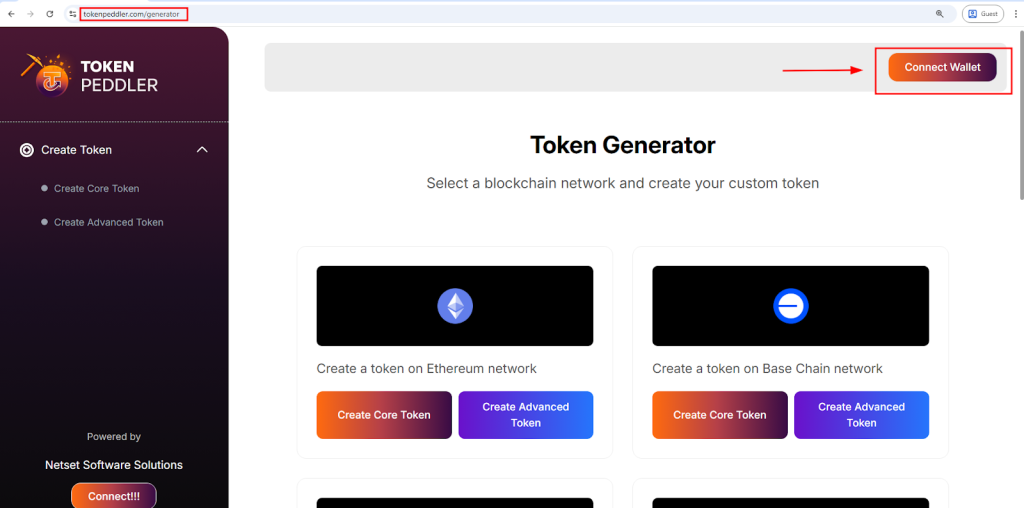
To begin, go to the official token generator at https://tokenpeddler.com/generator. On this page, you’ll see a “Connect Wallet” button at the top and on the right-hand side of the screen. Click this button to connect your Web3 wallet, such as MetaMask. Token Peddler verifies your wallet securely without storing private keys or sensitive information.
Once connected successfully, you will see a list of supported networks. Select “Create a Token on BNB Smart Chain” to move forward. After selecting the network, you’ll enter the token creation interface where you can choose between the Core or Advanced Token Creator options.
Highlights:
- Visit: https://tokenpeddler.com/generator
- Click Connect Wallet at the top or right
- Works with MetaMask for BNB Smart Chain
- Choose Create a Token on BNB Smart Chain
- Pick between Core and Advanced creator modes
Step 2: Configure Your BEP20 Token Details
Once you’re inside the token creation interface, the next step is customizing your BEP20 token settings. Token Peddler provides a guided form where you can enter your token’s name, symbol, decimals, and total supply. These basic details define how your token will appear and behave on the Binance Smart Chain.
If you’re using the Core Token Creator, you’ll be able to create a standard BEP20 token with minimal setup. For more advanced features, switch to the Advanced Creator, where you can enable minting, burning, pausing, max-supply restrictions, blacklists, and more. Token Peddler automatically includes your selected features in a secure, pre-audited BEP20 smart contract.
Highlights:
- Enter token name, symbol, supply, and decimals
- Choose Core (simple) or Advanced (customizable)
- Enable mint, burn, pause, blacklist, and max supply
- Built on pre-audited BEP20 contract templates
Step 3: Create Your Token Instantly With One Click
After entering all your BEP20 token details and selecting any optional features, you’re ready to generate your Binance Smart Chain token. At this stage, all you need to do is click the “Create Token” button. This action triggers Token Peddler’s automated smart contract engine, which instantly builds a fully functional BEP20-compatible token contract based on the information you provided.
You don’t need to write, edit, or even read Solidity code — the platform uses secure, pre-audited BEP20 templates to ensure your contract is created safely and correctly. The system compiles everything behind the scenes, greatly reducing the risk of coding errors or misconfigurations. As soon as you click the button, your connected wallet (such as MetaMask) will prompt you to approve the contract creation process and prepare it for deployment. The wallet window will also show the estimated gas fee required on the Binance Smart Chain network.
Because BSC is known for its low transaction fees, generating and deploying your BEP20 token is significantly cheaper than deploying tokens on networks like Ethereum. You can review the cost directly in your wallet before confirming. Once you approve the action, Token Peddler finalizes your smart contract and prepares it for deployment — all in a seamless, single-step process.
Highlights:
- Click Create Token to automatically generate your BEP20 smart contract
- No coding required — built using secure, pre-audited BEP20 templates
- MetaMask displays BSC network details and gas fees before approval
- Contract is fully compiled and ready for deployment instantly
Step 4: Deploy Your BEP20 Token on Binance Smart Chain
When your contract is ready, you can deploy it directly from your connected wallet. Click “Deploy” and your wallet will prompt you to confirm the transaction and gas fee. Token Peddler does not charge platform fees—only the blockchain gas fee is required. Because Binance Smart Chain is known for low fees, deploying a BEP20 token is typically very affordable.
Once you confirm the transaction, the network will process it and your token will go live on-chain. Your wallet address becomes the owner of the smart contract, and the token cannot be modified once deployed.
Highlights:
- Deploy with one click from your wallet
- Only pay BSC gas fees—no platform charges
- Fast and low-cost deployment
- Token becomes permanent and fully owned by you
Step 5: Verify and Manage Your BEP20 Token
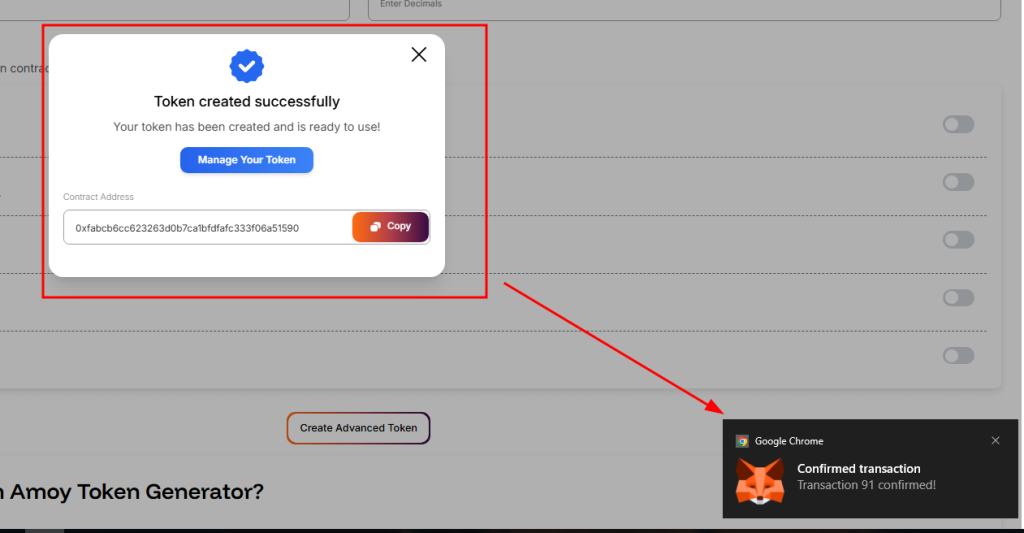
After deployment, Token Peddler will display your contract address and important deployment details. You can verify your token on BscScan by entering the contract address. From here, you can add the token to MetaMask or any Web3 wallet, interact with it, and use features like minting or burning if they were enabled during creation. Your BEP20 token is immediately compatible with decentralized exchanges, dApps, Web3 tools, and BNB Smart Chain wallets.
Highlights:
- View contract details and verify on BscScan
- Add token to MetaMask or other wallets
- Mint/burn/manage supply if enabled
- Ready for utility, community use, and integrations
Advantages of Using a Token Generator vs Coding Manually
Using a no-code tool like Token Peddler for BEP20 token creation offers major benefits over writing smart contracts manually. Coding your own BEP20 token requires deep Solidity knowledge, debugging, testing, and typically an external audit to ensure security. A BNB Smart Chain token generator, on the other hand, lets you create a fully functional token within minutes using secure, pre-audited templates — without worrying about vulnerabilities or development delays.
Here’s a clear comparison:
| Feature | Coding Yourself | Token Generator (No-Code) |
| Coding required | ✔ Yes | ❌ No |
| Time to deploy | Weeks | Minutes |
| Contract security | Needs custom audit | Pre-audited BEP20 templates |
| Cost | $1,000s+ in dev fees | Gas fees only |
| Ownership | Depends on developer | 100% user-owned (from wallet) |
| Risk of bugs | High without audit | Low — standardized templates |
| Multi-chain support | Difficult to build | One-click if supported |
A reputable no-code BEP20 generator dramatically reduces complexity and error risk while giving you complete on-chain control. Your wallet signs and deploys everything directly — no intermediaries, no developer dependency.
Quick Safety Checklist Before You Deploy
Before launching your BEP20 token on Binance Smart Chain, follow these quick safety guidelines to avoid costly mistakes:
- Double-check your token name, symbol, decimals, and supply — these cannot be changed after deployment.
- Use testnets first (BNB Smart Chain Testnet) if you’re experimenting or unsure about your settings.
- Choose generators that use OpenZeppelin-style templates, as they follow widely trusted industry standards.
- Avoid enabling powerful admin features (like minting or pausing) unless you understand how to manage them responsibly.
- If planning a public token sale, consider getting a third-party audit, especially for high-value or long-term projects.
- Secure your private keys, admin roles, liquidity, and wallets — use multisig or timelocks for better transparency and community trust.
Conclusion
If you’re ready to create your BEP20 token, you can launch it instantly through the Token Peddler generator using a simple, step-by-step workflow. And if you prefer to practice first, you can safely test the entire process using our BNB Testnet token generator before deploying on the Binance Smart Chain Mainnet.
By eliminating technical barriers and simplifying smart-contract deployment, Token Peddler empowers creators, entrepreneurs, developers, and innovators to bring their Web3 ideas to life quickly, affordably, and confidently.
Frequently Asked Questions (FAQs)
1. How long does it take to deploy a BEP20 token?
Deployment usually takes under a minute. The exact time depends on network congestion and BSC node speed.
2. How much does it cost to deploy a BEP20 token?
Token Peddler is free to use. You only pay the gas fee charged by Binance Smart Chain, which is typically very low compared to other networks.
3. Is the BEP20 Token Generator free?
Yes. Token Peddler does not charge any fee for creating or deploying your BEP20 token.
4. Which networks are supported?
You can create tokens on:
- Binance Smart Chain
- Ethereum
- Polygon
- Base
- Solana
- Multiple testnets
5. Can I customize my BEP20 token?
Yes. You can add advanced features like minting, burning, pausing, and max supply controls.
6. Can I mint more BEP20 tokens later?
Yes—if you enabled the minting feature during creation.
7. Can I change token settings after deployment?
No. Once deployed, the contract is permanent and cannot be modified.
8. Can I renounce ownership?
Yes. You can renounce ownership after deployment to make the contract fully decentralized.

2 Responses