Creating a token on Ethereum used to require deep Solidity knowledge, smart-contract auditing, long development cycles, and thousands of dollars in engineering time. But thanks to modern no-code blockchain tools, anyone can now create an ERC20 token, customize its features, and launch a token on Ethereum—without writing a single line of code.
One of the most powerful and secure tools for this purpose is Token Peddler, a decentralized token smart contract creator designed for fast, effortless token deployment across multiple networks. With Token Peddler, users can generate tokens in minutes using a guided interface—complete with pre-audited templates, minting options, burn functions, and secure wallet-based authentication.
In this guide, you’ll learn everything you need to know about how to:
- Use an Ethereum token generator
- Build a customizable ERC20 token
- Configure token name, supply, decimals, and advanced features
- Deploy your token on Ethereum, BNB Smart Chain, Polygon, Solana, Base, and more
- Avoid coding errors, high developer fees, and complex smart-contract risks
- Securely launch your token using your own wallet
This step-by-step tutorial will take you from idea to live token—along with pro tips for safe token deployment, best practices, and key features of Token Peddler’s no-code system.
Let’s dive in.
How to Create and Deploy ERC20 Tokens Online
Step 1: Visit the Token Generator and Connect Your Wallet
To begin creating your ERC20 token, start by visiting the official Token Peddler generator page at https://tokenpeddler.com/generator. As soon as the page loads, you’ll notice a “Connect Wallet” button placed prominently at the top of the screen and also on the right side of the interface. Clicking this button allows you to connect your preferred Web3 wallet—typically MetaMask for Ethereum and other EVM-compatible networks.
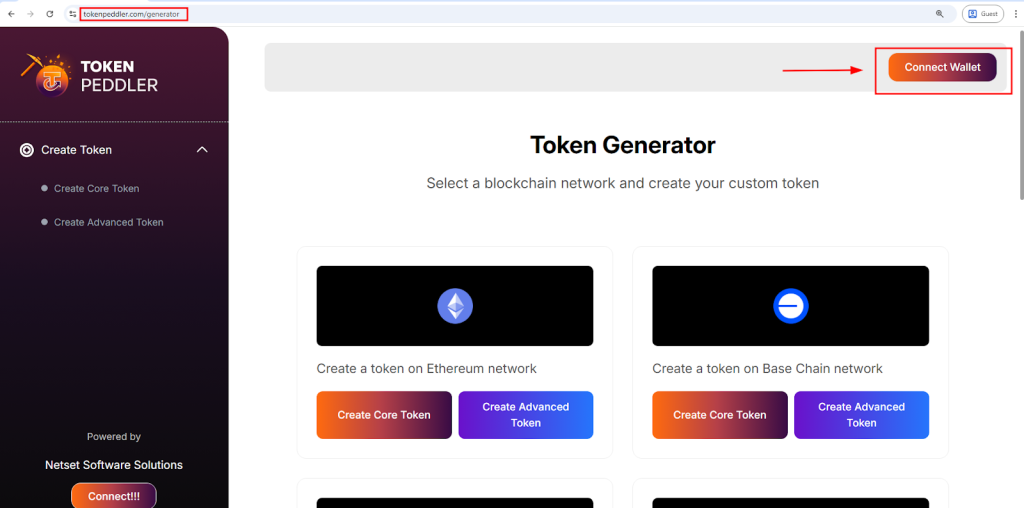
Token Peddler uses secure wallet authentication, meaning your private keys are never shared or stored. Once your wallet is connected, the platform will display a list of all supported networks. From this list, select “Create a Token on Ethereum” to continue.

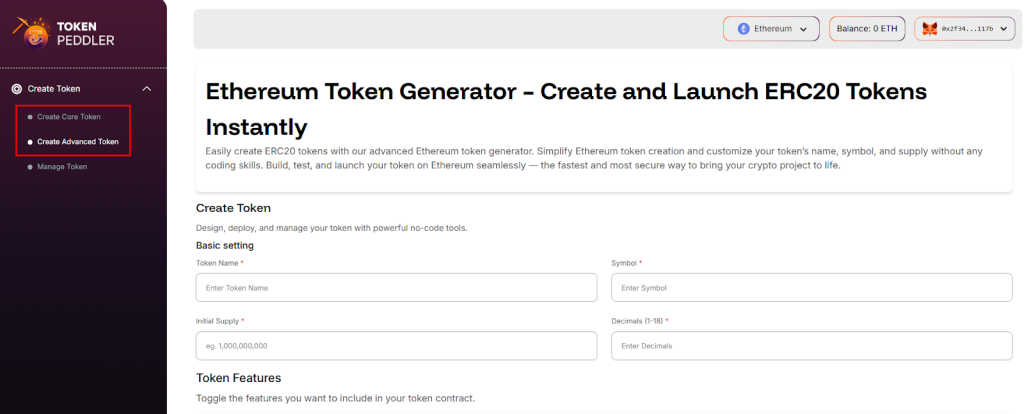
You will then be taken to the token creation interface, where you can choose between two creation modes: the Core Token Creator for quick, simplified token setup, and the Advanced Token Creator for users who want more flexibility and token customization options.
Highlights:
- Go to https://tokenpeddler.com/generator
- Click Connect Wallet (top or right side)
- Works with MetaMask and other supported wallets
- Select Create a Token on Ethereum from the network list
- Choose between Core or Advanced token creation modes
Step 2: Configure Your Token Details
Once you reach the token creation interface, the next step is to configure the core details of your ERC20 token. Token Peddler provides a clean and guided input form where you can enter your token name, symbol, total supply, and decimal count. These basic attributes form the foundation of your token’s identity and functionality on the blockchain.
If you select the Core Token Creator, you’ll be able to set only the essential fields, making the process quick and beginner-friendly. If you choose the Advanced Creator, you can access extra customization options—such as enabling minting, burning, pausing, blacklisting, max supply limits, and more. Each setting you choose is automatically integrated into your contract through Token Peddler’s pre-audited ERC20 templates. This ensures your ERC20 token follows secure industry standards without requiring any coding.
Highlights:
- Enter token name, symbol, decimals, and supply
- Choose simple setup (Core) or fully customizable (Advanced)
- Optional features include mint, burn, pause, max supply, etc.
- All contract logic auto-generated using secure templates
Step 3: Create Your Token Instantly With One Click
After filling out all your token details in Step 2, you can create your token instantly by clicking the “Create Token” button. There is no need to manually generate or review a smart contract—Token Peddler handles everything automatically in the background.
The platform takes your chosen parameters and applies them to its secure, pre-audited Base-compatible contract templates. This ensures your token smart contract is created correctly, without any coding or technical steps required from your side. With just one click, your configured token is ready for deployment through your connected wallet.
Highlights:
- Click Create Token to instantly prepare your contract
- No manual contract generation or coding
- Uses secure, pre-audited Base token templates
- All settings are applied automatically
Step 4: Deploy Your ERC20 Token to the Blockchain
Once you click the Create Token button, your wallet automatically prompts you to confirm the deployment transaction on the Ethereum Network. Token Peddler does not charge any platform fees, so the only cost involved is the gas fee required by the blockchain.
After you approve the transaction, the smart contract is deployed directly from your wallet to the Ethereum blockchain. Within seconds, your token becomes live, immutable, and fully owned by your wallet address. There are no intermediaries, no permissions, and no further steps—your Ethereum token is deployed instantly and ready to use.
Highlights:
- Deploy to Ethereum with a single wallet confirmation
- Only gas fees apply—no service fees
- Token becomes permanent and immutable on-chain
- Full contract ownership remains with your wallet
Step 5: Verify, Manage, and Use Your Token
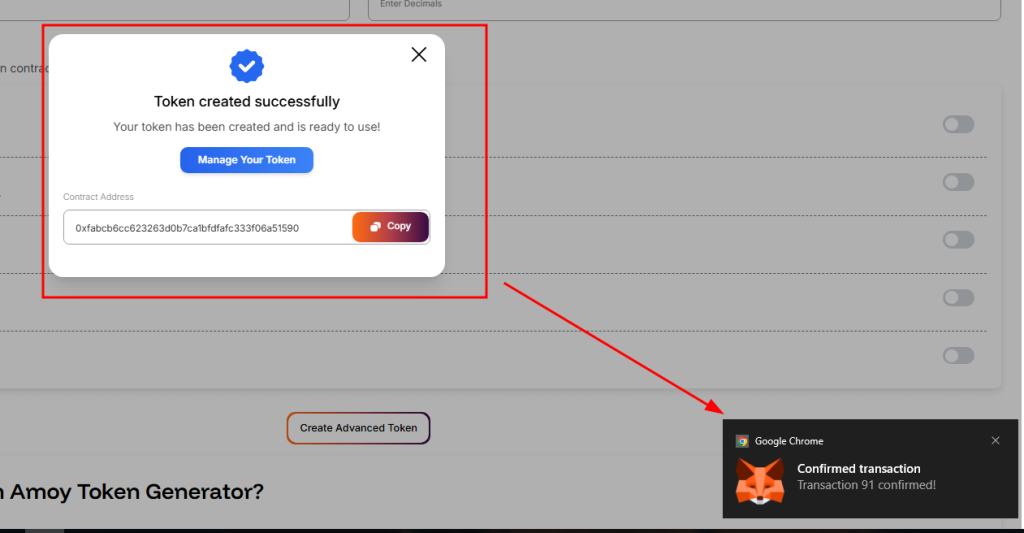
After your token is deployed, Token Peddler provides your contract address along with deployment details. You can paste this address into Etherscan (or the appropriate explorer) to verify your ERC20 contract and view your token on-chain. From here, you can easily add the token to your wallet, begin interacting with it, or perform actions like minting or burning if those features were enabled.
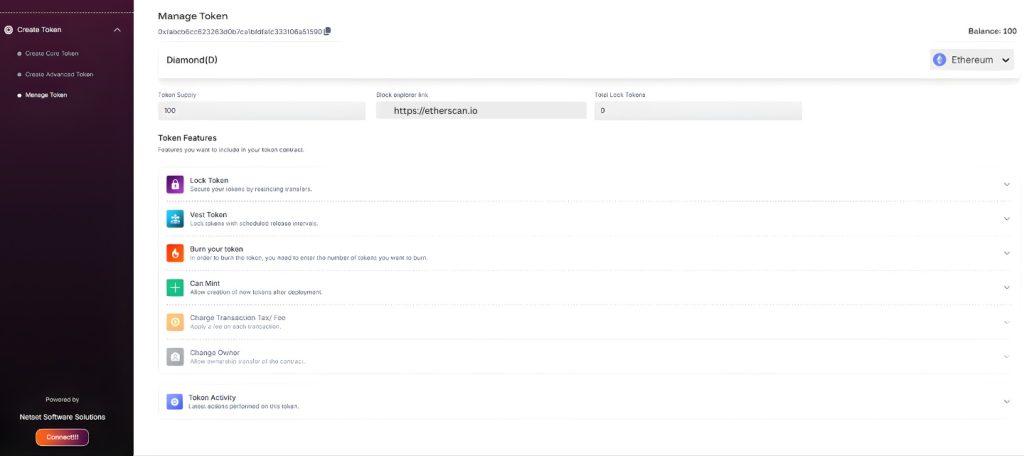
Your token will be immediately compatible with DApps, Web3 wallets, decentralized exchanges, and other platforms that support ERC20 tokens. This means you can start using your token for your project, community, or ecosystem right away.
Highlights:
- View and verify your token on blockchain explorers
- Add token to your wallet with its contract address
- Mint, burn, or manage supply if features were enabled
- Token instantly works with DApps, DEXs, and Web3 tools
Advantages of Using Token Peddler Over Coding Manually
| Feature | Coding Yourself | Token Peddler |
| Coding required | ✔ Yes | ❌ No |
| Time to deploy | Weeks | Minutes |
| Contract security | Needs audit | Pre-audited |
| Cost | $5,000+ | Gas fees only |
| Ownership | Varies | 100% user-owned |
| Risk of bugs | High | Very low |
| Multi-chain deployment | Hard | One-click |
Token Peddler is faster, safer, and dramatically more affordable.
Frequently Asked Questions (FAQs)
- How long does it take to deploy a token?
Deploying a token is usually very fast and takes less than a minute. The only variable is blockchain congestion—if the network is busy, your transaction may take slightly longer. As soon as the transaction is confirmed by the blockchain, your token becomes live, visible, and fully functional.
- How much does it cost to deploy an ERC20 token?
Token Peddler does not charge any platform fees. The only cost is the gas fee required by the blockchain network you are deploying on. Gas fees vary based on the network and real-time congestion. On Ethereum mainnet, fees are typically higher, while networks like BNB Smart Chain and Polygon are much more affordable.
- Is the Token Generator free?
Yes. Token Peddler’s token generator is completely free to use. There are no hidden platform fees, subscription fees, or token deployment charges. You only pay the blockchain gas fee required for the transaction.
- Which blockchains are supported?
Token Peddler supports a wide range of blockchain networks, including:
- Ethereum Mainnet
- BNB Smart Chain
- Polygon
- Base Chain
- Solana
- Ethereum Sepolia
- Base Sepolia
- BNB Smart Chain Testnet
- Polygon Amoy
- Solana Devnet
More networks may be added over time, depending on availability and ecosystem demand.
- Can I customize my token?
Yes. Token Peddler offers both a Core Creator and an Advanced Creator. The Core Creator is ideal for basic tokens, while the Advanced Creator allows you to enable features such as minting, burning, pausing, max supply control, and more. You have full freedom to tailor your token to your project’s needs.
- Can I add minting or burning functions?
Absolutely. If you use the Advanced Creator, you can enable minting and burning features with a single click. These features give you more control over your token supply and how it evolves over time.
- Can I mint more tokens later?
Yes—if you enabled Minting during creation. After deployment, you can mint additional tokens directly from your wallet by interacting with your smart contract. If minting was not enabled initially, you cannot add it later.
- Can I change my token after deployment?
No. Once your ERC20 token is deployed to the blockchain, it cannot be changed, edited, or modified in any way. This immutability ensures trust and transparency within the Web3 ecosystem. Always review your token details carefully before deploying.
- Can I renounce ownership?
Yes. If your token includes owner-controlled features, you can choose to renounce ownership after deployment. Renouncing ownership removes your control over admin functions and makes the contract fully decentralized. This is a common practice for trust-based and community-driven token launches.
Conclusion
Launching and deploying your own ERC20 token no longer requires technical knowledge, coding skills, or hiring expensive blockchain developers. With platforms like Token Peddler, anyone—from entrepreneurs and startups to creators and communities—can build a fully functional token in just a few minutes. The guided interface, secure wallet authentication, and pre-audited smart contract templates make the entire process seamless and beginner-friendly.
Whether you want to experiment with tokenomics, launch a community token, create utility for your application, or simply explore Web3, Token Peddler provides an effortless way to bring your idea to life. By combining simplicity with real blockchain power, it gives you full ownership, flexibility, and control—without the complexity. Now, anyone can step into the world of token creation and launch a custom ERC20 token on Ethereum with confidence.

Vertyowdiwjodko kofkosfjwgojfsjf oijwfwsfjowehgewjiofwj jewfkwkfdoeguhrfkadwknfew ijedkaoaswnfeugjfkadcajsfn tokenpeddler.com